Re: [Ovmsdev] OVMS VIN 4E9->4F1->4E1 (was OVMS VIN 4E9->4F1)

Michael, OK. I found some old logs you sent me before and these show: 7.628 R11 4E9 E1 80 00 04 6C 00 7.637 R11 514 47 31 52 39 36 45 34 39 8.647 R11 4F1 41 A1 01 A1 00 36 08 88 The 514 looks fine. But, both 4E9 and 4F1 look wrong. In particular, the 4F1 has '41 A1 01 A1 00' - which is what we are seeing for your VIN. But, id #4E1 has: 8.694 R11 4E1 43 55 31 31 36 34 38 39 If the VIN was in 4E1 and 514, that would give us: 8.694 R11 4E1 43 55 31 31 36 34 38 39 7.637 R11 514 47 31 52 39 36 45 34 39 Or, CU116489G1R96E49 for your car. For RScott, his logs show: 41966.094 R11 4E1 42 55 31 30 32 36 38 39 41966.110 R11 514 47 31 52 44 36 45 34 36 Or, BU102389G1RD6E36 for his car. Is that correct? Reading back through the old eMails, I find this from RScott:
The VIN can be constructed by taking the number "1" and converting the CAN IDs 4E9 and 514 to ASCII. So with "4E1 4255313032363839" and "514 4731524436453436", you would end up with 42 55 31 30 32 36 38 39 47 31 52 44 36 45 34 36, where 42 is ASCII for B, 55 is U, etc.
So, I think the whole 4E9 was just a typo, as 4E1 is what is mentioned later in the same sentence. I've committed the code with 4E1 into github now. It works ok on my simulator, and hopefully should be ok in your car now. Can you try? Regards, Mark. On 26 Dec, 2012, at 9:12 PM, Mark Webb-Johnson <mark@webb-johnson.net> wrote:
Michael,
I've put this up on my test bench, set to VA vehicle type, and setting my simulator to 500Kbps CAN speed, then transmitting the following three messages once a second:
ID#206 A0 10 00 00 00 00 00 00 ID#4F1 42 55 31 30 32 36 38 39 ID#514 47 31 52 44 D6 45 34 36
Then, with the module in SETUP mode, I get:
S MODULE? # Module: VehicleID:TESTCAR VehicleType:VA Units:K Notifications:IP
DIAG # DIAG
# Firmware: 2.1.1/VA/V2 # SWITCH: 1 # 12V Line: 14.0 V # Signal: 0
# VIN: BU102689G1RD6E46 (VA) # SOC: 64% (0 ideal, 0 est miles)
That all looks ok. The message from your car is:
GERMANVOLT rx msg F 2.1.1/V2,A??,24,0,VA,E-Plus
00000040 20 6d 73 67 20 46 20 32 2e 31 2e 31 2f 56 32 2c | msg F 2.1.1/V2,| 00000050 41 a1 01 a1 2c 32 31 2c 30 2c 56 41 2c 45 2d 50 |A...,21,0,VA,E-P| 00000060 6c 75 73 0a |lus.|
Your VIN is showing up as 41,A1,01,A1 - as you say: wrong.
But, the firmware version and car type look ok. Not sure why they would not show up in the App. Perhaps the corrupt VIN# is messing up interpretation of that message? Perhaps the high bit on the A1 is messing it up.
Not sure what is going on in your car itself. Can you check any captures you have for the exact id#4F1 and id#514 messages you have, and let me know?
Regards, Mark.
On 21 Dec, 2012, at 9:33 PM, mikeljo@mac.com wrote:
Hi,
thanks.
Works. Get the correct infos from my car. Implement the SOC calculation from my previous mail.
- GPS ok - SOC ok
BUT: - no VIN - No Car Type - no car firmware
Here some Pics from the App:
<IMG_1075.PNG> <IMG_1076.PNG> <IMG_1077.PNG> <IMG_1078.PNG>
The App is the 1.3.2 compiled from the git. This is NOT the one from the Store!?
BTW: You see the GSM Signal is -113dBm. When one door is open i got -87dBm. Heavy attenuation. I think i must mount the antenna outside the car. GPS is ok.
Bye michael
Am 21.12.2012 um 02:19 schrieb Mark Webb-Johnson <mark@webb-johnson.net>:
Michael,
Parameter #14 (PARAM_VEHICLETYPE) holds the selected vehicle type. This can be set either from the smartphone apps, or via the SMS MODULE command.
Regards, Mark.
On 21 Dec, 2012, at 4:31 AM, mikeljo@mac.com wrote:
Hi,
i checked it out. It compiles without error. But i think i missed something: how to switch between the cars? I know you do something, but couldn't find the howto. I found the ROM Parameter "VA" in "vehicle.c", but how to put this in the ROM? SMS Command?
Sorry.
Bye Michael
Am 20.12.2012 um 15:08 schrieb Mark Webb-Johnson <mark@webb-johnson.net>:
Michael J:
The following commit should fix this:
* 269cd4f (HEAD, origin/master, origin/HEAD, master) Ampera VIN 4E9->4F1
Can you check the code now in master head, and see if it has everything you need. It builds and compiles on v2 hardware, but you'll need to change the compiler flags to get it building on v1 (just change TESLAROADSTER to VOLTAMPERA).
What was the end result of the SOC range changes? Any ideas on the solution?
Regards, Mark.
On 6 Nov, 2012, at 5:28 AM, mikeljo@mac.com wrote:
Hi mark,
do you think at the VIN?
1 + 514 + 4F1

Hi, Strange. My VIN is 1G1R96E49CU116489 Read from the papers The calc for the VIN is 1.514.4e1 (c Notation, dot means concat). With this your Reading Look ok. Will try later the New Code later. Bye Michael Von unterwegs gesendet Am 26.12.2012 um 14:52 schrieb Mark Webb-Johnson <mark@webb-johnson.net>:
Michael,
OK. I found some old logs you sent me before and these show:
7.628 R11 4E9 E1 80 00 04 6C 00 7.637 R11 514 47 31 52 39 36 45 34 39 8.647 R11 4F1 41 A1 01 A1 00 36 08 88
The 514 looks fine. But, both 4E9 and 4F1 look wrong. In particular, the 4F1 has '41 A1 01 A1 00' - which is what we are seeing for your VIN.
But, id #4E1 has:
8.694 R11 4E1 43 55 31 31 36 34 38 39
If the VIN was in 4E1 and 514, that would give us:
8.694 R11 4E1 43 55 31 31 36 34 38 39 7.637 R11 514 47 31 52 39 36 45 34 39
Or, CU116489G1R96E49 for your car.
For RScott, his logs show:
41966.094 R11 4E1 42 55 31 30 32 36 38 39 41966.110 R11 514 47 31 52 44 36 45 34 36
Or, BU102389G1RD6E36 for his car.
Is that correct?
Reading back through the old eMails, I find this from RScott:
The VIN can be constructed by taking the number "1" and converting the CAN IDs 4E9 and 514 to ASCII. So with "4E1 4255313032363839" and "514 4731524436453436", you would end up with 42 55 31 30 32 36 38 39 47 31 52 44 36 45 34 36, where 42 is ASCII for B, 55 is U, etc.
So, I think the whole 4E9 was just a typo, as 4E1 is what is mentioned later in the same sentence.
I've committed the code with 4E1 into github now. It works ok on my simulator, and hopefully should be ok in your car now.
Can you try?
Regards, Mark.
On 26 Dec, 2012, at 9:12 PM, Mark Webb-Johnson <mark@webb-johnson.net> wrote:
Michael,
I've put this up on my test bench, set to VA vehicle type, and setting my simulator to 500Kbps CAN speed, then transmitting the following three messages once a second:
ID#206 A0 10 00 00 00 00 00 00 ID#4F1 42 55 31 30 32 36 38 39 ID#514 47 31 52 44 D6 45 34 36
Then, with the module in SETUP mode, I get:
S MODULE? # Module: VehicleID:TESTCAR VehicleType:VA Units:K Notifications:IP
DIAG # DIAG
# Firmware: 2.1.1/VA/V2 # SWITCH: 1 # 12V Line: 14.0 V # Signal: 0
# VIN: BU102689G1RD6E46 (VA) # SOC: 64% (0 ideal, 0 est miles)
That all looks ok. The message from your car is:
GERMANVOLT rx msg F 2.1.1/V2,A??,24,0,VA,E-Plus
00000040 20 6d 73 67 20 46 20 32 2e 31 2e 31 2f 56 32 2c | msg F 2.1.1/V2,| 00000050 41 a1 01 a1 2c 32 31 2c 30 2c 56 41 2c 45 2d 50 |A...,21,0,VA,E-P| 00000060 6c 75 73 0a |lus.|
Your VIN is showing up as 41,A1,01,A1 - as you say: wrong.
But, the firmware version and car type look ok. Not sure why they would not show up in the App. Perhaps the corrupt VIN# is messing up interpretation of that message? Perhaps the high bit on the A1 is messing it up.
Not sure what is going on in your car itself. Can you check any captures you have for the exact id#4F1 and id#514 messages you have, and let me know?
Regards, Mark.
On 21 Dec, 2012, at 9:33 PM, mikeljo@mac.com wrote:
Hi,
thanks.
Works. Get the correct infos from my car. Implement the SOC calculation from my previous mail.
- GPS ok - SOC ok
BUT: - no VIN - No Car Type - no car firmware
Here some Pics from the App:
<IMG_1075.PNG> <IMG_1076.PNG> <IMG_1077.PNG> <IMG_1078.PNG>
The App is the 1.3.2 compiled from the git. This is NOT the one from the Store!?
BTW: You see the GSM Signal is -113dBm. When one door is open i got -87dBm. Heavy attenuation. I think i must mount the antenna outside the car. GPS is ok.
Bye michael
Am 21.12.2012 um 02:19 schrieb Mark Webb-Johnson <mark@webb-johnson.net>:
Michael,
Parameter #14 (PARAM_VEHICLETYPE) holds the selected vehicle type. This can be set either from the smartphone apps, or via the SMS MODULE command.
Regards, Mark.
On 21 Dec, 2012, at 4:31 AM, mikeljo@mac.com wrote:
Hi,
i checked it out. It compiles without error. But i think i missed something: how to switch between the cars? I know you do something, but couldn't find the howto. I found the ROM Parameter "VA" in "vehicle.c", but how to put this in the ROM? SMS Command?
Sorry.
Bye Michael
Am 20.12.2012 um 15:08 schrieb Mark Webb-Johnson <mark@webb-johnson.net>:
Michael J:
The following commit should fix this:
* 269cd4f (HEAD, origin/master, origin/HEAD, master) Ampera VIN 4E9->4F1
Can you check the code now in master head, and see if it has everything you need. It builds and compiles on v2 hardware, but you'll need to change the compiler flags to get it building on v1 (just change TESLAROADSTER to VOLTAMPERA).
What was the end result of the SOC range changes? Any ideas on the solution?
Regards, Mark.
On 6 Nov, 2012, at 5:28 AM, mikeljo@mac.com wrote:
> Hi mark, > > do you think at the VIN? > > 1 + 514 + 4F1
_______________________________________________ OvmsDev mailing list OvmsDev@lists.teslaclub.hk http://lists.teslaclub.hk/mailman/listinfo/ovmsdev
Hi, check it out. Compiles without error. Change the code in vehicle_voltampera.c for the VIN to this: ---------code------------- else if ((CANctrl & 0x07) == 3) // Acceptance Filter 3 (RXF3) = CAN ID 4E1 { // The VIN can be constructed by taking the number "1" and converting the CAN IDs 4E1 and 514 to ASCII. // So with "4E1 4255313032363839" and "514 4731524436453436", // you would end up with 42 55 31 30 32 36 38 39 47 31 52 44 36 45 34 36, // where 42 is ASCII for B, 55 is U, etc. for (k=0;k<8;k++) car_vin[k+9] = can_databuffer[k]; car_vin[17] = 0; } else if ((CANctrl & 0x07) == 4) // Acceptance Filter 4 (RXF4) = CAN ID 514 { car_vin[0] = '1'; for (k=0;k<8;k++) car_vin[k+1] = can_databuffer[k]; //car_vin[16] = 0; } ---------code------------- Burn it to the Module. Active since 21:09 CET (UTC+1) 26.12.2012 And here you can see the result: It looks like it works. :-) Bye mikeljo BTW: why has the Car Firmware in the GIT 1.3.2 and the Developer Version in iTunes 1.3.3? Am 26.12.2012 um 20:19 schrieb Michael Jochum <mikeljo@me.com>:
Hi,
Strange. My VIN is 1G1R96E49CU116489 Read from the papers The calc for the VIN is 1.514.4e1 (c Notation, dot means concat). With this your Reading Look ok.
Will try later the New Code later.
Bye Michael
Von unterwegs gesendet
Am 26.12.2012 um 14:52 schrieb Mark Webb-Johnson <mark@webb-johnson.net>:
Michael,
OK. I found some old logs you sent me before and these show:
7.628 R11 4E9 E1 80 00 04 6C 00 7.637 R11 514 47 31 52 39 36 45 34 39 8.647 R11 4F1 41 A1 01 A1 00 36 08 88
The 514 looks fine. But, both 4E9 and 4F1 look wrong. In particular, the 4F1 has '41 A1 01 A1 00' - which is what we are seeing for your VIN.
But, id #4E1 has:
8.694 R11 4E1 43 55 31 31 36 34 38 39
If the VIN was in 4E1 and 514, that would give us:
8.694 R11 4E1 43 55 31 31 36 34 38 39 7.637 R11 514 47 31 52 39 36 45 34 39
Or, CU116489G1R96E49 for your car.
For RScott, his logs show:
41966.094 R11 4E1 42 55 31 30 32 36 38 39 41966.110 R11 514 47 31 52 44 36 45 34 36
Or, BU102389G1RD6E36 for his car.
Is that correct?
Reading back through the old eMails, I find this from RScott:
The VIN can be constructed by taking the number "1" and converting the CAN IDs 4E9 and 514 to ASCII. So with "4E1 4255313032363839" and "514 4731524436453436", you would end up with 42 55 31 30 32 36 38 39 47 31 52 44 36 45 34 36, where 42 is ASCII for B, 55 is U, etc.
So, I think the whole 4E9 was just a typo, as 4E1 is what is mentioned later in the same sentence.
I've committed the code with 4E1 into github now. It works ok on my simulator, and hopefully should be ok in your car now.
Can you try?
Regards, Mark.
On 26 Dec, 2012, at 9:12 PM, Mark Webb-Johnson <mark@webb-johnson.net> wrote:
Michael,
I've put this up on my test bench, set to VA vehicle type, and setting my simulator to 500Kbps CAN speed, then transmitting the following three messages once a second:
ID#206 A0 10 00 00 00 00 00 00 ID#4F1 42 55 31 30 32 36 38 39 ID#514 47 31 52 44 D6 45 34 36
Then, with the module in SETUP mode, I get:
S MODULE? # Module: VehicleID:TESTCAR VehicleType:VA Units:K Notifications:IP
DIAG # DIAG
# Firmware: 2.1.1/VA/V2 # SWITCH: 1 # 12V Line: 14.0 V # Signal: 0
# VIN: BU102689G1RD6E46 (VA) # SOC: 64% (0 ideal, 0 est miles)
That all looks ok. The message from your car is:
GERMANVOLT rx msg F 2.1.1/V2,A??,24,0,VA,E-Plus
00000040 20 6d 73 67 20 46 20 32 2e 31 2e 31 2f 56 32 2c | msg F 2.1.1/V2,| 00000050 41 a1 01 a1 2c 32 31 2c 30 2c 56 41 2c 45 2d 50 |A...,21,0,VA,E-P| 00000060 6c 75 73 0a |lus.|
Your VIN is showing up as 41,A1,01,A1 - as you say: wrong.
But, the firmware version and car type look ok. Not sure why they would not show up in the App. Perhaps the corrupt VIN# is messing up interpretation of that message? Perhaps the high bit on the A1 is messing it up.
Not sure what is going on in your car itself. Can you check any captures you have for the exact id#4F1 and id#514 messages you have, and let me know?
Regards, Mark.
On 21 Dec, 2012, at 9:33 PM, mikeljo@mac.com wrote:
Hi,
thanks.
Works. Get the correct infos from my car. Implement the SOC calculation from my previous mail.
- GPS ok - SOC ok
BUT: - no VIN - No Car Type - no car firmware
Here some Pics from the App:
<IMG_1075.PNG> <IMG_1076.PNG> <IMG_1077.PNG> <IMG_1078.PNG>
The App is the 1.3.2 compiled from the git. This is NOT the one from the Store!?
BTW: You see the GSM Signal is -113dBm. When one door is open i got -87dBm. Heavy attenuation. I think i must mount the antenna outside the car. GPS is ok.
Bye michael
Am 21.12.2012 um 02:19 schrieb Mark Webb-Johnson <mark@webb-johnson.net>:
Michael,
Parameter #14 (PARAM_VEHICLETYPE) holds the selected vehicle type. This can be set either from the smartphone apps, or via the SMS MODULE command.
Regards, Mark.
On 21 Dec, 2012, at 4:31 AM, mikeljo@mac.com wrote:
Hi,
i checked it out. It compiles without error. But i think i missed something: how to switch between the cars? I know you do something, but couldn't find the howto. I found the ROM Parameter "VA" in "vehicle.c", but how to put this in the ROM? SMS Command?
Sorry.
Bye Michael
Am 20.12.2012 um 15:08 schrieb Mark Webb-Johnson <mark@webb-johnson.net>:
> Michael J: > > The following commit should fix this: > > * 269cd4f (HEAD, origin/master, origin/HEAD, master) Ampera VIN 4E9->4F1 > > Can you check the code now in master head, and see if it has everything you need. It builds and compiles on v2 hardware, but you'll need to change the compiler flags to get it building on v1 (just change TESLAROADSTER to VOLTAMPERA). > > What was the end result of the SOC range changes? Any ideas on the solution? > > Regards, Mark. > > On 6 Nov, 2012, at 5:28 AM, mikeljo@mac.com wrote: > >> Hi mark, >> >> do you think at the VIN? >> >> 1 + 514 + 4F1 >
_______________________________________________ OvmsDev mailing list OvmsDev@lists.teslaclub.hk http://lists.teslaclub.hk/mailman/listinfo/ovmsdev
_______________________________________________ OvmsDev mailing list OvmsDev@lists.teslaclub.hk http://lists.teslaclub.hk/mailman/listinfo/ovmsdev
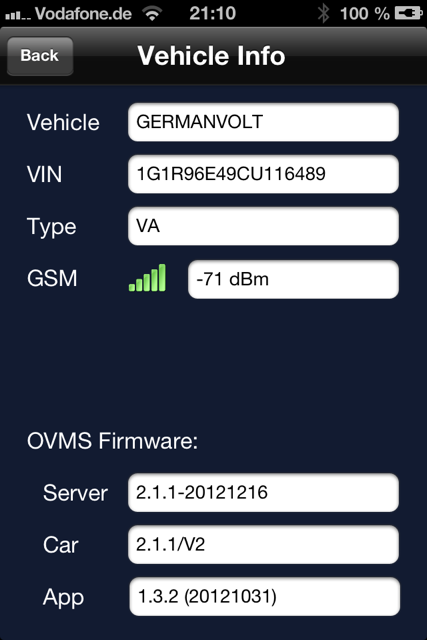
Michael, Looks good. Your car is now showing: 2012-12-26 08:45:47.308650 -0500 info main: #60 C GERMANVOLT rx msg F 2.1.1/V2,A??,22,0,VA,E-Plus 2012-12-26 15:07:13.104799 -0500 info main: #16 C GERMANVOLT rx msg F 2.1.1/V2,1G1R96E49CU116489,10,0,VA,E-Plus I've committed the code to master (head). Now, on to the other messages (I spoke about yesterday in the other thread). I'll try to drum up some interest in the forums to see if anyone can help with the decodes. It would be good if you could do the same. Regards, Mark. On 27 Dec, 2012, at 4:19 AM, mikeljo@me.com wrote:
Hi,
check it out. Compiles without error. Change the code in vehicle_voltampera.c for the VIN to this: ---------code------------- else if ((CANctrl & 0x07) == 3) // Acceptance Filter 3 (RXF3) = CAN ID 4E1 { // The VIN can be constructed by taking the number "1" and converting the CAN IDs 4E1 and 514 to ASCII. // So with "4E1 4255313032363839" and "514 4731524436453436", // you would end up with 42 55 31 30 32 36 38 39 47 31 52 44 36 45 34 36, // where 42 is ASCII for B, 55 is U, etc. for (k=0;k<8;k++) car_vin[k+9] = can_databuffer[k]; car_vin[17] = 0; } else if ((CANctrl & 0x07) == 4) // Acceptance Filter 4 (RXF4) = CAN ID 514 { car_vin[0] = '1'; for (k=0;k<8;k++) car_vin[k+1] = can_databuffer[k]; //car_vin[16] = 0; } ---------code------------- Burn it to the Module. Active since 21:09 CET (UTC+1) 26.12.2012
And here you can see the result:
<IMG_1084.PNG>
It looks like it works. :-)
Bye mikeljo
BTW: why has the Car Firmware in the GIT 1.3.2 and the Developer Version in iTunes 1.3.3?
Am 26.12.2012 um 20:19 schrieb Michael Jochum <mikeljo@me.com>:
Hi,
Strange. My VIN is 1G1R96E49CU116489 Read from the papers The calc for the VIN is 1.514.4e1 (c Notation, dot means concat). With this your Reading Look ok.
Will try later the New Code later.
Bye Michael
Von unterwegs gesendet
Am 26.12.2012 um 14:52 schrieb Mark Webb-Johnson <mark@webb-johnson.net>:
Michael,
OK. I found some old logs you sent me before and these show:
7.628 R11 4E9 E1 80 00 04 6C 00 7.637 R11 514 47 31 52 39 36 45 34 39 8.647 R11 4F1 41 A1 01 A1 00 36 08 88
The 514 looks fine. But, both 4E9 and 4F1 look wrong. In particular, the 4F1 has '41 A1 01 A1 00' - which is what we are seeing for your VIN.
But, id #4E1 has:
8.694 R11 4E1 43 55 31 31 36 34 38 39
If the VIN was in 4E1 and 514, that would give us:
8.694 R11 4E1 43 55 31 31 36 34 38 39 7.637 R11 514 47 31 52 39 36 45 34 39
Or, CU116489G1R96E49 for your car.
For RScott, his logs show:
41966.094 R11 4E1 42 55 31 30 32 36 38 39 41966.110 R11 514 47 31 52 44 36 45 34 36
Or, BU102389G1RD6E36 for his car.
Is that correct?
Reading back through the old eMails, I find this from RScott:
The VIN can be constructed by taking the number "1" and converting the CAN IDs 4E9 and 514 to ASCII. So with "4E1 4255313032363839" and "514 4731524436453436", you would end up with 42 55 31 30 32 36 38 39 47 31 52 44 36 45 34 36, where 42 is ASCII for B, 55 is U, etc.
So, I think the whole 4E9 was just a typo, as 4E1 is what is mentioned later in the same sentence.
I've committed the code with 4E1 into github now. It works ok on my simulator, and hopefully should be ok in your car now.
Can you try?
Regards, Mark.
On 26 Dec, 2012, at 9:12 PM, Mark Webb-Johnson <mark@webb-johnson.net> wrote:
Michael,
I've put this up on my test bench, set to VA vehicle type, and setting my simulator to 500Kbps CAN speed, then transmitting the following three messages once a second:
ID#206 A0 10 00 00 00 00 00 00 ID#4F1 42 55 31 30 32 36 38 39 ID#514 47 31 52 44 D6 45 34 36
Then, with the module in SETUP mode, I get:
S MODULE? # Module: VehicleID:TESTCAR VehicleType:VA Units:K Notifications:IP
DIAG # DIAG
# Firmware: 2.1.1/VA/V2 # SWITCH: 1 # 12V Line: 14.0 V # Signal: 0
# VIN: BU102689G1RD6E46 (VA) # SOC: 64% (0 ideal, 0 est miles)
That all looks ok. The message from your car is:
GERMANVOLT rx msg F 2.1.1/V2,A??,24,0,VA,E-Plus
00000040 20 6d 73 67 20 46 20 32 2e 31 2e 31 2f 56 32 2c | msg F 2.1.1/V2,| 00000050 41 a1 01 a1 2c 32 31 2c 30 2c 56 41 2c 45 2d 50 |A...,21,0,VA,E-P| 00000060 6c 75 73 0a |lus.|
Your VIN is showing up as 41,A1,01,A1 - as you say: wrong.
But, the firmware version and car type look ok. Not sure why they would not show up in the App. Perhaps the corrupt VIN# is messing up interpretation of that message? Perhaps the high bit on the A1 is messing it up.
Not sure what is going on in your car itself. Can you check any captures you have for the exact id#4F1 and id#514 messages you have, and let me know?
Regards, Mark.
On 21 Dec, 2012, at 9:33 PM, mikeljo@mac.com wrote:
Hi,
thanks.
Works. Get the correct infos from my car. Implement the SOC calculation from my previous mail.
- GPS ok - SOC ok
BUT: - no VIN - No Car Type - no car firmware
Here some Pics from the App:
<IMG_1075.PNG> <IMG_1076.PNG> <IMG_1077.PNG> <IMG_1078.PNG>
The App is the 1.3.2 compiled from the git. This is NOT the one from the Store!?
BTW: You see the GSM Signal is -113dBm. When one door is open i got -87dBm. Heavy attenuation. I think i must mount the antenna outside the car. GPS is ok.
Bye michael
Am 21.12.2012 um 02:19 schrieb Mark Webb-Johnson <mark@webb-johnson.net>:
Michael,
Parameter #14 (PARAM_VEHICLETYPE) holds the selected vehicle type. This can be set either from the smartphone apps, or via the SMS MODULE command.
Regards, Mark.
On 21 Dec, 2012, at 4:31 AM, mikeljo@mac.com wrote:
> Hi, > > i checked it out. It compiles without error. > But i think i missed something: how to switch between the cars? I know you do something, but couldn't find the howto. > I found the ROM Parameter "VA" in "vehicle.c", but how to put this in the ROM? > SMS Command? > > Sorry. > > Bye > Michael > > > Am 20.12.2012 um 15:08 schrieb Mark Webb-Johnson <mark@webb-johnson.net>: > >> Michael J: >> >> The following commit should fix this: >> >> * 269cd4f (HEAD, origin/master, origin/HEAD, master) Ampera VIN 4E9->4F1 >> >> Can you check the code now in master head, and see if it has everything you need. It builds and compiles on v2 hardware, but you'll need to change the compiler flags to get it building on v1 (just change TESLAROADSTER to VOLTAMPERA). >> >> What was the end result of the SOC range changes? Any ideas on the solution? >> >> Regards, Mark. >> >> On 6 Nov, 2012, at 5:28 AM, mikeljo@mac.com wrote: >> >>> Hi mark, >>> >>> do you think at the VIN? >>> >>> 1 + 514 + 4F1 >> >
_______________________________________________ OvmsDev mailing list OvmsDev@lists.teslaclub.hk http://lists.teslaclub.hk/mailman/listinfo/ovmsdev
_______________________________________________ OvmsDev mailing list OvmsDev@lists.teslaclub.hk http://lists.teslaclub.hk/mailman/listinfo/ovmsdev
_______________________________________________ OvmsDev mailing list OvmsDev@lists.teslaclub.hk http://lists.teslaclub.hk/mailman/listinfo/ovmsdev
Am 27.12.2012 um 01:11 schrieb Mark Webb-Johnson <mark@webb-johnson.net>:
Now, on to the other messages (I spoke about yesterday in the other thread). I'll try to drum up some interest in the forums to see if anyone can help with the decodes. It would be good if you could do the same.
And here some first results from tachy: CANUSB mit DashDAQ kombiniert bringts! Ich habe soeben den Code für das Ladegerät (Ladestrom/Ladespannung) rausbekommen: 5EC Byte 3 Ladestrom Einheit 0.2 A (Bsp: 14.2 A = 47h) 5EC Byte 4 Ladespannung Einheit 2 V (Bsp: 222V = 6Fh) He works with a DashDAQ and a CANUSB, both connected with a ODB2 Y-Cable. So he find the Charging Current und Charging Voltage: 5EC Byte 3 Charge Current Unit 0.2 A (Example: 14.2 A = 47h) 5EC Byte 4 Charge Voltage Unit 2 V (Example: 222V = 6Fh) Fast enough? BUT!!! This IDs doesn't exist in my Logs. i Think the DasDaq send a Command to get this ID. Bye michael
Can he provide the logs from the moment the DashDAQ is connected? Perhaps 10 seconds without charging, then start the charge and continue to monitor for 1 minute. It seems possible that this is enabled by turning on a monitoring mode, but unexpected. This sort of thing would normally just be transmitted as part of the normal message stream. Regards, Mark On 27 Dec, 2012, at 11:58 PM, mikeljo@me.com wrote:
Am 27.12.2012 um 01:11 schrieb Mark Webb-Johnson <mark@webb-johnson.net>:
Now, on to the other messages (I spoke about yesterday in the other thread). I'll try to drum up some interest in the forums to see if anyone can help with the decodes. It would be good if you could do the same.
And here some first results from tachy:
CANUSB mit DashDAQ kombiniert bringts! Ich habe soeben den Code für das Ladegerät (Ladestrom/Ladespannung) rausbekommen:
5EC Byte 3 Ladestrom Einheit 0.2 A (Bsp: 14.2 A = 47h) 5EC Byte 4 Ladespannung Einheit 2 V (Bsp: 222V = 6Fh)
He works with a DashDAQ and a CANUSB, both connected with a ODB2 Y-Cable. So he find the Charging Current und Charging Voltage: 5EC Byte 3 Charge Current Unit 0.2 A (Example: 14.2 A = 47h) 5EC Byte 4 Charge Voltage Unit 2 V (Example: 222V = 6Fh)
Fast enough?
BUT!!! This IDs doesn't exist in my Logs. i Think the DasDaq send a Command to get this ID.
Bye michael _______________________________________________ OvmsDev mailing list OvmsDev@lists.teslaclub.hk http://lists.teslaclub.hk/mailman/listinfo/ovmsdev
Hi, you can ask him yourself. He is in the List. Hi Johannes! I think he is doing some tests today. Bye Michael Am 28.12.2012 um 01:41 schrieb Mark Webb-Johnson <mark@webb-johnson.net>:
Can he provide the logs from the moment the DashDAQ is connected? Perhaps 10 seconds without charging, then start the charge and continue to monitor for 1 minute.
It seems possible that this is enabled by turning on a monitoring mode, but unexpected. This sort of thing would normally just be transmitted as part of the normal message stream.
Regards, Mark
On 27 Dec, 2012, at 11:58 PM, mikeljo@me.com wrote:
Am 27.12.2012 um 01:11 schrieb Mark Webb-Johnson <mark@webb-johnson.net>:
Now, on to the other messages (I spoke about yesterday in the other thread). I'll try to drum up some interest in the forums to see if anyone can help with the decodes. It would be good if you could do the same.
And here some first results from tachy:
CANUSB mit DashDAQ kombiniert bringts! Ich habe soeben den Code für das Ladegerät (Ladestrom/Ladespannung) rausbekommen:
5EC Byte 3 Ladestrom Einheit 0.2 A (Bsp: 14.2 A = 47h) 5EC Byte 4 Ladespannung Einheit 2 V (Bsp: 222V = 6Fh)
He works with a DashDAQ and a CANUSB, both connected with a ODB2 Y-Cable. So he find the Charging Current und Charging Voltage: 5EC Byte 3 Charge Current Unit 0.2 A (Example: 14.2 A = 47h) 5EC Byte 4 Charge Voltage Unit 2 V (Example: 222V = 6Fh)
Fast enough?
BUT!!! This IDs doesn't exist in my Logs. i Think the DasDaq send a Command to get this ID.
Bye michael _______________________________________________ OvmsDev mailing list OvmsDev@lists.teslaclub.hk http://lists.teslaclub.hk/mailman/listinfo/ovmsdev
_______________________________________________ OvmsDev mailing list OvmsDev@lists.teslaclub.hk http://lists.teslaclub.hk/mailman/listinfo/ovmsdev
Hi, Johannes find some interesting stuff: send: 7E4 8 06 2C FE 43 69 43 68 00 return: 7EC 8 02 6C FE AA AA AA AA AA Set Configuration to get Voltage and Current send: 7E4 8 03 AA 04 FE 00 00 00 00 return: 5EC 8 FE 4A 6F 00 00 00 00 00 [repeat 160 times] Byte 1 (4A) Current Byte 2 (6F) Voltage Calculation: I = Byte 1 * 0.2 in Ampere U = Byte 2 / 2 in Volt And continue: Sending this two sequenzes immediately 7E4 8 10 08 2C FE 43 69 43 68 7E4 8 21 80 1F 00 00 00 00 00 gives with this: send: 7E4 8 03 AA 04 FE 00 00 00 00 return: 5EC 8 FE 4A 6F 64 00 00 00 00 [repeat 160 times] Byte 1 and 2 same as before, and in Byte 3 Temperature in °C T = (Byte 3 / 2 ) - 40 This is the Temp. in raw. in Byte 4 could be Temp filtered. Still searching the Sequence for this. Strom: 0x4A * 0,2 = 14,8A Spannung: 0x6F * 2 = 222V Temperatur: (0x64 / 2) - 40 = 10°C Current and Temperature are ok. I think the Voltage must have an Offset (8 or 9) too. Cause my Voltage is around 230V. It seems that the config send only once (every x Minutes, or so) and the "give me data" ID (7E4 8 03 AA 04 FE 00 00 00 00) every time you want to get it. Then you get ~160 times the requested Values in ID 5EC. Idea: car is off. -> no data on can bus. car is off and charging -> can bus wakes every ~30 MInutes up. You can see in my Logs. When the can bus is awake (it gets valid SOC Data for example), the Module send the initialization sequence and then the demand sequence. It can send the demand sequence every 10seconds until the the can bus go sleep. When there are no valid values in 5EC (the rest is valid) (temperature is zero, we normally don't have -40°C), the module sends the initialization sequnece again. Bye Michael J. Am 28.12.2012 um 01:41 schrieb Mark Webb-Johnson <mark@webb-johnson.net>:
Can he provide the logs from the moment the DashDAQ is connected? Perhaps 10 seconds without charging, then start the charge and continue to monitor for 1 minute.
It seems possible that this is enabled by turning on a monitoring mode, but unexpected. This sort of thing would normally just be transmitted as part of the normal message stream.
Regards, Mark
On 27 Dec, 2012, at 11:58 PM, mikeljo@me.com wrote:
Am 27.12.2012 um 01:11 schrieb Mark Webb-Johnson <mark@webb-johnson.net>:
Now, on to the other messages (I spoke about yesterday in the other thread). I'll try to drum up some interest in the forums to see if anyone can help with the decodes. It would be good if you could do the same.
And here some first results from tachy:
CANUSB mit DashDAQ kombiniert bringts! Ich habe soeben den Code für das Ladegerät (Ladestrom/Ladespannung) rausbekommen:
5EC Byte 3 Ladestrom Einheit 0.2 A (Bsp: 14.2 A = 47h) 5EC Byte 4 Ladespannung Einheit 2 V (Bsp: 222V = 6Fh)
He works with a DashDAQ and a CANUSB, both connected with a ODB2 Y-Cable. So he find the Charging Current und Charging Voltage: 5EC Byte 3 Charge Current Unit 0.2 A (Example: 14.2 A = 47h) 5EC Byte 4 Charge Voltage Unit 2 V (Example: 222V = 6Fh)
Fast enough?
BUT!!! This IDs doesn't exist in my Logs. i Think the DasDaq send a Command to get this ID.
Bye michael _______________________________________________ OvmsDev mailing list OvmsDev@lists.teslaclub.hk http://lists.teslaclub.hk/mailman/listinfo/ovmsdev
_______________________________________________ OvmsDev mailing list OvmsDev@lists.teslaclub.hk http://lists.teslaclub.hk/mailman/listinfo/ovmsdev
Hi everyone, we have a little big Problem. :-) Computer Nerds, programmer etc. start counting by 0 (zero). The CAN Bus Data Byte descriptions say D1, D2, ... , D8 Example: 5EC 8 FE 47 69 00 00 00 00 00 So, what do you mean with Byte 2? Is it 47 or is ist 69? As a programmer i say it is 69. But other People say it is 47. Confusing!? I think it is essential that we have one base. Lets start counting with 0. So the value from above is 69. Bye Michael J.
I've always seen it described as B1, B2, ... B8. But, b[0]..b[7] is equally acceptable. How about we say either b[2] or B3 if we mean the third byte of the can bus message. Use the [ ] to reinforce that it is an array index? In the tesla roadster canbus notes, it has a little explanation: Bytes are numbered B1 to B8 not B0-B7 bits are numbered bit0 to bit7 Byte pairs are in little endian order (e.g B4*256+B3) Regards, Mark. On 30 Dec, 2012, at 3:14 AM, mikeljo@me.com wrote:
Hi everyone,
we have a little big Problem. :-)
Computer Nerds, programmer etc. start counting by 0 (zero). The CAN Bus Data Byte descriptions say D1, D2, ... , D8
Example: 5EC 8 FE 47 69 00 00 00 00 00 So, what do you mean with Byte 2? Is it 47 or is ist 69?
As a programmer i say it is 69. But other People say it is 47. Confusing!?
I think it is essential that we have one base. Lets start counting with 0. So the value from above is 69.
Bye Michael J.
_______________________________________________ OvmsDev mailing list OvmsDev@lists.teslaclub.hk http://lists.teslaclub.hk/mailman/listinfo/ovmsdev
Michael, OK. This looks like an extension to standard OBDII over CAN. See: http://en.wikipedia.org/wiki/OBD-II_PIDs#CAN_.2811-bit.29_Bus_format http://mbed.org/cookbook/OBDII-Can-Bus
send: 7E4 8 06 2C FE 43 69 43 68 00
OBDII extension: 06 is the number of bytes in the message 2C is a custom mode FE 43 69 43 68 00 would normally be the OBDII PID code, but here we don't know as it is custom
send: 7E4 8 03 AA 04 FE 00 00 00 00
Similarly, 03 is the length, AA 04 FE is the message.
return: 7EC 8 02 6C FE AA AA AA AA AA
02 is the length, 6C FE is the message. The rest is garbage.
return: 5EC 8 FE 4A 6F 00 00 00 00 00 [repeat 160 times]
I think this is just the raw message (not OBDII). It is completely different from an OBDII over CAN reply. It is not unusual for the physical controller ID to be a fixed offset from the OBDII response ID. In standard OBDII over CAN, the offset is often 8. Here, we're seeing an offset of 0x0200.
Idea: car is off. -> no data on can bus. car is off and charging -> can bus wakes every ~30 MInutes up. You can see in my Logs. When the can bus is awake (it gets valid SOC Data for example), the Module send the initialization sequence and then the demand sequence. It can send the demand sequence every 10seconds until the the can bus go sleep. When there are no valid values in 5EC (the rest is valid) (temperature is zero, we normally don't have -40°C), the module sends the initialization sequnece again.
I think this is a fine approach. For your convenience, I've added a hook function vehicle_fn_ticker10() to the vehicle layer. You can hook into that to get a callback once every 10 seconds. I suggest you wrap this logic around a "if (sys_features[FEATURE_CANWRITE])" so that you only do this if canwrite is on. Don't write to the can bus unless it has been opened in active mode (otherwise the system will loop waiting for the bus to be writable, then watchdog timeout as it never does). Other than that, the charging / not-charging state can be maintained in the way you suggest. You should also be able to detect charging is stopped (charging -> not-charging) and check the SOC% to decide whether to alert or not. I think "twizy" Michael does something similar, so you may want to see how he does it and do it the same way. The temperature is a nice bonus. I wonder what other fun stuff is hiding :-) Regards, Mark. On 30 Dec, 2012, at 12:50 AM, mikeljo@me.com wrote:
Hi,
Johannes find some interesting stuff:
send: 7E4 8 06 2C FE 43 69 43 68 00 return: 7EC 8 02 6C FE AA AA AA AA AA Set Configuration to get Voltage and Current
send: 7E4 8 03 AA 04 FE 00 00 00 00 return: 5EC 8 FE 4A 6F 00 00 00 00 00 [repeat 160 times]
Byte 1 (4A) Current Byte 2 (6F) Voltage Calculation: I = Byte 1 * 0.2 in Ampere U = Byte 2 / 2 in Volt
And continue:
Sending this two sequenzes immediately 7E4 8 10 08 2C FE 43 69 43 68 7E4 8 21 80 1F 00 00 00 00 00
gives with this: send: 7E4 8 03 AA 04 FE 00 00 00 00 return: 5EC 8 FE 4A 6F 64 00 00 00 00 [repeat 160 times]
Byte 1 and 2 same as before, and in Byte 3 Temperature in °C T = (Byte 3 / 2 ) - 40 This is the Temp. in raw. in Byte 4 could be Temp filtered. Still searching the Sequence for this.
Strom: 0x4A * 0,2 = 14,8A Spannung: 0x6F * 2 = 222V Temperatur: (0x64 / 2) - 40 = 10°C
Current and Temperature are ok. I think the Voltage must have an Offset (8 or 9) too. Cause my Voltage is around 230V.
It seems that the config send only once (every x Minutes, or so) and the "give me data" ID (7E4 8 03 AA 04 FE 00 00 00 00) every time you want to get it. Then you get ~160 times the requested Values in ID 5EC.
Idea: car is off. -> no data on can bus. car is off and charging -> can bus wakes every ~30 MInutes up. You can see in my Logs. When the can bus is awake (it gets valid SOC Data for example), the Module send the initialization sequence and then the demand sequence. It can send the demand sequence every 10seconds until the the can bus go sleep. When there are no valid values in 5EC (the rest is valid) (temperature is zero, we normally don't have -40°C), the module sends the initialization sequnece again.
Bye Michael J.
Am 28.12.2012 um 01:41 schrieb Mark Webb-Johnson <mark@webb-johnson.net>:
Can he provide the logs from the moment the DashDAQ is connected? Perhaps 10 seconds without charging, then start the charge and continue to monitor for 1 minute.
It seems possible that this is enabled by turning on a monitoring mode, but unexpected. This sort of thing would normally just be transmitted as part of the normal message stream.
Regards, Mark
On 27 Dec, 2012, at 11:58 PM, mikeljo@me.com wrote:
Am 27.12.2012 um 01:11 schrieb Mark Webb-Johnson <mark@webb-johnson.net>:
Now, on to the other messages (I spoke about yesterday in the other thread). I'll try to drum up some interest in the forums to see if anyone can help with the decodes. It would be good if you could do the same.
And here some first results from tachy:
CANUSB mit DashDAQ kombiniert bringts! Ich habe soeben den Code für das Ladegerät (Ladestrom/Ladespannung) rausbekommen:
5EC Byte 3 Ladestrom Einheit 0.2 A (Bsp: 14.2 A = 47h) 5EC Byte 4 Ladespannung Einheit 2 V (Bsp: 222V = 6Fh)
He works with a DashDAQ and a CANUSB, both connected with a ODB2 Y-Cable. So he find the Charging Current und Charging Voltage: 5EC Byte 3 Charge Current Unit 0.2 A (Example: 14.2 A = 47h) 5EC Byte 4 Charge Voltage Unit 2 V (Example: 222V = 6Fh)
Fast enough?
BUT!!! This IDs doesn't exist in my Logs. i Think the DasDaq send a Command to get this ID.
Bye michael _______________________________________________ OvmsDev mailing list OvmsDev@lists.teslaclub.hk http://lists.teslaclub.hk/mailman/listinfo/ovmsdev
_______________________________________________ OvmsDev mailing list OvmsDev@lists.teslaclub.hk http://lists.teslaclub.hk/mailman/listinfo/ovmsdev
_______________________________________________ OvmsDev mailing list OvmsDev@lists.teslaclub.hk http://lists.teslaclub.hk/mailman/listinfo/ovmsdev
Hi, it continues Direct reading here: http://gm-volt.com/forum/showthread.php?12958-CAN-bus-reading-remote-viewing... or main here: http://www.opel-ampera-forum.de/viewtopic.php?f=39&t=1147&start=60#p17254 It seems that 5EC returns what you request in 7E4. Not only Voltage and Current, also Outside Temp and HV-Batterie Temp or HV-Cooling Temp. The Meaning of the values depends on the Request in 7E4. ----- It "could" be that 7EC is an answer from the bus too. And i think that this is a "user generated" output. Generated only by the Gateway? Here is a log when DashDaq starts: 34,152 7E0 8 02 01 00 00 00 00 00 00 34,154 7E8 8 06 41 00 BE 7F B8 13 AA 34,180 7DF 8 02 01 00 00 00 00 00 00 34,182 7E8 8 06 41 00 BE 7F B8 13 AA 34,185 7EB 8 06 41 00 80 40 00 01 AA 34,186 7EF 8 06 41 00 00 00 00 01 AA 34,187 7EC 8 06 41 00 80 00 00 01 AA 34,187 7E9 8 06 41 00 80 00 00 01 AA 34,188 7EA 8 06 41 00 80 00 00 01 AA 34,196 7ED 8 06 41 00 00 00 00 01 AA 34,528 7E0 8 02 AA 00 00 00 00 00 00 34,533 5E8 8 00 00 00 00 00 00 00 00 34,591 7E1 8 02 AA 00 00 00 00 00 00 34,592 5E9 8 00 00 00 00 00 00 00 00 34,656 7E2 8 02 AA 00 00 00 00 00 00 34,660 5EA 8 00 00 00 00 00 00 00 00 34,721 7E3 8 02 AA 00 00 00 00 00 00 34,728 5EB 8 00 00 00 00 00 00 00 00 34,787 7E4 8 02 AA 00 00 00 00 00 00 34,804 5EC 8 00 00 00 00 00 00 00 00 34,851 7E5 8 02 AA 00 00 00 00 00 00 34,862 5ED 8 00 AA AA AA AA AA AA AA 34,916 7E7 8 02 AA 00 00 00 00 00 00 34,928 5EF 8 00 00 00 00 00 00 00 00 34,981 7E1 8 04 2C FE 28 E8 00 00 00 34,984 7E9 8 02 6C FE AA AA AA AA AA 34,987 7E4 8 10 0C 2C FE 43 4F 43 69 34,997 7EC 8 30 00 14 AA AA AA AA AA 34,998 7E4 8 21 43 68 80 1E 80 1F 00 35,010 7EC 8 02 6C FE AA AA AA AA AA 35,014 101 8 FE 01 3E 00 00 00 00 00 35,015 7E1 8 03 AA 04 FE 00 00 00 00 35,018 5E9 8 FE 00 00 00 00 00 00 00 35,045 5E9 8 FE 00 00 00 00 00 00 00 35,058 7E4 8 03 AA 04 FE 00 00 00 00 35,072 5E9 8 FE 00 00 00 00 00 00 00 35,099 5E9 8 FE 00 00 00 00 00 00 00 35,117 5EC 8 FE 34 48 6E 63 60 00 00 35,126 5E9 8 FE 00 00 00 00 00 00 00 35,154 5E9 8 FE 00 00 00 00 00 00 00 35,171 5EC 8 FE 34 48 6E 63 60 00 00 35,180 5E9 8 FE 00 00 00 00 00 00 00 35,207 5E9 8 FE 00 00 00 00 00 00 00 35,226 5EC 8 FE 34 48 6E 63 60 00 00 It looks like that a 7Ex starts an output from 5E(x+8). x is between 0 and 7 7E4 -> 5EC ---- 7Ex ( 8 < = x <= F) could be a "control" output from the gateway. Info from RScott: I've got some at http://www.evtools.info/ChevyVoltOBD2CAN.html, but really need to update that page (I've found some more, but not ranges). If the first byte in 0BC has bit 8 set (leftmost), the car is on; if bit 5 is set, the car is off. For charging, I can only tell indirectly (e.g. by monitoring the battery SOC in 206, or the battery kW usage in 3e3 bytes 4-5). Speed is in the first two bytes of 3E9, as MPH*100 (so hex of 0102 would be decimal 258, or a very slow 2.58MPH). 4C1 byte 5 has the outside temperature, in degrees Fahrenheit with an offset of 50 (so 0x76 or 118 decimal would be 68 degrees F). --------------------------------------- For 4C1 i can say this is correct. But in Germany it is °C. T =( (4C1 Byte 5) / 2 ) - 40 I checked it with my old Logs and the Temperature are right. Bye Michael Am 30.12.2012 um 07:23 schrieb Mark Webb-Johnson <mark@webb-johnson.net>:
Michael,
OK. This looks like an extension to standard OBDII over CAN. See:
http://en.wikipedia.org/wiki/OBD-II_PIDs#CAN_.2811-bit.29_Bus_format http://mbed.org/cookbook/OBDII-Can-Bus
send: 7E4 8 06 2C FE 43 69 43 68 00
OBDII extension: 06 is the number of bytes in the message 2C is a custom mode FE 43 69 43 68 00 would normally be the OBDII PID code, but here we don't know as it is custom
send: 7E4 8 03 AA 04 FE 00 00 00 00
Similarly, 03 is the length, AA 04 FE is the message.
return: 7EC 8 02 6C FE AA AA AA AA AA
02 is the length, 6C FE is the message. The rest is garbage.
return: 5EC 8 FE 4A 6F 00 00 00 00 00 [repeat 160 times]
I think this is just the raw message (not OBDII). It is completely different from an OBDII over CAN reply.
It is not unusual for the physical controller ID to be a fixed offset from the OBDII response ID. In standard OBDII over CAN, the offset is often 8. Here, we're seeing an offset of 0x0200.
Idea: car is off. -> no data on can bus. car is off and charging -> can bus wakes every ~30 MInutes up. You can see in my Logs. When the can bus is awake (it gets valid SOC Data for example), the Module send the initialization sequence and then the demand sequence. It can send the demand sequence every 10seconds until the the can bus go sleep. When there are no valid values in 5EC (the rest is valid) (temperature is zero, we normally don't have -40°C), the module sends the initialization sequnece again.
I think this is a fine approach.
For your convenience, I've added a hook function vehicle_fn_ticker10() to the vehicle layer. You can hook into that to get a callback once every 10 seconds.
I suggest you wrap this logic around a "if (sys_features[FEATURE_CANWRITE])" so that you only do this if canwrite is on. Don't write to the can bus unless it has been opened in active mode (otherwise the system will loop waiting for the bus to be writable, then watchdog timeout as it never does).
Other than that, the charging / not-charging state can be maintained in the way you suggest. You should also be able to detect charging is stopped (charging -> not-charging) and check the SOC% to decide whether to alert or not. I think "twizy" Michael does something similar, so you may want to see how he does it and do it the same way.
The temperature is a nice bonus. I wonder what other fun stuff is hiding :-)
Regards, Mark.
On 30 Dec, 2012, at 12:50 AM, mikeljo@me.com wrote:
Hi,
Johannes find some interesting stuff:
send: 7E4 8 06 2C FE 43 69 43 68 00 return: 7EC 8 02 6C FE AA AA AA AA AA Set Configuration to get Voltage and Current
send: 7E4 8 03 AA 04 FE 00 00 00 00 return: 5EC 8 FE 4A 6F 00 00 00 00 00 [repeat 160 times]
Byte 1 (4A) Current Byte 2 (6F) Voltage Calculation: I = Byte 1 * 0.2 in Ampere U = Byte 2 / 2 in Volt
And continue:
Sending this two sequenzes immediately 7E4 8 10 08 2C FE 43 69 43 68 7E4 8 21 80 1F 00 00 00 00 00
gives with this: send: 7E4 8 03 AA 04 FE 00 00 00 00 return: 5EC 8 FE 4A 6F 64 00 00 00 00 [repeat 160 times]
Byte 1 and 2 same as before, and in Byte 3 Temperature in °C T = (Byte 3 / 2 ) - 40 This is the Temp. in raw. in Byte 4 could be Temp filtered. Still searching the Sequence for this.
Strom: 0x4A * 0,2 = 14,8A Spannung: 0x6F * 2 = 222V Temperatur: (0x64 / 2) - 40 = 10°C
Current and Temperature are ok. I think the Voltage must have an Offset (8 or 9) too. Cause my Voltage is around 230V.
It seems that the config send only once (every x Minutes, or so) and the "give me data" ID (7E4 8 03 AA 04 FE 00 00 00 00) every time you want to get it. Then you get ~160 times the requested Values in ID 5EC.
Idea: car is off. -> no data on can bus. car is off and charging -> can bus wakes every ~30 MInutes up. You can see in my Logs. When the can bus is awake (it gets valid SOC Data for example), the Module send the initialization sequence and then the demand sequence. It can send the demand sequence every 10seconds until the the can bus go sleep. When there are no valid values in 5EC (the rest is valid) (temperature is zero, we normally don't have -40°C), the module sends the initialization sequnece again.
Bye Michael J.
Am 28.12.2012 um 01:41 schrieb Mark Webb-Johnson <mark@webb-johnson.net>:
Can he provide the logs from the moment the DashDAQ is connected? Perhaps 10 seconds without charging, then start the charge and continue to monitor for 1 minute.
It seems possible that this is enabled by turning on a monitoring mode, but unexpected. This sort of thing would normally just be transmitted as part of the normal message stream.
Regards, Mark
On 27 Dec, 2012, at 11:58 PM, mikeljo@me.com wrote:
Am 27.12.2012 um 01:11 schrieb Mark Webb-Johnson <mark@webb-johnson.net>:
Now, on to the other messages (I spoke about yesterday in the other thread). I'll try to drum up some interest in the forums to see if anyone can help with the decodes. It would be good if you could do the same.
And here some first results from tachy:
CANUSB mit DashDAQ kombiniert bringts! Ich habe soeben den Code für das Ladegerät (Ladestrom/Ladespannung) rausbekommen:
5EC Byte 3 Ladestrom Einheit 0.2 A (Bsp: 14.2 A = 47h) 5EC Byte 4 Ladespannung Einheit 2 V (Bsp: 222V = 6Fh)
He works with a DashDAQ and a CANUSB, both connected with a ODB2 Y-Cable. So he find the Charging Current und Charging Voltage: 5EC Byte 3 Charge Current Unit 0.2 A (Example: 14.2 A = 47h) 5EC Byte 4 Charge Voltage Unit 2 V (Example: 222V = 6Fh)
Fast enough?
BUT!!! This IDs doesn't exist in my Logs. i Think the DasDaq send a Command to get this ID.
Bye michael _______________________________________________ OvmsDev mailing list OvmsDev@lists.teslaclub.hk http://lists.teslaclub.hk/mailman/listinfo/ovmsdev
_______________________________________________ OvmsDev mailing list OvmsDev@lists.teslaclub.hk http://lists.teslaclub.hk/mailman/listinfo/ovmsdev
_______________________________________________ OvmsDev mailing list OvmsDev@lists.teslaclub.hk http://lists.teslaclub.hk/mailman/listinfo/ovmsdev
_______________________________________________ OvmsDev mailing list OvmsDev@lists.teslaclub.hk http://lists.teslaclub.hk/mailman/listinfo/ovmsdev
I've created: vehicle/Car Module/VoltAmpera/voltampera_canbusnotes.txt to document what we know. I think it is correct, except for the Enhanced Diagnostics for temperature (for which I am not clear exactly needs to be sent). ScottR shows ID=0BC can be used to determine if the car is on/off. Logic he gave is: ID=0BC B1 Bit 7 set indicates the car is on, and bit 4 set indicates the car is off Can you verify that? Regards, Mark. On 30 Dec, 2012, at 8:58 PM, mikeljo@me.com wrote:
Hi,
it continues
Direct reading here: http://gm-volt.com/forum/showthread.php?12958-CAN-bus-reading-remote-viewing... or main here: http://www.opel-ampera-forum.de/viewtopic.php?f=39&t=1147&start=60#p17254
It seems that 5EC returns what you request in 7E4. Not only Voltage and Current, also Outside Temp and HV-Batterie Temp or HV-Cooling Temp. The Meaning of the values depends on the Request in 7E4. ----- It "could" be that 7EC is an answer from the bus too.
And i think that this is a "user generated" output. Generated only by the Gateway?
Here is a log when DashDaq starts:
34,152 7E0 8 02 01 00 00 00 00 00 00 34,154 7E8 8 06 41 00 BE 7F B8 13 AA 34,180 7DF 8 02 01 00 00 00 00 00 00 34,182 7E8 8 06 41 00 BE 7F B8 13 AA 34,185 7EB 8 06 41 00 80 40 00 01 AA 34,186 7EF 8 06 41 00 00 00 00 01 AA 34,187 7EC 8 06 41 00 80 00 00 01 AA 34,187 7E9 8 06 41 00 80 00 00 01 AA 34,188 7EA 8 06 41 00 80 00 00 01 AA 34,196 7ED 8 06 41 00 00 00 00 01 AA
34,528 7E0 8 02 AA 00 00 00 00 00 00 34,533 5E8 8 00 00 00 00 00 00 00 00 34,591 7E1 8 02 AA 00 00 00 00 00 00 34,592 5E9 8 00 00 00 00 00 00 00 00 34,656 7E2 8 02 AA 00 00 00 00 00 00 34,660 5EA 8 00 00 00 00 00 00 00 00 34,721 7E3 8 02 AA 00 00 00 00 00 00 34,728 5EB 8 00 00 00 00 00 00 00 00 34,787 7E4 8 02 AA 00 00 00 00 00 00 34,804 5EC 8 00 00 00 00 00 00 00 00 34,851 7E5 8 02 AA 00 00 00 00 00 00 34,862 5ED 8 00 AA AA AA AA AA AA AA 34,916 7E7 8 02 AA 00 00 00 00 00 00 34,928 5EF 8 00 00 00 00 00 00 00 00
34,981 7E1 8 04 2C FE 28 E8 00 00 00 34,984 7E9 8 02 6C FE AA AA AA AA AA 34,987 7E4 8 10 0C 2C FE 43 4F 43 69 34,997 7EC 8 30 00 14 AA AA AA AA AA 34,998 7E4 8 21 43 68 80 1E 80 1F 00 35,010 7EC 8 02 6C FE AA AA AA AA AA 35,014 101 8 FE 01 3E 00 00 00 00 00 35,015 7E1 8 03 AA 04 FE 00 00 00 00 35,018 5E9 8 FE 00 00 00 00 00 00 00 35,045 5E9 8 FE 00 00 00 00 00 00 00 35,058 7E4 8 03 AA 04 FE 00 00 00 00 35,072 5E9 8 FE 00 00 00 00 00 00 00 35,099 5E9 8 FE 00 00 00 00 00 00 00 35,117 5EC 8 FE 34 48 6E 63 60 00 00 35,126 5E9 8 FE 00 00 00 00 00 00 00 35,154 5E9 8 FE 00 00 00 00 00 00 00 35,171 5EC 8 FE 34 48 6E 63 60 00 00 35,180 5E9 8 FE 00 00 00 00 00 00 00 35,207 5E9 8 FE 00 00 00 00 00 00 00 35,226 5EC 8 FE 34 48 6E 63 60 00 00
It looks like that a 7Ex starts an output from 5E(x+8). x is between 0 and 7 7E4 -> 5EC ---- 7Ex ( 8 < = x <= F) could be a "control" output from the gateway.
Info from RScott: I've got some at http://www.evtools.info/ChevyVoltOBD2CAN.html, but really need to update that page (I've found some more, but not ranges).
If the first byte in 0BC has bit 8 set (leftmost), the car is on; if bit 5 is set, the car is off.
For charging, I can only tell indirectly (e.g. by monitoring the battery SOC in 206, or the battery kW usage in 3e3 bytes 4-5).
Speed is in the first two bytes of 3E9, as MPH*100 (so hex of 0102 would be decimal 258, or a very slow 2.58MPH).
4C1 byte 5 has the outside temperature, in degrees Fahrenheit with an offset of 50 (so 0x76 or 118 decimal would be 68 degrees F).
---------------------------------------
For 4C1 i can say this is correct. But in Germany it is °C. T =( (4C1 Byte 5) / 2 ) - 40 I checked it with my old Logs and the Temperature are right.
Bye Michael
Am 30.12.2012 um 07:23 schrieb Mark Webb-Johnson <mark@webb-johnson.net>:
Michael,
OK. This looks like an extension to standard OBDII over CAN. See:
http://en.wikipedia.org/wiki/OBD-II_PIDs#CAN_.2811-bit.29_Bus_format http://mbed.org/cookbook/OBDII-Can-Bus
send: 7E4 8 06 2C FE 43 69 43 68 00
OBDII extension: 06 is the number of bytes in the message 2C is a custom mode FE 43 69 43 68 00 would normally be the OBDII PID code, but here we don't know as it is custom
send: 7E4 8 03 AA 04 FE 00 00 00 00
Similarly, 03 is the length, AA 04 FE is the message.
return: 7EC 8 02 6C FE AA AA AA AA AA
02 is the length, 6C FE is the message. The rest is garbage.
return: 5EC 8 FE 4A 6F 00 00 00 00 00 [repeat 160 times]
I think this is just the raw message (not OBDII). It is completely different from an OBDII over CAN reply.
It is not unusual for the physical controller ID to be a fixed offset from the OBDII response ID. In standard OBDII over CAN, the offset is often 8. Here, we're seeing an offset of 0x0200.
Idea: car is off. -> no data on can bus. car is off and charging -> can bus wakes every ~30 MInutes up. You can see in my Logs. When the can bus is awake (it gets valid SOC Data for example), the Module send the initialization sequence and then the demand sequence. It can send the demand sequence every 10seconds until the the can bus go sleep. When there are no valid values in 5EC (the rest is valid) (temperature is zero, we normally don't have -40°C), the module sends the initialization sequnece again.
I think this is a fine approach.
For your convenience, I've added a hook function vehicle_fn_ticker10() to the vehicle layer. You can hook into that to get a callback once every 10 seconds.
I suggest you wrap this logic around a "if (sys_features[FEATURE_CANWRITE])" so that you only do this if canwrite is on. Don't write to the can bus unless it has been opened in active mode (otherwise the system will loop waiting for the bus to be writable, then watchdog timeout as it never does).
Other than that, the charging / not-charging state can be maintained in the way you suggest. You should also be able to detect charging is stopped (charging -> not-charging) and check the SOC% to decide whether to alert or not. I think "twizy" Michael does something similar, so you may want to see how he does it and do it the same way.
The temperature is a nice bonus. I wonder what other fun stuff is hiding :-)
Regards, Mark.
On 30 Dec, 2012, at 12:50 AM, mikeljo@me.com wrote:
Hi,
Johannes find some interesting stuff:
send: 7E4 8 06 2C FE 43 69 43 68 00 return: 7EC 8 02 6C FE AA AA AA AA AA Set Configuration to get Voltage and Current
send: 7E4 8 03 AA 04 FE 00 00 00 00 return: 5EC 8 FE 4A 6F 00 00 00 00 00 [repeat 160 times]
Byte 1 (4A) Current Byte 2 (6F) Voltage Calculation: I = Byte 1 * 0.2 in Ampere U = Byte 2 / 2 in Volt
And continue:
Sending this two sequenzes immediately 7E4 8 10 08 2C FE 43 69 43 68 7E4 8 21 80 1F 00 00 00 00 00
gives with this: send: 7E4 8 03 AA 04 FE 00 00 00 00 return: 5EC 8 FE 4A 6F 64 00 00 00 00 [repeat 160 times]
Byte 1 and 2 same as before, and in Byte 3 Temperature in °C T = (Byte 3 / 2 ) - 40 This is the Temp. in raw. in Byte 4 could be Temp filtered. Still searching the Sequence for this.
Strom: 0x4A * 0,2 = 14,8A Spannung: 0x6F * 2 = 222V Temperatur: (0x64 / 2) - 40 = 10°C
Current and Temperature are ok. I think the Voltage must have an Offset (8 or 9) too. Cause my Voltage is around 230V.
It seems that the config send only once (every x Minutes, or so) and the "give me data" ID (7E4 8 03 AA 04 FE 00 00 00 00) every time you want to get it. Then you get ~160 times the requested Values in ID 5EC.
Idea: car is off. -> no data on can bus. car is off and charging -> can bus wakes every ~30 MInutes up. You can see in my Logs. When the can bus is awake (it gets valid SOC Data for example), the Module send the initialization sequence and then the demand sequence. It can send the demand sequence every 10seconds until the the can bus go sleep. When there are no valid values in 5EC (the rest is valid) (temperature is zero, we normally don't have -40°C), the module sends the initialization sequnece again.
Bye Michael J.
Am 28.12.2012 um 01:41 schrieb Mark Webb-Johnson <mark@webb-johnson.net>:
Can he provide the logs from the moment the DashDAQ is connected? Perhaps 10 seconds without charging, then start the charge and continue to monitor for 1 minute.
It seems possible that this is enabled by turning on a monitoring mode, but unexpected. This sort of thing would normally just be transmitted as part of the normal message stream.
Regards, Mark
On 27 Dec, 2012, at 11:58 PM, mikeljo@me.com wrote:
Am 27.12.2012 um 01:11 schrieb Mark Webb-Johnson <mark@webb-johnson.net>:
Now, on to the other messages (I spoke about yesterday in the other thread). I'll try to drum up some interest in the forums to see if anyone can help with the decodes. It would be good if you could do the same.
And here some first results from tachy:
CANUSB mit DashDAQ kombiniert bringts! Ich habe soeben den Code für das Ladegerät (Ladestrom/Ladespannung) rausbekommen:
5EC Byte 3 Ladestrom Einheit 0.2 A (Bsp: 14.2 A = 47h) 5EC Byte 4 Ladespannung Einheit 2 V (Bsp: 222V = 6Fh)
He works with a DashDAQ and a CANUSB, both connected with a ODB2 Y-Cable. So he find the Charging Current und Charging Voltage: 5EC Byte 3 Charge Current Unit 0.2 A (Example: 14.2 A = 47h) 5EC Byte 4 Charge Voltage Unit 2 V (Example: 222V = 6Fh)
Fast enough?
BUT!!! This IDs doesn't exist in my Logs. i Think the DasDaq send a Command to get this ID.
Bye michael _______________________________________________ OvmsDev mailing list OvmsDev@lists.teslaclub.hk http://lists.teslaclub.hk/mailman/listinfo/ovmsdev
_______________________________________________ OvmsDev mailing list OvmsDev@lists.teslaclub.hk http://lists.teslaclub.hk/mailman/listinfo/ovmsdev
_______________________________________________ OvmsDev mailing list OvmsDev@lists.teslaclub.hk http://lists.teslaclub.hk/mailman/listinfo/ovmsdev
_______________________________________________ OvmsDev mailing list OvmsDev@lists.teslaclub.hk http://lists.teslaclub.hk/mailman/listinfo/ovmsdev
_______________________________________________ OvmsDev mailing list OvmsDev@lists.teslaclub.hk http://lists.teslaclub.hk/mailman/listinfo/ovmsdev

Hi Mark, here is tachy from opel-ampera-forum.de, ive analyzed the requests from a DashDAQ on CANBus. To request current and voltage of the charger and the outside temperature, you have to send the following sequence: 7E4 8 10 08 2C FE 43 69 43 68 7E4 8 21 80 1F 00 00 00 00 00 7E4 8 03 AA 04 FE 00 00 00 00 The answer (160 times) is: 5EC 8 FE xx yy zz 00 00 00 00 xx = Charging Current, units 0.2 A (ex. 0x43 = 13.4 A) yy = Charging Voltage, units 2 V (ex. 0x70 = 224 V) zz = outside temperature, units 0,5°C, offset +40 ( ex. 0x60 => 8°C ) Regards, Johannes Von: ovmsdev-bounces@lists.teslaclub.hk [mailto:ovmsdev-bounces@lists.teslaclub.hk] Im Auftrag von mikeljo@me.com Gesendet: Sonntag, 30. Dezember 2012 13:59 An: OVMS Developers Betreff: Re: [Ovmsdev] Volt/Ampera Hi, it continues Direct reading here: http://gm-volt.com/forum/showthread.php?12958-CAN-bus-reading-remote-viewing -of-charge-state <http://gm-volt.com/forum/showthread.php?12958-CAN-bus-reading-remote-viewin g-of-charge-state&p=226884#post226884> &p=226884#post226884 or main here: http://www.opel-ampera-forum.de/viewtopic.php?f=39 <http://www.opel-ampera-forum.de/viewtopic.php?f=39&t=1147&start=60#p17254> &t=1147&start=60#p17254 It seems that 5EC returns what you request in 7E4. Not only Voltage and Current, also Outside Temp and HV-Batterie Temp or HV-Cooling Temp. The Meaning of the values depends on the Request in 7E4. ----- It "could" be that 7EC is an answer from the bus too. And i think that this is a "user generated" output. Generated only by the Gateway? Here is a log when DashDaq starts: 34,152 7E0 8 02 01 00 00 00 00 00 00 34,154 7E8 8 06 41 00 BE 7F B8 13 AA 34,180 7DF 8 02 01 00 00 00 00 00 00 34,182 7E8 8 06 41 00 BE 7F B8 13 AA 34,185 7EB 8 06 41 00 80 40 00 01 AA 34,186 7EF 8 06 41 00 00 00 00 01 AA 34,187 7EC 8 06 41 00 80 00 00 01 AA 34,187 7E9 8 06 41 00 80 00 00 01 AA 34,188 7EA 8 06 41 00 80 00 00 01 AA 34,196 7ED 8 06 41 00 00 00 00 01 AA 34,528 7E0 8 02 AA 00 00 00 00 00 00 34,533 5E8 8 00 00 00 00 00 00 00 00 34,591 7E1 8 02 AA 00 00 00 00 00 00 34,592 5E9 8 00 00 00 00 00 00 00 00 34,656 7E2 8 02 AA 00 00 00 00 00 00 34,660 5EA 8 00 00 00 00 00 00 00 00 34,721 7E3 8 02 AA 00 00 00 00 00 00 34,728 5EB 8 00 00 00 00 00 00 00 00 34,787 7E4 8 02 AA 00 00 00 00 00 00 34,804 5EC 8 00 00 00 00 00 00 00 00 34,851 7E5 8 02 AA 00 00 00 00 00 00 34,862 5ED 8 00 AA AA AA AA AA AA AA 34,916 7E7 8 02 AA 00 00 00 00 00 00 34,928 5EF 8 00 00 00 00 00 00 00 00 34,981 7E1 8 04 2C FE 28 E8 00 00 00 34,984 7E9 8 02 6C FE AA AA AA AA AA 34,987 7E4 8 10 0C 2C FE 43 4F 43 69 34,997 7EC 8 30 00 14 AA AA AA AA AA 34,998 7E4 8 21 43 68 80 1E 80 1F 00 35,010 7EC 8 02 6C FE AA AA AA AA AA 35,014 101 8 FE 01 3E 00 00 00 00 00 35,015 7E1 8 03 AA 04 FE 00 00 00 00 35,018 5E9 8 FE 00 00 00 00 00 00 00 35,045 5E9 8 FE 00 00 00 00 00 00 00 35,058 7E4 8 03 AA 04 FE 00 00 00 00 35,072 5E9 8 FE 00 00 00 00 00 00 00 35,099 5E9 8 FE 00 00 00 00 00 00 00 35,117 5EC 8 FE 34 48 6E 63 60 00 00 35,126 5E9 8 FE 00 00 00 00 00 00 00 35,154 5E9 8 FE 00 00 00 00 00 00 00 35,171 5EC 8 FE 34 48 6E 63 60 00 00 35,180 5E9 8 FE 00 00 00 00 00 00 00 35,207 5E9 8 FE 00 00 00 00 00 00 00 35,226 5EC 8 FE 34 48 6E 63 60 00 00 It looks like that a 7Ex starts an output from 5E(x+8). x is between 0 and 7 7E4 -> 5EC ---- 7Ex ( 8 < = x <= F) could be a "control" output from the gateway. Info from RScott: I've got some at <http://www.evtools.info/ChevyVoltOBD2CAN.html> http://www.evtools.info/ChevyVoltOBD2CAN.html, but really need to update that page (I've found some more, but not ranges). If the first byte in 0BC has bit 8 set (leftmost), the car is on; if bit 5 is set, the car is off. For charging, I can only tell indirectly (e.g. by monitoring the battery SOC in 206, or the battery kW usage in 3e3 bytes 4-5). Speed is in the first two bytes of 3E9, as MPH*100 (so hex of 0102 would be decimal 258, or a very slow 2.58MPH). 4C1 byte 5 has the outside temperature, in degrees Fahrenheit with an offset of 50 (so 0x76 or 118 decimal would be 68 degrees F). --------------------------------------- For 4C1 i can say this is correct. But in Germany it is °C. T =( (4C1 Byte 5) / 2 ) - 40 I checked it with my old Logs and the Temperature are right. Bye Michael Am 30.12.2012 um 07:23 schrieb Mark Webb-Johnson <mark@webb-johnson.net>: Michael, OK. This looks like an extension to standard OBDII over CAN. See: http://en.wikipedia.org/wiki/OBD-II_PIDs#CAN_.2811-bit.29_Bus_format http://mbed.org/cookbook/OBDII-Can-Bus send: 7E4 8 06 2C FE 43 69 43 68 00 OBDII extension: * 06 is the number of bytes in the message * 2C is a custom mode * FE 43 69 43 68 00 would normally be the OBDII PID code, but here we don't know as it is custom send: 7E4 8 03 AA 04 FE 00 00 00 00 Similarly, 03 is the length, AA 04 FE is the message. return: 7EC 8 02 6C FE AA AA AA AA AA 02 is the length, 6C FE is the message. The rest is garbage. return: 5EC 8 FE 4A 6F 00 00 00 00 00 [repeat 160 times] I think this is just the raw message (not OBDII). It is completely different from an OBDII over CAN reply. It is not unusual for the physical controller ID to be a fixed offset from the OBDII response ID. In standard OBDII over CAN, the offset is often 8. Here, we're seeing an offset of 0x0200. Idea: car is off. -> no data on can bus. car is off and charging -> can bus wakes every ~30 MInutes up. You can see in my Logs. When the can bus is awake (it gets valid SOC Data for example), the Module send the initialization sequence and then the demand sequence. It can send the demand sequence every 10seconds until the the can bus go sleep. When there are no valid values in 5EC (the rest is valid) (temperature is zero, we normally don't have -40°C), the module sends the initialization sequnece again. I think this is a fine approach. For your convenience, I've added a hook function vehicle_fn_ticker10() to the vehicle layer. You can hook into that to get a callback once every 10 seconds. I suggest you wrap this logic around a "if (sys_features[FEATURE_CANWRITE])" so that you only do this if canwrite is on. Don't write to the can bus unless it has been opened in active mode (otherwise the system will loop waiting for the bus to be writable, then watchdog timeout as it never does). Other than that, the charging / not-charging state can be maintained in the way you suggest. You should also be able to detect charging is stopped (charging -> not-charging) and check the SOC% to decide whether to alert or not. I think "twizy" Michael does something similar, so you may want to see how he does it and do it the same way. The temperature is a nice bonus. I wonder what other fun stuff is hiding :-) Regards, Mark. On 30 Dec, 2012, at 12:50 AM, mikeljo@me.com wrote: Hi, Johannes find some interesting stuff: send: 7E4 8 06 2C FE 43 69 43 68 00 return: 7EC 8 02 6C FE AA AA AA AA AA Set Configuration to get Voltage and Current send: 7E4 8 03 AA 04 FE 00 00 00 00 return: 5EC 8 FE 4A 6F 00 00 00 00 00 [repeat 160 times] Byte 1 (4A) Current Byte 2 (6F) Voltage Calculation: I = Byte 1 * 0.2 in Ampere U = Byte 2 / 2 in Volt And continue: Sending this two sequenzes immediately 7E4 8 10 08 2C FE 43 69 43 68 7E4 8 21 80 1F 00 00 00 00 00 gives with this: send: 7E4 8 03 AA 04 FE 00 00 00 00 return: 5EC 8 FE 4A 6F 64 00 00 00 00 [repeat 160 times] Byte 1 and 2 same as before, and in Byte 3 Temperature in °C T = (Byte 3 / 2 ) - 40 This is the Temp. in raw. in Byte 4 could be Temp filtered. Still searching the Sequence for this. Strom: 0x4A * 0,2 = 14,8A Spannung: 0x6F * 2 = 222V Temperatur: (0x64 / 2) - 40 = 10°C Current and Temperature are ok. I think the Voltage must have an Offset (8 or 9) too. Cause my Voltage is around 230V. It seems that the config send only once (every x Minutes, or so) and the "give me data" ID (7E4 8 03 AA 04 FE 00 00 00 00) every time you want to get it. Then you get ~160 times the requested Values in ID 5EC. Idea: car is off. -> no data on can bus. car is off and charging -> can bus wakes every ~30 MInutes up. You can see in my Logs. When the can bus is awake (it gets valid SOC Data for example), the Module send the initialization sequence and then the demand sequence. It can send the demand sequence every 10seconds until the the can bus go sleep. When there are no valid values in 5EC (the rest is valid) (temperature is zero, we normally don't have -40°C), the module sends the initialization sequnece again. Bye Michael J. Am 28.12.2012 um 01:41 schrieb Mark Webb-Johnson <mark@webb-johnson.net>: Can he provide the logs from the moment the DashDAQ is connected? Perhaps 10 seconds without charging, then start the charge and continue to monitor for 1 minute. It seems possible that this is enabled by turning on a monitoring mode, but unexpected. This sort of thing would normally just be transmitted as part of the normal message stream. Regards, Mark On 27 Dec, 2012, at 11:58 PM, mikeljo@me.com wrote: Am 27.12.2012 um 01:11 schrieb Mark Webb-Johnson <mark@webb-johnson.net>: Now, on to the other messages (I spoke about yesterday in the other thread). I'll try to drum up some interest in the forums to see if anyone can help with the decodes. It would be good if you could do the same. And here some first results from tachy: CANUSB mit DashDAQ kombiniert bringts! Ich habe soeben den Code für das Ladegerät (Ladestrom/Ladespannung) rausbekommen: 5EC Byte 3 Ladestrom Einheit 0.2 A (Bsp: 14.2 A = 47h) 5EC Byte 4 Ladespannung Einheit 2 V (Bsp: 222V = 6Fh) He works with a DashDAQ and a CANUSB, both connected with a ODB2 Y-Cable. So he find the Charging Current und Charging Voltage: 5EC Byte 3 Charge Current Unit 0.2 A (Example: 14.2 A = 47h) 5EC Byte 4 Charge Voltage Unit 2 V (Example: 222V = 6Fh) Fast enough? BUT!!! This IDs doesn't exist in my Logs. i Think the DasDaq send a Command to get this ID. Bye michael _______________________________________________ OvmsDev mailing list OvmsDev@lists.teslaclub.hk http://lists.teslaclub.hk/mailman/listinfo/ovmsdev _______________________________________________ OvmsDev mailing list OvmsDev@lists.teslaclub.hk http://lists.teslaclub.hk/mailman/listinfo/ovmsdev _______________________________________________ OvmsDev mailing list OvmsDev@lists.teslaclub.hk http://lists.teslaclub.hk/mailman/listinfo/ovmsdev _______________________________________________ OvmsDev mailing list OvmsDev@lists.teslaclub.hk http://lists.teslaclub.hk/mailman/listinfo/ovmsdev
Tachy / Johannes, Nice work. That is very useful, and I have added this to the volt/ampera can bus notes file in the repository. This is the sequence we will use. The Tesla Roadster show (and hence the Apps currently support) 4 temperatures in total: Ambient temperature (the air around the car) - I think this is your 'outside temperature' PEM temperature (the temperature in the charger / drive power conversion unit - the electronics that convert AC to DC for charging, regen and driving) MOTOR temperature (the temperature in the wheel motors) BATTERY temperature (the temperature in the battery itself) It would be good if we could find those for the Volt/Ampera. I think we now have enough to get the charge behavior. Will you / MichaelJ work on the code to implement this, or do you want me to do it? It does not look to hard to do, and I think we can use the same logic as the Twizzy (and Michael J previously suggested). Regards, Mark. On 31 Dec, 2012, at 10:38 PM, <info@opel-ampera-forum.de> <info@opel-ampera-forum.de> wrote:
Hi Mark,
here is „tachy“ from opel-ampera-forum.de, i’ve analyzed the requests from a DashDAQ on CANBus.
To request current and voltage of the charger and the outside temperature, you have to send the following sequence:
7E4 8 10 08 2C FE 43 69 43 68 7E4 8 21 80 1F 00 00 00 00 00 7E4 8 03 AA 04 FE 00 00 00 00
The answer (160 times) is:
5EC 8 FE xx yy zz 00 00 00 00
xx = Charging Current, units 0.2 A (ex. 0x43 = 13.4 A) yy = Charging Voltage, units 2 V (ex. 0x70 = 224 V) zz = outside temperature, units 0,5°C, offset +40 ( ex. 0x60 => 8°C )
Regards,
Johannes
Von: ovmsdev-bounces@lists.teslaclub.hk [mailto:ovmsdev-bounces@lists.teslaclub.hk] Im Auftrag von mikeljo@me.com Gesendet: Sonntag, 30. Dezember 2012 13:59 An: OVMS Developers Betreff: Re: [Ovmsdev] Volt/Ampera
Hi,
it continues
Direct reading here: http://gm-volt.com/forum/showthread.php?12958-CAN-bus-reading-remote-viewing... or main here: http://www.opel-ampera-forum.de/viewtopic.php?f=39&t=1147&start=60#p17254
It seems that 5EC returns what you request in 7E4. Not only Voltage and Current, also Outside Temp and HV-Batterie Temp or HV-Cooling Temp. The Meaning of the values depends on the Request in 7E4. ----- It "could" be that 7EC is an answer from the bus too.
And i think that this is a "user generated" output. Generated only by the Gateway?
Here is a log when DashDaq starts:
34,152 7E0 8 02 01 00 00 00 00 00 00 34,154 7E8 8 06 41 00 BE 7F B8 13 AA 34,180 7DF 8 02 01 00 00 00 00 00 00 34,182 7E8 8 06 41 00 BE 7F B8 13 AA 34,185 7EB 8 06 41 00 80 40 00 01 AA 34,186 7EF 8 06 41 00 00 00 00 01 AA 34,187 7EC 8 06 41 00 80 00 00 01 AA 34,187 7E9 8 06 41 00 80 00 00 01 AA 34,188 7EA 8 06 41 00 80 00 00 01 AA 34,196 7ED 8 06 41 00 00 00 00 01 AA
34,528 7E0 8 02 AA 00 00 00 00 00 00 34,533 5E8 8 00 00 00 00 00 00 00 00 34,591 7E1 8 02 AA 00 00 00 00 00 00 34,592 5E9 8 00 00 00 00 00 00 00 00 34,656 7E2 8 02 AA 00 00 00 00 00 00 34,660 5EA 8 00 00 00 00 00 00 00 00 34,721 7E3 8 02 AA 00 00 00 00 00 00 34,728 5EB 8 00 00 00 00 00 00 00 00 34,787 7E4 8 02 AA 00 00 00 00 00 00 34,804 5EC 8 00 00 00 00 00 00 00 00 34,851 7E5 8 02 AA 00 00 00 00 00 00 34,862 5ED 8 00 AA AA AA AA AA AA AA 34,916 7E7 8 02 AA 00 00 00 00 00 00 34,928 5EF 8 00 00 00 00 00 00 00 00
34,981 7E1 8 04 2C FE 28 E8 00 00 00 34,984 7E9 8 02 6C FE AA AA AA AA AA 34,987 7E4 8 10 0C 2C FE 43 4F 43 69 34,997 7EC 8 30 00 14 AA AA AA AA AA 34,998 7E4 8 21 43 68 80 1E 80 1F 00 35,010 7EC 8 02 6C FE AA AA AA AA AA 35,014 101 8 FE 01 3E 00 00 00 00 00 35,015 7E1 8 03 AA 04 FE 00 00 00 00 35,018 5E9 8 FE 00 00 00 00 00 00 00 35,045 5E9 8 FE 00 00 00 00 00 00 00 35,058 7E4 8 03 AA 04 FE 00 00 00 00 35,072 5E9 8 FE 00 00 00 00 00 00 00 35,099 5E9 8 FE 00 00 00 00 00 00 00 35,117 5EC 8 FE 34 48 6E 63 60 00 00 35,126 5E9 8 FE 00 00 00 00 00 00 00 35,154 5E9 8 FE 00 00 00 00 00 00 00 35,171 5EC 8 FE 34 48 6E 63 60 00 00 35,180 5E9 8 FE 00 00 00 00 00 00 00 35,207 5E9 8 FE 00 00 00 00 00 00 00 35,226 5EC 8 FE 34 48 6E 63 60 00 00
It looks like that a 7Ex starts an output from 5E(x+8). x is between 0 and 7 7E4 -> 5EC ---- 7Ex ( 8 < = x <= F) could be a "control" output from the gateway.
Info from RScott: I've got some at http://www.evtools.info/ChevyVoltOBD2CAN.html, but really need to update that page (I've found some more, but not ranges).
If the first byte in 0BC has bit 8 set (leftmost), the car is on; if bit 5 is set, the car is off.
For charging, I can only tell indirectly (e.g. by monitoring the battery SOC in 206, or the battery kW usage in 3e3 bytes 4-5).
Speed is in the first two bytes of 3E9, as MPH*100 (so hex of 0102 would be decimal 258, or a very slow 2.58MPH).
4C1 byte 5 has the outside temperature, in degrees Fahrenheit with an offset of 50 (so 0x76 or 118 decimal would be 68 degrees F).
---------------------------------------
For 4C1 i can say this is correct. But in Germany it is °C. T =( (4C1 Byte 5) / 2 ) - 40 I checked it with my old Logs and the Temperature are right.
Bye Michael
Am 30.12.2012 um 07:23 schrieb Mark Webb-Johnson <mark@webb-johnson.net>:
Michael,
OK. This looks like an extension to standard OBDII over CAN. See:
http://en.wikipedia.org/wiki/OBD-II_PIDs#CAN_.2811-bit.29_Bus_format http://mbed.org/cookbook/OBDII-Can-Bus
send: 7E4 8 06 2C FE 43 69 43 68 00
OBDII extension: 06 is the number of bytes in the message 2C is a custom mode FE 43 69 43 68 00 would normally be the OBDII PID code, but here we don't know as it is custom
send: 7E4 8 03 AA 04 FE 00 00 00 00
Similarly, 03 is the length, AA 04 FE is the message.
return: 7EC 8 02 6C FE AA AA AA AA AA
02 is the length, 6C FE is the message. The rest is garbage.
return: 5EC 8 FE 4A 6F 00 00 00 00 00 [repeat 160 times]
I think this is just the raw message (not OBDII). It is completely different from an OBDII over CAN reply.
It is not unusual for the physical controller ID to be a fixed offset from the OBDII response ID. In standard OBDII over CAN, the offset is often 8. Here, we're seeing an offset of 0x0200.
Idea: car is off. -> no data on can bus. car is off and charging -> can bus wakes every ~30 MInutes up. You can see in my Logs. When the can bus is awake (it gets valid SOC Data for example), the Module send the initialization sequence and then the demand sequence. It can send the demand sequence every 10seconds until the the can bus go sleep. When there are no valid values in 5EC (the rest is valid) (temperature is zero, we normally don't have -40°C), the module sends the initialization sequnece again.
I think this is a fine approach.
For your convenience, I've added a hook function vehicle_fn_ticker10() to the vehicle layer. You can hook into that to get a callback once every 10 seconds.
I suggest you wrap this logic around a "if (sys_features[FEATURE_CANWRITE])" so that you only do this if canwrite is on. Don't write to the can bus unless it has been opened in active mode (otherwise the system will loop waiting for the bus to be writable, then watchdog timeout as it never does).
Other than that, the charging / not-charging state can be maintained in the way you suggest. You should also be able to detect charging is stopped (charging -> not-charging) and check the SOC% to decide whether to alert or not. I think "twizy" Michael does something similar, so you may want to see how he does it and do it the same way.
The temperature is a nice bonus. I wonder what other fun stuff is hiding :-)
Regards, Mark.
On 30 Dec, 2012, at 12:50 AM, mikeljo@me.com wrote:
Hi,
Johannes find some interesting stuff:
send: 7E4 8 06 2C FE 43 69 43 68 00 return: 7EC 8 02 6C FE AA AA AA AA AA Set Configuration to get Voltage and Current
send: 7E4 8 03 AA 04 FE 00 00 00 00 return: 5EC 8 FE 4A 6F 00 00 00 00 00 [repeat 160 times]
Byte 1 (4A) Current Byte 2 (6F) Voltage Calculation: I = Byte 1 * 0.2 in Ampere U = Byte 2 / 2 in Volt
And continue:
Sending this two sequenzes immediately 7E4 8 10 08 2C FE 43 69 43 68 7E4 8 21 80 1F 00 00 00 00 00
gives with this: send: 7E4 8 03 AA 04 FE 00 00 00 00 return: 5EC 8 FE 4A 6F 64 00 00 00 00 [repeat 160 times]
Byte 1 and 2 same as before, and in Byte 3 Temperature in °C T = (Byte 3 / 2 ) - 40 This is the Temp. in raw. in Byte 4 could be Temp filtered. Still searching the Sequence for this.
Strom: 0x4A * 0,2 = 14,8A Spannung: 0x6F * 2 = 222V Temperatur: (0x64 / 2) - 40 = 10°C
Current and Temperature are ok. I think the Voltage must have an Offset (8 or 9) too. Cause my Voltage is around 230V.
It seems that the config send only once (every x Minutes, or so) and the "give me data" ID (7E4 8 03 AA 04 FE 00 00 00 00) every time you want to get it. Then you get ~160 times the requested Values in ID 5EC.
Idea: car is off. -> no data on can bus. car is off and charging -> can bus wakes every ~30 MInutes up. You can see in my Logs. When the can bus is awake (it gets valid SOC Data for example), the Module send the initialization sequence and then the demand sequence. It can send the demand sequence every 10seconds until the the can bus go sleep. When there are no valid values in 5EC (the rest is valid) (temperature is zero, we normally don't have -40°C), the module sends the initialization sequnece again.
Bye Michael J.
Am 28.12.2012 um 01:41 schrieb Mark Webb-Johnson <mark@webb-johnson.net>:
Can he provide the logs from the moment the DashDAQ is connected? Perhaps 10 seconds without charging, then start the charge and continue to monitor for 1 minute.
It seems possible that this is enabled by turning on a monitoring mode, but unexpected. This sort of thing would normally just be transmitted as part of the normal message stream.
Regards, Mark
On 27 Dec, 2012, at 11:58 PM, mikeljo@me.com wrote:
Am 27.12.2012 um 01:11 schrieb Mark Webb-Johnson <mark@webb-johnson.net>:
Now, on to the other messages (I spoke about yesterday in the other thread). I'll try to drum up some interest in the forums to see if anyone can help with the decodes. It would be good if you could do the same.
And here some first results from tachy:
CANUSB mit DashDAQ kombiniert bringts! Ich habe soeben den Code für das Ladegerät (Ladestrom/Ladespannung) rausbekommen:
5EC Byte 3 Ladestrom Einheit 0.2 A (Bsp: 14.2 A = 47h) 5EC Byte 4 Ladespannung Einheit 2 V (Bsp: 222V = 6Fh)
He works with a DashDAQ and a CANUSB, both connected with a ODB2 Y-Cable. So he find the Charging Current und Charging Voltage: 5EC Byte 3 Charge Current Unit 0.2 A (Example: 14.2 A = 47h) 5EC Byte 4 Charge Voltage Unit 2 V (Example: 222V = 6Fh)
Fast enough?
BUT!!! This IDs doesn't exist in my Logs. i Think the DasDaq send a Command to get this ID.
Bye michael _______________________________________________ OvmsDev mailing list OvmsDev@lists.teslaclub.hk http://lists.teslaclub.hk/mailman/listinfo/ovmsdev
_______________________________________________ OvmsDev mailing list OvmsDev@lists.teslaclub.hk http://lists.teslaclub.hk/mailman/listinfo/ovmsdev
_______________________________________________ OvmsDev mailing list OvmsDev@lists.teslaclub.hk http://lists.teslaclub.hk/mailman/listinfo/ovmsdev
_______________________________________________ OvmsDev mailing list OvmsDev@lists.teslaclub.hk http://lists.teslaclub.hk/mailman/listinfo/ovmsdev
_______________________________________________ OvmsDev mailing list OvmsDev@lists.teslaclub.hk http://lists.teslaclub.hk/mailman/listinfo/ovmsdev
Hi, here some Ideas how todo: 3 Pages! What do you think? Bye Michael Am 02.01.2013 um 02:39 schrieb Mark Webb-Johnson <mark@webb-johnson.net>:
Tachy / Johannes,
Nice work. That is very useful, and I have added this to the volt/ampera can bus notes file in the repository. This is the sequence we will use.
The Tesla Roadster show (and hence the Apps currently support) 4 temperatures in total:
Ambient temperature (the air around the car) - I think this is your 'outside temperature' PEM temperature (the temperature in the charger / drive power conversion unit - the electronics that convert AC to DC for charging, regen and driving) MOTOR temperature (the temperature in the wheel motors) BATTERY temperature (the temperature in the battery itself)
It would be good if we could find those for the Volt/Ampera.
I think we now have enough to get the charge behavior.
Will you / MichaelJ work on the code to implement this, or do you want me to do it? It does not look to hard to do, and I think we can use the same logic as the Twizzy (and Michael J previously suggested).
Regards, Mark.
On 31 Dec, 2012, at 10:38 PM, <info@opel-ampera-forum.de> <info@opel-ampera-forum.de> wrote:
Hi Mark,
here is „tachy“ from opel-ampera-forum.de, i’ve analyzed the requests from a DashDAQ on CANBus.
To request current and voltage of the charger and the outside temperature, you have to send the following sequence:
7E4 8 10 08 2C FE 43 69 43 68 7E4 8 21 80 1F 00 00 00 00 00 7E4 8 03 AA 04 FE 00 00 00 00
The answer (160 times) is:
5EC 8 FE xx yy zz 00 00 00 00
xx = Charging Current, units 0.2 A (ex. 0x43 = 13.4 A) yy = Charging Voltage, units 2 V (ex. 0x70 = 224 V) zz = outside temperature, units 0,5°C, offset +40 ( ex. 0x60 => 8°C )
Regards,
Johannes
Von: ovmsdev-bounces@lists.teslaclub.hk [mailto:ovmsdev-bounces@lists.teslaclub.hk] Im Auftrag von mikeljo@me.com Gesendet: Sonntag, 30. Dezember 2012 13:59 An: OVMS Developers Betreff: Re: [Ovmsdev] Volt/Ampera
Hi,
it continues
Direct reading here: http://gm-volt.com/forum/showthread.php?12958-CAN-bus-reading-remote-viewing... or main here: http://www.opel-ampera-forum.de/viewtopic.php?f=39&t=1147&start=60#p17254
It seems that 5EC returns what you request in 7E4. Not only Voltage and Current, also Outside Temp and HV-Batterie Temp or HV-Cooling Temp. The Meaning of the values depends on the Request in 7E4. ----- It "could" be that 7EC is an answer from the bus too.
And i think that this is a "user generated" output. Generated only by the Gateway?
Here is a log when DashDaq starts:
34,152 7E0 8 02 01 00 00 00 00 00 00 34,154 7E8 8 06 41 00 BE 7F B8 13 AA 34,180 7DF 8 02 01 00 00 00 00 00 00 34,182 7E8 8 06 41 00 BE 7F B8 13 AA 34,185 7EB 8 06 41 00 80 40 00 01 AA 34,186 7EF 8 06 41 00 00 00 00 01 AA 34,187 7EC 8 06 41 00 80 00 00 01 AA 34,187 7E9 8 06 41 00 80 00 00 01 AA 34,188 7EA 8 06 41 00 80 00 00 01 AA 34,196 7ED 8 06 41 00 00 00 00 01 AA
34,528 7E0 8 02 AA 00 00 00 00 00 00 34,533 5E8 8 00 00 00 00 00 00 00 00 34,591 7E1 8 02 AA 00 00 00 00 00 00 34,592 5E9 8 00 00 00 00 00 00 00 00 34,656 7E2 8 02 AA 00 00 00 00 00 00 34,660 5EA 8 00 00 00 00 00 00 00 00 34,721 7E3 8 02 AA 00 00 00 00 00 00 34,728 5EB 8 00 00 00 00 00 00 00 00 34,787 7E4 8 02 AA 00 00 00 00 00 00 34,804 5EC 8 00 00 00 00 00 00 00 00 34,851 7E5 8 02 AA 00 00 00 00 00 00 34,862 5ED 8 00 AA AA AA AA AA AA AA 34,916 7E7 8 02 AA 00 00 00 00 00 00 34,928 5EF 8 00 00 00 00 00 00 00 00
34,981 7E1 8 04 2C FE 28 E8 00 00 00 34,984 7E9 8 02 6C FE AA AA AA AA AA 34,987 7E4 8 10 0C 2C FE 43 4F 43 69 34,997 7EC 8 30 00 14 AA AA AA AA AA 34,998 7E4 8 21 43 68 80 1E 80 1F 00 35,010 7EC 8 02 6C FE AA AA AA AA AA 35,014 101 8 FE 01 3E 00 00 00 00 00 35,015 7E1 8 03 AA 04 FE 00 00 00 00 35,018 5E9 8 FE 00 00 00 00 00 00 00 35,045 5E9 8 FE 00 00 00 00 00 00 00 35,058 7E4 8 03 AA 04 FE 00 00 00 00 35,072 5E9 8 FE 00 00 00 00 00 00 00 35,099 5E9 8 FE 00 00 00 00 00 00 00 35,117 5EC 8 FE 34 48 6E 63 60 00 00 35,126 5E9 8 FE 00 00 00 00 00 00 00 35,154 5E9 8 FE 00 00 00 00 00 00 00 35,171 5EC 8 FE 34 48 6E 63 60 00 00 35,180 5E9 8 FE 00 00 00 00 00 00 00 35,207 5E9 8 FE 00 00 00 00 00 00 00 35,226 5EC 8 FE 34 48 6E 63 60 00 00
It looks like that a 7Ex starts an output from 5E(x+8). x is between 0 and 7 7E4 -> 5EC ---- 7Ex ( 8 < = x <= F) could be a "control" output from the gateway.
Info from RScott: I've got some at http://www.evtools.info/ChevyVoltOBD2CAN.html, but really need to update that page (I've found some more, but not ranges).
If the first byte in 0BC has bit 8 set (leftmost), the car is on; if bit 5 is set, the car is off.
For charging, I can only tell indirectly (e.g. by monitoring the battery SOC in 206, or the battery kW usage in 3e3 bytes 4-5).
Speed is in the first two bytes of 3E9, as MPH*100 (so hex of 0102 would be decimal 258, or a very slow 2.58MPH).
4C1 byte 5 has the outside temperature, in degrees Fahrenheit with an offset of 50 (so 0x76 or 118 decimal would be 68 degrees F).
---------------------------------------
For 4C1 i can say this is correct. But in Germany it is °C. T =( (4C1 Byte 5) / 2 ) - 40 I checked it with my old Logs and the Temperature are right.
Bye Michael
Am 30.12.2012 um 07:23 schrieb Mark Webb-Johnson <mark@webb-johnson.net>:
Michael,
OK. This looks like an extension to standard OBDII over CAN. See:
http://en.wikipedia.org/wiki/OBD-II_PIDs#CAN_.2811-bit.29_Bus_format http://mbed.org/cookbook/OBDII-Can-Bus
send: 7E4 8 06 2C FE 43 69 43 68 00
OBDII extension: 06 is the number of bytes in the message 2C is a custom mode FE 43 69 43 68 00 would normally be the OBDII PID code, but here we don't know as it is custom
send: 7E4 8 03 AA 04 FE 00 00 00 00
Similarly, 03 is the length, AA 04 FE is the message.
return: 7EC 8 02 6C FE AA AA AA AA AA
02 is the length, 6C FE is the message. The rest is garbage.
return: 5EC 8 FE 4A 6F 00 00 00 00 00 [repeat 160 times]
I think this is just the raw message (not OBDII). It is completely different from an OBDII over CAN reply.
It is not unusual for the physical controller ID to be a fixed offset from the OBDII response ID. In standard OBDII over CAN, the offset is often 8. Here, we're seeing an offset of 0x0200.
Idea: car is off. -> no data on can bus. car is off and charging -> can bus wakes every ~30 MInutes up. You can see in my Logs. When the can bus is awake (it gets valid SOC Data for example), the Module send the initialization sequence and then the demand sequence. It can send the demand sequence every 10seconds until the the can bus go sleep. When there are no valid values in 5EC (the rest is valid) (temperature is zero, we normally don't have -40°C), the module sends the initialization sequnece again.
I think this is a fine approach.
For your convenience, I've added a hook function vehicle_fn_ticker10() to the vehicle layer. You can hook into that to get a callback once every 10 seconds.
I suggest you wrap this logic around a "if (sys_features[FEATURE_CANWRITE])" so that you only do this if canwrite is on. Don't write to the can bus unless it has been opened in active mode (otherwise the system will loop waiting for the bus to be writable, then watchdog timeout as it never does).
Other than that, the charging / not-charging state can be maintained in the way you suggest. You should also be able to detect charging is stopped (charging -> not-charging) and check the SOC% to decide whether to alert or not. I think "twizy" Michael does something similar, so you may want to see how he does it and do it the same way.
The temperature is a nice bonus. I wonder what other fun stuff is hiding :-)
Regards, Mark.
On 30 Dec, 2012, at 12:50 AM, mikeljo@me.com wrote:
Hi,
Johannes find some interesting stuff:
send: 7E4 8 06 2C FE 43 69 43 68 00 return: 7EC 8 02 6C FE AA AA AA AA AA Set Configuration to get Voltage and Current
send: 7E4 8 03 AA 04 FE 00 00 00 00 return: 5EC 8 FE 4A 6F 00 00 00 00 00 [repeat 160 times]
Byte 1 (4A) Current Byte 2 (6F) Voltage Calculation: I = Byte 1 * 0.2 in Ampere U = Byte 2 / 2 in Volt
And continue:
Sending this two sequenzes immediately 7E4 8 10 08 2C FE 43 69 43 68 7E4 8 21 80 1F 00 00 00 00 00
gives with this: send: 7E4 8 03 AA 04 FE 00 00 00 00 return: 5EC 8 FE 4A 6F 64 00 00 00 00 [repeat 160 times]
Byte 1 and 2 same as before, and in Byte 3 Temperature in °C T = (Byte 3 / 2 ) - 40 This is the Temp. in raw. in Byte 4 could be Temp filtered. Still searching the Sequence for this.
Strom: 0x4A * 0,2 = 14,8A Spannung: 0x6F * 2 = 222V Temperatur: (0x64 / 2) - 40 = 10°C
Current and Temperature are ok. I think the Voltage must have an Offset (8 or 9) too. Cause my Voltage is around 230V.
It seems that the config send only once (every x Minutes, or so) and the "give me data" ID (7E4 8 03 AA 04 FE 00 00 00 00) every time you want to get it. Then you get ~160 times the requested Values in ID 5EC.
Idea: car is off. -> no data on can bus. car is off and charging -> can bus wakes every ~30 MInutes up. You can see in my Logs. When the can bus is awake (it gets valid SOC Data for example), the Module send the initialization sequence and then the demand sequence. It can send the demand sequence every 10seconds until the the can bus go sleep. When there are no valid values in 5EC (the rest is valid) (temperature is zero, we normally don't have -40°C), the module sends the initialization sequnece again.
Bye Michael J.
Am 28.12.2012 um 01:41 schrieb Mark Webb-Johnson <mark@webb-johnson.net>:
Can he provide the logs from the moment the DashDAQ is connected? Perhaps 10 seconds without charging, then start the charge and continue to monitor for 1 minute.
It seems possible that this is enabled by turning on a monitoring mode, but unexpected. This sort of thing would normally just be transmitted as part of the normal message stream.
Regards, Mark
On 27 Dec, 2012, at 11:58 PM, mikeljo@me.com wrote:
Am 27.12.2012 um 01:11 schrieb Mark Webb-Johnson <mark@webb-johnson.net>:
Now, on to the other messages (I spoke about yesterday in the other thread). I'll try to drum up some interest in the forums to see if anyone can help with the decodes. It would be good if you could do the same.
And here some first results from tachy:
CANUSB mit DashDAQ kombiniert bringts! Ich habe soeben den Code für das Ladegerät (Ladestrom/Ladespannung) rausbekommen:
5EC Byte 3 Ladestrom Einheit 0.2 A (Bsp: 14.2 A = 47h) 5EC Byte 4 Ladespannung Einheit 2 V (Bsp: 222V = 6Fh)
He works with a DashDAQ and a CANUSB, both connected with a ODB2 Y-Cable. So he find the Charging Current und Charging Voltage: 5EC Byte 3 Charge Current Unit 0.2 A (Example: 14.2 A = 47h) 5EC Byte 4 Charge Voltage Unit 2 V (Example: 222V = 6Fh)
Fast enough?
BUT!!! This IDs doesn't exist in my Logs. i Think the DasDaq send a Command to get this ID.
Bye michael _______________________________________________ OvmsDev mailing list OvmsDev@lists.teslaclub.hk http://lists.teslaclub.hk/mailman/listinfo/ovmsdev
_______________________________________________ OvmsDev mailing list OvmsDev@lists.teslaclub.hk http://lists.teslaclub.hk/mailman/listinfo/ovmsdev
_______________________________________________ OvmsDev mailing list OvmsDev@lists.teslaclub.hk http://lists.teslaclub.hk/mailman/listinfo/ovmsdev
_______________________________________________ OvmsDev mailing list OvmsDev@lists.teslaclub.hk http://lists.teslaclub.hk/mailman/listinfo/ovmsdev
_______________________________________________ OvmsDev mailing list OvmsDev@lists.teslaclub.hk http://lists.teslaclub.hk/mailman/listinfo/ovmsdev
_______________________________________________ OvmsDev mailing list OvmsDev@lists.teslaclub.hk http://lists.teslaclub.hk/mailman/listinfo/ovmsdev
Mark, we have the following functioning data at this moment: * Ambient temperature (the air around the car) - I think this is your 'outside temperature' * PEM temperature (the temperature in the charger / drive power conversion unit - the electronics that convert AC to DC for charging, regen and driving) * BATTERY temperature (the temperature in the battery itself) * Charging current * Charging voltage The motor temperature doesnt work at this moment, we have to analyze it. The request is (in sequence ~10 ms): 7E4 8 10 0C 2C FE 43 69 43 68 7E4 8 21 80 1F 43 4F 1C 43 00 7E4 8 03 AA 04 FE 00 00 00 00 The answer would be ~160 times: 5EC 8 FE xx yy zz uu vv 00 00 charging current = xx * 0.2 A charging voltage = yy * 2 V outside temperature = zz * 0.5 °C 40 battery temperature = uu * 1 °C 40 pem temperature = vv * 1 °C - 40 this should be enough for the next beta. Regards, Johannes Von: ovmsdev-bounces@lists.teslaclub.hk [mailto:ovmsdev-bounces@lists.teslaclub.hk] Im Auftrag von Mark Webb-Johnson Gesendet: Mittwoch, 2. Januar 2013 02:40 An: OVMS Developers Betreff: Re: [Ovmsdev] Volt/Ampera Tachy / Johannes, Nice work. That is very useful, and I have added this to the volt/ampera can bus notes file in the repository. This is the sequence we will use. The Tesla Roadster show (and hence the Apps currently support) 4 temperatures in total: * Ambient temperature (the air around the car) - I think this is your 'outside temperature' * PEM temperature (the temperature in the charger / drive power conversion unit - the electronics that convert AC to DC for charging, regen and driving) * MOTOR temperature (the temperature in the wheel motors) * BATTERY temperature (the temperature in the battery itself) It would be good if we could find those for the Volt/Ampera. I think we now have enough to get the charge behavior. Will you / MichaelJ work on the code to implement this, or do you want me to do it? It does not look to hard to do, and I think we can use the same logic as the Twizzy (and Michael J previously suggested). Regards, Mark. On 31 Dec, 2012, at 10:38 PM, <info@opel-ampera-forum.de> <info@opel-ampera-forum.de> wrote: Hi Mark, here is tachy from opel-ampera-forum.de, ive analyzed the requests from a DashDAQ on CANBus. To request current and voltage of the charger and the outside temperature, you have to send the following sequence: 7E4 8 10 08 2C FE 43 69 43 68 7E4 8 21 80 1F 00 00 00 00 00 7E4 8 03 AA 04 FE 00 00 00 00 The answer (160 times) is: 5EC 8 FE xx yy zz 00 00 00 00 xx = Charging Current, units 0.2 A (ex. 0x43 = 13.4 A) yy = Charging Voltage, units 2 V (ex. 0x70 = 224 V) zz = outside temperature, units 0,5°C, offset +40 ( ex. 0x60 => 8°C ) Regards, Johannes Von: ovmsdev-bounces@lists.teslaclub.hk [mailto:ovmsdev-bounces@lists.teslaclub.hk] Im Auftrag von mikeljo@me.com Gesendet: Sonntag, 30. Dezember 2012 13:59 An: OVMS Developers Betreff: Re: [Ovmsdev] Volt/Ampera Hi, it continues Direct reading here: http://gm-volt.com/forum/showthread.php?12958-CAN-bus-reading-remote-viewing -of-charge-state <http://gm-volt.com/forum/showthread.php?12958-CAN-bus-reading-remote-viewin g-of-charge-state&p=226884#post226884> &p=226884#post226884 or main here: http://www.opel-ampera-forum.de/viewtopic.php?f=39 <http://www.opel-ampera-forum.de/viewtopic.php?f=39&t=1147&start=60#p17254> &t=1147&start=60#p17254 It seems that 5EC returns what you request in 7E4. Not only Voltage and Current, also Outside Temp and HV-Batterie Temp or HV-Cooling Temp. The Meaning of the values depends on the Request in 7E4. ----- It "could" be that 7EC is an answer from the bus too. And i think that this is a "user generated" output. Generated only by the Gateway? Here is a log when DashDaq starts: 34,152 7E0 8 02 01 00 00 00 00 00 00 34,154 7E8 8 06 41 00 BE 7F B8 13 AA 34,180 7DF 8 02 01 00 00 00 00 00 00 34,182 7E8 8 06 41 00 BE 7F B8 13 AA 34,185 7EB 8 06 41 00 80 40 00 01 AA 34,186 7EF 8 06 41 00 00 00 00 01 AA 34,187 7EC 8 06 41 00 80 00 00 01 AA 34,187 7E9 8 06 41 00 80 00 00 01 AA 34,188 7EA 8 06 41 00 80 00 00 01 AA 34,196 7ED 8 06 41 00 00 00 00 01 AA 34,528 7E0 8 02 AA 00 00 00 00 00 00 34,533 5E8 8 00 00 00 00 00 00 00 00 34,591 7E1 8 02 AA 00 00 00 00 00 00 34,592 5E9 8 00 00 00 00 00 00 00 00 34,656 7E2 8 02 AA 00 00 00 00 00 00 34,660 5EA 8 00 00 00 00 00 00 00 00 34,721 7E3 8 02 AA 00 00 00 00 00 00 34,728 5EB 8 00 00 00 00 00 00 00 00 34,787 7E4 8 02 AA 00 00 00 00 00 00 34,804 5EC 8 00 00 00 00 00 00 00 00 34,851 7E5 8 02 AA 00 00 00 00 00 00 34,862 5ED 8 00 AA AA AA AA AA AA AA 34,916 7E7 8 02 AA 00 00 00 00 00 00 34,928 5EF 8 00 00 00 00 00 00 00 00 34,981 7E1 8 04 2C FE 28 E8 00 00 00 34,984 7E9 8 02 6C FE AA AA AA AA AA 34,987 7E4 8 10 0C 2C FE 43 4F 43 69 34,997 7EC 8 30 00 14 AA AA AA AA AA 34,998 7E4 8 21 43 68 80 1E 80 1F 00 35,010 7EC 8 02 6C FE AA AA AA AA AA 35,014 101 8 FE 01 3E 00 00 00 00 00 35,015 7E1 8 03 AA 04 FE 00 00 00 00 35,018 5E9 8 FE 00 00 00 00 00 00 00 35,045 5E9 8 FE 00 00 00 00 00 00 00 35,058 7E4 8 03 AA 04 FE 00 00 00 00 35,072 5E9 8 FE 00 00 00 00 00 00 00 35,099 5E9 8 FE 00 00 00 00 00 00 00 35,117 5EC 8 FE 34 48 6E 63 60 00 00 35,126 5E9 8 FE 00 00 00 00 00 00 00 35,154 5E9 8 FE 00 00 00 00 00 00 00 35,171 5EC 8 FE 34 48 6E 63 60 00 00 35,180 5E9 8 FE 00 00 00 00 00 00 00 35,207 5E9 8 FE 00 00 00 00 00 00 00 35,226 5EC 8 FE 34 48 6E 63 60 00 00 It looks like that a 7Ex starts an output from 5E(x+8). x is between 0 and 7 7E4 -> 5EC ---- 7Ex ( 8 < = x <= F) could be a "control" output from the gateway. Info from RScott: I've got some at <http://www.evtools.info/ChevyVoltOBD2CAN.html> http://www.evtools.info/ChevyVoltOBD2CAN.html, but really need to update that page (I've found some more, but not ranges). If the first byte in 0BC has bit 8 set (leftmost), the car is on; if bit 5 is set, the car is off. For charging, I can only tell indirectly (e.g. by monitoring the battery SOC in 206, or the battery kW usage in 3e3 bytes 4-5). Speed is in the first two bytes of 3E9, as MPH*100 (so hex of 0102 would be decimal 258, or a very slow 2.58MPH). 4C1 byte 5 has the outside temperature, in degrees Fahrenheit with an offset of 50 (so 0x76 or 118 decimal would be 68 degrees F). --------------------------------------- For 4C1 i can say this is correct. But in Germany it is °C. T =( (4C1 Byte 5) / 2 ) - 40 I checked it with my old Logs and the Temperature are right. Bye Michael Am 30.12.2012 um 07:23 schrieb Mark Webb-Johnson <mark@webb-johnson.net>: Michael, OK. This looks like an extension to standard OBDII over CAN. See: http://en.wikipedia.org/wiki/OBD-II_PIDs#CAN_.2811-bit.29_Bus_format http://mbed.org/cookbook/OBDII-Can-Bus send: 7E4 8 06 2C FE 43 69 43 68 00 OBDII extension: * 06 is the number of bytes in the message * 2C is a custom mode * FE 43 69 43 68 00 would normally be the OBDII PID code, but here we don't know as it is custom send: 7E4 8 03 AA 04 FE 00 00 00 00 Similarly, 03 is the length, AA 04 FE is the message. return: 7EC 8 02 6C FE AA AA AA AA AA 02 is the length, 6C FE is the message. The rest is garbage. return: 5EC 8 FE 4A 6F 00 00 00 00 00 [repeat 160 times] I think this is just the raw message (not OBDII). It is completely different from an OBDII over CAN reply. It is not unusual for the physical controller ID to be a fixed offset from the OBDII response ID. In standard OBDII over CAN, the offset is often 8. Here, we're seeing an offset of 0x0200. Idea: car is off. -> no data on can bus. car is off and charging -> can bus wakes every ~30 MInutes up. You can see in my Logs. When the can bus is awake (it gets valid SOC Data for example), the Module send the initialization sequence and then the demand sequence. It can send the demand sequence every 10seconds until the the can bus go sleep. When there are no valid values in 5EC (the rest is valid) (temperature is zero, we normally don't have -40°C), the module sends the initialization sequnece again. I think this is a fine approach. For your convenience, I've added a hook function vehicle_fn_ticker10() to the vehicle layer. You can hook into that to get a callback once every 10 seconds. I suggest you wrap this logic around a "if (sys_features[FEATURE_CANWRITE])" so that you only do this if canwrite is on. Don't write to the can bus unless it has been opened in active mode (otherwise the system will loop waiting for the bus to be writable, then watchdog timeout as it never does). Other than that, the charging / not-charging state can be maintained in the way you suggest. You should also be able to detect charging is stopped (charging -> not-charging) and check the SOC% to decide whether to alert or not. I think "twizy" Michael does something similar, so you may want to see how he does it and do it the same way. The temperature is a nice bonus. I wonder what other fun stuff is hiding :-) Regards, Mark. On 30 Dec, 2012, at 12:50 AM, mikeljo@me.com wrote: Hi, Johannes find some interesting stuff: send: 7E4 8 06 2C FE 43 69 43 68 00 return: 7EC 8 02 6C FE AA AA AA AA AA Set Configuration to get Voltage and Current send: 7E4 8 03 AA 04 FE 00 00 00 00 return: 5EC 8 FE 4A 6F 00 00 00 00 00 [repeat 160 times] Byte 1 (4A) Current Byte 2 (6F) Voltage Calculation: I = Byte 1 * 0.2 in Ampere U = Byte 2 / 2 in Volt And continue: Sending this two sequenzes immediately 7E4 8 10 08 2C FE 43 69 43 68 7E4 8 21 80 1F 00 00 00 00 00 gives with this: send: 7E4 8 03 AA 04 FE 00 00 00 00 return: 5EC 8 FE 4A 6F 64 00 00 00 00 [repeat 160 times] Byte 1 and 2 same as before, and in Byte 3 Temperature in °C T = (Byte 3 / 2 ) - 40 This is the Temp. in raw. in Byte 4 could be Temp filtered. Still searching the Sequence for this. Strom: 0x4A * 0,2 = 14,8A Spannung: 0x6F * 2 = 222V Temperatur: (0x64 / 2) - 40 = 10°C Current and Temperature are ok. I think the Voltage must have an Offset (8 or 9) too. Cause my Voltage is around 230V. It seems that the config send only once (every x Minutes, or so) and the "give me data" ID (7E4 8 03 AA 04 FE 00 00 00 00) every time you want to get it. Then you get ~160 times the requested Values in ID 5EC. Idea: car is off. -> no data on can bus. car is off and charging -> can bus wakes every ~30 MInutes up. You can see in my Logs. When the can bus is awake (it gets valid SOC Data for example), the Module send the initialization sequence and then the demand sequence. It can send the demand sequence every 10seconds until the the can bus go sleep. When there are no valid values in 5EC (the rest is valid) (temperature is zero, we normally don't have -40°C), the module sends the initialization sequnece again. Bye Michael J. Am 28.12.2012 um 01:41 schrieb Mark Webb-Johnson <mark@webb-johnson.net>: Can he provide the logs from the moment the DashDAQ is connected? Perhaps 10 seconds without charging, then start the charge and continue to monitor for 1 minute. It seems possible that this is enabled by turning on a monitoring mode, but unexpected. This sort of thing would normally just be transmitted as part of the normal message stream. Regards, Mark On 27 Dec, 2012, at 11:58 PM, mikeljo@me.com wrote: Am 27.12.2012 um 01:11 schrieb Mark Webb-Johnson <mark@webb-johnson.net>: Now, on to the other messages (I spoke about yesterday in the other thread). I'll try to drum up some interest in the forums to see if anyone can help with the decodes. It would be good if you could do the same. And here some first results from tachy: CANUSB mit DashDAQ kombiniert bringts! Ich habe soeben den Code für das Ladegerät (Ladestrom/Ladespannung) rausbekommen: 5EC Byte 3 Ladestrom Einheit 0.2 A (Bsp: 14.2 A = 47h) 5EC Byte 4 Ladespannung Einheit 2 V (Bsp: 222V = 6Fh) He works with a DashDAQ and a CANUSB, both connected with a ODB2 Y-Cable. So he find the Charging Current und Charging Voltage: 5EC Byte 3 Charge Current Unit 0.2 A (Example: 14.2 A = 47h) 5EC Byte 4 Charge Voltage Unit 2 V (Example: 222V = 6Fh) Fast enough? BUT!!! This IDs doesn't exist in my Logs. i Think the DasDaq send a Command to get this ID. Bye michael _______________________________________________ OvmsDev mailing list OvmsDev@lists.teslaclub.hk http://lists.teslaclub.hk/mailman/listinfo/ovmsdev _______________________________________________ OvmsDev mailing list OvmsDev@lists.teslaclub.hk http://lists.teslaclub.hk/mailman/listinfo/ovmsdev _______________________________________________ OvmsDev mailing list OvmsDev@lists.teslaclub.hk http://lists.teslaclub.hk/mailman/listinfo/ovmsdev _______________________________________________ OvmsDev mailing list OvmsDev@lists.teslaclub.hk http://lists.teslaclub.hk/mailman/listinfo/ovmsdev _______________________________________________ OvmsDev mailing list OvmsDev@lists.teslaclub.hk http://lists.teslaclub.hk/mailman/listinfo/ovmsdev
Fantastic. Do you/Michael want to try to implement this, or shall I? Regards, Mark On 3 Jan, 2013, at 4:22 AM, <info@opel-ampera-forum.de> wrote:
Mark,
we have the following functioning data at this moment:
Ambient temperature (the air around the car) - I think this is your 'outside temperature' PEM temperature (the temperature in the charger / drive power conversion unit - the electronics that convert AC to DC for charging, regen and driving) BATTERY temperature (the temperature in the battery itself) Charging current Charging voltage
The motor temperature doesn’t work at this moment, we have to analyze it.
The request is (in sequence ~10 ms):
7E4 8 10 0C 2C FE 43 69 43 68 7E4 8 21 80 1F 43 4F 1C 43 00 7E4 8 03 AA 04 FE 00 00 00 00
The answer would be ~160 times:
5EC 8 FE xx yy zz uu vv 00 00
charging current = xx * 0.2 A charging voltage = yy * 2 V outside temperature = zz * 0.5 °C – 40 battery temperature = uu * 1 °C – 40 pem temperature = vv * 1 °C - 40
this should be enough for the next beta.
Regards,
Johannes
Von: ovmsdev-bounces@lists.teslaclub.hk [mailto:ovmsdev-bounces@lists.teslaclub.hk] Im Auftrag von Mark Webb-Johnson Gesendet: Mittwoch, 2. Januar 2013 02:40 An: OVMS Developers Betreff: Re: [Ovmsdev] Volt/Ampera
Tachy / Johannes,
Nice work. That is very useful, and I have added this to the volt/ampera can bus notes file in the repository. This is the sequence we will use.
The Tesla Roadster show (and hence the Apps currently support) 4 temperatures in total:
Ambient temperature (the air around the car) - I think this is your 'outside temperature' PEM temperature (the temperature in the charger / drive power conversion unit - the electronics that convert AC to DC for charging, regen and driving) MOTOR temperature (the temperature in the wheel motors) BATTERY temperature (the temperature in the battery itself)
It would be good if we could find those for the Volt/Ampera.
I think we now have enough to get the charge behavior.
Will you / MichaelJ work on the code to implement this, or do you want me to do it? It does not look to hard to do, and I think we can use the same logic as the Twizzy (and Michael J previously suggested).
Regards, Mark.
On 31 Dec, 2012, at 10:38 PM, <info@opel-ampera-forum.de> <info@opel-ampera-forum.de> wrote:
Hi Mark,
here is „tachy“ from opel-ampera-forum.de, i’ve analyzed the requests from a DashDAQ on CANBus.
To request current and voltage of the charger and the outside temperature, you have to send the following sequence:
7E4 8 10 08 2C FE 43 69 43 68 7E4 8 21 80 1F 00 00 00 00 00 7E4 8 03 AA 04 FE 00 00 00 00
The answer (160 times) is:
5EC 8 FE xx yy zz 00 00 00 00
xx = Charging Current, units 0.2 A (ex. 0x43 = 13.4 A) yy = Charging Voltage, units 2 V (ex. 0x70 = 224 V) zz = outside temperature, units 0,5°C, offset +40 ( ex. 0x60 => 8°C )
Regards,
Johannes
Von: ovmsdev-bounces@lists.teslaclub.hk [mailto:ovmsdev-bounces@lists.teslaclub.hk] Im Auftrag von mikeljo@me.com Gesendet: Sonntag, 30. Dezember 2012 13:59 An: OVMS Developers Betreff: Re: [Ovmsdev] Volt/Ampera
Hi,
it continues
Direct reading here: http://gm-volt.com/forum/showthread.php?12958-CAN-bus-reading-remote-viewing... or main here: http://www.opel-ampera-forum.de/viewtopic.php?f=39&t=1147&start=60#p17254
It seems that 5EC returns what you request in 7E4. Not only Voltage and Current, also Outside Temp and HV-Batterie Temp or HV-Cooling Temp. The Meaning of the values depends on the Request in 7E4. ----- It "could" be that 7EC is an answer from the bus too.
And i think that this is a "user generated" output. Generated only by the Gateway?
Here is a log when DashDaq starts:
34,152 7E0 8 02 01 00 00 00 00 00 00 34,154 7E8 8 06 41 00 BE 7F B8 13 AA 34,180 7DF 8 02 01 00 00 00 00 00 00 34,182 7E8 8 06 41 00 BE 7F B8 13 AA 34,185 7EB 8 06 41 00 80 40 00 01 AA 34,186 7EF 8 06 41 00 00 00 00 01 AA 34,187 7EC 8 06 41 00 80 00 00 01 AA 34,187 7E9 8 06 41 00 80 00 00 01 AA 34,188 7EA 8 06 41 00 80 00 00 01 AA 34,196 7ED 8 06 41 00 00 00 00 01 AA
34,528 7E0 8 02 AA 00 00 00 00 00 00 34,533 5E8 8 00 00 00 00 00 00 00 00 34,591 7E1 8 02 AA 00 00 00 00 00 00 34,592 5E9 8 00 00 00 00 00 00 00 00 34,656 7E2 8 02 AA 00 00 00 00 00 00 34,660 5EA 8 00 00 00 00 00 00 00 00 34,721 7E3 8 02 AA 00 00 00 00 00 00 34,728 5EB 8 00 00 00 00 00 00 00 00 34,787 7E4 8 02 AA 00 00 00 00 00 00 34,804 5EC 8 00 00 00 00 00 00 00 00 34,851 7E5 8 02 AA 00 00 00 00 00 00 34,862 5ED 8 00 AA AA AA AA AA AA AA 34,916 7E7 8 02 AA 00 00 00 00 00 00 34,928 5EF 8 00 00 00 00 00 00 00 00
34,981 7E1 8 04 2C FE 28 E8 00 00 00 34,984 7E9 8 02 6C FE AA AA AA AA AA 34,987 7E4 8 10 0C 2C FE 43 4F 43 69 34,997 7EC 8 30 00 14 AA AA AA AA AA 34,998 7E4 8 21 43 68 80 1E 80 1F 00 35,010 7EC 8 02 6C FE AA AA AA AA AA 35,014 101 8 FE 01 3E 00 00 00 00 00 35,015 7E1 8 03 AA 04 FE 00 00 00 00 35,018 5E9 8 FE 00 00 00 00 00 00 00 35,045 5E9 8 FE 00 00 00 00 00 00 00 35,058 7E4 8 03 AA 04 FE 00 00 00 00 35,072 5E9 8 FE 00 00 00 00 00 00 00 35,099 5E9 8 FE 00 00 00 00 00 00 00 35,117 5EC 8 FE 34 48 6E 63 60 00 00 35,126 5E9 8 FE 00 00 00 00 00 00 00 35,154 5E9 8 FE 00 00 00 00 00 00 00 35,171 5EC 8 FE 34 48 6E 63 60 00 00 35,180 5E9 8 FE 00 00 00 00 00 00 00 35,207 5E9 8 FE 00 00 00 00 00 00 00 35,226 5EC 8 FE 34 48 6E 63 60 00 00
It looks like that a 7Ex starts an output from 5E(x+8). x is between 0 and 7 7E4 -> 5EC ---- 7Ex ( 8 < = x <= F) could be a "control" output from the gateway.
Info from RScott: I've got some at http://www.evtools.info/ChevyVoltOBD2CAN.html, but really need to update that page (I've found some more, but not ranges).
If the first byte in 0BC has bit 8 set (leftmost), the car is on; if bit 5 is set, the car is off.
For charging, I can only tell indirectly (e.g. by monitoring the battery SOC in 206, or the battery kW usage in 3e3 bytes 4-5).
Speed is in the first two bytes of 3E9, as MPH*100 (so hex of 0102 would be decimal 258, or a very slow 2.58MPH).
4C1 byte 5 has the outside temperature, in degrees Fahrenheit with an offset of 50 (so 0x76 or 118 decimal would be 68 degrees F).
---------------------------------------
For 4C1 i can say this is correct. But in Germany it is °C. T =( (4C1 Byte 5) / 2 ) - 40 I checked it with my old Logs and the Temperature are right.
Bye Michael
Am 30.12.2012 um 07:23 schrieb Mark Webb-Johnson <mark@webb-johnson.net>:
Michael,
OK. This looks like an extension to standard OBDII over CAN. See:
http://en.wikipedia.org/wiki/OBD-II_PIDs#CAN_.2811-bit.29_Bus_format http://mbed.org/cookbook/OBDII-Can-Bus
send: 7E4 8 06 2C FE 43 69 43 68 00
OBDII extension: 06 is the number of bytes in the message 2C is a custom mode FE 43 69 43 68 00 would normally be the OBDII PID code, but here we don't know as it is custom
send: 7E4 8 03 AA 04 FE 00 00 00 00
Similarly, 03 is the length, AA 04 FE is the message.
return: 7EC 8 02 6C FE AA AA AA AA AA
02 is the length, 6C FE is the message. The rest is garbage.
return: 5EC 8 FE 4A 6F 00 00 00 00 00 [repeat 160 times]
I think this is just the raw message (not OBDII). It is completely different from an OBDII over CAN reply.
It is not unusual for the physical controller ID to be a fixed offset from the OBDII response ID. In standard OBDII over CAN, the offset is often 8. Here, we're seeing an offset of 0x0200.
Idea: car is off. -> no data on can bus. car is off and charging -> can bus wakes every ~30 MInutes up. You can see in my Logs. When the can bus is awake (it gets valid SOC Data for example), the Module send the initialization sequence and then the demand sequence. It can send the demand sequence every 10seconds until the the can bus go sleep. When there are no valid values in 5EC (the rest is valid) (temperature is zero, we normally don't have -40°C), the module sends the initialization sequnece again.
I think this is a fine approach.
For your convenience, I've added a hook function vehicle_fn_ticker10() to the vehicle layer. You can hook into that to get a callback once every 10 seconds.
I suggest you wrap this logic around a "if (sys_features[FEATURE_CANWRITE])" so that you only do this if canwrite is on. Don't write to the can bus unless it has been opened in active mode (otherwise the system will loop waiting for the bus to be writable, then watchdog timeout as it never does).
Other than that, the charging / not-charging state can be maintained in the way you suggest. You should also be able to detect charging is stopped (charging -> not-charging) and check the SOC% to decide whether to alert or not. I think "twizy" Michael does something similar, so you may want to see how he does it and do it the same way.
The temperature is a nice bonus. I wonder what other fun stuff is hiding :-)
Regards, Mark.
On 30 Dec, 2012, at 12:50 AM, mikeljo@me.com wrote:
Hi,
Johannes find some interesting stuff:
send: 7E4 8 06 2C FE 43 69 43 68 00 return: 7EC 8 02 6C FE AA AA AA AA AA Set Configuration to get Voltage and Current
send: 7E4 8 03 AA 04 FE 00 00 00 00 return: 5EC 8 FE 4A 6F 00 00 00 00 00 [repeat 160 times]
Byte 1 (4A) Current Byte 2 (6F) Voltage Calculation: I = Byte 1 * 0.2 in Ampere U = Byte 2 / 2 in Volt
And continue:
Sending this two sequenzes immediately 7E4 8 10 08 2C FE 43 69 43 68 7E4 8 21 80 1F 00 00 00 00 00
gives with this: send: 7E4 8 03 AA 04 FE 00 00 00 00 return: 5EC 8 FE 4A 6F 64 00 00 00 00 [repeat 160 times]
Byte 1 and 2 same as before, and in Byte 3 Temperature in °C T = (Byte 3 / 2 ) - 40 This is the Temp. in raw. in Byte 4 could be Temp filtered. Still searching the Sequence for this.
Strom: 0x4A * 0,2 = 14,8A Spannung: 0x6F * 2 = 222V Temperatur: (0x64 / 2) - 40 = 10°C
Current and Temperature are ok. I think the Voltage must have an Offset (8 or 9) too. Cause my Voltage is around 230V.
It seems that the config send only once (every x Minutes, or so) and the "give me data" ID (7E4 8 03 AA 04 FE 00 00 00 00) every time you want to get it. Then you get ~160 times the requested Values in ID 5EC.
Idea: car is off. -> no data on can bus. car is off and charging -> can bus wakes every ~30 MInutes up. You can see in my Logs. When the can bus is awake (it gets valid SOC Data for example), the Module send the initialization sequence and then the demand sequence. It can send the demand sequence every 10seconds until the the can bus go sleep. When there are no valid values in 5EC (the rest is valid) (temperature is zero, we normally don't have -40°C), the module sends the initialization sequnece again.
Bye Michael J.
Am 28.12.2012 um 01:41 schrieb Mark Webb-Johnson <mark@webb-johnson.net>:
Can he provide the logs from the moment the DashDAQ is connected? Perhaps 10 seconds without charging, then start the charge and continue to monitor for 1 minute.
It seems possible that this is enabled by turning on a monitoring mode, but unexpected. This sort of thing would normally just be transmitted as part of the normal message stream.
Regards, Mark
On 27 Dec, 2012, at 11:58 PM, mikeljo@me.com wrote:
Am 27.12.2012 um 01:11 schrieb Mark Webb-Johnson <mark@webb-johnson.net>:
Now, on to the other messages (I spoke about yesterday in the other thread). I'll try to drum up some interest in the forums to see if anyone can help with the decodes. It would be good if you could do the same.
And here some first results from tachy:
CANUSB mit DashDAQ kombiniert bringts! Ich habe soeben den Code für das Ladegerät (Ladestrom/Ladespannung) rausbekommen:
5EC Byte 3 Ladestrom Einheit 0.2 A (Bsp: 14.2 A = 47h) 5EC Byte 4 Ladespannung Einheit 2 V (Bsp: 222V = 6Fh)
He works with a DashDAQ and a CANUSB, both connected with a ODB2 Y-Cable. So he find the Charging Current und Charging Voltage: 5EC Byte 3 Charge Current Unit 0.2 A (Example: 14.2 A = 47h) 5EC Byte 4 Charge Voltage Unit 2 V (Example: 222V = 6Fh)
Fast enough?
BUT!!! This IDs doesn't exist in my Logs. i Think the DasDaq send a Command to get this ID.
Bye michael _______________________________________________ OvmsDev mailing list OvmsDev@lists.teslaclub.hk http://lists.teslaclub.hk/mailman/listinfo/ovmsdev
_______________________________________________ OvmsDev mailing list OvmsDev@lists.teslaclub.hk http://lists.teslaclub.hk/mailman/listinfo/ovmsdev
_______________________________________________ OvmsDev mailing list OvmsDev@lists.teslaclub.hk http://lists.teslaclub.hk/mailman/listinfo/ovmsdev
_______________________________________________ OvmsDev mailing list OvmsDev@lists.teslaclub.hk http://lists.teslaclub.hk/mailman/listinfo/ovmsdev
_______________________________________________ OvmsDev mailing list OvmsDev@lists.teslaclub.hk http://lists.teslaclub.hk/mailman/listinfo/ovmsdev
_______________________________________________ OvmsDev mailing list OvmsDev@lists.teslaclub.hk http://lists.teslaclub.hk/mailman/listinfo/ovmsdev
Hi, thx. But it was only the first quick try. I think you are quicker than i with implementing it. So please go on. I the Moment we can only get data when the Bus is awake from the car itself. I can wake the Bus, but can't get Data in this time. I get only an answer from one Gateway (641). Search to get more answers from different ECUs. So i think the trigger to start the timer is, when there are valid data on the bus. The timer collects the wanted data and goes to sleep for a Minute, or so. Timer stops and reset itself after ~30 seconds with no data on the bus. So we can get data when the car is on and approx. every 30 Minute when car is charging. Bye Michael Am 03.01.2013 um 00:46 schrieb Mark Webb-Johnson <mark@webb-johnson.net>:
Fantastic.
Do you/Michael want to try to implement this, or shall I?
Regards, Mark
On 3 Jan, 2013, at 4:22 AM, <info@opel-ampera-forum.de> wrote:
Mark,
we have the following functioning data at this moment:
Ambient temperature (the air around the car) - I think this is your 'outside temperature' PEM temperature (the temperature in the charger / drive power conversion unit - the electronics that convert AC to DC for charging, regen and driving) BATTERY temperature (the temperature in the battery itself) Charging current Charging voltage
The motor temperature doesn’t work at this moment, we have to analyze it.
The request is (in sequence ~10 ms):
7E4 8 10 0C 2C FE 43 69 43 68 7E4 8 21 80 1F 43 4F 1C 43 00 7E4 8 03 AA 04 FE 00 00 00 00
The answer would be ~160 times:
5EC 8 FE xx yy zz uu vv 00 00
charging current = xx * 0.2 A charging voltage = yy * 2 V outside temperature = zz * 0.5 °C – 40 battery temperature = uu * 1 °C – 40 pem temperature = vv * 1 °C - 40
this should be enough for the next beta.
Regards,
Johannes
Von: ovmsdev-bounces@lists.teslaclub.hk [mailto:ovmsdev-bounces@lists.teslaclub.hk] Im Auftrag von Mark Webb-Johnson Gesendet: Mittwoch, 2. Januar 2013 02:40 An: OVMS Developers Betreff: Re: [Ovmsdev] Volt/Ampera
Tachy / Johannes,
Nice work. That is very useful, and I have added this to the volt/ampera can bus notes file in the repository. This is the sequence we will use.
The Tesla Roadster show (and hence the Apps currently support) 4 temperatures in total:
Ambient temperature (the air around the car) - I think this is your 'outside temperature' PEM temperature (the temperature in the charger / drive power conversion unit - the electronics that convert AC to DC for charging, regen and driving) MOTOR temperature (the temperature in the wheel motors) BATTERY temperature (the temperature in the battery itself)
It would be good if we could find those for the Volt/Ampera.
I think we now have enough to get the charge behavior.
Will you / MichaelJ work on the code to implement this, or do you want me to do it? It does not look to hard to do, and I think we can use the same logic as the Twizzy (and Michael J previously suggested).
Regards, Mark.
On 31 Dec, 2012, at 10:38 PM, <info@opel-ampera-forum.de> <info@opel-ampera-forum.de> wrote:
Hi Mark,
here is „tachy“ from opel-ampera-forum.de, i’ve analyzed the requests from a DashDAQ on CANBus.
To request current and voltage of the charger and the outside temperature, you have to send the following sequence:
7E4 8 10 08 2C FE 43 69 43 68 7E4 8 21 80 1F 00 00 00 00 00 7E4 8 03 AA 04 FE 00 00 00 00
The answer (160 times) is:
5EC 8 FE xx yy zz 00 00 00 00
xx = Charging Current, units 0.2 A (ex. 0x43 = 13.4 A) yy = Charging Voltage, units 2 V (ex. 0x70 = 224 V) zz = outside temperature, units 0,5°C, offset +40 ( ex. 0x60 => 8°C )
Regards,
Johannes
Von: ovmsdev-bounces@lists.teslaclub.hk [mailto:ovmsdev-bounces@lists.teslaclub.hk] Im Auftrag von mikeljo@me.com Gesendet: Sonntag, 30. Dezember 2012 13:59 An: OVMS Developers Betreff: Re: [Ovmsdev] Volt/Ampera
Hi,
it continues
Direct reading here: http://gm-volt.com/forum/showthread.php?12958-CAN-bus-reading-remote-viewing... or main here: http://www.opel-ampera-forum.de/viewtopic.php?f=39&t=1147&start=60#p17254
It seems that 5EC returns what you request in 7E4. Not only Voltage and Current, also Outside Temp and HV-Batterie Temp or HV-Cooling Temp. The Meaning of the values depends on the Request in 7E4. ----- It "could" be that 7EC is an answer from the bus too.
And i think that this is a "user generated" output. Generated only by the Gateway?
Here is a log when DashDaq starts:
34,152 7E0 8 02 01 00 00 00 00 00 00 34,154 7E8 8 06 41 00 BE 7F B8 13 AA 34,180 7DF 8 02 01 00 00 00 00 00 00 34,182 7E8 8 06 41 00 BE 7F B8 13 AA 34,185 7EB 8 06 41 00 80 40 00 01 AA 34,186 7EF 8 06 41 00 00 00 00 01 AA 34,187 7EC 8 06 41 00 80 00 00 01 AA 34,187 7E9 8 06 41 00 80 00 00 01 AA 34,188 7EA 8 06 41 00 80 00 00 01 AA 34,196 7ED 8 06 41 00 00 00 00 01 AA
34,528 7E0 8 02 AA 00 00 00 00 00 00 34,533 5E8 8 00 00 00 00 00 00 00 00 34,591 7E1 8 02 AA 00 00 00 00 00 00 34,592 5E9 8 00 00 00 00 00 00 00 00 34,656 7E2 8 02 AA 00 00 00 00 00 00 34,660 5EA 8 00 00 00 00 00 00 00 00 34,721 7E3 8 02 AA 00 00 00 00 00 00 34,728 5EB 8 00 00 00 00 00 00 00 00 34,787 7E4 8 02 AA 00 00 00 00 00 00 34,804 5EC 8 00 00 00 00 00 00 00 00 34,851 7E5 8 02 AA 00 00 00 00 00 00 34,862 5ED 8 00 AA AA AA AA AA AA AA 34,916 7E7 8 02 AA 00 00 00 00 00 00 34,928 5EF 8 00 00 00 00 00 00 00 00
34,981 7E1 8 04 2C FE 28 E8 00 00 00 34,984 7E9 8 02 6C FE AA AA AA AA AA 34,987 7E4 8 10 0C 2C FE 43 4F 43 69 34,997 7EC 8 30 00 14 AA AA AA AA AA 34,998 7E4 8 21 43 68 80 1E 80 1F 00 35,010 7EC 8 02 6C FE AA AA AA AA AA 35,014 101 8 FE 01 3E 00 00 00 00 00 35,015 7E1 8 03 AA 04 FE 00 00 00 00 35,018 5E9 8 FE 00 00 00 00 00 00 00 35,045 5E9 8 FE 00 00 00 00 00 00 00 35,058 7E4 8 03 AA 04 FE 00 00 00 00 35,072 5E9 8 FE 00 00 00 00 00 00 00 35,099 5E9 8 FE 00 00 00 00 00 00 00 35,117 5EC 8 FE 34 48 6E 63 60 00 00 35,126 5E9 8 FE 00 00 00 00 00 00 00 35,154 5E9 8 FE 00 00 00 00 00 00 00 35,171 5EC 8 FE 34 48 6E 63 60 00 00 35,180 5E9 8 FE 00 00 00 00 00 00 00 35,207 5E9 8 FE 00 00 00 00 00 00 00 35,226 5EC 8 FE 34 48 6E 63 60 00 00
It looks like that a 7Ex starts an output from 5E(x+8). x is between 0 and 7 7E4 -> 5EC ---- 7Ex ( 8 < = x <= F) could be a "control" output from the gateway.
Info from RScott: I've got some at http://www.evtools.info/ChevyVoltOBD2CAN.html, but really need to update that page (I've found some more, but not ranges).
If the first byte in 0BC has bit 8 set (leftmost), the car is on; if bit 5 is set, the car is off.
For charging, I can only tell indirectly (e.g. by monitoring the battery SOC in 206, or the battery kW usage in 3e3 bytes 4-5).
Speed is in the first two bytes of 3E9, as MPH*100 (so hex of 0102 would be decimal 258, or a very slow 2.58MPH).
4C1 byte 5 has the outside temperature, in degrees Fahrenheit with an offset of 50 (so 0x76 or 118 decimal would be 68 degrees F).
---------------------------------------
For 4C1 i can say this is correct. But in Germany it is °C. T =( (4C1 Byte 5) / 2 ) - 40 I checked it with my old Logs and the Temperature are right.
Bye Michael
Am 30.12.2012 um 07:23 schrieb Mark Webb-Johnson <mark@webb-johnson.net>:
Michael,
OK. This looks like an extension to standard OBDII over CAN. See:
http://en.wikipedia.org/wiki/OBD-II_PIDs#CAN_.2811-bit.29_Bus_format http://mbed.org/cookbook/OBDII-Can-Bus
send: 7E4 8 06 2C FE 43 69 43 68 00
OBDII extension: 06 is the number of bytes in the message 2C is a custom mode FE 43 69 43 68 00 would normally be the OBDII PID code, but here we don't know as it is custom
send: 7E4 8 03 AA 04 FE 00 00 00 00
Similarly, 03 is the length, AA 04 FE is the message.
return: 7EC 8 02 6C FE AA AA AA AA AA
02 is the length, 6C FE is the message. The rest is garbage.
return: 5EC 8 FE 4A 6F 00 00 00 00 00 [repeat 160 times]
I think this is just the raw message (not OBDII). It is completely different from an OBDII over CAN reply.
It is not unusual for the physical controller ID to be a fixed offset from the OBDII response ID. In standard OBDII over CAN, the offset is often 8. Here, we're seeing an offset of 0x0200.
Idea: car is off. -> no data on can bus. car is off and charging -> can bus wakes every ~30 MInutes up. You can see in my Logs. When the can bus is awake (it gets valid SOC Data for example), the Module send the initialization sequence and then the demand sequence. It can send the demand sequence every 10seconds until the the can bus go sleep. When there are no valid values in 5EC (the rest is valid) (temperature is zero, we normally don't have -40°C), the module sends the initialization sequnece again.
I think this is a fine approach.
For your convenience, I've added a hook function vehicle_fn_ticker10() to the vehicle layer. You can hook into that to get a callback once every 10 seconds.
I suggest you wrap this logic around a "if (sys_features[FEATURE_CANWRITE])" so that you only do this if canwrite is on. Don't write to the can bus unless it has been opened in active mode (otherwise the system will loop waiting for the bus to be writable, then watchdog timeout as it never does).
Other than that, the charging / not-charging state can be maintained in the way you suggest. You should also be able to detect charging is stopped (charging -> not-charging) and check the SOC% to decide whether to alert or not. I think "twizy" Michael does something similar, so you may want to see how he does it and do it the same way.
The temperature is a nice bonus. I wonder what other fun stuff is hiding :-)
Regards, Mark.
On 30 Dec, 2012, at 12:50 AM, mikeljo@me.com wrote:
Hi,
Johannes find some interesting stuff:
send: 7E4 8 06 2C FE 43 69 43 68 00 return: 7EC 8 02 6C FE AA AA AA AA AA Set Configuration to get Voltage and Current
send: 7E4 8 03 AA 04 FE 00 00 00 00 return: 5EC 8 FE 4A 6F 00 00 00 00 00 [repeat 160 times]
Byte 1 (4A) Current Byte 2 (6F) Voltage Calculation: I = Byte 1 * 0.2 in Ampere U = Byte 2 / 2 in Volt
And continue:
Sending this two sequenzes immediately 7E4 8 10 08 2C FE 43 69 43 68 7E4 8 21 80 1F 00 00 00 00 00
gives with this: send: 7E4 8 03 AA 04 FE 00 00 00 00 return: 5EC 8 FE 4A 6F 64 00 00 00 00 [repeat 160 times]
Byte 1 and 2 same as before, and in Byte 3 Temperature in °C T = (Byte 3 / 2 ) - 40 This is the Temp. in raw. in Byte 4 could be Temp filtered. Still searching the Sequence for this.
Strom: 0x4A * 0,2 = 14,8A Spannung: 0x6F * 2 = 222V Temperatur: (0x64 / 2) - 40 = 10°C
Current and Temperature are ok. I think the Voltage must have an Offset (8 or 9) too. Cause my Voltage is around 230V.
It seems that the config send only once (every x Minutes, or so) and the "give me data" ID (7E4 8 03 AA 04 FE 00 00 00 00) every time you want to get it. Then you get ~160 times the requested Values in ID 5EC.
Idea: car is off. -> no data on can bus. car is off and charging -> can bus wakes every ~30 MInutes up. You can see in my Logs. When the can bus is awake (it gets valid SOC Data for example), the Module send the initialization sequence and then the demand sequence. It can send the demand sequence every 10seconds until the the can bus go sleep. When there are no valid values in 5EC (the rest is valid) (temperature is zero, we normally don't have -40°C), the module sends the initialization sequnece again.
Bye Michael J.
Am 28.12.2012 um 01:41 schrieb Mark Webb-Johnson <mark@webb-johnson.net>:
Can he provide the logs from the moment the DashDAQ is connected? Perhaps 10 seconds without charging, then start the charge and continue to monitor for 1 minute.
It seems possible that this is enabled by turning on a monitoring mode, but unexpected. This sort of thing would normally just be transmitted as part of the normal message stream.
Regards, Mark
On 27 Dec, 2012, at 11:58 PM, mikeljo@me.com wrote:
Am 27.12.2012 um 01:11 schrieb Mark Webb-Johnson <mark@webb-johnson.net>:
Now, on to the other messages (I spoke about yesterday in the other thread). I'll try to drum up some interest in the forums to see if anyone can help with the decodes. It would be good if you could do the same.
And here some first results from tachy:
CANUSB mit DashDAQ kombiniert bringts! Ich habe soeben den Code für das Ladegerät (Ladestrom/Ladespannung) rausbekommen:
5EC Byte 3 Ladestrom Einheit 0.2 A (Bsp: 14.2 A = 47h) 5EC Byte 4 Ladespannung Einheit 2 V (Bsp: 222V = 6Fh)
He works with a DashDAQ and a CANUSB, both connected with a ODB2 Y-Cable. So he find the Charging Current und Charging Voltage: 5EC Byte 3 Charge Current Unit 0.2 A (Example: 14.2 A = 47h) 5EC Byte 4 Charge Voltage Unit 2 V (Example: 222V = 6Fh)
Fast enough?
BUT!!! This IDs doesn't exist in my Logs. i Think the DasDaq send a Command to get this ID.
Bye michael _______________________________________________ OvmsDev mailing list OvmsDev@lists.teslaclub.hk http://lists.teslaclub.hk/mailman/listinfo/ovmsdev
_______________________________________________ OvmsDev mailing list OvmsDev@lists.teslaclub.hk http://lists.teslaclub.hk/mailman/listinfo/ovmsdev
_______________________________________________ OvmsDev mailing list OvmsDev@lists.teslaclub.hk http://lists.teslaclub.hk/mailman/listinfo/ovmsdev
_______________________________________________ OvmsDev mailing list OvmsDev@lists.teslaclub.hk http://lists.teslaclub.hk/mailman/listinfo/ovmsdev
_______________________________________________ OvmsDev mailing list OvmsDev@lists.teslaclub.hk http://lists.teslaclub.hk/mailman/listinfo/ovmsdev
_______________________________________________ OvmsDev mailing list OvmsDev@lists.teslaclub.hk http://lists.teslaclub.hk/mailman/listinfo/ovmsdev
OvmsDev mailing list OvmsDev@lists.teslaclub.hk http://lists.teslaclub.hk/mailman/listinfo/ovmsdev
Hi mark, in this post was a very good description about decoding the Message transfer: http://gm-volt.com/forum/showthread.php?12958-CAN-bus-reading-remote-viewing... from Burro. Easier than reading the Full GM3110 Doc. i think that we must look at the bus to identify witch IDs are active. So we can use a free one. And listen only to this.
"FE is the requested response ID" I think is necessary when there is more than one "diagnostic tool" connected to the bus
Bye michael Am 03.01.2013 um 02:28 schrieb mikeljo@me.com:
Hi,
thx. But it was only the first quick try.
I think you are quicker than i with implementing it. So please go on. I the Moment we can only get data when the Bus is awake from the car itself. I can wake the Bus, but can't get Data in this time. I get only an answer from one Gateway (641). Search to get more answers from different ECUs. So i think the trigger to start the timer is, when there are valid data on the bus. The timer collects the wanted data and goes to sleep for a Minute, or so. Timer stops and reset itself after ~30 seconds with no data on the bus. So we can get data when the car is on and approx. every 30 Minute when car is charging.
Bye Michael
Am 03.01.2013 um 00:46 schrieb Mark Webb-Johnson <mark@webb-johnson.net>:
Fantastic.
Do you/Michael want to try to implement this, or shall I?
Regards, Mark
On 3 Jan, 2013, at 4:22 AM, <info@opel-ampera-forum.de> wrote:
Mark,
we have the following functioning data at this moment:
Ambient temperature (the air around the car) - I think this is your 'outside temperature' PEM temperature (the temperature in the charger / drive power conversion unit - the electronics that convert AC to DC for charging, regen and driving) BATTERY temperature (the temperature in the battery itself) Charging current Charging voltage
The motor temperature doesn’t work at this moment, we have to analyze it.
The request is (in sequence ~10 ms):
7E4 8 10 0C 2C FE 43 69 43 68 7E4 8 21 80 1F 43 4F 1C 43 00 7E4 8 03 AA 04 FE 00 00 00 00
The answer would be ~160 times:
5EC 8 FE xx yy zz uu vv 00 00
charging current = xx * 0.2 A charging voltage = yy * 2 V outside temperature = zz * 0.5 °C – 40 battery temperature = uu * 1 °C – 40 pem temperature = vv * 1 °C - 40
this should be enough for the next beta.
Regards,
Johannes
Von: ovmsdev-bounces@lists.teslaclub.hk [mailto:ovmsdev-bounces@lists.teslaclub.hk] Im Auftrag von Mark Webb-Johnson Gesendet: Mittwoch, 2. Januar 2013 02:40 An: OVMS Developers Betreff: Re: [Ovmsdev] Volt/Ampera
Tachy / Johannes,
Nice work. That is very useful, and I have added this to the volt/ampera can bus notes file in the repository. This is the sequence we will use.
The Tesla Roadster show (and hence the Apps currently support) 4 temperatures in total:
Ambient temperature (the air around the car) - I think this is your 'outside temperature' PEM temperature (the temperature in the charger / drive power conversion unit - the electronics that convert AC to DC for charging, regen and driving) MOTOR temperature (the temperature in the wheel motors) BATTERY temperature (the temperature in the battery itself)
It would be good if we could find those for the Volt/Ampera.
I think we now have enough to get the charge behavior.
Will you / MichaelJ work on the code to implement this, or do you want me to do it? It does not look to hard to do, and I think we can use the same logic as the Twizzy (and Michael J previously suggested).
Regards, Mark.
On 31 Dec, 2012, at 10:38 PM, <info@opel-ampera-forum.de> <info@opel-ampera-forum.de> wrote:
Hi Mark,
here is „tachy“ from opel-ampera-forum.de, i’ve analyzed the requests from a DashDAQ on CANBus.
To request current and voltage of the charger and the outside temperature, you have to send the following sequence:
7E4 8 10 08 2C FE 43 69 43 68 7E4 8 21 80 1F 00 00 00 00 00 7E4 8 03 AA 04 FE 00 00 00 00
The answer (160 times) is:
5EC 8 FE xx yy zz 00 00 00 00
xx = Charging Current, units 0.2 A (ex. 0x43 = 13.4 A) yy = Charging Voltage, units 2 V (ex. 0x70 = 224 V) zz = outside temperature, units 0,5°C, offset +40 ( ex. 0x60 => 8°C )
Regards,
Johannes
Von: ovmsdev-bounces@lists.teslaclub.hk [mailto:ovmsdev-bounces@lists.teslaclub.hk] Im Auftrag von mikeljo@me.com Gesendet: Sonntag, 30. Dezember 2012 13:59 An: OVMS Developers Betreff: Re: [Ovmsdev] Volt/Ampera
Hi,
it continues
Direct reading here: http://gm-volt.com/forum/showthread.php?12958-CAN-bus-reading-remote-viewing... or main here: http://www.opel-ampera-forum.de/viewtopic.php?f=39&t=1147&start=60#p17254
It seems that 5EC returns what you request in 7E4. Not only Voltage and Current, also Outside Temp and HV-Batterie Temp or HV-Cooling Temp. The Meaning of the values depends on the Request in 7E4. ----- It "could" be that 7EC is an answer from the bus too.
And i think that this is a "user generated" output. Generated only by the Gateway?
Here is a log when DashDaq starts:
34,152 7E0 8 02 01 00 00 00 00 00 00 34,154 7E8 8 06 41 00 BE 7F B8 13 AA 34,180 7DF 8 02 01 00 00 00 00 00 00 34,182 7E8 8 06 41 00 BE 7F B8 13 AA 34,185 7EB 8 06 41 00 80 40 00 01 AA 34,186 7EF 8 06 41 00 00 00 00 01 AA 34,187 7EC 8 06 41 00 80 00 00 01 AA 34,187 7E9 8 06 41 00 80 00 00 01 AA 34,188 7EA 8 06 41 00 80 00 00 01 AA 34,196 7ED 8 06 41 00 00 00 00 01 AA
34,528 7E0 8 02 AA 00 00 00 00 00 00 34,533 5E8 8 00 00 00 00 00 00 00 00 34,591 7E1 8 02 AA 00 00 00 00 00 00 34,592 5E9 8 00 00 00 00 00 00 00 00 34,656 7E2 8 02 AA 00 00 00 00 00 00 34,660 5EA 8 00 00 00 00 00 00 00 00 34,721 7E3 8 02 AA 00 00 00 00 00 00 34,728 5EB 8 00 00 00 00 00 00 00 00 34,787 7E4 8 02 AA 00 00 00 00 00 00 34,804 5EC 8 00 00 00 00 00 00 00 00 34,851 7E5 8 02 AA 00 00 00 00 00 00 34,862 5ED 8 00 AA AA AA AA AA AA AA 34,916 7E7 8 02 AA 00 00 00 00 00 00 34,928 5EF 8 00 00 00 00 00 00 00 00
34,981 7E1 8 04 2C FE 28 E8 00 00 00 34,984 7E9 8 02 6C FE AA AA AA AA AA 34,987 7E4 8 10 0C 2C FE 43 4F 43 69 34,997 7EC 8 30 00 14 AA AA AA AA AA 34,998 7E4 8 21 43 68 80 1E 80 1F 00 35,010 7EC 8 02 6C FE AA AA AA AA AA 35,014 101 8 FE 01 3E 00 00 00 00 00 35,015 7E1 8 03 AA 04 FE 00 00 00 00 35,018 5E9 8 FE 00 00 00 00 00 00 00 35,045 5E9 8 FE 00 00 00 00 00 00 00 35,058 7E4 8 03 AA 04 FE 00 00 00 00 35,072 5E9 8 FE 00 00 00 00 00 00 00 35,099 5E9 8 FE 00 00 00 00 00 00 00 35,117 5EC 8 FE 34 48 6E 63 60 00 00 35,126 5E9 8 FE 00 00 00 00 00 00 00 35,154 5E9 8 FE 00 00 00 00 00 00 00 35,171 5EC 8 FE 34 48 6E 63 60 00 00 35,180 5E9 8 FE 00 00 00 00 00 00 00 35,207 5E9 8 FE 00 00 00 00 00 00 00 35,226 5EC 8 FE 34 48 6E 63 60 00 00
It looks like that a 7Ex starts an output from 5E(x+8). x is between 0 and 7 7E4 -> 5EC ---- 7Ex ( 8 < = x <= F) could be a "control" output from the gateway.
Info from RScott: I've got some at http://www.evtools.info/ChevyVoltOBD2CAN.html, but really need to update that page (I've found some more, but not ranges).
If the first byte in 0BC has bit 8 set (leftmost), the car is on; if bit 5 is set, the car is off.
For charging, I can only tell indirectly (e.g. by monitoring the battery SOC in 206, or the battery kW usage in 3e3 bytes 4-5).
Speed is in the first two bytes of 3E9, as MPH*100 (so hex of 0102 would be decimal 258, or a very slow 2.58MPH).
4C1 byte 5 has the outside temperature, in degrees Fahrenheit with an offset of 50 (so 0x76 or 118 decimal would be 68 degrees F).
---------------------------------------
For 4C1 i can say this is correct. But in Germany it is °C. T =( (4C1 Byte 5) / 2 ) - 40 I checked it with my old Logs and the Temperature are right.
Bye Michael
Am 30.12.2012 um 07:23 schrieb Mark Webb-Johnson <mark@webb-johnson.net>:
Michael,
OK. This looks like an extension to standard OBDII over CAN. See:
http://en.wikipedia.org/wiki/OBD-II_PIDs#CAN_.2811-bit.29_Bus_format http://mbed.org/cookbook/OBDII-Can-Bus
send: 7E4 8 06 2C FE 43 69 43 68 00
OBDII extension: 06 is the number of bytes in the message 2C is a custom mode FE 43 69 43 68 00 would normally be the OBDII PID code, but here we don't know as it is custom
send: 7E4 8 03 AA 04 FE 00 00 00 00
Similarly, 03 is the length, AA 04 FE is the message.
return: 7EC 8 02 6C FE AA AA AA AA AA
02 is the length, 6C FE is the message. The rest is garbage.
return: 5EC 8 FE 4A 6F 00 00 00 00 00 [repeat 160 times]
I think this is just the raw message (not OBDII). It is completely different from an OBDII over CAN reply.
It is not unusual for the physical controller ID to be a fixed offset from the OBDII response ID. In standard OBDII over CAN, the offset is often 8. Here, we're seeing an offset of 0x0200.
Idea: car is off. -> no data on can bus. car is off and charging -> can bus wakes every ~30 MInutes up. You can see in my Logs. When the can bus is awake (it gets valid SOC Data for example), the Module send the initialization sequence and then the demand sequence. It can send the demand sequence every 10seconds until the the can bus go sleep. When there are no valid values in 5EC (the rest is valid) (temperature is zero, we normally don't have -40°C), the module sends the initialization sequnece again.
I think this is a fine approach.
For your convenience, I've added a hook function vehicle_fn_ticker10() to the vehicle layer. You can hook into that to get a callback once every 10 seconds.
I suggest you wrap this logic around a "if (sys_features[FEATURE_CANWRITE])" so that you only do this if canwrite is on. Don't write to the can bus unless it has been opened in active mode (otherwise the system will loop waiting for the bus to be writable, then watchdog timeout as it never does).
Other than that, the charging / not-charging state can be maintained in the way you suggest. You should also be able to detect charging is stopped (charging -> not-charging) and check the SOC% to decide whether to alert or not. I think "twizy" Michael does something similar, so you may want to see how he does it and do it the same way.
The temperature is a nice bonus. I wonder what other fun stuff is hiding :-)
Regards, Mark.
On 30 Dec, 2012, at 12:50 AM, mikeljo@me.com wrote:
Hi,
Johannes find some interesting stuff:
send: 7E4 8 06 2C FE 43 69 43 68 00 return: 7EC 8 02 6C FE AA AA AA AA AA Set Configuration to get Voltage and Current
send: 7E4 8 03 AA 04 FE 00 00 00 00 return: 5EC 8 FE 4A 6F 00 00 00 00 00 [repeat 160 times]
Byte 1 (4A) Current Byte 2 (6F) Voltage Calculation: I = Byte 1 * 0.2 in Ampere U = Byte 2 / 2 in Volt
And continue:
Sending this two sequenzes immediately 7E4 8 10 08 2C FE 43 69 43 68 7E4 8 21 80 1F 00 00 00 00 00
gives with this: send: 7E4 8 03 AA 04 FE 00 00 00 00 return: 5EC 8 FE 4A 6F 64 00 00 00 00 [repeat 160 times]
Byte 1 and 2 same as before, and in Byte 3 Temperature in °C T = (Byte 3 / 2 ) - 40 This is the Temp. in raw. in Byte 4 could be Temp filtered. Still searching the Sequence for this.
Strom: 0x4A * 0,2 = 14,8A Spannung: 0x6F * 2 = 222V Temperatur: (0x64 / 2) - 40 = 10°C
Current and Temperature are ok. I think the Voltage must have an Offset (8 or 9) too. Cause my Voltage is around 230V.
It seems that the config send only once (every x Minutes, or so) and the "give me data" ID (7E4 8 03 AA 04 FE 00 00 00 00) every time you want to get it. Then you get ~160 times the requested Values in ID 5EC.
Idea: car is off. -> no data on can bus. car is off and charging -> can bus wakes every ~30 MInutes up. You can see in my Logs. When the can bus is awake (it gets valid SOC Data for example), the Module send the initialization sequence and then the demand sequence. It can send the demand sequence every 10seconds until the the can bus go sleep. When there are no valid values in 5EC (the rest is valid) (temperature is zero, we normally don't have -40°C), the module sends the initialization sequnece again.
Bye Michael J.
Am 28.12.2012 um 01:41 schrieb Mark Webb-Johnson <mark@webb-johnson.net>:
Can he provide the logs from the moment the DashDAQ is connected? Perhaps 10 seconds without charging, then start the charge and continue to monitor for 1 minute.
It seems possible that this is enabled by turning on a monitoring mode, but unexpected. This sort of thing would normally just be transmitted as part of the normal message stream.
Regards, Mark
On 27 Dec, 2012, at 11:58 PM, mikeljo@me.com wrote:
Am 27.12.2012 um 01:11 schrieb Mark Webb-Johnson <mark@webb-johnson.net>:
Now, on to the other messages (I spoke about yesterday in the other thread). I'll try to drum up some interest in the forums to see if anyone can help with the decodes. It would be good if you could do the same.
And here some first results from tachy:
CANUSB mit DashDAQ kombiniert bringts! Ich habe soeben den Code für das Ladegerät (Ladestrom/Ladespannung) rausbekommen:
5EC Byte 3 Ladestrom Einheit 0.2 A (Bsp: 14.2 A = 47h) 5EC Byte 4 Ladespannung Einheit 2 V (Bsp: 222V = 6Fh)
He works with a DashDAQ and a CANUSB, both connected with a ODB2 Y-Cable. So he find the Charging Current und Charging Voltage: 5EC Byte 3 Charge Current Unit 0.2 A (Example: 14.2 A = 47h) 5EC Byte 4 Charge Voltage Unit 2 V (Example: 222V = 6Fh)
Fast enough?
BUT!!! This IDs doesn't exist in my Logs. i Think the DasDaq send a Command to get this ID.
Bye michael _______________________________________________ OvmsDev mailing list OvmsDev@lists.teslaclub.hk http://lists.teslaclub.hk/mailman/listinfo/ovmsdev
_______________________________________________ OvmsDev mailing list OvmsDev@lists.teslaclub.hk http://lists.teslaclub.hk/mailman/listinfo/ovmsdev
_______________________________________________ OvmsDev mailing list OvmsDev@lists.teslaclub.hk http://lists.teslaclub.hk/mailman/listinfo/ovmsdev
_______________________________________________ OvmsDev mailing list OvmsDev@lists.teslaclub.hk http://lists.teslaclub.hk/mailman/listinfo/ovmsdev
_______________________________________________ OvmsDev mailing list OvmsDev@lists.teslaclub.hk http://lists.teslaclub.hk/mailman/listinfo/ovmsdev
_______________________________________________ OvmsDev mailing list OvmsDev@lists.teslaclub.hk http://lists.teslaclub.hk/mailman/listinfo/ovmsdev
OvmsDev mailing list OvmsDev@lists.teslaclub.hk http://lists.teslaclub.hk/mailman/listinfo/ovmsdev
_______________________________________________ OvmsDev mailing list OvmsDev@lists.teslaclub.hk http://lists.teslaclub.hk/mailman/listinfo/ovmsdev
I just posted this, and repeat here to see if someone can test:
Burro writes: According to the bus data presented above the DashDaq is using mode 0x2C to request the identifiers. The message structure for mode 0x2C for one, two and three parameters is as described above. Using that example, the ID 0x7E4 is the battery module, 8 is the message length, 04 is the significant bytes in current message, 2C is the mode(dynamically defined data identifier), FE is the requested response ID and the next two bytes are the PID. ... 04 is the next byte and that lets the module know you are looking for a fast response rate. Decreasing numbers here means decreasing response speed. 01 will get you one response and 00 will stop the response all together. ... This is a good way to reduce the clutter on the bus because you can request and receive multiple pids in one shot. As opposed to mode 22 which nets you one response per request. If you want to set up more than three you can just change the response ID from FE to one of the others like FD, FC, FB.... add your PIDs and then ask for the response.
OK. Having reviewed all this, it looks like we're going to have to regularly poll perhaps 10 extended PIDs. Most of these don't need to be polled very often (perhaps once a minute or so would be fine). What we should probably do is setup a table of modules and PIDs we want with corresponding poll times. The code will then check this and poll each one in turn. We can rely on the +0x08 and -0x200 offsets from the module ID (which will allow us to query different PIDs on different modules). The reply doesn't seem to contain information on the PID being returned, so presumably we'll have to use the response ID to match responses to requests. To avoid conflicting with DashDaq, does anyone know if DashDaq uses a specific range, or is there some other way of avoiding conflict? My question is: what is the best way of polling these? We've seen DashDaq use mode 0x2c with response rate 0x04, but that generates a stream of 160 or so responses and seems excessive for what we need. Do you think it best we use mode 0x2c with response rate 0x01 (single response?), or mode 0x22? Can someone try a mode 0x2c request with response rate 0x01 and see what comes back? Perhaps: 7E4 8 04 2C FE 43 4F 00 00 00 (command: request 0x434F) 7EC 8 02 6C FE AA AA AA AA AA (answer: OK) 7E4 8 03 AA 01 FE 00 00 00 00 (command: display data) 5EC 8 FE 30 00 00 00 00 00 00 (answer: HV Temp in Byte 2, 0x30 => 8°C (unit 1 °C offset 40) ) How may 5EC responses come back? I think that once this is answered / tested, then we can actually code it. It doesn't look very hard and the table driven approach should work well for future expansion (just add a row to the table for the request, and add the code to extract the response) - the generic OBDII stuff I'm working on looks very similar. Regards, Mark. On 5 Jan, 2013, at 8:40 PM, mikeljo@me.com wrote:
Hi mark,
in this post was a very good description about decoding the Message transfer: http://gm-volt.com/forum/showthread.php?12958-CAN-bus-reading-remote-viewing... from Burro. Easier than reading the Full GM3110 Doc.
i think that we must look at the bus to identify witch IDs are active. So we can use a free one. And listen only to this.
"FE is the requested response ID" I think is necessary when there is more than one "diagnostic tool" connected to the bus
Bye michael
Am 03.01.2013 um 02:28 schrieb mikeljo@me.com:
Hi,
thx. But it was only the first quick try.
I think you are quicker than i with implementing it. So please go on. I the Moment we can only get data when the Bus is awake from the car itself. I can wake the Bus, but can't get Data in this time. I get only an answer from one Gateway (641). Search to get more answers from different ECUs. So i think the trigger to start the timer is, when there are valid data on the bus. The timer collects the wanted data and goes to sleep for a Minute, or so. Timer stops and reset itself after ~30 seconds with no data on the bus. So we can get data when the car is on and approx. every 30 Minute when car is charging.
Bye Michael
Am 03.01.2013 um 00:46 schrieb Mark Webb-Johnson <mark@webb-johnson.net>:
Fantastic.
Do you/Michael want to try to implement this, or shall I?
Regards, Mark
On 3 Jan, 2013, at 4:22 AM, <info@opel-ampera-forum.de> wrote:
Mark,
we have the following functioning data at this moment:
Ambient temperature (the air around the car) - I think this is your 'outside temperature' PEM temperature (the temperature in the charger / drive power conversion unit - the electronics that convert AC to DC for charging, regen and driving) BATTERY temperature (the temperature in the battery itself) Charging current Charging voltage
The motor temperature doesn’t work at this moment, we have to analyze it.
The request is (in sequence ~10 ms):
7E4 8 10 0C 2C FE 43 69 43 68 7E4 8 21 80 1F 43 4F 1C 43 00 7E4 8 03 AA 04 FE 00 00 00 00
The answer would be ~160 times:
5EC 8 FE xx yy zz uu vv 00 00
charging current = xx * 0.2 A charging voltage = yy * 2 V outside temperature = zz * 0.5 °C – 40 battery temperature = uu * 1 °C – 40 pem temperature = vv * 1 °C - 40
this should be enough for the next beta.
Regards,
Johannes
Von: ovmsdev-bounces@lists.teslaclub.hk [mailto:ovmsdev-bounces@lists.teslaclub.hk] Im Auftrag von Mark Webb-Johnson Gesendet: Mittwoch, 2. Januar 2013 02:40 An: OVMS Developers Betreff: Re: [Ovmsdev] Volt/Ampera
Tachy / Johannes,
Nice work. That is very useful, and I have added this to the volt/ampera can bus notes file in the repository. This is the sequence we will use.
The Tesla Roadster show (and hence the Apps currently support) 4 temperatures in total:
Ambient temperature (the air around the car) - I think this is your 'outside temperature' PEM temperature (the temperature in the charger / drive power conversion unit - the electronics that convert AC to DC for charging, regen and driving) MOTOR temperature (the temperature in the wheel motors) BATTERY temperature (the temperature in the battery itself)
It would be good if we could find those for the Volt/Ampera.
I think we now have enough to get the charge behavior.
Will you / MichaelJ work on the code to implement this, or do you want me to do it? It does not look to hard to do, and I think we can use the same logic as the Twizzy (and Michael J previously suggested).
Regards, Mark.
On 31 Dec, 2012, at 10:38 PM, <info@opel-ampera-forum.de> <info@opel-ampera-forum.de> wrote:
Hi Mark,
here is „tachy“ from opel-ampera-forum.de, i’ve analyzed the requests from a DashDAQ on CANBus.
To request current and voltage of the charger and the outside temperature, you have to send the following sequence:
7E4 8 10 08 2C FE 43 69 43 68 7E4 8 21 80 1F 00 00 00 00 00 7E4 8 03 AA 04 FE 00 00 00 00
The answer (160 times) is:
5EC 8 FE xx yy zz 00 00 00 00
xx = Charging Current, units 0.2 A (ex. 0x43 = 13.4 A) yy = Charging Voltage, units 2 V (ex. 0x70 = 224 V) zz = outside temperature, units 0,5°C, offset +40 ( ex. 0x60 => 8°C )
Regards,
Johannes
Von: ovmsdev-bounces@lists.teslaclub.hk [mailto:ovmsdev-bounces@lists.teslaclub.hk] Im Auftrag von mikeljo@me.com Gesendet: Sonntag, 30. Dezember 2012 13:59 An: OVMS Developers Betreff: Re: [Ovmsdev] Volt/Ampera
Hi,
it continues
Direct reading here: http://gm-volt.com/forum/showthread.php?12958-CAN-bus-reading-remote-viewing... or main here: http://www.opel-ampera-forum.de/viewtopic.php?f=39&t=1147&start=60#p17254
It seems that 5EC returns what you request in 7E4. Not only Voltage and Current, also Outside Temp and HV-Batterie Temp or HV-Cooling Temp. The Meaning of the values depends on the Request in 7E4. ----- It "could" be that 7EC is an answer from the bus too.
And i think that this is a "user generated" output. Generated only by the Gateway?
Here is a log when DashDaq starts:
34,152 7E0 8 02 01 00 00 00 00 00 00 34,154 7E8 8 06 41 00 BE 7F B8 13 AA 34,180 7DF 8 02 01 00 00 00 00 00 00 34,182 7E8 8 06 41 00 BE 7F B8 13 AA 34,185 7EB 8 06 41 00 80 40 00 01 AA 34,186 7EF 8 06 41 00 00 00 00 01 AA 34,187 7EC 8 06 41 00 80 00 00 01 AA 34,187 7E9 8 06 41 00 80 00 00 01 AA 34,188 7EA 8 06 41 00 80 00 00 01 AA 34,196 7ED 8 06 41 00 00 00 00 01 AA
34,528 7E0 8 02 AA 00 00 00 00 00 00 34,533 5E8 8 00 00 00 00 00 00 00 00 34,591 7E1 8 02 AA 00 00 00 00 00 00 34,592 5E9 8 00 00 00 00 00 00 00 00 34,656 7E2 8 02 AA 00 00 00 00 00 00 34,660 5EA 8 00 00 00 00 00 00 00 00 34,721 7E3 8 02 AA 00 00 00 00 00 00 34,728 5EB 8 00 00 00 00 00 00 00 00 34,787 7E4 8 02 AA 00 00 00 00 00 00 34,804 5EC 8 00 00 00 00 00 00 00 00 34,851 7E5 8 02 AA 00 00 00 00 00 00 34,862 5ED 8 00 AA AA AA AA AA AA AA 34,916 7E7 8 02 AA 00 00 00 00 00 00 34,928 5EF 8 00 00 00 00 00 00 00 00
34,981 7E1 8 04 2C FE 28 E8 00 00 00 34,984 7E9 8 02 6C FE AA AA AA AA AA 34,987 7E4 8 10 0C 2C FE 43 4F 43 69 34,997 7EC 8 30 00 14 AA AA AA AA AA 34,998 7E4 8 21 43 68 80 1E 80 1F 00 35,010 7EC 8 02 6C FE AA AA AA AA AA 35,014 101 8 FE 01 3E 00 00 00 00 00 35,015 7E1 8 03 AA 04 FE 00 00 00 00 35,018 5E9 8 FE 00 00 00 00 00 00 00 35,045 5E9 8 FE 00 00 00 00 00 00 00 35,058 7E4 8 03 AA 04 FE 00 00 00 00 35,072 5E9 8 FE 00 00 00 00 00 00 00 35,099 5E9 8 FE 00 00 00 00 00 00 00 35,117 5EC 8 FE 34 48 6E 63 60 00 00 35,126 5E9 8 FE 00 00 00 00 00 00 00 35,154 5E9 8 FE 00 00 00 00 00 00 00 35,171 5EC 8 FE 34 48 6E 63 60 00 00 35,180 5E9 8 FE 00 00 00 00 00 00 00 35,207 5E9 8 FE 00 00 00 00 00 00 00 35,226 5EC 8 FE 34 48 6E 63 60 00 00
It looks like that a 7Ex starts an output from 5E(x+8). x is between 0 and 7 7E4 -> 5EC ---- 7Ex ( 8 < = x <= F) could be a "control" output from the gateway.
Info from RScott: I've got some at http://www.evtools.info/ChevyVoltOBD2CAN.html, but really need to update that page (I've found some more, but not ranges).
If the first byte in 0BC has bit 8 set (leftmost), the car is on; if bit 5 is set, the car is off.
For charging, I can only tell indirectly (e.g. by monitoring the battery SOC in 206, or the battery kW usage in 3e3 bytes 4-5).
Speed is in the first two bytes of 3E9, as MPH*100 (so hex of 0102 would be decimal 258, or a very slow 2.58MPH).
4C1 byte 5 has the outside temperature, in degrees Fahrenheit with an offset of 50 (so 0x76 or 118 decimal would be 68 degrees F).
---------------------------------------
For 4C1 i can say this is correct. But in Germany it is °C. T =( (4C1 Byte 5) / 2 ) - 40 I checked it with my old Logs and the Temperature are right.
Bye Michael
Am 30.12.2012 um 07:23 schrieb Mark Webb-Johnson <mark@webb-johnson.net>:
Michael,
OK. This looks like an extension to standard OBDII over CAN. See:
http://en.wikipedia.org/wiki/OBD-II_PIDs#CAN_.2811-bit.29_Bus_format http://mbed.org/cookbook/OBDII-Can-Bus
send: 7E4 8 06 2C FE 43 69 43 68 00
OBDII extension: 06 is the number of bytes in the message 2C is a custom mode FE 43 69 43 68 00 would normally be the OBDII PID code, but here we don't know as it is custom
send: 7E4 8 03 AA 04 FE 00 00 00 00
Similarly, 03 is the length, AA 04 FE is the message.
return: 7EC 8 02 6C FE AA AA AA AA AA
02 is the length, 6C FE is the message. The rest is garbage.
return: 5EC 8 FE 4A 6F 00 00 00 00 00 [repeat 160 times]
I think this is just the raw message (not OBDII). It is completely different from an OBDII over CAN reply.
It is not unusual for the physical controller ID to be a fixed offset from the OBDII response ID. In standard OBDII over CAN, the offset is often 8. Here, we're seeing an offset of 0x0200.
Idea: car is off. -> no data on can bus. car is off and charging -> can bus wakes every ~30 MInutes up. You can see in my Logs. When the can bus is awake (it gets valid SOC Data for example), the Module send the initialization sequence and then the demand sequence. It can send the demand sequence every 10seconds until the the can bus go sleep. When there are no valid values in 5EC (the rest is valid) (temperature is zero, we normally don't have -40°C), the module sends the initialization sequnece again.
I think this is a fine approach.
For your convenience, I've added a hook function vehicle_fn_ticker10() to the vehicle layer. You can hook into that to get a callback once every 10 seconds.
I suggest you wrap this logic around a "if (sys_features[FEATURE_CANWRITE])" so that you only do this if canwrite is on. Don't write to the can bus unless it has been opened in active mode (otherwise the system will loop waiting for the bus to be writable, then watchdog timeout as it never does).
Other than that, the charging / not-charging state can be maintained in the way you suggest. You should also be able to detect charging is stopped (charging -> not-charging) and check the SOC% to decide whether to alert or not. I think "twizy" Michael does something similar, so you may want to see how he does it and do it the same way.
The temperature is a nice bonus. I wonder what other fun stuff is hiding :-)
Regards, Mark.
On 30 Dec, 2012, at 12:50 AM, mikeljo@me.com wrote:
Hi,
Johannes find some interesting stuff:
send: 7E4 8 06 2C FE 43 69 43 68 00 return: 7EC 8 02 6C FE AA AA AA AA AA Set Configuration to get Voltage and Current
send: 7E4 8 03 AA 04 FE 00 00 00 00 return: 5EC 8 FE 4A 6F 00 00 00 00 00 [repeat 160 times]
Byte 1 (4A) Current Byte 2 (6F) Voltage Calculation: I = Byte 1 * 0.2 in Ampere U = Byte 2 / 2 in Volt
And continue:
Sending this two sequenzes immediately 7E4 8 10 08 2C FE 43 69 43 68 7E4 8 21 80 1F 00 00 00 00 00
gives with this: send: 7E4 8 03 AA 04 FE 00 00 00 00 return: 5EC 8 FE 4A 6F 64 00 00 00 00 [repeat 160 times]
Byte 1 and 2 same as before, and in Byte 3 Temperature in °C T = (Byte 3 / 2 ) - 40 This is the Temp. in raw. in Byte 4 could be Temp filtered. Still searching the Sequence for this.
Strom: 0x4A * 0,2 = 14,8A Spannung: 0x6F * 2 = 222V Temperatur: (0x64 / 2) - 40 = 10°C
Current and Temperature are ok. I think the Voltage must have an Offset (8 or 9) too. Cause my Voltage is around 230V.
It seems that the config send only once (every x Minutes, or so) and the "give me data" ID (7E4 8 03 AA 04 FE 00 00 00 00) every time you want to get it. Then you get ~160 times the requested Values in ID 5EC.
Idea: car is off. -> no data on can bus. car is off and charging -> can bus wakes every ~30 MInutes up. You can see in my Logs. When the can bus is awake (it gets valid SOC Data for example), the Module send the initialization sequence and then the demand sequence. It can send the demand sequence every 10seconds until the the can bus go sleep. When there are no valid values in 5EC (the rest is valid) (temperature is zero, we normally don't have -40°C), the module sends the initialization sequnece again.
Bye Michael J.
Am 28.12.2012 um 01:41 schrieb Mark Webb-Johnson <mark@webb-johnson.net>:
Can he provide the logs from the moment the DashDAQ is connected? Perhaps 10 seconds without charging, then start the charge and continue to monitor for 1 minute.
It seems possible that this is enabled by turning on a monitoring mode, but unexpected. This sort of thing would normally just be transmitted as part of the normal message stream.
Regards, Mark
On 27 Dec, 2012, at 11:58 PM, mikeljo@me.com wrote:
Am 27.12.2012 um 01:11 schrieb Mark Webb-Johnson <mark@webb-johnson.net>:
Now, on to the other messages (I spoke about yesterday in the other thread). I'll try to drum up some interest in the forums to see if anyone can help with the decodes. It would be good if you could do the same.
And here some first results from tachy:
CANUSB mit DashDAQ kombiniert bringts! Ich habe soeben den Code für das Ladegerät (Ladestrom/Ladespannung) rausbekommen:
5EC Byte 3 Ladestrom Einheit 0.2 A (Bsp: 14.2 A = 47h) 5EC Byte 4 Ladespannung Einheit 2 V (Bsp: 222V = 6Fh)
He works with a DashDAQ and a CANUSB, both connected with a ODB2 Y-Cable. So he find the Charging Current und Charging Voltage: 5EC Byte 3 Charge Current Unit 0.2 A (Example: 14.2 A = 47h) 5EC Byte 4 Charge Voltage Unit 2 V (Example: 222V = 6Fh)
Fast enough?
BUT!!! This IDs doesn't exist in my Logs. i Think the DasDaq send a Command to get this ID.
Bye michael _______________________________________________ OvmsDev mailing list OvmsDev@lists.teslaclub.hk http://lists.teslaclub.hk/mailman/listinfo/ovmsdev
_______________________________________________ OvmsDev mailing list OvmsDev@lists.teslaclub.hk http://lists.teslaclub.hk/mailman/listinfo/ovmsdev
_______________________________________________ OvmsDev mailing list OvmsDev@lists.teslaclub.hk http://lists.teslaclub.hk/mailman/listinfo/ovmsdev
_______________________________________________ OvmsDev mailing list OvmsDev@lists.teslaclub.hk http://lists.teslaclub.hk/mailman/listinfo/ovmsdev
_______________________________________________ OvmsDev mailing list OvmsDev@lists.teslaclub.hk http://lists.teslaclub.hk/mailman/listinfo/ovmsdev
_______________________________________________ OvmsDev mailing list OvmsDev@lists.teslaclub.hk http://lists.teslaclub.hk/mailman/listinfo/ovmsdev
OvmsDev mailing list OvmsDev@lists.teslaclub.hk http://lists.teslaclub.hk/mailman/listinfo/ovmsdev
_______________________________________________ OvmsDev mailing list OvmsDev@lists.teslaclub.hk http://lists.teslaclub.hk/mailman/listinfo/ovmsdev
_______________________________________________ OvmsDev mailing list OvmsDev@lists.teslaclub.hk http://lists.teslaclub.hk/mailman/listinfo/ovmsdev
I've committed some template code for this, trying to do what Michael J suggests, but in an expandable way. Here are some notes: vehicle_voltampera_polls is a rom array of struct that stores the pids to be polled, and the seconds between each poll. Each entry should be given a unique requestid, as that is what you will be using to pickup the result. The last entry is 0, which acts as a terminator. Polling code is in vehicle_voltampera_ticker1() and should be fairly self-explanatory. It should cope with 1, 2 or 3 PIDs per poll - but I've only tested 1 :-) Note that if either the CAN_WRITE feature is off, or the bus has not recently seen activity, then the polling doesn't happen (I've tested this, and it seems to work well). vehicle_voltampera_poll1() needs to handle filter 5 for the received data, then looks in the first byte for the requestid to know the format of the data that is coming back. vehicle_voltampera_initialise() must be modified to setup a receive filter. The example uses filter #5 on ID#0x5E8. Hopefully this filter can be extended (by mask) to allow other responses to be picked up. I hope it is clear. It is not complete, but should be able to be tested to see if it picks up the temperature. Regards, Mark. On 8 Jan, 2013, at 8:50 AM, Mark Webb-Johnson <mark@webb-johnson.net> wrote:
I just posted this, and repeat here to see if someone can test:
Burro writes: According to the bus data presented above the DashDaq is using mode 0x2C to request the identifiers. The message structure for mode 0x2C for one, two and three parameters is as described above. Using that example, the ID 0x7E4 is the battery module, 8 is the message length, 04 is the significant bytes in current message, 2C is the mode(dynamically defined data identifier), FE is the requested response ID and the next two bytes are the PID. ... 04 is the next byte and that lets the module know you are looking for a fast response rate. Decreasing numbers here means decreasing response speed. 01 will get you one response and 00 will stop the response all together. ... This is a good way to reduce the clutter on the bus because you can request and receive multiple pids in one shot. As opposed to mode 22 which nets you one response per request. If you want to set up more than three you can just change the response ID from FE to one of the others like FD, FC, FB.... add your PIDs and then ask for the response.
OK. Having reviewed all this, it looks like we're going to have to regularly poll perhaps 10 extended PIDs. Most of these don't need to be polled very often (perhaps once a minute or so would be fine).
What we should probably do is setup a table of modules and PIDs we want with corresponding poll times. The code will then check this and poll each one in turn. We can rely on the +0x08 and -0x200 offsets from the module ID (which will allow us to query different PIDs on different modules). The reply doesn't seem to contain information on the PID being returned, so presumably we'll have to use the response ID to match responses to requests. To avoid conflicting with DashDaq, does anyone know if DashDaq uses a specific range, or is there some other way of avoiding conflict?
My question is: what is the best way of polling these? We've seen DashDaq use mode 0x2c with response rate 0x04, but that generates a stream of 160 or so responses and seems excessive for what we need. Do you think it best we use mode 0x2c with response rate 0x01 (single response?), or mode 0x22?
Can someone try a mode 0x2c request with response rate 0x01 and see what comes back? Perhaps:
7E4 8 04 2C FE 43 4F 00 00 00 (command: request 0x434F) 7EC 8 02 6C FE AA AA AA AA AA (answer: OK)
7E4 8 03 AA 01 FE 00 00 00 00 (command: display data) 5EC 8 FE 30 00 00 00 00 00 00 (answer: HV Temp in Byte 2, 0x30 => 8°C (unit 1 °C offset 40) )
How may 5EC responses come back?
I think that once this is answered / tested, then we can actually code it. It doesn't look very hard and the table driven approach should work well for future expansion (just add a row to the table for the request, and add the code to extract the response) - the generic OBDII stuff I'm working on looks very similar.
Regards, Mark.
On 5 Jan, 2013, at 8:40 PM, mikeljo@me.com wrote:
Hi mark,
in this post was a very good description about decoding the Message transfer: http://gm-volt.com/forum/showthread.php?12958-CAN-bus-reading-remote-viewing... from Burro. Easier than reading the Full GM3110 Doc.
i think that we must look at the bus to identify witch IDs are active. So we can use a free one. And listen only to this.
"FE is the requested response ID" I think is necessary when there is more than one "diagnostic tool" connected to the bus
Bye michael
Am 03.01.2013 um 02:28 schrieb mikeljo@me.com:
Hi,
thx. But it was only the first quick try.
I think you are quicker than i with implementing it. So please go on. I the Moment we can only get data when the Bus is awake from the car itself. I can wake the Bus, but can't get Data in this time. I get only an answer from one Gateway (641). Search to get more answers from different ECUs. So i think the trigger to start the timer is, when there are valid data on the bus. The timer collects the wanted data and goes to sleep for a Minute, or so. Timer stops and reset itself after ~30 seconds with no data on the bus. So we can get data when the car is on and approx. every 30 Minute when car is charging.
Bye Michael
Am 03.01.2013 um 00:46 schrieb Mark Webb-Johnson <mark@webb-johnson.net>:
Fantastic.
Do you/Michael want to try to implement this, or shall I?
Regards, Mark
On 3 Jan, 2013, at 4:22 AM, <info@opel-ampera-forum.de> wrote:
Mark,
we have the following functioning data at this moment:
Ambient temperature (the air around the car) - I think this is your 'outside temperature' PEM temperature (the temperature in the charger / drive power conversion unit - the electronics that convert AC to DC for charging, regen and driving) BATTERY temperature (the temperature in the battery itself) Charging current Charging voltage
The motor temperature doesn’t work at this moment, we have to analyze it.
The request is (in sequence ~10 ms):
7E4 8 10 0C 2C FE 43 69 43 68 7E4 8 21 80 1F 43 4F 1C 43 00 7E4 8 03 AA 04 FE 00 00 00 00
The answer would be ~160 times:
5EC 8 FE xx yy zz uu vv 00 00
charging current = xx * 0.2 A charging voltage = yy * 2 V outside temperature = zz * 0.5 °C – 40 battery temperature = uu * 1 °C – 40 pem temperature = vv * 1 °C - 40
this should be enough for the next beta.
Regards,
Johannes
Von: ovmsdev-bounces@lists.teslaclub.hk [mailto:ovmsdev-bounces@lists.teslaclub.hk] Im Auftrag von Mark Webb-Johnson Gesendet: Mittwoch, 2. Januar 2013 02:40 An: OVMS Developers Betreff: Re: [Ovmsdev] Volt/Ampera
Tachy / Johannes,
Nice work. That is very useful, and I have added this to the volt/ampera can bus notes file in the repository. This is the sequence we will use.
The Tesla Roadster show (and hence the Apps currently support) 4 temperatures in total:
Ambient temperature (the air around the car) - I think this is your 'outside temperature' PEM temperature (the temperature in the charger / drive power conversion unit - the electronics that convert AC to DC for charging, regen and driving) MOTOR temperature (the temperature in the wheel motors) BATTERY temperature (the temperature in the battery itself)
It would be good if we could find those for the Volt/Ampera.
I think we now have enough to get the charge behavior.
Will you / MichaelJ work on the code to implement this, or do you want me to do it? It does not look to hard to do, and I think we can use the same logic as the Twizzy (and Michael J previously suggested).
Regards, Mark.
On 31 Dec, 2012, at 10:38 PM, <info@opel-ampera-forum.de> <info@opel-ampera-forum.de> wrote:
Hi Mark,
here is „tachy“ from opel-ampera-forum.de, i’ve analyzed the requests from a DashDAQ on CANBus.
To request current and voltage of the charger and the outside temperature, you have to send the following sequence:
7E4 8 10 08 2C FE 43 69 43 68 7E4 8 21 80 1F 00 00 00 00 00 7E4 8 03 AA 04 FE 00 00 00 00
The answer (160 times) is:
5EC 8 FE xx yy zz 00 00 00 00
xx = Charging Current, units 0.2 A (ex. 0x43 = 13.4 A) yy = Charging Voltage, units 2 V (ex. 0x70 = 224 V) zz = outside temperature, units 0,5°C, offset +40 ( ex. 0x60 => 8°C )
Regards,
Johannes
Von: ovmsdev-bounces@lists.teslaclub.hk [mailto:ovmsdev-bounces@lists.teslaclub.hk] Im Auftrag von mikeljo@me.com Gesendet: Sonntag, 30. Dezember 2012 13:59 An: OVMS Developers Betreff: Re: [Ovmsdev] Volt/Ampera
Hi,
it continues
Direct reading here: http://gm-volt.com/forum/showthread.php?12958-CAN-bus-reading-remote-viewing... or main here: http://www.opel-ampera-forum.de/viewtopic.php?f=39&t=1147&start=60#p17254
It seems that 5EC returns what you request in 7E4. Not only Voltage and Current, also Outside Temp and HV-Batterie Temp or HV-Cooling Temp. The Meaning of the values depends on the Request in 7E4. ----- It "could" be that 7EC is an answer from the bus too.
And i think that this is a "user generated" output. Generated only by the Gateway?
Here is a log when DashDaq starts:
34,152 7E0 8 02 01 00 00 00 00 00 00 34,154 7E8 8 06 41 00 BE 7F B8 13 AA 34,180 7DF 8 02 01 00 00 00 00 00 00 34,182 7E8 8 06 41 00 BE 7F B8 13 AA 34,185 7EB 8 06 41 00 80 40 00 01 AA 34,186 7EF 8 06 41 00 00 00 00 01 AA 34,187 7EC 8 06 41 00 80 00 00 01 AA 34,187 7E9 8 06 41 00 80 00 00 01 AA 34,188 7EA 8 06 41 00 80 00 00 01 AA 34,196 7ED 8 06 41 00 00 00 00 01 AA
34,528 7E0 8 02 AA 00 00 00 00 00 00 34,533 5E8 8 00 00 00 00 00 00 00 00 34,591 7E1 8 02 AA 00 00 00 00 00 00 34,592 5E9 8 00 00 00 00 00 00 00 00 34,656 7E2 8 02 AA 00 00 00 00 00 00 34,660 5EA 8 00 00 00 00 00 00 00 00 34,721 7E3 8 02 AA 00 00 00 00 00 00 34,728 5EB 8 00 00 00 00 00 00 00 00 34,787 7E4 8 02 AA 00 00 00 00 00 00 34,804 5EC 8 00 00 00 00 00 00 00 00 34,851 7E5 8 02 AA 00 00 00 00 00 00 34,862 5ED 8 00 AA AA AA AA AA AA AA 34,916 7E7 8 02 AA 00 00 00 00 00 00 34,928 5EF 8 00 00 00 00 00 00 00 00
34,981 7E1 8 04 2C FE 28 E8 00 00 00 34,984 7E9 8 02 6C FE AA AA AA AA AA 34,987 7E4 8 10 0C 2C FE 43 4F 43 69 34,997 7EC 8 30 00 14 AA AA AA AA AA 34,998 7E4 8 21 43 68 80 1E 80 1F 00 35,010 7EC 8 02 6C FE AA AA AA AA AA 35,014 101 8 FE 01 3E 00 00 00 00 00 35,015 7E1 8 03 AA 04 FE 00 00 00 00 35,018 5E9 8 FE 00 00 00 00 00 00 00 35,045 5E9 8 FE 00 00 00 00 00 00 00 35,058 7E4 8 03 AA 04 FE 00 00 00 00 35,072 5E9 8 FE 00 00 00 00 00 00 00 35,099 5E9 8 FE 00 00 00 00 00 00 00 35,117 5EC 8 FE 34 48 6E 63 60 00 00 35,126 5E9 8 FE 00 00 00 00 00 00 00 35,154 5E9 8 FE 00 00 00 00 00 00 00 35,171 5EC 8 FE 34 48 6E 63 60 00 00 35,180 5E9 8 FE 00 00 00 00 00 00 00 35,207 5E9 8 FE 00 00 00 00 00 00 00 35,226 5EC 8 FE 34 48 6E 63 60 00 00
It looks like that a 7Ex starts an output from 5E(x+8). x is between 0 and 7 7E4 -> 5EC ---- 7Ex ( 8 < = x <= F) could be a "control" output from the gateway.
Info from RScott: I've got some at http://www.evtools.info/ChevyVoltOBD2CAN.html, but really need to update that page (I've found some more, but not ranges).
If the first byte in 0BC has bit 8 set (leftmost), the car is on; if bit 5 is set, the car is off.
For charging, I can only tell indirectly (e.g. by monitoring the battery SOC in 206, or the battery kW usage in 3e3 bytes 4-5).
Speed is in the first two bytes of 3E9, as MPH*100 (so hex of 0102 would be decimal 258, or a very slow 2.58MPH).
4C1 byte 5 has the outside temperature, in degrees Fahrenheit with an offset of 50 (so 0x76 or 118 decimal would be 68 degrees F).
---------------------------------------
For 4C1 i can say this is correct. But in Germany it is °C. T =( (4C1 Byte 5) / 2 ) - 40 I checked it with my old Logs and the Temperature are right.
Bye Michael
Am 30.12.2012 um 07:23 schrieb Mark Webb-Johnson <mark@webb-johnson.net>:
Michael,
OK. This looks like an extension to standard OBDII over CAN. See:
http://en.wikipedia.org/wiki/OBD-II_PIDs#CAN_.2811-bit.29_Bus_format http://mbed.org/cookbook/OBDII-Can-Bus
send: 7E4 8 06 2C FE 43 69 43 68 00
OBDII extension: 06 is the number of bytes in the message 2C is a custom mode FE 43 69 43 68 00 would normally be the OBDII PID code, but here we don't know as it is custom
send: 7E4 8 03 AA 04 FE 00 00 00 00
Similarly, 03 is the length, AA 04 FE is the message.
return: 7EC 8 02 6C FE AA AA AA AA AA
02 is the length, 6C FE is the message. The rest is garbage.
return: 5EC 8 FE 4A 6F 00 00 00 00 00 [repeat 160 times]
I think this is just the raw message (not OBDII). It is completely different from an OBDII over CAN reply.
It is not unusual for the physical controller ID to be a fixed offset from the OBDII response ID. In standard OBDII over CAN, the offset is often 8. Here, we're seeing an offset of 0x0200.
Idea: car is off. -> no data on can bus. car is off and charging -> can bus wakes every ~30 MInutes up. You can see in my Logs. When the can bus is awake (it gets valid SOC Data for example), the Module send the initialization sequence and then the demand sequence. It can send the demand sequence every 10seconds until the the can bus go sleep. When there are no valid values in 5EC (the rest is valid) (temperature is zero, we normally don't have -40°C), the module sends the initialization sequnece again.
I think this is a fine approach.
For your convenience, I've added a hook function vehicle_fn_ticker10() to the vehicle layer. You can hook into that to get a callback once every 10 seconds.
I suggest you wrap this logic around a "if (sys_features[FEATURE_CANWRITE])" so that you only do this if canwrite is on. Don't write to the can bus unless it has been opened in active mode (otherwise the system will loop waiting for the bus to be writable, then watchdog timeout as it never does).
Other than that, the charging / not-charging state can be maintained in the way you suggest. You should also be able to detect charging is stopped (charging -> not-charging) and check the SOC% to decide whether to alert or not. I think "twizy" Michael does something similar, so you may want to see how he does it and do it the same way.
The temperature is a nice bonus. I wonder what other fun stuff is hiding :-)
Regards, Mark.
On 30 Dec, 2012, at 12:50 AM, mikeljo@me.com wrote:
Hi,
Johannes find some interesting stuff:
send: 7E4 8 06 2C FE 43 69 43 68 00 return: 7EC 8 02 6C FE AA AA AA AA AA Set Configuration to get Voltage and Current
send: 7E4 8 03 AA 04 FE 00 00 00 00 return: 5EC 8 FE 4A 6F 00 00 00 00 00 [repeat 160 times]
Byte 1 (4A) Current Byte 2 (6F) Voltage Calculation: I = Byte 1 * 0.2 in Ampere U = Byte 2 / 2 in Volt
And continue:
Sending this two sequenzes immediately 7E4 8 10 08 2C FE 43 69 43 68 7E4 8 21 80 1F 00 00 00 00 00
gives with this: send: 7E4 8 03 AA 04 FE 00 00 00 00 return: 5EC 8 FE 4A 6F 64 00 00 00 00 [repeat 160 times]
Byte 1 and 2 same as before, and in Byte 3 Temperature in °C T = (Byte 3 / 2 ) - 40 This is the Temp. in raw. in Byte 4 could be Temp filtered. Still searching the Sequence for this.
Strom: 0x4A * 0,2 = 14,8A Spannung: 0x6F * 2 = 222V Temperatur: (0x64 / 2) - 40 = 10°C
Current and Temperature are ok. I think the Voltage must have an Offset (8 or 9) too. Cause my Voltage is around 230V.
It seems that the config send only once (every x Minutes, or so) and the "give me data" ID (7E4 8 03 AA 04 FE 00 00 00 00) every time you want to get it. Then you get ~160 times the requested Values in ID 5EC.
Idea: car is off. -> no data on can bus. car is off and charging -> can bus wakes every ~30 MInutes up. You can see in my Logs. When the can bus is awake (it gets valid SOC Data for example), the Module send the initialization sequence and then the demand sequence. It can send the demand sequence every 10seconds until the the can bus go sleep. When there are no valid values in 5EC (the rest is valid) (temperature is zero, we normally don't have -40°C), the module sends the initialization sequnece again.
Bye Michael J.
Am 28.12.2012 um 01:41 schrieb Mark Webb-Johnson <mark@webb-johnson.net>:
Can he provide the logs from the moment the DashDAQ is connected? Perhaps 10 seconds without charging, then start the charge and continue to monitor for 1 minute.
It seems possible that this is enabled by turning on a monitoring mode, but unexpected. This sort of thing would normally just be transmitted as part of the normal message stream.
Regards, Mark
On 27 Dec, 2012, at 11:58 PM, mikeljo@me.com wrote:
Am 27.12.2012 um 01:11 schrieb Mark Webb-Johnson <mark@webb-johnson.net>:
Now, on to the other messages (I spoke about yesterday in the other thread). I'll try to drum up some interest in the forums to see if anyone can help with the decodes. It would be good if you could do the same.
And here some first results from tachy:
CANUSB mit DashDAQ kombiniert bringts! Ich habe soeben den Code für das Ladegerät (Ladestrom/Ladespannung) rausbekommen:
5EC Byte 3 Ladestrom Einheit 0.2 A (Bsp: 14.2 A = 47h) 5EC Byte 4 Ladespannung Einheit 2 V (Bsp: 222V = 6Fh)
He works with a DashDAQ and a CANUSB, both connected with a ODB2 Y-Cable. So he find the Charging Current und Charging Voltage: 5EC Byte 3 Charge Current Unit 0.2 A (Example: 14.2 A = 47h) 5EC Byte 4 Charge Voltage Unit 2 V (Example: 222V = 6Fh)
Fast enough?
BUT!!! This IDs doesn't exist in my Logs. i Think the DasDaq send a Command to get this ID.
Bye michael _______________________________________________ OvmsDev mailing list OvmsDev@lists.teslaclub.hk http://lists.teslaclub.hk/mailman/listinfo/ovmsdev
_______________________________________________ OvmsDev mailing list OvmsDev@lists.teslaclub.hk http://lists.teslaclub.hk/mailman/listinfo/ovmsdev
_______________________________________________ OvmsDev mailing list OvmsDev@lists.teslaclub.hk http://lists.teslaclub.hk/mailman/listinfo/ovmsdev
_______________________________________________ OvmsDev mailing list OvmsDev@lists.teslaclub.hk http://lists.teslaclub.hk/mailman/listinfo/ovmsdev
_______________________________________________ OvmsDev mailing list OvmsDev@lists.teslaclub.hk http://lists.teslaclub.hk/mailman/listinfo/ovmsdev
_______________________________________________ OvmsDev mailing list OvmsDev@lists.teslaclub.hk http://lists.teslaclub.hk/mailman/listinfo/ovmsdev
OvmsDev mailing list OvmsDev@lists.teslaclub.hk http://lists.teslaclub.hk/mailman/listinfo/ovmsdev
_______________________________________________ OvmsDev mailing list OvmsDev@lists.teslaclub.hk http://lists.teslaclub.hk/mailman/listinfo/ovmsdev
_______________________________________________ OvmsDev mailing list OvmsDev@lists.teslaclub.hk http://lists.teslaclub.hk/mailman/listinfo/ovmsdev
Hi, burn it in the module. Can_write set to 1 All data (VIN, SOC, etc) are here, except the temperature. In the car since 17:40 (MEZ), you can have a look at the logs. Bye Michael J. Am 08.01.2013 um 15:44 schrieb Mark Webb-Johnson <mark@webb-johnson.net>:
I've committed some template code for this, trying to do what Michael J suggests, but in an expandable way.
Here are some notes:
vehicle_voltampera_polls is a rom array of struct that stores the pids to be polled, and the seconds between each poll. Each entry should be given a unique requestid, as that is what you will be using to pickup the result. The last entry is 0, which acts as a terminator.
Polling code is in vehicle_voltampera_ticker1() and should be fairly self-explanatory. It should cope with 1, 2 or 3 PIDs per poll - but I've only tested 1 :-) Note that if either the CAN_WRITE feature is off, or the bus has not recently seen activity, then the polling doesn't happen (I've tested this, and it seems to work well).
vehicle_voltampera_poll1() needs to handle filter 5 for the received data, then looks in the first byte for the requestid to know the format of the data that is coming back.
vehicle_voltampera_initialise() must be modified to setup a receive filter. The example uses filter #5 on ID#0x5E8. Hopefully this filter can be extended (by mask) to allow other responses to be picked up.
I hope it is clear. It is not complete, but should be able to be tested to see if it picks up the temperature.
Regards, Mark.
On 8 Jan, 2013, at 8:50 AM, Mark Webb-Johnson <mark@webb-johnson.net> wrote:
I just posted this, and repeat here to see if someone can test:
Burro writes: According to the bus data presented above the DashDaq is using mode 0x2C to request the identifiers. The message structure for mode 0x2C for one, two and three parameters is as described above. Using that example, the ID 0x7E4 is the battery module, 8 is the message length, 04 is the significant bytes in current message, 2C is the mode(dynamically defined data identifier), FE is the requested response ID and the next two bytes are the PID. ... 04 is the next byte and that lets the module know you are looking for a fast response rate. Decreasing numbers here means decreasing response speed. 01 will get you one response and 00 will stop the response all together. ... This is a good way to reduce the clutter on the bus because you can request and receive multiple pids in one shot. As opposed to mode 22 which nets you one response per request. If you want to set up more than three you can just change the response ID from FE to one of the others like FD, FC, FB.... add your PIDs and then ask for the response.
OK. Having reviewed all this, it looks like we're going to have to regularly poll perhaps 10 extended PIDs. Most of these don't need to be polled very often (perhaps once a minute or so would be fine).
What we should probably do is setup a table of modules and PIDs we want with corresponding poll times. The code will then check this and poll each one in turn. We can rely on the +0x08 and -0x200 offsets from the module ID (which will allow us to query different PIDs on different modules). The reply doesn't seem to contain information on the PID being returned, so presumably we'll have to use the response ID to match responses to requests. To avoid conflicting with DashDaq, does anyone know if DashDaq uses a specific range, or is there some other way of avoiding conflict?
My question is: what is the best way of polling these? We've seen DashDaq use mode 0x2c with response rate 0x04, but that generates a stream of 160 or so responses and seems excessive for what we need. Do you think it best we use mode 0x2c with response rate 0x01 (single response?), or mode 0x22?
Can someone try a mode 0x2c request with response rate 0x01 and see what comes back? Perhaps:
7E4 8 04 2C FE 43 4F 00 00 00 (command: request 0x434F) 7EC 8 02 6C FE AA AA AA AA AA (answer: OK)
7E4 8 03 AA 01 FE 00 00 00 00 (command: display data) 5EC 8 FE 30 00 00 00 00 00 00 (answer: HV Temp in Byte 2, 0x30 => 8°C (unit 1 °C offset 40) )
How may 5EC responses come back?
I think that once this is answered / tested, then we can actually code it. It doesn't look very hard and the table driven approach should work well for future expansion (just add a row to the table for the request, and add the code to extract the response) - the generic OBDII stuff I'm working on looks very similar.
Regards, Mark.
On 5 Jan, 2013, at 8:40 PM, mikeljo@me.com wrote:
Hi mark,
in this post was a very good description about decoding the Message transfer: http://gm-volt.com/forum/showthread.php?12958-CAN-bus-reading-remote-viewing... from Burro. Easier than reading the Full GM3110 Doc.
i think that we must look at the bus to identify witch IDs are active. So we can use a free one. And listen only to this.
"FE is the requested response ID" I think is necessary when there is more than one "diagnostic tool" connected to the bus
Bye michael
Am 03.01.2013 um 02:28 schrieb mikeljo@me.com:
Hi,
thx. But it was only the first quick try.
I think you are quicker than i with implementing it. So please go on. I the Moment we can only get data when the Bus is awake from the car itself. I can wake the Bus, but can't get Data in this time. I get only an answer from one Gateway (641). Search to get more answers from different ECUs. So i think the trigger to start the timer is, when there are valid data on the bus. The timer collects the wanted data and goes to sleep for a Minute, or so. Timer stops and reset itself after ~30 seconds with no data on the bus. So we can get data when the car is on and approx. every 30 Minute when car is charging.
Bye Michael
Am 03.01.2013 um 00:46 schrieb Mark Webb-Johnson <mark@webb-johnson.net>:
Fantastic.
Do you/Michael want to try to implement this, or shall I?
Regards, Mark
On 3 Jan, 2013, at 4:22 AM, <info@opel-ampera-forum.de> wrote:
Mark,
we have the following functioning data at this moment:
Ambient temperature (the air around the car) - I think this is your 'outside temperature' PEM temperature (the temperature in the charger / drive power conversion unit - the electronics that convert AC to DC for charging, regen and driving) BATTERY temperature (the temperature in the battery itself) Charging current Charging voltage
The motor temperature doesn’t work at this moment, we have to analyze it.
The request is (in sequence ~10 ms):
7E4 8 10 0C 2C FE 43 69 43 68 7E4 8 21 80 1F 43 4F 1C 43 00 7E4 8 03 AA 04 FE 00 00 00 00
The answer would be ~160 times:
5EC 8 FE xx yy zz uu vv 00 00
charging current = xx * 0.2 A charging voltage = yy * 2 V outside temperature = zz * 0.5 °C – 40 battery temperature = uu * 1 °C – 40 pem temperature = vv * 1 °C - 40
this should be enough for the next beta.
Regards,
Johannes
Von: ovmsdev-bounces@lists.teslaclub.hk [mailto:ovmsdev-bounces@lists.teslaclub.hk] Im Auftrag von Mark Webb-Johnson Gesendet: Mittwoch, 2. Januar 2013 02:40 An: OVMS Developers Betreff: Re: [Ovmsdev] Volt/Ampera
Tachy / Johannes,
Nice work. That is very useful, and I have added this to the volt/ampera can bus notes file in the repository. This is the sequence we will use.
The Tesla Roadster show (and hence the Apps currently support) 4 temperatures in total:
Ambient temperature (the air around the car) - I think this is your 'outside temperature' PEM temperature (the temperature in the charger / drive power conversion unit - the electronics that convert AC to DC for charging, regen and driving) MOTOR temperature (the temperature in the wheel motors) BATTERY temperature (the temperature in the battery itself)
It would be good if we could find those for the Volt/Ampera.
I think we now have enough to get the charge behavior.
Will you / MichaelJ work on the code to implement this, or do you want me to do it? It does not look to hard to do, and I think we can use the same logic as the Twizzy (and Michael J previously suggested).
Regards, Mark.
On 31 Dec, 2012, at 10:38 PM, <info@opel-ampera-forum.de> <info@opel-ampera-forum.de> wrote:
Hi Mark,
here is „tachy“ from opel-ampera-forum.de, i’ve analyzed the requests from a DashDAQ on CANBus.
To request current and voltage of the charger and the outside temperature, you have to send the following sequence:
7E4 8 10 08 2C FE 43 69 43 68 7E4 8 21 80 1F 00 00 00 00 00 7E4 8 03 AA 04 FE 00 00 00 00
The answer (160 times) is:
5EC 8 FE xx yy zz 00 00 00 00
xx = Charging Current, units 0.2 A (ex. 0x43 = 13.4 A) yy = Charging Voltage, units 2 V (ex. 0x70 = 224 V) zz = outside temperature, units 0,5°C, offset +40 ( ex. 0x60 => 8°C )
Regards,
Johannes
Von: ovmsdev-bounces@lists.teslaclub.hk [mailto:ovmsdev-bounces@lists.teslaclub.hk] Im Auftrag von mikeljo@me.com Gesendet: Sonntag, 30. Dezember 2012 13:59 An: OVMS Developers Betreff: Re: [Ovmsdev] Volt/Ampera
Hi,
it continues
Direct reading here: http://gm-volt.com/forum/showthread.php?12958-CAN-bus-reading-remote-viewing... or main here: http://www.opel-ampera-forum.de/viewtopic.php?f=39&t=1147&start=60#p17254
It seems that 5EC returns what you request in 7E4. Not only Voltage and Current, also Outside Temp and HV-Batterie Temp or HV-Cooling Temp. The Meaning of the values depends on the Request in 7E4. ----- It "could" be that 7EC is an answer from the bus too.
And i think that this is a "user generated" output. Generated only by the Gateway?
Here is a log when DashDaq starts:
34,152 7E0 8 02 01 00 00 00 00 00 00 34,154 7E8 8 06 41 00 BE 7F B8 13 AA 34,180 7DF 8 02 01 00 00 00 00 00 00 34,182 7E8 8 06 41 00 BE 7F B8 13 AA 34,185 7EB 8 06 41 00 80 40 00 01 AA 34,186 7EF 8 06 41 00 00 00 00 01 AA 34,187 7EC 8 06 41 00 80 00 00 01 AA 34,187 7E9 8 06 41 00 80 00 00 01 AA 34,188 7EA 8 06 41 00 80 00 00 01 AA 34,196 7ED 8 06 41 00 00 00 00 01 AA
34,528 7E0 8 02 AA 00 00 00 00 00 00 34,533 5E8 8 00 00 00 00 00 00 00 00 34,591 7E1 8 02 AA 00 00 00 00 00 00 34,592 5E9 8 00 00 00 00 00 00 00 00 34,656 7E2 8 02 AA 00 00 00 00 00 00 34,660 5EA 8 00 00 00 00 00 00 00 00 34,721 7E3 8 02 AA 00 00 00 00 00 00 34,728 5EB 8 00 00 00 00 00 00 00 00 34,787 7E4 8 02 AA 00 00 00 00 00 00 34,804 5EC 8 00 00 00 00 00 00 00 00 34,851 7E5 8 02 AA 00 00 00 00 00 00 34,862 5ED 8 00 AA AA AA AA AA AA AA 34,916 7E7 8 02 AA 00 00 00 00 00 00 34,928 5EF 8 00 00 00 00 00 00 00 00
34,981 7E1 8 04 2C FE 28 E8 00 00 00 34,984 7E9 8 02 6C FE AA AA AA AA AA 34,987 7E4 8 10 0C 2C FE 43 4F 43 69 34,997 7EC 8 30 00 14 AA AA AA AA AA 34,998 7E4 8 21 43 68 80 1E 80 1F 00 35,010 7EC 8 02 6C FE AA AA AA AA AA 35,014 101 8 FE 01 3E 00 00 00 00 00 35,015 7E1 8 03 AA 04 FE 00 00 00 00 35,018 5E9 8 FE 00 00 00 00 00 00 00 35,045 5E9 8 FE 00 00 00 00 00 00 00 35,058 7E4 8 03 AA 04 FE 00 00 00 00 35,072 5E9 8 FE 00 00 00 00 00 00 00 35,099 5E9 8 FE 00 00 00 00 00 00 00 35,117 5EC 8 FE 34 48 6E 63 60 00 00 35,126 5E9 8 FE 00 00 00 00 00 00 00 35,154 5E9 8 FE 00 00 00 00 00 00 00 35,171 5EC 8 FE 34 48 6E 63 60 00 00 35,180 5E9 8 FE 00 00 00 00 00 00 00 35,207 5E9 8 FE 00 00 00 00 00 00 00 35,226 5EC 8 FE 34 48 6E 63 60 00 00
It looks like that a 7Ex starts an output from 5E(x+8). x is between 0 and 7 7E4 -> 5EC ---- 7Ex ( 8 < = x <= F) could be a "control" output from the gateway.
Info from RScott: I've got some at http://www.evtools.info/ChevyVoltOBD2CAN.html, but really need to update that page (I've found some more, but not ranges).
If the first byte in 0BC has bit 8 set (leftmost), the car is on; if bit 5 is set, the car is off.
For charging, I can only tell indirectly (e.g. by monitoring the battery SOC in 206, or the battery kW usage in 3e3 bytes 4-5).
Speed is in the first two bytes of 3E9, as MPH*100 (so hex of 0102 would be decimal 258, or a very slow 2.58MPH).
4C1 byte 5 has the outside temperature, in degrees Fahrenheit with an offset of 50 (so 0x76 or 118 decimal would be 68 degrees F).
---------------------------------------
For 4C1 i can say this is correct. But in Germany it is °C. T =( (4C1 Byte 5) / 2 ) - 40 I checked it with my old Logs and the Temperature are right.
Bye Michael
Am 30.12.2012 um 07:23 schrieb Mark Webb-Johnson <mark@webb-johnson.net>:
Michael,
OK. This looks like an extension to standard OBDII over CAN. See:
http://en.wikipedia.org/wiki/OBD-II_PIDs#CAN_.2811-bit.29_Bus_format http://mbed.org/cookbook/OBDII-Can-Bus
send: 7E4 8 06 2C FE 43 69 43 68 00
OBDII extension: 06 is the number of bytes in the message 2C is a custom mode FE 43 69 43 68 00 would normally be the OBDII PID code, but here we don't know as it is custom
send: 7E4 8 03 AA 04 FE 00 00 00 00
Similarly, 03 is the length, AA 04 FE is the message.
return: 7EC 8 02 6C FE AA AA AA AA AA
02 is the length, 6C FE is the message. The rest is garbage.
return: 5EC 8 FE 4A 6F 00 00 00 00 00 [repeat 160 times]
I think this is just the raw message (not OBDII). It is completely different from an OBDII over CAN reply.
It is not unusual for the physical controller ID to be a fixed offset from the OBDII response ID. In standard OBDII over CAN, the offset is often 8. Here, we're seeing an offset of 0x0200.
Idea: car is off. -> no data on can bus. car is off and charging -> can bus wakes every ~30 MInutes up. You can see in my Logs. When the can bus is awake (it gets valid SOC Data for example), the Module send the initialization sequence and then the demand sequence. It can send the demand sequence every 10seconds until the the can bus go sleep. When there are no valid values in 5EC (the rest is valid) (temperature is zero, we normally don't have -40°C), the module sends the initialization sequnece again.
I think this is a fine approach.
For your convenience, I've added a hook function vehicle_fn_ticker10() to the vehicle layer. You can hook into that to get a callback once every 10 seconds.
I suggest you wrap this logic around a "if (sys_features[FEATURE_CANWRITE])" so that you only do this if canwrite is on. Don't write to the can bus unless it has been opened in active mode (otherwise the system will loop waiting for the bus to be writable, then watchdog timeout as it never does).
Other than that, the charging / not-charging state can be maintained in the way you suggest. You should also be able to detect charging is stopped (charging -> not-charging) and check the SOC% to decide whether to alert or not. I think "twizy" Michael does something similar, so you may want to see how he does it and do it the same way.
The temperature is a nice bonus. I wonder what other fun stuff is hiding :-)
Regards, Mark.
On 30 Dec, 2012, at 12:50 AM, mikeljo@me.com wrote:
Hi,
Johannes find some interesting stuff:
send: 7E4 8 06 2C FE 43 69 43 68 00 return: 7EC 8 02 6C FE AA AA AA AA AA Set Configuration to get Voltage and Current
send: 7E4 8 03 AA 04 FE 00 00 00 00 return: 5EC 8 FE 4A 6F 00 00 00 00 00 [repeat 160 times]
Byte 1 (4A) Current Byte 2 (6F) Voltage Calculation: I = Byte 1 * 0.2 in Ampere U = Byte 2 / 2 in Volt
And continue:
Sending this two sequenzes immediately 7E4 8 10 08 2C FE 43 69 43 68 7E4 8 21 80 1F 00 00 00 00 00
gives with this: send: 7E4 8 03 AA 04 FE 00 00 00 00 return: 5EC 8 FE 4A 6F 64 00 00 00 00 [repeat 160 times]
Byte 1 and 2 same as before, and in Byte 3 Temperature in °C T = (Byte 3 / 2 ) - 40 This is the Temp. in raw. in Byte 4 could be Temp filtered. Still searching the Sequence for this.
Strom: 0x4A * 0,2 = 14,8A Spannung: 0x6F * 2 = 222V Temperatur: (0x64 / 2) - 40 = 10°C
Current and Temperature are ok. I think the Voltage must have an Offset (8 or 9) too. Cause my Voltage is around 230V.
It seems that the config send only once (every x Minutes, or so) and the "give me data" ID (7E4 8 03 AA 04 FE 00 00 00 00) every time you want to get it. Then you get ~160 times the requested Values in ID 5EC.
Idea: car is off. -> no data on can bus. car is off and charging -> can bus wakes every ~30 MInutes up. You can see in my Logs. When the can bus is awake (it gets valid SOC Data for example), the Module send the initialization sequence and then the demand sequence. It can send the demand sequence every 10seconds until the the can bus go sleep. When there are no valid values in 5EC (the rest is valid) (temperature is zero, we normally don't have -40°C), the module sends the initialization sequnece again.
Bye Michael J.
Am 28.12.2012 um 01:41 schrieb Mark Webb-Johnson <mark@webb-johnson.net>:
Can he provide the logs from the moment the DashDAQ is connected? Perhaps 10 seconds without charging, then start the charge and continue to monitor for 1 minute.
It seems possible that this is enabled by turning on a monitoring mode, but unexpected. This sort of thing would normally just be transmitted as part of the normal message stream.
Regards, Mark
On 27 Dec, 2012, at 11:58 PM, mikeljo@me.com wrote:
Am 27.12.2012 um 01:11 schrieb Mark Webb-Johnson <mark@webb-johnson.net>:
Now, on to the other messages (I spoke about yesterday in the other thread). I'll try to drum up some interest in the forums to see if anyone can help with the decodes. It would be good if you could do the same.
And here some first results from tachy:
CANUSB mit DashDAQ kombiniert bringts! Ich habe soeben den Code für das Ladegerät (Ladestrom/Ladespannung) rausbekommen:
5EC Byte 3 Ladestrom Einheit 0.2 A (Bsp: 14.2 A = 47h) 5EC Byte 4 Ladespannung Einheit 2 V (Bsp: 222V = 6Fh)
He works with a DashDAQ and a CANUSB, both connected with a ODB2 Y-Cable. So he find the Charging Current und Charging Voltage: 5EC Byte 3 Charge Current Unit 0.2 A (Example: 14.2 A = 47h) 5EC Byte 4 Charge Voltage Unit 2 V (Example: 222V = 6Fh)
Fast enough?
BUT!!! This IDs doesn't exist in my Logs. i Think the DasDaq send a Command to get this ID.
Bye michael _______________________________________________ OvmsDev mailing list OvmsDev@lists.teslaclub.hk http://lists.teslaclub.hk/mailman/listinfo/ovmsdev
_______________________________________________ OvmsDev mailing list OvmsDev@lists.teslaclub.hk http://lists.teslaclub.hk/mailman/listinfo/ovmsdev
_______________________________________________ OvmsDev mailing list OvmsDev@lists.teslaclub.hk http://lists.teslaclub.hk/mailman/listinfo/ovmsdev
_______________________________________________ OvmsDev mailing list OvmsDev@lists.teslaclub.hk http://lists.teslaclub.hk/mailman/listinfo/ovmsdev
_______________________________________________ OvmsDev mailing list OvmsDev@lists.teslaclub.hk http://lists.teslaclub.hk/mailman/listinfo/ovmsdev
_______________________________________________ OvmsDev mailing list OvmsDev@lists.teslaclub.hk http://lists.teslaclub.hk/mailman/listinfo/ovmsdev
OvmsDev mailing list OvmsDev@lists.teslaclub.hk http://lists.teslaclub.hk/mailman/listinfo/ovmsdev
_______________________________________________ OvmsDev mailing list OvmsDev@lists.teslaclub.hk http://lists.teslaclub.hk/mailman/listinfo/ovmsdev
_______________________________________________ OvmsDev mailing list OvmsDev@lists.teslaclub.hk http://lists.teslaclub.hk/mailman/listinfo/ovmsdev
_______________________________________________ OvmsDev mailing list OvmsDev@lists.teslaclub.hk http://lists.teslaclub.hk/mailman/listinfo/ovmsdev
Michael,, On my simulator, I saw the following pair of messages transmitted every 10 seconds: 7E0 8 04 0C A0 00 46 00 00 00 7E0 8 03 AA 01 A0 00 00 00 00 If I stopped the simulator transmitting bus messages, the poll requests stopped as well. So, I'm pretty sure the logic works. The problem is most likely the car response to those messages. We're listening on CAN ID #5E8, and the reception code seems to be ok. Perhaps the car needs a delay between the two request messages, as we should really be waiting for the acknowledgement response? If so, that is a little bit tricky, but possible. Can you, or Johannes, try to send those messages and check the car response? Or, T the can bus and monitor the car response with the module in place (the best way) to see what is coming back? Regards, Mark. On 9 Jan, 2013, at 12:46 AM, mikeljo@me.com wrote:
Hi,
burn it in the module. Can_write set to 1 All data (VIN, SOC, etc) are here, except the temperature. In the car since 17:40 (MEZ), you can have a look at the logs.
Bye Michael J.
Am 08.01.2013 um 15:44 schrieb Mark Webb-Johnson <mark@webb-johnson.net>:
I've committed some template code for this, trying to do what Michael J suggests, but in an expandable way.
Here are some notes:
vehicle_voltampera_polls is a rom array of struct that stores the pids to be polled, and the seconds between each poll. Each entry should be given a unique requestid, as that is what you will be using to pickup the result. The last entry is 0, which acts as a terminator.
Polling code is in vehicle_voltampera_ticker1() and should be fairly self-explanatory. It should cope with 1, 2 or 3 PIDs per poll - but I've only tested 1 :-) Note that if either the CAN_WRITE feature is off, or the bus has not recently seen activity, then the polling doesn't happen (I've tested this, and it seems to work well).
vehicle_voltampera_poll1() needs to handle filter 5 for the received data, then looks in the first byte for the requestid to know the format of the data that is coming back.
vehicle_voltampera_initialise() must be modified to setup a receive filter. The example uses filter #5 on ID#0x5E8. Hopefully this filter can be extended (by mask) to allow other responses to be picked up.
I hope it is clear. It is not complete, but should be able to be tested to see if it picks up the temperature.
Regards, Mark.
On 8 Jan, 2013, at 8:50 AM, Mark Webb-Johnson <mark@webb-johnson.net> wrote:
I just posted this, and repeat here to see if someone can test:
Burro writes: According to the bus data presented above the DashDaq is using mode 0x2C to request the identifiers. The message structure for mode 0x2C for one, two and three parameters is as described above. Using that example, the ID 0x7E4 is the battery module, 8 is the message length, 04 is the significant bytes in current message, 2C is the mode(dynamically defined data identifier), FE is the requested response ID and the next two bytes are the PID. ... 04 is the next byte and that lets the module know you are looking for a fast response rate. Decreasing numbers here means decreasing response speed. 01 will get you one response and 00 will stop the response all together. ... This is a good way to reduce the clutter on the bus because you can request and receive multiple pids in one shot. As opposed to mode 22 which nets you one response per request. If you want to set up more than three you can just change the response ID from FE to one of the others like FD, FC, FB.... add your PIDs and then ask for the response.
OK. Having reviewed all this, it looks like we're going to have to regularly poll perhaps 10 extended PIDs. Most of these don't need to be polled very often (perhaps once a minute or so would be fine).
What we should probably do is setup a table of modules and PIDs we want with corresponding poll times. The code will then check this and poll each one in turn. We can rely on the +0x08 and -0x200 offsets from the module ID (which will allow us to query different PIDs on different modules). The reply doesn't seem to contain information on the PID being returned, so presumably we'll have to use the response ID to match responses to requests. To avoid conflicting with DashDaq, does anyone know if DashDaq uses a specific range, or is there some other way of avoiding conflict?
My question is: what is the best way of polling these? We've seen DashDaq use mode 0x2c with response rate 0x04, but that generates a stream of 160 or so responses and seems excessive for what we need. Do you think it best we use mode 0x2c with response rate 0x01 (single response?), or mode 0x22?
Can someone try a mode 0x2c request with response rate 0x01 and see what comes back? Perhaps:
7E4 8 04 2C FE 43 4F 00 00 00 (command: request 0x434F) 7EC 8 02 6C FE AA AA AA AA AA (answer: OK)
7E4 8 03 AA 01 FE 00 00 00 00 (command: display data) 5EC 8 FE 30 00 00 00 00 00 00 (answer: HV Temp in Byte 2, 0x30 => 8°C (unit 1 °C offset 40) )
How may 5EC responses come back?
I think that once this is answered / tested, then we can actually code it. It doesn't look very hard and the table driven approach should work well for future expansion (just add a row to the table for the request, and add the code to extract the response) - the generic OBDII stuff I'm working on looks very similar.
Regards, Mark.
On 5 Jan, 2013, at 8:40 PM, mikeljo@me.com wrote:
Hi mark,
in this post was a very good description about decoding the Message transfer: http://gm-volt.com/forum/showthread.php?12958-CAN-bus-reading-remote-viewing... from Burro. Easier than reading the Full GM3110 Doc.
i think that we must look at the bus to identify witch IDs are active. So we can use a free one. And listen only to this.
"FE is the requested response ID" I think is necessary when there is more than one "diagnostic tool" connected to the bus
Bye michael
Am 03.01.2013 um 02:28 schrieb mikeljo@me.com:
Hi,
thx. But it was only the first quick try.
I think you are quicker than i with implementing it. So please go on. I the Moment we can only get data when the Bus is awake from the car itself. I can wake the Bus, but can't get Data in this time. I get only an answer from one Gateway (641). Search to get more answers from different ECUs. So i think the trigger to start the timer is, when there are valid data on the bus. The timer collects the wanted data and goes to sleep for a Minute, or so. Timer stops and reset itself after ~30 seconds with no data on the bus. So we can get data when the car is on and approx. every 30 Minute when car is charging.
Bye Michael
Am 03.01.2013 um 00:46 schrieb Mark Webb-Johnson <mark@webb-johnson.net>:
Fantastic.
Do you/Michael want to try to implement this, or shall I?
Regards, Mark
On 3 Jan, 2013, at 4:22 AM, <info@opel-ampera-forum.de> wrote:
> Mark, > > we have the following functioning data at this moment: > > Ambient temperature (the air around the car) - I think this is your 'outside temperature' > PEM temperature (the temperature in the charger / drive power conversion unit - the electronics that convert AC to DC for charging, regen and driving) > BATTERY temperature (the temperature in the battery itself) > Charging current > Charging voltage > > The motor temperature doesn’t work at this moment, we have to analyze it. > > The request is (in sequence ~10 ms): > > 7E4 8 10 0C 2C FE 43 69 43 68 > 7E4 8 21 80 1F 43 4F 1C 43 00 > 7E4 8 03 AA 04 FE 00 00 00 00 > > > The answer would be ~160 times: > > 5EC 8 FE xx yy zz uu vv 00 00 > > charging current = xx * 0.2 A > charging voltage = yy * 2 V > outside temperature = zz * 0.5 °C – 40 > battery temperature = uu * 1 °C – 40 > pem temperature = vv * 1 °C - 40 > > > this should be enough for the next beta. > > > Regards, > > Johannes > > > > > Von: ovmsdev-bounces@lists.teslaclub.hk [mailto:ovmsdev-bounces@lists.teslaclub.hk] Im Auftrag von Mark Webb-Johnson > Gesendet: Mittwoch, 2. Januar 2013 02:40 > An: OVMS Developers > Betreff: Re: [Ovmsdev] Volt/Ampera > > Tachy / Johannes, > > Nice work. That is very useful, and I have added this to the volt/ampera can bus notes file in the repository. This is the sequence we will use. > > The Tesla Roadster show (and hence the Apps currently support) 4 temperatures in total: > > Ambient temperature (the air around the car) - I think this is your 'outside temperature' > PEM temperature (the temperature in the charger / drive power conversion unit - the electronics that convert AC to DC for charging, regen and driving) > MOTOR temperature (the temperature in the wheel motors) > BATTERY temperature (the temperature in the battery itself) > > It would be good if we could find those for the Volt/Ampera. > > I think we now have enough to get the charge behavior. > > Will you / MichaelJ work on the code to implement this, or do you want me to do it? It does not look to hard to do, and I think we can use the same logic as the Twizzy (and Michael J previously suggested). > > Regards, Mark. > > On 31 Dec, 2012, at 10:38 PM, <info@opel-ampera-forum.de> <info@opel-ampera-forum.de> wrote: > > > Hi Mark, > > here is „tachy“ from opel-ampera-forum.de, i’ve analyzed the requests from a DashDAQ on CANBus. > > To request current and voltage of the charger and the outside temperature, you have to send the following sequence: > > 7E4 8 10 08 2C FE 43 69 43 68 > 7E4 8 21 80 1F 00 00 00 00 00 > 7E4 8 03 AA 04 FE 00 00 00 00 > > The answer (160 times) is: > > 5EC 8 FE xx yy zz 00 00 00 00 > > xx = Charging Current, units 0.2 A (ex. 0x43 = 13.4 A) > yy = Charging Voltage, units 2 V (ex. 0x70 = 224 V) > zz = outside temperature, units 0,5°C, offset +40 ( ex. 0x60 => 8°C ) > > > > Regards, > > Johannes > > > > Von: ovmsdev-bounces@lists.teslaclub.hk [mailto:ovmsdev-bounces@lists.teslaclub.hk] Im Auftrag von mikeljo@me.com > Gesendet: Sonntag, 30. Dezember 2012 13:59 > An: OVMS Developers > Betreff: Re: [Ovmsdev] Volt/Ampera > > Hi, > > it continues > > Direct reading here: http://gm-volt.com/forum/showthread.php?12958-CAN-bus-reading-remote-viewing... > or main here: http://www.opel-ampera-forum.de/viewtopic.php?f=39&t=1147&start=60#p17254 > > It seems that 5EC returns what you request in 7E4. > Not only Voltage and Current, also Outside Temp and HV-Batterie Temp or HV-Cooling Temp. > The Meaning of the values depends on the Request in 7E4. > ----- It "could" be that 7EC is an answer from the bus too. > > And i think that this is a "user generated" output. Generated only by the Gateway? > > Here is a log when DashDaq starts: > > 34,152 7E0 8 02 01 00 00 00 00 00 00 > 34,154 7E8 8 06 41 00 BE 7F B8 13 AA > 34,180 7DF 8 02 01 00 00 00 00 00 00 > 34,182 7E8 8 06 41 00 BE 7F B8 13 AA > 34,185 7EB 8 06 41 00 80 40 00 01 AA > 34,186 7EF 8 06 41 00 00 00 00 01 AA > 34,187 7EC 8 06 41 00 80 00 00 01 AA > 34,187 7E9 8 06 41 00 80 00 00 01 AA > 34,188 7EA 8 06 41 00 80 00 00 01 AA > 34,196 7ED 8 06 41 00 00 00 00 01 AA > > 34,528 7E0 8 02 AA 00 00 00 00 00 00 > 34,533 5E8 8 00 00 00 00 00 00 00 00 > 34,591 7E1 8 02 AA 00 00 00 00 00 00 > 34,592 5E9 8 00 00 00 00 00 00 00 00 > 34,656 7E2 8 02 AA 00 00 00 00 00 00 > 34,660 5EA 8 00 00 00 00 00 00 00 00 > 34,721 7E3 8 02 AA 00 00 00 00 00 00 > 34,728 5EB 8 00 00 00 00 00 00 00 00 > 34,787 7E4 8 02 AA 00 00 00 00 00 00 > 34,804 5EC 8 00 00 00 00 00 00 00 00 > 34,851 7E5 8 02 AA 00 00 00 00 00 00 > 34,862 5ED 8 00 AA AA AA AA AA AA AA > 34,916 7E7 8 02 AA 00 00 00 00 00 00 > 34,928 5EF 8 00 00 00 00 00 00 00 00 > > 34,981 7E1 8 04 2C FE 28 E8 00 00 00 > 34,984 7E9 8 02 6C FE AA AA AA AA AA > 34,987 7E4 8 10 0C 2C FE 43 4F 43 69 > 34,997 7EC 8 30 00 14 AA AA AA AA AA > 34,998 7E4 8 21 43 68 80 1E 80 1F 00 > 35,010 7EC 8 02 6C FE AA AA AA AA AA > 35,014 101 8 FE 01 3E 00 00 00 00 00 > 35,015 7E1 8 03 AA 04 FE 00 00 00 00 > 35,018 5E9 8 FE 00 00 00 00 00 00 00 > 35,045 5E9 8 FE 00 00 00 00 00 00 00 > 35,058 7E4 8 03 AA 04 FE 00 00 00 00 > 35,072 5E9 8 FE 00 00 00 00 00 00 00 > 35,099 5E9 8 FE 00 00 00 00 00 00 00 > 35,117 5EC 8 FE 34 48 6E 63 60 00 00 > 35,126 5E9 8 FE 00 00 00 00 00 00 00 > 35,154 5E9 8 FE 00 00 00 00 00 00 00 > 35,171 5EC 8 FE 34 48 6E 63 60 00 00 > 35,180 5E9 8 FE 00 00 00 00 00 00 00 > 35,207 5E9 8 FE 00 00 00 00 00 00 00 > 35,226 5EC 8 FE 34 48 6E 63 60 00 00 > > It looks like that a 7Ex starts an output from 5E(x+8). x is between 0 and 7 > 7E4 -> 5EC > ---- 7Ex ( 8 < = x <= F) could be a "control" output from the gateway. > > > > Info from RScott: > I've got some at http://www.evtools.info/ChevyVoltOBD2CAN.html, but really need to update that page (I've found some more, but not ranges). > > If the first byte in 0BC has bit 8 set (leftmost), the car is on; if bit 5 is set, the car is off. > > For charging, I can only tell indirectly (e.g. by monitoring the battery SOC in 206, or the battery kW usage in 3e3 bytes 4-5). > > Speed is in the first two bytes of 3E9, as MPH*100 (so hex of 0102 would be decimal 258, or a very slow 2.58MPH). > > 4C1 byte 5 has the outside temperature, in degrees Fahrenheit with an offset of 50 (so 0x76 or 118 decimal would be 68 degrees F). > > --------------------------------------- > > For 4C1 i can say this is correct. But in Germany it is °C. T =( (4C1 Byte 5) / 2 ) - 40 > I checked it with my old Logs and the Temperature are right. > > > Bye > Michael > > > > Am 30.12.2012 um 07:23 schrieb Mark Webb-Johnson <mark@webb-johnson.net>: > > > > Michael, > > OK. This looks like an extension to standard OBDII over CAN. See: > > http://en.wikipedia.org/wiki/OBD-II_PIDs#CAN_.2811-bit.29_Bus_format > http://mbed.org/cookbook/OBDII-Can-Bus > > send: 7E4 8 06 2C FE 43 69 43 68 00 > > OBDII extension: > 06 is the number of bytes in the message > 2C is a custom mode > FE 43 69 43 68 00 would normally be the OBDII PID code, but here we don't know as it is custom > > send: 7E4 8 03 AA 04 FE 00 00 00 00 > > Similarly, 03 is the length, AA 04 FE is the message. > > return: 7EC 8 02 6C FE AA AA AA AA AA > > 02 is the length, 6C FE is the message. The rest is garbage. > > return: 5EC 8 FE 4A 6F 00 00 00 00 00 [repeat 160 times] > > I think this is just the raw message (not OBDII). It is completely different from an OBDII over CAN reply. > > It is not unusual for the physical controller ID to be a fixed offset from the OBDII response ID. In standard OBDII over CAN, the offset is often 8. Here, we're seeing an offset of 0x0200. > > Idea: > car is off. -> no data on can bus. > car is off and charging -> can bus wakes every ~30 MInutes up. You can see in my Logs. > When the can bus is awake (it gets valid SOC Data for example), the Module send the initialization sequence and then the demand sequence. > It can send the demand sequence every 10seconds until the the can bus go sleep. > When there are no valid values in 5EC (the rest is valid) (temperature is zero, we normally don't have -40°C), the module sends the initialization sequnece again. > > I think this is a fine approach. > > For your convenience, I've added a hook function vehicle_fn_ticker10() to the vehicle layer. You can hook into that to get a callback once every 10 seconds. > > I suggest you wrap this logic around a "if (sys_features[FEATURE_CANWRITE])" so that you only do this if canwrite is on. Don't write to the can bus unless it has been opened in active mode (otherwise the system will loop waiting for the bus to be writable, then watchdog timeout as it never does). > > Other than that, the charging / not-charging state can be maintained in the way you suggest. You should also be able to detect charging is stopped (charging -> not-charging) and check the SOC% to decide whether to alert or not. I think "twizy" Michael does something similar, so you may want to see how he does it and do it the same way. > > The temperature is a nice bonus. I wonder what other fun stuff is hiding :-) > > Regards, Mark. > > On 30 Dec, 2012, at 12:50 AM, mikeljo@me.com wrote: > > > > Hi, > > Johannes find some interesting stuff: > > send: 7E4 8 06 2C FE 43 69 43 68 00 > return: 7EC 8 02 6C FE AA AA AA AA AA > Set Configuration to get Voltage and Current > > send: 7E4 8 03 AA 04 FE 00 00 00 00 > return: 5EC 8 FE 4A 6F 00 00 00 00 00 [repeat 160 times] > > Byte 1 (4A) Current > Byte 2 (6F) Voltage > Calculation: > I = Byte 1 * 0.2 in Ampere > U = Byte 2 / 2 in Volt > > And continue: > > Sending this two sequenzes immediately > 7E4 8 10 08 2C FE 43 69 43 68 > 7E4 8 21 80 1F 00 00 00 00 00 > > gives with this: > send: 7E4 8 03 AA 04 FE 00 00 00 00 > return: 5EC 8 FE 4A 6F 64 00 00 00 00 [repeat 160 times] > > Byte 1 and 2 same as before, and in Byte 3 Temperature in °C > T = (Byte 3 / 2 ) - 40 > This is the Temp. in raw. in Byte 4 could be Temp filtered. Still searching the Sequence for this. > > > Strom: 0x4A * 0,2 = 14,8A > Spannung: 0x6F * 2 = 222V > Temperatur: (0x64 / 2) - 40 = 10°C > > Current and Temperature are ok. I think the Voltage must have an Offset (8 or 9) too. Cause my Voltage is around 230V. > > It seems that the config send only once (every x Minutes, or so) and the "give me data" ID (7E4 8 03 AA 04 FE 00 00 00 00) every time you want to get it. > Then you get ~160 times the requested Values in ID 5EC. > > Idea: > car is off. -> no data on can bus. > car is off and charging -> can bus wakes every ~30 MInutes up. You can see in my Logs. > When the can bus is awake (it gets valid SOC Data for example), the Module send the initialization sequence and then the demand sequence. > It can send the demand sequence every 10seconds until the the can bus go sleep. > When there are no valid values in 5EC (the rest is valid) (temperature is zero, we normally don't have -40°C), the module sends the initialization sequnece again. > > Bye > Michael J. > > > Am 28.12.2012 um 01:41 schrieb Mark Webb-Johnson <mark@webb-johnson.net>: > > > > > Can he provide the logs from the moment the DashDAQ is connected? Perhaps 10 seconds without charging, then start the charge and continue to monitor for 1 minute. > > It seems possible that this is enabled by turning on a monitoring mode, but unexpected. This sort of thing would normally just be transmitted as part of the normal message stream. > > Regards, Mark > > On 27 Dec, 2012, at 11:58 PM, mikeljo@me.com wrote: > > > > Am 27.12.2012 um 01:11 schrieb Mark Webb-Johnson <mark@webb-johnson.net>: > > > > Now, on to the other messages (I spoke about yesterday in the other thread). I'll try to drum up some interest in the forums to see if anyone can help with the decodes. It would be good if you could do the same. > > And here some first results from tachy: > > CANUSB mit DashDAQ kombiniert bringts! Ich habe soeben den Code für das Ladegerät (Ladestrom/Ladespannung) rausbekommen: > > 5EC Byte 3 Ladestrom Einheit 0.2 A (Bsp: 14.2 A = 47h) > 5EC Byte 4 Ladespannung Einheit 2 V (Bsp: 222V = 6Fh) > > > He works with a DashDAQ and a CANUSB, both connected with a ODB2 Y-Cable. > So he find the Charging Current und Charging Voltage: > 5EC Byte 3 Charge Current Unit 0.2 A (Example: 14.2 A = 47h) > 5EC Byte 4 Charge Voltage Unit 2 V (Example: 222V = 6Fh) > > Fast enough? > > BUT!!! This IDs doesn't exist in my Logs. i Think the DasDaq send a Command to get this ID. > > > Bye > michael > _______________________________________________ > OvmsDev mailing list > OvmsDev@lists.teslaclub.hk > http://lists.teslaclub.hk/mailman/listinfo/ovmsdev > > _______________________________________________ > OvmsDev mailing list > OvmsDev@lists.teslaclub.hk > http://lists.teslaclub.hk/mailman/listinfo/ovmsdev > > _______________________________________________ > OvmsDev mailing list > OvmsDev@lists.teslaclub.hk > http://lists.teslaclub.hk/mailman/listinfo/ovmsdev > > _______________________________________________ > OvmsDev mailing list > OvmsDev@lists.teslaclub.hk > http://lists.teslaclub.hk/mailman/listinfo/ovmsdev > > _______________________________________________ > OvmsDev mailing list > OvmsDev@lists.teslaclub.hk > http://lists.teslaclub.hk/mailman/listinfo/ovmsdev > > _______________________________________________ > OvmsDev mailing list > OvmsDev@lists.teslaclub.hk > http://lists.teslaclub.hk/mailman/listinfo/ovmsdev _______________________________________________ OvmsDev mailing list OvmsDev@lists.teslaclub.hk http://lists.teslaclub.hk/mailman/listinfo/ovmsdev
_______________________________________________ OvmsDev mailing list OvmsDev@lists.teslaclub.hk http://lists.teslaclub.hk/mailman/listinfo/ovmsdev
_______________________________________________ OvmsDev mailing list OvmsDev@lists.teslaclub.hk http://lists.teslaclub.hk/mailman/listinfo/ovmsdev
_______________________________________________ OvmsDev mailing list OvmsDev@lists.teslaclub.hk http://lists.teslaclub.hk/mailman/listinfo/ovmsdev
_______________________________________________ OvmsDev mailing list OvmsDev@lists.teslaclub.hk http://lists.teslaclub.hk/mailman/listinfo/ovmsdev
Burro suggests: Service 0x22 explanation by Burro: Service 0x22 is an easier single state call. Let say you wanted engine RPM then you would send 7E0 03 22 00 0C 00 00 00 00 And this will hopefully return: 7E8 04 62 00 0C 10 7E 00 00 Letting A=10 B=7E from the return, RPM = (A*255+b)/4 or 1055 RPM. Format of the return data is requsedID+0x08, length, confirm of requested mode+0x40 (i.e. 22 + 40) 2 bytes for PID length-2 bytes of data For your request for OAT 7E0 03 22 00 46 00 00 00 00 would response something like 7E8 03 62 00 46 30 00 00 00 00 (answer as before is Temp (now in in Byte 4) where 0x30 => 8°C (unit 1 °C offset 40) ) Can Michael / Johannes try: 7E0 03 22 00 46 00 00 00 00 (ambient temperature) (and see what comes back on 5E8 and/or 7E8?) 7E4 03 22 43 69 00 00 00 00 (onboard charger current) 7E4 03 22 43 68 00 00 00 00 (onboard charger voltage) 7E4 03 22 80 1F 00 00 00 00 (outside temperature filtered) 7E4 03 22 80 1E 00 00 00 00 (outside temperature raw) 7E4 03 22 43 4F 00 00 00 00 (high voltage battery temperature) 7E4 03 22 1C 43 00 00 00 00 (PEM cooling loop temperature) (and see what comes back on 7EC and/or 5EC?) I think mode 0x22 will be much neater to code with. Regards, Mark. On 9 Jan, 2013, at 9:55 AM, Mark Webb-Johnson wrote:
Michael,,
On my simulator, I saw the following pair of messages transmitted every 10 seconds:
7E0 8 04 0C A0 00 46 00 00 00 7E0 8 03 AA 01 A0 00 00 00 00
If I stopped the simulator transmitting bus messages, the poll requests stopped as well. So, I'm pretty sure the logic works.
The problem is most likely the car response to those messages. We're listening on CAN ID #5E8, and the reception code seems to be ok. Perhaps the car needs a delay between the two request messages, as we should really be waiting for the acknowledgement response? If so, that is a little bit tricky, but possible.
Can you, or Johannes, try to send those messages and check the car response? Or, T the can bus and monitor the car response with the module in place (the best way) to see what is coming back?
Regards, Mark.
On 9 Jan, 2013, at 12:46 AM, mikeljo@me.com wrote:
Hi,
burn it in the module. Can_write set to 1 All data (VIN, SOC, etc) are here, except the temperature. In the car since 17:40 (MEZ), you can have a look at the logs.
Bye Michael J.
Am 08.01.2013 um 15:44 schrieb Mark Webb-Johnson <mark@webb-johnson.net>:
I've committed some template code for this, trying to do what Michael J suggests, but in an expandable way.
Here are some notes:
vehicle_voltampera_polls is a rom array of struct that stores the pids to be polled, and the seconds between each poll. Each entry should be given a unique requestid, as that is what you will be using to pickup the result. The last entry is 0, which acts as a terminator.
Polling code is in vehicle_voltampera_ticker1() and should be fairly self-explanatory. It should cope with 1, 2 or 3 PIDs per poll - but I've only tested 1 :-) Note that if either the CAN_WRITE feature is off, or the bus has not recently seen activity, then the polling doesn't happen (I've tested this, and it seems to work well).
vehicle_voltampera_poll1() needs to handle filter 5 for the received data, then looks in the first byte for the requestid to know the format of the data that is coming back.
vehicle_voltampera_initialise() must be modified to setup a receive filter. The example uses filter #5 on ID#0x5E8. Hopefully this filter can be extended (by mask) to allow other responses to be picked up.
I hope it is clear. It is not complete, but should be able to be tested to see if it picks up the temperature.
Regards, Mark.
On 8 Jan, 2013, at 8:50 AM, Mark Webb-Johnson <mark@webb-johnson.net> wrote:
I just posted this, and repeat here to see if someone can test:
Burro writes: According to the bus data presented above the DashDaq is using mode 0x2C to request the identifiers. The message structure for mode 0x2C for one, two and three parameters is as described above. Using that example, the ID 0x7E4 is the battery module, 8 is the message length, 04 is the significant bytes in current message, 2C is the mode(dynamically defined data identifier), FE is the requested response ID and the next two bytes are the PID. ... 04 is the next byte and that lets the module know you are looking for a fast response rate. Decreasing numbers here means decreasing response speed. 01 will get you one response and 00 will stop the response all together. ... This is a good way to reduce the clutter on the bus because you can request and receive multiple pids in one shot. As opposed to mode 22 which nets you one response per request. If you want to set up more than three you can just change the response ID from FE to one of the others like FD, FC, FB.... add your PIDs and then ask for the response.
OK. Having reviewed all this, it looks like we're going to have to regularly poll perhaps 10 extended PIDs. Most of these don't need to be polled very often (perhaps once a minute or so would be fine).
What we should probably do is setup a table of modules and PIDs we want with corresponding poll times. The code will then check this and poll each one in turn. We can rely on the +0x08 and -0x200 offsets from the module ID (which will allow us to query different PIDs on different modules). The reply doesn't seem to contain information on the PID being returned, so presumably we'll have to use the response ID to match responses to requests. To avoid conflicting with DashDaq, does anyone know if DashDaq uses a specific range, or is there some other way of avoiding conflict?
My question is: what is the best way of polling these? We've seen DashDaq use mode 0x2c with response rate 0x04, but that generates a stream of 160 or so responses and seems excessive for what we need. Do you think it best we use mode 0x2c with response rate 0x01 (single response?), or mode 0x22?
Can someone try a mode 0x2c request with response rate 0x01 and see what comes back? Perhaps:
7E4 8 04 2C FE 43 4F 00 00 00 (command: request 0x434F) 7EC 8 02 6C FE AA AA AA AA AA (answer: OK)
7E4 8 03 AA 01 FE 00 00 00 00 (command: display data) 5EC 8 FE 30 00 00 00 00 00 00 (answer: HV Temp in Byte 2, 0x30 => 8°C (unit 1 °C offset 40) )
How may 5EC responses come back?
I think that once this is answered / tested, then we can actually code it. It doesn't look very hard and the table driven approach should work well for future expansion (just add a row to the table for the request, and add the code to extract the response) - the generic OBDII stuff I'm working on looks very similar.
Regards, Mark.
On 5 Jan, 2013, at 8:40 PM, mikeljo@me.com wrote:
Hi mark,
in this post was a very good description about decoding the Message transfer: http://gm-volt.com/forum/showthread.php?12958-CAN-bus-reading-remote-viewing... from Burro. Easier than reading the Full GM3110 Doc.
i think that we must look at the bus to identify witch IDs are active. So we can use a free one. And listen only to this.
>"FE is the requested response ID" I think is necessary when there is more than one "diagnostic tool" connected to the bus
Bye michael
Am 03.01.2013 um 02:28 schrieb mikeljo@me.com:
Hi,
thx. But it was only the first quick try.
I think you are quicker than i with implementing it. So please go on. I the Moment we can only get data when the Bus is awake from the car itself. I can wake the Bus, but can't get Data in this time. I get only an answer from one Gateway (641). Search to get more answers from different ECUs. So i think the trigger to start the timer is, when there are valid data on the bus. The timer collects the wanted data and goes to sleep for a Minute, or so. Timer stops and reset itself after ~30 seconds with no data on the bus. So we can get data when the car is on and approx. every 30 Minute when car is charging.
Bye Michael
Am 03.01.2013 um 00:46 schrieb Mark Webb-Johnson <mark@webb-johnson.net>:
> Fantastic. > > Do you/Michael want to try to implement this, or shall I? > > Regards, Mark > > On 3 Jan, 2013, at 4:22 AM, <info@opel-ampera-forum.de> wrote: > >> Mark, >> >> we have the following functioning data at this moment: >> >> Ambient temperature (the air around the car) - I think this is your 'outside temperature' >> PEM temperature (the temperature in the charger / drive power conversion unit - the electronics that convert AC to DC for charging, regen and driving) >> BATTERY temperature (the temperature in the battery itself) >> Charging current >> Charging voltage >> >> The motor temperature doesn’t work at this moment, we have to analyze it. >> >> The request is (in sequence ~10 ms): >> >> 7E4 8 10 0C 2C FE 43 69 43 68 >> 7E4 8 21 80 1F 43 4F 1C 43 00 >> 7E4 8 03 AA 04 FE 00 00 00 00 >> >> >> The answer would be ~160 times: >> >> 5EC 8 FE xx yy zz uu vv 00 00 >> >> charging current = xx * 0.2 A >> charging voltage = yy * 2 V >> outside temperature = zz * 0.5 °C – 40 >> battery temperature = uu * 1 °C – 40 >> pem temperature = vv * 1 °C - 40 >> >> >> this should be enough for the next beta. >> >> >> Regards, >> >> Johannes >> >> >> >> >> Von: ovmsdev-bounces@lists.teslaclub.hk [mailto:ovmsdev-bounces@lists.teslaclub.hk] Im Auftrag von Mark Webb-Johnson >> Gesendet: Mittwoch, 2. Januar 2013 02:40 >> An: OVMS Developers >> Betreff: Re: [Ovmsdev] Volt/Ampera >> >> Tachy / Johannes, >> >> Nice work. That is very useful, and I have added this to the volt/ampera can bus notes file in the repository. This is the sequence we will use. >> >> The Tesla Roadster show (and hence the Apps currently support) 4 temperatures in total: >> >> Ambient temperature (the air around the car) - I think this is your 'outside temperature' >> PEM temperature (the temperature in the charger / drive power conversion unit - the electronics that convert AC to DC for charging, regen and driving) >> MOTOR temperature (the temperature in the wheel motors) >> BATTERY temperature (the temperature in the battery itself) >> >> It would be good if we could find those for the Volt/Ampera. >> >> I think we now have enough to get the charge behavior. >> >> Will you / MichaelJ work on the code to implement this, or do you want me to do it? It does not look to hard to do, and I think we can use the same logic as the Twizzy (and Michael J previously suggested). >> >> Regards, Mark. >> >> On 31 Dec, 2012, at 10:38 PM, <info@opel-ampera-forum.de> <info@opel-ampera-forum.de> wrote: >> >> >> Hi Mark, >> >> here is „tachy“ from opel-ampera-forum.de, i’ve analyzed the requests from a DashDAQ on CANBus. >> >> To request current and voltage of the charger and the outside temperature, you have to send the following sequence: >> >> 7E4 8 10 08 2C FE 43 69 43 68 >> 7E4 8 21 80 1F 00 00 00 00 00 >> 7E4 8 03 AA 04 FE 00 00 00 00 >> >> The answer (160 times) is: >> >> 5EC 8 FE xx yy zz 00 00 00 00 >> >> xx = Charging Current, units 0.2 A (ex. 0x43 = 13.4 A) >> yy = Charging Voltage, units 2 V (ex. 0x70 = 224 V) >> zz = outside temperature, units 0,5°C, offset +40 ( ex. 0x60 => 8°C ) >> >> >> >> Regards, >> >> Johannes >> >> >> >> Von: ovmsdev-bounces@lists.teslaclub.hk [mailto:ovmsdev-bounces@lists.teslaclub.hk] Im Auftrag von mikeljo@me.com >> Gesendet: Sonntag, 30. Dezember 2012 13:59 >> An: OVMS Developers >> Betreff: Re: [Ovmsdev] Volt/Ampera >> >> Hi, >> >> it continues >> >> Direct reading here: http://gm-volt.com/forum/showthread.php?12958-CAN-bus-reading-remote-viewing... >> or main here: http://www.opel-ampera-forum.de/viewtopic.php?f=39&t=1147&start=60#p17254 >> >> It seems that 5EC returns what you request in 7E4. >> Not only Voltage and Current, also Outside Temp and HV-Batterie Temp or HV-Cooling Temp. >> The Meaning of the values depends on the Request in 7E4. >> ----- It "could" be that 7EC is an answer from the bus too. >> >> And i think that this is a "user generated" output. Generated only by the Gateway? >> >> Here is a log when DashDaq starts: >> >> 34,152 7E0 8 02 01 00 00 00 00 00 00 >> 34,154 7E8 8 06 41 00 BE 7F B8 13 AA >> 34,180 7DF 8 02 01 00 00 00 00 00 00 >> 34,182 7E8 8 06 41 00 BE 7F B8 13 AA >> 34,185 7EB 8 06 41 00 80 40 00 01 AA >> 34,186 7EF 8 06 41 00 00 00 00 01 AA >> 34,187 7EC 8 06 41 00 80 00 00 01 AA >> 34,187 7E9 8 06 41 00 80 00 00 01 AA >> 34,188 7EA 8 06 41 00 80 00 00 01 AA >> 34,196 7ED 8 06 41 00 00 00 00 01 AA >> >> 34,528 7E0 8 02 AA 00 00 00 00 00 00 >> 34,533 5E8 8 00 00 00 00 00 00 00 00 >> 34,591 7E1 8 02 AA 00 00 00 00 00 00 >> 34,592 5E9 8 00 00 00 00 00 00 00 00 >> 34,656 7E2 8 02 AA 00 00 00 00 00 00 >> 34,660 5EA 8 00 00 00 00 00 00 00 00 >> 34,721 7E3 8 02 AA 00 00 00 00 00 00 >> 34,728 5EB 8 00 00 00 00 00 00 00 00 >> 34,787 7E4 8 02 AA 00 00 00 00 00 00 >> 34,804 5EC 8 00 00 00 00 00 00 00 00 >> 34,851 7E5 8 02 AA 00 00 00 00 00 00 >> 34,862 5ED 8 00 AA AA AA AA AA AA AA >> 34,916 7E7 8 02 AA 00 00 00 00 00 00 >> 34,928 5EF 8 00 00 00 00 00 00 00 00 >> >> 34,981 7E1 8 04 2C FE 28 E8 00 00 00 >> 34,984 7E9 8 02 6C FE AA AA AA AA AA >> 34,987 7E4 8 10 0C 2C FE 43 4F 43 69 >> 34,997 7EC 8 30 00 14 AA AA AA AA AA >> 34,998 7E4 8 21 43 68 80 1E 80 1F 00 >> 35,010 7EC 8 02 6C FE AA AA AA AA AA >> 35,014 101 8 FE 01 3E 00 00 00 00 00 >> 35,015 7E1 8 03 AA 04 FE 00 00 00 00 >> 35,018 5E9 8 FE 00 00 00 00 00 00 00 >> 35,045 5E9 8 FE 00 00 00 00 00 00 00 >> 35,058 7E4 8 03 AA 04 FE 00 00 00 00 >> 35,072 5E9 8 FE 00 00 00 00 00 00 00 >> 35,099 5E9 8 FE 00 00 00 00 00 00 00 >> 35,117 5EC 8 FE 34 48 6E 63 60 00 00 >> 35,126 5E9 8 FE 00 00 00 00 00 00 00 >> 35,154 5E9 8 FE 00 00 00 00 00 00 00 >> 35,171 5EC 8 FE 34 48 6E 63 60 00 00 >> 35,180 5E9 8 FE 00 00 00 00 00 00 00 >> 35,207 5E9 8 FE 00 00 00 00 00 00 00 >> 35,226 5EC 8 FE 34 48 6E 63 60 00 00 >> >> It looks like that a 7Ex starts an output from 5E(x+8). x is between 0 and 7 >> 7E4 -> 5EC >> ---- 7Ex ( 8 < = x <= F) could be a "control" output from the gateway. >> >> >> >> Info from RScott: >> I've got some at http://www.evtools.info/ChevyVoltOBD2CAN.html, but really need to update that page (I've found some more, but not ranges). >> >> If the first byte in 0BC has bit 8 set (leftmost), the car is on; if bit 5 is set, the car is off. >> >> For charging, I can only tell indirectly (e.g. by monitoring the battery SOC in 206, or the battery kW usage in 3e3 bytes 4-5). >> >> Speed is in the first two bytes of 3E9, as MPH*100 (so hex of 0102 would be decimal 258, or a very slow 2.58MPH). >> >> 4C1 byte 5 has the outside temperature, in degrees Fahrenheit with an offset of 50 (so 0x76 or 118 decimal would be 68 degrees F). >> >> --------------------------------------- >> >> For 4C1 i can say this is correct. But in Germany it is °C. T =( (4C1 Byte 5) / 2 ) - 40 >> I checked it with my old Logs and the Temperature are right. >> >> >> Bye >> Michael >> >> >> >> Am 30.12.2012 um 07:23 schrieb Mark Webb-Johnson <mark@webb-johnson.net>: >> >> >> >> Michael, >> >> OK. This looks like an extension to standard OBDII over CAN. See: >> >> http://en.wikipedia.org/wiki/OBD-II_PIDs#CAN_.2811-bit.29_Bus_format >> http://mbed.org/cookbook/OBDII-Can-Bus >> >> send: 7E4 8 06 2C FE 43 69 43 68 00 >> >> OBDII extension: >> 06 is the number of bytes in the message >> 2C is a custom mode >> FE 43 69 43 68 00 would normally be the OBDII PID code, but here we don't know as it is custom >> >> send: 7E4 8 03 AA 04 FE 00 00 00 00 >> >> Similarly, 03 is the length, AA 04 FE is the message. >> >> return: 7EC 8 02 6C FE AA AA AA AA AA >> >> 02 is the length, 6C FE is the message. The rest is garbage. >> >> return: 5EC 8 FE 4A 6F 00 00 00 00 00 [repeat 160 times] >> >> I think this is just the raw message (not OBDII). It is completely different from an OBDII over CAN reply. >> >> It is not unusual for the physical controller ID to be a fixed offset from the OBDII response ID. In standard OBDII over CAN, the offset is often 8. Here, we're seeing an offset of 0x0200. >> >> Idea: >> car is off. -> no data on can bus. >> car is off and charging -> can bus wakes every ~30 MInutes up. You can see in my Logs. >> When the can bus is awake (it gets valid SOC Data for example), the Module send the initialization sequence and then the demand sequence. >> It can send the demand sequence every 10seconds until the the can bus go sleep. >> When there are no valid values in 5EC (the rest is valid) (temperature is zero, we normally don't have -40°C), the module sends the initialization sequnece again. >> >> I think this is a fine approach. >> >> For your convenience, I've added a hook function vehicle_fn_ticker10() to the vehicle layer. You can hook into that to get a callback once every 10 seconds. >> >> I suggest you wrap this logic around a "if (sys_features[FEATURE_CANWRITE])" so that you only do this if canwrite is on. Don't write to the can bus unless it has been opened in active mode (otherwise the system will loop waiting for the bus to be writable, then watchdog timeout as it never does). >> >> Other than that, the charging / not-charging state can be maintained in the way you suggest. You should also be able to detect charging is stopped (charging -> not-charging) and check the SOC% to decide whether to alert or not. I think "twizy" Michael does something similar, so you may want to see how he does it and do it the same way. >> >> The temperature is a nice bonus. I wonder what other fun stuff is hiding :-) >> >> Regards, Mark. >> >> On 30 Dec, 2012, at 12:50 AM, mikeljo@me.com wrote: >> >> >> >> Hi, >> >> Johannes find some interesting stuff: >> >> send: 7E4 8 06 2C FE 43 69 43 68 00 >> return: 7EC 8 02 6C FE AA AA AA AA AA >> Set Configuration to get Voltage and Current >> >> send: 7E4 8 03 AA 04 FE 00 00 00 00 >> return: 5EC 8 FE 4A 6F 00 00 00 00 00 [repeat 160 times] >> >> Byte 1 (4A) Current >> Byte 2 (6F) Voltage >> Calculation: >> I = Byte 1 * 0.2 in Ampere >> U = Byte 2 / 2 in Volt >> >> And continue: >> >> Sending this two sequenzes immediately >> 7E4 8 10 08 2C FE 43 69 43 68 >> 7E4 8 21 80 1F 00 00 00 00 00 >> >> gives with this: >> send: 7E4 8 03 AA 04 FE 00 00 00 00 >> return: 5EC 8 FE 4A 6F 64 00 00 00 00 [repeat 160 times] >> >> Byte 1 and 2 same as before, and in Byte 3 Temperature in °C >> T = (Byte 3 / 2 ) - 40 >> This is the Temp. in raw. in Byte 4 could be Temp filtered. Still searching the Sequence for this. >> >> >> Strom: 0x4A * 0,2 = 14,8A >> Spannung: 0x6F * 2 = 222V >> Temperatur: (0x64 / 2) - 40 = 10°C >> >> Current and Temperature are ok. I think the Voltage must have an Offset (8 or 9) too. Cause my Voltage is around 230V. >> >> It seems that the config send only once (every x Minutes, or so) and the "give me data" ID (7E4 8 03 AA 04 FE 00 00 00 00) every time you want to get it. >> Then you get ~160 times the requested Values in ID 5EC. >> >> Idea: >> car is off. -> no data on can bus. >> car is off and charging -> can bus wakes every ~30 MInutes up. You can see in my Logs. >> When the can bus is awake (it gets valid SOC Data for example), the Module send the initialization sequence and then the demand sequence. >> It can send the demand sequence every 10seconds until the the can bus go sleep. >> When there are no valid values in 5EC (the rest is valid) (temperature is zero, we normally don't have -40°C), the module sends the initialization sequnece again. >> >> Bye >> Michael J. >> >> >> Am 28.12.2012 um 01:41 schrieb Mark Webb-Johnson <mark@webb-johnson.net>: >> >> >> >> >> Can he provide the logs from the moment the DashDAQ is connected? Perhaps 10 seconds without charging, then start the charge and continue to monitor for 1 minute. >> >> It seems possible that this is enabled by turning on a monitoring mode, but unexpected. This sort of thing would normally just be transmitted as part of the normal message stream. >> >> Regards, Mark >> >> On 27 Dec, 2012, at 11:58 PM, mikeljo@me.com wrote: >> >> >> >> Am 27.12.2012 um 01:11 schrieb Mark Webb-Johnson <mark@webb-johnson.net>: >> >> >> >> Now, on to the other messages (I spoke about yesterday in the other thread). I'll try to drum up some interest in the forums to see if anyone can help with the decodes. It would be good if you could do the same. >> >> And here some first results from tachy: >> >> CANUSB mit DashDAQ kombiniert bringts! Ich habe soeben den Code für das Ladegerät (Ladestrom/Ladespannung) rausbekommen: >> >> 5EC Byte 3 Ladestrom Einheit 0.2 A (Bsp: 14.2 A = 47h) >> 5EC Byte 4 Ladespannung Einheit 2 V (Bsp: 222V = 6Fh) >> >> >> He works with a DashDAQ and a CANUSB, both connected with a ODB2 Y-Cable. >> So he find the Charging Current und Charging Voltage: >> 5EC Byte 3 Charge Current Unit 0.2 A (Example: 14.2 A = 47h) >> 5EC Byte 4 Charge Voltage Unit 2 V (Example: 222V = 6Fh) >> >> Fast enough? >> >> BUT!!! This IDs doesn't exist in my Logs. i Think the DasDaq send a Command to get this ID. >> >> >> Bye >> michael >> _______________________________________________ >> OvmsDev mailing list >> OvmsDev@lists.teslaclub.hk >> http://lists.teslaclub.hk/mailman/listinfo/ovmsdev >> >> _______________________________________________ >> OvmsDev mailing list >> OvmsDev@lists.teslaclub.hk >> http://lists.teslaclub.hk/mailman/listinfo/ovmsdev >> >> _______________________________________________ >> OvmsDev mailing list >> OvmsDev@lists.teslaclub.hk >> http://lists.teslaclub.hk/mailman/listinfo/ovmsdev >> >> _______________________________________________ >> OvmsDev mailing list >> OvmsDev@lists.teslaclub.hk >> http://lists.teslaclub.hk/mailman/listinfo/ovmsdev >> >> _______________________________________________ >> OvmsDev mailing list >> OvmsDev@lists.teslaclub.hk >> http://lists.teslaclub.hk/mailman/listinfo/ovmsdev >> >> _______________________________________________ >> OvmsDev mailing list >> OvmsDev@lists.teslaclub.hk >> http://lists.teslaclub.hk/mailman/listinfo/ovmsdev > _______________________________________________ > OvmsDev mailing list > OvmsDev@lists.teslaclub.hk > http://lists.teslaclub.hk/mailman/listinfo/ovmsdev
_______________________________________________ OvmsDev mailing list OvmsDev@lists.teslaclub.hk http://lists.teslaclub.hk/mailman/listinfo/ovmsdev
_______________________________________________ OvmsDev mailing list OvmsDev@lists.teslaclub.hk http://lists.teslaclub.hk/mailman/listinfo/ovmsdev
_______________________________________________ OvmsDev mailing list OvmsDev@lists.teslaclub.hk http://lists.teslaclub.hk/mailman/listinfo/ovmsdev
_______________________________________________ OvmsDev mailing list OvmsDev@lists.teslaclub.hk http://lists.teslaclub.hk/mailman/listinfo/ovmsdev
Hi, sound interesting. I think too, it could be easier to collect the data. I will test asap. Bye michael j. Am 09.01.2013 um 07:32 schrieb Mark Webb-Johnson <mark@webb-johnson.net>:
Burro suggests:
Service 0x22 explanation by Burro:
Service 0x22 is an easier single state call.
Let say you wanted engine RPM then you would send 7E0 03 22 00 0C 00 00 00 00
And this will hopefully return: 7E8 04 62 00 0C 10 7E 00 00
Letting A=10 B=7E from the return, RPM = (A*255+b)/4 or 1055 RPM.
Format of the return data is requsedID+0x08, length, confirm of requested mode+0x40 (i.e. 22 + 40) 2 bytes for PID length-2 bytes of data
For your request for OAT 7E0 03 22 00 46 00 00 00 00
would response something like 7E8 03 62 00 46 30 00 00 00 00
(answer as before is Temp (now in in Byte 4) where 0x30 => 8°C (unit 1 °C offset 40) )
Can Michael / Johannes try:
7E0 03 22 00 46 00 00 00 00 (ambient temperature) (and see what comes back on 5E8 and/or 7E8?)
7E4 03 22 43 69 00 00 00 00 (onboard charger current) 7E4 03 22 43 68 00 00 00 00 (onboard charger voltage) 7E4 03 22 80 1F 00 00 00 00 (outside temperature filtered) 7E4 03 22 80 1E 00 00 00 00 (outside temperature raw) 7E4 03 22 43 4F 00 00 00 00 (high voltage battery temperature) 7E4 03 22 1C 43 00 00 00 00 (PEM cooling loop temperature) (and see what comes back on 7EC and/or 5EC?)
I think mode 0x22 will be much neater to code with.
Regards, Mark.
On 9 Jan, 2013, at 9:55 AM, Mark Webb-Johnson wrote:
Michael,,
On my simulator, I saw the following pair of messages transmitted every 10 seconds:
7E0 8 04 0C A0 00 46 00 00 00 7E0 8 03 AA 01 A0 00 00 00 00
If I stopped the simulator transmitting bus messages, the poll requests stopped as well. So, I'm pretty sure the logic works.
The problem is most likely the car response to those messages. We're listening on CAN ID #5E8, and the reception code seems to be ok. Perhaps the car needs a delay between the two request messages, as we should really be waiting for the acknowledgement response? If so, that is a little bit tricky, but possible.
Can you, or Johannes, try to send those messages and check the car response? Or, T the can bus and monitor the car response with the module in place (the best way) to see what is coming back?
Regards, Mark.
On 9 Jan, 2013, at 12:46 AM, mikeljo@me.com wrote:
Hi,
burn it in the module. Can_write set to 1 All data (VIN, SOC, etc) are here, except the temperature. In the car since 17:40 (MEZ), you can have a look at the logs.
Bye Michael J.
Am 08.01.2013 um 15:44 schrieb Mark Webb-Johnson <mark@webb-johnson.net>:
I've committed some template code for this, trying to do what Michael J suggests, but in an expandable way.
Here are some notes:
vehicle_voltampera_polls is a rom array of struct that stores the pids to be polled, and the seconds between each poll. Each entry should be given a unique requestid, as that is what you will be using to pickup the result. The last entry is 0, which acts as a terminator.
Polling code is in vehicle_voltampera_ticker1() and should be fairly self-explanatory. It should cope with 1, 2 or 3 PIDs per poll - but I've only tested 1 :-) Note that if either the CAN_WRITE feature is off, or the bus has not recently seen activity, then the polling doesn't happen (I've tested this, and it seems to work well).
vehicle_voltampera_poll1() needs to handle filter 5 for the received data, then looks in the first byte for the requestid to know the format of the data that is coming back.
vehicle_voltampera_initialise() must be modified to setup a receive filter. The example uses filter #5 on ID#0x5E8. Hopefully this filter can be extended (by mask) to allow other responses to be picked up.
I hope it is clear. It is not complete, but should be able to be tested to see if it picks up the temperature.
Regards, Mark.
On 8 Jan, 2013, at 8:50 AM, Mark Webb-Johnson <mark@webb-johnson.net> wrote:
I just posted this, and repeat here to see if someone can test:
Burro writes: According to the bus data presented above the DashDaq is using mode 0x2C to request the identifiers. The message structure for mode 0x2C for one, two and three parameters is as described above. Using that example, the ID 0x7E4 is the battery module, 8 is the message length, 04 is the significant bytes in current message, 2C is the mode(dynamically defined data identifier), FE is the requested response ID and the next two bytes are the PID. ... 04 is the next byte and that lets the module know you are looking for a fast response rate. Decreasing numbers here means decreasing response speed. 01 will get you one response and 00 will stop the response all together. ... This is a good way to reduce the clutter on the bus because you can request and receive multiple pids in one shot. As opposed to mode 22 which nets you one response per request. If you want to set up more than three you can just change the response ID from FE to one of the others like FD, FC, FB.... add your PIDs and then ask for the response.
OK. Having reviewed all this, it looks like we're going to have to regularly poll perhaps 10 extended PIDs. Most of these don't need to be polled very often (perhaps once a minute or so would be fine).
What we should probably do is setup a table of modules and PIDs we want with corresponding poll times. The code will then check this and poll each one in turn. We can rely on the +0x08 and -0x200 offsets from the module ID (which will allow us to query different PIDs on different modules). The reply doesn't seem to contain information on the PID being returned, so presumably we'll have to use the response ID to match responses to requests. To avoid conflicting with DashDaq, does anyone know if DashDaq uses a specific range, or is there some other way of avoiding conflict?
My question is: what is the best way of polling these? We've seen DashDaq use mode 0x2c with response rate 0x04, but that generates a stream of 160 or so responses and seems excessive for what we need. Do you think it best we use mode 0x2c with response rate 0x01 (single response?), or mode 0x22?
Can someone try a mode 0x2c request with response rate 0x01 and see what comes back? Perhaps:
7E4 8 04 2C FE 43 4F 00 00 00 (command: request 0x434F) 7EC 8 02 6C FE AA AA AA AA AA (answer: OK)
7E4 8 03 AA 01 FE 00 00 00 00 (command: display data) 5EC 8 FE 30 00 00 00 00 00 00 (answer: HV Temp in Byte 2, 0x30 => 8°C (unit 1 °C offset 40) )
How may 5EC responses come back?
I think that once this is answered / tested, then we can actually code it. It doesn't look very hard and the table driven approach should work well for future expansion (just add a row to the table for the request, and add the code to extract the response) - the generic OBDII stuff I'm working on looks very similar.
Regards, Mark.
On 5 Jan, 2013, at 8:40 PM, mikeljo@me.com wrote:
Hi mark,
in this post was a very good description about decoding the Message transfer: http://gm-volt.com/forum/showthread.php?12958-CAN-bus-reading-remote-viewing... from Burro. Easier than reading the Full GM3110 Doc.
i think that we must look at the bus to identify witch IDs are active. So we can use a free one. And listen only to this. >>"FE is the requested response ID" I think is necessary when there is more than one "diagnostic tool" connected to the bus
Bye michael
Am 03.01.2013 um 02:28 schrieb mikeljo@me.com:
> Hi, > > thx. > But it was only the first quick try. > > I think you are quicker than i with implementing it. So please go on. > I the Moment we can only get data when the Bus is awake from the car itself. > I can wake the Bus, but can't get Data in this time. I get only an answer from one Gateway (641). > Search to get more answers from different ECUs. > So i think the trigger to start the timer is, when there are valid data on the bus. > The timer collects the wanted data and goes to sleep for a Minute, or so. > Timer stops and reset itself after ~30 seconds with no data on the bus. > So we can get data when the car is on and approx. every 30 Minute when car is charging. > > Bye > Michael > > > Am 03.01.2013 um 00:46 schrieb Mark Webb-Johnson <mark@webb-johnson.net>: > >> Fantastic. >> >> Do you/Michael want to try to implement this, or shall I? >> >> Regards, Mark >> >> On 3 Jan, 2013, at 4:22 AM, <info@opel-ampera-forum.de> wrote: >> >>> Mark, >>> >>> we have the following functioning data at this moment: >>> >>> Ambient temperature (the air around the car) - I think this is your 'outside temperature' >>> PEM temperature (the temperature in the charger / drive power conversion unit - the electronics that convert AC to DC for charging, regen and driving) >>> BATTERY temperature (the temperature in the battery itself) >>> Charging current >>> Charging voltage >>> >>> The motor temperature doesn’t work at this moment, we have to analyze it. >>> >>> The request is (in sequence ~10 ms): >>> >>> 7E4 8 10 0C 2C FE 43 69 43 68 >>> 7E4 8 21 80 1F 43 4F 1C 43 00 >>> 7E4 8 03 AA 04 FE 00 00 00 00 >>> >>> >>> The answer would be ~160 times: >>> >>> 5EC 8 FE xx yy zz uu vv 00 00 >>> >>> charging current = xx * 0.2 A >>> charging voltage = yy * 2 V >>> outside temperature = zz * 0.5 °C – 40 >>> battery temperature = uu * 1 °C – 40 >>> pem temperature = vv * 1 °C - 40 >>> >>> >>> this should be enough for the next beta. >>> >>> >>> Regards, >>> >>> Johannes >>> >>> >>> >>> >>> Von: ovmsdev-bounces@lists.teslaclub.hk [mailto:ovmsdev-bounces@lists.teslaclub.hk] Im Auftrag von Mark Webb-Johnson >>> Gesendet: Mittwoch, 2. Januar 2013 02:40 >>> An: OVMS Developers >>> Betreff: Re: [Ovmsdev] Volt/Ampera >>> >>> Tachy / Johannes, >>> >>> Nice work. That is very useful, and I have added this to the volt/ampera can bus notes file in the repository. This is the sequence we will use. >>> >>> The Tesla Roadster show (and hence the Apps currently support) 4 temperatures in total: >>> >>> Ambient temperature (the air around the car) - I think this is your 'outside temperature' >>> PEM temperature (the temperature in the charger / drive power conversion unit - the electronics that convert AC to DC for charging, regen and driving) >>> MOTOR temperature (the temperature in the wheel motors) >>> BATTERY temperature (the temperature in the battery itself) >>> >>> It would be good if we could find those for the Volt/Ampera. >>> >>> I think we now have enough to get the charge behavior. >>> >>> Will you / MichaelJ work on the code to implement this, or do you want me to do it? It does not look to hard to do, and I think we can use the same logic as the Twizzy (and Michael J previously suggested). >>> >>> Regards, Mark. >>> >>> On 31 Dec, 2012, at 10:38 PM, <info@opel-ampera-forum.de> <info@opel-ampera-forum.de> wrote: >>> >>> >>> Hi Mark, >>> >>> here is „tachy“ from opel-ampera-forum.de, i’ve analyzed the requests from a DashDAQ on CANBus. >>> >>> To request current and voltage of the charger and the outside temperature, you have to send the following sequence: >>> >>> 7E4 8 10 08 2C FE 43 69 43 68 >>> 7E4 8 21 80 1F 00 00 00 00 00 >>> 7E4 8 03 AA 04 FE 00 00 00 00 >>> >>> The answer (160 times) is: >>> >>> 5EC 8 FE xx yy zz 00 00 00 00 >>> >>> xx = Charging Current, units 0.2 A (ex. 0x43 = 13.4 A) >>> yy = Charging Voltage, units 2 V (ex. 0x70 = 224 V) >>> zz = outside temperature, units 0,5°C, offset +40 ( ex. 0x60 => 8°C ) >>> >>> >>> >>> Regards, >>> >>> Johannes >>> >>> >>> >>> Von: ovmsdev-bounces@lists.teslaclub.hk [mailto:ovmsdev-bounces@lists.teslaclub.hk] Im Auftrag von mikeljo@me.com >>> Gesendet: Sonntag, 30. Dezember 2012 13:59 >>> An: OVMS Developers >>> Betreff: Re: [Ovmsdev] Volt/Ampera >>> >>> Hi, >>> >>> it continues >>> >>> Direct reading here: http://gm-volt.com/forum/showthread.php?12958-CAN-bus-reading-remote-viewing... >>> or main here: http://www.opel-ampera-forum.de/viewtopic.php?f=39&t=1147&start=60#p17254 >>> >>> It seems that 5EC returns what you request in 7E4. >>> Not only Voltage and Current, also Outside Temp and HV-Batterie Temp or HV-Cooling Temp. >>> The Meaning of the values depends on the Request in 7E4. >>> ----- It "could" be that 7EC is an answer from the bus too. >>> >>> And i think that this is a "user generated" output. Generated only by the Gateway? >>> >>> Here is a log when DashDaq starts: >>> >>> 34,152 7E0 8 02 01 00 00 00 00 00 00 >>> 34,154 7E8 8 06 41 00 BE 7F B8 13 AA >>> 34,180 7DF 8 02 01 00 00 00 00 00 00 >>> 34,182 7E8 8 06 41 00 BE 7F B8 13 AA >>> 34,185 7EB 8 06 41 00 80 40 00 01 AA >>> 34,186 7EF 8 06 41 00 00 00 00 01 AA >>> 34,187 7EC 8 06 41 00 80 00 00 01 AA >>> 34,187 7E9 8 06 41 00 80 00 00 01 AA >>> 34,188 7EA 8 06 41 00 80 00 00 01 AA >>> 34,196 7ED 8 06 41 00 00 00 00 01 AA >>> >>> 34,528 7E0 8 02 AA 00 00 00 00 00 00 >>> 34,533 5E8 8 00 00 00 00 00 00 00 00 >>> 34,591 7E1 8 02 AA 00 00 00 00 00 00 >>> 34,592 5E9 8 00 00 00 00 00 00 00 00 >>> 34,656 7E2 8 02 AA 00 00 00 00 00 00 >>> 34,660 5EA 8 00 00 00 00 00 00 00 00 >>> 34,721 7E3 8 02 AA 00 00 00 00 00 00 >>> 34,728 5EB 8 00 00 00 00 00 00 00 00 >>> 34,787 7E4 8 02 AA 00 00 00 00 00 00 >>> 34,804 5EC 8 00 00 00 00 00 00 00 00 >>> 34,851 7E5 8 02 AA 00 00 00 00 00 00 >>> 34,862 5ED 8 00 AA AA AA AA AA AA AA >>> 34,916 7E7 8 02 AA 00 00 00 00 00 00 >>> 34,928 5EF 8 00 00 00 00 00 00 00 00 >>> >>> 34,981 7E1 8 04 2C FE 28 E8 00 00 00 >>> 34,984 7E9 8 02 6C FE AA AA AA AA AA >>> 34,987 7E4 8 10 0C 2C FE 43 4F 43 69 >>> 34,997 7EC 8 30 00 14 AA AA AA AA AA >>> 34,998 7E4 8 21 43 68 80 1E 80 1F 00 >>> 35,010 7EC 8 02 6C FE AA AA AA AA AA >>> 35,014 101 8 FE 01 3E 00 00 00 00 00 >>> 35,015 7E1 8 03 AA 04 FE 00 00 00 00 >>> 35,018 5E9 8 FE 00 00 00 00 00 00 00 >>> 35,045 5E9 8 FE 00 00 00 00 00 00 00 >>> 35,058 7E4 8 03 AA 04 FE 00 00 00 00 >>> 35,072 5E9 8 FE 00 00 00 00 00 00 00 >>> 35,099 5E9 8 FE 00 00 00 00 00 00 00 >>> 35,117 5EC 8 FE 34 48 6E 63 60 00 00 >>> 35,126 5E9 8 FE 00 00 00 00 00 00 00 >>> 35,154 5E9 8 FE 00 00 00 00 00 00 00 >>> 35,171 5EC 8 FE 34 48 6E 63 60 00 00 >>> 35,180 5E9 8 FE 00 00 00 00 00 00 00 >>> 35,207 5E9 8 FE 00 00 00 00 00 00 00 >>> 35,226 5EC 8 FE 34 48 6E 63 60 00 00 >>> >>> It looks like that a 7Ex starts an output from 5E(x+8). x is between 0 and 7 >>> 7E4 -> 5EC >>> ---- 7Ex ( 8 < = x <= F) could be a "control" output from the gateway. >>> >>> >>> >>> Info from RScott: >>> I've got some at http://www.evtools.info/ChevyVoltOBD2CAN.html, but really need to update that page (I've found some more, but not ranges). >>> >>> If the first byte in 0BC has bit 8 set (leftmost), the car is on; if bit 5 is set, the car is off. >>> >>> For charging, I can only tell indirectly (e.g. by monitoring the battery SOC in 206, or the battery kW usage in 3e3 bytes 4-5). >>> >>> Speed is in the first two bytes of 3E9, as MPH*100 (so hex of 0102 would be decimal 258, or a very slow 2.58MPH). >>> >>> 4C1 byte 5 has the outside temperature, in degrees Fahrenheit with an offset of 50 (so 0x76 or 118 decimal would be 68 degrees F). >>> >>> --------------------------------------- >>> >>> For 4C1 i can say this is correct. But in Germany it is °C. T =( (4C1 Byte 5) / 2 ) - 40 >>> I checked it with my old Logs and the Temperature are right. >>> >>> >>> Bye >>> Michael >>> >>> >>> >>> Am 30.12.2012 um 07:23 schrieb Mark Webb-Johnson <mark@webb-johnson.net>: >>> >>> >>> >>> Michael, >>> >>> OK. This looks like an extension to standard OBDII over CAN. See: >>> >>> http://en.wikipedia.org/wiki/OBD-II_PIDs#CAN_.2811-bit.29_Bus_format >>> http://mbed.org/cookbook/OBDII-Can-Bus >>> >>> send: 7E4 8 06 2C FE 43 69 43 68 00 >>> >>> OBDII extension: >>> 06 is the number of bytes in the message >>> 2C is a custom mode >>> FE 43 69 43 68 00 would normally be the OBDII PID code, but here we don't know as it is custom >>> >>> send: 7E4 8 03 AA 04 FE 00 00 00 00 >>> >>> Similarly, 03 is the length, AA 04 FE is the message. >>> >>> return: 7EC 8 02 6C FE AA AA AA AA AA >>> >>> 02 is the length, 6C FE is the message. The rest is garbage. >>> >>> return: 5EC 8 FE 4A 6F 00 00 00 00 00 [repeat 160 times] >>> >>> I think this is just the raw message (not OBDII). It is completely different from an OBDII over CAN reply. >>> >>> It is not unusual for the physical controller ID to be a fixed offset from the OBDII response ID. In standard OBDII over CAN, the offset is often 8. Here, we're seeing an offset of 0x0200. >>> >>> Idea: >>> car is off. -> no data on can bus. >>> car is off and charging -> can bus wakes every ~30 MInutes up. You can see in my Logs. >>> When the can bus is awake (it gets valid SOC Data for example), the Module send the initialization sequence and then the demand sequence. >>> It can send the demand sequence every 10seconds until the the can bus go sleep. >>> When there are no valid values in 5EC (the rest is valid) (temperature is zero, we normally don't have -40°C), the module sends the initialization sequnece again. >>> >>> I think this is a fine approach. >>> >>> For your convenience, I've added a hook function vehicle_fn_ticker10() to the vehicle layer. You can hook into that to get a callback once every 10 seconds. >>> >>> I suggest you wrap this logic around a "if (sys_features[FEATURE_CANWRITE])" so that you only do this if canwrite is on. Don't write to the can bus unless it has been opened in active mode (otherwise the system will loop waiting for the bus to be writable, then watchdog timeout as it never does). >>> >>> Other than that, the charging / not-charging state can be maintained in the way you suggest. You should also be able to detect charging is stopped (charging -> not-charging) and check the SOC% to decide whether to alert or not. I think "twizy" Michael does something similar, so you may want to see how he does it and do it the same way. >>> >>> The temperature is a nice bonus. I wonder what other fun stuff is hiding :-) >>> >>> Regards, Mark. >>> >>> On 30 Dec, 2012, at 12:50 AM, mikeljo@me.com wrote: >>> >>> >>> >>> Hi, >>> >>> Johannes find some interesting stuff: >>> >>> send: 7E4 8 06 2C FE 43 69 43 68 00 >>> return: 7EC 8 02 6C FE AA AA AA AA AA >>> Set Configuration to get Voltage and Current >>> >>> send: 7E4 8 03 AA 04 FE 00 00 00 00 >>> return: 5EC 8 FE 4A 6F 00 00 00 00 00 [repeat 160 times] >>> >>> Byte 1 (4A) Current >>> Byte 2 (6F) Voltage >>> Calculation: >>> I = Byte 1 * 0.2 in Ampere >>> U = Byte 2 / 2 in Volt >>> >>> And continue: >>> >>> Sending this two sequenzes immediately >>> 7E4 8 10 08 2C FE 43 69 43 68 >>> 7E4 8 21 80 1F 00 00 00 00 00 >>> >>> gives with this: >>> send: 7E4 8 03 AA 04 FE 00 00 00 00 >>> return: 5EC 8 FE 4A 6F 64 00 00 00 00 [repeat 160 times] >>> >>> Byte 1 and 2 same as before, and in Byte 3 Temperature in °C >>> T = (Byte 3 / 2 ) - 40 >>> This is the Temp. in raw. in Byte 4 could be Temp filtered. Still searching the Sequence for this. >>> >>> >>> Strom: 0x4A * 0,2 = 14,8A >>> Spannung: 0x6F * 2 = 222V >>> Temperatur: (0x64 / 2) - 40 = 10°C >>> >>> Current and Temperature are ok. I think the Voltage must have an Offset (8 or 9) too. Cause my Voltage is around 230V. >>> >>> It seems that the config send only once (every x Minutes, or so) and the "give me data" ID (7E4 8 03 AA 04 FE 00 00 00 00) every time you want to get it. >>> Then you get ~160 times the requested Values in ID 5EC. >>> >>> Idea: >>> car is off. -> no data on can bus. >>> car is off and charging -> can bus wakes every ~30 MInutes up. You can see in my Logs. >>> When the can bus is awake (it gets valid SOC Data for example), the Module send the initialization sequence and then the demand sequence. >>> It can send the demand sequence every 10seconds until the the can bus go sleep. >>> When there are no valid values in 5EC (the rest is valid) (temperature is zero, we normally don't have -40°C), the module sends the initialization sequnece again. >>> >>> Bye >>> Michael J. >>> >>> >>> Am 28.12.2012 um 01:41 schrieb Mark Webb-Johnson <mark@webb-johnson.net>: >>> >>> >>> >>> >>> Can he provide the logs from the moment the DashDAQ is connected? Perhaps 10 seconds without charging, then start the charge and continue to monitor for 1 minute. >>> >>> It seems possible that this is enabled by turning on a monitoring mode, but unexpected. This sort of thing would normally just be transmitted as part of the normal message stream. >>> >>> Regards, Mark >>> >>> On 27 Dec, 2012, at 11:58 PM, mikeljo@me.com wrote: >>> >>> >>> >>> Am 27.12.2012 um 01:11 schrieb Mark Webb-Johnson <mark@webb-johnson.net>: >>> >>> >>> >>> Now, on to the other messages (I spoke about yesterday in the other thread). I'll try to drum up some interest in the forums to see if anyone can help with the decodes. It would be good if you could do the same. >>> >>> And here some first results from tachy: >>> >>> CANUSB mit DashDAQ kombiniert bringts! Ich habe soeben den Code für das Ladegerät (Ladestrom/Ladespannung) rausbekommen: >>> >>> 5EC Byte 3 Ladestrom Einheit 0.2 A (Bsp: 14.2 A = 47h) >>> 5EC Byte 4 Ladespannung Einheit 2 V (Bsp: 222V = 6Fh) >>> >>> >>> He works with a DashDAQ and a CANUSB, both connected with a ODB2 Y-Cable. >>> So he find the Charging Current und Charging Voltage: >>> 5EC Byte 3 Charge Current Unit 0.2 A (Example: 14.2 A = 47h) >>> 5EC Byte 4 Charge Voltage Unit 2 V (Example: 222V = 6Fh) >>> >>> Fast enough? >>> >>> BUT!!! This IDs doesn't exist in my Logs. i Think the DasDaq send a Command to get this ID. >>> >>> >>> Bye >>> michael >>> _______________________________________________ >>> OvmsDev mailing list >>> OvmsDev@lists.teslaclub.hk >>> http://lists.teslaclub.hk/mailman/listinfo/ovmsdev >>> >>> _______________________________________________ >>> OvmsDev mailing list >>> OvmsDev@lists.teslaclub.hk >>> http://lists.teslaclub.hk/mailman/listinfo/ovmsdev >>> >>> _______________________________________________ >>> OvmsDev mailing list >>> OvmsDev@lists.teslaclub.hk >>> http://lists.teslaclub.hk/mailman/listinfo/ovmsdev >>> >>> _______________________________________________ >>> OvmsDev mailing list >>> OvmsDev@lists.teslaclub.hk >>> http://lists.teslaclub.hk/mailman/listinfo/ovmsdev >>> >>> _______________________________________________ >>> OvmsDev mailing list >>> OvmsDev@lists.teslaclub.hk >>> http://lists.teslaclub.hk/mailman/listinfo/ovmsdev >>> >>> _______________________________________________ >>> OvmsDev mailing list >>> OvmsDev@lists.teslaclub.hk >>> http://lists.teslaclub.hk/mailman/listinfo/ovmsdev >> _______________________________________________ >> OvmsDev mailing list >> OvmsDev@lists.teslaclub.hk >> http://lists.teslaclub.hk/mailman/listinfo/ovmsdev > > _______________________________________________ > OvmsDev mailing list > OvmsDev@lists.teslaclub.hk > http://lists.teslaclub.hk/mailman/listinfo/ovmsdev
_______________________________________________ OvmsDev mailing list OvmsDev@lists.teslaclub.hk http://lists.teslaclub.hk/mailman/listinfo/ovmsdev
_______________________________________________ OvmsDev mailing list OvmsDev@lists.teslaclub.hk http://lists.teslaclub.hk/mailman/listinfo/ovmsdev
_______________________________________________ OvmsDev mailing list OvmsDev@lists.teslaclub.hk http://lists.teslaclub.hk/mailman/listinfo/ovmsdev
_______________________________________________ OvmsDev mailing list OvmsDev@lists.teslaclub.hk http://lists.teslaclub.hk/mailman/listinfo/ovmsdev
Hi, it looks good. I send the commands below and got answer on 7E8 (for 7E0) and 7EC (for 7E4). No Messages on 5E8 or 5EC. Value for Temp is there. Got 0x33 but we have 2°C Think the calculation is wrong. Try a quick code. But this don't work. Module in the car since 15:45 MEZ You can see the questions and answers in the Log. Also included the c file. Bye michael Am 09.01.2013 um 07:32 schrieb Mark Webb-Johnson <mark@webb-johnson.net>:
Burro suggests:
Service 0x22 explanation by Burro:
Service 0x22 is an easier single state call.
Let say you wanted engine RPM then you would send 7E0 03 22 00 0C 00 00 00 00
And this will hopefully return: 7E8 04 62 00 0C 10 7E 00 00
Letting A=10 B=7E from the return, RPM = (A*255+b)/4 or 1055 RPM.
Format of the return data is requsedID+0x08, length, confirm of requested mode+0x40 (i.e. 22 + 40) 2 bytes for PID length-2 bytes of data
For your request for OAT 7E0 03 22 00 46 00 00 00 00
would response something like 7E8 03 62 00 46 30 00 00 00 00
(answer as before is Temp (now in in Byte 4) where 0x30 => 8°C (unit 1 °C offset 40) )
Can Michael / Johannes try:
7E0 03 22 00 46 00 00 00 00 (ambient temperature) (and see what comes back on 5E8 and/or 7E8?)
7E4 03 22 43 69 00 00 00 00 (onboard charger current) 7E4 03 22 43 68 00 00 00 00 (onboard charger voltage) 7E4 03 22 80 1F 00 00 00 00 (outside temperature filtered) 7E4 03 22 80 1E 00 00 00 00 (outside temperature raw) 7E4 03 22 43 4F 00 00 00 00 (high voltage battery temperature) 7E4 03 22 1C 43 00 00 00 00 (PEM cooling loop temperature) (and see what comes back on 7EC and/or 5EC?)
I think mode 0x22 will be much neater to code with.
Regards, Mark.
On 9 Jan, 2013, at 9:55 AM, Mark Webb-Johnson wrote:
Michael,,
On my simulator, I saw the following pair of messages transmitted every 10 seconds:
7E0 8 04 0C A0 00 46 00 00 00 7E0 8 03 AA 01 A0 00 00 00 00
If I stopped the simulator transmitting bus messages, the poll requests stopped as well. So, I'm pretty sure the logic works.
The problem is most likely the car response to those messages. We're listening on CAN ID #5E8, and the reception code seems to be ok. Perhaps the car needs a delay between the two request messages, as we should really be waiting for the acknowledgement response? If so, that is a little bit tricky, but possible.
Can you, or Johannes, try to send those messages and check the car response? Or, T the can bus and monitor the car response with the module in place (the best way) to see what is coming back?
Regards, Mark.
On 9 Jan, 2013, at 12:46 AM, mikeljo@me.com wrote:
Hi,
burn it in the module. Can_write set to 1 All data (VIN, SOC, etc) are here, except the temperature. In the car since 17:40 (MEZ), you can have a look at the logs.
Bye Michael J.
Am 08.01.2013 um 15:44 schrieb Mark Webb-Johnson <mark@webb-johnson.net>:
I've committed some template code for this, trying to do what Michael J suggests, but in an expandable way.
Here are some notes:
vehicle_voltampera_polls is a rom array of struct that stores the pids to be polled, and the seconds between each poll. Each entry should be given a unique requestid, as that is what you will be using to pickup the result. The last entry is 0, which acts as a terminator.
Polling code is in vehicle_voltampera_ticker1() and should be fairly self-explanatory. It should cope with 1, 2 or 3 PIDs per poll - but I've only tested 1 :-) Note that if either the CAN_WRITE feature is off, or the bus has not recently seen activity, then the polling doesn't happen (I've tested this, and it seems to work well).
vehicle_voltampera_poll1() needs to handle filter 5 for the received data, then looks in the first byte for the requestid to know the format of the data that is coming back.
vehicle_voltampera_initialise() must be modified to setup a receive filter. The example uses filter #5 on ID#0x5E8. Hopefully this filter can be extended (by mask) to allow other responses to be picked up.
I hope it is clear. It is not complete, but should be able to be tested to see if it picks up the temperature.
Regards, Mark.
On 8 Jan, 2013, at 8:50 AM, Mark Webb-Johnson <mark@webb-johnson.net> wrote:
I just posted this, and repeat here to see if someone can test:
Burro writes: According to the bus data presented above the DashDaq is using mode 0x2C to request the identifiers. The message structure for mode 0x2C for one, two and three parameters is as described above. Using that example, the ID 0x7E4 is the battery module, 8 is the message length, 04 is the significant bytes in current message, 2C is the mode(dynamically defined data identifier), FE is the requested response ID and the next two bytes are the PID. ... 04 is the next byte and that lets the module know you are looking for a fast response rate. Decreasing numbers here means decreasing response speed. 01 will get you one response and 00 will stop the response all together. ... This is a good way to reduce the clutter on the bus because you can request and receive multiple pids in one shot. As opposed to mode 22 which nets you one response per request. If you want to set up more than three you can just change the response ID from FE to one of the others like FD, FC, FB.... add your PIDs and then ask for the response.
OK. Having reviewed all this, it looks like we're going to have to regularly poll perhaps 10 extended PIDs. Most of these don't need to be polled very often (perhaps once a minute or so would be fine).
What we should probably do is setup a table of modules and PIDs we want with corresponding poll times. The code will then check this and poll each one in turn. We can rely on the +0x08 and -0x200 offsets from the module ID (which will allow us to query different PIDs on different modules). The reply doesn't seem to contain information on the PID being returned, so presumably we'll have to use the response ID to match responses to requests. To avoid conflicting with DashDaq, does anyone know if DashDaq uses a specific range, or is there some other way of avoiding conflict?
My question is: what is the best way of polling these? We've seen DashDaq use mode 0x2c with response rate 0x04, but that generates a stream of 160 or so responses and seems excessive for what we need. Do you think it best we use mode 0x2c with response rate 0x01 (single response?), or mode 0x22?
Can someone try a mode 0x2c request with response rate 0x01 and see what comes back? Perhaps:
7E4 8 04 2C FE 43 4F 00 00 00 (command: request 0x434F) 7EC 8 02 6C FE AA AA AA AA AA (answer: OK)
7E4 8 03 AA 01 FE 00 00 00 00 (command: display data) 5EC 8 FE 30 00 00 00 00 00 00 (answer: HV Temp in Byte 2, 0x30 => 8°C (unit 1 °C offset 40) )
How may 5EC responses come back?
I think that once this is answered / tested, then we can actually code it. It doesn't look very hard and the table driven approach should work well for future expansion (just add a row to the table for the request, and add the code to extract the response) - the generic OBDII stuff I'm working on looks very similar.
Regards, Mark.
On 5 Jan, 2013, at 8:40 PM, mikeljo@me.com wrote:
Hi mark,
in this post was a very good description about decoding the Message transfer: http://gm-volt.com/forum/showthread.php?12958-CAN-bus-reading-remote-viewing... from Burro. Easier than reading the Full GM3110 Doc.
i think that we must look at the bus to identify witch IDs are active. So we can use a free one. And listen only to this. >>"FE is the requested response ID" I think is necessary when there is more than one "diagnostic tool" connected to the bus
Bye michael
Am 03.01.2013 um 02:28 schrieb mikeljo@me.com:
> Hi, > > thx. > But it was only the first quick try. > > I think you are quicker than i with implementing it. So please go on. > I the Moment we can only get data when the Bus is awake from the car itself. > I can wake the Bus, but can't get Data in this time. I get only an answer from one Gateway (641). > Search to get more answers from different ECUs. > So i think the trigger to start the timer is, when there are valid data on the bus. > The timer collects the wanted data and goes to sleep for a Minute, or so. > Timer stops and reset itself after ~30 seconds with no data on the bus. > So we can get data when the car is on and approx. every 30 Minute when car is charging. > > Bye > Michael > > > Am 03.01.2013 um 00:46 schrieb Mark Webb-Johnson <mark@webb-johnson.net>: > >> Fantastic. >> >> Do you/Michael want to try to implement this, or shall I? >> >> Regards, Mark >> >> On 3 Jan, 2013, at 4:22 AM, <info@opel-ampera-forum.de> wrote: >> >>> Mark, >>> >>> we have the following functioning data at this moment: >>> >>> Ambient temperature (the air around the car) - I think this is your 'outside temperature' >>> PEM temperature (the temperature in the charger / drive power conversion unit - the electronics that convert AC to DC for charging, regen and driving) >>> BATTERY temperature (the temperature in the battery itself) >>> Charging current >>> Charging voltage >>> >>> The motor temperature doesn’t work at this moment, we have to analyze it. >>> >>> The request is (in sequence ~10 ms): >>> >>> 7E4 8 10 0C 2C FE 43 69 43 68 >>> 7E4 8 21 80 1F 43 4F 1C 43 00 >>> 7E4 8 03 AA 04 FE 00 00 00 00 >>> >>> >>> The answer would be ~160 times: >>> >>> 5EC 8 FE xx yy zz uu vv 00 00 >>> >>> charging current = xx * 0.2 A >>> charging voltage = yy * 2 V >>> outside temperature = zz * 0.5 °C – 40 >>> battery temperature = uu * 1 °C – 40 >>> pem temperature = vv * 1 °C - 40 >>> >>> >>> this should be enough for the next beta. >>> >>> >>> Regards, >>> >>> Johannes >>> >>> >>> >>> >>> Von: ovmsdev-bounces@lists.teslaclub.hk [mailto:ovmsdev-bounces@lists.teslaclub.hk] Im Auftrag von Mark Webb-Johnson >>> Gesendet: Mittwoch, 2. Januar 2013 02:40 >>> An: OVMS Developers >>> Betreff: Re: [Ovmsdev] Volt/Ampera >>> >>> Tachy / Johannes, >>> >>> Nice work. That is very useful, and I have added this to the volt/ampera can bus notes file in the repository. This is the sequence we will use. >>> >>> The Tesla Roadster show (and hence the Apps currently support) 4 temperatures in total: >>> >>> Ambient temperature (the air around the car) - I think this is your 'outside temperature' >>> PEM temperature (the temperature in the charger / drive power conversion unit - the electronics that convert AC to DC for charging, regen and driving) >>> MOTOR temperature (the temperature in the wheel motors) >>> BATTERY temperature (the temperature in the battery itself) >>> >>> It would be good if we could find those for the Volt/Ampera. >>> >>> I think we now have enough to get the charge behavior. >>> >>> Will you / MichaelJ work on the code to implement this, or do you want me to do it? It does not look to hard to do, and I think we can use the same logic as the Twizzy (and Michael J previously suggested). >>> >>> Regards, Mark. >>> >>> On 31 Dec, 2012, at 10:38 PM, <info@opel-ampera-forum.de> <info@opel-ampera-forum.de> wrote: >>> >>> >>> Hi Mark, >>> >>> here is „tachy“ from opel-ampera-forum.de, i’ve analyzed the requests from a DashDAQ on CANBus. >>> >>> To request current and voltage of the charger and the outside temperature, you have to send the following sequence: >>> >>> 7E4 8 10 08 2C FE 43 69 43 68 >>> 7E4 8 21 80 1F 00 00 00 00 00 >>> 7E4 8 03 AA 04 FE 00 00 00 00 >>> >>> The answer (160 times) is: >>> >>> 5EC 8 FE xx yy zz 00 00 00 00 >>> >>> xx = Charging Current, units 0.2 A (ex. 0x43 = 13.4 A) >>> yy = Charging Voltage, units 2 V (ex. 0x70 = 224 V) >>> zz = outside temperature, units 0,5°C, offset +40 ( ex. 0x60 => 8°C ) >>> >>> >>> >>> Regards, >>> >>> Johannes >>> >>> >>> >>> Von: ovmsdev-bounces@lists.teslaclub.hk [mailto:ovmsdev-bounces@lists.teslaclub.hk] Im Auftrag von mikeljo@me.com >>> Gesendet: Sonntag, 30. Dezember 2012 13:59 >>> An: OVMS Developers >>> Betreff: Re: [Ovmsdev] Volt/Ampera >>> >>> Hi, >>> >>> it continues >>> >>> Direct reading here: http://gm-volt.com/forum/showthread.php?12958-CAN-bus-reading-remote-viewing... >>> or main here: http://www.opel-ampera-forum.de/viewtopic.php?f=39&t=1147&start=60#p17254 >>> >>> It seems that 5EC returns what you request in 7E4. >>> Not only Voltage and Current, also Outside Temp and HV-Batterie Temp or HV-Cooling Temp. >>> The Meaning of the values depends on the Request in 7E4. >>> ----- It "could" be that 7EC is an answer from the bus too. >>> >>> And i think that this is a "user generated" output. Generated only by the Gateway? >>> >>> Here is a log when DashDaq starts: >>> >>> 34,152 7E0 8 02 01 00 00 00 00 00 00 >>> 34,154 7E8 8 06 41 00 BE 7F B8 13 AA >>> 34,180 7DF 8 02 01 00 00 00 00 00 00 >>> 34,182 7E8 8 06 41 00 BE 7F B8 13 AA >>> 34,185 7EB 8 06 41 00 80 40 00 01 AA >>> 34,186 7EF 8 06 41 00 00 00 00 01 AA >>> 34,187 7EC 8 06 41 00 80 00 00 01 AA >>> 34,187 7E9 8 06 41 00 80 00 00 01 AA >>> 34,188 7EA 8 06 41 00 80 00 00 01 AA >>> 34,196 7ED 8 06 41 00 00 00 00 01 AA >>> >>> 34,528 7E0 8 02 AA 00 00 00 00 00 00 >>> 34,533 5E8 8 00 00 00 00 00 00 00 00 >>> 34,591 7E1 8 02 AA 00 00 00 00 00 00 >>> 34,592 5E9 8 00 00 00 00 00 00 00 00 >>> 34,656 7E2 8 02 AA 00 00 00 00 00 00 >>> 34,660 5EA 8 00 00 00 00 00 00 00 00 >>> 34,721 7E3 8 02 AA 00 00 00 00 00 00 >>> 34,728 5EB 8 00 00 00 00 00 00 00 00 >>> 34,787 7E4 8 02 AA 00 00 00 00 00 00 >>> 34,804 5EC 8 00 00 00 00 00 00 00 00 >>> 34,851 7E5 8 02 AA 00 00 00 00 00 00 >>> 34,862 5ED 8 00 AA AA AA AA AA AA AA >>> 34,916 7E7 8 02 AA 00 00 00 00 00 00 >>> 34,928 5EF 8 00 00 00 00 00 00 00 00 >>> >>> 34,981 7E1 8 04 2C FE 28 E8 00 00 00 >>> 34,984 7E9 8 02 6C FE AA AA AA AA AA >>> 34,987 7E4 8 10 0C 2C FE 43 4F 43 69 >>> 34,997 7EC 8 30 00 14 AA AA AA AA AA >>> 34,998 7E4 8 21 43 68 80 1E 80 1F 00 >>> 35,010 7EC 8 02 6C FE AA AA AA AA AA >>> 35,014 101 8 FE 01 3E 00 00 00 00 00 >>> 35,015 7E1 8 03 AA 04 FE 00 00 00 00 >>> 35,018 5E9 8 FE 00 00 00 00 00 00 00 >>> 35,045 5E9 8 FE 00 00 00 00 00 00 00 >>> 35,058 7E4 8 03 AA 04 FE 00 00 00 00 >>> 35,072 5E9 8 FE 00 00 00 00 00 00 00 >>> 35,099 5E9 8 FE 00 00 00 00 00 00 00 >>> 35,117 5EC 8 FE 34 48 6E 63 60 00 00 >>> 35,126 5E9 8 FE 00 00 00 00 00 00 00 >>> 35,154 5E9 8 FE 00 00 00 00 00 00 00 >>> 35,171 5EC 8 FE 34 48 6E 63 60 00 00 >>> 35,180 5E9 8 FE 00 00 00 00 00 00 00 >>> 35,207 5E9 8 FE 00 00 00 00 00 00 00 >>> 35,226 5EC 8 FE 34 48 6E 63 60 00 00 >>> >>> It looks like that a 7Ex starts an output from 5E(x+8). x is between 0 and 7 >>> 7E4 -> 5EC >>> ---- 7Ex ( 8 < = x <= F) could be a "control" output from the gateway. >>> >>> >>> >>> Info from RScott: >>> I've got some at http://www.evtools.info/ChevyVoltOBD2CAN.html, but really need to update that page (I've found some more, but not ranges). >>> >>> If the first byte in 0BC has bit 8 set (leftmost), the car is on; if bit 5 is set, the car is off. >>> >>> For charging, I can only tell indirectly (e.g. by monitoring the battery SOC in 206, or the battery kW usage in 3e3 bytes 4-5). >>> >>> Speed is in the first two bytes of 3E9, as MPH*100 (so hex of 0102 would be decimal 258, or a very slow 2.58MPH). >>> >>> 4C1 byte 5 has the outside temperature, in degrees Fahrenheit with an offset of 50 (so 0x76 or 118 decimal would be 68 degrees F). >>> >>> --------------------------------------- >>> >>> For 4C1 i can say this is correct. But in Germany it is °C. T =( (4C1 Byte 5) / 2 ) - 40 >>> I checked it with my old Logs and the Temperature are right. >>> >>> >>> Bye >>> Michael >>> >>> >>> >>> Am 30.12.2012 um 07:23 schrieb Mark Webb-Johnson <mark@webb-johnson.net>: >>> >>> >>> >>> Michael, >>> >>> OK. This looks like an extension to standard OBDII over CAN. See: >>> >>> http://en.wikipedia.org/wiki/OBD-II_PIDs#CAN_.2811-bit.29_Bus_format >>> http://mbed.org/cookbook/OBDII-Can-Bus >>> >>> send: 7E4 8 06 2C FE 43 69 43 68 00 >>> >>> OBDII extension: >>> 06 is the number of bytes in the message >>> 2C is a custom mode >>> FE 43 69 43 68 00 would normally be the OBDII PID code, but here we don't know as it is custom >>> >>> send: 7E4 8 03 AA 04 FE 00 00 00 00 >>> >>> Similarly, 03 is the length, AA 04 FE is the message. >>> >>> return: 7EC 8 02 6C FE AA AA AA AA AA >>> >>> 02 is the length, 6C FE is the message. The rest is garbage. >>> >>> return: 5EC 8 FE 4A 6F 00 00 00 00 00 [repeat 160 times] >>> >>> I think this is just the raw message (not OBDII). It is completely different from an OBDII over CAN reply. >>> >>> It is not unusual for the physical controller ID to be a fixed offset from the OBDII response ID. In standard OBDII over CAN, the offset is often 8. Here, we're seeing an offset of 0x0200. >>> >>> Idea: >>> car is off. -> no data on can bus. >>> car is off and charging -> can bus wakes every ~30 MInutes up. You can see in my Logs. >>> When the can bus is awake (it gets valid SOC Data for example), the Module send the initialization sequence and then the demand sequence. >>> It can send the demand sequence every 10seconds until the the can bus go sleep. >>> When there are no valid values in 5EC (the rest is valid) (temperature is zero, we normally don't have -40°C), the module sends the initialization sequnece again. >>> >>> I think this is a fine approach. >>> >>> For your convenience, I've added a hook function vehicle_fn_ticker10() to the vehicle layer. You can hook into that to get a callback once every 10 seconds. >>> >>> I suggest you wrap this logic around a "if (sys_features[FEATURE_CANWRITE])" so that you only do this if canwrite is on. Don't write to the can bus unless it has been opened in active mode (otherwise the system will loop waiting for the bus to be writable, then watchdog timeout as it never does). >>> >>> Other than that, the charging / not-charging state can be maintained in the way you suggest. You should also be able to detect charging is stopped (charging -> not-charging) and check the SOC% to decide whether to alert or not. I think "twizy" Michael does something similar, so you may want to see how he does it and do it the same way. >>> >>> The temperature is a nice bonus. I wonder what other fun stuff is hiding :-) >>> >>> Regards, Mark. >>> >>> On 30 Dec, 2012, at 12:50 AM, mikeljo@me.com wrote: >>> >>> >>> >>> Hi, >>> >>> Johannes find some interesting stuff: >>> >>> send: 7E4 8 06 2C FE 43 69 43 68 00 >>> return: 7EC 8 02 6C FE AA AA AA AA AA >>> Set Configuration to get Voltage and Current >>> >>> send: 7E4 8 03 AA 04 FE 00 00 00 00 >>> return: 5EC 8 FE 4A 6F 00 00 00 00 00 [repeat 160 times] >>> >>> Byte 1 (4A) Current >>> Byte 2 (6F) Voltage >>> Calculation: >>> I = Byte 1 * 0.2 in Ampere >>> U = Byte 2 / 2 in Volt >>> >>> And continue: >>> >>> Sending this two sequenzes immediately >>> 7E4 8 10 08 2C FE 43 69 43 68 >>> 7E4 8 21 80 1F 00 00 00 00 00 >>> >>> gives with this: >>> send: 7E4 8 03 AA 04 FE 00 00 00 00 >>> return: 5EC 8 FE 4A 6F 64 00 00 00 00 [repeat 160 times] >>> >>> Byte 1 and 2 same as before, and in Byte 3 Temperature in °C >>> T = (Byte 3 / 2 ) - 40 >>> This is the Temp. in raw. in Byte 4 could be Temp filtered. Still searching the Sequence for this. >>> >>> >>> Strom: 0x4A * 0,2 = 14,8A >>> Spannung: 0x6F * 2 = 222V >>> Temperatur: (0x64 / 2) - 40 = 10°C >>> >>> Current and Temperature are ok. I think the Voltage must have an Offset (8 or 9) too. Cause my Voltage is around 230V. >>> >>> It seems that the config send only once (every x Minutes, or so) and the "give me data" ID (7E4 8 03 AA 04 FE 00 00 00 00) every time you want to get it. >>> Then you get ~160 times the requested Values in ID 5EC. >>> >>> Idea: >>> car is off. -> no data on can bus. >>> car is off and charging -> can bus wakes every ~30 MInutes up. You can see in my Logs. >>> When the can bus is awake (it gets valid SOC Data for example), the Module send the initialization sequence and then the demand sequence. >>> It can send the demand sequence every 10seconds until the the can bus go sleep. >>> When there are no valid values in 5EC (the rest is valid) (temperature is zero, we normally don't have -40°C), the module sends the initialization sequnece again. >>> >>> Bye >>> Michael J. >>> >>> >>> Am 28.12.2012 um 01:41 schrieb Mark Webb-Johnson <mark@webb-johnson.net>: >>> >>> >>> >>> >>> Can he provide the logs from the moment the DashDAQ is connected? Perhaps 10 seconds without charging, then start the charge and continue to monitor for 1 minute. >>> >>> It seems possible that this is enabled by turning on a monitoring mode, but unexpected. This sort of thing would normally just be transmitted as part of the normal message stream. >>> >>> Regards, Mark >>> >>> On 27 Dec, 2012, at 11:58 PM, mikeljo@me.com wrote: >>> >>> >>> >>> Am 27.12.2012 um 01:11 schrieb Mark Webb-Johnson <mark@webb-johnson.net>: >>> >>> >>> >>> Now, on to the other messages (I spoke about yesterday in the other thread). I'll try to drum up some interest in the forums to see if anyone can help with the decodes. It would be good if you could do the same. >>> >>> And here some first results from tachy: >>> >>> CANUSB mit DashDAQ kombiniert bringts! Ich habe soeben den Code für das Ladegerät (Ladestrom/Ladespannung) rausbekommen: >>> >>> 5EC Byte 3 Ladestrom Einheit 0.2 A (Bsp: 14.2 A = 47h) >>> 5EC Byte 4 Ladespannung Einheit 2 V (Bsp: 222V = 6Fh) >>> >>> >>> He works with a DashDAQ and a CANUSB, both connected with a ODB2 Y-Cable. >>> So he find the Charging Current und Charging Voltage: >>> 5EC Byte 3 Charge Current Unit 0.2 A (Example: 14.2 A = 47h) >>> 5EC Byte 4 Charge Voltage Unit 2 V (Example: 222V = 6Fh) >>> >>> Fast enough? >>> >>> BUT!!! This IDs doesn't exist in my Logs. i Think the DasDaq send a Command to get this ID. >>> >>> >>> Bye >>> michael >>> _______________________________________________ >>> OvmsDev mailing list >>> OvmsDev@lists.teslaclub.hk >>> http://lists.teslaclub.hk/mailman/listinfo/ovmsdev >>> >>> _______________________________________________ >>> OvmsDev mailing list >>> OvmsDev@lists.teslaclub.hk >>> http://lists.teslaclub.hk/mailman/listinfo/ovmsdev >>> >>> _______________________________________________ >>> OvmsDev mailing list >>> OvmsDev@lists.teslaclub.hk >>> http://lists.teslaclub.hk/mailman/listinfo/ovmsdev >>> >>> _______________________________________________ >>> OvmsDev mailing list >>> OvmsDev@lists.teslaclub.hk >>> http://lists.teslaclub.hk/mailman/listinfo/ovmsdev >>> >>> _______________________________________________ >>> OvmsDev mailing list >>> OvmsDev@lists.teslaclub.hk >>> http://lists.teslaclub.hk/mailman/listinfo/ovmsdev >>> >>> _______________________________________________ >>> OvmsDev mailing list >>> OvmsDev@lists.teslaclub.hk >>> http://lists.teslaclub.hk/mailman/listinfo/ovmsdev >> _______________________________________________ >> OvmsDev mailing list >> OvmsDev@lists.teslaclub.hk >> http://lists.teslaclub.hk/mailman/listinfo/ovmsdev > > _______________________________________________ > OvmsDev mailing list > OvmsDev@lists.teslaclub.hk > http://lists.teslaclub.hk/mailman/listinfo/ovmsdev
_______________________________________________ OvmsDev mailing list OvmsDev@lists.teslaclub.hk http://lists.teslaclub.hk/mailman/listinfo/ovmsdev
_______________________________________________ OvmsDev mailing list OvmsDev@lists.teslaclub.hk http://lists.teslaclub.hk/mailman/listinfo/ovmsdev
_______________________________________________ OvmsDev mailing list OvmsDev@lists.teslaclub.hk http://lists.teslaclub.hk/mailman/listinfo/ovmsdev
_______________________________________________ OvmsDev mailing list OvmsDev@lists.teslaclub.hk http://lists.teslaclub.hk/mailman/listinfo/ovmsdev
Hi, did my y-Cable (sub-d side). Connect CANUSB and OVMS. Filter set to receive above 5E0 Can now see the request: "7E0 8 03 22 00 46 00 00 00 00" and immediately the response "7E8 8 04 62 00 46 2A AA AA AA" From this side it looks ok. Shown Temp in Display is 2 to 3°C. So the calc could be 2a-40 = 3° Attached the Log You can see that the response follows in a 1/1000 second. Could it be its too fast? Next step is to bring the Raspi to the car. Bye Michael Am 11.01.2013 um 16:08 schrieb mikeljo@me.com:
Hi,
it looks good.
I send the commands below and got answer on 7E8 (for 7E0) and 7EC (for 7E4). No Messages on 5E8 or 5EC. Value for Temp is there. Got 0x33 but we have 2°C Think the calculation is wrong.
Try a quick code. But this don't work. Module in the car since 15:45 MEZ
You can see the questions and answers in the Log. Also included the c file.
Bye michael
<20130111.zip>
Am 09.01.2013 um 07:32 schrieb Mark Webb-Johnson <mark@webb-johnson.net>:
Burro suggests:
Service 0x22 explanation by Burro:
Service 0x22 is an easier single state call.
Let say you wanted engine RPM then you would send 7E0 03 22 00 0C 00 00 00 00
And this will hopefully return: 7E8 04 62 00 0C 10 7E 00 00
Letting A=10 B=7E from the return, RPM = (A*255+b)/4 or 1055 RPM.
Format of the return data is requsedID+0x08, length, confirm of requested mode+0x40 (i.e. 22 + 40) 2 bytes for PID length-2 bytes of data
For your request for OAT 7E0 03 22 00 46 00 00 00 00
would response something like 7E8 03 62 00 46 30 00 00 00 00
(answer as before is Temp (now in in Byte 4) where 0x30 => 8°C (unit 1 °C offset 40) )
Can Michael / Johannes try:
7E0 03 22 00 46 00 00 00 00 (ambient temperature) (and see what comes back on 5E8 and/or 7E8?)
7E4 03 22 43 69 00 00 00 00 (onboard charger current) 7E4 03 22 43 68 00 00 00 00 (onboard charger voltage) 7E4 03 22 80 1F 00 00 00 00 (outside temperature filtered) 7E4 03 22 80 1E 00 00 00 00 (outside temperature raw) 7E4 03 22 43 4F 00 00 00 00 (high voltage battery temperature) 7E4 03 22 1C 43 00 00 00 00 (PEM cooling loop temperature) (and see what comes back on 7EC and/or 5EC?)
I think mode 0x22 will be much neater to code with.
Regards, Mark.
On 9 Jan, 2013, at 9:55 AM, Mark Webb-Johnson wrote:
Michael,,
On my simulator, I saw the following pair of messages transmitted every 10 seconds:
7E0 8 04 0C A0 00 46 00 00 00 7E0 8 03 AA 01 A0 00 00 00 00
If I stopped the simulator transmitting bus messages, the poll requests stopped as well. So, I'm pretty sure the logic works.
The problem is most likely the car response to those messages. We're listening on CAN ID #5E8, and the reception code seems to be ok. Perhaps the car needs a delay between the two request messages, as we should really be waiting for the acknowledgement response? If so, that is a little bit tricky, but possible.
Can you, or Johannes, try to send those messages and check the car response? Or, T the can bus and monitor the car response with the module in place (the best way) to see what is coming back?
Regards, Mark.
On 9 Jan, 2013, at 12:46 AM, mikeljo@me.com wrote:
Hi,
burn it in the module. Can_write set to 1 All data (VIN, SOC, etc) are here, except the temperature. In the car since 17:40 (MEZ), you can have a look at the logs.
Bye Michael J.
Am 08.01.2013 um 15:44 schrieb Mark Webb-Johnson <mark@webb-johnson.net>:
I've committed some template code for this, trying to do what Michael J suggests, but in an expandable way.
Here are some notes:
vehicle_voltampera_polls is a rom array of struct that stores the pids to be polled, and the seconds between each poll. Each entry should be given a unique requestid, as that is what you will be using to pickup the result. The last entry is 0, which acts as a terminator.
Polling code is in vehicle_voltampera_ticker1() and should be fairly self-explanatory. It should cope with 1, 2 or 3 PIDs per poll - but I've only tested 1 :-) Note that if either the CAN_WRITE feature is off, or the bus has not recently seen activity, then the polling doesn't happen (I've tested this, and it seems to work well).
vehicle_voltampera_poll1() needs to handle filter 5 for the received data, then looks in the first byte for the requestid to know the format of the data that is coming back.
vehicle_voltampera_initialise() must be modified to setup a receive filter. The example uses filter #5 on ID#0x5E8. Hopefully this filter can be extended (by mask) to allow other responses to be picked up.
I hope it is clear. It is not complete, but should be able to be tested to see if it picks up the temperature.
Regards, Mark.
On 8 Jan, 2013, at 8:50 AM, Mark Webb-Johnson <mark@webb-johnson.net> wrote:
I just posted this, and repeat here to see if someone can test:
> Burro writes: > According to the bus data presented above the DashDaq is using mode 0x2C to request the identifiers. The message structure for mode 0x2C for one, two and three parameters is as described above. Using that example, the ID 0x7E4 is the battery module, 8 is the message length, 04 is the significant bytes in current message, 2C is the mode(dynamically defined data identifier), FE is the requested response ID and the next two bytes are the PID. > ... > 04 is the next byte and that lets the module know you are looking for a fast response rate. Decreasing numbers here means decreasing response speed. 01 will get you one response and 00 will stop the response all together. > ... > This is a good way to reduce the clutter on the bus because you can request and receive multiple pids in one shot. As opposed to mode 22 which nets you one response per request. If you want to set up more than three you can just change the response ID from FE to one of the others like FD, FC, FB.... add your PIDs and then ask for the response.
OK. Having reviewed all this, it looks like we're going to have to regularly poll perhaps 10 extended PIDs. Most of these don't need to be polled very often (perhaps once a minute or so would be fine).
What we should probably do is setup a table of modules and PIDs we want with corresponding poll times. The code will then check this and poll each one in turn. We can rely on the +0x08 and -0x200 offsets from the module ID (which will allow us to query different PIDs on different modules). The reply doesn't seem to contain information on the PID being returned, so presumably we'll have to use the response ID to match responses to requests. To avoid conflicting with DashDaq, does anyone know if DashDaq uses a specific range, or is there some other way of avoiding conflict?
My question is: what is the best way of polling these? We've seen DashDaq use mode 0x2c with response rate 0x04, but that generates a stream of 160 or so responses and seems excessive for what we need. Do you think it best we use mode 0x2c with response rate 0x01 (single response?), or mode 0x22?
Can someone try a mode 0x2c request with response rate 0x01 and see what comes back? Perhaps:
7E4 8 04 2C FE 43 4F 00 00 00 (command: request 0x434F) 7EC 8 02 6C FE AA AA AA AA AA (answer: OK)
7E4 8 03 AA 01 FE 00 00 00 00 (command: display data) 5EC 8 FE 30 00 00 00 00 00 00 (answer: HV Temp in Byte 2, 0x30 => 8°C (unit 1 °C offset 40) )
How may 5EC responses come back?
I think that once this is answered / tested, then we can actually code it. It doesn't look very hard and the table driven approach should work well for future expansion (just add a row to the table for the request, and add the code to extract the response) - the generic OBDII stuff I'm working on looks very similar.
Regards, Mark.
On 5 Jan, 2013, at 8:40 PM, mikeljo@me.com wrote:
> Hi mark, > > in this post was a very good description about decoding the Message transfer: > http://gm-volt.com/forum/showthread.php?12958-CAN-bus-reading-remote-viewing... > from Burro. Easier than reading the Full GM3110 Doc. > > i think that we must look at the bus to identify witch IDs are active. So we can use a free one. And listen only to this. > >>"FE is the requested response ID" > I think is necessary when there is more than one "diagnostic tool" connected to the bus > > > Bye > michael > > Am 03.01.2013 um 02:28 schrieb mikeljo@me.com: > >> Hi, >> >> thx. >> But it was only the first quick try. >> >> I think you are quicker than i with implementing it. So please go on. >> I the Moment we can only get data when the Bus is awake from the car itself. >> I can wake the Bus, but can't get Data in this time. I get only an answer from one Gateway (641). >> Search to get more answers from different ECUs. >> So i think the trigger to start the timer is, when there are valid data on the bus. >> The timer collects the wanted data and goes to sleep for a Minute, or so. >> Timer stops and reset itself after ~30 seconds with no data on the bus. >> So we can get data when the car is on and approx. every 30 Minute when car is charging. >> >> Bye >> Michael >> >> >> Am 03.01.2013 um 00:46 schrieb Mark Webb-Johnson <mark@webb-johnson.net>: >> >>> Fantastic. >>> >>> Do you/Michael want to try to implement this, or shall I? >>> >>> Regards, Mark >>> >>> On 3 Jan, 2013, at 4:22 AM, <info@opel-ampera-forum.de> wrote: >>> >>>> Mark, >>>> >>>> we have the following functioning data at this moment: >>>> >>>> Ambient temperature (the air around the car) - I think this is your 'outside temperature' >>>> PEM temperature (the temperature in the charger / drive power conversion unit - the electronics that convert AC to DC for charging, regen and driving) >>>> BATTERY temperature (the temperature in the battery itself) >>>> Charging current >>>> Charging voltage >>>> >>>> The motor temperature doesn’t work at this moment, we have to analyze it. >>>> >>>> The request is (in sequence ~10 ms): >>>> >>>> 7E4 8 10 0C 2C FE 43 69 43 68 >>>> 7E4 8 21 80 1F 43 4F 1C 43 00 >>>> 7E4 8 03 AA 04 FE 00 00 00 00 >>>> >>>> >>>> The answer would be ~160 times: >>>> >>>> 5EC 8 FE xx yy zz uu vv 00 00 >>>> >>>> charging current = xx * 0.2 A >>>> charging voltage = yy * 2 V >>>> outside temperature = zz * 0.5 °C – 40 >>>> battery temperature = uu * 1 °C – 40 >>>> pem temperature = vv * 1 °C - 40 >>>> >>>> >>>> this should be enough for the next beta. >>>> >>>> >>>> Regards, >>>> >>>> Johannes >>>> >>>> >>>> >>>> >>>> Von: ovmsdev-bounces@lists.teslaclub.hk [mailto:ovmsdev-bounces@lists.teslaclub.hk] Im Auftrag von Mark Webb-Johnson >>>> Gesendet: Mittwoch, 2. Januar 2013 02:40 >>>> An: OVMS Developers >>>> Betreff: Re: [Ovmsdev] Volt/Ampera >>>> >>>> Tachy / Johannes, >>>> >>>> Nice work. That is very useful, and I have added this to the volt/ampera can bus notes file in the repository. This is the sequence we will use. >>>> >>>> The Tesla Roadster show (and hence the Apps currently support) 4 temperatures in total: >>>> >>>> Ambient temperature (the air around the car) - I think this is your 'outside temperature' >>>> PEM temperature (the temperature in the charger / drive power conversion unit - the electronics that convert AC to DC for charging, regen and driving) >>>> MOTOR temperature (the temperature in the wheel motors) >>>> BATTERY temperature (the temperature in the battery itself) >>>> >>>> It would be good if we could find those for the Volt/Ampera. >>>> >>>> I think we now have enough to get the charge behavior. >>>> >>>> Will you / MichaelJ work on the code to implement this, or do you want me to do it? It does not look to hard to do, and I think we can use the same logic as the Twizzy (and Michael J previously suggested). >>>> >>>> Regards, Mark. >>>> >>>> On 31 Dec, 2012, at 10:38 PM, <info@opel-ampera-forum.de> <info@opel-ampera-forum.de> wrote: >>>> >>>> >>>> Hi Mark, >>>> >>>> here is „tachy“ from opel-ampera-forum.de, i’ve analyzed the requests from a DashDAQ on CANBus. >>>> >>>> To request current and voltage of the charger and the outside temperature, you have to send the following sequence: >>>> >>>> 7E4 8 10 08 2C FE 43 69 43 68 >>>> 7E4 8 21 80 1F 00 00 00 00 00 >>>> 7E4 8 03 AA 04 FE 00 00 00 00 >>>> >>>> The answer (160 times) is: >>>> >>>> 5EC 8 FE xx yy zz 00 00 00 00 >>>> >>>> xx = Charging Current, units 0.2 A (ex. 0x43 = 13.4 A) >>>> yy = Charging Voltage, units 2 V (ex. 0x70 = 224 V) >>>> zz = outside temperature, units 0,5°C, offset +40 ( ex. 0x60 => 8°C ) >>>> >>>> >>>> >>>> Regards, >>>> >>>> Johannes >>>> >>>> >>>> >>>> Von: ovmsdev-bounces@lists.teslaclub.hk [mailto:ovmsdev-bounces@lists.teslaclub.hk] Im Auftrag von mikeljo@me.com >>>> Gesendet: Sonntag, 30. Dezember 2012 13:59 >>>> An: OVMS Developers >>>> Betreff: Re: [Ovmsdev] Volt/Ampera >>>> >>>> Hi, >>>> >>>> it continues >>>> >>>> Direct reading here: http://gm-volt.com/forum/showthread.php?12958-CAN-bus-reading-remote-viewing... >>>> or main here: http://www.opel-ampera-forum.de/viewtopic.php?f=39&t=1147&start=60#p17254 >>>> >>>> It seems that 5EC returns what you request in 7E4. >>>> Not only Voltage and Current, also Outside Temp and HV-Batterie Temp or HV-Cooling Temp. >>>> The Meaning of the values depends on the Request in 7E4. >>>> ----- It "could" be that 7EC is an answer from the bus too. >>>> >>>> And i think that this is a "user generated" output. Generated only by the Gateway? >>>> >>>> Here is a log when DashDaq starts: >>>> >>>> 34,152 7E0 8 02 01 00 00 00 00 00 00 >>>> 34,154 7E8 8 06 41 00 BE 7F B8 13 AA >>>> 34,180 7DF 8 02 01 00 00 00 00 00 00 >>>> 34,182 7E8 8 06 41 00 BE 7F B8 13 AA >>>> 34,185 7EB 8 06 41 00 80 40 00 01 AA >>>> 34,186 7EF 8 06 41 00 00 00 00 01 AA >>>> 34,187 7EC 8 06 41 00 80 00 00 01 AA >>>> 34,187 7E9 8 06 41 00 80 00 00 01 AA >>>> 34,188 7EA 8 06 41 00 80 00 00 01 AA >>>> 34,196 7ED 8 06 41 00 00 00 00 01 AA >>>> >>>> 34,528 7E0 8 02 AA 00 00 00 00 00 00 >>>> 34,533 5E8 8 00 00 00 00 00 00 00 00 >>>> 34,591 7E1 8 02 AA 00 00 00 00 00 00 >>>> 34,592 5E9 8 00 00 00 00 00 00 00 00 >>>> 34,656 7E2 8 02 AA 00 00 00 00 00 00 >>>> 34,660 5EA 8 00 00 00 00 00 00 00 00 >>>> 34,721 7E3 8 02 AA 00 00 00 00 00 00 >>>> 34,728 5EB 8 00 00 00 00 00 00 00 00 >>>> 34,787 7E4 8 02 AA 00 00 00 00 00 00 >>>> 34,804 5EC 8 00 00 00 00 00 00 00 00 >>>> 34,851 7E5 8 02 AA 00 00 00 00 00 00 >>>> 34,862 5ED 8 00 AA AA AA AA AA AA AA >>>> 34,916 7E7 8 02 AA 00 00 00 00 00 00 >>>> 34,928 5EF 8 00 00 00 00 00 00 00 00 >>>> >>>> 34,981 7E1 8 04 2C FE 28 E8 00 00 00 >>>> 34,984 7E9 8 02 6C FE AA AA AA AA AA >>>> 34,987 7E4 8 10 0C 2C FE 43 4F 43 69 >>>> 34,997 7EC 8 30 00 14 AA AA AA AA AA >>>> 34,998 7E4 8 21 43 68 80 1E 80 1F 00 >>>> 35,010 7EC 8 02 6C FE AA AA AA AA AA >>>> 35,014 101 8 FE 01 3E 00 00 00 00 00 >>>> 35,015 7E1 8 03 AA 04 FE 00 00 00 00 >>>> 35,018 5E9 8 FE 00 00 00 00 00 00 00 >>>> 35,045 5E9 8 FE 00 00 00 00 00 00 00 >>>> 35,058 7E4 8 03 AA 04 FE 00 00 00 00 >>>> 35,072 5E9 8 FE 00 00 00 00 00 00 00 >>>> 35,099 5E9 8 FE 00 00 00 00 00 00 00 >>>> 35,117 5EC 8 FE 34 48 6E 63 60 00 00 >>>> 35,126 5E9 8 FE 00 00 00 00 00 00 00 >>>> 35,154 5E9 8 FE 00 00 00 00 00 00 00 >>>> 35,171 5EC 8 FE 34 48 6E 63 60 00 00 >>>> 35,180 5E9 8 FE 00 00 00 00 00 00 00 >>>> 35,207 5E9 8 FE 00 00 00 00 00 00 00 >>>> 35,226 5EC 8 FE 34 48 6E 63 60 00 00 >>>> >>>> It looks like that a 7Ex starts an output from 5E(x+8). x is between 0 and 7 >>>> 7E4 -> 5EC >>>> ---- 7Ex ( 8 < = x <= F) could be a "control" output from the gateway. >>>> >>>> >>>> >>>> Info from RScott: >>>> I've got some at http://www.evtools.info/ChevyVoltOBD2CAN.html, but really need to update that page (I've found some more, but not ranges). >>>> >>>> If the first byte in 0BC has bit 8 set (leftmost), the car is on; if bit 5 is set, the car is off. >>>> >>>> For charging, I can only tell indirectly (e.g. by monitoring the battery SOC in 206, or the battery kW usage in 3e3 bytes 4-5). >>>> >>>> Speed is in the first two bytes of 3E9, as MPH*100 (so hex of 0102 would be decimal 258, or a very slow 2.58MPH). >>>> >>>> 4C1 byte 5 has the outside temperature, in degrees Fahrenheit with an offset of 50 (so 0x76 or 118 decimal would be 68 degrees F). >>>> >>>> --------------------------------------- >>>> >>>> For 4C1 i can say this is correct. But in Germany it is °C. T =( (4C1 Byte 5) / 2 ) - 40 >>>> I checked it with my old Logs and the Temperature are right. >>>> >>>> >>>> Bye >>>> Michael >>>> >>>> >>>> >>>> Am 30.12.2012 um 07:23 schrieb Mark Webb-Johnson <mark@webb-johnson.net>: >>>> >>>> >>>> >>>> Michael, >>>> >>>> OK. This looks like an extension to standard OBDII over CAN. See: >>>> >>>> http://en.wikipedia.org/wiki/OBD-II_PIDs#CAN_.2811-bit.29_Bus_format >>>> http://mbed.org/cookbook/OBDII-Can-Bus >>>> >>>> send: 7E4 8 06 2C FE 43 69 43 68 00 >>>> >>>> OBDII extension: >>>> 06 is the number of bytes in the message >>>> 2C is a custom mode >>>> FE 43 69 43 68 00 would normally be the OBDII PID code, but here we don't know as it is custom >>>> >>>> send: 7E4 8 03 AA 04 FE 00 00 00 00 >>>> >>>> Similarly, 03 is the length, AA 04 FE is the message. >>>> >>>> return: 7EC 8 02 6C FE AA AA AA AA AA >>>> >>>> 02 is the length, 6C FE is the message. The rest is garbage. >>>> >>>> return: 5EC 8 FE 4A 6F 00 00 00 00 00 [repeat 160 times] >>>> >>>> I think this is just the raw message (not OBDII). It is completely different from an OBDII over CAN reply. >>>> >>>> It is not unusual for the physical controller ID to be a fixed offset from the OBDII response ID. In standard OBDII over CAN, the offset is often 8. Here, we're seeing an offset of 0x0200. >>>> >>>> Idea: >>>> car is off. -> no data on can bus. >>>> car is off and charging -> can bus wakes every ~30 MInutes up. You can see in my Logs. >>>> When the can bus is awake (it gets valid SOC Data for example), the Module send the initialization sequence and then the demand sequence. >>>> It can send the demand sequence every 10seconds until the the can bus go sleep. >>>> When there are no valid values in 5EC (the rest is valid) (temperature is zero, we normally don't have -40°C), the module sends the initialization sequnece again. >>>> >>>> I think this is a fine approach. >>>> >>>> For your convenience, I've added a hook function vehicle_fn_ticker10() to the vehicle layer. You can hook into that to get a callback once every 10 seconds. >>>> >>>> I suggest you wrap this logic around a "if (sys_features[FEATURE_CANWRITE])" so that you only do this if canwrite is on. Don't write to the can bus unless it has been opened in active mode (otherwise the system will loop waiting for the bus to be writable, then watchdog timeout as it never does). >>>> >>>> Other than that, the charging / not-charging state can be maintained in the way you suggest. You should also be able to detect charging is stopped (charging -> not-charging) and check the SOC% to decide whether to alert or not. I think "twizy" Michael does something similar, so you may want to see how he does it and do it the same way. >>>> >>>> The temperature is a nice bonus. I wonder what other fun stuff is hiding :-) >>>> >>>> Regards, Mark. >>>> >>>> On 30 Dec, 2012, at 12:50 AM, mikeljo@me.com wrote: >>>> >>>> >>>> >>>> Hi, >>>> >>>> Johannes find some interesting stuff: >>>> >>>> send: 7E4 8 06 2C FE 43 69 43 68 00 >>>> return: 7EC 8 02 6C FE AA AA AA AA AA >>>> Set Configuration to get Voltage and Current >>>> >>>> send: 7E4 8 03 AA 04 FE 00 00 00 00 >>>> return: 5EC 8 FE 4A 6F 00 00 00 00 00 [repeat 160 times] >>>> >>>> Byte 1 (4A) Current >>>> Byte 2 (6F) Voltage >>>> Calculation: >>>> I = Byte 1 * 0.2 in Ampere >>>> U = Byte 2 / 2 in Volt >>>> >>>> And continue: >>>> >>>> Sending this two sequenzes immediately >>>> 7E4 8 10 08 2C FE 43 69 43 68 >>>> 7E4 8 21 80 1F 00 00 00 00 00 >>>> >>>> gives with this: >>>> send: 7E4 8 03 AA 04 FE 00 00 00 00 >>>> return: 5EC 8 FE 4A 6F 64 00 00 00 00 [repeat 160 times] >>>> >>>> Byte 1 and 2 same as before, and in Byte 3 Temperature in °C >>>> T = (Byte 3 / 2 ) - 40 >>>> This is the Temp. in raw. in Byte 4 could be Temp filtered. Still searching the Sequence for this. >>>> >>>> >>>> Strom: 0x4A * 0,2 = 14,8A >>>> Spannung: 0x6F * 2 = 222V >>>> Temperatur: (0x64 / 2) - 40 = 10°C >>>> >>>> Current and Temperature are ok. I think the Voltage must have an Offset (8 or 9) too. Cause my Voltage is around 230V. >>>> >>>> It seems that the config send only once (every x Minutes, or so) and the "give me data" ID (7E4 8 03 AA 04 FE 00 00 00 00) every time you want to get it. >>>> Then you get ~160 times the requested Values in ID 5EC. >>>> >>>> Idea: >>>> car is off. -> no data on can bus. >>>> car is off and charging -> can bus wakes every ~30 MInutes up. You can see in my Logs. >>>> When the can bus is awake (it gets valid SOC Data for example), the Module send the initialization sequence and then the demand sequence. >>>> It can send the demand sequence every 10seconds until the the can bus go sleep. >>>> When there are no valid values in 5EC (the rest is valid) (temperature is zero, we normally don't have -40°C), the module sends the initialization sequnece again. >>>> >>>> Bye >>>> Michael J. >>>> >>>> >>>> Am 28.12.2012 um 01:41 schrieb Mark Webb-Johnson <mark@webb-johnson.net>: >>>> >>>> >>>> >>>> >>>> Can he provide the logs from the moment the DashDAQ is connected? Perhaps 10 seconds without charging, then start the charge and continue to monitor for 1 minute. >>>> >>>> It seems possible that this is enabled by turning on a monitoring mode, but unexpected. This sort of thing would normally just be transmitted as part of the normal message stream. >>>> >>>> Regards, Mark >>>> >>>> On 27 Dec, 2012, at 11:58 PM, mikeljo@me.com wrote: >>>> >>>> >>>> >>>> Am 27.12.2012 um 01:11 schrieb Mark Webb-Johnson <mark@webb-johnson.net>: >>>> >>>> >>>> >>>> Now, on to the other messages (I spoke about yesterday in the other thread). I'll try to drum up some interest in the forums to see if anyone can help with the decodes. It would be good if you could do the same. >>>> >>>> And here some first results from tachy: >>>> >>>> CANUSB mit DashDAQ kombiniert bringts! Ich habe soeben den Code für das Ladegerät (Ladestrom/Ladespannung) rausbekommen: >>>> >>>> 5EC Byte 3 Ladestrom Einheit 0.2 A (Bsp: 14.2 A = 47h) >>>> 5EC Byte 4 Ladespannung Einheit 2 V (Bsp: 222V = 6Fh) >>>> >>>> >>>> He works with a DashDAQ and a CANUSB, both connected with a ODB2 Y-Cable. >>>> So he find the Charging Current und Charging Voltage: >>>> 5EC Byte 3 Charge Current Unit 0.2 A (Example: 14.2 A = 47h) >>>> 5EC Byte 4 Charge Voltage Unit 2 V (Example: 222V = 6Fh) >>>> >>>> Fast enough? >>>> >>>> BUT!!! This IDs doesn't exist in my Logs. i Think the DasDaq send a Command to get this ID. >>>> >>>> >>>> Bye >>>> michael >>>> _______________________________________________ >>>> OvmsDev mailing list >>>> OvmsDev@lists.teslaclub.hk >>>> http://lists.teslaclub.hk/mailman/listinfo/ovmsdev >>>> >>>> _______________________________________________ >>>> OvmsDev mailing list >>>> OvmsDev@lists.teslaclub.hk >>>> http://lists.teslaclub.hk/mailman/listinfo/ovmsdev >>>> >>>> _______________________________________________ >>>> OvmsDev mailing list >>>> OvmsDev@lists.teslaclub.hk >>>> http://lists.teslaclub.hk/mailman/listinfo/ovmsdev >>>> >>>> _______________________________________________ >>>> OvmsDev mailing list >>>> OvmsDev@lists.teslaclub.hk >>>> http://lists.teslaclub.hk/mailman/listinfo/ovmsdev >>>> >>>> _______________________________________________ >>>> OvmsDev mailing list >>>> OvmsDev@lists.teslaclub.hk >>>> http://lists.teslaclub.hk/mailman/listinfo/ovmsdev >>>> >>>> _______________________________________________ >>>> OvmsDev mailing list >>>> OvmsDev@lists.teslaclub.hk >>>> http://lists.teslaclub.hk/mailman/listinfo/ovmsdev >>> _______________________________________________ >>> OvmsDev mailing list >>> OvmsDev@lists.teslaclub.hk >>> http://lists.teslaclub.hk/mailman/listinfo/ovmsdev >> >> _______________________________________________ >> OvmsDev mailing list >> OvmsDev@lists.teslaclub.hk >> http://lists.teslaclub.hk/mailman/listinfo/ovmsdev > > _______________________________________________ > OvmsDev mailing list > OvmsDev@lists.teslaclub.hk > http://lists.teslaclub.hk/mailman/listinfo/ovmsdev
_______________________________________________ OvmsDev mailing list OvmsDev@lists.teslaclub.hk http://lists.teslaclub.hk/mailman/listinfo/ovmsdev
_______________________________________________ OvmsDev mailing list OvmsDev@lists.teslaclub.hk http://lists.teslaclub.hk/mailman/listinfo/ovmsdev
_______________________________________________ OvmsDev mailing list OvmsDev@lists.teslaclub.hk http://lists.teslaclub.hk/mailman/listinfo/ovmsdev
_______________________________________________ OvmsDev mailing list OvmsDev@lists.teslaclub.hk http://lists.teslaclub.hk/mailman/listinfo/ovmsdev
Can now see the request: "7E0 8 03 22 00 46 00 00 00 00" and immediately the response "7E8 8 04 62 00 46 2A AA AA AA"
You can see that the response follows in a 1/1000 second. Could it be its too fast?
That looks fine. I'll change the code for that. I think the 0x22 service is the best one to use. Much simpler to handle.
Can Michael / Johannes try:
7E0 03 22 00 46 00 00 00 00 (ambient temperature) (and see what comes back on 5E8 and/or 7E8?)
7E4 03 22 43 69 00 00 00 00 (onboard charger current) 7E4 03 22 43 68 00 00 00 00 (onboard charger voltage) 7E4 03 22 80 1F 00 00 00 00 (outside temperature filtered) 7E4 03 22 80 1E 00 00 00 00 (outside temperature raw) 7E4 03 22 43 4F 00 00 00 00 (high voltage battery temperature) 7E4 03 22 1C 43 00 00 00 00 (PEM cooling loop temperature) (and see what comes back on 7EC and/or 5EC?)
Can you try the above 7E4 ones as well, during charging, to get the 7EC results back? Regards, Mark. On 12 Jan, 2013, at 9:16 PM, mikeljo@me.com wrote:
Hi,
did my y-Cable (sub-d side). Connect CANUSB and OVMS. Filter set to receive above 5E0 Can now see the request: "7E0 8 03 22 00 46 00 00 00 00" and immediately the response "7E8 8 04 62 00 46 2A AA AA AA" From this side it looks ok. Shown Temp in Display is 2 to 3°C. So the calc could be 2a-40 = 3°
Attached the Log <20130112_1358_2C__mode22.trc>
You can see that the response follows in a 1/1000 second. Could it be its too fast?
Next step is to bring the Raspi to the car.
Bye Michael
Am 11.01.2013 um 16:08 schrieb mikeljo@me.com:
Hi,
it looks good.
I send the commands below and got answer on 7E8 (for 7E0) and 7EC (for 7E4). No Messages on 5E8 or 5EC. Value for Temp is there. Got 0x33 but we have 2°C Think the calculation is wrong.
Try a quick code. But this don't work. Module in the car since 15:45 MEZ
You can see the questions and answers in the Log. Also included the c file.
Bye michael
<20130111.zip>
Am 09.01.2013 um 07:32 schrieb Mark Webb-Johnson <mark@webb-johnson.net>:
Burro suggests:
Service 0x22 explanation by Burro:
Service 0x22 is an easier single state call.
Let say you wanted engine RPM then you would send 7E0 03 22 00 0C 00 00 00 00
And this will hopefully return: 7E8 04 62 00 0C 10 7E 00 00
Letting A=10 B=7E from the return, RPM = (A*255+b)/4 or 1055 RPM.
Format of the return data is requsedID+0x08, length, confirm of requested mode+0x40 (i.e. 22 + 40) 2 bytes for PID length-2 bytes of data
For your request for OAT 7E0 03 22 00 46 00 00 00 00
would response something like 7E8 03 62 00 46 30 00 00 00 00
(answer as before is Temp (now in in Byte 4) where 0x30 => 8°C (unit 1 °C offset 40) )
Can Michael / Johannes try:
7E0 03 22 00 46 00 00 00 00 (ambient temperature) (and see what comes back on 5E8 and/or 7E8?)
7E4 03 22 43 69 00 00 00 00 (onboard charger current) 7E4 03 22 43 68 00 00 00 00 (onboard charger voltage) 7E4 03 22 80 1F 00 00 00 00 (outside temperature filtered) 7E4 03 22 80 1E 00 00 00 00 (outside temperature raw) 7E4 03 22 43 4F 00 00 00 00 (high voltage battery temperature) 7E4 03 22 1C 43 00 00 00 00 (PEM cooling loop temperature) (and see what comes back on 7EC and/or 5EC?)
I think mode 0x22 will be much neater to code with.
Regards, Mark.
On 9 Jan, 2013, at 9:55 AM, Mark Webb-Johnson wrote:
Michael,,
On my simulator, I saw the following pair of messages transmitted every 10 seconds:
7E0 8 04 0C A0 00 46 00 00 00 7E0 8 03 AA 01 A0 00 00 00 00
If I stopped the simulator transmitting bus messages, the poll requests stopped as well. So, I'm pretty sure the logic works.
The problem is most likely the car response to those messages. We're listening on CAN ID #5E8, and the reception code seems to be ok. Perhaps the car needs a delay between the two request messages, as we should really be waiting for the acknowledgement response? If so, that is a little bit tricky, but possible.
Can you, or Johannes, try to send those messages and check the car response? Or, T the can bus and monitor the car response with the module in place (the best way) to see what is coming back?
Regards, Mark.
On 9 Jan, 2013, at 12:46 AM, mikeljo@me.com wrote:
Hi,
burn it in the module. Can_write set to 1 All data (VIN, SOC, etc) are here, except the temperature. In the car since 17:40 (MEZ), you can have a look at the logs.
Bye Michael J.
Am 08.01.2013 um 15:44 schrieb Mark Webb-Johnson <mark@webb-johnson.net>:
I've committed some template code for this, trying to do what Michael J suggests, but in an expandable way.
Here are some notes:
vehicle_voltampera_polls is a rom array of struct that stores the pids to be polled, and the seconds between each poll. Each entry should be given a unique requestid, as that is what you will be using to pickup the result. The last entry is 0, which acts as a terminator.
Polling code is in vehicle_voltampera_ticker1() and should be fairly self-explanatory. It should cope with 1, 2 or 3 PIDs per poll - but I've only tested 1 :-) Note that if either the CAN_WRITE feature is off, or the bus has not recently seen activity, then the polling doesn't happen (I've tested this, and it seems to work well).
vehicle_voltampera_poll1() needs to handle filter 5 for the received data, then looks in the first byte for the requestid to know the format of the data that is coming back.
vehicle_voltampera_initialise() must be modified to setup a receive filter. The example uses filter #5 on ID#0x5E8. Hopefully this filter can be extended (by mask) to allow other responses to be picked up.
I hope it is clear. It is not complete, but should be able to be tested to see if it picks up the temperature.
Regards, Mark.
On 8 Jan, 2013, at 8:50 AM, Mark Webb-Johnson <mark@webb-johnson.net> wrote:
> > I just posted this, and repeat here to see if someone can test: > >> Burro writes: >> According to the bus data presented above the DashDaq is using mode 0x2C to request the identifiers. The message structure for mode 0x2C for one, two and three parameters is as described above. Using that example, the ID 0x7E4 is the battery module, 8 is the message length, 04 is the significant bytes in current message, 2C is the mode(dynamically defined data identifier), FE is the requested response ID and the next two bytes are the PID. >> ... >> 04 is the next byte and that lets the module know you are looking for a fast response rate. Decreasing numbers here means decreasing response speed. 01 will get you one response and 00 will stop the response all together. >> ... >> This is a good way to reduce the clutter on the bus because you can request and receive multiple pids in one shot. As opposed to mode 22 which nets you one response per request. If you want to set up more than three you can just change the response ID from FE to one of the others like FD, FC, FB.... add your PIDs and then ask for the response. > > OK. Having reviewed all this, it looks like we're going to have to regularly poll perhaps 10 extended PIDs. Most of these don't need to be polled very often (perhaps once a minute or so would be fine). > > What we should probably do is setup a table of modules and PIDs we want with corresponding poll times. The code will then check this and poll each one in turn. We can rely on the +0x08 and -0x200 offsets from the module ID (which will allow us to query different PIDs on different modules). The reply doesn't seem to contain information on the PID being returned, so presumably we'll have to use the response ID to match responses to requests. To avoid conflicting with DashDaq, does anyone know if DashDaq uses a specific range, or is there some other way of avoiding conflict? > > My question is: what is the best way of polling these? We've seen DashDaq use mode 0x2c with response rate 0x04, but that generates a stream of 160 or so responses and seems excessive for what we need. Do you think it best we use mode 0x2c with response rate 0x01 (single response?), or mode 0x22? > > Can someone try a mode 0x2c request with response rate 0x01 and see what comes back? Perhaps: > > 7E4 8 04 2C FE 43 4F 00 00 00 (command: request 0x434F) > 7EC 8 02 6C FE AA AA AA AA AA (answer: OK) > > 7E4 8 03 AA 01 FE 00 00 00 00 (command: display data) > 5EC 8 FE 30 00 00 00 00 00 00 (answer: HV Temp in Byte 2, 0x30 => 8°C (unit 1 °C offset 40) ) > > How may 5EC responses come back? > > I think that once this is answered / tested, then we can actually code it. It doesn't look very hard and the table driven approach should work well for future expansion (just add a row to the table for the request, and add the code to extract the response) - the generic OBDII stuff I'm working on looks very similar. > > Regards, Mark. > > On 5 Jan, 2013, at 8:40 PM, mikeljo@me.com wrote: > >> Hi mark, >> >> in this post was a very good description about decoding the Message transfer: >> http://gm-volt.com/forum/showthread.php?12958-CAN-bus-reading-remote-viewing... >> from Burro. Easier than reading the Full GM3110 Doc. >> >> i think that we must look at the bus to identify witch IDs are active. So we can use a free one. And listen only to this. >> >>"FE is the requested response ID" >> I think is necessary when there is more than one "diagnostic tool" connected to the bus >> >> >> Bye >> michael >> >> Am 03.01.2013 um 02:28 schrieb mikeljo@me.com: >> >>> Hi, >>> >>> thx. >>> But it was only the first quick try. >>> >>> I think you are quicker than i with implementing it. So please go on. >>> I the Moment we can only get data when the Bus is awake from the car itself. >>> I can wake the Bus, but can't get Data in this time. I get only an answer from one Gateway (641). >>> Search to get more answers from different ECUs. >>> So i think the trigger to start the timer is, when there are valid data on the bus. >>> The timer collects the wanted data and goes to sleep for a Minute, or so. >>> Timer stops and reset itself after ~30 seconds with no data on the bus. >>> So we can get data when the car is on and approx. every 30 Minute when car is charging. >>> >>> Bye >>> Michael >>> >>> >>> Am 03.01.2013 um 00:46 schrieb Mark Webb-Johnson <mark@webb-johnson.net>: >>> >>>> Fantastic. >>>> >>>> Do you/Michael want to try to implement this, or shall I? >>>> >>>> Regards, Mark >>>> >>>> On 3 Jan, 2013, at 4:22 AM, <info@opel-ampera-forum.de> wrote: >>>> >>>>> Mark, >>>>> >>>>> we have the following functioning data at this moment: >>>>> >>>>> Ambient temperature (the air around the car) - I think this is your 'outside temperature' >>>>> PEM temperature (the temperature in the charger / drive power conversion unit - the electronics that convert AC to DC for charging, regen and driving) >>>>> BATTERY temperature (the temperature in the battery itself) >>>>> Charging current >>>>> Charging voltage >>>>> >>>>> The motor temperature doesn’t work at this moment, we have to analyze it. >>>>> >>>>> The request is (in sequence ~10 ms): >>>>> >>>>> 7E4 8 10 0C 2C FE 43 69 43 68 >>>>> 7E4 8 21 80 1F 43 4F 1C 43 00 >>>>> 7E4 8 03 AA 04 FE 00 00 00 00 >>>>> >>>>> >>>>> The answer would be ~160 times: >>>>> >>>>> 5EC 8 FE xx yy zz uu vv 00 00 >>>>> >>>>> charging current = xx * 0.2 A >>>>> charging voltage = yy * 2 V >>>>> outside temperature = zz * 0.5 °C – 40 >>>>> battery temperature = uu * 1 °C – 40 >>>>> pem temperature = vv * 1 °C - 40 >>>>> >>>>> >>>>> this should be enough for the next beta. >>>>> >>>>> >>>>> Regards, >>>>> >>>>> Johannes >>>>> >>>>> >>>>> >>>>> >>>>> Von: ovmsdev-bounces@lists.teslaclub.hk [mailto:ovmsdev-bounces@lists.teslaclub.hk] Im Auftrag von Mark Webb-Johnson >>>>> Gesendet: Mittwoch, 2. Januar 2013 02:40 >>>>> An: OVMS Developers >>>>> Betreff: Re: [Ovmsdev] Volt/Ampera >>>>> >>>>> Tachy / Johannes, >>>>> >>>>> Nice work. That is very useful, and I have added this to the volt/ampera can bus notes file in the repository. This is the sequence we will use. >>>>> >>>>> The Tesla Roadster show (and hence the Apps currently support) 4 temperatures in total: >>>>> >>>>> Ambient temperature (the air around the car) - I think this is your 'outside temperature' >>>>> PEM temperature (the temperature in the charger / drive power conversion unit - the electronics that convert AC to DC for charging, regen and driving) >>>>> MOTOR temperature (the temperature in the wheel motors) >>>>> BATTERY temperature (the temperature in the battery itself) >>>>> >>>>> It would be good if we could find those for the Volt/Ampera. >>>>> >>>>> I think we now have enough to get the charge behavior. >>>>> >>>>> Will you / MichaelJ work on the code to implement this, or do you want me to do it? It does not look to hard to do, and I think we can use the same logic as the Twizzy (and Michael J previously suggested). >>>>> >>>>> Regards, Mark. >>>>> >>>>> On 31 Dec, 2012, at 10:38 PM, <info@opel-ampera-forum.de> <info@opel-ampera-forum.de> wrote: >>>>> >>>>> >>>>> Hi Mark, >>>>> >>>>> here is „tachy“ from opel-ampera-forum.de, i’ve analyzed the requests from a DashDAQ on CANBus. >>>>> >>>>> To request current and voltage of the charger and the outside temperature, you have to send the following sequence: >>>>> >>>>> 7E4 8 10 08 2C FE 43 69 43 68 >>>>> 7E4 8 21 80 1F 00 00 00 00 00 >>>>> 7E4 8 03 AA 04 FE 00 00 00 00 >>>>> >>>>> The answer (160 times) is: >>>>> >>>>> 5EC 8 FE xx yy zz 00 00 00 00 >>>>> >>>>> xx = Charging Current, units 0.2 A (ex. 0x43 = 13.4 A) >>>>> yy = Charging Voltage, units 2 V (ex. 0x70 = 224 V) >>>>> zz = outside temperature, units 0,5°C, offset +40 ( ex. 0x60 => 8°C ) >>>>> >>>>> >>>>> >>>>> Regards, >>>>> >>>>> Johannes >>>>> >>>>> >>>>> >>>>> Von: ovmsdev-bounces@lists.teslaclub.hk [mailto:ovmsdev-bounces@lists.teslaclub.hk] Im Auftrag von mikeljo@me.com >>>>> Gesendet: Sonntag, 30. Dezember 2012 13:59 >>>>> An: OVMS Developers >>>>> Betreff: Re: [Ovmsdev] Volt/Ampera >>>>> >>>>> Hi, >>>>> >>>>> it continues >>>>> >>>>> Direct reading here: http://gm-volt.com/forum/showthread.php?12958-CAN-bus-reading-remote-viewing... >>>>> or main here: http://www.opel-ampera-forum.de/viewtopic.php?f=39&t=1147&start=60#p17254 >>>>> >>>>> It seems that 5EC returns what you request in 7E4. >>>>> Not only Voltage and Current, also Outside Temp and HV-Batterie Temp or HV-Cooling Temp. >>>>> The Meaning of the values depends on the Request in 7E4. >>>>> ----- It "could" be that 7EC is an answer from the bus too. >>>>> >>>>> And i think that this is a "user generated" output. Generated only by the Gateway? >>>>> >>>>> Here is a log when DashDaq starts: >>>>> >>>>> 34,152 7E0 8 02 01 00 00 00 00 00 00 >>>>> 34,154 7E8 8 06 41 00 BE 7F B8 13 AA >>>>> 34,180 7DF 8 02 01 00 00 00 00 00 00 >>>>> 34,182 7E8 8 06 41 00 BE 7F B8 13 AA >>>>> 34,185 7EB 8 06 41 00 80 40 00 01 AA >>>>> 34,186 7EF 8 06 41 00 00 00 00 01 AA >>>>> 34,187 7EC 8 06 41 00 80 00 00 01 AA >>>>> 34,187 7E9 8 06 41 00 80 00 00 01 AA >>>>> 34,188 7EA 8 06 41 00 80 00 00 01 AA >>>>> 34,196 7ED 8 06 41 00 00 00 00 01 AA >>>>> >>>>> 34,528 7E0 8 02 AA 00 00 00 00 00 00 >>>>> 34,533 5E8 8 00 00 00 00 00 00 00 00 >>>>> 34,591 7E1 8 02 AA 00 00 00 00 00 00 >>>>> 34,592 5E9 8 00 00 00 00 00 00 00 00 >>>>> 34,656 7E2 8 02 AA 00 00 00 00 00 00 >>>>> 34,660 5EA 8 00 00 00 00 00 00 00 00 >>>>> 34,721 7E3 8 02 AA 00 00 00 00 00 00 >>>>> 34,728 5EB 8 00 00 00 00 00 00 00 00 >>>>> 34,787 7E4 8 02 AA 00 00 00 00 00 00 >>>>> 34,804 5EC 8 00 00 00 00 00 00 00 00 >>>>> 34,851 7E5 8 02 AA 00 00 00 00 00 00 >>>>> 34,862 5ED 8 00 AA AA AA AA AA AA AA >>>>> 34,916 7E7 8 02 AA 00 00 00 00 00 00 >>>>> 34,928 5EF 8 00 00 00 00 00 00 00 00 >>>>> >>>>> 34,981 7E1 8 04 2C FE 28 E8 00 00 00 >>>>> 34,984 7E9 8 02 6C FE AA AA AA AA AA >>>>> 34,987 7E4 8 10 0C 2C FE 43 4F 43 69 >>>>> 34,997 7EC 8 30 00 14 AA AA AA AA AA >>>>> 34,998 7E4 8 21 43 68 80 1E 80 1F 00 >>>>> 35,010 7EC 8 02 6C FE AA AA AA AA AA >>>>> 35,014 101 8 FE 01 3E 00 00 00 00 00 >>>>> 35,015 7E1 8 03 AA 04 FE 00 00 00 00 >>>>> 35,018 5E9 8 FE 00 00 00 00 00 00 00 >>>>> 35,045 5E9 8 FE 00 00 00 00 00 00 00 >>>>> 35,058 7E4 8 03 AA 04 FE 00 00 00 00 >>>>> 35,072 5E9 8 FE 00 00 00 00 00 00 00 >>>>> 35,099 5E9 8 FE 00 00 00 00 00 00 00 >>>>> 35,117 5EC 8 FE 34 48 6E 63 60 00 00 >>>>> 35,126 5E9 8 FE 00 00 00 00 00 00 00 >>>>> 35,154 5E9 8 FE 00 00 00 00 00 00 00 >>>>> 35,171 5EC 8 FE 34 48 6E 63 60 00 00 >>>>> 35,180 5E9 8 FE 00 00 00 00 00 00 00 >>>>> 35,207 5E9 8 FE 00 00 00 00 00 00 00 >>>>> 35,226 5EC 8 FE 34 48 6E 63 60 00 00 >>>>> >>>>> It looks like that a 7Ex starts an output from 5E(x+8). x is between 0 and 7 >>>>> 7E4 -> 5EC >>>>> ---- 7Ex ( 8 < = x <= F) could be a "control" output from the gateway. >>>>> >>>>> >>>>> >>>>> Info from RScott: >>>>> I've got some at http://www.evtools.info/ChevyVoltOBD2CAN.html, but really need to update that page (I've found some more, but not ranges). >>>>> >>>>> If the first byte in 0BC has bit 8 set (leftmost), the car is on; if bit 5 is set, the car is off. >>>>> >>>>> For charging, I can only tell indirectly (e.g. by monitoring the battery SOC in 206, or the battery kW usage in 3e3 bytes 4-5). >>>>> >>>>> Speed is in the first two bytes of 3E9, as MPH*100 (so hex of 0102 would be decimal 258, or a very slow 2.58MPH). >>>>> >>>>> 4C1 byte 5 has the outside temperature, in degrees Fahrenheit with an offset of 50 (so 0x76 or 118 decimal would be 68 degrees F). >>>>> >>>>> --------------------------------------- >>>>> >>>>> For 4C1 i can say this is correct. But in Germany it is °C. T =( (4C1 Byte 5) / 2 ) - 40 >>>>> I checked it with my old Logs and the Temperature are right. >>>>> >>>>> >>>>> Bye >>>>> Michael >>>>> >>>>> >>>>> >>>>> Am 30.12.2012 um 07:23 schrieb Mark Webb-Johnson <mark@webb-johnson.net>: >>>>> >>>>> >>>>> >>>>> Michael, >>>>> >>>>> OK. This looks like an extension to standard OBDII over CAN. See: >>>>> >>>>> http://en.wikipedia.org/wiki/OBD-II_PIDs#CAN_.2811-bit.29_Bus_format >>>>> http://mbed.org/cookbook/OBDII-Can-Bus >>>>> >>>>> send: 7E4 8 06 2C FE 43 69 43 68 00 >>>>> >>>>> OBDII extension: >>>>> 06 is the number of bytes in the message >>>>> 2C is a custom mode >>>>> FE 43 69 43 68 00 would normally be the OBDII PID code, but here we don't know as it is custom >>>>> >>>>> send: 7E4 8 03 AA 04 FE 00 00 00 00 >>>>> >>>>> Similarly, 03 is the length, AA 04 FE is the message. >>>>> >>>>> return: 7EC 8 02 6C FE AA AA AA AA AA >>>>> >>>>> 02 is the length, 6C FE is the message. The rest is garbage. >>>>> >>>>> return: 5EC 8 FE 4A 6F 00 00 00 00 00 [repeat 160 times] >>>>> >>>>> I think this is just the raw message (not OBDII). It is completely different from an OBDII over CAN reply. >>>>> >>>>> It is not unusual for the physical controller ID to be a fixed offset from the OBDII response ID. In standard OBDII over CAN, the offset is often 8. Here, we're seeing an offset of 0x0200. >>>>> >>>>> Idea: >>>>> car is off. -> no data on can bus. >>>>> car is off and charging -> can bus wakes every ~30 MInutes up. You can see in my Logs. >>>>> When the can bus is awake (it gets valid SOC Data for example), the Module send the initialization sequence and then the demand sequence. >>>>> It can send the demand sequence every 10seconds until the the can bus go sleep. >>>>> When there are no valid values in 5EC (the rest is valid) (temperature is zero, we normally don't have -40°C), the module sends the initialization sequnece again. >>>>> >>>>> I think this is a fine approach. >>>>> >>>>> For your convenience, I've added a hook function vehicle_fn_ticker10() to the vehicle layer. You can hook into that to get a callback once every 10 seconds. >>>>> >>>>> I suggest you wrap this logic around a "if (sys_features[FEATURE_CANWRITE])" so that you only do this if canwrite is on. Don't write to the can bus unless it has been opened in active mode (otherwise the system will loop waiting for the bus to be writable, then watchdog timeout as it never does). >>>>> >>>>> Other than that, the charging / not-charging state can be maintained in the way you suggest. You should also be able to detect charging is stopped (charging -> not-charging) and check the SOC% to decide whether to alert or not. I think "twizy" Michael does something similar, so you may want to see how he does it and do it the same way. >>>>> >>>>> The temperature is a nice bonus. I wonder what other fun stuff is hiding :-) >>>>> >>>>> Regards, Mark. >>>>> >>>>> On 30 Dec, 2012, at 12:50 AM, mikeljo@me.com wrote: >>>>> >>>>> >>>>> >>>>> Hi, >>>>> >>>>> Johannes find some interesting stuff: >>>>> >>>>> send: 7E4 8 06 2C FE 43 69 43 68 00 >>>>> return: 7EC 8 02 6C FE AA AA AA AA AA >>>>> Set Configuration to get Voltage and Current >>>>> >>>>> send: 7E4 8 03 AA 04 FE 00 00 00 00 >>>>> return: 5EC 8 FE 4A 6F 00 00 00 00 00 [repeat 160 times] >>>>> >>>>> Byte 1 (4A) Current >>>>> Byte 2 (6F) Voltage >>>>> Calculation: >>>>> I = Byte 1 * 0.2 in Ampere >>>>> U = Byte 2 / 2 in Volt >>>>> >>>>> And continue: >>>>> >>>>> Sending this two sequenzes immediately >>>>> 7E4 8 10 08 2C FE 43 69 43 68 >>>>> 7E4 8 21 80 1F 00 00 00 00 00 >>>>> >>>>> gives with this: >>>>> send: 7E4 8 03 AA 04 FE 00 00 00 00 >>>>> return: 5EC 8 FE 4A 6F 64 00 00 00 00 [repeat 160 times] >>>>> >>>>> Byte 1 and 2 same as before, and in Byte 3 Temperature in °C >>>>> T = (Byte 3 / 2 ) - 40 >>>>> This is the Temp. in raw. in Byte 4 could be Temp filtered. Still searching the Sequence for this. >>>>> >>>>> >>>>> Strom: 0x4A * 0,2 = 14,8A >>>>> Spannung: 0x6F * 2 = 222V >>>>> Temperatur: (0x64 / 2) - 40 = 10°C >>>>> >>>>> Current and Temperature are ok. I think the Voltage must have an Offset (8 or 9) too. Cause my Voltage is around 230V. >>>>> >>>>> It seems that the config send only once (every x Minutes, or so) and the "give me data" ID (7E4 8 03 AA 04 FE 00 00 00 00) every time you want to get it. >>>>> Then you get ~160 times the requested Values in ID 5EC. >>>>> >>>>> Idea: >>>>> car is off. -> no data on can bus. >>>>> car is off and charging -> can bus wakes every ~30 MInutes up. You can see in my Logs. >>>>> When the can bus is awake (it gets valid SOC Data for example), the Module send the initialization sequence and then the demand sequence. >>>>> It can send the demand sequence every 10seconds until the the can bus go sleep. >>>>> When there are no valid values in 5EC (the rest is valid) (temperature is zero, we normally don't have -40°C), the module sends the initialization sequnece again. >>>>> >>>>> Bye >>>>> Michael J. >>>>> >>>>> >>>>> Am 28.12.2012 um 01:41 schrieb Mark Webb-Johnson <mark@webb-johnson.net>: >>>>> >>>>> >>>>> >>>>> >>>>> Can he provide the logs from the moment the DashDAQ is connected? Perhaps 10 seconds without charging, then start the charge and continue to monitor for 1 minute. >>>>> >>>>> It seems possible that this is enabled by turning on a monitoring mode, but unexpected. This sort of thing would normally just be transmitted as part of the normal message stream. >>>>> >>>>> Regards, Mark >>>>> >>>>> On 27 Dec, 2012, at 11:58 PM, mikeljo@me.com wrote: >>>>> >>>>> >>>>> >>>>> Am 27.12.2012 um 01:11 schrieb Mark Webb-Johnson <mark@webb-johnson.net>: >>>>> >>>>> >>>>> >>>>> Now, on to the other messages (I spoke about yesterday in the other thread). I'll try to drum up some interest in the forums to see if anyone can help with the decodes. It would be good if you could do the same. >>>>> >>>>> And here some first results from tachy: >>>>> >>>>> CANUSB mit DashDAQ kombiniert bringts! Ich habe soeben den Code für das Ladegerät (Ladestrom/Ladespannung) rausbekommen: >>>>> >>>>> 5EC Byte 3 Ladestrom Einheit 0.2 A (Bsp: 14.2 A = 47h) >>>>> 5EC Byte 4 Ladespannung Einheit 2 V (Bsp: 222V = 6Fh) >>>>> >>>>> >>>>> He works with a DashDAQ and a CANUSB, both connected with a ODB2 Y-Cable. >>>>> So he find the Charging Current und Charging Voltage: >>>>> 5EC Byte 3 Charge Current Unit 0.2 A (Example: 14.2 A = 47h) >>>>> 5EC Byte 4 Charge Voltage Unit 2 V (Example: 222V = 6Fh) >>>>> >>>>> Fast enough? >>>>> >>>>> BUT!!! This IDs doesn't exist in my Logs. i Think the DasDaq send a Command to get this ID. >>>>> >>>>> >>>>> Bye >>>>> michael >>>>> _______________________________________________ >>>>> OvmsDev mailing list >>>>> OvmsDev@lists.teslaclub.hk >>>>> http://lists.teslaclub.hk/mailman/listinfo/ovmsdev >>>>> >>>>> _______________________________________________ >>>>> OvmsDev mailing list >>>>> OvmsDev@lists.teslaclub.hk >>>>> http://lists.teslaclub.hk/mailman/listinfo/ovmsdev >>>>> >>>>> _______________________________________________ >>>>> OvmsDev mailing list >>>>> OvmsDev@lists.teslaclub.hk >>>>> http://lists.teslaclub.hk/mailman/listinfo/ovmsdev >>>>> >>>>> _______________________________________________ >>>>> OvmsDev mailing list >>>>> OvmsDev@lists.teslaclub.hk >>>>> http://lists.teslaclub.hk/mailman/listinfo/ovmsdev >>>>> >>>>> _______________________________________________ >>>>> OvmsDev mailing list >>>>> OvmsDev@lists.teslaclub.hk >>>>> http://lists.teslaclub.hk/mailman/listinfo/ovmsdev >>>>> >>>>> _______________________________________________ >>>>> OvmsDev mailing list >>>>> OvmsDev@lists.teslaclub.hk >>>>> http://lists.teslaclub.hk/mailman/listinfo/ovmsdev >>>> _______________________________________________ >>>> OvmsDev mailing list >>>> OvmsDev@lists.teslaclub.hk >>>> http://lists.teslaclub.hk/mailman/listinfo/ovmsdev >>> >>> _______________________________________________ >>> OvmsDev mailing list >>> OvmsDev@lists.teslaclub.hk >>> http://lists.teslaclub.hk/mailman/listinfo/ovmsdev >> >> _______________________________________________ >> OvmsDev mailing list >> OvmsDev@lists.teslaclub.hk >> http://lists.teslaclub.hk/mailman/listinfo/ovmsdev >
_______________________________________________ OvmsDev mailing list OvmsDev@lists.teslaclub.hk http://lists.teslaclub.hk/mailman/listinfo/ovmsdev
_______________________________________________ OvmsDev mailing list OvmsDev@lists.teslaclub.hk http://lists.teslaclub.hk/mailman/listinfo/ovmsdev
_______________________________________________ OvmsDev mailing list OvmsDev@lists.teslaclub.hk http://lists.teslaclub.hk/mailman/listinfo/ovmsdev
_______________________________________________ OvmsDev mailing list OvmsDev@lists.teslaclub.hk http://lists.teslaclub.hk/mailman/listinfo/ovmsdev
_______________________________________________ OvmsDev mailing list OvmsDev@lists.teslaclub.hk http://lists.teslaclub.hk/mailman/listinfo/ovmsdev
Answering myself, I just noticed your previous eMail. That contains some 7EC responses (but no 7E4 requests?): 7EC 8 04 62 43 69 4A AA AA AA PID 4369 "onboard charger current" response is 0x4A (1 byte) Decode is 0x4A / 5(constant) = 14.8 Amps 7EC 8 04 62 43 68 71 AA AA AA PID 4368 "onboard charger voltage" response is 0x71 (1 byte) Decode is 0x71 * 2(constant) = 226 Volts 7EC 8 04 62 80 1F 63 AA AA AA PID 801F "outside temperature (fitered)" response is 0x63 (1 byte) Decode is (0x63 / 2(constant)) - 0x28(constant) = 9 celcius 7EC 8 04 62 80 1E 66 AA AA AA PID 801E "outside temperature (raw)" response is 0x66 (1 byte) Decode is (0x66 / 2(constant)) - 0x28(constant) = 11 celcius 7EC 8 04 62 43 4F 3D AA AA AA PID 434F "high voltage battery temperature" response is 0x3D (1 byte) Decode is 0x3D - 0x28(constant) = 21 celcius 7EC 8 03 7F 1C 11 AA AA AA AA ??? Seems wrong ??? And, adding in your 7E8 response: 7E8 8 04 62 00 46 2A AA AA AA PID 0046 "ambient temperature" response is 0x2A (1byte). Decode is 0x2A - 0x28(constant) = 2 celcius Seems close enough to get the structure in place and let you fine-tune in the car. I'll start work on this - should be able to get it done tomorrow. One more thing: Can you find out the values for PIDs 4369 and 4368 (a) when the car is plugged in but not charging, and (b) when the car is not plugged in at all. Hopefully these will reply 0x00 in both cases - and that would allow us to tell if the car is charging or not. Regards, Mark. On 12 Jan, 2013, at 11:12 PM, Mark Webb-Johnson <mark@webb-johnson.net> wrote:
Can now see the request: "7E0 8 03 22 00 46 00 00 00 00" and immediately the response "7E8 8 04 62 00 46 2A AA AA AA"
You can see that the response follows in a 1/1000 second. Could it be its too fast?
That looks fine. I'll change the code for that.
I think the 0x22 service is the best one to use. Much simpler to handle.
Can Michael / Johannes try:
7E0 03 22 00 46 00 00 00 00 (ambient temperature) (and see what comes back on 5E8 and/or 7E8?)
7E4 03 22 43 69 00 00 00 00 (onboard charger current) 7E4 03 22 43 68 00 00 00 00 (onboard charger voltage) 7E4 03 22 80 1F 00 00 00 00 (outside temperature filtered) 7E4 03 22 80 1E 00 00 00 00 (outside temperature raw) 7E4 03 22 43 4F 00 00 00 00 (high voltage battery temperature) 7E4 03 22 1C 43 00 00 00 00 (PEM cooling loop temperature) (and see what comes back on 7EC and/or 5EC?)
Can you try the above 7E4 ones as well, during charging, to get the 7EC results back?
Regards, Mark.
On 12 Jan, 2013, at 9:16 PM, mikeljo@me.com wrote:
Hi,
did my y-Cable (sub-d side). Connect CANUSB and OVMS. Filter set to receive above 5E0 Can now see the request: "7E0 8 03 22 00 46 00 00 00 00" and immediately the response "7E8 8 04 62 00 46 2A AA AA AA" From this side it looks ok. Shown Temp in Display is 2 to 3°C. So the calc could be 2a-40 = 3°
Attached the Log <20130112_1358_2C__mode22.trc>
You can see that the response follows in a 1/1000 second. Could it be its too fast?
Next step is to bring the Raspi to the car.
Bye Michael
Am 11.01.2013 um 16:08 schrieb mikeljo@me.com:
Hi,
it looks good.
I send the commands below and got answer on 7E8 (for 7E0) and 7EC (for 7E4). No Messages on 5E8 or 5EC. Value for Temp is there. Got 0x33 but we have 2°C Think the calculation is wrong.
Try a quick code. But this don't work. Module in the car since 15:45 MEZ
You can see the questions and answers in the Log. Also included the c file.
Bye michael
<20130111.zip>
Am 09.01.2013 um 07:32 schrieb Mark Webb-Johnson <mark@webb-johnson.net>:
Burro suggests:
Service 0x22 explanation by Burro:
Service 0x22 is an easier single state call.
Let say you wanted engine RPM then you would send 7E0 03 22 00 0C 00 00 00 00
And this will hopefully return: 7E8 04 62 00 0C 10 7E 00 00
Letting A=10 B=7E from the return, RPM = (A*255+b)/4 or 1055 RPM.
Format of the return data is requsedID+0x08, length, confirm of requested mode+0x40 (i.e. 22 + 40) 2 bytes for PID length-2 bytes of data
For your request for OAT 7E0 03 22 00 46 00 00 00 00
would response something like 7E8 03 62 00 46 30 00 00 00 00
(answer as before is Temp (now in in Byte 4) where 0x30 => 8°C (unit 1 °C offset 40) )
Can Michael / Johannes try:
7E0 03 22 00 46 00 00 00 00 (ambient temperature) (and see what comes back on 5E8 and/or 7E8?)
7E4 03 22 43 69 00 00 00 00 (onboard charger current) 7E4 03 22 43 68 00 00 00 00 (onboard charger voltage) 7E4 03 22 80 1F 00 00 00 00 (outside temperature filtered) 7E4 03 22 80 1E 00 00 00 00 (outside temperature raw) 7E4 03 22 43 4F 00 00 00 00 (high voltage battery temperature) 7E4 03 22 1C 43 00 00 00 00 (PEM cooling loop temperature) (and see what comes back on 7EC and/or 5EC?)
I think mode 0x22 will be much neater to code with.
Regards, Mark.
On 9 Jan, 2013, at 9:55 AM, Mark Webb-Johnson wrote:
Michael,,
On my simulator, I saw the following pair of messages transmitted every 10 seconds:
7E0 8 04 0C A0 00 46 00 00 00 7E0 8 03 AA 01 A0 00 00 00 00
If I stopped the simulator transmitting bus messages, the poll requests stopped as well. So, I'm pretty sure the logic works.
The problem is most likely the car response to those messages. We're listening on CAN ID #5E8, and the reception code seems to be ok. Perhaps the car needs a delay between the two request messages, as we should really be waiting for the acknowledgement response? If so, that is a little bit tricky, but possible.
Can you, or Johannes, try to send those messages and check the car response? Or, T the can bus and monitor the car response with the module in place (the best way) to see what is coming back?
Regards, Mark.
On 9 Jan, 2013, at 12:46 AM, mikeljo@me.com wrote:
Hi,
burn it in the module. Can_write set to 1 All data (VIN, SOC, etc) are here, except the temperature. In the car since 17:40 (MEZ), you can have a look at the logs.
Bye Michael J.
Am 08.01.2013 um 15:44 schrieb Mark Webb-Johnson <mark@webb-johnson.net>:
> I've committed some template code for this, trying to do what Michael J suggests, but in an expandable way. > > Here are some notes: > > vehicle_voltampera_polls is a rom array of struct that stores the pids to be polled, and the seconds between each poll. Each entry should be given a unique requestid, as that is what you will be using to pickup the result. The last entry is 0, which acts as a terminator. > > Polling code is in vehicle_voltampera_ticker1() and should be fairly self-explanatory. It should cope with 1, 2 or 3 PIDs per poll - but I've only tested 1 :-) Note that if either the CAN_WRITE feature is off, or the bus has not recently seen activity, then the polling doesn't happen (I've tested this, and it seems to work well). > > vehicle_voltampera_poll1() needs to handle filter 5 for the received data, then looks in the first byte for the requestid to know the format of the data that is coming back. > > vehicle_voltampera_initialise() must be modified to setup a receive filter. The example uses filter #5 on ID#0x5E8. Hopefully this filter can be extended (by mask) to allow other responses to be picked up. > > I hope it is clear. It is not complete, but should be able to be tested to see if it picks up the temperature. > > Regards, Mark. > > On 8 Jan, 2013, at 8:50 AM, Mark Webb-Johnson <mark@webb-johnson.net> wrote: > >> >> I just posted this, and repeat here to see if someone can test: >> >>> Burro writes: >>> According to the bus data presented above the DashDaq is using mode 0x2C to request the identifiers. The message structure for mode 0x2C for one, two and three parameters is as described above. Using that example, the ID 0x7E4 is the battery module, 8 is the message length, 04 is the significant bytes in current message, 2C is the mode(dynamically defined data identifier), FE is the requested response ID and the next two bytes are the PID. >>> ... >>> 04 is the next byte and that lets the module know you are looking for a fast response rate. Decreasing numbers here means decreasing response speed. 01 will get you one response and 00 will stop the response all together. >>> ... >>> This is a good way to reduce the clutter on the bus because you can request and receive multiple pids in one shot. As opposed to mode 22 which nets you one response per request. If you want to set up more than three you can just change the response ID from FE to one of the others like FD, FC, FB.... add your PIDs and then ask for the response. >> >> OK. Having reviewed all this, it looks like we're going to have to regularly poll perhaps 10 extended PIDs. Most of these don't need to be polled very often (perhaps once a minute or so would be fine). >> >> What we should probably do is setup a table of modules and PIDs we want with corresponding poll times. The code will then check this and poll each one in turn. We can rely on the +0x08 and -0x200 offsets from the module ID (which will allow us to query different PIDs on different modules). The reply doesn't seem to contain information on the PID being returned, so presumably we'll have to use the response ID to match responses to requests. To avoid conflicting with DashDaq, does anyone know if DashDaq uses a specific range, or is there some other way of avoiding conflict? >> >> My question is: what is the best way of polling these? We've seen DashDaq use mode 0x2c with response rate 0x04, but that generates a stream of 160 or so responses and seems excessive for what we need. Do you think it best we use mode 0x2c with response rate 0x01 (single response?), or mode 0x22? >> >> Can someone try a mode 0x2c request with response rate 0x01 and see what comes back? Perhaps: >> >> 7E4 8 04 2C FE 43 4F 00 00 00 (command: request 0x434F) >> 7EC 8 02 6C FE AA AA AA AA AA (answer: OK) >> >> 7E4 8 03 AA 01 FE 00 00 00 00 (command: display data) >> 5EC 8 FE 30 00 00 00 00 00 00 (answer: HV Temp in Byte 2, 0x30 => 8°C (unit 1 °C offset 40) ) >> >> How may 5EC responses come back? >> >> I think that once this is answered / tested, then we can actually code it. It doesn't look very hard and the table driven approach should work well for future expansion (just add a row to the table for the request, and add the code to extract the response) - the generic OBDII stuff I'm working on looks very similar. >> >> Regards, Mark. >> >> On 5 Jan, 2013, at 8:40 PM, mikeljo@me.com wrote: >> >>> Hi mark, >>> >>> in this post was a very good description about decoding the Message transfer: >>> http://gm-volt.com/forum/showthread.php?12958-CAN-bus-reading-remote-viewing... >>> from Burro. Easier than reading the Full GM3110 Doc. >>> >>> i think that we must look at the bus to identify witch IDs are active. So we can use a free one. And listen only to this. >>> >>"FE is the requested response ID" >>> I think is necessary when there is more than one "diagnostic tool" connected to the bus >>> >>> >>> Bye >>> michael >>> >>> Am 03.01.2013 um 02:28 schrieb mikeljo@me.com: >>> >>>> Hi, >>>> >>>> thx. >>>> But it was only the first quick try. >>>> >>>> I think you are quicker than i with implementing it. So please go on. >>>> I the Moment we can only get data when the Bus is awake from the car itself. >>>> I can wake the Bus, but can't get Data in this time. I get only an answer from one Gateway (641). >>>> Search to get more answers from different ECUs. >>>> So i think the trigger to start the timer is, when there are valid data on the bus. >>>> The timer collects the wanted data and goes to sleep for a Minute, or so. >>>> Timer stops and reset itself after ~30 seconds with no data on the bus. >>>> So we can get data when the car is on and approx. every 30 Minute when car is charging. >>>> >>>> Bye >>>> Michael >>>> >>>> >>>> Am 03.01.2013 um 00:46 schrieb Mark Webb-Johnson <mark@webb-johnson.net>: >>>> >>>>> Fantastic. >>>>> >>>>> Do you/Michael want to try to implement this, or shall I? >>>>> >>>>> Regards, Mark >>>>> >>>>> On 3 Jan, 2013, at 4:22 AM, <info@opel-ampera-forum.de> wrote: >>>>> >>>>>> Mark, >>>>>> >>>>>> we have the following functioning data at this moment: >>>>>> >>>>>> Ambient temperature (the air around the car) - I think this is your 'outside temperature' >>>>>> PEM temperature (the temperature in the charger / drive power conversion unit - the electronics that convert AC to DC for charging, regen and driving) >>>>>> BATTERY temperature (the temperature in the battery itself) >>>>>> Charging current >>>>>> Charging voltage >>>>>> >>>>>> The motor temperature doesn’t work at this moment, we have to analyze it. >>>>>> >>>>>> The request is (in sequence ~10 ms): >>>>>> >>>>>> 7E4 8 10 0C 2C FE 43 69 43 68 >>>>>> 7E4 8 21 80 1F 43 4F 1C 43 00 >>>>>> 7E4 8 03 AA 04 FE 00 00 00 00 >>>>>> >>>>>> >>>>>> The answer would be ~160 times: >>>>>> >>>>>> 5EC 8 FE xx yy zz uu vv 00 00 >>>>>> >>>>>> charging current = xx * 0.2 A >>>>>> charging voltage = yy * 2 V >>>>>> outside temperature = zz * 0.5 °C – 40 >>>>>> battery temperature = uu * 1 °C – 40 >>>>>> pem temperature = vv * 1 °C - 40 >>>>>> >>>>>> >>>>>> this should be enough for the next beta. >>>>>> >>>>>> >>>>>> Regards, >>>>>> >>>>>> Johannes >>>>>> >>>>>> >>>>>> >>>>>> >>>>>> Von: ovmsdev-bounces@lists.teslaclub.hk [mailto:ovmsdev-bounces@lists.teslaclub.hk] Im Auftrag von Mark Webb-Johnson >>>>>> Gesendet: Mittwoch, 2. Januar 2013 02:40 >>>>>> An: OVMS Developers >>>>>> Betreff: Re: [Ovmsdev] Volt/Ampera >>>>>> >>>>>> Tachy / Johannes, >>>>>> >>>>>> Nice work. That is very useful, and I have added this to the volt/ampera can bus notes file in the repository. This is the sequence we will use. >>>>>> >>>>>> The Tesla Roadster show (and hence the Apps currently support) 4 temperatures in total: >>>>>> >>>>>> Ambient temperature (the air around the car) - I think this is your 'outside temperature' >>>>>> PEM temperature (the temperature in the charger / drive power conversion unit - the electronics that convert AC to DC for charging, regen and driving) >>>>>> MOTOR temperature (the temperature in the wheel motors) >>>>>> BATTERY temperature (the temperature in the battery itself) >>>>>> >>>>>> It would be good if we could find those for the Volt/Ampera. >>>>>> >>>>>> I think we now have enough to get the charge behavior. >>>>>> >>>>>> Will you / MichaelJ work on the code to implement this, or do you want me to do it? It does not look to hard to do, and I think we can use the same logic as the Twizzy (and Michael J previously suggested). >>>>>> >>>>>> Regards, Mark. >>>>>> >>>>>> On 31 Dec, 2012, at 10:38 PM, <info@opel-ampera-forum.de> <info@opel-ampera-forum.de> wrote: >>>>>> >>>>>> >>>>>> Hi Mark, >>>>>> >>>>>> here is „tachy“ from opel-ampera-forum.de, i’ve analyzed the requests from a DashDAQ on CANBus. >>>>>> >>>>>> To request current and voltage of the charger and the outside temperature, you have to send the following sequence: >>>>>> >>>>>> 7E4 8 10 08 2C FE 43 69 43 68 >>>>>> 7E4 8 21 80 1F 00 00 00 00 00 >>>>>> 7E4 8 03 AA 04 FE 00 00 00 00 >>>>>> >>>>>> The answer (160 times) is: >>>>>> >>>>>> 5EC 8 FE xx yy zz 00 00 00 00 >>>>>> >>>>>> xx = Charging Current, units 0.2 A (ex. 0x43 = 13.4 A) >>>>>> yy = Charging Voltage, units 2 V (ex. 0x70 = 224 V) >>>>>> zz = outside temperature, units 0,5°C, offset +40 ( ex. 0x60 => 8°C ) >>>>>> >>>>>> >>>>>> >>>>>> Regards, >>>>>> >>>>>> Johannes >>>>>> >>>>>> >>>>>> >>>>>> Von: ovmsdev-bounces@lists.teslaclub.hk [mailto:ovmsdev-bounces@lists.teslaclub.hk] Im Auftrag von mikeljo@me.com >>>>>> Gesendet: Sonntag, 30. Dezember 2012 13:59 >>>>>> An: OVMS Developers >>>>>> Betreff: Re: [Ovmsdev] Volt/Ampera >>>>>> >>>>>> Hi, >>>>>> >>>>>> it continues >>>>>> >>>>>> Direct reading here: http://gm-volt.com/forum/showthread.php?12958-CAN-bus-reading-remote-viewing... >>>>>> or main here: http://www.opel-ampera-forum.de/viewtopic.php?f=39&t=1147&start=60#p17254 >>>>>> >>>>>> It seems that 5EC returns what you request in 7E4. >>>>>> Not only Voltage and Current, also Outside Temp and HV-Batterie Temp or HV-Cooling Temp. >>>>>> The Meaning of the values depends on the Request in 7E4. >>>>>> ----- It "could" be that 7EC is an answer from the bus too. >>>>>> >>>>>> And i think that this is a "user generated" output. Generated only by the Gateway? >>>>>> >>>>>> Here is a log when DashDaq starts: >>>>>> >>>>>> 34,152 7E0 8 02 01 00 00 00 00 00 00 >>>>>> 34,154 7E8 8 06 41 00 BE 7F B8 13 AA >>>>>> 34,180 7DF 8 02 01 00 00 00 00 00 00 >>>>>> 34,182 7E8 8 06 41 00 BE 7F B8 13 AA >>>>>> 34,185 7EB 8 06 41 00 80 40 00 01 AA >>>>>> 34,186 7EF 8 06 41 00 00 00 00 01 AA >>>>>> 34,187 7EC 8 06 41 00 80 00 00 01 AA >>>>>> 34,187 7E9 8 06 41 00 80 00 00 01 AA >>>>>> 34,188 7EA 8 06 41 00 80 00 00 01 AA >>>>>> 34,196 7ED 8 06 41 00 00 00 00 01 AA >>>>>> >>>>>> 34,528 7E0 8 02 AA 00 00 00 00 00 00 >>>>>> 34,533 5E8 8 00 00 00 00 00 00 00 00 >>>>>> 34,591 7E1 8 02 AA 00 00 00 00 00 00 >>>>>> 34,592 5E9 8 00 00 00 00 00 00 00 00 >>>>>> 34,656 7E2 8 02 AA 00 00 00 00 00 00 >>>>>> 34,660 5EA 8 00 00 00 00 00 00 00 00 >>>>>> 34,721 7E3 8 02 AA 00 00 00 00 00 00 >>>>>> 34,728 5EB 8 00 00 00 00 00 00 00 00 >>>>>> 34,787 7E4 8 02 AA 00 00 00 00 00 00 >>>>>> 34,804 5EC 8 00 00 00 00 00 00 00 00 >>>>>> 34,851 7E5 8 02 AA 00 00 00 00 00 00 >>>>>> 34,862 5ED 8 00 AA AA AA AA AA AA AA >>>>>> 34,916 7E7 8 02 AA 00 00 00 00 00 00 >>>>>> 34,928 5EF 8 00 00 00 00 00 00 00 00 >>>>>> >>>>>> 34,981 7E1 8 04 2C FE 28 E8 00 00 00 >>>>>> 34,984 7E9 8 02 6C FE AA AA AA AA AA >>>>>> 34,987 7E4 8 10 0C 2C FE 43 4F 43 69 >>>>>> 34,997 7EC 8 30 00 14 AA AA AA AA AA >>>>>> 34,998 7E4 8 21 43 68 80 1E 80 1F 00 >>>>>> 35,010 7EC 8 02 6C FE AA AA AA AA AA >>>>>> 35,014 101 8 FE 01 3E 00 00 00 00 00 >>>>>> 35,015 7E1 8 03 AA 04 FE 00 00 00 00 >>>>>> 35,018 5E9 8 FE 00 00 00 00 00 00 00 >>>>>> 35,045 5E9 8 FE 00 00 00 00 00 00 00 >>>>>> 35,058 7E4 8 03 AA 04 FE 00 00 00 00 >>>>>> 35,072 5E9 8 FE 00 00 00 00 00 00 00 >>>>>> 35,099 5E9 8 FE 00 00 00 00 00 00 00 >>>>>> 35,117 5EC 8 FE 34 48 6E 63 60 00 00 >>>>>> 35,126 5E9 8 FE 00 00 00 00 00 00 00 >>>>>> 35,154 5E9 8 FE 00 00 00 00 00 00 00 >>>>>> 35,171 5EC 8 FE 34 48 6E 63 60 00 00 >>>>>> 35,180 5E9 8 FE 00 00 00 00 00 00 00 >>>>>> 35,207 5E9 8 FE 00 00 00 00 00 00 00 >>>>>> 35,226 5EC 8 FE 34 48 6E 63 60 00 00 >>>>>> >>>>>> It looks like that a 7Ex starts an output from 5E(x+8). x is between 0 and 7 >>>>>> 7E4 -> 5EC >>>>>> ---- 7Ex ( 8 < = x <= F) could be a "control" output from the gateway. >>>>>> >>>>>> >>>>>> >>>>>> Info from RScott: >>>>>> I've got some at http://www.evtools.info/ChevyVoltOBD2CAN.html, but really need to update that page (I've found some more, but not ranges). >>>>>> >>>>>> If the first byte in 0BC has bit 8 set (leftmost), the car is on; if bit 5 is set, the car is off. >>>>>> >>>>>> For charging, I can only tell indirectly (e.g. by monitoring the battery SOC in 206, or the battery kW usage in 3e3 bytes 4-5). >>>>>> >>>>>> Speed is in the first two bytes of 3E9, as MPH*100 (so hex of 0102 would be decimal 258, or a very slow 2.58MPH). >>>>>> >>>>>> 4C1 byte 5 has the outside temperature, in degrees Fahrenheit with an offset of 50 (so 0x76 or 118 decimal would be 68 degrees F). >>>>>> >>>>>> --------------------------------------- >>>>>> >>>>>> For 4C1 i can say this is correct. But in Germany it is °C. T =( (4C1 Byte 5) / 2 ) - 40 >>>>>> I checked it with my old Logs and the Temperature are right. >>>>>> >>>>>> >>>>>> Bye >>>>>> Michael >>>>>> >>>>>> >>>>>> >>>>>> Am 30.12.2012 um 07:23 schrieb Mark Webb-Johnson <mark@webb-johnson.net>: >>>>>> >>>>>> >>>>>> >>>>>> Michael, >>>>>> >>>>>> OK. This looks like an extension to standard OBDII over CAN. See: >>>>>> >>>>>> http://en.wikipedia.org/wiki/OBD-II_PIDs#CAN_.2811-bit.29_Bus_format >>>>>> http://mbed.org/cookbook/OBDII-Can-Bus >>>>>> >>>>>> send: 7E4 8 06 2C FE 43 69 43 68 00 >>>>>> >>>>>> OBDII extension: >>>>>> 06 is the number of bytes in the message >>>>>> 2C is a custom mode >>>>>> FE 43 69 43 68 00 would normally be the OBDII PID code, but here we don't know as it is custom >>>>>> >>>>>> send: 7E4 8 03 AA 04 FE 00 00 00 00 >>>>>> >>>>>> Similarly, 03 is the length, AA 04 FE is the message. >>>>>> >>>>>> return: 7EC 8 02 6C FE AA AA AA AA AA >>>>>> >>>>>> 02 is the length, 6C FE is the message. The rest is garbage. >>>>>> >>>>>> return: 5EC 8 FE 4A 6F 00 00 00 00 00 [repeat 160 times] >>>>>> >>>>>> I think this is just the raw message (not OBDII). It is completely different from an OBDII over CAN reply. >>>>>> >>>>>> It is not unusual for the physical controller ID to be a fixed offset from the OBDII response ID. In standard OBDII over CAN, the offset is often 8. Here, we're seeing an offset of 0x0200. >>>>>> >>>>>> Idea: >>>>>> car is off. -> no data on can bus. >>>>>> car is off and charging -> can bus wakes every ~30 MInutes up. You can see in my Logs. >>>>>> When the can bus is awake (it gets valid SOC Data for example), the Module send the initialization sequence and then the demand sequence. >>>>>> It can send the demand sequence every 10seconds until the the can bus go sleep. >>>>>> When there are no valid values in 5EC (the rest is valid) (temperature is zero, we normally don't have -40°C), the module sends the initialization sequnece again. >>>>>> >>>>>> I think this is a fine approach. >>>>>> >>>>>> For your convenience, I've added a hook function vehicle_fn_ticker10() to the vehicle layer. You can hook into that to get a callback once every 10 seconds. >>>>>> >>>>>> I suggest you wrap this logic around a "if (sys_features[FEATURE_CANWRITE])" so that you only do this if canwrite is on. Don't write to the can bus unless it has been opened in active mode (otherwise the system will loop waiting for the bus to be writable, then watchdog timeout as it never does). >>>>>> >>>>>> Other than that, the charging / not-charging state can be maintained in the way you suggest. You should also be able to detect charging is stopped (charging -> not-charging) and check the SOC% to decide whether to alert or not. I think "twizy" Michael does something similar, so you may want to see how he does it and do it the same way. >>>>>> >>>>>> The temperature is a nice bonus. I wonder what other fun stuff is hiding :-) >>>>>> >>>>>> Regards, Mark. >>>>>> >>>>>> On 30 Dec, 2012, at 12:50 AM, mikeljo@me.com wrote: >>>>>> >>>>>> >>>>>> >>>>>> Hi, >>>>>> >>>>>> Johannes find some interesting stuff: >>>>>> >>>>>> send: 7E4 8 06 2C FE 43 69 43 68 00 >>>>>> return: 7EC 8 02 6C FE AA AA AA AA AA >>>>>> Set Configuration to get Voltage and Current >>>>>> >>>>>> send: 7E4 8 03 AA 04 FE 00 00 00 00 >>>>>> return: 5EC 8 FE 4A 6F 00 00 00 00 00 [repeat 160 times] >>>>>> >>>>>> Byte 1 (4A) Current >>>>>> Byte 2 (6F) Voltage >>>>>> Calculation: >>>>>> I = Byte 1 * 0.2 in Ampere >>>>>> U = Byte 2 / 2 in Volt >>>>>> >>>>>> And continue: >>>>>> >>>>>> Sending this two sequenzes immediately >>>>>> 7E4 8 10 08 2C FE 43 69 43 68 >>>>>> 7E4 8 21 80 1F 00 00 00 00 00 >>>>>> >>>>>> gives with this: >>>>>> send: 7E4 8 03 AA 04 FE 00 00 00 00 >>>>>> return: 5EC 8 FE 4A 6F 64 00 00 00 00 [repeat 160 times] >>>>>> >>>>>> Byte 1 and 2 same as before, and in Byte 3 Temperature in °C >>>>>> T = (Byte 3 / 2 ) - 40 >>>>>> This is the Temp. in raw. in Byte 4 could be Temp filtered. Still searching the Sequence for this. >>>>>> >>>>>> >>>>>> Strom: 0x4A * 0,2 = 14,8A >>>>>> Spannung: 0x6F * 2 = 222V >>>>>> Temperatur: (0x64 / 2) - 40 = 10°C >>>>>> >>>>>> Current and Temperature are ok. I think the Voltage must have an Offset (8 or 9) too. Cause my Voltage is around 230V. >>>>>> >>>>>> It seems that the config send only once (every x Minutes, or so) and the "give me data" ID (7E4 8 03 AA 04 FE 00 00 00 00) every time you want to get it. >>>>>> Then you get ~160 times the requested Values in ID 5EC. >>>>>> >>>>>> Idea: >>>>>> car is off. -> no data on can bus. >>>>>> car is off and charging -> can bus wakes every ~30 MInutes up. You can see in my Logs. >>>>>> When the can bus is awake (it gets valid SOC Data for example), the Module send the initialization sequence and then the demand sequence. >>>>>> It can send the demand sequence every 10seconds until the the can bus go sleep. >>>>>> When there are no valid values in 5EC (the rest is valid) (temperature is zero, we normally don't have -40°C), the module sends the initialization sequnece again. >>>>>> >>>>>> Bye >>>>>> Michael J. >>>>>> >>>>>> >>>>>> Am 28.12.2012 um 01:41 schrieb Mark Webb-Johnson <mark@webb-johnson.net>: >>>>>> >>>>>> >>>>>> >>>>>> >>>>>> Can he provide the logs from the moment the DashDAQ is connected? Perhaps 10 seconds without charging, then start the charge and continue to monitor for 1 minute. >>>>>> >>>>>> It seems possible that this is enabled by turning on a monitoring mode, but unexpected. This sort of thing would normally just be transmitted as part of the normal message stream. >>>>>> >>>>>> Regards, Mark >>>>>> >>>>>> On 27 Dec, 2012, at 11:58 PM, mikeljo@me.com wrote: >>>>>> >>>>>> >>>>>> >>>>>> Am 27.12.2012 um 01:11 schrieb Mark Webb-Johnson <mark@webb-johnson.net>: >>>>>> >>>>>> >>>>>> >>>>>> Now, on to the other messages (I spoke about yesterday in the other thread). I'll try to drum up some interest in the forums to see if anyone can help with the decodes. It would be good if you could do the same. >>>>>> >>>>>> And here some first results from tachy: >>>>>> >>>>>> CANUSB mit DashDAQ kombiniert bringts! Ich habe soeben den Code für das Ladegerät (Ladestrom/Ladespannung) rausbekommen: >>>>>> >>>>>> 5EC Byte 3 Ladestrom Einheit 0.2 A (Bsp: 14.2 A = 47h) >>>>>> 5EC Byte 4 Ladespannung Einheit 2 V (Bsp: 222V = 6Fh) >>>>>> >>>>>> >>>>>> He works with a DashDAQ and a CANUSB, both connected with a ODB2 Y-Cable. >>>>>> So he find the Charging Current und Charging Voltage: >>>>>> 5EC Byte 3 Charge Current Unit 0.2 A (Example: 14.2 A = 47h) >>>>>> 5EC Byte 4 Charge Voltage Unit 2 V (Example: 222V = 6Fh) >>>>>> >>>>>> Fast enough? >>>>>> >>>>>> BUT!!! This IDs doesn't exist in my Logs. i Think the DasDaq send a Command to get this ID. >>>>>> >>>>>> >>>>>> Bye >>>>>> michael >>>>>> _______________________________________________ >>>>>> OvmsDev mailing list >>>>>> OvmsDev@lists.teslaclub.hk >>>>>> http://lists.teslaclub.hk/mailman/listinfo/ovmsdev >>>>>> >>>>>> _______________________________________________ >>>>>> OvmsDev mailing list >>>>>> OvmsDev@lists.teslaclub.hk >>>>>> http://lists.teslaclub.hk/mailman/listinfo/ovmsdev >>>>>> >>>>>> _______________________________________________ >>>>>> OvmsDev mailing list >>>>>> OvmsDev@lists.teslaclub.hk >>>>>> http://lists.teslaclub.hk/mailman/listinfo/ovmsdev >>>>>> >>>>>> _______________________________________________ >>>>>> OvmsDev mailing list >>>>>> OvmsDev@lists.teslaclub.hk >>>>>> http://lists.teslaclub.hk/mailman/listinfo/ovmsdev >>>>>> >>>>>> _______________________________________________ >>>>>> OvmsDev mailing list >>>>>> OvmsDev@lists.teslaclub.hk >>>>>> http://lists.teslaclub.hk/mailman/listinfo/ovmsdev >>>>>> >>>>>> _______________________________________________ >>>>>> OvmsDev mailing list >>>>>> OvmsDev@lists.teslaclub.hk >>>>>> http://lists.teslaclub.hk/mailman/listinfo/ovmsdev >>>>> _______________________________________________ >>>>> OvmsDev mailing list >>>>> OvmsDev@lists.teslaclub.hk >>>>> http://lists.teslaclub.hk/mailman/listinfo/ovmsdev >>>> >>>> _______________________________________________ >>>> OvmsDev mailing list >>>> OvmsDev@lists.teslaclub.hk >>>> http://lists.teslaclub.hk/mailman/listinfo/ovmsdev >>> >>> _______________________________________________ >>> OvmsDev mailing list >>> OvmsDev@lists.teslaclub.hk >>> http://lists.teslaclub.hk/mailman/listinfo/ovmsdev >> > > _______________________________________________ > OvmsDev mailing list > OvmsDev@lists.teslaclub.hk > http://lists.teslaclub.hk/mailman/listinfo/ovmsdev
_______________________________________________ OvmsDev mailing list OvmsDev@lists.teslaclub.hk http://lists.teslaclub.hk/mailman/listinfo/ovmsdev
_______________________________________________ OvmsDev mailing list OvmsDev@lists.teslaclub.hk http://lists.teslaclub.hk/mailman/listinfo/ovmsdev
_______________________________________________ OvmsDev mailing list OvmsDev@lists.teslaclub.hk http://lists.teslaclub.hk/mailman/listinfo/ovmsdev
_______________________________________________ OvmsDev mailing list OvmsDev@lists.teslaclub.hk http://lists.teslaclub.hk/mailman/listinfo/ovmsdev
_______________________________________________ OvmsDev mailing list OvmsDev@lists.teslaclub.hk http://lists.teslaclub.hk/mailman/listinfo/ovmsdev
Hi,
Answering myself, I just noticed your previous eMail. ;-)
That contains some 7EC responses (but no 7E4 requests?): Funny, the Software (Canhacker) don't show the Messages that it self send. But they are there. See the txl File from prev Post. I send the messages from 1 to 6 manual.
7EC 8 04 62 43 69 4A AA AA AA PID 4369 "onboard charger current" response is 0x4A (1 byte) Decode is 0x4A / 5(constant) = 14.8 Amps
7EC 8 04 62 43 68 71 AA AA AA PID 4368 "onboard charger voltage" response is 0x71 (1 byte) Decode is 0x71 * 2(constant) = 226 Volts
7EC 8 04 62 80 1F 63 AA AA AA PID 801F "outside temperature (fitered)" response is 0x63 (1 byte) Decode is (0x63 / 2(constant)) - 0x28(constant) = 9 celcius
7EC 8 04 62 80 1E 66 AA AA AA PID 801E "outside temperature (raw)" response is 0x66 (1 byte) Decode is (0x66 / 2(constant)) - 0x28(constant) = 11 celcius
7EC 8 04 62 43 4F 3D AA AA AA PID 434F "high voltage battery temperature" response is 0x3D (1 byte) Decode is 0x3D - 0x28(constant) = 21 celcius
7EC 8 03 7F 1C 11 AA AA AA AA ??? Seems wrong ???
Check again. This was send: Message6Id=7E4 Message6DLC=8 Message6Data=03 1C 43 00 00 00 00 00
And, adding in your 7E8 response:
7E8 8 04 62 00 46 2A AA AA AA PID 0046 "ambient temperature" response is 0x2A (1byte). Decode is 0x2A - 0x28(constant) = 2 celcius
Fool myself. This is NOT the outside Temp. This is the "inside" Temp. It raise when i was in the car and it was on. So the calc is correct.
Seems close enough to get the structure in place and let you fine-tune in the car. I'll start work on this - should be able to get it done tomorrow.
Great.
One more thing: Can you find out the values for PIDs 4369 and 4368 (a) when the car is plugged in but not charging, and (b) when the car is not plugged in at all. Hopefully these will reply 0x00 in both cases - and that would allow us to tell if the car is charging or not.
Will do my best. And i think there is a Flag in one message that tells us this. BTW: We found some stuff around the net: ECU PID Size Bit Signal Unit 7E9 2411 1 Battery State of Charge % ?? 1130 1 4 Remote Vehicle Start Request Bool ?? 1C39 1 5 High Voltage Charge Mode Command Bool 7E9? 2828 1 Motor B Temperature °C (-40) ?? 5005 1 TPM Left Front ? Div 16 ?? 5006 1 TPM Right Front ? Div 16 ?? 5007 1 TPM Left Rear ? Div 16 ?? 5008 1 TPM Right Rear ? Div 16 Bye Michael
Regards, Mark.
On 12 Jan, 2013, at 11:12 PM, Mark Webb-Johnson <mark@webb-johnson.net> wrote:
Can now see the request: "7E0 8 03 22 00 46 00 00 00 00" and immediately the response "7E8 8 04 62 00 46 2A AA AA AA"
You can see that the response follows in a 1/1000 second. Could it be its too fast?
That looks fine. I'll change the code for that.
I think the 0x22 service is the best one to use. Much simpler to handle.
Can Michael / Johannes try:
7E0 03 22 00 46 00 00 00 00 (ambient temperature) (and see what comes back on 5E8 and/or 7E8?)
7E4 03 22 43 69 00 00 00 00 (onboard charger current) 7E4 03 22 43 68 00 00 00 00 (onboard charger voltage) 7E4 03 22 80 1F 00 00 00 00 (outside temperature filtered) 7E4 03 22 80 1E 00 00 00 00 (outside temperature raw) 7E4 03 22 43 4F 00 00 00 00 (high voltage battery temperature) 7E4 03 22 1C 43 00 00 00 00 (PEM cooling loop temperature) (and see what comes back on 7EC and/or 5EC?)
Can you try the above 7E4 ones as well, during charging, to get the 7EC results back?
Regards, Mark.
On 12 Jan, 2013, at 9:16 PM, mikeljo@me.com wrote:
Hi,
did my y-Cable (sub-d side). Connect CANUSB and OVMS. Filter set to receive above 5E0 Can now see the request: "7E0 8 03 22 00 46 00 00 00 00" and immediately the response "7E8 8 04 62 00 46 2A AA AA AA" From this side it looks ok. Shown Temp in Display is 2 to 3°C. So the calc could be 2a-40 = 3°
Attached the Log <20130112_1358_2C__mode22.trc>
You can see that the response follows in a 1/1000 second. Could it be its too fast?
Next step is to bring the Raspi to the car.
Bye Michael
Am 11.01.2013 um 16:08 schrieb mikeljo@me.com:
Hi,
it looks good.
I send the commands below and got answer on 7E8 (for 7E0) and 7EC (for 7E4). No Messages on 5E8 or 5EC. Value for Temp is there. Got 0x33 but we have 2°C Think the calculation is wrong.
Try a quick code. But this don't work. Module in the car since 15:45 MEZ
You can see the questions and answers in the Log. Also included the c file.
Bye michael
<20130111.zip>
Am 09.01.2013 um 07:32 schrieb Mark Webb-Johnson <mark@webb-johnson.net>:
Burro suggests:
Service 0x22 explanation by Burro:
Service 0x22 is an easier single state call.
Let say you wanted engine RPM then you would send 7E0 03 22 00 0C 00 00 00 00
And this will hopefully return: 7E8 04 62 00 0C 10 7E 00 00
Letting A=10 B=7E from the return, RPM = (A*255+b)/4 or 1055 RPM.
Format of the return data is requsedID+0x08, length, confirm of requested mode+0x40 (i.e. 22 + 40) 2 bytes for PID length-2 bytes of data
For your request for OAT 7E0 03 22 00 46 00 00 00 00
would response something like 7E8 03 62 00 46 30 00 00 00 00
(answer as before is Temp (now in in Byte 4) where 0x30 => 8°C (unit 1 °C offset 40) )
Can Michael / Johannes try:
7E0 03 22 00 46 00 00 00 00 (ambient temperature) (and see what comes back on 5E8 and/or 7E8?)
7E4 03 22 43 69 00 00 00 00 (onboard charger current) 7E4 03 22 43 68 00 00 00 00 (onboard charger voltage) 7E4 03 22 80 1F 00 00 00 00 (outside temperature filtered) 7E4 03 22 80 1E 00 00 00 00 (outside temperature raw) 7E4 03 22 43 4F 00 00 00 00 (high voltage battery temperature) 7E4 03 22 1C 43 00 00 00 00 (PEM cooling loop temperature) (and see what comes back on 7EC and/or 5EC?)
I think mode 0x22 will be much neater to code with.
Regards, Mark.
On 9 Jan, 2013, at 9:55 AM, Mark Webb-Johnson wrote:
Michael,,
On my simulator, I saw the following pair of messages transmitted every 10 seconds:
7E0 8 04 0C A0 00 46 00 00 00 7E0 8 03 AA 01 A0 00 00 00 00
If I stopped the simulator transmitting bus messages, the poll requests stopped as well. So, I'm pretty sure the logic works.
The problem is most likely the car response to those messages. We're listening on CAN ID #5E8, and the reception code seems to be ok. Perhaps the car needs a delay between the two request messages, as we should really be waiting for the acknowledgement response? If so, that is a little bit tricky, but possible.
Can you, or Johannes, try to send those messages and check the car response? Or, T the can bus and monitor the car response with the module in place (the best way) to see what is coming back?
Regards, Mark.
On 9 Jan, 2013, at 12:46 AM, mikeljo@me.com wrote:
> Hi, > > burn it in the module. Can_write set to 1 > All data (VIN, SOC, etc) are here, except the temperature. > In the car since 17:40 (MEZ), you can have a look at the logs. > > Bye > Michael J. > > > Am 08.01.2013 um 15:44 schrieb Mark Webb-Johnson <mark@webb-johnson.net>: > >> I've committed some template code for this, trying to do what Michael J suggests, but in an expandable way. >> >> Here are some notes: >> >> vehicle_voltampera_polls is a rom array of struct that stores the pids to be polled, and the seconds between each poll. Each entry should be given a unique requestid, as that is what you will be using to pickup the result. The last entry is 0, which acts as a terminator. >> >> Polling code is in vehicle_voltampera_ticker1() and should be fairly self-explanatory. It should cope with 1, 2 or 3 PIDs per poll - but I've only tested 1 :-) Note that if either the CAN_WRITE feature is off, or the bus has not recently seen activity, then the polling doesn't happen (I've tested this, and it seems to work well). >> >> vehicle_voltampera_poll1() needs to handle filter 5 for the received data, then looks in the first byte for the requestid to know the format of the data that is coming back. >> >> vehicle_voltampera_initialise() must be modified to setup a receive filter. The example uses filter #5 on ID#0x5E8. Hopefully this filter can be extended (by mask) to allow other responses to be picked up. >> >> I hope it is clear. It is not complete, but should be able to be tested to see if it picks up the temperature. >> >> Regards, Mark. >> >> On 8 Jan, 2013, at 8:50 AM, Mark Webb-Johnson <mark@webb-johnson.net> wrote: >> >>> >>> I just posted this, and repeat here to see if someone can test: >>> >>>> Burro writes: >>>> According to the bus data presented above the DashDaq is using mode 0x2C to request the identifiers. The message structure for mode 0x2C for one, two and three parameters is as described above. Using that example, the ID 0x7E4 is the battery module, 8 is the message length, 04 is the significant bytes in current message, 2C is the mode(dynamically defined data identifier), FE is the requested response ID and the next two bytes are the PID. >>>> ... >>>> 04 is the next byte and that lets the module know you are looking for a fast response rate. Decreasing numbers here means decreasing response speed. 01 will get you one response and 00 will stop the response all together. >>>> ... >>>> This is a good way to reduce the clutter on the bus because you can request and receive multiple pids in one shot. As opposed to mode 22 which nets you one response per request. If you want to set up more than three you can just change the response ID from FE to one of the others like FD, FC, FB.... add your PIDs and then ask for the response. >>> >>> OK. Having reviewed all this, it looks like we're going to have to regularly poll perhaps 10 extended PIDs. Most of these don't need to be polled very often (perhaps once a minute or so would be fine). >>> >>> What we should probably do is setup a table of modules and PIDs we want with corresponding poll times. The code will then check this and poll each one in turn. We can rely on the +0x08 and -0x200 offsets from the module ID (which will allow us to query different PIDs on different modules). The reply doesn't seem to contain information on the PID being returned, so presumably we'll have to use the response ID to match responses to requests. To avoid conflicting with DashDaq, does anyone know if DashDaq uses a specific range, or is there some other way of avoiding conflict? >>> >>> My question is: what is the best way of polling these? We've seen DashDaq use mode 0x2c with response rate 0x04, but that generates a stream of 160 or so responses and seems excessive for what we need. Do you think it best we use mode 0x2c with response rate 0x01 (single response?), or mode 0x22? >>> >>> Can someone try a mode 0x2c request with response rate 0x01 and see what comes back? Perhaps: >>> >>> 7E4 8 04 2C FE 43 4F 00 00 00 (command: request 0x434F) >>> 7EC 8 02 6C FE AA AA AA AA AA (answer: OK) >>> >>> 7E4 8 03 AA 01 FE 00 00 00 00 (command: display data) >>> 5EC 8 FE 30 00 00 00 00 00 00 (answer: HV Temp in Byte 2, 0x30 => 8°C (unit 1 °C offset 40) ) >>> >>> How may 5EC responses come back? >>> >>> I think that once this is answered / tested, then we can actually code it. It doesn't look very hard and the table driven approach should work well for future expansion (just add a row to the table for the request, and add the code to extract the response) - the generic OBDII stuff I'm working on looks very similar. >>> >>> Regards, Mark. >>> >>> On 5 Jan, 2013, at 8:40 PM, mikeljo@me.com wrote: >>> >>>> Hi mark, >>>> >>>> in this post was a very good description about decoding the Message transfer: >>>> http://gm-volt.com/forum/showthread.php?12958-CAN-bus-reading-remote-viewing... >>>> from Burro. Easier than reading the Full GM3110 Doc. >>>> >>>> i think that we must look at the bus to identify witch IDs are active. So we can use a free one. And listen only to this. >>>> >>"FE is the requested response ID" >>>> I think is necessary when there is more than one "diagnostic tool" connected to the bus >>>> >>>> >>>> Bye >>>> michael >>>> >>>> Am 03.01.2013 um 02:28 schrieb mikeljo@me.com: >>>> >>>>> Hi, >>>>> >>>>> thx. >>>>> But it was only the first quick try. >>>>> >>>>> I think you are quicker than i with implementing it. So please go on. >>>>> I the Moment we can only get data when the Bus is awake from the car itself. >>>>> I can wake the Bus, but can't get Data in this time. I get only an answer from one Gateway (641). >>>>> Search to get more answers from different ECUs. >>>>> So i think the trigger to start the timer is, when there are valid data on the bus. >>>>> The timer collects the wanted data and goes to sleep for a Minute, or so. >>>>> Timer stops and reset itself after ~30 seconds with no data on the bus. >>>>> So we can get data when the car is on and approx. every 30 Minute when car is charging. >>>>> >>>>> Bye >>>>> Michael >>>>> >>>>> >>>>> Am 03.01.2013 um 00:46 schrieb Mark Webb-Johnson <mark@webb-johnson.net>: >>>>> >>>>>> Fantastic. >>>>>> >>>>>> Do you/Michael want to try to implement this, or shall I? >>>>>> >>>>>> Regards, Mark >>>>>> >>>>>> On 3 Jan, 2013, at 4:22 AM, <info@opel-ampera-forum.de> wrote: >>>>>> >>>>>>> Mark, >>>>>>> >>>>>>> we have the following functioning data at this moment: >>>>>>> >>>>>>> Ambient temperature (the air around the car) - I think this is your 'outside temperature' >>>>>>> PEM temperature (the temperature in the charger / drive power conversion unit - the electronics that convert AC to DC for charging, regen and driving) >>>>>>> BATTERY temperature (the temperature in the battery itself) >>>>>>> Charging current >>>>>>> Charging voltage >>>>>>> >>>>>>> The motor temperature doesn’t work at this moment, we have to analyze it. >>>>>>> >>>>>>> The request is (in sequence ~10 ms): >>>>>>> >>>>>>> 7E4 8 10 0C 2C FE 43 69 43 68 >>>>>>> 7E4 8 21 80 1F 43 4F 1C 43 00 >>>>>>> 7E4 8 03 AA 04 FE 00 00 00 00 >>>>>>> >>>>>>> >>>>>>> The answer would be ~160 times: >>>>>>> >>>>>>> 5EC 8 FE xx yy zz uu vv 00 00 >>>>>>> >>>>>>> charging current = xx * 0.2 A >>>>>>> charging voltage = yy * 2 V >>>>>>> outside temperature = zz * 0.5 °C – 40 >>>>>>> battery temperature = uu * 1 °C – 40 >>>>>>> pem temperature = vv * 1 °C - 40 >>>>>>> >>>>>>> >>>>>>> this should be enough for the next beta. >>>>>>> >>>>>>> >>>>>>> Regards, >>>>>>> >>>>>>> Johannes >>>>>>> >>>>>>> >>>>>>> >>>>>>> >>>>>>> Von: ovmsdev-bounces@lists.teslaclub.hk [mailto:ovmsdev-bounces@lists.teslaclub.hk] Im Auftrag von Mark Webb-Johnson >>>>>>> Gesendet: Mittwoch, 2. Januar 2013 02:40 >>>>>>> An: OVMS Developers >>>>>>> Betreff: Re: [Ovmsdev] Volt/Ampera >>>>>>> >>>>>>> Tachy / Johannes, >>>>>>> >>>>>>> Nice work. That is very useful, and I have added this to the volt/ampera can bus notes file in the repository. This is the sequence we will use. >>>>>>> >>>>>>> The Tesla Roadster show (and hence the Apps currently support) 4 temperatures in total: >>>>>>> >>>>>>> Ambient temperature (the air around the car) - I think this is your 'outside temperature' >>>>>>> PEM temperature (the temperature in the charger / drive power conversion unit - the electronics that convert AC to DC for charging, regen and driving) >>>>>>> MOTOR temperature (the temperature in the wheel motors) >>>>>>> BATTERY temperature (the temperature in the battery itself) >>>>>>> >>>>>>> It would be good if we could find those for the Volt/Ampera. >>>>>>> >>>>>>> I think we now have enough to get the charge behavior. >>>>>>> >>>>>>> Will you / MichaelJ work on the code to implement this, or do you want me to do it? It does not look to hard to do, and I think we can use the same logic as the Twizzy (and Michael J previously suggested). >>>>>>> >>>>>>> Regards, Mark. >>>>>>> >>>>>>> On 31 Dec, 2012, at 10:38 PM, <info@opel-ampera-forum.de> <info@opel-ampera-forum.de> wrote: >>>>>>> >>>>>>> >>>>>>> Hi Mark, >>>>>>> >>>>>>> here is „tachy“ from opel-ampera-forum.de, i’ve analyzed the requests from a DashDAQ on CANBus. >>>>>>> >>>>>>> To request current and voltage of the charger and the outside temperature, you have to send the following sequence: >>>>>>> >>>>>>> 7E4 8 10 08 2C FE 43 69 43 68 >>>>>>> 7E4 8 21 80 1F 00 00 00 00 00 >>>>>>> 7E4 8 03 AA 04 FE 00 00 00 00 >>>>>>> >>>>>>> The answer (160 times) is: >>>>>>> >>>>>>> 5EC 8 FE xx yy zz 00 00 00 00 >>>>>>> >>>>>>> xx = Charging Current, units 0.2 A (ex. 0x43 = 13.4 A) >>>>>>> yy = Charging Voltage, units 2 V (ex. 0x70 = 224 V) >>>>>>> zz = outside temperature, units 0,5°C, offset +40 ( ex. 0x60 => 8°C ) >>>>>>> >>>>>>> >>>>>>> >>>>>>> Regards, >>>>>>> >>>>>>> Johannes >>>>>>> >>>>>>> >>>>>>> >>>>>>> Von: ovmsdev-bounces@lists.teslaclub.hk [mailto:ovmsdev-bounces@lists.teslaclub.hk] Im Auftrag von mikeljo@me.com >>>>>>> Gesendet: Sonntag, 30. Dezember 2012 13:59 >>>>>>> An: OVMS Developers >>>>>>> Betreff: Re: [Ovmsdev] Volt/Ampera >>>>>>> >>>>>>> Hi, >>>>>>> >>>>>>> it continues >>>>>>> >>>>>>> Direct reading here: http://gm-volt.com/forum/showthread.php?12958-CAN-bus-reading-remote-viewing... >>>>>>> or main here: http://www.opel-ampera-forum.de/viewtopic.php?f=39&t=1147&start=60#p17254 >>>>>>> >>>>>>> It seems that 5EC returns what you request in 7E4. >>>>>>> Not only Voltage and Current, also Outside Temp and HV-Batterie Temp or HV-Cooling Temp. >>>>>>> The Meaning of the values depends on the Request in 7E4. >>>>>>> ----- It "could" be that 7EC is an answer from the bus too. >>>>>>> >>>>>>> And i think that this is a "user generated" output. Generated only by the Gateway? >>>>>>> >>>>>>> Here is a log when DashDaq starts: >>>>>>> >>>>>>> 34,152 7E0 8 02 01 00 00 00 00 00 00 >>>>>>> 34,154 7E8 8 06 41 00 BE 7F B8 13 AA >>>>>>> 34,180 7DF 8 02 01 00 00 00 00 00 00 >>>>>>> 34,182 7E8 8 06 41 00 BE 7F B8 13 AA >>>>>>> 34,185 7EB 8 06 41 00 80 40 00 01 AA >>>>>>> 34,186 7EF 8 06 41 00 00 00 00 01 AA >>>>>>> 34,187 7EC 8 06 41 00 80 00 00 01 AA >>>>>>> 34,187 7E9 8 06 41 00 80 00 00 01 AA >>>>>>> 34,188 7EA 8 06 41 00 80 00 00 01 AA >>>>>>> 34,196 7ED 8 06 41 00 00 00 00 01 AA >>>>>>> >>>>>>> 34,528 7E0 8 02 AA 00 00 00 00 00 00 >>>>>>> 34,533 5E8 8 00 00 00 00 00 00 00 00 >>>>>>> 34,591 7E1 8 02 AA 00 00 00 00 00 00 >>>>>>> 34,592 5E9 8 00 00 00 00 00 00 00 00 >>>>>>> 34,656 7E2 8 02 AA 00 00 00 00 00 00 >>>>>>> 34,660 5EA 8 00 00 00 00 00 00 00 00 >>>>>>> 34,721 7E3 8 02 AA 00 00 00 00 00 00 >>>>>>> 34,728 5EB 8 00 00 00 00 00 00 00 00 >>>>>>> 34,787 7E4 8 02 AA 00 00 00 00 00 00 >>>>>>> 34,804 5EC 8 00 00 00 00 00 00 00 00 >>>>>>> 34,851 7E5 8 02 AA 00 00 00 00 00 00 >>>>>>> 34,862 5ED 8 00 AA AA AA AA AA AA AA >>>>>>> 34,916 7E7 8 02 AA 00 00 00 00 00 00 >>>>>>> 34,928 5EF 8 00 00 00 00 00 00 00 00 >>>>>>> >>>>>>> 34,981 7E1 8 04 2C FE 28 E8 00 00 00 >>>>>>> 34,984 7E9 8 02 6C FE AA AA AA AA AA >>>>>>> 34,987 7E4 8 10 0C 2C FE 43 4F 43 69 >>>>>>> 34,997 7EC 8 30 00 14 AA AA AA AA AA >>>>>>> 34,998 7E4 8 21 43 68 80 1E 80 1F 00 >>>>>>> 35,010 7EC 8 02 6C FE AA AA AA AA AA >>>>>>> 35,014 101 8 FE 01 3E 00 00 00 00 00 >>>>>>> 35,015 7E1 8 03 AA 04 FE 00 00 00 00 >>>>>>> 35,018 5E9 8 FE 00 00 00 00 00 00 00 >>>>>>> 35,045 5E9 8 FE 00 00 00 00 00 00 00 >>>>>>> 35,058 7E4 8 03 AA 04 FE 00 00 00 00 >>>>>>> 35,072 5E9 8 FE 00 00 00 00 00 00 00 >>>>>>> 35,099 5E9 8 FE 00 00 00 00 00 00 00 >>>>>>> 35,117 5EC 8 FE 34 48 6E 63 60 00 00 >>>>>>> 35,126 5E9 8 FE 00 00 00 00 00 00 00 >>>>>>> 35,154 5E9 8 FE 00 00 00 00 00 00 00 >>>>>>> 35,171 5EC 8 FE 34 48 6E 63 60 00 00 >>>>>>> 35,180 5E9 8 FE 00 00 00 00 00 00 00 >>>>>>> 35,207 5E9 8 FE 00 00 00 00 00 00 00 >>>>>>> 35,226 5EC 8 FE 34 48 6E 63 60 00 00 >>>>>>> >>>>>>> It looks like that a 7Ex starts an output from 5E(x+8). x is between 0 and 7 >>>>>>> 7E4 -> 5EC >>>>>>> ---- 7Ex ( 8 < = x <= F) could be a "control" output from the gateway. >>>>>>> >>>>>>> >>>>>>> >>>>>>> Info from RScott: >>>>>>> I've got some at http://www.evtools.info/ChevyVoltOBD2CAN.html, but really need to update that page (I've found some more, but not ranges). >>>>>>> >>>>>>> If the first byte in 0BC has bit 8 set (leftmost), the car is on; if bit 5 is set, the car is off. >>>>>>> >>>>>>> For charging, I can only tell indirectly (e.g. by monitoring the battery SOC in 206, or the battery kW usage in 3e3 bytes 4-5). >>>>>>> >>>>>>> Speed is in the first two bytes of 3E9, as MPH*100 (so hex of 0102 would be decimal 258, or a very slow 2.58MPH). >>>>>>> >>>>>>> 4C1 byte 5 has the outside temperature, in degrees Fahrenheit with an offset of 50 (so 0x76 or 118 decimal would be 68 degrees F). >>>>>>> >>>>>>> --------------------------------------- >>>>>>> >>>>>>> For 4C1 i can say this is correct. But in Germany it is °C. T =( (4C1 Byte 5) / 2 ) - 40 >>>>>>> I checked it with my old Logs and the Temperature are right. >>>>>>> >>>>>>> >>>>>>> Bye >>>>>>> Michael >>>>>>> >>>>>>> >>>>>>> >>>>>>> Am 30.12.2012 um 07:23 schrieb Mark Webb-Johnson <mark@webb-johnson.net>: >>>>>>> >>>>>>> >>>>>>> >>>>>>> Michael, >>>>>>> >>>>>>> OK. This looks like an extension to standard OBDII over CAN. See: >>>>>>> >>>>>>> http://en.wikipedia.org/wiki/OBD-II_PIDs#CAN_.2811-bit.29_Bus_format >>>>>>> http://mbed.org/cookbook/OBDII-Can-Bus >>>>>>> >>>>>>> send: 7E4 8 06 2C FE 43 69 43 68 00 >>>>>>> >>>>>>> OBDII extension: >>>>>>> 06 is the number of bytes in the message >>>>>>> 2C is a custom mode >>>>>>> FE 43 69 43 68 00 would normally be the OBDII PID code, but here we don't know as it is custom >>>>>>> >>>>>>> send: 7E4 8 03 AA 04 FE 00 00 00 00 >>>>>>> >>>>>>> Similarly, 03 is the length, AA 04 FE is the message. >>>>>>> >>>>>>> return: 7EC 8 02 6C FE AA AA AA AA AA >>>>>>> >>>>>>> 02 is the length, 6C FE is the message. The rest is garbage. >>>>>>> >>>>>>> return: 5EC 8 FE 4A 6F 00 00 00 00 00 [repeat 160 times] >>>>>>> >>>>>>> I think this is just the raw message (not OBDII). It is completely different from an OBDII over CAN reply. >>>>>>> >>>>>>> It is not unusual for the physical controller ID to be a fixed offset from the OBDII response ID. In standard OBDII over CAN, the offset is often 8. Here, we're seeing an offset of 0x0200. >>>>>>> >>>>>>> Idea: >>>>>>> car is off. -> no data on can bus. >>>>>>> car is off and charging -> can bus wakes every ~30 MInutes up. You can see in my Logs. >>>>>>> When the can bus is awake (it gets valid SOC Data for example), the Module send the initialization sequence and then the demand sequence. >>>>>>> It can send the demand sequence every 10seconds until the the can bus go sleep. >>>>>>> When there are no valid values in 5EC (the rest is valid) (temperature is zero, we normally don't have -40°C), the module sends the initialization sequnece again. >>>>>>> >>>>>>> I think this is a fine approach. >>>>>>> >>>>>>> For your convenience, I've added a hook function vehicle_fn_ticker10() to the vehicle layer. You can hook into that to get a callback once every 10 seconds. >>>>>>> >>>>>>> I suggest you wrap this logic around a "if (sys_features[FEATURE_CANWRITE])" so that you only do this if canwrite is on. Don't write to the can bus unless it has been opened in active mode (otherwise the system will loop waiting for the bus to be writable, then watchdog timeout as it never does). >>>>>>> >>>>>>> Other than that, the charging / not-charging state can be maintained in the way you suggest. You should also be able to detect charging is stopped (charging -> not-charging) and check the SOC% to decide whether to alert or not. I think "twizy" Michael does something similar, so you may want to see how he does it and do it the same way. >>>>>>> >>>>>>> The temperature is a nice bonus. I wonder what other fun stuff is hiding :-) >>>>>>> >>>>>>> Regards, Mark. >>>>>>> >>>>>>> On 30 Dec, 2012, at 12:50 AM, mikeljo@me.com wrote: >>>>>>> >>>>>>> >>>>>>> >>>>>>> Hi, >>>>>>> >>>>>>> Johannes find some interesting stuff: >>>>>>> >>>>>>> send: 7E4 8 06 2C FE 43 69 43 68 00 >>>>>>> return: 7EC 8 02 6C FE AA AA AA AA AA >>>>>>> Set Configuration to get Voltage and Current >>>>>>> >>>>>>> send: 7E4 8 03 AA 04 FE 00 00 00 00 >>>>>>> return: 5EC 8 FE 4A 6F 00 00 00 00 00 [repeat 160 times] >>>>>>> >>>>>>> Byte 1 (4A) Current >>>>>>> Byte 2 (6F) Voltage >>>>>>> Calculation: >>>>>>> I = Byte 1 * 0.2 in Ampere >>>>>>> U = Byte 2 / 2 in Volt >>>>>>> >>>>>>> And continue: >>>>>>> >>>>>>> Sending this two sequenzes immediately >>>>>>> 7E4 8 10 08 2C FE 43 69 43 68 >>>>>>> 7E4 8 21 80 1F 00 00 00 00 00 >>>>>>> >>>>>>> gives with this: >>>>>>> send: 7E4 8 03 AA 04 FE 00 00 00 00 >>>>>>> return: 5EC 8 FE 4A 6F 64 00 00 00 00 [repeat 160 times] >>>>>>> >>>>>>> Byte 1 and 2 same as before, and in Byte 3 Temperature in °C >>>>>>> T = (Byte 3 / 2 ) - 40 >>>>>>> This is the Temp. in raw. in Byte 4 could be Temp filtered. Still searching the Sequence for this. >>>>>>> >>>>>>> >>>>>>> Strom: 0x4A * 0,2 = 14,8A >>>>>>> Spannung: 0x6F * 2 = 222V >>>>>>> Temperatur: (0x64 / 2) - 40 = 10°C >>>>>>> >>>>>>> Current and Temperature are ok. I think the Voltage must have an Offset (8 or 9) too. Cause my Voltage is around 230V. >>>>>>> >>>>>>> It seems that the config send only once (every x Minutes, or so) and the "give me data" ID (7E4 8 03 AA 04 FE 00 00 00 00) every time you want to get it. >>>>>>> Then you get ~160 times the requested Values in ID 5EC. >>>>>>> >>>>>>> Idea: >>>>>>> car is off. -> no data on can bus. >>>>>>> car is off and charging -> can bus wakes every ~30 MInutes up. You can see in my Logs. >>>>>>> When the can bus is awake (it gets valid SOC Data for example), the Module send the initialization sequence and then the demand sequence. >>>>>>> It can send the demand sequence every 10seconds until the the can bus go sleep. >>>>>>> When there are no valid values in 5EC (the rest is valid) (temperature is zero, we normally don't have -40°C), the module sends the initialization sequnece again. >>>>>>> >>>>>>> Bye >>>>>>> Michael J. >>>>>>> >>>>>>> >>>>>>> Am 28.12.2012 um 01:41 schrieb Mark Webb-Johnson <mark@webb-johnson.net>: >>>>>>> >>>>>>> >>>>>>> >>>>>>> >>>>>>> Can he provide the logs from the moment the DashDAQ is connected? Perhaps 10 seconds without charging, then start the charge and continue to monitor for 1 minute. >>>>>>> >>>>>>> It seems possible that this is enabled by turning on a monitoring mode, but unexpected. This sort of thing would normally just be transmitted as part of the normal message stream. >>>>>>> >>>>>>> Regards, Mark >>>>>>> >>>>>>> On 27 Dec, 2012, at 11:58 PM, mikeljo@me.com wrote: >>>>>>> >>>>>>> >>>>>>> >>>>>>> Am 27.12.2012 um 01:11 schrieb Mark Webb-Johnson <mark@webb-johnson.net>: >>>>>>> >>>>>>> >>>>>>> >>>>>>> Now, on to the other messages (I spoke about yesterday in the other thread). I'll try to drum up some interest in the forums to see if anyone can help with the decodes. It would be good if you could do the same. >>>>>>> >>>>>>> And here some first results from tachy: >>>>>>> >>>>>>> CANUSB mit DashDAQ kombiniert bringts! Ich habe soeben den Code für das Ladegerät (Ladestrom/Ladespannung) rausbekommen: >>>>>>> >>>>>>> 5EC Byte 3 Ladestrom Einheit 0.2 A (Bsp: 14.2 A = 47h) >>>>>>> 5EC Byte 4 Ladespannung Einheit 2 V (Bsp: 222V = 6Fh) >>>>>>> >>>>>>> >>>>>>> He works with a DashDAQ and a CANUSB, both connected with a ODB2 Y-Cable. >>>>>>> So he find the Charging Current und Charging Voltage: >>>>>>> 5EC Byte 3 Charge Current Unit 0.2 A (Example: 14.2 A = 47h) >>>>>>> 5EC Byte 4 Charge Voltage Unit 2 V (Example: 222V = 6Fh) >>>>>>> >>>>>>> Fast enough? >>>>>>> >>>>>>> BUT!!! This IDs doesn't exist in my Logs. i Think the DasDaq send a Command to get this ID. >>>>>>> >>>>>>> >>>>>>> Bye >>>>>>> michael >>>>>>> _______________________________________________ >>>>>>> OvmsDev mailing list >>>>>>> OvmsDev@lists.teslaclub.hk >>>>>>> http://lists.teslaclub.hk/mailman/listinfo/ovmsdev >>>>>>> >>>>>>> _______________________________________________ >>>>>>> OvmsDev mailing list >>>>>>> OvmsDev@lists.teslaclub.hk >>>>>>> http://lists.teslaclub.hk/mailman/listinfo/ovmsdev >>>>>>> >>>>>>> _______________________________________________ >>>>>>> OvmsDev mailing list >>>>>>> OvmsDev@lists.teslaclub.hk >>>>>>> http://lists.teslaclub.hk/mailman/listinfo/ovmsdev >>>>>>> >>>>>>> _______________________________________________ >>>>>>> OvmsDev mailing list >>>>>>> OvmsDev@lists.teslaclub.hk >>>>>>> http://lists.teslaclub.hk/mailman/listinfo/ovmsdev >>>>>>> >>>>>>> _______________________________________________ >>>>>>> OvmsDev mailing list >>>>>>> OvmsDev@lists.teslaclub.hk >>>>>>> http://lists.teslaclub.hk/mailman/listinfo/ovmsdev >>>>>>> >>>>>>> _______________________________________________ >>>>>>> OvmsDev mailing list >>>>>>> OvmsDev@lists.teslaclub.hk >>>>>>> http://lists.teslaclub.hk/mailman/listinfo/ovmsdev >>>>>> _______________________________________________ >>>>>> OvmsDev mailing list >>>>>> OvmsDev@lists.teslaclub.hk >>>>>> http://lists.teslaclub.hk/mailman/listinfo/ovmsdev >>>>> >>>>> _______________________________________________ >>>>> OvmsDev mailing list >>>>> OvmsDev@lists.teslaclub.hk >>>>> http://lists.teslaclub.hk/mailman/listinfo/ovmsdev >>>> >>>> _______________________________________________ >>>> OvmsDev mailing list >>>> OvmsDev@lists.teslaclub.hk >>>> http://lists.teslaclub.hk/mailman/listinfo/ovmsdev >>> >> >> _______________________________________________ >> OvmsDev mailing list >> OvmsDev@lists.teslaclub.hk >> http://lists.teslaclub.hk/mailman/listinfo/ovmsdev > > _______________________________________________ > OvmsDev mailing list > OvmsDev@lists.teslaclub.hk > http://lists.teslaclub.hk/mailman/listinfo/ovmsdev
_______________________________________________ OvmsDev mailing list OvmsDev@lists.teslaclub.hk http://lists.teslaclub.hk/mailman/listinfo/ovmsdev
_______________________________________________ OvmsDev mailing list OvmsDev@lists.teslaclub.hk http://lists.teslaclub.hk/mailman/listinfo/ovmsdev
_______________________________________________ OvmsDev mailing list OvmsDev@lists.teslaclub.hk http://lists.teslaclub.hk/mailman/listinfo/ovmsdev
_______________________________________________ OvmsDev mailing list OvmsDev@lists.teslaclub.hk http://lists.teslaclub.hk/mailman/listinfo/ovmsdev
_______________________________________________ OvmsDev mailing list OvmsDev@lists.teslaclub.hk http://lists.teslaclub.hk/mailman/listinfo/ovmsdev
I've just committed some new code, based on polling with service 0x22. Can you review it, adjust as necessary, then try in the car. It would be great to get a log of it, to see what the car says. The logic I have is that it should poll for all the below parameters once every 10 seconds. I've put a delay of ~5ms between each PID request. Regards, Mark. On 13 Jan, 2013, at 4:43 AM, mikeljo@me.com wrote:
Hi,
Answering myself, I just noticed your previous eMail. ;-)
That contains some 7EC responses (but no 7E4 requests?): Funny, the Software (Canhacker) don't show the Messages that it self send. But they are there. See the txl File from prev Post. I send the messages from 1 to 6 manual.
7EC 8 04 62 43 69 4A AA AA AA PID 4369 "onboard charger current" response is 0x4A (1 byte) Decode is 0x4A / 5(constant) = 14.8 Amps
7EC 8 04 62 43 68 71 AA AA AA PID 4368 "onboard charger voltage" response is 0x71 (1 byte) Decode is 0x71 * 2(constant) = 226 Volts
7EC 8 04 62 80 1F 63 AA AA AA PID 801F "outside temperature (fitered)" response is 0x63 (1 byte) Decode is (0x63 / 2(constant)) - 0x28(constant) = 9 celcius
7EC 8 04 62 80 1E 66 AA AA AA PID 801E "outside temperature (raw)" response is 0x66 (1 byte) Decode is (0x66 / 2(constant)) - 0x28(constant) = 11 celcius
7EC 8 04 62 43 4F 3D AA AA AA PID 434F "high voltage battery temperature" response is 0x3D (1 byte) Decode is 0x3D - 0x28(constant) = 21 celcius
7EC 8 03 7F 1C 11 AA AA AA AA ??? Seems wrong ???
Check again. This was send: Message6Id=7E4 Message6DLC=8 Message6Data=03 1C 43 00 00 00 00 00
And, adding in your 7E8 response:
7E8 8 04 62 00 46 2A AA AA AA PID 0046 "ambient temperature" response is 0x2A (1byte). Decode is 0x2A - 0x28(constant) = 2 celcius
Fool myself. This is NOT the outside Temp. This is the "inside" Temp. It raise when i was in the car and it was on. So the calc is correct.
Seems close enough to get the structure in place and let you fine-tune in the car. I'll start work on this - should be able to get it done tomorrow.
Great.
One more thing: Can you find out the values for PIDs 4369 and 4368 (a) when the car is plugged in but not charging, and (b) when the car is not plugged in at all. Hopefully these will reply 0x00 in both cases - and that would allow us to tell if the car is charging or not.
Will do my best. And i think there is a Flag in one message that tells us this.
BTW: We found some stuff around the net: ECU PID Size Bit Signal Unit 7E9 2411 1 Battery State of Charge % ?? 1130 1 4 Remote Vehicle Start Request Bool ?? 1C39 1 5 High Voltage Charge Mode Command Bool 7E9? 2828 1 Motor B Temperature °C (-40) ?? 5005 1 TPM Left Front ? Div 16 ?? 5006 1 TPM Right Front ? Div 16 ?? 5007 1 TPM Left Rear ? Div 16 ?? 5008 1 TPM Right Rear ? Div 16
Bye Michael
Regards, Mark.
On 12 Jan, 2013, at 11:12 PM, Mark Webb-Johnson <mark@webb-johnson.net> wrote:
Can now see the request: "7E0 8 03 22 00 46 00 00 00 00" and immediately the response "7E8 8 04 62 00 46 2A AA AA AA"
You can see that the response follows in a 1/1000 second. Could it be its too fast?
That looks fine. I'll change the code for that.
I think the 0x22 service is the best one to use. Much simpler to handle.
Can Michael / Johannes try:
7E0 03 22 00 46 00 00 00 00 (ambient temperature) (and see what comes back on 5E8 and/or 7E8?)
7E4 03 22 43 69 00 00 00 00 (onboard charger current) 7E4 03 22 43 68 00 00 00 00 (onboard charger voltage) 7E4 03 22 80 1F 00 00 00 00 (outside temperature filtered) 7E4 03 22 80 1E 00 00 00 00 (outside temperature raw) 7E4 03 22 43 4F 00 00 00 00 (high voltage battery temperature) 7E4 03 22 1C 43 00 00 00 00 (PEM cooling loop temperature) (and see what comes back on 7EC and/or 5EC?)
Can you try the above 7E4 ones as well, during charging, to get the 7EC results back?
Regards, Mark.
On 12 Jan, 2013, at 9:16 PM, mikeljo@me.com wrote:
Hi,
did my y-Cable (sub-d side). Connect CANUSB and OVMS. Filter set to receive above 5E0 Can now see the request: "7E0 8 03 22 00 46 00 00 00 00" and immediately the response "7E8 8 04 62 00 46 2A AA AA AA" From this side it looks ok. Shown Temp in Display is 2 to 3°C. So the calc could be 2a-40 = 3°
Attached the Log <20130112_1358_2C__mode22.trc>
You can see that the response follows in a 1/1000 second. Could it be its too fast?
Next step is to bring the Raspi to the car.
Bye Michael
Am 11.01.2013 um 16:08 schrieb mikeljo@me.com:
Hi,
it looks good.
I send the commands below and got answer on 7E8 (for 7E0) and 7EC (for 7E4). No Messages on 5E8 or 5EC. Value for Temp is there. Got 0x33 but we have 2°C Think the calculation is wrong.
Try a quick code. But this don't work. Module in the car since 15:45 MEZ
You can see the questions and answers in the Log. Also included the c file.
Bye michael
<20130111.zip>
Am 09.01.2013 um 07:32 schrieb Mark Webb-Johnson <mark@webb-johnson.net>:
Burro suggests:
Service 0x22 explanation by Burro:
Service 0x22 is an easier single state call.
Let say you wanted engine RPM then you would send 7E0 03 22 00 0C 00 00 00 00
And this will hopefully return: 7E8 04 62 00 0C 10 7E 00 00
Letting A=10 B=7E from the return, RPM = (A*255+b)/4 or 1055 RPM.
Format of the return data is requsedID+0x08, length, confirm of requested mode+0x40 (i.e. 22 + 40) 2 bytes for PID length-2 bytes of data
For your request for OAT 7E0 03 22 00 46 00 00 00 00
would response something like 7E8 03 62 00 46 30 00 00 00 00
(answer as before is Temp (now in in Byte 4) where 0x30 => 8°C (unit 1 °C offset 40) )
Can Michael / Johannes try:
7E0 03 22 00 46 00 00 00 00 (ambient temperature) (and see what comes back on 5E8 and/or 7E8?)
7E4 03 22 43 69 00 00 00 00 (onboard charger current) 7E4 03 22 43 68 00 00 00 00 (onboard charger voltage) 7E4 03 22 80 1F 00 00 00 00 (outside temperature filtered) 7E4 03 22 80 1E 00 00 00 00 (outside temperature raw) 7E4 03 22 43 4F 00 00 00 00 (high voltage battery temperature) 7E4 03 22 1C 43 00 00 00 00 (PEM cooling loop temperature) (and see what comes back on 7EC and/or 5EC?)
I think mode 0x22 will be much neater to code with.
Regards, Mark.
On 9 Jan, 2013, at 9:55 AM, Mark Webb-Johnson wrote:
> Michael,, > > On my simulator, I saw the following pair of messages transmitted every 10 seconds: > > 7E0 8 04 0C A0 00 46 00 00 00 > 7E0 8 03 AA 01 A0 00 00 00 00 > > If I stopped the simulator transmitting bus messages, the poll requests stopped as well. So, I'm pretty sure the logic works. > > The problem is most likely the car response to those messages. We're listening on CAN ID #5E8, and the reception code seems to be ok. Perhaps the car needs a delay between the two request messages, as we should really be waiting for the acknowledgement response? If so, that is a little bit tricky, but possible. > > Can you, or Johannes, try to send those messages and check the car response? Or, T the can bus and monitor the car response with the module in place (the best way) to see what is coming back? > > Regards, Mark. > > On 9 Jan, 2013, at 12:46 AM, mikeljo@me.com wrote: > >> Hi, >> >> burn it in the module. Can_write set to 1 >> All data (VIN, SOC, etc) are here, except the temperature. >> In the car since 17:40 (MEZ), you can have a look at the logs. >> >> Bye >> Michael J. >> >> >> Am 08.01.2013 um 15:44 schrieb Mark Webb-Johnson <mark@webb-johnson.net>: >> >>> I've committed some template code for this, trying to do what Michael J suggests, but in an expandable way. >>> >>> Here are some notes: >>> >>> vehicle_voltampera_polls is a rom array of struct that stores the pids to be polled, and the seconds between each poll. Each entry should be given a unique requestid, as that is what you will be using to pickup the result. The last entry is 0, which acts as a terminator. >>> >>> Polling code is in vehicle_voltampera_ticker1() and should be fairly self-explanatory. It should cope with 1, 2 or 3 PIDs per poll - but I've only tested 1 :-) Note that if either the CAN_WRITE feature is off, or the bus has not recently seen activity, then the polling doesn't happen (I've tested this, and it seems to work well). >>> >>> vehicle_voltampera_poll1() needs to handle filter 5 for the received data, then looks in the first byte for the requestid to know the format of the data that is coming back. >>> >>> vehicle_voltampera_initialise() must be modified to setup a receive filter. The example uses filter #5 on ID#0x5E8. Hopefully this filter can be extended (by mask) to allow other responses to be picked up. >>> >>> I hope it is clear. It is not complete, but should be able to be tested to see if it picks up the temperature. >>> >>> Regards, Mark. >>> >>> On 8 Jan, 2013, at 8:50 AM, Mark Webb-Johnson <mark@webb-johnson.net> wrote: >>> >>>> >>>> I just posted this, and repeat here to see if someone can test: >>>> >>>>> Burro writes: >>>>> According to the bus data presented above the DashDaq is using mode 0x2C to request the identifiers. The message structure for mode 0x2C for one, two and three parameters is as described above. Using that example, the ID 0x7E4 is the battery module, 8 is the message length, 04 is the significant bytes in current message, 2C is the mode(dynamically defined data identifier), FE is the requested response ID and the next two bytes are the PID. >>>>> ... >>>>> 04 is the next byte and that lets the module know you are looking for a fast response rate. Decreasing numbers here means decreasing response speed. 01 will get you one response and 00 will stop the response all together. >>>>> ... >>>>> This is a good way to reduce the clutter on the bus because you can request and receive multiple pids in one shot. As opposed to mode 22 which nets you one response per request. If you want to set up more than three you can just change the response ID from FE to one of the others like FD, FC, FB.... add your PIDs and then ask for the response. >>>> >>>> OK. Having reviewed all this, it looks like we're going to have to regularly poll perhaps 10 extended PIDs. Most of these don't need to be polled very often (perhaps once a minute or so would be fine). >>>> >>>> What we should probably do is setup a table of modules and PIDs we want with corresponding poll times. The code will then check this and poll each one in turn. We can rely on the +0x08 and -0x200 offsets from the module ID (which will allow us to query different PIDs on different modules). The reply doesn't seem to contain information on the PID being returned, so presumably we'll have to use the response ID to match responses to requests. To avoid conflicting with DashDaq, does anyone know if DashDaq uses a specific range, or is there some other way of avoiding conflict? >>>> >>>> My question is: what is the best way of polling these? We've seen DashDaq use mode 0x2c with response rate 0x04, but that generates a stream of 160 or so responses and seems excessive for what we need. Do you think it best we use mode 0x2c with response rate 0x01 (single response?), or mode 0x22? >>>> >>>> Can someone try a mode 0x2c request with response rate 0x01 and see what comes back? Perhaps: >>>> >>>> 7E4 8 04 2C FE 43 4F 00 00 00 (command: request 0x434F) >>>> 7EC 8 02 6C FE AA AA AA AA AA (answer: OK) >>>> >>>> 7E4 8 03 AA 01 FE 00 00 00 00 (command: display data) >>>> 5EC 8 FE 30 00 00 00 00 00 00 (answer: HV Temp in Byte 2, 0x30 => 8°C (unit 1 °C offset 40) ) >>>> >>>> How may 5EC responses come back? >>>> >>>> I think that once this is answered / tested, then we can actually code it. It doesn't look very hard and the table driven approach should work well for future expansion (just add a row to the table for the request, and add the code to extract the response) - the generic OBDII stuff I'm working on looks very similar. >>>> >>>> Regards, Mark. >>>> >>>> On 5 Jan, 2013, at 8:40 PM, mikeljo@me.com wrote: >>>> >>>>> Hi mark, >>>>> >>>>> in this post was a very good description about decoding the Message transfer: >>>>> http://gm-volt.com/forum/showthread.php?12958-CAN-bus-reading-remote-viewing... >>>>> from Burro. Easier than reading the Full GM3110 Doc. >>>>> >>>>> i think that we must look at the bus to identify witch IDs are active. So we can use a free one. And listen only to this. >>>>> >>"FE is the requested response ID" >>>>> I think is necessary when there is more than one "diagnostic tool" connected to the bus >>>>> >>>>> >>>>> Bye >>>>> michael >>>>> >>>>> Am 03.01.2013 um 02:28 schrieb mikeljo@me.com: >>>>> >>>>>> Hi, >>>>>> >>>>>> thx. >>>>>> But it was only the first quick try. >>>>>> >>>>>> I think you are quicker than i with implementing it. So please go on. >>>>>> I the Moment we can only get data when the Bus is awake from the car itself. >>>>>> I can wake the Bus, but can't get Data in this time. I get only an answer from one Gateway (641). >>>>>> Search to get more answers from different ECUs. >>>>>> So i think the trigger to start the timer is, when there are valid data on the bus. >>>>>> The timer collects the wanted data and goes to sleep for a Minute, or so. >>>>>> Timer stops and reset itself after ~30 seconds with no data on the bus. >>>>>> So we can get data when the car is on and approx. every 30 Minute when car is charging. >>>>>> >>>>>> Bye >>>>>> Michael >>>>>> >>>>>> >>>>>> Am 03.01.2013 um 00:46 schrieb Mark Webb-Johnson <mark@webb-johnson.net>: >>>>>> >>>>>>> Fantastic. >>>>>>> >>>>>>> Do you/Michael want to try to implement this, or shall I? >>>>>>> >>>>>>> Regards, Mark >>>>>>> >>>>>>> On 3 Jan, 2013, at 4:22 AM, <info@opel-ampera-forum.de> wrote: >>>>>>> >>>>>>>> Mark, >>>>>>>> >>>>>>>> we have the following functioning data at this moment: >>>>>>>> >>>>>>>> Ambient temperature (the air around the car) - I think this is your 'outside temperature' >>>>>>>> PEM temperature (the temperature in the charger / drive power conversion unit - the electronics that convert AC to DC for charging, regen and driving) >>>>>>>> BATTERY temperature (the temperature in the battery itself) >>>>>>>> Charging current >>>>>>>> Charging voltage >>>>>>>> >>>>>>>> The motor temperature doesn’t work at this moment, we have to analyze it. >>>>>>>> >>>>>>>> The request is (in sequence ~10 ms): >>>>>>>> >>>>>>>> 7E4 8 10 0C 2C FE 43 69 43 68 >>>>>>>> 7E4 8 21 80 1F 43 4F 1C 43 00 >>>>>>>> 7E4 8 03 AA 04 FE 00 00 00 00 >>>>>>>> >>>>>>>> >>>>>>>> The answer would be ~160 times: >>>>>>>> >>>>>>>> 5EC 8 FE xx yy zz uu vv 00 00 >>>>>>>> >>>>>>>> charging current = xx * 0.2 A >>>>>>>> charging voltage = yy * 2 V >>>>>>>> outside temperature = zz * 0.5 °C – 40 >>>>>>>> battery temperature = uu * 1 °C – 40 >>>>>>>> pem temperature = vv * 1 °C - 40 >>>>>>>> >>>>>>>> >>>>>>>> this should be enough for the next beta. >>>>>>>> >>>>>>>> >>>>>>>> Regards, >>>>>>>> >>>>>>>> Johannes >>>>>>>> >>>>>>>> >>>>>>>> >>>>>>>> >>>>>>>> Von: ovmsdev-bounces@lists.teslaclub.hk [mailto:ovmsdev-bounces@lists.teslaclub.hk] Im Auftrag von Mark Webb-Johnson >>>>>>>> Gesendet: Mittwoch, 2. Januar 2013 02:40 >>>>>>>> An: OVMS Developers >>>>>>>> Betreff: Re: [Ovmsdev] Volt/Ampera >>>>>>>> >>>>>>>> Tachy / Johannes, >>>>>>>> >>>>>>>> Nice work. That is very useful, and I have added this to the volt/ampera can bus notes file in the repository. This is the sequence we will use. >>>>>>>> >>>>>>>> The Tesla Roadster show (and hence the Apps currently support) 4 temperatures in total: >>>>>>>> >>>>>>>> Ambient temperature (the air around the car) - I think this is your 'outside temperature' >>>>>>>> PEM temperature (the temperature in the charger / drive power conversion unit - the electronics that convert AC to DC for charging, regen and driving) >>>>>>>> MOTOR temperature (the temperature in the wheel motors) >>>>>>>> BATTERY temperature (the temperature in the battery itself) >>>>>>>> >>>>>>>> It would be good if we could find those for the Volt/Ampera. >>>>>>>> >>>>>>>> I think we now have enough to get the charge behavior. >>>>>>>> >>>>>>>> Will you / MichaelJ work on the code to implement this, or do you want me to do it? It does not look to hard to do, and I think we can use the same logic as the Twizzy (and Michael J previously suggested). >>>>>>>> >>>>>>>> Regards, Mark. >>>>>>>> >>>>>>>> On 31 Dec, 2012, at 10:38 PM, <info@opel-ampera-forum.de> <info@opel-ampera-forum.de> wrote: >>>>>>>> >>>>>>>> >>>>>>>> Hi Mark, >>>>>>>> >>>>>>>> here is „tachy“ from opel-ampera-forum.de, i’ve analyzed the requests from a DashDAQ on CANBus. >>>>>>>> >>>>>>>> To request current and voltage of the charger and the outside temperature, you have to send the following sequence: >>>>>>>> >>>>>>>> 7E4 8 10 08 2C FE 43 69 43 68 >>>>>>>> 7E4 8 21 80 1F 00 00 00 00 00 >>>>>>>> 7E4 8 03 AA 04 FE 00 00 00 00 >>>>>>>> >>>>>>>> The answer (160 times) is: >>>>>>>> >>>>>>>> 5EC 8 FE xx yy zz 00 00 00 00 >>>>>>>> >>>>>>>> xx = Charging Current, units 0.2 A (ex. 0x43 = 13.4 A) >>>>>>>> yy = Charging Voltage, units 2 V (ex. 0x70 = 224 V) >>>>>>>> zz = outside temperature, units 0,5°C, offset +40 ( ex. 0x60 => 8°C ) >>>>>>>> >>>>>>>> >>>>>>>> >>>>>>>> Regards, >>>>>>>> >>>>>>>> Johannes >>>>>>>> >>>>>>>> >>>>>>>> >>>>>>>> Von: ovmsdev-bounces@lists.teslaclub.hk [mailto:ovmsdev-bounces@lists.teslaclub.hk] Im Auftrag von mikeljo@me.com >>>>>>>> Gesendet: Sonntag, 30. Dezember 2012 13:59 >>>>>>>> An: OVMS Developers >>>>>>>> Betreff: Re: [Ovmsdev] Volt/Ampera >>>>>>>> >>>>>>>> Hi, >>>>>>>> >>>>>>>> it continues >>>>>>>> >>>>>>>> Direct reading here: http://gm-volt.com/forum/showthread.php?12958-CAN-bus-reading-remote-viewing... >>>>>>>> or main here: http://www.opel-ampera-forum.de/viewtopic.php?f=39&t=1147&start=60#p17254 >>>>>>>> >>>>>>>> It seems that 5EC returns what you request in 7E4. >>>>>>>> Not only Voltage and Current, also Outside Temp and HV-Batterie Temp or HV-Cooling Temp. >>>>>>>> The Meaning of the values depends on the Request in 7E4. >>>>>>>> ----- It "could" be that 7EC is an answer from the bus too. >>>>>>>> >>>>>>>> And i think that this is a "user generated" output. Generated only by the Gateway? >>>>>>>> >>>>>>>> Here is a log when DashDaq starts: >>>>>>>> >>>>>>>> 34,152 7E0 8 02 01 00 00 00 00 00 00 >>>>>>>> 34,154 7E8 8 06 41 00 BE 7F B8 13 AA >>>>>>>> 34,180 7DF 8 02 01 00 00 00 00 00 00 >>>>>>>> 34,182 7E8 8 06 41 00 BE 7F B8 13 AA >>>>>>>> 34,185 7EB 8 06 41 00 80 40 00 01 AA >>>>>>>> 34,186 7EF 8 06 41 00 00 00 00 01 AA >>>>>>>> 34,187 7EC 8 06 41 00 80 00 00 01 AA >>>>>>>> 34,187 7E9 8 06 41 00 80 00 00 01 AA >>>>>>>> 34,188 7EA 8 06 41 00 80 00 00 01 AA >>>>>>>> 34,196 7ED 8 06 41 00 00 00 00 01 AA >>>>>>>> >>>>>>>> 34,528 7E0 8 02 AA 00 00 00 00 00 00 >>>>>>>> 34,533 5E8 8 00 00 00 00 00 00 00 00 >>>>>>>> 34,591 7E1 8 02 AA 00 00 00 00 00 00 >>>>>>>> 34,592 5E9 8 00 00 00 00 00 00 00 00 >>>>>>>> 34,656 7E2 8 02 AA 00 00 00 00 00 00 >>>>>>>> 34,660 5EA 8 00 00 00 00 00 00 00 00 >>>>>>>> 34,721 7E3 8 02 AA 00 00 00 00 00 00 >>>>>>>> 34,728 5EB 8 00 00 00 00 00 00 00 00 >>>>>>>> 34,787 7E4 8 02 AA 00 00 00 00 00 00 >>>>>>>> 34,804 5EC 8 00 00 00 00 00 00 00 00 >>>>>>>> 34,851 7E5 8 02 AA 00 00 00 00 00 00 >>>>>>>> 34,862 5ED 8 00 AA AA AA AA AA AA AA >>>>>>>> 34,916 7E7 8 02 AA 00 00 00 00 00 00 >>>>>>>> 34,928 5EF 8 00 00 00 00 00 00 00 00 >>>>>>>> >>>>>>>> 34,981 7E1 8 04 2C FE 28 E8 00 00 00 >>>>>>>> 34,984 7E9 8 02 6C FE AA AA AA AA AA >>>>>>>> 34,987 7E4 8 10 0C 2C FE 43 4F 43 69 >>>>>>>> 34,997 7EC 8 30 00 14 AA AA AA AA AA >>>>>>>> 34,998 7E4 8 21 43 68 80 1E 80 1F 00 >>>>>>>> 35,010 7EC 8 02 6C FE AA AA AA AA AA >>>>>>>> 35,014 101 8 FE 01 3E 00 00 00 00 00 >>>>>>>> 35,015 7E1 8 03 AA 04 FE 00 00 00 00 >>>>>>>> 35,018 5E9 8 FE 00 00 00 00 00 00 00 >>>>>>>> 35,045 5E9 8 FE 00 00 00 00 00 00 00 >>>>>>>> 35,058 7E4 8 03 AA 04 FE 00 00 00 00 >>>>>>>> 35,072 5E9 8 FE 00 00 00 00 00 00 00 >>>>>>>> 35,099 5E9 8 FE 00 00 00 00 00 00 00 >>>>>>>> 35,117 5EC 8 FE 34 48 6E 63 60 00 00 >>>>>>>> 35,126 5E9 8 FE 00 00 00 00 00 00 00 >>>>>>>> 35,154 5E9 8 FE 00 00 00 00 00 00 00 >>>>>>>> 35,171 5EC 8 FE 34 48 6E 63 60 00 00 >>>>>>>> 35,180 5E9 8 FE 00 00 00 00 00 00 00 >>>>>>>> 35,207 5E9 8 FE 00 00 00 00 00 00 00 >>>>>>>> 35,226 5EC 8 FE 34 48 6E 63 60 00 00 >>>>>>>> >>>>>>>> It looks like that a 7Ex starts an output from 5E(x+8). x is between 0 and 7 >>>>>>>> 7E4 -> 5EC >>>>>>>> ---- 7Ex ( 8 < = x <= F) could be a "control" output from the gateway. >>>>>>>> >>>>>>>> >>>>>>>> >>>>>>>> Info from RScott: >>>>>>>> I've got some at http://www.evtools.info/ChevyVoltOBD2CAN.html, but really need to update that page (I've found some more, but not ranges). >>>>>>>> >>>>>>>> If the first byte in 0BC has bit 8 set (leftmost), the car is on; if bit 5 is set, the car is off. >>>>>>>> >>>>>>>> For charging, I can only tell indirectly (e.g. by monitoring the battery SOC in 206, or the battery kW usage in 3e3 bytes 4-5). >>>>>>>> >>>>>>>> Speed is in the first two bytes of 3E9, as MPH*100 (so hex of 0102 would be decimal 258, or a very slow 2.58MPH). >>>>>>>> >>>>>>>> 4C1 byte 5 has the outside temperature, in degrees Fahrenheit with an offset of 50 (so 0x76 or 118 decimal would be 68 degrees F). >>>>>>>> >>>>>>>> --------------------------------------- >>>>>>>> >>>>>>>> For 4C1 i can say this is correct. But in Germany it is °C. T =( (4C1 Byte 5) / 2 ) - 40 >>>>>>>> I checked it with my old Logs and the Temperature are right. >>>>>>>> >>>>>>>> >>>>>>>> Bye >>>>>>>> Michael >>>>>>>> >>>>>>>> >>>>>>>> >>>>>>>> Am 30.12.2012 um 07:23 schrieb Mark Webb-Johnson <mark@webb-johnson.net>: >>>>>>>> >>>>>>>> >>>>>>>> >>>>>>>> Michael, >>>>>>>> >>>>>>>> OK. This looks like an extension to standard OBDII over CAN. See: >>>>>>>> >>>>>>>> http://en.wikipedia.org/wiki/OBD-II_PIDs#CAN_.2811-bit.29_Bus_format >>>>>>>> http://mbed.org/cookbook/OBDII-Can-Bus >>>>>>>> >>>>>>>> send: 7E4 8 06 2C FE 43 69 43 68 00 >>>>>>>> >>>>>>>> OBDII extension: >>>>>>>> 06 is the number of bytes in the message >>>>>>>> 2C is a custom mode >>>>>>>> FE 43 69 43 68 00 would normally be the OBDII PID code, but here we don't know as it is custom >>>>>>>> >>>>>>>> send: 7E4 8 03 AA 04 FE 00 00 00 00 >>>>>>>> >>>>>>>> Similarly, 03 is the length, AA 04 FE is the message. >>>>>>>> >>>>>>>> return: 7EC 8 02 6C FE AA AA AA AA AA >>>>>>>> >>>>>>>> 02 is the length, 6C FE is the message. The rest is garbage. >>>>>>>> >>>>>>>> return: 5EC 8 FE 4A 6F 00 00 00 00 00 [repeat 160 times] >>>>>>>> >>>>>>>> I think this is just the raw message (not OBDII). It is completely different from an OBDII over CAN reply. >>>>>>>> >>>>>>>> It is not unusual for the physical controller ID to be a fixed offset from the OBDII response ID. In standard OBDII over CAN, the offset is often 8. Here, we're seeing an offset of 0x0200. >>>>>>>> >>>>>>>> Idea: >>>>>>>> car is off. -> no data on can bus. >>>>>>>> car is off and charging -> can bus wakes every ~30 MInutes up. You can see in my Logs. >>>>>>>> When the can bus is awake (it gets valid SOC Data for example), the Module send the initialization sequence and then the demand sequence. >>>>>>>> It can send the demand sequence every 10seconds until the the can bus go sleep. >>>>>>>> When there are no valid values in 5EC (the rest is valid) (temperature is zero, we normally don't have -40°C), the module sends the initialization sequnece again. >>>>>>>> >>>>>>>> I think this is a fine approach. >>>>>>>> >>>>>>>> For your convenience, I've added a hook function vehicle_fn_ticker10() to the vehicle layer. You can hook into that to get a callback once every 10 seconds. >>>>>>>> >>>>>>>> I suggest you wrap this logic around a "if (sys_features[FEATURE_CANWRITE])" so that you only do this if canwrite is on. Don't write to the can bus unless it has been opened in active mode (otherwise the system will loop waiting for the bus to be writable, then watchdog timeout as it never does). >>>>>>>> >>>>>>>> Other than that, the charging / not-charging state can be maintained in the way you suggest. You should also be able to detect charging is stopped (charging -> not-charging) and check the SOC% to decide whether to alert or not. I think "twizy" Michael does something similar, so you may want to see how he does it and do it the same way. >>>>>>>> >>>>>>>> The temperature is a nice bonus. I wonder what other fun stuff is hiding :-) >>>>>>>> >>>>>>>> Regards, Mark. >>>>>>>> >>>>>>>> On 30 Dec, 2012, at 12:50 AM, mikeljo@me.com wrote: >>>>>>>> >>>>>>>> >>>>>>>> >>>>>>>> Hi, >>>>>>>> >>>>>>>> Johannes find some interesting stuff: >>>>>>>> >>>>>>>> send: 7E4 8 06 2C FE 43 69 43 68 00 >>>>>>>> return: 7EC 8 02 6C FE AA AA AA AA AA >>>>>>>> Set Configuration to get Voltage and Current >>>>>>>> >>>>>>>> send: 7E4 8 03 AA 04 FE 00 00 00 00 >>>>>>>> return: 5EC 8 FE 4A 6F 00 00 00 00 00 [repeat 160 times] >>>>>>>> >>>>>>>> Byte 1 (4A) Current >>>>>>>> Byte 2 (6F) Voltage >>>>>>>> Calculation: >>>>>>>> I = Byte 1 * 0.2 in Ampere >>>>>>>> U = Byte 2 / 2 in Volt >>>>>>>> >>>>>>>> And continue: >>>>>>>> >>>>>>>> Sending this two sequenzes immediately >>>>>>>> 7E4 8 10 08 2C FE 43 69 43 68 >>>>>>>> 7E4 8 21 80 1F 00 00 00 00 00 >>>>>>>> >>>>>>>> gives with this: >>>>>>>> send: 7E4 8 03 AA 04 FE 00 00 00 00 >>>>>>>> return: 5EC 8 FE 4A 6F 64 00 00 00 00 [repeat 160 times] >>>>>>>> >>>>>>>> Byte 1 and 2 same as before, and in Byte 3 Temperature in °C >>>>>>>> T = (Byte 3 / 2 ) - 40 >>>>>>>> This is the Temp. in raw. in Byte 4 could be Temp filtered. Still searching the Sequence for this. >>>>>>>> >>>>>>>> >>>>>>>> Strom: 0x4A * 0,2 = 14,8A >>>>>>>> Spannung: 0x6F * 2 = 222V >>>>>>>> Temperatur: (0x64 / 2) - 40 = 10°C >>>>>>>> >>>>>>>> Current and Temperature are ok. I think the Voltage must have an Offset (8 or 9) too. Cause my Voltage is around 230V. >>>>>>>> >>>>>>>> It seems that the config send only once (every x Minutes, or so) and the "give me data" ID (7E4 8 03 AA 04 FE 00 00 00 00) every time you want to get it. >>>>>>>> Then you get ~160 times the requested Values in ID 5EC. >>>>>>>> >>>>>>>> Idea: >>>>>>>> car is off. -> no data on can bus. >>>>>>>> car is off and charging -> can bus wakes every ~30 MInutes up. You can see in my Logs. >>>>>>>> When the can bus is awake (it gets valid SOC Data for example), the Module send the initialization sequence and then the demand sequence. >>>>>>>> It can send the demand sequence every 10seconds until the the can bus go sleep. >>>>>>>> When there are no valid values in 5EC (the rest is valid) (temperature is zero, we normally don't have -40°C), the module sends the initialization sequnece again. >>>>>>>> >>>>>>>> Bye >>>>>>>> Michael J. >>>>>>>> >>>>>>>> >>>>>>>> Am 28.12.2012 um 01:41 schrieb Mark Webb-Johnson <mark@webb-johnson.net>: >>>>>>>> >>>>>>>> >>>>>>>> >>>>>>>> >>>>>>>> Can he provide the logs from the moment the DashDAQ is connected? Perhaps 10 seconds without charging, then start the charge and continue to monitor for 1 minute. >>>>>>>> >>>>>>>> It seems possible that this is enabled by turning on a monitoring mode, but unexpected. This sort of thing would normally just be transmitted as part of the normal message stream. >>>>>>>> >>>>>>>> Regards, Mark >>>>>>>> >>>>>>>> On 27 Dec, 2012, at 11:58 PM, mikeljo@me.com wrote: >>>>>>>> >>>>>>>> >>>>>>>> >>>>>>>> Am 27.12.2012 um 01:11 schrieb Mark Webb-Johnson <mark@webb-johnson.net>: >>>>>>>> >>>>>>>> >>>>>>>> >>>>>>>> Now, on to the other messages (I spoke about yesterday in the other thread). I'll try to drum up some interest in the forums to see if anyone can help with the decodes. It would be good if you could do the same. >>>>>>>> >>>>>>>> And here some first results from tachy: >>>>>>>> >>>>>>>> CANUSB mit DashDAQ kombiniert bringts! Ich habe soeben den Code für das Ladegerät (Ladestrom/Ladespannung) rausbekommen: >>>>>>>> >>>>>>>> 5EC Byte 3 Ladestrom Einheit 0.2 A (Bsp: 14.2 A = 47h) >>>>>>>> 5EC Byte 4 Ladespannung Einheit 2 V (Bsp: 222V = 6Fh) >>>>>>>> >>>>>>>> >>>>>>>> He works with a DashDAQ and a CANUSB, both connected with a ODB2 Y-Cable. >>>>>>>> So he find the Charging Current und Charging Voltage: >>>>>>>> 5EC Byte 3 Charge Current Unit 0.2 A (Example: 14.2 A = 47h) >>>>>>>> 5EC Byte 4 Charge Voltage Unit 2 V (Example: 222V = 6Fh) >>>>>>>> >>>>>>>> Fast enough? >>>>>>>> >>>>>>>> BUT!!! This IDs doesn't exist in my Logs. i Think the DasDaq send a Command to get this ID. >>>>>>>> >>>>>>>> >>>>>>>> Bye >>>>>>>> michael >>>>>>>> _______________________________________________ >>>>>>>> OvmsDev mailing list >>>>>>>> OvmsDev@lists.teslaclub.hk >>>>>>>> http://lists.teslaclub.hk/mailman/listinfo/ovmsdev >>>>>>>> >>>>>>>> _______________________________________________ >>>>>>>> OvmsDev mailing list >>>>>>>> OvmsDev@lists.teslaclub.hk >>>>>>>> http://lists.teslaclub.hk/mailman/listinfo/ovmsdev >>>>>>>> >>>>>>>> _______________________________________________ >>>>>>>> OvmsDev mailing list >>>>>>>> OvmsDev@lists.teslaclub.hk >>>>>>>> http://lists.teslaclub.hk/mailman/listinfo/ovmsdev >>>>>>>> >>>>>>>> _______________________________________________ >>>>>>>> OvmsDev mailing list >>>>>>>> OvmsDev@lists.teslaclub.hk >>>>>>>> http://lists.teslaclub.hk/mailman/listinfo/ovmsdev >>>>>>>> >>>>>>>> _______________________________________________ >>>>>>>> OvmsDev mailing list >>>>>>>> OvmsDev@lists.teslaclub.hk >>>>>>>> http://lists.teslaclub.hk/mailman/listinfo/ovmsdev >>>>>>>> >>>>>>>> _______________________________________________ >>>>>>>> OvmsDev mailing list >>>>>>>> OvmsDev@lists.teslaclub.hk >>>>>>>> http://lists.teslaclub.hk/mailman/listinfo/ovmsdev >>>>>>> _______________________________________________ >>>>>>> OvmsDev mailing list >>>>>>> OvmsDev@lists.teslaclub.hk >>>>>>> http://lists.teslaclub.hk/mailman/listinfo/ovmsdev >>>>>> >>>>>> _______________________________________________ >>>>>> OvmsDev mailing list >>>>>> OvmsDev@lists.teslaclub.hk >>>>>> http://lists.teslaclub.hk/mailman/listinfo/ovmsdev >>>>> >>>>> _______________________________________________ >>>>> OvmsDev mailing list >>>>> OvmsDev@lists.teslaclub.hk >>>>> http://lists.teslaclub.hk/mailman/listinfo/ovmsdev >>>> >>> >>> _______________________________________________ >>> OvmsDev mailing list >>> OvmsDev@lists.teslaclub.hk >>> http://lists.teslaclub.hk/mailman/listinfo/ovmsdev >> >> _______________________________________________ >> OvmsDev mailing list >> OvmsDev@lists.teslaclub.hk >> http://lists.teslaclub.hk/mailman/listinfo/ovmsdev >
_______________________________________________ OvmsDev mailing list OvmsDev@lists.teslaclub.hk http://lists.teslaclub.hk/mailman/listinfo/ovmsdev
_______________________________________________ OvmsDev mailing list OvmsDev@lists.teslaclub.hk http://lists.teslaclub.hk/mailman/listinfo/ovmsdev
_______________________________________________ OvmsDev mailing list OvmsDev@lists.teslaclub.hk http://lists.teslaclub.hk/mailman/listinfo/ovmsdev
_______________________________________________ OvmsDev mailing list OvmsDev@lists.teslaclub.hk http://lists.teslaclub.hk/mailman/listinfo/ovmsdev
_______________________________________________ OvmsDev mailing list OvmsDev@lists.teslaclub.hk http://lists.teslaclub.hk/mailman/listinfo/ovmsdev
_______________________________________________ OvmsDev mailing list OvmsDev@lists.teslaclub.hk http://lists.teslaclub.hk/mailman/listinfo/ovmsdev
Hi, compiled and burned. Why do you set "car_ambient_temp" twice? --------------snip--------------- case 0x801f: // Outside temperature (filtered) car_ambient_temp = ((int)value >> 1) - 0x28; break; . . . case 0x0046: // Ambient temperature car_ambient_temp = (signed char)((int)value - 0x28); break; --------------snap--------------- I comment 0046 out. AND: there is NO /2 in the calc necessary. Only -40 needed. Log attached. No Data in the Phone, except SOC. This is still there. I think you send the request to fast and "Overwrite" the answers. Look yourself. I checked 4369 and 4368 when not charging: PID 4369 current Not Charging = 0 and 4368 Voltage Not Charging = 0 Request send to 7E4 und 7E7 answers when Car/Bus out, but still charging. Check 7E4 8 03 1C 43 00 00 00 00 00 got NO valid answer at any PID. Requests to 7E0 to 7E8 checked Bye Michael Am 13.01.2013 um 10:31 schrieb Mark Webb-Johnson <mark@webb-johnson.net>:
I've just committed some new code, based on polling with service 0x22.
Can you review it, adjust as necessary, then try in the car. It would be great to get a log of it, to see what the car says.
The logic I have is that it should poll for all the below parameters once every 10 seconds. I've put a delay of ~5ms between each PID request.
Regards, Mark.
On 13 Jan, 2013, at 4:43 AM, mikeljo@me.com wrote:
Hi,
Answering myself, I just noticed your previous eMail. ;-)
That contains some 7EC responses (but no 7E4 requests?): Funny, the Software (Canhacker) don't show the Messages that it self send. But they are there. See the txl File from prev Post. I send the messages from 1 to 6 manual.
7EC 8 04 62 43 69 4A AA AA AA PID 4369 "onboard charger current" response is 0x4A (1 byte) Decode is 0x4A / 5(constant) = 14.8 Amps
7EC 8 04 62 43 68 71 AA AA AA PID 4368 "onboard charger voltage" response is 0x71 (1 byte) Decode is 0x71 * 2(constant) = 226 Volts
7EC 8 04 62 80 1F 63 AA AA AA PID 801F "outside temperature (fitered)" response is 0x63 (1 byte) Decode is (0x63 / 2(constant)) - 0x28(constant) = 9 celcius
7EC 8 04 62 80 1E 66 AA AA AA PID 801E "outside temperature (raw)" response is 0x66 (1 byte) Decode is (0x66 / 2(constant)) - 0x28(constant) = 11 celcius
7EC 8 04 62 43 4F 3D AA AA AA PID 434F "high voltage battery temperature" response is 0x3D (1 byte) Decode is 0x3D - 0x28(constant) = 21 celcius
7EC 8 03 7F 1C 11 AA AA AA AA ??? Seems wrong ???
Check again. This was send: Message6Id=7E4 Message6DLC=8 Message6Data=03 1C 43 00 00 00 00 00
And, adding in your 7E8 response:
7E8 8 04 62 00 46 2A AA AA AA PID 0046 "ambient temperature" response is 0x2A (1byte). Decode is 0x2A - 0x28(constant) = 2 celcius
Fool myself. This is NOT the outside Temp. This is the "inside" Temp. It raise when i was in the car and it was on. So the calc is correct.
Seems close enough to get the structure in place and let you fine-tune in the car. I'll start work on this - should be able to get it done tomorrow.
Great.
One more thing: Can you find out the values for PIDs 4369 and 4368 (a) when the car is plugged in but not charging, and (b) when the car is not plugged in at all. Hopefully these will reply 0x00 in both cases - and that would allow us to tell if the car is charging or not.
Will do my best. And i think there is a Flag in one message that tells us this.
BTW: We found some stuff around the net: ECU PID Size Bit Signal Unit 7E9 2411 1 Battery State of Charge % ?? 1130 1 4 Remote Vehicle Start Request Bool ?? 1C39 1 5 High Voltage Charge Mode Command Bool 7E9? 2828 1 Motor B Temperature °C (-40) ?? 5005 1 TPM Left Front ? Div 16 ?? 5006 1 TPM Right Front ? Div 16 ?? 5007 1 TPM Left Rear ? Div 16 ?? 5008 1 TPM Right Rear ? Div 16
Bye Michael
Regards, Mark.
On 12 Jan, 2013, at 11:12 PM, Mark Webb-Johnson <mark@webb-johnson.net> wrote:
Can now see the request: "7E0 8 03 22 00 46 00 00 00 00" and immediately the response "7E8 8 04 62 00 46 2A AA AA AA"
You can see that the response follows in a 1/1000 second. Could it be its too fast?
That looks fine. I'll change the code for that.
I think the 0x22 service is the best one to use. Much simpler to handle.
Can Michael / Johannes try:
7E0 03 22 00 46 00 00 00 00 (ambient temperature) (and see what comes back on 5E8 and/or 7E8?)
7E4 03 22 43 69 00 00 00 00 (onboard charger current) 7E4 03 22 43 68 00 00 00 00 (onboard charger voltage) 7E4 03 22 80 1F 00 00 00 00 (outside temperature filtered) 7E4 03 22 80 1E 00 00 00 00 (outside temperature raw) 7E4 03 22 43 4F 00 00 00 00 (high voltage battery temperature) 7E4 03 22 1C 43 00 00 00 00 (PEM cooling loop temperature) (and see what comes back on 7EC and/or 5EC?)
Can you try the above 7E4 ones as well, during charging, to get the 7EC results back?
Regards, Mark.
On 12 Jan, 2013, at 9:16 PM, mikeljo@me.com wrote:
Hi,
did my y-Cable (sub-d side). Connect CANUSB and OVMS. Filter set to receive above 5E0 Can now see the request: "7E0 8 03 22 00 46 00 00 00 00" and immediately the response "7E8 8 04 62 00 46 2A AA AA AA" From this side it looks ok. Shown Temp in Display is 2 to 3°C. So the calc could be 2a-40 = 3°
Attached the Log <20130112_1358_2C__mode22.trc>
You can see that the response follows in a 1/1000 second. Could it be its too fast?
Next step is to bring the Raspi to the car.
Bye Michael
Am 11.01.2013 um 16:08 schrieb mikeljo@me.com:
Hi,
it looks good.
I send the commands below and got answer on 7E8 (for 7E0) and 7EC (for 7E4). No Messages on 5E8 or 5EC. Value for Temp is there. Got 0x33 but we have 2°C Think the calculation is wrong.
Try a quick code. But this don't work. Module in the car since 15:45 MEZ
You can see the questions and answers in the Log. Also included the c file.
Bye michael
<20130111.zip>
Am 09.01.2013 um 07:32 schrieb Mark Webb-Johnson <mark@webb-johnson.net>:
> Burro suggests: > > Service 0x22 explanation by Burro: > > Service 0x22 is an easier single state call. > > Let say you wanted engine RPM then you would send > 7E0 03 22 00 0C 00 00 00 00 > > And this will hopefully return: > 7E8 04 62 00 0C 10 7E 00 00 > > Letting A=10 B=7E from the return, RPM = (A*255+b)/4 or 1055 RPM. > > Format of the return data is > requsedID+0x08, > length, > confirm of requested mode+0x40 (i.e. 22 + 40) > 2 bytes for PID > length-2 bytes of data > > For your request for OAT > 7E0 03 22 00 46 00 00 00 00 > > would response something like > 7E8 03 62 00 46 30 00 00 00 00 > > (answer as before is Temp (now in in Byte 4) where 0x30 => 8°C (unit 1 °C offset 40) ) > > Can Michael / Johannes try: > > 7E0 03 22 00 46 00 00 00 00 (ambient temperature) > (and see what comes back on 5E8 and/or 7E8?) > > 7E4 03 22 43 69 00 00 00 00 (onboard charger current) > 7E4 03 22 43 68 00 00 00 00 (onboard charger voltage) > 7E4 03 22 80 1F 00 00 00 00 (outside temperature filtered) > 7E4 03 22 80 1E 00 00 00 00 (outside temperature raw) > 7E4 03 22 43 4F 00 00 00 00 (high voltage battery temperature) > 7E4 03 22 1C 43 00 00 00 00 (PEM cooling loop temperature) > (and see what comes back on 7EC and/or 5EC?) > > I think mode 0x22 will be much neater to code with. > > Regards, Mark. > > On 9 Jan, 2013, at 9:55 AM, Mark Webb-Johnson wrote: > >> Michael,, >> >> On my simulator, I saw the following pair of messages transmitted every 10 seconds: >> >> 7E0 8 04 0C A0 00 46 00 00 00 >> 7E0 8 03 AA 01 A0 00 00 00 00 >> >> If I stopped the simulator transmitting bus messages, the poll requests stopped as well. So, I'm pretty sure the logic works. >> >> The problem is most likely the car response to those messages. We're listening on CAN ID #5E8, and the reception code seems to be ok. Perhaps the car needs a delay between the two request messages, as we should really be waiting for the acknowledgement response? If so, that is a little bit tricky, but possible. >> >> Can you, or Johannes, try to send those messages and check the car response? Or, T the can bus and monitor the car response with the module in place (the best way) to see what is coming back? >> >> Regards, Mark. >> >> On 9 Jan, 2013, at 12:46 AM, mikeljo@me.com wrote: >> >>> Hi, >>> >>> burn it in the module. Can_write set to 1 >>> All data (VIN, SOC, etc) are here, except the temperature. >>> In the car since 17:40 (MEZ), you can have a look at the logs. >>> >>> Bye >>> Michael J. >>> >>> >>> Am 08.01.2013 um 15:44 schrieb Mark Webb-Johnson <mark@webb-johnson.net>: >>> >>>> I've committed some template code for this, trying to do what Michael J suggests, but in an expandable way. >>>> >>>> Here are some notes: >>>> >>>> vehicle_voltampera_polls is a rom array of struct that stores the pids to be polled, and the seconds between each poll. Each entry should be given a unique requestid, as that is what you will be using to pickup the result. The last entry is 0, which acts as a terminator. >>>> >>>> Polling code is in vehicle_voltampera_ticker1() and should be fairly self-explanatory. It should cope with 1, 2 or 3 PIDs per poll - but I've only tested 1 :-) Note that if either the CAN_WRITE feature is off, or the bus has not recently seen activity, then the polling doesn't happen (I've tested this, and it seems to work well). >>>> >>>> vehicle_voltampera_poll1() needs to handle filter 5 for the received data, then looks in the first byte for the requestid to know the format of the data that is coming back. >>>> >>>> vehicle_voltampera_initialise() must be modified to setup a receive filter. The example uses filter #5 on ID#0x5E8. Hopefully this filter can be extended (by mask) to allow other responses to be picked up. >>>> >>>> I hope it is clear. It is not complete, but should be able to be tested to see if it picks up the temperature. >>>> >>>> Regards, Mark. >>>> >>>> On 8 Jan, 2013, at 8:50 AM, Mark Webb-Johnson <mark@webb-johnson.net> wrote: >>>> >>>>> >>>>> I just posted this, and repeat here to see if someone can test: >>>>> >>>>>> Burro writes: >>>>>> According to the bus data presented above the DashDaq is using mode 0x2C to request the identifiers. The message structure for mode 0x2C for one, two and three parameters is as described above. Using that example, the ID 0x7E4 is the battery module, 8 is the message length, 04 is the significant bytes in current message, 2C is the mode(dynamically defined data identifier), FE is the requested response ID and the next two bytes are the PID. >>>>>> ... >>>>>> 04 is the next byte and that lets the module know you are looking for a fast response rate. Decreasing numbers here means decreasing response speed. 01 will get you one response and 00 will stop the response all together. >>>>>> ... >>>>>> This is a good way to reduce the clutter on the bus because you can request and receive multiple pids in one shot. As opposed to mode 22 which nets you one response per request. If you want to set up more than three you can just change the response ID from FE to one of the others like FD, FC, FB.... add your PIDs and then ask for the response. >>>>> >>>>> OK. Having reviewed all this, it looks like we're going to have to regularly poll perhaps 10 extended PIDs. Most of these don't need to be polled very often (perhaps once a minute or so would be fine). >>>>> >>>>> What we should probably do is setup a table of modules and PIDs we want with corresponding poll times. The code will then check this and poll each one in turn. We can rely on the +0x08 and -0x200 offsets from the module ID (which will allow us to query different PIDs on different modules). The reply doesn't seem to contain information on the PID being returned, so presumably we'll have to use the response ID to match responses to requests. To avoid conflicting with DashDaq, does anyone know if DashDaq uses a specific range, or is there some other way of avoiding conflict? >>>>> >>>>> My question is: what is the best way of polling these? We've seen DashDaq use mode 0x2c with response rate 0x04, but that generates a stream of 160 or so responses and seems excessive for what we need. Do you think it best we use mode 0x2c with response rate 0x01 (single response?), or mode 0x22? >>>>> >>>>> Can someone try a mode 0x2c request with response rate 0x01 and see what comes back? Perhaps: >>>>> >>>>> 7E4 8 04 2C FE 43 4F 00 00 00 (command: request 0x434F) >>>>> 7EC 8 02 6C FE AA AA AA AA AA (answer: OK) >>>>> >>>>> 7E4 8 03 AA 01 FE 00 00 00 00 (command: display data) >>>>> 5EC 8 FE 30 00 00 00 00 00 00 (answer: HV Temp in Byte 2, 0x30 => 8°C (unit 1 °C offset 40) ) >>>>> >>>>> How may 5EC responses come back? >>>>> >>>>> I think that once this is answered / tested, then we can actually code it. It doesn't look very hard and the table driven approach should work well for future expansion (just add a row to the table for the request, and add the code to extract the response) - the generic OBDII stuff I'm working on looks very similar. >>>>> >>>>> Regards, Mark. >>>>> >>>>> On 5 Jan, 2013, at 8:40 PM, mikeljo@me.com wrote: >>>>> >>>>>> Hi mark, >>>>>> >>>>>> in this post was a very good description about decoding the Message transfer: >>>>>> http://gm-volt.com/forum/showthread.php?12958-CAN-bus-reading-remote-viewing... >>>>>> from Burro. Easier than reading the Full GM3110 Doc. >>>>>> >>>>>> i think that we must look at the bus to identify witch IDs are active. So we can use a free one. And listen only to this. >>>>>> >>"FE is the requested response ID" >>>>>> I think is necessary when there is more than one "diagnostic tool" connected to the bus >>>>>> >>>>>> >>>>>> Bye >>>>>> michael >>>>>> >>>>>> Am 03.01.2013 um 02:28 schrieb mikeljo@me.com: >>>>>> >>>>>>> Hi, >>>>>>> >>>>>>> thx. >>>>>>> But it was only the first quick try. >>>>>>> >>>>>>> I think you are quicker than i with implementing it. So please go on. >>>>>>> I the Moment we can only get data when the Bus is awake from the car itself. >>>>>>> I can wake the Bus, but can't get Data in this time. I get only an answer from one Gateway (641). >>>>>>> Search to get more answers from different ECUs. >>>>>>> So i think the trigger to start the timer is, when there are valid data on the bus. >>>>>>> The timer collects the wanted data and goes to sleep for a Minute, or so. >>>>>>> Timer stops and reset itself after ~30 seconds with no data on the bus. >>>>>>> So we can get data when the car is on and approx. every 30 Minute when car is charging. >>>>>>> >>>>>>> Bye >>>>>>> Michael >>>>>>> >>>>>>> >>>>>>> Am 03.01.2013 um 00:46 schrieb Mark Webb-Johnson <mark@webb-johnson.net>: >>>>>>> >>>>>>>> Fantastic. >>>>>>>> >>>>>>>> Do you/Michael want to try to implement this, or shall I? >>>>>>>> >>>>>>>> Regards, Mark >>>>>>>> >>>>>>>> On 3 Jan, 2013, at 4:22 AM, <info@opel-ampera-forum.de> wrote: >>>>>>>> >>>>>>>>> Mark, >>>>>>>>> >>>>>>>>> we have the following functioning data at this moment: >>>>>>>>> >>>>>>>>> Ambient temperature (the air around the car) - I think this is your 'outside temperature' >>>>>>>>> PEM temperature (the temperature in the charger / drive power conversion unit - the electronics that convert AC to DC for charging, regen and driving) >>>>>>>>> BATTERY temperature (the temperature in the battery itself) >>>>>>>>> Charging current >>>>>>>>> Charging voltage >>>>>>>>> >>>>>>>>> The motor temperature doesn’t work at this moment, we have to analyze it. >>>>>>>>> >>>>>>>>> The request is (in sequence ~10 ms): >>>>>>>>> >>>>>>>>> 7E4 8 10 0C 2C FE 43 69 43 68 >>>>>>>>> 7E4 8 21 80 1F 43 4F 1C 43 00 >>>>>>>>> 7E4 8 03 AA 04 FE 00 00 00 00 >>>>>>>>> >>>>>>>>> >>>>>>>>> The answer would be ~160 times: >>>>>>>>> >>>>>>>>> 5EC 8 FE xx yy zz uu vv 00 00 >>>>>>>>> >>>>>>>>> charging current = xx * 0.2 A >>>>>>>>> charging voltage = yy * 2 V >>>>>>>>> outside temperature = zz * 0.5 °C – 40 >>>>>>>>> battery temperature = uu * 1 °C – 40 >>>>>>>>> pem temperature = vv * 1 °C - 40 >>>>>>>>> >>>>>>>>> >>>>>>>>> this should be enough for the next beta. >>>>>>>>> >>>>>>>>> >>>>>>>>> Regards, >>>>>>>>> >>>>>>>>> Johannes >>>>>>>>> >>>>>>>>> >>>>>>>>> >>>>>>>>> >>>>>>>>> Von: ovmsdev-bounces@lists.teslaclub.hk [mailto:ovmsdev-bounces@lists.teslaclub.hk] Im Auftrag von Mark Webb-Johnson >>>>>>>>> Gesendet: Mittwoch, 2. Januar 2013 02:40 >>>>>>>>> An: OVMS Developers >>>>>>>>> Betreff: Re: [Ovmsdev] Volt/Ampera >>>>>>>>> >>>>>>>>> Tachy / Johannes, >>>>>>>>> >>>>>>>>> Nice work. That is very useful, and I have added this to the volt/ampera can bus notes file in the repository. This is the sequence we will use. >>>>>>>>> >>>>>>>>> The Tesla Roadster show (and hence the Apps currently support) 4 temperatures in total: >>>>>>>>> >>>>>>>>> Ambient temperature (the air around the car) - I think this is your 'outside temperature' >>>>>>>>> PEM temperature (the temperature in the charger / drive power conversion unit - the electronics that convert AC to DC for charging, regen and driving) >>>>>>>>> MOTOR temperature (the temperature in the wheel motors) >>>>>>>>> BATTERY temperature (the temperature in the battery itself) >>>>>>>>> >>>>>>>>> It would be good if we could find those for the Volt/Ampera. >>>>>>>>> >>>>>>>>> I think we now have enough to get the charge behavior. >>>>>>>>> >>>>>>>>> Will you / MichaelJ work on the code to implement this, or do you want me to do it? It does not look to hard to do, and I think we can use the same logic as the Twizzy (and Michael J previously suggested). >>>>>>>>> >>>>>>>>> Regards, Mark. >>>>>>>>> >>>>>>>>> On 31 Dec, 2012, at 10:38 PM, <info@opel-ampera-forum.de> <info@opel-ampera-forum.de> wrote: >>>>>>>>> >>>>>>>>> >>>>>>>>> Hi Mark, >>>>>>>>> >>>>>>>>> here is „tachy“ from opel-ampera-forum.de, i’ve analyzed the requests from a DashDAQ on CANBus. >>>>>>>>> >>>>>>>>> To request current and voltage of the charger and the outside temperature, you have to send the following sequence: >>>>>>>>> >>>>>>>>> 7E4 8 10 08 2C FE 43 69 43 68 >>>>>>>>> 7E4 8 21 80 1F 00 00 00 00 00 >>>>>>>>> 7E4 8 03 AA 04 FE 00 00 00 00 >>>>>>>>> >>>>>>>>> The answer (160 times) is: >>>>>>>>> >>>>>>>>> 5EC 8 FE xx yy zz 00 00 00 00 >>>>>>>>> >>>>>>>>> xx = Charging Current, units 0.2 A (ex. 0x43 = 13.4 A) >>>>>>>>> yy = Charging Voltage, units 2 V (ex. 0x70 = 224 V) >>>>>>>>> zz = outside temperature, units 0,5°C, offset +40 ( ex. 0x60 => 8°C ) >>>>>>>>> >>>>>>>>> >>>>>>>>> >>>>>>>>> Regards, >>>>>>>>> >>>>>>>>> Johannes >>>>>>>>> >>>>>>>>> >>>>>>>>> >>>>>>>>> Von: ovmsdev-bounces@lists.teslaclub.hk [mailto:ovmsdev-bounces@lists.teslaclub.hk] Im Auftrag von mikeljo@me.com >>>>>>>>> Gesendet: Sonntag, 30. Dezember 2012 13:59 >>>>>>>>> An: OVMS Developers >>>>>>>>> Betreff: Re: [Ovmsdev] Volt/Ampera >>>>>>>>> >>>>>>>>> Hi, >>>>>>>>> >>>>>>>>> it continues >>>>>>>>> >>>>>>>>> Direct reading here: http://gm-volt.com/forum/showthread.php?12958-CAN-bus-reading-remote-viewing... >>>>>>>>> or main here: http://www.opel-ampera-forum.de/viewtopic.php?f=39&t=1147&start=60#p17254 >>>>>>>>> >>>>>>>>> It seems that 5EC returns what you request in 7E4. >>>>>>>>> Not only Voltage and Current, also Outside Temp and HV-Batterie Temp or HV-Cooling Temp. >>>>>>>>> The Meaning of the values depends on the Request in 7E4. >>>>>>>>> ----- It "could" be that 7EC is an answer from the bus too. >>>>>>>>> >>>>>>>>> And i think that this is a "user generated" output. Generated only by the Gateway? >>>>>>>>> >>>>>>>>> Here is a log when DashDaq starts: >>>>>>>>> >>>>>>>>> 34,152 7E0 8 02 01 00 00 00 00 00 00 >>>>>>>>> 34,154 7E8 8 06 41 00 BE 7F B8 13 AA >>>>>>>>> 34,180 7DF 8 02 01 00 00 00 00 00 00 >>>>>>>>> 34,182 7E8 8 06 41 00 BE 7F B8 13 AA >>>>>>>>> 34,185 7EB 8 06 41 00 80 40 00 01 AA >>>>>>>>> 34,186 7EF 8 06 41 00 00 00 00 01 AA >>>>>>>>> 34,187 7EC 8 06 41 00 80 00 00 01 AA >>>>>>>>> 34,187 7E9 8 06 41 00 80 00 00 01 AA >>>>>>>>> 34,188 7EA 8 06 41 00 80 00 00 01 AA >>>>>>>>> 34,196 7ED 8 06 41 00 00 00 00 01 AA >>>>>>>>> >>>>>>>>> 34,528 7E0 8 02 AA 00 00 00 00 00 00 >>>>>>>>> 34,533 5E8 8 00 00 00 00 00 00 00 00 >>>>>>>>> 34,591 7E1 8 02 AA 00 00 00 00 00 00 >>>>>>>>> 34,592 5E9 8 00 00 00 00 00 00 00 00 >>>>>>>>> 34,656 7E2 8 02 AA 00 00 00 00 00 00 >>>>>>>>> 34,660 5EA 8 00 00 00 00 00 00 00 00 >>>>>>>>> 34,721 7E3 8 02 AA 00 00 00 00 00 00 >>>>>>>>> 34,728 5EB 8 00 00 00 00 00 00 00 00 >>>>>>>>> 34,787 7E4 8 02 AA 00 00 00 00 00 00 >>>>>>>>> 34,804 5EC 8 00 00 00 00 00 00 00 00 >>>>>>>>> 34,851 7E5 8 02 AA 00 00 00 00 00 00 >>>>>>>>> 34,862 5ED 8 00 AA AA AA AA AA AA AA >>>>>>>>> 34,916 7E7 8 02 AA 00 00 00 00 00 00 >>>>>>>>> 34,928 5EF 8 00 00 00 00 00 00 00 00 >>>>>>>>> >>>>>>>>> 34,981 7E1 8 04 2C FE 28 E8 00 00 00 >>>>>>>>> 34,984 7E9 8 02 6C FE AA AA AA AA AA >>>>>>>>> 34,987 7E4 8 10 0C 2C FE 43 4F 43 69 >>>>>>>>> 34,997 7EC 8 30 00 14 AA AA AA AA AA >>>>>>>>> 34,998 7E4 8 21 43 68 80 1E 80 1F 00 >>>>>>>>> 35,010 7EC 8 02 6C FE AA AA AA AA AA >>>>>>>>> 35,014 101 8 FE 01 3E 00 00 00 00 00 >>>>>>>>> 35,015 7E1 8 03 AA 04 FE 00 00 00 00 >>>>>>>>> 35,018 5E9 8 FE 00 00 00 00 00 00 00 >>>>>>>>> 35,045 5E9 8 FE 00 00 00 00 00 00 00 >>>>>>>>> 35,058 7E4 8 03 AA 04 FE 00 00 00 00 >>>>>>>>> 35,072 5E9 8 FE 00 00 00 00 00 00 00 >>>>>>>>> 35,099 5E9 8 FE 00 00 00 00 00 00 00 >>>>>>>>> 35,117 5EC 8 FE 34 48 6E 63 60 00 00 >>>>>>>>> 35,126 5E9 8 FE 00 00 00 00 00 00 00 >>>>>>>>> 35,154 5E9 8 FE 00 00 00 00 00 00 00 >>>>>>>>> 35,171 5EC 8 FE 34 48 6E 63 60 00 00 >>>>>>>>> 35,180 5E9 8 FE 00 00 00 00 00 00 00 >>>>>>>>> 35,207 5E9 8 FE 00 00 00 00 00 00 00 >>>>>>>>> 35,226 5EC 8 FE 34 48 6E 63 60 00 00 >>>>>>>>> >>>>>>>>> It looks like that a 7Ex starts an output from 5E(x+8). x is between 0 and 7 >>>>>>>>> 7E4 -> 5EC >>>>>>>>> ---- 7Ex ( 8 < = x <= F) could be a "control" output from the gateway. >>>>>>>>> >>>>>>>>> >>>>>>>>> >>>>>>>>> Info from RScott: >>>>>>>>> I've got some at http://www.evtools.info/ChevyVoltOBD2CAN.html, but really need to update that page (I've found some more, but not ranges). >>>>>>>>> >>>>>>>>> If the first byte in 0BC has bit 8 set (leftmost), the car is on; if bit 5 is set, the car is off. >>>>>>>>> >>>>>>>>> For charging, I can only tell indirectly (e.g. by monitoring the battery SOC in 206, or the battery kW usage in 3e3 bytes 4-5). >>>>>>>>> >>>>>>>>> Speed is in the first two bytes of 3E9, as MPH*100 (so hex of 0102 would be decimal 258, or a very slow 2.58MPH). >>>>>>>>> >>>>>>>>> 4C1 byte 5 has the outside temperature, in degrees Fahrenheit with an offset of 50 (so 0x76 or 118 decimal would be 68 degrees F). >>>>>>>>> >>>>>>>>> --------------------------------------- >>>>>>>>> >>>>>>>>> For 4C1 i can say this is correct. But in Germany it is °C. T =( (4C1 Byte 5) / 2 ) - 40 >>>>>>>>> I checked it with my old Logs and the Temperature are right. >>>>>>>>> >>>>>>>>> >>>>>>>>> Bye >>>>>>>>> Michael >>>>>>>>> >>>>>>>>> >>>>>>>>> >>>>>>>>> Am 30.12.2012 um 07:23 schrieb Mark Webb-Johnson <mark@webb-johnson.net>: >>>>>>>>> >>>>>>>>> >>>>>>>>> >>>>>>>>> Michael, >>>>>>>>> >>>>>>>>> OK. This looks like an extension to standard OBDII over CAN. See: >>>>>>>>> >>>>>>>>> http://en.wikipedia.org/wiki/OBD-II_PIDs#CAN_.2811-bit.29_Bus_format >>>>>>>>> http://mbed.org/cookbook/OBDII-Can-Bus >>>>>>>>> >>>>>>>>> send: 7E4 8 06 2C FE 43 69 43 68 00 >>>>>>>>> >>>>>>>>> OBDII extension: >>>>>>>>> 06 is the number of bytes in the message >>>>>>>>> 2C is a custom mode >>>>>>>>> FE 43 69 43 68 00 would normally be the OBDII PID code, but here we don't know as it is custom >>>>>>>>> >>>>>>>>> send: 7E4 8 03 AA 04 FE 00 00 00 00 >>>>>>>>> >>>>>>>>> Similarly, 03 is the length, AA 04 FE is the message. >>>>>>>>> >>>>>>>>> return: 7EC 8 02 6C FE AA AA AA AA AA >>>>>>>>> >>>>>>>>> 02 is the length, 6C FE is the message. The rest is garbage. >>>>>>>>> >>>>>>>>> return: 5EC 8 FE 4A 6F 00 00 00 00 00 [repeat 160 times] >>>>>>>>> >>>>>>>>> I think this is just the raw message (not OBDII). It is completely different from an OBDII over CAN reply. >>>>>>>>> >>>>>>>>> It is not unusual for the physical controller ID to be a fixed offset from the OBDII response ID. In standard OBDII over CAN, the offset is often 8. Here, we're seeing an offset of 0x0200. >>>>>>>>> >>>>>>>>> Idea: >>>>>>>>> car is off. -> no data on can bus. >>>>>>>>> car is off and charging -> can bus wakes every ~30 MInutes up. You can see in my Logs. >>>>>>>>> When the can bus is awake (it gets valid SOC Data for example), the Module send the initialization sequence and then the demand sequence. >>>>>>>>> It can send the demand sequence every 10seconds until the the can bus go sleep. >>>>>>>>> When there are no valid values in 5EC (the rest is valid) (temperature is zero, we normally don't have -40°C), the module sends the initialization sequnece again. >>>>>>>>> >>>>>>>>> I think this is a fine approach. >>>>>>>>> >>>>>>>>> For your convenience, I've added a hook function vehicle_fn_ticker10() to the vehicle layer. You can hook into that to get a callback once every 10 seconds. >>>>>>>>> >>>>>>>>> I suggest you wrap this logic around a "if (sys_features[FEATURE_CANWRITE])" so that you only do this if canwrite is on. Don't write to the can bus unless it has been opened in active mode (otherwise the system will loop waiting for the bus to be writable, then watchdog timeout as it never does). >>>>>>>>> >>>>>>>>> Other than that, the charging / not-charging state can be maintained in the way you suggest. You should also be able to detect charging is stopped (charging -> not-charging) and check the SOC% to decide whether to alert or not. I think "twizy" Michael does something similar, so you may want to see how he does it and do it the same way. >>>>>>>>> >>>>>>>>> The temperature is a nice bonus. I wonder what other fun stuff is hiding :-) >>>>>>>>> >>>>>>>>> Regards, Mark. >>>>>>>>> >>>>>>>>> On 30 Dec, 2012, at 12:50 AM, mikeljo@me.com wrote: >>>>>>>>> >>>>>>>>> >>>>>>>>> >>>>>>>>> Hi, >>>>>>>>> >>>>>>>>> Johannes find some interesting stuff: >>>>>>>>> >>>>>>>>> send: 7E4 8 06 2C FE 43 69 43 68 00 >>>>>>>>> return: 7EC 8 02 6C FE AA AA AA AA AA >>>>>>>>> Set Configuration to get Voltage and Current >>>>>>>>> >>>>>>>>> send: 7E4 8 03 AA 04 FE 00 00 00 00 >>>>>>>>> return: 5EC 8 FE 4A 6F 00 00 00 00 00 [repeat 160 times] >>>>>>>>> >>>>>>>>> Byte 1 (4A) Current >>>>>>>>> Byte 2 (6F) Voltage >>>>>>>>> Calculation: >>>>>>>>> I = Byte 1 * 0.2 in Ampere >>>>>>>>> U = Byte 2 / 2 in Volt >>>>>>>>> >>>>>>>>> And continue: >>>>>>>>> >>>>>>>>> Sending this two sequenzes immediately >>>>>>>>> 7E4 8 10 08 2C FE 43 69 43 68 >>>>>>>>> 7E4 8 21 80 1F 00 00 00 00 00 >>>>>>>>> >>>>>>>>> gives with this: >>>>>>>>> send: 7E4 8 03 AA 04 FE 00 00 00 00 >>>>>>>>> return: 5EC 8 FE 4A 6F 64 00 00 00 00 [repeat 160 times] >>>>>>>>> >>>>>>>>> Byte 1 and 2 same as before, and in Byte 3 Temperature in °C >>>>>>>>> T = (Byte 3 / 2 ) - 40 >>>>>>>>> This is the Temp. in raw. in Byte 4 could be Temp filtered. Still searching the Sequence for this. >>>>>>>>> >>>>>>>>> >>>>>>>>> Strom: 0x4A * 0,2 = 14,8A >>>>>>>>> Spannung: 0x6F * 2 = 222V >>>>>>>>> Temperatur: (0x64 / 2) - 40 = 10°C >>>>>>>>> >>>>>>>>> Current and Temperature are ok. I think the Voltage must have an Offset (8 or 9) too. Cause my Voltage is around 230V. >>>>>>>>> >>>>>>>>> It seems that the config send only once (every x Minutes, or so) and the "give me data" ID (7E4 8 03 AA 04 FE 00 00 00 00) every time you want to get it. >>>>>>>>> Then you get ~160 times the requested Values in ID 5EC. >>>>>>>>> >>>>>>>>> Idea: >>>>>>>>> car is off. -> no data on can bus. >>>>>>>>> car is off and charging -> can bus wakes every ~30 MInutes up. You can see in my Logs. >>>>>>>>> When the can bus is awake (it gets valid SOC Data for example), the Module send the initialization sequence and then the demand sequence. >>>>>>>>> It can send the demand sequence every 10seconds until the the can bus go sleep. >>>>>>>>> When there are no valid values in 5EC (the rest is valid) (temperature is zero, we normally don't have -40°C), the module sends the initialization sequnece again. >>>>>>>>> >>>>>>>>> Bye >>>>>>>>> Michael J. >>>>>>>>> >>>>>>>>> >>>>>>>>> Am 28.12.2012 um 01:41 schrieb Mark Webb-Johnson <mark@webb-johnson.net>: >>>>>>>>> >>>>>>>>> >>>>>>>>> >>>>>>>>> >>>>>>>>> Can he provide the logs from the moment the DashDAQ is connected? Perhaps 10 seconds without charging, then start the charge and continue to monitor for 1 minute. >>>>>>>>> >>>>>>>>> It seems possible that this is enabled by turning on a monitoring mode, but unexpected. This sort of thing would normally just be transmitted as part of the normal message stream. >>>>>>>>> >>>>>>>>> Regards, Mark >>>>>>>>> >>>>>>>>> On 27 Dec, 2012, at 11:58 PM, mikeljo@me.com wrote: >>>>>>>>> >>>>>>>>> >>>>>>>>> >>>>>>>>> Am 27.12.2012 um 01:11 schrieb Mark Webb-Johnson <mark@webb-johnson.net>: >>>>>>>>> >>>>>>>>> >>>>>>>>> >>>>>>>>> Now, on to the other messages (I spoke about yesterday in the other thread). I'll try to drum up some interest in the forums to see if anyone can help with the decodes. It would be good if you could do the same. >>>>>>>>> >>>>>>>>> And here some first results from tachy: >>>>>>>>> >>>>>>>>> CANUSB mit DashDAQ kombiniert bringts! Ich habe soeben den Code für das Ladegerät (Ladestrom/Ladespannung) rausbekommen: >>>>>>>>> >>>>>>>>> 5EC Byte 3 Ladestrom Einheit 0.2 A (Bsp: 14.2 A = 47h) >>>>>>>>> 5EC Byte 4 Ladespannung Einheit 2 V (Bsp: 222V = 6Fh) >>>>>>>>> >>>>>>>>> >>>>>>>>> He works with a DashDAQ and a CANUSB, both connected with a ODB2 Y-Cable. >>>>>>>>> So he find the Charging Current und Charging Voltage: >>>>>>>>> 5EC Byte 3 Charge Current Unit 0.2 A (Example: 14.2 A = 47h) >>>>>>>>> 5EC Byte 4 Charge Voltage Unit 2 V (Example: 222V = 6Fh) >>>>>>>>> >>>>>>>>> Fast enough? >>>>>>>>> >>>>>>>>> BUT!!! This IDs doesn't exist in my Logs. i Think the DasDaq send a Command to get this ID. >>>>>>>>> >>>>>>>>> >>>>>>>>> Bye >>>>>>>>> michael >>>>>>>>> _______________________________________________ >>>>>>>>> OvmsDev mailing list >>>>>>>>> OvmsDev@lists.teslaclub.hk >>>>>>>>> http://lists.teslaclub.hk/mailman/listinfo/ovmsdev >>>>>>>>> >>>>>>>>> _______________________________________________ >>>>>>>>> OvmsDev mailing list >>>>>>>>> OvmsDev@lists.teslaclub.hk >>>>>>>>> http://lists.teslaclub.hk/mailman/listinfo/ovmsdev >>>>>>>>> >>>>>>>>> _______________________________________________ >>>>>>>>> OvmsDev mailing list >>>>>>>>> OvmsDev@lists.teslaclub.hk >>>>>>>>> http://lists.teslaclub.hk/mailman/listinfo/ovmsdev >>>>>>>>> >>>>>>>>> _______________________________________________ >>>>>>>>> OvmsDev mailing list >>>>>>>>> OvmsDev@lists.teslaclub.hk >>>>>>>>> http://lists.teslaclub.hk/mailman/listinfo/ovmsdev >>>>>>>>> >>>>>>>>> _______________________________________________ >>>>>>>>> OvmsDev mailing list >>>>>>>>> OvmsDev@lists.teslaclub.hk >>>>>>>>> http://lists.teslaclub.hk/mailman/listinfo/ovmsdev >>>>>>>>> >>>>>>>>> _______________________________________________ >>>>>>>>> OvmsDev mailing list >>>>>>>>> OvmsDev@lists.teslaclub.hk >>>>>>>>> http://lists.teslaclub.hk/mailman/listinfo/ovmsdev >>>>>>>> _______________________________________________ >>>>>>>> OvmsDev mailing list >>>>>>>> OvmsDev@lists.teslaclub.hk >>>>>>>> http://lists.teslaclub.hk/mailman/listinfo/ovmsdev >>>>>>> >>>>>>> _______________________________________________ >>>>>>> OvmsDev mailing list >>>>>>> OvmsDev@lists.teslaclub.hk >>>>>>> http://lists.teslaclub.hk/mailman/listinfo/ovmsdev >>>>>> >>>>>> _______________________________________________ >>>>>> OvmsDev mailing list >>>>>> OvmsDev@lists.teslaclub.hk >>>>>> http://lists.teslaclub.hk/mailman/listinfo/ovmsdev >>>>> >>>> >>>> _______________________________________________ >>>> OvmsDev mailing list >>>> OvmsDev@lists.teslaclub.hk >>>> http://lists.teslaclub.hk/mailman/listinfo/ovmsdev >>> >>> _______________________________________________ >>> OvmsDev mailing list >>> OvmsDev@lists.teslaclub.hk >>> http://lists.teslaclub.hk/mailman/listinfo/ovmsdev >> > > _______________________________________________ > OvmsDev mailing list > OvmsDev@lists.teslaclub.hk > http://lists.teslaclub.hk/mailman/listinfo/ovmsdev
_______________________________________________ OvmsDev mailing list OvmsDev@lists.teslaclub.hk http://lists.teslaclub.hk/mailman/listinfo/ovmsdev
_______________________________________________ OvmsDev mailing list OvmsDev@lists.teslaclub.hk http://lists.teslaclub.hk/mailman/listinfo/ovmsdev
_______________________________________________ OvmsDev mailing list OvmsDev@lists.teslaclub.hk http://lists.teslaclub.hk/mailman/listinfo/ovmsdev
_______________________________________________ OvmsDev mailing list OvmsDev@lists.teslaclub.hk http://lists.teslaclub.hk/mailman/listinfo/ovmsdev
_______________________________________________ OvmsDev mailing list OvmsDev@lists.teslaclub.hk http://lists.teslaclub.hk/mailman/listinfo/ovmsdev
_______________________________________________ OvmsDev mailing list OvmsDev@lists.teslaclub.hk http://lists.teslaclub.hk/mailman/listinfo/ovmsdev
ok, I see: 05,632 7E0 8 03 22 00 46 00 00 00 00 > Request 0046 05,638 7E4 8 03 22 43 69 00 00 00 00 > Request 4369 05,638 7E8 8 04 62 00 46 29 AA AA AA < Reply 0046 05,642 7E4 8 03 22 43 68 00 00 00 00 > Request 4368 05,643 7EC 8 04 62 43 69 00 AA AA AA < Reply 4369 05,647 7E4 8 03 22 80 1F 00 00 00 00 > Request 801f 05,653 7E4 8 03 22 80 1E 00 00 00 00 > Request 801e 05,654 7EC 8 04 62 80 1F 50 AA AA AA < Reply 801f 05,659 7E4 8 03 22 43 4F 00 00 00 00 > Request 434f 27,195 7E0 8 03 22 00 46 00 00 00 00 > Request 0046 27,200 7E4 8 03 22 43 69 00 00 00 00 > Request 4369 27,201 7E8 8 04 62 00 46 29 AA AA AA < Reply 0046 27,206 7E4 8 03 22 43 68 00 00 00 00 > Request 4368 27,208 7EC 8 04 62 43 68 00 AA AA AA < Reply 4368 27,211 7E4 8 03 22 80 1F 00 00 00 00 > Request 801f 27,217 7E4 8 03 22 80 1E 00 00 00 00 > Request 801e 27,220 7EC 8 04 62 80 1E 53 AA AA AA < Reply 801e 27,222 7E4 8 03 22 43 4F 00 00 00 00 > Request 434f 27,228 7E4 8 03 22 1C 43 00 00 00 00 > Request 1c43 27,233 7EC 8 04 62 1C 43 2C AA AA AA < Reply 1c43 The code was set to request every 5ms (based on your previous comment that the response was in 1ms), and that appears to be what it is doing (from the logs). But as you say it looks to be too fast, as the responses are taking 6 or 7 ms to come back. Other than that, though, it looks just fine. [ Long-term, this is really useful, as many cars are now OBDII and this exact same mechanism works for that. ] I've just committed another fix. Firstly I changed the delay5b() to delay100b(), so it will be 100ms between each request. Not a good way to do it, and I will have to think of a better way long-term, but it should be slow enough now for things to work. Secondly, I had a bug in my decoding of pid (those type-casts for 8bit to 16bit are really tricky sometimes). I tested on my simulator, and it now seems ok. Could you try again? You should now get ambient, pem and battery temperatures, as well as charge current + voltage when you charge. Very very close... Regards, Mark. P.S. The logs are perfect. Very helpful, and show us exactly what is going on with the car. On 13 Jan, 2013, at 9:10 PM, mikeljo@me.com wrote:
Hi,
compiled and burned. Why do you set "car_ambient_temp" twice? --------------snip--------------- case 0x801f: // Outside temperature (filtered) car_ambient_temp = ((int)value >> 1) - 0x28; break; . . . case 0x0046: // Ambient temperature car_ambient_temp = (signed char)((int)value - 0x28); break; --------------snap--------------- I comment 0046 out. AND: there is NO /2 in the calc necessary. Only -40 needed.
Log attached. <20130113_1348_Mode22_activebyFOB.trc.zip> No Data in the Phone, except SOC. This is still there. I think you send the request to fast and "Overwrite" the answers. Look yourself.
I checked 4369 and 4368 when not charging: PID 4369 current Not Charging = 0 and 4368 Voltage Not Charging = 0
Request send to 7E4 und 7E7 answers when Car/Bus out, but still charging.
Check 7E4 8 03 1C 43 00 00 00 00 00 got NO valid answer at any PID. Requests to 7E0 to 7E8 checked
Bye Michael
Am 13.01.2013 um 10:31 schrieb Mark Webb-Johnson <mark@webb-johnson.net>:
I've just committed some new code, based on polling with service 0x22.
Can you review it, adjust as necessary, then try in the car. It would be great to get a log of it, to see what the car says.
The logic I have is that it should poll for all the below parameters once every 10 seconds. I've put a delay of ~5ms between each PID request.
Regards, Mark.
On 13 Jan, 2013, at 4:43 AM, mikeljo@me.com wrote:
Hi,
Answering myself, I just noticed your previous eMail. ;-)
That contains some 7EC responses (but no 7E4 requests?): Funny, the Software (Canhacker) don't show the Messages that it self send. But they are there. See the txl File from prev Post. I send the messages from 1 to 6 manual.
7EC 8 04 62 43 69 4A AA AA AA PID 4369 "onboard charger current" response is 0x4A (1 byte) Decode is 0x4A / 5(constant) = 14.8 Amps
7EC 8 04 62 43 68 71 AA AA AA PID 4368 "onboard charger voltage" response is 0x71 (1 byte) Decode is 0x71 * 2(constant) = 226 Volts
7EC 8 04 62 80 1F 63 AA AA AA PID 801F "outside temperature (fitered)" response is 0x63 (1 byte) Decode is (0x63 / 2(constant)) - 0x28(constant) = 9 celcius
7EC 8 04 62 80 1E 66 AA AA AA PID 801E "outside temperature (raw)" response is 0x66 (1 byte) Decode is (0x66 / 2(constant)) - 0x28(constant) = 11 celcius
7EC 8 04 62 43 4F 3D AA AA AA PID 434F "high voltage battery temperature" response is 0x3D (1 byte) Decode is 0x3D - 0x28(constant) = 21 celcius
7EC 8 03 7F 1C 11 AA AA AA AA ??? Seems wrong ???
Check again. This was send: Message6Id=7E4 Message6DLC=8 Message6Data=03 1C 43 00 00 00 00 00
And, adding in your 7E8 response:
7E8 8 04 62 00 46 2A AA AA AA PID 0046 "ambient temperature" response is 0x2A (1byte). Decode is 0x2A - 0x28(constant) = 2 celcius
Fool myself. This is NOT the outside Temp. This is the "inside" Temp. It raise when i was in the car and it was on. So the calc is correct.
Seems close enough to get the structure in place and let you fine-tune in the car. I'll start work on this - should be able to get it done tomorrow.
Great.
One more thing: Can you find out the values for PIDs 4369 and 4368 (a) when the car is plugged in but not charging, and (b) when the car is not plugged in at all. Hopefully these will reply 0x00 in both cases - and that would allow us to tell if the car is charging or not.
Will do my best. And i think there is a Flag in one message that tells us this.
BTW: We found some stuff around the net: ECU PID Size Bit Signal Unit 7E9 2411 1 Battery State of Charge % ?? 1130 1 4 Remote Vehicle Start Request Bool ?? 1C39 1 5 High Voltage Charge Mode Command Bool 7E9? 2828 1 Motor B Temperature °C (-40) ?? 5005 1 TPM Left Front ? Div 16 ?? 5006 1 TPM Right Front ? Div 16 ?? 5007 1 TPM Left Rear ? Div 16 ?? 5008 1 TPM Right Rear ? Div 16
Bye Michael
Regards, Mark.
On 12 Jan, 2013, at 11:12 PM, Mark Webb-Johnson <mark@webb-johnson.net> wrote:
Can now see the request: "7E0 8 03 22 00 46 00 00 00 00" and immediately the response "7E8 8 04 62 00 46 2A AA AA AA"
You can see that the response follows in a 1/1000 second. Could it be its too fast?
That looks fine. I'll change the code for that.
I think the 0x22 service is the best one to use. Much simpler to handle.
Can Michael / Johannes try:
7E0 03 22 00 46 00 00 00 00 (ambient temperature) (and see what comes back on 5E8 and/or 7E8?)
7E4 03 22 43 69 00 00 00 00 (onboard charger current) 7E4 03 22 43 68 00 00 00 00 (onboard charger voltage) 7E4 03 22 80 1F 00 00 00 00 (outside temperature filtered) 7E4 03 22 80 1E 00 00 00 00 (outside temperature raw) 7E4 03 22 43 4F 00 00 00 00 (high voltage battery temperature) 7E4 03 22 1C 43 00 00 00 00 (PEM cooling loop temperature) (and see what comes back on 7EC and/or 5EC?)
Can you try the above 7E4 ones as well, during charging, to get the 7EC results back?
Regards, Mark.
On 12 Jan, 2013, at 9:16 PM, mikeljo@me.com wrote:
Hi,
did my y-Cable (sub-d side). Connect CANUSB and OVMS. Filter set to receive above 5E0 Can now see the request: "7E0 8 03 22 00 46 00 00 00 00" and immediately the response "7E8 8 04 62 00 46 2A AA AA AA" From this side it looks ok. Shown Temp in Display is 2 to 3°C. So the calc could be 2a-40 = 3°
Attached the Log <20130112_1358_2C__mode22.trc>
You can see that the response follows in a 1/1000 second. Could it be its too fast?
Next step is to bring the Raspi to the car.
Bye Michael
Am 11.01.2013 um 16:08 schrieb mikeljo@me.com:
> Hi, > > it looks good. > > I send the commands below and got answer on 7E8 (for 7E0) and 7EC (for 7E4). > No Messages on 5E8 or 5EC. > Value for Temp is there. Got 0x33 but we have 2°C > Think the calculation is wrong. > > Try a quick code. But this don't work. > Module in the car since 15:45 MEZ > > You can see the questions and answers in the Log. Also included the c file. > > > Bye > michael > > <20130111.zip> > > > Am 09.01.2013 um 07:32 schrieb Mark Webb-Johnson <mark@webb-johnson.net>: > >> Burro suggests: >> >> Service 0x22 explanation by Burro: >> >> Service 0x22 is an easier single state call. >> >> Let say you wanted engine RPM then you would send >> 7E0 03 22 00 0C 00 00 00 00 >> >> And this will hopefully return: >> 7E8 04 62 00 0C 10 7E 00 00 >> >> Letting A=10 B=7E from the return, RPM = (A*255+b)/4 or 1055 RPM. >> >> Format of the return data is >> requsedID+0x08, >> length, >> confirm of requested mode+0x40 (i.e. 22 + 40) >> 2 bytes for PID >> length-2 bytes of data >> >> For your request for OAT >> 7E0 03 22 00 46 00 00 00 00 >> >> would response something like >> 7E8 03 62 00 46 30 00 00 00 00 >> >> (answer as before is Temp (now in in Byte 4) where 0x30 => 8°C (unit 1 °C offset 40) ) >> >> Can Michael / Johannes try: >> >> 7E0 03 22 00 46 00 00 00 00 (ambient temperature) >> (and see what comes back on 5E8 and/or 7E8?) >> >> 7E4 03 22 43 69 00 00 00 00 (onboard charger current) >> 7E4 03 22 43 68 00 00 00 00 (onboard charger voltage) >> 7E4 03 22 80 1F 00 00 00 00 (outside temperature filtered) >> 7E4 03 22 80 1E 00 00 00 00 (outside temperature raw) >> 7E4 03 22 43 4F 00 00 00 00 (high voltage battery temperature) >> 7E4 03 22 1C 43 00 00 00 00 (PEM cooling loop temperature) >> (and see what comes back on 7EC and/or 5EC?) >> >> I think mode 0x22 will be much neater to code with. >> >> Regards, Mark. >> >> On 9 Jan, 2013, at 9:55 AM, Mark Webb-Johnson wrote: >> >>> Michael,, >>> >>> On my simulator, I saw the following pair of messages transmitted every 10 seconds: >>> >>> 7E0 8 04 0C A0 00 46 00 00 00 >>> 7E0 8 03 AA 01 A0 00 00 00 00 >>> >>> If I stopped the simulator transmitting bus messages, the poll requests stopped as well. So, I'm pretty sure the logic works. >>> >>> The problem is most likely the car response to those messages. We're listening on CAN ID #5E8, and the reception code seems to be ok. Perhaps the car needs a delay between the two request messages, as we should really be waiting for the acknowledgement response? If so, that is a little bit tricky, but possible. >>> >>> Can you, or Johannes, try to send those messages and check the car response? Or, T the can bus and monitor the car response with the module in place (the best way) to see what is coming back? >>> >>> Regards, Mark. >>> >>> On 9 Jan, 2013, at 12:46 AM, mikeljo@me.com wrote: >>> >>>> Hi, >>>> >>>> burn it in the module. Can_write set to 1 >>>> All data (VIN, SOC, etc) are here, except the temperature. >>>> In the car since 17:40 (MEZ), you can have a look at the logs. >>>> >>>> Bye >>>> Michael J. >>>> >>>> >>>> Am 08.01.2013 um 15:44 schrieb Mark Webb-Johnson <mark@webb-johnson.net>: >>>> >>>>> I've committed some template code for this, trying to do what Michael J suggests, but in an expandable way. >>>>> >>>>> Here are some notes: >>>>> >>>>> vehicle_voltampera_polls is a rom array of struct that stores the pids to be polled, and the seconds between each poll. Each entry should be given a unique requestid, as that is what you will be using to pickup the result. The last entry is 0, which acts as a terminator. >>>>> >>>>> Polling code is in vehicle_voltampera_ticker1() and should be fairly self-explanatory. It should cope with 1, 2 or 3 PIDs per poll - but I've only tested 1 :-) Note that if either the CAN_WRITE feature is off, or the bus has not recently seen activity, then the polling doesn't happen (I've tested this, and it seems to work well). >>>>> >>>>> vehicle_voltampera_poll1() needs to handle filter 5 for the received data, then looks in the first byte for the requestid to know the format of the data that is coming back. >>>>> >>>>> vehicle_voltampera_initialise() must be modified to setup a receive filter. The example uses filter #5 on ID#0x5E8. Hopefully this filter can be extended (by mask) to allow other responses to be picked up. >>>>> >>>>> I hope it is clear. It is not complete, but should be able to be tested to see if it picks up the temperature. >>>>> >>>>> Regards, Mark. >>>>> >>>>> On 8 Jan, 2013, at 8:50 AM, Mark Webb-Johnson <mark@webb-johnson.net> wrote: >>>>> >>>>>> >>>>>> I just posted this, and repeat here to see if someone can test: >>>>>> >>>>>>> Burro writes: >>>>>>> According to the bus data presented above the DashDaq is using mode 0x2C to request the identifiers. The message structure for mode 0x2C for one, two and three parameters is as described above. Using that example, the ID 0x7E4 is the battery module, 8 is the message length, 04 is the significant bytes in current message, 2C is the mode(dynamically defined data identifier), FE is the requested response ID and the next two bytes are the PID. >>>>>>> ... >>>>>>> 04 is the next byte and that lets the module know you are looking for a fast response rate. Decreasing numbers here means decreasing response speed. 01 will get you one response and 00 will stop the response all together. >>>>>>> ... >>>>>>> This is a good way to reduce the clutter on the bus because you can request and receive multiple pids in one shot. As opposed to mode 22 which nets you one response per request. If you want to set up more than three you can just change the response ID from FE to one of the others like FD, FC, FB.... add your PIDs and then ask for the response. >>>>>> >>>>>> OK. Having reviewed all this, it looks like we're going to have to regularly poll perhaps 10 extended PIDs. Most of these don't need to be polled very often (perhaps once a minute or so would be fine). >>>>>> >>>>>> What we should probably do is setup a table of modules and PIDs we want with corresponding poll times. The code will then check this and poll each one in turn. We can rely on the +0x08 and -0x200 offsets from the module ID (which will allow us to query different PIDs on different modules). The reply doesn't seem to contain information on the PID being returned, so presumably we'll have to use the response ID to match responses to requests. To avoid conflicting with DashDaq, does anyone know if DashDaq uses a specific range, or is there some other way of avoiding conflict? >>>>>> >>>>>> My question is: what is the best way of polling these? We've seen DashDaq use mode 0x2c with response rate 0x04, but that generates a stream of 160 or so responses and seems excessive for what we need. Do you think it best we use mode 0x2c with response rate 0x01 (single response?), or mode 0x22? >>>>>> >>>>>> Can someone try a mode 0x2c request with response rate 0x01 and see what comes back? Perhaps: >>>>>> >>>>>> 7E4 8 04 2C FE 43 4F 00 00 00 (command: request 0x434F) >>>>>> 7EC 8 02 6C FE AA AA AA AA AA (answer: OK) >>>>>> >>>>>> 7E4 8 03 AA 01 FE 00 00 00 00 (command: display data) >>>>>> 5EC 8 FE 30 00 00 00 00 00 00 (answer: HV Temp in Byte 2, 0x30 => 8°C (unit 1 °C offset 40) ) >>>>>> >>>>>> How may 5EC responses come back? >>>>>> >>>>>> I think that once this is answered / tested, then we can actually code it. It doesn't look very hard and the table driven approach should work well for future expansion (just add a row to the table for the request, and add the code to extract the response) - the generic OBDII stuff I'm working on looks very similar. >>>>>> >>>>>> Regards, Mark. >>>>>> >>>>>> On 5 Jan, 2013, at 8:40 PM, mikeljo@me.com wrote: >>>>>> >>>>>>> Hi mark, >>>>>>> >>>>>>> in this post was a very good description about decoding the Message transfer: >>>>>>> http://gm-volt.com/forum/showthread.php?12958-CAN-bus-reading-remote-viewing... >>>>>>> from Burro. Easier than reading the Full GM3110 Doc. >>>>>>> >>>>>>> i think that we must look at the bus to identify witch IDs are active. So we can use a free one. And listen only to this. >>>>>>> >>"FE is the requested response ID" >>>>>>> I think is necessary when there is more than one "diagnostic tool" connected to the bus >>>>>>> >>>>>>> >>>>>>> Bye >>>>>>> michael >>>>>>> >>>>>>> Am 03.01.2013 um 02:28 schrieb mikeljo@me.com: >>>>>>> >>>>>>>> Hi, >>>>>>>> >>>>>>>> thx. >>>>>>>> But it was only the first quick try. >>>>>>>> >>>>>>>> I think you are quicker than i with implementing it. So please go on. >>>>>>>> I the Moment we can only get data when the Bus is awake from the car itself. >>>>>>>> I can wake the Bus, but can't get Data in this time. I get only an answer from one Gateway (641). >>>>>>>> Search to get more answers from different ECUs. >>>>>>>> So i think the trigger to start the timer is, when there are valid data on the bus. >>>>>>>> The timer collects the wanted data and goes to sleep for a Minute, or so. >>>>>>>> Timer stops and reset itself after ~30 seconds with no data on the bus. >>>>>>>> So we can get data when the car is on and approx. every 30 Minute when car is charging. >>>>>>>> >>>>>>>> Bye >>>>>>>> Michael >>>>>>>> >>>>>>>> >>>>>>>> Am 03.01.2013 um 00:46 schrieb Mark Webb-Johnson <mark@webb-johnson.net>: >>>>>>>> >>>>>>>>> Fantastic. >>>>>>>>> >>>>>>>>> Do you/Michael want to try to implement this, or shall I? >>>>>>>>> >>>>>>>>> Regards, Mark >>>>>>>>> >>>>>>>>> On 3 Jan, 2013, at 4:22 AM, <info@opel-ampera-forum.de> wrote: >>>>>>>>> >>>>>>>>>> Mark, >>>>>>>>>> >>>>>>>>>> we have the following functioning data at this moment: >>>>>>>>>> >>>>>>>>>> Ambient temperature (the air around the car) - I think this is your 'outside temperature' >>>>>>>>>> PEM temperature (the temperature in the charger / drive power conversion unit - the electronics that convert AC to DC for charging, regen and driving) >>>>>>>>>> BATTERY temperature (the temperature in the battery itself) >>>>>>>>>> Charging current >>>>>>>>>> Charging voltage >>>>>>>>>> >>>>>>>>>> The motor temperature doesn’t work at this moment, we have to analyze it. >>>>>>>>>> >>>>>>>>>> The request is (in sequence ~10 ms): >>>>>>>>>> >>>>>>>>>> 7E4 8 10 0C 2C FE 43 69 43 68 >>>>>>>>>> 7E4 8 21 80 1F 43 4F 1C 43 00 >>>>>>>>>> 7E4 8 03 AA 04 FE 00 00 00 00 >>>>>>>>>> >>>>>>>>>> >>>>>>>>>> The answer would be ~160 times: >>>>>>>>>> >>>>>>>>>> 5EC 8 FE xx yy zz uu vv 00 00 >>>>>>>>>> >>>>>>>>>> charging current = xx * 0.2 A >>>>>>>>>> charging voltage = yy * 2 V >>>>>>>>>> outside temperature = zz * 0.5 °C – 40 >>>>>>>>>> battery temperature = uu * 1 °C – 40 >>>>>>>>>> pem temperature = vv * 1 °C - 40 >>>>>>>>>> >>>>>>>>>> >>>>>>>>>> this should be enough for the next beta. >>>>>>>>>> >>>>>>>>>> >>>>>>>>>> Regards, >>>>>>>>>> >>>>>>>>>> Johannes >>>>>>>>>> >>>>>>>>>> >>>>>>>>>> >>>>>>>>>> >>>>>>>>>> Von: ovmsdev-bounces@lists.teslaclub.hk [mailto:ovmsdev-bounces@lists.teslaclub.hk] Im Auftrag von Mark Webb-Johnson >>>>>>>>>> Gesendet: Mittwoch, 2. Januar 2013 02:40 >>>>>>>>>> An: OVMS Developers >>>>>>>>>> Betreff: Re: [Ovmsdev] Volt/Ampera >>>>>>>>>> >>>>>>>>>> Tachy / Johannes, >>>>>>>>>> >>>>>>>>>> Nice work. That is very useful, and I have added this to the volt/ampera can bus notes file in the repository. This is the sequence we will use. >>>>>>>>>> >>>>>>>>>> The Tesla Roadster show (and hence the Apps currently support) 4 temperatures in total: >>>>>>>>>> >>>>>>>>>> Ambient temperature (the air around the car) - I think this is your 'outside temperature' >>>>>>>>>> PEM temperature (the temperature in the charger / drive power conversion unit - the electronics that convert AC to DC for charging, regen and driving) >>>>>>>>>> MOTOR temperature (the temperature in the wheel motors) >>>>>>>>>> BATTERY temperature (the temperature in the battery itself) >>>>>>>>>> >>>>>>>>>> It would be good if we could find those for the Volt/Ampera. >>>>>>>>>> >>>>>>>>>> I think we now have enough to get the charge behavior. >>>>>>>>>> >>>>>>>>>> Will you / MichaelJ work on the code to implement this, or do you want me to do it? It does not look to hard to do, and I think we can use the same logic as the Twizzy (and Michael J previously suggested). >>>>>>>>>> >>>>>>>>>> Regards, Mark. >>>>>>>>>> >>>>>>>>>> On 31 Dec, 2012, at 10:38 PM, <info@opel-ampera-forum.de> <info@opel-ampera-forum.de> wrote: >>>>>>>>>> >>>>>>>>>> >>>>>>>>>> Hi Mark, >>>>>>>>>> >>>>>>>>>> here is „tachy“ from opel-ampera-forum.de, i’ve analyzed the requests from a DashDAQ on CANBus. >>>>>>>>>> >>>>>>>>>> To request current and voltage of the charger and the outside temperature, you have to send the following sequence: >>>>>>>>>> >>>>>>>>>> 7E4 8 10 08 2C FE 43 69 43 68 >>>>>>>>>> 7E4 8 21 80 1F 00 00 00 00 00 >>>>>>>>>> 7E4 8 03 AA 04 FE 00 00 00 00 >>>>>>>>>> >>>>>>>>>> The answer (160 times) is: >>>>>>>>>> >>>>>>>>>> 5EC 8 FE xx yy zz 00 00 00 00 >>>>>>>>>> >>>>>>>>>> xx = Charging Current, units 0.2 A (ex. 0x43 = 13.4 A) >>>>>>>>>> yy = Charging Voltage, units 2 V (ex. 0x70 = 224 V) >>>>>>>>>> zz = outside temperature, units 0,5°C, offset +40 ( ex. 0x60 => 8°C ) >>>>>>>>>> >>>>>>>>>> >>>>>>>>>> >>>>>>>>>> Regards, >>>>>>>>>> >>>>>>>>>> Johannes >>>>>>>>>> >>>>>>>>>> >>>>>>>>>> >>>>>>>>>> Von: ovmsdev-bounces@lists.teslaclub.hk [mailto:ovmsdev-bounces@lists.teslaclub.hk] Im Auftrag von mikeljo@me.com >>>>>>>>>> Gesendet: Sonntag, 30. Dezember 2012 13:59 >>>>>>>>>> An: OVMS Developers >>>>>>>>>> Betreff: Re: [Ovmsdev] Volt/Ampera >>>>>>>>>> >>>>>>>>>> Hi, >>>>>>>>>> >>>>>>>>>> it continues >>>>>>>>>> >>>>>>>>>> Direct reading here: http://gm-volt.com/forum/showthread.php?12958-CAN-bus-reading-remote-viewing... >>>>>>>>>> or main here: http://www.opel-ampera-forum.de/viewtopic.php?f=39&t=1147&start=60#p17254 >>>>>>>>>> >>>>>>>>>> It seems that 5EC returns what you request in 7E4. >>>>>>>>>> Not only Voltage and Current, also Outside Temp and HV-Batterie Temp or HV-Cooling Temp. >>>>>>>>>> The Meaning of the values depends on the Request in 7E4. >>>>>>>>>> ----- It "could" be that 7EC is an answer from the bus too. >>>>>>>>>> >>>>>>>>>> And i think that this is a "user generated" output. Generated only by the Gateway? >>>>>>>>>> >>>>>>>>>> Here is a log when DashDaq starts: >>>>>>>>>> >>>>>>>>>> 34,152 7E0 8 02 01 00 00 00 00 00 00 >>>>>>>>>> 34,154 7E8 8 06 41 00 BE 7F B8 13 AA >>>>>>>>>> 34,180 7DF 8 02 01 00 00 00 00 00 00 >>>>>>>>>> 34,182 7E8 8 06 41 00 BE 7F B8 13 AA >>>>>>>>>> 34,185 7EB 8 06 41 00 80 40 00 01 AA >>>>>>>>>> 34,186 7EF 8 06 41 00 00 00 00 01 AA >>>>>>>>>> 34,187 7EC 8 06 41 00 80 00 00 01 AA >>>>>>>>>> 34,187 7E9 8 06 41 00 80 00 00 01 AA >>>>>>>>>> 34,188 7EA 8 06 41 00 80 00 00 01 AA >>>>>>>>>> 34,196 7ED 8 06 41 00 00 00 00 01 AA >>>>>>>>>> >>>>>>>>>> 34,528 7E0 8 02 AA 00 00 00 00 00 00 >>>>>>>>>> 34,533 5E8 8 00 00 00 00 00 00 00 00 >>>>>>>>>> 34,591 7E1 8 02 AA 00 00 00 00 00 00 >>>>>>>>>> 34,592 5E9 8 00 00 00 00 00 00 00 00 >>>>>>>>>> 34,656 7E2 8 02 AA 00 00 00 00 00 00 >>>>>>>>>> 34,660 5EA 8 00 00 00 00 00 00 00 00 >>>>>>>>>> 34,721 7E3 8 02 AA 00 00 00 00 00 00 >>>>>>>>>> 34,728 5EB 8 00 00 00 00 00 00 00 00 >>>>>>>>>> 34,787 7E4 8 02 AA 00 00 00 00 00 00 >>>>>>>>>> 34,804 5EC 8 00 00 00 00 00 00 00 00 >>>>>>>>>> 34,851 7E5 8 02 AA 00 00 00 00 00 00 >>>>>>>>>> 34,862 5ED 8 00 AA AA AA AA AA AA AA >>>>>>>>>> 34,916 7E7 8 02 AA 00 00 00 00 00 00 >>>>>>>>>> 34,928 5EF 8 00 00 00 00 00 00 00 00 >>>>>>>>>> >>>>>>>>>> 34,981 7E1 8 04 2C FE 28 E8 00 00 00 >>>>>>>>>> 34,984 7E9 8 02 6C FE AA AA AA AA AA >>>>>>>>>> 34,987 7E4 8 10 0C 2C FE 43 4F 43 69 >>>>>>>>>> 34,997 7EC 8 30 00 14 AA AA AA AA AA >>>>>>>>>> 34,998 7E4 8 21 43 68 80 1E 80 1F 00 >>>>>>>>>> 35,010 7EC 8 02 6C FE AA AA AA AA AA >>>>>>>>>> 35,014 101 8 FE 01 3E 00 00 00 00 00 >>>>>>>>>> 35,015 7E1 8 03 AA 04 FE 00 00 00 00 >>>>>>>>>> 35,018 5E9 8 FE 00 00 00 00 00 00 00 >>>>>>>>>> 35,045 5E9 8 FE 00 00 00 00 00 00 00 >>>>>>>>>> 35,058 7E4 8 03 AA 04 FE 00 00 00 00 >>>>>>>>>> 35,072 5E9 8 FE 00 00 00 00 00 00 00 >>>>>>>>>> 35,099 5E9 8 FE 00 00 00 00 00 00 00 >>>>>>>>>> 35,117 5EC 8 FE 34 48 6E 63 60 00 00 >>>>>>>>>> 35,126 5E9 8 FE 00 00 00 00 00 00 00 >>>>>>>>>> 35,154 5E9 8 FE 00 00 00 00 00 00 00 >>>>>>>>>> 35,171 5EC 8 FE 34 48 6E 63 60 00 00 >>>>>>>>>> 35,180 5E9 8 FE 00 00 00 00 00 00 00 >>>>>>>>>> 35,207 5E9 8 FE 00 00 00 00 00 00 00 >>>>>>>>>> 35,226 5EC 8 FE 34 48 6E 63 60 00 00 >>>>>>>>>> >>>>>>>>>> It looks like that a 7Ex starts an output from 5E(x+8). x is between 0 and 7 >>>>>>>>>> 7E4 -> 5EC >>>>>>>>>> ---- 7Ex ( 8 < = x <= F) could be a "control" output from the gateway. >>>>>>>>>> >>>>>>>>>> >>>>>>>>>> >>>>>>>>>> Info from RScott: >>>>>>>>>> I've got some at http://www.evtools.info/ChevyVoltOBD2CAN.html, but really need to update that page (I've found some more, but not ranges). >>>>>>>>>> >>>>>>>>>> If the first byte in 0BC has bit 8 set (leftmost), the car is on; if bit 5 is set, the car is off. >>>>>>>>>> >>>>>>>>>> For charging, I can only tell indirectly (e.g. by monitoring the battery SOC in 206, or the battery kW usage in 3e3 bytes 4-5). >>>>>>>>>> >>>>>>>>>> Speed is in the first two bytes of 3E9, as MPH*100 (so hex of 0102 would be decimal 258, or a very slow 2.58MPH). >>>>>>>>>> >>>>>>>>>> 4C1 byte 5 has the outside temperature, in degrees Fahrenheit with an offset of 50 (so 0x76 or 118 decimal would be 68 degrees F). >>>>>>>>>> >>>>>>>>>> --------------------------------------- >>>>>>>>>> >>>>>>>>>> For 4C1 i can say this is correct. But in Germany it is °C. T =( (4C1 Byte 5) / 2 ) - 40 >>>>>>>>>> I checked it with my old Logs and the Temperature are right. >>>>>>>>>> >>>>>>>>>> >>>>>>>>>> Bye >>>>>>>>>> Michael >>>>>>>>>> >>>>>>>>>> >>>>>>>>>> >>>>>>>>>> Am 30.12.2012 um 07:23 schrieb Mark Webb-Johnson <mark@webb-johnson.net>: >>>>>>>>>> >>>>>>>>>> >>>>>>>>>> >>>>>>>>>> Michael, >>>>>>>>>> >>>>>>>>>> OK. This looks like an extension to standard OBDII over CAN. See: >>>>>>>>>> >>>>>>>>>> http://en.wikipedia.org/wiki/OBD-II_PIDs#CAN_.2811-bit.29_Bus_format >>>>>>>>>> http://mbed.org/cookbook/OBDII-Can-Bus >>>>>>>>>> >>>>>>>>>> send: 7E4 8 06 2C FE 43 69 43 68 00 >>>>>>>>>> >>>>>>>>>> OBDII extension: >>>>>>>>>> 06 is the number of bytes in the message >>>>>>>>>> 2C is a custom mode >>>>>>>>>> FE 43 69 43 68 00 would normally be the OBDII PID code, but here we don't know as it is custom >>>>>>>>>> >>>>>>>>>> send: 7E4 8 03 AA 04 FE 00 00 00 00 >>>>>>>>>> >>>>>>>>>> Similarly, 03 is the length, AA 04 FE is the message. >>>>>>>>>> >>>>>>>>>> return: 7EC 8 02 6C FE AA AA AA AA AA >>>>>>>>>> >>>>>>>>>> 02 is the length, 6C FE is the message. The rest is garbage. >>>>>>>>>> >>>>>>>>>> return: 5EC 8 FE 4A 6F 00 00 00 00 00 [repeat 160 times] >>>>>>>>>> >>>>>>>>>> I think this is just the raw message (not OBDII). It is completely different from an OBDII over CAN reply. >>>>>>>>>> >>>>>>>>>> It is not unusual for the physical controller ID to be a fixed offset from the OBDII response ID. In standard OBDII over CAN, the offset is often 8. Here, we're seeing an offset of 0x0200. >>>>>>>>>> >>>>>>>>>> Idea: >>>>>>>>>> car is off. -> no data on can bus. >>>>>>>>>> car is off and charging -> can bus wakes every ~30 MInutes up. You can see in my Logs. >>>>>>>>>> When the can bus is awake (it gets valid SOC Data for example), the Module send the initialization sequence and then the demand sequence. >>>>>>>>>> It can send the demand sequence every 10seconds until the the can bus go sleep. >>>>>>>>>> When there are no valid values in 5EC (the rest is valid) (temperature is zero, we normally don't have -40°C), the module sends the initialization sequnece again. >>>>>>>>>> >>>>>>>>>> I think this is a fine approach. >>>>>>>>>> >>>>>>>>>> For your convenience, I've added a hook function vehicle_fn_ticker10() to the vehicle layer. You can hook into that to get a callback once every 10 seconds. >>>>>>>>>> >>>>>>>>>> I suggest you wrap this logic around a "if (sys_features[FEATURE_CANWRITE])" so that you only do this if canwrite is on. Don't write to the can bus unless it has been opened in active mode (otherwise the system will loop waiting for the bus to be writable, then watchdog timeout as it never does). >>>>>>>>>> >>>>>>>>>> Other than that, the charging / not-charging state can be maintained in the way you suggest. You should also be able to detect charging is stopped (charging -> not-charging) and check the SOC% to decide whether to alert or not. I think "twizy" Michael does something similar, so you may want to see how he does it and do it the same way. >>>>>>>>>> >>>>>>>>>> The temperature is a nice bonus. I wonder what other fun stuff is hiding :-) >>>>>>>>>> >>>>>>>>>> Regards, Mark. >>>>>>>>>> >>>>>>>>>> On 30 Dec, 2012, at 12:50 AM, mikeljo@me.com wrote: >>>>>>>>>> >>>>>>>>>> >>>>>>>>>> >>>>>>>>>> Hi, >>>>>>>>>> >>>>>>>>>> Johannes find some interesting stuff: >>>>>>>>>> >>>>>>>>>> send: 7E4 8 06 2C FE 43 69 43 68 00 >>>>>>>>>> return: 7EC 8 02 6C FE AA AA AA AA AA >>>>>>>>>> Set Configuration to get Voltage and Current >>>>>>>>>> >>>>>>>>>> send: 7E4 8 03 AA 04 FE 00 00 00 00 >>>>>>>>>> return: 5EC 8 FE 4A 6F 00 00 00 00 00 [repeat 160 times] >>>>>>>>>> >>>>>>>>>> Byte 1 (4A) Current >>>>>>>>>> Byte 2 (6F) Voltage >>>>>>>>>> Calculation: >>>>>>>>>> I = Byte 1 * 0.2 in Ampere >>>>>>>>>> U = Byte 2 / 2 in Volt >>>>>>>>>> >>>>>>>>>> And continue: >>>>>>>>>> >>>>>>>>>> Sending this two sequenzes immediately >>>>>>>>>> 7E4 8 10 08 2C FE 43 69 43 68 >>>>>>>>>> 7E4 8 21 80 1F 00 00 00 00 00 >>>>>>>>>> >>>>>>>>>> gives with this: >>>>>>>>>> send: 7E4 8 03 AA 04 FE 00 00 00 00 >>>>>>>>>> return: 5EC 8 FE 4A 6F 64 00 00 00 00 [repeat 160 times] >>>>>>>>>> >>>>>>>>>> Byte 1 and 2 same as before, and in Byte 3 Temperature in °C >>>>>>>>>> T = (Byte 3 / 2 ) - 40 >>>>>>>>>> This is the Temp. in raw. in Byte 4 could be Temp filtered. Still searching the Sequence for this. >>>>>>>>>> >>>>>>>>>> >>>>>>>>>> Strom: 0x4A * 0,2 = 14,8A >>>>>>>>>> Spannung: 0x6F * 2 = 222V >>>>>>>>>> Temperatur: (0x64 / 2) - 40 = 10°C >>>>>>>>>> >>>>>>>>>> Current and Temperature are ok. I think the Voltage must have an Offset (8 or 9) too. Cause my Voltage is around 230V. >>>>>>>>>> >>>>>>>>>> It seems that the config send only once (every x Minutes, or so) and the "give me data" ID (7E4 8 03 AA 04 FE 00 00 00 00) every time you want to get it. >>>>>>>>>> Then you get ~160 times the requested Values in ID 5EC. >>>>>>>>>> >>>>>>>>>> Idea: >>>>>>>>>> car is off. -> no data on can bus. >>>>>>>>>> car is off and charging -> can bus wakes every ~30 MInutes up. You can see in my Logs. >>>>>>>>>> When the can bus is awake (it gets valid SOC Data for example), the Module send the initialization sequence and then the demand sequence. >>>>>>>>>> It can send the demand sequence every 10seconds until the the can bus go sleep. >>>>>>>>>> When there are no valid values in 5EC (the rest is valid) (temperature is zero, we normally don't have -40°C), the module sends the initialization sequnece again. >>>>>>>>>> >>>>>>>>>> Bye >>>>>>>>>> Michael J. >>>>>>>>>> >>>>>>>>>> >>>>>>>>>> Am 28.12.2012 um 01:41 schrieb Mark Webb-Johnson <mark@webb-johnson.net>: >>>>>>>>>> >>>>>>>>>> >>>>>>>>>> >>>>>>>>>> >>>>>>>>>> Can he provide the logs from the moment the DashDAQ is connected? Perhaps 10 seconds without charging, then start the charge and continue to monitor for 1 minute. >>>>>>>>>> >>>>>>>>>> It seems possible that this is enabled by turning on a monitoring mode, but unexpected. This sort of thing would normally just be transmitted as part of the normal message stream. >>>>>>>>>> >>>>>>>>>> Regards, Mark >>>>>>>>>> >>>>>>>>>> On 27 Dec, 2012, at 11:58 PM, mikeljo@me.com wrote: >>>>>>>>>> >>>>>>>>>> >>>>>>>>>> >>>>>>>>>> Am 27.12.2012 um 01:11 schrieb Mark Webb-Johnson <mark@webb-johnson.net>: >>>>>>>>>> >>>>>>>>>> >>>>>>>>>> >>>>>>>>>> Now, on to the other messages (I spoke about yesterday in the other thread). I'll try to drum up some interest in the forums to see if anyone can help with the decodes. It would be good if you could do the same. >>>>>>>>>> >>>>>>>>>> And here some first results from tachy: >>>>>>>>>> >>>>>>>>>> CANUSB mit DashDAQ kombiniert bringts! Ich habe soeben den Code für das Ladegerät (Ladestrom/Ladespannung) rausbekommen: >>>>>>>>>> >>>>>>>>>> 5EC Byte 3 Ladestrom Einheit 0.2 A (Bsp: 14.2 A = 47h) >>>>>>>>>> 5EC Byte 4 Ladespannung Einheit 2 V (Bsp: 222V = 6Fh) >>>>>>>>>> >>>>>>>>>> >>>>>>>>>> He works with a DashDAQ and a CANUSB, both connected with a ODB2 Y-Cable. >>>>>>>>>> So he find the Charging Current und Charging Voltage: >>>>>>>>>> 5EC Byte 3 Charge Current Unit 0.2 A (Example: 14.2 A = 47h) >>>>>>>>>> 5EC Byte 4 Charge Voltage Unit 2 V (Example: 222V = 6Fh) >>>>>>>>>> >>>>>>>>>> Fast enough? >>>>>>>>>> >>>>>>>>>> BUT!!! This IDs doesn't exist in my Logs. i Think the DasDaq send a Command to get this ID. >>>>>>>>>> >>>>>>>>>> >>>>>>>>>> Bye >>>>>>>>>> michael >>>>>>>>>> _______________________________________________ >>>>>>>>>> OvmsDev mailing list >>>>>>>>>> OvmsDev@lists.teslaclub.hk >>>>>>>>>> http://lists.teslaclub.hk/mailman/listinfo/ovmsdev >>>>>>>>>> >>>>>>>>>> _______________________________________________ >>>>>>>>>> OvmsDev mailing list >>>>>>>>>> OvmsDev@lists.teslaclub.hk >>>>>>>>>> http://lists.teslaclub.hk/mailman/listinfo/ovmsdev >>>>>>>>>> >>>>>>>>>> _______________________________________________ >>>>>>>>>> OvmsDev mailing list >>>>>>>>>> OvmsDev@lists.teslaclub.hk >>>>>>>>>> http://lists.teslaclub.hk/mailman/listinfo/ovmsdev >>>>>>>>>> >>>>>>>>>> _______________________________________________ >>>>>>>>>> OvmsDev mailing list >>>>>>>>>> OvmsDev@lists.teslaclub.hk >>>>>>>>>> http://lists.teslaclub.hk/mailman/listinfo/ovmsdev >>>>>>>>>> >>>>>>>>>> _______________________________________________ >>>>>>>>>> OvmsDev mailing list >>>>>>>>>> OvmsDev@lists.teslaclub.hk >>>>>>>>>> http://lists.teslaclub.hk/mailman/listinfo/ovmsdev >>>>>>>>>> >>>>>>>>>> _______________________________________________ >>>>>>>>>> OvmsDev mailing list >>>>>>>>>> OvmsDev@lists.teslaclub.hk >>>>>>>>>> http://lists.teslaclub.hk/mailman/listinfo/ovmsdev >>>>>>>>> _______________________________________________ >>>>>>>>> OvmsDev mailing list >>>>>>>>> OvmsDev@lists.teslaclub.hk >>>>>>>>> http://lists.teslaclub.hk/mailman/listinfo/ovmsdev >>>>>>>> >>>>>>>> _______________________________________________ >>>>>>>> OvmsDev mailing list >>>>>>>> OvmsDev@lists.teslaclub.hk >>>>>>>> http://lists.teslaclub.hk/mailman/listinfo/ovmsdev >>>>>>> >>>>>>> _______________________________________________ >>>>>>> OvmsDev mailing list >>>>>>> OvmsDev@lists.teslaclub.hk >>>>>>> http://lists.teslaclub.hk/mailman/listinfo/ovmsdev >>>>>> >>>>> >>>>> _______________________________________________ >>>>> OvmsDev mailing list >>>>> OvmsDev@lists.teslaclub.hk >>>>> http://lists.teslaclub.hk/mailman/listinfo/ovmsdev >>>> >>>> _______________________________________________ >>>> OvmsDev mailing list >>>> OvmsDev@lists.teslaclub.hk >>>> http://lists.teslaclub.hk/mailman/listinfo/ovmsdev >>> >> >> _______________________________________________ >> OvmsDev mailing list >> OvmsDev@lists.teslaclub.hk >> http://lists.teslaclub.hk/mailman/listinfo/ovmsdev > > _______________________________________________ > OvmsDev mailing list > OvmsDev@lists.teslaclub.hk > http://lists.teslaclub.hk/mailman/listinfo/ovmsdev
_______________________________________________ OvmsDev mailing list OvmsDev@lists.teslaclub.hk http://lists.teslaclub.hk/mailman/listinfo/ovmsdev
_______________________________________________ OvmsDev mailing list OvmsDev@lists.teslaclub.hk http://lists.teslaclub.hk/mailman/listinfo/ovmsdev
_______________________________________________ OvmsDev mailing list OvmsDev@lists.teslaclub.hk http://lists.teslaclub.hk/mailman/listinfo/ovmsdev
_______________________________________________ OvmsDev mailing list OvmsDev@lists.teslaclub.hk http://lists.teslaclub.hk/mailman/listinfo/ovmsdev
_______________________________________________ OvmsDev mailing list OvmsDev@lists.teslaclub.hk http://lists.teslaclub.hk/mailman/listinfo/ovmsdev
_______________________________________________ OvmsDev mailing list OvmsDev@lists.teslaclub.hk http://lists.teslaclub.hk/mailman/listinfo/ovmsdev
Hi mark, that was quick! ok. Looks better. You can see that it takes some time to respond. Here the Log: But no data in the iPhone. What is in the Server Log? Bye michael Am 13.01.2013 um 15:25 schrieb Mark Webb-Johnson <mark@webb-johnson.net>:
ok, I see:
05,632 7E0 8 03 22 00 46 00 00 00 00 > Request 0046 05,638 7E4 8 03 22 43 69 00 00 00 00 > Request 4369 05,638 7E8 8 04 62 00 46 29 AA AA AA < Reply 0046 05,642 7E4 8 03 22 43 68 00 00 00 00 > Request 4368 05,643 7EC 8 04 62 43 69 00 AA AA AA < Reply 4369 05,647 7E4 8 03 22 80 1F 00 00 00 00 > Request 801f 05,653 7E4 8 03 22 80 1E 00 00 00 00 > Request 801e 05,654 7EC 8 04 62 80 1F 50 AA AA AA < Reply 801f 05,659 7E4 8 03 22 43 4F 00 00 00 00 > Request 434f
27,195 7E0 8 03 22 00 46 00 00 00 00 > Request 0046 27,200 7E4 8 03 22 43 69 00 00 00 00 > Request 4369 27,201 7E8 8 04 62 00 46 29 AA AA AA < Reply 0046 27,206 7E4 8 03 22 43 68 00 00 00 00 > Request 4368 27,208 7EC 8 04 62 43 68 00 AA AA AA < Reply 4368 27,211 7E4 8 03 22 80 1F 00 00 00 00 > Request 801f 27,217 7E4 8 03 22 80 1E 00 00 00 00 > Request 801e 27,220 7EC 8 04 62 80 1E 53 AA AA AA < Reply 801e 27,222 7E4 8 03 22 43 4F 00 00 00 00 > Request 434f 27,228 7E4 8 03 22 1C 43 00 00 00 00 > Request 1c43 27,233 7EC 8 04 62 1C 43 2C AA AA AA < Reply 1c43
The code was set to request every 5ms (based on your previous comment that the response was in 1ms), and that appears to be what it is doing (from the logs). But as you say it looks to be too fast, as the responses are taking 6 or 7 ms to come back. Other than that, though, it looks just fine. [ Long-term, this is really useful, as many cars are now OBDII and this exact same mechanism works for that. ]
I've just committed another fix. Firstly I changed the delay5b() to delay100b(), so it will be 100ms between each request. Not a good way to do it, and I will have to think of a better way long-term, but it should be slow enough now for things to work. Secondly, I had a bug in my decoding of pid (those type-casts for 8bit to 16bit are really tricky sometimes). I tested on my simulator, and it now seems ok.
Could you try again? You should now get ambient, pem and battery temperatures, as well as charge current + voltage when you charge.
Very very close...
Regards, Mark.
P.S. The logs are perfect. Very helpful, and show us exactly what is going on with the car.
On 13 Jan, 2013, at 9:10 PM, mikeljo@me.com wrote:
Hi,
compiled and burned. Why do you set "car_ambient_temp" twice? --------------snip--------------- case 0x801f: // Outside temperature (filtered) car_ambient_temp = ((int)value >> 1) - 0x28; break; . . . case 0x0046: // Ambient temperature car_ambient_temp = (signed char)((int)value - 0x28); break; --------------snap--------------- I comment 0046 out. AND: there is NO /2 in the calc necessary. Only -40 needed.
Log attached. <20130113_1348_Mode22_activebyFOB.trc.zip> No Data in the Phone, except SOC. This is still there. I think you send the request to fast and "Overwrite" the answers. Look yourself.
I checked 4369 and 4368 when not charging: PID 4369 current Not Charging = 0 and 4368 Voltage Not Charging = 0
Request send to 7E4 und 7E7 answers when Car/Bus out, but still charging.
Check 7E4 8 03 1C 43 00 00 00 00 00 got NO valid answer at any PID. Requests to 7E0 to 7E8 checked
Bye Michael
Am 13.01.2013 um 10:31 schrieb Mark Webb-Johnson <mark@webb-johnson.net>:
I've just committed some new code, based on polling with service 0x22.
Can you review it, adjust as necessary, then try in the car. It would be great to get a log of it, to see what the car says.
The logic I have is that it should poll for all the below parameters once every 10 seconds. I've put a delay of ~5ms between each PID request.
Regards, Mark.
On 13 Jan, 2013, at 4:43 AM, mikeljo@me.com wrote:
Hi,
Answering myself, I just noticed your previous eMail. ;-)
That contains some 7EC responses (but no 7E4 requests?): Funny, the Software (Canhacker) don't show the Messages that it self send. But they are there. See the txl File from prev Post. I send the messages from 1 to 6 manual.
7EC 8 04 62 43 69 4A AA AA AA PID 4369 "onboard charger current" response is 0x4A (1 byte) Decode is 0x4A / 5(constant) = 14.8 Amps
7EC 8 04 62 43 68 71 AA AA AA PID 4368 "onboard charger voltage" response is 0x71 (1 byte) Decode is 0x71 * 2(constant) = 226 Volts
7EC 8 04 62 80 1F 63 AA AA AA PID 801F "outside temperature (fitered)" response is 0x63 (1 byte) Decode is (0x63 / 2(constant)) - 0x28(constant) = 9 celcius
7EC 8 04 62 80 1E 66 AA AA AA PID 801E "outside temperature (raw)" response is 0x66 (1 byte) Decode is (0x66 / 2(constant)) - 0x28(constant) = 11 celcius
7EC 8 04 62 43 4F 3D AA AA AA PID 434F "high voltage battery temperature" response is 0x3D (1 byte) Decode is 0x3D - 0x28(constant) = 21 celcius
7EC 8 03 7F 1C 11 AA AA AA AA ??? Seems wrong ???
Check again. This was send: Message6Id=7E4 Message6DLC=8 Message6Data=03 1C 43 00 00 00 00 00
And, adding in your 7E8 response:
7E8 8 04 62 00 46 2A AA AA AA PID 0046 "ambient temperature" response is 0x2A (1byte). Decode is 0x2A - 0x28(constant) = 2 celcius
Fool myself. This is NOT the outside Temp. This is the "inside" Temp. It raise when i was in the car and it was on. So the calc is correct.
Seems close enough to get the structure in place and let you fine-tune in the car. I'll start work on this - should be able to get it done tomorrow.
Great.
One more thing: Can you find out the values for PIDs 4369 and 4368 (a) when the car is plugged in but not charging, and (b) when the car is not plugged in at all. Hopefully these will reply 0x00 in both cases - and that would allow us to tell if the car is charging or not.
Will do my best. And i think there is a Flag in one message that tells us this.
BTW: We found some stuff around the net: ECU PID Size Bit Signal Unit 7E9 2411 1 Battery State of Charge % ?? 1130 1 4 Remote Vehicle Start Request Bool ?? 1C39 1 5 High Voltage Charge Mode Command Bool 7E9? 2828 1 Motor B Temperature °C (-40) ?? 5005 1 TPM Left Front ? Div 16 ?? 5006 1 TPM Right Front ? Div 16 ?? 5007 1 TPM Left Rear ? Div 16 ?? 5008 1 TPM Right Rear ? Div 16
Bye Michael
Regards, Mark.
On 12 Jan, 2013, at 11:12 PM, Mark Webb-Johnson <mark@webb-johnson.net> wrote:
> Can now see the request: "7E0 8 03 22 00 46 00 00 00 00" > and immediately the response "7E8 8 04 62 00 46 2A AA AA AA"
> You can see that the response follows in a 1/1000 second. > Could it be its too fast?
That looks fine. I'll change the code for that.
I think the 0x22 service is the best one to use. Much simpler to handle.
> Can Michael / Johannes try: > > 7E0 03 22 00 46 00 00 00 00 (ambient temperature) > (and see what comes back on 5E8 and/or 7E8?) > > 7E4 03 22 43 69 00 00 00 00 (onboard charger current) > 7E4 03 22 43 68 00 00 00 00 (onboard charger voltage) > 7E4 03 22 80 1F 00 00 00 00 (outside temperature filtered) > 7E4 03 22 80 1E 00 00 00 00 (outside temperature raw) > 7E4 03 22 43 4F 00 00 00 00 (high voltage battery temperature) > 7E4 03 22 1C 43 00 00 00 00 (PEM cooling loop temperature) > (and see what comes back on 7EC and/or 5EC?)
Can you try the above 7E4 ones as well, during charging, to get the 7EC results back?
Regards, Mark.
On 12 Jan, 2013, at 9:16 PM, mikeljo@me.com wrote:
> Hi, > > did my y-Cable (sub-d side). > Connect CANUSB and OVMS. > Filter set to receive above 5E0 > Can now see the request: "7E0 8 03 22 00 46 00 00 00 00" > and immediately the response "7E8 8 04 62 00 46 2A AA AA AA" > From this side it looks ok. > Shown Temp in Display is 2 to 3°C. So the calc could be 2a-40 = 3° > > Attached the Log > <20130112_1358_2C__mode22.trc> > > You can see that the response follows in a 1/1000 second. > Could it be its too fast? > > Next step is to bring the Raspi to the car. > > Bye > Michael > > > Am 11.01.2013 um 16:08 schrieb mikeljo@me.com: > >> Hi, >> >> it looks good. >> >> I send the commands below and got answer on 7E8 (for 7E0) and 7EC (for 7E4). >> No Messages on 5E8 or 5EC. >> Value for Temp is there. Got 0x33 but we have 2°C >> Think the calculation is wrong. >> >> Try a quick code. But this don't work. >> Module in the car since 15:45 MEZ >> >> You can see the questions and answers in the Log. Also included the c file. >> >> >> Bye >> michael >> >> <20130111.zip> >> >> >> Am 09.01.2013 um 07:32 schrieb Mark Webb-Johnson <mark@webb-johnson.net>: >> >>> Burro suggests: >>> >>> Service 0x22 explanation by Burro: >>> >>> Service 0x22 is an easier single state call. >>> >>> Let say you wanted engine RPM then you would send >>> 7E0 03 22 00 0C 00 00 00 00 >>> >>> And this will hopefully return: >>> 7E8 04 62 00 0C 10 7E 00 00 >>> >>> Letting A=10 B=7E from the return, RPM = (A*255+b)/4 or 1055 RPM. >>> >>> Format of the return data is >>> requsedID+0x08, >>> length, >>> confirm of requested mode+0x40 (i.e. 22 + 40) >>> 2 bytes for PID >>> length-2 bytes of data >>> >>> For your request for OAT >>> 7E0 03 22 00 46 00 00 00 00 >>> >>> would response something like >>> 7E8 03 62 00 46 30 00 00 00 00 >>> >>> (answer as before is Temp (now in in Byte 4) where 0x30 => 8°C (unit 1 °C offset 40) ) >>> >>> Can Michael / Johannes try: >>> >>> 7E0 03 22 00 46 00 00 00 00 (ambient temperature) >>> (and see what comes back on 5E8 and/or 7E8?) >>> >>> 7E4 03 22 43 69 00 00 00 00 (onboard charger current) >>> 7E4 03 22 43 68 00 00 00 00 (onboard charger voltage) >>> 7E4 03 22 80 1F 00 00 00 00 (outside temperature filtered) >>> 7E4 03 22 80 1E 00 00 00 00 (outside temperature raw) >>> 7E4 03 22 43 4F 00 00 00 00 (high voltage battery temperature) >>> 7E4 03 22 1C 43 00 00 00 00 (PEM cooling loop temperature) >>> (and see what comes back on 7EC and/or 5EC?) >>> >>> I think mode 0x22 will be much neater to code with. >>> >>> Regards, Mark. >>> >>> On 9 Jan, 2013, at 9:55 AM, Mark Webb-Johnson wrote: >>> >>>> Michael,, >>>> >>>> On my simulator, I saw the following pair of messages transmitted every 10 seconds: >>>> >>>> 7E0 8 04 0C A0 00 46 00 00 00 >>>> 7E0 8 03 AA 01 A0 00 00 00 00 >>>> >>>> If I stopped the simulator transmitting bus messages, the poll requests stopped as well. So, I'm pretty sure the logic works. >>>> >>>> The problem is most likely the car response to those messages. We're listening on CAN ID #5E8, and the reception code seems to be ok. Perhaps the car needs a delay between the two request messages, as we should really be waiting for the acknowledgement response? If so, that is a little bit tricky, but possible. >>>> >>>> Can you, or Johannes, try to send those messages and check the car response? Or, T the can bus and monitor the car response with the module in place (the best way) to see what is coming back? >>>> >>>> Regards, Mark. >>>> >>>> On 9 Jan, 2013, at 12:46 AM, mikeljo@me.com wrote: >>>> >>>>> Hi, >>>>> >>>>> burn it in the module. Can_write set to 1 >>>>> All data (VIN, SOC, etc) are here, except the temperature. >>>>> In the car since 17:40 (MEZ), you can have a look at the logs. >>>>> >>>>> Bye >>>>> Michael J. >>>>> >>>>> >>>>> Am 08.01.2013 um 15:44 schrieb Mark Webb-Johnson <mark@webb-johnson.net>: >>>>> >>>>>> I've committed some template code for this, trying to do what Michael J suggests, but in an expandable way. >>>>>> >>>>>> Here are some notes: >>>>>> >>>>>> vehicle_voltampera_polls is a rom array of struct that stores the pids to be polled, and the seconds between each poll. Each entry should be given a unique requestid, as that is what you will be using to pickup the result. The last entry is 0, which acts as a terminator. >>>>>> >>>>>> Polling code is in vehicle_voltampera_ticker1() and should be fairly self-explanatory. It should cope with 1, 2 or 3 PIDs per poll - but I've only tested 1 :-) Note that if either the CAN_WRITE feature is off, or the bus has not recently seen activity, then the polling doesn't happen (I've tested this, and it seems to work well). >>>>>> >>>>>> vehicle_voltampera_poll1() needs to handle filter 5 for the received data, then looks in the first byte for the requestid to know the format of the data that is coming back. >>>>>> >>>>>> vehicle_voltampera_initialise() must be modified to setup a receive filter. The example uses filter #5 on ID#0x5E8. Hopefully this filter can be extended (by mask) to allow other responses to be picked up. >>>>>> >>>>>> I hope it is clear. It is not complete, but should be able to be tested to see if it picks up the temperature. >>>>>> >>>>>> Regards, Mark. >>>>>> >>>>>> On 8 Jan, 2013, at 8:50 AM, Mark Webb-Johnson <mark@webb-johnson.net> wrote: >>>>>> >>>>>>> >>>>>>> I just posted this, and repeat here to see if someone can test: >>>>>>> >>>>>>>> Burro writes: >>>>>>>> According to the bus data presented above the DashDaq is using mode 0x2C to request the identifiers. The message structure for mode 0x2C for one, two and three parameters is as described above. Using that example, the ID 0x7E4 is the battery module, 8 is the message length, 04 is the significant bytes in current message, 2C is the mode(dynamically defined data identifier), FE is the requested response ID and the next two bytes are the PID. >>>>>>>> ... >>>>>>>> 04 is the next byte and that lets the module know you are looking for a fast response rate. Decreasing numbers here means decreasing response speed. 01 will get you one response and 00 will stop the response all together. >>>>>>>> ... >>>>>>>> This is a good way to reduce the clutter on the bus because you can request and receive multiple pids in one shot. As opposed to mode 22 which nets you one response per request. If you want to set up more than three you can just change the response ID from FE to one of the others like FD, FC, FB.... add your PIDs and then ask for the response. >>>>>>> >>>>>>> OK. Having reviewed all this, it looks like we're going to have to regularly poll perhaps 10 extended PIDs. Most of these don't need to be polled very often (perhaps once a minute or so would be fine). >>>>>>> >>>>>>> What we should probably do is setup a table of modules and PIDs we want with corresponding poll times. The code will then check this and poll each one in turn. We can rely on the +0x08 and -0x200 offsets from the module ID (which will allow us to query different PIDs on different modules). The reply doesn't seem to contain information on the PID being returned, so presumably we'll have to use the response ID to match responses to requests. To avoid conflicting with DashDaq, does anyone know if DashDaq uses a specific range, or is there some other way of avoiding conflict? >>>>>>> >>>>>>> My question is: what is the best way of polling these? We've seen DashDaq use mode 0x2c with response rate 0x04, but that generates a stream of 160 or so responses and seems excessive for what we need. Do you think it best we use mode 0x2c with response rate 0x01 (single response?), or mode 0x22? >>>>>>> >>>>>>> Can someone try a mode 0x2c request with response rate 0x01 and see what comes back? Perhaps: >>>>>>> >>>>>>> 7E4 8 04 2C FE 43 4F 00 00 00 (command: request 0x434F) >>>>>>> 7EC 8 02 6C FE AA AA AA AA AA (answer: OK) >>>>>>> >>>>>>> 7E4 8 03 AA 01 FE 00 00 00 00 (command: display data) >>>>>>> 5EC 8 FE 30 00 00 00 00 00 00 (answer: HV Temp in Byte 2, 0x30 => 8°C (unit 1 °C offset 40) ) >>>>>>> >>>>>>> How may 5EC responses come back? >>>>>>> >>>>>>> I think that once this is answered / tested, then we can actually code it. It doesn't look very hard and the table driven approach should work well for future expansion (just add a row to the table for the request, and add the code to extract the response) - the generic OBDII stuff I'm working on looks very similar. >>>>>>> >>>>>>> Regards, Mark. >>>>>>> >>>>>>> On 5 Jan, 2013, at 8:40 PM, mikeljo@me.com wrote: >>>>>>> >>>>>>>> Hi mark, >>>>>>>> >>>>>>>> in this post was a very good description about decoding the Message transfer: >>>>>>>> http://gm-volt.com/forum/showthread.php?12958-CAN-bus-reading-remote-viewing... >>>>>>>> from Burro. Easier than reading the Full GM3110 Doc. >>>>>>>> >>>>>>>> i think that we must look at the bus to identify witch IDs are active. So we can use a free one. And listen only to this. >>>>>>>> >>"FE is the requested response ID" >>>>>>>> I think is necessary when there is more than one "diagnostic tool" connected to the bus >>>>>>>> >>>>>>>> >>>>>>>> Bye >>>>>>>> michael >>>>>>>> >>>>>>>> Am 03.01.2013 um 02:28 schrieb mikeljo@me.com: >>>>>>>> >>>>>>>>> Hi, >>>>>>>>> >>>>>>>>> thx. >>>>>>>>> But it was only the first quick try. >>>>>>>>> >>>>>>>>> I think you are quicker than i with implementing it. So please go on. >>>>>>>>> I the Moment we can only get data when the Bus is awake from the car itself. >>>>>>>>> I can wake the Bus, but can't get Data in this time. I get only an answer from one Gateway (641). >>>>>>>>> Search to get more answers from different ECUs. >>>>>>>>> So i think the trigger to start the timer is, when there are valid data on the bus. >>>>>>>>> The timer collects the wanted data and goes to sleep for a Minute, or so. >>>>>>>>> Timer stops and reset itself after ~30 seconds with no data on the bus. >>>>>>>>> So we can get data when the car is on and approx. every 30 Minute when car is charging. >>>>>>>>> >>>>>>>>> Bye >>>>>>>>> Michael >>>>>>>>> >>>>>>>>> >>>>>>>>> Am 03.01.2013 um 00:46 schrieb Mark Webb-Johnson <mark@webb-johnson.net>: >>>>>>>>> >>>>>>>>>> Fantastic. >>>>>>>>>> >>>>>>>>>> Do you/Michael want to try to implement this, or shall I? >>>>>>>>>> >>>>>>>>>> Regards, Mark >>>>>>>>>> >>>>>>>>>> On 3 Jan, 2013, at 4:22 AM, <info@opel-ampera-forum.de> wrote: >>>>>>>>>> >>>>>>>>>>> Mark, >>>>>>>>>>> >>>>>>>>>>> we have the following functioning data at this moment: >>>>>>>>>>> >>>>>>>>>>> Ambient temperature (the air around the car) - I think this is your 'outside temperature' >>>>>>>>>>> PEM temperature (the temperature in the charger / drive power conversion unit - the electronics that convert AC to DC for charging, regen and driving) >>>>>>>>>>> BATTERY temperature (the temperature in the battery itself) >>>>>>>>>>> Charging current >>>>>>>>>>> Charging voltage >>>>>>>>>>> >>>>>>>>>>> The motor temperature doesn’t work at this moment, we have to analyze it. >>>>>>>>>>> >>>>>>>>>>> The request is (in sequence ~10 ms): >>>>>>>>>>> >>>>>>>>>>> 7E4 8 10 0C 2C FE 43 69 43 68 >>>>>>>>>>> 7E4 8 21 80 1F 43 4F 1C 43 00 >>>>>>>>>>> 7E4 8 03 AA 04 FE 00 00 00 00 >>>>>>>>>>> >>>>>>>>>>> >>>>>>>>>>> The answer would be ~160 times: >>>>>>>>>>> >>>>>>>>>>> 5EC 8 FE xx yy zz uu vv 00 00 >>>>>>>>>>> >>>>>>>>>>> charging current = xx * 0.2 A >>>>>>>>>>> charging voltage = yy * 2 V >>>>>>>>>>> outside temperature = zz * 0.5 °C – 40 >>>>>>>>>>> battery temperature = uu * 1 °C – 40 >>>>>>>>>>> pem temperature = vv * 1 °C - 40 >>>>>>>>>>> >>>>>>>>>>> >>>>>>>>>>> this should be enough for the next beta. >>>>>>>>>>> >>>>>>>>>>> >>>>>>>>>>> Regards, >>>>>>>>>>> >>>>>>>>>>> Johannes >>>>>>>>>>> >>>>>>>>>>> >>>>>>>>>>> >>>>>>>>>>> >>>>>>>>>>> Von: ovmsdev-bounces@lists.teslaclub.hk [mailto:ovmsdev-bounces@lists.teslaclub.hk] Im Auftrag von Mark Webb-Johnson >>>>>>>>>>> Gesendet: Mittwoch, 2. Januar 2013 02:40 >>>>>>>>>>> An: OVMS Developers >>>>>>>>>>> Betreff: Re: [Ovmsdev] Volt/Ampera >>>>>>>>>>> >>>>>>>>>>> Tachy / Johannes, >>>>>>>>>>> >>>>>>>>>>> Nice work. That is very useful, and I have added this to the volt/ampera can bus notes file in the repository. This is the sequence we will use. >>>>>>>>>>> >>>>>>>>>>> The Tesla Roadster show (and hence the Apps currently support) 4 temperatures in total: >>>>>>>>>>> >>>>>>>>>>> Ambient temperature (the air around the car) - I think this is your 'outside temperature' >>>>>>>>>>> PEM temperature (the temperature in the charger / drive power conversion unit - the electronics that convert AC to DC for charging, regen and driving) >>>>>>>>>>> MOTOR temperature (the temperature in the wheel motors) >>>>>>>>>>> BATTERY temperature (the temperature in the battery itself) >>>>>>>>>>> >>>>>>>>>>> It would be good if we could find those for the Volt/Ampera. >>>>>>>>>>> >>>>>>>>>>> I think we now have enough to get the charge behavior. >>>>>>>>>>> >>>>>>>>>>> Will you / MichaelJ work on the code to implement this, or do you want me to do it? It does not look to hard to do, and I think we can use the same logic as the Twizzy (and Michael J previously suggested). >>>>>>>>>>> >>>>>>>>>>> Regards, Mark. >>>>>>>>>>> >>>>>>>>>>> On 31 Dec, 2012, at 10:38 PM, <info@opel-ampera-forum.de> <info@opel-ampera-forum.de> wrote: >>>>>>>>>>> >>>>>>>>>>> >>>>>>>>>>> Hi Mark, >>>>>>>>>>> >>>>>>>>>>> here is „tachy“ from opel-ampera-forum.de, i’ve analyzed the requests from a DashDAQ on CANBus. >>>>>>>>>>> >>>>>>>>>>> To request current and voltage of the charger and the outside temperature, you have to send the following sequence: >>>>>>>>>>> >>>>>>>>>>> 7E4 8 10 08 2C FE 43 69 43 68 >>>>>>>>>>> 7E4 8 21 80 1F 00 00 00 00 00 >>>>>>>>>>> 7E4 8 03 AA 04 FE 00 00 00 00 >>>>>>>>>>> >>>>>>>>>>> The answer (160 times) is: >>>>>>>>>>> >>>>>>>>>>> 5EC 8 FE xx yy zz 00 00 00 00 >>>>>>>>>>> >>>>>>>>>>> xx = Charging Current, units 0.2 A (ex. 0x43 = 13.4 A) >>>>>>>>>>> yy = Charging Voltage, units 2 V (ex. 0x70 = 224 V) >>>>>>>>>>> zz = outside temperature, units 0,5°C, offset +40 ( ex. 0x60 => 8°C ) >>>>>>>>>>> >>>>>>>>>>> >>>>>>>>>>> >>>>>>>>>>> Regards, >>>>>>>>>>> >>>>>>>>>>> Johannes >>>>>>>>>>> >>>>>>>>>>> >>>>>>>>>>> >>>>>>>>>>> Von: ovmsdev-bounces@lists.teslaclub.hk [mailto:ovmsdev-bounces@lists.teslaclub.hk] Im Auftrag von mikeljo@me.com >>>>>>>>>>> Gesendet: Sonntag, 30. Dezember 2012 13:59 >>>>>>>>>>> An: OVMS Developers >>>>>>>>>>> Betreff: Re: [Ovmsdev] Volt/Ampera >>>>>>>>>>> >>>>>>>>>>> Hi, >>>>>>>>>>> >>>>>>>>>>> it continues >>>>>>>>>>> >>>>>>>>>>> Direct reading here: http://gm-volt.com/forum/showthread.php?12958-CAN-bus-reading-remote-viewing... >>>>>>>>>>> or main here: http://www.opel-ampera-forum.de/viewtopic.php?f=39&t=1147&start=60#p17254 >>>>>>>>>>> >>>>>>>>>>> It seems that 5EC returns what you request in 7E4. >>>>>>>>>>> Not only Voltage and Current, also Outside Temp and HV-Batterie Temp or HV-Cooling Temp. >>>>>>>>>>> The Meaning of the values depends on the Request in 7E4. >>>>>>>>>>> ----- It "could" be that 7EC is an answer from the bus too. >>>>>>>>>>> >>>>>>>>>>> And i think that this is a "user generated" output. Generated only by the Gateway? >>>>>>>>>>> >>>>>>>>>>> Here is a log when DashDaq starts: >>>>>>>>>>> >>>>>>>>>>> 34,152 7E0 8 02 01 00 00 00 00 00 00 >>>>>>>>>>> 34,154 7E8 8 06 41 00 BE 7F B8 13 AA >>>>>>>>>>> 34,180 7DF 8 02 01 00 00 00 00 00 00 >>>>>>>>>>> 34,182 7E8 8 06 41 00 BE 7F B8 13 AA >>>>>>>>>>> 34,185 7EB 8 06 41 00 80 40 00 01 AA >>>>>>>>>>> 34,186 7EF 8 06 41 00 00 00 00 01 AA >>>>>>>>>>> 34,187 7EC 8 06 41 00 80 00 00 01 AA >>>>>>>>>>> 34,187 7E9 8 06 41 00 80 00 00 01 AA >>>>>>>>>>> 34,188 7EA 8 06 41 00 80 00 00 01 AA >>>>>>>>>>> 34,196 7ED 8 06 41 00 00 00 00 01 AA >>>>>>>>>>> >>>>>>>>>>> 34,528 7E0 8 02 AA 00 00 00 00 00 00 >>>>>>>>>>> 34,533 5E8 8 00 00 00 00 00 00 00 00 >>>>>>>>>>> 34,591 7E1 8 02 AA 00 00 00 00 00 00 >>>>>>>>>>> 34,592 5E9 8 00 00 00 00 00 00 00 00 >>>>>>>>>>> 34,656 7E2 8 02 AA 00 00 00 00 00 00 >>>>>>>>>>> 34,660 5EA 8 00 00 00 00 00 00 00 00 >>>>>>>>>>> 34,721 7E3 8 02 AA 00 00 00 00 00 00 >>>>>>>>>>> 34,728 5EB 8 00 00 00 00 00 00 00 00 >>>>>>>>>>> 34,787 7E4 8 02 AA 00 00 00 00 00 00 >>>>>>>>>>> 34,804 5EC 8 00 00 00 00 00 00 00 00 >>>>>>>>>>> 34,851 7E5 8 02 AA 00 00 00 00 00 00 >>>>>>>>>>> 34,862 5ED 8 00 AA AA AA AA AA AA AA >>>>>>>>>>> 34,916 7E7 8 02 AA 00 00 00 00 00 00 >>>>>>>>>>> 34,928 5EF 8 00 00 00 00 00 00 00 00 >>>>>>>>>>> >>>>>>>>>>> 34,981 7E1 8 04 2C FE 28 E8 00 00 00 >>>>>>>>>>> 34,984 7E9 8 02 6C FE AA AA AA AA AA >>>>>>>>>>> 34,987 7E4 8 10 0C 2C FE 43 4F 43 69 >>>>>>>>>>> 34,997 7EC 8 30 00 14 AA AA AA AA AA >>>>>>>>>>> 34,998 7E4 8 21 43 68 80 1E 80 1F 00 >>>>>>>>>>> 35,010 7EC 8 02 6C FE AA AA AA AA AA >>>>>>>>>>> 35,014 101 8 FE 01 3E 00 00 00 00 00 >>>>>>>>>>> 35,015 7E1 8 03 AA 04 FE 00 00 00 00 >>>>>>>>>>> 35,018 5E9 8 FE 00 00 00 00 00 00 00 >>>>>>>>>>> 35,045 5E9 8 FE 00 00 00 00 00 00 00 >>>>>>>>>>> 35,058 7E4 8 03 AA 04 FE 00 00 00 00 >>>>>>>>>>> 35,072 5E9 8 FE 00 00 00 00 00 00 00 >>>>>>>>>>> 35,099 5E9 8 FE 00 00 00 00 00 00 00 >>>>>>>>>>> 35,117 5EC 8 FE 34 48 6E 63 60 00 00 >>>>>>>>>>> 35,126 5E9 8 FE 00 00 00 00 00 00 00 >>>>>>>>>>> 35,154 5E9 8 FE 00 00 00 00 00 00 00 >>>>>>>>>>> 35,171 5EC 8 FE 34 48 6E 63 60 00 00 >>>>>>>>>>> 35,180 5E9 8 FE 00 00 00 00 00 00 00 >>>>>>>>>>> 35,207 5E9 8 FE 00 00 00 00 00 00 00 >>>>>>>>>>> 35,226 5EC 8 FE 34 48 6E 63 60 00 00 >>>>>>>>>>> >>>>>>>>>>> It looks like that a 7Ex starts an output from 5E(x+8). x is between 0 and 7 >>>>>>>>>>> 7E4 -> 5EC >>>>>>>>>>> ---- 7Ex ( 8 < = x <= F) could be a "control" output from the gateway. >>>>>>>>>>> >>>>>>>>>>> >>>>>>>>>>> >>>>>>>>>>> Info from RScott: >>>>>>>>>>> I've got some at http://www.evtools.info/ChevyVoltOBD2CAN.html, but really need to update that page (I've found some more, but not ranges). >>>>>>>>>>> >>>>>>>>>>> If the first byte in 0BC has bit 8 set (leftmost), the car is on; if bit 5 is set, the car is off. >>>>>>>>>>> >>>>>>>>>>> For charging, I can only tell indirectly (e.g. by monitoring the battery SOC in 206, or the battery kW usage in 3e3 bytes 4-5). >>>>>>>>>>> >>>>>>>>>>> Speed is in the first two bytes of 3E9, as MPH*100 (so hex of 0102 would be decimal 258, or a very slow 2.58MPH). >>>>>>>>>>> >>>>>>>>>>> 4C1 byte 5 has the outside temperature, in degrees Fahrenheit with an offset of 50 (so 0x76 or 118 decimal would be 68 degrees F). >>>>>>>>>>> >>>>>>>>>>> --------------------------------------- >>>>>>>>>>> >>>>>>>>>>> For 4C1 i can say this is correct. But in Germany it is °C. T =( (4C1 Byte 5) / 2 ) - 40 >>>>>>>>>>> I checked it with my old Logs and the Temperature are right. >>>>>>>>>>> >>>>>>>>>>> >>>>>>>>>>> Bye >>>>>>>>>>> Michael >>>>>>>>>>> >>>>>>>>>>> >>>>>>>>>>> >>>>>>>>>>> Am 30.12.2012 um 07:23 schrieb Mark Webb-Johnson <mark@webb-johnson.net>: >>>>>>>>>>> >>>>>>>>>>> >>>>>>>>>>> >>>>>>>>>>> Michael, >>>>>>>>>>> >>>>>>>>>>> OK. This looks like an extension to standard OBDII over CAN. See: >>>>>>>>>>> >>>>>>>>>>> http://en.wikipedia.org/wiki/OBD-II_PIDs#CAN_.2811-bit.29_Bus_format >>>>>>>>>>> http://mbed.org/cookbook/OBDII-Can-Bus >>>>>>>>>>> >>>>>>>>>>> send: 7E4 8 06 2C FE 43 69 43 68 00 >>>>>>>>>>> >>>>>>>>>>> OBDII extension: >>>>>>>>>>> 06 is the number of bytes in the message >>>>>>>>>>> 2C is a custom mode >>>>>>>>>>> FE 43 69 43 68 00 would normally be the OBDII PID code, but here we don't know as it is custom >>>>>>>>>>> >>>>>>>>>>> send: 7E4 8 03 AA 04 FE 00 00 00 00 >>>>>>>>>>> >>>>>>>>>>> Similarly, 03 is the length, AA 04 FE is the message. >>>>>>>>>>> >>>>>>>>>>> return: 7EC 8 02 6C FE AA AA AA AA AA >>>>>>>>>>> >>>>>>>>>>> 02 is the length, 6C FE is the message. The rest is garbage. >>>>>>>>>>> >>>>>>>>>>> return: 5EC 8 FE 4A 6F 00 00 00 00 00 [repeat 160 times] >>>>>>>>>>> >>>>>>>>>>> I think this is just the raw message (not OBDII). It is completely different from an OBDII over CAN reply. >>>>>>>>>>> >>>>>>>>>>> It is not unusual for the physical controller ID to be a fixed offset from the OBDII response ID. In standard OBDII over CAN, the offset is often 8. Here, we're seeing an offset of 0x0200. >>>>>>>>>>> >>>>>>>>>>> Idea: >>>>>>>>>>> car is off. -> no data on can bus. >>>>>>>>>>> car is off and charging -> can bus wakes every ~30 MInutes up. You can see in my Logs. >>>>>>>>>>> When the can bus is awake (it gets valid SOC Data for example), the Module send the initialization sequence and then the demand sequence. >>>>>>>>>>> It can send the demand sequence every 10seconds until the the can bus go sleep. >>>>>>>>>>> When there are no valid values in 5EC (the rest is valid) (temperature is zero, we normally don't have -40°C), the module sends the initialization sequnece again. >>>>>>>>>>> >>>>>>>>>>> I think this is a fine approach. >>>>>>>>>>> >>>>>>>>>>> For your convenience, I've added a hook function vehicle_fn_ticker10() to the vehicle layer. You can hook into that to get a callback once every 10 seconds. >>>>>>>>>>> >>>>>>>>>>> I suggest you wrap this logic around a "if (sys_features[FEATURE_CANWRITE])" so that you only do this if canwrite is on. Don't write to the can bus unless it has been opened in active mode (otherwise the system will loop waiting for the bus to be writable, then watchdog timeout as it never does). >>>>>>>>>>> >>>>>>>>>>> Other than that, the charging / not-charging state can be maintained in the way you suggest. You should also be able to detect charging is stopped (charging -> not-charging) and check the SOC% to decide whether to alert or not. I think "twizy" Michael does something similar, so you may want to see how he does it and do it the same way. >>>>>>>>>>> >>>>>>>>>>> The temperature is a nice bonus. I wonder what other fun stuff is hiding :-) >>>>>>>>>>> >>>>>>>>>>> Regards, Mark. >>>>>>>>>>> >>>>>>>>>>> On 30 Dec, 2012, at 12:50 AM, mikeljo@me.com wrote: >>>>>>>>>>> >>>>>>>>>>> >>>>>>>>>>> >>>>>>>>>>> Hi, >>>>>>>>>>> >>>>>>>>>>> Johannes find some interesting stuff: >>>>>>>>>>> >>>>>>>>>>> send: 7E4 8 06 2C FE 43 69 43 68 00 >>>>>>>>>>> return: 7EC 8 02 6C FE AA AA AA AA AA >>>>>>>>>>> Set Configuration to get Voltage and Current >>>>>>>>>>> >>>>>>>>>>> send: 7E4 8 03 AA 04 FE 00 00 00 00 >>>>>>>>>>> return: 5EC 8 FE 4A 6F 00 00 00 00 00 [repeat 160 times] >>>>>>>>>>> >>>>>>>>>>> Byte 1 (4A) Current >>>>>>>>>>> Byte 2 (6F) Voltage >>>>>>>>>>> Calculation: >>>>>>>>>>> I = Byte 1 * 0.2 in Ampere >>>>>>>>>>> U = Byte 2 / 2 in Volt >>>>>>>>>>> >>>>>>>>>>> And continue: >>>>>>>>>>> >>>>>>>>>>> Sending this two sequenzes immediately >>>>>>>>>>> 7E4 8 10 08 2C FE 43 69 43 68 >>>>>>>>>>> 7E4 8 21 80 1F 00 00 00 00 00 >>>>>>>>>>> >>>>>>>>>>> gives with this: >>>>>>>>>>> send: 7E4 8 03 AA 04 FE 00 00 00 00 >>>>>>>>>>> return: 5EC 8 FE 4A 6F 64 00 00 00 00 [repeat 160 times] >>>>>>>>>>> >>>>>>>>>>> Byte 1 and 2 same as before, and in Byte 3 Temperature in °C >>>>>>>>>>> T = (Byte 3 / 2 ) - 40 >>>>>>>>>>> This is the Temp. in raw. in Byte 4 could be Temp filtered. Still searching the Sequence for this. >>>>>>>>>>> >>>>>>>>>>> >>>>>>>>>>> Strom: 0x4A * 0,2 = 14,8A >>>>>>>>>>> Spannung: 0x6F * 2 = 222V >>>>>>>>>>> Temperatur: (0x64 / 2) - 40 = 10°C >>>>>>>>>>> >>>>>>>>>>> Current and Temperature are ok. I think the Voltage must have an Offset (8 or 9) too. Cause my Voltage is around 230V. >>>>>>>>>>> >>>>>>>>>>> It seems that the config send only once (every x Minutes, or so) and the "give me data" ID (7E4 8 03 AA 04 FE 00 00 00 00) every time you want to get it. >>>>>>>>>>> Then you get ~160 times the requested Values in ID 5EC. >>>>>>>>>>> >>>>>>>>>>> Idea: >>>>>>>>>>> car is off. -> no data on can bus. >>>>>>>>>>> car is off and charging -> can bus wakes every ~30 MInutes up. You can see in my Logs. >>>>>>>>>>> When the can bus is awake (it gets valid SOC Data for example), the Module send the initialization sequence and then the demand sequence. >>>>>>>>>>> It can send the demand sequence every 10seconds until the the can bus go sleep. >>>>>>>>>>> When there are no valid values in 5EC (the rest is valid) (temperature is zero, we normally don't have -40°C), the module sends the initialization sequnece again. >>>>>>>>>>> >>>>>>>>>>> Bye >>>>>>>>>>> Michael J. >>>>>>>>>>> >>>>>>>>>>> >>>>>>>>>>> Am 28.12.2012 um 01:41 schrieb Mark Webb-Johnson <mark@webb-johnson.net>: >>>>>>>>>>> >>>>>>>>>>> >>>>>>>>>>> >>>>>>>>>>> >>>>>>>>>>> Can he provide the logs from the moment the DashDAQ is connected? Perhaps 10 seconds without charging, then start the charge and continue to monitor for 1 minute. >>>>>>>>>>> >>>>>>>>>>> It seems possible that this is enabled by turning on a monitoring mode, but unexpected. This sort of thing would normally just be transmitted as part of the normal message stream. >>>>>>>>>>> >>>>>>>>>>> Regards, Mark >>>>>>>>>>> >>>>>>>>>>> On 27 Dec, 2012, at 11:58 PM, mikeljo@me.com wrote: >>>>>>>>>>> >>>>>>>>>>> >>>>>>>>>>> >>>>>>>>>>> Am 27.12.2012 um 01:11 schrieb Mark Webb-Johnson <mark@webb-johnson.net>: >>>>>>>>>>> >>>>>>>>>>> >>>>>>>>>>> >>>>>>>>>>> Now, on to the other messages (I spoke about yesterday in the other thread). I'll try to drum up some interest in the forums to see if anyone can help with the decodes. It would be good if you could do the same. >>>>>>>>>>> >>>>>>>>>>> And here some first results from tachy: >>>>>>>>>>> >>>>>>>>>>> CANUSB mit DashDAQ kombiniert bringts! Ich habe soeben den Code für das Ladegerät (Ladestrom/Ladespannung) rausbekommen: >>>>>>>>>>> >>>>>>>>>>> 5EC Byte 3 Ladestrom Einheit 0.2 A (Bsp: 14.2 A = 47h) >>>>>>>>>>> 5EC Byte 4 Ladespannung Einheit 2 V (Bsp: 222V = 6Fh) >>>>>>>>>>> >>>>>>>>>>> >>>>>>>>>>> He works with a DashDAQ and a CANUSB, both connected with a ODB2 Y-Cable. >>>>>>>>>>> So he find the Charging Current und Charging Voltage: >>>>>>>>>>> 5EC Byte 3 Charge Current Unit 0.2 A (Example: 14.2 A = 47h) >>>>>>>>>>> 5EC Byte 4 Charge Voltage Unit 2 V (Example: 222V = 6Fh) >>>>>>>>>>> >>>>>>>>>>> Fast enough? >>>>>>>>>>> >>>>>>>>>>> BUT!!! This IDs doesn't exist in my Logs. i Think the DasDaq send a Command to get this ID. >>>>>>>>>>> >>>>>>>>>>> >>>>>>>>>>> Bye >>>>>>>>>>> michael >>>>>>>>>>> _______________________________________________ >>>>>>>>>>> OvmsDev mailing list >>>>>>>>>>> OvmsDev@lists.teslaclub.hk >>>>>>>>>>> http://lists.teslaclub.hk/mailman/listinfo/ovmsdev >>>>>>>>>>> >>>>>>>>>>> _______________________________________________ >>>>>>>>>>> OvmsDev mailing list >>>>>>>>>>> OvmsDev@lists.teslaclub.hk >>>>>>>>>>> http://lists.teslaclub.hk/mailman/listinfo/ovmsdev >>>>>>>>>>> >>>>>>>>>>> _______________________________________________ >>>>>>>>>>> OvmsDev mailing list >>>>>>>>>>> OvmsDev@lists.teslaclub.hk >>>>>>>>>>> http://lists.teslaclub.hk/mailman/listinfo/ovmsdev >>>>>>>>>>> >>>>>>>>>>> _______________________________________________ >>>>>>>>>>> OvmsDev mailing list >>>>>>>>>>> OvmsDev@lists.teslaclub.hk >>>>>>>>>>> http://lists.teslaclub.hk/mailman/listinfo/ovmsdev >>>>>>>>>>> >>>>>>>>>>> _______________________________________________ >>>>>>>>>>> OvmsDev mailing list >>>>>>>>>>> OvmsDev@lists.teslaclub.hk >>>>>>>>>>> http://lists.teslaclub.hk/mailman/listinfo/ovmsdev >>>>>>>>>>> >>>>>>>>>>> _______________________________________________ >>>>>>>>>>> OvmsDev mailing list >>>>>>>>>>> OvmsDev@lists.teslaclub.hk >>>>>>>>>>> http://lists.teslaclub.hk/mailman/listinfo/ovmsdev >>>>>>>>>> _______________________________________________ >>>>>>>>>> OvmsDev mailing list >>>>>>>>>> OvmsDev@lists.teslaclub.hk >>>>>>>>>> http://lists.teslaclub.hk/mailman/listinfo/ovmsdev >>>>>>>>> >>>>>>>>> _______________________________________________ >>>>>>>>> OvmsDev mailing list >>>>>>>>> OvmsDev@lists.teslaclub.hk >>>>>>>>> http://lists.teslaclub.hk/mailman/listinfo/ovmsdev >>>>>>>> >>>>>>>> _______________________________________________ >>>>>>>> OvmsDev mailing list >>>>>>>> OvmsDev@lists.teslaclub.hk >>>>>>>> http://lists.teslaclub.hk/mailman/listinfo/ovmsdev >>>>>>> >>>>>> >>>>>> _______________________________________________ >>>>>> OvmsDev mailing list >>>>>> OvmsDev@lists.teslaclub.hk >>>>>> http://lists.teslaclub.hk/mailman/listinfo/ovmsdev >>>>> >>>>> _______________________________________________ >>>>> OvmsDev mailing list >>>>> OvmsDev@lists.teslaclub.hk >>>>> http://lists.teslaclub.hk/mailman/listinfo/ovmsdev >>>> >>> >>> _______________________________________________ >>> OvmsDev mailing list >>> OvmsDev@lists.teslaclub.hk >>> http://lists.teslaclub.hk/mailman/listinfo/ovmsdev >> >> _______________________________________________ >> OvmsDev mailing list >> OvmsDev@lists.teslaclub.hk >> http://lists.teslaclub.hk/mailman/listinfo/ovmsdev > > _______________________________________________ > OvmsDev mailing list > OvmsDev@lists.teslaclub.hk > http://lists.teslaclub.hk/mailman/listinfo/ovmsdev
_______________________________________________ OvmsDev mailing list OvmsDev@lists.teslaclub.hk http://lists.teslaclub.hk/mailman/listinfo/ovmsdev
_______________________________________________ OvmsDev mailing list OvmsDev@lists.teslaclub.hk http://lists.teslaclub.hk/mailman/listinfo/ovmsdev
_______________________________________________ OvmsDev mailing list OvmsDev@lists.teslaclub.hk http://lists.teslaclub.hk/mailman/listinfo/ovmsdev
_______________________________________________ OvmsDev mailing list OvmsDev@lists.teslaclub.hk http://lists.teslaclub.hk/mailman/listinfo/ovmsdev
_______________________________________________ OvmsDev mailing list OvmsDev@lists.teslaclub.hk http://lists.teslaclub.hk/mailman/listinfo/ovmsdev
_______________________________________________ OvmsDev mailing list OvmsDev@lists.teslaclub.hk http://lists.teslaclub.hk/mailman/listinfo/ovmsdev
Michael, Looks good: 59,816 7E0 8 03 22 00 46 00 00 00 00 59,825 7E8 8 04 62 00 46 29 AA AA AA 59,923 7E4 8 03 22 43 69 00 00 00 00 59,934 7EC 8 04 62 43 69 23 AA AA AA 00,032 7E4 8 03 22 43 68 00 00 00 00 00,042 7EC 8 04 62 43 68 72 AA AA AA 00,140 7E4 8 03 22 80 1F 00 00 00 00 00,150 7EC 8 04 62 80 1F 51 AA AA AA 00,248 7E4 8 03 22 80 1E 00 00 00 00 00,258 7EC 8 04 62 80 1E 51 AA AA AA 00,357 7E4 8 03 22 43 4F 00 00 00 00 00,366 7EC 8 04 62 43 4F 33 AA AA AA 00,465 7E4 8 03 22 1C 43 00 00 00 00 00,474 7EC 8 04 62 1C 43 2C AA AA AA 10,595 7E0 8 03 22 00 46 00 00 00 00 10,597 7E8 8 04 62 00 46 29 AA AA AA 10,702 7E4 8 03 22 43 69 00 00 00 00 10,712 7EC 8 04 62 43 69 22 AA AA AA *** missing request record *** 10,820 7EC 8 04 62 43 68 72 AA AA AA 10,919 7E4 8 03 22 80 1F 00 00 00 00 10,928 7EC 8 04 62 80 1F 51 AA AA AA 11,135 7E4 8 03 22 43 4F 00 00 00 00 11,145 7EC 8 04 62 43 4F 33 AA AA AA Server is seeing: 2013-01-13 08:43:44.015482 -0500 info main: #55 C GERMANVOLT rx msg D 0,0,0,0,0,0,0,0,0,0,-127,0,-1,-1,12.1,0 2013-01-13 09:11:05.650063 -0500 info main: #55 C GERMANVOLT rx msg D 0,0,0,0,0,0,0,0,0,0,-127,0,-1,-1,12.1,0 2013-01-13 09:12:42.264812 -0500 info main: #55 C GERMANVOLT rx msg D 0,0,0,0,0,0,0,0,0,0,-127,0,-1,-1,12.0,0 2013-01-13 09:54:01.182600 -0500 info main: #82 C GERMANVOLT rx msg D 0,0,0,1,0,11,0,0,0,0,1,0,-1,-1,12.8,0 2013-01-13 09:54:40.822312 -0500 info main: #82 C GERMANVOLT rx msg D 0,0,0,2,0,11,0,0,0,0,1,0,-1,-1,12.8,0 2013-01-13 09:55:04.059324 -0500 info main: #82 C GERMANVOLT rx msg D 0,0,0,2,0,11,0,0,0,0,1,0,-1,-1,12.9,0 2013-01-13 10:00:30.457268 -0500 info main: #82 C GERMANVOLT rx msg D 0,0,0,4,0,11,0,0,0,0,1,0,-1,-1,12.1,0 2013-01-13 10:41:30.497096 -0500 info main: #82 C GERMANVOLT rx msg D 0,0,0,1,0,10,0,0,0,0,1,0,-1,-1,12.0,0 2013-01-13 10:41:45.580701 -0500 info main: #82 C GERMANVOLT rx msg D 0,0,0,1,0,10,0,0,0,0,1,0,-1,-1,12.0,0 2013-01-13 11:53:51.285696 -0500 info main: #82 C GERMANVOLT rx msg D 0,0,0,0,0,9,0,0,0,0,0,0,-1,-1,12.0,0 2013-01-13 13:53:28.449695 -0500 info main: #82 C GERMANVOLT rx msg D 0,0,0,0,0,7,0,0,0,0,0,0,-1,-1,12.4,0 2013-01-13 17:52:42.797607 -0500 info main: #82 C GERMANVOLT rx msg D 0,0,0,0,0,7,0,0,0,0,0,0,-1,-1,12.3,0 2013-01-13 18:52:31.158668 -0500 info main: #82 C GERMANVOLT rx msg D 0,0,0,0,0,7,0,0,0,0,0,0,-1,-1,12.4,0 and: 2013-01-13 09:11:05.645633 -0500 info main: #55 C GERMANVOLT rx msg S 100,K,0,0,done,standard,0,0,0,0,0,0,0,4,0,0,0,-1 2013-01-13 09:54:01.179470 -0500 info main: #82 C GERMANVOLT rx msg S 100,K,226,12,done,standard,0,0,0,0,0,0,0,4,0,0,0,-1 2013-01-13 09:54:40.818217 -0500 info main: #82 C GERMANVOLT rx msg S 100,K,224,11,done,standard,0,0,0,0,0,0,0,4,0,0,0,-1 2013-01-13 10:00:30.452838 -0500 info main: #82 C GERMANVOLT rx msg S 100,K,0,0,done,standard,0,0,0,0,0,0,0,4,0,0,0,-1 2013-01-13 10:41:30.493087 -0500 info main: #82 C GERMANVOLT rx msg S 100,K,0,0,done,standard,0,0,0,0,0,0,0,4,0,0,0,-1 2013-01-13 10:41:45.573753 -0500 info main: #82 C GERMANVOLT rx msg S 100,K,0,0,done,standard,0,0,0,0,0,0,0,4,0,0,0,-1 I'm guessing you loaded the new firmware between 09:12 and 09:54, as the 09:54 records look to contain the data we need. Did you do a charge starting at 09:54 and ending at 10:00? For example, 10:41:45 is "rx msg D 0,0,0,1,0,10,0,0,0,0,1,0,-1,-1,12.0,0" which translates to: door1: 0 door2: 0 lock/unlock: 0 Temperature PEM: 1 Temperature Motor: 0 Temperature Battery: 10 Car trip meter: 0 Car odometer: 0 Car speed: 0 Car parking timer: 0 Ambient Temperature: 1 door3: 0 Stale temps: -1 Stale ambient: -1 Vehicle 12V line: 12.0 door4: 0 and 09:54:40 is "rx msg S 100,K,224,11,done,standard,0,0,0,0,0,0,0,4,0,0,0,-1" which translates to: SOC: 100 Units: K Line Voltage: 224 Charge Current: 11 Charge State: done Charge mode: standard Ideal range: 0 Estimated range: 0 Charge Limit: 0 Charge duration: 0 Charge B4: 0 Charge kWh: 0 Charge sub-state: 0 Charge state: 4 Charge mode: 0 Charge Timer Mode: 0 Charge Timer Start Time: 0 Charge Timer Stale: -1 I'm not too worried if some of the decoded values are wrong - we can always fine tune those. The key point is that the service 0x22 polling for extended PIDs seems to work, and the framework for that seems good. This is now officially entering the 'fun' stage (between 'pain-in-the-ass' of trying to find the messages, and 'donkey-work' of fine-tuning everything for all the edge cases and bugs). I'm going to try to now fill-in the rest of the derived parameters nicely, and calculate charge mode. Charge interrupted would be nice. I'll try to put some time on this tonight (my time). Can you and Johannes work on finding the other extended PIDs now? For each PID we would need to know the request can ID, PID number, and decode information. A log entry of the request and reply (manually raised) would be wonderful). Seems to be the urgent ones are Range, Motor Temperature, Odometer, Trip, Doors. After that, commands would be good (lock/unlock, remote start, etc). Note: Some of these PIDs may be obtained using standard OBDII requests (http://en.wikipedia.org/wiki/OBD-II_PIDs). For example, mode #01 PID #46 "Ambient air temperature", mode #01 PID #5b "Hybrid battery pack remaining life", It is not too hard for us to do that, if necessary (as service 0x01 is very similar to the 0x22 we're already using). Regards, Mark. On 13 Jan, 2013, at 11:07 PM, mikeljo@me.com wrote:
Hi mark,
that was quick!
ok. Looks better. You can see that it takes some time to respond.
Here the Log: <20130113_1559.trc.zip>
But no data in the iPhone. What is in the Server Log?
Bye michael
Am 13.01.2013 um 15:25 schrieb Mark Webb-Johnson <mark@webb-johnson.net>:
ok, I see:
05,632 7E0 8 03 22 00 46 00 00 00 00 > Request 0046 05,638 7E4 8 03 22 43 69 00 00 00 00 > Request 4369 05,638 7E8 8 04 62 00 46 29 AA AA AA < Reply 0046 05,642 7E4 8 03 22 43 68 00 00 00 00 > Request 4368 05,643 7EC 8 04 62 43 69 00 AA AA AA < Reply 4369 05,647 7E4 8 03 22 80 1F 00 00 00 00 > Request 801f 05,653 7E4 8 03 22 80 1E 00 00 00 00 > Request 801e 05,654 7EC 8 04 62 80 1F 50 AA AA AA < Reply 801f 05,659 7E4 8 03 22 43 4F 00 00 00 00 > Request 434f
27,195 7E0 8 03 22 00 46 00 00 00 00 > Request 0046 27,200 7E4 8 03 22 43 69 00 00 00 00 > Request 4369 27,201 7E8 8 04 62 00 46 29 AA AA AA < Reply 0046 27,206 7E4 8 03 22 43 68 00 00 00 00 > Request 4368 27,208 7EC 8 04 62 43 68 00 AA AA AA < Reply 4368 27,211 7E4 8 03 22 80 1F 00 00 00 00 > Request 801f 27,217 7E4 8 03 22 80 1E 00 00 00 00 > Request 801e 27,220 7EC 8 04 62 80 1E 53 AA AA AA < Reply 801e 27,222 7E4 8 03 22 43 4F 00 00 00 00 > Request 434f 27,228 7E4 8 03 22 1C 43 00 00 00 00 > Request 1c43 27,233 7EC 8 04 62 1C 43 2C AA AA AA < Reply 1c43
The code was set to request every 5ms (based on your previous comment that the response was in 1ms), and that appears to be what it is doing (from the logs). But as you say it looks to be too fast, as the responses are taking 6 or 7 ms to come back. Other than that, though, it looks just fine. [ Long-term, this is really useful, as many cars are now OBDII and this exact same mechanism works for that. ]
I've just committed another fix. Firstly I changed the delay5b() to delay100b(), so it will be 100ms between each request. Not a good way to do it, and I will have to think of a better way long-term, but it should be slow enough now for things to work. Secondly, I had a bug in my decoding of pid (those type-casts for 8bit to 16bit are really tricky sometimes). I tested on my simulator, and it now seems ok.
Could you try again? You should now get ambient, pem and battery temperatures, as well as charge current + voltage when you charge.
Very very close...
Regards, Mark.
P.S. The logs are perfect. Very helpful, and show us exactly what is going on with the car.
On 13 Jan, 2013, at 9:10 PM, mikeljo@me.com wrote:
Hi,
compiled and burned. Why do you set "car_ambient_temp" twice? --------------snip--------------- case 0x801f: // Outside temperature (filtered) car_ambient_temp = ((int)value >> 1) - 0x28; break; . . . case 0x0046: // Ambient temperature car_ambient_temp = (signed char)((int)value - 0x28); break; --------------snap--------------- I comment 0046 out. AND: there is NO /2 in the calc necessary. Only -40 needed.
Log attached. <20130113_1348_Mode22_activebyFOB.trc.zip> No Data in the Phone, except SOC. This is still there. I think you send the request to fast and "Overwrite" the answers. Look yourself.
I checked 4369 and 4368 when not charging: PID 4369 current Not Charging = 0 and 4368 Voltage Not Charging = 0
Request send to 7E4 und 7E7 answers when Car/Bus out, but still charging.
Check 7E4 8 03 1C 43 00 00 00 00 00 got NO valid answer at any PID. Requests to 7E0 to 7E8 checked
Bye Michael
Am 13.01.2013 um 10:31 schrieb Mark Webb-Johnson <mark@webb-johnson.net>:
I've just committed some new code, based on polling with service 0x22.
Can you review it, adjust as necessary, then try in the car. It would be great to get a log of it, to see what the car says.
The logic I have is that it should poll for all the below parameters once every 10 seconds. I've put a delay of ~5ms between each PID request.
Regards, Mark.
On 13 Jan, 2013, at 4:43 AM, mikeljo@me.com wrote:
Hi,
Answering myself, I just noticed your previous eMail. ;-)
That contains some 7EC responses (but no 7E4 requests?): Funny, the Software (Canhacker) don't show the Messages that it self send. But they are there. See the txl File from prev Post. I send the messages from 1 to 6 manual.
7EC 8 04 62 43 69 4A AA AA AA PID 4369 "onboard charger current" response is 0x4A (1 byte) Decode is 0x4A / 5(constant) = 14.8 Amps
7EC 8 04 62 43 68 71 AA AA AA PID 4368 "onboard charger voltage" response is 0x71 (1 byte) Decode is 0x71 * 2(constant) = 226 Volts
7EC 8 04 62 80 1F 63 AA AA AA PID 801F "outside temperature (fitered)" response is 0x63 (1 byte) Decode is (0x63 / 2(constant)) - 0x28(constant) = 9 celcius
7EC 8 04 62 80 1E 66 AA AA AA PID 801E "outside temperature (raw)" response is 0x66 (1 byte) Decode is (0x66 / 2(constant)) - 0x28(constant) = 11 celcius
7EC 8 04 62 43 4F 3D AA AA AA PID 434F "high voltage battery temperature" response is 0x3D (1 byte) Decode is 0x3D - 0x28(constant) = 21 celcius
7EC 8 03 7F 1C 11 AA AA AA AA ??? Seems wrong ???
Check again. This was send: Message6Id=7E4 Message6DLC=8 Message6Data=03 1C 43 00 00 00 00 00
And, adding in your 7E8 response:
7E8 8 04 62 00 46 2A AA AA AA PID 0046 "ambient temperature" response is 0x2A (1byte). Decode is 0x2A - 0x28(constant) = 2 celcius
Fool myself. This is NOT the outside Temp. This is the "inside" Temp. It raise when i was in the car and it was on. So the calc is correct.
Seems close enough to get the structure in place and let you fine-tune in the car. I'll start work on this - should be able to get it done tomorrow.
Great.
One more thing: Can you find out the values for PIDs 4369 and 4368 (a) when the car is plugged in but not charging, and (b) when the car is not plugged in at all. Hopefully these will reply 0x00 in both cases - and that would allow us to tell if the car is charging or not.
Will do my best. And i think there is a Flag in one message that tells us this.
BTW: We found some stuff around the net: ECU PID Size Bit Signal Unit 7E9 2411 1 Battery State of Charge % ?? 1130 1 4 Remote Vehicle Start Request Bool ?? 1C39 1 5 High Voltage Charge Mode Command Bool 7E9? 2828 1 Motor B Temperature °C (-40) ?? 5005 1 TPM Left Front ? Div 16 ?? 5006 1 TPM Right Front ? Div 16 ?? 5007 1 TPM Left Rear ? Div 16 ?? 5008 1 TPM Right Rear ? Div 16
Bye Michael
Regards, Mark.
On 12 Jan, 2013, at 11:12 PM, Mark Webb-Johnson <mark@webb-johnson.net> wrote:
>> Can now see the request: "7E0 8 03 22 00 46 00 00 00 00" >> and immediately the response "7E8 8 04 62 00 46 2A AA AA AA" > >> You can see that the response follows in a 1/1000 second. >> Could it be its too fast? > > > That looks fine. I'll change the code for that. > > I think the 0x22 service is the best one to use. Much simpler to handle. > >> Can Michael / Johannes try: >> >> 7E0 03 22 00 46 00 00 00 00 (ambient temperature) >> (and see what comes back on 5E8 and/or 7E8?) >> >> 7E4 03 22 43 69 00 00 00 00 (onboard charger current) >> 7E4 03 22 43 68 00 00 00 00 (onboard charger voltage) >> 7E4 03 22 80 1F 00 00 00 00 (outside temperature filtered) >> 7E4 03 22 80 1E 00 00 00 00 (outside temperature raw) >> 7E4 03 22 43 4F 00 00 00 00 (high voltage battery temperature) >> 7E4 03 22 1C 43 00 00 00 00 (PEM cooling loop temperature) >> (and see what comes back on 7EC and/or 5EC?) > > > Can you try the above 7E4 ones as well, during charging, to get the 7EC results back? > > Regards, Mark. > > On 12 Jan, 2013, at 9:16 PM, mikeljo@me.com wrote: > >> Hi, >> >> did my y-Cable (sub-d side). >> Connect CANUSB and OVMS. >> Filter set to receive above 5E0 >> Can now see the request: "7E0 8 03 22 00 46 00 00 00 00" >> and immediately the response "7E8 8 04 62 00 46 2A AA AA AA" >> From this side it looks ok. >> Shown Temp in Display is 2 to 3°C. So the calc could be 2a-40 = 3° >> >> Attached the Log >> <20130112_1358_2C__mode22.trc> >> >> You can see that the response follows in a 1/1000 second. >> Could it be its too fast? >> >> Next step is to bring the Raspi to the car. >> >> Bye >> Michael >> >> >> Am 11.01.2013 um 16:08 schrieb mikeljo@me.com: >> >>> Hi, >>> >>> it looks good. >>> >>> I send the commands below and got answer on 7E8 (for 7E0) and 7EC (for 7E4). >>> No Messages on 5E8 or 5EC. >>> Value for Temp is there. Got 0x33 but we have 2°C >>> Think the calculation is wrong. >>> >>> Try a quick code. But this don't work. >>> Module in the car since 15:45 MEZ >>> >>> You can see the questions and answers in the Log. Also included the c file. >>> >>> >>> Bye >>> michael >>> >>> <20130111.zip> >>> >>> >>> Am 09.01.2013 um 07:32 schrieb Mark Webb-Johnson <mark@webb-johnson.net>: >>> >>>> Burro suggests: >>>> >>>> Service 0x22 explanation by Burro: >>>> >>>> Service 0x22 is an easier single state call. >>>> >>>> Let say you wanted engine RPM then you would send >>>> 7E0 03 22 00 0C 00 00 00 00 >>>> >>>> And this will hopefully return: >>>> 7E8 04 62 00 0C 10 7E 00 00 >>>> >>>> Letting A=10 B=7E from the return, RPM = (A*255+b)/4 or 1055 RPM. >>>> >>>> Format of the return data is >>>> requsedID+0x08, >>>> length, >>>> confirm of requested mode+0x40 (i.e. 22 + 40) >>>> 2 bytes for PID >>>> length-2 bytes of data >>>> >>>> For your request for OAT >>>> 7E0 03 22 00 46 00 00 00 00 >>>> >>>> would response something like >>>> 7E8 03 62 00 46 30 00 00 00 00 >>>> >>>> (answer as before is Temp (now in in Byte 4) where 0x30 => 8°C (unit 1 °C offset 40) ) >>>> >>>> Can Michael / Johannes try: >>>> >>>> 7E0 03 22 00 46 00 00 00 00 (ambient temperature) >>>> (and see what comes back on 5E8 and/or 7E8?) >>>> >>>> 7E4 03 22 43 69 00 00 00 00 (onboard charger current) >>>> 7E4 03 22 43 68 00 00 00 00 (onboard charger voltage) >>>> 7E4 03 22 80 1F 00 00 00 00 (outside temperature filtered) >>>> 7E4 03 22 80 1E 00 00 00 00 (outside temperature raw) >>>> 7E4 03 22 43 4F 00 00 00 00 (high voltage battery temperature) >>>> 7E4 03 22 1C 43 00 00 00 00 (PEM cooling loop temperature) >>>> (and see what comes back on 7EC and/or 5EC?) >>>> >>>> I think mode 0x22 will be much neater to code with. >>>> >>>> Regards, Mark. >>>> >>>> On 9 Jan, 2013, at 9:55 AM, Mark Webb-Johnson wrote: >>>> >>>>> Michael,, >>>>> >>>>> On my simulator, I saw the following pair of messages transmitted every 10 seconds: >>>>> >>>>> 7E0 8 04 0C A0 00 46 00 00 00 >>>>> 7E0 8 03 AA 01 A0 00 00 00 00 >>>>> >>>>> If I stopped the simulator transmitting bus messages, the poll requests stopped as well. So, I'm pretty sure the logic works. >>>>> >>>>> The problem is most likely the car response to those messages. We're listening on CAN ID #5E8, and the reception code seems to be ok. Perhaps the car needs a delay between the two request messages, as we should really be waiting for the acknowledgement response? If so, that is a little bit tricky, but possible. >>>>> >>>>> Can you, or Johannes, try to send those messages and check the car response? Or, T the can bus and monitor the car response with the module in place (the best way) to see what is coming back? >>>>> >>>>> Regards, Mark. >>>>> >>>>> On 9 Jan, 2013, at 12:46 AM, mikeljo@me.com wrote: >>>>> >>>>>> Hi, >>>>>> >>>>>> burn it in the module. Can_write set to 1 >>>>>> All data (VIN, SOC, etc) are here, except the temperature. >>>>>> In the car since 17:40 (MEZ), you can have a look at the logs. >>>>>> >>>>>> Bye >>>>>> Michael J. >>>>>> >>>>>> >>>>>> Am 08.01.2013 um 15:44 schrieb Mark Webb-Johnson <mark@webb-johnson.net>: >>>>>> >>>>>>> I've committed some template code for this, trying to do what Michael J suggests, but in an expandable way. >>>>>>> >>>>>>> Here are some notes: >>>>>>> >>>>>>> vehicle_voltampera_polls is a rom array of struct that stores the pids to be polled, and the seconds between each poll. Each entry should be given a unique requestid, as that is what you will be using to pickup the result. The last entry is 0, which acts as a terminator. >>>>>>> >>>>>>> Polling code is in vehicle_voltampera_ticker1() and should be fairly self-explanatory. It should cope with 1, 2 or 3 PIDs per poll - but I've only tested 1 :-) Note that if either the CAN_WRITE feature is off, or the bus has not recently seen activity, then the polling doesn't happen (I've tested this, and it seems to work well). >>>>>>> >>>>>>> vehicle_voltampera_poll1() needs to handle filter 5 for the received data, then looks in the first byte for the requestid to know the format of the data that is coming back. >>>>>>> >>>>>>> vehicle_voltampera_initialise() must be modified to setup a receive filter. The example uses filter #5 on ID#0x5E8. Hopefully this filter can be extended (by mask) to allow other responses to be picked up. >>>>>>> >>>>>>> I hope it is clear. It is not complete, but should be able to be tested to see if it picks up the temperature. >>>>>>> >>>>>>> Regards, Mark. >>>>>>> >>>>>>> On 8 Jan, 2013, at 8:50 AM, Mark Webb-Johnson <mark@webb-johnson.net> wrote: >>>>>>> >>>>>>>> >>>>>>>> I just posted this, and repeat here to see if someone can test: >>>>>>>> >>>>>>>>> Burro writes: >>>>>>>>> According to the bus data presented above the DashDaq is using mode 0x2C to request the identifiers. The message structure for mode 0x2C for one, two and three parameters is as described above. Using that example, the ID 0x7E4 is the battery module, 8 is the message length, 04 is the significant bytes in current message, 2C is the mode(dynamically defined data identifier), FE is the requested response ID and the next two bytes are the PID. >>>>>>>>> ... >>>>>>>>> 04 is the next byte and that lets the module know you are looking for a fast response rate. Decreasing numbers here means decreasing response speed. 01 will get you one response and 00 will stop the response all together. >>>>>>>>> ... >>>>>>>>> This is a good way to reduce the clutter on the bus because you can request and receive multiple pids in one shot. As opposed to mode 22 which nets you one response per request. If you want to set up more than three you can just change the response ID from FE to one of the others like FD, FC, FB.... add your PIDs and then ask for the response. >>>>>>>> >>>>>>>> OK. Having reviewed all this, it looks like we're going to have to regularly poll perhaps 10 extended PIDs. Most of these don't need to be polled very often (perhaps once a minute or so would be fine). >>>>>>>> >>>>>>>> What we should probably do is setup a table of modules and PIDs we want with corresponding poll times. The code will then check this and poll each one in turn. We can rely on the +0x08 and -0x200 offsets from the module ID (which will allow us to query different PIDs on different modules). The reply doesn't seem to contain information on the PID being returned, so presumably we'll have to use the response ID to match responses to requests. To avoid conflicting with DashDaq, does anyone know if DashDaq uses a specific range, or is there some other way of avoiding conflict? >>>>>>>> >>>>>>>> My question is: what is the best way of polling these? We've seen DashDaq use mode 0x2c with response rate 0x04, but that generates a stream of 160 or so responses and seems excessive for what we need. Do you think it best we use mode 0x2c with response rate 0x01 (single response?), or mode 0x22? >>>>>>>> >>>>>>>> Can someone try a mode 0x2c request with response rate 0x01 and see what comes back? Perhaps: >>>>>>>> >>>>>>>> 7E4 8 04 2C FE 43 4F 00 00 00 (command: request 0x434F) >>>>>>>> 7EC 8 02 6C FE AA AA AA AA AA (answer: OK) >>>>>>>> >>>>>>>> 7E4 8 03 AA 01 FE 00 00 00 00 (command: display data) >>>>>>>> 5EC 8 FE 30 00 00 00 00 00 00 (answer: HV Temp in Byte 2, 0x30 => 8°C (unit 1 °C offset 40) ) >>>>>>>> >>>>>>>> How may 5EC responses come back? >>>>>>>> >>>>>>>> I think that once this is answered / tested, then we can actually code it. It doesn't look very hard and the table driven approach should work well for future expansion (just add a row to the table for the request, and add the code to extract the response) - the generic OBDII stuff I'm working on looks very similar. >>>>>>>> >>>>>>>> Regards, Mark. >>>>>>>> >>>>>>>> On 5 Jan, 2013, at 8:40 PM, mikeljo@me.com wrote: >>>>>>>> >>>>>>>>> Hi mark, >>>>>>>>> >>>>>>>>> in this post was a very good description about decoding the Message transfer: >>>>>>>>> http://gm-volt.com/forum/showthread.php?12958-CAN-bus-reading-remote-viewing... >>>>>>>>> from Burro. Easier than reading the Full GM3110 Doc. >>>>>>>>> >>>>>>>>> i think that we must look at the bus to identify witch IDs are active. So we can use a free one. And listen only to this. >>>>>>>>> >>"FE is the requested response ID" >>>>>>>>> I think is necessary when there is more than one "diagnostic tool" connected to the bus >>>>>>>>> >>>>>>>>> >>>>>>>>> Bye >>>>>>>>> michael >>>>>>>>> >>>>>>>>> Am 03.01.2013 um 02:28 schrieb mikeljo@me.com: >>>>>>>>> >>>>>>>>>> Hi, >>>>>>>>>> >>>>>>>>>> thx. >>>>>>>>>> But it was only the first quick try. >>>>>>>>>> >>>>>>>>>> I think you are quicker than i with implementing it. So please go on. >>>>>>>>>> I the Moment we can only get data when the Bus is awake from the car itself. >>>>>>>>>> I can wake the Bus, but can't get Data in this time. I get only an answer from one Gateway (641). >>>>>>>>>> Search to get more answers from different ECUs. >>>>>>>>>> So i think the trigger to start the timer is, when there are valid data on the bus. >>>>>>>>>> The timer collects the wanted data and goes to sleep for a Minute, or so. >>>>>>>>>> Timer stops and reset itself after ~30 seconds with no data on the bus. >>>>>>>>>> So we can get data when the car is on and approx. every 30 Minute when car is charging. >>>>>>>>>> >>>>>>>>>> Bye >>>>>>>>>> Michael >>>>>>>>>> >>>>>>>>>> >>>>>>>>>> Am 03.01.2013 um 00:46 schrieb Mark Webb-Johnson <mark@webb-johnson.net>: >>>>>>>>>> >>>>>>>>>>> Fantastic. >>>>>>>>>>> >>>>>>>>>>> Do you/Michael want to try to implement this, or shall I? >>>>>>>>>>> >>>>>>>>>>> Regards, Mark >>>>>>>>>>> >>>>>>>>>>> On 3 Jan, 2013, at 4:22 AM, <info@opel-ampera-forum.de> wrote: >>>>>>>>>>> >>>>>>>>>>>> Mark, >>>>>>>>>>>> >>>>>>>>>>>> we have the following functioning data at this moment: >>>>>>>>>>>> >>>>>>>>>>>> Ambient temperature (the air around the car) - I think this is your 'outside temperature' >>>>>>>>>>>> PEM temperature (the temperature in the charger / drive power conversion unit - the electronics that convert AC to DC for charging, regen and driving) >>>>>>>>>>>> BATTERY temperature (the temperature in the battery itself) >>>>>>>>>>>> Charging current >>>>>>>>>>>> Charging voltage >>>>>>>>>>>> >>>>>>>>>>>> The motor temperature doesn’t work at this moment, we have to analyze it. >>>>>>>>>>>> >>>>>>>>>>>> The request is (in sequence ~10 ms): >>>>>>>>>>>> >>>>>>>>>>>> 7E4 8 10 0C 2C FE 43 69 43 68 >>>>>>>>>>>> 7E4 8 21 80 1F 43 4F 1C 43 00 >>>>>>>>>>>> 7E4 8 03 AA 04 FE 00 00 00 00 >>>>>>>>>>>> >>>>>>>>>>>> >>>>>>>>>>>> The answer would be ~160 times: >>>>>>>>>>>> >>>>>>>>>>>> 5EC 8 FE xx yy zz uu vv 00 00 >>>>>>>>>>>> >>>>>>>>>>>> charging current = xx * 0.2 A >>>>>>>>>>>> charging voltage = yy * 2 V >>>>>>>>>>>> outside temperature = zz * 0.5 °C – 40 >>>>>>>>>>>> battery temperature = uu * 1 °C – 40 >>>>>>>>>>>> pem temperature = vv * 1 °C - 40 >>>>>>>>>>>> >>>>>>>>>>>> >>>>>>>>>>>> this should be enough for the next beta. >>>>>>>>>>>> >>>>>>>>>>>> >>>>>>>>>>>> Regards, >>>>>>>>>>>> >>>>>>>>>>>> Johannes >>>>>>>>>>>> >>>>>>>>>>>> >>>>>>>>>>>> >>>>>>>>>>>> >>>>>>>>>>>> Von: ovmsdev-bounces@lists.teslaclub.hk [mailto:ovmsdev-bounces@lists.teslaclub.hk] Im Auftrag von Mark Webb-Johnson >>>>>>>>>>>> Gesendet: Mittwoch, 2. Januar 2013 02:40 >>>>>>>>>>>> An: OVMS Developers >>>>>>>>>>>> Betreff: Re: [Ovmsdev] Volt/Ampera >>>>>>>>>>>> >>>>>>>>>>>> Tachy / Johannes, >>>>>>>>>>>> >>>>>>>>>>>> Nice work. That is very useful, and I have added this to the volt/ampera can bus notes file in the repository. This is the sequence we will use. >>>>>>>>>>>> >>>>>>>>>>>> The Tesla Roadster show (and hence the Apps currently support) 4 temperatures in total: >>>>>>>>>>>> >>>>>>>>>>>> Ambient temperature (the air around the car) - I think this is your 'outside temperature' >>>>>>>>>>>> PEM temperature (the temperature in the charger / drive power conversion unit - the electronics that convert AC to DC for charging, regen and driving) >>>>>>>>>>>> MOTOR temperature (the temperature in the wheel motors) >>>>>>>>>>>> BATTERY temperature (the temperature in the battery itself) >>>>>>>>>>>> >>>>>>>>>>>> It would be good if we could find those for the Volt/Ampera. >>>>>>>>>>>> >>>>>>>>>>>> I think we now have enough to get the charge behavior. >>>>>>>>>>>> >>>>>>>>>>>> Will you / MichaelJ work on the code to implement this, or do you want me to do it? It does not look to hard to do, and I think we can use the same logic as the Twizzy (and Michael J previously suggested). >>>>>>>>>>>> >>>>>>>>>>>> Regards, Mark. >>>>>>>>>>>> >>>>>>>>>>>> On 31 Dec, 2012, at 10:38 PM, <info@opel-ampera-forum.de> <info@opel-ampera-forum.de> wrote: >>>>>>>>>>>> >>>>>>>>>>>> >>>>>>>>>>>> Hi Mark, >>>>>>>>>>>> >>>>>>>>>>>> here is „tachy“ from opel-ampera-forum.de, i’ve analyzed the requests from a DashDAQ on CANBus. >>>>>>>>>>>> >>>>>>>>>>>> To request current and voltage of the charger and the outside temperature, you have to send the following sequence: >>>>>>>>>>>> >>>>>>>>>>>> 7E4 8 10 08 2C FE 43 69 43 68 >>>>>>>>>>>> 7E4 8 21 80 1F 00 00 00 00 00 >>>>>>>>>>>> 7E4 8 03 AA 04 FE 00 00 00 00 >>>>>>>>>>>> >>>>>>>>>>>> The answer (160 times) is: >>>>>>>>>>>> >>>>>>>>>>>> 5EC 8 FE xx yy zz 00 00 00 00 >>>>>>>>>>>> >>>>>>>>>>>> xx = Charging Current, units 0.2 A (ex. 0x43 = 13.4 A) >>>>>>>>>>>> yy = Charging Voltage, units 2 V (ex. 0x70 = 224 V) >>>>>>>>>>>> zz = outside temperature, units 0,5°C, offset +40 ( ex. 0x60 => 8°C ) >>>>>>>>>>>> >>>>>>>>>>>> >>>>>>>>>>>> >>>>>>>>>>>> Regards, >>>>>>>>>>>> >>>>>>>>>>>> Johannes >>>>>>>>>>>> >>>>>>>>>>>> >>>>>>>>>>>> >>>>>>>>>>>> Von: ovmsdev-bounces@lists.teslaclub.hk [mailto:ovmsdev-bounces@lists.teslaclub.hk] Im Auftrag von mikeljo@me.com >>>>>>>>>>>> Gesendet: Sonntag, 30. Dezember 2012 13:59 >>>>>>>>>>>> An: OVMS Developers >>>>>>>>>>>> Betreff: Re: [Ovmsdev] Volt/Ampera >>>>>>>>>>>> >>>>>>>>>>>> Hi, >>>>>>>>>>>> >>>>>>>>>>>> it continues >>>>>>>>>>>> >>>>>>>>>>>> Direct reading here: http://gm-volt.com/forum/showthread.php?12958-CAN-bus-reading-remote-viewing... >>>>>>>>>>>> or main here: http://www.opel-ampera-forum.de/viewtopic.php?f=39&t=1147&start=60#p17254 >>>>>>>>>>>> >>>>>>>>>>>> It seems that 5EC returns what you request in 7E4. >>>>>>>>>>>> Not only Voltage and Current, also Outside Temp and HV-Batterie Temp or HV-Cooling Temp. >>>>>>>>>>>> The Meaning of the values depends on the Request in 7E4. >>>>>>>>>>>> ----- It "could" be that 7EC is an answer from the bus too. >>>>>>>>>>>> >>>>>>>>>>>> And i think that this is a "user generated" output. Generated only by the Gateway? >>>>>>>>>>>> >>>>>>>>>>>> Here is a log when DashDaq starts: >>>>>>>>>>>> >>>>>>>>>>>> 34,152 7E0 8 02 01 00 00 00 00 00 00 >>>>>>>>>>>> 34,154 7E8 8 06 41 00 BE 7F B8 13 AA >>>>>>>>>>>> 34,180 7DF 8 02 01 00 00 00 00 00 00 >>>>>>>>>>>> 34,182 7E8 8 06 41 00 BE 7F B8 13 AA >>>>>>>>>>>> 34,185 7EB 8 06 41 00 80 40 00 01 AA >>>>>>>>>>>> 34,186 7EF 8 06 41 00 00 00 00 01 AA >>>>>>>>>>>> 34,187 7EC 8 06 41 00 80 00 00 01 AA >>>>>>>>>>>> 34,187 7E9 8 06 41 00 80 00 00 01 AA >>>>>>>>>>>> 34,188 7EA 8 06 41 00 80 00 00 01 AA >>>>>>>>>>>> 34,196 7ED 8 06 41 00 00 00 00 01 AA >>>>>>>>>>>> >>>>>>>>>>>> 34,528 7E0 8 02 AA 00 00 00 00 00 00 >>>>>>>>>>>> 34,533 5E8 8 00 00 00 00 00 00 00 00 >>>>>>>>>>>> 34,591 7E1 8 02 AA 00 00 00 00 00 00 >>>>>>>>>>>> 34,592 5E9 8 00 00 00 00 00 00 00 00 >>>>>>>>>>>> 34,656 7E2 8 02 AA 00 00 00 00 00 00 >>>>>>>>>>>> 34,660 5EA 8 00 00 00 00 00 00 00 00 >>>>>>>>>>>> 34,721 7E3 8 02 AA 00 00 00 00 00 00 >>>>>>>>>>>> 34,728 5EB 8 00 00 00 00 00 00 00 00 >>>>>>>>>>>> 34,787 7E4 8 02 AA 00 00 00 00 00 00 >>>>>>>>>>>> 34,804 5EC 8 00 00 00 00 00 00 00 00 >>>>>>>>>>>> 34,851 7E5 8 02 AA 00 00 00 00 00 00 >>>>>>>>>>>> 34,862 5ED 8 00 AA AA AA AA AA AA AA >>>>>>>>>>>> 34,916 7E7 8 02 AA 00 00 00 00 00 00 >>>>>>>>>>>> 34,928 5EF 8 00 00 00 00 00 00 00 00 >>>>>>>>>>>> >>>>>>>>>>>> 34,981 7E1 8 04 2C FE 28 E8 00 00 00 >>>>>>>>>>>> 34,984 7E9 8 02 6C FE AA AA AA AA AA >>>>>>>>>>>> 34,987 7E4 8 10 0C 2C FE 43 4F 43 69 >>>>>>>>>>>> 34,997 7EC 8 30 00 14 AA AA AA AA AA >>>>>>>>>>>> 34,998 7E4 8 21 43 68 80 1E 80 1F 00 >>>>>>>>>>>> 35,010 7EC 8 02 6C FE AA AA AA AA AA >>>>>>>>>>>> 35,014 101 8 FE 01 3E 00 00 00 00 00 >>>>>>>>>>>> 35,015 7E1 8 03 AA 04 FE 00 00 00 00 >>>>>>>>>>>> 35,018 5E9 8 FE 00 00 00 00 00 00 00 >>>>>>>>>>>> 35,045 5E9 8 FE 00 00 00 00 00 00 00 >>>>>>>>>>>> 35,058 7E4 8 03 AA 04 FE 00 00 00 00 >>>>>>>>>>>> 35,072 5E9 8 FE 00 00 00 00 00 00 00 >>>>>>>>>>>> 35,099 5E9 8 FE 00 00 00 00 00 00 00 >>>>>>>>>>>> 35,117 5EC 8 FE 34 48 6E 63 60 00 00 >>>>>>>>>>>> 35,126 5E9 8 FE 00 00 00 00 00 00 00 >>>>>>>>>>>> 35,154 5E9 8 FE 00 00 00 00 00 00 00 >>>>>>>>>>>> 35,171 5EC 8 FE 34 48 6E 63 60 00 00 >>>>>>>>>>>> 35,180 5E9 8 FE 00 00 00 00 00 00 00 >>>>>>>>>>>> 35,207 5E9 8 FE 00 00 00 00 00 00 00 >>>>>>>>>>>> 35,226 5EC 8 FE 34 48 6E 63 60 00 00 >>>>>>>>>>>> >>>>>>>>>>>> It looks like that a 7Ex starts an output from 5E(x+8). x is between 0 and 7 >>>>>>>>>>>> 7E4 -> 5EC >>>>>>>>>>>> ---- 7Ex ( 8 < = x <= F) could be a "control" output from the gateway. >>>>>>>>>>>> >>>>>>>>>>>> >>>>>>>>>>>> >>>>>>>>>>>> Info from RScott: >>>>>>>>>>>> I've got some at http://www.evtools.info/ChevyVoltOBD2CAN.html, but really need to update that page (I've found some more, but not ranges). >>>>>>>>>>>> >>>>>>>>>>>> If the first byte in 0BC has bit 8 set (leftmost), the car is on; if bit 5 is set, the car is off. >>>>>>>>>>>> >>>>>>>>>>>> For charging, I can only tell indirectly (e.g. by monitoring the battery SOC in 206, or the battery kW usage in 3e3 bytes 4-5). >>>>>>>>>>>> >>>>>>>>>>>> Speed is in the first two bytes of 3E9, as MPH*100 (so hex of 0102 would be decimal 258, or a very slow 2.58MPH). >>>>>>>>>>>> >>>>>>>>>>>> 4C1 byte 5 has the outside temperature, in degrees Fahrenheit with an offset of 50 (so 0x76 or 118 decimal would be 68 degrees F). >>>>>>>>>>>> >>>>>>>>>>>> --------------------------------------- >>>>>>>>>>>> >>>>>>>>>>>> For 4C1 i can say this is correct. But in Germany it is °C. T =( (4C1 Byte 5) / 2 ) - 40 >>>>>>>>>>>> I checked it with my old Logs and the Temperature are right. >>>>>>>>>>>> >>>>>>>>>>>> >>>>>>>>>>>> Bye >>>>>>>>>>>> Michael >>>>>>>>>>>> >>>>>>>>>>>> >>>>>>>>>>>> >>>>>>>>>>>> Am 30.12.2012 um 07:23 schrieb Mark Webb-Johnson <mark@webb-johnson.net>: >>>>>>>>>>>> >>>>>>>>>>>> >>>>>>>>>>>> >>>>>>>>>>>> Michael, >>>>>>>>>>>> >>>>>>>>>>>> OK. This looks like an extension to standard OBDII over CAN. See: >>>>>>>>>>>> >>>>>>>>>>>> http://en.wikipedia.org/wiki/OBD-II_PIDs#CAN_.2811-bit.29_Bus_format >>>>>>>>>>>> http://mbed.org/cookbook/OBDII-Can-Bus >>>>>>>>>>>> >>>>>>>>>>>> send: 7E4 8 06 2C FE 43 69 43 68 00 >>>>>>>>>>>> >>>>>>>>>>>> OBDII extension: >>>>>>>>>>>> 06 is the number of bytes in the message >>>>>>>>>>>> 2C is a custom mode >>>>>>>>>>>> FE 43 69 43 68 00 would normally be the OBDII PID code, but here we don't know as it is custom >>>>>>>>>>>> >>>>>>>>>>>> send: 7E4 8 03 AA 04 FE 00 00 00 00 >>>>>>>>>>>> >>>>>>>>>>>> Similarly, 03 is the length, AA 04 FE is the message. >>>>>>>>>>>> >>>>>>>>>>>> return: 7EC 8 02 6C FE AA AA AA AA AA >>>>>>>>>>>> >>>>>>>>>>>> 02 is the length, 6C FE is the message. The rest is garbage. >>>>>>>>>>>> >>>>>>>>>>>> return: 5EC 8 FE 4A 6F 00 00 00 00 00 [repeat 160 times] >>>>>>>>>>>> >>>>>>>>>>>> I think this is just the raw message (not OBDII). It is completely different from an OBDII over CAN reply. >>>>>>>>>>>> >>>>>>>>>>>> It is not unusual for the physical controller ID to be a fixed offset from the OBDII response ID. In standard OBDII over CAN, the offset is often 8. Here, we're seeing an offset of 0x0200. >>>>>>>>>>>> >>>>>>>>>>>> Idea: >>>>>>>>>>>> car is off. -> no data on can bus. >>>>>>>>>>>> car is off and charging -> can bus wakes every ~30 MInutes up. You can see in my Logs. >>>>>>>>>>>> When the can bus is awake (it gets valid SOC Data for example), the Module send the initialization sequence and then the demand sequence. >>>>>>>>>>>> It can send the demand sequence every 10seconds until the the can bus go sleep. >>>>>>>>>>>> When there are no valid values in 5EC (the rest is valid) (temperature is zero, we normally don't have -40°C), the module sends the initialization sequnece again. >>>>>>>>>>>> >>>>>>>>>>>> I think this is a fine approach. >>>>>>>>>>>> >>>>>>>>>>>> For your convenience, I've added a hook function vehicle_fn_ticker10() to the vehicle layer. You can hook into that to get a callback once every 10 seconds. >>>>>>>>>>>> >>>>>>>>>>>> I suggest you wrap this logic around a "if (sys_features[FEATURE_CANWRITE])" so that you only do this if canwrite is on. Don't write to the can bus unless it has been opened in active mode (otherwise the system will loop waiting for the bus to be writable, then watchdog timeout as it never does). >>>>>>>>>>>> >>>>>>>>>>>> Other than that, the charging / not-charging state can be maintained in the way you suggest. You should also be able to detect charging is stopped (charging -> not-charging) and check the SOC% to decide whether to alert or not. I think "twizy" Michael does something similar, so you may want to see how he does it and do it the same way. >>>>>>>>>>>> >>>>>>>>>>>> The temperature is a nice bonus. I wonder what other fun stuff is hiding :-) >>>>>>>>>>>> >>>>>>>>>>>> Regards, Mark. >>>>>>>>>>>> >>>>>>>>>>>> On 30 Dec, 2012, at 12:50 AM, mikeljo@me.com wrote: >>>>>>>>>>>> >>>>>>>>>>>> >>>>>>>>>>>> >>>>>>>>>>>> Hi, >>>>>>>>>>>> >>>>>>>>>>>> Johannes find some interesting stuff: >>>>>>>>>>>> >>>>>>>>>>>> send: 7E4 8 06 2C FE 43 69 43 68 00 >>>>>>>>>>>> return: 7EC 8 02 6C FE AA AA AA AA AA >>>>>>>>>>>> Set Configuration to get Voltage and Current >>>>>>>>>>>> >>>>>>>>>>>> send: 7E4 8 03 AA 04 FE 00 00 00 00 >>>>>>>>>>>> return: 5EC 8 FE 4A 6F 00 00 00 00 00 [repeat 160 times] >>>>>>>>>>>> >>>>>>>>>>>> Byte 1 (4A) Current >>>>>>>>>>>> Byte 2 (6F) Voltage >>>>>>>>>>>> Calculation: >>>>>>>>>>>> I = Byte 1 * 0.2 in Ampere >>>>>>>>>>>> U = Byte 2 / 2 in Volt >>>>>>>>>>>> >>>>>>>>>>>> And continue: >>>>>>>>>>>> >>>>>>>>>>>> Sending this two sequenzes immediately >>>>>>>>>>>> 7E4 8 10 08 2C FE 43 69 43 68 >>>>>>>>>>>> 7E4 8 21 80 1F 00 00 00 00 00 >>>>>>>>>>>> >>>>>>>>>>>> gives with this: >>>>>>>>>>>> send: 7E4 8 03 AA 04 FE 00 00 00 00 >>>>>>>>>>>> return: 5EC 8 FE 4A 6F 64 00 00 00 00 [repeat 160 times] >>>>>>>>>>>> >>>>>>>>>>>> Byte 1 and 2 same as before, and in Byte 3 Temperature in °C >>>>>>>>>>>> T = (Byte 3 / 2 ) - 40 >>>>>>>>>>>> This is the Temp. in raw. in Byte 4 could be Temp filtered. Still searching the Sequence for this. >>>>>>>>>>>> >>>>>>>>>>>> >>>>>>>>>>>> Strom: 0x4A * 0,2 = 14,8A >>>>>>>>>>>> Spannung: 0x6F * 2 = 222V >>>>>>>>>>>> Temperatur: (0x64 / 2) - 40 = 10°C >>>>>>>>>>>> >>>>>>>>>>>> Current and Temperature are ok. I think the Voltage must have an Offset (8 or 9) too. Cause my Voltage is around 230V. >>>>>>>>>>>> >>>>>>>>>>>> It seems that the config send only once (every x Minutes, or so) and the "give me data" ID (7E4 8 03 AA 04 FE 00 00 00 00) every time you want to get it. >>>>>>>>>>>> Then you get ~160 times the requested Values in ID 5EC. >>>>>>>>>>>> >>>>>>>>>>>> Idea: >>>>>>>>>>>> car is off. -> no data on can bus. >>>>>>>>>>>> car is off and charging -> can bus wakes every ~30 MInutes up. You can see in my Logs. >>>>>>>>>>>> When the can bus is awake (it gets valid SOC Data for example), the Module send the initialization sequence and then the demand sequence. >>>>>>>>>>>> It can send the demand sequence every 10seconds until the the can bus go sleep. >>>>>>>>>>>> When there are no valid values in 5EC (the rest is valid) (temperature is zero, we normally don't have -40°C), the module sends the initialization sequnece again. >>>>>>>>>>>> >>>>>>>>>>>> Bye >>>>>>>>>>>> Michael J. >>>>>>>>>>>> >>>>>>>>>>>> >>>>>>>>>>>> Am 28.12.2012 um 01:41 schrieb Mark Webb-Johnson <mark@webb-johnson.net>: >>>>>>>>>>>> >>>>>>>>>>>> >>>>>>>>>>>> >>>>>>>>>>>> >>>>>>>>>>>> Can he provide the logs from the moment the DashDAQ is connected? Perhaps 10 seconds without charging, then start the charge and continue to monitor for 1 minute. >>>>>>>>>>>> >>>>>>>>>>>> It seems possible that this is enabled by turning on a monitoring mode, but unexpected. This sort of thing would normally just be transmitted as part of the normal message stream. >>>>>>>>>>>> >>>>>>>>>>>> Regards, Mark >>>>>>>>>>>> >>>>>>>>>>>> On 27 Dec, 2012, at 11:58 PM, mikeljo@me.com wrote: >>>>>>>>>>>> >>>>>>>>>>>> >>>>>>>>>>>> >>>>>>>>>>>> Am 27.12.2012 um 01:11 schrieb Mark Webb-Johnson <mark@webb-johnson.net>: >>>>>>>>>>>> >>>>>>>>>>>> >>>>>>>>>>>> >>>>>>>>>>>> Now, on to the other messages (I spoke about yesterday in the other thread). I'll try to drum up some interest in the forums to see if anyone can help with the decodes. It would be good if you could do the same. >>>>>>>>>>>> >>>>>>>>>>>> And here some first results from tachy: >>>>>>>>>>>> >>>>>>>>>>>> CANUSB mit DashDAQ kombiniert bringts! Ich habe soeben den Code für das Ladegerät (Ladestrom/Ladespannung) rausbekommen: >>>>>>>>>>>> >>>>>>>>>>>> 5EC Byte 3 Ladestrom Einheit 0.2 A (Bsp: 14.2 A = 47h) >>>>>>>>>>>> 5EC Byte 4 Ladespannung Einheit 2 V (Bsp: 222V = 6Fh) >>>>>>>>>>>> >>>>>>>>>>>> >>>>>>>>>>>> He works with a DashDAQ and a CANUSB, both connected with a ODB2 Y-Cable. >>>>>>>>>>>> So he find the Charging Current und Charging Voltage: >>>>>>>>>>>> 5EC Byte 3 Charge Current Unit 0.2 A (Example: 14.2 A = 47h) >>>>>>>>>>>> 5EC Byte 4 Charge Voltage Unit 2 V (Example: 222V = 6Fh) >>>>>>>>>>>> >>>>>>>>>>>> Fast enough? >>>>>>>>>>>> >>>>>>>>>>>> BUT!!! This IDs doesn't exist in my Logs. i Think the DasDaq send a Command to get this ID. >>>>>>>>>>>> >>>>>>>>>>>> >>>>>>>>>>>> Bye >>>>>>>>>>>> michael >>>>>>>>>>>> _______________________________________________ >>>>>>>>>>>> OvmsDev mailing list >>>>>>>>>>>> OvmsDev@lists.teslaclub.hk >>>>>>>>>>>> http://lists.teslaclub.hk/mailman/listinfo/ovmsdev >>>>>>>>>>>> >>>>>>>>>>>> _______________________________________________ >>>>>>>>>>>> OvmsDev mailing list >>>>>>>>>>>> OvmsDev@lists.teslaclub.hk >>>>>>>>>>>> http://lists.teslaclub.hk/mailman/listinfo/ovmsdev >>>>>>>>>>>> >>>>>>>>>>>> _______________________________________________ >>>>>>>>>>>> OvmsDev mailing list >>>>>>>>>>>> OvmsDev@lists.teslaclub.hk >>>>>>>>>>>> http://lists.teslaclub.hk/mailman/listinfo/ovmsdev >>>>>>>>>>>> >>>>>>>>>>>> _______________________________________________ >>>>>>>>>>>> OvmsDev mailing list >>>>>>>>>>>> OvmsDev@lists.teslaclub.hk >>>>>>>>>>>> http://lists.teslaclub.hk/mailman/listinfo/ovmsdev >>>>>>>>>>>> >>>>>>>>>>>> _______________________________________________ >>>>>>>>>>>> OvmsDev mailing list >>>>>>>>>>>> OvmsDev@lists.teslaclub.hk >>>>>>>>>>>> http://lists.teslaclub.hk/mailman/listinfo/ovmsdev >>>>>>>>>>>> >>>>>>>>>>>> _______________________________________________ >>>>>>>>>>>> OvmsDev mailing list >>>>>>>>>>>> OvmsDev@lists.teslaclub.hk >>>>>>>>>>>> http://lists.teslaclub.hk/mailman/listinfo/ovmsdev >>>>>>>>>>> _______________________________________________ >>>>>>>>>>> OvmsDev mailing list >>>>>>>>>>> OvmsDev@lists.teslaclub.hk >>>>>>>>>>> http://lists.teslaclub.hk/mailman/listinfo/ovmsdev >>>>>>>>>> >>>>>>>>>> _______________________________________________ >>>>>>>>>> OvmsDev mailing list >>>>>>>>>> OvmsDev@lists.teslaclub.hk >>>>>>>>>> http://lists.teslaclub.hk/mailman/listinfo/ovmsdev >>>>>>>>> >>>>>>>>> _______________________________________________ >>>>>>>>> OvmsDev mailing list >>>>>>>>> OvmsDev@lists.teslaclub.hk >>>>>>>>> http://lists.teslaclub.hk/mailman/listinfo/ovmsdev >>>>>>>> >>>>>>> >>>>>>> _______________________________________________ >>>>>>> OvmsDev mailing list >>>>>>> OvmsDev@lists.teslaclub.hk >>>>>>> http://lists.teslaclub.hk/mailman/listinfo/ovmsdev >>>>>> >>>>>> _______________________________________________ >>>>>> OvmsDev mailing list >>>>>> OvmsDev@lists.teslaclub.hk >>>>>> http://lists.teslaclub.hk/mailman/listinfo/ovmsdev >>>>> >>>> >>>> _______________________________________________ >>>> OvmsDev mailing list >>>> OvmsDev@lists.teslaclub.hk >>>> http://lists.teslaclub.hk/mailman/listinfo/ovmsdev >>> >>> _______________________________________________ >>> OvmsDev mailing list >>> OvmsDev@lists.teslaclub.hk >>> http://lists.teslaclub.hk/mailman/listinfo/ovmsdev >> >> _______________________________________________ >> OvmsDev mailing list >> OvmsDev@lists.teslaclub.hk >> http://lists.teslaclub.hk/mailman/listinfo/ovmsdev > > _______________________________________________ > OvmsDev mailing list > OvmsDev@lists.teslaclub.hk > http://lists.teslaclub.hk/mailman/listinfo/ovmsdev
_______________________________________________ OvmsDev mailing list OvmsDev@lists.teslaclub.hk http://lists.teslaclub.hk/mailman/listinfo/ovmsdev
_______________________________________________ OvmsDev mailing list OvmsDev@lists.teslaclub.hk http://lists.teslaclub.hk/mailman/listinfo/ovmsdev
_______________________________________________ OvmsDev mailing list OvmsDev@lists.teslaclub.hk http://lists.teslaclub.hk/mailman/listinfo/ovmsdev
_______________________________________________ OvmsDev mailing list OvmsDev@lists.teslaclub.hk http://lists.teslaclub.hk/mailman/listinfo/ovmsdev
_______________________________________________ OvmsDev mailing list OvmsDev@lists.teslaclub.hk http://lists.teslaclub.hk/mailman/listinfo/ovmsdev
_______________________________________________ OvmsDev mailing list OvmsDev@lists.teslaclub.hk http://lists.teslaclub.hk/mailman/listinfo/ovmsdev
OK. I put in a few hours and have got a pretty complete basic module now for Volt/Ampera. I've added: Stale tickers for car_stale_ambient, car_stale_temps and car_doors3 bit 1 (car is asleep / awake). car_time to keep track of car time. Charging / Not Charging state support (the Apps should now show the car charging as appropriate) Charge Time and kWh derivation (approximate, and untested, but maybe ok) Derivation of Charge Done vs Interrupted (by checking if SOC > 95% when charge finished) Notification of charge interruption (SMS, PUSH, etc) if charge ends with SOC <= 95%. car_idealrange and car_estrange kludgy approximation (based on SOC% * 37 miles). We really need to find these on the CAN bus (or extended PIDs) to get this better, but at least now they are non-zero. I think a lot of this could be abstracted out into standard code (like the GPS stuff), but it is fine for the moment. Please give it a go in the cars. I'm particularly interested to see if the charge state shows up in the Apps. If you stop the charge before SOC gets to 96% (as shown by the App) then you should get a 'charge interrupted' alert. Regards, Mark. On 14 Jan, 2013, at 9:18 AM, Mark Webb-Johnson <mark@webb-johnson.net> wrote:
Michael,
Looks good:
59,816 7E0 8 03 22 00 46 00 00 00 00 59,825 7E8 8 04 62 00 46 29 AA AA AA
59,923 7E4 8 03 22 43 69 00 00 00 00 59,934 7EC 8 04 62 43 69 23 AA AA AA
00,032 7E4 8 03 22 43 68 00 00 00 00 00,042 7EC 8 04 62 43 68 72 AA AA AA
00,140 7E4 8 03 22 80 1F 00 00 00 00 00,150 7EC 8 04 62 80 1F 51 AA AA AA
00,248 7E4 8 03 22 80 1E 00 00 00 00 00,258 7EC 8 04 62 80 1E 51 AA AA AA
00,357 7E4 8 03 22 43 4F 00 00 00 00 00,366 7EC 8 04 62 43 4F 33 AA AA AA
00,465 7E4 8 03 22 1C 43 00 00 00 00 00,474 7EC 8 04 62 1C 43 2C AA AA AA
10,595 7E0 8 03 22 00 46 00 00 00 00 10,597 7E8 8 04 62 00 46 29 AA AA AA
10,702 7E4 8 03 22 43 69 00 00 00 00 10,712 7EC 8 04 62 43 69 22 AA AA AA
*** missing request record *** 10,820 7EC 8 04 62 43 68 72 AA AA AA
10,919 7E4 8 03 22 80 1F 00 00 00 00 10,928 7EC 8 04 62 80 1F 51 AA AA AA
11,135 7E4 8 03 22 43 4F 00 00 00 00 11,145 7EC 8 04 62 43 4F 33 AA AA AA
Server is seeing:
2013-01-13 08:43:44.015482 -0500 info main: #55 C GERMANVOLT rx msg D 0,0,0,0,0,0,0,0,0,0,-127,0,-1,-1,12.1,0 2013-01-13 09:11:05.650063 -0500 info main: #55 C GERMANVOLT rx msg D 0,0,0,0,0,0,0,0,0,0,-127,0,-1,-1,12.1,0 2013-01-13 09:12:42.264812 -0500 info main: #55 C GERMANVOLT rx msg D 0,0,0,0,0,0,0,0,0,0,-127,0,-1,-1,12.0,0 2013-01-13 09:54:01.182600 -0500 info main: #82 C GERMANVOLT rx msg D 0,0,0,1,0,11,0,0,0,0,1,0,-1,-1,12.8,0 2013-01-13 09:54:40.822312 -0500 info main: #82 C GERMANVOLT rx msg D 0,0,0,2,0,11,0,0,0,0,1,0,-1,-1,12.8,0 2013-01-13 09:55:04.059324 -0500 info main: #82 C GERMANVOLT rx msg D 0,0,0,2,0,11,0,0,0,0,1,0,-1,-1,12.9,0 2013-01-13 10:00:30.457268 -0500 info main: #82 C GERMANVOLT rx msg D 0,0,0,4,0,11,0,0,0,0,1,0,-1,-1,12.1,0 2013-01-13 10:41:30.497096 -0500 info main: #82 C GERMANVOLT rx msg D 0,0,0,1,0,10,0,0,0,0,1,0,-1,-1,12.0,0 2013-01-13 10:41:45.580701 -0500 info main: #82 C GERMANVOLT rx msg D 0,0,0,1,0,10,0,0,0,0,1,0,-1,-1,12.0,0 2013-01-13 11:53:51.285696 -0500 info main: #82 C GERMANVOLT rx msg D 0,0,0,0,0,9,0,0,0,0,0,0,-1,-1,12.0,0 2013-01-13 13:53:28.449695 -0500 info main: #82 C GERMANVOLT rx msg D 0,0,0,0,0,7,0,0,0,0,0,0,-1,-1,12.4,0 2013-01-13 17:52:42.797607 -0500 info main: #82 C GERMANVOLT rx msg D 0,0,0,0,0,7,0,0,0,0,0,0,-1,-1,12.3,0 2013-01-13 18:52:31.158668 -0500 info main: #82 C GERMANVOLT rx msg D 0,0,0,0,0,7,0,0,0,0,0,0,-1,-1,12.4,0
and:
2013-01-13 09:11:05.645633 -0500 info main: #55 C GERMANVOLT rx msg S 100,K,0,0,done,standard,0,0,0,0,0,0,0,4,0,0,0,-1 2013-01-13 09:54:01.179470 -0500 info main: #82 C GERMANVOLT rx msg S 100,K,226,12,done,standard,0,0,0,0,0,0,0,4,0,0,0,-1 2013-01-13 09:54:40.818217 -0500 info main: #82 C GERMANVOLT rx msg S 100,K,224,11,done,standard,0,0,0,0,0,0,0,4,0,0,0,-1 2013-01-13 10:00:30.452838 -0500 info main: #82 C GERMANVOLT rx msg S 100,K,0,0,done,standard,0,0,0,0,0,0,0,4,0,0,0,-1 2013-01-13 10:41:30.493087 -0500 info main: #82 C GERMANVOLT rx msg S 100,K,0,0,done,standard,0,0,0,0,0,0,0,4,0,0,0,-1 2013-01-13 10:41:45.573753 -0500 info main: #82 C GERMANVOLT rx msg S 100,K,0,0,done,standard,0,0,0,0,0,0,0,4,0,0,0,-1
I'm guessing you loaded the new firmware between 09:12 and 09:54, as the 09:54 records look to contain the data we need.
Did you do a charge starting at 09:54 and ending at 10:00?
For example, 10:41:45 is "rx msg D 0,0,0,1,0,10,0,0,0,0,1,0,-1,-1,12.0,0" which translates to:
door1: 0 door2: 0 lock/unlock: 0 Temperature PEM: 1 Temperature Motor: 0 Temperature Battery: 10 Car trip meter: 0 Car odometer: 0 Car speed: 0 Car parking timer: 0 Ambient Temperature: 1 door3: 0 Stale temps: -1 Stale ambient: -1 Vehicle 12V line: 12.0 door4: 0
and 09:54:40 is "rx msg S 100,K,224,11,done,standard,0,0,0,0,0,0,0,4,0,0,0,-1" which translates to:
SOC: 100 Units: K Line Voltage: 224 Charge Current: 11 Charge State: done Charge mode: standard Ideal range: 0 Estimated range: 0 Charge Limit: 0 Charge duration: 0 Charge B4: 0 Charge kWh: 0 Charge sub-state: 0 Charge state: 4 Charge mode: 0 Charge Timer Mode: 0 Charge Timer Start Time: 0 Charge Timer Stale: -1
I'm not too worried if some of the decoded values are wrong - we can always fine tune those. The key point is that the service 0x22 polling for extended PIDs seems to work, and the framework for that seems good.
This is now officially entering the 'fun' stage (between 'pain-in-the-ass' of trying to find the messages, and 'donkey-work' of fine-tuning everything for all the edge cases and bugs).
I'm going to try to now fill-in the rest of the derived parameters nicely, and calculate charge mode. Charge interrupted would be nice. I'll try to put some time on this tonight (my time).
Can you and Johannes work on finding the other extended PIDs now? For each PID we would need to know the request can ID, PID number, and decode information. A log entry of the request and reply (manually raised) would be wonderful). Seems to be the urgent ones are Range, Motor Temperature, Odometer, Trip, Doors. After that, commands would be good (lock/unlock, remote start, etc).
Note: Some of these PIDs may be obtained using standard OBDII requests (http://en.wikipedia.org/wiki/OBD-II_PIDs). For example, mode #01 PID #46 "Ambient air temperature", mode #01 PID #5b "Hybrid battery pack remaining life", It is not too hard for us to do that, if necessary (as service 0x01 is very similar to the 0x22 we're already using).
Regards, Mark.
On 13 Jan, 2013, at 11:07 PM, mikeljo@me.com wrote:
Hi mark,
that was quick!
ok. Looks better. You can see that it takes some time to respond.
Here the Log: <20130113_1559.trc.zip>
But no data in the iPhone. What is in the Server Log?
Bye michael
Am 13.01.2013 um 15:25 schrieb Mark Webb-Johnson <mark@webb-johnson.net>:
ok, I see:
05,632 7E0 8 03 22 00 46 00 00 00 00 > Request 0046 05,638 7E4 8 03 22 43 69 00 00 00 00 > Request 4369 05,638 7E8 8 04 62 00 46 29 AA AA AA < Reply 0046 05,642 7E4 8 03 22 43 68 00 00 00 00 > Request 4368 05,643 7EC 8 04 62 43 69 00 AA AA AA < Reply 4369 05,647 7E4 8 03 22 80 1F 00 00 00 00 > Request 801f 05,653 7E4 8 03 22 80 1E 00 00 00 00 > Request 801e 05,654 7EC 8 04 62 80 1F 50 AA AA AA < Reply 801f 05,659 7E4 8 03 22 43 4F 00 00 00 00 > Request 434f
27,195 7E0 8 03 22 00 46 00 00 00 00 > Request 0046 27,200 7E4 8 03 22 43 69 00 00 00 00 > Request 4369 27,201 7E8 8 04 62 00 46 29 AA AA AA < Reply 0046 27,206 7E4 8 03 22 43 68 00 00 00 00 > Request 4368 27,208 7EC 8 04 62 43 68 00 AA AA AA < Reply 4368 27,211 7E4 8 03 22 80 1F 00 00 00 00 > Request 801f 27,217 7E4 8 03 22 80 1E 00 00 00 00 > Request 801e 27,220 7EC 8 04 62 80 1E 53 AA AA AA < Reply 801e 27,222 7E4 8 03 22 43 4F 00 00 00 00 > Request 434f 27,228 7E4 8 03 22 1C 43 00 00 00 00 > Request 1c43 27,233 7EC 8 04 62 1C 43 2C AA AA AA < Reply 1c43
The code was set to request every 5ms (based on your previous comment that the response was in 1ms), and that appears to be what it is doing (from the logs). But as you say it looks to be too fast, as the responses are taking 6 or 7 ms to come back. Other than that, though, it looks just fine. [ Long-term, this is really useful, as many cars are now OBDII and this exact same mechanism works for that. ]
I've just committed another fix. Firstly I changed the delay5b() to delay100b(), so it will be 100ms between each request. Not a good way to do it, and I will have to think of a better way long-term, but it should be slow enough now for things to work. Secondly, I had a bug in my decoding of pid (those type-casts for 8bit to 16bit are really tricky sometimes). I tested on my simulator, and it now seems ok.
Could you try again? You should now get ambient, pem and battery temperatures, as well as charge current + voltage when you charge.
Very very close...
Regards, Mark.
P.S. The logs are perfect. Very helpful, and show us exactly what is going on with the car.
On 13 Jan, 2013, at 9:10 PM, mikeljo@me.com wrote:
Hi,
compiled and burned. Why do you set "car_ambient_temp" twice? --------------snip--------------- case 0x801f: // Outside temperature (filtered) car_ambient_temp = ((int)value >> 1) - 0x28; break; . . . case 0x0046: // Ambient temperature car_ambient_temp = (signed char)((int)value - 0x28); break; --------------snap--------------- I comment 0046 out. AND: there is NO /2 in the calc necessary. Only -40 needed.
Log attached. <20130113_1348_Mode22_activebyFOB.trc.zip> No Data in the Phone, except SOC. This is still there. I think you send the request to fast and "Overwrite" the answers. Look yourself.
I checked 4369 and 4368 when not charging: PID 4369 current Not Charging = 0 and 4368 Voltage Not Charging = 0
Request send to 7E4 und 7E7 answers when Car/Bus out, but still charging.
Check 7E4 8 03 1C 43 00 00 00 00 00 got NO valid answer at any PID. Requests to 7E0 to 7E8 checked
Bye Michael
Am 13.01.2013 um 10:31 schrieb Mark Webb-Johnson <mark@webb-johnson.net>:
I've just committed some new code, based on polling with service 0x22.
Can you review it, adjust as necessary, then try in the car. It would be great to get a log of it, to see what the car says.
The logic I have is that it should poll for all the below parameters once every 10 seconds. I've put a delay of ~5ms between each PID request.
Regards, Mark.
On 13 Jan, 2013, at 4:43 AM, mikeljo@me.com wrote:
Hi,
> Answering myself, I just noticed your previous eMail. ;-)
> That contains some 7EC responses (but no 7E4 requests?): Funny, the Software (Canhacker) don't show the Messages that it self send. But they are there. See the txl File from prev Post. I send the messages from 1 to 6 manual.
> > 7EC 8 04 62 43 69 4A AA AA AA > PID 4369 "onboard charger current" response is 0x4A (1 byte) > Decode is 0x4A / 5(constant) = 14.8 Amps > > 7EC 8 04 62 43 68 71 AA AA AA > PID 4368 "onboard charger voltage" response is 0x71 (1 byte) > Decode is 0x71 * 2(constant) = 226 Volts > > 7EC 8 04 62 80 1F 63 AA AA AA > PID 801F "outside temperature (fitered)" response is 0x63 (1 byte) > Decode is (0x63 / 2(constant)) - 0x28(constant) = 9 celcius > > 7EC 8 04 62 80 1E 66 AA AA AA > PID 801E "outside temperature (raw)" response is 0x66 (1 byte) > Decode is (0x66 / 2(constant)) - 0x28(constant) = 11 celcius > > 7EC 8 04 62 43 4F 3D AA AA AA > PID 434F "high voltage battery temperature" response is 0x3D (1 byte) > Decode is 0x3D - 0x28(constant) = 21 celcius > > 7EC 8 03 7F 1C 11 AA AA AA AA > ??? Seems wrong ??? Check again. This was send: Message6Id=7E4 Message6DLC=8 Message6Data=03 1C 43 00 00 00 00 00
> > And, adding in your 7E8 response: > > 7E8 8 04 62 00 46 2A AA AA AA > PID 0046 "ambient temperature" response is 0x2A (1byte). > Decode is 0x2A - 0x28(constant) = 2 celcius Fool myself. This is NOT the outside Temp. This is the "inside" Temp. It raise when i was in the car and it was on. So the calc is correct.
> > Seems close enough to get the structure in place and let you fine-tune in the car. I'll start work on this - should be able to get it done tomorrow. Great.
> > One more thing: Can you find out the values for PIDs 4369 and 4368 (a) when the car is plugged in but not charging, and (b) when the car is not plugged in at all. Hopefully these will reply 0x00 in both cases - and that would allow us to tell if the car is charging or not. Will do my best. And i think there is a Flag in one message that tells us this.
BTW: We found some stuff around the net: ECU PID Size Bit Signal Unit 7E9 2411 1 Battery State of Charge % ?? 1130 1 4 Remote Vehicle Start Request Bool ?? 1C39 1 5 High Voltage Charge Mode Command Bool 7E9? 2828 1 Motor B Temperature °C (-40) ?? 5005 1 TPM Left Front ? Div 16 ?? 5006 1 TPM Right Front ? Div 16 ?? 5007 1 TPM Left Rear ? Div 16 ?? 5008 1 TPM Right Rear ? Div 16
Bye Michael
> > Regards, Mark. > > On 12 Jan, 2013, at 11:12 PM, Mark Webb-Johnson <mark@webb-johnson.net> wrote: > >>> Can now see the request: "7E0 8 03 22 00 46 00 00 00 00" >>> and immediately the response "7E8 8 04 62 00 46 2A AA AA AA" >> >>> You can see that the response follows in a 1/1000 second. >>> Could it be its too fast? >> >> >> That looks fine. I'll change the code for that. >> >> I think the 0x22 service is the best one to use. Much simpler to handle. >> >>> Can Michael / Johannes try: >>> >>> 7E0 03 22 00 46 00 00 00 00 (ambient temperature) >>> (and see what comes back on 5E8 and/or 7E8?) >>> >>> 7E4 03 22 43 69 00 00 00 00 (onboard charger current) >>> 7E4 03 22 43 68 00 00 00 00 (onboard charger voltage) >>> 7E4 03 22 80 1F 00 00 00 00 (outside temperature filtered) >>> 7E4 03 22 80 1E 00 00 00 00 (outside temperature raw) >>> 7E4 03 22 43 4F 00 00 00 00 (high voltage battery temperature) >>> 7E4 03 22 1C 43 00 00 00 00 (PEM cooling loop temperature) >>> (and see what comes back on 7EC and/or 5EC?) >> >> >> Can you try the above 7E4 ones as well, during charging, to get the 7EC results back? >> >> Regards, Mark. >> >> On 12 Jan, 2013, at 9:16 PM, mikeljo@me.com wrote: >> >>> Hi, >>> >>> did my y-Cable (sub-d side). >>> Connect CANUSB and OVMS. >>> Filter set to receive above 5E0 >>> Can now see the request: "7E0 8 03 22 00 46 00 00 00 00" >>> and immediately the response "7E8 8 04 62 00 46 2A AA AA AA" >>> From this side it looks ok. >>> Shown Temp in Display is 2 to 3°C. So the calc could be 2a-40 = 3° >>> >>> Attached the Log >>> <20130112_1358_2C__mode22.trc> >>> >>> You can see that the response follows in a 1/1000 second. >>> Could it be its too fast? >>> >>> Next step is to bring the Raspi to the car. >>> >>> Bye >>> Michael >>> >>> >>> Am 11.01.2013 um 16:08 schrieb mikeljo@me.com: >>> >>>> Hi, >>>> >>>> it looks good. >>>> >>>> I send the commands below and got answer on 7E8 (for 7E0) and 7EC (for 7E4). >>>> No Messages on 5E8 or 5EC. >>>> Value for Temp is there. Got 0x33 but we have 2°C >>>> Think the calculation is wrong. >>>> >>>> Try a quick code. But this don't work. >>>> Module in the car since 15:45 MEZ >>>> >>>> You can see the questions and answers in the Log. Also included the c file. >>>> >>>> >>>> Bye >>>> michael >>>> >>>> <20130111.zip> >>>> >>>> >>>> Am 09.01.2013 um 07:32 schrieb Mark Webb-Johnson <mark@webb-johnson.net>: >>>> >>>>> Burro suggests: >>>>> >>>>> Service 0x22 explanation by Burro: >>>>> >>>>> Service 0x22 is an easier single state call. >>>>> >>>>> Let say you wanted engine RPM then you would send >>>>> 7E0 03 22 00 0C 00 00 00 00 >>>>> >>>>> And this will hopefully return: >>>>> 7E8 04 62 00 0C 10 7E 00 00 >>>>> >>>>> Letting A=10 B=7E from the return, RPM = (A*255+b)/4 or 1055 RPM. >>>>> >>>>> Format of the return data is >>>>> requsedID+0x08, >>>>> length, >>>>> confirm of requested mode+0x40 (i.e. 22 + 40) >>>>> 2 bytes for PID >>>>> length-2 bytes of data >>>>> >>>>> For your request for OAT >>>>> 7E0 03 22 00 46 00 00 00 00 >>>>> >>>>> would response something like >>>>> 7E8 03 62 00 46 30 00 00 00 00 >>>>> >>>>> (answer as before is Temp (now in in Byte 4) where 0x30 => 8°C (unit 1 °C offset 40) ) >>>>> >>>>> Can Michael / Johannes try: >>>>> >>>>> 7E0 03 22 00 46 00 00 00 00 (ambient temperature) >>>>> (and see what comes back on 5E8 and/or 7E8?) >>>>> >>>>> 7E4 03 22 43 69 00 00 00 00 (onboard charger current) >>>>> 7E4 03 22 43 68 00 00 00 00 (onboard charger voltage) >>>>> 7E4 03 22 80 1F 00 00 00 00 (outside temperature filtered) >>>>> 7E4 03 22 80 1E 00 00 00 00 (outside temperature raw) >>>>> 7E4 03 22 43 4F 00 00 00 00 (high voltage battery temperature) >>>>> 7E4 03 22 1C 43 00 00 00 00 (PEM cooling loop temperature) >>>>> (and see what comes back on 7EC and/or 5EC?) >>>>> >>>>> I think mode 0x22 will be much neater to code with. >>>>> >>>>> Regards, Mark. >>>>> >>>>> On 9 Jan, 2013, at 9:55 AM, Mark Webb-Johnson wrote: >>>>> >>>>>> Michael,, >>>>>> >>>>>> On my simulator, I saw the following pair of messages transmitted every 10 seconds: >>>>>> >>>>>> 7E0 8 04 0C A0 00 46 00 00 00 >>>>>> 7E0 8 03 AA 01 A0 00 00 00 00 >>>>>> >>>>>> If I stopped the simulator transmitting bus messages, the poll requests stopped as well. So, I'm pretty sure the logic works. >>>>>> >>>>>> The problem is most likely the car response to those messages. We're listening on CAN ID #5E8, and the reception code seems to be ok. Perhaps the car needs a delay between the two request messages, as we should really be waiting for the acknowledgement response? If so, that is a little bit tricky, but possible. >>>>>> >>>>>> Can you, or Johannes, try to send those messages and check the car response? Or, T the can bus and monitor the car response with the module in place (the best way) to see what is coming back? >>>>>> >>>>>> Regards, Mark. >>>>>> >>>>>> On 9 Jan, 2013, at 12:46 AM, mikeljo@me.com wrote: >>>>>> >>>>>>> Hi, >>>>>>> >>>>>>> burn it in the module. Can_write set to 1 >>>>>>> All data (VIN, SOC, etc) are here, except the temperature. >>>>>>> In the car since 17:40 (MEZ), you can have a look at the logs. >>>>>>> >>>>>>> Bye >>>>>>> Michael J. >>>>>>> >>>>>>> >>>>>>> Am 08.01.2013 um 15:44 schrieb Mark Webb-Johnson <mark@webb-johnson.net>: >>>>>>> >>>>>>>> I've committed some template code for this, trying to do what Michael J suggests, but in an expandable way. >>>>>>>> >>>>>>>> Here are some notes: >>>>>>>> >>>>>>>> vehicle_voltampera_polls is a rom array of struct that stores the pids to be polled, and the seconds between each poll. Each entry should be given a unique requestid, as that is what you will be using to pickup the result. The last entry is 0, which acts as a terminator. >>>>>>>> >>>>>>>> Polling code is in vehicle_voltampera_ticker1() and should be fairly self-explanatory. It should cope with 1, 2 or 3 PIDs per poll - but I've only tested 1 :-) Note that if either the CAN_WRITE feature is off, or the bus has not recently seen activity, then the polling doesn't happen (I've tested this, and it seems to work well). >>>>>>>> >>>>>>>> vehicle_voltampera_poll1() needs to handle filter 5 for the received data, then looks in the first byte for the requestid to know the format of the data that is coming back. >>>>>>>> >>>>>>>> vehicle_voltampera_initialise() must be modified to setup a receive filter. The example uses filter #5 on ID#0x5E8. Hopefully this filter can be extended (by mask) to allow other responses to be picked up. >>>>>>>> >>>>>>>> I hope it is clear. It is not complete, but should be able to be tested to see if it picks up the temperature. >>>>>>>> >>>>>>>> Regards, Mark. >>>>>>>> >>>>>>>> On 8 Jan, 2013, at 8:50 AM, Mark Webb-Johnson <mark@webb-johnson.net> wrote: >>>>>>>> >>>>>>>>> >>>>>>>>> I just posted this, and repeat here to see if someone can test: >>>>>>>>> >>>>>>>>>> Burro writes: >>>>>>>>>> According to the bus data presented above the DashDaq is using mode 0x2C to request the identifiers. The message structure for mode 0x2C for one, two and three parameters is as described above. Using that example, the ID 0x7E4 is the battery module, 8 is the message length, 04 is the significant bytes in current message, 2C is the mode(dynamically defined data identifier), FE is the requested response ID and the next two bytes are the PID. >>>>>>>>>> ... >>>>>>>>>> 04 is the next byte and that lets the module know you are looking for a fast response rate. Decreasing numbers here means decreasing response speed. 01 will get you one response and 00 will stop the response all together. >>>>>>>>>> ... >>>>>>>>>> This is a good way to reduce the clutter on the bus because you can request and receive multiple pids in one shot. As opposed to mode 22 which nets you one response per request. If you want to set up more than three you can just change the response ID from FE to one of the others like FD, FC, FB.... add your PIDs and then ask for the response. >>>>>>>>> >>>>>>>>> OK. Having reviewed all this, it looks like we're going to have to regularly poll perhaps 10 extended PIDs. Most of these don't need to be polled very often (perhaps once a minute or so would be fine). >>>>>>>>> >>>>>>>>> What we should probably do is setup a table of modules and PIDs we want with corresponding poll times. The code will then check this and poll each one in turn. We can rely on the +0x08 and -0x200 offsets from the module ID (which will allow us to query different PIDs on different modules). The reply doesn't seem to contain information on the PID being returned, so presumably we'll have to use the response ID to match responses to requests. To avoid conflicting with DashDaq, does anyone know if DashDaq uses a specific range, or is there some other way of avoiding conflict? >>>>>>>>> >>>>>>>>> My question is: what is the best way of polling these? We've seen DashDaq use mode 0x2c with response rate 0x04, but that generates a stream of 160 or so responses and seems excessive for what we need. Do you think it best we use mode 0x2c with response rate 0x01 (single response?), or mode 0x22? >>>>>>>>> >>>>>>>>> Can someone try a mode 0x2c request with response rate 0x01 and see what comes back? Perhaps: >>>>>>>>> >>>>>>>>> 7E4 8 04 2C FE 43 4F 00 00 00 (command: request 0x434F) >>>>>>>>> 7EC 8 02 6C FE AA AA AA AA AA (answer: OK) >>>>>>>>> >>>>>>>>> 7E4 8 03 AA 01 FE 00 00 00 00 (command: display data) >>>>>>>>> 5EC 8 FE 30 00 00 00 00 00 00 (answer: HV Temp in Byte 2, 0x30 => 8°C (unit 1 °C offset 40) ) >>>>>>>>> >>>>>>>>> How may 5EC responses come back? >>>>>>>>> >>>>>>>>> I think that once this is answered / tested, then we can actually code it. It doesn't look very hard and the table driven approach should work well for future expansion (just add a row to the table for the request, and add the code to extract the response) - the generic OBDII stuff I'm working on looks very similar. >>>>>>>>> >>>>>>>>> Regards, Mark. >>>>>>>>> >>>>>>>>> On 5 Jan, 2013, at 8:40 PM, mikeljo@me.com wrote: >>>>>>>>> >>>>>>>>>> Hi mark, >>>>>>>>>> >>>>>>>>>> in this post was a very good description about decoding the Message transfer: >>>>>>>>>> http://gm-volt.com/forum/showthread.php?12958-CAN-bus-reading-remote-viewing... >>>>>>>>>> from Burro. Easier than reading the Full GM3110 Doc. >>>>>>>>>> >>>>>>>>>> i think that we must look at the bus to identify witch IDs are active. So we can use a free one. And listen only to this. >>>>>>>>>> >>"FE is the requested response ID" >>>>>>>>>> I think is necessary when there is more than one "diagnostic tool" connected to the bus >>>>>>>>>> >>>>>>>>>> >>>>>>>>>> Bye >>>>>>>>>> michael >>>>>>>>>> >>>>>>>>>> Am 03.01.2013 um 02:28 schrieb mikeljo@me.com: >>>>>>>>>> >>>>>>>>>>> Hi, >>>>>>>>>>> >>>>>>>>>>> thx. >>>>>>>>>>> But it was only the first quick try. >>>>>>>>>>> >>>>>>>>>>> I think you are quicker than i with implementing it. So please go on. >>>>>>>>>>> I the Moment we can only get data when the Bus is awake from the car itself. >>>>>>>>>>> I can wake the Bus, but can't get Data in this time. I get only an answer from one Gateway (641). >>>>>>>>>>> Search to get more answers from different ECUs. >>>>>>>>>>> So i think the trigger to start the timer is, when there are valid data on the bus. >>>>>>>>>>> The timer collects the wanted data and goes to sleep for a Minute, or so. >>>>>>>>>>> Timer stops and reset itself after ~30 seconds with no data on the bus. >>>>>>>>>>> So we can get data when the car is on and approx. every 30 Minute when car is charging. >>>>>>>>>>> >>>>>>>>>>> Bye >>>>>>>>>>> Michael >>>>>>>>>>> >>>>>>>>>>> >>>>>>>>>>> Am 03.01.2013 um 00:46 schrieb Mark Webb-Johnson <mark@webb-johnson.net>: >>>>>>>>>>> >>>>>>>>>>>> Fantastic. >>>>>>>>>>>> >>>>>>>>>>>> Do you/Michael want to try to implement this, or shall I? >>>>>>>>>>>> >>>>>>>>>>>> Regards, Mark >>>>>>>>>>>> >>>>>>>>>>>> On 3 Jan, 2013, at 4:22 AM, <info@opel-ampera-forum.de> wrote: >>>>>>>>>>>> >>>>>>>>>>>>> Mark, >>>>>>>>>>>>> >>>>>>>>>>>>> we have the following functioning data at this moment: >>>>>>>>>>>>> >>>>>>>>>>>>> Ambient temperature (the air around the car) - I think this is your 'outside temperature' >>>>>>>>>>>>> PEM temperature (the temperature in the charger / drive power conversion unit - the electronics that convert AC to DC for charging, regen and driving) >>>>>>>>>>>>> BATTERY temperature (the temperature in the battery itself) >>>>>>>>>>>>> Charging current >>>>>>>>>>>>> Charging voltage >>>>>>>>>>>>> >>>>>>>>>>>>> The motor temperature doesn’t work at this moment, we have to analyze it. >>>>>>>>>>>>> >>>>>>>>>>>>> The request is (in sequence ~10 ms): >>>>>>>>>>>>> >>>>>>>>>>>>> 7E4 8 10 0C 2C FE 43 69 43 68 >>>>>>>>>>>>> 7E4 8 21 80 1F 43 4F 1C 43 00 >>>>>>>>>>>>> 7E4 8 03 AA 04 FE 00 00 00 00 >>>>>>>>>>>>> >>>>>>>>>>>>> >>>>>>>>>>>>> The answer would be ~160 times: >>>>>>>>>>>>> >>>>>>>>>>>>> 5EC 8 FE xx yy zz uu vv 00 00 >>>>>>>>>>>>> >>>>>>>>>>>>> charging current = xx * 0.2 A >>>>>>>>>>>>> charging voltage = yy * 2 V >>>>>>>>>>>>> outside temperature = zz * 0.5 °C – 40 >>>>>>>>>>>>> battery temperature = uu * 1 °C – 40 >>>>>>>>>>>>> pem temperature = vv * 1 °C - 40 >>>>>>>>>>>>> >>>>>>>>>>>>> >>>>>>>>>>>>> this should be enough for the next beta. >>>>>>>>>>>>> >>>>>>>>>>>>> >>>>>>>>>>>>> Regards, >>>>>>>>>>>>> >>>>>>>>>>>>> Johannes >>>>>>>>>>>>> >>>>>>>>>>>>> >>>>>>>>>>>>> >>>>>>>>>>>>> >>>>>>>>>>>>> Von: ovmsdev-bounces@lists.teslaclub.hk [mailto:ovmsdev-bounces@lists.teslaclub.hk] Im Auftrag von Mark Webb-Johnson >>>>>>>>>>>>> Gesendet: Mittwoch, 2. Januar 2013 02:40 >>>>>>>>>>>>> An: OVMS Developers >>>>>>>>>>>>> Betreff: Re: [Ovmsdev] Volt/Ampera >>>>>>>>>>>>> >>>>>>>>>>>>> Tachy / Johannes, >>>>>>>>>>>>> >>>>>>>>>>>>> Nice work. That is very useful, and I have added this to the volt/ampera can bus notes file in the repository. This is the sequence we will use. >>>>>>>>>>>>> >>>>>>>>>>>>> The Tesla Roadster show (and hence the Apps currently support) 4 temperatures in total: >>>>>>>>>>>>> >>>>>>>>>>>>> Ambient temperature (the air around the car) - I think this is your 'outside temperature' >>>>>>>>>>>>> PEM temperature (the temperature in the charger / drive power conversion unit - the electronics that convert AC to DC for charging, regen and driving) >>>>>>>>>>>>> MOTOR temperature (the temperature in the wheel motors) >>>>>>>>>>>>> BATTERY temperature (the temperature in the battery itself) >>>>>>>>>>>>> >>>>>>>>>>>>> It would be good if we could find those for the Volt/Ampera. >>>>>>>>>>>>> >>>>>>>>>>>>> I think we now have enough to get the charge behavior. >>>>>>>>>>>>> >>>>>>>>>>>>> Will you / MichaelJ work on the code to implement this, or do you want me to do it? It does not look to hard to do, and I think we can use the same logic as the Twizzy (and Michael J previously suggested). >>>>>>>>>>>>> >>>>>>>>>>>>> Regards, Mark. >>>>>>>>>>>>> >>>>>>>>>>>>> On 31 Dec, 2012, at 10:38 PM, <info@opel-ampera-forum.de> <info@opel-ampera-forum.de> wrote: >>>>>>>>>>>>> >>>>>>>>>>>>> >>>>>>>>>>>>> Hi Mark, >>>>>>>>>>>>> >>>>>>>>>>>>> here is „tachy“ from opel-ampera-forum.de, i’ve analyzed the requests from a DashDAQ on CANBus. >>>>>>>>>>>>> >>>>>>>>>>>>> To request current and voltage of the charger and the outside temperature, you have to send the following sequence: >>>>>>>>>>>>> >>>>>>>>>>>>> 7E4 8 10 08 2C FE 43 69 43 68 >>>>>>>>>>>>> 7E4 8 21 80 1F 00 00 00 00 00 >>>>>>>>>>>>> 7E4 8 03 AA 04 FE 00 00 00 00 >>>>>>>>>>>>> >>>>>>>>>>>>> The answer (160 times) is: >>>>>>>>>>>>> >>>>>>>>>>>>> 5EC 8 FE xx yy zz 00 00 00 00 >>>>>>>>>>>>> >>>>>>>>>>>>> xx = Charging Current, units 0.2 A (ex. 0x43 = 13.4 A) >>>>>>>>>>>>> yy = Charging Voltage, units 2 V (ex. 0x70 = 224 V) >>>>>>>>>>>>> zz = outside temperature, units 0,5°C, offset +40 ( ex. 0x60 => 8°C ) >>>>>>>>>>>>> >>>>>>>>>>>>> >>>>>>>>>>>>> >>>>>>>>>>>>> Regards, >>>>>>>>>>>>> >>>>>>>>>>>>> Johannes >>>>>>>>>>>>> >>>>>>>>>>>>> >>>>>>>>>>>>> >>>>>>>>>>>>> Von: ovmsdev-bounces@lists.teslaclub.hk [mailto:ovmsdev-bounces@lists.teslaclub.hk] Im Auftrag von mikeljo@me.com >>>>>>>>>>>>> Gesendet: Sonntag, 30. Dezember 2012 13:59 >>>>>>>>>>>>> An: OVMS Developers >>>>>>>>>>>>> Betreff: Re: [Ovmsdev] Volt/Ampera >>>>>>>>>>>>> >>>>>>>>>>>>> Hi, >>>>>>>>>>>>> >>>>>>>>>>>>> it continues >>>>>>>>>>>>> >>>>>>>>>>>>> Direct reading here: http://gm-volt.com/forum/showthread.php?12958-CAN-bus-reading-remote-viewing... >>>>>>>>>>>>> or main here: http://www.opel-ampera-forum.de/viewtopic.php?f=39&t=1147&start=60#p17254 >>>>>>>>>>>>> >>>>>>>>>>>>> It seems that 5EC returns what you request in 7E4. >>>>>>>>>>>>> Not only Voltage and Current, also Outside Temp and HV-Batterie Temp or HV-Cooling Temp. >>>>>>>>>>>>> The Meaning of the values depends on the Request in 7E4. >>>>>>>>>>>>> ----- It "could" be that 7EC is an answer from the bus too. >>>>>>>>>>>>> >>>>>>>>>>>>> And i think that this is a "user generated" output. Generated only by the Gateway? >>>>>>>>>>>>> >>>>>>>>>>>>> Here is a log when DashDaq starts: >>>>>>>>>>>>> >>>>>>>>>>>>> 34,152 7E0 8 02 01 00 00 00 00 00 00 >>>>>>>>>>>>> 34,154 7E8 8 06 41 00 BE 7F B8 13 AA >>>>>>>>>>>>> 34,180 7DF 8 02 01 00 00 00 00 00 00 >>>>>>>>>>>>> 34,182 7E8 8 06 41 00 BE 7F B8 13 AA >>>>>>>>>>>>> 34,185 7EB 8 06 41 00 80 40 00 01 AA >>>>>>>>>>>>> 34,186 7EF 8 06 41 00 00 00 00 01 AA >>>>>>>>>>>>> 34,187 7EC 8 06 41 00 80 00 00 01 AA >>>>>>>>>>>>> 34,187 7E9 8 06 41 00 80 00 00 01 AA >>>>>>>>>>>>> 34,188 7EA 8 06 41 00 80 00 00 01 AA >>>>>>>>>>>>> 34,196 7ED 8 06 41 00 00 00 00 01 AA >>>>>>>>>>>>> >>>>>>>>>>>>> 34,528 7E0 8 02 AA 00 00 00 00 00 00 >>>>>>>>>>>>> 34,533 5E8 8 00 00 00 00 00 00 00 00 >>>>>>>>>>>>> 34,591 7E1 8 02 AA 00 00 00 00 00 00 >>>>>>>>>>>>> 34,592 5E9 8 00 00 00 00 00 00 00 00 >>>>>>>>>>>>> 34,656 7E2 8 02 AA 00 00 00 00 00 00 >>>>>>>>>>>>> 34,660 5EA 8 00 00 00 00 00 00 00 00 >>>>>>>>>>>>> 34,721 7E3 8 02 AA 00 00 00 00 00 00 >>>>>>>>>>>>> 34,728 5EB 8 00 00 00 00 00 00 00 00 >>>>>>>>>>>>> 34,787 7E4 8 02 AA 00 00 00 00 00 00 >>>>>>>>>>>>> 34,804 5EC 8 00 00 00 00 00 00 00 00 >>>>>>>>>>>>> 34,851 7E5 8 02 AA 00 00 00 00 00 00 >>>>>>>>>>>>> 34,862 5ED 8 00 AA AA AA AA AA AA AA >>>>>>>>>>>>> 34,916 7E7 8 02 AA 00 00 00 00 00 00 >>>>>>>>>>>>> 34,928 5EF 8 00 00 00 00 00 00 00 00 >>>>>>>>>>>>> >>>>>>>>>>>>> 34,981 7E1 8 04 2C FE 28 E8 00 00 00 >>>>>>>>>>>>> 34,984 7E9 8 02 6C FE AA AA AA AA AA >>>>>>>>>>>>> 34,987 7E4 8 10 0C 2C FE 43 4F 43 69 >>>>>>>>>>>>> 34,997 7EC 8 30 00 14 AA AA AA AA AA >>>>>>>>>>>>> 34,998 7E4 8 21 43 68 80 1E 80 1F 00 >>>>>>>>>>>>> 35,010 7EC 8 02 6C FE AA AA AA AA AA >>>>>>>>>>>>> 35,014 101 8 FE 01 3E 00 00 00 00 00 >>>>>>>>>>>>> 35,015 7E1 8 03 AA 04 FE 00 00 00 00 >>>>>>>>>>>>> 35,018 5E9 8 FE 00 00 00 00 00 00 00 >>>>>>>>>>>>> 35,045 5E9 8 FE 00 00 00 00 00 00 00 >>>>>>>>>>>>> 35,058 7E4 8 03 AA 04 FE 00 00 00 00 >>>>>>>>>>>>> 35,072 5E9 8 FE 00 00 00 00 00 00 00 >>>>>>>>>>>>> 35,099 5E9 8 FE 00 00 00 00 00 00 00 >>>>>>>>>>>>> 35,117 5EC 8 FE 34 48 6E 63 60 00 00 >>>>>>>>>>>>> 35,126 5E9 8 FE 00 00 00 00 00 00 00 >>>>>>>>>>>>> 35,154 5E9 8 FE 00 00 00 00 00 00 00 >>>>>>>>>>>>> 35,171 5EC 8 FE 34 48 6E 63 60 00 00 >>>>>>>>>>>>> 35,180 5E9 8 FE 00 00 00 00 00 00 00 >>>>>>>>>>>>> 35,207 5E9 8 FE 00 00 00 00 00 00 00 >>>>>>>>>>>>> 35,226 5EC 8 FE 34 48 6E 63 60 00 00 >>>>>>>>>>>>> >>>>>>>>>>>>> It looks like that a 7Ex starts an output from 5E(x+8). x is between 0 and 7 >>>>>>>>>>>>> 7E4 -> 5EC >>>>>>>>>>>>> ---- 7Ex ( 8 < = x <= F) could be a "control" output from the gateway. >>>>>>>>>>>>> >>>>>>>>>>>>> >>>>>>>>>>>>> >>>>>>>>>>>>> Info from RScott: >>>>>>>>>>>>> I've got some at http://www.evtools.info/ChevyVoltOBD2CAN.html, but really need to update that page (I've found some more, but not ranges). >>>>>>>>>>>>> >>>>>>>>>>>>> If the first byte in 0BC has bit 8 set (leftmost), the car is on; if bit 5 is set, the car is off. >>>>>>>>>>>>> >>>>>>>>>>>>> For charging, I can only tell indirectly (e.g. by monitoring the battery SOC in 206, or the battery kW usage in 3e3 bytes 4-5). >>>>>>>>>>>>> >>>>>>>>>>>>> Speed is in the first two bytes of 3E9, as MPH*100 (so hex of 0102 would be decimal 258, or a very slow 2.58MPH). >>>>>>>>>>>>> >>>>>>>>>>>>> 4C1 byte 5 has the outside temperature, in degrees Fahrenheit with an offset of 50 (so 0x76 or 118 decimal would be 68 degrees F). >>>>>>>>>>>>> >>>>>>>>>>>>> --------------------------------------- >>>>>>>>>>>>> >>>>>>>>>>>>> For 4C1 i can say this is correct. But in Germany it is °C. T =( (4C1 Byte 5) / 2 ) - 40 >>>>>>>>>>>>> I checked it with my old Logs and the Temperature are right. >>>>>>>>>>>>> >>>>>>>>>>>>> >>>>>>>>>>>>> Bye >>>>>>>>>>>>> Michael >>>>>>>>>>>>> >>>>>>>>>>>>> >>>>>>>>>>>>> >>>>>>>>>>>>> Am 30.12.2012 um 07:23 schrieb Mark Webb-Johnson <mark@webb-johnson.net>: >>>>>>>>>>>>> >>>>>>>>>>>>> >>>>>>>>>>>>> >>>>>>>>>>>>> Michael, >>>>>>>>>>>>> >>>>>>>>>>>>> OK. This looks like an extension to standard OBDII over CAN. See: >>>>>>>>>>>>> >>>>>>>>>>>>> http://en.wikipedia.org/wiki/OBD-II_PIDs#CAN_.2811-bit.29_Bus_format >>>>>>>>>>>>> http://mbed.org/cookbook/OBDII-Can-Bus >>>>>>>>>>>>> >>>>>>>>>>>>> send: 7E4 8 06 2C FE 43 69 43 68 00 >>>>>>>>>>>>> >>>>>>>>>>>>> OBDII extension: >>>>>>>>>>>>> 06 is the number of bytes in the message >>>>>>>>>>>>> 2C is a custom mode >>>>>>>>>>>>> FE 43 69 43 68 00 would normally be the OBDII PID code, but here we don't know as it is custom >>>>>>>>>>>>> >>>>>>>>>>>>> send: 7E4 8 03 AA 04 FE 00 00 00 00 >>>>>>>>>>>>> >>>>>>>>>>>>> Similarly, 03 is the length, AA 04 FE is the message. >>>>>>>>>>>>> >>>>>>>>>>>>> return: 7EC 8 02 6C FE AA AA AA AA AA >>>>>>>>>>>>> >>>>>>>>>>>>> 02 is the length, 6C FE is the message. The rest is garbage. >>>>>>>>>>>>> >>>>>>>>>>>>> return: 5EC 8 FE 4A 6F 00 00 00 00 00 [repeat 160 times] >>>>>>>>>>>>> >>>>>>>>>>>>> I think this is just the raw message (not OBDII). It is completely different from an OBDII over CAN reply. >>>>>>>>>>>>> >>>>>>>>>>>>> It is not unusual for the physical controller ID to be a fixed offset from the OBDII response ID. In standard OBDII over CAN, the offset is often 8. Here, we're seeing an offset of 0x0200. >>>>>>>>>>>>> >>>>>>>>>>>>> Idea: >>>>>>>>>>>>> car is off. -> no data on can bus. >>>>>>>>>>>>> car is off and charging -> can bus wakes every ~30 MInutes up. You can see in my Logs. >>>>>>>>>>>>> When the can bus is awake (it gets valid SOC Data for example), the Module send the initialization sequence and then the demand sequence. >>>>>>>>>>>>> It can send the demand sequence every 10seconds until the the can bus go sleep. >>>>>>>>>>>>> When there are no valid values in 5EC (the rest is valid) (temperature is zero, we normally don't have -40°C), the module sends the initialization sequnece again. >>>>>>>>>>>>> >>>>>>>>>>>>> I think this is a fine approach. >>>>>>>>>>>>> >>>>>>>>>>>>> For your convenience, I've added a hook function vehicle_fn_ticker10() to the vehicle layer. You can hook into that to get a callback once every 10 seconds. >>>>>>>>>>>>> >>>>>>>>>>>>> I suggest you wrap this logic around a "if (sys_features[FEATURE_CANWRITE])" so that you only do this if canwrite is on. Don't write to the can bus unless it has been opened in active mode (otherwise the system will loop waiting for the bus to be writable, then watchdog timeout as it never does). >>>>>>>>>>>>> >>>>>>>>>>>>> Other than that, the charging / not-charging state can be maintained in the way you suggest. You should also be able to detect charging is stopped (charging -> not-charging) and check the SOC% to decide whether to alert or not. I think "twizy" Michael does something similar, so you may want to see how he does it and do it the same way. >>>>>>>>>>>>> >>>>>>>>>>>>> The temperature is a nice bonus. I wonder what other fun stuff is hiding :-) >>>>>>>>>>>>> >>>>>>>>>>>>> Regards, Mark. >>>>>>>>>>>>> >>>>>>>>>>>>> On 30 Dec, 2012, at 12:50 AM, mikeljo@me.com wrote: >>>>>>>>>>>>> >>>>>>>>>>>>> >>>>>>>>>>>>> >>>>>>>>>>>>> Hi, >>>>>>>>>>>>> >>>>>>>>>>>>> Johannes find some interesting stuff: >>>>>>>>>>>>> >>>>>>>>>>>>> send: 7E4 8 06 2C FE 43 69 43 68 00 >>>>>>>>>>>>> return: 7EC 8 02 6C FE AA AA AA AA AA >>>>>>>>>>>>> Set Configuration to get Voltage and Current >>>>>>>>>>>>> >>>>>>>>>>>>> send: 7E4 8 03 AA 04 FE 00 00 00 00 >>>>>>>>>>>>> return: 5EC 8 FE 4A 6F 00 00 00 00 00 [repeat 160 times] >>>>>>>>>>>>> >>>>>>>>>>>>> Byte 1 (4A) Current >>>>>>>>>>>>> Byte 2 (6F) Voltage >>>>>>>>>>>>> Calculation: >>>>>>>>>>>>> I = Byte 1 * 0.2 in Ampere >>>>>>>>>>>>> U = Byte 2 / 2 in Volt >>>>>>>>>>>>> >>>>>>>>>>>>> And continue: >>>>>>>>>>>>> >>>>>>>>>>>>> Sending this two sequenzes immediately >>>>>>>>>>>>> 7E4 8 10 08 2C FE 43 69 43 68 >>>>>>>>>>>>> 7E4 8 21 80 1F 00 00 00 00 00 >>>>>>>>>>>>> >>>>>>>>>>>>> gives with this: >>>>>>>>>>>>> send: 7E4 8 03 AA 04 FE 00 00 00 00 >>>>>>>>>>>>> return: 5EC 8 FE 4A 6F 64 00 00 00 00 [repeat 160 times] >>>>>>>>>>>>> >>>>>>>>>>>>> Byte 1 and 2 same as before, and in Byte 3 Temperature in °C >>>>>>>>>>>>> T = (Byte 3 / 2 ) - 40 >>>>>>>>>>>>> This is the Temp. in raw. in Byte 4 could be Temp filtered. Still searching the Sequence for this. >>>>>>>>>>>>> >>>>>>>>>>>>> >>>>>>>>>>>>> Strom: 0x4A * 0,2 = 14,8A >>>>>>>>>>>>> Spannung: 0x6F * 2 = 222V >>>>>>>>>>>>> Temperatur: (0x64 / 2) - 40 = 10°C >>>>>>>>>>>>> >>>>>>>>>>>>> Current and Temperature are ok. I think the Voltage must have an Offset (8 or 9) too. Cause my Voltage is around 230V. >>>>>>>>>>>>> >>>>>>>>>>>>> It seems that the config send only once (every x Minutes, or so) and the "give me data" ID (7E4 8 03 AA 04 FE 00 00 00 00) every time you want to get it. >>>>>>>>>>>>> Then you get ~160 times the requested Values in ID 5EC. >>>>>>>>>>>>> >>>>>>>>>>>>> Idea: >>>>>>>>>>>>> car is off. -> no data on can bus. >>>>>>>>>>>>> car is off and charging -> can bus wakes every ~30 MInutes up. You can see in my Logs. >>>>>>>>>>>>> When the can bus is awake (it gets valid SOC Data for example), the Module send the initialization sequence and then the demand sequence. >>>>>>>>>>>>> It can send the demand sequence every 10seconds until the the can bus go sleep. >>>>>>>>>>>>> When there are no valid values in 5EC (the rest is valid) (temperature is zero, we normally don't have -40°C), the module sends the initialization sequnece again. >>>>>>>>>>>>> >>>>>>>>>>>>> Bye >>>>>>>>>>>>> Michael J. >>>>>>>>>>>>> >>>>>>>>>>>>> >>>>>>>>>>>>> Am 28.12.2012 um 01:41 schrieb Mark Webb-Johnson <mark@webb-johnson.net>: >>>>>>>>>>>>> >>>>>>>>>>>>> >>>>>>>>>>>>> >>>>>>>>>>>>> >>>>>>>>>>>>> Can he provide the logs from the moment the DashDAQ is connected? Perhaps 10 seconds without charging, then start the charge and continue to monitor for 1 minute. >>>>>>>>>>>>> >>>>>>>>>>>>> It seems possible that this is enabled by turning on a monitoring mode, but unexpected. This sort of thing would normally just be transmitted as part of the normal message stream. >>>>>>>>>>>>> >>>>>>>>>>>>> Regards, Mark >>>>>>>>>>>>> >>>>>>>>>>>>> On 27 Dec, 2012, at 11:58 PM, mikeljo@me.com wrote: >>>>>>>>>>>>> >>>>>>>>>>>>> >>>>>>>>>>>>> >>>>>>>>>>>>> Am 27.12.2012 um 01:11 schrieb Mark Webb-Johnson <mark@webb-johnson.net>: >>>>>>>>>>>>> >>>>>>>>>>>>> >>>>>>>>>>>>> >>>>>>>>>>>>> Now, on to the other messages (I spoke about yesterday in the other thread). I'll try to drum up some interest in the forums to see if anyone can help with the decodes. It would be good if you could do the same. >>>>>>>>>>>>> >>>>>>>>>>>>> And here some first results from tachy: >>>>>>>>>>>>> >>>>>>>>>>>>> CANUSB mit DashDAQ kombiniert bringts! Ich habe soeben den Code für das Ladegerät (Ladestrom/Ladespannung) rausbekommen: >>>>>>>>>>>>> >>>>>>>>>>>>> 5EC Byte 3 Ladestrom Einheit 0.2 A (Bsp: 14.2 A = 47h) >>>>>>>>>>>>> 5EC Byte 4 Ladespannung Einheit 2 V (Bsp: 222V = 6Fh) >>>>>>>>>>>>> >>>>>>>>>>>>> >>>>>>>>>>>>> He works with a DashDAQ and a CANUSB, both connected with a ODB2 Y-Cable. >>>>>>>>>>>>> So he find the Charging Current und Charging Voltage: >>>>>>>>>>>>> 5EC Byte 3 Charge Current Unit 0.2 A (Example: 14.2 A = 47h) >>>>>>>>>>>>> 5EC Byte 4 Charge Voltage Unit 2 V (Example: 222V = 6Fh) >>>>>>>>>>>>> >>>>>>>>>>>>> Fast enough? >>>>>>>>>>>>> >>>>>>>>>>>>> BUT!!! This IDs doesn't exist in my Logs. i Think the DasDaq send a Command to get this ID. >>>>>>>>>>>>> >>>>>>>>>>>>> >>>>>>>>>>>>> Bye >>>>>>>>>>>>> michael >>>>>>>>>>>>> _______________________________________________ >>>>>>>>>>>>> OvmsDev mailing list >>>>>>>>>>>>> OvmsDev@lists.teslaclub.hk >>>>>>>>>>>>> http://lists.teslaclub.hk/mailman/listinfo/ovmsdev >>>>>>>>>>>>> >>>>>>>>>>>>> _______________________________________________ >>>>>>>>>>>>> OvmsDev mailing list >>>>>>>>>>>>> OvmsDev@lists.teslaclub.hk >>>>>>>>>>>>> http://lists.teslaclub.hk/mailman/listinfo/ovmsdev >>>>>>>>>>>>> >>>>>>>>>>>>> _______________________________________________ >>>>>>>>>>>>> OvmsDev mailing list >>>>>>>>>>>>> OvmsDev@lists.teslaclub.hk >>>>>>>>>>>>> http://lists.teslaclub.hk/mailman/listinfo/ovmsdev >>>>>>>>>>>>> >>>>>>>>>>>>> _______________________________________________ >>>>>>>>>>>>> OvmsDev mailing list >>>>>>>>>>>>> OvmsDev@lists.teslaclub.hk >>>>>>>>>>>>> http://lists.teslaclub.hk/mailman/listinfo/ovmsdev >>>>>>>>>>>>> >>>>>>>>>>>>> _______________________________________________ >>>>>>>>>>>>> OvmsDev mailing list >>>>>>>>>>>>> OvmsDev@lists.teslaclub.hk >>>>>>>>>>>>> http://lists.teslaclub.hk/mailman/listinfo/ovmsdev >>>>>>>>>>>>> >>>>>>>>>>>>> _______________________________________________ >>>>>>>>>>>>> OvmsDev mailing list >>>>>>>>>>>>> OvmsDev@lists.teslaclub.hk >>>>>>>>>>>>> http://lists.teslaclub.hk/mailman/listinfo/ovmsdev >>>>>>>>>>>> _______________________________________________ >>>>>>>>>>>> OvmsDev mailing list >>>>>>>>>>>> OvmsDev@lists.teslaclub.hk >>>>>>>>>>>> http://lists.teslaclub.hk/mailman/listinfo/ovmsdev >>>>>>>>>>> >>>>>>>>>>> _______________________________________________ >>>>>>>>>>> OvmsDev mailing list >>>>>>>>>>> OvmsDev@lists.teslaclub.hk >>>>>>>>>>> http://lists.teslaclub.hk/mailman/listinfo/ovmsdev >>>>>>>>>> >>>>>>>>>> _______________________________________________ >>>>>>>>>> OvmsDev mailing list >>>>>>>>>> OvmsDev@lists.teslaclub.hk >>>>>>>>>> http://lists.teslaclub.hk/mailman/listinfo/ovmsdev >>>>>>>>> >>>>>>>> >>>>>>>> _______________________________________________ >>>>>>>> OvmsDev mailing list >>>>>>>> OvmsDev@lists.teslaclub.hk >>>>>>>> http://lists.teslaclub.hk/mailman/listinfo/ovmsdev >>>>>>> >>>>>>> _______________________________________________ >>>>>>> OvmsDev mailing list >>>>>>> OvmsDev@lists.teslaclub.hk >>>>>>> http://lists.teslaclub.hk/mailman/listinfo/ovmsdev >>>>>> >>>>> >>>>> _______________________________________________ >>>>> OvmsDev mailing list >>>>> OvmsDev@lists.teslaclub.hk >>>>> http://lists.teslaclub.hk/mailman/listinfo/ovmsdev >>>> >>>> _______________________________________________ >>>> OvmsDev mailing list >>>> OvmsDev@lists.teslaclub.hk >>>> http://lists.teslaclub.hk/mailman/listinfo/ovmsdev >>> >>> _______________________________________________ >>> OvmsDev mailing list >>> OvmsDev@lists.teslaclub.hk >>> http://lists.teslaclub.hk/mailman/listinfo/ovmsdev >> >> _______________________________________________ >> OvmsDev mailing list >> OvmsDev@lists.teslaclub.hk >> http://lists.teslaclub.hk/mailman/listinfo/ovmsdev > > _______________________________________________ > OvmsDev mailing list > OvmsDev@lists.teslaclub.hk > http://lists.teslaclub.hk/mailman/listinfo/ovmsdev
_______________________________________________ OvmsDev mailing list OvmsDev@lists.teslaclub.hk http://lists.teslaclub.hk/mailman/listinfo/ovmsdev
_______________________________________________ OvmsDev mailing list OvmsDev@lists.teslaclub.hk http://lists.teslaclub.hk/mailman/listinfo/ovmsdev
_______________________________________________ OvmsDev mailing list OvmsDev@lists.teslaclub.hk http://lists.teslaclub.hk/mailman/listinfo/ovmsdev
_______________________________________________ OvmsDev mailing list OvmsDev@lists.teslaclub.hk http://lists.teslaclub.hk/mailman/listinfo/ovmsdev
_______________________________________________ OvmsDev mailing list OvmsDev@lists.teslaclub.hk http://lists.teslaclub.hk/mailman/listinfo/ovmsdev
_______________________________________________ OvmsDev mailing list OvmsDev@lists.teslaclub.hk http://lists.teslaclub.hk/mailman/listinfo/ovmsdev
Hi, great work. In the car since 19:35 MEZ. Look good. We have -2°C outside!! Charging with ~14.8 - 15.4A approx. What is "Standard 0A"? Use of the switch -> unimplemented function -> don't go back show voltage and current -> restart app necessary Look: Bye Michael Am 14.01.2013 um 14:34 schrieb Mark Webb-Johnson <mark@webb-johnson.net>:
OK. I put in a few hours and have got a pretty complete basic module now for Volt/Ampera. I've added:
Stale tickers for car_stale_ambient, car_stale_temps and car_doors3 bit 1 (car is asleep / awake). car_time to keep track of car time. Charging / Not Charging state support (the Apps should now show the car charging as appropriate) Charge Time and kWh derivation (approximate, and untested, but maybe ok) Derivation of Charge Done vs Interrupted (by checking if SOC > 95% when charge finished) Notification of charge interruption (SMS, PUSH, etc) if charge ends with SOC <= 95%. car_idealrange and car_estrange kludgy approximation (based on SOC% * 37 miles). We really need to find these on the CAN bus (or extended PIDs) to get this better, but at least now they are non-zero.
I think a lot of this could be abstracted out into standard code (like the GPS stuff), but it is fine for the moment.
Please give it a go in the cars. I'm particularly interested to see if the charge state shows up in the Apps. If you stop the charge before SOC gets to 96% (as shown by the App) then you should get a 'charge interrupted' alert.
Regards, Mark.
On 14 Jan, 2013, at 9:18 AM, Mark Webb-Johnson <mark@webb-johnson.net> wrote:
Michael,
Looks good:
59,816 7E0 8 03 22 00 46 00 00 00 00 59,825 7E8 8 04 62 00 46 29 AA AA AA
59,923 7E4 8 03 22 43 69 00 00 00 00 59,934 7EC 8 04 62 43 69 23 AA AA AA
00,032 7E4 8 03 22 43 68 00 00 00 00 00,042 7EC 8 04 62 43 68 72 AA AA AA
00,140 7E4 8 03 22 80 1F 00 00 00 00 00,150 7EC 8 04 62 80 1F 51 AA AA AA
00,248 7E4 8 03 22 80 1E 00 00 00 00 00,258 7EC 8 04 62 80 1E 51 AA AA AA
00,357 7E4 8 03 22 43 4F 00 00 00 00 00,366 7EC 8 04 62 43 4F 33 AA AA AA
00,465 7E4 8 03 22 1C 43 00 00 00 00 00,474 7EC 8 04 62 1C 43 2C AA AA AA
10,595 7E0 8 03 22 00 46 00 00 00 00 10,597 7E8 8 04 62 00 46 29 AA AA AA
10,702 7E4 8 03 22 43 69 00 00 00 00 10,712 7EC 8 04 62 43 69 22 AA AA AA
*** missing request record *** 10,820 7EC 8 04 62 43 68 72 AA AA AA
10,919 7E4 8 03 22 80 1F 00 00 00 00 10,928 7EC 8 04 62 80 1F 51 AA AA AA
11,135 7E4 8 03 22 43 4F 00 00 00 00 11,145 7EC 8 04 62 43 4F 33 AA AA AA
Server is seeing:
2013-01-13 08:43:44.015482 -0500 info main: #55 C GERMANVOLT rx msg D 0,0,0,0,0,0,0,0,0,0,-127,0,-1,-1,12.1,0 2013-01-13 09:11:05.650063 -0500 info main: #55 C GERMANVOLT rx msg D 0,0,0,0,0,0,0,0,0,0,-127,0,-1,-1,12.1,0 2013-01-13 09:12:42.264812 -0500 info main: #55 C GERMANVOLT rx msg D 0,0,0,0,0,0,0,0,0,0,-127,0,-1,-1,12.0,0 2013-01-13 09:54:01.182600 -0500 info main: #82 C GERMANVOLT rx msg D 0,0,0,1,0,11,0,0,0,0,1,0,-1,-1,12.8,0 2013-01-13 09:54:40.822312 -0500 info main: #82 C GERMANVOLT rx msg D 0,0,0,2,0,11,0,0,0,0,1,0,-1,-1,12.8,0 2013-01-13 09:55:04.059324 -0500 info main: #82 C GERMANVOLT rx msg D 0,0,0,2,0,11,0,0,0,0,1,0,-1,-1,12.9,0 2013-01-13 10:00:30.457268 -0500 info main: #82 C GERMANVOLT rx msg D 0,0,0,4,0,11,0,0,0,0,1,0,-1,-1,12.1,0 2013-01-13 10:41:30.497096 -0500 info main: #82 C GERMANVOLT rx msg D 0,0,0,1,0,10,0,0,0,0,1,0,-1,-1,12.0,0 2013-01-13 10:41:45.580701 -0500 info main: #82 C GERMANVOLT rx msg D 0,0,0,1,0,10,0,0,0,0,1,0,-1,-1,12.0,0 2013-01-13 11:53:51.285696 -0500 info main: #82 C GERMANVOLT rx msg D 0,0,0,0,0,9,0,0,0,0,0,0,-1,-1,12.0,0 2013-01-13 13:53:28.449695 -0500 info main: #82 C GERMANVOLT rx msg D 0,0,0,0,0,7,0,0,0,0,0,0,-1,-1,12.4,0 2013-01-13 17:52:42.797607 -0500 info main: #82 C GERMANVOLT rx msg D 0,0,0,0,0,7,0,0,0,0,0,0,-1,-1,12.3,0 2013-01-13 18:52:31.158668 -0500 info main: #82 C GERMANVOLT rx msg D 0,0,0,0,0,7,0,0,0,0,0,0,-1,-1,12.4,0
and:
2013-01-13 09:11:05.645633 -0500 info main: #55 C GERMANVOLT rx msg S 100,K,0,0,done,standard,0,0,0,0,0,0,0,4,0,0,0,-1 2013-01-13 09:54:01.179470 -0500 info main: #82 C GERMANVOLT rx msg S 100,K,226,12,done,standard,0,0,0,0,0,0,0,4,0,0,0,-1 2013-01-13 09:54:40.818217 -0500 info main: #82 C GERMANVOLT rx msg S 100,K,224,11,done,standard,0,0,0,0,0,0,0,4,0,0,0,-1 2013-01-13 10:00:30.452838 -0500 info main: #82 C GERMANVOLT rx msg S 100,K,0,0,done,standard,0,0,0,0,0,0,0,4,0,0,0,-1 2013-01-13 10:41:30.493087 -0500 info main: #82 C GERMANVOLT rx msg S 100,K,0,0,done,standard,0,0,0,0,0,0,0,4,0,0,0,-1 2013-01-13 10:41:45.573753 -0500 info main: #82 C GERMANVOLT rx msg S 100,K,0,0,done,standard,0,0,0,0,0,0,0,4,0,0,0,-1
I'm guessing you loaded the new firmware between 09:12 and 09:54, as the 09:54 records look to contain the data we need.
Did you do a charge starting at 09:54 and ending at 10:00?
For example, 10:41:45 is "rx msg D 0,0,0,1,0,10,0,0,0,0,1,0,-1,-1,12.0,0" which translates to:
door1: 0 door2: 0 lock/unlock: 0 Temperature PEM: 1 Temperature Motor: 0 Temperature Battery: 10 Car trip meter: 0 Car odometer: 0 Car speed: 0 Car parking timer: 0 Ambient Temperature: 1 door3: 0 Stale temps: -1 Stale ambient: -1 Vehicle 12V line: 12.0 door4: 0
and 09:54:40 is "rx msg S 100,K,224,11,done,standard,0,0,0,0,0,0,0,4,0,0,0,-1" which translates to:
SOC: 100 Units: K Line Voltage: 224 Charge Current: 11 Charge State: done Charge mode: standard Ideal range: 0 Estimated range: 0 Charge Limit: 0 Charge duration: 0 Charge B4: 0 Charge kWh: 0 Charge sub-state: 0 Charge state: 4 Charge mode: 0 Charge Timer Mode: 0 Charge Timer Start Time: 0 Charge Timer Stale: -1
I'm not too worried if some of the decoded values are wrong - we can always fine tune those. The key point is that the service 0x22 polling for extended PIDs seems to work, and the framework for that seems good.
This is now officially entering the 'fun' stage (between 'pain-in-the-ass' of trying to find the messages, and 'donkey-work' of fine-tuning everything for all the edge cases and bugs).
I'm going to try to now fill-in the rest of the derived parameters nicely, and calculate charge mode. Charge interrupted would be nice. I'll try to put some time on this tonight (my time).
Can you and Johannes work on finding the other extended PIDs now? For each PID we would need to know the request can ID, PID number, and decode information. A log entry of the request and reply (manually raised) would be wonderful). Seems to be the urgent ones are Range, Motor Temperature, Odometer, Trip, Doors. After that, commands would be good (lock/unlock, remote start, etc).
Note: Some of these PIDs may be obtained using standard OBDII requests (http://en.wikipedia.org/wiki/OBD-II_PIDs). For example, mode #01 PID #46 "Ambient air temperature", mode #01 PID #5b "Hybrid battery pack remaining life", It is not too hard for us to do that, if necessary (as service 0x01 is very similar to the 0x22 we're already using).
Regards, Mark.
On 13 Jan, 2013, at 11:07 PM, mikeljo@me.com wrote:
Hi mark,
that was quick!
ok. Looks better. You can see that it takes some time to respond.
Here the Log: <20130113_1559.trc.zip>
But no data in the iPhone. What is in the Server Log?
Bye michael
Am 13.01.2013 um 15:25 schrieb Mark Webb-Johnson <mark@webb-johnson.net>:
ok, I see:
05,632 7E0 8 03 22 00 46 00 00 00 00 > Request 0046 05,638 7E4 8 03 22 43 69 00 00 00 00 > Request 4369 05,638 7E8 8 04 62 00 46 29 AA AA AA < Reply 0046 05,642 7E4 8 03 22 43 68 00 00 00 00 > Request 4368 05,643 7EC 8 04 62 43 69 00 AA AA AA < Reply 4369 05,647 7E4 8 03 22 80 1F 00 00 00 00 > Request 801f 05,653 7E4 8 03 22 80 1E 00 00 00 00 > Request 801e 05,654 7EC 8 04 62 80 1F 50 AA AA AA < Reply 801f 05,659 7E4 8 03 22 43 4F 00 00 00 00 > Request 434f
27,195 7E0 8 03 22 00 46 00 00 00 00 > Request 0046 27,200 7E4 8 03 22 43 69 00 00 00 00 > Request 4369 27,201 7E8 8 04 62 00 46 29 AA AA AA < Reply 0046 27,206 7E4 8 03 22 43 68 00 00 00 00 > Request 4368 27,208 7EC 8 04 62 43 68 00 AA AA AA < Reply 4368 27,211 7E4 8 03 22 80 1F 00 00 00 00 > Request 801f 27,217 7E4 8 03 22 80 1E 00 00 00 00 > Request 801e 27,220 7EC 8 04 62 80 1E 53 AA AA AA < Reply 801e 27,222 7E4 8 03 22 43 4F 00 00 00 00 > Request 434f 27,228 7E4 8 03 22 1C 43 00 00 00 00 > Request 1c43 27,233 7EC 8 04 62 1C 43 2C AA AA AA < Reply 1c43
The code was set to request every 5ms (based on your previous comment that the response was in 1ms), and that appears to be what it is doing (from the logs). But as you say it looks to be too fast, as the responses are taking 6 or 7 ms to come back. Other than that, though, it looks just fine. [ Long-term, this is really useful, as many cars are now OBDII and this exact same mechanism works for that. ]
I've just committed another fix. Firstly I changed the delay5b() to delay100b(), so it will be 100ms between each request. Not a good way to do it, and I will have to think of a better way long-term, but it should be slow enough now for things to work. Secondly, I had a bug in my decoding of pid (those type-casts for 8bit to 16bit are really tricky sometimes). I tested on my simulator, and it now seems ok.
Could you try again? You should now get ambient, pem and battery temperatures, as well as charge current + voltage when you charge.
Very very close...
Regards, Mark.
P.S. The logs are perfect. Very helpful, and show us exactly what is going on with the car.
On 13 Jan, 2013, at 9:10 PM, mikeljo@me.com wrote:
Hi,
compiled and burned. Why do you set "car_ambient_temp" twice? --------------snip--------------- case 0x801f: // Outside temperature (filtered) car_ambient_temp = ((int)value >> 1) - 0x28; break; . . . case 0x0046: // Ambient temperature car_ambient_temp = (signed char)((int)value - 0x28); break; --------------snap--------------- I comment 0046 out. AND: there is NO /2 in the calc necessary. Only -40 needed.
Log attached. <20130113_1348_Mode22_activebyFOB.trc.zip> No Data in the Phone, except SOC. This is still there. I think you send the request to fast and "Overwrite" the answers. Look yourself.
I checked 4369 and 4368 when not charging: PID 4369 current Not Charging = 0 and 4368 Voltage Not Charging = 0
Request send to 7E4 und 7E7 answers when Car/Bus out, but still charging.
Check 7E4 8 03 1C 43 00 00 00 00 00 got NO valid answer at any PID. Requests to 7E0 to 7E8 checked
Bye Michael
Am 13.01.2013 um 10:31 schrieb Mark Webb-Johnson <mark@webb-johnson.net>:
I've just committed some new code, based on polling with service 0x22.
Can you review it, adjust as necessary, then try in the car. It would be great to get a log of it, to see what the car says.
The logic I have is that it should poll for all the below parameters once every 10 seconds. I've put a delay of ~5ms between each PID request.
Regards, Mark.
On 13 Jan, 2013, at 4:43 AM, mikeljo@me.com wrote:
> Hi, > >> Answering myself, I just noticed your previous eMail. > ;-) > >> That contains some 7EC responses (but no 7E4 requests?): > Funny, the Software (Canhacker) don't show the Messages that it self send. > But they are there. > See the txl File from prev Post. > I send the messages from 1 to 6 manual. > >> >> 7EC 8 04 62 43 69 4A AA AA AA >> PID 4369 "onboard charger current" response is 0x4A (1 byte) >> Decode is 0x4A / 5(constant) = 14.8 Amps >> >> 7EC 8 04 62 43 68 71 AA AA AA >> PID 4368 "onboard charger voltage" response is 0x71 (1 byte) >> Decode is 0x71 * 2(constant) = 226 Volts >> >> 7EC 8 04 62 80 1F 63 AA AA AA >> PID 801F "outside temperature (fitered)" response is 0x63 (1 byte) >> Decode is (0x63 / 2(constant)) - 0x28(constant) = 9 celcius >> >> 7EC 8 04 62 80 1E 66 AA AA AA >> PID 801E "outside temperature (raw)" response is 0x66 (1 byte) >> Decode is (0x66 / 2(constant)) - 0x28(constant) = 11 celcius >> >> 7EC 8 04 62 43 4F 3D AA AA AA >> PID 434F "high voltage battery temperature" response is 0x3D (1 byte) >> Decode is 0x3D - 0x28(constant) = 21 celcius >> >> 7EC 8 03 7F 1C 11 AA AA AA AA >> ??? Seems wrong ??? > Check again. > This was send: > Message6Id=7E4 > Message6DLC=8 > Message6Data=03 1C 43 00 00 00 00 00 > >> >> And, adding in your 7E8 response: >> >> 7E8 8 04 62 00 46 2A AA AA AA >> PID 0046 "ambient temperature" response is 0x2A (1byte). >> Decode is 0x2A - 0x28(constant) = 2 celcius > Fool myself. This is NOT the outside Temp. This is the "inside" Temp. > It raise when i was in the car and it was on. So the calc is correct. > >> >> Seems close enough to get the structure in place and let you fine-tune in the car. I'll start work on this - should be able to get it done tomorrow. > Great. > >> >> One more thing: Can you find out the values for PIDs 4369 and 4368 (a) when the car is plugged in but not charging, and (b) when the car is not plugged in at all. Hopefully these will reply 0x00 in both cases - and that would allow us to tell if the car is charging or not. > Will do my best. And i think there is a Flag in one message that tells us this. > > BTW: > We found some stuff around the net: > ECU PID Size Bit Signal Unit > 7E9 2411 1 Battery State of Charge % > ?? 1130 1 4 Remote Vehicle Start Request Bool > ?? 1C39 1 5 High Voltage Charge Mode Command Bool > 7E9? 2828 1 Motor B Temperature °C (-40) > ?? 5005 1 TPM Left Front ? Div 16 > ?? 5006 1 TPM Right Front ? Div 16 > ?? 5007 1 TPM Left Rear ? Div 16 > ?? 5008 1 TPM Right Rear ? Div 16 > > > > Bye > Michael > > >> >> Regards, Mark. >> >> On 12 Jan, 2013, at 11:12 PM, Mark Webb-Johnson <mark@webb-johnson.net> wrote: >> >>>> Can now see the request: "7E0 8 03 22 00 46 00 00 00 00" >>>> and immediately the response "7E8 8 04 62 00 46 2A AA AA AA" >>> >>>> You can see that the response follows in a 1/1000 second. >>>> Could it be its too fast? >>> >>> >>> That looks fine. I'll change the code for that. >>> >>> I think the 0x22 service is the best one to use. Much simpler to handle. >>> >>>> Can Michael / Johannes try: >>>> >>>> 7E0 03 22 00 46 00 00 00 00 (ambient temperature) >>>> (and see what comes back on 5E8 and/or 7E8?) >>>> >>>> 7E4 03 22 43 69 00 00 00 00 (onboard charger current) >>>> 7E4 03 22 43 68 00 00 00 00 (onboard charger voltage) >>>> 7E4 03 22 80 1F 00 00 00 00 (outside temperature filtered) >>>> 7E4 03 22 80 1E 00 00 00 00 (outside temperature raw) >>>> 7E4 03 22 43 4F 00 00 00 00 (high voltage battery temperature) >>>> 7E4 03 22 1C 43 00 00 00 00 (PEM cooling loop temperature) >>>> (and see what comes back on 7EC and/or 5EC?) >>> >>> >>> Can you try the above 7E4 ones as well, during charging, to get the 7EC results back? >>> >>> Regards, Mark. >>> >>> On 12 Jan, 2013, at 9:16 PM, mikeljo@me.com wrote: >>> >>>> Hi, >>>> >>>> did my y-Cable (sub-d side). >>>> Connect CANUSB and OVMS. >>>> Filter set to receive above 5E0 >>>> Can now see the request: "7E0 8 03 22 00 46 00 00 00 00" >>>> and immediately the response "7E8 8 04 62 00 46 2A AA AA AA" >>>> From this side it looks ok. >>>> Shown Temp in Display is 2 to 3°C. So the calc could be 2a-40 = 3° >>>> >>>> Attached the Log >>>> <20130112_1358_2C__mode22.trc> >>>> >>>> You can see that the response follows in a 1/1000 second. >>>> Could it be its too fast? >>>> >>>> Next step is to bring the Raspi to the car. >>>> >>>> Bye >>>> Michael >>>> >>>> >>>> Am 11.01.2013 um 16:08 schrieb mikeljo@me.com: >>>> >>>>> Hi, >>>>> >>>>> it looks good. >>>>> >>>>> I send the commands below and got answer on 7E8 (for 7E0) and 7EC (for 7E4). >>>>> No Messages on 5E8 or 5EC. >>>>> Value for Temp is there. Got 0x33 but we have 2°C >>>>> Think the calculation is wrong. >>>>> >>>>> Try a quick code. But this don't work. >>>>> Module in the car since 15:45 MEZ >>>>> >>>>> You can see the questions and answers in the Log. Also included the c file. >>>>> >>>>> >>>>> Bye >>>>> michael >>>>> >>>>> <20130111.zip> >>>>> >>>>> >>>>> Am 09.01.2013 um 07:32 schrieb Mark Webb-Johnson <mark@webb-johnson.net>: >>>>> >>>>>> Burro suggests: >>>>>> >>>>>> Service 0x22 explanation by Burro: >>>>>> >>>>>> Service 0x22 is an easier single state call. >>>>>> >>>>>> Let say you wanted engine RPM then you would send >>>>>> 7E0 03 22 00 0C 00 00 00 00 >>>>>> >>>>>> And this will hopefully return: >>>>>> 7E8 04 62 00 0C 10 7E 00 00 >>>>>> >>>>>> Letting A=10 B=7E from the return, RPM = (A*255+b)/4 or 1055 RPM. >>>>>> >>>>>> Format of the return data is >>>>>> requsedID+0x08, >>>>>> length, >>>>>> confirm of requested mode+0x40 (i.e. 22 + 40) >>>>>> 2 bytes for PID >>>>>> length-2 bytes of data >>>>>> >>>>>> For your request for OAT >>>>>> 7E0 03 22 00 46 00 00 00 00 >>>>>> >>>>>> would response something like >>>>>> 7E8 03 62 00 46 30 00 00 00 00 >>>>>> >>>>>> (answer as before is Temp (now in in Byte 4) where 0x30 => 8°C (unit 1 °C offset 40) ) >>>>>> >>>>>> Can Michael / Johannes try: >>>>>> >>>>>> 7E0 03 22 00 46 00 00 00 00 (ambient temperature) >>>>>> (and see what comes back on 5E8 and/or 7E8?) >>>>>> >>>>>> 7E4 03 22 43 69 00 00 00 00 (onboard charger current) >>>>>> 7E4 03 22 43 68 00 00 00 00 (onboard charger voltage) >>>>>> 7E4 03 22 80 1F 00 00 00 00 (outside temperature filtered) >>>>>> 7E4 03 22 80 1E 00 00 00 00 (outside temperature raw) >>>>>> 7E4 03 22 43 4F 00 00 00 00 (high voltage battery temperature) >>>>>> 7E4 03 22 1C 43 00 00 00 00 (PEM cooling loop temperature) >>>>>> (and see what comes back on 7EC and/or 5EC?) >>>>>> >>>>>> I think mode 0x22 will be much neater to code with. >>>>>> >>>>>> Regards, Mark. >>>>>> >>>>>> On 9 Jan, 2013, at 9:55 AM, Mark Webb-Johnson wrote: >>>>>> >>>>>>> Michael,, >>>>>>> >>>>>>> On my simulator, I saw the following pair of messages transmitted every 10 seconds: >>>>>>> >>>>>>> 7E0 8 04 0C A0 00 46 00 00 00 >>>>>>> 7E0 8 03 AA 01 A0 00 00 00 00 >>>>>>> >>>>>>> If I stopped the simulator transmitting bus messages, the poll requests stopped as well. So, I'm pretty sure the logic works. >>>>>>> >>>>>>> The problem is most likely the car response to those messages. We're listening on CAN ID #5E8, and the reception code seems to be ok. Perhaps the car needs a delay between the two request messages, as we should really be waiting for the acknowledgement response? If so, that is a little bit tricky, but possible. >>>>>>> >>>>>>> Can you, or Johannes, try to send those messages and check the car response? Or, T the can bus and monitor the car response with the module in place (the best way) to see what is coming back? >>>>>>> >>>>>>> Regards, Mark. >>>>>>> >>>>>>> On 9 Jan, 2013, at 12:46 AM, mikeljo@me.com wrote: >>>>>>> >>>>>>>> Hi, >>>>>>>> >>>>>>>> burn it in the module. Can_write set to 1 >>>>>>>> All data (VIN, SOC, etc) are here, except the temperature. >>>>>>>> In the car since 17:40 (MEZ), you can have a look at the logs. >>>>>>>> >>>>>>>> Bye >>>>>>>> Michael J. >>>>>>>> >>>>>>>> >>>>>>>> Am 08.01.2013 um 15:44 schrieb Mark Webb-Johnson <mark@webb-johnson.net>: >>>>>>>> >>>>>>>>> I've committed some template code for this, trying to do what Michael J suggests, but in an expandable way. >>>>>>>>> >>>>>>>>> Here are some notes: >>>>>>>>> >>>>>>>>> vehicle_voltampera_polls is a rom array of struct that stores the pids to be polled, and the seconds between each poll. Each entry should be given a unique requestid, as that is what you will be using to pickup the result. The last entry is 0, which acts as a terminator. >>>>>>>>> >>>>>>>>> Polling code is in vehicle_voltampera_ticker1() and should be fairly self-explanatory. It should cope with 1, 2 or 3 PIDs per poll - but I've only tested 1 :-) Note that if either the CAN_WRITE feature is off, or the bus has not recently seen activity, then the polling doesn't happen (I've tested this, and it seems to work well). >>>>>>>>> >>>>>>>>> vehicle_voltampera_poll1() needs to handle filter 5 for the received data, then looks in the first byte for the requestid to know the format of the data that is coming back. >>>>>>>>> >>>>>>>>> vehicle_voltampera_initialise() must be modified to setup a receive filter. The example uses filter #5 on ID#0x5E8. Hopefully this filter can be extended (by mask) to allow other responses to be picked up. >>>>>>>>> >>>>>>>>> I hope it is clear. It is not complete, but should be able to be tested to see if it picks up the temperature. >>>>>>>>> >>>>>>>>> Regards, Mark. >>>>>>>>> >>>>>>>>> On 8 Jan, 2013, at 8:50 AM, Mark Webb-Johnson <mark@webb-johnson.net> wrote: >>>>>>>>> >>>>>>>>>> >>>>>>>>>> I just posted this, and repeat here to see if someone can test: >>>>>>>>>> >>>>>>>>>>> Burro writes: >>>>>>>>>>> According to the bus data presented above the DashDaq is using mode 0x2C to request the identifiers. The message structure for mode 0x2C for one, two and three parameters is as described above. Using that example, the ID 0x7E4 is the battery module, 8 is the message length, 04 is the significant bytes in current message, 2C is the mode(dynamically defined data identifier), FE is the requested response ID and the next two bytes are the PID. >>>>>>>>>>> ... >>>>>>>>>>> 04 is the next byte and that lets the module know you are looking for a fast response rate. Decreasing numbers here means decreasing response speed. 01 will get you one response and 00 will stop the response all together. >>>>>>>>>>> ... >>>>>>>>>>> This is a good way to reduce the clutter on the bus because you can request and receive multiple pids in one shot. As opposed to mode 22 which nets you one response per request. If you want to set up more than three you can just change the response ID from FE to one of the others like FD, FC, FB.... add your PIDs and then ask for the response. >>>>>>>>>> >>>>>>>>>> OK. Having reviewed all this, it looks like we're going to have to regularly poll perhaps 10 extended PIDs. Most of these don't need to be polled very often (perhaps once a minute or so would be fine). >>>>>>>>>> >>>>>>>>>> What we should probably do is setup a table of modules and PIDs we want with corresponding poll times. The code will then check this and poll each one in turn. We can rely on the +0x08 and -0x200 offsets from the module ID (which will allow us to query different PIDs on different modules). The reply doesn't seem to contain information on the PID being returned, so presumably we'll have to use the response ID to match responses to requests. To avoid conflicting with DashDaq, does anyone know if DashDaq uses a specific range, or is there some other way of avoiding conflict? >>>>>>>>>> >>>>>>>>>> My question is: what is the best way of polling these? We've seen DashDaq use mode 0x2c with response rate 0x04, but that generates a stream of 160 or so responses and seems excessive for what we need. Do you think it best we use mode 0x2c with response rate 0x01 (single response?), or mode 0x22? >>>>>>>>>> >>>>>>>>>> Can someone try a mode 0x2c request with response rate 0x01 and see what comes back? Perhaps: >>>>>>>>>> >>>>>>>>>> 7E4 8 04 2C FE 43 4F 00 00 00 (command: request 0x434F) >>>>>>>>>> 7EC 8 02 6C FE AA AA AA AA AA (answer: OK) >>>>>>>>>> >>>>>>>>>> 7E4 8 03 AA 01 FE 00 00 00 00 (command: display data) >>>>>>>>>> 5EC 8 FE 30 00 00 00 00 00 00 (answer: HV Temp in Byte 2, 0x30 => 8°C (unit 1 °C offset 40) ) >>>>>>>>>> >>>>>>>>>> How may 5EC responses come back? >>>>>>>>>> >>>>>>>>>> I think that once this is answered / tested, then we can actually code it. It doesn't look very hard and the table driven approach should work well for future expansion (just add a row to the table for the request, and add the code to extract the response) - the generic OBDII stuff I'm working on looks very similar. >>>>>>>>>> >>>>>>>>>> Regards, Mark. >>>>>>>>>> >>>>>>>>>> On 5 Jan, 2013, at 8:40 PM, mikeljo@me.com wrote: >>>>>>>>>> >>>>>>>>>>> Hi mark, >>>>>>>>>>> >>>>>>>>>>> in this post was a very good description about decoding the Message transfer: >>>>>>>>>>> http://gm-volt.com/forum/showthread.php?12958-CAN-bus-reading-remote-viewing... >>>>>>>>>>> from Burro. Easier than reading the Full GM3110 Doc. >>>>>>>>>>> >>>>>>>>>>> i think that we must look at the bus to identify witch IDs are active. So we can use a free one. And listen only to this. >>>>>>>>>>> >>"FE is the requested response ID" >>>>>>>>>>> I think is necessary when there is more than one "diagnostic tool" connected to the bus >>>>>>>>>>> >>>>>>>>>>> >>>>>>>>>>> Bye >>>>>>>>>>> michael >>>>>>>>>>> >>>>>>>>>>> Am 03.01.2013 um 02:28 schrieb mikeljo@me.com: >>>>>>>>>>> >>>>>>>>>>>> Hi, >>>>>>>>>>>> >>>>>>>>>>>> thx. >>>>>>>>>>>> But it was only the first quick try. >>>>>>>>>>>> >>>>>>>>>>>> I think you are quicker than i with implementing it. So please go on. >>>>>>>>>>>> I the Moment we can only get data when the Bus is awake from the car itself. >>>>>>>>>>>> I can wake the Bus, but can't get Data in this time. I get only an answer from one Gateway (641). >>>>>>>>>>>> Search to get more answers from different ECUs. >>>>>>>>>>>> So i think the trigger to start the timer is, when there are valid data on the bus. >>>>>>>>>>>> The timer collects the wanted data and goes to sleep for a Minute, or so. >>>>>>>>>>>> Timer stops and reset itself after ~30 seconds with no data on the bus. >>>>>>>>>>>> So we can get data when the car is on and approx. every 30 Minute when car is charging. >>>>>>>>>>>> >>>>>>>>>>>> Bye >>>>>>>>>>>> Michael >>>>>>>>>>>> >>>>>>>>>>>> >>>>>>>>>>>> Am 03.01.2013 um 00:46 schrieb Mark Webb-Johnson <mark@webb-johnson.net>: >>>>>>>>>>>> >>>>>>>>>>>>> Fantastic. >>>>>>>>>>>>> >>>>>>>>>>>>> Do you/Michael want to try to implement this, or shall I? >>>>>>>>>>>>> >>>>>>>>>>>>> Regards, Mark >>>>>>>>>>>>> >>>>>>>>>>>>> On 3 Jan, 2013, at 4:22 AM, <info@opel-ampera-forum.de> wrote: >>>>>>>>>>>>> >>>>>>>>>>>>>> Mark, >>>>>>>>>>>>>> >>>>>>>>>>>>>> we have the following functioning data at this moment: >>>>>>>>>>>>>> >>>>>>>>>>>>>> Ambient temperature (the air around the car) - I think this is your 'outside temperature' >>>>>>>>>>>>>> PEM temperature (the temperature in the charger / drive power conversion unit - the electronics that convert AC to DC for charging, regen and driving) >>>>>>>>>>>>>> BATTERY temperature (the temperature in the battery itself) >>>>>>>>>>>>>> Charging current >>>>>>>>>>>>>> Charging voltage >>>>>>>>>>>>>> >>>>>>>>>>>>>> The motor temperature doesn’t work at this moment, we have to analyze it. >>>>>>>>>>>>>> >>>>>>>>>>>>>> The request is (in sequence ~10 ms): >>>>>>>>>>>>>> >>>>>>>>>>>>>> 7E4 8 10 0C 2C FE 43 69 43 68 >>>>>>>>>>>>>> 7E4 8 21 80 1F 43 4F 1C 43 00 >>>>>>>>>>>>>> 7E4 8 03 AA 04 FE 00 00 00 00 >>>>>>>>>>>>>> >>>>>>>>>>>>>> >>>>>>>>>>>>>> The answer would be ~160 times: >>>>>>>>>>>>>> >>>>>>>>>>>>>> 5EC 8 FE xx yy zz uu vv 00 00 >>>>>>>>>>>>>> >>>>>>>>>>>>>> charging current = xx * 0.2 A >>>>>>>>>>>>>> charging voltage = yy * 2 V >>>>>>>>>>>>>> outside temperature = zz * 0.5 °C – 40 >>>>>>>>>>>>>> battery temperature = uu * 1 °C – 40 >>>>>>>>>>>>>> pem temperature = vv * 1 °C - 40 >>>>>>>>>>>>>> >>>>>>>>>>>>>> >>>>>>>>>>>>>> this should be enough for the next beta. >>>>>>>>>>>>>> >>>>>>>>>>>>>> >>>>>>>>>>>>>> Regards, >>>>>>>>>>>>>> >>>>>>>>>>>>>> Johannes >>>>>>>>>>>>>> >>>>>>>>>>>>>> >>>>>>>>>>>>>> >>>>>>>>>>>>>> >>>>>>>>>>>>>> Von: ovmsdev-bounces@lists.teslaclub.hk [mailto:ovmsdev-bounces@lists.teslaclub.hk] Im Auftrag von Mark Webb-Johnson >>>>>>>>>>>>>> Gesendet: Mittwoch, 2. Januar 2013 02:40 >>>>>>>>>>>>>> An: OVMS Developers >>>>>>>>>>>>>> Betreff: Re: [Ovmsdev] Volt/Ampera >>>>>>>>>>>>>> >>>>>>>>>>>>>> Tachy / Johannes, >>>>>>>>>>>>>> >>>>>>>>>>>>>> Nice work. That is very useful, and I have added this to the volt/ampera can bus notes file in the repository. This is the sequence we will use. >>>>>>>>>>>>>> >>>>>>>>>>>>>> The Tesla Roadster show (and hence the Apps currently support) 4 temperatures in total: >>>>>>>>>>>>>> >>>>>>>>>>>>>> Ambient temperature (the air around the car) - I think this is your 'outside temperature' >>>>>>>>>>>>>> PEM temperature (the temperature in the charger / drive power conversion unit - the electronics that convert AC to DC for charging, regen and driving) >>>>>>>>>>>>>> MOTOR temperature (the temperature in the wheel motors) >>>>>>>>>>>>>> BATTERY temperature (the temperature in the battery itself) >>>>>>>>>>>>>> >>>>>>>>>>>>>> It would be good if we could find those for the Volt/Ampera. >>>>>>>>>>>>>> >>>>>>>>>>>>>> I think we now have enough to get the charge behavior. >>>>>>>>>>>>>> >>>>>>>>>>>>>> Will you / MichaelJ work on the code to implement this, or do you want me to do it? It does not look to hard to do, and I think we can use the same logic as the Twizzy (and Michael J previously suggested). >>>>>>>>>>>>>> >>>>>>>>>>>>>> Regards, Mark. >>>>>>>>>>>>>> >>>>>>>>>>>>>> On 31 Dec, 2012, at 10:38 PM, <info@opel-ampera-forum.de> <info@opel-ampera-forum.de> wrote: >>>>>>>>>>>>>> >>>>>>>>>>>>>> >>>>>>>>>>>>>> Hi Mark, >>>>>>>>>>>>>> >>>>>>>>>>>>>> here is „tachy“ from opel-ampera-forum.de, i’ve analyzed the requests from a DashDAQ on CANBus. >>>>>>>>>>>>>> >>>>>>>>>>>>>> To request current and voltage of the charger and the outside temperature, you have to send the following sequence: >>>>>>>>>>>>>> >>>>>>>>>>>>>> 7E4 8 10 08 2C FE 43 69 43 68 >>>>>>>>>>>>>> 7E4 8 21 80 1F 00 00 00 00 00 >>>>>>>>>>>>>> 7E4 8 03 AA 04 FE 00 00 00 00 >>>>>>>>>>>>>> >>>>>>>>>>>>>> The answer (160 times) is: >>>>>>>>>>>>>> >>>>>>>>>>>>>> 5EC 8 FE xx yy zz 00 00 00 00 >>>>>>>>>>>>>> >>>>>>>>>>>>>> xx = Charging Current, units 0.2 A (ex. 0x43 = 13.4 A) >>>>>>>>>>>>>> yy = Charging Voltage, units 2 V (ex. 0x70 = 224 V) >>>>>>>>>>>>>> zz = outside temperature, units 0,5°C, offset +40 ( ex. 0x60 => 8°C ) >>>>>>>>>>>>>> >>>>>>>>>>>>>> >>>>>>>>>>>>>> >>>>>>>>>>>>>> Regards, >>>>>>>>>>>>>> >>>>>>>>>>>>>> Johannes >>>>>>>>>>>>>> >>>>>>>>>>>>>> >>>>>>>>>>>>>> >>>>>>>>>>>>>> Von: ovmsdev-bounces@lists.teslaclub.hk [mailto:ovmsdev-bounces@lists.teslaclub.hk] Im Auftrag von mikeljo@me.com >>>>>>>>>>>>>> Gesendet: Sonntag, 30. Dezember 2012 13:59 >>>>>>>>>>>>>> An: OVMS Developers >>>>>>>>>>>>>> Betreff: Re: [Ovmsdev] Volt/Ampera >>>>>>>>>>>>>> >>>>>>>>>>>>>> Hi, >>>>>>>>>>>>>> >>>>>>>>>>>>>> it continues >>>>>>>>>>>>>> >>>>>>>>>>>>>> Direct reading here: http://gm-volt.com/forum/showthread.php?12958-CAN-bus-reading-remote-viewing... >>>>>>>>>>>>>> or main here: http://www.opel-ampera-forum.de/viewtopic.php?f=39&t=1147&start=60#p17254 >>>>>>>>>>>>>> >>>>>>>>>>>>>> It seems that 5EC returns what you request in 7E4. >>>>>>>>>>>>>> Not only Voltage and Current, also Outside Temp and HV-Batterie Temp or HV-Cooling Temp. >>>>>>>>>>>>>> The Meaning of the values depends on the Request in 7E4. >>>>>>>>>>>>>> ----- It "could" be that 7EC is an answer from the bus too. >>>>>>>>>>>>>> >>>>>>>>>>>>>> And i think that this is a "user generated" output. Generated only by the Gateway? >>>>>>>>>>>>>> >>>>>>>>>>>>>> Here is a log when DashDaq starts: >>>>>>>>>>>>>> >>>>>>>>>>>>>> 34,152 7E0 8 02 01 00 00 00 00 00 00 >>>>>>>>>>>>>> 34,154 7E8 8 06 41 00 BE 7F B8 13 AA >>>>>>>>>>>>>> 34,180 7DF 8 02 01 00 00 00 00 00 00 >>>>>>>>>>>>>> 34,182 7E8 8 06 41 00 BE 7F B8 13 AA >>>>>>>>>>>>>> 34,185 7EB 8 06 41 00 80 40 00 01 AA >>>>>>>>>>>>>> 34,186 7EF 8 06 41 00 00 00 00 01 AA >>>>>>>>>>>>>> 34,187 7EC 8 06 41 00 80 00 00 01 AA >>>>>>>>>>>>>> 34,187 7E9 8 06 41 00 80 00 00 01 AA >>>>>>>>>>>>>> 34,188 7EA 8 06 41 00 80 00 00 01 AA >>>>>>>>>>>>>> 34,196 7ED 8 06 41 00 00 00 00 01 AA >>>>>>>>>>>>>> >>>>>>>>>>>>>> 34,528 7E0 8 02 AA 00 00 00 00 00 00 >>>>>>>>>>>>>> 34,533 5E8 8 00 00 00 00 00 00 00 00 >>>>>>>>>>>>>> 34,591 7E1 8 02 AA 00 00 00 00 00 00 >>>>>>>>>>>>>> 34,592 5E9 8 00 00 00 00 00 00 00 00 >>>>>>>>>>>>>> 34,656 7E2 8 02 AA 00 00 00 00 00 00 >>>>>>>>>>>>>> 34,660 5EA 8 00 00 00 00 00 00 00 00 >>>>>>>>>>>>>> 34,721 7E3 8 02 AA 00 00 00 00 00 00 >>>>>>>>>>>>>> 34,728 5EB 8 00 00 00 00 00 00 00 00 >>>>>>>>>>>>>> 34,787 7E4 8 02 AA 00 00 00 00 00 00 >>>>>>>>>>>>>> 34,804 5EC 8 00 00 00 00 00 00 00 00 >>>>>>>>>>>>>> 34,851 7E5 8 02 AA 00 00 00 00 00 00 >>>>>>>>>>>>>> 34,862 5ED 8 00 AA AA AA AA AA AA AA >>>>>>>>>>>>>> 34,916 7E7 8 02 AA 00 00 00 00 00 00 >>>>>>>>>>>>>> 34,928 5EF 8 00 00 00 00 00 00 00 00 >>>>>>>>>>>>>> >>>>>>>>>>>>>> 34,981 7E1 8 04 2C FE 28 E8 00 00 00 >>>>>>>>>>>>>> 34,984 7E9 8 02 6C FE AA AA AA AA AA >>>>>>>>>>>>>> 34,987 7E4 8 10 0C 2C FE 43 4F 43 69 >>>>>>>>>>>>>> 34,997 7EC 8 30 00 14 AA AA AA AA AA >>>>>>>>>>>>>> 34,998 7E4 8 21 43 68 80 1E 80 1F 00 >>>>>>>>>>>>>> 35,010 7EC 8 02 6C FE AA AA AA AA AA >>>>>>>>>>>>>> 35,014 101 8 FE 01 3E 00 00 00 00 00 >>>>>>>>>>>>>> 35,015 7E1 8 03 AA 04 FE 00 00 00 00 >>>>>>>>>>>>>> 35,018 5E9 8 FE 00 00 00 00 00 00 00 >>>>>>>>>>>>>> 35,045 5E9 8 FE 00 00 00 00 00 00 00 >>>>>>>>>>>>>> 35,058 7E4 8 03 AA 04 FE 00 00 00 00 >>>>>>>>>>>>>> 35,072 5E9 8 FE 00 00 00 00 00 00 00 >>>>>>>>>>>>>> 35,099 5E9 8 FE 00 00 00 00 00 00 00 >>>>>>>>>>>>>> 35,117 5EC 8 FE 34 48 6E 63 60 00 00 >>>>>>>>>>>>>> 35,126 5E9 8 FE 00 00 00 00 00 00 00 >>>>>>>>>>>>>> 35,154 5E9 8 FE 00 00 00 00 00 00 00 >>>>>>>>>>>>>> 35,171 5EC 8 FE 34 48 6E 63 60 00 00 >>>>>>>>>>>>>> 35,180 5E9 8 FE 00 00 00 00 00 00 00 >>>>>>>>>>>>>> 35,207 5E9 8 FE 00 00 00 00 00 00 00 >>>>>>>>>>>>>> 35,226 5EC 8 FE 34 48 6E 63 60 00 00 >>>>>>>>>>>>>> >>>>>>>>>>>>>> It looks like that a 7Ex starts an output from 5E(x+8). x is between 0 and 7 >>>>>>>>>>>>>> 7E4 -> 5EC >>>>>>>>>>>>>> ---- 7Ex ( 8 < = x <= F) could be a "control" output from the gateway. >>>>>>>>>>>>>> >>>>>>>>>>>>>> >>>>>>>>>>>>>> >>>>>>>>>>>>>> Info from RScott: >>>>>>>>>>>>>> I've got some at http://www.evtools.info/ChevyVoltOBD2CAN.html, but really need to update that page (I've found some more, but not ranges). >>>>>>>>>>>>>> >>>>>>>>>>>>>> If the first byte in 0BC has bit 8 set (leftmost), the car is on; if bit 5 is set, the car is off. >>>>>>>>>>>>>> >>>>>>>>>>>>>> For charging, I can only tell indirectly (e.g. by monitoring the battery SOC in 206, or the battery kW usage in 3e3 bytes 4-5). >>>>>>>>>>>>>> >>>>>>>>>>>>>> Speed is in the first two bytes of 3E9, as MPH*100 (so hex of 0102 would be decimal 258, or a very slow 2.58MPH). >>>>>>>>>>>>>> >>>>>>>>>>>>>> 4C1 byte 5 has the outside temperature, in degrees Fahrenheit with an offset of 50 (so 0x76 or 118 decimal would be 68 degrees F). >>>>>>>>>>>>>> >>>>>>>>>>>>>> --------------------------------------- >>>>>>>>>>>>>> >>>>>>>>>>>>>> For 4C1 i can say this is correct. But in Germany it is °C. T =( (4C1 Byte 5) / 2 ) - 40 >>>>>>>>>>>>>> I checked it with my old Logs and the Temperature are right. >>>>>>>>>>>>>> >>>>>>>>>>>>>> >>>>>>>>>>>>>> Bye >>>>>>>>>>>>>> Michael >>>>>>>>>>>>>> >>>>>>>>>>>>>> >>>>>>>>>>>>>> >>>>>>>>>>>>>> Am 30.12.2012 um 07:23 schrieb Mark Webb-Johnson <mark@webb-johnson.net>: >>>>>>>>>>>>>> >>>>>>>>>>>>>> >>>>>>>>>>>>>> >>>>>>>>>>>>>> Michael, >>>>>>>>>>>>>> >>>>>>>>>>>>>> OK. This looks like an extension to standard OBDII over CAN. See: >>>>>>>>>>>>>> >>>>>>>>>>>>>> http://en.wikipedia.org/wiki/OBD-II_PIDs#CAN_.2811-bit.29_Bus_format >>>>>>>>>>>>>> http://mbed.org/cookbook/OBDII-Can-Bus >>>>>>>>>>>>>> >>>>>>>>>>>>>> send: 7E4 8 06 2C FE 43 69 43 68 00 >>>>>>>>>>>>>> >>>>>>>>>>>>>> OBDII extension: >>>>>>>>>>>>>> 06 is the number of bytes in the message >>>>>>>>>>>>>> 2C is a custom mode >>>>>>>>>>>>>> FE 43 69 43 68 00 would normally be the OBDII PID code, but here we don't know as it is custom >>>>>>>>>>>>>> >>>>>>>>>>>>>> send: 7E4 8 03 AA 04 FE 00 00 00 00 >>>>>>>>>>>>>> >>>>>>>>>>>>>> Similarly, 03 is the length, AA 04 FE is the message. >>>>>>>>>>>>>> >>>>>>>>>>>>>> return: 7EC 8 02 6C FE AA AA AA AA AA >>>>>>>>>>>>>> >>>>>>>>>>>>>> 02 is the length, 6C FE is the message. The rest is garbage. >>>>>>>>>>>>>> >>>>>>>>>>>>>> return: 5EC 8 FE 4A 6F 00 00 00 00 00 [repeat 160 times] >>>>>>>>>>>>>> >>>>>>>>>>>>>> I think this is just the raw message (not OBDII). It is completely different from an OBDII over CAN reply. >>>>>>>>>>>>>> >>>>>>>>>>>>>> It is not unusual for the physical controller ID to be a fixed offset from the OBDII response ID. In standard OBDII over CAN, the offset is often 8. Here, we're seeing an offset of 0x0200. >>>>>>>>>>>>>> >>>>>>>>>>>>>> Idea: >>>>>>>>>>>>>> car is off. -> no data on can bus. >>>>>>>>>>>>>> car is off and charging -> can bus wakes every ~30 MInutes up. You can see in my Logs. >>>>>>>>>>>>>> When the can bus is awake (it gets valid SOC Data for example), the Module send the initialization sequence and then the demand sequence. >>>>>>>>>>>>>> It can send the demand sequence every 10seconds until the the can bus go sleep. >>>>>>>>>>>>>> When there are no valid values in 5EC (the rest is valid) (temperature is zero, we normally don't have -40°C), the module sends the initialization sequnece again. >>>>>>>>>>>>>> >>>>>>>>>>>>>> I think this is a fine approach. >>>>>>>>>>>>>> >>>>>>>>>>>>>> For your convenience, I've added a hook function vehicle_fn_ticker10() to the vehicle layer. You can hook into that to get a callback once every 10 seconds. >>>>>>>>>>>>>> >>>>>>>>>>>>>> I suggest you wrap this logic around a "if (sys_features[FEATURE_CANWRITE])" so that you only do this if canwrite is on. Don't write to the can bus unless it has been opened in active mode (otherwise the system will loop waiting for the bus to be writable, then watchdog timeout as it never does). >>>>>>>>>>>>>> >>>>>>>>>>>>>> Other than that, the charging / not-charging state can be maintained in the way you suggest. You should also be able to detect charging is stopped (charging -> not-charging) and check the SOC% to decide whether to alert or not. I think "twizy" Michael does something similar, so you may want to see how he does it and do it the same way. >>>>>>>>>>>>>> >>>>>>>>>>>>>> The temperature is a nice bonus. I wonder what other fun stuff is hiding :-) >>>>>>>>>>>>>> >>>>>>>>>>>>>> Regards, Mark. >>>>>>>>>>>>>> >>>>>>>>>>>>>> On 30 Dec, 2012, at 12:50 AM, mikeljo@me.com wrote: >>>>>>>>>>>>>> >>>>>>>>>>>>>> >>>>>>>>>>>>>> >>>>>>>>>>>>>> Hi, >>>>>>>>>>>>>> >>>>>>>>>>>>>> Johannes find some interesting stuff: >>>>>>>>>>>>>> >>>>>>>>>>>>>> send: 7E4 8 06 2C FE 43 69 43 68 00 >>>>>>>>>>>>>> return: 7EC 8 02 6C FE AA AA AA AA AA >>>>>>>>>>>>>> Set Configuration to get Voltage and Current >>>>>>>>>>>>>> >>>>>>>>>>>>>> send: 7E4 8 03 AA 04 FE 00 00 00 00 >>>>>>>>>>>>>> return: 5EC 8 FE 4A 6F 00 00 00 00 00 [repeat 160 times] >>>>>>>>>>>>>> >>>>>>>>>>>>>> Byte 1 (4A) Current >>>>>>>>>>>>>> Byte 2 (6F) Voltage >>>>>>>>>>>>>> Calculation: >>>>>>>>>>>>>> I = Byte 1 * 0.2 in Ampere >>>>>>>>>>>>>> U = Byte 2 / 2 in Volt >>>>>>>>>>>>>> >>>>>>>>>>>>>> And continue: >>>>>>>>>>>>>> >>>>>>>>>>>>>> Sending this two sequenzes immediately >>>>>>>>>>>>>> 7E4 8 10 08 2C FE 43 69 43 68 >>>>>>>>>>>>>> 7E4 8 21 80 1F 00 00 00 00 00 >>>>>>>>>>>>>> >>>>>>>>>>>>>> gives with this: >>>>>>>>>>>>>> send: 7E4 8 03 AA 04 FE 00 00 00 00 >>>>>>>>>>>>>> return: 5EC 8 FE 4A 6F 64 00 00 00 00 [repeat 160 times] >>>>>>>>>>>>>> >>>>>>>>>>>>>> Byte 1 and 2 same as before, and in Byte 3 Temperature in °C >>>>>>>>>>>>>> T = (Byte 3 / 2 ) - 40 >>>>>>>>>>>>>> This is the Temp. in raw. in Byte 4 could be Temp filtered. Still searching the Sequence for this. >>>>>>>>>>>>>> >>>>>>>>>>>>>> >>>>>>>>>>>>>> Strom: 0x4A * 0,2 = 14,8A >>>>>>>>>>>>>> Spannung: 0x6F * 2 = 222V >>>>>>>>>>>>>> Temperatur: (0x64 / 2) - 40 = 10°C >>>>>>>>>>>>>> >>>>>>>>>>>>>> Current and Temperature are ok. I think the Voltage must have an Offset (8 or 9) too. Cause my Voltage is around 230V. >>>>>>>>>>>>>> >>>>>>>>>>>>>> It seems that the config send only once (every x Minutes, or so) and the "give me data" ID (7E4 8 03 AA 04 FE 00 00 00 00) every time you want to get it. >>>>>>>>>>>>>> Then you get ~160 times the requested Values in ID 5EC. >>>>>>>>>>>>>> >>>>>>>>>>>>>> Idea: >>>>>>>>>>>>>> car is off. -> no data on can bus. >>>>>>>>>>>>>> car is off and charging -> can bus wakes every ~30 MInutes up. You can see in my Logs. >>>>>>>>>>>>>> When the can bus is awake (it gets valid SOC Data for example), the Module send the initialization sequence and then the demand sequence. >>>>>>>>>>>>>> It can send the demand sequence every 10seconds until the the can bus go sleep. >>>>>>>>>>>>>> When there are no valid values in 5EC (the rest is valid) (temperature is zero, we normally don't have -40°C), the module sends the initialization sequnece again. >>>>>>>>>>>>>> >>>>>>>>>>>>>> Bye >>>>>>>>>>>>>> Michael J. >>>>>>>>>>>>>> >>>>>>>>>>>>>> >>>>>>>>>>>>>> Am 28.12.2012 um 01:41 schrieb Mark Webb-Johnson <mark@webb-johnson.net>: >>>>>>>>>>>>>> >>>>>>>>>>>>>> >>>>>>>>>>>>>> >>>>>>>>>>>>>> >>>>>>>>>>>>>> Can he provide the logs from the moment the DashDAQ is connected? Perhaps 10 seconds without charging, then start the charge and continue to monitor for 1 minute. >>>>>>>>>>>>>> >>>>>>>>>>>>>> It seems possible that this is enabled by turning on a monitoring mode, but unexpected. This sort of thing would normally just be transmitted as part of the normal message stream. >>>>>>>>>>>>>> >>>>>>>>>>>>>> Regards, Mark >>>>>>>>>>>>>> >>>>>>>>>>>>>> On 27 Dec, 2012, at 11:58 PM, mikeljo@me.com wrote: >>>>>>>>>>>>>> >>>>>>>>>>>>>> >>>>>>>>>>>>>> >>>>>>>>>>>>>> Am 27.12.2012 um 01:11 schrieb Mark Webb-Johnson <mark@webb-johnson.net>: >>>>>>>>>>>>>> >>>>>>>>>>>>>> >>>>>>>>>>>>>> >>>>>>>>>>>>>> Now, on to the other messages (I spoke about yesterday in the other thread). I'll try to drum up some interest in the forums to see if anyone can help with the decodes. It would be good if you could do the same. >>>>>>>>>>>>>> >>>>>>>>>>>>>> And here some first results from tachy: >>>>>>>>>>>>>> >>>>>>>>>>>>>> CANUSB mit DashDAQ kombiniert bringts! Ich habe soeben den Code für das Ladegerät (Ladestrom/Ladespannung) rausbekommen: >>>>>>>>>>>>>> >>>>>>>>>>>>>> 5EC Byte 3 Ladestrom Einheit 0.2 A (Bsp: 14.2 A = 47h) >>>>>>>>>>>>>> 5EC Byte 4 Ladespannung Einheit 2 V (Bsp: 222V = 6Fh) >>>>>>>>>>>>>> >>>>>>>>>>>>>> >>>>>>>>>>>>>> He works with a DashDAQ and a CANUSB, both connected with a ODB2 Y-Cable. >>>>>>>>>>>>>> So he find the Charging Current und Charging Voltage: >>>>>>>>>>>>>> 5EC Byte 3 Charge Current Unit 0.2 A (Example: 14.2 A = 47h) >>>>>>>>>>>>>> 5EC Byte 4 Charge Voltage Unit 2 V (Example: 222V = 6Fh) >>>>>>>>>>>>>> >>>>>>>>>>>>>> Fast enough? >>>>>>>>>>>>>> >>>>>>>>>>>>>> BUT!!! This IDs doesn't exist in my Logs. i Think the DasDaq send a Command to get this ID. >>>>>>>>>>>>>> >>>>>>>>>>>>>> >>>>>>>>>>>>>> Bye >>>>>>>>>>>>>> michael >>>>>>>>>>>>>> _______________________________________________ >>>>>>>>>>>>>> OvmsDev mailing list >>>>>>>>>>>>>> OvmsDev@lists.teslaclub.hk >>>>>>>>>>>>>> http://lists.teslaclub.hk/mailman/listinfo/ovmsdev >>>>>>>>>>>>>> >>>>>>>>>>>>>> _______________________________________________ >>>>>>>>>>>>>> OvmsDev mailing list >>>>>>>>>>>>>> OvmsDev@lists.teslaclub.hk >>>>>>>>>>>>>> http://lists.teslaclub.hk/mailman/listinfo/ovmsdev >>>>>>>>>>>>>> >>>>>>>>>>>>>> _______________________________________________ >>>>>>>>>>>>>> OvmsDev mailing list >>>>>>>>>>>>>> OvmsDev@lists.teslaclub.hk >>>>>>>>>>>>>> http://lists.teslaclub.hk/mailman/listinfo/ovmsdev >>>>>>>>>>>>>> >>>>>>>>>>>>>> _______________________________________________ >>>>>>>>>>>>>> OvmsDev mailing list >>>>>>>>>>>>>> OvmsDev@lists.teslaclub.hk >>>>>>>>>>>>>> http://lists.teslaclub.hk/mailman/listinfo/ovmsdev >>>>>>>>>>>>>> >>>>>>>>>>>>>> _______________________________________________ >>>>>>>>>>>>>> OvmsDev mailing list >>>>>>>>>>>>>> OvmsDev@lists.teslaclub.hk >>>>>>>>>>>>>> http://lists.teslaclub.hk/mailman/listinfo/ovmsdev >>>>>>>>>>>>>> >>>>>>>>>>>>>> _______________________________________________ >>>>>>>>>>>>>> OvmsDev mailing list >>>>>>>>>>>>>> OvmsDev@lists.teslaclub.hk >>>>>>>>>>>>>> http://lists.teslaclub.hk/mailman/listinfo/ovmsdev >>>>>>>>>>>>> _______________________________________________ >>>>>>>>>>>>> OvmsDev mailing list >>>>>>>>>>>>> OvmsDev@lists.teslaclub.hk >>>>>>>>>>>>> http://lists.teslaclub.hk/mailman/listinfo/ovmsdev >>>>>>>>>>>> >>>>>>>>>>>> _______________________________________________ >>>>>>>>>>>> OvmsDev mailing list >>>>>>>>>>>> OvmsDev@lists.teslaclub.hk >>>>>>>>>>>> http://lists.teslaclub.hk/mailman/listinfo/ovmsdev >>>>>>>>>>> >>>>>>>>>>> _______________________________________________ >>>>>>>>>>> OvmsDev mailing list >>>>>>>>>>> OvmsDev@lists.teslaclub.hk >>>>>>>>>>> http://lists.teslaclub.hk/mailman/listinfo/ovmsdev >>>>>>>>>> >>>>>>>>> >>>>>>>>> _______________________________________________ >>>>>>>>> OvmsDev mailing list >>>>>>>>> OvmsDev@lists.teslaclub.hk >>>>>>>>> http://lists.teslaclub.hk/mailman/listinfo/ovmsdev >>>>>>>> >>>>>>>> _______________________________________________ >>>>>>>> OvmsDev mailing list >>>>>>>> OvmsDev@lists.teslaclub.hk >>>>>>>> http://lists.teslaclub.hk/mailman/listinfo/ovmsdev >>>>>>> >>>>>> >>>>>> _______________________________________________ >>>>>> OvmsDev mailing list >>>>>> OvmsDev@lists.teslaclub.hk >>>>>> http://lists.teslaclub.hk/mailman/listinfo/ovmsdev >>>>> >>>>> _______________________________________________ >>>>> OvmsDev mailing list >>>>> OvmsDev@lists.teslaclub.hk >>>>> http://lists.teslaclub.hk/mailman/listinfo/ovmsdev >>>> >>>> _______________________________________________ >>>> OvmsDev mailing list >>>> OvmsDev@lists.teslaclub.hk >>>> http://lists.teslaclub.hk/mailman/listinfo/ovmsdev >>> >>> _______________________________________________ >>> OvmsDev mailing list >>> OvmsDev@lists.teslaclub.hk >>> http://lists.teslaclub.hk/mailman/listinfo/ovmsdev >> >> _______________________________________________ >> OvmsDev mailing list >> OvmsDev@lists.teslaclub.hk >> http://lists.teslaclub.hk/mailman/listinfo/ovmsdev > > _______________________________________________ > OvmsDev mailing list > OvmsDev@lists.teslaclub.hk > http://lists.teslaclub.hk/mailman/listinfo/ovmsdev
_______________________________________________ OvmsDev mailing list OvmsDev@lists.teslaclub.hk http://lists.teslaclub.hk/mailman/listinfo/ovmsdev
_______________________________________________ OvmsDev mailing list OvmsDev@lists.teslaclub.hk http://lists.teslaclub.hk/mailman/listinfo/ovmsdev
_______________________________________________ OvmsDev mailing list OvmsDev@lists.teslaclub.hk http://lists.teslaclub.hk/mailman/listinfo/ovmsdev
_______________________________________________ OvmsDev mailing list OvmsDev@lists.teslaclub.hk http://lists.teslaclub.hk/mailman/listinfo/ovmsdev
_______________________________________________ OvmsDev mailing list OvmsDev@lists.teslaclub.hk http://lists.teslaclub.hk/mailman/listinfo/ovmsdev
_______________________________________________ OvmsDev mailing list OvmsDev@lists.teslaclub.hk http://lists.teslaclub.hk/mailman/listinfo/ovmsdev
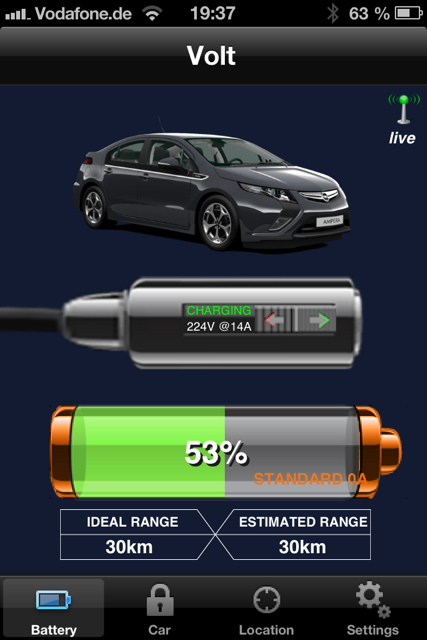
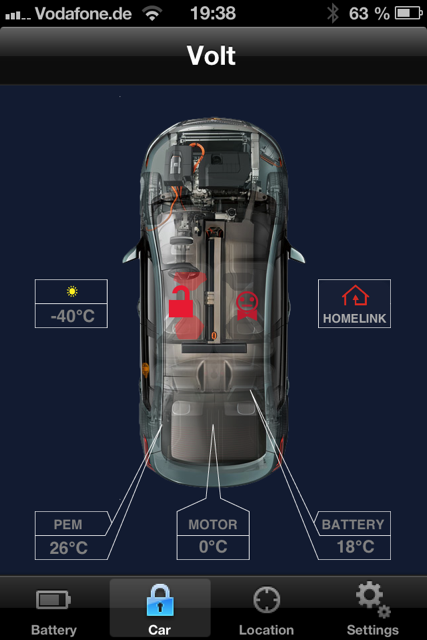
works fine for me, too (2.2.3) The outside temperature works fine at my place. Great! Regards, Johannes Von: ovmsdev-bounces@lists.teslaclub.hk [mailto:ovmsdev-bounces@lists.teslaclub.hk] Im Auftrag von mikeljo@me.com Gesendet: Montag, 14. Januar 2013 19:56 An: OVMS Developers Betreff: Re: [Ovmsdev] Volt/Ampera Hi, great work. In the car since 19:35 MEZ. Look good. We have -2°C outside!! Charging with ~14.8 - 15.4A approx. What is "Standard 0A"? Use of the switch -> unimplemented function -> don't go back show voltage and current -> restart app necessary Look:
We have -2°C outside!!
Urgh, screendump shows -40C. Current code is: car_ambient_temp = (signed char)((int)value - 0x28); Can you try to change to: car_ambient_temp = (signed char)((signed int)value - (signed int)0x28); when the temperature is sub-zero, and see if it fixes it?
Charging with ~14.8 - 15.4A approx. What is "Standard 0A"?
The 0A is the current limit. I don't know what it is, so set it to 0 at the moment. We would need to change the Apps to fix this. Alternatively, does the Volt/Ampera have any control of current limit? If you plug in to a 16Amp socket, can you tell the Volt/Ampera not to draw more than, say, 10Amp? If so, can you see if that current limit value is available on the CAN bus / extended PID?
Use of the switch -> unimplemented function -> don't go back show voltage and current -> restart app necessary
Yes, I am aware of that. It should also fix itself after 1 minute, but not elegant. The new 'capabilities' message we have will solve this, once we have the Apps modified to support it. Regards, Mark. On 15 Jan, 2013, at 2:56 AM, mikeljo@me.com wrote:
Hi,
great work.
In the car since 19:35 MEZ. Look good.
We have -2°C outside!! Charging with ~14.8 - 15.4A approx. What is "Standard 0A"? Use of the switch -> unimplemented function -> don't go back show voltage and current -> restart app necessary
Look: <IMG_1127.PNG> <IMG_1128.PNG>
Bye Michael
Am 14.01.2013 um 14:34 schrieb Mark Webb-Johnson <mark@webb-johnson.net>:
OK. I put in a few hours and have got a pretty complete basic module now for Volt/Ampera. I've added:
Stale tickers for car_stale_ambient, car_stale_temps and car_doors3 bit 1 (car is asleep / awake). car_time to keep track of car time. Charging / Not Charging state support (the Apps should now show the car charging as appropriate) Charge Time and kWh derivation (approximate, and untested, but maybe ok) Derivation of Charge Done vs Interrupted (by checking if SOC > 95% when charge finished) Notification of charge interruption (SMS, PUSH, etc) if charge ends with SOC <= 95%. car_idealrange and car_estrange kludgy approximation (based on SOC% * 37 miles). We really need to find these on the CAN bus (or extended PIDs) to get this better, but at least now they are non-zero.
I think a lot of this could be abstracted out into standard code (like the GPS stuff), but it is fine for the moment.
Please give it a go in the cars. I'm particularly interested to see if the charge state shows up in the Apps. If you stop the charge before SOC gets to 96% (as shown by the App) then you should get a 'charge interrupted' alert.
Regards, Mark.
On 14 Jan, 2013, at 9:18 AM, Mark Webb-Johnson <mark@webb-johnson.net> wrote:
Michael,
Looks good:
59,816 7E0 8 03 22 00 46 00 00 00 00 59,825 7E8 8 04 62 00 46 29 AA AA AA
59,923 7E4 8 03 22 43 69 00 00 00 00 59,934 7EC 8 04 62 43 69 23 AA AA AA
00,032 7E4 8 03 22 43 68 00 00 00 00 00,042 7EC 8 04 62 43 68 72 AA AA AA
00,140 7E4 8 03 22 80 1F 00 00 00 00 00,150 7EC 8 04 62 80 1F 51 AA AA AA
00,248 7E4 8 03 22 80 1E 00 00 00 00 00,258 7EC 8 04 62 80 1E 51 AA AA AA
00,357 7E4 8 03 22 43 4F 00 00 00 00 00,366 7EC 8 04 62 43 4F 33 AA AA AA
00,465 7E4 8 03 22 1C 43 00 00 00 00 00,474 7EC 8 04 62 1C 43 2C AA AA AA
10,595 7E0 8 03 22 00 46 00 00 00 00 10,597 7E8 8 04 62 00 46 29 AA AA AA
10,702 7E4 8 03 22 43 69 00 00 00 00 10,712 7EC 8 04 62 43 69 22 AA AA AA
*** missing request record *** 10,820 7EC 8 04 62 43 68 72 AA AA AA
10,919 7E4 8 03 22 80 1F 00 00 00 00 10,928 7EC 8 04 62 80 1F 51 AA AA AA
11,135 7E4 8 03 22 43 4F 00 00 00 00 11,145 7EC 8 04 62 43 4F 33 AA AA AA
Server is seeing:
2013-01-13 08:43:44.015482 -0500 info main: #55 C GERMANVOLT rx msg D 0,0,0,0,0,0,0,0,0,0,-127,0,-1,-1,12.1,0 2013-01-13 09:11:05.650063 -0500 info main: #55 C GERMANVOLT rx msg D 0,0,0,0,0,0,0,0,0,0,-127,0,-1,-1,12.1,0 2013-01-13 09:12:42.264812 -0500 info main: #55 C GERMANVOLT rx msg D 0,0,0,0,0,0,0,0,0,0,-127,0,-1,-1,12.0,0 2013-01-13 09:54:01.182600 -0500 info main: #82 C GERMANVOLT rx msg D 0,0,0,1,0,11,0,0,0,0,1,0,-1,-1,12.8,0 2013-01-13 09:54:40.822312 -0500 info main: #82 C GERMANVOLT rx msg D 0,0,0,2,0,11,0,0,0,0,1,0,-1,-1,12.8,0 2013-01-13 09:55:04.059324 -0500 info main: #82 C GERMANVOLT rx msg D 0,0,0,2,0,11,0,0,0,0,1,0,-1,-1,12.9,0 2013-01-13 10:00:30.457268 -0500 info main: #82 C GERMANVOLT rx msg D 0,0,0,4,0,11,0,0,0,0,1,0,-1,-1,12.1,0 2013-01-13 10:41:30.497096 -0500 info main: #82 C GERMANVOLT rx msg D 0,0,0,1,0,10,0,0,0,0,1,0,-1,-1,12.0,0 2013-01-13 10:41:45.580701 -0500 info main: #82 C GERMANVOLT rx msg D 0,0,0,1,0,10,0,0,0,0,1,0,-1,-1,12.0,0 2013-01-13 11:53:51.285696 -0500 info main: #82 C GERMANVOLT rx msg D 0,0,0,0,0,9,0,0,0,0,0,0,-1,-1,12.0,0 2013-01-13 13:53:28.449695 -0500 info main: #82 C GERMANVOLT rx msg D 0,0,0,0,0,7,0,0,0,0,0,0,-1,-1,12.4,0 2013-01-13 17:52:42.797607 -0500 info main: #82 C GERMANVOLT rx msg D 0,0,0,0,0,7,0,0,0,0,0,0,-1,-1,12.3,0 2013-01-13 18:52:31.158668 -0500 info main: #82 C GERMANVOLT rx msg D 0,0,0,0,0,7,0,0,0,0,0,0,-1,-1,12.4,0
and:
2013-01-13 09:11:05.645633 -0500 info main: #55 C GERMANVOLT rx msg S 100,K,0,0,done,standard,0,0,0,0,0,0,0,4,0,0,0,-1 2013-01-13 09:54:01.179470 -0500 info main: #82 C GERMANVOLT rx msg S 100,K,226,12,done,standard,0,0,0,0,0,0,0,4,0,0,0,-1 2013-01-13 09:54:40.818217 -0500 info main: #82 C GERMANVOLT rx msg S 100,K,224,11,done,standard,0,0,0,0,0,0,0,4,0,0,0,-1 2013-01-13 10:00:30.452838 -0500 info main: #82 C GERMANVOLT rx msg S 100,K,0,0,done,standard,0,0,0,0,0,0,0,4,0,0,0,-1 2013-01-13 10:41:30.493087 -0500 info main: #82 C GERMANVOLT rx msg S 100,K,0,0,done,standard,0,0,0,0,0,0,0,4,0,0,0,-1 2013-01-13 10:41:45.573753 -0500 info main: #82 C GERMANVOLT rx msg S 100,K,0,0,done,standard,0,0,0,0,0,0,0,4,0,0,0,-1
I'm guessing you loaded the new firmware between 09:12 and 09:54, as the 09:54 records look to contain the data we need.
Did you do a charge starting at 09:54 and ending at 10:00?
For example, 10:41:45 is "rx msg D 0,0,0,1,0,10,0,0,0,0,1,0,-1,-1,12.0,0" which translates to:
door1: 0 door2: 0 lock/unlock: 0 Temperature PEM: 1 Temperature Motor: 0 Temperature Battery: 10 Car trip meter: 0 Car odometer: 0 Car speed: 0 Car parking timer: 0 Ambient Temperature: 1 door3: 0 Stale temps: -1 Stale ambient: -1 Vehicle 12V line: 12.0 door4: 0
and 09:54:40 is "rx msg S 100,K,224,11,done,standard,0,0,0,0,0,0,0,4,0,0,0,-1" which translates to:
SOC: 100 Units: K Line Voltage: 224 Charge Current: 11 Charge State: done Charge mode: standard Ideal range: 0 Estimated range: 0 Charge Limit: 0 Charge duration: 0 Charge B4: 0 Charge kWh: 0 Charge sub-state: 0 Charge state: 4 Charge mode: 0 Charge Timer Mode: 0 Charge Timer Start Time: 0 Charge Timer Stale: -1
I'm not too worried if some of the decoded values are wrong - we can always fine tune those. The key point is that the service 0x22 polling for extended PIDs seems to work, and the framework for that seems good.
This is now officially entering the 'fun' stage (between 'pain-in-the-ass' of trying to find the messages, and 'donkey-work' of fine-tuning everything for all the edge cases and bugs).
I'm going to try to now fill-in the rest of the derived parameters nicely, and calculate charge mode. Charge interrupted would be nice. I'll try to put some time on this tonight (my time).
Can you and Johannes work on finding the other extended PIDs now? For each PID we would need to know the request can ID, PID number, and decode information. A log entry of the request and reply (manually raised) would be wonderful). Seems to be the urgent ones are Range, Motor Temperature, Odometer, Trip, Doors. After that, commands would be good (lock/unlock, remote start, etc).
Note: Some of these PIDs may be obtained using standard OBDII requests (http://en.wikipedia.org/wiki/OBD-II_PIDs). For example, mode #01 PID #46 "Ambient air temperature", mode #01 PID #5b "Hybrid battery pack remaining life", It is not too hard for us to do that, if necessary (as service 0x01 is very similar to the 0x22 we're already using).
Regards, Mark.
On 13 Jan, 2013, at 11:07 PM, mikeljo@me.com wrote:
Hi mark,
that was quick!
ok. Looks better. You can see that it takes some time to respond.
Here the Log: <20130113_1559.trc.zip>
But no data in the iPhone. What is in the Server Log?
Bye michael
Am 13.01.2013 um 15:25 schrieb Mark Webb-Johnson <mark@webb-johnson.net>:
ok, I see:
05,632 7E0 8 03 22 00 46 00 00 00 00 > Request 0046 05,638 7E4 8 03 22 43 69 00 00 00 00 > Request 4369 05,638 7E8 8 04 62 00 46 29 AA AA AA < Reply 0046 05,642 7E4 8 03 22 43 68 00 00 00 00 > Request 4368 05,643 7EC 8 04 62 43 69 00 AA AA AA < Reply 4369 05,647 7E4 8 03 22 80 1F 00 00 00 00 > Request 801f 05,653 7E4 8 03 22 80 1E 00 00 00 00 > Request 801e 05,654 7EC 8 04 62 80 1F 50 AA AA AA < Reply 801f 05,659 7E4 8 03 22 43 4F 00 00 00 00 > Request 434f
27,195 7E0 8 03 22 00 46 00 00 00 00 > Request 0046 27,200 7E4 8 03 22 43 69 00 00 00 00 > Request 4369 27,201 7E8 8 04 62 00 46 29 AA AA AA < Reply 0046 27,206 7E4 8 03 22 43 68 00 00 00 00 > Request 4368 27,208 7EC 8 04 62 43 68 00 AA AA AA < Reply 4368 27,211 7E4 8 03 22 80 1F 00 00 00 00 > Request 801f 27,217 7E4 8 03 22 80 1E 00 00 00 00 > Request 801e 27,220 7EC 8 04 62 80 1E 53 AA AA AA < Reply 801e 27,222 7E4 8 03 22 43 4F 00 00 00 00 > Request 434f 27,228 7E4 8 03 22 1C 43 00 00 00 00 > Request 1c43 27,233 7EC 8 04 62 1C 43 2C AA AA AA < Reply 1c43
The code was set to request every 5ms (based on your previous comment that the response was in 1ms), and that appears to be what it is doing (from the logs). But as you say it looks to be too fast, as the responses are taking 6 or 7 ms to come back. Other than that, though, it looks just fine. [ Long-term, this is really useful, as many cars are now OBDII and this exact same mechanism works for that. ]
I've just committed another fix. Firstly I changed the delay5b() to delay100b(), so it will be 100ms between each request. Not a good way to do it, and I will have to think of a better way long-term, but it should be slow enough now for things to work. Secondly, I had a bug in my decoding of pid (those type-casts for 8bit to 16bit are really tricky sometimes). I tested on my simulator, and it now seems ok.
Could you try again? You should now get ambient, pem and battery temperatures, as well as charge current + voltage when you charge.
Very very close...
Regards, Mark.
P.S. The logs are perfect. Very helpful, and show us exactly what is going on with the car.
On 13 Jan, 2013, at 9:10 PM, mikeljo@me.com wrote:
Hi,
compiled and burned. Why do you set "car_ambient_temp" twice? --------------snip--------------- case 0x801f: // Outside temperature (filtered) car_ambient_temp = ((int)value >> 1) - 0x28; break; . . . case 0x0046: // Ambient temperature car_ambient_temp = (signed char)((int)value - 0x28); break; --------------snap--------------- I comment 0046 out. AND: there is NO /2 in the calc necessary. Only -40 needed.
Log attached. <20130113_1348_Mode22_activebyFOB.trc.zip> No Data in the Phone, except SOC. This is still there. I think you send the request to fast and "Overwrite" the answers. Look yourself.
I checked 4369 and 4368 when not charging: PID 4369 current Not Charging = 0 and 4368 Voltage Not Charging = 0
Request send to 7E4 und 7E7 answers when Car/Bus out, but still charging.
Check 7E4 8 03 1C 43 00 00 00 00 00 got NO valid answer at any PID. Requests to 7E0 to 7E8 checked
Bye Michael
Am 13.01.2013 um 10:31 schrieb Mark Webb-Johnson <mark@webb-johnson.net>:
> > I've just committed some new code, based on polling with service 0x22. > > Can you review it, adjust as necessary, then try in the car. It would be great to get a log of it, to see what the car says. > > The logic I have is that it should poll for all the below parameters once every 10 seconds. I've put a delay of ~5ms between each PID request. > > Regards, Mark. > > On 13 Jan, 2013, at 4:43 AM, mikeljo@me.com wrote: > >> Hi, >> >>> Answering myself, I just noticed your previous eMail. >> ;-) >> >>> That contains some 7EC responses (but no 7E4 requests?): >> Funny, the Software (Canhacker) don't show the Messages that it self send. >> But they are there. >> See the txl File from prev Post. >> I send the messages from 1 to 6 manual. >> >>> >>> 7EC 8 04 62 43 69 4A AA AA AA >>> PID 4369 "onboard charger current" response is 0x4A (1 byte) >>> Decode is 0x4A / 5(constant) = 14.8 Amps >>> >>> 7EC 8 04 62 43 68 71 AA AA AA >>> PID 4368 "onboard charger voltage" response is 0x71 (1 byte) >>> Decode is 0x71 * 2(constant) = 226 Volts >>> >>> 7EC 8 04 62 80 1F 63 AA AA AA >>> PID 801F "outside temperature (fitered)" response is 0x63 (1 byte) >>> Decode is (0x63 / 2(constant)) - 0x28(constant) = 9 celcius >>> >>> 7EC 8 04 62 80 1E 66 AA AA AA >>> PID 801E "outside temperature (raw)" response is 0x66 (1 byte) >>> Decode is (0x66 / 2(constant)) - 0x28(constant) = 11 celcius >>> >>> 7EC 8 04 62 43 4F 3D AA AA AA >>> PID 434F "high voltage battery temperature" response is 0x3D (1 byte) >>> Decode is 0x3D - 0x28(constant) = 21 celcius >>> >>> 7EC 8 03 7F 1C 11 AA AA AA AA >>> ??? Seems wrong ??? >> Check again. >> This was send: >> Message6Id=7E4 >> Message6DLC=8 >> Message6Data=03 1C 43 00 00 00 00 00 >> >>> >>> And, adding in your 7E8 response: >>> >>> 7E8 8 04 62 00 46 2A AA AA AA >>> PID 0046 "ambient temperature" response is 0x2A (1byte). >>> Decode is 0x2A - 0x28(constant) = 2 celcius >> Fool myself. This is NOT the outside Temp. This is the "inside" Temp. >> It raise when i was in the car and it was on. So the calc is correct. >> >>> >>> Seems close enough to get the structure in place and let you fine-tune in the car. I'll start work on this - should be able to get it done tomorrow. >> Great. >> >>> >>> One more thing: Can you find out the values for PIDs 4369 and 4368 (a) when the car is plugged in but not charging, and (b) when the car is not plugged in at all. Hopefully these will reply 0x00 in both cases - and that would allow us to tell if the car is charging or not. >> Will do my best. And i think there is a Flag in one message that tells us this. >> >> BTW: >> We found some stuff around the net: >> ECU PID Size Bit Signal Unit >> 7E9 2411 1 Battery State of Charge % >> ?? 1130 1 4 Remote Vehicle Start Request Bool >> ?? 1C39 1 5 High Voltage Charge Mode Command Bool >> 7E9? 2828 1 Motor B Temperature °C (-40) >> ?? 5005 1 TPM Left Front ? Div 16 >> ?? 5006 1 TPM Right Front ? Div 16 >> ?? 5007 1 TPM Left Rear ? Div 16 >> ?? 5008 1 TPM Right Rear ? Div 16 >> >> >> >> Bye >> Michael >> >> >>> >>> Regards, Mark. >>> >>> On 12 Jan, 2013, at 11:12 PM, Mark Webb-Johnson <mark@webb-johnson.net> wrote: >>> >>>>> Can now see the request: "7E0 8 03 22 00 46 00 00 00 00" >>>>> and immediately the response "7E8 8 04 62 00 46 2A AA AA AA" >>>> >>>>> You can see that the response follows in a 1/1000 second. >>>>> Could it be its too fast? >>>> >>>> >>>> That looks fine. I'll change the code for that. >>>> >>>> I think the 0x22 service is the best one to use. Much simpler to handle. >>>> >>>>> Can Michael / Johannes try: >>>>> >>>>> 7E0 03 22 00 46 00 00 00 00 (ambient temperature) >>>>> (and see what comes back on 5E8 and/or 7E8?) >>>>> >>>>> 7E4 03 22 43 69 00 00 00 00 (onboard charger current) >>>>> 7E4 03 22 43 68 00 00 00 00 (onboard charger voltage) >>>>> 7E4 03 22 80 1F 00 00 00 00 (outside temperature filtered) >>>>> 7E4 03 22 80 1E 00 00 00 00 (outside temperature raw) >>>>> 7E4 03 22 43 4F 00 00 00 00 (high voltage battery temperature) >>>>> 7E4 03 22 1C 43 00 00 00 00 (PEM cooling loop temperature) >>>>> (and see what comes back on 7EC and/or 5EC?) >>>> >>>> >>>> Can you try the above 7E4 ones as well, during charging, to get the 7EC results back? >>>> >>>> Regards, Mark. >>>> >>>> On 12 Jan, 2013, at 9:16 PM, mikeljo@me.com wrote: >>>> >>>>> Hi, >>>>> >>>>> did my y-Cable (sub-d side). >>>>> Connect CANUSB and OVMS. >>>>> Filter set to receive above 5E0 >>>>> Can now see the request: "7E0 8 03 22 00 46 00 00 00 00" >>>>> and immediately the response "7E8 8 04 62 00 46 2A AA AA AA" >>>>> From this side it looks ok. >>>>> Shown Temp in Display is 2 to 3°C. So the calc could be 2a-40 = 3° >>>>> >>>>> Attached the Log >>>>> <20130112_1358_2C__mode22.trc> >>>>> >>>>> You can see that the response follows in a 1/1000 second. >>>>> Could it be its too fast? >>>>> >>>>> Next step is to bring the Raspi to the car. >>>>> >>>>> Bye >>>>> Michael >>>>> >>>>> >>>>> Am 11.01.2013 um 16:08 schrieb mikeljo@me.com: >>>>> >>>>>> Hi, >>>>>> >>>>>> it looks good. >>>>>> >>>>>> I send the commands below and got answer on 7E8 (for 7E0) and 7EC (for 7E4). >>>>>> No Messages on 5E8 or 5EC. >>>>>> Value for Temp is there. Got 0x33 but we have 2°C >>>>>> Think the calculation is wrong. >>>>>> >>>>>> Try a quick code. But this don't work. >>>>>> Module in the car since 15:45 MEZ >>>>>> >>>>>> You can see the questions and answers in the Log. Also included the c file. >>>>>> >>>>>> >>>>>> Bye >>>>>> michael >>>>>> >>>>>> <20130111.zip> >>>>>> >>>>>> >>>>>> Am 09.01.2013 um 07:32 schrieb Mark Webb-Johnson <mark@webb-johnson.net>: >>>>>> >>>>>>> Burro suggests: >>>>>>> >>>>>>> Service 0x22 explanation by Burro: >>>>>>> >>>>>>> Service 0x22 is an easier single state call. >>>>>>> >>>>>>> Let say you wanted engine RPM then you would send >>>>>>> 7E0 03 22 00 0C 00 00 00 00 >>>>>>> >>>>>>> And this will hopefully return: >>>>>>> 7E8 04 62 00 0C 10 7E 00 00 >>>>>>> >>>>>>> Letting A=10 B=7E from the return, RPM = (A*255+b)/4 or 1055 RPM. >>>>>>> >>>>>>> Format of the return data is >>>>>>> requsedID+0x08, >>>>>>> length, >>>>>>> confirm of requested mode+0x40 (i.e. 22 + 40) >>>>>>> 2 bytes for PID >>>>>>> length-2 bytes of data >>>>>>> >>>>>>> For your request for OAT >>>>>>> 7E0 03 22 00 46 00 00 00 00 >>>>>>> >>>>>>> would response something like >>>>>>> 7E8 03 62 00 46 30 00 00 00 00 >>>>>>> >>>>>>> (answer as before is Temp (now in in Byte 4) where 0x30 => 8°C (unit 1 °C offset 40) ) >>>>>>> >>>>>>> Can Michael / Johannes try: >>>>>>> >>>>>>> 7E0 03 22 00 46 00 00 00 00 (ambient temperature) >>>>>>> (and see what comes back on 5E8 and/or 7E8?) >>>>>>> >>>>>>> 7E4 03 22 43 69 00 00 00 00 (onboard charger current) >>>>>>> 7E4 03 22 43 68 00 00 00 00 (onboard charger voltage) >>>>>>> 7E4 03 22 80 1F 00 00 00 00 (outside temperature filtered) >>>>>>> 7E4 03 22 80 1E 00 00 00 00 (outside temperature raw) >>>>>>> 7E4 03 22 43 4F 00 00 00 00 (high voltage battery temperature) >>>>>>> 7E4 03 22 1C 43 00 00 00 00 (PEM cooling loop temperature) >>>>>>> (and see what comes back on 7EC and/or 5EC?) >>>>>>> >>>>>>> I think mode 0x22 will be much neater to code with. >>>>>>> >>>>>>> Regards, Mark. >>>>>>> >>>>>>> On 9 Jan, 2013, at 9:55 AM, Mark Webb-Johnson wrote: >>>>>>> >>>>>>>> Michael,, >>>>>>>> >>>>>>>> On my simulator, I saw the following pair of messages transmitted every 10 seconds: >>>>>>>> >>>>>>>> 7E0 8 04 0C A0 00 46 00 00 00 >>>>>>>> 7E0 8 03 AA 01 A0 00 00 00 00 >>>>>>>> >>>>>>>> If I stopped the simulator transmitting bus messages, the poll requests stopped as well. So, I'm pretty sure the logic works. >>>>>>>> >>>>>>>> The problem is most likely the car response to those messages. We're listening on CAN ID #5E8, and the reception code seems to be ok. Perhaps the car needs a delay between the two request messages, as we should really be waiting for the acknowledgement response? If so, that is a little bit tricky, but possible. >>>>>>>> >>>>>>>> Can you, or Johannes, try to send those messages and check the car response? Or, T the can bus and monitor the car response with the module in place (the best way) to see what is coming back? >>>>>>>> >>>>>>>> Regards, Mark. >>>>>>>> >>>>>>>> On 9 Jan, 2013, at 12:46 AM, mikeljo@me.com wrote: >>>>>>>> >>>>>>>>> Hi, >>>>>>>>> >>>>>>>>> burn it in the module. Can_write set to 1 >>>>>>>>> All data (VIN, SOC, etc) are here, except the temperature. >>>>>>>>> In the car since 17:40 (MEZ), you can have a look at the logs. >>>>>>>>> >>>>>>>>> Bye >>>>>>>>> Michael J. >>>>>>>>> >>>>>>>>> >>>>>>>>> Am 08.01.2013 um 15:44 schrieb Mark Webb-Johnson <mark@webb-johnson.net>: >>>>>>>>> >>>>>>>>>> I've committed some template code for this, trying to do what Michael J suggests, but in an expandable way. >>>>>>>>>> >>>>>>>>>> Here are some notes: >>>>>>>>>> >>>>>>>>>> vehicle_voltampera_polls is a rom array of struct that stores the pids to be polled, and the seconds between each poll. Each entry should be given a unique requestid, as that is what you will be using to pickup the result. The last entry is 0, which acts as a terminator. >>>>>>>>>> >>>>>>>>>> Polling code is in vehicle_voltampera_ticker1() and should be fairly self-explanatory. It should cope with 1, 2 or 3 PIDs per poll - but I've only tested 1 :-) Note that if either the CAN_WRITE feature is off, or the bus has not recently seen activity, then the polling doesn't happen (I've tested this, and it seems to work well). >>>>>>>>>> >>>>>>>>>> vehicle_voltampera_poll1() needs to handle filter 5 for the received data, then looks in the first byte for the requestid to know the format of the data that is coming back. >>>>>>>>>> >>>>>>>>>> vehicle_voltampera_initialise() must be modified to setup a receive filter. The example uses filter #5 on ID#0x5E8. Hopefully this filter can be extended (by mask) to allow other responses to be picked up. >>>>>>>>>> >>>>>>>>>> I hope it is clear. It is not complete, but should be able to be tested to see if it picks up the temperature. >>>>>>>>>> >>>>>>>>>> Regards, Mark. >>>>>>>>>> >>>>>>>>>> On 8 Jan, 2013, at 8:50 AM, Mark Webb-Johnson <mark@webb-johnson.net> wrote: >>>>>>>>>> >>>>>>>>>>> >>>>>>>>>>> I just posted this, and repeat here to see if someone can test: >>>>>>>>>>> >>>>>>>>>>>> Burro writes: >>>>>>>>>>>> According to the bus data presented above the DashDaq is using mode 0x2C to request the identifiers. The message structure for mode 0x2C for one, two and three parameters is as described above. Using that example, the ID 0x7E4 is the battery module, 8 is the message length, 04 is the significant bytes in current message, 2C is the mode(dynamically defined data identifier), FE is the requested response ID and the next two bytes are the PID. >>>>>>>>>>>> ... >>>>>>>>>>>> 04 is the next byte and that lets the module know you are looking for a fast response rate. Decreasing numbers here means decreasing response speed. 01 will get you one response and 00 will stop the response all together. >>>>>>>>>>>> ... >>>>>>>>>>>> This is a good way to reduce the clutter on the bus because you can request and receive multiple pids in one shot. As opposed to mode 22 which nets you one response per request. If you want to set up more than three you can just change the response ID from FE to one of the others like FD, FC, FB.... add your PIDs and then ask for the response. >>>>>>>>>>> >>>>>>>>>>> OK. Having reviewed all this, it looks like we're going to have to regularly poll perhaps 10 extended PIDs. Most of these don't need to be polled very often (perhaps once a minute or so would be fine). >>>>>>>>>>> >>>>>>>>>>> What we should probably do is setup a table of modules and PIDs we want with corresponding poll times. The code will then check this and poll each one in turn. We can rely on the +0x08 and -0x200 offsets from the module ID (which will allow us to query different PIDs on different modules). The reply doesn't seem to contain information on the PID being returned, so presumably we'll have to use the response ID to match responses to requests. To avoid conflicting with DashDaq, does anyone know if DashDaq uses a specific range, or is there some other way of avoiding conflict? >>>>>>>>>>> >>>>>>>>>>> My question is: what is the best way of polling these? We've seen DashDaq use mode 0x2c with response rate 0x04, but that generates a stream of 160 or so responses and seems excessive for what we need. Do you think it best we use mode 0x2c with response rate 0x01 (single response?), or mode 0x22? >>>>>>>>>>> >>>>>>>>>>> Can someone try a mode 0x2c request with response rate 0x01 and see what comes back? Perhaps: >>>>>>>>>>> >>>>>>>>>>> 7E4 8 04 2C FE 43 4F 00 00 00 (command: request 0x434F) >>>>>>>>>>> 7EC 8 02 6C FE AA AA AA AA AA (answer: OK) >>>>>>>>>>> >>>>>>>>>>> 7E4 8 03 AA 01 FE 00 00 00 00 (command: display data) >>>>>>>>>>> 5EC 8 FE 30 00 00 00 00 00 00 (answer: HV Temp in Byte 2, 0x30 => 8°C (unit 1 °C offset 40) ) >>>>>>>>>>> >>>>>>>>>>> How may 5EC responses come back? >>>>>>>>>>> >>>>>>>>>>> I think that once this is answered / tested, then we can actually code it. It doesn't look very hard and the table driven approach should work well for future expansion (just add a row to the table for the request, and add the code to extract the response) - the generic OBDII stuff I'm working on looks very similar. >>>>>>>>>>> >>>>>>>>>>> Regards, Mark. >>>>>>>>>>> >>>>>>>>>>> On 5 Jan, 2013, at 8:40 PM, mikeljo@me.com wrote: >>>>>>>>>>> >>>>>>>>>>>> Hi mark, >>>>>>>>>>>> >>>>>>>>>>>> in this post was a very good description about decoding the Message transfer: >>>>>>>>>>>> http://gm-volt.com/forum/showthread.php?12958-CAN-bus-reading-remote-viewing... >>>>>>>>>>>> from Burro. Easier than reading the Full GM3110 Doc. >>>>>>>>>>>> >>>>>>>>>>>> i think that we must look at the bus to identify witch IDs are active. So we can use a free one. And listen only to this. >>>>>>>>>>>> >>"FE is the requested response ID" >>>>>>>>>>>> I think is necessary when there is more than one "diagnostic tool" connected to the bus >>>>>>>>>>>> >>>>>>>>>>>> >>>>>>>>>>>> Bye >>>>>>>>>>>> michael >>>>>>>>>>>> >>>>>>>>>>>> Am 03.01.2013 um 02:28 schrieb mikeljo@me.com: >>>>>>>>>>>> >>>>>>>>>>>>> Hi, >>>>>>>>>>>>> >>>>>>>>>>>>> thx. >>>>>>>>>>>>> But it was only the first quick try. >>>>>>>>>>>>> >>>>>>>>>>>>> I think you are quicker than i with implementing it. So please go on. >>>>>>>>>>>>> I the Moment we can only get data when the Bus is awake from the car itself. >>>>>>>>>>>>> I can wake the Bus, but can't get Data in this time. I get only an answer from one Gateway (641). >>>>>>>>>>>>> Search to get more answers from different ECUs. >>>>>>>>>>>>> So i think the trigger to start the timer is, when there are valid data on the bus. >>>>>>>>>>>>> The timer collects the wanted data and goes to sleep for a Minute, or so. >>>>>>>>>>>>> Timer stops and reset itself after ~30 seconds with no data on the bus. >>>>>>>>>>>>> So we can get data when the car is on and approx. every 30 Minute when car is charging. >>>>>>>>>>>>> >>>>>>>>>>>>> Bye >>>>>>>>>>>>> Michael >>>>>>>>>>>>> >>>>>>>>>>>>> >>>>>>>>>>>>> Am 03.01.2013 um 00:46 schrieb Mark Webb-Johnson <mark@webb-johnson.net>: >>>>>>>>>>>>> >>>>>>>>>>>>>> Fantastic. >>>>>>>>>>>>>> >>>>>>>>>>>>>> Do you/Michael want to try to implement this, or shall I? >>>>>>>>>>>>>> >>>>>>>>>>>>>> Regards, Mark >>>>>>>>>>>>>> >>>>>>>>>>>>>> On 3 Jan, 2013, at 4:22 AM, <info@opel-ampera-forum.de> wrote: >>>>>>>>>>>>>> >>>>>>>>>>>>>>> Mark, >>>>>>>>>>>>>>> >>>>>>>>>>>>>>> we have the following functioning data at this moment: >>>>>>>>>>>>>>> >>>>>>>>>>>>>>> Ambient temperature (the air around the car) - I think this is your 'outside temperature' >>>>>>>>>>>>>>> PEM temperature (the temperature in the charger / drive power conversion unit - the electronics that convert AC to DC for charging, regen and driving) >>>>>>>>>>>>>>> BATTERY temperature (the temperature in the battery itself) >>>>>>>>>>>>>>> Charging current >>>>>>>>>>>>>>> Charging voltage >>>>>>>>>>>>>>> >>>>>>>>>>>>>>> The motor temperature doesn’t work at this moment, we have to analyze it. >>>>>>>>>>>>>>> >>>>>>>>>>>>>>> The request is (in sequence ~10 ms): >>>>>>>>>>>>>>> >>>>>>>>>>>>>>> 7E4 8 10 0C 2C FE 43 69 43 68 >>>>>>>>>>>>>>> 7E4 8 21 80 1F 43 4F 1C 43 00 >>>>>>>>>>>>>>> 7E4 8 03 AA 04 FE 00 00 00 00 >>>>>>>>>>>>>>> >>>>>>>>>>>>>>> >>>>>>>>>>>>>>> The answer would be ~160 times: >>>>>>>>>>>>>>> >>>>>>>>>>>>>>> 5EC 8 FE xx yy zz uu vv 00 00 >>>>>>>>>>>>>>> >>>>>>>>>>>>>>> charging current = xx * 0.2 A >>>>>>>>>>>>>>> charging voltage = yy * 2 V >>>>>>>>>>>>>>> outside temperature = zz * 0.5 °C – 40 >>>>>>>>>>>>>>> battery temperature = uu * 1 °C – 40 >>>>>>>>>>>>>>> pem temperature = vv * 1 °C - 40 >>>>>>>>>>>>>>> >>>>>>>>>>>>>>> >>>>>>>>>>>>>>> this should be enough for the next beta. >>>>>>>>>>>>>>> >>>>>>>>>>>>>>> >>>>>>>>>>>>>>> Regards, >>>>>>>>>>>>>>> >>>>>>>>>>>>>>> Johannes >>>>>>>>>>>>>>> >>>>>>>>>>>>>>> >>>>>>>>>>>>>>> >>>>>>>>>>>>>>> >>>>>>>>>>>>>>> Von: ovmsdev-bounces@lists.teslaclub.hk [mailto:ovmsdev-bounces@lists.teslaclub.hk] Im Auftrag von Mark Webb-Johnson >>>>>>>>>>>>>>> Gesendet: Mittwoch, 2. Januar 2013 02:40 >>>>>>>>>>>>>>> An: OVMS Developers >>>>>>>>>>>>>>> Betreff: Re: [Ovmsdev] Volt/Ampera >>>>>>>>>>>>>>> >>>>>>>>>>>>>>> Tachy / Johannes, >>>>>>>>>>>>>>> >>>>>>>>>>>>>>> Nice work. That is very useful, and I have added this to the volt/ampera can bus notes file in the repository. This is the sequence we will use. >>>>>>>>>>>>>>> >>>>>>>>>>>>>>> The Tesla Roadster show (and hence the Apps currently support) 4 temperatures in total: >>>>>>>>>>>>>>> >>>>>>>>>>>>>>> Ambient temperature (the air around the car) - I think this is your 'outside temperature' >>>>>>>>>>>>>>> PEM temperature (the temperature in the charger / drive power conversion unit - the electronics that convert AC to DC for charging, regen and driving) >>>>>>>>>>>>>>> MOTOR temperature (the temperature in the wheel motors) >>>>>>>>>>>>>>> BATTERY temperature (the temperature in the battery itself) >>>>>>>>>>>>>>> >>>>>>>>>>>>>>> It would be good if we could find those for the Volt/Ampera. >>>>>>>>>>>>>>> >>>>>>>>>>>>>>> I think we now have enough to get the charge behavior. >>>>>>>>>>>>>>> >>>>>>>>>>>>>>> Will you / MichaelJ work on the code to implement this, or do you want me to do it? It does not look to hard to do, and I think we can use the same logic as the Twizzy (and Michael J previously suggested). >>>>>>>>>>>>>>> >>>>>>>>>>>>>>> Regards, Mark. >>>>>>>>>>>>>>> >>>>>>>>>>>>>>> On 31 Dec, 2012, at 10:38 PM, <info@opel-ampera-forum.de> <info@opel-ampera-forum.de> wrote: >>>>>>>>>>>>>>> >>>>>>>>>>>>>>> >>>>>>>>>>>>>>> Hi Mark, >>>>>>>>>>>>>>> >>>>>>>>>>>>>>> here is „tachy“ from opel-ampera-forum.de, i’ve analyzed the requests from a DashDAQ on CANBus. >>>>>>>>>>>>>>> >>>>>>>>>>>>>>> To request current and voltage of the charger and the outside temperature, you have to send the following sequence: >>>>>>>>>>>>>>> >>>>>>>>>>>>>>> 7E4 8 10 08 2C FE 43 69 43 68 >>>>>>>>>>>>>>> 7E4 8 21 80 1F 00 00 00 00 00 >>>>>>>>>>>>>>> 7E4 8 03 AA 04 FE 00 00 00 00 >>>>>>>>>>>>>>> >>>>>>>>>>>>>>> The answer (160 times) is: >>>>>>>>>>>>>>> >>>>>>>>>>>>>>> 5EC 8 FE xx yy zz 00 00 00 00 >>>>>>>>>>>>>>> >>>>>>>>>>>>>>> xx = Charging Current, units 0.2 A (ex. 0x43 = 13.4 A) >>>>>>>>>>>>>>> yy = Charging Voltage, units 2 V (ex. 0x70 = 224 V) >>>>>>>>>>>>>>> zz = outside temperature, units 0,5°C, offset +40 ( ex. 0x60 => 8°C ) >>>>>>>>>>>>>>> >>>>>>>>>>>>>>> >>>>>>>>>>>>>>> >>>>>>>>>>>>>>> Regards, >>>>>>>>>>>>>>> >>>>>>>>>>>>>>> Johannes >>>>>>>>>>>>>>> >>>>>>>>>>>>>>> >>>>>>>>>>>>>>> >>>>>>>>>>>>>>> Von: ovmsdev-bounces@lists.teslaclub.hk [mailto:ovmsdev-bounces@lists.teslaclub.hk] Im Auftrag von mikeljo@me.com >>>>>>>>>>>>>>> Gesendet: Sonntag, 30. Dezember 2012 13:59 >>>>>>>>>>>>>>> An: OVMS Developers >>>>>>>>>>>>>>> Betreff: Re: [Ovmsdev] Volt/Ampera >>>>>>>>>>>>>>> >>>>>>>>>>>>>>> Hi, >>>>>>>>>>>>>>> >>>>>>>>>>>>>>> it continues >>>>>>>>>>>>>>> >>>>>>>>>>>>>>> Direct reading here: http://gm-volt.com/forum/showthread.php?12958-CAN-bus-reading-remote-viewing... >>>>>>>>>>>>>>> or main here: http://www.opel-ampera-forum.de/viewtopic.php?f=39&t=1147&start=60#p17254 >>>>>>>>>>>>>>> >>>>>>>>>>>>>>> It seems that 5EC returns what you request in 7E4. >>>>>>>>>>>>>>> Not only Voltage and Current, also Outside Temp and HV-Batterie Temp or HV-Cooling Temp. >>>>>>>>>>>>>>> The Meaning of the values depends on the Request in 7E4. >>>>>>>>>>>>>>> ----- It "could" be that 7EC is an answer from the bus too. >>>>>>>>>>>>>>> >>>>>>>>>>>>>>> And i think that this is a "user generated" output. Generated only by the Gateway? >>>>>>>>>>>>>>> >>>>>>>>>>>>>>> Here is a log when DashDaq starts: >>>>>>>>>>>>>>> >>>>>>>>>>>>>>> 34,152 7E0 8 02 01 00 00 00 00 00 00 >>>>>>>>>>>>>>> 34,154 7E8 8 06 41 00 BE 7F B8 13 AA >>>>>>>>>>>>>>> 34,180 7DF 8 02 01 00 00 00 00 00 00 >>>>>>>>>>>>>>> 34,182 7E8 8 06 41 00 BE 7F B8 13 AA >>>>>>>>>>>>>>> 34,185 7EB 8 06 41 00 80 40 00 01 AA >>>>>>>>>>>>>>> 34,186 7EF 8 06 41 00 00 00 00 01 AA >>>>>>>>>>>>>>> 34,187 7EC 8 06 41 00 80 00 00 01 AA >>>>>>>>>>>>>>> 34,187 7E9 8 06 41 00 80 00 00 01 AA >>>>>>>>>>>>>>> 34,188 7EA 8 06 41 00 80 00 00 01 AA >>>>>>>>>>>>>>> 34,196 7ED 8 06 41 00 00 00 00 01 AA >>>>>>>>>>>>>>> >>>>>>>>>>>>>>> 34,528 7E0 8 02 AA 00 00 00 00 00 00 >>>>>>>>>>>>>>> 34,533 5E8 8 00 00 00 00 00 00 00 00 >>>>>>>>>>>>>>> 34,591 7E1 8 02 AA 00 00 00 00 00 00 >>>>>>>>>>>>>>> 34,592 5E9 8 00 00 00 00 00 00 00 00 >>>>>>>>>>>>>>> 34,656 7E2 8 02 AA 00 00 00 00 00 00 >>>>>>>>>>>>>>> 34,660 5EA 8 00 00 00 00 00 00 00 00 >>>>>>>>>>>>>>> 34,721 7E3 8 02 AA 00 00 00 00 00 00 >>>>>>>>>>>>>>> 34,728 5EB 8 00 00 00 00 00 00 00 00 >>>>>>>>>>>>>>> 34,787 7E4 8 02 AA 00 00 00 00 00 00 >>>>>>>>>>>>>>> 34,804 5EC 8 00 00 00 00 00 00 00 00 >>>>>>>>>>>>>>> 34,851 7E5 8 02 AA 00 00 00 00 00 00 >>>>>>>>>>>>>>> 34,862 5ED 8 00 AA AA AA AA AA AA AA >>>>>>>>>>>>>>> 34,916 7E7 8 02 AA 00 00 00 00 00 00 >>>>>>>>>>>>>>> 34,928 5EF 8 00 00 00 00 00 00 00 00 >>>>>>>>>>>>>>> >>>>>>>>>>>>>>> 34,981 7E1 8 04 2C FE 28 E8 00 00 00 >>>>>>>>>>>>>>> 34,984 7E9 8 02 6C FE AA AA AA AA AA >>>>>>>>>>>>>>> 34,987 7E4 8 10 0C 2C FE 43 4F 43 69 >>>>>>>>>>>>>>> 34,997 7EC 8 30 00 14 AA AA AA AA AA >>>>>>>>>>>>>>> 34,998 7E4 8 21 43 68 80 1E 80 1F 00 >>>>>>>>>>>>>>> 35,010 7EC 8 02 6C FE AA AA AA AA AA >>>>>>>>>>>>>>> 35,014 101 8 FE 01 3E 00 00 00 00 00 >>>>>>>>>>>>>>> 35,015 7E1 8 03 AA 04 FE 00 00 00 00 >>>>>>>>>>>>>>> 35,018 5E9 8 FE 00 00 00 00 00 00 00 >>>>>>>>>>>>>>> 35,045 5E9 8 FE 00 00 00 00 00 00 00 >>>>>>>>>>>>>>> 35,058 7E4 8 03 AA 04 FE 00 00 00 00 >>>>>>>>>>>>>>> 35,072 5E9 8 FE 00 00 00 00 00 00 00 >>>>>>>>>>>>>>> 35,099 5E9 8 FE 00 00 00 00 00 00 00 >>>>>>>>>>>>>>> 35,117 5EC 8 FE 34 48 6E 63 60 00 00 >>>>>>>>>>>>>>> 35,126 5E9 8 FE 00 00 00 00 00 00 00 >>>>>>>>>>>>>>> 35,154 5E9 8 FE 00 00 00 00 00 00 00 >>>>>>>>>>>>>>> 35,171 5EC 8 FE 34 48 6E 63 60 00 00 >>>>>>>>>>>>>>> 35,180 5E9 8 FE 00 00 00 00 00 00 00 >>>>>>>>>>>>>>> 35,207 5E9 8 FE 00 00 00 00 00 00 00 >>>>>>>>>>>>>>> 35,226 5EC 8 FE 34 48 6E 63 60 00 00 >>>>>>>>>>>>>>> >>>>>>>>>>>>>>> It looks like that a 7Ex starts an output from 5E(x+8). x is between 0 and 7 >>>>>>>>>>>>>>> 7E4 -> 5EC >>>>>>>>>>>>>>> ---- 7Ex ( 8 < = x <= F) could be a "control" output from the gateway. >>>>>>>>>>>>>>> >>>>>>>>>>>>>>> >>>>>>>>>>>>>>> >>>>>>>>>>>>>>> Info from RScott: >>>>>>>>>>>>>>> I've got some at http://www.evtools.info/ChevyVoltOBD2CAN.html, but really need to update that page (I've found some more, but not ranges). >>>>>>>>>>>>>>> >>>>>>>>>>>>>>> If the first byte in 0BC has bit 8 set (leftmost), the car is on; if bit 5 is set, the car is off. >>>>>>>>>>>>>>> >>>>>>>>>>>>>>> For charging, I can only tell indirectly (e.g. by monitoring the battery SOC in 206, or the battery kW usage in 3e3 bytes 4-5). >>>>>>>>>>>>>>> >>>>>>>>>>>>>>> Speed is in the first two bytes of 3E9, as MPH*100 (so hex of 0102 would be decimal 258, or a very slow 2.58MPH). >>>>>>>>>>>>>>> >>>>>>>>>>>>>>> 4C1 byte 5 has the outside temperature, in degrees Fahrenheit with an offset of 50 (so 0x76 or 118 decimal would be 68 degrees F). >>>>>>>>>>>>>>> >>>>>>>>>>>>>>> --------------------------------------- >>>>>>>>>>>>>>> >>>>>>>>>>>>>>> For 4C1 i can say this is correct. But in Germany it is °C. T =( (4C1 Byte 5) / 2 ) - 40 >>>>>>>>>>>>>>> I checked it with my old Logs and the Temperature are right. >>>>>>>>>>>>>>> >>>>>>>>>>>>>>> >>>>>>>>>>>>>>> Bye >>>>>>>>>>>>>>> Michael >>>>>>>>>>>>>>> >>>>>>>>>>>>>>> >>>>>>>>>>>>>>> >>>>>>>>>>>>>>> Am 30.12.2012 um 07:23 schrieb Mark Webb-Johnson <mark@webb-johnson.net>: >>>>>>>>>>>>>>> >>>>>>>>>>>>>>> >>>>>>>>>>>>>>> >>>>>>>>>>>>>>> Michael, >>>>>>>>>>>>>>> >>>>>>>>>>>>>>> OK. This looks like an extension to standard OBDII over CAN. See: >>>>>>>>>>>>>>> >>>>>>>>>>>>>>> http://en.wikipedia.org/wiki/OBD-II_PIDs#CAN_.2811-bit.29_Bus_format >>>>>>>>>>>>>>> http://mbed.org/cookbook/OBDII-Can-Bus >>>>>>>>>>>>>>> >>>>>>>>>>>>>>> send: 7E4 8 06 2C FE 43 69 43 68 00 >>>>>>>>>>>>>>> >>>>>>>>>>>>>>> OBDII extension: >>>>>>>>>>>>>>> 06 is the number of bytes in the message >>>>>>>>>>>>>>> 2C is a custom mode >>>>>>>>>>>>>>> FE 43 69 43 68 00 would normally be the OBDII PID code, but here we don't know as it is custom >>>>>>>>>>>>>>> >>>>>>>>>>>>>>> send: 7E4 8 03 AA 04 FE 00 00 00 00 >>>>>>>>>>>>>>> >>>>>>>>>>>>>>> Similarly, 03 is the length, AA 04 FE is the message. >>>>>>>>>>>>>>> >>>>>>>>>>>>>>> return: 7EC 8 02 6C FE AA AA AA AA AA >>>>>>>>>>>>>>> >>>>>>>>>>>>>>> 02 is the length, 6C FE is the message. The rest is garbage. >>>>>>>>>>>>>>> >>>>>>>>>>>>>>> return: 5EC 8 FE 4A 6F 00 00 00 00 00 [repeat 160 times] >>>>>>>>>>>>>>> >>>>>>>>>>>>>>> I think this is just the raw message (not OBDII). It is completely different from an OBDII over CAN reply. >>>>>>>>>>>>>>> >>>>>>>>>>>>>>> It is not unusual for the physical controller ID to be a fixed offset from the OBDII response ID. In standard OBDII over CAN, the offset is often 8. Here, we're seeing an offset of 0x0200. >>>>>>>>>>>>>>> >>>>>>>>>>>>>>> Idea: >>>>>>>>>>>>>>> car is off. -> no data on can bus. >>>>>>>>>>>>>>> car is off and charging -> can bus wakes every ~30 MInutes up. You can see in my Logs. >>>>>>>>>>>>>>> When the can bus is awake (it gets valid SOC Data for example), the Module send the initialization sequence and then the demand sequence. >>>>>>>>>>>>>>> It can send the demand sequence every 10seconds until the the can bus go sleep. >>>>>>>>>>>>>>> When there are no valid values in 5EC (the rest is valid) (temperature is zero, we normally don't have -40°C), the module sends the initialization sequnece again. >>>>>>>>>>>>>>> >>>>>>>>>>>>>>> I think this is a fine approach. >>>>>>>>>>>>>>> >>>>>>>>>>>>>>> For your convenience, I've added a hook function vehicle_fn_ticker10() to the vehicle layer. You can hook into that to get a callback once every 10 seconds. >>>>>>>>>>>>>>> >>>>>>>>>>>>>>> I suggest you wrap this logic around a "if (sys_features[FEATURE_CANWRITE])" so that you only do this if canwrite is on. Don't write to the can bus unless it has been opened in active mode (otherwise the system will loop waiting for the bus to be writable, then watchdog timeout as it never does). >>>>>>>>>>>>>>> >>>>>>>>>>>>>>> Other than that, the charging / not-charging state can be maintained in the way you suggest. You should also be able to detect charging is stopped (charging -> not-charging) and check the SOC% to decide whether to alert or not. I think "twizy" Michael does something similar, so you may want to see how he does it and do it the same way. >>>>>>>>>>>>>>> >>>>>>>>>>>>>>> The temperature is a nice bonus. I wonder what other fun stuff is hiding :-) >>>>>>>>>>>>>>> >>>>>>>>>>>>>>> Regards, Mark. >>>>>>>>>>>>>>> >>>>>>>>>>>>>>> On 30 Dec, 2012, at 12:50 AM, mikeljo@me.com wrote: >>>>>>>>>>>>>>> >>>>>>>>>>>>>>> >>>>>>>>>>>>>>> >>>>>>>>>>>>>>> Hi, >>>>>>>>>>>>>>> >>>>>>>>>>>>>>> Johannes find some interesting stuff: >>>>>>>>>>>>>>> >>>>>>>>>>>>>>> send: 7E4 8 06 2C FE 43 69 43 68 00 >>>>>>>>>>>>>>> return: 7EC 8 02 6C FE AA AA AA AA AA >>>>>>>>>>>>>>> Set Configuration to get Voltage and Current >>>>>>>>>>>>>>> >>>>>>>>>>>>>>> send: 7E4 8 03 AA 04 FE 00 00 00 00 >>>>>>>>>>>>>>> return: 5EC 8 FE 4A 6F 00 00 00 00 00 [repeat 160 times] >>>>>>>>>>>>>>> >>>>>>>>>>>>>>> Byte 1 (4A) Current >>>>>>>>>>>>>>> Byte 2 (6F) Voltage >>>>>>>>>>>>>>> Calculation: >>>>>>>>>>>>>>> I = Byte 1 * 0.2 in Ampere >>>>>>>>>>>>>>> U = Byte 2 / 2 in Volt >>>>>>>>>>>>>>> >>>>>>>>>>>>>>> And continue: >>>>>>>>>>>>>>> >>>>>>>>>>>>>>> Sending this two sequenzes immediately >>>>>>>>>>>>>>> 7E4 8 10 08 2C FE 43 69 43 68 >>>>>>>>>>>>>>> 7E4 8 21 80 1F 00 00 00 00 00 >>>>>>>>>>>>>>> >>>>>>>>>>>>>>> gives with this: >>>>>>>>>>>>>>> send: 7E4 8 03 AA 04 FE 00 00 00 00 >>>>>>>>>>>>>>> return: 5EC 8 FE 4A 6F 64 00 00 00 00 [repeat 160 times] >>>>>>>>>>>>>>> >>>>>>>>>>>>>>> Byte 1 and 2 same as before, and in Byte 3 Temperature in °C >>>>>>>>>>>>>>> T = (Byte 3 / 2 ) - 40 >>>>>>>>>>>>>>> This is the Temp. in raw. in Byte 4 could be Temp filtered. Still searching the Sequence for this. >>>>>>>>>>>>>>> >>>>>>>>>>>>>>> >>>>>>>>>>>>>>> Strom: 0x4A * 0,2 = 14,8A >>>>>>>>>>>>>>> Spannung: 0x6F * 2 = 222V >>>>>>>>>>>>>>> Temperatur: (0x64 / 2) - 40 = 10°C >>>>>>>>>>>>>>> >>>>>>>>>>>>>>> Current and Temperature are ok. I think the Voltage must have an Offset (8 or 9) too. Cause my Voltage is around 230V. >>>>>>>>>>>>>>> >>>>>>>>>>>>>>> It seems that the config send only once (every x Minutes, or so) and the "give me data" ID (7E4 8 03 AA 04 FE 00 00 00 00) every time you want to get it. >>>>>>>>>>>>>>> Then you get ~160 times the requested Values in ID 5EC. >>>>>>>>>>>>>>> >>>>>>>>>>>>>>> Idea: >>>>>>>>>>>>>>> car is off. -> no data on can bus. >>>>>>>>>>>>>>> car is off and charging -> can bus wakes every ~30 MInutes up. You can see in my Logs. >>>>>>>>>>>>>>> When the can bus is awake (it gets valid SOC Data for example), the Module send the initialization sequence and then the demand sequence. >>>>>>>>>>>>>>> It can send the demand sequence every 10seconds until the the can bus go sleep. >>>>>>>>>>>>>>> When there are no valid values in 5EC (the rest is valid) (temperature is zero, we normally don't have -40°C), the module sends the initialization sequnece again. >>>>>>>>>>>>>>> >>>>>>>>>>>>>>> Bye >>>>>>>>>>>>>>> Michael J. >>>>>>>>>>>>>>> >>>>>>>>>>>>>>> >>>>>>>>>>>>>>> Am 28.12.2012 um 01:41 schrieb Mark Webb-Johnson <mark@webb-johnson.net>: >>>>>>>>>>>>>>> >>>>>>>>>>>>>>> >>>>>>>>>>>>>>> >>>>>>>>>>>>>>> >>>>>>>>>>>>>>> Can he provide the logs from the moment the DashDAQ is connected? Perhaps 10 seconds without charging, then start the charge and continue to monitor for 1 minute. >>>>>>>>>>>>>>> >>>>>>>>>>>>>>> It seems possible that this is enabled by turning on a monitoring mode, but unexpected. This sort of thing would normally just be transmitted as part of the normal message stream. >>>>>>>>>>>>>>> >>>>>>>>>>>>>>> Regards, Mark >>>>>>>>>>>>>>> >>>>>>>>>>>>>>> On 27 Dec, 2012, at 11:58 PM, mikeljo@me.com wrote: >>>>>>>>>>>>>>> >>>>>>>>>>>>>>> >>>>>>>>>>>>>>> >>>>>>>>>>>>>>> Am 27.12.2012 um 01:11 schrieb Mark Webb-Johnson <mark@webb-johnson.net>: >>>>>>>>>>>>>>> >>>>>>>>>>>>>>> >>>>>>>>>>>>>>> >>>>>>>>>>>>>>> Now, on to the other messages (I spoke about yesterday in the other thread). I'll try to drum up some interest in the forums to see if anyone can help with the decodes. It would be good if you could do the same. >>>>>>>>>>>>>>> >>>>>>>>>>>>>>> And here some first results from tachy: >>>>>>>>>>>>>>> >>>>>>>>>>>>>>> CANUSB mit DashDAQ kombiniert bringts! Ich habe soeben den Code für das Ladegerät (Ladestrom/Ladespannung) rausbekommen: >>>>>>>>>>>>>>> >>>>>>>>>>>>>>> 5EC Byte 3 Ladestrom Einheit 0.2 A (Bsp: 14.2 A = 47h) >>>>>>>>>>>>>>> 5EC Byte 4 Ladespannung Einheit 2 V (Bsp: 222V = 6Fh) >>>>>>>>>>>>>>> >>>>>>>>>>>>>>> >>>>>>>>>>>>>>> He works with a DashDAQ and a CANUSB, both connected with a ODB2 Y-Cable. >>>>>>>>>>>>>>> So he find the Charging Current und Charging Voltage: >>>>>>>>>>>>>>> 5EC Byte 3 Charge Current Unit 0.2 A (Example: 14.2 A = 47h) >>>>>>>>>>>>>>> 5EC Byte 4 Charge Voltage Unit 2 V (Example: 222V = 6Fh) >>>>>>>>>>>>>>> >>>>>>>>>>>>>>> Fast enough? >>>>>>>>>>>>>>> >>>>>>>>>>>>>>> BUT!!! This IDs doesn't exist in my Logs. i Think the DasDaq send a Command to get this ID. >>>>>>>>>>>>>>> >>>>>>>>>>>>>>> >>>>>>>>>>>>>>> Bye >>>>>>>>>>>>>>> michael >>>>>>>>>>>>>>> _______________________________________________ >>>>>>>>>>>>>>> OvmsDev mailing list >>>>>>>>>>>>>>> OvmsDev@lists.teslaclub.hk >>>>>>>>>>>>>>> http://lists.teslaclub.hk/mailman/listinfo/ovmsdev >>>>>>>>>>>>>>> >>>>>>>>>>>>>>> _______________________________________________ >>>>>>>>>>>>>>> OvmsDev mailing list >>>>>>>>>>>>>>> OvmsDev@lists.teslaclub.hk >>>>>>>>>>>>>>> http://lists.teslaclub.hk/mailman/listinfo/ovmsdev >>>>>>>>>>>>>>> >>>>>>>>>>>>>>> _______________________________________________ >>>>>>>>>>>>>>> OvmsDev mailing list >>>>>>>>>>>>>>> OvmsDev@lists.teslaclub.hk >>>>>>>>>>>>>>> http://lists.teslaclub.hk/mailman/listinfo/ovmsdev >>>>>>>>>>>>>>> >>>>>>>>>>>>>>> _______________________________________________ >>>>>>>>>>>>>>> OvmsDev mailing list >>>>>>>>>>>>>>> OvmsDev@lists.teslaclub.hk >>>>>>>>>>>>>>> http://lists.teslaclub.hk/mailman/listinfo/ovmsdev >>>>>>>>>>>>>>> >>>>>>>>>>>>>>> _______________________________________________ >>>>>>>>>>>>>>> OvmsDev mailing list >>>>>>>>>>>>>>> OvmsDev@lists.teslaclub.hk >>>>>>>>>>>>>>> http://lists.teslaclub.hk/mailman/listinfo/ovmsdev >>>>>>>>>>>>>>> >>>>>>>>>>>>>>> _______________________________________________ >>>>>>>>>>>>>>> OvmsDev mailing list >>>>>>>>>>>>>>> OvmsDev@lists.teslaclub.hk >>>>>>>>>>>>>>> http://lists.teslaclub.hk/mailman/listinfo/ovmsdev >>>>>>>>>>>>>> _______________________________________________ >>>>>>>>>>>>>> OvmsDev mailing list >>>>>>>>>>>>>> OvmsDev@lists.teslaclub.hk >>>>>>>>>>>>>> http://lists.teslaclub.hk/mailman/listinfo/ovmsdev >>>>>>>>>>>>> >>>>>>>>>>>>> _______________________________________________ >>>>>>>>>>>>> OvmsDev mailing list >>>>>>>>>>>>> OvmsDev@lists.teslaclub.hk >>>>>>>>>>>>> http://lists.teslaclub.hk/mailman/listinfo/ovmsdev >>>>>>>>>>>> >>>>>>>>>>>> _______________________________________________ >>>>>>>>>>>> OvmsDev mailing list >>>>>>>>>>>> OvmsDev@lists.teslaclub.hk >>>>>>>>>>>> http://lists.teslaclub.hk/mailman/listinfo/ovmsdev >>>>>>>>>>> >>>>>>>>>> >>>>>>>>>> _______________________________________________ >>>>>>>>>> OvmsDev mailing list >>>>>>>>>> OvmsDev@lists.teslaclub.hk >>>>>>>>>> http://lists.teslaclub.hk/mailman/listinfo/ovmsdev >>>>>>>>> >>>>>>>>> _______________________________________________ >>>>>>>>> OvmsDev mailing list >>>>>>>>> OvmsDev@lists.teslaclub.hk >>>>>>>>> http://lists.teslaclub.hk/mailman/listinfo/ovmsdev >>>>>>>> >>>>>>> >>>>>>> _______________________________________________ >>>>>>> OvmsDev mailing list >>>>>>> OvmsDev@lists.teslaclub.hk >>>>>>> http://lists.teslaclub.hk/mailman/listinfo/ovmsdev >>>>>> >>>>>> _______________________________________________ >>>>>> OvmsDev mailing list >>>>>> OvmsDev@lists.teslaclub.hk >>>>>> http://lists.teslaclub.hk/mailman/listinfo/ovmsdev >>>>> >>>>> _______________________________________________ >>>>> OvmsDev mailing list >>>>> OvmsDev@lists.teslaclub.hk >>>>> http://lists.teslaclub.hk/mailman/listinfo/ovmsdev >>>> >>>> _______________________________________________ >>>> OvmsDev mailing list >>>> OvmsDev@lists.teslaclub.hk >>>> http://lists.teslaclub.hk/mailman/listinfo/ovmsdev >>> >>> _______________________________________________ >>> OvmsDev mailing list >>> OvmsDev@lists.teslaclub.hk >>> http://lists.teslaclub.hk/mailman/listinfo/ovmsdev >> >> _______________________________________________ >> OvmsDev mailing list >> OvmsDev@lists.teslaclub.hk >> http://lists.teslaclub.hk/mailman/listinfo/ovmsdev > > _______________________________________________ > OvmsDev mailing list > OvmsDev@lists.teslaclub.hk > http://lists.teslaclub.hk/mailman/listinfo/ovmsdev
_______________________________________________ OvmsDev mailing list OvmsDev@lists.teslaclub.hk http://lists.teslaclub.hk/mailman/listinfo/ovmsdev
_______________________________________________ OvmsDev mailing list OvmsDev@lists.teslaclub.hk http://lists.teslaclub.hk/mailman/listinfo/ovmsdev
_______________________________________________ OvmsDev mailing list OvmsDev@lists.teslaclub.hk http://lists.teslaclub.hk/mailman/listinfo/ovmsdev
_______________________________________________ OvmsDev mailing list OvmsDev@lists.teslaclub.hk http://lists.teslaclub.hk/mailman/listinfo/ovmsdev
_______________________________________________ OvmsDev mailing list OvmsDev@lists.teslaclub.hk http://lists.teslaclub.hk/mailman/listinfo/ovmsdev
_______________________________________________ OvmsDev mailing list OvmsDev@lists.teslaclub.hk http://lists.teslaclub.hk/mailman/listinfo/ovmsdev

Hi,
We have -2°C outside!!
Urgh, screendump shows -40C.
Current code is:
car_ambient_temp = (signed char)((int)value - 0x28);
Can you try to change to:
car_ambient_temp = (signed char)((signed int)value - (signed int)0x28);
when the temperature is sub-zero, and see if it fixes it?
Now it show the correct Temp. Don't do anything. I think it was an error. No data.... But still no Temp. from Motor.
Charging with ~14.8 - 15.4A approx. What is "Standard 0A"?
The 0A is the current limit. I don't know what it is, so set it to 0 at the moment. We would need to change the Apps to fix this.
We can set it to 16A. That is the max. rate for the Volt/Ampera.
Alternatively, does the Volt/Ampera have any control of current limit? If you plug in to a 16Amp socket, can you tell the Volt/Ampera not to draw more than, say, 10Amp? If so, can you see if that current limit value is available on the CAN bus / extended PID?
The "old" Models (before 2013) don't have this function. The consume what the line (the EVSE) delivers, up to 16A (this is max. charging rate!) You can only set it outside the car at the cable Box. Original 6 and 10A. Modified 6-10-14.5 and 16A And the max Current we see is around 15.5A The 2013 Model set the rate in the car to 6 or 10A. When the EVSE offers more than 10A the car can get 16A.
Use of the switch -> unimplemented function -> don't go back show voltage and current -> restart app necessary
Yes, I am aware of that. It should also fix itself after 1 minute, but not elegant.
TssTssTss .)
The new 'capabilities' message we have will solve this, once we have the Apps modified to support it.
Regards, Mark.
On 15 Jan, 2013, at 2:56 AM, mikeljo@me.com wrote:
Hi,
great work.
In the car since 19:35 MEZ. Look good.
We have -2°C outside!! Charging with ~14.8 - 15.4A approx. What is "Standard 0A"? Use of the switch -> unimplemented function -> don't go back show voltage and current -> restart app necessary
Look: <IMG_1127.PNG> <IMG_1128.PNG>
Bye Michael
Am 14.01.2013 um 14:34 schrieb Mark Webb-Johnson <mark@webb-johnson.net>:
OK. I put in a few hours and have got a pretty complete basic module now for Volt/Ampera. I've added:
Stale tickers for car_stale_ambient, car_stale_temps and car_doors3 bit 1 (car is asleep / awake). car_time to keep track of car time. Charging / Not Charging state support (the Apps should now show the car charging as appropriate) Charge Time and kWh derivation (approximate, and untested, but maybe ok) Derivation of Charge Done vs Interrupted (by checking if SOC > 95% when charge finished) Notification of charge interruption (SMS, PUSH, etc) if charge ends with SOC <= 95%. car_idealrange and car_estrange kludgy approximation (based on SOC% * 37 miles). We really need to find these on the CAN bus (or extended PIDs) to get this better, but at least now they are non-zero.
I think a lot of this could be abstracted out into standard code (like the GPS stuff), but it is fine for the moment.
Please give it a go in the cars. I'm particularly interested to see if the charge state shows up in the Apps. If you stop the charge before SOC gets to 96% (as shown by the App) then you should get a 'charge interrupted' alert.
Regards, Mark.
On 14 Jan, 2013, at 9:18 AM, Mark Webb-Johnson <mark@webb-johnson.net> wrote:
Michael,
Looks good:
59,816 7E0 8 03 22 00 46 00 00 00 00 59,825 7E8 8 04 62 00 46 29 AA AA AA
59,923 7E4 8 03 22 43 69 00 00 00 00 59,934 7EC 8 04 62 43 69 23 AA AA AA
00,032 7E4 8 03 22 43 68 00 00 00 00 00,042 7EC 8 04 62 43 68 72 AA AA AA
00,140 7E4 8 03 22 80 1F 00 00 00 00 00,150 7EC 8 04 62 80 1F 51 AA AA AA
00,248 7E4 8 03 22 80 1E 00 00 00 00 00,258 7EC 8 04 62 80 1E 51 AA AA AA
00,357 7E4 8 03 22 43 4F 00 00 00 00 00,366 7EC 8 04 62 43 4F 33 AA AA AA
00,465 7E4 8 03 22 1C 43 00 00 00 00 00,474 7EC 8 04 62 1C 43 2C AA AA AA
10,595 7E0 8 03 22 00 46 00 00 00 00 10,597 7E8 8 04 62 00 46 29 AA AA AA
10,702 7E4 8 03 22 43 69 00 00 00 00 10,712 7EC 8 04 62 43 69 22 AA AA AA
*** missing request record *** 10,820 7EC 8 04 62 43 68 72 AA AA AA
10,919 7E4 8 03 22 80 1F 00 00 00 00 10,928 7EC 8 04 62 80 1F 51 AA AA AA
11,135 7E4 8 03 22 43 4F 00 00 00 00 11,145 7EC 8 04 62 43 4F 33 AA AA AA
Server is seeing:
2013-01-13 08:43:44.015482 -0500 info main: #55 C GERMANVOLT rx msg D 0,0,0,0,0,0,0,0,0,0,-127,0,-1,-1,12.1,0 2013-01-13 09:11:05.650063 -0500 info main: #55 C GERMANVOLT rx msg D 0,0,0,0,0,0,0,0,0,0,-127,0,-1,-1,12.1,0 2013-01-13 09:12:42.264812 -0500 info main: #55 C GERMANVOLT rx msg D 0,0,0,0,0,0,0,0,0,0,-127,0,-1,-1,12.0,0 2013-01-13 09:54:01.182600 -0500 info main: #82 C GERMANVOLT rx msg D 0,0,0,1,0,11,0,0,0,0,1,0,-1,-1,12.8,0 2013-01-13 09:54:40.822312 -0500 info main: #82 C GERMANVOLT rx msg D 0,0,0,2,0,11,0,0,0,0,1,0,-1,-1,12.8,0 2013-01-13 09:55:04.059324 -0500 info main: #82 C GERMANVOLT rx msg D 0,0,0,2,0,11,0,0,0,0,1,0,-1,-1,12.9,0 2013-01-13 10:00:30.457268 -0500 info main: #82 C GERMANVOLT rx msg D 0,0,0,4,0,11,0,0,0,0,1,0,-1,-1,12.1,0 2013-01-13 10:41:30.497096 -0500 info main: #82 C GERMANVOLT rx msg D 0,0,0,1,0,10,0,0,0,0,1,0,-1,-1,12.0,0 2013-01-13 10:41:45.580701 -0500 info main: #82 C GERMANVOLT rx msg D 0,0,0,1,0,10,0,0,0,0,1,0,-1,-1,12.0,0 2013-01-13 11:53:51.285696 -0500 info main: #82 C GERMANVOLT rx msg D 0,0,0,0,0,9,0,0,0,0,0,0,-1,-1,12.0,0 2013-01-13 13:53:28.449695 -0500 info main: #82 C GERMANVOLT rx msg D 0,0,0,0,0,7,0,0,0,0,0,0,-1,-1,12.4,0 2013-01-13 17:52:42.797607 -0500 info main: #82 C GERMANVOLT rx msg D 0,0,0,0,0,7,0,0,0,0,0,0,-1,-1,12.3,0 2013-01-13 18:52:31.158668 -0500 info main: #82 C GERMANVOLT rx msg D 0,0,0,0,0,7,0,0,0,0,0,0,-1,-1,12.4,0
and:
2013-01-13 09:11:05.645633 -0500 info main: #55 C GERMANVOLT rx msg S 100,K,0,0,done,standard,0,0,0,0,0,0,0,4,0,0,0,-1 2013-01-13 09:54:01.179470 -0500 info main: #82 C GERMANVOLT rx msg S 100,K,226,12,done,standard,0,0,0,0,0,0,0,4,0,0,0,-1 2013-01-13 09:54:40.818217 -0500 info main: #82 C GERMANVOLT rx msg S 100,K,224,11,done,standard,0,0,0,0,0,0,0,4,0,0,0,-1 2013-01-13 10:00:30.452838 -0500 info main: #82 C GERMANVOLT rx msg S 100,K,0,0,done,standard,0,0,0,0,0,0,0,4,0,0,0,-1 2013-01-13 10:41:30.493087 -0500 info main: #82 C GERMANVOLT rx msg S 100,K,0,0,done,standard,0,0,0,0,0,0,0,4,0,0,0,-1 2013-01-13 10:41:45.573753 -0500 info main: #82 C GERMANVOLT rx msg S 100,K,0,0,done,standard,0,0,0,0,0,0,0,4,0,0,0,-1
I'm guessing you loaded the new firmware between 09:12 and 09:54, as the 09:54 records look to contain the data we need.
Did you do a charge starting at 09:54 and ending at 10:00?
For example, 10:41:45 is "rx msg D 0,0,0,1,0,10,0,0,0,0,1,0,-1,-1,12.0,0" which translates to:
door1: 0 door2: 0 lock/unlock: 0 Temperature PEM: 1 Temperature Motor: 0 Temperature Battery: 10 Car trip meter: 0 Car odometer: 0 Car speed: 0 Car parking timer: 0 Ambient Temperature: 1 door3: 0 Stale temps: -1 Stale ambient: -1 Vehicle 12V line: 12.0 door4: 0
and 09:54:40 is "rx msg S 100,K,224,11,done,standard,0,0,0,0,0,0,0,4,0,0,0,-1" which translates to:
SOC: 100 Units: K Line Voltage: 224 Charge Current: 11 Charge State: done Charge mode: standard Ideal range: 0 Estimated range: 0 Charge Limit: 0 Charge duration: 0 Charge B4: 0 Charge kWh: 0 Charge sub-state: 0 Charge state: 4 Charge mode: 0 Charge Timer Mode: 0 Charge Timer Start Time: 0 Charge Timer Stale: -1
I'm not too worried if some of the decoded values are wrong - we can always fine tune those. The key point is that the service 0x22 polling for extended PIDs seems to work, and the framework for that seems good.
This is now officially entering the 'fun' stage (between 'pain-in-the-ass' of trying to find the messages, and 'donkey-work' of fine-tuning everything for all the edge cases and bugs).
I'm going to try to now fill-in the rest of the derived parameters nicely, and calculate charge mode. Charge interrupted would be nice. I'll try to put some time on this tonight (my time).
Can you and Johannes work on finding the other extended PIDs now? For each PID we would need to know the request can ID, PID number, and decode information. A log entry of the request and reply (manually raised) would be wonderful). Seems to be the urgent ones are Range, Motor Temperature, Odometer, Trip, Doors. After that, commands would be good (lock/unlock, remote start, etc).
Note: Some of these PIDs may be obtained using standard OBDII requests (http://en.wikipedia.org/wiki/OBD-II_PIDs). For example, mode #01 PID #46 "Ambient air temperature", mode #01 PID #5b "Hybrid battery pack remaining life", It is not too hard for us to do that, if necessary (as service 0x01 is very similar to the 0x22 we're already using).
Regards, Mark.
On 13 Jan, 2013, at 11:07 PM, mikeljo@me.com wrote:
Hi mark,
that was quick!
ok. Looks better. You can see that it takes some time to respond.
Here the Log: <20130113_1559.trc.zip>
But no data in the iPhone. What is in the Server Log?
Bye michael
Am 13.01.2013 um 15:25 schrieb Mark Webb-Johnson <mark@webb-johnson.net>:
ok, I see:
05,632 7E0 8 03 22 00 46 00 00 00 00 > Request 0046 05,638 7E4 8 03 22 43 69 00 00 00 00 > Request 4369 05,638 7E8 8 04 62 00 46 29 AA AA AA < Reply 0046 05,642 7E4 8 03 22 43 68 00 00 00 00 > Request 4368 05,643 7EC 8 04 62 43 69 00 AA AA AA < Reply 4369 05,647 7E4 8 03 22 80 1F 00 00 00 00 > Request 801f 05,653 7E4 8 03 22 80 1E 00 00 00 00 > Request 801e 05,654 7EC 8 04 62 80 1F 50 AA AA AA < Reply 801f 05,659 7E4 8 03 22 43 4F 00 00 00 00 > Request 434f
27,195 7E0 8 03 22 00 46 00 00 00 00 > Request 0046 27,200 7E4 8 03 22 43 69 00 00 00 00 > Request 4369 27,201 7E8 8 04 62 00 46 29 AA AA AA < Reply 0046 27,206 7E4 8 03 22 43 68 00 00 00 00 > Request 4368 27,208 7EC 8 04 62 43 68 00 AA AA AA < Reply 4368 27,211 7E4 8 03 22 80 1F 00 00 00 00 > Request 801f 27,217 7E4 8 03 22 80 1E 00 00 00 00 > Request 801e 27,220 7EC 8 04 62 80 1E 53 AA AA AA < Reply 801e 27,222 7E4 8 03 22 43 4F 00 00 00 00 > Request 434f 27,228 7E4 8 03 22 1C 43 00 00 00 00 > Request 1c43 27,233 7EC 8 04 62 1C 43 2C AA AA AA < Reply 1c43
The code was set to request every 5ms (based on your previous comment that the response was in 1ms), and that appears to be what it is doing (from the logs). But as you say it looks to be too fast, as the responses are taking 6 or 7 ms to come back. Other than that, though, it looks just fine. [ Long-term, this is really useful, as many cars are now OBDII and this exact same mechanism works for that. ]
I've just committed another fix. Firstly I changed the delay5b() to delay100b(), so it will be 100ms between each request. Not a good way to do it, and I will have to think of a better way long-term, but it should be slow enough now for things to work. Secondly, I had a bug in my decoding of pid (those type-casts for 8bit to 16bit are really tricky sometimes). I tested on my simulator, and it now seems ok.
Could you try again? You should now get ambient, pem and battery temperatures, as well as charge current + voltage when you charge.
Very very close...
Regards, Mark.
P.S. The logs are perfect. Very helpful, and show us exactly what is going on with the car.
On 13 Jan, 2013, at 9:10 PM, mikeljo@me.com wrote:
> Hi, > > compiled and burned. > Why do you set "car_ambient_temp" twice? > --------------snip--------------- > case 0x801f: // Outside temperature (filtered) > car_ambient_temp = ((int)value >> 1) - 0x28; > break; > . > . > . > case 0x0046: // Ambient temperature > car_ambient_temp = (signed char)((int)value - 0x28); > break; > --------------snap--------------- > I comment 0046 out. > AND: there is NO /2 in the calc necessary. Only -40 needed. > > Log attached. > <20130113_1348_Mode22_activebyFOB.trc.zip> > No Data in the Phone, except SOC. This is still there. > I think you send the request to fast and "Overwrite" the answers. Look yourself. > > I checked 4369 and 4368 when not charging: > PID 4369 current Not Charging = 0 > and 4368 Voltage Not Charging = 0 > > Request send to 7E4 und 7E7 answers when Car/Bus out, but still charging. > > Check 7E4 8 03 1C 43 00 00 00 00 00 > got NO valid answer at any PID. Requests to 7E0 to 7E8 checked > > Bye > Michael > > > > Am 13.01.2013 um 10:31 schrieb Mark Webb-Johnson <mark@webb-johnson.net>: > >> >> I've just committed some new code, based on polling with service 0x22. >> >> Can you review it, adjust as necessary, then try in the car. It would be great to get a log of it, to see what the car says. >> >> The logic I have is that it should poll for all the below parameters once every 10 seconds. I've put a delay of ~5ms between each PID request. >> >> Regards, Mark. >> >> On 13 Jan, 2013, at 4:43 AM, mikeljo@me.com wrote: >> >>> Hi, >>> >>>> Answering myself, I just noticed your previous eMail. >>> ;-) >>> >>>> That contains some 7EC responses (but no 7E4 requests?): >>> Funny, the Software (Canhacker) don't show the Messages that it self send. >>> But they are there. >>> See the txl File from prev Post. >>> I send the messages from 1 to 6 manual. >>> >>>> >>>> 7EC 8 04 62 43 69 4A AA AA AA >>>> PID 4369 "onboard charger current" response is 0x4A (1 byte) >>>> Decode is 0x4A / 5(constant) = 14.8 Amps >>>> >>>> 7EC 8 04 62 43 68 71 AA AA AA >>>> PID 4368 "onboard charger voltage" response is 0x71 (1 byte) >>>> Decode is 0x71 * 2(constant) = 226 Volts >>>> >>>> 7EC 8 04 62 80 1F 63 AA AA AA >>>> PID 801F "outside temperature (fitered)" response is 0x63 (1 byte) >>>> Decode is (0x63 / 2(constant)) - 0x28(constant) = 9 celcius >>>> >>>> 7EC 8 04 62 80 1E 66 AA AA AA >>>> PID 801E "outside temperature (raw)" response is 0x66 (1 byte) >>>> Decode is (0x66 / 2(constant)) - 0x28(constant) = 11 celcius >>>> >>>> 7EC 8 04 62 43 4F 3D AA AA AA >>>> PID 434F "high voltage battery temperature" response is 0x3D (1 byte) >>>> Decode is 0x3D - 0x28(constant) = 21 celcius >>>> >>>> 7EC 8 03 7F 1C 11 AA AA AA AA >>>> ??? Seems wrong ??? >>> Check again. >>> This was send: >>> Message6Id=7E4 >>> Message6DLC=8 >>> Message6Data=03 1C 43 00 00 00 00 00 >>> >>>> >>>> And, adding in your 7E8 response: >>>> >>>> 7E8 8 04 62 00 46 2A AA AA AA >>>> PID 0046 "ambient temperature" response is 0x2A (1byte). >>>> Decode is 0x2A - 0x28(constant) = 2 celcius >>> Fool myself. This is NOT the outside Temp. This is the "inside" Temp. >>> It raise when i was in the car and it was on. So the calc is correct. >>> >>>> >>>> Seems close enough to get the structure in place and let you fine-tune in the car. I'll start work on this - should be able to get it done tomorrow. >>> Great. >>> >>>> >>>> One more thing: Can you find out the values for PIDs 4369 and 4368 (a) when the car is plugged in but not charging, and (b) when the car is not plugged in at all. Hopefully these will reply 0x00 in both cases - and that would allow us to tell if the car is charging or not. >>> Will do my best. And i think there is a Flag in one message that tells us this. >>> >>> BTW: >>> We found some stuff around the net: >>> ECU PID Size Bit Signal Unit >>> 7E9 2411 1 Battery State of Charge % >>> ?? 1130 1 4 Remote Vehicle Start Request Bool >>> ?? 1C39 1 5 High Voltage Charge Mode Command Bool >>> 7E9? 2828 1 Motor B Temperature °C (-40) >>> ?? 5005 1 TPM Left Front ? Div 16 >>> ?? 5006 1 TPM Right Front ? Div 16 >>> ?? 5007 1 TPM Left Rear ? Div 16 >>> ?? 5008 1 TPM Right Rear ? Div 16 >>> >>> >>> >>> Bye >>> Michael >>> >>> >>>> >>>> Regards, Mark. >>>> >>>> On 12 Jan, 2013, at 11:12 PM, Mark Webb-Johnson <mark@webb-johnson.net> wrote: >>>> >>>>>> Can now see the request: "7E0 8 03 22 00 46 00 00 00 00" >>>>>> and immediately the response "7E8 8 04 62 00 46 2A AA AA AA" >>>>> >>>>>> You can see that the response follows in a 1/1000 second. >>>>>> Could it be its too fast? >>>>> >>>>> >>>>> That looks fine. I'll change the code for that. >>>>> >>>>> I think the 0x22 service is the best one to use. Much simpler to handle. >>>>> >>>>>> Can Michael / Johannes try: >>>>>> >>>>>> 7E0 03 22 00 46 00 00 00 00 (ambient temperature) >>>>>> (and see what comes back on 5E8 and/or 7E8?) >>>>>> >>>>>> 7E4 03 22 43 69 00 00 00 00 (onboard charger current) >>>>>> 7E4 03 22 43 68 00 00 00 00 (onboard charger voltage) >>>>>> 7E4 03 22 80 1F 00 00 00 00 (outside temperature filtered) >>>>>> 7E4 03 22 80 1E 00 00 00 00 (outside temperature raw) >>>>>> 7E4 03 22 43 4F 00 00 00 00 (high voltage battery temperature) >>>>>> 7E4 03 22 1C 43 00 00 00 00 (PEM cooling loop temperature) >>>>>> (and see what comes back on 7EC and/or 5EC?) >>>>> >>>>> >>>>> Can you try the above 7E4 ones as well, during charging, to get the 7EC results back? >>>>> >>>>> Regards, Mark. >>>>> >>>>> On 12 Jan, 2013, at 9:16 PM, mikeljo@me.com wrote: >>>>> >>>>>> Hi, >>>>>> >>>>>> did my y-Cable (sub-d side). >>>>>> Connect CANUSB and OVMS. >>>>>> Filter set to receive above 5E0 >>>>>> Can now see the request: "7E0 8 03 22 00 46 00 00 00 00" >>>>>> and immediately the response "7E8 8 04 62 00 46 2A AA AA AA" >>>>>> From this side it looks ok. >>>>>> Shown Temp in Display is 2 to 3°C. So the calc could be 2a-40 = 3° >>>>>> >>>>>> Attached the Log >>>>>> <20130112_1358_2C__mode22.trc> >>>>>> >>>>>> You can see that the response follows in a 1/1000 second. >>>>>> Could it be its too fast? >>>>>> >>>>>> Next step is to bring the Raspi to the car. >>>>>> >>>>>> Bye >>>>>> Michael >>>>>> >>>>>> >>>>>> Am 11.01.2013 um 16:08 schrieb mikeljo@me.com: >>>>>> >>>>>>> Hi, >>>>>>> >>>>>>> it looks good. >>>>>>> >>>>>>> I send the commands below and got answer on 7E8 (for 7E0) and 7EC (for 7E4). >>>>>>> No Messages on 5E8 or 5EC. >>>>>>> Value for Temp is there. Got 0x33 but we have 2°C >>>>>>> Think the calculation is wrong. >>>>>>> >>>>>>> Try a quick code. But this don't work. >>>>>>> Module in the car since 15:45 MEZ >>>>>>> >>>>>>> You can see the questions and answers in the Log. Also included the c file. >>>>>>> >>>>>>> >>>>>>> Bye >>>>>>> michael >>>>>>> >>>>>>> <20130111.zip> >>>>>>> >>>>>>> >>>>>>> Am 09.01.2013 um 07:32 schrieb Mark Webb-Johnson <mark@webb-johnson.net>: >>>>>>> >>>>>>>> Burro suggests: >>>>>>>> >>>>>>>> Service 0x22 explanation by Burro: >>>>>>>> >>>>>>>> Service 0x22 is an easier single state call. >>>>>>>> >>>>>>>> Let say you wanted engine RPM then you would send >>>>>>>> 7E0 03 22 00 0C 00 00 00 00 >>>>>>>> >>>>>>>> And this will hopefully return: >>>>>>>> 7E8 04 62 00 0C 10 7E 00 00 >>>>>>>> >>>>>>>> Letting A=10 B=7E from the return, RPM = (A*255+b)/4 or 1055 RPM. >>>>>>>> >>>>>>>> Format of the return data is >>>>>>>> requsedID+0x08, >>>>>>>> length, >>>>>>>> confirm of requested mode+0x40 (i.e. 22 + 40) >>>>>>>> 2 bytes for PID >>>>>>>> length-2 bytes of data >>>>>>>> >>>>>>>> For your request for OAT >>>>>>>> 7E0 03 22 00 46 00 00 00 00 >>>>>>>> >>>>>>>> would response something like >>>>>>>> 7E8 03 62 00 46 30 00 00 00 00 >>>>>>>> >>>>>>>> (answer as before is Temp (now in in Byte 4) where 0x30 => 8°C (unit 1 °C offset 40) ) >>>>>>>> >>>>>>>> Can Michael / Johannes try: >>>>>>>> >>>>>>>> 7E0 03 22 00 46 00 00 00 00 (ambient temperature) >>>>>>>> (and see what comes back on 5E8 and/or 7E8?) >>>>>>>> >>>>>>>> 7E4 03 22 43 69 00 00 00 00 (onboard charger current) >>>>>>>> 7E4 03 22 43 68 00 00 00 00 (onboard charger voltage) >>>>>>>> 7E4 03 22 80 1F 00 00 00 00 (outside temperature filtered) >>>>>>>> 7E4 03 22 80 1E 00 00 00 00 (outside temperature raw) >>>>>>>> 7E4 03 22 43 4F 00 00 00 00 (high voltage battery temperature) >>>>>>>> 7E4 03 22 1C 43 00 00 00 00 (PEM cooling loop temperature) >>>>>>>> (and see what comes back on 7EC and/or 5EC?) >>>>>>>> >>>>>>>> I think mode 0x22 will be much neater to code with. >>>>>>>> >>>>>>>> Regards, Mark. >>>>>>>> >>>>>>>> On 9 Jan, 2013, at 9:55 AM, Mark Webb-Johnson wrote: >>>>>>>> >>>>>>>>> Michael,, >>>>>>>>> >>>>>>>>> On my simulator, I saw the following pair of messages transmitted every 10 seconds: >>>>>>>>> >>>>>>>>> 7E0 8 04 0C A0 00 46 00 00 00 >>>>>>>>> 7E0 8 03 AA 01 A0 00 00 00 00 >>>>>>>>> >>>>>>>>> If I stopped the simulator transmitting bus messages, the poll requests stopped as well. So, I'm pretty sure the logic works. >>>>>>>>> >>>>>>>>> The problem is most likely the car response to those messages. We're listening on CAN ID #5E8, and the reception code seems to be ok. Perhaps the car needs a delay between the two request messages, as we should really be waiting for the acknowledgement response? If so, that is a little bit tricky, but possible. >>>>>>>>> >>>>>>>>> Can you, or Johannes, try to send those messages and check the car response? Or, T the can bus and monitor the car response with the module in place (the best way) to see what is coming back? >>>>>>>>> >>>>>>>>> Regards, Mark. >>>>>>>>> >>>>>>>>> On 9 Jan, 2013, at 12:46 AM, mikeljo@me.com wrote: >>>>>>>>> >>>>>>>>>> Hi, >>>>>>>>>> >>>>>>>>>> burn it in the module. Can_write set to 1 >>>>>>>>>> All data (VIN, SOC, etc) are here, except the temperature. >>>>>>>>>> In the car since 17:40 (MEZ), you can have a look at the logs. >>>>>>>>>> >>>>>>>>>> Bye >>>>>>>>>> Michael J. >>>>>>>>>> >>>>>>>>>> >>>>>>>>>> Am 08.01.2013 um 15:44 schrieb Mark Webb-Johnson <mark@webb-johnson.net>: >>>>>>>>>> >>>>>>>>>>> I've committed some template code for this, trying to do what Michael J suggests, but in an expandable way. >>>>>>>>>>> >>>>>>>>>>> Here are some notes: >>>>>>>>>>> >>>>>>>>>>> vehicle_voltampera_polls is a rom array of struct that stores the pids to be polled, and the seconds between each poll. Each entry should be given a unique requestid, as that is what you will be using to pickup the result. The last entry is 0, which acts as a terminator. >>>>>>>>>>> >>>>>>>>>>> Polling code is in vehicle_voltampera_ticker1() and should be fairly self-explanatory. It should cope with 1, 2 or 3 PIDs per poll - but I've only tested 1 :-) Note that if either the CAN_WRITE feature is off, or the bus has not recently seen activity, then the polling doesn't happen (I've tested this, and it seems to work well). >>>>>>>>>>> >>>>>>>>>>> vehicle_voltampera_poll1() needs to handle filter 5 for the received data, then looks in the first byte for the requestid to know the format of the data that is coming back. >>>>>>>>>>> >>>>>>>>>>> vehicle_voltampera_initialise() must be modified to setup a receive filter. The example uses filter #5 on ID#0x5E8. Hopefully this filter can be extended (by mask) to allow other responses to be picked up. >>>>>>>>>>> >>>>>>>>>>> I hope it is clear. It is not complete, but should be able to be tested to see if it picks up the temperature. >>>>>>>>>>> >>>>>>>>>>> Regards, Mark. >>>>>>>>>>> >>>>>>>>>>> On 8 Jan, 2013, at 8:50 AM, Mark Webb-Johnson <mark@webb-johnson.net> wrote: >>>>>>>>>>> >>>>>>>>>>>> >>>>>>>>>>>> I just posted this, and repeat here to see if someone can test: >>>>>>>>>>>> >>>>>>>>>>>>> Burro writes: >>>>>>>>>>>>> According to the bus data presented above the DashDaq is using mode 0x2C to request the identifiers. The message structure for mode 0x2C for one, two and three parameters is as described above. Using that example, the ID 0x7E4 is the battery module, 8 is the message length, 04 is the significant bytes in current message, 2C is the mode(dynamically defined data identifier), FE is the requested response ID and the next two bytes are the PID. >>>>>>>>>>>>> ... >>>>>>>>>>>>> 04 is the next byte and that lets the module know you are looking for a fast response rate. Decreasing numbers here means decreasing response speed. 01 will get you one response and 00 will stop the response all together. >>>>>>>>>>>>> ... >>>>>>>>>>>>> This is a good way to reduce the clutter on the bus because you can request and receive multiple pids in one shot. As opposed to mode 22 which nets you one response per request. If you want to set up more than three you can just change the response ID from FE to one of the others like FD, FC, FB.... add your PIDs and then ask for the response. >>>>>>>>>>>> >>>>>>>>>>>> OK. Having reviewed all this, it looks like we're going to have to regularly poll perhaps 10 extended PIDs. Most of these don't need to be polled very often (perhaps once a minute or so would be fine). >>>>>>>>>>>> >>>>>>>>>>>> What we should probably do is setup a table of modules and PIDs we want with corresponding poll times. The code will then check this and poll each one in turn. We can rely on the +0x08 and -0x200 offsets from the module ID (which will allow us to query different PIDs on different modules). The reply doesn't seem to contain information on the PID being returned, so presumably we'll have to use the response ID to match responses to requests. To avoid conflicting with DashDaq, does anyone know if DashDaq uses a specific range, or is there some other way of avoiding conflict? >>>>>>>>>>>> >>>>>>>>>>>> My question is: what is the best way of polling these? We've seen DashDaq use mode 0x2c with response rate 0x04, but that generates a stream of 160 or so responses and seems excessive for what we need. Do you think it best we use mode 0x2c with response rate 0x01 (single response?), or mode 0x22? >>>>>>>>>>>> >>>>>>>>>>>> Can someone try a mode 0x2c request with response rate 0x01 and see what comes back? Perhaps: >>>>>>>>>>>> >>>>>>>>>>>> 7E4 8 04 2C FE 43 4F 00 00 00 (command: request 0x434F) >>>>>>>>>>>> 7EC 8 02 6C FE AA AA AA AA AA (answer: OK) >>>>>>>>>>>> >>>>>>>>>>>> 7E4 8 03 AA 01 FE 00 00 00 00 (command: display data) >>>>>>>>>>>> 5EC 8 FE 30 00 00 00 00 00 00 (answer: HV Temp in Byte 2, 0x30 => 8°C (unit 1 °C offset 40) ) >>>>>>>>>>>> >>>>>>>>>>>> How may 5EC responses come back? >>>>>>>>>>>> >>>>>>>>>>>> I think that once this is answered / tested, then we can actually code it. It doesn't look very hard and the table driven approach should work well for future expansion (just add a row to the table for the request, and add the code to extract the response) - the generic OBDII stuff I'm working on looks very similar. >>>>>>>>>>>> >>>>>>>>>>>> Regards, Mark. >>>>>>>>>>>> >>>>>>>>>>>> On 5 Jan, 2013, at 8:40 PM, mikeljo@me.com wrote: >>>>>>>>>>>> >>>>>>>>>>>>> Hi mark, >>>>>>>>>>>>> >>>>>>>>>>>>> in this post was a very good description about decoding the Message transfer: >>>>>>>>>>>>> http://gm-volt.com/forum/showthread.php?12958-CAN-bus-reading-remote-viewing... >>>>>>>>>>>>> from Burro. Easier than reading the Full GM3110 Doc. >>>>>>>>>>>>> >>>>>>>>>>>>> i think that we must look at the bus to identify witch IDs are active. So we can use a free one. And listen only to this. >>>>>>>>>>>>> >>"FE is the requested response ID" >>>>>>>>>>>>> I think is necessary when there is more than one "diagnostic tool" connected to the bus >>>>>>>>>>>>> >>>>>>>>>>>>> >>>>>>>>>>>>> Bye >>>>>>>>>>>>> michael >>>>>>>>>>>>> >>>>>>>>>>>>> Am 03.01.2013 um 02:28 schrieb mikeljo@me.com: >>>>>>>>>>>>> >>>>>>>>>>>>>> Hi, >>>>>>>>>>>>>> >>>>>>>>>>>>>> thx. >>>>>>>>>>>>>> But it was only the first quick try. >>>>>>>>>>>>>> >>>>>>>>>>>>>> I think you are quicker than i with implementing it. So please go on. >>>>>>>>>>>>>> I the Moment we can only get data when the Bus is awake from the car itself. >>>>>>>>>>>>>> I can wake the Bus, but can't get Data in this time. I get only an answer from one Gateway (641). >>>>>>>>>>>>>> Search to get more answers from different ECUs. >>>>>>>>>>>>>> So i think the trigger to start the timer is, when there are valid data on the bus. >>>>>>>>>>>>>> The timer collects the wanted data and goes to sleep for a Minute, or so. >>>>>>>>>>>>>> Timer stops and reset itself after ~30 seconds with no data on the bus. >>>>>>>>>>>>>> So we can get data when the car is on and approx. every 30 Minute when car is charging. >>>>>>>>>>>>>> >>>>>>>>>>>>>> Bye >>>>>>>>>>>>>> Michael >>>>>>>>>>>>>> >>>>>>>>>>>>>> >>>>>>>>>>>>>> Am 03.01.2013 um 00:46 schrieb Mark Webb-Johnson <mark@webb-johnson.net>: >>>>>>>>>>>>>> >>>>>>>>>>>>>>> Fantastic. >>>>>>>>>>>>>>> >>>>>>>>>>>>>>> Do you/Michael want to try to implement this, or shall I? >>>>>>>>>>>>>>> >>>>>>>>>>>>>>> Regards, Mark >>>>>>>>>>>>>>> >>>>>>>>>>>>>>> On 3 Jan, 2013, at 4:22 AM, <info@opel-ampera-forum.de> wrote: >>>>>>>>>>>>>>> >>>>>>>>>>>>>>>> Mark, >>>>>>>>>>>>>>>> >>>>>>>>>>>>>>>> we have the following functioning data at this moment: >>>>>>>>>>>>>>>> >>>>>>>>>>>>>>>> Ambient temperature (the air around the car) - I think this is your 'outside temperature' >>>>>>>>>>>>>>>> PEM temperature (the temperature in the charger / drive power conversion unit - the electronics that convert AC to DC for charging, regen and driving) >>>>>>>>>>>>>>>> BATTERY temperature (the temperature in the battery itself) >>>>>>>>>>>>>>>> Charging current >>>>>>>>>>>>>>>> Charging voltage >>>>>>>>>>>>>>>> >>>>>>>>>>>>>>>> The motor temperature doesn’t work at this moment, we have to analyze it. >>>>>>>>>>>>>>>> >>>>>>>>>>>>>>>> The request is (in sequence ~10 ms): >>>>>>>>>>>>>>>> >>>>>>>>>>>>>>>> 7E4 8 10 0C 2C FE 43 69 43 68 >>>>>>>>>>>>>>>> 7E4 8 21 80 1F 43 4F 1C 43 00 >>>>>>>>>>>>>>>> 7E4 8 03 AA 04 FE 00 00 00 00 >>>>>>>>>>>>>>>> >>>>>>>>>>>>>>>> >>>>>>>>>>>>>>>> The answer would be ~160 times: >>>>>>>>>>>>>>>> >>>>>>>>>>>>>>>> 5EC 8 FE xx yy zz uu vv 00 00 >>>>>>>>>>>>>>>> >>>>>>>>>>>>>>>> charging current = xx * 0.2 A >>>>>>>>>>>>>>>> charging voltage = yy * 2 V >>>>>>>>>>>>>>>> outside temperature = zz * 0.5 °C – 40 >>>>>>>>>>>>>>>> battery temperature = uu * 1 °C – 40 >>>>>>>>>>>>>>>> pem temperature = vv * 1 °C - 40 >>>>>>>>>>>>>>>> >>>>>>>>>>>>>>>> >>>>>>>>>>>>>>>> this should be enough for the next beta. >>>>>>>>>>>>>>>> >>>>>>>>>>>>>>>> >>>>>>>>>>>>>>>> Regards, >>>>>>>>>>>>>>>> >>>>>>>>>>>>>>>> Johannes >>>>>>>>>>>>>>>> >>>>>>>>>>>>>>>> >>>>>>>>>>>>>>>> >>>>>>>>>>>>>>>> >>>>>>>>>>>>>>>> Von: ovmsdev-bounces@lists.teslaclub.hk [mailto:ovmsdev-bounces@lists.teslaclub.hk] Im Auftrag von Mark Webb-Johnson >>>>>>>>>>>>>>>> Gesendet: Mittwoch, 2. Januar 2013 02:40 >>>>>>>>>>>>>>>> An: OVMS Developers >>>>>>>>>>>>>>>> Betreff: Re: [Ovmsdev] Volt/Ampera >>>>>>>>>>>>>>>> >>>>>>>>>>>>>>>> Tachy / Johannes, >>>>>>>>>>>>>>>> >>>>>>>>>>>>>>>> Nice work. That is very useful, and I have added this to the volt/ampera can bus notes file in the repository. This is the sequence we will use. >>>>>>>>>>>>>>>> >>>>>>>>>>>>>>>> The Tesla Roadster show (and hence the Apps currently support) 4 temperatures in total: >>>>>>>>>>>>>>>> >>>>>>>>>>>>>>>> Ambient temperature (the air around the car) - I think this is your 'outside temperature' >>>>>>>>>>>>>>>> PEM temperature (the temperature in the charger / drive power conversion unit - the electronics that convert AC to DC for charging, regen and driving) >>>>>>>>>>>>>>>> MOTOR temperature (the temperature in the wheel motors) >>>>>>>>>>>>>>>> BATTERY temperature (the temperature in the battery itself) >>>>>>>>>>>>>>>> >>>>>>>>>>>>>>>> It would be good if we could find those for the Volt/Ampera. >>>>>>>>>>>>>>>> >>>>>>>>>>>>>>>> I think we now have enough to get the charge behavior. >>>>>>>>>>>>>>>> >>>>>>>>>>>>>>>> Will you / MichaelJ work on the code to implement this, or do you want me to do it? It does not look to hard to do, and I think we can use the same logic as the Twizzy (and Michael J previously suggested). >>>>>>>>>>>>>>>> >>>>>>>>>>>>>>>> Regards, Mark. >>>>>>>>>>>>>>>> >>>>>>>>>>>>>>>> On 31 Dec, 2012, at 10:38 PM, <info@opel-ampera-forum.de> <info@opel-ampera-forum.de> wrote: >>>>>>>>>>>>>>>> >>>>>>>>>>>>>>>> >>>>>>>>>>>>>>>> Hi Mark, >>>>>>>>>>>>>>>> >>>>>>>>>>>>>>>> here is „tachy“ from opel-ampera-forum.de, i’ve analyzed the requests from a DashDAQ on CANBus. >>>>>>>>>>>>>>>> >>>>>>>>>>>>>>>> To request current and voltage of the charger and the outside temperature, you have to send the following sequence: >>>>>>>>>>>>>>>> >>>>>>>>>>>>>>>> 7E4 8 10 08 2C FE 43 69 43 68 >>>>>>>>>>>>>>>> 7E4 8 21 80 1F 00 00 00 00 00 >>>>>>>>>>>>>>>> 7E4 8 03 AA 04 FE 00 00 00 00 >>>>>>>>>>>>>>>> >>>>>>>>>>>>>>>> The answer (160 times) is: >>>>>>>>>>>>>>>> >>>>>>>>>>>>>>>> 5EC 8 FE xx yy zz 00 00 00 00 >>>>>>>>>>>>>>>> >>>>>>>>>>>>>>>> xx = Charging Current, units 0.2 A (ex. 0x43 = 13.4 A) >>>>>>>>>>>>>>>> yy = Charging Voltage, units 2 V (ex. 0x70 = 224 V) >>>>>>>>>>>>>>>> zz = outside temperature, units 0,5°C, offset +40 ( ex. 0x60 => 8°C ) >>>>>>>>>>>>>>>> >>>>>>>>>>>>>>>> >>>>>>>>>>>>>>>> >>>>>>>>>>>>>>>> Regards, >>>>>>>>>>>>>>>> >>>>>>>>>>>>>>>> Johannes >>>>>>>>>>>>>>>> >>>>>>>>>>>>>>>> >>>>>>>>>>>>>>>> >>>>>>>>>>>>>>>> Von: ovmsdev-bounces@lists.teslaclub.hk [mailto:ovmsdev-bounces@lists.teslaclub.hk] Im Auftrag von mikeljo@me.com >>>>>>>>>>>>>>>> Gesendet: Sonntag, 30. Dezember 2012 13:59 >>>>>>>>>>>>>>>> An: OVMS Developers >>>>>>>>>>>>>>>> Betreff: Re: [Ovmsdev] Volt/Ampera >>>>>>>>>>>>>>>> >>>>>>>>>>>>>>>> Hi, >>>>>>>>>>>>>>>> >>>>>>>>>>>>>>>> it continues >>>>>>>>>>>>>>>> >>>>>>>>>>>>>>>> Direct reading here: http://gm-volt.com/forum/showthread.php?12958-CAN-bus-reading-remote-viewing... >>>>>>>>>>>>>>>> or main here: http://www.opel-ampera-forum.de/viewtopic.php?f=39&t=1147&start=60#p17254 >>>>>>>>>>>>>>>> >>>>>>>>>>>>>>>> It seems that 5EC returns what you request in 7E4. >>>>>>>>>>>>>>>> Not only Voltage and Current, also Outside Temp and HV-Batterie Temp or HV-Cooling Temp. >>>>>>>>>>>>>>>> The Meaning of the values depends on the Request in 7E4. >>>>>>>>>>>>>>>> ----- It "could" be that 7EC is an answer from the bus too. >>>>>>>>>>>>>>>> >>>>>>>>>>>>>>>> And i think that this is a "user generated" output. Generated only by the Gateway? >>>>>>>>>>>>>>>> >>>>>>>>>>>>>>>> Here is a log when DashDaq starts: >>>>>>>>>>>>>>>> >>>>>>>>>>>>>>>> 34,152 7E0 8 02 01 00 00 00 00 00 00 >>>>>>>>>>>>>>>> 34,154 7E8 8 06 41 00 BE 7F B8 13 AA >>>>>>>>>>>>>>>> 34,180 7DF 8 02 01 00 00 00 00 00 00 >>>>>>>>>>>>>>>> 34,182 7E8 8 06 41 00 BE 7F B8 13 AA >>>>>>>>>>>>>>>> 34,185 7EB 8 06 41 00 80 40 00 01 AA >>>>>>>>>>>>>>>> 34,186 7EF 8 06 41 00 00 00 00 01 AA >>>>>>>>>>>>>>>> 34,187 7EC 8 06 41 00 80 00 00 01 AA >>>>>>>>>>>>>>>> 34,187 7E9 8 06 41 00 80 00 00 01 AA >>>>>>>>>>>>>>>> 34,188 7EA 8 06 41 00 80 00 00 01 AA >>>>>>>>>>>>>>>> 34,196 7ED 8 06 41 00 00 00 00 01 AA >>>>>>>>>>>>>>>> >>>>>>>>>>>>>>>> 34,528 7E0 8 02 AA 00 00 00 00 00 00 >>>>>>>>>>>>>>>> 34,533 5E8 8 00 00 00 00 00 00 00 00 >>>>>>>>>>>>>>>> 34,591 7E1 8 02 AA 00 00 00 00 00 00 >>>>>>>>>>>>>>>> 34,592 5E9 8 00 00 00 00 00 00 00 00 >>>>>>>>>>>>>>>> 34,656 7E2 8 02 AA 00 00 00 00 00 00 >>>>>>>>>>>>>>>> 34,660 5EA 8 00 00 00 00 00 00 00 00 >>>>>>>>>>>>>>>> 34,721 7E3 8 02 AA 00 00 00 00 00 00 >>>>>>>>>>>>>>>> 34,728 5EB 8 00 00 00 00 00 00 00 00 >>>>>>>>>>>>>>>> 34,787 7E4 8 02 AA 00 00 00 00 00 00 >>>>>>>>>>>>>>>> 34,804 5EC 8 00 00 00 00 00 00 00 00 >>>>>>>>>>>>>>>> 34,851 7E5 8 02 AA 00 00 00 00 00 00 >>>>>>>>>>>>>>>> 34,862 5ED 8 00 AA AA AA AA AA AA AA >>>>>>>>>>>>>>>> 34,916 7E7 8 02 AA 00 00 00 00 00 00 >>>>>>>>>>>>>>>> 34,928 5EF 8 00 00 00 00 00 00 00 00 >>>>>>>>>>>>>>>> >>>>>>>>>>>>>>>> 34,981 7E1 8 04 2C FE 28 E8 00 00 00 >>>>>>>>>>>>>>>> 34,984 7E9 8 02 6C FE AA AA AA AA AA >>>>>>>>>>>>>>>> 34,987 7E4 8 10 0C 2C FE 43 4F 43 69 >>>>>>>>>>>>>>>> 34,997 7EC 8 30 00 14 AA AA AA AA AA >>>>>>>>>>>>>>>> 34,998 7E4 8 21 43 68 80 1E 80 1F 00 >>>>>>>>>>>>>>>> 35,010 7EC 8 02 6C FE AA AA AA AA AA >>>>>>>>>>>>>>>> 35,014 101 8 FE 01 3E 00 00 00 00 00 >>>>>>>>>>>>>>>> 35,015 7E1 8 03 AA 04 FE 00 00 00 00 >>>>>>>>>>>>>>>> 35,018 5E9 8 FE 00 00 00 00 00 00 00 >>>>>>>>>>>>>>>> 35,045 5E9 8 FE 00 00 00 00 00 00 00 >>>>>>>>>>>>>>>> 35,058 7E4 8 03 AA 04 FE 00 00 00 00 >>>>>>>>>>>>>>>> 35,072 5E9 8 FE 00 00 00 00 00 00 00 >>>>>>>>>>>>>>>> 35,099 5E9 8 FE 00 00 00 00 00 00 00 >>>>>>>>>>>>>>>> 35,117 5EC 8 FE 34 48 6E 63 60 00 00 >>>>>>>>>>>>>>>> 35,126 5E9 8 FE 00 00 00 00 00 00 00 >>>>>>>>>>>>>>>> 35,154 5E9 8 FE 00 00 00 00 00 00 00 >>>>>>>>>>>>>>>> 35,171 5EC 8 FE 34 48 6E 63 60 00 00 >>>>>>>>>>>>>>>> 35,180 5E9 8 FE 00 00 00 00 00 00 00 >>>>>>>>>>>>>>>> 35,207 5E9 8 FE 00 00 00 00 00 00 00 >>>>>>>>>>>>>>>> 35,226 5EC 8 FE 34 48 6E 63 60 00 00 >>>>>>>>>>>>>>>> >>>>>>>>>>>>>>>> It looks like that a 7Ex starts an output from 5E(x+8). x is between 0 and 7 >>>>>>>>>>>>>>>> 7E4 -> 5EC >>>>>>>>>>>>>>>> ---- 7Ex ( 8 < = x <= F) could be a "control" output from the gateway. >>>>>>>>>>>>>>>> >>>>>>>>>>>>>>>> >>>>>>>>>>>>>>>> >>>>>>>>>>>>>>>> Info from RScott: >>>>>>>>>>>>>>>> I've got some at http://www.evtools.info/ChevyVoltOBD2CAN.html, but really need to update that page (I've found some more, but not ranges). >>>>>>>>>>>>>>>> >>>>>>>>>>>>>>>> If the first byte in 0BC has bit 8 set (leftmost), the car is on; if bit 5 is set, the car is off. >>>>>>>>>>>>>>>> >>>>>>>>>>>>>>>> For charging, I can only tell indirectly (e.g. by monitoring the battery SOC in 206, or the battery kW usage in 3e3 bytes 4-5). >>>>>>>>>>>>>>>> >>>>>>>>>>>>>>>> Speed is in the first two bytes of 3E9, as MPH*100 (so hex of 0102 would be decimal 258, or a very slow 2.58MPH). >>>>>>>>>>>>>>>> >>>>>>>>>>>>>>>> 4C1 byte 5 has the outside temperature, in degrees Fahrenheit with an offset of 50 (so 0x76 or 118 decimal would be 68 degrees F). >>>>>>>>>>>>>>>> >>>>>>>>>>>>>>>> --------------------------------------- >>>>>>>>>>>>>>>> >>>>>>>>>>>>>>>> For 4C1 i can say this is correct. But in Germany it is °C. T =( (4C1 Byte 5) / 2 ) - 40 >>>>>>>>>>>>>>>> I checked it with my old Logs and the Temperature are right. >>>>>>>>>>>>>>>> >>>>>>>>>>>>>>>> >>>>>>>>>>>>>>>> Bye >>>>>>>>>>>>>>>> Michael >>>>>>>>>>>>>>>> >>>>>>>>>>>>>>>> >>>>>>>>>>>>>>>> >>>>>>>>>>>>>>>> Am 30.12.2012 um 07:23 schrieb Mark Webb-Johnson <mark@webb-johnson.net>: >>>>>>>>>>>>>>>> >>>>>>>>>>>>>>>> >>>>>>>>>>>>>>>> >>>>>>>>>>>>>>>> Michael, >>>>>>>>>>>>>>>> >>>>>>>>>>>>>>>> OK. This looks like an extension to standard OBDII over CAN. See: >>>>>>>>>>>>>>>> >>>>>>>>>>>>>>>> http://en.wikipedia.org/wiki/OBD-II_PIDs#CAN_.2811-bit.29_Bus_format >>>>>>>>>>>>>>>> http://mbed.org/cookbook/OBDII-Can-Bus >>>>>>>>>>>>>>>> >>>>>>>>>>>>>>>> send: 7E4 8 06 2C FE 43 69 43 68 00 >>>>>>>>>>>>>>>> >>>>>>>>>>>>>>>> OBDII extension: >>>>>>>>>>>>>>>> 06 is the number of bytes in the message >>>>>>>>>>>>>>>> 2C is a custom mode >>>>>>>>>>>>>>>> FE 43 69 43 68 00 would normally be the OBDII PID code, but here we don't know as it is custom >>>>>>>>>>>>>>>> >>>>>>>>>>>>>>>> send: 7E4 8 03 AA 04 FE 00 00 00 00 >>>>>>>>>>>>>>>> >>>>>>>>>>>>>>>> Similarly, 03 is the length, AA 04 FE is the message. >>>>>>>>>>>>>>>> >>>>>>>>>>>>>>>> return: 7EC 8 02 6C FE AA AA AA AA AA >>>>>>>>>>>>>>>> >>>>>>>>>>>>>>>> 02 is the length, 6C FE is the message. The rest is garbage. >>>>>>>>>>>>>>>> >>>>>>>>>>>>>>>> return: 5EC 8 FE 4A 6F 00 00 00 00 00 [repeat 160 times] >>>>>>>>>>>>>>>> >>>>>>>>>>>>>>>> I think this is just the raw message (not OBDII). It is completely different from an OBDII over CAN reply. >>>>>>>>>>>>>>>> >>>>>>>>>>>>>>>> It is not unusual for the physical controller ID to be a fixed offset from the OBDII response ID. In standard OBDII over CAN, the offset is often 8. Here, we're seeing an offset of 0x0200. >>>>>>>>>>>>>>>> >>>>>>>>>>>>>>>> Idea: >>>>>>>>>>>>>>>> car is off. -> no data on can bus. >>>>>>>>>>>>>>>> car is off and charging -> can bus wakes every ~30 MInutes up. You can see in my Logs. >>>>>>>>>>>>>>>> When the can bus is awake (it gets valid SOC Data for example), the Module send the initialization sequence and then the demand sequence. >>>>>>>>>>>>>>>> It can send the demand sequence every 10seconds until the the can bus go sleep. >>>>>>>>>>>>>>>> When there are no valid values in 5EC (the rest is valid) (temperature is zero, we normally don't have -40°C), the module sends the initialization sequnece again. >>>>>>>>>>>>>>>> >>>>>>>>>>>>>>>> I think this is a fine approach. >>>>>>>>>>>>>>>> >>>>>>>>>>>>>>>> For your convenience, I've added a hook function vehicle_fn_ticker10() to the vehicle layer. You can hook into that to get a callback once every 10 seconds. >>>>>>>>>>>>>>>> >>>>>>>>>>>>>>>> I suggest you wrap this logic around a "if (sys_features[FEATURE_CANWRITE])" so that you only do this if canwrite is on. Don't write to the can bus unless it has been opened in active mode (otherwise the system will loop waiting for the bus to be writable, then watchdog timeout as it never does). >>>>>>>>>>>>>>>> >>>>>>>>>>>>>>>> Other than that, the charging / not-charging state can be maintained in the way you suggest. You should also be able to detect charging is stopped (charging -> not-charging) and check the SOC% to decide whether to alert or not. I think "twizy" Michael does something similar, so you may want to see how he does it and do it the same way. >>>>>>>>>>>>>>>> >>>>>>>>>>>>>>>> The temperature is a nice bonus. I wonder what other fun stuff is hiding :-) >>>>>>>>>>>>>>>> >>>>>>>>>>>>>>>> Regards, Mark. >>>>>>>>>>>>>>>> >>>>>>>>>>>>>>>> On 30 Dec, 2012, at 12:50 AM, mikeljo@me.com wrote: >>>>>>>>>>>>>>>> >>>>>>>>>>>>>>>> >>>>>>>>>>>>>>>> >>>>>>>>>>>>>>>> Hi, >>>>>>>>>>>>>>>> >>>>>>>>>>>>>>>> Johannes find some interesting stuff: >>>>>>>>>>>>>>>> >>>>>>>>>>>>>>>> send: 7E4 8 06 2C FE 43 69 43 68 00 >>>>>>>>>>>>>>>> return: 7EC 8 02 6C FE AA AA AA AA AA >>>>>>>>>>>>>>>> Set Configuration to get Voltage and Current >>>>>>>>>>>>>>>> >>>>>>>>>>>>>>>> send: 7E4 8 03 AA 04 FE 00 00 00 00 >>>>>>>>>>>>>>>> return: 5EC 8 FE 4A 6F 00 00 00 00 00 [repeat 160 times] >>>>>>>>>>>>>>>> >>>>>>>>>>>>>>>> Byte 1 (4A) Current >>>>>>>>>>>>>>>> Byte 2 (6F) Voltage >>>>>>>>>>>>>>>> Calculation: >>>>>>>>>>>>>>>> I = Byte 1 * 0.2 in Ampere >>>>>>>>>>>>>>>> U = Byte 2 / 2 in Volt >>>>>>>>>>>>>>>> >>>>>>>>>>>>>>>> And continue: >>>>>>>>>>>>>>>> >>>>>>>>>>>>>>>> Sending this two sequenzes immediately >>>>>>>>>>>>>>>> 7E4 8 10 08 2C FE 43 69 43 68 >>>>>>>>>>>>>>>> 7E4 8 21 80 1F 00 00 00 00 00 >>>>>>>>>>>>>>>> >>>>>>>>>>>>>>>> gives with this: >>>>>>>>>>>>>>>> send: 7E4 8 03 AA 04 FE 00 00 00 00 >>>>>>>>>>>>>>>> return: 5EC 8 FE 4A 6F 64 00 00 00 00 [repeat 160 times] >>>>>>>>>>>>>>>> >>>>>>>>>>>>>>>> Byte 1 and 2 same as before, and in Byte 3 Temperature in °C >>>>>>>>>>>>>>>> T = (Byte 3 / 2 ) - 40 >>>>>>>>>>>>>>>> This is the Temp. in raw. in Byte 4 could be Temp filtered. Still searching the Sequence for this. >>>>>>>>>>>>>>>> >>>>>>>>>>>>>>>> >>>>>>>>>>>>>>>> Strom: 0x4A * 0,2 = 14,8A >>>>>>>>>>>>>>>> Spannung: 0x6F * 2 = 222V >>>>>>>>>>>>>>>> Temperatur: (0x64 / 2) - 40 = 10°C >>>>>>>>>>>>>>>> >>>>>>>>>>>>>>>> Current and Temperature are ok. I think the Voltage must have an Offset (8 or 9) too. Cause my Voltage is around 230V. >>>>>>>>>>>>>>>> >>>>>>>>>>>>>>>> It seems that the config send only once (every x Minutes, or so) and the "give me data" ID (7E4 8 03 AA 04 FE 00 00 00 00) every time you want to get it. >>>>>>>>>>>>>>>> Then you get ~160 times the requested Values in ID 5EC. >>>>>>>>>>>>>>>> >>>>>>>>>>>>>>>> Idea: >>>>>>>>>>>>>>>> car is off. -> no data on can bus. >>>>>>>>>>>>>>>> car is off and charging -> can bus wakes every ~30 MInutes up. You can see in my Logs. >>>>>>>>>>>>>>>> When the can bus is awake (it gets valid SOC Data for example), the Module send the initialization sequence and then the demand sequence. >>>>>>>>>>>>>>>> It can send the demand sequence every 10seconds until the the can bus go sleep. >>>>>>>>>>>>>>>> When there are no valid values in 5EC (the rest is valid) (temperature is zero, we normally don't have -40°C), the module sends the initialization sequnece again. >>>>>>>>>>>>>>>> >>>>>>>>>>>>>>>> Bye >>>>>>>>>>>>>>>> Michael J. >>>>>>>>>>>>>>>> >>>>>>>>>>>>>>>> >>>>>>>>>>>>>>>> Am 28.12.2012 um 01:41 schrieb Mark Webb-Johnson <mark@webb-johnson.net>: >>>>>>>>>>>>>>>> >>>>>>>>>>>>>>>> >>>>>>>>>>>>>>>> >>>>>>>>>>>>>>>> >>>>>>>>>>>>>>>> Can he provide the logs from the moment the DashDAQ is connected? Perhaps 10 seconds without charging, then start the charge and continue to monitor for 1 minute. >>>>>>>>>>>>>>>> >>>>>>>>>>>>>>>> It seems possible that this is enabled by turning on a monitoring mode, but unexpected. This sort of thing would normally just be transmitted as part of the normal message stream. >>>>>>>>>>>>>>>> >>>>>>>>>>>>>>>> Regards, Mark >>>>>>>>>>>>>>>> >>>>>>>>>>>>>>>> On 27 Dec, 2012, at 11:58 PM, mikeljo@me.com wrote: >>>>>>>>>>>>>>>> >>>>>>>>>>>>>>>> >>>>>>>>>>>>>>>> >>>>>>>>>>>>>>>> Am 27.12.2012 um 01:11 schrieb Mark Webb-Johnson <mark@webb-johnson.net>: >>>>>>>>>>>>>>>> >>>>>>>>>>>>>>>> >>>>>>>>>>>>>>>> >>>>>>>>>>>>>>>> Now, on to the other messages (I spoke about yesterday in the other thread). I'll try to drum up some interest in the forums to see if anyone can help with the decodes. It would be good if you could do the same. >>>>>>>>>>>>>>>> >>>>>>>>>>>>>>>> And here some first results from tachy: >>>>>>>>>>>>>>>> >>>>>>>>>>>>>>>> CANUSB mit DashDAQ kombiniert bringts! Ich habe soeben den Code für das Ladegerät (Ladestrom/Ladespannung) rausbekommen: >>>>>>>>>>>>>>>> >>>>>>>>>>>>>>>> 5EC Byte 3 Ladestrom Einheit 0.2 A (Bsp: 14.2 A = 47h) >>>>>>>>>>>>>>>> 5EC Byte 4 Ladespannung Einheit 2 V (Bsp: 222V = 6Fh) >>>>>>>>>>>>>>>> >>>>>>>>>>>>>>>> >>>>>>>>>>>>>>>> He works with a DashDAQ and a CANUSB, both connected with a ODB2 Y-Cable. >>>>>>>>>>>>>>>> So he find the Charging Current und Charging Voltage: >>>>>>>>>>>>>>>> 5EC Byte 3 Charge Current Unit 0.2 A (Example: 14.2 A = 47h) >>>>>>>>>>>>>>>> 5EC Byte 4 Charge Voltage Unit 2 V (Example: 222V = 6Fh) >>>>>>>>>>>>>>>> >>>>>>>>>>>>>>>> Fast enough? >>>>>>>>>>>>>>>> >>>>>>>>>>>>>>>> BUT!!! This IDs doesn't exist in my Logs. i Think the DasDaq send a Command to get this ID. >>>>>>>>>>>>>>>> >>>>>>>>>>>>>>>> >>>>>>>>>>>>>>>> Bye >>>>>>>>>>>>>>>> michael >>>>>>>>>>>>>>>> _______________________________________________ >>>>>>>>>>>>>>>> OvmsDev mailing list >>>>>>>>>>>>>>>> OvmsDev@lists.teslaclub.hk >>>>>>>>>>>>>>>> http://lists.teslaclub.hk/mailman/listinfo/ovmsdev >>>>>>>>>>>>>>>> >>>>>>>>>>>>>>>> _______________________________________________ >>>>>>>>>>>>>>>> OvmsDev mailing list >>>>>>>>>>>>>>>> OvmsDev@lists.teslaclub.hk >>>>>>>>>>>>>>>> http://lists.teslaclub.hk/mailman/listinfo/ovmsdev >>>>>>>>>>>>>>>> >>>>>>>>>>>>>>>> _______________________________________________ >>>>>>>>>>>>>>>> OvmsDev mailing list >>>>>>>>>>>>>>>> OvmsDev@lists.teslaclub.hk >>>>>>>>>>>>>>>> http://lists.teslaclub.hk/mailman/listinfo/ovmsdev >>>>>>>>>>>>>>>> >>>>>>>>>>>>>>>> _______________________________________________ >>>>>>>>>>>>>>>> OvmsDev mailing list >>>>>>>>>>>>>>>> OvmsDev@lists.teslaclub.hk >>>>>>>>>>>>>>>> http://lists.teslaclub.hk/mailman/listinfo/ovmsdev >>>>>>>>>>>>>>>> >>>>>>>>>>>>>>>> _______________________________________________ >>>>>>>>>>>>>>>> OvmsDev mailing list >>>>>>>>>>>>>>>> OvmsDev@lists.teslaclub.hk >>>>>>>>>>>>>>>> http://lists.teslaclub.hk/mailman/listinfo/ovmsdev >>>>>>>>>>>>>>>> >>>>>>>>>>>>>>>> _______________________________________________ >>>>>>>>>>>>>>>> OvmsDev mailing list >>>>>>>>>>>>>>>> OvmsDev@lists.teslaclub.hk >>>>>>>>>>>>>>>> http://lists.teslaclub.hk/mailman/listinfo/ovmsdev >>>>>>>>>>>>>>> _______________________________________________ >>>>>>>>>>>>>>> OvmsDev mailing list >>>>>>>>>>>>>>> OvmsDev@lists.teslaclub.hk >>>>>>>>>>>>>>> http://lists.teslaclub.hk/mailman/listinfo/ovmsdev >>>>>>>>>>>>>> >>>>>>>>>>>>>> _______________________________________________ >>>>>>>>>>>>>> OvmsDev mailing list >>>>>>>>>>>>>> OvmsDev@lists.teslaclub.hk >>>>>>>>>>>>>> http://lists.teslaclub.hk/mailman/listinfo/ovmsdev >>>>>>>>>>>>> >>>>>>>>>>>>> _______________________________________________ >>>>>>>>>>>>> OvmsDev mailing list >>>>>>>>>>>>> OvmsDev@lists.teslaclub.hk >>>>>>>>>>>>> http://lists.teslaclub.hk/mailman/listinfo/ovmsdev >>>>>>>>>>>> >>>>>>>>>>> >>>>>>>>>>> _______________________________________________ >>>>>>>>>>> OvmsDev mailing list >>>>>>>>>>> OvmsDev@lists.teslaclub.hk >>>>>>>>>>> http://lists.teslaclub.hk/mailman/listinfo/ovmsdev >>>>>>>>>> >>>>>>>>>> _______________________________________________ >>>>>>>>>> OvmsDev mailing list >>>>>>>>>> OvmsDev@lists.teslaclub.hk >>>>>>>>>> http://lists.teslaclub.hk/mailman/listinfo/ovmsdev >>>>>>>>> >>>>>>>> >>>>>>>> _______________________________________________ >>>>>>>> OvmsDev mailing list >>>>>>>> OvmsDev@lists.teslaclub.hk >>>>>>>> http://lists.teslaclub.hk/mailman/listinfo/ovmsdev >>>>>>> >>>>>>> _______________________________________________ >>>>>>> OvmsDev mailing list >>>>>>> OvmsDev@lists.teslaclub.hk >>>>>>> http://lists.teslaclub.hk/mailman/listinfo/ovmsdev >>>>>> >>>>>> _______________________________________________ >>>>>> OvmsDev mailing list >>>>>> OvmsDev@lists.teslaclub.hk >>>>>> http://lists.teslaclub.hk/mailman/listinfo/ovmsdev >>>>> >>>>> _______________________________________________ >>>>> OvmsDev mailing list >>>>> OvmsDev@lists.teslaclub.hk >>>>> http://lists.teslaclub.hk/mailman/listinfo/ovmsdev >>>> >>>> _______________________________________________ >>>> OvmsDev mailing list >>>> OvmsDev@lists.teslaclub.hk >>>> http://lists.teslaclub.hk/mailman/listinfo/ovmsdev >>> >>> _______________________________________________ >>> OvmsDev mailing list >>> OvmsDev@lists.teslaclub.hk >>> http://lists.teslaclub.hk/mailman/listinfo/ovmsdev >> >> _______________________________________________ >> OvmsDev mailing list >> OvmsDev@lists.teslaclub.hk >> http://lists.teslaclub.hk/mailman/listinfo/ovmsdev > > _______________________________________________ > OvmsDev mailing list > OvmsDev@lists.teslaclub.hk > http://lists.teslaclub.hk/mailman/listinfo/ovmsdev
_______________________________________________ OvmsDev mailing list OvmsDev@lists.teslaclub.hk http://lists.teslaclub.hk/mailman/listinfo/ovmsdev
_______________________________________________ OvmsDev mailing list OvmsDev@lists.teslaclub.hk http://lists.teslaclub.hk/mailman/listinfo/ovmsdev
_______________________________________________ OvmsDev mailing list OvmsDev@lists.teslaclub.hk http://lists.teslaclub.hk/mailman/listinfo/ovmsdev
_______________________________________________ OvmsDev mailing list OvmsDev@lists.teslaclub.hk http://lists.teslaclub.hk/mailman/listinfo/ovmsdev
_______________________________________________ OvmsDev mailing list OvmsDev@lists.teslaclub.hk http://lists.teslaclub.hk/mailman/listinfo/ovmsdev
_______________________________________________ OvmsDev mailing list OvmsDev@lists.teslaclub.hk http://lists.teslaclub.hk/mailman/listinfo/ovmsdev

Hi Michael, the Motor B Temp (PID $2828): does it work by request? i had no data at my last test. Regards, Johannes Von meinem iPad gesendet Am 15.01.2013 um 09:23 schrieb "mikeljo@mac.com" <mikeljo@mac.com>:
Hi,
We have -2°C outside!!
Urgh, screendump shows -40C.
Current code is:
car_ambient_temp = (signed char)((int)value - 0x28);
Can you try to change to:
car_ambient_temp = (signed char)((signed int)value - (signed int)0x28);
when the temperature is sub-zero, and see if it fixes it?
Now it show the correct Temp. Don't do anything. I think it was an error. No data....
But still no Temp. from Motor.
Charging with ~14.8 - 15.4A approx. What is "Standard 0A"?
The 0A is the current limit. I don't know what it is, so set it to 0 at the moment. We would need to change the Apps to fix this.
We can set it to 16A. That is the max. rate for the Volt/Ampera.
Alternatively, does the Volt/Ampera have any control of current limit? If you plug in to a 16Amp socket, can you tell the Volt/Ampera not to draw more than, say, 10Amp? If so, can you see if that current limit value is available on the CAN bus / extended PID?
The "old" Models (before 2013) don't have this function. The consume what the line (the EVSE) delivers, up to 16A (this is max. charging rate!) You can only set it outside the car at the cable Box. Original 6 and 10A. Modified 6-10-14.5 and 16A And the max Current we see is around 15.5A The 2013 Model set the rate in the car to 6 or 10A. When the EVSE offers more than 10A the car can get 16A.
Use of the switch -> unimplemented function -> don't go back show voltage and current -> restart app necessary
Yes, I am aware of that. It should also fix itself after 1 minute, but not elegant.
TssTssTss .)
The new 'capabilities' message we have will solve this, once we have the Apps modified to support it.
Regards, Mark.
On 15 Jan, 2013, at 2:56 AM, mikeljo@me.com wrote:
Hi,
great work.
In the car since 19:35 MEZ. Look good.
We have -2°C outside!! Charging with ~14.8 - 15.4A approx. What is "Standard 0A"? Use of the switch -> unimplemented function -> don't go back show voltage and current -> restart app necessary
Look: <IMG_1127.PNG> <IMG_1128.PNG>
Bye Michael
Am 14.01.2013 um 14:34 schrieb Mark Webb-Johnson <mark@webb-johnson.net>:
OK. I put in a few hours and have got a pretty complete basic module now for Volt/Ampera. I've added:
Stale tickers for car_stale_ambient, car_stale_temps and car_doors3 bit 1 (car is asleep / awake). car_time to keep track of car time. Charging / Not Charging state support (the Apps should now show the car charging as appropriate) Charge Time and kWh derivation (approximate, and untested, but maybe ok) Derivation of Charge Done vs Interrupted (by checking if SOC > 95% when charge finished) Notification of charge interruption (SMS, PUSH, etc) if charge ends with SOC <= 95%. car_idealrange and car_estrange kludgy approximation (based on SOC% * 37 miles). We really need to find these on the CAN bus (or extended PIDs) to get this better, but at least now they are non-zero.
I think a lot of this could be abstracted out into standard code (like the GPS stuff), but it is fine for the moment.
Please give it a go in the cars. I'm particularly interested to see if the charge state shows up in the Apps. If you stop the charge before SOC gets to 96% (as shown by the App) then you should get a 'charge interrupted' alert.
Regards, Mark.
On 14 Jan, 2013, at 9:18 AM, Mark Webb-Johnson <mark@webb-johnson.net> wrote:
Michael,
Looks good:
59,816 7E0 8 03 22 00 46 00 00 00 00 59,825 7E8 8 04 62 00 46 29 AA AA AA
59,923 7E4 8 03 22 43 69 00 00 00 00 59,934 7EC 8 04 62 43 69 23 AA AA AA
00,032 7E4 8 03 22 43 68 00 00 00 00 00,042 7EC 8 04 62 43 68 72 AA AA AA
00,140 7E4 8 03 22 80 1F 00 00 00 00 00,150 7EC 8 04 62 80 1F 51 AA AA AA
00,248 7E4 8 03 22 80 1E 00 00 00 00 00,258 7EC 8 04 62 80 1E 51 AA AA AA
00,357 7E4 8 03 22 43 4F 00 00 00 00 00,366 7EC 8 04 62 43 4F 33 AA AA AA
00,465 7E4 8 03 22 1C 43 00 00 00 00 00,474 7EC 8 04 62 1C 43 2C AA AA AA
10,595 7E0 8 03 22 00 46 00 00 00 00 10,597 7E8 8 04 62 00 46 29 AA AA AA
10,702 7E4 8 03 22 43 69 00 00 00 00 10,712 7EC 8 04 62 43 69 22 AA AA AA
*** missing request record *** 10,820 7EC 8 04 62 43 68 72 AA AA AA
10,919 7E4 8 03 22 80 1F 00 00 00 00 10,928 7EC 8 04 62 80 1F 51 AA AA AA
11,135 7E4 8 03 22 43 4F 00 00 00 00 11,145 7EC 8 04 62 43 4F 33 AA AA AA
Server is seeing:
2013-01-13 08:43:44.015482 -0500 info main: #55 C GERMANVOLT rx msg D 0,0,0,0,0,0,0,0,0,0,-127,0,-1,-1,12.1,0 2013-01-13 09:11:05.650063 -0500 info main: #55 C GERMANVOLT rx msg D 0,0,0,0,0,0,0,0,0,0,-127,0,-1,-1,12.1,0 2013-01-13 09:12:42.264812 -0500 info main: #55 C GERMANVOLT rx msg D 0,0,0,0,0,0,0,0,0,0,-127,0,-1,-1,12.0,0 2013-01-13 09:54:01.182600 -0500 info main: #82 C GERMANVOLT rx msg D 0,0,0,1,0,11,0,0,0,0,1,0,-1,-1,12.8,0 2013-01-13 09:54:40.822312 -0500 info main: #82 C GERMANVOLT rx msg D 0,0,0,2,0,11,0,0,0,0,1,0,-1,-1,12.8,0 2013-01-13 09:55:04.059324 -0500 info main: #82 C GERMANVOLT rx msg D 0,0,0,2,0,11,0,0,0,0,1,0,-1,-1,12.9,0 2013-01-13 10:00:30.457268 -0500 info main: #82 C GERMANVOLT rx msg D 0,0,0,4,0,11,0,0,0,0,1,0,-1,-1,12.1,0 2013-01-13 10:41:30.497096 -0500 info main: #82 C GERMANVOLT rx msg D 0,0,0,1,0,10,0,0,0,0,1,0,-1,-1,12.0,0 2013-01-13 10:41:45.580701 -0500 info main: #82 C GERMANVOLT rx msg D 0,0,0,1,0,10,0,0,0,0,1,0,-1,-1,12.0,0 2013-01-13 11:53:51.285696 -0500 info main: #82 C GERMANVOLT rx msg D 0,0,0,0,0,9,0,0,0,0,0,0,-1,-1,12.0,0 2013-01-13 13:53:28.449695 -0500 info main: #82 C GERMANVOLT rx msg D 0,0,0,0,0,7,0,0,0,0,0,0,-1,-1,12.4,0 2013-01-13 17:52:42.797607 -0500 info main: #82 C GERMANVOLT rx msg D 0,0,0,0,0,7,0,0,0,0,0,0,-1,-1,12.3,0 2013-01-13 18:52:31.158668 -0500 info main: #82 C GERMANVOLT rx msg D 0,0,0,0,0,7,0,0,0,0,0,0,-1,-1,12.4,0
and:
2013-01-13 09:11:05.645633 -0500 info main: #55 C GERMANVOLT rx msg S 100,K,0,0,done,standard,0,0,0,0,0,0,0,4,0,0,0,-1 2013-01-13 09:54:01.179470 -0500 info main: #82 C GERMANVOLT rx msg S 100,K,226,12,done,standard,0,0,0,0,0,0,0,4,0,0,0,-1 2013-01-13 09:54:40.818217 -0500 info main: #82 C GERMANVOLT rx msg S 100,K,224,11,done,standard,0,0,0,0,0,0,0,4,0,0,0,-1 2013-01-13 10:00:30.452838 -0500 info main: #82 C GERMANVOLT rx msg S 100,K,0,0,done,standard,0,0,0,0,0,0,0,4,0,0,0,-1 2013-01-13 10:41:30.493087 -0500 info main: #82 C GERMANVOLT rx msg S 100,K,0,0,done,standard,0,0,0,0,0,0,0,4,0,0,0,-1 2013-01-13 10:41:45.573753 -0500 info main: #82 C GERMANVOLT rx msg S 100,K,0,0,done,standard,0,0,0,0,0,0,0,4,0,0,0,-1
I'm guessing you loaded the new firmware between 09:12 and 09:54, as the 09:54 records look to contain the data we need.
Did you do a charge starting at 09:54 and ending at 10:00?
For example, 10:41:45 is "rx msg D 0,0,0,1,0,10,0,0,0,0,1,0,-1,-1,12.0,0" which translates to:
door1: 0 door2: 0 lock/unlock: 0 Temperature PEM: 1 Temperature Motor: 0 Temperature Battery: 10 Car trip meter: 0 Car odometer: 0 Car speed: 0 Car parking timer: 0 Ambient Temperature: 1 door3: 0 Stale temps: -1 Stale ambient: -1 Vehicle 12V line: 12.0 door4: 0
and 09:54:40 is "rx msg S 100,K,224,11,done,standard,0,0,0,0,0,0,0,4,0,0,0,-1" which translates to:
SOC: 100 Units: K Line Voltage: 224 Charge Current: 11 Charge State: done Charge mode: standard Ideal range: 0 Estimated range: 0 Charge Limit: 0 Charge duration: 0 Charge B4: 0 Charge kWh: 0 Charge sub-state: 0 Charge state: 4 Charge mode: 0 Charge Timer Mode: 0 Charge Timer Start Time: 0 Charge Timer Stale: -1
I'm not too worried if some of the decoded values are wrong - we can always fine tune those. The key point is that the service 0x22 polling for extended PIDs seems to work, and the framework for that seems good.
This is now officially entering the 'fun' stage (between 'pain-in-the-ass' of trying to find the messages, and 'donkey-work' of fine-tuning everything for all the edge cases and bugs).
I'm going to try to now fill-in the rest of the derived parameters nicely, and calculate charge mode. Charge interrupted would be nice. I'll try to put some time on this tonight (my time).
Can you and Johannes work on finding the other extended PIDs now? For each PID we would need to know the request can ID, PID number, and decode information. A log entry of the request and reply (manually raised) would be wonderful). Seems to be the urgent ones are Range, Motor Temperature, Odometer, Trip, Doors. After that, commands would be good (lock/unlock, remote start, etc).
Note: Some of these PIDs may be obtained using standard OBDII requests (http://en.wikipedia.org/wiki/OBD-II_PIDs). For example, mode #01 PID #46 "Ambient air temperature", mode #01 PID #5b "Hybrid battery pack remaining life", It is not too hard for us to do that, if necessary (as service 0x01 is very similar to the 0x22 we're already using).
Regards, Mark.
On 13 Jan, 2013, at 11:07 PM, mikeljo@me.com wrote:
Hi mark,
that was quick!
ok. Looks better. You can see that it takes some time to respond.
Here the Log: <20130113_1559.trc.zip>
But no data in the iPhone. What is in the Server Log?
Bye michael
Am 13.01.2013 um 15:25 schrieb Mark Webb-Johnson <mark@webb-johnson.net>:
> ok, I see: > > 05,632 7E0 8 03 22 00 46 00 00 00 00 > Request 0046 > 05,638 7E4 8 03 22 43 69 00 00 00 00 > Request 4369 > 05,638 7E8 8 04 62 00 46 29 AA AA AA < Reply 0046 > 05,642 7E4 8 03 22 43 68 00 00 00 00 > Request 4368 > 05,643 7EC 8 04 62 43 69 00 AA AA AA < Reply 4369 > 05,647 7E4 8 03 22 80 1F 00 00 00 00 > Request 801f > 05,653 7E4 8 03 22 80 1E 00 00 00 00 > Request 801e > 05,654 7EC 8 04 62 80 1F 50 AA AA AA < Reply 801f > 05,659 7E4 8 03 22 43 4F 00 00 00 00 > Request 434f > > 27,195 7E0 8 03 22 00 46 00 00 00 00 > Request 0046 > 27,200 7E4 8 03 22 43 69 00 00 00 00 > Request 4369 > 27,201 7E8 8 04 62 00 46 29 AA AA AA < Reply 0046 > 27,206 7E4 8 03 22 43 68 00 00 00 00 > Request 4368 > 27,208 7EC 8 04 62 43 68 00 AA AA AA < Reply 4368 > 27,211 7E4 8 03 22 80 1F 00 00 00 00 > Request 801f > 27,217 7E4 8 03 22 80 1E 00 00 00 00 > Request 801e > 27,220 7EC 8 04 62 80 1E 53 AA AA AA < Reply 801e > 27,222 7E4 8 03 22 43 4F 00 00 00 00 > Request 434f > 27,228 7E4 8 03 22 1C 43 00 00 00 00 > Request 1c43 > 27,233 7EC 8 04 62 1C 43 2C AA AA AA < Reply 1c43 > > The code was set to request every 5ms (based on your previous comment that the response was in 1ms), and that appears to be what it is doing (from the logs). But as you say it looks to be too fast, as the responses are taking 6 or 7 ms to come back. Other than that, though, it looks just fine. [ Long-term, this is really useful, as many cars are now OBDII and this exact same mechanism works for that. ] > > I've just committed another fix. Firstly I changed the delay5b() to delay100b(), so it will be 100ms between each request. Not a good way to do it, and I will have to think of a better way long-term, but it should be slow enough now for things to work. Secondly, I had a bug in my decoding of pid (those type-casts for 8bit to 16bit are really tricky sometimes). I tested on my simulator, and it now seems ok. > > Could you try again? You should now get ambient, pem and battery temperatures, as well as charge current + voltage when you charge. > > Very very close... > > Regards, Mark. > > P.S. The logs are perfect. Very helpful, and show us exactly what is going on with the car. > > On 13 Jan, 2013, at 9:10 PM, mikeljo@me.com wrote: > >> Hi, >> >> compiled and burned. >> Why do you set "car_ambient_temp" twice? >> --------------snip--------------- >> case 0x801f: // Outside temperature (filtered) >> car_ambient_temp = ((int)value >> 1) - 0x28; >> break; >> . >> . >> . >> case 0x0046: // Ambient temperature >> car_ambient_temp = (signed char)((int)value - 0x28); >> break; >> --------------snap--------------- >> I comment 0046 out. >> AND: there is NO /2 in the calc necessary. Only -40 needed. >> >> Log attached. >> <20130113_1348_Mode22_activebyFOB.trc.zip> >> No Data in the Phone, except SOC. This is still there. >> I think you send the request to fast and "Overwrite" the answers. Look yourself. >> >> I checked 4369 and 4368 when not charging: >> PID 4369 current Not Charging = 0 >> and 4368 Voltage Not Charging = 0 >> >> Request send to 7E4 und 7E7 answers when Car/Bus out, but still charging. >> >> Check 7E4 8 03 1C 43 00 00 00 00 00 >> got NO valid answer at any PID. Requests to 7E0 to 7E8 checked >> >> Bye >> Michael >> >> >> >> Am 13.01.2013 um 10:31 schrieb Mark Webb-Johnson <mark@webb-johnson.net>: >> >>> >>> I've just committed some new code, based on polling with service 0x22. >>> >>> Can you review it, adjust as necessary, then try in the car. It would be great to get a log of it, to see what the car says. >>> >>> The logic I have is that it should poll for all the below parameters once every 10 seconds. I've put a delay of ~5ms between each PID request. >>> >>> Regards, Mark. >>> >>> On 13 Jan, 2013, at 4:43 AM, mikeljo@me.com wrote: >>> >>>> Hi, >>>> >>>>> Answering myself, I just noticed your previous eMail. >>>> ;-) >>>> >>>>> That contains some 7EC responses (but no 7E4 requests?): >>>> Funny, the Software (Canhacker) don't show the Messages that it self send. >>>> But they are there. >>>> See the txl File from prev Post. >>>> I send the messages from 1 to 6 manual. >>>> >>>>> >>>>> 7EC 8 04 62 43 69 4A AA AA AA >>>>> PID 4369 "onboard charger current" response is 0x4A (1 byte) >>>>> Decode is 0x4A / 5(constant) = 14.8 Amps >>>>> >>>>> 7EC 8 04 62 43 68 71 AA AA AA >>>>> PID 4368 "onboard charger voltage" response is 0x71 (1 byte) >>>>> Decode is 0x71 * 2(constant) = 226 Volts >>>>> >>>>> 7EC 8 04 62 80 1F 63 AA AA AA >>>>> PID 801F "outside temperature (fitered)" response is 0x63 (1 byte) >>>>> Decode is (0x63 / 2(constant)) - 0x28(constant) = 9 celcius >>>>> >>>>> 7EC 8 04 62 80 1E 66 AA AA AA >>>>> PID 801E "outside temperature (raw)" response is 0x66 (1 byte) >>>>> Decode is (0x66 / 2(constant)) - 0x28(constant) = 11 celcius >>>>> >>>>> 7EC 8 04 62 43 4F 3D AA AA AA >>>>> PID 434F "high voltage battery temperature" response is 0x3D (1 byte) >>>>> Decode is 0x3D - 0x28(constant) = 21 celcius >>>>> >>>>> 7EC 8 03 7F 1C 11 AA AA AA AA >>>>> ??? Seems wrong ??? >>>> Check again. >>>> This was send: >>>> Message6Id=7E4 >>>> Message6DLC=8 >>>> Message6Data=03 1C 43 00 00 00 00 00 >>>> >>>>> >>>>> And, adding in your 7E8 response: >>>>> >>>>> 7E8 8 04 62 00 46 2A AA AA AA >>>>> PID 0046 "ambient temperature" response is 0x2A (1byte). >>>>> Decode is 0x2A - 0x28(constant) = 2 celcius >>>> Fool myself. This is NOT the outside Temp. This is the "inside" Temp. >>>> It raise when i was in the car and it was on. So the calc is correct. >>>> >>>>> >>>>> Seems close enough to get the structure in place and let you fine-tune in the car. I'll start work on this - should be able to get it done tomorrow. >>>> Great. >>>> >>>>> >>>>> One more thing: Can you find out the values for PIDs 4369 and 4368 (a) when the car is plugged in but not charging, and (b) when the car is not plugged in at all. Hopefully these will reply 0x00 in both cases - and that would allow us to tell if the car is charging or not. >>>> Will do my best. And i think there is a Flag in one message that tells us this. >>>> >>>> BTW: >>>> We found some stuff around the net: >>>> ECU PID Size Bit Signal Unit >>>> 7E9 2411 1 Battery State of Charge % >>>> ?? 1130 1 4 Remote Vehicle Start Request Bool >>>> ?? 1C39 1 5 High Voltage Charge Mode Command Bool >>>> 7E9? 2828 1 Motor B Temperature °C (-40) >>>> ?? 5005 1 TPM Left Front ? Div 16 >>>> ?? 5006 1 TPM Right Front ? Div 16 >>>> ?? 5007 1 TPM Left Rear ? Div 16 >>>> ?? 5008 1 TPM Right Rear ? Div 16 >>>> >>>> >>>> >>>> Bye >>>> Michael >>>> >>>> >>>>> >>>>> Regards, Mark. >>>>> >>>>> On 12 Jan, 2013, at 11:12 PM, Mark Webb-Johnson <mark@webb-johnson.net> wrote: >>>>> >>>>>>> Can now see the request: "7E0 8 03 22 00 46 00 00 00 00" >>>>>>> and immediately the response "7E8 8 04 62 00 46 2A AA AA AA" >>>>>> >>>>>>> You can see that the response follows in a 1/1000 second. >>>>>>> Could it be its too fast? >>>>>> >>>>>> >>>>>> That looks fine. I'll change the code for that. >>>>>> >>>>>> I think the 0x22 service is the best one to use. Much simpler to handle. >>>>>> >>>>>>> Can Michael / Johannes try: >>>>>>> >>>>>>> 7E0 03 22 00 46 00 00 00 00 (ambient temperature) >>>>>>> (and see what comes back on 5E8 and/or 7E8?) >>>>>>> >>>>>>> 7E4 03 22 43 69 00 00 00 00 (onboard charger current) >>>>>>> 7E4 03 22 43 68 00 00 00 00 (onboard charger voltage) >>>>>>> 7E4 03 22 80 1F 00 00 00 00 (outside temperature filtered) >>>>>>> 7E4 03 22 80 1E 00 00 00 00 (outside temperature raw) >>>>>>> 7E4 03 22 43 4F 00 00 00 00 (high voltage battery temperature) >>>>>>> 7E4 03 22 1C 43 00 00 00 00 (PEM cooling loop temperature) >>>>>>> (and see what comes back on 7EC and/or 5EC?) >>>>>> >>>>>> >>>>>> Can you try the above 7E4 ones as well, during charging, to get the 7EC results back? >>>>>> >>>>>> Regards, Mark. >>>>>> >>>>>> On 12 Jan, 2013, at 9:16 PM, mikeljo@me.com wrote: >>>>>> >>>>>>> Hi, >>>>>>> >>>>>>> did my y-Cable (sub-d side). >>>>>>> Connect CANUSB and OVMS. >>>>>>> Filter set to receive above 5E0 >>>>>>> Can now see the request: "7E0 8 03 22 00 46 00 00 00 00" >>>>>>> and immediately the response "7E8 8 04 62 00 46 2A AA AA AA" >>>>>>> From this side it looks ok. >>>>>>> Shown Temp in Display is 2 to 3°C. So the calc could be 2a-40 = 3° >>>>>>> >>>>>>> Attached the Log >>>>>>> <20130112_1358_2C__mode22.trc> >>>>>>> >>>>>>> You can see that the response follows in a 1/1000 second. >>>>>>> Could it be its too fast? >>>>>>> >>>>>>> Next step is to bring the Raspi to the car. >>>>>>> >>>>>>> Bye >>>>>>> Michael >>>>>>> >>>>>>> >>>>>>> Am 11.01.2013 um 16:08 schrieb mikeljo@me.com: >>>>>>> >>>>>>>> Hi, >>>>>>>> >>>>>>>> it looks good. >>>>>>>> >>>>>>>> I send the commands below and got answer on 7E8 (for 7E0) and 7EC (for 7E4). >>>>>>>> No Messages on 5E8 or 5EC. >>>>>>>> Value for Temp is there. Got 0x33 but we have 2°C >>>>>>>> Think the calculation is wrong. >>>>>>>> >>>>>>>> Try a quick code. But this don't work. >>>>>>>> Module in the car since 15:45 MEZ >>>>>>>> >>>>>>>> You can see the questions and answers in the Log. Also included the c file. >>>>>>>> >>>>>>>> >>>>>>>> Bye >>>>>>>> michael >>>>>>>> >>>>>>>> <20130111.zip> >>>>>>>> >>>>>>>> >>>>>>>> Am 09.01.2013 um 07:32 schrieb Mark Webb-Johnson <mark@webb-johnson.net>: >>>>>>>> >>>>>>>>> Burro suggests: >>>>>>>>> >>>>>>>>> Service 0x22 explanation by Burro: >>>>>>>>> >>>>>>>>> Service 0x22 is an easier single state call. >>>>>>>>> >>>>>>>>> Let say you wanted engine RPM then you would send >>>>>>>>> 7E0 03 22 00 0C 00 00 00 00 >>>>>>>>> >>>>>>>>> And this will hopefully return: >>>>>>>>> 7E8 04 62 00 0C 10 7E 00 00 >>>>>>>>> >>>>>>>>> Letting A=10 B=7E from the return, RPM = (A*255+b)/4 or 1055 RPM. >>>>>>>>> >>>>>>>>> Format of the return data is >>>>>>>>> requsedID+0x08, >>>>>>>>> length, >>>>>>>>> confirm of requested mode+0x40 (i.e. 22 + 40) >>>>>>>>> 2 bytes for PID >>>>>>>>> length-2 bytes of data >>>>>>>>> >>>>>>>>> For your request for OAT >>>>>>>>> 7E0 03 22 00 46 00 00 00 00 >>>>>>>>> >>>>>>>>> would response something like >>>>>>>>> 7E8 03 62 00 46 30 00 00 00 00 >>>>>>>>> >>>>>>>>> (answer as before is Temp (now in in Byte 4) where 0x30 => 8°C (unit 1 °C offset 40) ) >>>>>>>>> >>>>>>>>> Can Michael / Johannes try: >>>>>>>>> >>>>>>>>> 7E0 03 22 00 46 00 00 00 00 (ambient temperature) >>>>>>>>> (and see what comes back on 5E8 and/or 7E8?) >>>>>>>>> >>>>>>>>> 7E4 03 22 43 69 00 00 00 00 (onboard charger current) >>>>>>>>> 7E4 03 22 43 68 00 00 00 00 (onboard charger voltage) >>>>>>>>> 7E4 03 22 80 1F 00 00 00 00 (outside temperature filtered) >>>>>>>>> 7E4 03 22 80 1E 00 00 00 00 (outside temperature raw) >>>>>>>>> 7E4 03 22 43 4F 00 00 00 00 (high voltage battery temperature) >>>>>>>>> 7E4 03 22 1C 43 00 00 00 00 (PEM cooling loop temperature) >>>>>>>>> (and see what comes back on 7EC and/or 5EC?) >>>>>>>>> >>>>>>>>> I think mode 0x22 will be much neater to code with. >>>>>>>>> >>>>>>>>> Regards, Mark. >>>>>>>>> >>>>>>>>> On 9 Jan, 2013, at 9:55 AM, Mark Webb-Johnson wrote: >>>>>>>>> >>>>>>>>>> Michael,, >>>>>>>>>> >>>>>>>>>> On my simulator, I saw the following pair of messages transmitted every 10 seconds: >>>>>>>>>> >>>>>>>>>> 7E0 8 04 0C A0 00 46 00 00 00 >>>>>>>>>> 7E0 8 03 AA 01 A0 00 00 00 00 >>>>>>>>>> >>>>>>>>>> If I stopped the simulator transmitting bus messages, the poll requests stopped as well. So, I'm pretty sure the logic works. >>>>>>>>>> >>>>>>>>>> The problem is most likely the car response to those messages. We're listening on CAN ID #5E8, and the reception code seems to be ok. Perhaps the car needs a delay between the two request messages, as we should really be waiting for the acknowledgement response? If so, that is a little bit tricky, but possible. >>>>>>>>>> >>>>>>>>>> Can you, or Johannes, try to send those messages and check the car response? Or, T the can bus and monitor the car response with the module in place (the best way) to see what is coming back? >>>>>>>>>> >>>>>>>>>> Regards, Mark. >>>>>>>>>> >>>>>>>>>> On 9 Jan, 2013, at 12:46 AM, mikeljo@me.com wrote: >>>>>>>>>> >>>>>>>>>>> Hi, >>>>>>>>>>> >>>>>>>>>>> burn it in the module. Can_write set to 1 >>>>>>>>>>> All data (VIN, SOC, etc) are here, except the temperature. >>>>>>>>>>> In the car since 17:40 (MEZ), you can have a look at the logs. >>>>>>>>>>> >>>>>>>>>>> Bye >>>>>>>>>>> Michael J. >>>>>>>>>>> >>>>>>>>>>> >>>>>>>>>>> Am 08.01.2013 um 15:44 schrieb Mark Webb-Johnson <mark@webb-johnson.net>: >>>>>>>>>>> >>>>>>>>>>>> I've committed some template code for this, trying to do what Michael J suggests, but in an expandable way. >>>>>>>>>>>> >>>>>>>>>>>> Here are some notes: >>>>>>>>>>>> >>>>>>>>>>>> vehicle_voltampera_polls is a rom array of struct that stores the pids to be polled, and the seconds between each poll. Each entry should be given a unique requestid, as that is what you will be using to pickup the result. The last entry is 0, which acts as a terminator. >>>>>>>>>>>> >>>>>>>>>>>> Polling code is in vehicle_voltampera_ticker1() and should be fairly self-explanatory. It should cope with 1, 2 or 3 PIDs per poll - but I've only tested 1 :-) Note that if either the CAN_WRITE feature is off, or the bus has not recently seen activity, then the polling doesn't happen (I've tested this, and it seems to work well). >>>>>>>>>>>> >>>>>>>>>>>> vehicle_voltampera_poll1() needs to handle filter 5 for the received data, then looks in the first byte for the requestid to know the format of the data that is coming back. >>>>>>>>>>>> >>>>>>>>>>>> vehicle_voltampera_initialise() must be modified to setup a receive filter. The example uses filter #5 on ID#0x5E8. Hopefully this filter can be extended (by mask) to allow other responses to be picked up. >>>>>>>>>>>> >>>>>>>>>>>> I hope it is clear. It is not complete, but should be able to be tested to see if it picks up the temperature. >>>>>>>>>>>> >>>>>>>>>>>> Regards, Mark. >>>>>>>>>>>> >>>>>>>>>>>> On 8 Jan, 2013, at 8:50 AM, Mark Webb-Johnson <mark@webb-johnson.net> wrote: >>>>>>>>>>>> >>>>>>>>>>>>> >>>>>>>>>>>>> I just posted this, and repeat here to see if someone can test: >>>>>>>>>>>>> >>>>>>>>>>>>>> Burro writes: >>>>>>>>>>>>>> According to the bus data presented above the DashDaq is using mode 0x2C to request the identifiers. The message structure for mode 0x2C for one, two and three parameters is as described above. Using that example, the ID 0x7E4 is the battery module, 8 is the message length, 04 is the significant bytes in current message, 2C is the mode(dynamically defined data identifier), FE is the requested response ID and the next two bytes are the PID. >>>>>>>>>>>>>> ... >>>>>>>>>>>>>> 04 is the next byte and that lets the module know you are looking for a fast response rate. Decreasing numbers here means decreasing response speed. 01 will get you one response and 00 will stop the response all together. >>>>>>>>>>>>>> ... >>>>>>>>>>>>>> This is a good way to reduce the clutter on the bus because you can request and receive multiple pids in one shot. As opposed to mode 22 which nets you one response per request. If you want to set up more than three you can just change the response ID from FE to one of the others like FD, FC, FB.... add your PIDs and then ask for the response. >>>>>>>>>>>>> >>>>>>>>>>>>> OK. Having reviewed all this, it looks like we're going to have to regularly poll perhaps 10 extended PIDs. Most of these don't need to be polled very often (perhaps once a minute or so would be fine). >>>>>>>>>>>>> >>>>>>>>>>>>> What we should probably do is setup a table of modules and PIDs we want with corresponding poll times. The code will then check this and poll each one in turn. We can rely on the +0x08 and -0x200 offsets from the module ID (which will allow us to query different PIDs on different modules). The reply doesn't seem to contain information on the PID being returned, so presumably we'll have to use the response ID to match responses to requests. To avoid conflicting with DashDaq, does anyone know if DashDaq uses a specific range, or is there some other way of avoiding conflict? >>>>>>>>>>>>> >>>>>>>>>>>>> My question is: what is the best way of polling these? We've seen DashDaq use mode 0x2c with response rate 0x04, but that generates a stream of 160 or so responses and seems excessive for what we need. Do you think it best we use mode 0x2c with response rate 0x01 (single response?), or mode 0x22? >>>>>>>>>>>>> >>>>>>>>>>>>> Can someone try a mode 0x2c request with response rate 0x01 and see what comes back? Perhaps: >>>>>>>>>>>>> >>>>>>>>>>>>> 7E4 8 04 2C FE 43 4F 00 00 00 (command: request 0x434F) >>>>>>>>>>>>> 7EC 8 02 6C FE AA AA AA AA AA (answer: OK) >>>>>>>>>>>>> >>>>>>>>>>>>> 7E4 8 03 AA 01 FE 00 00 00 00 (command: display data) >>>>>>>>>>>>> 5EC 8 FE 30 00 00 00 00 00 00 (answer: HV Temp in Byte 2, 0x30 => 8°C (unit 1 °C offset 40) ) >>>>>>>>>>>>> >>>>>>>>>>>>> How may 5EC responses come back? >>>>>>>>>>>>> >>>>>>>>>>>>> I think that once this is answered / tested, then we can actually code it. It doesn't look very hard and the table driven approach should work well for future expansion (just add a row to the table for the request, and add the code to extract the response) - the generic OBDII stuff I'm working on looks very similar. >>>>>>>>>>>>> >>>>>>>>>>>>> Regards, Mark. >>>>>>>>>>>>> >>>>>>>>>>>>> On 5 Jan, 2013, at 8:40 PM, mikeljo@me.com wrote: >>>>>>>>>>>>> >>>>>>>>>>>>>> Hi mark, >>>>>>>>>>>>>> >>>>>>>>>>>>>> in this post was a very good description about decoding the Message transfer: >>>>>>>>>>>>>> http://gm-volt.com/forum/showthread.php?12958-CAN-bus-reading-remote-viewing... >>>>>>>>>>>>>> from Burro. Easier than reading the Full GM3110 Doc. >>>>>>>>>>>>>> >>>>>>>>>>>>>> i think that we must look at the bus to identify witch IDs are active. So we can use a free one. And listen only to this. >>>>>>>>>>>>>> >>"FE is the requested response ID" >>>>>>>>>>>>>> I think is necessary when there is more than one "diagnostic tool" connected to the bus >>>>>>>>>>>>>> >>>>>>>>>>>>>> >>>>>>>>>>>>>> Bye >>>>>>>>>>>>>> michael >>>>>>>>>>>>>> >>>>>>>>>>>>>> Am 03.01.2013 um 02:28 schrieb mikeljo@me.com: >>>>>>>>>>>>>> >>>>>>>>>>>>>>> Hi, >>>>>>>>>>>>>>> >>>>>>>>>>>>>>> thx. >>>>>>>>>>>>>>> But it was only the first quick try. >>>>>>>>>>>>>>> >>>>>>>>>>>>>>> I think you are quicker than i with implementing it. So please go on. >>>>>>>>>>>>>>> I the Moment we can only get data when the Bus is awake from the car itself. >>>>>>>>>>>>>>> I can wake the Bus, but can't get Data in this time. I get only an answer from one Gateway (641). >>>>>>>>>>>>>>> Search to get more answers from different ECUs. >>>>>>>>>>>>>>> So i think the trigger to start the timer is, when there are valid data on the bus. >>>>>>>>>>>>>>> The timer collects the wanted data and goes to sleep for a Minute, or so. >>>>>>>>>>>>>>> Timer stops and reset itself after ~30 seconds with no data on the bus. >>>>>>>>>>>>>>> So we can get data when the car is on and approx. every 30 Minute when car is charging. >>>>>>>>>>>>>>> >>>>>>>>>>>>>>> Bye >>>>>>>>>>>>>>> Michael >>>>>>>>>>>>>>> >>>>>>>>>>>>>>> >>>>>>>>>>>>>>> Am 03.01.2013 um 00:46 schrieb Mark Webb-Johnson <mark@webb-johnson.net>: >>>>>>>>>>>>>>> >>>>>>>>>>>>>>>> Fantastic. >>>>>>>>>>>>>>>> >>>>>>>>>>>>>>>> Do you/Michael want to try to implement this, or shall I? >>>>>>>>>>>>>>>> >>>>>>>>>>>>>>>> Regards, Mark >>>>>>>>>>>>>>>> >>>>>>>>>>>>>>>> On 3 Jan, 2013, at 4:22 AM, <info@opel-ampera-forum.de> wrote: >>>>>>>>>>>>>>>> >>>>>>>>>>>>>>>>> Mark, >>>>>>>>>>>>>>>>> >>>>>>>>>>>>>>>>> we have the following functioning data at this moment: >>>>>>>>>>>>>>>>> >>>>>>>>>>>>>>>>> Ambient temperature (the air around the car) - I think this is your 'outside temperature' >>>>>>>>>>>>>>>>> PEM temperature (the temperature in the charger / drive power conversion unit - the electronics that convert AC to DC for charging, regen and driving) >>>>>>>>>>>>>>>>> BATTERY temperature (the temperature in the battery itself) >>>>>>>>>>>>>>>>> Charging current >>>>>>>>>>>>>>>>> Charging voltage >>>>>>>>>>>>>>>>> >>>>>>>>>>>>>>>>> The motor temperature doesn’t work at this moment, we have to analyze it. >>>>>>>>>>>>>>>>> >>>>>>>>>>>>>>>>> The request is (in sequence ~10 ms): >>>>>>>>>>>>>>>>> >>>>>>>>>>>>>>>>> 7E4 8 10 0C 2C FE 43 69 43 68 >>>>>>>>>>>>>>>>> 7E4 8 21 80 1F 43 4F 1C 43 00 >>>>>>>>>>>>>>>>> 7E4 8 03 AA 04 FE 00 00 00 00 >>>>>>>>>>>>>>>>> >>>>>>>>>>>>>>>>> >>>>>>>>>>>>>>>>> The answer would be ~160 times: >>>>>>>>>>>>>>>>> >>>>>>>>>>>>>>>>> 5EC 8 FE xx yy zz uu vv 00 00 >>>>>>>>>>>>>>>>> >>>>>>>>>>>>>>>>> charging current = xx * 0.2 A >>>>>>>>>>>>>>>>> charging voltage = yy * 2 V >>>>>>>>>>>>>>>>> outside temperature = zz * 0.5 °C – 40 >>>>>>>>>>>>>>>>> battery temperature = uu * 1 °C – 40 >>>>>>>>>>>>>>>>> pem temperature = vv * 1 °C - 40 >>>>>>>>>>>>>>>>> >>>>>>>>>>>>>>>>> >>>>>>>>>>>>>>>>> this should be enough for the next beta. >>>>>>>>>>>>>>>>> >>>>>>>>>>>>>>>>> >>>>>>>>>>>>>>>>> Regards, >>>>>>>>>>>>>>>>> >>>>>>>>>>>>>>>>> Johannes >>>>>>>>>>>>>>>>> >>>>>>>>>>>>>>>>> >>>>>>>>>>>>>>>>> >>>>>>>>>>>>>>>>> >>>>>>>>>>>>>>>>> Von: ovmsdev-bounces@lists.teslaclub.hk [mailto:ovmsdev-bounces@lists.teslaclub.hk] Im Auftrag von Mark Webb-Johnson >>>>>>>>>>>>>>>>> Gesendet: Mittwoch, 2. Januar 2013 02:40 >>>>>>>>>>>>>>>>> An: OVMS Developers >>>>>>>>>>>>>>>>> Betreff: Re: [Ovmsdev] Volt/Ampera >>>>>>>>>>>>>>>>> >>>>>>>>>>>>>>>>> Tachy / Johannes, >>>>>>>>>>>>>>>>> >>>>>>>>>>>>>>>>> Nice work. That is very useful, and I have added this to the volt/ampera can bus notes file in the repository. This is the sequence we will use. >>>>>>>>>>>>>>>>> >>>>>>>>>>>>>>>>> The Tesla Roadster show (and hence the Apps currently support) 4 temperatures in total: >>>>>>>>>>>>>>>>> >>>>>>>>>>>>>>>>> Ambient temperature (the air around the car) - I think this is your 'outside temperature' >>>>>>>>>>>>>>>>> PEM temperature (the temperature in the charger / drive power conversion unit - the electronics that convert AC to DC for charging, regen and driving) >>>>>>>>>>>>>>>>> MOTOR temperature (the temperature in the wheel motors) >>>>>>>>>>>>>>>>> BATTERY temperature (the temperature in the battery itself) >>>>>>>>>>>>>>>>> >>>>>>>>>>>>>>>>> It would be good if we could find those for the Volt/Ampera. >>>>>>>>>>>>>>>>> >>>>>>>>>>>>>>>>> I think we now have enough to get the charge behavior. >>>>>>>>>>>>>>>>> >>>>>>>>>>>>>>>>> Will you / MichaelJ work on the code to implement this, or do you want me to do it? It does not look to hard to do, and I think we can use the same logic as the Twizzy (and Michael J previously suggested). >>>>>>>>>>>>>>>>> >>>>>>>>>>>>>>>>> Regards, Mark. >>>>>>>>>>>>>>>>> >>>>>>>>>>>>>>>>> On 31 Dec, 2012, at 10:38 PM, <info@opel-ampera-forum.de> <info@opel-ampera-forum.de> wrote: >>>>>>>>>>>>>>>>> >>>>>>>>>>>>>>>>> >>>>>>>>>>>>>>>>> Hi Mark, >>>>>>>>>>>>>>>>> >>>>>>>>>>>>>>>>> here is „tachy“ from opel-ampera-forum.de, i’ve analyzed the requests from a DashDAQ on CANBus. >>>>>>>>>>>>>>>>> >>>>>>>>>>>>>>>>> To request current and voltage of the charger and the outside temperature, you have to send the following sequence: >>>>>>>>>>>>>>>>> >>>>>>>>>>>>>>>>> 7E4 8 10 08 2C FE 43 69 43 68 >>>>>>>>>>>>>>>>> 7E4 8 21 80 1F 00 00 00 00 00 >>>>>>>>>>>>>>>>> 7E4 8 03 AA 04 FE 00 00 00 00 >>>>>>>>>>>>>>>>> >>>>>>>>>>>>>>>>> The answer (160 times) is: >>>>>>>>>>>>>>>>> >>>>>>>>>>>>>>>>> 5EC 8 FE xx yy zz 00 00 00 00 >>>>>>>>>>>>>>>>> >>>>>>>>>>>>>>>>> xx = Charging Current, units 0.2 A (ex. 0x43 = 13.4 A) >>>>>>>>>>>>>>>>> yy = Charging Voltage, units 2 V (ex. 0x70 = 224 V) >>>>>>>>>>>>>>>>> zz = outside temperature, units 0,5°C, offset +40 ( ex. 0x60 => 8°C ) >>>>>>>>>>>>>>>>> >>>>>>>>>>>>>>>>> >>>>>>>>>>>>>>>>> >>>>>>>>>>>>>>>>> Regards, >>>>>>>>>>>>>>>>> >>>>>>>>>>>>>>>>> Johannes >>>>>>>>>>>>>>>>> >>>>>>>>>>>>>>>>> >>>>>>>>>>>>>>>>> >>>>>>>>>>>>>>>>> Von: ovmsdev-bounces@lists.teslaclub.hk [mailto:ovmsdev-bounces@lists.teslaclub.hk] Im Auftrag von mikeljo@me.com >>>>>>>>>>>>>>>>> Gesendet: Sonntag, 30. Dezember 2012 13:59 >>>>>>>>>>>>>>>>> An: OVMS Developers >>>>>>>>>>>>>>>>> Betreff: Re: [Ovmsdev] Volt/Ampera >>>>>>>>>>>>>>>>> >>>>>>>>>>>>>>>>> Hi, >>>>>>>>>>>>>>>>> >>>>>>>>>>>>>>>>> it continues >>>>>>>>>>>>>>>>> >>>>>>>>>>>>>>>>> Direct reading here: http://gm-volt.com/forum/showthread.php?12958-CAN-bus-reading-remote-viewing... >>>>>>>>>>>>>>>>> or main here: http://www.opel-ampera-forum.de/viewtopic.php?f=39&t=1147&start=60#p17254 >>>>>>>>>>>>>>>>> >>>>>>>>>>>>>>>>> It seems that 5EC returns what you request in 7E4. >>>>>>>>>>>>>>>>> Not only Voltage and Current, also Outside Temp and HV-Batterie Temp or HV-Cooling Temp. >>>>>>>>>>>>>>>>> The Meaning of the values depends on the Request in 7E4. >>>>>>>>>>>>>>>>> ----- It "could" be that 7EC is an answer from the bus too. >>>>>>>>>>>>>>>>> >>>>>>>>>>>>>>>>> And i think that this is a "user generated" output. Generated only by the Gateway? >>>>>>>>>>>>>>>>> >>>>>>>>>>>>>>>>> Here is a log when DashDaq starts: >>>>>>>>>>>>>>>>> >>>>>>>>>>>>>>>>> 34,152 7E0 8 02 01 00 00 00 00 00 00 >>>>>>>>>>>>>>>>> 34,154 7E8 8 06 41 00 BE 7F B8 13 AA >>>>>>>>>>>>>>>>> 34,180 7DF 8 02 01 00 00 00 00 00 00 >>>>>>>>>>>>>>>>> 34,182 7E8 8 06 41 00 BE 7F B8 13 AA >>>>>>>>>>>>>>>>> 34,185 7EB 8 06 41 00 80 40 00 01 AA >>>>>>>>>>>>>>>>> 34,186 7EF 8 06 41 00 00 00 00 01 AA >>>>>>>>>>>>>>>>> 34,187 7EC 8 06 41 00 80 00 00 01 AA >>>>>>>>>>>>>>>>> 34,187 7E9 8 06 41 00 80 00 00 01 AA >>>>>>>>>>>>>>>>> 34,188 7EA 8 06 41 00 80 00 00 01 AA >>>>>>>>>>>>>>>>> 34,196 7ED 8 06 41 00 00 00 00 01 AA >>>>>>>>>>>>>>>>> >>>>>>>>>>>>>>>>> 34,528 7E0 8 02 AA 00 00 00 00 00 00 >>>>>>>>>>>>>>>>> 34,533 5E8 8 00 00 00 00 00 00 00 00 >>>>>>>>>>>>>>>>> 34,591 7E1 8 02 AA 00 00 00 00 00 00 >>>>>>>>>>>>>>>>> 34,592 5E9 8 00 00 00 00 00 00 00 00 >>>>>>>>>>>>>>>>> 34,656 7E2 8 02 AA 00 00 00 00 00 00 >>>>>>>>>>>>>>>>> 34,660 5EA 8 00 00 00 00 00 00 00 00 >>>>>>>>>>>>>>>>> 34,721 7E3 8 02 AA 00 00 00 00 00 00 >>>>>>>>>>>>>>>>> 34,728 5EB 8 00 00 00 00 00 00 00 00 >>>>>>>>>>>>>>>>> 34,787 7E4 8 02 AA 00 00 00 00 00 00 >>>>>>>>>>>>>>>>> 34,804 5EC 8 00 00 00 00 00 00 00 00 >>>>>>>>>>>>>>>>> 34,851 7E5 8 02 AA 00 00 00 00 00 00 >>>>>>>>>>>>>>>>> 34,862 5ED 8 00 AA AA AA AA AA AA AA >>>>>>>>>>>>>>>>> 34,916 7E7 8 02 AA 00 00 00 00 00 00 >>>>>>>>>>>>>>>>> 34,928 5EF 8 00 00 00 00 00 00 00 00 >>>>>>>>>>>>>>>>> >>>>>>>>>>>>>>>>> 34,981 7E1 8 04 2C FE 28 E8 00 00 00 >>>>>>>>>>>>>>>>> 34,984 7E9 8 02 6C FE AA AA AA AA AA >>>>>>>>>>>>>>>>> 34,987 7E4 8 10 0C 2C FE 43 4F 43 69 >>>>>>>>>>>>>>>>> 34,997 7EC 8 30 00 14 AA AA AA AA AA >>>>>>>>>>>>>>>>> 34,998 7E4 8 21 43 68 80 1E 80 1F 00 >>>>>>>>>>>>>>>>> 35,010 7EC 8 02 6C FE AA AA AA AA AA >>>>>>>>>>>>>>>>> 35,014 101 8 FE 01 3E 00 00 00 00 00 >>>>>>>>>>>>>>>>> 35,015 7E1 8 03 AA 04 FE 00 00 00 00 >>>>>>>>>>>>>>>>> 35,018 5E9 8 FE 00 00 00 00 00 00 00 >>>>>>>>>>>>>>>>> 35,045 5E9 8 FE 00 00 00 00 00 00 00 >>>>>>>>>>>>>>>>> 35,058 7E4 8 03 AA 04 FE 00 00 00 00 >>>>>>>>>>>>>>>>> 35,072 5E9 8 FE 00 00 00 00 00 00 00 >>>>>>>>>>>>>>>>> 35,099 5E9 8 FE 00 00 00 00 00 00 00 >>>>>>>>>>>>>>>>> 35,117 5EC 8 FE 34 48 6E 63 60 00 00 >>>>>>>>>>>>>>>>> 35,126 5E9 8 FE 00 00 00 00 00 00 00 >>>>>>>>>>>>>>>>> 35,154 5E9 8 FE 00 00 00 00 00 00 00 >>>>>>>>>>>>>>>>> 35,171 5EC 8 FE 34 48 6E 63 60 00 00 >>>>>>>>>>>>>>>>> 35,180 5E9 8 FE 00 00 00 00 00 00 00 >>>>>>>>>>>>>>>>> 35,207 5E9 8 FE 00 00 00 00 00 00 00 >>>>>>>>>>>>>>>>> 35,226 5EC 8 FE 34 48 6E 63 60 00 00 >>>>>>>>>>>>>>>>> >>>>>>>>>>>>>>>>> It looks like that a 7Ex starts an output from 5E(x+8). x is between 0 and 7 >>>>>>>>>>>>>>>>> 7E4 -> 5EC >>>>>>>>>>>>>>>>> ---- 7Ex ( 8 < = x <= F) could be a "control" output from the gateway. >>>>>>>>>>>>>>>>> >>>>>>>>>>>>>>>>> >>>>>>>>>>>>>>>>> >>>>>>>>>>>>>>>>> Info from RScott: >>>>>>>>>>>>>>>>> I've got some at http://www.evtools.info/ChevyVoltOBD2CAN.html, but really need to update that page (I've found some more, but not ranges). >>>>>>>>>>>>>>>>> >>>>>>>>>>>>>>>>> If the first byte in 0BC has bit 8 set (leftmost), the car is on; if bit 5 is set, the car is off. >>>>>>>>>>>>>>>>> >>>>>>>>>>>>>>>>> For charging, I can only tell indirectly (e.g. by monitoring the battery SOC in 206, or the battery kW usage in 3e3 bytes 4-5). >>>>>>>>>>>>>>>>> >>>>>>>>>>>>>>>>> Speed is in the first two bytes of 3E9, as MPH*100 (so hex of 0102 would be decimal 258, or a very slow 2.58MPH). >>>>>>>>>>>>>>>>> >>>>>>>>>>>>>>>>> 4C1 byte 5 has the outside temperature, in degrees Fahrenheit with an offset of 50 (so 0x76 or 118 decimal would be 68 degrees F). >>>>>>>>>>>>>>>>> >>>>>>>>>>>>>>>>> --------------------------------------- >>>>>>>>>>>>>>>>> >>>>>>>>>>>>>>>>> For 4C1 i can say this is correct. But in Germany it is °C. T =( (4C1 Byte 5) / 2 ) - 40 >>>>>>>>>>>>>>>>> I checked it with my old Logs and the Temperature are right. >>>>>>>>>>>>>>>>> >>>>>>>>>>>>>>>>> >>>>>>>>>>>>>>>>> Bye >>>>>>>>>>>>>>>>> Michael >>>>>>>>>>>>>>>>> >>>>>>>>>>>>>>>>> >>>>>>>>>>>>>>>>> >>>>>>>>>>>>>>>>> Am 30.12.2012 um 07:23 schrieb Mark Webb-Johnson <mark@webb-johnson.net>: >>>>>>>>>>>>>>>>> >>>>>>>>>>>>>>>>> >>>>>>>>>>>>>>>>> >>>>>>>>>>>>>>>>> Michael, >>>>>>>>>>>>>>>>> >>>>>>>>>>>>>>>>> OK. This looks like an extension to standard OBDII over CAN. See: >>>>>>>>>>>>>>>>> >>>>>>>>>>>>>>>>> http://en.wikipedia.org/wiki/OBD-II_PIDs#CAN_.2811-bit.29_Bus_format >>>>>>>>>>>>>>>>> http://mbed.org/cookbook/OBDII-Can-Bus >>>>>>>>>>>>>>>>> >>>>>>>>>>>>>>>>> send: 7E4 8 06 2C FE 43 69 43 68 00 >>>>>>>>>>>>>>>>> >>>>>>>>>>>>>>>>> OBDII extension: >>>>>>>>>>>>>>>>> 06 is the number of bytes in the message >>>>>>>>>>>>>>>>> 2C is a custom mode >>>>>>>>>>>>>>>>> FE 43 69 43 68 00 would normally be the OBDII PID code, but here we don't know as it is custom >>>>>>>>>>>>>>>>> >>>>>>>>>>>>>>>>> send: 7E4 8 03 AA 04 FE 00 00 00 00 >>>>>>>>>>>>>>>>> >>>>>>>>>>>>>>>>> Similarly, 03 is the length, AA 04 FE is the message. >>>>>>>>>>>>>>>>> >>>>>>>>>>>>>>>>> return: 7EC 8 02 6C FE AA AA AA AA AA >>>>>>>>>>>>>>>>> >>>>>>>>>>>>>>>>> 02 is the length, 6C FE is the message. The rest is garbage. >>>>>>>>>>>>>>>>> >>>>>>>>>>>>>>>>> return: 5EC 8 FE 4A 6F 00 00 00 00 00 [repeat 160 times] >>>>>>>>>>>>>>>>> >>>>>>>>>>>>>>>>> I think this is just the raw message (not OBDII). It is completely different from an OBDII over CAN reply. >>>>>>>>>>>>>>>>> >>>>>>>>>>>>>>>>> It is not unusual for the physical controller ID to be a fixed offset from the OBDII response ID. In standard OBDII over CAN, the offset is often 8. Here, we're seeing an offset of 0x0200. >>>>>>>>>>>>>>>>> >>>>>>>>>>>>>>>>> Idea: >>>>>>>>>>>>>>>>> car is off. -> no data on can bus. >>>>>>>>>>>>>>>>> car is off and charging -> can bus wakes every ~30 MInutes up. You can see in my Logs. >>>>>>>>>>>>>>>>> When the can bus is awake (it gets valid SOC Data for example), the Module send the initialization sequence and then the demand sequence. >>>>>>>>>>>>>>>>> It can send the demand sequence every 10seconds until the the can bus go sleep. >>>>>>>>>>>>>>>>> When there are no valid values in 5EC (the rest is valid) (temperature is zero, we normally don't have -40°C), the module sends the initialization sequnece again. >>>>>>>>>>>>>>>>> >>>>>>>>>>>>>>>>> I think this is a fine approach. >>>>>>>>>>>>>>>>> >>>>>>>>>>>>>>>>> For your convenience, I've added a hook function vehicle_fn_ticker10() to the vehicle layer. You can hook into that to get a callback once every 10 seconds. >>>>>>>>>>>>>>>>> >>>>>>>>>>>>>>>>> I suggest you wrap this logic around a "if (sys_features[FEATURE_CANWRITE])" so that you only do this if canwrite is on. Don't write to the can bus unless it has been opened in active mode (otherwise the system will loop waiting for the bus to be writable, then watchdog timeout as it never does). >>>>>>>>>>>>>>>>> >>>>>>>>>>>>>>>>> Other than that, the charging / not-charging state can be maintained in the way you suggest. You should also be able to detect charging is stopped (charging -> not-charging) and check the SOC% to decide whether to alert or not. I think "twizy" Michael does something similar, so you may want to see how he does it and do it the same way. >>>>>>>>>>>>>>>>> >>>>>>>>>>>>>>>>> The temperature is a nice bonus. I wonder what other fun stuff is hiding :-) >>>>>>>>>>>>>>>>> >>>>>>>>>>>>>>>>> Regards, Mark. >>>>>>>>>>>>>>>>> >>>>>>>>>>>>>>>>> On 30 Dec, 2012, at 12:50 AM, mikeljo@me.com wrote: >>>>>>>>>>>>>>>>> >>>>>>>>>>>>>>>>> >>>>>>>>>>>>>>>>> >>>>>>>>>>>>>>>>> Hi, >>>>>>>>>>>>>>>>> >>>>>>>>>>>>>>>>> Johannes find some interesting stuff: >>>>>>>>>>>>>>>>> >>>>>>>>>>>>>>>>> send: 7E4 8 06 2C FE 43 69 43 68 00 >>>>>>>>>>>>>>>>> return: 7EC 8 02 6C FE AA AA AA AA AA >>>>>>>>>>>>>>>>> Set Configuration to get Voltage and Current >>>>>>>>>>>>>>>>> >>>>>>>>>>>>>>>>> send: 7E4 8 03 AA 04 FE 00 00 00 00 >>>>>>>>>>>>>>>>> return: 5EC 8 FE 4A 6F 00 00 00 00 00 [repeat 160 times] >>>>>>>>>>>>>>>>> >>>>>>>>>>>>>>>>> Byte 1 (4A) Current >>>>>>>>>>>>>>>>> Byte 2 (6F) Voltage >>>>>>>>>>>>>>>>> Calculation: >>>>>>>>>>>>>>>>> I = Byte 1 * 0.2 in Ampere >>>>>>>>>>>>>>>>> U = Byte 2 / 2 in Volt >>>>>>>>>>>>>>>>> >>>>>>>>>>>>>>>>> And continue: >>>>>>>>>>>>>>>>> >>>>>>>>>>>>>>>>> Sending this two sequenzes immediately >>>>>>>>>>>>>>>>> 7E4 8 10 08 2C FE 43 69 43 68 >>>>>>>>>>>>>>>>> 7E4 8 21 80 1F 00 00 00 00 00 >>>>>>>>>>>>>>>>> >>>>>>>>>>>>>>>>> gives with this: >>>>>>>>>>>>>>>>> send: 7E4 8 03 AA 04 FE 00 00 00 00 >>>>>>>>>>>>>>>>> return: 5EC 8 FE 4A 6F 64 00 00 00 00 [repeat 160 times] >>>>>>>>>>>>>>>>> >>>>>>>>>>>>>>>>> Byte 1 and 2 same as before, and in Byte 3 Temperature in °C >>>>>>>>>>>>>>>>> T = (Byte 3 / 2 ) - 40 >>>>>>>>>>>>>>>>> This is the Temp. in raw. in Byte 4 could be Temp filtered. Still searching the Sequence for this. >>>>>>>>>>>>>>>>> >>>>>>>>>>>>>>>>> >>>>>>>>>>>>>>>>> Strom: 0x4A * 0,2 = 14,8A >>>>>>>>>>>>>>>>> Spannung: 0x6F * 2 = 222V >>>>>>>>>>>>>>>>> Temperatur: (0x64 / 2) - 40 = 10°C >>>>>>>>>>>>>>>>> >>>>>>>>>>>>>>>>> Current and Temperature are ok. I think the Voltage must have an Offset (8 or 9) too. Cause my Voltage is around 230V. >>>>>>>>>>>>>>>>> >>>>>>>>>>>>>>>>> It seems that the config send only once (every x Minutes, or so) and the "give me data" ID (7E4 8 03 AA 04 FE 00 00 00 00) every time you want to get it. >>>>>>>>>>>>>>>>> Then you get ~160 times the requested Values in ID 5EC. >>>>>>>>>>>>>>>>> >>>>>>>>>>>>>>>>> Idea: >>>>>>>>>>>>>>>>> car is off. -> no data on can bus. >>>>>>>>>>>>>>>>> car is off and charging -> can bus wakes every ~30 MInutes up. You can see in my Logs. >>>>>>>>>>>>>>>>> When the can bus is awake (it gets valid SOC Data for example), the Module send the initialization sequence and then the demand sequence. >>>>>>>>>>>>>>>>> It can send the demand sequence every 10seconds until the the can bus go sleep. >>>>>>>>>>>>>>>>> When there are no valid values in 5EC (the rest is valid) (temperature is zero, we normally don't have -40°C), the module sends the initialization sequnece again. >>>>>>>>>>>>>>>>> >>>>>>>>>>>>>>>>> Bye >>>>>>>>>>>>>>>>> Michael J. >>>>>>>>>>>>>>>>> >>>>>>>>>>>>>>>>> >>>>>>>>>>>>>>>>> Am 28.12.2012 um 01:41 schrieb Mark Webb-Johnson <mark@webb-johnson.net>: >>>>>>>>>>>>>>>>> >>>>>>>>>>>>>>>>> >>>>>>>>>>>>>>>>> >>>>>>>>>>>>>>>>> >>>>>>>>>>>>>>>>> Can he provide the logs from the moment the DashDAQ is connected? Perhaps 10 seconds without charging, then start the charge and continue to monitor for 1 minute. >>>>>>>>>>>>>>>>> >>>>>>>>>>>>>>>>> It seems possible that this is enabled by turning on a monitoring mode, but unexpected. This sort of thing would normally just be transmitted as part of the normal message stream. >>>>>>>>>>>>>>>>> >>>>>>>>>>>>>>>>> Regards, Mark >>>>>>>>>>>>>>>>> >>>>>>>>>>>>>>>>> On 27 Dec, 2012, at 11:58 PM, mikeljo@me.com wrote: >>>>>>>>>>>>>>>>> >>>>>>>>>>>>>>>>> >>>>>>>>>>>>>>>>> >>>>>>>>>>>>>>>>> Am 27.12.2012 um 01:11 schrieb Mark Webb-Johnson <mark@webb-johnson.net>: >>>>>>>>>>>>>>>>> >>>>>>>>>>>>>>>>> >>>>>>>>>>>>>>>>> >>>>>>>>>>>>>>>>> Now, on to the other messages (I spoke about yesterday in the other thread). I'll try to drum up some interest in the forums to see if anyone can help with the decodes. It would be good if you could do the same. >>>>>>>>>>>>>>>>> >>>>>>>>>>>>>>>>> And here some first results from tachy: >>>>>>>>>>>>>>>>> >>>>>>>>>>>>>>>>> CANUSB mit DashDAQ kombiniert bringts! Ich habe soeben den Code für das Ladegerät (Ladestrom/Ladespannung) rausbekommen: >>>>>>>>>>>>>>>>> >>>>>>>>>>>>>>>>> 5EC Byte 3 Ladestrom Einheit 0.2 A (Bsp: 14.2 A = 47h) >>>>>>>>>>>>>>>>> 5EC Byte 4 Ladespannung Einheit 2 V (Bsp: 222V = 6Fh) >>>>>>>>>>>>>>>>> >>>>>>>>>>>>>>>>> >>>>>>>>>>>>>>>>> He works with a DashDAQ and a CANUSB, both connected with a ODB2 Y-Cable. >>>>>>>>>>>>>>>>> So he find the Charging Current und Charging Voltage: >>>>>>>>>>>>>>>>> 5EC Byte 3 Charge Current Unit 0.2 A (Example: 14.2 A = 47h) >>>>>>>>>>>>>>>>> 5EC Byte 4 Charge Voltage Unit 2 V (Example: 222V = 6Fh) >>>>>>>>>>>>>>>>> >>>>>>>>>>>>>>>>> Fast enough? >>>>>>>>>>>>>>>>> >>>>>>>>>>>>>>>>> BUT!!! This IDs doesn't exist in my Logs. i Think the DasDaq send a Command to get this ID. >>>>>>>>>>>>>>>>> >>>>>>>>>>>>>>>>> >>>>>>>>>>>>>>>>> Bye >>>>>>>>>>>>>>>>> michael >>>>>>>>>>>>>>>>> _______________________________________________ >>>>>>>>>>>>>>>>> OvmsDev mailing list >>>>>>>>>>>>>>>>> OvmsDev@lists.teslaclub.hk >>>>>>>>>>>>>>>>> http://lists.teslaclub.hk/mailman/listinfo/ovmsdev >>>>>>>>>>>>>>>>> >>>>>>>>>>>>>>>>> _______________________________________________ >>>>>>>>>>>>>>>>> OvmsDev mailing list >>>>>>>>>>>>>>>>> OvmsDev@lists.teslaclub.hk >>>>>>>>>>>>>>>>> http://lists.teslaclub.hk/mailman/listinfo/ovmsdev >>>>>>>>>>>>>>>>> >>>>>>>>>>>>>>>>> _______________________________________________ >>>>>>>>>>>>>>>>> OvmsDev mailing list >>>>>>>>>>>>>>>>> OvmsDev@lists.teslaclub.hk >>>>>>>>>>>>>>>>> http://lists.teslaclub.hk/mailman/listinfo/ovmsdev >>>>>>>>>>>>>>>>> >>>>>>>>>>>>>>>>> _______________________________________________ >>>>>>>>>>>>>>>>> OvmsDev mailing list >>>>>>>>>>>>>>>>> OvmsDev@lists.teslaclub.hk >>>>>>>>>>>>>>>>> http://lists.teslaclub.hk/mailman/listinfo/ovmsdev >>>>>>>>>>>>>>>>> >>>>>>>>>>>>>>>>> _______________________________________________ >>>>>>>>>>>>>>>>> OvmsDev mailing list >>>>>>>>>>>>>>>>> OvmsDev@lists.teslaclub.hk >>>>>>>>>>>>>>>>> http://lists.teslaclub.hk/mailman/listinfo/ovmsdev >>>>>>>>>>>>>>>>> >>>>>>>>>>>>>>>>> _______________________________________________ >>>>>>>>>>>>>>>>> OvmsDev mailing list >>>>>>>>>>>>>>>>> OvmsDev@lists.teslaclub.hk >>>>>>>>>>>>>>>>> http://lists.teslaclub.hk/mailman/listinfo/ovmsdev >>>>>>>>>>>>>>>> _______________________________________________ >>>>>>>>>>>>>>>> OvmsDev mailing list >>>>>>>>>>>>>>>> OvmsDev@lists.teslaclub.hk >>>>>>>>>>>>>>>> http://lists.teslaclub.hk/mailman/listinfo/ovmsdev >>>>>>>>>>>>>>> >>>>>>>>>>>>>>> _______________________________________________ >>>>>>>>>>>>>>> OvmsDev mailing list >>>>>>>>>>>>>>> OvmsDev@lists.teslaclub.hk >>>>>>>>>>>>>>> http://lists.teslaclub.hk/mailman/listinfo/ovmsdev >>>>>>>>>>>>>> >>>>>>>>>>>>>> _______________________________________________ >>>>>>>>>>>>>> OvmsDev mailing list >>>>>>>>>>>>>> OvmsDev@lists.teslaclub.hk >>>>>>>>>>>>>> http://lists.teslaclub.hk/mailman/listinfo/ovmsdev >>>>>>>>>>>> >>>>>>>>>>>> _______________________________________________ >>>>>>>>>>>> OvmsDev mailing list >>>>>>>>>>>> OvmsDev@lists.teslaclub.hk >>>>>>>>>>>> http://lists.teslaclub.hk/mailman/listinfo/ovmsdev >>>>>>>>>>> >>>>>>>>>>> _______________________________________________ >>>>>>>>>>> OvmsDev mailing list >>>>>>>>>>> OvmsDev@lists.teslaclub.hk >>>>>>>>>>> http://lists.teslaclub.hk/mailman/listinfo/ovmsdev >>>>>>>>> >>>>>>>>> _______________________________________________ >>>>>>>>> OvmsDev mailing list >>>>>>>>> OvmsDev@lists.teslaclub.hk >>>>>>>>> http://lists.teslaclub.hk/mailman/listinfo/ovmsdev >>>>>>>> >>>>>>>> _______________________________________________ >>>>>>>> OvmsDev mailing list >>>>>>>> OvmsDev@lists.teslaclub.hk >>>>>>>> http://lists.teslaclub.hk/mailman/listinfo/ovmsdev >>>>>>> >>>>>>> _______________________________________________ >>>>>>> OvmsDev mailing list >>>>>>> OvmsDev@lists.teslaclub.hk >>>>>>> http://lists.teslaclub.hk/mailman/listinfo/ovmsdev >>>>>> >>>>>> _______________________________________________ >>>>>> OvmsDev mailing list >>>>>> OvmsDev@lists.teslaclub.hk >>>>>> http://lists.teslaclub.hk/mailman/listinfo/ovmsdev >>>>> >>>>> _______________________________________________ >>>>> OvmsDev mailing list >>>>> OvmsDev@lists.teslaclub.hk >>>>> http://lists.teslaclub.hk/mailman/listinfo/ovmsdev >>>> >>>> _______________________________________________ >>>> OvmsDev mailing list >>>> OvmsDev@lists.teslaclub.hk >>>> http://lists.teslaclub.hk/mailman/listinfo/ovmsdev >>> >>> _______________________________________________ >>> OvmsDev mailing list >>> OvmsDev@lists.teslaclub.hk >>> http://lists.teslaclub.hk/mailman/listinfo/ovmsdev >> >> _______________________________________________ >> OvmsDev mailing list >> OvmsDev@lists.teslaclub.hk >> http://lists.teslaclub.hk/mailman/listinfo/ovmsdev > > _______________________________________________ > OvmsDev mailing list > OvmsDev@lists.teslaclub.hk > http://lists.teslaclub.hk/mailman/listinfo/ovmsdev
_______________________________________________ OvmsDev mailing list OvmsDev@lists.teslaclub.hk http://lists.teslaclub.hk/mailman/listinfo/ovmsdev
_______________________________________________ OvmsDev mailing list OvmsDev@lists.teslaclub.hk http://lists.teslaclub.hk/mailman/listinfo/ovmsdev
_______________________________________________ OvmsDev mailing list OvmsDev@lists.teslaclub.hk http://lists.teslaclub.hk/mailman/listinfo/ovmsdev
_______________________________________________ OvmsDev mailing list OvmsDev@lists.teslaclub.hk http://lists.teslaclub.hk/mailman/listinfo/ovmsdev
_______________________________________________ OvmsDev mailing list OvmsDev@lists.teslaclub.hk http://lists.teslaclub.hk/mailman/listinfo/ovmsdev
_______________________________________________ OvmsDev mailing list OvmsDev@lists.teslaclub.hk http://lists.teslaclub.hk/mailman/listinfo/ovmsdev
I have this: "*Tran Temp 19 40","Tran Temp","221940","(A-40)/2",-40,215,"C", 7E2 ID 0x7e2, PID 0x1940, 1 byte A/2 - 40. Is that usable as motor temperature? Regards, Mark. On 15 Jan, 2013, at 4:39 PM, Johannes Güntert <johannes@gutshof-guentert.de> wrote:
Hi Michael,
the Motor B Temp (PID $2828): does it work by request? i had no data at my last test.
Regards, Johannes
Von meinem iPad gesendet
Am 15.01.2013 um 09:23 schrieb "mikeljo@mac.com" <mikeljo@mac.com>:
Hi,
We have -2°C outside!!
Urgh, screendump shows -40C.
Current code is:
car_ambient_temp = (signed char)((int)value - 0x28);
Can you try to change to:
car_ambient_temp = (signed char)((signed int)value - (signed int)0x28);
when the temperature is sub-zero, and see if it fixes it?
Now it show the correct Temp. Don't do anything. I think it was an error. No data....
But still no Temp. from Motor.
Charging with ~14.8 - 15.4A approx. What is "Standard 0A"?
The 0A is the current limit. I don't know what it is, so set it to 0 at the moment. We would need to change the Apps to fix this.
We can set it to 16A. That is the max. rate for the Volt/Ampera.
Alternatively, does the Volt/Ampera have any control of current limit? If you plug in to a 16Amp socket, can you tell the Volt/Ampera not to draw more than, say, 10Amp? If so, can you see if that current limit value is available on the CAN bus / extended PID?
The "old" Models (before 2013) don't have this function. The consume what the line (the EVSE) delivers, up to 16A (this is max. charging rate!) You can only set it outside the car at the cable Box. Original 6 and 10A. Modified 6-10-14.5 and 16A And the max Current we see is around 15.5A The 2013 Model set the rate in the car to 6 or 10A. When the EVSE offers more than 10A the car can get 16A.
Use of the switch -> unimplemented function -> don't go back show voltage and current -> restart app necessary
Yes, I am aware of that. It should also fix itself after 1 minute, but not elegant.
TssTssTss .)
The new 'capabilities' message we have will solve this, once we have the Apps modified to support it.
Regards, Mark.
On 15 Jan, 2013, at 2:56 AM, mikeljo@me.com wrote:
Hi,
great work.
In the car since 19:35 MEZ. Look good.
We have -2°C outside!! Charging with ~14.8 - 15.4A approx. What is "Standard 0A"? Use of the switch -> unimplemented function -> don't go back show voltage and current -> restart app necessary
Look: <IMG_1127.PNG> <IMG_1128.PNG>
Bye Michael
Am 14.01.2013 um 14:34 schrieb Mark Webb-Johnson <mark@webb-johnson.net>:
OK. I put in a few hours and have got a pretty complete basic module now for Volt/Ampera. I've added:
Stale tickers for car_stale_ambient, car_stale_temps and car_doors3 bit 1 (car is asleep / awake). car_time to keep track of car time. Charging / Not Charging state support (the Apps should now show the car charging as appropriate) Charge Time and kWh derivation (approximate, and untested, but maybe ok) Derivation of Charge Done vs Interrupted (by checking if SOC > 95% when charge finished) Notification of charge interruption (SMS, PUSH, etc) if charge ends with SOC <= 95%. car_idealrange and car_estrange kludgy approximation (based on SOC% * 37 miles). We really need to find these on the CAN bus (or extended PIDs) to get this better, but at least now they are non-zero.
I think a lot of this could be abstracted out into standard code (like the GPS stuff), but it is fine for the moment.
Please give it a go in the cars. I'm particularly interested to see if the charge state shows up in the Apps. If you stop the charge before SOC gets to 96% (as shown by the App) then you should get a 'charge interrupted' alert.
Regards, Mark.
On 14 Jan, 2013, at 9:18 AM, Mark Webb-Johnson <mark@webb-johnson.net> wrote:
Michael,
Looks good:
59,816 7E0 8 03 22 00 46 00 00 00 00 59,825 7E8 8 04 62 00 46 29 AA AA AA
59,923 7E4 8 03 22 43 69 00 00 00 00 59,934 7EC 8 04 62 43 69 23 AA AA AA
00,032 7E4 8 03 22 43 68 00 00 00 00 00,042 7EC 8 04 62 43 68 72 AA AA AA
00,140 7E4 8 03 22 80 1F 00 00 00 00 00,150 7EC 8 04 62 80 1F 51 AA AA AA
00,248 7E4 8 03 22 80 1E 00 00 00 00 00,258 7EC 8 04 62 80 1E 51 AA AA AA
00,357 7E4 8 03 22 43 4F 00 00 00 00 00,366 7EC 8 04 62 43 4F 33 AA AA AA
00,465 7E4 8 03 22 1C 43 00 00 00 00 00,474 7EC 8 04 62 1C 43 2C AA AA AA
10,595 7E0 8 03 22 00 46 00 00 00 00 10,597 7E8 8 04 62 00 46 29 AA AA AA
10,702 7E4 8 03 22 43 69 00 00 00 00 10,712 7EC 8 04 62 43 69 22 AA AA AA
*** missing request record *** 10,820 7EC 8 04 62 43 68 72 AA AA AA
10,919 7E4 8 03 22 80 1F 00 00 00 00 10,928 7EC 8 04 62 80 1F 51 AA AA AA
11,135 7E4 8 03 22 43 4F 00 00 00 00 11,145 7EC 8 04 62 43 4F 33 AA AA AA
Server is seeing:
2013-01-13 08:43:44.015482 -0500 info main: #55 C GERMANVOLT rx msg D 0,0,0,0,0,0,0,0,0,0,-127,0,-1,-1,12.1,0 2013-01-13 09:11:05.650063 -0500 info main: #55 C GERMANVOLT rx msg D 0,0,0,0,0,0,0,0,0,0,-127,0,-1,-1,12.1,0 2013-01-13 09:12:42.264812 -0500 info main: #55 C GERMANVOLT rx msg D 0,0,0,0,0,0,0,0,0,0,-127,0,-1,-1,12.0,0 2013-01-13 09:54:01.182600 -0500 info main: #82 C GERMANVOLT rx msg D 0,0,0,1,0,11,0,0,0,0,1,0,-1,-1,12.8,0 2013-01-13 09:54:40.822312 -0500 info main: #82 C GERMANVOLT rx msg D 0,0,0,2,0,11,0,0,0,0,1,0,-1,-1,12.8,0 2013-01-13 09:55:04.059324 -0500 info main: #82 C GERMANVOLT rx msg D 0,0,0,2,0,11,0,0,0,0,1,0,-1,-1,12.9,0 2013-01-13 10:00:30.457268 -0500 info main: #82 C GERMANVOLT rx msg D 0,0,0,4,0,11,0,0,0,0,1,0,-1,-1,12.1,0 2013-01-13 10:41:30.497096 -0500 info main: #82 C GERMANVOLT rx msg D 0,0,0,1,0,10,0,0,0,0,1,0,-1,-1,12.0,0 2013-01-13 10:41:45.580701 -0500 info main: #82 C GERMANVOLT rx msg D 0,0,0,1,0,10,0,0,0,0,1,0,-1,-1,12.0,0 2013-01-13 11:53:51.285696 -0500 info main: #82 C GERMANVOLT rx msg D 0,0,0,0,0,9,0,0,0,0,0,0,-1,-1,12.0,0 2013-01-13 13:53:28.449695 -0500 info main: #82 C GERMANVOLT rx msg D 0,0,0,0,0,7,0,0,0,0,0,0,-1,-1,12.4,0 2013-01-13 17:52:42.797607 -0500 info main: #82 C GERMANVOLT rx msg D 0,0,0,0,0,7,0,0,0,0,0,0,-1,-1,12.3,0 2013-01-13 18:52:31.158668 -0500 info main: #82 C GERMANVOLT rx msg D 0,0,0,0,0,7,0,0,0,0,0,0,-1,-1,12.4,0
and:
2013-01-13 09:11:05.645633 -0500 info main: #55 C GERMANVOLT rx msg S 100,K,0,0,done,standard,0,0,0,0,0,0,0,4,0,0,0,-1 2013-01-13 09:54:01.179470 -0500 info main: #82 C GERMANVOLT rx msg S 100,K,226,12,done,standard,0,0,0,0,0,0,0,4,0,0,0,-1 2013-01-13 09:54:40.818217 -0500 info main: #82 C GERMANVOLT rx msg S 100,K,224,11,done,standard,0,0,0,0,0,0,0,4,0,0,0,-1 2013-01-13 10:00:30.452838 -0500 info main: #82 C GERMANVOLT rx msg S 100,K,0,0,done,standard,0,0,0,0,0,0,0,4,0,0,0,-1 2013-01-13 10:41:30.493087 -0500 info main: #82 C GERMANVOLT rx msg S 100,K,0,0,done,standard,0,0,0,0,0,0,0,4,0,0,0,-1 2013-01-13 10:41:45.573753 -0500 info main: #82 C GERMANVOLT rx msg S 100,K,0,0,done,standard,0,0,0,0,0,0,0,4,0,0,0,-1
I'm guessing you loaded the new firmware between 09:12 and 09:54, as the 09:54 records look to contain the data we need.
Did you do a charge starting at 09:54 and ending at 10:00?
For example, 10:41:45 is "rx msg D 0,0,0,1,0,10,0,0,0,0,1,0,-1,-1,12.0,0" which translates to:
door1: 0 door2: 0 lock/unlock: 0 Temperature PEM: 1 Temperature Motor: 0 Temperature Battery: 10 Car trip meter: 0 Car odometer: 0 Car speed: 0 Car parking timer: 0 Ambient Temperature: 1 door3: 0 Stale temps: -1 Stale ambient: -1 Vehicle 12V line: 12.0 door4: 0
and 09:54:40 is "rx msg S 100,K,224,11,done,standard,0,0,0,0,0,0,0,4,0,0,0,-1" which translates to:
SOC: 100 Units: K Line Voltage: 224 Charge Current: 11 Charge State: done Charge mode: standard Ideal range: 0 Estimated range: 0 Charge Limit: 0 Charge duration: 0 Charge B4: 0 Charge kWh: 0 Charge sub-state: 0 Charge state: 4 Charge mode: 0 Charge Timer Mode: 0 Charge Timer Start Time: 0 Charge Timer Stale: -1
I'm not too worried if some of the decoded values are wrong - we can always fine tune those. The key point is that the service 0x22 polling for extended PIDs seems to work, and the framework for that seems good.
This is now officially entering the 'fun' stage (between 'pain-in-the-ass' of trying to find the messages, and 'donkey-work' of fine-tuning everything for all the edge cases and bugs).
I'm going to try to now fill-in the rest of the derived parameters nicely, and calculate charge mode. Charge interrupted would be nice. I'll try to put some time on this tonight (my time).
Can you and Johannes work on finding the other extended PIDs now? For each PID we would need to know the request can ID, PID number, and decode information. A log entry of the request and reply (manually raised) would be wonderful). Seems to be the urgent ones are Range, Motor Temperature, Odometer, Trip, Doors. After that, commands would be good (lock/unlock, remote start, etc).
Note: Some of these PIDs may be obtained using standard OBDII requests (http://en.wikipedia.org/wiki/OBD-II_PIDs). For example, mode #01 PID #46 "Ambient air temperature", mode #01 PID #5b "Hybrid battery pack remaining life", It is not too hard for us to do that, if necessary (as service 0x01 is very similar to the 0x22 we're already using).
Regards, Mark.
On 13 Jan, 2013, at 11:07 PM, mikeljo@me.com wrote:
> Hi mark, > > that was quick! > > ok. > Looks better. > You can see that it takes some time to respond. > > Here the Log: > <20130113_1559.trc.zip> > > But no data in the iPhone. > What is in the Server Log? > > Bye > michael > > > > Am 13.01.2013 um 15:25 schrieb Mark Webb-Johnson <mark@webb-johnson.net>: > >> ok, I see: >> >> 05,632 7E0 8 03 22 00 46 00 00 00 00 > Request 0046 >> 05,638 7E4 8 03 22 43 69 00 00 00 00 > Request 4369 >> 05,638 7E8 8 04 62 00 46 29 AA AA AA < Reply 0046 >> 05,642 7E4 8 03 22 43 68 00 00 00 00 > Request 4368 >> 05,643 7EC 8 04 62 43 69 00 AA AA AA < Reply 4369 >> 05,647 7E4 8 03 22 80 1F 00 00 00 00 > Request 801f >> 05,653 7E4 8 03 22 80 1E 00 00 00 00 > Request 801e >> 05,654 7EC 8 04 62 80 1F 50 AA AA AA < Reply 801f >> 05,659 7E4 8 03 22 43 4F 00 00 00 00 > Request 434f >> >> 27,195 7E0 8 03 22 00 46 00 00 00 00 > Request 0046 >> 27,200 7E4 8 03 22 43 69 00 00 00 00 > Request 4369 >> 27,201 7E8 8 04 62 00 46 29 AA AA AA < Reply 0046 >> 27,206 7E4 8 03 22 43 68 00 00 00 00 > Request 4368 >> 27,208 7EC 8 04 62 43 68 00 AA AA AA < Reply 4368 >> 27,211 7E4 8 03 22 80 1F 00 00 00 00 > Request 801f >> 27,217 7E4 8 03 22 80 1E 00 00 00 00 > Request 801e >> 27,220 7EC 8 04 62 80 1E 53 AA AA AA < Reply 801e >> 27,222 7E4 8 03 22 43 4F 00 00 00 00 > Request 434f >> 27,228 7E4 8 03 22 1C 43 00 00 00 00 > Request 1c43 >> 27,233 7EC 8 04 62 1C 43 2C AA AA AA < Reply 1c43 >> >> The code was set to request every 5ms (based on your previous comment that the response was in 1ms), and that appears to be what it is doing (from the logs). But as you say it looks to be too fast, as the responses are taking 6 or 7 ms to come back. Other than that, though, it looks just fine. [ Long-term, this is really useful, as many cars are now OBDII and this exact same mechanism works for that. ] >> >> I've just committed another fix. Firstly I changed the delay5b() to delay100b(), so it will be 100ms between each request. Not a good way to do it, and I will have to think of a better way long-term, but it should be slow enough now for things to work. Secondly, I had a bug in my decoding of pid (those type-casts for 8bit to 16bit are really tricky sometimes). I tested on my simulator, and it now seems ok. >> >> Could you try again? You should now get ambient, pem and battery temperatures, as well as charge current + voltage when you charge. >> >> Very very close... >> >> Regards, Mark. >> >> P.S. The logs are perfect. Very helpful, and show us exactly what is going on with the car. >> >> On 13 Jan, 2013, at 9:10 PM, mikeljo@me.com wrote: >> >>> Hi, >>> >>> compiled and burned. >>> Why do you set "car_ambient_temp" twice? >>> --------------snip--------------- >>> case 0x801f: // Outside temperature (filtered) >>> car_ambient_temp = ((int)value >> 1) - 0x28; >>> break; >>> . >>> . >>> . >>> case 0x0046: // Ambient temperature >>> car_ambient_temp = (signed char)((int)value - 0x28); >>> break; >>> --------------snap--------------- >>> I comment 0046 out. >>> AND: there is NO /2 in the calc necessary. Only -40 needed. >>> >>> Log attached. >>> <20130113_1348_Mode22_activebyFOB.trc.zip> >>> No Data in the Phone, except SOC. This is still there. >>> I think you send the request to fast and "Overwrite" the answers. Look yourself. >>> >>> I checked 4369 and 4368 when not charging: >>> PID 4369 current Not Charging = 0 >>> and 4368 Voltage Not Charging = 0 >>> >>> Request send to 7E4 und 7E7 answers when Car/Bus out, but still charging. >>> >>> Check 7E4 8 03 1C 43 00 00 00 00 00 >>> got NO valid answer at any PID. Requests to 7E0 to 7E8 checked >>> >>> Bye >>> Michael >>> >>> >>> >>> Am 13.01.2013 um 10:31 schrieb Mark Webb-Johnson <mark@webb-johnson.net>: >>> >>>> >>>> I've just committed some new code, based on polling with service 0x22. >>>> >>>> Can you review it, adjust as necessary, then try in the car. It would be great to get a log of it, to see what the car says. >>>> >>>> The logic I have is that it should poll for all the below parameters once every 10 seconds. I've put a delay of ~5ms between each PID request. >>>> >>>> Regards, Mark. >>>> >>>> On 13 Jan, 2013, at 4:43 AM, mikeljo@me.com wrote: >>>> >>>>> Hi, >>>>> >>>>>> Answering myself, I just noticed your previous eMail. >>>>> ;-) >>>>> >>>>>> That contains some 7EC responses (but no 7E4 requests?): >>>>> Funny, the Software (Canhacker) don't show the Messages that it self send. >>>>> But they are there. >>>>> See the txl File from prev Post. >>>>> I send the messages from 1 to 6 manual. >>>>> >>>>>> >>>>>> 7EC 8 04 62 43 69 4A AA AA AA >>>>>> PID 4369 "onboard charger current" response is 0x4A (1 byte) >>>>>> Decode is 0x4A / 5(constant) = 14.8 Amps >>>>>> >>>>>> 7EC 8 04 62 43 68 71 AA AA AA >>>>>> PID 4368 "onboard charger voltage" response is 0x71 (1 byte) >>>>>> Decode is 0x71 * 2(constant) = 226 Volts >>>>>> >>>>>> 7EC 8 04 62 80 1F 63 AA AA AA >>>>>> PID 801F "outside temperature (fitered)" response is 0x63 (1 byte) >>>>>> Decode is (0x63 / 2(constant)) - 0x28(constant) = 9 celcius >>>>>> >>>>>> 7EC 8 04 62 80 1E 66 AA AA AA >>>>>> PID 801E "outside temperature (raw)" response is 0x66 (1 byte) >>>>>> Decode is (0x66 / 2(constant)) - 0x28(constant) = 11 celcius >>>>>> >>>>>> 7EC 8 04 62 43 4F 3D AA AA AA >>>>>> PID 434F "high voltage battery temperature" response is 0x3D (1 byte) >>>>>> Decode is 0x3D - 0x28(constant) = 21 celcius >>>>>> >>>>>> 7EC 8 03 7F 1C 11 AA AA AA AA >>>>>> ??? Seems wrong ??? >>>>> Check again. >>>>> This was send: >>>>> Message6Id=7E4 >>>>> Message6DLC=8 >>>>> Message6Data=03 1C 43 00 00 00 00 00 >>>>> >>>>>> >>>>>> And, adding in your 7E8 response: >>>>>> >>>>>> 7E8 8 04 62 00 46 2A AA AA AA >>>>>> PID 0046 "ambient temperature" response is 0x2A (1byte). >>>>>> Decode is 0x2A - 0x28(constant) = 2 celcius >>>>> Fool myself. This is NOT the outside Temp. This is the "inside" Temp. >>>>> It raise when i was in the car and it was on. So the calc is correct. >>>>> >>>>>> >>>>>> Seems close enough to get the structure in place and let you fine-tune in the car. I'll start work on this - should be able to get it done tomorrow. >>>>> Great. >>>>> >>>>>> >>>>>> One more thing: Can you find out the values for PIDs 4369 and 4368 (a) when the car is plugged in but not charging, and (b) when the car is not plugged in at all. Hopefully these will reply 0x00 in both cases - and that would allow us to tell if the car is charging or not. >>>>> Will do my best. And i think there is a Flag in one message that tells us this. >>>>> >>>>> BTW: >>>>> We found some stuff around the net: >>>>> ECU PID Size Bit Signal Unit >>>>> 7E9 2411 1 Battery State of Charge % >>>>> ?? 1130 1 4 Remote Vehicle Start Request Bool >>>>> ?? 1C39 1 5 High Voltage Charge Mode Command Bool >>>>> 7E9? 2828 1 Motor B Temperature °C (-40) >>>>> ?? 5005 1 TPM Left Front ? Div 16 >>>>> ?? 5006 1 TPM Right Front ? Div 16 >>>>> ?? 5007 1 TPM Left Rear ? Div 16 >>>>> ?? 5008 1 TPM Right Rear ? Div 16 >>>>> >>>>> >>>>> >>>>> Bye >>>>> Michael >>>>> >>>>> >>>>>> >>>>>> Regards, Mark. >>>>>> >>>>>> On 12 Jan, 2013, at 11:12 PM, Mark Webb-Johnson <mark@webb-johnson.net> wrote: >>>>>> >>>>>>>> Can now see the request: "7E0 8 03 22 00 46 00 00 00 00" >>>>>>>> and immediately the response "7E8 8 04 62 00 46 2A AA AA AA" >>>>>>> >>>>>>>> You can see that the response follows in a 1/1000 second. >>>>>>>> Could it be its too fast? >>>>>>> >>>>>>> >>>>>>> That looks fine. I'll change the code for that. >>>>>>> >>>>>>> I think the 0x22 service is the best one to use. Much simpler to handle. >>>>>>> >>>>>>>> Can Michael / Johannes try: >>>>>>>> >>>>>>>> 7E0 03 22 00 46 00 00 00 00 (ambient temperature) >>>>>>>> (and see what comes back on 5E8 and/or 7E8?) >>>>>>>> >>>>>>>> 7E4 03 22 43 69 00 00 00 00 (onboard charger current) >>>>>>>> 7E4 03 22 43 68 00 00 00 00 (onboard charger voltage) >>>>>>>> 7E4 03 22 80 1F 00 00 00 00 (outside temperature filtered) >>>>>>>> 7E4 03 22 80 1E 00 00 00 00 (outside temperature raw) >>>>>>>> 7E4 03 22 43 4F 00 00 00 00 (high voltage battery temperature) >>>>>>>> 7E4 03 22 1C 43 00 00 00 00 (PEM cooling loop temperature) >>>>>>>> (and see what comes back on 7EC and/or 5EC?) >>>>>>> >>>>>>> >>>>>>> Can you try the above 7E4 ones as well, during charging, to get the 7EC results back? >>>>>>> >>>>>>> Regards, Mark. >>>>>>> >>>>>>> On 12 Jan, 2013, at 9:16 PM, mikeljo@me.com wrote: >>>>>>> >>>>>>>> Hi, >>>>>>>> >>>>>>>> did my y-Cable (sub-d side). >>>>>>>> Connect CANUSB and OVMS. >>>>>>>> Filter set to receive above 5E0 >>>>>>>> Can now see the request: "7E0 8 03 22 00 46 00 00 00 00" >>>>>>>> and immediately the response "7E8 8 04 62 00 46 2A AA AA AA" >>>>>>>> From this side it looks ok. >>>>>>>> Shown Temp in Display is 2 to 3°C. So the calc could be 2a-40 = 3° >>>>>>>> >>>>>>>> Attached the Log >>>>>>>> <20130112_1358_2C__mode22.trc> >>>>>>>> >>>>>>>> You can see that the response follows in a 1/1000 second. >>>>>>>> Could it be its too fast? >>>>>>>> >>>>>>>> Next step is to bring the Raspi to the car. >>>>>>>> >>>>>>>> Bye >>>>>>>> Michael >>>>>>>> >>>>>>>> >>>>>>>> Am 11.01.2013 um 16:08 schrieb mikeljo@me.com: >>>>>>>> >>>>>>>>> Hi, >>>>>>>>> >>>>>>>>> it looks good. >>>>>>>>> >>>>>>>>> I send the commands below and got answer on 7E8 (for 7E0) and 7EC (for 7E4). >>>>>>>>> No Messages on 5E8 or 5EC. >>>>>>>>> Value for Temp is there. Got 0x33 but we have 2°C >>>>>>>>> Think the calculation is wrong. >>>>>>>>> >>>>>>>>> Try a quick code. But this don't work. >>>>>>>>> Module in the car since 15:45 MEZ >>>>>>>>> >>>>>>>>> You can see the questions and answers in the Log. Also included the c file. >>>>>>>>> >>>>>>>>> >>>>>>>>> Bye >>>>>>>>> michael >>>>>>>>> >>>>>>>>> <20130111.zip> >>>>>>>>> >>>>>>>>> >>>>>>>>> Am 09.01.2013 um 07:32 schrieb Mark Webb-Johnson <mark@webb-johnson.net>: >>>>>>>>> >>>>>>>>>> Burro suggests: >>>>>>>>>> >>>>>>>>>> Service 0x22 explanation by Burro: >>>>>>>>>> >>>>>>>>>> Service 0x22 is an easier single state call. >>>>>>>>>> >>>>>>>>>> Let say you wanted engine RPM then you would send >>>>>>>>>> 7E0 03 22 00 0C 00 00 00 00 >>>>>>>>>> >>>>>>>>>> And this will hopefully return: >>>>>>>>>> 7E8 04 62 00 0C 10 7E 00 00 >>>>>>>>>> >>>>>>>>>> Letting A=10 B=7E from the return, RPM = (A*255+b)/4 or 1055 RPM. >>>>>>>>>> >>>>>>>>>> Format of the return data is >>>>>>>>>> requsedID+0x08, >>>>>>>>>> length, >>>>>>>>>> confirm of requested mode+0x40 (i.e. 22 + 40) >>>>>>>>>> 2 bytes for PID >>>>>>>>>> length-2 bytes of data >>>>>>>>>> >>>>>>>>>> For your request for OAT >>>>>>>>>> 7E0 03 22 00 46 00 00 00 00 >>>>>>>>>> >>>>>>>>>> would response something like >>>>>>>>>> 7E8 03 62 00 46 30 00 00 00 00 >>>>>>>>>> >>>>>>>>>> (answer as before is Temp (now in in Byte 4) where 0x30 => 8°C (unit 1 °C offset 40) ) >>>>>>>>>> >>>>>>>>>> Can Michael / Johannes try: >>>>>>>>>> >>>>>>>>>> 7E0 03 22 00 46 00 00 00 00 (ambient temperature) >>>>>>>>>> (and see what comes back on 5E8 and/or 7E8?) >>>>>>>>>> >>>>>>>>>> 7E4 03 22 43 69 00 00 00 00 (onboard charger current) >>>>>>>>>> 7E4 03 22 43 68 00 00 00 00 (onboard charger voltage) >>>>>>>>>> 7E4 03 22 80 1F 00 00 00 00 (outside temperature filtered) >>>>>>>>>> 7E4 03 22 80 1E 00 00 00 00 (outside temperature raw) >>>>>>>>>> 7E4 03 22 43 4F 00 00 00 00 (high voltage battery temperature) >>>>>>>>>> 7E4 03 22 1C 43 00 00 00 00 (PEM cooling loop temperature) >>>>>>>>>> (and see what comes back on 7EC and/or 5EC?) >>>>>>>>>> >>>>>>>>>> I think mode 0x22 will be much neater to code with. >>>>>>>>>> >>>>>>>>>> Regards, Mark. >>>>>>>>>> >>>>>>>>>> On 9 Jan, 2013, at 9:55 AM, Mark Webb-Johnson wrote: >>>>>>>>>> >>>>>>>>>>> Michael,, >>>>>>>>>>> >>>>>>>>>>> On my simulator, I saw the following pair of messages transmitted every 10 seconds: >>>>>>>>>>> >>>>>>>>>>> 7E0 8 04 0C A0 00 46 00 00 00 >>>>>>>>>>> 7E0 8 03 AA 01 A0 00 00 00 00 >>>>>>>>>>> >>>>>>>>>>> If I stopped the simulator transmitting bus messages, the poll requests stopped as well. So, I'm pretty sure the logic works. >>>>>>>>>>> >>>>>>>>>>> The problem is most likely the car response to those messages. We're listening on CAN ID #5E8, and the reception code seems to be ok. Perhaps the car needs a delay between the two request messages, as we should really be waiting for the acknowledgement response? If so, that is a little bit tricky, but possible. >>>>>>>>>>> >>>>>>>>>>> Can you, or Johannes, try to send those messages and check the car response? Or, T the can bus and monitor the car response with the module in place (the best way) to see what is coming back? >>>>>>>>>>> >>>>>>>>>>> Regards, Mark. >>>>>>>>>>> >>>>>>>>>>> On 9 Jan, 2013, at 12:46 AM, mikeljo@me.com wrote: >>>>>>>>>>> >>>>>>>>>>>> Hi, >>>>>>>>>>>> >>>>>>>>>>>> burn it in the module. Can_write set to 1 >>>>>>>>>>>> All data (VIN, SOC, etc) are here, except the temperature. >>>>>>>>>>>> In the car since 17:40 (MEZ), you can have a look at the logs. >>>>>>>>>>>> >>>>>>>>>>>> Bye >>>>>>>>>>>> Michael J. >>>>>>>>>>>> >>>>>>>>>>>> >>>>>>>>>>>> Am 08.01.2013 um 15:44 schrieb Mark Webb-Johnson <mark@webb-johnson.net>: >>>>>>>>>>>> >>>>>>>>>>>>> I've committed some template code for this, trying to do what Michael J suggests, but in an expandable way. >>>>>>>>>>>>> >>>>>>>>>>>>> Here are some notes: >>>>>>>>>>>>> >>>>>>>>>>>>> vehicle_voltampera_polls is a rom array of struct that stores the pids to be polled, and the seconds between each poll. Each entry should be given a unique requestid, as that is what you will be using to pickup the result. The last entry is 0, which acts as a terminator. >>>>>>>>>>>>> >>>>>>>>>>>>> Polling code is in vehicle_voltampera_ticker1() and should be fairly self-explanatory. It should cope with 1, 2 or 3 PIDs per poll - but I've only tested 1 :-) Note that if either the CAN_WRITE feature is off, or the bus has not recently seen activity, then the polling doesn't happen (I've tested this, and it seems to work well). >>>>>>>>>>>>> >>>>>>>>>>>>> vehicle_voltampera_poll1() needs to handle filter 5 for the received data, then looks in the first byte for the requestid to know the format of the data that is coming back. >>>>>>>>>>>>> >>>>>>>>>>>>> vehicle_voltampera_initialise() must be modified to setup a receive filter. The example uses filter #5 on ID#0x5E8. Hopefully this filter can be extended (by mask) to allow other responses to be picked up. >>>>>>>>>>>>> >>>>>>>>>>>>> I hope it is clear. It is not complete, but should be able to be tested to see if it picks up the temperature. >>>>>>>>>>>>> >>>>>>>>>>>>> Regards, Mark. >>>>>>>>>>>>> >>>>>>>>>>>>> On 8 Jan, 2013, at 8:50 AM, Mark Webb-Johnson <mark@webb-johnson.net> wrote: >>>>>>>>>>>>> >>>>>>>>>>>>>> >>>>>>>>>>>>>> I just posted this, and repeat here to see if someone can test: >>>>>>>>>>>>>> >>>>>>>>>>>>>>> Burro writes: >>>>>>>>>>>>>>> According to the bus data presented above the DashDaq is using mode 0x2C to request the identifiers. The message structure for mode 0x2C for one, two and three parameters is as described above. Using that example, the ID 0x7E4 is the battery module, 8 is the message length, 04 is the significant bytes in current message, 2C is the mode(dynamically defined data identifier), FE is the requested response ID and the next two bytes are the PID. >>>>>>>>>>>>>>> ... >>>>>>>>>>>>>>> 04 is the next byte and that lets the module know you are looking for a fast response rate. Decreasing numbers here means decreasing response speed. 01 will get you one response and 00 will stop the response all together. >>>>>>>>>>>>>>> ... >>>>>>>>>>>>>>> This is a good way to reduce the clutter on the bus because you can request and receive multiple pids in one shot. As opposed to mode 22 which nets you one response per request. If you want to set up more than three you can just change the response ID from FE to one of the others like FD, FC, FB.... add your PIDs and then ask for the response. >>>>>>>>>>>>>> >>>>>>>>>>>>>> OK. Having reviewed all this, it looks like we're going to have to regularly poll perhaps 10 extended PIDs. Most of these don't need to be polled very often (perhaps once a minute or so would be fine). >>>>>>>>>>>>>> >>>>>>>>>>>>>> What we should probably do is setup a table of modules and PIDs we want with corresponding poll times. The code will then check this and poll each one in turn. We can rely on the +0x08 and -0x200 offsets from the module ID (which will allow us to query different PIDs on different modules). The reply doesn't seem to contain information on the PID being returned, so presumably we'll have to use the response ID to match responses to requests. To avoid conflicting with DashDaq, does anyone know if DashDaq uses a specific range, or is there some other way of avoiding conflict? >>>>>>>>>>>>>> >>>>>>>>>>>>>> My question is: what is the best way of polling these? We've seen DashDaq use mode 0x2c with response rate 0x04, but that generates a stream of 160 or so responses and seems excessive for what we need. Do you think it best we use mode 0x2c with response rate 0x01 (single response?), or mode 0x22? >>>>>>>>>>>>>> >>>>>>>>>>>>>> Can someone try a mode 0x2c request with response rate 0x01 and see what comes back? Perhaps: >>>>>>>>>>>>>> >>>>>>>>>>>>>> 7E4 8 04 2C FE 43 4F 00 00 00 (command: request 0x434F) >>>>>>>>>>>>>> 7EC 8 02 6C FE AA AA AA AA AA (answer: OK) >>>>>>>>>>>>>> >>>>>>>>>>>>>> 7E4 8 03 AA 01 FE 00 00 00 00 (command: display data) >>>>>>>>>>>>>> 5EC 8 FE 30 00 00 00 00 00 00 (answer: HV Temp in Byte 2, 0x30 => 8°C (unit 1 °C offset 40) ) >>>>>>>>>>>>>> >>>>>>>>>>>>>> How may 5EC responses come back? >>>>>>>>>>>>>> >>>>>>>>>>>>>> I think that once this is answered / tested, then we can actually code it. It doesn't look very hard and the table driven approach should work well for future expansion (just add a row to the table for the request, and add the code to extract the response) - the generic OBDII stuff I'm working on looks very similar. >>>>>>>>>>>>>> >>>>>>>>>>>>>> Regards, Mark. >>>>>>>>>>>>>> >>>>>>>>>>>>>> On 5 Jan, 2013, at 8:40 PM, mikeljo@me.com wrote: >>>>>>>>>>>>>> >>>>>>>>>>>>>>> Hi mark, >>>>>>>>>>>>>>> >>>>>>>>>>>>>>> in this post was a very good description about decoding the Message transfer: >>>>>>>>>>>>>>> http://gm-volt.com/forum/showthread.php?12958-CAN-bus-reading-remote-viewing... >>>>>>>>>>>>>>> from Burro. Easier than reading the Full GM3110 Doc. >>>>>>>>>>>>>>> >>>>>>>>>>>>>>> i think that we must look at the bus to identify witch IDs are active. So we can use a free one. And listen only to this. >>>>>>>>>>>>>>> >>"FE is the requested response ID" >>>>>>>>>>>>>>> I think is necessary when there is more than one "diagnostic tool" connected to the bus >>>>>>>>>>>>>>> >>>>>>>>>>>>>>> >>>>>>>>>>>>>>> Bye >>>>>>>>>>>>>>> michael >>>>>>>>>>>>>>> >>>>>>>>>>>>>>> Am 03.01.2013 um 02:28 schrieb mikeljo@me.com: >>>>>>>>>>>>>>> >>>>>>>>>>>>>>>> Hi, >>>>>>>>>>>>>>>> >>>>>>>>>>>>>>>> thx. >>>>>>>>>>>>>>>> But it was only the first quick try. >>>>>>>>>>>>>>>> >>>>>>>>>>>>>>>> I think you are quicker than i with implementing it. So please go on. >>>>>>>>>>>>>>>> I the Moment we can only get data when the Bus is awake from the car itself. >>>>>>>>>>>>>>>> I can wake the Bus, but can't get Data in this time. I get only an answer from one Gateway (641). >>>>>>>>>>>>>>>> Search to get more answers from different ECUs. >>>>>>>>>>>>>>>> So i think the trigger to start the timer is, when there are valid data on the bus. >>>>>>>>>>>>>>>> The timer collects the wanted data and goes to sleep for a Minute, or so. >>>>>>>>>>>>>>>> Timer stops and reset itself after ~30 seconds with no data on the bus. >>>>>>>>>>>>>>>> So we can get data when the car is on and approx. every 30 Minute when car is charging. >>>>>>>>>>>>>>>> >>>>>>>>>>>>>>>> Bye >>>>>>>>>>>>>>>> Michael >>>>>>>>>>>>>>>> >>>>>>>>>>>>>>>> >>>>>>>>>>>>>>>> Am 03.01.2013 um 00:46 schrieb Mark Webb-Johnson <mark@webb-johnson.net>: >>>>>>>>>>>>>>>> >>>>>>>>>>>>>>>>> Fantastic. >>>>>>>>>>>>>>>>> >>>>>>>>>>>>>>>>> Do you/Michael want to try to implement this, or shall I? >>>>>>>>>>>>>>>>> >>>>>>>>>>>>>>>>> Regards, Mark >>>>>>>>>>>>>>>>> >>>>>>>>>>>>>>>>> On 3 Jan, 2013, at 4:22 AM, <info@opel-ampera-forum.de> wrote: >>>>>>>>>>>>>>>>> >>>>>>>>>>>>>>>>>> Mark, >>>>>>>>>>>>>>>>>> >>>>>>>>>>>>>>>>>> we have the following functioning data at this moment: >>>>>>>>>>>>>>>>>> >>>>>>>>>>>>>>>>>> Ambient temperature (the air around the car) - I think this is your 'outside temperature' >>>>>>>>>>>>>>>>>> PEM temperature (the temperature in the charger / drive power conversion unit - the electronics that convert AC to DC for charging, regen and driving) >>>>>>>>>>>>>>>>>> BATTERY temperature (the temperature in the battery itself) >>>>>>>>>>>>>>>>>> Charging current >>>>>>>>>>>>>>>>>> Charging voltage >>>>>>>>>>>>>>>>>> >>>>>>>>>>>>>>>>>> The motor temperature doesn’t work at this moment, we have to analyze it. >>>>>>>>>>>>>>>>>> >>>>>>>>>>>>>>>>>> The request is (in sequence ~10 ms): >>>>>>>>>>>>>>>>>> >>>>>>>>>>>>>>>>>> 7E4 8 10 0C 2C FE 43 69 43 68 >>>>>>>>>>>>>>>>>> 7E4 8 21 80 1F 43 4F 1C 43 00 >>>>>>>>>>>>>>>>>> 7E4 8 03 AA 04 FE 00 00 00 00 >>>>>>>>>>>>>>>>>> >>>>>>>>>>>>>>>>>> >>>>>>>>>>>>>>>>>> The answer would be ~160 times: >>>>>>>>>>>>>>>>>> >>>>>>>>>>>>>>>>>> 5EC 8 FE xx yy zz uu vv 00 00 >>>>>>>>>>>>>>>>>> >>>>>>>>>>>>>>>>>> charging current = xx * 0.2 A >>>>>>>>>>>>>>>>>> charging voltage = yy * 2 V >>>>>>>>>>>>>>>>>> outside temperature = zz * 0.5 °C – 40 >>>>>>>>>>>>>>>>>> battery temperature = uu * 1 °C – 40 >>>>>>>>>>>>>>>>>> pem temperature = vv * 1 °C - 40 >>>>>>>>>>>>>>>>>> >>>>>>>>>>>>>>>>>> >>>>>>>>>>>>>>>>>> this should be enough for the next beta. >>>>>>>>>>>>>>>>>> >>>>>>>>>>>>>>>>>> >>>>>>>>>>>>>>>>>> Regards, >>>>>>>>>>>>>>>>>> >>>>>>>>>>>>>>>>>> Johannes >>>>>>>>>>>>>>>>>> >>>>>>>>>>>>>>>>>> >>>>>>>>>>>>>>>>>> >>>>>>>>>>>>>>>>>> >>>>>>>>>>>>>>>>>> Von: ovmsdev-bounces@lists.teslaclub.hk [mailto:ovmsdev-bounces@lists.teslaclub.hk] Im Auftrag von Mark Webb-Johnson >>>>>>>>>>>>>>>>>> Gesendet: Mittwoch, 2. Januar 2013 02:40 >>>>>>>>>>>>>>>>>> An: OVMS Developers >>>>>>>>>>>>>>>>>> Betreff: Re: [Ovmsdev] Volt/Ampera >>>>>>>>>>>>>>>>>> >>>>>>>>>>>>>>>>>> Tachy / Johannes, >>>>>>>>>>>>>>>>>> >>>>>>>>>>>>>>>>>> Nice work. That is very useful, and I have added this to the volt/ampera can bus notes file in the repository. This is the sequence we will use. >>>>>>>>>>>>>>>>>> >>>>>>>>>>>>>>>>>> The Tesla Roadster show (and hence the Apps currently support) 4 temperatures in total: >>>>>>>>>>>>>>>>>> >>>>>>>>>>>>>>>>>> Ambient temperature (the air around the car) - I think this is your 'outside temperature' >>>>>>>>>>>>>>>>>> PEM temperature (the temperature in the charger / drive power conversion unit - the electronics that convert AC to DC for charging, regen and driving) >>>>>>>>>>>>>>>>>> MOTOR temperature (the temperature in the wheel motors) >>>>>>>>>>>>>>>>>> BATTERY temperature (the temperature in the battery itself) >>>>>>>>>>>>>>>>>> >>>>>>>>>>>>>>>>>> It would be good if we could find those for the Volt/Ampera. >>>>>>>>>>>>>>>>>> >>>>>>>>>>>>>>>>>> I think we now have enough to get the charge behavior. >>>>>>>>>>>>>>>>>> >>>>>>>>>>>>>>>>>> Will you / MichaelJ work on the code to implement this, or do you want me to do it? It does not look to hard to do, and I think we can use the same logic as the Twizzy (and Michael J previously suggested). >>>>>>>>>>>>>>>>>> >>>>>>>>>>>>>>>>>> Regards, Mark. >>>>>>>>>>>>>>>>>> >>>>>>>>>>>>>>>>>> On 31 Dec, 2012, at 10:38 PM, <info@opel-ampera-forum.de> <info@opel-ampera-forum.de> wrote: >>>>>>>>>>>>>>>>>> >>>>>>>>>>>>>>>>>> >>>>>>>>>>>>>>>>>> Hi Mark, >>>>>>>>>>>>>>>>>> >>>>>>>>>>>>>>>>>> here is „tachy“ from opel-ampera-forum.de, i’ve analyzed the requests from a DashDAQ on CANBus. >>>>>>>>>>>>>>>>>> >>>>>>>>>>>>>>>>>> To request current and voltage of the charger and the outside temperature, you have to send the following sequence: >>>>>>>>>>>>>>>>>> >>>>>>>>>>>>>>>>>> 7E4 8 10 08 2C FE 43 69 43 68 >>>>>>>>>>>>>>>>>> 7E4 8 21 80 1F 00 00 00 00 00 >>>>>>>>>>>>>>>>>> 7E4 8 03 AA 04 FE 00 00 00 00 >>>>>>>>>>>>>>>>>> >>>>>>>>>>>>>>>>>> The answer (160 times) is: >>>>>>>>>>>>>>>>>> >>>>>>>>>>>>>>>>>> 5EC 8 FE xx yy zz 00 00 00 00 >>>>>>>>>>>>>>>>>> >>>>>>>>>>>>>>>>>> xx = Charging Current, units 0.2 A (ex. 0x43 = 13.4 A) >>>>>>>>>>>>>>>>>> yy = Charging Voltage, units 2 V (ex. 0x70 = 224 V) >>>>>>>>>>>>>>>>>> zz = outside temperature, units 0,5°C, offset +40 ( ex. 0x60 => 8°C ) >>>>>>>>>>>>>>>>>> >>>>>>>>>>>>>>>>>> >>>>>>>>>>>>>>>>>> >>>>>>>>>>>>>>>>>> Regards, >>>>>>>>>>>>>>>>>> >>>>>>>>>>>>>>>>>> Johannes >>>>>>>>>>>>>>>>>> >>>>>>>>>>>>>>>>>> >>>>>>>>>>>>>>>>>> >>>>>>>>>>>>>>>>>> Von: ovmsdev-bounces@lists.teslaclub.hk [mailto:ovmsdev-bounces@lists.teslaclub.hk] Im Auftrag von mikeljo@me.com >>>>>>>>>>>>>>>>>> Gesendet: Sonntag, 30. Dezember 2012 13:59 >>>>>>>>>>>>>>>>>> An: OVMS Developers >>>>>>>>>>>>>>>>>> Betreff: Re: [Ovmsdev] Volt/Ampera >>>>>>>>>>>>>>>>>> >>>>>>>>>>>>>>>>>> Hi, >>>>>>>>>>>>>>>>>> >>>>>>>>>>>>>>>>>> it continues >>>>>>>>>>>>>>>>>> >>>>>>>>>>>>>>>>>> Direct reading here: http://gm-volt.com/forum/showthread.php?12958-CAN-bus-reading-remote-viewing... >>>>>>>>>>>>>>>>>> or main here: http://www.opel-ampera-forum.de/viewtopic.php?f=39&t=1147&start=60#p17254 >>>>>>>>>>>>>>>>>> >>>>>>>>>>>>>>>>>> It seems that 5EC returns what you request in 7E4. >>>>>>>>>>>>>>>>>> Not only Voltage and Current, also Outside Temp and HV-Batterie Temp or HV-Cooling Temp. >>>>>>>>>>>>>>>>>> The Meaning of the values depends on the Request in 7E4. >>>>>>>>>>>>>>>>>> ----- It "could" be that 7EC is an answer from the bus too. >>>>>>>>>>>>>>>>>> >>>>>>>>>>>>>>>>>> And i think that this is a "user generated" output. Generated only by the Gateway? >>>>>>>>>>>>>>>>>> >>>>>>>>>>>>>>>>>> Here is a log when DashDaq starts: >>>>>>>>>>>>>>>>>> >>>>>>>>>>>>>>>>>> 34,152 7E0 8 02 01 00 00 00 00 00 00 >>>>>>>>>>>>>>>>>> 34,154 7E8 8 06 41 00 BE 7F B8 13 AA >>>>>>>>>>>>>>>>>> 34,180 7DF 8 02 01 00 00 00 00 00 00 >>>>>>>>>>>>>>>>>> 34,182 7E8 8 06 41 00 BE 7F B8 13 AA >>>>>>>>>>>>>>>>>> 34,185 7EB 8 06 41 00 80 40 00 01 AA >>>>>>>>>>>>>>>>>> 34,186 7EF 8 06 41 00 00 00 00 01 AA >>>>>>>>>>>>>>>>>> 34,187 7EC 8 06 41 00 80 00 00 01 AA >>>>>>>>>>>>>>>>>> 34,187 7E9 8 06 41 00 80 00 00 01 AA >>>>>>>>>>>>>>>>>> 34,188 7EA 8 06 41 00 80 00 00 01 AA >>>>>>>>>>>>>>>>>> 34,196 7ED 8 06 41 00 00 00 00 01 AA >>>>>>>>>>>>>>>>>> >>>>>>>>>>>>>>>>>> 34,528 7E0 8 02 AA 00 00 00 00 00 00 >>>>>>>>>>>>>>>>>> 34,533 5E8 8 00 00 00 00 00 00 00 00 >>>>>>>>>>>>>>>>>> 34,591 7E1 8 02 AA 00 00 00 00 00 00 >>>>>>>>>>>>>>>>>> 34,592 5E9 8 00 00 00 00 00 00 00 00 >>>>>>>>>>>>>>>>>> 34,656 7E2 8 02 AA 00 00 00 00 00 00 >>>>>>>>>>>>>>>>>> 34,660 5EA 8 00 00 00 00 00 00 00 00 >>>>>>>>>>>>>>>>>> 34,721 7E3 8 02 AA 00 00 00 00 00 00 >>>>>>>>>>>>>>>>>> 34,728 5EB 8 00 00 00 00 00 00 00 00 >>>>>>>>>>>>>>>>>> 34,787 7E4 8 02 AA 00 00 00 00 00 00 >>>>>>>>>>>>>>>>>> 34,804 5EC 8 00 00 00 00 00 00 00 00 >>>>>>>>>>>>>>>>>> 34,851 7E5 8 02 AA 00 00 00 00 00 00 >>>>>>>>>>>>>>>>>> 34,862 5ED 8 00 AA AA AA AA AA AA AA >>>>>>>>>>>>>>>>>> 34,916 7E7 8 02 AA 00 00 00 00 00 00 >>>>>>>>>>>>>>>>>> 34,928 5EF 8 00 00 00 00 00 00 00 00 >>>>>>>>>>>>>>>>>> >>>>>>>>>>>>>>>>>> 34,981 7E1 8 04 2C FE 28 E8 00 00 00 >>>>>>>>>>>>>>>>>> 34,984 7E9 8 02 6C FE AA AA AA AA AA >>>>>>>>>>>>>>>>>> 34,987 7E4 8 10 0C 2C FE 43 4F 43 69 >>>>>>>>>>>>>>>>>> 34,997 7EC 8 30 00 14 AA AA AA AA AA >>>>>>>>>>>>>>>>>> 34,998 7E4 8 21 43 68 80 1E 80 1F 00 >>>>>>>>>>>>>>>>>> 35,010 7EC 8 02 6C FE AA AA AA AA AA >>>>>>>>>>>>>>>>>> 35,014 101 8 FE 01 3E 00 00 00 00 00 >>>>>>>>>>>>>>>>>> 35,015 7E1 8 03 AA 04 FE 00 00 00 00 >>>>>>>>>>>>>>>>>> 35,018 5E9 8 FE 00 00 00 00 00 00 00 >>>>>>>>>>>>>>>>>> 35,045 5E9 8 FE 00 00 00 00 00 00 00 >>>>>>>>>>>>>>>>>> 35,058 7E4 8 03 AA 04 FE 00 00 00 00 >>>>>>>>>>>>>>>>>> 35,072 5E9 8 FE 00 00 00 00 00 00 00 >>>>>>>>>>>>>>>>>> 35,099 5E9 8 FE 00 00 00 00 00 00 00 >>>>>>>>>>>>>>>>>> 35,117 5EC 8 FE 34 48 6E 63 60 00 00 >>>>>>>>>>>>>>>>>> 35,126 5E9 8 FE 00 00 00 00 00 00 00 >>>>>>>>>>>>>>>>>> 35,154 5E9 8 FE 00 00 00 00 00 00 00 >>>>>>>>>>>>>>>>>> 35,171 5EC 8 FE 34 48 6E 63 60 00 00 >>>>>>>>>>>>>>>>>> 35,180 5E9 8 FE 00 00 00 00 00 00 00 >>>>>>>>>>>>>>>>>> 35,207 5E9 8 FE 00 00 00 00 00 00 00 >>>>>>>>>>>>>>>>>> 35,226 5EC 8 FE 34 48 6E 63 60 00 00 >>>>>>>>>>>>>>>>>> >>>>>>>>>>>>>>>>>> It looks like that a 7Ex starts an output from 5E(x+8). x is between 0 and 7 >>>>>>>>>>>>>>>>>> 7E4 -> 5EC >>>>>>>>>>>>>>>>>> ---- 7Ex ( 8 < = x <= F) could be a "control" output from the gateway. >>>>>>>>>>>>>>>>>> >>>>>>>>>>>>>>>>>> >>>>>>>>>>>>>>>>>> >>>>>>>>>>>>>>>>>> Info from RScott: >>>>>>>>>>>>>>>>>> I've got some at http://www.evtools.info/ChevyVoltOBD2CAN.html, but really need to update that page (I've found some more, but not ranges). >>>>>>>>>>>>>>>>>> >>>>>>>>>>>>>>>>>> If the first byte in 0BC has bit 8 set (leftmost), the car is on; if bit 5 is set, the car is off. >>>>>>>>>>>>>>>>>> >>>>>>>>>>>>>>>>>> For charging, I can only tell indirectly (e.g. by monitoring the battery SOC in 206, or the battery kW usage in 3e3 bytes 4-5). >>>>>>>>>>>>>>>>>> >>>>>>>>>>>>>>>>>> Speed is in the first two bytes of 3E9, as MPH*100 (so hex of 0102 would be decimal 258, or a very slow 2.58MPH). >>>>>>>>>>>>>>>>>> >>>>>>>>>>>>>>>>>> 4C1 byte 5 has the outside temperature, in degrees Fahrenheit with an offset of 50 (so 0x76 or 118 decimal would be 68 degrees F). >>>>>>>>>>>>>>>>>> >>>>>>>>>>>>>>>>>> --------------------------------------- >>>>>>>>>>>>>>>>>> >>>>>>>>>>>>>>>>>> For 4C1 i can say this is correct. But in Germany it is °C. T =( (4C1 Byte 5) / 2 ) - 40 >>>>>>>>>>>>>>>>>> I checked it with my old Logs and the Temperature are right. >>>>>>>>>>>>>>>>>> >>>>>>>>>>>>>>>>>> >>>>>>>>>>>>>>>>>> Bye >>>>>>>>>>>>>>>>>> Michael >>>>>>>>>>>>>>>>>> >>>>>>>>>>>>>>>>>> >>>>>>>>>>>>>>>>>> >>>>>>>>>>>>>>>>>> Am 30.12.2012 um 07:23 schrieb Mark Webb-Johnson <mark@webb-johnson.net>: >>>>>>>>>>>>>>>>>> >>>>>>>>>>>>>>>>>> >>>>>>>>>>>>>>>>>> >>>>>>>>>>>>>>>>>> Michael, >>>>>>>>>>>>>>>>>> >>>>>>>>>>>>>>>>>> OK. This looks like an extension to standard OBDII over CAN. See: >>>>>>>>>>>>>>>>>> >>>>>>>>>>>>>>>>>> http://en.wikipedia.org/wiki/OBD-II_PIDs#CAN_.2811-bit.29_Bus_format >>>>>>>>>>>>>>>>>> http://mbed.org/cookbook/OBDII-Can-Bus >>>>>>>>>>>>>>>>>> >>>>>>>>>>>>>>>>>> send: 7E4 8 06 2C FE 43 69 43 68 00 >>>>>>>>>>>>>>>>>> >>>>>>>>>>>>>>>>>> OBDII extension: >>>>>>>>>>>>>>>>>> 06 is the number of bytes in the message >>>>>>>>>>>>>>>>>> 2C is a custom mode >>>>>>>>>>>>>>>>>> FE 43 69 43 68 00 would normally be the OBDII PID code, but here we don't know as it is custom >>>>>>>>>>>>>>>>>> >>>>>>>>>>>>>>>>>> send: 7E4 8 03 AA 04 FE 00 00 00 00 >>>>>>>>>>>>>>>>>> >>>>>>>>>>>>>>>>>> Similarly, 03 is the length, AA 04 FE is the message. >>>>>>>>>>>>>>>>>> >>>>>>>>>>>>>>>>>> return: 7EC 8 02 6C FE AA AA AA AA AA >>>>>>>>>>>>>>>>>> >>>>>>>>>>>>>>>>>> 02 is the length, 6C FE is the message. The rest is garbage. >>>>>>>>>>>>>>>>>> >>>>>>>>>>>>>>>>>> return: 5EC 8 FE 4A 6F 00 00 00 00 00 [repeat 160 times] >>>>>>>>>>>>>>>>>> >>>>>>>>>>>>>>>>>> I think this is just the raw message (not OBDII). It is completely different from an OBDII over CAN reply. >>>>>>>>>>>>>>>>>> >>>>>>>>>>>>>>>>>> It is not unusual for the physical controller ID to be a fixed offset from the OBDII response ID. In standard OBDII over CAN, the offset is often 8. Here, we're seeing an offset of 0x0200. >>>>>>>>>>>>>>>>>> >>>>>>>>>>>>>>>>>> Idea: >>>>>>>>>>>>>>>>>> car is off. -> no data on can bus. >>>>>>>>>>>>>>>>>> car is off and charging -> can bus wakes every ~30 MInutes up. You can see in my Logs. >>>>>>>>>>>>>>>>>> When the can bus is awake (it gets valid SOC Data for example), the Module send the initialization sequence and then the demand sequence. >>>>>>>>>>>>>>>>>> It can send the demand sequence every 10seconds until the the can bus go sleep. >>>>>>>>>>>>>>>>>> When there are no valid values in 5EC (the rest is valid) (temperature is zero, we normally don't have -40°C), the module sends the initialization sequnece again. >>>>>>>>>>>>>>>>>> >>>>>>>>>>>>>>>>>> I think this is a fine approach. >>>>>>>>>>>>>>>>>> >>>>>>>>>>>>>>>>>> For your convenience, I've added a hook function vehicle_fn_ticker10() to the vehicle layer. You can hook into that to get a callback once every 10 seconds. >>>>>>>>>>>>>>>>>> >>>>>>>>>>>>>>>>>> I suggest you wrap this logic around a "if (sys_features[FEATURE_CANWRITE])" so that you only do this if canwrite is on. Don't write to the can bus unless it has been opened in active mode (otherwise the system will loop waiting for the bus to be writable, then watchdog timeout as it never does). >>>>>>>>>>>>>>>>>> >>>>>>>>>>>>>>>>>> Other than that, the charging / not-charging state can be maintained in the way you suggest. You should also be able to detect charging is stopped (charging -> not-charging) and check the SOC% to decide whether to alert or not. I think "twizy" Michael does something similar, so you may want to see how he does it and do it the same way. >>>>>>>>>>>>>>>>>> >>>>>>>>>>>>>>>>>> The temperature is a nice bonus. I wonder what other fun stuff is hiding :-) >>>>>>>>>>>>>>>>>> >>>>>>>>>>>>>>>>>> Regards, Mark. >>>>>>>>>>>>>>>>>> >>>>>>>>>>>>>>>>>> On 30 Dec, 2012, at 12:50 AM, mikeljo@me.com wrote: >>>>>>>>>>>>>>>>>> >>>>>>>>>>>>>>>>>> >>>>>>>>>>>>>>>>>> >>>>>>>>>>>>>>>>>> Hi, >>>>>>>>>>>>>>>>>> >>>>>>>>>>>>>>>>>> Johannes find some interesting stuff: >>>>>>>>>>>>>>>>>> >>>>>>>>>>>>>>>>>> send: 7E4 8 06 2C FE 43 69 43 68 00 >>>>>>>>>>>>>>>>>> return: 7EC 8 02 6C FE AA AA AA AA AA >>>>>>>>>>>>>>>>>> Set Configuration to get Voltage and Current >>>>>>>>>>>>>>>>>> >>>>>>>>>>>>>>>>>> send: 7E4 8 03 AA 04 FE 00 00 00 00 >>>>>>>>>>>>>>>>>> return: 5EC 8 FE 4A 6F 00 00 00 00 00 [repeat 160 times] >>>>>>>>>>>>>>>>>> >>>>>>>>>>>>>>>>>> Byte 1 (4A) Current >>>>>>>>>>>>>>>>>> Byte 2 (6F) Voltage >>>>>>>>>>>>>>>>>> Calculation: >>>>>>>>>>>>>>>>>> I = Byte 1 * 0.2 in Ampere >>>>>>>>>>>>>>>>>> U = Byte 2 / 2 in Volt >>>>>>>>>>>>>>>>>> >>>>>>>>>>>>>>>>>> And continue: >>>>>>>>>>>>>>>>>> >>>>>>>>>>>>>>>>>> Sending this two sequenzes immediately >>>>>>>>>>>>>>>>>> 7E4 8 10 08 2C FE 43 69 43 68 >>>>>>>>>>>>>>>>>> 7E4 8 21 80 1F 00 00 00 00 00 >>>>>>>>>>>>>>>>>> >>>>>>>>>>>>>>>>>> gives with this: >>>>>>>>>>>>>>>>>> send: 7E4 8 03 AA 04 FE 00 00 00 00 >>>>>>>>>>>>>>>>>> return: 5EC 8 FE 4A 6F 64 00 00 00 00 [repeat 160 times] >>>>>>>>>>>>>>>>>> >>>>>>>>>>>>>>>>>> Byte 1 and 2 same as before, and in Byte 3 Temperature in °C >>>>>>>>>>>>>>>>>> T = (Byte 3 / 2 ) - 40 >>>>>>>>>>>>>>>>>> This is the Temp. in raw. in Byte 4 could be Temp filtered. Still searching the Sequence for this. >>>>>>>>>>>>>>>>>> >>>>>>>>>>>>>>>>>> >>>>>>>>>>>>>>>>>> Strom: 0x4A * 0,2 = 14,8A >>>>>>>>>>>>>>>>>> Spannung: 0x6F * 2 = 222V >>>>>>>>>>>>>>>>>> Temperatur: (0x64 / 2) - 40 = 10°C >>>>>>>>>>>>>>>>>> >>>>>>>>>>>>>>>>>> Current and Temperature are ok. I think the Voltage must have an Offset (8 or 9) too. Cause my Voltage is around 230V. >>>>>>>>>>>>>>>>>> >>>>>>>>>>>>>>>>>> It seems that the config send only once (every x Minutes, or so) and the "give me data" ID (7E4 8 03 AA 04 FE 00 00 00 00) every time you want to get it. >>>>>>>>>>>>>>>>>> Then you get ~160 times the requested Values in ID 5EC. >>>>>>>>>>>>>>>>>> >>>>>>>>>>>>>>>>>> Idea: >>>>>>>>>>>>>>>>>> car is off. -> no data on can bus. >>>>>>>>>>>>>>>>>> car is off and charging -> can bus wakes every ~30 MInutes up. You can see in my Logs. >>>>>>>>>>>>>>>>>> When the can bus is awake (it gets valid SOC Data for example), the Module send the initialization sequence and then the demand sequence. >>>>>>>>>>>>>>>>>> It can send the demand sequence every 10seconds until the the can bus go sleep. >>>>>>>>>>>>>>>>>> When there are no valid values in 5EC (the rest is valid) (temperature is zero, we normally don't have -40°C), the module sends the initialization sequnece again. >>>>>>>>>>>>>>>>>> >>>>>>>>>>>>>>>>>> Bye >>>>>>>>>>>>>>>>>> Michael J. >>>>>>>>>>>>>>>>>> >>>>>>>>>>>>>>>>>> >>>>>>>>>>>>>>>>>> Am 28.12.2012 um 01:41 schrieb Mark Webb-Johnson <mark@webb-johnson.net>: >>>>>>>>>>>>>>>>>> >>>>>>>>>>>>>>>>>> >>>>>>>>>>>>>>>>>> >>>>>>>>>>>>>>>>>> >>>>>>>>>>>>>>>>>> Can he provide the logs from the moment the DashDAQ is connected? Perhaps 10 seconds without charging, then start the charge and continue to monitor for 1 minute. >>>>>>>>>>>>>>>>>> >>>>>>>>>>>>>>>>>> It seems possible that this is enabled by turning on a monitoring mode, but unexpected. This sort of thing would normally just be transmitted as part of the normal message stream. >>>>>>>>>>>>>>>>>> >>>>>>>>>>>>>>>>>> Regards, Mark >>>>>>>>>>>>>>>>>> >>>>>>>>>>>>>>>>>> On 27 Dec, 2012, at 11:58 PM, mikeljo@me.com wrote: >>>>>>>>>>>>>>>>>> >>>>>>>>>>>>>>>>>> >>>>>>>>>>>>>>>>>> >>>>>>>>>>>>>>>>>> Am 27.12.2012 um 01:11 schrieb Mark Webb-Johnson <mark@webb-johnson.net>: >>>>>>>>>>>>>>>>>> >>>>>>>>>>>>>>>>>> >>>>>>>>>>>>>>>>>> >>>>>>>>>>>>>>>>>> Now, on to the other messages (I spoke about yesterday in the other thread). I'll try to drum up some interest in the forums to see if anyone can help with the decodes. It would be good if you could do the same. >>>>>>>>>>>>>>>>>> >>>>>>>>>>>>>>>>>> And here some first results from tachy: >>>>>>>>>>>>>>>>>> >>>>>>>>>>>>>>>>>> CANUSB mit DashDAQ kombiniert bringts! Ich habe soeben den Code für das Ladegerät (Ladestrom/Ladespannung) rausbekommen: >>>>>>>>>>>>>>>>>> >>>>>>>>>>>>>>>>>> 5EC Byte 3 Ladestrom Einheit 0.2 A (Bsp: 14.2 A = 47h) >>>>>>>>>>>>>>>>>> 5EC Byte 4 Ladespannung Einheit 2 V (Bsp: 222V = 6Fh) >>>>>>>>>>>>>>>>>> >>>>>>>>>>>>>>>>>> >>>>>>>>>>>>>>>>>> He works with a DashDAQ and a CANUSB, both connected with a ODB2 Y-Cable. >>>>>>>>>>>>>>>>>> So he find the Charging Current und Charging Voltage: >>>>>>>>>>>>>>>>>> 5EC Byte 3 Charge Current Unit 0.2 A (Example: 14.2 A = 47h) >>>>>>>>>>>>>>>>>> 5EC Byte 4 Charge Voltage Unit 2 V (Example: 222V = 6Fh) >>>>>>>>>>>>>>>>>> >>>>>>>>>>>>>>>>>> Fast enough? >>>>>>>>>>>>>>>>>> >>>>>>>>>>>>>>>>>> BUT!!! This IDs doesn't exist in my Logs. i Think the DasDaq send a Command to get this ID. >>>>>>>>>>>>>>>>>> >>>>>>>>>>>>>>>>>> >>>>>>>>>>>>>>>>>> Bye >>>>>>>>>>>>>>>>>> michael >>>>>>>>>>>>>>>>>> _______________________________________________ >>>>>>>>>>>>>>>>>> OvmsDev mailing list >>>>>>>>>>>>>>>>>> OvmsDev@lists.teslaclub.hk >>>>>>>>>>>>>>>>>> http://lists.teslaclub.hk/mailman/listinfo/ovmsdev >>>>>>>>>>>>>>>>>> >>>>>>>>>>>>>>>>>> _______________________________________________ >>>>>>>>>>>>>>>>>> OvmsDev mailing list >>>>>>>>>>>>>>>>>> OvmsDev@lists.teslaclub.hk >>>>>>>>>>>>>>>>>> http://lists.teslaclub.hk/mailman/listinfo/ovmsdev >>>>>>>>>>>>>>>>>> >>>>>>>>>>>>>>>>>> _______________________________________________ >>>>>>>>>>>>>>>>>> OvmsDev mailing list >>>>>>>>>>>>>>>>>> OvmsDev@lists.teslaclub.hk >>>>>>>>>>>>>>>>>> http://lists.teslaclub.hk/mailman/listinfo/ovmsdev >>>>>>>>>>>>>>>>>> >>>>>>>>>>>>>>>>>> _______________________________________________ >>>>>>>>>>>>>>>>>> OvmsDev mailing list >>>>>>>>>>>>>>>>>> OvmsDev@lists.teslaclub.hk >>>>>>>>>>>>>>>>>> http://lists.teslaclub.hk/mailman/listinfo/ovmsdev >>>>>>>>>>>>>>>>>> >>>>>>>>>>>>>>>>>> _______________________________________________ >>>>>>>>>>>>>>>>>> OvmsDev mailing list >>>>>>>>>>>>>>>>>> OvmsDev@lists.teslaclub.hk >>>>>>>>>>>>>>>>>> http://lists.teslaclub.hk/mailman/listinfo/ovmsdev >>>>>>>>>>>>>>>>>> >>>>>>>>>>>>>>>>>> _______________________________________________ >>>>>>>>>>>>>>>>>> OvmsDev mailing list >>>>>>>>>>>>>>>>>> OvmsDev@lists.teslaclub.hk >>>>>>>>>>>>>>>>>> http://lists.teslaclub.hk/mailman/listinfo/ovmsdev >>>>>>>>>>>>>>>>> _______________________________________________ >>>>>>>>>>>>>>>>> OvmsDev mailing list >>>>>>>>>>>>>>>>> OvmsDev@lists.teslaclub.hk >>>>>>>>>>>>>>>>> http://lists.teslaclub.hk/mailman/listinfo/ovmsdev >>>>>>>>>>>>>>>> >>>>>>>>>>>>>>>> _______________________________________________ >>>>>>>>>>>>>>>> OvmsDev mailing list >>>>>>>>>>>>>>>> OvmsDev@lists.teslaclub.hk >>>>>>>>>>>>>>>> http://lists.teslaclub.hk/mailman/listinfo/ovmsdev >>>>>>>>>>>>>>> >>>>>>>>>>>>>>> _______________________________________________ >>>>>>>>>>>>>>> OvmsDev mailing list >>>>>>>>>>>>>>> OvmsDev@lists.teslaclub.hk >>>>>>>>>>>>>>> http://lists.teslaclub.hk/mailman/listinfo/ovmsdev >>>>>>>>>>>>>> >>>>>>>>>>>>> >>>>>>>>>>>>> _______________________________________________ >>>>>>>>>>>>> OvmsDev mailing list >>>>>>>>>>>>> OvmsDev@lists.teslaclub.hk >>>>>>>>>>>>> http://lists.teslaclub.hk/mailman/listinfo/ovmsdev >>>>>>>>>>>> >>>>>>>>>>>> _______________________________________________ >>>>>>>>>>>> OvmsDev mailing list >>>>>>>>>>>> OvmsDev@lists.teslaclub.hk >>>>>>>>>>>> http://lists.teslaclub.hk/mailman/listinfo/ovmsdev >>>>>>>>>>> >>>>>>>>>> >>>>>>>>>> _______________________________________________ >>>>>>>>>> OvmsDev mailing list >>>>>>>>>> OvmsDev@lists.teslaclub.hk >>>>>>>>>> http://lists.teslaclub.hk/mailman/listinfo/ovmsdev >>>>>>>>> >>>>>>>>> _______________________________________________ >>>>>>>>> OvmsDev mailing list >>>>>>>>> OvmsDev@lists.teslaclub.hk >>>>>>>>> http://lists.teslaclub.hk/mailman/listinfo/ovmsdev >>>>>>>> >>>>>>>> _______________________________________________ >>>>>>>> OvmsDev mailing list >>>>>>>> OvmsDev@lists.teslaclub.hk >>>>>>>> http://lists.teslaclub.hk/mailman/listinfo/ovmsdev >>>>>>> >>>>>>> _______________________________________________ >>>>>>> OvmsDev mailing list >>>>>>> OvmsDev@lists.teslaclub.hk >>>>>>> http://lists.teslaclub.hk/mailman/listinfo/ovmsdev >>>>>> >>>>>> _______________________________________________ >>>>>> OvmsDev mailing list >>>>>> OvmsDev@lists.teslaclub.hk >>>>>> http://lists.teslaclub.hk/mailman/listinfo/ovmsdev >>>>> >>>>> _______________________________________________ >>>>> OvmsDev mailing list >>>>> OvmsDev@lists.teslaclub.hk >>>>> http://lists.teslaclub.hk/mailman/listinfo/ovmsdev >>>> >>>> _______________________________________________ >>>> OvmsDev mailing list >>>> OvmsDev@lists.teslaclub.hk >>>> http://lists.teslaclub.hk/mailman/listinfo/ovmsdev >>> >>> _______________________________________________ >>> OvmsDev mailing list >>> OvmsDev@lists.teslaclub.hk >>> http://lists.teslaclub.hk/mailman/listinfo/ovmsdev >> >> _______________________________________________ >> OvmsDev mailing list >> OvmsDev@lists.teslaclub.hk >> http://lists.teslaclub.hk/mailman/listinfo/ovmsdev > > _______________________________________________ > OvmsDev mailing list > OvmsDev@lists.teslaclub.hk > http://lists.teslaclub.hk/mailman/listinfo/ovmsdev
_______________________________________________ OvmsDev mailing list OvmsDev@lists.teslaclub.hk http://lists.teslaclub.hk/mailman/listinfo/ovmsdev
_______________________________________________ OvmsDev mailing list OvmsDev@lists.teslaclub.hk http://lists.teslaclub.hk/mailman/listinfo/ovmsdev
_______________________________________________ OvmsDev mailing list OvmsDev@lists.teslaclub.hk http://lists.teslaclub.hk/mailman/listinfo/ovmsdev
_______________________________________________ OvmsDev mailing list OvmsDev@lists.teslaclub.hk http://lists.teslaclub.hk/mailman/listinfo/ovmsdev
_______________________________________________ OvmsDev mailing list OvmsDev@lists.teslaclub.hk http://lists.teslaclub.hk/mailman/listinfo/ovmsdev
OvmsDev mailing list OvmsDev@lists.teslaclub.hk http://lists.teslaclub.hk/mailman/listinfo/ovmsdev
Old thread, but just got resurrected on twitter. Has anyone got anywhere finding the motor temperature? If not, shall we just use this PID 1940 transmission temperature? Regards, Mark. On 18 Jan, 2013, at 9:28 PM, Mark Webb-Johnson <mark@webb-johnson.net> wrote:
I have this:
"*Tran Temp 19 40","Tran Temp","221940","(A-40)/2",-40,215,"C", 7E2
ID 0x7e2, PID 0x1940, 1 byte A/2 - 40.
Is that usable as motor temperature?
Regards, Mark.
On 15 Jan, 2013, at 4:39 PM, Johannes Güntert <johannes@gutshof-guentert.de> wrote:
Hi Michael,
the Motor B Temp (PID $2828): does it work by request? i had no data at my last test.
Regards, Johannes
Von meinem iPad gesendet
Am 15.01.2013 um 09:23 schrieb "mikeljo@mac.com" <mikeljo@mac.com>:
Hi,
We have -2°C outside!!
Urgh, screendump shows -40C.
Current code is:
car_ambient_temp = (signed char)((int)value - 0x28);
Can you try to change to:
car_ambient_temp = (signed char)((signed int)value - (signed int)0x28);
when the temperature is sub-zero, and see if it fixes it?
Now it show the correct Temp. Don't do anything. I think it was an error. No data....
But still no Temp. from Motor.
Charging with ~14.8 - 15.4A approx. What is "Standard 0A"?
The 0A is the current limit. I don't know what it is, so set it to 0 at the moment. We would need to change the Apps to fix this.
We can set it to 16A. That is the max. rate for the Volt/Ampera.
Alternatively, does the Volt/Ampera have any control of current limit? If you plug in to a 16Amp socket, can you tell the Volt/Ampera not to draw more than, say, 10Amp? If so, can you see if that current limit value is available on the CAN bus / extended PID?
The "old" Models (before 2013) don't have this function. The consume what the line (the EVSE) delivers, up to 16A (this is max. charging rate!) You can only set it outside the car at the cable Box. Original 6 and 10A. Modified 6-10-14.5 and 16A And the max Current we see is around 15.5A The 2013 Model set the rate in the car to 6 or 10A. When the EVSE offers more than 10A the car can get 16A.
Use of the switch -> unimplemented function -> don't go back show voltage and current -> restart app necessary
Yes, I am aware of that. It should also fix itself after 1 minute, but not elegant.
TssTssTss .)
The new 'capabilities' message we have will solve this, once we have the Apps modified to support it.
Regards, Mark.
On 15 Jan, 2013, at 2:56 AM, mikeljo@me.com wrote:
Hi,
great work.
In the car since 19:35 MEZ. Look good.
We have -2°C outside!! Charging with ~14.8 - 15.4A approx. What is "Standard 0A"? Use of the switch -> unimplemented function -> don't go back show voltage and current -> restart app necessary
Look: <IMG_1127.PNG> <IMG_1128.PNG>
Bye Michael
Am 14.01.2013 um 14:34 schrieb Mark Webb-Johnson <mark@webb-johnson.net>:
OK. I put in a few hours and have got a pretty complete basic module now for Volt/Ampera. I've added:
Stale tickers for car_stale_ambient, car_stale_temps and car_doors3 bit 1 (car is asleep / awake). car_time to keep track of car time. Charging / Not Charging state support (the Apps should now show the car charging as appropriate) Charge Time and kWh derivation (approximate, and untested, but maybe ok) Derivation of Charge Done vs Interrupted (by checking if SOC > 95% when charge finished) Notification of charge interruption (SMS, PUSH, etc) if charge ends with SOC <= 95%. car_idealrange and car_estrange kludgy approximation (based on SOC% * 37 miles). We really need to find these on the CAN bus (or extended PIDs) to get this better, but at least now they are non-zero.
I think a lot of this could be abstracted out into standard code (like the GPS stuff), but it is fine for the moment.
Please give it a go in the cars. I'm particularly interested to see if the charge state shows up in the Apps. If you stop the charge before SOC gets to 96% (as shown by the App) then you should get a 'charge interrupted' alert.
Regards, Mark.
On 14 Jan, 2013, at 9:18 AM, Mark Webb-Johnson <mark@webb-johnson.net> wrote:
> Michael, > > Looks good: > > 59,816 7E0 8 03 22 00 46 00 00 00 00 > 59,825 7E8 8 04 62 00 46 29 AA AA AA > > 59,923 7E4 8 03 22 43 69 00 00 00 00 > 59,934 7EC 8 04 62 43 69 23 AA AA AA > > 00,032 7E4 8 03 22 43 68 00 00 00 00 > 00,042 7EC 8 04 62 43 68 72 AA AA AA > > 00,140 7E4 8 03 22 80 1F 00 00 00 00 > 00,150 7EC 8 04 62 80 1F 51 AA AA AA > > 00,248 7E4 8 03 22 80 1E 00 00 00 00 > 00,258 7EC 8 04 62 80 1E 51 AA AA AA > > 00,357 7E4 8 03 22 43 4F 00 00 00 00 > 00,366 7EC 8 04 62 43 4F 33 AA AA AA > > 00,465 7E4 8 03 22 1C 43 00 00 00 00 > 00,474 7EC 8 04 62 1C 43 2C AA AA AA > > 10,595 7E0 8 03 22 00 46 00 00 00 00 > 10,597 7E8 8 04 62 00 46 29 AA AA AA > > 10,702 7E4 8 03 22 43 69 00 00 00 00 > 10,712 7EC 8 04 62 43 69 22 AA AA AA > > *** missing request record *** > 10,820 7EC 8 04 62 43 68 72 AA AA AA > > 10,919 7E4 8 03 22 80 1F 00 00 00 00 > 10,928 7EC 8 04 62 80 1F 51 AA AA AA > > 11,135 7E4 8 03 22 43 4F 00 00 00 00 > 11,145 7EC 8 04 62 43 4F 33 AA AA AA > > Server is seeing: > > 2013-01-13 08:43:44.015482 -0500 info main: #55 C GERMANVOLT rx msg D 0,0,0,0,0,0,0,0,0,0,-127,0,-1,-1,12.1,0 > 2013-01-13 09:11:05.650063 -0500 info main: #55 C GERMANVOLT rx msg D 0,0,0,0,0,0,0,0,0,0,-127,0,-1,-1,12.1,0 > 2013-01-13 09:12:42.264812 -0500 info main: #55 C GERMANVOLT rx msg D 0,0,0,0,0,0,0,0,0,0,-127,0,-1,-1,12.0,0 > 2013-01-13 09:54:01.182600 -0500 info main: #82 C GERMANVOLT rx msg D 0,0,0,1,0,11,0,0,0,0,1,0,-1,-1,12.8,0 > 2013-01-13 09:54:40.822312 -0500 info main: #82 C GERMANVOLT rx msg D 0,0,0,2,0,11,0,0,0,0,1,0,-1,-1,12.8,0 > 2013-01-13 09:55:04.059324 -0500 info main: #82 C GERMANVOLT rx msg D 0,0,0,2,0,11,0,0,0,0,1,0,-1,-1,12.9,0 > 2013-01-13 10:00:30.457268 -0500 info main: #82 C GERMANVOLT rx msg D 0,0,0,4,0,11,0,0,0,0,1,0,-1,-1,12.1,0 > 2013-01-13 10:41:30.497096 -0500 info main: #82 C GERMANVOLT rx msg D 0,0,0,1,0,10,0,0,0,0,1,0,-1,-1,12.0,0 > 2013-01-13 10:41:45.580701 -0500 info main: #82 C GERMANVOLT rx msg D 0,0,0,1,0,10,0,0,0,0,1,0,-1,-1,12.0,0 > 2013-01-13 11:53:51.285696 -0500 info main: #82 C GERMANVOLT rx msg D 0,0,0,0,0,9,0,0,0,0,0,0,-1,-1,12.0,0 > 2013-01-13 13:53:28.449695 -0500 info main: #82 C GERMANVOLT rx msg D 0,0,0,0,0,7,0,0,0,0,0,0,-1,-1,12.4,0 > 2013-01-13 17:52:42.797607 -0500 info main: #82 C GERMANVOLT rx msg D 0,0,0,0,0,7,0,0,0,0,0,0,-1,-1,12.3,0 > 2013-01-13 18:52:31.158668 -0500 info main: #82 C GERMANVOLT rx msg D 0,0,0,0,0,7,0,0,0,0,0,0,-1,-1,12.4,0 > > and: > > 2013-01-13 09:11:05.645633 -0500 info main: #55 C GERMANVOLT rx msg S 100,K,0,0,done,standard,0,0,0,0,0,0,0,4,0,0,0,-1 > 2013-01-13 09:54:01.179470 -0500 info main: #82 C GERMANVOLT rx msg S 100,K,226,12,done,standard,0,0,0,0,0,0,0,4,0,0,0,-1 > 2013-01-13 09:54:40.818217 -0500 info main: #82 C GERMANVOLT rx msg S 100,K,224,11,done,standard,0,0,0,0,0,0,0,4,0,0,0,-1 > 2013-01-13 10:00:30.452838 -0500 info main: #82 C GERMANVOLT rx msg S 100,K,0,0,done,standard,0,0,0,0,0,0,0,4,0,0,0,-1 > 2013-01-13 10:41:30.493087 -0500 info main: #82 C GERMANVOLT rx msg S 100,K,0,0,done,standard,0,0,0,0,0,0,0,4,0,0,0,-1 > 2013-01-13 10:41:45.573753 -0500 info main: #82 C GERMANVOLT rx msg S 100,K,0,0,done,standard,0,0,0,0,0,0,0,4,0,0,0,-1 > > I'm guessing you loaded the new firmware between 09:12 and 09:54, as the 09:54 records look to contain the data we need. > > Did you do a charge starting at 09:54 and ending at 10:00? > > For example, 10:41:45 is "rx msg D 0,0,0,1,0,10,0,0,0,0,1,0,-1,-1,12.0,0" which translates to: > > door1: 0 > door2: 0 > lock/unlock: 0 > Temperature PEM: 1 > Temperature Motor: 0 > Temperature Battery: 10 > Car trip meter: 0 > Car odometer: 0 > Car speed: 0 > Car parking timer: 0 > Ambient Temperature: 1 > door3: 0 > Stale temps: -1 > Stale ambient: -1 > Vehicle 12V line: 12.0 > door4: 0 > > and 09:54:40 is "rx msg S 100,K,224,11,done,standard,0,0,0,0,0,0,0,4,0,0,0,-1" which translates to: > > SOC: 100 > Units: K > Line Voltage: 224 > Charge Current: 11 > Charge State: done > Charge mode: standard > Ideal range: 0 > Estimated range: 0 > Charge Limit: 0 > Charge duration: 0 > Charge B4: 0 > Charge kWh: 0 > Charge sub-state: 0 > Charge state: 4 > Charge mode: 0 > Charge Timer Mode: 0 > Charge Timer Start Time: 0 > Charge Timer Stale: -1 > > I'm not too worried if some of the decoded values are wrong - we can always fine tune those. The key point is that the service 0x22 polling for extended PIDs seems to work, and the framework for that seems good. > > This is now officially entering the 'fun' stage (between 'pain-in-the-ass' of trying to find the messages, and 'donkey-work' of fine-tuning everything for all the edge cases and bugs). > > I'm going to try to now fill-in the rest of the derived parameters nicely, and calculate charge mode. Charge interrupted would be nice. I'll try to put some time on this tonight (my time). > > Can you and Johannes work on finding the other extended PIDs now? For each PID we would need to know the request can ID, PID number, and decode information. A log entry of the request and reply (manually raised) would be wonderful). Seems to be the urgent ones are Range, Motor Temperature, Odometer, Trip, Doors. After that, commands would be good (lock/unlock, remote start, etc). > > Note: Some of these PIDs may be obtained using standard OBDII requests (http://en.wikipedia.org/wiki/OBD-II_PIDs). For example, mode #01 PID #46 "Ambient air temperature", mode #01 PID #5b "Hybrid battery pack remaining life", It is not too hard for us to do that, if necessary (as service 0x01 is very similar to the 0x22 we're already using). > > Regards, Mark. > > On 13 Jan, 2013, at 11:07 PM, mikeljo@me.com wrote: > >> Hi mark, >> >> that was quick! >> >> ok. >> Looks better. >> You can see that it takes some time to respond. >> >> Here the Log: >> <20130113_1559.trc.zip> >> >> But no data in the iPhone. >> What is in the Server Log? >> >> Bye >> michael >> >> >> >> Am 13.01.2013 um 15:25 schrieb Mark Webb-Johnson <mark@webb-johnson.net>: >> >>> ok, I see: >>> >>> 05,632 7E0 8 03 22 00 46 00 00 00 00 > Request 0046 >>> 05,638 7E4 8 03 22 43 69 00 00 00 00 > Request 4369 >>> 05,638 7E8 8 04 62 00 46 29 AA AA AA < Reply 0046 >>> 05,642 7E4 8 03 22 43 68 00 00 00 00 > Request 4368 >>> 05,643 7EC 8 04 62 43 69 00 AA AA AA < Reply 4369 >>> 05,647 7E4 8 03 22 80 1F 00 00 00 00 > Request 801f >>> 05,653 7E4 8 03 22 80 1E 00 00 00 00 > Request 801e >>> 05,654 7EC 8 04 62 80 1F 50 AA AA AA < Reply 801f >>> 05,659 7E4 8 03 22 43 4F 00 00 00 00 > Request 434f >>> >>> 27,195 7E0 8 03 22 00 46 00 00 00 00 > Request 0046 >>> 27,200 7E4 8 03 22 43 69 00 00 00 00 > Request 4369 >>> 27,201 7E8 8 04 62 00 46 29 AA AA AA < Reply 0046 >>> 27,206 7E4 8 03 22 43 68 00 00 00 00 > Request 4368 >>> 27,208 7EC 8 04 62 43 68 00 AA AA AA < Reply 4368 >>> 27,211 7E4 8 03 22 80 1F 00 00 00 00 > Request 801f >>> 27,217 7E4 8 03 22 80 1E 00 00 00 00 > Request 801e >>> 27,220 7EC 8 04 62 80 1E 53 AA AA AA < Reply 801e >>> 27,222 7E4 8 03 22 43 4F 00 00 00 00 > Request 434f >>> 27,228 7E4 8 03 22 1C 43 00 00 00 00 > Request 1c43 >>> 27,233 7EC 8 04 62 1C 43 2C AA AA AA < Reply 1c43 >>> >>> The code was set to request every 5ms (based on your previous comment that the response was in 1ms), and that appears to be what it is doing (from the logs). But as you say it looks to be too fast, as the responses are taking 6 or 7 ms to come back. Other than that, though, it looks just fine. [ Long-term, this is really useful, as many cars are now OBDII and this exact same mechanism works for that. ] >>> >>> I've just committed another fix. Firstly I changed the delay5b() to delay100b(), so it will be 100ms between each request. Not a good way to do it, and I will have to think of a better way long-term, but it should be slow enough now for things to work. Secondly, I had a bug in my decoding of pid (those type-casts for 8bit to 16bit are really tricky sometimes). I tested on my simulator, and it now seems ok. >>> >>> Could you try again? You should now get ambient, pem and battery temperatures, as well as charge current + voltage when you charge. >>> >>> Very very close... >>> >>> Regards, Mark. >>> >>> P.S. The logs are perfect. Very helpful, and show us exactly what is going on with the car. >>> >>> On 13 Jan, 2013, at 9:10 PM, mikeljo@me.com wrote: >>> >>>> Hi, >>>> >>>> compiled and burned. >>>> Why do you set "car_ambient_temp" twice? >>>> --------------snip--------------- >>>> case 0x801f: // Outside temperature (filtered) >>>> car_ambient_temp = ((int)value >> 1) - 0x28; >>>> break; >>>> . >>>> . >>>> . >>>> case 0x0046: // Ambient temperature >>>> car_ambient_temp = (signed char)((int)value - 0x28); >>>> break; >>>> --------------snap--------------- >>>> I comment 0046 out. >>>> AND: there is NO /2 in the calc necessary. Only -40 needed. >>>> >>>> Log attached. >>>> <20130113_1348_Mode22_activebyFOB.trc.zip> >>>> No Data in the Phone, except SOC. This is still there. >>>> I think you send the request to fast and "Overwrite" the answers. Look yourself. >>>> >>>> I checked 4369 and 4368 when not charging: >>>> PID 4369 current Not Charging = 0 >>>> and 4368 Voltage Not Charging = 0 >>>> >>>> Request send to 7E4 und 7E7 answers when Car/Bus out, but still charging. >>>> >>>> Check 7E4 8 03 1C 43 00 00 00 00 00 >>>> got NO valid answer at any PID. Requests to 7E0 to 7E8 checked >>>> >>>> Bye >>>> Michael >>>> >>>> >>>> >>>> Am 13.01.2013 um 10:31 schrieb Mark Webb-Johnson <mark@webb-johnson.net>: >>>> >>>>> >>>>> I've just committed some new code, based on polling with service 0x22. >>>>> >>>>> Can you review it, adjust as necessary, then try in the car. It would be great to get a log of it, to see what the car says. >>>>> >>>>> The logic I have is that it should poll for all the below parameters once every 10 seconds. I've put a delay of ~5ms between each PID request. >>>>> >>>>> Regards, Mark. >>>>> >>>>> On 13 Jan, 2013, at 4:43 AM, mikeljo@me.com wrote: >>>>> >>>>>> Hi, >>>>>> >>>>>>> Answering myself, I just noticed your previous eMail. >>>>>> ;-) >>>>>> >>>>>>> That contains some 7EC responses (but no 7E4 requests?): >>>>>> Funny, the Software (Canhacker) don't show the Messages that it self send. >>>>>> But they are there. >>>>>> See the txl File from prev Post. >>>>>> I send the messages from 1 to 6 manual. >>>>>> >>>>>>> >>>>>>> 7EC 8 04 62 43 69 4A AA AA AA >>>>>>> PID 4369 "onboard charger current" response is 0x4A (1 byte) >>>>>>> Decode is 0x4A / 5(constant) = 14.8 Amps >>>>>>> >>>>>>> 7EC 8 04 62 43 68 71 AA AA AA >>>>>>> PID 4368 "onboard charger voltage" response is 0x71 (1 byte) >>>>>>> Decode is 0x71 * 2(constant) = 226 Volts >>>>>>> >>>>>>> 7EC 8 04 62 80 1F 63 AA AA AA >>>>>>> PID 801F "outside temperature (fitered)" response is 0x63 (1 byte) >>>>>>> Decode is (0x63 / 2(constant)) - 0x28(constant) = 9 celcius >>>>>>> >>>>>>> 7EC 8 04 62 80 1E 66 AA AA AA >>>>>>> PID 801E "outside temperature (raw)" response is 0x66 (1 byte) >>>>>>> Decode is (0x66 / 2(constant)) - 0x28(constant) = 11 celcius >>>>>>> >>>>>>> 7EC 8 04 62 43 4F 3D AA AA AA >>>>>>> PID 434F "high voltage battery temperature" response is 0x3D (1 byte) >>>>>>> Decode is 0x3D - 0x28(constant) = 21 celcius >>>>>>> >>>>>>> 7EC 8 03 7F 1C 11 AA AA AA AA >>>>>>> ??? Seems wrong ??? >>>>>> Check again. >>>>>> This was send: >>>>>> Message6Id=7E4 >>>>>> Message6DLC=8 >>>>>> Message6Data=03 1C 43 00 00 00 00 00 >>>>>> >>>>>>> >>>>>>> And, adding in your 7E8 response: >>>>>>> >>>>>>> 7E8 8 04 62 00 46 2A AA AA AA >>>>>>> PID 0046 "ambient temperature" response is 0x2A (1byte). >>>>>>> Decode is 0x2A - 0x28(constant) = 2 celcius >>>>>> Fool myself. This is NOT the outside Temp. This is the "inside" Temp. >>>>>> It raise when i was in the car and it was on. So the calc is correct. >>>>>> >>>>>>> >>>>>>> Seems close enough to get the structure in place and let you fine-tune in the car. I'll start work on this - should be able to get it done tomorrow. >>>>>> Great. >>>>>> >>>>>>> >>>>>>> One more thing: Can you find out the values for PIDs 4369 and 4368 (a) when the car is plugged in but not charging, and (b) when the car is not plugged in at all. Hopefully these will reply 0x00 in both cases - and that would allow us to tell if the car is charging or not. >>>>>> Will do my best. And i think there is a Flag in one message that tells us this. >>>>>> >>>>>> BTW: >>>>>> We found some stuff around the net: >>>>>> ECU PID Size Bit Signal Unit >>>>>> 7E9 2411 1 Battery State of Charge % >>>>>> ?? 1130 1 4 Remote Vehicle Start Request Bool >>>>>> ?? 1C39 1 5 High Voltage Charge Mode Command Bool >>>>>> 7E9? 2828 1 Motor B Temperature °C (-40) >>>>>> ?? 5005 1 TPM Left Front ? Div 16 >>>>>> ?? 5006 1 TPM Right Front ? Div 16 >>>>>> ?? 5007 1 TPM Left Rear ? Div 16 >>>>>> ?? 5008 1 TPM Right Rear ? Div 16 >>>>>> >>>>>> >>>>>> >>>>>> Bye >>>>>> Michael >>>>>> >>>>>> >>>>>>> >>>>>>> Regards, Mark. >>>>>>> >>>>>>> On 12 Jan, 2013, at 11:12 PM, Mark Webb-Johnson <mark@webb-johnson.net> wrote: >>>>>>> >>>>>>>>> Can now see the request: "7E0 8 03 22 00 46 00 00 00 00" >>>>>>>>> and immediately the response "7E8 8 04 62 00 46 2A AA AA AA" >>>>>>>> >>>>>>>>> You can see that the response follows in a 1/1000 second. >>>>>>>>> Could it be its too fast? >>>>>>>> >>>>>>>> >>>>>>>> That looks fine. I'll change the code for that. >>>>>>>> >>>>>>>> I think the 0x22 service is the best one to use. Much simpler to handle. >>>>>>>> >>>>>>>>> Can Michael / Johannes try: >>>>>>>>> >>>>>>>>> 7E0 03 22 00 46 00 00 00 00 (ambient temperature) >>>>>>>>> (and see what comes back on 5E8 and/or 7E8?) >>>>>>>>> >>>>>>>>> 7E4 03 22 43 69 00 00 00 00 (onboard charger current) >>>>>>>>> 7E4 03 22 43 68 00 00 00 00 (onboard charger voltage) >>>>>>>>> 7E4 03 22 80 1F 00 00 00 00 (outside temperature filtered) >>>>>>>>> 7E4 03 22 80 1E 00 00 00 00 (outside temperature raw) >>>>>>>>> 7E4 03 22 43 4F 00 00 00 00 (high voltage battery temperature) >>>>>>>>> 7E4 03 22 1C 43 00 00 00 00 (PEM cooling loop temperature) >>>>>>>>> (and see what comes back on 7EC and/or 5EC?) >>>>>>>> >>>>>>>> >>>>>>>> Can you try the above 7E4 ones as well, during charging, to get the 7EC results back? >>>>>>>> >>>>>>>> Regards, Mark. >>>>>>>> >>>>>>>> On 12 Jan, 2013, at 9:16 PM, mikeljo@me.com wrote: >>>>>>>> >>>>>>>>> Hi, >>>>>>>>> >>>>>>>>> did my y-Cable (sub-d side). >>>>>>>>> Connect CANUSB and OVMS. >>>>>>>>> Filter set to receive above 5E0 >>>>>>>>> Can now see the request: "7E0 8 03 22 00 46 00 00 00 00" >>>>>>>>> and immediately the response "7E8 8 04 62 00 46 2A AA AA AA" >>>>>>>>> From this side it looks ok. >>>>>>>>> Shown Temp in Display is 2 to 3°C. So the calc could be 2a-40 = 3° >>>>>>>>> >>>>>>>>> Attached the Log >>>>>>>>> <20130112_1358_2C__mode22.trc> >>>>>>>>> >>>>>>>>> You can see that the response follows in a 1/1000 second. >>>>>>>>> Could it be its too fast? >>>>>>>>> >>>>>>>>> Next step is to bring the Raspi to the car. >>>>>>>>> >>>>>>>>> Bye >>>>>>>>> Michael >>>>>>>>> >>>>>>>>> >>>>>>>>> Am 11.01.2013 um 16:08 schrieb mikeljo@me.com: >>>>>>>>> >>>>>>>>>> Hi, >>>>>>>>>> >>>>>>>>>> it looks good. >>>>>>>>>> >>>>>>>>>> I send the commands below and got answer on 7E8 (for 7E0) and 7EC (for 7E4). >>>>>>>>>> No Messages on 5E8 or 5EC. >>>>>>>>>> Value for Temp is there. Got 0x33 but we have 2°C >>>>>>>>>> Think the calculation is wrong. >>>>>>>>>> >>>>>>>>>> Try a quick code. But this don't work. >>>>>>>>>> Module in the car since 15:45 MEZ >>>>>>>>>> >>>>>>>>>> You can see the questions and answers in the Log. Also included the c file. >>>>>>>>>> >>>>>>>>>> >>>>>>>>>> Bye >>>>>>>>>> michael >>>>>>>>>> >>>>>>>>>> <20130111.zip> >>>>>>>>>> >>>>>>>>>> >>>>>>>>>> Am 09.01.2013 um 07:32 schrieb Mark Webb-Johnson <mark@webb-johnson.net>: >>>>>>>>>> >>>>>>>>>>> Burro suggests: >>>>>>>>>>> >>>>>>>>>>> Service 0x22 explanation by Burro: >>>>>>>>>>> >>>>>>>>>>> Service 0x22 is an easier single state call. >>>>>>>>>>> >>>>>>>>>>> Let say you wanted engine RPM then you would send >>>>>>>>>>> 7E0 03 22 00 0C 00 00 00 00 >>>>>>>>>>> >>>>>>>>>>> And this will hopefully return: >>>>>>>>>>> 7E8 04 62 00 0C 10 7E 00 00 >>>>>>>>>>> >>>>>>>>>>> Letting A=10 B=7E from the return, RPM = (A*255+b)/4 or 1055 RPM. >>>>>>>>>>> >>>>>>>>>>> Format of the return data is >>>>>>>>>>> requsedID+0x08, >>>>>>>>>>> length, >>>>>>>>>>> confirm of requested mode+0x40 (i.e. 22 + 40) >>>>>>>>>>> 2 bytes for PID >>>>>>>>>>> length-2 bytes of data >>>>>>>>>>> >>>>>>>>>>> For your request for OAT >>>>>>>>>>> 7E0 03 22 00 46 00 00 00 00 >>>>>>>>>>> >>>>>>>>>>> would response something like >>>>>>>>>>> 7E8 03 62 00 46 30 00 00 00 00 >>>>>>>>>>> >>>>>>>>>>> (answer as before is Temp (now in in Byte 4) where 0x30 => 8°C (unit 1 °C offset 40) ) >>>>>>>>>>> >>>>>>>>>>> Can Michael / Johannes try: >>>>>>>>>>> >>>>>>>>>>> 7E0 03 22 00 46 00 00 00 00 (ambient temperature) >>>>>>>>>>> (and see what comes back on 5E8 and/or 7E8?) >>>>>>>>>>> >>>>>>>>>>> 7E4 03 22 43 69 00 00 00 00 (onboard charger current) >>>>>>>>>>> 7E4 03 22 43 68 00 00 00 00 (onboard charger voltage) >>>>>>>>>>> 7E4 03 22 80 1F 00 00 00 00 (outside temperature filtered) >>>>>>>>>>> 7E4 03 22 80 1E 00 00 00 00 (outside temperature raw) >>>>>>>>>>> 7E4 03 22 43 4F 00 00 00 00 (high voltage battery temperature) >>>>>>>>>>> 7E4 03 22 1C 43 00 00 00 00 (PEM cooling loop temperature) >>>>>>>>>>> (and see what comes back on 7EC and/or 5EC?) >>>>>>>>>>> >>>>>>>>>>> I think mode 0x22 will be much neater to code with. >>>>>>>>>>> >>>>>>>>>>> Regards, Mark. >>>>>>>>>>> >>>>>>>>>>> On 9 Jan, 2013, at 9:55 AM, Mark Webb-Johnson wrote: >>>>>>>>>>> >>>>>>>>>>>> Michael,, >>>>>>>>>>>> >>>>>>>>>>>> On my simulator, I saw the following pair of messages transmitted every 10 seconds: >>>>>>>>>>>> >>>>>>>>>>>> 7E0 8 04 0C A0 00 46 00 00 00 >>>>>>>>>>>> 7E0 8 03 AA 01 A0 00 00 00 00 >>>>>>>>>>>> >>>>>>>>>>>> If I stopped the simulator transmitting bus messages, the poll requests stopped as well. So, I'm pretty sure the logic works. >>>>>>>>>>>> >>>>>>>>>>>> The problem is most likely the car response to those messages. We're listening on CAN ID #5E8, and the reception code seems to be ok. Perhaps the car needs a delay between the two request messages, as we should really be waiting for the acknowledgement response? If so, that is a little bit tricky, but possible. >>>>>>>>>>>> >>>>>>>>>>>> Can you, or Johannes, try to send those messages and check the car response? Or, T the can bus and monitor the car response with the module in place (the best way) to see what is coming back? >>>>>>>>>>>> >>>>>>>>>>>> Regards, Mark. >>>>>>>>>>>> >>>>>>>>>>>> On 9 Jan, 2013, at 12:46 AM, mikeljo@me.com wrote: >>>>>>>>>>>> >>>>>>>>>>>>> Hi, >>>>>>>>>>>>> >>>>>>>>>>>>> burn it in the module. Can_write set to 1 >>>>>>>>>>>>> All data (VIN, SOC, etc) are here, except the temperature. >>>>>>>>>>>>> In the car since 17:40 (MEZ), you can have a look at the logs. >>>>>>>>>>>>> >>>>>>>>>>>>> Bye >>>>>>>>>>>>> Michael J. >>>>>>>>>>>>> >>>>>>>>>>>>> >>>>>>>>>>>>> Am 08.01.2013 um 15:44 schrieb Mark Webb-Johnson <mark@webb-johnson.net>: >>>>>>>>>>>>> >>>>>>>>>>>>>> I've committed some template code for this, trying to do what Michael J suggests, but in an expandable way. >>>>>>>>>>>>>> >>>>>>>>>>>>>> Here are some notes: >>>>>>>>>>>>>> >>>>>>>>>>>>>> vehicle_voltampera_polls is a rom array of struct that stores the pids to be polled, and the seconds between each poll. Each entry should be given a unique requestid, as that is what you will be using to pickup the result. The last entry is 0, which acts as a terminator. >>>>>>>>>>>>>> >>>>>>>>>>>>>> Polling code is in vehicle_voltampera_ticker1() and should be fairly self-explanatory. It should cope with 1, 2 or 3 PIDs per poll - but I've only tested 1 :-) Note that if either the CAN_WRITE feature is off, or the bus has not recently seen activity, then the polling doesn't happen (I've tested this, and it seems to work well). >>>>>>>>>>>>>> >>>>>>>>>>>>>> vehicle_voltampera_poll1() needs to handle filter 5 for the received data, then looks in the first byte for the requestid to know the format of the data that is coming back. >>>>>>>>>>>>>> >>>>>>>>>>>>>> vehicle_voltampera_initialise() must be modified to setup a receive filter. The example uses filter #5 on ID#0x5E8. Hopefully this filter can be extended (by mask) to allow other responses to be picked up. >>>>>>>>>>>>>> >>>>>>>>>>>>>> I hope it is clear. It is not complete, but should be able to be tested to see if it picks up the temperature. >>>>>>>>>>>>>> >>>>>>>>>>>>>> Regards, Mark. >>>>>>>>>>>>>> >>>>>>>>>>>>>> On 8 Jan, 2013, at 8:50 AM, Mark Webb-Johnson <mark@webb-johnson.net> wrote: >>>>>>>>>>>>>> >>>>>>>>>>>>>>> >>>>>>>>>>>>>>> I just posted this, and repeat here to see if someone can test: >>>>>>>>>>>>>>> >>>>>>>>>>>>>>>> Burro writes: >>>>>>>>>>>>>>>> According to the bus data presented above the DashDaq is using mode 0x2C to request the identifiers. The message structure for mode 0x2C for one, two and three parameters is as described above. Using that example, the ID 0x7E4 is the battery module, 8 is the message length, 04 is the significant bytes in current message, 2C is the mode(dynamically defined data identifier), FE is the requested response ID and the next two bytes are the PID. >>>>>>>>>>>>>>>> ... >>>>>>>>>>>>>>>> 04 is the next byte and that lets the module know you are looking for a fast response rate. Decreasing numbers here means decreasing response speed. 01 will get you one response and 00 will stop the response all together. >>>>>>>>>>>>>>>> ... >>>>>>>>>>>>>>>> This is a good way to reduce the clutter on the bus because you can request and receive multiple pids in one shot. As opposed to mode 22 which nets you one response per request. If you want to set up more than three you can just change the response ID from FE to one of the others like FD, FC, FB.... add your PIDs and then ask for the response. >>>>>>>>>>>>>>> >>>>>>>>>>>>>>> OK. Having reviewed all this, it looks like we're going to have to regularly poll perhaps 10 extended PIDs. Most of these don't need to be polled very often (perhaps once a minute or so would be fine). >>>>>>>>>>>>>>> >>>>>>>>>>>>>>> What we should probably do is setup a table of modules and PIDs we want with corresponding poll times. The code will then check this and poll each one in turn. We can rely on the +0x08 and -0x200 offsets from the module ID (which will allow us to query different PIDs on different modules). The reply doesn't seem to contain information on the PID being returned, so presumably we'll have to use the response ID to match responses to requests. To avoid conflicting with DashDaq, does anyone know if DashDaq uses a specific range, or is there some other way of avoiding conflict? >>>>>>>>>>>>>>> >>>>>>>>>>>>>>> My question is: what is the best way of polling these? We've seen DashDaq use mode 0x2c with response rate 0x04, but that generates a stream of 160 or so responses and seems excessive for what we need. Do you think it best we use mode 0x2c with response rate 0x01 (single response?), or mode 0x22? >>>>>>>>>>>>>>> >>>>>>>>>>>>>>> Can someone try a mode 0x2c request with response rate 0x01 and see what comes back? Perhaps: >>>>>>>>>>>>>>> >>>>>>>>>>>>>>> 7E4 8 04 2C FE 43 4F 00 00 00 (command: request 0x434F) >>>>>>>>>>>>>>> 7EC 8 02 6C FE AA AA AA AA AA (answer: OK) >>>>>>>>>>>>>>> >>>>>>>>>>>>>>> 7E4 8 03 AA 01 FE 00 00 00 00 (command: display data) >>>>>>>>>>>>>>> 5EC 8 FE 30 00 00 00 00 00 00 (answer: HV Temp in Byte 2, 0x30 => 8°C (unit 1 °C offset 40) ) >>>>>>>>>>>>>>> >>>>>>>>>>>>>>> How may 5EC responses come back? >>>>>>>>>>>>>>> >>>>>>>>>>>>>>> I think that once this is answered / tested, then we can actually code it. It doesn't look very hard and the table driven approach should work well for future expansion (just add a row to the table for the request, and add the code to extract the response) - the generic OBDII stuff I'm working on looks very similar. >>>>>>>>>>>>>>> >>>>>>>>>>>>>>> Regards, Mark. >>>>>>>>>>>>>>> >>>>>>>>>>>>>>> On 5 Jan, 2013, at 8:40 PM, mikeljo@me.com wrote: >>>>>>>>>>>>>>> >>>>>>>>>>>>>>>> Hi mark, >>>>>>>>>>>>>>>> >>>>>>>>>>>>>>>> in this post was a very good description about decoding the Message transfer: >>>>>>>>>>>>>>>> http://gm-volt.com/forum/showthread.php?12958-CAN-bus-reading-remote-viewing... >>>>>>>>>>>>>>>> from Burro. Easier than reading the Full GM3110 Doc. >>>>>>>>>>>>>>>> >>>>>>>>>>>>>>>> i think that we must look at the bus to identify witch IDs are active. So we can use a free one. And listen only to this. >>>>>>>>>>>>>>>> >>"FE is the requested response ID" >>>>>>>>>>>>>>>> I think is necessary when there is more than one "diagnostic tool" connected to the bus >>>>>>>>>>>>>>>> >>>>>>>>>>>>>>>> >>>>>>>>>>>>>>>> Bye >>>>>>>>>>>>>>>> michael >>>>>>>>>>>>>>>> >>>>>>>>>>>>>>>> Am 03.01.2013 um 02:28 schrieb mikeljo@me.com: >>>>>>>>>>>>>>>> >>>>>>>>>>>>>>>>> Hi, >>>>>>>>>>>>>>>>> >>>>>>>>>>>>>>>>> thx. >>>>>>>>>>>>>>>>> But it was only the first quick try. >>>>>>>>>>>>>>>>> >>>>>>>>>>>>>>>>> I think you are quicker than i with implementing it. So please go on. >>>>>>>>>>>>>>>>> I the Moment we can only get data when the Bus is awake from the car itself. >>>>>>>>>>>>>>>>> I can wake the Bus, but can't get Data in this time. I get only an answer from one Gateway (641). >>>>>>>>>>>>>>>>> Search to get more answers from different ECUs. >>>>>>>>>>>>>>>>> So i think the trigger to start the timer is, when there are valid data on the bus. >>>>>>>>>>>>>>>>> The timer collects the wanted data and goes to sleep for a Minute, or so. >>>>>>>>>>>>>>>>> Timer stops and reset itself after ~30 seconds with no data on the bus. >>>>>>>>>>>>>>>>> So we can get data when the car is on and approx. every 30 Minute when car is charging. >>>>>>>>>>>>>>>>> >>>>>>>>>>>>>>>>> Bye >>>>>>>>>>>>>>>>> Michael >>>>>>>>>>>>>>>>> >>>>>>>>>>>>>>>>> >>>>>>>>>>>>>>>>> Am 03.01.2013 um 00:46 schrieb Mark Webb-Johnson <mark@webb-johnson.net>: >>>>>>>>>>>>>>>>> >>>>>>>>>>>>>>>>>> Fantastic. >>>>>>>>>>>>>>>>>> >>>>>>>>>>>>>>>>>> Do you/Michael want to try to implement this, or shall I? >>>>>>>>>>>>>>>>>> >>>>>>>>>>>>>>>>>> Regards, Mark >>>>>>>>>>>>>>>>>> >>>>>>>>>>>>>>>>>> On 3 Jan, 2013, at 4:22 AM, <info@opel-ampera-forum.de> wrote: >>>>>>>>>>>>>>>>>> >>>>>>>>>>>>>>>>>>> Mark, >>>>>>>>>>>>>>>>>>> >>>>>>>>>>>>>>>>>>> we have the following functioning data at this moment: >>>>>>>>>>>>>>>>>>> >>>>>>>>>>>>>>>>>>> Ambient temperature (the air around the car) - I think this is your 'outside temperature' >>>>>>>>>>>>>>>>>>> PEM temperature (the temperature in the charger / drive power conversion unit - the electronics that convert AC to DC for charging, regen and driving) >>>>>>>>>>>>>>>>>>> BATTERY temperature (the temperature in the battery itself) >>>>>>>>>>>>>>>>>>> Charging current >>>>>>>>>>>>>>>>>>> Charging voltage >>>>>>>>>>>>>>>>>>> >>>>>>>>>>>>>>>>>>> The motor temperature doesn’t work at this moment, we have to analyze it. >>>>>>>>>>>>>>>>>>> >>>>>>>>>>>>>>>>>>> The request is (in sequence ~10 ms): >>>>>>>>>>>>>>>>>>> >>>>>>>>>>>>>>>>>>> 7E4 8 10 0C 2C FE 43 69 43 68 >>>>>>>>>>>>>>>>>>> 7E4 8 21 80 1F 43 4F 1C 43 00 >>>>>>>>>>>>>>>>>>> 7E4 8 03 AA 04 FE 00 00 00 00 >>>>>>>>>>>>>>>>>>> >>>>>>>>>>>>>>>>>>> >>>>>>>>>>>>>>>>>>> The answer would be ~160 times: >>>>>>>>>>>>>>>>>>> >>>>>>>>>>>>>>>>>>> 5EC 8 FE xx yy zz uu vv 00 00 >>>>>>>>>>>>>>>>>>> >>>>>>>>>>>>>>>>>>> charging current = xx * 0.2 A >>>>>>>>>>>>>>>>>>> charging voltage = yy * 2 V >>>>>>>>>>>>>>>>>>> outside temperature = zz * 0.5 °C – 40 >>>>>>>>>>>>>>>>>>> battery temperature = uu * 1 °C – 40 >>>>>>>>>>>>>>>>>>> pem temperature = vv * 1 °C - 40 >>>>>>>>>>>>>>>>>>> >>>>>>>>>>>>>>>>>>> >>>>>>>>>>>>>>>>>>> this should be enough for the next beta. >>>>>>>>>>>>>>>>>>> >>>>>>>>>>>>>>>>>>> >>>>>>>>>>>>>>>>>>> Regards, >>>>>>>>>>>>>>>>>>> >>>>>>>>>>>>>>>>>>> Johannes >>>>>>>>>>>>>>>>>>> >>>>>>>>>>>>>>>>>>> >>>>>>>>>>>>>>>>>>> >>>>>>>>>>>>>>>>>>> >>>>>>>>>>>>>>>>>>> Von: ovmsdev-bounces@lists.teslaclub.hk [mailto:ovmsdev-bounces@lists.teslaclub.hk] Im Auftrag von Mark Webb-Johnson >>>>>>>>>>>>>>>>>>> Gesendet: Mittwoch, 2. Januar 2013 02:40 >>>>>>>>>>>>>>>>>>> An: OVMS Developers >>>>>>>>>>>>>>>>>>> Betreff: Re: [Ovmsdev] Volt/Ampera >>>>>>>>>>>>>>>>>>> >>>>>>>>>>>>>>>>>>> Tachy / Johannes, >>>>>>>>>>>>>>>>>>> >>>>>>>>>>>>>>>>>>> Nice work. That is very useful, and I have added this to the volt/ampera can bus notes file in the repository. This is the sequence we will use. >>>>>>>>>>>>>>>>>>> >>>>>>>>>>>>>>>>>>> The Tesla Roadster show (and hence the Apps currently support) 4 temperatures in total: >>>>>>>>>>>>>>>>>>> >>>>>>>>>>>>>>>>>>> Ambient temperature (the air around the car) - I think this is your 'outside temperature' >>>>>>>>>>>>>>>>>>> PEM temperature (the temperature in the charger / drive power conversion unit - the electronics that convert AC to DC for charging, regen and driving) >>>>>>>>>>>>>>>>>>> MOTOR temperature (the temperature in the wheel motors) >>>>>>>>>>>>>>>>>>> BATTERY temperature (the temperature in the battery itself) >>>>>>>>>>>>>>>>>>> >>>>>>>>>>>>>>>>>>> It would be good if we could find those for the Volt/Ampera. >>>>>>>>>>>>>>>>>>> >>>>>>>>>>>>>>>>>>> I think we now have enough to get the charge behavior. >>>>>>>>>>>>>>>>>>> >>>>>>>>>>>>>>>>>>> Will you / MichaelJ work on the code to implement this, or do you want me to do it? It does not look to hard to do, and I think we can use the same logic as the Twizzy (and Michael J previously suggested). >>>>>>>>>>>>>>>>>>> >>>>>>>>>>>>>>>>>>> Regards, Mark. >>>>>>>>>>>>>>>>>>> >>>>>>>>>>>>>>>>>>> On 31 Dec, 2012, at 10:38 PM, <info@opel-ampera-forum.de> <info@opel-ampera-forum.de> wrote: >>>>>>>>>>>>>>>>>>> >>>>>>>>>>>>>>>>>>> >>>>>>>>>>>>>>>>>>> Hi Mark, >>>>>>>>>>>>>>>>>>> >>>>>>>>>>>>>>>>>>> here is „tachy“ from opel-ampera-forum.de, i’ve analyzed the requests from a DashDAQ on CANBus. >>>>>>>>>>>>>>>>>>> >>>>>>>>>>>>>>>>>>> To request current and voltage of the charger and the outside temperature, you have to send the following sequence: >>>>>>>>>>>>>>>>>>> >>>>>>>>>>>>>>>>>>> 7E4 8 10 08 2C FE 43 69 43 68 >>>>>>>>>>>>>>>>>>> 7E4 8 21 80 1F 00 00 00 00 00 >>>>>>>>>>>>>>>>>>> 7E4 8 03 AA 04 FE 00 00 00 00 >>>>>>>>>>>>>>>>>>> >>>>>>>>>>>>>>>>>>> The answer (160 times) is: >>>>>>>>>>>>>>>>>>> >>>>>>>>>>>>>>>>>>> 5EC 8 FE xx yy zz 00 00 00 00 >>>>>>>>>>>>>>>>>>> >>>>>>>>>>>>>>>>>>> xx = Charging Current, units 0.2 A (ex. 0x43 = 13.4 A) >>>>>>>>>>>>>>>>>>> yy = Charging Voltage, units 2 V (ex. 0x70 = 224 V) >>>>>>>>>>>>>>>>>>> zz = outside temperature, units 0,5°C, offset +40 ( ex. 0x60 => 8°C ) >>>>>>>>>>>>>>>>>>> >>>>>>>>>>>>>>>>>>> >>>>>>>>>>>>>>>>>>> >>>>>>>>>>>>>>>>>>> Regards, >>>>>>>>>>>>>>>>>>> >>>>>>>>>>>>>>>>>>> Johannes >>>>>>>>>>>>>>>>>>> >>>>>>>>>>>>>>>>>>> >>>>>>>>>>>>>>>>>>> >>>>>>>>>>>>>>>>>>> Von: ovmsdev-bounces@lists.teslaclub.hk [mailto:ovmsdev-bounces@lists.teslaclub.hk] Im Auftrag von mikeljo@me.com >>>>>>>>>>>>>>>>>>> Gesendet: Sonntag, 30. Dezember 2012 13:59 >>>>>>>>>>>>>>>>>>> An: OVMS Developers >>>>>>>>>>>>>>>>>>> Betreff: Re: [Ovmsdev] Volt/Ampera >>>>>>>>>>>>>>>>>>> >>>>>>>>>>>>>>>>>>> Hi, >>>>>>>>>>>>>>>>>>> >>>>>>>>>>>>>>>>>>> it continues >>>>>>>>>>>>>>>>>>> >>>>>>>>>>>>>>>>>>> Direct reading here: http://gm-volt.com/forum/showthread.php?12958-CAN-bus-reading-remote-viewing... >>>>>>>>>>>>>>>>>>> or main here: http://www.opel-ampera-forum.de/viewtopic.php?f=39&t=1147&start=60#p17254 >>>>>>>>>>>>>>>>>>> >>>>>>>>>>>>>>>>>>> It seems that 5EC returns what you request in 7E4. >>>>>>>>>>>>>>>>>>> Not only Voltage and Current, also Outside Temp and HV-Batterie Temp or HV-Cooling Temp. >>>>>>>>>>>>>>>>>>> The Meaning of the values depends on the Request in 7E4. >>>>>>>>>>>>>>>>>>> ----- It "could" be that 7EC is an answer from the bus too. >>>>>>>>>>>>>>>>>>> >>>>>>>>>>>>>>>>>>> And i think that this is a "user generated" output. Generated only by the Gateway? >>>>>>>>>>>>>>>>>>> >>>>>>>>>>>>>>>>>>> Here is a log when DashDaq starts: >>>>>>>>>>>>>>>>>>> >>>>>>>>>>>>>>>>>>> 34,152 7E0 8 02 01 00 00 00 00 00 00 >>>>>>>>>>>>>>>>>>> 34,154 7E8 8 06 41 00 BE 7F B8 13 AA >>>>>>>>>>>>>>>>>>> 34,180 7DF 8 02 01 00 00 00 00 00 00 >>>>>>>>>>>>>>>>>>> 34,182 7E8 8 06 41 00 BE 7F B8 13 AA >>>>>>>>>>>>>>>>>>> 34,185 7EB 8 06 41 00 80 40 00 01 AA >>>>>>>>>>>>>>>>>>> 34,186 7EF 8 06 41 00 00 00 00 01 AA >>>>>>>>>>>>>>>>>>> 34,187 7EC 8 06 41 00 80 00 00 01 AA >>>>>>>>>>>>>>>>>>> 34,187 7E9 8 06 41 00 80 00 00 01 AA >>>>>>>>>>>>>>>>>>> 34,188 7EA 8 06 41 00 80 00 00 01 AA >>>>>>>>>>>>>>>>>>> 34,196 7ED 8 06 41 00 00 00 00 01 AA >>>>>>>>>>>>>>>>>>> >>>>>>>>>>>>>>>>>>> 34,528 7E0 8 02 AA 00 00 00 00 00 00 >>>>>>>>>>>>>>>>>>> 34,533 5E8 8 00 00 00 00 00 00 00 00 >>>>>>>>>>>>>>>>>>> 34,591 7E1 8 02 AA 00 00 00 00 00 00 >>>>>>>>>>>>>>>>>>> 34,592 5E9 8 00 00 00 00 00 00 00 00 >>>>>>>>>>>>>>>>>>> 34,656 7E2 8 02 AA 00 00 00 00 00 00 >>>>>>>>>>>>>>>>>>> 34,660 5EA 8 00 00 00 00 00 00 00 00 >>>>>>>>>>>>>>>>>>> 34,721 7E3 8 02 AA 00 00 00 00 00 00 >>>>>>>>>>>>>>>>>>> 34,728 5EB 8 00 00 00 00 00 00 00 00 >>>>>>>>>>>>>>>>>>> 34,787 7E4 8 02 AA 00 00 00 00 00 00 >>>>>>>>>>>>>>>>>>> 34,804 5EC 8 00 00 00 00 00 00 00 00 >>>>>>>>>>>>>>>>>>> 34,851 7E5 8 02 AA 00 00 00 00 00 00 >>>>>>>>>>>>>>>>>>> 34,862 5ED 8 00 AA AA AA AA AA AA AA >>>>>>>>>>>>>>>>>>> 34,916 7E7 8 02 AA 00 00 00 00 00 00 >>>>>>>>>>>>>>>>>>> 34,928 5EF 8 00 00 00 00 00 00 00 00 >>>>>>>>>>>>>>>>>>> >>>>>>>>>>>>>>>>>>> 34,981 7E1 8 04 2C FE 28 E8 00 00 00 >>>>>>>>>>>>>>>>>>> 34,984 7E9 8 02 6C FE AA AA AA AA AA >>>>>>>>>>>>>>>>>>> 34,987 7E4 8 10 0C 2C FE 43 4F 43 69 >>>>>>>>>>>>>>>>>>> 34,997 7EC 8 30 00 14 AA AA AA AA AA >>>>>>>>>>>>>>>>>>> 34,998 7E4 8 21 43 68 80 1E 80 1F 00 >>>>>>>>>>>>>>>>>>> 35,010 7EC 8 02 6C FE AA AA AA AA AA >>>>>>>>>>>>>>>>>>> 35,014 101 8 FE 01 3E 00 00 00 00 00 >>>>>>>>>>>>>>>>>>> 35,015 7E1 8 03 AA 04 FE 00 00 00 00 >>>>>>>>>>>>>>>>>>> 35,018 5E9 8 FE 00 00 00 00 00 00 00 >>>>>>>>>>>>>>>>>>> 35,045 5E9 8 FE 00 00 00 00 00 00 00 >>>>>>>>>>>>>>>>>>> 35,058 7E4 8 03 AA 04 FE 00 00 00 00 >>>>>>>>>>>>>>>>>>> 35,072 5E9 8 FE 00 00 00 00 00 00 00 >>>>>>>>>>>>>>>>>>> 35,099 5E9 8 FE 00 00 00 00 00 00 00 >>>>>>>>>>>>>>>>>>> 35,117 5EC 8 FE 34 48 6E 63 60 00 00 >>>>>>>>>>>>>>>>>>> 35,126 5E9 8 FE 00 00 00 00 00 00 00 >>>>>>>>>>>>>>>>>>> 35,154 5E9 8 FE 00 00 00 00 00 00 00 >>>>>>>>>>>>>>>>>>> 35,171 5EC 8 FE 34 48 6E 63 60 00 00 >>>>>>>>>>>>>>>>>>> 35,180 5E9 8 FE 00 00 00 00 00 00 00 >>>>>>>>>>>>>>>>>>> 35,207 5E9 8 FE 00 00 00 00 00 00 00 >>>>>>>>>>>>>>>>>>> 35,226 5EC 8 FE 34 48 6E 63 60 00 00 >>>>>>>>>>>>>>>>>>> >>>>>>>>>>>>>>>>>>> It looks like that a 7Ex starts an output from 5E(x+8). x is between 0 and 7 >>>>>>>>>>>>>>>>>>> 7E4 -> 5EC >>>>>>>>>>>>>>>>>>> ---- 7Ex ( 8 < = x <= F) could be a "control" output from the gateway. >>>>>>>>>>>>>>>>>>> >>>>>>>>>>>>>>>>>>> >>>>>>>>>>>>>>>>>>> >>>>>>>>>>>>>>>>>>> Info from RScott: >>>>>>>>>>>>>>>>>>> I've got some at http://www.evtools.info/ChevyVoltOBD2CAN.html, but really need to update that page (I've found some more, but not ranges). >>>>>>>>>>>>>>>>>>> >>>>>>>>>>>>>>>>>>> If the first byte in 0BC has bit 8 set (leftmost), the car is on; if bit 5 is set, the car is off. >>>>>>>>>>>>>>>>>>> >>>>>>>>>>>>>>>>>>> For charging, I can only tell indirectly (e.g. by monitoring the battery SOC in 206, or the battery kW usage in 3e3 bytes 4-5). >>>>>>>>>>>>>>>>>>> >>>>>>>>>>>>>>>>>>> Speed is in the first two bytes of 3E9, as MPH*100 (so hex of 0102 would be decimal 258, or a very slow 2.58MPH). >>>>>>>>>>>>>>>>>>> >>>>>>>>>>>>>>>>>>> 4C1 byte 5 has the outside temperature, in degrees Fahrenheit with an offset of 50 (so 0x76 or 118 decimal would be 68 degrees F). >>>>>>>>>>>>>>>>>>> >>>>>>>>>>>>>>>>>>> --------------------------------------- >>>>>>>>>>>>>>>>>>> >>>>>>>>>>>>>>>>>>> For 4C1 i can say this is correct. But in Germany it is °C. T =( (4C1 Byte 5) / 2 ) - 40 >>>>>>>>>>>>>>>>>>> I checked it with my old Logs and the Temperature are right. >>>>>>>>>>>>>>>>>>> >>>>>>>>>>>>>>>>>>> >>>>>>>>>>>>>>>>>>> Bye >>>>>>>>>>>>>>>>>>> Michael >>>>>>>>>>>>>>>>>>> >>>>>>>>>>>>>>>>>>> >>>>>>>>>>>>>>>>>>> >>>>>>>>>>>>>>>>>>> Am 30.12.2012 um 07:23 schrieb Mark Webb-Johnson <mark@webb-johnson.net>: >>>>>>>>>>>>>>>>>>> >>>>>>>>>>>>>>>>>>> >>>>>>>>>>>>>>>>>>> >>>>>>>>>>>>>>>>>>> Michael, >>>>>>>>>>>>>>>>>>> >>>>>>>>>>>>>>>>>>> OK. This looks like an extension to standard OBDII over CAN. See: >>>>>>>>>>>>>>>>>>> >>>>>>>>>>>>>>>>>>> http://en.wikipedia.org/wiki/OBD-II_PIDs#CAN_.2811-bit.29_Bus_format >>>>>>>>>>>>>>>>>>> http://mbed.org/cookbook/OBDII-Can-Bus >>>>>>>>>>>>>>>>>>> >>>>>>>>>>>>>>>>>>> send: 7E4 8 06 2C FE 43 69 43 68 00 >>>>>>>>>>>>>>>>>>> >>>>>>>>>>>>>>>>>>> OBDII extension: >>>>>>>>>>>>>>>>>>> 06 is the number of bytes in the message >>>>>>>>>>>>>>>>>>> 2C is a custom mode >>>>>>>>>>>>>>>>>>> FE 43 69 43 68 00 would normally be the OBDII PID code, but here we don't know as it is custom >>>>>>>>>>>>>>>>>>> >>>>>>>>>>>>>>>>>>> send: 7E4 8 03 AA 04 FE 00 00 00 00 >>>>>>>>>>>>>>>>>>> >>>>>>>>>>>>>>>>>>> Similarly, 03 is the length, AA 04 FE is the message. >>>>>>>>>>>>>>>>>>> >>>>>>>>>>>>>>>>>>> return: 7EC 8 02 6C FE AA AA AA AA AA >>>>>>>>>>>>>>>>>>> >>>>>>>>>>>>>>>>>>> 02 is the length, 6C FE is the message. The rest is garbage. >>>>>>>>>>>>>>>>>>> >>>>>>>>>>>>>>>>>>> return: 5EC 8 FE 4A 6F 00 00 00 00 00 [repeat 160 times] >>>>>>>>>>>>>>>>>>> >>>>>>>>>>>>>>>>>>> I think this is just the raw message (not OBDII). It is completely different from an OBDII over CAN reply. >>>>>>>>>>>>>>>>>>> >>>>>>>>>>>>>>>>>>> It is not unusual for the physical controller ID to be a fixed offset from the OBDII response ID. In standard OBDII over CAN, the offset is often 8. Here, we're seeing an offset of 0x0200. >>>>>>>>>>>>>>>>>>> >>>>>>>>>>>>>>>>>>> Idea: >>>>>>>>>>>>>>>>>>> car is off. -> no data on can bus. >>>>>>>>>>>>>>>>>>> car is off and charging -> can bus wakes every ~30 MInutes up. You can see in my Logs. >>>>>>>>>>>>>>>>>>> When the can bus is awake (it gets valid SOC Data for example), the Module send the initialization sequence and then the demand sequence. >>>>>>>>>>>>>>>>>>> It can send the demand sequence every 10seconds until the the can bus go sleep. >>>>>>>>>>>>>>>>>>> When there are no valid values in 5EC (the rest is valid) (temperature is zero, we normally don't have -40°C), the module sends the initialization sequnece again. >>>>>>>>>>>>>>>>>>> >>>>>>>>>>>>>>>>>>> I think this is a fine approach. >>>>>>>>>>>>>>>>>>> >>>>>>>>>>>>>>>>>>> For your convenience, I've added a hook function vehicle_fn_ticker10() to the vehicle layer. You can hook into that to get a callback once every 10 seconds. >>>>>>>>>>>>>>>>>>> >>>>>>>>>>>>>>>>>>> I suggest you wrap this logic around a "if (sys_features[FEATURE_CANWRITE])" so that you only do this if canwrite is on. Don't write to the can bus unless it has been opened in active mode (otherwise the system will loop waiting for the bus to be writable, then watchdog timeout as it never does). >>>>>>>>>>>>>>>>>>> >>>>>>>>>>>>>>>>>>> Other than that, the charging / not-charging state can be maintained in the way you suggest. You should also be able to detect charging is stopped (charging -> not-charging) and check the SOC% to decide whether to alert or not. I think "twizy" Michael does something similar, so you may want to see how he does it and do it the same way. >>>>>>>>>>>>>>>>>>> >>>>>>>>>>>>>>>>>>> The temperature is a nice bonus. I wonder what other fun stuff is hiding :-) >>>>>>>>>>>>>>>>>>> >>>>>>>>>>>>>>>>>>> Regards, Mark. >>>>>>>>>>>>>>>>>>> >>>>>>>>>>>>>>>>>>> On 30 Dec, 2012, at 12:50 AM, mikeljo@me.com wrote: >>>>>>>>>>>>>>>>>>> >>>>>>>>>>>>>>>>>>> >>>>>>>>>>>>>>>>>>> >>>>>>>>>>>>>>>>>>> Hi, >>>>>>>>>>>>>>>>>>> >>>>>>>>>>>>>>>>>>> Johannes find some interesting stuff: >>>>>>>>>>>>>>>>>>> >>>>>>>>>>>>>>>>>>> send: 7E4 8 06 2C FE 43 69 43 68 00 >>>>>>>>>>>>>>>>>>> return: 7EC 8 02 6C FE AA AA AA AA AA >>>>>>>>>>>>>>>>>>> Set Configuration to get Voltage and Current >>>>>>>>>>>>>>>>>>> >>>>>>>>>>>>>>>>>>> send: 7E4 8 03 AA 04 FE 00 00 00 00 >>>>>>>>>>>>>>>>>>> return: 5EC 8 FE 4A 6F 00 00 00 00 00 [repeat 160 times] >>>>>>>>>>>>>>>>>>> >>>>>>>>>>>>>>>>>>> Byte 1 (4A) Current >>>>>>>>>>>>>>>>>>> Byte 2 (6F) Voltage >>>>>>>>>>>>>>>>>>> Calculation: >>>>>>>>>>>>>>>>>>> I = Byte 1 * 0.2 in Ampere >>>>>>>>>>>>>>>>>>> U = Byte 2 / 2 in Volt >>>>>>>>>>>>>>>>>>> >>>>>>>>>>>>>>>>>>> And continue: >>>>>>>>>>>>>>>>>>> >>>>>>>>>>>>>>>>>>> Sending this two sequenzes immediately >>>>>>>>>>>>>>>>>>> 7E4 8 10 08 2C FE 43 69 43 68 >>>>>>>>>>>>>>>>>>> 7E4 8 21 80 1F 00 00 00 00 00 >>>>>>>>>>>>>>>>>>> >>>>>>>>>>>>>>>>>>> gives with this: >>>>>>>>>>>>>>>>>>> send: 7E4 8 03 AA 04 FE 00 00 00 00 >>>>>>>>>>>>>>>>>>> return: 5EC 8 FE 4A 6F 64 00 00 00 00 [repeat 160 times] >>>>>>>>>>>>>>>>>>> >>>>>>>>>>>>>>>>>>> Byte 1 and 2 same as before, and in Byte 3 Temperature in °C >>>>>>>>>>>>>>>>>>> T = (Byte 3 / 2 ) - 40 >>>>>>>>>>>>>>>>>>> This is the Temp. in raw. in Byte 4 could be Temp filtered. Still searching the Sequence for this. >>>>>>>>>>>>>>>>>>> >>>>>>>>>>>>>>>>>>> >>>>>>>>>>>>>>>>>>> Strom: 0x4A * 0,2 = 14,8A >>>>>>>>>>>>>>>>>>> Spannung: 0x6F * 2 = 222V >>>>>>>>>>>>>>>>>>> Temperatur: (0x64 / 2) - 40 = 10°C >>>>>>>>>>>>>>>>>>> >>>>>>>>>>>>>>>>>>> Current and Temperature are ok. I think the Voltage must have an Offset (8 or 9) too. Cause my Voltage is around 230V. >>>>>>>>>>>>>>>>>>> >>>>>>>>>>>>>>>>>>> It seems that the config send only once (every x Minutes, or so) and the "give me data" ID (7E4 8 03 AA 04 FE 00 00 00 00) every time you want to get it. >>>>>>>>>>>>>>>>>>> Then you get ~160 times the requested Values in ID 5EC. >>>>>>>>>>>>>>>>>>> >>>>>>>>>>>>>>>>>>> Idea: >>>>>>>>>>>>>>>>>>> car is off. -> no data on can bus. >>>>>>>>>>>>>>>>>>> car is off and charging -> can bus wakes every ~30 MInutes up. You can see in my Logs. >>>>>>>>>>>>>>>>>>> When the can bus is awake (it gets valid SOC Data for example), the Module send the initialization sequence and then the demand sequence. >>>>>>>>>>>>>>>>>>> It can send the demand sequence every 10seconds until the the can bus go sleep. >>>>>>>>>>>>>>>>>>> When there are no valid values in 5EC (the rest is valid) (temperature is zero, we normally don't have -40°C), the module sends the initialization sequnece again. >>>>>>>>>>>>>>>>>>> >>>>>>>>>>>>>>>>>>> Bye >>>>>>>>>>>>>>>>>>> Michael J. >>>>>>>>>>>>>>>>>>> >>>>>>>>>>>>>>>>>>> >>>>>>>>>>>>>>>>>>> Am 28.12.2012 um 01:41 schrieb Mark Webb-Johnson <mark@webb-johnson.net>: >>>>>>>>>>>>>>>>>>> >>>>>>>>>>>>>>>>>>> >>>>>>>>>>>>>>>>>>> >>>>>>>>>>>>>>>>>>> >>>>>>>>>>>>>>>>>>> Can he provide the logs from the moment the DashDAQ is connected? Perhaps 10 seconds without charging, then start the charge and continue to monitor for 1 minute. >>>>>>>>>>>>>>>>>>> >>>>>>>>>>>>>>>>>>> It seems possible that this is enabled by turning on a monitoring mode, but unexpected. This sort of thing would normally just be transmitted as part of the normal message stream. >>>>>>>>>>>>>>>>>>> >>>>>>>>>>>>>>>>>>> Regards, Mark >>>>>>>>>>>>>>>>>>> >>>>>>>>>>>>>>>>>>> On 27 Dec, 2012, at 11:58 PM, mikeljo@me.com wrote: >>>>>>>>>>>>>>>>>>> >>>>>>>>>>>>>>>>>>> >>>>>>>>>>>>>>>>>>> >>>>>>>>>>>>>>>>>>> Am 27.12.2012 um 01:11 schrieb Mark Webb-Johnson <mark@webb-johnson.net>: >>>>>>>>>>>>>>>>>>> >>>>>>>>>>>>>>>>>>> >>>>>>>>>>>>>>>>>>> >>>>>>>>>>>>>>>>>>> Now, on to the other messages (I spoke about yesterday in the other thread). I'll try to drum up some interest in the forums to see if anyone can help with the decodes. It would be good if you could do the same. >>>>>>>>>>>>>>>>>>> >>>>>>>>>>>>>>>>>>> And here some first results from tachy: >>>>>>>>>>>>>>>>>>> >>>>>>>>>>>>>>>>>>> CANUSB mit DashDAQ kombiniert bringts! Ich habe soeben den Code für das Ladegerät (Ladestrom/Ladespannung) rausbekommen: >>>>>>>>>>>>>>>>>>> >>>>>>>>>>>>>>>>>>> 5EC Byte 3 Ladestrom Einheit 0.2 A (Bsp: 14.2 A = 47h) >>>>>>>>>>>>>>>>>>> 5EC Byte 4 Ladespannung Einheit 2 V (Bsp: 222V = 6Fh) >>>>>>>>>>>>>>>>>>> >>>>>>>>>>>>>>>>>>> >>>>>>>>>>>>>>>>>>> He works with a DashDAQ and a CANUSB, both connected with a ODB2 Y-Cable. >>>>>>>>>>>>>>>>>>> So he find the Charging Current und Charging Voltage: >>>>>>>>>>>>>>>>>>> 5EC Byte 3 Charge Current Unit 0.2 A (Example: 14.2 A = 47h) >>>>>>>>>>>>>>>>>>> 5EC Byte 4 Charge Voltage Unit 2 V (Example: 222V = 6Fh) >>>>>>>>>>>>>>>>>>> >>>>>>>>>>>>>>>>>>> Fast enough? >>>>>>>>>>>>>>>>>>> >>>>>>>>>>>>>>>>>>> BUT!!! This IDs doesn't exist in my Logs. i Think the DasDaq send a Command to get this ID. >>>>>>>>>>>>>>>>>>> >>>>>>>>>>>>>>>>>>> >>>>>>>>>>>>>>>>>>> Bye >>>>>>>>>>>>>>>>>>> michael >>>>>>>>>>>>>>>>>>> _______________________________________________ >>>>>>>>>>>>>>>>>>> OvmsDev mailing list >>>>>>>>>>>>>>>>>>> OvmsDev@lists.teslaclub.hk >>>>>>>>>>>>>>>>>>> http://lists.teslaclub.hk/mailman/listinfo/ovmsdev >>>>>>>>>>>>>>>>>>> >>>>>>>>>>>>>>>>>>> _______________________________________________ >>>>>>>>>>>>>>>>>>> OvmsDev mailing list >>>>>>>>>>>>>>>>>>> OvmsDev@lists.teslaclub.hk >>>>>>>>>>>>>>>>>>> http://lists.teslaclub.hk/mailman/listinfo/ovmsdev >>>>>>>>>>>>>>>>>>> >>>>>>>>>>>>>>>>>>> _______________________________________________ >>>>>>>>>>>>>>>>>>> OvmsDev mailing list >>>>>>>>>>>>>>>>>>> OvmsDev@lists.teslaclub.hk >>>>>>>>>>>>>>>>>>> http://lists.teslaclub.hk/mailman/listinfo/ovmsdev >>>>>>>>>>>>>>>>>>> >>>>>>>>>>>>>>>>>>> _______________________________________________ >>>>>>>>>>>>>>>>>>> OvmsDev mailing list >>>>>>>>>>>>>>>>>>> OvmsDev@lists.teslaclub.hk >>>>>>>>>>>>>>>>>>> http://lists.teslaclub.hk/mailman/listinfo/ovmsdev >>>>>>>>>>>>>>>>>>> >>>>>>>>>>>>>>>>>>> _______________________________________________ >>>>>>>>>>>>>>>>>>> OvmsDev mailing list >>>>>>>>>>>>>>>>>>> OvmsDev@lists.teslaclub.hk >>>>>>>>>>>>>>>>>>> http://lists.teslaclub.hk/mailman/listinfo/ovmsdev >>>>>>>>>>>>>>>>>>> >>>>>>>>>>>>>>>>>>> _______________________________________________ >>>>>>>>>>>>>>>>>>> OvmsDev mailing list >>>>>>>>>>>>>>>>>>> OvmsDev@lists.teslaclub.hk >>>>>>>>>>>>>>>>>>> http://lists.teslaclub.hk/mailman/listinfo/ovmsdev >>>>>>>>>>>>>>>>>> _______________________________________________ >>>>>>>>>>>>>>>>>> OvmsDev mailing list >>>>>>>>>>>>>>>>>> OvmsDev@lists.teslaclub.hk >>>>>>>>>>>>>>>>>> http://lists.teslaclub.hk/mailman/listinfo/ovmsdev >>>>>>>>>>>>>>>>> >>>>>>>>>>>>>>>>> _______________________________________________ >>>>>>>>>>>>>>>>> OvmsDev mailing list >>>>>>>>>>>>>>>>> OvmsDev@lists.teslaclub.hk >>>>>>>>>>>>>>>>> http://lists.teslaclub.hk/mailman/listinfo/ovmsdev >>>>>>>>>>>>>>>> >>>>>>>>>>>>>>>> _______________________________________________ >>>>>>>>>>>>>>>> OvmsDev mailing list >>>>>>>>>>>>>>>> OvmsDev@lists.teslaclub.hk >>>>>>>>>>>>>>>> http://lists.teslaclub.hk/mailman/listinfo/ovmsdev >>>>>>>>>>>>>>> >>>>>>>>>>>>>> >>>>>>>>>>>>>> _______________________________________________ >>>>>>>>>>>>>> OvmsDev mailing list >>>>>>>>>>>>>> OvmsDev@lists.teslaclub.hk >>>>>>>>>>>>>> http://lists.teslaclub.hk/mailman/listinfo/ovmsdev >>>>>>>>>>>>> >>>>>>>>>>>>> _______________________________________________ >>>>>>>>>>>>> OvmsDev mailing list >>>>>>>>>>>>> OvmsDev@lists.teslaclub.hk >>>>>>>>>>>>> http://lists.teslaclub.hk/mailman/listinfo/ovmsdev >>>>>>>>>>>> >>>>>>>>>>> >>>>>>>>>>> _______________________________________________ >>>>>>>>>>> OvmsDev mailing list >>>>>>>>>>> OvmsDev@lists.teslaclub.hk >>>>>>>>>>> http://lists.teslaclub.hk/mailman/listinfo/ovmsdev >>>>>>>>>> >>>>>>>>>> _______________________________________________ >>>>>>>>>> OvmsDev mailing list >>>>>>>>>> OvmsDev@lists.teslaclub.hk >>>>>>>>>> http://lists.teslaclub.hk/mailman/listinfo/ovmsdev >>>>>>>>> >>>>>>>>> _______________________________________________ >>>>>>>>> OvmsDev mailing list >>>>>>>>> OvmsDev@lists.teslaclub.hk >>>>>>>>> http://lists.teslaclub.hk/mailman/listinfo/ovmsdev >>>>>>>> >>>>>>>> _______________________________________________ >>>>>>>> OvmsDev mailing list >>>>>>>> OvmsDev@lists.teslaclub.hk >>>>>>>> http://lists.teslaclub.hk/mailman/listinfo/ovmsdev >>>>>>> >>>>>>> _______________________________________________ >>>>>>> OvmsDev mailing list >>>>>>> OvmsDev@lists.teslaclub.hk >>>>>>> http://lists.teslaclub.hk/mailman/listinfo/ovmsdev >>>>>> >>>>>> _______________________________________________ >>>>>> OvmsDev mailing list >>>>>> OvmsDev@lists.teslaclub.hk >>>>>> http://lists.teslaclub.hk/mailman/listinfo/ovmsdev >>>>> >>>>> _______________________________________________ >>>>> OvmsDev mailing list >>>>> OvmsDev@lists.teslaclub.hk >>>>> http://lists.teslaclub.hk/mailman/listinfo/ovmsdev >>>> >>>> _______________________________________________ >>>> OvmsDev mailing list >>>> OvmsDev@lists.teslaclub.hk >>>> http://lists.teslaclub.hk/mailman/listinfo/ovmsdev >>> >>> _______________________________________________ >>> OvmsDev mailing list >>> OvmsDev@lists.teslaclub.hk >>> http://lists.teslaclub.hk/mailman/listinfo/ovmsdev >> >> _______________________________________________ >> OvmsDev mailing list >> OvmsDev@lists.teslaclub.hk >> http://lists.teslaclub.hk/mailman/listinfo/ovmsdev > > _______________________________________________ > OvmsDev mailing list > OvmsDev@lists.teslaclub.hk > http://lists.teslaclub.hk/mailman/listinfo/ovmsdev
_______________________________________________ OvmsDev mailing list OvmsDev@lists.teslaclub.hk http://lists.teslaclub.hk/mailman/listinfo/ovmsdev
_______________________________________________ OvmsDev mailing list OvmsDev@lists.teslaclub.hk http://lists.teslaclub.hk/mailman/listinfo/ovmsdev
_______________________________________________ OvmsDev mailing list OvmsDev@lists.teslaclub.hk http://lists.teslaclub.hk/mailman/listinfo/ovmsdev
_______________________________________________ OvmsDev mailing list OvmsDev@lists.teslaclub.hk http://lists.teslaclub.hk/mailman/listinfo/ovmsdev
OvmsDev mailing list OvmsDev@lists.teslaclub.hk http://lists.teslaclub.hk/mailman/listinfo/ovmsdev
_______________________________________________ OvmsDev mailing list OvmsDev@lists.teslaclub.hk http://lists.teslaclub.hk/mailman/listinfo/ovmsdev
Michael,
But still no Temp. from Motor.
No PID :-( Have you found an extended PID for this, and if so what is it and the decode function?
We can set it to 16A. That is the max. rate for the Volt/Ampera.
OK. Done and committed to github. Regards, Mark. On 15 Jan, 2013, at 4:23 PM, mikeljo@mac.com wrote:
Hi,
We have -2°C outside!!
Urgh, screendump shows -40C.
Current code is:
car_ambient_temp = (signed char)((int)value - 0x28);
Can you try to change to:
car_ambient_temp = (signed char)((signed int)value - (signed int)0x28);
when the temperature is sub-zero, and see if it fixes it?
Now it show the correct Temp. Don't do anything. I think it was an error. No data....
But still no Temp. from Motor.
Charging with ~14.8 - 15.4A approx. What is "Standard 0A"?
The 0A is the current limit. I don't know what it is, so set it to 0 at the moment. We would need to change the Apps to fix this.
We can set it to 16A. That is the max. rate for the Volt/Ampera.
Alternatively, does the Volt/Ampera have any control of current limit? If you plug in to a 16Amp socket, can you tell the Volt/Ampera not to draw more than, say, 10Amp? If so, can you see if that current limit value is available on the CAN bus / extended PID?
The "old" Models (before 2013) don't have this function. The consume what the line (the EVSE) delivers, up to 16A (this is max. charging rate!) You can only set it outside the car at the cable Box. Original 6 and 10A. Modified 6-10-14.5 and 16A And the max Current we see is around 15.5A The 2013 Model set the rate in the car to 6 or 10A. When the EVSE offers more than 10A the car can get 16A.
Use of the switch -> unimplemented function -> don't go back show voltage and current -> restart app necessary
Yes, I am aware of that. It should also fix itself after 1 minute, but not elegant.
TssTssTss .)
The new 'capabilities' message we have will solve this, once we have the Apps modified to support it.
Regards, Mark.
On 15 Jan, 2013, at 2:56 AM, mikeljo@me.com wrote:
Hi,
great work.
In the car since 19:35 MEZ. Look good.
We have -2°C outside!! Charging with ~14.8 - 15.4A approx. What is "Standard 0A"? Use of the switch -> unimplemented function -> don't go back show voltage and current -> restart app necessary
Look: <IMG_1127.PNG> <IMG_1128.PNG>
Bye Michael
Am 14.01.2013 um 14:34 schrieb Mark Webb-Johnson <mark@webb-johnson.net>:
OK. I put in a few hours and have got a pretty complete basic module now for Volt/Ampera. I've added:
Stale tickers for car_stale_ambient, car_stale_temps and car_doors3 bit 1 (car is asleep / awake). car_time to keep track of car time. Charging / Not Charging state support (the Apps should now show the car charging as appropriate) Charge Time and kWh derivation (approximate, and untested, but maybe ok) Derivation of Charge Done vs Interrupted (by checking if SOC > 95% when charge finished) Notification of charge interruption (SMS, PUSH, etc) if charge ends with SOC <= 95%. car_idealrange and car_estrange kludgy approximation (based on SOC% * 37 miles). We really need to find these on the CAN bus (or extended PIDs) to get this better, but at least now they are non-zero.
I think a lot of this could be abstracted out into standard code (like the GPS stuff), but it is fine for the moment.
Please give it a go in the cars. I'm particularly interested to see if the charge state shows up in the Apps. If you stop the charge before SOC gets to 96% (as shown by the App) then you should get a 'charge interrupted' alert.
Regards, Mark.
On 14 Jan, 2013, at 9:18 AM, Mark Webb-Johnson <mark@webb-johnson.net> wrote:
Michael,
Looks good:
59,816 7E0 8 03 22 00 46 00 00 00 00 59,825 7E8 8 04 62 00 46 29 AA AA AA
59,923 7E4 8 03 22 43 69 00 00 00 00 59,934 7EC 8 04 62 43 69 23 AA AA AA
00,032 7E4 8 03 22 43 68 00 00 00 00 00,042 7EC 8 04 62 43 68 72 AA AA AA
00,140 7E4 8 03 22 80 1F 00 00 00 00 00,150 7EC 8 04 62 80 1F 51 AA AA AA
00,248 7E4 8 03 22 80 1E 00 00 00 00 00,258 7EC 8 04 62 80 1E 51 AA AA AA
00,357 7E4 8 03 22 43 4F 00 00 00 00 00,366 7EC 8 04 62 43 4F 33 AA AA AA
00,465 7E4 8 03 22 1C 43 00 00 00 00 00,474 7EC 8 04 62 1C 43 2C AA AA AA
10,595 7E0 8 03 22 00 46 00 00 00 00 10,597 7E8 8 04 62 00 46 29 AA AA AA
10,702 7E4 8 03 22 43 69 00 00 00 00 10,712 7EC 8 04 62 43 69 22 AA AA AA
*** missing request record *** 10,820 7EC 8 04 62 43 68 72 AA AA AA
10,919 7E4 8 03 22 80 1F 00 00 00 00 10,928 7EC 8 04 62 80 1F 51 AA AA AA
11,135 7E4 8 03 22 43 4F 00 00 00 00 11,145 7EC 8 04 62 43 4F 33 AA AA AA
Server is seeing:
2013-01-13 08:43:44.015482 -0500 info main: #55 C GERMANVOLT rx msg D 0,0,0,0,0,0,0,0,0,0,-127,0,-1,-1,12.1,0 2013-01-13 09:11:05.650063 -0500 info main: #55 C GERMANVOLT rx msg D 0,0,0,0,0,0,0,0,0,0,-127,0,-1,-1,12.1,0 2013-01-13 09:12:42.264812 -0500 info main: #55 C GERMANVOLT rx msg D 0,0,0,0,0,0,0,0,0,0,-127,0,-1,-1,12.0,0 2013-01-13 09:54:01.182600 -0500 info main: #82 C GERMANVOLT rx msg D 0,0,0,1,0,11,0,0,0,0,1,0,-1,-1,12.8,0 2013-01-13 09:54:40.822312 -0500 info main: #82 C GERMANVOLT rx msg D 0,0,0,2,0,11,0,0,0,0,1,0,-1,-1,12.8,0 2013-01-13 09:55:04.059324 -0500 info main: #82 C GERMANVOLT rx msg D 0,0,0,2,0,11,0,0,0,0,1,0,-1,-1,12.9,0 2013-01-13 10:00:30.457268 -0500 info main: #82 C GERMANVOLT rx msg D 0,0,0,4,0,11,0,0,0,0,1,0,-1,-1,12.1,0 2013-01-13 10:41:30.497096 -0500 info main: #82 C GERMANVOLT rx msg D 0,0,0,1,0,10,0,0,0,0,1,0,-1,-1,12.0,0 2013-01-13 10:41:45.580701 -0500 info main: #82 C GERMANVOLT rx msg D 0,0,0,1,0,10,0,0,0,0,1,0,-1,-1,12.0,0 2013-01-13 11:53:51.285696 -0500 info main: #82 C GERMANVOLT rx msg D 0,0,0,0,0,9,0,0,0,0,0,0,-1,-1,12.0,0 2013-01-13 13:53:28.449695 -0500 info main: #82 C GERMANVOLT rx msg D 0,0,0,0,0,7,0,0,0,0,0,0,-1,-1,12.4,0 2013-01-13 17:52:42.797607 -0500 info main: #82 C GERMANVOLT rx msg D 0,0,0,0,0,7,0,0,0,0,0,0,-1,-1,12.3,0 2013-01-13 18:52:31.158668 -0500 info main: #82 C GERMANVOLT rx msg D 0,0,0,0,0,7,0,0,0,0,0,0,-1,-1,12.4,0
and:
2013-01-13 09:11:05.645633 -0500 info main: #55 C GERMANVOLT rx msg S 100,K,0,0,done,standard,0,0,0,0,0,0,0,4,0,0,0,-1 2013-01-13 09:54:01.179470 -0500 info main: #82 C GERMANVOLT rx msg S 100,K,226,12,done,standard,0,0,0,0,0,0,0,4,0,0,0,-1 2013-01-13 09:54:40.818217 -0500 info main: #82 C GERMANVOLT rx msg S 100,K,224,11,done,standard,0,0,0,0,0,0,0,4,0,0,0,-1 2013-01-13 10:00:30.452838 -0500 info main: #82 C GERMANVOLT rx msg S 100,K,0,0,done,standard,0,0,0,0,0,0,0,4,0,0,0,-1 2013-01-13 10:41:30.493087 -0500 info main: #82 C GERMANVOLT rx msg S 100,K,0,0,done,standard,0,0,0,0,0,0,0,4,0,0,0,-1 2013-01-13 10:41:45.573753 -0500 info main: #82 C GERMANVOLT rx msg S 100,K,0,0,done,standard,0,0,0,0,0,0,0,4,0,0,0,-1
I'm guessing you loaded the new firmware between 09:12 and 09:54, as the 09:54 records look to contain the data we need.
Did you do a charge starting at 09:54 and ending at 10:00?
For example, 10:41:45 is "rx msg D 0,0,0,1,0,10,0,0,0,0,1,0,-1,-1,12.0,0" which translates to:
door1: 0 door2: 0 lock/unlock: 0 Temperature PEM: 1 Temperature Motor: 0 Temperature Battery: 10 Car trip meter: 0 Car odometer: 0 Car speed: 0 Car parking timer: 0 Ambient Temperature: 1 door3: 0 Stale temps: -1 Stale ambient: -1 Vehicle 12V line: 12.0 door4: 0
and 09:54:40 is "rx msg S 100,K,224,11,done,standard,0,0,0,0,0,0,0,4,0,0,0,-1" which translates to:
SOC: 100 Units: K Line Voltage: 224 Charge Current: 11 Charge State: done Charge mode: standard Ideal range: 0 Estimated range: 0 Charge Limit: 0 Charge duration: 0 Charge B4: 0 Charge kWh: 0 Charge sub-state: 0 Charge state: 4 Charge mode: 0 Charge Timer Mode: 0 Charge Timer Start Time: 0 Charge Timer Stale: -1
I'm not too worried if some of the decoded values are wrong - we can always fine tune those. The key point is that the service 0x22 polling for extended PIDs seems to work, and the framework for that seems good.
This is now officially entering the 'fun' stage (between 'pain-in-the-ass' of trying to find the messages, and 'donkey-work' of fine-tuning everything for all the edge cases and bugs).
I'm going to try to now fill-in the rest of the derived parameters nicely, and calculate charge mode. Charge interrupted would be nice. I'll try to put some time on this tonight (my time).
Can you and Johannes work on finding the other extended PIDs now? For each PID we would need to know the request can ID, PID number, and decode information. A log entry of the request and reply (manually raised) would be wonderful). Seems to be the urgent ones are Range, Motor Temperature, Odometer, Trip, Doors. After that, commands would be good (lock/unlock, remote start, etc).
Note: Some of these PIDs may be obtained using standard OBDII requests (http://en.wikipedia.org/wiki/OBD-II_PIDs). For example, mode #01 PID #46 "Ambient air temperature", mode #01 PID #5b "Hybrid battery pack remaining life", It is not too hard for us to do that, if necessary (as service 0x01 is very similar to the 0x22 we're already using).
Regards, Mark.
On 13 Jan, 2013, at 11:07 PM, mikeljo@me.com wrote:
Hi mark,
that was quick!
ok. Looks better. You can see that it takes some time to respond.
Here the Log: <20130113_1559.trc.zip>
But no data in the iPhone. What is in the Server Log?
Bye michael
Am 13.01.2013 um 15:25 schrieb Mark Webb-Johnson <mark@webb-johnson.net>:
> ok, I see: > > 05,632 7E0 8 03 22 00 46 00 00 00 00 > Request 0046 > 05,638 7E4 8 03 22 43 69 00 00 00 00 > Request 4369 > 05,638 7E8 8 04 62 00 46 29 AA AA AA < Reply 0046 > 05,642 7E4 8 03 22 43 68 00 00 00 00 > Request 4368 > 05,643 7EC 8 04 62 43 69 00 AA AA AA < Reply 4369 > 05,647 7E4 8 03 22 80 1F 00 00 00 00 > Request 801f > 05,653 7E4 8 03 22 80 1E 00 00 00 00 > Request 801e > 05,654 7EC 8 04 62 80 1F 50 AA AA AA < Reply 801f > 05,659 7E4 8 03 22 43 4F 00 00 00 00 > Request 434f > > 27,195 7E0 8 03 22 00 46 00 00 00 00 > Request 0046 > 27,200 7E4 8 03 22 43 69 00 00 00 00 > Request 4369 > 27,201 7E8 8 04 62 00 46 29 AA AA AA < Reply 0046 > 27,206 7E4 8 03 22 43 68 00 00 00 00 > Request 4368 > 27,208 7EC 8 04 62 43 68 00 AA AA AA < Reply 4368 > 27,211 7E4 8 03 22 80 1F 00 00 00 00 > Request 801f > 27,217 7E4 8 03 22 80 1E 00 00 00 00 > Request 801e > 27,220 7EC 8 04 62 80 1E 53 AA AA AA < Reply 801e > 27,222 7E4 8 03 22 43 4F 00 00 00 00 > Request 434f > 27,228 7E4 8 03 22 1C 43 00 00 00 00 > Request 1c43 > 27,233 7EC 8 04 62 1C 43 2C AA AA AA < Reply 1c43 > > The code was set to request every 5ms (based on your previous comment that the response was in 1ms), and that appears to be what it is doing (from the logs). But as you say it looks to be too fast, as the responses are taking 6 or 7 ms to come back. Other than that, though, it looks just fine. [ Long-term, this is really useful, as many cars are now OBDII and this exact same mechanism works for that. ] > > I've just committed another fix. Firstly I changed the delay5b() to delay100b(), so it will be 100ms between each request. Not a good way to do it, and I will have to think of a better way long-term, but it should be slow enough now for things to work. Secondly, I had a bug in my decoding of pid (those type-casts for 8bit to 16bit are really tricky sometimes). I tested on my simulator, and it now seems ok. > > Could you try again? You should now get ambient, pem and battery temperatures, as well as charge current + voltage when you charge. > > Very very close... > > Regards, Mark. > > P.S. The logs are perfect. Very helpful, and show us exactly what is going on with the car. > > On 13 Jan, 2013, at 9:10 PM, mikeljo@me.com wrote: > >> Hi, >> >> compiled and burned. >> Why do you set "car_ambient_temp" twice? >> --------------snip--------------- >> case 0x801f: // Outside temperature (filtered) >> car_ambient_temp = ((int)value >> 1) - 0x28; >> break; >> . >> . >> . >> case 0x0046: // Ambient temperature >> car_ambient_temp = (signed char)((int)value - 0x28); >> break; >> --------------snap--------------- >> I comment 0046 out. >> AND: there is NO /2 in the calc necessary. Only -40 needed. >> >> Log attached. >> <20130113_1348_Mode22_activebyFOB.trc.zip> >> No Data in the Phone, except SOC. This is still there. >> I think you send the request to fast and "Overwrite" the answers. Look yourself. >> >> I checked 4369 and 4368 when not charging: >> PID 4369 current Not Charging = 0 >> and 4368 Voltage Not Charging = 0 >> >> Request send to 7E4 und 7E7 answers when Car/Bus out, but still charging. >> >> Check 7E4 8 03 1C 43 00 00 00 00 00 >> got NO valid answer at any PID. Requests to 7E0 to 7E8 checked >> >> Bye >> Michael >> >> >> >> Am 13.01.2013 um 10:31 schrieb Mark Webb-Johnson <mark@webb-johnson.net>: >> >>> >>> I've just committed some new code, based on polling with service 0x22. >>> >>> Can you review it, adjust as necessary, then try in the car. It would be great to get a log of it, to see what the car says. >>> >>> The logic I have is that it should poll for all the below parameters once every 10 seconds. I've put a delay of ~5ms between each PID request. >>> >>> Regards, Mark. >>> >>> On 13 Jan, 2013, at 4:43 AM, mikeljo@me.com wrote: >>> >>>> Hi, >>>> >>>>> Answering myself, I just noticed your previous eMail. >>>> ;-) >>>> >>>>> That contains some 7EC responses (but no 7E4 requests?): >>>> Funny, the Software (Canhacker) don't show the Messages that it self send. >>>> But they are there. >>>> See the txl File from prev Post. >>>> I send the messages from 1 to 6 manual. >>>> >>>>> >>>>> 7EC 8 04 62 43 69 4A AA AA AA >>>>> PID 4369 "onboard charger current" response is 0x4A (1 byte) >>>>> Decode is 0x4A / 5(constant) = 14.8 Amps >>>>> >>>>> 7EC 8 04 62 43 68 71 AA AA AA >>>>> PID 4368 "onboard charger voltage" response is 0x71 (1 byte) >>>>> Decode is 0x71 * 2(constant) = 226 Volts >>>>> >>>>> 7EC 8 04 62 80 1F 63 AA AA AA >>>>> PID 801F "outside temperature (fitered)" response is 0x63 (1 byte) >>>>> Decode is (0x63 / 2(constant)) - 0x28(constant) = 9 celcius >>>>> >>>>> 7EC 8 04 62 80 1E 66 AA AA AA >>>>> PID 801E "outside temperature (raw)" response is 0x66 (1 byte) >>>>> Decode is (0x66 / 2(constant)) - 0x28(constant) = 11 celcius >>>>> >>>>> 7EC 8 04 62 43 4F 3D AA AA AA >>>>> PID 434F "high voltage battery temperature" response is 0x3D (1 byte) >>>>> Decode is 0x3D - 0x28(constant) = 21 celcius >>>>> >>>>> 7EC 8 03 7F 1C 11 AA AA AA AA >>>>> ??? Seems wrong ??? >>>> Check again. >>>> This was send: >>>> Message6Id=7E4 >>>> Message6DLC=8 >>>> Message6Data=03 1C 43 00 00 00 00 00 >>>> >>>>> >>>>> And, adding in your 7E8 response: >>>>> >>>>> 7E8 8 04 62 00 46 2A AA AA AA >>>>> PID 0046 "ambient temperature" response is 0x2A (1byte). >>>>> Decode is 0x2A - 0x28(constant) = 2 celcius >>>> Fool myself. This is NOT the outside Temp. This is the "inside" Temp. >>>> It raise when i was in the car and it was on. So the calc is correct. >>>> >>>>> >>>>> Seems close enough to get the structure in place and let you fine-tune in the car. I'll start work on this - should be able to get it done tomorrow. >>>> Great. >>>> >>>>> >>>>> One more thing: Can you find out the values for PIDs 4369 and 4368 (a) when the car is plugged in but not charging, and (b) when the car is not plugged in at all. Hopefully these will reply 0x00 in both cases - and that would allow us to tell if the car is charging or not. >>>> Will do my best. And i think there is a Flag in one message that tells us this. >>>> >>>> BTW: >>>> We found some stuff around the net: >>>> ECU PID Size Bit Signal Unit >>>> 7E9 2411 1 Battery State of Charge % >>>> ?? 1130 1 4 Remote Vehicle Start Request Bool >>>> ?? 1C39 1 5 High Voltage Charge Mode Command Bool >>>> 7E9? 2828 1 Motor B Temperature °C (-40) >>>> ?? 5005 1 TPM Left Front ? Div 16 >>>> ?? 5006 1 TPM Right Front ? Div 16 >>>> ?? 5007 1 TPM Left Rear ? Div 16 >>>> ?? 5008 1 TPM Right Rear ? Div 16 >>>> >>>> >>>> >>>> Bye >>>> Michael >>>> >>>> >>>>> >>>>> Regards, Mark. >>>>> >>>>> On 12 Jan, 2013, at 11:12 PM, Mark Webb-Johnson <mark@webb-johnson.net> wrote: >>>>> >>>>>>> Can now see the request: "7E0 8 03 22 00 46 00 00 00 00" >>>>>>> and immediately the response "7E8 8 04 62 00 46 2A AA AA AA" >>>>>> >>>>>>> You can see that the response follows in a 1/1000 second. >>>>>>> Could it be its too fast? >>>>>> >>>>>> >>>>>> That looks fine. I'll change the code for that. >>>>>> >>>>>> I think the 0x22 service is the best one to use. Much simpler to handle. >>>>>> >>>>>>> Can Michael / Johannes try: >>>>>>> >>>>>>> 7E0 03 22 00 46 00 00 00 00 (ambient temperature) >>>>>>> (and see what comes back on 5E8 and/or 7E8?) >>>>>>> >>>>>>> 7E4 03 22 43 69 00 00 00 00 (onboard charger current) >>>>>>> 7E4 03 22 43 68 00 00 00 00 (onboard charger voltage) >>>>>>> 7E4 03 22 80 1F 00 00 00 00 (outside temperature filtered) >>>>>>> 7E4 03 22 80 1E 00 00 00 00 (outside temperature raw) >>>>>>> 7E4 03 22 43 4F 00 00 00 00 (high voltage battery temperature) >>>>>>> 7E4 03 22 1C 43 00 00 00 00 (PEM cooling loop temperature) >>>>>>> (and see what comes back on 7EC and/or 5EC?) >>>>>> >>>>>> >>>>>> Can you try the above 7E4 ones as well, during charging, to get the 7EC results back? >>>>>> >>>>>> Regards, Mark. >>>>>> >>>>>> On 12 Jan, 2013, at 9:16 PM, mikeljo@me.com wrote: >>>>>> >>>>>>> Hi, >>>>>>> >>>>>>> did my y-Cable (sub-d side). >>>>>>> Connect CANUSB and OVMS. >>>>>>> Filter set to receive above 5E0 >>>>>>> Can now see the request: "7E0 8 03 22 00 46 00 00 00 00" >>>>>>> and immediately the response "7E8 8 04 62 00 46 2A AA AA AA" >>>>>>> From this side it looks ok. >>>>>>> Shown Temp in Display is 2 to 3°C. So the calc could be 2a-40 = 3° >>>>>>> >>>>>>> Attached the Log >>>>>>> <20130112_1358_2C__mode22.trc> >>>>>>> >>>>>>> You can see that the response follows in a 1/1000 second. >>>>>>> Could it be its too fast? >>>>>>> >>>>>>> Next step is to bring the Raspi to the car. >>>>>>> >>>>>>> Bye >>>>>>> Michael >>>>>>> >>>>>>> >>>>>>> Am 11.01.2013 um 16:08 schrieb mikeljo@me.com: >>>>>>> >>>>>>>> Hi, >>>>>>>> >>>>>>>> it looks good. >>>>>>>> >>>>>>>> I send the commands below and got answer on 7E8 (for 7E0) and 7EC (for 7E4). >>>>>>>> No Messages on 5E8 or 5EC. >>>>>>>> Value for Temp is there. Got 0x33 but we have 2°C >>>>>>>> Think the calculation is wrong. >>>>>>>> >>>>>>>> Try a quick code. But this don't work. >>>>>>>> Module in the car since 15:45 MEZ >>>>>>>> >>>>>>>> You can see the questions and answers in the Log. Also included the c file. >>>>>>>> >>>>>>>> >>>>>>>> Bye >>>>>>>> michael >>>>>>>> >>>>>>>> <20130111.zip> >>>>>>>> >>>>>>>> >>>>>>>> Am 09.01.2013 um 07:32 schrieb Mark Webb-Johnson <mark@webb-johnson.net>: >>>>>>>> >>>>>>>>> Burro suggests: >>>>>>>>> >>>>>>>>> Service 0x22 explanation by Burro: >>>>>>>>> >>>>>>>>> Service 0x22 is an easier single state call. >>>>>>>>> >>>>>>>>> Let say you wanted engine RPM then you would send >>>>>>>>> 7E0 03 22 00 0C 00 00 00 00 >>>>>>>>> >>>>>>>>> And this will hopefully return: >>>>>>>>> 7E8 04 62 00 0C 10 7E 00 00 >>>>>>>>> >>>>>>>>> Letting A=10 B=7E from the return, RPM = (A*255+b)/4 or 1055 RPM. >>>>>>>>> >>>>>>>>> Format of the return data is >>>>>>>>> requsedID+0x08, >>>>>>>>> length, >>>>>>>>> confirm of requested mode+0x40 (i.e. 22 + 40) >>>>>>>>> 2 bytes for PID >>>>>>>>> length-2 bytes of data >>>>>>>>> >>>>>>>>> For your request for OAT >>>>>>>>> 7E0 03 22 00 46 00 00 00 00 >>>>>>>>> >>>>>>>>> would response something like >>>>>>>>> 7E8 03 62 00 46 30 00 00 00 00 >>>>>>>>> >>>>>>>>> (answer as before is Temp (now in in Byte 4) where 0x30 => 8°C (unit 1 °C offset 40) ) >>>>>>>>> >>>>>>>>> Can Michael / Johannes try: >>>>>>>>> >>>>>>>>> 7E0 03 22 00 46 00 00 00 00 (ambient temperature) >>>>>>>>> (and see what comes back on 5E8 and/or 7E8?) >>>>>>>>> >>>>>>>>> 7E4 03 22 43 69 00 00 00 00 (onboard charger current) >>>>>>>>> 7E4 03 22 43 68 00 00 00 00 (onboard charger voltage) >>>>>>>>> 7E4 03 22 80 1F 00 00 00 00 (outside temperature filtered) >>>>>>>>> 7E4 03 22 80 1E 00 00 00 00 (outside temperature raw) >>>>>>>>> 7E4 03 22 43 4F 00 00 00 00 (high voltage battery temperature) >>>>>>>>> 7E4 03 22 1C 43 00 00 00 00 (PEM cooling loop temperature) >>>>>>>>> (and see what comes back on 7EC and/or 5EC?) >>>>>>>>> >>>>>>>>> I think mode 0x22 will be much neater to code with. >>>>>>>>> >>>>>>>>> Regards, Mark. >>>>>>>>> >>>>>>>>> On 9 Jan, 2013, at 9:55 AM, Mark Webb-Johnson wrote: >>>>>>>>> >>>>>>>>>> Michael,, >>>>>>>>>> >>>>>>>>>> On my simulator, I saw the following pair of messages transmitted every 10 seconds: >>>>>>>>>> >>>>>>>>>> 7E0 8 04 0C A0 00 46 00 00 00 >>>>>>>>>> 7E0 8 03 AA 01 A0 00 00 00 00 >>>>>>>>>> >>>>>>>>>> If I stopped the simulator transmitting bus messages, the poll requests stopped as well. So, I'm pretty sure the logic works. >>>>>>>>>> >>>>>>>>>> The problem is most likely the car response to those messages. We're listening on CAN ID #5E8, and the reception code seems to be ok. Perhaps the car needs a delay between the two request messages, as we should really be waiting for the acknowledgement response? If so, that is a little bit tricky, but possible. >>>>>>>>>> >>>>>>>>>> Can you, or Johannes, try to send those messages and check the car response? Or, T the can bus and monitor the car response with the module in place (the best way) to see what is coming back? >>>>>>>>>> >>>>>>>>>> Regards, Mark. >>>>>>>>>> >>>>>>>>>> On 9 Jan, 2013, at 12:46 AM, mikeljo@me.com wrote: >>>>>>>>>> >>>>>>>>>>> Hi, >>>>>>>>>>> >>>>>>>>>>> burn it in the module. Can_write set to 1 >>>>>>>>>>> All data (VIN, SOC, etc) are here, except the temperature. >>>>>>>>>>> In the car since 17:40 (MEZ), you can have a look at the logs. >>>>>>>>>>> >>>>>>>>>>> Bye >>>>>>>>>>> Michael J. >>>>>>>>>>> >>>>>>>>>>> >>>>>>>>>>> Am 08.01.2013 um 15:44 schrieb Mark Webb-Johnson <mark@webb-johnson.net>: >>>>>>>>>>> >>>>>>>>>>>> I've committed some template code for this, trying to do what Michael J suggests, but in an expandable way. >>>>>>>>>>>> >>>>>>>>>>>> Here are some notes: >>>>>>>>>>>> >>>>>>>>>>>> vehicle_voltampera_polls is a rom array of struct that stores the pids to be polled, and the seconds between each poll. Each entry should be given a unique requestid, as that is what you will be using to pickup the result. The last entry is 0, which acts as a terminator. >>>>>>>>>>>> >>>>>>>>>>>> Polling code is in vehicle_voltampera_ticker1() and should be fairly self-explanatory. It should cope with 1, 2 or 3 PIDs per poll - but I've only tested 1 :-) Note that if either the CAN_WRITE feature is off, or the bus has not recently seen activity, then the polling doesn't happen (I've tested this, and it seems to work well). >>>>>>>>>>>> >>>>>>>>>>>> vehicle_voltampera_poll1() needs to handle filter 5 for the received data, then looks in the first byte for the requestid to know the format of the data that is coming back. >>>>>>>>>>>> >>>>>>>>>>>> vehicle_voltampera_initialise() must be modified to setup a receive filter. The example uses filter #5 on ID#0x5E8. Hopefully this filter can be extended (by mask) to allow other responses to be picked up. >>>>>>>>>>>> >>>>>>>>>>>> I hope it is clear. It is not complete, but should be able to be tested to see if it picks up the temperature. >>>>>>>>>>>> >>>>>>>>>>>> Regards, Mark. >>>>>>>>>>>> >>>>>>>>>>>> On 8 Jan, 2013, at 8:50 AM, Mark Webb-Johnson <mark@webb-johnson.net> wrote: >>>>>>>>>>>> >>>>>>>>>>>>> >>>>>>>>>>>>> I just posted this, and repeat here to see if someone can test: >>>>>>>>>>>>> >>>>>>>>>>>>>> Burro writes: >>>>>>>>>>>>>> According to the bus data presented above the DashDaq is using mode 0x2C to request the identifiers. The message structure for mode 0x2C for one, two and three parameters is as described above. Using that example, the ID 0x7E4 is the battery module, 8 is the message length, 04 is the significant bytes in current message, 2C is the mode(dynamically defined data identifier), FE is the requested response ID and the next two bytes are the PID. >>>>>>>>>>>>>> ... >>>>>>>>>>>>>> 04 is the next byte and that lets the module know you are looking for a fast response rate. Decreasing numbers here means decreasing response speed. 01 will get you one response and 00 will stop the response all together. >>>>>>>>>>>>>> ... >>>>>>>>>>>>>> This is a good way to reduce the clutter on the bus because you can request and receive multiple pids in one shot. As opposed to mode 22 which nets you one response per request. If you want to set up more than three you can just change the response ID from FE to one of the others like FD, FC, FB.... add your PIDs and then ask for the response. >>>>>>>>>>>>> >>>>>>>>>>>>> OK. Having reviewed all this, it looks like we're going to have to regularly poll perhaps 10 extended PIDs. Most of these don't need to be polled very often (perhaps once a minute or so would be fine). >>>>>>>>>>>>> >>>>>>>>>>>>> What we should probably do is setup a table of modules and PIDs we want with corresponding poll times. The code will then check this and poll each one in turn. We can rely on the +0x08 and -0x200 offsets from the module ID (which will allow us to query different PIDs on different modules). The reply doesn't seem to contain information on the PID being returned, so presumably we'll have to use the response ID to match responses to requests. To avoid conflicting with DashDaq, does anyone know if DashDaq uses a specific range, or is there some other way of avoiding conflict? >>>>>>>>>>>>> >>>>>>>>>>>>> My question is: what is the best way of polling these? We've seen DashDaq use mode 0x2c with response rate 0x04, but that generates a stream of 160 or so responses and seems excessive for what we need. Do you think it best we use mode 0x2c with response rate 0x01 (single response?), or mode 0x22? >>>>>>>>>>>>> >>>>>>>>>>>>> Can someone try a mode 0x2c request with response rate 0x01 and see what comes back? Perhaps: >>>>>>>>>>>>> >>>>>>>>>>>>> 7E4 8 04 2C FE 43 4F 00 00 00 (command: request 0x434F) >>>>>>>>>>>>> 7EC 8 02 6C FE AA AA AA AA AA (answer: OK) >>>>>>>>>>>>> >>>>>>>>>>>>> 7E4 8 03 AA 01 FE 00 00 00 00 (command: display data) >>>>>>>>>>>>> 5EC 8 FE 30 00 00 00 00 00 00 (answer: HV Temp in Byte 2, 0x30 => 8°C (unit 1 °C offset 40) ) >>>>>>>>>>>>> >>>>>>>>>>>>> How may 5EC responses come back? >>>>>>>>>>>>> >>>>>>>>>>>>> I think that once this is answered / tested, then we can actually code it. It doesn't look very hard and the table driven approach should work well for future expansion (just add a row to the table for the request, and add the code to extract the response) - the generic OBDII stuff I'm working on looks very similar. >>>>>>>>>>>>> >>>>>>>>>>>>> Regards, Mark. >>>>>>>>>>>>> >>>>>>>>>>>>> On 5 Jan, 2013, at 8:40 PM, mikeljo@me.com wrote: >>>>>>>>>>>>> >>>>>>>>>>>>>> Hi mark, >>>>>>>>>>>>>> >>>>>>>>>>>>>> in this post was a very good description about decoding the Message transfer: >>>>>>>>>>>>>> http://gm-volt.com/forum/showthread.php?12958-CAN-bus-reading-remote-viewing... >>>>>>>>>>>>>> from Burro. Easier than reading the Full GM3110 Doc. >>>>>>>>>>>>>> >>>>>>>>>>>>>> i think that we must look at the bus to identify witch IDs are active. So we can use a free one. And listen only to this. >>>>>>>>>>>>>> >>"FE is the requested response ID" >>>>>>>>>>>>>> I think is necessary when there is more than one "diagnostic tool" connected to the bus >>>>>>>>>>>>>> >>>>>>>>>>>>>> >>>>>>>>>>>>>> Bye >>>>>>>>>>>>>> michael >>>>>>>>>>>>>> >>>>>>>>>>>>>> Am 03.01.2013 um 02:28 schrieb mikeljo@me.com: >>>>>>>>>>>>>> >>>>>>>>>>>>>>> Hi, >>>>>>>>>>>>>>> >>>>>>>>>>>>>>> thx. >>>>>>>>>>>>>>> But it was only the first quick try. >>>>>>>>>>>>>>> >>>>>>>>>>>>>>> I think you are quicker than i with implementing it. So please go on. >>>>>>>>>>>>>>> I the Moment we can only get data when the Bus is awake from the car itself. >>>>>>>>>>>>>>> I can wake the Bus, but can't get Data in this time. I get only an answer from one Gateway (641). >>>>>>>>>>>>>>> Search to get more answers from different ECUs. >>>>>>>>>>>>>>> So i think the trigger to start the timer is, when there are valid data on the bus. >>>>>>>>>>>>>>> The timer collects the wanted data and goes to sleep for a Minute, or so. >>>>>>>>>>>>>>> Timer stops and reset itself after ~30 seconds with no data on the bus. >>>>>>>>>>>>>>> So we can get data when the car is on and approx. every 30 Minute when car is charging. >>>>>>>>>>>>>>> >>>>>>>>>>>>>>> Bye >>>>>>>>>>>>>>> Michael >>>>>>>>>>>>>>> >>>>>>>>>>>>>>> >>>>>>>>>>>>>>> Am 03.01.2013 um 00:46 schrieb Mark Webb-Johnson <mark@webb-johnson.net>: >>>>>>>>>>>>>>> >>>>>>>>>>>>>>>> Fantastic. >>>>>>>>>>>>>>>> >>>>>>>>>>>>>>>> Do you/Michael want to try to implement this, or shall I? >>>>>>>>>>>>>>>> >>>>>>>>>>>>>>>> Regards, Mark >>>>>>>>>>>>>>>> >>>>>>>>>>>>>>>> On 3 Jan, 2013, at 4:22 AM, <info@opel-ampera-forum.de> wrote: >>>>>>>>>>>>>>>> >>>>>>>>>>>>>>>>> Mark, >>>>>>>>>>>>>>>>> >>>>>>>>>>>>>>>>> we have the following functioning data at this moment: >>>>>>>>>>>>>>>>> >>>>>>>>>>>>>>>>> Ambient temperature (the air around the car) - I think this is your 'outside temperature' >>>>>>>>>>>>>>>>> PEM temperature (the temperature in the charger / drive power conversion unit - the electronics that convert AC to DC for charging, regen and driving) >>>>>>>>>>>>>>>>> BATTERY temperature (the temperature in the battery itself) >>>>>>>>>>>>>>>>> Charging current >>>>>>>>>>>>>>>>> Charging voltage >>>>>>>>>>>>>>>>> >>>>>>>>>>>>>>>>> The motor temperature doesn’t work at this moment, we have to analyze it. >>>>>>>>>>>>>>>>> >>>>>>>>>>>>>>>>> The request is (in sequence ~10 ms): >>>>>>>>>>>>>>>>> >>>>>>>>>>>>>>>>> 7E4 8 10 0C 2C FE 43 69 43 68 >>>>>>>>>>>>>>>>> 7E4 8 21 80 1F 43 4F 1C 43 00 >>>>>>>>>>>>>>>>> 7E4 8 03 AA 04 FE 00 00 00 00 >>>>>>>>>>>>>>>>> >>>>>>>>>>>>>>>>> >>>>>>>>>>>>>>>>> The answer would be ~160 times: >>>>>>>>>>>>>>>>> >>>>>>>>>>>>>>>>> 5EC 8 FE xx yy zz uu vv 00 00 >>>>>>>>>>>>>>>>> >>>>>>>>>>>>>>>>> charging current = xx * 0.2 A >>>>>>>>>>>>>>>>> charging voltage = yy * 2 V >>>>>>>>>>>>>>>>> outside temperature = zz * 0.5 °C – 40 >>>>>>>>>>>>>>>>> battery temperature = uu * 1 °C – 40 >>>>>>>>>>>>>>>>> pem temperature = vv * 1 °C - 40 >>>>>>>>>>>>>>>>> >>>>>>>>>>>>>>>>> >>>>>>>>>>>>>>>>> this should be enough for the next beta. >>>>>>>>>>>>>>>>> >>>>>>>>>>>>>>>>> >>>>>>>>>>>>>>>>> Regards, >>>>>>>>>>>>>>>>> >>>>>>>>>>>>>>>>> Johannes >>>>>>>>>>>>>>>>> >>>>>>>>>>>>>>>>> >>>>>>>>>>>>>>>>> >>>>>>>>>>>>>>>>> >>>>>>>>>>>>>>>>> Von: ovmsdev-bounces@lists.teslaclub.hk [mailto:ovmsdev-bounces@lists.teslaclub.hk] Im Auftrag von Mark Webb-Johnson >>>>>>>>>>>>>>>>> Gesendet: Mittwoch, 2. Januar 2013 02:40 >>>>>>>>>>>>>>>>> An: OVMS Developers >>>>>>>>>>>>>>>>> Betreff: Re: [Ovmsdev] Volt/Ampera >>>>>>>>>>>>>>>>> >>>>>>>>>>>>>>>>> Tachy / Johannes, >>>>>>>>>>>>>>>>> >>>>>>>>>>>>>>>>> Nice work. That is very useful, and I have added this to the volt/ampera can bus notes file in the repository. This is the sequence we will use. >>>>>>>>>>>>>>>>> >>>>>>>>>>>>>>>>> The Tesla Roadster show (and hence the Apps currently support) 4 temperatures in total: >>>>>>>>>>>>>>>>> >>>>>>>>>>>>>>>>> Ambient temperature (the air around the car) - I think this is your 'outside temperature' >>>>>>>>>>>>>>>>> PEM temperature (the temperature in the charger / drive power conversion unit - the electronics that convert AC to DC for charging, regen and driving) >>>>>>>>>>>>>>>>> MOTOR temperature (the temperature in the wheel motors) >>>>>>>>>>>>>>>>> BATTERY temperature (the temperature in the battery itself) >>>>>>>>>>>>>>>>> >>>>>>>>>>>>>>>>> It would be good if we could find those for the Volt/Ampera. >>>>>>>>>>>>>>>>> >>>>>>>>>>>>>>>>> I think we now have enough to get the charge behavior. >>>>>>>>>>>>>>>>> >>>>>>>>>>>>>>>>> Will you / MichaelJ work on the code to implement this, or do you want me to do it? It does not look to hard to do, and I think we can use the same logic as the Twizzy (and Michael J previously suggested). >>>>>>>>>>>>>>>>> >>>>>>>>>>>>>>>>> Regards, Mark. >>>>>>>>>>>>>>>>> >>>>>>>>>>>>>>>>> On 31 Dec, 2012, at 10:38 PM, <info@opel-ampera-forum.de> <info@opel-ampera-forum.de> wrote: >>>>>>>>>>>>>>>>> >>>>>>>>>>>>>>>>> >>>>>>>>>>>>>>>>> Hi Mark, >>>>>>>>>>>>>>>>> >>>>>>>>>>>>>>>>> here is „tachy“ from opel-ampera-forum.de, i’ve analyzed the requests from a DashDAQ on CANBus. >>>>>>>>>>>>>>>>> >>>>>>>>>>>>>>>>> To request current and voltage of the charger and the outside temperature, you have to send the following sequence: >>>>>>>>>>>>>>>>> >>>>>>>>>>>>>>>>> 7E4 8 10 08 2C FE 43 69 43 68 >>>>>>>>>>>>>>>>> 7E4 8 21 80 1F 00 00 00 00 00 >>>>>>>>>>>>>>>>> 7E4 8 03 AA 04 FE 00 00 00 00 >>>>>>>>>>>>>>>>> >>>>>>>>>>>>>>>>> The answer (160 times) is: >>>>>>>>>>>>>>>>> >>>>>>>>>>>>>>>>> 5EC 8 FE xx yy zz 00 00 00 00 >>>>>>>>>>>>>>>>> >>>>>>>>>>>>>>>>> xx = Charging Current, units 0.2 A (ex. 0x43 = 13.4 A) >>>>>>>>>>>>>>>>> yy = Charging Voltage, units 2 V (ex. 0x70 = 224 V) >>>>>>>>>>>>>>>>> zz = outside temperature, units 0,5°C, offset +40 ( ex. 0x60 => 8°C ) >>>>>>>>>>>>>>>>> >>>>>>>>>>>>>>>>> >>>>>>>>>>>>>>>>> >>>>>>>>>>>>>>>>> Regards, >>>>>>>>>>>>>>>>> >>>>>>>>>>>>>>>>> Johannes >>>>>>>>>>>>>>>>> >>>>>>>>>>>>>>>>> >>>>>>>>>>>>>>>>> >>>>>>>>>>>>>>>>> Von: ovmsdev-bounces@lists.teslaclub.hk [mailto:ovmsdev-bounces@lists.teslaclub.hk] Im Auftrag von mikeljo@me.com >>>>>>>>>>>>>>>>> Gesendet: Sonntag, 30. Dezember 2012 13:59 >>>>>>>>>>>>>>>>> An: OVMS Developers >>>>>>>>>>>>>>>>> Betreff: Re: [Ovmsdev] Volt/Ampera >>>>>>>>>>>>>>>>> >>>>>>>>>>>>>>>>> Hi, >>>>>>>>>>>>>>>>> >>>>>>>>>>>>>>>>> it continues >>>>>>>>>>>>>>>>> >>>>>>>>>>>>>>>>> Direct reading here: http://gm-volt.com/forum/showthread.php?12958-CAN-bus-reading-remote-viewing... >>>>>>>>>>>>>>>>> or main here: http://www.opel-ampera-forum.de/viewtopic.php?f=39&t=1147&start=60#p17254 >>>>>>>>>>>>>>>>> >>>>>>>>>>>>>>>>> It seems that 5EC returns what you request in 7E4. >>>>>>>>>>>>>>>>> Not only Voltage and Current, also Outside Temp and HV-Batterie Temp or HV-Cooling Temp. >>>>>>>>>>>>>>>>> The Meaning of the values depends on the Request in 7E4. >>>>>>>>>>>>>>>>> ----- It "could" be that 7EC is an answer from the bus too. >>>>>>>>>>>>>>>>> >>>>>>>>>>>>>>>>> And i think that this is a "user generated" output. Generated only by the Gateway? >>>>>>>>>>>>>>>>> >>>>>>>>>>>>>>>>> Here is a log when DashDaq starts: >>>>>>>>>>>>>>>>> >>>>>>>>>>>>>>>>> 34,152 7E0 8 02 01 00 00 00 00 00 00 >>>>>>>>>>>>>>>>> 34,154 7E8 8 06 41 00 BE 7F B8 13 AA >>>>>>>>>>>>>>>>> 34,180 7DF 8 02 01 00 00 00 00 00 00 >>>>>>>>>>>>>>>>> 34,182 7E8 8 06 41 00 BE 7F B8 13 AA >>>>>>>>>>>>>>>>> 34,185 7EB 8 06 41 00 80 40 00 01 AA >>>>>>>>>>>>>>>>> 34,186 7EF 8 06 41 00 00 00 00 01 AA >>>>>>>>>>>>>>>>> 34,187 7EC 8 06 41 00 80 00 00 01 AA >>>>>>>>>>>>>>>>> 34,187 7E9 8 06 41 00 80 00 00 01 AA >>>>>>>>>>>>>>>>> 34,188 7EA 8 06 41 00 80 00 00 01 AA >>>>>>>>>>>>>>>>> 34,196 7ED 8 06 41 00 00 00 00 01 AA >>>>>>>>>>>>>>>>> >>>>>>>>>>>>>>>>> 34,528 7E0 8 02 AA 00 00 00 00 00 00 >>>>>>>>>>>>>>>>> 34,533 5E8 8 00 00 00 00 00 00 00 00 >>>>>>>>>>>>>>>>> 34,591 7E1 8 02 AA 00 00 00 00 00 00 >>>>>>>>>>>>>>>>> 34,592 5E9 8 00 00 00 00 00 00 00 00 >>>>>>>>>>>>>>>>> 34,656 7E2 8 02 AA 00 00 00 00 00 00 >>>>>>>>>>>>>>>>> 34,660 5EA 8 00 00 00 00 00 00 00 00 >>>>>>>>>>>>>>>>> 34,721 7E3 8 02 AA 00 00 00 00 00 00 >>>>>>>>>>>>>>>>> 34,728 5EB 8 00 00 00 00 00 00 00 00 >>>>>>>>>>>>>>>>> 34,787 7E4 8 02 AA 00 00 00 00 00 00 >>>>>>>>>>>>>>>>> 34,804 5EC 8 00 00 00 00 00 00 00 00 >>>>>>>>>>>>>>>>> 34,851 7E5 8 02 AA 00 00 00 00 00 00 >>>>>>>>>>>>>>>>> 34,862 5ED 8 00 AA AA AA AA AA AA AA >>>>>>>>>>>>>>>>> 34,916 7E7 8 02 AA 00 00 00 00 00 00 >>>>>>>>>>>>>>>>> 34,928 5EF 8 00 00 00 00 00 00 00 00 >>>>>>>>>>>>>>>>> >>>>>>>>>>>>>>>>> 34,981 7E1 8 04 2C FE 28 E8 00 00 00 >>>>>>>>>>>>>>>>> 34,984 7E9 8 02 6C FE AA AA AA AA AA >>>>>>>>>>>>>>>>> 34,987 7E4 8 10 0C 2C FE 43 4F 43 69 >>>>>>>>>>>>>>>>> 34,997 7EC 8 30 00 14 AA AA AA AA AA >>>>>>>>>>>>>>>>> 34,998 7E4 8 21 43 68 80 1E 80 1F 00 >>>>>>>>>>>>>>>>> 35,010 7EC 8 02 6C FE AA AA AA AA AA >>>>>>>>>>>>>>>>> 35,014 101 8 FE 01 3E 00 00 00 00 00 >>>>>>>>>>>>>>>>> 35,015 7E1 8 03 AA 04 FE 00 00 00 00 >>>>>>>>>>>>>>>>> 35,018 5E9 8 FE 00 00 00 00 00 00 00 >>>>>>>>>>>>>>>>> 35,045 5E9 8 FE 00 00 00 00 00 00 00 >>>>>>>>>>>>>>>>> 35,058 7E4 8 03 AA 04 FE 00 00 00 00 >>>>>>>>>>>>>>>>> 35,072 5E9 8 FE 00 00 00 00 00 00 00 >>>>>>>>>>>>>>>>> 35,099 5E9 8 FE 00 00 00 00 00 00 00 >>>>>>>>>>>>>>>>> 35,117 5EC 8 FE 34 48 6E 63 60 00 00 >>>>>>>>>>>>>>>>> 35,126 5E9 8 FE 00 00 00 00 00 00 00 >>>>>>>>>>>>>>>>> 35,154 5E9 8 FE 00 00 00 00 00 00 00 >>>>>>>>>>>>>>>>> 35,171 5EC 8 FE 34 48 6E 63 60 00 00 >>>>>>>>>>>>>>>>> 35,180 5E9 8 FE 00 00 00 00 00 00 00 >>>>>>>>>>>>>>>>> 35,207 5E9 8 FE 00 00 00 00 00 00 00 >>>>>>>>>>>>>>>>> 35,226 5EC 8 FE 34 48 6E 63 60 00 00 >>>>>>>>>>>>>>>>> >>>>>>>>>>>>>>>>> It looks like that a 7Ex starts an output from 5E(x+8). x is between 0 and 7 >>>>>>>>>>>>>>>>> 7E4 -> 5EC >>>>>>>>>>>>>>>>> ---- 7Ex ( 8 < = x <= F) could be a "control" output from the gateway. >>>>>>>>>>>>>>>>> >>>>>>>>>>>>>>>>> >>>>>>>>>>>>>>>>> >>>>>>>>>>>>>>>>> Info from RScott: >>>>>>>>>>>>>>>>> I've got some at http://www.evtools.info/ChevyVoltOBD2CAN.html, but really need to update that page (I've found some more, but not ranges). >>>>>>>>>>>>>>>>> >>>>>>>>>>>>>>>>> If the first byte in 0BC has bit 8 set (leftmost), the car is on; if bit 5 is set, the car is off. >>>>>>>>>>>>>>>>> >>>>>>>>>>>>>>>>> For charging, I can only tell indirectly (e.g. by monitoring the battery SOC in 206, or the battery kW usage in 3e3 bytes 4-5). >>>>>>>>>>>>>>>>> >>>>>>>>>>>>>>>>> Speed is in the first two bytes of 3E9, as MPH*100 (so hex of 0102 would be decimal 258, or a very slow 2.58MPH). >>>>>>>>>>>>>>>>> >>>>>>>>>>>>>>>>> 4C1 byte 5 has the outside temperature, in degrees Fahrenheit with an offset of 50 (so 0x76 or 118 decimal would be 68 degrees F). >>>>>>>>>>>>>>>>> >>>>>>>>>>>>>>>>> --------------------------------------- >>>>>>>>>>>>>>>>> >>>>>>>>>>>>>>>>> For 4C1 i can say this is correct. But in Germany it is °C. T =( (4C1 Byte 5) / 2 ) - 40 >>>>>>>>>>>>>>>>> I checked it with my old Logs and the Temperature are right. >>>>>>>>>>>>>>>>> >>>>>>>>>>>>>>>>> >>>>>>>>>>>>>>>>> Bye >>>>>>>>>>>>>>>>> Michael >>>>>>>>>>>>>>>>> >>>>>>>>>>>>>>>>> >>>>>>>>>>>>>>>>> >>>>>>>>>>>>>>>>> Am 30.12.2012 um 07:23 schrieb Mark Webb-Johnson <mark@webb-johnson.net>: >>>>>>>>>>>>>>>>> >>>>>>>>>>>>>>>>> >>>>>>>>>>>>>>>>> >>>>>>>>>>>>>>>>> Michael, >>>>>>>>>>>>>>>>> >>>>>>>>>>>>>>>>> OK. This looks like an extension to standard OBDII over CAN. See: >>>>>>>>>>>>>>>>> >>>>>>>>>>>>>>>>> http://en.wikipedia.org/wiki/OBD-II_PIDs#CAN_.2811-bit.29_Bus_format >>>>>>>>>>>>>>>>> http://mbed.org/cookbook/OBDII-Can-Bus >>>>>>>>>>>>>>>>> >>>>>>>>>>>>>>>>> send: 7E4 8 06 2C FE 43 69 43 68 00 >>>>>>>>>>>>>>>>> >>>>>>>>>>>>>>>>> OBDII extension: >>>>>>>>>>>>>>>>> 06 is the number of bytes in the message >>>>>>>>>>>>>>>>> 2C is a custom mode >>>>>>>>>>>>>>>>> FE 43 69 43 68 00 would normally be the OBDII PID code, but here we don't know as it is custom >>>>>>>>>>>>>>>>> >>>>>>>>>>>>>>>>> send: 7E4 8 03 AA 04 FE 00 00 00 00 >>>>>>>>>>>>>>>>> >>>>>>>>>>>>>>>>> Similarly, 03 is the length, AA 04 FE is the message. >>>>>>>>>>>>>>>>> >>>>>>>>>>>>>>>>> return: 7EC 8 02 6C FE AA AA AA AA AA >>>>>>>>>>>>>>>>> >>>>>>>>>>>>>>>>> 02 is the length, 6C FE is the message. The rest is garbage. >>>>>>>>>>>>>>>>> >>>>>>>>>>>>>>>>> return: 5EC 8 FE 4A 6F 00 00 00 00 00 [repeat 160 times] >>>>>>>>>>>>>>>>> >>>>>>>>>>>>>>>>> I think this is just the raw message (not OBDII). It is completely different from an OBDII over CAN reply. >>>>>>>>>>>>>>>>> >>>>>>>>>>>>>>>>> It is not unusual for the physical controller ID to be a fixed offset from the OBDII response ID. In standard OBDII over CAN, the offset is often 8. Here, we're seeing an offset of 0x0200. >>>>>>>>>>>>>>>>> >>>>>>>>>>>>>>>>> Idea: >>>>>>>>>>>>>>>>> car is off. -> no data on can bus. >>>>>>>>>>>>>>>>> car is off and charging -> can bus wakes every ~30 MInutes up. You can see in my Logs. >>>>>>>>>>>>>>>>> When the can bus is awake (it gets valid SOC Data for example), the Module send the initialization sequence and then the demand sequence. >>>>>>>>>>>>>>>>> It can send the demand sequence every 10seconds until the the can bus go sleep. >>>>>>>>>>>>>>>>> When there are no valid values in 5EC (the rest is valid) (temperature is zero, we normally don't have -40°C), the module sends the initialization sequnece again. >>>>>>>>>>>>>>>>> >>>>>>>>>>>>>>>>> I think this is a fine approach. >>>>>>>>>>>>>>>>> >>>>>>>>>>>>>>>>> For your convenience, I've added a hook function vehicle_fn_ticker10() to the vehicle layer. You can hook into that to get a callback once every 10 seconds. >>>>>>>>>>>>>>>>> >>>>>>>>>>>>>>>>> I suggest you wrap this logic around a "if (sys_features[FEATURE_CANWRITE])" so that you only do this if canwrite is on. Don't write to the can bus unless it has been opened in active mode (otherwise the system will loop waiting for the bus to be writable, then watchdog timeout as it never does). >>>>>>>>>>>>>>>>> >>>>>>>>>>>>>>>>> Other than that, the charging / not-charging state can be maintained in the way you suggest. You should also be able to detect charging is stopped (charging -> not-charging) and check the SOC% to decide whether to alert or not. I think "twizy" Michael does something similar, so you may want to see how he does it and do it the same way. >>>>>>>>>>>>>>>>> >>>>>>>>>>>>>>>>> The temperature is a nice bonus. I wonder what other fun stuff is hiding :-) >>>>>>>>>>>>>>>>> >>>>>>>>>>>>>>>>> Regards, Mark. >>>>>>>>>>>>>>>>> >>>>>>>>>>>>>>>>> On 30 Dec, 2012, at 12:50 AM, mikeljo@me.com wrote: >>>>>>>>>>>>>>>>> >>>>>>>>>>>>>>>>> >>>>>>>>>>>>>>>>> >>>>>>>>>>>>>>>>> Hi, >>>>>>>>>>>>>>>>> >>>>>>>>>>>>>>>>> Johannes find some interesting stuff: >>>>>>>>>>>>>>>>> >>>>>>>>>>>>>>>>> send: 7E4 8 06 2C FE 43 69 43 68 00 >>>>>>>>>>>>>>>>> return: 7EC 8 02 6C FE AA AA AA AA AA >>>>>>>>>>>>>>>>> Set Configuration to get Voltage and Current >>>>>>>>>>>>>>>>> >>>>>>>>>>>>>>>>> send: 7E4 8 03 AA 04 FE 00 00 00 00 >>>>>>>>>>>>>>>>> return: 5EC 8 FE 4A 6F 00 00 00 00 00 [repeat 160 times] >>>>>>>>>>>>>>>>> >>>>>>>>>>>>>>>>> Byte 1 (4A) Current >>>>>>>>>>>>>>>>> Byte 2 (6F) Voltage >>>>>>>>>>>>>>>>> Calculation: >>>>>>>>>>>>>>>>> I = Byte 1 * 0.2 in Ampere >>>>>>>>>>>>>>>>> U = Byte 2 / 2 in Volt >>>>>>>>>>>>>>>>> >>>>>>>>>>>>>>>>> And continue: >>>>>>>>>>>>>>>>> >>>>>>>>>>>>>>>>> Sending this two sequenzes immediately >>>>>>>>>>>>>>>>> 7E4 8 10 08 2C FE 43 69 43 68 >>>>>>>>>>>>>>>>> 7E4 8 21 80 1F 00 00 00 00 00 >>>>>>>>>>>>>>>>> >>>>>>>>>>>>>>>>> gives with this: >>>>>>>>>>>>>>>>> send: 7E4 8 03 AA 04 FE 00 00 00 00 >>>>>>>>>>>>>>>>> return: 5EC 8 FE 4A 6F 64 00 00 00 00 [repeat 160 times] >>>>>>>>>>>>>>>>> >>>>>>>>>>>>>>>>> Byte 1 and 2 same as before, and in Byte 3 Temperature in °C >>>>>>>>>>>>>>>>> T = (Byte 3 / 2 ) - 40 >>>>>>>>>>>>>>>>> This is the Temp. in raw. in Byte 4 could be Temp filtered. Still searching the Sequence for this. >>>>>>>>>>>>>>>>> >>>>>>>>>>>>>>>>> >>>>>>>>>>>>>>>>> Strom: 0x4A * 0,2 = 14,8A >>>>>>>>>>>>>>>>> Spannung: 0x6F * 2 = 222V >>>>>>>>>>>>>>>>> Temperatur: (0x64 / 2) - 40 = 10°C >>>>>>>>>>>>>>>>> >>>>>>>>>>>>>>>>> Current and Temperature are ok. I think the Voltage must have an Offset (8 or 9) too. Cause my Voltage is around 230V. >>>>>>>>>>>>>>>>> >>>>>>>>>>>>>>>>> It seems that the config send only once (every x Minutes, or so) and the "give me data" ID (7E4 8 03 AA 04 FE 00 00 00 00) every time you want to get it. >>>>>>>>>>>>>>>>> Then you get ~160 times the requested Values in ID 5EC. >>>>>>>>>>>>>>>>> >>>>>>>>>>>>>>>>> Idea: >>>>>>>>>>>>>>>>> car is off. -> no data on can bus. >>>>>>>>>>>>>>>>> car is off and charging -> can bus wakes every ~30 MInutes up. You can see in my Logs. >>>>>>>>>>>>>>>>> When the can bus is awake (it gets valid SOC Data for example), the Module send the initialization sequence and then the demand sequence. >>>>>>>>>>>>>>>>> It can send the demand sequence every 10seconds until the the can bus go sleep. >>>>>>>>>>>>>>>>> When there are no valid values in 5EC (the rest is valid) (temperature is zero, we normally don't have -40°C), the module sends the initialization sequnece again. >>>>>>>>>>>>>>>>> >>>>>>>>>>>>>>>>> Bye >>>>>>>>>>>>>>>>> Michael J. >>>>>>>>>>>>>>>>> >>>>>>>>>>>>>>>>> >>>>>>>>>>>>>>>>> Am 28.12.2012 um 01:41 schrieb Mark Webb-Johnson <mark@webb-johnson.net>: >>>>>>>>>>>>>>>>> >>>>>>>>>>>>>>>>> >>>>>>>>>>>>>>>>> >>>>>>>>>>>>>>>>> >>>>>>>>>>>>>>>>> Can he provide the logs from the moment the DashDAQ is connected? Perhaps 10 seconds without charging, then start the charge and continue to monitor for 1 minute. >>>>>>>>>>>>>>>>> >>>>>>>>>>>>>>>>> It seems possible that this is enabled by turning on a monitoring mode, but unexpected. This sort of thing would normally just be transmitted as part of the normal message stream. >>>>>>>>>>>>>>>>> >>>>>>>>>>>>>>>>> Regards, Mark >>>>>>>>>>>>>>>>> >>>>>>>>>>>>>>>>> On 27 Dec, 2012, at 11:58 PM, mikeljo@me.com wrote: >>>>>>>>>>>>>>>>> >>>>>>>>>>>>>>>>> >>>>>>>>>>>>>>>>> >>>>>>>>>>>>>>>>> Am 27.12.2012 um 01:11 schrieb Mark Webb-Johnson <mark@webb-johnson.net>: >>>>>>>>>>>>>>>>> >>>>>>>>>>>>>>>>> >>>>>>>>>>>>>>>>> >>>>>>>>>>>>>>>>> Now, on to the other messages (I spoke about yesterday in the other thread). I'll try to drum up some interest in the forums to see if anyone can help with the decodes. It would be good if you could do the same. >>>>>>>>>>>>>>>>> >>>>>>>>>>>>>>>>> And here some first results from tachy: >>>>>>>>>>>>>>>>> >>>>>>>>>>>>>>>>> CANUSB mit DashDAQ kombiniert bringts! Ich habe soeben den Code für das Ladegerät (Ladestrom/Ladespannung) rausbekommen: >>>>>>>>>>>>>>>>> >>>>>>>>>>>>>>>>> 5EC Byte 3 Ladestrom Einheit 0.2 A (Bsp: 14.2 A = 47h) >>>>>>>>>>>>>>>>> 5EC Byte 4 Ladespannung Einheit 2 V (Bsp: 222V = 6Fh) >>>>>>>>>>>>>>>>> >>>>>>>>>>>>>>>>> >>>>>>>>>>>>>>>>> He works with a DashDAQ and a CANUSB, both connected with a ODB2 Y-Cable. >>>>>>>>>>>>>>>>> So he find the Charging Current und Charging Voltage: >>>>>>>>>>>>>>>>> 5EC Byte 3 Charge Current Unit 0.2 A (Example: 14.2 A = 47h) >>>>>>>>>>>>>>>>> 5EC Byte 4 Charge Voltage Unit 2 V (Example: 222V = 6Fh) >>>>>>>>>>>>>>>>> >>>>>>>>>>>>>>>>> Fast enough? >>>>>>>>>>>>>>>>> >>>>>>>>>>>>>>>>> BUT!!! This IDs doesn't exist in my Logs. i Think the DasDaq send a Command to get this ID. >>>>>>>>>>>>>>>>> >>>>>>>>>>>>>>>>> >>>>>>>>>>>>>>>>> Bye >>>>>>>>>>>>>>>>> michael >>>>>>>>>>>>>>>>> _______________________________________________ >>>>>>>>>>>>>>>>> OvmsDev mailing list >>>>>>>>>>>>>>>>> OvmsDev@lists.teslaclub.hk >>>>>>>>>>>>>>>>> http://lists.teslaclub.hk/mailman/listinfo/ovmsdev >>>>>>>>>>>>>>>>> >>>>>>>>>>>>>>>>> _______________________________________________ >>>>>>>>>>>>>>>>> OvmsDev mailing list >>>>>>>>>>>>>>>>> OvmsDev@lists.teslaclub.hk >>>>>>>>>>>>>>>>> http://lists.teslaclub.hk/mailman/listinfo/ovmsdev >>>>>>>>>>>>>>>>> >>>>>>>>>>>>>>>>> _______________________________________________ >>>>>>>>>>>>>>>>> OvmsDev mailing list >>>>>>>>>>>>>>>>> OvmsDev@lists.teslaclub.hk >>>>>>>>>>>>>>>>> http://lists.teslaclub.hk/mailman/listinfo/ovmsdev >>>>>>>>>>>>>>>>> >>>>>>>>>>>>>>>>> _______________________________________________ >>>>>>>>>>>>>>>>> OvmsDev mailing list >>>>>>>>>>>>>>>>> OvmsDev@lists.teslaclub.hk >>>>>>>>>>>>>>>>> http://lists.teslaclub.hk/mailman/listinfo/ovmsdev >>>>>>>>>>>>>>>>> >>>>>>>>>>>>>>>>> _______________________________________________ >>>>>>>>>>>>>>>>> OvmsDev mailing list >>>>>>>>>>>>>>>>> OvmsDev@lists.teslaclub.hk >>>>>>>>>>>>>>>>> http://lists.teslaclub.hk/mailman/listinfo/ovmsdev >>>>>>>>>>>>>>>>> >>>>>>>>>>>>>>>>> _______________________________________________ >>>>>>>>>>>>>>>>> OvmsDev mailing list >>>>>>>>>>>>>>>>> OvmsDev@lists.teslaclub.hk >>>>>>>>>>>>>>>>> http://lists.teslaclub.hk/mailman/listinfo/ovmsdev >>>>>>>>>>>>>>>> _______________________________________________ >>>>>>>>>>>>>>>> OvmsDev mailing list >>>>>>>>>>>>>>>> OvmsDev@lists.teslaclub.hk >>>>>>>>>>>>>>>> http://lists.teslaclub.hk/mailman/listinfo/ovmsdev >>>>>>>>>>>>>>> >>>>>>>>>>>>>>> _______________________________________________ >>>>>>>>>>>>>>> OvmsDev mailing list >>>>>>>>>>>>>>> OvmsDev@lists.teslaclub.hk >>>>>>>>>>>>>>> http://lists.teslaclub.hk/mailman/listinfo/ovmsdev >>>>>>>>>>>>>> >>>>>>>>>>>>>> _______________________________________________ >>>>>>>>>>>>>> OvmsDev mailing list >>>>>>>>>>>>>> OvmsDev@lists.teslaclub.hk >>>>>>>>>>>>>> http://lists.teslaclub.hk/mailman/listinfo/ovmsdev >>>>>>>>>>>>> >>>>>>>>>>>> >>>>>>>>>>>> _______________________________________________ >>>>>>>>>>>> OvmsDev mailing list >>>>>>>>>>>> OvmsDev@lists.teslaclub.hk >>>>>>>>>>>> http://lists.teslaclub.hk/mailman/listinfo/ovmsdev >>>>>>>>>>> >>>>>>>>>>> _______________________________________________ >>>>>>>>>>> OvmsDev mailing list >>>>>>>>>>> OvmsDev@lists.teslaclub.hk >>>>>>>>>>> http://lists.teslaclub.hk/mailman/listinfo/ovmsdev >>>>>>>>>> >>>>>>>>> >>>>>>>>> _______________________________________________ >>>>>>>>> OvmsDev mailing list >>>>>>>>> OvmsDev@lists.teslaclub.hk >>>>>>>>> http://lists.teslaclub.hk/mailman/listinfo/ovmsdev >>>>>>>> >>>>>>>> _______________________________________________ >>>>>>>> OvmsDev mailing list >>>>>>>> OvmsDev@lists.teslaclub.hk >>>>>>>> http://lists.teslaclub.hk/mailman/listinfo/ovmsdev >>>>>>> >>>>>>> _______________________________________________ >>>>>>> OvmsDev mailing list >>>>>>> OvmsDev@lists.teslaclub.hk >>>>>>> http://lists.teslaclub.hk/mailman/listinfo/ovmsdev >>>>>> >>>>>> _______________________________________________ >>>>>> OvmsDev mailing list >>>>>> OvmsDev@lists.teslaclub.hk >>>>>> http://lists.teslaclub.hk/mailman/listinfo/ovmsdev >>>>> >>>>> _______________________________________________ >>>>> OvmsDev mailing list >>>>> OvmsDev@lists.teslaclub.hk >>>>> http://lists.teslaclub.hk/mailman/listinfo/ovmsdev >>>> >>>> _______________________________________________ >>>> OvmsDev mailing list >>>> OvmsDev@lists.teslaclub.hk >>>> http://lists.teslaclub.hk/mailman/listinfo/ovmsdev >>> >>> _______________________________________________ >>> OvmsDev mailing list >>> OvmsDev@lists.teslaclub.hk >>> http://lists.teslaclub.hk/mailman/listinfo/ovmsdev >> >> _______________________________________________ >> OvmsDev mailing list >> OvmsDev@lists.teslaclub.hk >> http://lists.teslaclub.hk/mailman/listinfo/ovmsdev > > _______________________________________________ > OvmsDev mailing list > OvmsDev@lists.teslaclub.hk > http://lists.teslaclub.hk/mailman/listinfo/ovmsdev
_______________________________________________ OvmsDev mailing list OvmsDev@lists.teslaclub.hk http://lists.teslaclub.hk/mailman/listinfo/ovmsdev
_______________________________________________ OvmsDev mailing list OvmsDev@lists.teslaclub.hk http://lists.teslaclub.hk/mailman/listinfo/ovmsdev
_______________________________________________ OvmsDev mailing list OvmsDev@lists.teslaclub.hk http://lists.teslaclub.hk/mailman/listinfo/ovmsdev
_______________________________________________ OvmsDev mailing list OvmsDev@lists.teslaclub.hk http://lists.teslaclub.hk/mailman/listinfo/ovmsdev
_______________________________________________ OvmsDev mailing list OvmsDev@lists.teslaclub.hk http://lists.teslaclub.hk/mailman/listinfo/ovmsdev
_______________________________________________ OvmsDev mailing list OvmsDev@lists.teslaclub.hk http://lists.teslaclub.hk/mailman/listinfo/ovmsdev
I've put in an experimental feature for Volt/Ampera - net_msg command #46. Here's what it looks like in DIAG mode: TX> M 46,2020,17257 RX< # MP-0 c46,0,2028,17257,4,98,67,105,74,0,0,0 Command (M) #46 takes two parameters - the first is the CAN bus id for the module to be queried, and the second is the extended PID to be queried (service 0x22). Upon receiving the command, the code transmits a service 0x22 extended PID request. When (if) the response comes back (for that id and that pid), it packages it up and transmits it back as a response to the command #46. So, the example shown is asking for can id #2020 (0x07e4), pid 17257 (0x4369). The response is 4,98,67,105,74,0,0,0 - which is the value response 74 (0x4369 is charge current, and scaled value is /5, so this is 14.8Amps). Once caveat: if the car is asleep this won't work. All the more reason to try to find the code to wakeup the car (tester present?). With this, you can use Michael's cmd.pl to remotely query extended PIDs in the car. Very useful for development (particularly in the cold European winter). At this point, the basic Volt/Ampera code is there and should be usable. What we need now is to find the other extended PIDs we need for the missing information. Regards, Mark. On 15 Jan, 2013, at 4:40 PM, Mark Webb-Johnson <mark@webb-johnson.net> wrote:
Michael,
But still no Temp. from Motor.
No PID :-(
Have you found an extended PID for this, and if so what is it and the decode function?
We can set it to 16A. That is the max. rate for the Volt/Ampera.
OK. Done and committed to github.
Regards, Mark.
On 15 Jan, 2013, at 4:23 PM, mikeljo@mac.com wrote:
Hi,
We have -2°C outside!!
Urgh, screendump shows -40C.
Current code is:
car_ambient_temp = (signed char)((int)value - 0x28);
Can you try to change to:
car_ambient_temp = (signed char)((signed int)value - (signed int)0x28);
when the temperature is sub-zero, and see if it fixes it?
Now it show the correct Temp. Don't do anything. I think it was an error. No data....
But still no Temp. from Motor.
Charging with ~14.8 - 15.4A approx. What is "Standard 0A"?
The 0A is the current limit. I don't know what it is, so set it to 0 at the moment. We would need to change the Apps to fix this.
We can set it to 16A. That is the max. rate for the Volt/Ampera.
Alternatively, does the Volt/Ampera have any control of current limit? If you plug in to a 16Amp socket, can you tell the Volt/Ampera not to draw more than, say, 10Amp? If so, can you see if that current limit value is available on the CAN bus / extended PID?
The "old" Models (before 2013) don't have this function. The consume what the line (the EVSE) delivers, up to 16A (this is max. charging rate!) You can only set it outside the car at the cable Box. Original 6 and 10A. Modified 6-10-14.5 and 16A And the max Current we see is around 15.5A The 2013 Model set the rate in the car to 6 or 10A. When the EVSE offers more than 10A the car can get 16A.
Use of the switch -> unimplemented function -> don't go back show voltage and current -> restart app necessary
Yes, I am aware of that. It should also fix itself after 1 minute, but not elegant.
TssTssTss .)
The new 'capabilities' message we have will solve this, once we have the Apps modified to support it.
Regards, Mark.
On 15 Jan, 2013, at 2:56 AM, mikeljo@me.com wrote:
Hi,
great work.
In the car since 19:35 MEZ. Look good.
We have -2°C outside!! Charging with ~14.8 - 15.4A approx. What is "Standard 0A"? Use of the switch -> unimplemented function -> don't go back show voltage and current -> restart app necessary
Look: <IMG_1127.PNG> <IMG_1128.PNG>
Bye Michael
Am 14.01.2013 um 14:34 schrieb Mark Webb-Johnson <mark@webb-johnson.net>:
OK. I put in a few hours and have got a pretty complete basic module now for Volt/Ampera. I've added:
Stale tickers for car_stale_ambient, car_stale_temps and car_doors3 bit 1 (car is asleep / awake). car_time to keep track of car time. Charging / Not Charging state support (the Apps should now show the car charging as appropriate) Charge Time and kWh derivation (approximate, and untested, but maybe ok) Derivation of Charge Done vs Interrupted (by checking if SOC > 95% when charge finished) Notification of charge interruption (SMS, PUSH, etc) if charge ends with SOC <= 95%. car_idealrange and car_estrange kludgy approximation (based on SOC% * 37 miles). We really need to find these on the CAN bus (or extended PIDs) to get this better, but at least now they are non-zero.
I think a lot of this could be abstracted out into standard code (like the GPS stuff), but it is fine for the moment.
Please give it a go in the cars. I'm particularly interested to see if the charge state shows up in the Apps. If you stop the charge before SOC gets to 96% (as shown by the App) then you should get a 'charge interrupted' alert.
Regards, Mark.
On 14 Jan, 2013, at 9:18 AM, Mark Webb-Johnson <mark@webb-johnson.net> wrote:
Michael,
Looks good:
59,816 7E0 8 03 22 00 46 00 00 00 00 59,825 7E8 8 04 62 00 46 29 AA AA AA
59,923 7E4 8 03 22 43 69 00 00 00 00 59,934 7EC 8 04 62 43 69 23 AA AA AA
00,032 7E4 8 03 22 43 68 00 00 00 00 00,042 7EC 8 04 62 43 68 72 AA AA AA
00,140 7E4 8 03 22 80 1F 00 00 00 00 00,150 7EC 8 04 62 80 1F 51 AA AA AA
00,248 7E4 8 03 22 80 1E 00 00 00 00 00,258 7EC 8 04 62 80 1E 51 AA AA AA
00,357 7E4 8 03 22 43 4F 00 00 00 00 00,366 7EC 8 04 62 43 4F 33 AA AA AA
00,465 7E4 8 03 22 1C 43 00 00 00 00 00,474 7EC 8 04 62 1C 43 2C AA AA AA
10,595 7E0 8 03 22 00 46 00 00 00 00 10,597 7E8 8 04 62 00 46 29 AA AA AA
10,702 7E4 8 03 22 43 69 00 00 00 00 10,712 7EC 8 04 62 43 69 22 AA AA AA
*** missing request record *** 10,820 7EC 8 04 62 43 68 72 AA AA AA
10,919 7E4 8 03 22 80 1F 00 00 00 00 10,928 7EC 8 04 62 80 1F 51 AA AA AA
11,135 7E4 8 03 22 43 4F 00 00 00 00 11,145 7EC 8 04 62 43 4F 33 AA AA AA
Server is seeing:
2013-01-13 08:43:44.015482 -0500 info main: #55 C GERMANVOLT rx msg D 0,0,0,0,0,0,0,0,0,0,-127,0,-1,-1,12.1,0 2013-01-13 09:11:05.650063 -0500 info main: #55 C GERMANVOLT rx msg D 0,0,0,0,0,0,0,0,0,0,-127,0,-1,-1,12.1,0 2013-01-13 09:12:42.264812 -0500 info main: #55 C GERMANVOLT rx msg D 0,0,0,0,0,0,0,0,0,0,-127,0,-1,-1,12.0,0 2013-01-13 09:54:01.182600 -0500 info main: #82 C GERMANVOLT rx msg D 0,0,0,1,0,11,0,0,0,0,1,0,-1,-1,12.8,0 2013-01-13 09:54:40.822312 -0500 info main: #82 C GERMANVOLT rx msg D 0,0,0,2,0,11,0,0,0,0,1,0,-1,-1,12.8,0 2013-01-13 09:55:04.059324 -0500 info main: #82 C GERMANVOLT rx msg D 0,0,0,2,0,11,0,0,0,0,1,0,-1,-1,12.9,0 2013-01-13 10:00:30.457268 -0500 info main: #82 C GERMANVOLT rx msg D 0,0,0,4,0,11,0,0,0,0,1,0,-1,-1,12.1,0 2013-01-13 10:41:30.497096 -0500 info main: #82 C GERMANVOLT rx msg D 0,0,0,1,0,10,0,0,0,0,1,0,-1,-1,12.0,0 2013-01-13 10:41:45.580701 -0500 info main: #82 C GERMANVOLT rx msg D 0,0,0,1,0,10,0,0,0,0,1,0,-1,-1,12.0,0 2013-01-13 11:53:51.285696 -0500 info main: #82 C GERMANVOLT rx msg D 0,0,0,0,0,9,0,0,0,0,0,0,-1,-1,12.0,0 2013-01-13 13:53:28.449695 -0500 info main: #82 C GERMANVOLT rx msg D 0,0,0,0,0,7,0,0,0,0,0,0,-1,-1,12.4,0 2013-01-13 17:52:42.797607 -0500 info main: #82 C GERMANVOLT rx msg D 0,0,0,0,0,7,0,0,0,0,0,0,-1,-1,12.3,0 2013-01-13 18:52:31.158668 -0500 info main: #82 C GERMANVOLT rx msg D 0,0,0,0,0,7,0,0,0,0,0,0,-1,-1,12.4,0
and:
2013-01-13 09:11:05.645633 -0500 info main: #55 C GERMANVOLT rx msg S 100,K,0,0,done,standard,0,0,0,0,0,0,0,4,0,0,0,-1 2013-01-13 09:54:01.179470 -0500 info main: #82 C GERMANVOLT rx msg S 100,K,226,12,done,standard,0,0,0,0,0,0,0,4,0,0,0,-1 2013-01-13 09:54:40.818217 -0500 info main: #82 C GERMANVOLT rx msg S 100,K,224,11,done,standard,0,0,0,0,0,0,0,4,0,0,0,-1 2013-01-13 10:00:30.452838 -0500 info main: #82 C GERMANVOLT rx msg S 100,K,0,0,done,standard,0,0,0,0,0,0,0,4,0,0,0,-1 2013-01-13 10:41:30.493087 -0500 info main: #82 C GERMANVOLT rx msg S 100,K,0,0,done,standard,0,0,0,0,0,0,0,4,0,0,0,-1 2013-01-13 10:41:45.573753 -0500 info main: #82 C GERMANVOLT rx msg S 100,K,0,0,done,standard,0,0,0,0,0,0,0,4,0,0,0,-1
I'm guessing you loaded the new firmware between 09:12 and 09:54, as the 09:54 records look to contain the data we need.
Did you do a charge starting at 09:54 and ending at 10:00?
For example, 10:41:45 is "rx msg D 0,0,0,1,0,10,0,0,0,0,1,0,-1,-1,12.0,0" which translates to:
door1: 0 door2: 0 lock/unlock: 0 Temperature PEM: 1 Temperature Motor: 0 Temperature Battery: 10 Car trip meter: 0 Car odometer: 0 Car speed: 0 Car parking timer: 0 Ambient Temperature: 1 door3: 0 Stale temps: -1 Stale ambient: -1 Vehicle 12V line: 12.0 door4: 0
and 09:54:40 is "rx msg S 100,K,224,11,done,standard,0,0,0,0,0,0,0,4,0,0,0,-1" which translates to:
SOC: 100 Units: K Line Voltage: 224 Charge Current: 11 Charge State: done Charge mode: standard Ideal range: 0 Estimated range: 0 Charge Limit: 0 Charge duration: 0 Charge B4: 0 Charge kWh: 0 Charge sub-state: 0 Charge state: 4 Charge mode: 0 Charge Timer Mode: 0 Charge Timer Start Time: 0 Charge Timer Stale: -1
I'm not too worried if some of the decoded values are wrong - we can always fine tune those. The key point is that the service 0x22 polling for extended PIDs seems to work, and the framework for that seems good.
This is now officially entering the 'fun' stage (between 'pain-in-the-ass' of trying to find the messages, and 'donkey-work' of fine-tuning everything for all the edge cases and bugs).
I'm going to try to now fill-in the rest of the derived parameters nicely, and calculate charge mode. Charge interrupted would be nice. I'll try to put some time on this tonight (my time).
Can you and Johannes work on finding the other extended PIDs now? For each PID we would need to know the request can ID, PID number, and decode information. A log entry of the request and reply (manually raised) would be wonderful). Seems to be the urgent ones are Range, Motor Temperature, Odometer, Trip, Doors. After that, commands would be good (lock/unlock, remote start, etc).
Note: Some of these PIDs may be obtained using standard OBDII requests (http://en.wikipedia.org/wiki/OBD-II_PIDs). For example, mode #01 PID #46 "Ambient air temperature", mode #01 PID #5b "Hybrid battery pack remaining life", It is not too hard for us to do that, if necessary (as service 0x01 is very similar to the 0x22 we're already using).
Regards, Mark.
On 13 Jan, 2013, at 11:07 PM, mikeljo@me.com wrote:
> Hi mark, > > that was quick! > > ok. > Looks better. > You can see that it takes some time to respond. > > Here the Log: > <20130113_1559.trc.zip> > > But no data in the iPhone. > What is in the Server Log? > > Bye > michael > > > > Am 13.01.2013 um 15:25 schrieb Mark Webb-Johnson <mark@webb-johnson.net>: > >> ok, I see: >> >> 05,632 7E0 8 03 22 00 46 00 00 00 00 > Request 0046 >> 05,638 7E4 8 03 22 43 69 00 00 00 00 > Request 4369 >> 05,638 7E8 8 04 62 00 46 29 AA AA AA < Reply 0046 >> 05,642 7E4 8 03 22 43 68 00 00 00 00 > Request 4368 >> 05,643 7EC 8 04 62 43 69 00 AA AA AA < Reply 4369 >> 05,647 7E4 8 03 22 80 1F 00 00 00 00 > Request 801f >> 05,653 7E4 8 03 22 80 1E 00 00 00 00 > Request 801e >> 05,654 7EC 8 04 62 80 1F 50 AA AA AA < Reply 801f >> 05,659 7E4 8 03 22 43 4F 00 00 00 00 > Request 434f >> >> 27,195 7E0 8 03 22 00 46 00 00 00 00 > Request 0046 >> 27,200 7E4 8 03 22 43 69 00 00 00 00 > Request 4369 >> 27,201 7E8 8 04 62 00 46 29 AA AA AA < Reply 0046 >> 27,206 7E4 8 03 22 43 68 00 00 00 00 > Request 4368 >> 27,208 7EC 8 04 62 43 68 00 AA AA AA < Reply 4368 >> 27,211 7E4 8 03 22 80 1F 00 00 00 00 > Request 801f >> 27,217 7E4 8 03 22 80 1E 00 00 00 00 > Request 801e >> 27,220 7EC 8 04 62 80 1E 53 AA AA AA < Reply 801e >> 27,222 7E4 8 03 22 43 4F 00 00 00 00 > Request 434f >> 27,228 7E4 8 03 22 1C 43 00 00 00 00 > Request 1c43 >> 27,233 7EC 8 04 62 1C 43 2C AA AA AA < Reply 1c43 >> >> The code was set to request every 5ms (based on your previous comment that the response was in 1ms), and that appears to be what it is doing (from the logs). But as you say it looks to be too fast, as the responses are taking 6 or 7 ms to come back. Other than that, though, it looks just fine. [ Long-term, this is really useful, as many cars are now OBDII and this exact same mechanism works for that. ] >> >> I've just committed another fix. Firstly I changed the delay5b() to delay100b(), so it will be 100ms between each request. Not a good way to do it, and I will have to think of a better way long-term, but it should be slow enough now for things to work. Secondly, I had a bug in my decoding of pid (those type-casts for 8bit to 16bit are really tricky sometimes). I tested on my simulator, and it now seems ok. >> >> Could you try again? You should now get ambient, pem and battery temperatures, as well as charge current + voltage when you charge. >> >> Very very close... >> >> Regards, Mark. >> >> P.S. The logs are perfect. Very helpful, and show us exactly what is going on with the car. >> >> On 13 Jan, 2013, at 9:10 PM, mikeljo@me.com wrote: >> >>> Hi, >>> >>> compiled and burned. >>> Why do you set "car_ambient_temp" twice? >>> --------------snip--------------- >>> case 0x801f: // Outside temperature (filtered) >>> car_ambient_temp = ((int)value >> 1) - 0x28; >>> break; >>> . >>> . >>> . >>> case 0x0046: // Ambient temperature >>> car_ambient_temp = (signed char)((int)value - 0x28); >>> break; >>> --------------snap--------------- >>> I comment 0046 out. >>> AND: there is NO /2 in the calc necessary. Only -40 needed. >>> >>> Log attached. >>> <20130113_1348_Mode22_activebyFOB.trc.zip> >>> No Data in the Phone, except SOC. This is still there. >>> I think you send the request to fast and "Overwrite" the answers. Look yourself. >>> >>> I checked 4369 and 4368 when not charging: >>> PID 4369 current Not Charging = 0 >>> and 4368 Voltage Not Charging = 0 >>> >>> Request send to 7E4 und 7E7 answers when Car/Bus out, but still charging. >>> >>> Check 7E4 8 03 1C 43 00 00 00 00 00 >>> got NO valid answer at any PID. Requests to 7E0 to 7E8 checked >>> >>> Bye >>> Michael >>> >>> >>> >>> Am 13.01.2013 um 10:31 schrieb Mark Webb-Johnson <mark@webb-johnson.net>: >>> >>>> >>>> I've just committed some new code, based on polling with service 0x22. >>>> >>>> Can you review it, adjust as necessary, then try in the car. It would be great to get a log of it, to see what the car says. >>>> >>>> The logic I have is that it should poll for all the below parameters once every 10 seconds. I've put a delay of ~5ms between each PID request. >>>> >>>> Regards, Mark. >>>> >>>> On 13 Jan, 2013, at 4:43 AM, mikeljo@me.com wrote: >>>> >>>>> Hi, >>>>> >>>>>> Answering myself, I just noticed your previous eMail. >>>>> ;-) >>>>> >>>>>> That contains some 7EC responses (but no 7E4 requests?): >>>>> Funny, the Software (Canhacker) don't show the Messages that it self send. >>>>> But they are there. >>>>> See the txl File from prev Post. >>>>> I send the messages from 1 to 6 manual. >>>>> >>>>>> >>>>>> 7EC 8 04 62 43 69 4A AA AA AA >>>>>> PID 4369 "onboard charger current" response is 0x4A (1 byte) >>>>>> Decode is 0x4A / 5(constant) = 14.8 Amps >>>>>> >>>>>> 7EC 8 04 62 43 68 71 AA AA AA >>>>>> PID 4368 "onboard charger voltage" response is 0x71 (1 byte) >>>>>> Decode is 0x71 * 2(constant) = 226 Volts >>>>>> >>>>>> 7EC 8 04 62 80 1F 63 AA AA AA >>>>>> PID 801F "outside temperature (fitered)" response is 0x63 (1 byte) >>>>>> Decode is (0x63 / 2(constant)) - 0x28(constant) = 9 celcius >>>>>> >>>>>> 7EC 8 04 62 80 1E 66 AA AA AA >>>>>> PID 801E "outside temperature (raw)" response is 0x66 (1 byte) >>>>>> Decode is (0x66 / 2(constant)) - 0x28(constant) = 11 celcius >>>>>> >>>>>> 7EC 8 04 62 43 4F 3D AA AA AA >>>>>> PID 434F "high voltage battery temperature" response is 0x3D (1 byte) >>>>>> Decode is 0x3D - 0x28(constant) = 21 celcius >>>>>> >>>>>> 7EC 8 03 7F 1C 11 AA AA AA AA >>>>>> ??? Seems wrong ??? >>>>> Check again. >>>>> This was send: >>>>> Message6Id=7E4 >>>>> Message6DLC=8 >>>>> Message6Data=03 1C 43 00 00 00 00 00 >>>>> >>>>>> >>>>>> And, adding in your 7E8 response: >>>>>> >>>>>> 7E8 8 04 62 00 46 2A AA AA AA >>>>>> PID 0046 "ambient temperature" response is 0x2A (1byte). >>>>>> Decode is 0x2A - 0x28(constant) = 2 celcius >>>>> Fool myself. This is NOT the outside Temp. This is the "inside" Temp. >>>>> It raise when i was in the car and it was on. So the calc is correct. >>>>> >>>>>> >>>>>> Seems close enough to get the structure in place and let you fine-tune in the car. I'll start work on this - should be able to get it done tomorrow. >>>>> Great. >>>>> >>>>>> >>>>>> One more thing: Can you find out the values for PIDs 4369 and 4368 (a) when the car is plugged in but not charging, and (b) when the car is not plugged in at all. Hopefully these will reply 0x00 in both cases - and that would allow us to tell if the car is charging or not. >>>>> Will do my best. And i think there is a Flag in one message that tells us this. >>>>> >>>>> BTW: >>>>> We found some stuff around the net: >>>>> ECU PID Size Bit Signal Unit >>>>> 7E9 2411 1 Battery State of Charge % >>>>> ?? 1130 1 4 Remote Vehicle Start Request Bool >>>>> ?? 1C39 1 5 High Voltage Charge Mode Command Bool >>>>> 7E9? 2828 1 Motor B Temperature °C (-40) >>>>> ?? 5005 1 TPM Left Front ? Div 16 >>>>> ?? 5006 1 TPM Right Front ? Div 16 >>>>> ?? 5007 1 TPM Left Rear ? Div 16 >>>>> ?? 5008 1 TPM Right Rear ? Div 16 >>>>> >>>>> >>>>> >>>>> Bye >>>>> Michael >>>>> >>>>> >>>>>> >>>>>> Regards, Mark. >>>>>> >>>>>> On 12 Jan, 2013, at 11:12 PM, Mark Webb-Johnson <mark@webb-johnson.net> wrote: >>>>>> >>>>>>>> Can now see the request: "7E0 8 03 22 00 46 00 00 00 00" >>>>>>>> and immediately the response "7E8 8 04 62 00 46 2A AA AA AA" >>>>>>> >>>>>>>> You can see that the response follows in a 1/1000 second. >>>>>>>> Could it be its too fast? >>>>>>> >>>>>>> >>>>>>> That looks fine. I'll change the code for that. >>>>>>> >>>>>>> I think the 0x22 service is the best one to use. Much simpler to handle. >>>>>>> >>>>>>>> Can Michael / Johannes try: >>>>>>>> >>>>>>>> 7E0 03 22 00 46 00 00 00 00 (ambient temperature) >>>>>>>> (and see what comes back on 5E8 and/or 7E8?) >>>>>>>> >>>>>>>> 7E4 03 22 43 69 00 00 00 00 (onboard charger current) >>>>>>>> 7E4 03 22 43 68 00 00 00 00 (onboard charger voltage) >>>>>>>> 7E4 03 22 80 1F 00 00 00 00 (outside temperature filtered) >>>>>>>> 7E4 03 22 80 1E 00 00 00 00 (outside temperature raw) >>>>>>>> 7E4 03 22 43 4F 00 00 00 00 (high voltage battery temperature) >>>>>>>> 7E4 03 22 1C 43 00 00 00 00 (PEM cooling loop temperature) >>>>>>>> (and see what comes back on 7EC and/or 5EC?) >>>>>>> >>>>>>> >>>>>>> Can you try the above 7E4 ones as well, during charging, to get the 7EC results back? >>>>>>> >>>>>>> Regards, Mark. >>>>>>> >>>>>>> On 12 Jan, 2013, at 9:16 PM, mikeljo@me.com wrote: >>>>>>> >>>>>>>> Hi, >>>>>>>> >>>>>>>> did my y-Cable (sub-d side). >>>>>>>> Connect CANUSB and OVMS. >>>>>>>> Filter set to receive above 5E0 >>>>>>>> Can now see the request: "7E0 8 03 22 00 46 00 00 00 00" >>>>>>>> and immediately the response "7E8 8 04 62 00 46 2A AA AA AA" >>>>>>>> From this side it looks ok. >>>>>>>> Shown Temp in Display is 2 to 3°C. So the calc could be 2a-40 = 3° >>>>>>>> >>>>>>>> Attached the Log >>>>>>>> <20130112_1358_2C__mode22.trc> >>>>>>>> >>>>>>>> You can see that the response follows in a 1/1000 second. >>>>>>>> Could it be its too fast? >>>>>>>> >>>>>>>> Next step is to bring the Raspi to the car. >>>>>>>> >>>>>>>> Bye >>>>>>>> Michael >>>>>>>> >>>>>>>> >>>>>>>> Am 11.01.2013 um 16:08 schrieb mikeljo@me.com: >>>>>>>> >>>>>>>>> Hi, >>>>>>>>> >>>>>>>>> it looks good. >>>>>>>>> >>>>>>>>> I send the commands below and got answer on 7E8 (for 7E0) and 7EC (for 7E4). >>>>>>>>> No Messages on 5E8 or 5EC. >>>>>>>>> Value for Temp is there. Got 0x33 but we have 2°C >>>>>>>>> Think the calculation is wrong. >>>>>>>>> >>>>>>>>> Try a quick code. But this don't work. >>>>>>>>> Module in the car since 15:45 MEZ >>>>>>>>> >>>>>>>>> You can see the questions and answers in the Log. Also included the c file. >>>>>>>>> >>>>>>>>> >>>>>>>>> Bye >>>>>>>>> michael >>>>>>>>> >>>>>>>>> <20130111.zip> >>>>>>>>> >>>>>>>>> >>>>>>>>> Am 09.01.2013 um 07:32 schrieb Mark Webb-Johnson <mark@webb-johnson.net>: >>>>>>>>> >>>>>>>>>> Burro suggests: >>>>>>>>>> >>>>>>>>>> Service 0x22 explanation by Burro: >>>>>>>>>> >>>>>>>>>> Service 0x22 is an easier single state call. >>>>>>>>>> >>>>>>>>>> Let say you wanted engine RPM then you would send >>>>>>>>>> 7E0 03 22 00 0C 00 00 00 00 >>>>>>>>>> >>>>>>>>>> And this will hopefully return: >>>>>>>>>> 7E8 04 62 00 0C 10 7E 00 00 >>>>>>>>>> >>>>>>>>>> Letting A=10 B=7E from the return, RPM = (A*255+b)/4 or 1055 RPM. >>>>>>>>>> >>>>>>>>>> Format of the return data is >>>>>>>>>> requsedID+0x08, >>>>>>>>>> length, >>>>>>>>>> confirm of requested mode+0x40 (i.e. 22 + 40) >>>>>>>>>> 2 bytes for PID >>>>>>>>>> length-2 bytes of data >>>>>>>>>> >>>>>>>>>> For your request for OAT >>>>>>>>>> 7E0 03 22 00 46 00 00 00 00 >>>>>>>>>> >>>>>>>>>> would response something like >>>>>>>>>> 7E8 03 62 00 46 30 00 00 00 00 >>>>>>>>>> >>>>>>>>>> (answer as before is Temp (now in in Byte 4) where 0x30 => 8°C (unit 1 °C offset 40) ) >>>>>>>>>> >>>>>>>>>> Can Michael / Johannes try: >>>>>>>>>> >>>>>>>>>> 7E0 03 22 00 46 00 00 00 00 (ambient temperature) >>>>>>>>>> (and see what comes back on 5E8 and/or 7E8?) >>>>>>>>>> >>>>>>>>>> 7E4 03 22 43 69 00 00 00 00 (onboard charger current) >>>>>>>>>> 7E4 03 22 43 68 00 00 00 00 (onboard charger voltage) >>>>>>>>>> 7E4 03 22 80 1F 00 00 00 00 (outside temperature filtered) >>>>>>>>>> 7E4 03 22 80 1E 00 00 00 00 (outside temperature raw) >>>>>>>>>> 7E4 03 22 43 4F 00 00 00 00 (high voltage battery temperature) >>>>>>>>>> 7E4 03 22 1C 43 00 00 00 00 (PEM cooling loop temperature) >>>>>>>>>> (and see what comes back on 7EC and/or 5EC?) >>>>>>>>>> >>>>>>>>>> I think mode 0x22 will be much neater to code with. >>>>>>>>>> >>>>>>>>>> Regards, Mark. >>>>>>>>>> >>>>>>>>>> On 9 Jan, 2013, at 9:55 AM, Mark Webb-Johnson wrote: >>>>>>>>>> >>>>>>>>>>> Michael,, >>>>>>>>>>> >>>>>>>>>>> On my simulator, I saw the following pair of messages transmitted every 10 seconds: >>>>>>>>>>> >>>>>>>>>>> 7E0 8 04 0C A0 00 46 00 00 00 >>>>>>>>>>> 7E0 8 03 AA 01 A0 00 00 00 00 >>>>>>>>>>> >>>>>>>>>>> If I stopped the simulator transmitting bus messages, the poll requests stopped as well. So, I'm pretty sure the logic works. >>>>>>>>>>> >>>>>>>>>>> The problem is most likely the car response to those messages. We're listening on CAN ID #5E8, and the reception code seems to be ok. Perhaps the car needs a delay between the two request messages, as we should really be waiting for the acknowledgement response? If so, that is a little bit tricky, but possible. >>>>>>>>>>> >>>>>>>>>>> Can you, or Johannes, try to send those messages and check the car response? Or, T the can bus and monitor the car response with the module in place (the best way) to see what is coming back? >>>>>>>>>>> >>>>>>>>>>> Regards, Mark. >>>>>>>>>>> >>>>>>>>>>> On 9 Jan, 2013, at 12:46 AM, mikeljo@me.com wrote: >>>>>>>>>>> >>>>>>>>>>>> Hi, >>>>>>>>>>>> >>>>>>>>>>>> burn it in the module. Can_write set to 1 >>>>>>>>>>>> All data (VIN, SOC, etc) are here, except the temperature. >>>>>>>>>>>> In the car since 17:40 (MEZ), you can have a look at the logs. >>>>>>>>>>>> >>>>>>>>>>>> Bye >>>>>>>>>>>> Michael J. >>>>>>>>>>>> >>>>>>>>>>>> >>>>>>>>>>>> Am 08.01.2013 um 15:44 schrieb Mark Webb-Johnson <mark@webb-johnson.net>: >>>>>>>>>>>> >>>>>>>>>>>>> I've committed some template code for this, trying to do what Michael J suggests, but in an expandable way. >>>>>>>>>>>>> >>>>>>>>>>>>> Here are some notes: >>>>>>>>>>>>> >>>>>>>>>>>>> vehicle_voltampera_polls is a rom array of struct that stores the pids to be polled, and the seconds between each poll. Each entry should be given a unique requestid, as that is what you will be using to pickup the result. The last entry is 0, which acts as a terminator. >>>>>>>>>>>>> >>>>>>>>>>>>> Polling code is in vehicle_voltampera_ticker1() and should be fairly self-explanatory. It should cope with 1, 2 or 3 PIDs per poll - but I've only tested 1 :-) Note that if either the CAN_WRITE feature is off, or the bus has not recently seen activity, then the polling doesn't happen (I've tested this, and it seems to work well). >>>>>>>>>>>>> >>>>>>>>>>>>> vehicle_voltampera_poll1() needs to handle filter 5 for the received data, then looks in the first byte for the requestid to know the format of the data that is coming back. >>>>>>>>>>>>> >>>>>>>>>>>>> vehicle_voltampera_initialise() must be modified to setup a receive filter. The example uses filter #5 on ID#0x5E8. Hopefully this filter can be extended (by mask) to allow other responses to be picked up. >>>>>>>>>>>>> >>>>>>>>>>>>> I hope it is clear. It is not complete, but should be able to be tested to see if it picks up the temperature. >>>>>>>>>>>>> >>>>>>>>>>>>> Regards, Mark. >>>>>>>>>>>>> >>>>>>>>>>>>> On 8 Jan, 2013, at 8:50 AM, Mark Webb-Johnson <mark@webb-johnson.net> wrote: >>>>>>>>>>>>> >>>>>>>>>>>>>> >>>>>>>>>>>>>> I just posted this, and repeat here to see if someone can test: >>>>>>>>>>>>>> >>>>>>>>>>>>>>> Burro writes: >>>>>>>>>>>>>>> According to the bus data presented above the DashDaq is using mode 0x2C to request the identifiers. The message structure for mode 0x2C for one, two and three parameters is as described above. Using that example, the ID 0x7E4 is the battery module, 8 is the message length, 04 is the significant bytes in current message, 2C is the mode(dynamically defined data identifier), FE is the requested response ID and the next two bytes are the PID. >>>>>>>>>>>>>>> ... >>>>>>>>>>>>>>> 04 is the next byte and that lets the module know you are looking for a fast response rate. Decreasing numbers here means decreasing response speed. 01 will get you one response and 00 will stop the response all together. >>>>>>>>>>>>>>> ... >>>>>>>>>>>>>>> This is a good way to reduce the clutter on the bus because you can request and receive multiple pids in one shot. As opposed to mode 22 which nets you one response per request. If you want to set up more than three you can just change the response ID from FE to one of the others like FD, FC, FB.... add your PIDs and then ask for the response. >>>>>>>>>>>>>> >>>>>>>>>>>>>> OK. Having reviewed all this, it looks like we're going to have to regularly poll perhaps 10 extended PIDs. Most of these don't need to be polled very often (perhaps once a minute or so would be fine). >>>>>>>>>>>>>> >>>>>>>>>>>>>> What we should probably do is setup a table of modules and PIDs we want with corresponding poll times. The code will then check this and poll each one in turn. We can rely on the +0x08 and -0x200 offsets from the module ID (which will allow us to query different PIDs on different modules). The reply doesn't seem to contain information on the PID being returned, so presumably we'll have to use the response ID to match responses to requests. To avoid conflicting with DashDaq, does anyone know if DashDaq uses a specific range, or is there some other way of avoiding conflict? >>>>>>>>>>>>>> >>>>>>>>>>>>>> My question is: what is the best way of polling these? We've seen DashDaq use mode 0x2c with response rate 0x04, but that generates a stream of 160 or so responses and seems excessive for what we need. Do you think it best we use mode 0x2c with response rate 0x01 (single response?), or mode 0x22? >>>>>>>>>>>>>> >>>>>>>>>>>>>> Can someone try a mode 0x2c request with response rate 0x01 and see what comes back? Perhaps: >>>>>>>>>>>>>> >>>>>>>>>>>>>> 7E4 8 04 2C FE 43 4F 00 00 00 (command: request 0x434F) >>>>>>>>>>>>>> 7EC 8 02 6C FE AA AA AA AA AA (answer: OK) >>>>>>>>>>>>>> >>>>>>>>>>>>>> 7E4 8 03 AA 01 FE 00 00 00 00 (command: display data) >>>>>>>>>>>>>> 5EC 8 FE 30 00 00 00 00 00 00 (answer: HV Temp in Byte 2, 0x30 => 8°C (unit 1 °C offset 40) ) >>>>>>>>>>>>>> >>>>>>>>>>>>>> How may 5EC responses come back? >>>>>>>>>>>>>> >>>>>>>>>>>>>> I think that once this is answered / tested, then we can actually code it. It doesn't look very hard and the table driven approach should work well for future expansion (just add a row to the table for the request, and add the code to extract the response) - the generic OBDII stuff I'm working on looks very similar. >>>>>>>>>>>>>> >>>>>>>>>>>>>> Regards, Mark. >>>>>>>>>>>>>> >>>>>>>>>>>>>> On 5 Jan, 2013, at 8:40 PM, mikeljo@me.com wrote: >>>>>>>>>>>>>> >>>>>>>>>>>>>>> Hi mark, >>>>>>>>>>>>>>> >>>>>>>>>>>>>>> in this post was a very good description about decoding the Message transfer: >>>>>>>>>>>>>>> http://gm-volt.com/forum/showthread.php?12958-CAN-bus-reading-remote-viewing... >>>>>>>>>>>>>>> from Burro. Easier than reading the Full GM3110 Doc. >>>>>>>>>>>>>>> >>>>>>>>>>>>>>> i think that we must look at the bus to identify witch IDs are active. So we can use a free one. And listen only to this. >>>>>>>>>>>>>>> >>"FE is the requested response ID" >>>>>>>>>>>>>>> I think is necessary when there is more than one "diagnostic tool" connected to the bus >>>>>>>>>>>>>>> >>>>>>>>>>>>>>> >>>>>>>>>>>>>>> Bye >>>>>>>>>>>>>>> michael >>>>>>>>>>>>>>> >>>>>>>>>>>>>>> Am 03.01.2013 um 02:28 schrieb mikeljo@me.com: >>>>>>>>>>>>>>> >>>>>>>>>>>>>>>> Hi, >>>>>>>>>>>>>>>> >>>>>>>>>>>>>>>> thx. >>>>>>>>>>>>>>>> But it was only the first quick try. >>>>>>>>>>>>>>>> >>>>>>>>>>>>>>>> I think you are quicker than i with implementing it. So please go on. >>>>>>>>>>>>>>>> I the Moment we can only get data when the Bus is awake from the car itself. >>>>>>>>>>>>>>>> I can wake the Bus, but can't get Data in this time. I get only an answer from one Gateway (641). >>>>>>>>>>>>>>>> Search to get more answers from different ECUs. >>>>>>>>>>>>>>>> So i think the trigger to start the timer is, when there are valid data on the bus. >>>>>>>>>>>>>>>> The timer collects the wanted data and goes to sleep for a Minute, or so. >>>>>>>>>>>>>>>> Timer stops and reset itself after ~30 seconds with no data on the bus. >>>>>>>>>>>>>>>> So we can get data when the car is on and approx. every 30 Minute when car is charging. >>>>>>>>>>>>>>>> >>>>>>>>>>>>>>>> Bye >>>>>>>>>>>>>>>> Michael >>>>>>>>>>>>>>>> >>>>>>>>>>>>>>>> >>>>>>>>>>>>>>>> Am 03.01.2013 um 00:46 schrieb Mark Webb-Johnson <mark@webb-johnson.net>: >>>>>>>>>>>>>>>> >>>>>>>>>>>>>>>>> Fantastic. >>>>>>>>>>>>>>>>> >>>>>>>>>>>>>>>>> Do you/Michael want to try to implement this, or shall I? >>>>>>>>>>>>>>>>> >>>>>>>>>>>>>>>>> Regards, Mark >>>>>>>>>>>>>>>>> >>>>>>>>>>>>>>>>> On 3 Jan, 2013, at 4:22 AM, <info@opel-ampera-forum.de> wrote: >>>>>>>>>>>>>>>>> >>>>>>>>>>>>>>>>>> Mark, >>>>>>>>>>>>>>>>>> >>>>>>>>>>>>>>>>>> we have the following functioning data at this moment: >>>>>>>>>>>>>>>>>> >>>>>>>>>>>>>>>>>> Ambient temperature (the air around the car) - I think this is your 'outside temperature' >>>>>>>>>>>>>>>>>> PEM temperature (the temperature in the charger / drive power conversion unit - the electronics that convert AC to DC for charging, regen and driving) >>>>>>>>>>>>>>>>>> BATTERY temperature (the temperature in the battery itself) >>>>>>>>>>>>>>>>>> Charging current >>>>>>>>>>>>>>>>>> Charging voltage >>>>>>>>>>>>>>>>>> >>>>>>>>>>>>>>>>>> The motor temperature doesn’t work at this moment, we have to analyze it. >>>>>>>>>>>>>>>>>> >>>>>>>>>>>>>>>>>> The request is (in sequence ~10 ms): >>>>>>>>>>>>>>>>>> >>>>>>>>>>>>>>>>>> 7E4 8 10 0C 2C FE 43 69 43 68 >>>>>>>>>>>>>>>>>> 7E4 8 21 80 1F 43 4F 1C 43 00 >>>>>>>>>>>>>>>>>> 7E4 8 03 AA 04 FE 00 00 00 00 >>>>>>>>>>>>>>>>>> >>>>>>>>>>>>>>>>>> >>>>>>>>>>>>>>>>>> The answer would be ~160 times: >>>>>>>>>>>>>>>>>> >>>>>>>>>>>>>>>>>> 5EC 8 FE xx yy zz uu vv 00 00 >>>>>>>>>>>>>>>>>> >>>>>>>>>>>>>>>>>> charging current = xx * 0.2 A >>>>>>>>>>>>>>>>>> charging voltage = yy * 2 V >>>>>>>>>>>>>>>>>> outside temperature = zz * 0.5 °C – 40 >>>>>>>>>>>>>>>>>> battery temperature = uu * 1 °C – 40 >>>>>>>>>>>>>>>>>> pem temperature = vv * 1 °C - 40 >>>>>>>>>>>>>>>>>> >>>>>>>>>>>>>>>>>> >>>>>>>>>>>>>>>>>> this should be enough for the next beta. >>>>>>>>>>>>>>>>>> >>>>>>>>>>>>>>>>>> >>>>>>>>>>>>>>>>>> Regards, >>>>>>>>>>>>>>>>>> >>>>>>>>>>>>>>>>>> Johannes >>>>>>>>>>>>>>>>>> >>>>>>>>>>>>>>>>>> >>>>>>>>>>>>>>>>>> >>>>>>>>>>>>>>>>>> >>>>>>>>>>>>>>>>>> Von: ovmsdev-bounces@lists.teslaclub.hk [mailto:ovmsdev-bounces@lists.teslaclub.hk] Im Auftrag von Mark Webb-Johnson >>>>>>>>>>>>>>>>>> Gesendet: Mittwoch, 2. Januar 2013 02:40 >>>>>>>>>>>>>>>>>> An: OVMS Developers >>>>>>>>>>>>>>>>>> Betreff: Re: [Ovmsdev] Volt/Ampera >>>>>>>>>>>>>>>>>> >>>>>>>>>>>>>>>>>> Tachy / Johannes, >>>>>>>>>>>>>>>>>> >>>>>>>>>>>>>>>>>> Nice work. That is very useful, and I have added this to the volt/ampera can bus notes file in the repository. This is the sequence we will use. >>>>>>>>>>>>>>>>>> >>>>>>>>>>>>>>>>>> The Tesla Roadster show (and hence the Apps currently support) 4 temperatures in total: >>>>>>>>>>>>>>>>>> >>>>>>>>>>>>>>>>>> Ambient temperature (the air around the car) - I think this is your 'outside temperature' >>>>>>>>>>>>>>>>>> PEM temperature (the temperature in the charger / drive power conversion unit - the electronics that convert AC to DC for charging, regen and driving) >>>>>>>>>>>>>>>>>> MOTOR temperature (the temperature in the wheel motors) >>>>>>>>>>>>>>>>>> BATTERY temperature (the temperature in the battery itself) >>>>>>>>>>>>>>>>>> >>>>>>>>>>>>>>>>>> It would be good if we could find those for the Volt/Ampera. >>>>>>>>>>>>>>>>>> >>>>>>>>>>>>>>>>>> I think we now have enough to get the charge behavior. >>>>>>>>>>>>>>>>>> >>>>>>>>>>>>>>>>>> Will you / MichaelJ work on the code to implement this, or do you want me to do it? It does not look to hard to do, and I think we can use the same logic as the Twizzy (and Michael J previously suggested). >>>>>>>>>>>>>>>>>> >>>>>>>>>>>>>>>>>> Regards, Mark. >>>>>>>>>>>>>>>>>> >>>>>>>>>>>>>>>>>> On 31 Dec, 2012, at 10:38 PM, <info@opel-ampera-forum.de> <info@opel-ampera-forum.de> wrote: >>>>>>>>>>>>>>>>>> >>>>>>>>>>>>>>>>>> >>>>>>>>>>>>>>>>>> Hi Mark, >>>>>>>>>>>>>>>>>> >>>>>>>>>>>>>>>>>> here is „tachy“ from opel-ampera-forum.de, i’ve analyzed the requests from a DashDAQ on CANBus. >>>>>>>>>>>>>>>>>> >>>>>>>>>>>>>>>>>> To request current and voltage of the charger and the outside temperature, you have to send the following sequence: >>>>>>>>>>>>>>>>>> >>>>>>>>>>>>>>>>>> 7E4 8 10 08 2C FE 43 69 43 68 >>>>>>>>>>>>>>>>>> 7E4 8 21 80 1F 00 00 00 00 00 >>>>>>>>>>>>>>>>>> 7E4 8 03 AA 04 FE 00 00 00 00 >>>>>>>>>>>>>>>>>> >>>>>>>>>>>>>>>>>> The answer (160 times) is: >>>>>>>>>>>>>>>>>> >>>>>>>>>>>>>>>>>> 5EC 8 FE xx yy zz 00 00 00 00 >>>>>>>>>>>>>>>>>> >>>>>>>>>>>>>>>>>> xx = Charging Current, units 0.2 A (ex. 0x43 = 13.4 A) >>>>>>>>>>>>>>>>>> yy = Charging Voltage, units 2 V (ex. 0x70 = 224 V) >>>>>>>>>>>>>>>>>> zz = outside temperature, units 0,5°C, offset +40 ( ex. 0x60 => 8°C ) >>>>>>>>>>>>>>>>>> >>>>>>>>>>>>>>>>>> >>>>>>>>>>>>>>>>>> >>>>>>>>>>>>>>>>>> Regards, >>>>>>>>>>>>>>>>>> >>>>>>>>>>>>>>>>>> Johannes >>>>>>>>>>>>>>>>>> >>>>>>>>>>>>>>>>>> >>>>>>>>>>>>>>>>>> >>>>>>>>>>>>>>>>>> Von: ovmsdev-bounces@lists.teslaclub.hk [mailto:ovmsdev-bounces@lists.teslaclub.hk] Im Auftrag von mikeljo@me.com >>>>>>>>>>>>>>>>>> Gesendet: Sonntag, 30. Dezember 2012 13:59 >>>>>>>>>>>>>>>>>> An: OVMS Developers >>>>>>>>>>>>>>>>>> Betreff: Re: [Ovmsdev] Volt/Ampera >>>>>>>>>>>>>>>>>> >>>>>>>>>>>>>>>>>> Hi, >>>>>>>>>>>>>>>>>> >>>>>>>>>>>>>>>>>> it continues >>>>>>>>>>>>>>>>>> >>>>>>>>>>>>>>>>>> Direct reading here: http://gm-volt.com/forum/showthread.php?12958-CAN-bus-reading-remote-viewing... >>>>>>>>>>>>>>>>>> or main here: http://www.opel-ampera-forum.de/viewtopic.php?f=39&t=1147&start=60#p17254 >>>>>>>>>>>>>>>>>> >>>>>>>>>>>>>>>>>> It seems that 5EC returns what you request in 7E4. >>>>>>>>>>>>>>>>>> Not only Voltage and Current, also Outside Temp and HV-Batterie Temp or HV-Cooling Temp. >>>>>>>>>>>>>>>>>> The Meaning of the values depends on the Request in 7E4. >>>>>>>>>>>>>>>>>> ----- It "could" be that 7EC is an answer from the bus too. >>>>>>>>>>>>>>>>>> >>>>>>>>>>>>>>>>>> And i think that this is a "user generated" output. Generated only by the Gateway? >>>>>>>>>>>>>>>>>> >>>>>>>>>>>>>>>>>> Here is a log when DashDaq starts: >>>>>>>>>>>>>>>>>> >>>>>>>>>>>>>>>>>> 34,152 7E0 8 02 01 00 00 00 00 00 00 >>>>>>>>>>>>>>>>>> 34,154 7E8 8 06 41 00 BE 7F B8 13 AA >>>>>>>>>>>>>>>>>> 34,180 7DF 8 02 01 00 00 00 00 00 00 >>>>>>>>>>>>>>>>>> 34,182 7E8 8 06 41 00 BE 7F B8 13 AA >>>>>>>>>>>>>>>>>> 34,185 7EB 8 06 41 00 80 40 00 01 AA >>>>>>>>>>>>>>>>>> 34,186 7EF 8 06 41 00 00 00 00 01 AA >>>>>>>>>>>>>>>>>> 34,187 7EC 8 06 41 00 80 00 00 01 AA >>>>>>>>>>>>>>>>>> 34,187 7E9 8 06 41 00 80 00 00 01 AA >>>>>>>>>>>>>>>>>> 34,188 7EA 8 06 41 00 80 00 00 01 AA >>>>>>>>>>>>>>>>>> 34,196 7ED 8 06 41 00 00 00 00 01 AA >>>>>>>>>>>>>>>>>> >>>>>>>>>>>>>>>>>> 34,528 7E0 8 02 AA 00 00 00 00 00 00 >>>>>>>>>>>>>>>>>> 34,533 5E8 8 00 00 00 00 00 00 00 00 >>>>>>>>>>>>>>>>>> 34,591 7E1 8 02 AA 00 00 00 00 00 00 >>>>>>>>>>>>>>>>>> 34,592 5E9 8 00 00 00 00 00 00 00 00 >>>>>>>>>>>>>>>>>> 34,656 7E2 8 02 AA 00 00 00 00 00 00 >>>>>>>>>>>>>>>>>> 34,660 5EA 8 00 00 00 00 00 00 00 00 >>>>>>>>>>>>>>>>>> 34,721 7E3 8 02 AA 00 00 00 00 00 00 >>>>>>>>>>>>>>>>>> 34,728 5EB 8 00 00 00 00 00 00 00 00 >>>>>>>>>>>>>>>>>> 34,787 7E4 8 02 AA 00 00 00 00 00 00 >>>>>>>>>>>>>>>>>> 34,804 5EC 8 00 00 00 00 00 00 00 00 >>>>>>>>>>>>>>>>>> 34,851 7E5 8 02 AA 00 00 00 00 00 00 >>>>>>>>>>>>>>>>>> 34,862 5ED 8 00 AA AA AA AA AA AA AA >>>>>>>>>>>>>>>>>> 34,916 7E7 8 02 AA 00 00 00 00 00 00 >>>>>>>>>>>>>>>>>> 34,928 5EF 8 00 00 00 00 00 00 00 00 >>>>>>>>>>>>>>>>>> >>>>>>>>>>>>>>>>>> 34,981 7E1 8 04 2C FE 28 E8 00 00 00 >>>>>>>>>>>>>>>>>> 34,984 7E9 8 02 6C FE AA AA AA AA AA >>>>>>>>>>>>>>>>>> 34,987 7E4 8 10 0C 2C FE 43 4F 43 69 >>>>>>>>>>>>>>>>>> 34,997 7EC 8 30 00 14 AA AA AA AA AA >>>>>>>>>>>>>>>>>> 34,998 7E4 8 21 43 68 80 1E 80 1F 00 >>>>>>>>>>>>>>>>>> 35,010 7EC 8 02 6C FE AA AA AA AA AA >>>>>>>>>>>>>>>>>> 35,014 101 8 FE 01 3E 00 00 00 00 00 >>>>>>>>>>>>>>>>>> 35,015 7E1 8 03 AA 04 FE 00 00 00 00 >>>>>>>>>>>>>>>>>> 35,018 5E9 8 FE 00 00 00 00 00 00 00 >>>>>>>>>>>>>>>>>> 35,045 5E9 8 FE 00 00 00 00 00 00 00 >>>>>>>>>>>>>>>>>> 35,058 7E4 8 03 AA 04 FE 00 00 00 00 >>>>>>>>>>>>>>>>>> 35,072 5E9 8 FE 00 00 00 00 00 00 00 >>>>>>>>>>>>>>>>>> 35,099 5E9 8 FE 00 00 00 00 00 00 00 >>>>>>>>>>>>>>>>>> 35,117 5EC 8 FE 34 48 6E 63 60 00 00 >>>>>>>>>>>>>>>>>> 35,126 5E9 8 FE 00 00 00 00 00 00 00 >>>>>>>>>>>>>>>>>> 35,154 5E9 8 FE 00 00 00 00 00 00 00 >>>>>>>>>>>>>>>>>> 35,171 5EC 8 FE 34 48 6E 63 60 00 00 >>>>>>>>>>>>>>>>>> 35,180 5E9 8 FE 00 00 00 00 00 00 00 >>>>>>>>>>>>>>>>>> 35,207 5E9 8 FE 00 00 00 00 00 00 00 >>>>>>>>>>>>>>>>>> 35,226 5EC 8 FE 34 48 6E 63 60 00 00 >>>>>>>>>>>>>>>>>> >>>>>>>>>>>>>>>>>> It looks like that a 7Ex starts an output from 5E(x+8). x is between 0 and 7 >>>>>>>>>>>>>>>>>> 7E4 -> 5EC >>>>>>>>>>>>>>>>>> ---- 7Ex ( 8 < = x <= F) could be a "control" output from the gateway. >>>>>>>>>>>>>>>>>> >>>>>>>>>>>>>>>>>> >>>>>>>>>>>>>>>>>> >>>>>>>>>>>>>>>>>> Info from RScott: >>>>>>>>>>>>>>>>>> I've got some at http://www.evtools.info/ChevyVoltOBD2CAN.html, but really need to update that page (I've found some more, but not ranges). >>>>>>>>>>>>>>>>>> >>>>>>>>>>>>>>>>>> If the first byte in 0BC has bit 8 set (leftmost), the car is on; if bit 5 is set, the car is off. >>>>>>>>>>>>>>>>>> >>>>>>>>>>>>>>>>>> For charging, I can only tell indirectly (e.g. by monitoring the battery SOC in 206, or the battery kW usage in 3e3 bytes 4-5). >>>>>>>>>>>>>>>>>> >>>>>>>>>>>>>>>>>> Speed is in the first two bytes of 3E9, as MPH*100 (so hex of 0102 would be decimal 258, or a very slow 2.58MPH). >>>>>>>>>>>>>>>>>> >>>>>>>>>>>>>>>>>> 4C1 byte 5 has the outside temperature, in degrees Fahrenheit with an offset of 50 (so 0x76 or 118 decimal would be 68 degrees F). >>>>>>>>>>>>>>>>>> >>>>>>>>>>>>>>>>>> --------------------------------------- >>>>>>>>>>>>>>>>>> >>>>>>>>>>>>>>>>>> For 4C1 i can say this is correct. But in Germany it is °C. T =( (4C1 Byte 5) / 2 ) - 40 >>>>>>>>>>>>>>>>>> I checked it with my old Logs and the Temperature are right. >>>>>>>>>>>>>>>>>> >>>>>>>>>>>>>>>>>> >>>>>>>>>>>>>>>>>> Bye >>>>>>>>>>>>>>>>>> Michael >>>>>>>>>>>>>>>>>> >>>>>>>>>>>>>>>>>> >>>>>>>>>>>>>>>>>> >>>>>>>>>>>>>>>>>> Am 30.12.2012 um 07:23 schrieb Mark Webb-Johnson <mark@webb-johnson.net>: >>>>>>>>>>>>>>>>>> >>>>>>>>>>>>>>>>>> >>>>>>>>>>>>>>>>>> >>>>>>>>>>>>>>>>>> Michael, >>>>>>>>>>>>>>>>>> >>>>>>>>>>>>>>>>>> OK. This looks like an extension to standard OBDII over CAN. See: >>>>>>>>>>>>>>>>>> >>>>>>>>>>>>>>>>>> http://en.wikipedia.org/wiki/OBD-II_PIDs#CAN_.2811-bit.29_Bus_format >>>>>>>>>>>>>>>>>> http://mbed.org/cookbook/OBDII-Can-Bus >>>>>>>>>>>>>>>>>> >>>>>>>>>>>>>>>>>> send: 7E4 8 06 2C FE 43 69 43 68 00 >>>>>>>>>>>>>>>>>> >>>>>>>>>>>>>>>>>> OBDII extension: >>>>>>>>>>>>>>>>>> 06 is the number of bytes in the message >>>>>>>>>>>>>>>>>> 2C is a custom mode >>>>>>>>>>>>>>>>>> FE 43 69 43 68 00 would normally be the OBDII PID code, but here we don't know as it is custom >>>>>>>>>>>>>>>>>> >>>>>>>>>>>>>>>>>> send: 7E4 8 03 AA 04 FE 00 00 00 00 >>>>>>>>>>>>>>>>>> >>>>>>>>>>>>>>>>>> Similarly, 03 is the length, AA 04 FE is the message. >>>>>>>>>>>>>>>>>> >>>>>>>>>>>>>>>>>> return: 7EC 8 02 6C FE AA AA AA AA AA >>>>>>>>>>>>>>>>>> >>>>>>>>>>>>>>>>>> 02 is the length, 6C FE is the message. The rest is garbage. >>>>>>>>>>>>>>>>>> >>>>>>>>>>>>>>>>>> return: 5EC 8 FE 4A 6F 00 00 00 00 00 [repeat 160 times] >>>>>>>>>>>>>>>>>> >>>>>>>>>>>>>>>>>> I think this is just the raw message (not OBDII). It is completely different from an OBDII over CAN reply. >>>>>>>>>>>>>>>>>> >>>>>>>>>>>>>>>>>> It is not unusual for the physical controller ID to be a fixed offset from the OBDII response ID. In standard OBDII over CAN, the offset is often 8. Here, we're seeing an offset of 0x0200. >>>>>>>>>>>>>>>>>> >>>>>>>>>>>>>>>>>> Idea: >>>>>>>>>>>>>>>>>> car is off. -> no data on can bus. >>>>>>>>>>>>>>>>>> car is off and charging -> can bus wakes every ~30 MInutes up. You can see in my Logs. >>>>>>>>>>>>>>>>>> When the can bus is awake (it gets valid SOC Data for example), the Module send the initialization sequence and then the demand sequence. >>>>>>>>>>>>>>>>>> It can send the demand sequence every 10seconds until the the can bus go sleep. >>>>>>>>>>>>>>>>>> When there are no valid values in 5EC (the rest is valid) (temperature is zero, we normally don't have -40°C), the module sends the initialization sequnece again. >>>>>>>>>>>>>>>>>> >>>>>>>>>>>>>>>>>> I think this is a fine approach. >>>>>>>>>>>>>>>>>> >>>>>>>>>>>>>>>>>> For your convenience, I've added a hook function vehicle_fn_ticker10() to the vehicle layer. You can hook into that to get a callback once every 10 seconds. >>>>>>>>>>>>>>>>>> >>>>>>>>>>>>>>>>>> I suggest you wrap this logic around a "if (sys_features[FEATURE_CANWRITE])" so that you only do this if canwrite is on. Don't write to the can bus unless it has been opened in active mode (otherwise the system will loop waiting for the bus to be writable, then watchdog timeout as it never does). >>>>>>>>>>>>>>>>>> >>>>>>>>>>>>>>>>>> Other than that, the charging / not-charging state can be maintained in the way you suggest. You should also be able to detect charging is stopped (charging -> not-charging) and check the SOC% to decide whether to alert or not. I think "twizy" Michael does something similar, so you may want to see how he does it and do it the same way. >>>>>>>>>>>>>>>>>> >>>>>>>>>>>>>>>>>> The temperature is a nice bonus. I wonder what other fun stuff is hiding :-) >>>>>>>>>>>>>>>>>> >>>>>>>>>>>>>>>>>> Regards, Mark. >>>>>>>>>>>>>>>>>> >>>>>>>>>>>>>>>>>> On 30 Dec, 2012, at 12:50 AM, mikeljo@me.com wrote: >>>>>>>>>>>>>>>>>> >>>>>>>>>>>>>>>>>> >>>>>>>>>>>>>>>>>> >>>>>>>>>>>>>>>>>> Hi, >>>>>>>>>>>>>>>>>> >>>>>>>>>>>>>>>>>> Johannes find some interesting stuff: >>>>>>>>>>>>>>>>>> >>>>>>>>>>>>>>>>>> send: 7E4 8 06 2C FE 43 69 43 68 00 >>>>>>>>>>>>>>>>>> return: 7EC 8 02 6C FE AA AA AA AA AA >>>>>>>>>>>>>>>>>> Set Configuration to get Voltage and Current >>>>>>>>>>>>>>>>>> >>>>>>>>>>>>>>>>>> send: 7E4 8 03 AA 04 FE 00 00 00 00 >>>>>>>>>>>>>>>>>> return: 5EC 8 FE 4A 6F 00 00 00 00 00 [repeat 160 times] >>>>>>>>>>>>>>>>>> >>>>>>>>>>>>>>>>>> Byte 1 (4A) Current >>>>>>>>>>>>>>>>>> Byte 2 (6F) Voltage >>>>>>>>>>>>>>>>>> Calculation: >>>>>>>>>>>>>>>>>> I = Byte 1 * 0.2 in Ampere >>>>>>>>>>>>>>>>>> U = Byte 2 / 2 in Volt >>>>>>>>>>>>>>>>>> >>>>>>>>>>>>>>>>>> And continue: >>>>>>>>>>>>>>>>>> >>>>>>>>>>>>>>>>>> Sending this two sequenzes immediately >>>>>>>>>>>>>>>>>> 7E4 8 10 08 2C FE 43 69 43 68 >>>>>>>>>>>>>>>>>> 7E4 8 21 80 1F 00 00 00 00 00 >>>>>>>>>>>>>>>>>> >>>>>>>>>>>>>>>>>> gives with this: >>>>>>>>>>>>>>>>>> send: 7E4 8 03 AA 04 FE 00 00 00 00 >>>>>>>>>>>>>>>>>> return: 5EC 8 FE 4A 6F 64 00 00 00 00 [repeat 160 times] >>>>>>>>>>>>>>>>>> >>>>>>>>>>>>>>>>>> Byte 1 and 2 same as before, and in Byte 3 Temperature in °C >>>>>>>>>>>>>>>>>> T = (Byte 3 / 2 ) - 40 >>>>>>>>>>>>>>>>>> This is the Temp. in raw. in Byte 4 could be Temp filtered. Still searching the Sequence for this. >>>>>>>>>>>>>>>>>> >>>>>>>>>>>>>>>>>> >>>>>>>>>>>>>>>>>> Strom: 0x4A * 0,2 = 14,8A >>>>>>>>>>>>>>>>>> Spannung: 0x6F * 2 = 222V >>>>>>>>>>>>>>>>>> Temperatur: (0x64 / 2) - 40 = 10°C >>>>>>>>>>>>>>>>>> >>>>>>>>>>>>>>>>>> Current and Temperature are ok. I think the Voltage must have an Offset (8 or 9) too. Cause my Voltage is around 230V. >>>>>>>>>>>>>>>>>> >>>>>>>>>>>>>>>>>> It seems that the config send only once (every x Minutes, or so) and the "give me data" ID (7E4 8 03 AA 04 FE 00 00 00 00) every time you want to get it. >>>>>>>>>>>>>>>>>> Then you get ~160 times the requested Values in ID 5EC. >>>>>>>>>>>>>>>>>> >>>>>>>>>>>>>>>>>> Idea: >>>>>>>>>>>>>>>>>> car is off. -> no data on can bus. >>>>>>>>>>>>>>>>>> car is off and charging -> can bus wakes every ~30 MInutes up. You can see in my Logs. >>>>>>>>>>>>>>>>>> When the can bus is awake (it gets valid SOC Data for example), the Module send the initialization sequence and then the demand sequence. >>>>>>>>>>>>>>>>>> It can send the demand sequence every 10seconds until the the can bus go sleep. >>>>>>>>>>>>>>>>>> When there are no valid values in 5EC (the rest is valid) (temperature is zero, we normally don't have -40°C), the module sends the initialization sequnece again. >>>>>>>>>>>>>>>>>> >>>>>>>>>>>>>>>>>> Bye >>>>>>>>>>>>>>>>>> Michael J. >>>>>>>>>>>>>>>>>> >>>>>>>>>>>>>>>>>> >>>>>>>>>>>>>>>>>> Am 28.12.2012 um 01:41 schrieb Mark Webb-Johnson <mark@webb-johnson.net>: >>>>>>>>>>>>>>>>>> >>>>>>>>>>>>>>>>>> >>>>>>>>>>>>>>>>>> >>>>>>>>>>>>>>>>>> >>>>>>>>>>>>>>>>>> Can he provide the logs from the moment the DashDAQ is connected? Perhaps 10 seconds without charging, then start the charge and continue to monitor for 1 minute. >>>>>>>>>>>>>>>>>> >>>>>>>>>>>>>>>>>> It seems possible that this is enabled by turning on a monitoring mode, but unexpected. This sort of thing would normally just be transmitted as part of the normal message stream. >>>>>>>>>>>>>>>>>> >>>>>>>>>>>>>>>>>> Regards, Mark >>>>>>>>>>>>>>>>>> >>>>>>>>>>>>>>>>>> On 27 Dec, 2012, at 11:58 PM, mikeljo@me.com wrote: >>>>>>>>>>>>>>>>>> >>>>>>>>>>>>>>>>>> >>>>>>>>>>>>>>>>>> >>>>>>>>>>>>>>>>>> Am 27.12.2012 um 01:11 schrieb Mark Webb-Johnson <mark@webb-johnson.net>: >>>>>>>>>>>>>>>>>> >>>>>>>>>>>>>>>>>> >>>>>>>>>>>>>>>>>> >>>>>>>>>>>>>>>>>> Now, on to the other messages (I spoke about yesterday in the other thread). I'll try to drum up some interest in the forums to see if anyone can help with the decodes. It would be good if you could do the same. >>>>>>>>>>>>>>>>>> >>>>>>>>>>>>>>>>>> And here some first results from tachy: >>>>>>>>>>>>>>>>>> >>>>>>>>>>>>>>>>>> CANUSB mit DashDAQ kombiniert bringts! Ich habe soeben den Code für das Ladegerät (Ladestrom/Ladespannung) rausbekommen: >>>>>>>>>>>>>>>>>> >>>>>>>>>>>>>>>>>> 5EC Byte 3 Ladestrom Einheit 0.2 A (Bsp: 14.2 A = 47h) >>>>>>>>>>>>>>>>>> 5EC Byte 4 Ladespannung Einheit 2 V (Bsp: 222V = 6Fh) >>>>>>>>>>>>>>>>>> >>>>>>>>>>>>>>>>>> >>>>>>>>>>>>>>>>>> He works with a DashDAQ and a CANUSB, both connected with a ODB2 Y-Cable. >>>>>>>>>>>>>>>>>> So he find the Charging Current und Charging Voltage: >>>>>>>>>>>>>>>>>> 5EC Byte 3 Charge Current Unit 0.2 A (Example: 14.2 A = 47h) >>>>>>>>>>>>>>>>>> 5EC Byte 4 Charge Voltage Unit 2 V (Example: 222V = 6Fh) >>>>>>>>>>>>>>>>>> >>>>>>>>>>>>>>>>>> Fast enough? >>>>>>>>>>>>>>>>>> >>>>>>>>>>>>>>>>>> BUT!!! This IDs doesn't exist in my Logs. i Think the DasDaq send a Command to get this ID. >>>>>>>>>>>>>>>>>> >>>>>>>>>>>>>>>>>> >>>>>>>>>>>>>>>>>> Bye >>>>>>>>>>>>>>>>>> michael >>>>>>>>>>>>>>>>>> _______________________________________________ >>>>>>>>>>>>>>>>>> OvmsDev mailing list >>>>>>>>>>>>>>>>>> OvmsDev@lists.teslaclub.hk >>>>>>>>>>>>>>>>>> http://lists.teslaclub.hk/mailman/listinfo/ovmsdev >>>>>>>>>>>>>>>>>> >>>>>>>>>>>>>>>>>> _______________________________________________ >>>>>>>>>>>>>>>>>> OvmsDev mailing list >>>>>>>>>>>>>>>>>> OvmsDev@lists.teslaclub.hk >>>>>>>>>>>>>>>>>> http://lists.teslaclub.hk/mailman/listinfo/ovmsdev >>>>>>>>>>>>>>>>>> >>>>>>>>>>>>>>>>>> _______________________________________________ >>>>>>>>>>>>>>>>>> OvmsDev mailing list >>>>>>>>>>>>>>>>>> OvmsDev@lists.teslaclub.hk >>>>>>>>>>>>>>>>>> http://lists.teslaclub.hk/mailman/listinfo/ovmsdev >>>>>>>>>>>>>>>>>> >>>>>>>>>>>>>>>>>> _______________________________________________ >>>>>>>>>>>>>>>>>> OvmsDev mailing list >>>>>>>>>>>>>>>>>> OvmsDev@lists.teslaclub.hk >>>>>>>>>>>>>>>>>> http://lists.teslaclub.hk/mailman/listinfo/ovmsdev >>>>>>>>>>>>>>>>>> >>>>>>>>>>>>>>>>>> _______________________________________________ >>>>>>>>>>>>>>>>>> OvmsDev mailing list >>>>>>>>>>>>>>>>>> OvmsDev@lists.teslaclub.hk >>>>>>>>>>>>>>>>>> http://lists.teslaclub.hk/mailman/listinfo/ovmsdev >>>>>>>>>>>>>>>>>> >>>>>>>>>>>>>>>>>> _______________________________________________ >>>>>>>>>>>>>>>>>> OvmsDev mailing list >>>>>>>>>>>>>>>>>> OvmsDev@lists.teslaclub.hk >>>>>>>>>>>>>>>>>> http://lists.teslaclub.hk/mailman/listinfo/ovmsdev >>>>>>>>>>>>>>>>> _______________________________________________ >>>>>>>>>>>>>>>>> OvmsDev mailing list >>>>>>>>>>>>>>>>> OvmsDev@lists.teslaclub.hk >>>>>>>>>>>>>>>>> http://lists.teslaclub.hk/mailman/listinfo/ovmsdev >>>>>>>>>>>>>>>> >>>>>>>>>>>>>>>> _______________________________________________ >>>>>>>>>>>>>>>> OvmsDev mailing list >>>>>>>>>>>>>>>> OvmsDev@lists.teslaclub.hk >>>>>>>>>>>>>>>> http://lists.teslaclub.hk/mailman/listinfo/ovmsdev >>>>>>>>>>>>>>> >>>>>>>>>>>>>>> _______________________________________________ >>>>>>>>>>>>>>> OvmsDev mailing list >>>>>>>>>>>>>>> OvmsDev@lists.teslaclub.hk >>>>>>>>>>>>>>> http://lists.teslaclub.hk/mailman/listinfo/ovmsdev >>>>>>>>>>>>>> >>>>>>>>>>>>> >>>>>>>>>>>>> _______________________________________________ >>>>>>>>>>>>> OvmsDev mailing list >>>>>>>>>>>>> OvmsDev@lists.teslaclub.hk >>>>>>>>>>>>> http://lists.teslaclub.hk/mailman/listinfo/ovmsdev >>>>>>>>>>>> >>>>>>>>>>>> _______________________________________________ >>>>>>>>>>>> OvmsDev mailing list >>>>>>>>>>>> OvmsDev@lists.teslaclub.hk >>>>>>>>>>>> http://lists.teslaclub.hk/mailman/listinfo/ovmsdev >>>>>>>>>>> >>>>>>>>>> >>>>>>>>>> _______________________________________________ >>>>>>>>>> OvmsDev mailing list >>>>>>>>>> OvmsDev@lists.teslaclub.hk >>>>>>>>>> http://lists.teslaclub.hk/mailman/listinfo/ovmsdev >>>>>>>>> >>>>>>>>> _______________________________________________ >>>>>>>>> OvmsDev mailing list >>>>>>>>> OvmsDev@lists.teslaclub.hk >>>>>>>>> http://lists.teslaclub.hk/mailman/listinfo/ovmsdev >>>>>>>> >>>>>>>> _______________________________________________ >>>>>>>> OvmsDev mailing list >>>>>>>> OvmsDev@lists.teslaclub.hk >>>>>>>> http://lists.teslaclub.hk/mailman/listinfo/ovmsdev >>>>>>> >>>>>>> _______________________________________________ >>>>>>> OvmsDev mailing list >>>>>>> OvmsDev@lists.teslaclub.hk >>>>>>> http://lists.teslaclub.hk/mailman/listinfo/ovmsdev >>>>>> >>>>>> _______________________________________________ >>>>>> OvmsDev mailing list >>>>>> OvmsDev@lists.teslaclub.hk >>>>>> http://lists.teslaclub.hk/mailman/listinfo/ovmsdev >>>>> >>>>> _______________________________________________ >>>>> OvmsDev mailing list >>>>> OvmsDev@lists.teslaclub.hk >>>>> http://lists.teslaclub.hk/mailman/listinfo/ovmsdev >>>> >>>> _______________________________________________ >>>> OvmsDev mailing list >>>> OvmsDev@lists.teslaclub.hk >>>> http://lists.teslaclub.hk/mailman/listinfo/ovmsdev >>> >>> _______________________________________________ >>> OvmsDev mailing list >>> OvmsDev@lists.teslaclub.hk >>> http://lists.teslaclub.hk/mailman/listinfo/ovmsdev >> >> _______________________________________________ >> OvmsDev mailing list >> OvmsDev@lists.teslaclub.hk >> http://lists.teslaclub.hk/mailman/listinfo/ovmsdev > > _______________________________________________ > OvmsDev mailing list > OvmsDev@lists.teslaclub.hk > http://lists.teslaclub.hk/mailman/listinfo/ovmsdev
_______________________________________________ OvmsDev mailing list OvmsDev@lists.teslaclub.hk http://lists.teslaclub.hk/mailman/listinfo/ovmsdev
_______________________________________________ OvmsDev mailing list OvmsDev@lists.teslaclub.hk http://lists.teslaclub.hk/mailman/listinfo/ovmsdev
_______________________________________________ OvmsDev mailing list OvmsDev@lists.teslaclub.hk http://lists.teslaclub.hk/mailman/listinfo/ovmsdev
_______________________________________________ OvmsDev mailing list OvmsDev@lists.teslaclub.hk http://lists.teslaclub.hk/mailman/listinfo/ovmsdev
_______________________________________________ OvmsDev mailing list OvmsDev@lists.teslaclub.hk http://lists.teslaclub.hk/mailman/listinfo/ovmsdev
_______________________________________________ OvmsDev mailing list OvmsDev@lists.teslaclub.hk http://lists.teslaclub.hk/mailman/listinfo/ovmsdev
Hi, cal me blind, or so. Where can i find this Perl script? I would place it on my Raspi in the car. Bye Michael Am 15.01.2013 um 14:44 schrieb Mark Webb-Johnson:
With this, you can use Michael's cmd.pl to remotely query extended PIDs in the car. Very useful for development (particularly in the cold European winter).
In server directory of github. On 15 Jan, 2013, at 10:24 PM, "mikeljo@mac.com" <mikeljo@mac.com> wrote:
Hi,
cal me blind, or so. Where can i find this Perl script? I would place it on my Raspi in the car.
Bye Michael
Am 15.01.2013 um 14:44 schrieb Mark Webb-Johnson:
With this, you can use Michael's cmd.pl to remotely query extended PIDs in the car. Very useful for development (particularly in the cold European winter).
_______________________________________________ OvmsDev mailing list OvmsDev@lists.teslaclub.hk http://lists.teslaclub.hk/mailman/listinfo/ovmsdev
Hi, HW: CANUSB No Software in the Moment. Only SER2NET and the PC has the Soft. Bye Michael Von unterwegs gesendet Am 15.01.2013 um 17:38 schrieb Tom Saxton <tom@idleloop.com>:
on 1/15/13 6:24 AM, mikeljo@mac.com wrote:
I would place it on my Raspi in the car.
What hardware and software are you using to get CAN support on the Raspberry Pi?
Tom
_______________________________________________ OvmsDev mailing list OvmsDev@lists.teslaclub.hk http://lists.teslaclub.hk/mailman/listinfo/ovmsdev
hi mark, today the charge stops before the batterie was fully charged. Voltage Problem. The cable box goes on "red". Start charging: 5:58 (MEZ) Stop by 49% SOC round about after 1,5 hours ( you can see it better in the Server Logs, i think) Estimated charging time is around 4 hours. NO messages about the interrupt! The screen on the phone change to the screen without the charger Plug. After i reset the box (10:15) charging began and i got the message from OVMS. The Temperature and SOC are still available on the Phone. I think we should have a message when charging interrupt. Bye michael Am 15.01.2013 um 14:44 schrieb Mark Webb-Johnson:
I've put in an experimental feature for Volt/Ampera - net_msg command #46.
Here's what it looks like in DIAG mode:
TX> M 46,2020,17257
RX< # MP-0 c46,0,2028,17257,4,98,67,105,74,0,0,0
Command (M) #46 takes two parameters - the first is the CAN bus id for the module to be queried, and the second is the extended PID to be queried (service 0x22). Upon receiving the command, the code transmits a service 0x22 extended PID request. When (if) the response comes back (for that id and that pid), it packages it up and transmits it back as a response to the command #46.
So, the example shown is asking for can id #2020 (0x07e4), pid 17257 (0x4369). The response is 4,98,67,105,74,0,0,0 - which is the value response 74 (0x4369 is charge current, and scaled value is /5, so this is 14.8Amps).
Once caveat: if the car is asleep this won't work. All the more reason to try to find the code to wakeup the car (tester present?).
With this, you can use Michael's cmd.pl to remotely query extended PIDs in the car. Very useful for development (particularly in the cold European winter).
At this point, the basic Volt/Ampera code is there and should be usable. What we need now is to find the other extended PIDs we need for the missing information.
Regards, Mark.
On 15 Jan, 2013, at 4:40 PM, Mark Webb-Johnson <mark@webb-johnson.net> wrote:
Michael,
But still no Temp. from Motor.
No PID :-(
Have you found an extended PID for this, and if so what is it and the decode function?
We can set it to 16A. That is the max. rate for the Volt/Ampera.
OK. Done and committed to github.
Regards, Mark.
On 15 Jan, 2013, at 4:23 PM, mikeljo@mac.com wrote:
Hi,
We have -2°C outside!!
Urgh, screendump shows -40C.
Current code is:
car_ambient_temp = (signed char)((int)value - 0x28);
Can you try to change to:
car_ambient_temp = (signed char)((signed int)value - (signed int)0x28);
when the temperature is sub-zero, and see if it fixes it?
Now it show the correct Temp. Don't do anything. I think it was an error. No data....
But still no Temp. from Motor.
Charging with ~14.8 - 15.4A approx. What is "Standard 0A"?
The 0A is the current limit. I don't know what it is, so set it to 0 at the moment. We would need to change the Apps to fix this.
We can set it to 16A. That is the max. rate for the Volt/Ampera.
Alternatively, does the Volt/Ampera have any control of current limit? If you plug in to a 16Amp socket, can you tell the Volt/Ampera not to draw more than, say, 10Amp? If so, can you see if that current limit value is available on the CAN bus / extended PID?
The "old" Models (before 2013) don't have this function. The consume what the line (the EVSE) delivers, up to 16A (this is max. charging rate!) You can only set it outside the car at the cable Box. Original 6 and 10A. Modified 6-10-14.5 and 16A And the max Current we see is around 15.5A The 2013 Model set the rate in the car to 6 or 10A. When the EVSE offers more than 10A the car can get 16A.
Use of the switch -> unimplemented function -> don't go back show voltage and current -> restart app necessary
Yes, I am aware of that. It should also fix itself after 1 minute, but not elegant.
TssTssTss .)
The new 'capabilities' message we have will solve this, once we have the Apps modified to support it.
Regards, Mark.
On 15 Jan, 2013, at 2:56 AM, mikeljo@me.com wrote:
Hi,
great work.
In the car since 19:35 MEZ. Look good.
We have -2°C outside!! Charging with ~14.8 - 15.4A approx. What is "Standard 0A"? Use of the switch -> unimplemented function -> don't go back show voltage and current -> restart app necessary
Look: <IMG_1127.PNG> <IMG_1128.PNG>
Bye Michael
Am 14.01.2013 um 14:34 schrieb Mark Webb-Johnson <mark@webb-johnson.net>:
OK. I put in a few hours and have got a pretty complete basic module now for Volt/Ampera. I've added:
Stale tickers for car_stale_ambient, car_stale_temps and car_doors3 bit 1 (car is asleep / awake). car_time to keep track of car time. Charging / Not Charging state support (the Apps should now show the car charging as appropriate) Charge Time and kWh derivation (approximate, and untested, but maybe ok) Derivation of Charge Done vs Interrupted (by checking if SOC > 95% when charge finished) Notification of charge interruption (SMS, PUSH, etc) if charge ends with SOC <= 95%. car_idealrange and car_estrange kludgy approximation (based on SOC% * 37 miles). We really need to find these on the CAN bus (or extended PIDs) to get this better, but at least now they are non-zero.
I think a lot of this could be abstracted out into standard code (like the GPS stuff), but it is fine for the moment.
Please give it a go in the cars. I'm particularly interested to see if the charge state shows up in the Apps. If you stop the charge before SOC gets to 96% (as shown by the App) then you should get a 'charge interrupted' alert.
Regards, Mark.
On 14 Jan, 2013, at 9:18 AM, Mark Webb-Johnson <mark@webb-johnson.net> wrote:
> Michael, > > Looks good: > > 59,816 7E0 8 03 22 00 46 00 00 00 00 > 59,825 7E8 8 04 62 00 46 29 AA AA AA > > 59,923 7E4 8 03 22 43 69 00 00 00 00 > 59,934 7EC 8 04 62 43 69 23 AA AA AA > > 00,032 7E4 8 03 22 43 68 00 00 00 00 > 00,042 7EC 8 04 62 43 68 72 AA AA AA > > 00,140 7E4 8 03 22 80 1F 00 00 00 00 > 00,150 7EC 8 04 62 80 1F 51 AA AA AA > > 00,248 7E4 8 03 22 80 1E 00 00 00 00 > 00,258 7EC 8 04 62 80 1E 51 AA AA AA > > 00,357 7E4 8 03 22 43 4F 00 00 00 00 > 00,366 7EC 8 04 62 43 4F 33 AA AA AA > > 00,465 7E4 8 03 22 1C 43 00 00 00 00 > 00,474 7EC 8 04 62 1C 43 2C AA AA AA > > 10,595 7E0 8 03 22 00 46 00 00 00 00 > 10,597 7E8 8 04 62 00 46 29 AA AA AA > > 10,702 7E4 8 03 22 43 69 00 00 00 00 > 10,712 7EC 8 04 62 43 69 22 AA AA AA > > *** missing request record *** > 10,820 7EC 8 04 62 43 68 72 AA AA AA > > 10,919 7E4 8 03 22 80 1F 00 00 00 00 > 10,928 7EC 8 04 62 80 1F 51 AA AA AA > > 11,135 7E4 8 03 22 43 4F 00 00 00 00 > 11,145 7EC 8 04 62 43 4F 33 AA AA AA > > Server is seeing: > > 2013-01-13 08:43:44.015482 -0500 info main: #55 C GERMANVOLT rx msg D 0,0,0,0,0,0,0,0,0,0,-127,0,-1,-1,12.1,0 > 2013-01-13 09:11:05.650063 -0500 info main: #55 C GERMANVOLT rx msg D 0,0,0,0,0,0,0,0,0,0,-127,0,-1,-1,12.1,0 > 2013-01-13 09:12:42.264812 -0500 info main: #55 C GERMANVOLT rx msg D 0,0,0,0,0,0,0,0,0,0,-127,0,-1,-1,12.0,0 > 2013-01-13 09:54:01.182600 -0500 info main: #82 C GERMANVOLT rx msg D 0,0,0,1,0,11,0,0,0,0,1,0,-1,-1,12.8,0 > 2013-01-13 09:54:40.822312 -0500 info main: #82 C GERMANVOLT rx msg D 0,0,0,2,0,11,0,0,0,0,1,0,-1,-1,12.8,0 > 2013-01-13 09:55:04.059324 -0500 info main: #82 C GERMANVOLT rx msg D 0,0,0,2,0,11,0,0,0,0,1,0,-1,-1,12.9,0 > 2013-01-13 10:00:30.457268 -0500 info main: #82 C GERMANVOLT rx msg D 0,0,0,4,0,11,0,0,0,0,1,0,-1,-1,12.1,0 > 2013-01-13 10:41:30.497096 -0500 info main: #82 C GERMANVOLT rx msg D 0,0,0,1,0,10,0,0,0,0,1,0,-1,-1,12.0,0 > 2013-01-13 10:41:45.580701 -0500 info main: #82 C GERMANVOLT rx msg D 0,0,0,1,0,10,0,0,0,0,1,0,-1,-1,12.0,0 > 2013-01-13 11:53:51.285696 -0500 info main: #82 C GERMANVOLT rx msg D 0,0,0,0,0,9,0,0,0,0,0,0,-1,-1,12.0,0 > 2013-01-13 13:53:28.449695 -0500 info main: #82 C GERMANVOLT rx msg D 0,0,0,0,0,7,0,0,0,0,0,0,-1,-1,12.4,0 > 2013-01-13 17:52:42.797607 -0500 info main: #82 C GERMANVOLT rx msg D 0,0,0,0,0,7,0,0,0,0,0,0,-1,-1,12.3,0 > 2013-01-13 18:52:31.158668 -0500 info main: #82 C GERMANVOLT rx msg D 0,0,0,0,0,7,0,0,0,0,0,0,-1,-1,12.4,0 > > and: > > 2013-01-13 09:11:05.645633 -0500 info main: #55 C GERMANVOLT rx msg S 100,K,0,0,done,standard,0,0,0,0,0,0,0,4,0,0,0,-1 > 2013-01-13 09:54:01.179470 -0500 info main: #82 C GERMANVOLT rx msg S 100,K,226,12,done,standard,0,0,0,0,0,0,0,4,0,0,0,-1 > 2013-01-13 09:54:40.818217 -0500 info main: #82 C GERMANVOLT rx msg S 100,K,224,11,done,standard,0,0,0,0,0,0,0,4,0,0,0,-1 > 2013-01-13 10:00:30.452838 -0500 info main: #82 C GERMANVOLT rx msg S 100,K,0,0,done,standard,0,0,0,0,0,0,0,4,0,0,0,-1 > 2013-01-13 10:41:30.493087 -0500 info main: #82 C GERMANVOLT rx msg S 100,K,0,0,done,standard,0,0,0,0,0,0,0,4,0,0,0,-1 > 2013-01-13 10:41:45.573753 -0500 info main: #82 C GERMANVOLT rx msg S 100,K,0,0,done,standard,0,0,0,0,0,0,0,4,0,0,0,-1 > > I'm guessing you loaded the new firmware between 09:12 and 09:54, as the 09:54 records look to contain the data we need. > > Did you do a charge starting at 09:54 and ending at 10:00? > > For example, 10:41:45 is "rx msg D 0,0,0,1,0,10,0,0,0,0,1,0,-1,-1,12.0,0" which translates to: > > door1: 0 > door2: 0 > lock/unlock: 0 > Temperature PEM: 1 > Temperature Motor: 0 > Temperature Battery: 10 > Car trip meter: 0 > Car odometer: 0 > Car speed: 0 > Car parking timer: 0 > Ambient Temperature: 1 > door3: 0 > Stale temps: -1 > Stale ambient: -1 > Vehicle 12V line: 12.0 > door4: 0 > > and 09:54:40 is "rx msg S 100,K,224,11,done,standard,0,0,0,0,0,0,0,4,0,0,0,-1" which translates to: > > SOC: 100 > Units: K > Line Voltage: 224 > Charge Current: 11 > Charge State: done > Charge mode: standard > Ideal range: 0 > Estimated range: 0 > Charge Limit: 0 > Charge duration: 0 > Charge B4: 0 > Charge kWh: 0 > Charge sub-state: 0 > Charge state: 4 > Charge mode: 0 > Charge Timer Mode: 0 > Charge Timer Start Time: 0 > Charge Timer Stale: -1 > > I'm not too worried if some of the decoded values are wrong - we can always fine tune those. The key point is that the service 0x22 polling for extended PIDs seems to work, and the framework for that seems good. > > This is now officially entering the 'fun' stage (between 'pain-in-the-ass' of trying to find the messages, and 'donkey-work' of fine-tuning everything for all the edge cases and bugs). > > I'm going to try to now fill-in the rest of the derived parameters nicely, and calculate charge mode. Charge interrupted would be nice. I'll try to put some time on this tonight (my time). > > Can you and Johannes work on finding the other extended PIDs now? For each PID we would need to know the request can ID, PID number, and decode information. A log entry of the request and reply (manually raised) would be wonderful). Seems to be the urgent ones are Range, Motor Temperature, Odometer, Trip, Doors. After that, commands would be good (lock/unlock, remote start, etc). > > Note: Some of these PIDs may be obtained using standard OBDII requests (http://en.wikipedia.org/wiki/OBD-II_PIDs). For example, mode #01 PID #46 "Ambient air temperature", mode #01 PID #5b "Hybrid battery pack remaining life", It is not too hard for us to do that, if necessary (as service 0x01 is very similar to the 0x22 we're already using). > > Regards, Mark. > > On 13 Jan, 2013, at 11:07 PM, mikeljo@me.com wrote: > >> Hi mark, >> >> that was quick! >> >> ok. >> Looks better. >> You can see that it takes some time to respond. >> >> Here the Log: >> <20130113_1559.trc.zip> >> >> But no data in the iPhone. >> What is in the Server Log? >> >> Bye >> michael >> >> >> >> Am 13.01.2013 um 15:25 schrieb Mark Webb-Johnson <mark@webb-johnson.net>: >> >>> ok, I see: >>> >>> 05,632 7E0 8 03 22 00 46 00 00 00 00 > Request 0046 >>> 05,638 7E4 8 03 22 43 69 00 00 00 00 > Request 4369 >>> 05,638 7E8 8 04 62 00 46 29 AA AA AA < Reply 0046 >>> 05,642 7E4 8 03 22 43 68 00 00 00 00 > Request 4368 >>> 05,643 7EC 8 04 62 43 69 00 AA AA AA < Reply 4369 >>> 05,647 7E4 8 03 22 80 1F 00 00 00 00 > Request 801f >>> 05,653 7E4 8 03 22 80 1E 00 00 00 00 > Request 801e >>> 05,654 7EC 8 04 62 80 1F 50 AA AA AA < Reply 801f >>> 05,659 7E4 8 03 22 43 4F 00 00 00 00 > Request 434f >>> >>> 27,195 7E0 8 03 22 00 46 00 00 00 00 > Request 0046 >>> 27,200 7E4 8 03 22 43 69 00 00 00 00 > Request 4369 >>> 27,201 7E8 8 04 62 00 46 29 AA AA AA < Reply 0046 >>> 27,206 7E4 8 03 22 43 68 00 00 00 00 > Request 4368 >>> 27,208 7EC 8 04 62 43 68 00 AA AA AA < Reply 4368 >>> 27,211 7E4 8 03 22 80 1F 00 00 00 00 > Request 801f >>> 27,217 7E4 8 03 22 80 1E 00 00 00 00 > Request 801e >>> 27,220 7EC 8 04 62 80 1E 53 AA AA AA < Reply 801e >>> 27,222 7E4 8 03 22 43 4F 00 00 00 00 > Request 434f >>> 27,228 7E4 8 03 22 1C 43 00 00 00 00 > Request 1c43 >>> 27,233 7EC 8 04 62 1C 43 2C AA AA AA < Reply 1c43 >>> >>> The code was set to request every 5ms (based on your previous comment that the response was in 1ms), and that appears to be what it is doing (from the logs). But as you say it looks to be too fast, as the responses are taking 6 or 7 ms to come back. Other than that, though, it looks just fine. [ Long-term, this is really useful, as many cars are now OBDII and this exact same mechanism works for that. ] >>> >>> I've just committed another fix. Firstly I changed the delay5b() to delay100b(), so it will be 100ms between each request. Not a good way to do it, and I will have to think of a better way long-term, but it should be slow enough now for things to work. Secondly, I had a bug in my decoding of pid (those type-casts for 8bit to 16bit are really tricky sometimes). I tested on my simulator, and it now seems ok. >>> >>> Could you try again? You should now get ambient, pem and battery temperatures, as well as charge current + voltage when you charge. >>> >>> Very very close... >>> >>> Regards, Mark. >>> >>> P.S. The logs are perfect. Very helpful, and show us exactly what is going on with the car. >>> >>> On 13 Jan, 2013, at 9:10 PM, mikeljo@me.com wrote: >>> >>>> Hi, >>>> >>>> compiled and burned. >>>> Why do you set "car_ambient_temp" twice? >>>> --------------snip--------------- >>>> case 0x801f: // Outside temperature (filtered) >>>> car_ambient_temp = ((int)value >> 1) - 0x28; >>>> break; >>>> . >>>> . >>>> . >>>> case 0x0046: // Ambient temperature >>>> car_ambient_temp = (signed char)((int)value - 0x28); >>>> break; >>>> --------------snap--------------- >>>> I comment 0046 out. >>>> AND: there is NO /2 in the calc necessary. Only -40 needed. >>>> >>>> Log attached. >>>> <20130113_1348_Mode22_activebyFOB.trc.zip> >>>> No Data in the Phone, except SOC. This is still there. >>>> I think you send the request to fast and "Overwrite" the answers. Look yourself. >>>> >>>> I checked 4369 and 4368 when not charging: >>>> PID 4369 current Not Charging = 0 >>>> and 4368 Voltage Not Charging = 0 >>>> >>>> Request send to 7E4 und 7E7 answers when Car/Bus out, but still charging. >>>> >>>> Check 7E4 8 03 1C 43 00 00 00 00 00 >>>> got NO valid answer at any PID. Requests to 7E0 to 7E8 checked >>>> >>>> Bye >>>> Michael >>>> >>>> >>>> >>>> Am 13.01.2013 um 10:31 schrieb Mark Webb-Johnson <mark@webb-johnson.net>: >>>> >>>>> >>>>> I've just committed some new code, based on polling with service 0x22. >>>>> >>>>> Can you review it, adjust as necessary, then try in the car. It would be great to get a log of it, to see what the car says. >>>>> >>>>> The logic I have is that it should poll for all the below parameters once every 10 seconds. I've put a delay of ~5ms between each PID request. >>>>> >>>>> Regards, Mark. >>>>> >>>>> On 13 Jan, 2013, at 4:43 AM, mikeljo@me.com wrote: >>>>> >>>>>> Hi, >>>>>> >>>>>>> Answering myself, I just noticed your previous eMail. >>>>>> ;-) >>>>>> >>>>>>> That contains some 7EC responses (but no 7E4 requests?): >>>>>> Funny, the Software (Canhacker) don't show the Messages that it self send. >>>>>> But they are there. >>>>>> See the txl File from prev Post. >>>>>> I send the messages from 1 to 6 manual. >>>>>> >>>>>>> >>>>>>> 7EC 8 04 62 43 69 4A AA AA AA >>>>>>> PID 4369 "onboard charger current" response is 0x4A (1 byte) >>>>>>> Decode is 0x4A / 5(constant) = 14.8 Amps >>>>>>> >>>>>>> 7EC 8 04 62 43 68 71 AA AA AA >>>>>>> PID 4368 "onboard charger voltage" response is 0x71 (1 byte) >>>>>>> Decode is 0x71 * 2(constant) = 226 Volts >>>>>>> >>>>>>> 7EC 8 04 62 80 1F 63 AA AA AA >>>>>>> PID 801F "outside temperature (fitered)" response is 0x63 (1 byte) >>>>>>> Decode is (0x63 / 2(constant)) - 0x28(constant) = 9 celcius >>>>>>> >>>>>>> 7EC 8 04 62 80 1E 66 AA AA AA >>>>>>> PID 801E "outside temperature (raw)" response is 0x66 (1 byte) >>>>>>> Decode is (0x66 / 2(constant)) - 0x28(constant) = 11 celcius >>>>>>> >>>>>>> 7EC 8 04 62 43 4F 3D AA AA AA >>>>>>> PID 434F "high voltage battery temperature" response is 0x3D (1 byte) >>>>>>> Decode is 0x3D - 0x28(constant) = 21 celcius >>>>>>> >>>>>>> 7EC 8 03 7F 1C 11 AA AA AA AA >>>>>>> ??? Seems wrong ??? >>>>>> Check again. >>>>>> This was send: >>>>>> Message6Id=7E4 >>>>>> Message6DLC=8 >>>>>> Message6Data=03 1C 43 00 00 00 00 00 >>>>>> >>>>>>> >>>>>>> And, adding in your 7E8 response: >>>>>>> >>>>>>> 7E8 8 04 62 00 46 2A AA AA AA >>>>>>> PID 0046 "ambient temperature" response is 0x2A (1byte). >>>>>>> Decode is 0x2A - 0x28(constant) = 2 celcius >>>>>> Fool myself. This is NOT the outside Temp. This is the "inside" Temp. >>>>>> It raise when i was in the car and it was on. So the calc is correct. >>>>>> >>>>>>> >>>>>>> Seems close enough to get the structure in place and let you fine-tune in the car. I'll start work on this - should be able to get it done tomorrow. >>>>>> Great. >>>>>> >>>>>>> >>>>>>> One more thing: Can you find out the values for PIDs 4369 and 4368 (a) when the car is plugged in but not charging, and (b) when the car is not plugged in at all. Hopefully these will reply 0x00 in both cases - and that would allow us to tell if the car is charging or not. >>>>>> Will do my best. And i think there is a Flag in one message that tells us this. >>>>>> >>>>>> BTW: >>>>>> We found some stuff around the net: >>>>>> ECU PID Size Bit Signal Unit >>>>>> 7E9 2411 1 Battery State of Charge % >>>>>> ?? 1130 1 4 Remote Vehicle Start Request Bool >>>>>> ?? 1C39 1 5 High Voltage Charge Mode Command Bool >>>>>> 7E9? 2828 1 Motor B Temperature °C (-40) >>>>>> ?? 5005 1 TPM Left Front ? Div 16 >>>>>> ?? 5006 1 TPM Right Front ? Div 16 >>>>>> ?? 5007 1 TPM Left Rear ? Div 16 >>>>>> ?? 5008 1 TPM Right Rear ? Div 16 >>>>>> >>>>>> >>>>>> >>>>>> Bye >>>>>> Michael >>>>>> >>>>>> >>>>>>> >>>>>>> Regards, Mark. >>>>>>> >>>>>>> On 12 Jan, 2013, at 11:12 PM, Mark Webb-Johnson <mark@webb-johnson.net> wrote: >>>>>>> >>>>>>>>> Can now see the request: "7E0 8 03 22 00 46 00 00 00 00" >>>>>>>>> and immediately the response "7E8 8 04 62 00 46 2A AA AA AA" >>>>>>>> >>>>>>>>> You can see that the response follows in a 1/1000 second. >>>>>>>>> Could it be its too fast? >>>>>>>> >>>>>>>> >>>>>>>> That looks fine. I'll change the code for that. >>>>>>>> >>>>>>>> I think the 0x22 service is the best one to use. Much simpler to handle. >>>>>>>> >>>>>>>>> Can Michael / Johannes try: >>>>>>>>> >>>>>>>>> 7E0 03 22 00 46 00 00 00 00 (ambient temperature) >>>>>>>>> (and see what comes back on 5E8 and/or 7E8?) >>>>>>>>> >>>>>>>>> 7E4 03 22 43 69 00 00 00 00 (onboard charger current) >>>>>>>>> 7E4 03 22 43 68 00 00 00 00 (onboard charger voltage) >>>>>>>>> 7E4 03 22 80 1F 00 00 00 00 (outside temperature filtered) >>>>>>>>> 7E4 03 22 80 1E 00 00 00 00 (outside temperature raw) >>>>>>>>> 7E4 03 22 43 4F 00 00 00 00 (high voltage battery temperature) >>>>>>>>> 7E4 03 22 1C 43 00 00 00 00 (PEM cooling loop temperature) >>>>>>>>> (and see what comes back on 7EC and/or 5EC?) >>>>>>>> >>>>>>>> >>>>>>>> Can you try the above 7E4 ones as well, during charging, to get the 7EC results back? >>>>>>>> >>>>>>>> Regards, Mark. >>>>>>>> >>>>>>>> On 12 Jan, 2013, at 9:16 PM, mikeljo@me.com wrote: >>>>>>>> >>>>>>>>> Hi, >>>>>>>>> >>>>>>>>> did my y-Cable (sub-d side). >>>>>>>>> Connect CANUSB and OVMS. >>>>>>>>> Filter set to receive above 5E0 >>>>>>>>> Can now see the request: "7E0 8 03 22 00 46 00 00 00 00" >>>>>>>>> and immediately the response "7E8 8 04 62 00 46 2A AA AA AA" >>>>>>>>> From this side it looks ok. >>>>>>>>> Shown Temp in Display is 2 to 3°C. So the calc could be 2a-40 = 3° >>>>>>>>> >>>>>>>>> Attached the Log >>>>>>>>> <20130112_1358_2C__mode22.trc> >>>>>>>>> >>>>>>>>> You can see that the response follows in a 1/1000 second. >>>>>>>>> Could it be its too fast? >>>>>>>>> >>>>>>>>> Next step is to bring the Raspi to the car. >>>>>>>>> >>>>>>>>> Bye >>>>>>>>> Michael >>>>>>>>> >>>>>>>>> >>>>>>>>> Am 11.01.2013 um 16:08 schrieb mikeljo@me.com: >>>>>>>>> >>>>>>>>>> Hi, >>>>>>>>>> >>>>>>>>>> it looks good. >>>>>>>>>> >>>>>>>>>> I send the commands below and got answer on 7E8 (for 7E0) and 7EC (for 7E4). >>>>>>>>>> No Messages on 5E8 or 5EC. >>>>>>>>>> Value for Temp is there. Got 0x33 but we have 2°C >>>>>>>>>> Think the calculation is wrong. >>>>>>>>>> >>>>>>>>>> Try a quick code. But this don't work. >>>>>>>>>> Module in the car since 15:45 MEZ >>>>>>>>>> >>>>>>>>>> You can see the questions and answers in the Log. Also included the c file. >>>>>>>>>> >>>>>>>>>> >>>>>>>>>> Bye >>>>>>>>>> michael >>>>>>>>>> >>>>>>>>>> <20130111.zip> >>>>>>>>>> >>>>>>>>>> >>>>>>>>>> Am 09.01.2013 um 07:32 schrieb Mark Webb-Johnson <mark@webb-johnson.net>: >>>>>>>>>> >>>>>>>>>>> Burro suggests: >>>>>>>>>>> >>>>>>>>>>> Service 0x22 explanation by Burro: >>>>>>>>>>> >>>>>>>>>>> Service 0x22 is an easier single state call. >>>>>>>>>>> >>>>>>>>>>> Let say you wanted engine RPM then you would send >>>>>>>>>>> 7E0 03 22 00 0C 00 00 00 00 >>>>>>>>>>> >>>>>>>>>>> And this will hopefully return: >>>>>>>>>>> 7E8 04 62 00 0C 10 7E 00 00 >>>>>>>>>>> >>>>>>>>>>> Letting A=10 B=7E from the return, RPM = (A*255+b)/4 or 1055 RPM. >>>>>>>>>>> >>>>>>>>>>> Format of the return data is >>>>>>>>>>> requsedID+0x08, >>>>>>>>>>> length, >>>>>>>>>>> confirm of requested mode+0x40 (i.e. 22 + 40) >>>>>>>>>>> 2 bytes for PID >>>>>>>>>>> length-2 bytes of data >>>>>>>>>>> >>>>>>>>>>> For your request for OAT >>>>>>>>>>> 7E0 03 22 00 46 00 00 00 00 >>>>>>>>>>> >>>>>>>>>>> would response something like >>>>>>>>>>> 7E8 03 62 00 46 30 00 00 00 00 >>>>>>>>>>> >>>>>>>>>>> (answer as before is Temp (now in in Byte 4) where 0x30 => 8°C (unit 1 °C offset 40) ) >>>>>>>>>>> >>>>>>>>>>> Can Michael / Johannes try: >>>>>>>>>>> >>>>>>>>>>> 7E0 03 22 00 46 00 00 00 00 (ambient temperature) >>>>>>>>>>> (and see what comes back on 5E8 and/or 7E8?) >>>>>>>>>>> >>>>>>>>>>> 7E4 03 22 43 69 00 00 00 00 (onboard charger current) >>>>>>>>>>> 7E4 03 22 43 68 00 00 00 00 (onboard charger voltage) >>>>>>>>>>> 7E4 03 22 80 1F 00 00 00 00 (outside temperature filtered) >>>>>>>>>>> 7E4 03 22 80 1E 00 00 00 00 (outside temperature raw) >>>>>>>>>>> 7E4 03 22 43 4F 00 00 00 00 (high voltage battery temperature) >>>>>>>>>>> 7E4 03 22 1C 43 00 00 00 00 (PEM cooling loop temperature) >>>>>>>>>>> (and see what comes back on 7EC and/or 5EC?) >>>>>>>>>>> >>>>>>>>>>> I think mode 0x22 will be much neater to code with. >>>>>>>>>>> >>>>>>>>>>> Regards, Mark. >>>>>>>>>>> >>>>>>>>>>> On 9 Jan, 2013, at 9:55 AM, Mark Webb-Johnson wrote: >>>>>>>>>>> >>>>>>>>>>>> Michael,, >>>>>>>>>>>> >>>>>>>>>>>> On my simulator, I saw the following pair of messages transmitted every 10 seconds: >>>>>>>>>>>> >>>>>>>>>>>> 7E0 8 04 0C A0 00 46 00 00 00 >>>>>>>>>>>> 7E0 8 03 AA 01 A0 00 00 00 00 >>>>>>>>>>>> >>>>>>>>>>>> If I stopped the simulator transmitting bus messages, the poll requests stopped as well. So, I'm pretty sure the logic works. >>>>>>>>>>>> >>>>>>>>>>>> The problem is most likely the car response to those messages. We're listening on CAN ID #5E8, and the reception code seems to be ok. Perhaps the car needs a delay between the two request messages, as we should really be waiting for the acknowledgement response? If so, that is a little bit tricky, but possible. >>>>>>>>>>>> >>>>>>>>>>>> Can you, or Johannes, try to send those messages and check the car response? Or, T the can bus and monitor the car response with the module in place (the best way) to see what is coming back? >>>>>>>>>>>> >>>>>>>>>>>> Regards, Mark. >>>>>>>>>>>> >>>>>>>>>>>> On 9 Jan, 2013, at 12:46 AM, mikeljo@me.com wrote: >>>>>>>>>>>> >>>>>>>>>>>>> Hi, >>>>>>>>>>>>> >>>>>>>>>>>>> burn it in the module. Can_write set to 1 >>>>>>>>>>>>> All data (VIN, SOC, etc) are here, except the temperature. >>>>>>>>>>>>> In the car since 17:40 (MEZ), you can have a look at the logs. >>>>>>>>>>>>> >>>>>>>>>>>>> Bye >>>>>>>>>>>>> Michael J. >>>>>>>>>>>>> >>>>>>>>>>>>> >>>>>>>>>>>>> Am 08.01.2013 um 15:44 schrieb Mark Webb-Johnson <mark@webb-johnson.net>: >>>>>>>>>>>>> >>>>>>>>>>>>>> I've committed some template code for this, trying to do what Michael J suggests, but in an expandable way. >>>>>>>>>>>>>> >>>>>>>>>>>>>> Here are some notes: >>>>>>>>>>>>>> >>>>>>>>>>>>>> vehicle_voltampera_polls is a rom array of struct that stores the pids to be polled, and the seconds between each poll. Each entry should be given a unique requestid, as that is what you will be using to pickup the result. The last entry is 0, which acts as a terminator. >>>>>>>>>>>>>> >>>>>>>>>>>>>> Polling code is in vehicle_voltampera_ticker1() and should be fairly self-explanatory. It should cope with 1, 2 or 3 PIDs per poll - but I've only tested 1 :-) Note that if either the CAN_WRITE feature is off, or the bus has not recently seen activity, then the polling doesn't happen (I've tested this, and it seems to work well). >>>>>>>>>>>>>> >>>>>>>>>>>>>> vehicle_voltampera_poll1() needs to handle filter 5 for the received data, then looks in the first byte for the requestid to know the format of the data that is coming back. >>>>>>>>>>>>>> >>>>>>>>>>>>>> vehicle_voltampera_initialise() must be modified to setup a receive filter. The example uses filter #5 on ID#0x5E8. Hopefully this filter can be extended (by mask) to allow other responses to be picked up. >>>>>>>>>>>>>> >>>>>>>>>>>>>> I hope it is clear. It is not complete, but should be able to be tested to see if it picks up the temperature. >>>>>>>>>>>>>> >>>>>>>>>>>>>> Regards, Mark. >>>>>>>>>>>>>> >>>>>>>>>>>>>> On 8 Jan, 2013, at 8:50 AM, Mark Webb-Johnson <mark@webb-johnson.net> wrote: >>>>>>>>>>>>>> >>>>>>>>>>>>>>> >>>>>>>>>>>>>>> I just posted this, and repeat here to see if someone can test: >>>>>>>>>>>>>>> >>>>>>>>>>>>>>>> Burro writes: >>>>>>>>>>>>>>>> According to the bus data presented above the DashDaq is using mode 0x2C to request the identifiers. The message structure for mode 0x2C for one, two and three parameters is as described above. Using that example, the ID 0x7E4 is the battery module, 8 is the message length, 04 is the significant bytes in current message, 2C is the mode(dynamically defined data identifier), FE is the requested response ID and the next two bytes are the PID. >>>>>>>>>>>>>>>> ... >>>>>>>>>>>>>>>> 04 is the next byte and that lets the module know you are looking for a fast response rate. Decreasing numbers here means decreasing response speed. 01 will get you one response and 00 will stop the response all together. >>>>>>>>>>>>>>>> ... >>>>>>>>>>>>>>>> This is a good way to reduce the clutter on the bus because you can request and receive multiple pids in one shot. As opposed to mode 22 which nets you one response per request. If you want to set up more than three you can just change the response ID from FE to one of the others like FD, FC, FB.... add your PIDs and then ask for the response. >>>>>>>>>>>>>>> >>>>>>>>>>>>>>> OK. Having reviewed all this, it looks like we're going to have to regularly poll perhaps 10 extended PIDs. Most of these don't need to be polled very often (perhaps once a minute or so would be fine). >>>>>>>>>>>>>>> >>>>>>>>>>>>>>> What we should probably do is setup a table of modules and PIDs we want with corresponding poll times. The code will then check this and poll each one in turn. We can rely on the +0x08 and -0x200 offsets from the module ID (which will allow us to query different PIDs on different modules). The reply doesn't seem to contain information on the PID being returned, so presumably we'll have to use the response ID to match responses to requests. To avoid conflicting with DashDaq, does anyone know if DashDaq uses a specific range, or is there some other way of avoiding conflict? >>>>>>>>>>>>>>> >>>>>>>>>>>>>>> My question is: what is the best way of polling these? We've seen DashDaq use mode 0x2c with response rate 0x04, but that generates a stream of 160 or so responses and seems excessive for what we need. Do you think it best we use mode 0x2c with response rate 0x01 (single response?), or mode 0x22? >>>>>>>>>>>>>>> >>>>>>>>>>>>>>> Can someone try a mode 0x2c request with response rate 0x01 and see what comes back? Perhaps: >>>>>>>>>>>>>>> >>>>>>>>>>>>>>> 7E4 8 04 2C FE 43 4F 00 00 00 (command: request 0x434F) >>>>>>>>>>>>>>> 7EC 8 02 6C FE AA AA AA AA AA (answer: OK) >>>>>>>>>>>>>>> >>>>>>>>>>>>>>> 7E4 8 03 AA 01 FE 00 00 00 00 (command: display data) >>>>>>>>>>>>>>> 5EC 8 FE 30 00 00 00 00 00 00 (answer: HV Temp in Byte 2, 0x30 => 8°C (unit 1 °C offset 40) ) >>>>>>>>>>>>>>> >>>>>>>>>>>>>>> How may 5EC responses come back? >>>>>>>>>>>>>>> >>>>>>>>>>>>>>> I think that once this is answered / tested, then we can actually code it. It doesn't look very hard and the table driven approach should work well for future expansion (just add a row to the table for the request, and add the code to extract the response) - the generic OBDII stuff I'm working on looks very similar. >>>>>>>>>>>>>>> >>>>>>>>>>>>>>> Regards, Mark. >>>>>>>>>>>>>>> >>>>>>>>>>>>>>> On 5 Jan, 2013, at 8:40 PM, mikeljo@me.com wrote: >>>>>>>>>>>>>>> >>>>>>>>>>>>>>>> Hi mark, >>>>>>>>>>>>>>>> >>>>>>>>>>>>>>>> in this post was a very good description about decoding the Message transfer: >>>>>>>>>>>>>>>> http://gm-volt.com/forum/showthread.php?12958-CAN-bus-reading-remote-viewing... >>>>>>>>>>>>>>>> from Burro. Easier than reading the Full GM3110 Doc. >>>>>>>>>>>>>>>> >>>>>>>>>>>>>>>> i think that we must look at the bus to identify witch IDs are active. So we can use a free one. And listen only to this. >>>>>>>>>>>>>>>> >>"FE is the requested response ID" >>>>>>>>>>>>>>>> I think is necessary when there is more than one "diagnostic tool" connected to the bus >>>>>>>>>>>>>>>> >>>>>>>>>>>>>>>> >>>>>>>>>>>>>>>> Bye >>>>>>>>>>>>>>>> michael >>>>>>>>>>>>>>>> >>>>>>>>>>>>>>>> Am 03.01.2013 um 02:28 schrieb mikeljo@me.com: >>>>>>>>>>>>>>>> >>>>>>>>>>>>>>>>> Hi, >>>>>>>>>>>>>>>>> >>>>>>>>>>>>>>>>> thx. >>>>>>>>>>>>>>>>> But it was only the first quick try. >>>>>>>>>>>>>>>>> >>>>>>>>>>>>>>>>> I think you are quicker than i with implementing it. So please go on. >>>>>>>>>>>>>>>>> I the Moment we can only get data when the Bus is awake from the car itself. >>>>>>>>>>>>>>>>> I can wake the Bus, but can't get Data in this time. I get only an answer from one Gateway (641). >>>>>>>>>>>>>>>>> Search to get more answers from different ECUs. >>>>>>>>>>>>>>>>> So i think the trigger to start the timer is, when there are valid data on the bus. >>>>>>>>>>>>>>>>> The timer collects the wanted data and goes to sleep for a Minute, or so. >>>>>>>>>>>>>>>>> Timer stops and reset itself after ~30 seconds with no data on the bus. >>>>>>>>>>>>>>>>> So we can get data when the car is on and approx. every 30 Minute when car is charging. >>>>>>>>>>>>>>>>> >>>>>>>>>>>>>>>>> Bye >>>>>>>>>>>>>>>>> Michael >>>>>>>>>>>>>>>>> >>>>>>>>>>>>>>>>> >>>>>>>>>>>>>>>>> Am 03.01.2013 um 00:46 schrieb Mark Webb-Johnson <mark@webb-johnson.net>: >>>>>>>>>>>>>>>>> >>>>>>>>>>>>>>>>>> Fantastic. >>>>>>>>>>>>>>>>>> >>>>>>>>>>>>>>>>>> Do you/Michael want to try to implement this, or shall I? >>>>>>>>>>>>>>>>>> >>>>>>>>>>>>>>>>>> Regards, Mark >>>>>>>>>>>>>>>>>> >>>>>>>>>>>>>>>>>> On 3 Jan, 2013, at 4:22 AM, <info@opel-ampera-forum.de> wrote: >>>>>>>>>>>>>>>>>> >>>>>>>>>>>>>>>>>>> Mark, >>>>>>>>>>>>>>>>>>> >>>>>>>>>>>>>>>>>>> we have the following functioning data at this moment: >>>>>>>>>>>>>>>>>>> >>>>>>>>>>>>>>>>>>> Ambient temperature (the air around the car) - I think this is your 'outside temperature' >>>>>>>>>>>>>>>>>>> PEM temperature (the temperature in the charger / drive power conversion unit - the electronics that convert AC to DC for charging, regen and driving) >>>>>>>>>>>>>>>>>>> BATTERY temperature (the temperature in the battery itself) >>>>>>>>>>>>>>>>>>> Charging current >>>>>>>>>>>>>>>>>>> Charging voltage >>>>>>>>>>>>>>>>>>> >>>>>>>>>>>>>>>>>>> The motor temperature doesn’t work at this moment, we have to analyze it. >>>>>>>>>>>>>>>>>>> >>>>>>>>>>>>>>>>>>> The request is (in sequence ~10 ms): >>>>>>>>>>>>>>>>>>> >>>>>>>>>>>>>>>>>>> 7E4 8 10 0C 2C FE 43 69 43 68 >>>>>>>>>>>>>>>>>>> 7E4 8 21 80 1F 43 4F 1C 43 00 >>>>>>>>>>>>>>>>>>> 7E4 8 03 AA 04 FE 00 00 00 00 >>>>>>>>>>>>>>>>>>> >>>>>>>>>>>>>>>>>>> >>>>>>>>>>>>>>>>>>> The answer would be ~160 times: >>>>>>>>>>>>>>>>>>> >>>>>>>>>>>>>>>>>>> 5EC 8 FE xx yy zz uu vv 00 00 >>>>>>>>>>>>>>>>>>> >>>>>>>>>>>>>>>>>>> charging current = xx * 0.2 A >>>>>>>>>>>>>>>>>>> charging voltage = yy * 2 V >>>>>>>>>>>>>>>>>>> outside temperature = zz * 0.5 °C – 40 >>>>>>>>>>>>>>>>>>> battery temperature = uu * 1 °C – 40 >>>>>>>>>>>>>>>>>>> pem temperature = vv * 1 °C - 40 >>>>>>>>>>>>>>>>>>> >>>>>>>>>>>>>>>>>>> >>>>>>>>>>>>>>>>>>> this should be enough for the next beta. >>>>>>>>>>>>>>>>>>> >>>>>>>>>>>>>>>>>>> >>>>>>>>>>>>>>>>>>> Regards, >>>>>>>>>>>>>>>>>>> >>>>>>>>>>>>>>>>>>> Johannes >>>>>>>>>>>>>>>>>>> >>>>>>>>>>>>>>>>>>> >>>>>>>>>>>>>>>>>>> >>>>>>>>>>>>>>>>>>> >>>>>>>>>>>>>>>>>>> Von: ovmsdev-bounces@lists.teslaclub.hk [mailto:ovmsdev-bounces@lists.teslaclub.hk] Im Auftrag von Mark Webb-Johnson >>>>>>>>>>>>>>>>>>> Gesendet: Mittwoch, 2. Januar 2013 02:40 >>>>>>>>>>>>>>>>>>> An: OVMS Developers >>>>>>>>>>>>>>>>>>> Betreff: Re: [Ovmsdev] Volt/Ampera >>>>>>>>>>>>>>>>>>> >>>>>>>>>>>>>>>>>>> Tachy / Johannes, >>>>>>>>>>>>>>>>>>> >>>>>>>>>>>>>>>>>>> Nice work. That is very useful, and I have added this to the volt/ampera can bus notes file in the repository. This is the sequence we will use. >>>>>>>>>>>>>>>>>>> >>>>>>>>>>>>>>>>>>> The Tesla Roadster show (and hence the Apps currently support) 4 temperatures in total: >>>>>>>>>>>>>>>>>>> >>>>>>>>>>>>>>>>>>> Ambient temperature (the air around the car) - I think this is your 'outside temperature' >>>>>>>>>>>>>>>>>>> PEM temperature (the temperature in the charger / drive power conversion unit - the electronics that convert AC to DC for charging, regen and driving) >>>>>>>>>>>>>>>>>>> MOTOR temperature (the temperature in the wheel motors) >>>>>>>>>>>>>>>>>>> BATTERY temperature (the temperature in the battery itself) >>>>>>>>>>>>>>>>>>> >>>>>>>>>>>>>>>>>>> It would be good if we could find those for the Volt/Ampera. >>>>>>>>>>>>>>>>>>> >>>>>>>>>>>>>>>>>>> I think we now have enough to get the charge behavior. >>>>>>>>>>>>>>>>>>> >>>>>>>>>>>>>>>>>>> Will you / MichaelJ work on the code to implement this, or do you want me to do it? It does not look to hard to do, and I think we can use the same logic as the Twizzy (and Michael J previously suggested). >>>>>>>>>>>>>>>>>>> >>>>>>>>>>>>>>>>>>> Regards, Mark. >>>>>>>>>>>>>>>>>>> >>>>>>>>>>>>>>>>>>> On 31 Dec, 2012, at 10:38 PM, <info@opel-ampera-forum.de> <info@opel-ampera-forum.de> wrote: >>>>>>>>>>>>>>>>>>> >>>>>>>>>>>>>>>>>>> >>>>>>>>>>>>>>>>>>> Hi Mark, >>>>>>>>>>>>>>>>>>> >>>>>>>>>>>>>>>>>>> here is „tachy“ from opel-ampera-forum.de, i’ve analyzed the requests from a DashDAQ on CANBus. >>>>>>>>>>>>>>>>>>> >>>>>>>>>>>>>>>>>>> To request current and voltage of the charger and the outside temperature, you have to send the following sequence: >>>>>>>>>>>>>>>>>>> >>>>>>>>>>>>>>>>>>> 7E4 8 10 08 2C FE 43 69 43 68 >>>>>>>>>>>>>>>>>>> 7E4 8 21 80 1F 00 00 00 00 00 >>>>>>>>>>>>>>>>>>> 7E4 8 03 AA 04 FE 00 00 00 00 >>>>>>>>>>>>>>>>>>> >>>>>>>>>>>>>>>>>>> The answer (160 times) is: >>>>>>>>>>>>>>>>>>> >>>>>>>>>>>>>>>>>>> 5EC 8 FE xx yy zz 00 00 00 00 >>>>>>>>>>>>>>>>>>> >>>>>>>>>>>>>>>>>>> xx = Charging Current, units 0.2 A (ex. 0x43 = 13.4 A) >>>>>>>>>>>>>>>>>>> yy = Charging Voltage, units 2 V (ex. 0x70 = 224 V) >>>>>>>>>>>>>>>>>>> zz = outside temperature, units 0,5°C, offset +40 ( ex. 0x60 => 8°C ) >>>>>>>>>>>>>>>>>>> >>>>>>>>>>>>>>>>>>> >>>>>>>>>>>>>>>>>>> >>>>>>>>>>>>>>>>>>> Regards, >>>>>>>>>>>>>>>>>>> >>>>>>>>>>>>>>>>>>> Johannes >>>>>>>>>>>>>>>>>>> >>>>>>>>>>>>>>>>>>> >>>>>>>>>>>>>>>>>>> >>>>>>>>>>>>>>>>>>> Von: ovmsdev-bounces@lists.teslaclub.hk [mailto:ovmsdev-bounces@lists.teslaclub.hk] Im Auftrag von mikeljo@me.com >>>>>>>>>>>>>>>>>>> Gesendet: Sonntag, 30. Dezember 2012 13:59 >>>>>>>>>>>>>>>>>>> An: OVMS Developers >>>>>>>>>>>>>>>>>>> Betreff: Re: [Ovmsdev] Volt/Ampera >>>>>>>>>>>>>>>>>>> >>>>>>>>>>>>>>>>>>> Hi, >>>>>>>>>>>>>>>>>>> >>>>>>>>>>>>>>>>>>> it continues >>>>>>>>>>>>>>>>>>> >>>>>>>>>>>>>>>>>>> Direct reading here: http://gm-volt.com/forum/showthread.php?12958-CAN-bus-reading-remote-viewing... >>>>>>>>>>>>>>>>>>> or main here: http://www.opel-ampera-forum.de/viewtopic.php?f=39&t=1147&start=60#p17254 >>>>>>>>>>>>>>>>>>> >>>>>>>>>>>>>>>>>>> It seems that 5EC returns what you request in 7E4. >>>>>>>>>>>>>>>>>>> Not only Voltage and Current, also Outside Temp and HV-Batterie Temp or HV-Cooling Temp. >>>>>>>>>>>>>>>>>>> The Meaning of the values depends on the Request in 7E4. >>>>>>>>>>>>>>>>>>> ----- It "could" be that 7EC is an answer from the bus too. >>>>>>>>>>>>>>>>>>> >>>>>>>>>>>>>>>>>>> And i think that this is a "user generated" output. Generated only by the Gateway? >>>>>>>>>>>>>>>>>>> >>>>>>>>>>>>>>>>>>> Here is a log when DashDaq starts: >>>>>>>>>>>>>>>>>>> >>>>>>>>>>>>>>>>>>> 34,152 7E0 8 02 01 00 00 00 00 00 00 >>>>>>>>>>>>>>>>>>> 34,154 7E8 8 06 41 00 BE 7F B8 13 AA >>>>>>>>>>>>>>>>>>> 34,180 7DF 8 02 01 00 00 00 00 00 00 >>>>>>>>>>>>>>>>>>> 34,182 7E8 8 06 41 00 BE 7F B8 13 AA >>>>>>>>>>>>>>>>>>> 34,185 7EB 8 06 41 00 80 40 00 01 AA >>>>>>>>>>>>>>>>>>> 34,186 7EF 8 06 41 00 00 00 00 01 AA >>>>>>>>>>>>>>>>>>> 34,187 7EC 8 06 41 00 80 00 00 01 AA >>>>>>>>>>>>>>>>>>> 34,187 7E9 8 06 41 00 80 00 00 01 AA >>>>>>>>>>>>>>>>>>> 34,188 7EA 8 06 41 00 80 00 00 01 AA >>>>>>>>>>>>>>>>>>> 34,196 7ED 8 06 41 00 00 00 00 01 AA >>>>>>>>>>>>>>>>>>> >>>>>>>>>>>>>>>>>>> 34,528 7E0 8 02 AA 00 00 00 00 00 00 >>>>>>>>>>>>>>>>>>> 34,533 5E8 8 00 00 00 00 00 00 00 00 >>>>>>>>>>>>>>>>>>> 34,591 7E1 8 02 AA 00 00 00 00 00 00 >>>>>>>>>>>>>>>>>>> 34,592 5E9 8 00 00 00 00 00 00 00 00 >>>>>>>>>>>>>>>>>>> 34,656 7E2 8 02 AA 00 00 00 00 00 00 >>>>>>>>>>>>>>>>>>> 34,660 5EA 8 00 00 00 00 00 00 00 00 >>>>>>>>>>>>>>>>>>> 34,721 7E3 8 02 AA 00 00 00 00 00 00 >>>>>>>>>>>>>>>>>>> 34,728 5EB 8 00 00 00 00 00 00 00 00 >>>>>>>>>>>>>>>>>>> 34,787 7E4 8 02 AA 00 00 00 00 00 00 >>>>>>>>>>>>>>>>>>> 34,804 5EC 8 00 00 00 00 00 00 00 00 >>>>>>>>>>>>>>>>>>> 34,851 7E5 8 02 AA 00 00 00 00 00 00 >>>>>>>>>>>>>>>>>>> 34,862 5ED 8 00 AA AA AA AA AA AA AA >>>>>>>>>>>>>>>>>>> 34,916 7E7 8 02 AA 00 00 00 00 00 00 >>>>>>>>>>>>>>>>>>> 34,928 5EF 8 00 00 00 00 00 00 00 00 >>>>>>>>>>>>>>>>>>> >>>>>>>>>>>>>>>>>>> 34,981 7E1 8 04 2C FE 28 E8 00 00 00 >>>>>>>>>>>>>>>>>>> 34,984 7E9 8 02 6C FE AA AA AA AA AA >>>>>>>>>>>>>>>>>>> 34,987 7E4 8 10 0C 2C FE 43 4F 43 69 >>>>>>>>>>>>>>>>>>> 34,997 7EC 8 30 00 14 AA AA AA AA AA >>>>>>>>>>>>>>>>>>> 34,998 7E4 8 21 43 68 80 1E 80 1F 00 >>>>>>>>>>>>>>>>>>> 35,010 7EC 8 02 6C FE AA AA AA AA AA >>>>>>>>>>>>>>>>>>> 35,014 101 8 FE 01 3E 00 00 00 00 00 >>>>>>>>>>>>>>>>>>> 35,015 7E1 8 03 AA 04 FE 00 00 00 00 >>>>>>>>>>>>>>>>>>> 35,018 5E9 8 FE 00 00 00 00 00 00 00 >>>>>>>>>>>>>>>>>>> 35,045 5E9 8 FE 00 00 00 00 00 00 00 >>>>>>>>>>>>>>>>>>> 35,058 7E4 8 03 AA 04 FE 00 00 00 00 >>>>>>>>>>>>>>>>>>> 35,072 5E9 8 FE 00 00 00 00 00 00 00 >>>>>>>>>>>>>>>>>>> 35,099 5E9 8 FE 00 00 00 00 00 00 00 >>>>>>>>>>>>>>>>>>> 35,117 5EC 8 FE 34 48 6E 63 60 00 00 >>>>>>>>>>>>>>>>>>> 35,126 5E9 8 FE 00 00 00 00 00 00 00 >>>>>>>>>>>>>>>>>>> 35,154 5E9 8 FE 00 00 00 00 00 00 00 >>>>>>>>>>>>>>>>>>> 35,171 5EC 8 FE 34 48 6E 63 60 00 00 >>>>>>>>>>>>>>>>>>> 35,180 5E9 8 FE 00 00 00 00 00 00 00 >>>>>>>>>>>>>>>>>>> 35,207 5E9 8 FE 00 00 00 00 00 00 00 >>>>>>>>>>>>>>>>>>> 35,226 5EC 8 FE 34 48 6E 63 60 00 00 >>>>>>>>>>>>>>>>>>> >>>>>>>>>>>>>>>>>>> It looks like that a 7Ex starts an output from 5E(x+8). x is between 0 and 7 >>>>>>>>>>>>>>>>>>> 7E4 -> 5EC >>>>>>>>>>>>>>>>>>> ---- 7Ex ( 8 < = x <= F) could be a "control" output from the gateway. >>>>>>>>>>>>>>>>>>> >>>>>>>>>>>>>>>>>>> >>>>>>>>>>>>>>>>>>> >>>>>>>>>>>>>>>>>>> Info from RScott: >>>>>>>>>>>>>>>>>>> I've got some at http://www.evtools.info/ChevyVoltOBD2CAN.html, but really need to update that page (I've found some more, but not ranges). >>>>>>>>>>>>>>>>>>> >>>>>>>>>>>>>>>>>>> If the first byte in 0BC has bit 8 set (leftmost), the car is on; if bit 5 is set, the car is off. >>>>>>>>>>>>>>>>>>> >>>>>>>>>>>>>>>>>>> For charging, I can only tell indirectly (e.g. by monitoring the battery SOC in 206, or the battery kW usage in 3e3 bytes 4-5). >>>>>>>>>>>>>>>>>>> >>>>>>>>>>>>>>>>>>> Speed is in the first two bytes of 3E9, as MPH*100 (so hex of 0102 would be decimal 258, or a very slow 2.58MPH). >>>>>>>>>>>>>>>>>>> >>>>>>>>>>>>>>>>>>> 4C1 byte 5 has the outside temperature, in degrees Fahrenheit with an offset of 50 (so 0x76 or 118 decimal would be 68 degrees F). >>>>>>>>>>>>>>>>>>> >>>>>>>>>>>>>>>>>>> --------------------------------------- >>>>>>>>>>>>>>>>>>> >>>>>>>>>>>>>>>>>>> For 4C1 i can say this is correct. But in Germany it is °C. T =( (4C1 Byte 5) / 2 ) - 40 >>>>>>>>>>>>>>>>>>> I checked it with my old Logs and the Temperature are right. >>>>>>>>>>>>>>>>>>> >>>>>>>>>>>>>>>>>>> >>>>>>>>>>>>>>>>>>> Bye >>>>>>>>>>>>>>>>>>> Michael >>>>>>>>>>>>>>>>>>> >>>>>>>>>>>>>>>>>>> >>>>>>>>>>>>>>>>>>> >>>>>>>>>>>>>>>>>>> Am 30.12.2012 um 07:23 schrieb Mark Webb-Johnson <mark@webb-johnson.net>: >>>>>>>>>>>>>>>>>>> >>>>>>>>>>>>>>>>>>> >>>>>>>>>>>>>>>>>>> >>>>>>>>>>>>>>>>>>> Michael, >>>>>>>>>>>>>>>>>>> >>>>>>>>>>>>>>>>>>> OK. This looks like an extension to standard OBDII over CAN. See: >>>>>>>>>>>>>>>>>>> >>>>>>>>>>>>>>>>>>> http://en.wikipedia.org/wiki/OBD-II_PIDs#CAN_.2811-bit.29_Bus_format >>>>>>>>>>>>>>>>>>> http://mbed.org/cookbook/OBDII-Can-Bus >>>>>>>>>>>>>>>>>>> >>>>>>>>>>>>>>>>>>> send: 7E4 8 06 2C FE 43 69 43 68 00 >>>>>>>>>>>>>>>>>>> >>>>>>>>>>>>>>>>>>> OBDII extension: >>>>>>>>>>>>>>>>>>> 06 is the number of bytes in the message >>>>>>>>>>>>>>>>>>> 2C is a custom mode >>>>>>>>>>>>>>>>>>> FE 43 69 43 68 00 would normally be the OBDII PID code, but here we don't know as it is custom >>>>>>>>>>>>>>>>>>> >>>>>>>>>>>>>>>>>>> send: 7E4 8 03 AA 04 FE 00 00 00 00 >>>>>>>>>>>>>>>>>>> >>>>>>>>>>>>>>>>>>> Similarly, 03 is the length, AA 04 FE is the message. >>>>>>>>>>>>>>>>>>> >>>>>>>>>>>>>>>>>>> return: 7EC 8 02 6C FE AA AA AA AA AA >>>>>>>>>>>>>>>>>>> >>>>>>>>>>>>>>>>>>> 02 is the length, 6C FE is the message. The rest is garbage. >>>>>>>>>>>>>>>>>>> >>>>>>>>>>>>>>>>>>> return: 5EC 8 FE 4A 6F 00 00 00 00 00 [repeat 160 times] >>>>>>>>>>>>>>>>>>> >>>>>>>>>>>>>>>>>>> I think this is just the raw message (not OBDII). It is completely different from an OBDII over CAN reply. >>>>>>>>>>>>>>>>>>> >>>>>>>>>>>>>>>>>>> It is not unusual for the physical controller ID to be a fixed offset from the OBDII response ID. In standard OBDII over CAN, the offset is often 8. Here, we're seeing an offset of 0x0200. >>>>>>>>>>>>>>>>>>> >>>>>>>>>>>>>>>>>>> Idea: >>>>>>>>>>>>>>>>>>> car is off. -> no data on can bus. >>>>>>>>>>>>>>>>>>> car is off and charging -> can bus wakes every ~30 MInutes up. You can see in my Logs. >>>>>>>>>>>>>>>>>>> When the can bus is awake (it gets valid SOC Data for example), the Module send the initialization sequence and then the demand sequence. >>>>>>>>>>>>>>>>>>> It can send the demand sequence every 10seconds until the the can bus go sleep. >>>>>>>>>>>>>>>>>>> When there are no valid values in 5EC (the rest is valid) (temperature is zero, we normally don't have -40°C), the module sends the initialization sequnece again. >>>>>>>>>>>>>>>>>>> >>>>>>>>>>>>>>>>>>> I think this is a fine approach. >>>>>>>>>>>>>>>>>>> >>>>>>>>>>>>>>>>>>> For your convenience, I've added a hook function vehicle_fn_ticker10() to the vehicle layer. You can hook into that to get a callback once every 10 seconds. >>>>>>>>>>>>>>>>>>> >>>>>>>>>>>>>>>>>>> I suggest you wrap this logic around a "if (sys_features[FEATURE_CANWRITE])" so that you only do this if canwrite is on. Don't write to the can bus unless it has been opened in active mode (otherwise the system will loop waiting for the bus to be writable, then watchdog timeout as it never does). >>>>>>>>>>>>>>>>>>> >>>>>>>>>>>>>>>>>>> Other than that, the charging / not-charging state can be maintained in the way you suggest. You should also be able to detect charging is stopped (charging -> not-charging) and check the SOC% to decide whether to alert or not. I think "twizy" Michael does something similar, so you may want to see how he does it and do it the same way. >>>>>>>>>>>>>>>>>>> >>>>>>>>>>>>>>>>>>> The temperature is a nice bonus. I wonder what other fun stuff is hiding :-) >>>>>>>>>>>>>>>>>>> >>>>>>>>>>>>>>>>>>> Regards, Mark. >>>>>>>>>>>>>>>>>>> >>>>>>>>>>>>>>>>>>> On 30 Dec, 2012, at 12:50 AM, mikeljo@me.com wrote: >>>>>>>>>>>>>>>>>>> >>>>>>>>>>>>>>>>>>> >>>>>>>>>>>>>>>>>>> >>>>>>>>>>>>>>>>>>> Hi, >>>>>>>>>>>>>>>>>>> >>>>>>>>>>>>>>>>>>> Johannes find some interesting stuff: >>>>>>>>>>>>>>>>>>> >>>>>>>>>>>>>>>>>>> send: 7E4 8 06 2C FE 43 69 43 68 00 >>>>>>>>>>>>>>>>>>> return: 7EC 8 02 6C FE AA AA AA AA AA >>>>>>>>>>>>>>>>>>> Set Configuration to get Voltage and Current >>>>>>>>>>>>>>>>>>> >>>>>>>>>>>>>>>>>>> send: 7E4 8 03 AA 04 FE 00 00 00 00 >>>>>>>>>>>>>>>>>>> return: 5EC 8 FE 4A 6F 00 00 00 00 00 [repeat 160 times] >>>>>>>>>>>>>>>>>>> >>>>>>>>>>>>>>>>>>> Byte 1 (4A) Current >>>>>>>>>>>>>>>>>>> Byte 2 (6F) Voltage >>>>>>>>>>>>>>>>>>> Calculation: >>>>>>>>>>>>>>>>>>> I = Byte 1 * 0.2 in Ampere >>>>>>>>>>>>>>>>>>> U = Byte 2 / 2 in Volt >>>>>>>>>>>>>>>>>>> >>>>>>>>>>>>>>>>>>> And continue: >>>>>>>>>>>>>>>>>>> >>>>>>>>>>>>>>>>>>> Sending this two sequenzes immediately >>>>>>>>>>>>>>>>>>> 7E4 8 10 08 2C FE 43 69 43 68 >>>>>>>>>>>>>>>>>>> 7E4 8 21 80 1F 00 00 00 00 00 >>>>>>>>>>>>>>>>>>> >>>>>>>>>>>>>>>>>>> gives with this: >>>>>>>>>>>>>>>>>>> send: 7E4 8 03 AA 04 FE 00 00 00 00 >>>>>>>>>>>>>>>>>>> return: 5EC 8 FE 4A 6F 64 00 00 00 00 [repeat 160 times] >>>>>>>>>>>>>>>>>>> >>>>>>>>>>>>>>>>>>> Byte 1 and 2 same as before, and in Byte 3 Temperature in °C >>>>>>>>>>>>>>>>>>> T = (Byte 3 / 2 ) - 40 >>>>>>>>>>>>>>>>>>> This is the Temp. in raw. in Byte 4 could be Temp filtered. Still searching the Sequence for this. >>>>>>>>>>>>>>>>>>> >>>>>>>>>>>>>>>>>>> >>>>>>>>>>>>>>>>>>> Strom: 0x4A * 0,2 = 14,8A >>>>>>>>>>>>>>>>>>> Spannung: 0x6F * 2 = 222V >>>>>>>>>>>>>>>>>>> Temperatur: (0x64 / 2) - 40 = 10°C >>>>>>>>>>>>>>>>>>> >>>>>>>>>>>>>>>>>>> Current and Temperature are ok. I think the Voltage must have an Offset (8 or 9) too. Cause my Voltage is around 230V. >>>>>>>>>>>>>>>>>>> >>>>>>>>>>>>>>>>>>> It seems that the config send only once (every x Minutes, or so) and the "give me data" ID (7E4 8 03 AA 04 FE 00 00 00 00) every time you want to get it. >>>>>>>>>>>>>>>>>>> Then you get ~160 times the requested Values in ID 5EC. >>>>>>>>>>>>>>>>>>> >>>>>>>>>>>>>>>>>>> Idea: >>>>>>>>>>>>>>>>>>> car is off. -> no data on can bus. >>>>>>>>>>>>>>>>>>> car is off and charging -> can bus wakes every ~30 MInutes up. You can see in my Logs. >>>>>>>>>>>>>>>>>>> When the can bus is awake (it gets valid SOC Data for example), the Module send the initialization sequence and then the demand sequence. >>>>>>>>>>>>>>>>>>> It can send the demand sequence every 10seconds until the the can bus go sleep. >>>>>>>>>>>>>>>>>>> When there are no valid values in 5EC (the rest is valid) (temperature is zero, we normally don't have -40°C), the module sends the initialization sequnece again. >>>>>>>>>>>>>>>>>>> >>>>>>>>>>>>>>>>>>> Bye >>>>>>>>>>>>>>>>>>> Michael J. >>>>>>>>>>>>>>>>>>> >>>>>>>>>>>>>>>>>>> >>>>>>>>>>>>>>>>>>> Am 28.12.2012 um 01:41 schrieb Mark Webb-Johnson <mark@webb-johnson.net>: >>>>>>>>>>>>>>>>>>> >>>>>>>>>>>>>>>>>>> >>>>>>>>>>>>>>>>>>> >>>>>>>>>>>>>>>>>>> >>>>>>>>>>>>>>>>>>> Can he provide the logs from the moment the DashDAQ is connected? Perhaps 10 seconds without charging, then start the charge and continue to monitor for 1 minute. >>>>>>>>>>>>>>>>>>> >>>>>>>>>>>>>>>>>>> It seems possible that this is enabled by turning on a monitoring mode, but unexpected. This sort of thing would normally just be transmitted as part of the normal message stream. >>>>>>>>>>>>>>>>>>> >>>>>>>>>>>>>>>>>>> Regards, Mark >>>>>>>>>>>>>>>>>>> >>>>>>>>>>>>>>>>>>> On 27 Dec, 2012, at 11:58 PM, mikeljo@me.com wrote: >>>>>>>>>>>>>>>>>>> >>>>>>>>>>>>>>>>>>> >>>>>>>>>>>>>>>>>>> >>>>>>>>>>>>>>>>>>> Am 27.12.2012 um 01:11 schrieb Mark Webb-Johnson <mark@webb-johnson.net>: >>>>>>>>>>>>>>>>>>> >>>>>>>>>>>>>>>>>>> >>>>>>>>>>>>>>>>>>> >>>>>>>>>>>>>>>>>>> Now, on to the other messages (I spoke about yesterday in the other thread). I'll try to drum up some interest in the forums to see if anyone can help with the decodes. It would be good if you could do the same. >>>>>>>>>>>>>>>>>>> >>>>>>>>>>>>>>>>>>> And here some first results from tachy: >>>>>>>>>>>>>>>>>>> >>>>>>>>>>>>>>>>>>> CANUSB mit DashDAQ kombiniert bringts! Ich habe soeben den Code für das Ladegerät (Ladestrom/Ladespannung) rausbekommen: >>>>>>>>>>>>>>>>>>> >>>>>>>>>>>>>>>>>>> 5EC Byte 3 Ladestrom Einheit 0.2 A (Bsp: 14.2 A = 47h) >>>>>>>>>>>>>>>>>>> 5EC Byte 4 Ladespannung Einheit 2 V (Bsp: 222V = 6Fh) >>>>>>>>>>>>>>>>>>> >>>>>>>>>>>>>>>>>>> >>>>>>>>>>>>>>>>>>> He works with a DashDAQ and a CANUSB, both connected with a ODB2 Y-Cable. >>>>>>>>>>>>>>>>>>> So he find the Charging Current und Charging Voltage: >>>>>>>>>>>>>>>>>>> 5EC Byte 3 Charge Current Unit 0.2 A (Example: 14.2 A = 47h) >>>>>>>>>>>>>>>>>>> 5EC Byte 4 Charge Voltage Unit 2 V (Example: 222V = 6Fh) >>>>>>>>>>>>>>>>>>> >>>>>>>>>>>>>>>>>>> Fast enough? >>>>>>>>>>>>>>>>>>> >>>>>>>>>>>>>>>>>>> BUT!!! This IDs doesn't exist in my Logs. i Think the DasDaq send a Command to get this ID. >>>>>>>>>>>>>>>>>>> >>>>>>>>>>>>>>>>>>> >>>>>>>>>>>>>>>>>>> Bye >>>>>>>>>>>>>>>>>>> michael >>>>>>>>>>>>>>>>>>> _______________________________________________ >>>>>>>>>>>>>>>>>>> OvmsDev mailing list >>>>>>>>>>>>>>>>>>> OvmsDev@lists.teslaclub.hk >>>>>>>>>>>>>>>>>>> http://lists.teslaclub.hk/mailman/listinfo/ovmsdev >>>>>>>>>>>>>>>>>>> >>>>>>>>>>>>>>>>>>> _______________________________________________ >>>>>>>>>>>>>>>>>>> OvmsDev mailing list >>>>>>>>>>>>>>>>>>> OvmsDev@lists.teslaclub.hk >>>>>>>>>>>>>>>>>>> http://lists.teslaclub.hk/mailman/listinfo/ovmsdev >>>>>>>>>>>>>>>>>>> >>>>>>>>>>>>>>>>>>> _______________________________________________ >>>>>>>>>>>>>>>>>>> OvmsDev mailing list >>>>>>>>>>>>>>>>>>> OvmsDev@lists.teslaclub.hk >>>>>>>>>>>>>>>>>>> http://lists.teslaclub.hk/mailman/listinfo/ovmsdev >>>>>>>>>>>>>>>>>>> >>>>>>>>>>>>>>>>>>> _______________________________________________ >>>>>>>>>>>>>>>>>>> OvmsDev mailing list >>>>>>>>>>>>>>>>>>> OvmsDev@lists.teslaclub.hk >>>>>>>>>>>>>>>>>>> http://lists.teslaclub.hk/mailman/listinfo/ovmsdev >>>>>>>>>>>>>>>>>>> >>>>>>>>>>>>>>>>>>> _______________________________________________ >>>>>>>>>>>>>>>>>>> OvmsDev mailing list >>>>>>>>>>>>>>>>>>> OvmsDev@lists.teslaclub.hk >>>>>>>>>>>>>>>>>>> http://lists.teslaclub.hk/mailman/listinfo/ovmsdev >>>>>>>>>>>>>>>>>>> >>>>>>>>>>>>>>>>>>> _______________________________________________ >>>>>>>>>>>>>>>>>>> OvmsDev mailing list >>>>>>>>>>>>>>>>>>> OvmsDev@lists.teslaclub.hk >>>>>>>>>>>>>>>>>>> http://lists.teslaclub.hk/mailman/listinfo/ovmsdev >>>>>>>>>>>>>>>>>> _______________________________________________ >>>>>>>>>>>>>>>>>> OvmsDev mailing list >>>>>>>>>>>>>>>>>> OvmsDev@lists.teslaclub.hk >>>>>>>>>>>>>>>>>> http://lists.teslaclub.hk/mailman/listinfo/ovmsdev >>>>>>>>>>>>>>>>> >>>>>>>>>>>>>>>>> _______________________________________________ >>>>>>>>>>>>>>>>> OvmsDev mailing list >>>>>>>>>>>>>>>>> OvmsDev@lists.teslaclub.hk >>>>>>>>>>>>>>>>> http://lists.teslaclub.hk/mailman/listinfo/ovmsdev >>>>>>>>>>>>>>>> >>>>>>>>>>>>>>>> _______________________________________________ >>>>>>>>>>>>>>>> OvmsDev mailing list >>>>>>>>>>>>>>>> OvmsDev@lists.teslaclub.hk >>>>>>>>>>>>>>>> http://lists.teslaclub.hk/mailman/listinfo/ovmsdev >>>>>>>>>>>>>>> >>>>>>>>>>>>>> >>>>>>>>>>>>>> _______________________________________________ >>>>>>>>>>>>>> OvmsDev mailing list >>>>>>>>>>>>>> OvmsDev@lists.teslaclub.hk >>>>>>>>>>>>>> http://lists.teslaclub.hk/mailman/listinfo/ovmsdev >>>>>>>>>>>>> >>>>>>>>>>>>> _______________________________________________ >>>>>>>>>>>>> OvmsDev mailing list >>>>>>>>>>>>> OvmsDev@lists.teslaclub.hk >>>>>>>>>>>>> http://lists.teslaclub.hk/mailman/listinfo/ovmsdev >>>>>>>>>>>> >>>>>>>>>>> >>>>>>>>>>> _______________________________________________ >>>>>>>>>>> OvmsDev mailing list >>>>>>>>>>> OvmsDev@lists.teslaclub.hk >>>>>>>>>>> http://lists.teslaclub.hk/mailman/listinfo/ovmsdev >>>>>>>>>> >>>>>>>>>> _______________________________________________ >>>>>>>>>> OvmsDev mailing list >>>>>>>>>> OvmsDev@lists.teslaclub.hk >>>>>>>>>> http://lists.teslaclub.hk/mailman/listinfo/ovmsdev >>>>>>>>> >>>>>>>>> _______________________________________________ >>>>>>>>> OvmsDev mailing list >>>>>>>>> OvmsDev@lists.teslaclub.hk >>>>>>>>> http://lists.teslaclub.hk/mailman/listinfo/ovmsdev >>>>>>>> >>>>>>>> _______________________________________________ >>>>>>>> OvmsDev mailing list >>>>>>>> OvmsDev@lists.teslaclub.hk >>>>>>>> http://lists.teslaclub.hk/mailman/listinfo/ovmsdev >>>>>>> >>>>>>> _______________________________________________ >>>>>>> OvmsDev mailing list >>>>>>> OvmsDev@lists.teslaclub.hk >>>>>>> http://lists.teslaclub.hk/mailman/listinfo/ovmsdev >>>>>> >>>>>> _______________________________________________ >>>>>> OvmsDev mailing list >>>>>> OvmsDev@lists.teslaclub.hk >>>>>> http://lists.teslaclub.hk/mailman/listinfo/ovmsdev >>>>> >>>>> _______________________________________________ >>>>> OvmsDev mailing list >>>>> OvmsDev@lists.teslaclub.hk >>>>> http://lists.teslaclub.hk/mailman/listinfo/ovmsdev >>>> >>>> _______________________________________________ >>>> OvmsDev mailing list >>>> OvmsDev@lists.teslaclub.hk >>>> http://lists.teslaclub.hk/mailman/listinfo/ovmsdev >>> >>> _______________________________________________ >>> OvmsDev mailing list >>> OvmsDev@lists.teslaclub.hk >>> http://lists.teslaclub.hk/mailman/listinfo/ovmsdev >> >> _______________________________________________ >> OvmsDev mailing list >> OvmsDev@lists.teslaclub.hk >> http://lists.teslaclub.hk/mailman/listinfo/ovmsdev > > _______________________________________________ > OvmsDev mailing list > OvmsDev@lists.teslaclub.hk > http://lists.teslaclub.hk/mailman/listinfo/ovmsdev
_______________________________________________ OvmsDev mailing list OvmsDev@lists.teslaclub.hk http://lists.teslaclub.hk/mailman/listinfo/ovmsdev
_______________________________________________ OvmsDev mailing list OvmsDev@lists.teslaclub.hk http://lists.teslaclub.hk/mailman/listinfo/ovmsdev
_______________________________________________ OvmsDev mailing list OvmsDev@lists.teslaclub.hk http://lists.teslaclub.hk/mailman/listinfo/ovmsdev
_______________________________________________ OvmsDev mailing list OvmsDev@lists.teslaclub.hk http://lists.teslaclub.hk/mailman/listinfo/ovmsdev
_______________________________________________ OvmsDev mailing list OvmsDev@lists.teslaclub.hk http://lists.teslaclub.hk/mailman/listinfo/ovmsdev
_______________________________________________ OvmsDev mailing list OvmsDev@lists.teslaclub.hk http://lists.teslaclub.hk/mailman/listinfo/ovmsdev
Michael, Can you use the App to look at your parameters. In particular the notification type parameter. I can then check the server logs. Germanvolt, right? Mark On 17 Jan, 2013, at 5:38 PM, "mikeljo@mac.com" <mikeljo@mac.com> wrote:
hi mark,
today the charge stops before the batterie was fully charged. Voltage Problem. The cable box goes on "red". Start charging: 5:58 (MEZ) Stop by 49% SOC round about after 1,5 hours ( you can see it better in the Server Logs, i think) Estimated charging time is around 4 hours. NO messages about the interrupt! The screen on the phone change to the screen without the charger Plug. After i reset the box (10:15) charging began and i got the message from OVMS.
The Temperature and SOC are still available on the Phone.
I think we should have a message when charging interrupt.
Bye michael
Am 15.01.2013 um 14:44 schrieb Mark Webb-Johnson:
I've put in an experimental feature for Volt/Ampera - net_msg command #46.
Here's what it looks like in DIAG mode:
TX> M 46,2020,17257
RX< # MP-0 c46,0,2028,17257,4,98,67,105,74,0,0,0
Command (M) #46 takes two parameters - the first is the CAN bus id for the module to be queried, and the second is the extended PID to be queried (service 0x22). Upon receiving the command, the code transmits a service 0x22 extended PID request. When (if) the response comes back (for that id and that pid), it packages it up and transmits it back as a response to the command #46.
So, the example shown is asking for can id #2020 (0x07e4), pid 17257 (0x4369). The response is 4,98,67,105,74,0,0,0 - which is the value response 74 (0x4369 is charge current, and scaled value is /5, so this is 14.8Amps).
Once caveat: if the car is asleep this won't work. All the more reason to try to find the code to wakeup the car (tester present?).
With this, you can use Michael's cmd.pl to remotely query extended PIDs in the car. Very useful for development (particularly in the cold European winter).
At this point, the basic Volt/Ampera code is there and should be usable. What we need now is to find the other extended PIDs we need for the missing information.
Regards, Mark.
On 15 Jan, 2013, at 4:40 PM, Mark Webb-Johnson <mark@webb-johnson.net> wrote:
Michael,
But still no Temp. from Motor.
No PID :-(
Have you found an extended PID for this, and if so what is it and the decode function?
We can set it to 16A. That is the max. rate for the Volt/Ampera.
OK. Done and committed to github.
Regards, Mark.
On 15 Jan, 2013, at 4:23 PM, mikeljo@mac.com wrote:
Hi,
We have -2°C outside!!
Urgh, screendump shows -40C.
Current code is:
car_ambient_temp = (signed char)((int)value - 0x28);
Can you try to change to:
car_ambient_temp = (signed char)((signed int)value - (signed int)0x28);
when the temperature is sub-zero, and see if it fixes it?
Now it show the correct Temp. Don't do anything. I think it was an error. No data....
But still no Temp. from Motor.
Charging with ~14.8 - 15.4A approx. What is "Standard 0A"?
The 0A is the current limit. I don't know what it is, so set it to 0 at the moment. We would need to change the Apps to fix this.
We can set it to 16A. That is the max. rate for the Volt/Ampera.
Alternatively, does the Volt/Ampera have any control of current limit? If you plug in to a 16Amp socket, can you tell the Volt/Ampera not to draw more than, say, 10Amp? If so, can you see if that current limit value is available on the CAN bus / extended PID?
The "old" Models (before 2013) don't have this function. The consume what the line (the EVSE) delivers, up to 16A (this is max. charging rate!) You can only set it outside the car at the cable Box. Original 6 and 10A. Modified 6-10-14.5 and 16A And the max Current we see is around 15.5A The 2013 Model set the rate in the car to 6 or 10A. When the EVSE offers more than 10A the car can get 16A.
Use of the switch -> unimplemented function -> don't go back show voltage and current -> restart app necessary
Yes, I am aware of that. It should also fix itself after 1 minute, but not elegant.
TssTssTss .)
The new 'capabilities' message we have will solve this, once we have the Apps modified to support it.
Regards, Mark.
On 15 Jan, 2013, at 2:56 AM, mikeljo@me.com wrote:
Hi,
great work.
In the car since 19:35 MEZ. Look good.
We have -2°C outside!! Charging with ~14.8 - 15.4A approx. What is "Standard 0A"? Use of the switch -> unimplemented function -> don't go back show voltage and current -> restart app necessary
Look: <IMG_1127.PNG> <IMG_1128.PNG>
Bye Michael
Am 14.01.2013 um 14:34 schrieb Mark Webb-Johnson <mark@webb-johnson.net>:
> > OK. I put in a few hours and have got a pretty complete basic module now for Volt/Ampera. I've added: > > Stale tickers for car_stale_ambient, car_stale_temps and car_doors3 bit 1 (car is asleep / awake). > car_time to keep track of car time. > Charging / Not Charging state support (the Apps should now show the car charging as appropriate) > Charge Time and kWh derivation (approximate, and untested, but maybe ok) > Derivation of Charge Done vs Interrupted (by checking if SOC > 95% when charge finished) > Notification of charge interruption (SMS, PUSH, etc) if charge ends with SOC <= 95%. > car_idealrange and car_estrange kludgy approximation (based on SOC% * 37 miles). We really need to find these on the CAN bus (or extended PIDs) to get this better, but at least now they are non-zero. > > I think a lot of this could be abstracted out into standard code (like the GPS stuff), but it is fine for the moment. > > Please give it a go in the cars. I'm particularly interested to see if the charge state shows up in the Apps. If you stop the charge before SOC gets to 96% (as shown by the App) then you should get a 'charge interrupted' alert. > > Regards, Mark. > > On 14 Jan, 2013, at 9:18 AM, Mark Webb-Johnson <mark@webb-johnson.net> wrote: > >> Michael, >> >> Looks good: >> >> 59,816 7E0 8 03 22 00 46 00 00 00 00 >> 59,825 7E8 8 04 62 00 46 29 AA AA AA >> >> 59,923 7E4 8 03 22 43 69 00 00 00 00 >> 59,934 7EC 8 04 62 43 69 23 AA AA AA >> >> 00,032 7E4 8 03 22 43 68 00 00 00 00 >> 00,042 7EC 8 04 62 43 68 72 AA AA AA >> >> 00,140 7E4 8 03 22 80 1F 00 00 00 00 >> 00,150 7EC 8 04 62 80 1F 51 AA AA AA >> >> 00,248 7E4 8 03 22 80 1E 00 00 00 00 >> 00,258 7EC 8 04 62 80 1E 51 AA AA AA >> >> 00,357 7E4 8 03 22 43 4F 00 00 00 00 >> 00,366 7EC 8 04 62 43 4F 33 AA AA AA >> >> 00,465 7E4 8 03 22 1C 43 00 00 00 00 >> 00,474 7EC 8 04 62 1C 43 2C AA AA AA >> >> 10,595 7E0 8 03 22 00 46 00 00 00 00 >> 10,597 7E8 8 04 62 00 46 29 AA AA AA >> >> 10,702 7E4 8 03 22 43 69 00 00 00 00 >> 10,712 7EC 8 04 62 43 69 22 AA AA AA >> >> *** missing request record *** >> 10,820 7EC 8 04 62 43 68 72 AA AA AA >> >> 10,919 7E4 8 03 22 80 1F 00 00 00 00 >> 10,928 7EC 8 04 62 80 1F 51 AA AA AA >> >> 11,135 7E4 8 03 22 43 4F 00 00 00 00 >> 11,145 7EC 8 04 62 43 4F 33 AA AA AA >> >> Server is seeing: >> >> 2013-01-13 08:43:44.015482 -0500 info main: #55 C GERMANVOLT rx msg D 0,0,0,0,0,0,0,0,0,0,-127,0,-1,-1,12.1,0 >> 2013-01-13 09:11:05.650063 -0500 info main: #55 C GERMANVOLT rx msg D 0,0,0,0,0,0,0,0,0,0,-127,0,-1,-1,12.1,0 >> 2013-01-13 09:12:42.264812 -0500 info main: #55 C GERMANVOLT rx msg D 0,0,0,0,0,0,0,0,0,0,-127,0,-1,-1,12.0,0 >> 2013-01-13 09:54:01.182600 -0500 info main: #82 C GERMANVOLT rx msg D 0,0,0,1,0,11,0,0,0,0,1,0,-1,-1,12.8,0 >> 2013-01-13 09:54:40.822312 -0500 info main: #82 C GERMANVOLT rx msg D 0,0,0,2,0,11,0,0,0,0,1,0,-1,-1,12.8,0 >> 2013-01-13 09:55:04.059324 -0500 info main: #82 C GERMANVOLT rx msg D 0,0,0,2,0,11,0,0,0,0,1,0,-1,-1,12.9,0 >> 2013-01-13 10:00:30.457268 -0500 info main: #82 C GERMANVOLT rx msg D 0,0,0,4,0,11,0,0,0,0,1,0,-1,-1,12.1,0 >> 2013-01-13 10:41:30.497096 -0500 info main: #82 C GERMANVOLT rx msg D 0,0,0,1,0,10,0,0,0,0,1,0,-1,-1,12.0,0 >> 2013-01-13 10:41:45.580701 -0500 info main: #82 C GERMANVOLT rx msg D 0,0,0,1,0,10,0,0,0,0,1,0,-1,-1,12.0,0 >> 2013-01-13 11:53:51.285696 -0500 info main: #82 C GERMANVOLT rx msg D 0,0,0,0,0,9,0,0,0,0,0,0,-1,-1,12.0,0 >> 2013-01-13 13:53:28.449695 -0500 info main: #82 C GERMANVOLT rx msg D 0,0,0,0,0,7,0,0,0,0,0,0,-1,-1,12.4,0 >> 2013-01-13 17:52:42.797607 -0500 info main: #82 C GERMANVOLT rx msg D 0,0,0,0,0,7,0,0,0,0,0,0,-1,-1,12.3,0 >> 2013-01-13 18:52:31.158668 -0500 info main: #82 C GERMANVOLT rx msg D 0,0,0,0,0,7,0,0,0,0,0,0,-1,-1,12.4,0 >> >> and: >> >> 2013-01-13 09:11:05.645633 -0500 info main: #55 C GERMANVOLT rx msg S 100,K,0,0,done,standard,0,0,0,0,0,0,0,4,0,0,0,-1 >> 2013-01-13 09:54:01.179470 -0500 info main: #82 C GERMANVOLT rx msg S 100,K,226,12,done,standard,0,0,0,0,0,0,0,4,0,0,0,-1 >> 2013-01-13 09:54:40.818217 -0500 info main: #82 C GERMANVOLT rx msg S 100,K,224,11,done,standard,0,0,0,0,0,0,0,4,0,0,0,-1 >> 2013-01-13 10:00:30.452838 -0500 info main: #82 C GERMANVOLT rx msg S 100,K,0,0,done,standard,0,0,0,0,0,0,0,4,0,0,0,-1 >> 2013-01-13 10:41:30.493087 -0500 info main: #82 C GERMANVOLT rx msg S 100,K,0,0,done,standard,0,0,0,0,0,0,0,4,0,0,0,-1 >> 2013-01-13 10:41:45.573753 -0500 info main: #82 C GERMANVOLT rx msg S 100,K,0,0,done,standard,0,0,0,0,0,0,0,4,0,0,0,-1 >> >> I'm guessing you loaded the new firmware between 09:12 and 09:54, as the 09:54 records look to contain the data we need. >> >> Did you do a charge starting at 09:54 and ending at 10:00? >> >> For example, 10:41:45 is "rx msg D 0,0,0,1,0,10,0,0,0,0,1,0,-1,-1,12.0,0" which translates to: >> >> door1: 0 >> door2: 0 >> lock/unlock: 0 >> Temperature PEM: 1 >> Temperature Motor: 0 >> Temperature Battery: 10 >> Car trip meter: 0 >> Car odometer: 0 >> Car speed: 0 >> Car parking timer: 0 >> Ambient Temperature: 1 >> door3: 0 >> Stale temps: -1 >> Stale ambient: -1 >> Vehicle 12V line: 12.0 >> door4: 0 >> >> and 09:54:40 is "rx msg S 100,K,224,11,done,standard,0,0,0,0,0,0,0,4,0,0,0,-1" which translates to: >> >> SOC: 100 >> Units: K >> Line Voltage: 224 >> Charge Current: 11 >> Charge State: done >> Charge mode: standard >> Ideal range: 0 >> Estimated range: 0 >> Charge Limit: 0 >> Charge duration: 0 >> Charge B4: 0 >> Charge kWh: 0 >> Charge sub-state: 0 >> Charge state: 4 >> Charge mode: 0 >> Charge Timer Mode: 0 >> Charge Timer Start Time: 0 >> Charge Timer Stale: -1 >> >> I'm not too worried if some of the decoded values are wrong - we can always fine tune those. The key point is that the service 0x22 polling for extended PIDs seems to work, and the framework for that seems good. >> >> This is now officially entering the 'fun' stage (between 'pain-in-the-ass' of trying to find the messages, and 'donkey-work' of fine-tuning everything for all the edge cases and bugs). >> >> I'm going to try to now fill-in the rest of the derived parameters nicely, and calculate charge mode. Charge interrupted would be nice. I'll try to put some time on this tonight (my time). >> >> Can you and Johannes work on finding the other extended PIDs now? For each PID we would need to know the request can ID, PID number, and decode information. A log entry of the request and reply (manually raised) would be wonderful). Seems to be the urgent ones are Range, Motor Temperature, Odometer, Trip, Doors. After that, commands would be good (lock/unlock, remote start, etc). >> >> Note: Some of these PIDs may be obtained using standard OBDII requests (http://en.wikipedia.org/wiki/OBD-II_PIDs). For example, mode #01 PID #46 "Ambient air temperature", mode #01 PID #5b "Hybrid battery pack remaining life", It is not too hard for us to do that, if necessary (as service 0x01 is very similar to the 0x22 we're already using). >> >> Regards, Mark. >> >> On 13 Jan, 2013, at 11:07 PM, mikeljo@me.com wrote: >> >>> Hi mark, >>> >>> that was quick! >>> >>> ok. >>> Looks better. >>> You can see that it takes some time to respond. >>> >>> Here the Log: >>> <20130113_1559.trc.zip> >>> >>> But no data in the iPhone. >>> What is in the Server Log? >>> >>> Bye >>> michael >>> >>> >>> >>> Am 13.01.2013 um 15:25 schrieb Mark Webb-Johnson <mark@webb-johnson.net>: >>> >>>> ok, I see: >>>> >>>> 05,632 7E0 8 03 22 00 46 00 00 00 00 > Request 0046 >>>> 05,638 7E4 8 03 22 43 69 00 00 00 00 > Request 4369 >>>> 05,638 7E8 8 04 62 00 46 29 AA AA AA < Reply 0046 >>>> 05,642 7E4 8 03 22 43 68 00 00 00 00 > Request 4368 >>>> 05,643 7EC 8 04 62 43 69 00 AA AA AA < Reply 4369 >>>> 05,647 7E4 8 03 22 80 1F 00 00 00 00 > Request 801f >>>> 05,653 7E4 8 03 22 80 1E 00 00 00 00 > Request 801e >>>> 05,654 7EC 8 04 62 80 1F 50 AA AA AA < Reply 801f >>>> 05,659 7E4 8 03 22 43 4F 00 00 00 00 > Request 434f >>>> >>>> 27,195 7E0 8 03 22 00 46 00 00 00 00 > Request 0046 >>>> 27,200 7E4 8 03 22 43 69 00 00 00 00 > Request 4369 >>>> 27,201 7E8 8 04 62 00 46 29 AA AA AA < Reply 0046 >>>> 27,206 7E4 8 03 22 43 68 00 00 00 00 > Request 4368 >>>> 27,208 7EC 8 04 62 43 68 00 AA AA AA < Reply 4368 >>>> 27,211 7E4 8 03 22 80 1F 00 00 00 00 > Request 801f >>>> 27,217 7E4 8 03 22 80 1E 00 00 00 00 > Request 801e >>>> 27,220 7EC 8 04 62 80 1E 53 AA AA AA < Reply 801e >>>> 27,222 7E4 8 03 22 43 4F 00 00 00 00 > Request 434f >>>> 27,228 7E4 8 03 22 1C 43 00 00 00 00 > Request 1c43 >>>> 27,233 7EC 8 04 62 1C 43 2C AA AA AA < Reply 1c43 >>>> >>>> The code was set to request every 5ms (based on your previous comment that the response was in 1ms), and that appears to be what it is doing (from the logs). But as you say it looks to be too fast, as the responses are taking 6 or 7 ms to come back. Other than that, though, it looks just fine. [ Long-term, this is really useful, as many cars are now OBDII and this exact same mechanism works for that. ] >>>> >>>> I've just committed another fix. Firstly I changed the delay5b() to delay100b(), so it will be 100ms between each request. Not a good way to do it, and I will have to think of a better way long-term, but it should be slow enough now for things to work. Secondly, I had a bug in my decoding of pid (those type-casts for 8bit to 16bit are really tricky sometimes). I tested on my simulator, and it now seems ok. >>>> >>>> Could you try again? You should now get ambient, pem and battery temperatures, as well as charge current + voltage when you charge. >>>> >>>> Very very close... >>>> >>>> Regards, Mark. >>>> >>>> P.S. The logs are perfect. Very helpful, and show us exactly what is going on with the car. >>>> >>>> On 13 Jan, 2013, at 9:10 PM, mikeljo@me.com wrote: >>>> >>>>> Hi, >>>>> >>>>> compiled and burned. >>>>> Why do you set "car_ambient_temp" twice? >>>>> --------------snip--------------- >>>>> case 0x801f: // Outside temperature (filtered) >>>>> car_ambient_temp = ((int)value >> 1) - 0x28; >>>>> break; >>>>> . >>>>> . >>>>> . >>>>> case 0x0046: // Ambient temperature >>>>> car_ambient_temp = (signed char)((int)value - 0x28); >>>>> break; >>>>> --------------snap--------------- >>>>> I comment 0046 out. >>>>> AND: there is NO /2 in the calc necessary. Only -40 needed. >>>>> >>>>> Log attached. >>>>> <20130113_1348_Mode22_activebyFOB.trc.zip> >>>>> No Data in the Phone, except SOC. This is still there. >>>>> I think you send the request to fast and "Overwrite" the answers. Look yourself. >>>>> >>>>> I checked 4369 and 4368 when not charging: >>>>> PID 4369 current Not Charging = 0 >>>>> and 4368 Voltage Not Charging = 0 >>>>> >>>>> Request send to 7E4 und 7E7 answers when Car/Bus out, but still charging. >>>>> >>>>> Check 7E4 8 03 1C 43 00 00 00 00 00 >>>>> got NO valid answer at any PID. Requests to 7E0 to 7E8 checked >>>>> >>>>> Bye >>>>> Michael >>>>> >>>>> >>>>> >>>>> Am 13.01.2013 um 10:31 schrieb Mark Webb-Johnson <mark@webb-johnson.net>: >>>>> >>>>>> >>>>>> I've just committed some new code, based on polling with service 0x22. >>>>>> >>>>>> Can you review it, adjust as necessary, then try in the car. It would be great to get a log of it, to see what the car says. >>>>>> >>>>>> The logic I have is that it should poll for all the below parameters once every 10 seconds. I've put a delay of ~5ms between each PID request. >>>>>> >>>>>> Regards, Mark. >>>>>> >>>>>> On 13 Jan, 2013, at 4:43 AM, mikeljo@me.com wrote: >>>>>> >>>>>>> Hi, >>>>>>> >>>>>>>> Answering myself, I just noticed your previous eMail. >>>>>>> ;-) >>>>>>> >>>>>>>> That contains some 7EC responses (but no 7E4 requests?): >>>>>>> Funny, the Software (Canhacker) don't show the Messages that it self send. >>>>>>> But they are there. >>>>>>> See the txl File from prev Post. >>>>>>> I send the messages from 1 to 6 manual. >>>>>>> >>>>>>>> >>>>>>>> 7EC 8 04 62 43 69 4A AA AA AA >>>>>>>> PID 4369 "onboard charger current" response is 0x4A (1 byte) >>>>>>>> Decode is 0x4A / 5(constant) = 14.8 Amps >>>>>>>> >>>>>>>> 7EC 8 04 62 43 68 71 AA AA AA >>>>>>>> PID 4368 "onboard charger voltage" response is 0x71 (1 byte) >>>>>>>> Decode is 0x71 * 2(constant) = 226 Volts >>>>>>>> >>>>>>>> 7EC 8 04 62 80 1F 63 AA AA AA >>>>>>>> PID 801F "outside temperature (fitered)" response is 0x63 (1 byte) >>>>>>>> Decode is (0x63 / 2(constant)) - 0x28(constant) = 9 celcius >>>>>>>> >>>>>>>> 7EC 8 04 62 80 1E 66 AA AA AA >>>>>>>> PID 801E "outside temperature (raw)" response is 0x66 (1 byte) >>>>>>>> Decode is (0x66 / 2(constant)) - 0x28(constant) = 11 celcius >>>>>>>> >>>>>>>> 7EC 8 04 62 43 4F 3D AA AA AA >>>>>>>> PID 434F "high voltage battery temperature" response is 0x3D (1 byte) >>>>>>>> Decode is 0x3D - 0x28(constant) = 21 celcius >>>>>>>> >>>>>>>> 7EC 8 03 7F 1C 11 AA AA AA AA >>>>>>>> ??? Seems wrong ??? >>>>>>> Check again. >>>>>>> This was send: >>>>>>> Message6Id=7E4 >>>>>>> Message6DLC=8 >>>>>>> Message6Data=03 1C 43 00 00 00 00 00 >>>>>>> >>>>>>>> >>>>>>>> And, adding in your 7E8 response: >>>>>>>> >>>>>>>> 7E8 8 04 62 00 46 2A AA AA AA >>>>>>>> PID 0046 "ambient temperature" response is 0x2A (1byte). >>>>>>>> Decode is 0x2A - 0x28(constant) = 2 celcius >>>>>>> Fool myself. This is NOT the outside Temp. This is the "inside" Temp. >>>>>>> It raise when i was in the car and it was on. So the calc is correct. >>>>>>> >>>>>>>> >>>>>>>> Seems close enough to get the structure in place and let you fine-tune in the car. I'll start work on this - should be able to get it done tomorrow. >>>>>>> Great. >>>>>>> >>>>>>>> >>>>>>>> One more thing: Can you find out the values for PIDs 4369 and 4368 (a) when the car is plugged in but not charging, and (b) when the car is not plugged in at all. Hopefully these will reply 0x00 in both cases - and that would allow us to tell if the car is charging or not. >>>>>>> Will do my best. And i think there is a Flag in one message that tells us this. >>>>>>> >>>>>>> BTW: >>>>>>> We found some stuff around the net: >>>>>>> ECU PID Size Bit Signal Unit >>>>>>> 7E9 2411 1 Battery State of Charge % >>>>>>> ?? 1130 1 4 Remote Vehicle Start Request Bool >>>>>>> ?? 1C39 1 5 High Voltage Charge Mode Command Bool >>>>>>> 7E9? 2828 1 Motor B Temperature °C (-40) >>>>>>> ?? 5005 1 TPM Left Front ? Div 16 >>>>>>> ?? 5006 1 TPM Right Front ? Div 16 >>>>>>> ?? 5007 1 TPM Left Rear ? Div 16 >>>>>>> ?? 5008 1 TPM Right Rear ? Div 16 >>>>>>> >>>>>>> >>>>>>> >>>>>>> Bye >>>>>>> Michael >>>>>>> >>>>>>> >>>>>>>> >>>>>>>> Regards, Mark. >>>>>>>> >>>>>>>> On 12 Jan, 2013, at 11:12 PM, Mark Webb-Johnson <mark@webb-johnson.net> wrote: >>>>>>>> >>>>>>>>>> Can now see the request: "7E0 8 03 22 00 46 00 00 00 00" >>>>>>>>>> and immediately the response "7E8 8 04 62 00 46 2A AA AA AA" >>>>>>>>> >>>>>>>>>> You can see that the response follows in a 1/1000 second. >>>>>>>>>> Could it be its too fast? >>>>>>>>> >>>>>>>>> >>>>>>>>> That looks fine. I'll change the code for that. >>>>>>>>> >>>>>>>>> I think the 0x22 service is the best one to use. Much simpler to handle. >>>>>>>>> >>>>>>>>>> Can Michael / Johannes try: >>>>>>>>>> >>>>>>>>>> 7E0 03 22 00 46 00 00 00 00 (ambient temperature) >>>>>>>>>> (and see what comes back on 5E8 and/or 7E8?) >>>>>>>>>> >>>>>>>>>> 7E4 03 22 43 69 00 00 00 00 (onboard charger current) >>>>>>>>>> 7E4 03 22 43 68 00 00 00 00 (onboard charger voltage) >>>>>>>>>> 7E4 03 22 80 1F 00 00 00 00 (outside temperature filtered) >>>>>>>>>> 7E4 03 22 80 1E 00 00 00 00 (outside temperature raw) >>>>>>>>>> 7E4 03 22 43 4F 00 00 00 00 (high voltage battery temperature) >>>>>>>>>> 7E4 03 22 1C 43 00 00 00 00 (PEM cooling loop temperature) >>>>>>>>>> (and see what comes back on 7EC and/or 5EC?) >>>>>>>>> >>>>>>>>> >>>>>>>>> Can you try the above 7E4 ones as well, during charging, to get the 7EC results back? >>>>>>>>> >>>>>>>>> Regards, Mark. >>>>>>>>> >>>>>>>>> On 12 Jan, 2013, at 9:16 PM, mikeljo@me.com wrote: >>>>>>>>> >>>>>>>>>> Hi, >>>>>>>>>> >>>>>>>>>> did my y-Cable (sub-d side). >>>>>>>>>> Connect CANUSB and OVMS. >>>>>>>>>> Filter set to receive above 5E0 >>>>>>>>>> Can now see the request: "7E0 8 03 22 00 46 00 00 00 00" >>>>>>>>>> and immediately the response "7E8 8 04 62 00 46 2A AA AA AA" >>>>>>>>>> From this side it looks ok. >>>>>>>>>> Shown Temp in Display is 2 to 3°C. So the calc could be 2a-40 = 3° >>>>>>>>>> >>>>>>>>>> Attached the Log >>>>>>>>>> <20130112_1358_2C__mode22.trc> >>>>>>>>>> >>>>>>>>>> You can see that the response follows in a 1/1000 second. >>>>>>>>>> Could it be its too fast? >>>>>>>>>> >>>>>>>>>> Next step is to bring the Raspi to the car. >>>>>>>>>> >>>>>>>>>> Bye >>>>>>>>>> Michael >>>>>>>>>> >>>>>>>>>> >>>>>>>>>> Am 11.01.2013 um 16:08 schrieb mikeljo@me.com: >>>>>>>>>> >>>>>>>>>>> Hi, >>>>>>>>>>> >>>>>>>>>>> it looks good. >>>>>>>>>>> >>>>>>>>>>> I send the commands below and got answer on 7E8 (for 7E0) and 7EC (for 7E4). >>>>>>>>>>> No Messages on 5E8 or 5EC. >>>>>>>>>>> Value for Temp is there. Got 0x33 but we have 2°C >>>>>>>>>>> Think the calculation is wrong. >>>>>>>>>>> >>>>>>>>>>> Try a quick code. But this don't work. >>>>>>>>>>> Module in the car since 15:45 MEZ >>>>>>>>>>> >>>>>>>>>>> You can see the questions and answers in the Log. Also included the c file. >>>>>>>>>>> >>>>>>>>>>> >>>>>>>>>>> Bye >>>>>>>>>>> michael >>>>>>>>>>> >>>>>>>>>>> <20130111.zip> >>>>>>>>>>> >>>>>>>>>>> >>>>>>>>>>> Am 09.01.2013 um 07:32 schrieb Mark Webb-Johnson <mark@webb-johnson.net>: >>>>>>>>>>> >>>>>>>>>>>> Burro suggests: >>>>>>>>>>>> >>>>>>>>>>>> Service 0x22 explanation by Burro: >>>>>>>>>>>> >>>>>>>>>>>> Service 0x22 is an easier single state call. >>>>>>>>>>>> >>>>>>>>>>>> Let say you wanted engine RPM then you would send >>>>>>>>>>>> 7E0 03 22 00 0C 00 00 00 00 >>>>>>>>>>>> >>>>>>>>>>>> And this will hopefully return: >>>>>>>>>>>> 7E8 04 62 00 0C 10 7E 00 00 >>>>>>>>>>>> >>>>>>>>>>>> Letting A=10 B=7E from the return, RPM = (A*255+b)/4 or 1055 RPM. >>>>>>>>>>>> >>>>>>>>>>>> Format of the return data is >>>>>>>>>>>> requsedID+0x08, >>>>>>>>>>>> length, >>>>>>>>>>>> confirm of requested mode+0x40 (i.e. 22 + 40) >>>>>>>>>>>> 2 bytes for PID >>>>>>>>>>>> length-2 bytes of data >>>>>>>>>>>> >>>>>>>>>>>> For your request for OAT >>>>>>>>>>>> 7E0 03 22 00 46 00 00 00 00 >>>>>>>>>>>> >>>>>>>>>>>> would response something like >>>>>>>>>>>> 7E8 03 62 00 46 30 00 00 00 00 >>>>>>>>>>>> >>>>>>>>>>>> (answer as before is Temp (now in in Byte 4) where 0x30 => 8°C (unit 1 °C offset 40) ) >>>>>>>>>>>> >>>>>>>>>>>> Can Michael / Johannes try: >>>>>>>>>>>> >>>>>>>>>>>> 7E0 03 22 00 46 00 00 00 00 (ambient temperature) >>>>>>>>>>>> (and see what comes back on 5E8 and/or 7E8?) >>>>>>>>>>>> >>>>>>>>>>>> 7E4 03 22 43 69 00 00 00 00 (onboard charger current) >>>>>>>>>>>> 7E4 03 22 43 68 00 00 00 00 (onboard charger voltage) >>>>>>>>>>>> 7E4 03 22 80 1F 00 00 00 00 (outside temperature filtered) >>>>>>>>>>>> 7E4 03 22 80 1E 00 00 00 00 (outside temperature raw) >>>>>>>>>>>> 7E4 03 22 43 4F 00 00 00 00 (high voltage battery temperature) >>>>>>>>>>>> 7E4 03 22 1C 43 00 00 00 00 (PEM cooling loop temperature) >>>>>>>>>>>> (and see what comes back on 7EC and/or 5EC?) >>>>>>>>>>>> >>>>>>>>>>>> I think mode 0x22 will be much neater to code with. >>>>>>>>>>>> >>>>>>>>>>>> Regards, Mark. >>>>>>>>>>>> >>>>>>>>>>>> On 9 Jan, 2013, at 9:55 AM, Mark Webb-Johnson wrote: >>>>>>>>>>>> >>>>>>>>>>>>> Michael,, >>>>>>>>>>>>> >>>>>>>>>>>>> On my simulator, I saw the following pair of messages transmitted every 10 seconds: >>>>>>>>>>>>> >>>>>>>>>>>>> 7E0 8 04 0C A0 00 46 00 00 00 >>>>>>>>>>>>> 7E0 8 03 AA 01 A0 00 00 00 00 >>>>>>>>>>>>> >>>>>>>>>>>>> If I stopped the simulator transmitting bus messages, the poll requests stopped as well. So, I'm pretty sure the logic works. >>>>>>>>>>>>> >>>>>>>>>>>>> The problem is most likely the car response to those messages. We're listening on CAN ID #5E8, and the reception code seems to be ok. Perhaps the car needs a delay between the two request messages, as we should really be waiting for the acknowledgement response? If so, that is a little bit tricky, but possible. >>>>>>>>>>>>> >>>>>>>>>>>>> Can you, or Johannes, try to send those messages and check the car response? Or, T the can bus and monitor the car response with the module in place (the best way) to see what is coming back? >>>>>>>>>>>>> >>>>>>>>>>>>> Regards, Mark. >>>>>>>>>>>>> >>>>>>>>>>>>> On 9 Jan, 2013, at 12:46 AM, mikeljo@me.com wrote: >>>>>>>>>>>>> >>>>>>>>>>>>>> Hi, >>>>>>>>>>>>>> >>>>>>>>>>>>>> burn it in the module. Can_write set to 1 >>>>>>>>>>>>>> All data (VIN, SOC, etc) are here, except the temperature. >>>>>>>>>>>>>> In the car since 17:40 (MEZ), you can have a look at the logs. >>>>>>>>>>>>>> >>>>>>>>>>>>>> Bye >>>>>>>>>>>>>> Michael J. >>>>>>>>>>>>>> >>>>>>>>>>>>>> >>>>>>>>>>>>>> Am 08.01.2013 um 15:44 schrieb Mark Webb-Johnson <mark@webb-johnson.net>: >>>>>>>>>>>>>> >>>>>>>>>>>>>>> I've committed some template code for this, trying to do what Michael J suggests, but in an expandable way. >>>>>>>>>>>>>>> >>>>>>>>>>>>>>> Here are some notes: >>>>>>>>>>>>>>> >>>>>>>>>>>>>>> vehicle_voltampera_polls is a rom array of struct that stores the pids to be polled, and the seconds between each poll. Each entry should be given a unique requestid, as that is what you will be using to pickup the result. The last entry is 0, which acts as a terminator. >>>>>>>>>>>>>>> >>>>>>>>>>>>>>> Polling code is in vehicle_voltampera_ticker1() and should be fairly self-explanatory. It should cope with 1, 2 or 3 PIDs per poll - but I've only tested 1 :-) Note that if either the CAN_WRITE feature is off, or the bus has not recently seen activity, then the polling doesn't happen (I've tested this, and it seems to work well). >>>>>>>>>>>>>>> >>>>>>>>>>>>>>> vehicle_voltampera_poll1() needs to handle filter 5 for the received data, then looks in the first byte for the requestid to know the format of the data that is coming back. >>>>>>>>>>>>>>> >>>>>>>>>>>>>>> vehicle_voltampera_initialise() must be modified to setup a receive filter. The example uses filter #5 on ID#0x5E8. Hopefully this filter can be extended (by mask) to allow other responses to be picked up. >>>>>>>>>>>>>>> >>>>>>>>>>>>>>> I hope it is clear. It is not complete, but should be able to be tested to see if it picks up the temperature. >>>>>>>>>>>>>>> >>>>>>>>>>>>>>> Regards, Mark. >>>>>>>>>>>>>>> >>>>>>>>>>>>>>> On 8 Jan, 2013, at 8:50 AM, Mark Webb-Johnson <mark@webb-johnson.net> wrote: >>>>>>>>>>>>>>> >>>>>>>>>>>>>>>> >>>>>>>>>>>>>>>> I just posted this, and repeat here to see if someone can test: >>>>>>>>>>>>>>>> >>>>>>>>>>>>>>>>> Burro writes: >>>>>>>>>>>>>>>>> According to the bus data presented above the DashDaq is using mode 0x2C to request the identifiers. The message structure for mode 0x2C for one, two and three parameters is as described above. Using that example, the ID 0x7E4 is the battery module, 8 is the message length, 04 is the significant bytes in current message, 2C is the mode(dynamically defined data identifier), FE is the requested response ID and the next two bytes are the PID. >>>>>>>>>>>>>>>>> ... >>>>>>>>>>>>>>>>> 04 is the next byte and that lets the module know you are looking for a fast response rate. Decreasing numbers here means decreasing response speed. 01 will get you one response and 00 will stop the response all together. >>>>>>>>>>>>>>>>> ... >>>>>>>>>>>>>>>>> This is a good way to reduce the clutter on the bus because you can request and receive multiple pids in one shot. As opposed to mode 22 which nets you one response per request. If you want to set up more than three you can just change the response ID from FE to one of the others like FD, FC, FB.... add your PIDs and then ask for the response. >>>>>>>>>>>>>>>> >>>>>>>>>>>>>>>> OK. Having reviewed all this, it looks like we're going to have to regularly poll perhaps 10 extended PIDs. Most of these don't need to be polled very often (perhaps once a minute or so would be fine). >>>>>>>>>>>>>>>> >>>>>>>>>>>>>>>> What we should probably do is setup a table of modules and PIDs we want with corresponding poll times. The code will then check this and poll each one in turn. We can rely on the +0x08 and -0x200 offsets from the module ID (which will allow us to query different PIDs on different modules). The reply doesn't seem to contain information on the PID being returned, so presumably we'll have to use the response ID to match responses to requests. To avoid conflicting with DashDaq, does anyone know if DashDaq uses a specific range, or is there some other way of avoiding conflict? >>>>>>>>>>>>>>>> >>>>>>>>>>>>>>>> My question is: what is the best way of polling these? We've seen DashDaq use mode 0x2c with response rate 0x04, but that generates a stream of 160 or so responses and seems excessive for what we need. Do you think it best we use mode 0x2c with response rate 0x01 (single response?), or mode 0x22? >>>>>>>>>>>>>>>> >>>>>>>>>>>>>>>> Can someone try a mode 0x2c request with response rate 0x01 and see what comes back? Perhaps: >>>>>>>>>>>>>>>> >>>>>>>>>>>>>>>> 7E4 8 04 2C FE 43 4F 00 00 00 (command: request 0x434F) >>>>>>>>>>>>>>>> 7EC 8 02 6C FE AA AA AA AA AA (answer: OK) >>>>>>>>>>>>>>>> >>>>>>>>>>>>>>>> 7E4 8 03 AA 01 FE 00 00 00 00 (command: display data) >>>>>>>>>>>>>>>> 5EC 8 FE 30 00 00 00 00 00 00 (answer: HV Temp in Byte 2, 0x30 => 8°C (unit 1 °C offset 40) ) >>>>>>>>>>>>>>>> >>>>>>>>>>>>>>>> How may 5EC responses come back? >>>>>>>>>>>>>>>> >>>>>>>>>>>>>>>> I think that once this is answered / tested, then we can actually code it. It doesn't look very hard and the table driven approach should work well for future expansion (just add a row to the table for the request, and add the code to extract the response) - the generic OBDII stuff I'm working on looks very similar. >>>>>>>>>>>>>>>> >>>>>>>>>>>>>>>> Regards, Mark. >>>>>>>>>>>>>>>> >>>>>>>>>>>>>>>> On 5 Jan, 2013, at 8:40 PM, mikeljo@me.com wrote: >>>>>>>>>>>>>>>> >>>>>>>>>>>>>>>>> Hi mark, >>>>>>>>>>>>>>>>> >>>>>>>>>>>>>>>>> in this post was a very good description about decoding the Message transfer: >>>>>>>>>>>>>>>>> http://gm-volt.com/forum/showthread.php?12958-CAN-bus-reading-remote-viewing... >>>>>>>>>>>>>>>>> from Burro. Easier than reading the Full GM3110 Doc. >>>>>>>>>>>>>>>>> >>>>>>>>>>>>>>>>> i think that we must look at the bus to identify witch IDs are active. So we can use a free one. And listen only to this. >>>>>>>>>>>>>>>>> >>"FE is the requested response ID" >>>>>>>>>>>>>>>>> I think is necessary when there is more than one "diagnostic tool" connected to the bus >>>>>>>>>>>>>>>>> >>>>>>>>>>>>>>>>> >>>>>>>>>>>>>>>>> Bye >>>>>>>>>>>>>>>>> michael >>>>>>>>>>>>>>>>> >>>>>>>>>>>>>>>>> Am 03.01.2013 um 02:28 schrieb mikeljo@me.com: >>>>>>>>>>>>>>>>> >>>>>>>>>>>>>>>>>> Hi, >>>>>>>>>>>>>>>>>> >>>>>>>>>>>>>>>>>> thx. >>>>>>>>>>>>>>>>>> But it was only the first quick try. >>>>>>>>>>>>>>>>>> >>>>>>>>>>>>>>>>>> I think you are quicker than i with implementing it. So please go on. >>>>>>>>>>>>>>>>>> I the Moment we can only get data when the Bus is awake from the car itself. >>>>>>>>>>>>>>>>>> I can wake the Bus, but can't get Data in this time. I get only an answer from one Gateway (641). >>>>>>>>>>>>>>>>>> Search to get more answers from different ECUs. >>>>>>>>>>>>>>>>>> So i think the trigger to start the timer is, when there are valid data on the bus. >>>>>>>>>>>>>>>>>> The timer collects the wanted data and goes to sleep for a Minute, or so. >>>>>>>>>>>>>>>>>> Timer stops and reset itself after ~30 seconds with no data on the bus. >>>>>>>>>>>>>>>>>> So we can get data when the car is on and approx. every 30 Minute when car is charging. >>>>>>>>>>>>>>>>>> >>>>>>>>>>>>>>>>>> Bye >>>>>>>>>>>>>>>>>> Michael >>>>>>>>>>>>>>>>>> >>>>>>>>>>>>>>>>>> >>>>>>>>>>>>>>>>>> Am 03.01.2013 um 00:46 schrieb Mark Webb-Johnson <mark@webb-johnson.net>: >>>>>>>>>>>>>>>>>> >>>>>>>>>>>>>>>>>>> Fantastic. >>>>>>>>>>>>>>>>>>> >>>>>>>>>>>>>>>>>>> Do you/Michael want to try to implement this, or shall I? >>>>>>>>>>>>>>>>>>> >>>>>>>>>>>>>>>>>>> Regards, Mark >>>>>>>>>>>>>>>>>>> >>>>>>>>>>>>>>>>>>> On 3 Jan, 2013, at 4:22 AM, <info@opel-ampera-forum.de> wrote: >>>>>>>>>>>>>>>>>>> >>>>>>>>>>>>>>>>>>>> Mark, >>>>>>>>>>>>>>>>>>>> >>>>>>>>>>>>>>>>>>>> we have the following functioning data at this moment: >>>>>>>>>>>>>>>>>>>> >>>>>>>>>>>>>>>>>>>> Ambient temperature (the air around the car) - I think this is your 'outside temperature' >>>>>>>>>>>>>>>>>>>> PEM temperature (the temperature in the charger / drive power conversion unit - the electronics that convert AC to DC for charging, regen and driving) >>>>>>>>>>>>>>>>>>>> BATTERY temperature (the temperature in the battery itself) >>>>>>>>>>>>>>>>>>>> Charging current >>>>>>>>>>>>>>>>>>>> Charging voltage >>>>>>>>>>>>>>>>>>>> >>>>>>>>>>>>>>>>>>>> The motor temperature doesn’t work at this moment, we have to analyze it. >>>>>>>>>>>>>>>>>>>> >>>>>>>>>>>>>>>>>>>> The request is (in sequence ~10 ms): >>>>>>>>>>>>>>>>>>>> >>>>>>>>>>>>>>>>>>>> 7E4 8 10 0C 2C FE 43 69 43 68 >>>>>>>>>>>>>>>>>>>> 7E4 8 21 80 1F 43 4F 1C 43 00 >>>>>>>>>>>>>>>>>>>> 7E4 8 03 AA 04 FE 00 00 00 00 >>>>>>>>>>>>>>>>>>>> >>>>>>>>>>>>>>>>>>>> >>>>>>>>>>>>>>>>>>>> The answer would be ~160 times: >>>>>>>>>>>>>>>>>>>> >>>>>>>>>>>>>>>>>>>> 5EC 8 FE xx yy zz uu vv 00 00 >>>>>>>>>>>>>>>>>>>> >>>>>>>>>>>>>>>>>>>> charging current = xx * 0.2 A >>>>>>>>>>>>>>>>>>>> charging voltage = yy * 2 V >>>>>>>>>>>>>>>>>>>> outside temperature = zz * 0.5 °C – 40 >>>>>>>>>>>>>>>>>>>> battery temperature = uu * 1 °C – 40 >>>>>>>>>>>>>>>>>>>> pem temperature = vv * 1 °C - 40 >>>>>>>>>>>>>>>>>>>> >>>>>>>>>>>>>>>>>>>> >>>>>>>>>>>>>>>>>>>> this should be enough for the next beta. >>>>>>>>>>>>>>>>>>>> >>>>>>>>>>>>>>>>>>>> >>>>>>>>>>>>>>>>>>>> Regards, >>>>>>>>>>>>>>>>>>>> >>>>>>>>>>>>>>>>>>>> Johannes >>>>>>>>>>>>>>>>>>>> >>>>>>>>>>>>>>>>>>>> >>>>>>>>>>>>>>>>>>>> >>>>>>>>>>>>>>>>>>>> >>>>>>>>>>>>>>>>>>>> Von: ovmsdev-bounces@lists.teslaclub.hk [mailto:ovmsdev-bounces@lists.teslaclub.hk] Im Auftrag von Mark Webb-Johnson >>>>>>>>>>>>>>>>>>>> Gesendet: Mittwoch, 2. Januar 2013 02:40 >>>>>>>>>>>>>>>>>>>> An: OVMS Developers >>>>>>>>>>>>>>>>>>>> Betreff: Re: [Ovmsdev] Volt/Ampera >>>>>>>>>>>>>>>>>>>> >>>>>>>>>>>>>>>>>>>> Tachy / Johannes, >>>>>>>>>>>>>>>>>>>> >>>>>>>>>>>>>>>>>>>> Nice work. That is very useful, and I have added this to the volt/ampera can bus notes file in the repository. This is the sequence we will use. >>>>>>>>>>>>>>>>>>>> >>>>>>>>>>>>>>>>>>>> The Tesla Roadster show (and hence the Apps currently support) 4 temperatures in total: >>>>>>>>>>>>>>>>>>>> >>>>>>>>>>>>>>>>>>>> Ambient temperature (the air around the car) - I think this is your 'outside temperature' >>>>>>>>>>>>>>>>>>>> PEM temperature (the temperature in the charger / drive power conversion unit - the electronics that convert AC to DC for charging, regen and driving) >>>>>>>>>>>>>>>>>>>> MOTOR temperature (the temperature in the wheel motors) >>>>>>>>>>>>>>>>>>>> BATTERY temperature (the temperature in the battery itself) >>>>>>>>>>>>>>>>>>>> >>>>>>>>>>>>>>>>>>>> It would be good if we could find those for the Volt/Ampera. >>>>>>>>>>>>>>>>>>>> >>>>>>>>>>>>>>>>>>>> I think we now have enough to get the charge behavior. >>>>>>>>>>>>>>>>>>>> >>>>>>>>>>>>>>>>>>>> Will you / MichaelJ work on the code to implement this, or do you want me to do it? It does not look to hard to do, and I think we can use the same logic as the Twizzy (and Michael J previously suggested). >>>>>>>>>>>>>>>>>>>> >>>>>>>>>>>>>>>>>>>> Regards, Mark. >>>>>>>>>>>>>>>>>>>> >>>>>>>>>>>>>>>>>>>> On 31 Dec, 2012, at 10:38 PM, <info@opel-ampera-forum.de> <info@opel-ampera-forum.de> wrote: >>>>>>>>>>>>>>>>>>>> >>>>>>>>>>>>>>>>>>>> >>>>>>>>>>>>>>>>>>>> Hi Mark, >>>>>>>>>>>>>>>>>>>> >>>>>>>>>>>>>>>>>>>> here is „tachy“ from opel-ampera-forum.de, i’ve analyzed the requests from a DashDAQ on CANBus. >>>>>>>>>>>>>>>>>>>> >>>>>>>>>>>>>>>>>>>> To request current and voltage of the charger and the outside temperature, you have to send the following sequence: >>>>>>>>>>>>>>>>>>>> >>>>>>>>>>>>>>>>>>>> 7E4 8 10 08 2C FE 43 69 43 68 >>>>>>>>>>>>>>>>>>>> 7E4 8 21 80 1F 00 00 00 00 00 >>>>>>>>>>>>>>>>>>>> 7E4 8 03 AA 04 FE 00 00 00 00 >>>>>>>>>>>>>>>>>>>> >>>>>>>>>>>>>>>>>>>> The answer (160 times) is: >>>>>>>>>>>>>>>>>>>> >>>>>>>>>>>>>>>>>>>> 5EC 8 FE xx yy zz 00 00 00 00 >>>>>>>>>>>>>>>>>>>> >>>>>>>>>>>>>>>>>>>> xx = Charging Current, units 0.2 A (ex. 0x43 = 13.4 A) >>>>>>>>>>>>>>>>>>>> yy = Charging Voltage, units 2 V (ex. 0x70 = 224 V) >>>>>>>>>>>>>>>>>>>> zz = outside temperature, units 0,5°C, offset +40 ( ex. 0x60 => 8°C ) >>>>>>>>>>>>>>>>>>>> >>>>>>>>>>>>>>>>>>>> >>>>>>>>>>>>>>>>>>>> >>>>>>>>>>>>>>>>>>>> Regards, >>>>>>>>>>>>>>>>>>>> >>>>>>>>>>>>>>>>>>>> Johannes >>>>>>>>>>>>>>>>>>>> >>>>>>>>>>>>>>>>>>>> >>>>>>>>>>>>>>>>>>>> >>>>>>>>>>>>>>>>>>>> Von: ovmsdev-bounces@lists.teslaclub.hk [mailto:ovmsdev-bounces@lists.teslaclub.hk] Im Auftrag von mikeljo@me.com >>>>>>>>>>>>>>>>>>>> Gesendet: Sonntag, 30. Dezember 2012 13:59 >>>>>>>>>>>>>>>>>>>> An: OVMS Developers >>>>>>>>>>>>>>>>>>>> Betreff: Re: [Ovmsdev] Volt/Ampera >>>>>>>>>>>>>>>>>>>> >>>>>>>>>>>>>>>>>>>> Hi, >>>>>>>>>>>>>>>>>>>> >>>>>>>>>>>>>>>>>>>> it continues >>>>>>>>>>>>>>>>>>>> >>>>>>>>>>>>>>>>>>>> Direct reading here: http://gm-volt.com/forum/showthread.php?12958-CAN-bus-reading-remote-viewing... >>>>>>>>>>>>>>>>>>>> or main here: http://www.opel-ampera-forum.de/viewtopic.php?f=39&t=1147&start=60#p17254 >>>>>>>>>>>>>>>>>>>> >>>>>>>>>>>>>>>>>>>> It seems that 5EC returns what you request in 7E4. >>>>>>>>>>>>>>>>>>>> Not only Voltage and Current, also Outside Temp and HV-Batterie Temp or HV-Cooling Temp. >>>>>>>>>>>>>>>>>>>> The Meaning of the values depends on the Request in 7E4. >>>>>>>>>>>>>>>>>>>> ----- It "could" be that 7EC is an answer from the bus too. >>>>>>>>>>>>>>>>>>>> >>>>>>>>>>>>>>>>>>>> And i think that this is a "user generated" output. Generated only by the Gateway? >>>>>>>>>>>>>>>>>>>> >>>>>>>>>>>>>>>>>>>> Here is a log when DashDaq starts: >>>>>>>>>>>>>>>>>>>> >>>>>>>>>>>>>>>>>>>> 34,152 7E0 8 02 01 00 00 00 00 00 00 >>>>>>>>>>>>>>>>>>>> 34,154 7E8 8 06 41 00 BE 7F B8 13 AA >>>>>>>>>>>>>>>>>>>> 34,180 7DF 8 02 01 00 00 00 00 00 00 >>>>>>>>>>>>>>>>>>>> 34,182 7E8 8 06 41 00 BE 7F B8 13 AA >>>>>>>>>>>>>>>>>>>> 34,185 7EB 8 06 41 00 80 40 00 01 AA >>>>>>>>>>>>>>>>>>>> 34,186 7EF 8 06 41 00 00 00 00 01 AA >>>>>>>>>>>>>>>>>>>> 34,187 7EC 8 06 41 00 80 00 00 01 AA >>>>>>>>>>>>>>>>>>>> 34,187 7E9 8 06 41 00 80 00 00 01 AA >>>>>>>>>>>>>>>>>>>> 34,188 7EA 8 06 41 00 80 00 00 01 AA >>>>>>>>>>>>>>>>>>>> 34,196 7ED 8 06 41 00 00 00 00 01 AA >>>>>>>>>>>>>>>>>>>> >>>>>>>>>>>>>>>>>>>> 34,528 7E0 8 02 AA 00 00 00 00 00 00 >>>>>>>>>>>>>>>>>>>> 34,533 5E8 8 00 00 00 00 00 00 00 00 >>>>>>>>>>>>>>>>>>>> 34,591 7E1 8 02 AA 00 00 00 00 00 00 >>>>>>>>>>>>>>>>>>>> 34,592 5E9 8 00 00 00 00 00 00 00 00 >>>>>>>>>>>>>>>>>>>> 34,656 7E2 8 02 AA 00 00 00 00 00 00 >>>>>>>>>>>>>>>>>>>> 34,660 5EA 8 00 00 00 00 00 00 00 00 >>>>>>>>>>>>>>>>>>>> 34,721 7E3 8 02 AA 00 00 00 00 00 00 >>>>>>>>>>>>>>>>>>>> 34,728 5EB 8 00 00 00 00 00 00 00 00 >>>>>>>>>>>>>>>>>>>> 34,787 7E4 8 02 AA 00 00 00 00 00 00 >>>>>>>>>>>>>>>>>>>> 34,804 5EC 8 00 00 00 00 00 00 00 00 >>>>>>>>>>>>>>>>>>>> 34,851 7E5 8 02 AA 00 00 00 00 00 00 >>>>>>>>>>>>>>>>>>>> 34,862 5ED 8 00 AA AA AA AA AA AA AA >>>>>>>>>>>>>>>>>>>> 34,916 7E7 8 02 AA 00 00 00 00 00 00 >>>>>>>>>>>>>>>>>>>> 34,928 5EF 8 00 00 00 00 00 00 00 00 >>>>>>>>>>>>>>>>>>>> >>>>>>>>>>>>>>>>>>>> 34,981 7E1 8 04 2C FE 28 E8 00 00 00 >>>>>>>>>>>>>>>>>>>> 34,984 7E9 8 02 6C FE AA AA AA AA AA >>>>>>>>>>>>>>>>>>>> 34,987 7E4 8 10 0C 2C FE 43 4F 43 69 >>>>>>>>>>>>>>>>>>>> 34,997 7EC 8 30 00 14 AA AA AA AA AA >>>>>>>>>>>>>>>>>>>> 34,998 7E4 8 21 43 68 80 1E 80 1F 00 >>>>>>>>>>>>>>>>>>>> 35,010 7EC 8 02 6C FE AA AA AA AA AA >>>>>>>>>>>>>>>>>>>> 35,014 101 8 FE 01 3E 00 00 00 00 00 >>>>>>>>>>>>>>>>>>>> 35,015 7E1 8 03 AA 04 FE 00 00 00 00 >>>>>>>>>>>>>>>>>>>> 35,018 5E9 8 FE 00 00 00 00 00 00 00 >>>>>>>>>>>>>>>>>>>> 35,045 5E9 8 FE 00 00 00 00 00 00 00 >>>>>>>>>>>>>>>>>>>> 35,058 7E4 8 03 AA 04 FE 00 00 00 00 >>>>>>>>>>>>>>>>>>>> 35,072 5E9 8 FE 00 00 00 00 00 00 00 >>>>>>>>>>>>>>>>>>>> 35,099 5E9 8 FE 00 00 00 00 00 00 00 >>>>>>>>>>>>>>>>>>>> 35,117 5EC 8 FE 34 48 6E 63 60 00 00 >>>>>>>>>>>>>>>>>>>> 35,126 5E9 8 FE 00 00 00 00 00 00 00 >>>>>>>>>>>>>>>>>>>> 35,154 5E9 8 FE 00 00 00 00 00 00 00 >>>>>>>>>>>>>>>>>>>> 35,171 5EC 8 FE 34 48 6E 63 60 00 00 >>>>>>>>>>>>>>>>>>>> 35,180 5E9 8 FE 00 00 00 00 00 00 00 >>>>>>>>>>>>>>>>>>>> 35,207 5E9 8 FE 00 00 00 00 00 00 00 >>>>>>>>>>>>>>>>>>>> 35,226 5EC 8 FE 34 48 6E 63 60 00 00 >>>>>>>>>>>>>>>>>>>> >>>>>>>>>>>>>>>>>>>> It looks like that a 7Ex starts an output from 5E(x+8). x is between 0 and 7 >>>>>>>>>>>>>>>>>>>> 7E4 -> 5EC >>>>>>>>>>>>>>>>>>>> ---- 7Ex ( 8 < = x <= F) could be a "control" output from the gateway. >>>>>>>>>>>>>>>>>>>> >>>>>>>>>>>>>>>>>>>> >>>>>>>>>>>>>>>>>>>> >>>>>>>>>>>>>>>>>>>> Info from RScott: >>>>>>>>>>>>>>>>>>>> I've got some at http://www.evtools.info/ChevyVoltOBD2CAN.html, but really need to update that page (I've found some more, but not ranges). >>>>>>>>>>>>>>>>>>>> >>>>>>>>>>>>>>>>>>>> If the first byte in 0BC has bit 8 set (leftmost), the car is on; if bit 5 is set, the car is off. >>>>>>>>>>>>>>>>>>>> >>>>>>>>>>>>>>>>>>>> For charging, I can only tell indirectly (e.g. by monitoring the battery SOC in 206, or the battery kW usage in 3e3 bytes 4-5). >>>>>>>>>>>>>>>>>>>> >>>>>>>>>>>>>>>>>>>> Speed is in the first two bytes of 3E9, as MPH*100 (so hex of 0102 would be decimal 258, or a very slow 2.58MPH). >>>>>>>>>>>>>>>>>>>> >>>>>>>>>>>>>>>>>>>> 4C1 byte 5 has the outside temperature, in degrees Fahrenheit with an offset of 50 (so 0x76 or 118 decimal would be 68 degrees F). >>>>>>>>>>>>>>>>>>>> >>>>>>>>>>>>>>>>>>>> --------------------------------------- >>>>>>>>>>>>>>>>>>>> >>>>>>>>>>>>>>>>>>>> For 4C1 i can say this is correct. But in Germany it is °C. T =( (4C1 Byte 5) / 2 ) - 40 >>>>>>>>>>>>>>>>>>>> I checked it with my old Logs and the Temperature are right. >>>>>>>>>>>>>>>>>>>> >>>>>>>>>>>>>>>>>>>> >>>>>>>>>>>>>>>>>>>> Bye >>>>>>>>>>>>>>>>>>>> Michael >>>>>>>>>>>>>>>>>>>> >>>>>>>>>>>>>>>>>>>> >>>>>>>>>>>>>>>>>>>> >>>>>>>>>>>>>>>>>>>> Am 30.12.2012 um 07:23 schrieb Mark Webb-Johnson <mark@webb-johnson.net>: >>>>>>>>>>>>>>>>>>>> >>>>>>>>>>>>>>>>>>>> >>>>>>>>>>>>>>>>>>>> >>>>>>>>>>>>>>>>>>>> Michael, >>>>>>>>>>>>>>>>>>>> >>>>>>>>>>>>>>>>>>>> OK. This looks like an extension to standard OBDII over CAN. See: >>>>>>>>>>>>>>>>>>>> >>>>>>>>>>>>>>>>>>>> http://en.wikipedia.org/wiki/OBD-II_PIDs#CAN_.2811-bit.29_Bus_format >>>>>>>>>>>>>>>>>>>> http://mbed.org/cookbook/OBDII-Can-Bus >>>>>>>>>>>>>>>>>>>> >>>>>>>>>>>>>>>>>>>> send: 7E4 8 06 2C FE 43 69 43 68 00 >>>>>>>>>>>>>>>>>>>> >>>>>>>>>>>>>>>>>>>> OBDII extension: >>>>>>>>>>>>>>>>>>>> 06 is the number of bytes in the message >>>>>>>>>>>>>>>>>>>> 2C is a custom mode >>>>>>>>>>>>>>>>>>>> FE 43 69 43 68 00 would normally be the OBDII PID code, but here we don't know as it is custom >>>>>>>>>>>>>>>>>>>> >>>>>>>>>>>>>>>>>>>> send: 7E4 8 03 AA 04 FE 00 00 00 00 >>>>>>>>>>>>>>>>>>>> >>>>>>>>>>>>>>>>>>>> Similarly, 03 is the length, AA 04 FE is the message. >>>>>>>>>>>>>>>>>>>> >>>>>>>>>>>>>>>>>>>> return: 7EC 8 02 6C FE AA AA AA AA AA >>>>>>>>>>>>>>>>>>>> >>>>>>>>>>>>>>>>>>>> 02 is the length, 6C FE is the message. The rest is garbage. >>>>>>>>>>>>>>>>>>>> >>>>>>>>>>>>>>>>>>>> return: 5EC 8 FE 4A 6F 00 00 00 00 00 [repeat 160 times] >>>>>>>>>>>>>>>>>>>> >>>>>>>>>>>>>>>>>>>> I think this is just the raw message (not OBDII). It is completely different from an OBDII over CAN reply. >>>>>>>>>>>>>>>>>>>> >>>>>>>>>>>>>>>>>>>> It is not unusual for the physical controller ID to be a fixed offset from the OBDII response ID. In standard OBDII over CAN, the offset is often 8. Here, we're seeing an offset of 0x0200. >>>>>>>>>>>>>>>>>>>> >>>>>>>>>>>>>>>>>>>> Idea: >>>>>>>>>>>>>>>>>>>> car is off. -> no data on can bus. >>>>>>>>>>>>>>>>>>>> car is off and charging -> can bus wakes every ~30 MInutes up. You can see in my Logs. >>>>>>>>>>>>>>>>>>>> When the can bus is awake (it gets valid SOC Data for example), the Module send the initialization sequence and then the demand sequence. >>>>>>>>>>>>>>>>>>>> It can send the demand sequence every 10seconds until the the can bus go sleep. >>>>>>>>>>>>>>>>>>>> When there are no valid values in 5EC (the rest is valid) (temperature is zero, we normally don't have -40°C), the module sends the initialization sequnece again. >>>>>>>>>>>>>>>>>>>> >>>>>>>>>>>>>>>>>>>> I think this is a fine approach. >>>>>>>>>>>>>>>>>>>> >>>>>>>>>>>>>>>>>>>> For your convenience, I've added a hook function vehicle_fn_ticker10() to the vehicle layer. You can hook into that to get a callback once every 10 seconds. >>>>>>>>>>>>>>>>>>>> >>>>>>>>>>>>>>>>>>>> I suggest you wrap this logic around a "if (sys_features[FEATURE_CANWRITE])" so that you only do this if canwrite is on. Don't write to the can bus unless it has been opened in active mode (otherwise the system will loop waiting for the bus to be writable, then watchdog timeout as it never does). >>>>>>>>>>>>>>>>>>>> >>>>>>>>>>>>>>>>>>>> Other than that, the charging / not-charging state can be maintained in the way you suggest. You should also be able to detect charging is stopped (charging -> not-charging) and check the SOC% to decide whether to alert or not. I think "twizy" Michael does something similar, so you may want to see how he does it and do it the same way. >>>>>>>>>>>>>>>>>>>> >>>>>>>>>>>>>>>>>>>> The temperature is a nice bonus. I wonder what other fun stuff is hiding :-) >>>>>>>>>>>>>>>>>>>> >>>>>>>>>>>>>>>>>>>> Regards, Mark. >>>>>>>>>>>>>>>>>>>> >>>>>>>>>>>>>>>>>>>> On 30 Dec, 2012, at 12:50 AM, mikeljo@me.com wrote: >>>>>>>>>>>>>>>>>>>> >>>>>>>>>>>>>>>>>>>> >>>>>>>>>>>>>>>>>>>> >>>>>>>>>>>>>>>>>>>> Hi, >>>>>>>>>>>>>>>>>>>> >>>>>>>>>>>>>>>>>>>> Johannes find some interesting stuff: >>>>>>>>>>>>>>>>>>>> >>>>>>>>>>>>>>>>>>>> send: 7E4 8 06 2C FE 43 69 43 68 00 >>>>>>>>>>>>>>>>>>>> return: 7EC 8 02 6C FE AA AA AA AA AA >>>>>>>>>>>>>>>>>>>> Set Configuration to get Voltage and Current >>>>>>>>>>>>>>>>>>>> >>>>>>>>>>>>>>>>>>>> send: 7E4 8 03 AA 04 FE 00 00 00 00 >>>>>>>>>>>>>>>>>>>> return: 5EC 8 FE 4A 6F 00 00 00 00 00 [repeat 160 times] >>>>>>>>>>>>>>>>>>>> >>>>>>>>>>>>>>>>>>>> Byte 1 (4A) Current >>>>>>>>>>>>>>>>>>>> Byte 2 (6F) Voltage >>>>>>>>>>>>>>>>>>>> Calculation: >>>>>>>>>>>>>>>>>>>> I = Byte 1 * 0.2 in Ampere >>>>>>>>>>>>>>>>>>>> U = Byte 2 / 2 in Volt >>>>>>>>>>>>>>>>>>>> >>>>>>>>>>>>>>>>>>>> And continue: >>>>>>>>>>>>>>>>>>>> >>>>>>>>>>>>>>>>>>>> Sending this two sequenzes immediately >>>>>>>>>>>>>>>>>>>> 7E4 8 10 08 2C FE 43 69 43 68 >>>>>>>>>>>>>>>>>>>> 7E4 8 21 80 1F 00 00 00 00 00 >>>>>>>>>>>>>>>>>>>> >>>>>>>>>>>>>>>>>>>> gives with this: >>>>>>>>>>>>>>>>>>>> send: 7E4 8 03 AA 04 FE 00 00 00 00 >>>>>>>>>>>>>>>>>>>> return: 5EC 8 FE 4A 6F 64 00 00 00 00 [repeat 160 times] >>>>>>>>>>>>>>>>>>>> >>>>>>>>>>>>>>>>>>>> Byte 1 and 2 same as before, and in Byte 3 Temperature in °C >>>>>>>>>>>>>>>>>>>> T = (Byte 3 / 2 ) - 40 >>>>>>>>>>>>>>>>>>>> This is the Temp. in raw. in Byte 4 could be Temp filtered. Still searching the Sequence for this. >>>>>>>>>>>>>>>>>>>> >>>>>>>>>>>>>>>>>>>> >>>>>>>>>>>>>>>>>>>> Strom: 0x4A * 0,2 = 14,8A >>>>>>>>>>>>>>>>>>>> Spannung: 0x6F * 2 = 222V >>>>>>>>>>>>>>>>>>>> Temperatur: (0x64 / 2) - 40 = 10°C >>>>>>>>>>>>>>>>>>>> >>>>>>>>>>>>>>>>>>>> Current and Temperature are ok. I think the Voltage must have an Offset (8 or 9) too. Cause my Voltage is around 230V. >>>>>>>>>>>>>>>>>>>> >>>>>>>>>>>>>>>>>>>> It seems that the config send only once (every x Minutes, or so) and the "give me data" ID (7E4 8 03 AA 04 FE 00 00 00 00) every time you want to get it. >>>>>>>>>>>>>>>>>>>> Then you get ~160 times the requested Values in ID 5EC. >>>>>>>>>>>>>>>>>>>> >>>>>>>>>>>>>>>>>>>> Idea: >>>>>>>>>>>>>>>>>>>> car is off. -> no data on can bus. >>>>>>>>>>>>>>>>>>>> car is off and charging -> can bus wakes every ~30 MInutes up. You can see in my Logs. >>>>>>>>>>>>>>>>>>>> When the can bus is awake (it gets valid SOC Data for example), the Module send the initialization sequence and then the demand sequence. >>>>>>>>>>>>>>>>>>>> It can send the demand sequence every 10seconds until the the can bus go sleep. >>>>>>>>>>>>>>>>>>>> When there are no valid values in 5EC (the rest is valid) (temperature is zero, we normally don't have -40°C), the module sends the initialization sequnece again. >>>>>>>>>>>>>>>>>>>> >>>>>>>>>>>>>>>>>>>> Bye >>>>>>>>>>>>>>>>>>>> Michael J. >>>>>>>>>>>>>>>>>>>> >>>>>>>>>>>>>>>>>>>> >>>>>>>>>>>>>>>>>>>> Am 28.12.2012 um 01:41 schrieb Mark Webb-Johnson <mark@webb-johnson.net>: >>>>>>>>>>>>>>>>>>>> >>>>>>>>>>>>>>>>>>>> >>>>>>>>>>>>>>>>>>>> >>>>>>>>>>>>>>>>>>>> >>>>>>>>>>>>>>>>>>>> Can he provide the logs from the moment the DashDAQ is connected? Perhaps 10 seconds without charging, then start the charge and continue to monitor for 1 minute. >>>>>>>>>>>>>>>>>>>> >>>>>>>>>>>>>>>>>>>> It seems possible that this is enabled by turning on a monitoring mode, but unexpected. This sort of thing would normally just be transmitted as part of the normal message stream. >>>>>>>>>>>>>>>>>>>> >>>>>>>>>>>>>>>>>>>> Regards, Mark >>>>>>>>>>>>>>>>>>>> >>>>>>>>>>>>>>>>>>>> On 27 Dec, 2012, at 11:58 PM, mikeljo@me.com wrote: >>>>>>>>>>>>>>>>>>>> >>>>>>>>>>>>>>>>>>>> >>>>>>>>>>>>>>>>>>>> >>>>>>>>>>>>>>>>>>>> Am 27.12.2012 um 01:11 schrieb Mark Webb-Johnson <mark@webb-johnson.net>: >>>>>>>>>>>>>>>>>>>> >>>>>>>>>>>>>>>>>>>> >>>>>>>>>>>>>>>>>>>> >>>>>>>>>>>>>>>>>>>> Now, on to the other messages (I spoke about yesterday in the other thread). I'll try to drum up some interest in the forums to see if anyone can help with the decodes. It would be good if you could do the same. >>>>>>>>>>>>>>>>>>>> >>>>>>>>>>>>>>>>>>>> And here some first results from tachy: >>>>>>>>>>>>>>>>>>>> >>>>>>>>>>>>>>>>>>>> CANUSB mit DashDAQ kombiniert bringts! Ich habe soeben den Code für das Ladegerät (Ladestrom/Ladespannung) rausbekommen: >>>>>>>>>>>>>>>>>>>> >>>>>>>>>>>>>>>>>>>> 5EC Byte 3 Ladestrom Einheit 0.2 A (Bsp: 14.2 A = 47h) >>>>>>>>>>>>>>>>>>>> 5EC Byte 4 Ladespannung Einheit 2 V (Bsp: 222V = 6Fh) >>>>>>>>>>>>>>>>>>>> >>>>>>>>>>>>>>>>>>>> >>>>>>>>>>>>>>>>>>>> He works with a DashDAQ and a CANUSB, both connected with a ODB2 Y-Cable. >>>>>>>>>>>>>>>>>>>> So he find the Charging Current und Charging Voltage: >>>>>>>>>>>>>>>>>>>> 5EC Byte 3 Charge Current Unit 0.2 A (Example: 14.2 A = 47h) >>>>>>>>>>>>>>>>>>>> 5EC Byte 4 Charge Voltage Unit 2 V (Example: 222V = 6Fh) >>>>>>>>>>>>>>>>>>>> >>>>>>>>>>>>>>>>>>>> Fast enough? >>>>>>>>>>>>>>>>>>>> >>>>>>>>>>>>>>>>>>>> BUT!!! This IDs doesn't exist in my Logs. i Think the DasDaq send a Command to get this ID. >>>>>>>>>>>>>>>>>>>> >>>>>>>>>>>>>>>>>>>> >>>>>>>>>>>>>>>>>>>> Bye >>>>>>>>>>>>>>>>>>>> michael >>>>>>>>>>>>>>>>>>>> _______________________________________________ >>>>>>>>>>>>>>>>>>>> OvmsDev mailing list >>>>>>>>>>>>>>>>>>>> OvmsDev@lists.teslaclub.hk >>>>>>>>>>>>>>>>>>>> http://lists.teslaclub.hk/mailman/listinfo/ovmsdev >>>>>>>>>>>>>>>>>>>> >>>>>>>>>>>>>>>>>>>> _______________________________________________ >>>>>>>>>>>>>>>>>>>> OvmsDev mailing list >>>>>>>>>>>>>>>>>>>> OvmsDev@lists.teslaclub.hk >>>>>>>>>>>>>>>>>>>> http://lists.teslaclub.hk/mailman/listinfo/ovmsdev >>>>>>>>>>>>>>>>>>>> >>>>>>>>>>>>>>>>>>>> _______________________________________________ >>>>>>>>>>>>>>>>>>>> OvmsDev mailing list >>>>>>>>>>>>>>>>>>>> OvmsDev@lists.teslaclub.hk >>>>>>>>>>>>>>>>>>>> http://lists.teslaclub.hk/mailman/listinfo/ovmsdev >>>>>>>>>>>>>>>>>>>> >>>>>>>>>>>>>>>>>>>> _______________________________________________ >>>>>>>>>>>>>>>>>>>> OvmsDev mailing list >>>>>>>>>>>>>>>>>>>> OvmsDev@lists.teslaclub.hk >>>>>>>>>>>>>>>>>>>> http://lists.teslaclub.hk/mailman/listinfo/ovmsdev >>>>>>>>>>>>>>>>>>>> >>>>>>>>>>>>>>>>>>>> _______________________________________________ >>>>>>>>>>>>>>>>>>>> OvmsDev mailing list >>>>>>>>>>>>>>>>>>>> OvmsDev@lists.teslaclub.hk >>>>>>>>>>>>>>>>>>>> http://lists.teslaclub.hk/mailman/listinfo/ovmsdev >>>>>>>>>>>>>>>>>>>> >>>>>>>>>>>>>>>>>>>> _______________________________________________ >>>>>>>>>>>>>>>>>>>> OvmsDev mailing list >>>>>>>>>>>>>>>>>>>> OvmsDev@lists.teslaclub.hk >>>>>>>>>>>>>>>>>>>> http://lists.teslaclub.hk/mailman/listinfo/ovmsdev >>>>>>>>>>>>>>>>>>> _______________________________________________ >>>>>>>>>>>>>>>>>>> OvmsDev mailing list >>>>>>>>>>>>>>>>>>> OvmsDev@lists.teslaclub.hk >>>>>>>>>>>>>>>>>>> http://lists.teslaclub.hk/mailman/listinfo/ovmsdev >>>>>>>>>>>>>>>>>> >>>>>>>>>>>>>>>>>> _______________________________________________ >>>>>>>>>>>>>>>>>> OvmsDev mailing list >>>>>>>>>>>>>>>>>> OvmsDev@lists.teslaclub.hk >>>>>>>>>>>>>>>>>> http://lists.teslaclub.hk/mailman/listinfo/ovmsdev >>>>>>>>>>>>>>>>> >>>>>>>>>>>>>>>>> _______________________________________________ >>>>>>>>>>>>>>>>> OvmsDev mailing list >>>>>>>>>>>>>>>>> OvmsDev@lists.teslaclub.hk >>>>>>>>>>>>>>>>> http://lists.teslaclub.hk/mailman/listinfo/ovmsdev >>>>>>>>>>>>>>>> >>>>>>>>>>>>>>> >>>>>>>>>>>>>>> _______________________________________________ >>>>>>>>>>>>>>> OvmsDev mailing list >>>>>>>>>>>>>>> OvmsDev@lists.teslaclub.hk >>>>>>>>>>>>>>> http://lists.teslaclub.hk/mailman/listinfo/ovmsdev >>>>>>>>>>>>>> >>>>>>>>>>>>>> _______________________________________________ >>>>>>>>>>>>>> OvmsDev mailing list >>>>>>>>>>>>>> OvmsDev@lists.teslaclub.hk >>>>>>>>>>>>>> http://lists.teslaclub.hk/mailman/listinfo/ovmsdev >>>>>>>>>>>>> >>>>>>>>>>>> >>>>>>>>>>>> _______________________________________________ >>>>>>>>>>>> OvmsDev mailing list >>>>>>>>>>>> OvmsDev@lists.teslaclub.hk >>>>>>>>>>>> http://lists.teslaclub.hk/mailman/listinfo/ovmsdev >>>>>>>>>>> >>>>>>>>>>> _______________________________________________ >>>>>>>>>>> OvmsDev mailing list >>>>>>>>>>> OvmsDev@lists.teslaclub.hk >>>>>>>>>>> http://lists.teslaclub.hk/mailman/listinfo/ovmsdev >>>>>>>>>> >>>>>>>>>> _______________________________________________ >>>>>>>>>> OvmsDev mailing list >>>>>>>>>> OvmsDev@lists.teslaclub.hk >>>>>>>>>> http://lists.teslaclub.hk/mailman/listinfo/ovmsdev >>>>>>>>> >>>>>>>>> _______________________________________________ >>>>>>>>> OvmsDev mailing list >>>>>>>>> OvmsDev@lists.teslaclub.hk >>>>>>>>> http://lists.teslaclub.hk/mailman/listinfo/ovmsdev >>>>>>>> >>>>>>>> _______________________________________________ >>>>>>>> OvmsDev mailing list >>>>>>>> OvmsDev@lists.teslaclub.hk >>>>>>>> http://lists.teslaclub.hk/mailman/listinfo/ovmsdev >>>>>>> >>>>>>> _______________________________________________ >>>>>>> OvmsDev mailing list >>>>>>> OvmsDev@lists.teslaclub.hk >>>>>>> http://lists.teslaclub.hk/mailman/listinfo/ovmsdev >>>>>> >>>>>> _______________________________________________ >>>>>> OvmsDev mailing list >>>>>> OvmsDev@lists.teslaclub.hk >>>>>> http://lists.teslaclub.hk/mailman/listinfo/ovmsdev >>>>> >>>>> _______________________________________________ >>>>> OvmsDev mailing list >>>>> OvmsDev@lists.teslaclub.hk >>>>> http://lists.teslaclub.hk/mailman/listinfo/ovmsdev >>>> >>>> _______________________________________________ >>>> OvmsDev mailing list >>>> OvmsDev@lists.teslaclub.hk >>>> http://lists.teslaclub.hk/mailman/listinfo/ovmsdev >>> >>> _______________________________________________ >>> OvmsDev mailing list >>> OvmsDev@lists.teslaclub.hk >>> http://lists.teslaclub.hk/mailman/listinfo/ovmsdev >> >> _______________________________________________ >> OvmsDev mailing list >> OvmsDev@lists.teslaclub.hk >> http://lists.teslaclub.hk/mailman/listinfo/ovmsdev > > _______________________________________________ > OvmsDev mailing list > OvmsDev@lists.teslaclub.hk > http://lists.teslaclub.hk/mailman/listinfo/ovmsdev
_______________________________________________ OvmsDev mailing list OvmsDev@lists.teslaclub.hk http://lists.teslaclub.hk/mailman/listinfo/ovmsdev
_______________________________________________ OvmsDev mailing list OvmsDev@lists.teslaclub.hk http://lists.teslaclub.hk/mailman/listinfo/ovmsdev
_______________________________________________ OvmsDev mailing list OvmsDev@lists.teslaclub.hk http://lists.teslaclub.hk/mailman/listinfo/ovmsdev
_______________________________________________ OvmsDev mailing list OvmsDev@lists.teslaclub.hk http://lists.teslaclub.hk/mailman/listinfo/ovmsdev
_______________________________________________ OvmsDev mailing list OvmsDev@lists.teslaclub.hk http://lists.teslaclub.hk/mailman/listinfo/ovmsdev
_______________________________________________ OvmsDev mailing list OvmsDev@lists.teslaclub.hk http://lists.teslaclub.hk/mailman/listinfo/ovmsdev
Hi mark, Notifications SMS hm,... normal i set it to both IP and SMS the other messages i receive (start of charge, not charging, ...) and yes Germanvolt Bye Michael Am 17.01.2013 um 10:41 schrieb Mark Webb-Johnson:
Michael,
Can you use the App to look at your parameters. In particular the notification type parameter.
I can then check the server logs.
Germanvolt, right?
Mark
On 17 Jan, 2013, at 5:38 PM, "mikeljo@mac.com" <mikeljo@mac.com> wrote:
hi mark,
today the charge stops before the batterie was fully charged. Voltage Problem. The cable box goes on "red". Start charging: 5:58 (MEZ) Stop by 49% SOC round about after 1,5 hours ( you can see it better in the Server Logs, i think) Estimated charging time is around 4 hours. NO messages about the interrupt! The screen on the phone change to the screen without the charger Plug. After i reset the box (10:15) charging began and i got the message from OVMS.
The Temperature and SOC are still available on the Phone.
I think we should have a message when charging interrupt.
Bye michael
Am 15.01.2013 um 14:44 schrieb Mark Webb-Johnson:
I've put in an experimental feature for Volt/Ampera - net_msg command #46.
Here's what it looks like in DIAG mode:
TX> M 46,2020,17257
RX< # MP-0 c46,0,2028,17257,4,98,67,105,74,0,0,0
Command (M) #46 takes two parameters - the first is the CAN bus id for the module to be queried, and the second is the extended PID to be queried (service 0x22). Upon receiving the command, the code transmits a service 0x22 extended PID request. When (if) the response comes back (for that id and that pid), it packages it up and transmits it back as a response to the command #46.
So, the example shown is asking for can id #2020 (0x07e4), pid 17257 (0x4369). The response is 4,98,67,105,74,0,0,0 - which is the value response 74 (0x4369 is charge current, and scaled value is /5, so this is 14.8Amps).
Once caveat: if the car is asleep this won't work. All the more reason to try to find the code to wakeup the car (tester present?).
With this, you can use Michael's cmd.pl to remotely query extended PIDs in the car. Very useful for development (particularly in the cold European winter).
At this point, the basic Volt/Ampera code is there and should be usable. What we need now is to find the other extended PIDs we need for the missing information.
Regards, Mark.
On 15 Jan, 2013, at 4:40 PM, Mark Webb-Johnson <mark@webb-johnson.net> wrote:
Michael,
But still no Temp. from Motor.
No PID :-(
Have you found an extended PID for this, and if so what is it and the decode function?
We can set it to 16A. That is the max. rate for the Volt/Ampera.
OK. Done and committed to github.
Regards, Mark.
On 15 Jan, 2013, at 4:23 PM, mikeljo@mac.com wrote:
Hi,
> We have -2°C outside!!
Urgh, screendump shows -40C.
Current code is:
car_ambient_temp = (signed char)((int)value - 0x28);
Can you try to change to:
car_ambient_temp = (signed char)((signed int)value - (signed int)0x28);
when the temperature is sub-zero, and see if it fixes it?
Now it show the correct Temp. Don't do anything. I think it was an error. No data....
But still no Temp. from Motor.
> Charging with ~14.8 - 15.4A approx. > What is "Standard 0A"?
The 0A is the current limit. I don't know what it is, so set it to 0 at the moment. We would need to change the Apps to fix this.
We can set it to 16A. That is the max. rate for the Volt/Ampera.
Alternatively, does the Volt/Ampera have any control of current limit? If you plug in to a 16Amp socket, can you tell the Volt/Ampera not to draw more than, say, 10Amp? If so, can you see if that current limit value is available on the CAN bus / extended PID?
The "old" Models (before 2013) don't have this function. The consume what the line (the EVSE) delivers, up to 16A (this is max. charging rate!) You can only set it outside the car at the cable Box. Original 6 and 10A. Modified 6-10-14.5 and 16A And the max Current we see is around 15.5A The 2013 Model set the rate in the car to 6 or 10A. When the EVSE offers more than 10A the car can get 16A.
> Use of the switch -> unimplemented function -> don't go back show voltage and current -> restart app necessary
Yes, I am aware of that. It should also fix itself after 1 minute, but not elegant.
TssTssTss .)
The new 'capabilities' message we have will solve this, once we have the Apps modified to support it.
Regards, Mark.
On 15 Jan, 2013, at 2:56 AM, mikeljo@me.com wrote:
> Hi, > > great work. > > In the car since 19:35 MEZ. > Look good. > > We have -2°C outside!! > Charging with ~14.8 - 15.4A approx. > What is "Standard 0A"? > Use of the switch -> unimplemented function -> don't go back show voltage and current -> restart app necessary > > Look: > <IMG_1127.PNG> > <IMG_1128.PNG> > > > Bye > Michael > > > Am 14.01.2013 um 14:34 schrieb Mark Webb-Johnson <mark@webb-johnson.net>: > >> >> OK. I put in a few hours and have got a pretty complete basic module now for Volt/Ampera. I've added: >> >> Stale tickers for car_stale_ambient, car_stale_temps and car_doors3 bit 1 (car is asleep / awake). >> car_time to keep track of car time. >> Charging / Not Charging state support (the Apps should now show the car charging as appropriate) >> Charge Time and kWh derivation (approximate, and untested, but maybe ok) >> Derivation of Charge Done vs Interrupted (by checking if SOC > 95% when charge finished) >> Notification of charge interruption (SMS, PUSH, etc) if charge ends with SOC <= 95%. >> car_idealrange and car_estrange kludgy approximation (based on SOC% * 37 miles). We really need to find these on the CAN bus (or extended PIDs) to get this better, but at least now they are non-zero. >> >> I think a lot of this could be abstracted out into standard code (like the GPS stuff), but it is fine for the moment. >> >> Please give it a go in the cars. I'm particularly interested to see if the charge state shows up in the Apps. If you stop the charge before SOC gets to 96% (as shown by the App) then you should get a 'charge interrupted' alert. >> >> Regards, Mark. >> >> On 14 Jan, 2013, at 9:18 AM, Mark Webb-Johnson <mark@webb-johnson.net> wrote: >> >>> Michael, >>> >>> Looks good: >>> >>> 59,816 7E0 8 03 22 00 46 00 00 00 00 >>> 59,825 7E8 8 04 62 00 46 29 AA AA AA >>> >>> 59,923 7E4 8 03 22 43 69 00 00 00 00 >>> 59,934 7EC 8 04 62 43 69 23 AA AA AA >>> >>> 00,032 7E4 8 03 22 43 68 00 00 00 00 >>> 00,042 7EC 8 04 62 43 68 72 AA AA AA >>> >>> 00,140 7E4 8 03 22 80 1F 00 00 00 00 >>> 00,150 7EC 8 04 62 80 1F 51 AA AA AA >>> >>> 00,248 7E4 8 03 22 80 1E 00 00 00 00 >>> 00,258 7EC 8 04 62 80 1E 51 AA AA AA >>> >>> 00,357 7E4 8 03 22 43 4F 00 00 00 00 >>> 00,366 7EC 8 04 62 43 4F 33 AA AA AA >>> >>> 00,465 7E4 8 03 22 1C 43 00 00 00 00 >>> 00,474 7EC 8 04 62 1C 43 2C AA AA AA >>> >>> 10,595 7E0 8 03 22 00 46 00 00 00 00 >>> 10,597 7E8 8 04 62 00 46 29 AA AA AA >>> >>> 10,702 7E4 8 03 22 43 69 00 00 00 00 >>> 10,712 7EC 8 04 62 43 69 22 AA AA AA >>> >>> *** missing request record *** >>> 10,820 7EC 8 04 62 43 68 72 AA AA AA >>> >>> 10,919 7E4 8 03 22 80 1F 00 00 00 00 >>> 10,928 7EC 8 04 62 80 1F 51 AA AA AA >>> >>> 11,135 7E4 8 03 22 43 4F 00 00 00 00 >>> 11,145 7EC 8 04 62 43 4F 33 AA AA AA >>> >>> Server is seeing: >>> >>> 2013-01-13 08:43:44.015482 -0500 info main: #55 C GERMANVOLT rx msg D 0,0,0,0,0,0,0,0,0,0,-127,0,-1,-1,12.1,0 >>> 2013-01-13 09:11:05.650063 -0500 info main: #55 C GERMANVOLT rx msg D 0,0,0,0,0,0,0,0,0,0,-127,0,-1,-1,12.1,0 >>> 2013-01-13 09:12:42.264812 -0500 info main: #55 C GERMANVOLT rx msg D 0,0,0,0,0,0,0,0,0,0,-127,0,-1,-1,12.0,0 >>> 2013-01-13 09:54:01.182600 -0500 info main: #82 C GERMANVOLT rx msg D 0,0,0,1,0,11,0,0,0,0,1,0,-1,-1,12.8,0 >>> 2013-01-13 09:54:40.822312 -0500 info main: #82 C GERMANVOLT rx msg D 0,0,0,2,0,11,0,0,0,0,1,0,-1,-1,12.8,0 >>> 2013-01-13 09:55:04.059324 -0500 info main: #82 C GERMANVOLT rx msg D 0,0,0,2,0,11,0,0,0,0,1,0,-1,-1,12.9,0 >>> 2013-01-13 10:00:30.457268 -0500 info main: #82 C GERMANVOLT rx msg D 0,0,0,4,0,11,0,0,0,0,1,0,-1,-1,12.1,0 >>> 2013-01-13 10:41:30.497096 -0500 info main: #82 C GERMANVOLT rx msg D 0,0,0,1,0,10,0,0,0,0,1,0,-1,-1,12.0,0 >>> 2013-01-13 10:41:45.580701 -0500 info main: #82 C GERMANVOLT rx msg D 0,0,0,1,0,10,0,0,0,0,1,0,-1,-1,12.0,0 >>> 2013-01-13 11:53:51.285696 -0500 info main: #82 C GERMANVOLT rx msg D 0,0,0,0,0,9,0,0,0,0,0,0,-1,-1,12.0,0 >>> 2013-01-13 13:53:28.449695 -0500 info main: #82 C GERMANVOLT rx msg D 0,0,0,0,0,7,0,0,0,0,0,0,-1,-1,12.4,0 >>> 2013-01-13 17:52:42.797607 -0500 info main: #82 C GERMANVOLT rx msg D 0,0,0,0,0,7,0,0,0,0,0,0,-1,-1,12.3,0 >>> 2013-01-13 18:52:31.158668 -0500 info main: #82 C GERMANVOLT rx msg D 0,0,0,0,0,7,0,0,0,0,0,0,-1,-1,12.4,0 >>> >>> and: >>> >>> 2013-01-13 09:11:05.645633 -0500 info main: #55 C GERMANVOLT rx msg S 100,K,0,0,done,standard,0,0,0,0,0,0,0,4,0,0,0,-1 >>> 2013-01-13 09:54:01.179470 -0500 info main: #82 C GERMANVOLT rx msg S 100,K,226,12,done,standard,0,0,0,0,0,0,0,4,0,0,0,-1 >>> 2013-01-13 09:54:40.818217 -0500 info main: #82 C GERMANVOLT rx msg S 100,K,224,11,done,standard,0,0,0,0,0,0,0,4,0,0,0,-1 >>> 2013-01-13 10:00:30.452838 -0500 info main: #82 C GERMANVOLT rx msg S 100,K,0,0,done,standard,0,0,0,0,0,0,0,4,0,0,0,-1 >>> 2013-01-13 10:41:30.493087 -0500 info main: #82 C GERMANVOLT rx msg S 100,K,0,0,done,standard,0,0,0,0,0,0,0,4,0,0,0,-1 >>> 2013-01-13 10:41:45.573753 -0500 info main: #82 C GERMANVOLT rx msg S 100,K,0,0,done,standard,0,0,0,0,0,0,0,4,0,0,0,-1 >>> >>> I'm guessing you loaded the new firmware between 09:12 and 09:54, as the 09:54 records look to contain the data we need. >>> >>> Did you do a charge starting at 09:54 and ending at 10:00? >>> >>> For example, 10:41:45 is "rx msg D 0,0,0,1,0,10,0,0,0,0,1,0,-1,-1,12.0,0" which translates to: >>> >>> door1: 0 >>> door2: 0 >>> lock/unlock: 0 >>> Temperature PEM: 1 >>> Temperature Motor: 0 >>> Temperature Battery: 10 >>> Car trip meter: 0 >>> Car odometer: 0 >>> Car speed: 0 >>> Car parking timer: 0 >>> Ambient Temperature: 1 >>> door3: 0 >>> Stale temps: -1 >>> Stale ambient: -1 >>> Vehicle 12V line: 12.0 >>> door4: 0 >>> >>> and 09:54:40 is "rx msg S 100,K,224,11,done,standard,0,0,0,0,0,0,0,4,0,0,0,-1" which translates to: >>> >>> SOC: 100 >>> Units: K >>> Line Voltage: 224 >>> Charge Current: 11 >>> Charge State: done >>> Charge mode: standard >>> Ideal range: 0 >>> Estimated range: 0 >>> Charge Limit: 0 >>> Charge duration: 0 >>> Charge B4: 0 >>> Charge kWh: 0 >>> Charge sub-state: 0 >>> Charge state: 4 >>> Charge mode: 0 >>> Charge Timer Mode: 0 >>> Charge Timer Start Time: 0 >>> Charge Timer Stale: -1 >>> >>> I'm not too worried if some of the decoded values are wrong - we can always fine tune those. The key point is that the service 0x22 polling for extended PIDs seems to work, and the framework for that seems good. >>> >>> This is now officially entering the 'fun' stage (between 'pain-in-the-ass' of trying to find the messages, and 'donkey-work' of fine-tuning everything for all the edge cases and bugs). >>> >>> I'm going to try to now fill-in the rest of the derived parameters nicely, and calculate charge mode. Charge interrupted would be nice. I'll try to put some time on this tonight (my time). >>> >>> Can you and Johannes work on finding the other extended PIDs now? For each PID we would need to know the request can ID, PID number, and decode information. A log entry of the request and reply (manually raised) would be wonderful). Seems to be the urgent ones are Range, Motor Temperature, Odometer, Trip, Doors. After that, commands would be good (lock/unlock, remote start, etc). >>> >>> Note: Some of these PIDs may be obtained using standard OBDII requests (http://en.wikipedia.org/wiki/OBD-II_PIDs). For example, mode #01 PID #46 "Ambient air temperature", mode #01 PID #5b "Hybrid battery pack remaining life", It is not too hard for us to do that, if necessary (as service 0x01 is very similar to the 0x22 we're already using). >>> >>> Regards, Mark. >>> >>> On 13 Jan, 2013, at 11:07 PM, mikeljo@me.com wrote: >>> >>>> Hi mark, >>>> >>>> that was quick! >>>> >>>> ok. >>>> Looks better. >>>> You can see that it takes some time to respond. >>>> >>>> Here the Log: >>>> <20130113_1559.trc.zip> >>>> >>>> But no data in the iPhone. >>>> What is in the Server Log? >>>> >>>> Bye >>>> michael >>>> >>>> >>>> >>>> Am 13.01.2013 um 15:25 schrieb Mark Webb-Johnson <mark@webb-johnson.net>: >>>> >>>>> ok, I see: >>>>> >>>>> 05,632 7E0 8 03 22 00 46 00 00 00 00 > Request 0046 >>>>> 05,638 7E4 8 03 22 43 69 00 00 00 00 > Request 4369 >>>>> 05,638 7E8 8 04 62 00 46 29 AA AA AA < Reply 0046 >>>>> 05,642 7E4 8 03 22 43 68 00 00 00 00 > Request 4368 >>>>> 05,643 7EC 8 04 62 43 69 00 AA AA AA < Reply 4369 >>>>> 05,647 7E4 8 03 22 80 1F 00 00 00 00 > Request 801f >>>>> 05,653 7E4 8 03 22 80 1E 00 00 00 00 > Request 801e >>>>> 05,654 7EC 8 04 62 80 1F 50 AA AA AA < Reply 801f >>>>> 05,659 7E4 8 03 22 43 4F 00 00 00 00 > Request 434f >>>>> >>>>> 27,195 7E0 8 03 22 00 46 00 00 00 00 > Request 0046 >>>>> 27,200 7E4 8 03 22 43 69 00 00 00 00 > Request 4369 >>>>> 27,201 7E8 8 04 62 00 46 29 AA AA AA < Reply 0046 >>>>> 27,206 7E4 8 03 22 43 68 00 00 00 00 > Request 4368 >>>>> 27,208 7EC 8 04 62 43 68 00 AA AA AA < Reply 4368 >>>>> 27,211 7E4 8 03 22 80 1F 00 00 00 00 > Request 801f >>>>> 27,217 7E4 8 03 22 80 1E 00 00 00 00 > Request 801e >>>>> 27,220 7EC 8 04 62 80 1E 53 AA AA AA < Reply 801e >>>>> 27,222 7E4 8 03 22 43 4F 00 00 00 00 > Request 434f >>>>> 27,228 7E4 8 03 22 1C 43 00 00 00 00 > Request 1c43 >>>>> 27,233 7EC 8 04 62 1C 43 2C AA AA AA < Reply 1c43 >>>>> >>>>> The code was set to request every 5ms (based on your previous comment that the response was in 1ms), and that appears to be what it is doing (from the logs). But as you say it looks to be too fast, as the responses are taking 6 or 7 ms to come back. Other than that, though, it looks just fine. [ Long-term, this is really useful, as many cars are now OBDII and this exact same mechanism works for that. ] >>>>> >>>>> I've just committed another fix. Firstly I changed the delay5b() to delay100b(), so it will be 100ms between each request. Not a good way to do it, and I will have to think of a better way long-term, but it should be slow enough now for things to work. Secondly, I had a bug in my decoding of pid (those type-casts for 8bit to 16bit are really tricky sometimes). I tested on my simulator, and it now seems ok. >>>>> >>>>> Could you try again? You should now get ambient, pem and battery temperatures, as well as charge current + voltage when you charge. >>>>> >>>>> Very very close... >>>>> >>>>> Regards, Mark. >>>>> >>>>> P.S. The logs are perfect. Very helpful, and show us exactly what is going on with the car. >>>>> >>>>> On 13 Jan, 2013, at 9:10 PM, mikeljo@me.com wrote: >>>>> >>>>>> Hi, >>>>>> >>>>>> compiled and burned. >>>>>> Why do you set "car_ambient_temp" twice? >>>>>> --------------snip--------------- >>>>>> case 0x801f: // Outside temperature (filtered) >>>>>> car_ambient_temp = ((int)value >> 1) - 0x28; >>>>>> break; >>>>>> . >>>>>> . >>>>>> . >>>>>> case 0x0046: // Ambient temperature >>>>>> car_ambient_temp = (signed char)((int)value - 0x28); >>>>>> break; >>>>>> --------------snap--------------- >>>>>> I comment 0046 out. >>>>>> AND: there is NO /2 in the calc necessary. Only -40 needed. >>>>>> >>>>>> Log attached. >>>>>> <20130113_1348_Mode22_activebyFOB.trc.zip> >>>>>> No Data in the Phone, except SOC. This is still there. >>>>>> I think you send the request to fast and "Overwrite" the answers. Look yourself. >>>>>> >>>>>> I checked 4369 and 4368 when not charging: >>>>>> PID 4369 current Not Charging = 0 >>>>>> and 4368 Voltage Not Charging = 0 >>>>>> >>>>>> Request send to 7E4 und 7E7 answers when Car/Bus out, but still charging. >>>>>> >>>>>> Check 7E4 8 03 1C 43 00 00 00 00 00 >>>>>> got NO valid answer at any PID. Requests to 7E0 to 7E8 checked >>>>>> >>>>>> Bye >>>>>> Michael >>>>>> >>>>>> >>>>>> >>>>>> Am 13.01.2013 um 10:31 schrieb Mark Webb-Johnson <mark@webb-johnson.net>: >>>>>> >>>>>>> >>>>>>> I've just committed some new code, based on polling with service 0x22. >>>>>>> >>>>>>> Can you review it, adjust as necessary, then try in the car. It would be great to get a log of it, to see what the car says. >>>>>>> >>>>>>> The logic I have is that it should poll for all the below parameters once every 10 seconds. I've put a delay of ~5ms between each PID request. >>>>>>> >>>>>>> Regards, Mark. >>>>>>> >>>>>>> On 13 Jan, 2013, at 4:43 AM, mikeljo@me.com wrote: >>>>>>> >>>>>>>> Hi, >>>>>>>> >>>>>>>>> Answering myself, I just noticed your previous eMail. >>>>>>>> ;-) >>>>>>>> >>>>>>>>> That contains some 7EC responses (but no 7E4 requests?): >>>>>>>> Funny, the Software (Canhacker) don't show the Messages that it self send. >>>>>>>> But they are there. >>>>>>>> See the txl File from prev Post. >>>>>>>> I send the messages from 1 to 6 manual. >>>>>>>> >>>>>>>>> >>>>>>>>> 7EC 8 04 62 43 69 4A AA AA AA >>>>>>>>> PID 4369 "onboard charger current" response is 0x4A (1 byte) >>>>>>>>> Decode is 0x4A / 5(constant) = 14.8 Amps >>>>>>>>> >>>>>>>>> 7EC 8 04 62 43 68 71 AA AA AA >>>>>>>>> PID 4368 "onboard charger voltage" response is 0x71 (1 byte) >>>>>>>>> Decode is 0x71 * 2(constant) = 226 Volts >>>>>>>>> >>>>>>>>> 7EC 8 04 62 80 1F 63 AA AA AA >>>>>>>>> PID 801F "outside temperature (fitered)" response is 0x63 (1 byte) >>>>>>>>> Decode is (0x63 / 2(constant)) - 0x28(constant) = 9 celcius >>>>>>>>> >>>>>>>>> 7EC 8 04 62 80 1E 66 AA AA AA >>>>>>>>> PID 801E "outside temperature (raw)" response is 0x66 (1 byte) >>>>>>>>> Decode is (0x66 / 2(constant)) - 0x28(constant) = 11 celcius >>>>>>>>> >>>>>>>>> 7EC 8 04 62 43 4F 3D AA AA AA >>>>>>>>> PID 434F "high voltage battery temperature" response is 0x3D (1 byte) >>>>>>>>> Decode is 0x3D - 0x28(constant) = 21 celcius >>>>>>>>> >>>>>>>>> 7EC 8 03 7F 1C 11 AA AA AA AA >>>>>>>>> ??? Seems wrong ??? >>>>>>>> Check again. >>>>>>>> This was send: >>>>>>>> Message6Id=7E4 >>>>>>>> Message6DLC=8 >>>>>>>> Message6Data=03 1C 43 00 00 00 00 00 >>>>>>>> >>>>>>>>> >>>>>>>>> And, adding in your 7E8 response: >>>>>>>>> >>>>>>>>> 7E8 8 04 62 00 46 2A AA AA AA >>>>>>>>> PID 0046 "ambient temperature" response is 0x2A (1byte). >>>>>>>>> Decode is 0x2A - 0x28(constant) = 2 celcius >>>>>>>> Fool myself. This is NOT the outside Temp. This is the "inside" Temp. >>>>>>>> It raise when i was in the car and it was on. So the calc is correct. >>>>>>>> >>>>>>>>> >>>>>>>>> Seems close enough to get the structure in place and let you fine-tune in the car. I'll start work on this - should be able to get it done tomorrow. >>>>>>>> Great. >>>>>>>> >>>>>>>>> >>>>>>>>> One more thing: Can you find out the values for PIDs 4369 and 4368 (a) when the car is plugged in but not charging, and (b) when the car is not plugged in at all. Hopefully these will reply 0x00 in both cases - and that would allow us to tell if the car is charging or not. >>>>>>>> Will do my best. And i think there is a Flag in one message that tells us this. >>>>>>>> >>>>>>>> BTW: >>>>>>>> We found some stuff around the net: >>>>>>>> ECU PID Size Bit Signal Unit >>>>>>>> 7E9 2411 1 Battery State of Charge % >>>>>>>> ?? 1130 1 4 Remote Vehicle Start Request Bool >>>>>>>> ?? 1C39 1 5 High Voltage Charge Mode Command Bool >>>>>>>> 7E9? 2828 1 Motor B Temperature °C (-40) >>>>>>>> ?? 5005 1 TPM Left Front ? Div 16 >>>>>>>> ?? 5006 1 TPM Right Front ? Div 16 >>>>>>>> ?? 5007 1 TPM Left Rear ? Div 16 >>>>>>>> ?? 5008 1 TPM Right Rear ? Div 16 >>>>>>>> >>>>>>>> >>>>>>>> >>>>>>>> Bye >>>>>>>> Michael >>>>>>>> >>>>>>>> >>>>>>>>> >>>>>>>>> Regards, Mark. >>>>>>>>> >>>>>>>>> On 12 Jan, 2013, at 11:12 PM, Mark Webb-Johnson <mark@webb-johnson.net> wrote: >>>>>>>>> >>>>>>>>>>> Can now see the request: "7E0 8 03 22 00 46 00 00 00 00" >>>>>>>>>>> and immediately the response "7E8 8 04 62 00 46 2A AA AA AA" >>>>>>>>>> >>>>>>>>>>> You can see that the response follows in a 1/1000 second. >>>>>>>>>>> Could it be its too fast? >>>>>>>>>> >>>>>>>>>> >>>>>>>>>> That looks fine. I'll change the code for that. >>>>>>>>>> >>>>>>>>>> I think the 0x22 service is the best one to use. Much simpler to handle. >>>>>>>>>> >>>>>>>>>>> Can Michael / Johannes try: >>>>>>>>>>> >>>>>>>>>>> 7E0 03 22 00 46 00 00 00 00 (ambient temperature) >>>>>>>>>>> (and see what comes back on 5E8 and/or 7E8?) >>>>>>>>>>> >>>>>>>>>>> 7E4 03 22 43 69 00 00 00 00 (onboard charger current) >>>>>>>>>>> 7E4 03 22 43 68 00 00 00 00 (onboard charger voltage) >>>>>>>>>>> 7E4 03 22 80 1F 00 00 00 00 (outside temperature filtered) >>>>>>>>>>> 7E4 03 22 80 1E 00 00 00 00 (outside temperature raw) >>>>>>>>>>> 7E4 03 22 43 4F 00 00 00 00 (high voltage battery temperature) >>>>>>>>>>> 7E4 03 22 1C 43 00 00 00 00 (PEM cooling loop temperature) >>>>>>>>>>> (and see what comes back on 7EC and/or 5EC?) >>>>>>>>>> >>>>>>>>>> >>>>>>>>>> Can you try the above 7E4 ones as well, during charging, to get the 7EC results back? >>>>>>>>>> >>>>>>>>>> Regards, Mark. >>>>>>>>>> >>>>>>>>>> On 12 Jan, 2013, at 9:16 PM, mikeljo@me.com wrote: >>>>>>>>>> >>>>>>>>>>> Hi, >>>>>>>>>>> >>>>>>>>>>> did my y-Cable (sub-d side). >>>>>>>>>>> Connect CANUSB and OVMS. >>>>>>>>>>> Filter set to receive above 5E0 >>>>>>>>>>> Can now see the request: "7E0 8 03 22 00 46 00 00 00 00" >>>>>>>>>>> and immediately the response "7E8 8 04 62 00 46 2A AA AA AA" >>>>>>>>>>> From this side it looks ok. >>>>>>>>>>> Shown Temp in Display is 2 to 3°C. So the calc could be 2a-40 = 3° >>>>>>>>>>> >>>>>>>>>>> Attached the Log >>>>>>>>>>> <20130112_1358_2C__mode22.trc> >>>>>>>>>>> >>>>>>>>>>> You can see that the response follows in a 1/1000 second. >>>>>>>>>>> Could it be its too fast? >>>>>>>>>>> >>>>>>>>>>> Next step is to bring the Raspi to the car. >>>>>>>>>>> >>>>>>>>>>> Bye >>>>>>>>>>> Michael >>>>>>>>>>> >>>>>>>>>>> >>>>>>>>>>> Am 11.01.2013 um 16:08 schrieb mikeljo@me.com: >>>>>>>>>>> >>>>>>>>>>>> Hi, >>>>>>>>>>>> >>>>>>>>>>>> it looks good. >>>>>>>>>>>> >>>>>>>>>>>> I send the commands below and got answer on 7E8 (for 7E0) and 7EC (for 7E4). >>>>>>>>>>>> No Messages on 5E8 or 5EC. >>>>>>>>>>>> Value for Temp is there. Got 0x33 but we have 2°C >>>>>>>>>>>> Think the calculation is wrong. >>>>>>>>>>>> >>>>>>>>>>>> Try a quick code. But this don't work. >>>>>>>>>>>> Module in the car since 15:45 MEZ >>>>>>>>>>>> >>>>>>>>>>>> You can see the questions and answers in the Log. Also included the c file. >>>>>>>>>>>> >>>>>>>>>>>> >>>>>>>>>>>> Bye >>>>>>>>>>>> michael >>>>>>>>>>>> >>>>>>>>>>>> <20130111.zip> >>>>>>>>>>>> >>>>>>>>>>>> >>>>>>>>>>>> Am 09.01.2013 um 07:32 schrieb Mark Webb-Johnson <mark@webb-johnson.net>: >>>>>>>>>>>> >>>>>>>>>>>>> Burro suggests: >>>>>>>>>>>>> >>>>>>>>>>>>> Service 0x22 explanation by Burro: >>>>>>>>>>>>> >>>>>>>>>>>>> Service 0x22 is an easier single state call. >>>>>>>>>>>>> >>>>>>>>>>>>> Let say you wanted engine RPM then you would send >>>>>>>>>>>>> 7E0 03 22 00 0C 00 00 00 00 >>>>>>>>>>>>> >>>>>>>>>>>>> And this will hopefully return: >>>>>>>>>>>>> 7E8 04 62 00 0C 10 7E 00 00 >>>>>>>>>>>>> >>>>>>>>>>>>> Letting A=10 B=7E from the return, RPM = (A*255+b)/4 or 1055 RPM. >>>>>>>>>>>>> >>>>>>>>>>>>> Format of the return data is >>>>>>>>>>>>> requsedID+0x08, >>>>>>>>>>>>> length, >>>>>>>>>>>>> confirm of requested mode+0x40 (i.e. 22 + 40) >>>>>>>>>>>>> 2 bytes for PID >>>>>>>>>>>>> length-2 bytes of data >>>>>>>>>>>>> >>>>>>>>>>>>> For your request for OAT >>>>>>>>>>>>> 7E0 03 22 00 46 00 00 00 00 >>>>>>>>>>>>> >>>>>>>>>>>>> would response something like >>>>>>>>>>>>> 7E8 03 62 00 46 30 00 00 00 00 >>>>>>>>>>>>> >>>>>>>>>>>>> (answer as before is Temp (now in in Byte 4) where 0x30 => 8°C (unit 1 °C offset 40) ) >>>>>>>>>>>>> >>>>>>>>>>>>> Can Michael / Johannes try: >>>>>>>>>>>>> >>>>>>>>>>>>> 7E0 03 22 00 46 00 00 00 00 (ambient temperature) >>>>>>>>>>>>> (and see what comes back on 5E8 and/or 7E8?) >>>>>>>>>>>>> >>>>>>>>>>>>> 7E4 03 22 43 69 00 00 00 00 (onboard charger current) >>>>>>>>>>>>> 7E4 03 22 43 68 00 00 00 00 (onboard charger voltage) >>>>>>>>>>>>> 7E4 03 22 80 1F 00 00 00 00 (outside temperature filtered) >>>>>>>>>>>>> 7E4 03 22 80 1E 00 00 00 00 (outside temperature raw) >>>>>>>>>>>>> 7E4 03 22 43 4F 00 00 00 00 (high voltage battery temperature) >>>>>>>>>>>>> 7E4 03 22 1C 43 00 00 00 00 (PEM cooling loop temperature) >>>>>>>>>>>>> (and see what comes back on 7EC and/or 5EC?) >>>>>>>>>>>>> >>>>>>>>>>>>> I think mode 0x22 will be much neater to code with. >>>>>>>>>>>>> >>>>>>>>>>>>> Regards, Mark. >>>>>>>>>>>>> >>>>>>>>>>>>> On 9 Jan, 2013, at 9:55 AM, Mark Webb-Johnson wrote: >>>>>>>>>>>>> >>>>>>>>>>>>>> Michael,, >>>>>>>>>>>>>> >>>>>>>>>>>>>> On my simulator, I saw the following pair of messages transmitted every 10 seconds: >>>>>>>>>>>>>> >>>>>>>>>>>>>> 7E0 8 04 0C A0 00 46 00 00 00 >>>>>>>>>>>>>> 7E0 8 03 AA 01 A0 00 00 00 00 >>>>>>>>>>>>>> >>>>>>>>>>>>>> If I stopped the simulator transmitting bus messages, the poll requests stopped as well. So, I'm pretty sure the logic works. >>>>>>>>>>>>>> >>>>>>>>>>>>>> The problem is most likely the car response to those messages. We're listening on CAN ID #5E8, and the reception code seems to be ok. Perhaps the car needs a delay between the two request messages, as we should really be waiting for the acknowledgement response? If so, that is a little bit tricky, but possible. >>>>>>>>>>>>>> >>>>>>>>>>>>>> Can you, or Johannes, try to send those messages and check the car response? Or, T the can bus and monitor the car response with the module in place (the best way) to see what is coming back? >>>>>>>>>>>>>> >>>>>>>>>>>>>> Regards, Mark. >>>>>>>>>>>>>> >>>>>>>>>>>>>> On 9 Jan, 2013, at 12:46 AM, mikeljo@me.com wrote: >>>>>>>>>>>>>> >>>>>>>>>>>>>>> Hi, >>>>>>>>>>>>>>> >>>>>>>>>>>>>>> burn it in the module. Can_write set to 1 >>>>>>>>>>>>>>> All data (VIN, SOC, etc) are here, except the temperature. >>>>>>>>>>>>>>> In the car since 17:40 (MEZ), you can have a look at the logs. >>>>>>>>>>>>>>> >>>>>>>>>>>>>>> Bye >>>>>>>>>>>>>>> Michael J. >>>>>>>>>>>>>>> >>>>>>>>>>>>>>> >>>>>>>>>>>>>>> Am 08.01.2013 um 15:44 schrieb Mark Webb-Johnson <mark@webb-johnson.net>: >>>>>>>>>>>>>>> >>>>>>>>>>>>>>>> I've committed some template code for this, trying to do what Michael J suggests, but in an expandable way. >>>>>>>>>>>>>>>> >>>>>>>>>>>>>>>> Here are some notes: >>>>>>>>>>>>>>>> >>>>>>>>>>>>>>>> vehicle_voltampera_polls is a rom array of struct that stores the pids to be polled, and the seconds between each poll. Each entry should be given a unique requestid, as that is what you will be using to pickup the result. The last entry is 0, which acts as a terminator. >>>>>>>>>>>>>>>> >>>>>>>>>>>>>>>> Polling code is in vehicle_voltampera_ticker1() and should be fairly self-explanatory. It should cope with 1, 2 or 3 PIDs per poll - but I've only tested 1 :-) Note that if either the CAN_WRITE feature is off, or the bus has not recently seen activity, then the polling doesn't happen (I've tested this, and it seems to work well). >>>>>>>>>>>>>>>> >>>>>>>>>>>>>>>> vehicle_voltampera_poll1() needs to handle filter 5 for the received data, then looks in the first byte for the requestid to know the format of the data that is coming back. >>>>>>>>>>>>>>>> >>>>>>>>>>>>>>>> vehicle_voltampera_initialise() must be modified to setup a receive filter. The example uses filter #5 on ID#0x5E8. Hopefully this filter can be extended (by mask) to allow other responses to be picked up. >>>>>>>>>>>>>>>> >>>>>>>>>>>>>>>> I hope it is clear. It is not complete, but should be able to be tested to see if it picks up the temperature. >>>>>>>>>>>>>>>> >>>>>>>>>>>>>>>> Regards, Mark. >>>>>>>>>>>>>>>> >>>>>>>>>>>>>>>> On 8 Jan, 2013, at 8:50 AM, Mark Webb-Johnson <mark@webb-johnson.net> wrote: >>>>>>>>>>>>>>>> >>>>>>>>>>>>>>>>> >>>>>>>>>>>>>>>>> I just posted this, and repeat here to see if someone can test: >>>>>>>>>>>>>>>>> >>>>>>>>>>>>>>>>>> Burro writes: >>>>>>>>>>>>>>>>>> According to the bus data presented above the DashDaq is using mode 0x2C to request the identifiers. The message structure for mode 0x2C for one, two and three parameters is as described above. Using that example, the ID 0x7E4 is the battery module, 8 is the message length, 04 is the significant bytes in current message, 2C is the mode(dynamically defined data identifier), FE is the requested response ID and the next two bytes are the PID. >>>>>>>>>>>>>>>>>> ... >>>>>>>>>>>>>>>>>> 04 is the next byte and that lets the module know you are looking for a fast response rate. Decreasing numbers here means decreasing response speed. 01 will get you one response and 00 will stop the response all together. >>>>>>>>>>>>>>>>>> ... >>>>>>>>>>>>>>>>>> This is a good way to reduce the clutter on the bus because you can request and receive multiple pids in one shot. As opposed to mode 22 which nets you one response per request. If you want to set up more than three you can just change the response ID from FE to one of the others like FD, FC, FB.... add your PIDs and then ask for the response. >>>>>>>>>>>>>>>>> >>>>>>>>>>>>>>>>> OK. Having reviewed all this, it looks like we're going to have to regularly poll perhaps 10 extended PIDs. Most of these don't need to be polled very often (perhaps once a minute or so would be fine). >>>>>>>>>>>>>>>>> >>>>>>>>>>>>>>>>> What we should probably do is setup a table of modules and PIDs we want with corresponding poll times. The code will then check this and poll each one in turn. We can rely on the +0x08 and -0x200 offsets from the module ID (which will allow us to query different PIDs on different modules). The reply doesn't seem to contain information on the PID being returned, so presumably we'll have to use the response ID to match responses to requests. To avoid conflicting with DashDaq, does anyone know if DashDaq uses a specific range, or is there some other way of avoiding conflict? >>>>>>>>>>>>>>>>> >>>>>>>>>>>>>>>>> My question is: what is the best way of polling these? We've seen DashDaq use mode 0x2c with response rate 0x04, but that generates a stream of 160 or so responses and seems excessive for what we need. Do you think it best we use mode 0x2c with response rate 0x01 (single response?), or mode 0x22? >>>>>>>>>>>>>>>>> >>>>>>>>>>>>>>>>> Can someone try a mode 0x2c request with response rate 0x01 and see what comes back? Perhaps: >>>>>>>>>>>>>>>>> >>>>>>>>>>>>>>>>> 7E4 8 04 2C FE 43 4F 00 00 00 (command: request 0x434F) >>>>>>>>>>>>>>>>> 7EC 8 02 6C FE AA AA AA AA AA (answer: OK) >>>>>>>>>>>>>>>>> >>>>>>>>>>>>>>>>> 7E4 8 03 AA 01 FE 00 00 00 00 (command: display data) >>>>>>>>>>>>>>>>> 5EC 8 FE 30 00 00 00 00 00 00 (answer: HV Temp in Byte 2, 0x30 => 8°C (unit 1 °C offset 40) ) >>>>>>>>>>>>>>>>> >>>>>>>>>>>>>>>>> How may 5EC responses come back? >>>>>>>>>>>>>>>>> >>>>>>>>>>>>>>>>> I think that once this is answered / tested, then we can actually code it. It doesn't look very hard and the table driven approach should work well for future expansion (just add a row to the table for the request, and add the code to extract the response) - the generic OBDII stuff I'm working on looks very similar. >>>>>>>>>>>>>>>>> >>>>>>>>>>>>>>>>> Regards, Mark. >>>>>>>>>>>>>>>>> >>>>>>>>>>>>>>>>> On 5 Jan, 2013, at 8:40 PM, mikeljo@me.com wrote: >>>>>>>>>>>>>>>>> >>>>>>>>>>>>>>>>>> Hi mark, >>>>>>>>>>>>>>>>>> >>>>>>>>>>>>>>>>>> in this post was a very good description about decoding the Message transfer: >>>>>>>>>>>>>>>>>> http://gm-volt.com/forum/showthread.php?12958-CAN-bus-reading-remote-viewing... >>>>>>>>>>>>>>>>>> from Burro. Easier than reading the Full GM3110 Doc. >>>>>>>>>>>>>>>>>> >>>>>>>>>>>>>>>>>> i think that we must look at the bus to identify witch IDs are active. So we can use a free one. And listen only to this. >>>>>>>>>>>>>>>>>> >>"FE is the requested response ID" >>>>>>>>>>>>>>>>>> I think is necessary when there is more than one "diagnostic tool" connected to the bus >>>>>>>>>>>>>>>>>> >>>>>>>>>>>>>>>>>> >>>>>>>>>>>>>>>>>> Bye >>>>>>>>>>>>>>>>>> michael >>>>>>>>>>>>>>>>>> >>>>>>>>>>>>>>>>>> Am 03.01.2013 um 02:28 schrieb mikeljo@me.com: >>>>>>>>>>>>>>>>>> >>>>>>>>>>>>>>>>>>> Hi, >>>>>>>>>>>>>>>>>>> >>>>>>>>>>>>>>>>>>> thx. >>>>>>>>>>>>>>>>>>> But it was only the first quick try. >>>>>>>>>>>>>>>>>>> >>>>>>>>>>>>>>>>>>> I think you are quicker than i with implementing it. So please go on. >>>>>>>>>>>>>>>>>>> I the Moment we can only get data when the Bus is awake from the car itself. >>>>>>>>>>>>>>>>>>> I can wake the Bus, but can't get Data in this time. I get only an answer from one Gateway (641). >>>>>>>>>>>>>>>>>>> Search to get more answers from different ECUs. >>>>>>>>>>>>>>>>>>> So i think the trigger to start the timer is, when there are valid data on the bus. >>>>>>>>>>>>>>>>>>> The timer collects the wanted data and goes to sleep for a Minute, or so. >>>>>>>>>>>>>>>>>>> Timer stops and reset itself after ~30 seconds with no data on the bus. >>>>>>>>>>>>>>>>>>> So we can get data when the car is on and approx. every 30 Minute when car is charging. >>>>>>>>>>>>>>>>>>> >>>>>>>>>>>>>>>>>>> Bye >>>>>>>>>>>>>>>>>>> Michael >>>>>>>>>>>>>>>>>>> >>>>>>>>>>>>>>>>>>> >>>>>>>>>>>>>>>>>>> Am 03.01.2013 um 00:46 schrieb Mark Webb-Johnson <mark@webb-johnson.net>: >>>>>>>>>>>>>>>>>>> >>>>>>>>>>>>>>>>>>>> Fantastic. >>>>>>>>>>>>>>>>>>>> >>>>>>>>>>>>>>>>>>>> Do you/Michael want to try to implement this, or shall I? >>>>>>>>>>>>>>>>>>>> >>>>>>>>>>>>>>>>>>>> Regards, Mark >>>>>>>>>>>>>>>>>>>> >>>>>>>>>>>>>>>>>>>> On 3 Jan, 2013, at 4:22 AM, <info@opel-ampera-forum.de> wrote: >>>>>>>>>>>>>>>>>>>> >>>>>>>>>>>>>>>>>>>>> Mark, >>>>>>>>>>>>>>>>>>>>> >>>>>>>>>>>>>>>>>>>>> we have the following functioning data at this moment: >>>>>>>>>>>>>>>>>>>>> >>>>>>>>>>>>>>>>>>>>> Ambient temperature (the air around the car) - I think this is your 'outside temperature' >>>>>>>>>>>>>>>>>>>>> PEM temperature (the temperature in the charger / drive power conversion unit - the electronics that convert AC to DC for charging, regen and driving) >>>>>>>>>>>>>>>>>>>>> BATTERY temperature (the temperature in the battery itself) >>>>>>>>>>>>>>>>>>>>> Charging current >>>>>>>>>>>>>>>>>>>>> Charging voltage >>>>>>>>>>>>>>>>>>>>> >>>>>>>>>>>>>>>>>>>>> The motor temperature doesn’t work at this moment, we have to analyze it. >>>>>>>>>>>>>>>>>>>>> >>>>>>>>>>>>>>>>>>>>> The request is (in sequence ~10 ms): >>>>>>>>>>>>>>>>>>>>> >>>>>>>>>>>>>>>>>>>>> 7E4 8 10 0C 2C FE 43 69 43 68 >>>>>>>>>>>>>>>>>>>>> 7E4 8 21 80 1F 43 4F 1C 43 00 >>>>>>>>>>>>>>>>>>>>> 7E4 8 03 AA 04 FE 00 00 00 00 >>>>>>>>>>>>>>>>>>>>> >>>>>>>>>>>>>>>>>>>>> >>>>>>>>>>>>>>>>>>>>> The answer would be ~160 times: >>>>>>>>>>>>>>>>>>>>> >>>>>>>>>>>>>>>>>>>>> 5EC 8 FE xx yy zz uu vv 00 00 >>>>>>>>>>>>>>>>>>>>> >>>>>>>>>>>>>>>>>>>>> charging current = xx * 0.2 A >>>>>>>>>>>>>>>>>>>>> charging voltage = yy * 2 V >>>>>>>>>>>>>>>>>>>>> outside temperature = zz * 0.5 °C – 40 >>>>>>>>>>>>>>>>>>>>> battery temperature = uu * 1 °C – 40 >>>>>>>>>>>>>>>>>>>>> pem temperature = vv * 1 °C - 40 >>>>>>>>>>>>>>>>>>>>> >>>>>>>>>>>>>>>>>>>>> >>>>>>>>>>>>>>>>>>>>> this should be enough for the next beta. >>>>>>>>>>>>>>>>>>>>> >>>>>>>>>>>>>>>>>>>>> >>>>>>>>>>>>>>>>>>>>> Regards, >>>>>>>>>>>>>>>>>>>>> >>>>>>>>>>>>>>>>>>>>> Johannes >>>>>>>>>>>>>>>>>>>>> >>>>>>>>>>>>>>>>>>>>> >>>>>>>>>>>>>>>>>>>>> >>>>>>>>>>>>>>>>>>>>> >>>>>>>>>>>>>>>>>>>>> Von: ovmsdev-bounces@lists.teslaclub.hk [mailto:ovmsdev-bounces@lists.teslaclub.hk] Im Auftrag von Mark Webb-Johnson >>>>>>>>>>>>>>>>>>>>> Gesendet: Mittwoch, 2. Januar 2013 02:40 >>>>>>>>>>>>>>>>>>>>> An: OVMS Developers >>>>>>>>>>>>>>>>>>>>> Betreff: Re: [Ovmsdev] Volt/Ampera >>>>>>>>>>>>>>>>>>>>> >>>>>>>>>>>>>>>>>>>>> Tachy / Johannes, >>>>>>>>>>>>>>>>>>>>> >>>>>>>>>>>>>>>>>>>>> Nice work. That is very useful, and I have added this to the volt/ampera can bus notes file in the repository. This is the sequence we will use. >>>>>>>>>>>>>>>>>>>>> >>>>>>>>>>>>>>>>>>>>> The Tesla Roadster show (and hence the Apps currently support) 4 temperatures in total: >>>>>>>>>>>>>>>>>>>>> >>>>>>>>>>>>>>>>>>>>> Ambient temperature (the air around the car) - I think this is your 'outside temperature' >>>>>>>>>>>>>>>>>>>>> PEM temperature (the temperature in the charger / drive power conversion unit - the electronics that convert AC to DC for charging, regen and driving) >>>>>>>>>>>>>>>>>>>>> MOTOR temperature (the temperature in the wheel motors) >>>>>>>>>>>>>>>>>>>>> BATTERY temperature (the temperature in the battery itself) >>>>>>>>>>>>>>>>>>>>> >>>>>>>>>>>>>>>>>>>>> It would be good if we could find those for the Volt/Ampera. >>>>>>>>>>>>>>>>>>>>> >>>>>>>>>>>>>>>>>>>>> I think we now have enough to get the charge behavior. >>>>>>>>>>>>>>>>>>>>> >>>>>>>>>>>>>>>>>>>>> Will you / MichaelJ work on the code to implement this, or do you want me to do it? It does not look to hard to do, and I think we can use the same logic as the Twizzy (and Michael J previously suggested). >>>>>>>>>>>>>>>>>>>>> >>>>>>>>>>>>>>>>>>>>> Regards, Mark. >>>>>>>>>>>>>>>>>>>>> >>>>>>>>>>>>>>>>>>>>> On 31 Dec, 2012, at 10:38 PM, <info@opel-ampera-forum.de> <info@opel-ampera-forum.de> wrote: >>>>>>>>>>>>>>>>>>>>> >>>>>>>>>>>>>>>>>>>>> >>>>>>>>>>>>>>>>>>>>> Hi Mark, >>>>>>>>>>>>>>>>>>>>> >>>>>>>>>>>>>>>>>>>>> here is „tachy“ from opel-ampera-forum.de, i’ve analyzed the requests from a DashDAQ on CANBus. >>>>>>>>>>>>>>>>>>>>> >>>>>>>>>>>>>>>>>>>>> To request current and voltage of the charger and the outside temperature, you have to send the following sequence: >>>>>>>>>>>>>>>>>>>>> >>>>>>>>>>>>>>>>>>>>> 7E4 8 10 08 2C FE 43 69 43 68 >>>>>>>>>>>>>>>>>>>>> 7E4 8 21 80 1F 00 00 00 00 00 >>>>>>>>>>>>>>>>>>>>> 7E4 8 03 AA 04 FE 00 00 00 00 >>>>>>>>>>>>>>>>>>>>> >>>>>>>>>>>>>>>>>>>>> The answer (160 times) is: >>>>>>>>>>>>>>>>>>>>> >>>>>>>>>>>>>>>>>>>>> 5EC 8 FE xx yy zz 00 00 00 00 >>>>>>>>>>>>>>>>>>>>> >>>>>>>>>>>>>>>>>>>>> xx = Charging Current, units 0.2 A (ex. 0x43 = 13.4 A) >>>>>>>>>>>>>>>>>>>>> yy = Charging Voltage, units 2 V (ex. 0x70 = 224 V) >>>>>>>>>>>>>>>>>>>>> zz = outside temperature, units 0,5°C, offset +40 ( ex. 0x60 => 8°C ) >>>>>>>>>>>>>>>>>>>>> >>>>>>>>>>>>>>>>>>>>> >>>>>>>>>>>>>>>>>>>>> >>>>>>>>>>>>>>>>>>>>> Regards, >>>>>>>>>>>>>>>>>>>>> >>>>>>>>>>>>>>>>>>>>> Johannes >>>>>>>>>>>>>>>>>>>>> >>>>>>>>>>>>>>>>>>>>> >>>>>>>>>>>>>>>>>>>>> >>>>>>>>>>>>>>>>>>>>> Von: ovmsdev-bounces@lists.teslaclub.hk [mailto:ovmsdev-bounces@lists.teslaclub.hk] Im Auftrag von mikeljo@me.com >>>>>>>>>>>>>>>>>>>>> Gesendet: Sonntag, 30. Dezember 2012 13:59 >>>>>>>>>>>>>>>>>>>>> An: OVMS Developers >>>>>>>>>>>>>>>>>>>>> Betreff: Re: [Ovmsdev] Volt/Ampera >>>>>>>>>>>>>>>>>>>>> >>>>>>>>>>>>>>>>>>>>> Hi, >>>>>>>>>>>>>>>>>>>>> >>>>>>>>>>>>>>>>>>>>> it continues >>>>>>>>>>>>>>>>>>>>> >>>>>>>>>>>>>>>>>>>>> Direct reading here: http://gm-volt.com/forum/showthread.php?12958-CAN-bus-reading-remote-viewing... >>>>>>>>>>>>>>>>>>>>> or main here: http://www.opel-ampera-forum.de/viewtopic.php?f=39&t=1147&start=60#p17254 >>>>>>>>>>>>>>>>>>>>> >>>>>>>>>>>>>>>>>>>>> It seems that 5EC returns what you request in 7E4. >>>>>>>>>>>>>>>>>>>>> Not only Voltage and Current, also Outside Temp and HV-Batterie Temp or HV-Cooling Temp. >>>>>>>>>>>>>>>>>>>>> The Meaning of the values depends on the Request in 7E4. >>>>>>>>>>>>>>>>>>>>> ----- It "could" be that 7EC is an answer from the bus too. >>>>>>>>>>>>>>>>>>>>> >>>>>>>>>>>>>>>>>>>>> And i think that this is a "user generated" output. Generated only by the Gateway? >>>>>>>>>>>>>>>>>>>>> >>>>>>>>>>>>>>>>>>>>> Here is a log when DashDaq starts: >>>>>>>>>>>>>>>>>>>>> >>>>>>>>>>>>>>>>>>>>> 34,152 7E0 8 02 01 00 00 00 00 00 00 >>>>>>>>>>>>>>>>>>>>> 34,154 7E8 8 06 41 00 BE 7F B8 13 AA >>>>>>>>>>>>>>>>>>>>> 34,180 7DF 8 02 01 00 00 00 00 00 00 >>>>>>>>>>>>>>>>>>>>> 34,182 7E8 8 06 41 00 BE 7F B8 13 AA >>>>>>>>>>>>>>>>>>>>> 34,185 7EB 8 06 41 00 80 40 00 01 AA >>>>>>>>>>>>>>>>>>>>> 34,186 7EF 8 06 41 00 00 00 00 01 AA >>>>>>>>>>>>>>>>>>>>> 34,187 7EC 8 06 41 00 80 00 00 01 AA >>>>>>>>>>>>>>>>>>>>> 34,187 7E9 8 06 41 00 80 00 00 01 AA >>>>>>>>>>>>>>>>>>>>> 34,188 7EA 8 06 41 00 80 00 00 01 AA >>>>>>>>>>>>>>>>>>>>> 34,196 7ED 8 06 41 00 00 00 00 01 AA >>>>>>>>>>>>>>>>>>>>> >>>>>>>>>>>>>>>>>>>>> 34,528 7E0 8 02 AA 00 00 00 00 00 00 >>>>>>>>>>>>>>>>>>>>> 34,533 5E8 8 00 00 00 00 00 00 00 00 >>>>>>>>>>>>>>>>>>>>> 34,591 7E1 8 02 AA 00 00 00 00 00 00 >>>>>>>>>>>>>>>>>>>>> 34,592 5E9 8 00 00 00 00 00 00 00 00 >>>>>>>>>>>>>>>>>>>>> 34,656 7E2 8 02 AA 00 00 00 00 00 00 >>>>>>>>>>>>>>>>>>>>> 34,660 5EA 8 00 00 00 00 00 00 00 00 >>>>>>>>>>>>>>>>>>>>> 34,721 7E3 8 02 AA 00 00 00 00 00 00 >>>>>>>>>>>>>>>>>>>>> 34,728 5EB 8 00 00 00 00 00 00 00 00 >>>>>>>>>>>>>>>>>>>>> 34,787 7E4 8 02 AA 00 00 00 00 00 00 >>>>>>>>>>>>>>>>>>>>> 34,804 5EC 8 00 00 00 00 00 00 00 00 >>>>>>>>>>>>>>>>>>>>> 34,851 7E5 8 02 AA 00 00 00 00 00 00 >>>>>>>>>>>>>>>>>>>>> 34,862 5ED 8 00 AA AA AA AA AA AA AA >>>>>>>>>>>>>>>>>>>>> 34,916 7E7 8 02 AA 00 00 00 00 00 00 >>>>>>>>>>>>>>>>>>>>> 34,928 5EF 8 00 00 00 00 00 00 00 00 >>>>>>>>>>>>>>>>>>>>> >>>>>>>>>>>>>>>>>>>>> 34,981 7E1 8 04 2C FE 28 E8 00 00 00 >>>>>>>>>>>>>>>>>>>>> 34,984 7E9 8 02 6C FE AA AA AA AA AA >>>>>>>>>>>>>>>>>>>>> 34,987 7E4 8 10 0C 2C FE 43 4F 43 69 >>>>>>>>>>>>>>>>>>>>> 34,997 7EC 8 30 00 14 AA AA AA AA AA >>>>>>>>>>>>>>>>>>>>> 34,998 7E4 8 21 43 68 80 1E 80 1F 00 >>>>>>>>>>>>>>>>>>>>> 35,010 7EC 8 02 6C FE AA AA AA AA AA >>>>>>>>>>>>>>>>>>>>> 35,014 101 8 FE 01 3E 00 00 00 00 00 >>>>>>>>>>>>>>>>>>>>> 35,015 7E1 8 03 AA 04 FE 00 00 00 00 >>>>>>>>>>>>>>>>>>>>> 35,018 5E9 8 FE 00 00 00 00 00 00 00 >>>>>>>>>>>>>>>>>>>>> 35,045 5E9 8 FE 00 00 00 00 00 00 00 >>>>>>>>>>>>>>>>>>>>> 35,058 7E4 8 03 AA 04 FE 00 00 00 00 >>>>>>>>>>>>>>>>>>>>> 35,072 5E9 8 FE 00 00 00 00 00 00 00 >>>>>>>>>>>>>>>>>>>>> 35,099 5E9 8 FE 00 00 00 00 00 00 00 >>>>>>>>>>>>>>>>>>>>> 35,117 5EC 8 FE 34 48 6E 63 60 00 00 >>>>>>>>>>>>>>>>>>>>> 35,126 5E9 8 FE 00 00 00 00 00 00 00 >>>>>>>>>>>>>>>>>>>>> 35,154 5E9 8 FE 00 00 00 00 00 00 00 >>>>>>>>>>>>>>>>>>>>> 35,171 5EC 8 FE 34 48 6E 63 60 00 00 >>>>>>>>>>>>>>>>>>>>> 35,180 5E9 8 FE 00 00 00 00 00 00 00 >>>>>>>>>>>>>>>>>>>>> 35,207 5E9 8 FE 00 00 00 00 00 00 00 >>>>>>>>>>>>>>>>>>>>> 35,226 5EC 8 FE 34 48 6E 63 60 00 00 >>>>>>>>>>>>>>>>>>>>> >>>>>>>>>>>>>>>>>>>>> It looks like that a 7Ex starts an output from 5E(x+8). x is between 0 and 7 >>>>>>>>>>>>>>>>>>>>> 7E4 -> 5EC >>>>>>>>>>>>>>>>>>>>> ---- 7Ex ( 8 < = x <= F) could be a "control" output from the gateway. >>>>>>>>>>>>>>>>>>>>> >>>>>>>>>>>>>>>>>>>>> >>>>>>>>>>>>>>>>>>>>> >>>>>>>>>>>>>>>>>>>>> Info from RScott: >>>>>>>>>>>>>>>>>>>>> I've got some at http://www.evtools.info/ChevyVoltOBD2CAN.html, but really need to update that page (I've found some more, but not ranges). >>>>>>>>>>>>>>>>>>>>> >>>>>>>>>>>>>>>>>>>>> If the first byte in 0BC has bit 8 set (leftmost), the car is on; if bit 5 is set, the car is off. >>>>>>>>>>>>>>>>>>>>> >>>>>>>>>>>>>>>>>>>>> For charging, I can only tell indirectly (e.g. by monitoring the battery SOC in 206, or the battery kW usage in 3e3 bytes 4-5). >>>>>>>>>>>>>>>>>>>>> >>>>>>>>>>>>>>>>>>>>> Speed is in the first two bytes of 3E9, as MPH*100 (so hex of 0102 would be decimal 258, or a very slow 2.58MPH). >>>>>>>>>>>>>>>>>>>>> >>>>>>>>>>>>>>>>>>>>> 4C1 byte 5 has the outside temperature, in degrees Fahrenheit with an offset of 50 (so 0x76 or 118 decimal would be 68 degrees F). >>>>>>>>>>>>>>>>>>>>> >>>>>>>>>>>>>>>>>>>>> --------------------------------------- >>>>>>>>>>>>>>>>>>>>> >>>>>>>>>>>>>>>>>>>>> For 4C1 i can say this is correct. But in Germany it is °C. T =( (4C1 Byte 5) / 2 ) - 40 >>>>>>>>>>>>>>>>>>>>> I checked it with my old Logs and the Temperature are right. >>>>>>>>>>>>>>>>>>>>> >>>>>>>>>>>>>>>>>>>>> >>>>>>>>>>>>>>>>>>>>> Bye >>>>>>>>>>>>>>>>>>>>> Michael >>>>>>>>>>>>>>>>>>>>> >>>>>>>>>>>>>>>>>>>>> >>>>>>>>>>>>>>>>>>>>> >>>>>>>>>>>>>>>>>>>>> Am 30.12.2012 um 07:23 schrieb Mark Webb-Johnson <mark@webb-johnson.net>: >>>>>>>>>>>>>>>>>>>>> >>>>>>>>>>>>>>>>>>>>> >>>>>>>>>>>>>>>>>>>>> >>>>>>>>>>>>>>>>>>>>> Michael, >>>>>>>>>>>>>>>>>>>>> >>>>>>>>>>>>>>>>>>>>> OK. This looks like an extension to standard OBDII over CAN. See: >>>>>>>>>>>>>>>>>>>>> >>>>>>>>>>>>>>>>>>>>> http://en.wikipedia.org/wiki/OBD-II_PIDs#CAN_.2811-bit.29_Bus_format >>>>>>>>>>>>>>>>>>>>> http://mbed.org/cookbook/OBDII-Can-Bus >>>>>>>>>>>>>>>>>>>>> >>>>>>>>>>>>>>>>>>>>> send: 7E4 8 06 2C FE 43 69 43 68 00 >>>>>>>>>>>>>>>>>>>>> >>>>>>>>>>>>>>>>>>>>> OBDII extension: >>>>>>>>>>>>>>>>>>>>> 06 is the number of bytes in the message >>>>>>>>>>>>>>>>>>>>> 2C is a custom mode >>>>>>>>>>>>>>>>>>>>> FE 43 69 43 68 00 would normally be the OBDII PID code, but here we don't know as it is custom >>>>>>>>>>>>>>>>>>>>> >>>>>>>>>>>>>>>>>>>>> send: 7E4 8 03 AA 04 FE 00 00 00 00 >>>>>>>>>>>>>>>>>>>>> >>>>>>>>>>>>>>>>>>>>> Similarly, 03 is the length, AA 04 FE is the message. >>>>>>>>>>>>>>>>>>>>> >>>>>>>>>>>>>>>>>>>>> return: 7EC 8 02 6C FE AA AA AA AA AA >>>>>>>>>>>>>>>>>>>>> >>>>>>>>>>>>>>>>>>>>> 02 is the length, 6C FE is the message. The rest is garbage. >>>>>>>>>>>>>>>>>>>>> >>>>>>>>>>>>>>>>>>>>> return: 5EC 8 FE 4A 6F 00 00 00 00 00 [repeat 160 times] >>>>>>>>>>>>>>>>>>>>> >>>>>>>>>>>>>>>>>>>>> I think this is just the raw message (not OBDII). It is completely different from an OBDII over CAN reply. >>>>>>>>>>>>>>>>>>>>> >>>>>>>>>>>>>>>>>>>>> It is not unusual for the physical controller ID to be a fixed offset from the OBDII response ID. In standard OBDII over CAN, the offset is often 8. Here, we're seeing an offset of 0x0200. >>>>>>>>>>>>>>>>>>>>> >>>>>>>>>>>>>>>>>>>>> Idea: >>>>>>>>>>>>>>>>>>>>> car is off. -> no data on can bus. >>>>>>>>>>>>>>>>>>>>> car is off and charging -> can bus wakes every ~30 MInutes up. You can see in my Logs. >>>>>>>>>>>>>>>>>>>>> When the can bus is awake (it gets valid SOC Data for example), the Module send the initialization sequence and then the demand sequence. >>>>>>>>>>>>>>>>>>>>> It can send the demand sequence every 10seconds until the the can bus go sleep. >>>>>>>>>>>>>>>>>>>>> When there are no valid values in 5EC (the rest is valid) (temperature is zero, we normally don't have -40°C), the module sends the initialization sequnece again. >>>>>>>>>>>>>>>>>>>>> >>>>>>>>>>>>>>>>>>>>> I think this is a fine approach. >>>>>>>>>>>>>>>>>>>>> >>>>>>>>>>>>>>>>>>>>> For your convenience, I've added a hook function vehicle_fn_ticker10() to the vehicle layer. You can hook into that to get a callback once every 10 seconds. >>>>>>>>>>>>>>>>>>>>> >>>>>>>>>>>>>>>>>>>>> I suggest you wrap this logic around a "if (sys_features[FEATURE_CANWRITE])" so that you only do this if canwrite is on. Don't write to the can bus unless it has been opened in active mode (otherwise the system will loop waiting for the bus to be writable, then watchdog timeout as it never does). >>>>>>>>>>>>>>>>>>>>> >>>>>>>>>>>>>>>>>>>>> Other than that, the charging / not-charging state can be maintained in the way you suggest. You should also be able to detect charging is stopped (charging -> not-charging) and check the SOC% to decide whether to alert or not. I think "twizy" Michael does something similar, so you may want to see how he does it and do it the same way. >>>>>>>>>>>>>>>>>>>>> >>>>>>>>>>>>>>>>>>>>> The temperature is a nice bonus. I wonder what other fun stuff is hiding :-) >>>>>>>>>>>>>>>>>>>>> >>>>>>>>>>>>>>>>>>>>> Regards, Mark. >>>>>>>>>>>>>>>>>>>>> >>>>>>>>>>>>>>>>>>>>> On 30 Dec, 2012, at 12:50 AM, mikeljo@me.com wrote: >>>>>>>>>>>>>>>>>>>>> >>>>>>>>>>>>>>>>>>>>> >>>>>>>>>>>>>>>>>>>>> >>>>>>>>>>>>>>>>>>>>> Hi, >>>>>>>>>>>>>>>>>>>>> >>>>>>>>>>>>>>>>>>>>> Johannes find some interesting stuff: >>>>>>>>>>>>>>>>>>>>> >>>>>>>>>>>>>>>>>>>>> send: 7E4 8 06 2C FE 43 69 43 68 00 >>>>>>>>>>>>>>>>>>>>> return: 7EC 8 02 6C FE AA AA AA AA AA >>>>>>>>>>>>>>>>>>>>> Set Configuration to get Voltage and Current >>>>>>>>>>>>>>>>>>>>> >>>>>>>>>>>>>>>>>>>>> send: 7E4 8 03 AA 04 FE 00 00 00 00 >>>>>>>>>>>>>>>>>>>>> return: 5EC 8 FE 4A 6F 00 00 00 00 00 [repeat 160 times] >>>>>>>>>>>>>>>>>>>>> >>>>>>>>>>>>>>>>>>>>> Byte 1 (4A) Current >>>>>>>>>>>>>>>>>>>>> Byte 2 (6F) Voltage >>>>>>>>>>>>>>>>>>>>> Calculation: >>>>>>>>>>>>>>>>>>>>> I = Byte 1 * 0.2 in Ampere >>>>>>>>>>>>>>>>>>>>> U = Byte 2 / 2 in Volt >>>>>>>>>>>>>>>>>>>>> >>>>>>>>>>>>>>>>>>>>> And continue: >>>>>>>>>>>>>>>>>>>>> >>>>>>>>>>>>>>>>>>>>> Sending this two sequenzes immediately >>>>>>>>>>>>>>>>>>>>> 7E4 8 10 08 2C FE 43 69 43 68 >>>>>>>>>>>>>>>>>>>>> 7E4 8 21 80 1F 00 00 00 00 00 >>>>>>>>>>>>>>>>>>>>> >>>>>>>>>>>>>>>>>>>>> gives with this: >>>>>>>>>>>>>>>>>>>>> send: 7E4 8 03 AA 04 FE 00 00 00 00 >>>>>>>>>>>>>>>>>>>>> return: 5EC 8 FE 4A 6F 64 00 00 00 00 [repeat 160 times] >>>>>>>>>>>>>>>>>>>>> >>>>>>>>>>>>>>>>>>>>> Byte 1 and 2 same as before, and in Byte 3 Temperature in °C >>>>>>>>>>>>>>>>>>>>> T = (Byte 3 / 2 ) - 40 >>>>>>>>>>>>>>>>>>>>> This is the Temp. in raw. in Byte 4 could be Temp filtered. Still searching the Sequence for this. >>>>>>>>>>>>>>>>>>>>> >>>>>>>>>>>>>>>>>>>>> >>>>>>>>>>>>>>>>>>>>> Strom: 0x4A * 0,2 = 14,8A >>>>>>>>>>>>>>>>>>>>> Spannung: 0x6F * 2 = 222V >>>>>>>>>>>>>>>>>>>>> Temperatur: (0x64 / 2) - 40 = 10°C >>>>>>>>>>>>>>>>>>>>> >>>>>>>>>>>>>>>>>>>>> Current and Temperature are ok. I think the Voltage must have an Offset (8 or 9) too. Cause my Voltage is around 230V. >>>>>>>>>>>>>>>>>>>>> >>>>>>>>>>>>>>>>>>>>> It seems that the config send only once (every x Minutes, or so) and the "give me data" ID (7E4 8 03 AA 04 FE 00 00 00 00) every time you want to get it. >>>>>>>>>>>>>>>>>>>>> Then you get ~160 times the requested Values in ID 5EC. >>>>>>>>>>>>>>>>>>>>> >>>>>>>>>>>>>>>>>>>>> Idea: >>>>>>>>>>>>>>>>>>>>> car is off. -> no data on can bus. >>>>>>>>>>>>>>>>>>>>> car is off and charging -> can bus wakes every ~30 MInutes up. You can see in my Logs. >>>>>>>>>>>>>>>>>>>>> When the can bus is awake (it gets valid SOC Data for example), the Module send the initialization sequence and then the demand sequence. >>>>>>>>>>>>>>>>>>>>> It can send the demand sequence every 10seconds until the the can bus go sleep. >>>>>>>>>>>>>>>>>>>>> When there are no valid values in 5EC (the rest is valid) (temperature is zero, we normally don't have -40°C), the module sends the initialization sequnece again. >>>>>>>>>>>>>>>>>>>>> >>>>>>>>>>>>>>>>>>>>> Bye >>>>>>>>>>>>>>>>>>>>> Michael J. >>>>>>>>>>>>>>>>>>>>> >>>>>>>>>>>>>>>>>>>>> >>>>>>>>>>>>>>>>>>>>> Am 28.12.2012 um 01:41 schrieb Mark Webb-Johnson <mark@webb-johnson.net>: >>>>>>>>>>>>>>>>>>>>> >>>>>>>>>>>>>>>>>>>>> >>>>>>>>>>>>>>>>>>>>> >>>>>>>>>>>>>>>>>>>>> >>>>>>>>>>>>>>>>>>>>> Can he provide the logs from the moment the DashDAQ is connected? Perhaps 10 seconds without charging, then start the charge and continue to monitor for 1 minute. >>>>>>>>>>>>>>>>>>>>> >>>>>>>>>>>>>>>>>>>>> It seems possible that this is enabled by turning on a monitoring mode, but unexpected. This sort of thing would normally just be transmitted as part of the normal message stream. >>>>>>>>>>>>>>>>>>>>> >>>>>>>>>>>>>>>>>>>>> Regards, Mark >>>>>>>>>>>>>>>>>>>>> >>>>>>>>>>>>>>>>>>>>> On 27 Dec, 2012, at 11:58 PM, mikeljo@me.com wrote: >>>>>>>>>>>>>>>>>>>>> >>>>>>>>>>>>>>>>>>>>> >>>>>>>>>>>>>>>>>>>>> >>>>>>>>>>>>>>>>>>>>> Am 27.12.2012 um 01:11 schrieb Mark Webb-Johnson <mark@webb-johnson.net>: >>>>>>>>>>>>>>>>>>>>> >>>>>>>>>>>>>>>>>>>>> >>>>>>>>>>>>>>>>>>>>> >>>>>>>>>>>>>>>>>>>>> Now, on to the other messages (I spoke about yesterday in the other thread). I'll try to drum up some interest in the forums to see if anyone can help with the decodes. It would be good if you could do the same. >>>>>>>>>>>>>>>>>>>>> >>>>>>>>>>>>>>>>>>>>> And here some first results from tachy: >>>>>>>>>>>>>>>>>>>>> >>>>>>>>>>>>>>>>>>>>> CANUSB mit DashDAQ kombiniert bringts! Ich habe soeben den Code für das Ladegerät (Ladestrom/Ladespannung) rausbekommen: >>>>>>>>>>>>>>>>>>>>> >>>>>>>>>>>>>>>>>>>>> 5EC Byte 3 Ladestrom Einheit 0.2 A (Bsp: 14.2 A = 47h) >>>>>>>>>>>>>>>>>>>>> 5EC Byte 4 Ladespannung Einheit 2 V (Bsp: 222V = 6Fh) >>>>>>>>>>>>>>>>>>>>> >>>>>>>>>>>>>>>>>>>>> >>>>>>>>>>>>>>>>>>>>> He works with a DashDAQ and a CANUSB, both connected with a ODB2 Y-Cable. >>>>>>>>>>>>>>>>>>>>> So he find the Charging Current und Charging Voltage: >>>>>>>>>>>>>>>>>>>>> 5EC Byte 3 Charge Current Unit 0.2 A (Example: 14.2 A = 47h) >>>>>>>>>>>>>>>>>>>>> 5EC Byte 4 Charge Voltage Unit 2 V (Example: 222V = 6Fh) >>>>>>>>>>>>>>>>>>>>> >>>>>>>>>>>>>>>>>>>>> Fast enough? >>>>>>>>>>>>>>>>>>>>> >>>>>>>>>>>>>>>>>>>>> BUT!!! This IDs doesn't exist in my Logs. i Think the DasDaq send a Command to get this ID. >>>>>>>>>>>>>>>>>>>>> >>>>>>>>>>>>>>>>>>>>> >>>>>>>>>>>>>>>>>>>>> Bye >>>>>>>>>>>>>>>>>>>>> michael >>>>>>>>>>>>>>>>>>>>> _______________________________________________ >>>>>>>>>>>>>>>>>>>>> OvmsDev mailing list >>>>>>>>>>>>>>>>>>>>> OvmsDev@lists.teslaclub.hk >>>>>>>>>>>>>>>>>>>>> http://lists.teslaclub.hk/mailman/listinfo/ovmsdev >>>>>>>>>>>>>>>>>>>>> >>>>>>>>>>>>>>>>>>>>> _______________________________________________ >>>>>>>>>>>>>>>>>>>>> OvmsDev mailing list >>>>>>>>>>>>>>>>>>>>> OvmsDev@lists.teslaclub.hk >>>>>>>>>>>>>>>>>>>>> http://lists.teslaclub.hk/mailman/listinfo/ovmsdev >>>>>>>>>>>>>>>>>>>>> >>>>>>>>>>>>>>>>>>>>> _______________________________________________ >>>>>>>>>>>>>>>>>>>>> OvmsDev mailing list >>>>>>>>>>>>>>>>>>>>> OvmsDev@lists.teslaclub.hk >>>>>>>>>>>>>>>>>>>>> http://lists.teslaclub.hk/mailman/listinfo/ovmsdev >>>>>>>>>>>>>>>>>>>>> >>>>>>>>>>>>>>>>>>>>> _______________________________________________ >>>>>>>>>>>>>>>>>>>>> OvmsDev mailing list >>>>>>>>>>>>>>>>>>>>> OvmsDev@lists.teslaclub.hk >>>>>>>>>>>>>>>>>>>>> http://lists.teslaclub.hk/mailman/listinfo/ovmsdev >>>>>>>>>>>>>>>>>>>>> >>>>>>>>>>>>>>>>>>>>> _______________________________________________ >>>>>>>>>>>>>>>>>>>>> OvmsDev mailing list >>>>>>>>>>>>>>>>>>>>> OvmsDev@lists.teslaclub.hk >>>>>>>>>>>>>>>>>>>>> http://lists.teslaclub.hk/mailman/listinfo/ovmsdev >>>>>>>>>>>>>>>>>>>>> >>>>>>>>>>>>>>>>>>>>> _______________________________________________ >>>>>>>>>>>>>>>>>>>>> OvmsDev mailing list >>>>>>>>>>>>>>>>>>>>> OvmsDev@lists.teslaclub.hk >>>>>>>>>>>>>>>>>>>>> http://lists.teslaclub.hk/mailman/listinfo/ovmsdev >>>>>>>>>>>>>>>>>>>> _______________________________________________ >>>>>>>>>>>>>>>>>>>> OvmsDev mailing list >>>>>>>>>>>>>>>>>>>> OvmsDev@lists.teslaclub.hk >>>>>>>>>>>>>>>>>>>> http://lists.teslaclub.hk/mailman/listinfo/ovmsdev >>>>>>>>>>>>>>>>>>> >>>>>>>>>>>>>>>>>>> _______________________________________________ >>>>>>>>>>>>>>>>>>> OvmsDev mailing list >>>>>>>>>>>>>>>>>>> OvmsDev@lists.teslaclub.hk >>>>>>>>>>>>>>>>>>> http://lists.teslaclub.hk/mailman/listinfo/ovmsdev >>>>>>>>>>>>>>>>>> >>>>>>>>>>>>>>>>>> _______________________________________________ >>>>>>>>>>>>>>>>>> OvmsDev mailing list >>>>>>>>>>>>>>>>>> OvmsDev@lists.teslaclub.hk >>>>>>>>>>>>>>>>>> http://lists.teslaclub.hk/mailman/listinfo/ovmsdev >>>>>>>>>>>>>>>>> >>>>>>>>>>>>>>>> >>>>>>>>>>>>>>>> _______________________________________________ >>>>>>>>>>>>>>>> OvmsDev mailing list >>>>>>>>>>>>>>>> OvmsDev@lists.teslaclub.hk >>>>>>>>>>>>>>>> http://lists.teslaclub.hk/mailman/listinfo/ovmsdev >>>>>>>>>>>>>>> >>>>>>>>>>>>>>> _______________________________________________ >>>>>>>>>>>>>>> OvmsDev mailing list >>>>>>>>>>>>>>> OvmsDev@lists.teslaclub.hk >>>>>>>>>>>>>>> http://lists.teslaclub.hk/mailman/listinfo/ovmsdev >>>>>>>>>>>>>> >>>>>>>>>>>>> >>>>>>>>>>>>> _______________________________________________ >>>>>>>>>>>>> OvmsDev mailing list >>>>>>>>>>>>> OvmsDev@lists.teslaclub.hk >>>>>>>>>>>>> http://lists.teslaclub.hk/mailman/listinfo/ovmsdev >>>>>>>>>>>> >>>>>>>>>>>> _______________________________________________ >>>>>>>>>>>> OvmsDev mailing list >>>>>>>>>>>> OvmsDev@lists.teslaclub.hk >>>>>>>>>>>> http://lists.teslaclub.hk/mailman/listinfo/ovmsdev >>>>>>>>>>> >>>>>>>>>>> _______________________________________________ >>>>>>>>>>> OvmsDev mailing list >>>>>>>>>>> OvmsDev@lists.teslaclub.hk >>>>>>>>>>> http://lists.teslaclub.hk/mailman/listinfo/ovmsdev >>>>>>>>>> >>>>>>>>>> _______________________________________________ >>>>>>>>>> OvmsDev mailing list >>>>>>>>>> OvmsDev@lists.teslaclub.hk >>>>>>>>>> http://lists.teslaclub.hk/mailman/listinfo/ovmsdev >>>>>>>>> >>>>>>>>> _______________________________________________ >>>>>>>>> OvmsDev mailing list >>>>>>>>> OvmsDev@lists.teslaclub.hk >>>>>>>>> http://lists.teslaclub.hk/mailman/listinfo/ovmsdev >>>>>>>> >>>>>>>> _______________________________________________ >>>>>>>> OvmsDev mailing list >>>>>>>> OvmsDev@lists.teslaclub.hk >>>>>>>> http://lists.teslaclub.hk/mailman/listinfo/ovmsdev >>>>>>> >>>>>>> _______________________________________________ >>>>>>> OvmsDev mailing list >>>>>>> OvmsDev@lists.teslaclub.hk >>>>>>> http://lists.teslaclub.hk/mailman/listinfo/ovmsdev >>>>>> >>>>>> _______________________________________________ >>>>>> OvmsDev mailing list >>>>>> OvmsDev@lists.teslaclub.hk >>>>>> http://lists.teslaclub.hk/mailman/listinfo/ovmsdev >>>>> >>>>> _______________________________________________ >>>>> OvmsDev mailing list >>>>> OvmsDev@lists.teslaclub.hk >>>>> http://lists.teslaclub.hk/mailman/listinfo/ovmsdev >>>> >>>> _______________________________________________ >>>> OvmsDev mailing list >>>> OvmsDev@lists.teslaclub.hk >>>> http://lists.teslaclub.hk/mailman/listinfo/ovmsdev >>> >>> _______________________________________________ >>> OvmsDev mailing list >>> OvmsDev@lists.teslaclub.hk >>> http://lists.teslaclub.hk/mailman/listinfo/ovmsdev >> >> _______________________________________________ >> OvmsDev mailing list >> OvmsDev@lists.teslaclub.hk >> http://lists.teslaclub.hk/mailman/listinfo/ovmsdev > > _______________________________________________ > OvmsDev mailing list > OvmsDev@lists.teslaclub.hk > http://lists.teslaclub.hk/mailman/listinfo/ovmsdev
_______________________________________________ OvmsDev mailing list OvmsDev@lists.teslaclub.hk http://lists.teslaclub.hk/mailman/listinfo/ovmsdev
_______________________________________________ OvmsDev mailing list OvmsDev@lists.teslaclub.hk http://lists.teslaclub.hk/mailman/listinfo/ovmsdev
_______________________________________________ OvmsDev mailing list OvmsDev@lists.teslaclub.hk http://lists.teslaclub.hk/mailman/listinfo/ovmsdev
_______________________________________________ OvmsDev mailing list OvmsDev@lists.teslaclub.hk http://lists.teslaclub.hk/mailman/listinfo/ovmsdev
_______________________________________________ OvmsDev mailing list OvmsDev@lists.teslaclub.hk http://lists.teslaclub.hk/mailman/listinfo/ovmsdev
OvmsDev mailing list OvmsDev@lists.teslaclub.hk http://lists.teslaclub.hk/mailman/listinfo/ovmsdev
Doh! diff --git a/vehicle/OVMS.X/vehicle_voltampera.c b/vehicle/OVMS.X/vehicle_voltampera.c index 0a3b5e5..644746b 100644 --- a/vehicle/OVMS.X/vehicle_voltampera.c +++ b/vehicle/OVMS.X/vehicle_voltampera.c @@ -143,7 +143,7 @@ BOOL vehicle_voltampera_ticker1(void) car_doors1 &= ~0x0c; // Clear charge and pilot bits car_chargemode = 0; // Standard charge mode car_charge_b4 = 0; // Not required - if (car_SOC > 95) + if (car_SOC < 95) { // Assume charge was interrupted car_chargestate = 21; // Charge STOPPED car_chargesubstate = 14; // Charge INTERRUPTED From what I can tell, it should have been giving charge alerts for a full charge completing, and no charge alerts for interrupted charges ! :-) The server logs seem to indicate that as well. I added notification alerts to the diag.c, and tested on my bench. It seems to work expected. I also added in support for vehicle speed, parking timer, and generally tidied up the poll0() function handling incoming PID responses. I hope I didn't break anything, but it still seems ok for me. This is all in github now. Regards, Mark. On 17 Jan, 2013, at 5:48 PM, mikeljo@mac.com wrote:
Hi mark,
Notifications SMS hm,... normal i set it to both IP and SMS the other messages i receive (start of charge, not charging, ...)
and yes Germanvolt
Bye Michael
Am 17.01.2013 um 10:41 schrieb Mark Webb-Johnson:
Michael,
Can you use the App to look at your parameters. In particular the notification type parameter.
I can then check the server logs.
Germanvolt, right?
Mark
On 17 Jan, 2013, at 5:38 PM, "mikeljo@mac.com" <mikeljo@mac.com> wrote:
hi mark,
today the charge stops before the batterie was fully charged. Voltage Problem. The cable box goes on "red". Start charging: 5:58 (MEZ) Stop by 49% SOC round about after 1,5 hours ( you can see it better in the Server Logs, i think) Estimated charging time is around 4 hours. NO messages about the interrupt! The screen on the phone change to the screen without the charger Plug. After i reset the box (10:15) charging began and i got the message from OVMS.
The Temperature and SOC are still available on the Phone.
I think we should have a message when charging interrupt.
Bye michael
Am 15.01.2013 um 14:44 schrieb Mark Webb-Johnson:
I've put in an experimental feature for Volt/Ampera - net_msg command #46.
Here's what it looks like in DIAG mode:
TX> M 46,2020,17257
RX< # MP-0 c46,0,2028,17257,4,98,67,105,74,0,0,0
Command (M) #46 takes two parameters - the first is the CAN bus id for the module to be queried, and the second is the extended PID to be queried (service 0x22). Upon receiving the command, the code transmits a service 0x22 extended PID request. When (if) the response comes back (for that id and that pid), it packages it up and transmits it back as a response to the command #46.
So, the example shown is asking for can id #2020 (0x07e4), pid 17257 (0x4369). The response is 4,98,67,105,74,0,0,0 - which is the value response 74 (0x4369 is charge current, and scaled value is /5, so this is 14.8Amps).
Once caveat: if the car is asleep this won't work. All the more reason to try to find the code to wakeup the car (tester present?).
With this, you can use Michael's cmd.pl to remotely query extended PIDs in the car. Very useful for development (particularly in the cold European winter).
At this point, the basic Volt/Ampera code is there and should be usable. What we need now is to find the other extended PIDs we need for the missing information.
Regards, Mark.
On 15 Jan, 2013, at 4:40 PM, Mark Webb-Johnson <mark@webb-johnson.net> wrote:
Michael,
But still no Temp. from Motor.
No PID :-(
Have you found an extended PID for this, and if so what is it and the decode function?
We can set it to 16A. That is the max. rate for the Volt/Ampera.
OK. Done and committed to github.
Regards, Mark.
On 15 Jan, 2013, at 4:23 PM, mikeljo@mac.com wrote:
Hi,
>> We have -2°C outside!! > > Urgh, screendump shows -40C. > > Current code is: > > car_ambient_temp = (signed char)((int)value - 0x28); > > Can you try to change to: > > car_ambient_temp = (signed char)((signed int)value - (signed int)0x28); > > when the temperature is sub-zero, and see if it fixes it?
Now it show the correct Temp. Don't do anything. I think it was an error. No data....
But still no Temp. from Motor.
> >> Charging with ~14.8 - 15.4A approx. >> What is "Standard 0A"? > > The 0A is the current limit. I don't know what it is, so set it to 0 at the moment. We would need to change the Apps to fix this. We can set it to 16A. That is the max. rate for the Volt/Ampera.
> > Alternatively, does the Volt/Ampera have any control of current limit? If you plug in to a 16Amp socket, can you tell the Volt/Ampera not to draw more than, say, 10Amp? If so, can you see if that current limit value is available on the CAN bus / extended PID?
The "old" Models (before 2013) don't have this function. The consume what the line (the EVSE) delivers, up to 16A (this is max. charging rate!) You can only set it outside the car at the cable Box. Original 6 and 10A. Modified 6-10-14.5 and 16A And the max Current we see is around 15.5A The 2013 Model set the rate in the car to 6 or 10A. When the EVSE offers more than 10A the car can get 16A.
> >> Use of the switch -> unimplemented function -> don't go back show voltage and current -> restart app necessary > > Yes, I am aware of that. It should also fix itself after 1 minute, but not elegant. TssTssTss .)
> > The new 'capabilities' message we have will solve this, once we have the Apps modified to support it. > > Regards, Mark. > > On 15 Jan, 2013, at 2:56 AM, mikeljo@me.com wrote: > >> Hi, >> >> great work. >> >> In the car since 19:35 MEZ. >> Look good. >> >> We have -2°C outside!! >> Charging with ~14.8 - 15.4A approx. >> What is "Standard 0A"? >> Use of the switch -> unimplemented function -> don't go back show voltage and current -> restart app necessary >> >> Look: >> <IMG_1127.PNG> >> <IMG_1128.PNG> >> >> >> Bye >> Michael >> >> >> Am 14.01.2013 um 14:34 schrieb Mark Webb-Johnson <mark@webb-johnson.net>: >> >>> >>> OK. I put in a few hours and have got a pretty complete basic module now for Volt/Ampera. I've added: >>> >>> Stale tickers for car_stale_ambient, car_stale_temps and car_doors3 bit 1 (car is asleep / awake). >>> car_time to keep track of car time. >>> Charging / Not Charging state support (the Apps should now show the car charging as appropriate) >>> Charge Time and kWh derivation (approximate, and untested, but maybe ok) >>> Derivation of Charge Done vs Interrupted (by checking if SOC > 95% when charge finished) >>> Notification of charge interruption (SMS, PUSH, etc) if charge ends with SOC <= 95%. >>> car_idealrange and car_estrange kludgy approximation (based on SOC% * 37 miles). We really need to find these on the CAN bus (or extended PIDs) to get this better, but at least now they are non-zero. >>> >>> I think a lot of this could be abstracted out into standard code (like the GPS stuff), but it is fine for the moment. >>> >>> Please give it a go in the cars. I'm particularly interested to see if the charge state shows up in the Apps. If you stop the charge before SOC gets to 96% (as shown by the App) then you should get a 'charge interrupted' alert. >>> >>> Regards, Mark. >>> >>> On 14 Jan, 2013, at 9:18 AM, Mark Webb-Johnson <mark@webb-johnson.net> wrote: >>> >>>> Michael, >>>> >>>> Looks good: >>>> >>>> 59,816 7E0 8 03 22 00 46 00 00 00 00 >>>> 59,825 7E8 8 04 62 00 46 29 AA AA AA >>>> >>>> 59,923 7E4 8 03 22 43 69 00 00 00 00 >>>> 59,934 7EC 8 04 62 43 69 23 AA AA AA >>>> >>>> 00,032 7E4 8 03 22 43 68 00 00 00 00 >>>> 00,042 7EC 8 04 62 43 68 72 AA AA AA >>>> >>>> 00,140 7E4 8 03 22 80 1F 00 00 00 00 >>>> 00,150 7EC 8 04 62 80 1F 51 AA AA AA >>>> >>>> 00,248 7E4 8 03 22 80 1E 00 00 00 00 >>>> 00,258 7EC 8 04 62 80 1E 51 AA AA AA >>>> >>>> 00,357 7E4 8 03 22 43 4F 00 00 00 00 >>>> 00,366 7EC 8 04 62 43 4F 33 AA AA AA >>>> >>>> 00,465 7E4 8 03 22 1C 43 00 00 00 00 >>>> 00,474 7EC 8 04 62 1C 43 2C AA AA AA >>>> >>>> 10,595 7E0 8 03 22 00 46 00 00 00 00 >>>> 10,597 7E8 8 04 62 00 46 29 AA AA AA >>>> >>>> 10,702 7E4 8 03 22 43 69 00 00 00 00 >>>> 10,712 7EC 8 04 62 43 69 22 AA AA AA >>>> >>>> *** missing request record *** >>>> 10,820 7EC 8 04 62 43 68 72 AA AA AA >>>> >>>> 10,919 7E4 8 03 22 80 1F 00 00 00 00 >>>> 10,928 7EC 8 04 62 80 1F 51 AA AA AA >>>> >>>> 11,135 7E4 8 03 22 43 4F 00 00 00 00 >>>> 11,145 7EC 8 04 62 43 4F 33 AA AA AA >>>> >>>> Server is seeing: >>>> >>>> 2013-01-13 08:43:44.015482 -0500 info main: #55 C GERMANVOLT rx msg D 0,0,0,0,0,0,0,0,0,0,-127,0,-1,-1,12.1,0 >>>> 2013-01-13 09:11:05.650063 -0500 info main: #55 C GERMANVOLT rx msg D 0,0,0,0,0,0,0,0,0,0,-127,0,-1,-1,12.1,0 >>>> 2013-01-13 09:12:42.264812 -0500 info main: #55 C GERMANVOLT rx msg D 0,0,0,0,0,0,0,0,0,0,-127,0,-1,-1,12.0,0 >>>> 2013-01-13 09:54:01.182600 -0500 info main: #82 C GERMANVOLT rx msg D 0,0,0,1,0,11,0,0,0,0,1,0,-1,-1,12.8,0 >>>> 2013-01-13 09:54:40.822312 -0500 info main: #82 C GERMANVOLT rx msg D 0,0,0,2,0,11,0,0,0,0,1,0,-1,-1,12.8,0 >>>> 2013-01-13 09:55:04.059324 -0500 info main: #82 C GERMANVOLT rx msg D 0,0,0,2,0,11,0,0,0,0,1,0,-1,-1,12.9,0 >>>> 2013-01-13 10:00:30.457268 -0500 info main: #82 C GERMANVOLT rx msg D 0,0,0,4,0,11,0,0,0,0,1,0,-1,-1,12.1,0 >>>> 2013-01-13 10:41:30.497096 -0500 info main: #82 C GERMANVOLT rx msg D 0,0,0,1,0,10,0,0,0,0,1,0,-1,-1,12.0,0 >>>> 2013-01-13 10:41:45.580701 -0500 info main: #82 C GERMANVOLT rx msg D 0,0,0,1,0,10,0,0,0,0,1,0,-1,-1,12.0,0 >>>> 2013-01-13 11:53:51.285696 -0500 info main: #82 C GERMANVOLT rx msg D 0,0,0,0,0,9,0,0,0,0,0,0,-1,-1,12.0,0 >>>> 2013-01-13 13:53:28.449695 -0500 info main: #82 C GERMANVOLT rx msg D 0,0,0,0,0,7,0,0,0,0,0,0,-1,-1,12.4,0 >>>> 2013-01-13 17:52:42.797607 -0500 info main: #82 C GERMANVOLT rx msg D 0,0,0,0,0,7,0,0,0,0,0,0,-1,-1,12.3,0 >>>> 2013-01-13 18:52:31.158668 -0500 info main: #82 C GERMANVOLT rx msg D 0,0,0,0,0,7,0,0,0,0,0,0,-1,-1,12.4,0 >>>> >>>> and: >>>> >>>> 2013-01-13 09:11:05.645633 -0500 info main: #55 C GERMANVOLT rx msg S 100,K,0,0,done,standard,0,0,0,0,0,0,0,4,0,0,0,-1 >>>> 2013-01-13 09:54:01.179470 -0500 info main: #82 C GERMANVOLT rx msg S 100,K,226,12,done,standard,0,0,0,0,0,0,0,4,0,0,0,-1 >>>> 2013-01-13 09:54:40.818217 -0500 info main: #82 C GERMANVOLT rx msg S 100,K,224,11,done,standard,0,0,0,0,0,0,0,4,0,0,0,-1 >>>> 2013-01-13 10:00:30.452838 -0500 info main: #82 C GERMANVOLT rx msg S 100,K,0,0,done,standard,0,0,0,0,0,0,0,4,0,0,0,-1 >>>> 2013-01-13 10:41:30.493087 -0500 info main: #82 C GERMANVOLT rx msg S 100,K,0,0,done,standard,0,0,0,0,0,0,0,4,0,0,0,-1 >>>> 2013-01-13 10:41:45.573753 -0500 info main: #82 C GERMANVOLT rx msg S 100,K,0,0,done,standard,0,0,0,0,0,0,0,4,0,0,0,-1 >>>> >>>> I'm guessing you loaded the new firmware between 09:12 and 09:54, as the 09:54 records look to contain the data we need. >>>> >>>> Did you do a charge starting at 09:54 and ending at 10:00? >>>> >>>> For example, 10:41:45 is "rx msg D 0,0,0,1,0,10,0,0,0,0,1,0,-1,-1,12.0,0" which translates to: >>>> >>>> door1: 0 >>>> door2: 0 >>>> lock/unlock: 0 >>>> Temperature PEM: 1 >>>> Temperature Motor: 0 >>>> Temperature Battery: 10 >>>> Car trip meter: 0 >>>> Car odometer: 0 >>>> Car speed: 0 >>>> Car parking timer: 0 >>>> Ambient Temperature: 1 >>>> door3: 0 >>>> Stale temps: -1 >>>> Stale ambient: -1 >>>> Vehicle 12V line: 12.0 >>>> door4: 0 >>>> >>>> and 09:54:40 is "rx msg S 100,K,224,11,done,standard,0,0,0,0,0,0,0,4,0,0,0,-1" which translates to: >>>> >>>> SOC: 100 >>>> Units: K >>>> Line Voltage: 224 >>>> Charge Current: 11 >>>> Charge State: done >>>> Charge mode: standard >>>> Ideal range: 0 >>>> Estimated range: 0 >>>> Charge Limit: 0 >>>> Charge duration: 0 >>>> Charge B4: 0 >>>> Charge kWh: 0 >>>> Charge sub-state: 0 >>>> Charge state: 4 >>>> Charge mode: 0 >>>> Charge Timer Mode: 0 >>>> Charge Timer Start Time: 0 >>>> Charge Timer Stale: -1 >>>> >>>> I'm not too worried if some of the decoded values are wrong - we can always fine tune those. The key point is that the service 0x22 polling for extended PIDs seems to work, and the framework for that seems good. >>>> >>>> This is now officially entering the 'fun' stage (between 'pain-in-the-ass' of trying to find the messages, and 'donkey-work' of fine-tuning everything for all the edge cases and bugs). >>>> >>>> I'm going to try to now fill-in the rest of the derived parameters nicely, and calculate charge mode. Charge interrupted would be nice. I'll try to put some time on this tonight (my time). >>>> >>>> Can you and Johannes work on finding the other extended PIDs now? For each PID we would need to know the request can ID, PID number, and decode information. A log entry of the request and reply (manually raised) would be wonderful). Seems to be the urgent ones are Range, Motor Temperature, Odometer, Trip, Doors. After that, commands would be good (lock/unlock, remote start, etc). >>>> >>>> Note: Some of these PIDs may be obtained using standard OBDII requests (http://en.wikipedia.org/wiki/OBD-II_PIDs). For example, mode #01 PID #46 "Ambient air temperature", mode #01 PID #5b "Hybrid battery pack remaining life", It is not too hard for us to do that, if necessary (as service 0x01 is very similar to the 0x22 we're already using). >>>> >>>> Regards, Mark. >>>> >>>> On 13 Jan, 2013, at 11:07 PM, mikeljo@me.com wrote: >>>> >>>>> Hi mark, >>>>> >>>>> that was quick! >>>>> >>>>> ok. >>>>> Looks better. >>>>> You can see that it takes some time to respond. >>>>> >>>>> Here the Log: >>>>> <20130113_1559.trc.zip> >>>>> >>>>> But no data in the iPhone. >>>>> What is in the Server Log? >>>>> >>>>> Bye >>>>> michael >>>>> >>>>> >>>>> >>>>> Am 13.01.2013 um 15:25 schrieb Mark Webb-Johnson <mark@webb-johnson.net>: >>>>> >>>>>> ok, I see: >>>>>> >>>>>> 05,632 7E0 8 03 22 00 46 00 00 00 00 > Request 0046 >>>>>> 05,638 7E4 8 03 22 43 69 00 00 00 00 > Request 4369 >>>>>> 05,638 7E8 8 04 62 00 46 29 AA AA AA < Reply 0046 >>>>>> 05,642 7E4 8 03 22 43 68 00 00 00 00 > Request 4368 >>>>>> 05,643 7EC 8 04 62 43 69 00 AA AA AA < Reply 4369 >>>>>> 05,647 7E4 8 03 22 80 1F 00 00 00 00 > Request 801f >>>>>> 05,653 7E4 8 03 22 80 1E 00 00 00 00 > Request 801e >>>>>> 05,654 7EC 8 04 62 80 1F 50 AA AA AA < Reply 801f >>>>>> 05,659 7E4 8 03 22 43 4F 00 00 00 00 > Request 434f >>>>>> >>>>>> 27,195 7E0 8 03 22 00 46 00 00 00 00 > Request 0046 >>>>>> 27,200 7E4 8 03 22 43 69 00 00 00 00 > Request 4369 >>>>>> 27,201 7E8 8 04 62 00 46 29 AA AA AA < Reply 0046 >>>>>> 27,206 7E4 8 03 22 43 68 00 00 00 00 > Request 4368 >>>>>> 27,208 7EC 8 04 62 43 68 00 AA AA AA < Reply 4368 >>>>>> 27,211 7E4 8 03 22 80 1F 00 00 00 00 > Request 801f >>>>>> 27,217 7E4 8 03 22 80 1E 00 00 00 00 > Request 801e >>>>>> 27,220 7EC 8 04 62 80 1E 53 AA AA AA < Reply 801e >>>>>> 27,222 7E4 8 03 22 43 4F 00 00 00 00 > Request 434f >>>>>> 27,228 7E4 8 03 22 1C 43 00 00 00 00 > Request 1c43 >>>>>> 27,233 7EC 8 04 62 1C 43 2C AA AA AA < Reply 1c43 >>>>>> >>>>>> The code was set to request every 5ms (based on your previous comment that the response was in 1ms), and that appears to be what it is doing (from the logs). But as you say it looks to be too fast, as the responses are taking 6 or 7 ms to come back. Other than that, though, it looks just fine. [ Long-term, this is really useful, as many cars are now OBDII and this exact same mechanism works for that. ] >>>>>> >>>>>> I've just committed another fix. Firstly I changed the delay5b() to delay100b(), so it will be 100ms between each request. Not a good way to do it, and I will have to think of a better way long-term, but it should be slow enough now for things to work. Secondly, I had a bug in my decoding of pid (those type-casts for 8bit to 16bit are really tricky sometimes). I tested on my simulator, and it now seems ok. >>>>>> >>>>>> Could you try again? You should now get ambient, pem and battery temperatures, as well as charge current + voltage when you charge. >>>>>> >>>>>> Very very close... >>>>>> >>>>>> Regards, Mark. >>>>>> >>>>>> P.S. The logs are perfect. Very helpful, and show us exactly what is going on with the car. >>>>>> >>>>>> On 13 Jan, 2013, at 9:10 PM, mikeljo@me.com wrote: >>>>>> >>>>>>> Hi, >>>>>>> >>>>>>> compiled and burned. >>>>>>> Why do you set "car_ambient_temp" twice? >>>>>>> --------------snip--------------- >>>>>>> case 0x801f: // Outside temperature (filtered) >>>>>>> car_ambient_temp = ((int)value >> 1) - 0x28; >>>>>>> break; >>>>>>> . >>>>>>> . >>>>>>> . >>>>>>> case 0x0046: // Ambient temperature >>>>>>> car_ambient_temp = (signed char)((int)value - 0x28); >>>>>>> break; >>>>>>> --------------snap--------------- >>>>>>> I comment 0046 out. >>>>>>> AND: there is NO /2 in the calc necessary. Only -40 needed. >>>>>>> >>>>>>> Log attached. >>>>>>> <20130113_1348_Mode22_activebyFOB.trc.zip> >>>>>>> No Data in the Phone, except SOC. This is still there. >>>>>>> I think you send the request to fast and "Overwrite" the answers. Look yourself. >>>>>>> >>>>>>> I checked 4369 and 4368 when not charging: >>>>>>> PID 4369 current Not Charging = 0 >>>>>>> and 4368 Voltage Not Charging = 0 >>>>>>> >>>>>>> Request send to 7E4 und 7E7 answers when Car/Bus out, but still charging. >>>>>>> >>>>>>> Check 7E4 8 03 1C 43 00 00 00 00 00 >>>>>>> got NO valid answer at any PID. Requests to 7E0 to 7E8 checked >>>>>>> >>>>>>> Bye >>>>>>> Michael >>>>>>> >>>>>>> >>>>>>> >>>>>>> Am 13.01.2013 um 10:31 schrieb Mark Webb-Johnson <mark@webb-johnson.net>: >>>>>>> >>>>>>>> >>>>>>>> I've just committed some new code, based on polling with service 0x22. >>>>>>>> >>>>>>>> Can you review it, adjust as necessary, then try in the car. It would be great to get a log of it, to see what the car says. >>>>>>>> >>>>>>>> The logic I have is that it should poll for all the below parameters once every 10 seconds. I've put a delay of ~5ms between each PID request. >>>>>>>> >>>>>>>> Regards, Mark. >>>>>>>> >>>>>>>> On 13 Jan, 2013, at 4:43 AM, mikeljo@me.com wrote: >>>>>>>> >>>>>>>>> Hi, >>>>>>>>> >>>>>>>>>> Answering myself, I just noticed your previous eMail. >>>>>>>>> ;-) >>>>>>>>> >>>>>>>>>> That contains some 7EC responses (but no 7E4 requests?): >>>>>>>>> Funny, the Software (Canhacker) don't show the Messages that it self send. >>>>>>>>> But they are there. >>>>>>>>> See the txl File from prev Post. >>>>>>>>> I send the messages from 1 to 6 manual. >>>>>>>>> >>>>>>>>>> >>>>>>>>>> 7EC 8 04 62 43 69 4A AA AA AA >>>>>>>>>> PID 4369 "onboard charger current" response is 0x4A (1 byte) >>>>>>>>>> Decode is 0x4A / 5(constant) = 14.8 Amps >>>>>>>>>> >>>>>>>>>> 7EC 8 04 62 43 68 71 AA AA AA >>>>>>>>>> PID 4368 "onboard charger voltage" response is 0x71 (1 byte) >>>>>>>>>> Decode is 0x71 * 2(constant) = 226 Volts >>>>>>>>>> >>>>>>>>>> 7EC 8 04 62 80 1F 63 AA AA AA >>>>>>>>>> PID 801F "outside temperature (fitered)" response is 0x63 (1 byte) >>>>>>>>>> Decode is (0x63 / 2(constant)) - 0x28(constant) = 9 celcius >>>>>>>>>> >>>>>>>>>> 7EC 8 04 62 80 1E 66 AA AA AA >>>>>>>>>> PID 801E "outside temperature (raw)" response is 0x66 (1 byte) >>>>>>>>>> Decode is (0x66 / 2(constant)) - 0x28(constant) = 11 celcius >>>>>>>>>> >>>>>>>>>> 7EC 8 04 62 43 4F 3D AA AA AA >>>>>>>>>> PID 434F "high voltage battery temperature" response is 0x3D (1 byte) >>>>>>>>>> Decode is 0x3D - 0x28(constant) = 21 celcius >>>>>>>>>> >>>>>>>>>> 7EC 8 03 7F 1C 11 AA AA AA AA >>>>>>>>>> ??? Seems wrong ??? >>>>>>>>> Check again. >>>>>>>>> This was send: >>>>>>>>> Message6Id=7E4 >>>>>>>>> Message6DLC=8 >>>>>>>>> Message6Data=03 1C 43 00 00 00 00 00 >>>>>>>>> >>>>>>>>>> >>>>>>>>>> And, adding in your 7E8 response: >>>>>>>>>> >>>>>>>>>> 7E8 8 04 62 00 46 2A AA AA AA >>>>>>>>>> PID 0046 "ambient temperature" response is 0x2A (1byte). >>>>>>>>>> Decode is 0x2A - 0x28(constant) = 2 celcius >>>>>>>>> Fool myself. This is NOT the outside Temp. This is the "inside" Temp. >>>>>>>>> It raise when i was in the car and it was on. So the calc is correct. >>>>>>>>> >>>>>>>>>> >>>>>>>>>> Seems close enough to get the structure in place and let you fine-tune in the car. I'll start work on this - should be able to get it done tomorrow. >>>>>>>>> Great. >>>>>>>>> >>>>>>>>>> >>>>>>>>>> One more thing: Can you find out the values for PIDs 4369 and 4368 (a) when the car is plugged in but not charging, and (b) when the car is not plugged in at all. Hopefully these will reply 0x00 in both cases - and that would allow us to tell if the car is charging or not. >>>>>>>>> Will do my best. And i think there is a Flag in one message that tells us this. >>>>>>>>> >>>>>>>>> BTW: >>>>>>>>> We found some stuff around the net: >>>>>>>>> ECU PID Size Bit Signal Unit >>>>>>>>> 7E9 2411 1 Battery State of Charge % >>>>>>>>> ?? 1130 1 4 Remote Vehicle Start Request Bool >>>>>>>>> ?? 1C39 1 5 High Voltage Charge Mode Command Bool >>>>>>>>> 7E9? 2828 1 Motor B Temperature °C (-40) >>>>>>>>> ?? 5005 1 TPM Left Front ? Div 16 >>>>>>>>> ?? 5006 1 TPM Right Front ? Div 16 >>>>>>>>> ?? 5007 1 TPM Left Rear ? Div 16 >>>>>>>>> ?? 5008 1 TPM Right Rear ? Div 16 >>>>>>>>> >>>>>>>>> >>>>>>>>> >>>>>>>>> Bye >>>>>>>>> Michael >>>>>>>>> >>>>>>>>> >>>>>>>>>> >>>>>>>>>> Regards, Mark. >>>>>>>>>> >>>>>>>>>> On 12 Jan, 2013, at 11:12 PM, Mark Webb-Johnson <mark@webb-johnson.net> wrote: >>>>>>>>>> >>>>>>>>>>>> Can now see the request: "7E0 8 03 22 00 46 00 00 00 00" >>>>>>>>>>>> and immediately the response "7E8 8 04 62 00 46 2A AA AA AA" >>>>>>>>>>> >>>>>>>>>>>> You can see that the response follows in a 1/1000 second. >>>>>>>>>>>> Could it be its too fast? >>>>>>>>>>> >>>>>>>>>>> >>>>>>>>>>> That looks fine. I'll change the code for that. >>>>>>>>>>> >>>>>>>>>>> I think the 0x22 service is the best one to use. Much simpler to handle. >>>>>>>>>>> >>>>>>>>>>>> Can Michael / Johannes try: >>>>>>>>>>>> >>>>>>>>>>>> 7E0 03 22 00 46 00 00 00 00 (ambient temperature) >>>>>>>>>>>> (and see what comes back on 5E8 and/or 7E8?) >>>>>>>>>>>> >>>>>>>>>>>> 7E4 03 22 43 69 00 00 00 00 (onboard charger current) >>>>>>>>>>>> 7E4 03 22 43 68 00 00 00 00 (onboard charger voltage) >>>>>>>>>>>> 7E4 03 22 80 1F 00 00 00 00 (outside temperature filtered) >>>>>>>>>>>> 7E4 03 22 80 1E 00 00 00 00 (outside temperature raw) >>>>>>>>>>>> 7E4 03 22 43 4F 00 00 00 00 (high voltage battery temperature) >>>>>>>>>>>> 7E4 03 22 1C 43 00 00 00 00 (PEM cooling loop temperature) >>>>>>>>>>>> (and see what comes back on 7EC and/or 5EC?) >>>>>>>>>>> >>>>>>>>>>> >>>>>>>>>>> Can you try the above 7E4 ones as well, during charging, to get the 7EC results back? >>>>>>>>>>> >>>>>>>>>>> Regards, Mark. >>>>>>>>>>> >>>>>>>>>>> On 12 Jan, 2013, at 9:16 PM, mikeljo@me.com wrote: >>>>>>>>>>> >>>>>>>>>>>> Hi, >>>>>>>>>>>> >>>>>>>>>>>> did my y-Cable (sub-d side). >>>>>>>>>>>> Connect CANUSB and OVMS. >>>>>>>>>>>> Filter set to receive above 5E0 >>>>>>>>>>>> Can now see the request: "7E0 8 03 22 00 46 00 00 00 00" >>>>>>>>>>>> and immediately the response "7E8 8 04 62 00 46 2A AA AA AA" >>>>>>>>>>>> From this side it looks ok. >>>>>>>>>>>> Shown Temp in Display is 2 to 3°C. So the calc could be 2a-40 = 3° >>>>>>>>>>>> >>>>>>>>>>>> Attached the Log >>>>>>>>>>>> <20130112_1358_2C__mode22.trc> >>>>>>>>>>>> >>>>>>>>>>>> You can see that the response follows in a 1/1000 second. >>>>>>>>>>>> Could it be its too fast? >>>>>>>>>>>> >>>>>>>>>>>> Next step is to bring the Raspi to the car. >>>>>>>>>>>> >>>>>>>>>>>> Bye >>>>>>>>>>>> Michael >>>>>>>>>>>> >>>>>>>>>>>> >>>>>>>>>>>> Am 11.01.2013 um 16:08 schrieb mikeljo@me.com: >>>>>>>>>>>> >>>>>>>>>>>>> Hi, >>>>>>>>>>>>> >>>>>>>>>>>>> it looks good. >>>>>>>>>>>>> >>>>>>>>>>>>> I send the commands below and got answer on 7E8 (for 7E0) and 7EC (for 7E4). >>>>>>>>>>>>> No Messages on 5E8 or 5EC. >>>>>>>>>>>>> Value for Temp is there. Got 0x33 but we have 2°C >>>>>>>>>>>>> Think the calculation is wrong. >>>>>>>>>>>>> >>>>>>>>>>>>> Try a quick code. But this don't work. >>>>>>>>>>>>> Module in the car since 15:45 MEZ >>>>>>>>>>>>> >>>>>>>>>>>>> You can see the questions and answers in the Log. Also included the c file. >>>>>>>>>>>>> >>>>>>>>>>>>> >>>>>>>>>>>>> Bye >>>>>>>>>>>>> michael >>>>>>>>>>>>> >>>>>>>>>>>>> <20130111.zip> >>>>>>>>>>>>> >>>>>>>>>>>>> >>>>>>>>>>>>> Am 09.01.2013 um 07:32 schrieb Mark Webb-Johnson <mark@webb-johnson.net>: >>>>>>>>>>>>> >>>>>>>>>>>>>> Burro suggests: >>>>>>>>>>>>>> >>>>>>>>>>>>>> Service 0x22 explanation by Burro: >>>>>>>>>>>>>> >>>>>>>>>>>>>> Service 0x22 is an easier single state call. >>>>>>>>>>>>>> >>>>>>>>>>>>>> Let say you wanted engine RPM then you would send >>>>>>>>>>>>>> 7E0 03 22 00 0C 00 00 00 00 >>>>>>>>>>>>>> >>>>>>>>>>>>>> And this will hopefully return: >>>>>>>>>>>>>> 7E8 04 62 00 0C 10 7E 00 00 >>>>>>>>>>>>>> >>>>>>>>>>>>>> Letting A=10 B=7E from the return, RPM = (A*255+b)/4 or 1055 RPM. >>>>>>>>>>>>>> >>>>>>>>>>>>>> Format of the return data is >>>>>>>>>>>>>> requsedID+0x08, >>>>>>>>>>>>>> length, >>>>>>>>>>>>>> confirm of requested mode+0x40 (i.e. 22 + 40) >>>>>>>>>>>>>> 2 bytes for PID >>>>>>>>>>>>>> length-2 bytes of data >>>>>>>>>>>>>> >>>>>>>>>>>>>> For your request for OAT >>>>>>>>>>>>>> 7E0 03 22 00 46 00 00 00 00 >>>>>>>>>>>>>> >>>>>>>>>>>>>> would response something like >>>>>>>>>>>>>> 7E8 03 62 00 46 30 00 00 00 00 >>>>>>>>>>>>>> >>>>>>>>>>>>>> (answer as before is Temp (now in in Byte 4) where 0x30 => 8°C (unit 1 °C offset 40) ) >>>>>>>>>>>>>> >>>>>>>>>>>>>> Can Michael / Johannes try: >>>>>>>>>>>>>> >>>>>>>>>>>>>> 7E0 03 22 00 46 00 00 00 00 (ambient temperature) >>>>>>>>>>>>>> (and see what comes back on 5E8 and/or 7E8?) >>>>>>>>>>>>>> >>>>>>>>>>>>>> 7E4 03 22 43 69 00 00 00 00 (onboard charger current) >>>>>>>>>>>>>> 7E4 03 22 43 68 00 00 00 00 (onboard charger voltage) >>>>>>>>>>>>>> 7E4 03 22 80 1F 00 00 00 00 (outside temperature filtered) >>>>>>>>>>>>>> 7E4 03 22 80 1E 00 00 00 00 (outside temperature raw) >>>>>>>>>>>>>> 7E4 03 22 43 4F 00 00 00 00 (high voltage battery temperature) >>>>>>>>>>>>>> 7E4 03 22 1C 43 00 00 00 00 (PEM cooling loop temperature) >>>>>>>>>>>>>> (and see what comes back on 7EC and/or 5EC?) >>>>>>>>>>>>>> >>>>>>>>>>>>>> I think mode 0x22 will be much neater to code with. >>>>>>>>>>>>>> >>>>>>>>>>>>>> Regards, Mark. >>>>>>>>>>>>>> >>>>>>>>>>>>>> On 9 Jan, 2013, at 9:55 AM, Mark Webb-Johnson wrote: >>>>>>>>>>>>>> >>>>>>>>>>>>>>> Michael,, >>>>>>>>>>>>>>> >>>>>>>>>>>>>>> On my simulator, I saw the following pair of messages transmitted every 10 seconds: >>>>>>>>>>>>>>> >>>>>>>>>>>>>>> 7E0 8 04 0C A0 00 46 00 00 00 >>>>>>>>>>>>>>> 7E0 8 03 AA 01 A0 00 00 00 00 >>>>>>>>>>>>>>> >>>>>>>>>>>>>>> If I stopped the simulator transmitting bus messages, the poll requests stopped as well. So, I'm pretty sure the logic works. >>>>>>>>>>>>>>> >>>>>>>>>>>>>>> The problem is most likely the car response to those messages. We're listening on CAN ID #5E8, and the reception code seems to be ok. Perhaps the car needs a delay between the two request messages, as we should really be waiting for the acknowledgement response? If so, that is a little bit tricky, but possible. >>>>>>>>>>>>>>> >>>>>>>>>>>>>>> Can you, or Johannes, try to send those messages and check the car response? Or, T the can bus and monitor the car response with the module in place (the best way) to see what is coming back? >>>>>>>>>>>>>>> >>>>>>>>>>>>>>> Regards, Mark. >>>>>>>>>>>>>>> >>>>>>>>>>>>>>> On 9 Jan, 2013, at 12:46 AM, mikeljo@me.com wrote: >>>>>>>>>>>>>>> >>>>>>>>>>>>>>>> Hi, >>>>>>>>>>>>>>>> >>>>>>>>>>>>>>>> burn it in the module. Can_write set to 1 >>>>>>>>>>>>>>>> All data (VIN, SOC, etc) are here, except the temperature. >>>>>>>>>>>>>>>> In the car since 17:40 (MEZ), you can have a look at the logs. >>>>>>>>>>>>>>>> >>>>>>>>>>>>>>>> Bye >>>>>>>>>>>>>>>> Michael J. >>>>>>>>>>>>>>>> >>>>>>>>>>>>>>>> >>>>>>>>>>>>>>>> Am 08.01.2013 um 15:44 schrieb Mark Webb-Johnson <mark@webb-johnson.net>: >>>>>>>>>>>>>>>> >>>>>>>>>>>>>>>>> I've committed some template code for this, trying to do what Michael J suggests, but in an expandable way. >>>>>>>>>>>>>>>>> >>>>>>>>>>>>>>>>> Here are some notes: >>>>>>>>>>>>>>>>> >>>>>>>>>>>>>>>>> vehicle_voltampera_polls is a rom array of struct that stores the pids to be polled, and the seconds between each poll. Each entry should be given a unique requestid, as that is what you will be using to pickup the result. The last entry is 0, which acts as a terminator. >>>>>>>>>>>>>>>>> >>>>>>>>>>>>>>>>> Polling code is in vehicle_voltampera_ticker1() and should be fairly self-explanatory. It should cope with 1, 2 or 3 PIDs per poll - but I've only tested 1 :-) Note that if either the CAN_WRITE feature is off, or the bus has not recently seen activity, then the polling doesn't happen (I've tested this, and it seems to work well). >>>>>>>>>>>>>>>>> >>>>>>>>>>>>>>>>> vehicle_voltampera_poll1() needs to handle filter 5 for the received data, then looks in the first byte for the requestid to know the format of the data that is coming back. >>>>>>>>>>>>>>>>> >>>>>>>>>>>>>>>>> vehicle_voltampera_initialise() must be modified to setup a receive filter. The example uses filter #5 on ID#0x5E8. Hopefully this filter can be extended (by mask) to allow other responses to be picked up. >>>>>>>>>>>>>>>>> >>>>>>>>>>>>>>>>> I hope it is clear. It is not complete, but should be able to be tested to see if it picks up the temperature. >>>>>>>>>>>>>>>>> >>>>>>>>>>>>>>>>> Regards, Mark. >>>>>>>>>>>>>>>>> >>>>>>>>>>>>>>>>> On 8 Jan, 2013, at 8:50 AM, Mark Webb-Johnson <mark@webb-johnson.net> wrote: >>>>>>>>>>>>>>>>> >>>>>>>>>>>>>>>>>> >>>>>>>>>>>>>>>>>> I just posted this, and repeat here to see if someone can test: >>>>>>>>>>>>>>>>>> >>>>>>>>>>>>>>>>>>> Burro writes: >>>>>>>>>>>>>>>>>>> According to the bus data presented above the DashDaq is using mode 0x2C to request the identifiers. The message structure for mode 0x2C for one, two and three parameters is as described above. Using that example, the ID 0x7E4 is the battery module, 8 is the message length, 04 is the significant bytes in current message, 2C is the mode(dynamically defined data identifier), FE is the requested response ID and the next two bytes are the PID. >>>>>>>>>>>>>>>>>>> ... >>>>>>>>>>>>>>>>>>> 04 is the next byte and that lets the module know you are looking for a fast response rate. Decreasing numbers here means decreasing response speed. 01 will get you one response and 00 will stop the response all together. >>>>>>>>>>>>>>>>>>> ... >>>>>>>>>>>>>>>>>>> This is a good way to reduce the clutter on the bus because you can request and receive multiple pids in one shot. As opposed to mode 22 which nets you one response per request. If you want to set up more than three you can just change the response ID from FE to one of the others like FD, FC, FB.... add your PIDs and then ask for the response. >>>>>>>>>>>>>>>>>> >>>>>>>>>>>>>>>>>> OK. Having reviewed all this, it looks like we're going to have to regularly poll perhaps 10 extended PIDs. Most of these don't need to be polled very often (perhaps once a minute or so would be fine). >>>>>>>>>>>>>>>>>> >>>>>>>>>>>>>>>>>> What we should probably do is setup a table of modules and PIDs we want with corresponding poll times. The code will then check this and poll each one in turn. We can rely on the +0x08 and -0x200 offsets from the module ID (which will allow us to query different PIDs on different modules). The reply doesn't seem to contain information on the PID being returned, so presumably we'll have to use the response ID to match responses to requests. To avoid conflicting with DashDaq, does anyone know if DashDaq uses a specific range, or is there some other way of avoiding conflict? >>>>>>>>>>>>>>>>>> >>>>>>>>>>>>>>>>>> My question is: what is the best way of polling these? We've seen DashDaq use mode 0x2c with response rate 0x04, but that generates a stream of 160 or so responses and seems excessive for what we need. Do you think it best we use mode 0x2c with response rate 0x01 (single response?), or mode 0x22? >>>>>>>>>>>>>>>>>> >>>>>>>>>>>>>>>>>> Can someone try a mode 0x2c request with response rate 0x01 and see what comes back? Perhaps: >>>>>>>>>>>>>>>>>> >>>>>>>>>>>>>>>>>> 7E4 8 04 2C FE 43 4F 00 00 00 (command: request 0x434F) >>>>>>>>>>>>>>>>>> 7EC 8 02 6C FE AA AA AA AA AA (answer: OK) >>>>>>>>>>>>>>>>>> >>>>>>>>>>>>>>>>>> 7E4 8 03 AA 01 FE 00 00 00 00 (command: display data) >>>>>>>>>>>>>>>>>> 5EC 8 FE 30 00 00 00 00 00 00 (answer: HV Temp in Byte 2, 0x30 => 8°C (unit 1 °C offset 40) ) >>>>>>>>>>>>>>>>>> >>>>>>>>>>>>>>>>>> How may 5EC responses come back? >>>>>>>>>>>>>>>>>> >>>>>>>>>>>>>>>>>> I think that once this is answered / tested, then we can actually code it. It doesn't look very hard and the table driven approach should work well for future expansion (just add a row to the table for the request, and add the code to extract the response) - the generic OBDII stuff I'm working on looks very similar. >>>>>>>>>>>>>>>>>> >>>>>>>>>>>>>>>>>> Regards, Mark. >>>>>>>>>>>>>>>>>> >>>>>>>>>>>>>>>>>> On 5 Jan, 2013, at 8:40 PM, mikeljo@me.com wrote: >>>>>>>>>>>>>>>>>> >>>>>>>>>>>>>>>>>>> Hi mark, >>>>>>>>>>>>>>>>>>> >>>>>>>>>>>>>>>>>>> in this post was a very good description about decoding the Message transfer: >>>>>>>>>>>>>>>>>>> http://gm-volt.com/forum/showthread.php?12958-CAN-bus-reading-remote-viewing... >>>>>>>>>>>>>>>>>>> from Burro. Easier than reading the Full GM3110 Doc. >>>>>>>>>>>>>>>>>>> >>>>>>>>>>>>>>>>>>> i think that we must look at the bus to identify witch IDs are active. So we can use a free one. And listen only to this. >>>>>>>>>>>>>>>>>>> >>"FE is the requested response ID" >>>>>>>>>>>>>>>>>>> I think is necessary when there is more than one "diagnostic tool" connected to the bus >>>>>>>>>>>>>>>>>>> >>>>>>>>>>>>>>>>>>> >>>>>>>>>>>>>>>>>>> Bye >>>>>>>>>>>>>>>>>>> michael >>>>>>>>>>>>>>>>>>> >>>>>>>>>>>>>>>>>>> Am 03.01.2013 um 02:28 schrieb mikeljo@me.com: >>>>>>>>>>>>>>>>>>> >>>>>>>>>>>>>>>>>>>> Hi, >>>>>>>>>>>>>>>>>>>> >>>>>>>>>>>>>>>>>>>> thx. >>>>>>>>>>>>>>>>>>>> But it was only the first quick try. >>>>>>>>>>>>>>>>>>>> >>>>>>>>>>>>>>>>>>>> I think you are quicker than i with implementing it. So please go on. >>>>>>>>>>>>>>>>>>>> I the Moment we can only get data when the Bus is awake from the car itself. >>>>>>>>>>>>>>>>>>>> I can wake the Bus, but can't get Data in this time. I get only an answer from one Gateway (641). >>>>>>>>>>>>>>>>>>>> Search to get more answers from different ECUs. >>>>>>>>>>>>>>>>>>>> So i think the trigger to start the timer is, when there are valid data on the bus. >>>>>>>>>>>>>>>>>>>> The timer collects the wanted data and goes to sleep for a Minute, or so. >>>>>>>>>>>>>>>>>>>> Timer stops and reset itself after ~30 seconds with no data on the bus. >>>>>>>>>>>>>>>>>>>> So we can get data when the car is on and approx. every 30 Minute when car is charging. >>>>>>>>>>>>>>>>>>>> >>>>>>>>>>>>>>>>>>>> Bye >>>>>>>>>>>>>>>>>>>> Michael >>>>>>>>>>>>>>>>>>>> >>>>>>>>>>>>>>>>>>>> >>>>>>>>>>>>>>>>>>>> Am 03.01.2013 um 00:46 schrieb Mark Webb-Johnson <mark@webb-johnson.net>: >>>>>>>>>>>>>>>>>>>> >>>>>>>>>>>>>>>>>>>>> Fantastic. >>>>>>>>>>>>>>>>>>>>> >>>>>>>>>>>>>>>>>>>>> Do you/Michael want to try to implement this, or shall I? >>>>>>>>>>>>>>>>>>>>> >>>>>>>>>>>>>>>>>>>>> Regards, Mark >>>>>>>>>>>>>>>>>>>>> >>>>>>>>>>>>>>>>>>>>> On 3 Jan, 2013, at 4:22 AM, <info@opel-ampera-forum.de> wrote: >>>>>>>>>>>>>>>>>>>>> >>>>>>>>>>>>>>>>>>>>>> Mark, >>>>>>>>>>>>>>>>>>>>>> >>>>>>>>>>>>>>>>>>>>>> we have the following functioning data at this moment: >>>>>>>>>>>>>>>>>>>>>> >>>>>>>>>>>>>>>>>>>>>> Ambient temperature (the air around the car) - I think this is your 'outside temperature' >>>>>>>>>>>>>>>>>>>>>> PEM temperature (the temperature in the charger / drive power conversion unit - the electronics that convert AC to DC for charging, regen and driving) >>>>>>>>>>>>>>>>>>>>>> BATTERY temperature (the temperature in the battery itself) >>>>>>>>>>>>>>>>>>>>>> Charging current >>>>>>>>>>>>>>>>>>>>>> Charging voltage >>>>>>>>>>>>>>>>>>>>>> >>>>>>>>>>>>>>>>>>>>>> The motor temperature doesn’t work at this moment, we have to analyze it. >>>>>>>>>>>>>>>>>>>>>> >>>>>>>>>>>>>>>>>>>>>> The request is (in sequence ~10 ms): >>>>>>>>>>>>>>>>>>>>>> >>>>>>>>>>>>>>>>>>>>>> 7E4 8 10 0C 2C FE 43 69 43 68 >>>>>>>>>>>>>>>>>>>>>> 7E4 8 21 80 1F 43 4F 1C 43 00 >>>>>>>>>>>>>>>>>>>>>> 7E4 8 03 AA 04 FE 00 00 00 00 >>>>>>>>>>>>>>>>>>>>>> >>>>>>>>>>>>>>>>>>>>>> >>>>>>>>>>>>>>>>>>>>>> The answer would be ~160 times: >>>>>>>>>>>>>>>>>>>>>> >>>>>>>>>>>>>>>>>>>>>> 5EC 8 FE xx yy zz uu vv 00 00 >>>>>>>>>>>>>>>>>>>>>> >>>>>>>>>>>>>>>>>>>>>> charging current = xx * 0.2 A >>>>>>>>>>>>>>>>>>>>>> charging voltage = yy * 2 V >>>>>>>>>>>>>>>>>>>>>> outside temperature = zz * 0.5 °C – 40 >>>>>>>>>>>>>>>>>>>>>> battery temperature = uu * 1 °C – 40 >>>>>>>>>>>>>>>>>>>>>> pem temperature = vv * 1 °C - 40 >>>>>>>>>>>>>>>>>>>>>> >>>>>>>>>>>>>>>>>>>>>> >>>>>>>>>>>>>>>>>>>>>> this should be enough for the next beta. >>>>>>>>>>>>>>>>>>>>>> >>>>>>>>>>>>>>>>>>>>>> >>>>>>>>>>>>>>>>>>>>>> Regards, >>>>>>>>>>>>>>>>>>>>>> >>>>>>>>>>>>>>>>>>>>>> Johannes >>>>>>>>>>>>>>>>>>>>>> >>>>>>>>>>>>>>>>>>>>>> >>>>>>>>>>>>>>>>>>>>>> >>>>>>>>>>>>>>>>>>>>>> >>>>>>>>>>>>>>>>>>>>>> Von: ovmsdev-bounces@lists.teslaclub.hk [mailto:ovmsdev-bounces@lists.teslaclub.hk] Im Auftrag von Mark Webb-Johnson >>>>>>>>>>>>>>>>>>>>>> Gesendet: Mittwoch, 2. Januar 2013 02:40 >>>>>>>>>>>>>>>>>>>>>> An: OVMS Developers >>>>>>>>>>>>>>>>>>>>>> Betreff: Re: [Ovmsdev] Volt/Ampera >>>>>>>>>>>>>>>>>>>>>> >>>>>>>>>>>>>>>>>>>>>> Tachy / Johannes, >>>>>>>>>>>>>>>>>>>>>> >>>>>>>>>>>>>>>>>>>>>> Nice work. That is very useful, and I have added this to the volt/ampera can bus notes file in the repository. This is the sequence we will use. >>>>>>>>>>>>>>>>>>>>>> >>>>>>>>>>>>>>>>>>>>>> The Tesla Roadster show (and hence the Apps currently support) 4 temperatures in total: >>>>>>>>>>>>>>>>>>>>>> >>>>>>>>>>>>>>>>>>>>>> Ambient temperature (the air around the car) - I think this is your 'outside temperature' >>>>>>>>>>>>>>>>>>>>>> PEM temperature (the temperature in the charger / drive power conversion unit - the electronics that convert AC to DC for charging, regen and driving) >>>>>>>>>>>>>>>>>>>>>> MOTOR temperature (the temperature in the wheel motors) >>>>>>>>>>>>>>>>>>>>>> BATTERY temperature (the temperature in the battery itself) >>>>>>>>>>>>>>>>>>>>>> >>>>>>>>>>>>>>>>>>>>>> It would be good if we could find those for the Volt/Ampera. >>>>>>>>>>>>>>>>>>>>>> >>>>>>>>>>>>>>>>>>>>>> I think we now have enough to get the charge behavior. >>>>>>>>>>>>>>>>>>>>>> >>>>>>>>>>>>>>>>>>>>>> Will you / MichaelJ work on the code to implement this, or do you want me to do it? It does not look to hard to do, and I think we can use the same logic as the Twizzy (and Michael J previously suggested). >>>>>>>>>>>>>>>>>>>>>> >>>>>>>>>>>>>>>>>>>>>> Regards, Mark. >>>>>>>>>>>>>>>>>>>>>> >>>>>>>>>>>>>>>>>>>>>> On 31 Dec, 2012, at 10:38 PM, <info@opel-ampera-forum.de> <info@opel-ampera-forum.de> wrote: >>>>>>>>>>>>>>>>>>>>>> >>>>>>>>>>>>>>>>>>>>>> >>>>>>>>>>>>>>>>>>>>>> Hi Mark, >>>>>>>>>>>>>>>>>>>>>> >>>>>>>>>>>>>>>>>>>>>> here is „tachy“ from opel-ampera-forum.de, i’ve analyzed the requests from a DashDAQ on CANBus. >>>>>>>>>>>>>>>>>>>>>> >>>>>>>>>>>>>>>>>>>>>> To request current and voltage of the charger and the outside temperature, you have to send the following sequence: >>>>>>>>>>>>>>>>>>>>>> >>>>>>>>>>>>>>>>>>>>>> 7E4 8 10 08 2C FE 43 69 43 68 >>>>>>>>>>>>>>>>>>>>>> 7E4 8 21 80 1F 00 00 00 00 00 >>>>>>>>>>>>>>>>>>>>>> 7E4 8 03 AA 04 FE 00 00 00 00 >>>>>>>>>>>>>>>>>>>>>> >>>>>>>>>>>>>>>>>>>>>> The answer (160 times) is: >>>>>>>>>>>>>>>>>>>>>> >>>>>>>>>>>>>>>>>>>>>> 5EC 8 FE xx yy zz 00 00 00 00 >>>>>>>>>>>>>>>>>>>>>> >>>>>>>>>>>>>>>>>>>>>> xx = Charging Current, units 0.2 A (ex. 0x43 = 13.4 A) >>>>>>>>>>>>>>>>>>>>>> yy = Charging Voltage, units 2 V (ex. 0x70 = 224 V) >>>>>>>>>>>>>>>>>>>>>> zz = outside temperature, units 0,5°C, offset +40 ( ex. 0x60 => 8°C ) >>>>>>>>>>>>>>>>>>>>>> >>>>>>>>>>>>>>>>>>>>>> >>>>>>>>>>>>>>>>>>>>>> >>>>>>>>>>>>>>>>>>>>>> Regards, >>>>>>>>>>>>>>>>>>>>>> >>>>>>>>>>>>>>>>>>>>>> Johannes >>>>>>>>>>>>>>>>>>>>>> >>>>>>>>>>>>>>>>>>>>>> >>>>>>>>>>>>>>>>>>>>>> >>>>>>>>>>>>>>>>>>>>>> Von: ovmsdev-bounces@lists.teslaclub.hk [mailto:ovmsdev-bounces@lists.teslaclub.hk] Im Auftrag von mikeljo@me.com >>>>>>>>>>>>>>>>>>>>>> Gesendet: Sonntag, 30. Dezember 2012 13:59 >>>>>>>>>>>>>>>>>>>>>> An: OVMS Developers >>>>>>>>>>>>>>>>>>>>>> Betreff: Re: [Ovmsdev] Volt/Ampera >>>>>>>>>>>>>>>>>>>>>> >>>>>>>>>>>>>>>>>>>>>> Hi, >>>>>>>>>>>>>>>>>>>>>> >>>>>>>>>>>>>>>>>>>>>> it continues >>>>>>>>>>>>>>>>>>>>>> >>>>>>>>>>>>>>>>>>>>>> Direct reading here: http://gm-volt.com/forum/showthread.php?12958-CAN-bus-reading-remote-viewing... >>>>>>>>>>>>>>>>>>>>>> or main here: http://www.opel-ampera-forum.de/viewtopic.php?f=39&t=1147&start=60#p17254 >>>>>>>>>>>>>>>>>>>>>> >>>>>>>>>>>>>>>>>>>>>> It seems that 5EC returns what you request in 7E4. >>>>>>>>>>>>>>>>>>>>>> Not only Voltage and Current, also Outside Temp and HV-Batterie Temp or HV-Cooling Temp. >>>>>>>>>>>>>>>>>>>>>> The Meaning of the values depends on the Request in 7E4. >>>>>>>>>>>>>>>>>>>>>> ----- It "could" be that 7EC is an answer from the bus too. >>>>>>>>>>>>>>>>>>>>>> >>>>>>>>>>>>>>>>>>>>>> And i think that this is a "user generated" output. Generated only by the Gateway? >>>>>>>>>>>>>>>>>>>>>> >>>>>>>>>>>>>>>>>>>>>> Here is a log when DashDaq starts: >>>>>>>>>>>>>>>>>>>>>> >>>>>>>>>>>>>>>>>>>>>> 34,152 7E0 8 02 01 00 00 00 00 00 00 >>>>>>>>>>>>>>>>>>>>>> 34,154 7E8 8 06 41 00 BE 7F B8 13 AA >>>>>>>>>>>>>>>>>>>>>> 34,180 7DF 8 02 01 00 00 00 00 00 00 >>>>>>>>>>>>>>>>>>>>>> 34,182 7E8 8 06 41 00 BE 7F B8 13 AA >>>>>>>>>>>>>>>>>>>>>> 34,185 7EB 8 06 41 00 80 40 00 01 AA >>>>>>>>>>>>>>>>>>>>>> 34,186 7EF 8 06 41 00 00 00 00 01 AA >>>>>>>>>>>>>>>>>>>>>> 34,187 7EC 8 06 41 00 80 00 00 01 AA >>>>>>>>>>>>>>>>>>>>>> 34,187 7E9 8 06 41 00 80 00 00 01 AA >>>>>>>>>>>>>>>>>>>>>> 34,188 7EA 8 06 41 00 80 00 00 01 AA >>>>>>>>>>>>>>>>>>>>>> 34,196 7ED 8 06 41 00 00 00 00 01 AA >>>>>>>>>>>>>>>>>>>>>> >>>>>>>>>>>>>>>>>>>>>> 34,528 7E0 8 02 AA 00 00 00 00 00 00 >>>>>>>>>>>>>>>>>>>>>> 34,533 5E8 8 00 00 00 00 00 00 00 00 >>>>>>>>>>>>>>>>>>>>>> 34,591 7E1 8 02 AA 00 00 00 00 00 00 >>>>>>>>>>>>>>>>>>>>>> 34,592 5E9 8 00 00 00 00 00 00 00 00 >>>>>>>>>>>>>>>>>>>>>> 34,656 7E2 8 02 AA 00 00 00 00 00 00 >>>>>>>>>>>>>>>>>>>>>> 34,660 5EA 8 00 00 00 00 00 00 00 00 >>>>>>>>>>>>>>>>>>>>>> 34,721 7E3 8 02 AA 00 00 00 00 00 00 >>>>>>>>>>>>>>>>>>>>>> 34,728 5EB 8 00 00 00 00 00 00 00 00 >>>>>>>>>>>>>>>>>>>>>> 34,787 7E4 8 02 AA 00 00 00 00 00 00 >>>>>>>>>>>>>>>>>>>>>> 34,804 5EC 8 00 00 00 00 00 00 00 00 >>>>>>>>>>>>>>>>>>>>>> 34,851 7E5 8 02 AA 00 00 00 00 00 00 >>>>>>>>>>>>>>>>>>>>>> 34,862 5ED 8 00 AA AA AA AA AA AA AA >>>>>>>>>>>>>>>>>>>>>> 34,916 7E7 8 02 AA 00 00 00 00 00 00 >>>>>>>>>>>>>>>>>>>>>> 34,928 5EF 8 00 00 00 00 00 00 00 00 >>>>>>>>>>>>>>>>>>>>>> >>>>>>>>>>>>>>>>>>>>>> 34,981 7E1 8 04 2C FE 28 E8 00 00 00 >>>>>>>>>>>>>>>>>>>>>> 34,984 7E9 8 02 6C FE AA AA AA AA AA >>>>>>>>>>>>>>>>>>>>>> 34,987 7E4 8 10 0C 2C FE 43 4F 43 69 >>>>>>>>>>>>>>>>>>>>>> 34,997 7EC 8 30 00 14 AA AA AA AA AA >>>>>>>>>>>>>>>>>>>>>> 34,998 7E4 8 21 43 68 80 1E 80 1F 00 >>>>>>>>>>>>>>>>>>>>>> 35,010 7EC 8 02 6C FE AA AA AA AA AA >>>>>>>>>>>>>>>>>>>>>> 35,014 101 8 FE 01 3E 00 00 00 00 00 >>>>>>>>>>>>>>>>>>>>>> 35,015 7E1 8 03 AA 04 FE 00 00 00 00 >>>>>>>>>>>>>>>>>>>>>> 35,018 5E9 8 FE 00 00 00 00 00 00 00 >>>>>>>>>>>>>>>>>>>>>> 35,045 5E9 8 FE 00 00 00 00 00 00 00 >>>>>>>>>>>>>>>>>>>>>> 35,058 7E4 8 03 AA 04 FE 00 00 00 00 >>>>>>>>>>>>>>>>>>>>>> 35,072 5E9 8 FE 00 00 00 00 00 00 00 >>>>>>>>>>>>>>>>>>>>>> 35,099 5E9 8 FE 00 00 00 00 00 00 00 >>>>>>>>>>>>>>>>>>>>>> 35,117 5EC 8 FE 34 48 6E 63 60 00 00 >>>>>>>>>>>>>>>>>>>>>> 35,126 5E9 8 FE 00 00 00 00 00 00 00 >>>>>>>>>>>>>>>>>>>>>> 35,154 5E9 8 FE 00 00 00 00 00 00 00 >>>>>>>>>>>>>>>>>>>>>> 35,171 5EC 8 FE 34 48 6E 63 60 00 00 >>>>>>>>>>>>>>>>>>>>>> 35,180 5E9 8 FE 00 00 00 00 00 00 00 >>>>>>>>>>>>>>>>>>>>>> 35,207 5E9 8 FE 00 00 00 00 00 00 00 >>>>>>>>>>>>>>>>>>>>>> 35,226 5EC 8 FE 34 48 6E 63 60 00 00 >>>>>>>>>>>>>>>>>>>>>> >>>>>>>>>>>>>>>>>>>>>> It looks like that a 7Ex starts an output from 5E(x+8). x is between 0 and 7 >>>>>>>>>>>>>>>>>>>>>> 7E4 -> 5EC >>>>>>>>>>>>>>>>>>>>>> ---- 7Ex ( 8 < = x <= F) could be a "control" output from the gateway. >>>>>>>>>>>>>>>>>>>>>> >>>>>>>>>>>>>>>>>>>>>> >>>>>>>>>>>>>>>>>>>>>> >>>>>>>>>>>>>>>>>>>>>> Info from RScott: >>>>>>>>>>>>>>>>>>>>>> I've got some at http://www.evtools.info/ChevyVoltOBD2CAN.html, but really need to update that page (I've found some more, but not ranges). >>>>>>>>>>>>>>>>>>>>>> >>>>>>>>>>>>>>>>>>>>>> If the first byte in 0BC has bit 8 set (leftmost), the car is on; if bit 5 is set, the car is off. >>>>>>>>>>>>>>>>>>>>>> >>>>>>>>>>>>>>>>>>>>>> For charging, I can only tell indirectly (e.g. by monitoring the battery SOC in 206, or the battery kW usage in 3e3 bytes 4-5). >>>>>>>>>>>>>>>>>>>>>> >>>>>>>>>>>>>>>>>>>>>> Speed is in the first two bytes of 3E9, as MPH*100 (so hex of 0102 would be decimal 258, or a very slow 2.58MPH). >>>>>>>>>>>>>>>>>>>>>> >>>>>>>>>>>>>>>>>>>>>> 4C1 byte 5 has the outside temperature, in degrees Fahrenheit with an offset of 50 (so 0x76 or 118 decimal would be 68 degrees F). >>>>>>>>>>>>>>>>>>>>>> >>>>>>>>>>>>>>>>>>>>>> --------------------------------------- >>>>>>>>>>>>>>>>>>>>>> >>>>>>>>>>>>>>>>>>>>>> For 4C1 i can say this is correct. But in Germany it is °C. T =( (4C1 Byte 5) / 2 ) - 40 >>>>>>>>>>>>>>>>>>>>>> I checked it with my old Logs and the Temperature are right. >>>>>>>>>>>>>>>>>>>>>> >>>>>>>>>>>>>>>>>>>>>> >>>>>>>>>>>>>>>>>>>>>> Bye >>>>>>>>>>>>>>>>>>>>>> Michael >>>>>>>>>>>>>>>>>>>>>> >>>>>>>>>>>>>>>>>>>>>> >>>>>>>>>>>>>>>>>>>>>> >>>>>>>>>>>>>>>>>>>>>> Am 30.12.2012 um 07:23 schrieb Mark Webb-Johnson <mark@webb-johnson.net>: >>>>>>>>>>>>>>>>>>>>>> >>>>>>>>>>>>>>>>>>>>>> >>>>>>>>>>>>>>>>>>>>>> >>>>>>>>>>>>>>>>>>>>>> Michael, >>>>>>>>>>>>>>>>>>>>>> >>>>>>>>>>>>>>>>>>>>>> OK. This looks like an extension to standard OBDII over CAN. See: >>>>>>>>>>>>>>>>>>>>>> >>>>>>>>>>>>>>>>>>>>>> http://en.wikipedia.org/wiki/OBD-II_PIDs#CAN_.2811-bit.29_Bus_format >>>>>>>>>>>>>>>>>>>>>> http://mbed.org/cookbook/OBDII-Can-Bus >>>>>>>>>>>>>>>>>>>>>> >>>>>>>>>>>>>>>>>>>>>> send: 7E4 8 06 2C FE 43 69 43 68 00 >>>>>>>>>>>>>>>>>>>>>> >>>>>>>>>>>>>>>>>>>>>> OBDII extension: >>>>>>>>>>>>>>>>>>>>>> 06 is the number of bytes in the message >>>>>>>>>>>>>>>>>>>>>> 2C is a custom mode >>>>>>>>>>>>>>>>>>>>>> FE 43 69 43 68 00 would normally be the OBDII PID code, but here we don't know as it is custom >>>>>>>>>>>>>>>>>>>>>> >>>>>>>>>>>>>>>>>>>>>> send: 7E4 8 03 AA 04 FE 00 00 00 00 >>>>>>>>>>>>>>>>>>>>>> >>>>>>>>>>>>>>>>>>>>>> Similarly, 03 is the length, AA 04 FE is the message. >>>>>>>>>>>>>>>>>>>>>> >>>>>>>>>>>>>>>>>>>>>> return: 7EC 8 02 6C FE AA AA AA AA AA >>>>>>>>>>>>>>>>>>>>>> >>>>>>>>>>>>>>>>>>>>>> 02 is the length, 6C FE is the message. The rest is garbage. >>>>>>>>>>>>>>>>>>>>>> >>>>>>>>>>>>>>>>>>>>>> return: 5EC 8 FE 4A 6F 00 00 00 00 00 [repeat 160 times] >>>>>>>>>>>>>>>>>>>>>> >>>>>>>>>>>>>>>>>>>>>> I think this is just the raw message (not OBDII). It is completely different from an OBDII over CAN reply. >>>>>>>>>>>>>>>>>>>>>> >>>>>>>>>>>>>>>>>>>>>> It is not unusual for the physical controller ID to be a fixed offset from the OBDII response ID. In standard OBDII over CAN, the offset is often 8. Here, we're seeing an offset of 0x0200. >>>>>>>>>>>>>>>>>>>>>> >>>>>>>>>>>>>>>>>>>>>> Idea: >>>>>>>>>>>>>>>>>>>>>> car is off. -> no data on can bus. >>>>>>>>>>>>>>>>>>>>>> car is off and charging -> can bus wakes every ~30 MInutes up. You can see in my Logs. >>>>>>>>>>>>>>>>>>>>>> When the can bus is awake (it gets valid SOC Data for example), the Module send the initialization sequence and then the demand sequence. >>>>>>>>>>>>>>>>>>>>>> It can send the demand sequence every 10seconds until the the can bus go sleep. >>>>>>>>>>>>>>>>>>>>>> When there are no valid values in 5EC (the rest is valid) (temperature is zero, we normally don't have -40°C), the module sends the initialization sequnece again. >>>>>>>>>>>>>>>>>>>>>> >>>>>>>>>>>>>>>>>>>>>> I think this is a fine approach. >>>>>>>>>>>>>>>>>>>>>> >>>>>>>>>>>>>>>>>>>>>> For your convenience, I've added a hook function vehicle_fn_ticker10() to the vehicle layer. You can hook into that to get a callback once every 10 seconds. >>>>>>>>>>>>>>>>>>>>>> >>>>>>>>>>>>>>>>>>>>>> I suggest you wrap this logic around a "if (sys_features[FEATURE_CANWRITE])" so that you only do this if canwrite is on. Don't write to the can bus unless it has been opened in active mode (otherwise the system will loop waiting for the bus to be writable, then watchdog timeout as it never does). >>>>>>>>>>>>>>>>>>>>>> >>>>>>>>>>>>>>>>>>>>>> Other than that, the charging / not-charging state can be maintained in the way you suggest. You should also be able to detect charging is stopped (charging -> not-charging) and check the SOC% to decide whether to alert or not. I think "twizy" Michael does something similar, so you may want to see how he does it and do it the same way. >>>>>>>>>>>>>>>>>>>>>> >>>>>>>>>>>>>>>>>>>>>> The temperature is a nice bonus. I wonder what other fun stuff is hiding :-) >>>>>>>>>>>>>>>>>>>>>> >>>>>>>>>>>>>>>>>>>>>> Regards, Mark. >>>>>>>>>>>>>>>>>>>>>> >>>>>>>>>>>>>>>>>>>>>> On 30 Dec, 2012, at 12:50 AM, mikeljo@me.com wrote: >>>>>>>>>>>>>>>>>>>>>> >>>>>>>>>>>>>>>>>>>>>> >>>>>>>>>>>>>>>>>>>>>> >>>>>>>>>>>>>>>>>>>>>> Hi, >>>>>>>>>>>>>>>>>>>>>> >>>>>>>>>>>>>>>>>>>>>> Johannes find some interesting stuff: >>>>>>>>>>>>>>>>>>>>>> >>>>>>>>>>>>>>>>>>>>>> send: 7E4 8 06 2C FE 43 69 43 68 00 >>>>>>>>>>>>>>>>>>>>>> return: 7EC 8 02 6C FE AA AA AA AA AA >>>>>>>>>>>>>>>>>>>>>> Set Configuration to get Voltage and Current >>>>>>>>>>>>>>>>>>>>>> >>>>>>>>>>>>>>>>>>>>>> send: 7E4 8 03 AA 04 FE 00 00 00 00 >>>>>>>>>>>>>>>>>>>>>> return: 5EC 8 FE 4A 6F 00 00 00 00 00 [repeat 160 times] >>>>>>>>>>>>>>>>>>>>>> >>>>>>>>>>>>>>>>>>>>>> Byte 1 (4A) Current >>>>>>>>>>>>>>>>>>>>>> Byte 2 (6F) Voltage >>>>>>>>>>>>>>>>>>>>>> Calculation: >>>>>>>>>>>>>>>>>>>>>> I = Byte 1 * 0.2 in Ampere >>>>>>>>>>>>>>>>>>>>>> U = Byte 2 / 2 in Volt >>>>>>>>>>>>>>>>>>>>>> >>>>>>>>>>>>>>>>>>>>>> And continue: >>>>>>>>>>>>>>>>>>>>>> >>>>>>>>>>>>>>>>>>>>>> Sending this two sequenzes immediately >>>>>>>>>>>>>>>>>>>>>> 7E4 8 10 08 2C FE 43 69 43 68 >>>>>>>>>>>>>>>>>>>>>> 7E4 8 21 80 1F 00 00 00 00 00 >>>>>>>>>>>>>>>>>>>>>> >>>>>>>>>>>>>>>>>>>>>> gives with this: >>>>>>>>>>>>>>>>>>>>>> send: 7E4 8 03 AA 04 FE 00 00 00 00 >>>>>>>>>>>>>>>>>>>>>> return: 5EC 8 FE 4A 6F 64 00 00 00 00 [repeat 160 times] >>>>>>>>>>>>>>>>>>>>>> >>>>>>>>>>>>>>>>>>>>>> Byte 1 and 2 same as before, and in Byte 3 Temperature in °C >>>>>>>>>>>>>>>>>>>>>> T = (Byte 3 / 2 ) - 40 >>>>>>>>>>>>>>>>>>>>>> This is the Temp. in raw. in Byte 4 could be Temp filtered. Still searching the Sequence for this. >>>>>>>>>>>>>>>>>>>>>> >>>>>>>>>>>>>>>>>>>>>> >>>>>>>>>>>>>>>>>>>>>> Strom: 0x4A * 0,2 = 14,8A >>>>>>>>>>>>>>>>>>>>>> Spannung: 0x6F * 2 = 222V >>>>>>>>>>>>>>>>>>>>>> Temperatur: (0x64 / 2) - 40 = 10°C >>>>>>>>>>>>>>>>>>>>>> >>>>>>>>>>>>>>>>>>>>>> Current and Temperature are ok. I think the Voltage must have an Offset (8 or 9) too. Cause my Voltage is around 230V. >>>>>>>>>>>>>>>>>>>>>> >>>>>>>>>>>>>>>>>>>>>> It seems that the config send only once (every x Minutes, or so) and the "give me data" ID (7E4 8 03 AA 04 FE 00 00 00 00) every time you want to get it. >>>>>>>>>>>>>>>>>>>>>> Then you get ~160 times the requested Values in ID 5EC. >>>>>>>>>>>>>>>>>>>>>> >>>>>>>>>>>>>>>>>>>>>> Idea: >>>>>>>>>>>>>>>>>>>>>> car is off. -> no data on can bus. >>>>>>>>>>>>>>>>>>>>>> car is off and charging -> can bus wakes every ~30 MInutes up. You can see in my Logs. >>>>>>>>>>>>>>>>>>>>>> When the can bus is awake (it gets valid SOC Data for example), the Module send the initialization sequence and then the demand sequence. >>>>>>>>>>>>>>>>>>>>>> It can send the demand sequence every 10seconds until the the can bus go sleep. >>>>>>>>>>>>>>>>>>>>>> When there are no valid values in 5EC (the rest is valid) (temperature is zero, we normally don't have -40°C), the module sends the initialization sequnece again. >>>>>>>>>>>>>>>>>>>>>> >>>>>>>>>>>>>>>>>>>>>> Bye >>>>>>>>>>>>>>>>>>>>>> Michael J. >>>>>>>>>>>>>>>>>>>>>> >>>>>>>>>>>>>>>>>>>>>> >>>>>>>>>>>>>>>>>>>>>> Am 28.12.2012 um 01:41 schrieb Mark Webb-Johnson <mark@webb-johnson.net>: >>>>>>>>>>>>>>>>>>>>>> >>>>>>>>>>>>>>>>>>>>>> >>>>>>>>>>>>>>>>>>>>>> >>>>>>>>>>>>>>>>>>>>>> >>>>>>>>>>>>>>>>>>>>>> Can he provide the logs from the moment the DashDAQ is connected? Perhaps 10 seconds without charging, then start the charge and continue to monitor for 1 minute. >>>>>>>>>>>>>>>>>>>>>> >>>>>>>>>>>>>>>>>>>>>> It seems possible that this is enabled by turning on a monitoring mode, but unexpected. This sort of thing would normally just be transmitted as part of the normal message stream. >>>>>>>>>>>>>>>>>>>>>> >>>>>>>>>>>>>>>>>>>>>> Regards, Mark >>>>>>>>>>>>>>>>>>>>>> >>>>>>>>>>>>>>>>>>>>>> On 27 Dec, 2012, at 11:58 PM, mikeljo@me.com wrote: >>>>>>>>>>>>>>>>>>>>>> >>>>>>>>>>>>>>>>>>>>>> >>>>>>>>>>>>>>>>>>>>>> >>>>>>>>>>>>>>>>>>>>>> Am 27.12.2012 um 01:11 schrieb Mark Webb-Johnson <mark@webb-johnson.net>: >>>>>>>>>>>>>>>>>>>>>> >>>>>>>>>>>>>>>>>>>>>> >>>>>>>>>>>>>>>>>>>>>> >>>>>>>>>>>>>>>>>>>>>> Now, on to the other messages (I spoke about yesterday in the other thread). I'll try to drum up some interest in the forums to see if anyone can help with the decodes. It would be good if you could do the same. >>>>>>>>>>>>>>>>>>>>>> >>>>>>>>>>>>>>>>>>>>>> And here some first results from tachy: >>>>>>>>>>>>>>>>>>>>>> >>>>>>>>>>>>>>>>>>>>>> CANUSB mit DashDAQ kombiniert bringts! Ich habe soeben den Code für das Ladegerät (Ladestrom/Ladespannung) rausbekommen: >>>>>>>>>>>>>>>>>>>>>> >>>>>>>>>>>>>>>>>>>>>> 5EC Byte 3 Ladestrom Einheit 0.2 A (Bsp: 14.2 A = 47h) >>>>>>>>>>>>>>>>>>>>>> 5EC Byte 4 Ladespannung Einheit 2 V (Bsp: 222V = 6Fh) >>>>>>>>>>>>>>>>>>>>>> >>>>>>>>>>>>>>>>>>>>>> >>>>>>>>>>>>>>>>>>>>>> He works with a DashDAQ and a CANUSB, both connected with a ODB2 Y-Cable. >>>>>>>>>>>>>>>>>>>>>> So he find the Charging Current und Charging Voltage: >>>>>>>>>>>>>>>>>>>>>> 5EC Byte 3 Charge Current Unit 0.2 A (Example: 14.2 A = 47h) >>>>>>>>>>>>>>>>>>>>>> 5EC Byte 4 Charge Voltage Unit 2 V (Example: 222V = 6Fh) >>>>>>>>>>>>>>>>>>>>>> >>>>>>>>>>>>>>>>>>>>>> Fast enough? >>>>>>>>>>>>>>>>>>>>>> >>>>>>>>>>>>>>>>>>>>>> BUT!!! This IDs doesn't exist in my Logs. i Think the DasDaq send a Command to get this ID. >>>>>>>>>>>>>>>>>>>>>> >>>>>>>>>>>>>>>>>>>>>> >>>>>>>>>>>>>>>>>>>>>> Bye >>>>>>>>>>>>>>>>>>>>>> michael >>>>>>>>>>>>>>>>>>>>>> _______________________________________________ >>>>>>>>>>>>>>>>>>>>>> OvmsDev mailing list >>>>>>>>>>>>>>>>>>>>>> OvmsDev@lists.teslaclub.hk >>>>>>>>>>>>>>>>>>>>>> http://lists.teslaclub.hk/mailman/listinfo/ovmsdev >>>>>>>>>>>>>>>>>>>>>> >>>>>>>>>>>>>>>>>>>>>> _______________________________________________ >>>>>>>>>>>>>>>>>>>>>> OvmsDev mailing list >>>>>>>>>>>>>>>>>>>>>> OvmsDev@lists.teslaclub.hk >>>>>>>>>>>>>>>>>>>>>> http://lists.teslaclub.hk/mailman/listinfo/ovmsdev >>>>>>>>>>>>>>>>>>>>>> >>>>>>>>>>>>>>>>>>>>>> _______________________________________________ >>>>>>>>>>>>>>>>>>>>>> OvmsDev mailing list >>>>>>>>>>>>>>>>>>>>>> OvmsDev@lists.teslaclub.hk >>>>>>>>>>>>>>>>>>>>>> http://lists.teslaclub.hk/mailman/listinfo/ovmsdev >>>>>>>>>>>>>>>>>>>>>> >>>>>>>>>>>>>>>>>>>>>> _______________________________________________ >>>>>>>>>>>>>>>>>>>>>> OvmsDev mailing list >>>>>>>>>>>>>>>>>>>>>> OvmsDev@lists.teslaclub.hk >>>>>>>>>>>>>>>>>>>>>> http://lists.teslaclub.hk/mailman/listinfo/ovmsdev >>>>>>>>>>>>>>>>>>>>>> >>>>>>>>>>>>>>>>>>>>>> _______________________________________________ >>>>>>>>>>>>>>>>>>>>>> OvmsDev mailing list >>>>>>>>>>>>>>>>>>>>>> OvmsDev@lists.teslaclub.hk >>>>>>>>>>>>>>>>>>>>>> http://lists.teslaclub.hk/mailman/listinfo/ovmsdev >>>>>>>>>>>>>>>>>>>>>> >>>>>>>>>>>>>>>>>>>>>> _______________________________________________ >>>>>>>>>>>>>>>>>>>>>> OvmsDev mailing list >>>>>>>>>>>>>>>>>>>>>> OvmsDev@lists.teslaclub.hk >>>>>>>>>>>>>>>>>>>>>> http://lists.teslaclub.hk/mailman/listinfo/ovmsdev >>>>>>>>>>>>>>>>>>>>> _______________________________________________ >>>>>>>>>>>>>>>>>>>>> OvmsDev mailing list >>>>>>>>>>>>>>>>>>>>> OvmsDev@lists.teslaclub.hk >>>>>>>>>>>>>>>>>>>>> http://lists.teslaclub.hk/mailman/listinfo/ovmsdev >>>>>>>>>>>>>>>>>>>> >>>>>>>>>>>>>>>>>>>> _______________________________________________ >>>>>>>>>>>>>>>>>>>> OvmsDev mailing list >>>>>>>>>>>>>>>>>>>> OvmsDev@lists.teslaclub.hk >>>>>>>>>>>>>>>>>>>> http://lists.teslaclub.hk/mailman/listinfo/ovmsdev >>>>>>>>>>>>>>>>>>> >>>>>>>>>>>>>>>>>>> _______________________________________________ >>>>>>>>>>>>>>>>>>> OvmsDev mailing list >>>>>>>>>>>>>>>>>>> OvmsDev@lists.teslaclub.hk >>>>>>>>>>>>>>>>>>> http://lists.teslaclub.hk/mailman/listinfo/ovmsdev >>>>>>>>>>>>>>>>>> >>>>>>>>>>>>>>>>> >>>>>>>>>>>>>>>>> _______________________________________________ >>>>>>>>>>>>>>>>> OvmsDev mailing list >>>>>>>>>>>>>>>>> OvmsDev@lists.teslaclub.hk >>>>>>>>>>>>>>>>> http://lists.teslaclub.hk/mailman/listinfo/ovmsdev >>>>>>>>>>>>>>>> >>>>>>>>>>>>>>>> _______________________________________________ >>>>>>>>>>>>>>>> OvmsDev mailing list >>>>>>>>>>>>>>>> OvmsDev@lists.teslaclub.hk >>>>>>>>>>>>>>>> http://lists.teslaclub.hk/mailman/listinfo/ovmsdev >>>>>>>>>>>>>>> >>>>>>>>>>>>>> >>>>>>>>>>>>>> _______________________________________________ >>>>>>>>>>>>>> OvmsDev mailing list >>>>>>>>>>>>>> OvmsDev@lists.teslaclub.hk >>>>>>>>>>>>>> http://lists.teslaclub.hk/mailman/listinfo/ovmsdev >>>>>>>>>>>>> >>>>>>>>>>>>> _______________________________________________ >>>>>>>>>>>>> OvmsDev mailing list >>>>>>>>>>>>> OvmsDev@lists.teslaclub.hk >>>>>>>>>>>>> http://lists.teslaclub.hk/mailman/listinfo/ovmsdev >>>>>>>>>>>> >>>>>>>>>>>> _______________________________________________ >>>>>>>>>>>> OvmsDev mailing list >>>>>>>>>>>> OvmsDev@lists.teslaclub.hk >>>>>>>>>>>> http://lists.teslaclub.hk/mailman/listinfo/ovmsdev >>>>>>>>>>> >>>>>>>>>>> _______________________________________________ >>>>>>>>>>> OvmsDev mailing list >>>>>>>>>>> OvmsDev@lists.teslaclub.hk >>>>>>>>>>> http://lists.teslaclub.hk/mailman/listinfo/ovmsdev >>>>>>>>>> >>>>>>>>>> _______________________________________________ >>>>>>>>>> OvmsDev mailing list >>>>>>>>>> OvmsDev@lists.teslaclub.hk >>>>>>>>>> http://lists.teslaclub.hk/mailman/listinfo/ovmsdev >>>>>>>>> >>>>>>>>> _______________________________________________ >>>>>>>>> OvmsDev mailing list >>>>>>>>> OvmsDev@lists.teslaclub.hk >>>>>>>>> http://lists.teslaclub.hk/mailman/listinfo/ovmsdev >>>>>>>> >>>>>>>> _______________________________________________ >>>>>>>> OvmsDev mailing list >>>>>>>> OvmsDev@lists.teslaclub.hk >>>>>>>> http://lists.teslaclub.hk/mailman/listinfo/ovmsdev >>>>>>> >>>>>>> _______________________________________________ >>>>>>> OvmsDev mailing list >>>>>>> OvmsDev@lists.teslaclub.hk >>>>>>> http://lists.teslaclub.hk/mailman/listinfo/ovmsdev >>>>>> >>>>>> _______________________________________________ >>>>>> OvmsDev mailing list >>>>>> OvmsDev@lists.teslaclub.hk >>>>>> http://lists.teslaclub.hk/mailman/listinfo/ovmsdev >>>>> >>>>> _______________________________________________ >>>>> OvmsDev mailing list >>>>> OvmsDev@lists.teslaclub.hk >>>>> http://lists.teslaclub.hk/mailman/listinfo/ovmsdev >>>> >>>> _______________________________________________ >>>> OvmsDev mailing list >>>> OvmsDev@lists.teslaclub.hk >>>> http://lists.teslaclub.hk/mailman/listinfo/ovmsdev >>> >>> _______________________________________________ >>> OvmsDev mailing list >>> OvmsDev@lists.teslaclub.hk >>> http://lists.teslaclub.hk/mailman/listinfo/ovmsdev >> >> _______________________________________________ >> OvmsDev mailing list >> OvmsDev@lists.teslaclub.hk >> http://lists.teslaclub.hk/mailman/listinfo/ovmsdev > > _______________________________________________ > OvmsDev mailing list > OvmsDev@lists.teslaclub.hk > http://lists.teslaclub.hk/mailman/listinfo/ovmsdev
_______________________________________________ OvmsDev mailing list OvmsDev@lists.teslaclub.hk http://lists.teslaclub.hk/mailman/listinfo/ovmsdev
_______________________________________________ OvmsDev mailing list OvmsDev@lists.teslaclub.hk http://lists.teslaclub.hk/mailman/listinfo/ovmsdev
_______________________________________________ OvmsDev mailing list OvmsDev@lists.teslaclub.hk http://lists.teslaclub.hk/mailman/listinfo/ovmsdev
_______________________________________________ OvmsDev mailing list OvmsDev@lists.teslaclub.hk http://lists.teslaclub.hk/mailman/listinfo/ovmsdev
OvmsDev mailing list OvmsDev@lists.teslaclub.hk http://lists.teslaclub.hk/mailman/listinfo/ovmsdev
Hi,
Doh!
I think the same. ;-)
diff --git a/vehicle/OVMS.X/vehicle_voltampera.c b/vehicle/OVMS.X/vehicle_voltampera.c index 0a3b5e5..644746b 100644 --- a/vehicle/OVMS.X/vehicle_voltampera.c +++ b/vehicle/OVMS.X/vehicle_voltampera.c @@ -143,7 +143,7 @@ BOOL vehicle_voltampera_ticker1(void) car_doors1 &= ~0x0c; // Clear charge and pilot bits car_chargemode = 0; // Standard charge mode car_charge_b4 = 0; // Not required - if (car_SOC > 95) + if (car_SOC < 95)
That's what i wonder about, too.
{ // Assume charge was interrupted car_chargestate = 21; // Charge STOPPED car_chargesubstate = 14; // Charge INTERRUPTED
From what I can tell, it should have been giving charge alerts for a full charge completing, and no charge alerts for interrupted charges ! :-) The server logs seem to indicate that as well.
I added notification alerts to the diag.c, and tested on my bench. It seems to work expected.
After i change to SMSIP ( or IPSMS) i don't get any messages. :( Change the FW and set back to SMS, but unfortunately the car was nearly (SOC 97%) fully charge. Car was full at 19:15 Still no message! I can send stat?, and get an SMS back. Second thing: the Temp has an error. Display show: -1°C OVMS: 4°C DashDaq: 4°C (same PID used 0046) Real Outside: -1°C I think the Display use a different source OR it use an different offset. Not -40, could be -45 I have a look on this. Bye Michael
I also added in support for vehicle speed, parking timer, and generally tidied up the poll0() function handling incoming PID responses. I hope I didn't break anything, but it still seems ok for me.
This is all in github now.
Regards, Mark.
On 17 Jan, 2013, at 5:48 PM, mikeljo@mac.com wrote:
Hi mark,
Notifications SMS hm,... normal i set it to both IP and SMS the other messages i receive (start of charge, not charging, ...)
and yes Germanvolt
Bye Michael
Am 17.01.2013 um 10:41 schrieb Mark Webb-Johnson:
Michael,
Can you use the App to look at your parameters. In particular the notification type parameter.
I can then check the server logs.
Germanvolt, right?
Mark
On 17 Jan, 2013, at 5:38 PM, "mikeljo@mac.com" <mikeljo@mac.com> wrote:
hi mark,
today the charge stops before the batterie was fully charged. Voltage Problem. The cable box goes on "red". Start charging: 5:58 (MEZ) Stop by 49% SOC round about after 1,5 hours ( you can see it better in the Server Logs, i think) Estimated charging time is around 4 hours. NO messages about the interrupt! The screen on the phone change to the screen without the charger Plug. After i reset the box (10:15) charging began and i got the message from OVMS.
The Temperature and SOC are still available on the Phone.
I think we should have a message when charging interrupt.
Bye michael
Am 15.01.2013 um 14:44 schrieb Mark Webb-Johnson:
I've put in an experimental feature for Volt/Ampera - net_msg command #46.
Here's what it looks like in DIAG mode:
TX> M 46,2020,17257
RX< # MP-0 c46,0,2028,17257,4,98,67,105,74,0,0,0
Command (M) #46 takes two parameters - the first is the CAN bus id for the module to be queried, and the second is the extended PID to be queried (service 0x22). Upon receiving the command, the code transmits a service 0x22 extended PID request. When (if) the response comes back (for that id and that pid), it packages it up and transmits it back as a response to the command #46.
So, the example shown is asking for can id #2020 (0x07e4), pid 17257 (0x4369). The response is 4,98,67,105,74,0,0,0 - which is the value response 74 (0x4369 is charge current, and scaled value is /5, so this is 14.8Amps).
Once caveat: if the car is asleep this won't work. All the more reason to try to find the code to wakeup the car (tester present?).
With this, you can use Michael's cmd.pl to remotely query extended PIDs in the car. Very useful for development (particularly in the cold European winter).
At this point, the basic Volt/Ampera code is there and should be usable. What we need now is to find the other extended PIDs we need for the missing information.
Regards, Mark.
On 15 Jan, 2013, at 4:40 PM, Mark Webb-Johnson <mark@webb-johnson.net> wrote:
Michael,
> But still no Temp. from Motor.
No PID :-(
Have you found an extended PID for this, and if so what is it and the decode function?
> We can set it to 16A. That is the max. rate for the Volt/Ampera.
OK. Done and committed to github.
Regards, Mark.
On 15 Jan, 2013, at 4:23 PM, mikeljo@mac.com wrote:
> Hi, > > >>> We have -2°C outside!! >> >> Urgh, screendump shows -40C. >> >> Current code is: >> >> car_ambient_temp = (signed char)((int)value - 0x28); >> >> Can you try to change to: >> >> car_ambient_temp = (signed char)((signed int)value - (signed int)0x28); >> >> when the temperature is sub-zero, and see if it fixes it? > > Now it show the correct Temp. > Don't do anything. I think it was an error. No data.... > > But still no Temp. from Motor. > >> >>> Charging with ~14.8 - 15.4A approx. >>> What is "Standard 0A"? >> >> The 0A is the current limit. I don't know what it is, so set it to 0 at the moment. We would need to change the Apps to fix this. > We can set it to 16A. That is the max. rate for the Volt/Ampera. > >> >> Alternatively, does the Volt/Ampera have any control of current limit? If you plug in to a 16Amp socket, can you tell the Volt/Ampera not to draw more than, say, 10Amp? If so, can you see if that current limit value is available on the CAN bus / extended PID? > > The "old" Models (before 2013) don't have this function. > The consume what the line (the EVSE) delivers, up to 16A (this is max. charging rate!) > You can only set it outside the car at the cable Box. Original 6 and 10A. > Modified 6-10-14.5 and 16A > And the max Current we see is around 15.5A > The 2013 Model set the rate in the car to 6 or 10A. When the EVSE offers more than 10A the car can get 16A. > >> >>> Use of the switch -> unimplemented function -> don't go back show voltage and current -> restart app necessary >> >> Yes, I am aware of that. It should also fix itself after 1 minute, but not elegant. > TssTssTss .) > > >> >> The new 'capabilities' message we have will solve this, once we have the Apps modified to support it. >> >> Regards, Mark. >> >> On 15 Jan, 2013, at 2:56 AM, mikeljo@me.com wrote: >> >>> Hi, >>> >>> great work. >>> >>> In the car since 19:35 MEZ. >>> Look good. >>> >>> We have -2°C outside!! >>> Charging with ~14.8 - 15.4A approx. >>> What is "Standard 0A"? >>> Use of the switch -> unimplemented function -> don't go back show voltage and current -> restart app necessary >>> >>> Look: >>> <IMG_1127.PNG> >>> <IMG_1128.PNG> >>> >>> >>> Bye >>> Michael >>> >>> >>> Am 14.01.2013 um 14:34 schrieb Mark Webb-Johnson <mark@webb-johnson.net>: >>> >>>> >>>> OK. I put in a few hours and have got a pretty complete basic module now for Volt/Ampera. I've added: >>>> >>>> Stale tickers for car_stale_ambient, car_stale_temps and car_doors3 bit 1 (car is asleep / awake). >>>> car_time to keep track of car time. >>>> Charging / Not Charging state support (the Apps should now show the car charging as appropriate) >>>> Charge Time and kWh derivation (approximate, and untested, but maybe ok) >>>> Derivation of Charge Done vs Interrupted (by checking if SOC > 95% when charge finished) >>>> Notification of charge interruption (SMS, PUSH, etc) if charge ends with SOC <= 95%. >>>> car_idealrange and car_estrange kludgy approximation (based on SOC% * 37 miles). We really need to find these on the CAN bus (or extended PIDs) to get this better, but at least now they are non-zero. >>>> >>>> I think a lot of this could be abstracted out into standard code (like the GPS stuff), but it is fine for the moment. >>>> >>>> Please give it a go in the cars. I'm particularly interested to see if the charge state shows up in the Apps. If you stop the charge before SOC gets to 96% (as shown by the App) then you should get a 'charge interrupted' alert. >>>> >>>> Regards, Mark. >>>> >>>> On 14 Jan, 2013, at 9:18 AM, Mark Webb-Johnson <mark@webb-johnson.net> wrote: >>>> >>>>> Michael, >>>>> >>>>> Looks good: >>>>> >>>>> 59,816 7E0 8 03 22 00 46 00 00 00 00 >>>>> 59,825 7E8 8 04 62 00 46 29 AA AA AA >>>>> >>>>> 59,923 7E4 8 03 22 43 69 00 00 00 00 >>>>> 59,934 7EC 8 04 62 43 69 23 AA AA AA >>>>> >>>>> 00,032 7E4 8 03 22 43 68 00 00 00 00 >>>>> 00,042 7EC 8 04 62 43 68 72 AA AA AA >>>>> >>>>> 00,140 7E4 8 03 22 80 1F 00 00 00 00 >>>>> 00,150 7EC 8 04 62 80 1F 51 AA AA AA >>>>> >>>>> 00,248 7E4 8 03 22 80 1E 00 00 00 00 >>>>> 00,258 7EC 8 04 62 80 1E 51 AA AA AA >>>>> >>>>> 00,357 7E4 8 03 22 43 4F 00 00 00 00 >>>>> 00,366 7EC 8 04 62 43 4F 33 AA AA AA >>>>> >>>>> 00,465 7E4 8 03 22 1C 43 00 00 00 00 >>>>> 00,474 7EC 8 04 62 1C 43 2C AA AA AA >>>>> >>>>> 10,595 7E0 8 03 22 00 46 00 00 00 00 >>>>> 10,597 7E8 8 04 62 00 46 29 AA AA AA >>>>> >>>>> 10,702 7E4 8 03 22 43 69 00 00 00 00 >>>>> 10,712 7EC 8 04 62 43 69 22 AA AA AA >>>>> >>>>> *** missing request record *** >>>>> 10,820 7EC 8 04 62 43 68 72 AA AA AA >>>>> >>>>> 10,919 7E4 8 03 22 80 1F 00 00 00 00 >>>>> 10,928 7EC 8 04 62 80 1F 51 AA AA AA >>>>> >>>>> 11,135 7E4 8 03 22 43 4F 00 00 00 00 >>>>> 11,145 7EC 8 04 62 43 4F 33 AA AA AA >>>>> >>>>> Server is seeing: >>>>> >>>>> 2013-01-13 08:43:44.015482 -0500 info main: #55 C GERMANVOLT rx msg D 0,0,0,0,0,0,0,0,0,0,-127,0,-1,-1,12.1,0 >>>>> 2013-01-13 09:11:05.650063 -0500 info main: #55 C GERMANVOLT rx msg D 0,0,0,0,0,0,0,0,0,0,-127,0,-1,-1,12.1,0 >>>>> 2013-01-13 09:12:42.264812 -0500 info main: #55 C GERMANVOLT rx msg D 0,0,0,0,0,0,0,0,0,0,-127,0,-1,-1,12.0,0 >>>>> 2013-01-13 09:54:01.182600 -0500 info main: #82 C GERMANVOLT rx msg D 0,0,0,1,0,11,0,0,0,0,1,0,-1,-1,12.8,0 >>>>> 2013-01-13 09:54:40.822312 -0500 info main: #82 C GERMANVOLT rx msg D 0,0,0,2,0,11,0,0,0,0,1,0,-1,-1,12.8,0 >>>>> 2013-01-13 09:55:04.059324 -0500 info main: #82 C GERMANVOLT rx msg D 0,0,0,2,0,11,0,0,0,0,1,0,-1,-1,12.9,0 >>>>> 2013-01-13 10:00:30.457268 -0500 info main: #82 C GERMANVOLT rx msg D 0,0,0,4,0,11,0,0,0,0,1,0,-1,-1,12.1,0 >>>>> 2013-01-13 10:41:30.497096 -0500 info main: #82 C GERMANVOLT rx msg D 0,0,0,1,0,10,0,0,0,0,1,0,-1,-1,12.0,0 >>>>> 2013-01-13 10:41:45.580701 -0500 info main: #82 C GERMANVOLT rx msg D 0,0,0,1,0,10,0,0,0,0,1,0,-1,-1,12.0,0 >>>>> 2013-01-13 11:53:51.285696 -0500 info main: #82 C GERMANVOLT rx msg D 0,0,0,0,0,9,0,0,0,0,0,0,-1,-1,12.0,0 >>>>> 2013-01-13 13:53:28.449695 -0500 info main: #82 C GERMANVOLT rx msg D 0,0,0,0,0,7,0,0,0,0,0,0,-1,-1,12.4,0 >>>>> 2013-01-13 17:52:42.797607 -0500 info main: #82 C GERMANVOLT rx msg D 0,0,0,0,0,7,0,0,0,0,0,0,-1,-1,12.3,0 >>>>> 2013-01-13 18:52:31.158668 -0500 info main: #82 C GERMANVOLT rx msg D 0,0,0,0,0,7,0,0,0,0,0,0,-1,-1,12.4,0 >>>>> >>>>> and: >>>>> >>>>> 2013-01-13 09:11:05.645633 -0500 info main: #55 C GERMANVOLT rx msg S 100,K,0,0,done,standard,0,0,0,0,0,0,0,4,0,0,0,-1 >>>>> 2013-01-13 09:54:01.179470 -0500 info main: #82 C GERMANVOLT rx msg S 100,K,226,12,done,standard,0,0,0,0,0,0,0,4,0,0,0,-1 >>>>> 2013-01-13 09:54:40.818217 -0500 info main: #82 C GERMANVOLT rx msg S 100,K,224,11,done,standard,0,0,0,0,0,0,0,4,0,0,0,-1 >>>>> 2013-01-13 10:00:30.452838 -0500 info main: #82 C GERMANVOLT rx msg S 100,K,0,0,done,standard,0,0,0,0,0,0,0,4,0,0,0,-1 >>>>> 2013-01-13 10:41:30.493087 -0500 info main: #82 C GERMANVOLT rx msg S 100,K,0,0,done,standard,0,0,0,0,0,0,0,4,0,0,0,-1 >>>>> 2013-01-13 10:41:45.573753 -0500 info main: #82 C GERMANVOLT rx msg S 100,K,0,0,done,standard,0,0,0,0,0,0,0,4,0,0,0,-1 >>>>> >>>>> I'm guessing you loaded the new firmware between 09:12 and 09:54, as the 09:54 records look to contain the data we need. >>>>> >>>>> Did you do a charge starting at 09:54 and ending at 10:00? >>>>> >>>>> For example, 10:41:45 is "rx msg D 0,0,0,1,0,10,0,0,0,0,1,0,-1,-1,12.0,0" which translates to: >>>>> >>>>> door1: 0 >>>>> door2: 0 >>>>> lock/unlock: 0 >>>>> Temperature PEM: 1 >>>>> Temperature Motor: 0 >>>>> Temperature Battery: 10 >>>>> Car trip meter: 0 >>>>> Car odometer: 0 >>>>> Car speed: 0 >>>>> Car parking timer: 0 >>>>> Ambient Temperature: 1 >>>>> door3: 0 >>>>> Stale temps: -1 >>>>> Stale ambient: -1 >>>>> Vehicle 12V line: 12.0 >>>>> door4: 0 >>>>> >>>>> and 09:54:40 is "rx msg S 100,K,224,11,done,standard,0,0,0,0,0,0,0,4,0,0,0,-1" which translates to: >>>>> >>>>> SOC: 100 >>>>> Units: K >>>>> Line Voltage: 224 >>>>> Charge Current: 11 >>>>> Charge State: done >>>>> Charge mode: standard >>>>> Ideal range: 0 >>>>> Estimated range: 0 >>>>> Charge Limit: 0 >>>>> Charge duration: 0 >>>>> Charge B4: 0 >>>>> Charge kWh: 0 >>>>> Charge sub-state: 0 >>>>> Charge state: 4 >>>>> Charge mode: 0 >>>>> Charge Timer Mode: 0 >>>>> Charge Timer Start Time: 0 >>>>> Charge Timer Stale: -1 >>>>> >>>>> I'm not too worried if some of the decoded values are wrong - we can always fine tune those. The key point is that the service 0x22 polling for extended PIDs seems to work, and the framework for that seems good. >>>>> >>>>> This is now officially entering the 'fun' stage (between 'pain-in-the-ass' of trying to find the messages, and 'donkey-work' of fine-tuning everything for all the edge cases and bugs). >>>>> >>>>> I'm going to try to now fill-in the rest of the derived parameters nicely, and calculate charge mode. Charge interrupted would be nice. I'll try to put some time on this tonight (my time). >>>>> >>>>> Can you and Johannes work on finding the other extended PIDs now? For each PID we would need to know the request can ID, PID number, and decode information. A log entry of the request and reply (manually raised) would be wonderful). Seems to be the urgent ones are Range, Motor Temperature, Odometer, Trip, Doors. After that, commands would be good (lock/unlock, remote start, etc). >>>>> >>>>> Note: Some of these PIDs may be obtained using standard OBDII requests (http://en.wikipedia.org/wiki/OBD-II_PIDs). For example, mode #01 PID #46 "Ambient air temperature", mode #01 PID #5b "Hybrid battery pack remaining life", It is not too hard for us to do that, if necessary (as service 0x01 is very similar to the 0x22 we're already using). >>>>> >>>>> Regards, Mark. >>>>> >>>>> On 13 Jan, 2013, at 11:07 PM, mikeljo@me.com wrote: >>>>> >>>>>> Hi mark, >>>>>> >>>>>> that was quick! >>>>>> >>>>>> ok. >>>>>> Looks better. >>>>>> You can see that it takes some time to respond. >>>>>> >>>>>> Here the Log: >>>>>> <20130113_1559.trc.zip> >>>>>> >>>>>> But no data in the iPhone. >>>>>> What is in the Server Log? >>>>>> >>>>>> Bye >>>>>> michael >>>>>> >>>>>> >>>>>> >>>>>> Am 13.01.2013 um 15:25 schrieb Mark Webb-Johnson <mark@webb-johnson.net>: >>>>>> >>>>>>> ok, I see: >>>>>>> >>>>>>> 05,632 7E0 8 03 22 00 46 00 00 00 00 > Request 0046 >>>>>>> 05,638 7E4 8 03 22 43 69 00 00 00 00 > Request 4369 >>>>>>> 05,638 7E8 8 04 62 00 46 29 AA AA AA < Reply 0046 >>>>>>> 05,642 7E4 8 03 22 43 68 00 00 00 00 > Request 4368 >>>>>>> 05,643 7EC 8 04 62 43 69 00 AA AA AA < Reply 4369 >>>>>>> 05,647 7E4 8 03 22 80 1F 00 00 00 00 > Request 801f >>>>>>> 05,653 7E4 8 03 22 80 1E 00 00 00 00 > Request 801e >>>>>>> 05,654 7EC 8 04 62 80 1F 50 AA AA AA < Reply 801f >>>>>>> 05,659 7E4 8 03 22 43 4F 00 00 00 00 > Request 434f >>>>>>> >>>>>>> 27,195 7E0 8 03 22 00 46 00 00 00 00 > Request 0046 >>>>>>> 27,200 7E4 8 03 22 43 69 00 00 00 00 > Request 4369 >>>>>>> 27,201 7E8 8 04 62 00 46 29 AA AA AA < Reply 0046 >>>>>>> 27,206 7E4 8 03 22 43 68 00 00 00 00 > Request 4368 >>>>>>> 27,208 7EC 8 04 62 43 68 00 AA AA AA < Reply 4368 >>>>>>> 27,211 7E4 8 03 22 80 1F 00 00 00 00 > Request 801f >>>>>>> 27,217 7E4 8 03 22 80 1E 00 00 00 00 > Request 801e >>>>>>> 27,220 7EC 8 04 62 80 1E 53 AA AA AA < Reply 801e >>>>>>> 27,222 7E4 8 03 22 43 4F 00 00 00 00 > Request 434f >>>>>>> 27,228 7E4 8 03 22 1C 43 00 00 00 00 > Request 1c43 >>>>>>> 27,233 7EC 8 04 62 1C 43 2C AA AA AA < Reply 1c43 >>>>>>> >>>>>>> The code was set to request every 5ms (based on your previous comment that the response was in 1ms), and that appears to be what it is doing (from the logs). But as you say it looks to be too fast, as the responses are taking 6 or 7 ms to come back. Other than that, though, it looks just fine. [ Long-term, this is really useful, as many cars are now OBDII and this exact same mechanism works for that. ] >>>>>>> >>>>>>> I've just committed another fix. Firstly I changed the delay5b() to delay100b(), so it will be 100ms between each request. Not a good way to do it, and I will have to think of a better way long-term, but it should be slow enough now for things to work. Secondly, I had a bug in my decoding of pid (those type-casts for 8bit to 16bit are really tricky sometimes). I tested on my simulator, and it now seems ok. >>>>>>> >>>>>>> Could you try again? You should now get ambient, pem and battery temperatures, as well as charge current + voltage when you charge. >>>>>>> >>>>>>> Very very close... >>>>>>> >>>>>>> Regards, Mark. >>>>>>> >>>>>>> P.S. The logs are perfect. Very helpful, and show us exactly what is going on with the car. >>>>>>> >>>>>>> On 13 Jan, 2013, at 9:10 PM, mikeljo@me.com wrote: >>>>>>> >>>>>>>> Hi, >>>>>>>> >>>>>>>> compiled and burned. >>>>>>>> Why do you set "car_ambient_temp" twice? >>>>>>>> --------------snip--------------- >>>>>>>> case 0x801f: // Outside temperature (filtered) >>>>>>>> car_ambient_temp = ((int)value >> 1) - 0x28; >>>>>>>> break; >>>>>>>> . >>>>>>>> . >>>>>>>> . >>>>>>>> case 0x0046: // Ambient temperature >>>>>>>> car_ambient_temp = (signed char)((int)value - 0x28); >>>>>>>> break; >>>>>>>> --------------snap--------------- >>>>>>>> I comment 0046 out. >>>>>>>> AND: there is NO /2 in the calc necessary. Only -40 needed. >>>>>>>> >>>>>>>> Log attached. >>>>>>>> <20130113_1348_Mode22_activebyFOB.trc.zip> >>>>>>>> No Data in the Phone, except SOC. This is still there. >>>>>>>> I think you send the request to fast and "Overwrite" the answers. Look yourself. >>>>>>>> >>>>>>>> I checked 4369 and 4368 when not charging: >>>>>>>> PID 4369 current Not Charging = 0 >>>>>>>> and 4368 Voltage Not Charging = 0 >>>>>>>> >>>>>>>> Request send to 7E4 und 7E7 answers when Car/Bus out, but still charging. >>>>>>>> >>>>>>>> Check 7E4 8 03 1C 43 00 00 00 00 00 >>>>>>>> got NO valid answer at any PID. Requests to 7E0 to 7E8 checked >>>>>>>> >>>>>>>> Bye >>>>>>>> Michael >>>>>>>> >>>>>>>> >>>>>>>> >>>>>>>> Am 13.01.2013 um 10:31 schrieb Mark Webb-Johnson <mark@webb-johnson.net>: >>>>>>>> >>>>>>>>> >>>>>>>>> I've just committed some new code, based on polling with service 0x22. >>>>>>>>> >>>>>>>>> Can you review it, adjust as necessary, then try in the car. It would be great to get a log of it, to see what the car says. >>>>>>>>> >>>>>>>>> The logic I have is that it should poll for all the below parameters once every 10 seconds. I've put a delay of ~5ms between each PID request. >>>>>>>>> >>>>>>>>> Regards, Mark. >>>>>>>>> >>>>>>>>> On 13 Jan, 2013, at 4:43 AM, mikeljo@me.com wrote: >>>>>>>>> >>>>>>>>>> Hi, >>>>>>>>>> >>>>>>>>>>> Answering myself, I just noticed your previous eMail. >>>>>>>>>> ;-) >>>>>>>>>> >>>>>>>>>>> That contains some 7EC responses (but no 7E4 requests?): >>>>>>>>>> Funny, the Software (Canhacker) don't show the Messages that it self send. >>>>>>>>>> But they are there. >>>>>>>>>> See the txl File from prev Post. >>>>>>>>>> I send the messages from 1 to 6 manual. >>>>>>>>>> >>>>>>>>>>> >>>>>>>>>>> 7EC 8 04 62 43 69 4A AA AA AA >>>>>>>>>>> PID 4369 "onboard charger current" response is 0x4A (1 byte) >>>>>>>>>>> Decode is 0x4A / 5(constant) = 14.8 Amps >>>>>>>>>>> >>>>>>>>>>> 7EC 8 04 62 43 68 71 AA AA AA >>>>>>>>>>> PID 4368 "onboard charger voltage" response is 0x71 (1 byte) >>>>>>>>>>> Decode is 0x71 * 2(constant) = 226 Volts >>>>>>>>>>> >>>>>>>>>>> 7EC 8 04 62 80 1F 63 AA AA AA >>>>>>>>>>> PID 801F "outside temperature (fitered)" response is 0x63 (1 byte) >>>>>>>>>>> Decode is (0x63 / 2(constant)) - 0x28(constant) = 9 celcius >>>>>>>>>>> >>>>>>>>>>> 7EC 8 04 62 80 1E 66 AA AA AA >>>>>>>>>>> PID 801E "outside temperature (raw)" response is 0x66 (1 byte) >>>>>>>>>>> Decode is (0x66 / 2(constant)) - 0x28(constant) = 11 celcius >>>>>>>>>>> >>>>>>>>>>> 7EC 8 04 62 43 4F 3D AA AA AA >>>>>>>>>>> PID 434F "high voltage battery temperature" response is 0x3D (1 byte) >>>>>>>>>>> Decode is 0x3D - 0x28(constant) = 21 celcius >>>>>>>>>>> >>>>>>>>>>> 7EC 8 03 7F 1C 11 AA AA AA AA >>>>>>>>>>> ??? Seems wrong ??? >>>>>>>>>> Check again. >>>>>>>>>> This was send: >>>>>>>>>> Message6Id=7E4 >>>>>>>>>> Message6DLC=8 >>>>>>>>>> Message6Data=03 1C 43 00 00 00 00 00 >>>>>>>>>> >>>>>>>>>>> >>>>>>>>>>> And, adding in your 7E8 response: >>>>>>>>>>> >>>>>>>>>>> 7E8 8 04 62 00 46 2A AA AA AA >>>>>>>>>>> PID 0046 "ambient temperature" response is 0x2A (1byte). >>>>>>>>>>> Decode is 0x2A - 0x28(constant) = 2 celcius >>>>>>>>>> Fool myself. This is NOT the outside Temp. This is the "inside" Temp. >>>>>>>>>> It raise when i was in the car and it was on. So the calc is correct. >>>>>>>>>> >>>>>>>>>>> >>>>>>>>>>> Seems close enough to get the structure in place and let you fine-tune in the car. I'll start work on this - should be able to get it done tomorrow. >>>>>>>>>> Great. >>>>>>>>>> >>>>>>>>>>> >>>>>>>>>>> One more thing: Can you find out the values for PIDs 4369 and 4368 (a) when the car is plugged in but not charging, and (b) when the car is not plugged in at all. Hopefully these will reply 0x00 in both cases - and that would allow us to tell if the car is charging or not. >>>>>>>>>> Will do my best. And i think there is a Flag in one message that tells us this. >>>>>>>>>> >>>>>>>>>> BTW: >>>>>>>>>> We found some stuff around the net: >>>>>>>>>> ECU PID Size Bit Signal Unit >>>>>>>>>> 7E9 2411 1 Battery State of Charge % >>>>>>>>>> ?? 1130 1 4 Remote Vehicle Start Request Bool >>>>>>>>>> ?? 1C39 1 5 High Voltage Charge Mode Command Bool >>>>>>>>>> 7E9? 2828 1 Motor B Temperature °C (-40) >>>>>>>>>> ?? 5005 1 TPM Left Front ? Div 16 >>>>>>>>>> ?? 5006 1 TPM Right Front ? Div 16 >>>>>>>>>> ?? 5007 1 TPM Left Rear ? Div 16 >>>>>>>>>> ?? 5008 1 TPM Right Rear ? Div 16 >>>>>>>>>> >>>>>>>>>> >>>>>>>>>> >>>>>>>>>> Bye >>>>>>>>>> Michael >>>>>>>>>> >>>>>>>>>> >>>>>>>>>>> >>>>>>>>>>> Regards, Mark. >>>>>>>>>>> >>>>>>>>>>> On 12 Jan, 2013, at 11:12 PM, Mark Webb-Johnson <mark@webb-johnson.net> wrote: >>>>>>>>>>> >>>>>>>>>>>>> Can now see the request: "7E0 8 03 22 00 46 00 00 00 00" >>>>>>>>>>>>> and immediately the response "7E8 8 04 62 00 46 2A AA AA AA" >>>>>>>>>>>> >>>>>>>>>>>>> You can see that the response follows in a 1/1000 second. >>>>>>>>>>>>> Could it be its too fast? >>>>>>>>>>>> >>>>>>>>>>>> >>>>>>>>>>>> That looks fine. I'll change the code for that. >>>>>>>>>>>> >>>>>>>>>>>> I think the 0x22 service is the best one to use. Much simpler to handle. >>>>>>>>>>>> >>>>>>>>>>>>> Can Michael / Johannes try: >>>>>>>>>>>>> >>>>>>>>>>>>> 7E0 03 22 00 46 00 00 00 00 (ambient temperature) >>>>>>>>>>>>> (and see what comes back on 5E8 and/or 7E8?) >>>>>>>>>>>>> >>>>>>>>>>>>> 7E4 03 22 43 69 00 00 00 00 (onboard charger current) >>>>>>>>>>>>> 7E4 03 22 43 68 00 00 00 00 (onboard charger voltage) >>>>>>>>>>>>> 7E4 03 22 80 1F 00 00 00 00 (outside temperature filtered) >>>>>>>>>>>>> 7E4 03 22 80 1E 00 00 00 00 (outside temperature raw) >>>>>>>>>>>>> 7E4 03 22 43 4F 00 00 00 00 (high voltage battery temperature) >>>>>>>>>>>>> 7E4 03 22 1C 43 00 00 00 00 (PEM cooling loop temperature) >>>>>>>>>>>>> (and see what comes back on 7EC and/or 5EC?) >>>>>>>>>>>> >>>>>>>>>>>> >>>>>>>>>>>> Can you try the above 7E4 ones as well, during charging, to get the 7EC results back? >>>>>>>>>>>> >>>>>>>>>>>> Regards, Mark. >>>>>>>>>>>> >>>>>>>>>>>> On 12 Jan, 2013, at 9:16 PM, mikeljo@me.com wrote: >>>>>>>>>>>> >>>>>>>>>>>>> Hi, >>>>>>>>>>>>> >>>>>>>>>>>>> did my y-Cable (sub-d side). >>>>>>>>>>>>> Connect CANUSB and OVMS. >>>>>>>>>>>>> Filter set to receive above 5E0 >>>>>>>>>>>>> Can now see the request: "7E0 8 03 22 00 46 00 00 00 00" >>>>>>>>>>>>> and immediately the response "7E8 8 04 62 00 46 2A AA AA AA" >>>>>>>>>>>>> From this side it looks ok. >>>>>>>>>>>>> Shown Temp in Display is 2 to 3°C. So the calc could be 2a-40 = 3° >>>>>>>>>>>>> >>>>>>>>>>>>> Attached the Log >>>>>>>>>>>>> <20130112_1358_2C__mode22.trc> >>>>>>>>>>>>> >>>>>>>>>>>>> You can see that the response follows in a 1/1000 second. >>>>>>>>>>>>> Could it be its too fast? >>>>>>>>>>>>> >>>>>>>>>>>>> Next step is to bring the Raspi to the car. >>>>>>>>>>>>> >>>>>>>>>>>>> Bye >>>>>>>>>>>>> Michael >>>>>>>>>>>>> >>>>>>>>>>>>> >>>>>>>>>>>>> Am 11.01.2013 um 16:08 schrieb mikeljo@me.com: >>>>>>>>>>>>> >>>>>>>>>>>>>> Hi, >>>>>>>>>>>>>> >>>>>>>>>>>>>> it looks good. >>>>>>>>>>>>>> >>>>>>>>>>>>>> I send the commands below and got answer on 7E8 (for 7E0) and 7EC (for 7E4). >>>>>>>>>>>>>> No Messages on 5E8 or 5EC. >>>>>>>>>>>>>> Value for Temp is there. Got 0x33 but we have 2°C >>>>>>>>>>>>>> Think the calculation is wrong. >>>>>>>>>>>>>> >>>>>>>>>>>>>> Try a quick code. But this don't work. >>>>>>>>>>>>>> Module in the car since 15:45 MEZ >>>>>>>>>>>>>> >>>>>>>>>>>>>> You can see the questions and answers in the Log. Also included the c file. >>>>>>>>>>>>>> >>>>>>>>>>>>>> >>>>>>>>>>>>>> Bye >>>>>>>>>>>>>> michael >>>>>>>>>>>>>> >>>>>>>>>>>>>> <20130111.zip> >>>>>>>>>>>>>> >>>>>>>>>>>>>> >>>>>>>>>>>>>> Am 09.01.2013 um 07:32 schrieb Mark Webb-Johnson <mark@webb-johnson.net>: >>>>>>>>>>>>>> >>>>>>>>>>>>>>> Burro suggests: >>>>>>>>>>>>>>> >>>>>>>>>>>>>>> Service 0x22 explanation by Burro: >>>>>>>>>>>>>>> >>>>>>>>>>>>>>> Service 0x22 is an easier single state call. >>>>>>>>>>>>>>> >>>>>>>>>>>>>>> Let say you wanted engine RPM then you would send >>>>>>>>>>>>>>> 7E0 03 22 00 0C 00 00 00 00 >>>>>>>>>>>>>>> >>>>>>>>>>>>>>> And this will hopefully return: >>>>>>>>>>>>>>> 7E8 04 62 00 0C 10 7E 00 00 >>>>>>>>>>>>>>> >>>>>>>>>>>>>>> Letting A=10 B=7E from the return, RPM = (A*255+b)/4 or 1055 RPM. >>>>>>>>>>>>>>> >>>>>>>>>>>>>>> Format of the return data is >>>>>>>>>>>>>>> requsedID+0x08, >>>>>>>>>>>>>>> length, >>>>>>>>>>>>>>> confirm of requested mode+0x40 (i.e. 22 + 40) >>>>>>>>>>>>>>> 2 bytes for PID >>>>>>>>>>>>>>> length-2 bytes of data >>>>>>>>>>>>>>> >>>>>>>>>>>>>>> For your request for OAT >>>>>>>>>>>>>>> 7E0 03 22 00 46 00 00 00 00 >>>>>>>>>>>>>>> >>>>>>>>>>>>>>> would response something like >>>>>>>>>>>>>>> 7E8 03 62 00 46 30 00 00 00 00 >>>>>>>>>>>>>>> >>>>>>>>>>>>>>> (answer as before is Temp (now in in Byte 4) where 0x30 => 8°C (unit 1 °C offset 40) ) >>>>>>>>>>>>>>> >>>>>>>>>>>>>>> Can Michael / Johannes try: >>>>>>>>>>>>>>> >>>>>>>>>>>>>>> 7E0 03 22 00 46 00 00 00 00 (ambient temperature) >>>>>>>>>>>>>>> (and see what comes back on 5E8 and/or 7E8?) >>>>>>>>>>>>>>> >>>>>>>>>>>>>>> 7E4 03 22 43 69 00 00 00 00 (onboard charger current) >>>>>>>>>>>>>>> 7E4 03 22 43 68 00 00 00 00 (onboard charger voltage) >>>>>>>>>>>>>>> 7E4 03 22 80 1F 00 00 00 00 (outside temperature filtered) >>>>>>>>>>>>>>> 7E4 03 22 80 1E 00 00 00 00 (outside temperature raw) >>>>>>>>>>>>>>> 7E4 03 22 43 4F 00 00 00 00 (high voltage battery temperature) >>>>>>>>>>>>>>> 7E4 03 22 1C 43 00 00 00 00 (PEM cooling loop temperature) >>>>>>>>>>>>>>> (and see what comes back on 7EC and/or 5EC?) >>>>>>>>>>>>>>> >>>>>>>>>>>>>>> I think mode 0x22 will be much neater to code with. >>>>>>>>>>>>>>> >>>>>>>>>>>>>>> Regards, Mark. >>>>>>>>>>>>>>> >>>>>>>>>>>>>>> On 9 Jan, 2013, at 9:55 AM, Mark Webb-Johnson wrote: >>>>>>>>>>>>>>> >>>>>>>>>>>>>>>> Michael,, >>>>>>>>>>>>>>>> >>>>>>>>>>>>>>>> On my simulator, I saw the following pair of messages transmitted every 10 seconds: >>>>>>>>>>>>>>>> >>>>>>>>>>>>>>>> 7E0 8 04 0C A0 00 46 00 00 00 >>>>>>>>>>>>>>>> 7E0 8 03 AA 01 A0 00 00 00 00 >>>>>>>>>>>>>>>> >>>>>>>>>>>>>>>> If I stopped the simulator transmitting bus messages, the poll requests stopped as well. So, I'm pretty sure the logic works. >>>>>>>>>>>>>>>> >>>>>>>>>>>>>>>> The problem is most likely the car response to those messages. We're listening on CAN ID #5E8, and the reception code seems to be ok. Perhaps the car needs a delay between the two request messages, as we should really be waiting for the acknowledgement response? If so, that is a little bit tricky, but possible. >>>>>>>>>>>>>>>> >>>>>>>>>>>>>>>> Can you, or Johannes, try to send those messages and check the car response? Or, T the can bus and monitor the car response with the module in place (the best way) to see what is coming back? >>>>>>>>>>>>>>>> >>>>>>>>>>>>>>>> Regards, Mark. >>>>>>>>>>>>>>>> >>>>>>>>>>>>>>>> On 9 Jan, 2013, at 12:46 AM, mikeljo@me.com wrote: >>>>>>>>>>>>>>>> >>>>>>>>>>>>>>>>> Hi, >>>>>>>>>>>>>>>>> >>>>>>>>>>>>>>>>> burn it in the module. Can_write set to 1 >>>>>>>>>>>>>>>>> All data (VIN, SOC, etc) are here, except the temperature. >>>>>>>>>>>>>>>>> In the car since 17:40 (MEZ), you can have a look at the logs. >>>>>>>>>>>>>>>>> >>>>>>>>>>>>>>>>> Bye >>>>>>>>>>>>>>>>> Michael J. >>>>>>>>>>>>>>>>> >>>>>>>>>>>>>>>>> >>>>>>>>>>>>>>>>> Am 08.01.2013 um 15:44 schrieb Mark Webb-Johnson <mark@webb-johnson.net>: >>>>>>>>>>>>>>>>> >>>>>>>>>>>>>>>>>> I've committed some template code for this, trying to do what Michael J suggests, but in an expandable way. >>>>>>>>>>>>>>>>>> >>>>>>>>>>>>>>>>>> Here are some notes: >>>>>>>>>>>>>>>>>> >>>>>>>>>>>>>>>>>> vehicle_voltampera_polls is a rom array of struct that stores the pids to be polled, and the seconds between each poll. Each entry should be given a unique requestid, as that is what you will be using to pickup the result. The last entry is 0, which acts as a terminator. >>>>>>>>>>>>>>>>>> >>>>>>>>>>>>>>>>>> Polling code is in vehicle_voltampera_ticker1() and should be fairly self-explanatory. It should cope with 1, 2 or 3 PIDs per poll - but I've only tested 1 :-) Note that if either the CAN_WRITE feature is off, or the bus has not recently seen activity, then the polling doesn't happen (I've tested this, and it seems to work well). >>>>>>>>>>>>>>>>>> >>>>>>>>>>>>>>>>>> vehicle_voltampera_poll1() needs to handle filter 5 for the received data, then looks in the first byte for the requestid to know the format of the data that is coming back. >>>>>>>>>>>>>>>>>> >>>>>>>>>>>>>>>>>> vehicle_voltampera_initialise() must be modified to setup a receive filter. The example uses filter #5 on ID#0x5E8. Hopefully this filter can be extended (by mask) to allow other responses to be picked up. >>>>>>>>>>>>>>>>>> >>>>>>>>>>>>>>>>>> I hope it is clear. It is not complete, but should be able to be tested to see if it picks up the temperature. >>>>>>>>>>>>>>>>>> >>>>>>>>>>>>>>>>>> Regards, Mark. >>>>>>>>>>>>>>>>>> >>>>>>>>>>>>>>>>>> On 8 Jan, 2013, at 8:50 AM, Mark Webb-Johnson <mark@webb-johnson.net> wrote: >>>>>>>>>>>>>>>>>> >>>>>>>>>>>>>>>>>>> >>>>>>>>>>>>>>>>>>> I just posted this, and repeat here to see if someone can test: >>>>>>>>>>>>>>>>>>> >>>>>>>>>>>>>>>>>>>> Burro writes: >>>>>>>>>>>>>>>>>>>> According to the bus data presented above the DashDaq is using mode 0x2C to request the identifiers. The message structure for mode 0x2C for one, two and three parameters is as described above. Using that example, the ID 0x7E4 is the battery module, 8 is the message length, 04 is the significant bytes in current message, 2C is the mode(dynamically defined data identifier), FE is the requested response ID and the next two bytes are the PID. >>>>>>>>>>>>>>>>>>>> ... >>>>>>>>>>>>>>>>>>>> 04 is the next byte and that lets the module know you are looking for a fast response rate. Decreasing numbers here means decreasing response speed. 01 will get you one response and 00 will stop the response all together. >>>>>>>>>>>>>>>>>>>> ... >>>>>>>>>>>>>>>>>>>> This is a good way to reduce the clutter on the bus because you can request and receive multiple pids in one shot. As opposed to mode 22 which nets you one response per request. If you want to set up more than three you can just change the response ID from FE to one of the others like FD, FC, FB.... add your PIDs and then ask for the response. >>>>>>>>>>>>>>>>>>> >>>>>>>>>>>>>>>>>>> OK. Having reviewed all this, it looks like we're going to have to regularly poll perhaps 10 extended PIDs. Most of these don't need to be polled very often (perhaps once a minute or so would be fine). >>>>>>>>>>>>>>>>>>> >>>>>>>>>>>>>>>>>>> What we should probably do is setup a table of modules and PIDs we want with corresponding poll times. The code will then check this and poll each one in turn. We can rely on the +0x08 and -0x200 offsets from the module ID (which will allow us to query different PIDs on different modules). The reply doesn't seem to contain information on the PID being returned, so presumably we'll have to use the response ID to match responses to requests. To avoid conflicting with DashDaq, does anyone know if DashDaq uses a specific range, or is there some other way of avoiding conflict? >>>>>>>>>>>>>>>>>>> >>>>>>>>>>>>>>>>>>> My question is: what is the best way of polling these? We've seen DashDaq use mode 0x2c with response rate 0x04, but that generates a stream of 160 or so responses and seems excessive for what we need. Do you think it best we use mode 0x2c with response rate 0x01 (single response?), or mode 0x22? >>>>>>>>>>>>>>>>>>> >>>>>>>>>>>>>>>>>>> Can someone try a mode 0x2c request with response rate 0x01 and see what comes back? Perhaps: >>>>>>>>>>>>>>>>>>> >>>>>>>>>>>>>>>>>>> 7E4 8 04 2C FE 43 4F 00 00 00 (command: request 0x434F) >>>>>>>>>>>>>>>>>>> 7EC 8 02 6C FE AA AA AA AA AA (answer: OK) >>>>>>>>>>>>>>>>>>> >>>>>>>>>>>>>>>>>>> 7E4 8 03 AA 01 FE 00 00 00 00 (command: display data) >>>>>>>>>>>>>>>>>>> 5EC 8 FE 30 00 00 00 00 00 00 (answer: HV Temp in Byte 2, 0x30 => 8°C (unit 1 °C offset 40) ) >>>>>>>>>>>>>>>>>>> >>>>>>>>>>>>>>>>>>> How may 5EC responses come back? >>>>>>>>>>>>>>>>>>> >>>>>>>>>>>>>>>>>>> I think that once this is answered / tested, then we can actually code it. It doesn't look very hard and the table driven approach should work well for future expansion (just add a row to the table for the request, and add the code to extract the response) - the generic OBDII stuff I'm working on looks very similar. >>>>>>>>>>>>>>>>>>> >>>>>>>>>>>>>>>>>>> Regards, Mark. >>>>>>>>>>>>>>>>>>> >>>>>>>>>>>>>>>>>>> On 5 Jan, 2013, at 8:40 PM, mikeljo@me.com wrote: >>>>>>>>>>>>>>>>>>> >>>>>>>>>>>>>>>>>>>> Hi mark, >>>>>>>>>>>>>>>>>>>> >>>>>>>>>>>>>>>>>>>> in this post was a very good description about decoding the Message transfer: >>>>>>>>>>>>>>>>>>>> http://gm-volt.com/forum/showthread.php?12958-CAN-bus-reading-remote-viewing... >>>>>>>>>>>>>>>>>>>> from Burro. Easier than reading the Full GM3110 Doc. >>>>>>>>>>>>>>>>>>>> >>>>>>>>>>>>>>>>>>>> i think that we must look at the bus to identify witch IDs are active. So we can use a free one. And listen only to this. >>>>>>>>>>>>>>>>>>>> >>"FE is the requested response ID" >>>>>>>>>>>>>>>>>>>> I think is necessary when there is more than one "diagnostic tool" connected to the bus >>>>>>>>>>>>>>>>>>>> >>>>>>>>>>>>>>>>>>>> >>>>>>>>>>>>>>>>>>>> Bye >>>>>>>>>>>>>>>>>>>> michael >>>>>>>>>>>>>>>>>>>> >>>>>>>>>>>>>>>>>>>> Am 03.01.2013 um 02:28 schrieb mikeljo@me.com: >>>>>>>>>>>>>>>>>>>> >>>>>>>>>>>>>>>>>>>>> Hi, >>>>>>>>>>>>>>>>>>>>> >>>>>>>>>>>>>>>>>>>>> thx. >>>>>>>>>>>>>>>>>>>>> But it was only the first quick try. >>>>>>>>>>>>>>>>>>>>> >>>>>>>>>>>>>>>>>>>>> I think you are quicker than i with implementing it. So please go on. >>>>>>>>>>>>>>>>>>>>> I the Moment we can only get data when the Bus is awake from the car itself. >>>>>>>>>>>>>>>>>>>>> I can wake the Bus, but can't get Data in this time. I get only an answer from one Gateway (641). >>>>>>>>>>>>>>>>>>>>> Search to get more answers from different ECUs. >>>>>>>>>>>>>>>>>>>>> So i think the trigger to start the timer is, when there are valid data on the bus. >>>>>>>>>>>>>>>>>>>>> The timer collects the wanted data and goes to sleep for a Minute, or so. >>>>>>>>>>>>>>>>>>>>> Timer stops and reset itself after ~30 seconds with no data on the bus. >>>>>>>>>>>>>>>>>>>>> So we can get data when the car is on and approx. every 30 Minute when car is charging. >>>>>>>>>>>>>>>>>>>>> >>>>>>>>>>>>>>>>>>>>> Bye >>>>>>>>>>>>>>>>>>>>> Michael >>>>>>>>>>>>>>>>>>>>> >>>>>>>>>>>>>>>>>>>>> >>>>>>>>>>>>>>>>>>>>> Am 03.01.2013 um 00:46 schrieb Mark Webb-Johnson <mark@webb-johnson.net>: >>>>>>>>>>>>>>>>>>>>> >>>>>>>>>>>>>>>>>>>>>> Fantastic. >>>>>>>>>>>>>>>>>>>>>> >>>>>>>>>>>>>>>>>>>>>> Do you/Michael want to try to implement this, or shall I? >>>>>>>>>>>>>>>>>>>>>> >>>>>>>>>>>>>>>>>>>>>> Regards, Mark >>>>>>>>>>>>>>>>>>>>>> >>>>>>>>>>>>>>>>>>>>>> On 3 Jan, 2013, at 4:22 AM, <info@opel-ampera-forum.de> wrote: >>>>>>>>>>>>>>>>>>>>>> >>>>>>>>>>>>>>>>>>>>>>> Mark, >>>>>>>>>>>>>>>>>>>>>>> >>>>>>>>>>>>>>>>>>>>>>> we have the following functioning data at this moment: >>>>>>>>>>>>>>>>>>>>>>> >>>>>>>>>>>>>>>>>>>>>>> Ambient temperature (the air around the car) - I think this is your 'outside temperature' >>>>>>>>>>>>>>>>>>>>>>> PEM temperature (the temperature in the charger / drive power conversion unit - the electronics that convert AC to DC for charging, regen and driving) >>>>>>>>>>>>>>>>>>>>>>> BATTERY temperature (the temperature in the battery itself) >>>>>>>>>>>>>>>>>>>>>>> Charging current >>>>>>>>>>>>>>>>>>>>>>> Charging voltage >>>>>>>>>>>>>>>>>>>>>>> >>>>>>>>>>>>>>>>>>>>>>> The motor temperature doesn’t work at this moment, we have to analyze it. >>>>>>>>>>>>>>>>>>>>>>> >>>>>>>>>>>>>>>>>>>>>>> The request is (in sequence ~10 ms): >>>>>>>>>>>>>>>>>>>>>>> >>>>>>>>>>>>>>>>>>>>>>> 7E4 8 10 0C 2C FE 43 69 43 68 >>>>>>>>>>>>>>>>>>>>>>> 7E4 8 21 80 1F 43 4F 1C 43 00 >>>>>>>>>>>>>>>>>>>>>>> 7E4 8 03 AA 04 FE 00 00 00 00 >>>>>>>>>>>>>>>>>>>>>>> >>>>>>>>>>>>>>>>>>>>>>> >>>>>>>>>>>>>>>>>>>>>>> The answer would be ~160 times: >>>>>>>>>>>>>>>>>>>>>>> >>>>>>>>>>>>>>>>>>>>>>> 5EC 8 FE xx yy zz uu vv 00 00 >>>>>>>>>>>>>>>>>>>>>>> >>>>>>>>>>>>>>>>>>>>>>> charging current = xx * 0.2 A >>>>>>>>>>>>>>>>>>>>>>> charging voltage = yy * 2 V >>>>>>>>>>>>>>>>>>>>>>> outside temperature = zz * 0.5 °C – 40 >>>>>>>>>>>>>>>>>>>>>>> battery temperature = uu * 1 °C – 40 >>>>>>>>>>>>>>>>>>>>>>> pem temperature = vv * 1 °C - 40 >>>>>>>>>>>>>>>>>>>>>>> >>>>>>>>>>>>>>>>>>>>>>> >>>>>>>>>>>>>>>>>>>>>>> this should be enough for the next beta. >>>>>>>>>>>>>>>>>>>>>>> >>>>>>>>>>>>>>>>>>>>>>> >>>>>>>>>>>>>>>>>>>>>>> Regards, >>>>>>>>>>>>>>>>>>>>>>> >>>>>>>>>>>>>>>>>>>>>>> Johannes >>>>>>>>>>>>>>>>>>>>>>> >>>>>>>>>>>>>>>>>>>>>>> >>>>>>>>>>>>>>>>>>>>>>> >>>>>>>>>>>>>>>>>>>>>>> >>>>>>>>>>>>>>>>>>>>>>> Von: ovmsdev-bounces@lists.teslaclub.hk [mailto:ovmsdev-bounces@lists.teslaclub.hk] Im Auftrag von Mark Webb-Johnson >>>>>>>>>>>>>>>>>>>>>>> Gesendet: Mittwoch, 2. Januar 2013 02:40 >>>>>>>>>>>>>>>>>>>>>>> An: OVMS Developers >>>>>>>>>>>>>>>>>>>>>>> Betreff: Re: [Ovmsdev] Volt/Ampera >>>>>>>>>>>>>>>>>>>>>>> >>>>>>>>>>>>>>>>>>>>>>> Tachy / Johannes, >>>>>>>>>>>>>>>>>>>>>>> >>>>>>>>>>>>>>>>>>>>>>> Nice work. That is very useful, and I have added this to the volt/ampera can bus notes file in the repository. This is the sequence we will use. >>>>>>>>>>>>>>>>>>>>>>> >>>>>>>>>>>>>>>>>>>>>>> The Tesla Roadster show (and hence the Apps currently support) 4 temperatures in total: >>>>>>>>>>>>>>>>>>>>>>> >>>>>>>>>>>>>>>>>>>>>>> Ambient temperature (the air around the car) - I think this is your 'outside temperature' >>>>>>>>>>>>>>>>>>>>>>> PEM temperature (the temperature in the charger / drive power conversion unit - the electronics that convert AC to DC for charging, regen and driving) >>>>>>>>>>>>>>>>>>>>>>> MOTOR temperature (the temperature in the wheel motors) >>>>>>>>>>>>>>>>>>>>>>> BATTERY temperature (the temperature in the battery itself) >>>>>>>>>>>>>>>>>>>>>>> >>>>>>>>>>>>>>>>>>>>>>> It would be good if we could find those for the Volt/Ampera. >>>>>>>>>>>>>>>>>>>>>>> >>>>>>>>>>>>>>>>>>>>>>> I think we now have enough to get the charge behavior. >>>>>>>>>>>>>>>>>>>>>>> >>>>>>>>>>>>>>>>>>>>>>> Will you / MichaelJ work on the code to implement this, or do you want me to do it? It does not look to hard to do, and I think we can use the same logic as the Twizzy (and Michael J previously suggested). >>>>>>>>>>>>>>>>>>>>>>> >>>>>>>>>>>>>>>>>>>>>>> Regards, Mark. >>>>>>>>>>>>>>>>>>>>>>> >>>>>>>>>>>>>>>>>>>>>>> On 31 Dec, 2012, at 10:38 PM, <info@opel-ampera-forum.de> <info@opel-ampera-forum.de> wrote: >>>>>>>>>>>>>>>>>>>>>>> >>>>>>>>>>>>>>>>>>>>>>> >>>>>>>>>>>>>>>>>>>>>>> Hi Mark, >>>>>>>>>>>>>>>>>>>>>>> >>>>>>>>>>>>>>>>>>>>>>> here is „tachy“ from opel-ampera-forum.de, i’ve analyzed the requests from a DashDAQ on CANBus. >>>>>>>>>>>>>>>>>>>>>>> >>>>>>>>>>>>>>>>>>>>>>> To request current and voltage of the charger and the outside temperature, you have to send the following sequence: >>>>>>>>>>>>>>>>>>>>>>> >>>>>>>>>>>>>>>>>>>>>>> 7E4 8 10 08 2C FE 43 69 43 68 >>>>>>>>>>>>>>>>>>>>>>> 7E4 8 21 80 1F 00 00 00 00 00 >>>>>>>>>>>>>>>>>>>>>>> 7E4 8 03 AA 04 FE 00 00 00 00 >>>>>>>>>>>>>>>>>>>>>>> >>>>>>>>>>>>>>>>>>>>>>> The answer (160 times) is: >>>>>>>>>>>>>>>>>>>>>>> >>>>>>>>>>>>>>>>>>>>>>> 5EC 8 FE xx yy zz 00 00 00 00 >>>>>>>>>>>>>>>>>>>>>>> >>>>>>>>>>>>>>>>>>>>>>> xx = Charging Current, units 0.2 A (ex. 0x43 = 13.4 A) >>>>>>>>>>>>>>>>>>>>>>> yy = Charging Voltage, units 2 V (ex. 0x70 = 224 V) >>>>>>>>>>>>>>>>>>>>>>> zz = outside temperature, units 0,5°C, offset +40 ( ex. 0x60 => 8°C ) >>>>>>>>>>>>>>>>>>>>>>> >>>>>>>>>>>>>>>>>>>>>>> >>>>>>>>>>>>>>>>>>>>>>> >>>>>>>>>>>>>>>>>>>>>>> Regards, >>>>>>>>>>>>>>>>>>>>>>> >>>>>>>>>>>>>>>>>>>>>>> Johannes >>>>>>>>>>>>>>>>>>>>>>> >>>>>>>>>>>>>>>>>>>>>>> >>>>>>>>>>>>>>>>>>>>>>> >>>>>>>>>>>>>>>>>>>>>>> Von: ovmsdev-bounces@lists.teslaclub.hk [mailto:ovmsdev-bounces@lists.teslaclub.hk] Im Auftrag von mikeljo@me.com >>>>>>>>>>>>>>>>>>>>>>> Gesendet: Sonntag, 30. Dezember 2012 13:59 >>>>>>>>>>>>>>>>>>>>>>> An: OVMS Developers >>>>>>>>>>>>>>>>>>>>>>> Betreff: Re: [Ovmsdev] Volt/Ampera >>>>>>>>>>>>>>>>>>>>>>> >>>>>>>>>>>>>>>>>>>>>>> Hi, >>>>>>>>>>>>>>>>>>>>>>> >>>>>>>>>>>>>>>>>>>>>>> it continues >>>>>>>>>>>>>>>>>>>>>>> >>>>>>>>>>>>>>>>>>>>>>> Direct reading here: http://gm-volt.com/forum/showthread.php?12958-CAN-bus-reading-remote-viewing... >>>>>>>>>>>>>>>>>>>>>>> or main here: http://www.opel-ampera-forum.de/viewtopic.php?f=39&t=1147&start=60#p17254 >>>>>>>>>>>>>>>>>>>>>>> >>>>>>>>>>>>>>>>>>>>>>> It seems that 5EC returns what you request in 7E4. >>>>>>>>>>>>>>>>>>>>>>> Not only Voltage and Current, also Outside Temp and HV-Batterie Temp or HV-Cooling Temp. >>>>>>>>>>>>>>>>>>>>>>> The Meaning of the values depends on the Request in 7E4. >>>>>>>>>>>>>>>>>>>>>>> ----- It "could" be that 7EC is an answer from the bus too. >>>>>>>>>>>>>>>>>>>>>>> >>>>>>>>>>>>>>>>>>>>>>> And i think that this is a "user generated" output. Generated only by the Gateway? >>>>>>>>>>>>>>>>>>>>>>> >>>>>>>>>>>>>>>>>>>>>>> Here is a log when DashDaq starts: >>>>>>>>>>>>>>>>>>>>>>> >>>>>>>>>>>>>>>>>>>>>>> 34,152 7E0 8 02 01 00 00 00 00 00 00 >>>>>>>>>>>>>>>>>>>>>>> 34,154 7E8 8 06 41 00 BE 7F B8 13 AA >>>>>>>>>>>>>>>>>>>>>>> 34,180 7DF 8 02 01 00 00 00 00 00 00 >>>>>>>>>>>>>>>>>>>>>>> 34,182 7E8 8 06 41 00 BE 7F B8 13 AA >>>>>>>>>>>>>>>>>>>>>>> 34,185 7EB 8 06 41 00 80 40 00 01 AA >>>>>>>>>>>>>>>>>>>>>>> 34,186 7EF 8 06 41 00 00 00 00 01 AA >>>>>>>>>>>>>>>>>>>>>>> 34,187 7EC 8 06 41 00 80 00 00 01 AA >>>>>>>>>>>>>>>>>>>>>>> 34,187 7E9 8 06 41 00 80 00 00 01 AA >>>>>>>>>>>>>>>>>>>>>>> 34,188 7EA 8 06 41 00 80 00 00 01 AA >>>>>>>>>>>>>>>>>>>>>>> 34,196 7ED 8 06 41 00 00 00 00 01 AA >>>>>>>>>>>>>>>>>>>>>>> >>>>>>>>>>>>>>>>>>>>>>> 34,528 7E0 8 02 AA 00 00 00 00 00 00 >>>>>>>>>>>>>>>>>>>>>>> 34,533 5E8 8 00 00 00 00 00 00 00 00 >>>>>>>>>>>>>>>>>>>>>>> 34,591 7E1 8 02 AA 00 00 00 00 00 00 >>>>>>>>>>>>>>>>>>>>>>> 34,592 5E9 8 00 00 00 00 00 00 00 00 >>>>>>>>>>>>>>>>>>>>>>> 34,656 7E2 8 02 AA 00 00 00 00 00 00 >>>>>>>>>>>>>>>>>>>>>>> 34,660 5EA 8 00 00 00 00 00 00 00 00 >>>>>>>>>>>>>>>>>>>>>>> 34,721 7E3 8 02 AA 00 00 00 00 00 00 >>>>>>>>>>>>>>>>>>>>>>> 34,728 5EB 8 00 00 00 00 00 00 00 00 >>>>>>>>>>>>>>>>>>>>>>> 34,787 7E4 8 02 AA 00 00 00 00 00 00 >>>>>>>>>>>>>>>>>>>>>>> 34,804 5EC 8 00 00 00 00 00 00 00 00 >>>>>>>>>>>>>>>>>>>>>>> 34,851 7E5 8 02 AA 00 00 00 00 00 00 >>>>>>>>>>>>>>>>>>>>>>> 34,862 5ED 8 00 AA AA AA AA AA AA AA >>>>>>>>>>>>>>>>>>>>>>> 34,916 7E7 8 02 AA 00 00 00 00 00 00 >>>>>>>>>>>>>>>>>>>>>>> 34,928 5EF 8 00 00 00 00 00 00 00 00 >>>>>>>>>>>>>>>>>>>>>>> >>>>>>>>>>>>>>>>>>>>>>> 34,981 7E1 8 04 2C FE 28 E8 00 00 00 >>>>>>>>>>>>>>>>>>>>>>> 34,984 7E9 8 02 6C FE AA AA AA AA AA >>>>>>>>>>>>>>>>>>>>>>> 34,987 7E4 8 10 0C 2C FE 43 4F 43 69 >>>>>>>>>>>>>>>>>>>>>>> 34,997 7EC 8 30 00 14 AA AA AA AA AA >>>>>>>>>>>>>>>>>>>>>>> 34,998 7E4 8 21 43 68 80 1E 80 1F 00 >>>>>>>>>>>>>>>>>>>>>>> 35,010 7EC 8 02 6C FE AA AA AA AA AA >>>>>>>>>>>>>>>>>>>>>>> 35,014 101 8 FE 01 3E 00 00 00 00 00 >>>>>>>>>>>>>>>>>>>>>>> 35,015 7E1 8 03 AA 04 FE 00 00 00 00 >>>>>>>>>>>>>>>>>>>>>>> 35,018 5E9 8 FE 00 00 00 00 00 00 00 >>>>>>>>>>>>>>>>>>>>>>> 35,045 5E9 8 FE 00 00 00 00 00 00 00 >>>>>>>>>>>>>>>>>>>>>>> 35,058 7E4 8 03 AA 04 FE 00 00 00 00 >>>>>>>>>>>>>>>>>>>>>>> 35,072 5E9 8 FE 00 00 00 00 00 00 00 >>>>>>>>>>>>>>>>>>>>>>> 35,099 5E9 8 FE 00 00 00 00 00 00 00 >>>>>>>>>>>>>>>>>>>>>>> 35,117 5EC 8 FE 34 48 6E 63 60 00 00 >>>>>>>>>>>>>>>>>>>>>>> 35,126 5E9 8 FE 00 00 00 00 00 00 00 >>>>>>>>>>>>>>>>>>>>>>> 35,154 5E9 8 FE 00 00 00 00 00 00 00 >>>>>>>>>>>>>>>>>>>>>>> 35,171 5EC 8 FE 34 48 6E 63 60 00 00 >>>>>>>>>>>>>>>>>>>>>>> 35,180 5E9 8 FE 00 00 00 00 00 00 00 >>>>>>>>>>>>>>>>>>>>>>> 35,207 5E9 8 FE 00 00 00 00 00 00 00 >>>>>>>>>>>>>>>>>>>>>>> 35,226 5EC 8 FE 34 48 6E 63 60 00 00 >>>>>>>>>>>>>>>>>>>>>>> >>>>>>>>>>>>>>>>>>>>>>> It looks like that a 7Ex starts an output from 5E(x+8). x is between 0 and 7 >>>>>>>>>>>>>>>>>>>>>>> 7E4 -> 5EC >>>>>>>>>>>>>>>>>>>>>>> ---- 7Ex ( 8 < = x <= F) could be a "control" output from the gateway. >>>>>>>>>>>>>>>>>>>>>>> >>>>>>>>>>>>>>>>>>>>>>> >>>>>>>>>>>>>>>>>>>>>>> >>>>>>>>>>>>>>>>>>>>>>> Info from RScott: >>>>>>>>>>>>>>>>>>>>>>> I've got some at http://www.evtools.info/ChevyVoltOBD2CAN.html, but really need to update that page (I've found some more, but not ranges). >>>>>>>>>>>>>>>>>>>>>>> >>>>>>>>>>>>>>>>>>>>>>> If the first byte in 0BC has bit 8 set (leftmost), the car is on; if bit 5 is set, the car is off. >>>>>>>>>>>>>>>>>>>>>>> >>>>>>>>>>>>>>>>>>>>>>> For charging, I can only tell indirectly (e.g. by monitoring the battery SOC in 206, or the battery kW usage in 3e3 bytes 4-5). >>>>>>>>>>>>>>>>>>>>>>> >>>>>>>>>>>>>>>>>>>>>>> Speed is in the first two bytes of 3E9, as MPH*100 (so hex of 0102 would be decimal 258, or a very slow 2.58MPH). >>>>>>>>>>>>>>>>>>>>>>> >>>>>>>>>>>>>>>>>>>>>>> 4C1 byte 5 has the outside temperature, in degrees Fahrenheit with an offset of 50 (so 0x76 or 118 decimal would be 68 degrees F). >>>>>>>>>>>>>>>>>>>>>>> >>>>>>>>>>>>>>>>>>>>>>> --------------------------------------- >>>>>>>>>>>>>>>>>>>>>>> >>>>>>>>>>>>>>>>>>>>>>> For 4C1 i can say this is correct. But in Germany it is °C. T =( (4C1 Byte 5) / 2 ) - 40 >>>>>>>>>>>>>>>>>>>>>>> I checked it with my old Logs and the Temperature are right. >>>>>>>>>>>>>>>>>>>>>>> >>>>>>>>>>>>>>>>>>>>>>> >>>>>>>>>>>>>>>>>>>>>>> Bye >>>>>>>>>>>>>>>>>>>>>>> Michael >>>>>>>>>>>>>>>>>>>>>>> >>>>>>>>>>>>>>>>>>>>>>> >>>>>>>>>>>>>>>>>>>>>>> >>>>>>>>>>>>>>>>>>>>>>> Am 30.12.2012 um 07:23 schrieb Mark Webb-Johnson <mark@webb-johnson.net>: >>>>>>>>>>>>>>>>>>>>>>> >>>>>>>>>>>>>>>>>>>>>>> >>>>>>>>>>>>>>>>>>>>>>> >>>>>>>>>>>>>>>>>>>>>>> Michael, >>>>>>>>>>>>>>>>>>>>>>> >>>>>>>>>>>>>>>>>>>>>>> OK. This looks like an extension to standard OBDII over CAN. See: >>>>>>>>>>>>>>>>>>>>>>> >>>>>>>>>>>>>>>>>>>>>>> http://en.wikipedia.org/wiki/OBD-II_PIDs#CAN_.2811-bit.29_Bus_format >>>>>>>>>>>>>>>>>>>>>>> http://mbed.org/cookbook/OBDII-Can-Bus >>>>>>>>>>>>>>>>>>>>>>> >>>>>>>>>>>>>>>>>>>>>>> send: 7E4 8 06 2C FE 43 69 43 68 00 >>>>>>>>>>>>>>>>>>>>>>> >>>>>>>>>>>>>>>>>>>>>>> OBDII extension: >>>>>>>>>>>>>>>>>>>>>>> 06 is the number of bytes in the message >>>>>>>>>>>>>>>>>>>>>>> 2C is a custom mode >>>>>>>>>>>>>>>>>>>>>>> FE 43 69 43 68 00 would normally be the OBDII PID code, but here we don't know as it is custom >>>>>>>>>>>>>>>>>>>>>>> >>>>>>>>>>>>>>>>>>>>>>> send: 7E4 8 03 AA 04 FE 00 00 00 00 >>>>>>>>>>>>>>>>>>>>>>> >>>>>>>>>>>>>>>>>>>>>>> Similarly, 03 is the length, AA 04 FE is the message. >>>>>>>>>>>>>>>>>>>>>>> >>>>>>>>>>>>>>>>>>>>>>> return: 7EC 8 02 6C FE AA AA AA AA AA >>>>>>>>>>>>>>>>>>>>>>> >>>>>>>>>>>>>>>>>>>>>>> 02 is the length, 6C FE is the message. The rest is garbage. >>>>>>>>>>>>>>>>>>>>>>> >>>>>>>>>>>>>>>>>>>>>>> return: 5EC 8 FE 4A 6F 00 00 00 00 00 [repeat 160 times] >>>>>>>>>>>>>>>>>>>>>>> >>>>>>>>>>>>>>>>>>>>>>> I think this is just the raw message (not OBDII). It is completely different from an OBDII over CAN reply. >>>>>>>>>>>>>>>>>>>>>>> >>>>>>>>>>>>>>>>>>>>>>> It is not unusual for the physical controller ID to be a fixed offset from the OBDII response ID. In standard OBDII over CAN, the offset is often 8. Here, we're seeing an offset of 0x0200. >>>>>>>>>>>>>>>>>>>>>>> >>>>>>>>>>>>>>>>>>>>>>> Idea: >>>>>>>>>>>>>>>>>>>>>>> car is off. -> no data on can bus. >>>>>>>>>>>>>>>>>>>>>>> car is off and charging -> can bus wakes every ~30 MInutes up. You can see in my Logs. >>>>>>>>>>>>>>>>>>>>>>> When the can bus is awake (it gets valid SOC Data for example), the Module send the initialization sequence and then the demand sequence. >>>>>>>>>>>>>>>>>>>>>>> It can send the demand sequence every 10seconds until the the can bus go sleep. >>>>>>>>>>>>>>>>>>>>>>> When there are no valid values in 5EC (the rest is valid) (temperature is zero, we normally don't have -40°C), the module sends the initialization sequnece again. >>>>>>>>>>>>>>>>>>>>>>> >>>>>>>>>>>>>>>>>>>>>>> I think this is a fine approach. >>>>>>>>>>>>>>>>>>>>>>> >>>>>>>>>>>>>>>>>>>>>>> For your convenience, I've added a hook function vehicle_fn_ticker10() to the vehicle layer. You can hook into that to get a callback once every 10 seconds. >>>>>>>>>>>>>>>>>>>>>>> >>>>>>>>>>>>>>>>>>>>>>> I suggest you wrap this logic around a "if (sys_features[FEATURE_CANWRITE])" so that you only do this if canwrite is on. Don't write to the can bus unless it has been opened in active mode (otherwise the system will loop waiting for the bus to be writable, then watchdog timeout as it never does). >>>>>>>>>>>>>>>>>>>>>>> >>>>>>>>>>>>>>>>>>>>>>> Other than that, the charging / not-charging state can be maintained in the way you suggest. You should also be able to detect charging is stopped (charging -> not-charging) and check the SOC% to decide whether to alert or not. I think "twizy" Michael does something similar, so you may want to see how he does it and do it the same way. >>>>>>>>>>>>>>>>>>>>>>> >>>>>>>>>>>>>>>>>>>>>>> The temperature is a nice bonus. I wonder what other fun stuff is hiding :-) >>>>>>>>>>>>>>>>>>>>>>> >>>>>>>>>>>>>>>>>>>>>>> Regards, Mark. >>>>>>>>>>>>>>>>>>>>>>> >>>>>>>>>>>>>>>>>>>>>>> On 30 Dec, 2012, at 12:50 AM, mikeljo@me.com wrote: >>>>>>>>>>>>>>>>>>>>>>> >>>>>>>>>>>>>>>>>>>>>>> >>>>>>>>>>>>>>>>>>>>>>> >>>>>>>>>>>>>>>>>>>>>>> Hi, >>>>>>>>>>>>>>>>>>>>>>> >>>>>>>>>>>>>>>>>>>>>>> Johannes find some interesting stuff: >>>>>>>>>>>>>>>>>>>>>>> >>>>>>>>>>>>>>>>>>>>>>> send: 7E4 8 06 2C FE 43 69 43 68 00 >>>>>>>>>>>>>>>>>>>>>>> return: 7EC 8 02 6C FE AA AA AA AA AA >>>>>>>>>>>>>>>>>>>>>>> Set Configuration to get Voltage and Current >>>>>>>>>>>>>>>>>>>>>>> >>>>>>>>>>>>>>>>>>>>>>> send: 7E4 8 03 AA 04 FE 00 00 00 00 >>>>>>>>>>>>>>>>>>>>>>> return: 5EC 8 FE 4A 6F 00 00 00 00 00 [repeat 160 times] >>>>>>>>>>>>>>>>>>>>>>> >>>>>>>>>>>>>>>>>>>>>>> Byte 1 (4A) Current >>>>>>>>>>>>>>>>>>>>>>> Byte 2 (6F) Voltage >>>>>>>>>>>>>>>>>>>>>>> Calculation: >>>>>>>>>>>>>>>>>>>>>>> I = Byte 1 * 0.2 in Ampere >>>>>>>>>>>>>>>>>>>>>>> U = Byte 2 / 2 in Volt >>>>>>>>>>>>>>>>>>>>>>> >>>>>>>>>>>>>>>>>>>>>>> And continue: >>>>>>>>>>>>>>>>>>>>>>> >>>>>>>>>>>>>>>>>>>>>>> Sending this two sequenzes immediately >>>>>>>>>>>>>>>>>>>>>>> 7E4 8 10 08 2C FE 43 69 43 68 >>>>>>>>>>>>>>>>>>>>>>> 7E4 8 21 80 1F 00 00 00 00 00 >>>>>>>>>>>>>>>>>>>>>>> >>>>>>>>>>>>>>>>>>>>>>> gives with this: >>>>>>>>>>>>>>>>>>>>>>> send: 7E4 8 03 AA 04 FE 00 00 00 00 >>>>>>>>>>>>>>>>>>>>>>> return: 5EC 8 FE 4A 6F 64 00 00 00 00 [repeat 160 times] >>>>>>>>>>>>>>>>>>>>>>> >>>>>>>>>>>>>>>>>>>>>>> Byte 1 and 2 same as before, and in Byte 3 Temperature in °C >>>>>>>>>>>>>>>>>>>>>>> T = (Byte 3 / 2 ) - 40 >>>>>>>>>>>>>>>>>>>>>>> This is the Temp. in raw. in Byte 4 could be Temp filtered. Still searching the Sequence for this. >>>>>>>>>>>>>>>>>>>>>>> >>>>>>>>>>>>>>>>>>>>>>> >>>>>>>>>>>>>>>>>>>>>>> Strom: 0x4A * 0,2 = 14,8A >>>>>>>>>>>>>>>>>>>>>>> Spannung: 0x6F * 2 = 222V >>>>>>>>>>>>>>>>>>>>>>> Temperatur: (0x64 / 2) - 40 = 10°C >>>>>>>>>>>>>>>>>>>>>>> >>>>>>>>>>>>>>>>>>>>>>> Current and Temperature are ok. I think the Voltage must have an Offset (8 or 9) too. Cause my Voltage is around 230V. >>>>>>>>>>>>>>>>>>>>>>> >>>>>>>>>>>>>>>>>>>>>>> It seems that the config send only once (every x Minutes, or so) and the "give me data" ID (7E4 8 03 AA 04 FE 00 00 00 00) every time you want to get it. >>>>>>>>>>>>>>>>>>>>>>> Then you get ~160 times the requested Values in ID 5EC. >>>>>>>>>>>>>>>>>>>>>>> >>>>>>>>>>>>>>>>>>>>>>> Idea: >>>>>>>>>>>>>>>>>>>>>>> car is off. -> no data on can bus. >>>>>>>>>>>>>>>>>>>>>>> car is off and charging -> can bus wakes every ~30 MInutes up. You can see in my Logs. >>>>>>>>>>>>>>>>>>>>>>> When the can bus is awake (it gets valid SOC Data for example), the Module send the initialization sequence and then the demand sequence. >>>>>>>>>>>>>>>>>>>>>>> It can send the demand sequence every 10seconds until the the can bus go sleep. >>>>>>>>>>>>>>>>>>>>>>> When there are no valid values in 5EC (the rest is valid) (temperature is zero, we normally don't have -40°C), the module sends the initialization sequnece again. >>>>>>>>>>>>>>>>>>>>>>> >>>>>>>>>>>>>>>>>>>>>>> Bye >>>>>>>>>>>>>>>>>>>>>>> Michael J. >>>>>>>>>>>>>>>>>>>>>>> >>>>>>>>>>>>>>>>>>>>>>> >>>>>>>>>>>>>>>>>>>>>>> Am 28.12.2012 um 01:41 schrieb Mark Webb-Johnson <mark@webb-johnson.net>: >>>>>>>>>>>>>>>>>>>>>>> >>>>>>>>>>>>>>>>>>>>>>> >>>>>>>>>>>>>>>>>>>>>>> >>>>>>>>>>>>>>>>>>>>>>> >>>>>>>>>>>>>>>>>>>>>>> Can he provide the logs from the moment the DashDAQ is connected? Perhaps 10 seconds without charging, then start the charge and continue to monitor for 1 minute. >>>>>>>>>>>>>>>>>>>>>>> >>>>>>>>>>>>>>>>>>>>>>> It seems possible that this is enabled by turning on a monitoring mode, but unexpected. This sort of thing would normally just be transmitted as part of the normal message stream. >>>>>>>>>>>>>>>>>>>>>>> >>>>>>>>>>>>>>>>>>>>>>> Regards, Mark >>>>>>>>>>>>>>>>>>>>>>> >>>>>>>>>>>>>>>>>>>>>>> On 27 Dec, 2012, at 11:58 PM, mikeljo@me.com wrote: >>>>>>>>>>>>>>>>>>>>>>> >>>>>>>>>>>>>>>>>>>>>>> >>>>>>>>>>>>>>>>>>>>>>> >>>>>>>>>>>>>>>>>>>>>>> Am 27.12.2012 um 01:11 schrieb Mark Webb-Johnson <mark@webb-johnson.net>: >>>>>>>>>>>>>>>>>>>>>>> >>>>>>>>>>>>>>>>>>>>>>> >>>>>>>>>>>>>>>>>>>>>>> >>>>>>>>>>>>>>>>>>>>>>> Now, on to the other messages (I spoke about yesterday in the other thread). I'll try to drum up some interest in the forums to see if anyone can help with the decodes. It would be good if you could do the same. >>>>>>>>>>>>>>>>>>>>>>> >>>>>>>>>>>>>>>>>>>>>>> And here some first results from tachy: >>>>>>>>>>>>>>>>>>>>>>> >>>>>>>>>>>>>>>>>>>>>>> CANUSB mit DashDAQ kombiniert bringts! Ich habe soeben den Code für das Ladegerät (Ladestrom/Ladespannung) rausbekommen: >>>>>>>>>>>>>>>>>>>>>>> >>>>>>>>>>>>>>>>>>>>>>> 5EC Byte 3 Ladestrom Einheit 0.2 A (Bsp: 14.2 A = 47h) >>>>>>>>>>>>>>>>>>>>>>> 5EC Byte 4 Ladespannung Einheit 2 V (Bsp: 222V = 6Fh) >>>>>>>>>>>>>>>>>>>>>>> >>>>>>>>>>>>>>>>>>>>>>> >>>>>>>>>>>>>>>>>>>>>>> He works with a DashDAQ and a CANUSB, both connected with a ODB2 Y-Cable. >>>>>>>>>>>>>>>>>>>>>>> So he find the Charging Current und Charging Voltage: >>>>>>>>>>>>>>>>>>>>>>> 5EC Byte 3 Charge Current Unit 0.2 A (Example: 14.2 A = 47h) >>>>>>>>>>>>>>>>>>>>>>> 5EC Byte 4 Charge Voltage Unit 2 V (Example: 222V = 6Fh) >>>>>>>>>>>>>>>>>>>>>>> >>>>>>>>>>>>>>>>>>>>>>> Fast enough? >>>>>>>>>>>>>>>>>>>>>>> >>>>>>>>>>>>>>>>>>>>>>> BUT!!! This IDs doesn't exist in my Logs. i Think the DasDaq send a Command to get this ID. >>>>>>>>>>>>>>>>>>>>>>> >>>>>>>>>>>>>>>>>>>>>>> >>>>>>>>>>>>>>>>>>>>>>> Bye >>>>>>>>>>>>>>>>>>>>>>> michael >>>>>>>>>>>>>>>>>>>>>>> _______________________________________________ >>>>>>>>>>>>>>>>>>>>>>> OvmsDev mailing list >>>>>>>>>>>>>>>>>>>>>>> OvmsDev@lists.teslaclub.hk >>>>>>>>>>>>>>>>>>>>>>> http://lists.teslaclub.hk/mailman/listinfo/ovmsdev >>>>>>>>>>>>>>>>>>>>>>> >>>>>>>>>>>>>>>>>>>>>>> _______________________________________________ >>>>>>>>>>>>>>>>>>>>>>> OvmsDev mailing list >>>>>>>>>>>>>>>>>>>>>>> OvmsDev@lists.teslaclub.hk >>>>>>>>>>>>>>>>>>>>>>> http://lists.teslaclub.hk/mailman/listinfo/ovmsdev >>>>>>>>>>>>>>>>>>>>>>> >>>>>>>>>>>>>>>>>>>>>>> _______________________________________________ >>>>>>>>>>>>>>>>>>>>>>> OvmsDev mailing list >>>>>>>>>>>>>>>>>>>>>>> OvmsDev@lists.teslaclub.hk >>>>>>>>>>>>>>>>>>>>>>> http://lists.teslaclub.hk/mailman/listinfo/ovmsdev >>>>>>>>>>>>>>>>>>>>>>> >>>>>>>>>>>>>>>>>>>>>>> _______________________________________________ >>>>>>>>>>>>>>>>>>>>>>> OvmsDev mailing list >>>>>>>>>>>>>>>>>>>>>>> OvmsDev@lists.teslaclub.hk >>>>>>>>>>>>>>>>>>>>>>> http://lists.teslaclub.hk/mailman/listinfo/ovmsdev >>>>>>>>>>>>>>>>>>>>>>> >>>>>>>>>>>>>>>>>>>>>>> _______________________________________________ >>>>>>>>>>>>>>>>>>>>>>> OvmsDev mailing list >>>>>>>>>>>>>>>>>>>>>>> OvmsDev@lists.teslaclub.hk >>>>>>>>>>>>>>>>>>>>>>> http://lists.teslaclub.hk/mailman/listinfo/ovmsdev >>>>>>>>>>>>>>>>>>>>>>> >>>>>>>>>>>>>>>>>>>>>>> _______________________________________________ >>>>>>>>>>>>>>>>>>>>>>> OvmsDev mailing list >>>>>>>>>>>>>>>>>>>>>>> OvmsDev@lists.teslaclub.hk >>>>>>>>>>>>>>>>>>>>>>> http://lists.teslaclub.hk/mailman/listinfo/ovmsdev >>>>>>>>>>>>>>>>>>>>>> _______________________________________________ >>>>>>>>>>>>>>>>>>>>>> OvmsDev mailing list >>>>>>>>>>>>>>>>>>>>>> OvmsDev@lists.teslaclub.hk >>>>>>>>>>>>>>>>>>>>>> http://lists.teslaclub.hk/mailman/listinfo/ovmsdev >>>>>>>>>>>>>>>>>>>>> >>>>>>>>>>>>>>>>>>>>> _______________________________________________ >>>>>>>>>>>>>>>>>>>>> OvmsDev mailing list >>>>>>>>>>>>>>>>>>>>> OvmsDev@lists.teslaclub.hk >>>>>>>>>>>>>>>>>>>>> http://lists.teslaclub.hk/mailman/listinfo/ovmsdev >>>>>>>>>>>>>>>>>>>> >>>>>>>>>>>>>>>>>>>> _______________________________________________ >>>>>>>>>>>>>>>>>>>> OvmsDev mailing list >>>>>>>>>>>>>>>>>>>> OvmsDev@lists.teslaclub.hk >>>>>>>>>>>>>>>>>>>> http://lists.teslaclub.hk/mailman/listinfo/ovmsdev >>>>>>>>>>>>>>>>>>> >>>>>>>>>>>>>>>>>> >>>>>>>>>>>>>>>>>> _______________________________________________ >>>>>>>>>>>>>>>>>> OvmsDev mailing list >>>>>>>>>>>>>>>>>> OvmsDev@lists.teslaclub.hk >>>>>>>>>>>>>>>>>> http://lists.teslaclub.hk/mailman/listinfo/ovmsdev >>>>>>>>>>>>>>>>> >>>>>>>>>>>>>>>>> _______________________________________________ >>>>>>>>>>>>>>>>> OvmsDev mailing list >>>>>>>>>>>>>>>>> OvmsDev@lists.teslaclub.hk >>>>>>>>>>>>>>>>> http://lists.teslaclub.hk/mailman/listinfo/ovmsdev >>>>>>>>>>>>>>>> >>>>>>>>>>>>>>> >>>>>>>>>>>>>>> _______________________________________________ >>>>>>>>>>>>>>> OvmsDev mailing list >>>>>>>>>>>>>>> OvmsDev@lists.teslaclub.hk >>>>>>>>>>>>>>> http://lists.teslaclub.hk/mailman/listinfo/ovmsdev >>>>>>>>>>>>>> >>>>>>>>>>>>>> _______________________________________________ >>>>>>>>>>>>>> OvmsDev mailing list >>>>>>>>>>>>>> OvmsDev@lists.teslaclub.hk >>>>>>>>>>>>>> http://lists.teslaclub.hk/mailman/listinfo/ovmsdev >>>>>>>>>>>>> >>>>>>>>>>>>> _______________________________________________ >>>>>>>>>>>>> OvmsDev mailing list >>>>>>>>>>>>> OvmsDev@lists.teslaclub.hk >>>>>>>>>>>>> http://lists.teslaclub.hk/mailman/listinfo/ovmsdev >>>>>>>>>>>> >>>>>>>>>>>> _______________________________________________ >>>>>>>>>>>> OvmsDev mailing list >>>>>>>>>>>> OvmsDev@lists.teslaclub.hk >>>>>>>>>>>> http://lists.teslaclub.hk/mailman/listinfo/ovmsdev >>>>>>>>>>> >>>>>>>>>>> _______________________________________________ >>>>>>>>>>> OvmsDev mailing list >>>>>>>>>>> OvmsDev@lists.teslaclub.hk >>>>>>>>>>> http://lists.teslaclub.hk/mailman/listinfo/ovmsdev >>>>>>>>>> >>>>>>>>>> _______________________________________________ >>>>>>>>>> OvmsDev mailing list >>>>>>>>>> OvmsDev@lists.teslaclub.hk >>>>>>>>>> http://lists.teslaclub.hk/mailman/listinfo/ovmsdev >>>>>>>>> >>>>>>>>> _______________________________________________ >>>>>>>>> OvmsDev mailing list >>>>>>>>> OvmsDev@lists.teslaclub.hk >>>>>>>>> http://lists.teslaclub.hk/mailman/listinfo/ovmsdev >>>>>>>> >>>>>>>> _______________________________________________ >>>>>>>> OvmsDev mailing list >>>>>>>> OvmsDev@lists.teslaclub.hk >>>>>>>> http://lists.teslaclub.hk/mailman/listinfo/ovmsdev >>>>>>> >>>>>>> _______________________________________________ >>>>>>> OvmsDev mailing list >>>>>>> OvmsDev@lists.teslaclub.hk >>>>>>> http://lists.teslaclub.hk/mailman/listinfo/ovmsdev >>>>>> >>>>>> _______________________________________________ >>>>>> OvmsDev mailing list >>>>>> OvmsDev@lists.teslaclub.hk >>>>>> http://lists.teslaclub.hk/mailman/listinfo/ovmsdev >>>>> >>>>> _______________________________________________ >>>>> OvmsDev mailing list >>>>> OvmsDev@lists.teslaclub.hk >>>>> http://lists.teslaclub.hk/mailman/listinfo/ovmsdev >>>> >>>> _______________________________________________ >>>> OvmsDev mailing list >>>> OvmsDev@lists.teslaclub.hk >>>> http://lists.teslaclub.hk/mailman/listinfo/ovmsdev >>> >>> _______________________________________________ >>> OvmsDev mailing list >>> OvmsDev@lists.teslaclub.hk >>> http://lists.teslaclub.hk/mailman/listinfo/ovmsdev >> >> _______________________________________________ >> OvmsDev mailing list >> OvmsDev@lists.teslaclub.hk >> http://lists.teslaclub.hk/mailman/listinfo/ovmsdev > > _______________________________________________ > OvmsDev mailing list > OvmsDev@lists.teslaclub.hk > http://lists.teslaclub.hk/mailman/listinfo/ovmsdev
_______________________________________________ OvmsDev mailing list OvmsDev@lists.teslaclub.hk http://lists.teslaclub.hk/mailman/listinfo/ovmsdev
_______________________________________________ OvmsDev mailing list OvmsDev@lists.teslaclub.hk http://lists.teslaclub.hk/mailman/listinfo/ovmsdev
_______________________________________________ OvmsDev mailing list OvmsDev@lists.teslaclub.hk http://lists.teslaclub.hk/mailman/listinfo/ovmsdev
OvmsDev mailing list OvmsDev@lists.teslaclub.hk http://lists.teslaclub.hk/mailman/listinfo/ovmsdev
_______________________________________________ OvmsDev mailing list OvmsDev@lists.teslaclub.hk http://lists.teslaclub.hk/mailman/listinfo/ovmsdev
Michael, i think e real outside temperature is $801F, not $0046. I have different data too. Johannes Von meinem iPad gesendet Am 17.01.2013 um 19:23 schrieb mikeljo@me.com:
Hi,
Doh!
I think the same. ;-)
diff --git a/vehicle/OVMS.X/vehicle_voltampera.c b/vehicle/OVMS.X/vehicle_voltampera.c index 0a3b5e5..644746b 100644 --- a/vehicle/OVMS.X/vehicle_voltampera.c +++ b/vehicle/OVMS.X/vehicle_voltampera.c @@ -143,7 +143,7 @@ BOOL vehicle_voltampera_ticker1(void) car_doors1 &= ~0x0c; // Clear charge and pilot bits car_chargemode = 0; // Standard charge mode car_charge_b4 = 0; // Not required - if (car_SOC > 95) + if (car_SOC < 95)
That's what i wonder about, too.
{ // Assume charge was interrupted car_chargestate = 21; // Charge STOPPED car_chargesubstate = 14; // Charge INTERRUPTED
From what I can tell, it should have been giving charge alerts for a full charge completing, and no charge alerts for interrupted charges ! :-) The server logs seem to indicate that as well.
I added notification alerts to the diag.c, and tested on my bench. It seems to work expected.
After i change to SMSIP ( or IPSMS) i don't get any messages. :( Change the FW and set back to SMS, but unfortunately the car was nearly (SOC 97%) fully charge. Car was full at 19:15 Still no message! I can send stat?, and get an SMS back.
Second thing: the Temp has an error. Display show: -1°C OVMS: 4°C DashDaq: 4°C (same PID used 0046) Real Outside: -1°C I think the Display use a different source OR it use an different offset. Not -40, could be -45 I have a look on this.
Bye Michael
I also added in support for vehicle speed, parking timer, and generally tidied up the poll0() function handling incoming PID responses. I hope I didn't break anything, but it still seems ok for me.
This is all in github now.
Regards, Mark.
On 17 Jan, 2013, at 5:48 PM, mikeljo@mac.com wrote:
Hi mark,
Notifications SMS hm,... normal i set it to both IP and SMS the other messages i receive (start of charge, not charging, ...)
and yes Germanvolt
Bye Michael
Am 17.01.2013 um 10:41 schrieb Mark Webb-Johnson:
Michael,
Can you use the App to look at your parameters. In particular the notification type parameter.
I can then check the server logs.
Germanvolt, right?
Mark
On 17 Jan, 2013, at 5:38 PM, "mikeljo@mac.com" <mikeljo@mac.com> wrote:
hi mark,
today the charge stops before the batterie was fully charged. Voltage Problem. The cable box goes on "red". Start charging: 5:58 (MEZ) Stop by 49% SOC round about after 1,5 hours ( you can see it better in the Server Logs, i think) Estimated charging time is around 4 hours. NO messages about the interrupt! The screen on the phone change to the screen without the charger Plug. After i reset the box (10:15) charging began and i got the message from OVMS.
The Temperature and SOC are still available on the Phone.
I think we should have a message when charging interrupt.
Bye michael
Am 15.01.2013 um 14:44 schrieb Mark Webb-Johnson:
I've put in an experimental feature for Volt/Ampera - net_msg command #46.
Here's what it looks like in DIAG mode:
TX> M 46,2020,17257
RX< # MP-0 c46,0,2028,17257,4,98,67,105,74,0,0,0
Command (M) #46 takes two parameters - the first is the CAN bus id for the module to be queried, and the second is the extended PID to be queried (service 0x22). Upon receiving the command, the code transmits a service 0x22 extended PID request. When (if) the response comes back (for that id and that pid), it packages it up and transmits it back as a response to the command #46.
So, the example shown is asking for can id #2020 (0x07e4), pid 17257 (0x4369). The response is 4,98,67,105,74,0,0,0 - which is the value response 74 (0x4369 is charge current, and scaled value is /5, so this is 14.8Amps).
Once caveat: if the car is asleep this won't work. All the more reason to try to find the code to wakeup the car (tester present?).
With this, you can use Michael's cmd.pl to remotely query extended PIDs in the car. Very useful for development (particularly in the cold European winter).
At this point, the basic Volt/Ampera code is there and should be usable. What we need now is to find the other extended PIDs we need for the missing information.
Regards, Mark.
On 15 Jan, 2013, at 4:40 PM, Mark Webb-Johnson <mark@webb-johnson.net> wrote:
> Michael, > >> But still no Temp. from Motor. > > > No PID :-( > > Have you found an extended PID for this, and if so what is it and the decode function? > >> We can set it to 16A. That is the max. rate for the Volt/Ampera. > > OK. Done and committed to github. > > Regards, Mark. > > On 15 Jan, 2013, at 4:23 PM, mikeljo@mac.com wrote: > >> Hi, >> >> >>>> We have -2°C outside!! >>> >>> Urgh, screendump shows -40C. >>> >>> Current code is: >>> >>> car_ambient_temp = (signed char)((int)value - 0x28); >>> >>> Can you try to change to: >>> >>> car_ambient_temp = (signed char)((signed int)value - (signed int)0x28); >>> >>> when the temperature is sub-zero, and see if it fixes it? >> >> Now it show the correct Temp. >> Don't do anything. I think it was an error. No data.... >> >> But still no Temp. from Motor. >> >>> >>>> Charging with ~14.8 - 15.4A approx. >>>> What is "Standard 0A"? >>> >>> The 0A is the current limit. I don't know what it is, so set it to 0 at the moment. We would need to change the Apps to fix this. >> We can set it to 16A. That is the max. rate for the Volt/Ampera. >> >>> >>> Alternatively, does the Volt/Ampera have any control of current limit? If you plug in to a 16Amp socket, can you tell the Volt/Ampera not to draw more than, say, 10Amp? If so, can you see if that current limit value is available on the CAN bus / extended PID? >> >> The "old" Models (before 2013) don't have this function. >> The consume what the line (the EVSE) delivers, up to 16A (this is max. charging rate!) >> You can only set it outside the car at the cable Box. Original 6 and 10A. >> Modified 6-10-14.5 and 16A >> And the max Current we see is around 15.5A >> The 2013 Model set the rate in the car to 6 or 10A. When the EVSE offers more than 10A the car can get 16A. >> >>> >>>> Use of the switch -> unimplemented function -> don't go back show voltage and current -> restart app necessary >>> >>> Yes, I am aware of that. It should also fix itself after 1 minute, but not elegant. >> TssTssTss .) >> >> >>> >>> The new 'capabilities' message we have will solve this, once we have the Apps modified to support it. >>> >>> Regards, Mark. >>> >>> On 15 Jan, 2013, at 2:56 AM, mikeljo@me.com wrote: >>> >>>> Hi, >>>> >>>> great work. >>>> >>>> In the car since 19:35 MEZ. >>>> Look good. >>>> >>>> We have -2°C outside!! >>>> Charging with ~14.8 - 15.4A approx. >>>> What is "Standard 0A"? >>>> Use of the switch -> unimplemented function -> don't go back show voltage and current -> restart app necessary >>>> >>>> Look: >>>> <IMG_1127.PNG> >>>> <IMG_1128.PNG> >>>> >>>> >>>> Bye >>>> Michael >>>> >>>> >>>> Am 14.01.2013 um 14:34 schrieb Mark Webb-Johnson <mark@webb-johnson.net>: >>>> >>>>> >>>>> OK. I put in a few hours and have got a pretty complete basic module now for Volt/Ampera. I've added: >>>>> >>>>> Stale tickers for car_stale_ambient, car_stale_temps and car_doors3 bit 1 (car is asleep / awake). >>>>> car_time to keep track of car time. >>>>> Charging / Not Charging state support (the Apps should now show the car charging as appropriate) >>>>> Charge Time and kWh derivation (approximate, and untested, but maybe ok) >>>>> Derivation of Charge Done vs Interrupted (by checking if SOC > 95% when charge finished) >>>>> Notification of charge interruption (SMS, PUSH, etc) if charge ends with SOC <= 95%. >>>>> car_idealrange and car_estrange kludgy approximation (based on SOC% * 37 miles). We really need to find these on the CAN bus (or extended PIDs) to get this better, but at least now they are non-zero. >>>>> >>>>> I think a lot of this could be abstracted out into standard code (like the GPS stuff), but it is fine for the moment. >>>>> >>>>> Please give it a go in the cars. I'm particularly interested to see if the charge state shows up in the Apps. If you stop the charge before SOC gets to 96% (as shown by the App) then you should get a 'charge interrupted' alert. >>>>> >>>>> Regards, Mark. >>>>> >>>>> On 14 Jan, 2013, at 9:18 AM, Mark Webb-Johnson <mark@webb-johnson.net> wrote: >>>>> >>>>>> Michael, >>>>>> >>>>>> Looks good: >>>>>> >>>>>> 59,816 7E0 8 03 22 00 46 00 00 00 00 >>>>>> 59,825 7E8 8 04 62 00 46 29 AA AA AA >>>>>> >>>>>> 59,923 7E4 8 03 22 43 69 00 00 00 00 >>>>>> 59,934 7EC 8 04 62 43 69 23 AA AA AA >>>>>> >>>>>> 00,032 7E4 8 03 22 43 68 00 00 00 00 >>>>>> 00,042 7EC 8 04 62 43 68 72 AA AA AA >>>>>> >>>>>> 00,140 7E4 8 03 22 80 1F 00 00 00 00 >>>>>> 00,150 7EC 8 04 62 80 1F 51 AA AA AA >>>>>> >>>>>> 00,248 7E4 8 03 22 80 1E 00 00 00 00 >>>>>> 00,258 7EC 8 04 62 80 1E 51 AA AA AA >>>>>> >>>>>> 00,357 7E4 8 03 22 43 4F 00 00 00 00 >>>>>> 00,366 7EC 8 04 62 43 4F 33 AA AA AA >>>>>> >>>>>> 00,465 7E4 8 03 22 1C 43 00 00 00 00 >>>>>> 00,474 7EC 8 04 62 1C 43 2C AA AA AA >>>>>> >>>>>> 10,595 7E0 8 03 22 00 46 00 00 00 00 >>>>>> 10,597 7E8 8 04 62 00 46 29 AA AA AA >>>>>> >>>>>> 10,702 7E4 8 03 22 43 69 00 00 00 00 >>>>>> 10,712 7EC 8 04 62 43 69 22 AA AA AA >>>>>> >>>>>> *** missing request record *** >>>>>> 10,820 7EC 8 04 62 43 68 72 AA AA AA >>>>>> >>>>>> 10,919 7E4 8 03 22 80 1F 00 00 00 00 >>>>>> 10,928 7EC 8 04 62 80 1F 51 AA AA AA >>>>>> >>>>>> 11,135 7E4 8 03 22 43 4F 00 00 00 00 >>>>>> 11,145 7EC 8 04 62 43 4F 33 AA AA AA >>>>>> >>>>>> Server is seeing: >>>>>> >>>>>> 2013-01-13 08:43:44.015482 -0500 info main: #55 C GERMANVOLT rx msg D 0,0,0,0,0,0,0,0,0,0,-127,0,-1,-1,12.1,0 >>>>>> 2013-01-13 09:11:05.650063 -0500 info main: #55 C GERMANVOLT rx msg D 0,0,0,0,0,0,0,0,0,0,-127,0,-1,-1,12.1,0 >>>>>> 2013-01-13 09:12:42.264812 -0500 info main: #55 C GERMANVOLT rx msg D 0,0,0,0,0,0,0,0,0,0,-127,0,-1,-1,12.0,0 >>>>>> 2013-01-13 09:54:01.182600 -0500 info main: #82 C GERMANVOLT rx msg D 0,0,0,1,0,11,0,0,0,0,1,0,-1,-1,12.8,0 >>>>>> 2013-01-13 09:54:40.822312 -0500 info main: #82 C GERMANVOLT rx msg D 0,0,0,2,0,11,0,0,0,0,1,0,-1,-1,12.8,0 >>>>>> 2013-01-13 09:55:04.059324 -0500 info main: #82 C GERMANVOLT rx msg D 0,0,0,2,0,11,0,0,0,0,1,0,-1,-1,12.9,0 >>>>>> 2013-01-13 10:00:30.457268 -0500 info main: #82 C GERMANVOLT rx msg D 0,0,0,4,0,11,0,0,0,0,1,0,-1,-1,12.1,0 >>>>>> 2013-01-13 10:41:30.497096 -0500 info main: #82 C GERMANVOLT rx msg D 0,0,0,1,0,10,0,0,0,0,1,0,-1,-1,12.0,0 >>>>>> 2013-01-13 10:41:45.580701 -0500 info main: #82 C GERMANVOLT rx msg D 0,0,0,1,0,10,0,0,0,0,1,0,-1,-1,12.0,0 >>>>>> 2013-01-13 11:53:51.285696 -0500 info main: #82 C GERMANVOLT rx msg D 0,0,0,0,0,9,0,0,0,0,0,0,-1,-1,12.0,0 >>>>>> 2013-01-13 13:53:28.449695 -0500 info main: #82 C GERMANVOLT rx msg D 0,0,0,0,0,7,0,0,0,0,0,0,-1,-1,12.4,0 >>>>>> 2013-01-13 17:52:42.797607 -0500 info main: #82 C GERMANVOLT rx msg D 0,0,0,0,0,7,0,0,0,0,0,0,-1,-1,12.3,0 >>>>>> 2013-01-13 18:52:31.158668 -0500 info main: #82 C GERMANVOLT rx msg D 0,0,0,0,0,7,0,0,0,0,0,0,-1,-1,12.4,0 >>>>>> >>>>>> and: >>>>>> >>>>>> 2013-01-13 09:11:05.645633 -0500 info main: #55 C GERMANVOLT rx msg S 100,K,0,0,done,standard,0,0,0,0,0,0,0,4,0,0,0,-1 >>>>>> 2013-01-13 09:54:01.179470 -0500 info main: #82 C GERMANVOLT rx msg S 100,K,226,12,done,standard,0,0,0,0,0,0,0,4,0,0,0,-1 >>>>>> 2013-01-13 09:54:40.818217 -0500 info main: #82 C GERMANVOLT rx msg S 100,K,224,11,done,standard,0,0,0,0,0,0,0,4,0,0,0,-1 >>>>>> 2013-01-13 10:00:30.452838 -0500 info main: #82 C GERMANVOLT rx msg S 100,K,0,0,done,standard,0,0,0,0,0,0,0,4,0,0,0,-1 >>>>>> 2013-01-13 10:41:30.493087 -0500 info main: #82 C GERMANVOLT rx msg S 100,K,0,0,done,standard,0,0,0,0,0,0,0,4,0,0,0,-1 >>>>>> 2013-01-13 10:41:45.573753 -0500 info main: #82 C GERMANVOLT rx msg S 100,K,0,0,done,standard,0,0,0,0,0,0,0,4,0,0,0,-1 >>>>>> >>>>>> I'm guessing you loaded the new firmware between 09:12 and 09:54, as the 09:54 records look to contain the data we need. >>>>>> >>>>>> Did you do a charge starting at 09:54 and ending at 10:00? >>>>>> >>>>>> For example, 10:41:45 is "rx msg D 0,0,0,1,0,10,0,0,0,0,1,0,-1,-1,12.0,0" which translates to: >>>>>> >>>>>> door1: 0 >>>>>> door2: 0 >>>>>> lock/unlock: 0 >>>>>> Temperature PEM: 1 >>>>>> Temperature Motor: 0 >>>>>> Temperature Battery: 10 >>>>>> Car trip meter: 0 >>>>>> Car odometer: 0 >>>>>> Car speed: 0 >>>>>> Car parking timer: 0 >>>>>> Ambient Temperature: 1 >>>>>> door3: 0 >>>>>> Stale temps: -1 >>>>>> Stale ambient: -1 >>>>>> Vehicle 12V line: 12.0 >>>>>> door4: 0 >>>>>> >>>>>> and 09:54:40 is "rx msg S 100,K,224,11,done,standard,0,0,0,0,0,0,0,4,0,0,0,-1" which translates to: >>>>>> >>>>>> SOC: 100 >>>>>> Units: K >>>>>> Line Voltage: 224 >>>>>> Charge Current: 11 >>>>>> Charge State: done >>>>>> Charge mode: standard >>>>>> Ideal range: 0 >>>>>> Estimated range: 0 >>>>>> Charge Limit: 0 >>>>>> Charge duration: 0 >>>>>> Charge B4: 0 >>>>>> Charge kWh: 0 >>>>>> Charge sub-state: 0 >>>>>> Charge state: 4 >>>>>> Charge mode: 0 >>>>>> Charge Timer Mode: 0 >>>>>> Charge Timer Start Time: 0 >>>>>> Charge Timer Stale: -1 >>>>>> >>>>>> I'm not too worried if some of the decoded values are wrong - we can always fine tune those. The key point is that the service 0x22 polling for extended PIDs seems to work, and the framework for that seems good. >>>>>> >>>>>> This is now officially entering the 'fun' stage (between 'pain-in-the-ass' of trying to find the messages, and 'donkey-work' of fine-tuning everything for all the edge cases and bugs). >>>>>> >>>>>> I'm going to try to now fill-in the rest of the derived parameters nicely, and calculate charge mode. Charge interrupted would be nice. I'll try to put some time on this tonight (my time). >>>>>> >>>>>> Can you and Johannes work on finding the other extended PIDs now? For each PID we would need to know the request can ID, PID number, and decode information. A log entry of the request and reply (manually raised) would be wonderful). Seems to be the urgent ones are Range, Motor Temperature, Odometer, Trip, Doors. After that, commands would be good (lock/unlock, remote start, etc). >>>>>> >>>>>> Note: Some of these PIDs may be obtained using standard OBDII requests (http://en.wikipedia.org/wiki/OBD-II_PIDs). For example, mode #01 PID #46 "Ambient air temperature", mode #01 PID #5b "Hybrid battery pack remaining life", It is not too hard for us to do that, if necessary (as service 0x01 is very similar to the 0x22 we're already using). >>>>>> >>>>>> Regards, Mark. >>>>>> >>>>>> On 13 Jan, 2013, at 11:07 PM, mikeljo@me.com wrote: >>>>>> >>>>>>> Hi mark, >>>>>>> >>>>>>> that was quick! >>>>>>> >>>>>>> ok. >>>>>>> Looks better. >>>>>>> You can see that it takes some time to respond. >>>>>>> >>>>>>> Here the Log: >>>>>>> <20130113_1559.trc.zip> >>>>>>> >>>>>>> But no data in the iPhone. >>>>>>> What is in the Server Log? >>>>>>> >>>>>>> Bye >>>>>>> michael >>>>>>> >>>>>>> >>>>>>> >>>>>>> Am 13.01.2013 um 15:25 schrieb Mark Webb-Johnson <mark@webb-johnson.net>: >>>>>>> >>>>>>>> ok, I see: >>>>>>>> >>>>>>>> 05,632 7E0 8 03 22 00 46 00 00 00 00 > Request 0046 >>>>>>>> 05,638 7E4 8 03 22 43 69 00 00 00 00 > Request 4369 >>>>>>>> 05,638 7E8 8 04 62 00 46 29 AA AA AA < Reply 0046 >>>>>>>> 05,642 7E4 8 03 22 43 68 00 00 00 00 > Request 4368 >>>>>>>> 05,643 7EC 8 04 62 43 69 00 AA AA AA < Reply 4369 >>>>>>>> 05,647 7E4 8 03 22 80 1F 00 00 00 00 > Request 801f >>>>>>>> 05,653 7E4 8 03 22 80 1E 00 00 00 00 > Request 801e >>>>>>>> 05,654 7EC 8 04 62 80 1F 50 AA AA AA < Reply 801f >>>>>>>> 05,659 7E4 8 03 22 43 4F 00 00 00 00 > Request 434f >>>>>>>> >>>>>>>> 27,195 7E0 8 03 22 00 46 00 00 00 00 > Request 0046 >>>>>>>> 27,200 7E4 8 03 22 43 69 00 00 00 00 > Request 4369 >>>>>>>> 27,201 7E8 8 04 62 00 46 29 AA AA AA < Reply 0046 >>>>>>>> 27,206 7E4 8 03 22 43 68 00 00 00 00 > Request 4368 >>>>>>>> 27,208 7EC 8 04 62 43 68 00 AA AA AA < Reply 4368 >>>>>>>> 27,211 7E4 8 03 22 80 1F 00 00 00 00 > Request 801f >>>>>>>> 27,217 7E4 8 03 22 80 1E 00 00 00 00 > Request 801e >>>>>>>> 27,220 7EC 8 04 62 80 1E 53 AA AA AA < Reply 801e >>>>>>>> 27,222 7E4 8 03 22 43 4F 00 00 00 00 > Request 434f >>>>>>>> 27,228 7E4 8 03 22 1C 43 00 00 00 00 > Request 1c43 >>>>>>>> 27,233 7EC 8 04 62 1C 43 2C AA AA AA < Reply 1c43 >>>>>>>> >>>>>>>> The code was set to request every 5ms (based on your previous comment that the response was in 1ms), and that appears to be what it is doing (from the logs). But as you say it looks to be too fast, as the responses are taking 6 or 7 ms to come back. Other than that, though, it looks just fine. [ Long-term, this is really useful, as many cars are now OBDII and this exact same mechanism works for that. ] >>>>>>>> >>>>>>>> I've just committed another fix. Firstly I changed the delay5b() to delay100b(), so it will be 100ms between each request. Not a good way to do it, and I will have to think of a better way long-term, but it should be slow enough now for things to work. Secondly, I had a bug in my decoding of pid (those type-casts for 8bit to 16bit are really tricky sometimes). I tested on my simulator, and it now seems ok. >>>>>>>> >>>>>>>> Could you try again? You should now get ambient, pem and battery temperatures, as well as charge current + voltage when you charge. >>>>>>>> >>>>>>>> Very very close... >>>>>>>> >>>>>>>> Regards, Mark. >>>>>>>> >>>>>>>> P.S. The logs are perfect. Very helpful, and show us exactly what is going on with the car. >>>>>>>> >>>>>>>> On 13 Jan, 2013, at 9:10 PM, mikeljo@me.com wrote: >>>>>>>> >>>>>>>>> Hi, >>>>>>>>> >>>>>>>>> compiled and burned. >>>>>>>>> Why do you set "car_ambient_temp" twice? >>>>>>>>> --------------snip--------------- >>>>>>>>> case 0x801f: // Outside temperature (filtered) >>>>>>>>> car_ambient_temp = ((int)value >> 1) - 0x28; >>>>>>>>> break; >>>>>>>>> . >>>>>>>>> . >>>>>>>>> . >>>>>>>>> case 0x0046: // Ambient temperature >>>>>>>>> car_ambient_temp = (signed char)((int)value - 0x28); >>>>>>>>> break; >>>>>>>>> --------------snap--------------- >>>>>>>>> I comment 0046 out. >>>>>>>>> AND: there is NO /2 in the calc necessary. Only -40 needed. >>>>>>>>> >>>>>>>>> Log attached. >>>>>>>>> <20130113_1348_Mode22_activebyFOB.trc.zip> >>>>>>>>> No Data in the Phone, except SOC. This is still there. >>>>>>>>> I think you send the request to fast and "Overwrite" the answers. Look yourself. >>>>>>>>> >>>>>>>>> I checked 4369 and 4368 when not charging: >>>>>>>>> PID 4369 current Not Charging = 0 >>>>>>>>> and 4368 Voltage Not Charging = 0 >>>>>>>>> >>>>>>>>> Request send to 7E4 und 7E7 answers when Car/Bus out, but still charging. >>>>>>>>> >>>>>>>>> Check 7E4 8 03 1C 43 00 00 00 00 00 >>>>>>>>> got NO valid answer at any PID. Requests to 7E0 to 7E8 checked >>>>>>>>> >>>>>>>>> Bye >>>>>>>>> Michael >>>>>>>>> >>>>>>>>> >>>>>>>>> >>>>>>>>> Am 13.01.2013 um 10:31 schrieb Mark Webb-Johnson <mark@webb-johnson.net>: >>>>>>>>> >>>>>>>>>> >>>>>>>>>> I've just committed some new code, based on polling with service 0x22. >>>>>>>>>> >>>>>>>>>> Can you review it, adjust as necessary, then try in the car. It would be great to get a log of it, to see what the car says. >>>>>>>>>> >>>>>>>>>> The logic I have is that it should poll for all the below parameters once every 10 seconds. I've put a delay of ~5ms between each PID request. >>>>>>>>>> >>>>>>>>>> Regards, Mark. >>>>>>>>>> >>>>>>>>>> On 13 Jan, 2013, at 4:43 AM, mikeljo@me.com wrote: >>>>>>>>>> >>>>>>>>>>> Hi, >>>>>>>>>>> >>>>>>>>>>>> Answering myself, I just noticed your previous eMail. >>>>>>>>>>> ;-) >>>>>>>>>>> >>>>>>>>>>>> That contains some 7EC responses (but no 7E4 requests?): >>>>>>>>>>> Funny, the Software (Canhacker) don't show the Messages that it self send. >>>>>>>>>>> But they are there. >>>>>>>>>>> See the txl File from prev Post. >>>>>>>>>>> I send the messages from 1 to 6 manual. >>>>>>>>>>> >>>>>>>>>>>> >>>>>>>>>>>> 7EC 8 04 62 43 69 4A AA AA AA >>>>>>>>>>>> PID 4369 "onboard charger current" response is 0x4A (1 byte) >>>>>>>>>>>> Decode is 0x4A / 5(constant) = 14.8 Amps >>>>>>>>>>>> >>>>>>>>>>>> 7EC 8 04 62 43 68 71 AA AA AA >>>>>>>>>>>> PID 4368 "onboard charger voltage" response is 0x71 (1 byte) >>>>>>>>>>>> Decode is 0x71 * 2(constant) = 226 Volts >>>>>>>>>>>> >>>>>>>>>>>> 7EC 8 04 62 80 1F 63 AA AA AA >>>>>>>>>>>> PID 801F "outside temperature (fitered)" response is 0x63 (1 byte) >>>>>>>>>>>> Decode is (0x63 / 2(constant)) - 0x28(constant) = 9 celcius >>>>>>>>>>>> >>>>>>>>>>>> 7EC 8 04 62 80 1E 66 AA AA AA >>>>>>>>>>>> PID 801E "outside temperature (raw)" response is 0x66 (1 byte) >>>>>>>>>>>> Decode is (0x66 / 2(constant)) - 0x28(constant) = 11 celcius >>>>>>>>>>>> >>>>>>>>>>>> 7EC 8 04 62 43 4F 3D AA AA AA >>>>>>>>>>>> PID 434F "high voltage battery temperature" response is 0x3D (1 byte) >>>>>>>>>>>> Decode is 0x3D - 0x28(constant) = 21 celcius >>>>>>>>>>>> >>>>>>>>>>>> 7EC 8 03 7F 1C 11 AA AA AA AA >>>>>>>>>>>> ??? Seems wrong ??? >>>>>>>>>>> Check again. >>>>>>>>>>> This was send: >>>>>>>>>>> Message6Id=7E4 >>>>>>>>>>> Message6DLC=8 >>>>>>>>>>> Message6Data=03 1C 43 00 00 00 00 00 >>>>>>>>>>> >>>>>>>>>>>> >>>>>>>>>>>> And, adding in your 7E8 response: >>>>>>>>>>>> >>>>>>>>>>>> 7E8 8 04 62 00 46 2A AA AA AA >>>>>>>>>>>> PID 0046 "ambient temperature" response is 0x2A (1byte). >>>>>>>>>>>> Decode is 0x2A - 0x28(constant) = 2 celcius >>>>>>>>>>> Fool myself. This is NOT the outside Temp. This is the "inside" Temp. >>>>>>>>>>> It raise when i was in the car and it was on. So the calc is correct. >>>>>>>>>>> >>>>>>>>>>>> >>>>>>>>>>>> Seems close enough to get the structure in place and let you fine-tune in the car. I'll start work on this - should be able to get it done tomorrow. >>>>>>>>>>> Great. >>>>>>>>>>> >>>>>>>>>>>> >>>>>>>>>>>> One more thing: Can you find out the values for PIDs 4369 and 4368 (a) when the car is plugged in but not charging, and (b) when the car is not plugged in at all. Hopefully these will reply 0x00 in both cases - and that would allow us to tell if the car is charging or not. >>>>>>>>>>> Will do my best. And i think there is a Flag in one message that tells us this. >>>>>>>>>>> >>>>>>>>>>> BTW: >>>>>>>>>>> We found some stuff around the net: >>>>>>>>>>> ECU PID Size Bit Signal Unit >>>>>>>>>>> 7E9 2411 1 Battery State of Charge % >>>>>>>>>>> ?? 1130 1 4 Remote Vehicle Start Request Bool >>>>>>>>>>> ?? 1C39 1 5 High Voltage Charge Mode Command Bool >>>>>>>>>>> 7E9? 2828 1 Motor B Temperature °C (-40) >>>>>>>>>>> ?? 5005 1 TPM Left Front ? Div 16 >>>>>>>>>>> ?? 5006 1 TPM Right Front ? Div 16 >>>>>>>>>>> ?? 5007 1 TPM Left Rear ? Div 16 >>>>>>>>>>> ?? 5008 1 TPM Right Rear ? Div 16 >>>>>>>>>>> >>>>>>>>>>> >>>>>>>>>>> >>>>>>>>>>> Bye >>>>>>>>>>> Michael >>>>>>>>>>> >>>>>>>>>>> >>>>>>>>>>>> >>>>>>>>>>>> Regards, Mark. >>>>>>>>>>>> >>>>>>>>>>>> On 12 Jan, 2013, at 11:12 PM, Mark Webb-Johnson <mark@webb-johnson.net> wrote: >>>>>>>>>>>> >>>>>>>>>>>>>> Can now see the request: "7E0 8 03 22 00 46 00 00 00 00" >>>>>>>>>>>>>> and immediately the response "7E8 8 04 62 00 46 2A AA AA AA" >>>>>>>>>>>>> >>>>>>>>>>>>>> You can see that the response follows in a 1/1000 second. >>>>>>>>>>>>>> Could it be its too fast? >>>>>>>>>>>>> >>>>>>>>>>>>> >>>>>>>>>>>>> That looks fine. I'll change the code for that. >>>>>>>>>>>>> >>>>>>>>>>>>> I think the 0x22 service is the best one to use. Much simpler to handle. >>>>>>>>>>>>> >>>>>>>>>>>>>> Can Michael / Johannes try: >>>>>>>>>>>>>> >>>>>>>>>>>>>> 7E0 03 22 00 46 00 00 00 00 (ambient temperature) >>>>>>>>>>>>>> (and see what comes back on 5E8 and/or 7E8?) >>>>>>>>>>>>>> >>>>>>>>>>>>>> 7E4 03 22 43 69 00 00 00 00 (onboard charger current) >>>>>>>>>>>>>> 7E4 03 22 43 68 00 00 00 00 (onboard charger voltage) >>>>>>>>>>>>>> 7E4 03 22 80 1F 00 00 00 00 (outside temperature filtered) >>>>>>>>>>>>>> 7E4 03 22 80 1E 00 00 00 00 (outside temperature raw) >>>>>>>>>>>>>> 7E4 03 22 43 4F 00 00 00 00 (high voltage battery temperature) >>>>>>>>>>>>>> 7E4 03 22 1C 43 00 00 00 00 (PEM cooling loop temperature) >>>>>>>>>>>>>> (and see what comes back on 7EC and/or 5EC?) >>>>>>>>>>>>> >>>>>>>>>>>>> >>>>>>>>>>>>> Can you try the above 7E4 ones as well, during charging, to get the 7EC results back? >>>>>>>>>>>>> >>>>>>>>>>>>> Regards, Mark. >>>>>>>>>>>>> >>>>>>>>>>>>> On 12 Jan, 2013, at 9:16 PM, mikeljo@me.com wrote: >>>>>>>>>>>>> >>>>>>>>>>>>>> Hi, >>>>>>>>>>>>>> >>>>>>>>>>>>>> did my y-Cable (sub-d side). >>>>>>>>>>>>>> Connect CANUSB and OVMS. >>>>>>>>>>>>>> Filter set to receive above 5E0 >>>>>>>>>>>>>> Can now see the request: "7E0 8 03 22 00 46 00 00 00 00" >>>>>>>>>>>>>> and immediately the response "7E8 8 04 62 00 46 2A AA AA AA" >>>>>>>>>>>>>> From this side it looks ok. >>>>>>>>>>>>>> Shown Temp in Display is 2 to 3°C. So the calc could be 2a-40 = 3° >>>>>>>>>>>>>> >>>>>>>>>>>>>> Attached the Log >>>>>>>>>>>>>> <20130112_1358_2C__mode22.trc> >>>>>>>>>>>>>> >>>>>>>>>>>>>> You can see that the response follows in a 1/1000 second. >>>>>>>>>>>>>> Could it be its too fast? >>>>>>>>>>>>>> >>>>>>>>>>>>>> Next step is to bring the Raspi to the car. >>>>>>>>>>>>>> >>>>>>>>>>>>>> Bye >>>>>>>>>>>>>> Michael >>>>>>>>>>>>>> >>>>>>>>>>>>>> >>>>>>>>>>>>>> Am 11.01.2013 um 16:08 schrieb mikeljo@me.com: >>>>>>>>>>>>>> >>>>>>>>>>>>>>> Hi, >>>>>>>>>>>>>>> >>>>>>>>>>>>>>> it looks good. >>>>>>>>>>>>>>> >>>>>>>>>>>>>>> I send the commands below and got answer on 7E8 (for 7E0) and 7EC (for 7E4). >>>>>>>>>>>>>>> No Messages on 5E8 or 5EC. >>>>>>>>>>>>>>> Value for Temp is there. Got 0x33 but we have 2°C >>>>>>>>>>>>>>> Think the calculation is wrong. >>>>>>>>>>>>>>> >>>>>>>>>>>>>>> Try a quick code. But this don't work. >>>>>>>>>>>>>>> Module in the car since 15:45 MEZ >>>>>>>>>>>>>>> >>>>>>>>>>>>>>> You can see the questions and answers in the Log. Also included the c file. >>>>>>>>>>>>>>> >>>>>>>>>>>>>>> >>>>>>>>>>>>>>> Bye >>>>>>>>>>>>>>> michael >>>>>>>>>>>>>>> >>>>>>>>>>>>>>> <20130111.zip> >>>>>>>>>>>>>>> >>>>>>>>>>>>>>> >>>>>>>>>>>>>>> Am 09.01.2013 um 07:32 schrieb Mark Webb-Johnson <mark@webb-johnson.net>: >>>>>>>>>>>>>>> >>>>>>>>>>>>>>>> Burro suggests: >>>>>>>>>>>>>>>> >>>>>>>>>>>>>>>> Service 0x22 explanation by Burro: >>>>>>>>>>>>>>>> >>>>>>>>>>>>>>>> Service 0x22 is an easier single state call. >>>>>>>>>>>>>>>> >>>>>>>>>>>>>>>> Let say you wanted engine RPM then you would send >>>>>>>>>>>>>>>> 7E0 03 22 00 0C 00 00 00 00 >>>>>>>>>>>>>>>> >>>>>>>>>>>>>>>> And this will hopefully return: >>>>>>>>>>>>>>>> 7E8 04 62 00 0C 10 7E 00 00 >>>>>>>>>>>>>>>> >>>>>>>>>>>>>>>> Letting A=10 B=7E from the return, RPM = (A*255+b)/4 or 1055 RPM. >>>>>>>>>>>>>>>> >>>>>>>>>>>>>>>> Format of the return data is >>>>>>>>>>>>>>>> requsedID+0x08, >>>>>>>>>>>>>>>> length, >>>>>>>>>>>>>>>> confirm of requested mode+0x40 (i.e. 22 + 40) >>>>>>>>>>>>>>>> 2 bytes for PID >>>>>>>>>>>>>>>> length-2 bytes of data >>>>>>>>>>>>>>>> >>>>>>>>>>>>>>>> For your request for OAT >>>>>>>>>>>>>>>> 7E0 03 22 00 46 00 00 00 00 >>>>>>>>>>>>>>>> >>>>>>>>>>>>>>>> would response something like >>>>>>>>>>>>>>>> 7E8 03 62 00 46 30 00 00 00 00 >>>>>>>>>>>>>>>> >>>>>>>>>>>>>>>> (answer as before is Temp (now in in Byte 4) where 0x30 => 8°C (unit 1 °C offset 40) ) >>>>>>>>>>>>>>>> >>>>>>>>>>>>>>>> Can Michael / Johannes try: >>>>>>>>>>>>>>>> >>>>>>>>>>>>>>>> 7E0 03 22 00 46 00 00 00 00 (ambient temperature) >>>>>>>>>>>>>>>> (and see what comes back on 5E8 and/or 7E8?) >>>>>>>>>>>>>>>> >>>>>>>>>>>>>>>> 7E4 03 22 43 69 00 00 00 00 (onboard charger current) >>>>>>>>>>>>>>>> 7E4 03 22 43 68 00 00 00 00 (onboard charger voltage) >>>>>>>>>>>>>>>> 7E4 03 22 80 1F 00 00 00 00 (outside temperature filtered) >>>>>>>>>>>>>>>> 7E4 03 22 80 1E 00 00 00 00 (outside temperature raw) >>>>>>>>>>>>>>>> 7E4 03 22 43 4F 00 00 00 00 (high voltage battery temperature) >>>>>>>>>>>>>>>> 7E4 03 22 1C 43 00 00 00 00 (PEM cooling loop temperature) >>>>>>>>>>>>>>>> (and see what comes back on 7EC and/or 5EC?) >>>>>>>>>>>>>>>> >>>>>>>>>>>>>>>> I think mode 0x22 will be much neater to code with. >>>>>>>>>>>>>>>> >>>>>>>>>>>>>>>> Regards, Mark. >>>>>>>>>>>>>>>> >>>>>>>>>>>>>>>> On 9 Jan, 2013, at 9:55 AM, Mark Webb-Johnson wrote: >>>>>>>>>>>>>>>> >>>>>>>>>>>>>>>>> Michael,, >>>>>>>>>>>>>>>>> >>>>>>>>>>>>>>>>> On my simulator, I saw the following pair of messages transmitted every 10 seconds: >>>>>>>>>>>>>>>>> >>>>>>>>>>>>>>>>> 7E0 8 04 0C A0 00 46 00 00 00 >>>>>>>>>>>>>>>>> 7E0 8 03 AA 01 A0 00 00 00 00 >>>>>>>>>>>>>>>>> >>>>>>>>>>>>>>>>> If I stopped the simulator transmitting bus messages, the poll requests stopped as well. So, I'm pretty sure the logic works. >>>>>>>>>>>>>>>>> >>>>>>>>>>>>>>>>> The problem is most likely the car response to those messages. We're listening on CAN ID #5E8, and the reception code seems to be ok. Perhaps the car needs a delay between the two request messages, as we should really be waiting for the acknowledgement response? If so, that is a little bit tricky, but possible. >>>>>>>>>>>>>>>>> >>>>>>>>>>>>>>>>> Can you, or Johannes, try to send those messages and check the car response? Or, T the can bus and monitor the car response with the module in place (the best way) to see what is coming back? >>>>>>>>>>>>>>>>> >>>>>>>>>>>>>>>>> Regards, Mark. >>>>>>>>>>>>>>>>> >>>>>>>>>>>>>>>>> On 9 Jan, 2013, at 12:46 AM, mikeljo@me.com wrote: >>>>>>>>>>>>>>>>> >>>>>>>>>>>>>>>>>> Hi, >>>>>>>>>>>>>>>>>> >>>>>>>>>>>>>>>>>> burn it in the module. Can_write set to 1 >>>>>>>>>>>>>>>>>> All data (VIN, SOC, etc) are here, except the temperature. >>>>>>>>>>>>>>>>>> In the car since 17:40 (MEZ), you can have a look at the logs. >>>>>>>>>>>>>>>>>> >>>>>>>>>>>>>>>>>> Bye >>>>>>>>>>>>>>>>>> Michael J. >>>>>>>>>>>>>>>>>> >>>>>>>>>>>>>>>>>> >>>>>>>>>>>>>>>>>> Am 08.01.2013 um 15:44 schrieb Mark Webb-Johnson <mark@webb-johnson.net>: >>>>>>>>>>>>>>>>>> >>>>>>>>>>>>>>>>>>> I've committed some template code for this, trying to do what Michael J suggests, but in an expandable way. >>>>>>>>>>>>>>>>>>> >>>>>>>>>>>>>>>>>>> Here are some notes: >>>>>>>>>>>>>>>>>>> >>>>>>>>>>>>>>>>>>> vehicle_voltampera_polls is a rom array of struct that stores the pids to be polled, and the seconds between each poll. Each entry should be given a unique requestid, as that is what you will be using to pickup the result. The last entry is 0, which acts as a terminator. >>>>>>>>>>>>>>>>>>> >>>>>>>>>>>>>>>>>>> Polling code is in vehicle_voltampera_ticker1() and should be fairly self-explanatory. It should cope with 1, 2 or 3 PIDs per poll - but I've only tested 1 :-) Note that if either the CAN_WRITE feature is off, or the bus has not recently seen activity, then the polling doesn't happen (I've tested this, and it seems to work well). >>>>>>>>>>>>>>>>>>> >>>>>>>>>>>>>>>>>>> vehicle_voltampera_poll1() needs to handle filter 5 for the received data, then looks in the first byte for the requestid to know the format of the data that is coming back. >>>>>>>>>>>>>>>>>>> >>>>>>>>>>>>>>>>>>> vehicle_voltampera_initialise() must be modified to setup a receive filter. The example uses filter #5 on ID#0x5E8. Hopefully this filter can be extended (by mask) to allow other responses to be picked up. >>>>>>>>>>>>>>>>>>> >>>>>>>>>>>>>>>>>>> I hope it is clear. It is not complete, but should be able to be tested to see if it picks up the temperature. >>>>>>>>>>>>>>>>>>> >>>>>>>>>>>>>>>>>>> Regards, Mark. >>>>>>>>>>>>>>>>>>> >>>>>>>>>>>>>>>>>>> On 8 Jan, 2013, at 8:50 AM, Mark Webb-Johnson <mark@webb-johnson.net> wrote: >>>>>>>>>>>>>>>>>>> >>>>>>>>>>>>>>>>>>>> >>>>>>>>>>>>>>>>>>>> I just posted this, and repeat here to see if someone can test: >>>>>>>>>>>>>>>>>>>> >>>>>>>>>>>>>>>>>>>>> Burro writes: >>>>>>>>>>>>>>>>>>>>> According to the bus data presented above the DashDaq is using mode 0x2C to request the identifiers. The message structure for mode 0x2C for one, two and three parameters is as described above. Using that example, the ID 0x7E4 is the battery module, 8 is the message length, 04 is the significant bytes in current message, 2C is the mode(dynamically defined data identifier), FE is the requested response ID and the next two bytes are the PID. >>>>>>>>>>>>>>>>>>>>> ... >>>>>>>>>>>>>>>>>>>>> 04 is the next byte and that lets the module know you are looking for a fast response rate. Decreasing numbers here means decreasing response speed. 01 will get you one response and 00 will stop the response all together. >>>>>>>>>>>>>>>>>>>>> ... >>>>>>>>>>>>>>>>>>>>> This is a good way to reduce the clutter on the bus because you can request and receive multiple pids in one shot. As opposed to mode 22 which nets you one response per request. If you want to set up more than three you can just change the response ID from FE to one of the others like FD, FC, FB.... add your PIDs and then ask for the response. >>>>>>>>>>>>>>>>>>>> >>>>>>>>>>>>>>>>>>>> OK. Having reviewed all this, it looks like we're going to have to regularly poll perhaps 10 extended PIDs. Most of these don't need to be polled very often (perhaps once a minute or so would be fine). >>>>>>>>>>>>>>>>>>>> >>>>>>>>>>>>>>>>>>>> What we should probably do is setup a table of modules and PIDs we want with corresponding poll times. The code will then check this and poll each one in turn. We can rely on the +0x08 and -0x200 offsets from the module ID (which will allow us to query different PIDs on different modules). The reply doesn't seem to contain information on the PID being returned, so presumably we'll have to use the response ID to match responses to requests. To avoid conflicting with DashDaq, does anyone know if DashDaq uses a specific range, or is there some other way of avoiding conflict? >>>>>>>>>>>>>>>>>>>> >>>>>>>>>>>>>>>>>>>> My question is: what is the best way of polling these? We've seen DashDaq use mode 0x2c with response rate 0x04, but that generates a stream of 160 or so responses and seems excessive for what we need. Do you think it best we use mode 0x2c with response rate 0x01 (single response?), or mode 0x22? >>>>>>>>>>>>>>>>>>>> >>>>>>>>>>>>>>>>>>>> Can someone try a mode 0x2c request with response rate 0x01 and see what comes back? Perhaps: >>>>>>>>>>>>>>>>>>>> >>>>>>>>>>>>>>>>>>>> 7E4 8 04 2C FE 43 4F 00 00 00 (command: request 0x434F) >>>>>>>>>>>>>>>>>>>> 7EC 8 02 6C FE AA AA AA AA AA (answer: OK) >>>>>>>>>>>>>>>>>>>> >>>>>>>>>>>>>>>>>>>> 7E4 8 03 AA 01 FE 00 00 00 00 (command: display data) >>>>>>>>>>>>>>>>>>>> 5EC 8 FE 30 00 00 00 00 00 00 (answer: HV Temp in Byte 2, 0x30 => 8°C (unit 1 °C offset 40) ) >>>>>>>>>>>>>>>>>>>> >>>>>>>>>>>>>>>>>>>> How may 5EC responses come back? >>>>>>>>>>>>>>>>>>>> >>>>>>>>>>>>>>>>>>>> I think that once this is answered / tested, then we can actually code it. It doesn't look very hard and the table driven approach should work well for future expansion (just add a row to the table for the request, and add the code to extract the response) - the generic OBDII stuff I'm working on looks very similar. >>>>>>>>>>>>>>>>>>>> >>>>>>>>>>>>>>>>>>>> Regards, Mark. >>>>>>>>>>>>>>>>>>>> >>>>>>>>>>>>>>>>>>>> On 5 Jan, 2013, at 8:40 PM, mikeljo@me.com wrote: >>>>>>>>>>>>>>>>>>>> >>>>>>>>>>>>>>>>>>>>> Hi mark, >>>>>>>>>>>>>>>>>>>>> >>>>>>>>>>>>>>>>>>>>> in this post was a very good description about decoding the Message transfer: >>>>>>>>>>>>>>>>>>>>> http://gm-volt.com/forum/showthread.php?12958-CAN-bus-reading-remote-viewing... >>>>>>>>>>>>>>>>>>>>> from Burro. Easier than reading the Full GM3110 Doc. >>>>>>>>>>>>>>>>>>>>> >>>>>>>>>>>>>>>>>>>>> i think that we must look at the bus to identify witch IDs are active. So we can use a free one. And listen only to this. >>>>>>>>>>>>>>>>>>>>> >>"FE is the requested response ID" >>>>>>>>>>>>>>>>>>>>> I think is necessary when there is more than one "diagnostic tool" connected to the bus >>>>>>>>>>>>>>>>>>>>> >>>>>>>>>>>>>>>>>>>>> >>>>>>>>>>>>>>>>>>>>> Bye >>>>>>>>>>>>>>>>>>>>> michael >>>>>>>>>>>>>>>>>>>>> >>>>>>>>>>>>>>>>>>>>> Am 03.01.2013 um 02:28 schrieb mikeljo@me.com: >>>>>>>>>>>>>>>>>>>>> >>>>>>>>>>>>>>>>>>>>>> Hi, >>>>>>>>>>>>>>>>>>>>>> >>>>>>>>>>>>>>>>>>>>>> thx. >>>>>>>>>>>>>>>>>>>>>> But it was only the first quick try. >>>>>>>>>>>>>>>>>>>>>> >>>>>>>>>>>>>>>>>>>>>> I think you are quicker than i with implementing it. So please go on. >>>>>>>>>>>>>>>>>>>>>> I the Moment we can only get data when the Bus is awake from the car itself. >>>>>>>>>>>>>>>>>>>>>> I can wake the Bus, but can't get Data in this time. I get only an answer from one Gateway (641). >>>>>>>>>>>>>>>>>>>>>> Search to get more answers from different ECUs. >>>>>>>>>>>>>>>>>>>>>> So i think the trigger to start the timer is, when there are valid data on the bus. >>>>>>>>>>>>>>>>>>>>>> The timer collects the wanted data and goes to sleep for a Minute, or so. >>>>>>>>>>>>>>>>>>>>>> Timer stops and reset itself after ~30 seconds with no data on the bus. >>>>>>>>>>>>>>>>>>>>>> So we can get data when the car is on and approx. every 30 Minute when car is charging. >>>>>>>>>>>>>>>>>>>>>> >>>>>>>>>>>>>>>>>>>>>> Bye >>>>>>>>>>>>>>>>>>>>>> Michael >>>>>>>>>>>>>>>>>>>>>> >>>>>>>>>>>>>>>>>>>>>> >>>>>>>>>>>>>>>>>>>>>> Am 03.01.2013 um 00:46 schrieb Mark Webb-Johnson <mark@webb-johnson.net>: >>>>>>>>>>>>>>>>>>>>>> >>>>>>>>>>>>>>>>>>>>>>> Fantastic. >>>>>>>>>>>>>>>>>>>>>>> >>>>>>>>>>>>>>>>>>>>>>> Do you/Michael want to try to implement this, or shall I? >>>>>>>>>>>>>>>>>>>>>>> >>>>>>>>>>>>>>>>>>>>>>> Regards, Mark >>>>>>>>>>>>>>>>>>>>>>> >>>>>>>>>>>>>>>>>>>>>>> On 3 Jan, 2013, at 4:22 AM, <info@opel-ampera-forum.de> wrote: >>>>>>>>>>>>>>>>>>>>>>> >>>>>>>>>>>>>>>>>>>>>>>> Mark, >>>>>>>>>>>>>>>>>>>>>>>> >>>>>>>>>>>>>>>>>>>>>>>> we have the following functioning data at this moment: >>>>>>>>>>>>>>>>>>>>>>>> >>>>>>>>>>>>>>>>>>>>>>>> Ambient temperature (the air around the car) - I think this is your 'outside temperature' >>>>>>>>>>>>>>>>>>>>>>>> PEM temperature (the temperature in the charger / drive power conversion unit - the electronics that convert AC to DC for charging, regen and driving) >>>>>>>>>>>>>>>>>>>>>>>> BATTERY temperature (the temperature in the battery itself) >>>>>>>>>>>>>>>>>>>>>>>> Charging current >>>>>>>>>>>>>>>>>>>>>>>> Charging voltage >>>>>>>>>>>>>>>>>>>>>>>> >>>>>>>>>>>>>>>>>>>>>>>> The motor temperature doesn’t work at this moment, we have to analyze it. >>>>>>>>>>>>>>>>>>>>>>>> >>>>>>>>>>>>>>>>>>>>>>>> The request is (in sequence ~10 ms): >>>>>>>>>>>>>>>>>>>>>>>> >>>>>>>>>>>>>>>>>>>>>>>> 7E4 8 10 0C 2C FE 43 69 43 68 >>>>>>>>>>>>>>>>>>>>>>>> 7E4 8 21 80 1F 43 4F 1C 43 00 >>>>>>>>>>>>>>>>>>>>>>>> 7E4 8 03 AA 04 FE 00 00 00 00 >>>>>>>>>>>>>>>>>>>>>>>> >>>>>>>>>>>>>>>>>>>>>>>> >>>>>>>>>>>>>>>>>>>>>>>> The answer would be ~160 times: >>>>>>>>>>>>>>>>>>>>>>>> >>>>>>>>>>>>>>>>>>>>>>>> 5EC 8 FE xx yy zz uu vv 00 00 >>>>>>>>>>>>>>>>>>>>>>>> >>>>>>>>>>>>>>>>>>>>>>>> charging current = xx * 0.2 A >>>>>>>>>>>>>>>>>>>>>>>> charging voltage = yy * 2 V >>>>>>>>>>>>>>>>>>>>>>>> outside temperature = zz * 0.5 °C – 40 >>>>>>>>>>>>>>>>>>>>>>>> battery temperature = uu * 1 °C – 40 >>>>>>>>>>>>>>>>>>>>>>>> pem temperature = vv * 1 °C - 40 >>>>>>>>>>>>>>>>>>>>>>>> >>>>>>>>>>>>>>>>>>>>>>>> >>>>>>>>>>>>>>>>>>>>>>>> this should be enough for the next beta. >>>>>>>>>>>>>>>>>>>>>>>> >>>>>>>>>>>>>>>>>>>>>>>> >>>>>>>>>>>>>>>>>>>>>>>> Regards, >>>>>>>>>>>>>>>>>>>>>>>> >>>>>>>>>>>>>>>>>>>>>>>> Johannes >>>>>>>>>>>>>>>>>>>>>>>> >>>>>>>>>>>>>>>>>>>>>>>> >>>>>>>>>>>>>>>>>>>>>>>> >>>>>>>>>>>>>>>>>>>>>>>> >>>>>>>>>>>>>>>>>>>>>>>> Von: ovmsdev-bounces@lists.teslaclub.hk [mailto:ovmsdev-bounces@lists.teslaclub.hk] Im Auftrag von Mark Webb-Johnson >>>>>>>>>>>>>>>>>>>>>>>> Gesendet: Mittwoch, 2. Januar 2013 02:40 >>>>>>>>>>>>>>>>>>>>>>>> An: OVMS Developers >>>>>>>>>>>>>>>>>>>>>>>> Betreff: Re: [Ovmsdev] Volt/Ampera >>>>>>>>>>>>>>>>>>>>>>>> >>>>>>>>>>>>>>>>>>>>>>>> Tachy / Johannes, >>>>>>>>>>>>>>>>>>>>>>>> >>>>>>>>>>>>>>>>>>>>>>>> Nice work. That is very useful, and I have added this to the volt/ampera can bus notes file in the repository. This is the sequence we will use. >>>>>>>>>>>>>>>>>>>>>>>> >>>>>>>>>>>>>>>>>>>>>>>> The Tesla Roadster show (and hence the Apps currently support) 4 temperatures in total: >>>>>>>>>>>>>>>>>>>>>>>> >>>>>>>>>>>>>>>>>>>>>>>> Ambient temperature (the air around the car) - I think this is your 'outside temperature' >>>>>>>>>>>>>>>>>>>>>>>> PEM temperature (the temperature in the charger / drive power conversion unit - the electronics that convert AC to DC for charging, regen and driving) >>>>>>>>>>>>>>>>>>>>>>>> MOTOR temperature (the temperature in the wheel motors) >>>>>>>>>>>>>>>>>>>>>>>> BATTERY temperature (the temperature in the battery itself) >>>>>>>>>>>>>>>>>>>>>>>> >>>>>>>>>>>>>>>>>>>>>>>> It would be good if we could find those for the Volt/Ampera. >>>>>>>>>>>>>>>>>>>>>>>> >>>>>>>>>>>>>>>>>>>>>>>> I think we now have enough to get the charge behavior. >>>>>>>>>>>>>>>>>>>>>>>> >>>>>>>>>>>>>>>>>>>>>>>> Will you / MichaelJ work on the code to implement this, or do you want me to do it? It does not look to hard to do, and I think we can use the same logic as the Twizzy (and Michael J previously suggested). >>>>>>>>>>>>>>>>>>>>>>>> >>>>>>>>>>>>>>>>>>>>>>>> Regards, Mark. >>>>>>>>>>>>>>>>>>>>>>>> >>>>>>>>>>>>>>>>>>>>>>>> On 31 Dec, 2012, at 10:38 PM, <info@opel-ampera-forum.de> <info@opel-ampera-forum.de> wrote: >>>>>>>>>>>>>>>>>>>>>>>> >>>>>>>>>>>>>>>>>>>>>>>> >>>>>>>>>>>>>>>>>>>>>>>> Hi Mark, >>>>>>>>>>>>>>>>>>>>>>>> >>>>>>>>>>>>>>>>>>>>>>>> here is „tachy“ from opel-ampera-forum.de, i’ve analyzed the requests from a DashDAQ on CANBus. >>>>>>>>>>>>>>>>>>>>>>>> >>>>>>>>>>>>>>>>>>>>>>>> To request current and voltage of the charger and the outside temperature, you have to send the following sequence: >>>>>>>>>>>>>>>>>>>>>>>> >>>>>>>>>>>>>>>>>>>>>>>> 7E4 8 10 08 2C FE 43 69 43 68 >>>>>>>>>>>>>>>>>>>>>>>> 7E4 8 21 80 1F 00 00 00 00 00 >>>>>>>>>>>>>>>>>>>>>>>> 7E4 8 03 AA 04 FE 00 00 00 00 >>>>>>>>>>>>>>>>>>>>>>>> >>>>>>>>>>>>>>>>>>>>>>>> The answer (160 times) is: >>>>>>>>>>>>>>>>>>>>>>>> >>>>>>>>>>>>>>>>>>>>>>>> 5EC 8 FE xx yy zz 00 00 00 00 >>>>>>>>>>>>>>>>>>>>>>>> >>>>>>>>>>>>>>>>>>>>>>>> xx = Charging Current, units 0.2 A (ex. 0x43 = 13.4 A) >>>>>>>>>>>>>>>>>>>>>>>> yy = Charging Voltage, units 2 V (ex. 0x70 = 224 V) >>>>>>>>>>>>>>>>>>>>>>>> zz = outside temperature, units 0,5°C, offset +40 ( ex. 0x60 => 8°C ) >>>>>>>>>>>>>>>>>>>>>>>> >>>>>>>>>>>>>>>>>>>>>>>> >>>>>>>>>>>>>>>>>>>>>>>> >>>>>>>>>>>>>>>>>>>>>>>> Regards, >>>>>>>>>>>>>>>>>>>>>>>> >>>>>>>>>>>>>>>>>>>>>>>> Johannes >>>>>>>>>>>>>>>>>>>>>>>> >>>>>>>>>>>>>>>>>>>>>>>> >>>>>>>>>>>>>>>>>>>>>>>> >>>>>>>>>>>>>>>>>>>>>>>> Von: ovmsdev-bounces@lists.teslaclub.hk [mailto:ovmsdev-bounces@lists.teslaclub.hk] Im Auftrag von mikeljo@me.com >>>>>>>>>>>>>>>>>>>>>>>> Gesendet: Sonntag, 30. Dezember 2012 13:59 >>>>>>>>>>>>>>>>>>>>>>>> An: OVMS Developers >>>>>>>>>>>>>>>>>>>>>>>> Betreff: Re: [Ovmsdev] Volt/Ampera >>>>>>>>>>>>>>>>>>>>>>>> >>>>>>>>>>>>>>>>>>>>>>>> Hi, >>>>>>>>>>>>>>>>>>>>>>>> >>>>>>>>>>>>>>>>>>>>>>>> it continues >>>>>>>>>>>>>>>>>>>>>>>> >>>>>>>>>>>>>>>>>>>>>>>> Direct reading here: http://gm-volt.com/forum/showthread.php?12958-CAN-bus-reading-remote-viewing... >>>>>>>>>>>>>>>>>>>>>>>> or main here: http://www.opel-ampera-forum.de/viewtopic.php?f=39&t=1147&start=60#p17254 >>>>>>>>>>>>>>>>>>>>>>>> >>>>>>>>>>>>>>>>>>>>>>>> It seems that 5EC returns what you request in 7E4. >>>>>>>>>>>>>>>>>>>>>>>> Not only Voltage and Current, also Outside Temp and HV-Batterie Temp or HV-Cooling Temp. >>>>>>>>>>>>>>>>>>>>>>>> The Meaning of the values depends on the Request in 7E4. >>>>>>>>>>>>>>>>>>>>>>>> ----- It "could" be that 7EC is an answer from the bus too. >>>>>>>>>>>>>>>>>>>>>>>> >>>>>>>>>>>>>>>>>>>>>>>> And i think that this is a "user generated" output. Generated only by the Gateway? >>>>>>>>>>>>>>>>>>>>>>>> >>>>>>>>>>>>>>>>>>>>>>>> Here is a log when DashDaq starts: >>>>>>>>>>>>>>>>>>>>>>>> >>>>>>>>>>>>>>>>>>>>>>>> 34,152 7E0 8 02 01 00 00 00 00 00 00 >>>>>>>>>>>>>>>>>>>>>>>> 34,154 7E8 8 06 41 00 BE 7F B8 13 AA >>>>>>>>>>>>>>>>>>>>>>>> 34,180 7DF 8 02 01 00 00 00 00 00 00 >>>>>>>>>>>>>>>>>>>>>>>> 34,182 7E8 8 06 41 00 BE 7F B8 13 AA >>>>>>>>>>>>>>>>>>>>>>>> 34,185 7EB 8 06 41 00 80 40 00 01 AA >>>>>>>>>>>>>>>>>>>>>>>> 34,186 7EF 8 06 41 00 00 00 00 01 AA >>>>>>>>>>>>>>>>>>>>>>>> 34,187 7EC 8 06 41 00 80 00 00 01 AA >>>>>>>>>>>>>>>>>>>>>>>> 34,187 7E9 8 06 41 00 80 00 00 01 AA >>>>>>>>>>>>>>>>>>>>>>>> 34,188 7EA 8 06 41 00 80 00 00 01 AA >>>>>>>>>>>>>>>>>>>>>>>> 34,196 7ED 8 06 41 00 00 00 00 01 AA >>>>>>>>>>>>>>>>>>>>>>>> >>>>>>>>>>>>>>>>>>>>>>>> 34,528 7E0 8 02 AA 00 00 00 00 00 00 >>>>>>>>>>>>>>>>>>>>>>>> 34,533 5E8 8 00 00 00 00 00 00 00 00 >>>>>>>>>>>>>>>>>>>>>>>> 34,591 7E1 8 02 AA 00 00 00 00 00 00 >>>>>>>>>>>>>>>>>>>>>>>> 34,592 5E9 8 00 00 00 00 00 00 00 00 >>>>>>>>>>>>>>>>>>>>>>>> 34,656 7E2 8 02 AA 00 00 00 00 00 00 >>>>>>>>>>>>>>>>>>>>>>>> 34,660 5EA 8 00 00 00 00 00 00 00 00 >>>>>>>>>>>>>>>>>>>>>>>> 34,721 7E3 8 02 AA 00 00 00 00 00 00 >>>>>>>>>>>>>>>>>>>>>>>> 34,728 5EB 8 00 00 00 00 00 00 00 00 >>>>>>>>>>>>>>>>>>>>>>>> 34,787 7E4 8 02 AA 00 00 00 00 00 00 >>>>>>>>>>>>>>>>>>>>>>>> 34,804 5EC 8 00 00 00 00 00 00 00 00 >>>>>>>>>>>>>>>>>>>>>>>> 34,851 7E5 8 02 AA 00 00 00 00 00 00 >>>>>>>>>>>>>>>>>>>>>>>> 34,862 5ED 8 00 AA AA AA AA AA AA AA >>>>>>>>>>>>>>>>>>>>>>>> 34,916 7E7 8 02 AA 00 00 00 00 00 00 >>>>>>>>>>>>>>>>>>>>>>>> 34,928 5EF 8 00 00 00 00 00 00 00 00 >>>>>>>>>>>>>>>>>>>>>>>> >>>>>>>>>>>>>>>>>>>>>>>> 34,981 7E1 8 04 2C FE 28 E8 00 00 00 >>>>>>>>>>>>>>>>>>>>>>>> 34,984 7E9 8 02 6C FE AA AA AA AA AA >>>>>>>>>>>>>>>>>>>>>>>> 34,987 7E4 8 10 0C 2C FE 43 4F 43 69 >>>>>>>>>>>>>>>>>>>>>>>> 34,997 7EC 8 30 00 14 AA AA AA AA AA >>>>>>>>>>>>>>>>>>>>>>>> 34,998 7E4 8 21 43 68 80 1E 80 1F 00 >>>>>>>>>>>>>>>>>>>>>>>> 35,010 7EC 8 02 6C FE AA AA AA AA AA >>>>>>>>>>>>>>>>>>>>>>>> 35,014 101 8 FE 01 3E 00 00 00 00 00 >>>>>>>>>>>>>>>>>>>>>>>> 35,015 7E1 8 03 AA 04 FE 00 00 00 00 >>>>>>>>>>>>>>>>>>>>>>>> 35,018 5E9 8 FE 00 00 00 00 00 00 00 >>>>>>>>>>>>>>>>>>>>>>>> 35,045 5E9 8 FE 00 00 00 00 00 00 00 >>>>>>>>>>>>>>>>>>>>>>>> 35,058 7E4 8 03 AA 04 FE 00 00 00 00 >>>>>>>>>>>>>>>>>>>>>>>> 35,072 5E9 8 FE 00 00 00 00 00 00 00 >>>>>>>>>>>>>>>>>>>>>>>> 35,099 5E9 8 FE 00 00 00 00 00 00 00 >>>>>>>>>>>>>>>>>>>>>>>> 35,117 5EC 8 FE 34 48 6E 63 60 00 00 >>>>>>>>>>>>>>>>>>>>>>>> 35,126 5E9 8 FE 00 00 00 00 00 00 00 >>>>>>>>>>>>>>>>>>>>>>>> 35,154 5E9 8 FE 00 00 00 00 00 00 00 >>>>>>>>>>>>>>>>>>>>>>>> 35,171 5EC 8 FE 34 48 6E 63 60 00 00 >>>>>>>>>>>>>>>>>>>>>>>> 35,180 5E9 8 FE 00 00 00 00 00 00 00 >>>>>>>>>>>>>>>>>>>>>>>> 35,207 5E9 8 FE 00 00 00 00 00 00 00 >>>>>>>>>>>>>>>>>>>>>>>> 35,226 5EC 8 FE 34 48 6E 63 60 00 00 >>>>>>>>>>>>>>>>>>>>>>>> >>>>>>>>>>>>>>>>>>>>>>>> It looks like that a 7Ex starts an output from 5E(x+8). x is between 0 and 7 >>>>>>>>>>>>>>>>>>>>>>>> 7E4 -> 5EC >>>>>>>>>>>>>>>>>>>>>>>> ---- 7Ex ( 8 < = x <= F) could be a "control" output from the gateway. >>>>>>>>>>>>>>>>>>>>>>>> >>>>>>>>>>>>>>>>>>>>>>>> >>>>>>>>>>>>>>>>>>>>>>>> >>>>>>>>>>>>>>>>>>>>>>>> Info from RScott: >>>>>>>>>>>>>>>>>>>>>>>> I've got some at http://www.evtools.info/ChevyVoltOBD2CAN.html, but really need to update that page (I've found some more, but not ranges). >>>>>>>>>>>>>>>>>>>>>>>> >>>>>>>>>>>>>>>>>>>>>>>> If the first byte in 0BC has bit 8 set (leftmost), the car is on; if bit 5 is set, the car is off. >>>>>>>>>>>>>>>>>>>>>>>> >>>>>>>>>>>>>>>>>>>>>>>> For charging, I can only tell indirectly (e.g. by monitoring the battery SOC in 206, or the battery kW usage in 3e3 bytes 4-5). >>>>>>>>>>>>>>>>>>>>>>>> >>>>>>>>>>>>>>>>>>>>>>>> Speed is in the first two bytes of 3E9, as MPH*100 (so hex of 0102 would be decimal 258, or a very slow 2.58MPH). >>>>>>>>>>>>>>>>>>>>>>>> >>>>>>>>>>>>>>>>>>>>>>>> 4C1 byte 5 has the outside temperature, in degrees Fahrenheit with an offset of 50 (so 0x76 or 118 decimal would be 68 degrees F). >>>>>>>>>>>>>>>>>>>>>>>> >>>>>>>>>>>>>>>>>>>>>>>> --------------------------------------- >>>>>>>>>>>>>>>>>>>>>>>> >>>>>>>>>>>>>>>>>>>>>>>> For 4C1 i can say this is correct. But in Germany it is °C. T =( (4C1 Byte 5) / 2 ) - 40 >>>>>>>>>>>>>>>>>>>>>>>> I checked it with my old Logs and the Temperature are right. >>>>>>>>>>>>>>>>>>>>>>>> >>>>>>>>>>>>>>>>>>>>>>>> >>>>>>>>>>>>>>>>>>>>>>>> Bye >>>>>>>>>>>>>>>>>>>>>>>> Michael >>>>>>>>>>>>>>>>>>>>>>>> >>>>>>>>>>>>>>>>>>>>>>>> >>>>>>>>>>>>>>>>>>>>>>>> >>>>>>>>>>>>>>>>>>>>>>>> Am 30.12.2012 um 07:23 schrieb Mark Webb-Johnson <mark@webb-johnson.net>: >>>>>>>>>>>>>>>>>>>>>>>> >>>>>>>>>>>>>>>>>>>>>>>> >>>>>>>>>>>>>>>>>>>>>>>> >>>>>>>>>>>>>>>>>>>>>>>> Michael, >>>>>>>>>>>>>>>>>>>>>>>> >>>>>>>>>>>>>>>>>>>>>>>> OK. This looks like an extension to standard OBDII over CAN. See: >>>>>>>>>>>>>>>>>>>>>>>> >>>>>>>>>>>>>>>>>>>>>>>> http://en.wikipedia.org/wiki/OBD-II_PIDs#CAN_.2811-bit.29_Bus_format >>>>>>>>>>>>>>>>>>>>>>>> http://mbed.org/cookbook/OBDII-Can-Bus >>>>>>>>>>>>>>>>>>>>>>>> >>>>>>>>>>>>>>>>>>>>>>>> send: 7E4 8 06 2C FE 43 69 43 68 00 >>>>>>>>>>>>>>>>>>>>>>>> >>>>>>>>>>>>>>>>>>>>>>>> OBDII extension: >>>>>>>>>>>>>>>>>>>>>>>> 06 is the number of bytes in the message >>>>>>>>>>>>>>>>>>>>>>>> 2C is a custom mode >>>>>>>>>>>>>>>>>>>>>>>> FE 43 69 43 68 00 would normally be the OBDII PID code, but here we don't know as it is custom >>>>>>>>>>>>>>>>>>>>>>>> >>>>>>>>>>>>>>>>>>>>>>>> send: 7E4 8 03 AA 04 FE 00 00 00 00 >>>>>>>>>>>>>>>>>>>>>>>> >>>>>>>>>>>>>>>>>>>>>>>> Similarly, 03 is the length, AA 04 FE is the message. >>>>>>>>>>>>>>>>>>>>>>>> >>>>>>>>>>>>>>>>>>>>>>>> return: 7EC 8 02 6C FE AA AA AA AA AA >>>>>>>>>>>>>>>>>>>>>>>> >>>>>>>>>>>>>>>>>>>>>>>> 02 is the length, 6C FE is the message. The rest is garbage. >>>>>>>>>>>>>>>>>>>>>>>> >>>>>>>>>>>>>>>>>>>>>>>> return: 5EC 8 FE 4A 6F 00 00 00 00 00 [repeat 160 times] >>>>>>>>>>>>>>>>>>>>>>>> >>>>>>>>>>>>>>>>>>>>>>>> I think this is just the raw message (not OBDII). It is completely different from an OBDII over CAN reply. >>>>>>>>>>>>>>>>>>>>>>>> >>>>>>>>>>>>>>>>>>>>>>>> It is not unusual for the physical controller ID to be a fixed offset from the OBDII response ID. In standard OBDII over CAN, the offset is often 8. Here, we're seeing an offset of 0x0200. >>>>>>>>>>>>>>>>>>>>>>>> >>>>>>>>>>>>>>>>>>>>>>>> Idea: >>>>>>>>>>>>>>>>>>>>>>>> car is off. -> no data on can bus. >>>>>>>>>>>>>>>>>>>>>>>> car is off and charging -> can bus wakes every ~30 MInutes up. You can see in my Logs. >>>>>>>>>>>>>>>>>>>>>>>> When the can bus is awake (it gets valid SOC Data for example), the Module send the initialization sequence and then the demand sequence. >>>>>>>>>>>>>>>>>>>>>>>> It can send the demand sequence every 10seconds until the the can bus go sleep. >>>>>>>>>>>>>>>>>>>>>>>> When there are no valid values in 5EC (the rest is valid) (temperature is zero, we normally don't have -40°C), the module sends the initialization sequnece again. >>>>>>>>>>>>>>>>>>>>>>>> >>>>>>>>>>>>>>>>>>>>>>>> I think this is a fine approach. >>>>>>>>>>>>>>>>>>>>>>>> >>>>>>>>>>>>>>>>>>>>>>>> For your convenience, I've added a hook function vehicle_fn_ticker10() to the vehicle layer. You can hook into that to get a callback once every 10 seconds. >>>>>>>>>>>>>>>>>>>>>>>> >>>>>>>>>>>>>>>>>>>>>>>> I suggest you wrap this logic around a "if (sys_features[FEATURE_CANWRITE])" so that you only do this if canwrite is on. Don't write to the can bus unless it has been opened in active mode (otherwise the system will loop waiting for the bus to be writable, then watchdog timeout as it never does). >>>>>>>>>>>>>>>>>>>>>>>> >>>>>>>>>>>>>>>>>>>>>>>> Other than that, the charging / not-charging state can be maintained in the way you suggest. You should also be able to detect charging is stopped (charging -> not-charging) and check the SOC% to decide whether to alert or not. I think "twizy" Michael does something similar, so you may want to see how he does it and do it the same way. >>>>>>>>>>>>>>>>>>>>>>>> >>>>>>>>>>>>>>>>>>>>>>>> The temperature is a nice bonus. I wonder what other fun stuff is hiding :-) >>>>>>>>>>>>>>>>>>>>>>>> >>>>>>>>>>>>>>>>>>>>>>>> Regards, Mark. >>>>>>>>>>>>>>>>>>>>>>>> >>>>>>>>>>>>>>>>>>>>>>>> On 30 Dec, 2012, at 12:50 AM, mikeljo@me.com wrote: >>>>>>>>>>>>>>>>>>>>>>>> >>>>>>>>>>>>>>>>>>>>>>>> >>>>>>>>>>>>>>>>>>>>>>>> >>>>>>>>>>>>>>>>>>>>>>>> Hi, >>>>>>>>>>>>>>>>>>>>>>>> >>>>>>>>>>>>>>>>>>>>>>>> Johannes find some interesting stuff: >>>>>>>>>>>>>>>>>>>>>>>> >>>>>>>>>>>>>>>>>>>>>>>> send: 7E4 8 06 2C FE 43 69 43 68 00 >>>>>>>>>>>>>>>>>>>>>>>> return: 7EC 8 02 6C FE AA AA AA AA AA >>>>>>>>>>>>>>>>>>>>>>>> Set Configuration to get Voltage and Current >>>>>>>>>>>>>>>>>>>>>>>> >>>>>>>>>>>>>>>>>>>>>>>> send: 7E4 8 03 AA 04 FE 00 00 00 00 >>>>>>>>>>>>>>>>>>>>>>>> return: 5EC 8 FE 4A 6F 00 00 00 00 00 [repeat 160 times] >>>>>>>>>>>>>>>>>>>>>>>> >>>>>>>>>>>>>>>>>>>>>>>> Byte 1 (4A) Current >>>>>>>>>>>>>>>>>>>>>>>> Byte 2 (6F) Voltage >>>>>>>>>>>>>>>>>>>>>>>> Calculation: >>>>>>>>>>>>>>>>>>>>>>>> I = Byte 1 * 0.2 in Ampere >>>>>>>>>>>>>>>>>>>>>>>> U = Byte 2 / 2 in Volt >>>>>>>>>>>>>>>>>>>>>>>> >>>>>>>>>>>>>>>>>>>>>>>> And continue: >>>>>>>>>>>>>>>>>>>>>>>> >>>>>>>>>>>>>>>>>>>>>>>> Sending this two sequenzes immediately >>>>>>>>>>>>>>>>>>>>>>>> 7E4 8 10 08 2C FE 43 69 43 68 >>>>>>>>>>>>>>>>>>>>>>>> 7E4 8 21 80 1F 00 00 00 00 00 >>>>>>>>>>>>>>>>>>>>>>>> >>>>>>>>>>>>>>>>>>>>>>>> gives with this: >>>>>>>>>>>>>>>>>>>>>>>> send: 7E4 8 03 AA 04 FE 00 00 00 00 >>>>>>>>>>>>>>>>>>>>>>>> return: 5EC 8 FE 4A 6F 64 00 00 00 00 [repeat 160 times] >>>>>>>>>>>>>>>>>>>>>>>> >>>>>>>>>>>>>>>>>>>>>>>> Byte 1 and 2 same as before, and in Byte 3 Temperature in °C >>>>>>>>>>>>>>>>>>>>>>>> T = (Byte 3 / 2 ) - 40 >>>>>>>>>>>>>>>>>>>>>>>> This is the Temp. in raw. in Byte 4 could be Temp filtered. Still searching the Sequence for this. >>>>>>>>>>>>>>>>>>>>>>>> >>>>>>>>>>>>>>>>>>>>>>>> >>>>>>>>>>>>>>>>>>>>>>>> Strom: 0x4A * 0,2 = 14,8A >>>>>>>>>>>>>>>>>>>>>>>> Spannung: 0x6F * 2 = 222V >>>>>>>>>>>>>>>>>>>>>>>> Temperatur: (0x64 / 2) - 40 = 10°C >>>>>>>>>>>>>>>>>>>>>>>> >>>>>>>>>>>>>>>>>>>>>>>> Current and Temperature are ok. I think the Voltage must have an Offset (8 or 9) too. Cause my Voltage is around 230V. >>>>>>>>>>>>>>>>>>>>>>>> >>>>>>>>>>>>>>>>>>>>>>>> It seems that the config send only once (every x Minutes, or so) and the "give me data" ID (7E4 8 03 AA 04 FE 00 00 00 00) every time you want to get it. >>>>>>>>>>>>>>>>>>>>>>>> Then you get ~160 times the requested Values in ID 5EC. >>>>>>>>>>>>>>>>>>>>>>>> >>>>>>>>>>>>>>>>>>>>>>>> Idea: >>>>>>>>>>>>>>>>>>>>>>>> car is off. -> no data on can bus. >>>>>>>>>>>>>>>>>>>>>>>> car is off and charging -> can bus wakes every ~30 MInutes up. You can see in my Logs. >>>>>>>>>>>>>>>>>>>>>>>> When the can bus is awake (it gets valid SOC Data for example), the Module send the initialization sequence and then the demand sequence. >>>>>>>>>>>>>>>>>>>>>>>> It can send the demand sequence every 10seconds until the the can bus go sleep. >>>>>>>>>>>>>>>>>>>>>>>> When there are no valid values in 5EC (the rest is valid) (temperature is zero, we normally don't have -40°C), the module sends the initialization sequnece again. >>>>>>>>>>>>>>>>>>>>>>>> >>>>>>>>>>>>>>>>>>>>>>>> Bye >>>>>>>>>>>>>>>>>>>>>>>> Michael J. >>>>>>>>>>>>>>>>>>>>>>>> >>>>>>>>>>>>>>>>>>>>>>>> >>>>>>>>>>>>>>>>>>>>>>>> Am 28.12.2012 um 01:41 schrieb Mark Webb-Johnson <mark@webb-johnson.net>: >>>>>>>>>>>>>>>>>>>>>>>> >>>>>>>>>>>>>>>>>>>>>>>> >>>>>>>>>>>>>>>>>>>>>>>> >>>>>>>>>>>>>>>>>>>>>>>> >>>>>>>>>>>>>>>>>>>>>>>> Can he provide the logs from the moment the DashDAQ is connected? Perhaps 10 seconds without charging, then start the charge and continue to monitor for 1 minute. >>>>>>>>>>>>>>>>>>>>>>>> >>>>>>>>>>>>>>>>>>>>>>>> It seems possible that this is enabled by turning on a monitoring mode, but unexpected. This sort of thing would normally just be transmitted as part of the normal message stream. >>>>>>>>>>>>>>>>>>>>>>>> >>>>>>>>>>>>>>>>>>>>>>>> Regards, Mark >>>>>>>>>>>>>>>>>>>>>>>> >>>>>>>>>>>>>>>>>>>>>>>> On 27 Dec, 2012, at 11:58 PM, mikeljo@me.com wrote: >>>>>>>>>>>>>>>>>>>>>>>> >>>>>>>>>>>>>>>>>>>>>>>> >>>>>>>>>>>>>>>>>>>>>>>> >>>>>>>>>>>>>>>>>>>>>>>> Am 27.12.2012 um 01:11 schrieb Mark Webb-Johnson <mark@webb-johnson.net>: >>>>>>>>>>>>>>>>>>>>>>>> >>>>>>>>>>>>>>>>>>>>>>>> >>>>>>>>>>>>>>>>>>>>>>>> >>>>>>>>>>>>>>>>>>>>>>>> Now, on to the other messages (I spoke about yesterday in the other thread). I'll try to drum up some interest in the forums to see if anyone can help with the decodes. It would be good if you could do the same. >>>>>>>>>>>>>>>>>>>>>>>> >>>>>>>>>>>>>>>>>>>>>>>> And here some first results from tachy: >>>>>>>>>>>>>>>>>>>>>>>> >>>>>>>>>>>>>>>>>>>>>>>> CANUSB mit DashDAQ kombiniert bringts! Ich habe soeben den Code für das Ladegerät (Ladestrom/Ladespannung) rausbekommen: >>>>>>>>>>>>>>>>>>>>>>>> >>>>>>>>>>>>>>>>>>>>>>>> 5EC Byte 3 Ladestrom Einheit 0.2 A (Bsp: 14.2 A = 47h) >>>>>>>>>>>>>>>>>>>>>>>> 5EC Byte 4 Ladespannung Einheit 2 V (Bsp: 222V = 6Fh) >>>>>>>>>>>>>>>>>>>>>>>> >>>>>>>>>>>>>>>>>>>>>>>> >>>>>>>>>>>>>>>>>>>>>>>> He works with a DashDAQ and a CANUSB, both connected with a ODB2 Y-Cable. >>>>>>>>>>>>>>>>>>>>>>>> So he find the Charging Current und Charging Voltage: >>>>>>>>>>>>>>>>>>>>>>>> 5EC Byte 3 Charge Current Unit 0.2 A (Example: 14.2 A = 47h) >>>>>>>>>>>>>>>>>>>>>>>> 5EC Byte 4 Charge Voltage Unit 2 V (Example: 222V = 6Fh) >>>>>>>>>>>>>>>>>>>>>>>> >>>>>>>>>>>>>>>>>>>>>>>> Fast enough? >>>>>>>>>>>>>>>>>>>>>>>> >>>>>>>>>>>>>>>>>>>>>>>> BUT!!! This IDs doesn't exist in my Logs. i Think the DasDaq send a Command to get this ID. >>>>>>>>>>>>>>>>>>>>>>>> >>>>>>>>>>>>>>>>>>>>>>>> >>>>>>>>>>>>>>>>>>>>>>>> Bye >>>>>>>>>>>>>>>>>>>>>>>> michael >>>>>>>>>>>>>>>>>>>>>>>> _______________________________________________ >>>>>>>>>>>>>>>>>>>>>>>> OvmsDev mailing list >>>>>>>>>>>>>>>>>>>>>>>> OvmsDev@lists.teslaclub.hk >>>>>>>>>>>>>>>>>>>>>>>> http://lists.teslaclub.hk/mailman/listinfo/ovmsdev >>>>>>>>>>>>>>>>>>>>>>>> >>>>>>>>>>>>>>>>>>>>>>>> _______________________________________________ >>>>>>>>>>>>>>>>>>>>>>>> OvmsDev mailing list >>>>>>>>>>>>>>>>>>>>>>>> OvmsDev@lists.teslaclub.hk >>>>>>>>>>>>>>>>>>>>>>>> http://lists.teslaclub.hk/mailman/listinfo/ovmsdev >>>>>>>>>>>>>>>>>>>>>>>> >>>>>>>>>>>>>>>>>>>>>>>> _______________________________________________ >>>>>>>>>>>>>>>>>>>>>>>> OvmsDev mailing list >>>>>>>>>>>>>>>>>>>>>>>> OvmsDev@lists.teslaclub.hk >>>>>>>>>>>>>>>>>>>>>>>> http://lists.teslaclub.hk/mailman/listinfo/ovmsdev >>>>>>>>>>>>>>>>>>>>>>>> >>>>>>>>>>>>>>>>>>>>>>>> _______________________________________________ >>>>>>>>>>>>>>>>>>>>>>>> OvmsDev mailing list >>>>>>>>>>>>>>>>>>>>>>>> OvmsDev@lists.teslaclub.hk >>>>>>>>>>>>>>>>>>>>>>>> http://lists.teslaclub.hk/mailman/listinfo/ovmsdev >>>>>>>>>>>>>>>>>>>>>>>> >>>>>>>>>>>>>>>>>>>>>>>> _______________________________________________ >>>>>>>>>>>>>>>>>>>>>>>> OvmsDev mailing list >>>>>>>>>>>>>>>>>>>>>>>> OvmsDev@lists.teslaclub.hk >>>>>>>>>>>>>>>>>>>>>>>> http://lists.teslaclub.hk/mailman/listinfo/ovmsdev >>>>>>>>>>>>>>>>>>>>>>>> >>>>>>>>>>>>>>>>>>>>>>>> _______________________________________________ >>>>>>>>>>>>>>>>>>>>>>>> OvmsDev mailing list >>>>>>>>>>>>>>>>>>>>>>>> OvmsDev@lists.teslaclub.hk >>>>>>>>>>>>>>>>>>>>>>>> http://lists.teslaclub.hk/mailman/listinfo/ovmsdev >>>>>>>>>>>>>>>>>>>>>>> _______________________________________________ >>>>>>>>>>>>>>>>>>>>>>> OvmsDev mailing list >>>>>>>>>>>>>>>>>>>>>>> OvmsDev@lists.teslaclub.hk >>>>>>>>>>>>>>>>>>>>>>> http://lists.teslaclub.hk/mailman/listinfo/ovmsdev >>>>>>>>>>>>>>>>>>>>>> >>>>>>>>>>>>>>>>>>>>>> _______________________________________________ >>>>>>>>>>>>>>>>>>>>>> OvmsDev mailing list >>>>>>>>>>>>>>>>>>>>>> OvmsDev@lists.teslaclub.hk >>>>>>>>>>>>>>>>>>>>>> http://lists.teslaclub.hk/mailman/listinfo/ovmsdev >>>>>>>>>>>>>>>>>>>>> >>>>>>>>>>>>>>>>>>>>> _______________________________________________ >>>>>>>>>>>>>>>>>>>>> OvmsDev mailing list >>>>>>>>>>>>>>>>>>>>> OvmsDev@lists.teslaclub.hk >>>>>>>>>>>>>>>>>>>>> http://lists.teslaclub.hk/mailman/listinfo/ovmsdev >>>>>>>>>>>>>>>>>>> >>>>>>>>>>>>>>>>>>> _______________________________________________ >>>>>>>>>>>>>>>>>>> OvmsDev mailing list >>>>>>>>>>>>>>>>>>> OvmsDev@lists.teslaclub.hk >>>>>>>>>>>>>>>>>>> http://lists.teslaclub.hk/mailman/listinfo/ovmsdev >>>>>>>>>>>>>>>>>> >>>>>>>>>>>>>>>>>> _______________________________________________ >>>>>>>>>>>>>>>>>> OvmsDev mailing list >>>>>>>>>>>>>>>>>> OvmsDev@lists.teslaclub.hk >>>>>>>>>>>>>>>>>> http://lists.teslaclub.hk/mailman/listinfo/ovmsdev >>>>>>>>>>>>>>>> >>>>>>>>>>>>>>>> _______________________________________________ >>>>>>>>>>>>>>>> OvmsDev mailing list >>>>>>>>>>>>>>>> OvmsDev@lists.teslaclub.hk >>>>>>>>>>>>>>>> http://lists.teslaclub.hk/mailman/listinfo/ovmsdev >>>>>>>>>>>>>>> >>>>>>>>>>>>>>> _______________________________________________ >>>>>>>>>>>>>>> OvmsDev mailing list >>>>>>>>>>>>>>> OvmsDev@lists.teslaclub.hk >>>>>>>>>>>>>>> http://lists.teslaclub.hk/mailman/listinfo/ovmsdev >>>>>>>>>>>>>> >>>>>>>>>>>>>> _______________________________________________ >>>>>>>>>>>>>> OvmsDev mailing list >>>>>>>>>>>>>> OvmsDev@lists.teslaclub.hk >>>>>>>>>>>>>> http://lists.teslaclub.hk/mailman/listinfo/ovmsdev >>>>>>>>>>>>> >>>>>>>>>>>>> _______________________________________________ >>>>>>>>>>>>> OvmsDev mailing list >>>>>>>>>>>>> OvmsDev@lists.teslaclub.hk >>>>>>>>>>>>> http://lists.teslaclub.hk/mailman/listinfo/ovmsdev >>>>>>>>>>>> >>>>>>>>>>>> _______________________________________________ >>>>>>>>>>>> OvmsDev mailing list >>>>>>>>>>>> OvmsDev@lists.teslaclub.hk >>>>>>>>>>>> http://lists.teslaclub.hk/mailman/listinfo/ovmsdev >>>>>>>>>>> >>>>>>>>>>> _______________________________________________ >>>>>>>>>>> OvmsDev mailing list >>>>>>>>>>> OvmsDev@lists.teslaclub.hk >>>>>>>>>>> http://lists.teslaclub.hk/mailman/listinfo/ovmsdev >>>>>>>>>> >>>>>>>>>> _______________________________________________ >>>>>>>>>> OvmsDev mailing list >>>>>>>>>> OvmsDev@lists.teslaclub.hk >>>>>>>>>> http://lists.teslaclub.hk/mailman/listinfo/ovmsdev >>>>>>>>> >>>>>>>>> _______________________________________________ >>>>>>>>> OvmsDev mailing list >>>>>>>>> OvmsDev@lists.teslaclub.hk >>>>>>>>> http://lists.teslaclub.hk/mailman/listinfo/ovmsdev >>>>>>>> >>>>>>>> _______________________________________________ >>>>>>>> OvmsDev mailing list >>>>>>>> OvmsDev@lists.teslaclub.hk >>>>>>>> http://lists.teslaclub.hk/mailman/listinfo/ovmsdev >>>>>>> >>>>>>> _______________________________________________ >>>>>>> OvmsDev mailing list >>>>>>> OvmsDev@lists.teslaclub.hk >>>>>>> http://lists.teslaclub.hk/mailman/listinfo/ovmsdev >>>>>> >>>>>> _______________________________________________ >>>>>> OvmsDev mailing list >>>>>> OvmsDev@lists.teslaclub.hk >>>>>> http://lists.teslaclub.hk/mailman/listinfo/ovmsdev >>>>> >>>>> _______________________________________________ >>>>> OvmsDev mailing list >>>>> OvmsDev@lists.teslaclub.hk >>>>> http://lists.teslaclub.hk/mailman/listinfo/ovmsdev >>>> >>>> _______________________________________________ >>>> OvmsDev mailing list >>>> OvmsDev@lists.teslaclub.hk >>>> http://lists.teslaclub.hk/mailman/listinfo/ovmsdev >>> >>> _______________________________________________ >>> OvmsDev mailing list >>> OvmsDev@lists.teslaclub.hk >>> http://lists.teslaclub.hk/mailman/listinfo/ovmsdev >> >> _______________________________________________ >> OvmsDev mailing list >> OvmsDev@lists.teslaclub.hk >> http://lists.teslaclub.hk/mailman/listinfo/ovmsdev > > _______________________________________________ > OvmsDev mailing list > OvmsDev@lists.teslaclub.hk > http://lists.teslaclub.hk/mailman/listinfo/ovmsdev
_______________________________________________ OvmsDev mailing list OvmsDev@lists.teslaclub.hk http://lists.teslaclub.hk/mailman/listinfo/ovmsdev
_______________________________________________ OvmsDev mailing list OvmsDev@lists.teslaclub.hk http://lists.teslaclub.hk/mailman/listinfo/ovmsdev
OvmsDev mailing list OvmsDev@lists.teslaclub.hk http://lists.teslaclub.hk/mailman/listinfo/ovmsdev
_______________________________________________ OvmsDev mailing list OvmsDev@lists.teslaclub.hk http://lists.teslaclub.hk/mailman/listinfo/ovmsdev
_______________________________________________ OvmsDev mailing list OvmsDev@lists.teslaclub.hk http://lists.teslaclub.hk/mailman/listinfo/ovmsdev
On which controller? Same as 0046? I think the difference is where you measure it. The Roadster measures very low down, so gets a lot of reflected road heat. 0046 is the standard OBDII ambient temperature. Regards, Mark On 18 Jan, 2013, at 6:44 AM, Johannes Güntert <johannes@gutshof-guentert.de> wrote:
Michael,
i think e real outside temperature is $801F, not $0046. I have different data too.
Johannes
Von meinem iPad gesendet
Am 17.01.2013 um 19:23 schrieb mikeljo@me.com:
Hi,
Doh!
I think the same. ;-)
diff --git a/vehicle/OVMS.X/vehicle_voltampera.c b/vehicle/OVMS.X/vehicle_voltampera.c index 0a3b5e5..644746b 100644 --- a/vehicle/OVMS.X/vehicle_voltampera.c +++ b/vehicle/OVMS.X/vehicle_voltampera.c @@ -143,7 +143,7 @@ BOOL vehicle_voltampera_ticker1(void) car_doors1 &= ~0x0c; // Clear charge and pilot bits car_chargemode = 0; // Standard charge mode car_charge_b4 = 0; // Not required - if (car_SOC > 95) + if (car_SOC < 95)
That's what i wonder about, too.
{ // Assume charge was interrupted car_chargestate = 21; // Charge STOPPED car_chargesubstate = 14; // Charge INTERRUPTED
From what I can tell, it should have been giving charge alerts for a full charge completing, and no charge alerts for interrupted charges ! :-) The server logs seem to indicate that as well.
I added notification alerts to the diag.c, and tested on my bench. It seems to work expected.
After i change to SMSIP ( or IPSMS) i don't get any messages. :( Change the FW and set back to SMS, but unfortunately the car was nearly (SOC 97%) fully charge. Car was full at 19:15 Still no message! I can send stat?, and get an SMS back.
Second thing: the Temp has an error. Display show: -1°C OVMS: 4°C DashDaq: 4°C (same PID used 0046) Real Outside: -1°C I think the Display use a different source OR it use an different offset. Not -40, could be -45 I have a look on this.
Bye Michael
I also added in support for vehicle speed, parking timer, and generally tidied up the poll0() function handling incoming PID responses. I hope I didn't break anything, but it still seems ok for me.
This is all in github now.
Regards, Mark.
On 17 Jan, 2013, at 5:48 PM, mikeljo@mac.com wrote:
Hi mark,
Notifications SMS hm,... normal i set it to both IP and SMS the other messages i receive (start of charge, not charging, ...)
and yes Germanvolt
Bye Michael
Am 17.01.2013 um 10:41 schrieb Mark Webb-Johnson:
Michael,
Can you use the App to look at your parameters. In particular the notification type parameter.
I can then check the server logs.
Germanvolt, right?
Mark
On 17 Jan, 2013, at 5:38 PM, "mikeljo@mac.com" <mikeljo@mac.com> wrote:
hi mark,
today the charge stops before the batterie was fully charged. Voltage Problem. The cable box goes on "red". Start charging: 5:58 (MEZ) Stop by 49% SOC round about after 1,5 hours ( you can see it better in the Server Logs, i think) Estimated charging time is around 4 hours. NO messages about the interrupt! The screen on the phone change to the screen without the charger Plug. After i reset the box (10:15) charging began and i got the message from OVMS.
The Temperature and SOC are still available on the Phone.
I think we should have a message when charging interrupt.
Bye michael
Am 15.01.2013 um 14:44 schrieb Mark Webb-Johnson:
> > I've put in an experimental feature for Volt/Ampera - net_msg command #46. > > Here's what it looks like in DIAG mode: > > TX> M 46,2020,17257 > > RX< # MP-0 c46,0,2028,17257,4,98,67,105,74,0,0,0 > > Command (M) #46 takes two parameters - the first is the CAN bus id for the module to be queried, and the second is the extended PID to be queried (service 0x22). Upon receiving the command, the code transmits a service 0x22 extended PID request. When (if) the response comes back (for that id and that pid), it packages it up and transmits it back as a response to the command #46. > > So, the example shown is asking for can id #2020 (0x07e4), pid 17257 (0x4369). The response is 4,98,67,105,74,0,0,0 - which is the value response 74 (0x4369 is charge current, and scaled value is /5, so this is 14.8Amps). > > Once caveat: if the car is asleep this won't work. All the more reason to try to find the code to wakeup the car (tester present?). > > With this, you can use Michael's cmd.pl to remotely query extended PIDs in the car. Very useful for development (particularly in the cold European winter). > > At this point, the basic Volt/Ampera code is there and should be usable. What we need now is to find the other extended PIDs we need for the missing information. > > Regards, Mark. > > On 15 Jan, 2013, at 4:40 PM, Mark Webb-Johnson <mark@webb-johnson.net> wrote: > >> Michael, >> >>> But still no Temp. from Motor. >> >> >> No PID :-( >> >> Have you found an extended PID for this, and if so what is it and the decode function? >> >>> We can set it to 16A. That is the max. rate for the Volt/Ampera. >> >> OK. Done and committed to github. >> >> Regards, Mark. >> >> On 15 Jan, 2013, at 4:23 PM, mikeljo@mac.com wrote: >> >>> Hi, >>> >>> >>>>> We have -2°C outside!! >>>> >>>> Urgh, screendump shows -40C. >>>> >>>> Current code is: >>>> >>>> car_ambient_temp = (signed char)((int)value - 0x28); >>>> >>>> Can you try to change to: >>>> >>>> car_ambient_temp = (signed char)((signed int)value - (signed int)0x28); >>>> >>>> when the temperature is sub-zero, and see if it fixes it? >>> >>> Now it show the correct Temp. >>> Don't do anything. I think it was an error. No data.... >>> >>> But still no Temp. from Motor. >>> >>>> >>>>> Charging with ~14.8 - 15.4A approx. >>>>> What is "Standard 0A"? >>>> >>>> The 0A is the current limit. I don't know what it is, so set it to 0 at the moment. We would need to change the Apps to fix this. >>> We can set it to 16A. That is the max. rate for the Volt/Ampera. >>> >>>> >>>> Alternatively, does the Volt/Ampera have any control of current limit? If you plug in to a 16Amp socket, can you tell the Volt/Ampera not to draw more than, say, 10Amp? If so, can you see if that current limit value is available on the CAN bus / extended PID? >>> >>> The "old" Models (before 2013) don't have this function. >>> The consume what the line (the EVSE) delivers, up to 16A (this is max. charging rate!) >>> You can only set it outside the car at the cable Box. Original 6 and 10A. >>> Modified 6-10-14.5 and 16A >>> And the max Current we see is around 15.5A >>> The 2013 Model set the rate in the car to 6 or 10A. When the EVSE offers more than 10A the car can get 16A. >>> >>>> >>>>> Use of the switch -> unimplemented function -> don't go back show voltage and current -> restart app necessary >>>> >>>> Yes, I am aware of that. It should also fix itself after 1 minute, but not elegant. >>> TssTssTss .) >>> >>> >>>> >>>> The new 'capabilities' message we have will solve this, once we have the Apps modified to support it. >>>> >>>> Regards, Mark. >>>> >>>> On 15 Jan, 2013, at 2:56 AM, mikeljo@me.com wrote: >>>> >>>>> Hi, >>>>> >>>>> great work. >>>>> >>>>> In the car since 19:35 MEZ. >>>>> Look good. >>>>> >>>>> We have -2°C outside!! >>>>> Charging with ~14.8 - 15.4A approx. >>>>> What is "Standard 0A"? >>>>> Use of the switch -> unimplemented function -> don't go back show voltage and current -> restart app necessary >>>>> >>>>> Look: >>>>> <IMG_1127.PNG> >>>>> <IMG_1128.PNG> >>>>> >>>>> >>>>> Bye >>>>> Michael >>>>> >>>>> >>>>> Am 14.01.2013 um 14:34 schrieb Mark Webb-Johnson <mark@webb-johnson.net>: >>>>> >>>>>> >>>>>> OK. I put in a few hours and have got a pretty complete basic module now for Volt/Ampera. I've added: >>>>>> >>>>>> Stale tickers for car_stale_ambient, car_stale_temps and car_doors3 bit 1 (car is asleep / awake). >>>>>> car_time to keep track of car time. >>>>>> Charging / Not Charging state support (the Apps should now show the car charging as appropriate) >>>>>> Charge Time and kWh derivation (approximate, and untested, but maybe ok) >>>>>> Derivation of Charge Done vs Interrupted (by checking if SOC > 95% when charge finished) >>>>>> Notification of charge interruption (SMS, PUSH, etc) if charge ends with SOC <= 95%. >>>>>> car_idealrange and car_estrange kludgy approximation (based on SOC% * 37 miles). We really need to find these on the CAN bus (or extended PIDs) to get this better, but at least now they are non-zero. >>>>>> >>>>>> I think a lot of this could be abstracted out into standard code (like the GPS stuff), but it is fine for the moment. >>>>>> >>>>>> Please give it a go in the cars. I'm particularly interested to see if the charge state shows up in the Apps. If you stop the charge before SOC gets to 96% (as shown by the App) then you should get a 'charge interrupted' alert. >>>>>> >>>>>> Regards, Mark. >>>>>> >>>>>> On 14 Jan, 2013, at 9:18 AM, Mark Webb-Johnson <mark@webb-johnson.net> wrote: >>>>>> >>>>>>> Michael, >>>>>>> >>>>>>> Looks good: >>>>>>> >>>>>>> 59,816 7E0 8 03 22 00 46 00 00 00 00 >>>>>>> 59,825 7E8 8 04 62 00 46 29 AA AA AA >>>>>>> >>>>>>> 59,923 7E4 8 03 22 43 69 00 00 00 00 >>>>>>> 59,934 7EC 8 04 62 43 69 23 AA AA AA >>>>>>> >>>>>>> 00,032 7E4 8 03 22 43 68 00 00 00 00 >>>>>>> 00,042 7EC 8 04 62 43 68 72 AA AA AA >>>>>>> >>>>>>> 00,140 7E4 8 03 22 80 1F 00 00 00 00 >>>>>>> 00,150 7EC 8 04 62 80 1F 51 AA AA AA >>>>>>> >>>>>>> 00,248 7E4 8 03 22 80 1E 00 00 00 00 >>>>>>> 00,258 7EC 8 04 62 80 1E 51 AA AA AA >>>>>>> >>>>>>> 00,357 7E4 8 03 22 43 4F 00 00 00 00 >>>>>>> 00,366 7EC 8 04 62 43 4F 33 AA AA AA >>>>>>> >>>>>>> 00,465 7E4 8 03 22 1C 43 00 00 00 00 >>>>>>> 00,474 7EC 8 04 62 1C 43 2C AA AA AA >>>>>>> >>>>>>> 10,595 7E0 8 03 22 00 46 00 00 00 00 >>>>>>> 10,597 7E8 8 04 62 00 46 29 AA AA AA >>>>>>> >>>>>>> 10,702 7E4 8 03 22 43 69 00 00 00 00 >>>>>>> 10,712 7EC 8 04 62 43 69 22 AA AA AA >>>>>>> >>>>>>> *** missing request record *** >>>>>>> 10,820 7EC 8 04 62 43 68 72 AA AA AA >>>>>>> >>>>>>> 10,919 7E4 8 03 22 80 1F 00 00 00 00 >>>>>>> 10,928 7EC 8 04 62 80 1F 51 AA AA AA >>>>>>> >>>>>>> 11,135 7E4 8 03 22 43 4F 00 00 00 00 >>>>>>> 11,145 7EC 8 04 62 43 4F 33 AA AA AA >>>>>>> >>>>>>> Server is seeing: >>>>>>> >>>>>>> 2013-01-13 08:43:44.015482 -0500 info main: #55 C GERMANVOLT rx msg D 0,0,0,0,0,0,0,0,0,0,-127,0,-1,-1,12.1,0 >>>>>>> 2013-01-13 09:11:05.650063 -0500 info main: #55 C GERMANVOLT rx msg D 0,0,0,0,0,0,0,0,0,0,-127,0,-1,-1,12.1,0 >>>>>>> 2013-01-13 09:12:42.264812 -0500 info main: #55 C GERMANVOLT rx msg D 0,0,0,0,0,0,0,0,0,0,-127,0,-1,-1,12.0,0 >>>>>>> 2013-01-13 09:54:01.182600 -0500 info main: #82 C GERMANVOLT rx msg D 0,0,0,1,0,11,0,0,0,0,1,0,-1,-1,12.8,0 >>>>>>> 2013-01-13 09:54:40.822312 -0500 info main: #82 C GERMANVOLT rx msg D 0,0,0,2,0,11,0,0,0,0,1,0,-1,-1,12.8,0 >>>>>>> 2013-01-13 09:55:04.059324 -0500 info main: #82 C GERMANVOLT rx msg D 0,0,0,2,0,11,0,0,0,0,1,0,-1,-1,12.9,0 >>>>>>> 2013-01-13 10:00:30.457268 -0500 info main: #82 C GERMANVOLT rx msg D 0,0,0,4,0,11,0,0,0,0,1,0,-1,-1,12.1,0 >>>>>>> 2013-01-13 10:41:30.497096 -0500 info main: #82 C GERMANVOLT rx msg D 0,0,0,1,0,10,0,0,0,0,1,0,-1,-1,12.0,0 >>>>>>> 2013-01-13 10:41:45.580701 -0500 info main: #82 C GERMANVOLT rx msg D 0,0,0,1,0,10,0,0,0,0,1,0,-1,-1,12.0,0 >>>>>>> 2013-01-13 11:53:51.285696 -0500 info main: #82 C GERMANVOLT rx msg D 0,0,0,0,0,9,0,0,0,0,0,0,-1,-1,12.0,0 >>>>>>> 2013-01-13 13:53:28.449695 -0500 info main: #82 C GERMANVOLT rx msg D 0,0,0,0,0,7,0,0,0,0,0,0,-1,-1,12.4,0 >>>>>>> 2013-01-13 17:52:42.797607 -0500 info main: #82 C GERMANVOLT rx msg D 0,0,0,0,0,7,0,0,0,0,0,0,-1,-1,12.3,0 >>>>>>> 2013-01-13 18:52:31.158668 -0500 info main: #82 C GERMANVOLT rx msg D 0,0,0,0,0,7,0,0,0,0,0,0,-1,-1,12.4,0 >>>>>>> >>>>>>> and: >>>>>>> >>>>>>> 2013-01-13 09:11:05.645633 -0500 info main: #55 C GERMANVOLT rx msg S 100,K,0,0,done,standard,0,0,0,0,0,0,0,4,0,0,0,-1 >>>>>>> 2013-01-13 09:54:01.179470 -0500 info main: #82 C GERMANVOLT rx msg S 100,K,226,12,done,standard,0,0,0,0,0,0,0,4,0,0,0,-1 >>>>>>> 2013-01-13 09:54:40.818217 -0500 info main: #82 C GERMANVOLT rx msg S 100,K,224,11,done,standard,0,0,0,0,0,0,0,4,0,0,0,-1 >>>>>>> 2013-01-13 10:00:30.452838 -0500 info main: #82 C GERMANVOLT rx msg S 100,K,0,0,done,standard,0,0,0,0,0,0,0,4,0,0,0,-1 >>>>>>> 2013-01-13 10:41:30.493087 -0500 info main: #82 C GERMANVOLT rx msg S 100,K,0,0,done,standard,0,0,0,0,0,0,0,4,0,0,0,-1 >>>>>>> 2013-01-13 10:41:45.573753 -0500 info main: #82 C GERMANVOLT rx msg S 100,K,0,0,done,standard,0,0,0,0,0,0,0,4,0,0,0,-1 >>>>>>> >>>>>>> I'm guessing you loaded the new firmware between 09:12 and 09:54, as the 09:54 records look to contain the data we need. >>>>>>> >>>>>>> Did you do a charge starting at 09:54 and ending at 10:00? >>>>>>> >>>>>>> For example, 10:41:45 is "rx msg D 0,0,0,1,0,10,0,0,0,0,1,0,-1,-1,12.0,0" which translates to: >>>>>>> >>>>>>> door1: 0 >>>>>>> door2: 0 >>>>>>> lock/unlock: 0 >>>>>>> Temperature PEM: 1 >>>>>>> Temperature Motor: 0 >>>>>>> Temperature Battery: 10 >>>>>>> Car trip meter: 0 >>>>>>> Car odometer: 0 >>>>>>> Car speed: 0 >>>>>>> Car parking timer: 0 >>>>>>> Ambient Temperature: 1 >>>>>>> door3: 0 >>>>>>> Stale temps: -1 >>>>>>> Stale ambient: -1 >>>>>>> Vehicle 12V line: 12.0 >>>>>>> door4: 0 >>>>>>> >>>>>>> and 09:54:40 is "rx msg S 100,K,224,11,done,standard,0,0,0,0,0,0,0,4,0,0,0,-1" which translates to: >>>>>>> >>>>>>> SOC: 100 >>>>>>> Units: K >>>>>>> Line Voltage: 224 >>>>>>> Charge Current: 11 >>>>>>> Charge State: done >>>>>>> Charge mode: standard >>>>>>> Ideal range: 0 >>>>>>> Estimated range: 0 >>>>>>> Charge Limit: 0 >>>>>>> Charge duration: 0 >>>>>>> Charge B4: 0 >>>>>>> Charge kWh: 0 >>>>>>> Charge sub-state: 0 >>>>>>> Charge state: 4 >>>>>>> Charge mode: 0 >>>>>>> Charge Timer Mode: 0 >>>>>>> Charge Timer Start Time: 0 >>>>>>> Charge Timer Stale: -1 >>>>>>> >>>>>>> I'm not too worried if some of the decoded values are wrong - we can always fine tune those. The key point is that the service 0x22 polling for extended PIDs seems to work, and the framework for that seems good. >>>>>>> >>>>>>> This is now officially entering the 'fun' stage (between 'pain-in-the-ass' of trying to find the messages, and 'donkey-work' of fine-tuning everything for all the edge cases and bugs). >>>>>>> >>>>>>> I'm going to try to now fill-in the rest of the derived parameters nicely, and calculate charge mode. Charge interrupted would be nice. I'll try to put some time on this tonight (my time). >>>>>>> >>>>>>> Can you and Johannes work on finding the other extended PIDs now? For each PID we would need to know the request can ID, PID number, and decode information. A log entry of the request and reply (manually raised) would be wonderful). Seems to be the urgent ones are Range, Motor Temperature, Odometer, Trip, Doors. After that, commands would be good (lock/unlock, remote start, etc). >>>>>>> >>>>>>> Note: Some of these PIDs may be obtained using standard OBDII requests (http://en.wikipedia.org/wiki/OBD-II_PIDs). For example, mode #01 PID #46 "Ambient air temperature", mode #01 PID #5b "Hybrid battery pack remaining life", It is not too hard for us to do that, if necessary (as service 0x01 is very similar to the 0x22 we're already using). >>>>>>> >>>>>>> Regards, Mark. >>>>>>> >>>>>>> On 13 Jan, 2013, at 11:07 PM, mikeljo@me.com wrote: >>>>>>> >>>>>>>> Hi mark, >>>>>>>> >>>>>>>> that was quick! >>>>>>>> >>>>>>>> ok. >>>>>>>> Looks better. >>>>>>>> You can see that it takes some time to respond. >>>>>>>> >>>>>>>> Here the Log: >>>>>>>> <20130113_1559.trc.zip> >>>>>>>> >>>>>>>> But no data in the iPhone. >>>>>>>> What is in the Server Log? >>>>>>>> >>>>>>>> Bye >>>>>>>> michael >>>>>>>> >>>>>>>> >>>>>>>> >>>>>>>> Am 13.01.2013 um 15:25 schrieb Mark Webb-Johnson <mark@webb-johnson.net>: >>>>>>>> >>>>>>>>> ok, I see: >>>>>>>>> >>>>>>>>> 05,632 7E0 8 03 22 00 46 00 00 00 00 > Request 0046 >>>>>>>>> 05,638 7E4 8 03 22 43 69 00 00 00 00 > Request 4369 >>>>>>>>> 05,638 7E8 8 04 62 00 46 29 AA AA AA < Reply 0046 >>>>>>>>> 05,642 7E4 8 03 22 43 68 00 00 00 00 > Request 4368 >>>>>>>>> 05,643 7EC 8 04 62 43 69 00 AA AA AA < Reply 4369 >>>>>>>>> 05,647 7E4 8 03 22 80 1F 00 00 00 00 > Request 801f >>>>>>>>> 05,653 7E4 8 03 22 80 1E 00 00 00 00 > Request 801e >>>>>>>>> 05,654 7EC 8 04 62 80 1F 50 AA AA AA < Reply 801f >>>>>>>>> 05,659 7E4 8 03 22 43 4F 00 00 00 00 > Request 434f >>>>>>>>> >>>>>>>>> 27,195 7E0 8 03 22 00 46 00 00 00 00 > Request 0046 >>>>>>>>> 27,200 7E4 8 03 22 43 69 00 00 00 00 > Request 4369 >>>>>>>>> 27,201 7E8 8 04 62 00 46 29 AA AA AA < Reply 0046 >>>>>>>>> 27,206 7E4 8 03 22 43 68 00 00 00 00 > Request 4368 >>>>>>>>> 27,208 7EC 8 04 62 43 68 00 AA AA AA < Reply 4368 >>>>>>>>> 27,211 7E4 8 03 22 80 1F 00 00 00 00 > Request 801f >>>>>>>>> 27,217 7E4 8 03 22 80 1E 00 00 00 00 > Request 801e >>>>>>>>> 27,220 7EC 8 04 62 80 1E 53 AA AA AA < Reply 801e >>>>>>>>> 27,222 7E4 8 03 22 43 4F 00 00 00 00 > Request 434f >>>>>>>>> 27,228 7E4 8 03 22 1C 43 00 00 00 00 > Request 1c43 >>>>>>>>> 27,233 7EC 8 04 62 1C 43 2C AA AA AA < Reply 1c43 >>>>>>>>> >>>>>>>>> The code was set to request every 5ms (based on your previous comment that the response was in 1ms), and that appears to be what it is doing (from the logs). But as you say it looks to be too fast, as the responses are taking 6 or 7 ms to come back. Other than that, though, it looks just fine. [ Long-term, this is really useful, as many cars are now OBDII and this exact same mechanism works for that. ] >>>>>>>>> >>>>>>>>> I've just committed another fix. Firstly I changed the delay5b() to delay100b(), so it will be 100ms between each request. Not a good way to do it, and I will have to think of a better way long-term, but it should be slow enough now for things to work. Secondly, I had a bug in my decoding of pid (those type-casts for 8bit to 16bit are really tricky sometimes). I tested on my simulator, and it now seems ok. >>>>>>>>> >>>>>>>>> Could you try again? You should now get ambient, pem and battery temperatures, as well as charge current + voltage when you charge. >>>>>>>>> >>>>>>>>> Very very close... >>>>>>>>> >>>>>>>>> Regards, Mark. >>>>>>>>> >>>>>>>>> P.S. The logs are perfect. Very helpful, and show us exactly what is going on with the car. >>>>>>>>> >>>>>>>>> On 13 Jan, 2013, at 9:10 PM, mikeljo@me.com wrote: >>>>>>>>> >>>>>>>>>> Hi, >>>>>>>>>> >>>>>>>>>> compiled and burned. >>>>>>>>>> Why do you set "car_ambient_temp" twice? >>>>>>>>>> --------------snip--------------- >>>>>>>>>> case 0x801f: // Outside temperature (filtered) >>>>>>>>>> car_ambient_temp = ((int)value >> 1) - 0x28; >>>>>>>>>> break; >>>>>>>>>> . >>>>>>>>>> . >>>>>>>>>> . >>>>>>>>>> case 0x0046: // Ambient temperature >>>>>>>>>> car_ambient_temp = (signed char)((int)value - 0x28); >>>>>>>>>> break; >>>>>>>>>> --------------snap--------------- >>>>>>>>>> I comment 0046 out. >>>>>>>>>> AND: there is NO /2 in the calc necessary. Only -40 needed. >>>>>>>>>> >>>>>>>>>> Log attached. >>>>>>>>>> <20130113_1348_Mode22_activebyFOB.trc.zip> >>>>>>>>>> No Data in the Phone, except SOC. This is still there. >>>>>>>>>> I think you send the request to fast and "Overwrite" the answers. Look yourself. >>>>>>>>>> >>>>>>>>>> I checked 4369 and 4368 when not charging: >>>>>>>>>> PID 4369 current Not Charging = 0 >>>>>>>>>> and 4368 Voltage Not Charging = 0 >>>>>>>>>> >>>>>>>>>> Request send to 7E4 und 7E7 answers when Car/Bus out, but still charging. >>>>>>>>>> >>>>>>>>>> Check 7E4 8 03 1C 43 00 00 00 00 00 >>>>>>>>>> got NO valid answer at any PID. Requests to 7E0 to 7E8 checked >>>>>>>>>> >>>>>>>>>> Bye >>>>>>>>>> Michael >>>>>>>>>> >>>>>>>>>> >>>>>>>>>> >>>>>>>>>> Am 13.01.2013 um 10:31 schrieb Mark Webb-Johnson <mark@webb-johnson.net>: >>>>>>>>>> >>>>>>>>>>> >>>>>>>>>>> I've just committed some new code, based on polling with service 0x22. >>>>>>>>>>> >>>>>>>>>>> Can you review it, adjust as necessary, then try in the car. It would be great to get a log of it, to see what the car says. >>>>>>>>>>> >>>>>>>>>>> The logic I have is that it should poll for all the below parameters once every 10 seconds. I've put a delay of ~5ms between each PID request. >>>>>>>>>>> >>>>>>>>>>> Regards, Mark. >>>>>>>>>>> >>>>>>>>>>> On 13 Jan, 2013, at 4:43 AM, mikeljo@me.com wrote: >>>>>>>>>>> >>>>>>>>>>>> Hi, >>>>>>>>>>>> >>>>>>>>>>>>> Answering myself, I just noticed your previous eMail. >>>>>>>>>>>> ;-) >>>>>>>>>>>> >>>>>>>>>>>>> That contains some 7EC responses (but no 7E4 requests?): >>>>>>>>>>>> Funny, the Software (Canhacker) don't show the Messages that it self send. >>>>>>>>>>>> But they are there. >>>>>>>>>>>> See the txl File from prev Post. >>>>>>>>>>>> I send the messages from 1 to 6 manual. >>>>>>>>>>>> >>>>>>>>>>>>> >>>>>>>>>>>>> 7EC 8 04 62 43 69 4A AA AA AA >>>>>>>>>>>>> PID 4369 "onboard charger current" response is 0x4A (1 byte) >>>>>>>>>>>>> Decode is 0x4A / 5(constant) = 14.8 Amps >>>>>>>>>>>>> >>>>>>>>>>>>> 7EC 8 04 62 43 68 71 AA AA AA >>>>>>>>>>>>> PID 4368 "onboard charger voltage" response is 0x71 (1 byte) >>>>>>>>>>>>> Decode is 0x71 * 2(constant) = 226 Volts >>>>>>>>>>>>> >>>>>>>>>>>>> 7EC 8 04 62 80 1F 63 AA AA AA >>>>>>>>>>>>> PID 801F "outside temperature (fitered)" response is 0x63 (1 byte) >>>>>>>>>>>>> Decode is (0x63 / 2(constant)) - 0x28(constant) = 9 celcius >>>>>>>>>>>>> >>>>>>>>>>>>> 7EC 8 04 62 80 1E 66 AA AA AA >>>>>>>>>>>>> PID 801E "outside temperature (raw)" response is 0x66 (1 byte) >>>>>>>>>>>>> Decode is (0x66 / 2(constant)) - 0x28(constant) = 11 celcius >>>>>>>>>>>>> >>>>>>>>>>>>> 7EC 8 04 62 43 4F 3D AA AA AA >>>>>>>>>>>>> PID 434F "high voltage battery temperature" response is 0x3D (1 byte) >>>>>>>>>>>>> Decode is 0x3D - 0x28(constant) = 21 celcius >>>>>>>>>>>>> >>>>>>>>>>>>> 7EC 8 03 7F 1C 11 AA AA AA AA >>>>>>>>>>>>> ??? Seems wrong ??? >>>>>>>>>>>> Check again. >>>>>>>>>>>> This was send: >>>>>>>>>>>> Message6Id=7E4 >>>>>>>>>>>> Message6DLC=8 >>>>>>>>>>>> Message6Data=03 1C 43 00 00 00 00 00 >>>>>>>>>>>> >>>>>>>>>>>>> >>>>>>>>>>>>> And, adding in your 7E8 response: >>>>>>>>>>>>> >>>>>>>>>>>>> 7E8 8 04 62 00 46 2A AA AA AA >>>>>>>>>>>>> PID 0046 "ambient temperature" response is 0x2A (1byte). >>>>>>>>>>>>> Decode is 0x2A - 0x28(constant) = 2 celcius >>>>>>>>>>>> Fool myself. This is NOT the outside Temp. This is the "inside" Temp. >>>>>>>>>>>> It raise when i was in the car and it was on. So the calc is correct. >>>>>>>>>>>> >>>>>>>>>>>>> >>>>>>>>>>>>> Seems close enough to get the structure in place and let you fine-tune in the car. I'll start work on this - should be able to get it done tomorrow. >>>>>>>>>>>> Great. >>>>>>>>>>>> >>>>>>>>>>>>> >>>>>>>>>>>>> One more thing: Can you find out the values for PIDs 4369 and 4368 (a) when the car is plugged in but not charging, and (b) when the car is not plugged in at all. Hopefully these will reply 0x00 in both cases - and that would allow us to tell if the car is charging or not. >>>>>>>>>>>> Will do my best. And i think there is a Flag in one message that tells us this. >>>>>>>>>>>> >>>>>>>>>>>> BTW: >>>>>>>>>>>> We found some stuff around the net: >>>>>>>>>>>> ECU PID Size Bit Signal Unit >>>>>>>>>>>> 7E9 2411 1 Battery State of Charge % >>>>>>>>>>>> ?? 1130 1 4 Remote Vehicle Start Request Bool >>>>>>>>>>>> ?? 1C39 1 5 High Voltage Charge Mode Command Bool >>>>>>>>>>>> 7E9? 2828 1 Motor B Temperature °C (-40) >>>>>>>>>>>> ?? 5005 1 TPM Left Front ? Div 16 >>>>>>>>>>>> ?? 5006 1 TPM Right Front ? Div 16 >>>>>>>>>>>> ?? 5007 1 TPM Left Rear ? Div 16 >>>>>>>>>>>> ?? 5008 1 TPM Right Rear ? Div 16 >>>>>>>>>>>> >>>>>>>>>>>> >>>>>>>>>>>> >>>>>>>>>>>> Bye >>>>>>>>>>>> Michael >>>>>>>>>>>> >>>>>>>>>>>> >>>>>>>>>>>>> >>>>>>>>>>>>> Regards, Mark. >>>>>>>>>>>>> >>>>>>>>>>>>> On 12 Jan, 2013, at 11:12 PM, Mark Webb-Johnson <mark@webb-johnson.net> wrote: >>>>>>>>>>>>> >>>>>>>>>>>>>>> Can now see the request: "7E0 8 03 22 00 46 00 00 00 00" >>>>>>>>>>>>>>> and immediately the response "7E8 8 04 62 00 46 2A AA AA AA" >>>>>>>>>>>>>> >>>>>>>>>>>>>>> You can see that the response follows in a 1/1000 second. >>>>>>>>>>>>>>> Could it be its too fast? >>>>>>>>>>>>>> >>>>>>>>>>>>>> >>>>>>>>>>>>>> That looks fine. I'll change the code for that. >>>>>>>>>>>>>> >>>>>>>>>>>>>> I think the 0x22 service is the best one to use. Much simpler to handle. >>>>>>>>>>>>>> >>>>>>>>>>>>>>> Can Michael / Johannes try: >>>>>>>>>>>>>>> >>>>>>>>>>>>>>> 7E0 03 22 00 46 00 00 00 00 (ambient temperature) >>>>>>>>>>>>>>> (and see what comes back on 5E8 and/or 7E8?) >>>>>>>>>>>>>>> >>>>>>>>>>>>>>> 7E4 03 22 43 69 00 00 00 00 (onboard charger current) >>>>>>>>>>>>>>> 7E4 03 22 43 68 00 00 00 00 (onboard charger voltage) >>>>>>>>>>>>>>> 7E4 03 22 80 1F 00 00 00 00 (outside temperature filtered) >>>>>>>>>>>>>>> 7E4 03 22 80 1E 00 00 00 00 (outside temperature raw) >>>>>>>>>>>>>>> 7E4 03 22 43 4F 00 00 00 00 (high voltage battery temperature) >>>>>>>>>>>>>>> 7E4 03 22 1C 43 00 00 00 00 (PEM cooling loop temperature) >>>>>>>>>>>>>>> (and see what comes back on 7EC and/or 5EC?) >>>>>>>>>>>>>> >>>>>>>>>>>>>> >>>>>>>>>>>>>> Can you try the above 7E4 ones as well, during charging, to get the 7EC results back? >>>>>>>>>>>>>> >>>>>>>>>>>>>> Regards, Mark. >>>>>>>>>>>>>> >>>>>>>>>>>>>> On 12 Jan, 2013, at 9:16 PM, mikeljo@me.com wrote: >>>>>>>>>>>>>> >>>>>>>>>>>>>>> Hi, >>>>>>>>>>>>>>> >>>>>>>>>>>>>>> did my y-Cable (sub-d side). >>>>>>>>>>>>>>> Connect CANUSB and OVMS. >>>>>>>>>>>>>>> Filter set to receive above 5E0 >>>>>>>>>>>>>>> Can now see the request: "7E0 8 03 22 00 46 00 00 00 00" >>>>>>>>>>>>>>> and immediately the response "7E8 8 04 62 00 46 2A AA AA AA" >>>>>>>>>>>>>>> From this side it looks ok. >>>>>>>>>>>>>>> Shown Temp in Display is 2 to 3°C. So the calc could be 2a-40 = 3° >>>>>>>>>>>>>>> >>>>>>>>>>>>>>> Attached the Log >>>>>>>>>>>>>>> <20130112_1358_2C__mode22.trc> >>>>>>>>>>>>>>> >>>>>>>>>>>>>>> You can see that the response follows in a 1/1000 second. >>>>>>>>>>>>>>> Could it be its too fast? >>>>>>>>>>>>>>> >>>>>>>>>>>>>>> Next step is to bring the Raspi to the car. >>>>>>>>>>>>>>> >>>>>>>>>>>>>>> Bye >>>>>>>>>>>>>>> Michael >>>>>>>>>>>>>>> >>>>>>>>>>>>>>> >>>>>>>>>>>>>>> Am 11.01.2013 um 16:08 schrieb mikeljo@me.com: >>>>>>>>>>>>>>> >>>>>>>>>>>>>>>> Hi, >>>>>>>>>>>>>>>> >>>>>>>>>>>>>>>> it looks good. >>>>>>>>>>>>>>>> >>>>>>>>>>>>>>>> I send the commands below and got answer on 7E8 (for 7E0) and 7EC (for 7E4). >>>>>>>>>>>>>>>> No Messages on 5E8 or 5EC. >>>>>>>>>>>>>>>> Value for Temp is there. Got 0x33 but we have 2°C >>>>>>>>>>>>>>>> Think the calculation is wrong. >>>>>>>>>>>>>>>> >>>>>>>>>>>>>>>> Try a quick code. But this don't work. >>>>>>>>>>>>>>>> Module in the car since 15:45 MEZ >>>>>>>>>>>>>>>> >>>>>>>>>>>>>>>> You can see the questions and answers in the Log. Also included the c file. >>>>>>>>>>>>>>>> >>>>>>>>>>>>>>>> >>>>>>>>>>>>>>>> Bye >>>>>>>>>>>>>>>> michael >>>>>>>>>>>>>>>> >>>>>>>>>>>>>>>> <20130111.zip> >>>>>>>>>>>>>>>> >>>>>>>>>>>>>>>> >>>>>>>>>>>>>>>> Am 09.01.2013 um 07:32 schrieb Mark Webb-Johnson <mark@webb-johnson.net>: >>>>>>>>>>>>>>>> >>>>>>>>>>>>>>>>> Burro suggests: >>>>>>>>>>>>>>>>> >>>>>>>>>>>>>>>>> Service 0x22 explanation by Burro: >>>>>>>>>>>>>>>>> >>>>>>>>>>>>>>>>> Service 0x22 is an easier single state call. >>>>>>>>>>>>>>>>> >>>>>>>>>>>>>>>>> Let say you wanted engine RPM then you would send >>>>>>>>>>>>>>>>> 7E0 03 22 00 0C 00 00 00 00 >>>>>>>>>>>>>>>>> >>>>>>>>>>>>>>>>> And this will hopefully return: >>>>>>>>>>>>>>>>> 7E8 04 62 00 0C 10 7E 00 00 >>>>>>>>>>>>>>>>> >>>>>>>>>>>>>>>>> Letting A=10 B=7E from the return, RPM = (A*255+b)/4 or 1055 RPM. >>>>>>>>>>>>>>>>> >>>>>>>>>>>>>>>>> Format of the return data is >>>>>>>>>>>>>>>>> requsedID+0x08, >>>>>>>>>>>>>>>>> length, >>>>>>>>>>>>>>>>> confirm of requested mode+0x40 (i.e. 22 + 40) >>>>>>>>>>>>>>>>> 2 bytes for PID >>>>>>>>>>>>>>>>> length-2 bytes of data >>>>>>>>>>>>>>>>> >>>>>>>>>>>>>>>>> For your request for OAT >>>>>>>>>>>>>>>>> 7E0 03 22 00 46 00 00 00 00 >>>>>>>>>>>>>>>>> >>>>>>>>>>>>>>>>> would response something like >>>>>>>>>>>>>>>>> 7E8 03 62 00 46 30 00 00 00 00 >>>>>>>>>>>>>>>>> >>>>>>>>>>>>>>>>> (answer as before is Temp (now in in Byte 4) where 0x30 => 8°C (unit 1 °C offset 40) ) >>>>>>>>>>>>>>>>> >>>>>>>>>>>>>>>>> Can Michael / Johannes try: >>>>>>>>>>>>>>>>> >>>>>>>>>>>>>>>>> 7E0 03 22 00 46 00 00 00 00 (ambient temperature) >>>>>>>>>>>>>>>>> (and see what comes back on 5E8 and/or 7E8?) >>>>>>>>>>>>>>>>> >>>>>>>>>>>>>>>>> 7E4 03 22 43 69 00 00 00 00 (onboard charger current) >>>>>>>>>>>>>>>>> 7E4 03 22 43 68 00 00 00 00 (onboard charger voltage) >>>>>>>>>>>>>>>>> 7E4 03 22 80 1F 00 00 00 00 (outside temperature filtered) >>>>>>>>>>>>>>>>> 7E4 03 22 80 1E 00 00 00 00 (outside temperature raw) >>>>>>>>>>>>>>>>> 7E4 03 22 43 4F 00 00 00 00 (high voltage battery temperature) >>>>>>>>>>>>>>>>> 7E4 03 22 1C 43 00 00 00 00 (PEM cooling loop temperature) >>>>>>>>>>>>>>>>> (and see what comes back on 7EC and/or 5EC?) >>>>>>>>>>>>>>>>> >>>>>>>>>>>>>>>>> I think mode 0x22 will be much neater to code with. >>>>>>>>>>>>>>>>> >>>>>>>>>>>>>>>>> Regards, Mark. >>>>>>>>>>>>>>>>> >>>>>>>>>>>>>>>>> On 9 Jan, 2013, at 9:55 AM, Mark Webb-Johnson wrote: >>>>>>>>>>>>>>>>> >>>>>>>>>>>>>>>>>> Michael,, >>>>>>>>>>>>>>>>>> >>>>>>>>>>>>>>>>>> On my simulator, I saw the following pair of messages transmitted every 10 seconds: >>>>>>>>>>>>>>>>>> >>>>>>>>>>>>>>>>>> 7E0 8 04 0C A0 00 46 00 00 00 >>>>>>>>>>>>>>>>>> 7E0 8 03 AA 01 A0 00 00 00 00 >>>>>>>>>>>>>>>>>> >>>>>>>>>>>>>>>>>> If I stopped the simulator transmitting bus messages, the poll requests stopped as well. So, I'm pretty sure the logic works. >>>>>>>>>>>>>>>>>> >>>>>>>>>>>>>>>>>> The problem is most likely the car response to those messages. We're listening on CAN ID #5E8, and the reception code seems to be ok. Perhaps the car needs a delay between the two request messages, as we should really be waiting for the acknowledgement response? If so, that is a little bit tricky, but possible. >>>>>>>>>>>>>>>>>> >>>>>>>>>>>>>>>>>> Can you, or Johannes, try to send those messages and check the car response? Or, T the can bus and monitor the car response with the module in place (the best way) to see what is coming back? >>>>>>>>>>>>>>>>>> >>>>>>>>>>>>>>>>>> Regards, Mark. >>>>>>>>>>>>>>>>>> >>>>>>>>>>>>>>>>>> On 9 Jan, 2013, at 12:46 AM, mikeljo@me.com wrote: >>>>>>>>>>>>>>>>>> >>>>>>>>>>>>>>>>>>> Hi, >>>>>>>>>>>>>>>>>>> >>>>>>>>>>>>>>>>>>> burn it in the module. Can_write set to 1 >>>>>>>>>>>>>>>>>>> All data (VIN, SOC, etc) are here, except the temperature. >>>>>>>>>>>>>>>>>>> In the car since 17:40 (MEZ), you can have a look at the logs. >>>>>>>>>>>>>>>>>>> >>>>>>>>>>>>>>>>>>> Bye >>>>>>>>>>>>>>>>>>> Michael J. >>>>>>>>>>>>>>>>>>> >>>>>>>>>>>>>>>>>>> >>>>>>>>>>>>>>>>>>> Am 08.01.2013 um 15:44 schrieb Mark Webb-Johnson <mark@webb-johnson.net>: >>>>>>>>>>>>>>>>>>> >>>>>>>>>>>>>>>>>>>> I've committed some template code for this, trying to do what Michael J suggests, but in an expandable way. >>>>>>>>>>>>>>>>>>>> >>>>>>>>>>>>>>>>>>>> Here are some notes: >>>>>>>>>>>>>>>>>>>> >>>>>>>>>>>>>>>>>>>> vehicle_voltampera_polls is a rom array of struct that stores the pids to be polled, and the seconds between each poll. Each entry should be given a unique requestid, as that is what you will be using to pickup the result. The last entry is 0, which acts as a terminator. >>>>>>>>>>>>>>>>>>>> >>>>>>>>>>>>>>>>>>>> Polling code is in vehicle_voltampera_ticker1() and should be fairly self-explanatory. It should cope with 1, 2 or 3 PIDs per poll - but I've only tested 1 :-) Note that if either the CAN_WRITE feature is off, or the bus has not recently seen activity, then the polling doesn't happen (I've tested this, and it seems to work well). >>>>>>>>>>>>>>>>>>>> >>>>>>>>>>>>>>>>>>>> vehicle_voltampera_poll1() needs to handle filter 5 for the received data, then looks in the first byte for the requestid to know the format of the data that is coming back. >>>>>>>>>>>>>>>>>>>> >>>>>>>>>>>>>>>>>>>> vehicle_voltampera_initialise() must be modified to setup a receive filter. The example uses filter #5 on ID#0x5E8. Hopefully this filter can be extended (by mask) to allow other responses to be picked up. >>>>>>>>>>>>>>>>>>>> >>>>>>>>>>>>>>>>>>>> I hope it is clear. It is not complete, but should be able to be tested to see if it picks up the temperature. >>>>>>>>>>>>>>>>>>>> >>>>>>>>>>>>>>>>>>>> Regards, Mark. >>>>>>>>>>>>>>>>>>>> >>>>>>>>>>>>>>>>>>>> On 8 Jan, 2013, at 8:50 AM, Mark Webb-Johnson <mark@webb-johnson.net> wrote: >>>>>>>>>>>>>>>>>>>> >>>>>>>>>>>>>>>>>>>>> >>>>>>>>>>>>>>>>>>>>> I just posted this, and repeat here to see if someone can test: >>>>>>>>>>>>>>>>>>>>> >>>>>>>>>>>>>>>>>>>>>> Burro writes: >>>>>>>>>>>>>>>>>>>>>> According to the bus data presented above the DashDaq is using mode 0x2C to request the identifiers. The message structure for mode 0x2C for one, two and three parameters is as described above. Using that example, the ID 0x7E4 is the battery module, 8 is the message length, 04 is the significant bytes in current message, 2C is the mode(dynamically defined data identifier), FE is the requested response ID and the next two bytes are the PID. >>>>>>>>>>>>>>>>>>>>>> ... >>>>>>>>>>>>>>>>>>>>>> 04 is the next byte and that lets the module know you are looking for a fast response rate. Decreasing numbers here means decreasing response speed. 01 will get you one response and 00 will stop the response all together. >>>>>>>>>>>>>>>>>>>>>> ... >>>>>>>>>>>>>>>>>>>>>> This is a good way to reduce the clutter on the bus because you can request and receive multiple pids in one shot. As opposed to mode 22 which nets you one response per request. If you want to set up more than three you can just change the response ID from FE to one of the others like FD, FC, FB.... add your PIDs and then ask for the response. >>>>>>>>>>>>>>>>>>>>> >>>>>>>>>>>>>>>>>>>>> OK. Having reviewed all this, it looks like we're going to have to regularly poll perhaps 10 extended PIDs. Most of these don't need to be polled very often (perhaps once a minute or so would be fine). >>>>>>>>>>>>>>>>>>>>> >>>>>>>>>>>>>>>>>>>>> What we should probably do is setup a table of modules and PIDs we want with corresponding poll times. The code will then check this and poll each one in turn. We can rely on the +0x08 and -0x200 offsets from the module ID (which will allow us to query different PIDs on different modules). The reply doesn't seem to contain information on the PID being returned, so presumably we'll have to use the response ID to match responses to requests. To avoid conflicting with DashDaq, does anyone know if DashDaq uses a specific range, or is there some other way of avoiding conflict? >>>>>>>>>>>>>>>>>>>>> >>>>>>>>>>>>>>>>>>>>> My question is: what is the best way of polling these? We've seen DashDaq use mode 0x2c with response rate 0x04, but that generates a stream of 160 or so responses and seems excessive for what we need. Do you think it best we use mode 0x2c with response rate 0x01 (single response?), or mode 0x22? >>>>>>>>>>>>>>>>>>>>> >>>>>>>>>>>>>>>>>>>>> Can someone try a mode 0x2c request with response rate 0x01 and see what comes back? Perhaps: >>>>>>>>>>>>>>>>>>>>> >>>>>>>>>>>>>>>>>>>>> 7E4 8 04 2C FE 43 4F 00 00 00 (command: request 0x434F) >>>>>>>>>>>>>>>>>>>>> 7EC 8 02 6C FE AA AA AA AA AA (answer: OK) >>>>>>>>>>>>>>>>>>>>> >>>>>>>>>>>>>>>>>>>>> 7E4 8 03 AA 01 FE 00 00 00 00 (command: display data) >>>>>>>>>>>>>>>>>>>>> 5EC 8 FE 30 00 00 00 00 00 00 (answer: HV Temp in Byte 2, 0x30 => 8°C (unit 1 °C offset 40) ) >>>>>>>>>>>>>>>>>>>>> >>>>>>>>>>>>>>>>>>>>> How may 5EC responses come back? >>>>>>>>>>>>>>>>>>>>> >>>>>>>>>>>>>>>>>>>>> I think that once this is answered / tested, then we can actually code it. It doesn't look very hard and the table driven approach should work well for future expansion (just add a row to the table for the request, and add the code to extract the response) - the generic OBDII stuff I'm working on looks very similar. >>>>>>>>>>>>>>>>>>>>> >>>>>>>>>>>>>>>>>>>>> Regards, Mark. >>>>>>>>>>>>>>>>>>>>> >>>>>>>>>>>>>>>>>>>>> On 5 Jan, 2013, at 8:40 PM, mikeljo@me.com wrote: >>>>>>>>>>>>>>>>>>>>> >>>>>>>>>>>>>>>>>>>>>> Hi mark, >>>>>>>>>>>>>>>>>>>>>> >>>>>>>>>>>>>>>>>>>>>> in this post was a very good description about decoding the Message transfer: >>>>>>>>>>>>>>>>>>>>>> http://gm-volt.com/forum/showthread.php?12958-CAN-bus-reading-remote-viewing... >>>>>>>>>>>>>>>>>>>>>> from Burro. Easier than reading the Full GM3110 Doc. >>>>>>>>>>>>>>>>>>>>>> >>>>>>>>>>>>>>>>>>>>>> i think that we must look at the bus to identify witch IDs are active. So we can use a free one. And listen only to this. >>>>>>>>>>>>>>>>>>>>>> >>"FE is the requested response ID" >>>>>>>>>>>>>>>>>>>>>> I think is necessary when there is more than one "diagnostic tool" connected to the bus >>>>>>>>>>>>>>>>>>>>>> >>>>>>>>>>>>>>>>>>>>>> >>>>>>>>>>>>>>>>>>>>>> Bye >>>>>>>>>>>>>>>>>>>>>> michael >>>>>>>>>>>>>>>>>>>>>> >>>>>>>>>>>>>>>>>>>>>> Am 03.01.2013 um 02:28 schrieb mikeljo@me.com: >>>>>>>>>>>>>>>>>>>>>> >>>>>>>>>>>>>>>>>>>>>>> Hi, >>>>>>>>>>>>>>>>>>>>>>> >>>>>>>>>>>>>>>>>>>>>>> thx. >>>>>>>>>>>>>>>>>>>>>>> But it was only the first quick try. >>>>>>>>>>>>>>>>>>>>>>> >>>>>>>>>>>>>>>>>>>>>>> I think you are quicker than i with implementing it. So please go on. >>>>>>>>>>>>>>>>>>>>>>> I the Moment we can only get data when the Bus is awake from the car itself. >>>>>>>>>>>>>>>>>>>>>>> I can wake the Bus, but can't get Data in this time. I get only an answer from one Gateway (641). >>>>>>>>>>>>>>>>>>>>>>> Search to get more answers from different ECUs. >>>>>>>>>>>>>>>>>>>>>>> So i think the trigger to start the timer is, when there are valid data on the bus. >>>>>>>>>>>>>>>>>>>>>>> The timer collects the wanted data and goes to sleep for a Minute, or so. >>>>>>>>>>>>>>>>>>>>>>> Timer stops and reset itself after ~30 seconds with no data on the bus. >>>>>>>>>>>>>>>>>>>>>>> So we can get data when the car is on and approx. every 30 Minute when car is charging. >>>>>>>>>>>>>>>>>>>>>>> >>>>>>>>>>>>>>>>>>>>>>> Bye >>>>>>>>>>>>>>>>>>>>>>> Michael >>>>>>>>>>>>>>>>>>>>>>> >>>>>>>>>>>>>>>>>>>>>>> >>>>>>>>>>>>>>>>>>>>>>> Am 03.01.2013 um 00:46 schrieb Mark Webb-Johnson <mark@webb-johnson.net>: >>>>>>>>>>>>>>>>>>>>>>> >>>>>>>>>>>>>>>>>>>>>>>> Fantastic. >>>>>>>>>>>>>>>>>>>>>>>> >>>>>>>>>>>>>>>>>>>>>>>> Do you/Michael want to try to implement this, or shall I? >>>>>>>>>>>>>>>>>>>>>>>> >>>>>>>>>>>>>>>>>>>>>>>> Regards, Mark >>>>>>>>>>>>>>>>>>>>>>>> >>>>>>>>>>>>>>>>>>>>>>>> On 3 Jan, 2013, at 4:22 AM, <info@opel-ampera-forum.de> wrote: >>>>>>>>>>>>>>>>>>>>>>>> >>>>>>>>>>>>>>>>>>>>>>>>> Mark, >>>>>>>>>>>>>>>>>>>>>>>>> >>>>>>>>>>>>>>>>>>>>>>>>> we have the following functioning data at this moment: >>>>>>>>>>>>>>>>>>>>>>>>> >>>>>>>>>>>>>>>>>>>>>>>>> Ambient temperature (the air around the car) - I think this is your 'outside temperature' >>>>>>>>>>>>>>>>>>>>>>>>> PEM temperature (the temperature in the charger / drive power conversion unit - the electronics that convert AC to DC for charging, regen and driving) >>>>>>>>>>>>>>>>>>>>>>>>> BATTERY temperature (the temperature in the battery itself) >>>>>>>>>>>>>>>>>>>>>>>>> Charging current >>>>>>>>>>>>>>>>>>>>>>>>> Charging voltage >>>>>>>>>>>>>>>>>>>>>>>>> >>>>>>>>>>>>>>>>>>>>>>>>> The motor temperature doesn’t work at this moment, we have to analyze it. >>>>>>>>>>>>>>>>>>>>>>>>> >>>>>>>>>>>>>>>>>>>>>>>>> The request is (in sequence ~10 ms): >>>>>>>>>>>>>>>>>>>>>>>>> >>>>>>>>>>>>>>>>>>>>>>>>> 7E4 8 10 0C 2C FE 43 69 43 68 >>>>>>>>>>>>>>>>>>>>>>>>> 7E4 8 21 80 1F 43 4F 1C 43 00 >>>>>>>>>>>>>>>>>>>>>>>>> 7E4 8 03 AA 04 FE 00 00 00 00 >>>>>>>>>>>>>>>>>>>>>>>>> >>>>>>>>>>>>>>>>>>>>>>>>> >>>>>>>>>>>>>>>>>>>>>>>>> The answer would be ~160 times: >>>>>>>>>>>>>>>>>>>>>>>>> >>>>>>>>>>>>>>>>>>>>>>>>> 5EC 8 FE xx yy zz uu vv 00 00 >>>>>>>>>>>>>>>>>>>>>>>>> >>>>>>>>>>>>>>>>>>>>>>>>> charging current = xx * 0.2 A >>>>>>>>>>>>>>>>>>>>>>>>> charging voltage = yy * 2 V >>>>>>>>>>>>>>>>>>>>>>>>> outside temperature = zz * 0.5 °C – 40 >>>>>>>>>>>>>>>>>>>>>>>>> battery temperature = uu * 1 °C – 40 >>>>>>>>>>>>>>>>>>>>>>>>> pem temperature = vv * 1 °C - 40 >>>>>>>>>>>>>>>>>>>>>>>>> >>>>>>>>>>>>>>>>>>>>>>>>> >>>>>>>>>>>>>>>>>>>>>>>>> this should be enough for the next beta. >>>>>>>>>>>>>>>>>>>>>>>>> >>>>>>>>>>>>>>>>>>>>>>>>> >>>>>>>>>>>>>>>>>>>>>>>>> Regards, >>>>>>>>>>>>>>>>>>>>>>>>> >>>>>>>>>>>>>>>>>>>>>>>>> Johannes >>>>>>>>>>>>>>>>>>>>>>>>> >>>>>>>>>>>>>>>>>>>>>>>>> >>>>>>>>>>>>>>>>>>>>>>>>> >>>>>>>>>>>>>>>>>>>>>>>>> >>>>>>>>>>>>>>>>>>>>>>>>> Von: ovmsdev-bounces@lists.teslaclub.hk [mailto:ovmsdev-bounces@lists.teslaclub.hk] Im Auftrag von Mark Webb-Johnson >>>>>>>>>>>>>>>>>>>>>>>>> Gesendet: Mittwoch, 2. Januar 2013 02:40 >>>>>>>>>>>>>>>>>>>>>>>>> An: OVMS Developers >>>>>>>>>>>>>>>>>>>>>>>>> Betreff: Re: [Ovmsdev] Volt/Ampera >>>>>>>>>>>>>>>>>>>>>>>>> >>>>>>>>>>>>>>>>>>>>>>>>> Tachy / Johannes, >>>>>>>>>>>>>>>>>>>>>>>>> >>>>>>>>>>>>>>>>>>>>>>>>> Nice work. That is very useful, and I have added this to the volt/ampera can bus notes file in the repository. This is the sequence we will use. >>>>>>>>>>>>>>>>>>>>>>>>> >>>>>>>>>>>>>>>>>>>>>>>>> The Tesla Roadster show (and hence the Apps currently support) 4 temperatures in total: >>>>>>>>>>>>>>>>>>>>>>>>> >>>>>>>>>>>>>>>>>>>>>>>>> Ambient temperature (the air around the car) - I think this is your 'outside temperature' >>>>>>>>>>>>>>>>>>>>>>>>> PEM temperature (the temperature in the charger / drive power conversion unit - the electronics that convert AC to DC for charging, regen and driving) >>>>>>>>>>>>>>>>>>>>>>>>> MOTOR temperature (the temperature in the wheel motors) >>>>>>>>>>>>>>>>>>>>>>>>> BATTERY temperature (the temperature in the battery itself) >>>>>>>>>>>>>>>>>>>>>>>>> >>>>>>>>>>>>>>>>>>>>>>>>> It would be good if we could find those for the Volt/Ampera. >>>>>>>>>>>>>>>>>>>>>>>>> >>>>>>>>>>>>>>>>>>>>>>>>> I think we now have enough to get the charge behavior. >>>>>>>>>>>>>>>>>>>>>>>>> >>>>>>>>>>>>>>>>>>>>>>>>> Will you / MichaelJ work on the code to implement this, or do you want me to do it? It does not look to hard to do, and I think we can use the same logic as the Twizzy (and Michael J previously suggested). >>>>>>>>>>>>>>>>>>>>>>>>> >>>>>>>>>>>>>>>>>>>>>>>>> Regards, Mark. >>>>>>>>>>>>>>>>>>>>>>>>> >>>>>>>>>>>>>>>>>>>>>>>>> On 31 Dec, 2012, at 10:38 PM, <info@opel-ampera-forum.de> <info@opel-ampera-forum.de> wrote: >>>>>>>>>>>>>>>>>>>>>>>>> >>>>>>>>>>>>>>>>>>>>>>>>> >>>>>>>>>>>>>>>>>>>>>>>>> Hi Mark, >>>>>>>>>>>>>>>>>>>>>>>>> >>>>>>>>>>>>>>>>>>>>>>>>> here is „tachy“ from opel-ampera-forum.de, i’ve analyzed the requests from a DashDAQ on CANBus. >>>>>>>>>>>>>>>>>>>>>>>>> >>>>>>>>>>>>>>>>>>>>>>>>> To request current and voltage of the charger and the outside temperature, you have to send the following sequence: >>>>>>>>>>>>>>>>>>>>>>>>> >>>>>>>>>>>>>>>>>>>>>>>>> 7E4 8 10 08 2C FE 43 69 43 68 >>>>>>>>>>>>>>>>>>>>>>>>> 7E4 8 21 80 1F 00 00 00 00 00 >>>>>>>>>>>>>>>>>>>>>>>>> 7E4 8 03 AA 04 FE 00 00 00 00 >>>>>>>>>>>>>>>>>>>>>>>>> >>>>>>>>>>>>>>>>>>>>>>>>> The answer (160 times) is: >>>>>>>>>>>>>>>>>>>>>>>>> >>>>>>>>>>>>>>>>>>>>>>>>> 5EC 8 FE xx yy zz 00 00 00 00 >>>>>>>>>>>>>>>>>>>>>>>>> >>>>>>>>>>>>>>>>>>>>>>>>> xx = Charging Current, units 0.2 A (ex. 0x43 = 13.4 A) >>>>>>>>>>>>>>>>>>>>>>>>> yy = Charging Voltage, units 2 V (ex. 0x70 = 224 V) >>>>>>>>>>>>>>>>>>>>>>>>> zz = outside temperature, units 0,5°C, offset +40 ( ex. 0x60 => 8°C ) >>>>>>>>>>>>>>>>>>>>>>>>> >>>>>>>>>>>>>>>>>>>>>>>>> >>>>>>>>>>>>>>>>>>>>>>>>> >>>>>>>>>>>>>>>>>>>>>>>>> Regards, >>>>>>>>>>>>>>>>>>>>>>>>> >>>>>>>>>>>>>>>>>>>>>>>>> Johannes >>>>>>>>>>>>>>>>>>>>>>>>> >>>>>>>>>>>>>>>>>>>>>>>>> >>>>>>>>>>>>>>>>>>>>>>>>> >>>>>>>>>>>>>>>>>>>>>>>>> Von: ovmsdev-bounces@lists.teslaclub.hk [mailto:ovmsdev-bounces@lists.teslaclub.hk] Im Auftrag von mikeljo@me.com >>>>>>>>>>>>>>>>>>>>>>>>> Gesendet: Sonntag, 30. Dezember 2012 13:59 >>>>>>>>>>>>>>>>>>>>>>>>> An: OVMS Developers >>>>>>>>>>>>>>>>>>>>>>>>> Betreff: Re: [Ovmsdev] Volt/Ampera >>>>>>>>>>>>>>>>>>>>>>>>> >>>>>>>>>>>>>>>>>>>>>>>>> Hi, >>>>>>>>>>>>>>>>>>>>>>>>> >>>>>>>>>>>>>>>>>>>>>>>>> it continues >>>>>>>>>>>>>>>>>>>>>>>>> >>>>>>>>>>>>>>>>>>>>>>>>> Direct reading here: http://gm-volt.com/forum/showthread.php?12958-CAN-bus-reading-remote-viewing... >>>>>>>>>>>>>>>>>>>>>>>>> or main here: http://www.opel-ampera-forum.de/viewtopic.php?f=39&t=1147&start=60#p17254 >>>>>>>>>>>>>>>>>>>>>>>>> >>>>>>>>>>>>>>>>>>>>>>>>> It seems that 5EC returns what you request in 7E4. >>>>>>>>>>>>>>>>>>>>>>>>> Not only Voltage and Current, also Outside Temp and HV-Batterie Temp or HV-Cooling Temp. >>>>>>>>>>>>>>>>>>>>>>>>> The Meaning of the values depends on the Request in 7E4. >>>>>>>>>>>>>>>>>>>>>>>>> ----- It "could" be that 7EC is an answer from the bus too. >>>>>>>>>>>>>>>>>>>>>>>>> >>>>>>>>>>>>>>>>>>>>>>>>> And i think that this is a "user generated" output. Generated only by the Gateway? >>>>>>>>>>>>>>>>>>>>>>>>> >>>>>>>>>>>>>>>>>>>>>>>>> Here is a log when DashDaq starts: >>>>>>>>>>>>>>>>>>>>>>>>> >>>>>>>>>>>>>>>>>>>>>>>>> 34,152 7E0 8 02 01 00 00 00 00 00 00 >>>>>>>>>>>>>>>>>>>>>>>>> 34,154 7E8 8 06 41 00 BE 7F B8 13 AA >>>>>>>>>>>>>>>>>>>>>>>>> 34,180 7DF 8 02 01 00 00 00 00 00 00 >>>>>>>>>>>>>>>>>>>>>>>>> 34,182 7E8 8 06 41 00 BE 7F B8 13 AA >>>>>>>>>>>>>>>>>>>>>>>>> 34,185 7EB 8 06 41 00 80 40 00 01 AA >>>>>>>>>>>>>>>>>>>>>>>>> 34,186 7EF 8 06 41 00 00 00 00 01 AA >>>>>>>>>>>>>>>>>>>>>>>>> 34,187 7EC 8 06 41 00 80 00 00 01 AA >>>>>>>>>>>>>>>>>>>>>>>>> 34,187 7E9 8 06 41 00 80 00 00 01 AA >>>>>>>>>>>>>>>>>>>>>>>>> 34,188 7EA 8 06 41 00 80 00 00 01 AA >>>>>>>>>>>>>>>>>>>>>>>>> 34,196 7ED 8 06 41 00 00 00 00 01 AA >>>>>>>>>>>>>>>>>>>>>>>>> >>>>>>>>>>>>>>>>>>>>>>>>> 34,528 7E0 8 02 AA 00 00 00 00 00 00 >>>>>>>>>>>>>>>>>>>>>>>>> 34,533 5E8 8 00 00 00 00 00 00 00 00 >>>>>>>>>>>>>>>>>>>>>>>>> 34,591 7E1 8 02 AA 00 00 00 00 00 00 >>>>>>>>>>>>>>>>>>>>>>>>> 34,592 5E9 8 00 00 00 00 00 00 00 00 >>>>>>>>>>>>>>>>>>>>>>>>> 34,656 7E2 8 02 AA 00 00 00 00 00 00 >>>>>>>>>>>>>>>>>>>>>>>>> 34,660 5EA 8 00 00 00 00 00 00 00 00 >>>>>>>>>>>>>>>>>>>>>>>>> 34,721 7E3 8 02 AA 00 00 00 00 00 00 >>>>>>>>>>>>>>>>>>>>>>>>> 34,728 5EB 8 00 00 00 00 00 00 00 00 >>>>>>>>>>>>>>>>>>>>>>>>> 34,787 7E4 8 02 AA 00 00 00 00 00 00 >>>>>>>>>>>>>>>>>>>>>>>>> 34,804 5EC 8 00 00 00 00 00 00 00 00 >>>>>>>>>>>>>>>>>>>>>>>>> 34,851 7E5 8 02 AA 00 00 00 00 00 00 >>>>>>>>>>>>>>>>>>>>>>>>> 34,862 5ED 8 00 AA AA AA AA AA AA AA >>>>>>>>>>>>>>>>>>>>>>>>> 34,916 7E7 8 02 AA 00 00 00 00 00 00 >>>>>>>>>>>>>>>>>>>>>>>>> 34,928 5EF 8 00 00 00 00 00 00 00 00 >>>>>>>>>>>>>>>>>>>>>>>>> >>>>>>>>>>>>>>>>>>>>>>>>> 34,981 7E1 8 04 2C FE 28 E8 00 00 00 >>>>>>>>>>>>>>>>>>>>>>>>> 34,984 7E9 8 02 6C FE AA AA AA AA AA >>>>>>>>>>>>>>>>>>>>>>>>> 34,987 7E4 8 10 0C 2C FE 43 4F 43 69 >>>>>>>>>>>>>>>>>>>>>>>>> 34,997 7EC 8 30 00 14 AA AA AA AA AA >>>>>>>>>>>>>>>>>>>>>>>>> 34,998 7E4 8 21 43 68 80 1E 80 1F 00 >>>>>>>>>>>>>>>>>>>>>>>>> 35,010 7EC 8 02 6C FE AA AA AA AA AA >>>>>>>>>>>>>>>>>>>>>>>>> 35,014 101 8 FE 01 3E 00 00 00 00 00 >>>>>>>>>>>>>>>>>>>>>>>>> 35,015 7E1 8 03 AA 04 FE 00 00 00 00 >>>>>>>>>>>>>>>>>>>>>>>>> 35,018 5E9 8 FE 00 00 00 00 00 00 00 >>>>>>>>>>>>>>>>>>>>>>>>> 35,045 5E9 8 FE 00 00 00 00 00 00 00 >>>>>>>>>>>>>>>>>>>>>>>>> 35,058 7E4 8 03 AA 04 FE 00 00 00 00 >>>>>>>>>>>>>>>>>>>>>>>>> 35,072 5E9 8 FE 00 00 00 00 00 00 00 >>>>>>>>>>>>>>>>>>>>>>>>> 35,099 5E9 8 FE 00 00 00 00 00 00 00 >>>>>>>>>>>>>>>>>>>>>>>>> 35,117 5EC 8 FE 34 48 6E 63 60 00 00 >>>>>>>>>>>>>>>>>>>>>>>>> 35,126 5E9 8 FE 00 00 00 00 00 00 00 >>>>>>>>>>>>>>>>>>>>>>>>> 35,154 5E9 8 FE 00 00 00 00 00 00 00 >>>>>>>>>>>>>>>>>>>>>>>>> 35,171 5EC 8 FE 34 48 6E 63 60 00 00 >>>>>>>>>>>>>>>>>>>>>>>>> 35,180 5E9 8 FE 00 00 00 00 00 00 00 >>>>>>>>>>>>>>>>>>>>>>>>> 35,207 5E9 8 FE 00 00 00 00 00 00 00 >>>>>>>>>>>>>>>>>>>>>>>>> 35,226 5EC 8 FE 34 48 6E 63 60 00 00 >>>>>>>>>>>>>>>>>>>>>>>>> >>>>>>>>>>>>>>>>>>>>>>>>> It looks like that a 7Ex starts an output from 5E(x+8). x is between 0 and 7 >>>>>>>>>>>>>>>>>>>>>>>>> 7E4 -> 5EC >>>>>>>>>>>>>>>>>>>>>>>>> ---- 7Ex ( 8 < = x <= F) could be a "control" output from the gateway. >>>>>>>>>>>>>>>>>>>>>>>>> >>>>>>>>>>>>>>>>>>>>>>>>> >>>>>>>>>>>>>>>>>>>>>>>>> >>>>>>>>>>>>>>>>>>>>>>>>> Info from RScott: >>>>>>>>>>>>>>>>>>>>>>>>> I've got some at http://www.evtools.info/ChevyVoltOBD2CAN.html, but really need to update that page (I've found some more, but not ranges). >>>>>>>>>>>>>>>>>>>>>>>>> >>>>>>>>>>>>>>>>>>>>>>>>> If the first byte in 0BC has bit 8 set (leftmost), the car is on; if bit 5 is set, the car is off. >>>>>>>>>>>>>>>>>>>>>>>>> >>>>>>>>>>>>>>>>>>>>>>>>> For charging, I can only tell indirectly (e.g. by monitoring the battery SOC in 206, or the battery kW usage in 3e3 bytes 4-5). >>>>>>>>>>>>>>>>>>>>>>>>> >>>>>>>>>>>>>>>>>>>>>>>>> Speed is in the first two bytes of 3E9, as MPH*100 (so hex of 0102 would be decimal 258, or a very slow 2.58MPH). >>>>>>>>>>>>>>>>>>>>>>>>> >>>>>>>>>>>>>>>>>>>>>>>>> 4C1 byte 5 has the outside temperature, in degrees Fahrenheit with an offset of 50 (so 0x76 or 118 decimal would be 68 degrees F). >>>>>>>>>>>>>>>>>>>>>>>>> >>>>>>>>>>>>>>>>>>>>>>>>> --------------------------------------- >>>>>>>>>>>>>>>>>>>>>>>>> >>>>>>>>>>>>>>>>>>>>>>>>> For 4C1 i can say this is correct. But in Germany it is °C. T =( (4C1 Byte 5) / 2 ) - 40 >>>>>>>>>>>>>>>>>>>>>>>>> I checked it with my old Logs and the Temperature are right. >>>>>>>>>>>>>>>>>>>>>>>>> >>>>>>>>>>>>>>>>>>>>>>>>> >>>>>>>>>>>>>>>>>>>>>>>>> Bye >>>>>>>>>>>>>>>>>>>>>>>>> Michael >>>>>>>>>>>>>>>>>>>>>>>>> >>>>>>>>>>>>>>>>>>>>>>>>> >>>>>>>>>>>>>>>>>>>>>>>>> >>>>>>>>>>>>>>>>>>>>>>>>> Am 30.12.2012 um 07:23 schrieb Mark Webb-Johnson <mark@webb-johnson.net>: >>>>>>>>>>>>>>>>>>>>>>>>> >>>>>>>>>>>>>>>>>>>>>>>>> >>>>>>>>>>>>>>>>>>>>>>>>> >>>>>>>>>>>>>>>>>>>>>>>>> Michael, >>>>>>>>>>>>>>>>>>>>>>>>> >>>>>>>>>>>>>>>>>>>>>>>>> OK. This looks like an extension to standard OBDII over CAN. See: >>>>>>>>>>>>>>>>>>>>>>>>> >>>>>>>>>>>>>>>>>>>>>>>>> http://en.wikipedia.org/wiki/OBD-II_PIDs#CAN_.2811-bit.29_Bus_format >>>>>>>>>>>>>>>>>>>>>>>>> http://mbed.org/cookbook/OBDII-Can-Bus >>>>>>>>>>>>>>>>>>>>>>>>> >>>>>>>>>>>>>>>>>>>>>>>>> send: 7E4 8 06 2C FE 43 69 43 68 00 >>>>>>>>>>>>>>>>>>>>>>>>> >>>>>>>>>>>>>>>>>>>>>>>>> OBDII extension: >>>>>>>>>>>>>>>>>>>>>>>>> 06 is the number of bytes in the message >>>>>>>>>>>>>>>>>>>>>>>>> 2C is a custom mode >>>>>>>>>>>>>>>>>>>>>>>>> FE 43 69 43 68 00 would normally be the OBDII PID code, but here we don't know as it is custom >>>>>>>>>>>>>>>>>>>>>>>>> >>>>>>>>>>>>>>>>>>>>>>>>> send: 7E4 8 03 AA 04 FE 00 00 00 00 >>>>>>>>>>>>>>>>>>>>>>>>> >>>>>>>>>>>>>>>>>>>>>>>>> Similarly, 03 is the length, AA 04 FE is the message. >>>>>>>>>>>>>>>>>>>>>>>>> >>>>>>>>>>>>>>>>>>>>>>>>> return: 7EC 8 02 6C FE AA AA AA AA AA >>>>>>>>>>>>>>>>>>>>>>>>> >>>>>>>>>>>>>>>>>>>>>>>>> 02 is the length, 6C FE is the message. The rest is garbage. >>>>>>>>>>>>>>>>>>>>>>>>> >>>>>>>>>>>>>>>>>>>>>>>>> return: 5EC 8 FE 4A 6F 00 00 00 00 00 [repeat 160 times] >>>>>>>>>>>>>>>>>>>>>>>>> >>>>>>>>>>>>>>>>>>>>>>>>> I think this is just the raw message (not OBDII). It is completely different from an OBDII over CAN reply. >>>>>>>>>>>>>>>>>>>>>>>>> >>>>>>>>>>>>>>>>>>>>>>>>> It is not unusual for the physical controller ID to be a fixed offset from the OBDII response ID. In standard OBDII over CAN, the offset is often 8. Here, we're seeing an offset of 0x0200. >>>>>>>>>>>>>>>>>>>>>>>>> >>>>>>>>>>>>>>>>>>>>>>>>> Idea: >>>>>>>>>>>>>>>>>>>>>>>>> car is off. -> no data on can bus. >>>>>>>>>>>>>>>>>>>>>>>>> car is off and charging -> can bus wakes every ~30 MInutes up. You can see in my Logs. >>>>>>>>>>>>>>>>>>>>>>>>> When the can bus is awake (it gets valid SOC Data for example), the Module send the initialization sequence and then the demand sequence. >>>>>>>>>>>>>>>>>>>>>>>>> It can send the demand sequence every 10seconds until the the can bus go sleep. >>>>>>>>>>>>>>>>>>>>>>>>> When there are no valid values in 5EC (the rest is valid) (temperature is zero, we normally don't have -40°C), the module sends the initialization sequnece again. >>>>>>>>>>>>>>>>>>>>>>>>> >>>>>>>>>>>>>>>>>>>>>>>>> I think this is a fine approach. >>>>>>>>>>>>>>>>>>>>>>>>> >>>>>>>>>>>>>>>>>>>>>>>>> For your convenience, I've added a hook function vehicle_fn_ticker10() to the vehicle layer. You can hook into that to get a callback once every 10 seconds. >>>>>>>>>>>>>>>>>>>>>>>>> >>>>>>>>>>>>>>>>>>>>>>>>> I suggest you wrap this logic around a "if (sys_features[FEATURE_CANWRITE])" so that you only do this if canwrite is on. Don't write to the can bus unless it has been opened in active mode (otherwise the system will loop waiting for the bus to be writable, then watchdog timeout as it never does). >>>>>>>>>>>>>>>>>>>>>>>>> >>>>>>>>>>>>>>>>>>>>>>>>> Other than that, the charging / not-charging state can be maintained in the way you suggest. You should also be able to detect charging is stopped (charging -> not-charging) and check the SOC% to decide whether to alert or not. I think "twizy" Michael does something similar, so you may want to see how he does it and do it the same way. >>>>>>>>>>>>>>>>>>>>>>>>> >>>>>>>>>>>>>>>>>>>>>>>>> The temperature is a nice bonus. I wonder what other fun stuff is hiding :-) >>>>>>>>>>>>>>>>>>>>>>>>> >>>>>>>>>>>>>>>>>>>>>>>>> Regards, Mark. >>>>>>>>>>>>>>>>>>>>>>>>> >>>>>>>>>>>>>>>>>>>>>>>>> On 30 Dec, 2012, at 12:50 AM, mikeljo@me.com wrote: >>>>>>>>>>>>>>>>>>>>>>>>> >>>>>>>>>>>>>>>>>>>>>>>>> >>>>>>>>>>>>>>>>>>>>>>>>> >>>>>>>>>>>>>>>>>>>>>>>>> Hi, >>>>>>>>>>>>>>>>>>>>>>>>> >>>>>>>>>>>>>>>>>>>>>>>>> Johannes find some interesting stuff: >>>>>>>>>>>>>>>>>>>>>>>>> >>>>>>>>>>>>>>>>>>>>>>>>> send: 7E4 8 06 2C FE 43 69 43 68 00 >>>>>>>>>>>>>>>>>>>>>>>>> return: 7EC 8 02 6C FE AA AA AA AA AA >>>>>>>>>>>>>>>>>>>>>>>>> Set Configuration to get Voltage and Current >>>>>>>>>>>>>>>>>>>>>>>>> >>>>>>>>>>>>>>>>>>>>>>>>> send: 7E4 8 03 AA 04 FE 00 00 00 00 >>>>>>>>>>>>>>>>>>>>>>>>> return: 5EC 8 FE 4A 6F 00 00 00 00 00 [repeat 160 times] >>>>>>>>>>>>>>>>>>>>>>>>> >>>>>>>>>>>>>>>>>>>>>>>>> Byte 1 (4A) Current >>>>>>>>>>>>>>>>>>>>>>>>> Byte 2 (6F) Voltage >>>>>>>>>>>>>>>>>>>>>>>>> Calculation: >>>>>>>>>>>>>>>>>>>>>>>>> I = Byte 1 * 0.2 in Ampere >>>>>>>>>>>>>>>>>>>>>>>>> U = Byte 2 / 2 in Volt >>>>>>>>>>>>>>>>>>>>>>>>> >>>>>>>>>>>>>>>>>>>>>>>>> And continue: >>>>>>>>>>>>>>>>>>>>>>>>> >>>>>>>>>>>>>>>>>>>>>>>>> Sending this two sequenzes immediately >>>>>>>>>>>>>>>>>>>>>>>>> 7E4 8 10 08 2C FE 43 69 43 68 >>>>>>>>>>>>>>>>>>>>>>>>> 7E4 8 21 80 1F 00 00 00 00 00 >>>>>>>>>>>>>>>>>>>>>>>>> >>>>>>>>>>>>>>>>>>>>>>>>> gives with this: >>>>>>>>>>>>>>>>>>>>>>>>> send: 7E4 8 03 AA 04 FE 00 00 00 00 >>>>>>>>>>>>>>>>>>>>>>>>> return: 5EC 8 FE 4A 6F 64 00 00 00 00 [repeat 160 times] >>>>>>>>>>>>>>>>>>>>>>>>> >>>>>>>>>>>>>>>>>>>>>>>>> Byte 1 and 2 same as before, and in Byte 3 Temperature in °C >>>>>>>>>>>>>>>>>>>>>>>>> T = (Byte 3 / 2 ) - 40 >>>>>>>>>>>>>>>>>>>>>>>>> This is the Temp. in raw. in Byte 4 could be Temp filtered. Still searching the Sequence for this. >>>>>>>>>>>>>>>>>>>>>>>>> >>>>>>>>>>>>>>>>>>>>>>>>> >>>>>>>>>>>>>>>>>>>>>>>>> Strom: 0x4A * 0,2 = 14,8A >>>>>>>>>>>>>>>>>>>>>>>>> Spannung: 0x6F * 2 = 222V >>>>>>>>>>>>>>>>>>>>>>>>> Temperatur: (0x64 / 2) - 40 = 10°C >>>>>>>>>>>>>>>>>>>>>>>>> >>>>>>>>>>>>>>>>>>>>>>>>> Current and Temperature are ok. I think the Voltage must have an Offset (8 or 9) too. Cause my Voltage is around 230V. >>>>>>>>>>>>>>>>>>>>>>>>> >>>>>>>>>>>>>>>>>>>>>>>>> It seems that the config send only once (every x Minutes, or so) and the "give me data" ID (7E4 8 03 AA 04 FE 00 00 00 00) every time you want to get it. >>>>>>>>>>>>>>>>>>>>>>>>> Then you get ~160 times the requested Values in ID 5EC. >>>>>>>>>>>>>>>>>>>>>>>>> >>>>>>>>>>>>>>>>>>>>>>>>> Idea: >>>>>>>>>>>>>>>>>>>>>>>>> car is off. -> no data on can bus. >>>>>>>>>>>>>>>>>>>>>>>>> car is off and charging -> can bus wakes every ~30 MInutes up. You can see in my Logs. >>>>>>>>>>>>>>>>>>>>>>>>> When the can bus is awake (it gets valid SOC Data for example), the Module send the initialization sequence and then the demand sequence. >>>>>>>>>>>>>>>>>>>>>>>>> It can send the demand sequence every 10seconds until the the can bus go sleep. >>>>>>>>>>>>>>>>>>>>>>>>> When there are no valid values in 5EC (the rest is valid) (temperature is zero, we normally don't have -40°C), the module sends the initialization sequnece again. >>>>>>>>>>>>>>>>>>>>>>>>> >>>>>>>>>>>>>>>>>>>>>>>>> Bye >>>>>>>>>>>>>>>>>>>>>>>>> Michael J. >>>>>>>>>>>>>>>>>>>>>>>>> >>>>>>>>>>>>>>>>>>>>>>>>> >>>>>>>>>>>>>>>>>>>>>>>>> Am 28.12.2012 um 01:41 schrieb Mark Webb-Johnson <mark@webb-johnson.net>: >>>>>>>>>>>>>>>>>>>>>>>>> >>>>>>>>>>>>>>>>>>>>>>>>> >>>>>>>>>>>>>>>>>>>>>>>>> >>>>>>>>>>>>>>>>>>>>>>>>> >>>>>>>>>>>>>>>>>>>>>>>>> Can he provide the logs from the moment the DashDAQ is connected? Perhaps 10 seconds without charging, then start the charge and continue to monitor for 1 minute. >>>>>>>>>>>>>>>>>>>>>>>>> >>>>>>>>>>>>>>>>>>>>>>>>> It seems possible that this is enabled by turning on a monitoring mode, but unexpected. This sort of thing would normally just be transmitted as part of the normal message stream. >>>>>>>>>>>>>>>>>>>>>>>>> >>>>>>>>>>>>>>>>>>>>>>>>> Regards, Mark >>>>>>>>>>>>>>>>>>>>>>>>> >>>>>>>>>>>>>>>>>>>>>>>>> On 27 Dec, 2012, at 11:58 PM, mikeljo@me.com wrote: >>>>>>>>>>>>>>>>>>>>>>>>> >>>>>>>>>>>>>>>>>>>>>>>>> >>>>>>>>>>>>>>>>>>>>>>>>> >>>>>>>>>>>>>>>>>>>>>>>>> Am 27.12.2012 um 01:11 schrieb Mark Webb-Johnson <mark@webb-johnson.net>: >>>>>>>>>>>>>>>>>>>>>>>>> >>>>>>>>>>>>>>>>>>>>>>>>> >>>>>>>>>>>>>>>>>>>>>>>>> >>>>>>>>>>>>>>>>>>>>>>>>> Now, on to the other messages (I spoke about yesterday in the other thread). I'll try to drum up some interest in the forums to see if anyone can help with the decodes. It would be good if you could do the same. >>>>>>>>>>>>>>>>>>>>>>>>> >>>>>>>>>>>>>>>>>>>>>>>>> And here some first results from tachy: >>>>>>>>>>>>>>>>>>>>>>>>> >>>>>>>>>>>>>>>>>>>>>>>>> CANUSB mit DashDAQ kombiniert bringts! Ich habe soeben den Code für das Ladegerät (Ladestrom/Ladespannung) rausbekommen: >>>>>>>>>>>>>>>>>>>>>>>>> >>>>>>>>>>>>>>>>>>>>>>>>> 5EC Byte 3 Ladestrom Einheit 0.2 A (Bsp: 14.2 A = 47h) >>>>>>>>>>>>>>>>>>>>>>>>> 5EC Byte 4 Ladespannung Einheit 2 V (Bsp: 222V = 6Fh) >>>>>>>>>>>>>>>>>>>>>>>>> >>>>>>>>>>>>>>>>>>>>>>>>> >>>>>>>>>>>>>>>>>>>>>>>>> He works with a DashDAQ and a CANUSB, both connected with a ODB2 Y-Cable. >>>>>>>>>>>>>>>>>>>>>>>>> So he find the Charging Current und Charging Voltage: >>>>>>>>>>>>>>>>>>>>>>>>> 5EC Byte 3 Charge Current Unit 0.2 A (Example: 14.2 A = 47h) >>>>>>>>>>>>>>>>>>>>>>>>> 5EC Byte 4 Charge Voltage Unit 2 V (Example: 222V = 6Fh) >>>>>>>>>>>>>>>>>>>>>>>>> >>>>>>>>>>>>>>>>>>>>>>>>> Fast enough? >>>>>>>>>>>>>>>>>>>>>>>>> >>>>>>>>>>>>>>>>>>>>>>>>> BUT!!! This IDs doesn't exist in my Logs. i Think the DasDaq send a Command to get this ID. >>>>>>>>>>>>>>>>>>>>>>>>> >>>>>>>>>>>>>>>>>>>>>>>>> >>>>>>>>>>>>>>>>>>>>>>>>> Bye >>>>>>>>>>>>>>>>>>>>>>>>> michael >>>>>>>>>>>>>>>>>>>>>>>>> _______________________________________________ >>>>>>>>>>>>>>>>>>>>>>>>> OvmsDev mailing list >>>>>>>>>>>>>>>>>>>>>>>>> OvmsDev@lists.teslaclub.hk >>>>>>>>>>>>>>>>>>>>>>>>> http://lists.teslaclub.hk/mailman/listinfo/ovmsdev >>>>>>>>>>>>>>>>>>>>>>>>> >>>>>>>>>>>>>>>>>>>>>>>>> _______________________________________________ >>>>>>>>>>>>>>>>>>>>>>>>> OvmsDev mailing list >>>>>>>>>>>>>>>>>>>>>>>>> OvmsDev@lists.teslaclub.hk >>>>>>>>>>>>>>>>>>>>>>>>> http://lists.teslaclub.hk/mailman/listinfo/ovmsdev >>>>>>>>>>>>>>>>>>>>>>>>> >>>>>>>>>>>>>>>>>>>>>>>>> _______________________________________________ >>>>>>>>>>>>>>>>>>>>>>>>> OvmsDev mailing list >>>>>>>>>>>>>>>>>>>>>>>>> OvmsDev@lists.teslaclub.hk >>>>>>>>>>>>>>>>>>>>>>>>> http://lists.teslaclub.hk/mailman/listinfo/ovmsdev >>>>>>>>>>>>>>>>>>>>>>>>> >>>>>>>>>>>>>>>>>>>>>>>>> _______________________________________________ >>>>>>>>>>>>>>>>>>>>>>>>> OvmsDev mailing list >>>>>>>>>>>>>>>>>>>>>>>>> OvmsDev@lists.teslaclub.hk >>>>>>>>>>>>>>>>>>>>>>>>> http://lists.teslaclub.hk/mailman/listinfo/ovmsdev >>>>>>>>>>>>>>>>>>>>>>>>> >>>>>>>>>>>>>>>>>>>>>>>>> _______________________________________________ >>>>>>>>>>>>>>>>>>>>>>>>> OvmsDev mailing list >>>>>>>>>>>>>>>>>>>>>>>>> OvmsDev@lists.teslaclub.hk >>>>>>>>>>>>>>>>>>>>>>>>> http://lists.teslaclub.hk/mailman/listinfo/ovmsdev >>>>>>>>>>>>>>>>>>>>>>>>> >>>>>>>>>>>>>>>>>>>>>>>>> _______________________________________________ >>>>>>>>>>>>>>>>>>>>>>>>> OvmsDev mailing list >>>>>>>>>>>>>>>>>>>>>>>>> OvmsDev@lists.teslaclub.hk >>>>>>>>>>>>>>>>>>>>>>>>> http://lists.teslaclub.hk/mailman/listinfo/ovmsdev >>>>>>>>>>>>>>>>>>>>>>>> _______________________________________________ >>>>>>>>>>>>>>>>>>>>>>>> OvmsDev mailing list >>>>>>>>>>>>>>>>>>>>>>>> OvmsDev@lists.teslaclub.hk >>>>>>>>>>>>>>>>>>>>>>>> http://lists.teslaclub.hk/mailman/listinfo/ovmsdev >>>>>>>>>>>>>>>>>>>>>>> >>>>>>>>>>>>>>>>>>>>>>> _______________________________________________ >>>>>>>>>>>>>>>>>>>>>>> OvmsDev mailing list >>>>>>>>>>>>>>>>>>>>>>> OvmsDev@lists.teslaclub.hk >>>>>>>>>>>>>>>>>>>>>>> http://lists.teslaclub.hk/mailman/listinfo/ovmsdev >>>>>>>>>>>>>>>>>>>>>> >>>>>>>>>>>>>>>>>>>>>> _______________________________________________ >>>>>>>>>>>>>>>>>>>>>> OvmsDev mailing list >>>>>>>>>>>>>>>>>>>>>> OvmsDev@lists.teslaclub.hk >>>>>>>>>>>>>>>>>>>>>> http://lists.teslaclub.hk/mailman/listinfo/ovmsdev >>>>>>>>>>>>>>>>>>>> >>>>>>>>>>>>>>>>>>>> _______________________________________________ >>>>>>>>>>>>>>>>>>>> OvmsDev mailing list >>>>>>>>>>>>>>>>>>>> OvmsDev@lists.teslaclub.hk >>>>>>>>>>>>>>>>>>>> http://lists.teslaclub.hk/mailman/listinfo/ovmsdev >>>>>>>>>>>>>>>>>>> >>>>>>>>>>>>>>>>>>> _______________________________________________ >>>>>>>>>>>>>>>>>>> OvmsDev mailing list >>>>>>>>>>>>>>>>>>> OvmsDev@lists.teslaclub.hk >>>>>>>>>>>>>>>>>>> http://lists.teslaclub.hk/mailman/listinfo/ovmsdev >>>>>>>>>>>>>>>>> >>>>>>>>>>>>>>>>> _______________________________________________ >>>>>>>>>>>>>>>>> OvmsDev mailing list >>>>>>>>>>>>>>>>> OvmsDev@lists.teslaclub.hk >>>>>>>>>>>>>>>>> http://lists.teslaclub.hk/mailman/listinfo/ovmsdev >>>>>>>>>>>>>>>> >>>>>>>>>>>>>>>> _______________________________________________ >>>>>>>>>>>>>>>> OvmsDev mailing list >>>>>>>>>>>>>>>> OvmsDev@lists.teslaclub.hk >>>>>>>>>>>>>>>> http://lists.teslaclub.hk/mailman/listinfo/ovmsdev >>>>>>>>>>>>>>> >>>>>>>>>>>>>>> _______________________________________________ >>>>>>>>>>>>>>> OvmsDev mailing list >>>>>>>>>>>>>>> OvmsDev@lists.teslaclub.hk >>>>>>>>>>>>>>> http://lists.teslaclub.hk/mailman/listinfo/ovmsdev >>>>>>>>>>>>>> >>>>>>>>>>>>>> _______________________________________________ >>>>>>>>>>>>>> OvmsDev mailing list >>>>>>>>>>>>>> OvmsDev@lists.teslaclub.hk >>>>>>>>>>>>>> http://lists.teslaclub.hk/mailman/listinfo/ovmsdev >>>>>>>>>>>>> >>>>>>>>>>>>> _______________________________________________ >>>>>>>>>>>>> OvmsDev mailing list >>>>>>>>>>>>> OvmsDev@lists.teslaclub.hk >>>>>>>>>>>>> http://lists.teslaclub.hk/mailman/listinfo/ovmsdev >>>>>>>>>>>> >>>>>>>>>>>> _______________________________________________ >>>>>>>>>>>> OvmsDev mailing list >>>>>>>>>>>> OvmsDev@lists.teslaclub.hk >>>>>>>>>>>> http://lists.teslaclub.hk/mailman/listinfo/ovmsdev >>>>>>>>>>> >>>>>>>>>>> _______________________________________________ >>>>>>>>>>> OvmsDev mailing list >>>>>>>>>>> OvmsDev@lists.teslaclub.hk >>>>>>>>>>> http://lists.teslaclub.hk/mailman/listinfo/ovmsdev >>>>>>>>>> >>>>>>>>>> _______________________________________________ >>>>>>>>>> OvmsDev mailing list >>>>>>>>>> OvmsDev@lists.teslaclub.hk >>>>>>>>>> http://lists.teslaclub.hk/mailman/listinfo/ovmsdev >>>>>>>>> >>>>>>>>> _______________________________________________ >>>>>>>>> OvmsDev mailing list >>>>>>>>> OvmsDev@lists.teslaclub.hk >>>>>>>>> http://lists.teslaclub.hk/mailman/listinfo/ovmsdev >>>>>>>> >>>>>>>> _______________________________________________ >>>>>>>> OvmsDev mailing list >>>>>>>> OvmsDev@lists.teslaclub.hk >>>>>>>> http://lists.teslaclub.hk/mailman/listinfo/ovmsdev >>>>>>> >>>>>>> _______________________________________________ >>>>>>> OvmsDev mailing list >>>>>>> OvmsDev@lists.teslaclub.hk >>>>>>> http://lists.teslaclub.hk/mailman/listinfo/ovmsdev >>>>>> >>>>>> _______________________________________________ >>>>>> OvmsDev mailing list >>>>>> OvmsDev@lists.teslaclub.hk >>>>>> http://lists.teslaclub.hk/mailman/listinfo/ovmsdev >>>>> >>>>> _______________________________________________ >>>>> OvmsDev mailing list >>>>> OvmsDev@lists.teslaclub.hk >>>>> http://lists.teslaclub.hk/mailman/listinfo/ovmsdev >>>> >>>> _______________________________________________ >>>> OvmsDev mailing list >>>> OvmsDev@lists.teslaclub.hk >>>> http://lists.teslaclub.hk/mailman/listinfo/ovmsdev >>> >>> _______________________________________________ >>> OvmsDev mailing list >>> OvmsDev@lists.teslaclub.hk >>> http://lists.teslaclub.hk/mailman/listinfo/ovmsdev >> >> _______________________________________________ >> OvmsDev mailing list >> OvmsDev@lists.teslaclub.hk >> http://lists.teslaclub.hk/mailman/listinfo/ovmsdev > > _______________________________________________ > OvmsDev mailing list > OvmsDev@lists.teslaclub.hk > http://lists.teslaclub.hk/mailman/listinfo/ovmsdev
_______________________________________________ OvmsDev mailing list OvmsDev@lists.teslaclub.hk http://lists.teslaclub.hk/mailman/listinfo/ovmsdev
OvmsDev mailing list OvmsDev@lists.teslaclub.hk http://lists.teslaclub.hk/mailman/listinfo/ovmsdev
_______________________________________________ OvmsDev mailing list OvmsDev@lists.teslaclub.hk http://lists.teslaclub.hk/mailman/listinfo/ovmsdev
_______________________________________________ OvmsDev mailing list OvmsDev@lists.teslaclub.hk http://lists.teslaclub.hk/mailman/listinfo/ovmsdev
OvmsDev mailing list OvmsDev@lists.teslaclub.hk http://lists.teslaclub.hk/mailman/listinfo/ovmsdev
Michael, Can you check parameter #0 (registered telephone) is correct? That is where the SMS alerts should be sent to. Regards, Mark On 18 Jan, 2013, at 2:23 AM, mikeljo@me.com wrote:
Hi,
Doh!
I think the same. ;-)
diff --git a/vehicle/OVMS.X/vehicle_voltampera.c b/vehicle/OVMS.X/vehicle_voltampera.c index 0a3b5e5..644746b 100644 --- a/vehicle/OVMS.X/vehicle_voltampera.c +++ b/vehicle/OVMS.X/vehicle_voltampera.c @@ -143,7 +143,7 @@ BOOL vehicle_voltampera_ticker1(void) car_doors1 &= ~0x0c; // Clear charge and pilot bits car_chargemode = 0; // Standard charge mode car_charge_b4 = 0; // Not required - if (car_SOC > 95) + if (car_SOC < 95)
That's what i wonder about, too.
{ // Assume charge was interrupted car_chargestate = 21; // Charge STOPPED car_chargesubstate = 14; // Charge INTERRUPTED
From what I can tell, it should have been giving charge alerts for a full charge completing, and no charge alerts for interrupted charges ! :-) The server logs seem to indicate that as well.
I added notification alerts to the diag.c, and tested on my bench. It seems to work expected.
After i change to SMSIP ( or IPSMS) i don't get any messages. :( Change the FW and set back to SMS, but unfortunately the car was nearly (SOC 97%) fully charge. Car was full at 19:15 Still no message! I can send stat?, and get an SMS back.
Second thing: the Temp has an error. Display show: -1°C OVMS: 4°C DashDaq: 4°C (same PID used 0046) Real Outside: -1°C I think the Display use a different source OR it use an different offset. Not -40, could be -45 I have a look on this.
Bye Michael
I also added in support for vehicle speed, parking timer, and generally tidied up the poll0() function handling incoming PID responses. I hope I didn't break anything, but it still seems ok for me.
This is all in github now.
Regards, Mark.
On 17 Jan, 2013, at 5:48 PM, mikeljo@mac.com wrote:
Hi mark,
Notifications SMS hm,... normal i set it to both IP and SMS the other messages i receive (start of charge, not charging, ...)
and yes Germanvolt
Bye Michael
Am 17.01.2013 um 10:41 schrieb Mark Webb-Johnson:
Michael,
Can you use the App to look at your parameters. In particular the notification type parameter.
I can then check the server logs.
Germanvolt, right?
Mark
On 17 Jan, 2013, at 5:38 PM, "mikeljo@mac.com" <mikeljo@mac.com> wrote:
hi mark,
today the charge stops before the batterie was fully charged. Voltage Problem. The cable box goes on "red". Start charging: 5:58 (MEZ) Stop by 49% SOC round about after 1,5 hours ( you can see it better in the Server Logs, i think) Estimated charging time is around 4 hours. NO messages about the interrupt! The screen on the phone change to the screen without the charger Plug. After i reset the box (10:15) charging began and i got the message from OVMS.
The Temperature and SOC are still available on the Phone.
I think we should have a message when charging interrupt.
Bye michael
Am 15.01.2013 um 14:44 schrieb Mark Webb-Johnson:
I've put in an experimental feature for Volt/Ampera - net_msg command #46.
Here's what it looks like in DIAG mode:
TX> M 46,2020,17257
RX< # MP-0 c46,0,2028,17257,4,98,67,105,74,0,0,0
Command (M) #46 takes two parameters - the first is the CAN bus id for the module to be queried, and the second is the extended PID to be queried (service 0x22). Upon receiving the command, the code transmits a service 0x22 extended PID request. When (if) the response comes back (for that id and that pid), it packages it up and transmits it back as a response to the command #46.
So, the example shown is asking for can id #2020 (0x07e4), pid 17257 (0x4369). The response is 4,98,67,105,74,0,0,0 - which is the value response 74 (0x4369 is charge current, and scaled value is /5, so this is 14.8Amps).
Once caveat: if the car is asleep this won't work. All the more reason to try to find the code to wakeup the car (tester present?).
With this, you can use Michael's cmd.pl to remotely query extended PIDs in the car. Very useful for development (particularly in the cold European winter).
At this point, the basic Volt/Ampera code is there and should be usable. What we need now is to find the other extended PIDs we need for the missing information.
Regards, Mark.
On 15 Jan, 2013, at 4:40 PM, Mark Webb-Johnson <mark@webb-johnson.net> wrote:
> Michael, > >> But still no Temp. from Motor. > > > No PID :-( > > Have you found an extended PID for this, and if so what is it and the decode function? > >> We can set it to 16A. That is the max. rate for the Volt/Ampera. > > OK. Done and committed to github. > > Regards, Mark. > > On 15 Jan, 2013, at 4:23 PM, mikeljo@mac.com wrote: > >> Hi, >> >> >>>> We have -2°C outside!! >>> >>> Urgh, screendump shows -40C. >>> >>> Current code is: >>> >>> car_ambient_temp = (signed char)((int)value - 0x28); >>> >>> Can you try to change to: >>> >>> car_ambient_temp = (signed char)((signed int)value - (signed int)0x28); >>> >>> when the temperature is sub-zero, and see if it fixes it? >> >> Now it show the correct Temp. >> Don't do anything. I think it was an error. No data.... >> >> But still no Temp. from Motor. >> >>> >>>> Charging with ~14.8 - 15.4A approx. >>>> What is "Standard 0A"? >>> >>> The 0A is the current limit. I don't know what it is, so set it to 0 at the moment. We would need to change the Apps to fix this. >> We can set it to 16A. That is the max. rate for the Volt/Ampera. >> >>> >>> Alternatively, does the Volt/Ampera have any control of current limit? If you plug in to a 16Amp socket, can you tell the Volt/Ampera not to draw more than, say, 10Amp? If so, can you see if that current limit value is available on the CAN bus / extended PID? >> >> The "old" Models (before 2013) don't have this function. >> The consume what the line (the EVSE) delivers, up to 16A (this is max. charging rate!) >> You can only set it outside the car at the cable Box. Original 6 and 10A. >> Modified 6-10-14.5 and 16A >> And the max Current we see is around 15.5A >> The 2013 Model set the rate in the car to 6 or 10A. When the EVSE offers more than 10A the car can get 16A. >> >>> >>>> Use of the switch -> unimplemented function -> don't go back show voltage and current -> restart app necessary >>> >>> Yes, I am aware of that. It should also fix itself after 1 minute, but not elegant. >> TssTssTss .) >> >> >>> >>> The new 'capabilities' message we have will solve this, once we have the Apps modified to support it. >>> >>> Regards, Mark. >>> >>> On 15 Jan, 2013, at 2:56 AM, mikeljo@me.com wrote: >>> >>>> Hi, >>>> >>>> great work. >>>> >>>> In the car since 19:35 MEZ. >>>> Look good. >>>> >>>> We have -2°C outside!! >>>> Charging with ~14.8 - 15.4A approx. >>>> What is "Standard 0A"? >>>> Use of the switch -> unimplemented function -> don't go back show voltage and current -> restart app necessary >>>> >>>> Look: >>>> <IMG_1127.PNG> >>>> <IMG_1128.PNG> >>>> >>>> >>>> Bye >>>> Michael >>>> >>>> >>>> Am 14.01.2013 um 14:34 schrieb Mark Webb-Johnson <mark@webb-johnson.net>: >>>> >>>>> >>>>> OK. I put in a few hours and have got a pretty complete basic module now for Volt/Ampera. I've added: >>>>> >>>>> Stale tickers for car_stale_ambient, car_stale_temps and car_doors3 bit 1 (car is asleep / awake). >>>>> car_time to keep track of car time. >>>>> Charging / Not Charging state support (the Apps should now show the car charging as appropriate) >>>>> Charge Time and kWh derivation (approximate, and untested, but maybe ok) >>>>> Derivation of Charge Done vs Interrupted (by checking if SOC > 95% when charge finished) >>>>> Notification of charge interruption (SMS, PUSH, etc) if charge ends with SOC <= 95%. >>>>> car_idealrange and car_estrange kludgy approximation (based on SOC% * 37 miles). We really need to find these on the CAN bus (or extended PIDs) to get this better, but at least now they are non-zero. >>>>> >>>>> I think a lot of this could be abstracted out into standard code (like the GPS stuff), but it is fine for the moment. >>>>> >>>>> Please give it a go in the cars. I'm particularly interested to see if the charge state shows up in the Apps. If you stop the charge before SOC gets to 96% (as shown by the App) then you should get a 'charge interrupted' alert. >>>>> >>>>> Regards, Mark. >>>>> >>>>> On 14 Jan, 2013, at 9:18 AM, Mark Webb-Johnson <mark@webb-johnson.net> wrote: >>>>> >>>>>> Michael, >>>>>> >>>>>> Looks good: >>>>>> >>>>>> 59,816 7E0 8 03 22 00 46 00 00 00 00 >>>>>> 59,825 7E8 8 04 62 00 46 29 AA AA AA >>>>>> >>>>>> 59,923 7E4 8 03 22 43 69 00 00 00 00 >>>>>> 59,934 7EC 8 04 62 43 69 23 AA AA AA >>>>>> >>>>>> 00,032 7E4 8 03 22 43 68 00 00 00 00 >>>>>> 00,042 7EC 8 04 62 43 68 72 AA AA AA >>>>>> >>>>>> 00,140 7E4 8 03 22 80 1F 00 00 00 00 >>>>>> 00,150 7EC 8 04 62 80 1F 51 AA AA AA >>>>>> >>>>>> 00,248 7E4 8 03 22 80 1E 00 00 00 00 >>>>>> 00,258 7EC 8 04 62 80 1E 51 AA AA AA >>>>>> >>>>>> 00,357 7E4 8 03 22 43 4F 00 00 00 00 >>>>>> 00,366 7EC 8 04 62 43 4F 33 AA AA AA >>>>>> >>>>>> 00,465 7E4 8 03 22 1C 43 00 00 00 00 >>>>>> 00,474 7EC 8 04 62 1C 43 2C AA AA AA >>>>>> >>>>>> 10,595 7E0 8 03 22 00 46 00 00 00 00 >>>>>> 10,597 7E8 8 04 62 00 46 29 AA AA AA >>>>>> >>>>>> 10,702 7E4 8 03 22 43 69 00 00 00 00 >>>>>> 10,712 7EC 8 04 62 43 69 22 AA AA AA >>>>>> >>>>>> *** missing request record *** >>>>>> 10,820 7EC 8 04 62 43 68 72 AA AA AA >>>>>> >>>>>> 10,919 7E4 8 03 22 80 1F 00 00 00 00 >>>>>> 10,928 7EC 8 04 62 80 1F 51 AA AA AA >>>>>> >>>>>> 11,135 7E4 8 03 22 43 4F 00 00 00 00 >>>>>> 11,145 7EC 8 04 62 43 4F 33 AA AA AA >>>>>> >>>>>> Server is seeing: >>>>>> >>>>>> 2013-01-13 08:43:44.015482 -0500 info main: #55 C GERMANVOLT rx msg D 0,0,0,0,0,0,0,0,0,0,-127,0,-1,-1,12.1,0 >>>>>> 2013-01-13 09:11:05.650063 -0500 info main: #55 C GERMANVOLT rx msg D 0,0,0,0,0,0,0,0,0,0,-127,0,-1,-1,12.1,0 >>>>>> 2013-01-13 09:12:42.264812 -0500 info main: #55 C GERMANVOLT rx msg D 0,0,0,0,0,0,0,0,0,0,-127,0,-1,-1,12.0,0 >>>>>> 2013-01-13 09:54:01.182600 -0500 info main: #82 C GERMANVOLT rx msg D 0,0,0,1,0,11,0,0,0,0,1,0,-1,-1,12.8,0 >>>>>> 2013-01-13 09:54:40.822312 -0500 info main: #82 C GERMANVOLT rx msg D 0,0,0,2,0,11,0,0,0,0,1,0,-1,-1,12.8,0 >>>>>> 2013-01-13 09:55:04.059324 -0500 info main: #82 C GERMANVOLT rx msg D 0,0,0,2,0,11,0,0,0,0,1,0,-1,-1,12.9,0 >>>>>> 2013-01-13 10:00:30.457268 -0500 info main: #82 C GERMANVOLT rx msg D 0,0,0,4,0,11,0,0,0,0,1,0,-1,-1,12.1,0 >>>>>> 2013-01-13 10:41:30.497096 -0500 info main: #82 C GERMANVOLT rx msg D 0,0,0,1,0,10,0,0,0,0,1,0,-1,-1,12.0,0 >>>>>> 2013-01-13 10:41:45.580701 -0500 info main: #82 C GERMANVOLT rx msg D 0,0,0,1,0,10,0,0,0,0,1,0,-1,-1,12.0,0 >>>>>> 2013-01-13 11:53:51.285696 -0500 info main: #82 C GERMANVOLT rx msg D 0,0,0,0,0,9,0,0,0,0,0,0,-1,-1,12.0,0 >>>>>> 2013-01-13 13:53:28.449695 -0500 info main: #82 C GERMANVOLT rx msg D 0,0,0,0,0,7,0,0,0,0,0,0,-1,-1,12.4,0 >>>>>> 2013-01-13 17:52:42.797607 -0500 info main: #82 C GERMANVOLT rx msg D 0,0,0,0,0,7,0,0,0,0,0,0,-1,-1,12.3,0 >>>>>> 2013-01-13 18:52:31.158668 -0500 info main: #82 C GERMANVOLT rx msg D 0,0,0,0,0,7,0,0,0,0,0,0,-1,-1,12.4,0 >>>>>> >>>>>> and: >>>>>> >>>>>> 2013-01-13 09:11:05.645633 -0500 info main: #55 C GERMANVOLT rx msg S 100,K,0,0,done,standard,0,0,0,0,0,0,0,4,0,0,0,-1 >>>>>> 2013-01-13 09:54:01.179470 -0500 info main: #82 C GERMANVOLT rx msg S 100,K,226,12,done,standard,0,0,0,0,0,0,0,4,0,0,0,-1 >>>>>> 2013-01-13 09:54:40.818217 -0500 info main: #82 C GERMANVOLT rx msg S 100,K,224,11,done,standard,0,0,0,0,0,0,0,4,0,0,0,-1 >>>>>> 2013-01-13 10:00:30.452838 -0500 info main: #82 C GERMANVOLT rx msg S 100,K,0,0,done,standard,0,0,0,0,0,0,0,4,0,0,0,-1 >>>>>> 2013-01-13 10:41:30.493087 -0500 info main: #82 C GERMANVOLT rx msg S 100,K,0,0,done,standard,0,0,0,0,0,0,0,4,0,0,0,-1 >>>>>> 2013-01-13 10:41:45.573753 -0500 info main: #82 C GERMANVOLT rx msg S 100,K,0,0,done,standard,0,0,0,0,0,0,0,4,0,0,0,-1 >>>>>> >>>>>> I'm guessing you loaded the new firmware between 09:12 and 09:54, as the 09:54 records look to contain the data we need. >>>>>> >>>>>> Did you do a charge starting at 09:54 and ending at 10:00? >>>>>> >>>>>> For example, 10:41:45 is "rx msg D 0,0,0,1,0,10,0,0,0,0,1,0,-1,-1,12.0,0" which translates to: >>>>>> >>>>>> door1: 0 >>>>>> door2: 0 >>>>>> lock/unlock: 0 >>>>>> Temperature PEM: 1 >>>>>> Temperature Motor: 0 >>>>>> Temperature Battery: 10 >>>>>> Car trip meter: 0 >>>>>> Car odometer: 0 >>>>>> Car speed: 0 >>>>>> Car parking timer: 0 >>>>>> Ambient Temperature: 1 >>>>>> door3: 0 >>>>>> Stale temps: -1 >>>>>> Stale ambient: -1 >>>>>> Vehicle 12V line: 12.0 >>>>>> door4: 0 >>>>>> >>>>>> and 09:54:40 is "rx msg S 100,K,224,11,done,standard,0,0,0,0,0,0,0,4,0,0,0,-1" which translates to: >>>>>> >>>>>> SOC: 100 >>>>>> Units: K >>>>>> Line Voltage: 224 >>>>>> Charge Current: 11 >>>>>> Charge State: done >>>>>> Charge mode: standard >>>>>> Ideal range: 0 >>>>>> Estimated range: 0 >>>>>> Charge Limit: 0 >>>>>> Charge duration: 0 >>>>>> Charge B4: 0 >>>>>> Charge kWh: 0 >>>>>> Charge sub-state: 0 >>>>>> Charge state: 4 >>>>>> Charge mode: 0 >>>>>> Charge Timer Mode: 0 >>>>>> Charge Timer Start Time: 0 >>>>>> Charge Timer Stale: -1 >>>>>> >>>>>> I'm not too worried if some of the decoded values are wrong - we can always fine tune those. The key point is that the service 0x22 polling for extended PIDs seems to work, and the framework for that seems good. >>>>>> >>>>>> This is now officially entering the 'fun' stage (between 'pain-in-the-ass' of trying to find the messages, and 'donkey-work' of fine-tuning everything for all the edge cases and bugs). >>>>>> >>>>>> I'm going to try to now fill-in the rest of the derived parameters nicely, and calculate charge mode. Charge interrupted would be nice. I'll try to put some time on this tonight (my time). >>>>>> >>>>>> Can you and Johannes work on finding the other extended PIDs now? For each PID we would need to know the request can ID, PID number, and decode information. A log entry of the request and reply (manually raised) would be wonderful). Seems to be the urgent ones are Range, Motor Temperature, Odometer, Trip, Doors. After that, commands would be good (lock/unlock, remote start, etc). >>>>>> >>>>>> Note: Some of these PIDs may be obtained using standard OBDII requests (http://en.wikipedia.org/wiki/OBD-II_PIDs). For example, mode #01 PID #46 "Ambient air temperature", mode #01 PID #5b "Hybrid battery pack remaining life", It is not too hard for us to do that, if necessary (as service 0x01 is very similar to the 0x22 we're already using). >>>>>> >>>>>> Regards, Mark. >>>>>> >>>>>> On 13 Jan, 2013, at 11:07 PM, mikeljo@me.com wrote: >>>>>> >>>>>>> Hi mark, >>>>>>> >>>>>>> that was quick! >>>>>>> >>>>>>> ok. >>>>>>> Looks better. >>>>>>> You can see that it takes some time to respond. >>>>>>> >>>>>>> Here the Log: >>>>>>> <20130113_1559.trc.zip> >>>>>>> >>>>>>> But no data in the iPhone. >>>>>>> What is in the Server Log? >>>>>>> >>>>>>> Bye >>>>>>> michael >>>>>>> >>>>>>> >>>>>>> >>>>>>> Am 13.01.2013 um 15:25 schrieb Mark Webb-Johnson <mark@webb-johnson.net>: >>>>>>> >>>>>>>> ok, I see: >>>>>>>> >>>>>>>> 05,632 7E0 8 03 22 00 46 00 00 00 00 > Request 0046 >>>>>>>> 05,638 7E4 8 03 22 43 69 00 00 00 00 > Request 4369 >>>>>>>> 05,638 7E8 8 04 62 00 46 29 AA AA AA < Reply 0046 >>>>>>>> 05,642 7E4 8 03 22 43 68 00 00 00 00 > Request 4368 >>>>>>>> 05,643 7EC 8 04 62 43 69 00 AA AA AA < Reply 4369 >>>>>>>> 05,647 7E4 8 03 22 80 1F 00 00 00 00 > Request 801f >>>>>>>> 05,653 7E4 8 03 22 80 1E 00 00 00 00 > Request 801e >>>>>>>> 05,654 7EC 8 04 62 80 1F 50 AA AA AA < Reply 801f >>>>>>>> 05,659 7E4 8 03 22 43 4F 00 00 00 00 > Request 434f >>>>>>>> >>>>>>>> 27,195 7E0 8 03 22 00 46 00 00 00 00 > Request 0046 >>>>>>>> 27,200 7E4 8 03 22 43 69 00 00 00 00 > Request 4369 >>>>>>>> 27,201 7E8 8 04 62 00 46 29 AA AA AA < Reply 0046 >>>>>>>> 27,206 7E4 8 03 22 43 68 00 00 00 00 > Request 4368 >>>>>>>> 27,208 7EC 8 04 62 43 68 00 AA AA AA < Reply 4368 >>>>>>>> 27,211 7E4 8 03 22 80 1F 00 00 00 00 > Request 801f >>>>>>>> 27,217 7E4 8 03 22 80 1E 00 00 00 00 > Request 801e >>>>>>>> 27,220 7EC 8 04 62 80 1E 53 AA AA AA < Reply 801e >>>>>>>> 27,222 7E4 8 03 22 43 4F 00 00 00 00 > Request 434f >>>>>>>> 27,228 7E4 8 03 22 1C 43 00 00 00 00 > Request 1c43 >>>>>>>> 27,233 7EC 8 04 62 1C 43 2C AA AA AA < Reply 1c43 >>>>>>>> >>>>>>>> The code was set to request every 5ms (based on your previous comment that the response was in 1ms), and that appears to be what it is doing (from the logs). But as you say it looks to be too fast, as the responses are taking 6 or 7 ms to come back. Other than that, though, it looks just fine. [ Long-term, this is really useful, as many cars are now OBDII and this exact same mechanism works for that. ] >>>>>>>> >>>>>>>> I've just committed another fix. Firstly I changed the delay5b() to delay100b(), so it will be 100ms between each request. Not a good way to do it, and I will have to think of a better way long-term, but it should be slow enough now for things to work. Secondly, I had a bug in my decoding of pid (those type-casts for 8bit to 16bit are really tricky sometimes). I tested on my simulator, and it now seems ok. >>>>>>>> >>>>>>>> Could you try again? You should now get ambient, pem and battery temperatures, as well as charge current + voltage when you charge. >>>>>>>> >>>>>>>> Very very close... >>>>>>>> >>>>>>>> Regards, Mark. >>>>>>>> >>>>>>>> P.S. The logs are perfect. Very helpful, and show us exactly what is going on with the car. >>>>>>>> >>>>>>>> On 13 Jan, 2013, at 9:10 PM, mikeljo@me.com wrote: >>>>>>>> >>>>>>>>> Hi, >>>>>>>>> >>>>>>>>> compiled and burned. >>>>>>>>> Why do you set "car_ambient_temp" twice? >>>>>>>>> --------------snip--------------- >>>>>>>>> case 0x801f: // Outside temperature (filtered) >>>>>>>>> car_ambient_temp = ((int)value >> 1) - 0x28; >>>>>>>>> break; >>>>>>>>> . >>>>>>>>> . >>>>>>>>> . >>>>>>>>> case 0x0046: // Ambient temperature >>>>>>>>> car_ambient_temp = (signed char)((int)value - 0x28); >>>>>>>>> break; >>>>>>>>> --------------snap--------------- >>>>>>>>> I comment 0046 out. >>>>>>>>> AND: there is NO /2 in the calc necessary. Only -40 needed. >>>>>>>>> >>>>>>>>> Log attached. >>>>>>>>> <20130113_1348_Mode22_activebyFOB.trc.zip> >>>>>>>>> No Data in the Phone, except SOC. This is still there. >>>>>>>>> I think you send the request to fast and "Overwrite" the answers. Look yourself. >>>>>>>>> >>>>>>>>> I checked 4369 and 4368 when not charging: >>>>>>>>> PID 4369 current Not Charging = 0 >>>>>>>>> and 4368 Voltage Not Charging = 0 >>>>>>>>> >>>>>>>>> Request send to 7E4 und 7E7 answers when Car/Bus out, but still charging. >>>>>>>>> >>>>>>>>> Check 7E4 8 03 1C 43 00 00 00 00 00 >>>>>>>>> got NO valid answer at any PID. Requests to 7E0 to 7E8 checked >>>>>>>>> >>>>>>>>> Bye >>>>>>>>> Michael >>>>>>>>> >>>>>>>>> >>>>>>>>> >>>>>>>>> Am 13.01.2013 um 10:31 schrieb Mark Webb-Johnson <mark@webb-johnson.net>: >>>>>>>>> >>>>>>>>>> >>>>>>>>>> I've just committed some new code, based on polling with service 0x22. >>>>>>>>>> >>>>>>>>>> Can you review it, adjust as necessary, then try in the car. It would be great to get a log of it, to see what the car says. >>>>>>>>>> >>>>>>>>>> The logic I have is that it should poll for all the below parameters once every 10 seconds. I've put a delay of ~5ms between each PID request. >>>>>>>>>> >>>>>>>>>> Regards, Mark. >>>>>>>>>> >>>>>>>>>> On 13 Jan, 2013, at 4:43 AM, mikeljo@me.com wrote: >>>>>>>>>> >>>>>>>>>>> Hi, >>>>>>>>>>> >>>>>>>>>>>> Answering myself, I just noticed your previous eMail. >>>>>>>>>>> ;-) >>>>>>>>>>> >>>>>>>>>>>> That contains some 7EC responses (but no 7E4 requests?): >>>>>>>>>>> Funny, the Software (Canhacker) don't show the Messages that it self send. >>>>>>>>>>> But they are there. >>>>>>>>>>> See the txl File from prev Post. >>>>>>>>>>> I send the messages from 1 to 6 manual. >>>>>>>>>>> >>>>>>>>>>>> >>>>>>>>>>>> 7EC 8 04 62 43 69 4A AA AA AA >>>>>>>>>>>> PID 4369 "onboard charger current" response is 0x4A (1 byte) >>>>>>>>>>>> Decode is 0x4A / 5(constant) = 14.8 Amps >>>>>>>>>>>> >>>>>>>>>>>> 7EC 8 04 62 43 68 71 AA AA AA >>>>>>>>>>>> PID 4368 "onboard charger voltage" response is 0x71 (1 byte) >>>>>>>>>>>> Decode is 0x71 * 2(constant) = 226 Volts >>>>>>>>>>>> >>>>>>>>>>>> 7EC 8 04 62 80 1F 63 AA AA AA >>>>>>>>>>>> PID 801F "outside temperature (fitered)" response is 0x63 (1 byte) >>>>>>>>>>>> Decode is (0x63 / 2(constant)) - 0x28(constant) = 9 celcius >>>>>>>>>>>> >>>>>>>>>>>> 7EC 8 04 62 80 1E 66 AA AA AA >>>>>>>>>>>> PID 801E "outside temperature (raw)" response is 0x66 (1 byte) >>>>>>>>>>>> Decode is (0x66 / 2(constant)) - 0x28(constant) = 11 celcius >>>>>>>>>>>> >>>>>>>>>>>> 7EC 8 04 62 43 4F 3D AA AA AA >>>>>>>>>>>> PID 434F "high voltage battery temperature" response is 0x3D (1 byte) >>>>>>>>>>>> Decode is 0x3D - 0x28(constant) = 21 celcius >>>>>>>>>>>> >>>>>>>>>>>> 7EC 8 03 7F 1C 11 AA AA AA AA >>>>>>>>>>>> ??? Seems wrong ??? >>>>>>>>>>> Check again. >>>>>>>>>>> This was send: >>>>>>>>>>> Message6Id=7E4 >>>>>>>>>>> Message6DLC=8 >>>>>>>>>>> Message6Data=03 1C 43 00 00 00 00 00 >>>>>>>>>>> >>>>>>>>>>>> >>>>>>>>>>>> And, adding in your 7E8 response: >>>>>>>>>>>> >>>>>>>>>>>> 7E8 8 04 62 00 46 2A AA AA AA >>>>>>>>>>>> PID 0046 "ambient temperature" response is 0x2A (1byte). >>>>>>>>>>>> Decode is 0x2A - 0x28(constant) = 2 celcius >>>>>>>>>>> Fool myself. This is NOT the outside Temp. This is the "inside" Temp. >>>>>>>>>>> It raise when i was in the car and it was on. So the calc is correct. >>>>>>>>>>> >>>>>>>>>>>> >>>>>>>>>>>> Seems close enough to get the structure in place and let you fine-tune in the car. I'll start work on this - should be able to get it done tomorrow. >>>>>>>>>>> Great. >>>>>>>>>>> >>>>>>>>>>>> >>>>>>>>>>>> One more thing: Can you find out the values for PIDs 4369 and 4368 (a) when the car is plugged in but not charging, and (b) when the car is not plugged in at all. Hopefully these will reply 0x00 in both cases - and that would allow us to tell if the car is charging or not. >>>>>>>>>>> Will do my best. And i think there is a Flag in one message that tells us this. >>>>>>>>>>> >>>>>>>>>>> BTW: >>>>>>>>>>> We found some stuff around the net: >>>>>>>>>>> ECU PID Size Bit Signal Unit >>>>>>>>>>> 7E9 2411 1 Battery State of Charge % >>>>>>>>>>> ?? 1130 1 4 Remote Vehicle Start Request Bool >>>>>>>>>>> ?? 1C39 1 5 High Voltage Charge Mode Command Bool >>>>>>>>>>> 7E9? 2828 1 Motor B Temperature °C (-40) >>>>>>>>>>> ?? 5005 1 TPM Left Front ? Div 16 >>>>>>>>>>> ?? 5006 1 TPM Right Front ? Div 16 >>>>>>>>>>> ?? 5007 1 TPM Left Rear ? Div 16 >>>>>>>>>>> ?? 5008 1 TPM Right Rear ? Div 16 >>>>>>>>>>> >>>>>>>>>>> >>>>>>>>>>> >>>>>>>>>>> Bye >>>>>>>>>>> Michael >>>>>>>>>>> >>>>>>>>>>> >>>>>>>>>>>> >>>>>>>>>>>> Regards, Mark. >>>>>>>>>>>> >>>>>>>>>>>> On 12 Jan, 2013, at 11:12 PM, Mark Webb-Johnson <mark@webb-johnson.net> wrote: >>>>>>>>>>>> >>>>>>>>>>>>>> Can now see the request: "7E0 8 03 22 00 46 00 00 00 00" >>>>>>>>>>>>>> and immediately the response "7E8 8 04 62 00 46 2A AA AA AA" >>>>>>>>>>>>> >>>>>>>>>>>>>> You can see that the response follows in a 1/1000 second. >>>>>>>>>>>>>> Could it be its too fast? >>>>>>>>>>>>> >>>>>>>>>>>>> >>>>>>>>>>>>> That looks fine. I'll change the code for that. >>>>>>>>>>>>> >>>>>>>>>>>>> I think the 0x22 service is the best one to use. Much simpler to handle. >>>>>>>>>>>>> >>>>>>>>>>>>>> Can Michael / Johannes try: >>>>>>>>>>>>>> >>>>>>>>>>>>>> 7E0 03 22 00 46 00 00 00 00 (ambient temperature) >>>>>>>>>>>>>> (and see what comes back on 5E8 and/or 7E8?) >>>>>>>>>>>>>> >>>>>>>>>>>>>> 7E4 03 22 43 69 00 00 00 00 (onboard charger current) >>>>>>>>>>>>>> 7E4 03 22 43 68 00 00 00 00 (onboard charger voltage) >>>>>>>>>>>>>> 7E4 03 22 80 1F 00 00 00 00 (outside temperature filtered) >>>>>>>>>>>>>> 7E4 03 22 80 1E 00 00 00 00 (outside temperature raw) >>>>>>>>>>>>>> 7E4 03 22 43 4F 00 00 00 00 (high voltage battery temperature) >>>>>>>>>>>>>> 7E4 03 22 1C 43 00 00 00 00 (PEM cooling loop temperature) >>>>>>>>>>>>>> (and see what comes back on 7EC and/or 5EC?) >>>>>>>>>>>>> >>>>>>>>>>>>> >>>>>>>>>>>>> Can you try the above 7E4 ones as well, during charging, to get the 7EC results back? >>>>>>>>>>>>> >>>>>>>>>>>>> Regards, Mark. >>>>>>>>>>>>> >>>>>>>>>>>>> On 12 Jan, 2013, at 9:16 PM, mikeljo@me.com wrote: >>>>>>>>>>>>> >>>>>>>>>>>>>> Hi, >>>>>>>>>>>>>> >>>>>>>>>>>>>> did my y-Cable (sub-d side). >>>>>>>>>>>>>> Connect CANUSB and OVMS. >>>>>>>>>>>>>> Filter set to receive above 5E0 >>>>>>>>>>>>>> Can now see the request: "7E0 8 03 22 00 46 00 00 00 00" >>>>>>>>>>>>>> and immediately the response "7E8 8 04 62 00 46 2A AA AA AA" >>>>>>>>>>>>>> From this side it looks ok. >>>>>>>>>>>>>> Shown Temp in Display is 2 to 3°C. So the calc could be 2a-40 = 3° >>>>>>>>>>>>>> >>>>>>>>>>>>>> Attached the Log >>>>>>>>>>>>>> <20130112_1358_2C__mode22.trc> >>>>>>>>>>>>>> >>>>>>>>>>>>>> You can see that the response follows in a 1/1000 second. >>>>>>>>>>>>>> Could it be its too fast? >>>>>>>>>>>>>> >>>>>>>>>>>>>> Next step is to bring the Raspi to the car. >>>>>>>>>>>>>> >>>>>>>>>>>>>> Bye >>>>>>>>>>>>>> Michael >>>>>>>>>>>>>> >>>>>>>>>>>>>> >>>>>>>>>>>>>> Am 11.01.2013 um 16:08 schrieb mikeljo@me.com: >>>>>>>>>>>>>> >>>>>>>>>>>>>>> Hi, >>>>>>>>>>>>>>> >>>>>>>>>>>>>>> it looks good. >>>>>>>>>>>>>>> >>>>>>>>>>>>>>> I send the commands below and got answer on 7E8 (for 7E0) and 7EC (for 7E4). >>>>>>>>>>>>>>> No Messages on 5E8 or 5EC. >>>>>>>>>>>>>>> Value for Temp is there. Got 0x33 but we have 2°C >>>>>>>>>>>>>>> Think the calculation is wrong. >>>>>>>>>>>>>>> >>>>>>>>>>>>>>> Try a quick code. But this don't work. >>>>>>>>>>>>>>> Module in the car since 15:45 MEZ >>>>>>>>>>>>>>> >>>>>>>>>>>>>>> You can see the questions and answers in the Log. Also included the c file. >>>>>>>>>>>>>>> >>>>>>>>>>>>>>> >>>>>>>>>>>>>>> Bye >>>>>>>>>>>>>>> michael >>>>>>>>>>>>>>> >>>>>>>>>>>>>>> <20130111.zip> >>>>>>>>>>>>>>> >>>>>>>>>>>>>>> >>>>>>>>>>>>>>> Am 09.01.2013 um 07:32 schrieb Mark Webb-Johnson <mark@webb-johnson.net>: >>>>>>>>>>>>>>> >>>>>>>>>>>>>>>> Burro suggests: >>>>>>>>>>>>>>>> >>>>>>>>>>>>>>>> Service 0x22 explanation by Burro: >>>>>>>>>>>>>>>> >>>>>>>>>>>>>>>> Service 0x22 is an easier single state call. >>>>>>>>>>>>>>>> >>>>>>>>>>>>>>>> Let say you wanted engine RPM then you would send >>>>>>>>>>>>>>>> 7E0 03 22 00 0C 00 00 00 00 >>>>>>>>>>>>>>>> >>>>>>>>>>>>>>>> And this will hopefully return: >>>>>>>>>>>>>>>> 7E8 04 62 00 0C 10 7E 00 00 >>>>>>>>>>>>>>>> >>>>>>>>>>>>>>>> Letting A=10 B=7E from the return, RPM = (A*255+b)/4 or 1055 RPM. >>>>>>>>>>>>>>>> >>>>>>>>>>>>>>>> Format of the return data is >>>>>>>>>>>>>>>> requsedID+0x08, >>>>>>>>>>>>>>>> length, >>>>>>>>>>>>>>>> confirm of requested mode+0x40 (i.e. 22 + 40) >>>>>>>>>>>>>>>> 2 bytes for PID >>>>>>>>>>>>>>>> length-2 bytes of data >>>>>>>>>>>>>>>> >>>>>>>>>>>>>>>> For your request for OAT >>>>>>>>>>>>>>>> 7E0 03 22 00 46 00 00 00 00 >>>>>>>>>>>>>>>> >>>>>>>>>>>>>>>> would response something like >>>>>>>>>>>>>>>> 7E8 03 62 00 46 30 00 00 00 00 >>>>>>>>>>>>>>>> >>>>>>>>>>>>>>>> (answer as before is Temp (now in in Byte 4) where 0x30 => 8°C (unit 1 °C offset 40) ) >>>>>>>>>>>>>>>> >>>>>>>>>>>>>>>> Can Michael / Johannes try: >>>>>>>>>>>>>>>> >>>>>>>>>>>>>>>> 7E0 03 22 00 46 00 00 00 00 (ambient temperature) >>>>>>>>>>>>>>>> (and see what comes back on 5E8 and/or 7E8?) >>>>>>>>>>>>>>>> >>>>>>>>>>>>>>>> 7E4 03 22 43 69 00 00 00 00 (onboard charger current) >>>>>>>>>>>>>>>> 7E4 03 22 43 68 00 00 00 00 (onboard charger voltage) >>>>>>>>>>>>>>>> 7E4 03 22 80 1F 00 00 00 00 (outside temperature filtered) >>>>>>>>>>>>>>>> 7E4 03 22 80 1E 00 00 00 00 (outside temperature raw) >>>>>>>>>>>>>>>> 7E4 03 22 43 4F 00 00 00 00 (high voltage battery temperature) >>>>>>>>>>>>>>>> 7E4 03 22 1C 43 00 00 00 00 (PEM cooling loop temperature) >>>>>>>>>>>>>>>> (and see what comes back on 7EC and/or 5EC?) >>>>>>>>>>>>>>>> >>>>>>>>>>>>>>>> I think mode 0x22 will be much neater to code with. >>>>>>>>>>>>>>>> >>>>>>>>>>>>>>>> Regards, Mark. >>>>>>>>>>>>>>>> >>>>>>>>>>>>>>>> On 9 Jan, 2013, at 9:55 AM, Mark Webb-Johnson wrote: >>>>>>>>>>>>>>>> >>>>>>>>>>>>>>>>> Michael,, >>>>>>>>>>>>>>>>> >>>>>>>>>>>>>>>>> On my simulator, I saw the following pair of messages transmitted every 10 seconds: >>>>>>>>>>>>>>>>> >>>>>>>>>>>>>>>>> 7E0 8 04 0C A0 00 46 00 00 00 >>>>>>>>>>>>>>>>> 7E0 8 03 AA 01 A0 00 00 00 00 >>>>>>>>>>>>>>>>> >>>>>>>>>>>>>>>>> If I stopped the simulator transmitting bus messages, the poll requests stopped as well. So, I'm pretty sure the logic works. >>>>>>>>>>>>>>>>> >>>>>>>>>>>>>>>>> The problem is most likely the car response to those messages. We're listening on CAN ID #5E8, and the reception code seems to be ok. Perhaps the car needs a delay between the two request messages, as we should really be waiting for the acknowledgement response? If so, that is a little bit tricky, but possible. >>>>>>>>>>>>>>>>> >>>>>>>>>>>>>>>>> Can you, or Johannes, try to send those messages and check the car response? Or, T the can bus and monitor the car response with the module in place (the best way) to see what is coming back? >>>>>>>>>>>>>>>>> >>>>>>>>>>>>>>>>> Regards, Mark. >>>>>>>>>>>>>>>>> >>>>>>>>>>>>>>>>> On 9 Jan, 2013, at 12:46 AM, mikeljo@me.com wrote: >>>>>>>>>>>>>>>>> >>>>>>>>>>>>>>>>>> Hi, >>>>>>>>>>>>>>>>>> >>>>>>>>>>>>>>>>>> burn it in the module. Can_write set to 1 >>>>>>>>>>>>>>>>>> All data (VIN, SOC, etc) are here, except the temperature. >>>>>>>>>>>>>>>>>> In the car since 17:40 (MEZ), you can have a look at the logs. >>>>>>>>>>>>>>>>>> >>>>>>>>>>>>>>>>>> Bye >>>>>>>>>>>>>>>>>> Michael J. >>>>>>>>>>>>>>>>>> >>>>>>>>>>>>>>>>>> >>>>>>>>>>>>>>>>>> Am 08.01.2013 um 15:44 schrieb Mark Webb-Johnson <mark@webb-johnson.net>: >>>>>>>>>>>>>>>>>> >>>>>>>>>>>>>>>>>>> I've committed some template code for this, trying to do what Michael J suggests, but in an expandable way. >>>>>>>>>>>>>>>>>>> >>>>>>>>>>>>>>>>>>> Here are some notes: >>>>>>>>>>>>>>>>>>> >>>>>>>>>>>>>>>>>>> vehicle_voltampera_polls is a rom array of struct that stores the pids to be polled, and the seconds between each poll. Each entry should be given a unique requestid, as that is what you will be using to pickup the result. The last entry is 0, which acts as a terminator. >>>>>>>>>>>>>>>>>>> >>>>>>>>>>>>>>>>>>> Polling code is in vehicle_voltampera_ticker1() and should be fairly self-explanatory. It should cope with 1, 2 or 3 PIDs per poll - but I've only tested 1 :-) Note that if either the CAN_WRITE feature is off, or the bus has not recently seen activity, then the polling doesn't happen (I've tested this, and it seems to work well). >>>>>>>>>>>>>>>>>>> >>>>>>>>>>>>>>>>>>> vehicle_voltampera_poll1() needs to handle filter 5 for the received data, then looks in the first byte for the requestid to know the format of the data that is coming back. >>>>>>>>>>>>>>>>>>> >>>>>>>>>>>>>>>>>>> vehicle_voltampera_initialise() must be modified to setup a receive filter. The example uses filter #5 on ID#0x5E8. Hopefully this filter can be extended (by mask) to allow other responses to be picked up. >>>>>>>>>>>>>>>>>>> >>>>>>>>>>>>>>>>>>> I hope it is clear. It is not complete, but should be able to be tested to see if it picks up the temperature. >>>>>>>>>>>>>>>>>>> >>>>>>>>>>>>>>>>>>> Regards, Mark. >>>>>>>>>>>>>>>>>>> >>>>>>>>>>>>>>>>>>> On 8 Jan, 2013, at 8:50 AM, Mark Webb-Johnson <mark@webb-johnson.net> wrote: >>>>>>>>>>>>>>>>>>> >>>>>>>>>>>>>>>>>>>> >>>>>>>>>>>>>>>>>>>> I just posted this, and repeat here to see if someone can test: >>>>>>>>>>>>>>>>>>>> >>>>>>>>>>>>>>>>>>>>> Burro writes: >>>>>>>>>>>>>>>>>>>>> According to the bus data presented above the DashDaq is using mode 0x2C to request the identifiers. The message structure for mode 0x2C for one, two and three parameters is as described above. Using that example, the ID 0x7E4 is the battery module, 8 is the message length, 04 is the significant bytes in current message, 2C is the mode(dynamically defined data identifier), FE is the requested response ID and the next two bytes are the PID. >>>>>>>>>>>>>>>>>>>>> ... >>>>>>>>>>>>>>>>>>>>> 04 is the next byte and that lets the module know you are looking for a fast response rate. Decreasing numbers here means decreasing response speed. 01 will get you one response and 00 will stop the response all together. >>>>>>>>>>>>>>>>>>>>> ... >>>>>>>>>>>>>>>>>>>>> This is a good way to reduce the clutter on the bus because you can request and receive multiple pids in one shot. As opposed to mode 22 which nets you one response per request. If you want to set up more than three you can just change the response ID from FE to one of the others like FD, FC, FB.... add your PIDs and then ask for the response. >>>>>>>>>>>>>>>>>>>> >>>>>>>>>>>>>>>>>>>> OK. Having reviewed all this, it looks like we're going to have to regularly poll perhaps 10 extended PIDs. Most of these don't need to be polled very often (perhaps once a minute or so would be fine). >>>>>>>>>>>>>>>>>>>> >>>>>>>>>>>>>>>>>>>> What we should probably do is setup a table of modules and PIDs we want with corresponding poll times. The code will then check this and poll each one in turn. We can rely on the +0x08 and -0x200 offsets from the module ID (which will allow us to query different PIDs on different modules). The reply doesn't seem to contain information on the PID being returned, so presumably we'll have to use the response ID to match responses to requests. To avoid conflicting with DashDaq, does anyone know if DashDaq uses a specific range, or is there some other way of avoiding conflict? >>>>>>>>>>>>>>>>>>>> >>>>>>>>>>>>>>>>>>>> My question is: what is the best way of polling these? We've seen DashDaq use mode 0x2c with response rate 0x04, but that generates a stream of 160 or so responses and seems excessive for what we need. Do you think it best we use mode 0x2c with response rate 0x01 (single response?), or mode 0x22? >>>>>>>>>>>>>>>>>>>> >>>>>>>>>>>>>>>>>>>> Can someone try a mode 0x2c request with response rate 0x01 and see what comes back? Perhaps: >>>>>>>>>>>>>>>>>>>> >>>>>>>>>>>>>>>>>>>> 7E4 8 04 2C FE 43 4F 00 00 00 (command: request 0x434F) >>>>>>>>>>>>>>>>>>>> 7EC 8 02 6C FE AA AA AA AA AA (answer: OK) >>>>>>>>>>>>>>>>>>>> >>>>>>>>>>>>>>>>>>>> 7E4 8 03 AA 01 FE 00 00 00 00 (command: display data) >>>>>>>>>>>>>>>>>>>> 5EC 8 FE 30 00 00 00 00 00 00 (answer: HV Temp in Byte 2, 0x30 => 8°C (unit 1 °C offset 40) ) >>>>>>>>>>>>>>>>>>>> >>>>>>>>>>>>>>>>>>>> How may 5EC responses come back? >>>>>>>>>>>>>>>>>>>> >>>>>>>>>>>>>>>>>>>> I think that once this is answered / tested, then we can actually code it. It doesn't look very hard and the table driven approach should work well for future expansion (just add a row to the table for the request, and add the code to extract the response) - the generic OBDII stuff I'm working on looks very similar. >>>>>>>>>>>>>>>>>>>> >>>>>>>>>>>>>>>>>>>> Regards, Mark. >>>>>>>>>>>>>>>>>>>> >>>>>>>>>>>>>>>>>>>> On 5 Jan, 2013, at 8:40 PM, mikeljo@me.com wrote: >>>>>>>>>>>>>>>>>>>> >>>>>>>>>>>>>>>>>>>>> Hi mark, >>>>>>>>>>>>>>>>>>>>> >>>>>>>>>>>>>>>>>>>>> in this post was a very good description about decoding the Message transfer: >>>>>>>>>>>>>>>>>>>>> http://gm-volt.com/forum/showthread.php?12958-CAN-bus-reading-remote-viewing... >>>>>>>>>>>>>>>>>>>>> from Burro. Easier than reading the Full GM3110 Doc. >>>>>>>>>>>>>>>>>>>>> >>>>>>>>>>>>>>>>>>>>> i think that we must look at the bus to identify witch IDs are active. So we can use a free one. And listen only to this. >>>>>>>>>>>>>>>>>>>>> >>"FE is the requested response ID" >>>>>>>>>>>>>>>>>>>>> I think is necessary when there is more than one "diagnostic tool" connected to the bus >>>>>>>>>>>>>>>>>>>>> >>>>>>>>>>>>>>>>>>>>> >>>>>>>>>>>>>>>>>>>>> Bye >>>>>>>>>>>>>>>>>>>>> michael >>>>>>>>>>>>>>>>>>>>> >>>>>>>>>>>>>>>>>>>>> Am 03.01.2013 um 02:28 schrieb mikeljo@me.com: >>>>>>>>>>>>>>>>>>>>> >>>>>>>>>>>>>>>>>>>>>> Hi, >>>>>>>>>>>>>>>>>>>>>> >>>>>>>>>>>>>>>>>>>>>> thx. >>>>>>>>>>>>>>>>>>>>>> But it was only the first quick try. >>>>>>>>>>>>>>>>>>>>>> >>>>>>>>>>>>>>>>>>>>>> I think you are quicker than i with implementing it. So please go on. >>>>>>>>>>>>>>>>>>>>>> I the Moment we can only get data when the Bus is awake from the car itself. >>>>>>>>>>>>>>>>>>>>>> I can wake the Bus, but can't get Data in this time. I get only an answer from one Gateway (641). >>>>>>>>>>>>>>>>>>>>>> Search to get more answers from different ECUs. >>>>>>>>>>>>>>>>>>>>>> So i think the trigger to start the timer is, when there are valid data on the bus. >>>>>>>>>>>>>>>>>>>>>> The timer collects the wanted data and goes to sleep for a Minute, or so. >>>>>>>>>>>>>>>>>>>>>> Timer stops and reset itself after ~30 seconds with no data on the bus. >>>>>>>>>>>>>>>>>>>>>> So we can get data when the car is on and approx. every 30 Minute when car is charging. >>>>>>>>>>>>>>>>>>>>>> >>>>>>>>>>>>>>>>>>>>>> Bye >>>>>>>>>>>>>>>>>>>>>> Michael >>>>>>>>>>>>>>>>>>>>>> >>>>>>>>>>>>>>>>>>>>>> >>>>>>>>>>>>>>>>>>>>>> Am 03.01.2013 um 00:46 schrieb Mark Webb-Johnson <mark@webb-johnson.net>: >>>>>>>>>>>>>>>>>>>>>> >>>>>>>>>>>>>>>>>>>>>>> Fantastic. >>>>>>>>>>>>>>>>>>>>>>> >>>>>>>>>>>>>>>>>>>>>>> Do you/Michael want to try to implement this, or shall I? >>>>>>>>>>>>>>>>>>>>>>> >>>>>>>>>>>>>>>>>>>>>>> Regards, Mark >>>>>>>>>>>>>>>>>>>>>>> >>>>>>>>>>>>>>>>>>>>>>> On 3 Jan, 2013, at 4:22 AM, <info@opel-ampera-forum.de> wrote: >>>>>>>>>>>>>>>>>>>>>>> >>>>>>>>>>>>>>>>>>>>>>>> Mark, >>>>>>>>>>>>>>>>>>>>>>>> >>>>>>>>>>>>>>>>>>>>>>>> we have the following functioning data at this moment: >>>>>>>>>>>>>>>>>>>>>>>> >>>>>>>>>>>>>>>>>>>>>>>> Ambient temperature (the air around the car) - I think this is your 'outside temperature' >>>>>>>>>>>>>>>>>>>>>>>> PEM temperature (the temperature in the charger / drive power conversion unit - the electronics that convert AC to DC for charging, regen and driving) >>>>>>>>>>>>>>>>>>>>>>>> BATTERY temperature (the temperature in the battery itself) >>>>>>>>>>>>>>>>>>>>>>>> Charging current >>>>>>>>>>>>>>>>>>>>>>>> Charging voltage >>>>>>>>>>>>>>>>>>>>>>>> >>>>>>>>>>>>>>>>>>>>>>>> The motor temperature doesn’t work at this moment, we have to analyze it. >>>>>>>>>>>>>>>>>>>>>>>> >>>>>>>>>>>>>>>>>>>>>>>> The request is (in sequence ~10 ms): >>>>>>>>>>>>>>>>>>>>>>>> >>>>>>>>>>>>>>>>>>>>>>>> 7E4 8 10 0C 2C FE 43 69 43 68 >>>>>>>>>>>>>>>>>>>>>>>> 7E4 8 21 80 1F 43 4F 1C 43 00 >>>>>>>>>>>>>>>>>>>>>>>> 7E4 8 03 AA 04 FE 00 00 00 00 >>>>>>>>>>>>>>>>>>>>>>>> >>>>>>>>>>>>>>>>>>>>>>>> >>>>>>>>>>>>>>>>>>>>>>>> The answer would be ~160 times: >>>>>>>>>>>>>>>>>>>>>>>> >>>>>>>>>>>>>>>>>>>>>>>> 5EC 8 FE xx yy zz uu vv 00 00 >>>>>>>>>>>>>>>>>>>>>>>> >>>>>>>>>>>>>>>>>>>>>>>> charging current = xx * 0.2 A >>>>>>>>>>>>>>>>>>>>>>>> charging voltage = yy * 2 V >>>>>>>>>>>>>>>>>>>>>>>> outside temperature = zz * 0.5 °C – 40 >>>>>>>>>>>>>>>>>>>>>>>> battery temperature = uu * 1 °C – 40 >>>>>>>>>>>>>>>>>>>>>>>> pem temperature = vv * 1 °C - 40 >>>>>>>>>>>>>>>>>>>>>>>> >>>>>>>>>>>>>>>>>>>>>>>> >>>>>>>>>>>>>>>>>>>>>>>> this should be enough for the next beta. >>>>>>>>>>>>>>>>>>>>>>>> >>>>>>>>>>>>>>>>>>>>>>>> >>>>>>>>>>>>>>>>>>>>>>>> Regards, >>>>>>>>>>>>>>>>>>>>>>>> >>>>>>>>>>>>>>>>>>>>>>>> Johannes >>>>>>>>>>>>>>>>>>>>>>>> >>>>>>>>>>>>>>>>>>>>>>>> >>>>>>>>>>>>>>>>>>>>>>>> >>>>>>>>>>>>>>>>>>>>>>>> >>>>>>>>>>>>>>>>>>>>>>>> Von: ovmsdev-bounces@lists.teslaclub.hk [mailto:ovmsdev-bounces@lists.teslaclub.hk] Im Auftrag von Mark Webb-Johnson >>>>>>>>>>>>>>>>>>>>>>>> Gesendet: Mittwoch, 2. Januar 2013 02:40 >>>>>>>>>>>>>>>>>>>>>>>> An: OVMS Developers >>>>>>>>>>>>>>>>>>>>>>>> Betreff: Re: [Ovmsdev] Volt/Ampera >>>>>>>>>>>>>>>>>>>>>>>> >>>>>>>>>>>>>>>>>>>>>>>> Tachy / Johannes, >>>>>>>>>>>>>>>>>>>>>>>> >>>>>>>>>>>>>>>>>>>>>>>> Nice work. That is very useful, and I have added this to the volt/ampera can bus notes file in the repository. This is the sequence we will use. >>>>>>>>>>>>>>>>>>>>>>>> >>>>>>>>>>>>>>>>>>>>>>>> The Tesla Roadster show (and hence the Apps currently support) 4 temperatures in total: >>>>>>>>>>>>>>>>>>>>>>>> >>>>>>>>>>>>>>>>>>>>>>>> Ambient temperature (the air around the car) - I think this is your 'outside temperature' >>>>>>>>>>>>>>>>>>>>>>>> PEM temperature (the temperature in the charger / drive power conversion unit - the electronics that convert AC to DC for charging, regen and driving) >>>>>>>>>>>>>>>>>>>>>>>> MOTOR temperature (the temperature in the wheel motors) >>>>>>>>>>>>>>>>>>>>>>>> BATTERY temperature (the temperature in the battery itself) >>>>>>>>>>>>>>>>>>>>>>>> >>>>>>>>>>>>>>>>>>>>>>>> It would be good if we could find those for the Volt/Ampera. >>>>>>>>>>>>>>>>>>>>>>>> >>>>>>>>>>>>>>>>>>>>>>>> I think we now have enough to get the charge behavior. >>>>>>>>>>>>>>>>>>>>>>>> >>>>>>>>>>>>>>>>>>>>>>>> Will you / MichaelJ work on the code to implement this, or do you want me to do it? It does not look to hard to do, and I think we can use the same logic as the Twizzy (and Michael J previously suggested). >>>>>>>>>>>>>>>>>>>>>>>> >>>>>>>>>>>>>>>>>>>>>>>> Regards, Mark. >>>>>>>>>>>>>>>>>>>>>>>> >>>>>>>>>>>>>>>>>>>>>>>> On 31 Dec, 2012, at 10:38 PM, <info@opel-ampera-forum.de> <info@opel-ampera-forum.de> wrote: >>>>>>>>>>>>>>>>>>>>>>>> >>>>>>>>>>>>>>>>>>>>>>>> >>>>>>>>>>>>>>>>>>>>>>>> Hi Mark, >>>>>>>>>>>>>>>>>>>>>>>> >>>>>>>>>>>>>>>>>>>>>>>> here is „tachy“ from opel-ampera-forum.de, i’ve analyzed the requests from a DashDAQ on CANBus. >>>>>>>>>>>>>>>>>>>>>>>> >>>>>>>>>>>>>>>>>>>>>>>> To request current and voltage of the charger and the outside temperature, you have to send the following sequence: >>>>>>>>>>>>>>>>>>>>>>>> >>>>>>>>>>>>>>>>>>>>>>>> 7E4 8 10 08 2C FE 43 69 43 68 >>>>>>>>>>>>>>>>>>>>>>>> 7E4 8 21 80 1F 00 00 00 00 00 >>>>>>>>>>>>>>>>>>>>>>>> 7E4 8 03 AA 04 FE 00 00 00 00 >>>>>>>>>>>>>>>>>>>>>>>> >>>>>>>>>>>>>>>>>>>>>>>> The answer (160 times) is: >>>>>>>>>>>>>>>>>>>>>>>> >>>>>>>>>>>>>>>>>>>>>>>> 5EC 8 FE xx yy zz 00 00 00 00 >>>>>>>>>>>>>>>>>>>>>>>> >>>>>>>>>>>>>>>>>>>>>>>> xx = Charging Current, units 0.2 A (ex. 0x43 = 13.4 A) >>>>>>>>>>>>>>>>>>>>>>>> yy = Charging Voltage, units 2 V (ex. 0x70 = 224 V) >>>>>>>>>>>>>>>>>>>>>>>> zz = outside temperature, units 0,5°C, offset +40 ( ex. 0x60 => 8°C ) >>>>>>>>>>>>>>>>>>>>>>>> >>>>>>>>>>>>>>>>>>>>>>>> >>>>>>>>>>>>>>>>>>>>>>>> >>>>>>>>>>>>>>>>>>>>>>>> Regards, >>>>>>>>>>>>>>>>>>>>>>>> >>>>>>>>>>>>>>>>>>>>>>>> Johannes >>>>>>>>>>>>>>>>>>>>>>>> >>>>>>>>>>>>>>>>>>>>>>>> >>>>>>>>>>>>>>>>>>>>>>>> >>>>>>>>>>>>>>>>>>>>>>>> Von: ovmsdev-bounces@lists.teslaclub.hk [mailto:ovmsdev-bounces@lists.teslaclub.hk] Im Auftrag von mikeljo@me.com >>>>>>>>>>>>>>>>>>>>>>>> Gesendet: Sonntag, 30. Dezember 2012 13:59 >>>>>>>>>>>>>>>>>>>>>>>> An: OVMS Developers >>>>>>>>>>>>>>>>>>>>>>>> Betreff: Re: [Ovmsdev] Volt/Ampera >>>>>>>>>>>>>>>>>>>>>>>> >>>>>>>>>>>>>>>>>>>>>>>> Hi, >>>>>>>>>>>>>>>>>>>>>>>> >>>>>>>>>>>>>>>>>>>>>>>> it continues >>>>>>>>>>>>>>>>>>>>>>>> >>>>>>>>>>>>>>>>>>>>>>>> Direct reading here: http://gm-volt.com/forum/showthread.php?12958-CAN-bus-reading-remote-viewing... >>>>>>>>>>>>>>>>>>>>>>>> or main here: http://www.opel-ampera-forum.de/viewtopic.php?f=39&t=1147&start=60#p17254 >>>>>>>>>>>>>>>>>>>>>>>> >>>>>>>>>>>>>>>>>>>>>>>> It seems that 5EC returns what you request in 7E4. >>>>>>>>>>>>>>>>>>>>>>>> Not only Voltage and Current, also Outside Temp and HV-Batterie Temp or HV-Cooling Temp. >>>>>>>>>>>>>>>>>>>>>>>> The Meaning of the values depends on the Request in 7E4. >>>>>>>>>>>>>>>>>>>>>>>> ----- It "could" be that 7EC is an answer from the bus too. >>>>>>>>>>>>>>>>>>>>>>>> >>>>>>>>>>>>>>>>>>>>>>>> And i think that this is a "user generated" output. Generated only by the Gateway? >>>>>>>>>>>>>>>>>>>>>>>> >>>>>>>>>>>>>>>>>>>>>>>> Here is a log when DashDaq starts: >>>>>>>>>>>>>>>>>>>>>>>> >>>>>>>>>>>>>>>>>>>>>>>> 34,152 7E0 8 02 01 00 00 00 00 00 00 >>>>>>>>>>>>>>>>>>>>>>>> 34,154 7E8 8 06 41 00 BE 7F B8 13 AA >>>>>>>>>>>>>>>>>>>>>>>> 34,180 7DF 8 02 01 00 00 00 00 00 00 >>>>>>>>>>>>>>>>>>>>>>>> 34,182 7E8 8 06 41 00 BE 7F B8 13 AA >>>>>>>>>>>>>>>>>>>>>>>> 34,185 7EB 8 06 41 00 80 40 00 01 AA >>>>>>>>>>>>>>>>>>>>>>>> 34,186 7EF 8 06 41 00 00 00 00 01 AA >>>>>>>>>>>>>>>>>>>>>>>> 34,187 7EC 8 06 41 00 80 00 00 01 AA >>>>>>>>>>>>>>>>>>>>>>>> 34,187 7E9 8 06 41 00 80 00 00 01 AA >>>>>>>>>>>>>>>>>>>>>>>> 34,188 7EA 8 06 41 00 80 00 00 01 AA >>>>>>>>>>>>>>>>>>>>>>>> 34,196 7ED 8 06 41 00 00 00 00 01 AA >>>>>>>>>>>>>>>>>>>>>>>> >>>>>>>>>>>>>>>>>>>>>>>> 34,528 7E0 8 02 AA 00 00 00 00 00 00 >>>>>>>>>>>>>>>>>>>>>>>> 34,533 5E8 8 00 00 00 00 00 00 00 00 >>>>>>>>>>>>>>>>>>>>>>>> 34,591 7E1 8 02 AA 00 00 00 00 00 00 >>>>>>>>>>>>>>>>>>>>>>>> 34,592 5E9 8 00 00 00 00 00 00 00 00 >>>>>>>>>>>>>>>>>>>>>>>> 34,656 7E2 8 02 AA 00 00 00 00 00 00 >>>>>>>>>>>>>>>>>>>>>>>> 34,660 5EA 8 00 00 00 00 00 00 00 00 >>>>>>>>>>>>>>>>>>>>>>>> 34,721 7E3 8 02 AA 00 00 00 00 00 00 >>>>>>>>>>>>>>>>>>>>>>>> 34,728 5EB 8 00 00 00 00 00 00 00 00 >>>>>>>>>>>>>>>>>>>>>>>> 34,787 7E4 8 02 AA 00 00 00 00 00 00 >>>>>>>>>>>>>>>>>>>>>>>> 34,804 5EC 8 00 00 00 00 00 00 00 00 >>>>>>>>>>>>>>>>>>>>>>>> 34,851 7E5 8 02 AA 00 00 00 00 00 00 >>>>>>>>>>>>>>>>>>>>>>>> 34,862 5ED 8 00 AA AA AA AA AA AA AA >>>>>>>>>>>>>>>>>>>>>>>> 34,916 7E7 8 02 AA 00 00 00 00 00 00 >>>>>>>>>>>>>>>>>>>>>>>> 34,928 5EF 8 00 00 00 00 00 00 00 00 >>>>>>>>>>>>>>>>>>>>>>>> >>>>>>>>>>>>>>>>>>>>>>>> 34,981 7E1 8 04 2C FE 28 E8 00 00 00 >>>>>>>>>>>>>>>>>>>>>>>> 34,984 7E9 8 02 6C FE AA AA AA AA AA >>>>>>>>>>>>>>>>>>>>>>>> 34,987 7E4 8 10 0C 2C FE 43 4F 43 69 >>>>>>>>>>>>>>>>>>>>>>>> 34,997 7EC 8 30 00 14 AA AA AA AA AA >>>>>>>>>>>>>>>>>>>>>>>> 34,998 7E4 8 21 43 68 80 1E 80 1F 00 >>>>>>>>>>>>>>>>>>>>>>>> 35,010 7EC 8 02 6C FE AA AA AA AA AA >>>>>>>>>>>>>>>>>>>>>>>> 35,014 101 8 FE 01 3E 00 00 00 00 00 >>>>>>>>>>>>>>>>>>>>>>>> 35,015 7E1 8 03 AA 04 FE 00 00 00 00 >>>>>>>>>>>>>>>>>>>>>>>> 35,018 5E9 8 FE 00 00 00 00 00 00 00 >>>>>>>>>>>>>>>>>>>>>>>> 35,045 5E9 8 FE 00 00 00 00 00 00 00 >>>>>>>>>>>>>>>>>>>>>>>> 35,058 7E4 8 03 AA 04 FE 00 00 00 00 >>>>>>>>>>>>>>>>>>>>>>>> 35,072 5E9 8 FE 00 00 00 00 00 00 00 >>>>>>>>>>>>>>>>>>>>>>>> 35,099 5E9 8 FE 00 00 00 00 00 00 00 >>>>>>>>>>>>>>>>>>>>>>>> 35,117 5EC 8 FE 34 48 6E 63 60 00 00 >>>>>>>>>>>>>>>>>>>>>>>> 35,126 5E9 8 FE 00 00 00 00 00 00 00 >>>>>>>>>>>>>>>>>>>>>>>> 35,154 5E9 8 FE 00 00 00 00 00 00 00 >>>>>>>>>>>>>>>>>>>>>>>> 35,171 5EC 8 FE 34 48 6E 63 60 00 00 >>>>>>>>>>>>>>>>>>>>>>>> 35,180 5E9 8 FE 00 00 00 00 00 00 00 >>>>>>>>>>>>>>>>>>>>>>>> 35,207 5E9 8 FE 00 00 00 00 00 00 00 >>>>>>>>>>>>>>>>>>>>>>>> 35,226 5EC 8 FE 34 48 6E 63 60 00 00 >>>>>>>>>>>>>>>>>>>>>>>> >>>>>>>>>>>>>>>>>>>>>>>> It looks like that a 7Ex starts an output from 5E(x+8). x is between 0 and 7 >>>>>>>>>>>>>>>>>>>>>>>> 7E4 -> 5EC >>>>>>>>>>>>>>>>>>>>>>>> ---- 7Ex ( 8 < = x <= F) could be a "control" output from the gateway. >>>>>>>>>>>>>>>>>>>>>>>> >>>>>>>>>>>>>>>>>>>>>>>> >>>>>>>>>>>>>>>>>>>>>>>> >>>>>>>>>>>>>>>>>>>>>>>> Info from RScott: >>>>>>>>>>>>>>>>>>>>>>>> I've got some at http://www.evtools.info/ChevyVoltOBD2CAN.html, but really need to update that page (I've found some more, but not ranges). >>>>>>>>>>>>>>>>>>>>>>>> >>>>>>>>>>>>>>>>>>>>>>>> If the first byte in 0BC has bit 8 set (leftmost), the car is on; if bit 5 is set, the car is off. >>>>>>>>>>>>>>>>>>>>>>>> >>>>>>>>>>>>>>>>>>>>>>>> For charging, I can only tell indirectly (e.g. by monitoring the battery SOC in 206, or the battery kW usage in 3e3 bytes 4-5). >>>>>>>>>>>>>>>>>>>>>>>> >>>>>>>>>>>>>>>>>>>>>>>> Speed is in the first two bytes of 3E9, as MPH*100 (so hex of 0102 would be decimal 258, or a very slow 2.58MPH). >>>>>>>>>>>>>>>>>>>>>>>> >>>>>>>>>>>>>>>>>>>>>>>> 4C1 byte 5 has the outside temperature, in degrees Fahrenheit with an offset of 50 (so 0x76 or 118 decimal would be 68 degrees F). >>>>>>>>>>>>>>>>>>>>>>>> >>>>>>>>>>>>>>>>>>>>>>>> --------------------------------------- >>>>>>>>>>>>>>>>>>>>>>>> >>>>>>>>>>>>>>>>>>>>>>>> For 4C1 i can say this is correct. But in Germany it is °C. T =( (4C1 Byte 5) / 2 ) - 40 >>>>>>>>>>>>>>>>>>>>>>>> I checked it with my old Logs and the Temperature are right. >>>>>>>>>>>>>>>>>>>>>>>> >>>>>>>>>>>>>>>>>>>>>>>> >>>>>>>>>>>>>>>>>>>>>>>> Bye >>>>>>>>>>>>>>>>>>>>>>>> Michael >>>>>>>>>>>>>>>>>>>>>>>> >>>>>>>>>>>>>>>>>>>>>>>> >>>>>>>>>>>>>>>>>>>>>>>> >>>>>>>>>>>>>>>>>>>>>>>> Am 30.12.2012 um 07:23 schrieb Mark Webb-Johnson <mark@webb-johnson.net>: >>>>>>>>>>>>>>>>>>>>>>>> >>>>>>>>>>>>>>>>>>>>>>>> >>>>>>>>>>>>>>>>>>>>>>>> >>>>>>>>>>>>>>>>>>>>>>>> Michael, >>>>>>>>>>>>>>>>>>>>>>>> >>>>>>>>>>>>>>>>>>>>>>>> OK. This looks like an extension to standard OBDII over CAN. See: >>>>>>>>>>>>>>>>>>>>>>>> >>>>>>>>>>>>>>>>>>>>>>>> http://en.wikipedia.org/wiki/OBD-II_PIDs#CAN_.2811-bit.29_Bus_format >>>>>>>>>>>>>>>>>>>>>>>> http://mbed.org/cookbook/OBDII-Can-Bus >>>>>>>>>>>>>>>>>>>>>>>> >>>>>>>>>>>>>>>>>>>>>>>> send: 7E4 8 06 2C FE 43 69 43 68 00 >>>>>>>>>>>>>>>>>>>>>>>> >>>>>>>>>>>>>>>>>>>>>>>> OBDII extension: >>>>>>>>>>>>>>>>>>>>>>>> 06 is the number of bytes in the message >>>>>>>>>>>>>>>>>>>>>>>> 2C is a custom mode >>>>>>>>>>>>>>>>>>>>>>>> FE 43 69 43 68 00 would normally be the OBDII PID code, but here we don't know as it is custom >>>>>>>>>>>>>>>>>>>>>>>> >>>>>>>>>>>>>>>>>>>>>>>> send: 7E4 8 03 AA 04 FE 00 00 00 00 >>>>>>>>>>>>>>>>>>>>>>>> >>>>>>>>>>>>>>>>>>>>>>>> Similarly, 03 is the length, AA 04 FE is the message. >>>>>>>>>>>>>>>>>>>>>>>> >>>>>>>>>>>>>>>>>>>>>>>> return: 7EC 8 02 6C FE AA AA AA AA AA >>>>>>>>>>>>>>>>>>>>>>>> >>>>>>>>>>>>>>>>>>>>>>>> 02 is the length, 6C FE is the message. The rest is garbage. >>>>>>>>>>>>>>>>>>>>>>>> >>>>>>>>>>>>>>>>>>>>>>>> return: 5EC 8 FE 4A 6F 00 00 00 00 00 [repeat 160 times] >>>>>>>>>>>>>>>>>>>>>>>> >>>>>>>>>>>>>>>>>>>>>>>> I think this is just the raw message (not OBDII). It is completely different from an OBDII over CAN reply. >>>>>>>>>>>>>>>>>>>>>>>> >>>>>>>>>>>>>>>>>>>>>>>> It is not unusual for the physical controller ID to be a fixed offset from the OBDII response ID. In standard OBDII over CAN, the offset is often 8. Here, we're seeing an offset of 0x0200. >>>>>>>>>>>>>>>>>>>>>>>> >>>>>>>>>>>>>>>>>>>>>>>> Idea: >>>>>>>>>>>>>>>>>>>>>>>> car is off. -> no data on can bus. >>>>>>>>>>>>>>>>>>>>>>>> car is off and charging -> can bus wakes every ~30 MInutes up. You can see in my Logs. >>>>>>>>>>>>>>>>>>>>>>>> When the can bus is awake (it gets valid SOC Data for example), the Module send the initialization sequence and then the demand sequence. >>>>>>>>>>>>>>>>>>>>>>>> It can send the demand sequence every 10seconds until the the can bus go sleep. >>>>>>>>>>>>>>>>>>>>>>>> When there are no valid values in 5EC (the rest is valid) (temperature is zero, we normally don't have -40°C), the module sends the initialization sequnece again. >>>>>>>>>>>>>>>>>>>>>>>> >>>>>>>>>>>>>>>>>>>>>>>> I think this is a fine approach. >>>>>>>>>>>>>>>>>>>>>>>> >>>>>>>>>>>>>>>>>>>>>>>> For your convenience, I've added a hook function vehicle_fn_ticker10() to the vehicle layer. You can hook into that to get a callback once every 10 seconds. >>>>>>>>>>>>>>>>>>>>>>>> >>>>>>>>>>>>>>>>>>>>>>>> I suggest you wrap this logic around a "if (sys_features[FEATURE_CANWRITE])" so that you only do this if canwrite is on. Don't write to the can bus unless it has been opened in active mode (otherwise the system will loop waiting for the bus to be writable, then watchdog timeout as it never does). >>>>>>>>>>>>>>>>>>>>>>>> >>>>>>>>>>>>>>>>>>>>>>>> Other than that, the charging / not-charging state can be maintained in the way you suggest. You should also be able to detect charging is stopped (charging -> not-charging) and check the SOC% to decide whether to alert or not. I think "twizy" Michael does something similar, so you may want to see how he does it and do it the same way. >>>>>>>>>>>>>>>>>>>>>>>> >>>>>>>>>>>>>>>>>>>>>>>> The temperature is a nice bonus. I wonder what other fun stuff is hiding :-) >>>>>>>>>>>>>>>>>>>>>>>> >>>>>>>>>>>>>>>>>>>>>>>> Regards, Mark. >>>>>>>>>>>>>>>>>>>>>>>> >>>>>>>>>>>>>>>>>>>>>>>> On 30 Dec, 2012, at 12:50 AM, mikeljo@me.com wrote: >>>>>>>>>>>>>>>>>>>>>>>> >>>>>>>>>>>>>>>>>>>>>>>> >>>>>>>>>>>>>>>>>>>>>>>> >>>>>>>>>>>>>>>>>>>>>>>> Hi, >>>>>>>>>>>>>>>>>>>>>>>> >>>>>>>>>>>>>>>>>>>>>>>> Johannes find some interesting stuff: >>>>>>>>>>>>>>>>>>>>>>>> >>>>>>>>>>>>>>>>>>>>>>>> send: 7E4 8 06 2C FE 43 69 43 68 00 >>>>>>>>>>>>>>>>>>>>>>>> return: 7EC 8 02 6C FE AA AA AA AA AA >>>>>>>>>>>>>>>>>>>>>>>> Set Configuration to get Voltage and Current >>>>>>>>>>>>>>>>>>>>>>>> >>>>>>>>>>>>>>>>>>>>>>>> send: 7E4 8 03 AA 04 FE 00 00 00 00 >>>>>>>>>>>>>>>>>>>>>>>> return: 5EC 8 FE 4A 6F 00 00 00 00 00 [repeat 160 times] >>>>>>>>>>>>>>>>>>>>>>>> >>>>>>>>>>>>>>>>>>>>>>>> Byte 1 (4A) Current >>>>>>>>>>>>>>>>>>>>>>>> Byte 2 (6F) Voltage >>>>>>>>>>>>>>>>>>>>>>>> Calculation: >>>>>>>>>>>>>>>>>>>>>>>> I = Byte 1 * 0.2 in Ampere >>>>>>>>>>>>>>>>>>>>>>>> U = Byte 2 / 2 in Volt >>>>>>>>>>>>>>>>>>>>>>>> >>>>>>>>>>>>>>>>>>>>>>>> And continue: >>>>>>>>>>>>>>>>>>>>>>>> >>>>>>>>>>>>>>>>>>>>>>>> Sending this two sequenzes immediately >>>>>>>>>>>>>>>>>>>>>>>> 7E4 8 10 08 2C FE 43 69 43 68 >>>>>>>>>>>>>>>>>>>>>>>> 7E4 8 21 80 1F 00 00 00 00 00 >>>>>>>>>>>>>>>>>>>>>>>> >>>>>>>>>>>>>>>>>>>>>>>> gives with this: >>>>>>>>>>>>>>>>>>>>>>>> send: 7E4 8 03 AA 04 FE 00 00 00 00 >>>>>>>>>>>>>>>>>>>>>>>> return: 5EC 8 FE 4A 6F 64 00 00 00 00 [repeat 160 times] >>>>>>>>>>>>>>>>>>>>>>>> >>>>>>>>>>>>>>>>>>>>>>>> Byte 1 and 2 same as before, and in Byte 3 Temperature in °C >>>>>>>>>>>>>>>>>>>>>>>> T = (Byte 3 / 2 ) - 40 >>>>>>>>>>>>>>>>>>>>>>>> This is the Temp. in raw. in Byte 4 could be Temp filtered. Still searching the Sequence for this. >>>>>>>>>>>>>>>>>>>>>>>> >>>>>>>>>>>>>>>>>>>>>>>> >>>>>>>>>>>>>>>>>>>>>>>> Strom: 0x4A * 0,2 = 14,8A >>>>>>>>>>>>>>>>>>>>>>>> Spannung: 0x6F * 2 = 222V >>>>>>>>>>>>>>>>>>>>>>>> Temperatur: (0x64 / 2) - 40 = 10°C >>>>>>>>>>>>>>>>>>>>>>>> >>>>>>>>>>>>>>>>>>>>>>>> Current and Temperature are ok. I think the Voltage must have an Offset (8 or 9) too. Cause my Voltage is around 230V. >>>>>>>>>>>>>>>>>>>>>>>> >>>>>>>>>>>>>>>>>>>>>>>> It seems that the config send only once (every x Minutes, or so) and the "give me data" ID (7E4 8 03 AA 04 FE 00 00 00 00) every time you want to get it. >>>>>>>>>>>>>>>>>>>>>>>> Then you get ~160 times the requested Values in ID 5EC. >>>>>>>>>>>>>>>>>>>>>>>> >>>>>>>>>>>>>>>>>>>>>>>> Idea: >>>>>>>>>>>>>>>>>>>>>>>> car is off. -> no data on can bus. >>>>>>>>>>>>>>>>>>>>>>>> car is off and charging -> can bus wakes every ~30 MInutes up. You can see in my Logs. >>>>>>>>>>>>>>>>>>>>>>>> When the can bus is awake (it gets valid SOC Data for example), the Module send the initialization sequence and then the demand sequence. >>>>>>>>>>>>>>>>>>>>>>>> It can send the demand sequence every 10seconds until the the can bus go sleep. >>>>>>>>>>>>>>>>>>>>>>>> When there are no valid values in 5EC (the rest is valid) (temperature is zero, we normally don't have -40°C), the module sends the initialization sequnece again. >>>>>>>>>>>>>>>>>>>>>>>> >>>>>>>>>>>>>>>>>>>>>>>> Bye >>>>>>>>>>>>>>>>>>>>>>>> Michael J. >>>>>>>>>>>>>>>>>>>>>>>> >>>>>>>>>>>>>>>>>>>>>>>> >>>>>>>>>>>>>>>>>>>>>>>> Am 28.12.2012 um 01:41 schrieb Mark Webb-Johnson <mark@webb-johnson.net>: >>>>>>>>>>>>>>>>>>>>>>>> >>>>>>>>>>>>>>>>>>>>>>>> >>>>>>>>>>>>>>>>>>>>>>>> >>>>>>>>>>>>>>>>>>>>>>>> >>>>>>>>>>>>>>>>>>>>>>>> Can he provide the logs from the moment the DashDAQ is connected? Perhaps 10 seconds without charging, then start the charge and continue to monitor for 1 minute. >>>>>>>>>>>>>>>>>>>>>>>> >>>>>>>>>>>>>>>>>>>>>>>> It seems possible that this is enabled by turning on a monitoring mode, but unexpected. This sort of thing would normally just be transmitted as part of the normal message stream. >>>>>>>>>>>>>>>>>>>>>>>> >>>>>>>>>>>>>>>>>>>>>>>> Regards, Mark >>>>>>>>>>>>>>>>>>>>>>>> >>>>>>>>>>>>>>>>>>>>>>>> On 27 Dec, 2012, at 11:58 PM, mikeljo@me.com wrote: >>>>>>>>>>>>>>>>>>>>>>>> >>>>>>>>>>>>>>>>>>>>>>>> >>>>>>>>>>>>>>>>>>>>>>>> >>>>>>>>>>>>>>>>>>>>>>>> Am 27.12.2012 um 01:11 schrieb Mark Webb-Johnson <mark@webb-johnson.net>: >>>>>>>>>>>>>>>>>>>>>>>> >>>>>>>>>>>>>>>>>>>>>>>> >>>>>>>>>>>>>>>>>>>>>>>> >>>>>>>>>>>>>>>>>>>>>>>> Now, on to the other messages (I spoke about yesterday in the other thread). I'll try to drum up some interest in the forums to see if anyone can help with the decodes. It would be good if you could do the same. >>>>>>>>>>>>>>>>>>>>>>>> >>>>>>>>>>>>>>>>>>>>>>>> And here some first results from tachy: >>>>>>>>>>>>>>>>>>>>>>>> >>>>>>>>>>>>>>>>>>>>>>>> CANUSB mit DashDAQ kombiniert bringts! Ich habe soeben den Code für das Ladegerät (Ladestrom/Ladespannung) rausbekommen: >>>>>>>>>>>>>>>>>>>>>>>> >>>>>>>>>>>>>>>>>>>>>>>> 5EC Byte 3 Ladestrom Einheit 0.2 A (Bsp: 14.2 A = 47h) >>>>>>>>>>>>>>>>>>>>>>>> 5EC Byte 4 Ladespannung Einheit 2 V (Bsp: 222V = 6Fh) >>>>>>>>>>>>>>>>>>>>>>>> >>>>>>>>>>>>>>>>>>>>>>>> >>>>>>>>>>>>>>>>>>>>>>>> He works with a DashDAQ and a CANUSB, both connected with a ODB2 Y-Cable. >>>>>>>>>>>>>>>>>>>>>>>> So he find the Charging Current und Charging Voltage: >>>>>>>>>>>>>>>>>>>>>>>> 5EC Byte 3 Charge Current Unit 0.2 A (Example: 14.2 A = 47h) >>>>>>>>>>>>>>>>>>>>>>>> 5EC Byte 4 Charge Voltage Unit 2 V (Example: 222V = 6Fh) >>>>>>>>>>>>>>>>>>>>>>>> >>>>>>>>>>>>>>>>>>>>>>>> Fast enough? >>>>>>>>>>>>>>>>>>>>>>>> >>>>>>>>>>>>>>>>>>>>>>>> BUT!!! This IDs doesn't exist in my Logs. i Think the DasDaq send a Command to get this ID. >>>>>>>>>>>>>>>>>>>>>>>> >>>>>>>>>>>>>>>>>>>>>>>> >>>>>>>>>>>>>>>>>>>>>>>> Bye >>>>>>>>>>>>>>>>>>>>>>>> michael >>>>>>>>>>>>>>>>>>>>>>>> _______________________________________________ >>>>>>>>>>>>>>>>>>>>>>>> OvmsDev mailing list >>>>>>>>>>>>>>>>>>>>>>>> OvmsDev@lists.teslaclub.hk >>>>>>>>>>>>>>>>>>>>>>>> http://lists.teslaclub.hk/mailman/listinfo/ovmsdev >>>>>>>>>>>>>>>>>>>>>>>> >>>>>>>>>>>>>>>>>>>>>>>> _______________________________________________ >>>>>>>>>>>>>>>>>>>>>>>> OvmsDev mailing list >>>>>>>>>>>>>>>>>>>>>>>> OvmsDev@lists.teslaclub.hk >>>>>>>>>>>>>>>>>>>>>>>> http://lists.teslaclub.hk/mailman/listinfo/ovmsdev >>>>>>>>>>>>>>>>>>>>>>>> >>>>>>>>>>>>>>>>>>>>>>>> _______________________________________________ >>>>>>>>>>>>>>>>>>>>>>>> OvmsDev mailing list >>>>>>>>>>>>>>>>>>>>>>>> OvmsDev@lists.teslaclub.hk >>>>>>>>>>>>>>>>>>>>>>>> http://lists.teslaclub.hk/mailman/listinfo/ovmsdev >>>>>>>>>>>>>>>>>>>>>>>> >>>>>>>>>>>>>>>>>>>>>>>> _______________________________________________ >>>>>>>>>>>>>>>>>>>>>>>> OvmsDev mailing list >>>>>>>>>>>>>>>>>>>>>>>> OvmsDev@lists.teslaclub.hk >>>>>>>>>>>>>>>>>>>>>>>> http://lists.teslaclub.hk/mailman/listinfo/ovmsdev >>>>>>>>>>>>>>>>>>>>>>>> >>>>>>>>>>>>>>>>>>>>>>>> _______________________________________________ >>>>>>>>>>>>>>>>>>>>>>>> OvmsDev mailing list >>>>>>>>>>>>>>>>>>>>>>>> OvmsDev@lists.teslaclub.hk >>>>>>>>>>>>>>>>>>>>>>>> http://lists.teslaclub.hk/mailman/listinfo/ovmsdev >>>>>>>>>>>>>>>>>>>>>>>> >>>>>>>>>>>>>>>>>>>>>>>> _______________________________________________ >>>>>>>>>>>>>>>>>>>>>>>> OvmsDev mailing list >>>>>>>>>>>>>>>>>>>>>>>> OvmsDev@lists.teslaclub.hk >>>>>>>>>>>>>>>>>>>>>>>> http://lists.teslaclub.hk/mailman/listinfo/ovmsdev >>>>>>>>>>>>>>>>>>>>>>> _______________________________________________ >>>>>>>>>>>>>>>>>>>>>>> OvmsDev mailing list >>>>>>>>>>>>>>>>>>>>>>> OvmsDev@lists.teslaclub.hk >>>>>>>>>>>>>>>>>>>>>>> http://lists.teslaclub.hk/mailman/listinfo/ovmsdev >>>>>>>>>>>>>>>>>>>>>> >>>>>>>>>>>>>>>>>>>>>> _______________________________________________ >>>>>>>>>>>>>>>>>>>>>> OvmsDev mailing list >>>>>>>>>>>>>>>>>>>>>> OvmsDev@lists.teslaclub.hk >>>>>>>>>>>>>>>>>>>>>> http://lists.teslaclub.hk/mailman/listinfo/ovmsdev >>>>>>>>>>>>>>>>>>>>> >>>>>>>>>>>>>>>>>>>>> _______________________________________________ >>>>>>>>>>>>>>>>>>>>> OvmsDev mailing list >>>>>>>>>>>>>>>>>>>>> OvmsDev@lists.teslaclub.hk >>>>>>>>>>>>>>>>>>>>> http://lists.teslaclub.hk/mailman/listinfo/ovmsdev >>>>>>>>>>>>>>>>>>> >>>>>>>>>>>>>>>>>>> _______________________________________________ >>>>>>>>>>>>>>>>>>> OvmsDev mailing list >>>>>>>>>>>>>>>>>>> OvmsDev@lists.teslaclub.hk >>>>>>>>>>>>>>>>>>> http://lists.teslaclub.hk/mailman/listinfo/ovmsdev >>>>>>>>>>>>>>>>>> >>>>>>>>>>>>>>>>>> _______________________________________________ >>>>>>>>>>>>>>>>>> OvmsDev mailing list >>>>>>>>>>>>>>>>>> OvmsDev@lists.teslaclub.hk >>>>>>>>>>>>>>>>>> http://lists.teslaclub.hk/mailman/listinfo/ovmsdev >>>>>>>>>>>>>>>> >>>>>>>>>>>>>>>> _______________________________________________ >>>>>>>>>>>>>>>> OvmsDev mailing list >>>>>>>>>>>>>>>> OvmsDev@lists.teslaclub.hk >>>>>>>>>>>>>>>> http://lists.teslaclub.hk/mailman/listinfo/ovmsdev >>>>>>>>>>>>>>> >>>>>>>>>>>>>>> _______________________________________________ >>>>>>>>>>>>>>> OvmsDev mailing list >>>>>>>>>>>>>>> OvmsDev@lists.teslaclub.hk >>>>>>>>>>>>>>> http://lists.teslaclub.hk/mailman/listinfo/ovmsdev >>>>>>>>>>>>>> >>>>>>>>>>>>>> _______________________________________________ >>>>>>>>>>>>>> OvmsDev mailing list >>>>>>>>>>>>>> OvmsDev@lists.teslaclub.hk >>>>>>>>>>>>>> http://lists.teslaclub.hk/mailman/listinfo/ovmsdev >>>>>>>>>>>>> >>>>>>>>>>>>> _______________________________________________ >>>>>>>>>>>>> OvmsDev mailing list >>>>>>>>>>>>> OvmsDev@lists.teslaclub.hk >>>>>>>>>>>>> http://lists.teslaclub.hk/mailman/listinfo/ovmsdev >>>>>>>>>>>> >>>>>>>>>>>> _______________________________________________ >>>>>>>>>>>> OvmsDev mailing list >>>>>>>>>>>> OvmsDev@lists.teslaclub.hk >>>>>>>>>>>> http://lists.teslaclub.hk/mailman/listinfo/ovmsdev >>>>>>>>>>> >>>>>>>>>>> _______________________________________________ >>>>>>>>>>> OvmsDev mailing list >>>>>>>>>>> OvmsDev@lists.teslaclub.hk >>>>>>>>>>> http://lists.teslaclub.hk/mailman/listinfo/ovmsdev >>>>>>>>>> >>>>>>>>>> _______________________________________________ >>>>>>>>>> OvmsDev mailing list >>>>>>>>>> OvmsDev@lists.teslaclub.hk >>>>>>>>>> http://lists.teslaclub.hk/mailman/listinfo/ovmsdev >>>>>>>>> >>>>>>>>> _______________________________________________ >>>>>>>>> OvmsDev mailing list >>>>>>>>> OvmsDev@lists.teslaclub.hk >>>>>>>>> http://lists.teslaclub.hk/mailman/listinfo/ovmsdev >>>>>>>> >>>>>>>> _______________________________________________ >>>>>>>> OvmsDev mailing list >>>>>>>> OvmsDev@lists.teslaclub.hk >>>>>>>> http://lists.teslaclub.hk/mailman/listinfo/ovmsdev >>>>>>> >>>>>>> _______________________________________________ >>>>>>> OvmsDev mailing list >>>>>>> OvmsDev@lists.teslaclub.hk >>>>>>> http://lists.teslaclub.hk/mailman/listinfo/ovmsdev >>>>>> >>>>>> _______________________________________________ >>>>>> OvmsDev mailing list >>>>>> OvmsDev@lists.teslaclub.hk >>>>>> http://lists.teslaclub.hk/mailman/listinfo/ovmsdev >>>>> >>>>> _______________________________________________ >>>>> OvmsDev mailing list >>>>> OvmsDev@lists.teslaclub.hk >>>>> http://lists.teslaclub.hk/mailman/listinfo/ovmsdev >>>> >>>> _______________________________________________ >>>> OvmsDev mailing list >>>> OvmsDev@lists.teslaclub.hk >>>> http://lists.teslaclub.hk/mailman/listinfo/ovmsdev >>> >>> _______________________________________________ >>> OvmsDev mailing list >>> OvmsDev@lists.teslaclub.hk >>> http://lists.teslaclub.hk/mailman/listinfo/ovmsdev >> >> _______________________________________________ >> OvmsDev mailing list >> OvmsDev@lists.teslaclub.hk >> http://lists.teslaclub.hk/mailman/listinfo/ovmsdev > > _______________________________________________ > OvmsDev mailing list > OvmsDev@lists.teslaclub.hk > http://lists.teslaclub.hk/mailman/listinfo/ovmsdev
_______________________________________________ OvmsDev mailing list OvmsDev@lists.teslaclub.hk http://lists.teslaclub.hk/mailman/listinfo/ovmsdev
_______________________________________________ OvmsDev mailing list OvmsDev@lists.teslaclub.hk http://lists.teslaclub.hk/mailman/listinfo/ovmsdev
OvmsDev mailing list OvmsDev@lists.teslaclub.hk http://lists.teslaclub.hk/mailman/listinfo/ovmsdev
_______________________________________________ OvmsDev mailing list OvmsDev@lists.teslaclub.hk http://lists.teslaclub.hk/mailman/listinfo/ovmsdev
_______________________________________________ OvmsDev mailing list OvmsDev@lists.teslaclub.hk http://lists.teslaclub.hk/mailman/listinfo/ovmsdev
Michael, On second thoughts, if you are getting a response to STAT by SMS, then the registered number must match, and reply SMS messages must be working. I suspect that the only way to know what is going on is to connect a laptop to the DIAG port and get a serial dump during a charge disconnect at SOC <95%. At least then we can see what messages are sent and any SMS activity. I do see some old push notifications about charge interrupted (it says "Not charging", though) when SOC=100% - I guess those were from when the logic was inverted. Note that the "Not charging" is a bit messy at the moment. The code needs to know when the charge port door is open, but can't tell that at the moment because we don't know where that is. It would be really useful to find those door status PIDs to make this cleaner. Regarding the ambient temperature, I'll wait for your tests on alternate PIDs for that (to match what the car shows). I'm certain the calculation is correct - it is just that the car display is using a different sensor. Regards, Mark. On 18 Jan, 2013, at 6:55 AM, Mark Webb-Johnson wrote:
Michael,
Can you check parameter #0 (registered telephone) is correct? That is where the SMS alerts should be sent to.
Regards, Mark
On 18 Jan, 2013, at 2:23 AM, mikeljo@me.com wrote:
Hi,
Doh!
I think the same. ;-)
diff --git a/vehicle/OVMS.X/vehicle_voltampera.c b/vehicle/OVMS.X/vehicle_voltampera.c index 0a3b5e5..644746b 100644 --- a/vehicle/OVMS.X/vehicle_voltampera.c +++ b/vehicle/OVMS.X/vehicle_voltampera.c @@ -143,7 +143,7 @@ BOOL vehicle_voltampera_ticker1(void) car_doors1 &= ~0x0c; // Clear charge and pilot bits car_chargemode = 0; // Standard charge mode car_charge_b4 = 0; // Not required - if (car_SOC > 95) + if (car_SOC < 95)
That's what i wonder about, too.
{ // Assume charge was interrupted car_chargestate = 21; // Charge STOPPED car_chargesubstate = 14; // Charge INTERRUPTED
From what I can tell, it should have been giving charge alerts for a full charge completing, and no charge alerts for interrupted charges ! :-) The server logs seem to indicate that as well.
I added notification alerts to the diag.c, and tested on my bench. It seems to work expected.
After i change to SMSIP ( or IPSMS) i don't get any messages. :( Change the FW and set back to SMS, but unfortunately the car was nearly (SOC 97%) fully charge. Car was full at 19:15 Still no message! I can send stat?, and get an SMS back.
Second thing: the Temp has an error. Display show: -1°C OVMS: 4°C DashDaq: 4°C (same PID used 0046) Real Outside: -1°C I think the Display use a different source OR it use an different offset. Not -40, could be -45 I have a look on this.
Bye Michael
I also added in support for vehicle speed, parking timer, and generally tidied up the poll0() function handling incoming PID responses. I hope I didn't break anything, but it still seems ok for me.
This is all in github now.
Regards, Mark.
On 17 Jan, 2013, at 5:48 PM, mikeljo@mac.com wrote:
Hi mark,
Notifications SMS hm,... normal i set it to both IP and SMS the other messages i receive (start of charge, not charging, ...)
and yes Germanvolt
Bye Michael
Am 17.01.2013 um 10:41 schrieb Mark Webb-Johnson:
Michael,
Can you use the App to look at your parameters. In particular the notification type parameter.
I can then check the server logs.
Germanvolt, right?
Mark
On 17 Jan, 2013, at 5:38 PM, "mikeljo@mac.com" <mikeljo@mac.com> wrote:
hi mark,
today the charge stops before the batterie was fully charged. Voltage Problem. The cable box goes on "red". Start charging: 5:58 (MEZ) Stop by 49% SOC round about after 1,5 hours ( you can see it better in the Server Logs, i think) Estimated charging time is around 4 hours. NO messages about the interrupt! The screen on the phone change to the screen without the charger Plug. After i reset the box (10:15) charging began and i got the message from OVMS.
The Temperature and SOC are still available on the Phone.
I think we should have a message when charging interrupt.
Bye michael
Am 15.01.2013 um 14:44 schrieb Mark Webb-Johnson:
> > I've put in an experimental feature for Volt/Ampera - net_msg command #46. > > Here's what it looks like in DIAG mode: > > TX> M 46,2020,17257 > > RX< # MP-0 c46,0,2028,17257,4,98,67,105,74,0,0,0 > > Command (M) #46 takes two parameters - the first is the CAN bus id for the module to be queried, and the second is the extended PID to be queried (service 0x22). Upon receiving the command, the code transmits a service 0x22 extended PID request. When (if) the response comes back (for that id and that pid), it packages it up and transmits it back as a response to the command #46. > > So, the example shown is asking for can id #2020 (0x07e4), pid 17257 (0x4369). The response is 4,98,67,105,74,0,0,0 - which is the value response 74 (0x4369 is charge current, and scaled value is /5, so this is 14.8Amps). > > Once caveat: if the car is asleep this won't work. All the more reason to try to find the code to wakeup the car (tester present?). > > With this, you can use Michael's cmd.pl to remotely query extended PIDs in the car. Very useful for development (particularly in the cold European winter). > > At this point, the basic Volt/Ampera code is there and should be usable. What we need now is to find the other extended PIDs we need for the missing information. > > Regards, Mark. > > On 15 Jan, 2013, at 4:40 PM, Mark Webb-Johnson <mark@webb-johnson.net> wrote: > >> Michael, >> >>> But still no Temp. from Motor. >> >> >> No PID :-( >> >> Have you found an extended PID for this, and if so what is it and the decode function? >> >>> We can set it to 16A. That is the max. rate for the Volt/Ampera. >> >> OK. Done and committed to github. >> >> Regards, Mark. >> >> On 15 Jan, 2013, at 4:23 PM, mikeljo@mac.com wrote: >> >>> Hi, >>> >>> >>>>> We have -2°C outside!! >>>> >>>> Urgh, screendump shows -40C. >>>> >>>> Current code is: >>>> >>>> car_ambient_temp = (signed char)((int)value - 0x28); >>>> >>>> Can you try to change to: >>>> >>>> car_ambient_temp = (signed char)((signed int)value - (signed int)0x28); >>>> >>>> when the temperature is sub-zero, and see if it fixes it? >>> >>> Now it show the correct Temp. >>> Don't do anything. I think it was an error. No data.... >>> >>> But still no Temp. from Motor. >>> >>>> >>>>> Charging with ~14.8 - 15.4A approx. >>>>> What is "Standard 0A"? >>>> >>>> The 0A is the current limit. I don't know what it is, so set it to 0 at the moment. We would need to change the Apps to fix this. >>> We can set it to 16A. That is the max. rate for the Volt/Ampera. >>> >>>> >>>> Alternatively, does the Volt/Ampera have any control of current limit? If you plug in to a 16Amp socket, can you tell the Volt/Ampera not to draw more than, say, 10Amp? If so, can you see if that current limit value is available on the CAN bus / extended PID? >>> >>> The "old" Models (before 2013) don't have this function. >>> The consume what the line (the EVSE) delivers, up to 16A (this is max. charging rate!) >>> You can only set it outside the car at the cable Box. Original 6 and 10A. >>> Modified 6-10-14.5 and 16A >>> And the max Current we see is around 15.5A >>> The 2013 Model set the rate in the car to 6 or 10A. When the EVSE offers more than 10A the car can get 16A. >>> >>>> >>>>> Use of the switch -> unimplemented function -> don't go back show voltage and current -> restart app necessary >>>> >>>> Yes, I am aware of that. It should also fix itself after 1 minute, but not elegant. >>> TssTssTss .) >>> >>> >>>> >>>> The new 'capabilities' message we have will solve this, once we have the Apps modified to support it. >>>> >>>> Regards, Mark. >>>> >>>> On 15 Jan, 2013, at 2:56 AM, mikeljo@me.com wrote: >>>> >>>>> Hi, >>>>> >>>>> great work. >>>>> >>>>> In the car since 19:35 MEZ. >>>>> Look good. >>>>> >>>>> We have -2°C outside!! >>>>> Charging with ~14.8 - 15.4A approx. >>>>> What is "Standard 0A"? >>>>> Use of the switch -> unimplemented function -> don't go back show voltage and current -> restart app necessary >>>>> >>>>> Look: >>>>> <IMG_1127.PNG> >>>>> <IMG_1128.PNG> >>>>> >>>>> >>>>> Bye >>>>> Michael >>>>> >>>>> >>>>> Am 14.01.2013 um 14:34 schrieb Mark Webb-Johnson <mark@webb-johnson.net>: >>>>> >>>>>> >>>>>> OK. I put in a few hours and have got a pretty complete basic module now for Volt/Ampera. I've added: >>>>>> >>>>>> Stale tickers for car_stale_ambient, car_stale_temps and car_doors3 bit 1 (car is asleep / awake). >>>>>> car_time to keep track of car time. >>>>>> Charging / Not Charging state support (the Apps should now show the car charging as appropriate) >>>>>> Charge Time and kWh derivation (approximate, and untested, but maybe ok) >>>>>> Derivation of Charge Done vs Interrupted (by checking if SOC > 95% when charge finished) >>>>>> Notification of charge interruption (SMS, PUSH, etc) if charge ends with SOC <= 95%. >>>>>> car_idealrange and car_estrange kludgy approximation (based on SOC% * 37 miles). We really need to find these on the CAN bus (or extended PIDs) to get this better, but at least now they are non-zero. >>>>>> >>>>>> I think a lot of this could be abstracted out into standard code (like the GPS stuff), but it is fine for the moment. >>>>>> >>>>>> Please give it a go in the cars. I'm particularly interested to see if the charge state shows up in the Apps. If you stop the charge before SOC gets to 96% (as shown by the App) then you should get a 'charge interrupted' alert. >>>>>> >>>>>> Regards, Mark. >>>>>> >>>>>> On 14 Jan, 2013, at 9:18 AM, Mark Webb-Johnson <mark@webb-johnson.net> wrote: >>>>>> >>>>>>> Michael, >>>>>>> >>>>>>> Looks good: >>>>>>> >>>>>>> 59,816 7E0 8 03 22 00 46 00 00 00 00 >>>>>>> 59,825 7E8 8 04 62 00 46 29 AA AA AA >>>>>>> >>>>>>> 59,923 7E4 8 03 22 43 69 00 00 00 00 >>>>>>> 59,934 7EC 8 04 62 43 69 23 AA AA AA >>>>>>> >>>>>>> 00,032 7E4 8 03 22 43 68 00 00 00 00 >>>>>>> 00,042 7EC 8 04 62 43 68 72 AA AA AA >>>>>>> >>>>>>> 00,140 7E4 8 03 22 80 1F 00 00 00 00 >>>>>>> 00,150 7EC 8 04 62 80 1F 51 AA AA AA >>>>>>> >>>>>>> 00,248 7E4 8 03 22 80 1E 00 00 00 00 >>>>>>> 00,258 7EC 8 04 62 80 1E 51 AA AA AA >>>>>>> >>>>>>> 00,357 7E4 8 03 22 43 4F 00 00 00 00 >>>>>>> 00,366 7EC 8 04 62 43 4F 33 AA AA AA >>>>>>> >>>>>>> 00,465 7E4 8 03 22 1C 43 00 00 00 00 >>>>>>> 00,474 7EC 8 04 62 1C 43 2C AA AA AA >>>>>>> >>>>>>> 10,595 7E0 8 03 22 00 46 00 00 00 00 >>>>>>> 10,597 7E8 8 04 62 00 46 29 AA AA AA >>>>>>> >>>>>>> 10,702 7E4 8 03 22 43 69 00 00 00 00 >>>>>>> 10,712 7EC 8 04 62 43 69 22 AA AA AA >>>>>>> >>>>>>> *** missing request record *** >>>>>>> 10,820 7EC 8 04 62 43 68 72 AA AA AA >>>>>>> >>>>>>> 10,919 7E4 8 03 22 80 1F 00 00 00 00 >>>>>>> 10,928 7EC 8 04 62 80 1F 51 AA AA AA >>>>>>> >>>>>>> 11,135 7E4 8 03 22 43 4F 00 00 00 00 >>>>>>> 11,145 7EC 8 04 62 43 4F 33 AA AA AA >>>>>>> >>>>>>> Server is seeing: >>>>>>> >>>>>>> 2013-01-13 08:43:44.015482 -0500 info main: #55 C GERMANVOLT rx msg D 0,0,0,0,0,0,0,0,0,0,-127,0,-1,-1,12.1,0 >>>>>>> 2013-01-13 09:11:05.650063 -0500 info main: #55 C GERMANVOLT rx msg D 0,0,0,0,0,0,0,0,0,0,-127,0,-1,-1,12.1,0 >>>>>>> 2013-01-13 09:12:42.264812 -0500 info main: #55 C GERMANVOLT rx msg D 0,0,0,0,0,0,0,0,0,0,-127,0,-1,-1,12.0,0 >>>>>>> 2013-01-13 09:54:01.182600 -0500 info main: #82 C GERMANVOLT rx msg D 0,0,0,1,0,11,0,0,0,0,1,0,-1,-1,12.8,0 >>>>>>> 2013-01-13 09:54:40.822312 -0500 info main: #82 C GERMANVOLT rx msg D 0,0,0,2,0,11,0,0,0,0,1,0,-1,-1,12.8,0 >>>>>>> 2013-01-13 09:55:04.059324 -0500 info main: #82 C GERMANVOLT rx msg D 0,0,0,2,0,11,0,0,0,0,1,0,-1,-1,12.9,0 >>>>>>> 2013-01-13 10:00:30.457268 -0500 info main: #82 C GERMANVOLT rx msg D 0,0,0,4,0,11,0,0,0,0,1,0,-1,-1,12.1,0 >>>>>>> 2013-01-13 10:41:30.497096 -0500 info main: #82 C GERMANVOLT rx msg D 0,0,0,1,0,10,0,0,0,0,1,0,-1,-1,12.0,0 >>>>>>> 2013-01-13 10:41:45.580701 -0500 info main: #82 C GERMANVOLT rx msg D 0,0,0,1,0,10,0,0,0,0,1,0,-1,-1,12.0,0 >>>>>>> 2013-01-13 11:53:51.285696 -0500 info main: #82 C GERMANVOLT rx msg D 0,0,0,0,0,9,0,0,0,0,0,0,-1,-1,12.0,0 >>>>>>> 2013-01-13 13:53:28.449695 -0500 info main: #82 C GERMANVOLT rx msg D 0,0,0,0,0,7,0,0,0,0,0,0,-1,-1,12.4,0 >>>>>>> 2013-01-13 17:52:42.797607 -0500 info main: #82 C GERMANVOLT rx msg D 0,0,0,0,0,7,0,0,0,0,0,0,-1,-1,12.3,0 >>>>>>> 2013-01-13 18:52:31.158668 -0500 info main: #82 C GERMANVOLT rx msg D 0,0,0,0,0,7,0,0,0,0,0,0,-1,-1,12.4,0 >>>>>>> >>>>>>> and: >>>>>>> >>>>>>> 2013-01-13 09:11:05.645633 -0500 info main: #55 C GERMANVOLT rx msg S 100,K,0,0,done,standard,0,0,0,0,0,0,0,4,0,0,0,-1 >>>>>>> 2013-01-13 09:54:01.179470 -0500 info main: #82 C GERMANVOLT rx msg S 100,K,226,12,done,standard,0,0,0,0,0,0,0,4,0,0,0,-1 >>>>>>> 2013-01-13 09:54:40.818217 -0500 info main: #82 C GERMANVOLT rx msg S 100,K,224,11,done,standard,0,0,0,0,0,0,0,4,0,0,0,-1 >>>>>>> 2013-01-13 10:00:30.452838 -0500 info main: #82 C GERMANVOLT rx msg S 100,K,0,0,done,standard,0,0,0,0,0,0,0,4,0,0,0,-1 >>>>>>> 2013-01-13 10:41:30.493087 -0500 info main: #82 C GERMANVOLT rx msg S 100,K,0,0,done,standard,0,0,0,0,0,0,0,4,0,0,0,-1 >>>>>>> 2013-01-13 10:41:45.573753 -0500 info main: #82 C GERMANVOLT rx msg S 100,K,0,0,done,standard,0,0,0,0,0,0,0,4,0,0,0,-1 >>>>>>> >>>>>>> I'm guessing you loaded the new firmware between 09:12 and 09:54, as the 09:54 records look to contain the data we need. >>>>>>> >>>>>>> Did you do a charge starting at 09:54 and ending at 10:00? >>>>>>> >>>>>>> For example, 10:41:45 is "rx msg D 0,0,0,1,0,10,0,0,0,0,1,0,-1,-1,12.0,0" which translates to: >>>>>>> >>>>>>> door1: 0 >>>>>>> door2: 0 >>>>>>> lock/unlock: 0 >>>>>>> Temperature PEM: 1 >>>>>>> Temperature Motor: 0 >>>>>>> Temperature Battery: 10 >>>>>>> Car trip meter: 0 >>>>>>> Car odometer: 0 >>>>>>> Car speed: 0 >>>>>>> Car parking timer: 0 >>>>>>> Ambient Temperature: 1 >>>>>>> door3: 0 >>>>>>> Stale temps: -1 >>>>>>> Stale ambient: -1 >>>>>>> Vehicle 12V line: 12.0 >>>>>>> door4: 0 >>>>>>> >>>>>>> and 09:54:40 is "rx msg S 100,K,224,11,done,standard,0,0,0,0,0,0,0,4,0,0,0,-1" which translates to: >>>>>>> >>>>>>> SOC: 100 >>>>>>> Units: K >>>>>>> Line Voltage: 224 >>>>>>> Charge Current: 11 >>>>>>> Charge State: done >>>>>>> Charge mode: standard >>>>>>> Ideal range: 0 >>>>>>> Estimated range: 0 >>>>>>> Charge Limit: 0 >>>>>>> Charge duration: 0 >>>>>>> Charge B4: 0 >>>>>>> Charge kWh: 0 >>>>>>> Charge sub-state: 0 >>>>>>> Charge state: 4 >>>>>>> Charge mode: 0 >>>>>>> Charge Timer Mode: 0 >>>>>>> Charge Timer Start Time: 0 >>>>>>> Charge Timer Stale: -1 >>>>>>> >>>>>>> I'm not too worried if some of the decoded values are wrong - we can always fine tune those. The key point is that the service 0x22 polling for extended PIDs seems to work, and the framework for that seems good. >>>>>>> >>>>>>> This is now officially entering the 'fun' stage (between 'pain-in-the-ass' of trying to find the messages, and 'donkey-work' of fine-tuning everything for all the edge cases and bugs). >>>>>>> >>>>>>> I'm going to try to now fill-in the rest of the derived parameters nicely, and calculate charge mode. Charge interrupted would be nice. I'll try to put some time on this tonight (my time). >>>>>>> >>>>>>> Can you and Johannes work on finding the other extended PIDs now? For each PID we would need to know the request can ID, PID number, and decode information. A log entry of the request and reply (manually raised) would be wonderful). Seems to be the urgent ones are Range, Motor Temperature, Odometer, Trip, Doors. After that, commands would be good (lock/unlock, remote start, etc). >>>>>>> >>>>>>> Note: Some of these PIDs may be obtained using standard OBDII requests (http://en.wikipedia.org/wiki/OBD-II_PIDs). For example, mode #01 PID #46 "Ambient air temperature", mode #01 PID #5b "Hybrid battery pack remaining life", It is not too hard for us to do that, if necessary (as service 0x01 is very similar to the 0x22 we're already using). >>>>>>> >>>>>>> Regards, Mark. >>>>>>> >>>>>>> On 13 Jan, 2013, at 11:07 PM, mikeljo@me.com wrote: >>>>>>> >>>>>>>> Hi mark, >>>>>>>> >>>>>>>> that was quick! >>>>>>>> >>>>>>>> ok. >>>>>>>> Looks better. >>>>>>>> You can see that it takes some time to respond. >>>>>>>> >>>>>>>> Here the Log: >>>>>>>> <20130113_1559.trc.zip> >>>>>>>> >>>>>>>> But no data in the iPhone. >>>>>>>> What is in the Server Log? >>>>>>>> >>>>>>>> Bye >>>>>>>> michael >>>>>>>> >>>>>>>> >>>>>>>> >>>>>>>> Am 13.01.2013 um 15:25 schrieb Mark Webb-Johnson <mark@webb-johnson.net>: >>>>>>>> >>>>>>>>> ok, I see: >>>>>>>>> >>>>>>>>> 05,632 7E0 8 03 22 00 46 00 00 00 00 > Request 0046 >>>>>>>>> 05,638 7E4 8 03 22 43 69 00 00 00 00 > Request 4369 >>>>>>>>> 05,638 7E8 8 04 62 00 46 29 AA AA AA < Reply 0046 >>>>>>>>> 05,642 7E4 8 03 22 43 68 00 00 00 00 > Request 4368 >>>>>>>>> 05,643 7EC 8 04 62 43 69 00 AA AA AA < Reply 4369 >>>>>>>>> 05,647 7E4 8 03 22 80 1F 00 00 00 00 > Request 801f >>>>>>>>> 05,653 7E4 8 03 22 80 1E 00 00 00 00 > Request 801e >>>>>>>>> 05,654 7EC 8 04 62 80 1F 50 AA AA AA < Reply 801f >>>>>>>>> 05,659 7E4 8 03 22 43 4F 00 00 00 00 > Request 434f >>>>>>>>> >>>>>>>>> 27,195 7E0 8 03 22 00 46 00 00 00 00 > Request 0046 >>>>>>>>> 27,200 7E4 8 03 22 43 69 00 00 00 00 > Request 4369 >>>>>>>>> 27,201 7E8 8 04 62 00 46 29 AA AA AA < Reply 0046 >>>>>>>>> 27,206 7E4 8 03 22 43 68 00 00 00 00 > Request 4368 >>>>>>>>> 27,208 7EC 8 04 62 43 68 00 AA AA AA < Reply 4368 >>>>>>>>> 27,211 7E4 8 03 22 80 1F 00 00 00 00 > Request 801f >>>>>>>>> 27,217 7E4 8 03 22 80 1E 00 00 00 00 > Request 801e >>>>>>>>> 27,220 7EC 8 04 62 80 1E 53 AA AA AA < Reply 801e >>>>>>>>> 27,222 7E4 8 03 22 43 4F 00 00 00 00 > Request 434f >>>>>>>>> 27,228 7E4 8 03 22 1C 43 00 00 00 00 > Request 1c43 >>>>>>>>> 27,233 7EC 8 04 62 1C 43 2C AA AA AA < Reply 1c43 >>>>>>>>> >>>>>>>>> The code was set to request every 5ms (based on your previous comment that the response was in 1ms), and that appears to be what it is doing (from the logs). But as you say it looks to be too fast, as the responses are taking 6 or 7 ms to come back. Other than that, though, it looks just fine. [ Long-term, this is really useful, as many cars are now OBDII and this exact same mechanism works for that. ] >>>>>>>>> >>>>>>>>> I've just committed another fix. Firstly I changed the delay5b() to delay100b(), so it will be 100ms between each request. Not a good way to do it, and I will have to think of a better way long-term, but it should be slow enough now for things to work. Secondly, I had a bug in my decoding of pid (those type-casts for 8bit to 16bit are really tricky sometimes). I tested on my simulator, and it now seems ok. >>>>>>>>> >>>>>>>>> Could you try again? You should now get ambient, pem and battery temperatures, as well as charge current + voltage when you charge. >>>>>>>>> >>>>>>>>> Very very close... >>>>>>>>> >>>>>>>>> Regards, Mark. >>>>>>>>> >>>>>>>>> P.S. The logs are perfect. Very helpful, and show us exactly what is going on with the car. >>>>>>>>> >>>>>>>>> On 13 Jan, 2013, at 9:10 PM, mikeljo@me.com wrote: >>>>>>>>> >>>>>>>>>> Hi, >>>>>>>>>> >>>>>>>>>> compiled and burned. >>>>>>>>>> Why do you set "car_ambient_temp" twice? >>>>>>>>>> --------------snip--------------- >>>>>>>>>> case 0x801f: // Outside temperature (filtered) >>>>>>>>>> car_ambient_temp = ((int)value >> 1) - 0x28; >>>>>>>>>> break; >>>>>>>>>> . >>>>>>>>>> . >>>>>>>>>> . >>>>>>>>>> case 0x0046: // Ambient temperature >>>>>>>>>> car_ambient_temp = (signed char)((int)value - 0x28); >>>>>>>>>> break; >>>>>>>>>> --------------snap--------------- >>>>>>>>>> I comment 0046 out. >>>>>>>>>> AND: there is NO /2 in the calc necessary. Only -40 needed. >>>>>>>>>> >>>>>>>>>> Log attached. >>>>>>>>>> <20130113_1348_Mode22_activebyFOB.trc.zip> >>>>>>>>>> No Data in the Phone, except SOC. This is still there. >>>>>>>>>> I think you send the request to fast and "Overwrite" the answers. Look yourself. >>>>>>>>>> >>>>>>>>>> I checked 4369 and 4368 when not charging: >>>>>>>>>> PID 4369 current Not Charging = 0 >>>>>>>>>> and 4368 Voltage Not Charging = 0 >>>>>>>>>> >>>>>>>>>> Request send to 7E4 und 7E7 answers when Car/Bus out, but still charging. >>>>>>>>>> >>>>>>>>>> Check 7E4 8 03 1C 43 00 00 00 00 00 >>>>>>>>>> got NO valid answer at any PID. Requests to 7E0 to 7E8 checked >>>>>>>>>> >>>>>>>>>> Bye >>>>>>>>>> Michael >>>>>>>>>> >>>>>>>>>> >>>>>>>>>> >>>>>>>>>> Am 13.01.2013 um 10:31 schrieb Mark Webb-Johnson <mark@webb-johnson.net>: >>>>>>>>>> >>>>>>>>>>> >>>>>>>>>>> I've just committed some new code, based on polling with service 0x22. >>>>>>>>>>> >>>>>>>>>>> Can you review it, adjust as necessary, then try in the car. It would be great to get a log of it, to see what the car says. >>>>>>>>>>> >>>>>>>>>>> The logic I have is that it should poll for all the below parameters once every 10 seconds. I've put a delay of ~5ms between each PID request. >>>>>>>>>>> >>>>>>>>>>> Regards, Mark. >>>>>>>>>>> >>>>>>>>>>> On 13 Jan, 2013, at 4:43 AM, mikeljo@me.com wrote: >>>>>>>>>>> >>>>>>>>>>>> Hi, >>>>>>>>>>>> >>>>>>>>>>>>> Answering myself, I just noticed your previous eMail. >>>>>>>>>>>> ;-) >>>>>>>>>>>> >>>>>>>>>>>>> That contains some 7EC responses (but no 7E4 requests?): >>>>>>>>>>>> Funny, the Software (Canhacker) don't show the Messages that it self send. >>>>>>>>>>>> But they are there. >>>>>>>>>>>> See the txl File from prev Post. >>>>>>>>>>>> I send the messages from 1 to 6 manual. >>>>>>>>>>>> >>>>>>>>>>>>> >>>>>>>>>>>>> 7EC 8 04 62 43 69 4A AA AA AA >>>>>>>>>>>>> PID 4369 "onboard charger current" response is 0x4A (1 byte) >>>>>>>>>>>>> Decode is 0x4A / 5(constant) = 14.8 Amps >>>>>>>>>>>>> >>>>>>>>>>>>> 7EC 8 04 62 43 68 71 AA AA AA >>>>>>>>>>>>> PID 4368 "onboard charger voltage" response is 0x71 (1 byte) >>>>>>>>>>>>> Decode is 0x71 * 2(constant) = 226 Volts >>>>>>>>>>>>> >>>>>>>>>>>>> 7EC 8 04 62 80 1F 63 AA AA AA >>>>>>>>>>>>> PID 801F "outside temperature (fitered)" response is 0x63 (1 byte) >>>>>>>>>>>>> Decode is (0x63 / 2(constant)) - 0x28(constant) = 9 celcius >>>>>>>>>>>>> >>>>>>>>>>>>> 7EC 8 04 62 80 1E 66 AA AA AA >>>>>>>>>>>>> PID 801E "outside temperature (raw)" response is 0x66 (1 byte) >>>>>>>>>>>>> Decode is (0x66 / 2(constant)) - 0x28(constant) = 11 celcius >>>>>>>>>>>>> >>>>>>>>>>>>> 7EC 8 04 62 43 4F 3D AA AA AA >>>>>>>>>>>>> PID 434F "high voltage battery temperature" response is 0x3D (1 byte) >>>>>>>>>>>>> Decode is 0x3D - 0x28(constant) = 21 celcius >>>>>>>>>>>>> >>>>>>>>>>>>> 7EC 8 03 7F 1C 11 AA AA AA AA >>>>>>>>>>>>> ??? Seems wrong ??? >>>>>>>>>>>> Check again. >>>>>>>>>>>> This was send: >>>>>>>>>>>> Message6Id=7E4 >>>>>>>>>>>> Message6DLC=8 >>>>>>>>>>>> Message6Data=03 1C 43 00 00 00 00 00 >>>>>>>>>>>> >>>>>>>>>>>>> >>>>>>>>>>>>> And, adding in your 7E8 response: >>>>>>>>>>>>> >>>>>>>>>>>>> 7E8 8 04 62 00 46 2A AA AA AA >>>>>>>>>>>>> PID 0046 "ambient temperature" response is 0x2A (1byte). >>>>>>>>>>>>> Decode is 0x2A - 0x28(constant) = 2 celcius >>>>>>>>>>>> Fool myself. This is NOT the outside Temp. This is the "inside" Temp. >>>>>>>>>>>> It raise when i was in the car and it was on. So the calc is correct. >>>>>>>>>>>> >>>>>>>>>>>>> >>>>>>>>>>>>> Seems close enough to get the structure in place and let you fine-tune in the car. I'll start work on this - should be able to get it done tomorrow. >>>>>>>>>>>> Great. >>>>>>>>>>>> >>>>>>>>>>>>> >>>>>>>>>>>>> One more thing: Can you find out the values for PIDs 4369 and 4368 (a) when the car is plugged in but not charging, and (b) when the car is not plugged in at all. Hopefully these will reply 0x00 in both cases - and that would allow us to tell if the car is charging or not. >>>>>>>>>>>> Will do my best. And i think there is a Flag in one message that tells us this. >>>>>>>>>>>> >>>>>>>>>>>> BTW: >>>>>>>>>>>> We found some stuff around the net: >>>>>>>>>>>> ECU PID Size Bit Signal Unit >>>>>>>>>>>> 7E9 2411 1 Battery State of Charge % >>>>>>>>>>>> ?? 1130 1 4 Remote Vehicle Start Request Bool >>>>>>>>>>>> ?? 1C39 1 5 High Voltage Charge Mode Command Bool >>>>>>>>>>>> 7E9? 2828 1 Motor B Temperature °C (-40) >>>>>>>>>>>> ?? 5005 1 TPM Left Front ? Div 16 >>>>>>>>>>>> ?? 5006 1 TPM Right Front ? Div 16 >>>>>>>>>>>> ?? 5007 1 TPM Left Rear ? Div 16 >>>>>>>>>>>> ?? 5008 1 TPM Right Rear ? Div 16 >>>>>>>>>>>> >>>>>>>>>>>> >>>>>>>>>>>> >>>>>>>>>>>> Bye >>>>>>>>>>>> Michael >>>>>>>>>>>> >>>>>>>>>>>> >>>>>>>>>>>>> >>>>>>>>>>>>> Regards, Mark. >>>>>>>>>>>>> >>>>>>>>>>>>> On 12 Jan, 2013, at 11:12 PM, Mark Webb-Johnson <mark@webb-johnson.net> wrote: >>>>>>>>>>>>> >>>>>>>>>>>>>>> Can now see the request: "7E0 8 03 22 00 46 00 00 00 00" >>>>>>>>>>>>>>> and immediately the response "7E8 8 04 62 00 46 2A AA AA AA" >>>>>>>>>>>>>> >>>>>>>>>>>>>>> You can see that the response follows in a 1/1000 second. >>>>>>>>>>>>>>> Could it be its too fast? >>>>>>>>>>>>>> >>>>>>>>>>>>>> >>>>>>>>>>>>>> That looks fine. I'll change the code for that. >>>>>>>>>>>>>> >>>>>>>>>>>>>> I think the 0x22 service is the best one to use. Much simpler to handle. >>>>>>>>>>>>>> >>>>>>>>>>>>>>> Can Michael / Johannes try: >>>>>>>>>>>>>>> >>>>>>>>>>>>>>> 7E0 03 22 00 46 00 00 00 00 (ambient temperature) >>>>>>>>>>>>>>> (and see what comes back on 5E8 and/or 7E8?) >>>>>>>>>>>>>>> >>>>>>>>>>>>>>> 7E4 03 22 43 69 00 00 00 00 (onboard charger current) >>>>>>>>>>>>>>> 7E4 03 22 43 68 00 00 00 00 (onboard charger voltage) >>>>>>>>>>>>>>> 7E4 03 22 80 1F 00 00 00 00 (outside temperature filtered) >>>>>>>>>>>>>>> 7E4 03 22 80 1E 00 00 00 00 (outside temperature raw) >>>>>>>>>>>>>>> 7E4 03 22 43 4F 00 00 00 00 (high voltage battery temperature) >>>>>>>>>>>>>>> 7E4 03 22 1C 43 00 00 00 00 (PEM cooling loop temperature) >>>>>>>>>>>>>>> (and see what comes back on 7EC and/or 5EC?) >>>>>>>>>>>>>> >>>>>>>>>>>>>> >>>>>>>>>>>>>> Can you try the above 7E4 ones as well, during charging, to get the 7EC results back? >>>>>>>>>>>>>> >>>>>>>>>>>>>> Regards, Mark. >>>>>>>>>>>>>> >>>>>>>>>>>>>> On 12 Jan, 2013, at 9:16 PM, mikeljo@me.com wrote: >>>>>>>>>>>>>> >>>>>>>>>>>>>>> Hi, >>>>>>>>>>>>>>> >>>>>>>>>>>>>>> did my y-Cable (sub-d side). >>>>>>>>>>>>>>> Connect CANUSB and OVMS. >>>>>>>>>>>>>>> Filter set to receive above 5E0 >>>>>>>>>>>>>>> Can now see the request: "7E0 8 03 22 00 46 00 00 00 00" >>>>>>>>>>>>>>> and immediately the response "7E8 8 04 62 00 46 2A AA AA AA" >>>>>>>>>>>>>>> From this side it looks ok. >>>>>>>>>>>>>>> Shown Temp in Display is 2 to 3°C. So the calc could be 2a-40 = 3° >>>>>>>>>>>>>>> >>>>>>>>>>>>>>> Attached the Log >>>>>>>>>>>>>>> <20130112_1358_2C__mode22.trc> >>>>>>>>>>>>>>> >>>>>>>>>>>>>>> You can see that the response follows in a 1/1000 second. >>>>>>>>>>>>>>> Could it be its too fast? >>>>>>>>>>>>>>> >>>>>>>>>>>>>>> Next step is to bring the Raspi to the car. >>>>>>>>>>>>>>> >>>>>>>>>>>>>>> Bye >>>>>>>>>>>>>>> Michael >>>>>>>>>>>>>>> >>>>>>>>>>>>>>> >>>>>>>>>>>>>>> Am 11.01.2013 um 16:08 schrieb mikeljo@me.com: >>>>>>>>>>>>>>> >>>>>>>>>>>>>>>> Hi, >>>>>>>>>>>>>>>> >>>>>>>>>>>>>>>> it looks good. >>>>>>>>>>>>>>>> >>>>>>>>>>>>>>>> I send the commands below and got answer on 7E8 (for 7E0) and 7EC (for 7E4). >>>>>>>>>>>>>>>> No Messages on 5E8 or 5EC. >>>>>>>>>>>>>>>> Value for Temp is there. Got 0x33 but we have 2°C >>>>>>>>>>>>>>>> Think the calculation is wrong. >>>>>>>>>>>>>>>> >>>>>>>>>>>>>>>> Try a quick code. But this don't work. >>>>>>>>>>>>>>>> Module in the car since 15:45 MEZ >>>>>>>>>>>>>>>> >>>>>>>>>>>>>>>> You can see the questions and answers in the Log. Also included the c file. >>>>>>>>>>>>>>>> >>>>>>>>>>>>>>>> >>>>>>>>>>>>>>>> Bye >>>>>>>>>>>>>>>> michael >>>>>>>>>>>>>>>> >>>>>>>>>>>>>>>> <20130111.zip> >>>>>>>>>>>>>>>> >>>>>>>>>>>>>>>> >>>>>>>>>>>>>>>> Am 09.01.2013 um 07:32 schrieb Mark Webb-Johnson <mark@webb-johnson.net>: >>>>>>>>>>>>>>>> >>>>>>>>>>>>>>>>> Burro suggests: >>>>>>>>>>>>>>>>> >>>>>>>>>>>>>>>>> Service 0x22 explanation by Burro: >>>>>>>>>>>>>>>>> >>>>>>>>>>>>>>>>> Service 0x22 is an easier single state call. >>>>>>>>>>>>>>>>> >>>>>>>>>>>>>>>>> Let say you wanted engine RPM then you would send >>>>>>>>>>>>>>>>> 7E0 03 22 00 0C 00 00 00 00 >>>>>>>>>>>>>>>>> >>>>>>>>>>>>>>>>> And this will hopefully return: >>>>>>>>>>>>>>>>> 7E8 04 62 00 0C 10 7E 00 00 >>>>>>>>>>>>>>>>> >>>>>>>>>>>>>>>>> Letting A=10 B=7E from the return, RPM = (A*255+b)/4 or 1055 RPM. >>>>>>>>>>>>>>>>> >>>>>>>>>>>>>>>>> Format of the return data is >>>>>>>>>>>>>>>>> requsedID+0x08, >>>>>>>>>>>>>>>>> length, >>>>>>>>>>>>>>>>> confirm of requested mode+0x40 (i.e. 22 + 40) >>>>>>>>>>>>>>>>> 2 bytes for PID >>>>>>>>>>>>>>>>> length-2 bytes of data >>>>>>>>>>>>>>>>> >>>>>>>>>>>>>>>>> For your request for OAT >>>>>>>>>>>>>>>>> 7E0 03 22 00 46 00 00 00 00 >>>>>>>>>>>>>>>>> >>>>>>>>>>>>>>>>> would response something like >>>>>>>>>>>>>>>>> 7E8 03 62 00 46 30 00 00 00 00 >>>>>>>>>>>>>>>>> >>>>>>>>>>>>>>>>> (answer as before is Temp (now in in Byte 4) where 0x30 => 8°C (unit 1 °C offset 40) ) >>>>>>>>>>>>>>>>> >>>>>>>>>>>>>>>>> Can Michael / Johannes try: >>>>>>>>>>>>>>>>> >>>>>>>>>>>>>>>>> 7E0 03 22 00 46 00 00 00 00 (ambient temperature) >>>>>>>>>>>>>>>>> (and see what comes back on 5E8 and/or 7E8?) >>>>>>>>>>>>>>>>> >>>>>>>>>>>>>>>>> 7E4 03 22 43 69 00 00 00 00 (onboard charger current) >>>>>>>>>>>>>>>>> 7E4 03 22 43 68 00 00 00 00 (onboard charger voltage) >>>>>>>>>>>>>>>>> 7E4 03 22 80 1F 00 00 00 00 (outside temperature filtered) >>>>>>>>>>>>>>>>> 7E4 03 22 80 1E 00 00 00 00 (outside temperature raw) >>>>>>>>>>>>>>>>> 7E4 03 22 43 4F 00 00 00 00 (high voltage battery temperature) >>>>>>>>>>>>>>>>> 7E4 03 22 1C 43 00 00 00 00 (PEM cooling loop temperature) >>>>>>>>>>>>>>>>> (and see what comes back on 7EC and/or 5EC?) >>>>>>>>>>>>>>>>> >>>>>>>>>>>>>>>>> I think mode 0x22 will be much neater to code with. >>>>>>>>>>>>>>>>> >>>>>>>>>>>>>>>>> Regards, Mark. >>>>>>>>>>>>>>>>> >>>>>>>>>>>>>>>>> On 9 Jan, 2013, at 9:55 AM, Mark Webb-Johnson wrote: >>>>>>>>>>>>>>>>> >>>>>>>>>>>>>>>>>> Michael,, >>>>>>>>>>>>>>>>>> >>>>>>>>>>>>>>>>>> On my simulator, I saw the following pair of messages transmitted every 10 seconds: >>>>>>>>>>>>>>>>>> >>>>>>>>>>>>>>>>>> 7E0 8 04 0C A0 00 46 00 00 00 >>>>>>>>>>>>>>>>>> 7E0 8 03 AA 01 A0 00 00 00 00 >>>>>>>>>>>>>>>>>> >>>>>>>>>>>>>>>>>> If I stopped the simulator transmitting bus messages, the poll requests stopped as well. So, I'm pretty sure the logic works. >>>>>>>>>>>>>>>>>> >>>>>>>>>>>>>>>>>> The problem is most likely the car response to those messages. We're listening on CAN ID #5E8, and the reception code seems to be ok. Perhaps the car needs a delay between the two request messages, as we should really be waiting for the acknowledgement response? If so, that is a little bit tricky, but possible. >>>>>>>>>>>>>>>>>> >>>>>>>>>>>>>>>>>> Can you, or Johannes, try to send those messages and check the car response? Or, T the can bus and monitor the car response with the module in place (the best way) to see what is coming back? >>>>>>>>>>>>>>>>>> >>>>>>>>>>>>>>>>>> Regards, Mark. >>>>>>>>>>>>>>>>>> >>>>>>>>>>>>>>>>>> On 9 Jan, 2013, at 12:46 AM, mikeljo@me.com wrote: >>>>>>>>>>>>>>>>>> >>>>>>>>>>>>>>>>>>> Hi, >>>>>>>>>>>>>>>>>>> >>>>>>>>>>>>>>>>>>> burn it in the module. Can_write set to 1 >>>>>>>>>>>>>>>>>>> All data (VIN, SOC, etc) are here, except the temperature. >>>>>>>>>>>>>>>>>>> In the car since 17:40 (MEZ), you can have a look at the logs. >>>>>>>>>>>>>>>>>>> >>>>>>>>>>>>>>>>>>> Bye >>>>>>>>>>>>>>>>>>> Michael J. >>>>>>>>>>>>>>>>>>> >>>>>>>>>>>>>>>>>>> >>>>>>>>>>>>>>>>>>> Am 08.01.2013 um 15:44 schrieb Mark Webb-Johnson <mark@webb-johnson.net>: >>>>>>>>>>>>>>>>>>> >>>>>>>>>>>>>>>>>>>> I've committed some template code for this, trying to do what Michael J suggests, but in an expandable way. >>>>>>>>>>>>>>>>>>>> >>>>>>>>>>>>>>>>>>>> Here are some notes: >>>>>>>>>>>>>>>>>>>> >>>>>>>>>>>>>>>>>>>> vehicle_voltampera_polls is a rom array of struct that stores the pids to be polled, and the seconds between each poll. Each entry should be given a unique requestid, as that is what you will be using to pickup the result. The last entry is 0, which acts as a terminator. >>>>>>>>>>>>>>>>>>>> >>>>>>>>>>>>>>>>>>>> Polling code is in vehicle_voltampera_ticker1() and should be fairly self-explanatory. It should cope with 1, 2 or 3 PIDs per poll - but I've only tested 1 :-) Note that if either the CAN_WRITE feature is off, or the bus has not recently seen activity, then the polling doesn't happen (I've tested this, and it seems to work well). >>>>>>>>>>>>>>>>>>>> >>>>>>>>>>>>>>>>>>>> vehicle_voltampera_poll1() needs to handle filter 5 for the received data, then looks in the first byte for the requestid to know the format of the data that is coming back. >>>>>>>>>>>>>>>>>>>> >>>>>>>>>>>>>>>>>>>> vehicle_voltampera_initialise() must be modified to setup a receive filter. The example uses filter #5 on ID#0x5E8. Hopefully this filter can be extended (by mask) to allow other responses to be picked up. >>>>>>>>>>>>>>>>>>>> >>>>>>>>>>>>>>>>>>>> I hope it is clear. It is not complete, but should be able to be tested to see if it picks up the temperature. >>>>>>>>>>>>>>>>>>>> >>>>>>>>>>>>>>>>>>>> Regards, Mark. >>>>>>>>>>>>>>>>>>>> >>>>>>>>>>>>>>>>>>>> On 8 Jan, 2013, at 8:50 AM, Mark Webb-Johnson <mark@webb-johnson.net> wrote: >>>>>>>>>>>>>>>>>>>> >>>>>>>>>>>>>>>>>>>>> >>>>>>>>>>>>>>>>>>>>> I just posted this, and repeat here to see if someone can test: >>>>>>>>>>>>>>>>>>>>> >>>>>>>>>>>>>>>>>>>>>> Burro writes: >>>>>>>>>>>>>>>>>>>>>> According to the bus data presented above the DashDaq is using mode 0x2C to request the identifiers. The message structure for mode 0x2C for one, two and three parameters is as described above. Using that example, the ID 0x7E4 is the battery module, 8 is the message length, 04 is the significant bytes in current message, 2C is the mode(dynamically defined data identifier), FE is the requested response ID and the next two bytes are the PID. >>>>>>>>>>>>>>>>>>>>>> ... >>>>>>>>>>>>>>>>>>>>>> 04 is the next byte and that lets the module know you are looking for a fast response rate. Decreasing numbers here means decreasing response speed. 01 will get you one response and 00 will stop the response all together. >>>>>>>>>>>>>>>>>>>>>> ... >>>>>>>>>>>>>>>>>>>>>> This is a good way to reduce the clutter on the bus because you can request and receive multiple pids in one shot. As opposed to mode 22 which nets you one response per request. If you want to set up more than three you can just change the response ID from FE to one of the others like FD, FC, FB.... add your PIDs and then ask for the response. >>>>>>>>>>>>>>>>>>>>> >>>>>>>>>>>>>>>>>>>>> OK. Having reviewed all this, it looks like we're going to have to regularly poll perhaps 10 extended PIDs. Most of these don't need to be polled very often (perhaps once a minute or so would be fine). >>>>>>>>>>>>>>>>>>>>> >>>>>>>>>>>>>>>>>>>>> What we should probably do is setup a table of modules and PIDs we want with corresponding poll times. The code will then check this and poll each one in turn. We can rely on the +0x08 and -0x200 offsets from the module ID (which will allow us to query different PIDs on different modules). The reply doesn't seem to contain information on the PID being returned, so presumably we'll have to use the response ID to match responses to requests. To avoid conflicting with DashDaq, does anyone know if DashDaq uses a specific range, or is there some other way of avoiding conflict? >>>>>>>>>>>>>>>>>>>>> >>>>>>>>>>>>>>>>>>>>> My question is: what is the best way of polling these? We've seen DashDaq use mode 0x2c with response rate 0x04, but that generates a stream of 160 or so responses and seems excessive for what we need. Do you think it best we use mode 0x2c with response rate 0x01 (single response?), or mode 0x22? >>>>>>>>>>>>>>>>>>>>> >>>>>>>>>>>>>>>>>>>>> Can someone try a mode 0x2c request with response rate 0x01 and see what comes back? Perhaps: >>>>>>>>>>>>>>>>>>>>> >>>>>>>>>>>>>>>>>>>>> 7E4 8 04 2C FE 43 4F 00 00 00 (command: request 0x434F) >>>>>>>>>>>>>>>>>>>>> 7EC 8 02 6C FE AA AA AA AA AA (answer: OK) >>>>>>>>>>>>>>>>>>>>> >>>>>>>>>>>>>>>>>>>>> 7E4 8 03 AA 01 FE 00 00 00 00 (command: display data) >>>>>>>>>>>>>>>>>>>>> 5EC 8 FE 30 00 00 00 00 00 00 (answer: HV Temp in Byte 2, 0x30 => 8°C (unit 1 °C offset 40) ) >>>>>>>>>>>>>>>>>>>>> >>>>>>>>>>>>>>>>>>>>> How may 5EC responses come back? >>>>>>>>>>>>>>>>>>>>> >>>>>>>>>>>>>>>>>>>>> I think that once this is answered / tested, then we can actually code it. It doesn't look very hard and the table driven approach should work well for future expansion (just add a row to the table for the request, and add the code to extract the response) - the generic OBDII stuff I'm working on looks very similar. >>>>>>>>>>>>>>>>>>>>> >>>>>>>>>>>>>>>>>>>>> Regards, Mark. >>>>>>>>>>>>>>>>>>>>> >>>>>>>>>>>>>>>>>>>>> On 5 Jan, 2013, at 8:40 PM, mikeljo@me.com wrote: >>>>>>>>>>>>>>>>>>>>> >>>>>>>>>>>>>>>>>>>>>> Hi mark, >>>>>>>>>>>>>>>>>>>>>> >>>>>>>>>>>>>>>>>>>>>> in this post was a very good description about decoding the Message transfer: >>>>>>>>>>>>>>>>>>>>>> http://gm-volt.com/forum/showthread.php?12958-CAN-bus-reading-remote-viewing... >>>>>>>>>>>>>>>>>>>>>> from Burro. Easier than reading the Full GM3110 Doc. >>>>>>>>>>>>>>>>>>>>>> >>>>>>>>>>>>>>>>>>>>>> i think that we must look at the bus to identify witch IDs are active. So we can use a free one. And listen only to this. >>>>>>>>>>>>>>>>>>>>>> >>"FE is the requested response ID" >>>>>>>>>>>>>>>>>>>>>> I think is necessary when there is more than one "diagnostic tool" connected to the bus >>>>>>>>>>>>>>>>>>>>>> >>>>>>>>>>>>>>>>>>>>>> >>>>>>>>>>>>>>>>>>>>>> Bye >>>>>>>>>>>>>>>>>>>>>> michael >>>>>>>>>>>>>>>>>>>>>> >>>>>>>>>>>>>>>>>>>>>> Am 03.01.2013 um 02:28 schrieb mikeljo@me.com: >>>>>>>>>>>>>>>>>>>>>> >>>>>>>>>>>>>>>>>>>>>>> Hi, >>>>>>>>>>>>>>>>>>>>>>> >>>>>>>>>>>>>>>>>>>>>>> thx. >>>>>>>>>>>>>>>>>>>>>>> But it was only the first quick try. >>>>>>>>>>>>>>>>>>>>>>> >>>>>>>>>>>>>>>>>>>>>>> I think you are quicker than i with implementing it. So please go on. >>>>>>>>>>>>>>>>>>>>>>> I the Moment we can only get data when the Bus is awake from the car itself. >>>>>>>>>>>>>>>>>>>>>>> I can wake the Bus, but can't get Data in this time. I get only an answer from one Gateway (641). >>>>>>>>>>>>>>>>>>>>>>> Search to get more answers from different ECUs. >>>>>>>>>>>>>>>>>>>>>>> So i think the trigger to start the timer is, when there are valid data on the bus. >>>>>>>>>>>>>>>>>>>>>>> The timer collects the wanted data and goes to sleep for a Minute, or so. >>>>>>>>>>>>>>>>>>>>>>> Timer stops and reset itself after ~30 seconds with no data on the bus. >>>>>>>>>>>>>>>>>>>>>>> So we can get data when the car is on and approx. every 30 Minute when car is charging. >>>>>>>>>>>>>>>>>>>>>>> >>>>>>>>>>>>>>>>>>>>>>> Bye >>>>>>>>>>>>>>>>>>>>>>> Michael >>>>>>>>>>>>>>>>>>>>>>> >>>>>>>>>>>>>>>>>>>>>>> >>>>>>>>>>>>>>>>>>>>>>> Am 03.01.2013 um 00:46 schrieb Mark Webb-Johnson <mark@webb-johnson.net>: >>>>>>>>>>>>>>>>>>>>>>> >>>>>>>>>>>>>>>>>>>>>>>> Fantastic. >>>>>>>>>>>>>>>>>>>>>>>> >>>>>>>>>>>>>>>>>>>>>>>> Do you/Michael want to try to implement this, or shall I? >>>>>>>>>>>>>>>>>>>>>>>> >>>>>>>>>>>>>>>>>>>>>>>> Regards, Mark >>>>>>>>>>>>>>>>>>>>>>>> >>>>>>>>>>>>>>>>>>>>>>>> On 3 Jan, 2013, at 4:22 AM, <info@opel-ampera-forum.de> wrote: >>>>>>>>>>>>>>>>>>>>>>>> >>>>>>>>>>>>>>>>>>>>>>>>> Mark, >>>>>>>>>>>>>>>>>>>>>>>>> >>>>>>>>>>>>>>>>>>>>>>>>> we have the following functioning data at this moment: >>>>>>>>>>>>>>>>>>>>>>>>> >>>>>>>>>>>>>>>>>>>>>>>>> Ambient temperature (the air around the car) - I think this is your 'outside temperature' >>>>>>>>>>>>>>>>>>>>>>>>> PEM temperature (the temperature in the charger / drive power conversion unit - the electronics that convert AC to DC for charging, regen and driving) >>>>>>>>>>>>>>>>>>>>>>>>> BATTERY temperature (the temperature in the battery itself) >>>>>>>>>>>>>>>>>>>>>>>>> Charging current >>>>>>>>>>>>>>>>>>>>>>>>> Charging voltage >>>>>>>>>>>>>>>>>>>>>>>>> >>>>>>>>>>>>>>>>>>>>>>>>> The motor temperature doesn’t work at this moment, we have to analyze it. >>>>>>>>>>>>>>>>>>>>>>>>> >>>>>>>>>>>>>>>>>>>>>>>>> The request is (in sequence ~10 ms): >>>>>>>>>>>>>>>>>>>>>>>>> >>>>>>>>>>>>>>>>>>>>>>>>> 7E4 8 10 0C 2C FE 43 69 43 68 >>>>>>>>>>>>>>>>>>>>>>>>> 7E4 8 21 80 1F 43 4F 1C 43 00 >>>>>>>>>>>>>>>>>>>>>>>>> 7E4 8 03 AA 04 FE 00 00 00 00 >>>>>>>>>>>>>>>>>>>>>>>>> >>>>>>>>>>>>>>>>>>>>>>>>> >>>>>>>>>>>>>>>>>>>>>>>>> The answer would be ~160 times: >>>>>>>>>>>>>>>>>>>>>>>>> >>>>>>>>>>>>>>>>>>>>>>>>> 5EC 8 FE xx yy zz uu vv 00 00 >>>>>>>>>>>>>>>>>>>>>>>>> >>>>>>>>>>>>>>>>>>>>>>>>> charging current = xx * 0.2 A >>>>>>>>>>>>>>>>>>>>>>>>> charging voltage = yy * 2 V >>>>>>>>>>>>>>>>>>>>>>>>> outside temperature = zz * 0.5 °C – 40 >>>>>>>>>>>>>>>>>>>>>>>>> battery temperature = uu * 1 °C – 40 >>>>>>>>>>>>>>>>>>>>>>>>> pem temperature = vv * 1 °C - 40 >>>>>>>>>>>>>>>>>>>>>>>>> >>>>>>>>>>>>>>>>>>>>>>>>> >>>>>>>>>>>>>>>>>>>>>>>>> this should be enough for the next beta. >>>>>>>>>>>>>>>>>>>>>>>>> >>>>>>>>>>>>>>>>>>>>>>>>> >>>>>>>>>>>>>>>>>>>>>>>>> Regards, >>>>>>>>>>>>>>>>>>>>>>>>> >>>>>>>>>>>>>>>>>>>>>>>>> Johannes >>>>>>>>>>>>>>>>>>>>>>>>> >>>>>>>>>>>>>>>>>>>>>>>>> >>>>>>>>>>>>>>>>>>>>>>>>> >>>>>>>>>>>>>>>>>>>>>>>>> >>>>>>>>>>>>>>>>>>>>>>>>> Von: ovmsdev-bounces@lists.teslaclub.hk [mailto:ovmsdev-bounces@lists.teslaclub.hk] Im Auftrag von Mark Webb-Johnson >>>>>>>>>>>>>>>>>>>>>>>>> Gesendet: Mittwoch, 2. Januar 2013 02:40 >>>>>>>>>>>>>>>>>>>>>>>>> An: OVMS Developers >>>>>>>>>>>>>>>>>>>>>>>>> Betreff: Re: [Ovmsdev] Volt/Ampera >>>>>>>>>>>>>>>>>>>>>>>>> >>>>>>>>>>>>>>>>>>>>>>>>> Tachy / Johannes, >>>>>>>>>>>>>>>>>>>>>>>>> >>>>>>>>>>>>>>>>>>>>>>>>> Nice work. That is very useful, and I have added this to the volt/ampera can bus notes file in the repository. This is the sequence we will use. >>>>>>>>>>>>>>>>>>>>>>>>> >>>>>>>>>>>>>>>>>>>>>>>>> The Tesla Roadster show (and hence the Apps currently support) 4 temperatures in total: >>>>>>>>>>>>>>>>>>>>>>>>> >>>>>>>>>>>>>>>>>>>>>>>>> Ambient temperature (the air around the car) - I think this is your 'outside temperature' >>>>>>>>>>>>>>>>>>>>>>>>> PEM temperature (the temperature in the charger / drive power conversion unit - the electronics that convert AC to DC for charging, regen and driving) >>>>>>>>>>>>>>>>>>>>>>>>> MOTOR temperature (the temperature in the wheel motors) >>>>>>>>>>>>>>>>>>>>>>>>> BATTERY temperature (the temperature in the battery itself) >>>>>>>>>>>>>>>>>>>>>>>>> >>>>>>>>>>>>>>>>>>>>>>>>> It would be good if we could find those for the Volt/Ampera. >>>>>>>>>>>>>>>>>>>>>>>>> >>>>>>>>>>>>>>>>>>>>>>>>> I think we now have enough to get the charge behavior. >>>>>>>>>>>>>>>>>>>>>>>>> >>>>>>>>>>>>>>>>>>>>>>>>> Will you / MichaelJ work on the code to implement this, or do you want me to do it? It does not look to hard to do, and I think we can use the same logic as the Twizzy (and Michael J previously suggested). >>>>>>>>>>>>>>>>>>>>>>>>> >>>>>>>>>>>>>>>>>>>>>>>>> Regards, Mark. >>>>>>>>>>>>>>>>>>>>>>>>> >>>>>>>>>>>>>>>>>>>>>>>>> On 31 Dec, 2012, at 10:38 PM, <info@opel-ampera-forum.de> <info@opel-ampera-forum.de> wrote: >>>>>>>>>>>>>>>>>>>>>>>>> >>>>>>>>>>>>>>>>>>>>>>>>> >>>>>>>>>>>>>>>>>>>>>>>>> Hi Mark, >>>>>>>>>>>>>>>>>>>>>>>>> >>>>>>>>>>>>>>>>>>>>>>>>> here is „tachy“ from opel-ampera-forum.de, i’ve analyzed the requests from a DashDAQ on CANBus. >>>>>>>>>>>>>>>>>>>>>>>>> >>>>>>>>>>>>>>>>>>>>>>>>> To request current and voltage of the charger and the outside temperature, you have to send the following sequence: >>>>>>>>>>>>>>>>>>>>>>>>> >>>>>>>>>>>>>>>>>>>>>>>>> 7E4 8 10 08 2C FE 43 69 43 68 >>>>>>>>>>>>>>>>>>>>>>>>> 7E4 8 21 80 1F 00 00 00 00 00 >>>>>>>>>>>>>>>>>>>>>>>>> 7E4 8 03 AA 04 FE 00 00 00 00 >>>>>>>>>>>>>>>>>>>>>>>>> >>>>>>>>>>>>>>>>>>>>>>>>> The answer (160 times) is: >>>>>>>>>>>>>>>>>>>>>>>>> >>>>>>>>>>>>>>>>>>>>>>>>> 5EC 8 FE xx yy zz 00 00 00 00 >>>>>>>>>>>>>>>>>>>>>>>>> >>>>>>>>>>>>>>>>>>>>>>>>> xx = Charging Current, units 0.2 A (ex. 0x43 = 13.4 A) >>>>>>>>>>>>>>>>>>>>>>>>> yy = Charging Voltage, units 2 V (ex. 0x70 = 224 V) >>>>>>>>>>>>>>>>>>>>>>>>> zz = outside temperature, units 0,5°C, offset +40 ( ex. 0x60 => 8°C ) >>>>>>>>>>>>>>>>>>>>>>>>> >>>>>>>>>>>>>>>>>>>>>>>>> >>>>>>>>>>>>>>>>>>>>>>>>> >>>>>>>>>>>>>>>>>>>>>>>>> Regards, >>>>>>>>>>>>>>>>>>>>>>>>> >>>>>>>>>>>>>>>>>>>>>>>>> Johannes >>>>>>>>>>>>>>>>>>>>>>>>> >>>>>>>>>>>>>>>>>>>>>>>>> >>>>>>>>>>>>>>>>>>>>>>>>> >>>>>>>>>>>>>>>>>>>>>>>>> Von: ovmsdev-bounces@lists.teslaclub.hk [mailto:ovmsdev-bounces@lists.teslaclub.hk] Im Auftrag von mikeljo@me.com >>>>>>>>>>>>>>>>>>>>>>>>> Gesendet: Sonntag, 30. Dezember 2012 13:59 >>>>>>>>>>>>>>>>>>>>>>>>> An: OVMS Developers >>>>>>>>>>>>>>>>>>>>>>>>> Betreff: Re: [Ovmsdev] Volt/Ampera >>>>>>>>>>>>>>>>>>>>>>>>> >>>>>>>>>>>>>>>>>>>>>>>>> Hi, >>>>>>>>>>>>>>>>>>>>>>>>> >>>>>>>>>>>>>>>>>>>>>>>>> it continues >>>>>>>>>>>>>>>>>>>>>>>>> >>>>>>>>>>>>>>>>>>>>>>>>> Direct reading here: http://gm-volt.com/forum/showthread.php?12958-CAN-bus-reading-remote-viewing... >>>>>>>>>>>>>>>>>>>>>>>>> or main here: http://www.opel-ampera-forum.de/viewtopic.php?f=39&t=1147&start=60#p17254 >>>>>>>>>>>>>>>>>>>>>>>>> >>>>>>>>>>>>>>>>>>>>>>>>> It seems that 5EC returns what you request in 7E4. >>>>>>>>>>>>>>>>>>>>>>>>> Not only Voltage and Current, also Outside Temp and HV-Batterie Temp or HV-Cooling Temp. >>>>>>>>>>>>>>>>>>>>>>>>> The Meaning of the values depends on the Request in 7E4. >>>>>>>>>>>>>>>>>>>>>>>>> ----- It "could" be that 7EC is an answer from the bus too. >>>>>>>>>>>>>>>>>>>>>>>>> >>>>>>>>>>>>>>>>>>>>>>>>> And i think that this is a "user generated" output. Generated only by the Gateway? >>>>>>>>>>>>>>>>>>>>>>>>> >>>>>>>>>>>>>>>>>>>>>>>>> Here is a log when DashDaq starts: >>>>>>>>>>>>>>>>>>>>>>>>> >>>>>>>>>>>>>>>>>>>>>>>>> 34,152 7E0 8 02 01 00 00 00 00 00 00 >>>>>>>>>>>>>>>>>>>>>>>>> 34,154 7E8 8 06 41 00 BE 7F B8 13 AA >>>>>>>>>>>>>>>>>>>>>>>>> 34,180 7DF 8 02 01 00 00 00 00 00 00 >>>>>>>>>>>>>>>>>>>>>>>>> 34,182 7E8 8 06 41 00 BE 7F B8 13 AA >>>>>>>>>>>>>>>>>>>>>>>>> 34,185 7EB 8 06 41 00 80 40 00 01 AA >>>>>>>>>>>>>>>>>>>>>>>>> 34,186 7EF 8 06 41 00 00 00 00 01 AA >>>>>>>>>>>>>>>>>>>>>>>>> 34,187 7EC 8 06 41 00 80 00 00 01 AA >>>>>>>>>>>>>>>>>>>>>>>>> 34,187 7E9 8 06 41 00 80 00 00 01 AA >>>>>>>>>>>>>>>>>>>>>>>>> 34,188 7EA 8 06 41 00 80 00 00 01 AA >>>>>>>>>>>>>>>>>>>>>>>>> 34,196 7ED 8 06 41 00 00 00 00 01 AA >>>>>>>>>>>>>>>>>>>>>>>>> >>>>>>>>>>>>>>>>>>>>>>>>> 34,528 7E0 8 02 AA 00 00 00 00 00 00 >>>>>>>>>>>>>>>>>>>>>>>>> 34,533 5E8 8 00 00 00 00 00 00 00 00 >>>>>>>>>>>>>>>>>>>>>>>>> 34,591 7E1 8 02 AA 00 00 00 00 00 00 >>>>>>>>>>>>>>>>>>>>>>>>> 34,592 5E9 8 00 00 00 00 00 00 00 00 >>>>>>>>>>>>>>>>>>>>>>>>> 34,656 7E2 8 02 AA 00 00 00 00 00 00 >>>>>>>>>>>>>>>>>>>>>>>>> 34,660 5EA 8 00 00 00 00 00 00 00 00 >>>>>>>>>>>>>>>>>>>>>>>>> 34,721 7E3 8 02 AA 00 00 00 00 00 00 >>>>>>>>>>>>>>>>>>>>>>>>> 34,728 5EB 8 00 00 00 00 00 00 00 00 >>>>>>>>>>>>>>>>>>>>>>>>> 34,787 7E4 8 02 AA 00 00 00 00 00 00 >>>>>>>>>>>>>>>>>>>>>>>>> 34,804 5EC 8 00 00 00 00 00 00 00 00 >>>>>>>>>>>>>>>>>>>>>>>>> 34,851 7E5 8 02 AA 00 00 00 00 00 00 >>>>>>>>>>>>>>>>>>>>>>>>> 34,862 5ED 8 00 AA AA AA AA AA AA AA >>>>>>>>>>>>>>>>>>>>>>>>> 34,916 7E7 8 02 AA 00 00 00 00 00 00 >>>>>>>>>>>>>>>>>>>>>>>>> 34,928 5EF 8 00 00 00 00 00 00 00 00 >>>>>>>>>>>>>>>>>>>>>>>>> >>>>>>>>>>>>>>>>>>>>>>>>> 34,981 7E1 8 04 2C FE 28 E8 00 00 00 >>>>>>>>>>>>>>>>>>>>>>>>> 34,984 7E9 8 02 6C FE AA AA AA AA AA >>>>>>>>>>>>>>>>>>>>>>>>> 34,987 7E4 8 10 0C 2C FE 43 4F 43 69 >>>>>>>>>>>>>>>>>>>>>>>>> 34,997 7EC 8 30 00 14 AA AA AA AA AA >>>>>>>>>>>>>>>>>>>>>>>>> 34,998 7E4 8 21 43 68 80 1E 80 1F 00 >>>>>>>>>>>>>>>>>>>>>>>>> 35,010 7EC 8 02 6C FE AA AA AA AA AA >>>>>>>>>>>>>>>>>>>>>>>>> 35,014 101 8 FE 01 3E 00 00 00 00 00 >>>>>>>>>>>>>>>>>>>>>>>>> 35,015 7E1 8 03 AA 04 FE 00 00 00 00 >>>>>>>>>>>>>>>>>>>>>>>>> 35,018 5E9 8 FE 00 00 00 00 00 00 00 >>>>>>>>>>>>>>>>>>>>>>>>> 35,045 5E9 8 FE 00 00 00 00 00 00 00 >>>>>>>>>>>>>>>>>>>>>>>>> 35,058 7E4 8 03 AA 04 FE 00 00 00 00 >>>>>>>>>>>>>>>>>>>>>>>>> 35,072 5E9 8 FE 00 00 00 00 00 00 00 >>>>>>>>>>>>>>>>>>>>>>>>> 35,099 5E9 8 FE 00 00 00 00 00 00 00 >>>>>>>>>>>>>>>>>>>>>>>>> 35,117 5EC 8 FE 34 48 6E 63 60 00 00 >>>>>>>>>>>>>>>>>>>>>>>>> 35,126 5E9 8 FE 00 00 00 00 00 00 00 >>>>>>>>>>>>>>>>>>>>>>>>> 35,154 5E9 8 FE 00 00 00 00 00 00 00 >>>>>>>>>>>>>>>>>>>>>>>>> 35,171 5EC 8 FE 34 48 6E 63 60 00 00 >>>>>>>>>>>>>>>>>>>>>>>>> 35,180 5E9 8 FE 00 00 00 00 00 00 00 >>>>>>>>>>>>>>>>>>>>>>>>> 35,207 5E9 8 FE 00 00 00 00 00 00 00 >>>>>>>>>>>>>>>>>>>>>>>>> 35,226 5EC 8 FE 34 48 6E 63 60 00 00 >>>>>>>>>>>>>>>>>>>>>>>>> >>>>>>>>>>>>>>>>>>>>>>>>> It looks like that a 7Ex starts an output from 5E(x+8). x is between 0 and 7 >>>>>>>>>>>>>>>>>>>>>>>>> 7E4 -> 5EC >>>>>>>>>>>>>>>>>>>>>>>>> ---- 7Ex ( 8 < = x <= F) could be a "control" output from the gateway. >>>>>>>>>>>>>>>>>>>>>>>>> >>>>>>>>>>>>>>>>>>>>>>>>> >>>>>>>>>>>>>>>>>>>>>>>>> >>>>>>>>>>>>>>>>>>>>>>>>> Info from RScott: >>>>>>>>>>>>>>>>>>>>>>>>> I've got some at http://www.evtools.info/ChevyVoltOBD2CAN.html, but really need to update that page (I've found some more, but not ranges). >>>>>>>>>>>>>>>>>>>>>>>>> >>>>>>>>>>>>>>>>>>>>>>>>> If the first byte in 0BC has bit 8 set (leftmost), the car is on; if bit 5 is set, the car is off. >>>>>>>>>>>>>>>>>>>>>>>>> >>>>>>>>>>>>>>>>>>>>>>>>> For charging, I can only tell indirectly (e.g. by monitoring the battery SOC in 206, or the battery kW usage in 3e3 bytes 4-5). >>>>>>>>>>>>>>>>>>>>>>>>> >>>>>>>>>>>>>>>>>>>>>>>>> Speed is in the first two bytes of 3E9, as MPH*100 (so hex of 0102 would be decimal 258, or a very slow 2.58MPH). >>>>>>>>>>>>>>>>>>>>>>>>> >>>>>>>>>>>>>>>>>>>>>>>>> 4C1 byte 5 has the outside temperature, in degrees Fahrenheit with an offset of 50 (so 0x76 or 118 decimal would be 68 degrees F). >>>>>>>>>>>>>>>>>>>>>>>>> >>>>>>>>>>>>>>>>>>>>>>>>> --------------------------------------- >>>>>>>>>>>>>>>>>>>>>>>>> >>>>>>>>>>>>>>>>>>>>>>>>> For 4C1 i can say this is correct. But in Germany it is °C. T =( (4C1 Byte 5) / 2 ) - 40 >>>>>>>>>>>>>>>>>>>>>>>>> I checked it with my old Logs and the Temperature are right. >>>>>>>>>>>>>>>>>>>>>>>>> >>>>>>>>>>>>>>>>>>>>>>>>> >>>>>>>>>>>>>>>>>>>>>>>>> Bye >>>>>>>>>>>>>>>>>>>>>>>>> Michael >>>>>>>>>>>>>>>>>>>>>>>>> >>>>>>>>>>>>>>>>>>>>>>>>> >>>>>>>>>>>>>>>>>>>>>>>>> >>>>>>>>>>>>>>>>>>>>>>>>> Am 30.12.2012 um 07:23 schrieb Mark Webb-Johnson <mark@webb-johnson.net>: >>>>>>>>>>>>>>>>>>>>>>>>> >>>>>>>>>>>>>>>>>>>>>>>>> >>>>>>>>>>>>>>>>>>>>>>>>> >>>>>>>>>>>>>>>>>>>>>>>>> Michael, >>>>>>>>>>>>>>>>>>>>>>>>> >>>>>>>>>>>>>>>>>>>>>>>>> OK. This looks like an extension to standard OBDII over CAN. See: >>>>>>>>>>>>>>>>>>>>>>>>> >>>>>>>>>>>>>>>>>>>>>>>>> http://en.wikipedia.org/wiki/OBD-II_PIDs#CAN_.2811-bit.29_Bus_format >>>>>>>>>>>>>>>>>>>>>>>>> http://mbed.org/cookbook/OBDII-Can-Bus >>>>>>>>>>>>>>>>>>>>>>>>> >>>>>>>>>>>>>>>>>>>>>>>>> send: 7E4 8 06 2C FE 43 69 43 68 00 >>>>>>>>>>>>>>>>>>>>>>>>> >>>>>>>>>>>>>>>>>>>>>>>>> OBDII extension: >>>>>>>>>>>>>>>>>>>>>>>>> 06 is the number of bytes in the message >>>>>>>>>>>>>>>>>>>>>>>>> 2C is a custom mode >>>>>>>>>>>>>>>>>>>>>>>>> FE 43 69 43 68 00 would normally be the OBDII PID code, but here we don't know as it is custom >>>>>>>>>>>>>>>>>>>>>>>>> >>>>>>>>>>>>>>>>>>>>>>>>> send: 7E4 8 03 AA 04 FE 00 00 00 00 >>>>>>>>>>>>>>>>>>>>>>>>> >>>>>>>>>>>>>>>>>>>>>>>>> Similarly, 03 is the length, AA 04 FE is the message. >>>>>>>>>>>>>>>>>>>>>>>>> >>>>>>>>>>>>>>>>>>>>>>>>> return: 7EC 8 02 6C FE AA AA AA AA AA >>>>>>>>>>>>>>>>>>>>>>>>> >>>>>>>>>>>>>>>>>>>>>>>>> 02 is the length, 6C FE is the message. The rest is garbage. >>>>>>>>>>>>>>>>>>>>>>>>> >>>>>>>>>>>>>>>>>>>>>>>>> return: 5EC 8 FE 4A 6F 00 00 00 00 00 [repeat 160 times] >>>>>>>>>>>>>>>>>>>>>>>>> >>>>>>>>>>>>>>>>>>>>>>>>> I think this is just the raw message (not OBDII). It is completely different from an OBDII over CAN reply. >>>>>>>>>>>>>>>>>>>>>>>>> >>>>>>>>>>>>>>>>>>>>>>>>> It is not unusual for the physical controller ID to be a fixed offset from the OBDII response ID. In standard OBDII over CAN, the offset is often 8. Here, we're seeing an offset of 0x0200. >>>>>>>>>>>>>>>>>>>>>>>>> >>>>>>>>>>>>>>>>>>>>>>>>> Idea: >>>>>>>>>>>>>>>>>>>>>>>>> car is off. -> no data on can bus. >>>>>>>>>>>>>>>>>>>>>>>>> car is off and charging -> can bus wakes every ~30 MInutes up. You can see in my Logs. >>>>>>>>>>>>>>>>>>>>>>>>> When the can bus is awake (it gets valid SOC Data for example), the Module send the initialization sequence and then the demand sequence. >>>>>>>>>>>>>>>>>>>>>>>>> It can send the demand sequence every 10seconds until the the can bus go sleep. >>>>>>>>>>>>>>>>>>>>>>>>> When there are no valid values in 5EC (the rest is valid) (temperature is zero, we normally don't have -40°C), the module sends the initialization sequnece again. >>>>>>>>>>>>>>>>>>>>>>>>> >>>>>>>>>>>>>>>>>>>>>>>>> I think this is a fine approach. >>>>>>>>>>>>>>>>>>>>>>>>> >>>>>>>>>>>>>>>>>>>>>>>>> For your convenience, I've added a hook function vehicle_fn_ticker10() to the vehicle layer. You can hook into that to get a callback once every 10 seconds. >>>>>>>>>>>>>>>>>>>>>>>>> >>>>>>>>>>>>>>>>>>>>>>>>> I suggest you wrap this logic around a "if (sys_features[FEATURE_CANWRITE])" so that you only do this if canwrite is on. Don't write to the can bus unless it has been opened in active mode (otherwise the system will loop waiting for the bus to be writable, then watchdog timeout as it never does). >>>>>>>>>>>>>>>>>>>>>>>>> >>>>>>>>>>>>>>>>>>>>>>>>> Other than that, the charging / not-charging state can be maintained in the way you suggest. You should also be able to detect charging is stopped (charging -> not-charging) and check the SOC% to decide whether to alert or not. I think "twizy" Michael does something similar, so you may want to see how he does it and do it the same way. >>>>>>>>>>>>>>>>>>>>>>>>> >>>>>>>>>>>>>>>>>>>>>>>>> The temperature is a nice bonus. I wonder what other fun stuff is hiding :-) >>>>>>>>>>>>>>>>>>>>>>>>> >>>>>>>>>>>>>>>>>>>>>>>>> Regards, Mark. >>>>>>>>>>>>>>>>>>>>>>>>> >>>>>>>>>>>>>>>>>>>>>>>>> On 30 Dec, 2012, at 12:50 AM, mikeljo@me.com wrote: >>>>>>>>>>>>>>>>>>>>>>>>> >>>>>>>>>>>>>>>>>>>>>>>>> >>>>>>>>>>>>>>>>>>>>>>>>> >>>>>>>>>>>>>>>>>>>>>>>>> Hi, >>>>>>>>>>>>>>>>>>>>>>>>> >>>>>>>>>>>>>>>>>>>>>>>>> Johannes find some interesting stuff: >>>>>>>>>>>>>>>>>>>>>>>>> >>>>>>>>>>>>>>>>>>>>>>>>> send: 7E4 8 06 2C FE 43 69 43 68 00 >>>>>>>>>>>>>>>>>>>>>>>>> return: 7EC 8 02 6C FE AA AA AA AA AA >>>>>>>>>>>>>>>>>>>>>>>>> Set Configuration to get Voltage and Current >>>>>>>>>>>>>>>>>>>>>>>>> >>>>>>>>>>>>>>>>>>>>>>>>> send: 7E4 8 03 AA 04 FE 00 00 00 00 >>>>>>>>>>>>>>>>>>>>>>>>> return: 5EC 8 FE 4A 6F 00 00 00 00 00 [repeat 160 times] >>>>>>>>>>>>>>>>>>>>>>>>> >>>>>>>>>>>>>>>>>>>>>>>>> Byte 1 (4A) Current >>>>>>>>>>>>>>>>>>>>>>>>> Byte 2 (6F) Voltage >>>>>>>>>>>>>>>>>>>>>>>>> Calculation: >>>>>>>>>>>>>>>>>>>>>>>>> I = Byte 1 * 0.2 in Ampere >>>>>>>>>>>>>>>>>>>>>>>>> U = Byte 2 / 2 in Volt >>>>>>>>>>>>>>>>>>>>>>>>> >>>>>>>>>>>>>>>>>>>>>>>>> And continue: >>>>>>>>>>>>>>>>>>>>>>>>> >>>>>>>>>>>>>>>>>>>>>>>>> Sending this two sequenzes immediately >>>>>>>>>>>>>>>>>>>>>>>>> 7E4 8 10 08 2C FE 43 69 43 68 >>>>>>>>>>>>>>>>>>>>>>>>> 7E4 8 21 80 1F 00 00 00 00 00 >>>>>>>>>>>>>>>>>>>>>>>>> >>>>>>>>>>>>>>>>>>>>>>>>> gives with this: >>>>>>>>>>>>>>>>>>>>>>>>> send: 7E4 8 03 AA 04 FE 00 00 00 00 >>>>>>>>>>>>>>>>>>>>>>>>> return: 5EC 8 FE 4A 6F 64 00 00 00 00 [repeat 160 times] >>>>>>>>>>>>>>>>>>>>>>>>> >>>>>>>>>>>>>>>>>>>>>>>>> Byte 1 and 2 same as before, and in Byte 3 Temperature in °C >>>>>>>>>>>>>>>>>>>>>>>>> T = (Byte 3 / 2 ) - 40 >>>>>>>>>>>>>>>>>>>>>>>>> This is the Temp. in raw. in Byte 4 could be Temp filtered. Still searching the Sequence for this. >>>>>>>>>>>>>>>>>>>>>>>>> >>>>>>>>>>>>>>>>>>>>>>>>> >>>>>>>>>>>>>>>>>>>>>>>>> Strom: 0x4A * 0,2 = 14,8A >>>>>>>>>>>>>>>>>>>>>>>>> Spannung: 0x6F * 2 = 222V >>>>>>>>>>>>>>>>>>>>>>>>> Temperatur: (0x64 / 2) - 40 = 10°C >>>>>>>>>>>>>>>>>>>>>>>>> >>>>>>>>>>>>>>>>>>>>>>>>> Current and Temperature are ok. I think the Voltage must have an Offset (8 or 9) too. Cause my Voltage is around 230V. >>>>>>>>>>>>>>>>>>>>>>>>> >>>>>>>>>>>>>>>>>>>>>>>>> It seems that the config send only once (every x Minutes, or so) and the "give me data" ID (7E4 8 03 AA 04 FE 00 00 00 00) every time you want to get it. >>>>>>>>>>>>>>>>>>>>>>>>> Then you get ~160 times the requested Values in ID 5EC. >>>>>>>>>>>>>>>>>>>>>>>>> >>>>>>>>>>>>>>>>>>>>>>>>> Idea: >>>>>>>>>>>>>>>>>>>>>>>>> car is off. -> no data on can bus. >>>>>>>>>>>>>>>>>>>>>>>>> car is off and charging -> can bus wakes every ~30 MInutes up. You can see in my Logs. >>>>>>>>>>>>>>>>>>>>>>>>> When the can bus is awake (it gets valid SOC Data for example), the Module send the initialization sequence and then the demand sequence. >>>>>>>>>>>>>>>>>>>>>>>>> It can send the demand sequence every 10seconds until the the can bus go sleep. >>>>>>>>>>>>>>>>>>>>>>>>> When there are no valid values in 5EC (the rest is valid) (temperature is zero, we normally don't have -40°C), the module sends the initialization sequnece again. >>>>>>>>>>>>>>>>>>>>>>>>> >>>>>>>>>>>>>>>>>>>>>>>>> Bye >>>>>>>>>>>>>>>>>>>>>>>>> Michael J. >>>>>>>>>>>>>>>>>>>>>>>>> >>>>>>>>>>>>>>>>>>>>>>>>> >>>>>>>>>>>>>>>>>>>>>>>>> Am 28.12.2012 um 01:41 schrieb Mark Webb-Johnson <mark@webb-johnson.net>: >>>>>>>>>>>>>>>>>>>>>>>>> >>>>>>>>>>>>>>>>>>>>>>>>> >>>>>>>>>>>>>>>>>>>>>>>>> >>>>>>>>>>>>>>>>>>>>>>>>> >>>>>>>>>>>>>>>>>>>>>>>>> Can he provide the logs from the moment the DashDAQ is connected? Perhaps 10 seconds without charging, then start the charge and continue to monitor for 1 minute. >>>>>>>>>>>>>>>>>>>>>>>>> >>>>>>>>>>>>>>>>>>>>>>>>> It seems possible that this is enabled by turning on a monitoring mode, but unexpected. This sort of thing would normally just be transmitted as part of the normal message stream. >>>>>>>>>>>>>>>>>>>>>>>>> >>>>>>>>>>>>>>>>>>>>>>>>> Regards, Mark >>>>>>>>>>>>>>>>>>>>>>>>> >>>>>>>>>>>>>>>>>>>>>>>>> On 27 Dec, 2012, at 11:58 PM, mikeljo@me.com wrote: >>>>>>>>>>>>>>>>>>>>>>>>> >>>>>>>>>>>>>>>>>>>>>>>>> >>>>>>>>>>>>>>>>>>>>>>>>> >>>>>>>>>>>>>>>>>>>>>>>>> Am 27.12.2012 um 01:11 schrieb Mark Webb-Johnson <mark@webb-johnson.net>: >>>>>>>>>>>>>>>>>>>>>>>>> >>>>>>>>>>>>>>>>>>>>>>>>> >>>>>>>>>>>>>>>>>>>>>>>>> >>>>>>>>>>>>>>>>>>>>>>>>> Now, on to the other messages (I spoke about yesterday in the other thread). I'll try to drum up some interest in the forums to see if anyone can help with the decodes. It would be good if you could do the same. >>>>>>>>>>>>>>>>>>>>>>>>> >>>>>>>>>>>>>>>>>>>>>>>>> And here some first results from tachy: >>>>>>>>>>>>>>>>>>>>>>>>> >>>>>>>>>>>>>>>>>>>>>>>>> CANUSB mit DashDAQ kombiniert bringts! Ich habe soeben den Code für das Ladegerät (Ladestrom/Ladespannung) rausbekommen: >>>>>>>>>>>>>>>>>>>>>>>>> >>>>>>>>>>>>>>>>>>>>>>>>> 5EC Byte 3 Ladestrom Einheit 0.2 A (Bsp: 14.2 A = 47h) >>>>>>>>>>>>>>>>>>>>>>>>> 5EC Byte 4 Ladespannung Einheit 2 V (Bsp: 222V = 6Fh) >>>>>>>>>>>>>>>>>>>>>>>>> >>>>>>>>>>>>>>>>>>>>>>>>> >>>>>>>>>>>>>>>>>>>>>>>>> He works with a DashDAQ and a CANUSB, both connected with a ODB2 Y-Cable. >>>>>>>>>>>>>>>>>>>>>>>>> So he find the Charging Current und Charging Voltage: >>>>>>>>>>>>>>>>>>>>>>>>> 5EC Byte 3 Charge Current Unit 0.2 A (Example: 14.2 A = 47h) >>>>>>>>>>>>>>>>>>>>>>>>> 5EC Byte 4 Charge Voltage Unit 2 V (Example: 222V = 6Fh) >>>>>>>>>>>>>>>>>>>>>>>>> >>>>>>>>>>>>>>>>>>>>>>>>> Fast enough? >>>>>>>>>>>>>>>>>>>>>>>>> >>>>>>>>>>>>>>>>>>>>>>>>> BUT!!! This IDs doesn't exist in my Logs. i Think the DasDaq send a Command to get this ID. >>>>>>>>>>>>>>>>>>>>>>>>> >>>>>>>>>>>>>>>>>>>>>>>>> >>>>>>>>>>>>>>>>>>>>>>>>> Bye >>>>>>>>>>>>>>>>>>>>>>>>> michael >>>>>>>>>>>>>>>>>>>>>>>>> _______________________________________________ >>>>>>>>>>>>>>>>>>>>>>>>> OvmsDev mailing list >>>>>>>>>>>>>>>>>>>>>>>>> OvmsDev@lists.teslaclub.hk >>>>>>>>>>>>>>>>>>>>>>>>> http://lists.teslaclub.hk/mailman/listinfo/ovmsdev >>>>>>>>>>>>>>>>>>>>>>>>> >>>>>>>>>>>>>>>>>>>>>>>>> _______________________________________________ >>>>>>>>>>>>>>>>>>>>>>>>> OvmsDev mailing list >>>>>>>>>>>>>>>>>>>>>>>>> OvmsDev@lists.teslaclub.hk >>>>>>>>>>>>>>>>>>>>>>>>> http://lists.teslaclub.hk/mailman/listinfo/ovmsdev >>>>>>>>>>>>>>>>>>>>>>>>> >>>>>>>>>>>>>>>>>>>>>>>>> _______________________________________________ >>>>>>>>>>>>>>>>>>>>>>>>> OvmsDev mailing list >>>>>>>>>>>>>>>>>>>>>>>>> OvmsDev@lists.teslaclub.hk >>>>>>>>>>>>>>>>>>>>>>>>> http://lists.teslaclub.hk/mailman/listinfo/ovmsdev >>>>>>>>>>>>>>>>>>>>>>>>> >>>>>>>>>>>>>>>>>>>>>>>>> _______________________________________________ >>>>>>>>>>>>>>>>>>>>>>>>> OvmsDev mailing list >>>>>>>>>>>>>>>>>>>>>>>>> OvmsDev@lists.teslaclub.hk >>>>>>>>>>>>>>>>>>>>>>>>> http://lists.teslaclub.hk/mailman/listinfo/ovmsdev >>>>>>>>>>>>>>>>>>>>>>>>> >>>>>>>>>>>>>>>>>>>>>>>>> _______________________________________________ >>>>>>>>>>>>>>>>>>>>>>>>> OvmsDev mailing list >>>>>>>>>>>>>>>>>>>>>>>>> OvmsDev@lists.teslaclub.hk >>>>>>>>>>>>>>>>>>>>>>>>> http://lists.teslaclub.hk/mailman/listinfo/ovmsdev >>>>>>>>>>>>>>>>>>>>>>>>> >>>>>>>>>>>>>>>>>>>>>>>>> _______________________________________________ >>>>>>>>>>>>>>>>>>>>>>>>> OvmsDev mailing list >>>>>>>>>>>>>>>>>>>>>>>>> OvmsDev@lists.teslaclub.hk >>>>>>>>>>>>>>>>>>>>>>>>> http://lists.teslaclub.hk/mailman/listinfo/ovmsdev >>>>>>>>>>>>>>>>>>>>>>>> _______________________________________________ >>>>>>>>>>>>>>>>>>>>>>>> OvmsDev mailing list >>>>>>>>>>>>>>>>>>>>>>>> OvmsDev@lists.teslaclub.hk >>>>>>>>>>>>>>>>>>>>>>>> http://lists.teslaclub.hk/mailman/listinfo/ovmsdev >>>>>>>>>>>>>>>>>>>>>>> >>>>>>>>>>>>>>>>>>>>>>> _______________________________________________ >>>>>>>>>>>>>>>>>>>>>>> OvmsDev mailing list >>>>>>>>>>>>>>>>>>>>>>> OvmsDev@lists.teslaclub.hk >>>>>>>>>>>>>>>>>>>>>>> http://lists.teslaclub.hk/mailman/listinfo/ovmsdev >>>>>>>>>>>>>>>>>>>>>> >>>>>>>>>>>>>>>>>>>>>> _______________________________________________ >>>>>>>>>>>>>>>>>>>>>> OvmsDev mailing list >>>>>>>>>>>>>>>>>>>>>> OvmsDev@lists.teslaclub.hk >>>>>>>>>>>>>>>>>>>>>> http://lists.teslaclub.hk/mailman/listinfo/ovmsdev >>>>>>>>>>>>>>>>>>>>> >>>>>>>>>>>>>>>>>>>> >>>>>>>>>>>>>>>>>>>> _______________________________________________ >>>>>>>>>>>>>>>>>>>> OvmsDev mailing list >>>>>>>>>>>>>>>>>>>> OvmsDev@lists.teslaclub.hk >>>>>>>>>>>>>>>>>>>> http://lists.teslaclub.hk/mailman/listinfo/ovmsdev >>>>>>>>>>>>>>>>>>> >>>>>>>>>>>>>>>>>>> _______________________________________________ >>>>>>>>>>>>>>>>>>> OvmsDev mailing list >>>>>>>>>>>>>>>>>>> OvmsDev@lists.teslaclub.hk >>>>>>>>>>>>>>>>>>> http://lists.teslaclub.hk/mailman/listinfo/ovmsdev >>>>>>>>>>>>>>>>>> >>>>>>>>>>>>>>>>> >>>>>>>>>>>>>>>>> _______________________________________________ >>>>>>>>>>>>>>>>> OvmsDev mailing list >>>>>>>>>>>>>>>>> OvmsDev@lists.teslaclub.hk >>>>>>>>>>>>>>>>> http://lists.teslaclub.hk/mailman/listinfo/ovmsdev >>>>>>>>>>>>>>>> >>>>>>>>>>>>>>>> _______________________________________________ >>>>>>>>>>>>>>>> OvmsDev mailing list >>>>>>>>>>>>>>>> OvmsDev@lists.teslaclub.hk >>>>>>>>>>>>>>>> http://lists.teslaclub.hk/mailman/listinfo/ovmsdev >>>>>>>>>>>>>>> >>>>>>>>>>>>>>> _______________________________________________ >>>>>>>>>>>>>>> OvmsDev mailing list >>>>>>>>>>>>>>> OvmsDev@lists.teslaclub.hk >>>>>>>>>>>>>>> http://lists.teslaclub.hk/mailman/listinfo/ovmsdev >>>>>>>>>>>>>> >>>>>>>>>>>>>> _______________________________________________ >>>>>>>>>>>>>> OvmsDev mailing list >>>>>>>>>>>>>> OvmsDev@lists.teslaclub.hk >>>>>>>>>>>>>> http://lists.teslaclub.hk/mailman/listinfo/ovmsdev >>>>>>>>>>>>> >>>>>>>>>>>>> _______________________________________________ >>>>>>>>>>>>> OvmsDev mailing list >>>>>>>>>>>>> OvmsDev@lists.teslaclub.hk >>>>>>>>>>>>> http://lists.teslaclub.hk/mailman/listinfo/ovmsdev >>>>>>>>>>>> >>>>>>>>>>>> _______________________________________________ >>>>>>>>>>>> OvmsDev mailing list >>>>>>>>>>>> OvmsDev@lists.teslaclub.hk >>>>>>>>>>>> http://lists.teslaclub.hk/mailman/listinfo/ovmsdev >>>>>>>>>>> >>>>>>>>>>> _______________________________________________ >>>>>>>>>>> OvmsDev mailing list >>>>>>>>>>> OvmsDev@lists.teslaclub.hk >>>>>>>>>>> http://lists.teslaclub.hk/mailman/listinfo/ovmsdev >>>>>>>>>> >>>>>>>>>> _______________________________________________ >>>>>>>>>> OvmsDev mailing list >>>>>>>>>> OvmsDev@lists.teslaclub.hk >>>>>>>>>> http://lists.teslaclub.hk/mailman/listinfo/ovmsdev >>>>>>>>> >>>>>>>>> _______________________________________________ >>>>>>>>> OvmsDev mailing list >>>>>>>>> OvmsDev@lists.teslaclub.hk >>>>>>>>> http://lists.teslaclub.hk/mailman/listinfo/ovmsdev >>>>>>>> >>>>>>>> _______________________________________________ >>>>>>>> OvmsDev mailing list >>>>>>>> OvmsDev@lists.teslaclub.hk >>>>>>>> http://lists.teslaclub.hk/mailman/listinfo/ovmsdev >>>>>>> >>>>>>> _______________________________________________ >>>>>>> OvmsDev mailing list >>>>>>> OvmsDev@lists.teslaclub.hk >>>>>>> http://lists.teslaclub.hk/mailman/listinfo/ovmsdev >>>>>> >>>>>> _______________________________________________ >>>>>> OvmsDev mailing list >>>>>> OvmsDev@lists.teslaclub.hk >>>>>> http://lists.teslaclub.hk/mailman/listinfo/ovmsdev >>>>> >>>>> _______________________________________________ >>>>> OvmsDev mailing list >>>>> OvmsDev@lists.teslaclub.hk >>>>> http://lists.teslaclub.hk/mailman/listinfo/ovmsdev >>>> >>>> _______________________________________________ >>>> OvmsDev mailing list >>>> OvmsDev@lists.teslaclub.hk >>>> http://lists.teslaclub.hk/mailman/listinfo/ovmsdev >>> >>> _______________________________________________ >>> OvmsDev mailing list >>> OvmsDev@lists.teslaclub.hk >>> http://lists.teslaclub.hk/mailman/listinfo/ovmsdev >> >> _______________________________________________ >> OvmsDev mailing list >> OvmsDev@lists.teslaclub.hk >> http://lists.teslaclub.hk/mailman/listinfo/ovmsdev > > _______________________________________________ > OvmsDev mailing list > OvmsDev@lists.teslaclub.hk > http://lists.teslaclub.hk/mailman/listinfo/ovmsdev
_______________________________________________ OvmsDev mailing list OvmsDev@lists.teslaclub.hk http://lists.teslaclub.hk/mailman/listinfo/ovmsdev
OvmsDev mailing list OvmsDev@lists.teslaclub.hk http://lists.teslaclub.hk/mailman/listinfo/ovmsdev
_______________________________________________ OvmsDev mailing list OvmsDev@lists.teslaclub.hk http://lists.teslaclub.hk/mailman/listinfo/ovmsdev
_______________________________________________ OvmsDev mailing list OvmsDev@lists.teslaclub.hk http://lists.teslaclub.hk/mailman/listinfo/ovmsdev
OvmsDev mailing list OvmsDev@lists.teslaclub.hk http://lists.teslaclub.hk/mailman/listinfo/ovmsdev
Hi, Bye Michael Von unterwegs gesendet Am 18.01.2013 um 02:40 schrieb Mark Webb-Johnson <mark@webb-johnson.net>:
Michael,
On second thoughts, if you are getting a response to STAT by SMS, then the registered number must match, and reply SMS messages must be working.
Right!
I suspect that the only way to know what is going on is to connect a laptop to the DIAG port and get a serial dump during a charge disconnect at SOC <95%. At least then we can see what messages are sent and any SMS activity.
Try to do later.
I do see some old push notifications about charge interrupted (it says "Not charging", though) when SOC=100% - I guess those were from when the logic was inverted.
Note that the "Not charging" is a bit messy at the moment. The code needs to know when the charge port door is open, but can't tell that at the moment because we don't know where that is. It would be really useful to find those door status PIDs to make this cleaner.
We are working on it.
Regarding the ambient temperature, I'll wait for your tests on alternate PIDs for that (to match what the car shows). I'm certain the calculation is correct - it is just that the car display is using a different sensor.
We think so. Temp = 801f / 2 - 40 Bye Michael
Regards, Mark.
On 18 Jan, 2013, at 6:55 AM, Mark Webb-Johnson wrote:
Michael,
Can you check parameter #0 (registered telephone) is correct? That is where the SMS alerts should be sent to.
Regards, Mark
On 18 Jan, 2013, at 2:23 AM, mikeljo@me.com wrote:
Hi,
Doh!
I think the same. ;-)
diff --git a/vehicle/OVMS.X/vehicle_voltampera.c b/vehicle/OVMS.X/vehicle_voltampera.c index 0a3b5e5..644746b 100644 --- a/vehicle/OVMS.X/vehicle_voltampera.c +++ b/vehicle/OVMS.X/vehicle_voltampera.c @@ -143,7 +143,7 @@ BOOL vehicle_voltampera_ticker1(void) car_doors1 &= ~0x0c; // Clear charge and pilot bits car_chargemode = 0; // Standard charge mode car_charge_b4 = 0; // Not required - if (car_SOC > 95) + if (car_SOC < 95)
That's what i wonder about, too.
{ // Assume charge was interrupted car_chargestate = 21; // Charge STOPPED car_chargesubstate = 14; // Charge INTERRUPTED
From what I can tell, it should have been giving charge alerts for a full charge completing, and no charge alerts for interrupted charges ! :-) The server logs seem to indicate that as well.
I added notification alerts to the diag.c, and tested on my bench. It seems to work expected.
After i change to SMSIP ( or IPSMS) i don't get any messages. :( Change the FW and set back to SMS, but unfortunately the car was nearly (SOC 97%) fully charge. Car was full at 19:15 Still no message! I can send stat?, and get an SMS back.
Second thing: the Temp has an error. Display show: -1°C OVMS: 4°C DashDaq: 4°C (same PID used 0046) Real Outside: -1°C I think the Display use a different source OR it use an different offset. Not -40, could be -45 I have a look on this.
Bye Michael
I also added in support for vehicle speed, parking timer, and generally tidied up the poll0() function handling incoming PID responses. I hope I didn't break anything, but it still seems ok for me.
This is all in github now.
Regards, Mark.
On 17 Jan, 2013, at 5:48 PM, mikeljo@mac.com wrote:
Hi mark,
Notifications SMS hm,... normal i set it to both IP and SMS the other messages i receive (start of charge, not charging, ...)
and yes Germanvolt
Bye Michael
Am 17.01.2013 um 10:41 schrieb Mark Webb-Johnson:
Michael,
Can you use the App to look at your parameters. In particular the notification type parameter.
I can then check the server logs.
Germanvolt, right?
Mark
On 17 Jan, 2013, at 5:38 PM, "mikeljo@mac.com" <mikeljo@mac.com> wrote:
> hi mark, > > today the charge stops before the batterie was fully charged. Voltage Problem. > The cable box goes on "red". > Start charging: 5:58 (MEZ) > Stop by 49% SOC round about after 1,5 hours ( you can see it better in the Server Logs, i think) > Estimated charging time is around 4 hours. > NO messages about the interrupt! > The screen on the phone change to the screen without the charger Plug. > After i reset the box (10:15) charging began and i got the message from OVMS. > > The Temperature and SOC are still available on the Phone. > > I think we should have a message when charging interrupt. > > > Bye > michael > > > Am 15.01.2013 um 14:44 schrieb Mark Webb-Johnson: > >> >> I've put in an experimental feature for Volt/Ampera - net_msg command #46. >> >> Here's what it looks like in DIAG mode: >> >> TX> M 46,2020,17257 >> >> RX< # MP-0 c46,0,2028,17257,4,98,67,105,74,0,0,0 >> >> Command (M) #46 takes two parameters - the first is the CAN bus id for the module to be queried, and the second is the extended PID to be queried (service 0x22). Upon receiving the command, the code transmits a service 0x22 extended PID request. When (if) the response comes back (for that id and that pid), it packages it up and transmits it back as a response to the command #46. >> >> So, the example shown is asking for can id #2020 (0x07e4), pid 17257 (0x4369). The response is 4,98,67,105,74,0,0,0 - which is the value response 74 (0x4369 is charge current, and scaled value is /5, so this is 14.8Amps). >> >> Once caveat: if the car is asleep this won't work. All the more reason to try to find the code to wakeup the car (tester present?). >> >> With this, you can use Michael's cmd.pl to remotely query extended PIDs in the car. Very useful for development (particularly in the cold European winter). >> >> At this point, the basic Volt/Ampera code is there and should be usable. What we need now is to find the other extended PIDs we need for the missing information. >> >> Regards, Mark. >> >> On 15 Jan, 2013, at 4:40 PM, Mark Webb-Johnson <mark@webb-johnson.net> wrote: >> >>> Michael, >>> >>>> But still no Temp. from Motor. >>> >>> >>> No PID :-( >>> >>> Have you found an extended PID for this, and if so what is it and the decode function? >>> >>>> We can set it to 16A. That is the max. rate for the Volt/Ampera. >>> >>> OK. Done and committed to github. >>> >>> Regards, Mark. >>> >>> On 15 Jan, 2013, at 4:23 PM, mikeljo@mac.com wrote: >>> >>>> Hi, >>>> >>>> >>>>>> We have -2°C outside!! >>>>> >>>>> Urgh, screendump shows -40C. >>>>> >>>>> Current code is: >>>>> >>>>> car_ambient_temp = (signed char)((int)value - 0x28); >>>>> >>>>> Can you try to change to: >>>>> >>>>> car_ambient_temp = (signed char)((signed int)value - (signed int)0x28); >>>>> >>>>> when the temperature is sub-zero, and see if it fixes it? >>>> >>>> Now it show the correct Temp. >>>> Don't do anything. I think it was an error. No data.... >>>> >>>> But still no Temp. from Motor. >>>> >>>>> >>>>>> Charging with ~14.8 - 15.4A approx. >>>>>> What is "Standard 0A"? >>>>> >>>>> The 0A is the current limit. I don't know what it is, so set it to 0 at the moment. We would need to change the Apps to fix this. >>>> We can set it to 16A. That is the max. rate for the Volt/Ampera. >>>> >>>>> >>>>> Alternatively, does the Volt/Ampera have any control of current limit? If you plug in to a 16Amp socket, can you tell the Volt/Ampera not to draw more than, say, 10Amp? If so, can you see if that current limit value is available on the CAN bus / extended PID? >>>> >>>> The "old" Models (before 2013) don't have this function. >>>> The consume what the line (the EVSE) delivers, up to 16A (this is max. charging rate!) >>>> You can only set it outside the car at the cable Box. Original 6 and 10A. >>>> Modified 6-10-14.5 and 16A >>>> And the max Current we see is around 15.5A >>>> The 2013 Model set the rate in the car to 6 or 10A. When the EVSE offers more than 10A the car can get 16A. >>>> >>>>> >>>>>> Use of the switch -> unimplemented function -> don't go back show voltage and current -> restart app necessary >>>>> >>>>> Yes, I am aware of that. It should also fix itself after 1 minute, but not elegant. >>>> TssTssTss .) >>>> >>>> >>>>> >>>>> The new 'capabilities' message we have will solve this, once we have the Apps modified to support it. >>>>> >>>>> Regards, Mark. >>>>> >>>>> On 15 Jan, 2013, at 2:56 AM, mikeljo@me.com wrote: >>>>> >>>>>> Hi, >>>>>> >>>>>> great work. >>>>>> >>>>>> In the car since 19:35 MEZ. >>>>>> Look good. >>>>>> >>>>>> We have -2°C outside!! >>>>>> Charging with ~14.8 - 15.4A approx. >>>>>> What is "Standard 0A"? >>>>>> Use of the switch -> unimplemented function -> don't go back show voltage and current -> restart app necessary >>>>>> >>>>>> Look: >>>>>> <IMG_1127.PNG> >>>>>> <IMG_1128.PNG> >>>>>> >>>>>> >>>>>> Bye >>>>>> Michael >>>>>> >>>>>> >>>>>> Am 14.01.2013 um 14:34 schrieb Mark Webb-Johnson <mark@webb-johnson.net>: >>>>>> >>>>>>> >>>>>>> OK. I put in a few hours and have got a pretty complete basic module now for Volt/Ampera. I've added: >>>>>>> >>>>>>> Stale tickers for car_stale_ambient, car_stale_temps and car_doors3 bit 1 (car is asleep / awake). >>>>>>> car_time to keep track of car time. >>>>>>> Charging / Not Charging state support (the Apps should now show the car charging as appropriate) >>>>>>> Charge Time and kWh derivation (approximate, and untested, but maybe ok) >>>>>>> Derivation of Charge Done vs Interrupted (by checking if SOC > 95% when charge finished) >>>>>>> Notification of charge interruption (SMS, PUSH, etc) if charge ends with SOC <= 95%. >>>>>>> car_idealrange and car_estrange kludgy approximation (based on SOC% * 37 miles). We really need to find these on the CAN bus (or extended PIDs) to get this better, but at least now they are non-zero. >>>>>>> >>>>>>> I think a lot of this could be abstracted out into standard code (like the GPS stuff), but it is fine for the moment. >>>>>>> >>>>>>> Please give it a go in the cars. I'm particularly interested to see if the charge state shows up in the Apps. If you stop the charge before SOC gets to 96% (as shown by the App) then you should get a 'charge interrupted' alert. >>>>>>> >>>>>>> Regards, Mark. >>>>>>> >>>>>>> On 14 Jan, 2013, at 9:18 AM, Mark Webb-Johnson <mark@webb-johnson.net> wrote: >>>>>>> >>>>>>>> Michael, >>>>>>>> >>>>>>>> Looks good: >>>>>>>> >>>>>>>> 59,816 7E0 8 03 22 00 46 00 00 00 00 >>>>>>>> 59,825 7E8 8 04 62 00 46 29 AA AA AA >>>>>>>> >>>>>>>> 59,923 7E4 8 03 22 43 69 00 00 00 00 >>>>>>>> 59,934 7EC 8 04 62 43 69 23 AA AA AA >>>>>>>> >>>>>>>> 00,032 7E4 8 03 22 43 68 00 00 00 00 >>>>>>>> 00,042 7EC 8 04 62 43 68 72 AA AA AA >>>>>>>> >>>>>>>> 00,140 7E4 8 03 22 80 1F 00 00 00 00 >>>>>>>> 00,150 7EC 8 04 62 80 1F 51 AA AA AA >>>>>>>> >>>>>>>> 00,248 7E4 8 03 22 80 1E 00 00 00 00 >>>>>>>> 00,258 7EC 8 04 62 80 1E 51 AA AA AA >>>>>>>> >>>>>>>> 00,357 7E4 8 03 22 43 4F 00 00 00 00 >>>>>>>> 00,366 7EC 8 04 62 43 4F 33 AA AA AA >>>>>>>> >>>>>>>> 00,465 7E4 8 03 22 1C 43 00 00 00 00 >>>>>>>> 00,474 7EC 8 04 62 1C 43 2C AA AA AA >>>>>>>> >>>>>>>> 10,595 7E0 8 03 22 00 46 00 00 00 00 >>>>>>>> 10,597 7E8 8 04 62 00 46 29 AA AA AA >>>>>>>> >>>>>>>> 10,702 7E4 8 03 22 43 69 00 00 00 00 >>>>>>>> 10,712 7EC 8 04 62 43 69 22 AA AA AA >>>>>>>> >>>>>>>> *** missing request record *** >>>>>>>> 10,820 7EC 8 04 62 43 68 72 AA AA AA >>>>>>>> >>>>>>>> 10,919 7E4 8 03 22 80 1F 00 00 00 00 >>>>>>>> 10,928 7EC 8 04 62 80 1F 51 AA AA AA >>>>>>>> >>>>>>>> 11,135 7E4 8 03 22 43 4F 00 00 00 00 >>>>>>>> 11,145 7EC 8 04 62 43 4F 33 AA AA AA >>>>>>>> >>>>>>>> Server is seeing: >>>>>>>> >>>>>>>> 2013-01-13 08:43:44.015482 -0500 info main: #55 C GERMANVOLT rx msg D 0,0,0,0,0,0,0,0,0,0,-127,0,-1,-1,12.1,0 >>>>>>>> 2013-01-13 09:11:05.650063 -0500 info main: #55 C GERMANVOLT rx msg D 0,0,0,0,0,0,0,0,0,0,-127,0,-1,-1,12.1,0 >>>>>>>> 2013-01-13 09:12:42.264812 -0500 info main: #55 C GERMANVOLT rx msg D 0,0,0,0,0,0,0,0,0,0,-127,0,-1,-1,12.0,0 >>>>>>>> 2013-01-13 09:54:01.182600 -0500 info main: #82 C GERMANVOLT rx msg D 0,0,0,1,0,11,0,0,0,0,1,0,-1,-1,12.8,0 >>>>>>>> 2013-01-13 09:54:40.822312 -0500 info main: #82 C GERMANVOLT rx msg D 0,0,0,2,0,11,0,0,0,0,1,0,-1,-1,12.8,0 >>>>>>>> 2013-01-13 09:55:04.059324 -0500 info main: #82 C GERMANVOLT rx msg D 0,0,0,2,0,11,0,0,0,0,1,0,-1,-1,12.9,0 >>>>>>>> 2013-01-13 10:00:30.457268 -0500 info main: #82 C GERMANVOLT rx msg D 0,0,0,4,0,11,0,0,0,0,1,0,-1,-1,12.1,0 >>>>>>>> 2013-01-13 10:41:30.497096 -0500 info main: #82 C GERMANVOLT rx msg D 0,0,0,1,0,10,0,0,0,0,1,0,-1,-1,12.0,0 >>>>>>>> 2013-01-13 10:41:45.580701 -0500 info main: #82 C GERMANVOLT rx msg D 0,0,0,1,0,10,0,0,0,0,1,0,-1,-1,12.0,0 >>>>>>>> 2013-01-13 11:53:51.285696 -0500 info main: #82 C GERMANVOLT rx msg D 0,0,0,0,0,9,0,0,0,0,0,0,-1,-1,12.0,0 >>>>>>>> 2013-01-13 13:53:28.449695 -0500 info main: #82 C GERMANVOLT rx msg D 0,0,0,0,0,7,0,0,0,0,0,0,-1,-1,12.4,0 >>>>>>>> 2013-01-13 17:52:42.797607 -0500 info main: #82 C GERMANVOLT rx msg D 0,0,0,0,0,7,0,0,0,0,0,0,-1,-1,12.3,0 >>>>>>>> 2013-01-13 18:52:31.158668 -0500 info main: #82 C GERMANVOLT rx msg D 0,0,0,0,0,7,0,0,0,0,0,0,-1,-1,12.4,0 >>>>>>>> >>>>>>>> and: >>>>>>>> >>>>>>>> 2013-01-13 09:11:05.645633 -0500 info main: #55 C GERMANVOLT rx msg S 100,K,0,0,done,standard,0,0,0,0,0,0,0,4,0,0,0,-1 >>>>>>>> 2013-01-13 09:54:01.179470 -0500 info main: #82 C GERMANVOLT rx msg S 100,K,226,12,done,standard,0,0,0,0,0,0,0,4,0,0,0,-1 >>>>>>>> 2013-01-13 09:54:40.818217 -0500 info main: #82 C GERMANVOLT rx msg S 100,K,224,11,done,standard,0,0,0,0,0,0,0,4,0,0,0,-1 >>>>>>>> 2013-01-13 10:00:30.452838 -0500 info main: #82 C GERMANVOLT rx msg S 100,K,0,0,done,standard,0,0,0,0,0,0,0,4,0,0,0,-1 >>>>>>>> 2013-01-13 10:41:30.493087 -0500 info main: #82 C GERMANVOLT rx msg S 100,K,0,0,done,standard,0,0,0,0,0,0,0,4,0,0,0,-1 >>>>>>>> 2013-01-13 10:41:45.573753 -0500 info main: #82 C GERMANVOLT rx msg S 100,K,0,0,done,standard,0,0,0,0,0,0,0,4,0,0,0,-1 >>>>>>>> >>>>>>>> I'm guessing you loaded the new firmware between 09:12 and 09:54, as the 09:54 records look to contain the data we need. >>>>>>>> >>>>>>>> Did you do a charge starting at 09:54 and ending at 10:00? >>>>>>>> >>>>>>>> For example, 10:41:45 is "rx msg D 0,0,0,1,0,10,0,0,0,0,1,0,-1,-1,12.0,0" which translates to: >>>>>>>> >>>>>>>> door1: 0 >>>>>>>> door2: 0 >>>>>>>> lock/unlock: 0 >>>>>>>> Temperature PEM: 1 >>>>>>>> Temperature Motor: 0 >>>>>>>> Temperature Battery: 10 >>>>>>>> Car trip meter: 0 >>>>>>>> Car odometer: 0 >>>>>>>> Car speed: 0 >>>>>>>> Car parking timer: 0 >>>>>>>> Ambient Temperature: 1 >>>>>>>> door3: 0 >>>>>>>> Stale temps: -1 >>>>>>>> Stale ambient: -1 >>>>>>>> Vehicle 12V line: 12.0 >>>>>>>> door4: 0 >>>>>>>> >>>>>>>> and 09:54:40 is "rx msg S 100,K,224,11,done,standard,0,0,0,0,0,0,0,4,0,0,0,-1" which translates to: >>>>>>>> >>>>>>>> SOC: 100 >>>>>>>> Units: K >>>>>>>> Line Voltage: 224 >>>>>>>> Charge Current: 11 >>>>>>>> Charge State: done >>>>>>>> Charge mode: standard >>>>>>>> Ideal range: 0 >>>>>>>> Estimated range: 0 >>>>>>>> Charge Limit: 0 >>>>>>>> Charge duration: 0 >>>>>>>> Charge B4: 0 >>>>>>>> Charge kWh: 0 >>>>>>>> Charge sub-state: 0 >>>>>>>> Charge state: 4 >>>>>>>> Charge mode: 0 >>>>>>>> Charge Timer Mode: 0 >>>>>>>> Charge Timer Start Time: 0 >>>>>>>> Charge Timer Stale: -1 >>>>>>>> >>>>>>>> I'm not too worried if some of the decoded values are wrong - we can always fine tune those. The key point is that the service 0x22 polling for extended PIDs seems to work, and the framework for that seems good. >>>>>>>> >>>>>>>> This is now officially entering the 'fun' stage (between 'pain-in-the-ass' of trying to find the messages, and 'donkey-work' of fine-tuning everything for all the edge cases and bugs). >>>>>>>> >>>>>>>> I'm going to try to now fill-in the rest of the derived parameters nicely, and calculate charge mode. Charge interrupted would be nice. I'll try to put some time on this tonight (my time). >>>>>>>> >>>>>>>> Can you and Johannes work on finding the other extended PIDs now? For each PID we would need to know the request can ID, PID number, and decode information. A log entry of the request and reply (manually raised) would be wonderful). Seems to be the urgent ones are Range, Motor Temperature, Odometer, Trip, Doors. After that, commands would be good (lock/unlock, remote start, etc). >>>>>>>> >>>>>>>> Note: Some of these PIDs may be obtained using standard OBDII requests (http://en.wikipedia.org/wiki/OBD-II_PIDs). For example, mode #01 PID #46 "Ambient air temperature", mode #01 PID #5b "Hybrid battery pack remaining life", It is not too hard for us to do that, if necessary (as service 0x01 is very similar to the 0x22 we're already using). >>>>>>>> >>>>>>>> Regards, Mark. >>>>>>>> >>>>>>>> On 13 Jan, 2013, at 11:07 PM, mikeljo@me.com wrote: >>>>>>>> >>>>>>>>> Hi mark, >>>>>>>>> >>>>>>>>> that was quick! >>>>>>>>> >>>>>>>>> ok. >>>>>>>>> Looks better. >>>>>>>>> You can see that it takes some time to respond. >>>>>>>>> >>>>>>>>> Here the Log: >>>>>>>>> <20130113_1559.trc.zip> >>>>>>>>> >>>>>>>>> But no data in the iPhone. >>>>>>>>> What is in the Server Log? >>>>>>>>> >>>>>>>>> Bye >>>>>>>>> michael >>>>>>>>> >>>>>>>>> >>>>>>>>> >>>>>>>>> Am 13.01.2013 um 15:25 schrieb Mark Webb-Johnson <mark@webb-johnson.net>: >>>>>>>>> >>>>>>>>>> ok, I see: >>>>>>>>>> >>>>>>>>>> 05,632 7E0 8 03 22 00 46 00 00 00 00 > Request 0046 >>>>>>>>>> 05,638 7E4 8 03 22 43 69 00 00 00 00 > Request 4369 >>>>>>>>>> 05,638 7E8 8 04 62 00 46 29 AA AA AA < Reply 0046 >>>>>>>>>> 05,642 7E4 8 03 22 43 68 00 00 00 00 > Request 4368 >>>>>>>>>> 05,643 7EC 8 04 62 43 69 00 AA AA AA < Reply 4369 >>>>>>>>>> 05,647 7E4 8 03 22 80 1F 00 00 00 00 > Request 801f >>>>>>>>>> 05,653 7E4 8 03 22 80 1E 00 00 00 00 > Request 801e >>>>>>>>>> 05,654 7EC 8 04 62 80 1F 50 AA AA AA < Reply 801f >>>>>>>>>> 05,659 7E4 8 03 22 43 4F 00 00 00 00 > Request 434f >>>>>>>>>> >>>>>>>>>> 27,195 7E0 8 03 22 00 46 00 00 00 00 > Request 0046 >>>>>>>>>> 27,200 7E4 8 03 22 43 69 00 00 00 00 > Request 4369 >>>>>>>>>> 27,201 7E8 8 04 62 00 46 29 AA AA AA < Reply 0046 >>>>>>>>>> 27,206 7E4 8 03 22 43 68 00 00 00 00 > Request 4368 >>>>>>>>>> 27,208 7EC 8 04 62 43 68 00 AA AA AA < Reply 4368 >>>>>>>>>> 27,211 7E4 8 03 22 80 1F 00 00 00 00 > Request 801f >>>>>>>>>> 27,217 7E4 8 03 22 80 1E 00 00 00 00 > Request 801e >>>>>>>>>> 27,220 7EC 8 04 62 80 1E 53 AA AA AA < Reply 801e >>>>>>>>>> 27,222 7E4 8 03 22 43 4F 00 00 00 00 > Request 434f >>>>>>>>>> 27,228 7E4 8 03 22 1C 43 00 00 00 00 > Request 1c43 >>>>>>>>>> 27,233 7EC 8 04 62 1C 43 2C AA AA AA < Reply 1c43 >>>>>>>>>> >>>>>>>>>> The code was set to request every 5ms (based on your previous comment that the response was in 1ms), and that appears to be what it is doing (from the logs). But as you say it looks to be too fast, as the responses are taking 6 or 7 ms to come back. Other than that, though, it looks just fine. [ Long-term, this is really useful, as many cars are now OBDII and this exact same mechanism works for that. ] >>>>>>>>>> >>>>>>>>>> I've just committed another fix. Firstly I changed the delay5b() to delay100b(), so it will be 100ms between each request. Not a good way to do it, and I will have to think of a better way long-term, but it should be slow enough now for things to work. Secondly, I had a bug in my decoding of pid (those type-casts for 8bit to 16bit are really tricky sometimes). I tested on my simulator, and it now seems ok. >>>>>>>>>> >>>>>>>>>> Could you try again? You should now get ambient, pem and battery temperatures, as well as charge current + voltage when you charge. >>>>>>>>>> >>>>>>>>>> Very very close... >>>>>>>>>> >>>>>>>>>> Regards, Mark. >>>>>>>>>> >>>>>>>>>> P.S. The logs are perfect. Very helpful, and show us exactly what is going on with the car. >>>>>>>>>> >>>>>>>>>> On 13 Jan, 2013, at 9:10 PM, mikeljo@me.com wrote: >>>>>>>>>> >>>>>>>>>>> Hi, >>>>>>>>>>> >>>>>>>>>>> compiled and burned. >>>>>>>>>>> Why do you set "car_ambient_temp" twice? >>>>>>>>>>> --------------snip--------------- >>>>>>>>>>> case 0x801f: // Outside temperature (filtered) >>>>>>>>>>> car_ambient_temp = ((int)value >> 1) - 0x28; >>>>>>>>>>> break; >>>>>>>>>>> . >>>>>>>>>>> . >>>>>>>>>>> . >>>>>>>>>>> case 0x0046: // Ambient temperature >>>>>>>>>>> car_ambient_temp = (signed char)((int)value - 0x28); >>>>>>>>>>> break; >>>>>>>>>>> --------------snap--------------- >>>>>>>>>>> I comment 0046 out. >>>>>>>>>>> AND: there is NO /2 in the calc necessary. Only -40 needed. >>>>>>>>>>> >>>>>>>>>>> Log attached. >>>>>>>>>>> <20130113_1348_Mode22_activebyFOB.trc.zip> >>>>>>>>>>> No Data in the Phone, except SOC. This is still there. >>>>>>>>>>> I think you send the request to fast and "Overwrite" the answers. Look yourself. >>>>>>>>>>> >>>>>>>>>>> I checked 4369 and 4368 when not charging: >>>>>>>>>>> PID 4369 current Not Charging = 0 >>>>>>>>>>> and 4368 Voltage Not Charging = 0 >>>>>>>>>>> >>>>>>>>>>> Request send to 7E4 und 7E7 answers when Car/Bus out, but still charging. >>>>>>>>>>> >>>>>>>>>>> Check 7E4 8 03 1C 43 00 00 00 00 00 >>>>>>>>>>> got NO valid answer at any PID. Requests to 7E0 to 7E8 checked >>>>>>>>>>> >>>>>>>>>>> Bye >>>>>>>>>>> Michael >>>>>>>>>>> >>>>>>>>>>> >>>>>>>>>>> >>>>>>>>>>> Am 13.01.2013 um 10:31 schrieb Mark Webb-Johnson <mark@webb-johnson.net>: >>>>>>>>>>> >>>>>>>>>>>> >>>>>>>>>>>> I've just committed some new code, based on polling with service 0x22. >>>>>>>>>>>> >>>>>>>>>>>> Can you review it, adjust as necessary, then try in the car. It would be great to get a log of it, to see what the car says. >>>>>>>>>>>> >>>>>>>>>>>> The logic I have is that it should poll for all the below parameters once every 10 seconds. I've put a delay of ~5ms between each PID request. >>>>>>>>>>>> >>>>>>>>>>>> Regards, Mark. >>>>>>>>>>>> >>>>>>>>>>>> On 13 Jan, 2013, at 4:43 AM, mikeljo@me.com wrote: >>>>>>>>>>>> >>>>>>>>>>>>> Hi, >>>>>>>>>>>>> >>>>>>>>>>>>>> Answering myself, I just noticed your previous eMail. >>>>>>>>>>>>> ;-) >>>>>>>>>>>>> >>>>>>>>>>>>>> That contains some 7EC responses (but no 7E4 requests?): >>>>>>>>>>>>> Funny, the Software (Canhacker) don't show the Messages that it self send. >>>>>>>>>>>>> But they are there. >>>>>>>>>>>>> See the txl File from prev Post. >>>>>>>>>>>>> I send the messages from 1 to 6 manual. >>>>>>>>>>>>> >>>>>>>>>>>>>> >>>>>>>>>>>>>> 7EC 8 04 62 43 69 4A AA AA AA >>>>>>>>>>>>>> PID 4369 "onboard charger current" response is 0x4A (1 byte) >>>>>>>>>>>>>> Decode is 0x4A / 5(constant) = 14.8 Amps >>>>>>>>>>>>>> >>>>>>>>>>>>>> 7EC 8 04 62 43 68 71 AA AA AA >>>>>>>>>>>>>> PID 4368 "onboard charger voltage" response is 0x71 (1 byte) >>>>>>>>>>>>>> Decode is 0x71 * 2(constant) = 226 Volts >>>>>>>>>>>>>> >>>>>>>>>>>>>> 7EC 8 04 62 80 1F 63 AA AA AA >>>>>>>>>>>>>> PID 801F "outside temperature (fitered)" response is 0x63 (1 byte) >>>>>>>>>>>>>> Decode is (0x63 / 2(constant)) - 0x28(constant) = 9 celcius >>>>>>>>>>>>>> >>>>>>>>>>>>>> 7EC 8 04 62 80 1E 66 AA AA AA >>>>>>>>>>>>>> PID 801E "outside temperature (raw)" response is 0x66 (1 byte) >>>>>>>>>>>>>> Decode is (0x66 / 2(constant)) - 0x28(constant) = 11 celcius >>>>>>>>>>>>>> >>>>>>>>>>>>>> 7EC 8 04 62 43 4F 3D AA AA AA >>>>>>>>>>>>>> PID 434F "high voltage battery temperature" response is 0x3D (1 byte) >>>>>>>>>>>>>> Decode is 0x3D - 0x28(constant) = 21 celcius >>>>>>>>>>>>>> >>>>>>>>>>>>>> 7EC 8 03 7F 1C 11 AA AA AA AA >>>>>>>>>>>>>> ??? Seems wrong ??? >>>>>>>>>>>>> Check again. >>>>>>>>>>>>> This was send: >>>>>>>>>>>>> Message6Id=7E4 >>>>>>>>>>>>> Message6DLC=8 >>>>>>>>>>>>> Message6Data=03 1C 43 00 00 00 00 00 >>>>>>>>>>>>> >>>>>>>>>>>>>> >>>>>>>>>>>>>> And, adding in your 7E8 response: >>>>>>>>>>>>>> >>>>>>>>>>>>>> 7E8 8 04 62 00 46 2A AA AA AA >>>>>>>>>>>>>> PID 0046 "ambient temperature" response is 0x2A (1byte). >>>>>>>>>>>>>> Decode is 0x2A - 0x28(constant) = 2 celcius >>>>>>>>>>>>> Fool myself. This is NOT the outside Temp. This is the "inside" Temp. >>>>>>>>>>>>> It raise when i was in the car and it was on. So the calc is correct. >>>>>>>>>>>>> >>>>>>>>>>>>>> >>>>>>>>>>>>>> Seems close enough to get the structure in place and let you fine-tune in the car. I'll start work on this - should be able to get it done tomorrow. >>>>>>>>>>>>> Great. >>>>>>>>>>>>> >>>>>>>>>>>>>> >>>>>>>>>>>>>> One more thing: Can you find out the values for PIDs 4369 and 4368 (a) when the car is plugged in but not charging, and (b) when the car is not plugged in at all. Hopefully these will reply 0x00 in both cases - and that would allow us to tell if the car is charging or not. >>>>>>>>>>>>> Will do my best. And i think there is a Flag in one message that tells us this. >>>>>>>>>>>>> >>>>>>>>>>>>> BTW: >>>>>>>>>>>>> We found some stuff around the net: >>>>>>>>>>>>> ECU PID Size Bit Signal Unit >>>>>>>>>>>>> 7E9 2411 1 Battery State of Charge % >>>>>>>>>>>>> ?? 1130 1 4 Remote Vehicle Start Request Bool >>>>>>>>>>>>> ?? 1C39 1 5 High Voltage Charge Mode Command Bool >>>>>>>>>>>>> 7E9? 2828 1 Motor B Temperature °C (-40) >>>>>>>>>>>>> ?? 5005 1 TPM Left Front ? Div 16 >>>>>>>>>>>>> ?? 5006 1 TPM Right Front ? Div 16 >>>>>>>>>>>>> ?? 5007 1 TPM Left Rear ? Div 16 >>>>>>>>>>>>> ?? 5008 1 TPM Right Rear ? Div 16 >>>>>>>>>>>>> >>>>>>>>>>>>> >>>>>>>>>>>>> >>>>>>>>>>>>> Bye >>>>>>>>>>>>> Michael >>>>>>>>>>>>> >>>>>>>>>>>>> >>>>>>>>>>>>>> >>>>>>>>>>>>>> Regards, Mark. >>>>>>>>>>>>>> >>>>>>>>>>>>>> On 12 Jan, 2013, at 11:12 PM, Mark Webb-Johnson <mark@webb-johnson.net> wrote: >>>>>>>>>>>>>> >>>>>>>>>>>>>>>> Can now see the request: "7E0 8 03 22 00 46 00 00 00 00" >>>>>>>>>>>>>>>> and immediately the response "7E8 8 04 62 00 46 2A AA AA AA" >>>>>>>>>>>>>>> >>>>>>>>>>>>>>>> You can see that the response follows in a 1/1000 second. >>>>>>>>>>>>>>>> Could it be its too fast? >>>>>>>>>>>>>>> >>>>>>>>>>>>>>> >>>>>>>>>>>>>>> That looks fine. I'll change the code for that. >>>>>>>>>>>>>>> >>>>>>>>>>>>>>> I think the 0x22 service is the best one to use. Much simpler to handle. >>>>>>>>>>>>>>> >>>>>>>>>>>>>>>> Can Michael / Johannes try: >>>>>>>>>>>>>>>> >>>>>>>>>>>>>>>> 7E0 03 22 00 46 00 00 00 00 (ambient temperature) >>>>>>>>>>>>>>>> (and see what comes back on 5E8 and/or 7E8?) >>>>>>>>>>>>>>>> >>>>>>>>>>>>>>>> 7E4 03 22 43 69 00 00 00 00 (onboard charger current) >>>>>>>>>>>>>>>> 7E4 03 22 43 68 00 00 00 00 (onboard charger voltage) >>>>>>>>>>>>>>>> 7E4 03 22 80 1F 00 00 00 00 (outside temperature filtered) >>>>>>>>>>>>>>>> 7E4 03 22 80 1E 00 00 00 00 (outside temperature raw) >>>>>>>>>>>>>>>> 7E4 03 22 43 4F 00 00 00 00 (high voltage battery temperature) >>>>>>>>>>>>>>>> 7E4 03 22 1C 43 00 00 00 00 (PEM cooling loop temperature) >>>>>>>>>>>>>>>> (and see what comes back on 7EC and/or 5EC?) >>>>>>>>>>>>>>> >>>>>>>>>>>>>>> >>>>>>>>>>>>>>> Can you try the above 7E4 ones as well, during charging, to get the 7EC results back? >>>>>>>>>>>>>>> >>>>>>>>>>>>>>> Regards, Mark. >>>>>>>>>>>>>>> >>>>>>>>>>>>>>> On 12 Jan, 2013, at 9:16 PM, mikeljo@me.com wrote: >>>>>>>>>>>>>>> >>>>>>>>>>>>>>>> Hi, >>>>>>>>>>>>>>>> >>>>>>>>>>>>>>>> did my y-Cable (sub-d side). >>>>>>>>>>>>>>>> Connect CANUSB and OVMS. >>>>>>>>>>>>>>>> Filter set to receive above 5E0 >>>>>>>>>>>>>>>> Can now see the request: "7E0 8 03 22 00 46 00 00 00 00" >>>>>>>>>>>>>>>> and immediately the response "7E8 8 04 62 00 46 2A AA AA AA" >>>>>>>>>>>>>>>> From this side it looks ok. >>>>>>>>>>>>>>>> Shown Temp in Display is 2 to 3°C. So the calc could be 2a-40 = 3° >>>>>>>>>>>>>>>> >>>>>>>>>>>>>>>> Attached the Log >>>>>>>>>>>>>>>> <20130112_1358_2C__mode22.trc> >>>>>>>>>>>>>>>> >>>>>>>>>>>>>>>> You can see that the response follows in a 1/1000 second. >>>>>>>>>>>>>>>> Could it be its too fast? >>>>>>>>>>>>>>>> >>>>>>>>>>>>>>>> Next step is to bring the Raspi to the car. >>>>>>>>>>>>>>>> >>>>>>>>>>>>>>>> Bye >>>>>>>>>>>>>>>> Michael >>>>>>>>>>>>>>>> >>>>>>>>>>>>>>>> >>>>>>>>>>>>>>>> Am 11.01.2013 um 16:08 schrieb mikeljo@me.com: >>>>>>>>>>>>>>>> >>>>>>>>>>>>>>>>> Hi, >>>>>>>>>>>>>>>>> >>>>>>>>>>>>>>>>> it looks good. >>>>>>>>>>>>>>>>> >>>>>>>>>>>>>>>>> I send the commands below and got answer on 7E8 (for 7E0) and 7EC (for 7E4). >>>>>>>>>>>>>>>>> No Messages on 5E8 or 5EC. >>>>>>>>>>>>>>>>> Value for Temp is there. Got 0x33 but we have 2°C >>>>>>>>>>>>>>>>> Think the calculation is wrong. >>>>>>>>>>>>>>>>> >>>>>>>>>>>>>>>>> Try a quick code. But this don't work. >>>>>>>>>>>>>>>>> Module in the car since 15:45 MEZ >>>>>>>>>>>>>>>>> >>>>>>>>>>>>>>>>> You can see the questions and answers in the Log. Also included the c file. >>>>>>>>>>>>>>>>> >>>>>>>>>>>>>>>>> >>>>>>>>>>>>>>>>> Bye >>>>>>>>>>>>>>>>> michael >>>>>>>>>>>>>>>>> >>>>>>>>>>>>>>>>> <20130111.zip> >>>>>>>>>>>>>>>>> >>>>>>>>>>>>>>>>> >>>>>>>>>>>>>>>>> Am 09.01.2013 um 07:32 schrieb Mark Webb-Johnson <mark@webb-johnson.net>: >>>>>>>>>>>>>>>>> >>>>>>>>>>>>>>>>>> Burro suggests: >>>>>>>>>>>>>>>>>> >>>>>>>>>>>>>>>>>> Service 0x22 explanation by Burro: >>>>>>>>>>>>>>>>>> >>>>>>>>>>>>>>>>>> Service 0x22 is an easier single state call. >>>>>>>>>>>>>>>>>> >>>>>>>>>>>>>>>>>> Let say you wanted engine RPM then you would send >>>>>>>>>>>>>>>>>> 7E0 03 22 00 0C 00 00 00 00 >>>>>>>>>>>>>>>>>> >>>>>>>>>>>>>>>>>> And this will hopefully return: >>>>>>>>>>>>>>>>>> 7E8 04 62 00 0C 10 7E 00 00 >>>>>>>>>>>>>>>>>> >>>>>>>>>>>>>>>>>> Letting A=10 B=7E from the return, RPM = (A*255+b)/4 or 1055 RPM. >>>>>>>>>>>>>>>>>> >>>>>>>>>>>>>>>>>> Format of the return data is >>>>>>>>>>>>>>>>>> requsedID+0x08, >>>>>>>>>>>>>>>>>> length, >>>>>>>>>>>>>>>>>> confirm of requested mode+0x40 (i.e. 22 + 40) >>>>>>>>>>>>>>>>>> 2 bytes for PID >>>>>>>>>>>>>>>>>> length-2 bytes of data >>>>>>>>>>>>>>>>>> >>>>>>>>>>>>>>>>>> For your request for OAT >>>>>>>>>>>>>>>>>> 7E0 03 22 00 46 00 00 00 00 >>>>>>>>>>>>>>>>>> >>>>>>>>>>>>>>>>>> would response something like >>>>>>>>>>>>>>>>>> 7E8 03 62 00 46 30 00 00 00 00 >>>>>>>>>>>>>>>>>> >>>>>>>>>>>>>>>>>> (answer as before is Temp (now in in Byte 4) where 0x30 => 8°C (unit 1 °C offset 40) ) >>>>>>>>>>>>>>>>>> >>>>>>>>>>>>>>>>>> Can Michael / Johannes try: >>>>>>>>>>>>>>>>>> >>>>>>>>>>>>>>>>>> 7E0 03 22 00 46 00 00 00 00 (ambient temperature) >>>>>>>>>>>>>>>>>> (and see what comes back on 5E8 and/or 7E8?) >>>>>>>>>>>>>>>>>> >>>>>>>>>>>>>>>>>> 7E4 03 22 43 69 00 00 00 00 (onboard charger current) >>>>>>>>>>>>>>>>>> 7E4 03 22 43 68 00 00 00 00 (onboard charger voltage) >>>>>>>>>>>>>>>>>> 7E4 03 22 80 1F 00 00 00 00 (outside temperature filtered) >>>>>>>>>>>>>>>>>> 7E4 03 22 80 1E 00 00 00 00 (outside temperature raw) >>>>>>>>>>>>>>>>>> 7E4 03 22 43 4F 00 00 00 00 (high voltage battery temperature) >>>>>>>>>>>>>>>>>> 7E4 03 22 1C 43 00 00 00 00 (PEM cooling loop temperature) >>>>>>>>>>>>>>>>>> (and see what comes back on 7EC and/or 5EC?) >>>>>>>>>>>>>>>>>> >>>>>>>>>>>>>>>>>> I think mode 0x22 will be much neater to code with. >>>>>>>>>>>>>>>>>> >>>>>>>>>>>>>>>>>> Regards, Mark. >>>>>>>>>>>>>>>>>> >>>>>>>>>>>>>>>>>> On 9 Jan, 2013, at 9:55 AM, Mark Webb-Johnson wrote: >>>>>>>>>>>>>>>>>> >>>>>>>>>>>>>>>>>>> Michael,, >>>>>>>>>>>>>>>>>>> >>>>>>>>>>>>>>>>>>> On my simulator, I saw the following pair of messages transmitted every 10 seconds: >>>>>>>>>>>>>>>>>>> >>>>>>>>>>>>>>>>>>> 7E0 8 04 0C A0 00 46 00 00 00 >>>>>>>>>>>>>>>>>>> 7E0 8 03 AA 01 A0 00 00 00 00 >>>>>>>>>>>>>>>>>>> >>>>>>>>>>>>>>>>>>> If I stopped the simulator transmitting bus messages, the poll requests stopped as well. So, I'm pretty sure the logic works. >>>>>>>>>>>>>>>>>>> >>>>>>>>>>>>>>>>>>> The problem is most likely the car response to those messages. We're listening on CAN ID #5E8, and the reception code seems to be ok. Perhaps the car needs a delay between the two request messages, as we should really be waiting for the acknowledgement response? If so, that is a little bit tricky, but possible. >>>>>>>>>>>>>>>>>>> >>>>>>>>>>>>>>>>>>> Can you, or Johannes, try to send those messages and check the car response? Or, T the can bus and monitor the car response with the module in place (the best way) to see what is coming back? >>>>>>>>>>>>>>>>>>> >>>>>>>>>>>>>>>>>>> Regards, Mark. >>>>>>>>>>>>>>>>>>> >>>>>>>>>>>>>>>>>>> On 9 Jan, 2013, at 12:46 AM, mikeljo@me.com wrote: >>>>>>>>>>>>>>>>>>> >>>>>>>>>>>>>>>>>>>> Hi, >>>>>>>>>>>>>>>>>>>> >>>>>>>>>>>>>>>>>>>> burn it in the module. Can_write set to 1 >>>>>>>>>>>>>>>>>>>> All data (VIN, SOC, etc) are here, except the temperature. >>>>>>>>>>>>>>>>>>>> In the car since 17:40 (MEZ), you can have a look at the logs. >>>>>>>>>>>>>>>>>>>> >>>>>>>>>>>>>>>>>>>> Bye >>>>>>>>>>>>>>>>>>>> Michael J. >>>>>>>>>>>>>>>>>>>> >>>>>>>>>>>>>>>>>>>> >>>>>>>>>>>>>>>>>>>> Am 08.01.2013 um 15:44 schrieb Mark Webb-Johnson <mark@webb-johnson.net>: >>>>>>>>>>>>>>>>>>>> >>>>>>>>>>>>>>>>>>>>> I've committed some template code for this, trying to do what Michael J suggests, but in an expandable way. >>>>>>>>>>>>>>>>>>>>> >>>>>>>>>>>>>>>>>>>>> Here are some notes: >>>>>>>>>>>>>>>>>>>>> >>>>>>>>>>>>>>>>>>>>> vehicle_voltampera_polls is a rom array of struct that stores the pids to be polled, and the seconds between each poll. Each entry should be given a unique requestid, as that is what you will be using to pickup the result. The last entry is 0, which acts as a terminator. >>>>>>>>>>>>>>>>>>>>> >>>>>>>>>>>>>>>>>>>>> Polling code is in vehicle_voltampera_ticker1() and should be fairly self-explanatory. It should cope with 1, 2 or 3 PIDs per poll - but I've only tested 1 :-) Note that if either the CAN_WRITE feature is off, or the bus has not recently seen activity, then the polling doesn't happen (I've tested this, and it seems to work well). >>>>>>>>>>>>>>>>>>>>> >>>>>>>>>>>>>>>>>>>>> vehicle_voltampera_poll1() needs to handle filter 5 for the received data, then looks in the first byte for the requestid to know the format of the data that is coming back. >>>>>>>>>>>>>>>>>>>>> >>>>>>>>>>>>>>>>>>>>> vehicle_voltampera_initialise() must be modified to setup a receive filter. The example uses filter #5 on ID#0x5E8. Hopefully this filter can be extended (by mask) to allow other responses to be picked up. >>>>>>>>>>>>>>>>>>>>> >>>>>>>>>>>>>>>>>>>>> I hope it is clear. It is not complete, but should be able to be tested to see if it picks up the temperature. >>>>>>>>>>>>>>>>>>>>> >>>>>>>>>>>>>>>>>>>>> Regards, Mark. >>>>>>>>>>>>>>>>>>>>> >>>>>>>>>>>>>>>>>>>>> On 8 Jan, 2013, at 8:50 AM, Mark Webb-Johnson <mark@webb-johnson.net> wrote: >>>>>>>>>>>>>>>>>>>>> >>>>>>>>>>>>>>>>>>>>>> >>>>>>>>>>>>>>>>>>>>>> I just posted this, and repeat here to see if someone can test: >>>>>>>>>>>>>>>>>>>>>> >>>>>>>>>>>>>>>>>>>>>>> Burro writes: >>>>>>>>>>>>>>>>>>>>>>> According to the bus data presented above the DashDaq is using mode 0x2C to request the identifiers. The message structure for mode 0x2C for one, two and three parameters is as described above. Using that example, the ID 0x7E4 is the battery module, 8 is the message length, 04 is the significant bytes in current message, 2C is the mode(dynamically defined data identifier), FE is the requested response ID and the next two bytes are the PID. >>>>>>>>>>>>>>>>>>>>>>> ... >>>>>>>>>>>>>>>>>>>>>>> 04 is the next byte and that lets the module know you are looking for a fast response rate. Decreasing numbers here means decreasing response speed. 01 will get you one response and 00 will stop the response all together. >>>>>>>>>>>>>>>>>>>>>>> ... >>>>>>>>>>>>>>>>>>>>>>> This is a good way to reduce the clutter on the bus because you can request and receive multiple pids in one shot. As opposed to mode 22 which nets you one response per request. If you want to set up more than three you can just change the response ID from FE to one of the others like FD, FC, FB.... add your PIDs and then ask for the response. >>>>>>>>>>>>>>>>>>>>>> >>>>>>>>>>>>>>>>>>>>>> OK. Having reviewed all this, it looks like we're going to have to regularly poll perhaps 10 extended PIDs. Most of these don't need to be polled very often (perhaps once a minute or so would be fine). >>>>>>>>>>>>>>>>>>>>>> >>>>>>>>>>>>>>>>>>>>>> What we should probably do is setup a table of modules and PIDs we want with corresponding poll times. The code will then check this and poll each one in turn. We can rely on the +0x08 and -0x200 offsets from the module ID (which will allow us to query different PIDs on different modules). The reply doesn't seem to contain information on the PID being returned, so presumably we'll have to use the response ID to match responses to requests. To avoid conflicting with DashDaq, does anyone know if DashDaq uses a specific range, or is there some other way of avoiding conflict? >>>>>>>>>>>>>>>>>>>>>> >>>>>>>>>>>>>>>>>>>>>> My question is: what is the best way of polling these? We've seen DashDaq use mode 0x2c with response rate 0x04, but that generates a stream of 160 or so responses and seems excessive for what we need. Do you think it best we use mode 0x2c with response rate 0x01 (single response?), or mode 0x22? >>>>>>>>>>>>>>>>>>>>>> >>>>>>>>>>>>>>>>>>>>>> Can someone try a mode 0x2c request with response rate 0x01 and see what comes back? Perhaps: >>>>>>>>>>>>>>>>>>>>>> >>>>>>>>>>>>>>>>>>>>>> 7E4 8 04 2C FE 43 4F 00 00 00 (command: request 0x434F) >>>>>>>>>>>>>>>>>>>>>> 7EC 8 02 6C FE AA AA AA AA AA (answer: OK) >>>>>>>>>>>>>>>>>>>>>> >>>>>>>>>>>>>>>>>>>>>> 7E4 8 03 AA 01 FE 00 00 00 00 (command: display data) >>>>>>>>>>>>>>>>>>>>>> 5EC 8 FE 30 00 00 00 00 00 00 (answer: HV Temp in Byte 2, 0x30 => 8°C (unit 1 °C offset 40) ) >>>>>>>>>>>>>>>>>>>>>> >>>>>>>>>>>>>>>>>>>>>> How may 5EC responses come back? >>>>>>>>>>>>>>>>>>>>>> >>>>>>>>>>>>>>>>>>>>>> I think that once this is answered / tested, then we can actually code it. It doesn't look very hard and the table driven approach should work well for future expansion (just add a row to the table for the request, and add the code to extract the response) - the generic OBDII stuff I'm working on looks very similar. >>>>>>>>>>>>>>>>>>>>>> >>>>>>>>>>>>>>>>>>>>>> Regards, Mark. >>>>>>>>>>>>>>>>>>>>>> >>>>>>>>>>>>>>>>>>>>>> On 5 Jan, 2013, at 8:40 PM, mikeljo@me.com wrote: >>>>>>>>>>>>>>>>>>>>>> >>>>>>>>>>>>>>>>>>>>>>> Hi mark, >>>>>>>>>>>>>>>>>>>>>>> >>>>>>>>>>>>>>>>>>>>>>> in this post was a very good description about decoding the Message transfer: >>>>>>>>>>>>>>>>>>>>>>> http://gm-volt.com/forum/showthread.php?12958-CAN-bus-reading-remote-viewing... >>>>>>>>>>>>>>>>>>>>>>> from Burro. Easier than reading the Full GM3110 Doc. >>>>>>>>>>>>>>>>>>>>>>> >>>>>>>>>>>>>>>>>>>>>>> i think that we must look at the bus to identify witch IDs are active. So we can use a free one. And listen only to this. >>>>>>>>>>>>>>>>>>>>>>> >>"FE is the requested response ID" >>>>>>>>>>>>>>>>>>>>>>> I think is necessary when there is more than one "diagnostic tool" connected to the bus >>>>>>>>>>>>>>>>>>>>>>> >>>>>>>>>>>>>>>>>>>>>>> >>>>>>>>>>>>>>>>>>>>>>> Bye >>>>>>>>>>>>>>>>>>>>>>> michael >>>>>>>>>>>>>>>>>>>>>>> >>>>>>>>>>>>>>>>>>>>>>> Am 03.01.2013 um 02:28 schrieb mikeljo@me.com: >>>>>>>>>>>>>>>>>>>>>>> >>>>>>>>>>>>>>>>>>>>>>>> Hi, >>>>>>>>>>>>>>>>>>>>>>>> >>>>>>>>>>>>>>>>>>>>>>>> thx. >>>>>>>>>>>>>>>>>>>>>>>> But it was only the first quick try. >>>>>>>>>>>>>>>>>>>>>>>> >>>>>>>>>>>>>>>>>>>>>>>> I think you are quicker than i with implementing it. So please go on. >>>>>>>>>>>>>>>>>>>>>>>> I the Moment we can only get data when the Bus is awake from the car itself. >>>>>>>>>>>>>>>>>>>>>>>> I can wake the Bus, but can't get Data in this time. I get only an answer from one Gateway (641). >>>>>>>>>>>>>>>>>>>>>>>> Search to get more answers from different ECUs. >>>>>>>>>>>>>>>>>>>>>>>> So i think the trigger to start the timer is, when there are valid data on the bus. >>>>>>>>>>>>>>>>>>>>>>>> The timer collects the wanted data and goes to sleep for a Minute, or so. >>>>>>>>>>>>>>>>>>>>>>>> Timer stops and reset itself after ~30 seconds with no data on the bus. >>>>>>>>>>>>>>>>>>>>>>>> So we can get data when the car is on and approx. every 30 Minute when car is charging. >>>>>>>>>>>>>>>>>>>>>>>> >>>>>>>>>>>>>>>>>>>>>>>> Bye >>>>>>>>>>>>>>>>>>>>>>>> Michael >>>>>>>>>>>>>>>>>>>>>>>> >>>>>>>>>>>>>>>>>>>>>>>> >>>>>>>>>>>>>>>>>>>>>>>> Am 03.01.2013 um 00:46 schrieb Mark Webb-Johnson <mark@webb-johnson.net>: >>>>>>>>>>>>>>>>>>>>>>>> >>>>>>>>>>>>>>>>>>>>>>>>> Fantastic. >>>>>>>>>>>>>>>>>>>>>>>>> >>>>>>>>>>>>>>>>>>>>>>>>> Do you/Michael want to try to implement this, or shall I? >>>>>>>>>>>>>>>>>>>>>>>>> >>>>>>>>>>>>>>>>>>>>>>>>> Regards, Mark >>>>>>>>>>>>>>>>>>>>>>>>> >>>>>>>>>>>>>>>>>>>>>>>>> On 3 Jan, 2013, at 4:22 AM, <info@opel-ampera-forum.de> wrote: >>>>>>>>>>>>>>>>>>>>>>>>> >>>>>>>>>>>>>>>>>>>>>>>>>> Mark, >>>>>>>>>>>>>>>>>>>>>>>>>> >>>>>>>>>>>>>>>>>>>>>>>>>> we have the following functioning data at this moment: >>>>>>>>>>>>>>>>>>>>>>>>>> >>>>>>>>>>>>>>>>>>>>>>>>>> Ambient temperature (the air around the car) - I think this is your 'outside temperature' >>>>>>>>>>>>>>>>>>>>>>>>>> PEM temperature (the temperature in the charger / drive power conversion unit - the electronics that convert AC to DC for charging, regen and driving) >>>>>>>>>>>>>>>>>>>>>>>>>> BATTERY temperature (the temperature in the battery itself) >>>>>>>>>>>>>>>>>>>>>>>>>> Charging current >>>>>>>>>>>>>>>>>>>>>>>>>> Charging voltage >>>>>>>>>>>>>>>>>>>>>>>>>> >>>>>>>>>>>>>>>>>>>>>>>>>> The motor temperature doesn’t work at this moment, we have to analyze it. >>>>>>>>>>>>>>>>>>>>>>>>>> >>>>>>>>>>>>>>>>>>>>>>>>>> The request is (in sequence ~10 ms): >>>>>>>>>>>>>>>>>>>>>>>>>> >>>>>>>>>>>>>>>>>>>>>>>>>> 7E4 8 10 0C 2C FE 43 69 43 68 >>>>>>>>>>>>>>>>>>>>>>>>>> 7E4 8 21 80 1F 43 4F 1C 43 00 >>>>>>>>>>>>>>>>>>>>>>>>>> 7E4 8 03 AA 04 FE 00 00 00 00 >>>>>>>>>>>>>>>>>>>>>>>>>> >>>>>>>>>>>>>>>>>>>>>>>>>> >>>>>>>>>>>>>>>>>>>>>>>>>> The answer would be ~160 times: >>>>>>>>>>>>>>>>>>>>>>>>>> >>>>>>>>>>>>>>>>>>>>>>>>>> 5EC 8 FE xx yy zz uu vv 00 00 >>>>>>>>>>>>>>>>>>>>>>>>>> >>>>>>>>>>>>>>>>>>>>>>>>>> charging current = xx * 0.2 A >>>>>>>>>>>>>>>>>>>>>>>>>> charging voltage = yy * 2 V >>>>>>>>>>>>>>>>>>>>>>>>>> outside temperature = zz * 0.5 °C – 40 >>>>>>>>>>>>>>>>>>>>>>>>>> battery temperature = uu * 1 °C – 40 >>>>>>>>>>>>>>>>>>>>>>>>>> pem temperature = vv * 1 °C - 40 >>>>>>>>>>>>>>>>>>>>>>>>>> >>>>>>>>>>>>>>>>>>>>>>>>>> >>>>>>>>>>>>>>>>>>>>>>>>>> this should be enough for the next beta. >>>>>>>>>>>>>>>>>>>>>>>>>> >>>>>>>>>>>>>>>>>>>>>>>>>> >>>>>>>>>>>>>>>>>>>>>>>>>> Regards, >>>>>>>>>>>>>>>>>>>>>>>>>> >>>>>>>>>>>>>>>>>>>>>>>>>> Johannes >>>>>>>>>>>>>>>>>>>>>>>>>> >>>>>>>>>>>>>>>>>>>>>>>>>> >>>>>>>>>>>>>>>>>>>>>>>>>> >>>>>>>>>>>>>>>>>>>>>>>>>> >>>>>>>>>>>>>>>>>>>>>>>>>> Von: ovmsdev-bounces@lists.teslaclub.hk [mailto:ovmsdev-bounces@lists.teslaclub.hk] Im Auftrag von Mark Webb-Johnson >>>>>>>>>>>>>>>>>>>>>>>>>> Gesendet: Mittwoch, 2. Januar 2013 02:40 >>>>>>>>>>>>>>>>>>>>>>>>>> An: OVMS Developers >>>>>>>>>>>>>>>>>>>>>>>>>> Betreff: Re: [Ovmsdev] Volt/Ampera >>>>>>>>>>>>>>>>>>>>>>>>>> >>>>>>>>>>>>>>>>>>>>>>>>>> Tachy / Johannes, >>>>>>>>>>>>>>>>>>>>>>>>>> >>>>>>>>>>>>>>>>>>>>>>>>>> Nice work. That is very useful, and I have added this to the volt/ampera can bus notes file in the repository. This is the sequence we will use. >>>>>>>>>>>>>>>>>>>>>>>>>> >>>>>>>>>>>>>>>>>>>>>>>>>> The Tesla Roadster show (and hence the Apps currently support) 4 temperatures in total: >>>>>>>>>>>>>>>>>>>>>>>>>> >>>>>>>>>>>>>>>>>>>>>>>>>> Ambient temperature (the air around the car) - I think this is your 'outside temperature' >>>>>>>>>>>>>>>>>>>>>>>>>> PEM temperature (the temperature in the charger / drive power conversion unit - the electronics that convert AC to DC for charging, regen and driving) >>>>>>>>>>>>>>>>>>>>>>>>>> MOTOR temperature (the temperature in the wheel motors) >>>>>>>>>>>>>>>>>>>>>>>>>> BATTERY temperature (the temperature in the battery itself) >>>>>>>>>>>>>>>>>>>>>>>>>> >>>>>>>>>>>>>>>>>>>>>>>>>> It would be good if we could find those for the Volt/Ampera. >>>>>>>>>>>>>>>>>>>>>>>>>> >>>>>>>>>>>>>>>>>>>>>>>>>> I think we now have enough to get the charge behavior. >>>>>>>>>>>>>>>>>>>>>>>>>> >>>>>>>>>>>>>>>>>>>>>>>>>> Will you / MichaelJ work on the code to implement this, or do you want me to do it? It does not look to hard to do, and I think we can use the same logic as the Twizzy (and Michael J previously suggested). >>>>>>>>>>>>>>>>>>>>>>>>>> >>>>>>>>>>>>>>>>>>>>>>>>>> Regards, Mark. >>>>>>>>>>>>>>>>>>>>>>>>>> >>>>>>>>>>>>>>>>>>>>>>>>>> On 31 Dec, 2012, at 10:38 PM, <info@opel-ampera-forum.de> <info@opel-ampera-forum.de> wrote: >>>>>>>>>>>>>>>>>>>>>>>>>> >>>>>>>>>>>>>>>>>>>>>>>>>> >>>>>>>>>>>>>>>>>>>>>>>>>> Hi Mark, >>>>>>>>>>>>>>>>>>>>>>>>>> >>>>>>>>>>>>>>>>>>>>>>>>>> here is „tachy“ from opel-ampera-forum.de, i’ve analyzed the requests from a DashDAQ on CANBus. >>>>>>>>>>>>>>>>>>>>>>>>>> >>>>>>>>>>>>>>>>>>>>>>>>>> To request current and voltage of the charger and the outside temperature, you have to send the following sequence: >>>>>>>>>>>>>>>>>>>>>>>>>> >>>>>>>>>>>>>>>>>>>>>>>>>> 7E4 8 10 08 2C FE 43 69 43 68 >>>>>>>>>>>>>>>>>>>>>>>>>> 7E4 8 21 80 1F 00 00 00 00 00 >>>>>>>>>>>>>>>>>>>>>>>>>> 7E4 8 03 AA 04 FE 00 00 00 00 >>>>>>>>>>>>>>>>>>>>>>>>>> >>>>>>>>>>>>>>>>>>>>>>>>>> The answer (160 times) is: >>>>>>>>>>>>>>>>>>>>>>>>>> >>>>>>>>>>>>>>>>>>>>>>>>>> 5EC 8 FE xx yy zz 00 00 00 00 >>>>>>>>>>>>>>>>>>>>>>>>>> >>>>>>>>>>>>>>>>>>>>>>>>>> xx = Charging Current, units 0.2 A (ex. 0x43 = 13.4 A) >>>>>>>>>>>>>>>>>>>>>>>>>> yy = Charging Voltage, units 2 V (ex. 0x70 = 224 V) >>>>>>>>>>>>>>>>>>>>>>>>>> zz = outside temperature, units 0,5°C, offset +40 ( ex. 0x60 => 8°C ) >>>>>>>>>>>>>>>>>>>>>>>>>> >>>>>>>>>>>>>>>>>>>>>>>>>> >>>>>>>>>>>>>>>>>>>>>>>>>> >>>>>>>>>>>>>>>>>>>>>>>>>> Regards, >>>>>>>>>>>>>>>>>>>>>>>>>> >>>>>>>>>>>>>>>>>>>>>>>>>> Johannes >>>>>>>>>>>>>>>>>>>>>>>>>> >>>>>>>>>>>>>>>>>>>>>>>>>> >>>>>>>>>>>>>>>>>>>>>>>>>> >>>>>>>>>>>>>>>>>>>>>>>>>> Von: ovmsdev-bounces@lists.teslaclub.hk [mailto:ovmsdev-bounces@lists.teslaclub.hk] Im Auftrag von mikeljo@me.com >>>>>>>>>>>>>>>>>>>>>>>>>> Gesendet: Sonntag, 30. Dezember 2012 13:59 >>>>>>>>>>>>>>>>>>>>>>>>>> An: OVMS Developers >>>>>>>>>>>>>>>>>>>>>>>>>> Betreff: Re: [Ovmsdev] Volt/Ampera >>>>>>>>>>>>>>>>>>>>>>>>>> >>>>>>>>>>>>>>>>>>>>>>>>>> Hi, >>>>>>>>>>>>>>>>>>>>>>>>>> >>>>>>>>>>>>>>>>>>>>>>>>>> it continues >>>>>>>>>>>>>>>>>>>>>>>>>> >>>>>>>>>>>>>>>>>>>>>>>>>> Direct reading here: http://gm-volt.com/forum/showthread.php?12958-CAN-bus-reading-remote-viewing... >>>>>>>>>>>>>>>>>>>>>>>>>> or main here: http://www.opel-ampera-forum.de/viewtopic.php?f=39&t=1147&start=60#p17254 >>>>>>>>>>>>>>>>>>>>>>>>>> >>>>>>>>>>>>>>>>>>>>>>>>>> It seems that 5EC returns what you request in 7E4. >>>>>>>>>>>>>>>>>>>>>>>>>> Not only Voltage and Current, also Outside Temp and HV-Batterie Temp or HV-Cooling Temp. >>>>>>>>>>>>>>>>>>>>>>>>>> The Meaning of the values depends on the Request in 7E4. >>>>>>>>>>>>>>>>>>>>>>>>>> ----- It "could" be that 7EC is an answer from the bus too. >>>>>>>>>>>>>>>>>>>>>>>>>> >>>>>>>>>>>>>>>>>>>>>>>>>> And i think that this is a "user generated" output. Generated only by the Gateway? >>>>>>>>>>>>>>>>>>>>>>>>>> >>>>>>>>>>>>>>>>>>>>>>>>>> Here is a log when DashDaq starts: >>>>>>>>>>>>>>>>>>>>>>>>>> >>>>>>>>>>>>>>>>>>>>>>>>>> 34,152 7E0 8 02 01 00 00 00 00 00 00 >>>>>>>>>>>>>>>>>>>>>>>>>> 34,154 7E8 8 06 41 00 BE 7F B8 13 AA >>>>>>>>>>>>>>>>>>>>>>>>>> 34,180 7DF 8 02 01 00 00 00 00 00 00 >>>>>>>>>>>>>>>>>>>>>>>>>> 34,182 7E8 8 06 41 00 BE 7F B8 13 AA >>>>>>>>>>>>>>>>>>>>>>>>>> 34,185 7EB 8 06 41 00 80 40 00 01 AA >>>>>>>>>>>>>>>>>>>>>>>>>> 34,186 7EF 8 06 41 00 00 00 00 01 AA >>>>>>>>>>>>>>>>>>>>>>>>>> 34,187 7EC 8 06 41 00 80 00 00 01 AA >>>>>>>>>>>>>>>>>>>>>>>>>> 34,187 7E9 8 06 41 00 80 00 00 01 AA >>>>>>>>>>>>>>>>>>>>>>>>>> 34,188 7EA 8 06 41 00 80 00 00 01 AA >>>>>>>>>>>>>>>>>>>>>>>>>> 34,196 7ED 8 06 41 00 00 00 00 01 AA >>>>>>>>>>>>>>>>>>>>>>>>>> >>>>>>>>>>>>>>>>>>>>>>>>>> 34,528 7E0 8 02 AA 00 00 00 00 00 00 >>>>>>>>>>>>>>>>>>>>>>>>>> 34,533 5E8 8 00 00 00 00 00 00 00 00 >>>>>>>>>>>>>>>>>>>>>>>>>> 34,591 7E1 8 02 AA 00 00 00 00 00 00 >>>>>>>>>>>>>>>>>>>>>>>>>> 34,592 5E9 8 00 00 00 00 00 00 00 00 >>>>>>>>>>>>>>>>>>>>>>>>>> 34,656 7E2 8 02 AA 00 00 00 00 00 00 >>>>>>>>>>>>>>>>>>>>>>>>>> 34,660 5EA 8 00 00 00 00 00 00 00 00 >>>>>>>>>>>>>>>>>>>>>>>>>> 34,721 7E3 8 02 AA 00 00 00 00 00 00 >>>>>>>>>>>>>>>>>>>>>>>>>> 34,728 5EB 8 00 00 00 00 00 00 00 00 >>>>>>>>>>>>>>>>>>>>>>>>>> 34,787 7E4 8 02 AA 00 00 00 00 00 00 >>>>>>>>>>>>>>>>>>>>>>>>>> 34,804 5EC 8 00 00 00 00 00 00 00 00 >>>>>>>>>>>>>>>>>>>>>>>>>> 34,851 7E5 8 02 AA 00 00 00 00 00 00 >>>>>>>>>>>>>>>>>>>>>>>>>> 34,862 5ED 8 00 AA AA AA AA AA AA AA >>>>>>>>>>>>>>>>>>>>>>>>>> 34,916 7E7 8 02 AA 00 00 00 00 00 00 >>>>>>>>>>>>>>>>>>>>>>>>>> 34,928 5EF 8 00 00 00 00 00 00 00 00 >>>>>>>>>>>>>>>>>>>>>>>>>> >>>>>>>>>>>>>>>>>>>>>>>>>> 34,981 7E1 8 04 2C FE 28 E8 00 00 00 >>>>>>>>>>>>>>>>>>>>>>>>>> 34,984 7E9 8 02 6C FE AA AA AA AA AA >>>>>>>>>>>>>>>>>>>>>>>>>> 34,987 7E4 8 10 0C 2C FE 43 4F 43 69 >>>>>>>>>>>>>>>>>>>>>>>>>> 34,997 7EC 8 30 00 14 AA AA AA AA AA >>>>>>>>>>>>>>>>>>>>>>>>>> 34,998 7E4 8 21 43 68 80 1E 80 1F 00 >>>>>>>>>>>>>>>>>>>>>>>>>> 35,010 7EC 8 02 6C FE AA AA AA AA AA >>>>>>>>>>>>>>>>>>>>>>>>>> 35,014 101 8 FE 01 3E 00 00 00 00 00 >>>>>>>>>>>>>>>>>>>>>>>>>> 35,015 7E1 8 03 AA 04 FE 00 00 00 00 >>>>>>>>>>>>>>>>>>>>>>>>>> 35,018 5E9 8 FE 00 00 00 00 00 00 00 >>>>>>>>>>>>>>>>>>>>>>>>>> 35,045 5E9 8 FE 00 00 00 00 00 00 00 >>>>>>>>>>>>>>>>>>>>>>>>>> 35,058 7E4 8 03 AA 04 FE 00 00 00 00 >>>>>>>>>>>>>>>>>>>>>>>>>> 35,072 5E9 8 FE 00 00 00 00 00 00 00 >>>>>>>>>>>>>>>>>>>>>>>>>> 35,099 5E9 8 FE 00 00 00 00 00 00 00 >>>>>>>>>>>>>>>>>>>>>>>>>> 35,117 5EC 8 FE 34 48 6E 63 60 00 00 >>>>>>>>>>>>>>>>>>>>>>>>>> 35,126 5E9 8 FE 00 00 00 00 00 00 00 >>>>>>>>>>>>>>>>>>>>>>>>>> 35,154 5E9 8 FE 00 00 00 00 00 00 00 >>>>>>>>>>>>>>>>>>>>>>>>>> 35,171 5EC 8 FE 34 48 6E 63 60 00 00 >>>>>>>>>>>>>>>>>>>>>>>>>> 35,180 5E9 8 FE 00 00 00 00 00 00 00 >>>>>>>>>>>>>>>>>>>>>>>>>> 35,207 5E9 8 FE 00 00 00 00 00 00 00 >>>>>>>>>>>>>>>>>>>>>>>>>> 35,226 5EC 8 FE 34 48 6E 63 60 00 00 >>>>>>>>>>>>>>>>>>>>>>>>>> >>>>>>>>>>>>>>>>>>>>>>>>>> It looks like that a 7Ex starts an output from 5E(x+8). x is between 0 and 7 >>>>>>>>>>>>>>>>>>>>>>>>>> 7E4 -> 5EC >>>>>>>>>>>>>>>>>>>>>>>>>> ---- 7Ex ( 8 < = x <= F) could be a "control" output from the gateway. >>>>>>>>>>>>>>>>>>>>>>>>>> >>>>>>>>>>>>>>>>>>>>>>>>>> >>>>>>>>>>>>>>>>>>>>>>>>>> >>>>>>>>>>>>>>>>>>>>>>>>>> Info from RScott: >>>>>>>>>>>>>>>>>>>>>>>>>> I've got some at http://www.evtools.info/ChevyVoltOBD2CAN.html, but really need to update that page (I've found some more, but not ranges). >>>>>>>>>>>>>>>>>>>>>>>>>> >>>>>>>>>>>>>>>>>>>>>>>>>> If the first byte in 0BC has bit 8 set (leftmost), the car is on; if bit 5 is set, the car is off. >>>>>>>>>>>>>>>>>>>>>>>>>> >>>>>>>>>>>>>>>>>>>>>>>>>> For charging, I can only tell indirectly (e.g. by monitoring the battery SOC in 206, or the battery kW usage in 3e3 bytes 4-5). >>>>>>>>>>>>>>>>>>>>>>>>>> >>>>>>>>>>>>>>>>>>>>>>>>>> Speed is in the first two bytes of 3E9, as MPH*100 (so hex of 0102 would be decimal 258, or a very slow 2.58MPH). >>>>>>>>>>>>>>>>>>>>>>>>>> >>>>>>>>>>>>>>>>>>>>>>>>>> 4C1 byte 5 has the outside temperature, in degrees Fahrenheit with an offset of 50 (so 0x76 or 118 decimal would be 68 degrees F). >>>>>>>>>>>>>>>>>>>>>>>>>> >>>>>>>>>>>>>>>>>>>>>>>>>> --------------------------------------- >>>>>>>>>>>>>>>>>>>>>>>>>> >>>>>>>>>>>>>>>>>>>>>>>>>> For 4C1 i can say this is correct. But in Germany it is °C. T =( (4C1 Byte 5) / 2 ) - 40 >>>>>>>>>>>>>>>>>>>>>>>>>> I checked it with my old Logs and the Temperature are right. >>>>>>>>>>>>>>>>>>>>>>>>>> >>>>>>>>>>>>>>>>>>>>>>>>>> >>>>>>>>>>>>>>>>>>>>>>>>>> Bye >>>>>>>>>>>>>>>>>>>>>>>>>> Michael >>>>>>>>>>>>>>>>>>>>>>>>>> >>>>>>>>>>>>>>>>>>>>>>>>>> >>>>>>>>>>>>>>>>>>>>>>>>>> >>>>>>>>>>>>>>>>>>>>>>>>>> Am 30.12.2012 um 07:23 schrieb Mark Webb-Johnson <mark@webb-johnson.net>: >>>>>>>>>>>>>>>>>>>>>>>>>> >>>>>>>>>>>>>>>>>>>>>>>>>> >>>>>>>>>>>>>>>>>>>>>>>>>> >>>>>>>>>>>>>>>>>>>>>>>>>> Michael, >>>>>>>>>>>>>>>>>>>>>>>>>> >>>>>>>>>>>>>>>>>>>>>>>>>> OK. This looks like an extension to standard OBDII over CAN. See: >>>>>>>>>>>>>>>>>>>>>>>>>> >>>>>>>>>>>>>>>>>>>>>>>>>> http://en.wikipedia.org/wiki/OBD-II_PIDs#CAN_.2811-bit.29_Bus_format >>>>>>>>>>>>>>>>>>>>>>>>>> http://mbed.org/cookbook/OBDII-Can-Bus >>>>>>>>>>>>>>>>>>>>>>>>>> >>>>>>>>>>>>>>>>>>>>>>>>>> send: 7E4 8 06 2C FE 43 69 43 68 00 >>>>>>>>>>>>>>>>>>>>>>>>>> >>>>>>>>>>>>>>>>>>>>>>>>>> OBDII extension: >>>>>>>>>>>>>>>>>>>>>>>>>> 06 is the number of bytes in the message >>>>>>>>>>>>>>>>>>>>>>>>>> 2C is a custom mode >>>>>>>>>>>>>>>>>>>>>>>>>> FE 43 69 43 68 00 would normally be the OBDII PID code, but here we don't know as it is custom >>>>>>>>>>>>>>>>>>>>>>>>>> >>>>>>>>>>>>>>>>>>>>>>>>>> send: 7E4 8 03 AA 04 FE 00 00 00 00 >>>>>>>>>>>>>>>>>>>>>>>>>> >>>>>>>>>>>>>>>>>>>>>>>>>> Similarly, 03 is the length, AA 04 FE is the message. >>>>>>>>>>>>>>>>>>>>>>>>>> >>>>>>>>>>>>>>>>>>>>>>>>>> return: 7EC 8 02 6C FE AA AA AA AA AA >>>>>>>>>>>>>>>>>>>>>>>>>> >>>>>>>>>>>>>>>>>>>>>>>>>> 02 is the length, 6C FE is the message. The rest is garbage. >>>>>>>>>>>>>>>>>>>>>>>>>> >>>>>>>>>>>>>>>>>>>>>>>>>> return: 5EC 8 FE 4A 6F 00 00 00 00 00 [repeat 160 times] >>>>>>>>>>>>>>>>>>>>>>>>>> >>>>>>>>>>>>>>>>>>>>>>>>>> I think this is just the raw message (not OBDII). It is completely different from an OBDII over CAN reply. >>>>>>>>>>>>>>>>>>>>>>>>>> >>>>>>>>>>>>>>>>>>>>>>>>>> It is not unusual for the physical controller ID to be a fixed offset from the OBDII response ID. In standard OBDII over CAN, the offset is often 8. Here, we're seeing an offset of 0x0200. >>>>>>>>>>>>>>>>>>>>>>>>>> >>>>>>>>>>>>>>>>>>>>>>>>>> Idea: >>>>>>>>>>>>>>>>>>>>>>>>>> car is off. -> no data on can bus. >>>>>>>>>>>>>>>>>>>>>>>>>> car is off and charging -> can bus wakes every ~30 MInutes up. You can see in my Logs. >>>>>>>>>>>>>>>>>>>>>>>>>> When the can bus is awake (it gets valid SOC Data for example), the Module send the initialization sequence and then the demand sequence. >>>>>>>>>>>>>>>>>>>>>>>>>> It can send the demand sequence every 10seconds until the the can bus go sleep. >>>>>>>>>>>>>>>>>>>>>>>>>> When there are no valid values in 5EC (the rest is valid) (temperature is zero, we normally don't have -40°C), the module sends the initialization sequnece again. >>>>>>>>>>>>>>>>>>>>>>>>>> >>>>>>>>>>>>>>>>>>>>>>>>>> I think this is a fine approach. >>>>>>>>>>>>>>>>>>>>>>>>>> >>>>>>>>>>>>>>>>>>>>>>>>>> For your convenience, I've added a hook function vehicle_fn_ticker10() to the vehicle layer. You can hook into that to get a callback once every 10 seconds. >>>>>>>>>>>>>>>>>>>>>>>>>> >>>>>>>>>>>>>>>>>>>>>>>>>> I suggest you wrap this logic around a "if (sys_features[FEATURE_CANWRITE])" so that you only do this if canwrite is on. Don't write to the can bus unless it has been opened in active mode (otherwise the system will loop waiting for the bus to be writable, then watchdog timeout as it never does). >>>>>>>>>>>>>>>>>>>>>>>>>> >>>>>>>>>>>>>>>>>>>>>>>>>> Other than that, the charging / not-charging state can be maintained in the way you suggest. You should also be able to detect charging is stopped (charging -> not-charging) and check the SOC% to decide whether to alert or not. I think "twizy" Michael does something similar, so you may want to see how he does it and do it the same way. >>>>>>>>>>>>>>>>>>>>>>>>>> >>>>>>>>>>>>>>>>>>>>>>>>>> The temperature is a nice bonus. I wonder what other fun stuff is hiding :-) >>>>>>>>>>>>>>>>>>>>>>>>>> >>>>>>>>>>>>>>>>>>>>>>>>>> Regards, Mark. >>>>>>>>>>>>>>>>>>>>>>>>>> >>>>>>>>>>>>>>>>>>>>>>>>>> On 30 Dec, 2012, at 12:50 AM, mikeljo@me.com wrote: >>>>>>>>>>>>>>>>>>>>>>>>>> >>>>>>>>>>>>>>>>>>>>>>>>>> >>>>>>>>>>>>>>>>>>>>>>>>>> >>>>>>>>>>>>>>>>>>>>>>>>>> Hi, >>>>>>>>>>>>>>>>>>>>>>>>>> >>>>>>>>>>>>>>>>>>>>>>>>>> Johannes find some interesting stuff: >>>>>>>>>>>>>>>>>>>>>>>>>> >>>>>>>>>>>>>>>>>>>>>>>>>> send: 7E4 8 06 2C FE 43 69 43 68 00 >>>>>>>>>>>>>>>>>>>>>>>>>> return: 7EC 8 02 6C FE AA AA AA AA AA >>>>>>>>>>>>>>>>>>>>>>>>>> Set Configuration to get Voltage and Current >>>>>>>>>>>>>>>>>>>>>>>>>> >>>>>>>>>>>>>>>>>>>>>>>>>> send: 7E4 8 03 AA 04 FE 00 00 00 00 >>>>>>>>>>>>>>>>>>>>>>>>>> return: 5EC 8 FE 4A 6F 00 00 00 00 00 [repeat 160 times] >>>>>>>>>>>>>>>>>>>>>>>>>> >>>>>>>>>>>>>>>>>>>>>>>>>> Byte 1 (4A) Current >>>>>>>>>>>>>>>>>>>>>>>>>> Byte 2 (6F) Voltage >>>>>>>>>>>>>>>>>>>>>>>>>> Calculation: >>>>>>>>>>>>>>>>>>>>>>>>>> I = Byte 1 * 0.2 in Ampere >>>>>>>>>>>>>>>>>>>>>>>>>> U = Byte 2 / 2 in Volt >>>>>>>>>>>>>>>>>>>>>>>>>> >>>>>>>>>>>>>>>>>>>>>>>>>> And continue: >>>>>>>>>>>>>>>>>>>>>>>>>> >>>>>>>>>>>>>>>>>>>>>>>>>> Sending this two sequenzes immediately >>>>>>>>>>>>>>>>>>>>>>>>>> 7E4 8 10 08 2C FE 43 69 43 68 >>>>>>>>>>>>>>>>>>>>>>>>>> 7E4 8 21 80 1F 00 00 00 00 00 >>>>>>>>>>>>>>>>>>>>>>>>>> >>>>>>>>>>>>>>>>>>>>>>>>>> gives with this: >>>>>>>>>>>>>>>>>>>>>>>>>> send: 7E4 8 03 AA 04 FE 00 00 00 00 >>>>>>>>>>>>>>>>>>>>>>>>>> return: 5EC 8 FE 4A 6F 64 00 00 00 00 [repeat 160 times] >>>>>>>>>>>>>>>>>>>>>>>>>> >>>>>>>>>>>>>>>>>>>>>>>>>> Byte 1 and 2 same as before, and in Byte 3 Temperature in °C >>>>>>>>>>>>>>>>>>>>>>>>>> T = (Byte 3 / 2 ) - 40 >>>>>>>>>>>>>>>>>>>>>>>>>> This is the Temp. in raw. in Byte 4 could be Temp filtered. Still searching the Sequence for this. >>>>>>>>>>>>>>>>>>>>>>>>>> >>>>>>>>>>>>>>>>>>>>>>>>>> >>>>>>>>>>>>>>>>>>>>>>>>>> Strom: 0x4A * 0,2 = 14,8A >>>>>>>>>>>>>>>>>>>>>>>>>> Spannung: 0x6F * 2 = 222V >>>>>>>>>>>>>>>>>>>>>>>>>> Temperatur: (0x64 / 2) - 40 = 10°C >>>>>>>>>>>>>>>>>>>>>>>>>> >>>>>>>>>>>>>>>>>>>>>>>>>> Current and Temperature are ok. I think the Voltage must have an Offset (8 or 9) too. Cause my Voltage is around 230V. >>>>>>>>>>>>>>>>>>>>>>>>>> >>>>>>>>>>>>>>>>>>>>>>>>>> It seems that the config send only once (every x Minutes, or so) and the "give me data" ID (7E4 8 03 AA 04 FE 00 00 00 00) every time you want to get it. >>>>>>>>>>>>>>>>>>>>>>>>>> Then you get ~160 times the requested Values in ID 5EC. >>>>>>>>>>>>>>>>>>>>>>>>>> >>>>>>>>>>>>>>>>>>>>>>>>>> Idea: >>>>>>>>>>>>>>>>>>>>>>>>>> car is off. -> no data on can bus. >>>>>>>>>>>>>>>>>>>>>>>>>> car is off and charging -> can bus wakes every ~30 MInutes up. You can see in my Logs. >>>>>>>>>>>>>>>>>>>>>>>>>> When the can bus is awake (it gets valid SOC Data for example), the Module send the initialization sequence and then the demand sequence. >>>>>>>>>>>>>>>>>>>>>>>>>> It can send the demand sequence every 10seconds until the the can bus go sleep. >>>>>>>>>>>>>>>>>>>>>>>>>> When there are no valid values in 5EC (the rest is valid) (temperature is zero, we normally don't have -40°C), the module sends the initialization sequnece again. >>>>>>>>>>>>>>>>>>>>>>>>>> >>>>>>>>>>>>>>>>>>>>>>>>>> Bye >>>>>>>>>>>>>>>>>>>>>>>>>> Michael J. >>>>>>>>>>>>>>>>>>>>>>>>>> >>>>>>>>>>>>>>>>>>>>>>>>>> >>>>>>>>>>>>>>>>>>>>>>>>>> Am 28.12.2012 um 01:41 schrieb Mark Webb-Johnson <mark@webb-johnson.net>: >>>>>>>>>>>>>>>>>>>>>>>>>> >>>>>>>>>>>>>>>>>>>>>>>>>> >>>>>>>>>>>>>>>>>>>>>>>>>> >>>>>>>>>>>>>>>>>>>>>>>>>> >>>>>>>>>>>>>>>>>>>>>>>>>> Can he provide the logs from the moment the DashDAQ is connected? Perhaps 10 seconds without charging, then start the charge and continue to monitor for 1 minute. >>>>>>>>>>>>>>>>>>>>>>>>>> >>>>>>>>>>>>>>>>>>>>>>>>>> It seems possible that this is enabled by turning on a monitoring mode, but unexpected. This sort of thing would normally just be transmitted as part of the normal message stream. >>>>>>>>>>>>>>>>>>>>>>>>>> >>>>>>>>>>>>>>>>>>>>>>>>>> Regards, Mark >>>>>>>>>>>>>>>>>>>>>>>>>> >>>>>>>>>>>>>>>>>>>>>>>>>> On 27 Dec, 2012, at 11:58 PM, mikeljo@me.com wrote: >>>>>>>>>>>>>>>>>>>>>>>>>> >>>>>>>>>>>>>>>>>>>>>>>>>> >>>>>>>>>>>>>>>>>>>>>>>>>> >>>>>>>>>>>>>>>>>>>>>>>>>> Am 27.12.2012 um 01:11 schrieb Mark Webb-Johnson <mark@webb-johnson.net>: >>>>>>>>>>>>>>>>>>>>>>>>>> >>>>>>>>>>>>>>>>>>>>>>>>>> >>>>>>>>>>>>>>>>>>>>>>>>>> >>>>>>>>>>>>>>>>>>>>>>>>>> Now, on to the other messages (I spoke about yesterday in the other thread). I'll try to drum up some interest in the forums to see if anyone can help with the decodes. It would be good if you could do the same. >>>>>>>>>>>>>>>>>>>>>>>>>> >>>>>>>>>>>>>>>>>>>>>>>>>> And here some first results from tachy: >>>>>>>>>>>>>>>>>>>>>>>>>> >>>>>>>>>>>>>>>>>>>>>>>>>> CANUSB mit DashDAQ kombiniert bringts! Ich habe soeben den Code für das Ladegerät (Ladestrom/Ladespannung) rausbekommen: >>>>>>>>>>>>>>>>>>>>>>>>>> >>>>>>>>>>>>>>>>>>>>>>>>>> 5EC Byte 3 Ladestrom Einheit 0.2 A (Bsp: 14.2 A = 47h) >>>>>>>>>>>>>>>>>>>>>>>>>> 5EC Byte 4 Ladespannung Einheit 2 V (Bsp: 222V = 6Fh) >>>>>>>>>>>>>>>>>>>>>>>>>> >>>>>>>>>>>>>>>>>>>>>>>>>> >>>>>>>>>>>>>>>>>>>>>>>>>> He works with a DashDAQ and a CANUSB, both connected with a ODB2 Y-Cable. >>>>>>>>>>>>>>>>>>>>>>>>>> So he find the Charging Current und Charging Voltage: >>>>>>>>>>>>>>>>>>>>>>>>>> 5EC Byte 3 Charge Current Unit 0.2 A (Example: 14.2 A = 47h) >>>>>>>>>>>>>>>>>>>>>>>>>> 5EC Byte 4 Charge Voltage Unit 2 V (Example: 222V = 6Fh) >>>>>>>>>>>>>>>>>>>>>>>>>> >>>>>>>>>>>>>>>>>>>>>>>>>> Fast enough? >>>>>>>>>>>>>>>>>>>>>>>>>> >>>>>>>>>>>>>>>>>>>>>>>>>> BUT!!! This IDs doesn't exist in my Logs. i Think the DasDaq send a Command to get this ID. >>>>>>>>>>>>>>>>>>>>>>>>>> >>>>>>>>>>>>>>>>>>>>>>>>>> >>>>>>>>>>>>>>>>>>>>>>>>>> Bye >>>>>>>>>>>>>>>>>>>>>>>>>> michael >>>>>>>>>>>>>>>>>>>>>>>>>> _______________________________________________ >>>>>>>>>>>>>>>>>>>>>>>>>> OvmsDev mailing list >>>>>>>>>>>>>>>>>>>>>>>>>> OvmsDev@lists.teslaclub.hk >>>>>>>>>>>>>>>>>>>>>>>>>> http://lists.teslaclub.hk/mailman/listinfo/ovmsdev >>>>>>>>>>>>>>>>>>>>>>>>>> >>>>>>>>>>>>>>>>>>>>>>>>>> _______________________________________________ >>>>>>>>>>>>>>>>>>>>>>>>>> OvmsDev mailing list >>>>>>>>>>>>>>>>>>>>>>>>>> OvmsDev@lists.teslaclub.hk >>>>>>>>>>>>>>>>>>>>>>>>>> http://lists.teslaclub.hk/mailman/listinfo/ovmsdev >>>>>>>>>>>>>>>>>>>>>>>>>> >>>>>>>>>>>>>>>>>>>>>>>>>> _______________________________________________ >>>>>>>>>>>>>>>>>>>>>>>>>> OvmsDev mailing list >>>>>>>>>>>>>>>>>>>>>>>>>> OvmsDev@lists.teslaclub.hk >>>>>>>>>>>>>>>>>>>>>>>>>> http://lists.teslaclub.hk/mailman/listinfo/ovmsdev >>>>>>>>>>>>>>>>>>>>>>>>>> >>>>>>>>>>>>>>>>>>>>>>>>>> _______________________________________________ >>>>>>>>>>>>>>>>>>>>>>>>>> OvmsDev mailing list >>>>>>>>>>>>>>>>>>>>>>>>>> OvmsDev@lists.teslaclub.hk >>>>>>>>>>>>>>>>>>>>>>>>>> http://lists.teslaclub.hk/mailman/listinfo/ovmsdev >>>>>>>>>>>>>>>>>>>>>>>>>> >>>>>>>>>>>>>>>>>>>>>>>>>> _______________________________________________ >>>>>>>>>>>>>>>>>>>>>>>>>> OvmsDev mailing list >>>>>>>>>>>>>>>>>>>>>>>>>> OvmsDev@lists.teslaclub.hk >>>>>>>>>>>>>>>>>>>>>>>>>> http://lists.teslaclub.hk/mailman/listinfo/ovmsdev >>>>>>>>>>>>>>>>>>>>>>>>>> >>>>>>>>>>>>>>>>>>>>>>>>>> _______________________________________________ >>>>>>>>>>>>>>>>>>>>>>>>>> OvmsDev mailing list >>>>>>>>>>>>>>>>>>>>>>>>>> OvmsDev@lists.teslaclub.hk >>>>>>>>>>>>>>>>>>>>>>>>>> http://lists.teslaclub.hk/mailman/listinfo/ovmsdev >>>>>>>>>>>>>>>>>>>>>>>>> _______________________________________________ >>>>>>>>>>>>>>>>>>>>>>>>> OvmsDev mailing list >>>>>>>>>>>>>>>>>>>>>>>>> OvmsDev@lists.teslaclub.hk >>>>>>>>>>>>>>>>>>>>>>>>> http://lists.teslaclub.hk/mailman/listinfo/ovmsdev >>>>>>>>>>>>>>>>>>>>>>>> >>>>>>>>>>>>>>>>>>>>>>>> _______________________________________________ >>>>>>>>>>>>>>>>>>>>>>>> OvmsDev mailing list >>>>>>>>>>>>>>>>>>>>>>>> OvmsDev@lists.teslaclub.hk >>>>>>>>>>>>>>>>>>>>>>>> http://lists.teslaclub.hk/mailman/listinfo/ovmsdev >>>>>>>>>>>>>>>>>>>>>>> >>>>>>>>>>>>>>>>>>>>>>> _______________________________________________ >>>>>>>>>>>>>>>>>>>>>>> OvmsDev mailing list >>>>>>>>>>>>>>>>>>>>>>> OvmsDev@lists.teslaclub.hk >>>>>>>>>>>>>>>>>>>>>>> http://lists.teslaclub.hk/mailman/listinfo/ovmsdev >>>>>>>>>>>>>>>>>>>>> >>>>>>>>>>>>>>>>>>>>> _______________________________________________ >>>>>>>>>>>>>>>>>>>>> OvmsDev mailing list >>>>>>>>>>>>>>>>>>>>> OvmsDev@lists.teslaclub.hk >>>>>>>>>>>>>>>>>>>>> http://lists.teslaclub.hk/mailman/listinfo/ovmsdev >>>>>>>>>>>>>>>>>>>> >>>>>>>>>>>>>>>>>>>> _______________________________________________ >>>>>>>>>>>>>>>>>>>> OvmsDev mailing list >>>>>>>>>>>>>>>>>>>> OvmsDev@lists.teslaclub.hk >>>>>>>>>>>>>>>>>>>> http://lists.teslaclub.hk/mailman/listinfo/ovmsdev >>>>>>>>>>>>>>>>>> >>>>>>>>>>>>>>>>>> _______________________________________________ >>>>>>>>>>>>>>>>>> OvmsDev mailing list >>>>>>>>>>>>>>>>>> OvmsDev@lists.teslaclub.hk >>>>>>>>>>>>>>>>>> http://lists.teslaclub.hk/mailman/listinfo/ovmsdev >>>>>>>>>>>>>>>>> >>>>>>>>>>>>>>>>> _______________________________________________ >>>>>>>>>>>>>>>>> OvmsDev mailing list >>>>>>>>>>>>>>>>> OvmsDev@lists.teslaclub.hk >>>>>>>>>>>>>>>>> http://lists.teslaclub.hk/mailman/listinfo/ovmsdev >>>>>>>>>>>>>>>> >>>>>>>>>>>>>>>> _______________________________________________ >>>>>>>>>>>>>>>> OvmsDev mailing list >>>>>>>>>>>>>>>> OvmsDev@lists.teslaclub.hk >>>>>>>>>>>>>>>> http://lists.teslaclub.hk/mailman/listinfo/ovmsdev >>>>>>>>>>>>>>> >>>>>>>>>>>>>>> _______________________________________________ >>>>>>>>>>>>>>> OvmsDev mailing list >>>>>>>>>>>>>>> OvmsDev@lists.teslaclub.hk >>>>>>>>>>>>>>> http://lists.teslaclub.hk/mailman/listinfo/ovmsdev >>>>>>>>>>>>>> >>>>>>>>>>>>>> _______________________________________________ >>>>>>>>>>>>>> OvmsDev mailing list >>>>>>>>>>>>>> OvmsDev@lists.teslaclub.hk >>>>>>>>>>>>>> http://lists.teslaclub.hk/mailman/listinfo/ovmsdev >>>>>>>>>>>>> >>>>>>>>>>>>> _______________________________________________ >>>>>>>>>>>>> OvmsDev mailing list >>>>>>>>>>>>> OvmsDev@lists.teslaclub.hk >>>>>>>>>>>>> http://lists.teslaclub.hk/mailman/listinfo/ovmsdev >>>>>>>>>>>> >>>>>>>>>>>> _______________________________________________ >>>>>>>>>>>> OvmsDev mailing list >>>>>>>>>>>> OvmsDev@lists.teslaclub.hk >>>>>>>>>>>> http://lists.teslaclub.hk/mailman/listinfo/ovmsdev >>>>>>>>>>> >>>>>>>>>>> _______________________________________________ >>>>>>>>>>> OvmsDev mailing list >>>>>>>>>>> OvmsDev@lists.teslaclub.hk >>>>>>>>>>> http://lists.teslaclub.hk/mailman/listinfo/ovmsdev >>>>>>>>>> >>>>>>>>>> _______________________________________________ >>>>>>>>>> OvmsDev mailing list >>>>>>>>>> OvmsDev@lists.teslaclub.hk >>>>>>>>>> http://lists.teslaclub.hk/mailman/listinfo/ovmsdev >>>>>>>>> >>>>>>>>> _______________________________________________ >>>>>>>>> OvmsDev mailing list >>>>>>>>> OvmsDev@lists.teslaclub.hk >>>>>>>>> http://lists.teslaclub.hk/mailman/listinfo/ovmsdev >>>>>>>> >>>>>>>> _______________________________________________ >>>>>>>> OvmsDev mailing list >>>>>>>> OvmsDev@lists.teslaclub.hk >>>>>>>> http://lists.teslaclub.hk/mailman/listinfo/ovmsdev >>>>>>> >>>>>>> _______________________________________________ >>>>>>> OvmsDev mailing list >>>>>>> OvmsDev@lists.teslaclub.hk >>>>>>> http://lists.teslaclub.hk/mailman/listinfo/ovmsdev >>>>>> >>>>>> _______________________________________________ >>>>>> OvmsDev mailing list >>>>>> OvmsDev@lists.teslaclub.hk >>>>>> http://lists.teslaclub.hk/mailman/listinfo/ovmsdev >>>>> >>>>> _______________________________________________ >>>>> OvmsDev mailing list >>>>> OvmsDev@lists.teslaclub.hk >>>>> http://lists.teslaclub.hk/mailman/listinfo/ovmsdev >>>> >>>> _______________________________________________ >>>> OvmsDev mailing list >>>> OvmsDev@lists.teslaclub.hk >>>> http://lists.teslaclub.hk/mailman/listinfo/ovmsdev >>> >>> _______________________________________________ >>> OvmsDev mailing list >>> OvmsDev@lists.teslaclub.hk >>> http://lists.teslaclub.hk/mailman/listinfo/ovmsdev >> >> _______________________________________________ >> OvmsDev mailing list >> OvmsDev@lists.teslaclub.hk >> http://lists.teslaclub.hk/mailman/listinfo/ovmsdev > > _______________________________________________ > OvmsDev mailing list > OvmsDev@lists.teslaclub.hk > http://lists.teslaclub.hk/mailman/listinfo/ovmsdev _______________________________________________ OvmsDev mailing list OvmsDev@lists.teslaclub.hk http://lists.teslaclub.hk/mailman/listinfo/ovmsdev
_______________________________________________ OvmsDev mailing list OvmsDev@lists.teslaclub.hk http://lists.teslaclub.hk/mailman/listinfo/ovmsdev
_______________________________________________ OvmsDev mailing list OvmsDev@lists.teslaclub.hk http://lists.teslaclub.hk/mailman/listinfo/ovmsdev
OvmsDev mailing list OvmsDev@lists.teslaclub.hk http://lists.teslaclub.hk/mailman/listinfo/ovmsdev
_______________________________________________ OvmsDev mailing list OvmsDev@lists.teslaclub.hk http://lists.teslaclub.hk/mailman/listinfo/ovmsdev
Michael, Is the request ID 0x7e4, and do you have a trace of this? is it just a 1 byte response, with the following range: 0/2 - 40 = -40 celcius 255/2 - 40 = +87.5 celcius The other source listed this as: "*H2 Outside Temp Filtered", "OAT Filtered","22801F","((A-40)/2)",-20,50,"C", 7E4 Which is slightly different. For example byte value 100 gives: (100/2) - 40 = +10 celcius or (100-40)/2 = +30 celcius ? Regards, Mark. On 18 Jan, 2013, at 2:35 PM, Michael Jochum wrote:
Temp = 801f / 2 - 40
Mark, yes, it's 0x7e4... and the displayed temperature is xx/2 - 40 Regards, Johannes Von meinem iPad gesendet Am 18.01.2013 um 09:18 schrieb Mark Webb-Johnson <mark@webb-johnson.net>:
Michael,
Is the request ID 0x7e4, and do you have a trace of this? is it just a 1 byte response, with the following range:
0/2 - 40 = -40 celcius 255/2 - 40 = +87.5 celcius
The other source listed this as:
"*H2 Outside Temp Filtered", "OAT Filtered","22801F","((A-40)/2)",-20,50,"C", 7E4
Which is slightly different. For example byte value 100 gives:
(100/2) - 40 = +10 celcius or (100-40)/2 = +30 celcius
?
Regards, Mark.
On 18 Jan, 2013, at 2:35 PM, Michael Jochum wrote:
Temp = 801f / 2 - 40
_______________________________________________ OvmsDev mailing list OvmsDev@lists.teslaclub.hk http://lists.teslaclub.hk/mailman/listinfo/ovmsdev
OK. Code committed. Regards, Mark. On 18 Jan, 2013, at 4:37 PM, Johannes Güntert <info@opel-ampera-forum.de> wrote:
Mark,
yes, it's 0x7e4... and the displayed temperature is xx/2 - 40
Regards,
Johannes
Von meinem iPad gesendet
Am 18.01.2013 um 09:18 schrieb Mark Webb-Johnson <mark@webb-johnson.net>:
Michael,
Is the request ID 0x7e4, and do you have a trace of this? is it just a 1 byte response, with the following range:
0/2 - 40 = -40 celcius 255/2 - 40 = +87.5 celcius
The other source listed this as:
"*H2 Outside Temp Filtered", "OAT Filtered","22801F","((A-40)/2)",-20,50,"C", 7E4
Which is slightly different. For example byte value 100 gives:
(100/2) - 40 = +10 celcius or (100-40)/2 = +30 celcius
?
Regards, Mark.
On 18 Jan, 2013, at 2:35 PM, Michael Jochum wrote:
Temp = 801f / 2 - 40
_______________________________________________ OvmsDev mailing list OvmsDev@lists.teslaclub.hk http://lists.teslaclub.hk/mailman/listinfo/ovmsdev
OvmsDev mailing list OvmsDev@lists.teslaclub.hk http://lists.teslaclub.hk/mailman/listinfo/ovmsdev
Hi, Car plugged in at 8:40 SOC=0% Charging ends at 12:40 SOC=100% NO SMS Message NO IP Message Notification set to SMSIP Interrupt during charge will follow later. Bye Michael Am 18.01.2013 um 07:35 schrieb Michael Jochum:
Hi,
Bye Michael
Von unterwegs gesendet
Am 18.01.2013 um 02:40 schrieb Mark Webb-Johnson <mark@webb-johnson.net>:
Michael,
On second thoughts, if you are getting a response to STAT by SMS, then the registered number must match, and reply SMS messages must be working.
Right!
I suspect that the only way to know what is going on is to connect a laptop to the DIAG port and get a serial dump during a charge disconnect at SOC <95%. At least then we can see what messages are sent and any SMS activity.
Try to do later.
I do see some old push notifications about charge interrupted (it says "Not charging", though) when SOC=100% - I guess those were from when the logic was inverted.
Note that the "Not charging" is a bit messy at the moment. The code needs to know when the charge port door is open, but can't tell that at the moment because we don't know where that is. It would be really useful to find those door status PIDs to make this cleaner.
We are working on it.
Regarding the ambient temperature, I'll wait for your tests on alternate PIDs for that (to match what the car shows). I'm certain the calculation is correct - it is just that the car display is using a different sensor.
We think so.
Temp = 801f / 2 - 40
Bye Michael
Regards, Mark.
On 18 Jan, 2013, at 6:55 AM, Mark Webb-Johnson wrote:
Michael,
Can you check parameter #0 (registered telephone) is correct? That is where the SMS alerts should be sent to.
Regards, Mark
On 18 Jan, 2013, at 2:23 AM, mikeljo@me.com wrote:
Hi,
Doh!
I think the same. ;-)
diff --git a/vehicle/OVMS.X/vehicle_voltampera.c b/vehicle/OVMS.X/vehicle_voltampera.c index 0a3b5e5..644746b 100644 --- a/vehicle/OVMS.X/vehicle_voltampera.c +++ b/vehicle/OVMS.X/vehicle_voltampera.c @@ -143,7 +143,7 @@ BOOL vehicle_voltampera_ticker1(void) car_doors1 &= ~0x0c; // Clear charge and pilot bits car_chargemode = 0; // Standard charge mode car_charge_b4 = 0; // Not required - if (car_SOC > 95) + if (car_SOC < 95)
That's what i wonder about, too.
{ // Assume charge was interrupted car_chargestate = 21; // Charge STOPPED car_chargesubstate = 14; // Charge INTERRUPTED
From what I can tell, it should have been giving charge alerts for a full charge completing, and no charge alerts for interrupted charges ! :-) The server logs seem to indicate that as well.
I added notification alerts to the diag.c, and tested on my bench. It seems to work expected.
After i change to SMSIP ( or IPSMS) i don't get any messages. :( Change the FW and set back to SMS, but unfortunately the car was nearly (SOC 97%) fully charge. Car was full at 19:15 Still no message! I can send stat?, and get an SMS back.
Second thing: the Temp has an error. Display show: -1°C OVMS: 4°C DashDaq: 4°C (same PID used 0046) Real Outside: -1°C I think the Display use a different source OR it use an different offset. Not -40, could be -45 I have a look on this.
Bye Michael
I also added in support for vehicle speed, parking timer, and generally tidied up the poll0() function handling incoming PID responses. I hope I didn't break anything, but it still seems ok for me.
This is all in github now.
Regards, Mark.
On 17 Jan, 2013, at 5:48 PM, mikeljo@mac.com wrote:
Hi mark,
Notifications SMS hm,... normal i set it to both IP and SMS the other messages i receive (start of charge, not charging, ...)
and yes Germanvolt
Bye Michael
Am 17.01.2013 um 10:41 schrieb Mark Webb-Johnson:
> Michael, > > Can you use the App to look at your parameters. In particular the notification type parameter. > > I can then check the server logs. > > Germanvolt, right? > > Mark > > On 17 Jan, 2013, at 5:38 PM, "mikeljo@mac.com" <mikeljo@mac.com> wrote: > >> hi mark, >> >> today the charge stops before the batterie was fully charged. Voltage Problem. >> The cable box goes on "red". >> Start charging: 5:58 (MEZ) >> Stop by 49% SOC round about after 1,5 hours ( you can see it better in the Server Logs, i think) >> Estimated charging time is around 4 hours. >> NO messages about the interrupt! >> The screen on the phone change to the screen without the charger Plug. >> After i reset the box (10:15) charging began and i got the message from OVMS. >> >> The Temperature and SOC are still available on the Phone. >> >> I think we should have a message when charging interrupt. >> >> >> Bye >> michael >> >> >> Am 15.01.2013 um 14:44 schrieb Mark Webb-Johnson: >> >>> >>> I've put in an experimental feature for Volt/Ampera - net_msg command #46. >>> >>> Here's what it looks like in DIAG mode: >>> >>> TX> M 46,2020,17257 >>> >>> RX< # MP-0 c46,0,2028,17257,4,98,67,105,74,0,0,0 >>> >>> Command (M) #46 takes two parameters - the first is the CAN bus id for the module to be queried, and the second is the extended PID to be queried (service 0x22). Upon receiving the command, the code transmits a service 0x22 extended PID request. When (if) the response comes back (for that id and that pid), it packages it up and transmits it back as a response to the command #46. >>> >>> So, the example shown is asking for can id #2020 (0x07e4), pid 17257 (0x4369). The response is 4,98,67,105,74,0,0,0 - which is the value response 74 (0x4369 is charge current, and scaled value is /5, so this is 14.8Amps). >>> >>> Once caveat: if the car is asleep this won't work. All the more reason to try to find the code to wakeup the car (tester present?). >>> >>> With this, you can use Michael's cmd.pl to remotely query extended PIDs in the car. Very useful for development (particularly in the cold European winter). >>> >>> At this point, the basic Volt/Ampera code is there and should be usable. What we need now is to find the other extended PIDs we need for the missing information. >>> >>> Regards, Mark. >>> >>> On 15 Jan, 2013, at 4:40 PM, Mark Webb-Johnson <mark@webb-johnson.net> wrote: >>> >>>> Michael, >>>> >>>>> But still no Temp. from Motor. >>>> >>>> >>>> No PID :-( >>>> >>>> Have you found an extended PID for this, and if so what is it and the decode function? >>>> >>>>> We can set it to 16A. That is the max. rate for the Volt/Ampera. >>>> >>>> OK. Done and committed to github. >>>> >>>> Regards, Mark. >>>> >>>> On 15 Jan, 2013, at 4:23 PM, mikeljo@mac.com wrote: >>>> >>>>> Hi, >>>>> >>>>> >>>>>>> We have -2°C outside!! >>>>>> >>>>>> Urgh, screendump shows -40C. >>>>>> >>>>>> Current code is: >>>>>> >>>>>> car_ambient_temp = (signed char)((int)value - 0x28); >>>>>> >>>>>> Can you try to change to: >>>>>> >>>>>> car_ambient_temp = (signed char)((signed int)value - (signed int)0x28); >>>>>> >>>>>> when the temperature is sub-zero, and see if it fixes it? >>>>> >>>>> Now it show the correct Temp. >>>>> Don't do anything. I think it was an error. No data.... >>>>> >>>>> But still no Temp. from Motor. >>>>> >>>>>> >>>>>>> Charging with ~14.8 - 15.4A approx. >>>>>>> What is "Standard 0A"? >>>>>> >>>>>> The 0A is the current limit. I don't know what it is, so set it to 0 at the moment. We would need to change the Apps to fix this. >>>>> We can set it to 16A. That is the max. rate for the Volt/Ampera. >>>>> >>>>>> >>>>>> Alternatively, does the Volt/Ampera have any control of current limit? If you plug in to a 16Amp socket, can you tell the Volt/Ampera not to draw more than, say, 10Amp? If so, can you see if that current limit value is available on the CAN bus / extended PID? >>>>> >>>>> The "old" Models (before 2013) don't have this function. >>>>> The consume what the line (the EVSE) delivers, up to 16A (this is max. charging rate!) >>>>> You can only set it outside the car at the cable Box. Original 6 and 10A. >>>>> Modified 6-10-14.5 and 16A >>>>> And the max Current we see is around 15.5A >>>>> The 2013 Model set the rate in the car to 6 or 10A. When the EVSE offers more than 10A the car can get 16A. >>>>> >>>>>> >>>>>>> Use of the switch -> unimplemented function -> don't go back show voltage and current -> restart app necessary >>>>>> >>>>>> Yes, I am aware of that. It should also fix itself after 1 minute, but not elegant. >>>>> TssTssTss .) >>>>> >>>>> >>>>>> >>>>>> The new 'capabilities' message we have will solve this, once we have the Apps modified to support it. >>>>>> >>>>>> Regards, Mark. >>>>>> >>>>>> On 15 Jan, 2013, at 2:56 AM, mikeljo@me.com wrote: >>>>>> >>>>>>> Hi, >>>>>>> >>>>>>> great work. >>>>>>> >>>>>>> In the car since 19:35 MEZ. >>>>>>> Look good. >>>>>>> >>>>>>> We have -2°C outside!! >>>>>>> Charging with ~14.8 - 15.4A approx. >>>>>>> What is "Standard 0A"? >>>>>>> Use of the switch -> unimplemented function -> don't go back show voltage and current -> restart app necessary >>>>>>> >>>>>>> Look: >>>>>>> <IMG_1127.PNG> >>>>>>> <IMG_1128.PNG> >>>>>>> >>>>>>> >>>>>>> Bye >>>>>>> Michael >>>>>>> >>>>>>> >>>>>>> Am 14.01.2013 um 14:34 schrieb Mark Webb-Johnson <mark@webb-johnson.net>: >>>>>>> >>>>>>>> >>>>>>>> OK. I put in a few hours and have got a pretty complete basic module now for Volt/Ampera. I've added: >>>>>>>> >>>>>>>> Stale tickers for car_stale_ambient, car_stale_temps and car_doors3 bit 1 (car is asleep / awake). >>>>>>>> car_time to keep track of car time. >>>>>>>> Charging / Not Charging state support (the Apps should now show the car charging as appropriate) >>>>>>>> Charge Time and kWh derivation (approximate, and untested, but maybe ok) >>>>>>>> Derivation of Charge Done vs Interrupted (by checking if SOC > 95% when charge finished) >>>>>>>> Notification of charge interruption (SMS, PUSH, etc) if charge ends with SOC <= 95%. >>>>>>>> car_idealrange and car_estrange kludgy approximation (based on SOC% * 37 miles). We really need to find these on the CAN bus (or extended PIDs) to get this better, but at least now they are non-zero. >>>>>>>> >>>>>>>> I think a lot of this could be abstracted out into standard code (like the GPS stuff), but it is fine for the moment. >>>>>>>> >>>>>>>> Please give it a go in the cars. I'm particularly interested to see if the charge state shows up in the Apps. If you stop the charge before SOC gets to 96% (as shown by the App) then you should get a 'charge interrupted' alert. >>>>>>>> >>>>>>>> Regards, Mark. >>>>>>>> >>>>>>>> On 14 Jan, 2013, at 9:18 AM, Mark Webb-Johnson <mark@webb-johnson.net> wrote: >>>>>>>> >>>>>>>>> Michael, >>>>>>>>> >>>>>>>>> Looks good: >>>>>>>>> >>>>>>>>> 59,816 7E0 8 03 22 00 46 00 00 00 00 >>>>>>>>> 59,825 7E8 8 04 62 00 46 29 AA AA AA >>>>>>>>> >>>>>>>>> 59,923 7E4 8 03 22 43 69 00 00 00 00 >>>>>>>>> 59,934 7EC 8 04 62 43 69 23 AA AA AA >>>>>>>>> >>>>>>>>> 00,032 7E4 8 03 22 43 68 00 00 00 00 >>>>>>>>> 00,042 7EC 8 04 62 43 68 72 AA AA AA >>>>>>>>> >>>>>>>>> 00,140 7E4 8 03 22 80 1F 00 00 00 00 >>>>>>>>> 00,150 7EC 8 04 62 80 1F 51 AA AA AA >>>>>>>>> >>>>>>>>> 00,248 7E4 8 03 22 80 1E 00 00 00 00 >>>>>>>>> 00,258 7EC 8 04 62 80 1E 51 AA AA AA >>>>>>>>> >>>>>>>>> 00,357 7E4 8 03 22 43 4F 00 00 00 00 >>>>>>>>> 00,366 7EC 8 04 62 43 4F 33 AA AA AA >>>>>>>>> >>>>>>>>> 00,465 7E4 8 03 22 1C 43 00 00 00 00 >>>>>>>>> 00,474 7EC 8 04 62 1C 43 2C AA AA AA >>>>>>>>> >>>>>>>>> 10,595 7E0 8 03 22 00 46 00 00 00 00 >>>>>>>>> 10,597 7E8 8 04 62 00 46 29 AA AA AA >>>>>>>>> >>>>>>>>> 10,702 7E4 8 03 22 43 69 00 00 00 00 >>>>>>>>> 10,712 7EC 8 04 62 43 69 22 AA AA AA >>>>>>>>> >>>>>>>>> *** missing request record *** >>>>>>>>> 10,820 7EC 8 04 62 43 68 72 AA AA AA >>>>>>>>> >>>>>>>>> 10,919 7E4 8 03 22 80 1F 00 00 00 00 >>>>>>>>> 10,928 7EC 8 04 62 80 1F 51 AA AA AA >>>>>>>>> >>>>>>>>> 11,135 7E4 8 03 22 43 4F 00 00 00 00 >>>>>>>>> 11,145 7EC 8 04 62 43 4F 33 AA AA AA >>>>>>>>> >>>>>>>>> Server is seeing: >>>>>>>>> >>>>>>>>> 2013-01-13 08:43:44.015482 -0500 info main: #55 C GERMANVOLT rx msg D 0,0,0,0,0,0,0,0,0,0,-127,0,-1,-1,12.1,0 >>>>>>>>> 2013-01-13 09:11:05.650063 -0500 info main: #55 C GERMANVOLT rx msg D 0,0,0,0,0,0,0,0,0,0,-127,0,-1,-1,12.1,0 >>>>>>>>> 2013-01-13 09:12:42.264812 -0500 info main: #55 C GERMANVOLT rx msg D 0,0,0,0,0,0,0,0,0,0,-127,0,-1,-1,12.0,0 >>>>>>>>> 2013-01-13 09:54:01.182600 -0500 info main: #82 C GERMANVOLT rx msg D 0,0,0,1,0,11,0,0,0,0,1,0,-1,-1,12.8,0 >>>>>>>>> 2013-01-13 09:54:40.822312 -0500 info main: #82 C GERMANVOLT rx msg D 0,0,0,2,0,11,0,0,0,0,1,0,-1,-1,12.8,0 >>>>>>>>> 2013-01-13 09:55:04.059324 -0500 info main: #82 C GERMANVOLT rx msg D 0,0,0,2,0,11,0,0,0,0,1,0,-1,-1,12.9,0 >>>>>>>>> 2013-01-13 10:00:30.457268 -0500 info main: #82 C GERMANVOLT rx msg D 0,0,0,4,0,11,0,0,0,0,1,0,-1,-1,12.1,0 >>>>>>>>> 2013-01-13 10:41:30.497096 -0500 info main: #82 C GERMANVOLT rx msg D 0,0,0,1,0,10,0,0,0,0,1,0,-1,-1,12.0,0 >>>>>>>>> 2013-01-13 10:41:45.580701 -0500 info main: #82 C GERMANVOLT rx msg D 0,0,0,1,0,10,0,0,0,0,1,0,-1,-1,12.0,0 >>>>>>>>> 2013-01-13 11:53:51.285696 -0500 info main: #82 C GERMANVOLT rx msg D 0,0,0,0,0,9,0,0,0,0,0,0,-1,-1,12.0,0 >>>>>>>>> 2013-01-13 13:53:28.449695 -0500 info main: #82 C GERMANVOLT rx msg D 0,0,0,0,0,7,0,0,0,0,0,0,-1,-1,12.4,0 >>>>>>>>> 2013-01-13 17:52:42.797607 -0500 info main: #82 C GERMANVOLT rx msg D 0,0,0,0,0,7,0,0,0,0,0,0,-1,-1,12.3,0 >>>>>>>>> 2013-01-13 18:52:31.158668 -0500 info main: #82 C GERMANVOLT rx msg D 0,0,0,0,0,7,0,0,0,0,0,0,-1,-1,12.4,0 >>>>>>>>> >>>>>>>>> and: >>>>>>>>> >>>>>>>>> 2013-01-13 09:11:05.645633 -0500 info main: #55 C GERMANVOLT rx msg S 100,K,0,0,done,standard,0,0,0,0,0,0,0,4,0,0,0,-1 >>>>>>>>> 2013-01-13 09:54:01.179470 -0500 info main: #82 C GERMANVOLT rx msg S 100,K,226,12,done,standard,0,0,0,0,0,0,0,4,0,0,0,-1 >>>>>>>>> 2013-01-13 09:54:40.818217 -0500 info main: #82 C GERMANVOLT rx msg S 100,K,224,11,done,standard,0,0,0,0,0,0,0,4,0,0,0,-1 >>>>>>>>> 2013-01-13 10:00:30.452838 -0500 info main: #82 C GERMANVOLT rx msg S 100,K,0,0,done,standard,0,0,0,0,0,0,0,4,0,0,0,-1 >>>>>>>>> 2013-01-13 10:41:30.493087 -0500 info main: #82 C GERMANVOLT rx msg S 100,K,0,0,done,standard,0,0,0,0,0,0,0,4,0,0,0,-1 >>>>>>>>> 2013-01-13 10:41:45.573753 -0500 info main: #82 C GERMANVOLT rx msg S 100,K,0,0,done,standard,0,0,0,0,0,0,0,4,0,0,0,-1 >>>>>>>>> >>>>>>>>> I'm guessing you loaded the new firmware between 09:12 and 09:54, as the 09:54 records look to contain the data we need. >>>>>>>>> >>>>>>>>> Did you do a charge starting at 09:54 and ending at 10:00? >>>>>>>>> >>>>>>>>> For example, 10:41:45 is "rx msg D 0,0,0,1,0,10,0,0,0,0,1,0,-1,-1,12.0,0" which translates to: >>>>>>>>> >>>>>>>>> door1: 0 >>>>>>>>> door2: 0 >>>>>>>>> lock/unlock: 0 >>>>>>>>> Temperature PEM: 1 >>>>>>>>> Temperature Motor: 0 >>>>>>>>> Temperature Battery: 10 >>>>>>>>> Car trip meter: 0 >>>>>>>>> Car odometer: 0 >>>>>>>>> Car speed: 0 >>>>>>>>> Car parking timer: 0 >>>>>>>>> Ambient Temperature: 1 >>>>>>>>> door3: 0 >>>>>>>>> Stale temps: -1 >>>>>>>>> Stale ambient: -1 >>>>>>>>> Vehicle 12V line: 12.0 >>>>>>>>> door4: 0 >>>>>>>>> >>>>>>>>> and 09:54:40 is "rx msg S 100,K,224,11,done,standard,0,0,0,0,0,0,0,4,0,0,0,-1" which translates to: >>>>>>>>> >>>>>>>>> SOC: 100 >>>>>>>>> Units: K >>>>>>>>> Line Voltage: 224 >>>>>>>>> Charge Current: 11 >>>>>>>>> Charge State: done >>>>>>>>> Charge mode: standard >>>>>>>>> Ideal range: 0 >>>>>>>>> Estimated range: 0 >>>>>>>>> Charge Limit: 0 >>>>>>>>> Charge duration: 0 >>>>>>>>> Charge B4: 0 >>>>>>>>> Charge kWh: 0 >>>>>>>>> Charge sub-state: 0 >>>>>>>>> Charge state: 4 >>>>>>>>> Charge mode: 0 >>>>>>>>> Charge Timer Mode: 0 >>>>>>>>> Charge Timer Start Time: 0 >>>>>>>>> Charge Timer Stale: -1 >>>>>>>>> >>>>>>>>> I'm not too worried if some of the decoded values are wrong - we can always fine tune those. The key point is that the service 0x22 polling for extended PIDs seems to work, and the framework for that seems good. >>>>>>>>> >>>>>>>>> This is now officially entering the 'fun' stage (between 'pain-in-the-ass' of trying to find the messages, and 'donkey-work' of fine-tuning everything for all the edge cases and bugs). >>>>>>>>> >>>>>>>>> I'm going to try to now fill-in the rest of the derived parameters nicely, and calculate charge mode. Charge interrupted would be nice. I'll try to put some time on this tonight (my time). >>>>>>>>> >>>>>>>>> Can you and Johannes work on finding the other extended PIDs now? For each PID we would need to know the request can ID, PID number, and decode information. A log entry of the request and reply (manually raised) would be wonderful). Seems to be the urgent ones are Range, Motor Temperature, Odometer, Trip, Doors. After that, commands would be good (lock/unlock, remote start, etc). >>>>>>>>> >>>>>>>>> Note: Some of these PIDs may be obtained using standard OBDII requests (http://en.wikipedia.org/wiki/OBD-II_PIDs). For example, mode #01 PID #46 "Ambient air temperature", mode #01 PID #5b "Hybrid battery pack remaining life", It is not too hard for us to do that, if necessary (as service 0x01 is very similar to the 0x22 we're already using). >>>>>>>>> >>>>>>>>> Regards, Mark. >>>>>>>>> >>>>>>>>> On 13 Jan, 2013, at 11:07 PM, mikeljo@me.com wrote: >>>>>>>>> >>>>>>>>>> Hi mark, >>>>>>>>>> >>>>>>>>>> that was quick! >>>>>>>>>> >>>>>>>>>> ok. >>>>>>>>>> Looks better. >>>>>>>>>> You can see that it takes some time to respond. >>>>>>>>>> >>>>>>>>>> Here the Log: >>>>>>>>>> <20130113_1559.trc.zip> >>>>>>>>>> >>>>>>>>>> But no data in the iPhone. >>>>>>>>>> What is in the Server Log? >>>>>>>>>> >>>>>>>>>> Bye >>>>>>>>>> michael >>>>>>>>>> >>>>>>>>>> >>>>>>>>>> >>>>>>>>>> Am 13.01.2013 um 15:25 schrieb Mark Webb-Johnson <mark@webb-johnson.net>: >>>>>>>>>> >>>>>>>>>>> ok, I see: >>>>>>>>>>> >>>>>>>>>>> 05,632 7E0 8 03 22 00 46 00 00 00 00 > Request 0046 >>>>>>>>>>> 05,638 7E4 8 03 22 43 69 00 00 00 00 > Request 4369 >>>>>>>>>>> 05,638 7E8 8 04 62 00 46 29 AA AA AA < Reply 0046 >>>>>>>>>>> 05,642 7E4 8 03 22 43 68 00 00 00 00 > Request 4368 >>>>>>>>>>> 05,643 7EC 8 04 62 43 69 00 AA AA AA < Reply 4369 >>>>>>>>>>> 05,647 7E4 8 03 22 80 1F 00 00 00 00 > Request 801f >>>>>>>>>>> 05,653 7E4 8 03 22 80 1E 00 00 00 00 > Request 801e >>>>>>>>>>> 05,654 7EC 8 04 62 80 1F 50 AA AA AA < Reply 801f >>>>>>>>>>> 05,659 7E4 8 03 22 43 4F 00 00 00 00 > Request 434f >>>>>>>>>>> >>>>>>>>>>> 27,195 7E0 8 03 22 00 46 00 00 00 00 > Request 0046 >>>>>>>>>>> 27,200 7E4 8 03 22 43 69 00 00 00 00 > Request 4369 >>>>>>>>>>> 27,201 7E8 8 04 62 00 46 29 AA AA AA < Reply 0046 >>>>>>>>>>> 27,206 7E4 8 03 22 43 68 00 00 00 00 > Request 4368 >>>>>>>>>>> 27,208 7EC 8 04 62 43 68 00 AA AA AA < Reply 4368 >>>>>>>>>>> 27,211 7E4 8 03 22 80 1F 00 00 00 00 > Request 801f >>>>>>>>>>> 27,217 7E4 8 03 22 80 1E 00 00 00 00 > Request 801e >>>>>>>>>>> 27,220 7EC 8 04 62 80 1E 53 AA AA AA < Reply 801e >>>>>>>>>>> 27,222 7E4 8 03 22 43 4F 00 00 00 00 > Request 434f >>>>>>>>>>> 27,228 7E4 8 03 22 1C 43 00 00 00 00 > Request 1c43 >>>>>>>>>>> 27,233 7EC 8 04 62 1C 43 2C AA AA AA < Reply 1c43 >>>>>>>>>>> >>>>>>>>>>> The code was set to request every 5ms (based on your previous comment that the response was in 1ms), and that appears to be what it is doing (from the logs). But as you say it looks to be too fast, as the responses are taking 6 or 7 ms to come back. Other than that, though, it looks just fine. [ Long-term, this is really useful, as many cars are now OBDII and this exact same mechanism works for that. ] >>>>>>>>>>> >>>>>>>>>>> I've just committed another fix. Firstly I changed the delay5b() to delay100b(), so it will be 100ms between each request. Not a good way to do it, and I will have to think of a better way long-term, but it should be slow enough now for things to work. Secondly, I had a bug in my decoding of pid (those type-casts for 8bit to 16bit are really tricky sometimes). I tested on my simulator, and it now seems ok. >>>>>>>>>>> >>>>>>>>>>> Could you try again? You should now get ambient, pem and battery temperatures, as well as charge current + voltage when you charge. >>>>>>>>>>> >>>>>>>>>>> Very very close... >>>>>>>>>>> >>>>>>>>>>> Regards, Mark. >>>>>>>>>>> >>>>>>>>>>> P.S. The logs are perfect. Very helpful, and show us exactly what is going on with the car. >>>>>>>>>>> >>>>>>>>>>> On 13 Jan, 2013, at 9:10 PM, mikeljo@me.com wrote: >>>>>>>>>>> >>>>>>>>>>>> Hi, >>>>>>>>>>>> >>>>>>>>>>>> compiled and burned. >>>>>>>>>>>> Why do you set "car_ambient_temp" twice? >>>>>>>>>>>> --------------snip--------------- >>>>>>>>>>>> case 0x801f: // Outside temperature (filtered) >>>>>>>>>>>> car_ambient_temp = ((int)value >> 1) - 0x28; >>>>>>>>>>>> break; >>>>>>>>>>>> . >>>>>>>>>>>> . >>>>>>>>>>>> . >>>>>>>>>>>> case 0x0046: // Ambient temperature >>>>>>>>>>>> car_ambient_temp = (signed char)((int)value - 0x28); >>>>>>>>>>>> break; >>>>>>>>>>>> --------------snap--------------- >>>>>>>>>>>> I comment 0046 out. >>>>>>>>>>>> AND: there is NO /2 in the calc necessary. Only -40 needed. >>>>>>>>>>>> >>>>>>>>>>>> Log attached. >>>>>>>>>>>> <20130113_1348_Mode22_activebyFOB.trc.zip> >>>>>>>>>>>> No Data in the Phone, except SOC. This is still there. >>>>>>>>>>>> I think you send the request to fast and "Overwrite" the answers. Look yourself. >>>>>>>>>>>> >>>>>>>>>>>> I checked 4369 and 4368 when not charging: >>>>>>>>>>>> PID 4369 current Not Charging = 0 >>>>>>>>>>>> and 4368 Voltage Not Charging = 0 >>>>>>>>>>>> >>>>>>>>>>>> Request send to 7E4 und 7E7 answers when Car/Bus out, but still charging. >>>>>>>>>>>> >>>>>>>>>>>> Check 7E4 8 03 1C 43 00 00 00 00 00 >>>>>>>>>>>> got NO valid answer at any PID. Requests to 7E0 to 7E8 checked >>>>>>>>>>>> >>>>>>>>>>>> Bye >>>>>>>>>>>> Michael >>>>>>>>>>>> >>>>>>>>>>>> >>>>>>>>>>>> >>>>>>>>>>>> Am 13.01.2013 um 10:31 schrieb Mark Webb-Johnson <mark@webb-johnson.net>: >>>>>>>>>>>> >>>>>>>>>>>>> >>>>>>>>>>>>> I've just committed some new code, based on polling with service 0x22. >>>>>>>>>>>>> >>>>>>>>>>>>> Can you review it, adjust as necessary, then try in the car. It would be great to get a log of it, to see what the car says. >>>>>>>>>>>>> >>>>>>>>>>>>> The logic I have is that it should poll for all the below parameters once every 10 seconds. I've put a delay of ~5ms between each PID request. >>>>>>>>>>>>> >>>>>>>>>>>>> Regards, Mark. >>>>>>>>>>>>> >>>>>>>>>>>>> On 13 Jan, 2013, at 4:43 AM, mikeljo@me.com wrote: >>>>>>>>>>>>> >>>>>>>>>>>>>> Hi, >>>>>>>>>>>>>> >>>>>>>>>>>>>>> Answering myself, I just noticed your previous eMail. >>>>>>>>>>>>>> ;-) >>>>>>>>>>>>>> >>>>>>>>>>>>>>> That contains some 7EC responses (but no 7E4 requests?): >>>>>>>>>>>>>> Funny, the Software (Canhacker) don't show the Messages that it self send. >>>>>>>>>>>>>> But they are there. >>>>>>>>>>>>>> See the txl File from prev Post. >>>>>>>>>>>>>> I send the messages from 1 to 6 manual. >>>>>>>>>>>>>> >>>>>>>>>>>>>>> >>>>>>>>>>>>>>> 7EC 8 04 62 43 69 4A AA AA AA >>>>>>>>>>>>>>> PID 4369 "onboard charger current" response is 0x4A (1 byte) >>>>>>>>>>>>>>> Decode is 0x4A / 5(constant) = 14.8 Amps >>>>>>>>>>>>>>> >>>>>>>>>>>>>>> 7EC 8 04 62 43 68 71 AA AA AA >>>>>>>>>>>>>>> PID 4368 "onboard charger voltage" response is 0x71 (1 byte) >>>>>>>>>>>>>>> Decode is 0x71 * 2(constant) = 226 Volts >>>>>>>>>>>>>>> >>>>>>>>>>>>>>> 7EC 8 04 62 80 1F 63 AA AA AA >>>>>>>>>>>>>>> PID 801F "outside temperature (fitered)" response is 0x63 (1 byte) >>>>>>>>>>>>>>> Decode is (0x63 / 2(constant)) - 0x28(constant) = 9 celcius >>>>>>>>>>>>>>> >>>>>>>>>>>>>>> 7EC 8 04 62 80 1E 66 AA AA AA >>>>>>>>>>>>>>> PID 801E "outside temperature (raw)" response is 0x66 (1 byte) >>>>>>>>>>>>>>> Decode is (0x66 / 2(constant)) - 0x28(constant) = 11 celcius >>>>>>>>>>>>>>> >>>>>>>>>>>>>>> 7EC 8 04 62 43 4F 3D AA AA AA >>>>>>>>>>>>>>> PID 434F "high voltage battery temperature" response is 0x3D (1 byte) >>>>>>>>>>>>>>> Decode is 0x3D - 0x28(constant) = 21 celcius >>>>>>>>>>>>>>> >>>>>>>>>>>>>>> 7EC 8 03 7F 1C 11 AA AA AA AA >>>>>>>>>>>>>>> ??? Seems wrong ??? >>>>>>>>>>>>>> Check again. >>>>>>>>>>>>>> This was send: >>>>>>>>>>>>>> Message6Id=7E4 >>>>>>>>>>>>>> Message6DLC=8 >>>>>>>>>>>>>> Message6Data=03 1C 43 00 00 00 00 00 >>>>>>>>>>>>>> >>>>>>>>>>>>>>> >>>>>>>>>>>>>>> And, adding in your 7E8 response: >>>>>>>>>>>>>>> >>>>>>>>>>>>>>> 7E8 8 04 62 00 46 2A AA AA AA >>>>>>>>>>>>>>> PID 0046 "ambient temperature" response is 0x2A (1byte). >>>>>>>>>>>>>>> Decode is 0x2A - 0x28(constant) = 2 celcius >>>>>>>>>>>>>> Fool myself. This is NOT the outside Temp. This is the "inside" Temp. >>>>>>>>>>>>>> It raise when i was in the car and it was on. So the calc is correct. >>>>>>>>>>>>>> >>>>>>>>>>>>>>> >>>>>>>>>>>>>>> Seems close enough to get the structure in place and let you fine-tune in the car. I'll start work on this - should be able to get it done tomorrow. >>>>>>>>>>>>>> Great. >>>>>>>>>>>>>> >>>>>>>>>>>>>>> >>>>>>>>>>>>>>> One more thing: Can you find out the values for PIDs 4369 and 4368 (a) when the car is plugged in but not charging, and (b) when the car is not plugged in at all. Hopefully these will reply 0x00 in both cases - and that would allow us to tell if the car is charging or not. >>>>>>>>>>>>>> Will do my best. And i think there is a Flag in one message that tells us this. >>>>>>>>>>>>>> >>>>>>>>>>>>>> BTW: >>>>>>>>>>>>>> We found some stuff around the net: >>>>>>>>>>>>>> ECU PID Size Bit Signal Unit >>>>>>>>>>>>>> 7E9 2411 1 Battery State of Charge % >>>>>>>>>>>>>> ?? 1130 1 4 Remote Vehicle Start Request Bool >>>>>>>>>>>>>> ?? 1C39 1 5 High Voltage Charge Mode Command Bool >>>>>>>>>>>>>> 7E9? 2828 1 Motor B Temperature °C (-40) >>>>>>>>>>>>>> ?? 5005 1 TPM Left Front ? Div 16 >>>>>>>>>>>>>> ?? 5006 1 TPM Right Front ? Div 16 >>>>>>>>>>>>>> ?? 5007 1 TPM Left Rear ? Div 16 >>>>>>>>>>>>>> ?? 5008 1 TPM Right Rear ? Div 16 >>>>>>>>>>>>>> >>>>>>>>>>>>>> >>>>>>>>>>>>>> >>>>>>>>>>>>>> Bye >>>>>>>>>>>>>> Michael >>>>>>>>>>>>>> >>>>>>>>>>>>>> >>>>>>>>>>>>>>> >>>>>>>>>>>>>>> Regards, Mark. >>>>>>>>>>>>>>> >>>>>>>>>>>>>>> On 12 Jan, 2013, at 11:12 PM, Mark Webb-Johnson <mark@webb-johnson.net> wrote: >>>>>>>>>>>>>>> >>>>>>>>>>>>>>>>> Can now see the request: "7E0 8 03 22 00 46 00 00 00 00" >>>>>>>>>>>>>>>>> and immediately the response "7E8 8 04 62 00 46 2A AA AA AA" >>>>>>>>>>>>>>>> >>>>>>>>>>>>>>>>> You can see that the response follows in a 1/1000 second. >>>>>>>>>>>>>>>>> Could it be its too fast? >>>>>>>>>>>>>>>> >>>>>>>>>>>>>>>> >>>>>>>>>>>>>>>> That looks fine. I'll change the code for that. >>>>>>>>>>>>>>>> >>>>>>>>>>>>>>>> I think the 0x22 service is the best one to use. Much simpler to handle. >>>>>>>>>>>>>>>> >>>>>>>>>>>>>>>>> Can Michael / Johannes try: >>>>>>>>>>>>>>>>> >>>>>>>>>>>>>>>>> 7E0 03 22 00 46 00 00 00 00 (ambient temperature) >>>>>>>>>>>>>>>>> (and see what comes back on 5E8 and/or 7E8?) >>>>>>>>>>>>>>>>> >>>>>>>>>>>>>>>>> 7E4 03 22 43 69 00 00 00 00 (onboard charger current) >>>>>>>>>>>>>>>>> 7E4 03 22 43 68 00 00 00 00 (onboard charger voltage) >>>>>>>>>>>>>>>>> 7E4 03 22 80 1F 00 00 00 00 (outside temperature filtered) >>>>>>>>>>>>>>>>> 7E4 03 22 80 1E 00 00 00 00 (outside temperature raw) >>>>>>>>>>>>>>>>> 7E4 03 22 43 4F 00 00 00 00 (high voltage battery temperature) >>>>>>>>>>>>>>>>> 7E4 03 22 1C 43 00 00 00 00 (PEM cooling loop temperature) >>>>>>>>>>>>>>>>> (and see what comes back on 7EC and/or 5EC?) >>>>>>>>>>>>>>>> >>>>>>>>>>>>>>>> >>>>>>>>>>>>>>>> Can you try the above 7E4 ones as well, during charging, to get the 7EC results back? >>>>>>>>>>>>>>>> >>>>>>>>>>>>>>>> Regards, Mark. >>>>>>>>>>>>>>>> >>>>>>>>>>>>>>>> On 12 Jan, 2013, at 9:16 PM, mikeljo@me.com wrote: >>>>>>>>>>>>>>>> >>>>>>>>>>>>>>>>> Hi, >>>>>>>>>>>>>>>>> >>>>>>>>>>>>>>>>> did my y-Cable (sub-d side). >>>>>>>>>>>>>>>>> Connect CANUSB and OVMS. >>>>>>>>>>>>>>>>> Filter set to receive above 5E0 >>>>>>>>>>>>>>>>> Can now see the request: "7E0 8 03 22 00 46 00 00 00 00" >>>>>>>>>>>>>>>>> and immediately the response "7E8 8 04 62 00 46 2A AA AA AA" >>>>>>>>>>>>>>>>> From this side it looks ok. >>>>>>>>>>>>>>>>> Shown Temp in Display is 2 to 3°C. So the calc could be 2a-40 = 3° >>>>>>>>>>>>>>>>> >>>>>>>>>>>>>>>>> Attached the Log >>>>>>>>>>>>>>>>> <20130112_1358_2C__mode22.trc> >>>>>>>>>>>>>>>>> >>>>>>>>>>>>>>>>> You can see that the response follows in a 1/1000 second. >>>>>>>>>>>>>>>>> Could it be its too fast? >>>>>>>>>>>>>>>>> >>>>>>>>>>>>>>>>> Next step is to bring the Raspi to the car. >>>>>>>>>>>>>>>>> >>>>>>>>>>>>>>>>> Bye >>>>>>>>>>>>>>>>> Michael >>>>>>>>>>>>>>>>> >>>>>>>>>>>>>>>>> >>>>>>>>>>>>>>>>> Am 11.01.2013 um 16:08 schrieb mikeljo@me.com: >>>>>>>>>>>>>>>>> >>>>>>>>>>>>>>>>>> Hi, >>>>>>>>>>>>>>>>>> >>>>>>>>>>>>>>>>>> it looks good. >>>>>>>>>>>>>>>>>> >>>>>>>>>>>>>>>>>> I send the commands below and got answer on 7E8 (for 7E0) and 7EC (for 7E4). >>>>>>>>>>>>>>>>>> No Messages on 5E8 or 5EC. >>>>>>>>>>>>>>>>>> Value for Temp is there. Got 0x33 but we have 2°C >>>>>>>>>>>>>>>>>> Think the calculation is wrong. >>>>>>>>>>>>>>>>>> >>>>>>>>>>>>>>>>>> Try a quick code. But this don't work. >>>>>>>>>>>>>>>>>> Module in the car since 15:45 MEZ >>>>>>>>>>>>>>>>>> >>>>>>>>>>>>>>>>>> You can see the questions and answers in the Log. Also included the c file. >>>>>>>>>>>>>>>>>> >>>>>>>>>>>>>>>>>> >>>>>>>>>>>>>>>>>> Bye >>>>>>>>>>>>>>>>>> michael >>>>>>>>>>>>>>>>>> >>>>>>>>>>>>>>>>>> <20130111.zip> >>>>>>>>>>>>>>>>>> >>>>>>>>>>>>>>>>>> >>>>>>>>>>>>>>>>>> Am 09.01.2013 um 07:32 schrieb Mark Webb-Johnson <mark@webb-johnson.net>: >>>>>>>>>>>>>>>>>> >>>>>>>>>>>>>>>>>>> Burro suggests: >>>>>>>>>>>>>>>>>>> >>>>>>>>>>>>>>>>>>> Service 0x22 explanation by Burro: >>>>>>>>>>>>>>>>>>> >>>>>>>>>>>>>>>>>>> Service 0x22 is an easier single state call. >>>>>>>>>>>>>>>>>>> >>>>>>>>>>>>>>>>>>> Let say you wanted engine RPM then you would send >>>>>>>>>>>>>>>>>>> 7E0 03 22 00 0C 00 00 00 00 >>>>>>>>>>>>>>>>>>> >>>>>>>>>>>>>>>>>>> And this will hopefully return: >>>>>>>>>>>>>>>>>>> 7E8 04 62 00 0C 10 7E 00 00 >>>>>>>>>>>>>>>>>>> >>>>>>>>>>>>>>>>>>> Letting A=10 B=7E from the return, RPM = (A*255+b)/4 or 1055 RPM. >>>>>>>>>>>>>>>>>>> >>>>>>>>>>>>>>>>>>> Format of the return data is >>>>>>>>>>>>>>>>>>> requsedID+0x08, >>>>>>>>>>>>>>>>>>> length, >>>>>>>>>>>>>>>>>>> confirm of requested mode+0x40 (i.e. 22 + 40) >>>>>>>>>>>>>>>>>>> 2 bytes for PID >>>>>>>>>>>>>>>>>>> length-2 bytes of data >>>>>>>>>>>>>>>>>>> >>>>>>>>>>>>>>>>>>> For your request for OAT >>>>>>>>>>>>>>>>>>> 7E0 03 22 00 46 00 00 00 00 >>>>>>>>>>>>>>>>>>> >>>>>>>>>>>>>>>>>>> would response something like >>>>>>>>>>>>>>>>>>> 7E8 03 62 00 46 30 00 00 00 00 >>>>>>>>>>>>>>>>>>> >>>>>>>>>>>>>>>>>>> (answer as before is Temp (now in in Byte 4) where 0x30 => 8°C (unit 1 °C offset 40) ) >>>>>>>>>>>>>>>>>>> >>>>>>>>>>>>>>>>>>> Can Michael / Johannes try: >>>>>>>>>>>>>>>>>>> >>>>>>>>>>>>>>>>>>> 7E0 03 22 00 46 00 00 00 00 (ambient temperature) >>>>>>>>>>>>>>>>>>> (and see what comes back on 5E8 and/or 7E8?) >>>>>>>>>>>>>>>>>>> >>>>>>>>>>>>>>>>>>> 7E4 03 22 43 69 00 00 00 00 (onboard charger current) >>>>>>>>>>>>>>>>>>> 7E4 03 22 43 68 00 00 00 00 (onboard charger voltage) >>>>>>>>>>>>>>>>>>> 7E4 03 22 80 1F 00 00 00 00 (outside temperature filtered) >>>>>>>>>>>>>>>>>>> 7E4 03 22 80 1E 00 00 00 00 (outside temperature raw) >>>>>>>>>>>>>>>>>>> 7E4 03 22 43 4F 00 00 00 00 (high voltage battery temperature) >>>>>>>>>>>>>>>>>>> 7E4 03 22 1C 43 00 00 00 00 (PEM cooling loop temperature) >>>>>>>>>>>>>>>>>>> (and see what comes back on 7EC and/or 5EC?) >>>>>>>>>>>>>>>>>>> >>>>>>>>>>>>>>>>>>> I think mode 0x22 will be much neater to code with. >>>>>>>>>>>>>>>>>>> >>>>>>>>>>>>>>>>>>> Regards, Mark. >>>>>>>>>>>>>>>>>>> >>>>>>>>>>>>>>>>>>> On 9 Jan, 2013, at 9:55 AM, Mark Webb-Johnson wrote: >>>>>>>>>>>>>>>>>>> >>>>>>>>>>>>>>>>>>>> Michael,, >>>>>>>>>>>>>>>>>>>> >>>>>>>>>>>>>>>>>>>> On my simulator, I saw the following pair of messages transmitted every 10 seconds: >>>>>>>>>>>>>>>>>>>> >>>>>>>>>>>>>>>>>>>> 7E0 8 04 0C A0 00 46 00 00 00 >>>>>>>>>>>>>>>>>>>> 7E0 8 03 AA 01 A0 00 00 00 00 >>>>>>>>>>>>>>>>>>>> >>>>>>>>>>>>>>>>>>>> If I stopped the simulator transmitting bus messages, the poll requests stopped as well. So, I'm pretty sure the logic works. >>>>>>>>>>>>>>>>>>>> >>>>>>>>>>>>>>>>>>>> The problem is most likely the car response to those messages. We're listening on CAN ID #5E8, and the reception code seems to be ok. Perhaps the car needs a delay between the two request messages, as we should really be waiting for the acknowledgement response? If so, that is a little bit tricky, but possible. >>>>>>>>>>>>>>>>>>>> >>>>>>>>>>>>>>>>>>>> Can you, or Johannes, try to send those messages and check the car response? Or, T the can bus and monitor the car response with the module in place (the best way) to see what is coming back? >>>>>>>>>>>>>>>>>>>> >>>>>>>>>>>>>>>>>>>> Regards, Mark. >>>>>>>>>>>>>>>>>>>> >>>>>>>>>>>>>>>>>>>> On 9 Jan, 2013, at 12:46 AM, mikeljo@me.com wrote: >>>>>>>>>>>>>>>>>>>> >>>>>>>>>>>>>>>>>>>>> Hi, >>>>>>>>>>>>>>>>>>>>> >>>>>>>>>>>>>>>>>>>>> burn it in the module. Can_write set to 1 >>>>>>>>>>>>>>>>>>>>> All data (VIN, SOC, etc) are here, except the temperature. >>>>>>>>>>>>>>>>>>>>> In the car since 17:40 (MEZ), you can have a look at the logs. >>>>>>>>>>>>>>>>>>>>> >>>>>>>>>>>>>>>>>>>>> Bye >>>>>>>>>>>>>>>>>>>>> Michael J. >>>>>>>>>>>>>>>>>>>>> >>>>>>>>>>>>>>>>>>>>> >>>>>>>>>>>>>>>>>>>>> Am 08.01.2013 um 15:44 schrieb Mark Webb-Johnson <mark@webb-johnson.net>: >>>>>>>>>>>>>>>>>>>>> >>>>>>>>>>>>>>>>>>>>>> I've committed some template code for this, trying to do what Michael J suggests, but in an expandable way. >>>>>>>>>>>>>>>>>>>>>> >>>>>>>>>>>>>>>>>>>>>> Here are some notes: >>>>>>>>>>>>>>>>>>>>>> >>>>>>>>>>>>>>>>>>>>>> vehicle_voltampera_polls is a rom array of struct that stores the pids to be polled, and the seconds between each poll. Each entry should be given a unique requestid, as that is what you will be using to pickup the result. The last entry is 0, which acts as a terminator. >>>>>>>>>>>>>>>>>>>>>> >>>>>>>>>>>>>>>>>>>>>> Polling code is in vehicle_voltampera_ticker1() and should be fairly self-explanatory. It should cope with 1, 2 or 3 PIDs per poll - but I've only tested 1 :-) Note that if either the CAN_WRITE feature is off, or the bus has not recently seen activity, then the polling doesn't happen (I've tested this, and it seems to work well). >>>>>>>>>>>>>>>>>>>>>> >>>>>>>>>>>>>>>>>>>>>> vehicle_voltampera_poll1() needs to handle filter 5 for the received data, then looks in the first byte for the requestid to know the format of the data that is coming back. >>>>>>>>>>>>>>>>>>>>>> >>>>>>>>>>>>>>>>>>>>>> vehicle_voltampera_initialise() must be modified to setup a receive filter. The example uses filter #5 on ID#0x5E8. Hopefully this filter can be extended (by mask) to allow other responses to be picked up. >>>>>>>>>>>>>>>>>>>>>> >>>>>>>>>>>>>>>>>>>>>> I hope it is clear. It is not complete, but should be able to be tested to see if it picks up the temperature. >>>>>>>>>>>>>>>>>>>>>> >>>>>>>>>>>>>>>>>>>>>> Regards, Mark. >>>>>>>>>>>>>>>>>>>>>> >>>>>>>>>>>>>>>>>>>>>> On 8 Jan, 2013, at 8:50 AM, Mark Webb-Johnson <mark@webb-johnson.net> wrote: >>>>>>>>>>>>>>>>>>>>>> >>>>>>>>>>>>>>>>>>>>>>> >>>>>>>>>>>>>>>>>>>>>>> I just posted this, and repeat here to see if someone can test: >>>>>>>>>>>>>>>>>>>>>>> >>>>>>>>>>>>>>>>>>>>>>>> Burro writes: >>>>>>>>>>>>>>>>>>>>>>>> According to the bus data presented above the DashDaq is using mode 0x2C to request the identifiers. The message structure for mode 0x2C for one, two and three parameters is as described above. Using that example, the ID 0x7E4 is the battery module, 8 is the message length, 04 is the significant bytes in current message, 2C is the mode(dynamically defined data identifier), FE is the requested response ID and the next two bytes are the PID. >>>>>>>>>>>>>>>>>>>>>>>> ... >>>>>>>>>>>>>>>>>>>>>>>> 04 is the next byte and that lets the module know you are looking for a fast response rate. Decreasing numbers here means decreasing response speed. 01 will get you one response and 00 will stop the response all together. >>>>>>>>>>>>>>>>>>>>>>>> ... >>>>>>>>>>>>>>>>>>>>>>>> This is a good way to reduce the clutter on the bus because you can request and receive multiple pids in one shot. As opposed to mode 22 which nets you one response per request. If you want to set up more than three you can just change the response ID from FE to one of the others like FD, FC, FB.... add your PIDs and then ask for the response. >>>>>>>>>>>>>>>>>>>>>>> >>>>>>>>>>>>>>>>>>>>>>> OK. Having reviewed all this, it looks like we're going to have to regularly poll perhaps 10 extended PIDs. Most of these don't need to be polled very often (perhaps once a minute or so would be fine). >>>>>>>>>>>>>>>>>>>>>>> >>>>>>>>>>>>>>>>>>>>>>> What we should probably do is setup a table of modules and PIDs we want with corresponding poll times. The code will then check this and poll each one in turn. We can rely on the +0x08 and -0x200 offsets from the module ID (which will allow us to query different PIDs on different modules). The reply doesn't seem to contain information on the PID being returned, so presumably we'll have to use the response ID to match responses to requests. To avoid conflicting with DashDaq, does anyone know if DashDaq uses a specific range, or is there some other way of avoiding conflict? >>>>>>>>>>>>>>>>>>>>>>> >>>>>>>>>>>>>>>>>>>>>>> My question is: what is the best way of polling these? We've seen DashDaq use mode 0x2c with response rate 0x04, but that generates a stream of 160 or so responses and seems excessive for what we need. Do you think it best we use mode 0x2c with response rate 0x01 (single response?), or mode 0x22? >>>>>>>>>>>>>>>>>>>>>>> >>>>>>>>>>>>>>>>>>>>>>> Can someone try a mode 0x2c request with response rate 0x01 and see what comes back? Perhaps: >>>>>>>>>>>>>>>>>>>>>>> >>>>>>>>>>>>>>>>>>>>>>> 7E4 8 04 2C FE 43 4F 00 00 00 (command: request 0x434F) >>>>>>>>>>>>>>>>>>>>>>> 7EC 8 02 6C FE AA AA AA AA AA (answer: OK) >>>>>>>>>>>>>>>>>>>>>>> >>>>>>>>>>>>>>>>>>>>>>> 7E4 8 03 AA 01 FE 00 00 00 00 (command: display data) >>>>>>>>>>>>>>>>>>>>>>> 5EC 8 FE 30 00 00 00 00 00 00 (answer: HV Temp in Byte 2, 0x30 => 8°C (unit 1 °C offset 40) ) >>>>>>>>>>>>>>>>>>>>>>> >>>>>>>>>>>>>>>>>>>>>>> How may 5EC responses come back? >>>>>>>>>>>>>>>>>>>>>>> >>>>>>>>>>>>>>>>>>>>>>> I think that once this is answered / tested, then we can actually code it. It doesn't look very hard and the table driven approach should work well for future expansion (just add a row to the table for the request, and add the code to extract the response) - the generic OBDII stuff I'm working on looks very similar. >>>>>>>>>>>>>>>>>>>>>>> >>>>>>>>>>>>>>>>>>>>>>> Regards, Mark. >>>>>>>>>>>>>>>>>>>>>>> >>>>>>>>>>>>>>>>>>>>>>> On 5 Jan, 2013, at 8:40 PM, mikeljo@me.com wrote: >>>>>>>>>>>>>>>>>>>>>>> >>>>>>>>>>>>>>>>>>>>>>>> Hi mark, >>>>>>>>>>>>>>>>>>>>>>>> >>>>>>>>>>>>>>>>>>>>>>>> in this post was a very good description about decoding the Message transfer: >>>>>>>>>>>>>>>>>>>>>>>> http://gm-volt.com/forum/showthread.php?12958-CAN-bus-reading-remote-viewing... >>>>>>>>>>>>>>>>>>>>>>>> from Burro. Easier than reading the Full GM3110 Doc. >>>>>>>>>>>>>>>>>>>>>>>> >>>>>>>>>>>>>>>>>>>>>>>> i think that we must look at the bus to identify witch IDs are active. So we can use a free one. And listen only to this. >>>>>>>>>>>>>>>>>>>>>>>> >>"FE is the requested response ID" >>>>>>>>>>>>>>>>>>>>>>>> I think is necessary when there is more than one "diagnostic tool" connected to the bus >>>>>>>>>>>>>>>>>>>>>>>> >>>>>>>>>>>>>>>>>>>>>>>> >>>>>>>>>>>>>>>>>>>>>>>> Bye >>>>>>>>>>>>>>>>>>>>>>>> michael >>>>>>>>>>>>>>>>>>>>>>>> >>>>>>>>>>>>>>>>>>>>>>>> Am 03.01.2013 um 02:28 schrieb mikeljo@me.com: >>>>>>>>>>>>>>>>>>>>>>>> >>>>>>>>>>>>>>>>>>>>>>>>> Hi, >>>>>>>>>>>>>>>>>>>>>>>>> >>>>>>>>>>>>>>>>>>>>>>>>> thx. >>>>>>>>>>>>>>>>>>>>>>>>> But it was only the first quick try. >>>>>>>>>>>>>>>>>>>>>>>>> >>>>>>>>>>>>>>>>>>>>>>>>> I think you are quicker than i with implementing it. So please go on. >>>>>>>>>>>>>>>>>>>>>>>>> I the Moment we can only get data when the Bus is awake from the car itself. >>>>>>>>>>>>>>>>>>>>>>>>> I can wake the Bus, but can't get Data in this time. I get only an answer from one Gateway (641). >>>>>>>>>>>>>>>>>>>>>>>>> Search to get more answers from different ECUs. >>>>>>>>>>>>>>>>>>>>>>>>> So i think the trigger to start the timer is, when there are valid data on the bus. >>>>>>>>>>>>>>>>>>>>>>>>> The timer collects the wanted data and goes to sleep for a Minute, or so. >>>>>>>>>>>>>>>>>>>>>>>>> Timer stops and reset itself after ~30 seconds with no data on the bus. >>>>>>>>>>>>>>>>>>>>>>>>> So we can get data when the car is on and approx. every 30 Minute when car is charging. >>>>>>>>>>>>>>>>>>>>>>>>> >>>>>>>>>>>>>>>>>>>>>>>>> Bye >>>>>>>>>>>>>>>>>>>>>>>>> Michael >>>>>>>>>>>>>>>>>>>>>>>>> >>>>>>>>>>>>>>>>>>>>>>>>> >>>>>>>>>>>>>>>>>>>>>>>>> Am 03.01.2013 um 00:46 schrieb Mark Webb-Johnson <mark@webb-johnson.net>: >>>>>>>>>>>>>>>>>>>>>>>>> >>>>>>>>>>>>>>>>>>>>>>>>>> Fantastic. >>>>>>>>>>>>>>>>>>>>>>>>>> >>>>>>>>>>>>>>>>>>>>>>>>>> Do you/Michael want to try to implement this, or shall I? >>>>>>>>>>>>>>>>>>>>>>>>>> >>>>>>>>>>>>>>>>>>>>>>>>>> Regards, Mark >>>>>>>>>>>>>>>>>>>>>>>>>> >>>>>>>>>>>>>>>>>>>>>>>>>> On 3 Jan, 2013, at 4:22 AM, <info@opel-ampera-forum.de> wrote: >>>>>>>>>>>>>>>>>>>>>>>>>> >>>>>>>>>>>>>>>>>>>>>>>>>>> Mark, >>>>>>>>>>>>>>>>>>>>>>>>>>> >>>>>>>>>>>>>>>>>>>>>>>>>>> we have the following functioning data at this moment: >>>>>>>>>>>>>>>>>>>>>>>>>>> >>>>>>>>>>>>>>>>>>>>>>>>>>> Ambient temperature (the air around the car) - I think this is your 'outside temperature' >>>>>>>>>>>>>>>>>>>>>>>>>>> PEM temperature (the temperature in the charger / drive power conversion unit - the electronics that convert AC to DC for charging, regen and driving) >>>>>>>>>>>>>>>>>>>>>>>>>>> BATTERY temperature (the temperature in the battery itself) >>>>>>>>>>>>>>>>>>>>>>>>>>> Charging current >>>>>>>>>>>>>>>>>>>>>>>>>>> Charging voltage >>>>>>>>>>>>>>>>>>>>>>>>>>> >>>>>>>>>>>>>>>>>>>>>>>>>>> The motor temperature doesn’t work at this moment, we have to analyze it. >>>>>>>>>>>>>>>>>>>>>>>>>>> >>>>>>>>>>>>>>>>>>>>>>>>>>> The request is (in sequence ~10 ms): >>>>>>>>>>>>>>>>>>>>>>>>>>> >>>>>>>>>>>>>>>>>>>>>>>>>>> 7E4 8 10 0C 2C FE 43 69 43 68 >>>>>>>>>>>>>>>>>>>>>>>>>>> 7E4 8 21 80 1F 43 4F 1C 43 00 >>>>>>>>>>>>>>>>>>>>>>>>>>> 7E4 8 03 AA 04 FE 00 00 00 00 >>>>>>>>>>>>>>>>>>>>>>>>>>> >>>>>>>>>>>>>>>>>>>>>>>>>>> >>>>>>>>>>>>>>>>>>>>>>>>>>> The answer would be ~160 times: >>>>>>>>>>>>>>>>>>>>>>>>>>> >>>>>>>>>>>>>>>>>>>>>>>>>>> 5EC 8 FE xx yy zz uu vv 00 00 >>>>>>>>>>>>>>>>>>>>>>>>>>> >>>>>>>>>>>>>>>>>>>>>>>>>>> charging current = xx * 0.2 A >>>>>>>>>>>>>>>>>>>>>>>>>>> charging voltage = yy * 2 V >>>>>>>>>>>>>>>>>>>>>>>>>>> outside temperature = zz * 0.5 °C – 40 >>>>>>>>>>>>>>>>>>>>>>>>>>> battery temperature = uu * 1 °C – 40 >>>>>>>>>>>>>>>>>>>>>>>>>>> pem temperature = vv * 1 °C - 40 >>>>>>>>>>>>>>>>>>>>>>>>>>> >>>>>>>>>>>>>>>>>>>>>>>>>>> >>>>>>>>>>>>>>>>>>>>>>>>>>> this should be enough for the next beta. >>>>>>>>>>>>>>>>>>>>>>>>>>> >>>>>>>>>>>>>>>>>>>>>>>>>>> >>>>>>>>>>>>>>>>>>>>>>>>>>> Regards, >>>>>>>>>>>>>>>>>>>>>>>>>>> >>>>>>>>>>>>>>>>>>>>>>>>>>> Johannes >>>>>>>>>>>>>>>>>>>>>>>>>>> >>>>>>>>>>>>>>>>>>>>>>>>>>> >>>>>>>>>>>>>>>>>>>>>>>>>>> >>>>>>>>>>>>>>>>>>>>>>>>>>> >>>>>>>>>>>>>>>>>>>>>>>>>>> Von: ovmsdev-bounces@lists.teslaclub.hk [mailto:ovmsdev-bounces@lists.teslaclub.hk] Im Auftrag von Mark Webb-Johnson >>>>>>>>>>>>>>>>>>>>>>>>>>> Gesendet: Mittwoch, 2. Januar 2013 02:40 >>>>>>>>>>>>>>>>>>>>>>>>>>> An: OVMS Developers >>>>>>>>>>>>>>>>>>>>>>>>>>> Betreff: Re: [Ovmsdev] Volt/Ampera >>>>>>>>>>>>>>>>>>>>>>>>>>> >>>>>>>>>>>>>>>>>>>>>>>>>>> Tachy / Johannes, >>>>>>>>>>>>>>>>>>>>>>>>>>> >>>>>>>>>>>>>>>>>>>>>>>>>>> Nice work. That is very useful, and I have added this to the volt/ampera can bus notes file in the repository. This is the sequence we will use. >>>>>>>>>>>>>>>>>>>>>>>>>>> >>>>>>>>>>>>>>>>>>>>>>>>>>> The Tesla Roadster show (and hence the Apps currently support) 4 temperatures in total: >>>>>>>>>>>>>>>>>>>>>>>>>>> >>>>>>>>>>>>>>>>>>>>>>>>>>> Ambient temperature (the air around the car) - I think this is your 'outside temperature' >>>>>>>>>>>>>>>>>>>>>>>>>>> PEM temperature (the temperature in the charger / drive power conversion unit - the electronics that convert AC to DC for charging, regen and driving) >>>>>>>>>>>>>>>>>>>>>>>>>>> MOTOR temperature (the temperature in the wheel motors) >>>>>>>>>>>>>>>>>>>>>>>>>>> BATTERY temperature (the temperature in the battery itself) >>>>>>>>>>>>>>>>>>>>>>>>>>> >>>>>>>>>>>>>>>>>>>>>>>>>>> It would be good if we could find those for the Volt/Ampera. >>>>>>>>>>>>>>>>>>>>>>>>>>> >>>>>>>>>>>>>>>>>>>>>>>>>>> I think we now have enough to get the charge behavior. >>>>>>>>>>>>>>>>>>>>>>>>>>> >>>>>>>>>>>>>>>>>>>>>>>>>>> Will you / MichaelJ work on the code to implement this, or do you want me to do it? It does not look to hard to do, and I think we can use the same logic as the Twizzy (and Michael J previously suggested). >>>>>>>>>>>>>>>>>>>>>>>>>>> >>>>>>>>>>>>>>>>>>>>>>>>>>> Regards, Mark. >>>>>>>>>>>>>>>>>>>>>>>>>>> >>>>>>>>>>>>>>>>>>>>>>>>>>> On 31 Dec, 2012, at 10:38 PM, <info@opel-ampera-forum.de> <info@opel-ampera-forum.de> wrote: >>>>>>>>>>>>>>>>>>>>>>>>>>> >>>>>>>>>>>>>>>>>>>>>>>>>>> >>>>>>>>>>>>>>>>>>>>>>>>>>> Hi Mark, >>>>>>>>>>>>>>>>>>>>>>>>>>> >>>>>>>>>>>>>>>>>>>>>>>>>>> here is „tachy“ from opel-ampera-forum.de, i’ve analyzed the requests from a DashDAQ on CANBus. >>>>>>>>>>>>>>>>>>>>>>>>>>> >>>>>>>>>>>>>>>>>>>>>>>>>>> To request current and voltage of the charger and the outside temperature, you have to send the following sequence: >>>>>>>>>>>>>>>>>>>>>>>>>>> >>>>>>>>>>>>>>>>>>>>>>>>>>> 7E4 8 10 08 2C FE 43 69 43 68 >>>>>>>>>>>>>>>>>>>>>>>>>>> 7E4 8 21 80 1F 00 00 00 00 00 >>>>>>>>>>>>>>>>>>>>>>>>>>> 7E4 8 03 AA 04 FE 00 00 00 00 >>>>>>>>>>>>>>>>>>>>>>>>>>> >>>>>>>>>>>>>>>>>>>>>>>>>>> The answer (160 times) is: >>>>>>>>>>>>>>>>>>>>>>>>>>> >>>>>>>>>>>>>>>>>>>>>>>>>>> 5EC 8 FE xx yy zz 00 00 00 00 >>>>>>>>>>>>>>>>>>>>>>>>>>> >>>>>>>>>>>>>>>>>>>>>>>>>>> xx = Charging Current, units 0.2 A (ex. 0x43 = 13.4 A) >>>>>>>>>>>>>>>>>>>>>>>>>>> yy = Charging Voltage, units 2 V (ex. 0x70 = 224 V) >>>>>>>>>>>>>>>>>>>>>>>>>>> zz = outside temperature, units 0,5°C, offset +40 ( ex. 0x60 => 8°C ) >>>>>>>>>>>>>>>>>>>>>>>>>>> >>>>>>>>>>>>>>>>>>>>>>>>>>> >>>>>>>>>>>>>>>>>>>>>>>>>>> >>>>>>>>>>>>>>>>>>>>>>>>>>> Regards, >>>>>>>>>>>>>>>>>>>>>>>>>>> >>>>>>>>>>>>>>>>>>>>>>>>>>> Johannes >>>>>>>>>>>>>>>>>>>>>>>>>>> >>>>>>>>>>>>>>>>>>>>>>>>>>> >>>>>>>>>>>>>>>>>>>>>>>>>>> >>>>>>>>>>>>>>>>>>>>>>>>>>> Von: ovmsdev-bounces@lists.teslaclub.hk [mailto:ovmsdev-bounces@lists.teslaclub.hk] Im Auftrag von mikeljo@me.com >>>>>>>>>>>>>>>>>>>>>>>>>>> Gesendet: Sonntag, 30. Dezember 2012 13:59 >>>>>>>>>>>>>>>>>>>>>>>>>>> An: OVMS Developers >>>>>>>>>>>>>>>>>>>>>>>>>>> Betreff: Re: [Ovmsdev] Volt/Ampera >>>>>>>>>>>>>>>>>>>>>>>>>>> >>>>>>>>>>>>>>>>>>>>>>>>>>> Hi, >>>>>>>>>>>>>>>>>>>>>>>>>>> >>>>>>>>>>>>>>>>>>>>>>>>>>> it continues >>>>>>>>>>>>>>>>>>>>>>>>>>> >>>>>>>>>>>>>>>>>>>>>>>>>>> Direct reading here: http://gm-volt.com/forum/showthread.php?12958-CAN-bus-reading-remote-viewing... >>>>>>>>>>>>>>>>>>>>>>>>>>> or main here: http://www.opel-ampera-forum.de/viewtopic.php?f=39&t=1147&start=60#p17254 >>>>>>>>>>>>>>>>>>>>>>>>>>> >>>>>>>>>>>>>>>>>>>>>>>>>>> It seems that 5EC returns what you request in 7E4. >>>>>>>>>>>>>>>>>>>>>>>>>>> Not only Voltage and Current, also Outside Temp and HV-Batterie Temp or HV-Cooling Temp. >>>>>>>>>>>>>>>>>>>>>>>>>>> The Meaning of the values depends on the Request in 7E4. >>>>>>>>>>>>>>>>>>>>>>>>>>> ----- It "could" be that 7EC is an answer from the bus too. >>>>>>>>>>>>>>>>>>>>>>>>>>> >>>>>>>>>>>>>>>>>>>>>>>>>>> And i think that this is a "user generated" output. Generated only by the Gateway? >>>>>>>>>>>>>>>>>>>>>>>>>>> >>>>>>>>>>>>>>>>>>>>>>>>>>> Here is a log when DashDaq starts: >>>>>>>>>>>>>>>>>>>>>>>>>>> >>>>>>>>>>>>>>>>>>>>>>>>>>> 34,152 7E0 8 02 01 00 00 00 00 00 00 >>>>>>>>>>>>>>>>>>>>>>>>>>> 34,154 7E8 8 06 41 00 BE 7F B8 13 AA >>>>>>>>>>>>>>>>>>>>>>>>>>> 34,180 7DF 8 02 01 00 00 00 00 00 00 >>>>>>>>>>>>>>>>>>>>>>>>>>> 34,182 7E8 8 06 41 00 BE 7F B8 13 AA >>>>>>>>>>>>>>>>>>>>>>>>>>> 34,185 7EB 8 06 41 00 80 40 00 01 AA >>>>>>>>>>>>>>>>>>>>>>>>>>> 34,186 7EF 8 06 41 00 00 00 00 01 AA >>>>>>>>>>>>>>>>>>>>>>>>>>> 34,187 7EC 8 06 41 00 80 00 00 01 AA >>>>>>>>>>>>>>>>>>>>>>>>>>> 34,187 7E9 8 06 41 00 80 00 00 01 AA >>>>>>>>>>>>>>>>>>>>>>>>>>> 34,188 7EA 8 06 41 00 80 00 00 01 AA >>>>>>>>>>>>>>>>>>>>>>>>>>> 34,196 7ED 8 06 41 00 00 00 00 01 AA >>>>>>>>>>>>>>>>>>>>>>>>>>> >>>>>>>>>>>>>>>>>>>>>>>>>>> 34,528 7E0 8 02 AA 00 00 00 00 00 00 >>>>>>>>>>>>>>>>>>>>>>>>>>> 34,533 5E8 8 00 00 00 00 00 00 00 00 >>>>>>>>>>>>>>>>>>>>>>>>>>> 34,591 7E1 8 02 AA 00 00 00 00 00 00 >>>>>>>>>>>>>>>>>>>>>>>>>>> 34,592 5E9 8 00 00 00 00 00 00 00 00 >>>>>>>>>>>>>>>>>>>>>>>>>>> 34,656 7E2 8 02 AA 00 00 00 00 00 00 >>>>>>>>>>>>>>>>>>>>>>>>>>> 34,660 5EA 8 00 00 00 00 00 00 00 00 >>>>>>>>>>>>>>>>>>>>>>>>>>> 34,721 7E3 8 02 AA 00 00 00 00 00 00 >>>>>>>>>>>>>>>>>>>>>>>>>>> 34,728 5EB 8 00 00 00 00 00 00 00 00 >>>>>>>>>>>>>>>>>>>>>>>>>>> 34,787 7E4 8 02 AA 00 00 00 00 00 00 >>>>>>>>>>>>>>>>>>>>>>>>>>> 34,804 5EC 8 00 00 00 00 00 00 00 00 >>>>>>>>>>>>>>>>>>>>>>>>>>> 34,851 7E5 8 02 AA 00 00 00 00 00 00 >>>>>>>>>>>>>>>>>>>>>>>>>>> 34,862 5ED 8 00 AA AA AA AA AA AA AA >>>>>>>>>>>>>>>>>>>>>>>>>>> 34,916 7E7 8 02 AA 00 00 00 00 00 00 >>>>>>>>>>>>>>>>>>>>>>>>>>> 34,928 5EF 8 00 00 00 00 00 00 00 00 >>>>>>>>>>>>>>>>>>>>>>>>>>> >>>>>>>>>>>>>>>>>>>>>>>>>>> 34,981 7E1 8 04 2C FE 28 E8 00 00 00 >>>>>>>>>>>>>>>>>>>>>>>>>>> 34,984 7E9 8 02 6C FE AA AA AA AA AA >>>>>>>>>>>>>>>>>>>>>>>>>>> 34,987 7E4 8 10 0C 2C FE 43 4F 43 69 >>>>>>>>>>>>>>>>>>>>>>>>>>> 34,997 7EC 8 30 00 14 AA AA AA AA AA >>>>>>>>>>>>>>>>>>>>>>>>>>> 34,998 7E4 8 21 43 68 80 1E 80 1F 00 >>>>>>>>>>>>>>>>>>>>>>>>>>> 35,010 7EC 8 02 6C FE AA AA AA AA AA >>>>>>>>>>>>>>>>>>>>>>>>>>> 35,014 101 8 FE 01 3E 00 00 00 00 00 >>>>>>>>>>>>>>>>>>>>>>>>>>> 35,015 7E1 8 03 AA 04 FE 00 00 00 00 >>>>>>>>>>>>>>>>>>>>>>>>>>> 35,018 5E9 8 FE 00 00 00 00 00 00 00 >>>>>>>>>>>>>>>>>>>>>>>>>>> 35,045 5E9 8 FE 00 00 00 00 00 00 00 >>>>>>>>>>>>>>>>>>>>>>>>>>> 35,058 7E4 8 03 AA 04 FE 00 00 00 00 >>>>>>>>>>>>>>>>>>>>>>>>>>> 35,072 5E9 8 FE 00 00 00 00 00 00 00 >>>>>>>>>>>>>>>>>>>>>>>>>>> 35,099 5E9 8 FE 00 00 00 00 00 00 00 >>>>>>>>>>>>>>>>>>>>>>>>>>> 35,117 5EC 8 FE 34 48 6E 63 60 00 00 >>>>>>>>>>>>>>>>>>>>>>>>>>> 35,126 5E9 8 FE 00 00 00 00 00 00 00 >>>>>>>>>>>>>>>>>>>>>>>>>>> 35,154 5E9 8 FE 00 00 00 00 00 00 00 >>>>>>>>>>>>>>>>>>>>>>>>>>> 35,171 5EC 8 FE 34 48 6E 63 60 00 00 >>>>>>>>>>>>>>>>>>>>>>>>>>> 35,180 5E9 8 FE 00 00 00 00 00 00 00 >>>>>>>>>>>>>>>>>>>>>>>>>>> 35,207 5E9 8 FE 00 00 00 00 00 00 00 >>>>>>>>>>>>>>>>>>>>>>>>>>> 35,226 5EC 8 FE 34 48 6E 63 60 00 00 >>>>>>>>>>>>>>>>>>>>>>>>>>> >>>>>>>>>>>>>>>>>>>>>>>>>>> It looks like that a 7Ex starts an output from 5E(x+8). x is between 0 and 7 >>>>>>>>>>>>>>>>>>>>>>>>>>> 7E4 -> 5EC >>>>>>>>>>>>>>>>>>>>>>>>>>> ---- 7Ex ( 8 < = x <= F) could be a "control" output from the gateway. >>>>>>>>>>>>>>>>>>>>>>>>>>> >>>>>>>>>>>>>>>>>>>>>>>>>>> >>>>>>>>>>>>>>>>>>>>>>>>>>> >>>>>>>>>>>>>>>>>>>>>>>>>>> Info from RScott: >>>>>>>>>>>>>>>>>>>>>>>>>>> I've got some at http://www.evtools.info/ChevyVoltOBD2CAN.html, but really need to update that page (I've found some more, but not ranges). >>>>>>>>>>>>>>>>>>>>>>>>>>> >>>>>>>>>>>>>>>>>>>>>>>>>>> If the first byte in 0BC has bit 8 set (leftmost), the car is on; if bit 5 is set, the car is off. >>>>>>>>>>>>>>>>>>>>>>>>>>> >>>>>>>>>>>>>>>>>>>>>>>>>>> For charging, I can only tell indirectly (e.g. by monitoring the battery SOC in 206, or the battery kW usage in 3e3 bytes 4-5). >>>>>>>>>>>>>>>>>>>>>>>>>>> >>>>>>>>>>>>>>>>>>>>>>>>>>> Speed is in the first two bytes of 3E9, as MPH*100 (so hex of 0102 would be decimal 258, or a very slow 2.58MPH). >>>>>>>>>>>>>>>>>>>>>>>>>>> >>>>>>>>>>>>>>>>>>>>>>>>>>> 4C1 byte 5 has the outside temperature, in degrees Fahrenheit with an offset of 50 (so 0x76 or 118 decimal would be 68 degrees F). >>>>>>>>>>>>>>>>>>>>>>>>>>> >>>>>>>>>>>>>>>>>>>>>>>>>>> --------------------------------------- >>>>>>>>>>>>>>>>>>>>>>>>>>> >>>>>>>>>>>>>>>>>>>>>>>>>>> For 4C1 i can say this is correct. But in Germany it is °C. T =( (4C1 Byte 5) / 2 ) - 40 >>>>>>>>>>>>>>>>>>>>>>>>>>> I checked it with my old Logs and the Temperature are right. >>>>>>>>>>>>>>>>>>>>>>>>>>> >>>>>>>>>>>>>>>>>>>>>>>>>>> >>>>>>>>>>>>>>>>>>>>>>>>>>> Bye >>>>>>>>>>>>>>>>>>>>>>>>>>> Michael >>>>>>>>>>>>>>>>>>>>>>>>>>> >>>>>>>>>>>>>>>>>>>>>>>>>>> >>>>>>>>>>>>>>>>>>>>>>>>>>> >>>>>>>>>>>>>>>>>>>>>>>>>>> Am 30.12.2012 um 07:23 schrieb Mark Webb-Johnson <mark@webb-johnson.net>: >>>>>>>>>>>>>>>>>>>>>>>>>>> >>>>>>>>>>>>>>>>>>>>>>>>>>> >>>>>>>>>>>>>>>>>>>>>>>>>>> >>>>>>>>>>>>>>>>>>>>>>>>>>> Michael, >>>>>>>>>>>>>>>>>>>>>>>>>>> >>>>>>>>>>>>>>>>>>>>>>>>>>> OK. This looks like an extension to standard OBDII over CAN. See: >>>>>>>>>>>>>>>>>>>>>>>>>>> >>>>>>>>>>>>>>>>>>>>>>>>>>> http://en.wikipedia.org/wiki/OBD-II_PIDs#CAN_.2811-bit.29_Bus_format >>>>>>>>>>>>>>>>>>>>>>>>>>> http://mbed.org/cookbook/OBDII-Can-Bus >>>>>>>>>>>>>>>>>>>>>>>>>>> >>>>>>>>>>>>>>>>>>>>>>>>>>> send: 7E4 8 06 2C FE 43 69 43 68 00 >>>>>>>>>>>>>>>>>>>>>>>>>>> >>>>>>>>>>>>>>>>>>>>>>>>>>> OBDII extension: >>>>>>>>>>>>>>>>>>>>>>>>>>> 06 is the number of bytes in the message >>>>>>>>>>>>>>>>>>>>>>>>>>> 2C is a custom mode >>>>>>>>>>>>>>>>>>>>>>>>>>> FE 43 69 43 68 00 would normally be the OBDII PID code, but here we don't know as it is custom >>>>>>>>>>>>>>>>>>>>>>>>>>> >>>>>>>>>>>>>>>>>>>>>>>>>>> send: 7E4 8 03 AA 04 FE 00 00 00 00 >>>>>>>>>>>>>>>>>>>>>>>>>>> >>>>>>>>>>>>>>>>>>>>>>>>>>> Similarly, 03 is the length, AA 04 FE is the message. >>>>>>>>>>>>>>>>>>>>>>>>>>> >>>>>>>>>>>>>>>>>>>>>>>>>>> return: 7EC 8 02 6C FE AA AA AA AA AA >>>>>>>>>>>>>>>>>>>>>>>>>>> >>>>>>>>>>>>>>>>>>>>>>>>>>> 02 is the length, 6C FE is the message. The rest is garbage. >>>>>>>>>>>>>>>>>>>>>>>>>>> >>>>>>>>>>>>>>>>>>>>>>>>>>> return: 5EC 8 FE 4A 6F 00 00 00 00 00 [repeat 160 times] >>>>>>>>>>>>>>>>>>>>>>>>>>> >>>>>>>>>>>>>>>>>>>>>>>>>>> I think this is just the raw message (not OBDII). It is completely different from an OBDII over CAN reply. >>>>>>>>>>>>>>>>>>>>>>>>>>> >>>>>>>>>>>>>>>>>>>>>>>>>>> It is not unusual for the physical controller ID to be a fixed offset from the OBDII response ID. In standard OBDII over CAN, the offset is often 8. Here, we're seeing an offset of 0x0200. >>>>>>>>>>>>>>>>>>>>>>>>>>> >>>>>>>>>>>>>>>>>>>>>>>>>>> Idea: >>>>>>>>>>>>>>>>>>>>>>>>>>> car is off. -> no data on can bus. >>>>>>>>>>>>>>>>>>>>>>>>>>> car is off and charging -> can bus wakes every ~30 MInutes up. You can see in my Logs. >>>>>>>>>>>>>>>>>>>>>>>>>>> When the can bus is awake (it gets valid SOC Data for example), the Module send the initialization sequence and then the demand sequence. >>>>>>>>>>>>>>>>>>>>>>>>>>> It can send the demand sequence every 10seconds until the the can bus go sleep. >>>>>>>>>>>>>>>>>>>>>>>>>>> When there are no valid values in 5EC (the rest is valid) (temperature is zero, we normally don't have -40°C), the module sends the initialization sequnece again. >>>>>>>>>>>>>>>>>>>>>>>>>>> >>>>>>>>>>>>>>>>>>>>>>>>>>> I think this is a fine approach. >>>>>>>>>>>>>>>>>>>>>>>>>>> >>>>>>>>>>>>>>>>>>>>>>>>>>> For your convenience, I've added a hook function vehicle_fn_ticker10() to the vehicle layer. You can hook into that to get a callback once every 10 seconds. >>>>>>>>>>>>>>>>>>>>>>>>>>> >>>>>>>>>>>>>>>>>>>>>>>>>>> I suggest you wrap this logic around a "if (sys_features[FEATURE_CANWRITE])" so that you only do this if canwrite is on. Don't write to the can bus unless it has been opened in active mode (otherwise the system will loop waiting for the bus to be writable, then watchdog timeout as it never does). >>>>>>>>>>>>>>>>>>>>>>>>>>> >>>>>>>>>>>>>>>>>>>>>>>>>>> Other than that, the charging / not-charging state can be maintained in the way you suggest. You should also be able to detect charging is stopped (charging -> not-charging) and check the SOC% to decide whether to alert or not. I think "twizy" Michael does something similar, so you may want to see how he does it and do it the same way. >>>>>>>>>>>>>>>>>>>>>>>>>>> >>>>>>>>>>>>>>>>>>>>>>>>>>> The temperature is a nice bonus. I wonder what other fun stuff is hiding :-) >>>>>>>>>>>>>>>>>>>>>>>>>>> >>>>>>>>>>>>>>>>>>>>>>>>>>> Regards, Mark. >>>>>>>>>>>>>>>>>>>>>>>>>>> >>>>>>>>>>>>>>>>>>>>>>>>>>> On 30 Dec, 2012, at 12:50 AM, mikeljo@me.com wrote: >>>>>>>>>>>>>>>>>>>>>>>>>>> >>>>>>>>>>>>>>>>>>>>>>>>>>> >>>>>>>>>>>>>>>>>>>>>>>>>>> >>>>>>>>>>>>>>>>>>>>>>>>>>> Hi, >>>>>>>>>>>>>>>>>>>>>>>>>>> >>>>>>>>>>>>>>>>>>>>>>>>>>> Johannes find some interesting stuff: >>>>>>>>>>>>>>>>>>>>>>>>>>> >>>>>>>>>>>>>>>>>>>>>>>>>>> send: 7E4 8 06 2C FE 43 69 43 68 00 >>>>>>>>>>>>>>>>>>>>>>>>>>> return: 7EC 8 02 6C FE AA AA AA AA AA >>>>>>>>>>>>>>>>>>>>>>>>>>> Set Configuration to get Voltage and Current >>>>>>>>>>>>>>>>>>>>>>>>>>> >>>>>>>>>>>>>>>>>>>>>>>>>>> send: 7E4 8 03 AA 04 FE 00 00 00 00 >>>>>>>>>>>>>>>>>>>>>>>>>>> return: 5EC 8 FE 4A 6F 00 00 00 00 00 [repeat 160 times] >>>>>>>>>>>>>>>>>>>>>>>>>>> >>>>>>>>>>>>>>>>>>>>>>>>>>> Byte 1 (4A) Current >>>>>>>>>>>>>>>>>>>>>>>>>>> Byte 2 (6F) Voltage >>>>>>>>>>>>>>>>>>>>>>>>>>> Calculation: >>>>>>>>>>>>>>>>>>>>>>>>>>> I = Byte 1 * 0.2 in Ampere >>>>>>>>>>>>>>>>>>>>>>>>>>> U = Byte 2 / 2 in Volt >>>>>>>>>>>>>>>>>>>>>>>>>>> >>>>>>>>>>>>>>>>>>>>>>>>>>> And continue: >>>>>>>>>>>>>>>>>>>>>>>>>>> >>>>>>>>>>>>>>>>>>>>>>>>>>> Sending this two sequenzes immediately >>>>>>>>>>>>>>>>>>>>>>>>>>> 7E4 8 10 08 2C FE 43 69 43 68 >>>>>>>>>>>>>>>>>>>>>>>>>>> 7E4 8 21 80 1F 00 00 00 00 00 >>>>>>>>>>>>>>>>>>>>>>>>>>> >>>>>>>>>>>>>>>>>>>>>>>>>>> gives with this: >>>>>>>>>>>>>>>>>>>>>>>>>>> send: 7E4 8 03 AA 04 FE 00 00 00 00 >>>>>>>>>>>>>>>>>>>>>>>>>>> return: 5EC 8 FE 4A 6F 64 00 00 00 00 [repeat 160 times] >>>>>>>>>>>>>>>>>>>>>>>>>>> >>>>>>>>>>>>>>>>>>>>>>>>>>> Byte 1 and 2 same as before, and in Byte 3 Temperature in °C >>>>>>>>>>>>>>>>>>>>>>>>>>> T = (Byte 3 / 2 ) - 40 >>>>>>>>>>>>>>>>>>>>>>>>>>> This is the Temp. in raw. in Byte 4 could be Temp filtered. Still searching the Sequence for this. >>>>>>>>>>>>>>>>>>>>>>>>>>> >>>>>>>>>>>>>>>>>>>>>>>>>>> >>>>>>>>>>>>>>>>>>>>>>>>>>> Strom: 0x4A * 0,2 = 14,8A >>>>>>>>>>>>>>>>>>>>>>>>>>> Spannung: 0x6F * 2 = 222V >>>>>>>>>>>>>>>>>>>>>>>>>>> Temperatur: (0x64 / 2) - 40 = 10°C >>>>>>>>>>>>>>>>>>>>>>>>>>> >>>>>>>>>>>>>>>>>>>>>>>>>>> Current and Temperature are ok. I think the Voltage must have an Offset (8 or 9) too. Cause my Voltage is around 230V. >>>>>>>>>>>>>>>>>>>>>>>>>>> >>>>>>>>>>>>>>>>>>>>>>>>>>> It seems that the config send only once (every x Minutes, or so) and the "give me data" ID (7E4 8 03 AA 04 FE 00 00 00 00) every time you want to get it. >>>>>>>>>>>>>>>>>>>>>>>>>>> Then you get ~160 times the requested Values in ID 5EC. >>>>>>>>>>>>>>>>>>>>>>>>>>> >>>>>>>>>>>>>>>>>>>>>>>>>>> Idea: >>>>>>>>>>>>>>>>>>>>>>>>>>> car is off. -> no data on can bus. >>>>>>>>>>>>>>>>>>>>>>>>>>> car is off and charging -> can bus wakes every ~30 MInutes up. You can see in my Logs. >>>>>>>>>>>>>>>>>>>>>>>>>>> When the can bus is awake (it gets valid SOC Data for example), the Module send the initialization sequence and then the demand sequence. >>>>>>>>>>>>>>>>>>>>>>>>>>> It can send the demand sequence every 10seconds until the the can bus go sleep. >>>>>>>>>>>>>>>>>>>>>>>>>>> When there are no valid values in 5EC (the rest is valid) (temperature is zero, we normally don't have -40°C), the module sends the initialization sequnece again. >>>>>>>>>>>>>>>>>>>>>>>>>>> >>>>>>>>>>>>>>>>>>>>>>>>>>> Bye >>>>>>>>>>>>>>>>>>>>>>>>>>> Michael J. >>>>>>>>>>>>>>>>>>>>>>>>>>> >>>>>>>>>>>>>>>>>>>>>>>>>>> >>>>>>>>>>>>>>>>>>>>>>>>>>> Am 28.12.2012 um 01:41 schrieb Mark Webb-Johnson <mark@webb-johnson.net>: >>>>>>>>>>>>>>>>>>>>>>>>>>> >>>>>>>>>>>>>>>>>>>>>>>>>>> >>>>>>>>>>>>>>>>>>>>>>>>>>> >>>>>>>>>>>>>>>>>>>>>>>>>>> >>>>>>>>>>>>>>>>>>>>>>>>>>> Can he provide the logs from the moment the DashDAQ is connected? Perhaps 10 seconds without charging, then start the charge and continue to monitor for 1 minute. >>>>>>>>>>>>>>>>>>>>>>>>>>> >>>>>>>>>>>>>>>>>>>>>>>>>>> It seems possible that this is enabled by turning on a monitoring mode, but unexpected. This sort of thing would normally just be transmitted as part of the normal message stream. >>>>>>>>>>>>>>>>>>>>>>>>>>> >>>>>>>>>>>>>>>>>>>>>>>>>>> Regards, Mark >>>>>>>>>>>>>>>>>>>>>>>>>>> >>>>>>>>>>>>>>>>>>>>>>>>>>> On 27 Dec, 2012, at 11:58 PM, mikeljo@me.com wrote: >>>>>>>>>>>>>>>>>>>>>>>>>>> >>>>>>>>>>>>>>>>>>>>>>>>>>> >>>>>>>>>>>>>>>>>>>>>>>>>>> >>>>>>>>>>>>>>>>>>>>>>>>>>> Am 27.12.2012 um 01:11 schrieb Mark Webb-Johnson <mark@webb-johnson.net>: >>>>>>>>>>>>>>>>>>>>>>>>>>> >>>>>>>>>>>>>>>>>>>>>>>>>>> >>>>>>>>>>>>>>>>>>>>>>>>>>> >>>>>>>>>>>>>>>>>>>>>>>>>>> Now, on to the other messages (I spoke about yesterday in the other thread). I'll try to drum up some interest in the forums to see if anyone can help with the decodes. It would be good if you could do the same. >>>>>>>>>>>>>>>>>>>>>>>>>>> >>>>>>>>>>>>>>>>>>>>>>>>>>> And here some first results from tachy: >>>>>>>>>>>>>>>>>>>>>>>>>>> >>>>>>>>>>>>>>>>>>>>>>>>>>> CANUSB mit DashDAQ kombiniert bringts! Ich habe soeben den Code für das Ladegerät (Ladestrom/Ladespannung) rausbekommen: >>>>>>>>>>>>>>>>>>>>>>>>>>> >>>>>>>>>>>>>>>>>>>>>>>>>>> 5EC Byte 3 Ladestrom Einheit 0.2 A (Bsp: 14.2 A = 47h) >>>>>>>>>>>>>>>>>>>>>>>>>>> 5EC Byte 4 Ladespannung Einheit 2 V (Bsp: 222V = 6Fh) >>>>>>>>>>>>>>>>>>>>>>>>>>> >>>>>>>>>>>>>>>>>>>>>>>>>>> >>>>>>>>>>>>>>>>>>>>>>>>>>> He works with a DashDAQ and a CANUSB, both connected with a ODB2 Y-Cable. >>>>>>>>>>>>>>>>>>>>>>>>>>> So he find the Charging Current und Charging Voltage: >>>>>>>>>>>>>>>>>>>>>>>>>>> 5EC Byte 3 Charge Current Unit 0.2 A (Example: 14.2 A = 47h) >>>>>>>>>>>>>>>>>>>>>>>>>>> 5EC Byte 4 Charge Voltage Unit 2 V (Example: 222V = 6Fh) >>>>>>>>>>>>>>>>>>>>>>>>>>> >>>>>>>>>>>>>>>>>>>>>>>>>>> Fast enough? >>>>>>>>>>>>>>>>>>>>>>>>>>> >>>>>>>>>>>>>>>>>>>>>>>>>>> BUT!!! This IDs doesn't exist in my Logs. i Think the DasDaq send a Command to get this ID. >>>>>>>>>>>>>>>>>>>>>>>>>>> >>>>>>>>>>>>>>>>>>>>>>>>>>> >>>>>>>>>>>>>>>>>>>>>>>>>>> Bye >>>>>>>>>>>>>>>>>>>>>>>>>>> michael >>>>>>>>>>>>>>>>>>>>>>>>>>> _______________________________________________ >>>>>>>>>>>>>>>>>>>>>>>>>>> OvmsDev mailing list >>>>>>>>>>>>>>>>>>>>>>>>>>> OvmsDev@lists.teslaclub.hk >>>>>>>>>>>>>>>>>>>>>>>>>>> http://lists.teslaclub.hk/mailman/listinfo/ovmsdev >>>>>>>>>>>>>>>>>>>>>>>>>>> >>>>>>>>>>>>>>>>>>>>>>>>>>> _______________________________________________ >>>>>>>>>>>>>>>>>>>>>>>>>>> OvmsDev mailing list >>>>>>>>>>>>>>>>>>>>>>>>>>> OvmsDev@lists.teslaclub.hk >>>>>>>>>>>>>>>>>>>>>>>>>>> http://lists.teslaclub.hk/mailman/listinfo/ovmsdev >>>>>>>>>>>>>>>>>>>>>>>>>>> >>>>>>>>>>>>>>>>>>>>>>>>>>> _______________________________________________ >>>>>>>>>>>>>>>>>>>>>>>>>>> OvmsDev mailing list >>>>>>>>>>>>>>>>>>>>>>>>>>> OvmsDev@lists.teslaclub.hk >>>>>>>>>>>>>>>>>>>>>>>>>>> http://lists.teslaclub.hk/mailman/listinfo/ovmsdev >>>>>>>>>>>>>>>>>>>>>>>>>>> >>>>>>>>>>>>>>>>>>>>>>>>>>> _______________________________________________ >>>>>>>>>>>>>>>>>>>>>>>>>>> OvmsDev mailing list >>>>>>>>>>>>>>>>>>>>>>>>>>> OvmsDev@lists.teslaclub.hk >>>>>>>>>>>>>>>>>>>>>>>>>>> http://lists.teslaclub.hk/mailman/listinfo/ovmsdev >>>>>>>>>>>>>>>>>>>>>>>>>>> >>>>>>>>>>>>>>>>>>>>>>>>>>> _______________________________________________ >>>>>>>>>>>>>>>>>>>>>>>>>>> OvmsDev mailing list >>>>>>>>>>>>>>>>>>>>>>>>>>> OvmsDev@lists.teslaclub.hk >>>>>>>>>>>>>>>>>>>>>>>>>>> http://lists.teslaclub.hk/mailman/listinfo/ovmsdev >>>>>>>>>>>>>>>>>>>>>>>>>>> >>>>>>>>>>>>>>>>>>>>>>>>>>> _______________________________________________ >>>>>>>>>>>>>>>>>>>>>>>>>>> OvmsDev mailing list >>>>>>>>>>>>>>>>>>>>>>>>>>> OvmsDev@lists.teslaclub.hk >>>>>>>>>>>>>>>>>>>>>>>>>>> http://lists.teslaclub.hk/mailman/listinfo/ovmsdev >>>>>>>>>>>>>>>>>>>>>>>>>> _______________________________________________ >>>>>>>>>>>>>>>>>>>>>>>>>> OvmsDev mailing list >>>>>>>>>>>>>>>>>>>>>>>>>> OvmsDev@lists.teslaclub.hk >>>>>>>>>>>>>>>>>>>>>>>>>> http://lists.teslaclub.hk/mailman/listinfo/ovmsdev >>>>>>>>>>>>>>>>>>>>>>>>> >>>>>>>>>>>>>>>>>>>>>>>>> _______________________________________________ >>>>>>>>>>>>>>>>>>>>>>>>> OvmsDev mailing list >>>>>>>>>>>>>>>>>>>>>>>>> OvmsDev@lists.teslaclub.hk >>>>>>>>>>>>>>>>>>>>>>>>> http://lists.teslaclub.hk/mailman/listinfo/ovmsdev >>>>>>>>>>>>>>>>>>>>>>>> >>>>>>>>>>>>>>>>>>>>>>>> _______________________________________________ >>>>>>>>>>>>>>>>>>>>>>>> OvmsDev mailing list >>>>>>>>>>>>>>>>>>>>>>>> OvmsDev@lists.teslaclub.hk >>>>>>>>>>>>>>>>>>>>>>>> http://lists.teslaclub.hk/mailman/listinfo/ovmsdev >>>>>>>>>>>>>>>>>>>>>>> >>>>>>>>>>>>>>>>>>>>>> >>>>>>>>>>>>>>>>>>>>>> _______________________________________________ >>>>>>>>>>>>>>>>>>>>>> OvmsDev mailing list >>>>>>>>>>>>>>>>>>>>>> OvmsDev@lists.teslaclub.hk >>>>>>>>>>>>>>>>>>>>>> http://lists.teslaclub.hk/mailman/listinfo/ovmsdev >>>>>>>>>>>>>>>>>>>>> >>>>>>>>>>>>>>>>>>>>> _______________________________________________ >>>>>>>>>>>>>>>>>>>>> OvmsDev mailing list >>>>>>>>>>>>>>>>>>>>> OvmsDev@lists.teslaclub.hk >>>>>>>>>>>>>>>>>>>>> http://lists.teslaclub.hk/mailman/listinfo/ovmsdev >>>>>>>>>>>>>>>>>>>> >>>>>>>>>>>>>>>>>>> >>>>>>>>>>>>>>>>>>> _______________________________________________ >>>>>>>>>>>>>>>>>>> OvmsDev mailing list >>>>>>>>>>>>>>>>>>> OvmsDev@lists.teslaclub.hk >>>>>>>>>>>>>>>>>>> http://lists.teslaclub.hk/mailman/listinfo/ovmsdev >>>>>>>>>>>>>>>>>> >>>>>>>>>>>>>>>>>> _______________________________________________ >>>>>>>>>>>>>>>>>> OvmsDev mailing list >>>>>>>>>>>>>>>>>> OvmsDev@lists.teslaclub.hk >>>>>>>>>>>>>>>>>> http://lists.teslaclub.hk/mailman/listinfo/ovmsdev >>>>>>>>>>>>>>>>> >>>>>>>>>>>>>>>>> _______________________________________________ >>>>>>>>>>>>>>>>> OvmsDev mailing list >>>>>>>>>>>>>>>>> OvmsDev@lists.teslaclub.hk >>>>>>>>>>>>>>>>> http://lists.teslaclub.hk/mailman/listinfo/ovmsdev >>>>>>>>>>>>>>>> >>>>>>>>>>>>>>>> _______________________________________________ >>>>>>>>>>>>>>>> OvmsDev mailing list >>>>>>>>>>>>>>>> OvmsDev@lists.teslaclub.hk >>>>>>>>>>>>>>>> http://lists.teslaclub.hk/mailman/listinfo/ovmsdev >>>>>>>>>>>>>>> >>>>>>>>>>>>>>> _______________________________________________ >>>>>>>>>>>>>>> OvmsDev mailing list >>>>>>>>>>>>>>> OvmsDev@lists.teslaclub.hk >>>>>>>>>>>>>>> http://lists.teslaclub.hk/mailman/listinfo/ovmsdev >>>>>>>>>>>>>> >>>>>>>>>>>>>> _______________________________________________ >>>>>>>>>>>>>> OvmsDev mailing list >>>>>>>>>>>>>> OvmsDev@lists.teslaclub.hk >>>>>>>>>>>>>> http://lists.teslaclub.hk/mailman/listinfo/ovmsdev >>>>>>>>>>>>> >>>>>>>>>>>>> _______________________________________________ >>>>>>>>>>>>> OvmsDev mailing list >>>>>>>>>>>>> OvmsDev@lists.teslaclub.hk >>>>>>>>>>>>> http://lists.teslaclub.hk/mailman/listinfo/ovmsdev >>>>>>>>>>>> >>>>>>>>>>>> _______________________________________________ >>>>>>>>>>>> OvmsDev mailing list >>>>>>>>>>>> OvmsDev@lists.teslaclub.hk >>>>>>>>>>>> http://lists.teslaclub.hk/mailman/listinfo/ovmsdev >>>>>>>>>>> >>>>>>>>>>> _______________________________________________ >>>>>>>>>>> OvmsDev mailing list >>>>>>>>>>> OvmsDev@lists.teslaclub.hk >>>>>>>>>>> http://lists.teslaclub.hk/mailman/listinfo/ovmsdev >>>>>>>>>> >>>>>>>>>> _______________________________________________ >>>>>>>>>> OvmsDev mailing list >>>>>>>>>> OvmsDev@lists.teslaclub.hk >>>>>>>>>> http://lists.teslaclub.hk/mailman/listinfo/ovmsdev >>>>>>>>> >>>>>>>>> _______________________________________________ >>>>>>>>> OvmsDev mailing list >>>>>>>>> OvmsDev@lists.teslaclub.hk >>>>>>>>> http://lists.teslaclub.hk/mailman/listinfo/ovmsdev >>>>>>>> >>>>>>>> _______________________________________________ >>>>>>>> OvmsDev mailing list >>>>>>>> OvmsDev@lists.teslaclub.hk >>>>>>>> http://lists.teslaclub.hk/mailman/listinfo/ovmsdev >>>>>>> >>>>>>> _______________________________________________ >>>>>>> OvmsDev mailing list >>>>>>> OvmsDev@lists.teslaclub.hk >>>>>>> http://lists.teslaclub.hk/mailman/listinfo/ovmsdev >>>>>> >>>>>> _______________________________________________ >>>>>> OvmsDev mailing list >>>>>> OvmsDev@lists.teslaclub.hk >>>>>> http://lists.teslaclub.hk/mailman/listinfo/ovmsdev >>>>> >>>>> _______________________________________________ >>>>> OvmsDev mailing list >>>>> OvmsDev@lists.teslaclub.hk >>>>> http://lists.teslaclub.hk/mailman/listinfo/ovmsdev >>>> >>>> _______________________________________________ >>>> OvmsDev mailing list >>>> OvmsDev@lists.teslaclub.hk >>>> http://lists.teslaclub.hk/mailman/listinfo/ovmsdev >>> >>> _______________________________________________ >>> OvmsDev mailing list >>> OvmsDev@lists.teslaclub.hk >>> http://lists.teslaclub.hk/mailman/listinfo/ovmsdev >> >> _______________________________________________ >> OvmsDev mailing list >> OvmsDev@lists.teslaclub.hk >> http://lists.teslaclub.hk/mailman/listinfo/ovmsdev > _______________________________________________ > OvmsDev mailing list > OvmsDev@lists.teslaclub.hk > http://lists.teslaclub.hk/mailman/listinfo/ovmsdev
_______________________________________________ OvmsDev mailing list OvmsDev@lists.teslaclub.hk http://lists.teslaclub.hk/mailman/listinfo/ovmsdev
_______________________________________________ OvmsDev mailing list OvmsDev@lists.teslaclub.hk http://lists.teslaclub.hk/mailman/listinfo/ovmsdev
OvmsDev mailing list OvmsDev@lists.teslaclub.hk http://lists.teslaclub.hk/mailman/listinfo/ovmsdev
_______________________________________________ OvmsDev mailing list OvmsDev@lists.teslaclub.hk http://lists.teslaclub.hk/mailman/listinfo/ovmsdev
Hi, 18:08 connect to Power 20:44 Switch off Power. One Minute later SMS and IP Notification received. 70% SOC Bye Michael Am 18.01.2013 um 07:35 schrieb Michael Jochum <mikeljo@me.com>:
Hi,
Bye Michael
Von unterwegs gesendet
Am 18.01.2013 um 02:40 schrieb Mark Webb-Johnson <mark@webb-johnson.net>:
Michael,
On second thoughts, if you are getting a response to STAT by SMS, then the registered number must match, and reply SMS messages must be working.
Right!
I suspect that the only way to know what is going on is to connect a laptop to the DIAG port and get a serial dump during a charge disconnect at SOC <95%. At least then we can see what messages are sent and any SMS activity.
Try to do later.
I do see some old push notifications about charge interrupted (it says "Not charging", though) when SOC=100% - I guess those were from when the logic was inverted.
Note that the "Not charging" is a bit messy at the moment. The code needs to know when the charge port door is open, but can't tell that at the moment because we don't know where that is. It would be really useful to find those door status PIDs to make this cleaner.
We are working on it.
Regarding the ambient temperature, I'll wait for your tests on alternate PIDs for that (to match what the car shows). I'm certain the calculation is correct - it is just that the car display is using a different sensor.
We think so.
Temp = 801f / 2 - 40
Bye Michael
Regards, Mark.
On 18 Jan, 2013, at 6:55 AM, Mark Webb-Johnson wrote:
Michael,
Can you check parameter #0 (registered telephone) is correct? That is where the SMS alerts should be sent to.
Regards, Mark
On 18 Jan, 2013, at 2:23 AM, mikeljo@me.com wrote:
Hi,
Doh!
I think the same. ;-)
diff --git a/vehicle/OVMS.X/vehicle_voltampera.c b/vehicle/OVMS.X/vehicle_voltampera.c index 0a3b5e5..644746b 100644 --- a/vehicle/OVMS.X/vehicle_voltampera.c +++ b/vehicle/OVMS.X/vehicle_voltampera.c @@ -143,7 +143,7 @@ BOOL vehicle_voltampera_ticker1(void) car_doors1 &= ~0x0c; // Clear charge and pilot bits car_chargemode = 0; // Standard charge mode car_charge_b4 = 0; // Not required - if (car_SOC > 95) + if (car_SOC < 95)
That's what i wonder about, too.
{ // Assume charge was interrupted car_chargestate = 21; // Charge STOPPED car_chargesubstate = 14; // Charge INTERRUPTED
From what I can tell, it should have been giving charge alerts for a full charge completing, and no charge alerts for interrupted charges ! :-) The server logs seem to indicate that as well.
I added notification alerts to the diag.c, and tested on my bench. It seems to work expected.
After i change to SMSIP ( or IPSMS) i don't get any messages. :( Change the FW and set back to SMS, but unfortunately the car was nearly (SOC 97%) fully charge. Car was full at 19:15 Still no message! I can send stat?, and get an SMS back.
Second thing: the Temp has an error. Display show: -1°C OVMS: 4°C DashDaq: 4°C (same PID used 0046) Real Outside: -1°C I think the Display use a different source OR it use an different offset. Not -40, could be -45 I have a look on this.
Bye Michael
I also added in support for vehicle speed, parking timer, and generally tidied up the poll0() function handling incoming PID responses. I hope I didn't break anything, but it still seems ok for me.
This is all in github now.
Regards, Mark.
On 17 Jan, 2013, at 5:48 PM, mikeljo@mac.com wrote:
Hi mark,
Notifications SMS hm,... normal i set it to both IP and SMS the other messages i receive (start of charge, not charging, ...)
and yes Germanvolt
Bye Michael
Am 17.01.2013 um 10:41 schrieb Mark Webb-Johnson:
> Michael, > > Can you use the App to look at your parameters. In particular the notification type parameter. > > I can then check the server logs. > > Germanvolt, right? > > Mark > > On 17 Jan, 2013, at 5:38 PM, "mikeljo@mac.com" <mikeljo@mac.com> wrote: > >> hi mark, >> >> today the charge stops before the batterie was fully charged. Voltage Problem. >> The cable box goes on "red". >> Start charging: 5:58 (MEZ) >> Stop by 49% SOC round about after 1,5 hours ( you can see it better in the Server Logs, i think) >> Estimated charging time is around 4 hours. >> NO messages about the interrupt! >> The screen on the phone change to the screen without the charger Plug. >> After i reset the box (10:15) charging began and i got the message from OVMS. >> >> The Temperature and SOC are still available on the Phone. >> >> I think we should have a message when charging interrupt. >> >> >> Bye >> michael >> >> >> Am 15.01.2013 um 14:44 schrieb Mark Webb-Johnson: >> >>> >>> I've put in an experimental feature for Volt/Ampera - net_msg command #46. >>> >>> Here's what it looks like in DIAG mode: >>> >>> TX> M 46,2020,17257 >>> >>> RX< # MP-0 c46,0,2028,17257,4,98,67,105,74,0,0,0 >>> >>> Command (M) #46 takes two parameters - the first is the CAN bus id for the module to be queried, and the second is the extended PID to be queried (service 0x22). Upon receiving the command, the code transmits a service 0x22 extended PID request. When (if) the response comes back (for that id and that pid), it packages it up and transmits it back as a response to the command #46. >>> >>> So, the example shown is asking for can id #2020 (0x07e4), pid 17257 (0x4369). The response is 4,98,67,105,74,0,0,0 - which is the value response 74 (0x4369 is charge current, and scaled value is /5, so this is 14.8Amps). >>> >>> Once caveat: if the car is asleep this won't work. All the more reason to try to find the code to wakeup the car (tester present?). >>> >>> With this, you can use Michael's cmd.pl to remotely query extended PIDs in the car. Very useful for development (particularly in the cold European winter). >>> >>> At this point, the basic Volt/Ampera code is there and should be usable. What we need now is to find the other extended PIDs we need for the missing information. >>> >>> Regards, Mark. >>> >>> On 15 Jan, 2013, at 4:40 PM, Mark Webb-Johnson <mark@webb-johnson.net> wrote: >>> >>>> Michael, >>>> >>>>> But still no Temp. from Motor. >>>> >>>> >>>> No PID :-( >>>> >>>> Have you found an extended PID for this, and if so what is it and the decode function? >>>> >>>>> We can set it to 16A. That is the max. rate for the Volt/Ampera. >>>> >>>> OK. Done and committed to github. >>>> >>>> Regards, Mark. >>>> >>>> On 15 Jan, 2013, at 4:23 PM, mikeljo@mac.com wrote: >>>> >>>>> Hi, >>>>> >>>>> >>>>>>> We have -2°C outside!! >>>>>> >>>>>> Urgh, screendump shows -40C. >>>>>> >>>>>> Current code is: >>>>>> >>>>>> car_ambient_temp = (signed char)((int)value - 0x28); >>>>>> >>>>>> Can you try to change to: >>>>>> >>>>>> car_ambient_temp = (signed char)((signed int)value - (signed int)0x28); >>>>>> >>>>>> when the temperature is sub-zero, and see if it fixes it? >>>>> >>>>> Now it show the correct Temp. >>>>> Don't do anything. I think it was an error. No data.... >>>>> >>>>> But still no Temp. from Motor. >>>>> >>>>>> >>>>>>> Charging with ~14.8 - 15.4A approx. >>>>>>> What is "Standard 0A"? >>>>>> >>>>>> The 0A is the current limit. I don't know what it is, so set it to 0 at the moment. We would need to change the Apps to fix this. >>>>> We can set it to 16A. That is the max. rate for the Volt/Ampera. >>>>> >>>>>> >>>>>> Alternatively, does the Volt/Ampera have any control of current limit? If you plug in to a 16Amp socket, can you tell the Volt/Ampera not to draw more than, say, 10Amp? If so, can you see if that current limit value is available on the CAN bus / extended PID? >>>>> >>>>> The "old" Models (before 2013) don't have this function. >>>>> The consume what the line (the EVSE) delivers, up to 16A (this is max. charging rate!) >>>>> You can only set it outside the car at the cable Box. Original 6 and 10A. >>>>> Modified 6-10-14.5 and 16A >>>>> And the max Current we see is around 15.5A >>>>> The 2013 Model set the rate in the car to 6 or 10A. When the EVSE offers more than 10A the car can get 16A. >>>>> >>>>>> >>>>>>> Use of the switch -> unimplemented function -> don't go back show voltage and current -> restart app necessary >>>>>> >>>>>> Yes, I am aware of that. It should also fix itself after 1 minute, but not elegant. >>>>> TssTssTss .) >>>>> >>>>> >>>>>> >>>>>> The new 'capabilities' message we have will solve this, once we have the Apps modified to support it. >>>>>> >>>>>> Regards, Mark. >>>>>> >>>>>> On 15 Jan, 2013, at 2:56 AM, mikeljo@me.com wrote: >>>>>> >>>>>>> Hi, >>>>>>> >>>>>>> great work. >>>>>>> >>>>>>> In the car since 19:35 MEZ. >>>>>>> Look good. >>>>>>> >>>>>>> We have -2°C outside!! >>>>>>> Charging with ~14.8 - 15.4A approx. >>>>>>> What is "Standard 0A"? >>>>>>> Use of the switch -> unimplemented function -> don't go back show voltage and current -> restart app necessary >>>>>>> >>>>>>> Look: >>>>>>> <IMG_1127.PNG> >>>>>>> <IMG_1128.PNG> >>>>>>> >>>>>>> >>>>>>> Bye >>>>>>> Michael >>>>>>> >>>>>>> >>>>>>> Am 14.01.2013 um 14:34 schrieb Mark Webb-Johnson <mark@webb-johnson.net>: >>>>>>> >>>>>>>> >>>>>>>> OK. I put in a few hours and have got a pretty complete basic module now for Volt/Ampera. I've added: >>>>>>>> >>>>>>>> Stale tickers for car_stale_ambient, car_stale_temps and car_doors3 bit 1 (car is asleep / awake). >>>>>>>> car_time to keep track of car time. >>>>>>>> Charging / Not Charging state support (the Apps should now show the car charging as appropriate) >>>>>>>> Charge Time and kWh derivation (approximate, and untested, but maybe ok) >>>>>>>> Derivation of Charge Done vs Interrupted (by checking if SOC > 95% when charge finished) >>>>>>>> Notification of charge interruption (SMS, PUSH, etc) if charge ends with SOC <= 95%. >>>>>>>> car_idealrange and car_estrange kludgy approximation (based on SOC% * 37 miles). We really need to find these on the CAN bus (or extended PIDs) to get this better, but at least now they are non-zero. >>>>>>>> >>>>>>>> I think a lot of this could be abstracted out into standard code (like the GPS stuff), but it is fine for the moment. >>>>>>>> >>>>>>>> Please give it a go in the cars. I'm particularly interested to see if the charge state shows up in the Apps. If you stop the charge before SOC gets to 96% (as shown by the App) then you should get a 'charge interrupted' alert. >>>>>>>> >>>>>>>> Regards, Mark. >>>>>>>> >>>>>>>> On 14 Jan, 2013, at 9:18 AM, Mark Webb-Johnson <mark@webb-johnson.net> wrote: >>>>>>>> >>>>>>>>> Michael, >>>>>>>>> >>>>>>>>> Looks good: >>>>>>>>> >>>>>>>>> 59,816 7E0 8 03 22 00 46 00 00 00 00 >>>>>>>>> 59,825 7E8 8 04 62 00 46 29 AA AA AA >>>>>>>>> >>>>>>>>> 59,923 7E4 8 03 22 43 69 00 00 00 00 >>>>>>>>> 59,934 7EC 8 04 62 43 69 23 AA AA AA >>>>>>>>> >>>>>>>>> 00,032 7E4 8 03 22 43 68 00 00 00 00 >>>>>>>>> 00,042 7EC 8 04 62 43 68 72 AA AA AA >>>>>>>>> >>>>>>>>> 00,140 7E4 8 03 22 80 1F 00 00 00 00 >>>>>>>>> 00,150 7EC 8 04 62 80 1F 51 AA AA AA >>>>>>>>> >>>>>>>>> 00,248 7E4 8 03 22 80 1E 00 00 00 00 >>>>>>>>> 00,258 7EC 8 04 62 80 1E 51 AA AA AA >>>>>>>>> >>>>>>>>> 00,357 7E4 8 03 22 43 4F 00 00 00 00 >>>>>>>>> 00,366 7EC 8 04 62 43 4F 33 AA AA AA >>>>>>>>> >>>>>>>>> 00,465 7E4 8 03 22 1C 43 00 00 00 00 >>>>>>>>> 00,474 7EC 8 04 62 1C 43 2C AA AA AA >>>>>>>>> >>>>>>>>> 10,595 7E0 8 03 22 00 46 00 00 00 00 >>>>>>>>> 10,597 7E8 8 04 62 00 46 29 AA AA AA >>>>>>>>> >>>>>>>>> 10,702 7E4 8 03 22 43 69 00 00 00 00 >>>>>>>>> 10,712 7EC 8 04 62 43 69 22 AA AA AA >>>>>>>>> >>>>>>>>> *** missing request record *** >>>>>>>>> 10,820 7EC 8 04 62 43 68 72 AA AA AA >>>>>>>>> >>>>>>>>> 10,919 7E4 8 03 22 80 1F 00 00 00 00 >>>>>>>>> 10,928 7EC 8 04 62 80 1F 51 AA AA AA >>>>>>>>> >>>>>>>>> 11,135 7E4 8 03 22 43 4F 00 00 00 00 >>>>>>>>> 11,145 7EC 8 04 62 43 4F 33 AA AA AA >>>>>>>>> >>>>>>>>> Server is seeing: >>>>>>>>> >>>>>>>>> 2013-01-13 08:43:44.015482 -0500 info main: #55 C GERMANVOLT rx msg D 0,0,0,0,0,0,0,0,0,0,-127,0,-1,-1,12.1,0 >>>>>>>>> 2013-01-13 09:11:05.650063 -0500 info main: #55 C GERMANVOLT rx msg D 0,0,0,0,0,0,0,0,0,0,-127,0,-1,-1,12.1,0 >>>>>>>>> 2013-01-13 09:12:42.264812 -0500 info main: #55 C GERMANVOLT rx msg D 0,0,0,0,0,0,0,0,0,0,-127,0,-1,-1,12.0,0 >>>>>>>>> 2013-01-13 09:54:01.182600 -0500 info main: #82 C GERMANVOLT rx msg D 0,0,0,1,0,11,0,0,0,0,1,0,-1,-1,12.8,0 >>>>>>>>> 2013-01-13 09:54:40.822312 -0500 info main: #82 C GERMANVOLT rx msg D 0,0,0,2,0,11,0,0,0,0,1,0,-1,-1,12.8,0 >>>>>>>>> 2013-01-13 09:55:04.059324 -0500 info main: #82 C GERMANVOLT rx msg D 0,0,0,2,0,11,0,0,0,0,1,0,-1,-1,12.9,0 >>>>>>>>> 2013-01-13 10:00:30.457268 -0500 info main: #82 C GERMANVOLT rx msg D 0,0,0,4,0,11,0,0,0,0,1,0,-1,-1,12.1,0 >>>>>>>>> 2013-01-13 10:41:30.497096 -0500 info main: #82 C GERMANVOLT rx msg D 0,0,0,1,0,10,0,0,0,0,1,0,-1,-1,12.0,0 >>>>>>>>> 2013-01-13 10:41:45.580701 -0500 info main: #82 C GERMANVOLT rx msg D 0,0,0,1,0,10,0,0,0,0,1,0,-1,-1,12.0,0 >>>>>>>>> 2013-01-13 11:53:51.285696 -0500 info main: #82 C GERMANVOLT rx msg D 0,0,0,0,0,9,0,0,0,0,0,0,-1,-1,12.0,0 >>>>>>>>> 2013-01-13 13:53:28.449695 -0500 info main: #82 C GERMANVOLT rx msg D 0,0,0,0,0,7,0,0,0,0,0,0,-1,-1,12.4,0 >>>>>>>>> 2013-01-13 17:52:42.797607 -0500 info main: #82 C GERMANVOLT rx msg D 0,0,0,0,0,7,0,0,0,0,0,0,-1,-1,12.3,0 >>>>>>>>> 2013-01-13 18:52:31.158668 -0500 info main: #82 C GERMANVOLT rx msg D 0,0,0,0,0,7,0,0,0,0,0,0,-1,-1,12.4,0 >>>>>>>>> >>>>>>>>> and: >>>>>>>>> >>>>>>>>> 2013-01-13 09:11:05.645633 -0500 info main: #55 C GERMANVOLT rx msg S 100,K,0,0,done,standard,0,0,0,0,0,0,0,4,0,0,0,-1 >>>>>>>>> 2013-01-13 09:54:01.179470 -0500 info main: #82 C GERMANVOLT rx msg S 100,K,226,12,done,standard,0,0,0,0,0,0,0,4,0,0,0,-1 >>>>>>>>> 2013-01-13 09:54:40.818217 -0500 info main: #82 C GERMANVOLT rx msg S 100,K,224,11,done,standard,0,0,0,0,0,0,0,4,0,0,0,-1 >>>>>>>>> 2013-01-13 10:00:30.452838 -0500 info main: #82 C GERMANVOLT rx msg S 100,K,0,0,done,standard,0,0,0,0,0,0,0,4,0,0,0,-1 >>>>>>>>> 2013-01-13 10:41:30.493087 -0500 info main: #82 C GERMANVOLT rx msg S 100,K,0,0,done,standard,0,0,0,0,0,0,0,4,0,0,0,-1 >>>>>>>>> 2013-01-13 10:41:45.573753 -0500 info main: #82 C GERMANVOLT rx msg S 100,K,0,0,done,standard,0,0,0,0,0,0,0,4,0,0,0,-1 >>>>>>>>> >>>>>>>>> I'm guessing you loaded the new firmware between 09:12 and 09:54, as the 09:54 records look to contain the data we need. >>>>>>>>> >>>>>>>>> Did you do a charge starting at 09:54 and ending at 10:00? >>>>>>>>> >>>>>>>>> For example, 10:41:45 is "rx msg D 0,0,0,1,0,10,0,0,0,0,1,0,-1,-1,12.0,0" which translates to: >>>>>>>>> >>>>>>>>> door1: 0 >>>>>>>>> door2: 0 >>>>>>>>> lock/unlock: 0 >>>>>>>>> Temperature PEM: 1 >>>>>>>>> Temperature Motor: 0 >>>>>>>>> Temperature Battery: 10 >>>>>>>>> Car trip meter: 0 >>>>>>>>> Car odometer: 0 >>>>>>>>> Car speed: 0 >>>>>>>>> Car parking timer: 0 >>>>>>>>> Ambient Temperature: 1 >>>>>>>>> door3: 0 >>>>>>>>> Stale temps: -1 >>>>>>>>> Stale ambient: -1 >>>>>>>>> Vehicle 12V line: 12.0 >>>>>>>>> door4: 0 >>>>>>>>> >>>>>>>>> and 09:54:40 is "rx msg S 100,K,224,11,done,standard,0,0,0,0,0,0,0,4,0,0,0,-1" which translates to: >>>>>>>>> >>>>>>>>> SOC: 100 >>>>>>>>> Units: K >>>>>>>>> Line Voltage: 224 >>>>>>>>> Charge Current: 11 >>>>>>>>> Charge State: done >>>>>>>>> Charge mode: standard >>>>>>>>> Ideal range: 0 >>>>>>>>> Estimated range: 0 >>>>>>>>> Charge Limit: 0 >>>>>>>>> Charge duration: 0 >>>>>>>>> Charge B4: 0 >>>>>>>>> Charge kWh: 0 >>>>>>>>> Charge sub-state: 0 >>>>>>>>> Charge state: 4 >>>>>>>>> Charge mode: 0 >>>>>>>>> Charge Timer Mode: 0 >>>>>>>>> Charge Timer Start Time: 0 >>>>>>>>> Charge Timer Stale: -1 >>>>>>>>> >>>>>>>>> I'm not too worried if some of the decoded values are wrong - we can always fine tune those. The key point is that the service 0x22 polling for extended PIDs seems to work, and the framework for that seems good. >>>>>>>>> >>>>>>>>> This is now officially entering the 'fun' stage (between 'pain-in-the-ass' of trying to find the messages, and 'donkey-work' of fine-tuning everything for all the edge cases and bugs). >>>>>>>>> >>>>>>>>> I'm going to try to now fill-in the rest of the derived parameters nicely, and calculate charge mode. Charge interrupted would be nice. I'll try to put some time on this tonight (my time). >>>>>>>>> >>>>>>>>> Can you and Johannes work on finding the other extended PIDs now? For each PID we would need to know the request can ID, PID number, and decode information. A log entry of the request and reply (manually raised) would be wonderful). Seems to be the urgent ones are Range, Motor Temperature, Odometer, Trip, Doors. After that, commands would be good (lock/unlock, remote start, etc). >>>>>>>>> >>>>>>>>> Note: Some of these PIDs may be obtained using standard OBDII requests (http://en.wikipedia.org/wiki/OBD-II_PIDs). For example, mode #01 PID #46 "Ambient air temperature", mode #01 PID #5b "Hybrid battery pack remaining life", It is not too hard for us to do that, if necessary (as service 0x01 is very similar to the 0x22 we're already using). >>>>>>>>> >>>>>>>>> Regards, Mark. >>>>>>>>> >>>>>>>>> On 13 Jan, 2013, at 11:07 PM, mikeljo@me.com wrote: >>>>>>>>> >>>>>>>>>> Hi mark, >>>>>>>>>> >>>>>>>>>> that was quick! >>>>>>>>>> >>>>>>>>>> ok. >>>>>>>>>> Looks better. >>>>>>>>>> You can see that it takes some time to respond. >>>>>>>>>> >>>>>>>>>> Here the Log: >>>>>>>>>> <20130113_1559.trc.zip> >>>>>>>>>> >>>>>>>>>> But no data in the iPhone. >>>>>>>>>> What is in the Server Log? >>>>>>>>>> >>>>>>>>>> Bye >>>>>>>>>> michael >>>>>>>>>> >>>>>>>>>> >>>>>>>>>> >>>>>>>>>> Am 13.01.2013 um 15:25 schrieb Mark Webb-Johnson <mark@webb-johnson.net>: >>>>>>>>>> >>>>>>>>>>> ok, I see: >>>>>>>>>>> >>>>>>>>>>> 05,632 7E0 8 03 22 00 46 00 00 00 00 > Request 0046 >>>>>>>>>>> 05,638 7E4 8 03 22 43 69 00 00 00 00 > Request 4369 >>>>>>>>>>> 05,638 7E8 8 04 62 00 46 29 AA AA AA < Reply 0046 >>>>>>>>>>> 05,642 7E4 8 03 22 43 68 00 00 00 00 > Request 4368 >>>>>>>>>>> 05,643 7EC 8 04 62 43 69 00 AA AA AA < Reply 4369 >>>>>>>>>>> 05,647 7E4 8 03 22 80 1F 00 00 00 00 > Request 801f >>>>>>>>>>> 05,653 7E4 8 03 22 80 1E 00 00 00 00 > Request 801e >>>>>>>>>>> 05,654 7EC 8 04 62 80 1F 50 AA AA AA < Reply 801f >>>>>>>>>>> 05,659 7E4 8 03 22 43 4F 00 00 00 00 > Request 434f >>>>>>>>>>> >>>>>>>>>>> 27,195 7E0 8 03 22 00 46 00 00 00 00 > Request 0046 >>>>>>>>>>> 27,200 7E4 8 03 22 43 69 00 00 00 00 > Request 4369 >>>>>>>>>>> 27,201 7E8 8 04 62 00 46 29 AA AA AA < Reply 0046 >>>>>>>>>>> 27,206 7E4 8 03 22 43 68 00 00 00 00 > Request 4368 >>>>>>>>>>> 27,208 7EC 8 04 62 43 68 00 AA AA AA < Reply 4368 >>>>>>>>>>> 27,211 7E4 8 03 22 80 1F 00 00 00 00 > Request 801f >>>>>>>>>>> 27,217 7E4 8 03 22 80 1E 00 00 00 00 > Request 801e >>>>>>>>>>> 27,220 7EC 8 04 62 80 1E 53 AA AA AA < Reply 801e >>>>>>>>>>> 27,222 7E4 8 03 22 43 4F 00 00 00 00 > Request 434f >>>>>>>>>>> 27,228 7E4 8 03 22 1C 43 00 00 00 00 > Request 1c43 >>>>>>>>>>> 27,233 7EC 8 04 62 1C 43 2C AA AA AA < Reply 1c43 >>>>>>>>>>> >>>>>>>>>>> The code was set to request every 5ms (based on your previous comment that the response was in 1ms), and that appears to be what it is doing (from the logs). But as you say it looks to be too fast, as the responses are taking 6 or 7 ms to come back. Other than that, though, it looks just fine. [ Long-term, this is really useful, as many cars are now OBDII and this exact same mechanism works for that. ] >>>>>>>>>>> >>>>>>>>>>> I've just committed another fix. Firstly I changed the delay5b() to delay100b(), so it will be 100ms between each request. Not a good way to do it, and I will have to think of a better way long-term, but it should be slow enough now for things to work. Secondly, I had a bug in my decoding of pid (those type-casts for 8bit to 16bit are really tricky sometimes). I tested on my simulator, and it now seems ok. >>>>>>>>>>> >>>>>>>>>>> Could you try again? You should now get ambient, pem and battery temperatures, as well as charge current + voltage when you charge. >>>>>>>>>>> >>>>>>>>>>> Very very close... >>>>>>>>>>> >>>>>>>>>>> Regards, Mark. >>>>>>>>>>> >>>>>>>>>>> P.S. The logs are perfect. Very helpful, and show us exactly what is going on with the car. >>>>>>>>>>> >>>>>>>>>>> On 13 Jan, 2013, at 9:10 PM, mikeljo@me.com wrote: >>>>>>>>>>> >>>>>>>>>>>> Hi, >>>>>>>>>>>> >>>>>>>>>>>> compiled and burned. >>>>>>>>>>>> Why do you set "car_ambient_temp" twice? >>>>>>>>>>>> --------------snip--------------- >>>>>>>>>>>> case 0x801f: // Outside temperature (filtered) >>>>>>>>>>>> car_ambient_temp = ((int)value >> 1) - 0x28; >>>>>>>>>>>> break; >>>>>>>>>>>> . >>>>>>>>>>>> . >>>>>>>>>>>> . >>>>>>>>>>>> case 0x0046: // Ambient temperature >>>>>>>>>>>> car_ambient_temp = (signed char)((int)value - 0x28); >>>>>>>>>>>> break; >>>>>>>>>>>> --------------snap--------------- >>>>>>>>>>>> I comment 0046 out. >>>>>>>>>>>> AND: there is NO /2 in the calc necessary. Only -40 needed. >>>>>>>>>>>> >>>>>>>>>>>> Log attached. >>>>>>>>>>>> <20130113_1348_Mode22_activebyFOB.trc.zip> >>>>>>>>>>>> No Data in the Phone, except SOC. This is still there. >>>>>>>>>>>> I think you send the request to fast and "Overwrite" the answers. Look yourself. >>>>>>>>>>>> >>>>>>>>>>>> I checked 4369 and 4368 when not charging: >>>>>>>>>>>> PID 4369 current Not Charging = 0 >>>>>>>>>>>> and 4368 Voltage Not Charging = 0 >>>>>>>>>>>> >>>>>>>>>>>> Request send to 7E4 und 7E7 answers when Car/Bus out, but still charging. >>>>>>>>>>>> >>>>>>>>>>>> Check 7E4 8 03 1C 43 00 00 00 00 00 >>>>>>>>>>>> got NO valid answer at any PID. Requests to 7E0 to 7E8 checked >>>>>>>>>>>> >>>>>>>>>>>> Bye >>>>>>>>>>>> Michael >>>>>>>>>>>> >>>>>>>>>>>> >>>>>>>>>>>> >>>>>>>>>>>> Am 13.01.2013 um 10:31 schrieb Mark Webb-Johnson <mark@webb-johnson.net>: >>>>>>>>>>>> >>>>>>>>>>>>> >>>>>>>>>>>>> I've just committed some new code, based on polling with service 0x22. >>>>>>>>>>>>> >>>>>>>>>>>>> Can you review it, adjust as necessary, then try in the car. It would be great to get a log of it, to see what the car says. >>>>>>>>>>>>> >>>>>>>>>>>>> The logic I have is that it should poll for all the below parameters once every 10 seconds. I've put a delay of ~5ms between each PID request. >>>>>>>>>>>>> >>>>>>>>>>>>> Regards, Mark. >>>>>>>>>>>>> >>>>>>>>>>>>> On 13 Jan, 2013, at 4:43 AM, mikeljo@me.com wrote: >>>>>>>>>>>>> >>>>>>>>>>>>>> Hi, >>>>>>>>>>>>>> >>>>>>>>>>>>>>> Answering myself, I just noticed your previous eMail. >>>>>>>>>>>>>> ;-) >>>>>>>>>>>>>> >>>>>>>>>>>>>>> That contains some 7EC responses (but no 7E4 requests?): >>>>>>>>>>>>>> Funny, the Software (Canhacker) don't show the Messages that it self send. >>>>>>>>>>>>>> But they are there. >>>>>>>>>>>>>> See the txl File from prev Post. >>>>>>>>>>>>>> I send the messages from 1 to 6 manual. >>>>>>>>>>>>>> >>>>>>>>>>>>>>> >>>>>>>>>>>>>>> 7EC 8 04 62 43 69 4A AA AA AA >>>>>>>>>>>>>>> PID 4369 "onboard charger current" response is 0x4A (1 byte) >>>>>>>>>>>>>>> Decode is 0x4A / 5(constant) = 14.8 Amps >>>>>>>>>>>>>>> >>>>>>>>>>>>>>> 7EC 8 04 62 43 68 71 AA AA AA >>>>>>>>>>>>>>> PID 4368 "onboard charger voltage" response is 0x71 (1 byte) >>>>>>>>>>>>>>> Decode is 0x71 * 2(constant) = 226 Volts >>>>>>>>>>>>>>> >>>>>>>>>>>>>>> 7EC 8 04 62 80 1F 63 AA AA AA >>>>>>>>>>>>>>> PID 801F "outside temperature (fitered)" response is 0x63 (1 byte) >>>>>>>>>>>>>>> Decode is (0x63 / 2(constant)) - 0x28(constant) = 9 celcius >>>>>>>>>>>>>>> >>>>>>>>>>>>>>> 7EC 8 04 62 80 1E 66 AA AA AA >>>>>>>>>>>>>>> PID 801E "outside temperature (raw)" response is 0x66 (1 byte) >>>>>>>>>>>>>>> Decode is (0x66 / 2(constant)) - 0x28(constant) = 11 celcius >>>>>>>>>>>>>>> >>>>>>>>>>>>>>> 7EC 8 04 62 43 4F 3D AA AA AA >>>>>>>>>>>>>>> PID 434F "high voltage battery temperature" response is 0x3D (1 byte) >>>>>>>>>>>>>>> Decode is 0x3D - 0x28(constant) = 21 celcius >>>>>>>>>>>>>>> >>>>>>>>>>>>>>> 7EC 8 03 7F 1C 11 AA AA AA AA >>>>>>>>>>>>>>> ??? Seems wrong ??? >>>>>>>>>>>>>> Check again. >>>>>>>>>>>>>> This was send: >>>>>>>>>>>>>> Message6Id=7E4 >>>>>>>>>>>>>> Message6DLC=8 >>>>>>>>>>>>>> Message6Data=03 1C 43 00 00 00 00 00 >>>>>>>>>>>>>> >>>>>>>>>>>>>>> >>>>>>>>>>>>>>> And, adding in your 7E8 response: >>>>>>>>>>>>>>> >>>>>>>>>>>>>>> 7E8 8 04 62 00 46 2A AA AA AA >>>>>>>>>>>>>>> PID 0046 "ambient temperature" response is 0x2A (1byte). >>>>>>>>>>>>>>> Decode is 0x2A - 0x28(constant) = 2 celcius >>>>>>>>>>>>>> Fool myself. This is NOT the outside Temp. This is the "inside" Temp. >>>>>>>>>>>>>> It raise when i was in the car and it was on. So the calc is correct. >>>>>>>>>>>>>> >>>>>>>>>>>>>>> >>>>>>>>>>>>>>> Seems close enough to get the structure in place and let you fine-tune in the car. I'll start work on this - should be able to get it done tomorrow. >>>>>>>>>>>>>> Great. >>>>>>>>>>>>>> >>>>>>>>>>>>>>> >>>>>>>>>>>>>>> One more thing: Can you find out the values for PIDs 4369 and 4368 (a) when the car is plugged in but not charging, and (b) when the car is not plugged in at all. Hopefully these will reply 0x00 in both cases - and that would allow us to tell if the car is charging or not. >>>>>>>>>>>>>> Will do my best. And i think there is a Flag in one message that tells us this. >>>>>>>>>>>>>> >>>>>>>>>>>>>> BTW: >>>>>>>>>>>>>> We found some stuff around the net: >>>>>>>>>>>>>> ECU PID Size Bit Signal Unit >>>>>>>>>>>>>> 7E9 2411 1 Battery State of Charge % >>>>>>>>>>>>>> ?? 1130 1 4 Remote Vehicle Start Request Bool >>>>>>>>>>>>>> ?? 1C39 1 5 High Voltage Charge Mode Command Bool >>>>>>>>>>>>>> 7E9? 2828 1 Motor B Temperature °C (-40) >>>>>>>>>>>>>> ?? 5005 1 TPM Left Front ? Div 16 >>>>>>>>>>>>>> ?? 5006 1 TPM Right Front ? Div 16 >>>>>>>>>>>>>> ?? 5007 1 TPM Left Rear ? Div 16 >>>>>>>>>>>>>> ?? 5008 1 TPM Right Rear ? Div 16 >>>>>>>>>>>>>> >>>>>>>>>>>>>> >>>>>>>>>>>>>> >>>>>>>>>>>>>> Bye >>>>>>>>>>>>>> Michael >>>>>>>>>>>>>> >>>>>>>>>>>>>> >>>>>>>>>>>>>>> >>>>>>>>>>>>>>> Regards, Mark. >>>>>>>>>>>>>>> >>>>>>>>>>>>>>> On 12 Jan, 2013, at 11:12 PM, Mark Webb-Johnson <mark@webb-johnson.net> wrote: >>>>>>>>>>>>>>> >>>>>>>>>>>>>>>>> Can now see the request: "7E0 8 03 22 00 46 00 00 00 00" >>>>>>>>>>>>>>>>> and immediately the response "7E8 8 04 62 00 46 2A AA AA AA" >>>>>>>>>>>>>>>> >>>>>>>>>>>>>>>>> You can see that the response follows in a 1/1000 second. >>>>>>>>>>>>>>>>> Could it be its too fast? >>>>>>>>>>>>>>>> >>>>>>>>>>>>>>>> >>>>>>>>>>>>>>>> That looks fine. I'll change the code for that. >>>>>>>>>>>>>>>> >>>>>>>>>>>>>>>> I think the 0x22 service is the best one to use. Much simpler to handle. >>>>>>>>>>>>>>>> >>>>>>>>>>>>>>>>> Can Michael / Johannes try: >>>>>>>>>>>>>>>>> >>>>>>>>>>>>>>>>> 7E0 03 22 00 46 00 00 00 00 (ambient temperature) >>>>>>>>>>>>>>>>> (and see what comes back on 5E8 and/or 7E8?) >>>>>>>>>>>>>>>>> >>>>>>>>>>>>>>>>> 7E4 03 22 43 69 00 00 00 00 (onboard charger current) >>>>>>>>>>>>>>>>> 7E4 03 22 43 68 00 00 00 00 (onboard charger voltage) >>>>>>>>>>>>>>>>> 7E4 03 22 80 1F 00 00 00 00 (outside temperature filtered) >>>>>>>>>>>>>>>>> 7E4 03 22 80 1E 00 00 00 00 (outside temperature raw) >>>>>>>>>>>>>>>>> 7E4 03 22 43 4F 00 00 00 00 (high voltage battery temperature) >>>>>>>>>>>>>>>>> 7E4 03 22 1C 43 00 00 00 00 (PEM cooling loop temperature) >>>>>>>>>>>>>>>>> (and see what comes back on 7EC and/or 5EC?) >>>>>>>>>>>>>>>> >>>>>>>>>>>>>>>> >>>>>>>>>>>>>>>> Can you try the above 7E4 ones as well, during charging, to get the 7EC results back? >>>>>>>>>>>>>>>> >>>>>>>>>>>>>>>> Regards, Mark. >>>>>>>>>>>>>>>> >>>>>>>>>>>>>>>> On 12 Jan, 2013, at 9:16 PM, mikeljo@me.com wrote: >>>>>>>>>>>>>>>> >>>>>>>>>>>>>>>>> Hi, >>>>>>>>>>>>>>>>> >>>>>>>>>>>>>>>>> did my y-Cable (sub-d side). >>>>>>>>>>>>>>>>> Connect CANUSB and OVMS. >>>>>>>>>>>>>>>>> Filter set to receive above 5E0 >>>>>>>>>>>>>>>>> Can now see the request: "7E0 8 03 22 00 46 00 00 00 00" >>>>>>>>>>>>>>>>> and immediately the response "7E8 8 04 62 00 46 2A AA AA AA" >>>>>>>>>>>>>>>>> From this side it looks ok. >>>>>>>>>>>>>>>>> Shown Temp in Display is 2 to 3°C. So the calc could be 2a-40 = 3° >>>>>>>>>>>>>>>>> >>>>>>>>>>>>>>>>> Attached the Log >>>>>>>>>>>>>>>>> <20130112_1358_2C__mode22.trc> >>>>>>>>>>>>>>>>> >>>>>>>>>>>>>>>>> You can see that the response follows in a 1/1000 second. >>>>>>>>>>>>>>>>> Could it be its too fast? >>>>>>>>>>>>>>>>> >>>>>>>>>>>>>>>>> Next step is to bring the Raspi to the car. >>>>>>>>>>>>>>>>> >>>>>>>>>>>>>>>>> Bye >>>>>>>>>>>>>>>>> Michael >>>>>>>>>>>>>>>>> >>>>>>>>>>>>>>>>> >>>>>>>>>>>>>>>>> Am 11.01.2013 um 16:08 schrieb mikeljo@me.com: >>>>>>>>>>>>>>>>> >>>>>>>>>>>>>>>>>> Hi, >>>>>>>>>>>>>>>>>> >>>>>>>>>>>>>>>>>> it looks good. >>>>>>>>>>>>>>>>>> >>>>>>>>>>>>>>>>>> I send the commands below and got answer on 7E8 (for 7E0) and 7EC (for 7E4). >>>>>>>>>>>>>>>>>> No Messages on 5E8 or 5EC. >>>>>>>>>>>>>>>>>> Value for Temp is there. Got 0x33 but we have 2°C >>>>>>>>>>>>>>>>>> Think the calculation is wrong. >>>>>>>>>>>>>>>>>> >>>>>>>>>>>>>>>>>> Try a quick code. But this don't work. >>>>>>>>>>>>>>>>>> Module in the car since 15:45 MEZ >>>>>>>>>>>>>>>>>> >>>>>>>>>>>>>>>>>> You can see the questions and answers in the Log. Also included the c file. >>>>>>>>>>>>>>>>>> >>>>>>>>>>>>>>>>>> >>>>>>>>>>>>>>>>>> Bye >>>>>>>>>>>>>>>>>> michael >>>>>>>>>>>>>>>>>> >>>>>>>>>>>>>>>>>> <20130111.zip> >>>>>>>>>>>>>>>>>> >>>>>>>>>>>>>>>>>> >>>>>>>>>>>>>>>>>> Am 09.01.2013 um 07:32 schrieb Mark Webb-Johnson <mark@webb-johnson.net>: >>>>>>>>>>>>>>>>>> >>>>>>>>>>>>>>>>>>> Burro suggests: >>>>>>>>>>>>>>>>>>> >>>>>>>>>>>>>>>>>>> Service 0x22 explanation by Burro: >>>>>>>>>>>>>>>>>>> >>>>>>>>>>>>>>>>>>> Service 0x22 is an easier single state call. >>>>>>>>>>>>>>>>>>> >>>>>>>>>>>>>>>>>>> Let say you wanted engine RPM then you would send >>>>>>>>>>>>>>>>>>> 7E0 03 22 00 0C 00 00 00 00 >>>>>>>>>>>>>>>>>>> >>>>>>>>>>>>>>>>>>> And this will hopefully return: >>>>>>>>>>>>>>>>>>> 7E8 04 62 00 0C 10 7E 00 00 >>>>>>>>>>>>>>>>>>> >>>>>>>>>>>>>>>>>>> Letting A=10 B=7E from the return, RPM = (A*255+b)/4 or 1055 RPM. >>>>>>>>>>>>>>>>>>> >>>>>>>>>>>>>>>>>>> Format of the return data is >>>>>>>>>>>>>>>>>>> requsedID+0x08, >>>>>>>>>>>>>>>>>>> length, >>>>>>>>>>>>>>>>>>> confirm of requested mode+0x40 (i.e. 22 + 40) >>>>>>>>>>>>>>>>>>> 2 bytes for PID >>>>>>>>>>>>>>>>>>> length-2 bytes of data >>>>>>>>>>>>>>>>>>> >>>>>>>>>>>>>>>>>>> For your request for OAT >>>>>>>>>>>>>>>>>>> 7E0 03 22 00 46 00 00 00 00 >>>>>>>>>>>>>>>>>>> >>>>>>>>>>>>>>>>>>> would response something like >>>>>>>>>>>>>>>>>>> 7E8 03 62 00 46 30 00 00 00 00 >>>>>>>>>>>>>>>>>>> >>>>>>>>>>>>>>>>>>> (answer as before is Temp (now in in Byte 4) where 0x30 => 8°C (unit 1 °C offset 40) ) >>>>>>>>>>>>>>>>>>> >>>>>>>>>>>>>>>>>>> Can Michael / Johannes try: >>>>>>>>>>>>>>>>>>> >>>>>>>>>>>>>>>>>>> 7E0 03 22 00 46 00 00 00 00 (ambient temperature) >>>>>>>>>>>>>>>>>>> (and see what comes back on 5E8 and/or 7E8?) >>>>>>>>>>>>>>>>>>> >>>>>>>>>>>>>>>>>>> 7E4 03 22 43 69 00 00 00 00 (onboard charger current) >>>>>>>>>>>>>>>>>>> 7E4 03 22 43 68 00 00 00 00 (onboard charger voltage) >>>>>>>>>>>>>>>>>>> 7E4 03 22 80 1F 00 00 00 00 (outside temperature filtered) >>>>>>>>>>>>>>>>>>> 7E4 03 22 80 1E 00 00 00 00 (outside temperature raw) >>>>>>>>>>>>>>>>>>> 7E4 03 22 43 4F 00 00 00 00 (high voltage battery temperature) >>>>>>>>>>>>>>>>>>> 7E4 03 22 1C 43 00 00 00 00 (PEM cooling loop temperature) >>>>>>>>>>>>>>>>>>> (and see what comes back on 7EC and/or 5EC?) >>>>>>>>>>>>>>>>>>> >>>>>>>>>>>>>>>>>>> I think mode 0x22 will be much neater to code with. >>>>>>>>>>>>>>>>>>> >>>>>>>>>>>>>>>>>>> Regards, Mark. >>>>>>>>>>>>>>>>>>> >>>>>>>>>>>>>>>>>>> On 9 Jan, 2013, at 9:55 AM, Mark Webb-Johnson wrote: >>>>>>>>>>>>>>>>>>> >>>>>>>>>>>>>>>>>>>> Michael,, >>>>>>>>>>>>>>>>>>>> >>>>>>>>>>>>>>>>>>>> On my simulator, I saw the following pair of messages transmitted every 10 seconds: >>>>>>>>>>>>>>>>>>>> >>>>>>>>>>>>>>>>>>>> 7E0 8 04 0C A0 00 46 00 00 00 >>>>>>>>>>>>>>>>>>>> 7E0 8 03 AA 01 A0 00 00 00 00 >>>>>>>>>>>>>>>>>>>> >>>>>>>>>>>>>>>>>>>> If I stopped the simulator transmitting bus messages, the poll requests stopped as well. So, I'm pretty sure the logic works. >>>>>>>>>>>>>>>>>>>> >>>>>>>>>>>>>>>>>>>> The problem is most likely the car response to those messages. We're listening on CAN ID #5E8, and the reception code seems to be ok. Perhaps the car needs a delay between the two request messages, as we should really be waiting for the acknowledgement response? If so, that is a little bit tricky, but possible. >>>>>>>>>>>>>>>>>>>> >>>>>>>>>>>>>>>>>>>> Can you, or Johannes, try to send those messages and check the car response? Or, T the can bus and monitor the car response with the module in place (the best way) to see what is coming back? >>>>>>>>>>>>>>>>>>>> >>>>>>>>>>>>>>>>>>>> Regards, Mark. >>>>>>>>>>>>>>>>>>>> >>>>>>>>>>>>>>>>>>>> On 9 Jan, 2013, at 12:46 AM, mikeljo@me.com wrote: >>>>>>>>>>>>>>>>>>>> >>>>>>>>>>>>>>>>>>>>> Hi, >>>>>>>>>>>>>>>>>>>>> >>>>>>>>>>>>>>>>>>>>> burn it in the module. Can_write set to 1 >>>>>>>>>>>>>>>>>>>>> All data (VIN, SOC, etc) are here, except the temperature. >>>>>>>>>>>>>>>>>>>>> In the car since 17:40 (MEZ), you can have a look at the logs. >>>>>>>>>>>>>>>>>>>>> >>>>>>>>>>>>>>>>>>>>> Bye >>>>>>>>>>>>>>>>>>>>> Michael J. >>>>>>>>>>>>>>>>>>>>> >>>>>>>>>>>>>>>>>>>>> >>>>>>>>>>>>>>>>>>>>> Am 08.01.2013 um 15:44 schrieb Mark Webb-Johnson <mark@webb-johnson.net>: >>>>>>>>>>>>>>>>>>>>> >>>>>>>>>>>>>>>>>>>>>> I've committed some template code for this, trying to do what Michael J suggests, but in an expandable way. >>>>>>>>>>>>>>>>>>>>>> >>>>>>>>>>>>>>>>>>>>>> Here are some notes: >>>>>>>>>>>>>>>>>>>>>> >>>>>>>>>>>>>>>>>>>>>> vehicle_voltampera_polls is a rom array of struct that stores the pids to be polled, and the seconds between each poll. Each entry should be given a unique requestid, as that is what you will be using to pickup the result. The last entry is 0, which acts as a terminator. >>>>>>>>>>>>>>>>>>>>>> >>>>>>>>>>>>>>>>>>>>>> Polling code is in vehicle_voltampera_ticker1() and should be fairly self-explanatory. It should cope with 1, 2 or 3 PIDs per poll - but I've only tested 1 :-) Note that if either the CAN_WRITE feature is off, or the bus has not recently seen activity, then the polling doesn't happen (I've tested this, and it seems to work well). >>>>>>>>>>>>>>>>>>>>>> >>>>>>>>>>>>>>>>>>>>>> vehicle_voltampera_poll1() needs to handle filter 5 for the received data, then looks in the first byte for the requestid to know the format of the data that is coming back. >>>>>>>>>>>>>>>>>>>>>> >>>>>>>>>>>>>>>>>>>>>> vehicle_voltampera_initialise() must be modified to setup a receive filter. The example uses filter #5 on ID#0x5E8. Hopefully this filter can be extended (by mask) to allow other responses to be picked up. >>>>>>>>>>>>>>>>>>>>>> >>>>>>>>>>>>>>>>>>>>>> I hope it is clear. It is not complete, but should be able to be tested to see if it picks up the temperature. >>>>>>>>>>>>>>>>>>>>>> >>>>>>>>>>>>>>>>>>>>>> Regards, Mark. >>>>>>>>>>>>>>>>>>>>>> >>>>>>>>>>>>>>>>>>>>>> On 8 Jan, 2013, at 8:50 AM, Mark Webb-Johnson <mark@webb-johnson.net> wrote: >>>>>>>>>>>>>>>>>>>>>> >>>>>>>>>>>>>>>>>>>>>>> >>>>>>>>>>>>>>>>>>>>>>> I just posted this, and repeat here to see if someone can test: >>>>>>>>>>>>>>>>>>>>>>> >>>>>>>>>>>>>>>>>>>>>>>> Burro writes: >>>>>>>>>>>>>>>>>>>>>>>> According to the bus data presented above the DashDaq is using mode 0x2C to request the identifiers. The message structure for mode 0x2C for one, two and three parameters is as described above. Using that example, the ID 0x7E4 is the battery module, 8 is the message length, 04 is the significant bytes in current message, 2C is the mode(dynamically defined data identifier), FE is the requested response ID and the next two bytes are the PID. >>>>>>>>>>>>>>>>>>>>>>>> ... >>>>>>>>>>>>>>>>>>>>>>>> 04 is the next byte and that lets the module know you are looking for a fast response rate. Decreasing numbers here means decreasing response speed. 01 will get you one response and 00 will stop the response all together. >>>>>>>>>>>>>>>>>>>>>>>> ... >>>>>>>>>>>>>>>>>>>>>>>> This is a good way to reduce the clutter on the bus because you can request and receive multiple pids in one shot. As opposed to mode 22 which nets you one response per request. If you want to set up more than three you can just change the response ID from FE to one of the others like FD, FC, FB.... add your PIDs and then ask for the response. >>>>>>>>>>>>>>>>>>>>>>> >>>>>>>>>>>>>>>>>>>>>>> OK. Having reviewed all this, it looks like we're going to have to regularly poll perhaps 10 extended PIDs. Most of these don't need to be polled very often (perhaps once a minute or so would be fine). >>>>>>>>>>>>>>>>>>>>>>> >>>>>>>>>>>>>>>>>>>>>>> What we should probably do is setup a table of modules and PIDs we want with corresponding poll times. The code will then check this and poll each one in turn. We can rely on the +0x08 and -0x200 offsets from the module ID (which will allow us to query different PIDs on different modules). The reply doesn't seem to contain information on the PID being returned, so presumably we'll have to use the response ID to match responses to requests. To avoid conflicting with DashDaq, does anyone know if DashDaq uses a specific range, or is there some other way of avoiding conflict? >>>>>>>>>>>>>>>>>>>>>>> >>>>>>>>>>>>>>>>>>>>>>> My question is: what is the best way of polling these? We've seen DashDaq use mode 0x2c with response rate 0x04, but that generates a stream of 160 or so responses and seems excessive for what we need. Do you think it best we use mode 0x2c with response rate 0x01 (single response?), or mode 0x22? >>>>>>>>>>>>>>>>>>>>>>> >>>>>>>>>>>>>>>>>>>>>>> Can someone try a mode 0x2c request with response rate 0x01 and see what comes back? Perhaps: >>>>>>>>>>>>>>>>>>>>>>> >>>>>>>>>>>>>>>>>>>>>>> 7E4 8 04 2C FE 43 4F 00 00 00 (command: request 0x434F) >>>>>>>>>>>>>>>>>>>>>>> 7EC 8 02 6C FE AA AA AA AA AA (answer: OK) >>>>>>>>>>>>>>>>>>>>>>> >>>>>>>>>>>>>>>>>>>>>>> 7E4 8 03 AA 01 FE 00 00 00 00 (command: display data) >>>>>>>>>>>>>>>>>>>>>>> 5EC 8 FE 30 00 00 00 00 00 00 (answer: HV Temp in Byte 2, 0x30 => 8°C (unit 1 °C offset 40) ) >>>>>>>>>>>>>>>>>>>>>>> >>>>>>>>>>>>>>>>>>>>>>> How may 5EC responses come back? >>>>>>>>>>>>>>>>>>>>>>> >>>>>>>>>>>>>>>>>>>>>>> I think that once this is answered / tested, then we can actually code it. It doesn't look very hard and the table driven approach should work well for future expansion (just add a row to the table for the request, and add the code to extract the response) - the generic OBDII stuff I'm working on looks very similar. >>>>>>>>>>>>>>>>>>>>>>> >>>>>>>>>>>>>>>>>>>>>>> Regards, Mark. >>>>>>>>>>>>>>>>>>>>>>> >>>>>>>>>>>>>>>>>>>>>>> On 5 Jan, 2013, at 8:40 PM, mikeljo@me.com wrote: >>>>>>>>>>>>>>>>>>>>>>> >>>>>>>>>>>>>>>>>>>>>>>> Hi mark, >>>>>>>>>>>>>>>>>>>>>>>> >>>>>>>>>>>>>>>>>>>>>>>> in this post was a very good description about decoding the Message transfer: >>>>>>>>>>>>>>>>>>>>>>>> http://gm-volt.com/forum/showthread.php?12958-CAN-bus-reading-remote-viewing... >>>>>>>>>>>>>>>>>>>>>>>> from Burro. Easier than reading the Full GM3110 Doc. >>>>>>>>>>>>>>>>>>>>>>>> >>>>>>>>>>>>>>>>>>>>>>>> i think that we must look at the bus to identify witch IDs are active. So we can use a free one. And listen only to this. >>>>>>>>>>>>>>>>>>>>>>>> >>"FE is the requested response ID" >>>>>>>>>>>>>>>>>>>>>>>> I think is necessary when there is more than one "diagnostic tool" connected to the bus >>>>>>>>>>>>>>>>>>>>>>>> >>>>>>>>>>>>>>>>>>>>>>>> >>>>>>>>>>>>>>>>>>>>>>>> Bye >>>>>>>>>>>>>>>>>>>>>>>> michael >>>>>>>>>>>>>>>>>>>>>>>> >>>>>>>>>>>>>>>>>>>>>>>> Am 03.01.2013 um 02:28 schrieb mikeljo@me.com: >>>>>>>>>>>>>>>>>>>>>>>> >>>>>>>>>>>>>>>>>>>>>>>>> Hi, >>>>>>>>>>>>>>>>>>>>>>>>> >>>>>>>>>>>>>>>>>>>>>>>>> thx. >>>>>>>>>>>>>>>>>>>>>>>>> But it was only the first quick try. >>>>>>>>>>>>>>>>>>>>>>>>> >>>>>>>>>>>>>>>>>>>>>>>>> I think you are quicker than i with implementing it. So please go on. >>>>>>>>>>>>>>>>>>>>>>>>> I the Moment we can only get data when the Bus is awake from the car itself. >>>>>>>>>>>>>>>>>>>>>>>>> I can wake the Bus, but can't get Data in this time. I get only an answer from one Gateway (641). >>>>>>>>>>>>>>>>>>>>>>>>> Search to get more answers from different ECUs. >>>>>>>>>>>>>>>>>>>>>>>>> So i think the trigger to start the timer is, when there are valid data on the bus. >>>>>>>>>>>>>>>>>>>>>>>>> The timer collects the wanted data and goes to sleep for a Minute, or so. >>>>>>>>>>>>>>>>>>>>>>>>> Timer stops and reset itself after ~30 seconds with no data on the bus. >>>>>>>>>>>>>>>>>>>>>>>>> So we can get data when the car is on and approx. every 30 Minute when car is charging. >>>>>>>>>>>>>>>>>>>>>>>>> >>>>>>>>>>>>>>>>>>>>>>>>> Bye >>>>>>>>>>>>>>>>>>>>>>>>> Michael >>>>>>>>>>>>>>>>>>>>>>>>> >>>>>>>>>>>>>>>>>>>>>>>>> >>>>>>>>>>>>>>>>>>>>>>>>> Am 03.01.2013 um 00:46 schrieb Mark Webb-Johnson <mark@webb-johnson.net>: >>>>>>>>>>>>>>>>>>>>>>>>> >>>>>>>>>>>>>>>>>>>>>>>>>> Fantastic. >>>>>>>>>>>>>>>>>>>>>>>>>> >>>>>>>>>>>>>>>>>>>>>>>>>> Do you/Michael want to try to implement this, or shall I? >>>>>>>>>>>>>>>>>>>>>>>>>> >>>>>>>>>>>>>>>>>>>>>>>>>> Regards, Mark >>>>>>>>>>>>>>>>>>>>>>>>>> >>>>>>>>>>>>>>>>>>>>>>>>>> On 3 Jan, 2013, at 4:22 AM, <info@opel-ampera-forum.de> wrote: >>>>>>>>>>>>>>>>>>>>>>>>>> >>>>>>>>>>>>>>>>>>>>>>>>>>> Mark, >>>>>>>>>>>>>>>>>>>>>>>>>>> >>>>>>>>>>>>>>>>>>>>>>>>>>> we have the following functioning data at this moment: >>>>>>>>>>>>>>>>>>>>>>>>>>> >>>>>>>>>>>>>>>>>>>>>>>>>>> Ambient temperature (the air around the car) - I think this is your 'outside temperature' >>>>>>>>>>>>>>>>>>>>>>>>>>> PEM temperature (the temperature in the charger / drive power conversion unit - the electronics that convert AC to DC for charging, regen and driving) >>>>>>>>>>>>>>>>>>>>>>>>>>> BATTERY temperature (the temperature in the battery itself) >>>>>>>>>>>>>>>>>>>>>>>>>>> Charging current >>>>>>>>>>>>>>>>>>>>>>>>>>> Charging voltage >>>>>>>>>>>>>>>>>>>>>>>>>>> >>>>>>>>>>>>>>>>>>>>>>>>>>> The motor temperature doesn’t work at this moment, we have to analyze it. >>>>>>>>>>>>>>>>>>>>>>>>>>> >>>>>>>>>>>>>>>>>>>>>>>>>>> The request is (in sequence ~10 ms): >>>>>>>>>>>>>>>>>>>>>>>>>>> >>>>>>>>>>>>>>>>>>>>>>>>>>> 7E4 8 10 0C 2C FE 43 69 43 68 >>>>>>>>>>>>>>>>>>>>>>>>>>> 7E4 8 21 80 1F 43 4F 1C 43 00 >>>>>>>>>>>>>>>>>>>>>>>>>>> 7E4 8 03 AA 04 FE 00 00 00 00 >>>>>>>>>>>>>>>>>>>>>>>>>>> >>>>>>>>>>>>>>>>>>>>>>>>>>> >>>>>>>>>>>>>>>>>>>>>>>>>>> The answer would be ~160 times: >>>>>>>>>>>>>>>>>>>>>>>>>>> >>>>>>>>>>>>>>>>>>>>>>>>>>> 5EC 8 FE xx yy zz uu vv 00 00 >>>>>>>>>>>>>>>>>>>>>>>>>>> >>>>>>>>>>>>>>>>>>>>>>>>>>> charging current = xx * 0.2 A >>>>>>>>>>>>>>>>>>>>>>>>>>> charging voltage = yy * 2 V >>>>>>>>>>>>>>>>>>>>>>>>>>> outside temperature = zz * 0.5 °C – 40 >>>>>>>>>>>>>>>>>>>>>>>>>>> battery temperature = uu * 1 °C – 40 >>>>>>>>>>>>>>>>>>>>>>>>>>> pem temperature = vv * 1 °C - 40 >>>>>>>>>>>>>>>>>>>>>>>>>>> >>>>>>>>>>>>>>>>>>>>>>>>>>> >>>>>>>>>>>>>>>>>>>>>>>>>>> this should be enough for the next beta. >>>>>>>>>>>>>>>>>>>>>>>>>>> >>>>>>>>>>>>>>>>>>>>>>>>>>> >>>>>>>>>>>>>>>>>>>>>>>>>>> Regards, >>>>>>>>>>>>>>>>>>>>>>>>>>> >>>>>>>>>>>>>>>>>>>>>>>>>>> Johannes >>>>>>>>>>>>>>>>>>>>>>>>>>> >>>>>>>>>>>>>>>>>>>>>>>>>>> >>>>>>>>>>>>>>>>>>>>>>>>>>> >>>>>>>>>>>>>>>>>>>>>>>>>>> >>>>>>>>>>>>>>>>>>>>>>>>>>> Von: ovmsdev-bounces@lists.teslaclub.hk [mailto:ovmsdev-bounces@lists.teslaclub.hk] Im Auftrag von Mark Webb-Johnson >>>>>>>>>>>>>>>>>>>>>>>>>>> Gesendet: Mittwoch, 2. Januar 2013 02:40 >>>>>>>>>>>>>>>>>>>>>>>>>>> An: OVMS Developers >>>>>>>>>>>>>>>>>>>>>>>>>>> Betreff: Re: [Ovmsdev] Volt/Ampera >>>>>>>>>>>>>>>>>>>>>>>>>>> >>>>>>>>>>>>>>>>>>>>>>>>>>> Tachy / Johannes, >>>>>>>>>>>>>>>>>>>>>>>>>>> >>>>>>>>>>>>>>>>>>>>>>>>>>> Nice work. That is very useful, and I have added this to the volt/ampera can bus notes file in the repository. This is the sequence we will use. >>>>>>>>>>>>>>>>>>>>>>>>>>> >>>>>>>>>>>>>>>>>>>>>>>>>>> The Tesla Roadster show (and hence the Apps currently support) 4 temperatures in total: >>>>>>>>>>>>>>>>>>>>>>>>>>> >>>>>>>>>>>>>>>>>>>>>>>>>>> Ambient temperature (the air around the car) - I think this is your 'outside temperature' >>>>>>>>>>>>>>>>>>>>>>>>>>> PEM temperature (the temperature in the charger / drive power conversion unit - the electronics that convert AC to DC for charging, regen and driving) >>>>>>>>>>>>>>>>>>>>>>>>>>> MOTOR temperature (the temperature in the wheel motors) >>>>>>>>>>>>>>>>>>>>>>>>>>> BATTERY temperature (the temperature in the battery itself) >>>>>>>>>>>>>>>>>>>>>>>>>>> >>>>>>>>>>>>>>>>>>>>>>>>>>> It would be good if we could find those for the Volt/Ampera. >>>>>>>>>>>>>>>>>>>>>>>>>>> >>>>>>>>>>>>>>>>>>>>>>>>>>> I think we now have enough to get the charge behavior. >>>>>>>>>>>>>>>>>>>>>>>>>>> >>>>>>>>>>>>>>>>>>>>>>>>>>> Will you / MichaelJ work on the code to implement this, or do you want me to do it? It does not look to hard to do, and I think we can use the same logic as the Twizzy (and Michael J previously suggested). >>>>>>>>>>>>>>>>>>>>>>>>>>> >>>>>>>>>>>>>>>>>>>>>>>>>>> Regards, Mark. >>>>>>>>>>>>>>>>>>>>>>>>>>> >>>>>>>>>>>>>>>>>>>>>>>>>>> On 31 Dec, 2012, at 10:38 PM, <info@opel-ampera-forum.de> <info@opel-ampera-forum.de> wrote: >>>>>>>>>>>>>>>>>>>>>>>>>>> >>>>>>>>>>>>>>>>>>>>>>>>>>> >>>>>>>>>>>>>>>>>>>>>>>>>>> Hi Mark, >>>>>>>>>>>>>>>>>>>>>>>>>>> >>>>>>>>>>>>>>>>>>>>>>>>>>> here is „tachy“ from opel-ampera-forum.de, i’ve analyzed the requests from a DashDAQ on CANBus. >>>>>>>>>>>>>>>>>>>>>>>>>>> >>>>>>>>>>>>>>>>>>>>>>>>>>> To request current and voltage of the charger and the outside temperature, you have to send the following sequence: >>>>>>>>>>>>>>>>>>>>>>>>>>> >>>>>>>>>>>>>>>>>>>>>>>>>>> 7E4 8 10 08 2C FE 43 69 43 68 >>>>>>>>>>>>>>>>>>>>>>>>>>> 7E4 8 21 80 1F 00 00 00 00 00 >>>>>>>>>>>>>>>>>>>>>>>>>>> 7E4 8 03 AA 04 FE 00 00 00 00 >>>>>>>>>>>>>>>>>>>>>>>>>>> >>>>>>>>>>>>>>>>>>>>>>>>>>> The answer (160 times) is: >>>>>>>>>>>>>>>>>>>>>>>>>>> >>>>>>>>>>>>>>>>>>>>>>>>>>> 5EC 8 FE xx yy zz 00 00 00 00 >>>>>>>>>>>>>>>>>>>>>>>>>>> >>>>>>>>>>>>>>>>>>>>>>>>>>> xx = Charging Current, units 0.2 A (ex. 0x43 = 13.4 A) >>>>>>>>>>>>>>>>>>>>>>>>>>> yy = Charging Voltage, units 2 V (ex. 0x70 = 224 V) >>>>>>>>>>>>>>>>>>>>>>>>>>> zz = outside temperature, units 0,5°C, offset +40 ( ex. 0x60 => 8°C ) >>>>>>>>>>>>>>>>>>>>>>>>>>> >>>>>>>>>>>>>>>>>>>>>>>>>>> >>>>>>>>>>>>>>>>>>>>>>>>>>> >>>>>>>>>>>>>>>>>>>>>>>>>>> Regards, >>>>>>>>>>>>>>>>>>>>>>>>>>> >>>>>>>>>>>>>>>>>>>>>>>>>>> Johannes >>>>>>>>>>>>>>>>>>>>>>>>>>> >>>>>>>>>>>>>>>>>>>>>>>>>>> >>>>>>>>>>>>>>>>>>>>>>>>>>> >>>>>>>>>>>>>>>>>>>>>>>>>>> Von: ovmsdev-bounces@lists.teslaclub.hk [mailto:ovmsdev-bounces@lists.teslaclub.hk] Im Auftrag von mikeljo@me.com >>>>>>>>>>>>>>>>>>>>>>>>>>> Gesendet: Sonntag, 30. Dezember 2012 13:59 >>>>>>>>>>>>>>>>>>>>>>>>>>> An: OVMS Developers >>>>>>>>>>>>>>>>>>>>>>>>>>> Betreff: Re: [Ovmsdev] Volt/Ampera >>>>>>>>>>>>>>>>>>>>>>>>>>> >>>>>>>>>>>>>>>>>>>>>>>>>>> Hi, >>>>>>>>>>>>>>>>>>>>>>>>>>> >>>>>>>>>>>>>>>>>>>>>>>>>>> it continues >>>>>>>>>>>>>>>>>>>>>>>>>>> >>>>>>>>>>>>>>>>>>>>>>>>>>> Direct reading here: http://gm-volt.com/forum/showthread.php?12958-CAN-bus-reading-remote-viewing... >>>>>>>>>>>>>>>>>>>>>>>>>>> or main here: http://www.opel-ampera-forum.de/viewtopic.php?f=39&t=1147&start=60#p17254 >>>>>>>>>>>>>>>>>>>>>>>>>>> >>>>>>>>>>>>>>>>>>>>>>>>>>> It seems that 5EC returns what you request in 7E4. >>>>>>>>>>>>>>>>>>>>>>>>>>> Not only Voltage and Current, also Outside Temp and HV-Batterie Temp or HV-Cooling Temp. >>>>>>>>>>>>>>>>>>>>>>>>>>> The Meaning of the values depends on the Request in 7E4. >>>>>>>>>>>>>>>>>>>>>>>>>>> ----- It "could" be that 7EC is an answer from the bus too. >>>>>>>>>>>>>>>>>>>>>>>>>>> >>>>>>>>>>>>>>>>>>>>>>>>>>> And i think that this is a "user generated" output. Generated only by the Gateway? >>>>>>>>>>>>>>>>>>>>>>>>>>> >>>>>>>>>>>>>>>>>>>>>>>>>>> Here is a log when DashDaq starts: >>>>>>>>>>>>>>>>>>>>>>>>>>> >>>>>>>>>>>>>>>>>>>>>>>>>>> 34,152 7E0 8 02 01 00 00 00 00 00 00 >>>>>>>>>>>>>>>>>>>>>>>>>>> 34,154 7E8 8 06 41 00 BE 7F B8 13 AA >>>>>>>>>>>>>>>>>>>>>>>>>>> 34,180 7DF 8 02 01 00 00 00 00 00 00 >>>>>>>>>>>>>>>>>>>>>>>>>>> 34,182 7E8 8 06 41 00 BE 7F B8 13 AA >>>>>>>>>>>>>>>>>>>>>>>>>>> 34,185 7EB 8 06 41 00 80 40 00 01 AA >>>>>>>>>>>>>>>>>>>>>>>>>>> 34,186 7EF 8 06 41 00 00 00 00 01 AA >>>>>>>>>>>>>>>>>>>>>>>>>>> 34,187 7EC 8 06 41 00 80 00 00 01 AA >>>>>>>>>>>>>>>>>>>>>>>>>>> 34,187 7E9 8 06 41 00 80 00 00 01 AA >>>>>>>>>>>>>>>>>>>>>>>>>>> 34,188 7EA 8 06 41 00 80 00 00 01 AA >>>>>>>>>>>>>>>>>>>>>>>>>>> 34,196 7ED 8 06 41 00 00 00 00 01 AA >>>>>>>>>>>>>>>>>>>>>>>>>>> >>>>>>>>>>>>>>>>>>>>>>>>>>> 34,528 7E0 8 02 AA 00 00 00 00 00 00 >>>>>>>>>>>>>>>>>>>>>>>>>>> 34,533 5E8 8 00 00 00 00 00 00 00 00 >>>>>>>>>>>>>>>>>>>>>>>>>>> 34,591 7E1 8 02 AA 00 00 00 00 00 00 >>>>>>>>>>>>>>>>>>>>>>>>>>> 34,592 5E9 8 00 00 00 00 00 00 00 00 >>>>>>>>>>>>>>>>>>>>>>>>>>> 34,656 7E2 8 02 AA 00 00 00 00 00 00 >>>>>>>>>>>>>>>>>>>>>>>>>>> 34,660 5EA 8 00 00 00 00 00 00 00 00 >>>>>>>>>>>>>>>>>>>>>>>>>>> 34,721 7E3 8 02 AA 00 00 00 00 00 00 >>>>>>>>>>>>>>>>>>>>>>>>>>> 34,728 5EB 8 00 00 00 00 00 00 00 00 >>>>>>>>>>>>>>>>>>>>>>>>>>> 34,787 7E4 8 02 AA 00 00 00 00 00 00 >>>>>>>>>>>>>>>>>>>>>>>>>>> 34,804 5EC 8 00 00 00 00 00 00 00 00 >>>>>>>>>>>>>>>>>>>>>>>>>>> 34,851 7E5 8 02 AA 00 00 00 00 00 00 >>>>>>>>>>>>>>>>>>>>>>>>>>> 34,862 5ED 8 00 AA AA AA AA AA AA AA >>>>>>>>>>>>>>>>>>>>>>>>>>> 34,916 7E7 8 02 AA 00 00 00 00 00 00 >>>>>>>>>>>>>>>>>>>>>>>>>>> 34,928 5EF 8 00 00 00 00 00 00 00 00 >>>>>>>>>>>>>>>>>>>>>>>>>>> >>>>>>>>>>>>>>>>>>>>>>>>>>> 34,981 7E1 8 04 2C FE 28 E8 00 00 00 >>>>>>>>>>>>>>>>>>>>>>>>>>> 34,984 7E9 8 02 6C FE AA AA AA AA AA >>>>>>>>>>>>>>>>>>>>>>>>>>> 34,987 7E4 8 10 0C 2C FE 43 4F 43 69 >>>>>>>>>>>>>>>>>>>>>>>>>>> 34,997 7EC 8 30 00 14 AA AA AA AA AA >>>>>>>>>>>>>>>>>>>>>>>>>>> 34,998 7E4 8 21 43 68 80 1E 80 1F 00 >>>>>>>>>>>>>>>>>>>>>>>>>>> 35,010 7EC 8 02 6C FE AA AA AA AA AA >>>>>>>>>>>>>>>>>>>>>>>>>>> 35,014 101 8 FE 01 3E 00 00 00 00 00 >>>>>>>>>>>>>>>>>>>>>>>>>>> 35,015 7E1 8 03 AA 04 FE 00 00 00 00 >>>>>>>>>>>>>>>>>>>>>>>>>>> 35,018 5E9 8 FE 00 00 00 00 00 00 00 >>>>>>>>>>>>>>>>>>>>>>>>>>> 35,045 5E9 8 FE 00 00 00 00 00 00 00 >>>>>>>>>>>>>>>>>>>>>>>>>>> 35,058 7E4 8 03 AA 04 FE 00 00 00 00 >>>>>>>>>>>>>>>>>>>>>>>>>>> 35,072 5E9 8 FE 00 00 00 00 00 00 00 >>>>>>>>>>>>>>>>>>>>>>>>>>> 35,099 5E9 8 FE 00 00 00 00 00 00 00 >>>>>>>>>>>>>>>>>>>>>>>>>>> 35,117 5EC 8 FE 34 48 6E 63 60 00 00 >>>>>>>>>>>>>>>>>>>>>>>>>>> 35,126 5E9 8 FE 00 00 00 00 00 00 00 >>>>>>>>>>>>>>>>>>>>>>>>>>> 35,154 5E9 8 FE 00 00 00 00 00 00 00 >>>>>>>>>>>>>>>>>>>>>>>>>>> 35,171 5EC 8 FE 34 48 6E 63 60 00 00 >>>>>>>>>>>>>>>>>>>>>>>>>>> 35,180 5E9 8 FE 00 00 00 00 00 00 00 >>>>>>>>>>>>>>>>>>>>>>>>>>> 35,207 5E9 8 FE 00 00 00 00 00 00 00 >>>>>>>>>>>>>>>>>>>>>>>>>>> 35,226 5EC 8 FE 34 48 6E 63 60 00 00 >>>>>>>>>>>>>>>>>>>>>>>>>>> >>>>>>>>>>>>>>>>>>>>>>>>>>> It looks like that a 7Ex starts an output from 5E(x+8). x is between 0 and 7 >>>>>>>>>>>>>>>>>>>>>>>>>>> 7E4 -> 5EC >>>>>>>>>>>>>>>>>>>>>>>>>>> ---- 7Ex ( 8 < = x <= F) could be a "control" output from the gateway. >>>>>>>>>>>>>>>>>>>>>>>>>>> >>>>>>>>>>>>>>>>>>>>>>>>>>> >>>>>>>>>>>>>>>>>>>>>>>>>>> >>>>>>>>>>>>>>>>>>>>>>>>>>> Info from RScott: >>>>>>>>>>>>>>>>>>>>>>>>>>> I've got some at http://www.evtools.info/ChevyVoltOBD2CAN.html, but really need to update that page (I've found some more, but not ranges). >>>>>>>>>>>>>>>>>>>>>>>>>>> >>>>>>>>>>>>>>>>>>>>>>>>>>> If the first byte in 0BC has bit 8 set (leftmost), the car is on; if bit 5 is set, the car is off. >>>>>>>>>>>>>>>>>>>>>>>>>>> >>>>>>>>>>>>>>>>>>>>>>>>>>> For charging, I can only tell indirectly (e.g. by monitoring the battery SOC in 206, or the battery kW usage in 3e3 bytes 4-5). >>>>>>>>>>>>>>>>>>>>>>>>>>> >>>>>>>>>>>>>>>>>>>>>>>>>>> Speed is in the first two bytes of 3E9, as MPH*100 (so hex of 0102 would be decimal 258, or a very slow 2.58MPH). >>>>>>>>>>>>>>>>>>>>>>>>>>> >>>>>>>>>>>>>>>>>>>>>>>>>>> 4C1 byte 5 has the outside temperature, in degrees Fahrenheit with an offset of 50 (so 0x76 or 118 decimal would be 68 degrees F). >>>>>>>>>>>>>>>>>>>>>>>>>>> >>>>>>>>>>>>>>>>>>>>>>>>>>> --------------------------------------- >>>>>>>>>>>>>>>>>>>>>>>>>>> >>>>>>>>>>>>>>>>>>>>>>>>>>> For 4C1 i can say this is correct. But in Germany it is °C. T =( (4C1 Byte 5) / 2 ) - 40 >>>>>>>>>>>>>>>>>>>>>>>>>>> I checked it with my old Logs and the Temperature are right. >>>>>>>>>>>>>>>>>>>>>>>>>>> >>>>>>>>>>>>>>>>>>>>>>>>>>> >>>>>>>>>>>>>>>>>>>>>>>>>>> Bye >>>>>>>>>>>>>>>>>>>>>>>>>>> Michael >>>>>>>>>>>>>>>>>>>>>>>>>>> >>>>>>>>>>>>>>>>>>>>>>>>>>> >>>>>>>>>>>>>>>>>>>>>>>>>>> >>>>>>>>>>>>>>>>>>>>>>>>>>> Am 30.12.2012 um 07:23 schrieb Mark Webb-Johnson <mark@webb-johnson.net>: >>>>>>>>>>>>>>>>>>>>>>>>>>> >>>>>>>>>>>>>>>>>>>>>>>>>>> >>>>>>>>>>>>>>>>>>>>>>>>>>> >>>>>>>>>>>>>>>>>>>>>>>>>>> Michael, >>>>>>>>>>>>>>>>>>>>>>>>>>> >>>>>>>>>>>>>>>>>>>>>>>>>>> OK. This looks like an extension to standard OBDII over CAN. See: >>>>>>>>>>>>>>>>>>>>>>>>>>> >>>>>>>>>>>>>>>>>>>>>>>>>>> http://en.wikipedia.org/wiki/OBD-II_PIDs#CAN_.2811-bit.29_Bus_format >>>>>>>>>>>>>>>>>>>>>>>>>>> http://mbed.org/cookbook/OBDII-Can-Bus >>>>>>>>>>>>>>>>>>>>>>>>>>> >>>>>>>>>>>>>>>>>>>>>>>>>>> send: 7E4 8 06 2C FE 43 69 43 68 00 >>>>>>>>>>>>>>>>>>>>>>>>>>> >>>>>>>>>>>>>>>>>>>>>>>>>>> OBDII extension: >>>>>>>>>>>>>>>>>>>>>>>>>>> 06 is the number of bytes in the message >>>>>>>>>>>>>>>>>>>>>>>>>>> 2C is a custom mode >>>>>>>>>>>>>>>>>>>>>>>>>>> FE 43 69 43 68 00 would normally be the OBDII PID code, but here we don't know as it is custom >>>>>>>>>>>>>>>>>>>>>>>>>>> >>>>>>>>>>>>>>>>>>>>>>>>>>> send: 7E4 8 03 AA 04 FE 00 00 00 00 >>>>>>>>>>>>>>>>>>>>>>>>>>> >>>>>>>>>>>>>>>>>>>>>>>>>>> Similarly, 03 is the length, AA 04 FE is the message. >>>>>>>>>>>>>>>>>>>>>>>>>>> >>>>>>>>>>>>>>>>>>>>>>>>>>> return: 7EC 8 02 6C FE AA AA AA AA AA >>>>>>>>>>>>>>>>>>>>>>>>>>> >>>>>>>>>>>>>>>>>>>>>>>>>>> 02 is the length, 6C FE is the message. The rest is garbage. >>>>>>>>>>>>>>>>>>>>>>>>>>> >>>>>>>>>>>>>>>>>>>>>>>>>>> return: 5EC 8 FE 4A 6F 00 00 00 00 00 [repeat 160 times] >>>>>>>>>>>>>>>>>>>>>>>>>>> >>>>>>>>>>>>>>>>>>>>>>>>>>> I think this is just the raw message (not OBDII). It is completely different from an OBDII over CAN reply. >>>>>>>>>>>>>>>>>>>>>>>>>>> >>>>>>>>>>>>>>>>>>>>>>>>>>> It is not unusual for the physical controller ID to be a fixed offset from the OBDII response ID. In standard OBDII over CAN, the offset is often 8. Here, we're seeing an offset of 0x0200. >>>>>>>>>>>>>>>>>>>>>>>>>>> >>>>>>>>>>>>>>>>>>>>>>>>>>> Idea: >>>>>>>>>>>>>>>>>>>>>>>>>>> car is off. -> no data on can bus. >>>>>>>>>>>>>>>>>>>>>>>>>>> car is off and charging -> can bus wakes every ~30 MInutes up. You can see in my Logs. >>>>>>>>>>>>>>>>>>>>>>>>>>> When the can bus is awake (it gets valid SOC Data for example), the Module send the initialization sequence and then the demand sequence. >>>>>>>>>>>>>>>>>>>>>>>>>>> It can send the demand sequence every 10seconds until the the can bus go sleep. >>>>>>>>>>>>>>>>>>>>>>>>>>> When there are no valid values in 5EC (the rest is valid) (temperature is zero, we normally don't have -40°C), the module sends the initialization sequnece again. >>>>>>>>>>>>>>>>>>>>>>>>>>> >>>>>>>>>>>>>>>>>>>>>>>>>>> I think this is a fine approach. >>>>>>>>>>>>>>>>>>>>>>>>>>> >>>>>>>>>>>>>>>>>>>>>>>>>>> For your convenience, I've added a hook function vehicle_fn_ticker10() to the vehicle layer. You can hook into that to get a callback once every 10 seconds. >>>>>>>>>>>>>>>>>>>>>>>>>>> >>>>>>>>>>>>>>>>>>>>>>>>>>> I suggest you wrap this logic around a "if (sys_features[FEATURE_CANWRITE])" so that you only do this if canwrite is on. Don't write to the can bus unless it has been opened in active mode (otherwise the system will loop waiting for the bus to be writable, then watchdog timeout as it never does). >>>>>>>>>>>>>>>>>>>>>>>>>>> >>>>>>>>>>>>>>>>>>>>>>>>>>> Other than that, the charging / not-charging state can be maintained in the way you suggest. You should also be able to detect charging is stopped (charging -> not-charging) and check the SOC% to decide whether to alert or not. I think "twizy" Michael does something similar, so you may want to see how he does it and do it the same way. >>>>>>>>>>>>>>>>>>>>>>>>>>> >>>>>>>>>>>>>>>>>>>>>>>>>>> The temperature is a nice bonus. I wonder what other fun stuff is hiding :-) >>>>>>>>>>>>>>>>>>>>>>>>>>> >>>>>>>>>>>>>>>>>>>>>>>>>>> Regards, Mark. >>>>>>>>>>>>>>>>>>>>>>>>>>> >>>>>>>>>>>>>>>>>>>>>>>>>>> On 30 Dec, 2012, at 12:50 AM, mikeljo@me.com wrote: >>>>>>>>>>>>>>>>>>>>>>>>>>> >>>>>>>>>>>>>>>>>>>>>>>>>>> >>>>>>>>>>>>>>>>>>>>>>>>>>> >>>>>>>>>>>>>>>>>>>>>>>>>>> Hi, >>>>>>>>>>>>>>>>>>>>>>>>>>> >>>>>>>>>>>>>>>>>>>>>>>>>>> Johannes find some interesting stuff: >>>>>>>>>>>>>>>>>>>>>>>>>>> >>>>>>>>>>>>>>>>>>>>>>>>>>> send: 7E4 8 06 2C FE 43 69 43 68 00 >>>>>>>>>>>>>>>>>>>>>>>>>>> return: 7EC 8 02 6C FE AA AA AA AA AA >>>>>>>>>>>>>>>>>>>>>>>>>>> Set Configuration to get Voltage and Current >>>>>>>>>>>>>>>>>>>>>>>>>>> >>>>>>>>>>>>>>>>>>>>>>>>>>> send: 7E4 8 03 AA 04 FE 00 00 00 00 >>>>>>>>>>>>>>>>>>>>>>>>>>> return: 5EC 8 FE 4A 6F 00 00 00 00 00 [repeat 160 times] >>>>>>>>>>>>>>>>>>>>>>>>>>> >>>>>>>>>>>>>>>>>>>>>>>>>>> Byte 1 (4A) Current >>>>>>>>>>>>>>>>>>>>>>>>>>> Byte 2 (6F) Voltage >>>>>>>>>>>>>>>>>>>>>>>>>>> Calculation: >>>>>>>>>>>>>>>>>>>>>>>>>>> I = Byte 1 * 0.2 in Ampere >>>>>>>>>>>>>>>>>>>>>>>>>>> U = Byte 2 / 2 in Volt >>>>>>>>>>>>>>>>>>>>>>>>>>> >>>>>>>>>>>>>>>>>>>>>>>>>>> And continue: >>>>>>>>>>>>>>>>>>>>>>>>>>> >>>>>>>>>>>>>>>>>>>>>>>>>>> Sending this two sequenzes immediately >>>>>>>>>>>>>>>>>>>>>>>>>>> 7E4 8 10 08 2C FE 43 69 43 68 >>>>>>>>>>>>>>>>>>>>>>>>>>> 7E4 8 21 80 1F 00 00 00 00 00 >>>>>>>>>>>>>>>>>>>>>>>>>>> >>>>>>>>>>>>>>>>>>>>>>>>>>> gives with this: >>>>>>>>>>>>>>>>>>>>>>>>>>> send: 7E4 8 03 AA 04 FE 00 00 00 00 >>>>>>>>>>>>>>>>>>>>>>>>>>> return: 5EC 8 FE 4A 6F 64 00 00 00 00 [repeat 160 times] >>>>>>>>>>>>>>>>>>>>>>>>>>> >>>>>>>>>>>>>>>>>>>>>>>>>>> Byte 1 and 2 same as before, and in Byte 3 Temperature in °C >>>>>>>>>>>>>>>>>>>>>>>>>>> T = (Byte 3 / 2 ) - 40 >>>>>>>>>>>>>>>>>>>>>>>>>>> This is the Temp. in raw. in Byte 4 could be Temp filtered. Still searching the Sequence for this. >>>>>>>>>>>>>>>>>>>>>>>>>>> >>>>>>>>>>>>>>>>>>>>>>>>>>> >>>>>>>>>>>>>>>>>>>>>>>>>>> Strom: 0x4A * 0,2 = 14,8A >>>>>>>>>>>>>>>>>>>>>>>>>>> Spannung: 0x6F * 2 = 222V >>>>>>>>>>>>>>>>>>>>>>>>>>> Temperatur: (0x64 / 2) - 40 = 10°C >>>>>>>>>>>>>>>>>>>>>>>>>>> >>>>>>>>>>>>>>>>>>>>>>>>>>> Current and Temperature are ok. I think the Voltage must have an Offset (8 or 9) too. Cause my Voltage is around 230V. >>>>>>>>>>>>>>>>>>>>>>>>>>> >>>>>>>>>>>>>>>>>>>>>>>>>>> It seems that the config send only once (every x Minutes, or so) and the "give me data" ID (7E4 8 03 AA 04 FE 00 00 00 00) every time you want to get it. >>>>>>>>>>>>>>>>>>>>>>>>>>> Then you get ~160 times the requested Values in ID 5EC. >>>>>>>>>>>>>>>>>>>>>>>>>>> >>>>>>>>>>>>>>>>>>>>>>>>>>> Idea: >>>>>>>>>>>>>>>>>>>>>>>>>>> car is off. -> no data on can bus. >>>>>>>>>>>>>>>>>>>>>>>>>>> car is off and charging -> can bus wakes every ~30 MInutes up. You can see in my Logs. >>>>>>>>>>>>>>>>>>>>>>>>>>> When the can bus is awake (it gets valid SOC Data for example), the Module send the initialization sequence and then the demand sequence. >>>>>>>>>>>>>>>>>>>>>>>>>>> It can send the demand sequence every 10seconds until the the can bus go sleep. >>>>>>>>>>>>>>>>>>>>>>>>>>> When there are no valid values in 5EC (the rest is valid) (temperature is zero, we normally don't have -40°C), the module sends the initialization sequnece again. >>>>>>>>>>>>>>>>>>>>>>>>>>> >>>>>>>>>>>>>>>>>>>>>>>>>>> Bye >>>>>>>>>>>>>>>>>>>>>>>>>>> Michael J. >>>>>>>>>>>>>>>>>>>>>>>>>>> >>>>>>>>>>>>>>>>>>>>>>>>>>> >>>>>>>>>>>>>>>>>>>>>>>>>>> Am 28.12.2012 um 01:41 schrieb Mark Webb-Johnson <mark@webb-johnson.net>: >>>>>>>>>>>>>>>>>>>>>>>>>>> >>>>>>>>>>>>>>>>>>>>>>>>>>> >>>>>>>>>>>>>>>>>>>>>>>>>>> >>>>>>>>>>>>>>>>>>>>>>>>>>> >>>>>>>>>>>>>>>>>>>>>>>>>>> Can he provide the logs from the moment the DashDAQ is connected? Perhaps 10 seconds without charging, then start the charge and continue to monitor for 1 minute. >>>>>>>>>>>>>>>>>>>>>>>>>>> >>>>>>>>>>>>>>>>>>>>>>>>>>> It seems possible that this is enabled by turning on a monitoring mode, but unexpected. This sort of thing would normally just be transmitted as part of the normal message stream. >>>>>>>>>>>>>>>>>>>>>>>>>>> >>>>>>>>>>>>>>>>>>>>>>>>>>> Regards, Mark >>>>>>>>>>>>>>>>>>>>>>>>>>> >>>>>>>>>>>>>>>>>>>>>>>>>>> On 27 Dec, 2012, at 11:58 PM, mikeljo@me.com wrote: >>>>>>>>>>>>>>>>>>>>>>>>>>> >>>>>>>>>>>>>>>>>>>>>>>>>>> >>>>>>>>>>>>>>>>>>>>>>>>>>> >>>>>>>>>>>>>>>>>>>>>>>>>>> Am 27.12.2012 um 01:11 schrieb Mark Webb-Johnson <mark@webb-johnson.net>: >>>>>>>>>>>>>>>>>>>>>>>>>>> >>>>>>>>>>>>>>>>>>>>>>>>>>> >>>>>>>>>>>>>>>>>>>>>>>>>>> >>>>>>>>>>>>>>>>>>>>>>>>>>> Now, on to the other messages (I spoke about yesterday in the other thread). I'll try to drum up some interest in the forums to see if anyone can help with the decodes. It would be good if you could do the same. >>>>>>>>>>>>>>>>>>>>>>>>>>> >>>>>>>>>>>>>>>>>>>>>>>>>>> And here some first results from tachy: >>>>>>>>>>>>>>>>>>>>>>>>>>> >>>>>>>>>>>>>>>>>>>>>>>>>>> CANUSB mit DashDAQ kombiniert bringts! Ich habe soeben den Code für das Ladegerät (Ladestrom/Ladespannung) rausbekommen: >>>>>>>>>>>>>>>>>>>>>>>>>>> >>>>>>>>>>>>>>>>>>>>>>>>>>> 5EC Byte 3 Ladestrom Einheit 0.2 A (Bsp: 14.2 A = 47h) >>>>>>>>>>>>>>>>>>>>>>>>>>> 5EC Byte 4 Ladespannung Einheit 2 V (Bsp: 222V = 6Fh) >>>>>>>>>>>>>>>>>>>>>>>>>>> >>>>>>>>>>>>>>>>>>>>>>>>>>> >>>>>>>>>>>>>>>>>>>>>>>>>>> He works with a DashDAQ and a CANUSB, both connected with a ODB2 Y-Cable. >>>>>>>>>>>>>>>>>>>>>>>>>>> So he find the Charging Current und Charging Voltage: >>>>>>>>>>>>>>>>>>>>>>>>>>> 5EC Byte 3 Charge Current Unit 0.2 A (Example: 14.2 A = 47h) >>>>>>>>>>>>>>>>>>>>>>>>>>> 5EC Byte 4 Charge Voltage Unit 2 V (Example: 222V = 6Fh) >>>>>>>>>>>>>>>>>>>>>>>>>>> >>>>>>>>>>>>>>>>>>>>>>>>>>> Fast enough? >>>>>>>>>>>>>>>>>>>>>>>>>>> >>>>>>>>>>>>>>>>>>>>>>>>>>> BUT!!! This IDs doesn't exist in my Logs. i Think the DasDaq send a Command to get this ID. >>>>>>>>>>>>>>>>>>>>>>>>>>> >>>>>>>>>>>>>>>>>>>>>>>>>>> >>>>>>>>>>>>>>>>>>>>>>>>>>> Bye >>>>>>>>>>>>>>>>>>>>>>>>>>> michael >>>>>>>>>>>>>>>>>>>>>>>>>>> _______________________________________________ >>>>>>>>>>>>>>>>>>>>>>>>>>> OvmsDev mailing list >>>>>>>>>>>>>>>>>>>>>>>>>>> OvmsDev@lists.teslaclub.hk >>>>>>>>>>>>>>>>>>>>>>>>>>> http://lists.teslaclub.hk/mailman/listinfo/ovmsdev >>>>>>>>>>>>>>>>>>>>>>>>>>> >>>>>>>>>>>>>>>>>>>>>>>>>>> _______________________________________________ >>>>>>>>>>>>>>>>>>>>>>>>>>> OvmsDev mailing list >>>>>>>>>>>>>>>>>>>>>>>>>>> OvmsDev@lists.teslaclub.hk >>>>>>>>>>>>>>>>>>>>>>>>>>> http://lists.teslaclub.hk/mailman/listinfo/ovmsdev >>>>>>>>>>>>>>>>>>>>>>>>>>> >>>>>>>>>>>>>>>>>>>>>>>>>>> _______________________________________________ >>>>>>>>>>>>>>>>>>>>>>>>>>> OvmsDev mailing list >>>>>>>>>>>>>>>>>>>>>>>>>>> OvmsDev@lists.teslaclub.hk >>>>>>>>>>>>>>>>>>>>>>>>>>> http://lists.teslaclub.hk/mailman/listinfo/ovmsdev >>>>>>>>>>>>>>>>>>>>>>>>>>> >>>>>>>>>>>>>>>>>>>>>>>>>>> _______________________________________________ >>>>>>>>>>>>>>>>>>>>>>>>>>> OvmsDev mailing list >>>>>>>>>>>>>>>>>>>>>>>>>>> OvmsDev@lists.teslaclub.hk >>>>>>>>>>>>>>>>>>>>>>>>>>> http://lists.teslaclub.hk/mailman/listinfo/ovmsdev >>>>>>>>>>>>>>>>>>>>>>>>>>> >>>>>>>>>>>>>>>>>>>>>>>>>>> _______________________________________________ >>>>>>>>>>>>>>>>>>>>>>>>>>> OvmsDev mailing list >>>>>>>>>>>>>>>>>>>>>>>>>>> OvmsDev@lists.teslaclub.hk >>>>>>>>>>>>>>>>>>>>>>>>>>> http://lists.teslaclub.hk/mailman/listinfo/ovmsdev >>>>>>>>>>>>>>>>>>>>>>>>>>> >>>>>>>>>>>>>>>>>>>>>>>>>>> _______________________________________________ >>>>>>>>>>>>>>>>>>>>>>>>>>> OvmsDev mailing list >>>>>>>>>>>>>>>>>>>>>>>>>>> OvmsDev@lists.teslaclub.hk >>>>>>>>>>>>>>>>>>>>>>>>>>> http://lists.teslaclub.hk/mailman/listinfo/ovmsdev >>>>>>>>>>>>>>>>>>>>>>>>>> _______________________________________________ >>>>>>>>>>>>>>>>>>>>>>>>>> OvmsDev mailing list >>>>>>>>>>>>>>>>>>>>>>>>>> OvmsDev@lists.teslaclub.hk >>>>>>>>>>>>>>>>>>>>>>>>>> http://lists.teslaclub.hk/mailman/listinfo/ovmsdev >>>>>>>>>>>>>>>>>>>>>>>>> >>>>>>>>>>>>>>>>>>>>>>>>> _______________________________________________ >>>>>>>>>>>>>>>>>>>>>>>>> OvmsDev mailing list >>>>>>>>>>>>>>>>>>>>>>>>> OvmsDev@lists.teslaclub.hk >>>>>>>>>>>>>>>>>>>>>>>>> http://lists.teslaclub.hk/mailman/listinfo/ovmsdev >>>>>>>>>>>>>>>>>>>>>>>> >>>>>>>>>>>>>>>>>>>>>>>> _______________________________________________ >>>>>>>>>>>>>>>>>>>>>>>> OvmsDev mailing list >>>>>>>>>>>>>>>>>>>>>>>> OvmsDev@lists.teslaclub.hk >>>>>>>>>>>>>>>>>>>>>>>> http://lists.teslaclub.hk/mailman/listinfo/ovmsdev >>>>>>>>>>>>>>>>>>>>>>> >>>>>>>>>>>>>>>>>>>>>> >>>>>>>>>>>>>>>>>>>>>> _______________________________________________ >>>>>>>>>>>>>>>>>>>>>> OvmsDev mailing list >>>>>>>>>>>>>>>>>>>>>> OvmsDev@lists.teslaclub.hk >>>>>>>>>>>>>>>>>>>>>> http://lists.teslaclub.hk/mailman/listinfo/ovmsdev >>>>>>>>>>>>>>>>>>>>> >>>>>>>>>>>>>>>>>>>>> _______________________________________________ >>>>>>>>>>>>>>>>>>>>> OvmsDev mailing list >>>>>>>>>>>>>>>>>>>>> OvmsDev@lists.teslaclub.hk >>>>>>>>>>>>>>>>>>>>> http://lists.teslaclub.hk/mailman/listinfo/ovmsdev >>>>>>>>>>>>>>>>>>>> >>>>>>>>>>>>>>>>>>> >>>>>>>>>>>>>>>>>>> _______________________________________________ >>>>>>>>>>>>>>>>>>> OvmsDev mailing list >>>>>>>>>>>>>>>>>>> OvmsDev@lists.teslaclub.hk >>>>>>>>>>>>>>>>>>> http://lists.teslaclub.hk/mailman/listinfo/ovmsdev >>>>>>>>>>>>>>>>>> >>>>>>>>>>>>>>>>>> _______________________________________________ >>>>>>>>>>>>>>>>>> OvmsDev mailing list >>>>>>>>>>>>>>>>>> OvmsDev@lists.teslaclub.hk >>>>>>>>>>>>>>>>>> http://lists.teslaclub.hk/mailman/listinfo/ovmsdev >>>>>>>>>>>>>>>>> >>>>>>>>>>>>>>>>> _______________________________________________ >>>>>>>>>>>>>>>>> OvmsDev mailing list >>>>>>>>>>>>>>>>> OvmsDev@lists.teslaclub.hk >>>>>>>>>>>>>>>>> http://lists.teslaclub.hk/mailman/listinfo/ovmsdev >>>>>>>>>>>>>>>> >>>>>>>>>>>>>>>> _______________________________________________ >>>>>>>>>>>>>>>> OvmsDev mailing list >>>>>>>>>>>>>>>> OvmsDev@lists.teslaclub.hk >>>>>>>>>>>>>>>> http://lists.teslaclub.hk/mailman/listinfo/ovmsdev >>>>>>>>>>>>>>> >>>>>>>>>>>>>>> _______________________________________________ >>>>>>>>>>>>>>> OvmsDev mailing list >>>>>>>>>>>>>>> OvmsDev@lists.teslaclub.hk >>>>>>>>>>>>>>> http://lists.teslaclub.hk/mailman/listinfo/ovmsdev >>>>>>>>>>>>>> >>>>>>>>>>>>>> _______________________________________________ >>>>>>>>>>>>>> OvmsDev mailing list >>>>>>>>>>>>>> OvmsDev@lists.teslaclub.hk >>>>>>>>>>>>>> http://lists.teslaclub.hk/mailman/listinfo/ovmsdev >>>>>>>>>>>>> >>>>>>>>>>>>> _______________________________________________ >>>>>>>>>>>>> OvmsDev mailing list >>>>>>>>>>>>> OvmsDev@lists.teslaclub.hk >>>>>>>>>>>>> http://lists.teslaclub.hk/mailman/listinfo/ovmsdev >>>>>>>>>>>> >>>>>>>>>>>> _______________________________________________ >>>>>>>>>>>> OvmsDev mailing list >>>>>>>>>>>> OvmsDev@lists.teslaclub.hk >>>>>>>>>>>> http://lists.teslaclub.hk/mailman/listinfo/ovmsdev >>>>>>>>>>> >>>>>>>>>>> _______________________________________________ >>>>>>>>>>> OvmsDev mailing list >>>>>>>>>>> OvmsDev@lists.teslaclub.hk >>>>>>>>>>> http://lists.teslaclub.hk/mailman/listinfo/ovmsdev >>>>>>>>>> >>>>>>>>>> _______________________________________________ >>>>>>>>>> OvmsDev mailing list >>>>>>>>>> OvmsDev@lists.teslaclub.hk >>>>>>>>>> http://lists.teslaclub.hk/mailman/listinfo/ovmsdev >>>>>>>>> >>>>>>>>> _______________________________________________ >>>>>>>>> OvmsDev mailing list >>>>>>>>> OvmsDev@lists.teslaclub.hk >>>>>>>>> http://lists.teslaclub.hk/mailman/listinfo/ovmsdev >>>>>>>> >>>>>>>> _______________________________________________ >>>>>>>> OvmsDev mailing list >>>>>>>> OvmsDev@lists.teslaclub.hk >>>>>>>> http://lists.teslaclub.hk/mailman/listinfo/ovmsdev >>>>>>> >>>>>>> _______________________________________________ >>>>>>> OvmsDev mailing list >>>>>>> OvmsDev@lists.teslaclub.hk >>>>>>> http://lists.teslaclub.hk/mailman/listinfo/ovmsdev >>>>>> >>>>>> _______________________________________________ >>>>>> OvmsDev mailing list >>>>>> OvmsDev@lists.teslaclub.hk >>>>>> http://lists.teslaclub.hk/mailman/listinfo/ovmsdev >>>>> >>>>> _______________________________________________ >>>>> OvmsDev mailing list >>>>> OvmsDev@lists.teslaclub.hk >>>>> http://lists.teslaclub.hk/mailman/listinfo/ovmsdev >>>> >>>> _______________________________________________ >>>> OvmsDev mailing list >>>> OvmsDev@lists.teslaclub.hk >>>> http://lists.teslaclub.hk/mailman/listinfo/ovmsdev >>> >>> _______________________________________________ >>> OvmsDev mailing list >>> OvmsDev@lists.teslaclub.hk >>> http://lists.teslaclub.hk/mailman/listinfo/ovmsdev >> >> _______________________________________________ >> OvmsDev mailing list >> OvmsDev@lists.teslaclub.hk >> http://lists.teslaclub.hk/mailman/listinfo/ovmsdev > _______________________________________________ > OvmsDev mailing list > OvmsDev@lists.teslaclub.hk > http://lists.teslaclub.hk/mailman/listinfo/ovmsdev
_______________________________________________ OvmsDev mailing list OvmsDev@lists.teslaclub.hk http://lists.teslaclub.hk/mailman/listinfo/ovmsdev
_______________________________________________ OvmsDev mailing list OvmsDev@lists.teslaclub.hk http://lists.teslaclub.hk/mailman/listinfo/ovmsdev
OvmsDev mailing list OvmsDev@lists.teslaclub.hk http://lists.teslaclub.hk/mailman/listinfo/ovmsdev
_______________________________________________ OvmsDev mailing list OvmsDev@lists.teslaclub.hk http://lists.teslaclub.hk/mailman/listinfo/ovmsdev
OvmsDev mailing list OvmsDev@lists.teslaclub.hk http://lists.teslaclub.hk/mailman/listinfo/ovmsdev
Cool. So, all good? The parking timer has also been implemented. Is that working ok for you guys? Any known bugs now? Regards, Mark On 19 Jan, 2013, at 3:50 AM, mikeljo@me.com wrote:
Hi,
18:08 connect to Power 20:44 Switch off Power. One Minute later SMS and IP Notification received. 70% SOC
Bye Michael
Am 18.01.2013 um 07:35 schrieb Michael Jochum <mikeljo@me.com>:
Hi,
Bye Michael
Von unterwegs gesendet
Am 18.01.2013 um 02:40 schrieb Mark Webb-Johnson <mark@webb-johnson.net>:
Michael,
On second thoughts, if you are getting a response to STAT by SMS, then the registered number must match, and reply SMS messages must be working.
Right!
I suspect that the only way to know what is going on is to connect a laptop to the DIAG port and get a serial dump during a charge disconnect at SOC <95%. At least then we can see what messages are sent and any SMS activity.
Try to do later.
I do see some old push notifications about charge interrupted (it says "Not charging", though) when SOC=100% - I guess those were from when the logic was inverted.
Note that the "Not charging" is a bit messy at the moment. The code needs to know when the charge port door is open, but can't tell that at the moment because we don't know where that is. It would be really useful to find those door status PIDs to make this cleaner.
We are working on it.
Regarding the ambient temperature, I'll wait for your tests on alternate PIDs for that (to match what the car shows). I'm certain the calculation is correct - it is just that the car display is using a different sensor.
We think so.
Temp = 801f / 2 - 40
Bye Michael
Regards, Mark.
On 18 Jan, 2013, at 6:55 AM, Mark Webb-Johnson wrote:
Michael,
Can you check parameter #0 (registered telephone) is correct? That is where the SMS alerts should be sent to.
Regards, Mark
On 18 Jan, 2013, at 2:23 AM, mikeljo@me.com wrote:
Hi,
Doh!
I think the same. ;-)
diff --git a/vehicle/OVMS.X/vehicle_voltampera.c b/vehicle/OVMS.X/vehicle_voltampera.c index 0a3b5e5..644746b 100644 --- a/vehicle/OVMS.X/vehicle_voltampera.c +++ b/vehicle/OVMS.X/vehicle_voltampera.c @@ -143,7 +143,7 @@ BOOL vehicle_voltampera_ticker1(void) car_doors1 &= ~0x0c; // Clear charge and pilot bits car_chargemode = 0; // Standard charge mode car_charge_b4 = 0; // Not required - if (car_SOC > 95) + if (car_SOC < 95)
That's what i wonder about, too.
{ // Assume charge was interrupted car_chargestate = 21; // Charge STOPPED car_chargesubstate = 14; // Charge INTERRUPTED
From what I can tell, it should have been giving charge alerts for a full charge completing, and no charge alerts for interrupted charges ! :-) The server logs seem to indicate that as well.
I added notification alerts to the diag.c, and tested on my bench. It seems to work expected.
After i change to SMSIP ( or IPSMS) i don't get any messages. :( Change the FW and set back to SMS, but unfortunately the car was nearly (SOC 97%) fully charge. Car was full at 19:15 Still no message! I can send stat?, and get an SMS back.
Second thing: the Temp has an error. Display show: -1°C OVMS: 4°C DashDaq: 4°C (same PID used 0046) Real Outside: -1°C I think the Display use a different source OR it use an different offset. Not -40, could be -45 I have a look on this.
Bye Michael
I also added in support for vehicle speed, parking timer, and generally tidied up the poll0() function handling incoming PID responses. I hope I didn't break anything, but it still seems ok for me.
This is all in github now.
Regards, Mark.
On 17 Jan, 2013, at 5:48 PM, mikeljo@mac.com wrote:
> Hi mark, > > Notifications SMS > hm,... normal i set it to both IP and SMS > the other messages i receive (start of charge, not charging, ...) > > and yes Germanvolt > > Bye > Michael > > > Am 17.01.2013 um 10:41 schrieb Mark Webb-Johnson: > >> Michael, >> >> Can you use the App to look at your parameters. In particular the notification type parameter. >> >> I can then check the server logs. >> >> Germanvolt, right? >> >> Mark >> >> On 17 Jan, 2013, at 5:38 PM, "mikeljo@mac.com" <mikeljo@mac.com> wrote: >> >>> hi mark, >>> >>> today the charge stops before the batterie was fully charged. Voltage Problem. >>> The cable box goes on "red". >>> Start charging: 5:58 (MEZ) >>> Stop by 49% SOC round about after 1,5 hours ( you can see it better in the Server Logs, i think) >>> Estimated charging time is around 4 hours. >>> NO messages about the interrupt! >>> The screen on the phone change to the screen without the charger Plug. >>> After i reset the box (10:15) charging began and i got the message from OVMS. >>> >>> The Temperature and SOC are still available on the Phone. >>> >>> I think we should have a message when charging interrupt. >>> >>> >>> Bye >>> michael >>> >>> >>> Am 15.01.2013 um 14:44 schrieb Mark Webb-Johnson: >>> >>>> >>>> I've put in an experimental feature for Volt/Ampera - net_msg command #46. >>>> >>>> Here's what it looks like in DIAG mode: >>>> >>>> TX> M 46,2020,17257 >>>> >>>> RX< # MP-0 c46,0,2028,17257,4,98,67,105,74,0,0,0 >>>> >>>> Command (M) #46 takes two parameters - the first is the CAN bus id for the module to be queried, and the second is the extended PID to be queried (service 0x22). Upon receiving the command, the code transmits a service 0x22 extended PID request. When (if) the response comes back (for that id and that pid), it packages it up and transmits it back as a response to the command #46. >>>> >>>> So, the example shown is asking for can id #2020 (0x07e4), pid 17257 (0x4369). The response is 4,98,67,105,74,0,0,0 - which is the value response 74 (0x4369 is charge current, and scaled value is /5, so this is 14.8Amps). >>>> >>>> Once caveat: if the car is asleep this won't work. All the more reason to try to find the code to wakeup the car (tester present?). >>>> >>>> With this, you can use Michael's cmd.pl to remotely query extended PIDs in the car. Very useful for development (particularly in the cold European winter). >>>> >>>> At this point, the basic Volt/Ampera code is there and should be usable. What we need now is to find the other extended PIDs we need for the missing information. >>>> >>>> Regards, Mark. >>>> >>>> On 15 Jan, 2013, at 4:40 PM, Mark Webb-Johnson <mark@webb-johnson.net> wrote: >>>> >>>>> Michael, >>>>> >>>>>> But still no Temp. from Motor. >>>>> >>>>> >>>>> No PID :-( >>>>> >>>>> Have you found an extended PID for this, and if so what is it and the decode function? >>>>> >>>>>> We can set it to 16A. That is the max. rate for the Volt/Ampera. >>>>> >>>>> OK. Done and committed to github. >>>>> >>>>> Regards, Mark. >>>>> >>>>> On 15 Jan, 2013, at 4:23 PM, mikeljo@mac.com wrote: >>>>> >>>>>> Hi, >>>>>> >>>>>> >>>>>>>> We have -2°C outside!! >>>>>>> >>>>>>> Urgh, screendump shows -40C. >>>>>>> >>>>>>> Current code is: >>>>>>> >>>>>>> car_ambient_temp = (signed char)((int)value - 0x28); >>>>>>> >>>>>>> Can you try to change to: >>>>>>> >>>>>>> car_ambient_temp = (signed char)((signed int)value - (signed int)0x28); >>>>>>> >>>>>>> when the temperature is sub-zero, and see if it fixes it? >>>>>> >>>>>> Now it show the correct Temp. >>>>>> Don't do anything. I think it was an error. No data.... >>>>>> >>>>>> But still no Temp. from Motor. >>>>>> >>>>>>> >>>>>>>> Charging with ~14.8 - 15.4A approx. >>>>>>>> What is "Standard 0A"? >>>>>>> >>>>>>> The 0A is the current limit. I don't know what it is, so set it to 0 at the moment. We would need to change the Apps to fix this. >>>>>> We can set it to 16A. That is the max. rate for the Volt/Ampera. >>>>>> >>>>>>> >>>>>>> Alternatively, does the Volt/Ampera have any control of current limit? If you plug in to a 16Amp socket, can you tell the Volt/Ampera not to draw more than, say, 10Amp? If so, can you see if that current limit value is available on the CAN bus / extended PID? >>>>>> >>>>>> The "old" Models (before 2013) don't have this function. >>>>>> The consume what the line (the EVSE) delivers, up to 16A (this is max. charging rate!) >>>>>> You can only set it outside the car at the cable Box. Original 6 and 10A. >>>>>> Modified 6-10-14.5 and 16A >>>>>> And the max Current we see is around 15.5A >>>>>> The 2013 Model set the rate in the car to 6 or 10A. When the EVSE offers more than 10A the car can get 16A. >>>>>> >>>>>>> >>>>>>>> Use of the switch -> unimplemented function -> don't go back show voltage and current -> restart app necessary >>>>>>> >>>>>>> Yes, I am aware of that. It should also fix itself after 1 minute, but not elegant. >>>>>> TssTssTss .) >>>>>> >>>>>> >>>>>>> >>>>>>> The new 'capabilities' message we have will solve this, once we have the Apps modified to support it. >>>>>>> >>>>>>> Regards, Mark. >>>>>>> >>>>>>> On 15 Jan, 2013, at 2:56 AM, mikeljo@me.com wrote: >>>>>>> >>>>>>>> Hi, >>>>>>>> >>>>>>>> great work. >>>>>>>> >>>>>>>> In the car since 19:35 MEZ. >>>>>>>> Look good. >>>>>>>> >>>>>>>> We have -2°C outside!! >>>>>>>> Charging with ~14.8 - 15.4A approx. >>>>>>>> What is "Standard 0A"? >>>>>>>> Use of the switch -> unimplemented function -> don't go back show voltage and current -> restart app necessary >>>>>>>> >>>>>>>> Look: >>>>>>>> <IMG_1127.PNG> >>>>>>>> <IMG_1128.PNG> >>>>>>>> >>>>>>>> >>>>>>>> Bye >>>>>>>> Michael >>>>>>>> >>>>>>>> >>>>>>>> Am 14.01.2013 um 14:34 schrieb Mark Webb-Johnson <mark@webb-johnson.net>: >>>>>>>> >>>>>>>>> >>>>>>>>> OK. I put in a few hours and have got a pretty complete basic module now for Volt/Ampera. I've added: >>>>>>>>> >>>>>>>>> Stale tickers for car_stale_ambient, car_stale_temps and car_doors3 bit 1 (car is asleep / awake). >>>>>>>>> car_time to keep track of car time. >>>>>>>>> Charging / Not Charging state support (the Apps should now show the car charging as appropriate) >>>>>>>>> Charge Time and kWh derivation (approximate, and untested, but maybe ok) >>>>>>>>> Derivation of Charge Done vs Interrupted (by checking if SOC > 95% when charge finished) >>>>>>>>> Notification of charge interruption (SMS, PUSH, etc) if charge ends with SOC <= 95%. >>>>>>>>> car_idealrange and car_estrange kludgy approximation (based on SOC% * 37 miles). We really need to find these on the CAN bus (or extended PIDs) to get this better, but at least now they are non-zero. >>>>>>>>> >>>>>>>>> I think a lot of this could be abstracted out into standard code (like the GPS stuff), but it is fine for the moment. >>>>>>>>> >>>>>>>>> Please give it a go in the cars. I'm particularly interested to see if the charge state shows up in the Apps. If you stop the charge before SOC gets to 96% (as shown by the App) then you should get a 'charge interrupted' alert. >>>>>>>>> >>>>>>>>> Regards, Mark. >>>>>>>>> >>>>>>>>> On 14 Jan, 2013, at 9:18 AM, Mark Webb-Johnson <mark@webb-johnson.net> wrote: >>>>>>>>> >>>>>>>>>> Michael, >>>>>>>>>> >>>>>>>>>> Looks good: >>>>>>>>>> >>>>>>>>>> 59,816 7E0 8 03 22 00 46 00 00 00 00 >>>>>>>>>> 59,825 7E8 8 04 62 00 46 29 AA AA AA >>>>>>>>>> >>>>>>>>>> 59,923 7E4 8 03 22 43 69 00 00 00 00 >>>>>>>>>> 59,934 7EC 8 04 62 43 69 23 AA AA AA >>>>>>>>>> >>>>>>>>>> 00,032 7E4 8 03 22 43 68 00 00 00 00 >>>>>>>>>> 00,042 7EC 8 04 62 43 68 72 AA AA AA >>>>>>>>>> >>>>>>>>>> 00,140 7E4 8 03 22 80 1F 00 00 00 00 >>>>>>>>>> 00,150 7EC 8 04 62 80 1F 51 AA AA AA >>>>>>>>>> >>>>>>>>>> 00,248 7E4 8 03 22 80 1E 00 00 00 00 >>>>>>>>>> 00,258 7EC 8 04 62 80 1E 51 AA AA AA >>>>>>>>>> >>>>>>>>>> 00,357 7E4 8 03 22 43 4F 00 00 00 00 >>>>>>>>>> 00,366 7EC 8 04 62 43 4F 33 AA AA AA >>>>>>>>>> >>>>>>>>>> 00,465 7E4 8 03 22 1C 43 00 00 00 00 >>>>>>>>>> 00,474 7EC 8 04 62 1C 43 2C AA AA AA >>>>>>>>>> >>>>>>>>>> 10,595 7E0 8 03 22 00 46 00 00 00 00 >>>>>>>>>> 10,597 7E8 8 04 62 00 46 29 AA AA AA >>>>>>>>>> >>>>>>>>>> 10,702 7E4 8 03 22 43 69 00 00 00 00 >>>>>>>>>> 10,712 7EC 8 04 62 43 69 22 AA AA AA >>>>>>>>>> >>>>>>>>>> *** missing request record *** >>>>>>>>>> 10,820 7EC 8 04 62 43 68 72 AA AA AA >>>>>>>>>> >>>>>>>>>> 10,919 7E4 8 03 22 80 1F 00 00 00 00 >>>>>>>>>> 10,928 7EC 8 04 62 80 1F 51 AA AA AA >>>>>>>>>> >>>>>>>>>> 11,135 7E4 8 03 22 43 4F 00 00 00 00 >>>>>>>>>> 11,145 7EC 8 04 62 43 4F 33 AA AA AA >>>>>>>>>> >>>>>>>>>> Server is seeing: >>>>>>>>>> >>>>>>>>>> 2013-01-13 08:43:44.015482 -0500 info main: #55 C GERMANVOLT rx msg D 0,0,0,0,0,0,0,0,0,0,-127,0,-1,-1,12.1,0 >>>>>>>>>> 2013-01-13 09:11:05.650063 -0500 info main: #55 C GERMANVOLT rx msg D 0,0,0,0,0,0,0,0,0,0,-127,0,-1,-1,12.1,0 >>>>>>>>>> 2013-01-13 09:12:42.264812 -0500 info main: #55 C GERMANVOLT rx msg D 0,0,0,0,0,0,0,0,0,0,-127,0,-1,-1,12.0,0 >>>>>>>>>> 2013-01-13 09:54:01.182600 -0500 info main: #82 C GERMANVOLT rx msg D 0,0,0,1,0,11,0,0,0,0,1,0,-1,-1,12.8,0 >>>>>>>>>> 2013-01-13 09:54:40.822312 -0500 info main: #82 C GERMANVOLT rx msg D 0,0,0,2,0,11,0,0,0,0,1,0,-1,-1,12.8,0 >>>>>>>>>> 2013-01-13 09:55:04.059324 -0500 info main: #82 C GERMANVOLT rx msg D 0,0,0,2,0,11,0,0,0,0,1,0,-1,-1,12.9,0 >>>>>>>>>> 2013-01-13 10:00:30.457268 -0500 info main: #82 C GERMANVOLT rx msg D 0,0,0,4,0,11,0,0,0,0,1,0,-1,-1,12.1,0 >>>>>>>>>> 2013-01-13 10:41:30.497096 -0500 info main: #82 C GERMANVOLT rx msg D 0,0,0,1,0,10,0,0,0,0,1,0,-1,-1,12.0,0 >>>>>>>>>> 2013-01-13 10:41:45.580701 -0500 info main: #82 C GERMANVOLT rx msg D 0,0,0,1,0,10,0,0,0,0,1,0,-1,-1,12.0,0 >>>>>>>>>> 2013-01-13 11:53:51.285696 -0500 info main: #82 C GERMANVOLT rx msg D 0,0,0,0,0,9,0,0,0,0,0,0,-1,-1,12.0,0 >>>>>>>>>> 2013-01-13 13:53:28.449695 -0500 info main: #82 C GERMANVOLT rx msg D 0,0,0,0,0,7,0,0,0,0,0,0,-1,-1,12.4,0 >>>>>>>>>> 2013-01-13 17:52:42.797607 -0500 info main: #82 C GERMANVOLT rx msg D 0,0,0,0,0,7,0,0,0,0,0,0,-1,-1,12.3,0 >>>>>>>>>> 2013-01-13 18:52:31.158668 -0500 info main: #82 C GERMANVOLT rx msg D 0,0,0,0,0,7,0,0,0,0,0,0,-1,-1,12.4,0 >>>>>>>>>> >>>>>>>>>> and: >>>>>>>>>> >>>>>>>>>> 2013-01-13 09:11:05.645633 -0500 info main: #55 C GERMANVOLT rx msg S 100,K,0,0,done,standard,0,0,0,0,0,0,0,4,0,0,0,-1 >>>>>>>>>> 2013-01-13 09:54:01.179470 -0500 info main: #82 C GERMANVOLT rx msg S 100,K,226,12,done,standard,0,0,0,0,0,0,0,4,0,0,0,-1 >>>>>>>>>> 2013-01-13 09:54:40.818217 -0500 info main: #82 C GERMANVOLT rx msg S 100,K,224,11,done,standard,0,0,0,0,0,0,0,4,0,0,0,-1 >>>>>>>>>> 2013-01-13 10:00:30.452838 -0500 info main: #82 C GERMANVOLT rx msg S 100,K,0,0,done,standard,0,0,0,0,0,0,0,4,0,0,0,-1 >>>>>>>>>> 2013-01-13 10:41:30.493087 -0500 info main: #82 C GERMANVOLT rx msg S 100,K,0,0,done,standard,0,0,0,0,0,0,0,4,0,0,0,-1 >>>>>>>>>> 2013-01-13 10:41:45.573753 -0500 info main: #82 C GERMANVOLT rx msg S 100,K,0,0,done,standard,0,0,0,0,0,0,0,4,0,0,0,-1 >>>>>>>>>> >>>>>>>>>> I'm guessing you loaded the new firmware between 09:12 and 09:54, as the 09:54 records look to contain the data we need. >>>>>>>>>> >>>>>>>>>> Did you do a charge starting at 09:54 and ending at 10:00? >>>>>>>>>> >>>>>>>>>> For example, 10:41:45 is "rx msg D 0,0,0,1,0,10,0,0,0,0,1,0,-1,-1,12.0,0" which translates to: >>>>>>>>>> >>>>>>>>>> door1: 0 >>>>>>>>>> door2: 0 >>>>>>>>>> lock/unlock: 0 >>>>>>>>>> Temperature PEM: 1 >>>>>>>>>> Temperature Motor: 0 >>>>>>>>>> Temperature Battery: 10 >>>>>>>>>> Car trip meter: 0 >>>>>>>>>> Car odometer: 0 >>>>>>>>>> Car speed: 0 >>>>>>>>>> Car parking timer: 0 >>>>>>>>>> Ambient Temperature: 1 >>>>>>>>>> door3: 0 >>>>>>>>>> Stale temps: -1 >>>>>>>>>> Stale ambient: -1 >>>>>>>>>> Vehicle 12V line: 12.0 >>>>>>>>>> door4: 0 >>>>>>>>>> >>>>>>>>>> and 09:54:40 is "rx msg S 100,K,224,11,done,standard,0,0,0,0,0,0,0,4,0,0,0,-1" which translates to: >>>>>>>>>> >>>>>>>>>> SOC: 100 >>>>>>>>>> Units: K >>>>>>>>>> Line Voltage: 224 >>>>>>>>>> Charge Current: 11 >>>>>>>>>> Charge State: done >>>>>>>>>> Charge mode: standard >>>>>>>>>> Ideal range: 0 >>>>>>>>>> Estimated range: 0 >>>>>>>>>> Charge Limit: 0 >>>>>>>>>> Charge duration: 0 >>>>>>>>>> Charge B4: 0 >>>>>>>>>> Charge kWh: 0 >>>>>>>>>> Charge sub-state: 0 >>>>>>>>>> Charge state: 4 >>>>>>>>>> Charge mode: 0 >>>>>>>>>> Charge Timer Mode: 0 >>>>>>>>>> Charge Timer Start Time: 0 >>>>>>>>>> Charge Timer Stale: -1 >>>>>>>>>> >>>>>>>>>> I'm not too worried if some of the decoded values are wrong - we can always fine tune those. The key point is that the service 0x22 polling for extended PIDs seems to work, and the framework for that seems good. >>>>>>>>>> >>>>>>>>>> This is now officially entering the 'fun' stage (between 'pain-in-the-ass' of trying to find the messages, and 'donkey-work' of fine-tuning everything for all the edge cases and bugs). >>>>>>>>>> >>>>>>>>>> I'm going to try to now fill-in the rest of the derived parameters nicely, and calculate charge mode. Charge interrupted would be nice. I'll try to put some time on this tonight (my time). >>>>>>>>>> >>>>>>>>>> Can you and Johannes work on finding the other extended PIDs now? For each PID we would need to know the request can ID, PID number, and decode information. A log entry of the request and reply (manually raised) would be wonderful). Seems to be the urgent ones are Range, Motor Temperature, Odometer, Trip, Doors. After that, commands would be good (lock/unlock, remote start, etc). >>>>>>>>>> >>>>>>>>>> Note: Some of these PIDs may be obtained using standard OBDII requests (http://en.wikipedia.org/wiki/OBD-II_PIDs). For example, mode #01 PID #46 "Ambient air temperature", mode #01 PID #5b "Hybrid battery pack remaining life", It is not too hard for us to do that, if necessary (as service 0x01 is very similar to the 0x22 we're already using). >>>>>>>>>> >>>>>>>>>> Regards, Mark. >>>>>>>>>> >>>>>>>>>> On 13 Jan, 2013, at 11:07 PM, mikeljo@me.com wrote: >>>>>>>>>> >>>>>>>>>>> Hi mark, >>>>>>>>>>> >>>>>>>>>>> that was quick! >>>>>>>>>>> >>>>>>>>>>> ok. >>>>>>>>>>> Looks better. >>>>>>>>>>> You can see that it takes some time to respond. >>>>>>>>>>> >>>>>>>>>>> Here the Log: >>>>>>>>>>> <20130113_1559.trc.zip> >>>>>>>>>>> >>>>>>>>>>> But no data in the iPhone. >>>>>>>>>>> What is in the Server Log? >>>>>>>>>>> >>>>>>>>>>> Bye >>>>>>>>>>> michael >>>>>>>>>>> >>>>>>>>>>> >>>>>>>>>>> >>>>>>>>>>> Am 13.01.2013 um 15:25 schrieb Mark Webb-Johnson <mark@webb-johnson.net>: >>>>>>>>>>> >>>>>>>>>>>> ok, I see: >>>>>>>>>>>> >>>>>>>>>>>> 05,632 7E0 8 03 22 00 46 00 00 00 00 > Request 0046 >>>>>>>>>>>> 05,638 7E4 8 03 22 43 69 00 00 00 00 > Request 4369 >>>>>>>>>>>> 05,638 7E8 8 04 62 00 46 29 AA AA AA < Reply 0046 >>>>>>>>>>>> 05,642 7E4 8 03 22 43 68 00 00 00 00 > Request 4368 >>>>>>>>>>>> 05,643 7EC 8 04 62 43 69 00 AA AA AA < Reply 4369 >>>>>>>>>>>> 05,647 7E4 8 03 22 80 1F 00 00 00 00 > Request 801f >>>>>>>>>>>> 05,653 7E4 8 03 22 80 1E 00 00 00 00 > Request 801e >>>>>>>>>>>> 05,654 7EC 8 04 62 80 1F 50 AA AA AA < Reply 801f >>>>>>>>>>>> 05,659 7E4 8 03 22 43 4F 00 00 00 00 > Request 434f >>>>>>>>>>>> >>>>>>>>>>>> 27,195 7E0 8 03 22 00 46 00 00 00 00 > Request 0046 >>>>>>>>>>>> 27,200 7E4 8 03 22 43 69 00 00 00 00 > Request 4369 >>>>>>>>>>>> 27,201 7E8 8 04 62 00 46 29 AA AA AA < Reply 0046 >>>>>>>>>>>> 27,206 7E4 8 03 22 43 68 00 00 00 00 > Request 4368 >>>>>>>>>>>> 27,208 7EC 8 04 62 43 68 00 AA AA AA < Reply 4368 >>>>>>>>>>>> 27,211 7E4 8 03 22 80 1F 00 00 00 00 > Request 801f >>>>>>>>>>>> 27,217 7E4 8 03 22 80 1E 00 00 00 00 > Request 801e >>>>>>>>>>>> 27,220 7EC 8 04 62 80 1E 53 AA AA AA < Reply 801e >>>>>>>>>>>> 27,222 7E4 8 03 22 43 4F 00 00 00 00 > Request 434f >>>>>>>>>>>> 27,228 7E4 8 03 22 1C 43 00 00 00 00 > Request 1c43 >>>>>>>>>>>> 27,233 7EC 8 04 62 1C 43 2C AA AA AA < Reply 1c43 >>>>>>>>>>>> >>>>>>>>>>>> The code was set to request every 5ms (based on your previous comment that the response was in 1ms), and that appears to be what it is doing (from the logs). But as you say it looks to be too fast, as the responses are taking 6 or 7 ms to come back. Other than that, though, it looks just fine. [ Long-term, this is really useful, as many cars are now OBDII and this exact same mechanism works for that. ] >>>>>>>>>>>> >>>>>>>>>>>> I've just committed another fix. Firstly I changed the delay5b() to delay100b(), so it will be 100ms between each request. Not a good way to do it, and I will have to think of a better way long-term, but it should be slow enough now for things to work. Secondly, I had a bug in my decoding of pid (those type-casts for 8bit to 16bit are really tricky sometimes). I tested on my simulator, and it now seems ok. >>>>>>>>>>>> >>>>>>>>>>>> Could you try again? You should now get ambient, pem and battery temperatures, as well as charge current + voltage when you charge. >>>>>>>>>>>> >>>>>>>>>>>> Very very close... >>>>>>>>>>>> >>>>>>>>>>>> Regards, Mark. >>>>>>>>>>>> >>>>>>>>>>>> P.S. The logs are perfect. Very helpful, and show us exactly what is going on with the car. >>>>>>>>>>>> >>>>>>>>>>>> On 13 Jan, 2013, at 9:10 PM, mikeljo@me.com wrote: >>>>>>>>>>>> >>>>>>>>>>>>> Hi, >>>>>>>>>>>>> >>>>>>>>>>>>> compiled and burned. >>>>>>>>>>>>> Why do you set "car_ambient_temp" twice? >>>>>>>>>>>>> --------------snip--------------- >>>>>>>>>>>>> case 0x801f: // Outside temperature (filtered) >>>>>>>>>>>>> car_ambient_temp = ((int)value >> 1) - 0x28; >>>>>>>>>>>>> break; >>>>>>>>>>>>> . >>>>>>>>>>>>> . >>>>>>>>>>>>> . >>>>>>>>>>>>> case 0x0046: // Ambient temperature >>>>>>>>>>>>> car_ambient_temp = (signed char)((int)value - 0x28); >>>>>>>>>>>>> break; >>>>>>>>>>>>> --------------snap--------------- >>>>>>>>>>>>> I comment 0046 out. >>>>>>>>>>>>> AND: there is NO /2 in the calc necessary. Only -40 needed. >>>>>>>>>>>>> >>>>>>>>>>>>> Log attached. >>>>>>>>>>>>> <20130113_1348_Mode22_activebyFOB.trc.zip> >>>>>>>>>>>>> No Data in the Phone, except SOC. This is still there. >>>>>>>>>>>>> I think you send the request to fast and "Overwrite" the answers. Look yourself. >>>>>>>>>>>>> >>>>>>>>>>>>> I checked 4369 and 4368 when not charging: >>>>>>>>>>>>> PID 4369 current Not Charging = 0 >>>>>>>>>>>>> and 4368 Voltage Not Charging = 0 >>>>>>>>>>>>> >>>>>>>>>>>>> Request send to 7E4 und 7E7 answers when Car/Bus out, but still charging. >>>>>>>>>>>>> >>>>>>>>>>>>> Check 7E4 8 03 1C 43 00 00 00 00 00 >>>>>>>>>>>>> got NO valid answer at any PID. Requests to 7E0 to 7E8 checked >>>>>>>>>>>>> >>>>>>>>>>>>> Bye >>>>>>>>>>>>> Michael >>>>>>>>>>>>> >>>>>>>>>>>>> >>>>>>>>>>>>> >>>>>>>>>>>>> Am 13.01.2013 um 10:31 schrieb Mark Webb-Johnson <mark@webb-johnson.net>: >>>>>>>>>>>>> >>>>>>>>>>>>>> >>>>>>>>>>>>>> I've just committed some new code, based on polling with service 0x22. >>>>>>>>>>>>>> >>>>>>>>>>>>>> Can you review it, adjust as necessary, then try in the car. It would be great to get a log of it, to see what the car says. >>>>>>>>>>>>>> >>>>>>>>>>>>>> The logic I have is that it should poll for all the below parameters once every 10 seconds. I've put a delay of ~5ms between each PID request. >>>>>>>>>>>>>> >>>>>>>>>>>>>> Regards, Mark. >>>>>>>>>>>>>> >>>>>>>>>>>>>> On 13 Jan, 2013, at 4:43 AM, mikeljo@me.com wrote: >>>>>>>>>>>>>> >>>>>>>>>>>>>>> Hi, >>>>>>>>>>>>>>> >>>>>>>>>>>>>>>> Answering myself, I just noticed your previous eMail. >>>>>>>>>>>>>>> ;-) >>>>>>>>>>>>>>> >>>>>>>>>>>>>>>> That contains some 7EC responses (but no 7E4 requests?): >>>>>>>>>>>>>>> Funny, the Software (Canhacker) don't show the Messages that it self send. >>>>>>>>>>>>>>> But they are there. >>>>>>>>>>>>>>> See the txl File from prev Post. >>>>>>>>>>>>>>> I send the messages from 1 to 6 manual. >>>>>>>>>>>>>>> >>>>>>>>>>>>>>>> >>>>>>>>>>>>>>>> 7EC 8 04 62 43 69 4A AA AA AA >>>>>>>>>>>>>>>> PID 4369 "onboard charger current" response is 0x4A (1 byte) >>>>>>>>>>>>>>>> Decode is 0x4A / 5(constant) = 14.8 Amps >>>>>>>>>>>>>>>> >>>>>>>>>>>>>>>> 7EC 8 04 62 43 68 71 AA AA AA >>>>>>>>>>>>>>>> PID 4368 "onboard charger voltage" response is 0x71 (1 byte) >>>>>>>>>>>>>>>> Decode is 0x71 * 2(constant) = 226 Volts >>>>>>>>>>>>>>>> >>>>>>>>>>>>>>>> 7EC 8 04 62 80 1F 63 AA AA AA >>>>>>>>>>>>>>>> PID 801F "outside temperature (fitered)" response is 0x63 (1 byte) >>>>>>>>>>>>>>>> Decode is (0x63 / 2(constant)) - 0x28(constant) = 9 celcius >>>>>>>>>>>>>>>> >>>>>>>>>>>>>>>> 7EC 8 04 62 80 1E 66 AA AA AA >>>>>>>>>>>>>>>> PID 801E "outside temperature (raw)" response is 0x66 (1 byte) >>>>>>>>>>>>>>>> Decode is (0x66 / 2(constant)) - 0x28(constant) = 11 celcius >>>>>>>>>>>>>>>> >>>>>>>>>>>>>>>> 7EC 8 04 62 43 4F 3D AA AA AA >>>>>>>>>>>>>>>> PID 434F "high voltage battery temperature" response is 0x3D (1 byte) >>>>>>>>>>>>>>>> Decode is 0x3D - 0x28(constant) = 21 celcius >>>>>>>>>>>>>>>> >>>>>>>>>>>>>>>> 7EC 8 03 7F 1C 11 AA AA AA AA >>>>>>>>>>>>>>>> ??? Seems wrong ??? >>>>>>>>>>>>>>> Check again. >>>>>>>>>>>>>>> This was send: >>>>>>>>>>>>>>> Message6Id=7E4 >>>>>>>>>>>>>>> Message6DLC=8 >>>>>>>>>>>>>>> Message6Data=03 1C 43 00 00 00 00 00 >>>>>>>>>>>>>>> >>>>>>>>>>>>>>>> >>>>>>>>>>>>>>>> And, adding in your 7E8 response: >>>>>>>>>>>>>>>> >>>>>>>>>>>>>>>> 7E8 8 04 62 00 46 2A AA AA AA >>>>>>>>>>>>>>>> PID 0046 "ambient temperature" response is 0x2A (1byte). >>>>>>>>>>>>>>>> Decode is 0x2A - 0x28(constant) = 2 celcius >>>>>>>>>>>>>>> Fool myself. This is NOT the outside Temp. This is the "inside" Temp. >>>>>>>>>>>>>>> It raise when i was in the car and it was on. So the calc is correct. >>>>>>>>>>>>>>> >>>>>>>>>>>>>>>> >>>>>>>>>>>>>>>> Seems close enough to get the structure in place and let you fine-tune in the car. I'll start work on this - should be able to get it done tomorrow. >>>>>>>>>>>>>>> Great. >>>>>>>>>>>>>>> >>>>>>>>>>>>>>>> >>>>>>>>>>>>>>>> One more thing: Can you find out the values for PIDs 4369 and 4368 (a) when the car is plugged in but not charging, and (b) when the car is not plugged in at all. Hopefully these will reply 0x00 in both cases - and that would allow us to tell if the car is charging or not. >>>>>>>>>>>>>>> Will do my best. And i think there is a Flag in one message that tells us this. >>>>>>>>>>>>>>> >>>>>>>>>>>>>>> BTW: >>>>>>>>>>>>>>> We found some stuff around the net: >>>>>>>>>>>>>>> ECU PID Size Bit Signal Unit >>>>>>>>>>>>>>> 7E9 2411 1 Battery State of Charge % >>>>>>>>>>>>>>> ?? 1130 1 4 Remote Vehicle Start Request Bool >>>>>>>>>>>>>>> ?? 1C39 1 5 High Voltage Charge Mode Command Bool >>>>>>>>>>>>>>> 7E9? 2828 1 Motor B Temperature °C (-40) >>>>>>>>>>>>>>> ?? 5005 1 TPM Left Front ? Div 16 >>>>>>>>>>>>>>> ?? 5006 1 TPM Right Front ? Div 16 >>>>>>>>>>>>>>> ?? 5007 1 TPM Left Rear ? Div 16 >>>>>>>>>>>>>>> ?? 5008 1 TPM Right Rear ? Div 16 >>>>>>>>>>>>>>> >>>>>>>>>>>>>>> >>>>>>>>>>>>>>> >>>>>>>>>>>>>>> Bye >>>>>>>>>>>>>>> Michael >>>>>>>>>>>>>>> >>>>>>>>>>>>>>> >>>>>>>>>>>>>>>> >>>>>>>>>>>>>>>> Regards, Mark. >>>>>>>>>>>>>>>> >>>>>>>>>>>>>>>> On 12 Jan, 2013, at 11:12 PM, Mark Webb-Johnson <mark@webb-johnson.net> wrote: >>>>>>>>>>>>>>>> >>>>>>>>>>>>>>>>>> Can now see the request: "7E0 8 03 22 00 46 00 00 00 00" >>>>>>>>>>>>>>>>>> and immediately the response "7E8 8 04 62 00 46 2A AA AA AA" >>>>>>>>>>>>>>>>> >>>>>>>>>>>>>>>>>> You can see that the response follows in a 1/1000 second. >>>>>>>>>>>>>>>>>> Could it be its too fast? >>>>>>>>>>>>>>>>> >>>>>>>>>>>>>>>>> >>>>>>>>>>>>>>>>> That looks fine. I'll change the code for that. >>>>>>>>>>>>>>>>> >>>>>>>>>>>>>>>>> I think the 0x22 service is the best one to use. Much simpler to handle. >>>>>>>>>>>>>>>>> >>>>>>>>>>>>>>>>>> Can Michael / Johannes try: >>>>>>>>>>>>>>>>>> >>>>>>>>>>>>>>>>>> 7E0 03 22 00 46 00 00 00 00 (ambient temperature) >>>>>>>>>>>>>>>>>> (and see what comes back on 5E8 and/or 7E8?) >>>>>>>>>>>>>>>>>> >>>>>>>>>>>>>>>>>> 7E4 03 22 43 69 00 00 00 00 (onboard charger current) >>>>>>>>>>>>>>>>>> 7E4 03 22 43 68 00 00 00 00 (onboard charger voltage) >>>>>>>>>>>>>>>>>> 7E4 03 22 80 1F 00 00 00 00 (outside temperature filtered) >>>>>>>>>>>>>>>>>> 7E4 03 22 80 1E 00 00 00 00 (outside temperature raw) >>>>>>>>>>>>>>>>>> 7E4 03 22 43 4F 00 00 00 00 (high voltage battery temperature) >>>>>>>>>>>>>>>>>> 7E4 03 22 1C 43 00 00 00 00 (PEM cooling loop temperature) >>>>>>>>>>>>>>>>>> (and see what comes back on 7EC and/or 5EC?) >>>>>>>>>>>>>>>>> >>>>>>>>>>>>>>>>> >>>>>>>>>>>>>>>>> Can you try the above 7E4 ones as well, during charging, to get the 7EC results back? >>>>>>>>>>>>>>>>> >>>>>>>>>>>>>>>>> Regards, Mark. >>>>>>>>>>>>>>>>> >>>>>>>>>>>>>>>>> On 12 Jan, 2013, at 9:16 PM, mikeljo@me.com wrote: >>>>>>>>>>>>>>>>> >>>>>>>>>>>>>>>>>> Hi, >>>>>>>>>>>>>>>>>> >>>>>>>>>>>>>>>>>> did my y-Cable (sub-d side). >>>>>>>>>>>>>>>>>> Connect CANUSB and OVMS. >>>>>>>>>>>>>>>>>> Filter set to receive above 5E0 >>>>>>>>>>>>>>>>>> Can now see the request: "7E0 8 03 22 00 46 00 00 00 00" >>>>>>>>>>>>>>>>>> and immediately the response "7E8 8 04 62 00 46 2A AA AA AA" >>>>>>>>>>>>>>>>>> From this side it looks ok. >>>>>>>>>>>>>>>>>> Shown Temp in Display is 2 to 3°C. So the calc could be 2a-40 = 3° >>>>>>>>>>>>>>>>>> >>>>>>>>>>>>>>>>>> Attached the Log >>>>>>>>>>>>>>>>>> <20130112_1358_2C__mode22.trc> >>>>>>>>>>>>>>>>>> >>>>>>>>>>>>>>>>>> You can see that the response follows in a 1/1000 second. >>>>>>>>>>>>>>>>>> Could it be its too fast? >>>>>>>>>>>>>>>>>> >>>>>>>>>>>>>>>>>> Next step is to bring the Raspi to the car. >>>>>>>>>>>>>>>>>> >>>>>>>>>>>>>>>>>> Bye >>>>>>>>>>>>>>>>>> Michael >>>>>>>>>>>>>>>>>> >>>>>>>>>>>>>>>>>> >>>>>>>>>>>>>>>>>> Am 11.01.2013 um 16:08 schrieb mikeljo@me.com: >>>>>>>>>>>>>>>>>> >>>>>>>>>>>>>>>>>>> Hi, >>>>>>>>>>>>>>>>>>> >>>>>>>>>>>>>>>>>>> it looks good. >>>>>>>>>>>>>>>>>>> >>>>>>>>>>>>>>>>>>> I send the commands below and got answer on 7E8 (for 7E0) and 7EC (for 7E4). >>>>>>>>>>>>>>>>>>> No Messages on 5E8 or 5EC. >>>>>>>>>>>>>>>>>>> Value for Temp is there. Got 0x33 but we have 2°C >>>>>>>>>>>>>>>>>>> Think the calculation is wrong. >>>>>>>>>>>>>>>>>>> >>>>>>>>>>>>>>>>>>> Try a quick code. But this don't work. >>>>>>>>>>>>>>>>>>> Module in the car since 15:45 MEZ >>>>>>>>>>>>>>>>>>> >>>>>>>>>>>>>>>>>>> You can see the questions and answers in the Log. Also included the c file. >>>>>>>>>>>>>>>>>>> >>>>>>>>>>>>>>>>>>> >>>>>>>>>>>>>>>>>>> Bye >>>>>>>>>>>>>>>>>>> michael >>>>>>>>>>>>>>>>>>> >>>>>>>>>>>>>>>>>>> <20130111.zip> >>>>>>>>>>>>>>>>>>> >>>>>>>>>>>>>>>>>>> >>>>>>>>>>>>>>>>>>> Am 09.01.2013 um 07:32 schrieb Mark Webb-Johnson <mark@webb-johnson.net>: >>>>>>>>>>>>>>>>>>> >>>>>>>>>>>>>>>>>>>> Burro suggests: >>>>>>>>>>>>>>>>>>>> >>>>>>>>>>>>>>>>>>>> Service 0x22 explanation by Burro: >>>>>>>>>>>>>>>>>>>> >>>>>>>>>>>>>>>>>>>> Service 0x22 is an easier single state call. >>>>>>>>>>>>>>>>>>>> >>>>>>>>>>>>>>>>>>>> Let say you wanted engine RPM then you would send >>>>>>>>>>>>>>>>>>>> 7E0 03 22 00 0C 00 00 00 00 >>>>>>>>>>>>>>>>>>>> >>>>>>>>>>>>>>>>>>>> And this will hopefully return: >>>>>>>>>>>>>>>>>>>> 7E8 04 62 00 0C 10 7E 00 00 >>>>>>>>>>>>>>>>>>>> >>>>>>>>>>>>>>>>>>>> Letting A=10 B=7E from the return, RPM = (A*255+b)/4 or 1055 RPM. >>>>>>>>>>>>>>>>>>>> >>>>>>>>>>>>>>>>>>>> Format of the return data is >>>>>>>>>>>>>>>>>>>> requsedID+0x08, >>>>>>>>>>>>>>>>>>>> length, >>>>>>>>>>>>>>>>>>>> confirm of requested mode+0x40 (i.e. 22 + 40) >>>>>>>>>>>>>>>>>>>> 2 bytes for PID >>>>>>>>>>>>>>>>>>>> length-2 bytes of data >>>>>>>>>>>>>>>>>>>> >>>>>>>>>>>>>>>>>>>> For your request for OAT >>>>>>>>>>>>>>>>>>>> 7E0 03 22 00 46 00 00 00 00 >>>>>>>>>>>>>>>>>>>> >>>>>>>>>>>>>>>>>>>> would response something like >>>>>>>>>>>>>>>>>>>> 7E8 03 62 00 46 30 00 00 00 00 >>>>>>>>>>>>>>>>>>>> >>>>>>>>>>>>>>>>>>>> (answer as before is Temp (now in in Byte 4) where 0x30 => 8°C (unit 1 °C offset 40) ) >>>>>>>>>>>>>>>>>>>> >>>>>>>>>>>>>>>>>>>> Can Michael / Johannes try: >>>>>>>>>>>>>>>>>>>> >>>>>>>>>>>>>>>>>>>> 7E0 03 22 00 46 00 00 00 00 (ambient temperature) >>>>>>>>>>>>>>>>>>>> (and see what comes back on 5E8 and/or 7E8?) >>>>>>>>>>>>>>>>>>>> >>>>>>>>>>>>>>>>>>>> 7E4 03 22 43 69 00 00 00 00 (onboard charger current) >>>>>>>>>>>>>>>>>>>> 7E4 03 22 43 68 00 00 00 00 (onboard charger voltage) >>>>>>>>>>>>>>>>>>>> 7E4 03 22 80 1F 00 00 00 00 (outside temperature filtered) >>>>>>>>>>>>>>>>>>>> 7E4 03 22 80 1E 00 00 00 00 (outside temperature raw) >>>>>>>>>>>>>>>>>>>> 7E4 03 22 43 4F 00 00 00 00 (high voltage battery temperature) >>>>>>>>>>>>>>>>>>>> 7E4 03 22 1C 43 00 00 00 00 (PEM cooling loop temperature) >>>>>>>>>>>>>>>>>>>> (and see what comes back on 7EC and/or 5EC?) >>>>>>>>>>>>>>>>>>>> >>>>>>>>>>>>>>>>>>>> I think mode 0x22 will be much neater to code with. >>>>>>>>>>>>>>>>>>>> >>>>>>>>>>>>>>>>>>>> Regards, Mark. >>>>>>>>>>>>>>>>>>>> >>>>>>>>>>>>>>>>>>>> On 9 Jan, 2013, at 9:55 AM, Mark Webb-Johnson wrote: >>>>>>>>>>>>>>>>>>>> >>>>>>>>>>>>>>>>>>>>> Michael,, >>>>>>>>>>>>>>>>>>>>> >>>>>>>>>>>>>>>>>>>>> On my simulator, I saw the following pair of messages transmitted every 10 seconds: >>>>>>>>>>>>>>>>>>>>> >>>>>>>>>>>>>>>>>>>>> 7E0 8 04 0C A0 00 46 00 00 00 >>>>>>>>>>>>>>>>>>>>> 7E0 8 03 AA 01 A0 00 00 00 00 >>>>>>>>>>>>>>>>>>>>> >>>>>>>>>>>>>>>>>>>>> If I stopped the simulator transmitting bus messages, the poll requests stopped as well. So, I'm pretty sure the logic works. >>>>>>>>>>>>>>>>>>>>> >>>>>>>>>>>>>>>>>>>>> The problem is most likely the car response to those messages. We're listening on CAN ID #5E8, and the reception code seems to be ok. Perhaps the car needs a delay between the two request messages, as we should really be waiting for the acknowledgement response? If so, that is a little bit tricky, but possible. >>>>>>>>>>>>>>>>>>>>> >>>>>>>>>>>>>>>>>>>>> Can you, or Johannes, try to send those messages and check the car response? Or, T the can bus and monitor the car response with the module in place (the best way) to see what is coming back? >>>>>>>>>>>>>>>>>>>>> >>>>>>>>>>>>>>>>>>>>> Regards, Mark. >>>>>>>>>>>>>>>>>>>>> >>>>>>>>>>>>>>>>>>>>> On 9 Jan, 2013, at 12:46 AM, mikeljo@me.com wrote: >>>>>>>>>>>>>>>>>>>>> >>>>>>>>>>>>>>>>>>>>>> Hi, >>>>>>>>>>>>>>>>>>>>>> >>>>>>>>>>>>>>>>>>>>>> burn it in the module. Can_write set to 1 >>>>>>>>>>>>>>>>>>>>>> All data (VIN, SOC, etc) are here, except the temperature. >>>>>>>>>>>>>>>>>>>>>> In the car since 17:40 (MEZ), you can have a look at the logs. >>>>>>>>>>>>>>>>>>>>>> >>>>>>>>>>>>>>>>>>>>>> Bye >>>>>>>>>>>>>>>>>>>>>> Michael J. >>>>>>>>>>>>>>>>>>>>>> >>>>>>>>>>>>>>>>>>>>>> >>>>>>>>>>>>>>>>>>>>>> Am 08.01.2013 um 15:44 schrieb Mark Webb-Johnson <mark@webb-johnson.net>: >>>>>>>>>>>>>>>>>>>>>> >>>>>>>>>>>>>>>>>>>>>>> I've committed some template code for this, trying to do what Michael J suggests, but in an expandable way. >>>>>>>>>>>>>>>>>>>>>>> >>>>>>>>>>>>>>>>>>>>>>> Here are some notes: >>>>>>>>>>>>>>>>>>>>>>> >>>>>>>>>>>>>>>>>>>>>>> vehicle_voltampera_polls is a rom array of struct that stores the pids to be polled, and the seconds between each poll. Each entry should be given a unique requestid, as that is what you will be using to pickup the result. The last entry is 0, which acts as a terminator. >>>>>>>>>>>>>>>>>>>>>>> >>>>>>>>>>>>>>>>>>>>>>> Polling code is in vehicle_voltampera_ticker1() and should be fairly self-explanatory. It should cope with 1, 2 or 3 PIDs per poll - but I've only tested 1 :-) Note that if either the CAN_WRITE feature is off, or the bus has not recently seen activity, then the polling doesn't happen (I've tested this, and it seems to work well). >>>>>>>>>>>>>>>>>>>>>>> >>>>>>>>>>>>>>>>>>>>>>> vehicle_voltampera_poll1() needs to handle filter 5 for the received data, then looks in the first byte for the requestid to know the format of the data that is coming back. >>>>>>>>>>>>>>>>>>>>>>> >>>>>>>>>>>>>>>>>>>>>>> vehicle_voltampera_initialise() must be modified to setup a receive filter. The example uses filter #5 on ID#0x5E8. Hopefully this filter can be extended (by mask) to allow other responses to be picked up. >>>>>>>>>>>>>>>>>>>>>>> >>>>>>>>>>>>>>>>>>>>>>> I hope it is clear. It is not complete, but should be able to be tested to see if it picks up the temperature. >>>>>>>>>>>>>>>>>>>>>>> >>>>>>>>>>>>>>>>>>>>>>> Regards, Mark. >>>>>>>>>>>>>>>>>>>>>>> >>>>>>>>>>>>>>>>>>>>>>> On 8 Jan, 2013, at 8:50 AM, Mark Webb-Johnson <mark@webb-johnson.net> wrote: >>>>>>>>>>>>>>>>>>>>>>> >>>>>>>>>>>>>>>>>>>>>>>> >>>>>>>>>>>>>>>>>>>>>>>> I just posted this, and repeat here to see if someone can test: >>>>>>>>>>>>>>>>>>>>>>>> >>>>>>>>>>>>>>>>>>>>>>>>> Burro writes: >>>>>>>>>>>>>>>>>>>>>>>>> According to the bus data presented above the DashDaq is using mode 0x2C to request the identifiers. The message structure for mode 0x2C for one, two and three parameters is as described above. Using that example, the ID 0x7E4 is the battery module, 8 is the message length, 04 is the significant bytes in current message, 2C is the mode(dynamically defined data identifier), FE is the requested response ID and the next two bytes are the PID. >>>>>>>>>>>>>>>>>>>>>>>>> ... >>>>>>>>>>>>>>>>>>>>>>>>> 04 is the next byte and that lets the module know you are looking for a fast response rate. Decreasing numbers here means decreasing response speed. 01 will get you one response and 00 will stop the response all together. >>>>>>>>>>>>>>>>>>>>>>>>> ... >>>>>>>>>>>>>>>>>>>>>>>>> This is a good way to reduce the clutter on the bus because you can request and receive multiple pids in one shot. As opposed to mode 22 which nets you one response per request. If you want to set up more than three you can just change the response ID from FE to one of the others like FD, FC, FB.... add your PIDs and then ask for the response. >>>>>>>>>>>>>>>>>>>>>>>> >>>>>>>>>>>>>>>>>>>>>>>> OK. Having reviewed all this, it looks like we're going to have to regularly poll perhaps 10 extended PIDs. Most of these don't need to be polled very often (perhaps once a minute or so would be fine). >>>>>>>>>>>>>>>>>>>>>>>> >>>>>>>>>>>>>>>>>>>>>>>> What we should probably do is setup a table of modules and PIDs we want with corresponding poll times. The code will then check this and poll each one in turn. We can rely on the +0x08 and -0x200 offsets from the module ID (which will allow us to query different PIDs on different modules). The reply doesn't seem to contain information on the PID being returned, so presumably we'll have to use the response ID to match responses to requests. To avoid conflicting with DashDaq, does anyone know if DashDaq uses a specific range, or is there some other way of avoiding conflict? >>>>>>>>>>>>>>>>>>>>>>>> >>>>>>>>>>>>>>>>>>>>>>>> My question is: what is the best way of polling these? We've seen DashDaq use mode 0x2c with response rate 0x04, but that generates a stream of 160 or so responses and seems excessive for what we need. Do you think it best we use mode 0x2c with response rate 0x01 (single response?), or mode 0x22? >>>>>>>>>>>>>>>>>>>>>>>> >>>>>>>>>>>>>>>>>>>>>>>> Can someone try a mode 0x2c request with response rate 0x01 and see what comes back? Perhaps: >>>>>>>>>>>>>>>>>>>>>>>> >>>>>>>>>>>>>>>>>>>>>>>> 7E4 8 04 2C FE 43 4F 00 00 00 (command: request 0x434F) >>>>>>>>>>>>>>>>>>>>>>>> 7EC 8 02 6C FE AA AA AA AA AA (answer: OK) >>>>>>>>>>>>>>>>>>>>>>>> >>>>>>>>>>>>>>>>>>>>>>>> 7E4 8 03 AA 01 FE 00 00 00 00 (command: display data) >>>>>>>>>>>>>>>>>>>>>>>> 5EC 8 FE 30 00 00 00 00 00 00 (answer: HV Temp in Byte 2, 0x30 => 8°C (unit 1 °C offset 40) ) >>>>>>>>>>>>>>>>>>>>>>>> >>>>>>>>>>>>>>>>>>>>>>>> How may 5EC responses come back? >>>>>>>>>>>>>>>>>>>>>>>> >>>>>>>>>>>>>>>>>>>>>>>> I think that once this is answered / tested, then we can actually code it. It doesn't look very hard and the table driven approach should work well for future expansion (just add a row to the table for the request, and add the code to extract the response) - the generic OBDII stuff I'm working on looks very similar. >>>>>>>>>>>>>>>>>>>>>>>> >>>>>>>>>>>>>>>>>>>>>>>> Regards, Mark. >>>>>>>>>>>>>>>>>>>>>>>> >>>>>>>>>>>>>>>>>>>>>>>> On 5 Jan, 2013, at 8:40 PM, mikeljo@me.com wrote: >>>>>>>>>>>>>>>>>>>>>>>> >>>>>>>>>>>>>>>>>>>>>>>>> Hi mark, >>>>>>>>>>>>>>>>>>>>>>>>> >>>>>>>>>>>>>>>>>>>>>>>>> in this post was a very good description about decoding the Message transfer: >>>>>>>>>>>>>>>>>>>>>>>>> http://gm-volt.com/forum/showthread.php?12958-CAN-bus-reading-remote-viewing... >>>>>>>>>>>>>>>>>>>>>>>>> from Burro. Easier than reading the Full GM3110 Doc. >>>>>>>>>>>>>>>>>>>>>>>>> >>>>>>>>>>>>>>>>>>>>>>>>> i think that we must look at the bus to identify witch IDs are active. So we can use a free one. And listen only to this. >>>>>>>>>>>>>>>>>>>>>>>>> >>"FE is the requested response ID" >>>>>>>>>>>>>>>>>>>>>>>>> I think is necessary when there is more than one "diagnostic tool" connected to the bus >>>>>>>>>>>>>>>>>>>>>>>>> >>>>>>>>>>>>>>>>>>>>>>>>> >>>>>>>>>>>>>>>>>>>>>>>>> Bye >>>>>>>>>>>>>>>>>>>>>>>>> michael >>>>>>>>>>>>>>>>>>>>>>>>> >>>>>>>>>>>>>>>>>>>>>>>>> Am 03.01.2013 um 02:28 schrieb mikeljo@me.com: >>>>>>>>>>>>>>>>>>>>>>>>> >>>>>>>>>>>>>>>>>>>>>>>>>> Hi, >>>>>>>>>>>>>>>>>>>>>>>>>> >>>>>>>>>>>>>>>>>>>>>>>>>> thx. >>>>>>>>>>>>>>>>>>>>>>>>>> But it was only the first quick try. >>>>>>>>>>>>>>>>>>>>>>>>>> >>>>>>>>>>>>>>>>>>>>>>>>>> I think you are quicker than i with implementing it. So please go on. >>>>>>>>>>>>>>>>>>>>>>>>>> I the Moment we can only get data when the Bus is awake from the car itself. >>>>>>>>>>>>>>>>>>>>>>>>>> I can wake the Bus, but can't get Data in this time. I get only an answer from one Gateway (641). >>>>>>>>>>>>>>>>>>>>>>>>>> Search to get more answers from different ECUs. >>>>>>>>>>>>>>>>>>>>>>>>>> So i think the trigger to start the timer is, when there are valid data on the bus. >>>>>>>>>>>>>>>>>>>>>>>>>> The timer collects the wanted data and goes to sleep for a Minute, or so. >>>>>>>>>>>>>>>>>>>>>>>>>> Timer stops and reset itself after ~30 seconds with no data on the bus. >>>>>>>>>>>>>>>>>>>>>>>>>> So we can get data when the car is on and approx. every 30 Minute when car is charging. >>>>>>>>>>>>>>>>>>>>>>>>>> >>>>>>>>>>>>>>>>>>>>>>>>>> Bye >>>>>>>>>>>>>>>>>>>>>>>>>> Michael >>>>>>>>>>>>>>>>>>>>>>>>>> >>>>>>>>>>>>>>>>>>>>>>>>>> >>>>>>>>>>>>>>>>>>>>>>>>>> Am 03.01.2013 um 00:46 schrieb Mark Webb-Johnson <mark@webb-johnson.net>: >>>>>>>>>>>>>>>>>>>>>>>>>> >>>>>>>>>>>>>>>>>>>>>>>>>>> Fantastic. >>>>>>>>>>>>>>>>>>>>>>>>>>> >>>>>>>>>>>>>>>>>>>>>>>>>>> Do you/Michael want to try to implement this, or shall I? >>>>>>>>>>>>>>>>>>>>>>>>>>> >>>>>>>>>>>>>>>>>>>>>>>>>>> Regards, Mark >>>>>>>>>>>>>>>>>>>>>>>>>>> >>>>>>>>>>>>>>>>>>>>>>>>>>> On 3 Jan, 2013, at 4:22 AM, <info@opel-ampera-forum.de> wrote: >>>>>>>>>>>>>>>>>>>>>>>>>>> >>>>>>>>>>>>>>>>>>>>>>>>>>>> Mark, >>>>>>>>>>>>>>>>>>>>>>>>>>>> >>>>>>>>>>>>>>>>>>>>>>>>>>>> we have the following functioning data at this moment: >>>>>>>>>>>>>>>>>>>>>>>>>>>> >>>>>>>>>>>>>>>>>>>>>>>>>>>> Ambient temperature (the air around the car) - I think this is your 'outside temperature' >>>>>>>>>>>>>>>>>>>>>>>>>>>> PEM temperature (the temperature in the charger / drive power conversion unit - the electronics that convert AC to DC for charging, regen and driving) >>>>>>>>>>>>>>>>>>>>>>>>>>>> BATTERY temperature (the temperature in the battery itself) >>>>>>>>>>>>>>>>>>>>>>>>>>>> Charging current >>>>>>>>>>>>>>>>>>>>>>>>>>>> Charging voltage >>>>>>>>>>>>>>>>>>>>>>>>>>>> >>>>>>>>>>>>>>>>>>>>>>>>>>>> The motor temperature doesn’t work at this moment, we have to analyze it. >>>>>>>>>>>>>>>>>>>>>>>>>>>> >>>>>>>>>>>>>>>>>>>>>>>>>>>> The request is (in sequence ~10 ms): >>>>>>>>>>>>>>>>>>>>>>>>>>>> >>>>>>>>>>>>>>>>>>>>>>>>>>>> 7E4 8 10 0C 2C FE 43 69 43 68 >>>>>>>>>>>>>>>>>>>>>>>>>>>> 7E4 8 21 80 1F 43 4F 1C 43 00 >>>>>>>>>>>>>>>>>>>>>>>>>>>> 7E4 8 03 AA 04 FE 00 00 00 00 >>>>>>>>>>>>>>>>>>>>>>>>>>>> >>>>>>>>>>>>>>>>>>>>>>>>>>>> >>>>>>>>>>>>>>>>>>>>>>>>>>>> The answer would be ~160 times: >>>>>>>>>>>>>>>>>>>>>>>>>>>> >>>>>>>>>>>>>>>>>>>>>>>>>>>> 5EC 8 FE xx yy zz uu vv 00 00 >>>>>>>>>>>>>>>>>>>>>>>>>>>> >>>>>>>>>>>>>>>>>>>>>>>>>>>> charging current = xx * 0.2 A >>>>>>>>>>>>>>>>>>>>>>>>>>>> charging voltage = yy * 2 V >>>>>>>>>>>>>>>>>>>>>>>>>>>> outside temperature = zz * 0.5 °C – 40 >>>>>>>>>>>>>>>>>>>>>>>>>>>> battery temperature = uu * 1 °C – 40 >>>>>>>>>>>>>>>>>>>>>>>>>>>> pem temperature = vv * 1 °C - 40 >>>>>>>>>>>>>>>>>>>>>>>>>>>> >>>>>>>>>>>>>>>>>>>>>>>>>>>> >>>>>>>>>>>>>>>>>>>>>>>>>>>> this should be enough for the next beta. >>>>>>>>>>>>>>>>>>>>>>>>>>>> >>>>>>>>>>>>>>>>>>>>>>>>>>>> >>>>>>>>>>>>>>>>>>>>>>>>>>>> Regards, >>>>>>>>>>>>>>>>>>>>>>>>>>>> >>>>>>>>>>>>>>>>>>>>>>>>>>>> Johannes >>>>>>>>>>>>>>>>>>>>>>>>>>>> >>>>>>>>>>>>>>>>>>>>>>>>>>>> >>>>>>>>>>>>>>>>>>>>>>>>>>>> >>>>>>>>>>>>>>>>>>>>>>>>>>>> >>>>>>>>>>>>>>>>>>>>>>>>>>>> Von: ovmsdev-bounces@lists.teslaclub.hk [mailto:ovmsdev-bounces@lists.teslaclub.hk] Im Auftrag von Mark Webb-Johnson >>>>>>>>>>>>>>>>>>>>>>>>>>>> Gesendet: Mittwoch, 2. Januar 2013 02:40 >>>>>>>>>>>>>>>>>>>>>>>>>>>> An: OVMS Developers >>>>>>>>>>>>>>>>>>>>>>>>>>>> Betreff: Re: [Ovmsdev] Volt/Ampera >>>>>>>>>>>>>>>>>>>>>>>>>>>> >>>>>>>>>>>>>>>>>>>>>>>>>>>> Tachy / Johannes, >>>>>>>>>>>>>>>>>>>>>>>>>>>> >>>>>>>>>>>>>>>>>>>>>>>>>>>> Nice work. That is very useful, and I have added this to the volt/ampera can bus notes file in the repository. This is the sequence we will use. >>>>>>>>>>>>>>>>>>>>>>>>>>>> >>>>>>>>>>>>>>>>>>>>>>>>>>>> The Tesla Roadster show (and hence the Apps currently support) 4 temperatures in total: >>>>>>>>>>>>>>>>>>>>>>>>>>>> >>>>>>>>>>>>>>>>>>>>>>>>>>>> Ambient temperature (the air around the car) - I think this is your 'outside temperature' >>>>>>>>>>>>>>>>>>>>>>>>>>>> PEM temperature (the temperature in the charger / drive power conversion unit - the electronics that convert AC to DC for charging, regen and driving) >>>>>>>>>>>>>>>>>>>>>>>>>>>> MOTOR temperature (the temperature in the wheel motors) >>>>>>>>>>>>>>>>>>>>>>>>>>>> BATTERY temperature (the temperature in the battery itself) >>>>>>>>>>>>>>>>>>>>>>>>>>>> >>>>>>>>>>>>>>>>>>>>>>>>>>>> It would be good if we could find those for the Volt/Ampera. >>>>>>>>>>>>>>>>>>>>>>>>>>>> >>>>>>>>>>>>>>>>>>>>>>>>>>>> I think we now have enough to get the charge behavior. >>>>>>>>>>>>>>>>>>>>>>>>>>>> >>>>>>>>>>>>>>>>>>>>>>>>>>>> Will you / MichaelJ work on the code to implement this, or do you want me to do it? It does not look to hard to do, and I think we can use the same logic as the Twizzy (and Michael J previously suggested). >>>>>>>>>>>>>>>>>>>>>>>>>>>> >>>>>>>>>>>>>>>>>>>>>>>>>>>> Regards, Mark. >>>>>>>>>>>>>>>>>>>>>>>>>>>> >>>>>>>>>>>>>>>>>>>>>>>>>>>> On 31 Dec, 2012, at 10:38 PM, <info@opel-ampera-forum.de> <info@opel-ampera-forum.de> wrote: >>>>>>>>>>>>>>>>>>>>>>>>>>>> >>>>>>>>>>>>>>>>>>>>>>>>>>>> >>>>>>>>>>>>>>>>>>>>>>>>>>>> Hi Mark, >>>>>>>>>>>>>>>>>>>>>>>>>>>> >>>>>>>>>>>>>>>>>>>>>>>>>>>> here is „tachy“ from opel-ampera-forum.de, i’ve analyzed the requests from a DashDAQ on CANBus. >>>>>>>>>>>>>>>>>>>>>>>>>>>> >>>>>>>>>>>>>>>>>>>>>>>>>>>> To request current and voltage of the charger and the outside temperature, you have to send the following sequence: >>>>>>>>>>>>>>>>>>>>>>>>>>>> >>>>>>>>>>>>>>>>>>>>>>>>>>>> 7E4 8 10 08 2C FE 43 69 43 68 >>>>>>>>>>>>>>>>>>>>>>>>>>>> 7E4 8 21 80 1F 00 00 00 00 00 >>>>>>>>>>>>>>>>>>>>>>>>>>>> 7E4 8 03 AA 04 FE 00 00 00 00 >>>>>>>>>>>>>>>>>>>>>>>>>>>> >>>>>>>>>>>>>>>>>>>>>>>>>>>> The answer (160 times) is: >>>>>>>>>>>>>>>>>>>>>>>>>>>> >>>>>>>>>>>>>>>>>>>>>>>>>>>> 5EC 8 FE xx yy zz 00 00 00 00 >>>>>>>>>>>>>>>>>>>>>>>>>>>> >>>>>>>>>>>>>>>>>>>>>>>>>>>> xx = Charging Current, units 0.2 A (ex. 0x43 = 13.4 A) >>>>>>>>>>>>>>>>>>>>>>>>>>>> yy = Charging Voltage, units 2 V (ex. 0x70 = 224 V) >>>>>>>>>>>>>>>>>>>>>>>>>>>> zz = outside temperature, units 0,5°C, offset +40 ( ex. 0x60 => 8°C ) >>>>>>>>>>>>>>>>>>>>>>>>>>>> >>>>>>>>>>>>>>>>>>>>>>>>>>>> >>>>>>>>>>>>>>>>>>>>>>>>>>>> >>>>>>>>>>>>>>>>>>>>>>>>>>>> Regards, >>>>>>>>>>>>>>>>>>>>>>>>>>>> >>>>>>>>>>>>>>>>>>>>>>>>>>>> Johannes >>>>>>>>>>>>>>>>>>>>>>>>>>>> >>>>>>>>>>>>>>>>>>>>>>>>>>>> >>>>>>>>>>>>>>>>>>>>>>>>>>>> >>>>>>>>>>>>>>>>>>>>>>>>>>>> Von: ovmsdev-bounces@lists.teslaclub.hk [mailto:ovmsdev-bounces@lists.teslaclub.hk] Im Auftrag von mikeljo@me.com >>>>>>>>>>>>>>>>>>>>>>>>>>>> Gesendet: Sonntag, 30. Dezember 2012 13:59 >>>>>>>>>>>>>>>>>>>>>>>>>>>> An: OVMS Developers >>>>>>>>>>>>>>>>>>>>>>>>>>>> Betreff: Re: [Ovmsdev] Volt/Ampera >>>>>>>>>>>>>>>>>>>>>>>>>>>> >>>>>>>>>>>>>>>>>>>>>>>>>>>> Hi, >>>>>>>>>>>>>>>>>>>>>>>>>>>> >>>>>>>>>>>>>>>>>>>>>>>>>>>> it continues >>>>>>>>>>>>>>>>>>>>>>>>>>>> >>>>>>>>>>>>>>>>>>>>>>>>>>>> Direct reading here: http://gm-volt.com/forum/showthread.php?12958-CAN-bus-reading-remote-viewing... >>>>>>>>>>>>>>>>>>>>>>>>>>>> or main here: http://www.opel-ampera-forum.de/viewtopic.php?f=39&t=1147&start=60#p17254 >>>>>>>>>>>>>>>>>>>>>>>>>>>> >>>>>>>>>>>>>>>>>>>>>>>>>>>> It seems that 5EC returns what you request in 7E4. >>>>>>>>>>>>>>>>>>>>>>>>>>>> Not only Voltage and Current, also Outside Temp and HV-Batterie Temp or HV-Cooling Temp. >>>>>>>>>>>>>>>>>>>>>>>>>>>> The Meaning of the values depends on the Request in 7E4. >>>>>>>>>>>>>>>>>>>>>>>>>>>> ----- It "could" be that 7EC is an answer from the bus too. >>>>>>>>>>>>>>>>>>>>>>>>>>>> >>>>>>>>>>>>>>>>>>>>>>>>>>>> And i think that this is a "user generated" output. Generated only by the Gateway? >>>>>>>>>>>>>>>>>>>>>>>>>>>> >>>>>>>>>>>>>>>>>>>>>>>>>>>> Here is a log when DashDaq starts: >>>>>>>>>>>>>>>>>>>>>>>>>>>> >>>>>>>>>>>>>>>>>>>>>>>>>>>> 34,152 7E0 8 02 01 00 00 00 00 00 00 >>>>>>>>>>>>>>>>>>>>>>>>>>>> 34,154 7E8 8 06 41 00 BE 7F B8 13 AA >>>>>>>>>>>>>>>>>>>>>>>>>>>> 34,180 7DF 8 02 01 00 00 00 00 00 00 >>>>>>>>>>>>>>>>>>>>>>>>>>>> 34,182 7E8 8 06 41 00 BE 7F B8 13 AA >>>>>>>>>>>>>>>>>>>>>>>>>>>> 34,185 7EB 8 06 41 00 80 40 00 01 AA >>>>>>>>>>>>>>>>>>>>>>>>>>>> 34,186 7EF 8 06 41 00 00 00 00 01 AA >>>>>>>>>>>>>>>>>>>>>>>>>>>> 34,187 7EC 8 06 41 00 80 00 00 01 AA >>>>>>>>>>>>>>>>>>>>>>>>>>>> 34,187 7E9 8 06 41 00 80 00 00 01 AA >>>>>>>>>>>>>>>>>>>>>>>>>>>> 34,188 7EA 8 06 41 00 80 00 00 01 AA >>>>>>>>>>>>>>>>>>>>>>>>>>>> 34,196 7ED 8 06 41 00 00 00 00 01 AA >>>>>>>>>>>>>>>>>>>>>>>>>>>> >>>>>>>>>>>>>>>>>>>>>>>>>>>> 34,528 7E0 8 02 AA 00 00 00 00 00 00 >>>>>>>>>>>>>>>>>>>>>>>>>>>> 34,533 5E8 8 00 00 00 00 00 00 00 00 >>>>>>>>>>>>>>>>>>>>>>>>>>>> 34,591 7E1 8 02 AA 00 00 00 00 00 00 >>>>>>>>>>>>>>>>>>>>>>>>>>>> 34,592 5E9 8 00 00 00 00 00 00 00 00 >>>>>>>>>>>>>>>>>>>>>>>>>>>> 34,656 7E2 8 02 AA 00 00 00 00 00 00 >>>>>>>>>>>>>>>>>>>>>>>>>>>> 34,660 5EA 8 00 00 00 00 00 00 00 00 >>>>>>>>>>>>>>>>>>>>>>>>>>>> 34,721 7E3 8 02 AA 00 00 00 00 00 00 >>>>>>>>>>>>>>>>>>>>>>>>>>>> 34,728 5EB 8 00 00 00 00 00 00 00 00 >>>>>>>>>>>>>>>>>>>>>>>>>>>> 34,787 7E4 8 02 AA 00 00 00 00 00 00 >>>>>>>>>>>>>>>>>>>>>>>>>>>> 34,804 5EC 8 00 00 00 00 00 00 00 00 >>>>>>>>>>>>>>>>>>>>>>>>>>>> 34,851 7E5 8 02 AA 00 00 00 00 00 00 >>>>>>>>>>>>>>>>>>>>>>>>>>>> 34,862 5ED 8 00 AA AA AA AA AA AA AA >>>>>>>>>>>>>>>>>>>>>>>>>>>> 34,916 7E7 8 02 AA 00 00 00 00 00 00 >>>>>>>>>>>>>>>>>>>>>>>>>>>> 34,928 5EF 8 00 00 00 00 00 00 00 00 >>>>>>>>>>>>>>>>>>>>>>>>>>>> >>>>>>>>>>>>>>>>>>>>>>>>>>>> 34,981 7E1 8 04 2C FE 28 E8 00 00 00 >>>>>>>>>>>>>>>>>>>>>>>>>>>> 34,984 7E9 8 02 6C FE AA AA AA AA AA >>>>>>>>>>>>>>>>>>>>>>>>>>>> 34,987 7E4 8 10 0C 2C FE 43 4F 43 69 >>>>>>>>>>>>>>>>>>>>>>>>>>>> 34,997 7EC 8 30 00 14 AA AA AA AA AA >>>>>>>>>>>>>>>>>>>>>>>>>>>> 34,998 7E4 8 21 43 68 80 1E 80 1F 00 >>>>>>>>>>>>>>>>>>>>>>>>>>>> 35,010 7EC 8 02 6C FE AA AA AA AA AA >>>>>>>>>>>>>>>>>>>>>>>>>>>> 35,014 101 8 FE 01 3E 00 00 00 00 00 >>>>>>>>>>>>>>>>>>>>>>>>>>>> 35,015 7E1 8 03 AA 04 FE 00 00 00 00 >>>>>>>>>>>>>>>>>>>>>>>>>>>> 35,018 5E9 8 FE 00 00 00 00 00 00 00 >>>>>>>>>>>>>>>>>>>>>>>>>>>> 35,045 5E9 8 FE 00 00 00 00 00 00 00 >>>>>>>>>>>>>>>>>>>>>>>>>>>> 35,058 7E4 8 03 AA 04 FE 00 00 00 00 >>>>>>>>>>>>>>>>>>>>>>>>>>>> 35,072 5E9 8 FE 00 00 00 00 00 00 00 >>>>>>>>>>>>>>>>>>>>>>>>>>>> 35,099 5E9 8 FE 00 00 00 00 00 00 00 >>>>>>>>>>>>>>>>>>>>>>>>>>>> 35,117 5EC 8 FE 34 48 6E 63 60 00 00 >>>>>>>>>>>>>>>>>>>>>>>>>>>> 35,126 5E9 8 FE 00 00 00 00 00 00 00 >>>>>>>>>>>>>>>>>>>>>>>>>>>> 35,154 5E9 8 FE 00 00 00 00 00 00 00 >>>>>>>>>>>>>>>>>>>>>>>>>>>> 35,171 5EC 8 FE 34 48 6E 63 60 00 00 >>>>>>>>>>>>>>>>>>>>>>>>>>>> 35,180 5E9 8 FE 00 00 00 00 00 00 00 >>>>>>>>>>>>>>>>>>>>>>>>>>>> 35,207 5E9 8 FE 00 00 00 00 00 00 00 >>>>>>>>>>>>>>>>>>>>>>>>>>>> 35,226 5EC 8 FE 34 48 6E 63 60 00 00 >>>>>>>>>>>>>>>>>>>>>>>>>>>> >>>>>>>>>>>>>>>>>>>>>>>>>>>> It looks like that a 7Ex starts an output from 5E(x+8). x is between 0 and 7 >>>>>>>>>>>>>>>>>>>>>>>>>>>> 7E4 -> 5EC >>>>>>>>>>>>>>>>>>>>>>>>>>>> ---- 7Ex ( 8 < = x <= F) could be a "control" output from the gateway. >>>>>>>>>>>>>>>>>>>>>>>>>>>> >>>>>>>>>>>>>>>>>>>>>>>>>>>> >>>>>>>>>>>>>>>>>>>>>>>>>>>> >>>>>>>>>>>>>>>>>>>>>>>>>>>> Info from RScott: >>>>>>>>>>>>>>>>>>>>>>>>>>>> I've got some at http://www.evtools.info/ChevyVoltOBD2CAN.html, but really need to update that page (I've found some more, but not ranges). >>>>>>>>>>>>>>>>>>>>>>>>>>>> >>>>>>>>>>>>>>>>>>>>>>>>>>>> If the first byte in 0BC has bit 8 set (leftmost), the car is on; if bit 5 is set, the car is off. >>>>>>>>>>>>>>>>>>>>>>>>>>>> >>>>>>>>>>>>>>>>>>>>>>>>>>>> For charging, I can only tell indirectly (e.g. by monitoring the battery SOC in 206, or the battery kW usage in 3e3 bytes 4-5). >>>>>>>>>>>>>>>>>>>>>>>>>>>> >>>>>>>>>>>>>>>>>>>>>>>>>>>> Speed is in the first two bytes of 3E9, as MPH*100 (so hex of 0102 would be decimal 258, or a very slow 2.58MPH). >>>>>>>>>>>>>>>>>>>>>>>>>>>> >>>>>>>>>>>>>>>>>>>>>>>>>>>> 4C1 byte 5 has the outside temperature, in degrees Fahrenheit with an offset of 50 (so 0x76 or 118 decimal would be 68 degrees F). >>>>>>>>>>>>>>>>>>>>>>>>>>>> >>>>>>>>>>>>>>>>>>>>>>>>>>>> --------------------------------------- >>>>>>>>>>>>>>>>>>>>>>>>>>>> >>>>>>>>>>>>>>>>>>>>>>>>>>>> For 4C1 i can say this is correct. But in Germany it is °C. T =( (4C1 Byte 5) / 2 ) - 40 >>>>>>>>>>>>>>>>>>>>>>>>>>>> I checked it with my old Logs and the Temperature are right. >>>>>>>>>>>>>>>>>>>>>>>>>>>> >>>>>>>>>>>>>>>>>>>>>>>>>>>> >>>>>>>>>>>>>>>>>>>>>>>>>>>> Bye >>>>>>>>>>>>>>>>>>>>>>>>>>>> Michael >>>>>>>>>>>>>>>>>>>>>>>>>>>> >>>>>>>>>>>>>>>>>>>>>>>>>>>> >>>>>>>>>>>>>>>>>>>>>>>>>>>> >>>>>>>>>>>>>>>>>>>>>>>>>>>> Am 30.12.2012 um 07:23 schrieb Mark Webb-Johnson <mark@webb-johnson.net>: >>>>>>>>>>>>>>>>>>>>>>>>>>>> >>>>>>>>>>>>>>>>>>>>>>>>>>>> >>>>>>>>>>>>>>>>>>>>>>>>>>>> >>>>>>>>>>>>>>>>>>>>>>>>>>>> Michael, >>>>>>>>>>>>>>>>>>>>>>>>>>>> >>>>>>>>>>>>>>>>>>>>>>>>>>>> OK. This looks like an extension to standard OBDII over CAN. See: >>>>>>>>>>>>>>>>>>>>>>>>>>>> >>>>>>>>>>>>>>>>>>>>>>>>>>>> http://en.wikipedia.org/wiki/OBD-II_PIDs#CAN_.2811-bit.29_Bus_format >>>>>>>>>>>>>>>>>>>>>>>>>>>> http://mbed.org/cookbook/OBDII-Can-Bus >>>>>>>>>>>>>>>>>>>>>>>>>>>> >>>>>>>>>>>>>>>>>>>>>>>>>>>> send: 7E4 8 06 2C FE 43 69 43 68 00 >>>>>>>>>>>>>>>>>>>>>>>>>>>> >>>>>>>>>>>>>>>>>>>>>>>>>>>> OBDII extension: >>>>>>>>>>>>>>>>>>>>>>>>>>>> 06 is the number of bytes in the message >>>>>>>>>>>>>>>>>>>>>>>>>>>> 2C is a custom mode >>>>>>>>>>>>>>>>>>>>>>>>>>>> FE 43 69 43 68 00 would normally be the OBDII PID code, but here we don't know as it is custom >>>>>>>>>>>>>>>>>>>>>>>>>>>> >>>>>>>>>>>>>>>>>>>>>>>>>>>> send: 7E4 8 03 AA 04 FE 00 00 00 00 >>>>>>>>>>>>>>>>>>>>>>>>>>>> >>>>>>>>>>>>>>>>>>>>>>>>>>>> Similarly, 03 is the length, AA 04 FE is the message. >>>>>>>>>>>>>>>>>>>>>>>>>>>> >>>>>>>>>>>>>>>>>>>>>>>>>>>> return: 7EC 8 02 6C FE AA AA AA AA AA >>>>>>>>>>>>>>>>>>>>>>>>>>>> >>>>>>>>>>>>>>>>>>>>>>>>>>>> 02 is the length, 6C FE is the message. The rest is garbage. >>>>>>>>>>>>>>>>>>>>>>>>>>>> >>>>>>>>>>>>>>>>>>>>>>>>>>>> return: 5EC 8 FE 4A 6F 00 00 00 00 00 [repeat 160 times] >>>>>>>>>>>>>>>>>>>>>>>>>>>> >>>>>>>>>>>>>>>>>>>>>>>>>>>> I think this is just the raw message (not OBDII). It is completely different from an OBDII over CAN reply. >>>>>>>>>>>>>>>>>>>>>>>>>>>> >>>>>>>>>>>>>>>>>>>>>>>>>>>> It is not unusual for the physical controller ID to be a fixed offset from the OBDII response ID. In standard OBDII over CAN, the offset is often 8. Here, we're seeing an offset of 0x0200. >>>>>>>>>>>>>>>>>>>>>>>>>>>> >>>>>>>>>>>>>>>>>>>>>>>>>>>> Idea: >>>>>>>>>>>>>>>>>>>>>>>>>>>> car is off. -> no data on can bus. >>>>>>>>>>>>>>>>>>>>>>>>>>>> car is off and charging -> can bus wakes every ~30 MInutes up. You can see in my Logs. >>>>>>>>>>>>>>>>>>>>>>>>>>>> When the can bus is awake (it gets valid SOC Data for example), the Module send the initialization sequence and then the demand sequence. >>>>>>>>>>>>>>>>>>>>>>>>>>>> It can send the demand sequence every 10seconds until the the can bus go sleep. >>>>>>>>>>>>>>>>>>>>>>>>>>>> When there are no valid values in 5EC (the rest is valid) (temperature is zero, we normally don't have -40°C), the module sends the initialization sequnece again. >>>>>>>>>>>>>>>>>>>>>>>>>>>> >>>>>>>>>>>>>>>>>>>>>>>>>>>> I think this is a fine approach. >>>>>>>>>>>>>>>>>>>>>>>>>>>> >>>>>>>>>>>>>>>>>>>>>>>>>>>> For your convenience, I've added a hook function vehicle_fn_ticker10() to the vehicle layer. You can hook into that to get a callback once every 10 seconds. >>>>>>>>>>>>>>>>>>>>>>>>>>>> >>>>>>>>>>>>>>>>>>>>>>>>>>>> I suggest you wrap this logic around a "if (sys_features[FEATURE_CANWRITE])" so that you only do this if canwrite is on. Don't write to the can bus unless it has been opened in active mode (otherwise the system will loop waiting for the bus to be writable, then watchdog timeout as it never does). >>>>>>>>>>>>>>>>>>>>>>>>>>>> >>>>>>>>>>>>>>>>>>>>>>>>>>>> Other than that, the charging / not-charging state can be maintained in the way you suggest. You should also be able to detect charging is stopped (charging -> not-charging) and check the SOC% to decide whether to alert or not. I think "twizy" Michael does something similar, so you may want to see how he does it and do it the same way. >>>>>>>>>>>>>>>>>>>>>>>>>>>> >>>>>>>>>>>>>>>>>>>>>>>>>>>> The temperature is a nice bonus. I wonder what other fun stuff is hiding :-) >>>>>>>>>>>>>>>>>>>>>>>>>>>> >>>>>>>>>>>>>>>>>>>>>>>>>>>> Regards, Mark. >>>>>>>>>>>>>>>>>>>>>>>>>>>> >>>>>>>>>>>>>>>>>>>>>>>>>>>> On 30 Dec, 2012, at 12:50 AM, mikeljo@me.com wrote: >>>>>>>>>>>>>>>>>>>>>>>>>>>> >>>>>>>>>>>>>>>>>>>>>>>>>>>> >>>>>>>>>>>>>>>>>>>>>>>>>>>> >>>>>>>>>>>>>>>>>>>>>>>>>>>> Hi, >>>>>>>>>>>>>>>>>>>>>>>>>>>> >>>>>>>>>>>>>>>>>>>>>>>>>>>> Johannes find some interesting stuff: >>>>>>>>>>>>>>>>>>>>>>>>>>>> >>>>>>>>>>>>>>>>>>>>>>>>>>>> send: 7E4 8 06 2C FE 43 69 43 68 00 >>>>>>>>>>>>>>>>>>>>>>>>>>>> return: 7EC 8 02 6C FE AA AA AA AA AA >>>>>>>>>>>>>>>>>>>>>>>>>>>> Set Configuration to get Voltage and Current >>>>>>>>>>>>>>>>>>>>>>>>>>>> >>>>>>>>>>>>>>>>>>>>>>>>>>>> send: 7E4 8 03 AA 04 FE 00 00 00 00 >>>>>>>>>>>>>>>>>>>>>>>>>>>> return: 5EC 8 FE 4A 6F 00 00 00 00 00 [repeat 160 times] >>>>>>>>>>>>>>>>>>>>>>>>>>>> >>>>>>>>>>>>>>>>>>>>>>>>>>>> Byte 1 (4A) Current >>>>>>>>>>>>>>>>>>>>>>>>>>>> Byte 2 (6F) Voltage >>>>>>>>>>>>>>>>>>>>>>>>>>>> Calculation: >>>>>>>>>>>>>>>>>>>>>>>>>>>> I = Byte 1 * 0.2 in Ampere >>>>>>>>>>>>>>>>>>>>>>>>>>>> U = Byte 2 / 2 in Volt >>>>>>>>>>>>>>>>>>>>>>>>>>>> >>>>>>>>>>>>>>>>>>>>>>>>>>>> And continue: >>>>>>>>>>>>>>>>>>>>>>>>>>>> >>>>>>>>>>>>>>>>>>>>>>>>>>>> Sending this two sequenzes immediately >>>>>>>>>>>>>>>>>>>>>>>>>>>> 7E4 8 10 08 2C FE 43 69 43 68 >>>>>>>>>>>>>>>>>>>>>>>>>>>> 7E4 8 21 80 1F 00 00 00 00 00 >>>>>>>>>>>>>>>>>>>>>>>>>>>> >>>>>>>>>>>>>>>>>>>>>>>>>>>> gives with this: >>>>>>>>>>>>>>>>>>>>>>>>>>>> send: 7E4 8 03 AA 04 FE 00 00 00 00 >>>>>>>>>>>>>>>>>>>>>>>>>>>> return: 5EC 8 FE 4A 6F 64 00 00 00 00 [repeat 160 times] >>>>>>>>>>>>>>>>>>>>>>>>>>>> >>>>>>>>>>>>>>>>>>>>>>>>>>>> Byte 1 and 2 same as before, and in Byte 3 Temperature in °C >>>>>>>>>>>>>>>>>>>>>>>>>>>> T = (Byte 3 / 2 ) - 40 >>>>>>>>>>>>>>>>>>>>>>>>>>>> This is the Temp. in raw. in Byte 4 could be Temp filtered. Still searching the Sequence for this. >>>>>>>>>>>>>>>>>>>>>>>>>>>> >>>>>>>>>>>>>>>>>>>>>>>>>>>> >>>>>>>>>>>>>>>>>>>>>>>>>>>> Strom: 0x4A * 0,2 = 14,8A >>>>>>>>>>>>>>>>>>>>>>>>>>>> Spannung: 0x6F * 2 = 222V >>>>>>>>>>>>>>>>>>>>>>>>>>>> Temperatur: (0x64 / 2) - 40 = 10°C >>>>>>>>>>>>>>>>>>>>>>>>>>>> >>>>>>>>>>>>>>>>>>>>>>>>>>>> Current and Temperature are ok. I think the Voltage must have an Offset (8 or 9) too. Cause my Voltage is around 230V. >>>>>>>>>>>>>>>>>>>>>>>>>>>> >>>>>>>>>>>>>>>>>>>>>>>>>>>> It seems that the config send only once (every x Minutes, or so) and the "give me data" ID (7E4 8 03 AA 04 FE 00 00 00 00) every time you want to get it. >>>>>>>>>>>>>>>>>>>>>>>>>>>> Then you get ~160 times the requested Values in ID 5EC. >>>>>>>>>>>>>>>>>>>>>>>>>>>> >>>>>>>>>>>>>>>>>>>>>>>>>>>> Idea: >>>>>>>>>>>>>>>>>>>>>>>>>>>> car is off. -> no data on can bus. >>>>>>>>>>>>>>>>>>>>>>>>>>>> car is off and charging -> can bus wakes every ~30 MInutes up. You can see in my Logs. >>>>>>>>>>>>>>>>>>>>>>>>>>>> When the can bus is awake (it gets valid SOC Data for example), the Module send the initialization sequence and then the demand sequence. >>>>>>>>>>>>>>>>>>>>>>>>>>>> It can send the demand sequence every 10seconds until the the can bus go sleep. >>>>>>>>>>>>>>>>>>>>>>>>>>>> When there are no valid values in 5EC (the rest is valid) (temperature is zero, we normally don't have -40°C), the module sends the initialization sequnece again. >>>>>>>>>>>>>>>>>>>>>>>>>>>> >>>>>>>>>>>>>>>>>>>>>>>>>>>> Bye >>>>>>>>>>>>>>>>>>>>>>>>>>>> Michael J. >>>>>>>>>>>>>>>>>>>>>>>>>>>> >>>>>>>>>>>>>>>>>>>>>>>>>>>> >>>>>>>>>>>>>>>>>>>>>>>>>>>> Am 28.12.2012 um 01:41 schrieb Mark Webb-Johnson <mark@webb-johnson.net>: >>>>>>>>>>>>>>>>>>>>>>>>>>>> >>>>>>>>>>>>>>>>>>>>>>>>>>>> >>>>>>>>>>>>>>>>>>>>>>>>>>>> >>>>>>>>>>>>>>>>>>>>>>>>>>>> >>>>>>>>>>>>>>>>>>>>>>>>>>>> Can he provide the logs from the moment the DashDAQ is connected? Perhaps 10 seconds without charging, then start the charge and continue to monitor for 1 minute. >>>>>>>>>>>>>>>>>>>>>>>>>>>> >>>>>>>>>>>>>>>>>>>>>>>>>>>> It seems possible that this is enabled by turning on a monitoring mode, but unexpected. This sort of thing would normally just be transmitted as part of the normal message stream. >>>>>>>>>>>>>>>>>>>>>>>>>>>> >>>>>>>>>>>>>>>>>>>>>>>>>>>> Regards, Mark >>>>>>>>>>>>>>>>>>>>>>>>>>>> >>>>>>>>>>>>>>>>>>>>>>>>>>>> On 27 Dec, 2012, at 11:58 PM, mikeljo@me.com wrote: >>>>>>>>>>>>>>>>>>>>>>>>>>>> >>>>>>>>>>>>>>>>>>>>>>>>>>>> >>>>>>>>>>>>>>>>>>>>>>>>>>>> >>>>>>>>>>>>>>>>>>>>>>>>>>>> Am 27.12.2012 um 01:11 schrieb Mark Webb-Johnson <mark@webb-johnson.net>: >>>>>>>>>>>>>>>>>>>>>>>>>>>> >>>>>>>>>>>>>>>>>>>>>>>>>>>> >>>>>>>>>>>>>>>>>>>>>>>>>>>> >>>>>>>>>>>>>>>>>>>>>>>>>>>> Now, on to the other messages (I spoke about yesterday in the other thread). I'll try to drum up some interest in the forums to see if anyone can help with the decodes. It would be good if you could do the same. >>>>>>>>>>>>>>>>>>>>>>>>>>>> >>>>>>>>>>>>>>>>>>>>>>>>>>>> And here some first results from tachy: >>>>>>>>>>>>>>>>>>>>>>>>>>>> >>>>>>>>>>>>>>>>>>>>>>>>>>>> CANUSB mit DashDAQ kombiniert bringts! Ich habe soeben den Code für das Ladegerät (Ladestrom/Ladespannung) rausbekommen: >>>>>>>>>>>>>>>>>>>>>>>>>>>> >>>>>>>>>>>>>>>>>>>>>>>>>>>> 5EC Byte 3 Ladestrom Einheit 0.2 A (Bsp: 14.2 A = 47h) >>>>>>>>>>>>>>>>>>>>>>>>>>>> 5EC Byte 4 Ladespannung Einheit 2 V (Bsp: 222V = 6Fh) >>>>>>>>>>>>>>>>>>>>>>>>>>>> >>>>>>>>>>>>>>>>>>>>>>>>>>>> >>>>>>>>>>>>>>>>>>>>>>>>>>>> He works with a DashDAQ and a CANUSB, both connected with a ODB2 Y-Cable. >>>>>>>>>>>>>>>>>>>>>>>>>>>> So he find the Charging Current und Charging Voltage: >>>>>>>>>>>>>>>>>>>>>>>>>>>> 5EC Byte 3 Charge Current Unit 0.2 A (Example: 14.2 A = 47h) >>>>>>>>>>>>>>>>>>>>>>>>>>>> 5EC Byte 4 Charge Voltage Unit 2 V (Example: 222V = 6Fh) >>>>>>>>>>>>>>>>>>>>>>>>>>>> >>>>>>>>>>>>>>>>>>>>>>>>>>>> Fast enough? >>>>>>>>>>>>>>>>>>>>>>>>>>>> >>>>>>>>>>>>>>>>>>>>>>>>>>>> BUT!!! This IDs doesn't exist in my Logs. i Think the DasDaq send a Command to get this ID. >>>>>>>>>>>>>>>>>>>>>>>>>>>> >>>>>>>>>>>>>>>>>>>>>>>>>>>> >>>>>>>>>>>>>>>>>>>>>>>>>>>> Bye >>>>>>>>>>>>>>>>>>>>>>>>>>>> michael >>>>>>>>>>>>>>>>>>>>>>>>>>>> _______________________________________________ >>>>>>>>>>>>>>>>>>>>>>>>>>>> OvmsDev mailing list >>>>>>>>>>>>>>>>>>>>>>>>>>>> OvmsDev@lists.teslaclub.hk >>>>>>>>>>>>>>>>>>>>>>>>>>>> http://lists.teslaclub.hk/mailman/listinfo/ovmsdev >>>>>>>>>>>>>>>>>>>>>>>>>>>> >>>>>>>>>>>>>>>>>>>>>>>>>>>> _______________________________________________ >>>>>>>>>>>>>>>>>>>>>>>>>>>> OvmsDev mailing list >>>>>>>>>>>>>>>>>>>>>>>>>>>> OvmsDev@lists.teslaclub.hk >>>>>>>>>>>>>>>>>>>>>>>>>>>> http://lists.teslaclub.hk/mailman/listinfo/ovmsdev >>>>>>>>>>>>>>>>>>>>>>>>>>>> >>>>>>>>>>>>>>>>>>>>>>>>>>>> _______________________________________________ >>>>>>>>>>>>>>>>>>>>>>>>>>>> OvmsDev mailing list >>>>>>>>>>>>>>>>>>>>>>>>>>>> OvmsDev@lists.teslaclub.hk >>>>>>>>>>>>>>>>>>>>>>>>>>>> http://lists.teslaclub.hk/mailman/listinfo/ovmsdev >>>>>>>>>>>>>>>>>>>>>>>>>>>> >>>>>>>>>>>>>>>>>>>>>>>>>>>> _______________________________________________ >>>>>>>>>>>>>>>>>>>>>>>>>>>> OvmsDev mailing list >>>>>>>>>>>>>>>>>>>>>>>>>>>> OvmsDev@lists.teslaclub.hk >>>>>>>>>>>>>>>>>>>>>>>>>>>> http://lists.teslaclub.hk/mailman/listinfo/ovmsdev >>>>>>>>>>>>>>>>>>>>>>>>>>>> >>>>>>>>>>>>>>>>>>>>>>>>>>>> _______________________________________________ >>>>>>>>>>>>>>>>>>>>>>>>>>>> OvmsDev mailing list >>>>>>>>>>>>>>>>>>>>>>>>>>>> OvmsDev@lists.teslaclub.hk >>>>>>>>>>>>>>>>>>>>>>>>>>>> http://lists.teslaclub.hk/mailman/listinfo/ovmsdev >>>>>>>>>>>>>>>>>>>>>>>>>>>> >>>>>>>>>>>>>>>>>>>>>>>>>>>> _______________________________________________ >>>>>>>>>>>>>>>>>>>>>>>>>>>> OvmsDev mailing list >>>>>>>>>>>>>>>>>>>>>>>>>>>> OvmsDev@lists.teslaclub.hk >>>>>>>>>>>>>>>>>>>>>>>>>>>> http://lists.teslaclub.hk/mailman/listinfo/ovmsdev >>>>>>>>>>>>>>>>>>>>>>>>>>> _______________________________________________ >>>>>>>>>>>>>>>>>>>>>>>>>>> OvmsDev mailing list >>>>>>>>>>>>>>>>>>>>>>>>>>> OvmsDev@lists.teslaclub.hk >>>>>>>>>>>>>>>>>>>>>>>>>>> http://lists.teslaclub.hk/mailman/listinfo/ovmsdev >>>>>>>>>>>>>>>>>>>>>>>>>> >>>>>>>>>>>>>>>>>>>>>>>>>> _______________________________________________ >>>>>>>>>>>>>>>>>>>>>>>>>> OvmsDev mailing list >>>>>>>>>>>>>>>>>>>>>>>>>> OvmsDev@lists.teslaclub.hk >>>>>>>>>>>>>>>>>>>>>>>>>> http://lists.teslaclub.hk/mailman/listinfo/ovmsdev >>>>>>>>>>>>>>>>>>>>>>>>> >>>>>>>>>>>>>>>>>>>>>>>>> _______________________________________________ >>>>>>>>>>>>>>>>>>>>>>>>> OvmsDev mailing list >>>>>>>>>>>>>>>>>>>>>>>>> OvmsDev@lists.teslaclub.hk >>>>>>>>>>>>>>>>>>>>>>>>> http://lists.teslaclub.hk/mailman/listinfo/ovmsdev >>>>>>>>>>>>>>>>>>>>>>> >>>>>>>>>>>>>>>>>>>>>>> _______________________________________________ >>>>>>>>>>>>>>>>>>>>>>> OvmsDev mailing list >>>>>>>>>>>>>>>>>>>>>>> OvmsDev@lists.teslaclub.hk >>>>>>>>>>>>>>>>>>>>>>> http://lists.teslaclub.hk/mailman/listinfo/ovmsdev >>>>>>>>>>>>>>>>>>>>>> >>>>>>>>>>>>>>>>>>>>>> _______________________________________________ >>>>>>>>>>>>>>>>>>>>>> OvmsDev mailing list >>>>>>>>>>>>>>>>>>>>>> OvmsDev@lists.teslaclub.hk >>>>>>>>>>>>>>>>>>>>>> http://lists.teslaclub.hk/mailman/listinfo/ovmsdev >>>>>>>>>>>>>>>>>>>> >>>>>>>>>>>>>>>>>>>> _______________________________________________ >>>>>>>>>>>>>>>>>>>> OvmsDev mailing list >>>>>>>>>>>>>>>>>>>> OvmsDev@lists.teslaclub.hk >>>>>>>>>>>>>>>>>>>> http://lists.teslaclub.hk/mailman/listinfo/ovmsdev >>>>>>>>>>>>>>>>>>> >>>>>>>>>>>>>>>>>>> _______________________________________________ >>>>>>>>>>>>>>>>>>> OvmsDev mailing list >>>>>>>>>>>>>>>>>>> OvmsDev@lists.teslaclub.hk >>>>>>>>>>>>>>>>>>> http://lists.teslaclub.hk/mailman/listinfo/ovmsdev >>>>>>>>>>>>>>>>>> >>>>>>>>>>>>>>>>>> _______________________________________________ >>>>>>>>>>>>>>>>>> OvmsDev mailing list >>>>>>>>>>>>>>>>>> OvmsDev@lists.teslaclub.hk >>>>>>>>>>>>>>>>>> http://lists.teslaclub.hk/mailman/listinfo/ovmsdev >>>>>>>>>>>>>>>>> >>>>>>>>>>>>>>>>> _______________________________________________ >>>>>>>>>>>>>>>>> OvmsDev mailing list >>>>>>>>>>>>>>>>> OvmsDev@lists.teslaclub.hk >>>>>>>>>>>>>>>>> http://lists.teslaclub.hk/mailman/listinfo/ovmsdev >>>>>>>>>>>>>>>> >>>>>>>>>>>>>>>> _______________________________________________ >>>>>>>>>>>>>>>> OvmsDev mailing list >>>>>>>>>>>>>>>> OvmsDev@lists.teslaclub.hk >>>>>>>>>>>>>>>> http://lists.teslaclub.hk/mailman/listinfo/ovmsdev >>>>>>>>>>>>>>> >>>>>>>>>>>>>>> _______________________________________________ >>>>>>>>>>>>>>> OvmsDev mailing list >>>>>>>>>>>>>>> OvmsDev@lists.teslaclub.hk >>>>>>>>>>>>>>> http://lists.teslaclub.hk/mailman/listinfo/ovmsdev >>>>>>>>>>>>>> >>>>>>>>>>>>>> _______________________________________________ >>>>>>>>>>>>>> OvmsDev mailing list >>>>>>>>>>>>>> OvmsDev@lists.teslaclub.hk >>>>>>>>>>>>>> http://lists.teslaclub.hk/mailman/listinfo/ovmsdev >>>>>>>>>>>>> >>>>>>>>>>>>> _______________________________________________ >>>>>>>>>>>>> OvmsDev mailing list >>>>>>>>>>>>> OvmsDev@lists.teslaclub.hk >>>>>>>>>>>>> http://lists.teslaclub.hk/mailman/listinfo/ovmsdev >>>>>>>>>>>> >>>>>>>>>>>> _______________________________________________ >>>>>>>>>>>> OvmsDev mailing list >>>>>>>>>>>> OvmsDev@lists.teslaclub.hk >>>>>>>>>>>> http://lists.teslaclub.hk/mailman/listinfo/ovmsdev >>>>>>>>>>> >>>>>>>>>>> _______________________________________________ >>>>>>>>>>> OvmsDev mailing list >>>>>>>>>>> OvmsDev@lists.teslaclub.hk >>>>>>>>>>> http://lists.teslaclub.hk/mailman/listinfo/ovmsdev >>>>>>>>>> >>>>>>>>>> _______________________________________________ >>>>>>>>>> OvmsDev mailing list >>>>>>>>>> OvmsDev@lists.teslaclub.hk >>>>>>>>>> http://lists.teslaclub.hk/mailman/listinfo/ovmsdev >>>>>>>>> >>>>>>>>> _______________________________________________ >>>>>>>>> OvmsDev mailing list >>>>>>>>> OvmsDev@lists.teslaclub.hk >>>>>>>>> http://lists.teslaclub.hk/mailman/listinfo/ovmsdev >>>>>>>> >>>>>>>> _______________________________________________ >>>>>>>> OvmsDev mailing list >>>>>>>> OvmsDev@lists.teslaclub.hk >>>>>>>> http://lists.teslaclub.hk/mailman/listinfo/ovmsdev >>>>>>> >>>>>>> _______________________________________________ >>>>>>> OvmsDev mailing list >>>>>>> OvmsDev@lists.teslaclub.hk >>>>>>> http://lists.teslaclub.hk/mailman/listinfo/ovmsdev >>>>>> >>>>>> _______________________________________________ >>>>>> OvmsDev mailing list >>>>>> OvmsDev@lists.teslaclub.hk >>>>>> http://lists.teslaclub.hk/mailman/listinfo/ovmsdev >>>>> >>>>> _______________________________________________ >>>>> OvmsDev mailing list >>>>> OvmsDev@lists.teslaclub.hk >>>>> http://lists.teslaclub.hk/mailman/listinfo/ovmsdev >>>> >>>> _______________________________________________ >>>> OvmsDev mailing list >>>> OvmsDev@lists.teslaclub.hk >>>> http://lists.teslaclub.hk/mailman/listinfo/ovmsdev >>> >>> _______________________________________________ >>> OvmsDev mailing list >>> OvmsDev@lists.teslaclub.hk >>> http://lists.teslaclub.hk/mailman/listinfo/ovmsdev >> _______________________________________________ >> OvmsDev mailing list >> OvmsDev@lists.teslaclub.hk >> http://lists.teslaclub.hk/mailman/listinfo/ovmsdev
_______________________________________________ OvmsDev mailing list OvmsDev@lists.teslaclub.hk http://lists.teslaclub.hk/mailman/listinfo/ovmsdev
_______________________________________________ OvmsDev mailing list OvmsDev@lists.teslaclub.hk http://lists.teslaclub.hk/mailman/listinfo/ovmsdev
OvmsDev mailing list OvmsDev@lists.teslaclub.hk http://lists.teslaclub.hk/mailman/listinfo/ovmsdev
_______________________________________________ OvmsDev mailing list OvmsDev@lists.teslaclub.hk http://lists.teslaclub.hk/mailman/listinfo/ovmsdev
OvmsDev mailing list OvmsDev@lists.teslaclub.hk http://lists.teslaclub.hk/mailman/listinfo/ovmsdev
_______________________________________________ OvmsDev mailing list OvmsDev@lists.teslaclub.hk http://lists.teslaclub.hk/mailman/listinfo/ovmsdev
Hi, very cool yet. The timer is nice. I love it. In the moment i don't see any "bugs". The Temperature shown in the car and in the App are now the same. Now we are looking for the next signals. Bye Michael Am 19.01.2013 um 02:23 schrieb Mark Webb-Johnson <mark@webb-johnson.net>:
Cool. So, all good?
The parking timer has also been implemented. Is that working ok for you guys?
Any known bugs now?
Regards, Mark
On 19 Jan, 2013, at 3:50 AM, mikeljo@me.com wrote:
Hi,
18:08 connect to Power 20:44 Switch off Power. One Minute later SMS and IP Notification received. 70% SOC
Bye Michael
Am 18.01.2013 um 07:35 schrieb Michael Jochum <mikeljo@me.com>:
Hi,
Bye Michael
Von unterwegs gesendet
Am 18.01.2013 um 02:40 schrieb Mark Webb-Johnson <mark@webb-johnson.net>:
Michael,
On second thoughts, if you are getting a response to STAT by SMS, then the registered number must match, and reply SMS messages must be working.
Right!
I suspect that the only way to know what is going on is to connect a laptop to the DIAG port and get a serial dump during a charge disconnect at SOC <95%. At least then we can see what messages are sent and any SMS activity.
Try to do later.
I do see some old push notifications about charge interrupted (it says "Not charging", though) when SOC=100% - I guess those were from when the logic was inverted.
Note that the "Not charging" is a bit messy at the moment. The code needs to know when the charge port door is open, but can't tell that at the moment because we don't know where that is. It would be really useful to find those door status PIDs to make this cleaner.
We are working on it.
Regarding the ambient temperature, I'll wait for your tests on alternate PIDs for that (to match what the car shows). I'm certain the calculation is correct - it is just that the car display is using a different sensor.
We think so.
Temp = 801f / 2 - 40
Bye Michael
Regards, Mark.
On 18 Jan, 2013, at 6:55 AM, Mark Webb-Johnson wrote:
Michael,
Can you check parameter #0 (registered telephone) is correct? That is where the SMS alerts should be sent to.
Regards, Mark
On 18 Jan, 2013, at 2:23 AM, mikeljo@me.com wrote:
Hi,
> > Doh! I think the same. ;-)
> > diff --git a/vehicle/OVMS.X/vehicle_voltampera.c b/vehicle/OVMS.X/vehicle_voltampera.c > index 0a3b5e5..644746b 100644 > --- a/vehicle/OVMS.X/vehicle_voltampera.c > +++ b/vehicle/OVMS.X/vehicle_voltampera.c > @@ -143,7 +143,7 @@ BOOL vehicle_voltampera_ticker1(void) > car_doors1 &= ~0x0c; // Clear charge and pilot bits > car_chargemode = 0; // Standard charge mode > car_charge_b4 = 0; // Not required > - if (car_SOC > 95) > + if (car_SOC < 95) That's what i wonder about, too.
> { // Assume charge was interrupted > car_chargestate = 21; // Charge STOPPED > car_chargesubstate = 14; // Charge INTERRUPTED > > From what I can tell, it should have been giving charge alerts for a full charge completing, and no charge alerts for interrupted charges ! :-) The server logs seem to indicate that as well. > > I added notification alerts to the diag.c, and tested on my bench. It seems to work expected.
After i change to SMSIP ( or IPSMS) i don't get any messages. :( Change the FW and set back to SMS, but unfortunately the car was nearly (SOC 97%) fully charge. Car was full at 19:15 Still no message! I can send stat?, and get an SMS back.
Second thing: the Temp has an error. Display show: -1°C OVMS: 4°C DashDaq: 4°C (same PID used 0046) Real Outside: -1°C I think the Display use a different source OR it use an different offset. Not -40, could be -45 I have a look on this.
Bye Michael
> > I also added in support for vehicle speed, parking timer, and generally tidied up the poll0() function handling incoming PID responses. I hope I didn't break anything, but it still seems ok for me. > > This is all in github now. > > Regards, Mark. > > On 17 Jan, 2013, at 5:48 PM, mikeljo@mac.com wrote: > >> Hi mark, >> >> Notifications SMS >> hm,... normal i set it to both IP and SMS >> the other messages i receive (start of charge, not charging, ...) >> >> and yes Germanvolt >> >> Bye >> Michael >> >> >> Am 17.01.2013 um 10:41 schrieb Mark Webb-Johnson: >> >>> Michael, >>> >>> Can you use the App to look at your parameters. In particular the notification type parameter. >>> >>> I can then check the server logs. >>> >>> Germanvolt, right? >>> >>> Mark >>> >>> On 17 Jan, 2013, at 5:38 PM, "mikeljo@mac.com" <mikeljo@mac.com> wrote: >>> >>>> hi mark, >>>> >>>> today the charge stops before the batterie was fully charged. Voltage Problem. >>>> The cable box goes on "red". >>>> Start charging: 5:58 (MEZ) >>>> Stop by 49% SOC round about after 1,5 hours ( you can see it better in the Server Logs, i think) >>>> Estimated charging time is around 4 hours. >>>> NO messages about the interrupt! >>>> The screen on the phone change to the screen without the charger Plug. >>>> After i reset the box (10:15) charging began and i got the message from OVMS. >>>> >>>> The Temperature and SOC are still available on the Phone. >>>> >>>> I think we should have a message when charging interrupt. >>>> >>>> >>>> Bye >>>> michael >>>> >>>> >>>> Am 15.01.2013 um 14:44 schrieb Mark Webb-Johnson: >>>> >>>>> >>>>> I've put in an experimental feature for Volt/Ampera - net_msg command #46. >>>>> >>>>> Here's what it looks like in DIAG mode: >>>>> >>>>> TX> M 46,2020,17257 >>>>> >>>>> RX< # MP-0 c46,0,2028,17257,4,98,67,105,74,0,0,0 >>>>> >>>>> Command (M) #46 takes two parameters - the first is the CAN bus id for the module to be queried, and the second is the extended PID to be queried (service 0x22). Upon receiving the command, the code transmits a service 0x22 extended PID request. When (if) the response comes back (for that id and that pid), it packages it up and transmits it back as a response to the command #46. >>>>> >>>>> So, the example shown is asking for can id #2020 (0x07e4), pid 17257 (0x4369). The response is 4,98,67,105,74,0,0,0 - which is the value response 74 (0x4369 is charge current, and scaled value is /5, so this is 14.8Amps). >>>>> >>>>> Once caveat: if the car is asleep this won't work. All the more reason to try to find the code to wakeup the car (tester present?). >>>>> >>>>> With this, you can use Michael's cmd.pl to remotely query extended PIDs in the car. Very useful for development (particularly in the cold European winter). >>>>> >>>>> At this point, the basic Volt/Ampera code is there and should be usable. What we need now is to find the other extended PIDs we need for the missing information. >>>>> >>>>> Regards, Mark. >>>>> >>>>> On 15 Jan, 2013, at 4:40 PM, Mark Webb-Johnson <mark@webb-johnson.net> wrote: >>>>> >>>>>> Michael, >>>>>> >>>>>>> But still no Temp. from Motor. >>>>>> >>>>>> >>>>>> No PID :-( >>>>>> >>>>>> Have you found an extended PID for this, and if so what is it and the decode function? >>>>>> >>>>>>> We can set it to 16A. That is the max. rate for the Volt/Ampera. >>>>>> >>>>>> OK. Done and committed to github. >>>>>> >>>>>> Regards, Mark. >>>>>> >>>>>> On 15 Jan, 2013, at 4:23 PM, mikeljo@mac.com wrote: >>>>>> >>>>>>> Hi, >>>>>>> >>>>>>> >>>>>>>>> We have -2°C outside!! >>>>>>>> >>>>>>>> Urgh, screendump shows -40C. >>>>>>>> >>>>>>>> Current code is: >>>>>>>> >>>>>>>> car_ambient_temp = (signed char)((int)value - 0x28); >>>>>>>> >>>>>>>> Can you try to change to: >>>>>>>> >>>>>>>> car_ambient_temp = (signed char)((signed int)value - (signed int)0x28); >>>>>>>> >>>>>>>> when the temperature is sub-zero, and see if it fixes it? >>>>>>> >>>>>>> Now it show the correct Temp. >>>>>>> Don't do anything. I think it was an error. No data.... >>>>>>> >>>>>>> But still no Temp. from Motor. >>>>>>> >>>>>>>> >>>>>>>>> Charging with ~14.8 - 15.4A approx. >>>>>>>>> What is "Standard 0A"? >>>>>>>> >>>>>>>> The 0A is the current limit. I don't know what it is, so set it to 0 at the moment. We would need to change the Apps to fix this. >>>>>>> We can set it to 16A. That is the max. rate for the Volt/Ampera. >>>>>>> >>>>>>>> >>>>>>>> Alternatively, does the Volt/Ampera have any control of current limit? If you plug in to a 16Amp socket, can you tell the Volt/Ampera not to draw more than, say, 10Amp? If so, can you see if that current limit value is available on the CAN bus / extended PID? >>>>>>> >>>>>>> The "old" Models (before 2013) don't have this function. >>>>>>> The consume what the line (the EVSE) delivers, up to 16A (this is max. charging rate!) >>>>>>> You can only set it outside the car at the cable Box. Original 6 and 10A. >>>>>>> Modified 6-10-14.5 and 16A >>>>>>> And the max Current we see is around 15.5A >>>>>>> The 2013 Model set the rate in the car to 6 or 10A. When the EVSE offers more than 10A the car can get 16A. >>>>>>> >>>>>>>> >>>>>>>>> Use of the switch -> unimplemented function -> don't go back show voltage and current -> restart app necessary >>>>>>>> >>>>>>>> Yes, I am aware of that. It should also fix itself after 1 minute, but not elegant. >>>>>>> TssTssTss .) >>>>>>> >>>>>>> >>>>>>>> >>>>>>>> The new 'capabilities' message we have will solve this, once we have the Apps modified to support it. >>>>>>>> >>>>>>>> Regards, Mark. >>>>>>>> >>>>>>>> On 15 Jan, 2013, at 2:56 AM, mikeljo@me.com wrote: >>>>>>>> >>>>>>>>> Hi, >>>>>>>>> >>>>>>>>> great work. >>>>>>>>> >>>>>>>>> In the car since 19:35 MEZ. >>>>>>>>> Look good. >>>>>>>>> >>>>>>>>> We have -2°C outside!! >>>>>>>>> Charging with ~14.8 - 15.4A approx. >>>>>>>>> What is "Standard 0A"? >>>>>>>>> Use of the switch -> unimplemented function -> don't go back show voltage and current -> restart app necessary >>>>>>>>> >>>>>>>>> Look: >>>>>>>>> <IMG_1127.PNG> >>>>>>>>> <IMG_1128.PNG> >>>>>>>>> >>>>>>>>> >>>>>>>>> Bye >>>>>>>>> Michael >>>>>>>>> >>>>>>>>> >>>>>>>>> Am 14.01.2013 um 14:34 schrieb Mark Webb-Johnson <mark@webb-johnson.net>: >>>>>>>>> >>>>>>>>>> >>>>>>>>>> OK. I put in a few hours and have got a pretty complete basic module now for Volt/Ampera. I've added: >>>>>>>>>> >>>>>>>>>> Stale tickers for car_stale_ambient, car_stale_temps and car_doors3 bit 1 (car is asleep / awake). >>>>>>>>>> car_time to keep track of car time. >>>>>>>>>> Charging / Not Charging state support (the Apps should now show the car charging as appropriate) >>>>>>>>>> Charge Time and kWh derivation (approximate, and untested, but maybe ok) >>>>>>>>>> Derivation of Charge Done vs Interrupted (by checking if SOC > 95% when charge finished) >>>>>>>>>> Notification of charge interruption (SMS, PUSH, etc) if charge ends with SOC <= 95%. >>>>>>>>>> car_idealrange and car_estrange kludgy approximation (based on SOC% * 37 miles). We really need to find these on the CAN bus (or extended PIDs) to get this better, but at least now they are non-zero. >>>>>>>>>> >>>>>>>>>> I think a lot of this could be abstracted out into standard code (like the GPS stuff), but it is fine for the moment. >>>>>>>>>> >>>>>>>>>> Please give it a go in the cars. I'm particularly interested to see if the charge state shows up in the Apps. If you stop the charge before SOC gets to 96% (as shown by the App) then you should get a 'charge interrupted' alert. >>>>>>>>>> >>>>>>>>>> Regards, Mark. >>>>>>>>>> >>>>>>>>>> On 14 Jan, 2013, at 9:18 AM, Mark Webb-Johnson <mark@webb-johnson.net> wrote: >>>>>>>>>> >>>>>>>>>>> Michael, >>>>>>>>>>> >>>>>>>>>>> Looks good: >>>>>>>>>>> >>>>>>>>>>> 59,816 7E0 8 03 22 00 46 00 00 00 00 >>>>>>>>>>> 59,825 7E8 8 04 62 00 46 29 AA AA AA >>>>>>>>>>> >>>>>>>>>>> 59,923 7E4 8 03 22 43 69 00 00 00 00 >>>>>>>>>>> 59,934 7EC 8 04 62 43 69 23 AA AA AA >>>>>>>>>>> >>>>>>>>>>> 00,032 7E4 8 03 22 43 68 00 00 00 00 >>>>>>>>>>> 00,042 7EC 8 04 62 43 68 72 AA AA AA >>>>>>>>>>> >>>>>>>>>>> 00,140 7E4 8 03 22 80 1F 00 00 00 00 >>>>>>>>>>> 00,150 7EC 8 04 62 80 1F 51 AA AA AA >>>>>>>>>>> >>>>>>>>>>> 00,248 7E4 8 03 22 80 1E 00 00 00 00 >>>>>>>>>>> 00,258 7EC 8 04 62 80 1E 51 AA AA AA >>>>>>>>>>> >>>>>>>>>>> 00,357 7E4 8 03 22 43 4F 00 00 00 00 >>>>>>>>>>> 00,366 7EC 8 04 62 43 4F 33 AA AA AA >>>>>>>>>>> >>>>>>>>>>> 00,465 7E4 8 03 22 1C 43 00 00 00 00 >>>>>>>>>>> 00,474 7EC 8 04 62 1C 43 2C AA AA AA >>>>>>>>>>> >>>>>>>>>>> 10,595 7E0 8 03 22 00 46 00 00 00 00 >>>>>>>>>>> 10,597 7E8 8 04 62 00 46 29 AA AA AA >>>>>>>>>>> >>>>>>>>>>> 10,702 7E4 8 03 22 43 69 00 00 00 00 >>>>>>>>>>> 10,712 7EC 8 04 62 43 69 22 AA AA AA >>>>>>>>>>> >>>>>>>>>>> *** missing request record *** >>>>>>>>>>> 10,820 7EC 8 04 62 43 68 72 AA AA AA >>>>>>>>>>> >>>>>>>>>>> 10,919 7E4 8 03 22 80 1F 00 00 00 00 >>>>>>>>>>> 10,928 7EC 8 04 62 80 1F 51 AA AA AA >>>>>>>>>>> >>>>>>>>>>> 11,135 7E4 8 03 22 43 4F 00 00 00 00 >>>>>>>>>>> 11,145 7EC 8 04 62 43 4F 33 AA AA AA >>>>>>>>>>> >>>>>>>>>>> Server is seeing: >>>>>>>>>>> >>>>>>>>>>> 2013-01-13 08:43:44.015482 -0500 info main: #55 C GERMANVOLT rx msg D 0,0,0,0,0,0,0,0,0,0,-127,0,-1,-1,12.1,0 >>>>>>>>>>> 2013-01-13 09:11:05.650063 -0500 info main: #55 C GERMANVOLT rx msg D 0,0,0,0,0,0,0,0,0,0,-127,0,-1,-1,12.1,0 >>>>>>>>>>> 2013-01-13 09:12:42.264812 -0500 info main: #55 C GERMANVOLT rx msg D 0,0,0,0,0,0,0,0,0,0,-127,0,-1,-1,12.0,0 >>>>>>>>>>> 2013-01-13 09:54:01.182600 -0500 info main: #82 C GERMANVOLT rx msg D 0,0,0,1,0,11,0,0,0,0,1,0,-1,-1,12.8,0 >>>>>>>>>>> 2013-01-13 09:54:40.822312 -0500 info main: #82 C GERMANVOLT rx msg D 0,0,0,2,0,11,0,0,0,0,1,0,-1,-1,12.8,0 >>>>>>>>>>> 2013-01-13 09:55:04.059324 -0500 info main: #82 C GERMANVOLT rx msg D 0,0,0,2,0,11,0,0,0,0,1,0,-1,-1,12.9,0 >>>>>>>>>>> 2013-01-13 10:00:30.457268 -0500 info main: #82 C GERMANVOLT rx msg D 0,0,0,4,0,11,0,0,0,0,1,0,-1,-1,12.1,0 >>>>>>>>>>> 2013-01-13 10:41:30.497096 -0500 info main: #82 C GERMANVOLT rx msg D 0,0,0,1,0,10,0,0,0,0,1,0,-1,-1,12.0,0 >>>>>>>>>>> 2013-01-13 10:41:45.580701 -0500 info main: #82 C GERMANVOLT rx msg D 0,0,0,1,0,10,0,0,0,0,1,0,-1,-1,12.0,0 >>>>>>>>>>> 2013-01-13 11:53:51.285696 -0500 info main: #82 C GERMANVOLT rx msg D 0,0,0,0,0,9,0,0,0,0,0,0,-1,-1,12.0,0 >>>>>>>>>>> 2013-01-13 13:53:28.449695 -0500 info main: #82 C GERMANVOLT rx msg D 0,0,0,0,0,7,0,0,0,0,0,0,-1,-1,12.4,0 >>>>>>>>>>> 2013-01-13 17:52:42.797607 -0500 info main: #82 C GERMANVOLT rx msg D 0,0,0,0,0,7,0,0,0,0,0,0,-1,-1,12.3,0 >>>>>>>>>>> 2013-01-13 18:52:31.158668 -0500 info main: #82 C GERMANVOLT rx msg D 0,0,0,0,0,7,0,0,0,0,0,0,-1,-1,12.4,0 >>>>>>>>>>> >>>>>>>>>>> and: >>>>>>>>>>> >>>>>>>>>>> 2013-01-13 09:11:05.645633 -0500 info main: #55 C GERMANVOLT rx msg S 100,K,0,0,done,standard,0,0,0,0,0,0,0,4,0,0,0,-1 >>>>>>>>>>> 2013-01-13 09:54:01.179470 -0500 info main: #82 C GERMANVOLT rx msg S 100,K,226,12,done,standard,0,0,0,0,0,0,0,4,0,0,0,-1 >>>>>>>>>>> 2013-01-13 09:54:40.818217 -0500 info main: #82 C GERMANVOLT rx msg S 100,K,224,11,done,standard,0,0,0,0,0,0,0,4,0,0,0,-1 >>>>>>>>>>> 2013-01-13 10:00:30.452838 -0500 info main: #82 C GERMANVOLT rx msg S 100,K,0,0,done,standard,0,0,0,0,0,0,0,4,0,0,0,-1 >>>>>>>>>>> 2013-01-13 10:41:30.493087 -0500 info main: #82 C GERMANVOLT rx msg S 100,K,0,0,done,standard,0,0,0,0,0,0,0,4,0,0,0,-1 >>>>>>>>>>> 2013-01-13 10:41:45.573753 -0500 info main: #82 C GERMANVOLT rx msg S 100,K,0,0,done,standard,0,0,0,0,0,0,0,4,0,0,0,-1 >>>>>>>>>>> >>>>>>>>>>> I'm guessing you loaded the new firmware between 09:12 and 09:54, as the 09:54 records look to contain the data we need. >>>>>>>>>>> >>>>>>>>>>> Did you do a charge starting at 09:54 and ending at 10:00? >>>>>>>>>>> >>>>>>>>>>> For example, 10:41:45 is "rx msg D 0,0,0,1,0,10,0,0,0,0,1,0,-1,-1,12.0,0" which translates to: >>>>>>>>>>> >>>>>>>>>>> door1: 0 >>>>>>>>>>> door2: 0 >>>>>>>>>>> lock/unlock: 0 >>>>>>>>>>> Temperature PEM: 1 >>>>>>>>>>> Temperature Motor: 0 >>>>>>>>>>> Temperature Battery: 10 >>>>>>>>>>> Car trip meter: 0 >>>>>>>>>>> Car odometer: 0 >>>>>>>>>>> Car speed: 0 >>>>>>>>>>> Car parking timer: 0 >>>>>>>>>>> Ambient Temperature: 1 >>>>>>>>>>> door3: 0 >>>>>>>>>>> Stale temps: -1 >>>>>>>>>>> Stale ambient: -1 >>>>>>>>>>> Vehicle 12V line: 12.0 >>>>>>>>>>> door4: 0 >>>>>>>>>>> >>>>>>>>>>> and 09:54:40 is "rx msg S 100,K,224,11,done,standard,0,0,0,0,0,0,0,4,0,0,0,-1" which translates to: >>>>>>>>>>> >>>>>>>>>>> SOC: 100 >>>>>>>>>>> Units: K >>>>>>>>>>> Line Voltage: 224 >>>>>>>>>>> Charge Current: 11 >>>>>>>>>>> Charge State: done >>>>>>>>>>> Charge mode: standard >>>>>>>>>>> Ideal range: 0 >>>>>>>>>>> Estimated range: 0 >>>>>>>>>>> Charge Limit: 0 >>>>>>>>>>> Charge duration: 0 >>>>>>>>>>> Charge B4: 0 >>>>>>>>>>> Charge kWh: 0 >>>>>>>>>>> Charge sub-state: 0 >>>>>>>>>>> Charge state: 4 >>>>>>>>>>> Charge mode: 0 >>>>>>>>>>> Charge Timer Mode: 0 >>>>>>>>>>> Charge Timer Start Time: 0 >>>>>>>>>>> Charge Timer Stale: -1 >>>>>>>>>>> >>>>>>>>>>> I'm not too worried if some of the decoded values are wrong - we can always fine tune those. The key point is that the service 0x22 polling for extended PIDs seems to work, and the framework for that seems good. >>>>>>>>>>> >>>>>>>>>>> This is now officially entering the 'fun' stage (between 'pain-in-the-ass' of trying to find the messages, and 'donkey-work' of fine-tuning everything for all the edge cases and bugs). >>>>>>>>>>> >>>>>>>>>>> I'm going to try to now fill-in the rest of the derived parameters nicely, and calculate charge mode. Charge interrupted would be nice. I'll try to put some time on this tonight (my time). >>>>>>>>>>> >>>>>>>>>>> Can you and Johannes work on finding the other extended PIDs now? For each PID we would need to know the request can ID, PID number, and decode information. A log entry of the request and reply (manually raised) would be wonderful). Seems to be the urgent ones are Range, Motor Temperature, Odometer, Trip, Doors. After that, commands would be good (lock/unlock, remote start, etc). >>>>>>>>>>> >>>>>>>>>>> Note: Some of these PIDs may be obtained using standard OBDII requests (http://en.wikipedia.org/wiki/OBD-II_PIDs). For example, mode #01 PID #46 "Ambient air temperature", mode #01 PID #5b "Hybrid battery pack remaining life", It is not too hard for us to do that, if necessary (as service 0x01 is very similar to the 0x22 we're already using). >>>>>>>>>>> >>>>>>>>>>> Regards, Mark. >>>>>>>>>>> >>>>>>>>>>> On 13 Jan, 2013, at 11:07 PM, mikeljo@me.com wrote: >>>>>>>>>>> >>>>>>>>>>>> Hi mark, >>>>>>>>>>>> >>>>>>>>>>>> that was quick! >>>>>>>>>>>> >>>>>>>>>>>> ok. >>>>>>>>>>>> Looks better. >>>>>>>>>>>> You can see that it takes some time to respond. >>>>>>>>>>>> >>>>>>>>>>>> Here the Log: >>>>>>>>>>>> <20130113_1559.trc.zip> >>>>>>>>>>>> >>>>>>>>>>>> But no data in the iPhone. >>>>>>>>>>>> What is in the Server Log? >>>>>>>>>>>> >>>>>>>>>>>> Bye >>>>>>>>>>>> michael >>>>>>>>>>>> >>>>>>>>>>>> >>>>>>>>>>>> >>>>>>>>>>>> Am 13.01.2013 um 15:25 schrieb Mark Webb-Johnson <mark@webb-johnson.net>: >>>>>>>>>>>> >>>>>>>>>>>>> ok, I see: >>>>>>>>>>>>> >>>>>>>>>>>>> 05,632 7E0 8 03 22 00 46 00 00 00 00 > Request 0046 >>>>>>>>>>>>> 05,638 7E4 8 03 22 43 69 00 00 00 00 > Request 4369 >>>>>>>>>>>>> 05,638 7E8 8 04 62 00 46 29 AA AA AA < Reply 0046 >>>>>>>>>>>>> 05,642 7E4 8 03 22 43 68 00 00 00 00 > Request 4368 >>>>>>>>>>>>> 05,643 7EC 8 04 62 43 69 00 AA AA AA < Reply 4369 >>>>>>>>>>>>> 05,647 7E4 8 03 22 80 1F 00 00 00 00 > Request 801f >>>>>>>>>>>>> 05,653 7E4 8 03 22 80 1E 00 00 00 00 > Request 801e >>>>>>>>>>>>> 05,654 7EC 8 04 62 80 1F 50 AA AA AA < Reply 801f >>>>>>>>>>>>> 05,659 7E4 8 03 22 43 4F 00 00 00 00 > Request 434f >>>>>>>>>>>>> >>>>>>>>>>>>> 27,195 7E0 8 03 22 00 46 00 00 00 00 > Request 0046 >>>>>>>>>>>>> 27,200 7E4 8 03 22 43 69 00 00 00 00 > Request 4369 >>>>>>>>>>>>> 27,201 7E8 8 04 62 00 46 29 AA AA AA < Reply 0046 >>>>>>>>>>>>> 27,206 7E4 8 03 22 43 68 00 00 00 00 > Request 4368 >>>>>>>>>>>>> 27,208 7EC 8 04 62 43 68 00 AA AA AA < Reply 4368 >>>>>>>>>>>>> 27,211 7E4 8 03 22 80 1F 00 00 00 00 > Request 801f >>>>>>>>>>>>> 27,217 7E4 8 03 22 80 1E 00 00 00 00 > Request 801e >>>>>>>>>>>>> 27,220 7EC 8 04 62 80 1E 53 AA AA AA < Reply 801e >>>>>>>>>>>>> 27,222 7E4 8 03 22 43 4F 00 00 00 00 > Request 434f >>>>>>>>>>>>> 27,228 7E4 8 03 22 1C 43 00 00 00 00 > Request 1c43 >>>>>>>>>>>>> 27,233 7EC 8 04 62 1C 43 2C AA AA AA < Reply 1c43 >>>>>>>>>>>>> >>>>>>>>>>>>> The code was set to request every 5ms (based on your previous comment that the response was in 1ms), and that appears to be what it is doing (from the logs). But as you say it looks to be too fast, as the responses are taking 6 or 7 ms to come back. Other than that, though, it looks just fine. [ Long-term, this is really useful, as many cars are now OBDII and this exact same mechanism works for that. ] >>>>>>>>>>>>> >>>>>>>>>>>>> I've just committed another fix. Firstly I changed the delay5b() to delay100b(), so it will be 100ms between each request. Not a good way to do it, and I will have to think of a better way long-term, but it should be slow enough now for things to work. Secondly, I had a bug in my decoding of pid (those type-casts for 8bit to 16bit are really tricky sometimes). I tested on my simulator, and it now seems ok. >>>>>>>>>>>>> >>>>>>>>>>>>> Could you try again? You should now get ambient, pem and battery temperatures, as well as charge current + voltage when you charge. >>>>>>>>>>>>> >>>>>>>>>>>>> Very very close... >>>>>>>>>>>>> >>>>>>>>>>>>> Regards, Mark. >>>>>>>>>>>>> >>>>>>>>>>>>> P.S. The logs are perfect. Very helpful, and show us exactly what is going on with the car. >>>>>>>>>>>>> >>>>>>>>>>>>> On 13 Jan, 2013, at 9:10 PM, mikeljo@me.com wrote: >>>>>>>>>>>>> >>>>>>>>>>>>>> Hi, >>>>>>>>>>>>>> >>>>>>>>>>>>>> compiled and burned. >>>>>>>>>>>>>> Why do you set "car_ambient_temp" twice? >>>>>>>>>>>>>> --------------snip--------------- >>>>>>>>>>>>>> case 0x801f: // Outside temperature (filtered) >>>>>>>>>>>>>> car_ambient_temp = ((int)value >> 1) - 0x28; >>>>>>>>>>>>>> break; >>>>>>>>>>>>>> . >>>>>>>>>>>>>> . >>>>>>>>>>>>>> . >>>>>>>>>>>>>> case 0x0046: // Ambient temperature >>>>>>>>>>>>>> car_ambient_temp = (signed char)((int)value - 0x28); >>>>>>>>>>>>>> break; >>>>>>>>>>>>>> --------------snap--------------- >>>>>>>>>>>>>> I comment 0046 out. >>>>>>>>>>>>>> AND: there is NO /2 in the calc necessary. Only -40 needed. >>>>>>>>>>>>>> >>>>>>>>>>>>>> Log attached. >>>>>>>>>>>>>> <20130113_1348_Mode22_activebyFOB.trc.zip> >>>>>>>>>>>>>> No Data in the Phone, except SOC. This is still there. >>>>>>>>>>>>>> I think you send the request to fast and "Overwrite" the answers. Look yourself. >>>>>>>>>>>>>> >>>>>>>>>>>>>> I checked 4369 and 4368 when not charging: >>>>>>>>>>>>>> PID 4369 current Not Charging = 0 >>>>>>>>>>>>>> and 4368 Voltage Not Charging = 0 >>>>>>>>>>>>>> >>>>>>>>>>>>>> Request send to 7E4 und 7E7 answers when Car/Bus out, but still charging. >>>>>>>>>>>>>> >>>>>>>>>>>>>> Check 7E4 8 03 1C 43 00 00 00 00 00 >>>>>>>>>>>>>> got NO valid answer at any PID. Requests to 7E0 to 7E8 checked >>>>>>>>>>>>>> >>>>>>>>>>>>>> Bye >>>>>>>>>>>>>> Michael >>>>>>>>>>>>>> >>>>>>>>>>>>>> >>>>>>>>>>>>>> >>>>>>>>>>>>>> Am 13.01.2013 um 10:31 schrieb Mark Webb-Johnson <mark@webb-johnson.net>: >>>>>>>>>>>>>> >>>>>>>>>>>>>>> >>>>>>>>>>>>>>> I've just committed some new code, based on polling with service 0x22. >>>>>>>>>>>>>>> >>>>>>>>>>>>>>> Can you review it, adjust as necessary, then try in the car. It would be great to get a log of it, to see what the car says. >>>>>>>>>>>>>>> >>>>>>>>>>>>>>> The logic I have is that it should poll for all the below parameters once every 10 seconds. I've put a delay of ~5ms between each PID request. >>>>>>>>>>>>>>> >>>>>>>>>>>>>>> Regards, Mark. >>>>>>>>>>>>>>> >>>>>>>>>>>>>>> On 13 Jan, 2013, at 4:43 AM, mikeljo@me.com wrote: >>>>>>>>>>>>>>> >>>>>>>>>>>>>>>> Hi, >>>>>>>>>>>>>>>> >>>>>>>>>>>>>>>>> Answering myself, I just noticed your previous eMail. >>>>>>>>>>>>>>>> ;-) >>>>>>>>>>>>>>>> >>>>>>>>>>>>>>>>> That contains some 7EC responses (but no 7E4 requests?): >>>>>>>>>>>>>>>> Funny, the Software (Canhacker) don't show the Messages that it self send. >>>>>>>>>>>>>>>> But they are there. >>>>>>>>>>>>>>>> See the txl File from prev Post. >>>>>>>>>>>>>>>> I send the messages from 1 to 6 manual. >>>>>>>>>>>>>>>> >>>>>>>>>>>>>>>>> >>>>>>>>>>>>>>>>> 7EC 8 04 62 43 69 4A AA AA AA >>>>>>>>>>>>>>>>> PID 4369 "onboard charger current" response is 0x4A (1 byte) >>>>>>>>>>>>>>>>> Decode is 0x4A / 5(constant) = 14.8 Amps >>>>>>>>>>>>>>>>> >>>>>>>>>>>>>>>>> 7EC 8 04 62 43 68 71 AA AA AA >>>>>>>>>>>>>>>>> PID 4368 "onboard charger voltage" response is 0x71 (1 byte) >>>>>>>>>>>>>>>>> Decode is 0x71 * 2(constant) = 226 Volts >>>>>>>>>>>>>>>>> >>>>>>>>>>>>>>>>> 7EC 8 04 62 80 1F 63 AA AA AA >>>>>>>>>>>>>>>>> PID 801F "outside temperature (fitered)" response is 0x63 (1 byte) >>>>>>>>>>>>>>>>> Decode is (0x63 / 2(constant)) - 0x28(constant) = 9 celcius >>>>>>>>>>>>>>>>> >>>>>>>>>>>>>>>>> 7EC 8 04 62 80 1E 66 AA AA AA >>>>>>>>>>>>>>>>> PID 801E "outside temperature (raw)" response is 0x66 (1 byte) >>>>>>>>>>>>>>>>> Decode is (0x66 / 2(constant)) - 0x28(constant) = 11 celcius >>>>>>>>>>>>>>>>> >>>>>>>>>>>>>>>>> 7EC 8 04 62 43 4F 3D AA AA AA >>>>>>>>>>>>>>>>> PID 434F "high voltage battery temperature" response is 0x3D (1 byte) >>>>>>>>>>>>>>>>> Decode is 0x3D - 0x28(constant) = 21 celcius >>>>>>>>>>>>>>>>> >>>>>>>>>>>>>>>>> 7EC 8 03 7F 1C 11 AA AA AA AA >>>>>>>>>>>>>>>>> ??? Seems wrong ??? >>>>>>>>>>>>>>>> Check again. >>>>>>>>>>>>>>>> This was send: >>>>>>>>>>>>>>>> Message6Id=7E4 >>>>>>>>>>>>>>>> Message6DLC=8 >>>>>>>>>>>>>>>> Message6Data=03 1C 43 00 00 00 00 00 >>>>>>>>>>>>>>>> >>>>>>>>>>>>>>>>> >>>>>>>>>>>>>>>>> And, adding in your 7E8 response: >>>>>>>>>>>>>>>>> >>>>>>>>>>>>>>>>> 7E8 8 04 62 00 46 2A AA AA AA >>>>>>>>>>>>>>>>> PID 0046 "ambient temperature" response is 0x2A (1byte). >>>>>>>>>>>>>>>>> Decode is 0x2A - 0x28(constant) = 2 celcius >>>>>>>>>>>>>>>> Fool myself. This is NOT the outside Temp. This is the "inside" Temp. >>>>>>>>>>>>>>>> It raise when i was in the car and it was on. So the calc is correct. >>>>>>>>>>>>>>>> >>>>>>>>>>>>>>>>> >>>>>>>>>>>>>>>>> Seems close enough to get the structure in place and let you fine-tune in the car. I'll start work on this - should be able to get it done tomorrow. >>>>>>>>>>>>>>>> Great. >>>>>>>>>>>>>>>> >>>>>>>>>>>>>>>>> >>>>>>>>>>>>>>>>> One more thing: Can you find out the values for PIDs 4369 and 4368 (a) when the car is plugged in but not charging, and (b) when the car is not plugged in at all. Hopefully these will reply 0x00 in both cases - and that would allow us to tell if the car is charging or not. >>>>>>>>>>>>>>>> Will do my best. And i think there is a Flag in one message that tells us this. >>>>>>>>>>>>>>>> >>>>>>>>>>>>>>>> BTW: >>>>>>>>>>>>>>>> We found some stuff around the net: >>>>>>>>>>>>>>>> ECU PID Size Bit Signal Unit >>>>>>>>>>>>>>>> 7E9 2411 1 Battery State of Charge % >>>>>>>>>>>>>>>> ?? 1130 1 4 Remote Vehicle Start Request Bool >>>>>>>>>>>>>>>> ?? 1C39 1 5 High Voltage Charge Mode Command Bool >>>>>>>>>>>>>>>> 7E9? 2828 1 Motor B Temperature °C (-40) >>>>>>>>>>>>>>>> ?? 5005 1 TPM Left Front ? Div 16 >>>>>>>>>>>>>>>> ?? 5006 1 TPM Right Front ? Div 16 >>>>>>>>>>>>>>>> ?? 5007 1 TPM Left Rear ? Div 16 >>>>>>>>>>>>>>>> ?? 5008 1 TPM Right Rear ? Div 16 >>>>>>>>>>>>>>>> >>>>>>>>>>>>>>>> >>>>>>>>>>>>>>>> >>>>>>>>>>>>>>>> Bye >>>>>>>>>>>>>>>> Michael >>>>>>>>>>>>>>>> >>>>>>>>>>>>>>>> >>>>>>>>>>>>>>>>> >>>>>>>>>>>>>>>>> Regards, Mark. >>>>>>>>>>>>>>>>> >>>>>>>>>>>>>>>>> On 12 Jan, 2013, at 11:12 PM, Mark Webb-Johnson <mark@webb-johnson.net> wrote: >>>>>>>>>>>>>>>>> >>>>>>>>>>>>>>>>>>> Can now see the request: "7E0 8 03 22 00 46 00 00 00 00" >>>>>>>>>>>>>>>>>>> and immediately the response "7E8 8 04 62 00 46 2A AA AA AA" >>>>>>>>>>>>>>>>>> >>>>>>>>>>>>>>>>>>> You can see that the response follows in a 1/1000 second. >>>>>>>>>>>>>>>>>>> Could it be its too fast? >>>>>>>>>>>>>>>>>> >>>>>>>>>>>>>>>>>> >>>>>>>>>>>>>>>>>> That looks fine. I'll change the code for that. >>>>>>>>>>>>>>>>>> >>>>>>>>>>>>>>>>>> I think the 0x22 service is the best one to use. Much simpler to handle. >>>>>>>>>>>>>>>>>> >>>>>>>>>>>>>>>>>>> Can Michael / Johannes try: >>>>>>>>>>>>>>>>>>> >>>>>>>>>>>>>>>>>>> 7E0 03 22 00 46 00 00 00 00 (ambient temperature) >>>>>>>>>>>>>>>>>>> (and see what comes back on 5E8 and/or 7E8?) >>>>>>>>>>>>>>>>>>> >>>>>>>>>>>>>>>>>>> 7E4 03 22 43 69 00 00 00 00 (onboard charger current) >>>>>>>>>>>>>>>>>>> 7E4 03 22 43 68 00 00 00 00 (onboard charger voltage) >>>>>>>>>>>>>>>>>>> 7E4 03 22 80 1F 00 00 00 00 (outside temperature filtered) >>>>>>>>>>>>>>>>>>> 7E4 03 22 80 1E 00 00 00 00 (outside temperature raw) >>>>>>>>>>>>>>>>>>> 7E4 03 22 43 4F 00 00 00 00 (high voltage battery temperature) >>>>>>>>>>>>>>>>>>> 7E4 03 22 1C 43 00 00 00 00 (PEM cooling loop temperature) >>>>>>>>>>>>>>>>>>> (and see what comes back on 7EC and/or 5EC?) >>>>>>>>>>>>>>>>>> >>>>>>>>>>>>>>>>>> >>>>>>>>>>>>>>>>>> Can you try the above 7E4 ones as well, during charging, to get the 7EC results back? >>>>>>>>>>>>>>>>>> >>>>>>>>>>>>>>>>>> Regards, Mark. >>>>>>>>>>>>>>>>>> >>>>>>>>>>>>>>>>>> On 12 Jan, 2013, at 9:16 PM, mikeljo@me.com wrote: >>>>>>>>>>>>>>>>>> >>>>>>>>>>>>>>>>>>> Hi, >>>>>>>>>>>>>>>>>>> >>>>>>>>>>>>>>>>>>> did my y-Cable (sub-d side). >>>>>>>>>>>>>>>>>>> Connect CANUSB and OVMS. >>>>>>>>>>>>>>>>>>> Filter set to receive above 5E0 >>>>>>>>>>>>>>>>>>> Can now see the request: "7E0 8 03 22 00 46 00 00 00 00" >>>>>>>>>>>>>>>>>>> and immediately the response "7E8 8 04 62 00 46 2A AA AA AA" >>>>>>>>>>>>>>>>>>> From this side it looks ok. >>>>>>>>>>>>>>>>>>> Shown Temp in Display is 2 to 3°C. So the calc could be 2a-40 = 3° >>>>>>>>>>>>>>>>>>> >>>>>>>>>>>>>>>>>>> Attached the Log >>>>>>>>>>>>>>>>>>> <20130112_1358_2C__mode22.trc> >>>>>>>>>>>>>>>>>>> >>>>>>>>>>>>>>>>>>> You can see that the response follows in a 1/1000 second. >>>>>>>>>>>>>>>>>>> Could it be its too fast? >>>>>>>>>>>>>>>>>>> >>>>>>>>>>>>>>>>>>> Next step is to bring the Raspi to the car. >>>>>>>>>>>>>>>>>>> >>>>>>>>>>>>>>>>>>> Bye >>>>>>>>>>>>>>>>>>> Michael >>>>>>>>>>>>>>>>>>> >>>>>>>>>>>>>>>>>>> >>>>>>>>>>>>>>>>>>> Am 11.01.2013 um 16:08 schrieb mikeljo@me.com: >>>>>>>>>>>>>>>>>>> >>>>>>>>>>>>>>>>>>>> Hi, >>>>>>>>>>>>>>>>>>>> >>>>>>>>>>>>>>>>>>>> it looks good. >>>>>>>>>>>>>>>>>>>> >>>>>>>>>>>>>>>>>>>> I send the commands below and got answer on 7E8 (for 7E0) and 7EC (for 7E4). >>>>>>>>>>>>>>>>>>>> No Messages on 5E8 or 5EC. >>>>>>>>>>>>>>>>>>>> Value for Temp is there. Got 0x33 but we have 2°C >>>>>>>>>>>>>>>>>>>> Think the calculation is wrong. >>>>>>>>>>>>>>>>>>>> >>>>>>>>>>>>>>>>>>>> Try a quick code. But this don't work. >>>>>>>>>>>>>>>>>>>> Module in the car since 15:45 MEZ >>>>>>>>>>>>>>>>>>>> >>>>>>>>>>>>>>>>>>>> You can see the questions and answers in the Log. Also included the c file. >>>>>>>>>>>>>>>>>>>> >>>>>>>>>>>>>>>>>>>> >>>>>>>>>>>>>>>>>>>> Bye >>>>>>>>>>>>>>>>>>>> michael >>>>>>>>>>>>>>>>>>>> >>>>>>>>>>>>>>>>>>>> <20130111.zip> >>>>>>>>>>>>>>>>>>>> >>>>>>>>>>>>>>>>>>>> >>>>>>>>>>>>>>>>>>>> Am 09.01.2013 um 07:32 schrieb Mark Webb-Johnson <mark@webb-johnson.net>: >>>>>>>>>>>>>>>>>>>> >>>>>>>>>>>>>>>>>>>>> Burro suggests: >>>>>>>>>>>>>>>>>>>>> >>>>>>>>>>>>>>>>>>>>> Service 0x22 explanation by Burro: >>>>>>>>>>>>>>>>>>>>> >>>>>>>>>>>>>>>>>>>>> Service 0x22 is an easier single state call. >>>>>>>>>>>>>>>>>>>>> >>>>>>>>>>>>>>>>>>>>> Let say you wanted engine RPM then you would send >>>>>>>>>>>>>>>>>>>>> 7E0 03 22 00 0C 00 00 00 00 >>>>>>>>>>>>>>>>>>>>> >>>>>>>>>>>>>>>>>>>>> And this will hopefully return: >>>>>>>>>>>>>>>>>>>>> 7E8 04 62 00 0C 10 7E 00 00 >>>>>>>>>>>>>>>>>>>>> >>>>>>>>>>>>>>>>>>>>> Letting A=10 B=7E from the return, RPM = (A*255+b)/4 or 1055 RPM. >>>>>>>>>>>>>>>>>>>>> >>>>>>>>>>>>>>>>>>>>> Format of the return data is >>>>>>>>>>>>>>>>>>>>> requsedID+0x08, >>>>>>>>>>>>>>>>>>>>> length, >>>>>>>>>>>>>>>>>>>>> confirm of requested mode+0x40 (i.e. 22 + 40) >>>>>>>>>>>>>>>>>>>>> 2 bytes for PID >>>>>>>>>>>>>>>>>>>>> length-2 bytes of data >>>>>>>>>>>>>>>>>>>>> >>>>>>>>>>>>>>>>>>>>> For your request for OAT >>>>>>>>>>>>>>>>>>>>> 7E0 03 22 00 46 00 00 00 00 >>>>>>>>>>>>>>>>>>>>> >>>>>>>>>>>>>>>>>>>>> would response something like >>>>>>>>>>>>>>>>>>>>> 7E8 03 62 00 46 30 00 00 00 00 >>>>>>>>>>>>>>>>>>>>> >>>>>>>>>>>>>>>>>>>>> (answer as before is Temp (now in in Byte 4) where 0x30 => 8°C (unit 1 °C offset 40) ) >>>>>>>>>>>>>>>>>>>>> >>>>>>>>>>>>>>>>>>>>> Can Michael / Johannes try: >>>>>>>>>>>>>>>>>>>>> >>>>>>>>>>>>>>>>>>>>> 7E0 03 22 00 46 00 00 00 00 (ambient temperature) >>>>>>>>>>>>>>>>>>>>> (and see what comes back on 5E8 and/or 7E8?) >>>>>>>>>>>>>>>>>>>>> >>>>>>>>>>>>>>>>>>>>> 7E4 03 22 43 69 00 00 00 00 (onboard charger current) >>>>>>>>>>>>>>>>>>>>> 7E4 03 22 43 68 00 00 00 00 (onboard charger voltage) >>>>>>>>>>>>>>>>>>>>> 7E4 03 22 80 1F 00 00 00 00 (outside temperature filtered) >>>>>>>>>>>>>>>>>>>>> 7E4 03 22 80 1E 00 00 00 00 (outside temperature raw) >>>>>>>>>>>>>>>>>>>>> 7E4 03 22 43 4F 00 00 00 00 (high voltage battery temperature) >>>>>>>>>>>>>>>>>>>>> 7E4 03 22 1C 43 00 00 00 00 (PEM cooling loop temperature) >>>>>>>>>>>>>>>>>>>>> (and see what comes back on 7EC and/or 5EC?) >>>>>>>>>>>>>>>>>>>>> >>>>>>>>>>>>>>>>>>>>> I think mode 0x22 will be much neater to code with. >>>>>>>>>>>>>>>>>>>>> >>>>>>>>>>>>>>>>>>>>> Regards, Mark. >>>>>>>>>>>>>>>>>>>>> >>>>>>>>>>>>>>>>>>>>> On 9 Jan, 2013, at 9:55 AM, Mark Webb-Johnson wrote: >>>>>>>>>>>>>>>>>>>>> >>>>>>>>>>>>>>>>>>>>>> Michael,, >>>>>>>>>>>>>>>>>>>>>> >>>>>>>>>>>>>>>>>>>>>> On my simulator, I saw the following pair of messages transmitted every 10 seconds: >>>>>>>>>>>>>>>>>>>>>> >>>>>>>>>>>>>>>>>>>>>> 7E0 8 04 0C A0 00 46 00 00 00 >>>>>>>>>>>>>>>>>>>>>> 7E0 8 03 AA 01 A0 00 00 00 00 >>>>>>>>>>>>>>>>>>>>>> >>>>>>>>>>>>>>>>>>>>>> If I stopped the simulator transmitting bus messages, the poll requests stopped as well. So, I'm pretty sure the logic works. >>>>>>>>>>>>>>>>>>>>>> >>>>>>>>>>>>>>>>>>>>>> The problem is most likely the car response to those messages. We're listening on CAN ID #5E8, and the reception code seems to be ok. Perhaps the car needs a delay between the two request messages, as we should really be waiting for the acknowledgement response? If so, that is a little bit tricky, but possible. >>>>>>>>>>>>>>>>>>>>>> >>>>>>>>>>>>>>>>>>>>>> Can you, or Johannes, try to send those messages and check the car response? Or, T the can bus and monitor the car response with the module in place (the best way) to see what is coming back? >>>>>>>>>>>>>>>>>>>>>> >>>>>>>>>>>>>>>>>>>>>> Regards, Mark. >>>>>>>>>>>>>>>>>>>>>> >>>>>>>>>>>>>>>>>>>>>> On 9 Jan, 2013, at 12:46 AM, mikeljo@me.com wrote: >>>>>>>>>>>>>>>>>>>>>> >>>>>>>>>>>>>>>>>>>>>>> Hi, >>>>>>>>>>>>>>>>>>>>>>> >>>>>>>>>>>>>>>>>>>>>>> burn it in the module. Can_write set to 1 >>>>>>>>>>>>>>>>>>>>>>> All data (VIN, SOC, etc) are here, except the temperature. >>>>>>>>>>>>>>>>>>>>>>> In the car since 17:40 (MEZ), you can have a look at the logs. >>>>>>>>>>>>>>>>>>>>>>> >>>>>>>>>>>>>>>>>>>>>>> Bye >>>>>>>>>>>>>>>>>>>>>>> Michael J. >>>>>>>>>>>>>>>>>>>>>>> >>>>>>>>>>>>>>>>>>>>>>> >>>>>>>>>>>>>>>>>>>>>>> Am 08.01.2013 um 15:44 schrieb Mark Webb-Johnson <mark@webb-johnson.net>: >>>>>>>>>>>>>>>>>>>>>>> >>>>>>>>>>>>>>>>>>>>>>>> I've committed some template code for this, trying to do what Michael J suggests, but in an expandable way. >>>>>>>>>>>>>>>>>>>>>>>> >>>>>>>>>>>>>>>>>>>>>>>> Here are some notes: >>>>>>>>>>>>>>>>>>>>>>>> >>>>>>>>>>>>>>>>>>>>>>>> vehicle_voltampera_polls is a rom array of struct that stores the pids to be polled, and the seconds between each poll. Each entry should be given a unique requestid, as that is what you will be using to pickup the result. The last entry is 0, which acts as a terminator. >>>>>>>>>>>>>>>>>>>>>>>> >>>>>>>>>>>>>>>>>>>>>>>> Polling code is in vehicle_voltampera_ticker1() and should be fairly self-explanatory. It should cope with 1, 2 or 3 PIDs per poll - but I've only tested 1 :-) Note that if either the CAN_WRITE feature is off, or the bus has not recently seen activity, then the polling doesn't happen (I've tested this, and it seems to work well). >>>>>>>>>>>>>>>>>>>>>>>> >>>>>>>>>>>>>>>>>>>>>>>> vehicle_voltampera_poll1() needs to handle filter 5 for the received data, then looks in the first byte for the requestid to know the format of the data that is coming back. >>>>>>>>>>>>>>>>>>>>>>>> >>>>>>>>>>>>>>>>>>>>>>>> vehicle_voltampera_initialise() must be modified to setup a receive filter. The example uses filter #5 on ID#0x5E8. Hopefully this filter can be extended (by mask) to allow other responses to be picked up. >>>>>>>>>>>>>>>>>>>>>>>> >>>>>>>>>>>>>>>>>>>>>>>> I hope it is clear. It is not complete, but should be able to be tested to see if it picks up the temperature. >>>>>>>>>>>>>>>>>>>>>>>> >>>>>>>>>>>>>>>>>>>>>>>> Regards, Mark. >>>>>>>>>>>>>>>>>>>>>>>> >>>>>>>>>>>>>>>>>>>>>>>> On 8 Jan, 2013, at 8:50 AM, Mark Webb-Johnson <mark@webb-johnson.net> wrote: >>>>>>>>>>>>>>>>>>>>>>>> >>>>>>>>>>>>>>>>>>>>>>>>> >>>>>>>>>>>>>>>>>>>>>>>>> I just posted this, and repeat here to see if someone can test: >>>>>>>>>>>>>>>>>>>>>>>>> >>>>>>>>>>>>>>>>>>>>>>>>>> Burro writes: >>>>>>>>>>>>>>>>>>>>>>>>>> According to the bus data presented above the DashDaq is using mode 0x2C to request the identifiers. The message structure for mode 0x2C for one, two and three parameters is as described above. Using that example, the ID 0x7E4 is the battery module, 8 is the message length, 04 is the significant bytes in current message, 2C is the mode(dynamically defined data identifier), FE is the requested response ID and the next two bytes are the PID. >>>>>>>>>>>>>>>>>>>>>>>>>> ... >>>>>>>>>>>>>>>>>>>>>>>>>> 04 is the next byte and that lets the module know you are looking for a fast response rate. Decreasing numbers here means decreasing response speed. 01 will get you one response and 00 will stop the response all together. >>>>>>>>>>>>>>>>>>>>>>>>>> ... >>>>>>>>>>>>>>>>>>>>>>>>>> This is a good way to reduce the clutter on the bus because you can request and receive multiple pids in one shot. As opposed to mode 22 which nets you one response per request. If you want to set up more than three you can just change the response ID from FE to one of the others like FD, FC, FB.... add your PIDs and then ask for the response. >>>>>>>>>>>>>>>>>>>>>>>>> >>>>>>>>>>>>>>>>>>>>>>>>> OK. Having reviewed all this, it looks like we're going to have to regularly poll perhaps 10 extended PIDs. Most of these don't need to be polled very often (perhaps once a minute or so would be fine). >>>>>>>>>>>>>>>>>>>>>>>>> >>>>>>>>>>>>>>>>>>>>>>>>> What we should probably do is setup a table of modules and PIDs we want with corresponding poll times. The code will then check this and poll each one in turn. We can rely on the +0x08 and -0x200 offsets from the module ID (which will allow us to query different PIDs on different modules). The reply doesn't seem to contain information on the PID being returned, so presumably we'll have to use the response ID to match responses to requests. To avoid conflicting with DashDaq, does anyone know if DashDaq uses a specific range, or is there some other way of avoiding conflict? >>>>>>>>>>>>>>>>>>>>>>>>> >>>>>>>>>>>>>>>>>>>>>>>>> My question is: what is the best way of polling these? We've seen DashDaq use mode 0x2c with response rate 0x04, but that generates a stream of 160 or so responses and seems excessive for what we need. Do you think it best we use mode 0x2c with response rate 0x01 (single response?), or mode 0x22? >>>>>>>>>>>>>>>>>>>>>>>>> >>>>>>>>>>>>>>>>>>>>>>>>> Can someone try a mode 0x2c request with response rate 0x01 and see what comes back? Perhaps: >>>>>>>>>>>>>>>>>>>>>>>>> >>>>>>>>>>>>>>>>>>>>>>>>> 7E4 8 04 2C FE 43 4F 00 00 00 (command: request 0x434F) >>>>>>>>>>>>>>>>>>>>>>>>> 7EC 8 02 6C FE AA AA AA AA AA (answer: OK) >>>>>>>>>>>>>>>>>>>>>>>>> >>>>>>>>>>>>>>>>>>>>>>>>> 7E4 8 03 AA 01 FE 00 00 00 00 (command: display data) >>>>>>>>>>>>>>>>>>>>>>>>> 5EC 8 FE 30 00 00 00 00 00 00 (answer: HV Temp in Byte 2, 0x30 => 8°C (unit 1 °C offset 40) ) >>>>>>>>>>>>>>>>>>>>>>>>> >>>>>>>>>>>>>>>>>>>>>>>>> How may 5EC responses come back? >>>>>>>>>>>>>>>>>>>>>>>>> >>>>>>>>>>>>>>>>>>>>>>>>> I think that once this is answered / tested, then we can actually code it. It doesn't look very hard and the table driven approach should work well for future expansion (just add a row to the table for the request, and add the code to extract the response) - the generic OBDII stuff I'm working on looks very similar. >>>>>>>>>>>>>>>>>>>>>>>>> >>>>>>>>>>>>>>>>>>>>>>>>> Regards, Mark. >>>>>>>>>>>>>>>>>>>>>>>>> >>>>>>>>>>>>>>>>>>>>>>>>> On 5 Jan, 2013, at 8:40 PM, mikeljo@me.com wrote: >>>>>>>>>>>>>>>>>>>>>>>>> >>>>>>>>>>>>>>>>>>>>>>>>>> Hi mark, >>>>>>>>>>>>>>>>>>>>>>>>>> >>>>>>>>>>>>>>>>>>>>>>>>>> in this post was a very good description about decoding the Message transfer: >>>>>>>>>>>>>>>>>>>>>>>>>> http://gm-volt.com/forum/showthread.php?12958-CAN-bus-reading-remote-viewing... >>>>>>>>>>>>>>>>>>>>>>>>>> from Burro. Easier than reading the Full GM3110 Doc. >>>>>>>>>>>>>>>>>>>>>>>>>> >>>>>>>>>>>>>>>>>>>>>>>>>> i think that we must look at the bus to identify witch IDs are active. So we can use a free one. And listen only to this. >>>>>>>>>>>>>>>>>>>>>>>>>> >>"FE is the requested response ID" >>>>>>>>>>>>>>>>>>>>>>>>>> I think is necessary when there is more than one "diagnostic tool" connected to the bus >>>>>>>>>>>>>>>>>>>>>>>>>> >>>>>>>>>>>>>>>>>>>>>>>>>> >>>>>>>>>>>>>>>>>>>>>>>>>> Bye >>>>>>>>>>>>>>>>>>>>>>>>>> michael >>>>>>>>>>>>>>>>>>>>>>>>>> >>>>>>>>>>>>>>>>>>>>>>>>>> Am 03.01.2013 um 02:28 schrieb mikeljo@me.com: >>>>>>>>>>>>>>>>>>>>>>>>>> >>>>>>>>>>>>>>>>>>>>>>>>>>> Hi, >>>>>>>>>>>>>>>>>>>>>>>>>>> >>>>>>>>>>>>>>>>>>>>>>>>>>> thx. >>>>>>>>>>>>>>>>>>>>>>>>>>> But it was only the first quick try. >>>>>>>>>>>>>>>>>>>>>>>>>>> >>>>>>>>>>>>>>>>>>>>>>>>>>> I think you are quicker than i with implementing it. So please go on. >>>>>>>>>>>>>>>>>>>>>>>>>>> I the Moment we can only get data when the Bus is awake from the car itself. >>>>>>>>>>>>>>>>>>>>>>>>>>> I can wake the Bus, but can't get Data in this time. I get only an answer from one Gateway (641). >>>>>>>>>>>>>>>>>>>>>>>>>>> Search to get more answers from different ECUs. >>>>>>>>>>>>>>>>>>>>>>>>>>> So i think the trigger to start the timer is, when there are valid data on the bus. >>>>>>>>>>>>>>>>>>>>>>>>>>> The timer collects the wanted data and goes to sleep for a Minute, or so. >>>>>>>>>>>>>>>>>>>>>>>>>>> Timer stops and reset itself after ~30 seconds with no data on the bus. >>>>>>>>>>>>>>>>>>>>>>>>>>> So we can get data when the car is on and approx. every 30 Minute when car is charging. >>>>>>>>>>>>>>>>>>>>>>>>>>> >>>>>>>>>>>>>>>>>>>>>>>>>>> Bye >>>>>>>>>>>>>>>>>>>>>>>>>>> Michael >>>>>>>>>>>>>>>>>>>>>>>>>>> >>>>>>>>>>>>>>>>>>>>>>>>>>> >>>>>>>>>>>>>>>>>>>>>>>>>>> Am 03.01.2013 um 00:46 schrieb Mark Webb-Johnson <mark@webb-johnson.net>: >>>>>>>>>>>>>>>>>>>>>>>>>>> >>>>>>>>>>>>>>>>>>>>>>>>>>>> Fantastic. >>>>>>>>>>>>>>>>>>>>>>>>>>>> >>>>>>>>>>>>>>>>>>>>>>>>>>>> Do you/Michael want to try to implement this, or shall I? >>>>>>>>>>>>>>>>>>>>>>>>>>>> >>>>>>>>>>>>>>>>>>>>>>>>>>>> Regards, Mark >>>>>>>>>>>>>>>>>>>>>>>>>>>> >>>>>>>>>>>>>>>>>>>>>>>>>>>> On 3 Jan, 2013, at 4:22 AM, <info@opel-ampera-forum.de> wrote: >>>>>>>>>>>>>>>>>>>>>>>>>>>> >>>>>>>>>>>>>>>>>>>>>>>>>>>>> Mark, >>>>>>>>>>>>>>>>>>>>>>>>>>>>> >>>>>>>>>>>>>>>>>>>>>>>>>>>>> we have the following functioning data at this moment: >>>>>>>>>>>>>>>>>>>>>>>>>>>>> >>>>>>>>>>>>>>>>>>>>>>>>>>>>> Ambient temperature (the air around the car) - I think this is your 'outside temperature' >>>>>>>>>>>>>>>>>>>>>>>>>>>>> PEM temperature (the temperature in the charger / drive power conversion unit - the electronics that convert AC to DC for charging, regen and driving) >>>>>>>>>>>>>>>>>>>>>>>>>>>>> BATTERY temperature (the temperature in the battery itself) >>>>>>>>>>>>>>>>>>>>>>>>>>>>> Charging current >>>>>>>>>>>>>>>>>>>>>>>>>>>>> Charging voltage >>>>>>>>>>>>>>>>>>>>>>>>>>>>> >>>>>>>>>>>>>>>>>>>>>>>>>>>>> The motor temperature doesn’t work at this moment, we have to analyze it. >>>>>>>>>>>>>>>>>>>>>>>>>>>>> >>>>>>>>>>>>>>>>>>>>>>>>>>>>> The request is (in sequence ~10 ms): >>>>>>>>>>>>>>>>>>>>>>>>>>>>> >>>>>>>>>>>>>>>>>>>>>>>>>>>>> 7E4 8 10 0C 2C FE 43 69 43 68 >>>>>>>>>>>>>>>>>>>>>>>>>>>>> 7E4 8 21 80 1F 43 4F 1C 43 00 >>>>>>>>>>>>>>>>>>>>>>>>>>>>> 7E4 8 03 AA 04 FE 00 00 00 00 >>>>>>>>>>>>>>>>>>>>>>>>>>>>> >>>>>>>>>>>>>>>>>>>>>>>>>>>>> >>>>>>>>>>>>>>>>>>>>>>>>>>>>> The answer would be ~160 times: >>>>>>>>>>>>>>>>>>>>>>>>>>>>> >>>>>>>>>>>>>>>>>>>>>>>>>>>>> 5EC 8 FE xx yy zz uu vv 00 00 >>>>>>>>>>>>>>>>>>>>>>>>>>>>> >>>>>>>>>>>>>>>>>>>>>>>>>>>>> charging current = xx * 0.2 A >>>>>>>>>>>>>>>>>>>>>>>>>>>>> charging voltage = yy * 2 V >>>>>>>>>>>>>>>>>>>>>>>>>>>>> outside temperature = zz * 0.5 °C – 40 >>>>>>>>>>>>>>>>>>>>>>>>>>>>> battery temperature = uu * 1 °C – 40 >>>>>>>>>>>>>>>>>>>>>>>>>>>>> pem temperature = vv * 1 °C - 40 >>>>>>>>>>>>>>>>>>>>>>>>>>>>> >>>>>>>>>>>>>>>>>>>>>>>>>>>>> >>>>>>>>>>>>>>>>>>>>>>>>>>>>> this should be enough for the next beta. >>>>>>>>>>>>>>>>>>>>>>>>>>>>> >>>>>>>>>>>>>>>>>>>>>>>>>>>>> >>>>>>>>>>>>>>>>>>>>>>>>>>>>> Regards, >>>>>>>>>>>>>>>>>>>>>>>>>>>>> >>>>>>>>>>>>>>>>>>>>>>>>>>>>> Johannes >>>>>>>>>>>>>>>>>>>>>>>>>>>>> >>>>>>>>>>>>>>>>>>>>>>>>>>>>> >>>>>>>>>>>>>>>>>>>>>>>>>>>>> >>>>>>>>>>>>>>>>>>>>>>>>>>>>> >>>>>>>>>>>>>>>>>>>>>>>>>>>>> Von: ovmsdev-bounces@lists.teslaclub.hk [mailto:ovmsdev-bounces@lists.teslaclub.hk] Im Auftrag von Mark Webb-Johnson >>>>>>>>>>>>>>>>>>>>>>>>>>>>> Gesendet: Mittwoch, 2. Januar 2013 02:40 >>>>>>>>>>>>>>>>>>>>>>>>>>>>> An: OVMS Developers >>>>>>>>>>>>>>>>>>>>>>>>>>>>> Betreff: Re: [Ovmsdev] Volt/Ampera >>>>>>>>>>>>>>>>>>>>>>>>>>>>> >>>>>>>>>>>>>>>>>>>>>>>>>>>>> Tachy / Johannes, >>>>>>>>>>>>>>>>>>>>>>>>>>>>> >>>>>>>>>>>>>>>>>>>>>>>>>>>>> Nice work. That is very useful, and I have added this to the volt/ampera can bus notes file in the repository. This is the sequence we will use. >>>>>>>>>>>>>>>>>>>>>>>>>>>>> >>>>>>>>>>>>>>>>>>>>>>>>>>>>> The Tesla Roadster show (and hence the Apps currently support) 4 temperatures in total: >>>>>>>>>>>>>>>>>>>>>>>>>>>>> >>>>>>>>>>>>>>>>>>>>>>>>>>>>> Ambient temperature (the air around the car) - I think this is your 'outside temperature' >>>>>>>>>>>>>>>>>>>>>>>>>>>>> PEM temperature (the temperature in the charger / drive power conversion unit - the electronics that convert AC to DC for charging, regen and driving) >>>>>>>>>>>>>>>>>>>>>>>>>>>>> MOTOR temperature (the temperature in the wheel motors) >>>>>>>>>>>>>>>>>>>>>>>>>>>>> BATTERY temperature (the temperature in the battery itself) >>>>>>>>>>>>>>>>>>>>>>>>>>>>> >>>>>>>>>>>>>>>>>>>>>>>>>>>>> It would be good if we could find those for the Volt/Ampera. >>>>>>>>>>>>>>>>>>>>>>>>>>>>> >>>>>>>>>>>>>>>>>>>>>>>>>>>>> I think we now have enough to get the charge behavior. >>>>>>>>>>>>>>>>>>>>>>>>>>>>> >>>>>>>>>>>>>>>>>>>>>>>>>>>>> Will you / MichaelJ work on the code to implement this, or do you want me to do it? It does not look to hard to do, and I think we can use the same logic as the Twizzy (and Michael J previously suggested). >>>>>>>>>>>>>>>>>>>>>>>>>>>>> >>>>>>>>>>>>>>>>>>>>>>>>>>>>> Regards, Mark. >>>>>>>>>>>>>>>>>>>>>>>>>>>>> >>>>>>>>>>>>>>>>>>>>>>>>>>>>> On 31 Dec, 2012, at 10:38 PM, <info@opel-ampera-forum.de> <info@opel-ampera-forum.de> wrote: >>>>>>>>>>>>>>>>>>>>>>>>>>>>> >>>>>>>>>>>>>>>>>>>>>>>>>>>>> >>>>>>>>>>>>>>>>>>>>>>>>>>>>> Hi Mark, >>>>>>>>>>>>>>>>>>>>>>>>>>>>> >>>>>>>>>>>>>>>>>>>>>>>>>>>>> here is „tachy“ from opel-ampera-forum.de, i’ve analyzed the requests from a DashDAQ on CANBus. >>>>>>>>>>>>>>>>>>>>>>>>>>>>> >>>>>>>>>>>>>>>>>>>>>>>>>>>>> To request current and voltage of the charger and the outside temperature, you have to send the following sequence: >>>>>>>>>>>>>>>>>>>>>>>>>>>>> >>>>>>>>>>>>>>>>>>>>>>>>>>>>> 7E4 8 10 08 2C FE 43 69 43 68 >>>>>>>>>>>>>>>>>>>>>>>>>>>>> 7E4 8 21 80 1F 00 00 00 00 00 >>>>>>>>>>>>>>>>>>>>>>>>>>>>> 7E4 8 03 AA 04 FE 00 00 00 00 >>>>>>>>>>>>>>>>>>>>>>>>>>>>> >>>>>>>>>>>>>>>>>>>>>>>>>>>>> The answer (160 times) is: >>>>>>>>>>>>>>>>>>>>>>>>>>>>> >>>>>>>>>>>>>>>>>>>>>>>>>>>>> 5EC 8 FE xx yy zz 00 00 00 00 >>>>>>>>>>>>>>>>>>>>>>>>>>>>> >>>>>>>>>>>>>>>>>>>>>>>>>>>>> xx = Charging Current, units 0.2 A (ex. 0x43 = 13.4 A) >>>>>>>>>>>>>>>>>>>>>>>>>>>>> yy = Charging Voltage, units 2 V (ex. 0x70 = 224 V) >>>>>>>>>>>>>>>>>>>>>>>>>>>>> zz = outside temperature, units 0,5°C, offset +40 ( ex. 0x60 => 8°C ) >>>>>>>>>>>>>>>>>>>>>>>>>>>>> >>>>>>>>>>>>>>>>>>>>>>>>>>>>> >>>>>>>>>>>>>>>>>>>>>>>>>>>>> >>>>>>>>>>>>>>>>>>>>>>>>>>>>> Regards, >>>>>>>>>>>>>>>>>>>>>>>>>>>>> >>>>>>>>>>>>>>>>>>>>>>>>>>>>> Johannes >>>>>>>>>>>>>>>>>>>>>>>>>>>>> >>>>>>>>>>>>>>>>>>>>>>>>>>>>> >>>>>>>>>>>>>>>>>>>>>>>>>>>>> >>>>>>>>>>>>>>>>>>>>>>>>>>>>> Von: ovmsdev-bounces@lists.teslaclub.hk [mailto:ovmsdev-bounces@lists.teslaclub.hk] Im Auftrag von mikeljo@me.com >>>>>>>>>>>>>>>>>>>>>>>>>>>>> Gesendet: Sonntag, 30. Dezember 2012 13:59 >>>>>>>>>>>>>>>>>>>>>>>>>>>>> An: OVMS Developers >>>>>>>>>>>>>>>>>>>>>>>>>>>>> Betreff: Re: [Ovmsdev] Volt/Ampera >>>>>>>>>>>>>>>>>>>>>>>>>>>>> >>>>>>>>>>>>>>>>>>>>>>>>>>>>> Hi, >>>>>>>>>>>>>>>>>>>>>>>>>>>>> >>>>>>>>>>>>>>>>>>>>>>>>>>>>> it continues >>>>>>>>>>>>>>>>>>>>>>>>>>>>> >>>>>>>>>>>>>>>>>>>>>>>>>>>>> Direct reading here: http://gm-volt.com/forum/showthread.php?12958-CAN-bus-reading-remote-viewing... >>>>>>>>>>>>>>>>>>>>>>>>>>>>> or main here: http://www.opel-ampera-forum.de/viewtopic.php?f=39&t=1147&start=60#p17254 >>>>>>>>>>>>>>>>>>>>>>>>>>>>> >>>>>>>>>>>>>>>>>>>>>>>>>>>>> It seems that 5EC returns what you request in 7E4. >>>>>>>>>>>>>>>>>>>>>>>>>>>>> Not only Voltage and Current, also Outside Temp and HV-Batterie Temp or HV-Cooling Temp. >>>>>>>>>>>>>>>>>>>>>>>>>>>>> The Meaning of the values depends on the Request in 7E4. >>>>>>>>>>>>>>>>>>>>>>>>>>>>> ----- It "could" be that 7EC is an answer from the bus too. >>>>>>>>>>>>>>>>>>>>>>>>>>>>> >>>>>>>>>>>>>>>>>>>>>>>>>>>>> And i think that this is a "user generated" output. Generated only by the Gateway? >>>>>>>>>>>>>>>>>>>>>>>>>>>>> >>>>>>>>>>>>>>>>>>>>>>>>>>>>> Here is a log when DashDaq starts: >>>>>>>>>>>>>>>>>>>>>>>>>>>>> >>>>>>>>>>>>>>>>>>>>>>>>>>>>> 34,152 7E0 8 02 01 00 00 00 00 00 00 >>>>>>>>>>>>>>>>>>>>>>>>>>>>> 34,154 7E8 8 06 41 00 BE 7F B8 13 AA >>>>>>>>>>>>>>>>>>>>>>>>>>>>> 34,180 7DF 8 02 01 00 00 00 00 00 00 >>>>>>>>>>>>>>>>>>>>>>>>>>>>> 34,182 7E8 8 06 41 00 BE 7F B8 13 AA >>>>>>>>>>>>>>>>>>>>>>>>>>>>> 34,185 7EB 8 06 41 00 80 40 00 01 AA >>>>>>>>>>>>>>>>>>>>>>>>>>>>> 34,186 7EF 8 06 41 00 00 00 00 01 AA >>>>>>>>>>>>>>>>>>>>>>>>>>>>> 34,187 7EC 8 06 41 00 80 00 00 01 AA >>>>>>>>>>>>>>>>>>>>>>>>>>>>> 34,187 7E9 8 06 41 00 80 00 00 01 AA >>>>>>>>>>>>>>>>>>>>>>>>>>>>> 34,188 7EA 8 06 41 00 80 00 00 01 AA >>>>>>>>>>>>>>>>>>>>>>>>>>>>> 34,196 7ED 8 06 41 00 00 00 00 01 AA >>>>>>>>>>>>>>>>>>>>>>>>>>>>> >>>>>>>>>>>>>>>>>>>>>>>>>>>>> 34,528 7E0 8 02 AA 00 00 00 00 00 00 >>>>>>>>>>>>>>>>>>>>>>>>>>>>> 34,533 5E8 8 00 00 00 00 00 00 00 00 >>>>>>>>>>>>>>>>>>>>>>>>>>>>> 34,591 7E1 8 02 AA 00 00 00 00 00 00 >>>>>>>>>>>>>>>>>>>>>>>>>>>>> 34,592 5E9 8 00 00 00 00 00 00 00 00 >>>>>>>>>>>>>>>>>>>>>>>>>>>>> 34,656 7E2 8 02 AA 00 00 00 00 00 00 >>>>>>>>>>>>>>>>>>>>>>>>>>>>> 34,660 5EA 8 00 00 00 00 00 00 00 00 >>>>>>>>>>>>>>>>>>>>>>>>>>>>> 34,721 7E3 8 02 AA 00 00 00 00 00 00 >>>>>>>>>>>>>>>>>>>>>>>>>>>>> 34,728 5EB 8 00 00 00 00 00 00 00 00 >>>>>>>>>>>>>>>>>>>>>>>>>>>>> 34,787 7E4 8 02 AA 00 00 00 00 00 00 >>>>>>>>>>>>>>>>>>>>>>>>>>>>> 34,804 5EC 8 00 00 00 00 00 00 00 00 >>>>>>>>>>>>>>>>>>>>>>>>>>>>> 34,851 7E5 8 02 AA 00 00 00 00 00 00 >>>>>>>>>>>>>>>>>>>>>>>>>>>>> 34,862 5ED 8 00 AA AA AA AA AA AA AA >>>>>>>>>>>>>>>>>>>>>>>>>>>>> 34,916 7E7 8 02 AA 00 00 00 00 00 00 >>>>>>>>>>>>>>>>>>>>>>>>>>>>> 34,928 5EF 8 00 00 00 00 00 00 00 00 >>>>>>>>>>>>>>>>>>>>>>>>>>>>> >>>>>>>>>>>>>>>>>>>>>>>>>>>>> 34,981 7E1 8 04 2C FE 28 E8 00 00 00 >>>>>>>>>>>>>>>>>>>>>>>>>>>>> 34,984 7E9 8 02 6C FE AA AA AA AA AA >>>>>>>>>>>>>>>>>>>>>>>>>>>>> 34,987 7E4 8 10 0C 2C FE 43 4F 43 69 >>>>>>>>>>>>>>>>>>>>>>>>>>>>> 34,997 7EC 8 30 00 14 AA AA AA AA AA >>>>>>>>>>>>>>>>>>>>>>>>>>>>> 34,998 7E4 8 21 43 68 80 1E 80 1F 00 >>>>>>>>>>>>>>>>>>>>>>>>>>>>> 35,010 7EC 8 02 6C FE AA AA AA AA AA >>>>>>>>>>>>>>>>>>>>>>>>>>>>> 35,014 101 8 FE 01 3E 00 00 00 00 00 >>>>>>>>>>>>>>>>>>>>>>>>>>>>> 35,015 7E1 8 03 AA 04 FE 00 00 00 00 >>>>>>>>>>>>>>>>>>>>>>>>>>>>> 35,018 5E9 8 FE 00 00 00 00 00 00 00 >>>>>>>>>>>>>>>>>>>>>>>>>>>>> 35,045 5E9 8 FE 00 00 00 00 00 00 00 >>>>>>>>>>>>>>>>>>>>>>>>>>>>> 35,058 7E4 8 03 AA 04 FE 00 00 00 00 >>>>>>>>>>>>>>>>>>>>>>>>>>>>> 35,072 5E9 8 FE 00 00 00 00 00 00 00 >>>>>>>>>>>>>>>>>>>>>>>>>>>>> 35,099 5E9 8 FE 00 00 00 00 00 00 00 >>>>>>>>>>>>>>>>>>>>>>>>>>>>> 35,117 5EC 8 FE 34 48 6E 63 60 00 00 >>>>>>>>>>>>>>>>>>>>>>>>>>>>> 35,126 5E9 8 FE 00 00 00 00 00 00 00 >>>>>>>>>>>>>>>>>>>>>>>>>>>>> 35,154 5E9 8 FE 00 00 00 00 00 00 00 >>>>>>>>>>>>>>>>>>>>>>>>>>>>> 35,171 5EC 8 FE 34 48 6E 63 60 00 00 >>>>>>>>>>>>>>>>>>>>>>>>>>>>> 35,180 5E9 8 FE 00 00 00 00 00 00 00 >>>>>>>>>>>>>>>>>>>>>>>>>>>>> 35,207 5E9 8 FE 00 00 00 00 00 00 00 >>>>>>>>>>>>>>>>>>>>>>>>>>>>> 35,226 5EC 8 FE 34 48 6E 63 60 00 00 >>>>>>>>>>>>>>>>>>>>>>>>>>>>> >>>>>>>>>>>>>>>>>>>>>>>>>>>>> It looks like that a 7Ex starts an output from 5E(x+8). x is between 0 and 7 >>>>>>>>>>>>>>>>>>>>>>>>>>>>> 7E4 -> 5EC >>>>>>>>>>>>>>>>>>>>>>>>>>>>> ---- 7Ex ( 8 < = x <= F) could be a "control" output from the gateway. >>>>>>>>>>>>>>>>>>>>>>>>>>>>> >>>>>>>>>>>>>>>>>>>>>>>>>>>>> >>>>>>>>>>>>>>>>>>>>>>>>>>>>> >>>>>>>>>>>>>>>>>>>>>>>>>>>>> Info from RScott: >>>>>>>>>>>>>>>>>>>>>>>>>>>>> I've got some at http://www.evtools.info/ChevyVoltOBD2CAN.html, but really need to update that page (I've found some more, but not ranges). >>>>>>>>>>>>>>>>>>>>>>>>>>>>> >>>>>>>>>>>>>>>>>>>>>>>>>>>>> If the first byte in 0BC has bit 8 set (leftmost), the car is on; if bit 5 is set, the car is off. >>>>>>>>>>>>>>>>>>>>>>>>>>>>> >>>>>>>>>>>>>>>>>>>>>>>>>>>>> For charging, I can only tell indirectly (e.g. by monitoring the battery SOC in 206, or the battery kW usage in 3e3 bytes 4-5). >>>>>>>>>>>>>>>>>>>>>>>>>>>>> >>>>>>>>>>>>>>>>>>>>>>>>>>>>> Speed is in the first two bytes of 3E9, as MPH*100 (so hex of 0102 would be decimal 258, or a very slow 2.58MPH). >>>>>>>>>>>>>>>>>>>>>>>>>>>>> >>>>>>>>>>>>>>>>>>>>>>>>>>>>> 4C1 byte 5 has the outside temperature, in degrees Fahrenheit with an offset of 50 (so 0x76 or 118 decimal would be 68 degrees F). >>>>>>>>>>>>>>>>>>>>>>>>>>>>> >>>>>>>>>>>>>>>>>>>>>>>>>>>>> --------------------------------------- >>>>>>>>>>>>>>>>>>>>>>>>>>>>> >>>>>>>>>>>>>>>>>>>>>>>>>>>>> For 4C1 i can say this is correct. But in Germany it is °C. T =( (4C1 Byte 5) / 2 ) - 40 >>>>>>>>>>>>>>>>>>>>>>>>>>>>> I checked it with my old Logs and the Temperature are right. >>>>>>>>>>>>>>>>>>>>>>>>>>>>> >>>>>>>>>>>>>>>>>>>>>>>>>>>>> >>>>>>>>>>>>>>>>>>>>>>>>>>>>> Bye >>>>>>>>>>>>>>>>>>>>>>>>>>>>> Michael >>>>>>>>>>>>>>>>>>>>>>>>>>>>> >>>>>>>>>>>>>>>>>>>>>>>>>>>>> >>>>>>>>>>>>>>>>>>>>>>>>>>>>> >>>>>>>>>>>>>>>>>>>>>>>>>>>>> Am 30.12.2012 um 07:23 schrieb Mark Webb-Johnson <mark@webb-johnson.net>: >>>>>>>>>>>>>>>>>>>>>>>>>>>>> >>>>>>>>>>>>>>>>>>>>>>>>>>>>> >>>>>>>>>>>>>>>>>>>>>>>>>>>>> >>>>>>>>>>>>>>>>>>>>>>>>>>>>> Michael, >>>>>>>>>>>>>>>>>>>>>>>>>>>>> >>>>>>>>>>>>>>>>>>>>>>>>>>>>> OK. This looks like an extension to standard OBDII over CAN. See: >>>>>>>>>>>>>>>>>>>>>>>>>>>>> >>>>>>>>>>>>>>>>>>>>>>>>>>>>> http://en.wikipedia.org/wiki/OBD-II_PIDs#CAN_.2811-bit.29_Bus_format >>>>>>>>>>>>>>>>>>>>>>>>>>>>> http://mbed.org/cookbook/OBDII-Can-Bus >>>>>>>>>>>>>>>>>>>>>>>>>>>>> >>>>>>>>>>>>>>>>>>>>>>>>>>>>> send: 7E4 8 06 2C FE 43 69 43 68 00 >>>>>>>>>>>>>>>>>>>>>>>>>>>>> >>>>>>>>>>>>>>>>>>>>>>>>>>>>> OBDII extension: >>>>>>>>>>>>>>>>>>>>>>>>>>>>> 06 is the number of bytes in the message >>>>>>>>>>>>>>>>>>>>>>>>>>>>> 2C is a custom mode >>>>>>>>>>>>>>>>>>>>>>>>>>>>> FE 43 69 43 68 00 would normally be the OBDII PID code, but here we don't know as it is custom >>>>>>>>>>>>>>>>>>>>>>>>>>>>> >>>>>>>>>>>>>>>>>>>>>>>>>>>>> send: 7E4 8 03 AA 04 FE 00 00 00 00 >>>>>>>>>>>>>>>>>>>>>>>>>>>>> >>>>>>>>>>>>>>>>>>>>>>>>>>>>> Similarly, 03 is the length, AA 04 FE is the message. >>>>>>>>>>>>>>>>>>>>>>>>>>>>> >>>>>>>>>>>>>>>>>>>>>>>>>>>>> return: 7EC 8 02 6C FE AA AA AA AA AA >>>>>>>>>>>>>>>>>>>>>>>>>>>>> >>>>>>>>>>>>>>>>>>>>>>>>>>>>> 02 is the length, 6C FE is the message. The rest is garbage. >>>>>>>>>>>>>>>>>>>>>>>>>>>>> >>>>>>>>>>>>>>>>>>>>>>>>>>>>> return: 5EC 8 FE 4A 6F 00 00 00 00 00 [repeat 160 times] >>>>>>>>>>>>>>>>>>>>>>>>>>>>> >>>>>>>>>>>>>>>>>>>>>>>>>>>>> I think this is just the raw message (not OBDII). It is completely different from an OBDII over CAN reply. >>>>>>>>>>>>>>>>>>>>>>>>>>>>> >>>>>>>>>>>>>>>>>>>>>>>>>>>>> It is not unusual for the physical controller ID to be a fixed offset from the OBDII response ID. In standard OBDII over CAN, the offset is often 8. Here, we're seeing an offset of 0x0200. >>>>>>>>>>>>>>>>>>>>>>>>>>>>> >>>>>>>>>>>>>>>>>>>>>>>>>>>>> Idea: >>>>>>>>>>>>>>>>>>>>>>>>>>>>> car is off. -> no data on can bus. >>>>>>>>>>>>>>>>>>>>>>>>>>>>> car is off and charging -> can bus wakes every ~30 MInutes up. You can see in my Logs. >>>>>>>>>>>>>>>>>>>>>>>>>>>>> When the can bus is awake (it gets valid SOC Data for example), the Module send the initialization sequence and then the demand sequence. >>>>>>>>>>>>>>>>>>>>>>>>>>>>> It can send the demand sequence every 10seconds until the the can bus go sleep. >>>>>>>>>>>>>>>>>>>>>>>>>>>>> When there are no valid values in 5EC (the rest is valid) (temperature is zero, we normally don't have -40°C), the module sends the initialization sequnece again. >>>>>>>>>>>>>>>>>>>>>>>>>>>>> >>>>>>>>>>>>>>>>>>>>>>>>>>>>> I think this is a fine approach. >>>>>>>>>>>>>>>>>>>>>>>>>>>>> >>>>>>>>>>>>>>>>>>>>>>>>>>>>> For your convenience, I've added a hook function vehicle_fn_ticker10() to the vehicle layer. You can hook into that to get a callback once every 10 seconds. >>>>>>>>>>>>>>>>>>>>>>>>>>>>> >>>>>>>>>>>>>>>>>>>>>>>>>>>>> I suggest you wrap this logic around a "if (sys_features[FEATURE_CANWRITE])" so that you only do this if canwrite is on. Don't write to the can bus unless it has been opened in active mode (otherwise the system will loop waiting for the bus to be writable, then watchdog timeout as it never does). >>>>>>>>>>>>>>>>>>>>>>>>>>>>> >>>>>>>>>>>>>>>>>>>>>>>>>>>>> Other than that, the charging / not-charging state can be maintained in the way you suggest. You should also be able to detect charging is stopped (charging -> not-charging) and check the SOC% to decide whether to alert or not. I think "twizy" Michael does something similar, so you may want to see how he does it and do it the same way. >>>>>>>>>>>>>>>>>>>>>>>>>>>>> >>>>>>>>>>>>>>>>>>>>>>>>>>>>> The temperature is a nice bonus. I wonder what other fun stuff is hiding :-) >>>>>>>>>>>>>>>>>>>>>>>>>>>>> >>>>>>>>>>>>>>>>>>>>>>>>>>>>> Regards, Mark. >>>>>>>>>>>>>>>>>>>>>>>>>>>>> >>>>>>>>>>>>>>>>>>>>>>>>>>>>> On 30 Dec, 2012, at 12:50 AM, mikeljo@me.com wrote: >>>>>>>>>>>>>>>>>>>>>>>>>>>>> >>>>>>>>>>>>>>>>>>>>>>>>>>>>> >>>>>>>>>>>>>>>>>>>>>>>>>>>>> >>>>>>>>>>>>>>>>>>>>>>>>>>>>> Hi, >>>>>>>>>>>>>>>>>>>>>>>>>>>>> >>>>>>>>>>>>>>>>>>>>>>>>>>>>> Johannes find some interesting stuff: >>>>>>>>>>>>>>>>>>>>>>>>>>>>> >>>>>>>>>>>>>>>>>>>>>>>>>>>>> send: 7E4 8 06 2C FE 43 69 43 68 00 >>>>>>>>>>>>>>>>>>>>>>>>>>>>> return: 7EC 8 02 6C FE AA AA AA AA AA >>>>>>>>>>>>>>>>>>>>>>>>>>>>> Set Configuration to get Voltage and Current >>>>>>>>>>>>>>>>>>>>>>>>>>>>> >>>>>>>>>>>>>>>>>>>>>>>>>>>>> send: 7E4 8 03 AA 04 FE 00 00 00 00 >>>>>>>>>>>>>>>>>>>>>>>>>>>>> return: 5EC 8 FE 4A 6F 00 00 00 00 00 [repeat 160 times] >>>>>>>>>>>>>>>>>>>>>>>>>>>>> >>>>>>>>>>>>>>>>>>>>>>>>>>>>> Byte 1 (4A) Current >>>>>>>>>>>>>>>>>>>>>>>>>>>>> Byte 2 (6F) Voltage >>>>>>>>>>>>>>>>>>>>>>>>>>>>> Calculation: >>>>>>>>>>>>>>>>>>>>>>>>>>>>> I = Byte 1 * 0.2 in Ampere >>>>>>>>>>>>>>>>>>>>>>>>>>>>> U = Byte 2 / 2 in Volt >>>>>>>>>>>>>>>>>>>>>>>>>>>>> >>>>>>>>>>>>>>>>>>>>>>>>>>>>> And continue: >>>>>>>>>>>>>>>>>>>>>>>>>>>>> >>>>>>>>>>>>>>>>>>>>>>>>>>>>> Sending this two sequenzes immediately >>>>>>>>>>>>>>>>>>>>>>>>>>>>> 7E4 8 10 08 2C FE 43 69 43 68 >>>>>>>>>>>>>>>>>>>>>>>>>>>>> 7E4 8 21 80 1F 00 00 00 00 00 >>>>>>>>>>>>>>>>>>>>>>>>>>>>> >>>>>>>>>>>>>>>>>>>>>>>>>>>>> gives with this: >>>>>>>>>>>>>>>>>>>>>>>>>>>>> send: 7E4 8 03 AA 04 FE 00 00 00 00 >>>>>>>>>>>>>>>>>>>>>>>>>>>>> return: 5EC 8 FE 4A 6F 64 00 00 00 00 [repeat 160 times] >>>>>>>>>>>>>>>>>>>>>>>>>>>>> >>>>>>>>>>>>>>>>>>>>>>>>>>>>> Byte 1 and 2 same as before, and in Byte 3 Temperature in °C >>>>>>>>>>>>>>>>>>>>>>>>>>>>> T = (Byte 3 / 2 ) - 40 >>>>>>>>>>>>>>>>>>>>>>>>>>>>> This is the Temp. in raw. in Byte 4 could be Temp filtered. Still searching the Sequence for this. >>>>>>>>>>>>>>>>>>>>>>>>>>>>> >>>>>>>>>>>>>>>>>>>>>>>>>>>>> >>>>>>>>>>>>>>>>>>>>>>>>>>>>> Strom: 0x4A * 0,2 = 14,8A >>>>>>>>>>>>>>>>>>>>>>>>>>>>> Spannung: 0x6F * 2 = 222V >>>>>>>>>>>>>>>>>>>>>>>>>>>>> Temperatur: (0x64 / 2) - 40 = 10°C >>>>>>>>>>>>>>>>>>>>>>>>>>>>> >>>>>>>>>>>>>>>>>>>>>>>>>>>>> Current and Temperature are ok. I think the Voltage must have an Offset (8 or 9) too. Cause my Voltage is around 230V. >>>>>>>>>>>>>>>>>>>>>>>>>>>>> >>>>>>>>>>>>>>>>>>>>>>>>>>>>> It seems that the config send only once (every x Minutes, or so) and the "give me data" ID (7E4 8 03 AA 04 FE 00 00 00 00) every time you want to get it. >>>>>>>>>>>>>>>>>>>>>>>>>>>>> Then you get ~160 times the requested Values in ID 5EC. >>>>>>>>>>>>>>>>>>>>>>>>>>>>> >>>>>>>>>>>>>>>>>>>>>>>>>>>>> Idea: >>>>>>>>>>>>>>>>>>>>>>>>>>>>> car is off. -> no data on can bus. >>>>>>>>>>>>>>>>>>>>>>>>>>>>> car is off and charging -> can bus wakes every ~30 MInutes up. You can see in my Logs. >>>>>>>>>>>>>>>>>>>>>>>>>>>>> When the can bus is awake (it gets valid SOC Data for example), the Module send the initialization sequence and then the demand sequence. >>>>>>>>>>>>>>>>>>>>>>>>>>>>> It can send the demand sequence every 10seconds until the the can bus go sleep. >>>>>>>>>>>>>>>>>>>>>>>>>>>>> When there are no valid values in 5EC (the rest is valid) (temperature is zero, we normally don't have -40°C), the module sends the initialization sequnece again. >>>>>>>>>>>>>>>>>>>>>>>>>>>>> >>>>>>>>>>>>>>>>>>>>>>>>>>>>> Bye >>>>>>>>>>>>>>>>>>>>>>>>>>>>> Michael J. >>>>>>>>>>>>>>>>>>>>>>>>>>>>> >>>>>>>>>>>>>>>>>>>>>>>>>>>>> >>>>>>>>>>>>>>>>>>>>>>>>>>>>> Am 28.12.2012 um 01:41 schrieb Mark Webb-Johnson <mark@webb-johnson.net>: >>>>>>>>>>>>>>>>>>>>>>>>>>>>> >>>>>>>>>>>>>>>>>>>>>>>>>>>>> >>>>>>>>>>>>>>>>>>>>>>>>>>>>> >>>>>>>>>>>>>>>>>>>>>>>>>>>>> >>>>>>>>>>>>>>>>>>>>>>>>>>>>> Can he provide the logs from the moment the DashDAQ is connected? Perhaps 10 seconds without charging, then start the charge and continue to monitor for 1 minute. >>>>>>>>>>>>>>>>>>>>>>>>>>>>> >>>>>>>>>>>>>>>>>>>>>>>>>>>>> It seems possible that this is enabled by turning on a monitoring mode, but unexpected. This sort of thing would normally just be transmitted as part of the normal message stream. >>>>>>>>>>>>>>>>>>>>>>>>>>>>> >>>>>>>>>>>>>>>>>>>>>>>>>>>>> Regards, Mark >>>>>>>>>>>>>>>>>>>>>>>>>>>>> >>>>>>>>>>>>>>>>>>>>>>>>>>>>> On 27 Dec, 2012, at 11:58 PM, mikeljo@me.com wrote: >>>>>>>>>>>>>>>>>>>>>>>>>>>>> >>>>>>>>>>>>>>>>>>>>>>>>>>>>> >>>>>>>>>>>>>>>>>>>>>>>>>>>>> >>>>>>>>>>>>>>>>>>>>>>>>>>>>> Am 27.12.2012 um 01:11 schrieb Mark Webb-Johnson <mark@webb-johnson.net>: >>>>>>>>>>>>>>>>>>>>>>>>>>>>> >>>>>>>>>>>>>>>>>>>>>>>>>>>>> >>>>>>>>>>>>>>>>>>>>>>>>>>>>> >>>>>>>>>>>>>>>>>>>>>>>>>>>>> Now, on to the other messages (I spoke about yesterday in the other thread). I'll try to drum up some interest in the forums to see if anyone can help with the decodes. It would be good if you could do the same. >>>>>>>>>>>>>>>>>>>>>>>>>>>>> >>>>>>>>>>>>>>>>>>>>>>>>>>>>> And here some first results from tachy: >>>>>>>>>>>>>>>>>>>>>>>>>>>>> >>>>>>>>>>>>>>>>>>>>>>>>>>>>> CANUSB mit DashDAQ kombiniert bringts! Ich habe soeben den Code für das Ladegerät (Ladestrom/Ladespannung) rausbekommen: >>>>>>>>>>>>>>>>>>>>>>>>>>>>> >>>>>>>>>>>>>>>>>>>>>>>>>>>>> 5EC Byte 3 Ladestrom Einheit 0.2 A (Bsp: 14.2 A = 47h) >>>>>>>>>>>>>>>>>>>>>>>>>>>>> 5EC Byte 4 Ladespannung Einheit 2 V (Bsp: 222V = 6Fh) >>>>>>>>>>>>>>>>>>>>>>>>>>>>> >>>>>>>>>>>>>>>>>>>>>>>>>>>>> >>>>>>>>>>>>>>>>>>>>>>>>>>>>> He works with a DashDAQ and a CANUSB, both connected with a ODB2 Y-Cable. >>>>>>>>>>>>>>>>>>>>>>>>>>>>> So he find the Charging Current und Charging Voltage: >>>>>>>>>>>>>>>>>>>>>>>>>>>>> 5EC Byte 3 Charge Current Unit 0.2 A (Example: 14.2 A = 47h) >>>>>>>>>>>>>>>>>>>>>>>>>>>>> 5EC Byte 4 Charge Voltage Unit 2 V (Example: 222V = 6Fh) >>>>>>>>>>>>>>>>>>>>>>>>>>>>> >>>>>>>>>>>>>>>>>>>>>>>>>>>>> Fast enough? >>>>>>>>>>>>>>>>>>>>>>>>>>>>> >>>>>>>>>>>>>>>>>>>>>>>>>>>>> BUT!!! This IDs doesn't exist in my Logs. i Think the DasDaq send a Command to get this ID. >>>>>>>>>>>>>>>>>>>>>>>>>>>>> >>>>>>>>>>>>>>>>>>>>>>>>>>>>> >>>>>>>>>>>>>>>>>>>>>>>>>>>>> Bye >>>>>>>>>>>>>>>>>>>>>>>>>>>>> michael >>>>>>>>>>>>>>>>>>>>>>>>>>>>> _______________________________________________ >>>>>>>>>>>>>>>>>>>>>>>>>>>>> OvmsDev mailing list >>>>>>>>>>>>>>>>>>>>>>>>>>>>> OvmsDev@lists.teslaclub.hk >>>>>>>>>>>>>>>>>>>>>>>>>>>>> http://lists.teslaclub.hk/mailman/listinfo/ovmsdev >>>>>>>>>>>>>>>>>>>>>>>>>>>>> >>>>>>>>>>>>>>>>>>>>>>>>>>>>> _______________________________________________ >>>>>>>>>>>>>>>>>>>>>>>>>>>>> OvmsDev mailing list >>>>>>>>>>>>>>>>>>>>>>>>>>>>> OvmsDev@lists.teslaclub.hk >>>>>>>>>>>>>>>>>>>>>>>>>>>>> http://lists.teslaclub.hk/mailman/listinfo/ovmsdev >>>>>>>>>>>>>>>>>>>>>>>>>>>>> >>>>>>>>>>>>>>>>>>>>>>>>>>>>> _______________________________________________ >>>>>>>>>>>>>>>>>>>>>>>>>>>>> OvmsDev mailing list >>>>>>>>>>>>>>>>>>>>>>>>>>>>> OvmsDev@lists.teslaclub.hk >>>>>>>>>>>>>>>>>>>>>>>>>>>>> http://lists.teslaclub.hk/mailman/listinfo/ovmsdev >>>>>>>>>>>>>>>>>>>>>>>>>>>>> >>>>>>>>>>>>>>>>>>>>>>>>>>>>> _______________________________________________ >>>>>>>>>>>>>>>>>>>>>>>>>>>>> OvmsDev mailing list >>>>>>>>>>>>>>>>>>>>>>>>>>>>> OvmsDev@lists.teslaclub.hk >>>>>>>>>>>>>>>>>>>>>>>>>>>>> http://lists.teslaclub.hk/mailman/listinfo/ovmsdev >>>>>>>>>>>>>>>>>>>>>>>>>>>>> >>>>>>>>>>>>>>>>>>>>>>>>>>>>> _______________________________________________ >>>>>>>>>>>>>>>>>>>>>>>>>>>>> OvmsDev mailing list >>>>>>>>>>>>>>>>>>>>>>>>>>>>> OvmsDev@lists.teslaclub.hk >>>>>>>>>>>>>>>>>>>>>>>>>>>>> http://lists.teslaclub.hk/mailman/listinfo/ovmsdev >>>>>>>>>>>>>>>>>>>>>>>>>>>>> >>>>>>>>>>>>>>>>>>>>>>>>>>>>> _______________________________________________ >>>>>>>>>>>>>>>>>>>>>>>>>>>>> OvmsDev mailing list >>>>>>>>>>>>>>>>>>>>>>>>>>>>> OvmsDev@lists.teslaclub.hk >>>>>>>>>>>>>>>>>>>>>>>>>>>>> http://lists.teslaclub.hk/mailman/listinfo/ovmsdev >>>>>>>>>>>>>>>>>>>>>>>>>>>> _______________________________________________ >>>>>>>>>>>>>>>>>>>>>>>>>>>> OvmsDev mailing list >>>>>>>>>>>>>>>>>>>>>>>>>>>> OvmsDev@lists.teslaclub.hk >>>>>>>>>>>>>>>>>>>>>>>>>>>> http://lists.teslaclub.hk/mailman/listinfo/ovmsdev >>>>>>>>>>>>>>>>>>>>>>>>>>> >>>>>>>>>>>>>>>>>>>>>>>>>>> _______________________________________________ >>>>>>>>>>>>>>>>>>>>>>>>>>> OvmsDev mailing list >>>>>>>>>>>>>>>>>>>>>>>>>>> OvmsDev@lists.teslaclub.hk >>>>>>>>>>>>>>>>>>>>>>>>>>> http://lists.teslaclub.hk/mailman/listinfo/ovmsdev >>>>>>>>>>>>>>>>>>>>>>>>>> >>>>>>>>>>>>>>>>>>>>>>>>>> _______________________________________________ >>>>>>>>>>>>>>>>>>>>>>>>>> OvmsDev mailing list >>>>>>>>>>>>>>>>>>>>>>>>>> OvmsDev@lists.teslaclub.hk >>>>>>>>>>>>>>>>>>>>>>>>>> http://lists.teslaclub.hk/mailman/listinfo/ovmsdev >>>>>>>>>>>>>>>>>>>>>>>>> >>>>>>>>>>>>>>>>>>>>>>>> >>>>>>>>>>>>>>>>>>>>>>>> _______________________________________________ >>>>>>>>>>>>>>>>>>>>>>>> OvmsDev mailing list >>>>>>>>>>>>>>>>>>>>>>>> OvmsDev@lists.teslaclub.hk >>>>>>>>>>>>>>>>>>>>>>>> http://lists.teslaclub.hk/mailman/listinfo/ovmsdev >>>>>>>>>>>>>>>>>>>>>>> >>>>>>>>>>>>>>>>>>>>>>> _______________________________________________ >>>>>>>>>>>>>>>>>>>>>>> OvmsDev mailing list >>>>>>>>>>>>>>>>>>>>>>> OvmsDev@lists.teslaclub.hk >>>>>>>>>>>>>>>>>>>>>>> http://lists.teslaclub.hk/mailman/listinfo/ovmsdev >>>>>>>>>>>>>>>>>>>>>> >>>>>>>>>>>>>>>>>>>>> >>>>>>>>>>>>>>>>>>>>> _______________________________________________ >>>>>>>>>>>>>>>>>>>>> OvmsDev mailing list >>>>>>>>>>>>>>>>>>>>> OvmsDev@lists.teslaclub.hk >>>>>>>>>>>>>>>>>>>>> http://lists.teslaclub.hk/mailman/listinfo/ovmsdev >>>>>>>>>>>>>>>>>>>> >>>>>>>>>>>>>>>>>>>> _______________________________________________ >>>>>>>>>>>>>>>>>>>> OvmsDev mailing list >>>>>>>>>>>>>>>>>>>> OvmsDev@lists.teslaclub.hk >>>>>>>>>>>>>>>>>>>> http://lists.teslaclub.hk/mailman/listinfo/ovmsdev >>>>>>>>>>>>>>>>>>> >>>>>>>>>>>>>>>>>>> _______________________________________________ >>>>>>>>>>>>>>>>>>> OvmsDev mailing list >>>>>>>>>>>>>>>>>>> OvmsDev@lists.teslaclub.hk >>>>>>>>>>>>>>>>>>> http://lists.teslaclub.hk/mailman/listinfo/ovmsdev >>>>>>>>>>>>>>>>>> >>>>>>>>>>>>>>>>>> _______________________________________________ >>>>>>>>>>>>>>>>>> OvmsDev mailing list >>>>>>>>>>>>>>>>>> OvmsDev@lists.teslaclub.hk >>>>>>>>>>>>>>>>>> http://lists.teslaclub.hk/mailman/listinfo/ovmsdev >>>>>>>>>>>>>>>>> >>>>>>>>>>>>>>>>> _______________________________________________ >>>>>>>>>>>>>>>>> OvmsDev mailing list >>>>>>>>>>>>>>>>> OvmsDev@lists.teslaclub.hk >>>>>>>>>>>>>>>>> http://lists.teslaclub.hk/mailman/listinfo/ovmsdev >>>>>>>>>>>>>>>> >>>>>>>>>>>>>>>> _______________________________________________ >>>>>>>>>>>>>>>> OvmsDev mailing list >>>>>>>>>>>>>>>> OvmsDev@lists.teslaclub.hk >>>>>>>>>>>>>>>> http://lists.teslaclub.hk/mailman/listinfo/ovmsdev >>>>>>>>>>>>>>> >>>>>>>>>>>>>>> _______________________________________________ >>>>>>>>>>>>>>> OvmsDev mailing list >>>>>>>>>>>>>>> OvmsDev@lists.teslaclub.hk >>>>>>>>>>>>>>> http://lists.teslaclub.hk/mailman/listinfo/ovmsdev >>>>>>>>>>>>>> >>>>>>>>>>>>>> _______________________________________________ >>>>>>>>>>>>>> OvmsDev mailing list >>>>>>>>>>>>>> OvmsDev@lists.teslaclub.hk >>>>>>>>>>>>>> http://lists.teslaclub.hk/mailman/listinfo/ovmsdev >>>>>>>>>>>>> >>>>>>>>>>>>> _______________________________________________ >>>>>>>>>>>>> OvmsDev mailing list >>>>>>>>>>>>> OvmsDev@lists.teslaclub.hk >>>>>>>>>>>>> http://lists.teslaclub.hk/mailman/listinfo/ovmsdev >>>>>>>>>>>> >>>>>>>>>>>> _______________________________________________ >>>>>>>>>>>> OvmsDev mailing list >>>>>>>>>>>> OvmsDev@lists.teslaclub.hk >>>>>>>>>>>> http://lists.teslaclub.hk/mailman/listinfo/ovmsdev >>>>>>>>>>> >>>>>>>>>>> _______________________________________________ >>>>>>>>>>> OvmsDev mailing list >>>>>>>>>>> OvmsDev@lists.teslaclub.hk >>>>>>>>>>> http://lists.teslaclub.hk/mailman/listinfo/ovmsdev >>>>>>>>>> >>>>>>>>>> _______________________________________________ >>>>>>>>>> OvmsDev mailing list >>>>>>>>>> OvmsDev@lists.teslaclub.hk >>>>>>>>>> http://lists.teslaclub.hk/mailman/listinfo/ovmsdev >>>>>>>>> >>>>>>>>> _______________________________________________ >>>>>>>>> OvmsDev mailing list >>>>>>>>> OvmsDev@lists.teslaclub.hk >>>>>>>>> http://lists.teslaclub.hk/mailman/listinfo/ovmsdev >>>>>>>> >>>>>>>> _______________________________________________ >>>>>>>> OvmsDev mailing list >>>>>>>> OvmsDev@lists.teslaclub.hk >>>>>>>> http://lists.teslaclub.hk/mailman/listinfo/ovmsdev >>>>>>> >>>>>>> _______________________________________________ >>>>>>> OvmsDev mailing list >>>>>>> OvmsDev@lists.teslaclub.hk >>>>>>> http://lists.teslaclub.hk/mailman/listinfo/ovmsdev >>>>>> >>>>>> _______________________________________________ >>>>>> OvmsDev mailing list >>>>>> OvmsDev@lists.teslaclub.hk >>>>>> http://lists.teslaclub.hk/mailman/listinfo/ovmsdev >>>>> >>>>> _______________________________________________ >>>>> OvmsDev mailing list >>>>> OvmsDev@lists.teslaclub.hk >>>>> http://lists.teslaclub.hk/mailman/listinfo/ovmsdev >>>> >>>> _______________________________________________ >>>> OvmsDev mailing list >>>> OvmsDev@lists.teslaclub.hk >>>> http://lists.teslaclub.hk/mailman/listinfo/ovmsdev >>> _______________________________________________ >>> OvmsDev mailing list >>> OvmsDev@lists.teslaclub.hk >>> http://lists.teslaclub.hk/mailman/listinfo/ovmsdev >> > > _______________________________________________ > OvmsDev mailing list > OvmsDev@lists.teslaclub.hk > http://lists.teslaclub.hk/mailman/listinfo/ovmsdev
_______________________________________________ OvmsDev mailing list OvmsDev@lists.teslaclub.hk http://lists.teslaclub.hk/mailman/listinfo/ovmsdev
OvmsDev mailing list OvmsDev@lists.teslaclub.hk http://lists.teslaclub.hk/mailman/listinfo/ovmsdev
_______________________________________________ OvmsDev mailing list OvmsDev@lists.teslaclub.hk http://lists.teslaclub.hk/mailman/listinfo/ovmsdev
OvmsDev mailing list OvmsDev@lists.teslaclub.hk http://lists.teslaclub.hk/mailman/listinfo/ovmsdev
_______________________________________________ OvmsDev mailing list OvmsDev@lists.teslaclub.hk http://lists.teslaclub.hk/mailman/listinfo/ovmsdev
OvmsDev mailing list OvmsDev@lists.teslaclub.hk http://lists.teslaclub.hk/mailman/listinfo/ovmsdev
Hi mark, i pushed the actual FW to some Forum members. It works. But they found out that the FW will send Alarm messages when the SOC is below 4%. I and they think that is not required to watch the SOC in the Volt/Ampera and send warning messages if it reaches the Low Level. We should disable it when the car type is VA. Bye michael J. Am 20.01.2013 um 13:15 schrieb mikeljo@me.com:
Hi,
very cool yet.
The timer is nice. I love it.
In the moment i don't see any "bugs".
The Temperature shown in the car and in the App are now the same.
Now we are looking for the next signals.
Bye Michael
Am 19.01.2013 um 02:23 schrieb Mark Webb-Johnson <mark@webb-johnson.net>:
Cool. So, all good?
The parking timer has also been implemented. Is that working ok for you guys?
Any known bugs now?
Regards, Mark
On 19 Jan, 2013, at 3:50 AM, mikeljo@me.com wrote:
Hi,
18:08 connect to Power 20:44 Switch off Power. One Minute later SMS and IP Notification received. 70% SOC
Bye Michael
Am 18.01.2013 um 07:35 schrieb Michael Jochum <mikeljo@me.com>:
Hi,
Bye Michael
Von unterwegs gesendet
Am 18.01.2013 um 02:40 schrieb Mark Webb-Johnson <mark@webb-johnson.net>:
Michael,
On second thoughts, if you are getting a response to STAT by SMS, then the registered number must match, and reply SMS messages must be working.
Right!
I suspect that the only way to know what is going on is to connect a laptop to the DIAG port and get a serial dump during a charge disconnect at SOC <95%. At least then we can see what messages are sent and any SMS activity.
Try to do later.
I do see some old push notifications about charge interrupted (it says "Not charging", though) when SOC=100% - I guess those were from when the logic was inverted.
Note that the "Not charging" is a bit messy at the moment. The code needs to know when the charge port door is open, but can't tell that at the moment because we don't know where that is. It would be really useful to find those door status PIDs to make this cleaner.
We are working on it.
Regarding the ambient temperature, I'll wait for your tests on alternate PIDs for that (to match what the car shows). I'm certain the calculation is correct - it is just that the car display is using a different sensor.
We think so.
Temp = 801f / 2 - 40
Bye Michael
Regards, Mark.
On 18 Jan, 2013, at 6:55 AM, Mark Webb-Johnson wrote:
Michael,
Can you check parameter #0 (registered telephone) is correct? That is where the SMS alerts should be sent to.
Regards, Mark
On 18 Jan, 2013, at 2:23 AM, mikeljo@me.com wrote:
> Hi, > >> >> Doh! > I think the same. ;-) > >> >> diff --git a/vehicle/OVMS.X/vehicle_voltampera.c b/vehicle/OVMS.X/vehicle_voltampera.c >> index 0a3b5e5..644746b 100644 >> --- a/vehicle/OVMS.X/vehicle_voltampera.c >> +++ b/vehicle/OVMS.X/vehicle_voltampera.c >> @@ -143,7 +143,7 @@ BOOL vehicle_voltampera_ticker1(void) >> car_doors1 &= ~0x0c; // Clear charge and pilot bits >> car_chargemode = 0; // Standard charge mode >> car_charge_b4 = 0; // Not required >> - if (car_SOC > 95) >> + if (car_SOC < 95) > That's what i wonder about, too. > >> { // Assume charge was interrupted >> car_chargestate = 21; // Charge STOPPED >> car_chargesubstate = 14; // Charge INTERRUPTED >> >> From what I can tell, it should have been giving charge alerts for a full charge completing, and no charge alerts for interrupted charges ! :-) The server logs seem to indicate that as well. >> >> I added notification alerts to the diag.c, and tested on my bench. It seems to work expected. > > After i change to SMSIP ( or IPSMS) i don't get any messages. :( > Change the FW and set back to SMS, but unfortunately the car was nearly (SOC 97%) fully charge. > Car was full at 19:15 > Still no message! > I can send stat?, and get an SMS back. > > Second thing: the Temp has an error. > Display show: -1°C > OVMS: 4°C > DashDaq: 4°C (same PID used 0046) > Real Outside: -1°C > I think the Display use a different source OR it use an different offset. Not -40, could be -45 > I have a look on this. > > Bye > Michael > >> >> I also added in support for vehicle speed, parking timer, and generally tidied up the poll0() function handling incoming PID responses. I hope I didn't break anything, but it still seems ok for me. >> >> This is all in github now. >> >> Regards, Mark. >> >> On 17 Jan, 2013, at 5:48 PM, mikeljo@mac.com wrote: >> >>> Hi mark, >>> >>> Notifications SMS >>> hm,... normal i set it to both IP and SMS >>> the other messages i receive (start of charge, not charging, ...) >>> >>> and yes Germanvolt >>> >>> Bye >>> Michael >>> >>> >>> Am 17.01.2013 um 10:41 schrieb Mark Webb-Johnson: >>> >>>> Michael, >>>> >>>> Can you use the App to look at your parameters. In particular the notification type parameter. >>>> >>>> I can then check the server logs. >>>> >>>> Germanvolt, right? >>>> >>>> Mark >>>> >>>> On 17 Jan, 2013, at 5:38 PM, "mikeljo@mac.com" <mikeljo@mac.com> wrote: >>>> >>>>> hi mark, >>>>> >>>>> today the charge stops before the batterie was fully charged. Voltage Problem. >>>>> The cable box goes on "red". >>>>> Start charging: 5:58 (MEZ) >>>>> Stop by 49% SOC round about after 1,5 hours ( you can see it better in the Server Logs, i think) >>>>> Estimated charging time is around 4 hours. >>>>> NO messages about the interrupt! >>>>> The screen on the phone change to the screen without the charger Plug. >>>>> After i reset the box (10:15) charging began and i got the message from OVMS. >>>>> >>>>> The Temperature and SOC are still available on the Phone. >>>>> >>>>> I think we should have a message when charging interrupt. >>>>> >>>>> >>>>> Bye >>>>> michael >>>>> >>>>> >>>>> Am 15.01.2013 um 14:44 schrieb Mark Webb-Johnson: >>>>> >>>>>> >>>>>> I've put in an experimental feature for Volt/Ampera - net_msg command #46. >>>>>> >>>>>> Here's what it looks like in DIAG mode: >>>>>> >>>>>> TX> M 46,2020,17257 >>>>>> >>>>>> RX< # MP-0 c46,0,2028,17257,4,98,67,105,74,0,0,0 >>>>>> >>>>>> Command (M) #46 takes two parameters - the first is the CAN bus id for the module to be queried, and the second is the extended PID to be queried (service 0x22). Upon receiving the command, the code transmits a service 0x22 extended PID request. When (if) the response comes back (for that id and that pid), it packages it up and transmits it back as a response to the command #46. >>>>>> >>>>>> So, the example shown is asking for can id #2020 (0x07e4), pid 17257 (0x4369). The response is 4,98,67,105,74,0,0,0 - which is the value response 74 (0x4369 is charge current, and scaled value is /5, so this is 14.8Amps). >>>>>> >>>>>> Once caveat: if the car is asleep this won't work. All the more reason to try to find the code to wakeup the car (tester present?). >>>>>> >>>>>> With this, you can use Michael's cmd.pl to remotely query extended PIDs in the car. Very useful for development (particularly in the cold European winter). >>>>>> >>>>>> At this point, the basic Volt/Ampera code is there and should be usable. What we need now is to find the other extended PIDs we need for the missing information. >>>>>> >>>>>> Regards, Mark. >>>>>> >>>>>> On 15 Jan, 2013, at 4:40 PM, Mark Webb-Johnson <mark@webb-johnson.net> wrote: >>>>>> >>>>>>> Michael, >>>>>>> >>>>>>>> But still no Temp. from Motor. >>>>>>> >>>>>>> >>>>>>> No PID :-( >>>>>>> >>>>>>> Have you found an extended PID for this, and if so what is it and the decode function? >>>>>>> >>>>>>>> We can set it to 16A. That is the max. rate for the Volt/Ampera. >>>>>>> >>>>>>> OK. Done and committed to github. >>>>>>> >>>>>>> Regards, Mark. >>>>>>> >>>>>>> On 15 Jan, 2013, at 4:23 PM, mikeljo@mac.com wrote: >>>>>>> >>>>>>>> Hi, >>>>>>>> >>>>>>>> >>>>>>>>>> We have -2°C outside!! >>>>>>>>> >>>>>>>>> Urgh, screendump shows -40C. >>>>>>>>> >>>>>>>>> Current code is: >>>>>>>>> >>>>>>>>> car_ambient_temp = (signed char)((int)value - 0x28); >>>>>>>>> >>>>>>>>> Can you try to change to: >>>>>>>>> >>>>>>>>> car_ambient_temp = (signed char)((signed int)value - (signed int)0x28); >>>>>>>>> >>>>>>>>> when the temperature is sub-zero, and see if it fixes it? >>>>>>>> >>>>>>>> Now it show the correct Temp. >>>>>>>> Don't do anything. I think it was an error. No data.... >>>>>>>> >>>>>>>> But still no Temp. from Motor. >>>>>>>> >>>>>>>>> >>>>>>>>>> Charging with ~14.8 - 15.4A approx. >>>>>>>>>> What is "Standard 0A"? >>>>>>>>> >>>>>>>>> The 0A is the current limit. I don't know what it is, so set it to 0 at the moment. We would need to change the Apps to fix this. >>>>>>>> We can set it to 16A. That is the max. rate for the Volt/Ampera. >>>>>>>> >>>>>>>>> >>>>>>>>> Alternatively, does the Volt/Ampera have any control of current limit? If you plug in to a 16Amp socket, can you tell the Volt/Ampera not to draw more than, say, 10Amp? If so, can you see if that current limit value is available on the CAN bus / extended PID? >>>>>>>> >>>>>>>> The "old" Models (before 2013) don't have this function. >>>>>>>> The consume what the line (the EVSE) delivers, up to 16A (this is max. charging rate!) >>>>>>>> You can only set it outside the car at the cable Box. Original 6 and 10A. >>>>>>>> Modified 6-10-14.5 and 16A >>>>>>>> And the max Current we see is around 15.5A >>>>>>>> The 2013 Model set the rate in the car to 6 or 10A. When the EVSE offers more than 10A the car can get 16A. >>>>>>>> >>>>>>>>> >>>>>>>>>> Use of the switch -> unimplemented function -> don't go back show voltage and current -> restart app necessary >>>>>>>>> >>>>>>>>> Yes, I am aware of that. It should also fix itself after 1 minute, but not elegant. >>>>>>>> TssTssTss .) >>>>>>>> >>>>>>>> >>>>>>>>> >>>>>>>>> The new 'capabilities' message we have will solve this, once we have the Apps modified to support it. >>>>>>>>> >>>>>>>>> Regards, Mark. >>>>>>>>> >>>>>>>>> On 15 Jan, 2013, at 2:56 AM, mikeljo@me.com wrote: >>>>>>>>> >>>>>>>>>> Hi, >>>>>>>>>> >>>>>>>>>> great work. >>>>>>>>>> >>>>>>>>>> In the car since 19:35 MEZ. >>>>>>>>>> Look good. >>>>>>>>>> >>>>>>>>>> We have -2°C outside!! >>>>>>>>>> Charging with ~14.8 - 15.4A approx. >>>>>>>>>> What is "Standard 0A"? >>>>>>>>>> Use of the switch -> unimplemented function -> don't go back show voltage and current -> restart app necessary >>>>>>>>>> >>>>>>>>>> Look: >>>>>>>>>> <IMG_1127.PNG> >>>>>>>>>> <IMG_1128.PNG> >>>>>>>>>> >>>>>>>>>> >>>>>>>>>> Bye >>>>>>>>>> Michael >>>>>>>>>> >>>>>>>>>> >>>>>>>>>> Am 14.01.2013 um 14:34 schrieb Mark Webb-Johnson <mark@webb-johnson.net>: >>>>>>>>>> >>>>>>>>>>> >>>>>>>>>>> OK. I put in a few hours and have got a pretty complete basic module now for Volt/Ampera. I've added: >>>>>>>>>>> >>>>>>>>>>> Stale tickers for car_stale_ambient, car_stale_temps and car_doors3 bit 1 (car is asleep / awake). >>>>>>>>>>> car_time to keep track of car time. >>>>>>>>>>> Charging / Not Charging state support (the Apps should now show the car charging as appropriate) >>>>>>>>>>> Charge Time and kWh derivation (approximate, and untested, but maybe ok) >>>>>>>>>>> Derivation of Charge Done vs Interrupted (by checking if SOC > 95% when charge finished) >>>>>>>>>>> Notification of charge interruption (SMS, PUSH, etc) if charge ends with SOC <= 95%. >>>>>>>>>>> car_idealrange and car_estrange kludgy approximation (based on SOC% * 37 miles). We really need to find these on the CAN bus (or extended PIDs) to get this better, but at least now they are non-zero. >>>>>>>>>>> >>>>>>>>>>> I think a lot of this could be abstracted out into standard code (like the GPS stuff), but it is fine for the moment. >>>>>>>>>>> >>>>>>>>>>> Please give it a go in the cars. I'm particularly interested to see if the charge state shows up in the Apps. If you stop the charge before SOC gets to 96% (as shown by the App) then you should get a 'charge interrupted' alert. >>>>>>>>>>> >>>>>>>>>>> Regards, Mark. >>>>>>>>>>> >>>>>>>>>>> On 14 Jan, 2013, at 9:18 AM, Mark Webb-Johnson <mark@webb-johnson.net> wrote: >>>>>>>>>>> >>>>>>>>>>>> Michael, >>>>>>>>>>>> >>>>>>>>>>>> Looks good: >>>>>>>>>>>> >>>>>>>>>>>> 59,816 7E0 8 03 22 00 46 00 00 00 00 >>>>>>>>>>>> 59,825 7E8 8 04 62 00 46 29 AA AA AA >>>>>>>>>>>> >>>>>>>>>>>> 59,923 7E4 8 03 22 43 69 00 00 00 00 >>>>>>>>>>>> 59,934 7EC 8 04 62 43 69 23 AA AA AA >>>>>>>>>>>> >>>>>>>>>>>> 00,032 7E4 8 03 22 43 68 00 00 00 00 >>>>>>>>>>>> 00,042 7EC 8 04 62 43 68 72 AA AA AA >>>>>>>>>>>> >>>>>>>>>>>> 00,140 7E4 8 03 22 80 1F 00 00 00 00 >>>>>>>>>>>> 00,150 7EC 8 04 62 80 1F 51 AA AA AA >>>>>>>>>>>> >>>>>>>>>>>> 00,248 7E4 8 03 22 80 1E 00 00 00 00 >>>>>>>>>>>> 00,258 7EC 8 04 62 80 1E 51 AA AA AA >>>>>>>>>>>> >>>>>>>>>>>> 00,357 7E4 8 03 22 43 4F 00 00 00 00 >>>>>>>>>>>> 00,366 7EC 8 04 62 43 4F 33 AA AA AA >>>>>>>>>>>> >>>>>>>>>>>> 00,465 7E4 8 03 22 1C 43 00 00 00 00 >>>>>>>>>>>> 00,474 7EC 8 04 62 1C 43 2C AA AA AA >>>>>>>>>>>> >>>>>>>>>>>> 10,595 7E0 8 03 22 00 46 00 00 00 00 >>>>>>>>>>>> 10,597 7E8 8 04 62 00 46 29 AA AA AA >>>>>>>>>>>> >>>>>>>>>>>> 10,702 7E4 8 03 22 43 69 00 00 00 00 >>>>>>>>>>>> 10,712 7EC 8 04 62 43 69 22 AA AA AA >>>>>>>>>>>> >>>>>>>>>>>> *** missing request record *** >>>>>>>>>>>> 10,820 7EC 8 04 62 43 68 72 AA AA AA >>>>>>>>>>>> >>>>>>>>>>>> 10,919 7E4 8 03 22 80 1F 00 00 00 00 >>>>>>>>>>>> 10,928 7EC 8 04 62 80 1F 51 AA AA AA >>>>>>>>>>>> >>>>>>>>>>>> 11,135 7E4 8 03 22 43 4F 00 00 00 00 >>>>>>>>>>>> 11,145 7EC 8 04 62 43 4F 33 AA AA AA >>>>>>>>>>>> >>>>>>>>>>>> Server is seeing: >>>>>>>>>>>> >>>>>>>>>>>> 2013-01-13 08:43:44.015482 -0500 info main: #55 C GERMANVOLT rx msg D 0,0,0,0,0,0,0,0,0,0,-127,0,-1,-1,12.1,0 >>>>>>>>>>>> 2013-01-13 09:11:05.650063 -0500 info main: #55 C GERMANVOLT rx msg D 0,0,0,0,0,0,0,0,0,0,-127,0,-1,-1,12.1,0 >>>>>>>>>>>> 2013-01-13 09:12:42.264812 -0500 info main: #55 C GERMANVOLT rx msg D 0,0,0,0,0,0,0,0,0,0,-127,0,-1,-1,12.0,0 >>>>>>>>>>>> 2013-01-13 09:54:01.182600 -0500 info main: #82 C GERMANVOLT rx msg D 0,0,0,1,0,11,0,0,0,0,1,0,-1,-1,12.8,0 >>>>>>>>>>>> 2013-01-13 09:54:40.822312 -0500 info main: #82 C GERMANVOLT rx msg D 0,0,0,2,0,11,0,0,0,0,1,0,-1,-1,12.8,0 >>>>>>>>>>>> 2013-01-13 09:55:04.059324 -0500 info main: #82 C GERMANVOLT rx msg D 0,0,0,2,0,11,0,0,0,0,1,0,-1,-1,12.9,0 >>>>>>>>>>>> 2013-01-13 10:00:30.457268 -0500 info main: #82 C GERMANVOLT rx msg D 0,0,0,4,0,11,0,0,0,0,1,0,-1,-1,12.1,0 >>>>>>>>>>>> 2013-01-13 10:41:30.497096 -0500 info main: #82 C GERMANVOLT rx msg D 0,0,0,1,0,10,0,0,0,0,1,0,-1,-1,12.0,0 >>>>>>>>>>>> 2013-01-13 10:41:45.580701 -0500 info main: #82 C GERMANVOLT rx msg D 0,0,0,1,0,10,0,0,0,0,1,0,-1,-1,12.0,0 >>>>>>>>>>>> 2013-01-13 11:53:51.285696 -0500 info main: #82 C GERMANVOLT rx msg D 0,0,0,0,0,9,0,0,0,0,0,0,-1,-1,12.0,0 >>>>>>>>>>>> 2013-01-13 13:53:28.449695 -0500 info main: #82 C GERMANVOLT rx msg D 0,0,0,0,0,7,0,0,0,0,0,0,-1,-1,12.4,0 >>>>>>>>>>>> 2013-01-13 17:52:42.797607 -0500 info main: #82 C GERMANVOLT rx msg D 0,0,0,0,0,7,0,0,0,0,0,0,-1,-1,12.3,0 >>>>>>>>>>>> 2013-01-13 18:52:31.158668 -0500 info main: #82 C GERMANVOLT rx msg D 0,0,0,0,0,7,0,0,0,0,0,0,-1,-1,12.4,0 >>>>>>>>>>>> >>>>>>>>>>>> and: >>>>>>>>>>>> >>>>>>>>>>>> 2013-01-13 09:11:05.645633 -0500 info main: #55 C GERMANVOLT rx msg S 100,K,0,0,done,standard,0,0,0,0,0,0,0,4,0,0,0,-1 >>>>>>>>>>>> 2013-01-13 09:54:01.179470 -0500 info main: #82 C GERMANVOLT rx msg S 100,K,226,12,done,standard,0,0,0,0,0,0,0,4,0,0,0,-1 >>>>>>>>>>>> 2013-01-13 09:54:40.818217 -0500 info main: #82 C GERMANVOLT rx msg S 100,K,224,11,done,standard,0,0,0,0,0,0,0,4,0,0,0,-1 >>>>>>>>>>>> 2013-01-13 10:00:30.452838 -0500 info main: #82 C GERMANVOLT rx msg S 100,K,0,0,done,standard,0,0,0,0,0,0,0,4,0,0,0,-1 >>>>>>>>>>>> 2013-01-13 10:41:30.493087 -0500 info main: #82 C GERMANVOLT rx msg S 100,K,0,0,done,standard,0,0,0,0,0,0,0,4,0,0,0,-1 >>>>>>>>>>>> 2013-01-13 10:41:45.573753 -0500 info main: #82 C GERMANVOLT rx msg S 100,K,0,0,done,standard,0,0,0,0,0,0,0,4,0,0,0,-1 >>>>>>>>>>>> >>>>>>>>>>>> I'm guessing you loaded the new firmware between 09:12 and 09:54, as the 09:54 records look to contain the data we need. >>>>>>>>>>>> >>>>>>>>>>>> Did you do a charge starting at 09:54 and ending at 10:00? >>>>>>>>>>>> >>>>>>>>>>>> For example, 10:41:45 is "rx msg D 0,0,0,1,0,10,0,0,0,0,1,0,-1,-1,12.0,0" which translates to: >>>>>>>>>>>> >>>>>>>>>>>> door1: 0 >>>>>>>>>>>> door2: 0 >>>>>>>>>>>> lock/unlock: 0 >>>>>>>>>>>> Temperature PEM: 1 >>>>>>>>>>>> Temperature Motor: 0 >>>>>>>>>>>> Temperature Battery: 10 >>>>>>>>>>>> Car trip meter: 0 >>>>>>>>>>>> Car odometer: 0 >>>>>>>>>>>> Car speed: 0 >>>>>>>>>>>> Car parking timer: 0 >>>>>>>>>>>> Ambient Temperature: 1 >>>>>>>>>>>> door3: 0 >>>>>>>>>>>> Stale temps: -1 >>>>>>>>>>>> Stale ambient: -1 >>>>>>>>>>>> Vehicle 12V line: 12.0 >>>>>>>>>>>> door4: 0 >>>>>>>>>>>> >>>>>>>>>>>> and 09:54:40 is "rx msg S 100,K,224,11,done,standard,0,0,0,0,0,0,0,4,0,0,0,-1" which translates to: >>>>>>>>>>>> >>>>>>>>>>>> SOC: 100 >>>>>>>>>>>> Units: K >>>>>>>>>>>> Line Voltage: 224 >>>>>>>>>>>> Charge Current: 11 >>>>>>>>>>>> Charge State: done >>>>>>>>>>>> Charge mode: standard >>>>>>>>>>>> Ideal range: 0 >>>>>>>>>>>> Estimated range: 0 >>>>>>>>>>>> Charge Limit: 0 >>>>>>>>>>>> Charge duration: 0 >>>>>>>>>>>> Charge B4: 0 >>>>>>>>>>>> Charge kWh: 0 >>>>>>>>>>>> Charge sub-state: 0 >>>>>>>>>>>> Charge state: 4 >>>>>>>>>>>> Charge mode: 0 >>>>>>>>>>>> Charge Timer Mode: 0 >>>>>>>>>>>> Charge Timer Start Time: 0 >>>>>>>>>>>> Charge Timer Stale: -1 >>>>>>>>>>>> >>>>>>>>>>>> I'm not too worried if some of the decoded values are wrong - we can always fine tune those. The key point is that the service 0x22 polling for extended PIDs seems to work, and the framework for that seems good. >>>>>>>>>>>> >>>>>>>>>>>> This is now officially entering the 'fun' stage (between 'pain-in-the-ass' of trying to find the messages, and 'donkey-work' of fine-tuning everything for all the edge cases and bugs). >>>>>>>>>>>> >>>>>>>>>>>> I'm going to try to now fill-in the rest of the derived parameters nicely, and calculate charge mode. Charge interrupted would be nice. I'll try to put some time on this tonight (my time). >>>>>>>>>>>> >>>>>>>>>>>> Can you and Johannes work on finding the other extended PIDs now? For each PID we would need to know the request can ID, PID number, and decode information. A log entry of the request and reply (manually raised) would be wonderful). Seems to be the urgent ones are Range, Motor Temperature, Odometer, Trip, Doors. After that, commands would be good (lock/unlock, remote start, etc). >>>>>>>>>>>> >>>>>>>>>>>> Note: Some of these PIDs may be obtained using standard OBDII requests (http://en.wikipedia.org/wiki/OBD-II_PIDs). For example, mode #01 PID #46 "Ambient air temperature", mode #01 PID #5b "Hybrid battery pack remaining life", It is not too hard for us to do that, if necessary (as service 0x01 is very similar to the 0x22 we're already using). >>>>>>>>>>>> >>>>>>>>>>>> Regards, Mark. >>>>>>>>>>>> >>>>>>>>>>>> On 13 Jan, 2013, at 11:07 PM, mikeljo@me.com wrote: >>>>>>>>>>>> >>>>>>>>>>>>> Hi mark, >>>>>>>>>>>>> >>>>>>>>>>>>> that was quick! >>>>>>>>>>>>> >>>>>>>>>>>>> ok. >>>>>>>>>>>>> Looks better. >>>>>>>>>>>>> You can see that it takes some time to respond. >>>>>>>>>>>>> >>>>>>>>>>>>> Here the Log: >>>>>>>>>>>>> <20130113_1559.trc.zip> >>>>>>>>>>>>> >>>>>>>>>>>>> But no data in the iPhone. >>>>>>>>>>>>> What is in the Server Log? >>>>>>>>>>>>> >>>>>>>>>>>>> Bye >>>>>>>>>>>>> michael >>>>>>>>>>>>> >>>>>>>>>>>>> >>>>>>>>>>>>> >>>>>>>>>>>>> Am 13.01.2013 um 15:25 schrieb Mark Webb-Johnson <mark@webb-johnson.net>: >>>>>>>>>>>>> >>>>>>>>>>>>>> ok, I see: >>>>>>>>>>>>>> >>>>>>>>>>>>>> 05,632 7E0 8 03 22 00 46 00 00 00 00 > Request 0046 >>>>>>>>>>>>>> 05,638 7E4 8 03 22 43 69 00 00 00 00 > Request 4369 >>>>>>>>>>>>>> 05,638 7E8 8 04 62 00 46 29 AA AA AA < Reply 0046 >>>>>>>>>>>>>> 05,642 7E4 8 03 22 43 68 00 00 00 00 > Request 4368 >>>>>>>>>>>>>> 05,643 7EC 8 04 62 43 69 00 AA AA AA < Reply 4369 >>>>>>>>>>>>>> 05,647 7E4 8 03 22 80 1F 00 00 00 00 > Request 801f >>>>>>>>>>>>>> 05,653 7E4 8 03 22 80 1E 00 00 00 00 > Request 801e >>>>>>>>>>>>>> 05,654 7EC 8 04 62 80 1F 50 AA AA AA < Reply 801f >>>>>>>>>>>>>> 05,659 7E4 8 03 22 43 4F 00 00 00 00 > Request 434f >>>>>>>>>>>>>> >>>>>>>>>>>>>> 27,195 7E0 8 03 22 00 46 00 00 00 00 > Request 0046 >>>>>>>>>>>>>> 27,200 7E4 8 03 22 43 69 00 00 00 00 > Request 4369 >>>>>>>>>>>>>> 27,201 7E8 8 04 62 00 46 29 AA AA AA < Reply 0046 >>>>>>>>>>>>>> 27,206 7E4 8 03 22 43 68 00 00 00 00 > Request 4368 >>>>>>>>>>>>>> 27,208 7EC 8 04 62 43 68 00 AA AA AA < Reply 4368 >>>>>>>>>>>>>> 27,211 7E4 8 03 22 80 1F 00 00 00 00 > Request 801f >>>>>>>>>>>>>> 27,217 7E4 8 03 22 80 1E 00 00 00 00 > Request 801e >>>>>>>>>>>>>> 27,220 7EC 8 04 62 80 1E 53 AA AA AA < Reply 801e >>>>>>>>>>>>>> 27,222 7E4 8 03 22 43 4F 00 00 00 00 > Request 434f >>>>>>>>>>>>>> 27,228 7E4 8 03 22 1C 43 00 00 00 00 > Request 1c43 >>>>>>>>>>>>>> 27,233 7EC 8 04 62 1C 43 2C AA AA AA < Reply 1c43 >>>>>>>>>>>>>> >>>>>>>>>>>>>> The code was set to request every 5ms (based on your previous comment that the response was in 1ms), and that appears to be what it is doing (from the logs). But as you say it looks to be too fast, as the responses are taking 6 or 7 ms to come back. Other than that, though, it looks just fine. [ Long-term, this is really useful, as many cars are now OBDII and this exact same mechanism works for that. ] >>>>>>>>>>>>>> >>>>>>>>>>>>>> I've just committed another fix. Firstly I changed the delay5b() to delay100b(), so it will be 100ms between each request. Not a good way to do it, and I will have to think of a better way long-term, but it should be slow enough now for things to work. Secondly, I had a bug in my decoding of pid (those type-casts for 8bit to 16bit are really tricky sometimes). I tested on my simulator, and it now seems ok. >>>>>>>>>>>>>> >>>>>>>>>>>>>> Could you try again? You should now get ambient, pem and battery temperatures, as well as charge current + voltage when you charge. >>>>>>>>>>>>>> >>>>>>>>>>>>>> Very very close... >>>>>>>>>>>>>> >>>>>>>>>>>>>> Regards, Mark. >>>>>>>>>>>>>> >>>>>>>>>>>>>> P.S. The logs are perfect. Very helpful, and show us exactly what is going on with the car. >>>>>>>>>>>>>> >>>>>>>>>>>>>> On 13 Jan, 2013, at 9:10 PM, mikeljo@me.com wrote: >>>>>>>>>>>>>> >>>>>>>>>>>>>>> Hi, >>>>>>>>>>>>>>> >>>>>>>>>>>>>>> compiled and burned. >>>>>>>>>>>>>>> Why do you set "car_ambient_temp" twice? >>>>>>>>>>>>>>> --------------snip--------------- >>>>>>>>>>>>>>> case 0x801f: // Outside temperature (filtered) >>>>>>>>>>>>>>> car_ambient_temp = ((int)value >> 1) - 0x28; >>>>>>>>>>>>>>> break; >>>>>>>>>>>>>>> . >>>>>>>>>>>>>>> . >>>>>>>>>>>>>>> . >>>>>>>>>>>>>>> case 0x0046: // Ambient temperature >>>>>>>>>>>>>>> car_ambient_temp = (signed char)((int)value - 0x28); >>>>>>>>>>>>>>> break; >>>>>>>>>>>>>>> --------------snap--------------- >>>>>>>>>>>>>>> I comment 0046 out. >>>>>>>>>>>>>>> AND: there is NO /2 in the calc necessary. Only -40 needed. >>>>>>>>>>>>>>> >>>>>>>>>>>>>>> Log attached. >>>>>>>>>>>>>>> <20130113_1348_Mode22_activebyFOB.trc.zip> >>>>>>>>>>>>>>> No Data in the Phone, except SOC. This is still there. >>>>>>>>>>>>>>> I think you send the request to fast and "Overwrite" the answers. Look yourself. >>>>>>>>>>>>>>> >>>>>>>>>>>>>>> I checked 4369 and 4368 when not charging: >>>>>>>>>>>>>>> PID 4369 current Not Charging = 0 >>>>>>>>>>>>>>> and 4368 Voltage Not Charging = 0 >>>>>>>>>>>>>>> >>>>>>>>>>>>>>> Request send to 7E4 und 7E7 answers when Car/Bus out, but still charging. >>>>>>>>>>>>>>> >>>>>>>>>>>>>>> Check 7E4 8 03 1C 43 00 00 00 00 00 >>>>>>>>>>>>>>> got NO valid answer at any PID. Requests to 7E0 to 7E8 checked >>>>>>>>>>>>>>> >>>>>>>>>>>>>>> Bye >>>>>>>>>>>>>>> Michael >>>>>>>>>>>>>>> >>>>>>>>>>>>>>> >>>>>>>>>>>>>>> >>>>>>>>>>>>>>> Am 13.01.2013 um 10:31 schrieb Mark Webb-Johnson <mark@webb-johnson.net>: >>>>>>>>>>>>>>> >>>>>>>>>>>>>>>> >>>>>>>>>>>>>>>> I've just committed some new code, based on polling with service 0x22. >>>>>>>>>>>>>>>> >>>>>>>>>>>>>>>> Can you review it, adjust as necessary, then try in the car. It would be great to get a log of it, to see what the car says. >>>>>>>>>>>>>>>> >>>>>>>>>>>>>>>> The logic I have is that it should poll for all the below parameters once every 10 seconds. I've put a delay of ~5ms between each PID request. >>>>>>>>>>>>>>>> >>>>>>>>>>>>>>>> Regards, Mark. >>>>>>>>>>>>>>>> >>>>>>>>>>>>>>>> On 13 Jan, 2013, at 4:43 AM, mikeljo@me.com wrote: >>>>>>>>>>>>>>>> >>>>>>>>>>>>>>>>> Hi, >>>>>>>>>>>>>>>>> >>>>>>>>>>>>>>>>>> Answering myself, I just noticed your previous eMail. >>>>>>>>>>>>>>>>> ;-) >>>>>>>>>>>>>>>>> >>>>>>>>>>>>>>>>>> That contains some 7EC responses (but no 7E4 requests?): >>>>>>>>>>>>>>>>> Funny, the Software (Canhacker) don't show the Messages that it self send. >>>>>>>>>>>>>>>>> But they are there. >>>>>>>>>>>>>>>>> See the txl File from prev Post. >>>>>>>>>>>>>>>>> I send the messages from 1 to 6 manual. >>>>>>>>>>>>>>>>> >>>>>>>>>>>>>>>>>> >>>>>>>>>>>>>>>>>> 7EC 8 04 62 43 69 4A AA AA AA >>>>>>>>>>>>>>>>>> PID 4369 "onboard charger current" response is 0x4A (1 byte) >>>>>>>>>>>>>>>>>> Decode is 0x4A / 5(constant) = 14.8 Amps >>>>>>>>>>>>>>>>>> >>>>>>>>>>>>>>>>>> 7EC 8 04 62 43 68 71 AA AA AA >>>>>>>>>>>>>>>>>> PID 4368 "onboard charger voltage" response is 0x71 (1 byte) >>>>>>>>>>>>>>>>>> Decode is 0x71 * 2(constant) = 226 Volts >>>>>>>>>>>>>>>>>> >>>>>>>>>>>>>>>>>> 7EC 8 04 62 80 1F 63 AA AA AA >>>>>>>>>>>>>>>>>> PID 801F "outside temperature (fitered)" response is 0x63 (1 byte) >>>>>>>>>>>>>>>>>> Decode is (0x63 / 2(constant)) - 0x28(constant) = 9 celcius >>>>>>>>>>>>>>>>>> >>>>>>>>>>>>>>>>>> 7EC 8 04 62 80 1E 66 AA AA AA >>>>>>>>>>>>>>>>>> PID 801E "outside temperature (raw)" response is 0x66 (1 byte) >>>>>>>>>>>>>>>>>> Decode is (0x66 / 2(constant)) - 0x28(constant) = 11 celcius >>>>>>>>>>>>>>>>>> >>>>>>>>>>>>>>>>>> 7EC 8 04 62 43 4F 3D AA AA AA >>>>>>>>>>>>>>>>>> PID 434F "high voltage battery temperature" response is 0x3D (1 byte) >>>>>>>>>>>>>>>>>> Decode is 0x3D - 0x28(constant) = 21 celcius >>>>>>>>>>>>>>>>>> >>>>>>>>>>>>>>>>>> 7EC 8 03 7F 1C 11 AA AA AA AA >>>>>>>>>>>>>>>>>> ??? Seems wrong ??? >>>>>>>>>>>>>>>>> Check again. >>>>>>>>>>>>>>>>> This was send: >>>>>>>>>>>>>>>>> Message6Id=7E4 >>>>>>>>>>>>>>>>> Message6DLC=8 >>>>>>>>>>>>>>>>> Message6Data=03 1C 43 00 00 00 00 00 >>>>>>>>>>>>>>>>> >>>>>>>>>>>>>>>>>> >>>>>>>>>>>>>>>>>> And, adding in your 7E8 response: >>>>>>>>>>>>>>>>>> >>>>>>>>>>>>>>>>>> 7E8 8 04 62 00 46 2A AA AA AA >>>>>>>>>>>>>>>>>> PID 0046 "ambient temperature" response is 0x2A (1byte). >>>>>>>>>>>>>>>>>> Decode is 0x2A - 0x28(constant) = 2 celcius >>>>>>>>>>>>>>>>> Fool myself. This is NOT the outside Temp. This is the "inside" Temp. >>>>>>>>>>>>>>>>> It raise when i was in the car and it was on. So the calc is correct. >>>>>>>>>>>>>>>>> >>>>>>>>>>>>>>>>>> >>>>>>>>>>>>>>>>>> Seems close enough to get the structure in place and let you fine-tune in the car. I'll start work on this - should be able to get it done tomorrow. >>>>>>>>>>>>>>>>> Great. >>>>>>>>>>>>>>>>> >>>>>>>>>>>>>>>>>> >>>>>>>>>>>>>>>>>> One more thing: Can you find out the values for PIDs 4369 and 4368 (a) when the car is plugged in but not charging, and (b) when the car is not plugged in at all. Hopefully these will reply 0x00 in both cases - and that would allow us to tell if the car is charging or not. >>>>>>>>>>>>>>>>> Will do my best. And i think there is a Flag in one message that tells us this. >>>>>>>>>>>>>>>>> >>>>>>>>>>>>>>>>> BTW: >>>>>>>>>>>>>>>>> We found some stuff around the net: >>>>>>>>>>>>>>>>> ECU PID Size Bit Signal Unit >>>>>>>>>>>>>>>>> 7E9 2411 1 Battery State of Charge % >>>>>>>>>>>>>>>>> ?? 1130 1 4 Remote Vehicle Start Request Bool >>>>>>>>>>>>>>>>> ?? 1C39 1 5 High Voltage Charge Mode Command Bool >>>>>>>>>>>>>>>>> 7E9? 2828 1 Motor B Temperature °C (-40) >>>>>>>>>>>>>>>>> ?? 5005 1 TPM Left Front ? Div 16 >>>>>>>>>>>>>>>>> ?? 5006 1 TPM Right Front ? Div 16 >>>>>>>>>>>>>>>>> ?? 5007 1 TPM Left Rear ? Div 16 >>>>>>>>>>>>>>>>> ?? 5008 1 TPM Right Rear ? Div 16 >>>>>>>>>>>>>>>>> >>>>>>>>>>>>>>>>> >>>>>>>>>>>>>>>>> >>>>>>>>>>>>>>>>> Bye >>>>>>>>>>>>>>>>> Michael >>>>>>>>>>>>>>>>> >>>>>>>>>>>>>>>>> >>>>>>>>>>>>>>>>>> >>>>>>>>>>>>>>>>>> Regards, Mark. >>>>>>>>>>>>>>>>>> >>>>>>>>>>>>>>>>>> On 12 Jan, 2013, at 11:12 PM, Mark Webb-Johnson <mark@webb-johnson.net> wrote: >>>>>>>>>>>>>>>>>> >>>>>>>>>>>>>>>>>>>> Can now see the request: "7E0 8 03 22 00 46 00 00 00 00" >>>>>>>>>>>>>>>>>>>> and immediately the response "7E8 8 04 62 00 46 2A AA AA AA" >>>>>>>>>>>>>>>>>>> >>>>>>>>>>>>>>>>>>>> You can see that the response follows in a 1/1000 second. >>>>>>>>>>>>>>>>>>>> Could it be its too fast? >>>>>>>>>>>>>>>>>>> >>>>>>>>>>>>>>>>>>> >>>>>>>>>>>>>>>>>>> That looks fine. I'll change the code for that. >>>>>>>>>>>>>>>>>>> >>>>>>>>>>>>>>>>>>> I think the 0x22 service is the best one to use. Much simpler to handle. >>>>>>>>>>>>>>>>>>> >>>>>>>>>>>>>>>>>>>> Can Michael / Johannes try: >>>>>>>>>>>>>>>>>>>> >>>>>>>>>>>>>>>>>>>> 7E0 03 22 00 46 00 00 00 00 (ambient temperature) >>>>>>>>>>>>>>>>>>>> (and see what comes back on 5E8 and/or 7E8?) >>>>>>>>>>>>>>>>>>>> >>>>>>>>>>>>>>>>>>>> 7E4 03 22 43 69 00 00 00 00 (onboard charger current) >>>>>>>>>>>>>>>>>>>> 7E4 03 22 43 68 00 00 00 00 (onboard charger voltage) >>>>>>>>>>>>>>>>>>>> 7E4 03 22 80 1F 00 00 00 00 (outside temperature filtered) >>>>>>>>>>>>>>>>>>>> 7E4 03 22 80 1E 00 00 00 00 (outside temperature raw) >>>>>>>>>>>>>>>>>>>> 7E4 03 22 43 4F 00 00 00 00 (high voltage battery temperature) >>>>>>>>>>>>>>>>>>>> 7E4 03 22 1C 43 00 00 00 00 (PEM cooling loop temperature) >>>>>>>>>>>>>>>>>>>> (and see what comes back on 7EC and/or 5EC?) >>>>>>>>>>>>>>>>>>> >>>>>>>>>>>>>>>>>>> >>>>>>>>>>>>>>>>>>> Can you try the above 7E4 ones as well, during charging, to get the 7EC results back? >>>>>>>>>>>>>>>>>>> >>>>>>>>>>>>>>>>>>> Regards, Mark. >>>>>>>>>>>>>>>>>>> >>>>>>>>>>>>>>>>>>> On 12 Jan, 2013, at 9:16 PM, mikeljo@me.com wrote: >>>>>>>>>>>>>>>>>>> >>>>>>>>>>>>>>>>>>>> Hi, >>>>>>>>>>>>>>>>>>>> >>>>>>>>>>>>>>>>>>>> did my y-Cable (sub-d side). >>>>>>>>>>>>>>>>>>>> Connect CANUSB and OVMS. >>>>>>>>>>>>>>>>>>>> Filter set to receive above 5E0 >>>>>>>>>>>>>>>>>>>> Can now see the request: "7E0 8 03 22 00 46 00 00 00 00" >>>>>>>>>>>>>>>>>>>> and immediately the response "7E8 8 04 62 00 46 2A AA AA AA" >>>>>>>>>>>>>>>>>>>> From this side it looks ok. >>>>>>>>>>>>>>>>>>>> Shown Temp in Display is 2 to 3°C. So the calc could be 2a-40 = 3° >>>>>>>>>>>>>>>>>>>> >>>>>>>>>>>>>>>>>>>> Attached the Log >>>>>>>>>>>>>>>>>>>> <20130112_1358_2C__mode22.trc> >>>>>>>>>>>>>>>>>>>> >>>>>>>>>>>>>>>>>>>> You can see that the response follows in a 1/1000 second. >>>>>>>>>>>>>>>>>>>> Could it be its too fast? >>>>>>>>>>>>>>>>>>>> >>>>>>>>>>>>>>>>>>>> Next step is to bring the Raspi to the car. >>>>>>>>>>>>>>>>>>>> >>>>>>>>>>>>>>>>>>>> Bye >>>>>>>>>>>>>>>>>>>> Michael >>>>>>>>>>>>>>>>>>>> >>>>>>>>>>>>>>>>>>>> >>>>>>>>>>>>>>>>>>>> Am 11.01.2013 um 16:08 schrieb mikeljo@me.com: >>>>>>>>>>>>>>>>>>>> >>>>>>>>>>>>>>>>>>>>> Hi, >>>>>>>>>>>>>>>>>>>>> >>>>>>>>>>>>>>>>>>>>> it looks good. >>>>>>>>>>>>>>>>>>>>> >>>>>>>>>>>>>>>>>>>>> I send the commands below and got answer on 7E8 (for 7E0) and 7EC (for 7E4). >>>>>>>>>>>>>>>>>>>>> No Messages on 5E8 or 5EC. >>>>>>>>>>>>>>>>>>>>> Value for Temp is there. Got 0x33 but we have 2°C >>>>>>>>>>>>>>>>>>>>> Think the calculation is wrong. >>>>>>>>>>>>>>>>>>>>> >>>>>>>>>>>>>>>>>>>>> Try a quick code. But this don't work. >>>>>>>>>>>>>>>>>>>>> Module in the car since 15:45 MEZ >>>>>>>>>>>>>>>>>>>>> >>>>>>>>>>>>>>>>>>>>> You can see the questions and answers in the Log. Also included the c file. >>>>>>>>>>>>>>>>>>>>> >>>>>>>>>>>>>>>>>>>>> >>>>>>>>>>>>>>>>>>>>> Bye >>>>>>>>>>>>>>>>>>>>> michael >>>>>>>>>>>>>>>>>>>>> >>>>>>>>>>>>>>>>>>>>> <20130111.zip> >>>>>>>>>>>>>>>>>>>>> >>>>>>>>>>>>>>>>>>>>> >>>>>>>>>>>>>>>>>>>>> Am 09.01.2013 um 07:32 schrieb Mark Webb-Johnson <mark@webb-johnson.net>: >>>>>>>>>>>>>>>>>>>>> >>>>>>>>>>>>>>>>>>>>>> Burro suggests: >>>>>>>>>>>>>>>>>>>>>> >>>>>>>>>>>>>>>>>>>>>> Service 0x22 explanation by Burro: >>>>>>>>>>>>>>>>>>>>>> >>>>>>>>>>>>>>>>>>>>>> Service 0x22 is an easier single state call. >>>>>>>>>>>>>>>>>>>>>> >>>>>>>>>>>>>>>>>>>>>> Let say you wanted engine RPM then you would send >>>>>>>>>>>>>>>>>>>>>> 7E0 03 22 00 0C 00 00 00 00 >>>>>>>>>>>>>>>>>>>>>> >>>>>>>>>>>>>>>>>>>>>> And this will hopefully return: >>>>>>>>>>>>>>>>>>>>>> 7E8 04 62 00 0C 10 7E 00 00 >>>>>>>>>>>>>>>>>>>>>> >>>>>>>>>>>>>>>>>>>>>> Letting A=10 B=7E from the return, RPM = (A*255+b)/4 or 1055 RPM. >>>>>>>>>>>>>>>>>>>>>> >>>>>>>>>>>>>>>>>>>>>> Format of the return data is >>>>>>>>>>>>>>>>>>>>>> requsedID+0x08, >>>>>>>>>>>>>>>>>>>>>> length, >>>>>>>>>>>>>>>>>>>>>> confirm of requested mode+0x40 (i.e. 22 + 40) >>>>>>>>>>>>>>>>>>>>>> 2 bytes for PID >>>>>>>>>>>>>>>>>>>>>> length-2 bytes of data >>>>>>>>>>>>>>>>>>>>>> >>>>>>>>>>>>>>>>>>>>>> For your request for OAT >>>>>>>>>>>>>>>>>>>>>> 7E0 03 22 00 46 00 00 00 00 >>>>>>>>>>>>>>>>>>>>>> >>>>>>>>>>>>>>>>>>>>>> would response something like >>>>>>>>>>>>>>>>>>>>>> 7E8 03 62 00 46 30 00 00 00 00 >>>>>>>>>>>>>>>>>>>>>> >>>>>>>>>>>>>>>>>>>>>> (answer as before is Temp (now in in Byte 4) where 0x30 => 8°C (unit 1 °C offset 40) ) >>>>>>>>>>>>>>>>>>>>>> >>>>>>>>>>>>>>>>>>>>>> Can Michael / Johannes try: >>>>>>>>>>>>>>>>>>>>>> >>>>>>>>>>>>>>>>>>>>>> 7E0 03 22 00 46 00 00 00 00 (ambient temperature) >>>>>>>>>>>>>>>>>>>>>> (and see what comes back on 5E8 and/or 7E8?) >>>>>>>>>>>>>>>>>>>>>> >>>>>>>>>>>>>>>>>>>>>> 7E4 03 22 43 69 00 00 00 00 (onboard charger current) >>>>>>>>>>>>>>>>>>>>>> 7E4 03 22 43 68 00 00 00 00 (onboard charger voltage) >>>>>>>>>>>>>>>>>>>>>> 7E4 03 22 80 1F 00 00 00 00 (outside temperature filtered) >>>>>>>>>>>>>>>>>>>>>> 7E4 03 22 80 1E 00 00 00 00 (outside temperature raw) >>>>>>>>>>>>>>>>>>>>>> 7E4 03 22 43 4F 00 00 00 00 (high voltage battery temperature) >>>>>>>>>>>>>>>>>>>>>> 7E4 03 22 1C 43 00 00 00 00 (PEM cooling loop temperature) >>>>>>>>>>>>>>>>>>>>>> (and see what comes back on 7EC and/or 5EC?) >>>>>>>>>>>>>>>>>>>>>> >>>>>>>>>>>>>>>>>>>>>> I think mode 0x22 will be much neater to code with. >>>>>>>>>>>>>>>>>>>>>> >>>>>>>>>>>>>>>>>>>>>> Regards, Mark. >>>>>>>>>>>>>>>>>>>>>> >>>>>>>>>>>>>>>>>>>>>> On 9 Jan, 2013, at 9:55 AM, Mark Webb-Johnson wrote: >>>>>>>>>>>>>>>>>>>>>> >>>>>>>>>>>>>>>>>>>>>>> Michael,, >>>>>>>>>>>>>>>>>>>>>>> >>>>>>>>>>>>>>>>>>>>>>> On my simulator, I saw the following pair of messages transmitted every 10 seconds: >>>>>>>>>>>>>>>>>>>>>>> >>>>>>>>>>>>>>>>>>>>>>> 7E0 8 04 0C A0 00 46 00 00 00 >>>>>>>>>>>>>>>>>>>>>>> 7E0 8 03 AA 01 A0 00 00 00 00 >>>>>>>>>>>>>>>>>>>>>>> >>>>>>>>>>>>>>>>>>>>>>> If I stopped the simulator transmitting bus messages, the poll requests stopped as well. So, I'm pretty sure the logic works. >>>>>>>>>>>>>>>>>>>>>>> >>>>>>>>>>>>>>>>>>>>>>> The problem is most likely the car response to those messages. We're listening on CAN ID #5E8, and the reception code seems to be ok. Perhaps the car needs a delay between the two request messages, as we should really be waiting for the acknowledgement response? If so, that is a little bit tricky, but possible. >>>>>>>>>>>>>>>>>>>>>>> >>>>>>>>>>>>>>>>>>>>>>> Can you, or Johannes, try to send those messages and check the car response? Or, T the can bus and monitor the car response with the module in place (the best way) to see what is coming back? >>>>>>>>>>>>>>>>>>>>>>> >>>>>>>>>>>>>>>>>>>>>>> Regards, Mark. >>>>>>>>>>>>>>>>>>>>>>> >>>>>>>>>>>>>>>>>>>>>>> On 9 Jan, 2013, at 12:46 AM, mikeljo@me.com wrote: >>>>>>>>>>>>>>>>>>>>>>> >>>>>>>>>>>>>>>>>>>>>>>> Hi, >>>>>>>>>>>>>>>>>>>>>>>> >>>>>>>>>>>>>>>>>>>>>>>> burn it in the module. Can_write set to 1 >>>>>>>>>>>>>>>>>>>>>>>> All data (VIN, SOC, etc) are here, except the temperature. >>>>>>>>>>>>>>>>>>>>>>>> In the car since 17:40 (MEZ), you can have a look at the logs. >>>>>>>>>>>>>>>>>>>>>>>> >>>>>>>>>>>>>>>>>>>>>>>> Bye >>>>>>>>>>>>>>>>>>>>>>>> Michael J. >>>>>>>>>>>>>>>>>>>>>>>> >>>>>>>>>>>>>>>>>>>>>>>> >>>>>>>>>>>>>>>>>>>>>>>> Am 08.01.2013 um 15:44 schrieb Mark Webb-Johnson <mark@webb-johnson.net>: >>>>>>>>>>>>>>>>>>>>>>>> >>>>>>>>>>>>>>>>>>>>>>>>> I've committed some template code for this, trying to do what Michael J suggests, but in an expandable way. >>>>>>>>>>>>>>>>>>>>>>>>> >>>>>>>>>>>>>>>>>>>>>>>>> Here are some notes: >>>>>>>>>>>>>>>>>>>>>>>>> >>>>>>>>>>>>>>>>>>>>>>>>> vehicle_voltampera_polls is a rom array of struct that stores the pids to be polled, and the seconds between each poll. Each entry should be given a unique requestid, as that is what you will be using to pickup the result. The last entry is 0, which acts as a terminator. >>>>>>>>>>>>>>>>>>>>>>>>> >>>>>>>>>>>>>>>>>>>>>>>>> Polling code is in vehicle_voltampera_ticker1() and should be fairly self-explanatory. It should cope with 1, 2 or 3 PIDs per poll - but I've only tested 1 :-) Note that if either the CAN_WRITE feature is off, or the bus has not recently seen activity, then the polling doesn't happen (I've tested this, and it seems to work well). >>>>>>>>>>>>>>>>>>>>>>>>> >>>>>>>>>>>>>>>>>>>>>>>>> vehicle_voltampera_poll1() needs to handle filter 5 for the received data, then looks in the first byte for the requestid to know the format of the data that is coming back. >>>>>>>>>>>>>>>>>>>>>>>>> >>>>>>>>>>>>>>>>>>>>>>>>> vehicle_voltampera_initialise() must be modified to setup a receive filter. The example uses filter #5 on ID#0x5E8. Hopefully this filter can be extended (by mask) to allow other responses to be picked up. >>>>>>>>>>>>>>>>>>>>>>>>> >>>>>>>>>>>>>>>>>>>>>>>>> I hope it is clear. It is not complete, but should be able to be tested to see if it picks up the temperature. >>>>>>>>>>>>>>>>>>>>>>>>> >>>>>>>>>>>>>>>>>>>>>>>>> Regards, Mark. >>>>>>>>>>>>>>>>>>>>>>>>> >>>>>>>>>>>>>>>>>>>>>>>>> On 8 Jan, 2013, at 8:50 AM, Mark Webb-Johnson <mark@webb-johnson.net> wrote: >>>>>>>>>>>>>>>>>>>>>>>>> >>>>>>>>>>>>>>>>>>>>>>>>>> >>>>>>>>>>>>>>>>>>>>>>>>>> I just posted this, and repeat here to see if someone can test: >>>>>>>>>>>>>>>>>>>>>>>>>> >>>>>>>>>>>>>>>>>>>>>>>>>>> Burro writes: >>>>>>>>>>>>>>>>>>>>>>>>>>> According to the bus data presented above the DashDaq is using mode 0x2C to request the identifiers. The message structure for mode 0x2C for one, two and three parameters is as described above. Using that example, the ID 0x7E4 is the battery module, 8 is the message length, 04 is the significant bytes in current message, 2C is the mode(dynamically defined data identifier), FE is the requested response ID and the next two bytes are the PID. >>>>>>>>>>>>>>>>>>>>>>>>>>> ... >>>>>>>>>>>>>>>>>>>>>>>>>>> 04 is the next byte and that lets the module know you are looking for a fast response rate. Decreasing numbers here means decreasing response speed. 01 will get you one response and 00 will stop the response all together. >>>>>>>>>>>>>>>>>>>>>>>>>>> ... >>>>>>>>>>>>>>>>>>>>>>>>>>> This is a good way to reduce the clutter on the bus because you can request and receive multiple pids in one shot. As opposed to mode 22 which nets you one response per request. If you want to set up more than three you can just change the response ID from FE to one of the others like FD, FC, FB.... add your PIDs and then ask for the response. >>>>>>>>>>>>>>>>>>>>>>>>>> >>>>>>>>>>>>>>>>>>>>>>>>>> OK. Having reviewed all this, it looks like we're going to have to regularly poll perhaps 10 extended PIDs. Most of these don't need to be polled very often (perhaps once a minute or so would be fine). >>>>>>>>>>>>>>>>>>>>>>>>>> >>>>>>>>>>>>>>>>>>>>>>>>>> What we should probably do is setup a table of modules and PIDs we want with corresponding poll times. The code will then check this and poll each one in turn. We can rely on the +0x08 and -0x200 offsets from the module ID (which will allow us to query different PIDs on different modules). The reply doesn't seem to contain information on the PID being returned, so presumably we'll have to use the response ID to match responses to requests. To avoid conflicting with DashDaq, does anyone know if DashDaq uses a specific range, or is there some other way of avoiding conflict? >>>>>>>>>>>>>>>>>>>>>>>>>> >>>>>>>>>>>>>>>>>>>>>>>>>> My question is: what is the best way of polling these? We've seen DashDaq use mode 0x2c with response rate 0x04, but that generates a stream of 160 or so responses and seems excessive for what we need. Do you think it best we use mode 0x2c with response rate 0x01 (single response?), or mode 0x22? >>>>>>>>>>>>>>>>>>>>>>>>>> >>>>>>>>>>>>>>>>>>>>>>>>>> Can someone try a mode 0x2c request with response rate 0x01 and see what comes back? Perhaps: >>>>>>>>>>>>>>>>>>>>>>>>>> >>>>>>>>>>>>>>>>>>>>>>>>>> 7E4 8 04 2C FE 43 4F 00 00 00 (command: request 0x434F) >>>>>>>>>>>>>>>>>>>>>>>>>> 7EC 8 02 6C FE AA AA AA AA AA (answer: OK) >>>>>>>>>>>>>>>>>>>>>>>>>> >>>>>>>>>>>>>>>>>>>>>>>>>> 7E4 8 03 AA 01 FE 00 00 00 00 (command: display data) >>>>>>>>>>>>>>>>>>>>>>>>>> 5EC 8 FE 30 00 00 00 00 00 00 (answer: HV Temp in Byte 2, 0x30 => 8°C (unit 1 °C offset 40) ) >>>>>>>>>>>>>>>>>>>>>>>>>> >>>>>>>>>>>>>>>>>>>>>>>>>> How may 5EC responses come back? >>>>>>>>>>>>>>>>>>>>>>>>>> >>>>>>>>>>>>>>>>>>>>>>>>>> I think that once this is answered / tested, then we can actually code it. It doesn't look very hard and the table driven approach should work well for future expansion (just add a row to the table for the request, and add the code to extract the response) - the generic OBDII stuff I'm working on looks very similar. >>>>>>>>>>>>>>>>>>>>>>>>>> >>>>>>>>>>>>>>>>>>>>>>>>>> Regards, Mark. >>>>>>>>>>>>>>>>>>>>>>>>>> >>>>>>>>>>>>>>>>>>>>>>>>>> On 5 Jan, 2013, at 8:40 PM, mikeljo@me.com wrote: >>>>>>>>>>>>>>>>>>>>>>>>>> >>>>>>>>>>>>>>>>>>>>>>>>>>> Hi mark, >>>>>>>>>>>>>>>>>>>>>>>>>>> >>>>>>>>>>>>>>>>>>>>>>>>>>> in this post was a very good description about decoding the Message transfer: >>>>>>>>>>>>>>>>>>>>>>>>>>> http://gm-volt.com/forum/showthread.php?12958-CAN-bus-reading-remote-viewing... >>>>>>>>>>>>>>>>>>>>>>>>>>> from Burro. Easier than reading the Full GM3110 Doc. >>>>>>>>>>>>>>>>>>>>>>>>>>> >>>>>>>>>>>>>>>>>>>>>>>>>>> i think that we must look at the bus to identify witch IDs are active. So we can use a free one. And listen only to this. >>>>>>>>>>>>>>>>>>>>>>>>>>> >>"FE is the requested response ID" >>>>>>>>>>>>>>>>>>>>>>>>>>> I think is necessary when there is more than one "diagnostic tool" connected to the bus >>>>>>>>>>>>>>>>>>>>>>>>>>> >>>>>>>>>>>>>>>>>>>>>>>>>>> >>>>>>>>>>>>>>>>>>>>>>>>>>> Bye >>>>>>>>>>>>>>>>>>>>>>>>>>> michael >>>>>>>>>>>>>>>>>>>>>>>>>>> >>>>>>>>>>>>>>>>>>>>>>>>>>> Am 03.01.2013 um 02:28 schrieb mikeljo@me.com: >>>>>>>>>>>>>>>>>>>>>>>>>>> >>>>>>>>>>>>>>>>>>>>>>>>>>>> Hi, >>>>>>>>>>>>>>>>>>>>>>>>>>>> >>>>>>>>>>>>>>>>>>>>>>>>>>>> thx. >>>>>>>>>>>>>>>>>>>>>>>>>>>> But it was only the first quick try. >>>>>>>>>>>>>>>>>>>>>>>>>>>> >>>>>>>>>>>>>>>>>>>>>>>>>>>> I think you are quicker than i with implementing it. So please go on. >>>>>>>>>>>>>>>>>>>>>>>>>>>> I the Moment we can only get data when the Bus is awake from the car itself. >>>>>>>>>>>>>>>>>>>>>>>>>>>> I can wake the Bus, but can't get Data in this time. I get only an answer from one Gateway (641). >>>>>>>>>>>>>>>>>>>>>>>>>>>> Search to get more answers from different ECUs. >>>>>>>>>>>>>>>>>>>>>>>>>>>> So i think the trigger to start the timer is, when there are valid data on the bus. >>>>>>>>>>>>>>>>>>>>>>>>>>>> The timer collects the wanted data and goes to sleep for a Minute, or so. >>>>>>>>>>>>>>>>>>>>>>>>>>>> Timer stops and reset itself after ~30 seconds with no data on the bus. >>>>>>>>>>>>>>>>>>>>>>>>>>>> So we can get data when the car is on and approx. every 30 Minute when car is charging. >>>>>>>>>>>>>>>>>>>>>>>>>>>> >>>>>>>>>>>>>>>>>>>>>>>>>>>> Bye >>>>>>>>>>>>>>>>>>>>>>>>>>>> Michael >>>>>>>>>>>>>>>>>>>>>>>>>>>> >>>>>>>>>>>>>>>>>>>>>>>>>>>> >>>>>>>>>>>>>>>>>>>>>>>>>>>> Am 03.01.2013 um 00:46 schrieb Mark Webb-Johnson <mark@webb-johnson.net>: >>>>>>>>>>>>>>>>>>>>>>>>>>>> >>>>>>>>>>>>>>>>>>>>>>>>>>>>> Fantastic. >>>>>>>>>>>>>>>>>>>>>>>>>>>>> >>>>>>>>>>>>>>>>>>>>>>>>>>>>> Do you/Michael want to try to implement this, or shall I? >>>>>>>>>>>>>>>>>>>>>>>>>>>>> >>>>>>>>>>>>>>>>>>>>>>>>>>>>> Regards, Mark >>>>>>>>>>>>>>>>>>>>>>>>>>>>> >>>>>>>>>>>>>>>>>>>>>>>>>>>>> On 3 Jan, 2013, at 4:22 AM, <info@opel-ampera-forum.de> wrote: >>>>>>>>>>>>>>>>>>>>>>>>>>>>> >>>>>>>>>>>>>>>>>>>>>>>>>>>>>> Mark, >>>>>>>>>>>>>>>>>>>>>>>>>>>>>> >>>>>>>>>>>>>>>>>>>>>>>>>>>>>> we have the following functioning data at this moment: >>>>>>>>>>>>>>>>>>>>>>>>>>>>>> >>>>>>>>>>>>>>>>>>>>>>>>>>>>>> Ambient temperature (the air around the car) - I think this is your 'outside temperature' >>>>>>>>>>>>>>>>>>>>>>>>>>>>>> PEM temperature (the temperature in the charger / drive power conversion unit - the electronics that convert AC to DC for charging, regen and driving) >>>>>>>>>>>>>>>>>>>>>>>>>>>>>> BATTERY temperature (the temperature in the battery itself) >>>>>>>>>>>>>>>>>>>>>>>>>>>>>> Charging current >>>>>>>>>>>>>>>>>>>>>>>>>>>>>> Charging voltage >>>>>>>>>>>>>>>>>>>>>>>>>>>>>> >>>>>>>>>>>>>>>>>>>>>>>>>>>>>> The motor temperature doesn’t work at this moment, we have to analyze it. >>>>>>>>>>>>>>>>>>>>>>>>>>>>>> >>>>>>>>>>>>>>>>>>>>>>>>>>>>>> The request is (in sequence ~10 ms): >>>>>>>>>>>>>>>>>>>>>>>>>>>>>> >>>>>>>>>>>>>>>>>>>>>>>>>>>>>> 7E4 8 10 0C 2C FE 43 69 43 68 >>>>>>>>>>>>>>>>>>>>>>>>>>>>>> 7E4 8 21 80 1F 43 4F 1C 43 00 >>>>>>>>>>>>>>>>>>>>>>>>>>>>>> 7E4 8 03 AA 04 FE 00 00 00 00 >>>>>>>>>>>>>>>>>>>>>>>>>>>>>> >>>>>>>>>>>>>>>>>>>>>>>>>>>>>> >>>>>>>>>>>>>>>>>>>>>>>>>>>>>> The answer would be ~160 times: >>>>>>>>>>>>>>>>>>>>>>>>>>>>>> >>>>>>>>>>>>>>>>>>>>>>>>>>>>>> 5EC 8 FE xx yy zz uu vv 00 00 >>>>>>>>>>>>>>>>>>>>>>>>>>>>>> >>>>>>>>>>>>>>>>>>>>>>>>>>>>>> charging current = xx * 0.2 A >>>>>>>>>>>>>>>>>>>>>>>>>>>>>> charging voltage = yy * 2 V >>>>>>>>>>>>>>>>>>>>>>>>>>>>>> outside temperature = zz * 0.5 °C – 40 >>>>>>>>>>>>>>>>>>>>>>>>>>>>>> battery temperature = uu * 1 °C – 40 >>>>>>>>>>>>>>>>>>>>>>>>>>>>>> pem temperature = vv * 1 °C - 40 >>>>>>>>>>>>>>>>>>>>>>>>>>>>>> >>>>>>>>>>>>>>>>>>>>>>>>>>>>>> >>>>>>>>>>>>>>>>>>>>>>>>>>>>>> this should be enough for the next beta. >>>>>>>>>>>>>>>>>>>>>>>>>>>>>> >>>>>>>>>>>>>>>>>>>>>>>>>>>>>> >>>>>>>>>>>>>>>>>>>>>>>>>>>>>> Regards, >>>>>>>>>>>>>>>>>>>>>>>>>>>>>> >>>>>>>>>>>>>>>>>>>>>>>>>>>>>> Johannes >>>>>>>>>>>>>>>>>>>>>>>>>>>>>> >>>>>>>>>>>>>>>>>>>>>>>>>>>>>> >>>>>>>>>>>>>>>>>>>>>>>>>>>>>> >>>>>>>>>>>>>>>>>>>>>>>>>>>>>> >>>>>>>>>>>>>>>>>>>>>>>>>>>>>> Von: ovmsdev-bounces@lists.teslaclub.hk [mailto:ovmsdev-bounces@lists.teslaclub.hk] Im Auftrag von Mark Webb-Johnson >>>>>>>>>>>>>>>>>>>>>>>>>>>>>> Gesendet: Mittwoch, 2. Januar 2013 02:40 >>>>>>>>>>>>>>>>>>>>>>>>>>>>>> An: OVMS Developers >>>>>>>>>>>>>>>>>>>>>>>>>>>>>> Betreff: Re: [Ovmsdev] Volt/Ampera >>>>>>>>>>>>>>>>>>>>>>>>>>>>>> >>>>>>>>>>>>>>>>>>>>>>>>>>>>>> Tachy / Johannes, >>>>>>>>>>>>>>>>>>>>>>>>>>>>>> >>>>>>>>>>>>>>>>>>>>>>>>>>>>>> Nice work. That is very useful, and I have added this to the volt/ampera can bus notes file in the repository. This is the sequence we will use. >>>>>>>>>>>>>>>>>>>>>>>>>>>>>> >>>>>>>>>>>>>>>>>>>>>>>>>>>>>> The Tesla Roadster show (and hence the Apps currently support) 4 temperatures in total: >>>>>>>>>>>>>>>>>>>>>>>>>>>>>> >>>>>>>>>>>>>>>>>>>>>>>>>>>>>> Ambient temperature (the air around the car) - I think this is your 'outside temperature' >>>>>>>>>>>>>>>>>>>>>>>>>>>>>> PEM temperature (the temperature in the charger / drive power conversion unit - the electronics that convert AC to DC for charging, regen and driving) >>>>>>>>>>>>>>>>>>>>>>>>>>>>>> MOTOR temperature (the temperature in the wheel motors) >>>>>>>>>>>>>>>>>>>>>>>>>>>>>> BATTERY temperature (the temperature in the battery itself) >>>>>>>>>>>>>>>>>>>>>>>>>>>>>> >>>>>>>>>>>>>>>>>>>>>>>>>>>>>> It would be good if we could find those for the Volt/Ampera. >>>>>>>>>>>>>>>>>>>>>>>>>>>>>> >>>>>>>>>>>>>>>>>>>>>>>>>>>>>> I think we now have enough to get the charge behavior. >>>>>>>>>>>>>>>>>>>>>>>>>>>>>> >>>>>>>>>>>>>>>>>>>>>>>>>>>>>> Will you / MichaelJ work on the code to implement this, or do you want me to do it? It does not look to hard to do, and I think we can use the same logic as the Twizzy (and Michael J previously suggested). >>>>>>>>>>>>>>>>>>>>>>>>>>>>>> >>>>>>>>>>>>>>>>>>>>>>>>>>>>>> Regards, Mark. >>>>>>>>>>>>>>>>>>>>>>>>>>>>>> >>>>>>>>>>>>>>>>>>>>>>>>>>>>>> On 31 Dec, 2012, at 10:38 PM, <info@opel-ampera-forum.de> <info@opel-ampera-forum.de> wrote: >>>>>>>>>>>>>>>>>>>>>>>>>>>>>> >>>>>>>>>>>>>>>>>>>>>>>>>>>>>> >>>>>>>>>>>>>>>>>>>>>>>>>>>>>> Hi Mark, >>>>>>>>>>>>>>>>>>>>>>>>>>>>>> >>>>>>>>>>>>>>>>>>>>>>>>>>>>>> here is „tachy“ from opel-ampera-forum.de, i’ve analyzed the requests from a DashDAQ on CANBus. >>>>>>>>>>>>>>>>>>>>>>>>>>>>>> >>>>>>>>>>>>>>>>>>>>>>>>>>>>>> To request current and voltage of the charger and the outside temperature, you have to send the following sequence: >>>>>>>>>>>>>>>>>>>>>>>>>>>>>> >>>>>>>>>>>>>>>>>>>>>>>>>>>>>> 7E4 8 10 08 2C FE 43 69 43 68 >>>>>>>>>>>>>>>>>>>>>>>>>>>>>> 7E4 8 21 80 1F 00 00 00 00 00 >>>>>>>>>>>>>>>>>>>>>>>>>>>>>> 7E4 8 03 AA 04 FE 00 00 00 00 >>>>>>>>>>>>>>>>>>>>>>>>>>>>>> >>>>>>>>>>>>>>>>>>>>>>>>>>>>>> The answer (160 times) is: >>>>>>>>>>>>>>>>>>>>>>>>>>>>>> >>>>>>>>>>>>>>>>>>>>>>>>>>>>>> 5EC 8 FE xx yy zz 00 00 00 00 >>>>>>>>>>>>>>>>>>>>>>>>>>>>>> >>>>>>>>>>>>>>>>>>>>>>>>>>>>>> xx = Charging Current, units 0.2 A (ex. 0x43 = 13.4 A) >>>>>>>>>>>>>>>>>>>>>>>>>>>>>> yy = Charging Voltage, units 2 V (ex. 0x70 = 224 V) >>>>>>>>>>>>>>>>>>>>>>>>>>>>>> zz = outside temperature, units 0,5°C, offset +40 ( ex. 0x60 => 8°C ) >>>>>>>>>>>>>>>>>>>>>>>>>>>>>> >>>>>>>>>>>>>>>>>>>>>>>>>>>>>> >>>>>>>>>>>>>>>>>>>>>>>>>>>>>> >>>>>>>>>>>>>>>>>>>>>>>>>>>>>> Regards, >>>>>>>>>>>>>>>>>>>>>>>>>>>>>> >>>>>>>>>>>>>>>>>>>>>>>>>>>>>> Johannes >>>>>>>>>>>>>>>>>>>>>>>>>>>>>> >>>>>>>>>>>>>>>>>>>>>>>>>>>>>> >>>>>>>>>>>>>>>>>>>>>>>>>>>>>> >>>>>>>>>>>>>>>>>>>>>>>>>>>>>> Von: ovmsdev-bounces@lists.teslaclub.hk [mailto:ovmsdev-bounces@lists.teslaclub.hk] Im Auftrag von mikeljo@me.com >>>>>>>>>>>>>>>>>>>>>>>>>>>>>> Gesendet: Sonntag, 30. Dezember 2012 13:59 >>>>>>>>>>>>>>>>>>>>>>>>>>>>>> An: OVMS Developers >>>>>>>>>>>>>>>>>>>>>>>>>>>>>> Betreff: Re: [Ovmsdev] Volt/Ampera >>>>>>>>>>>>>>>>>>>>>>>>>>>>>> >>>>>>>>>>>>>>>>>>>>>>>>>>>>>> Hi, >>>>>>>>>>>>>>>>>>>>>>>>>>>>>> >>>>>>>>>>>>>>>>>>>>>>>>>>>>>> it continues >>>>>>>>>>>>>>>>>>>>>>>>>>>>>> >>>>>>>>>>>>>>>>>>>>>>>>>>>>>> Direct reading here: http://gm-volt.com/forum/showthread.php?12958-CAN-bus-reading-remote-viewing... >>>>>>>>>>>>>>>>>>>>>>>>>>>>>> or main here: http://www.opel-ampera-forum.de/viewtopic.php?f=39&t=1147&start=60#p17254 >>>>>>>>>>>>>>>>>>>>>>>>>>>>>> >>>>>>>>>>>>>>>>>>>>>>>>>>>>>> It seems that 5EC returns what you request in 7E4. >>>>>>>>>>>>>>>>>>>>>>>>>>>>>> Not only Voltage and Current, also Outside Temp and HV-Batterie Temp or HV-Cooling Temp. >>>>>>>>>>>>>>>>>>>>>>>>>>>>>> The Meaning of the values depends on the Request in 7E4. >>>>>>>>>>>>>>>>>>>>>>>>>>>>>> ----- It "could" be that 7EC is an answer from the bus too. >>>>>>>>>>>>>>>>>>>>>>>>>>>>>> >>>>>>>>>>>>>>>>>>>>>>>>>>>>>> And i think that this is a "user generated" output. Generated only by the Gateway? >>>>>>>>>>>>>>>>>>>>>>>>>>>>>> >>>>>>>>>>>>>>>>>>>>>>>>>>>>>> Here is a log when DashDaq starts: >>>>>>>>>>>>>>>>>>>>>>>>>>>>>> >>>>>>>>>>>>>>>>>>>>>>>>>>>>>> 34,152 7E0 8 02 01 00 00 00 00 00 00 >>>>>>>>>>>>>>>>>>>>>>>>>>>>>> 34,154 7E8 8 06 41 00 BE 7F B8 13 AA >>>>>>>>>>>>>>>>>>>>>>>>>>>>>> 34,180 7DF 8 02 01 00 00 00 00 00 00 >>>>>>>>>>>>>>>>>>>>>>>>>>>>>> 34,182 7E8 8 06 41 00 BE 7F B8 13 AA >>>>>>>>>>>>>>>>>>>>>>>>>>>>>> 34,185 7EB 8 06 41 00 80 40 00 01 AA >>>>>>>>>>>>>>>>>>>>>>>>>>>>>> 34,186 7EF 8 06 41 00 00 00 00 01 AA >>>>>>>>>>>>>>>>>>>>>>>>>>>>>> 34,187 7EC 8 06 41 00 80 00 00 01 AA >>>>>>>>>>>>>>>>>>>>>>>>>>>>>> 34,187 7E9 8 06 41 00 80 00 00 01 AA >>>>>>>>>>>>>>>>>>>>>>>>>>>>>> 34,188 7EA 8 06 41 00 80 00 00 01 AA >>>>>>>>>>>>>>>>>>>>>>>>>>>>>> 34,196 7ED 8 06 41 00 00 00 00 01 AA >>>>>>>>>>>>>>>>>>>>>>>>>>>>>> >>>>>>>>>>>>>>>>>>>>>>>>>>>>>> 34,528 7E0 8 02 AA 00 00 00 00 00 00 >>>>>>>>>>>>>>>>>>>>>>>>>>>>>> 34,533 5E8 8 00 00 00 00 00 00 00 00 >>>>>>>>>>>>>>>>>>>>>>>>>>>>>> 34,591 7E1 8 02 AA 00 00 00 00 00 00 >>>>>>>>>>>>>>>>>>>>>>>>>>>>>> 34,592 5E9 8 00 00 00 00 00 00 00 00 >>>>>>>>>>>>>>>>>>>>>>>>>>>>>> 34,656 7E2 8 02 AA 00 00 00 00 00 00 >>>>>>>>>>>>>>>>>>>>>>>>>>>>>> 34,660 5EA 8 00 00 00 00 00 00 00 00 >>>>>>>>>>>>>>>>>>>>>>>>>>>>>> 34,721 7E3 8 02 AA 00 00 00 00 00 00 >>>>>>>>>>>>>>>>>>>>>>>>>>>>>> 34,728 5EB 8 00 00 00 00 00 00 00 00 >>>>>>>>>>>>>>>>>>>>>>>>>>>>>> 34,787 7E4 8 02 AA 00 00 00 00 00 00 >>>>>>>>>>>>>>>>>>>>>>>>>>>>>> 34,804 5EC 8 00 00 00 00 00 00 00 00 >>>>>>>>>>>>>>>>>>>>>>>>>>>>>> 34,851 7E5 8 02 AA 00 00 00 00 00 00 >>>>>>>>>>>>>>>>>>>>>>>>>>>>>> 34,862 5ED 8 00 AA AA AA AA AA AA AA >>>>>>>>>>>>>>>>>>>>>>>>>>>>>> 34,916 7E7 8 02 AA 00 00 00 00 00 00 >>>>>>>>>>>>>>>>>>>>>>>>>>>>>> 34,928 5EF 8 00 00 00 00 00 00 00 00 >>>>>>>>>>>>>>>>>>>>>>>>>>>>>> >>>>>>>>>>>>>>>>>>>>>>>>>>>>>> 34,981 7E1 8 04 2C FE 28 E8 00 00 00 >>>>>>>>>>>>>>>>>>>>>>>>>>>>>> 34,984 7E9 8 02 6C FE AA AA AA AA AA >>>>>>>>>>>>>>>>>>>>>>>>>>>>>> 34,987 7E4 8 10 0C 2C FE 43 4F 43 69 >>>>>>>>>>>>>>>>>>>>>>>>>>>>>> 34,997 7EC 8 30 00 14 AA AA AA AA AA >>>>>>>>>>>>>>>>>>>>>>>>>>>>>> 34,998 7E4 8 21 43 68 80 1E 80 1F 00 >>>>>>>>>>>>>>>>>>>>>>>>>>>>>> 35,010 7EC 8 02 6C FE AA AA AA AA AA >>>>>>>>>>>>>>>>>>>>>>>>>>>>>> 35,014 101 8 FE 01 3E 00 00 00 00 00 >>>>>>>>>>>>>>>>>>>>>>>>>>>>>> 35,015 7E1 8 03 AA 04 FE 00 00 00 00 >>>>>>>>>>>>>>>>>>>>>>>>>>>>>> 35,018 5E9 8 FE 00 00 00 00 00 00 00 >>>>>>>>>>>>>>>>>>>>>>>>>>>>>> 35,045 5E9 8 FE 00 00 00 00 00 00 00 >>>>>>>>>>>>>>>>>>>>>>>>>>>>>> 35,058 7E4 8 03 AA 04 FE 00 00 00 00 >>>>>>>>>>>>>>>>>>>>>>>>>>>>>> 35,072 5E9 8 FE 00 00 00 00 00 00 00 >>>>>>>>>>>>>>>>>>>>>>>>>>>>>> 35,099 5E9 8 FE 00 00 00 00 00 00 00 >>>>>>>>>>>>>>>>>>>>>>>>>>>>>> 35,117 5EC 8 FE 34 48 6E 63 60 00 00 >>>>>>>>>>>>>>>>>>>>>>>>>>>>>> 35,126 5E9 8 FE 00 00 00 00 00 00 00 >>>>>>>>>>>>>>>>>>>>>>>>>>>>>> 35,154 5E9 8 FE 00 00 00 00 00 00 00 >>>>>>>>>>>>>>>>>>>>>>>>>>>>>> 35,171 5EC 8 FE 34 48 6E 63 60 00 00 >>>>>>>>>>>>>>>>>>>>>>>>>>>>>> 35,180 5E9 8 FE 00 00 00 00 00 00 00 >>>>>>>>>>>>>>>>>>>>>>>>>>>>>> 35,207 5E9 8 FE 00 00 00 00 00 00 00 >>>>>>>>>>>>>>>>>>>>>>>>>>>>>> 35,226 5EC 8 FE 34 48 6E 63 60 00 00 >>>>>>>>>>>>>>>>>>>>>>>>>>>>>> >>>>>>>>>>>>>>>>>>>>>>>>>>>>>> It looks like that a 7Ex starts an output from 5E(x+8). x is between 0 and 7 >>>>>>>>>>>>>>>>>>>>>>>>>>>>>> 7E4 -> 5EC >>>>>>>>>>>>>>>>>>>>>>>>>>>>>> ---- 7Ex ( 8 < = x <= F) could be a "control" output from the gateway. >>>>>>>>>>>>>>>>>>>>>>>>>>>>>> >>>>>>>>>>>>>>>>>>>>>>>>>>>>>> >>>>>>>>>>>>>>>>>>>>>>>>>>>>>> >>>>>>>>>>>>>>>>>>>>>>>>>>>>>> Info from RScott: >>>>>>>>>>>>>>>>>>>>>>>>>>>>>> I've got some at http://www.evtools.info/ChevyVoltOBD2CAN.html, but really need to update that page (I've found some more, but not ranges). >>>>>>>>>>>>>>>>>>>>>>>>>>>>>> >>>>>>>>>>>>>>>>>>>>>>>>>>>>>> If the first byte in 0BC has bit 8 set (leftmost), the car is on; if bit 5 is set, the car is off. >>>>>>>>>>>>>>>>>>>>>>>>>>>>>> >>>>>>>>>>>>>>>>>>>>>>>>>>>>>> For charging, I can only tell indirectly (e.g. by monitoring the battery SOC in 206, or the battery kW usage in 3e3 bytes 4-5). >>>>>>>>>>>>>>>>>>>>>>>>>>>>>> >>>>>>>>>>>>>>>>>>>>>>>>>>>>>> Speed is in the first two bytes of 3E9, as MPH*100 (so hex of 0102 would be decimal 258, or a very slow 2.58MPH). >>>>>>>>>>>>>>>>>>>>>>>>>>>>>> >>>>>>>>>>>>>>>>>>>>>>>>>>>>>> 4C1 byte 5 has the outside temperature, in degrees Fahrenheit with an offset of 50 (so 0x76 or 118 decimal would be 68 degrees F). >>>>>>>>>>>>>>>>>>>>>>>>>>>>>> >>>>>>>>>>>>>>>>>>>>>>>>>>>>>> --------------------------------------- >>>>>>>>>>>>>>>>>>>>>>>>>>>>>> >>>>>>>>>>>>>>>>>>>>>>>>>>>>>> For 4C1 i can say this is correct. But in Germany it is °C. T =( (4C1 Byte 5) / 2 ) - 40 >>>>>>>>>>>>>>>>>>>>>>>>>>>>>> I checked it with my old Logs and the Temperature are right. >>>>>>>>>>>>>>>>>>>>>>>>>>>>>> >>>>>>>>>>>>>>>>>>>>>>>>>>>>>> >>>>>>>>>>>>>>>>>>>>>>>>>>>>>> Bye >>>>>>>>>>>>>>>>>>>>>>>>>>>>>> Michael >>>>>>>>>>>>>>>>>>>>>>>>>>>>>> >>>>>>>>>>>>>>>>>>>>>>>>>>>>>> >>>>>>>>>>>>>>>>>>>>>>>>>>>>>> >>>>>>>>>>>>>>>>>>>>>>>>>>>>>> Am 30.12.2012 um 07:23 schrieb Mark Webb-Johnson <mark@webb-johnson.net>: >>>>>>>>>>>>>>>>>>>>>>>>>>>>>> >>>>>>>>>>>>>>>>>>>>>>>>>>>>>> >>>>>>>>>>>>>>>>>>>>>>>>>>>>>> >>>>>>>>>>>>>>>>>>>>>>>>>>>>>> Michael, >>>>>>>>>>>>>>>>>>>>>>>>>>>>>> >>>>>>>>>>>>>>>>>>>>>>>>>>>>>> OK. This looks like an extension to standard OBDII over CAN. See: >>>>>>>>>>>>>>>>>>>>>>>>>>>>>> >>>>>>>>>>>>>>>>>>>>>>>>>>>>>> http://en.wikipedia.org/wiki/OBD-II_PIDs#CAN_.2811-bit.29_Bus_format >>>>>>>>>>>>>>>>>>>>>>>>>>>>>> http://mbed.org/cookbook/OBDII-Can-Bus >>>>>>>>>>>>>>>>>>>>>>>>>>>>>> >>>>>>>>>>>>>>>>>>>>>>>>>>>>>> send: 7E4 8 06 2C FE 43 69 43 68 00 >>>>>>>>>>>>>>>>>>>>>>>>>>>>>> >>>>>>>>>>>>>>>>>>>>>>>>>>>>>> OBDII extension: >>>>>>>>>>>>>>>>>>>>>>>>>>>>>> 06 is the number of bytes in the message >>>>>>>>>>>>>>>>>>>>>>>>>>>>>> 2C is a custom mode >>>>>>>>>>>>>>>>>>>>>>>>>>>>>> FE 43 69 43 68 00 would normally be the OBDII PID code, but here we don't know as it is custom >>>>>>>>>>>>>>>>>>>>>>>>>>>>>> >>>>>>>>>>>>>>>>>>>>>>>>>>>>>> send: 7E4 8 03 AA 04 FE 00 00 00 00 >>>>>>>>>>>>>>>>>>>>>>>>>>>>>> >>>>>>>>>>>>>>>>>>>>>>>>>>>>>> Similarly, 03 is the length, AA 04 FE is the message. >>>>>>>>>>>>>>>>>>>>>>>>>>>>>> >>>>>>>>>>>>>>>>>>>>>>>>>>>>>> return: 7EC 8 02 6C FE AA AA AA AA AA >>>>>>>>>>>>>>>>>>>>>>>>>>>>>> >>>>>>>>>>>>>>>>>>>>>>>>>>>>>> 02 is the length, 6C FE is the message. The rest is garbage. >>>>>>>>>>>>>>>>>>>>>>>>>>>>>> >>>>>>>>>>>>>>>>>>>>>>>>>>>>>> return: 5EC 8 FE 4A 6F 00 00 00 00 00 [repeat 160 times] >>>>>>>>>>>>>>>>>>>>>>>>>>>>>> >>>>>>>>>>>>>>>>>>>>>>>>>>>>>> I think this is just the raw message (not OBDII). It is completely different from an OBDII over CAN reply. >>>>>>>>>>>>>>>>>>>>>>>>>>>>>> >>>>>>>>>>>>>>>>>>>>>>>>>>>>>> It is not unusual for the physical controller ID to be a fixed offset from the OBDII response ID. In standard OBDII over CAN, the offset is often 8. Here, we're seeing an offset of 0x0200. >>>>>>>>>>>>>>>>>>>>>>>>>>>>>> >>>>>>>>>>>>>>>>>>>>>>>>>>>>>> Idea: >>>>>>>>>>>>>>>>>>>>>>>>>>>>>> car is off. -> no data on can bus. >>>>>>>>>>>>>>>>>>>>>>>>>>>>>> car is off and charging -> can bus wakes every ~30 MInutes up. You can see in my Logs. >>>>>>>>>>>>>>>>>>>>>>>>>>>>>> When the can bus is awake (it gets valid SOC Data for example), the Module send the initialization sequence and then the demand sequence. >>>>>>>>>>>>>>>>>>>>>>>>>>>>>> It can send the demand sequence every 10seconds until the the can bus go sleep. >>>>>>>>>>>>>>>>>>>>>>>>>>>>>> When there are no valid values in 5EC (the rest is valid) (temperature is zero, we normally don't have -40°C), the module sends the initialization sequnece again. >>>>>>>>>>>>>>>>>>>>>>>>>>>>>> >>>>>>>>>>>>>>>>>>>>>>>>>>>>>> I think this is a fine approach. >>>>>>>>>>>>>>>>>>>>>>>>>>>>>> >>>>>>>>>>>>>>>>>>>>>>>>>>>>>> For your convenience, I've added a hook function vehicle_fn_ticker10() to the vehicle layer. You can hook into that to get a callback once every 10 seconds. >>>>>>>>>>>>>>>>>>>>>>>>>>>>>> >>>>>>>>>>>>>>>>>>>>>>>>>>>>>> I suggest you wrap this logic around a "if (sys_features[FEATURE_CANWRITE])" so that you only do this if canwrite is on. Don't write to the can bus unless it has been opened in active mode (otherwise the system will loop waiting for the bus to be writable, then watchdog timeout as it never does). >>>>>>>>>>>>>>>>>>>>>>>>>>>>>> >>>>>>>>>>>>>>>>>>>>>>>>>>>>>> Other than that, the charging / not-charging state can be maintained in the way you suggest. You should also be able to detect charging is stopped (charging -> not-charging) and check the SOC% to decide whether to alert or not. I think "twizy" Michael does something similar, so you may want to see how he does it and do it the same way. >>>>>>>>>>>>>>>>>>>>>>>>>>>>>> >>>>>>>>>>>>>>>>>>>>>>>>>>>>>> The temperature is a nice bonus. I wonder what other fun stuff is hiding :-) >>>>>>>>>>>>>>>>>>>>>>>>>>>>>> >>>>>>>>>>>>>>>>>>>>>>>>>>>>>> Regards, Mark. >>>>>>>>>>>>>>>>>>>>>>>>>>>>>> >>>>>>>>>>>>>>>>>>>>>>>>>>>>>> On 30 Dec, 2012, at 12:50 AM, mikeljo@me.com wrote: >>>>>>>>>>>>>>>>>>>>>>>>>>>>>> >>>>>>>>>>>>>>>>>>>>>>>>>>>>>> >>>>>>>>>>>>>>>>>>>>>>>>>>>>>> >>>>>>>>>>>>>>>>>>>>>>>>>>>>>> Hi, >>>>>>>>>>>>>>>>>>>>>>>>>>>>>> >>>>>>>>>>>>>>>>>>>>>>>>>>>>>> Johannes find some interesting stuff: >>>>>>>>>>>>>>>>>>>>>>>>>>>>>> >>>>>>>>>>>>>>>>>>>>>>>>>>>>>> send: 7E4 8 06 2C FE 43 69 43 68 00 >>>>>>>>>>>>>>>>>>>>>>>>>>>>>> return: 7EC 8 02 6C FE AA AA AA AA AA >>>>>>>>>>>>>>>>>>>>>>>>>>>>>> Set Configuration to get Voltage and Current >>>>>>>>>>>>>>>>>>>>>>>>>>>>>> >>>>>>>>>>>>>>>>>>>>>>>>>>>>>> send: 7E4 8 03 AA 04 FE 00 00 00 00 >>>>>>>>>>>>>>>>>>>>>>>>>>>>>> return: 5EC 8 FE 4A 6F 00 00 00 00 00 [repeat 160 times] >>>>>>>>>>>>>>>>>>>>>>>>>>>>>> >>>>>>>>>>>>>>>>>>>>>>>>>>>>>> Byte 1 (4A) Current >>>>>>>>>>>>>>>>>>>>>>>>>>>>>> Byte 2 (6F) Voltage >>>>>>>>>>>>>>>>>>>>>>>>>>>>>> Calculation: >>>>>>>>>>>>>>>>>>>>>>>>>>>>>> I = Byte 1 * 0.2 in Ampere >>>>>>>>>>>>>>>>>>>>>>>>>>>>>> U = Byte 2 / 2 in Volt >>>>>>>>>>>>>>>>>>>>>>>>>>>>>> >>>>>>>>>>>>>>>>>>>>>>>>>>>>>> And continue: >>>>>>>>>>>>>>>>>>>>>>>>>>>>>> >>>>>>>>>>>>>>>>>>>>>>>>>>>>>> Sending this two sequenzes immediately >>>>>>>>>>>>>>>>>>>>>>>>>>>>>> 7E4 8 10 08 2C FE 43 69 43 68 >>>>>>>>>>>>>>>>>>>>>>>>>>>>>> 7E4 8 21 80 1F 00 00 00 00 00 >>>>>>>>>>>>>>>>>>>>>>>>>>>>>> >>>>>>>>>>>>>>>>>>>>>>>>>>>>>> gives with this: >>>>>>>>>>>>>>>>>>>>>>>>>>>>>> send: 7E4 8 03 AA 04 FE 00 00 00 00 >>>>>>>>>>>>>>>>>>>>>>>>>>>>>> return: 5EC 8 FE 4A 6F 64 00 00 00 00 [repeat 160 times] >>>>>>>>>>>>>>>>>>>>>>>>>>>>>> >>>>>>>>>>>>>>>>>>>>>>>>>>>>>> Byte 1 and 2 same as before, and in Byte 3 Temperature in °C >>>>>>>>>>>>>>>>>>>>>>>>>>>>>> T = (Byte 3 / 2 ) - 40 >>>>>>>>>>>>>>>>>>>>>>>>>>>>>> This is the Temp. in raw. in Byte 4 could be Temp filtered. Still searching the Sequence for this. >>>>>>>>>>>>>>>>>>>>>>>>>>>>>> >>>>>>>>>>>>>>>>>>>>>>>>>>>>>> >>>>>>>>>>>>>>>>>>>>>>>>>>>>>> Strom: 0x4A * 0,2 = 14,8A >>>>>>>>>>>>>>>>>>>>>>>>>>>>>> Spannung: 0x6F * 2 = 222V >>>>>>>>>>>>>>>>>>>>>>>>>>>>>> Temperatur: (0x64 / 2) - 40 = 10°C >>>>>>>>>>>>>>>>>>>>>>>>>>>>>> >>>>>>>>>>>>>>>>>>>>>>>>>>>>>> Current and Temperature are ok. I think the Voltage must have an Offset (8 or 9) too. Cause my Voltage is around 230V. >>>>>>>>>>>>>>>>>>>>>>>>>>>>>> >>>>>>>>>>>>>>>>>>>>>>>>>>>>>> It seems that the config send only once (every x Minutes, or so) and the "give me data" ID (7E4 8 03 AA 04 FE 00 00 00 00) every time you want to get it. >>>>>>>>>>>>>>>>>>>>>>>>>>>>>> Then you get ~160 times the requested Values in ID 5EC. >>>>>>>>>>>>>>>>>>>>>>>>>>>>>> >>>>>>>>>>>>>>>>>>>>>>>>>>>>>> Idea: >>>>>>>>>>>>>>>>>>>>>>>>>>>>>> car is off. -> no data on can bus. >>>>>>>>>>>>>>>>>>>>>>>>>>>>>> car is off and charging -> can bus wakes every ~30 MInutes up. You can see in my Logs. >>>>>>>>>>>>>>>>>>>>>>>>>>>>>> When the can bus is awake (it gets valid SOC Data for example), the Module send the initialization sequence and then the demand sequence. >>>>>>>>>>>>>>>>>>>>>>>>>>>>>> It can send the demand sequence every 10seconds until the the can bus go sleep. >>>>>>>>>>>>>>>>>>>>>>>>>>>>>> When there are no valid values in 5EC (the rest is valid) (temperature is zero, we normally don't have -40°C), the module sends the initialization sequnece again. >>>>>>>>>>>>>>>>>>>>>>>>>>>>>> >>>>>>>>>>>>>>>>>>>>>>>>>>>>>> Bye >>>>>>>>>>>>>>>>>>>>>>>>>>>>>> Michael J. >>>>>>>>>>>>>>>>>>>>>>>>>>>>>> >>>>>>>>>>>>>>>>>>>>>>>>>>>>>> >>>>>>>>>>>>>>>>>>>>>>>>>>>>>> Am 28.12.2012 um 01:41 schrieb Mark Webb-Johnson <mark@webb-johnson.net>: >>>>>>>>>>>>>>>>>>>>>>>>>>>>>> >>>>>>>>>>>>>>>>>>>>>>>>>>>>>> >>>>>>>>>>>>>>>>>>>>>>>>>>>>>> >>>>>>>>>>>>>>>>>>>>>>>>>>>>>> >>>>>>>>>>>>>>>>>>>>>>>>>>>>>> Can he provide the logs from the moment the DashDAQ is connected? Perhaps 10 seconds without charging, then start the charge and continue to monitor for 1 minute. >>>>>>>>>>>>>>>>>>>>>>>>>>>>>> >>>>>>>>>>>>>>>>>>>>>>>>>>>>>> It seems possible that this is enabled by turning on a monitoring mode, but unexpected. This sort of thing would normally just be transmitted as part of the normal message stream. >>>>>>>>>>>>>>>>>>>>>>>>>>>>>> >>>>>>>>>>>>>>>>>>>>>>>>>>>>>> Regards, Mark >>>>>>>>>>>>>>>>>>>>>>>>>>>>>> >>>>>>>>>>>>>>>>>>>>>>>>>>>>>> On 27 Dec, 2012, at 11:58 PM, mikeljo@me.com wrote: >>>>>>>>>>>>>>>>>>>>>>>>>>>>>> >>>>>>>>>>>>>>>>>>>>>>>>>>>>>> >>>>>>>>>>>>>>>>>>>>>>>>>>>>>> >>>>>>>>>>>>>>>>>>>>>>>>>>>>>> Am 27.12.2012 um 01:11 schrieb Mark Webb-Johnson <mark@webb-johnson.net>: >>>>>>>>>>>>>>>>>>>>>>>>>>>>>> >>>>>>>>>>>>>>>>>>>>>>>>>>>>>> >>>>>>>>>>>>>>>>>>>>>>>>>>>>>> >>>>>>>>>>>>>>>>>>>>>>>>>>>>>> Now, on to the other messages (I spoke about yesterday in the other thread). I'll try to drum up some interest in the forums to see if anyone can help with the decodes. It would be good if you could do the same. >>>>>>>>>>>>>>>>>>>>>>>>>>>>>> >>>>>>>>>>>>>>>>>>>>>>>>>>>>>> And here some first results from tachy: >>>>>>>>>>>>>>>>>>>>>>>>>>>>>> >>>>>>>>>>>>>>>>>>>>>>>>>>>>>> CANUSB mit DashDAQ kombiniert bringts! Ich habe soeben den Code für das Ladegerät (Ladestrom/Ladespannung) rausbekommen: >>>>>>>>>>>>>>>>>>>>>>>>>>>>>> >>>>>>>>>>>>>>>>>>>>>>>>>>>>>> 5EC Byte 3 Ladestrom Einheit 0.2 A (Bsp: 14.2 A = 47h) >>>>>>>>>>>>>>>>>>>>>>>>>>>>>> 5EC Byte 4 Ladespannung Einheit 2 V (Bsp: 222V = 6Fh) >>>>>>>>>>>>>>>>>>>>>>>>>>>>>> >>>>>>>>>>>>>>>>>>>>>>>>>>>>>> >>>>>>>>>>>>>>>>>>>>>>>>>>>>>> He works with a DashDAQ and a CANUSB, both connected with a ODB2 Y-Cable. >>>>>>>>>>>>>>>>>>>>>>>>>>>>>> So he find the Charging Current und Charging Voltage: >>>>>>>>>>>>>>>>>>>>>>>>>>>>>> 5EC Byte 3 Charge Current Unit 0.2 A (Example: 14.2 A = 47h) >>>>>>>>>>>>>>>>>>>>>>>>>>>>>> 5EC Byte 4 Charge Voltage Unit 2 V (Example: 222V = 6Fh) >>>>>>>>>>>>>>>>>>>>>>>>>>>>>> >>>>>>>>>>>>>>>>>>>>>>>>>>>>>> Fast enough? >>>>>>>>>>>>>>>>>>>>>>>>>>>>>> >>>>>>>>>>>>>>>>>>>>>>>>>>>>>> BUT!!! This IDs doesn't exist in my Logs. i Think the DasDaq send a Command to get this ID. >>>>>>>>>>>>>>>>>>>>>>>>>>>>>> >>>>>>>>>>>>>>>>>>>>>>>>>>>>>> >>>>>>>>>>>>>>>>>>>>>>>>>>>>>> Bye >>>>>>>>>>>>>>>>>>>>>>>>>>>>>> michael >>>>>>>>>>>>>>>>>>>>>>>>>>>>>> _______________________________________________ >>>>>>>>>>>>>>>>>>>>>>>>>>>>>> OvmsDev mailing list >>>>>>>>>>>>>>>>>>>>>>>>>>>>>> OvmsDev@lists.teslaclub.hk >>>>>>>>>>>>>>>>>>>>>>>>>>>>>> http://lists.teslaclub.hk/mailman/listinfo/ovmsdev >>>>>>>>>>>>>>>>>>>>>>>>>>>>>> >>>>>>>>>>>>>>>>>>>>>>>>>>>>>> _______________________________________________ >>>>>>>>>>>>>>>>>>>>>>>>>>>>>> OvmsDev mailing list >>>>>>>>>>>>>>>>>>>>>>>>>>>>>> OvmsDev@lists.teslaclub.hk >>>>>>>>>>>>>>>>>>>>>>>>>>>>>> http://lists.teslaclub.hk/mailman/listinfo/ovmsdev >>>>>>>>>>>>>>>>>>>>>>>>>>>>>> >>>>>>>>>>>>>>>>>>>>>>>>>>>>>> _______________________________________________ >>>>>>>>>>>>>>>>>>>>>>>>>>>>>> OvmsDev mailing list >>>>>>>>>>>>>>>>>>>>>>>>>>>>>> OvmsDev@lists.teslaclub.hk >>>>>>>>>>>>>>>>>>>>>>>>>>>>>> http://lists.teslaclub.hk/mailman/listinfo/ovmsdev >>>>>>>>>>>>>>>>>>>>>>>>>>>>>> >>>>>>>>>>>>>>>>>>>>>>>>>>>>>> _______________________________________________ >>>>>>>>>>>>>>>>>>>>>>>>>>>>>> OvmsDev mailing list >>>>>>>>>>>>>>>>>>>>>>>>>>>>>> OvmsDev@lists.teslaclub.hk >>>>>>>>>>>>>>>>>>>>>>>>>>>>>> http://lists.teslaclub.hk/mailman/listinfo/ovmsdev >>>>>>>>>>>>>>>>>>>>>>>>>>>>>> >>>>>>>>>>>>>>>>>>>>>>>>>>>>>> _______________________________________________ >>>>>>>>>>>>>>>>>>>>>>>>>>>>>> OvmsDev mailing list >>>>>>>>>>>>>>>>>>>>>>>>>>>>>> OvmsDev@lists.teslaclub.hk >>>>>>>>>>>>>>>>>>>>>>>>>>>>>> http://lists.teslaclub.hk/mailman/listinfo/ovmsdev >>>>>>>>>>>>>>>>>>>>>>>>>>>>>> >>>>>>>>>>>>>>>>>>>>>>>>>>>>>> _______________________________________________ >>>>>>>>>>>>>>>>>>>>>>>>>>>>>> OvmsDev mailing list >>>>>>>>>>>>>>>>>>>>>>>>>>>>>> OvmsDev@lists.teslaclub.hk >>>>>>>>>>>>>>>>>>>>>>>>>>>>>> http://lists.teslaclub.hk/mailman/listinfo/ovmsdev >>>>>>>>>>>>>>>>>>>>>>>>>>>>> _______________________________________________ >>>>>>>>>>>>>>>>>>>>>>>>>>>>> OvmsDev mailing list >>>>>>>>>>>>>>>>>>>>>>>>>>>>> OvmsDev@lists.teslaclub.hk >>>>>>>>>>>>>>>>>>>>>>>>>>>>> http://lists.teslaclub.hk/mailman/listinfo/ovmsdev >>>>>>>>>>>>>>>>>>>>>>>>>>>> >>>>>>>>>>>>>>>>>>>>>>>>>>>> _______________________________________________ >>>>>>>>>>>>>>>>>>>>>>>>>>>> OvmsDev mailing list >>>>>>>>>>>>>>>>>>>>>>>>>>>> OvmsDev@lists.teslaclub.hk >>>>>>>>>>>>>>>>>>>>>>>>>>>> http://lists.teslaclub.hk/mailman/listinfo/ovmsdev >>>>>>>>>>>>>>>>>>>>>>>>>>> >>>>>>>>>>>>>>>>>>>>>>>>>>> _______________________________________________ >>>>>>>>>>>>>>>>>>>>>>>>>>> OvmsDev mailing list >>>>>>>>>>>>>>>>>>>>>>>>>>> OvmsDev@lists.teslaclub.hk >>>>>>>>>>>>>>>>>>>>>>>>>>> http://lists.teslaclub.hk/mailman/listinfo/ovmsdev >>>>>>>>>>>>>>>>>>>>>>>>>> >>>>>>>>>>>>>>>>>>>>>>>>> >>>>>>>>>>>>>>>>>>>>>>>>> _______________________________________________ >>>>>>>>>>>>>>>>>>>>>>>>> OvmsDev mailing list >>>>>>>>>>>>>>>>>>>>>>>>> OvmsDev@lists.teslaclub.hk >>>>>>>>>>>>>>>>>>>>>>>>> http://lists.teslaclub.hk/mailman/listinfo/ovmsdev >>>>>>>>>>>>>>>>>>>>>>>> >>>>>>>>>>>>>>>>>>>>>>>> _______________________________________________ >>>>>>>>>>>>>>>>>>>>>>>> OvmsDev mailing list >>>>>>>>>>>>>>>>>>>>>>>> OvmsDev@lists.teslaclub.hk >>>>>>>>>>>>>>>>>>>>>>>> http://lists.teslaclub.hk/mailman/listinfo/ovmsdev >>>>>>>>>>>>>>>>>>>>>>> >>>>>>>>>>>>>>>>>>>>>> >>>>>>>>>>>>>>>>>>>>>> _______________________________________________ >>>>>>>>>>>>>>>>>>>>>> OvmsDev mailing list >>>>>>>>>>>>>>>>>>>>>> OvmsDev@lists.teslaclub.hk >>>>>>>>>>>>>>>>>>>>>> http://lists.teslaclub.hk/mailman/listinfo/ovmsdev >>>>>>>>>>>>>>>>>>>>> >>>>>>>>>>>>>>>>>>>>> _______________________________________________ >>>>>>>>>>>>>>>>>>>>> OvmsDev mailing list >>>>>>>>>>>>>>>>>>>>> OvmsDev@lists.teslaclub.hk >>>>>>>>>>>>>>>>>>>>> http://lists.teslaclub.hk/mailman/listinfo/ovmsdev >>>>>>>>>>>>>>>>>>>> >>>>>>>>>>>>>>>>>>>> _______________________________________________ >>>>>>>>>>>>>>>>>>>> OvmsDev mailing list >>>>>>>>>>>>>>>>>>>> OvmsDev@lists.teslaclub.hk >>>>>>>>>>>>>>>>>>>> http://lists.teslaclub.hk/mailman/listinfo/ovmsdev >>>>>>>>>>>>>>>>>>> >>>>>>>>>>>>>>>>>>> _______________________________________________ >>>>>>>>>>>>>>>>>>> OvmsDev mailing list >>>>>>>>>>>>>>>>>>> OvmsDev@lists.teslaclub.hk >>>>>>>>>>>>>>>>>>> http://lists.teslaclub.hk/mailman/listinfo/ovmsdev >>>>>>>>>>>>>>>>>> >>>>>>>>>>>>>>>>>> _______________________________________________ >>>>>>>>>>>>>>>>>> OvmsDev mailing list >>>>>>>>>>>>>>>>>> OvmsDev@lists.teslaclub.hk >>>>>>>>>>>>>>>>>> http://lists.teslaclub.hk/mailman/listinfo/ovmsdev >>>>>>>>>>>>>>>>> >>>>>>>>>>>>>>>>> _______________________________________________ >>>>>>>>>>>>>>>>> OvmsDev mailing list >>>>>>>>>>>>>>>>> OvmsDev@lists.teslaclub.hk >>>>>>>>>>>>>>>>> http://lists.teslaclub.hk/mailman/listinfo/ovmsdev >>>>>>>>>>>>>>>> >>>>>>>>>>>>>>>> _______________________________________________ >>>>>>>>>>>>>>>> OvmsDev mailing list >>>>>>>>>>>>>>>> OvmsDev@lists.teslaclub.hk >>>>>>>>>>>>>>>> http://lists.teslaclub.hk/mailman/listinfo/ovmsdev >>>>>>>>>>>>>>> >>>>>>>>>>>>>>> _______________________________________________ >>>>>>>>>>>>>>> OvmsDev mailing list >>>>>>>>>>>>>>> OvmsDev@lists.teslaclub.hk >>>>>>>>>>>>>>> http://lists.teslaclub.hk/mailman/listinfo/ovmsdev >>>>>>>>>>>>>> >>>>>>>>>>>>>> _______________________________________________ >>>>>>>>>>>>>> OvmsDev mailing list >>>>>>>>>>>>>> OvmsDev@lists.teslaclub.hk >>>>>>>>>>>>>> http://lists.teslaclub.hk/mailman/listinfo/ovmsdev >>>>>>>>>>>>> >>>>>>>>>>>>> _______________________________________________ >>>>>>>>>>>>> OvmsDev mailing list >>>>>>>>>>>>> OvmsDev@lists.teslaclub.hk >>>>>>>>>>>>> http://lists.teslaclub.hk/mailman/listinfo/ovmsdev >>>>>>>>>>>> >>>>>>>>>>>> _______________________________________________ >>>>>>>>>>>> OvmsDev mailing list >>>>>>>>>>>> OvmsDev@lists.teslaclub.hk >>>>>>>>>>>> http://lists.teslaclub.hk/mailman/listinfo/ovmsdev >>>>>>>>>>> >>>>>>>>>>> _______________________________________________ >>>>>>>>>>> OvmsDev mailing list >>>>>>>>>>> OvmsDev@lists.teslaclub.hk >>>>>>>>>>> http://lists.teslaclub.hk/mailman/listinfo/ovmsdev >>>>>>>>>> >>>>>>>>>> _______________________________________________ >>>>>>>>>> OvmsDev mailing list >>>>>>>>>> OvmsDev@lists.teslaclub.hk >>>>>>>>>> http://lists.teslaclub.hk/mailman/listinfo/ovmsdev >>>>>>>>> >>>>>>>>> _______________________________________________ >>>>>>>>> OvmsDev mailing list >>>>>>>>> OvmsDev@lists.teslaclub.hk >>>>>>>>> http://lists.teslaclub.hk/mailman/listinfo/ovmsdev >>>>>>>> >>>>>>>> _______________________________________________ >>>>>>>> OvmsDev mailing list >>>>>>>> OvmsDev@lists.teslaclub.hk >>>>>>>> http://lists.teslaclub.hk/mailman/listinfo/ovmsdev >>>>>>> >>>>>>> _______________________________________________ >>>>>>> OvmsDev mailing list >>>>>>> OvmsDev@lists.teslaclub.hk >>>>>>> http://lists.teslaclub.hk/mailman/listinfo/ovmsdev >>>>>> >>>>>> _______________________________________________ >>>>>> OvmsDev mailing list >>>>>> OvmsDev@lists.teslaclub.hk >>>>>> http://lists.teslaclub.hk/mailman/listinfo/ovmsdev >>>>> >>>>> _______________________________________________ >>>>> OvmsDev mailing list >>>>> OvmsDev@lists.teslaclub.hk >>>>> http://lists.teslaclub.hk/mailman/listinfo/ovmsdev >>>> _______________________________________________ >>>> OvmsDev mailing list >>>> OvmsDev@lists.teslaclub.hk >>>> http://lists.teslaclub.hk/mailman/listinfo/ovmsdev >>> >> >> _______________________________________________ >> OvmsDev mailing list >> OvmsDev@lists.teslaclub.hk >> http://lists.teslaclub.hk/mailman/listinfo/ovmsdev > > _______________________________________________ > OvmsDev mailing list > OvmsDev@lists.teslaclub.hk > http://lists.teslaclub.hk/mailman/listinfo/ovmsdev _______________________________________________ OvmsDev mailing list OvmsDev@lists.teslaclub.hk http://lists.teslaclub.hk/mailman/listinfo/ovmsdev
_______________________________________________ OvmsDev mailing list OvmsDev@lists.teslaclub.hk http://lists.teslaclub.hk/mailman/listinfo/ovmsdev
OvmsDev mailing list OvmsDev@lists.teslaclub.hk http://lists.teslaclub.hk/mailman/listinfo/ovmsdev
_______________________________________________ OvmsDev mailing list OvmsDev@lists.teslaclub.hk http://lists.teslaclub.hk/mailman/listinfo/ovmsdev
OvmsDev mailing list OvmsDev@lists.teslaclub.hk http://lists.teslaclub.hk/mailman/listinfo/ovmsdev
_______________________________________________ OvmsDev mailing list OvmsDev@lists.teslaclub.hk http://lists.teslaclub.hk/mailman/listinfo/ovmsdev
Hi mark, i am a little bit confused. In ovms.h you define this: extern unsigned char car_doors1; typedef struct { unsigned FrontLeftDoor:1; unsigned FrontRightDoor:1; unsigned ChargePort:1; unsigned PilotSignal:1; unsigned Charging:1; unsigned :1; unsigned HandBrake:1; unsigned CarON:1; } car_doors1bits_t; #define car_doors1bits (*((car_doors1bits_t*)&car_doors1)) so you can use the struct (car_doors1bits_t) as integer "variable" car_doors1 and as single bit car_doors1bits and vice versa. Then you use the integer in vehicle_voltampera.c: (only a few examples!) car_doors1 |= 0x0c; // Set charge and pilot bits and car_doors1 |= 0x40; // PARK car_doors1 &= ~0x80; // CAR OFF witch bits is now what? My understanding is that the MSB is "FrontLeftDoor" and the LSB is "CarON". If i am right, than this is wrong: "car_doors1 &= ~0x80; // CAR OFF" this will clear FrontLeftDoor. And this is "partial" right: "car_doors1 |= 0x0c; // Set charge and pilot bits" this will set Charging and the unnamed bit. But should set charging and PilotSignal. Then it must be 0x18 Can you or anybody else check? I think it is better to use the bits direct. Like this: car_doors1bits.ChargePort = 1 Bye Michael J.

Hi Michael, Am 06.02.2013 13:10, schrieb mikeljo@mac.com:
witch bits is now what? My understanding is that the MSB is "FrontLeftDoor" and the LSB is "CarON".
My fault, I should have added a remark. The original bit values are documented in the "OVMS Protocol" document (environment message). "OVMS Development" adds: PIC18F is little endian, i.e. [...] Bit fields are packed right to left So, it's LSB first, 0x01 .. 0x80.
I think it is better to use the bits direct. Like this: car_doors1bits.ChargePort = 1
"Better" will be dependant on your concrete needs. I like to be able to access single bits like this due to better readability. But if you need to set or query a larger group of bits, the combined byte value will be more readable and perform better. Regards, Michael -- Michael Balzer * Paradestr. 8 * D-42107 Wuppertal Fon 0202 / 272 2201 * Handy 0176 / 206 989 26

on 2/6/13 12:12 PM, Michael Balzer wrote:
"OVMS Development" adds: PIC18F is little endian, i.e. [...] Bit fields are packed right to left
So, it's LSB first, 0x01 .. 0x80.
Actually bitfield order isn't defined by C/C++ or the processor endianness, it's completely a compiler choice. Depending on it works great until you switch to a different compiler, or the compiler changes how it works. Been there, done that.
"Better" will be dependant on your concrete needs. I like to be able to access single bits like this due to better readability.
But if you need to set or query a larger group of bits, the combined byte value will be more readable and perform better.
A good compiler will generate the same code either way, at least it will with optimizations turned on. If there's a good reason to manipulate bitfield bits directly, it's much better to #define (or enum) named constants, // in the header file, next to the structure definition #define fdoors1Charge 0x04 #define fdoors1Pilot 0x08 // in the code car_doors1 |= fdoors1Charge | fdoors1Pilot; Not only is the code self documenting (no comment needed), you only have to fix the #defines if/when the compiler changes (conditionally if supplorting multiple platforms) rather than tracking down every use in the code. Since this code base is already supporting at least three platforms: PIC, iPhone, and Android, it's really best not to be depending on compiler choices. Tom
Tom, Am 07.02.2013 00:41, schrieb Tom Saxton:
Actually bitfield order isn't defined by C/C++ or the processor endianness, it's completely a compiler choice. Depending on it works great until you switch to a different compiler, or the compiler changes how it works. Been there, done that.
thanks for the info... I'll change the bit fields back to #defines, had those in the first place but thought bit fields were meant for this kind of job. Regards, Michael -- Michael Balzer * Paradestr. 8 * D-42107 Wuppertal Fon 0202 / 272 2201 * Handy 0176 / 206 989 26
on 2/6/13 1:55 PM, Michael Balzer wrote:
thanks for the info... I'll change the bit fields back to #defines, had those in the first place but thought bit fields were meant for this kind of job.
Bitfields are a nice feature of the language and are intended for exactly this purpose, at least for runtime structures. I am opposed to this sort of thing: car_doors1 |= 0x0c; // Set charge and pilot bits Magic numbers are bad, especially when they have hidden maintenance issues. Language constructs with self-explanatory names are good. Defined constants with self-explanatory names are almost as good. For bitfields that define data passed between different programs, equivalent to a binary file format, which thus have to be identical at the bit level across different compilers, processors and platforms, defined constants are probably best. You can make compiler-based bitfields work by using a program to generate a header file with the bitfields in the right order for that build's compiler, but that's probably more hassle than is appropriate for this project. For bitfields that are for runtime only and not passed between programs, using the language-defined bitfields is preferable to named constants as they are easier to maintain. Tom
My 2c is that I switched to #defines when I did that work on net.h some time ago. It looks quite neat and works well. Regards, Mark. On 7 Feb, 2013, at 10:33 AM, Tom Saxton wrote:
on 2/6/13 1:55 PM, Michael Balzer wrote:
thanks for the info... I'll change the bit fields back to #defines, had those in the first place but thought bit fields were meant for this kind of job.
Bitfields are a nice feature of the language and are intended for exactly this purpose, at least for runtime structures.
I am opposed to this sort of thing:
car_doors1 |= 0x0c; // Set charge and pilot bits
Magic numbers are bad, especially when they have hidden maintenance issues.
Language constructs with self-explanatory names are good. Defined constants with self-explanatory names are almost as good.
For bitfields that define data passed between different programs, equivalent to a binary file format, which thus have to be identical at the bit level across different compilers, processors and platforms, defined constants are probably best. You can make compiler-based bitfields work by using a program to generate a header file with the bitfields in the right order for that build's compiler, but that's probably more hassle than is appropriate for this project.
For bitfields that are for runtime only and not passed between programs, using the language-defined bitfields is preferable to named constants as they are easier to maintain.
Tom
_______________________________________________ OvmsDev mailing list OvmsDev@lists.teslaclub.hk http://lists.teslaclub.hk/mailman/listinfo/ovmsdev
Michael, I think this has been done, in latest firmware. Please check and let me know if it is still an issue. Regards, Mark. On 28 Jan, 2013, at 5:02 PM, mikeljo@mac.com wrote:
Hi mark,
i pushed the actual FW to some Forum members. It works. But they found out that the FW will send Alarm messages when the SOC is below 4%. I and they think that is not required to watch the SOC in the Volt/Ampera and send warning messages if it reaches the Low Level. We should disable it when the car type is VA.
Bye michael J.
Am 20.01.2013 um 13:15 schrieb mikeljo@me.com:
Hi,
very cool yet.
The timer is nice. I love it.
In the moment i don't see any "bugs".
The Temperature shown in the car and in the App are now the same.
Now we are looking for the next signals.
Bye Michael
Am 19.01.2013 um 02:23 schrieb Mark Webb-Johnson <mark@webb-johnson.net>:
Cool. So, all good?
The parking timer has also been implemented. Is that working ok for you guys?
Any known bugs now?
Regards, Mark
On 19 Jan, 2013, at 3:50 AM, mikeljo@me.com wrote:
Hi,
18:08 connect to Power 20:44 Switch off Power. One Minute later SMS and IP Notification received. 70% SOC
Bye Michael
Am 18.01.2013 um 07:35 schrieb Michael Jochum <mikeljo@me.com>:
Hi,
Bye Michael
Von unterwegs gesendet
Am 18.01.2013 um 02:40 schrieb Mark Webb-Johnson <mark@webb-johnson.net>:
Michael,
On second thoughts, if you are getting a response to STAT by SMS, then the registered number must match, and reply SMS messages must be working.
Right!
I suspect that the only way to know what is going on is to connect a laptop to the DIAG port and get a serial dump during a charge disconnect at SOC <95%. At least then we can see what messages are sent and any SMS activity.
Try to do later.
I do see some old push notifications about charge interrupted (it says "Not charging", though) when SOC=100% - I guess those were from when the logic was inverted.
Note that the "Not charging" is a bit messy at the moment. The code needs to know when the charge port door is open, but can't tell that at the moment because we don't know where that is. It would be really useful to find those door status PIDs to make this cleaner.
We are working on it.
Regarding the ambient temperature, I'll wait for your tests on alternate PIDs for that (to match what the car shows). I'm certain the calculation is correct - it is just that the car display is using a different sensor.
We think so.
Temp = 801f / 2 - 40
Bye Michael
Regards, Mark.
On 18 Jan, 2013, at 6:55 AM, Mark Webb-Johnson wrote:
> > Michael, > > Can you check parameter #0 (registered telephone) is correct? That is where the SMS alerts should be sent to. > > Regards, Mark > > On 18 Jan, 2013, at 2:23 AM, mikeljo@me.com wrote: > >> Hi, >> >>> >>> Doh! >> I think the same. ;-) >> >>> >>> diff --git a/vehicle/OVMS.X/vehicle_voltampera.c b/vehicle/OVMS.X/vehicle_voltampera.c >>> index 0a3b5e5..644746b 100644 >>> --- a/vehicle/OVMS.X/vehicle_voltampera.c >>> +++ b/vehicle/OVMS.X/vehicle_voltampera.c >>> @@ -143,7 +143,7 @@ BOOL vehicle_voltampera_ticker1(void) >>> car_doors1 &= ~0x0c; // Clear charge and pilot bits >>> car_chargemode = 0; // Standard charge mode >>> car_charge_b4 = 0; // Not required >>> - if (car_SOC > 95) >>> + if (car_SOC < 95) >> That's what i wonder about, too. >> >>> { // Assume charge was interrupted >>> car_chargestate = 21; // Charge STOPPED >>> car_chargesubstate = 14; // Charge INTERRUPTED >>> >>> From what I can tell, it should have been giving charge alerts for a full charge completing, and no charge alerts for interrupted charges ! :-) The server logs seem to indicate that as well. >>> >>> I added notification alerts to the diag.c, and tested on my bench. It seems to work expected. >> >> After i change to SMSIP ( or IPSMS) i don't get any messages. :( >> Change the FW and set back to SMS, but unfortunately the car was nearly (SOC 97%) fully charge. >> Car was full at 19:15 >> Still no message! >> I can send stat?, and get an SMS back. >> >> Second thing: the Temp has an error. >> Display show: -1°C >> OVMS: 4°C >> DashDaq: 4°C (same PID used 0046) >> Real Outside: -1°C >> I think the Display use a different source OR it use an different offset. Not -40, could be -45 >> I have a look on this. >> >> Bye >> Michael >> >>> >>> I also added in support for vehicle speed, parking timer, and generally tidied up the poll0() function handling incoming PID responses. I hope I didn't break anything, but it still seems ok for me. >>> >>> This is all in github now. >>> >>> Regards, Mark. >>> >>> On 17 Jan, 2013, at 5:48 PM, mikeljo@mac.com wrote: >>> >>>> Hi mark, >>>> >>>> Notifications SMS >>>> hm,... normal i set it to both IP and SMS >>>> the other messages i receive (start of charge, not charging, ...) >>>> >>>> and yes Germanvolt >>>> >>>> Bye >>>> Michael >>>> >>>> >>>> Am 17.01.2013 um 10:41 schrieb Mark Webb-Johnson: >>>> >>>>> Michael, >>>>> >>>>> Can you use the App to look at your parameters. In particular the notification type parameter. >>>>> >>>>> I can then check the server logs. >>>>> >>>>> Germanvolt, right? >>>>> >>>>> Mark >>>>> >>>>> On 17 Jan, 2013, at 5:38 PM, "mikeljo@mac.com" <mikeljo@mac.com> wrote: >>>>> >>>>>> hi mark, >>>>>> >>>>>> today the charge stops before the batterie was fully charged. Voltage Problem. >>>>>> The cable box goes on "red". >>>>>> Start charging: 5:58 (MEZ) >>>>>> Stop by 49% SOC round about after 1,5 hours ( you can see it better in the Server Logs, i think) >>>>>> Estimated charging time is around 4 hours. >>>>>> NO messages about the interrupt! >>>>>> The screen on the phone change to the screen without the charger Plug. >>>>>> After i reset the box (10:15) charging began and i got the message from OVMS. >>>>>> >>>>>> The Temperature and SOC are still available on the Phone. >>>>>> >>>>>> I think we should have a message when charging interrupt. >>>>>> >>>>>> >>>>>> Bye >>>>>> michael >>>>>> >>>>>> >>>>>> Am 15.01.2013 um 14:44 schrieb Mark Webb-Johnson: >>>>>> >>>>>>> >>>>>>> I've put in an experimental feature for Volt/Ampera - net_msg command #46. >>>>>>> >>>>>>> Here's what it looks like in DIAG mode: >>>>>>> >>>>>>> TX> M 46,2020,17257 >>>>>>> >>>>>>> RX< # MP-0 c46,0,2028,17257,4,98,67,105,74,0,0,0 >>>>>>> >>>>>>> Command (M) #46 takes two parameters - the first is the CAN bus id for the module to be queried, and the second is the extended PID to be queried (service 0x22). Upon receiving the command, the code transmits a service 0x22 extended PID request. When (if) the response comes back (for that id and that pid), it packages it up and transmits it back as a response to the command #46. >>>>>>> >>>>>>> So, the example shown is asking for can id #2020 (0x07e4), pid 17257 (0x4369). The response is 4,98,67,105,74,0,0,0 - which is the value response 74 (0x4369 is charge current, and scaled value is /5, so this is 14.8Amps). >>>>>>> >>>>>>> Once caveat: if the car is asleep this won't work. All the more reason to try to find the code to wakeup the car (tester present?). >>>>>>> >>>>>>> With this, you can use Michael's cmd.pl to remotely query extended PIDs in the car. Very useful for development (particularly in the cold European winter). >>>>>>> >>>>>>> At this point, the basic Volt/Ampera code is there and should be usable. What we need now is to find the other extended PIDs we need for the missing information. >>>>>>> >>>>>>> Regards, Mark. >>>>>>> >>>>>>> On 15 Jan, 2013, at 4:40 PM, Mark Webb-Johnson <mark@webb-johnson.net> wrote: >>>>>>> >>>>>>>> Michael, >>>>>>>> >>>>>>>>> But still no Temp. from Motor. >>>>>>>> >>>>>>>> >>>>>>>> No PID :-( >>>>>>>> >>>>>>>> Have you found an extended PID for this, and if so what is it and the decode function? >>>>>>>> >>>>>>>>> We can set it to 16A. That is the max. rate for the Volt/Ampera. >>>>>>>> >>>>>>>> OK. Done and committed to github. >>>>>>>> >>>>>>>> Regards, Mark. >>>>>>>> >>>>>>>> On 15 Jan, 2013, at 4:23 PM, mikeljo@mac.com wrote: >>>>>>>> >>>>>>>>> Hi, >>>>>>>>> >>>>>>>>> >>>>>>>>>>> We have -2°C outside!! >>>>>>>>>> >>>>>>>>>> Urgh, screendump shows -40C. >>>>>>>>>> >>>>>>>>>> Current code is: >>>>>>>>>> >>>>>>>>>> car_ambient_temp = (signed char)((int)value - 0x28); >>>>>>>>>> >>>>>>>>>> Can you try to change to: >>>>>>>>>> >>>>>>>>>> car_ambient_temp = (signed char)((signed int)value - (signed int)0x28); >>>>>>>>>> >>>>>>>>>> when the temperature is sub-zero, and see if it fixes it? >>>>>>>>> >>>>>>>>> Now it show the correct Temp. >>>>>>>>> Don't do anything. I think it was an error. No data.... >>>>>>>>> >>>>>>>>> But still no Temp. from Motor. >>>>>>>>> >>>>>>>>>> >>>>>>>>>>> Charging with ~14.8 - 15.4A approx. >>>>>>>>>>> What is "Standard 0A"? >>>>>>>>>> >>>>>>>>>> The 0A is the current limit. I don't know what it is, so set it to 0 at the moment. We would need to change the Apps to fix this. >>>>>>>>> We can set it to 16A. That is the max. rate for the Volt/Ampera. >>>>>>>>> >>>>>>>>>> >>>>>>>>>> Alternatively, does the Volt/Ampera have any control of current limit? If you plug in to a 16Amp socket, can you tell the Volt/Ampera not to draw more than, say, 10Amp? If so, can you see if that current limit value is available on the CAN bus / extended PID? >>>>>>>>> >>>>>>>>> The "old" Models (before 2013) don't have this function. >>>>>>>>> The consume what the line (the EVSE) delivers, up to 16A (this is max. charging rate!) >>>>>>>>> You can only set it outside the car at the cable Box. Original 6 and 10A. >>>>>>>>> Modified 6-10-14.5 and 16A >>>>>>>>> And the max Current we see is around 15.5A >>>>>>>>> The 2013 Model set the rate in the car to 6 or 10A. When the EVSE offers more than 10A the car can get 16A. >>>>>>>>> >>>>>>>>>> >>>>>>>>>>> Use of the switch -> unimplemented function -> don't go back show voltage and current -> restart app necessary >>>>>>>>>> >>>>>>>>>> Yes, I am aware of that. It should also fix itself after 1 minute, but not elegant. >>>>>>>>> TssTssTss .) >>>>>>>>> >>>>>>>>> >>>>>>>>>> >>>>>>>>>> The new 'capabilities' message we have will solve this, once we have the Apps modified to support it. >>>>>>>>>> >>>>>>>>>> Regards, Mark. >>>>>>>>>> >>>>>>>>>> On 15 Jan, 2013, at 2:56 AM, mikeljo@me.com wrote: >>>>>>>>>> >>>>>>>>>>> Hi, >>>>>>>>>>> >>>>>>>>>>> great work. >>>>>>>>>>> >>>>>>>>>>> In the car since 19:35 MEZ. >>>>>>>>>>> Look good. >>>>>>>>>>> >>>>>>>>>>> We have -2°C outside!! >>>>>>>>>>> Charging with ~14.8 - 15.4A approx. >>>>>>>>>>> What is "Standard 0A"? >>>>>>>>>>> Use of the switch -> unimplemented function -> don't go back show voltage and current -> restart app necessary >>>>>>>>>>> >>>>>>>>>>> Look: >>>>>>>>>>> <IMG_1127.PNG> >>>>>>>>>>> <IMG_1128.PNG> >>>>>>>>>>> >>>>>>>>>>> >>>>>>>>>>> Bye >>>>>>>>>>> Michael >>>>>>>>>>> >>>>>>>>>>> >>>>>>>>>>> Am 14.01.2013 um 14:34 schrieb Mark Webb-Johnson <mark@webb-johnson.net>: >>>>>>>>>>> >>>>>>>>>>>> >>>>>>>>>>>> OK. I put in a few hours and have got a pretty complete basic module now for Volt/Ampera. I've added: >>>>>>>>>>>> >>>>>>>>>>>> Stale tickers for car_stale_ambient, car_stale_temps and car_doors3 bit 1 (car is asleep / awake). >>>>>>>>>>>> car_time to keep track of car time. >>>>>>>>>>>> Charging / Not Charging state support (the Apps should now show the car charging as appropriate) >>>>>>>>>>>> Charge Time and kWh derivation (approximate, and untested, but maybe ok) >>>>>>>>>>>> Derivation of Charge Done vs Interrupted (by checking if SOC > 95% when charge finished) >>>>>>>>>>>> Notification of charge interruption (SMS, PUSH, etc) if charge ends with SOC <= 95%. >>>>>>>>>>>> car_idealrange and car_estrange kludgy approximation (based on SOC% * 37 miles). We really need to find these on the CAN bus (or extended PIDs) to get this better, but at least now they are non-zero. >>>>>>>>>>>> >>>>>>>>>>>> I think a lot of this could be abstracted out into standard code (like the GPS stuff), but it is fine for the moment. >>>>>>>>>>>> >>>>>>>>>>>> Please give it a go in the cars. I'm particularly interested to see if the charge state shows up in the Apps. If you stop the charge before SOC gets to 96% (as shown by the App) then you should get a 'charge interrupted' alert. >>>>>>>>>>>> >>>>>>>>>>>> Regards, Mark. >>>>>>>>>>>> >>>>>>>>>>>> On 14 Jan, 2013, at 9:18 AM, Mark Webb-Johnson <mark@webb-johnson.net> wrote: >>>>>>>>>>>> >>>>>>>>>>>>> Michael, >>>>>>>>>>>>> >>>>>>>>>>>>> Looks good: >>>>>>>>>>>>> >>>>>>>>>>>>> 59,816 7E0 8 03 22 00 46 00 00 00 00 >>>>>>>>>>>>> 59,825 7E8 8 04 62 00 46 29 AA AA AA >>>>>>>>>>>>> >>>>>>>>>>>>> 59,923 7E4 8 03 22 43 69 00 00 00 00 >>>>>>>>>>>>> 59,934 7EC 8 04 62 43 69 23 AA AA AA >>>>>>>>>>>>> >>>>>>>>>>>>> 00,032 7E4 8 03 22 43 68 00 00 00 00 >>>>>>>>>>>>> 00,042 7EC 8 04 62 43 68 72 AA AA AA >>>>>>>>>>>>> >>>>>>>>>>>>> 00,140 7E4 8 03 22 80 1F 00 00 00 00 >>>>>>>>>>>>> 00,150 7EC 8 04 62 80 1F 51 AA AA AA >>>>>>>>>>>>> >>>>>>>>>>>>> 00,248 7E4 8 03 22 80 1E 00 00 00 00 >>>>>>>>>>>>> 00,258 7EC 8 04 62 80 1E 51 AA AA AA >>>>>>>>>>>>> >>>>>>>>>>>>> 00,357 7E4 8 03 22 43 4F 00 00 00 00 >>>>>>>>>>>>> 00,366 7EC 8 04 62 43 4F 33 AA AA AA >>>>>>>>>>>>> >>>>>>>>>>>>> 00,465 7E4 8 03 22 1C 43 00 00 00 00 >>>>>>>>>>>>> 00,474 7EC 8 04 62 1C 43 2C AA AA AA >>>>>>>>>>>>> >>>>>>>>>>>>> 10,595 7E0 8 03 22 00 46 00 00 00 00 >>>>>>>>>>>>> 10,597 7E8 8 04 62 00 46 29 AA AA AA >>>>>>>>>>>>> >>>>>>>>>>>>> 10,702 7E4 8 03 22 43 69 00 00 00 00 >>>>>>>>>>>>> 10,712 7EC 8 04 62 43 69 22 AA AA AA >>>>>>>>>>>>> >>>>>>>>>>>>> *** missing request record *** >>>>>>>>>>>>> 10,820 7EC 8 04 62 43 68 72 AA AA AA >>>>>>>>>>>>> >>>>>>>>>>>>> 10,919 7E4 8 03 22 80 1F 00 00 00 00 >>>>>>>>>>>>> 10,928 7EC 8 04 62 80 1F 51 AA AA AA >>>>>>>>>>>>> >>>>>>>>>>>>> 11,135 7E4 8 03 22 43 4F 00 00 00 00 >>>>>>>>>>>>> 11,145 7EC 8 04 62 43 4F 33 AA AA AA >>>>>>>>>>>>> >>>>>>>>>>>>> Server is seeing: >>>>>>>>>>>>> >>>>>>>>>>>>> 2013-01-13 08:43:44.015482 -0500 info main: #55 C GERMANVOLT rx msg D 0,0,0,0,0,0,0,0,0,0,-127,0,-1,-1,12.1,0 >>>>>>>>>>>>> 2013-01-13 09:11:05.650063 -0500 info main: #55 C GERMANVOLT rx msg D 0,0,0,0,0,0,0,0,0,0,-127,0,-1,-1,12.1,0 >>>>>>>>>>>>> 2013-01-13 09:12:42.264812 -0500 info main: #55 C GERMANVOLT rx msg D 0,0,0,0,0,0,0,0,0,0,-127,0,-1,-1,12.0,0 >>>>>>>>>>>>> 2013-01-13 09:54:01.182600 -0500 info main: #82 C GERMANVOLT rx msg D 0,0,0,1,0,11,0,0,0,0,1,0,-1,-1,12.8,0 >>>>>>>>>>>>> 2013-01-13 09:54:40.822312 -0500 info main: #82 C GERMANVOLT rx msg D 0,0,0,2,0,11,0,0,0,0,1,0,-1,-1,12.8,0 >>>>>>>>>>>>> 2013-01-13 09:55:04.059324 -0500 info main: #82 C GERMANVOLT rx msg D 0,0,0,2,0,11,0,0,0,0,1,0,-1,-1,12.9,0 >>>>>>>>>>>>> 2013-01-13 10:00:30.457268 -0500 info main: #82 C GERMANVOLT rx msg D 0,0,0,4,0,11,0,0,0,0,1,0,-1,-1,12.1,0 >>>>>>>>>>>>> 2013-01-13 10:41:30.497096 -0500 info main: #82 C GERMANVOLT rx msg D 0,0,0,1,0,10,0,0,0,0,1,0,-1,-1,12.0,0 >>>>>>>>>>>>> 2013-01-13 10:41:45.580701 -0500 info main: #82 C GERMANVOLT rx msg D 0,0,0,1,0,10,0,0,0,0,1,0,-1,-1,12.0,0 >>>>>>>>>>>>> 2013-01-13 11:53:51.285696 -0500 info main: #82 C GERMANVOLT rx msg D 0,0,0,0,0,9,0,0,0,0,0,0,-1,-1,12.0,0 >>>>>>>>>>>>> 2013-01-13 13:53:28.449695 -0500 info main: #82 C GERMANVOLT rx msg D 0,0,0,0,0,7,0,0,0,0,0,0,-1,-1,12.4,0 >>>>>>>>>>>>> 2013-01-13 17:52:42.797607 -0500 info main: #82 C GERMANVOLT rx msg D 0,0,0,0,0,7,0,0,0,0,0,0,-1,-1,12.3,0 >>>>>>>>>>>>> 2013-01-13 18:52:31.158668 -0500 info main: #82 C GERMANVOLT rx msg D 0,0,0,0,0,7,0,0,0,0,0,0,-1,-1,12.4,0 >>>>>>>>>>>>> >>>>>>>>>>>>> and: >>>>>>>>>>>>> >>>>>>>>>>>>> 2013-01-13 09:11:05.645633 -0500 info main: #55 C GERMANVOLT rx msg S 100,K,0,0,done,standard,0,0,0,0,0,0,0,4,0,0,0,-1 >>>>>>>>>>>>> 2013-01-13 09:54:01.179470 -0500 info main: #82 C GERMANVOLT rx msg S 100,K,226,12,done,standard,0,0,0,0,0,0,0,4,0,0,0,-1 >>>>>>>>>>>>> 2013-01-13 09:54:40.818217 -0500 info main: #82 C GERMANVOLT rx msg S 100,K,224,11,done,standard,0,0,0,0,0,0,0,4,0,0,0,-1 >>>>>>>>>>>>> 2013-01-13 10:00:30.452838 -0500 info main: #82 C GERMANVOLT rx msg S 100,K,0,0,done,standard,0,0,0,0,0,0,0,4,0,0,0,-1 >>>>>>>>>>>>> 2013-01-13 10:41:30.493087 -0500 info main: #82 C GERMANVOLT rx msg S 100,K,0,0,done,standard,0,0,0,0,0,0,0,4,0,0,0,-1 >>>>>>>>>>>>> 2013-01-13 10:41:45.573753 -0500 info main: #82 C GERMANVOLT rx msg S 100,K,0,0,done,standard,0,0,0,0,0,0,0,4,0,0,0,-1 >>>>>>>>>>>>> >>>>>>>>>>>>> I'm guessing you loaded the new firmware between 09:12 and 09:54, as the 09:54 records look to contain the data we need. >>>>>>>>>>>>> >>>>>>>>>>>>> Did you do a charge starting at 09:54 and ending at 10:00? >>>>>>>>>>>>> >>>>>>>>>>>>> For example, 10:41:45 is "rx msg D 0,0,0,1,0,10,0,0,0,0,1,0,-1,-1,12.0,0" which translates to: >>>>>>>>>>>>> >>>>>>>>>>>>> door1: 0 >>>>>>>>>>>>> door2: 0 >>>>>>>>>>>>> lock/unlock: 0 >>>>>>>>>>>>> Temperature PEM: 1 >>>>>>>>>>>>> Temperature Motor: 0 >>>>>>>>>>>>> Temperature Battery: 10 >>>>>>>>>>>>> Car trip meter: 0 >>>>>>>>>>>>> Car odometer: 0 >>>>>>>>>>>>> Car speed: 0 >>>>>>>>>>>>> Car parking timer: 0 >>>>>>>>>>>>> Ambient Temperature: 1 >>>>>>>>>>>>> door3: 0 >>>>>>>>>>>>> Stale temps: -1 >>>>>>>>>>>>> Stale ambient: -1 >>>>>>>>>>>>> Vehicle 12V line: 12.0 >>>>>>>>>>>>> door4: 0 >>>>>>>>>>>>> >>>>>>>>>>>>> and 09:54:40 is "rx msg S 100,K,224,11,done,standard,0,0,0,0,0,0,0,4,0,0,0,-1" which translates to: >>>>>>>>>>>>> >>>>>>>>>>>>> SOC: 100 >>>>>>>>>>>>> Units: K >>>>>>>>>>>>> Line Voltage: 224 >>>>>>>>>>>>> Charge Current: 11 >>>>>>>>>>>>> Charge State: done >>>>>>>>>>>>> Charge mode: standard >>>>>>>>>>>>> Ideal range: 0 >>>>>>>>>>>>> Estimated range: 0 >>>>>>>>>>>>> Charge Limit: 0 >>>>>>>>>>>>> Charge duration: 0 >>>>>>>>>>>>> Charge B4: 0 >>>>>>>>>>>>> Charge kWh: 0 >>>>>>>>>>>>> Charge sub-state: 0 >>>>>>>>>>>>> Charge state: 4 >>>>>>>>>>>>> Charge mode: 0 >>>>>>>>>>>>> Charge Timer Mode: 0 >>>>>>>>>>>>> Charge Timer Start Time: 0 >>>>>>>>>>>>> Charge Timer Stale: -1 >>>>>>>>>>>>> >>>>>>>>>>>>> I'm not too worried if some of the decoded values are wrong - we can always fine tune those. The key point is that the service 0x22 polling for extended PIDs seems to work, and the framework for that seems good. >>>>>>>>>>>>> >>>>>>>>>>>>> This is now officially entering the 'fun' stage (between 'pain-in-the-ass' of trying to find the messages, and 'donkey-work' of fine-tuning everything for all the edge cases and bugs). >>>>>>>>>>>>> >>>>>>>>>>>>> I'm going to try to now fill-in the rest of the derived parameters nicely, and calculate charge mode. Charge interrupted would be nice. I'll try to put some time on this tonight (my time). >>>>>>>>>>>>> >>>>>>>>>>>>> Can you and Johannes work on finding the other extended PIDs now? For each PID we would need to know the request can ID, PID number, and decode information. A log entry of the request and reply (manually raised) would be wonderful). Seems to be the urgent ones are Range, Motor Temperature, Odometer, Trip, Doors. After that, commands would be good (lock/unlock, remote start, etc). >>>>>>>>>>>>> >>>>>>>>>>>>> Note: Some of these PIDs may be obtained using standard OBDII requests (http://en.wikipedia.org/wiki/OBD-II_PIDs). For example, mode #01 PID #46 "Ambient air temperature", mode #01 PID #5b "Hybrid battery pack remaining life", It is not too hard for us to do that, if necessary (as service 0x01 is very similar to the 0x22 we're already using). >>>>>>>>>>>>> >>>>>>>>>>>>> Regards, Mark. >>>>>>>>>>>>> >>>>>>>>>>>>> On 13 Jan, 2013, at 11:07 PM, mikeljo@me.com wrote: >>>>>>>>>>>>> >>>>>>>>>>>>>> Hi mark, >>>>>>>>>>>>>> >>>>>>>>>>>>>> that was quick! >>>>>>>>>>>>>> >>>>>>>>>>>>>> ok. >>>>>>>>>>>>>> Looks better. >>>>>>>>>>>>>> You can see that it takes some time to respond. >>>>>>>>>>>>>> >>>>>>>>>>>>>> Here the Log: >>>>>>>>>>>>>> <20130113_1559.trc.zip> >>>>>>>>>>>>>> >>>>>>>>>>>>>> But no data in the iPhone. >>>>>>>>>>>>>> What is in the Server Log? >>>>>>>>>>>>>> >>>>>>>>>>>>>> Bye >>>>>>>>>>>>>> michael >>>>>>>>>>>>>> >>>>>>>>>>>>>> >>>>>>>>>>>>>> >>>>>>>>>>>>>> Am 13.01.2013 um 15:25 schrieb Mark Webb-Johnson <mark@webb-johnson.net>: >>>>>>>>>>>>>> >>>>>>>>>>>>>>> ok, I see: >>>>>>>>>>>>>>> >>>>>>>>>>>>>>> 05,632 7E0 8 03 22 00 46 00 00 00 00 > Request 0046 >>>>>>>>>>>>>>> 05,638 7E4 8 03 22 43 69 00 00 00 00 > Request 4369 >>>>>>>>>>>>>>> 05,638 7E8 8 04 62 00 46 29 AA AA AA < Reply 0046 >>>>>>>>>>>>>>> 05,642 7E4 8 03 22 43 68 00 00 00 00 > Request 4368 >>>>>>>>>>>>>>> 05,643 7EC 8 04 62 43 69 00 AA AA AA < Reply 4369 >>>>>>>>>>>>>>> 05,647 7E4 8 03 22 80 1F 00 00 00 00 > Request 801f >>>>>>>>>>>>>>> 05,653 7E4 8 03 22 80 1E 00 00 00 00 > Request 801e >>>>>>>>>>>>>>> 05,654 7EC 8 04 62 80 1F 50 AA AA AA < Reply 801f >>>>>>>>>>>>>>> 05,659 7E4 8 03 22 43 4F 00 00 00 00 > Request 434f >>>>>>>>>>>>>>> >>>>>>>>>>>>>>> 27,195 7E0 8 03 22 00 46 00 00 00 00 > Request 0046 >>>>>>>>>>>>>>> 27,200 7E4 8 03 22 43 69 00 00 00 00 > Request 4369 >>>>>>>>>>>>>>> 27,201 7E8 8 04 62 00 46 29 AA AA AA < Reply 0046 >>>>>>>>>>>>>>> 27,206 7E4 8 03 22 43 68 00 00 00 00 > Request 4368 >>>>>>>>>>>>>>> 27,208 7EC 8 04 62 43 68 00 AA AA AA < Reply 4368 >>>>>>>>>>>>>>> 27,211 7E4 8 03 22 80 1F 00 00 00 00 > Request 801f >>>>>>>>>>>>>>> 27,217 7E4 8 03 22 80 1E 00 00 00 00 > Request 801e >>>>>>>>>>>>>>> 27,220 7EC 8 04 62 80 1E 53 AA AA AA < Reply 801e >>>>>>>>>>>>>>> 27,222 7E4 8 03 22 43 4F 00 00 00 00 > Request 434f >>>>>>>>>>>>>>> 27,228 7E4 8 03 22 1C 43 00 00 00 00 > Request 1c43 >>>>>>>>>>>>>>> 27,233 7EC 8 04 62 1C 43 2C AA AA AA < Reply 1c43 >>>>>>>>>>>>>>> >>>>>>>>>>>>>>> The code was set to request every 5ms (based on your previous comment that the response was in 1ms), and that appears to be what it is doing (from the logs). But as you say it looks to be too fast, as the responses are taking 6 or 7 ms to come back. Other than that, though, it looks just fine. [ Long-term, this is really useful, as many cars are now OBDII and this exact same mechanism works for that. ] >>>>>>>>>>>>>>> >>>>>>>>>>>>>>> I've just committed another fix. Firstly I changed the delay5b() to delay100b(), so it will be 100ms between each request. Not a good way to do it, and I will have to think of a better way long-term, but it should be slow enough now for things to work. Secondly, I had a bug in my decoding of pid (those type-casts for 8bit to 16bit are really tricky sometimes). I tested on my simulator, and it now seems ok. >>>>>>>>>>>>>>> >>>>>>>>>>>>>>> Could you try again? You should now get ambient, pem and battery temperatures, as well as charge current + voltage when you charge. >>>>>>>>>>>>>>> >>>>>>>>>>>>>>> Very very close... >>>>>>>>>>>>>>> >>>>>>>>>>>>>>> Regards, Mark. >>>>>>>>>>>>>>> >>>>>>>>>>>>>>> P.S. The logs are perfect. Very helpful, and show us exactly what is going on with the car. >>>>>>>>>>>>>>> >>>>>>>>>>>>>>> On 13 Jan, 2013, at 9:10 PM, mikeljo@me.com wrote: >>>>>>>>>>>>>>> >>>>>>>>>>>>>>>> Hi, >>>>>>>>>>>>>>>> >>>>>>>>>>>>>>>> compiled and burned. >>>>>>>>>>>>>>>> Why do you set "car_ambient_temp" twice? >>>>>>>>>>>>>>>> --------------snip--------------- >>>>>>>>>>>>>>>> case 0x801f: // Outside temperature (filtered) >>>>>>>>>>>>>>>> car_ambient_temp = ((int)value >> 1) - 0x28; >>>>>>>>>>>>>>>> break; >>>>>>>>>>>>>>>> . >>>>>>>>>>>>>>>> . >>>>>>>>>>>>>>>> . >>>>>>>>>>>>>>>> case 0x0046: // Ambient temperature >>>>>>>>>>>>>>>> car_ambient_temp = (signed char)((int)value - 0x28); >>>>>>>>>>>>>>>> break; >>>>>>>>>>>>>>>> --------------snap--------------- >>>>>>>>>>>>>>>> I comment 0046 out. >>>>>>>>>>>>>>>> AND: there is NO /2 in the calc necessary. Only -40 needed. >>>>>>>>>>>>>>>> >>>>>>>>>>>>>>>> Log attached. >>>>>>>>>>>>>>>> <20130113_1348_Mode22_activebyFOB.trc.zip> >>>>>>>>>>>>>>>> No Data in the Phone, except SOC. This is still there. >>>>>>>>>>>>>>>> I think you send the request to fast and "Overwrite" the answers. Look yourself. >>>>>>>>>>>>>>>> >>>>>>>>>>>>>>>> I checked 4369 and 4368 when not charging: >>>>>>>>>>>>>>>> PID 4369 current Not Charging = 0 >>>>>>>>>>>>>>>> and 4368 Voltage Not Charging = 0 >>>>>>>>>>>>>>>> >>>>>>>>>>>>>>>> Request send to 7E4 und 7E7 answers when Car/Bus out, but still charging. >>>>>>>>>>>>>>>> >>>>>>>>>>>>>>>> Check 7E4 8 03 1C 43 00 00 00 00 00 >>>>>>>>>>>>>>>> got NO valid answer at any PID. Requests to 7E0 to 7E8 checked >>>>>>>>>>>>>>>> >>>>>>>>>>>>>>>> Bye >>>>>>>>>>>>>>>> Michael >>>>>>>>>>>>>>>> >>>>>>>>>>>>>>>> >>>>>>>>>>>>>>>> >>>>>>>>>>>>>>>> Am 13.01.2013 um 10:31 schrieb Mark Webb-Johnson <mark@webb-johnson.net>: >>>>>>>>>>>>>>>> >>>>>>>>>>>>>>>>> >>>>>>>>>>>>>>>>> I've just committed some new code, based on polling with service 0x22. >>>>>>>>>>>>>>>>> >>>>>>>>>>>>>>>>> Can you review it, adjust as necessary, then try in the car. It would be great to get a log of it, to see what the car says. >>>>>>>>>>>>>>>>> >>>>>>>>>>>>>>>>> The logic I have is that it should poll for all the below parameters once every 10 seconds. I've put a delay of ~5ms between each PID request. >>>>>>>>>>>>>>>>> >>>>>>>>>>>>>>>>> Regards, Mark. >>>>>>>>>>>>>>>>> >>>>>>>>>>>>>>>>> On 13 Jan, 2013, at 4:43 AM, mikeljo@me.com wrote: >>>>>>>>>>>>>>>>> >>>>>>>>>>>>>>>>>> Hi, >>>>>>>>>>>>>>>>>> >>>>>>>>>>>>>>>>>>> Answering myself, I just noticed your previous eMail. >>>>>>>>>>>>>>>>>> ;-) >>>>>>>>>>>>>>>>>> >>>>>>>>>>>>>>>>>>> That contains some 7EC responses (but no 7E4 requests?): >>>>>>>>>>>>>>>>>> Funny, the Software (Canhacker) don't show the Messages that it self send. >>>>>>>>>>>>>>>>>> But they are there. >>>>>>>>>>>>>>>>>> See the txl File from prev Post. >>>>>>>>>>>>>>>>>> I send the messages from 1 to 6 manual. >>>>>>>>>>>>>>>>>> >>>>>>>>>>>>>>>>>>> >>>>>>>>>>>>>>>>>>> 7EC 8 04 62 43 69 4A AA AA AA >>>>>>>>>>>>>>>>>>> PID 4369 "onboard charger current" response is 0x4A (1 byte) >>>>>>>>>>>>>>>>>>> Decode is 0x4A / 5(constant) = 14.8 Amps >>>>>>>>>>>>>>>>>>> >>>>>>>>>>>>>>>>>>> 7EC 8 04 62 43 68 71 AA AA AA >>>>>>>>>>>>>>>>>>> PID 4368 "onboard charger voltage" response is 0x71 (1 byte) >>>>>>>>>>>>>>>>>>> Decode is 0x71 * 2(constant) = 226 Volts >>>>>>>>>>>>>>>>>>> >>>>>>>>>>>>>>>>>>> 7EC 8 04 62 80 1F 63 AA AA AA >>>>>>>>>>>>>>>>>>> PID 801F "outside temperature (fitered)" response is 0x63 (1 byte) >>>>>>>>>>>>>>>>>>> Decode is (0x63 / 2(constant)) - 0x28(constant) = 9 celcius >>>>>>>>>>>>>>>>>>> >>>>>>>>>>>>>>>>>>> 7EC 8 04 62 80 1E 66 AA AA AA >>>>>>>>>>>>>>>>>>> PID 801E "outside temperature (raw)" response is 0x66 (1 byte) >>>>>>>>>>>>>>>>>>> Decode is (0x66 / 2(constant)) - 0x28(constant) = 11 celcius >>>>>>>>>>>>>>>>>>> >>>>>>>>>>>>>>>>>>> 7EC 8 04 62 43 4F 3D AA AA AA >>>>>>>>>>>>>>>>>>> PID 434F "high voltage battery temperature" response is 0x3D (1 byte) >>>>>>>>>>>>>>>>>>> Decode is 0x3D - 0x28(constant) = 21 celcius >>>>>>>>>>>>>>>>>>> >>>>>>>>>>>>>>>>>>> 7EC 8 03 7F 1C 11 AA AA AA AA >>>>>>>>>>>>>>>>>>> ??? Seems wrong ??? >>>>>>>>>>>>>>>>>> Check again. >>>>>>>>>>>>>>>>>> This was send: >>>>>>>>>>>>>>>>>> Message6Id=7E4 >>>>>>>>>>>>>>>>>> Message6DLC=8 >>>>>>>>>>>>>>>>>> Message6Data=03 1C 43 00 00 00 00 00 >>>>>>>>>>>>>>>>>> >>>>>>>>>>>>>>>>>>> >>>>>>>>>>>>>>>>>>> And, adding in your 7E8 response: >>>>>>>>>>>>>>>>>>> >>>>>>>>>>>>>>>>>>> 7E8 8 04 62 00 46 2A AA AA AA >>>>>>>>>>>>>>>>>>> PID 0046 "ambient temperature" response is 0x2A (1byte). >>>>>>>>>>>>>>>>>>> Decode is 0x2A - 0x28(constant) = 2 celcius >>>>>>>>>>>>>>>>>> Fool myself. This is NOT the outside Temp. This is the "inside" Temp. >>>>>>>>>>>>>>>>>> It raise when i was in the car and it was on. So the calc is correct. >>>>>>>>>>>>>>>>>> >>>>>>>>>>>>>>>>>>> >>>>>>>>>>>>>>>>>>> Seems close enough to get the structure in place and let you fine-tune in the car. I'll start work on this - should be able to get it done tomorrow. >>>>>>>>>>>>>>>>>> Great. >>>>>>>>>>>>>>>>>> >>>>>>>>>>>>>>>>>>> >>>>>>>>>>>>>>>>>>> One more thing: Can you find out the values for PIDs 4369 and 4368 (a) when the car is plugged in but not charging, and (b) when the car is not plugged in at all. Hopefully these will reply 0x00 in both cases - and that would allow us to tell if the car is charging or not. >>>>>>>>>>>>>>>>>> Will do my best. And i think there is a Flag in one message that tells us this. >>>>>>>>>>>>>>>>>> >>>>>>>>>>>>>>>>>> BTW: >>>>>>>>>>>>>>>>>> We found some stuff around the net: >>>>>>>>>>>>>>>>>> ECU PID Size Bit Signal Unit >>>>>>>>>>>>>>>>>> 7E9 2411 1 Battery State of Charge % >>>>>>>>>>>>>>>>>> ?? 1130 1 4 Remote Vehicle Start Request Bool >>>>>>>>>>>>>>>>>> ?? 1C39 1 5 High Voltage Charge Mode Command Bool >>>>>>>>>>>>>>>>>> 7E9? 2828 1 Motor B Temperature °C (-40) >>>>>>>>>>>>>>>>>> ?? 5005 1 TPM Left Front ? Div 16 >>>>>>>>>>>>>>>>>> ?? 5006 1 TPM Right Front ? Div 16 >>>>>>>>>>>>>>>>>> ?? 5007 1 TPM Left Rear ? Div 16 >>>>>>>>>>>>>>>>>> ?? 5008 1 TPM Right Rear ? Div 16 >>>>>>>>>>>>>>>>>> >>>>>>>>>>>>>>>>>> >>>>>>>>>>>>>>>>>> >>>>>>>>>>>>>>>>>> Bye >>>>>>>>>>>>>>>>>> Michael >>>>>>>>>>>>>>>>>> >>>>>>>>>>>>>>>>>> >>>>>>>>>>>>>>>>>>> >>>>>>>>>>>>>>>>>>> Regards, Mark. >>>>>>>>>>>>>>>>>>> >>>>>>>>>>>>>>>>>>> On 12 Jan, 2013, at 11:12 PM, Mark Webb-Johnson <mark@webb-johnson.net> wrote: >>>>>>>>>>>>>>>>>>> >>>>>>>>>>>>>>>>>>>>> Can now see the request: "7E0 8 03 22 00 46 00 00 00 00" >>>>>>>>>>>>>>>>>>>>> and immediately the response "7E8 8 04 62 00 46 2A AA AA AA" >>>>>>>>>>>>>>>>>>>> >>>>>>>>>>>>>>>>>>>>> You can see that the response follows in a 1/1000 second. >>>>>>>>>>>>>>>>>>>>> Could it be its too fast? >>>>>>>>>>>>>>>>>>>> >>>>>>>>>>>>>>>>>>>> >>>>>>>>>>>>>>>>>>>> That looks fine. I'll change the code for that. >>>>>>>>>>>>>>>>>>>> >>>>>>>>>>>>>>>>>>>> I think the 0x22 service is the best one to use. Much simpler to handle. >>>>>>>>>>>>>>>>>>>> >>>>>>>>>>>>>>>>>>>>> Can Michael / Johannes try: >>>>>>>>>>>>>>>>>>>>> >>>>>>>>>>>>>>>>>>>>> 7E0 03 22 00 46 00 00 00 00 (ambient temperature) >>>>>>>>>>>>>>>>>>>>> (and see what comes back on 5E8 and/or 7E8?) >>>>>>>>>>>>>>>>>>>>> >>>>>>>>>>>>>>>>>>>>> 7E4 03 22 43 69 00 00 00 00 (onboard charger current) >>>>>>>>>>>>>>>>>>>>> 7E4 03 22 43 68 00 00 00 00 (onboard charger voltage) >>>>>>>>>>>>>>>>>>>>> 7E4 03 22 80 1F 00 00 00 00 (outside temperature filtered) >>>>>>>>>>>>>>>>>>>>> 7E4 03 22 80 1E 00 00 00 00 (outside temperature raw) >>>>>>>>>>>>>>>>>>>>> 7E4 03 22 43 4F 00 00 00 00 (high voltage battery temperature) >>>>>>>>>>>>>>>>>>>>> 7E4 03 22 1C 43 00 00 00 00 (PEM cooling loop temperature) >>>>>>>>>>>>>>>>>>>>> (and see what comes back on 7EC and/or 5EC?) >>>>>>>>>>>>>>>>>>>> >>>>>>>>>>>>>>>>>>>> >>>>>>>>>>>>>>>>>>>> Can you try the above 7E4 ones as well, during charging, to get the 7EC results back? >>>>>>>>>>>>>>>>>>>> >>>>>>>>>>>>>>>>>>>> Regards, Mark. >>>>>>>>>>>>>>>>>>>> >>>>>>>>>>>>>>>>>>>> On 12 Jan, 2013, at 9:16 PM, mikeljo@me.com wrote: >>>>>>>>>>>>>>>>>>>> >>>>>>>>>>>>>>>>>>>>> Hi, >>>>>>>>>>>>>>>>>>>>> >>>>>>>>>>>>>>>>>>>>> did my y-Cable (sub-d side). >>>>>>>>>>>>>>>>>>>>> Connect CANUSB and OVMS. >>>>>>>>>>>>>>>>>>>>> Filter set to receive above 5E0 >>>>>>>>>>>>>>>>>>>>> Can now see the request: "7E0 8 03 22 00 46 00 00 00 00" >>>>>>>>>>>>>>>>>>>>> and immediately the response "7E8 8 04 62 00 46 2A AA AA AA" >>>>>>>>>>>>>>>>>>>>> From this side it looks ok. >>>>>>>>>>>>>>>>>>>>> Shown Temp in Display is 2 to 3°C. So the calc could be 2a-40 = 3° >>>>>>>>>>>>>>>>>>>>> >>>>>>>>>>>>>>>>>>>>> Attached the Log >>>>>>>>>>>>>>>>>>>>> <20130112_1358_2C__mode22.trc> >>>>>>>>>>>>>>>>>>>>> >>>>>>>>>>>>>>>>>>>>> You can see that the response follows in a 1/1000 second. >>>>>>>>>>>>>>>>>>>>> Could it be its too fast? >>>>>>>>>>>>>>>>>>>>> >>>>>>>>>>>>>>>>>>>>> Next step is to bring the Raspi to the car. >>>>>>>>>>>>>>>>>>>>> >>>>>>>>>>>>>>>>>>>>> Bye >>>>>>>>>>>>>>>>>>>>> Michael >>>>>>>>>>>>>>>>>>>>> >>>>>>>>>>>>>>>>>>>>> >>>>>>>>>>>>>>>>>>>>> Am 11.01.2013 um 16:08 schrieb mikeljo@me.com: >>>>>>>>>>>>>>>>>>>>> >>>>>>>>>>>>>>>>>>>>>> Hi, >>>>>>>>>>>>>>>>>>>>>> >>>>>>>>>>>>>>>>>>>>>> it looks good. >>>>>>>>>>>>>>>>>>>>>> >>>>>>>>>>>>>>>>>>>>>> I send the commands below and got answer on 7E8 (for 7E0) and 7EC (for 7E4). >>>>>>>>>>>>>>>>>>>>>> No Messages on 5E8 or 5EC. >>>>>>>>>>>>>>>>>>>>>> Value for Temp is there. Got 0x33 but we have 2°C >>>>>>>>>>>>>>>>>>>>>> Think the calculation is wrong. >>>>>>>>>>>>>>>>>>>>>> >>>>>>>>>>>>>>>>>>>>>> Try a quick code. But this don't work. >>>>>>>>>>>>>>>>>>>>>> Module in the car since 15:45 MEZ >>>>>>>>>>>>>>>>>>>>>> >>>>>>>>>>>>>>>>>>>>>> You can see the questions and answers in the Log. Also included the c file. >>>>>>>>>>>>>>>>>>>>>> >>>>>>>>>>>>>>>>>>>>>> >>>>>>>>>>>>>>>>>>>>>> Bye >>>>>>>>>>>>>>>>>>>>>> michael >>>>>>>>>>>>>>>>>>>>>> >>>>>>>>>>>>>>>>>>>>>> <20130111.zip> >>>>>>>>>>>>>>>>>>>>>> >>>>>>>>>>>>>>>>>>>>>> >>>>>>>>>>>>>>>>>>>>>> Am 09.01.2013 um 07:32 schrieb Mark Webb-Johnson <mark@webb-johnson.net>: >>>>>>>>>>>>>>>>>>>>>> >>>>>>>>>>>>>>>>>>>>>>> Burro suggests: >>>>>>>>>>>>>>>>>>>>>>> >>>>>>>>>>>>>>>>>>>>>>> Service 0x22 explanation by Burro: >>>>>>>>>>>>>>>>>>>>>>> >>>>>>>>>>>>>>>>>>>>>>> Service 0x22 is an easier single state call. >>>>>>>>>>>>>>>>>>>>>>> >>>>>>>>>>>>>>>>>>>>>>> Let say you wanted engine RPM then you would send >>>>>>>>>>>>>>>>>>>>>>> 7E0 03 22 00 0C 00 00 00 00 >>>>>>>>>>>>>>>>>>>>>>> >>>>>>>>>>>>>>>>>>>>>>> And this will hopefully return: >>>>>>>>>>>>>>>>>>>>>>> 7E8 04 62 00 0C 10 7E 00 00 >>>>>>>>>>>>>>>>>>>>>>> >>>>>>>>>>>>>>>>>>>>>>> Letting A=10 B=7E from the return, RPM = (A*255+b)/4 or 1055 RPM. >>>>>>>>>>>>>>>>>>>>>>> >>>>>>>>>>>>>>>>>>>>>>> Format of the return data is >>>>>>>>>>>>>>>>>>>>>>> requsedID+0x08, >>>>>>>>>>>>>>>>>>>>>>> length, >>>>>>>>>>>>>>>>>>>>>>> confirm of requested mode+0x40 (i.e. 22 + 40) >>>>>>>>>>>>>>>>>>>>>>> 2 bytes for PID >>>>>>>>>>>>>>>>>>>>>>> length-2 bytes of data >>>>>>>>>>>>>>>>>>>>>>> >>>>>>>>>>>>>>>>>>>>>>> For your request for OAT >>>>>>>>>>>>>>>>>>>>>>> 7E0 03 22 00 46 00 00 00 00 >>>>>>>>>>>>>>>>>>>>>>> >>>>>>>>>>>>>>>>>>>>>>> would response something like >>>>>>>>>>>>>>>>>>>>>>> 7E8 03 62 00 46 30 00 00 00 00 >>>>>>>>>>>>>>>>>>>>>>> >>>>>>>>>>>>>>>>>>>>>>> (answer as before is Temp (now in in Byte 4) where 0x30 => 8°C (unit 1 °C offset 40) ) >>>>>>>>>>>>>>>>>>>>>>> >>>>>>>>>>>>>>>>>>>>>>> Can Michael / Johannes try: >>>>>>>>>>>>>>>>>>>>>>> >>>>>>>>>>>>>>>>>>>>>>> 7E0 03 22 00 46 00 00 00 00 (ambient temperature) >>>>>>>>>>>>>>>>>>>>>>> (and see what comes back on 5E8 and/or 7E8?) >>>>>>>>>>>>>>>>>>>>>>> >>>>>>>>>>>>>>>>>>>>>>> 7E4 03 22 43 69 00 00 00 00 (onboard charger current) >>>>>>>>>>>>>>>>>>>>>>> 7E4 03 22 43 68 00 00 00 00 (onboard charger voltage) >>>>>>>>>>>>>>>>>>>>>>> 7E4 03 22 80 1F 00 00 00 00 (outside temperature filtered) >>>>>>>>>>>>>>>>>>>>>>> 7E4 03 22 80 1E 00 00 00 00 (outside temperature raw) >>>>>>>>>>>>>>>>>>>>>>> 7E4 03 22 43 4F 00 00 00 00 (high voltage battery temperature) >>>>>>>>>>>>>>>>>>>>>>> 7E4 03 22 1C 43 00 00 00 00 (PEM cooling loop temperature) >>>>>>>>>>>>>>>>>>>>>>> (and see what comes back on 7EC and/or 5EC?) >>>>>>>>>>>>>>>>>>>>>>> >>>>>>>>>>>>>>>>>>>>>>> I think mode 0x22 will be much neater to code with. >>>>>>>>>>>>>>>>>>>>>>> >>>>>>>>>>>>>>>>>>>>>>> Regards, Mark. >>>>>>>>>>>>>>>>>>>>>>> >>>>>>>>>>>>>>>>>>>>>>> On 9 Jan, 2013, at 9:55 AM, Mark Webb-Johnson wrote: >>>>>>>>>>>>>>>>>>>>>>> >>>>>>>>>>>>>>>>>>>>>>>> Michael,, >>>>>>>>>>>>>>>>>>>>>>>> >>>>>>>>>>>>>>>>>>>>>>>> On my simulator, I saw the following pair of messages transmitted every 10 seconds: >>>>>>>>>>>>>>>>>>>>>>>> >>>>>>>>>>>>>>>>>>>>>>>> 7E0 8 04 0C A0 00 46 00 00 00 >>>>>>>>>>>>>>>>>>>>>>>> 7E0 8 03 AA 01 A0 00 00 00 00 >>>>>>>>>>>>>>>>>>>>>>>> >>>>>>>>>>>>>>>>>>>>>>>> If I stopped the simulator transmitting bus messages, the poll requests stopped as well. So, I'm pretty sure the logic works. >>>>>>>>>>>>>>>>>>>>>>>> >>>>>>>>>>>>>>>>>>>>>>>> The problem is most likely the car response to those messages. We're listening on CAN ID #5E8, and the reception code seems to be ok. Perhaps the car needs a delay between the two request messages, as we should really be waiting for the acknowledgement response? If so, that is a little bit tricky, but possible. >>>>>>>>>>>>>>>>>>>>>>>> >>>>>>>>>>>>>>>>>>>>>>>> Can you, or Johannes, try to send those messages and check the car response? Or, T the can bus and monitor the car response with the module in place (the best way) to see what is coming back? >>>>>>>>>>>>>>>>>>>>>>>> >>>>>>>>>>>>>>>>>>>>>>>> Regards, Mark. >>>>>>>>>>>>>>>>>>>>>>>> >>>>>>>>>>>>>>>>>>>>>>>> On 9 Jan, 2013, at 12:46 AM, mikeljo@me.com wrote: >>>>>>>>>>>>>>>>>>>>>>>> >>>>>>>>>>>>>>>>>>>>>>>>> Hi, >>>>>>>>>>>>>>>>>>>>>>>>> >>>>>>>>>>>>>>>>>>>>>>>>> burn it in the module. Can_write set to 1 >>>>>>>>>>>>>>>>>>>>>>>>> All data (VIN, SOC, etc) are here, except the temperature. >>>>>>>>>>>>>>>>>>>>>>>>> In the car since 17:40 (MEZ), you can have a look at the logs. >>>>>>>>>>>>>>>>>>>>>>>>> >>>>>>>>>>>>>>>>>>>>>>>>> Bye >>>>>>>>>>>>>>>>>>>>>>>>> Michael J. >>>>>>>>>>>>>>>>>>>>>>>>> >>>>>>>>>>>>>>>>>>>>>>>>> >>>>>>>>>>>>>>>>>>>>>>>>> Am 08.01.2013 um 15:44 schrieb Mark Webb-Johnson <mark@webb-johnson.net>: >>>>>>>>>>>>>>>>>>>>>>>>> >>>>>>>>>>>>>>>>>>>>>>>>>> I've committed some template code for this, trying to do what Michael J suggests, but in an expandable way. >>>>>>>>>>>>>>>>>>>>>>>>>> >>>>>>>>>>>>>>>>>>>>>>>>>> Here are some notes: >>>>>>>>>>>>>>>>>>>>>>>>>> >>>>>>>>>>>>>>>>>>>>>>>>>> vehicle_voltampera_polls is a rom array of struct that stores the pids to be polled, and the seconds between each poll. Each entry should be given a unique requestid, as that is what you will be using to pickup the result. The last entry is 0, which acts as a terminator. >>>>>>>>>>>>>>>>>>>>>>>>>> >>>>>>>>>>>>>>>>>>>>>>>>>> Polling code is in vehicle_voltampera_ticker1() and should be fairly self-explanatory. It should cope with 1, 2 or 3 PIDs per poll - but I've only tested 1 :-) Note that if either the CAN_WRITE feature is off, or the bus has not recently seen activity, then the polling doesn't happen (I've tested this, and it seems to work well). >>>>>>>>>>>>>>>>>>>>>>>>>> >>>>>>>>>>>>>>>>>>>>>>>>>> vehicle_voltampera_poll1() needs to handle filter 5 for the received data, then looks in the first byte for the requestid to know the format of the data that is coming back. >>>>>>>>>>>>>>>>>>>>>>>>>> >>>>>>>>>>>>>>>>>>>>>>>>>> vehicle_voltampera_initialise() must be modified to setup a receive filter. The example uses filter #5 on ID#0x5E8. Hopefully this filter can be extended (by mask) to allow other responses to be picked up. >>>>>>>>>>>>>>>>>>>>>>>>>> >>>>>>>>>>>>>>>>>>>>>>>>>> I hope it is clear. It is not complete, but should be able to be tested to see if it picks up the temperature. >>>>>>>>>>>>>>>>>>>>>>>>>> >>>>>>>>>>>>>>>>>>>>>>>>>> Regards, Mark. >>>>>>>>>>>>>>>>>>>>>>>>>> >>>>>>>>>>>>>>>>>>>>>>>>>> On 8 Jan, 2013, at 8:50 AM, Mark Webb-Johnson <mark@webb-johnson.net> wrote: >>>>>>>>>>>>>>>>>>>>>>>>>> >>>>>>>>>>>>>>>>>>>>>>>>>>> >>>>>>>>>>>>>>>>>>>>>>>>>>> I just posted this, and repeat here to see if someone can test: >>>>>>>>>>>>>>>>>>>>>>>>>>> >>>>>>>>>>>>>>>>>>>>>>>>>>>> Burro writes: >>>>>>>>>>>>>>>>>>>>>>>>>>>> According to the bus data presented above the DashDaq is using mode 0x2C to request the identifiers. The message structure for mode 0x2C for one, two and three parameters is as described above. Using that example, the ID 0x7E4 is the battery module, 8 is the message length, 04 is the significant bytes in current message, 2C is the mode(dynamically defined data identifier), FE is the requested response ID and the next two bytes are the PID. >>>>>>>>>>>>>>>>>>>>>>>>>>>> ... >>>>>>>>>>>>>>>>>>>>>>>>>>>> 04 is the next byte and that lets the module know you are looking for a fast response rate. Decreasing numbers here means decreasing response speed. 01 will get you one response and 00 will stop the response all together. >>>>>>>>>>>>>>>>>>>>>>>>>>>> ... >>>>>>>>>>>>>>>>>>>>>>>>>>>> This is a good way to reduce the clutter on the bus because you can request and receive multiple pids in one shot. As opposed to mode 22 which nets you one response per request. If you want to set up more than three you can just change the response ID from FE to one of the others like FD, FC, FB.... add your PIDs and then ask for the response. >>>>>>>>>>>>>>>>>>>>>>>>>>> >>>>>>>>>>>>>>>>>>>>>>>>>>> OK. Having reviewed all this, it looks like we're going to have to regularly poll perhaps 10 extended PIDs. Most of these don't need to be polled very often (perhaps once a minute or so would be fine). >>>>>>>>>>>>>>>>>>>>>>>>>>> >>>>>>>>>>>>>>>>>>>>>>>>>>> What we should probably do is setup a table of modules and PIDs we want with corresponding poll times. The code will then check this and poll each one in turn. We can rely on the +0x08 and -0x200 offsets from the module ID (which will allow us to query different PIDs on different modules). The reply doesn't seem to contain information on the PID being returned, so presumably we'll have to use the response ID to match responses to requests. To avoid conflicting with DashDaq, does anyone know if DashDaq uses a specific range, or is there some other way of avoiding conflict? >>>>>>>>>>>>>>>>>>>>>>>>>>> >>>>>>>>>>>>>>>>>>>>>>>>>>> My question is: what is the best way of polling these? We've seen DashDaq use mode 0x2c with response rate 0x04, but that generates a stream of 160 or so responses and seems excessive for what we need. Do you think it best we use mode 0x2c with response rate 0x01 (single response?), or mode 0x22? >>>>>>>>>>>>>>>>>>>>>>>>>>> >>>>>>>>>>>>>>>>>>>>>>>>>>> Can someone try a mode 0x2c request with response rate 0x01 and see what comes back? Perhaps: >>>>>>>>>>>>>>>>>>>>>>>>>>> >>>>>>>>>>>>>>>>>>>>>>>>>>> 7E4 8 04 2C FE 43 4F 00 00 00 (command: request 0x434F) >>>>>>>>>>>>>>>>>>>>>>>>>>> 7EC 8 02 6C FE AA AA AA AA AA (answer: OK) >>>>>>>>>>>>>>>>>>>>>>>>>>> >>>>>>>>>>>>>>>>>>>>>>>>>>> 7E4 8 03 AA 01 FE 00 00 00 00 (command: display data) >>>>>>>>>>>>>>>>>>>>>>>>>>> 5EC 8 FE 30 00 00 00 00 00 00 (answer: HV Temp in Byte 2, 0x30 => 8°C (unit 1 °C offset 40) ) >>>>>>>>>>>>>>>>>>>>>>>>>>> >>>>>>>>>>>>>>>>>>>>>>>>>>> How may 5EC responses come back? >>>>>>>>>>>>>>>>>>>>>>>>>>> >>>>>>>>>>>>>>>>>>>>>>>>>>> I think that once this is answered / tested, then we can actually code it. It doesn't look very hard and the table driven approach should work well for future expansion (just add a row to the table for the request, and add the code to extract the response) - the generic OBDII stuff I'm working on looks very similar. >>>>>>>>>>>>>>>>>>>>>>>>>>> >>>>>>>>>>>>>>>>>>>>>>>>>>> Regards, Mark. >>>>>>>>>>>>>>>>>>>>>>>>>>> >>>>>>>>>>>>>>>>>>>>>>>>>>> On 5 Jan, 2013, at 8:40 PM, mikeljo@me.com wrote: >>>>>>>>>>>>>>>>>>>>>>>>>>> >>>>>>>>>>>>>>>>>>>>>>>>>>>> Hi mark, >>>>>>>>>>>>>>>>>>>>>>>>>>>> >>>>>>>>>>>>>>>>>>>>>>>>>>>> in this post was a very good description about decoding the Message transfer: >>>>>>>>>>>>>>>>>>>>>>>>>>>> http://gm-volt.com/forum/showthread.php?12958-CAN-bus-reading-remote-viewing... >>>>>>>>>>>>>>>>>>>>>>>>>>>> from Burro. Easier than reading the Full GM3110 Doc. >>>>>>>>>>>>>>>>>>>>>>>>>>>> >>>>>>>>>>>>>>>>>>>>>>>>>>>> i think that we must look at the bus to identify witch IDs are active. So we can use a free one. And listen only to this. >>>>>>>>>>>>>>>>>>>>>>>>>>>> >>"FE is the requested response ID" >>>>>>>>>>>>>>>>>>>>>>>>>>>> I think is necessary when there is more than one "diagnostic tool" connected to the bus >>>>>>>>>>>>>>>>>>>>>>>>>>>> >>>>>>>>>>>>>>>>>>>>>>>>>>>> >>>>>>>>>>>>>>>>>>>>>>>>>>>> Bye >>>>>>>>>>>>>>>>>>>>>>>>>>>> michael >>>>>>>>>>>>>>>>>>>>>>>>>>>> >>>>>>>>>>>>>>>>>>>>>>>>>>>> Am 03.01.2013 um 02:28 schrieb mikeljo@me.com: >>>>>>>>>>>>>>>>>>>>>>>>>>>> >>>>>>>>>>>>>>>>>>>>>>>>>>>>> Hi, >>>>>>>>>>>>>>>>>>>>>>>>>>>>> >>>>>>>>>>>>>>>>>>>>>>>>>>>>> thx. >>>>>>>>>>>>>>>>>>>>>>>>>>>>> But it was only the first quick try. >>>>>>>>>>>>>>>>>>>>>>>>>>>>> >>>>>>>>>>>>>>>>>>>>>>>>>>>>> I think you are quicker than i with implementing it. So please go on. >>>>>>>>>>>>>>>>>>>>>>>>>>>>> I the Moment we can only get data when the Bus is awake from the car itself. >>>>>>>>>>>>>>>>>>>>>>>>>>>>> I can wake the Bus, but can't get Data in this time. I get only an answer from one Gateway (641). >>>>>>>>>>>>>>>>>>>>>>>>>>>>> Search to get more answers from different ECUs. >>>>>>>>>>>>>>>>>>>>>>>>>>>>> So i think the trigger to start the timer is, when there are valid data on the bus. >>>>>>>>>>>>>>>>>>>>>>>>>>>>> The timer collects the wanted data and goes to sleep for a Minute, or so. >>>>>>>>>>>>>>>>>>>>>>>>>>>>> Timer stops and reset itself after ~30 seconds with no data on the bus. >>>>>>>>>>>>>>>>>>>>>>>>>>>>> So we can get data when the car is on and approx. every 30 Minute when car is charging. >>>>>>>>>>>>>>>>>>>>>>>>>>>>> >>>>>>>>>>>>>>>>>>>>>>>>>>>>> Bye >>>>>>>>>>>>>>>>>>>>>>>>>>>>> Michael >>>>>>>>>>>>>>>>>>>>>>>>>>>>> >>>>>>>>>>>>>>>>>>>>>>>>>>>>> >>>>>>>>>>>>>>>>>>>>>>>>>>>>> Am 03.01.2013 um 00:46 schrieb Mark Webb-Johnson <mark@webb-johnson.net>: >>>>>>>>>>>>>>>>>>>>>>>>>>>>> >>>>>>>>>>>>>>>>>>>>>>>>>>>>>> Fantastic. >>>>>>>>>>>>>>>>>>>>>>>>>>>>>> >>>>>>>>>>>>>>>>>>>>>>>>>>>>>> Do you/Michael want to try to implement this, or shall I? >>>>>>>>>>>>>>>>>>>>>>>>>>>>>> >>>>>>>>>>>>>>>>>>>>>>>>>>>>>> Regards, Mark >>>>>>>>>>>>>>>>>>>>>>>>>>>>>> >>>>>>>>>>>>>>>>>>>>>>>>>>>>>> On 3 Jan, 2013, at 4:22 AM, <info@opel-ampera-forum.de> wrote: >>>>>>>>>>>>>>>>>>>>>>>>>>>>>> >>>>>>>>>>>>>>>>>>>>>>>>>>>>>>> Mark, >>>>>>>>>>>>>>>>>>>>>>>>>>>>>>> >>>>>>>>>>>>>>>>>>>>>>>>>>>>>>> we have the following functioning data at this moment: >>>>>>>>>>>>>>>>>>>>>>>>>>>>>>> >>>>>>>>>>>>>>>>>>>>>>>>>>>>>>> Ambient temperature (the air around the car) - I think this is your 'outside temperature' >>>>>>>>>>>>>>>>>>>>>>>>>>>>>>> PEM temperature (the temperature in the charger / drive power conversion unit - the electronics that convert AC to DC for charging, regen and driving) >>>>>>>>>>>>>>>>>>>>>>>>>>>>>>> BATTERY temperature (the temperature in the battery itself) >>>>>>>>>>>>>>>>>>>>>>>>>>>>>>> Charging current >>>>>>>>>>>>>>>>>>>>>>>>>>>>>>> Charging voltage >>>>>>>>>>>>>>>>>>>>>>>>>>>>>>> >>>>>>>>>>>>>>>>>>>>>>>>>>>>>>> The motor temperature doesn’t work at this moment, we have to analyze it. >>>>>>>>>>>>>>>>>>>>>>>>>>>>>>> >>>>>>>>>>>>>>>>>>>>>>>>>>>>>>> The request is (in sequence ~10 ms): >>>>>>>>>>>>>>>>>>>>>>>>>>>>>>> >>>>>>>>>>>>>>>>>>>>>>>>>>>>>>> 7E4 8 10 0C 2C FE 43 69 43 68 >>>>>>>>>>>>>>>>>>>>>>>>>>>>>>> 7E4 8 21 80 1F 43 4F 1C 43 00 >>>>>>>>>>>>>>>>>>>>>>>>>>>>>>> 7E4 8 03 AA 04 FE 00 00 00 00 >>>>>>>>>>>>>>>>>>>>>>>>>>>>>>> >>>>>>>>>>>>>>>>>>>>>>>>>>>>>>> >>>>>>>>>>>>>>>>>>>>>>>>>>>>>>> The answer would be ~160 times: >>>>>>>>>>>>>>>>>>>>>>>>>>>>>>> >>>>>>>>>>>>>>>>>>>>>>>>>>>>>>> 5EC 8 FE xx yy zz uu vv 00 00 >>>>>>>>>>>>>>>>>>>>>>>>>>>>>>> >>>>>>>>>>>>>>>>>>>>>>>>>>>>>>> charging current = xx * 0.2 A >>>>>>>>>>>>>>>>>>>>>>>>>>>>>>> charging voltage = yy * 2 V >>>>>>>>>>>>>>>>>>>>>>>>>>>>>>> outside temperature = zz * 0.5 °C – 40 >>>>>>>>>>>>>>>>>>>>>>>>>>>>>>> battery temperature = uu * 1 °C – 40 >>>>>>>>>>>>>>>>>>>>>>>>>>>>>>> pem temperature = vv * 1 °C - 40 >>>>>>>>>>>>>>>>>>>>>>>>>>>>>>> >>>>>>>>>>>>>>>>>>>>>>>>>>>>>>> >>>>>>>>>>>>>>>>>>>>>>>>>>>>>>> this should be enough for the next beta. >>>>>>>>>>>>>>>>>>>>>>>>>>>>>>> >>>>>>>>>>>>>>>>>>>>>>>>>>>>>>> >>>>>>>>>>>>>>>>>>>>>>>>>>>>>>> Regards, >>>>>>>>>>>>>>>>>>>>>>>>>>>>>>> >>>>>>>>>>>>>>>>>>>>>>>>>>>>>>> Johannes >>>>>>>>>>>>>>>>>>>>>>>>>>>>>>> >>>>>>>>>>>>>>>>>>>>>>>>>>>>>>> >>>>>>>>>>>>>>>>>>>>>>>>>>>>>>> >>>>>>>>>>>>>>>>>>>>>>>>>>>>>>> >>>>>>>>>>>>>>>>>>>>>>>>>>>>>>> Von: ovmsdev-bounces@lists.teslaclub.hk [mailto:ovmsdev-bounces@lists.teslaclub.hk] Im Auftrag von Mark Webb-Johnson >>>>>>>>>>>>>>>>>>>>>>>>>>>>>>> Gesendet: Mittwoch, 2. Januar 2013 02:40 >>>>>>>>>>>>>>>>>>>>>>>>>>>>>>> An: OVMS Developers >>>>>>>>>>>>>>>>>>>>>>>>>>>>>>> Betreff: Re: [Ovmsdev] Volt/Ampera >>>>>>>>>>>>>>>>>>>>>>>>>>>>>>> >>>>>>>>>>>>>>>>>>>>>>>>>>>>>>> Tachy / Johannes, >>>>>>>>>>>>>>>>>>>>>>>>>>>>>>> >>>>>>>>>>>>>>>>>>>>>>>>>>>>>>> Nice work. That is very useful, and I have added this to the volt/ampera can bus notes file in the repository. This is the sequence we will use. >>>>>>>>>>>>>>>>>>>>>>>>>>>>>>> >>>>>>>>>>>>>>>>>>>>>>>>>>>>>>> The Tesla Roadster show (and hence the Apps currently support) 4 temperatures in total: >>>>>>>>>>>>>>>>>>>>>>>>>>>>>>> >>>>>>>>>>>>>>>>>>>>>>>>>>>>>>> Ambient temperature (the air around the car) - I think this is your 'outside temperature' >>>>>>>>>>>>>>>>>>>>>>>>>>>>>>> PEM temperature (the temperature in the charger / drive power conversion unit - the electronics that convert AC to DC for charging, regen and driving) >>>>>>>>>>>>>>>>>>>>>>>>>>>>>>> MOTOR temperature (the temperature in the wheel motors) >>>>>>>>>>>>>>>>>>>>>>>>>>>>>>> BATTERY temperature (the temperature in the battery itself) >>>>>>>>>>>>>>>>>>>>>>>>>>>>>>> >>>>>>>>>>>>>>>>>>>>>>>>>>>>>>> It would be good if we could find those for the Volt/Ampera. >>>>>>>>>>>>>>>>>>>>>>>>>>>>>>> >>>>>>>>>>>>>>>>>>>>>>>>>>>>>>> I think we now have enough to get the charge behavior. >>>>>>>>>>>>>>>>>>>>>>>>>>>>>>> >>>>>>>>>>>>>>>>>>>>>>>>>>>>>>> Will you / MichaelJ work on the code to implement this, or do you want me to do it? It does not look to hard to do, and I think we can use the same logic as the Twizzy (and Michael J previously suggested). >>>>>>>>>>>>>>>>>>>>>>>>>>>>>>> >>>>>>>>>>>>>>>>>>>>>>>>>>>>>>> Regards, Mark. >>>>>>>>>>>>>>>>>>>>>>>>>>>>>>> >>>>>>>>>>>>>>>>>>>>>>>>>>>>>>> On 31 Dec, 2012, at 10:38 PM, <info@opel-ampera-forum.de> <info@opel-ampera-forum.de> wrote: >>>>>>>>>>>>>>>>>>>>>>>>>>>>>>> >>>>>>>>>>>>>>>>>>>>>>>>>>>>>>> >>>>>>>>>>>>>>>>>>>>>>>>>>>>>>> Hi Mark, >>>>>>>>>>>>>>>>>>>>>>>>>>>>>>> >>>>>>>>>>>>>>>>>>>>>>>>>>>>>>> here is „tachy“ from opel-ampera-forum.de, i’ve analyzed the requests from a DashDAQ on CANBus. >>>>>>>>>>>>>>>>>>>>>>>>>>>>>>> >>>>>>>>>>>>>>>>>>>>>>>>>>>>>>> To request current and voltage of the charger and the outside temperature, you have to send the following sequence: >>>>>>>>>>>>>>>>>>>>>>>>>>>>>>> >>>>>>>>>>>>>>>>>>>>>>>>>>>>>>> 7E4 8 10 08 2C FE 43 69 43 68 >>>>>>>>>>>>>>>>>>>>>>>>>>>>>>> 7E4 8 21 80 1F 00 00 00 00 00 >>>>>>>>>>>>>>>>>>>>>>>>>>>>>>> 7E4 8 03 AA 04 FE 00 00 00 00 >>>>>>>>>>>>>>>>>>>>>>>>>>>>>>> >>>>>>>>>>>>>>>>>>>>>>>>>>>>>>> The answer (160 times) is: >>>>>>>>>>>>>>>>>>>>>>>>>>>>>>> >>>>>>>>>>>>>>>>>>>>>>>>>>>>>>> 5EC 8 FE xx yy zz 00 00 00 00 >>>>>>>>>>>>>>>>>>>>>>>>>>>>>>> >>>>>>>>>>>>>>>>>>>>>>>>>>>>>>> xx = Charging Current, units 0.2 A (ex. 0x43 = 13.4 A) >>>>>>>>>>>>>>>>>>>>>>>>>>>>>>> yy = Charging Voltage, units 2 V (ex. 0x70 = 224 V) >>>>>>>>>>>>>>>>>>>>>>>>>>>>>>> zz = outside temperature, units 0,5°C, offset +40 ( ex. 0x60 => 8°C ) >>>>>>>>>>>>>>>>>>>>>>>>>>>>>>> >>>>>>>>>>>>>>>>>>>>>>>>>>>>>>> >>>>>>>>>>>>>>>>>>>>>>>>>>>>>>> >>>>>>>>>>>>>>>>>>>>>>>>>>>>>>> Regards, >>>>>>>>>>>>>>>>>>>>>>>>>>>>>>> >>>>>>>>>>>>>>>>>>>>>>>>>>>>>>> Johannes >>>>>>>>>>>>>>>>>>>>>>>>>>>>>>> >>>>>>>>>>>>>>>>>>>>>>>>>>>>>>> >>>>>>>>>>>>>>>>>>>>>>>>>>>>>>> >>>>>>>>>>>>>>>>>>>>>>>>>>>>>>> Von: ovmsdev-bounces@lists.teslaclub.hk [mailto:ovmsdev-bounces@lists.teslaclub.hk] Im Auftrag von mikeljo@me.com >>>>>>>>>>>>>>>>>>>>>>>>>>>>>>> Gesendet: Sonntag, 30. Dezember 2012 13:59 >>>>>>>>>>>>>>>>>>>>>>>>>>>>>>> An: OVMS Developers >>>>>>>>>>>>>>>>>>>>>>>>>>>>>>> Betreff: Re: [Ovmsdev] Volt/Ampera >>>>>>>>>>>>>>>>>>>>>>>>>>>>>>> >>>>>>>>>>>>>>>>>>>>>>>>>>>>>>> Hi, >>>>>>>>>>>>>>>>>>>>>>>>>>>>>>> >>>>>>>>>>>>>>>>>>>>>>>>>>>>>>> it continues >>>>>>>>>>>>>>>>>>>>>>>>>>>>>>> >>>>>>>>>>>>>>>>>>>>>>>>>>>>>>> Direct reading here: http://gm-volt.com/forum/showthread.php?12958-CAN-bus-reading-remote-viewing... >>>>>>>>>>>>>>>>>>>>>>>>>>>>>>> or main here: http://www.opel-ampera-forum.de/viewtopic.php?f=39&t=1147&start=60#p17254 >>>>>>>>>>>>>>>>>>>>>>>>>>>>>>> >>>>>>>>>>>>>>>>>>>>>>>>>>>>>>> It seems that 5EC returns what you request in 7E4. >>>>>>>>>>>>>>>>>>>>>>>>>>>>>>> Not only Voltage and Current, also Outside Temp and HV-Batterie Temp or HV-Cooling Temp. >>>>>>>>>>>>>>>>>>>>>>>>>>>>>>> The Meaning of the values depends on the Request in 7E4. >>>>>>>>>>>>>>>>>>>>>>>>>>>>>>> ----- It "could" be that 7EC is an answer from the bus too. >>>>>>>>>>>>>>>>>>>>>>>>>>>>>>> >>>>>>>>>>>>>>>>>>>>>>>>>>>>>>> And i think that this is a "user generated" output. Generated only by the Gateway? >>>>>>>>>>>>>>>>>>>>>>>>>>>>>>> >>>>>>>>>>>>>>>>>>>>>>>>>>>>>>> Here is a log when DashDaq starts: >>>>>>>>>>>>>>>>>>>>>>>>>>>>>>> >>>>>>>>>>>>>>>>>>>>>>>>>>>>>>> 34,152 7E0 8 02 01 00 00 00 00 00 00 >>>>>>>>>>>>>>>>>>>>>>>>>>>>>>> 34,154 7E8 8 06 41 00 BE 7F B8 13 AA >>>>>>>>>>>>>>>>>>>>>>>>>>>>>>> 34,180 7DF 8 02 01 00 00 00 00 00 00 >>>>>>>>>>>>>>>>>>>>>>>>>>>>>>> 34,182 7E8 8 06 41 00 BE 7F B8 13 AA >>>>>>>>>>>>>>>>>>>>>>>>>>>>>>> 34,185 7EB 8 06 41 00 80 40 00 01 AA >>>>>>>>>>>>>>>>>>>>>>>>>>>>>>> 34,186 7EF 8 06 41 00 00 00 00 01 AA >>>>>>>>>>>>>>>>>>>>>>>>>>>>>>> 34,187 7EC 8 06 41 00 80 00 00 01 AA >>>>>>>>>>>>>>>>>>>>>>>>>>>>>>> 34,187 7E9 8 06 41 00 80 00 00 01 AA >>>>>>>>>>>>>>>>>>>>>>>>>>>>>>> 34,188 7EA 8 06 41 00 80 00 00 01 AA >>>>>>>>>>>>>>>>>>>>>>>>>>>>>>> 34,196 7ED 8 06 41 00 00 00 00 01 AA >>>>>>>>>>>>>>>>>>>>>>>>>>>>>>> >>>>>>>>>>>>>>>>>>>>>>>>>>>>>>> 34,528 7E0 8 02 AA 00 00 00 00 00 00 >>>>>>>>>>>>>>>>>>>>>>>>>>>>>>> 34,533 5E8 8 00 00 00 00 00 00 00 00 >>>>>>>>>>>>>>>>>>>>>>>>>>>>>>> 34,591 7E1 8 02 AA 00 00 00 00 00 00 >>>>>>>>>>>>>>>>>>>>>>>>>>>>>>> 34,592 5E9 8 00 00 00 00 00 00 00 00 >>>>>>>>>>>>>>>>>>>>>>>>>>>>>>> 34,656 7E2 8 02 AA 00 00 00 00 00 00 >>>>>>>>>>>>>>>>>>>>>>>>>>>>>>> 34,660 5EA 8 00 00 00 00 00 00 00 00 >>>>>>>>>>>>>>>>>>>>>>>>>>>>>>> 34,721 7E3 8 02 AA 00 00 00 00 00 00 >>>>>>>>>>>>>>>>>>>>>>>>>>>>>>> 34,728 5EB 8 00 00 00 00 00 00 00 00 >>>>>>>>>>>>>>>>>>>>>>>>>>>>>>> 34,787 7E4 8 02 AA 00 00 00 00 00 00 >>>>>>>>>>>>>>>>>>>>>>>>>>>>>>> 34,804 5EC 8 00 00 00 00 00 00 00 00 >>>>>>>>>>>>>>>>>>>>>>>>>>>>>>> 34,851 7E5 8 02 AA 00 00 00 00 00 00 >>>>>>>>>>>>>>>>>>>>>>>>>>>>>>> 34,862 5ED 8 00 AA AA AA AA AA AA AA >>>>>>>>>>>>>>>>>>>>>>>>>>>>>>> 34,916 7E7 8 02 AA 00 00 00 00 00 00 >>>>>>>>>>>>>>>>>>>>>>>>>>>>>>> 34,928 5EF 8 00 00 00 00 00 00 00 00 >>>>>>>>>>>>>>>>>>>>>>>>>>>>>>> >>>>>>>>>>>>>>>>>>>>>>>>>>>>>>> 34,981 7E1 8 04 2C FE 28 E8 00 00 00 >>>>>>>>>>>>>>>>>>>>>>>>>>>>>>> 34,984 7E9 8 02 6C FE AA AA AA AA AA >>>>>>>>>>>>>>>>>>>>>>>>>>>>>>> 34,987 7E4 8 10 0C 2C FE 43 4F 43 69 >>>>>>>>>>>>>>>>>>>>>>>>>>>>>>> 34,997 7EC 8 30 00 14 AA AA AA AA AA >>>>>>>>>>>>>>>>>>>>>>>>>>>>>>> 34,998 7E4 8 21 43 68 80 1E 80 1F 00 >>>>>>>>>>>>>>>>>>>>>>>>>>>>>>> 35,010 7EC 8 02 6C FE AA AA AA AA AA >>>>>>>>>>>>>>>>>>>>>>>>>>>>>>> 35,014 101 8 FE 01 3E 00 00 00 00 00 >>>>>>>>>>>>>>>>>>>>>>>>>>>>>>> 35,015 7E1 8 03 AA 04 FE 00 00 00 00 >>>>>>>>>>>>>>>>>>>>>>>>>>>>>>> 35,018 5E9 8 FE 00 00 00 00 00 00 00 >>>>>>>>>>>>>>>>>>>>>>>>>>>>>>> 35,045 5E9 8 FE 00 00 00 00 00 00 00 >>>>>>>>>>>>>>>>>>>>>>>>>>>>>>> 35,058 7E4 8 03 AA 04 FE 00 00 00 00 >>>>>>>>>>>>>>>>>>>>>>>>>>>>>>> 35,072 5E9 8 FE 00 00 00 00 00 00 00 >>>>>>>>>>>>>>>>>>>>>>>>>>>>>>> 35,099 5E9 8 FE 00 00 00 00 00 00 00 >>>>>>>>>>>>>>>>>>>>>>>>>>>>>>> 35,117 5EC 8 FE 34 48 6E 63 60 00 00 >>>>>>>>>>>>>>>>>>>>>>>>>>>>>>> 35,126 5E9 8 FE 00 00 00 00 00 00 00 >>>>>>>>>>>>>>>>>>>>>>>>>>>>>>> 35,154 5E9 8 FE 00 00 00 00 00 00 00 >>>>>>>>>>>>>>>>>>>>>>>>>>>>>>> 35,171 5EC 8 FE 34 48 6E 63 60 00 00 >>>>>>>>>>>>>>>>>>>>>>>>>>>>>>> 35,180 5E9 8 FE 00 00 00 00 00 00 00 >>>>>>>>>>>>>>>>>>>>>>>>>>>>>>> 35,207 5E9 8 FE 00 00 00 00 00 00 00 >>>>>>>>>>>>>>>>>>>>>>>>>>>>>>> 35,226 5EC 8 FE 34 48 6E 63 60 00 00 >>>>>>>>>>>>>>>>>>>>>>>>>>>>>>> >>>>>>>>>>>>>>>>>>>>>>>>>>>>>>> It looks like that a 7Ex starts an output from 5E(x+8). x is between 0 and 7 >>>>>>>>>>>>>>>>>>>>>>>>>>>>>>> 7E4 -> 5EC >>>>>>>>>>>>>>>>>>>>>>>>>>>>>>> ---- 7Ex ( 8 < = x <= F) could be a "control" output from the gateway. >>>>>>>>>>>>>>>>>>>>>>>>>>>>>>> >>>>>>>>>>>>>>>>>>>>>>>>>>>>>>> >>>>>>>>>>>>>>>>>>>>>>>>>>>>>>> >>>>>>>>>>>>>>>>>>>>>>>>>>>>>>> Info from RScott: >>>>>>>>>>>>>>>>>>>>>>>>>>>>>>> I've got some at http://www.evtools.info/ChevyVoltOBD2CAN.html, but really need to update that page (I've found some more, but not ranges). >>>>>>>>>>>>>>>>>>>>>>>>>>>>>>> >>>>>>>>>>>>>>>>>>>>>>>>>>>>>>> If the first byte in 0BC has bit 8 set (leftmost), the car is on; if bit 5 is set, the car is off. >>>>>>>>>>>>>>>>>>>>>>>>>>>>>>> >>>>>>>>>>>>>>>>>>>>>>>>>>>>>>> For charging, I can only tell indirectly (e.g. by monitoring the battery SOC in 206, or the battery kW usage in 3e3 bytes 4-5). >>>>>>>>>>>>>>>>>>>>>>>>>>>>>>> >>>>>>>>>>>>>>>>>>>>>>>>>>>>>>> Speed is in the first two bytes of 3E9, as MPH*100 (so hex of 0102 would be decimal 258, or a very slow 2.58MPH). >>>>>>>>>>>>>>>>>>>>>>>>>>>>>>> >>>>>>>>>>>>>>>>>>>>>>>>>>>>>>> 4C1 byte 5 has the outside temperature, in degrees Fahrenheit with an offset of 50 (so 0x76 or 118 decimal would be 68 degrees F). >>>>>>>>>>>>>>>>>>>>>>>>>>>>>>> >>>>>>>>>>>>>>>>>>>>>>>>>>>>>>> --------------------------------------- >>>>>>>>>>>>>>>>>>>>>>>>>>>>>>> >>>>>>>>>>>>>>>>>>>>>>>>>>>>>>> For 4C1 i can say this is correct. But in Germany it is °C. T =( (4C1 Byte 5) / 2 ) - 40 >>>>>>>>>>>>>>>>>>>>>>>>>>>>>>> I checked it with my old Logs and the Temperature are right. >>>>>>>>>>>>>>>>>>>>>>>>>>>>>>> >>>>>>>>>>>>>>>>>>>>>>>>>>>>>>> >>>>>>>>>>>>>>>>>>>>>>>>>>>>>>> Bye >>>>>>>>>>>>>>>>>>>>>>>>>>>>>>> Michael >>>>>>>>>>>>>>>>>>>>>>>>>>>>>>> >>>>>>>>>>>>>>>>>>>>>>>>>>>>>>> >>>>>>>>>>>>>>>>>>>>>>>>>>>>>>> >>>>>>>>>>>>>>>>>>>>>>>>>>>>>>> Am 30.12.2012 um 07:23 schrieb Mark Webb-Johnson <mark@webb-johnson.net>: >>>>>>>>>>>>>>>>>>>>>>>>>>>>>>> >>>>>>>>>>>>>>>>>>>>>>>>>>>>>>> >>>>>>>>>>>>>>>>>>>>>>>>>>>>>>> >>>>>>>>>>>>>>>>>>>>>>>>>>>>>>> Michael, >>>>>>>>>>>>>>>>>>>>>>>>>>>>>>> >>>>>>>>>>>>>>>>>>>>>>>>>>>>>>> OK. This looks like an extension to standard OBDII over CAN. See: >>>>>>>>>>>>>>>>>>>>>>>>>>>>>>> >>>>>>>>>>>>>>>>>>>>>>>>>>>>>>> http://en.wikipedia.org/wiki/OBD-II_PIDs#CAN_.2811-bit.29_Bus_format >>>>>>>>>>>>>>>>>>>>>>>>>>>>>>> http://mbed.org/cookbook/OBDII-Can-Bus >>>>>>>>>>>>>>>>>>>>>>>>>>>>>>> >>>>>>>>>>>>>>>>>>>>>>>>>>>>>>> send: 7E4 8 06 2C FE 43 69 43 68 00 >>>>>>>>>>>>>>>>>>>>>>>>>>>>>>> >>>>>>>>>>>>>>>>>>>>>>>>>>>>>>> OBDII extension: >>>>>>>>>>>>>>>>>>>>>>>>>>>>>>> 06 is the number of bytes in the message >>>>>>>>>>>>>>>>>>>>>>>>>>>>>>> 2C is a custom mode >>>>>>>>>>>>>>>>>>>>>>>>>>>>>>> FE 43 69 43 68 00 would normally be the OBDII PID code, but here we don't know as it is custom >>>>>>>>>>>>>>>>>>>>>>>>>>>>>>> >>>>>>>>>>>>>>>>>>>>>>>>>>>>>>> send: 7E4 8 03 AA 04 FE 00 00 00 00 >>>>>>>>>>>>>>>>>>>>>>>>>>>>>>> >>>>>>>>>>>>>>>>>>>>>>>>>>>>>>> Similarly, 03 is the length, AA 04 FE is the message. >>>>>>>>>>>>>>>>>>>>>>>>>>>>>>> >>>>>>>>>>>>>>>>>>>>>>>>>>>>>>> return: 7EC 8 02 6C FE AA AA AA AA AA >>>>>>>>>>>>>>>>>>>>>>>>>>>>>>> >>>>>>>>>>>>>>>>>>>>>>>>>>>>>>> 02 is the length, 6C FE is the message. The rest is garbage. >>>>>>>>>>>>>>>>>>>>>>>>>>>>>>> >>>>>>>>>>>>>>>>>>>>>>>>>>>>>>> return: 5EC 8 FE 4A 6F 00 00 00 00 00 [repeat 160 times] >>>>>>>>>>>>>>>>>>>>>>>>>>>>>>> >>>>>>>>>>>>>>>>>>>>>>>>>>>>>>> I think this is just the raw message (not OBDII). It is completely different from an OBDII over CAN reply. >>>>>>>>>>>>>>>>>>>>>>>>>>>>>>> >>>>>>>>>>>>>>>>>>>>>>>>>>>>>>> It is not unusual for the physical controller ID to be a fixed offset from the OBDII response ID. In standard OBDII over CAN, the offset is often 8. Here, we're seeing an offset of 0x0200. >>>>>>>>>>>>>>>>>>>>>>>>>>>>>>> >>>>>>>>>>>>>>>>>>>>>>>>>>>>>>> Idea: >>>>>>>>>>>>>>>>>>>>>>>>>>>>>>> car is off. -> no data on can bus. >>>>>>>>>>>>>>>>>>>>>>>>>>>>>>> car is off and charging -> can bus wakes every ~30 MInutes up. You can see in my Logs. >>>>>>>>>>>>>>>>>>>>>>>>>>>>>>> When the can bus is awake (it gets valid SOC Data for example), the Module send the initialization sequence and then the demand sequence. >>>>>>>>>>>>>>>>>>>>>>>>>>>>>>> It can send the demand sequence every 10seconds until the the can bus go sleep. >>>>>>>>>>>>>>>>>>>>>>>>>>>>>>> When there are no valid values in 5EC (the rest is valid) (temperature is zero, we normally don't have -40°C), the module sends the initialization sequnece again. >>>>>>>>>>>>>>>>>>>>>>>>>>>>>>> >>>>>>>>>>>>>>>>>>>>>>>>>>>>>>> I think this is a fine approach. >>>>>>>>>>>>>>>>>>>>>>>>>>>>>>> >>>>>>>>>>>>>>>>>>>>>>>>>>>>>>> For your convenience, I've added a hook function vehicle_fn_ticker10() to the vehicle layer. You can hook into that to get a callback once every 10 seconds. >>>>>>>>>>>>>>>>>>>>>>>>>>>>>>> >>>>>>>>>>>>>>>>>>>>>>>>>>>>>>> I suggest you wrap this logic around a "if (sys_features[FEATURE_CANWRITE])" so that you only do this if canwrite is on. Don't write to the can bus unless it has been opened in active mode (otherwise the system will loop waiting for the bus to be writable, then watchdog timeout as it never does). >>>>>>>>>>>>>>>>>>>>>>>>>>>>>>> >>>>>>>>>>>>>>>>>>>>>>>>>>>>>>> Other than that, the charging / not-charging state can be maintained in the way you suggest. You should also be able to detect charging is stopped (charging -> not-charging) and check the SOC% to decide whether to alert or not. I think "twizy" Michael does something similar, so you may want to see how he does it and do it the same way. >>>>>>>>>>>>>>>>>>>>>>>>>>>>>>> >>>>>>>>>>>>>>>>>>>>>>>>>>>>>>> The temperature is a nice bonus. I wonder what other fun stuff is hiding :-) >>>>>>>>>>>>>>>>>>>>>>>>>>>>>>> >>>>>>>>>>>>>>>>>>>>>>>>>>>>>>> Regards, Mark. >>>>>>>>>>>>>>>>>>>>>>>>>>>>>>> >>>>>>>>>>>>>>>>>>>>>>>>>>>>>>> On 30 Dec, 2012, at 12:50 AM, mikeljo@me.com wrote: >>>>>>>>>>>>>>>>>>>>>>>>>>>>>>> >>>>>>>>>>>>>>>>>>>>>>>>>>>>>>> >>>>>>>>>>>>>>>>>>>>>>>>>>>>>>> >>>>>>>>>>>>>>>>>>>>>>>>>>>>>>> Hi, >>>>>>>>>>>>>>>>>>>>>>>>>>>>>>> >>>>>>>>>>>>>>>>>>>>>>>>>>>>>>> Johannes find some interesting stuff: >>>>>>>>>>>>>>>>>>>>>>>>>>>>>>> >>>>>>>>>>>>>>>>>>>>>>>>>>>>>>> send: 7E4 8 06 2C FE 43 69 43 68 00 >>>>>>>>>>>>>>>>>>>>>>>>>>>>>>> return: 7EC 8 02 6C FE AA AA AA AA AA >>>>>>>>>>>>>>>>>>>>>>>>>>>>>>> Set Configuration to get Voltage and Current >>>>>>>>>>>>>>>>>>>>>>>>>>>>>>> >>>>>>>>>>>>>>>>>>>>>>>>>>>>>>> send: 7E4 8 03 AA 04 FE 00 00 00 00 >>>>>>>>>>>>>>>>>>>>>>>>>>>>>>> return: 5EC 8 FE 4A 6F 00 00 00 00 00 [repeat 160 times] >>>>>>>>>>>>>>>>>>>>>>>>>>>>>>> >>>>>>>>>>>>>>>>>>>>>>>>>>>>>>> Byte 1 (4A) Current >>>>>>>>>>>>>>>>>>>>>>>>>>>>>>> Byte 2 (6F) Voltage >>>>>>>>>>>>>>>>>>>>>>>>>>>>>>> Calculation: >>>>>>>>>>>>>>>>>>>>>>>>>>>>>>> I = Byte 1 * 0.2 in Ampere >>>>>>>>>>>>>>>>>>>>>>>>>>>>>>> U = Byte 2 / 2 in Volt >>>>>>>>>>>>>>>>>>>>>>>>>>>>>>> >>>>>>>>>>>>>>>>>>>>>>>>>>>>>>> And continue: >>>>>>>>>>>>>>>>>>>>>>>>>>>>>>> >>>>>>>>>>>>>>>>>>>>>>>>>>>>>>> Sending this two sequenzes immediately >>>>>>>>>>>>>>>>>>>>>>>>>>>>>>> 7E4 8 10 08 2C FE 43 69 43 68 >>>>>>>>>>>>>>>>>>>>>>>>>>>>>>> 7E4 8 21 80 1F 00 00 00 00 00 >>>>>>>>>>>>>>>>>>>>>>>>>>>>>>> >>>>>>>>>>>>>>>>>>>>>>>>>>>>>>> gives with this: >>>>>>>>>>>>>>>>>>>>>>>>>>>>>>> send: 7E4 8 03 AA 04 FE 00 00 00 00 >>>>>>>>>>>>>>>>>>>>>>>>>>>>>>> return: 5EC 8 FE 4A 6F 64 00 00 00 00 [repeat 160 times] >>>>>>>>>>>>>>>>>>>>>>>>>>>>>>> >>>>>>>>>>>>>>>>>>>>>>>>>>>>>>> Byte 1 and 2 same as before, and in Byte 3 Temperature in °C >>>>>>>>>>>>>>>>>>>>>>>>>>>>>>> T = (Byte 3 / 2 ) - 40 >>>>>>>>>>>>>>>>>>>>>>>>>>>>>>> This is the Temp. in raw. in Byte 4 could be Temp filtered. Still searching the Sequence for this. >>>>>>>>>>>>>>>>>>>>>>>>>>>>>>> >>>>>>>>>>>>>>>>>>>>>>>>>>>>>>> >>>>>>>>>>>>>>>>>>>>>>>>>>>>>>> Strom: 0x4A * 0,2 = 14,8A >>>>>>>>>>>>>>>>>>>>>>>>>>>>>>> Spannung: 0x6F * 2 = 222V >>>>>>>>>>>>>>>>>>>>>>>>>>>>>>> Temperatur: (0x64 / 2) - 40 = 10°C >>>>>>>>>>>>>>>>>>>>>>>>>>>>>>> >>>>>>>>>>>>>>>>>>>>>>>>>>>>>>> Current and Temperature are ok. I think the Voltage must have an Offset (8 or 9) too. Cause my Voltage is around 230V. >>>>>>>>>>>>>>>>>>>>>>>>>>>>>>> >>>>>>>>>>>>>>>>>>>>>>>>>>>>>>> It seems that the config send only once (every x Minutes, or so) and the "give me data" ID (7E4 8 03 AA 04 FE 00 00 00 00) every time you want to get it. >>>>>>>>>>>>>>>>>>>>>>>>>>>>>>> Then you get ~160 times the requested Values in ID 5EC. >>>>>>>>>>>>>>>>>>>>>>>>>>>>>>> >>>>>>>>>>>>>>>>>>>>>>>>>>>>>>> Idea: >>>>>>>>>>>>>>>>>>>>>>>>>>>>>>> car is off. -> no data on can bus. >>>>>>>>>>>>>>>>>>>>>>>>>>>>>>> car is off and charging -> can bus wakes every ~30 MInutes up. You can see in my Logs. >>>>>>>>>>>>>>>>>>>>>>>>>>>>>>> When the can bus is awake (it gets valid SOC Data for example), the Module send the initialization sequence and then the demand sequence. >>>>>>>>>>>>>>>>>>>>>>>>>>>>>>> It can send the demand sequence every 10seconds until the the can bus go sleep. >>>>>>>>>>>>>>>>>>>>>>>>>>>>>>> When there are no valid values in 5EC (the rest is valid) (temperature is zero, we normally don't have -40°C), the module sends the initialization sequnece again. >>>>>>>>>>>>>>>>>>>>>>>>>>>>>>> >>>>>>>>>>>>>>>>>>>>>>>>>>>>>>> Bye >>>>>>>>>>>>>>>>>>>>>>>>>>>>>>> Michael J. >>>>>>>>>>>>>>>>>>>>>>>>>>>>>>> >>>>>>>>>>>>>>>>>>>>>>>>>>>>>>> >>>>>>>>>>>>>>>>>>>>>>>>>>>>>>> Am 28.12.2012 um 01:41 schrieb Mark Webb-Johnson <mark@webb-johnson.net>: >>>>>>>>>>>>>>>>>>>>>>>>>>>>>>> >>>>>>>>>>>>>>>>>>>>>>>>>>>>>>> >>>>>>>>>>>>>>>>>>>>>>>>>>>>>>> >>>>>>>>>>>>>>>>>>>>>>>>>>>>>>> >>>>>>>>>>>>>>>>>>>>>>>>>>>>>>> Can he provide the logs from the moment the DashDAQ is connected? Perhaps 10 seconds without charging, then start the charge and continue to monitor for 1 minute. >>>>>>>>>>>>>>>>>>>>>>>>>>>>>>> >>>>>>>>>>>>>>>>>>>>>>>>>>>>>>> It seems possible that this is enabled by turning on a monitoring mode, but unexpected. This sort of thing would normally just be transmitted as part of the normal message stream. >>>>>>>>>>>>>>>>>>>>>>>>>>>>>>> >>>>>>>>>>>>>>>>>>>>>>>>>>>>>>> Regards, Mark >>>>>>>>>>>>>>>>>>>>>>>>>>>>>>> >>>>>>>>>>>>>>>>>>>>>>>>>>>>>>> On 27 Dec, 2012, at 11:58 PM, mikeljo@me.com wrote: >>>>>>>>>>>>>>>>>>>>>>>>>>>>>>> >>>>>>>>>>>>>>>>>>>>>>>>>>>>>>> >>>>>>>>>>>>>>>>>>>>>>>>>>>>>>> >>>>>>>>>>>>>>>>>>>>>>>>>>>>>>> Am 27.12.2012 um 01:11 schrieb Mark Webb-Johnson <mark@webb-johnson.net>: >>>>>>>>>>>>>>>>>>>>>>>>>>>>>>> >>>>>>>>>>>>>>>>>>>>>>>>>>>>>>> >>>>>>>>>>>>>>>>>>>>>>>>>>>>>>> >>>>>>>>>>>>>>>>>>>>>>>>>>>>>>> Now, on to the other messages (I spoke about yesterday in the other thread). I'll try to drum up some interest in the forums to see if anyone can help with the decodes. It would be good if you could do the same. >>>>>>>>>>>>>>>>>>>>>>>>>>>>>>> >>>>>>>>>>>>>>>>>>>>>>>>>>>>>>> And here some first results from tachy: >>>>>>>>>>>>>>>>>>>>>>>>>>>>>>> >>>>>>>>>>>>>>>>>>>>>>>>>>>>>>> CANUSB mit DashDAQ kombiniert bringts! Ich habe soeben den Code für das Ladegerät (Ladestrom/Ladespannung) rausbekommen: >>>>>>>>>>>>>>>>>>>>>>>>>>>>>>> >>>>>>>>>>>>>>>>>>>>>>>>>>>>>>> 5EC Byte 3 Ladestrom Einheit 0.2 A (Bsp: 14.2 A = 47h) >>>>>>>>>>>>>>>>>>>>>>>>>>>>>>> 5EC Byte 4 Ladespannung Einheit 2 V (Bsp: 222V = 6Fh) >>>>>>>>>>>>>>>>>>>>>>>>>>>>>>> >>>>>>>>>>>>>>>>>>>>>>>>>>>>>>> >>>>>>>>>>>>>>>>>>>>>>>>>>>>>>> He works with a DashDAQ and a CANUSB, both connected with a ODB2 Y-Cable. >>>>>>>>>>>>>>>>>>>>>>>>>>>>>>> So he find the Charging Current und Charging Voltage: >>>>>>>>>>>>>>>>>>>>>>>>>>>>>>> 5EC Byte 3 Charge Current Unit 0.2 A (Example: 14.2 A = 47h) >>>>>>>>>>>>>>>>>>>>>>>>>>>>>>> 5EC Byte 4 Charge Voltage Unit 2 V (Example: 222V = 6Fh) >>>>>>>>>>>>>>>>>>>>>>>>>>>>>>> >>>>>>>>>>>>>>>>>>>>>>>>>>>>>>> Fast enough? >>>>>>>>>>>>>>>>>>>>>>>>>>>>>>> >>>>>>>>>>>>>>>>>>>>>>>>>>>>>>> BUT!!! This IDs doesn't exist in my Logs. i Think the DasDaq send a Command to get this ID. >>>>>>>>>>>>>>>>>>>>>>>>>>>>>>> >>>>>>>>>>>>>>>>>>>>>>>>>>>>>>> >>>>>>>>>>>>>>>>>>>>>>>>>>>>>>> Bye >>>>>>>>>>>>>>>>>>>>>>>>>>>>>>> michael >>>>>>>>>>>>>>>>>>>>>>>>>>>>>>> _______________________________________________ >>>>>>>>>>>>>>>>>>>>>>>>>>>>>>> OvmsDev mailing list >>>>>>>>>>>>>>>>>>>>>>>>>>>>>>> OvmsDev@lists.teslaclub.hk >>>>>>>>>>>>>>>>>>>>>>>>>>>>>>> http://lists.teslaclub.hk/mailman/listinfo/ovmsdev >>>>>>>>>>>>>>>>>>>>>>>>>>>>>>> >>>>>>>>>>>>>>>>>>>>>>>>>>>>>>> _______________________________________________ >>>>>>>>>>>>>>>>>>>>>>>>>>>>>>> OvmsDev mailing list >>>>>>>>>>>>>>>>>>>>>>>>>>>>>>> OvmsDev@lists.teslaclub.hk >>>>>>>>>>>>>>>>>>>>>>>>>>>>>>> http://lists.teslaclub.hk/mailman/listinfo/ovmsdev >>>>>>>>>>>>>>>>>>>>>>>>>>>>>>> >>>>>>>>>>>>>>>>>>>>>>>>>>>>>>> _______________________________________________ >>>>>>>>>>>>>>>>>>>>>>>>>>>>>>> OvmsDev mailing list >>>>>>>>>>>>>>>>>>>>>>>>>>>>>>> OvmsDev@lists.teslaclub.hk >>>>>>>>>>>>>>>>>>>>>>>>>>>>>>> http://lists.teslaclub.hk/mailman/listinfo/ovmsdev >>>>>>>>>>>>>>>>>>>>>>>>>>>>>>> >>>>>>>>>>>>>>>>>>>>>>>>>>>>>>> _______________________________________________ >>>>>>>>>>>>>>>>>>>>>>>>>>>>>>> OvmsDev mailing list >>>>>>>>>>>>>>>>>>>>>>>>>>>>>>> OvmsDev@lists.teslaclub.hk >>>>>>>>>>>>>>>>>>>>>>>>>>>>>>> http://lists.teslaclub.hk/mailman/listinfo/ovmsdev >>>>>>>>>>>>>>>>>>>>>>>>>>>>>>> >>>>>>>>>>>>>>>>>>>>>>>>>>>>>>> _______________________________________________ >>>>>>>>>>>>>>>>>>>>>>>>>>>>>>> OvmsDev mailing list >>>>>>>>>>>>>>>>>>>>>>>>>>>>>>> OvmsDev@lists.teslaclub.hk >>>>>>>>>>>>>>>>>>>>>>>>>>>>>>> http://lists.teslaclub.hk/mailman/listinfo/ovmsdev >>>>>>>>>>>>>>>>>>>>>>>>>>>>>>> >>>>>>>>>>>>>>>>>>>>>>>>>>>>>>> _______________________________________________ >>>>>>>>>>>>>>>>>>>>>>>>>>>>>>> OvmsDev mailing list >>>>>>>>>>>>>>>>>>>>>>>>>>>>>>> OvmsDev@lists.teslaclub.hk >>>>>>>>>>>>>>>>>>>>>>>>>>>>>>> http://lists.teslaclub.hk/mailman/listinfo/ovmsdev >>>>>>>>>>>>>>>>>>>>>>>>>>>>>> _______________________________________________ >>>>>>>>>>>>>>>>>>>>>>>>>>>>>> OvmsDev mailing list >>>>>>>>>>>>>>>>>>>>>>>>>>>>>> OvmsDev@lists.teslaclub.hk >>>>>>>>>>>>>>>>>>>>>>>>>>>>>> http://lists.teslaclub.hk/mailman/listinfo/ovmsdev >>>>>>>>>>>>>>>>>>>>>>>>>>>>> >>>>>>>>>>>>>>>>>>>>>>>>>>>>> _______________________________________________ >>>>>>>>>>>>>>>>>>>>>>>>>>>>> OvmsDev mailing list >>>>>>>>>>>>>>>>>>>>>>>>>>>>> OvmsDev@lists.teslaclub.hk >>>>>>>>>>>>>>>>>>>>>>>>>>>>> http://lists.teslaclub.hk/mailman/listinfo/ovmsdev >>>>>>>>>>>>>>>>>>>>>>>>>>>> >>>>>>>>>>>>>>>>>>>>>>>>>>>> _______________________________________________ >>>>>>>>>>>>>>>>>>>>>>>>>>>> OvmsDev mailing list >>>>>>>>>>>>>>>>>>>>>>>>>>>> OvmsDev@lists.teslaclub.hk >>>>>>>>>>>>>>>>>>>>>>>>>>>> http://lists.teslaclub.hk/mailman/listinfo/ovmsdev >>>>>>>>>>>>>>>>>>>>>>>>>>> >>>>>>>>>>>>>>>>>>>>>>>>>> >>>>>>>>>>>>>>>>>>>>>>>>>> _______________________________________________ >>>>>>>>>>>>>>>>>>>>>>>>>> OvmsDev mailing list >>>>>>>>>>>>>>>>>>>>>>>>>> OvmsDev@lists.teslaclub.hk >>>>>>>>>>>>>>>>>>>>>>>>>> http://lists.teslaclub.hk/mailman/listinfo/ovmsdev >>>>>>>>>>>>>>>>>>>>>>>>> >>>>>>>>>>>>>>>>>>>>>>>>> _______________________________________________ >>>>>>>>>>>>>>>>>>>>>>>>> OvmsDev mailing list >>>>>>>>>>>>>>>>>>>>>>>>> OvmsDev@lists.teslaclub.hk >>>>>>>>>>>>>>>>>>>>>>>>> http://lists.teslaclub.hk/mailman/listinfo/ovmsdev >>>>>>>>>>>>>>>>>>>>>>>> >>>>>>>>>>>>>>>>>>>>>>> >>>>>>>>>>>>>>>>>>>>>>> _______________________________________________ >>>>>>>>>>>>>>>>>>>>>>> OvmsDev mailing list >>>>>>>>>>>>>>>>>>>>>>> OvmsDev@lists.teslaclub.hk >>>>>>>>>>>>>>>>>>>>>>> http://lists.teslaclub.hk/mailman/listinfo/ovmsdev >>>>>>>>>>>>>>>>>>>>>> >>>>>>>>>>>>>>>>>>>>>> _______________________________________________ >>>>>>>>>>>>>>>>>>>>>> OvmsDev mailing list >>>>>>>>>>>>>>>>>>>>>> OvmsDev@lists.teslaclub.hk >>>>>>>>>>>>>>>>>>>>>> http://lists.teslaclub.hk/mailman/listinfo/ovmsdev >>>>>>>>>>>>>>>>>>>>> >>>>>>>>>>>>>>>>>>>>> _______________________________________________ >>>>>>>>>>>>>>>>>>>>> OvmsDev mailing list >>>>>>>>>>>>>>>>>>>>> OvmsDev@lists.teslaclub.hk >>>>>>>>>>>>>>>>>>>>> http://lists.teslaclub.hk/mailman/listinfo/ovmsdev >>>>>>>>>>>>>>>>>>>> >>>>>>>>>>>>>>>>>>>> _______________________________________________ >>>>>>>>>>>>>>>>>>>> OvmsDev mailing list >>>>>>>>>>>>>>>>>>>> OvmsDev@lists.teslaclub.hk >>>>>>>>>>>>>>>>>>>> http://lists.teslaclub.hk/mailman/listinfo/ovmsdev >>>>>>>>>>>>>>>>>>> >>>>>>>>>>>>>>>>>>> _______________________________________________ >>>>>>>>>>>>>>>>>>> OvmsDev mailing list >>>>>>>>>>>>>>>>>>> OvmsDev@lists.teslaclub.hk >>>>>>>>>>>>>>>>>>> http://lists.teslaclub.hk/mailman/listinfo/ovmsdev >>>>>>>>>>>>>>>>>> >>>>>>>>>>>>>>>>>> _______________________________________________ >>>>>>>>>>>>>>>>>> OvmsDev mailing list >>>>>>>>>>>>>>>>>> OvmsDev@lists.teslaclub.hk >>>>>>>>>>>>>>>>>> http://lists.teslaclub.hk/mailman/listinfo/ovmsdev >>>>>>>>>>>>>>>>> >>>>>>>>>>>>>>>>> _______________________________________________ >>>>>>>>>>>>>>>>> OvmsDev mailing list >>>>>>>>>>>>>>>>> OvmsDev@lists.teslaclub.hk >>>>>>>>>>>>>>>>> http://lists.teslaclub.hk/mailman/listinfo/ovmsdev >>>>>>>>>>>>>>>> >>>>>>>>>>>>>>>> _______________________________________________ >>>>>>>>>>>>>>>> OvmsDev mailing list >>>>>>>>>>>>>>>> OvmsDev@lists.teslaclub.hk >>>>>>>>>>>>>>>> http://lists.teslaclub.hk/mailman/listinfo/ovmsdev >>>>>>>>>>>>>>> >>>>>>>>>>>>>>> _______________________________________________ >>>>>>>>>>>>>>> OvmsDev mailing list >>>>>>>>>>>>>>> OvmsDev@lists.teslaclub.hk >>>>>>>>>>>>>>> http://lists.teslaclub.hk/mailman/listinfo/ovmsdev >>>>>>>>>>>>>> >>>>>>>>>>>>>> _______________________________________________ >>>>>>>>>>>>>> OvmsDev mailing list >>>>>>>>>>>>>> OvmsDev@lists.teslaclub.hk >>>>>>>>>>>>>> http://lists.teslaclub.hk/mailman/listinfo/ovmsdev >>>>>>>>>>>>> >>>>>>>>>>>>> _______________________________________________ >>>>>>>>>>>>> OvmsDev mailing list >>>>>>>>>>>>> OvmsDev@lists.teslaclub.hk >>>>>>>>>>>>> http://lists.teslaclub.hk/mailman/listinfo/ovmsdev >>>>>>>>>>>> >>>>>>>>>>>> _______________________________________________ >>>>>>>>>>>> OvmsDev mailing list >>>>>>>>>>>> OvmsDev@lists.teslaclub.hk >>>>>>>>>>>> http://lists.teslaclub.hk/mailman/listinfo/ovmsdev >>>>>>>>>>> >>>>>>>>>>> _______________________________________________ >>>>>>>>>>> OvmsDev mailing list >>>>>>>>>>> OvmsDev@lists.teslaclub.hk >>>>>>>>>>> http://lists.teslaclub.hk/mailman/listinfo/ovmsdev >>>>>>>>>> >>>>>>>>>> _______________________________________________ >>>>>>>>>> OvmsDev mailing list >>>>>>>>>> OvmsDev@lists.teslaclub.hk >>>>>>>>>> http://lists.teslaclub.hk/mailman/listinfo/ovmsdev >>>>>>>>> >>>>>>>>> _______________________________________________ >>>>>>>>> OvmsDev mailing list >>>>>>>>> OvmsDev@lists.teslaclub.hk >>>>>>>>> http://lists.teslaclub.hk/mailman/listinfo/ovmsdev >>>>>>>> >>>>>>>> _______________________________________________ >>>>>>>> OvmsDev mailing list >>>>>>>> OvmsDev@lists.teslaclub.hk >>>>>>>> http://lists.teslaclub.hk/mailman/listinfo/ovmsdev >>>>>>> >>>>>>> _______________________________________________ >>>>>>> OvmsDev mailing list >>>>>>> OvmsDev@lists.teslaclub.hk >>>>>>> http://lists.teslaclub.hk/mailman/listinfo/ovmsdev >>>>>> >>>>>> _______________________________________________ >>>>>> OvmsDev mailing list >>>>>> OvmsDev@lists.teslaclub.hk >>>>>> http://lists.teslaclub.hk/mailman/listinfo/ovmsdev >>>>> _______________________________________________ >>>>> OvmsDev mailing list >>>>> OvmsDev@lists.teslaclub.hk >>>>> http://lists.teslaclub.hk/mailman/listinfo/ovmsdev >>>> >>> >>> _______________________________________________ >>> OvmsDev mailing list >>> OvmsDev@lists.teslaclub.hk >>> http://lists.teslaclub.hk/mailman/listinfo/ovmsdev >> >> _______________________________________________ >> OvmsDev mailing list >> OvmsDev@lists.teslaclub.hk >> http://lists.teslaclub.hk/mailman/listinfo/ovmsdev > _______________________________________________ > OvmsDev mailing list > OvmsDev@lists.teslaclub.hk > http://lists.teslaclub.hk/mailman/listinfo/ovmsdev
_______________________________________________ OvmsDev mailing list OvmsDev@lists.teslaclub.hk http://lists.teslaclub.hk/mailman/listinfo/ovmsdev
OvmsDev mailing list OvmsDev@lists.teslaclub.hk http://lists.teslaclub.hk/mailman/listinfo/ovmsdev
_______________________________________________ OvmsDev mailing list OvmsDev@lists.teslaclub.hk http://lists.teslaclub.hk/mailman/listinfo/ovmsdev
OvmsDev mailing list OvmsDev@lists.teslaclub.hk http://lists.teslaclub.hk/mailman/listinfo/ovmsdev
_______________________________________________ OvmsDev mailing list OvmsDev@lists.teslaclub.hk http://lists.teslaclub.hk/mailman/listinfo/ovmsdev
_______________________________________________ OvmsDev mailing list OvmsDev@lists.teslaclub.hk http://lists.teslaclub.hk/mailman/listinfo/ovmsdev
Hi, i will check. Hold on..... Bye Michael Am 23.04.2013 um 15:28 schrieb Mark Webb-Johnson <mark@webb-johnson.net>:
Michael,
I think this has been done, in latest firmware. Please check and let me know if it is still an issue.
Regards, Mark.
On 28 Jan, 2013, at 5:02 PM, mikeljo@mac.com wrote:
Hi mark,
i pushed the actual FW to some Forum members. It works. But they found out that the FW will send Alarm messages when the SOC is below 4%. I and they think that is not required to watch the SOC in the Volt/Ampera and send warning messages if it reaches the Low Level. We should disable it when the car type is VA.
Bye michael J.
Am 20.01.2013 um 13:15 schrieb mikeljo@me.com:
Hi,
very cool yet.
The timer is nice. I love it.
In the moment i don't see any "bugs".
The Temperature shown in the car and in the App are now the same.
Now we are looking for the next signals.
Bye Michael
Am 19.01.2013 um 02:23 schrieb Mark Webb-Johnson <mark@webb-johnson.net>:
Cool. So, all good?
The parking timer has also been implemented. Is that working ok for you guys?
Any known bugs now?
Regards, Mark
On 19 Jan, 2013, at 3:50 AM, mikeljo@me.com wrote:
Hi,
18:08 connect to Power 20:44 Switch off Power. One Minute later SMS and IP Notification received. 70% SOC
Bye Michael
Am 18.01.2013 um 07:35 schrieb Michael Jochum <mikeljo@me.com>:
Hi,
Bye Michael
Von unterwegs gesendet
Am 18.01.2013 um 02:40 schrieb Mark Webb-Johnson <mark@webb-johnson.net>:
> Michael, > > On second thoughts, if you are getting a response to STAT by SMS, then the registered number must match, and reply SMS messages must be working.
Right! > > I suspect that the only way to know what is going on is to connect a laptop to the DIAG port and get a serial dump during a charge disconnect at SOC <95%. At least then we can see what messages are sent and any SMS activity.
Try to do later. > > I do see some old push notifications about charge interrupted (it says "Not charging", though) when SOC=100% - I guess those were from when the logic was inverted. > > Note that the "Not charging" is a bit messy at the moment. The code needs to know when the charge port door is open, but can't tell that at the moment because we don't know where that is. It would be really useful to find those door status PIDs to make this cleaner.
We are working on it. > > Regarding the ambient temperature, I'll wait for your tests on alternate PIDs for that (to match what the car shows). I'm certain the calculation is correct - it is just that the car display is using a different sensor. > We think so.
Temp = 801f / 2 - 40
Bye Michael
> Regards, Mark. > > On 18 Jan, 2013, at 6:55 AM, Mark Webb-Johnson wrote: > >> >> Michael, >> >> Can you check parameter #0 (registered telephone) is correct? That is where the SMS alerts should be sent to. >> >> Regards, Mark >> >> On 18 Jan, 2013, at 2:23 AM, mikeljo@me.com wrote: >> >>> Hi, >>> >>>> >>>> Doh! >>> I think the same. ;-) >>> >>>> >>>> diff --git a/vehicle/OVMS.X/vehicle_voltampera.c b/vehicle/OVMS.X/vehicle_voltampera.c >>>> index 0a3b5e5..644746b 100644 >>>> --- a/vehicle/OVMS.X/vehicle_voltampera.c >>>> +++ b/vehicle/OVMS.X/vehicle_voltampera.c >>>> @@ -143,7 +143,7 @@ BOOL vehicle_voltampera_ticker1(void) >>>> car_doors1 &= ~0x0c; // Clear charge and pilot bits >>>> car_chargemode = 0; // Standard charge mode >>>> car_charge_b4 = 0; // Not required >>>> - if (car_SOC > 95) >>>> + if (car_SOC < 95) >>> That's what i wonder about, too. >>> >>>> { // Assume charge was interrupted >>>> car_chargestate = 21; // Charge STOPPED >>>> car_chargesubstate = 14; // Charge INTERRUPTED >>>> >>>> From what I can tell, it should have been giving charge alerts for a full charge completing, and no charge alerts for interrupted charges ! :-) The server logs seem to indicate that as well. >>>> >>>> I added notification alerts to the diag.c, and tested on my bench. It seems to work expected. >>> >>> After i change to SMSIP ( or IPSMS) i don't get any messages. :( >>> Change the FW and set back to SMS, but unfortunately the car was nearly (SOC 97%) fully charge. >>> Car was full at 19:15 >>> Still no message! >>> I can send stat?, and get an SMS back. >>> >>> Second thing: the Temp has an error. >>> Display show: -1°C >>> OVMS: 4°C >>> DashDaq: 4°C (same PID used 0046) >>> Real Outside: -1°C >>> I think the Display use a different source OR it use an different offset. Not -40, could be -45 >>> I have a look on this. >>> >>> Bye >>> Michael >>> >>>> >>>> I also added in support for vehicle speed, parking timer, and generally tidied up the poll0() function handling incoming PID responses. I hope I didn't break anything, but it still seems ok for me. >>>> >>>> This is all in github now. >>>> >>>> Regards, Mark. >>>> >>>> On 17 Jan, 2013, at 5:48 PM, mikeljo@mac.com wrote: >>>> >>>>> Hi mark, >>>>> >>>>> Notifications SMS >>>>> hm,... normal i set it to both IP and SMS >>>>> the other messages i receive (start of charge, not charging, ...) >>>>> >>>>> and yes Germanvolt >>>>> >>>>> Bye >>>>> Michael >>>>> >>>>> >>>>> Am 17.01.2013 um 10:41 schrieb Mark Webb-Johnson: >>>>> >>>>>> Michael, >>>>>> >>>>>> Can you use the App to look at your parameters. In particular the notification type parameter. >>>>>> >>>>>> I can then check the server logs. >>>>>> >>>>>> Germanvolt, right? >>>>>> >>>>>> Mark >>>>>> >>>>>> On 17 Jan, 2013, at 5:38 PM, "mikeljo@mac.com" <mikeljo@mac.com> wrote: >>>>>> >>>>>>> hi mark, >>>>>>> >>>>>>> today the charge stops before the batterie was fully charged. Voltage Problem. >>>>>>> The cable box goes on "red". >>>>>>> Start charging: 5:58 (MEZ) >>>>>>> Stop by 49% SOC round about after 1,5 hours ( you can see it better in the Server Logs, i think) >>>>>>> Estimated charging time is around 4 hours. >>>>>>> NO messages about the interrupt! >>>>>>> The screen on the phone change to the screen without the charger Plug. >>>>>>> After i reset the box (10:15) charging began and i got the message from OVMS. >>>>>>> >>>>>>> The Temperature and SOC are still available on the Phone. >>>>>>> >>>>>>> I think we should have a message when charging interrupt. >>>>>>> >>>>>>> >>>>>>> Bye >>>>>>> michael >>>>>>> >>>>>>> >>>>>>> Am 15.01.2013 um 14:44 schrieb Mark Webb-Johnson: >>>>>>> >>>>>>>> >>>>>>>> I've put in an experimental feature for Volt/Ampera - net_msg command #46. >>>>>>>> >>>>>>>> Here's what it looks like in DIAG mode: >>>>>>>> >>>>>>>> TX> M 46,2020,17257 >>>>>>>> >>>>>>>> RX< # MP-0 c46,0,2028,17257,4,98,67,105,74,0,0,0 >>>>>>>> >>>>>>>> Command (M) #46 takes two parameters - the first is the CAN bus id for the module to be queried, and the second is the extended PID to be queried (service 0x22). Upon receiving the command, the code transmits a service 0x22 extended PID request. When (if) the response comes back (for that id and that pid), it packages it up and transmits it back as a response to the command #46. >>>>>>>> >>>>>>>> So, the example shown is asking for can id #2020 (0x07e4), pid 17257 (0x4369). The response is 4,98,67,105,74,0,0,0 - which is the value response 74 (0x4369 is charge current, and scaled value is /5, so this is 14.8Amps). >>>>>>>> >>>>>>>> Once caveat: if the car is asleep this won't work. All the more reason to try to find the code to wakeup the car (tester present?). >>>>>>>> >>>>>>>> With this, you can use Michael's cmd.pl to remotely query extended PIDs in the car. Very useful for development (particularly in the cold European winter). >>>>>>>> >>>>>>>> At this point, the basic Volt/Ampera code is there and should be usable. What we need now is to find the other extended PIDs we need for the missing information. >>>>>>>> >>>>>>>> Regards, Mark. >>>>>>>> >>>>>>>> On 15 Jan, 2013, at 4:40 PM, Mark Webb-Johnson <mark@webb-johnson.net> wrote: >>>>>>>> >>>>>>>>> Michael, >>>>>>>>> >>>>>>>>>> But still no Temp. from Motor. >>>>>>>>> >>>>>>>>> >>>>>>>>> No PID :-( >>>>>>>>> >>>>>>>>> Have you found an extended PID for this, and if so what is it and the decode function? >>>>>>>>> >>>>>>>>>> We can set it to 16A. That is the max. rate for the Volt/Ampera. >>>>>>>>> >>>>>>>>> OK. Done and committed to github. >>>>>>>>> >>>>>>>>> Regards, Mark. >>>>>>>>> >>>>>>>>> On 15 Jan, 2013, at 4:23 PM, mikeljo@mac.com wrote: >>>>>>>>> >>>>>>>>>> Hi, >>>>>>>>>> >>>>>>>>>> >>>>>>>>>>>> We have -2°C outside!! >>>>>>>>>>> >>>>>>>>>>> Urgh, screendump shows -40C. >>>>>>>>>>> >>>>>>>>>>> Current code is: >>>>>>>>>>> >>>>>>>>>>> car_ambient_temp = (signed char)((int)value - 0x28); >>>>>>>>>>> >>>>>>>>>>> Can you try to change to: >>>>>>>>>>> >>>>>>>>>>> car_ambient_temp = (signed char)((signed int)value - (signed int)0x28); >>>>>>>>>>> >>>>>>>>>>> when the temperature is sub-zero, and see if it fixes it? >>>>>>>>>> >>>>>>>>>> Now it show the correct Temp. >>>>>>>>>> Don't do anything. I think it was an error. No data.... >>>>>>>>>> >>>>>>>>>> But still no Temp. from Motor. >>>>>>>>>> >>>>>>>>>>> >>>>>>>>>>>> Charging with ~14.8 - 15.4A approx. >>>>>>>>>>>> What is "Standard 0A"? >>>>>>>>>>> >>>>>>>>>>> The 0A is the current limit. I don't know what it is, so set it to 0 at the moment. We would need to change the Apps to fix this. >>>>>>>>>> We can set it to 16A. That is the max. rate for the Volt/Ampera. >>>>>>>>>> >>>>>>>>>>> >>>>>>>>>>> Alternatively, does the Volt/Ampera have any control of current limit? If you plug in to a 16Amp socket, can you tell the Volt/Ampera not to draw more than, say, 10Amp? If so, can you see if that current limit value is available on the CAN bus / extended PID? >>>>>>>>>> >>>>>>>>>> The "old" Models (before 2013) don't have this function. >>>>>>>>>> The consume what the line (the EVSE) delivers, up to 16A (this is max. charging rate!) >>>>>>>>>> You can only set it outside the car at the cable Box. Original 6 and 10A. >>>>>>>>>> Modified 6-10-14.5 and 16A >>>>>>>>>> And the max Current we see is around 15.5A >>>>>>>>>> The 2013 Model set the rate in the car to 6 or 10A. When the EVSE offers more than 10A the car can get 16A. >>>>>>>>>> >>>>>>>>>>> >>>>>>>>>>>> Use of the switch -> unimplemented function -> don't go back show voltage and current -> restart app necessary >>>>>>>>>>> >>>>>>>>>>> Yes, I am aware of that. It should also fix itself after 1 minute, but not elegant. >>>>>>>>>> TssTssTss .) >>>>>>>>>> >>>>>>>>>> >>>>>>>>>>> >>>>>>>>>>> The new 'capabilities' message we have will solve this, once we have the Apps modified to support it. >>>>>>>>>>> >>>>>>>>>>> Regards, Mark. >>>>>>>>>>> >>>>>>>>>>> On 15 Jan, 2013, at 2:56 AM, mikeljo@me.com wrote: >>>>>>>>>>> >>>>>>>>>>>> Hi, >>>>>>>>>>>> >>>>>>>>>>>> great work. >>>>>>>>>>>> >>>>>>>>>>>> In the car since 19:35 MEZ. >>>>>>>>>>>> Look good. >>>>>>>>>>>> >>>>>>>>>>>> We have -2°C outside!! >>>>>>>>>>>> Charging with ~14.8 - 15.4A approx. >>>>>>>>>>>> What is "Standard 0A"? >>>>>>>>>>>> Use of the switch -> unimplemented function -> don't go back show voltage and current -> restart app necessary >>>>>>>>>>>> >>>>>>>>>>>> Look: >>>>>>>>>>>> <IMG_1127.PNG> >>>>>>>>>>>> <IMG_1128.PNG> >>>>>>>>>>>> >>>>>>>>>>>> >>>>>>>>>>>> Bye >>>>>>>>>>>> Michael >>>>>>>>>>>> >>>>>>>>>>>> >>>>>>>>>>>> Am 14.01.2013 um 14:34 schrieb Mark Webb-Johnson <mark@webb-johnson.net>: >>>>>>>>>>>> >>>>>>>>>>>>> >>>>>>>>>>>>> OK. I put in a few hours and have got a pretty complete basic module now for Volt/Ampera. I've added: >>>>>>>>>>>>> >>>>>>>>>>>>> Stale tickers for car_stale_ambient, car_stale_temps and car_doors3 bit 1 (car is asleep / awake). >>>>>>>>>>>>> car_time to keep track of car time. >>>>>>>>>>>>> Charging / Not Charging state support (the Apps should now show the car charging as appropriate) >>>>>>>>>>>>> Charge Time and kWh derivation (approximate, and untested, but maybe ok) >>>>>>>>>>>>> Derivation of Charge Done vs Interrupted (by checking if SOC > 95% when charge finished) >>>>>>>>>>>>> Notification of charge interruption (SMS, PUSH, etc) if charge ends with SOC <= 95%. >>>>>>>>>>>>> car_idealrange and car_estrange kludgy approximation (based on SOC% * 37 miles). We really need to find these on the CAN bus (or extended PIDs) to get this better, but at least now they are non-zero. >>>>>>>>>>>>> >>>>>>>>>>>>> I think a lot of this could be abstracted out into standard code (like the GPS stuff), but it is fine for the moment. >>>>>>>>>>>>> >>>>>>>>>>>>> Please give it a go in the cars. I'm particularly interested to see if the charge state shows up in the Apps. If you stop the charge before SOC gets to 96% (as shown by the App) then you should get a 'charge interrupted' alert. >>>>>>>>>>>>> >>>>>>>>>>>>> Regards, Mark. >>>>>>>>>>>>> >>>>>>>>>>>>> On 14 Jan, 2013, at 9:18 AM, Mark Webb-Johnson <mark@webb-johnson.net> wrote: >>>>>>>>>>>>> >>>>>>>>>>>>>> Michael, >>>>>>>>>>>>>> >>>>>>>>>>>>>> Looks good: >>>>>>>>>>>>>> >>>>>>>>>>>>>> 59,816 7E0 8 03 22 00 46 00 00 00 00 >>>>>>>>>>>>>> 59,825 7E8 8 04 62 00 46 29 AA AA AA >>>>>>>>>>>>>> >>>>>>>>>>>>>> 59,923 7E4 8 03 22 43 69 00 00 00 00 >>>>>>>>>>>>>> 59,934 7EC 8 04 62 43 69 23 AA AA AA >>>>>>>>>>>>>> >>>>>>>>>>>>>> 00,032 7E4 8 03 22 43 68 00 00 00 00 >>>>>>>>>>>>>> 00,042 7EC 8 04 62 43 68 72 AA AA AA >>>>>>>>>>>>>> >>>>>>>>>>>>>> 00,140 7E4 8 03 22 80 1F 00 00 00 00 >>>>>>>>>>>>>> 00,150 7EC 8 04 62 80 1F 51 AA AA AA >>>>>>>>>>>>>> >>>>>>>>>>>>>> 00,248 7E4 8 03 22 80 1E 00 00 00 00 >>>>>>>>>>>>>> 00,258 7EC 8 04 62 80 1E 51 AA AA AA >>>>>>>>>>>>>> >>>>>>>>>>>>>> 00,357 7E4 8 03 22 43 4F 00 00 00 00 >>>>>>>>>>>>>> 00,366 7EC 8 04 62 43 4F 33 AA AA AA >>>>>>>>>>>>>> >>>>>>>>>>>>>> 00,465 7E4 8 03 22 1C 43 00 00 00 00 >>>>>>>>>>>>>> 00,474 7EC 8 04 62 1C 43 2C AA AA AA >>>>>>>>>>>>>> >>>>>>>>>>>>>> 10,595 7E0 8 03 22 00 46 00 00 00 00 >>>>>>>>>>>>>> 10,597 7E8 8 04 62 00 46 29 AA AA AA >>>>>>>>>>>>>> >>>>>>>>>>>>>> 10,702 7E4 8 03 22 43 69 00 00 00 00 >>>>>>>>>>>>>> 10,712 7EC 8 04 62 43 69 22 AA AA AA >>>>>>>>>>>>>> >>>>>>>>>>>>>> *** missing request record *** >>>>>>>>>>>>>> 10,820 7EC 8 04 62 43 68 72 AA AA AA >>>>>>>>>>>>>> >>>>>>>>>>>>>> 10,919 7E4 8 03 22 80 1F 00 00 00 00 >>>>>>>>>>>>>> 10,928 7EC 8 04 62 80 1F 51 AA AA AA >>>>>>>>>>>>>> >>>>>>>>>>>>>> 11,135 7E4 8 03 22 43 4F 00 00 00 00 >>>>>>>>>>>>>> 11,145 7EC 8 04 62 43 4F 33 AA AA AA >>>>>>>>>>>>>> >>>>>>>>>>>>>> Server is seeing: >>>>>>>>>>>>>> >>>>>>>>>>>>>> 2013-01-13 08:43:44.015482 -0500 info main: #55 C GERMANVOLT rx msg D 0,0,0,0,0,0,0,0,0,0,-127,0,-1,-1,12.1,0 >>>>>>>>>>>>>> 2013-01-13 09:11:05.650063 -0500 info main: #55 C GERMANVOLT rx msg D 0,0,0,0,0,0,0,0,0,0,-127,0,-1,-1,12.1,0 >>>>>>>>>>>>>> 2013-01-13 09:12:42.264812 -0500 info main: #55 C GERMANVOLT rx msg D 0,0,0,0,0,0,0,0,0,0,-127,0,-1,-1,12.0,0 >>>>>>>>>>>>>> 2013-01-13 09:54:01.182600 -0500 info main: #82 C GERMANVOLT rx msg D 0,0,0,1,0,11,0,0,0,0,1,0,-1,-1,12.8,0 >>>>>>>>>>>>>> 2013-01-13 09:54:40.822312 -0500 info main: #82 C GERMANVOLT rx msg D 0,0,0,2,0,11,0,0,0,0,1,0,-1,-1,12.8,0 >>>>>>>>>>>>>> 2013-01-13 09:55:04.059324 -0500 info main: #82 C GERMANVOLT rx msg D 0,0,0,2,0,11,0,0,0,0,1,0,-1,-1,12.9,0 >>>>>>>>>>>>>> 2013-01-13 10:00:30.457268 -0500 info main: #82 C GERMANVOLT rx msg D 0,0,0,4,0,11,0,0,0,0,1,0,-1,-1,12.1,0 >>>>>>>>>>>>>> 2013-01-13 10:41:30.497096 -0500 info main: #82 C GERMANVOLT rx msg D 0,0,0,1,0,10,0,0,0,0,1,0,-1,-1,12.0,0 >>>>>>>>>>>>>> 2013-01-13 10:41:45.580701 -0500 info main: #82 C GERMANVOLT rx msg D 0,0,0,1,0,10,0,0,0,0,1,0,-1,-1,12.0,0 >>>>>>>>>>>>>> 2013-01-13 11:53:51.285696 -0500 info main: #82 C GERMANVOLT rx msg D 0,0,0,0,0,9,0,0,0,0,0,0,-1,-1,12.0,0 >>>>>>>>>>>>>> 2013-01-13 13:53:28.449695 -0500 info main: #82 C GERMANVOLT rx msg D 0,0,0,0,0,7,0,0,0,0,0,0,-1,-1,12.4,0 >>>>>>>>>>>>>> 2013-01-13 17:52:42.797607 -0500 info main: #82 C GERMANVOLT rx msg D 0,0,0,0,0,7,0,0,0,0,0,0,-1,-1,12.3,0 >>>>>>>>>>>>>> 2013-01-13 18:52:31.158668 -0500 info main: #82 C GERMANVOLT rx msg D 0,0,0,0,0,7,0,0,0,0,0,0,-1,-1,12.4,0 >>>>>>>>>>>>>> >>>>>>>>>>>>>> and: >>>>>>>>>>>>>> >>>>>>>>>>>>>> 2013-01-13 09:11:05.645633 -0500 info main: #55 C GERMANVOLT rx msg S 100,K,0,0,done,standard,0,0,0,0,0,0,0,4,0,0,0,-1 >>>>>>>>>>>>>> 2013-01-13 09:54:01.179470 -0500 info main: #82 C GERMANVOLT rx msg S 100,K,226,12,done,standard,0,0,0,0,0,0,0,4,0,0,0,-1 >>>>>>>>>>>>>> 2013-01-13 09:54:40.818217 -0500 info main: #82 C GERMANVOLT rx msg S 100,K,224,11,done,standard,0,0,0,0,0,0,0,4,0,0,0,-1 >>>>>>>>>>>>>> 2013-01-13 10:00:30.452838 -0500 info main: #82 C GERMANVOLT rx msg S 100,K,0,0,done,standard,0,0,0,0,0,0,0,4,0,0,0,-1 >>>>>>>>>>>>>> 2013-01-13 10:41:30.493087 -0500 info main: #82 C GERMANVOLT rx msg S 100,K,0,0,done,standard,0,0,0,0,0,0,0,4,0,0,0,-1 >>>>>>>>>>>>>> 2013-01-13 10:41:45.573753 -0500 info main: #82 C GERMANVOLT rx msg S 100,K,0,0,done,standard,0,0,0,0,0,0,0,4,0,0,0,-1 >>>>>>>>>>>>>> >>>>>>>>>>>>>> I'm guessing you loaded the new firmware between 09:12 and 09:54, as the 09:54 records look to contain the data we need. >>>>>>>>>>>>>> >>>>>>>>>>>>>> Did you do a charge starting at 09:54 and ending at 10:00? >>>>>>>>>>>>>> >>>>>>>>>>>>>> For example, 10:41:45 is "rx msg D 0,0,0,1,0,10,0,0,0,0,1,0,-1,-1,12.0,0" which translates to: >>>>>>>>>>>>>> >>>>>>>>>>>>>> door1: 0 >>>>>>>>>>>>>> door2: 0 >>>>>>>>>>>>>> lock/unlock: 0 >>>>>>>>>>>>>> Temperature PEM: 1 >>>>>>>>>>>>>> Temperature Motor: 0 >>>>>>>>>>>>>> Temperature Battery: 10 >>>>>>>>>>>>>> Car trip meter: 0 >>>>>>>>>>>>>> Car odometer: 0 >>>>>>>>>>>>>> Car speed: 0 >>>>>>>>>>>>>> Car parking timer: 0 >>>>>>>>>>>>>> Ambient Temperature: 1 >>>>>>>>>>>>>> door3: 0 >>>>>>>>>>>>>> Stale temps: -1 >>>>>>>>>>>>>> Stale ambient: -1 >>>>>>>>>>>>>> Vehicle 12V line: 12.0 >>>>>>>>>>>>>> door4: 0 >>>>>>>>>>>>>> >>>>>>>>>>>>>> and 09:54:40 is "rx msg S 100,K,224,11,done,standard,0,0,0,0,0,0,0,4,0,0,0,-1" which translates to: >>>>>>>>>>>>>> >>>>>>>>>>>>>> SOC: 100 >>>>>>>>>>>>>> Units: K >>>>>>>>>>>>>> Line Voltage: 224 >>>>>>>>>>>>>> Charge Current: 11 >>>>>>>>>>>>>> Charge State: done >>>>>>>>>>>>>> Charge mode: standard >>>>>>>>>>>>>> Ideal range: 0 >>>>>>>>>>>>>> Estimated range: 0 >>>>>>>>>>>>>> Charge Limit: 0 >>>>>>>>>>>>>> Charge duration: 0 >>>>>>>>>>>>>> Charge B4: 0 >>>>>>>>>>>>>> Charge kWh: 0 >>>>>>>>>>>>>> Charge sub-state: 0 >>>>>>>>>>>>>> Charge state: 4 >>>>>>>>>>>>>> Charge mode: 0 >>>>>>>>>>>>>> Charge Timer Mode: 0 >>>>>>>>>>>>>> Charge Timer Start Time: 0 >>>>>>>>>>>>>> Charge Timer Stale: -1 >>>>>>>>>>>>>> >>>>>>>>>>>>>> I'm not too worried if some of the decoded values are wrong - we can always fine tune those. The key point is that the service 0x22 polling for extended PIDs seems to work, and the framework for that seems good. >>>>>>>>>>>>>> >>>>>>>>>>>>>> This is now officially entering the 'fun' stage (between 'pain-in-the-ass' of trying to find the messages, and 'donkey-work' of fine-tuning everything for all the edge cases and bugs). >>>>>>>>>>>>>> >>>>>>>>>>>>>> I'm going to try to now fill-in the rest of the derived parameters nicely, and calculate charge mode. Charge interrupted would be nice. I'll try to put some time on this tonight (my time). >>>>>>>>>>>>>> >>>>>>>>>>>>>> Can you and Johannes work on finding the other extended PIDs now? For each PID we would need to know the request can ID, PID number, and decode information. A log entry of the request and reply (manually raised) would be wonderful). Seems to be the urgent ones are Range, Motor Temperature, Odometer, Trip, Doors. After that, commands would be good (lock/unlock, remote start, etc). >>>>>>>>>>>>>> >>>>>>>>>>>>>> Note: Some of these PIDs may be obtained using standard OBDII requests (http://en.wikipedia.org/wiki/OBD-II_PIDs). For example, mode #01 PID #46 "Ambient air temperature", mode #01 PID #5b "Hybrid battery pack remaining life", It is not too hard for us to do that, if necessary (as service 0x01 is very similar to the 0x22 we're already using). >>>>>>>>>>>>>> >>>>>>>>>>>>>> Regards, Mark. >>>>>>>>>>>>>> >>>>>>>>>>>>>> On 13 Jan, 2013, at 11:07 PM, mikeljo@me.com wrote: >>>>>>>>>>>>>> >>>>>>>>>>>>>>> Hi mark, >>>>>>>>>>>>>>> >>>>>>>>>>>>>>> that was quick! >>>>>>>>>>>>>>> >>>>>>>>>>>>>>> ok. >>>>>>>>>>>>>>> Looks better. >>>>>>>>>>>>>>> You can see that it takes some time to respond. >>>>>>>>>>>>>>> >>>>>>>>>>>>>>> Here the Log: >>>>>>>>>>>>>>> <20130113_1559.trc.zip> >>>>>>>>>>>>>>> >>>>>>>>>>>>>>> But no data in the iPhone. >>>>>>>>>>>>>>> What is in the Server Log? >>>>>>>>>>>>>>> >>>>>>>>>>>>>>> Bye >>>>>>>>>>>>>>> michael >>>>>>>>>>>>>>> >>>>>>>>>>>>>>> >>>>>>>>>>>>>>> >>>>>>>>>>>>>>> Am 13.01.2013 um 15:25 schrieb Mark Webb-Johnson <mark@webb-johnson.net>: >>>>>>>>>>>>>>> >>>>>>>>>>>>>>>> ok, I see: >>>>>>>>>>>>>>>> >>>>>>>>>>>>>>>> 05,632 7E0 8 03 22 00 46 00 00 00 00 > Request 0046 >>>>>>>>>>>>>>>> 05,638 7E4 8 03 22 43 69 00 00 00 00 > Request 4369 >>>>>>>>>>>>>>>> 05,638 7E8 8 04 62 00 46 29 AA AA AA < Reply 0046 >>>>>>>>>>>>>>>> 05,642 7E4 8 03 22 43 68 00 00 00 00 > Request 4368 >>>>>>>>>>>>>>>> 05,643 7EC 8 04 62 43 69 00 AA AA AA < Reply 4369 >>>>>>>>>>>>>>>> 05,647 7E4 8 03 22 80 1F 00 00 00 00 > Request 801f >>>>>>>>>>>>>>>> 05,653 7E4 8 03 22 80 1E 00 00 00 00 > Request 801e >>>>>>>>>>>>>>>> 05,654 7EC 8 04 62 80 1F 50 AA AA AA < Reply 801f >>>>>>>>>>>>>>>> 05,659 7E4 8 03 22 43 4F 00 00 00 00 > Request 434f >>>>>>>>>>>>>>>> >>>>>>>>>>>>>>>> 27,195 7E0 8 03 22 00 46 00 00 00 00 > Request 0046 >>>>>>>>>>>>>>>> 27,200 7E4 8 03 22 43 69 00 00 00 00 > Request 4369 >>>>>>>>>>>>>>>> 27,201 7E8 8 04 62 00 46 29 AA AA AA < Reply 0046 >>>>>>>>>>>>>>>> 27,206 7E4 8 03 22 43 68 00 00 00 00 > Request 4368 >>>>>>>>>>>>>>>> 27,208 7EC 8 04 62 43 68 00 AA AA AA < Reply 4368 >>>>>>>>>>>>>>>> 27,211 7E4 8 03 22 80 1F 00 00 00 00 > Request 801f >>>>>>>>>>>>>>>> 27,217 7E4 8 03 22 80 1E 00 00 00 00 > Request 801e >>>>>>>>>>>>>>>> 27,220 7EC 8 04 62 80 1E 53 AA AA AA < Reply 801e >>>>>>>>>>>>>>>> 27,222 7E4 8 03 22 43 4F 00 00 00 00 > Request 434f >>>>>>>>>>>>>>>> 27,228 7E4 8 03 22 1C 43 00 00 00 00 > Request 1c43 >>>>>>>>>>>>>>>> 27,233 7EC 8 04 62 1C 43 2C AA AA AA < Reply 1c43 >>>>>>>>>>>>>>>> >>>>>>>>>>>>>>>> The code was set to request every 5ms (based on your previous comment that the response was in 1ms), and that appears to be what it is doing (from the logs). But as you say it looks to be too fast, as the responses are taking 6 or 7 ms to come back. Other than that, though, it looks just fine. [ Long-term, this is really useful, as many cars are now OBDII and this exact same mechanism works for that. ] >>>>>>>>>>>>>>>> >>>>>>>>>>>>>>>> I've just committed another fix. Firstly I changed the delay5b() to delay100b(), so it will be 100ms between each request. Not a good way to do it, and I will have to think of a better way long-term, but it should be slow enough now for things to work. Secondly, I had a bug in my decoding of pid (those type-casts for 8bit to 16bit are really tricky sometimes). I tested on my simulator, and it now seems ok. >>>>>>>>>>>>>>>> >>>>>>>>>>>>>>>> Could you try again? You should now get ambient, pem and battery temperatures, as well as charge current + voltage when you charge. >>>>>>>>>>>>>>>> >>>>>>>>>>>>>>>> Very very close... >>>>>>>>>>>>>>>> >>>>>>>>>>>>>>>> Regards, Mark. >>>>>>>>>>>>>>>> >>>>>>>>>>>>>>>> P.S. The logs are perfect. Very helpful, and show us exactly what is going on with the car. >>>>>>>>>>>>>>>> >>>>>>>>>>>>>>>> On 13 Jan, 2013, at 9:10 PM, mikeljo@me.com wrote: >>>>>>>>>>>>>>>> >>>>>>>>>>>>>>>>> Hi, >>>>>>>>>>>>>>>>> >>>>>>>>>>>>>>>>> compiled and burned. >>>>>>>>>>>>>>>>> Why do you set "car_ambient_temp" twice? >>>>>>>>>>>>>>>>> --------------snip--------------- >>>>>>>>>>>>>>>>> case 0x801f: // Outside temperature (filtered) >>>>>>>>>>>>>>>>> car_ambient_temp = ((int)value >> 1) - 0x28; >>>>>>>>>>>>>>>>> break; >>>>>>>>>>>>>>>>> . >>>>>>>>>>>>>>>>> . >>>>>>>>>>>>>>>>> . >>>>>>>>>>>>>>>>> case 0x0046: // Ambient temperature >>>>>>>>>>>>>>>>> car_ambient_temp = (signed char)((int)value - 0x28); >>>>>>>>>>>>>>>>> break; >>>>>>>>>>>>>>>>> --------------snap--------------- >>>>>>>>>>>>>>>>> I comment 0046 out. >>>>>>>>>>>>>>>>> AND: there is NO /2 in the calc necessary. Only -40 needed. >>>>>>>>>>>>>>>>> >>>>>>>>>>>>>>>>> Log attached. >>>>>>>>>>>>>>>>> <20130113_1348_Mode22_activebyFOB.trc.zip> >>>>>>>>>>>>>>>>> No Data in the Phone, except SOC. This is still there. >>>>>>>>>>>>>>>>> I think you send the request to fast and "Overwrite" the answers. Look yourself. >>>>>>>>>>>>>>>>> >>>>>>>>>>>>>>>>> I checked 4369 and 4368 when not charging: >>>>>>>>>>>>>>>>> PID 4369 current Not Charging = 0 >>>>>>>>>>>>>>>>> and 4368 Voltage Not Charging = 0 >>>>>>>>>>>>>>>>> >>>>>>>>>>>>>>>>> Request send to 7E4 und 7E7 answers when Car/Bus out, but still charging. >>>>>>>>>>>>>>>>> >>>>>>>>>>>>>>>>> Check 7E4 8 03 1C 43 00 00 00 00 00 >>>>>>>>>>>>>>>>> got NO valid answer at any PID. Requests to 7E0 to 7E8 checked >>>>>>>>>>>>>>>>> >>>>>>>>>>>>>>>>> Bye >>>>>>>>>>>>>>>>> Michael >>>>>>>>>>>>>>>>> >>>>>>>>>>>>>>>>> >>>>>>>>>>>>>>>>> >>>>>>>>>>>>>>>>> Am 13.01.2013 um 10:31 schrieb Mark Webb-Johnson <mark@webb-johnson.net>: >>>>>>>>>>>>>>>>> >>>>>>>>>>>>>>>>>> >>>>>>>>>>>>>>>>>> I've just committed some new code, based on polling with service 0x22. >>>>>>>>>>>>>>>>>> >>>>>>>>>>>>>>>>>> Can you review it, adjust as necessary, then try in the car. It would be great to get a log of it, to see what the car says. >>>>>>>>>>>>>>>>>> >>>>>>>>>>>>>>>>>> The logic I have is that it should poll for all the below parameters once every 10 seconds. I've put a delay of ~5ms between each PID request. >>>>>>>>>>>>>>>>>> >>>>>>>>>>>>>>>>>> Regards, Mark. >>>>>>>>>>>>>>>>>> >>>>>>>>>>>>>>>>>> On 13 Jan, 2013, at 4:43 AM, mikeljo@me.com wrote: >>>>>>>>>>>>>>>>>> >>>>>>>>>>>>>>>>>>> Hi, >>>>>>>>>>>>>>>>>>> >>>>>>>>>>>>>>>>>>>> Answering myself, I just noticed your previous eMail. >>>>>>>>>>>>>>>>>>> ;-) >>>>>>>>>>>>>>>>>>> >>>>>>>>>>>>>>>>>>>> That contains some 7EC responses (but no 7E4 requests?): >>>>>>>>>>>>>>>>>>> Funny, the Software (Canhacker) don't show the Messages that it self send. >>>>>>>>>>>>>>>>>>> But they are there. >>>>>>>>>>>>>>>>>>> See the txl File from prev Post. >>>>>>>>>>>>>>>>>>> I send the messages from 1 to 6 manual. >>>>>>>>>>>>>>>>>>> >>>>>>>>>>>>>>>>>>>> >>>>>>>>>>>>>>>>>>>> 7EC 8 04 62 43 69 4A AA AA AA >>>>>>>>>>>>>>>>>>>> PID 4369 "onboard charger current" response is 0x4A (1 byte) >>>>>>>>>>>>>>>>>>>> Decode is 0x4A / 5(constant) = 14.8 Amps >>>>>>>>>>>>>>>>>>>> >>>>>>>>>>>>>>>>>>>> 7EC 8 04 62 43 68 71 AA AA AA >>>>>>>>>>>>>>>>>>>> PID 4368 "onboard charger voltage" response is 0x71 (1 byte) >>>>>>>>>>>>>>>>>>>> Decode is 0x71 * 2(constant) = 226 Volts >>>>>>>>>>>>>>>>>>>> >>>>>>>>>>>>>>>>>>>> 7EC 8 04 62 80 1F 63 AA AA AA >>>>>>>>>>>>>>>>>>>> PID 801F "outside temperature (fitered)" response is 0x63 (1 byte) >>>>>>>>>>>>>>>>>>>> Decode is (0x63 / 2(constant)) - 0x28(constant) = 9 celcius >>>>>>>>>>>>>>>>>>>> >>>>>>>>>>>>>>>>>>>> 7EC 8 04 62 80 1E 66 AA AA AA >>>>>>>>>>>>>>>>>>>> PID 801E "outside temperature (raw)" response is 0x66 (1 byte) >>>>>>>>>>>>>>>>>>>> Decode is (0x66 / 2(constant)) - 0x28(constant) = 11 celcius >>>>>>>>>>>>>>>>>>>> >>>>>>>>>>>>>>>>>>>> 7EC 8 04 62 43 4F 3D AA AA AA >>>>>>>>>>>>>>>>>>>> PID 434F "high voltage battery temperature" response is 0x3D (1 byte) >>>>>>>>>>>>>>>>>>>> Decode is 0x3D - 0x28(constant) = 21 celcius >>>>>>>>>>>>>>>>>>>> >>>>>>>>>>>>>>>>>>>> 7EC 8 03 7F 1C 11 AA AA AA AA >>>>>>>>>>>>>>>>>>>> ??? Seems wrong ??? >>>>>>>>>>>>>>>>>>> Check again. >>>>>>>>>>>>>>>>>>> This was send: >>>>>>>>>>>>>>>>>>> Message6Id=7E4 >>>>>>>>>>>>>>>>>>> Message6DLC=8 >>>>>>>>>>>>>>>>>>> Message6Data=03 1C 43 00 00 00 00 00 >>>>>>>>>>>>>>>>>>> >>>>>>>>>>>>>>>>>>>> >>>>>>>>>>>>>>>>>>>> And, adding in your 7E8 response: >>>>>>>>>>>>>>>>>>>> >>>>>>>>>>>>>>>>>>>> 7E8 8 04 62 00 46 2A AA AA AA >>>>>>>>>>>>>>>>>>>> PID 0046 "ambient temperature" response is 0x2A (1byte). >>>>>>>>>>>>>>>>>>>> Decode is 0x2A - 0x28(constant) = 2 celcius >>>>>>>>>>>>>>>>>>> Fool myself. This is NOT the outside Temp. This is the "inside" Temp. >>>>>>>>>>>>>>>>>>> It raise when i was in the car and it was on. So the calc is correct. >>>>>>>>>>>>>>>>>>> >>>>>>>>>>>>>>>>>>>> >>>>>>>>>>>>>>>>>>>> Seems close enough to get the structure in place and let you fine-tune in the car. I'll start work on this - should be able to get it done tomorrow. >>>>>>>>>>>>>>>>>>> Great. >>>>>>>>>>>>>>>>>>> >>>>>>>>>>>>>>>>>>>> >>>>>>>>>>>>>>>>>>>> One more thing: Can you find out the values for PIDs 4369 and 4368 (a) when the car is plugged in but not charging, and (b) when the car is not plugged in at all. Hopefully these will reply 0x00 in both cases - and that would allow us to tell if the car is charging or not. >>>>>>>>>>>>>>>>>>> Will do my best. And i think there is a Flag in one message that tells us this. >>>>>>>>>>>>>>>>>>> >>>>>>>>>>>>>>>>>>> BTW: >>>>>>>>>>>>>>>>>>> We found some stuff around the net: >>>>>>>>>>>>>>>>>>> ECU PID Size Bit Signal Unit >>>>>>>>>>>>>>>>>>> 7E9 2411 1 Battery State of Charge % >>>>>>>>>>>>>>>>>>> ?? 1130 1 4 Remote Vehicle Start Request Bool >>>>>>>>>>>>>>>>>>> ?? 1C39 1 5 High Voltage Charge Mode Command Bool >>>>>>>>>>>>>>>>>>> 7E9? 2828 1 Motor B Temperature °C (-40) >>>>>>>>>>>>>>>>>>> ?? 5005 1 TPM Left Front ? Div 16 >>>>>>>>>>>>>>>>>>> ?? 5006 1 TPM Right Front ? Div 16 >>>>>>>>>>>>>>>>>>> ?? 5007 1 TPM Left Rear ? Div 16 >>>>>>>>>>>>>>>>>>> ?? 5008 1 TPM Right Rear ? Div 16 >>>>>>>>>>>>>>>>>>> >>>>>>>>>>>>>>>>>>> >>>>>>>>>>>>>>>>>>> >>>>>>>>>>>>>>>>>>> Bye >>>>>>>>>>>>>>>>>>> Michael >>>>>>>>>>>>>>>>>>> >>>>>>>>>>>>>>>>>>> >>>>>>>>>>>>>>>>>>>> >>>>>>>>>>>>>>>>>>>> Regards, Mark. >>>>>>>>>>>>>>>>>>>> >>>>>>>>>>>>>>>>>>>> On 12 Jan, 2013, at 11:12 PM, Mark Webb-Johnson <mark@webb-johnson.net> wrote: >>>>>>>>>>>>>>>>>>>> >>>>>>>>>>>>>>>>>>>>>> Can now see the request: "7E0 8 03 22 00 46 00 00 00 00" >>>>>>>>>>>>>>>>>>>>>> and immediately the response "7E8 8 04 62 00 46 2A AA AA AA" >>>>>>>>>>>>>>>>>>>>> >>>>>>>>>>>>>>>>>>>>>> You can see that the response follows in a 1/1000 second. >>>>>>>>>>>>>>>>>>>>>> Could it be its too fast? >>>>>>>>>>>>>>>>>>>>> >>>>>>>>>>>>>>>>>>>>> >>>>>>>>>>>>>>>>>>>>> That looks fine. I'll change the code for that. >>>>>>>>>>>>>>>>>>>>> >>>>>>>>>>>>>>>>>>>>> I think the 0x22 service is the best one to use. Much simpler to handle. >>>>>>>>>>>>>>>>>>>>> >>>>>>>>>>>>>>>>>>>>>> Can Michael / Johannes try: >>>>>>>>>>>>>>>>>>>>>> >>>>>>>>>>>>>>>>>>>>>> 7E0 03 22 00 46 00 00 00 00 (ambient temperature) >>>>>>>>>>>>>>>>>>>>>> (and see what comes back on 5E8 and/or 7E8?) >>>>>>>>>>>>>>>>>>>>>> >>>>>>>>>>>>>>>>>>>>>> 7E4 03 22 43 69 00 00 00 00 (onboard charger current) >>>>>>>>>>>>>>>>>>>>>> 7E4 03 22 43 68 00 00 00 00 (onboard charger voltage) >>>>>>>>>>>>>>>>>>>>>> 7E4 03 22 80 1F 00 00 00 00 (outside temperature filtered) >>>>>>>>>>>>>>>>>>>>>> 7E4 03 22 80 1E 00 00 00 00 (outside temperature raw) >>>>>>>>>>>>>>>>>>>>>> 7E4 03 22 43 4F 00 00 00 00 (high voltage battery temperature) >>>>>>>>>>>>>>>>>>>>>> 7E4 03 22 1C 43 00 00 00 00 (PEM cooling loop temperature) >>>>>>>>>>>>>>>>>>>>>> (and see what comes back on 7EC and/or 5EC?) >>>>>>>>>>>>>>>>>>>>> >>>>>>>>>>>>>>>>>>>>> >>>>>>>>>>>>>>>>>>>>> Can you try the above 7E4 ones as well, during charging, to get the 7EC results back? >>>>>>>>>>>>>>>>>>>>> >>>>>>>>>>>>>>>>>>>>> Regards, Mark. >>>>>>>>>>>>>>>>>>>>> >>>>>>>>>>>>>>>>>>>>> On 12 Jan, 2013, at 9:16 PM, mikeljo@me.com wrote: >>>>>>>>>>>>>>>>>>>>> >>>>>>>>>>>>>>>>>>>>>> Hi, >>>>>>>>>>>>>>>>>>>>>> >>>>>>>>>>>>>>>>>>>>>> did my y-Cable (sub-d side). >>>>>>>>>>>>>>>>>>>>>> Connect CANUSB and OVMS. >>>>>>>>>>>>>>>>>>>>>> Filter set to receive above 5E0 >>>>>>>>>>>>>>>>>>>>>> Can now see the request: "7E0 8 03 22 00 46 00 00 00 00" >>>>>>>>>>>>>>>>>>>>>> and immediately the response "7E8 8 04 62 00 46 2A AA AA AA" >>>>>>>>>>>>>>>>>>>>>> From this side it looks ok. >>>>>>>>>>>>>>>>>>>>>> Shown Temp in Display is 2 to 3°C. So the calc could be 2a-40 = 3° >>>>>>>>>>>>>>>>>>>>>> >>>>>>>>>>>>>>>>>>>>>> Attached the Log >>>>>>>>>>>>>>>>>>>>>> <20130112_1358_2C__mode22.trc> >>>>>>>>>>>>>>>>>>>>>> >>>>>>>>>>>>>>>>>>>>>> You can see that the response follows in a 1/1000 second. >>>>>>>>>>>>>>>>>>>>>> Could it be its too fast? >>>>>>>>>>>>>>>>>>>>>> >>>>>>>>>>>>>>>>>>>>>> Next step is to bring the Raspi to the car. >>>>>>>>>>>>>>>>>>>>>> >>>>>>>>>>>>>>>>>>>>>> Bye >>>>>>>>>>>>>>>>>>>>>> Michael >>>>>>>>>>>>>>>>>>>>>> >>>>>>>>>>>>>>>>>>>>>> >>>>>>>>>>>>>>>>>>>>>> Am 11.01.2013 um 16:08 schrieb mikeljo@me.com: >>>>>>>>>>>>>>>>>>>>>> >>>>>>>>>>>>>>>>>>>>>>> Hi, >>>>>>>>>>>>>>>>>>>>>>> >>>>>>>>>>>>>>>>>>>>>>> it looks good. >>>>>>>>>>>>>>>>>>>>>>> >>>>>>>>>>>>>>>>>>>>>>> I send the commands below and got answer on 7E8 (for 7E0) and 7EC (for 7E4). >>>>>>>>>>>>>>>>>>>>>>> No Messages on 5E8 or 5EC. >>>>>>>>>>>>>>>>>>>>>>> Value for Temp is there. Got 0x33 but we have 2°C >>>>>>>>>>>>>>>>>>>>>>> Think the calculation is wrong. >>>>>>>>>>>>>>>>>>>>>>> >>>>>>>>>>>>>>>>>>>>>>> Try a quick code. But this don't work. >>>>>>>>>>>>>>>>>>>>>>> Module in the car since 15:45 MEZ >>>>>>>>>>>>>>>>>>>>>>> >>>>>>>>>>>>>>>>>>>>>>> You can see the questions and answers in the Log. Also included the c file. >>>>>>>>>>>>>>>>>>>>>>> >>>>>>>>>>>>>>>>>>>>>>> >>>>>>>>>>>>>>>>>>>>>>> Bye >>>>>>>>>>>>>>>>>>>>>>> michael >>>>>>>>>>>>>>>>>>>>>>> >>>>>>>>>>>>>>>>>>>>>>> <20130111.zip> >>>>>>>>>>>>>>>>>>>>>>> >>>>>>>>>>>>>>>>>>>>>>> >>>>>>>>>>>>>>>>>>>>>>> Am 09.01.2013 um 07:32 schrieb Mark Webb-Johnson <mark@webb-johnson.net>: >>>>>>>>>>>>>>>>>>>>>>> >>>>>>>>>>>>>>>>>>>>>>>> Burro suggests: >>>>>>>>>>>>>>>>>>>>>>>> >>>>>>>>>>>>>>>>>>>>>>>> Service 0x22 explanation by Burro: >>>>>>>>>>>>>>>>>>>>>>>> >>>>>>>>>>>>>>>>>>>>>>>> Service 0x22 is an easier single state call. >>>>>>>>>>>>>>>>>>>>>>>> >>>>>>>>>>>>>>>>>>>>>>>> Let say you wanted engine RPM then you would send >>>>>>>>>>>>>>>>>>>>>>>> 7E0 03 22 00 0C 00 00 00 00 >>>>>>>>>>>>>>>>>>>>>>>> >>>>>>>>>>>>>>>>>>>>>>>> And this will hopefully return: >>>>>>>>>>>>>>>>>>>>>>>> 7E8 04 62 00 0C 10 7E 00 00 >>>>>>>>>>>>>>>>>>>>>>>> >>>>>>>>>>>>>>>>>>>>>>>> Letting A=10 B=7E from the return, RPM = (A*255+b)/4 or 1055 RPM. >>>>>>>>>>>>>>>>>>>>>>>> >>>>>>>>>>>>>>>>>>>>>>>> Format of the return data is >>>>>>>>>>>>>>>>>>>>>>>> requsedID+0x08, >>>>>>>>>>>>>>>>>>>>>>>> length, >>>>>>>>>>>>>>>>>>>>>>>> confirm of requested mode+0x40 (i.e. 22 + 40) >>>>>>>>>>>>>>>>>>>>>>>> 2 bytes for PID >>>>>>>>>>>>>>>>>>>>>>>> length-2 bytes of data >>>>>>>>>>>>>>>>>>>>>>>> >>>>>>>>>>>>>>>>>>>>>>>> For your request for OAT >>>>>>>>>>>>>>>>>>>>>>>> 7E0 03 22 00 46 00 00 00 00 >>>>>>>>>>>>>>>>>>>>>>>> >>>>>>>>>>>>>>>>>>>>>>>> would response something like >>>>>>>>>>>>>>>>>>>>>>>> 7E8 03 62 00 46 30 00 00 00 00 >>>>>>>>>>>>>>>>>>>>>>>> >>>>>>>>>>>>>>>>>>>>>>>> (answer as before is Temp (now in in Byte 4) where 0x30 => 8°C (unit 1 °C offset 40) ) >>>>>>>>>>>>>>>>>>>>>>>> >>>>>>>>>>>>>>>>>>>>>>>> Can Michael / Johannes try: >>>>>>>>>>>>>>>>>>>>>>>> >>>>>>>>>>>>>>>>>>>>>>>> 7E0 03 22 00 46 00 00 00 00 (ambient temperature) >>>>>>>>>>>>>>>>>>>>>>>> (and see what comes back on 5E8 and/or 7E8?) >>>>>>>>>>>>>>>>>>>>>>>> >>>>>>>>>>>>>>>>>>>>>>>> 7E4 03 22 43 69 00 00 00 00 (onboard charger current) >>>>>>>>>>>>>>>>>>>>>>>> 7E4 03 22 43 68 00 00 00 00 (onboard charger voltage) >>>>>>>>>>>>>>>>>>>>>>>> 7E4 03 22 80 1F 00 00 00 00 (outside temperature filtered) >>>>>>>>>>>>>>>>>>>>>>>> 7E4 03 22 80 1E 00 00 00 00 (outside temperature raw) >>>>>>>>>>>>>>>>>>>>>>>> 7E4 03 22 43 4F 00 00 00 00 (high voltage battery temperature) >>>>>>>>>>>>>>>>>>>>>>>> 7E4 03 22 1C 43 00 00 00 00 (PEM cooling loop temperature) >>>>>>>>>>>>>>>>>>>>>>>> (and see what comes back on 7EC and/or 5EC?) >>>>>>>>>>>>>>>>>>>>>>>> >>>>>>>>>>>>>>>>>>>>>>>> I think mode 0x22 will be much neater to code with. >>>>>>>>>>>>>>>>>>>>>>>> >>>>>>>>>>>>>>>>>>>>>>>> Regards, Mark. >>>>>>>>>>>>>>>>>>>>>>>> >>>>>>>>>>>>>>>>>>>>>>>> On 9 Jan, 2013, at 9:55 AM, Mark Webb-Johnson wrote: >>>>>>>>>>>>>>>>>>>>>>>> >>>>>>>>>>>>>>>>>>>>>>>>> Michael,, >>>>>>>>>>>>>>>>>>>>>>>>> >>>>>>>>>>>>>>>>>>>>>>>>> On my simulator, I saw the following pair of messages transmitted every 10 seconds: >>>>>>>>>>>>>>>>>>>>>>>>> >>>>>>>>>>>>>>>>>>>>>>>>> 7E0 8 04 0C A0 00 46 00 00 00 >>>>>>>>>>>>>>>>>>>>>>>>> 7E0 8 03 AA 01 A0 00 00 00 00 >>>>>>>>>>>>>>>>>>>>>>>>> >>>>>>>>>>>>>>>>>>>>>>>>> If I stopped the simulator transmitting bus messages, the poll requests stopped as well. So, I'm pretty sure the logic works. >>>>>>>>>>>>>>>>>>>>>>>>> >>>>>>>>>>>>>>>>>>>>>>>>> The problem is most likely the car response to those messages. We're listening on CAN ID #5E8, and the reception code seems to be ok. Perhaps the car needs a delay between the two request messages, as we should really be waiting for the acknowledgement response? If so, that is a little bit tricky, but possible. >>>>>>>>>>>>>>>>>>>>>>>>> >>>>>>>>>>>>>>>>>>>>>>>>> Can you, or Johannes, try to send those messages and check the car response? Or, T the can bus and monitor the car response with the module in place (the best way) to see what is coming back? >>>>>>>>>>>>>>>>>>>>>>>>> >>>>>>>>>>>>>>>>>>>>>>>>> Regards, Mark. >>>>>>>>>>>>>>>>>>>>>>>>> >>>>>>>>>>>>>>>>>>>>>>>>> On 9 Jan, 2013, at 12:46 AM, mikeljo@me.com wrote: >>>>>>>>>>>>>>>>>>>>>>>>> >>>>>>>>>>>>>>>>>>>>>>>>>> Hi, >>>>>>>>>>>>>>>>>>>>>>>>>> >>>>>>>>>>>>>>>>>>>>>>>>>> burn it in the module. Can_write set to 1 >>>>>>>>>>>>>>>>>>>>>>>>>> All data (VIN, SOC, etc) are here, except the temperature. >>>>>>>>>>>>>>>>>>>>>>>>>> In the car since 17:40 (MEZ), you can have a look at the logs. >>>>>>>>>>>>>>>>>>>>>>>>>> >>>>>>>>>>>>>>>>>>>>>>>>>> Bye >>>>>>>>>>>>>>>>>>>>>>>>>> Michael J. >>>>>>>>>>>>>>>>>>>>>>>>>> >>>>>>>>>>>>>>>>>>>>>>>>>> >>>>>>>>>>>>>>>>>>>>>>>>>> Am 08.01.2013 um 15:44 schrieb Mark Webb-Johnson <mark@webb-johnson.net>: >>>>>>>>>>>>>>>>>>>>>>>>>> >>>>>>>>>>>>>>>>>>>>>>>>>>> I've committed some template code for this, trying to do what Michael J suggests, but in an expandable way. >>>>>>>>>>>>>>>>>>>>>>>>>>> >>>>>>>>>>>>>>>>>>>>>>>>>>> Here are some notes: >>>>>>>>>>>>>>>>>>>>>>>>>>> >>>>>>>>>>>>>>>>>>>>>>>>>>> vehicle_voltampera_polls is a rom array of struct that stores the pids to be polled, and the seconds between each poll. Each entry should be given a unique requestid, as that is what you will be using to pickup the result. The last entry is 0, which acts as a terminator. >>>>>>>>>>>>>>>>>>>>>>>>>>> >>>>>>>>>>>>>>>>>>>>>>>>>>> Polling code is in vehicle_voltampera_ticker1() and should be fairly self-explanatory. It should cope with 1, 2 or 3 PIDs per poll - but I've only tested 1 :-) Note that if either the CAN_WRITE feature is off, or the bus has not recently seen activity, then the polling doesn't happen (I've tested this, and it seems to work well). >>>>>>>>>>>>>>>>>>>>>>>>>>> >>>>>>>>>>>>>>>>>>>>>>>>>>> vehicle_voltampera_poll1() needs to handle filter 5 for the received data, then looks in the first byte for the requestid to know the format of the data that is coming back. >>>>>>>>>>>>>>>>>>>>>>>>>>> >>>>>>>>>>>>>>>>>>>>>>>>>>> vehicle_voltampera_initialise() must be modified to setup a receive filter. The example uses filter #5 on ID#0x5E8. Hopefully this filter can be extended (by mask) to allow other responses to be picked up. >>>>>>>>>>>>>>>>>>>>>>>>>>> >>>>>>>>>>>>>>>>>>>>>>>>>>> I hope it is clear. It is not complete, but should be able to be tested to see if it picks up the temperature. >>>>>>>>>>>>>>>>>>>>>>>>>>> >>>>>>>>>>>>>>>>>>>>>>>>>>> Regards, Mark. >>>>>>>>>>>>>>>>>>>>>>>>>>> >>>>>>>>>>>>>>>>>>>>>>>>>>> On 8 Jan, 2013, at 8:50 AM, Mark Webb-Johnson <mark@webb-johnson.net> wrote: >>>>>>>>>>>>>>>>>>>>>>>>>>> >>>>>>>>>>>>>>>>>>>>>>>>>>>> >>>>>>>>>>>>>>>>>>>>>>>>>>>> I just posted this, and repeat here to see if someone can test: >>>>>>>>>>>>>>>>>>>>>>>>>>>> >>>>>>>>>>>>>>>>>>>>>>>>>>>>> Burro writes: >>>>>>>>>>>>>>>>>>>>>>>>>>>>> According to the bus data presented above the DashDaq is using mode 0x2C to request the identifiers. The message structure for mode 0x2C for one, two and three parameters is as described above. Using that example, the ID 0x7E4 is the battery module, 8 is the message length, 04 is the significant bytes in current message, 2C is the mode(dynamically defined data identifier), FE is the requested response ID and the next two bytes are the PID. >>>>>>>>>>>>>>>>>>>>>>>>>>>>> ... >>>>>>>>>>>>>>>>>>>>>>>>>>>>> 04 is the next byte and that lets the module know you are looking for a fast response rate. Decreasing numbers here means decreasing response speed. 01 will get you one response and 00 will stop the response all together. >>>>>>>>>>>>>>>>>>>>>>>>>>>>> ... >>>>>>>>>>>>>>>>>>>>>>>>>>>>> This is a good way to reduce the clutter on the bus because you can request and receive multiple pids in one shot. As opposed to mode 22 which nets you one response per request. If you want to set up more than three you can just change the response ID from FE to one of the others like FD, FC, FB.... add your PIDs and then ask for the response. >>>>>>>>>>>>>>>>>>>>>>>>>>>> >>>>>>>>>>>>>>>>>>>>>>>>>>>> OK. Having reviewed all this, it looks like we're going to have to regularly poll perhaps 10 extended PIDs. Most of these don't need to be polled very often (perhaps once a minute or so would be fine). >>>>>>>>>>>>>>>>>>>>>>>>>>>> >>>>>>>>>>>>>>>>>>>>>>>>>>>> What we should probably do is setup a table of modules and PIDs we want with corresponding poll times. The code will then check this and poll each one in turn. We can rely on the +0x08 and -0x200 offsets from the module ID (which will allow us to query different PIDs on different modules). The reply doesn't seem to contain information on the PID being returned, so presumably we'll have to use the response ID to match responses to requests. To avoid conflicting with DashDaq, does anyone know if DashDaq uses a specific range, or is there some other way of avoiding conflict? >>>>>>>>>>>>>>>>>>>>>>>>>>>> >>>>>>>>>>>>>>>>>>>>>>>>>>>> My question is: what is the best way of polling these? We've seen DashDaq use mode 0x2c with response rate 0x04, but that generates a stream of 160 or so responses and seems excessive for what we need. Do you think it best we use mode 0x2c with response rate 0x01 (single response?), or mode 0x22? >>>>>>>>>>>>>>>>>>>>>>>>>>>> >>>>>>>>>>>>>>>>>>>>>>>>>>>> Can someone try a mode 0x2c request with response rate 0x01 and see what comes back? Perhaps: >>>>>>>>>>>>>>>>>>>>>>>>>>>> >>>>>>>>>>>>>>>>>>>>>>>>>>>> 7E4 8 04 2C FE 43 4F 00 00 00 (command: request 0x434F) >>>>>>>>>>>>>>>>>>>>>>>>>>>> 7EC 8 02 6C FE AA AA AA AA AA (answer: OK) >>>>>>>>>>>>>>>>>>>>>>>>>>>> >>>>>>>>>>>>>>>>>>>>>>>>>>>> 7E4 8 03 AA 01 FE 00 00 00 00 (command: display data) >>>>>>>>>>>>>>>>>>>>>>>>>>>> 5EC 8 FE 30 00 00 00 00 00 00 (answer: HV Temp in Byte 2, 0x30 => 8°C (unit 1 °C offset 40) ) >>>>>>>>>>>>>>>>>>>>>>>>>>>> >>>>>>>>>>>>>>>>>>>>>>>>>>>> How may 5EC responses come back? >>>>>>>>>>>>>>>>>>>>>>>>>>>> >>>>>>>>>>>>>>>>>>>>>>>>>>>> I think that once this is answered / tested, then we can actually code it. It doesn't look very hard and the table driven approach should work well for future expansion (just add a row to the table for the request, and add the code to extract the response) - the generic OBDII stuff I'm working on looks very similar. >>>>>>>>>>>>>>>>>>>>>>>>>>>> >>>>>>>>>>>>>>>>>>>>>>>>>>>> Regards, Mark. >>>>>>>>>>>>>>>>>>>>>>>>>>>> >>>>>>>>>>>>>>>>>>>>>>>>>>>> On 5 Jan, 2013, at 8:40 PM, mikeljo@me.com wrote: >>>>>>>>>>>>>>>>>>>>>>>>>>>> >>>>>>>>>>>>>>>>>>>>>>>>>>>>> Hi mark, >>>>>>>>>>>>>>>>>>>>>>>>>>>>> >>>>>>>>>>>>>>>>>>>>>>>>>>>>> in this post was a very good description about decoding the Message transfer: >>>>>>>>>>>>>>>>>>>>>>>>>>>>> http://gm-volt.com/forum/showthread.php?12958-CAN-bus-reading-remote-viewing... >>>>>>>>>>>>>>>>>>>>>>>>>>>>> from Burro. Easier than reading the Full GM3110 Doc. >>>>>>>>>>>>>>>>>>>>>>>>>>>>> >>>>>>>>>>>>>>>>>>>>>>>>>>>>> i think that we must look at the bus to identify witch IDs are active. So we can use a free one. And listen only to this. >>>>>>>>>>>>>>>>>>>>>>>>>>>>> >>"FE is the requested response ID" >>>>>>>>>>>>>>>>>>>>>>>>>>>>> I think is necessary when there is more than one "diagnostic tool" connected to the bus >>>>>>>>>>>>>>>>>>>>>>>>>>>>> >>>>>>>>>>>>>>>>>>>>>>>>>>>>> >>>>>>>>>>>>>>>>>>>>>>>>>>>>> Bye >>>>>>>>>>>>>>>>>>>>>>>>>>>>> michael >>>>>>>>>>>>>>>>>>>>>>>>>>>>> >>>>>>>>>>>>>>>>>>>>>>>>>>>>> Am 03.01.2013 um 02:28 schrieb mikeljo@me.com: >>>>>>>>>>>>>>>>>>>>>>>>>>>>> >>>>>>>>>>>>>>>>>>>>>>>>>>>>>> Hi, >>>>>>>>>>>>>>>>>>>>>>>>>>>>>> >>>>>>>>>>>>>>>>>>>>>>>>>>>>>> thx. >>>>>>>>>>>>>>>>>>>>>>>>>>>>>> But it was only the first quick try. >>>>>>>>>>>>>>>>>>>>>>>>>>>>>> >>>>>>>>>>>>>>>>>>>>>>>>>>>>>> I think you are quicker than i with implementing it. So please go on. >>>>>>>>>>>>>>>>>>>>>>>>>>>>>> I the Moment we can only get data when the Bus is awake from the car itself. >>>>>>>>>>>>>>>>>>>>>>>>>>>>>> I can wake the Bus, but can't get Data in this time. I get only an answer from one Gateway (641). >>>>>>>>>>>>>>>>>>>>>>>>>>>>>> Search to get more answers from different ECUs. >>>>>>>>>>>>>>>>>>>>>>>>>>>>>> So i think the trigger to start the timer is, when there are valid data on the bus. >>>>>>>>>>>>>>>>>>>>>>>>>>>>>> The timer collects the wanted data and goes to sleep for a Minute, or so. >>>>>>>>>>>>>>>>>>>>>>>>>>>>>> Timer stops and reset itself after ~30 seconds with no data on the bus. >>>>>>>>>>>>>>>>>>>>>>>>>>>>>> So we can get data when the car is on and approx. every 30 Minute when car is charging. >>>>>>>>>>>>>>>>>>>>>>>>>>>>>> >>>>>>>>>>>>>>>>>>>>>>>>>>>>>> Bye >>>>>>>>>>>>>>>>>>>>>>>>>>>>>> Michael >>>>>>>>>>>>>>>>>>>>>>>>>>>>>> >>>>>>>>>>>>>>>>>>>>>>>>>>>>>> >>>>>>>>>>>>>>>>>>>>>>>>>>>>>> Am 03.01.2013 um 00:46 schrieb Mark Webb-Johnson <mark@webb-johnson.net>: >>>>>>>>>>>>>>>>>>>>>>>>>>>>>> >>>>>>>>>>>>>>>>>>>>>>>>>>>>>>> Fantastic. >>>>>>>>>>>>>>>>>>>>>>>>>>>>>>> >>>>>>>>>>>>>>>>>>>>>>>>>>>>>>> Do you/Michael want to try to implement this, or shall I? >>>>>>>>>>>>>>>>>>>>>>>>>>>>>>> >>>>>>>>>>>>>>>>>>>>>>>>>>>>>>> Regards, Mark >>>>>>>>>>>>>>>>>>>>>>>>>>>>>>> >>>>>>>>>>>>>>>>>>>>>>>>>>>>>>> On 3 Jan, 2013, at 4:22 AM, <info@opel-ampera-forum.de> wrote: >>>>>>>>>>>>>>>>>>>>>>>>>>>>>>> >>>>>>>>>>>>>>>>>>>>>>>>>>>>>>>> Mark, >>>>>>>>>>>>>>>>>>>>>>>>>>>>>>>> >>>>>>>>>>>>>>>>>>>>>>>>>>>>>>>> we have the following functioning data at this moment: >>>>>>>>>>>>>>>>>>>>>>>>>>>>>>>> >>>>>>>>>>>>>>>>>>>>>>>>>>>>>>>> Ambient temperature (the air around the car) - I think this is your 'outside temperature' >>>>>>>>>>>>>>>>>>>>>>>>>>>>>>>> PEM temperature (the temperature in the charger / drive power conversion unit - the electronics that convert AC to DC for charging, regen and driving) >>>>>>>>>>>>>>>>>>>>>>>>>>>>>>>> BATTERY temperature (the temperature in the battery itself) >>>>>>>>>>>>>>>>>>>>>>>>>>>>>>>> Charging current >>>>>>>>>>>>>>>>>>>>>>>>>>>>>>>> Charging voltage >>>>>>>>>>>>>>>>>>>>>>>>>>>>>>>> >>>>>>>>>>>>>>>>>>>>>>>>>>>>>>>> The motor temperature doesn’t work at this moment, we have to analyze it. >>>>>>>>>>>>>>>>>>>>>>>>>>>>>>>> >>>>>>>>>>>>>>>>>>>>>>>>>>>>>>>> The request is (in sequence ~10 ms): >>>>>>>>>>>>>>>>>>>>>>>>>>>>>>>> >>>>>>>>>>>>>>>>>>>>>>>>>>>>>>>> 7E4 8 10 0C 2C FE 43 69 43 68 >>>>>>>>>>>>>>>>>>>>>>>>>>>>>>>> 7E4 8 21 80 1F 43 4F 1C 43 00 >>>>>>>>>>>>>>>>>>>>>>>>>>>>>>>> 7E4 8 03 AA 04 FE 00 00 00 00 >>>>>>>>>>>>>>>>>>>>>>>>>>>>>>>> >>>>>>>>>>>>>>>>>>>>>>>>>>>>>>>> >>>>>>>>>>>>>>>>>>>>>>>>>>>>>>>> The answer would be ~160 times: >>>>>>>>>>>>>>>>>>>>>>>>>>>>>>>> >>>>>>>>>>>>>>>>>>>>>>>>>>>>>>>> 5EC 8 FE xx yy zz uu vv 00 00 >>>>>>>>>>>>>>>>>>>>>>>>>>>>>>>> >>>>>>>>>>>>>>>>>>>>>>>>>>>>>>>> charging current = xx * 0.2 A >>>>>>>>>>>>>>>>>>>>>>>>>>>>>>>> charging voltage = yy * 2 V >>>>>>>>>>>>>>>>>>>>>>>>>>>>>>>> outside temperature = zz * 0.5 °C – 40 >>>>>>>>>>>>>>>>>>>>>>>>>>>>>>>> battery temperature = uu * 1 °C – 40 >>>>>>>>>>>>>>>>>>>>>>>>>>>>>>>> pem temperature = vv * 1 °C - 40 >>>>>>>>>>>>>>>>>>>>>>>>>>>>>>>> >>>>>>>>>>>>>>>>>>>>>>>>>>>>>>>> >>>>>>>>>>>>>>>>>>>>>>>>>>>>>>>> this should be enough for the next beta. >>>>>>>>>>>>>>>>>>>>>>>>>>>>>>>> >>>>>>>>>>>>>>>>>>>>>>>>>>>>>>>> >>>>>>>>>>>>>>>>>>>>>>>>>>>>>>>> Regards, >>>>>>>>>>>>>>>>>>>>>>>>>>>>>>>> >>>>>>>>>>>>>>>>>>>>>>>>>>>>>>>> Johannes >>>>>>>>>>>>>>>>>>>>>>>>>>>>>>>> >>>>>>>>>>>>>>>>>>>>>>>>>>>>>>>> >>>>>>>>>>>>>>>>>>>>>>>>>>>>>>>> >>>>>>>>>>>>>>>>>>>>>>>>>>>>>>>> >>>>>>>>>>>>>>>>>>>>>>>>>>>>>>>> Von: ovmsdev-bounces@lists.teslaclub.hk [mailto:ovmsdev-bounces@lists.teslaclub.hk] Im Auftrag von Mark Webb-Johnson >>>>>>>>>>>>>>>>>>>>>>>>>>>>>>>> Gesendet: Mittwoch, 2. Januar 2013 02:40 >>>>>>>>>>>>>>>>>>>>>>>>>>>>>>>> An: OVMS Developers >>>>>>>>>>>>>>>>>>>>>>>>>>>>>>>> Betreff: Re: [Ovmsdev] Volt/Ampera >>>>>>>>>>>>>>>>>>>>>>>>>>>>>>>> >>>>>>>>>>>>>>>>>>>>>>>>>>>>>>>> Tachy / Johannes, >>>>>>>>>>>>>>>>>>>>>>>>>>>>>>>> >>>>>>>>>>>>>>>>>>>>>>>>>>>>>>>> Nice work. That is very useful, and I have added this to the volt/ampera can bus notes file in the repository. This is the sequence we will use. >>>>>>>>>>>>>>>>>>>>>>>>>>>>>>>> >>>>>>>>>>>>>>>>>>>>>>>>>>>>>>>> The Tesla Roadster show (and hence the Apps currently support) 4 temperatures in total: >>>>>>>>>>>>>>>>>>>>>>>>>>>>>>>> >>>>>>>>>>>>>>>>>>>>>>>>>>>>>>>> Ambient temperature (the air around the car) - I think this is your 'outside temperature' >>>>>>>>>>>>>>>>>>>>>>>>>>>>>>>> PEM temperature (the temperature in the charger / drive power conversion unit - the electronics that convert AC to DC for charging, regen and driving) >>>>>>>>>>>>>>>>>>>>>>>>>>>>>>>> MOTOR temperature (the temperature in the wheel motors) >>>>>>>>>>>>>>>>>>>>>>>>>>>>>>>> BATTERY temperature (the temperature in the battery itself) >>>>>>>>>>>>>>>>>>>>>>>>>>>>>>>> >>>>>>>>>>>>>>>>>>>>>>>>>>>>>>>> It would be good if we could find those for the Volt/Ampera. >>>>>>>>>>>>>>>>>>>>>>>>>>>>>>>> >>>>>>>>>>>>>>>>>>>>>>>>>>>>>>>> I think we now have enough to get the charge behavior. >>>>>>>>>>>>>>>>>>>>>>>>>>>>>>>> >>>>>>>>>>>>>>>>>>>>>>>>>>>>>>>> Will you / MichaelJ work on the code to implement this, or do you want me to do it? It does not look to hard to do, and I think we can use the same logic as the Twizzy (and Michael J previously suggested). >>>>>>>>>>>>>>>>>>>>>>>>>>>>>>>> >>>>>>>>>>>>>>>>>>>>>>>>>>>>>>>> Regards, Mark. >>>>>>>>>>>>>>>>>>>>>>>>>>>>>>>> >>>>>>>>>>>>>>>>>>>>>>>>>>>>>>>> On 31 Dec, 2012, at 10:38 PM, <info@opel-ampera-forum.de> <info@opel-ampera-forum.de> wrote: >>>>>>>>>>>>>>>>>>>>>>>>>>>>>>>> >>>>>>>>>>>>>>>>>>>>>>>>>>>>>>>> >>>>>>>>>>>>>>>>>>>>>>>>>>>>>>>> Hi Mark, >>>>>>>>>>>>>>>>>>>>>>>>>>>>>>>> >>>>>>>>>>>>>>>>>>>>>>>>>>>>>>>> here is „tachy“ from opel-ampera-forum.de, i’ve analyzed the requests from a DashDAQ on CANBus. >>>>>>>>>>>>>>>>>>>>>>>>>>>>>>>> >>>>>>>>>>>>>>>>>>>>>>>>>>>>>>>> To request current and voltage of the charger and the outside temperature, you have to send the following sequence: >>>>>>>>>>>>>>>>>>>>>>>>>>>>>>>> >>>>>>>>>>>>>>>>>>>>>>>>>>>>>>>> 7E4 8 10 08 2C FE 43 69 43 68 >>>>>>>>>>>>>>>>>>>>>>>>>>>>>>>> 7E4 8 21 80 1F 00 00 00 00 00 >>>>>>>>>>>>>>>>>>>>>>>>>>>>>>>> 7E4 8 03 AA 04 FE 00 00 00 00 >>>>>>>>>>>>>>>>>>>>>>>>>>>>>>>> >>>>>>>>>>>>>>>>>>>>>>>>>>>>>>>> The answer (160 times) is: >>>>>>>>>>>>>>>>>>>>>>>>>>>>>>>> >>>>>>>>>>>>>>>>>>>>>>>>>>>>>>>> 5EC 8 FE xx yy zz 00 00 00 00 >>>>>>>>>>>>>>>>>>>>>>>>>>>>>>>> >>>>>>>>>>>>>>>>>>>>>>>>>>>>>>>> xx = Charging Current, units 0.2 A (ex. 0x43 = 13.4 A) >>>>>>>>>>>>>>>>>>>>>>>>>>>>>>>> yy = Charging Voltage, units 2 V (ex. 0x70 = 224 V) >>>>>>>>>>>>>>>>>>>>>>>>>>>>>>>> zz = outside temperature, units 0,5°C, offset +40 ( ex. 0x60 => 8°C ) >>>>>>>>>>>>>>>>>>>>>>>>>>>>>>>> >>>>>>>>>>>>>>>>>>>>>>>>>>>>>>>> >>>>>>>>>>>>>>>>>>>>>>>>>>>>>>>> >>>>>>>>>>>>>>>>>>>>>>>>>>>>>>>> Regards, >>>>>>>>>>>>>>>>>>>>>>>>>>>>>>>> >>>>>>>>>>>>>>>>>>>>>>>>>>>>>>>> Johannes >>>>>>>>>>>>>>>>>>>>>>>>>>>>>>>> >>>>>>>>>>>>>>>>>>>>>>>>>>>>>>>> >>>>>>>>>>>>>>>>>>>>>>>>>>>>>>>> >>>>>>>>>>>>>>>>>>>>>>>>>>>>>>>> Von: ovmsdev-bounces@lists.teslaclub.hk [mailto:ovmsdev-bounces@lists.teslaclub.hk] Im Auftrag von mikeljo@me.com >>>>>>>>>>>>>>>>>>>>>>>>>>>>>>>> Gesendet: Sonntag, 30. Dezember 2012 13:59 >>>>>>>>>>>>>>>>>>>>>>>>>>>>>>>> An: OVMS Developers >>>>>>>>>>>>>>>>>>>>>>>>>>>>>>>> Betreff: Re: [Ovmsdev] Volt/Ampera >>>>>>>>>>>>>>>>>>>>>>>>>>>>>>>> >>>>>>>>>>>>>>>>>>>>>>>>>>>>>>>> Hi, >>>>>>>>>>>>>>>>>>>>>>>>>>>>>>>> >>>>>>>>>>>>>>>>>>>>>>>>>>>>>>>> it continues >>>>>>>>>>>>>>>>>>>>>>>>>>>>>>>> >>>>>>>>>>>>>>>>>>>>>>>>>>>>>>>> Direct reading here: http://gm-volt.com/forum/showthread.php?12958-CAN-bus-reading-remote-viewing... >>>>>>>>>>>>>>>>>>>>>>>>>>>>>>>> or main here: http://www.opel-ampera-forum.de/viewtopic.php?f=39&t=1147&start=60#p17254 >>>>>>>>>>>>>>>>>>>>>>>>>>>>>>>> >>>>>>>>>>>>>>>>>>>>>>>>>>>>>>>> It seems that 5EC returns what you request in 7E4. >>>>>>>>>>>>>>>>>>>>>>>>>>>>>>>> Not only Voltage and Current, also Outside Temp and HV-Batterie Temp or HV-Cooling Temp. >>>>>>>>>>>>>>>>>>>>>>>>>>>>>>>> The Meaning of the values depends on the Request in 7E4. >>>>>>>>>>>>>>>>>>>>>>>>>>>>>>>> ----- It "could" be that 7EC is an answer from the bus too. >>>>>>>>>>>>>>>>>>>>>>>>>>>>>>>> >>>>>>>>>>>>>>>>>>>>>>>>>>>>>>>> And i think that this is a "user generated" output. Generated only by the Gateway? >>>>>>>>>>>>>>>>>>>>>>>>>>>>>>>> >>>>>>>>>>>>>>>>>>>>>>>>>>>>>>>> Here is a log when DashDaq starts: >>>>>>>>>>>>>>>>>>>>>>>>>>>>>>>> >>>>>>>>>>>>>>>>>>>>>>>>>>>>>>>> 34,152 7E0 8 02 01 00 00 00 00 00 00 >>>>>>>>>>>>>>>>>>>>>>>>>>>>>>>> 34,154 7E8 8 06 41 00 BE 7F B8 13 AA >>>>>>>>>>>>>>>>>>>>>>>>>>>>>>>> 34,180 7DF 8 02 01 00 00 00 00 00 00 >>>>>>>>>>>>>>>>>>>>>>>>>>>>>>>> 34,182 7E8 8 06 41 00 BE 7F B8 13 AA >>>>>>>>>>>>>>>>>>>>>>>>>>>>>>>> 34,185 7EB 8 06 41 00 80 40 00 01 AA >>>>>>>>>>>>>>>>>>>>>>>>>>>>>>>> 34,186 7EF 8 06 41 00 00 00 00 01 AA >>>>>>>>>>>>>>>>>>>>>>>>>>>>>>>> 34,187 7EC 8 06 41 00 80 00 00 01 AA >>>>>>>>>>>>>>>>>>>>>>>>>>>>>>>> 34,187 7E9 8 06 41 00 80 00 00 01 AA >>>>>>>>>>>>>>>>>>>>>>>>>>>>>>>> 34,188 7EA 8 06 41 00 80 00 00 01 AA >>>>>>>>>>>>>>>>>>>>>>>>>>>>>>>> 34,196 7ED 8 06 41 00 00 00 00 01 AA >>>>>>>>>>>>>>>>>>>>>>>>>>>>>>>> >>>>>>>>>>>>>>>>>>>>>>>>>>>>>>>> 34,528 7E0 8 02 AA 00 00 00 00 00 00 >>>>>>>>>>>>>>>>>>>>>>>>>>>>>>>> 34,533 5E8 8 00 00 00 00 00 00 00 00 >>>>>>>>>>>>>>>>>>>>>>>>>>>>>>>> 34,591 7E1 8 02 AA 00 00 00 00 00 00 >>>>>>>>>>>>>>>>>>>>>>>>>>>>>>>> 34,592 5E9 8 00 00 00 00 00 00 00 00 >>>>>>>>>>>>>>>>>>>>>>>>>>>>>>>> 34,656 7E2 8 02 AA 00 00 00 00 00 00 >>>>>>>>>>>>>>>>>>>>>>>>>>>>>>>> 34,660 5EA 8 00 00 00 00 00 00 00 00 >>>>>>>>>>>>>>>>>>>>>>>>>>>>>>>> 34,721 7E3 8 02 AA 00 00 00 00 00 00 >>>>>>>>>>>>>>>>>>>>>>>>>>>>>>>> 34,728 5EB 8 00 00 00 00 00 00 00 00 >>>>>>>>>>>>>>>>>>>>>>>>>>>>>>>> 34,787 7E4 8 02 AA 00 00 00 00 00 00 >>>>>>>>>>>>>>>>>>>>>>>>>>>>>>>> 34,804 5EC 8 00 00 00 00 00 00 00 00 >>>>>>>>>>>>>>>>>>>>>>>>>>>>>>>> 34,851 7E5 8 02 AA 00 00 00 00 00 00 >>>>>>>>>>>>>>>>>>>>>>>>>>>>>>>> 34,862 5ED 8 00 AA AA AA AA AA AA AA >>>>>>>>>>>>>>>>>>>>>>>>>>>>>>>> 34,916 7E7 8 02 AA 00 00 00 00 00 00 >>>>>>>>>>>>>>>>>>>>>>>>>>>>>>>> 34,928 5EF 8 00 00 00 00 00 00 00 00 >>>>>>>>>>>>>>>>>>>>>>>>>>>>>>>> >>>>>>>>>>>>>>>>>>>>>>>>>>>>>>>> 34,981 7E1 8 04 2C FE 28 E8 00 00 00 >>>>>>>>>>>>>>>>>>>>>>>>>>>>>>>> 34,984 7E9 8 02 6C FE AA AA AA AA AA >>>>>>>>>>>>>>>>>>>>>>>>>>>>>>>> 34,987 7E4 8 10 0C 2C FE 43 4F 43 69 >>>>>>>>>>>>>>>>>>>>>>>>>>>>>>>> 34,997 7EC 8 30 00 14 AA AA AA AA AA >>>>>>>>>>>>>>>>>>>>>>>>>>>>>>>> 34,998 7E4 8 21 43 68 80 1E 80 1F 00 >>>>>>>>>>>>>>>>>>>>>>>>>>>>>>>> 35,010 7EC 8 02 6C FE AA AA AA AA AA >>>>>>>>>>>>>>>>>>>>>>>>>>>>>>>> 35,014 101 8 FE 01 3E 00 00 00 00 00 >>>>>>>>>>>>>>>>>>>>>>>>>>>>>>>> 35,015 7E1 8 03 AA 04 FE 00 00 00 00 >>>>>>>>>>>>>>>>>>>>>>>>>>>>>>>> 35,018 5E9 8 FE 00 00 00 00 00 00 00 >>>>>>>>>>>>>>>>>>>>>>>>>>>>>>>> 35,045 5E9 8 FE 00 00 00 00 00 00 00 >>>>>>>>>>>>>>>>>>>>>>>>>>>>>>>> 35,058 7E4 8 03 AA 04 FE 00 00 00 00 >>>>>>>>>>>>>>>>>>>>>>>>>>>>>>>> 35,072 5E9 8 FE 00 00 00 00 00 00 00 >>>>>>>>>>>>>>>>>>>>>>>>>>>>>>>> 35,099 5E9 8 FE 00 00 00 00 00 00 00 >>>>>>>>>>>>>>>>>>>>>>>>>>>>>>>> 35,117 5EC 8 FE 34 48 6E 63 60 00 00 >>>>>>>>>>>>>>>>>>>>>>>>>>>>>>>> 35,126 5E9 8 FE 00 00 00 00 00 00 00 >>>>>>>>>>>>>>>>>>>>>>>>>>>>>>>> 35,154 5E9 8 FE 00 00 00 00 00 00 00 >>>>>>>>>>>>>>>>>>>>>>>>>>>>>>>> 35,171 5EC 8 FE 34 48 6E 63 60 00 00 >>>>>>>>>>>>>>>>>>>>>>>>>>>>>>>> 35,180 5E9 8 FE 00 00 00 00 00 00 00 >>>>>>>>>>>>>>>>>>>>>>>>>>>>>>>> 35,207 5E9 8 FE 00 00 00 00 00 00 00 >>>>>>>>>>>>>>>>>>>>>>>>>>>>>>>> 35,226 5EC 8 FE 34 48 6E 63 60 00 00 >>>>>>>>>>>>>>>>>>>>>>>>>>>>>>>> >>>>>>>>>>>>>>>>>>>>>>>>>>>>>>>> It looks like that a 7Ex starts an output from 5E(x+8). x is between 0 and 7 >>>>>>>>>>>>>>>>>>>>>>>>>>>>>>>> 7E4 -> 5EC >>>>>>>>>>>>>>>>>>>>>>>>>>>>>>>> ---- 7Ex ( 8 < = x <= F) could be a "control" output from the gateway. >>>>>>>>>>>>>>>>>>>>>>>>>>>>>>>> >>>>>>>>>>>>>>>>>>>>>>>>>>>>>>>> >>>>>>>>>>>>>>>>>>>>>>>>>>>>>>>> >>>>>>>>>>>>>>>>>>>>>>>>>>>>>>>> Info from RScott: >>>>>>>>>>>>>>>>>>>>>>>>>>>>>>>> I've got some at http://www.evtools.info/ChevyVoltOBD2CAN.html, but really need to update that page (I've found some more, but not ranges). >>>>>>>>>>>>>>>>>>>>>>>>>>>>>>>> >>>>>>>>>>>>>>>>>>>>>>>>>>>>>>>> If the first byte in 0BC has bit 8 set (leftmost), the car is on; if bit 5 is set, the car is off. >>>>>>>>>>>>>>>>>>>>>>>>>>>>>>>> >>>>>>>>>>>>>>>>>>>>>>>>>>>>>>>> For charging, I can only tell indirectly (e.g. by monitoring the battery SOC in 206, or the battery kW usage in 3e3 bytes 4-5). >>>>>>>>>>>>>>>>>>>>>>>>>>>>>>>> >>>>>>>>>>>>>>>>>>>>>>>>>>>>>>>> Speed is in the first two bytes of 3E9, as MPH*100 (so hex of 0102 would be decimal 258, or a very slow 2.58MPH). >>>>>>>>>>>>>>>>>>>>>>>>>>>>>>>> >>>>>>>>>>>>>>>>>>>>>>>>>>>>>>>> 4C1 byte 5 has the outside temperature, in degrees Fahrenheit with an offset of 50 (so 0x76 or 118 decimal would be 68 degrees F). >>>>>>>>>>>>>>>>>>>>>>>>>>>>>>>> >>>>>>>>>>>>>>>>>>>>>>>>>>>>>>>> --------------------------------------- >>>>>>>>>>>>>>>>>>>>>>>>>>>>>>>> >>>>>>>>>>>>>>>>>>>>>>>>>>>>>>>> For 4C1 i can say this is correct. But in Germany it is °C. T =( (4C1 Byte 5) / 2 ) - 40 >>>>>>>>>>>>>>>>>>>>>>>>>>>>>>>> I checked it with my old Logs and the Temperature are right. >>>>>>>>>>>>>>>>>>>>>>>>>>>>>>>> >>>>>>>>>>>>>>>>>>>>>>>>>>>>>>>> >>>>>>>>>>>>>>>>>>>>>>>>>>>>>>>> Bye >>>>>>>>>>>>>>>>>>>>>>>>>>>>>>>> Michael >>>>>>>>>>>>>>>>>>>>>>>>>>>>>>>> >>>>>>>>>>>>>>>>>>>>>>>>>>>>>>>> >>>>>>>>>>>>>>>>>>>>>>>>>>>>>>>> >>>>>>>>>>>>>>>>>>>>>>>>>>>>>>>> Am 30.12.2012 um 07:23 schrieb Mark Webb-Johnson <mark@webb-johnson.net>: >>>>>>>>>>>>>>>>>>>>>>>>>>>>>>>> >>>>>>>>>>>>>>>>>>>>>>>>>>>>>>>> >>>>>>>>>>>>>>>>>>>>>>>>>>>>>>>> >>>>>>>>>>>>>>>>>>>>>>>>>>>>>>>> Michael, >>>>>>>>>>>>>>>>>>>>>>>>>>>>>>>> >>>>>>>>>>>>>>>>>>>>>>>>>>>>>>>> OK. This looks like an extension to standard OBDII over CAN. See: >>>>>>>>>>>>>>>>>>>>>>>>>>>>>>>> >>>>>>>>>>>>>>>>>>>>>>>>>>>>>>>> http://en.wikipedia.org/wiki/OBD-II_PIDs#CAN_.2811-bit.29_Bus_format >>>>>>>>>>>>>>>>>>>>>>>>>>>>>>>> http://mbed.org/cookbook/OBDII-Can-Bus >>>>>>>>>>>>>>>>>>>>>>>>>>>>>>>> >>>>>>>>>>>>>>>>>>>>>>>>>>>>>>>> send: 7E4 8 06 2C FE 43 69 43 68 00 >>>>>>>>>>>>>>>>>>>>>>>>>>>>>>>> >>>>>>>>>>>>>>>>>>>>>>>>>>>>>>>> OBDII extension: >>>>>>>>>>>>>>>>>>>>>>>>>>>>>>>> 06 is the number of bytes in the message >>>>>>>>>>>>>>>>>>>>>>>>>>>>>>>> 2C is a custom mode >>>>>>>>>>>>>>>>>>>>>>>>>>>>>>>> FE 43 69 43 68 00 would normally be the OBDII PID code, but here we don't know as it is custom >>>>>>>>>>>>>>>>>>>>>>>>>>>>>>>> >>>>>>>>>>>>>>>>>>>>>>>>>>>>>>>> send: 7E4 8 03 AA 04 FE 00 00 00 00 >>>>>>>>>>>>>>>>>>>>>>>>>>>>>>>> >>>>>>>>>>>>>>>>>>>>>>>>>>>>>>>> Similarly, 03 is the length, AA 04 FE is the message. >>>>>>>>>>>>>>>>>>>>>>>>>>>>>>>> >>>>>>>>>>>>>>>>>>>>>>>>>>>>>>>> return: 7EC 8 02 6C FE AA AA AA AA AA >>>>>>>>>>>>>>>>>>>>>>>>>>>>>>>> >>>>>>>>>>>>>>>>>>>>>>>>>>>>>>>> 02 is the length, 6C FE is the message. The rest is garbage. >>>>>>>>>>>>>>>>>>>>>>>>>>>>>>>> >>>>>>>>>>>>>>>>>>>>>>>>>>>>>>>> return: 5EC 8 FE 4A 6F 00 00 00 00 00 [repeat 160 times] >>>>>>>>>>>>>>>>>>>>>>>>>>>>>>>> >>>>>>>>>>>>>>>>>>>>>>>>>>>>>>>> I think this is just the raw message (not OBDII). It is completely different from an OBDII over CAN reply. >>>>>>>>>>>>>>>>>>>>>>>>>>>>>>>> >>>>>>>>>>>>>>>>>>>>>>>>>>>>>>>> It is not unusual for the physical controller ID to be a fixed offset from the OBDII response ID. In standard OBDII over CAN, the offset is often 8. Here, we're seeing an offset of 0x0200. >>>>>>>>>>>>>>>>>>>>>>>>>>>>>>>> >>>>>>>>>>>>>>>>>>>>>>>>>>>>>>>> Idea: >>>>>>>>>>>>>>>>>>>>>>>>>>>>>>>> car is off. -> no data on can bus. >>>>>>>>>>>>>>>>>>>>>>>>>>>>>>>> car is off and charging -> can bus wakes every ~30 MInutes up. You can see in my Logs. >>>>>>>>>>>>>>>>>>>>>>>>>>>>>>>> When the can bus is awake (it gets valid SOC Data for example), the Module send the initialization sequence and then the demand sequence. >>>>>>>>>>>>>>>>>>>>>>>>>>>>>>>> It can send the demand sequence every 10seconds until the the can bus go sleep. >>>>>>>>>>>>>>>>>>>>>>>>>>>>>>>> When there are no valid values in 5EC (the rest is valid) (temperature is zero, we normally don't have -40°C), the module sends the initialization sequnece again. >>>>>>>>>>>>>>>>>>>>>>>>>>>>>>>> >>>>>>>>>>>>>>>>>>>>>>>>>>>>>>>> I think this is a fine approach. >>>>>>>>>>>>>>>>>>>>>>>>>>>>>>>> >>>>>>>>>>>>>>>>>>>>>>>>>>>>>>>> For your convenience, I've added a hook function vehicle_fn_ticker10() to the vehicle layer. You can hook into that to get a callback once every 10 seconds. >>>>>>>>>>>>>>>>>>>>>>>>>>>>>>>> >>>>>>>>>>>>>>>>>>>>>>>>>>>>>>>> I suggest you wrap this logic around a "if (sys_features[FEATURE_CANWRITE])" so that you only do this if canwrite is on. Don't write to the can bus unless it has been opened in active mode (otherwise the system will loop waiting for the bus to be writable, then watchdog timeout as it never does). >>>>>>>>>>>>>>>>>>>>>>>>>>>>>>>> >>>>>>>>>>>>>>>>>>>>>>>>>>>>>>>> Other than that, the charging / not-charging state can be maintained in the way you suggest. You should also be able to detect charging is stopped (charging -> not-charging) and check the SOC% to decide whether to alert or not. I think "twizy" Michael does something similar, so you may want to see how he does it and do it the same way. >>>>>>>>>>>>>>>>>>>>>>>>>>>>>>>> >>>>>>>>>>>>>>>>>>>>>>>>>>>>>>>> The temperature is a nice bonus. I wonder what other fun stuff is hiding :-) >>>>>>>>>>>>>>>>>>>>>>>>>>>>>>>> >>>>>>>>>>>>>>>>>>>>>>>>>>>>>>>> Regards, Mark. >>>>>>>>>>>>>>>>>>>>>>>>>>>>>>>> >>>>>>>>>>>>>>>>>>>>>>>>>>>>>>>> On 30 Dec, 2012, at 12:50 AM, mikeljo@me.com wrote: >>>>>>>>>>>>>>>>>>>>>>>>>>>>>>>> >>>>>>>>>>>>>>>>>>>>>>>>>>>>>>>> >>>>>>>>>>>>>>>>>>>>>>>>>>>>>>>> >>>>>>>>>>>>>>>>>>>>>>>>>>>>>>>> Hi, >>>>>>>>>>>>>>>>>>>>>>>>>>>>>>>> >>>>>>>>>>>>>>>>>>>>>>>>>>>>>>>> Johannes find some interesting stuff: >>>>>>>>>>>>>>>>>>>>>>>>>>>>>>>> >>>>>>>>>>>>>>>>>>>>>>>>>>>>>>>> send: 7E4 8 06 2C FE 43 69 43 68 00 >>>>>>>>>>>>>>>>>>>>>>>>>>>>>>>> return: 7EC 8 02 6C FE AA AA AA AA AA >>>>>>>>>>>>>>>>>>>>>>>>>>>>>>>> Set Configuration to get Voltage and Current >>>>>>>>>>>>>>>>>>>>>>>>>>>>>>>> >>>>>>>>>>>>>>>>>>>>>>>>>>>>>>>> send: 7E4 8 03 AA 04 FE 00 00 00 00 >>>>>>>>>>>>>>>>>>>>>>>>>>>>>>>> return: 5EC 8 FE 4A 6F 00 00 00 00 00 [repeat 160 times] >>>>>>>>>>>>>>>>>>>>>>>>>>>>>>>> >>>>>>>>>>>>>>>>>>>>>>>>>>>>>>>> Byte 1 (4A) Current >>>>>>>>>>>>>>>>>>>>>>>>>>>>>>>> Byte 2 (6F) Voltage >>>>>>>>>>>>>>>>>>>>>>>>>>>>>>>> Calculation: >>>>>>>>>>>>>>>>>>>>>>>>>>>>>>>> I = Byte 1 * 0.2 in Ampere >>>>>>>>>>>>>>>>>>>>>>>>>>>>>>>> U = Byte 2 / 2 in Volt >>>>>>>>>>>>>>>>>>>>>>>>>>>>>>>> >>>>>>>>>>>>>>>>>>>>>>>>>>>>>>>> And continue: >>>>>>>>>>>>>>>>>>>>>>>>>>>>>>>> >>>>>>>>>>>>>>>>>>>>>>>>>>>>>>>> Sending this two sequenzes immediately >>>>>>>>>>>>>>>>>>>>>>>>>>>>>>>> 7E4 8 10 08 2C FE 43 69 43 68 >>>>>>>>>>>>>>>>>>>>>>>>>>>>>>>> 7E4 8 21 80 1F 00 00 00 00 00 >>>>>>>>>>>>>>>>>>>>>>>>>>>>>>>> >>>>>>>>>>>>>>>>>>>>>>>>>>>>>>>> gives with this: >>>>>>>>>>>>>>>>>>>>>>>>>>>>>>>> send: 7E4 8 03 AA 04 FE 00 00 00 00 >>>>>>>>>>>>>>>>>>>>>>>>>>>>>>>> return: 5EC 8 FE 4A 6F 64 00 00 00 00 [repeat 160 times] >>>>>>>>>>>>>>>>>>>>>>>>>>>>>>>> >>>>>>>>>>>>>>>>>>>>>>>>>>>>>>>> Byte 1 and 2 same as before, and in Byte 3 Temperature in °C >>>>>>>>>>>>>>>>>>>>>>>>>>>>>>>> T = (Byte 3 / 2 ) - 40 >>>>>>>>>>>>>>>>>>>>>>>>>>>>>>>> This is the Temp. in raw. in Byte 4 could be Temp filtered. Still searching the Sequence for this. >>>>>>>>>>>>>>>>>>>>>>>>>>>>>>>> >>>>>>>>>>>>>>>>>>>>>>>>>>>>>>>> >>>>>>>>>>>>>>>>>>>>>>>>>>>>>>>> Strom: 0x4A * 0,2 = 14,8A >>>>>>>>>>>>>>>>>>>>>>>>>>>>>>>> Spannung: 0x6F * 2 = 222V >>>>>>>>>>>>>>>>>>>>>>>>>>>>>>>> Temperatur: (0x64 / 2) - 40 = 10°C >>>>>>>>>>>>>>>>>>>>>>>>>>>>>>>> >>>>>>>>>>>>>>>>>>>>>>>>>>>>>>>> Current and Temperature are ok. I think the Voltage must have an Offset (8 or 9) too. Cause my Voltage is around 230V. >>>>>>>>>>>>>>>>>>>>>>>>>>>>>>>> >>>>>>>>>>>>>>>>>>>>>>>>>>>>>>>> It seems that the config send only once (every x Minutes, or so) and the "give me data" ID (7E4 8 03 AA 04 FE 00 00 00 00) every time you want to get it. >>>>>>>>>>>>>>>>>>>>>>>>>>>>>>>> Then you get ~160 times the requested Values in ID 5EC. >>>>>>>>>>>>>>>>>>>>>>>>>>>>>>>> >>>>>>>>>>>>>>>>>>>>>>>>>>>>>>>> Idea: >>>>>>>>>>>>>>>>>>>>>>>>>>>>>>>> car is off. -> no data on can bus. >>>>>>>>>>>>>>>>>>>>>>>>>>>>>>>> car is off and charging -> can bus wakes every ~30 MInutes up. You can see in my Logs. >>>>>>>>>>>>>>>>>>>>>>>>>>>>>>>> When the can bus is awake (it gets valid SOC Data for example), the Module send the initialization sequence and then the demand sequence. >>>>>>>>>>>>>>>>>>>>>>>>>>>>>>>> It can send the demand sequence every 10seconds until the the can bus go sleep. >>>>>>>>>>>>>>>>>>>>>>>>>>>>>>>> When there are no valid values in 5EC (the rest is valid) (temperature is zero, we normally don't have -40°C), the module sends the initialization sequnece again. >>>>>>>>>>>>>>>>>>>>>>>>>>>>>>>> >>>>>>>>>>>>>>>>>>>>>>>>>>>>>>>> Bye >>>>>>>>>>>>>>>>>>>>>>>>>>>>>>>> Michael J. >>>>>>>>>>>>>>>>>>>>>>>>>>>>>>>> >>>>>>>>>>>>>>>>>>>>>>>>>>>>>>>> >>>>>>>>>>>>>>>>>>>>>>>>>>>>>>>> Am 28.12.2012 um 01:41 schrieb Mark Webb-Johnson <mark@webb-johnson.net>: >>>>>>>>>>>>>>>>>>>>>>>>>>>>>>>> >>>>>>>>>>>>>>>>>>>>>>>>>>>>>>>> >>>>>>>>>>>>>>>>>>>>>>>>>>>>>>>> >>>>>>>>>>>>>>>>>>>>>>>>>>>>>>>> >>>>>>>>>>>>>>>>>>>>>>>>>>>>>>>> Can he provide the logs from the moment the DashDAQ is connected? Perhaps 10 seconds without charging, then start the charge and continue to monitor for 1 minute. >>>>>>>>>>>>>>>>>>>>>>>>>>>>>>>> >>>>>>>>>>>>>>>>>>>>>>>>>>>>>>>> It seems possible that this is enabled by turning on a monitoring mode, but unexpected. This sort of thing would normally just be transmitted as part of the normal message stream. >>>>>>>>>>>>>>>>>>>>>>>>>>>>>>>> >>>>>>>>>>>>>>>>>>>>>>>>>>>>>>>> Regards, Mark >>>>>>>>>>>>>>>>>>>>>>>>>>>>>>>> >>>>>>>>>>>>>>>>>>>>>>>>>>>>>>>> On 27 Dec, 2012, at 11:58 PM, mikeljo@me.com wrote: >>>>>>>>>>>>>>>>>>>>>>>>>>>>>>>> >>>>>>>>>>>>>>>>>>>>>>>>>>>>>>>> >>>>>>>>>>>>>>>>>>>>>>>>>>>>>>>> >>>>>>>>>>>>>>>>>>>>>>>>>>>>>>>> Am 27.12.2012 um 01:11 schrieb Mark Webb-Johnson <mark@webb-johnson.net>: >>>>>>>>>>>>>>>>>>>>>>>>>>>>>>>> >>>>>>>>>>>>>>>>>>>>>>>>>>>>>>>> >>>>>>>>>>>>>>>>>>>>>>>>>>>>>>>> >>>>>>>>>>>>>>>>>>>>>>>>>>>>>>>> Now, on to the other messages (I spoke about yesterday in the other thread). I'll try to drum up some interest in the forums to see if anyone can help with the decodes. It would be good if you could do the same. >>>>>>>>>>>>>>>>>>>>>>>>>>>>>>>> >>>>>>>>>>>>>>>>>>>>>>>>>>>>>>>> And here some first results from tachy: >>>>>>>>>>>>>>>>>>>>>>>>>>>>>>>> >>>>>>>>>>>>>>>>>>>>>>>>>>>>>>>> CANUSB mit DashDAQ kombiniert bringts! Ich habe soeben den Code für das Ladegerät (Ladestrom/Ladespannung) rausbekommen: >>>>>>>>>>>>>>>>>>>>>>>>>>>>>>>> >>>>>>>>>>>>>>>>>>>>>>>>>>>>>>>> 5EC Byte 3 Ladestrom Einheit 0.2 A (Bsp: 14.2 A = 47h) >>>>>>>>>>>>>>>>>>>>>>>>>>>>>>>> 5EC Byte 4 Ladespannung Einheit 2 V (Bsp: 222V = 6Fh) >>>>>>>>>>>>>>>>>>>>>>>>>>>>>>>> >>>>>>>>>>>>>>>>>>>>>>>>>>>>>>>> >>>>>>>>>>>>>>>>>>>>>>>>>>>>>>>> He works with a DashDAQ and a CANUSB, both connected with a ODB2 Y-Cable. >>>>>>>>>>>>>>>>>>>>>>>>>>>>>>>> So he find the Charging Current und Charging Voltage: >>>>>>>>>>>>>>>>>>>>>>>>>>>>>>>> 5EC Byte 3 Charge Current Unit 0.2 A (Example: 14.2 A = 47h) >>>>>>>>>>>>>>>>>>>>>>>>>>>>>>>> 5EC Byte 4 Charge Voltage Unit 2 V (Example: 222V = 6Fh) >>>>>>>>>>>>>>>>>>>>>>>>>>>>>>>> >>>>>>>>>>>>>>>>>>>>>>>>>>>>>>>> Fast enough? >>>>>>>>>>>>>>>>>>>>>>>>>>>>>>>> >>>>>>>>>>>>>>>>>>>>>>>>>>>>>>>> BUT!!! This IDs doesn't exist in my Logs. i Think the DasDaq send a Command to get this ID. >>>>>>>>>>>>>>>>>>>>>>>>>>>>>>>> >>>>>>>>>>>>>>>>>>>>>>>>>>>>>>>> >>>>>>>>>>>>>>>>>>>>>>>>>>>>>>>> Bye >>>>>>>>>>>>>>>>>>>>>>>>>>>>>>>> michael >>>>>>>>>>>>>>>>>>>>>>>>>>>>>>>> _______________________________________________ >>>>>>>>>>>>>>>>>>>>>>>>>>>>>>>> OvmsDev mailing list >>>>>>>>>>>>>>>>>>>>>>>>>>>>>>>> OvmsDev@lists.teslaclub.hk >>>>>>>>>>>>>>>>>>>>>>>>>>>>>>>> http://lists.teslaclub.hk/mailman/listinfo/ovmsdev >>>>>>>>>>>>>>>>>>>>>>>>>>>>>>>> >>>>>>>>>>>>>>>>>>>>>>>>>>>>>>>> _______________________________________________ >>>>>>>>>>>>>>>>>>>>>>>>>>>>>>>> OvmsDev mailing list >>>>>>>>>>>>>>>>>>>>>>>>>>>>>>>> OvmsDev@lists.teslaclub.hk >>>>>>>>>>>>>>>>>>>>>>>>>>>>>>>> http://lists.teslaclub.hk/mailman/listinfo/ovmsdev >>>>>>>>>>>>>>>>>>>>>>>>>>>>>>>> >>>>>>>>>>>>>>>>>>>>>>>>>>>>>>>> _______________________________________________ >>>>>>>>>>>>>>>>>>>>>>>>>>>>>>>> OvmsDev mailing list >>>>>>>>>>>>>>>>>>>>>>>>>>>>>>>> OvmsDev@lists.teslaclub.hk >>>>>>>>>>>>>>>>>>>>>>>>>>>>>>>> http://lists.teslaclub.hk/mailman/listinfo/ovmsdev >>>>>>>>>>>>>>>>>>>>>>>>>>>>>>>> >>>>>>>>>>>>>>>>>>>>>>>>>>>>>>>> _______________________________________________ >>>>>>>>>>>>>>>>>>>>>>>>>>>>>>>> OvmsDev mailing list >>>>>>>>>>>>>>>>>>>>>>>>>>>>>>>> OvmsDev@lists.teslaclub.hk >>>>>>>>>>>>>>>>>>>>>>>>>>>>>>>> http://lists.teslaclub.hk/mailman/listinfo/ovmsdev >>>>>>>>>>>>>>>>>>>>>>>>>>>>>>>> >>>>>>>>>>>>>>>>>>>>>>>>>>>>>>>> _______________________________________________ >>>>>>>>>>>>>>>>>>>>>>>>>>>>>>>> OvmsDev mailing list >>>>>>>>>>>>>>>>>>>>>>>>>>>>>>>> OvmsDev@lists.teslaclub.hk >>>>>>>>>>>>>>>>>>>>>>>>>>>>>>>> http://lists.teslaclub.hk/mailman/listinfo/ovmsdev >>>>>>>>>>>>>>>>>>>>>>>>>>>>>>>> >>>>>>>>>>>>>>>>>>>>>>>>>>>>>>>> _______________________________________________ >>>>>>>>>>>>>>>>>>>>>>>>>>>>>>>> OvmsDev mailing list >>>>>>>>>>>>>>>>>>>>>>>>>>>>>>>> OvmsDev@lists.teslaclub.hk >>>>>>>>>>>>>>>>>>>>>>>>>>>>>>>> http://lists.teslaclub.hk/mailman/listinfo/ovmsdev >>>>>>>>>>>>>>>>>>>>>>>>>>>>>>> _______________________________________________ >>>>>>>>>>>>>>>>>>>>>>>>>>>>>>> OvmsDev mailing list >>>>>>>>>>>>>>>>>>>>>>>>>>>>>>> OvmsDev@lists.teslaclub.hk >>>>>>>>>>>>>>>>>>>>>>>>>>>>>>> http://lists.teslaclub.hk/mailman/listinfo/ovmsdev >>>>>>>>>>>>>>>>>>>>>>>>>>>>>> >>>>>>>>>>>>>>>>>>>>>>>>>>>>>> _______________________________________________ >>>>>>>>>>>>>>>>>>>>>>>>>>>>>> OvmsDev mailing list >>>>>>>>>>>>>>>>>>>>>>>>>>>>>> OvmsDev@lists.teslaclub.hk >>>>>>>>>>>>>>>>>>>>>>>>>>>>>> http://lists.teslaclub.hk/mailman/listinfo/ovmsdev >>>>>>>>>>>>>>>>>>>>>>>>>>>>> >>>>>>>>>>>>>>>>>>>>>>>>>>>>> _______________________________________________ >>>>>>>>>>>>>>>>>>>>>>>>>>>>> OvmsDev mailing list >>>>>>>>>>>>>>>>>>>>>>>>>>>>> OvmsDev@lists.teslaclub.hk >>>>>>>>>>>>>>>>>>>>>>>>>>>>> http://lists.teslaclub.hk/mailman/listinfo/ovmsdev >>>>>>>>>>>>>>>>>>>>>>>>>>>> >>>>>>>>>>>>>>>>>>>>>>>>>>> >>>>>>>>>>>>>>>>>>>>>>>>>>> _______________________________________________ >>>>>>>>>>>>>>>>>>>>>>>>>>> OvmsDev mailing list >>>>>>>>>>>>>>>>>>>>>>>>>>> OvmsDev@lists.teslaclub.hk >>>>>>>>>>>>>>>>>>>>>>>>>>> http://lists.teslaclub.hk/mailman/listinfo/ovmsdev >>>>>>>>>>>>>>>>>>>>>>>>>> >>>>>>>>>>>>>>>>>>>>>>>>>> _______________________________________________ >>>>>>>>>>>>>>>>>>>>>>>>>> OvmsDev mailing list >>>>>>>>>>>>>>>>>>>>>>>>>> OvmsDev@lists.teslaclub.hk >>>>>>>>>>>>>>>>>>>>>>>>>> http://lists.teslaclub.hk/mailman/listinfo/ovmsdev >>>>>>>>>>>>>>>>>>>>>>>>> >>>>>>>>>>>>>>>>>>>>>>>> >>>>>>>>>>>>>>>>>>>>>>>> _______________________________________________ >>>>>>>>>>>>>>>>>>>>>>>> OvmsDev mailing list >>>>>>>>>>>>>>>>>>>>>>>> OvmsDev@lists.teslaclub.hk >>>>>>>>>>>>>>>>>>>>>>>> http://lists.teslaclub.hk/mailman/listinfo/ovmsdev >>>>>>>>>>>>>>>>>>>>>>> >>>>>>>>>>>>>>>>>>>>>>> _______________________________________________ >>>>>>>>>>>>>>>>>>>>>>> OvmsDev mailing list >>>>>>>>>>>>>>>>>>>>>>> OvmsDev@lists.teslaclub.hk >>>>>>>>>>>>>>>>>>>>>>> http://lists.teslaclub.hk/mailman/listinfo/ovmsdev >>>>>>>>>>>>>>>>>>>>>> >>>>>>>>>>>>>>>>>>>>>> _______________________________________________ >>>>>>>>>>>>>>>>>>>>>> OvmsDev mailing list >>>>>>>>>>>>>>>>>>>>>> OvmsDev@lists.teslaclub.hk >>>>>>>>>>>>>>>>>>>>>> http://lists.teslaclub.hk/mailman/listinfo/ovmsdev >>>>>>>>>>>>>>>>>>>>> >>>>>>>>>>>>>>>>>>>>> _______________________________________________ >>>>>>>>>>>>>>>>>>>>> OvmsDev mailing list >>>>>>>>>>>>>>>>>>>>> OvmsDev@lists.teslaclub.hk >>>>>>>>>>>>>>>>>>>>> http://lists.teslaclub.hk/mailman/listinfo/ovmsdev >>>>>>>>>>>>>>>>>>>> >>>>>>>>>>>>>>>>>>>> _______________________________________________ >>>>>>>>>>>>>>>>>>>> OvmsDev mailing list >>>>>>>>>>>>>>>>>>>> OvmsDev@lists.teslaclub.hk >>>>>>>>>>>>>>>>>>>> http://lists.teslaclub.hk/mailman/listinfo/ovmsdev >>>>>>>>>>>>>>>>>>> >>>>>>>>>>>>>>>>>>> _______________________________________________ >>>>>>>>>>>>>>>>>>> OvmsDev mailing list >>>>>>>>>>>>>>>>>>> OvmsDev@lists.teslaclub.hk >>>>>>>>>>>>>>>>>>> http://lists.teslaclub.hk/mailman/listinfo/ovmsdev >>>>>>>>>>>>>>>>>> >>>>>>>>>>>>>>>>>> _______________________________________________ >>>>>>>>>>>>>>>>>> OvmsDev mailing list >>>>>>>>>>>>>>>>>> OvmsDev@lists.teslaclub.hk >>>>>>>>>>>>>>>>>> http://lists.teslaclub.hk/mailman/listinfo/ovmsdev >>>>>>>>>>>>>>>>> >>>>>>>>>>>>>>>>> _______________________________________________ >>>>>>>>>>>>>>>>> OvmsDev mailing list >>>>>>>>>>>>>>>>> OvmsDev@lists.teslaclub.hk >>>>>>>>>>>>>>>>> http://lists.teslaclub.hk/mailman/listinfo/ovmsdev >>>>>>>>>>>>>>>> >>>>>>>>>>>>>>>> _______________________________________________ >>>>>>>>>>>>>>>> OvmsDev mailing list >>>>>>>>>>>>>>>> OvmsDev@lists.teslaclub.hk >>>>>>>>>>>>>>>> http://lists.teslaclub.hk/mailman/listinfo/ovmsdev >>>>>>>>>>>>>>> >>>>>>>>>>>>>>> _______________________________________________ >>>>>>>>>>>>>>> OvmsDev mailing list >>>>>>>>>>>>>>> OvmsDev@lists.teslaclub.hk >>>>>>>>>>>>>>> http://lists.teslaclub.hk/mailman/listinfo/ovmsdev >>>>>>>>>>>>>> >>>>>>>>>>>>>> _______________________________________________ >>>>>>>>>>>>>> OvmsDev mailing list >>>>>>>>>>>>>> OvmsDev@lists.teslaclub.hk >>>>>>>>>>>>>> http://lists.teslaclub.hk/mailman/listinfo/ovmsdev >>>>>>>>>>>>> >>>>>>>>>>>>> _______________________________________________ >>>>>>>>>>>>> OvmsDev mailing list >>>>>>>>>>>>> OvmsDev@lists.teslaclub.hk >>>>>>>>>>>>> http://lists.teslaclub.hk/mailman/listinfo/ovmsdev >>>>>>>>>>>> >>>>>>>>>>>> _______________________________________________ >>>>>>>>>>>> OvmsDev mailing list >>>>>>>>>>>> OvmsDev@lists.teslaclub.hk >>>>>>>>>>>> http://lists.teslaclub.hk/mailman/listinfo/ovmsdev >>>>>>>>>>> >>>>>>>>>>> _______________________________________________ >>>>>>>>>>> OvmsDev mailing list >>>>>>>>>>> OvmsDev@lists.teslaclub.hk >>>>>>>>>>> http://lists.teslaclub.hk/mailman/listinfo/ovmsdev >>>>>>>>>> >>>>>>>>>> _______________________________________________ >>>>>>>>>> OvmsDev mailing list >>>>>>>>>> OvmsDev@lists.teslaclub.hk >>>>>>>>>> http://lists.teslaclub.hk/mailman/listinfo/ovmsdev >>>>>>>>> >>>>>>>>> _______________________________________________ >>>>>>>>> OvmsDev mailing list >>>>>>>>> OvmsDev@lists.teslaclub.hk >>>>>>>>> http://lists.teslaclub.hk/mailman/listinfo/ovmsdev >>>>>>>> >>>>>>>> _______________________________________________ >>>>>>>> OvmsDev mailing list >>>>>>>> OvmsDev@lists.teslaclub.hk >>>>>>>> http://lists.teslaclub.hk/mailman/listinfo/ovmsdev >>>>>>> >>>>>>> _______________________________________________ >>>>>>> OvmsDev mailing list >>>>>>> OvmsDev@lists.teslaclub.hk >>>>>>> http://lists.teslaclub.hk/mailman/listinfo/ovmsdev >>>>>> _______________________________________________ >>>>>> OvmsDev mailing list >>>>>> OvmsDev@lists.teslaclub.hk >>>>>> http://lists.teslaclub.hk/mailman/listinfo/ovmsdev >>>>> >>>> >>>> _______________________________________________ >>>> OvmsDev mailing list >>>> OvmsDev@lists.teslaclub.hk >>>> http://lists.teslaclub.hk/mailman/listinfo/ovmsdev >>> >>> _______________________________________________ >>> OvmsDev mailing list >>> OvmsDev@lists.teslaclub.hk >>> http://lists.teslaclub.hk/mailman/listinfo/ovmsdev >> _______________________________________________ >> OvmsDev mailing list >> OvmsDev@lists.teslaclub.hk >> http://lists.teslaclub.hk/mailman/listinfo/ovmsdev > > _______________________________________________ > OvmsDev mailing list > OvmsDev@lists.teslaclub.hk > http://lists.teslaclub.hk/mailman/listinfo/ovmsdev _______________________________________________ OvmsDev mailing list OvmsDev@lists.teslaclub.hk http://lists.teslaclub.hk/mailman/listinfo/ovmsdev
_______________________________________________ OvmsDev mailing list OvmsDev@lists.teslaclub.hk http://lists.teslaclub.hk/mailman/listinfo/ovmsdev
OvmsDev mailing list OvmsDev@lists.teslaclub.hk http://lists.teslaclub.hk/mailman/listinfo/ovmsdev
_______________________________________________ OvmsDev mailing list OvmsDev@lists.teslaclub.hk http://lists.teslaclub.hk/mailman/listinfo/ovmsdev
_______________________________________________ OvmsDev mailing list OvmsDev@lists.teslaclub.hk http://lists.teslaclub.hk/mailman/listinfo/ovmsdev
_______________________________________________ OvmsDev mailing list OvmsDev@lists.teslaclub.hk http://lists.teslaclub.hk/mailman/listinfo/ovmsdev
Hi, actual FW in the car for a few day, with some full charge and empty Battery. No Problems, no unwanted messages. Works as expected. In the moment i work on an better implementation for the Calc Distance. This ID { 0x07E1, 100, 0x2487 }, could be a good solution (in the moment). The Return Value is 2 Byte long! So i work with the buffer direct. with this little code: unsigned int va_drive_distance_bat_max; // maximum distance drive on battery In vehicle_voltampera_poll0: else if (id == 0x7e9) { switch (pid) { case 0x2487: //Distance Traveled on Battery Energy This Drive Cycle edrive_distance = KM2MI((can_databuffer[5] + ((unsigned int)can_databuffer[4] << 8)) / 100); // German Volt Report im KM if ((edrive_distance > va_drive_distance_bat_max) && (car_chargestate == 4)) va_drive_distance_bat_max = edrive_distance; break; } } and this mod: case 0x8334: // SOC car_stale_temps = 60; car_SOC = (char)(((int)value * 39) / 99); //car_idealrange = ((unsigned int)car_SOC * (unsigned int)37)/100; // Kludgy, but ok for the moment car_idealrange = ((unsigned int)car_SOC * (unsigned int)va_drive_distance_bat_max) / 100; car_estrange = car_idealrange; // Very kludgy, but ok ... break; Not Ideal but works for the moment. Still searching for the calc Value on the Bus. Bye Michael J. Am 23.04.2013 um 15:28 schrieb Mark Webb-Johnson <mark@webb-johnson.net>:
Michael,
I think this has been done, in latest firmware. Please check and let me know if it is still an issue.
Regards, Mark.
On 28 Jan, 2013, at 5:02 PM, mikeljo@mac.com wrote:
Hi mark,
i pushed the actual FW to some Forum members. It works. But they found out that the FW will send Alarm messages when the SOC is below 4%. I and they think that is not required to watch the SOC in the Volt/Ampera and send warning messages if it reaches the Low Level. We should disable it when the car type is VA.
Bye michael J.
Am 20.01.2013 um 13:15 schrieb mikeljo@me.com:
Hi,
very cool yet.
The timer is nice. I love it.
In the moment i don't see any "bugs".
The Temperature shown in the car and in the App are now the same.
Now we are looking for the next signals.
Bye Michael
Am 19.01.2013 um 02:23 schrieb Mark Webb-Johnson <mark@webb-johnson.net>:
Cool. So, all good?
The parking timer has also been implemented. Is that working ok for you guys?
Any known bugs now?
Regards, Mark
On 19 Jan, 2013, at 3:50 AM, mikeljo@me.com wrote:
Hi,
18:08 connect to Power 20:44 Switch off Power. One Minute later SMS and IP Notification received. 70% SOC
Bye Michael
Am 18.01.2013 um 07:35 schrieb Michael Jochum <mikeljo@me.com>:
Hi,
Bye Michael
Von unterwegs gesendet
Am 18.01.2013 um 02:40 schrieb Mark Webb-Johnson <mark@webb-johnson.net>:
> Michael, > > On second thoughts, if you are getting a response to STAT by SMS, then the registered number must match, and reply SMS messages must be working.
Right! > > I suspect that the only way to know what is going on is to connect a laptop to the DIAG port and get a serial dump during a charge disconnect at SOC <95%. At least then we can see what messages are sent and any SMS activity.
Try to do later. > > I do see some old push notifications about charge interrupted (it says "Not charging", though) when SOC=100% - I guess those were from when the logic was inverted. > > Note that the "Not charging" is a bit messy at the moment. The code needs to know when the charge port door is open, but can't tell that at the moment because we don't know where that is. It would be really useful to find those door status PIDs to make this cleaner.
We are working on it. > > Regarding the ambient temperature, I'll wait for your tests on alternate PIDs for that (to match what the car shows). I'm certain the calculation is correct - it is just that the car display is using a different sensor. > We think so.
Temp = 801f / 2 - 40
Bye Michael
> Regards, Mark. > > On 18 Jan, 2013, at 6:55 AM, Mark Webb-Johnson wrote: > >> >> Michael, >> >> Can you check parameter #0 (registered telephone) is correct? That is where the SMS alerts should be sent to. >> >> Regards, Mark >> >> On 18 Jan, 2013, at 2:23 AM, mikeljo@me.com wrote: >> >>> Hi, >>> >>>> >>>> Doh! >>> I think the same. ;-) >>> >>>> >>>> diff --git a/vehicle/OVMS.X/vehicle_voltampera.c b/vehicle/OVMS.X/vehicle_voltampera.c >>>> index 0a3b5e5..644746b 100644 >>>> --- a/vehicle/OVMS.X/vehicle_voltampera.c >>>> +++ b/vehicle/OVMS.X/vehicle_voltampera.c >>>> @@ -143,7 +143,7 @@ BOOL vehicle_voltampera_ticker1(void) >>>> car_doors1 &= ~0x0c; // Clear charge and pilot bits >>>> car_chargemode = 0; // Standard charge mode >>>> car_charge_b4 = 0; // Not required >>>> - if (car_SOC > 95) >>>> + if (car_SOC < 95) >>> That's what i wonder about, too. >>> >>>> { // Assume charge was interrupted >>>> car_chargestate = 21; // Charge STOPPED >>>> car_chargesubstate = 14; // Charge INTERRUPTED >>>> >>>> From what I can tell, it should have been giving charge alerts for a full charge completing, and no charge alerts for interrupted charges ! :-) The server logs seem to indicate that as well. >>>> >>>> I added notification alerts to the diag.c, and tested on my bench. It seems to work expected. >>> >>> After i change to SMSIP ( or IPSMS) i don't get any messages. :( >>> Change the FW and set back to SMS, but unfortunately the car was nearly (SOC 97%) fully charge. >>> Car was full at 19:15 >>> Still no message! >>> I can send stat?, and get an SMS back. >>> >>> Second thing: the Temp has an error. >>> Display show: -1°C >>> OVMS: 4°C >>> DashDaq: 4°C (same PID used 0046) >>> Real Outside: -1°C >>> I think the Display use a different source OR it use an different offset. Not -40, could be -45 >>> I have a look on this. >>> >>> Bye >>> Michael >>> >>>> >>>> I also added in support for vehicle speed, parking timer, and generally tidied up the poll0() function handling incoming PID responses. I hope I didn't break anything, but it still seems ok for me. >>>> >>>> This is all in github now. >>>> >>>> Regards, Mark. >>>> >>>> On 17 Jan, 2013, at 5:48 PM, mikeljo@mac.com wrote: >>>> >>>>> Hi mark, >>>>> >>>>> Notifications SMS >>>>> hm,... normal i set it to both IP and SMS >>>>> the other messages i receive (start of charge, not charging, ...) >>>>> >>>>> and yes Germanvolt >>>>> >>>>> Bye >>>>> Michael >>>>> >>>>> >>>>> Am 17.01.2013 um 10:41 schrieb Mark Webb-Johnson: >>>>> >>>>>> Michael, >>>>>> >>>>>> Can you use the App to look at your parameters. In particular the notification type parameter. >>>>>> >>>>>> I can then check the server logs. >>>>>> >>>>>> Germanvolt, right? >>>>>> >>>>>> Mark >>>>>> >>>>>> On 17 Jan, 2013, at 5:38 PM, "mikeljo@mac.com" <mikeljo@mac.com> wrote: >>>>>> >>>>>>> hi mark, >>>>>>> >>>>>>> today the charge stops before the batterie was fully charged. Voltage Problem. >>>>>>> The cable box goes on "red". >>>>>>> Start charging: 5:58 (MEZ) >>>>>>> Stop by 49% SOC round about after 1,5 hours ( you can see it better in the Server Logs, i think) >>>>>>> Estimated charging time is around 4 hours. >>>>>>> NO messages about the interrupt! >>>>>>> The screen on the phone change to the screen without the charger Plug. >>>>>>> After i reset the box (10:15) charging began and i got the message from OVMS. >>>>>>> >>>>>>> The Temperature and SOC are still available on the Phone. >>>>>>> >>>>>>> I think we should have a message when charging interrupt. >>>>>>> >>>>>>> >>>>>>> Bye >>>>>>> michael >>>>>>> >>>>>>> >>>>>>> Am 15.01.2013 um 14:44 schrieb Mark Webb-Johnson: >>>>>>> >>>>>>>> >>>>>>>> I've put in an experimental feature for Volt/Ampera - net_msg command #46. >>>>>>>> >>>>>>>> Here's what it looks like in DIAG mode: >>>>>>>> >>>>>>>> TX> M 46,2020,17257 >>>>>>>> >>>>>>>> RX< # MP-0 c46,0,2028,17257,4,98,67,105,74,0,0,0 >>>>>>>> >>>>>>>> Command (M) #46 takes two parameters - the first is the CAN bus id for the module to be queried, and the second is the extended PID to be queried (service 0x22). Upon receiving the command, the code transmits a service 0x22 extended PID request. When (if) the response comes back (for that id and that pid), it packages it up and transmits it back as a response to the command #46. >>>>>>>> >>>>>>>> So, the example shown is asking for can id #2020 (0x07e4), pid 17257 (0x4369). The response is 4,98,67,105,74,0,0,0 - which is the value response 74 (0x4369 is charge current, and scaled value is /5, so this is 14.8Amps). >>>>>>>> >>>>>>>> Once caveat: if the car is asleep this won't work. All the more reason to try to find the code to wakeup the car (tester present?). >>>>>>>> >>>>>>>> With this, you can use Michael's cmd.pl to remotely query extended PIDs in the car. Very useful for development (particularly in the cold European winter). >>>>>>>> >>>>>>>> At this point, the basic Volt/Ampera code is there and should be usable. What we need now is to find the other extended PIDs we need for the missing information. >>>>>>>> >>>>>>>> Regards, Mark. >>>>>>>> >>>>>>>> On 15 Jan, 2013, at 4:40 PM, Mark Webb-Johnson <mark@webb-johnson.net> wrote: >>>>>>>> >>>>>>>>> Michael, >>>>>>>>> >>>>>>>>>> But still no Temp. from Motor. >>>>>>>>> >>>>>>>>> >>>>>>>>> No PID :-( >>>>>>>>> >>>>>>>>> Have you found an extended PID for this, and if so what is it and the decode function? >>>>>>>>> >>>>>>>>>> We can set it to 16A. That is the max. rate for the Volt/Ampera. >>>>>>>>> >>>>>>>>> OK. Done and committed to github. >>>>>>>>> >>>>>>>>> Regards, Mark. >>>>>>>>> >>>>>>>>> On 15 Jan, 2013, at 4:23 PM, mikeljo@mac.com wrote: >>>>>>>>> >>>>>>>>>> Hi, >>>>>>>>>> >>>>>>>>>> >>>>>>>>>>>> We have -2°C outside!! >>>>>>>>>>> >>>>>>>>>>> Urgh, screendump shows -40C. >>>>>>>>>>> >>>>>>>>>>> Current code is: >>>>>>>>>>> >>>>>>>>>>> car_ambient_temp = (signed char)((int)value - 0x28); >>>>>>>>>>> >>>>>>>>>>> Can you try to change to: >>>>>>>>>>> >>>>>>>>>>> car_ambient_temp = (signed char)((signed int)value - (signed int)0x28); >>>>>>>>>>> >>>>>>>>>>> when the temperature is sub-zero, and see if it fixes it? >>>>>>>>>> >>>>>>>>>> Now it show the correct Temp. >>>>>>>>>> Don't do anything. I think it was an error. No data.... >>>>>>>>>> >>>>>>>>>> But still no Temp. from Motor. >>>>>>>>>> >>>>>>>>>>> >>>>>>>>>>>> Charging with ~14.8 - 15.4A approx. >>>>>>>>>>>> What is "Standard 0A"? >>>>>>>>>>> >>>>>>>>>>> The 0A is the current limit. I don't know what it is, so set it to 0 at the moment. We would need to change the Apps to fix this. >>>>>>>>>> We can set it to 16A. That is the max. rate for the Volt/Ampera. >>>>>>>>>> >>>>>>>>>>> >>>>>>>>>>> Alternatively, does the Volt/Ampera have any control of current limit? If you plug in to a 16Amp socket, can you tell the Volt/Ampera not to draw more than, say, 10Amp? If so, can you see if that current limit value is available on the CAN bus / extended PID? >>>>>>>>>> >>>>>>>>>> The "old" Models (before 2013) don't have this function. >>>>>>>>>> The consume what the line (the EVSE) delivers, up to 16A (this is max. charging rate!) >>>>>>>>>> You can only set it outside the car at the cable Box. Original 6 and 10A. >>>>>>>>>> Modified 6-10-14.5 and 16A >>>>>>>>>> And the max Current we see is around 15.5A >>>>>>>>>> The 2013 Model set the rate in the car to 6 or 10A. When the EVSE offers more than 10A the car can get 16A. >>>>>>>>>> >>>>>>>>>>> >>>>>>>>>>>> Use of the switch -> unimplemented function -> don't go back show voltage and current -> restart app necessary >>>>>>>>>>> >>>>>>>>>>> Yes, I am aware of that. It should also fix itself after 1 minute, but not elegant. >>>>>>>>>> TssTssTss .) >>>>>>>>>> >>>>>>>>>> >>>>>>>>>>> >>>>>>>>>>> The new 'capabilities' message we have will solve this, once we have the Apps modified to support it. >>>>>>>>>>> >>>>>>>>>>> Regards, Mark. >>>>>>>>>>> >>>>>>>>>>> On 15 Jan, 2013, at 2:56 AM, mikeljo@me.com wrote: >>>>>>>>>>> >>>>>>>>>>>> Hi, >>>>>>>>>>>> >>>>>>>>>>>> great work. >>>>>>>>>>>> >>>>>>>>>>>> In the car since 19:35 MEZ. >>>>>>>>>>>> Look good. >>>>>>>>>>>> >>>>>>>>>>>> We have -2°C outside!! >>>>>>>>>>>> Charging with ~14.8 - 15.4A approx. >>>>>>>>>>>> What is "Standard 0A"? >>>>>>>>>>>> Use of the switch -> unimplemented function -> don't go back show voltage and current -> restart app necessary >>>>>>>>>>>> >>>>>>>>>>>> Look: >>>>>>>>>>>> <IMG_1127.PNG> >>>>>>>>>>>> <IMG_1128.PNG> >>>>>>>>>>>> >>>>>>>>>>>> >>>>>>>>>>>> Bye >>>>>>>>>>>> Michael >>>>>>>>>>>> >>>>>>>>>>>> >>>>>>>>>>>> Am 14.01.2013 um 14:34 schrieb Mark Webb-Johnson <mark@webb-johnson.net>: >>>>>>>>>>>> >>>>>>>>>>>>> >>>>>>>>>>>>> OK. I put in a few hours and have got a pretty complete basic module now for Volt/Ampera. I've added: >>>>>>>>>>>>> >>>>>>>>>>>>> Stale tickers for car_stale_ambient, car_stale_temps and car_doors3 bit 1 (car is asleep / awake). >>>>>>>>>>>>> car_time to keep track of car time. >>>>>>>>>>>>> Charging / Not Charging state support (the Apps should now show the car charging as appropriate) >>>>>>>>>>>>> Charge Time and kWh derivation (approximate, and untested, but maybe ok) >>>>>>>>>>>>> Derivation of Charge Done vs Interrupted (by checking if SOC > 95% when charge finished) >>>>>>>>>>>>> Notification of charge interruption (SMS, PUSH, etc) if charge ends with SOC <= 95%. >>>>>>>>>>>>> car_idealrange and car_estrange kludgy approximation (based on SOC% * 37 miles). We really need to find these on the CAN bus (or extended PIDs) to get this better, but at least now they are non-zero. >>>>>>>>>>>>> >>>>>>>>>>>>> I think a lot of this could be abstracted out into standard code (like the GPS stuff), but it is fine for the moment. >>>>>>>>>>>>> >>>>>>>>>>>>> Please give it a go in the cars. I'm particularly interested to see if the charge state shows up in the Apps. If you stop the charge before SOC gets to 96% (as shown by the App) then you should get a 'charge interrupted' alert. >>>>>>>>>>>>> >>>>>>>>>>>>> Regards, Mark. >>>>>>>>>>>>> >>>>>>>>>>>>> On 14 Jan, 2013, at 9:18 AM, Mark Webb-Johnson <mark@webb-johnson.net> wrote: >>>>>>>>>>>>> >>>>>>>>>>>>>> Michael, >>>>>>>>>>>>>> >>>>>>>>>>>>>> Looks good: >>>>>>>>>>>>>> >>>>>>>>>>>>>> 59,816 7E0 8 03 22 00 46 00 00 00 00 >>>>>>>>>>>>>> 59,825 7E8 8 04 62 00 46 29 AA AA AA >>>>>>>>>>>>>> >>>>>>>>>>>>>> 59,923 7E4 8 03 22 43 69 00 00 00 00 >>>>>>>>>>>>>> 59,934 7EC 8 04 62 43 69 23 AA AA AA >>>>>>>>>>>>>> >>>>>>>>>>>>>> 00,032 7E4 8 03 22 43 68 00 00 00 00 >>>>>>>>>>>>>> 00,042 7EC 8 04 62 43 68 72 AA AA AA >>>>>>>>>>>>>> >>>>>>>>>>>>>> 00,140 7E4 8 03 22 80 1F 00 00 00 00 >>>>>>>>>>>>>> 00,150 7EC 8 04 62 80 1F 51 AA AA AA >>>>>>>>>>>>>> >>>>>>>>>>>>>> 00,248 7E4 8 03 22 80 1E 00 00 00 00 >>>>>>>>>>>>>> 00,258 7EC 8 04 62 80 1E 51 AA AA AA >>>>>>>>>>>>>> >>>>>>>>>>>>>> 00,357 7E4 8 03 22 43 4F 00 00 00 00 >>>>>>>>>>>>>> 00,366 7EC 8 04 62 43 4F 33 AA AA AA >>>>>>>>>>>>>> >>>>>>>>>>>>>> 00,465 7E4 8 03 22 1C 43 00 00 00 00 >>>>>>>>>>>>>> 00,474 7EC 8 04 62 1C 43 2C AA AA AA >>>>>>>>>>>>>> >>>>>>>>>>>>>> 10,595 7E0 8 03 22 00 46 00 00 00 00 >>>>>>>>>>>>>> 10,597 7E8 8 04 62 00 46 29 AA AA AA >>>>>>>>>>>>>> >>>>>>>>>>>>>> 10,702 7E4 8 03 22 43 69 00 00 00 00 >>>>>>>>>>>>>> 10,712 7EC 8 04 62 43 69 22 AA AA AA >>>>>>>>>>>>>> >>>>>>>>>>>>>> *** missing request record *** >>>>>>>>>>>>>> 10,820 7EC 8 04 62 43 68 72 AA AA AA >>>>>>>>>>>>>> >>>>>>>>>>>>>> 10,919 7E4 8 03 22 80 1F 00 00 00 00 >>>>>>>>>>>>>> 10,928 7EC 8 04 62 80 1F 51 AA AA AA >>>>>>>>>>>>>> >>>>>>>>>>>>>> 11,135 7E4 8 03 22 43 4F 00 00 00 00 >>>>>>>>>>>>>> 11,145 7EC 8 04 62 43 4F 33 AA AA AA >>>>>>>>>>>>>> >>>>>>>>>>>>>> Server is seeing: >>>>>>>>>>>>>> >>>>>>>>>>>>>> 2013-01-13 08:43:44.015482 -0500 info main: #55 C GERMANVOLT rx msg D 0,0,0,0,0,0,0,0,0,0,-127,0,-1,-1,12.1,0 >>>>>>>>>>>>>> 2013-01-13 09:11:05.650063 -0500 info main: #55 C GERMANVOLT rx msg D 0,0,0,0,0,0,0,0,0,0,-127,0,-1,-1,12.1,0 >>>>>>>>>>>>>> 2013-01-13 09:12:42.264812 -0500 info main: #55 C GERMANVOLT rx msg D 0,0,0,0,0,0,0,0,0,0,-127,0,-1,-1,12.0,0 >>>>>>>>>>>>>> 2013-01-13 09:54:01.182600 -0500 info main: #82 C GERMANVOLT rx msg D 0,0,0,1,0,11,0,0,0,0,1,0,-1,-1,12.8,0 >>>>>>>>>>>>>> 2013-01-13 09:54:40.822312 -0500 info main: #82 C GERMANVOLT rx msg D 0,0,0,2,0,11,0,0,0,0,1,0,-1,-1,12.8,0 >>>>>>>>>>>>>> 2013-01-13 09:55:04.059324 -0500 info main: #82 C GERMANVOLT rx msg D 0,0,0,2,0,11,0,0,0,0,1,0,-1,-1,12.9,0 >>>>>>>>>>>>>> 2013-01-13 10:00:30.457268 -0500 info main: #82 C GERMANVOLT rx msg D 0,0,0,4,0,11,0,0,0,0,1,0,-1,-1,12.1,0 >>>>>>>>>>>>>> 2013-01-13 10:41:30.497096 -0500 info main: #82 C GERMANVOLT rx msg D 0,0,0,1,0,10,0,0,0,0,1,0,-1,-1,12.0,0 >>>>>>>>>>>>>> 2013-01-13 10:41:45.580701 -0500 info main: #82 C GERMANVOLT rx msg D 0,0,0,1,0,10,0,0,0,0,1,0,-1,-1,12.0,0 >>>>>>>>>>>>>> 2013-01-13 11:53:51.285696 -0500 info main: #82 C GERMANVOLT rx msg D 0,0,0,0,0,9,0,0,0,0,0,0,-1,-1,12.0,0 >>>>>>>>>>>>>> 2013-01-13 13:53:28.449695 -0500 info main: #82 C GERMANVOLT rx msg D 0,0,0,0,0,7,0,0,0,0,0,0,-1,-1,12.4,0 >>>>>>>>>>>>>> 2013-01-13 17:52:42.797607 -0500 info main: #82 C GERMANVOLT rx msg D 0,0,0,0,0,7,0,0,0,0,0,0,-1,-1,12.3,0 >>>>>>>>>>>>>> 2013-01-13 18:52:31.158668 -0500 info main: #82 C GERMANVOLT rx msg D 0,0,0,0,0,7,0,0,0,0,0,0,-1,-1,12.4,0 >>>>>>>>>>>>>> >>>>>>>>>>>>>> and: >>>>>>>>>>>>>> >>>>>>>>>>>>>> 2013-01-13 09:11:05.645633 -0500 info main: #55 C GERMANVOLT rx msg S 100,K,0,0,done,standard,0,0,0,0,0,0,0,4,0,0,0,-1 >>>>>>>>>>>>>> 2013-01-13 09:54:01.179470 -0500 info main: #82 C GERMANVOLT rx msg S 100,K,226,12,done,standard,0,0,0,0,0,0,0,4,0,0,0,-1 >>>>>>>>>>>>>> 2013-01-13 09:54:40.818217 -0500 info main: #82 C GERMANVOLT rx msg S 100,K,224,11,done,standard,0,0,0,0,0,0,0,4,0,0,0,-1 >>>>>>>>>>>>>> 2013-01-13 10:00:30.452838 -0500 info main: #82 C GERMANVOLT rx msg S 100,K,0,0,done,standard,0,0,0,0,0,0,0,4,0,0,0,-1 >>>>>>>>>>>>>> 2013-01-13 10:41:30.493087 -0500 info main: #82 C GERMANVOLT rx msg S 100,K,0,0,done,standard,0,0,0,0,0,0,0,4,0,0,0,-1 >>>>>>>>>>>>>> 2013-01-13 10:41:45.573753 -0500 info main: #82 C GERMANVOLT rx msg S 100,K,0,0,done,standard,0,0,0,0,0,0,0,4,0,0,0,-1 >>>>>>>>>>>>>> >>>>>>>>>>>>>> I'm guessing you loaded the new firmware between 09:12 and 09:54, as the 09:54 records look to contain the data we need. >>>>>>>>>>>>>> >>>>>>>>>>>>>> Did you do a charge starting at 09:54 and ending at 10:00? >>>>>>>>>>>>>> >>>>>>>>>>>>>> For example, 10:41:45 is "rx msg D 0,0,0,1,0,10,0,0,0,0,1,0,-1,-1,12.0,0" which translates to: >>>>>>>>>>>>>> >>>>>>>>>>>>>> door1: 0 >>>>>>>>>>>>>> door2: 0 >>>>>>>>>>>>>> lock/unlock: 0 >>>>>>>>>>>>>> Temperature PEM: 1 >>>>>>>>>>>>>> Temperature Motor: 0 >>>>>>>>>>>>>> Temperature Battery: 10 >>>>>>>>>>>>>> Car trip meter: 0 >>>>>>>>>>>>>> Car odometer: 0 >>>>>>>>>>>>>> Car speed: 0 >>>>>>>>>>>>>> Car parking timer: 0 >>>>>>>>>>>>>> Ambient Temperature: 1 >>>>>>>>>>>>>> door3: 0 >>>>>>>>>>>>>> Stale temps: -1 >>>>>>>>>>>>>> Stale ambient: -1 >>>>>>>>>>>>>> Vehicle 12V line: 12.0 >>>>>>>>>>>>>> door4: 0 >>>>>>>>>>>>>> >>>>>>>>>>>>>> and 09:54:40 is "rx msg S 100,K,224,11,done,standard,0,0,0,0,0,0,0,4,0,0,0,-1" which translates to: >>>>>>>>>>>>>> >>>>>>>>>>>>>> SOC: 100 >>>>>>>>>>>>>> Units: K >>>>>>>>>>>>>> Line Voltage: 224 >>>>>>>>>>>>>> Charge Current: 11 >>>>>>>>>>>>>> Charge State: done >>>>>>>>>>>>>> Charge mode: standard >>>>>>>>>>>>>> Ideal range: 0 >>>>>>>>>>>>>> Estimated range: 0 >>>>>>>>>>>>>> Charge Limit: 0 >>>>>>>>>>>>>> Charge duration: 0 >>>>>>>>>>>>>> Charge B4: 0 >>>>>>>>>>>>>> Charge kWh: 0 >>>>>>>>>>>>>> Charge sub-state: 0 >>>>>>>>>>>>>> Charge state: 4 >>>>>>>>>>>>>> Charge mode: 0 >>>>>>>>>>>>>> Charge Timer Mode: 0 >>>>>>>>>>>>>> Charge Timer Start Time: 0 >>>>>>>>>>>>>> Charge Timer Stale: -1 >>>>>>>>>>>>>> >>>>>>>>>>>>>> I'm not too worried if some of the decoded values are wrong - we can always fine tune those. The key point is that the service 0x22 polling for extended PIDs seems to work, and the framework for that seems good. >>>>>>>>>>>>>> >>>>>>>>>>>>>> This is now officially entering the 'fun' stage (between 'pain-in-the-ass' of trying to find the messages, and 'donkey-work' of fine-tuning everything for all the edge cases and bugs). >>>>>>>>>>>>>> >>>>>>>>>>>>>> I'm going to try to now fill-in the rest of the derived parameters nicely, and calculate charge mode. Charge interrupted would be nice. I'll try to put some time on this tonight (my time). >>>>>>>>>>>>>> >>>>>>>>>>>>>> Can you and Johannes work on finding the other extended PIDs now? For each PID we would need to know the request can ID, PID number, and decode information. A log entry of the request and reply (manually raised) would be wonderful). Seems to be the urgent ones are Range, Motor Temperature, Odometer, Trip, Doors. After that, commands would be good (lock/unlock, remote start, etc). >>>>>>>>>>>>>> >>>>>>>>>>>>>> Note: Some of these PIDs may be obtained using standard OBDII requests (http://en.wikipedia.org/wiki/OBD-II_PIDs). For example, mode #01 PID #46 "Ambient air temperature", mode #01 PID #5b "Hybrid battery pack remaining life", It is not too hard for us to do that, if necessary (as service 0x01 is very similar to the 0x22 we're already using). >>>>>>>>>>>>>> >>>>>>>>>>>>>> Regards, Mark. >>>>>>>>>>>>>> >>>>>>>>>>>>>> On 13 Jan, 2013, at 11:07 PM, mikeljo@me.com wrote: >>>>>>>>>>>>>> >>>>>>>>>>>>>>> Hi mark, >>>>>>>>>>>>>>> >>>>>>>>>>>>>>> that was quick! >>>>>>>>>>>>>>> >>>>>>>>>>>>>>> ok. >>>>>>>>>>>>>>> Looks better. >>>>>>>>>>>>>>> You can see that it takes some time to respond. >>>>>>>>>>>>>>> >>>>>>>>>>>>>>> Here the Log: >>>>>>>>>>>>>>> <20130113_1559.trc.zip> >>>>>>>>>>>>>>> >>>>>>>>>>>>>>> But no data in the iPhone. >>>>>>>>>>>>>>> What is in the Server Log? >>>>>>>>>>>>>>> >>>>>>>>>>>>>>> Bye >>>>>>>>>>>>>>> michael >>>>>>>>>>>>>>> >>>>>>>>>>>>>>> >>>>>>>>>>>>>>> >>>>>>>>>>>>>>> Am 13.01.2013 um 15:25 schrieb Mark Webb-Johnson <mark@webb-johnson.net>: >>>>>>>>>>>>>>> >>>>>>>>>>>>>>>> ok, I see: >>>>>>>>>>>>>>>> >>>>>>>>>>>>>>>> 05,632 7E0 8 03 22 00 46 00 00 00 00 > Request 0046 >>>>>>>>>>>>>>>> 05,638 7E4 8 03 22 43 69 00 00 00 00 > Request 4369 >>>>>>>>>>>>>>>> 05,638 7E8 8 04 62 00 46 29 AA AA AA < Reply 0046 >>>>>>>>>>>>>>>> 05,642 7E4 8 03 22 43 68 00 00 00 00 > Request 4368 >>>>>>>>>>>>>>>> 05,643 7EC 8 04 62 43 69 00 AA AA AA < Reply 4369 >>>>>>>>>>>>>>>> 05,647 7E4 8 03 22 80 1F 00 00 00 00 > Request 801f >>>>>>>>>>>>>>>> 05,653 7E4 8 03 22 80 1E 00 00 00 00 > Request 801e >>>>>>>>>>>>>>>> 05,654 7EC 8 04 62 80 1F 50 AA AA AA < Reply 801f >>>>>>>>>>>>>>>> 05,659 7E4 8 03 22 43 4F 00 00 00 00 > Request 434f >>>>>>>>>>>>>>>> >>>>>>>>>>>>>>>> 27,195 7E0 8 03 22 00 46 00 00 00 00 > Request 0046 >>>>>>>>>>>>>>>> 27,200 7E4 8 03 22 43 69 00 00 00 00 > Request 4369 >>>>>>>>>>>>>>>> 27,201 7E8 8 04 62 00 46 29 AA AA AA < Reply 0046 >>>>>>>>>>>>>>>> 27,206 7E4 8 03 22 43 68 00 00 00 00 > Request 4368 >>>>>>>>>>>>>>>> 27,208 7EC 8 04 62 43 68 00 AA AA AA < Reply 4368 >>>>>>>>>>>>>>>> 27,211 7E4 8 03 22 80 1F 00 00 00 00 > Request 801f >>>>>>>>>>>>>>>> 27,217 7E4 8 03 22 80 1E 00 00 00 00 > Request 801e >>>>>>>>>>>>>>>> 27,220 7EC 8 04 62 80 1E 53 AA AA AA < Reply 801e >>>>>>>>>>>>>>>> 27,222 7E4 8 03 22 43 4F 00 00 00 00 > Request 434f >>>>>>>>>>>>>>>> 27,228 7E4 8 03 22 1C 43 00 00 00 00 > Request 1c43 >>>>>>>>>>>>>>>> 27,233 7EC 8 04 62 1C 43 2C AA AA AA < Reply 1c43 >>>>>>>>>>>>>>>> >>>>>>>>>>>>>>>> The code was set to request every 5ms (based on your previous comment that the response was in 1ms), and that appears to be what it is doing (from the logs). But as you say it looks to be too fast, as the responses are taking 6 or 7 ms to come back. Other than that, though, it looks just fine. [ Long-term, this is really useful, as many cars are now OBDII and this exact same mechanism works for that. ] >>>>>>>>>>>>>>>> >>>>>>>>>>>>>>>> I've just committed another fix. Firstly I changed the delay5b() to delay100b(), so it will be 100ms between each request. Not a good way to do it, and I will have to think of a better way long-term, but it should be slow enough now for things to work. Secondly, I had a bug in my decoding of pid (those type-casts for 8bit to 16bit are really tricky sometimes). I tested on my simulator, and it now seems ok. >>>>>>>>>>>>>>>> >>>>>>>>>>>>>>>> Could you try again? You should now get ambient, pem and battery temperatures, as well as charge current + voltage when you charge. >>>>>>>>>>>>>>>> >>>>>>>>>>>>>>>> Very very close... >>>>>>>>>>>>>>>> >>>>>>>>>>>>>>>> Regards, Mark. >>>>>>>>>>>>>>>> >>>>>>>>>>>>>>>> P.S. The logs are perfect. Very helpful, and show us exactly what is going on with the car. >>>>>>>>>>>>>>>> >>>>>>>>>>>>>>>> On 13 Jan, 2013, at 9:10 PM, mikeljo@me.com wrote: >>>>>>>>>>>>>>>> >>>>>>>>>>>>>>>>> Hi, >>>>>>>>>>>>>>>>> >>>>>>>>>>>>>>>>> compiled and burned. >>>>>>>>>>>>>>>>> Why do you set "car_ambient_temp" twice? >>>>>>>>>>>>>>>>> --------------snip--------------- >>>>>>>>>>>>>>>>> case 0x801f: // Outside temperature (filtered) >>>>>>>>>>>>>>>>> car_ambient_temp = ((int)value >> 1) - 0x28; >>>>>>>>>>>>>>>>> break; >>>>>>>>>>>>>>>>> . >>>>>>>>>>>>>>>>> . >>>>>>>>>>>>>>>>> . >>>>>>>>>>>>>>>>> case 0x0046: // Ambient temperature >>>>>>>>>>>>>>>>> car_ambient_temp = (signed char)((int)value - 0x28); >>>>>>>>>>>>>>>>> break; >>>>>>>>>>>>>>>>> --------------snap--------------- >>>>>>>>>>>>>>>>> I comment 0046 out. >>>>>>>>>>>>>>>>> AND: there is NO /2 in the calc necessary. Only -40 needed. >>>>>>>>>>>>>>>>> >>>>>>>>>>>>>>>>> Log attached. >>>>>>>>>>>>>>>>> <20130113_1348_Mode22_activebyFOB.trc.zip> >>>>>>>>>>>>>>>>> No Data in the Phone, except SOC. This is still there. >>>>>>>>>>>>>>>>> I think you send the request to fast and "Overwrite" the answers. Look yourself. >>>>>>>>>>>>>>>>> >>>>>>>>>>>>>>>>> I checked 4369 and 4368 when not charging: >>>>>>>>>>>>>>>>> PID 4369 current Not Charging = 0 >>>>>>>>>>>>>>>>> and 4368 Voltage Not Charging = 0 >>>>>>>>>>>>>>>>> >>>>>>>>>>>>>>>>> Request send to 7E4 und 7E7 answers when Car/Bus out, but still charging. >>>>>>>>>>>>>>>>> >>>>>>>>>>>>>>>>> Check 7E4 8 03 1C 43 00 00 00 00 00 >>>>>>>>>>>>>>>>> got NO valid answer at any PID. Requests to 7E0 to 7E8 checked >>>>>>>>>>>>>>>>> >>>>>>>>>>>>>>>>> Bye >>>>>>>>>>>>>>>>> Michael >>>>>>>>>>>>>>>>> >>>>>>>>>>>>>>>>> >>>>>>>>>>>>>>>>> >>>>>>>>>>>>>>>>> Am 13.01.2013 um 10:31 schrieb Mark Webb-Johnson <mark@webb-johnson.net>: >>>>>>>>>>>>>>>>> >>>>>>>>>>>>>>>>>> >>>>>>>>>>>>>>>>>> I've just committed some new code, based on polling with service 0x22. >>>>>>>>>>>>>>>>>> >>>>>>>>>>>>>>>>>> Can you review it, adjust as necessary, then try in the car. It would be great to get a log of it, to see what the car says. >>>>>>>>>>>>>>>>>> >>>>>>>>>>>>>>>>>> The logic I have is that it should poll for all the below parameters once every 10 seconds. I've put a delay of ~5ms between each PID request. >>>>>>>>>>>>>>>>>> >>>>>>>>>>>>>>>>>> Regards, Mark. >>>>>>>>>>>>>>>>>> >>>>>>>>>>>>>>>>>> On 13 Jan, 2013, at 4:43 AM, mikeljo@me.com wrote: >>>>>>>>>>>>>>>>>> >>>>>>>>>>>>>>>>>>> Hi, >>>>>>>>>>>>>>>>>>> >>>>>>>>>>>>>>>>>>>> Answering myself, I just noticed your previous eMail. >>>>>>>>>>>>>>>>>>> ;-) >>>>>>>>>>>>>>>>>>> >>>>>>>>>>>>>>>>>>>> That contains some 7EC responses (but no 7E4 requests?): >>>>>>>>>>>>>>>>>>> Funny, the Software (Canhacker) don't show the Messages that it self send. >>>>>>>>>>>>>>>>>>> But they are there. >>>>>>>>>>>>>>>>>>> See the txl File from prev Post. >>>>>>>>>>>>>>>>>>> I send the messages from 1 to 6 manual. >>>>>>>>>>>>>>>>>>> >>>>>>>>>>>>>>>>>>>> >>>>>>>>>>>>>>>>>>>> 7EC 8 04 62 43 69 4A AA AA AA >>>>>>>>>>>>>>>>>>>> PID 4369 "onboard charger current" response is 0x4A (1 byte) >>>>>>>>>>>>>>>>>>>> Decode is 0x4A / 5(constant) = 14.8 Amps >>>>>>>>>>>>>>>>>>>> >>>>>>>>>>>>>>>>>>>> 7EC 8 04 62 43 68 71 AA AA AA >>>>>>>>>>>>>>>>>>>> PID 4368 "onboard charger voltage" response is 0x71 (1 byte) >>>>>>>>>>>>>>>>>>>> Decode is 0x71 * 2(constant) = 226 Volts >>>>>>>>>>>>>>>>>>>> >>>>>>>>>>>>>>>>>>>> 7EC 8 04 62 80 1F 63 AA AA AA >>>>>>>>>>>>>>>>>>>> PID 801F "outside temperature (fitered)" response is 0x63 (1 byte) >>>>>>>>>>>>>>>>>>>> Decode is (0x63 / 2(constant)) - 0x28(constant) = 9 celcius >>>>>>>>>>>>>>>>>>>> >>>>>>>>>>>>>>>>>>>> 7EC 8 04 62 80 1E 66 AA AA AA >>>>>>>>>>>>>>>>>>>> PID 801E "outside temperature (raw)" response is 0x66 (1 byte) >>>>>>>>>>>>>>>>>>>> Decode is (0x66 / 2(constant)) - 0x28(constant) = 11 celcius >>>>>>>>>>>>>>>>>>>> >>>>>>>>>>>>>>>>>>>> 7EC 8 04 62 43 4F 3D AA AA AA >>>>>>>>>>>>>>>>>>>> PID 434F "high voltage battery temperature" response is 0x3D (1 byte) >>>>>>>>>>>>>>>>>>>> Decode is 0x3D - 0x28(constant) = 21 celcius >>>>>>>>>>>>>>>>>>>> >>>>>>>>>>>>>>>>>>>> 7EC 8 03 7F 1C 11 AA AA AA AA >>>>>>>>>>>>>>>>>>>> ??? Seems wrong ??? >>>>>>>>>>>>>>>>>>> Check again. >>>>>>>>>>>>>>>>>>> This was send: >>>>>>>>>>>>>>>>>>> Message6Id=7E4 >>>>>>>>>>>>>>>>>>> Message6DLC=8 >>>>>>>>>>>>>>>>>>> Message6Data=03 1C 43 00 00 00 00 00 >>>>>>>>>>>>>>>>>>> >>>>>>>>>>>>>>>>>>>> >>>>>>>>>>>>>>>>>>>> And, adding in your 7E8 response: >>>>>>>>>>>>>>>>>>>> >>>>>>>>>>>>>>>>>>>> 7E8 8 04 62 00 46 2A AA AA AA >>>>>>>>>>>>>>>>>>>> PID 0046 "ambient temperature" response is 0x2A (1byte). >>>>>>>>>>>>>>>>>>>> Decode is 0x2A - 0x28(constant) = 2 celcius >>>>>>>>>>>>>>>>>>> Fool myself. This is NOT the outside Temp. This is the "inside" Temp. >>>>>>>>>>>>>>>>>>> It raise when i was in the car and it was on. So the calc is correct. >>>>>>>>>>>>>>>>>>> >>>>>>>>>>>>>>>>>>>> >>>>>>>>>>>>>>>>>>>> Seems close enough to get the structure in place and let you fine-tune in the car. I'll start work on this - should be able to get it done tomorrow. >>>>>>>>>>>>>>>>>>> Great. >>>>>>>>>>>>>>>>>>> >>>>>>>>>>>>>>>>>>>> >>>>>>>>>>>>>>>>>>>> One more thing: Can you find out the values for PIDs 4369 and 4368 (a) when the car is plugged in but not charging, and (b) when the car is not plugged in at all. Hopefully these will reply 0x00 in both cases - and that would allow us to tell if the car is charging or not. >>>>>>>>>>>>>>>>>>> Will do my best. And i think there is a Flag in one message that tells us this. >>>>>>>>>>>>>>>>>>> >>>>>>>>>>>>>>>>>>> BTW: >>>>>>>>>>>>>>>>>>> We found some stuff around the net: >>>>>>>>>>>>>>>>>>> ECU PID Size Bit Signal Unit >>>>>>>>>>>>>>>>>>> 7E9 2411 1 Battery State of Charge % >>>>>>>>>>>>>>>>>>> ?? 1130 1 4 Remote Vehicle Start Request Bool >>>>>>>>>>>>>>>>>>> ?? 1C39 1 5 High Voltage Charge Mode Command Bool >>>>>>>>>>>>>>>>>>> 7E9? 2828 1 Motor B Temperature °C (-40) >>>>>>>>>>>>>>>>>>> ?? 5005 1 TPM Left Front ? Div 16 >>>>>>>>>>>>>>>>>>> ?? 5006 1 TPM Right Front ? Div 16 >>>>>>>>>>>>>>>>>>> ?? 5007 1 TPM Left Rear ? Div 16 >>>>>>>>>>>>>>>>>>> ?? 5008 1 TPM Right Rear ? Div 16 >>>>>>>>>>>>>>>>>>> >>>>>>>>>>>>>>>>>>> >>>>>>>>>>>>>>>>>>> >>>>>>>>>>>>>>>>>>> Bye >>>>>>>>>>>>>>>>>>> Michael >>>>>>>>>>>>>>>>>>> >>>>>>>>>>>>>>>>>>> >>>>>>>>>>>>>>>>>>>> >>>>>>>>>>>>>>>>>>>> Regards, Mark. >>>>>>>>>>>>>>>>>>>> >>>>>>>>>>>>>>>>>>>> On 12 Jan, 2013, at 11:12 PM, Mark Webb-Johnson <mark@webb-johnson.net> wrote: >>>>>>>>>>>>>>>>>>>> >>>>>>>>>>>>>>>>>>>>>> Can now see the request: "7E0 8 03 22 00 46 00 00 00 00" >>>>>>>>>>>>>>>>>>>>>> and immediately the response "7E8 8 04 62 00 46 2A AA AA AA" >>>>>>>>>>>>>>>>>>>>> >>>>>>>>>>>>>>>>>>>>>> You can see that the response follows in a 1/1000 second. >>>>>>>>>>>>>>>>>>>>>> Could it be its too fast? >>>>>>>>>>>>>>>>>>>>> >>>>>>>>>>>>>>>>>>>>> >>>>>>>>>>>>>>>>>>>>> That looks fine. I'll change the code for that. >>>>>>>>>>>>>>>>>>>>> >>>>>>>>>>>>>>>>>>>>> I think the 0x22 service is the best one to use. Much simpler to handle. >>>>>>>>>>>>>>>>>>>>> >>>>>>>>>>>>>>>>>>>>>> Can Michael / Johannes try: >>>>>>>>>>>>>>>>>>>>>> >>>>>>>>>>>>>>>>>>>>>> 7E0 03 22 00 46 00 00 00 00 (ambient temperature) >>>>>>>>>>>>>>>>>>>>>> (and see what comes back on 5E8 and/or 7E8?) >>>>>>>>>>>>>>>>>>>>>> >>>>>>>>>>>>>>>>>>>>>> 7E4 03 22 43 69 00 00 00 00 (onboard charger current) >>>>>>>>>>>>>>>>>>>>>> 7E4 03 22 43 68 00 00 00 00 (onboard charger voltage) >>>>>>>>>>>>>>>>>>>>>> 7E4 03 22 80 1F 00 00 00 00 (outside temperature filtered) >>>>>>>>>>>>>>>>>>>>>> 7E4 03 22 80 1E 00 00 00 00 (outside temperature raw) >>>>>>>>>>>>>>>>>>>>>> 7E4 03 22 43 4F 00 00 00 00 (high voltage battery temperature) >>>>>>>>>>>>>>>>>>>>>> 7E4 03 22 1C 43 00 00 00 00 (PEM cooling loop temperature) >>>>>>>>>>>>>>>>>>>>>> (and see what comes back on 7EC and/or 5EC?) >>>>>>>>>>>>>>>>>>>>> >>>>>>>>>>>>>>>>>>>>> >>>>>>>>>>>>>>>>>>>>> Can you try the above 7E4 ones as well, during charging, to get the 7EC results back? >>>>>>>>>>>>>>>>>>>>> >>>>>>>>>>>>>>>>>>>>> Regards, Mark. >>>>>>>>>>>>>>>>>>>>> >>>>>>>>>>>>>>>>>>>>> On 12 Jan, 2013, at 9:16 PM, mikeljo@me.com wrote: >>>>>>>>>>>>>>>>>>>>> >>>>>>>>>>>>>>>>>>>>>> Hi, >>>>>>>>>>>>>>>>>>>>>> >>>>>>>>>>>>>>>>>>>>>> did my y-Cable (sub-d side). >>>>>>>>>>>>>>>>>>>>>> Connect CANUSB and OVMS. >>>>>>>>>>>>>>>>>>>>>> Filter set to receive above 5E0 >>>>>>>>>>>>>>>>>>>>>> Can now see the request: "7E0 8 03 22 00 46 00 00 00 00" >>>>>>>>>>>>>>>>>>>>>> and immediately the response "7E8 8 04 62 00 46 2A AA AA AA" >>>>>>>>>>>>>>>>>>>>>> From this side it looks ok. >>>>>>>>>>>>>>>>>>>>>> Shown Temp in Display is 2 to 3°C. So the calc could be 2a-40 = 3° >>>>>>>>>>>>>>>>>>>>>> >>>>>>>>>>>>>>>>>>>>>> Attached the Log >>>>>>>>>>>>>>>>>>>>>> <20130112_1358_2C__mode22.trc> >>>>>>>>>>>>>>>>>>>>>> >>>>>>>>>>>>>>>>>>>>>> You can see that the response follows in a 1/1000 second. >>>>>>>>>>>>>>>>>>>>>> Could it be its too fast? >>>>>>>>>>>>>>>>>>>>>> >>>>>>>>>>>>>>>>>>>>>> Next step is to bring the Raspi to the car. >>>>>>>>>>>>>>>>>>>>>> >>>>>>>>>>>>>>>>>>>>>> Bye >>>>>>>>>>>>>>>>>>>>>> Michael >>>>>>>>>>>>>>>>>>>>>> >>>>>>>>>>>>>>>>>>>>>> >>>>>>>>>>>>>>>>>>>>>> Am 11.01.2013 um 16:08 schrieb mikeljo@me.com: >>>>>>>>>>>>>>>>>>>>>> >>>>>>>>>>>>>>>>>>>>>>> Hi, >>>>>>>>>>>>>>>>>>>>>>> >>>>>>>>>>>>>>>>>>>>>>> it looks good. >>>>>>>>>>>>>>>>>>>>>>> >>>>>>>>>>>>>>>>>>>>>>> I send the commands below and got answer on 7E8 (for 7E0) and 7EC (for 7E4). >>>>>>>>>>>>>>>>>>>>>>> No Messages on 5E8 or 5EC. >>>>>>>>>>>>>>>>>>>>>>> Value for Temp is there. Got 0x33 but we have 2°C >>>>>>>>>>>>>>>>>>>>>>> Think the calculation is wrong. >>>>>>>>>>>>>>>>>>>>>>> >>>>>>>>>>>>>>>>>>>>>>> Try a quick code. But this don't work. >>>>>>>>>>>>>>>>>>>>>>> Module in the car since 15:45 MEZ >>>>>>>>>>>>>>>>>>>>>>> >>>>>>>>>>>>>>>>>>>>>>> You can see the questions and answers in the Log. Also included the c file. >>>>>>>>>>>>>>>>>>>>>>> >>>>>>>>>>>>>>>>>>>>>>> >>>>>>>>>>>>>>>>>>>>>>> Bye >>>>>>>>>>>>>>>>>>>>>>> michael >>>>>>>>>>>>>>>>>>>>>>> >>>>>>>>>>>>>>>>>>>>>>> <20130111.zip> >>>>>>>>>>>>>>>>>>>>>>> >>>>>>>>>>>>>>>>>>>>>>> >>>>>>>>>>>>>>>>>>>>>>> Am 09.01.2013 um 07:32 schrieb Mark Webb-Johnson <mark@webb-johnson.net>: >>>>>>>>>>>>>>>>>>>>>>> >>>>>>>>>>>>>>>>>>>>>>>> Burro suggests: >>>>>>>>>>>>>>>>>>>>>>>> >>>>>>>>>>>>>>>>>>>>>>>> Service 0x22 explanation by Burro: >>>>>>>>>>>>>>>>>>>>>>>> >>>>>>>>>>>>>>>>>>>>>>>> Service 0x22 is an easier single state call. >>>>>>>>>>>>>>>>>>>>>>>> >>>>>>>>>>>>>>>>>>>>>>>> Let say you wanted engine RPM then you would send >>>>>>>>>>>>>>>>>>>>>>>> 7E0 03 22 00 0C 00 00 00 00 >>>>>>>>>>>>>>>>>>>>>>>> >>>>>>>>>>>>>>>>>>>>>>>> And this will hopefully return: >>>>>>>>>>>>>>>>>>>>>>>> 7E8 04 62 00 0C 10 7E 00 00 >>>>>>>>>>>>>>>>>>>>>>>> >>>>>>>>>>>>>>>>>>>>>>>> Letting A=10 B=7E from the return, RPM = (A*255+b)/4 or 1055 RPM. >>>>>>>>>>>>>>>>>>>>>>>> >>>>>>>>>>>>>>>>>>>>>>>> Format of the return data is >>>>>>>>>>>>>>>>>>>>>>>> requsedID+0x08, >>>>>>>>>>>>>>>>>>>>>>>> length, >>>>>>>>>>>>>>>>>>>>>>>> confirm of requested mode+0x40 (i.e. 22 + 40) >>>>>>>>>>>>>>>>>>>>>>>> 2 bytes for PID >>>>>>>>>>>>>>>>>>>>>>>> length-2 bytes of data >>>>>>>>>>>>>>>>>>>>>>>> >>>>>>>>>>>>>>>>>>>>>>>> For your request for OAT >>>>>>>>>>>>>>>>>>>>>>>> 7E0 03 22 00 46 00 00 00 00 >>>>>>>>>>>>>>>>>>>>>>>> >>>>>>>>>>>>>>>>>>>>>>>> would response something like >>>>>>>>>>>>>>>>>>>>>>>> 7E8 03 62 00 46 30 00 00 00 00 >>>>>>>>>>>>>>>>>>>>>>>> >>>>>>>>>>>>>>>>>>>>>>>> (answer as before is Temp (now in in Byte 4) where 0x30 => 8°C (unit 1 °C offset 40) ) >>>>>>>>>>>>>>>>>>>>>>>> >>>>>>>>>>>>>>>>>>>>>>>> Can Michael / Johannes try: >>>>>>>>>>>>>>>>>>>>>>>> >>>>>>>>>>>>>>>>>>>>>>>> 7E0 03 22 00 46 00 00 00 00 (ambient temperature) >>>>>>>>>>>>>>>>>>>>>>>> (and see what comes back on 5E8 and/or 7E8?) >>>>>>>>>>>>>>>>>>>>>>>> >>>>>>>>>>>>>>>>>>>>>>>> 7E4 03 22 43 69 00 00 00 00 (onboard charger current) >>>>>>>>>>>>>>>>>>>>>>>> 7E4 03 22 43 68 00 00 00 00 (onboard charger voltage) >>>>>>>>>>>>>>>>>>>>>>>> 7E4 03 22 80 1F 00 00 00 00 (outside temperature filtered) >>>>>>>>>>>>>>>>>>>>>>>> 7E4 03 22 80 1E 00 00 00 00 (outside temperature raw) >>>>>>>>>>>>>>>>>>>>>>>> 7E4 03 22 43 4F 00 00 00 00 (high voltage battery temperature) >>>>>>>>>>>>>>>>>>>>>>>> 7E4 03 22 1C 43 00 00 00 00 (PEM cooling loop temperature) >>>>>>>>>>>>>>>>>>>>>>>> (and see what comes back on 7EC and/or 5EC?) >>>>>>>>>>>>>>>>>>>>>>>> >>>>>>>>>>>>>>>>>>>>>>>> I think mode 0x22 will be much neater to code with. >>>>>>>>>>>>>>>>>>>>>>>> >>>>>>>>>>>>>>>>>>>>>>>> Regards, Mark. >>>>>>>>>>>>>>>>>>>>>>>> >>>>>>>>>>>>>>>>>>>>>>>> On 9 Jan, 2013, at 9:55 AM, Mark Webb-Johnson wrote: >>>>>>>>>>>>>>>>>>>>>>>> >>>>>>>>>>>>>>>>>>>>>>>>> Michael,, >>>>>>>>>>>>>>>>>>>>>>>>> >>>>>>>>>>>>>>>>>>>>>>>>> On my simulator, I saw the following pair of messages transmitted every 10 seconds: >>>>>>>>>>>>>>>>>>>>>>>>> >>>>>>>>>>>>>>>>>>>>>>>>> 7E0 8 04 0C A0 00 46 00 00 00 >>>>>>>>>>>>>>>>>>>>>>>>> 7E0 8 03 AA 01 A0 00 00 00 00 >>>>>>>>>>>>>>>>>>>>>>>>> >>>>>>>>>>>>>>>>>>>>>>>>> If I stopped the simulator transmitting bus messages, the poll requests stopped as well. So, I'm pretty sure the logic works. >>>>>>>>>>>>>>>>>>>>>>>>> >>>>>>>>>>>>>>>>>>>>>>>>> The problem is most likely the car response to those messages. We're listening on CAN ID #5E8, and the reception code seems to be ok. Perhaps the car needs a delay between the two request messages, as we should really be waiting for the acknowledgement response? If so, that is a little bit tricky, but possible. >>>>>>>>>>>>>>>>>>>>>>>>> >>>>>>>>>>>>>>>>>>>>>>>>> Can you, or Johannes, try to send those messages and check the car response? Or, T the can bus and monitor the car response with the module in place (the best way) to see what is coming back? >>>>>>>>>>>>>>>>>>>>>>>>> >>>>>>>>>>>>>>>>>>>>>>>>> Regards, Mark. >>>>>>>>>>>>>>>>>>>>>>>>> >>>>>>>>>>>>>>>>>>>>>>>>> On 9 Jan, 2013, at 12:46 AM, mikeljo@me.com wrote: >>>>>>>>>>>>>>>>>>>>>>>>> >>>>>>>>>>>>>>>>>>>>>>>>>> Hi, >>>>>>>>>>>>>>>>>>>>>>>>>> >>>>>>>>>>>>>>>>>>>>>>>>>> burn it in the module. Can_write set to 1 >>>>>>>>>>>>>>>>>>>>>>>>>> All data (VIN, SOC, etc) are here, except the temperature. >>>>>>>>>>>>>>>>>>>>>>>>>> In the car since 17:40 (MEZ), you can have a look at the logs. >>>>>>>>>>>>>>>>>>>>>>>>>> >>>>>>>>>>>>>>>>>>>>>>>>>> Bye >>>>>>>>>>>>>>>>>>>>>>>>>> Michael J. >>>>>>>>>>>>>>>>>>>>>>>>>> >>>>>>>>>>>>>>>>>>>>>>>>>> >>>>>>>>>>>>>>>>>>>>>>>>>> Am 08.01.2013 um 15:44 schrieb Mark Webb-Johnson <mark@webb-johnson.net>: >>>>>>>>>>>>>>>>>>>>>>>>>> >>>>>>>>>>>>>>>>>>>>>>>>>>> I've committed some template code for this, trying to do what Michael J suggests, but in an expandable way. >>>>>>>>>>>>>>>>>>>>>>>>>>> >>>>>>>>>>>>>>>>>>>>>>>>>>> Here are some notes: >>>>>>>>>>>>>>>>>>>>>>>>>>> >>>>>>>>>>>>>>>>>>>>>>>>>>> vehicle_voltampera_polls is a rom array of struct that stores the pids to be polled, and the seconds between each poll. Each entry should be given a unique requestid, as that is what you will be using to pickup the result. The last entry is 0, which acts as a terminator. >>>>>>>>>>>>>>>>>>>>>>>>>>> >>>>>>>>>>>>>>>>>>>>>>>>>>> Polling code is in vehicle_voltampera_ticker1() and should be fairly self-explanatory. It should cope with 1, 2 or 3 PIDs per poll - but I've only tested 1 :-) Note that if either the CAN_WRITE feature is off, or the bus has not recently seen activity, then the polling doesn't happen (I've tested this, and it seems to work well). >>>>>>>>>>>>>>>>>>>>>>>>>>> >>>>>>>>>>>>>>>>>>>>>>>>>>> vehicle_voltampera_poll1() needs to handle filter 5 for the received data, then looks in the first byte for the requestid to know the format of the data that is coming back. >>>>>>>>>>>>>>>>>>>>>>>>>>> >>>>>>>>>>>>>>>>>>>>>>>>>>> vehicle_voltampera_initialise() must be modified to setup a receive filter. The example uses filter #5 on ID#0x5E8. Hopefully this filter can be extended (by mask) to allow other responses to be picked up. >>>>>>>>>>>>>>>>>>>>>>>>>>> >>>>>>>>>>>>>>>>>>>>>>>>>>> I hope it is clear. It is not complete, but should be able to be tested to see if it picks up the temperature. >>>>>>>>>>>>>>>>>>>>>>>>>>> >>>>>>>>>>>>>>>>>>>>>>>>>>> Regards, Mark. >>>>>>>>>>>>>>>>>>>>>>>>>>> >>>>>>>>>>>>>>>>>>>>>>>>>>> On 8 Jan, 2013, at 8:50 AM, Mark Webb-Johnson <mark@webb-johnson.net> wrote: >>>>>>>>>>>>>>>>>>>>>>>>>>> >>>>>>>>>>>>>>>>>>>>>>>>>>>> >>>>>>>>>>>>>>>>>>>>>>>>>>>> I just posted this, and repeat here to see if someone can test: >>>>>>>>>>>>>>>>>>>>>>>>>>>> >>>>>>>>>>>>>>>>>>>>>>>>>>>>> Burro writes: >>>>>>>>>>>>>>>>>>>>>>>>>>>>> According to the bus data presented above the DashDaq is using mode 0x2C to request the identifiers. The message structure for mode 0x2C for one, two and three parameters is as described above. Using that example, the ID 0x7E4 is the battery module, 8 is the message length, 04 is the significant bytes in current message, 2C is the mode(dynamically defined data identifier), FE is the requested response ID and the next two bytes are the PID. >>>>>>>>>>>>>>>>>>>>>>>>>>>>> ... >>>>>>>>>>>>>>>>>>>>>>>>>>>>> 04 is the next byte and that lets the module know you are looking for a fast response rate. Decreasing numbers here means decreasing response speed. 01 will get you one response and 00 will stop the response all together. >>>>>>>>>>>>>>>>>>>>>>>>>>>>> ... >>>>>>>>>>>>>>>>>>>>>>>>>>>>> This is a good way to reduce the clutter on the bus because you can request and receive multiple pids in one shot. As opposed to mode 22 which nets you one response per request. If you want to set up more than three you can just change the response ID from FE to one of the others like FD, FC, FB.... add your PIDs and then ask for the response. >>>>>>>>>>>>>>>>>>>>>>>>>>>> >>>>>>>>>>>>>>>>>>>>>>>>>>>> OK. Having reviewed all this, it looks like we're going to have to regularly poll perhaps 10 extended PIDs. Most of these don't need to be polled very often (perhaps once a minute or so would be fine). >>>>>>>>>>>>>>>>>>>>>>>>>>>> >>>>>>>>>>>>>>>>>>>>>>>>>>>> What we should probably do is setup a table of modules and PIDs we want with corresponding poll times. The code will then check this and poll each one in turn. We can rely on the +0x08 and -0x200 offsets from the module ID (which will allow us to query different PIDs on different modules). The reply doesn't seem to contain information on the PID being returned, so presumably we'll have to use the response ID to match responses to requests. To avoid conflicting with DashDaq, does anyone know if DashDaq uses a specific range, or is there some other way of avoiding conflict? >>>>>>>>>>>>>>>>>>>>>>>>>>>> >>>>>>>>>>>>>>>>>>>>>>>>>>>> My question is: what is the best way of polling these? We've seen DashDaq use mode 0x2c with response rate 0x04, but that generates a stream of 160 or so responses and seems excessive for what we need. Do you think it best we use mode 0x2c with response rate 0x01 (single response?), or mode 0x22? >>>>>>>>>>>>>>>>>>>>>>>>>>>> >>>>>>>>>>>>>>>>>>>>>>>>>>>> Can someone try a mode 0x2c request with response rate 0x01 and see what comes back? Perhaps: >>>>>>>>>>>>>>>>>>>>>>>>>>>> >>>>>>>>>>>>>>>>>>>>>>>>>>>> 7E4 8 04 2C FE 43 4F 00 00 00 (command: request 0x434F) >>>>>>>>>>>>>>>>>>>>>>>>>>>> 7EC 8 02 6C FE AA AA AA AA AA (answer: OK) >>>>>>>>>>>>>>>>>>>>>>>>>>>> >>>>>>>>>>>>>>>>>>>>>>>>>>>> 7E4 8 03 AA 01 FE 00 00 00 00 (command: display data) >>>>>>>>>>>>>>>>>>>>>>>>>>>> 5EC 8 FE 30 00 00 00 00 00 00 (answer: HV Temp in Byte 2, 0x30 => 8°C (unit 1 °C offset 40) ) >>>>>>>>>>>>>>>>>>>>>>>>>>>> >>>>>>>>>>>>>>>>>>>>>>>>>>>> How may 5EC responses come back? >>>>>>>>>>>>>>>>>>>>>>>>>>>> >>>>>>>>>>>>>>>>>>>>>>>>>>>> I think that once this is answered / tested, then we can actually code it. It doesn't look very hard and the table driven approach should work well for future expansion (just add a row to the table for the request, and add the code to extract the response) - the generic OBDII stuff I'm working on looks very similar. >>>>>>>>>>>>>>>>>>>>>>>>>>>> >>>>>>>>>>>>>>>>>>>>>>>>>>>> Regards, Mark. >>>>>>>>>>>>>>>>>>>>>>>>>>>> >>>>>>>>>>>>>>>>>>>>>>>>>>>> On 5 Jan, 2013, at 8:40 PM, mikeljo@me.com wrote: >>>>>>>>>>>>>>>>>>>>>>>>>>>> >>>>>>>>>>>>>>>>>>>>>>>>>>>>> Hi mark, >>>>>>>>>>>>>>>>>>>>>>>>>>>>> >>>>>>>>>>>>>>>>>>>>>>>>>>>>> in this post was a very good description about decoding the Message transfer: >>>>>>>>>>>>>>>>>>>>>>>>>>>>> http://gm-volt.com/forum/showthread.php?12958-CAN-bus-reading-remote-viewing... >>>>>>>>>>>>>>>>>>>>>>>>>>>>> from Burro. Easier than reading the Full GM3110 Doc. >>>>>>>>>>>>>>>>>>>>>>>>>>>>> >>>>>>>>>>>>>>>>>>>>>>>>>>>>> i think that we must look at the bus to identify witch IDs are active. So we can use a free one. And listen only to this. >>>>>>>>>>>>>>>>>>>>>>>>>>>>> >>"FE is the requested response ID" >>>>>>>>>>>>>>>>>>>>>>>>>>>>> I think is necessary when there is more than one "diagnostic tool" connected to the bus >>>>>>>>>>>>>>>>>>>>>>>>>>>>> >>>>>>>>>>>>>>>>>>>>>>>>>>>>> >>>>>>>>>>>>>>>>>>>>>>>>>>>>> Bye >>>>>>>>>>>>>>>>>>>>>>>>>>>>> michael >>>>>>>>>>>>>>>>>>>>>>>>>>>>> >>>>>>>>>>>>>>>>>>>>>>>>>>>>> Am 03.01.2013 um 02:28 schrieb mikeljo@me.com: >>>>>>>>>>>>>>>>>>>>>>>>>>>>> >>>>>>>>>>>>>>>>>>>>>>>>>>>>>> Hi, >>>>>>>>>>>>>>>>>>>>>>>>>>>>>> >>>>>>>>>>>>>>>>>>>>>>>>>>>>>> thx. >>>>>>>>>>>>>>>>>>>>>>>>>>>>>> But it was only the first quick try. >>>>>>>>>>>>>>>>>>>>>>>>>>>>>> >>>>>>>>>>>>>>>>>>>>>>>>>>>>>> I think you are quicker than i with implementing it. So please go on. >>>>>>>>>>>>>>>>>>>>>>>>>>>>>> I the Moment we can only get data when the Bus is awake from the car itself. >>>>>>>>>>>>>>>>>>>>>>>>>>>>>> I can wake the Bus, but can't get Data in this time. I get only an answer from one Gateway (641). >>>>>>>>>>>>>>>>>>>>>>>>>>>>>> Search to get more answers from different ECUs. >>>>>>>>>>>>>>>>>>>>>>>>>>>>>> So i think the trigger to start the timer is, when there are valid data on the bus. >>>>>>>>>>>>>>>>>>>>>>>>>>>>>> The timer collects the wanted data and goes to sleep for a Minute, or so. >>>>>>>>>>>>>>>>>>>>>>>>>>>>>> Timer stops and reset itself after ~30 seconds with no data on the bus. >>>>>>>>>>>>>>>>>>>>>>>>>>>>>> So we can get data when the car is on and approx. every 30 Minute when car is charging. >>>>>>>>>>>>>>>>>>>>>>>>>>>>>> >>>>>>>>>>>>>>>>>>>>>>>>>>>>>> Bye >>>>>>>>>>>>>>>>>>>>>>>>>>>>>> Michael >>>>>>>>>>>>>>>>>>>>>>>>>>>>>> >>>>>>>>>>>>>>>>>>>>>>>>>>>>>> >>>>>>>>>>>>>>>>>>>>>>>>>>>>>> Am 03.01.2013 um 00:46 schrieb Mark Webb-Johnson <mark@webb-johnson.net>: >>>>>>>>>>>>>>>>>>>>>>>>>>>>>> >>>>>>>>>>>>>>>>>>>>>>>>>>>>>>> Fantastic. >>>>>>>>>>>>>>>>>>>>>>>>>>>>>>> >>>>>>>>>>>>>>>>>>>>>>>>>>>>>>> Do you/Michael want to try to implement this, or shall I? >>>>>>>>>>>>>>>>>>>>>>>>>>>>>>> >>>>>>>>>>>>>>>>>>>>>>>>>>>>>>> Regards, Mark >>>>>>>>>>>>>>>>>>>>>>>>>>>>>>> >>>>>>>>>>>>>>>>>>>>>>>>>>>>>>> On 3 Jan, 2013, at 4:22 AM, <info@opel-ampera-forum.de> wrote: >>>>>>>>>>>>>>>>>>>>>>>>>>>>>>> >>>>>>>>>>>>>>>>>>>>>>>>>>>>>>>> Mark, >>>>>>>>>>>>>>>>>>>>>>>>>>>>>>>> >>>>>>>>>>>>>>>>>>>>>>>>>>>>>>>> we have the following functioning data at this moment: >>>>>>>>>>>>>>>>>>>>>>>>>>>>>>>> >>>>>>>>>>>>>>>>>>>>>>>>>>>>>>>> Ambient temperature (the air around the car) - I think this is your 'outside temperature' >>>>>>>>>>>>>>>>>>>>>>>>>>>>>>>> PEM temperature (the temperature in the charger / drive power conversion unit - the electronics that convert AC to DC for charging, regen and driving) >>>>>>>>>>>>>>>>>>>>>>>>>>>>>>>> BATTERY temperature (the temperature in the battery itself) >>>>>>>>>>>>>>>>>>>>>>>>>>>>>>>> Charging current >>>>>>>>>>>>>>>>>>>>>>>>>>>>>>>> Charging voltage >>>>>>>>>>>>>>>>>>>>>>>>>>>>>>>> >>>>>>>>>>>>>>>>>>>>>>>>>>>>>>>> The motor temperature doesn’t work at this moment, we have to analyze it. >>>>>>>>>>>>>>>>>>>>>>>>>>>>>>>> >>>>>>>>>>>>>>>>>>>>>>>>>>>>>>>> The request is (in sequence ~10 ms): >>>>>>>>>>>>>>>>>>>>>>>>>>>>>>>> >>>>>>>>>>>>>>>>>>>>>>>>>>>>>>>> 7E4 8 10 0C 2C FE 43 69 43 68 >>>>>>>>>>>>>>>>>>>>>>>>>>>>>>>> 7E4 8 21 80 1F 43 4F 1C 43 00 >>>>>>>>>>>>>>>>>>>>>>>>>>>>>>>> 7E4 8 03 AA 04 FE 00 00 00 00 >>>>>>>>>>>>>>>>>>>>>>>>>>>>>>>> >>>>>>>>>>>>>>>>>>>>>>>>>>>>>>>> >>>>>>>>>>>>>>>>>>>>>>>>>>>>>>>> The answer would be ~160 times: >>>>>>>>>>>>>>>>>>>>>>>>>>>>>>>> >>>>>>>>>>>>>>>>>>>>>>>>>>>>>>>> 5EC 8 FE xx yy zz uu vv 00 00 >>>>>>>>>>>>>>>>>>>>>>>>>>>>>>>> >>>>>>>>>>>>>>>>>>>>>>>>>>>>>>>> charging current = xx * 0.2 A >>>>>>>>>>>>>>>>>>>>>>>>>>>>>>>> charging voltage = yy * 2 V >>>>>>>>>>>>>>>>>>>>>>>>>>>>>>>> outside temperature = zz * 0.5 °C – 40 >>>>>>>>>>>>>>>>>>>>>>>>>>>>>>>> battery temperature = uu * 1 °C – 40 >>>>>>>>>>>>>>>>>>>>>>>>>>>>>>>> pem temperature = vv * 1 °C - 40 >>>>>>>>>>>>>>>>>>>>>>>>>>>>>>>> >>>>>>>>>>>>>>>>>>>>>>>>>>>>>>>> >>>>>>>>>>>>>>>>>>>>>>>>>>>>>>>> this should be enough for the next beta. >>>>>>>>>>>>>>>>>>>>>>>>>>>>>>>> >>>>>>>>>>>>>>>>>>>>>>>>>>>>>>>> >>>>>>>>>>>>>>>>>>>>>>>>>>>>>>>> Regards, >>>>>>>>>>>>>>>>>>>>>>>>>>>>>>>> >>>>>>>>>>>>>>>>>>>>>>>>>>>>>>>> Johannes >>>>>>>>>>>>>>>>>>>>>>>>>>>>>>>> >>>>>>>>>>>>>>>>>>>>>>>>>>>>>>>> >>>>>>>>>>>>>>>>>>>>>>>>>>>>>>>> >>>>>>>>>>>>>>>>>>>>>>>>>>>>>>>> >>>>>>>>>>>>>>>>>>>>>>>>>>>>>>>> Von: ovmsdev-bounces@lists.teslaclub.hk [mailto:ovmsdev-bounces@lists.teslaclub.hk] Im Auftrag von Mark Webb-Johnson >>>>>>>>>>>>>>>>>>>>>>>>>>>>>>>> Gesendet: Mittwoch, 2. Januar 2013 02:40 >>>>>>>>>>>>>>>>>>>>>>>>>>>>>>>> An: OVMS Developers >>>>>>>>>>>>>>>>>>>>>>>>>>>>>>>> Betreff: Re: [Ovmsdev] Volt/Ampera >>>>>>>>>>>>>>>>>>>>>>>>>>>>>>>> >>>>>>>>>>>>>>>>>>>>>>>>>>>>>>>> Tachy / Johannes, >>>>>>>>>>>>>>>>>>>>>>>>>>>>>>>> >>>>>>>>>>>>>>>>>>>>>>>>>>>>>>>> Nice work. That is very useful, and I have added this to the volt/ampera can bus notes file in the repository. This is the sequence we will use. >>>>>>>>>>>>>>>>>>>>>>>>>>>>>>>> >>>>>>>>>>>>>>>>>>>>>>>>>>>>>>>> The Tesla Roadster show (and hence the Apps currently support) 4 temperatures in total: >>>>>>>>>>>>>>>>>>>>>>>>>>>>>>>> >>>>>>>>>>>>>>>>>>>>>>>>>>>>>>>> Ambient temperature (the air around the car) - I think this is your 'outside temperature' >>>>>>>>>>>>>>>>>>>>>>>>>>>>>>>> PEM temperature (the temperature in the charger / drive power conversion unit - the electronics that convert AC to DC for charging, regen and driving) >>>>>>>>>>>>>>>>>>>>>>>>>>>>>>>> MOTOR temperature (the temperature in the wheel motors) >>>>>>>>>>>>>>>>>>>>>>>>>>>>>>>> BATTERY temperature (the temperature in the battery itself) >>>>>>>>>>>>>>>>>>>>>>>>>>>>>>>> >>>>>>>>>>>>>>>>>>>>>>>>>>>>>>>> It would be good if we could find those for the Volt/Ampera. >>>>>>>>>>>>>>>>>>>>>>>>>>>>>>>> >>>>>>>>>>>>>>>>>>>>>>>>>>>>>>>> I think we now have enough to get the charge behavior. >>>>>>>>>>>>>>>>>>>>>>>>>>>>>>>> >>>>>>>>>>>>>>>>>>>>>>>>>>>>>>>> Will you / MichaelJ work on the code to implement this, or do you want me to do it? It does not look to hard to do, and I think we can use the same logic as the Twizzy (and Michael J previously suggested). >>>>>>>>>>>>>>>>>>>>>>>>>>>>>>>> >>>>>>>>>>>>>>>>>>>>>>>>>>>>>>>> Regards, Mark. >>>>>>>>>>>>>>>>>>>>>>>>>>>>>>>> >>>>>>>>>>>>>>>>>>>>>>>>>>>>>>>> On 31 Dec, 2012, at 10:38 PM, <info@opel-ampera-forum.de> <info@opel-ampera-forum.de> wrote: >>>>>>>>>>>>>>>>>>>>>>>>>>>>>>>> >>>>>>>>>>>>>>>>>>>>>>>>>>>>>>>> >>>>>>>>>>>>>>>>>>>>>>>>>>>>>>>> Hi Mark, >>>>>>>>>>>>>>>>>>>>>>>>>>>>>>>> >>>>>>>>>>>>>>>>>>>>>>>>>>>>>>>> here is „tachy“ from opel-ampera-forum.de, i’ve analyzed the requests from a DashDAQ on CANBus. >>>>>>>>>>>>>>>>>>>>>>>>>>>>>>>> >>>>>>>>>>>>>>>>>>>>>>>>>>>>>>>> To request current and voltage of the charger and the outside temperature, you have to send the following sequence: >>>>>>>>>>>>>>>>>>>>>>>>>>>>>>>> >>>>>>>>>>>>>>>>>>>>>>>>>>>>>>>> 7E4 8 10 08 2C FE 43 69 43 68 >>>>>>>>>>>>>>>>>>>>>>>>>>>>>>>> 7E4 8 21 80 1F 00 00 00 00 00 >>>>>>>>>>>>>>>>>>>>>>>>>>>>>>>> 7E4 8 03 AA 04 FE 00 00 00 00 >>>>>>>>>>>>>>>>>>>>>>>>>>>>>>>> >>>>>>>>>>>>>>>>>>>>>>>>>>>>>>>> The answer (160 times) is: >>>>>>>>>>>>>>>>>>>>>>>>>>>>>>>> >>>>>>>>>>>>>>>>>>>>>>>>>>>>>>>> 5EC 8 FE xx yy zz 00 00 00 00 >>>>>>>>>>>>>>>>>>>>>>>>>>>>>>>> >>>>>>>>>>>>>>>>>>>>>>>>>>>>>>>> xx = Charging Current, units 0.2 A (ex. 0x43 = 13.4 A) >>>>>>>>>>>>>>>>>>>>>>>>>>>>>>>> yy = Charging Voltage, units 2 V (ex. 0x70 = 224 V) >>>>>>>>>>>>>>>>>>>>>>>>>>>>>>>> zz = outside temperature, units 0,5°C, offset +40 ( ex. 0x60 => 8°C ) >>>>>>>>>>>>>>>>>>>>>>>>>>>>>>>> >>>>>>>>>>>>>>>>>>>>>>>>>>>>>>>> >>>>>>>>>>>>>>>>>>>>>>>>>>>>>>>> >>>>>>>>>>>>>>>>>>>>>>>>>>>>>>>> Regards, >>>>>>>>>>>>>>>>>>>>>>>>>>>>>>>> >>>>>>>>>>>>>>>>>>>>>>>>>>>>>>>> Johannes >>>>>>>>>>>>>>>>>>>>>>>>>>>>>>>> >>>>>>>>>>>>>>>>>>>>>>>>>>>>>>>> >>>>>>>>>>>>>>>>>>>>>>>>>>>>>>>> >>>>>>>>>>>>>>>>>>>>>>>>>>>>>>>> Von: ovmsdev-bounces@lists.teslaclub.hk [mailto:ovmsdev-bounces@lists.teslaclub.hk] Im Auftrag von mikeljo@me.com >>>>>>>>>>>>>>>>>>>>>>>>>>>>>>>> Gesendet: Sonntag, 30. Dezember 2012 13:59 >>>>>>>>>>>>>>>>>>>>>>>>>>>>>>>> An: OVMS Developers >>>>>>>>>>>>>>>>>>>>>>>>>>>>>>>> Betreff: Re: [Ovmsdev] Volt/Ampera >>>>>>>>>>>>>>>>>>>>>>>>>>>>>>>> >>>>>>>>>>>>>>>>>>>>>>>>>>>>>>>> Hi, >>>>>>>>>>>>>>>>>>>>>>>>>>>>>>>> >>>>>>>>>>>>>>>>>>>>>>>>>>>>>>>> it continues >>>>>>>>>>>>>>>>>>>>>>>>>>>>>>>> >>>>>>>>>>>>>>>>>>>>>>>>>>>>>>>> Direct reading here: http://gm-volt.com/forum/showthread.php?12958-CAN-bus-reading-remote-viewing... >>>>>>>>>>>>>>>>>>>>>>>>>>>>>>>> or main here: http://www.opel-ampera-forum.de/viewtopic.php?f=39&t=1147&start=60#p17254 >>>>>>>>>>>>>>>>>>>>>>>>>>>>>>>> >>>>>>>>>>>>>>>>>>>>>>>>>>>>>>>> It seems that 5EC returns what you request in 7E4. >>>>>>>>>>>>>>>>>>>>>>>>>>>>>>>> Not only Voltage and Current, also Outside Temp and HV-Batterie Temp or HV-Cooling Temp. >>>>>>>>>>>>>>>>>>>>>>>>>>>>>>>> The Meaning of the values depends on the Request in 7E4. >>>>>>>>>>>>>>>>>>>>>>>>>>>>>>>> ----- It "could" be that 7EC is an answer from the bus too. >>>>>>>>>>>>>>>>>>>>>>>>>>>>>>>> >>>>>>>>>>>>>>>>>>>>>>>>>>>>>>>> And i think that this is a "user generated" output. Generated only by the Gateway? >>>>>>>>>>>>>>>>>>>>>>>>>>>>>>>> >>>>>>>>>>>>>>>>>>>>>>>>>>>>>>>> Here is a log when DashDaq starts: >>>>>>>>>>>>>>>>>>>>>>>>>>>>>>>> >>>>>>>>>>>>>>>>>>>>>>>>>>>>>>>> 34,152 7E0 8 02 01 00 00 00 00 00 00 >>>>>>>>>>>>>>>>>>>>>>>>>>>>>>>> 34,154 7E8 8 06 41 00 BE 7F B8 13 AA >>>>>>>>>>>>>>>>>>>>>>>>>>>>>>>> 34,180 7DF 8 02 01 00 00 00 00 00 00 >>>>>>>>>>>>>>>>>>>>>>>>>>>>>>>> 34,182 7E8 8 06 41 00 BE 7F B8 13 AA >>>>>>>>>>>>>>>>>>>>>>>>>>>>>>>> 34,185 7EB 8 06 41 00 80 40 00 01 AA >>>>>>>>>>>>>>>>>>>>>>>>>>>>>>>> 34,186 7EF 8 06 41 00 00 00 00 01 AA >>>>>>>>>>>>>>>>>>>>>>>>>>>>>>>> 34,187 7EC 8 06 41 00 80 00 00 01 AA >>>>>>>>>>>>>>>>>>>>>>>>>>>>>>>> 34,187 7E9 8 06 41 00 80 00 00 01 AA >>>>>>>>>>>>>>>>>>>>>>>>>>>>>>>> 34,188 7EA 8 06 41 00 80 00 00 01 AA >>>>>>>>>>>>>>>>>>>>>>>>>>>>>>>> 34,196 7ED 8 06 41 00 00 00 00 01 AA >>>>>>>>>>>>>>>>>>>>>>>>>>>>>>>> >>>>>>>>>>>>>>>>>>>>>>>>>>>>>>>> 34,528 7E0 8 02 AA 00 00 00 00 00 00 >>>>>>>>>>>>>>>>>>>>>>>>>>>>>>>> 34,533 5E8 8 00 00 00 00 00 00 00 00 >>>>>>>>>>>>>>>>>>>>>>>>>>>>>>>> 34,591 7E1 8 02 AA 00 00 00 00 00 00 >>>>>>>>>>>>>>>>>>>>>>>>>>>>>>>> 34,592 5E9 8 00 00 00 00 00 00 00 00 >>>>>>>>>>>>>>>>>>>>>>>>>>>>>>>> 34,656 7E2 8 02 AA 00 00 00 00 00 00 >>>>>>>>>>>>>>>>>>>>>>>>>>>>>>>> 34,660 5EA 8 00 00 00 00 00 00 00 00 >>>>>>>>>>>>>>>>>>>>>>>>>>>>>>>> 34,721 7E3 8 02 AA 00 00 00 00 00 00 >>>>>>>>>>>>>>>>>>>>>>>>>>>>>>>> 34,728 5EB 8 00 00 00 00 00 00 00 00 >>>>>>>>>>>>>>>>>>>>>>>>>>>>>>>> 34,787 7E4 8 02 AA 00 00 00 00 00 00 >>>>>>>>>>>>>>>>>>>>>>>>>>>>>>>> 34,804 5EC 8 00 00 00 00 00 00 00 00 >>>>>>>>>>>>>>>>>>>>>>>>>>>>>>>> 34,851 7E5 8 02 AA 00 00 00 00 00 00 >>>>>>>>>>>>>>>>>>>>>>>>>>>>>>>> 34,862 5ED 8 00 AA AA AA AA AA AA AA >>>>>>>>>>>>>>>>>>>>>>>>>>>>>>>> 34,916 7E7 8 02 AA 00 00 00 00 00 00 >>>>>>>>>>>>>>>>>>>>>>>>>>>>>>>> 34,928 5EF 8 00 00 00 00 00 00 00 00 >>>>>>>>>>>>>>>>>>>>>>>>>>>>>>>> >>>>>>>>>>>>>>>>>>>>>>>>>>>>>>>> 34,981 7E1 8 04 2C FE 28 E8 00 00 00 >>>>>>>>>>>>>>>>>>>>>>>>>>>>>>>> 34,984 7E9 8 02 6C FE AA AA AA AA AA >>>>>>>>>>>>>>>>>>>>>>>>>>>>>>>> 34,987 7E4 8 10 0C 2C FE 43 4F 43 69 >>>>>>>>>>>>>>>>>>>>>>>>>>>>>>>> 34,997 7EC 8 30 00 14 AA AA AA AA AA >>>>>>>>>>>>>>>>>>>>>>>>>>>>>>>> 34,998 7E4 8 21 43 68 80 1E 80 1F 00 >>>>>>>>>>>>>>>>>>>>>>>>>>>>>>>> 35,010 7EC 8 02 6C FE AA AA AA AA AA >>>>>>>>>>>>>>>>>>>>>>>>>>>>>>>> 35,014 101 8 FE 01 3E 00 00 00 00 00 >>>>>>>>>>>>>>>>>>>>>>>>>>>>>>>> 35,015 7E1 8 03 AA 04 FE 00 00 00 00 >>>>>>>>>>>>>>>>>>>>>>>>>>>>>>>> 35,018 5E9 8 FE 00 00 00 00 00 00 00 >>>>>>>>>>>>>>>>>>>>>>>>>>>>>>>> 35,045 5E9 8 FE 00 00 00 00 00 00 00 >>>>>>>>>>>>>>>>>>>>>>>>>>>>>>>> 35,058 7E4 8 03 AA 04 FE 00 00 00 00 >>>>>>>>>>>>>>>>>>>>>>>>>>>>>>>> 35,072 5E9 8 FE 00 00 00 00 00 00 00 >>>>>>>>>>>>>>>>>>>>>>>>>>>>>>>> 35,099 5E9 8 FE 00 00 00 00 00 00 00 >>>>>>>>>>>>>>>>>>>>>>>>>>>>>>>> 35,117 5EC 8 FE 34 48 6E 63 60 00 00 >>>>>>>>>>>>>>>>>>>>>>>>>>>>>>>> 35,126 5E9 8 FE 00 00 00 00 00 00 00 >>>>>>>>>>>>>>>>>>>>>>>>>>>>>>>> 35,154 5E9 8 FE 00 00 00 00 00 00 00 >>>>>>>>>>>>>>>>>>>>>>>>>>>>>>>> 35,171 5EC 8 FE 34 48 6E 63 60 00 00 >>>>>>>>>>>>>>>>>>>>>>>>>>>>>>>> 35,180 5E9 8 FE 00 00 00 00 00 00 00 >>>>>>>>>>>>>>>>>>>>>>>>>>>>>>>> 35,207 5E9 8 FE 00 00 00 00 00 00 00 >>>>>>>>>>>>>>>>>>>>>>>>>>>>>>>> 35,226 5EC 8 FE 34 48 6E 63 60 00 00 >>>>>>>>>>>>>>>>>>>>>>>>>>>>>>>> >>>>>>>>>>>>>>>>>>>>>>>>>>>>>>>> It looks like that a 7Ex starts an output from 5E(x+8). x is between 0 and 7 >>>>>>>>>>>>>>>>>>>>>>>>>>>>>>>> 7E4 -> 5EC >>>>>>>>>>>>>>>>>>>>>>>>>>>>>>>> ---- 7Ex ( 8 < = x <= F) could be a "control" output from the gateway. >>>>>>>>>>>>>>>>>>>>>>>>>>>>>>>> >>>>>>>>>>>>>>>>>>>>>>>>>>>>>>>> >>>>>>>>>>>>>>>>>>>>>>>>>>>>>>>> >>>>>>>>>>>>>>>>>>>>>>>>>>>>>>>> Info from RScott: >>>>>>>>>>>>>>>>>>>>>>>>>>>>>>>> I've got some at http://www.evtools.info/ChevyVoltOBD2CAN.html, but really need to update that page (I've found some more, but not ranges). >>>>>>>>>>>>>>>>>>>>>>>>>>>>>>>> >>>>>>>>>>>>>>>>>>>>>>>>>>>>>>>> If the first byte in 0BC has bit 8 set (leftmost), the car is on; if bit 5 is set, the car is off. >>>>>>>>>>>>>>>>>>>>>>>>>>>>>>>> >>>>>>>>>>>>>>>>>>>>>>>>>>>>>>>> For charging, I can only tell indirectly (e.g. by monitoring the battery SOC in 206, or the battery kW usage in 3e3 bytes 4-5). >>>>>>>>>>>>>>>>>>>>>>>>>>>>>>>> >>>>>>>>>>>>>>>>>>>>>>>>>>>>>>>> Speed is in the first two bytes of 3E9, as MPH*100 (so hex of 0102 would be decimal 258, or a very slow 2.58MPH). >>>>>>>>>>>>>>>>>>>>>>>>>>>>>>>> >>>>>>>>>>>>>>>>>>>>>>>>>>>>>>>> 4C1 byte 5 has the outside temperature, in degrees Fahrenheit with an offset of 50 (so 0x76 or 118 decimal would be 68 degrees F). >>>>>>>>>>>>>>>>>>>>>>>>>>>>>>>> >>>>>>>>>>>>>>>>>>>>>>>>>>>>>>>> --------------------------------------- >>>>>>>>>>>>>>>>>>>>>>>>>>>>>>>> >>>>>>>>>>>>>>>>>>>>>>>>>>>>>>>> For 4C1 i can say this is correct. But in Germany it is °C. T =( (4C1 Byte 5) / 2 ) - 40 >>>>>>>>>>>>>>>>>>>>>>>>>>>>>>>> I checked it with my old Logs and the Temperature are right. >>>>>>>>>>>>>>>>>>>>>>>>>>>>>>>> >>>>>>>>>>>>>>>>>>>>>>>>>>>>>>>> >>>>>>>>>>>>>>>>>>>>>>>>>>>>>>>> Bye >>>>>>>>>>>>>>>>>>>>>>>>>>>>>>>> Michael >>>>>>>>>>>>>>>>>>>>>>>>>>>>>>>> >>>>>>>>>>>>>>>>>>>>>>>>>>>>>>>> >>>>>>>>>>>>>>>>>>>>>>>>>>>>>>>> >>>>>>>>>>>>>>>>>>>>>>>>>>>>>>>> Am 30.12.2012 um 07:23 schrieb Mark Webb-Johnson <mark@webb-johnson.net>: >>>>>>>>>>>>>>>>>>>>>>>>>>>>>>>> >>>>>>>>>>>>>>>>>>>>>>>>>>>>>>>> >>>>>>>>>>>>>>>>>>>>>>>>>>>>>>>> >>>>>>>>>>>>>>>>>>>>>>>>>>>>>>>> Michael, >>>>>>>>>>>>>>>>>>>>>>>>>>>>>>>> >>>>>>>>>>>>>>>>>>>>>>>>>>>>>>>> OK. This looks like an extension to standard OBDII over CAN. See: >>>>>>>>>>>>>>>>>>>>>>>>>>>>>>>> >>>>>>>>>>>>>>>>>>>>>>>>>>>>>>>> http://en.wikipedia.org/wiki/OBD-II_PIDs#CAN_.2811-bit.29_Bus_format >>>>>>>>>>>>>>>>>>>>>>>>>>>>>>>> http://mbed.org/cookbook/OBDII-Can-Bus >>>>>>>>>>>>>>>>>>>>>>>>>>>>>>>> >>>>>>>>>>>>>>>>>>>>>>>>>>>>>>>> send: 7E4 8 06 2C FE 43 69 43 68 00 >>>>>>>>>>>>>>>>>>>>>>>>>>>>>>>> >>>>>>>>>>>>>>>>>>>>>>>>>>>>>>>> OBDII extension: >>>>>>>>>>>>>>>>>>>>>>>>>>>>>>>> 06 is the number of bytes in the message >>>>>>>>>>>>>>>>>>>>>>>>>>>>>>>> 2C is a custom mode >>>>>>>>>>>>>>>>>>>>>>>>>>>>>>>> FE 43 69 43 68 00 would normally be the OBDII PID code, but here we don't know as it is custom >>>>>>>>>>>>>>>>>>>>>>>>>>>>>>>> >>>>>>>>>>>>>>>>>>>>>>>>>>>>>>>> send: 7E4 8 03 AA 04 FE 00 00 00 00 >>>>>>>>>>>>>>>>>>>>>>>>>>>>>>>> >>>>>>>>>>>>>>>>>>>>>>>>>>>>>>>> Similarly, 03 is the length, AA 04 FE is the message. >>>>>>>>>>>>>>>>>>>>>>>>>>>>>>>> >>>>>>>>>>>>>>>>>>>>>>>>>>>>>>>> return: 7EC 8 02 6C FE AA AA AA AA AA >>>>>>>>>>>>>>>>>>>>>>>>>>>>>>>> >>>>>>>>>>>>>>>>>>>>>>>>>>>>>>>> 02 is the length, 6C FE is the message. The rest is garbage. >>>>>>>>>>>>>>>>>>>>>>>>>>>>>>>> >>>>>>>>>>>>>>>>>>>>>>>>>>>>>>>> return: 5EC 8 FE 4A 6F 00 00 00 00 00 [repeat 160 times] >>>>>>>>>>>>>>>>>>>>>>>>>>>>>>>> >>>>>>>>>>>>>>>>>>>>>>>>>>>>>>>> I think this is just the raw message (not OBDII). It is completely different from an OBDII over CAN reply. >>>>>>>>>>>>>>>>>>>>>>>>>>>>>>>> >>>>>>>>>>>>>>>>>>>>>>>>>>>>>>>> It is not unusual for the physical controller ID to be a fixed offset from the OBDII response ID. In standard OBDII over CAN, the offset is often 8. Here, we're seeing an offset of 0x0200. >>>>>>>>>>>>>>>>>>>>>>>>>>>>>>>> >>>>>>>>>>>>>>>>>>>>>>>>>>>>>>>> Idea: >>>>>>>>>>>>>>>>>>>>>>>>>>>>>>>> car is off. -> no data on can bus. >>>>>>>>>>>>>>>>>>>>>>>>>>>>>>>> car is off and charging -> can bus wakes every ~30 MInutes up. You can see in my Logs. >>>>>>>>>>>>>>>>>>>>>>>>>>>>>>>> When the can bus is awake (it gets valid SOC Data for example), the Module send the initialization sequence and then the demand sequence. >>>>>>>>>>>>>>>>>>>>>>>>>>>>>>>> It can send the demand sequence every 10seconds until the the can bus go sleep. >>>>>>>>>>>>>>>>>>>>>>>>>>>>>>>> When there are no valid values in 5EC (the rest is valid) (temperature is zero, we normally don't have -40°C), the module sends the initialization sequnece again. >>>>>>>>>>>>>>>>>>>>>>>>>>>>>>>> >>>>>>>>>>>>>>>>>>>>>>>>>>>>>>>> I think this is a fine approach. >>>>>>>>>>>>>>>>>>>>>>>>>>>>>>>> >>>>>>>>>>>>>>>>>>>>>>>>>>>>>>>> For your convenience, I've added a hook function vehicle_fn_ticker10() to the vehicle layer. You can hook into that to get a callback once every 10 seconds. >>>>>>>>>>>>>>>>>>>>>>>>>>>>>>>> >>>>>>>>>>>>>>>>>>>>>>>>>>>>>>>> I suggest you wrap this logic around a "if (sys_features[FEATURE_CANWRITE])" so that you only do this if canwrite is on. Don't write to the can bus unless it has been opened in active mode (otherwise the system will loop waiting for the bus to be writable, then watchdog timeout as it never does). >>>>>>>>>>>>>>>>>>>>>>>>>>>>>>>> >>>>>>>>>>>>>>>>>>>>>>>>>>>>>>>> Other than that, the charging / not-charging state can be maintained in the way you suggest. You should also be able to detect charging is stopped (charging -> not-charging) and check the SOC% to decide whether to alert or not. I think "twizy" Michael does something similar, so you may want to see how he does it and do it the same way. >>>>>>>>>>>>>>>>>>>>>>>>>>>>>>>> >>>>>>>>>>>>>>>>>>>>>>>>>>>>>>>> The temperature is a nice bonus. I wonder what other fun stuff is hiding :-) >>>>>>>>>>>>>>>>>>>>>>>>>>>>>>>> >>>>>>>>>>>>>>>>>>>>>>>>>>>>>>>> Regards, Mark. >>>>>>>>>>>>>>>>>>>>>>>>>>>>>>>> >>>>>>>>>>>>>>>>>>>>>>>>>>>>>>>> On 30 Dec, 2012, at 12:50 AM, mikeljo@me.com wrote: >>>>>>>>>>>>>>>>>>>>>>>>>>>>>>>> >>>>>>>>>>>>>>>>>>>>>>>>>>>>>>>> >>>>>>>>>>>>>>>>>>>>>>>>>>>>>>>> >>>>>>>>>>>>>>>>>>>>>>>>>>>>>>>> Hi, >>>>>>>>>>>>>>>>>>>>>>>>>>>>>>>> >>>>>>>>>>>>>>>>>>>>>>>>>>>>>>>> Johannes find some interesting stuff: >>>>>>>>>>>>>>>>>>>>>>>>>>>>>>>> >>>>>>>>>>>>>>>>>>>>>>>>>>>>>>>> send: 7E4 8 06 2C FE 43 69 43 68 00 >>>>>>>>>>>>>>>>>>>>>>>>>>>>>>>> return: 7EC 8 02 6C FE AA AA AA AA AA >>>>>>>>>>>>>>>>>>>>>>>>>>>>>>>> Set Configuration to get Voltage and Current >>>>>>>>>>>>>>>>>>>>>>>>>>>>>>>> >>>>>>>>>>>>>>>>>>>>>>>>>>>>>>>> send: 7E4 8 03 AA 04 FE 00 00 00 00 >>>>>>>>>>>>>>>>>>>>>>>>>>>>>>>> return: 5EC 8 FE 4A 6F 00 00 00 00 00 [repeat 160 times] >>>>>>>>>>>>>>>>>>>>>>>>>>>>>>>> >>>>>>>>>>>>>>>>>>>>>>>>>>>>>>>> Byte 1 (4A) Current >>>>>>>>>>>>>>>>>>>>>>>>>>>>>>>> Byte 2 (6F) Voltage >>>>>>>>>>>>>>>>>>>>>>>>>>>>>>>> Calculation: >>>>>>>>>>>>>>>>>>>>>>>>>>>>>>>> I = Byte 1 * 0.2 in Ampere >>>>>>>>>>>>>>>>>>>>>>>>>>>>>>>> U = Byte 2 / 2 in Volt >>>>>>>>>>>>>>>>>>>>>>>>>>>>>>>> >>>>>>>>>>>>>>>>>>>>>>>>>>>>>>>> And continue: >>>>>>>>>>>>>>>>>>>>>>>>>>>>>>>> >>>>>>>>>>>>>>>>>>>>>>>>>>>>>>>> Sending this two sequenzes immediately >>>>>>>>>>>>>>>>>>>>>>>>>>>>>>>> 7E4 8 10 08 2C FE 43 69 43 68 >>>>>>>>>>>>>>>>>>>>>>>>>>>>>>>> 7E4 8 21 80 1F 00 00 00 00 00 >>>>>>>>>>>>>>>>>>>>>>>>>>>>>>>> >>>>>>>>>>>>>>>>>>>>>>>>>>>>>>>> gives with this: >>>>>>>>>>>>>>>>>>>>>>>>>>>>>>>> send: 7E4 8 03 AA 04 FE 00 00 00 00 >>>>>>>>>>>>>>>>>>>>>>>>>>>>>>>> return: 5EC 8 FE 4A 6F 64 00 00 00 00 [repeat 160 times] >>>>>>>>>>>>>>>>>>>>>>>>>>>>>>>> >>>>>>>>>>>>>>>>>>>>>>>>>>>>>>>> Byte 1 and 2 same as before, and in Byte 3 Temperature in °C >>>>>>>>>>>>>>>>>>>>>>>>>>>>>>>> T = (Byte 3 / 2 ) - 40 >>>>>>>>>>>>>>>>>>>>>>>>>>>>>>>> This is the Temp. in raw. in Byte 4 could be Temp filtered. Still searching the Sequence for this. >>>>>>>>>>>>>>>>>>>>>>>>>>>>>>>> >>>>>>>>>>>>>>>>>>>>>>>>>>>>>>>> >>>>>>>>>>>>>>>>>>>>>>>>>>>>>>>> Strom: 0x4A * 0,2 = 14,8A >>>>>>>>>>>>>>>>>>>>>>>>>>>>>>>> Spannung: 0x6F * 2 = 222V >>>>>>>>>>>>>>>>>>>>>>>>>>>>>>>> Temperatur: (0x64 / 2) - 40 = 10°C >>>>>>>>>>>>>>>>>>>>>>>>>>>>>>>> >>>>>>>>>>>>>>>>>>>>>>>>>>>>>>>> Current and Temperature are ok. I think the Voltage must have an Offset (8 or 9) too. Cause my Voltage is around 230V. >>>>>>>>>>>>>>>>>>>>>>>>>>>>>>>> >>>>>>>>>>>>>>>>>>>>>>>>>>>>>>>> It seems that the config send only once (every x Minutes, or so) and the "give me data" ID (7E4 8 03 AA 04 FE 00 00 00 00) every time you want to get it. >>>>>>>>>>>>>>>>>>>>>>>>>>>>>>>> Then you get ~160 times the requested Values in ID 5EC. >>>>>>>>>>>>>>>>>>>>>>>>>>>>>>>> >>>>>>>>>>>>>>>>>>>>>>>>>>>>>>>> Idea: >>>>>>>>>>>>>>>>>>>>>>>>>>>>>>>> car is off. -> no data on can bus. >>>>>>>>>>>>>>>>>>>>>>>>>>>>>>>> car is off and charging -> can bus wakes every ~30 MInutes up. You can see in my Logs. >>>>>>>>>>>>>>>>>>>>>>>>>>>>>>>> When the can bus is awake (it gets valid SOC Data for example), the Module send the initialization sequence and then the demand sequence. >>>>>>>>>>>>>>>>>>>>>>>>>>>>>>>> It can send the demand sequence every 10seconds until the the can bus go sleep. >>>>>>>>>>>>>>>>>>>>>>>>>>>>>>>> When there are no valid values in 5EC (the rest is valid) (temperature is zero, we normally don't have -40°C), the module sends the initialization sequnece again. >>>>>>>>>>>>>>>>>>>>>>>>>>>>>>>> >>>>>>>>>>>>>>>>>>>>>>>>>>>>>>>> Bye >>>>>>>>>>>>>>>>>>>>>>>>>>>>>>>> Michael J. >>>>>>>>>>>>>>>>>>>>>>>>>>>>>>>> >>>>>>>>>>>>>>>>>>>>>>>>>>>>>>>> >>>>>>>>>>>>>>>>>>>>>>>>>>>>>>>> Am 28.12.2012 um 01:41 schrieb Mark Webb-Johnson <mark@webb-johnson.net>: >>>>>>>>>>>>>>>>>>>>>>>>>>>>>>>> >>>>>>>>>>>>>>>>>>>>>>>>>>>>>>>> >>>>>>>>>>>>>>>>>>>>>>>>>>>>>>>> >>>>>>>>>>>>>>>>>>>>>>>>>>>>>>>> >>>>>>>>>>>>>>>>>>>>>>>>>>>>>>>> Can he provide the logs from the moment the DashDAQ is connected? Perhaps 10 seconds without charging, then start the charge and continue to monitor for 1 minute. >>>>>>>>>>>>>>>>>>>>>>>>>>>>>>>> >>>>>>>>>>>>>>>>>>>>>>>>>>>>>>>> It seems possible that this is enabled by turning on a monitoring mode, but unexpected. This sort of thing would normally just be transmitted as part of the normal message stream. >>>>>>>>>>>>>>>>>>>>>>>>>>>>>>>> >>>>>>>>>>>>>>>>>>>>>>>>>>>>>>>> Regards, Mark >>>>>>>>>>>>>>>>>>>>>>>>>>>>>>>> >>>>>>>>>>>>>>>>>>>>>>>>>>>>>>>> On 27 Dec, 2012, at 11:58 PM, mikeljo@me.com wrote: >>>>>>>>>>>>>>>>>>>>>>>>>>>>>>>> >>>>>>>>>>>>>>>>>>>>>>>>>>>>>>>> >>>>>>>>>>>>>>>>>>>>>>>>>>>>>>>> >>>>>>>>>>>>>>>>>>>>>>>>>>>>>>>> Am 27.12.2012 um 01:11 schrieb Mark Webb-Johnson <mark@webb-johnson.net>: >>>>>>>>>>>>>>>>>>>>>>>>>>>>>>>> >>>>>>>>>>>>>>>>>>>>>>>>>>>>>>>> >>>>>>>>>>>>>>>>>>>>>>>>>>>>>>>> >>>>>>>>>>>>>>>>>>>>>>>>>>>>>>>> Now, on to the other messages (I spoke about yesterday in the other thread). I'll try to drum up some interest in the forums to see if anyone can help with the decodes. It would be good if you could do the same. >>>>>>>>>>>>>>>>>>>>>>>>>>>>>>>> >>>>>>>>>>>>>>>>>>>>>>>>>>>>>>>> And here some first results from tachy: >>>>>>>>>>>>>>>>>>>>>>>>>>>>>>>> >>>>>>>>>>>>>>>>>>>>>>>>>>>>>>>> CANUSB mit DashDAQ kombiniert bringts! Ich habe soeben den Code für das Ladegerät (Ladestrom/Ladespannung) rausbekommen: >>>>>>>>>>>>>>>>>>>>>>>>>>>>>>>> >>>>>>>>>>>>>>>>>>>>>>>>>>>>>>>> 5EC Byte 3 Ladestrom Einheit 0.2 A (Bsp: 14.2 A = 47h) >>>>>>>>>>>>>>>>>>>>>>>>>>>>>>>> 5EC Byte 4 Ladespannung Einheit 2 V (Bsp: 222V = 6Fh) >>>>>>>>>>>>>>>>>>>>>>>>>>>>>>>> >>>>>>>>>>>>>>>>>>>>>>>>>>>>>>>> >>>>>>>>>>>>>>>>>>>>>>>>>>>>>>>> He works with a DashDAQ and a CANUSB, both connected with a ODB2 Y-Cable. >>>>>>>>>>>>>>>>>>>>>>>>>>>>>>>> So he find the Charging Current und Charging Voltage: >>>>>>>>>>>>>>>>>>>>>>>>>>>>>>>> 5EC Byte 3 Charge Current Unit 0.2 A (Example: 14.2 A = 47h) >>>>>>>>>>>>>>>>>>>>>>>>>>>>>>>> 5EC Byte 4 Charge Voltage Unit 2 V (Example: 222V = 6Fh) >>>>>>>>>>>>>>>>>>>>>>>>>>>>>>>> >>>>>>>>>>>>>>>>>>>>>>>>>>>>>>>> Fast enough? >>>>>>>>>>>>>>>>>>>>>>>>>>>>>>>> >>>>>>>>>>>>>>>>>>>>>>>>>>>>>>>> BUT!!! This IDs doesn't exist in my Logs. i Think the DasDaq send a Command to get this ID. >>>>>>>>>>>>>>>>>>>>>>>>>>>>>>>> >>>>>>>>>>>>>>>>>>>>>>>>>>>>>>>> >>>>>>>>>>>>>>>>>>>>>>>>>>>>>>>> Bye >>>>>>>>>>>>>>>>>>>>>>>>>>>>>>>> michael >>>>>>>>>>>>>>>>>>>>>>>>>>>>>>>> _______________________________________________ >>>>>>>>>>>>>>>>>>>>>>>>>>>>>>>> OvmsDev mailing list >>>>>>>>>>>>>>>>>>>>>>>>>>>>>>>> OvmsDev@lists.teslaclub.hk >>>>>>>>>>>>>>>>>>>>>>>>>>>>>>>> http://lists.teslaclub.hk/mailman/listinfo/ovmsdev >>>>>>>>>>>>>>>>>>>>>>>>>>>>>>>> >>>>>>>>>>>>>>>>>>>>>>>>>>>>>>>> _______________________________________________ >>>>>>>>>>>>>>>>>>>>>>>>>>>>>>>> OvmsDev mailing list >>>>>>>>>>>>>>>>>>>>>>>>>>>>>>>> OvmsDev@lists.teslaclub.hk >>>>>>>>>>>>>>>>>>>>>>>>>>>>>>>> http://lists.teslaclub.hk/mailman/listinfo/ovmsdev >>>>>>>>>>>>>>>>>>>>>>>>>>>>>>>> >>>>>>>>>>>>>>>>>>>>>>>>>>>>>>>> _______________________________________________ >>>>>>>>>>>>>>>>>>>>>>>>>>>>>>>> OvmsDev mailing list >>>>>>>>>>>>>>>>>>>>>>>>>>>>>>>> OvmsDev@lists.teslaclub.hk >>>>>>>>>>>>>>>>>>>>>>>>>>>>>>>> http://lists.teslaclub.hk/mailman/listinfo/ovmsdev >>>>>>>>>>>>>>>>>>>>>>>>>>>>>>>> >>>>>>>>>>>>>>>>>>>>>>>>>>>>>>>> _______________________________________________ >>>>>>>>>>>>>>>>>>>>>>>>>>>>>>>> OvmsDev mailing list >>>>>>>>>>>>>>>>>>>>>>>>>>>>>>>> OvmsDev@lists.teslaclub.hk >>>>>>>>>>>>>>>>>>>>>>>>>>>>>>>> http://lists.teslaclub.hk/mailman/listinfo/ovmsdev >>>>>>>>>>>>>>>>>>>>>>>>>>>>>>>> >>>>>>>>>>>>>>>>>>>>>>>>>>>>>>>> _______________________________________________ >>>>>>>>>>>>>>>>>>>>>>>>>>>>>>>> OvmsDev mailing list >>>>>>>>>>>>>>>>>>>>>>>>>>>>>>>> OvmsDev@lists.teslaclub.hk >>>>>>>>>>>>>>>>>>>>>>>>>>>>>>>> http://lists.teslaclub.hk/mailman/listinfo/ovmsdev >>>>>>>>>>>>>>>>>>>>>>>>>>>>>>>> >>>>>>>>>>>>>>>>>>>>>>>>>>>>>>>> _______________________________________________ >>>>>>>>>>>>>>>>>>>>>>>>>>>>>>>> OvmsDev mailing list >>>>>>>>>>>>>>>>>>>>>>>>>>>>>>>> OvmsDev@lists.teslaclub.hk >>>>>>>>>>>>>>>>>>>>>>>>>>>>>>>> http://lists.teslaclub.hk/mailman/listinfo/ovmsdev >>>>>>>>>>>>>>>>>>>>>>>>>>>>>>> _______________________________________________ >>>>>>>>>>>>>>>>>>>>>>>>>>>>>>> OvmsDev mailing list >>>>>>>>>>>>>>>>>>>>>>>>>>>>>>> OvmsDev@lists.teslaclub.hk >>>>>>>>>>>>>>>>>>>>>>>>>>>>>>> http://lists.teslaclub.hk/mailman/listinfo/ovmsdev >>>>>>>>>>>>>>>>>>>>>>>>>>>>>> >>>>>>>>>>>>>>>>>>>>>>>>>>>>>> _______________________________________________ >>>>>>>>>>>>>>>>>>>>>>>>>>>>>> OvmsDev mailing list >>>>>>>>>>>>>>>>>>>>>>>>>>>>>> OvmsDev@lists.teslaclub.hk >>>>>>>>>>>>>>>>>>>>>>>>>>>>>> http://lists.teslaclub.hk/mailman/listinfo/ovmsdev >>>>>>>>>>>>>>>>>>>>>>>>>>>>> >>>>>>>>>>>>>>>>>>>>>>>>>>>>> _______________________________________________ >>>>>>>>>>>>>>>>>>>>>>>>>>>>> OvmsDev mailing list >>>>>>>>>>>>>>>>>>>>>>>>>>>>> OvmsDev@lists.teslaclub.hk >>>>>>>>>>>>>>>>>>>>>>>>>>>>> http://lists.teslaclub.hk/mailman/listinfo/ovmsdev >>>>>>>>>>>>>>>>>>>>>>>>>>>> >>>>>>>>>>>>>>>>>>>>>>>>>>> >>>>>>>>>>>>>>>>>>>>>>>>>>> _______________________________________________ >>>>>>>>>>>>>>>>>>>>>>>>>>> OvmsDev mailing list >>>>>>>>>>>>>>>>>>>>>>>>>>> OvmsDev@lists.teslaclub.hk >>>>>>>>>>>>>>>>>>>>>>>>>>> http://lists.teslaclub.hk/mailman/listinfo/ovmsdev >>>>>>>>>>>>>>>>>>>>>>>>>> >>>>>>>>>>>>>>>>>>>>>>>>>> _______________________________________________ >>>>>>>>>>>>>>>>>>>>>>>>>> OvmsDev mailing list >>>>>>>>>>>>>>>>>>>>>>>>>> OvmsDev@lists.teslaclub.hk >>>>>>>>>>>>>>>>>>>>>>>>>> http://lists.teslaclub.hk/mailman/listinfo/ovmsdev >>>>>>>>>>>>>>>>>>>>>>>>> >>>>>>>>>>>>>>>>>>>>>>>> >>>>>>>>>>>>>>>>>>>>>>>> _______________________________________________ >>>>>>>>>>>>>>>>>>>>>>>> OvmsDev mailing list >>>>>>>>>>>>>>>>>>>>>>>> OvmsDev@lists.teslaclub.hk >>>>>>>>>>>>>>>>>>>>>>>> http://lists.teslaclub.hk/mailman/listinfo/ovmsdev >>>>>>>>>>>>>>>>>>>>>>> >>>>>>>>>>>>>>>>>>>>>>> _______________________________________________ >>>>>>>>>>>>>>>>>>>>>>> OvmsDev mailing list >>>>>>>>>>>>>>>>>>>>>>> OvmsDev@lists.teslaclub.hk >>>>>>>>>>>>>>>>>>>>>>> http://lists.teslaclub.hk/mailman/listinfo/ovmsdev >>>>>>>>>>>>>>>>>>>>>> >>>>>>>>>>>>>>>>>>>>>> _______________________________________________ >>>>>>>>>>>>>>>>>>>>>> OvmsDev mailing list >>>>>>>>>>>>>>>>>>>>>> OvmsDev@lists.teslaclub.hk >>>>>>>>>>>>>>>>>>>>>> http://lists.teslaclub.hk/mailman/listinfo/ovmsdev >>>>>>>>>>>>>>>>>>>>> >>>>>>>>>>>>>>>>>>>>> _______________________________________________ >>>>>>>>>>>>>>>>>>>>> OvmsDev mailing list >>>>>>>>>>>>>>>>>>>>> OvmsDev@lists.teslaclub.hk >>>>>>>>>>>>>>>>>>>>> http://lists.teslaclub.hk/mailman/listinfo/ovmsdev >>>>>>>>>>>>>>>>>>>> >>>>>>>>>>>>>>>>>>>> _______________________________________________ >>>>>>>>>>>>>>>>>>>> OvmsDev mailing list >>>>>>>>>>>>>>>>>>>> OvmsDev@lists.teslaclub.hk >>>>>>>>>>>>>>>>>>>> http://lists.teslaclub.hk/mailman/listinfo/ovmsdev >>>>>>>>>>>>>>>>>>> >>>>>>>>>>>>>>>>>>> _______________________________________________ >>>>>>>>>>>>>>>>>>> OvmsDev mailing list >>>>>>>>>>>>>>>>>>> OvmsDev@lists.teslaclub.hk >>>>>>>>>>>>>>>>>>> http://lists.teslaclub.hk/mailman/listinfo/ovmsdev >>>>>>>>>>>>>>>>>> >>>>>>>>>>>>>>>>>> _______________________________________________ >>>>>>>>>>>>>>>>>> OvmsDev mailing list >>>>>>>>>>>>>>>>>> OvmsDev@lists.teslaclub.hk >>>>>>>>>>>>>>>>>> http://lists.teslaclub.hk/mailman/listinfo/ovmsdev >>>>>>>>>>>>>>>>> >>>>>>>>>>>>>>>>> _______________________________________________ >>>>>>>>>>>>>>>>> OvmsDev mailing list >>>>>>>>>>>>>>>>> OvmsDev@lists.teslaclub.hk >>>>>>>>>>>>>>>>> http://lists.teslaclub.hk/mailman/listinfo/ovmsdev >>>>>>>>>>>>>>>> >>>>>>>>>>>>>>>> _______________________________________________ >>>>>>>>>>>>>>>> OvmsDev mailing list >>>>>>>>>>>>>>>> OvmsDev@lists.teslaclub.hk >>>>>>>>>>>>>>>> http://lists.teslaclub.hk/mailman/listinfo/ovmsdev >>>>>>>>>>>>>>> >>>>>>>>>>>>>>> _______________________________________________ >>>>>>>>>>>>>>> OvmsDev mailing list >>>>>>>>>>>>>>> OvmsDev@lists.teslaclub.hk >>>>>>>>>>>>>>> http://lists.teslaclub.hk/mailman/listinfo/ovmsdev >>>>>>>>>>>>>> >>>>>>>>>>>>>> _______________________________________________ >>>>>>>>>>>>>> OvmsDev mailing list >>>>>>>>>>>>>> OvmsDev@lists.teslaclub.hk >>>>>>>>>>>>>> http://lists.teslaclub.hk/mailman/listinfo/ovmsdev >>>>>>>>>>>>> >>>>>>>>>>>>> _______________________________________________ >>>>>>>>>>>>> OvmsDev mailing list >>>>>>>>>>>>> OvmsDev@lists.teslaclub.hk >>>>>>>>>>>>> http://lists.teslaclub.hk/mailman/listinfo/ovmsdev >>>>>>>>>>>> >>>>>>>>>>>> _______________________________________________ >>>>>>>>>>>> OvmsDev mailing list >>>>>>>>>>>> OvmsDev@lists.teslaclub.hk >>>>>>>>>>>> http://lists.teslaclub.hk/mailman/listinfo/ovmsdev >>>>>>>>>>> >>>>>>>>>>> _______________________________________________ >>>>>>>>>>> OvmsDev mailing list >>>>>>>>>>> OvmsDev@lists.teslaclub.hk >>>>>>>>>>> http://lists.teslaclub.hk/mailman/listinfo/ovmsdev >>>>>>>>>> >>>>>>>>>> _______________________________________________ >>>>>>>>>> OvmsDev mailing list >>>>>>>>>> OvmsDev@lists.teslaclub.hk >>>>>>>>>> http://lists.teslaclub.hk/mailman/listinfo/ovmsdev >>>>>>>>> >>>>>>>>> _______________________________________________ >>>>>>>>> OvmsDev mailing list >>>>>>>>> OvmsDev@lists.teslaclub.hk >>>>>>>>> http://lists.teslaclub.hk/mailman/listinfo/ovmsdev >>>>>>>> >>>>>>>> _______________________________________________ >>>>>>>> OvmsDev mailing list >>>>>>>> OvmsDev@lists.teslaclub.hk >>>>>>>> http://lists.teslaclub.hk/mailman/listinfo/ovmsdev >>>>>>> >>>>>>> _______________________________________________ >>>>>>> OvmsDev mailing list >>>>>>> OvmsDev@lists.teslaclub.hk >>>>>>> http://lists.teslaclub.hk/mailman/listinfo/ovmsdev >>>>>> _______________________________________________ >>>>>> OvmsDev mailing list >>>>>> OvmsDev@lists.teslaclub.hk >>>>>> http://lists.teslaclub.hk/mailman/listinfo/ovmsdev >>>>> >>>> >>>> _______________________________________________ >>>> OvmsDev mailing list >>>> OvmsDev@lists.teslaclub.hk >>>> http://lists.teslaclub.hk/mailman/listinfo/ovmsdev >>> >>> _______________________________________________ >>> OvmsDev mailing list >>> OvmsDev@lists.teslaclub.hk >>> http://lists.teslaclub.hk/mailman/listinfo/ovmsdev >> _______________________________________________ >> OvmsDev mailing list >> OvmsDev@lists.teslaclub.hk >> http://lists.teslaclub.hk/mailman/listinfo/ovmsdev > > _______________________________________________ > OvmsDev mailing list > OvmsDev@lists.teslaclub.hk > http://lists.teslaclub.hk/mailman/listinfo/ovmsdev _______________________________________________ OvmsDev mailing list OvmsDev@lists.teslaclub.hk http://lists.teslaclub.hk/mailman/listinfo/ovmsdev
_______________________________________________ OvmsDev mailing list OvmsDev@lists.teslaclub.hk http://lists.teslaclub.hk/mailman/listinfo/ovmsdev
OvmsDev mailing list OvmsDev@lists.teslaclub.hk http://lists.teslaclub.hk/mailman/listinfo/ovmsdev
_______________________________________________ OvmsDev mailing list OvmsDev@lists.teslaclub.hk http://lists.teslaclub.hk/mailman/listinfo/ovmsdev
_______________________________________________ OvmsDev mailing list OvmsDev@lists.teslaclub.hk http://lists.teslaclub.hk/mailman/listinfo/ovmsdev
_______________________________________________ OvmsDev mailing list OvmsDev@lists.teslaclub.hk http://lists.teslaclub.hk/mailman/listinfo/ovmsdev

Hi Michael, just a quick Feedback for the Ampera FW. I use the scheduled charging feature for charging off peak at night, which is cheaper for me. When I plug in the charger after parking, OVMS tells me it's not charging. That's okay, because I might wanted the car to charge but for some reason it doesn't. When it then comes to the point where the charging starts at night, OVMS pushes the "not charging" message again. I guess it's because the charging procedure is somehow reset just before the charging starts. The info should be "now charging" instead. Patrick Am 27.04.2013 um 13:30 schrieb Michael Jochum <mikeljo@mac.com>:
Hi,
actual FW in the car for a few day, with some full charge and empty Battery. No Problems, no unwanted messages. Works as expected.
In the moment i work on an better implementation for the Calc Distance.
This ID { 0x07E1, 100, 0x2487 }, could be a good solution (in the moment). The Return Value is 2 Byte long! So i work with the buffer direct.
with this little code: unsigned int va_drive_distance_bat_max; // maximum distance drive on battery
In vehicle_voltampera_poll0:
else if (id == 0x7e9) { switch (pid) { case 0x2487: //Distance Traveled on Battery Energy This Drive Cycle edrive_distance = KM2MI((can_databuffer[5] + ((unsigned int)can_databuffer[4] << 8)) / 100); // German Volt Report im KM if ((edrive_distance > va_drive_distance_bat_max) && (car_chargestate == 4)) va_drive_distance_bat_max = edrive_distance; break; } }
and this mod:
case 0x8334: // SOC car_stale_temps = 60; car_SOC = (char)(((int)value * 39) / 99); //car_idealrange = ((unsigned int)car_SOC * (unsigned int)37)/100; // Kludgy, but ok for the moment car_idealrange = ((unsigned int)car_SOC * (unsigned int)va_drive_distance_bat_max) / 100; car_estrange = car_idealrange; // Very kludgy, but ok ... break;
Not Ideal but works for the moment. Still searching for the calc Value on the Bus.
Bye Michael J.
Am 23.04.2013 um 15:28 schrieb Mark Webb-Johnson <mark@webb-johnson.net>:
Michael,
I think this has been done, in latest firmware. Please check and let me know if it is still an issue.
Regards, Mark.
On 28 Jan, 2013, at 5:02 PM, mikeljo@mac.com wrote:
Hi mark,
i pushed the actual FW to some Forum members. It works. But they found out that the FW will send Alarm messages when the SOC is below 4%. I and they think that is not required to watch the SOC in the Volt/Ampera and send warning messages if it reaches the Low Level. We should disable it when the car type is VA.
Bye michael J.
Am 20.01.2013 um 13:15 schrieb mikeljo@me.com:
Hi,
very cool yet.
The timer is nice. I love it.
In the moment i don't see any "bugs".
The Temperature shown in the car and in the App are now the same.
Now we are looking for the next signals.
Bye Michael
Am 19.01.2013 um 02:23 schrieb Mark Webb-Johnson <mark@webb-johnson.net>:
Cool. So, all good?
The parking timer has also been implemented. Is that working ok for you guys?
Any known bugs now?
Regards, Mark
On 19 Jan, 2013, at 3:50 AM, mikeljo@me.com wrote:
Hi,
18:08 connect to Power 20:44 Switch off Power. One Minute later SMS and IP Notification received. 70% SOC
Bye Michael
Am 18.01.2013 um 07:35 schrieb Michael Jochum <mikeljo@me.com>:
> Hi, > > > Bye > Michael > > Von unterwegs gesendet > > Am 18.01.2013 um 02:40 schrieb Mark Webb-Johnson <mark@webb-johnson.net>: > >> Michael, >> >> On second thoughts, if you are getting a response to STAT by SMS, then the registered number must match, and reply SMS messages must be working. > > Right! >> >> I suspect that the only way to know what is going on is to connect a laptop to the DIAG port and get a serial dump during a charge disconnect at SOC <95%. At least then we can see what messages are sent and any SMS activity. > > Try to do later. >> >> I do see some old push notifications about charge interrupted (it says "Not charging", though) when SOC=100% - I guess those were from when the logic was inverted. >> >> Note that the "Not charging" is a bit messy at the moment. The code needs to know when the charge port door is open, but can't tell that at the moment because we don't know where that is. It would be really useful to find those door status PIDs to make this cleaner. > > We are working on it. >> >> Regarding the ambient temperature, I'll wait for your tests on alternate PIDs for that (to match what the car shows). I'm certain the calculation is correct - it is just that the car display is using a different sensor. > We think so. > > Temp = 801f / 2 - 40 > > Bye > Michael > > >> Regards, Mark. >> >> On 18 Jan, 2013, at 6:55 AM, Mark Webb-Johnson wrote: >> >>> >>> Michael, >>> >>> Can you check parameter #0 (registered telephone) is correct? That is where the SMS alerts should be sent to. >>> >>> Regards, Mark >>> >>> On 18 Jan, 2013, at 2:23 AM, mikeljo@me.com wrote: >>> >>>> Hi, >>>> >>>>> >>>>> Doh! >>>> I think the same. ;-) >>>> >>>>> >>>>> diff --git a/vehicle/OVMS.X/vehicle_voltampera.c b/vehicle/OVMS.X/vehicle_voltampera.c >>>>> index 0a3b5e5..644746b 100644 >>>>> --- a/vehicle/OVMS.X/vehicle_voltampera.c >>>>> +++ b/vehicle/OVMS.X/vehicle_voltampera.c >>>>> @@ -143,7 +143,7 @@ BOOL vehicle_voltampera_ticker1(void) >>>>> car_doors1 &= ~0x0c; // Clear charge and pilot bits >>>>> car_chargemode = 0; // Standard charge mode >>>>> car_charge_b4 = 0; // Not required >>>>> - if (car_SOC > 95) >>>>> + if (car_SOC < 95) >>>> That's what i wonder about, too. >>>> >>>>> { // Assume charge was interrupted >>>>> car_chargestate = 21; // Charge STOPPED >>>>> car_chargesubstate = 14; // Charge INTERRUPTED >>>>> >>>>> From what I can tell, it should have been giving charge alerts for a full charge completing, and no charge alerts for interrupted charges ! :-) The server logs seem to indicate that as well. >>>>> >>>>> I added notification alerts to the diag.c, and tested on my bench. It seems to work expected. >>>> >>>> After i change to SMSIP ( or IPSMS) i don't get any messages. :( >>>> Change the FW and set back to SMS, but unfortunately the car was nearly (SOC 97%) fully charge. >>>> Car was full at 19:15 >>>> Still no message! >>>> I can send stat?, and get an SMS back. >>>> >>>> Second thing: the Temp has an error. >>>> Display show: -1°C >>>> OVMS: 4°C >>>> DashDaq: 4°C (same PID used 0046) >>>> Real Outside: -1°C >>>> I think the Display use a different source OR it use an different offset. Not -40, could be -45 >>>> I have a look on this. >>>> >>>> Bye >>>> Michael >>>> >>>>> >>>>> I also added in support for vehicle speed, parking timer, and generally tidied up the poll0() function handling incoming PID responses. I hope I didn't break anything, but it still seems ok for me. >>>>> >>>>> This is all in github now. >>>>> >>>>> Regards, Mark. >>>>> >>>>> On 17 Jan, 2013, at 5:48 PM, mikeljo@mac.com wrote: >>>>> >>>>>> Hi mark, >>>>>> >>>>>> Notifications SMS >>>>>> hm,... normal i set it to both IP and SMS >>>>>> the other messages i receive (start of charge, not charging, ...) >>>>>> >>>>>> and yes Germanvolt >>>>>> >>>>>> Bye >>>>>> Michael >>>>>> >>>>>> >>>>>> Am 17.01.2013 um 10:41 schrieb Mark Webb-Johnson: >>>>>> >>>>>>> Michael, >>>>>>> >>>>>>> Can you use the App to look at your parameters. In particular the notification type parameter. >>>>>>> >>>>>>> I can then check the server logs. >>>>>>> >>>>>>> Germanvolt, right? >>>>>>> >>>>>>> Mark >>>>>>> >>>>>>> On 17 Jan, 2013, at 5:38 PM, "mikeljo@mac.com" <mikeljo@mac.com> wrote: >>>>>>> >>>>>>>> hi mark, >>>>>>>> >>>>>>>> today the charge stops before the batterie was fully charged. Voltage Problem. >>>>>>>> The cable box goes on "red". >>>>>>>> Start charging: 5:58 (MEZ) >>>>>>>> Stop by 49% SOC round about after 1,5 hours ( you can see it better in the Server Logs, i think) >>>>>>>> Estimated charging time is around 4 hours. >>>>>>>> NO messages about the interrupt! >>>>>>>> The screen on the phone change to the screen without the charger Plug. >>>>>>>> After i reset the box (10:15) charging began and i got the message from OVMS. >>>>>>>> >>>>>>>> The Temperature and SOC are still available on the Phone. >>>>>>>> >>>>>>>> I think we should have a message when charging interrupt. >>>>>>>> >>>>>>>> >>>>>>>> Bye >>>>>>>> michael >>>>>>>> >>>>>>>> >>>>>>>> Am 15.01.2013 um 14:44 schrieb Mark Webb-Johnson: >>>>>>>> >>>>>>>>> >>>>>>>>> I've put in an experimental feature for Volt/Ampera - net_msg command #46. >>>>>>>>> >>>>>>>>> Here's what it looks like in DIAG mode: >>>>>>>>> >>>>>>>>> TX> M 46,2020,17257 >>>>>>>>> >>>>>>>>> RX< # MP-0 c46,0,2028,17257,4,98,67,105,74,0,0,0 >>>>>>>>> >>>>>>>>> Command (M) #46 takes two parameters - the first is the CAN bus id for the module to be queried, and the second is the extended PID to be queried (service 0x22). Upon receiving the command, the code transmits a service 0x22 extended PID request. When (if) the response comes back (for that id and that pid), it packages it up and transmits it back as a response to the command #46. >>>>>>>>> >>>>>>>>> So, the example shown is asking for can id #2020 (0x07e4), pid 17257 (0x4369). The response is 4,98,67,105,74,0,0,0 - which is the value response 74 (0x4369 is charge current, and scaled value is /5, so this is 14.8Amps). >>>>>>>>> >>>>>>>>> Once caveat: if the car is asleep this won't work. All the more reason to try to find the code to wakeup the car (tester present?). >>>>>>>>> >>>>>>>>> With this, you can use Michael's cmd.pl to remotely query extended PIDs in the car. Very useful for development (particularly in the cold European winter). >>>>>>>>> >>>>>>>>> At this point, the basic Volt/Ampera code is there and should be usable. What we need now is to find the other extended PIDs we need for the missing information. >>>>>>>>> >>>>>>>>> Regards, Mark. >>>>>>>>> >>>>>>>>> On 15 Jan, 2013, at 4:40 PM, Mark Webb-Johnson <mark@webb-johnson.net> wrote: >>>>>>>>> >>>>>>>>>> Michael, >>>>>>>>>> >>>>>>>>>>> But still no Temp. from Motor. >>>>>>>>>> >>>>>>>>>> >>>>>>>>>> No PID :-( >>>>>>>>>> >>>>>>>>>> Have you found an extended PID for this, and if so what is it and the decode function? >>>>>>>>>> >>>>>>>>>>> We can set it to 16A. That is the max. rate for the Volt/Ampera. >>>>>>>>>> >>>>>>>>>> OK. Done and committed to github. >>>>>>>>>> >>>>>>>>>> Regards, Mark. >>>>>>>>>> >>>>>>>>>> On 15 Jan, 2013, at 4:23 PM, mikeljo@mac.com wrote: >>>>>>>>>> >>>>>>>>>>> Hi, >>>>>>>>>>> >>>>>>>>>>> >>>>>>>>>>>>> We have -2°C outside!! >>>>>>>>>>>> >>>>>>>>>>>> Urgh, screendump shows -40C. >>>>>>>>>>>> >>>>>>>>>>>> Current code is: >>>>>>>>>>>> >>>>>>>>>>>> car_ambient_temp = (signed char)((int)value - 0x28); >>>>>>>>>>>> >>>>>>>>>>>> Can you try to change to: >>>>>>>>>>>> >>>>>>>>>>>> car_ambient_temp = (signed char)((signed int)value - (signed int)0x28); >>>>>>>>>>>> >>>>>>>>>>>> when the temperature is sub-zero, and see if it fixes it? >>>>>>>>>>> >>>>>>>>>>> Now it show the correct Temp. >>>>>>>>>>> Don't do anything. I think it was an error. No data.... >>>>>>>>>>> >>>>>>>>>>> But still no Temp. from Motor. >>>>>>>>>>> >>>>>>>>>>>> >>>>>>>>>>>>> Charging with ~14.8 - 15.4A approx. >>>>>>>>>>>>> What is "Standard 0A"? >>>>>>>>>>>> >>>>>>>>>>>> The 0A is the current limit. I don't know what it is, so set it to 0 at the moment. We would need to change the Apps to fix this. >>>>>>>>>>> We can set it to 16A. That is the max. rate for the Volt/Ampera. >>>>>>>>>>> >>>>>>>>>>>> >>>>>>>>>>>> Alternatively, does the Volt/Ampera have any control of current limit? If you plug in to a 16Amp socket, can you tell the Volt/Ampera not to draw more than, say, 10Amp? If so, can you see if that current limit value is available on the CAN bus / extended PID? >>>>>>>>>>> >>>>>>>>>>> The "old" Models (before 2013) don't have this function. >>>>>>>>>>> The consume what the line (the EVSE) delivers, up to 16A (this is max. charging rate!) >>>>>>>>>>> You can only set it outside the car at the cable Box. Original 6 and 10A. >>>>>>>>>>> Modified 6-10-14.5 and 16A >>>>>>>>>>> And the max Current we see is around 15.5A >>>>>>>>>>> The 2013 Model set the rate in the car to 6 or 10A. When the EVSE offers more than 10A the car can get 16A. >>>>>>>>>>> >>>>>>>>>>>> >>>>>>>>>>>>> Use of the switch -> unimplemented function -> don't go back show voltage and current -> restart app necessary >>>>>>>>>>>> >>>>>>>>>>>> Yes, I am aware of that. It should also fix itself after 1 minute, but not elegant. >>>>>>>>>>> TssTssTss .) >>>>>>>>>>> >>>>>>>>>>> >>>>>>>>>>>> >>>>>>>>>>>> The new 'capabilities' message we have will solve this, once we have the Apps modified to support it. >>>>>>>>>>>> >>>>>>>>>>>> Regards, Mark. >>>>>>>>>>>> >>>>>>>>>>>> On 15 Jan, 2013, at 2:56 AM, mikeljo@me.com wrote: >>>>>>>>>>>> >>>>>>>>>>>>> Hi, >>>>>>>>>>>>> >>>>>>>>>>>>> great work. >>>>>>>>>>>>> >>>>>>>>>>>>> In the car since 19:35 MEZ. >>>>>>>>>>>>> Look good. >>>>>>>>>>>>> >>>>>>>>>>>>> We have -2°C outside!! >>>>>>>>>>>>> Charging with ~14.8 - 15.4A approx. >>>>>>>>>>>>> What is "Standard 0A"? >>>>>>>>>>>>> Use of the switch -> unimplemented function -> don't go back show voltage and current -> restart app necessary >>>>>>>>>>>>> >>>>>>>>>>>>> Look: >>>>>>>>>>>>> <IMG_1127.PNG> >>>>>>>>>>>>> <IMG_1128.PNG> >>>>>>>>>>>>> >>>>>>>>>>>>> >>>>>>>>>>>>> Bye >>>>>>>>>>>>> Michael >>>>>>>>>>>>> >>>>>>>>>>>>> >>>>>>>>>>>>> Am 14.01.2013 um 14:34 schrieb Mark Webb-Johnson <mark@webb-johnson.net>: >>>>>>>>>>>>> >>>>>>>>>>>>>> >>>>>>>>>>>>>> OK. I put in a few hours and have got a pretty complete basic module now for Volt/Ampera. I've added: >>>>>>>>>>>>>> >>>>>>>>>>>>>> Stale tickers for car_stale_ambient, car_stale_temps and car_doors3 bit 1 (car is asleep / awake). >>>>>>>>>>>>>> car_time to keep track of car time. >>>>>>>>>>>>>> Charging / Not Charging state support (the Apps should now show the car charging as appropriate) >>>>>>>>>>>>>> Charge Time and kWh derivation (approximate, and untested, but maybe ok) >>>>>>>>>>>>>> Derivation of Charge Done vs Interrupted (by checking if SOC > 95% when charge finished) >>>>>>>>>>>>>> Notification of charge interruption (SMS, PUSH, etc) if charge ends with SOC <= 95%. >>>>>>>>>>>>>> car_idealrange and car_estrange kludgy approximation (based on SOC% * 37 miles). We really need to find these on the CAN bus (or extended PIDs) to get this better, but at least now they are non-zero. >>>>>>>>>>>>>> >>>>>>>>>>>>>> I think a lot of this could be abstracted out into standard code (like the GPS stuff), but it is fine for the moment. >>>>>>>>>>>>>> >>>>>>>>>>>>>> Please give it a go in the cars. I'm particularly interested to see if the charge state shows up in the Apps. If you stop the charge before SOC gets to 96% (as shown by the App) then you should get a 'charge interrupted' alert. >>>>>>>>>>>>>> >>>>>>>>>>>>>> Regards, Mark. >>>>>>>>>>>>>> >>>>>>>>>>>>>> On 14 Jan, 2013, at 9:18 AM, Mark Webb-Johnson <mark@webb-johnson.net> wrote: >>>>>>>>>>>>>> >>>>>>>>>>>>>>> Michael, >>>>>>>>>>>>>>> >>>>>>>>>>>>>>> Looks good: >>>>>>>>>>>>>>> >>>>>>>>>>>>>>> 59,816 7E0 8 03 22 00 46 00 00 00 00 >>>>>>>>>>>>>>> 59,825 7E8 8 04 62 00 46 29 AA AA AA >>>>>>>>>>>>>>> >>>>>>>>>>>>>>> 59,923 7E4 8 03 22 43 69 00 00 00 00 >>>>>>>>>>>>>>> 59,934 7EC 8 04 62 43 69 23 AA AA AA >>>>>>>>>>>>>>> >>>>>>>>>>>>>>> 00,032 7E4 8 03 22 43 68 00 00 00 00 >>>>>>>>>>>>>>> 00,042 7EC 8 04 62 43 68 72 AA AA AA >>>>>>>>>>>>>>> >>>>>>>>>>>>>>> 00,140 7E4 8 03 22 80 1F 00 00 00 00 >>>>>>>>>>>>>>> 00,150 7EC 8 04 62 80 1F 51 AA AA AA >>>>>>>>>>>>>>> >>>>>>>>>>>>>>> 00,248 7E4 8 03 22 80 1E 00 00 00 00 >>>>>>>>>>>>>>> 00,258 7EC 8 04 62 80 1E 51 AA AA AA >>>>>>>>>>>>>>> >>>>>>>>>>>>>>> 00,357 7E4 8 03 22 43 4F 00 00 00 00 >>>>>>>>>>>>>>> 00,366 7EC 8 04 62 43 4F 33 AA AA AA >>>>>>>>>>>>>>> >>>>>>>>>>>>>>> 00,465 7E4 8 03 22 1C 43 00 00 00 00 >>>>>>>>>>>>>>> 00,474 7EC 8 04 62 1C 43 2C AA AA AA >>>>>>>>>>>>>>> >>>>>>>>>>>>>>> 10,595 7E0 8 03 22 00 46 00 00 00 00 >>>>>>>>>>>>>>> 10,597 7E8 8 04 62 00 46 29 AA AA AA >>>>>>>>>>>>>>> >>>>>>>>>>>>>>> 10,702 7E4 8 03 22 43 69 00 00 00 00 >>>>>>>>>>>>>>> 10,712 7EC 8 04 62 43 69 22 AA AA AA >>>>>>>>>>>>>>> >>>>>>>>>>>>>>> *** missing request record *** >>>>>>>>>>>>>>> 10,820 7EC 8 04 62 43 68 72 AA AA AA >>>>>>>>>>>>>>> >>>>>>>>>>>>>>> 10,919 7E4 8 03 22 80 1F 00 00 00 00 >>>>>>>>>>>>>>> 10,928 7EC 8 04 62 80 1F 51 AA AA AA >>>>>>>>>>>>>>> >>>>>>>>>>>>>>> 11,135 7E4 8 03 22 43 4F 00 00 00 00 >>>>>>>>>>>>>>> 11,145 7EC 8 04 62 43 4F 33 AA AA AA >>>>>>>>>>>>>>> >>>>>>>>>>>>>>> Server is seeing: >>>>>>>>>>>>>>> >>>>>>>>>>>>>>> 2013-01-13 08:43:44.015482 -0500 info main: #55 C GERMANVOLT rx msg D 0,0,0,0,0,0,0,0,0,0,-127,0,-1,-1,12.1,0 >>>>>>>>>>>>>>> 2013-01-13 09:11:05.650063 -0500 info main: #55 C GERMANVOLT rx msg D 0,0,0,0,0,0,0,0,0,0,-127,0,-1,-1,12.1,0 >>>>>>>>>>>>>>> 2013-01-13 09:12:42.264812 -0500 info main: #55 C GERMANVOLT rx msg D 0,0,0,0,0,0,0,0,0,0,-127,0,-1,-1,12.0,0 >>>>>>>>>>>>>>> 2013-01-13 09:54:01.182600 -0500 info main: #82 C GERMANVOLT rx msg D 0,0,0,1,0,11,0,0,0,0,1,0,-1,-1,12.8,0 >>>>>>>>>>>>>>> 2013-01-13 09:54:40.822312 -0500 info main: #82 C GERMANVOLT rx msg D 0,0,0,2,0,11,0,0,0,0,1,0,-1,-1,12.8,0 >>>>>>>>>>>>>>> 2013-01-13 09:55:04.059324 -0500 info main: #82 C GERMANVOLT rx msg D 0,0,0,2,0,11,0,0,0,0,1,0,-1,-1,12.9,0 >>>>>>>>>>>>>>> 2013-01-13 10:00:30.457268 -0500 info main: #82 C GERMANVOLT rx msg D 0,0,0,4,0,11,0,0,0,0,1,0,-1,-1,12.1,0 >>>>>>>>>>>>>>> 2013-01-13 10:41:30.497096 -0500 info main: #82 C GERMANVOLT rx msg D 0,0,0,1,0,10,0,0,0,0,1,0,-1,-1,12.0,0 >>>>>>>>>>>>>>> 2013-01-13 10:41:45.580701 -0500 info main: #82 C GERMANVOLT rx msg D 0,0,0,1,0,10,0,0,0,0,1,0,-1,-1,12.0,0 >>>>>>>>>>>>>>> 2013-01-13 11:53:51.285696 -0500 info main: #82 C GERMANVOLT rx msg D 0,0,0,0,0,9,0,0,0,0,0,0,-1,-1,12.0,0 >>>>>>>>>>>>>>> 2013-01-13 13:53:28.449695 -0500 info main: #82 C GERMANVOLT rx msg D 0,0,0,0,0,7,0,0,0,0,0,0,-1,-1,12.4,0 >>>>>>>>>>>>>>> 2013-01-13 17:52:42.797607 -0500 info main: #82 C GERMANVOLT rx msg D 0,0,0,0,0,7,0,0,0,0,0,0,-1,-1,12.3,0 >>>>>>>>>>>>>>> 2013-01-13 18:52:31.158668 -0500 info main: #82 C GERMANVOLT rx msg D 0,0,0,0,0,7,0,0,0,0,0,0,-1,-1,12.4,0 >>>>>>>>>>>>>>> >>>>>>>>>>>>>>> and: >>>>>>>>>>>>>>> >>>>>>>>>>>>>>> 2013-01-13 09:11:05.645633 -0500 info main: #55 C GERMANVOLT rx msg S 100,K,0,0,done,standard,0,0,0,0,0,0,0,4,0,0,0,-1 >>>>>>>>>>>>>>> 2013-01-13 09:54:01.179470 -0500 info main: #82 C GERMANVOLT rx msg S 100,K,226,12,done,standard,0,0,0,0,0,0,0,4,0,0,0,-1 >>>>>>>>>>>>>>> 2013-01-13 09:54:40.818217 -0500 info main: #82 C GERMANVOLT rx msg S 100,K,224,11,done,standard,0,0,0,0,0,0,0,4,0,0,0,-1 >>>>>>>>>>>>>>> 2013-01-13 10:00:30.452838 -0500 info main: #82 C GERMANVOLT rx msg S 100,K,0,0,done,standard,0,0,0,0,0,0,0,4,0,0,0,-1 >>>>>>>>>>>>>>> 2013-01-13 10:41:30.493087 -0500 info main: #82 C GERMANVOLT rx msg S 100,K,0,0,done,standard,0,0,0,0,0,0,0,4,0,0,0,-1 >>>>>>>>>>>>>>> 2013-01-13 10:41:45.573753 -0500 info main: #82 C GERMANVOLT rx msg S 100,K,0,0,done,standard,0,0,0,0,0,0,0,4,0,0,0,-1 >>>>>>>>>>>>>>> >>>>>>>>>>>>>>> I'm guessing you loaded the new firmware between 09:12 and 09:54, as the 09:54 records look to contain the data we need. >>>>>>>>>>>>>>> >>>>>>>>>>>>>>> Did you do a charge starting at 09:54 and ending at 10:00? >>>>>>>>>>>>>>> >>>>>>>>>>>>>>> For example, 10:41:45 is "rx msg D 0,0,0,1,0,10,0,0,0,0,1,0,-1,-1,12.0,0" which translates to: >>>>>>>>>>>>>>> >>>>>>>>>>>>>>> door1: 0 >>>>>>>>>>>>>>> door2: 0 >>>>>>>>>>>>>>> lock/unlock: 0 >>>>>>>>>>>>>>> Temperature PEM: 1 >>>>>>>>>>>>>>> Temperature Motor: 0 >>>>>>>>>>>>>>> Temperature Battery: 10 >>>>>>>>>>>>>>> Car trip meter: 0 >>>>>>>>>>>>>>> Car odometer: 0 >>>>>>>>>>>>>>> Car speed: 0 >>>>>>>>>>>>>>> Car parking timer: 0 >>>>>>>>>>>>>>> Ambient Temperature: 1 >>>>>>>>>>>>>>> door3: 0 >>>>>>>>>>>>>>> Stale temps: -1 >>>>>>>>>>>>>>> Stale ambient: -1 >>>>>>>>>>>>>>> Vehicle 12V line: 12.0 >>>>>>>>>>>>>>> door4: 0 >>>>>>>>>>>>>>> >>>>>>>>>>>>>>> and 09:54:40 is "rx msg S 100,K,224,11,done,standard,0,0,0,0,0,0,0,4,0,0,0,-1" which translates to: >>>>>>>>>>>>>>> >>>>>>>>>>>>>>> SOC: 100 >>>>>>>>>>>>>>> Units: K >>>>>>>>>>>>>>> Line Voltage: 224 >>>>>>>>>>>>>>> Charge Current: 11 >>>>>>>>>>>>>>> Charge State: done >>>>>>>>>>>>>>> Charge mode: standard >>>>>>>>>>>>>>> Ideal range: 0 >>>>>>>>>>>>>>> Estimated range: 0 >>>>>>>>>>>>>>> Charge Limit: 0 >>>>>>>>>>>>>>> Charge duration: 0 >>>>>>>>>>>>>>> Charge B4: 0 >>>>>>>>>>>>>>> Charge kWh: 0 >>>>>>>>>>>>>>> Charge sub-state: 0 >>>>>>>>>>>>>>> Charge state: 4 >>>>>>>>>>>>>>> Charge mode: 0 >>>>>>>>>>>>>>> Charge Timer Mode: 0 >>>>>>>>>>>>>>> Charge Timer Start Time: 0 >>>>>>>>>>>>>>> Charge Timer Stale: -1 >>>>>>>>>>>>>>> >>>>>>>>>>>>>>> I'm not too worried if some of the decoded values are wrong - we can always fine tune those. The key point is that the service 0x22 polling for extended PIDs seems to work, and the framework for that seems good. >>>>>>>>>>>>>>> >>>>>>>>>>>>>>> This is now officially entering the 'fun' stage (between 'pain-in-the-ass' of trying to find the messages, and 'donkey-work' of fine-tuning everything for all the edge cases and bugs). >>>>>>>>>>>>>>> >>>>>>>>>>>>>>> I'm going to try to now fill-in the rest of the derived parameters nicely, and calculate charge mode. Charge interrupted would be nice. I'll try to put some time on this tonight (my time). >>>>>>>>>>>>>>> >>>>>>>>>>>>>>> Can you and Johannes work on finding the other extended PIDs now? For each PID we would need to know the request can ID, PID number, and decode information. A log entry of the request and reply (manually raised) would be wonderful). Seems to be the urgent ones are Range, Motor Temperature, Odometer, Trip, Doors. After that, commands would be good (lock/unlock, remote start, etc). >>>>>>>>>>>>>>> >>>>>>>>>>>>>>> Note: Some of these PIDs may be obtained using standard OBDII requests (http://en.wikipedia.org/wiki/OBD-II_PIDs). For example, mode #01 PID #46 "Ambient air temperature", mode #01 PID #5b "Hybrid battery pack remaining life", It is not too hard for us to do that, if necessary (as service 0x01 is very similar to the 0x22 we're already using). >>>>>>>>>>>>>>> >>>>>>>>>>>>>>> Regards, Mark. >>>>>>>>>>>>>>> >>>>>>>>>>>>>>> On 13 Jan, 2013, at 11:07 PM, mikeljo@me.com wrote: >>>>>>>>>>>>>>> >>>>>>>>>>>>>>>> Hi mark, >>>>>>>>>>>>>>>> >>>>>>>>>>>>>>>> that was quick! >>>>>>>>>>>>>>>> >>>>>>>>>>>>>>>> ok. >>>>>>>>>>>>>>>> Looks better. >>>>>>>>>>>>>>>> You can see that it takes some time to respond. >>>>>>>>>>>>>>>> >>>>>>>>>>>>>>>> Here the Log: >>>>>>>>>>>>>>>> <20130113_1559.trc.zip> >>>>>>>>>>>>>>>> >>>>>>>>>>>>>>>> But no data in the iPhone. >>>>>>>>>>>>>>>> What is in the Server Log? >>>>>>>>>>>>>>>> >>>>>>>>>>>>>>>> Bye >>>>>>>>>>>>>>>> michael >>>>>>>>>>>>>>>> >>>>>>>>>>>>>>>> >>>>>>>>>>>>>>>> >>>>>>>>>>>>>>>> Am 13.01.2013 um 15:25 schrieb Mark Webb-Johnson <mark@webb-johnson.net>: >>>>>>>>>>>>>>>> >>>>>>>>>>>>>>>>> ok, I see: >>>>>>>>>>>>>>>>> >>>>>>>>>>>>>>>>> 05,632 7E0 8 03 22 00 46 00 00 00 00 > Request 0046 >>>>>>>>>>>>>>>>> 05,638 7E4 8 03 22 43 69 00 00 00 00 > Request 4369 >>>>>>>>>>>>>>>>> 05,638 7E8 8 04 62 00 46 29 AA AA AA < Reply 0046 >>>>>>>>>>>>>>>>> 05,642 7E4 8 03 22 43 68 00 00 00 00 > Request 4368 >>>>>>>>>>>>>>>>> 05,643 7EC 8 04 62 43 69 00 AA AA AA < Reply 4369 >>>>>>>>>>>>>>>>> 05,647 7E4 8 03 22 80 1F 00 00 00 00 > Request 801f >>>>>>>>>>>>>>>>> 05,653 7E4 8 03 22 80 1E 00 00 00 00 > Request 801e >>>>>>>>>>>>>>>>> 05,654 7EC 8 04 62 80 1F 50 AA AA AA < Reply 801f >>>>>>>>>>>>>>>>> 05,659 7E4 8 03 22 43 4F 00 00 00 00 > Request 434f >>>>>>>>>>>>>>>>> >>>>>>>>>>>>>>>>> 27,195 7E0 8 03 22 00 46 00 00 00 00 > Request 0046 >>>>>>>>>>>>>>>>> 27,200 7E4 8 03 22 43 69 00 00 00 00 > Request 4369 >>>>>>>>>>>>>>>>> 27,201 7E8 8 04 62 00 46 29 AA AA AA < Reply 0046 >>>>>>>>>>>>>>>>> 27,206 7E4 8 03 22 43 68 00 00 00 00 > Request 4368 >>>>>>>>>>>>>>>>> 27,208 7EC 8 04 62 43 68 00 AA AA AA < Reply 4368 >>>>>>>>>>>>>>>>> 27,211 7E4 8 03 22 80 1F 00 00 00 00 > Request 801f >>>>>>>>>>>>>>>>> 27,217 7E4 8 03 22 80 1E 00 00 00 00 > Request 801e >>>>>>>>>>>>>>>>> 27,220 7EC 8 04 62 80 1E 53 AA AA AA < Reply 801e >>>>>>>>>>>>>>>>> 27,222 7E4 8 03 22 43 4F 00 00 00 00 > Request 434f >>>>>>>>>>>>>>>>> 27,228 7E4 8 03 22 1C 43 00 00 00 00 > Request 1c43 >>>>>>>>>>>>>>>>> 27,233 7EC 8 04 62 1C 43 2C AA AA AA < Reply 1c43 >>>>>>>>>>>>>>>>> >>>>>>>>>>>>>>>>> The code was set to request every 5ms (based on your previous comment that the response was in 1ms), and that appears to be what it is doing (from the logs). But as you say it looks to be too fast, as the responses are taking 6 or 7 ms to come back. Other than that, though, it looks just fine. [ Long-term, this is really useful, as many cars are now OBDII and this exact same mechanism works for that. ] >>>>>>>>>>>>>>>>> >>>>>>>>>>>>>>>>> I've just committed another fix. Firstly I changed the delay5b() to delay100b(), so it will be 100ms between each request. Not a good way to do it, and I will have to think of a better way long-term, but it should be slow enough now for things to work. Secondly, I had a bug in my decoding of pid (those type-casts for 8bit to 16bit are really tricky sometimes). I tested on my simulator, and it now seems ok. >>>>>>>>>>>>>>>>> >>>>>>>>>>>>>>>>> Could you try again? You should now get ambient, pem and battery temperatures, as well as charge current + voltage when you charge. >>>>>>>>>>>>>>>>> >>>>>>>>>>>>>>>>> Very very close... >>>>>>>>>>>>>>>>> >>>>>>>>>>>>>>>>> Regards, Mark. >>>>>>>>>>>>>>>>> >>>>>>>>>>>>>>>>> P.S. The logs are perfect. Very helpful, and show us exactly what is going on with the car. >>>>>>>>>>>>>>>>> >>>>>>>>>>>>>>>>> On 13 Jan, 2013, at 9:10 PM, mikeljo@me.com wrote: >>>>>>>>>>>>>>>>> >>>>>>>>>>>>>>>>>> Hi, >>>>>>>>>>>>>>>>>> >>>>>>>>>>>>>>>>>> compiled and burned. >>>>>>>>>>>>>>>>>> Why do you set "car_ambient_temp" twice? >>>>>>>>>>>>>>>>>> --------------snip--------------- >>>>>>>>>>>>>>>>>> case 0x801f: // Outside temperature (filtered) >>>>>>>>>>>>>>>>>> car_ambient_temp = ((int)value >> 1) - 0x28; >>>>>>>>>>>>>>>>>> break; >>>>>>>>>>>>>>>>>> . >>>>>>>>>>>>>>>>>> . >>>>>>>>>>>>>>>>>> . >>>>>>>>>>>>>>>>>> case 0x0046: // Ambient temperature >>>>>>>>>>>>>>>>>> car_ambient_temp = (signed char)((int)value - 0x28); >>>>>>>>>>>>>>>>>> break; >>>>>>>>>>>>>>>>>> --------------snap--------------- >>>>>>>>>>>>>>>>>> I comment 0046 out. >>>>>>>>>>>>>>>>>> AND: there is NO /2 in the calc necessary. Only -40 needed. >>>>>>>>>>>>>>>>>> >>>>>>>>>>>>>>>>>> Log attached. >>>>>>>>>>>>>>>>>> <20130113_1348_Mode22_activebyFOB.trc.zip> >>>>>>>>>>>>>>>>>> No Data in the Phone, except SOC. This is still there. >>>>>>>>>>>>>>>>>> I think you send the request to fast and "Overwrite" the answers. Look yourself. >>>>>>>>>>>>>>>>>> >>>>>>>>>>>>>>>>>> I checked 4369 and 4368 when not charging: >>>>>>>>>>>>>>>>>> PID 4369 current Not Charging = 0 >>>>>>>>>>>>>>>>>> and 4368 Voltage Not Charging = 0 >>>>>>>>>>>>>>>>>> >>>>>>>>>>>>>>>>>> Request send to 7E4 und 7E7 answers when Car/Bus out, but still charging. >>>>>>>>>>>>>>>>>> >>>>>>>>>>>>>>>>>> Check 7E4 8 03 1C 43 00 00 00 00 00 >>>>>>>>>>>>>>>>>> got NO valid answer at any PID. Requests to 7E0 to 7E8 checked >>>>>>>>>>>>>>>>>> >>>>>>>>>>>>>>>>>> Bye >>>>>>>>>>>>>>>>>> Michael >>>>>>>>>>>>>>>>>> >>>>>>>>>>>>>>>>>> >>>>>>>>>>>>>>>>>> >>>>>>>>>>>>>>>>>> Am 13.01.2013 um 10:31 schrieb Mark Webb-Johnson <mark@webb-johnson.net>: >>>>>>>>>>>>>>>>>> >>>>>>>>>>>>>>>>>>> >>>>>>>>>>>>>>>>>>> I've just committed some new code, based on polling with service 0x22. >>>>>>>>>>>>>>>>>>> >>>>>>>>>>>>>>>>>>> Can you review it, adjust as necessary, then try in the car. It would be great to get a log of it, to see what the car says. >>>>>>>>>>>>>>>>>>> >>>>>>>>>>>>>>>>>>> The logic I have is that it should poll for all the below parameters once every 10 seconds. I've put a delay of ~5ms between each PID request. >>>>>>>>>>>>>>>>>>> >>>>>>>>>>>>>>>>>>> Regards, Mark. >>>>>>>>>>>>>>>>>>> >>>>>>>>>>>>>>>>>>> On 13 Jan, 2013, at 4:43 AM, mikeljo@me.com wrote: >>>>>>>>>>>>>>>>>>> >>>>>>>>>>>>>>>>>>>> Hi, >>>>>>>>>>>>>>>>>>>> >>>>>>>>>>>>>>>>>>>>> Answering myself, I just noticed your previous eMail. >>>>>>>>>>>>>>>>>>>> ;-) >>>>>>>>>>>>>>>>>>>> >>>>>>>>>>>>>>>>>>>>> That contains some 7EC responses (but no 7E4 requests?): >>>>>>>>>>>>>>>>>>>> Funny, the Software (Canhacker) don't show the Messages that it self send. >>>>>>>>>>>>>>>>>>>> But they are there. >>>>>>>>>>>>>>>>>>>> See the txl File from prev Post. >>>>>>>>>>>>>>>>>>>> I send the messages from 1 to 6 manual. >>>>>>>>>>>>>>>>>>>> >>>>>>>>>>>>>>>>>>>>> >>>>>>>>>>>>>>>>>>>>> 7EC 8 04 62 43 69 4A AA AA AA >>>>>>>>>>>>>>>>>>>>> PID 4369 "onboard charger current" response is 0x4A (1 byte) >>>>>>>>>>>>>>>>>>>>> Decode is 0x4A / 5(constant) = 14.8 Amps >>>>>>>>>>>>>>>>>>>>> >>>>>>>>>>>>>>>>>>>>> 7EC 8 04 62 43 68 71 AA AA AA >>>>>>>>>>>>>>>>>>>>> PID 4368 "onboard charger voltage" response is 0x71 (1 byte) >>>>>>>>>>>>>>>>>>>>> Decode is 0x71 * 2(constant) = 226 Volts >>>>>>>>>>>>>>>>>>>>> >>>>>>>>>>>>>>>>>>>>> 7EC 8 04 62 80 1F 63 AA AA AA >>>>>>>>>>>>>>>>>>>>> PID 801F "outside temperature (fitered)" response is 0x63 (1 byte) >>>>>>>>>>>>>>>>>>>>> Decode is (0x63 / 2(constant)) - 0x28(constant) = 9 celcius >>>>>>>>>>>>>>>>>>>>> >>>>>>>>>>>>>>>>>>>>> 7EC 8 04 62 80 1E 66 AA AA AA >>>>>>>>>>>>>>>>>>>>> PID 801E "outside temperature (raw)" response is 0x66 (1 byte) >>>>>>>>>>>>>>>>>>>>> Decode is (0x66 / 2(constant)) - 0x28(constant) = 11 celcius >>>>>>>>>>>>>>>>>>>>> >>>>>>>>>>>>>>>>>>>>> 7EC 8 04 62 43 4F 3D AA AA AA >>>>>>>>>>>>>>>>>>>>> PID 434F "high voltage battery temperature" response is 0x3D (1 byte) >>>>>>>>>>>>>>>>>>>>> Decode is 0x3D - 0x28(constant) = 21 celcius >>>>>>>>>>>>>>>>>>>>> >>>>>>>>>>>>>>>>>>>>> 7EC 8 03 7F 1C 11 AA AA AA AA >>>>>>>>>>>>>>>>>>>>> ??? Seems wrong ??? >>>>>>>>>>>>>>>>>>>> Check again. >>>>>>>>>>>>>>>>>>>> This was send: >>>>>>>>>>>>>>>>>>>> Message6Id=7E4 >>>>>>>>>>>>>>>>>>>> Message6DLC=8 >>>>>>>>>>>>>>>>>>>> Message6Data=03 1C 43 00 00 00 00 00 >>>>>>>>>>>>>>>>>>>> >>>>>>>>>>>>>>>>>>>>> >>>>>>>>>>>>>>>>>>>>> And, adding in your 7E8 response: >>>>>>>>>>>>>>>>>>>>> >>>>>>>>>>>>>>>>>>>>> 7E8 8 04 62 00 46 2A AA AA AA >>>>>>>>>>>>>>>>>>>>> PID 0046 "ambient temperature" response is 0x2A (1byte). >>>>>>>>>>>>>>>>>>>>> Decode is 0x2A - 0x28(constant) = 2 celcius >>>>>>>>>>>>>>>>>>>> Fool myself. This is NOT the outside Temp. This is the "inside" Temp. >>>>>>>>>>>>>>>>>>>> It raise when i was in the car and it was on. So the calc is correct. >>>>>>>>>>>>>>>>>>>> >>>>>>>>>>>>>>>>>>>>> >>>>>>>>>>>>>>>>>>>>> Seems close enough to get the structure in place and let you fine-tune in the car. I'll start work on this - should be able to get it done tomorrow. >>>>>>>>>>>>>>>>>>>> Great. >>>>>>>>>>>>>>>>>>>> >>>>>>>>>>>>>>>>>>>>> >>>>>>>>>>>>>>>>>>>>> One more thing: Can you find out the values for PIDs 4369 and 4368 (a) when the car is plugged in but not charging, and (b) when the car is not plugged in at all. Hopefully these will reply 0x00 in both cases - and that would allow us to tell if the car is charging or not. >>>>>>>>>>>>>>>>>>>> Will do my best. And i think there is a Flag in one message that tells us this. >>>>>>>>>>>>>>>>>>>> >>>>>>>>>>>>>>>>>>>> BTW: >>>>>>>>>>>>>>>>>>>> We found some stuff around the net: >>>>>>>>>>>>>>>>>>>> ECU PID Size Bit Signal Unit >>>>>>>>>>>>>>>>>>>> 7E9 2411 1 Battery State of Charge % >>>>>>>>>>>>>>>>>>>> ?? 1130 1 4 Remote Vehicle Start Request Bool >>>>>>>>>>>>>>>>>>>> ?? 1C39 1 5 High Voltage Charge Mode Command Bool >>>>>>>>>>>>>>>>>>>> 7E9? 2828 1 Motor B Temperature °C (-40) >>>>>>>>>>>>>>>>>>>> ?? 5005 1 TPM Left Front ? Div 16 >>>>>>>>>>>>>>>>>>>> ?? 5006 1 TPM Right Front ? Div 16 >>>>>>>>>>>>>>>>>>>> ?? 5007 1 TPM Left Rear ? Div 16 >>>>>>>>>>>>>>>>>>>> ?? 5008 1 TPM Right Rear ? Div 16 >>>>>>>>>>>>>>>>>>>> >>>>>>>>>>>>>>>>>>>> >>>>>>>>>>>>>>>>>>>> >>>>>>>>>>>>>>>>>>>> Bye >>>>>>>>>>>>>>>>>>>> Michael >>>>>>>>>>>>>>>>>>>> >>>>>>>>>>>>>>>>>>>> >>>>>>>>>>>>>>>>>>>>> >>>>>>>>>>>>>>>>>>>>> Regards, Mark. >>>>>>>>>>>>>>>>>>>>> >>>>>>>>>>>>>>>>>>>>> On 12 Jan, 2013, at 11:12 PM, Mark Webb-Johnson <mark@webb-johnson.net> wrote: >>>>>>>>>>>>>>>>>>>>> >>>>>>>>>>>>>>>>>>>>>>> Can now see the request: "7E0 8 03 22 00 46 00 00 00 00" >>>>>>>>>>>>>>>>>>>>>>> and immediately the response "7E8 8 04 62 00 46 2A AA AA AA" >>>>>>>>>>>>>>>>>>>>>> >>>>>>>>>>>>>>>>>>>>>>> You can see that the response follows in a 1/1000 second. >>>>>>>>>>>>>>>>>>>>>>> Could it be its too fast? >>>>>>>>>>>>>>>>>>>>>> >>>>>>>>>>>>>>>>>>>>>> >>>>>>>>>>>>>>>>>>>>>> That looks fine. I'll change the code for that. >>>>>>>>>>>>>>>>>>>>>> >>>>>>>>>>>>>>>>>>>>>> I think the 0x22 service is the best one to use. Much simpler to handle. >>>>>>>>>>>>>>>>>>>>>> >>>>>>>>>>>>>>>>>>>>>>> Can Michael / Johannes try: >>>>>>>>>>>>>>>>>>>>>>> >>>>>>>>>>>>>>>>>>>>>>> 7E0 03 22 00 46 00 00 00 00 (ambient temperature) >>>>>>>>>>>>>>>>>>>>>>> (and see what comes back on 5E8 and/or 7E8?) >>>>>>>>>>>>>>>>>>>>>>> >>>>>>>>>>>>>>>>>>>>>>> 7E4 03 22 43 69 00 00 00 00 (onboard charger current) >>>>>>>>>>>>>>>>>>>>>>> 7E4 03 22 43 68 00 00 00 00 (onboard charger voltage) >>>>>>>>>>>>>>>>>>>>>>> 7E4 03 22 80 1F 00 00 00 00 (outside temperature filtered) >>>>>>>>>>>>>>>>>>>>>>> 7E4 03 22 80 1E 00 00 00 00 (outside temperature raw) >>>>>>>>>>>>>>>>>>>>>>> 7E4 03 22 43 4F 00 00 00 00 (high voltage battery temperature) >>>>>>>>>>>>>>>>>>>>>>> 7E4 03 22 1C 43 00 00 00 00 (PEM cooling loop temperature) >>>>>>>>>>>>>>>>>>>>>>> (and see what comes back on 7EC and/or 5EC?) >>>>>>>>>>>>>>>>>>>>>> >>>>>>>>>>>>>>>>>>>>>> >>>>>>>>>>>>>>>>>>>>>> Can you try the above 7E4 ones as well, during charging, to get the 7EC results back? >>>>>>>>>>>>>>>>>>>>>> >>>>>>>>>>>>>>>>>>>>>> Regards, Mark. >>>>>>>>>>>>>>>>>>>>>> >>>>>>>>>>>>>>>>>>>>>> On 12 Jan, 2013, at 9:16 PM, mikeljo@me.com wrote: >>>>>>>>>>>>>>>>>>>>>> >>>>>>>>>>>>>>>>>>>>>>> Hi, >>>>>>>>>>>>>>>>>>>>>>> >>>>>>>>>>>>>>>>>>>>>>> did my y-Cable (sub-d side). >>>>>>>>>>>>>>>>>>>>>>> Connect CANUSB and OVMS. >>>>>>>>>>>>>>>>>>>>>>> Filter set to receive above 5E0 >>>>>>>>>>>>>>>>>>>>>>> Can now see the request: "7E0 8 03 22 00 46 00 00 00 00" >>>>>>>>>>>>>>>>>>>>>>> and immediately the response "7E8 8 04 62 00 46 2A AA AA AA" >>>>>>>>>>>>>>>>>>>>>>> From this side it looks ok. >>>>>>>>>>>>>>>>>>>>>>> Shown Temp in Display is 2 to 3°C. So the calc could be 2a-40 = 3° >>>>>>>>>>>>>>>>>>>>>>> >>>>>>>>>>>>>>>>>>>>>>> Attached the Log >>>>>>>>>>>>>>>>>>>>>>> <20130112_1358_2C__mode22.trc> >>>>>>>>>>>>>>>>>>>>>>> >>>>>>>>>>>>>>>>>>>>>>> You can see that the response follows in a 1/1000 second. >>>>>>>>>>>>>>>>>>>>>>> Could it be its too fast? >>>>>>>>>>>>>>>>>>>>>>> >>>>>>>>>>>>>>>>>>>>>>> Next step is to bring the Raspi to the car. >>>>>>>>>>>>>>>>>>>>>>> >>>>>>>>>>>>>>>>>>>>>>> Bye >>>>>>>>>>>>>>>>>>>>>>> Michael >>>>>>>>>>>>>>>>>>>>>>> >>>>>>>>>>>>>>>>>>>>>>> >>>>>>>>>>>>>>>>>>>>>>> Am 11.01.2013 um 16:08 schrieb mikeljo@me.com: >>>>>>>>>>>>>>>>>>>>>>> >>>>>>>>>>>>>>>>>>>>>>>> Hi, >>>>>>>>>>>>>>>>>>>>>>>> >>>>>>>>>>>>>>>>>>>>>>>> it looks good. >>>>>>>>>>>>>>>>>>>>>>>> >>>>>>>>>>>>>>>>>>>>>>>> I send the commands below and got answer on 7E8 (for 7E0) and 7EC (for 7E4). >>>>>>>>>>>>>>>>>>>>>>>> No Messages on 5E8 or 5EC. >>>>>>>>>>>>>>>>>>>>>>>> Value for Temp is there. Got 0x33 but we have 2°C >>>>>>>>>>>>>>>>>>>>>>>> Think the calculation is wrong. >>>>>>>>>>>>>>>>>>>>>>>> >>>>>>>>>>>>>>>>>>>>>>>> Try a quick code. But this don't work. >>>>>>>>>>>>>>>>>>>>>>>> Module in the car since 15:45 MEZ >>>>>>>>>>>>>>>>>>>>>>>> >>>>>>>>>>>>>>>>>>>>>>>> You can see the questions and answers in the Log. Also included the c file. >>>>>>>>>>>>>>>>>>>>>>>> >>>>>>>>>>>>>>>>>>>>>>>> >>>>>>>>>>>>>>>>>>>>>>>> Bye >>>>>>>>>>>>>>>>>>>>>>>> michael >>>>>>>>>>>>>>>>>>>>>>>> >>>>>>>>>>>>>>>>>>>>>>>> <20130111.zip> >>>>>>>>>>>>>>>>>>>>>>>> >>>>>>>>>>>>>>>>>>>>>>>> >>>>>>>>>>>>>>>>>>>>>>>> Am 09.01.2013 um 07:32 schrieb Mark Webb-Johnson <mark@webb-johnson.net>: >>>>>>>>>>>>>>>>>>>>>>>> >>>>>>>>>>>>>>>>>>>>>>>>> Burro suggests: >>>>>>>>>>>>>>>>>>>>>>>>> >>>>>>>>>>>>>>>>>>>>>>>>> Service 0x22 explanation by Burro: >>>>>>>>>>>>>>>>>>>>>>>>> >>>>>>>>>>>>>>>>>>>>>>>>> Service 0x22 is an easier single state call. >>>>>>>>>>>>>>>>>>>>>>>>> >>>>>>>>>>>>>>>>>>>>>>>>> Let say you wanted engine RPM then you would send >>>>>>>>>>>>>>>>>>>>>>>>> 7E0 03 22 00 0C 00 00 00 00 >>>>>>>>>>>>>>>>>>>>>>>>> >>>>>>>>>>>>>>>>>>>>>>>>> And this will hopefully return: >>>>>>>>>>>>>>>>>>>>>>>>> 7E8 04 62 00 0C 10 7E 00 00 >>>>>>>>>>>>>>>>>>>>>>>>> >>>>>>>>>>>>>>>>>>>>>>>>> Letting A=10 B=7E from the return, RPM = (A*255+b)/4 or 1055 RPM. >>>>>>>>>>>>>>>>>>>>>>>>> >>>>>>>>>>>>>>>>>>>>>>>>> Format of the return data is >>>>>>>>>>>>>>>>>>>>>>>>> requsedID+0x08, >>>>>>>>>>>>>>>>>>>>>>>>> length, >>>>>>>>>>>>>>>>>>>>>>>>> confirm of requested mode+0x40 (i.e. 22 + 40) >>>>>>>>>>>>>>>>>>>>>>>>> 2 bytes for PID >>>>>>>>>>>>>>>>>>>>>>>>> length-2 bytes of data >>>>>>>>>>>>>>>>>>>>>>>>> >>>>>>>>>>>>>>>>>>>>>>>>> For your request for OAT >>>>>>>>>>>>>>>>>>>>>>>>> 7E0 03 22 00 46 00 00 00 00 >>>>>>>>>>>>>>>>>>>>>>>>> >>>>>>>>>>>>>>>>>>>>>>>>> would response something like >>>>>>>>>>>>>>>>>>>>>>>>> 7E8 03 62 00 46 30 00 00 00 00 >>>>>>>>>>>>>>>>>>>>>>>>> >>>>>>>>>>>>>>>>>>>>>>>>> (answer as before is Temp (now in in Byte 4) where 0x30 => 8°C (unit 1 °C offset 40) ) >>>>>>>>>>>>>>>>>>>>>>>>> >>>>>>>>>>>>>>>>>>>>>>>>> Can Michael / Johannes try: >>>>>>>>>>>>>>>>>>>>>>>>> >>>>>>>>>>>>>>>>>>>>>>>>> 7E0 03 22 00 46 00 00 00 00 (ambient temperature) >>>>>>>>>>>>>>>>>>>>>>>>> (and see what comes back on 5E8 and/or 7E8?) >>>>>>>>>>>>>>>>>>>>>>>>> >>>>>>>>>>>>>>>>>>>>>>>>> 7E4 03 22 43 69 00 00 00 00 (onboard charger current) >>>>>>>>>>>>>>>>>>>>>>>>> 7E4 03 22 43 68 00 00 00 00 (onboard charger voltage) >>>>>>>>>>>>>>>>>>>>>>>>> 7E4 03 22 80 1F 00 00 00 00 (outside temperature filtered) >>>>>>>>>>>>>>>>>>>>>>>>> 7E4 03 22 80 1E 00 00 00 00 (outside temperature raw) >>>>>>>>>>>>>>>>>>>>>>>>> 7E4 03 22 43 4F 00 00 00 00 (high voltage battery temperature) >>>>>>>>>>>>>>>>>>>>>>>>> 7E4 03 22 1C 43 00 00 00 00 (PEM cooling loop temperature) >>>>>>>>>>>>>>>>>>>>>>>>> (and see what comes back on 7EC and/or 5EC?) >>>>>>>>>>>>>>>>>>>>>>>>> >>>>>>>>>>>>>>>>>>>>>>>>> I think mode 0x22 will be much neater to code with. >>>>>>>>>>>>>>>>>>>>>>>>> >>>>>>>>>>>>>>>>>>>>>>>>> Regards, Mark. >>>>>>>>>>>>>>>>>>>>>>>>> >>>>>>>>>>>>>>>>>>>>>>>>> On 9 Jan, 2013, at 9:55 AM, Mark Webb-Johnson wrote: >>>>>>>>>>>>>>>>>>>>>>>>> >>>>>>>>>>>>>>>>>>>>>>>>>> Michael,, >>>>>>>>>>>>>>>>>>>>>>>>>> >>>>>>>>>>>>>>>>>>>>>>>>>> On my simulator, I saw the following pair of messages transmitted every 10 seconds: >>>>>>>>>>>>>>>>>>>>>>>>>> >>>>>>>>>>>>>>>>>>>>>>>>>> 7E0 8 04 0C A0 00 46 00 00 00 >>>>>>>>>>>>>>>>>>>>>>>>>> 7E0 8 03 AA 01 A0 00 00 00 00 >>>>>>>>>>>>>>>>>>>>>>>>>> >>>>>>>>>>>>>>>>>>>>>>>>>> If I stopped the simulator transmitting bus messages, the poll requests stopped as well. So, I'm pretty sure the logic works. >>>>>>>>>>>>>>>>>>>>>>>>>> >>>>>>>>>>>>>>>>>>>>>>>>>> The problem is most likely the car response to those messages. We're listening on CAN ID #5E8, and the reception code seems to be ok. Perhaps the car needs a delay between the two request messages, as we should really be waiting for the acknowledgement response? If so, that is a little bit tricky, but possible. >>>>>>>>>>>>>>>>>>>>>>>>>> >>>>>>>>>>>>>>>>>>>>>>>>>> Can you, or Johannes, try to send those messages and check the car response? Or, T the can bus and monitor the car response with the module in place (the best way) to see what is coming back? >>>>>>>>>>>>>>>>>>>>>>>>>> >>>>>>>>>>>>>>>>>>>>>>>>>> Regards, Mark. >>>>>>>>>>>>>>>>>>>>>>>>>> >>>>>>>>>>>>>>>>>>>>>>>>>> On 9 Jan, 2013, at 12:46 AM, mikeljo@me.com wrote: >>>>>>>>>>>>>>>>>>>>>>>>>> >>>>>>>>>>>>>>>>>>>>>>>>>>> Hi, >>>>>>>>>>>>>>>>>>>>>>>>>>> >>>>>>>>>>>>>>>>>>>>>>>>>>> burn it in the module. Can_write set to 1 >>>>>>>>>>>>>>>>>>>>>>>>>>> All data (VIN, SOC, etc) are here, except the temperature. >>>>>>>>>>>>>>>>>>>>>>>>>>> In the car since 17:40 (MEZ), you can have a look at the logs. >>>>>>>>>>>>>>>>>>>>>>>>>>> >>>>>>>>>>>>>>>>>>>>>>>>>>> Bye >>>>>>>>>>>>>>>>>>>>>>>>>>> Michael J. >>>>>>>>>>>>>>>>>>>>>>>>>>> >>>>>>>>>>>>>>>>>>>>>>>>>>> >>>>>>>>>>>>>>>>>>>>>>>>>>> Am 08.01.2013 um 15:44 schrieb Mark Webb-Johnson <mark@webb-johnson.net>: >>>>>>>>>>>>>>>>>>>>>>>>>>> >>>>>>>>>>>>>>>>>>>>>>>>>>>> I've committed some template code for this, trying to do what Michael J suggests, but in an expandable way. >>>>>>>>>>>>>>>>>>>>>>>>>>>> >>>>>>>>>>>>>>>>>>>>>>>>>>>> Here are some notes: >>>>>>>>>>>>>>>>>>>>>>>>>>>> >>>>>>>>>>>>>>>>>>>>>>>>>>>> vehicle_voltampera_polls is a rom array of struct that stores the pids to be polled, and the seconds between each poll. Each entry should be given a unique requestid, as that is what you will be using to pickup the result. The last entry is 0, which acts as a terminator. >>>>>>>>>>>>>>>>>>>>>>>>>>>> >>>>>>>>>>>>>>>>>>>>>>>>>>>> Polling code is in vehicle_voltampera_ticker1() and should be fairly self-explanatory. It should cope with 1, 2 or 3 PIDs per poll - but I've only tested 1 :-) Note that if either the CAN_WRITE feature is off, or the bus has not recently seen activity, then the polling doesn't happen (I've tested this, and it seems to work well). >>>>>>>>>>>>>>>>>>>>>>>>>>>> >>>>>>>>>>>>>>>>>>>>>>>>>>>> vehicle_voltampera_poll1() needs to handle filter 5 for the received data, then looks in the first byte for the requestid to know the format of the data that is coming back. >>>>>>>>>>>>>>>>>>>>>>>>>>>> >>>>>>>>>>>>>>>>>>>>>>>>>>>> vehicle_voltampera_initialise() must be modified to setup a receive filter. The example uses filter #5 on ID#0x5E8. Hopefully this filter can be extended (by mask) to allow other responses to be picked up. >>>>>>>>>>>>>>>>>>>>>>>>>>>> >>>>>>>>>>>>>>>>>>>>>>>>>>>> I hope it is clear. It is not complete, but should be able to be tested to see if it picks up the temperature. >>>>>>>>>>>>>>>>>>>>>>>>>>>> >>>>>>>>>>>>>>>>>>>>>>>>>>>> Regards, Mark. >>>>>>>>>>>>>>>>>>>>>>>>>>>> >>>>>>>>>>>>>>>>>>>>>>>>>>>> On 8 Jan, 2013, at 8:50 AM, Mark Webb-Johnson <mark@webb-johnson.net> wrote: >>>>>>>>>>>>>>>>>>>>>>>>>>>> >>>>>>>>>>>>>>>>>>>>>>>>>>>>> >>>>>>>>>>>>>>>>>>>>>>>>>>>>> I just posted this, and repeat here to see if someone can test: >>>>>>>>>>>>>>>>>>>>>>>>>>>>> >>>>>>>>>>>>>>>>>>>>>>>>>>>>>> Burro writes: >>>>>>>>>>>>>>>>>>>>>>>>>>>>>> According to the bus data presented above the DashDaq is using mode 0x2C to request the identifiers. The message structure for mode 0x2C for one, two and three parameters is as described above. Using that example, the ID 0x7E4 is the battery module, 8 is the message length, 04 is the significant bytes in current message, 2C is the mode(dynamically defined data identifier), FE is the requested response ID and the next two bytes are the PID. >>>>>>>>>>>>>>>>>>>>>>>>>>>>>> ... >>>>>>>>>>>>>>>>>>>>>>>>>>>>>> 04 is the next byte and that lets the module know you are looking for a fast response rate. Decreasing numbers here means decreasing response speed. 01 will get you one response and 00 will stop the response all together. >>>>>>>>>>>>>>>>>>>>>>>>>>>>>> ... >>>>>>>>>>>>>>>>>>>>>>>>>>>>>> This is a good way to reduce the clutter on the bus because you can request and receive multiple pids in one shot. As opposed to mode 22 which nets you one response per request. If you want to set up more than three you can just change the response ID from FE to one of the others like FD, FC, FB.... add your PIDs and then ask for the response. >>>>>>>>>>>>>>>>>>>>>>>>>>>>> >>>>>>>>>>>>>>>>>>>>>>>>>>>>> OK. Having reviewed all this, it looks like we're going to have to regularly poll perhaps 10 extended PIDs. Most of these don't need to be polled very often (perhaps once a minute or so would be fine). >>>>>>>>>>>>>>>>>>>>>>>>>>>>> >>>>>>>>>>>>>>>>>>>>>>>>>>>>> What we should probably do is setup a table of modules and PIDs we want with corresponding poll times. The code will then check this and poll each one in turn. We can rely on the +0x08 and -0x200 offsets from the module ID (which will allow us to query different PIDs on different modules). The reply doesn't seem to contain information on the PID being returned, so presumably we'll have to use the response ID to match responses to requests. To avoid conflicting with DashDaq, does anyone know if DashDaq uses a specific range, or is there some other way of avoiding conflict? >>>>>>>>>>>>>>>>>>>>>>>>>>>>> >>>>>>>>>>>>>>>>>>>>>>>>>>>>> My question is: what is the best way of polling these? We've seen DashDaq use mode 0x2c with response rate 0x04, but that generates a stream of 160 or so responses and seems excessive for what we need. Do you think it best we use mode 0x2c with response rate 0x01 (single response?), or mode 0x22? >>>>>>>>>>>>>>>>>>>>>>>>>>>>> >>>>>>>>>>>>>>>>>>>>>>>>>>>>> Can someone try a mode 0x2c request with response rate 0x01 and see what comes back? Perhaps: >>>>>>>>>>>>>>>>>>>>>>>>>>>>> >>>>>>>>>>>>>>>>>>>>>>>>>>>>> 7E4 8 04 2C FE 43 4F 00 00 00 (command: request 0x434F) >>>>>>>>>>>>>>>>>>>>>>>>>>>>> 7EC 8 02 6C FE AA AA AA AA AA (answer: OK) >>>>>>>>>>>>>>>>>>>>>>>>>>>>> >>>>>>>>>>>>>>>>>>>>>>>>>>>>> 7E4 8 03 AA 01 FE 00 00 00 00 (command: display data) >>>>>>>>>>>>>>>>>>>>>>>>>>>>> 5EC 8 FE 30 00 00 00 00 00 00 (answer: HV Temp in Byte 2, 0x30 => 8°C (unit 1 °C offset 40) ) >>>>>>>>>>>>>>>>>>>>>>>>>>>>> >>>>>>>>>>>>>>>>>>>>>>>>>>>>> How may 5EC responses come back? >>>>>>>>>>>>>>>>>>>>>>>>>>>>> >>>>>>>>>>>>>>>>>>>>>>>>>>>>> I think that once this is answered / tested, then we can actually code it. It doesn't look very hard and the table driven approach should work well for future expansion (just add a row to the table for the request, and add the code to extract the response) - the generic OBDII stuff I'm working on looks very similar. >>>>>>>>>>>>>>>>>>>>>>>>>>>>> >>>>>>>>>>>>>>>>>>>>>>>>>>>>> Regards, Mark. >>>>>>>>>>>>>>>>>>>>>>>>>>>>> >>>>>>>>>>>>>>>>>>>>>>>>>>>>> On 5 Jan, 2013, at 8:40 PM, mikeljo@me.com wrote: >>>>>>>>>>>>>>>>>>>>>>>>>>>>> >>>>>>>>>>>>>>>>>>>>>>>>>>>>>> Hi mark, >>>>>>>>>>>>>>>>>>>>>>>>>>>>>> >>>>>>>>>>>>>>>>>>>>>>>>>>>>>> in this post was a very good description about decoding the Message transfer: >>>>>>>>>>>>>>>>>>>>>>>>>>>>>> http://gm-volt.com/forum/showthread.php?12958-CAN-bus-reading-remote-viewing... >>>>>>>>>>>>>>>>>>>>>>>>>>>>>> from Burro. Easier than reading the Full GM3110 Doc. >>>>>>>>>>>>>>>>>>>>>>>>>>>>>> >>>>>>>>>>>>>>>>>>>>>>>>>>>>>> i think that we must look at the bus to identify witch IDs are active. So we can use a free one. And listen only to this. >>>>>>>>>>>>>>>>>>>>>>>>>>>>>> >>"FE is the requested response ID" >>>>>>>>>>>>>>>>>>>>>>>>>>>>>> I think is necessary when there is more than one "diagnostic tool" connected to the bus >>>>>>>>>>>>>>>>>>>>>>>>>>>>>> >>>>>>>>>>>>>>>>>>>>>>>>>>>>>> >>>>>>>>>>>>>>>>>>>>>>>>>>>>>> Bye >>>>>>>>>>>>>>>>>>>>>>>>>>>>>> michael >>>>>>>>>>>>>>>>>>>>>>>>>>>>>> >>>>>>>>>>>>>>>>>>>>>>>>>>>>>> Am 03.01.2013 um 02:28 schrieb mikeljo@me.com: >>>>>>>>>>>>>>>>>>>>>>>>>>>>>> >>>>>>>>>>>>>>>>>>>>>>>>>>>>>>> Hi, >>>>>>>>>>>>>>>>>>>>>>>>>>>>>>> >>>>>>>>>>>>>>>>>>>>>>>>>>>>>>> thx. >>>>>>>>>>>>>>>>>>>>>>>>>>>>>>> But it was only the first quick try. >>>>>>>>>>>>>>>>>>>>>>>>>>>>>>> >>>>>>>>>>>>>>>>>>>>>>>>>>>>>>> I think you are quicker than i with implementing it. So please go on. >>>>>>>>>>>>>>>>>>>>>>>>>>>>>>> I the Moment we can only get data when the Bus is awake from the car itself. >>>>>>>>>>>>>>>>>>>>>>>>>>>>>>> I can wake the Bus, but can't get Data in this time. I get only an answer from one Gateway (641). >>>>>>>>>>>>>>>>>>>>>>>>>>>>>>> Search to get more answers from different ECUs. >>>>>>>>>>>>>>>>>>>>>>>>>>>>>>> So i think the trigger to start the timer is, when there are valid data on the bus. >>>>>>>>>>>>>>>>>>>>>>>>>>>>>>> The timer collects the wanted data and goes to sleep for a Minute, or so. >>>>>>>>>>>>>>>>>>>>>>>>>>>>>>> Timer stops and reset itself after ~30 seconds with no data on the bus. >>>>>>>>>>>>>>>>>>>>>>>>>>>>>>> So we can get data when the car is on and approx. every 30 Minute when car is charging. >>>>>>>>>>>>>>>>>>>>>>>>>>>>>>> >>>>>>>>>>>>>>>>>>>>>>>>>>>>>>> Bye >>>>>>>>>>>>>>>>>>>>>>>>>>>>>>> Michael >>>>>>>>>>>>>>>>>>>>>>>>>>>>>>> >>>>>>>>>>>>>>>>>>>>>>>>>>>>>>> >>>>>>>>>>>>>>>>>>>>>>>>>>>>>>> Am 03.01.2013 um 00:46 schrieb Mark Webb-Johnson <mark@webb-johnson.net>: >>>>>>>>>>>>>>>>>>>>>>>>>>>>>>> >>>>>>>>>>>>>>>>>>>>>>>>>>>>>>>> Fantastic. >>>>>>>>>>>>>>>>>>>>>>>>>>>>>>>> >>>>>>>>>>>>>>>>>>>>>>>>>>>>>>>> Do you/Michael want to try to implement this, or shall I? >>>>>>>>>>>>>>>>>>>>>>>>>>>>>>>> >>>>>>>>>>>>>>>>>>>>>>>>>>>>>>>> Regards, Mark >>>>>>>>>>>>>>>>>>>>>>>>>>>>>>>> >>>>>>>>>>>>>>>>>>>>>>>>>>>>>>>> On 3 Jan, 2013, at 4:22 AM, <info@opel-ampera-forum.de> wrote: >>>>>>>>>>>>>>>>>>>>>>>>>>>>>>>> >>>>>>>>>>>>>>>>>>>>>>>>>>>>>>>>> Mark, >>>>>>>>>>>>>>>>>>>>>>>>>>>>>>>>> >>>>>>>>>>>>>>>>>>>>>>>>>>>>>>>>> we have the following functioning data at this moment: >>>>>>>>>>>>>>>>>>>>>>>>>>>>>>>>> >>>>>>>>>>>>>>>>>>>>>>>>>>>>>>>>> Ambient temperature (the air around the car) - I think this is your 'outside temperature' >>>>>>>>>>>>>>>>>>>>>>>>>>>>>>>>> PEM temperature (the temperature in the charger / drive power conversion unit - the electronics that convert AC to DC for charging, regen and driving) >>>>>>>>>>>>>>>>>>>>>>>>>>>>>>>>> BATTERY temperature (the temperature in the battery itself) >>>>>>>>>>>>>>>>>>>>>>>>>>>>>>>>> Charging current >>>>>>>>>>>>>>>>>>>>>>>>>>>>>>>>> Charging voltage >>>>>>>>>>>>>>>>>>>>>>>>>>>>>>>>> >>>>>>>>>>>>>>>>>>>>>>>>>>>>>>>>> The motor temperature doesn’t work at this moment, we have to analyze it. >>>>>>>>>>>>>>>>>>>>>>>>>>>>>>>>> >>>>>>>>>>>>>>>>>>>>>>>>>>>>>>>>> The request is (in sequence ~10 ms): >>>>>>>>>>>>>>>>>>>>>>>>>>>>>>>>> >>>>>>>>>>>>>>>>>>>>>>>>>>>>>>>>> 7E4 8 10 0C 2C FE 43 69 43 68 >>>>>>>>>>>>>>>>>>>>>>>>>>>>>>>>> 7E4 8 21 80 1F 43 4F 1C 43 00 >>>>>>>>>>>>>>>>>>>>>>>>>>>>>>>>> 7E4 8 03 AA 04 FE 00 00 00 00 >>>>>>>>>>>>>>>>>>>>>>>>>>>>>>>>> >>>>>>>>>>>>>>>>>>>>>>>>>>>>>>>>> >>>>>>>>>>>>>>>>>>>>>>>>>>>>>>>>> The answer would be ~160 times: >>>>>>>>>>>>>>>>>>>>>>>>>>>>>>>>> >>>>>>>>>>>>>>>>>>>>>>>>>>>>>>>>> 5EC 8 FE xx yy zz uu vv 00 00 >>>>>>>>>>>>>>>>>>>>>>>>>>>>>>>>> >>>>>>>>>>>>>>>>>>>>>>>>>>>>>>>>> charging current = xx * 0.2 A >>>>>>>>>>>>>>>>>>>>>>>>>>>>>>>>> charging voltage = yy * 2 V >>>>>>>>>>>>>>>>>>>>>>>>>>>>>>>>> outside temperature = zz * 0.5 °C – 40 >>>>>>>>>>>>>>>>>>>>>>>>>>>>>>>>> battery temperature = uu * 1 °C – 40 >>>>>>>>>>>>>>>>>>>>>>>>>>>>>>>>> pem temperature = vv * 1 °C - 40 >>>>>>>>>>>>>>>>>>>>>>>>>>>>>>>>> >>>>>>>>>>>>>>>>>>>>>>>>>>>>>>>>> >>>>>>>>>>>>>>>>>>>>>>>>>>>>>>>>> this should be enough for the next beta. >>>>>>>>>>>>>>>>>>>>>>>>>>>>>>>>> >>>>>>>>>>>>>>>>>>>>>>>>>>>>>>>>> >>>>>>>>>>>>>>>>>>>>>>>>>>>>>>>>> Regards, >>>>>>>>>>>>>>>>>>>>>>>>>>>>>>>>> >>>>>>>>>>>>>>>>>>>>>>>>>>>>>>>>> Johannes >>>>>>>>>>>>>>>>>>>>>>>>>>>>>>>>> >>>>>>>>>>>>>>>>>>>>>>>>>>>>>>>>> >>>>>>>>>>>>>>>>>>>>>>>>>>>>>>>>> >>>>>>>>>>>>>>>>>>>>>>>>>>>>>>>>> >>>>>>>>>>>>>>>>>>>>>>>>>>>>>>>>> Von: ovmsdev-bounces@lists.teslaclub.hk [mailto:ovmsdev-bounces@lists.teslaclub.hk] Im Auftrag von Mark Webb-Johnson >>>>>>>>>>>>>>>>>>>>>>>>>>>>>>>>> Gesendet: Mittwoch, 2. Januar 2013 02:40 >>>>>>>>>>>>>>>>>>>>>>>>>>>>>>>>> An: OVMS Developers >>>>>>>>>>>>>>>>>>>>>>>>>>>>>>>>> Betreff: Re: [Ovmsdev] Volt/Ampera >>>>>>>>>>>>>>>>>>>>>>>>>>>>>>>>> >>>>>>>>>>>>>>>>>>>>>>>>>>>>>>>>> Tachy / Johannes, >>>>>>>>>>>>>>>>>>>>>>>>>>>>>>>>> >>>>>>>>>>>>>>>>>>>>>>>>>>>>>>>>> Nice work. That is very useful, and I have added this to the volt/ampera can bus notes file in the repository. This is the sequence we will use. >>>>>>>>>>>>>>>>>>>>>>>>>>>>>>>>> >>>>>>>>>>>>>>>>>>>>>>>>>>>>>>>>> The Tesla Roadster show (and hence the Apps currently support) 4 temperatures in total: >>>>>>>>>>>>>>>>>>>>>>>>>>>>>>>>> >>>>>>>>>>>>>>>>>>>>>>>>>>>>>>>>> Ambient temperature (the air around the car) - I think this is your 'outside temperature' >>>>>>>>>>>>>>>>>>>>>>>>>>>>>>>>> PEM temperature (the temperature in the charger / drive power conversion unit - the electronics that convert AC to DC for charging, regen and driving) >>>>>>>>>>>>>>>>>>>>>>>>>>>>>>>>> MOTOR temperature (the temperature in the wheel motors) >>>>>>>>>>>>>>>>>>>>>>>>>>>>>>>>> BATTERY temperature (the temperature in the battery itself) >>>>>>>>>>>>>>>>>>>>>>>>>>>>>>>>> >>>>>>>>>>>>>>>>>>>>>>>>>>>>>>>>> It would be good if we could find those for the Volt/Ampera. >>>>>>>>>>>>>>>>>>>>>>>>>>>>>>>>> >>>>>>>>>>>>>>>>>>>>>>>>>>>>>>>>> I think we now have enough to get the charge behavior. >>>>>>>>>>>>>>>>>>>>>>>>>>>>>>>>> >>>>>>>>>>>>>>>>>>>>>>>>>>>>>>>>> Will you / MichaelJ work on the code to implement this, or do you want me to do it? It does not look to hard to do, and I think we can use the same logic as the Twizzy (and Michael J previously suggested). >>>>>>>>>>>>>>>>>>>>>>>>>>>>>>>>> >>>>>>>>>>>>>>>>>>>>>>>>>>>>>>>>> Regards, Mark. >>>>>>>>>>>>>>>>>>>>>>>>>>>>>>>>> >>>>>>>>>>>>>>>>>>>>>>>>>>>>>>>>> On 31 Dec, 2012, at 10:38 PM, <info@opel-ampera-forum.de> <info@opel-ampera-forum.de> wrote: >>>>>>>>>>>>>>>>>>>>>>>>>>>>>>>>> >>>>>>>>>>>>>>>>>>>>>>>>>>>>>>>>> >>>>>>>>>>>>>>>>>>>>>>>>>>>>>>>>> Hi Mark, >>>>>>>>>>>>>>>>>>>>>>>>>>>>>>>>> >>>>>>>>>>>>>>>>>>>>>>>>>>>>>>>>> here is „tachy“ from opel-ampera-forum.de, i’ve analyzed the requests from a DashDAQ on CANBus. >>>>>>>>>>>>>>>>>>>>>>>>>>>>>>>>> >>>>>>>>>>>>>>>>>>>>>>>>>>>>>>>>> To request current and voltage of the charger and the outside temperature, you have to send the following sequence: >>>>>>>>>>>>>>>>>>>>>>>>>>>>>>>>> >>>>>>>>>>>>>>>>>>>>>>>>>>>>>>>>> 7E4 8 10 08 2C FE 43 69 43 68 >>>>>>>>>>>>>>>>>>>>>>>>>>>>>>>>> 7E4 8 21 80 1F 00 00 00 00 00 >>>>>>>>>>>>>>>>>>>>>>>>>>>>>>>>> 7E4 8 03 AA 04 FE 00 00 00 00 >>>>>>>>>>>>>>>>>>>>>>>>>>>>>>>>> >>>>>>>>>>>>>>>>>>>>>>>>>>>>>>>>> The answer (160 times) is: >>>>>>>>>>>>>>>>>>>>>>>>>>>>>>>>> >>>>>>>>>>>>>>>>>>>>>>>>>>>>>>>>> 5EC 8 FE xx yy zz 00 00 00 00 >>>>>>>>>>>>>>>>>>>>>>>>>>>>>>>>> >>>>>>>>>>>>>>>>>>>>>>>>>>>>>>>>> xx = Charging Current, units 0.2 A (ex. 0x43 = 13.4 A) >>>>>>>>>>>>>>>>>>>>>>>>>>>>>>>>> yy = Charging Voltage, units 2 V (ex. 0x70 = 224 V) >>>>>>>>>>>>>>>>>>>>>>>>>>>>>>>>> zz = outside temperature, units 0,5°C, offset +40 ( ex. 0x60 => 8°C ) >>>>>>>>>>>>>>>>>>>>>>>>>>>>>>>>> >>>>>>>>>>>>>>>>>>>>>>>>>>>>>>>>> >>>>>>>>>>>>>>>>>>>>>>>>>>>>>>>>> >>>>>>>>>>>>>>>>>>>>>>>>>>>>>>>>> Regards, >>>>>>>>>>>>>>>>>>>>>>>>>>>>>>>>> >>>>>>>>>>>>>>>>>>>>>>>>>>>>>>>>> Johannes >>>>>>>>>>>>>>>>>>>>>>>>>>>>>>>>> >>>>>>>>>>>>>>>>>>>>>>>>>>>>>>>>> >>>>>>>>>>>>>>>>>>>>>>>>>>>>>>>>> >>>>>>>>>>>>>>>>>>>>>>>>>>>>>>>>> Von: ovmsdev-bounces@lists.teslaclub.hk [mailto:ovmsdev-bounces@lists.teslaclub.hk] Im Auftrag von mikeljo@me.com >>>>>>>>>>>>>>>>>>>>>>>>>>>>>>>>> Gesendet: Sonntag, 30. Dezember 2012 13:59 >>>>>>>>>>>>>>>>>>>>>>>>>>>>>>>>> An: OVMS Developers >>>>>>>>>>>>>>>>>>>>>>>>>>>>>>>>> Betreff: Re: [Ovmsdev] Volt/Ampera >>>>>>>>>>>>>>>>>>>>>>>>>>>>>>>>> >>>>>>>>>>>>>>>>>>>>>>>>>>>>>>>>> Hi, >>>>>>>>>>>>>>>>>>>>>>>>>>>>>>>>> >>>>>>>>>>>>>>>>>>>>>>>>>>>>>>>>> it continues >>>>>>>>>>>>>>>>>>>>>>>>>>>>>>>>> >>>>>>>>>>>>>>>>>>>>>>>>>>>>>>>>> Direct reading here: http://gm-volt.com/forum/showthread.php?12958-CAN-bus-reading-remote-viewing... >>>>>>>>>>>>>>>>>>>>>>>>>>>>>>>>> or main here: http://www.opel-ampera-forum.de/viewtopic.php?f=39&t=1147&start=60#p17254 >>>>>>>>>>>>>>>>>>>>>>>>>>>>>>>>> >>>>>>>>>>>>>>>>>>>>>>>>>>>>>>>>> It seems that 5EC returns what you request in 7E4. >>>>>>>>>>>>>>>>>>>>>>>>>>>>>>>>> Not only Voltage and Current, also Outside Temp and HV-Batterie Temp or HV-Cooling Temp. >>>>>>>>>>>>>>>>>>>>>>>>>>>>>>>>> The Meaning of the values depends on the Request in 7E4. >>>>>>>>>>>>>>>>>>>>>>>>>>>>>>>>> ----- It "could" be that 7EC is an answer from the bus too. >>>>>>>>>>>>>>>>>>>>>>>>>>>>>>>>> >>>>>>>>>>>>>>>>>>>>>>>>>>>>>>>>> And i think that this is a "user generated" output. Generated only by the Gateway? >>>>>>>>>>>>>>>>>>>>>>>>>>>>>>>>> >>>>>>>>>>>>>>>>>>>>>>>>>>>>>>>>> Here is a log when DashDaq starts: >>>>>>>>>>>>>>>>>>>>>>>>>>>>>>>>> >>>>>>>>>>>>>>>>>>>>>>>>>>>>>>>>> 34,152 7E0 8 02 01 00 00 00 00 00 00 >>>>>>>>>>>>>>>>>>>>>>>>>>>>>>>>> 34,154 7E8 8 06 41 00 BE 7F B8 13 AA >>>>>>>>>>>>>>>>>>>>>>>>>>>>>>>>> 34,180 7DF 8 02 01 00 00 00 00 00 00 >>>>>>>>>>>>>>>>>>>>>>>>>>>>>>>>> 34,182 7E8 8 06 41 00 BE 7F B8 13 AA >>>>>>>>>>>>>>>>>>>>>>>>>>>>>>>>> 34,185 7EB 8 06 41 00 80 40 00 01 AA >>>>>>>>>>>>>>>>>>>>>>>>>>>>>>>>> 34,186 7EF 8 06 41 00 00 00 00 01 AA >>>>>>>>>>>>>>>>>>>>>>>>>>>>>>>>> 34,187 7EC 8 06 41 00 80 00 00 01 AA >>>>>>>>>>>>>>>>>>>>>>>>>>>>>>>>> 34,187 7E9 8 06 41 00 80 00 00 01 AA >>>>>>>>>>>>>>>>>>>>>>>>>>>>>>>>> 34,188 7EA 8 06 41 00 80 00 00 01 AA >>>>>>>>>>>>>>>>>>>>>>>>>>>>>>>>> 34,196 7ED 8 06 41 00 00 00 00 01 AA >>>>>>>>>>>>>>>>>>>>>>>>>>>>>>>>> >>>>>>>>>>>>>>>>>>>>>>>>>>>>>>>>> 34,528 7E0 8 02 AA 00 00 00 00 00 00 >>>>>>>>>>>>>>>>>>>>>>>>>>>>>>>>> 34,533 5E8 8 00 00 00 00 00 00 00 00 >>>>>>>>>>>>>>>>>>>>>>>>>>>>>>>>> 34,591 7E1 8 02 AA 00 00 00 00 00 00 >>>>>>>>>>>>>>>>>>>>>>>>>>>>>>>>> 34,592 5E9 8 00 00 00 00 00 00 00 00 >>>>>>>>>>>>>>>>>>>>>>>>>>>>>>>>> 34,656 7E2 8 02 AA 00 00 00 00 00 00 >>>>>>>>>>>>>>>>>>>>>>>>>>>>>>>>> 34,660 5EA 8 00 00 00 00 00 00 00 00 >>>>>>>>>>>>>>>>>>>>>>>>>>>>>>>>> 34,721 7E3 8 02 AA 00 00 00 00 00 00 >>>>>>>>>>>>>>>>>>>>>>>>>>>>>>>>> 34,728 5EB 8 00 00 00 00 00 00 00 00 >>>>>>>>>>>>>>>>>>>>>>>>>>>>>>>>> 34,787 7E4 8 02 AA 00 00 00 00 00 00 >>>>>>>>>>>>>>>>>>>>>>>>>>>>>>>>> 34,804 5EC 8 00 00 00 00 00 00 00 00 >>>>>>>>>>>>>>>>>>>>>>>>>>>>>>>>> 34,851 7E5 8 02 AA 00 00 00 00 00 00 >>>>>>>>>>>>>>>>>>>>>>>>>>>>>>>>> 34,862 5ED 8 00 AA AA AA AA AA AA AA >>>>>>>>>>>>>>>>>>>>>>>>>>>>>>>>> 34,916 7E7 8 02 AA 00 00 00 00 00 00 >>>>>>>>>>>>>>>>>>>>>>>>>>>>>>>>> 34,928 5EF 8 00 00 00 00 00 00 00 00 >>>>>>>>>>>>>>>>>>>>>>>>>>>>>>>>> >>>>>>>>>>>>>>>>>>>>>>>>>>>>>>>>> 34,981 7E1 8 04 2C FE 28 E8 00 00 00 >>>>>>>>>>>>>>>>>>>>>>>>>>>>>>>>> 34,984 7E9 8 02 6C FE AA AA AA AA AA >>>>>>>>>>>>>>>>>>>>>>>>>>>>>>>>> 34,987 7E4 8 10 0C 2C FE 43 4F 43 69 >>>>>>>>>>>>>>>>>>>>>>>>>>>>>>>>> 34,997 7EC 8 30 00 14 AA AA AA AA AA >>>>>>>>>>>>>>>>>>>>>>>>>>>>>>>>> 34,998 7E4 8 21 43 68 80 1E 80 1F 00 >>>>>>>>>>>>>>>>>>>>>>>>>>>>>>>>> 35,010 7EC 8 02 6C FE AA AA AA AA AA >>>>>>>>>>>>>>>>>>>>>>>>>>>>>>>>> 35,014 101 8 FE 01 3E 00 00 00 00 00 >>>>>>>>>>>>>>>>>>>>>>>>>>>>>>>>> 35,015 7E1 8 03 AA 04 FE 00 00 00 00 >>>>>>>>>>>>>>>>>>>>>>>>>>>>>>>>> 35,018 5E9 8 FE 00 00 00 00 00 00 00 >>>>>>>>>>>>>>>>>>>>>>>>>>>>>>>>> 35,045 5E9 8 FE 00 00 00 00 00 00 00 >>>>>>>>>>>>>>>>>>>>>>>>>>>>>>>>> 35,058 7E4 8 03 AA 04 FE 00 00 00 00 >>>>>>>>>>>>>>>>>>>>>>>>>>>>>>>>> 35,072 5E9 8 FE 00 00 00 00 00 00 00 >>>>>>>>>>>>>>>>>>>>>>>>>>>>>>>>> 35,099 5E9 8 FE 00 00 00 00 00 00 00 >>>>>>>>>>>>>>>>>>>>>>>>>>>>>>>>> 35,117 5EC 8 FE 34 48 6E 63 60 00 00 >>>>>>>>>>>>>>>>>>>>>>>>>>>>>>>>> 35,126 5E9 8 FE 00 00 00 00 00 00 00 >>>>>>>>>>>>>>>>>>>>>>>>>>>>>>>>> 35,154 5E9 8 FE 00 00 00 00 00 00 00 >>>>>>>>>>>>>>>>>>>>>>>>>>>>>>>>> 35,171 5EC 8 FE 34 48 6E 63 60 00 00 >>>>>>>>>>>>>>>>>>>>>>>>>>>>>>>>> 35,180 5E9 8 FE 00 00 00 00 00 00 00 >>>>>>>>>>>>>>>>>>>>>>>>>>>>>>>>> 35,207 5E9 8 FE 00 00 00 00 00 00 00 >>>>>>>>>>>>>>>>>>>>>>>>>>>>>>>>> 35,226 5EC 8 FE 34 48 6E 63 60 00 00 >>>>>>>>>>>>>>>>>>>>>>>>>>>>>>>>> >>>>>>>>>>>>>>>>>>>>>>>>>>>>>>>>> It looks like that a 7Ex starts an output from 5E(x+8). x is between 0 and 7 >>>>>>>>>>>>>>>>>>>>>>>>>>>>>>>>> 7E4 -> 5EC >>>>>>>>>>>>>>>>>>>>>>>>>>>>>>>>> ---- 7Ex ( 8 < = x <= F) could be a "control" output from the gateway. >>>>>>>>>>>>>>>>>>>>>>>>>>>>>>>>> >>>>>>>>>>>>>>>>>>>>>>>>>>>>>>>>> >>>>>>>>>>>>>>>>>>>>>>>>>>>>>>>>> >>>>>>>>>>>>>>>>>>>>>>>>>>>>>>>>> Info from RScott: >>>>>>>>>>>>>>>>>>>>>>>>>>>>>>>>> I've got some at http://www.evtools.info/ChevyVoltOBD2CAN.html, but really need to update that page (I've found some more, but not ranges). >>>>>>>>>>>>>>>>>>>>>>>>>>>>>>>>> >>>>>>>>>>>>>>>>>>>>>>>>>>>>>>>>> If the first byte in 0BC has bit 8 set (leftmost), the car is on; if bit 5 is set, the car is off. >>>>>>>>>>>>>>>>>>>>>>>>>>>>>>>>> >>>>>>>>>>>>>>>>>>>>>>>>>>>>>>>>> For charging, I can only tell indirectly (e.g. by monitoring the battery SOC in 206, or the battery kW usage in 3e3 bytes 4-5). >>>>>>>>>>>>>>>>>>>>>>>>>>>>>>>>> >>>>>>>>>>>>>>>>>>>>>>>>>>>>>>>>> Speed is in the first two bytes of 3E9, as MPH*100 (so hex of 0102 would be decimal 258, or a very slow 2.58MPH). >>>>>>>>>>>>>>>>>>>>>>>>>>>>>>>>> >>>>>>>>>>>>>>>>>>>>>>>>>>>>>>>>> 4C1 byte 5 has the outside temperature, in degrees Fahrenheit with an offset of 50 (so 0x76 or 118 decimal would be 68 degrees F). >>>>>>>>>>>>>>>>>>>>>>>>>>>>>>>>> >>>>>>>>>>>>>>>>>>>>>>>>>>>>>>>>> --------------------------------------- >>>>>>>>>>>>>>>>>>>>>>>>>>>>>>>>> >>>>>>>>>>>>>>>>>>>>>>>>>>>>>>>>> For 4C1 i can say this is correct. But in Germany it is °C. T =( (4C1 Byte 5) / 2 ) - 40 >>>>>>>>>>>>>>>>>>>>>>>>>>>>>>>>> I checked it with my old Logs and the Temperature are right. >>>>>>>>>>>>>>>>>>>>>>>>>>>>>>>>> >>>>>>>>>>>>>>>>>>>>>>>>>>>>>>>>> >>>>>>>>>>>>>>>>>>>>>>>>>>>>>>>>> Bye >>>>>>>>>>>>>>>>>>>>>>>>>>>>>>>>> Michael >>>>>>>>>>>>>>>>>>>>>>>>>>>>>>>>> >>>>>>>>>>>>>>>>>>>>>>>>>>>>>>>>> >>>>>>>>>>>>>>>>>>>>>>>>>>>>>>>>> >>>>>>>>>>>>>>>>>>>>>>>>>>>>>>>>> Am 30.12.2012 um 07:23 schrieb Mark Webb-Johnson <mark@webb-johnson.net>: >>>>>>>>>>>>>>>>>>>>>>>>>>>>>>>>> >>>>>>>>>>>>>>>>>>>>>>>>>>>>>>>>> >>>>>>>>>>>>>>>>>>>>>>>>>>>>>>>>> >>>>>>>>>>>>>>>>>>>>>>>>>>>>>>>>> Michael, >>>>>>>>>>>>>>>>>>>>>>>>>>>>>>>>> >>>>>>>>>>>>>>>>>>>>>>>>>>>>>>>>> OK. This looks like an extension to standard OBDII over CAN. See: >>>>>>>>>>>>>>>>>>>>>>>>>>>>>>>>> >>>>>>>>>>>>>>>>>>>>>>>>>>>>>>>>> http://en.wikipedia.org/wiki/OBD-II_PIDs#CAN_.2811-bit.29_Bus_format >>>>>>>>>>>>>>>>>>>>>>>>>>>>>>>>> http://mbed.org/cookbook/OBDII-Can-Bus >>>>>>>>>>>>>>>>>>>>>>>>>>>>>>>>> >>>>>>>>>>>>>>>>>>>>>>>>>>>>>>>>> send: 7E4 8 06 2C FE 43 69 43 68 00 >>>>>>>>>>>>>>>>>>>>>>>>>>>>>>>>> >>>>>>>>>>>>>>>>>>>>>>>>>>>>>>>>> OBDII extension: >>>>>>>>>>>>>>>>>>>>>>>>>>>>>>>>> 06 is the number of bytes in the message >>>>>>>>>>>>>>>>>>>>>>>>>>>>>>>>> 2C is a custom mode >>>>>>>>>>>>>>>>>>>>>>>>>>>>>>>>> FE 43 69 43 68 00 would normally be the OBDII PID code, but here we don't know as it is custom >>>>>>>>>>>>>>>>>>>>>>>>>>>>>>>>> >>>>>>>>>>>>>>>>>>>>>>>>>>>>>>>>> send: 7E4 8 03 AA 04 FE 00 00 00 00 >>>>>>>>>>>>>>>>>>>>>>>>>>>>>>>>> >>>>>>>>>>>>>>>>>>>>>>>>>>>>>>>>> Similarly, 03 is the length, AA 04 FE is the message. >>>>>>>>>>>>>>>>>>>>>>>>>>>>>>>>> >>>>>>>>>>>>>>>>>>>>>>>>>>>>>>>>> return: 7EC 8 02 6C FE AA AA AA AA AA >>>>>>>>>>>>>>>>>>>>>>>>>>>>>>>>> >>>>>>>>>>>>>>>>>>>>>>>>>>>>>>>>> 02 is the length, 6C FE is the message. The rest is garbage. >>>>>>>>>>>>>>>>>>>>>>>>>>>>>>>>> >>>>>>>>>>>>>>>>>>>>>>>>>>>>>>>>> return: 5EC 8 FE 4A 6F 00 00 00 00 00 [repeat 160 times] >>>>>>>>>>>>>>>>>>>>>>>>>>>>>>>>> >>>>>>>>>>>>>>>>>>>>>>>>>>>>>>>>> I think this is just the raw message (not OBDII). It is completely different from an OBDII over CAN reply. >>>>>>>>>>>>>>>>>>>>>>>>>>>>>>>>> >>>>>>>>>>>>>>>>>>>>>>>>>>>>>>>>> It is not unusual for the physical controller ID to be a fixed offset from the OBDII response ID. In standard OBDII over CAN, the offset is often 8. Here, we're seeing an offset of 0x0200. >>>>>>>>>>>>>>>>>>>>>>>>>>>>>>>>> >>>>>>>>>>>>>>>>>>>>>>>>>>>>>>>>> Idea: >>>>>>>>>>>>>>>>>>>>>>>>>>>>>>>>> car is off. -> no data on can bus. >>>>>>>>>>>>>>>>>>>>>>>>>>>>>>>>> car is off and charging -> can bus wakes every ~30 MInutes up. You can see in my Logs. >>>>>>>>>>>>>>>>>>>>>>>>>>>>>>>>> When the can bus is awake (it gets valid SOC Data for example), the Module send the initialization sequence and then the demand sequence. >>>>>>>>>>>>>>>>>>>>>>>>>>>>>>>>> It can send the demand sequence every 10seconds until the the can bus go sleep. >>>>>>>>>>>>>>>>>>>>>>>>>>>>>>>>> When there are no valid values in 5EC (the rest is valid) (temperature is zero, we normally don't have -40°C), the module sends the initialization sequnece again. >>>>>>>>>>>>>>>>>>>>>>>>>>>>>>>>> >>>>>>>>>>>>>>>>>>>>>>>>>>>>>>>>> I think this is a fine approach. >>>>>>>>>>>>>>>>>>>>>>>>>>>>>>>>> >>>>>>>>>>>>>>>>>>>>>>>>>>>>>>>>> For your convenience, I've added a hook function vehicle_fn_ticker10() to the vehicle layer. You can hook into that to get a callback once every 10 seconds. >>>>>>>>>>>>>>>>>>>>>>>>>>>>>>>>> >>>>>>>>>>>>>>>>>>>>>>>>>>>>>>>>> I suggest you wrap this logic around a "if (sys_features[FEATURE_CANWRITE])" so that you only do this if canwrite is on. Don't write to the can bus unless it has been opened in active mode (otherwise the system will loop waiting for the bus to be writable, then watchdog timeout as it never does). >>>>>>>>>>>>>>>>>>>>>>>>>>>>>>>>> >>>>>>>>>>>>>>>>>>>>>>>>>>>>>>>>> Other than that, the charging / not-charging state can be maintained in the way you suggest. You should also be able to detect charging is stopped (charging -> not-charging) and check the SOC% to decide whether to alert or not. I think "twizy" Michael does something similar, so you may want to see how he does it and do it the same way. >>>>>>>>>>>>>>>>>>>>>>>>>>>>>>>>> >>>>>>>>>>>>>>>>>>>>>>>>>>>>>>>>> The temperature is a nice bonus. I wonder what other fun stuff is hiding :-) >>>>>>>>>>>>>>>>>>>>>>>>>>>>>>>>> >>>>>>>>>>>>>>>>>>>>>>>>>>>>>>>>> Regards, Mark. >>>>>>>>>>>>>>>>>>>>>>>>>>>>>>>>> >>>>>>>>>>>>>>>>>>>>>>>>>>>>>>>>> On 30 Dec, 2012, at 12:50 AM, mikeljo@me.com wrote: >>>>>>>>>>>>>>>>>>>>>>>>>>>>>>>>> >>>>>>>>>>>>>>>>>>>>>>>>>>>>>>>>> >>>>>>>>>>>>>>>>>>>>>>>>>>>>>>>>> >>>>>>>>>>>>>>>>>>>>>>>>>>>>>>>>> Hi, >>>>>>>>>>>>>>>>>>>>>>>>>>>>>>>>> >>>>>>>>>>>>>>>>>>>>>>>>>>>>>>>>> Johannes find some interesting stuff: >>>>>>>>>>>>>>>>>>>>>>>>>>>>>>>>> >>>>>>>>>>>>>>>>>>>>>>>>>>>>>>>>> send: 7E4 8 06 2C FE 43 69 43 68 00 >>>>>>>>>>>>>>>>>>>>>>>>>>>>>>>>> return: 7EC 8 02 6C FE AA AA AA AA AA >>>>>>>>>>>>>>>>>>>>>>>>>>>>>>>>> Set Configuration to get Voltage and Current >>>>>>>>>>>>>>>>>>>>>>>>>>>>>>>>> >>>>>>>>>>>>>>>>>>>>>>>>>>>>>>>>> send: 7E4 8 03 AA 04 FE 00 00 00 00 >>>>>>>>>>>>>>>>>>>>>>>>>>>>>>>>> return: 5EC 8 FE 4A 6F 00 00 00 00 00 [repeat 160 times] >>>>>>>>>>>>>>>>>>>>>>>>>>>>>>>>> >>>>>>>>>>>>>>>>>>>>>>>>>>>>>>>>> Byte 1 (4A) Current >>>>>>>>>>>>>>>>>>>>>>>>>>>>>>>>> Byte 2 (6F) Voltage >>>>>>>>>>>>>>>>>>>>>>>>>>>>>>>>> Calculation: >>>>>>>>>>>>>>>>>>>>>>>>>>>>>>>>> I = Byte 1 * 0.2 in Ampere >>>>>>>>>>>>>>>>>>>>>>>>>>>>>>>>> U = Byte 2 / 2 in Volt >>>>>>>>>>>>>>>>>>>>>>>>>>>>>>>>> >>>>>>>>>>>>>>>>>>>>>>>>>>>>>>>>> And continue: >>>>>>>>>>>>>>>>>>>>>>>>>>>>>>>>> >>>>>>>>>>>>>>>>>>>>>>>>>>>>>>>>> Sending this two sequenzes immediately >>>>>>>>>>>>>>>>>>>>>>>>>>>>>>>>> 7E4 8 10 08 2C FE 43 69 43 68 >>>>>>>>>>>>>>>>>>>>>>>>>>>>>>>>> 7E4 8 21 80 1F 00 00 00 00 00 >>>>>>>>>>>>>>>>>>>>>>>>>>>>>>>>> >>>>>>>>>>>>>>>>>>>>>>>>>>>>>>>>> gives with this: >>>>>>>>>>>>>>>>>>>>>>>>>>>>>>>>> send: 7E4 8 03 AA 04 FE 00 00 00 00 >>>>>>>>>>>>>>>>>>>>>>>>>>>>>>>>> return: 5EC 8 FE 4A 6F 64 00 00 00 00 [repeat 160 times] >>>>>>>>>>>>>>>>>>>>>>>>>>>>>>>>> >>>>>>>>>>>>>>>>>>>>>>>>>>>>>>>>> Byte 1 and 2 same as before, and in Byte 3 Temperature in °C >>>>>>>>>>>>>>>>>>>>>>>>>>>>>>>>> T = (Byte 3 / 2 ) - 40 >>>>>>>>>>>>>>>>>>>>>>>>>>>>>>>>> This is the Temp. in raw. in Byte 4 could be Temp filtered. Still searching the Sequence for this. >>>>>>>>>>>>>>>>>>>>>>>>>>>>>>>>> >>>>>>>>>>>>>>>>>>>>>>>>>>>>>>>>> >>>>>>>>>>>>>>>>>>>>>>>>>>>>>>>>> Strom: 0x4A * 0,2 = 14,8A >>>>>>>>>>>>>>>>>>>>>>>>>>>>>>>>> Spannung: 0x6F * 2 = 222V >>>>>>>>>>>>>>>>>>>>>>>>>>>>>>>>> Temperatur: (0x64 / 2) - 40 = 10°C >>>>>>>>>>>>>>>>>>>>>>>>>>>>>>>>> >>>>>>>>>>>>>>>>>>>>>>>>>>>>>>>>> Current and Temperature are ok. I think the Voltage must have an Offset (8 or 9) too. Cause my Voltage is around 230V. >>>>>>>>>>>>>>>>>>>>>>>>>>>>>>>>> >>>>>>>>>>>>>>>>>>>>>>>>>>>>>>>>> It seems that the config send only once (every x Minutes, or so) and the "give me data" ID (7E4 8 03 AA 04 FE 00 00 00 00) every time you want to get it. >>>>>>>>>>>>>>>>>>>>>>>>>>>>>>>>> Then you get ~160 times the requested Values in ID 5EC. >>>>>>>>>>>>>>>>>>>>>>>>>>>>>>>>> >>>>>>>>>>>>>>>>>>>>>>>>>>>>>>>>> Idea: >>>>>>>>>>>>>>>>>>>>>>>>>>>>>>>>> car is off. -> no data on can bus. >>>>>>>>>>>>>>>>>>>>>>>>>>>>>>>>> car is off and charging -> can bus wakes every ~30 MInutes up. You can see in my Logs. >>>>>>>>>>>>>>>>>>>>>>>>>>>>>>>>> When the can bus is awake (it gets valid SOC Data for example), the Module send the initialization sequence and then the demand sequence. >>>>>>>>>>>>>>>>>>>>>>>>>>>>>>>>> It can send the demand sequence every 10seconds until the the can bus go sleep. >>>>>>>>>>>>>>>>>>>>>>>>>>>>>>>>> When there are no valid values in 5EC (the rest is valid) (temperature is zero, we normally don't have -40°C), the module sends the initialization sequnece again. >>>>>>>>>>>>>>>>>>>>>>>>>>>>>>>>> >>>>>>>>>>>>>>>>>>>>>>>>>>>>>>>>> Bye >>>>>>>>>>>>>>>>>>>>>>>>>>>>>>>>> Michael J. >>>>>>>>>>>>>>>>>>>>>>>>>>>>>>>>> >>>>>>>>>>>>>>>>>>>>>>>>>>>>>>>>> >>>>>>>>>>>>>>>>>>>>>>>>>>>>>>>>> Am 28.12.2012 um 01:41 schrieb Mark Webb-Johnson <mark@webb-johnson.net>: >>>>>>>>>>>>>>>>>>>>>>>>>>>>>>>>> >>>>>>>>>>>>>>>>>>>>>>>>>>>>>>>>> >>>>>>>>>>>>>>>>>>>>>>>>>>>>>>>>> >>>>>>>>>>>>>>>>>>>>>>>>>>>>>>>>> >>>>>>>>>>>>>>>>>>>>>>>>>>>>>>>>> Can he provide the logs from the moment the DashDAQ is connected? Perhaps 10 seconds without charging, then start the charge and continue to monitor for 1 minute. >>>>>>>>>>>>>>>>>>>>>>>>>>>>>>>>> >>>>>>>>>>>>>>>>>>>>>>>>>>>>>>>>> It seems possible that this is enabled by turning on a monitoring mode, but unexpected. This sort of thing would normally just be transmitted as part of the normal message stream. >>>>>>>>>>>>>>>>>>>>>>>>>>>>>>>>> >>>>>>>>>>>>>>>>>>>>>>>>>>>>>>>>> Regards, Mark >>>>>>>>>>>>>>>>>>>>>>>>>>>>>>>>> >>>>>>>>>>>>>>>>>>>>>>>>>>>>>>>>> On 27 Dec, 2012, at 11:58 PM, mikeljo@me.com wrote: >>>>>>>>>>>>>>>>>>>>>>>>>>>>>>>>> >>>>>>>>>>>>>>>>>>>>>>>>>>>>>>>>> >>>>>>>>>>>>>>>>>>>>>>>>>>>>>>>>> >>>>>>>>>>>>>>>>>>>>>>>>>>>>>>>>> Am 27.12.2012 um 01:11 schrieb Mark Webb-Johnson <mark@webb-johnson.net>: >>>>>>>>>>>>>>>>>>>>>>>>>>>>>>>>> >>>>>>>>>>>>>>>>>>>>>>>>>>>>>>>>> >>>>>>>>>>>>>>>>>>>>>>>>>>>>>>>>> >>>>>>>>>>>>>>>>>>>>>>>>>>>>>>>>> Now, on to the other messages (I spoke about yesterday in the other thread). I'll try to drum up some interest in the forums to see if anyone can help with the decodes. It would be good if you could do the same. >>>>>>>>>>>>>>>>>>>>>>>>>>>>>>>>> >>>>>>>>>>>>>>>>>>>>>>>>>>>>>>>>> And here some first results from tachy: >>>>>>>>>>>>>>>>>>>>>>>>>>>>>>>>> >>>>>>>>>>>>>>>>>>>>>>>>>>>>>>>>> CANUSB mit DashDAQ kombiniert bringts! Ich habe soeben den Code für das Ladegerät (Ladestrom/Ladespannung) rausbekommen: >>>>>>>>>>>>>>>>>>>>>>>>>>>>>>>>> >>>>>>>>>>>>>>>>>>>>>>>>>>>>>>>>> 5EC Byte 3 Ladestrom Einheit 0.2 A (Bsp: 14.2 A = 47h) >>>>>>>>>>>>>>>>>>>>>>>>>>>>>>>>> 5EC Byte 4 Ladespannung Einheit 2 V (Bsp: 222V = 6Fh) >>>>>>>>>>>>>>>>>>>>>>>>>>>>>>>>> >>>>>>>>>>>>>>>>>>>>>>>>>>>>>>>>> >>>>>>>>>>>>>>>>>>>>>>>>>>>>>>>>> He works with a DashDAQ and a CANUSB, both connected with a ODB2 Y-Cable. >>>>>>>>>>>>>>>>>>>>>>>>>>>>>>>>> So he find the Charging Current und Charging Voltage: >>>>>>>>>>>>>>>>>>>>>>>>>>>>>>>>> 5EC Byte 3 Charge Current Unit 0.2 A (Example: 14.2 A = 47h) >>>>>>>>>>>>>>>>>>>>>>>>>>>>>>>>> 5EC Byte 4 Charge Voltage Unit 2 V (Example: 222V = 6Fh) >>>>>>>>>>>>>>>>>>>>>>>>>>>>>>>>> >>>>>>>>>>>>>>>>>>>>>>>>>>>>>>>>> Fast enough? >>>>>>>>>>>>>>>>>>>>>>>>>>>>>>>>> >>>>>>>>>>>>>>>>>>>>>>>>>>>>>>>>> BUT!!! This IDs doesn't exist in my Logs. i Think the DasDaq send a Command to get this ID. >>>>>>>>>>>>>>>>>>>>>>>>>>>>>>>>> >>>>>>>>>>>>>>>>>>>>>>>>>>>>>>>>> >>>>>>>>>>>>>>>>>>>>>>>>>>>>>>>>> Bye >>>>>>>>>>>>>>>>>>>>>>>>>>>>>>>>> michael >>>>>>>>>>>>>>>>>>>>>>>>>>>>>>>>> _______________________________________________ >>>>>>>>>>>>>>>>>>>>>>>>>>>>>>>>> OvmsDev mailing list >>>>>>>>>>>>>>>>>>>>>>>>>>>>>>>>> OvmsDev@lists.teslaclub.hk >>>>>>>>>>>>>>>>>>>>>>>>>>>>>>>>> http://lists.teslaclub.hk/mailman/listinfo/ovmsdev >>>>>>>>>>>>>>>>>>>>>>>>>>>>>>>>> >>>>>>>>>>>>>>>>>>>>>>>>>>>>>>>>> _______________________________________________ >>>>>>>>>>>>>>>>>>>>>>>>>>>>>>>>> OvmsDev mailing list >>>>>>>>>>>>>>>>>>>>>>>>>>>>>>>>> OvmsDev@lists.teslaclub.hk >>>>>>>>>>>>>>>>>>>>>>>>>>>>>>>>> http://lists.teslaclub.hk/mailman/listinfo/ovmsdev >>>>>>>>>>>>>>>>>>>>>>>>>>>>>>>>> >>>>>>>>>>>>>>>>>>>>>>>>>>>>>>>>> _______________________________________________ >>>>>>>>>>>>>>>>>>>>>>>>>>>>>>>>> OvmsDev mailing list >>>>>>>>>>>>>>>>>>>>>>>>>>>>>>>>> OvmsDev@lists.teslaclub.hk >>>>>>>>>>>>>>>>>>>>>>>>>>>>>>>>> http://lists.teslaclub.hk/mailman/listinfo/ovmsdev >>>>>>>>>>>>>>>>>>>>>>>>>>>>>>>>> >>>>>>>>>>>>>>>>>>>>>>>>>>>>>>>>> _______________________________________________ >>>>>>>>>>>>>>>>>>>>>>>>>>>>>>>>> OvmsDev mailing list >>>>>>>>>>>>>>>>>>>>>>>>>>>>>>>>> OvmsDev@lists.teslaclub.hk >>>>>>>>>>>>>>>>>>>>>>>>>>>>>>>>> http://lists.teslaclub.hk/mailman/listinfo/ovmsdev >>>>>>>>>>>>>>>>>>>>>>>>>>>>>>>>> >>>>>>>>>>>>>>>>>>>>>>>>>>>>>>>>> _______________________________________________ >>>>>>>>>>>>>>>>>>>>>>>>>>>>>>>>> OvmsDev mailing list >>>>>>>>>>>>>>>>>>>>>>>>>>>>>>>>> OvmsDev@lists.teslaclub.hk >>>>>>>>>>>>>>>>>>>>>>>>>>>>>>>>> http://lists.teslaclub.hk/mailman/listinfo/ovmsdev >>>>>>>>>>>>>>>>>>>>>>>>>>>>>>>>> >>>>>>>>>>>>>>>>>>>>>>>>>>>>>>>>> _______________________________________________ >>>>>>>>>>>>>>>>>>>>>>>>>>>>>>>>> OvmsDev mailing list >>>>>>>>>>>>>>>>>>>>>>>>>>>>>>>>> OvmsDev@lists.teslaclub.hk >>>>>>>>>>>>>>>>>>>>>>>>>>>>>>>>> http://lists.teslaclub.hk/mailman/listinfo/ovmsdev >>>>>>>>>>>>>>>>>>>>>>>>>>>>>>>> _______________________________________________ >>>>>>>>>>>>>>>>>>>>>>>>>>>>>>>> OvmsDev mailing list >>>>>>>>>>>>>>>>>>>>>>>>>>>>>>>> OvmsDev@lists.teslaclub.hk >>>>>>>>>>>>>>>>>>>>>>>>>>>>>>>> http://lists.teslaclub.hk/mailman/listinfo/ovmsdev >>>>>>>>>>>>>>>>>>>>>>>>>>>>>>> >>>>>>>>>>>>>>>>>>>>>>>>>>>>>>> _______________________________________________ >>>>>>>>>>>>>>>>>>>>>>>>>>>>>>> OvmsDev mailing list >>>>>>>>>>>>>>>>>>>>>>>>>>>>>>> OvmsDev@lists.teslaclub.hk >>>>>>>>>>>>>>>>>>>>>>>>>>>>>>> http://lists.teslaclub.hk/mailman/listinfo/ovmsdev >>>>>>>>>>>>>>>>>>>>>>>>>>>>>> >>>>>>>>>>>>>>>>>>>>>>>>>>>>>> _______________________________________________ >>>>>>>>>>>>>>>>>>>>>>>>>>>>>> OvmsDev mailing list >>>>>>>>>>>>>>>>>>>>>>>>>>>>>> OvmsDev@lists.teslaclub.hk >>>>>>>>>>>>>>>>>>>>>>>>>>>>>> http://lists.teslaclub.hk/mailman/listinfo/ovmsdev >>>>>>>>>>>>>>>>>>>>>>>>>>>> >>>>>>>>>>>>>>>>>>>>>>>>>>>> _______________________________________________ >>>>>>>>>>>>>>>>>>>>>>>>>>>> OvmsDev mailing list >>>>>>>>>>>>>>>>>>>>>>>>>>>> OvmsDev@lists.teslaclub.hk >>>>>>>>>>>>>>>>>>>>>>>>>>>> http://lists.teslaclub.hk/mailman/listinfo/ovmsdev >>>>>>>>>>>>>>>>>>>>>>>>>>> >>>>>>>>>>>>>>>>>>>>>>>>>>> _______________________________________________ >>>>>>>>>>>>>>>>>>>>>>>>>>> OvmsDev mailing list >>>>>>>>>>>>>>>>>>>>>>>>>>> OvmsDev@lists.teslaclub.hk >>>>>>>>>>>>>>>>>>>>>>>>>>> http://lists.teslaclub.hk/mailman/listinfo/ovmsdev >>>>>>>>>>>>>>>>>>>>>>>>> >>>>>>>>>>>>>>>>>>>>>>>>> _______________________________________________ >>>>>>>>>>>>>>>>>>>>>>>>> OvmsDev mailing list >>>>>>>>>>>>>>>>>>>>>>>>> OvmsDev@lists.teslaclub.hk >>>>>>>>>>>>>>>>>>>>>>>>> http://lists.teslaclub.hk/mailman/listinfo/ovmsdev >>>>>>>>>>>>>>>>>>>>>>>> >>>>>>>>>>>>>>>>>>>>>>>> _______________________________________________ >>>>>>>>>>>>>>>>>>>>>>>> OvmsDev mailing list >>>>>>>>>>>>>>>>>>>>>>>> OvmsDev@lists.teslaclub.hk >>>>>>>>>>>>>>>>>>>>>>>> http://lists.teslaclub.hk/mailman/listinfo/ovmsdev >>>>>>>>>>>>>>>>>>>>>>> >>>>>>>>>>>>>>>>>>>>>>> _______________________________________________ >>>>>>>>>>>>>>>>>>>>>>> OvmsDev mailing list >>>>>>>>>>>>>>>>>>>>>>> OvmsDev@lists.teslaclub.hk >>>>>>>>>>>>>>>>>>>>>>> http://lists.teslaclub.hk/mailman/listinfo/ovmsdev >>>>>>>>>>>>>>>>>>>>>> >>>>>>>>>>>>>>>>>>>>>> _______________________________________________ >>>>>>>>>>>>>>>>>>>>>> OvmsDev mailing list >>>>>>>>>>>>>>>>>>>>>> OvmsDev@lists.teslaclub.hk >>>>>>>>>>>>>>>>>>>>>> http://lists.teslaclub.hk/mailman/listinfo/ovmsdev >>>>>>>>>>>>>>>>>>>>> >>>>>>>>>>>>>>>>>>>>> _______________________________________________ >>>>>>>>>>>>>>>>>>>>> OvmsDev mailing list >>>>>>>>>>>>>>>>>>>>> OvmsDev@lists.teslaclub.hk >>>>>>>>>>>>>>>>>>>>> http://lists.teslaclub.hk/mailman/listinfo/ovmsdev >>>>>>>>>>>>>>>>>>>> >>>>>>>>>>>>>>>>>>>> _______________________________________________ >>>>>>>>>>>>>>>>>>>> OvmsDev mailing list >>>>>>>>>>>>>>>>>>>> OvmsDev@lists.teslaclub.hk >>>>>>>>>>>>>>>>>>>> http://lists.teslaclub.hk/mailman/listinfo/ovmsdev >>>>>>>>>>>>>>>>>>> >>>>>>>>>>>>>>>>>>> _______________________________________________ >>>>>>>>>>>>>>>>>>> OvmsDev mailing list >>>>>>>>>>>>>>>>>>> OvmsDev@lists.teslaclub.hk >>>>>>>>>>>>>>>>>>> http://lists.teslaclub.hk/mailman/listinfo/ovmsdev >>>>>>>>>>>>>>>>>> >>>>>>>>>>>>>>>>>> _______________________________________________ >>>>>>>>>>>>>>>>>> OvmsDev mailing list >>>>>>>>>>>>>>>>>> OvmsDev@lists.teslaclub.hk >>>>>>>>>>>>>>>>>> http://lists.teslaclub.hk/mailman/listinfo/ovmsdev >>>>>>>>>>>>>>>>> >>>>>>>>>>>>>>>>> _______________________________________________ >>>>>>>>>>>>>>>>> OvmsDev mailing list >>>>>>>>>>>>>>>>> OvmsDev@lists.teslaclub.hk >>>>>>>>>>>>>>>>> http://lists.teslaclub.hk/mailman/listinfo/ovmsdev >>>>>>>>>>>>>>>> >>>>>>>>>>>>>>>> _______________________________________________ >>>>>>>>>>>>>>>> OvmsDev mailing list >>>>>>>>>>>>>>>> OvmsDev@lists.teslaclub.hk >>>>>>>>>>>>>>>> http://lists.teslaclub.hk/mailman/listinfo/ovmsdev >>>>>>>>>>>>>>> >>>>>>>>>>>>>>> _______________________________________________ >>>>>>>>>>>>>>> OvmsDev mailing list >>>>>>>>>>>>>>> OvmsDev@lists.teslaclub.hk >>>>>>>>>>>>>>> http://lists.teslaclub.hk/mailman/listinfo/ovmsdev >>>>>>>>>>>>>> >>>>>>>>>>>>>> _______________________________________________ >>>>>>>>>>>>>> OvmsDev mailing list >>>>>>>>>>>>>> OvmsDev@lists.teslaclub.hk >>>>>>>>>>>>>> http://lists.teslaclub.hk/mailman/listinfo/ovmsdev >>>>>>>>>>>>> >>>>>>>>>>>>> _______________________________________________ >>>>>>>>>>>>> OvmsDev mailing list >>>>>>>>>>>>> OvmsDev@lists.teslaclub.hk >>>>>>>>>>>>> http://lists.teslaclub.hk/mailman/listinfo/ovmsdev >>>>>>>>>>>> >>>>>>>>>>>> _______________________________________________ >>>>>>>>>>>> OvmsDev mailing list >>>>>>>>>>>> OvmsDev@lists.teslaclub.hk >>>>>>>>>>>> http://lists.teslaclub.hk/mailman/listinfo/ovmsdev >>>>>>>>>>> >>>>>>>>>>> _______________________________________________ >>>>>>>>>>> OvmsDev mailing list >>>>>>>>>>> OvmsDev@lists.teslaclub.hk >>>>>>>>>>> http://lists.teslaclub.hk/mailman/listinfo/ovmsdev >>>>>>>>>> >>>>>>>>>> _______________________________________________ >>>>>>>>>> OvmsDev mailing list >>>>>>>>>> OvmsDev@lists.teslaclub.hk >>>>>>>>>> http://lists.teslaclub.hk/mailman/listinfo/ovmsdev >>>>>>>>> >>>>>>>>> _______________________________________________ >>>>>>>>> OvmsDev mailing list >>>>>>>>> OvmsDev@lists.teslaclub.hk >>>>>>>>> http://lists.teslaclub.hk/mailman/listinfo/ovmsdev >>>>>>>> >>>>>>>> _______________________________________________ >>>>>>>> OvmsDev mailing list >>>>>>>> OvmsDev@lists.teslaclub.hk >>>>>>>> http://lists.teslaclub.hk/mailman/listinfo/ovmsdev >>>>>>> _______________________________________________ >>>>>>> OvmsDev mailing list >>>>>>> OvmsDev@lists.teslaclub.hk >>>>>>> http://lists.teslaclub.hk/mailman/listinfo/ovmsdev >>>>> >>>>> _______________________________________________ >>>>> OvmsDev mailing list >>>>> OvmsDev@lists.teslaclub.hk >>>>> http://lists.teslaclub.hk/mailman/listinfo/ovmsdev >>>> >>>> _______________________________________________ >>>> OvmsDev mailing list >>>> OvmsDev@lists.teslaclub.hk >>>> http://lists.teslaclub.hk/mailman/listinfo/ovmsdev >>> _______________________________________________ >>> OvmsDev mailing list >>> OvmsDev@lists.teslaclub.hk >>> http://lists.teslaclub.hk/mailman/listinfo/ovmsdev >> >> _______________________________________________ >> OvmsDev mailing list >> OvmsDev@lists.teslaclub.hk >> http://lists.teslaclub.hk/mailman/listinfo/ovmsdev > _______________________________________________ > OvmsDev mailing list > OvmsDev@lists.teslaclub.hk > http://lists.teslaclub.hk/mailman/listinfo/ovmsdev
_______________________________________________ OvmsDev mailing list OvmsDev@lists.teslaclub.hk http://lists.teslaclub.hk/mailman/listinfo/ovmsdev
OvmsDev mailing list OvmsDev@lists.teslaclub.hk http://lists.teslaclub.hk/mailman/listinfo/ovmsdev
_______________________________________________ OvmsDev mailing list OvmsDev@lists.teslaclub.hk http://lists.teslaclub.hk/mailman/listinfo/ovmsdev
_______________________________________________ OvmsDev mailing list OvmsDev@lists.teslaclub.hk http://lists.teslaclub.hk/mailman/listinfo/ovmsdev
_______________________________________________ OvmsDev mailing list OvmsDev@lists.teslaclub.hk http://lists.teslaclub.hk/mailman/listinfo/ovmsdev
_______________________________________________ OvmsDev mailing list OvmsDev@lists.teslaclub.hk http://lists.teslaclub.hk/mailman/listinfo/ovmsdev
Hi Patrick, thanks for this feedback. I dont use the time charging feature. Will do the next few day to confirm your observation. Do you have the actual FW? 2.3.3 Bye MIchael J. Am 27.04.2013 um 13:47 schrieb Patrick Kapsch <patrick.kapsch@mac.com>:
Hi Michael, just a quick Feedback for the Ampera FW. I use the scheduled charging feature for charging off peak at night, which is cheaper for me. When I plug in the charger after parking, OVMS tells me it's not charging. That's okay, because I might wanted the car to charge but for some reason it doesn't. When it then comes to the point where the charging starts at night, OVMS pushes the "not charging" message again. I guess it's because the charging procedure is somehow reset just before the charging starts. The info should be "now charging" instead.
Patrick
Am 27.04.2013 um 13:30 schrieb Michael Jochum <mikeljo@mac.com>:
Hi,
actual FW in the car for a few day, with some full charge and empty Battery. No Problems, no unwanted messages. Works as expected.
In the moment i work on an better implementation for the Calc Distance.
This ID { 0x07E1, 100, 0x2487 }, could be a good solution (in the moment). The Return Value is 2 Byte long! So i work with the buffer direct.
with this little code: unsigned int va_drive_distance_bat_max; // maximum distance drive on battery
In vehicle_voltampera_poll0:
else if (id == 0x7e9) { switch (pid) { case 0x2487: //Distance Traveled on Battery Energy This Drive Cycle edrive_distance = KM2MI((can_databuffer[5] + ((unsigned int)can_databuffer[4] << 8)) / 100); // German Volt Report im KM if ((edrive_distance > va_drive_distance_bat_max) && (car_chargestate == 4)) va_drive_distance_bat_max = edrive_distance; break; } }
and this mod:
case 0x8334: // SOC car_stale_temps = 60; car_SOC = (char)(((int)value * 39) / 99); //car_idealrange = ((unsigned int)car_SOC * (unsigned int)37)/100; // Kludgy, but ok for the moment car_idealrange = ((unsigned int)car_SOC * (unsigned int)va_drive_distance_bat_max) / 100; car_estrange = car_idealrange; // Very kludgy, but ok ... break;
Not Ideal but works for the moment. Still searching for the calc Value on the Bus.
Bye Michael J.
Am 23.04.2013 um 15:28 schrieb Mark Webb-Johnson <mark@webb-johnson.net>:
Michael,
I think this has been done, in latest firmware. Please check and let me know if it is still an issue.
Regards, Mark.
On 28 Jan, 2013, at 5:02 PM, mikeljo@mac.com wrote:
Hi mark,
i pushed the actual FW to some Forum members. It works. But they found out that the FW will send Alarm messages when the SOC is below 4%. I and they think that is not required to watch the SOC in the Volt/Ampera and send warning messages if it reaches the Low Level. We should disable it when the car type is VA.
Bye michael J.
Am 20.01.2013 um 13:15 schrieb mikeljo@me.com:
Hi,
very cool yet.
The timer is nice. I love it.
In the moment i don't see any "bugs".
The Temperature shown in the car and in the App are now the same.
Now we are looking for the next signals.
Bye Michael
Am 19.01.2013 um 02:23 schrieb Mark Webb-Johnson <mark@webb-johnson.net>:
Cool. So, all good?
The parking timer has also been implemented. Is that working ok for you guys?
Any known bugs now?
Regards, Mark
On 19 Jan, 2013, at 3:50 AM, mikeljo@me.com wrote:
> Hi, > > 18:08 connect to Power > 20:44 Switch off Power. One Minute later SMS and IP Notification received. > 70% SOC > > > Bye > Michael > > > > Am 18.01.2013 um 07:35 schrieb Michael Jochum <mikeljo@me.com>: > >> Hi, >> >> >> Bye >> Michael >> >> Von unterwegs gesendet >> >> Am 18.01.2013 um 02:40 schrieb Mark Webb-Johnson <mark@webb-johnson.net>: >> >>> Michael, >>> >>> On second thoughts, if you are getting a response to STAT by SMS, then the registered number must match, and reply SMS messages must be working. >> >> Right! >>> >>> I suspect that the only way to know what is going on is to connect a laptop to the DIAG port and get a serial dump during a charge disconnect at SOC <95%. At least then we can see what messages are sent and any SMS activity. >> >> Try to do later. >>> >>> I do see some old push notifications about charge interrupted (it says "Not charging", though) when SOC=100% - I guess those were from when the logic was inverted. >>> >>> Note that the "Not charging" is a bit messy at the moment. The code needs to know when the charge port door is open, but can't tell that at the moment because we don't know where that is. It would be really useful to find those door status PIDs to make this cleaner. >> >> We are working on it. >>> >>> Regarding the ambient temperature, I'll wait for your tests on alternate PIDs for that (to match what the car shows). I'm certain the calculation is correct - it is just that the car display is using a different sensor. >>> >> We think so. >> >> Temp = 801f / 2 - 40 >> >> Bye >> Michael >> >> >>> Regards, Mark. >>> >>> On 18 Jan, 2013, at 6:55 AM, Mark Webb-Johnson wrote: >>> >>>> >>>> Michael, >>>> >>>> Can you check parameter #0 (registered telephone) is correct? That is where the SMS alerts should be sent to. >>>> >>>> Regards, Mark >>>> >>>> On 18 Jan, 2013, at 2:23 AM, mikeljo@me.com wrote: >>>> >>>>> Hi, >>>>> >>>>>> >>>>>> Doh! >>>>> I think the same. ;-) >>>>> >>>>>> >>>>>> diff --git a/vehicle/OVMS.X/vehicle_voltampera.c b/vehicle/OVMS.X/vehicle_voltampera.c >>>>>> index 0a3b5e5..644746b 100644 >>>>>> --- a/vehicle/OVMS.X/vehicle_voltampera.c >>>>>> +++ b/vehicle/OVMS.X/vehicle_voltampera.c >>>>>> @@ -143,7 +143,7 @@ BOOL vehicle_voltampera_ticker1(void) >>>>>> car_doors1 &= ~0x0c; // Clear charge and pilot bits >>>>>> car_chargemode = 0; // Standard charge mode >>>>>> car_charge_b4 = 0; // Not required >>>>>> - if (car_SOC > 95) >>>>>> + if (car_SOC < 95) >>>>> That's what i wonder about, too. >>>>> >>>>>> { // Assume charge was interrupted >>>>>> car_chargestate = 21; // Charge STOPPED >>>>>> car_chargesubstate = 14; // Charge INTERRUPTED >>>>>> >>>>>> From what I can tell, it should have been giving charge alerts for a full charge completing, and no charge alerts for interrupted charges ! :-) The server logs seem to indicate that as well. >>>>>> >>>>>> I added notification alerts to the diag.c, and tested on my bench. It seems to work expected. >>>>> >>>>> After i change to SMSIP ( or IPSMS) i don't get any messages. :( >>>>> Change the FW and set back to SMS, but unfortunately the car was nearly (SOC 97%) fully charge. >>>>> Car was full at 19:15 >>>>> Still no message! >>>>> I can send stat?, and get an SMS back. >>>>> >>>>> Second thing: the Temp has an error. >>>>> Display show: -1°C >>>>> OVMS: 4°C >>>>> DashDaq: 4°C (same PID used 0046) >>>>> Real Outside: -1°C >>>>> I think the Display use a different source OR it use an different offset. Not -40, could be -45 >>>>> I have a look on this. >>>>> >>>>> Bye >>>>> Michael >>>>> >>>>>> >>>>>> I also added in support for vehicle speed, parking timer, and generally tidied up the poll0() function handling incoming PID responses. I hope I didn't break anything, but it still seems ok for me. >>>>>> >>>>>> This is all in github now. >>>>>> >>>>>> Regards, Mark. >>>>>> >>>>>> On 17 Jan, 2013, at 5:48 PM, mikeljo@mac.com wrote: >>>>>> >>>>>>> Hi mark, >>>>>>> >>>>>>> Notifications SMS >>>>>>> hm,... normal i set it to both IP and SMS >>>>>>> the other messages i receive (start of charge, not charging, ...) >>>>>>> >>>>>>> and yes Germanvolt >>>>>>> >>>>>>> Bye >>>>>>> Michael >>>>>>> >>>>>>> >>>>>>> Am 17.01.2013 um 10:41 schrieb Mark Webb-Johnson: >>>>>>> >>>>>>>> Michael, >>>>>>>> >>>>>>>> Can you use the App to look at your parameters. In particular the notification type parameter. >>>>>>>> >>>>>>>> I can then check the server logs. >>>>>>>> >>>>>>>> Germanvolt, right? >>>>>>>> >>>>>>>> Mark >>>>>>>> >>>>>>>> On 17 Jan, 2013, at 5:38 PM, "mikeljo@mac.com" <mikeljo@mac.com> wrote: >>>>>>>> >>>>>>>>> hi mark, >>>>>>>>> >>>>>>>>> today the charge stops before the batterie was fully charged. Voltage Problem. >>>>>>>>> The cable box goes on "red". >>>>>>>>> Start charging: 5:58 (MEZ) >>>>>>>>> Stop by 49% SOC round about after 1,5 hours ( you can see it better in the Server Logs, i think) >>>>>>>>> Estimated charging time is around 4 hours. >>>>>>>>> NO messages about the interrupt! >>>>>>>>> The screen on the phone change to the screen without the charger Plug. >>>>>>>>> After i reset the box (10:15) charging began and i got the message from OVMS. >>>>>>>>> >>>>>>>>> The Temperature and SOC are still available on the Phone. >>>>>>>>> >>>>>>>>> I think we should have a message when charging interrupt. >>>>>>>>> >>>>>>>>> >>>>>>>>> Bye >>>>>>>>> michael >>>>>>>>> >>>>>>>>> >>>>>>>>> Am 15.01.2013 um 14:44 schrieb Mark Webb-Johnson: >>>>>>>>> >>>>>>>>>> >>>>>>>>>> I've put in an experimental feature for Volt/Ampera - net_msg command #46. >>>>>>>>>> >>>>>>>>>> Here's what it looks like in DIAG mode: >>>>>>>>>> >>>>>>>>>> TX> M 46,2020,17257 >>>>>>>>>> >>>>>>>>>> RX< # MP-0 c46,0,2028,17257,4,98,67,105,74,0,0,0 >>>>>>>>>> >>>>>>>>>> Command (M) #46 takes two parameters - the first is the CAN bus id for the module to be queried, and the second is the extended PID to be queried (service 0x22). Upon receiving the command, the code transmits a service 0x22 extended PID request. When (if) the response comes back (for that id and that pid), it packages it up and transmits it back as a response to the command #46. >>>>>>>>>> >>>>>>>>>> So, the example shown is asking for can id #2020 (0x07e4), pid 17257 (0x4369). The response is 4,98,67,105,74,0,0,0 - which is the value response 74 (0x4369 is charge current, and scaled value is /5, so this is 14.8Amps). >>>>>>>>>> >>>>>>>>>> Once caveat: if the car is asleep this won't work. All the more reason to try to find the code to wakeup the car (tester present?). >>>>>>>>>> >>>>>>>>>> With this, you can use Michael's cmd.pl to remotely query extended PIDs in the car. Very useful for development (particularly in the cold European winter). >>>>>>>>>> >>>>>>>>>> At this point, the basic Volt/Ampera code is there and should be usable. What we need now is to find the other extended PIDs we need for the missing information. >>>>>>>>>> >>>>>>>>>> Regards, Mark. >>>>>>>>>> >>>>>>>>>> On 15 Jan, 2013, at 4:40 PM, Mark Webb-Johnson <mark@webb-johnson.net> wrote: >>>>>>>>>> >>>>>>>>>>> Michael, >>>>>>>>>>> >>>>>>>>>>>> But still no Temp. from Motor. >>>>>>>>>>> >>>>>>>>>>> >>>>>>>>>>> No PID :-( >>>>>>>>>>> >>>>>>>>>>> Have you found an extended PID for this, and if so what is it and the decode function? >>>>>>>>>>> >>>>>>>>>>>> We can set it to 16A. That is the max. rate for the Volt/Ampera. >>>>>>>>>>> >>>>>>>>>>> OK. Done and committed to github. >>>>>>>>>>> >>>>>>>>>>> Regards, Mark. >>>>>>>>>>> >>>>>>>>>>> On 15 Jan, 2013, at 4:23 PM, mikeljo@mac.com wrote: >>>>>>>>>>> >>>>>>>>>>>> Hi, >>>>>>>>>>>> >>>>>>>>>>>> >>>>>>>>>>>>>> We have -2°C outside!! >>>>>>>>>>>>> >>>>>>>>>>>>> Urgh, screendump shows -40C. >>>>>>>>>>>>> >>>>>>>>>>>>> Current code is: >>>>>>>>>>>>> >>>>>>>>>>>>> car_ambient_temp = (signed char)((int)value - 0x28); >>>>>>>>>>>>> >>>>>>>>>>>>> Can you try to change to: >>>>>>>>>>>>> >>>>>>>>>>>>> car_ambient_temp = (signed char)((signed int)value - (signed int)0x28); >>>>>>>>>>>>> >>>>>>>>>>>>> when the temperature is sub-zero, and see if it fixes it? >>>>>>>>>>>> >>>>>>>>>>>> Now it show the correct Temp. >>>>>>>>>>>> Don't do anything. I think it was an error. No data.... >>>>>>>>>>>> >>>>>>>>>>>> But still no Temp. from Motor. >>>>>>>>>>>> >>>>>>>>>>>>> >>>>>>>>>>>>>> Charging with ~14.8 - 15.4A approx. >>>>>>>>>>>>>> What is "Standard 0A"? >>>>>>>>>>>>> >>>>>>>>>>>>> The 0A is the current limit. I don't know what it is, so set it to 0 at the moment. We would need to change the Apps to fix this. >>>>>>>>>>>> We can set it to 16A. That is the max. rate for the Volt/Ampera. >>>>>>>>>>>> >>>>>>>>>>>>> >>>>>>>>>>>>> Alternatively, does the Volt/Ampera have any control of current limit? If you plug in to a 16Amp socket, can you tell the Volt/Ampera not to draw more than, say, 10Amp? If so, can you see if that current limit value is available on the CAN bus / extended PID? >>>>>>>>>>>> >>>>>>>>>>>> The "old" Models (before 2013) don't have this function. >>>>>>>>>>>> The consume what the line (the EVSE) delivers, up to 16A (this is max. charging rate!) >>>>>>>>>>>> You can only set it outside the car at the cable Box. Original 6 and 10A. >>>>>>>>>>>> Modified 6-10-14.5 and 16A >>>>>>>>>>>> And the max Current we see is around 15.5A >>>>>>>>>>>> The 2013 Model set the rate in the car to 6 or 10A. When the EVSE offers more than 10A the car can get 16A. >>>>>>>>>>>> >>>>>>>>>>>>> >>>>>>>>>>>>>> Use of the switch -> unimplemented function -> don't go back show voltage and current -> restart app necessary >>>>>>>>>>>>> >>>>>>>>>>>>> Yes, I am aware of that. It should also fix itself after 1 minute, but not elegant. >>>>>>>>>>>> TssTssTss .) >>>>>>>>>>>> >>>>>>>>>>>> >>>>>>>>>>>>> >>>>>>>>>>>>> The new 'capabilities' message we have will solve this, once we have the Apps modified to support it. >>>>>>>>>>>>> >>>>>>>>>>>>> Regards, Mark. >>>>>>>>>>>>> >>>>>>>>>>>>> On 15 Jan, 2013, at 2:56 AM, mikeljo@me.com wrote: >>>>>>>>>>>>> >>>>>>>>>>>>>> Hi, >>>>>>>>>>>>>> >>>>>>>>>>>>>> great work. >>>>>>>>>>>>>> >>>>>>>>>>>>>> In the car since 19:35 MEZ. >>>>>>>>>>>>>> Look good. >>>>>>>>>>>>>> >>>>>>>>>>>>>> We have -2°C outside!! >>>>>>>>>>>>>> Charging with ~14.8 - 15.4A approx. >>>>>>>>>>>>>> What is "Standard 0A"? >>>>>>>>>>>>>> Use of the switch -> unimplemented function -> don't go back show voltage and current -> restart app necessary >>>>>>>>>>>>>> >>>>>>>>>>>>>> Look: >>>>>>>>>>>>>> <IMG_1127.PNG> >>>>>>>>>>>>>> <IMG_1128.PNG> >>>>>>>>>>>>>> >>>>>>>>>>>>>> >>>>>>>>>>>>>> Bye >>>>>>>>>>>>>> Michael >>>>>>>>>>>>>> >>>>>>>>>>>>>> >>>>>>>>>>>>>> Am 14.01.2013 um 14:34 schrieb Mark Webb-Johnson <mark@webb-johnson.net>: >>>>>>>>>>>>>> >>>>>>>>>>>>>>> >>>>>>>>>>>>>>> OK. I put in a few hours and have got a pretty complete basic module now for Volt/Ampera. I've added: >>>>>>>>>>>>>>> >>>>>>>>>>>>>>> Stale tickers for car_stale_ambient, car_stale_temps and car_doors3 bit 1 (car is asleep / awake). >>>>>>>>>>>>>>> car_time to keep track of car time. >>>>>>>>>>>>>>> Charging / Not Charging state support (the Apps should now show the car charging as appropriate) >>>>>>>>>>>>>>> Charge Time and kWh derivation (approximate, and untested, but maybe ok) >>>>>>>>>>>>>>> Derivation of Charge Done vs Interrupted (by checking if SOC > 95% when charge finished) >>>>>>>>>>>>>>> Notification of charge interruption (SMS, PUSH, etc) if charge ends with SOC <= 95%. >>>>>>>>>>>>>>> car_idealrange and car_estrange kludgy approximation (based on SOC% * 37 miles). We really need to find these on the CAN bus (or extended PIDs) to get this better, but at least now they are non-zero. >>>>>>>>>>>>>>> >>>>>>>>>>>>>>> I think a lot of this could be abstracted out into standard code (like the GPS stuff), but it is fine for the moment. >>>>>>>>>>>>>>> >>>>>>>>>>>>>>> Please give it a go in the cars. I'm particularly interested to see if the charge state shows up in the Apps. If you stop the charge before SOC gets to 96% (as shown by the App) then you should get a 'charge interrupted' alert. >>>>>>>>>>>>>>> >>>>>>>>>>>>>>> Regards, Mark. >>>>>>>>>>>>>>> >>>>>>>>>>>>>>> On 14 Jan, 2013, at 9:18 AM, Mark Webb-Johnson <mark@webb-johnson.net> wrote: >>>>>>>>>>>>>>> >>>>>>>>>>>>>>>> Michael, >>>>>>>>>>>>>>>> >>>>>>>>>>>>>>>> Looks good: >>>>>>>>>>>>>>>> >>>>>>>>>>>>>>>> 59,816 7E0 8 03 22 00 46 00 00 00 00 >>>>>>>>>>>>>>>> 59,825 7E8 8 04 62 00 46 29 AA AA AA >>>>>>>>>>>>>>>> >>>>>>>>>>>>>>>> 59,923 7E4 8 03 22 43 69 00 00 00 00 >>>>>>>>>>>>>>>> 59,934 7EC 8 04 62 43 69 23 AA AA AA >>>>>>>>>>>>>>>> >>>>>>>>>>>>>>>> 00,032 7E4 8 03 22 43 68 00 00 00 00 >>>>>>>>>>>>>>>> 00,042 7EC 8 04 62 43 68 72 AA AA AA >>>>>>>>>>>>>>>> >>>>>>>>>>>>>>>> 00,140 7E4 8 03 22 80 1F 00 00 00 00 >>>>>>>>>>>>>>>> 00,150 7EC 8 04 62 80 1F 51 AA AA AA >>>>>>>>>>>>>>>> >>>>>>>>>>>>>>>> 00,248 7E4 8 03 22 80 1E 00 00 00 00 >>>>>>>>>>>>>>>> 00,258 7EC 8 04 62 80 1E 51 AA AA AA >>>>>>>>>>>>>>>> >>>>>>>>>>>>>>>> 00,357 7E4 8 03 22 43 4F 00 00 00 00 >>>>>>>>>>>>>>>> 00,366 7EC 8 04 62 43 4F 33 AA AA AA >>>>>>>>>>>>>>>> >>>>>>>>>>>>>>>> 00,465 7E4 8 03 22 1C 43 00 00 00 00 >>>>>>>>>>>>>>>> 00,474 7EC 8 04 62 1C 43 2C AA AA AA >>>>>>>>>>>>>>>> >>>>>>>>>>>>>>>> 10,595 7E0 8 03 22 00 46 00 00 00 00 >>>>>>>>>>>>>>>> 10,597 7E8 8 04 62 00 46 29 AA AA AA >>>>>>>>>>>>>>>> >>>>>>>>>>>>>>>> 10,702 7E4 8 03 22 43 69 00 00 00 00 >>>>>>>>>>>>>>>> 10,712 7EC 8 04 62 43 69 22 AA AA AA >>>>>>>>>>>>>>>> >>>>>>>>>>>>>>>> *** missing request record *** >>>>>>>>>>>>>>>> 10,820 7EC 8 04 62 43 68 72 AA AA AA >>>>>>>>>>>>>>>> >>>>>>>>>>>>>>>> 10,919 7E4 8 03 22 80 1F 00 00 00 00 >>>>>>>>>>>>>>>> 10,928 7EC 8 04 62 80 1F 51 AA AA AA >>>>>>>>>>>>>>>> >>>>>>>>>>>>>>>> 11,135 7E4 8 03 22 43 4F 00 00 00 00 >>>>>>>>>>>>>>>> 11,145 7EC 8 04 62 43 4F 33 AA AA AA >>>>>>>>>>>>>>>> >>>>>>>>>>>>>>>> Server is seeing: >>>>>>>>>>>>>>>> >>>>>>>>>>>>>>>> 2013-01-13 08:43:44.015482 -0500 info main: #55 C GERMANVOLT rx msg D 0,0,0,0,0,0,0,0,0,0,-127,0,-1,-1,12.1,0 >>>>>>>>>>>>>>>> 2013-01-13 09:11:05.650063 -0500 info main: #55 C GERMANVOLT rx msg D 0,0,0,0,0,0,0,0,0,0,-127,0,-1,-1,12.1,0 >>>>>>>>>>>>>>>> 2013-01-13 09:12:42.264812 -0500 info main: #55 C GERMANVOLT rx msg D 0,0,0,0,0,0,0,0,0,0,-127,0,-1,-1,12.0,0 >>>>>>>>>>>>>>>> 2013-01-13 09:54:01.182600 -0500 info main: #82 C GERMANVOLT rx msg D 0,0,0,1,0,11,0,0,0,0,1,0,-1,-1,12.8,0 >>>>>>>>>>>>>>>> 2013-01-13 09:54:40.822312 -0500 info main: #82 C GERMANVOLT rx msg D 0,0,0,2,0,11,0,0,0,0,1,0,-1,-1,12.8,0 >>>>>>>>>>>>>>>> 2013-01-13 09:55:04.059324 -0500 info main: #82 C GERMANVOLT rx msg D 0,0,0,2,0,11,0,0,0,0,1,0,-1,-1,12.9,0 >>>>>>>>>>>>>>>> 2013-01-13 10:00:30.457268 -0500 info main: #82 C GERMANVOLT rx msg D 0,0,0,4,0,11,0,0,0,0,1,0,-1,-1,12.1,0 >>>>>>>>>>>>>>>> 2013-01-13 10:41:30.497096 -0500 info main: #82 C GERMANVOLT rx msg D 0,0,0,1,0,10,0,0,0,0,1,0,-1,-1,12.0,0 >>>>>>>>>>>>>>>> 2013-01-13 10:41:45.580701 -0500 info main: #82 C GERMANVOLT rx msg D 0,0,0,1,0,10,0,0,0,0,1,0,-1,-1,12.0,0 >>>>>>>>>>>>>>>> 2013-01-13 11:53:51.285696 -0500 info main: #82 C GERMANVOLT rx msg D 0,0,0,0,0,9,0,0,0,0,0,0,-1,-1,12.0,0 >>>>>>>>>>>>>>>> 2013-01-13 13:53:28.449695 -0500 info main: #82 C GERMANVOLT rx msg D 0,0,0,0,0,7,0,0,0,0,0,0,-1,-1,12.4,0 >>>>>>>>>>>>>>>> 2013-01-13 17:52:42.797607 -0500 info main: #82 C GERMANVOLT rx msg D 0,0,0,0,0,7,0,0,0,0,0,0,-1,-1,12.3,0 >>>>>>>>>>>>>>>> 2013-01-13 18:52:31.158668 -0500 info main: #82 C GERMANVOLT rx msg D 0,0,0,0,0,7,0,0,0,0,0,0,-1,-1,12.4,0 >>>>>>>>>>>>>>>> >>>>>>>>>>>>>>>> and: >>>>>>>>>>>>>>>> >>>>>>>>>>>>>>>> 2013-01-13 09:11:05.645633 -0500 info main: #55 C GERMANVOLT rx msg S 100,K,0,0,done,standard,0,0,0,0,0,0,0,4,0,0,0,-1 >>>>>>>>>>>>>>>> 2013-01-13 09:54:01.179470 -0500 info main: #82 C GERMANVOLT rx msg S 100,K,226,12,done,standard,0,0,0,0,0,0,0,4,0,0,0,-1 >>>>>>>>>>>>>>>> 2013-01-13 09:54:40.818217 -0500 info main: #82 C GERMANVOLT rx msg S 100,K,224,11,done,standard,0,0,0,0,0,0,0,4,0,0,0,-1 >>>>>>>>>>>>>>>> 2013-01-13 10:00:30.452838 -0500 info main: #82 C GERMANVOLT rx msg S 100,K,0,0,done,standard,0,0,0,0,0,0,0,4,0,0,0,-1 >>>>>>>>>>>>>>>> 2013-01-13 10:41:30.493087 -0500 info main: #82 C GERMANVOLT rx msg S 100,K,0,0,done,standard,0,0,0,0,0,0,0,4,0,0,0,-1 >>>>>>>>>>>>>>>> 2013-01-13 10:41:45.573753 -0500 info main: #82 C GERMANVOLT rx msg S 100,K,0,0,done,standard,0,0,0,0,0,0,0,4,0,0,0,-1 >>>>>>>>>>>>>>>> >>>>>>>>>>>>>>>> I'm guessing you loaded the new firmware between 09:12 and 09:54, as the 09:54 records look to contain the data we need. >>>>>>>>>>>>>>>> >>>>>>>>>>>>>>>> Did you do a charge starting at 09:54 and ending at 10:00? >>>>>>>>>>>>>>>> >>>>>>>>>>>>>>>> For example, 10:41:45 is "rx msg D 0,0,0,1,0,10,0,0,0,0,1,0,-1,-1,12.0,0" which translates to: >>>>>>>>>>>>>>>> >>>>>>>>>>>>>>>> door1: 0 >>>>>>>>>>>>>>>> door2: 0 >>>>>>>>>>>>>>>> lock/unlock: 0 >>>>>>>>>>>>>>>> Temperature PEM: 1 >>>>>>>>>>>>>>>> Temperature Motor: 0 >>>>>>>>>>>>>>>> Temperature Battery: 10 >>>>>>>>>>>>>>>> Car trip meter: 0 >>>>>>>>>>>>>>>> Car odometer: 0 >>>>>>>>>>>>>>>> Car speed: 0 >>>>>>>>>>>>>>>> Car parking timer: 0 >>>>>>>>>>>>>>>> Ambient Temperature: 1 >>>>>>>>>>>>>>>> door3: 0 >>>>>>>>>>>>>>>> Stale temps: -1 >>>>>>>>>>>>>>>> Stale ambient: -1 >>>>>>>>>>>>>>>> Vehicle 12V line: 12.0 >>>>>>>>>>>>>>>> door4: 0 >>>>>>>>>>>>>>>> >>>>>>>>>>>>>>>> and 09:54:40 is "rx msg S 100,K,224,11,done,standard,0,0,0,0,0,0,0,4,0,0,0,-1" which translates to: >>>>>>>>>>>>>>>> >>>>>>>>>>>>>>>> SOC: 100 >>>>>>>>>>>>>>>> Units: K >>>>>>>>>>>>>>>> Line Voltage: 224 >>>>>>>>>>>>>>>> Charge Current: 11 >>>>>>>>>>>>>>>> Charge State: done >>>>>>>>>>>>>>>> Charge mode: standard >>>>>>>>>>>>>>>> Ideal range: 0 >>>>>>>>>>>>>>>> Estimated range: 0 >>>>>>>>>>>>>>>> Charge Limit: 0 >>>>>>>>>>>>>>>> Charge duration: 0 >>>>>>>>>>>>>>>> Charge B4: 0 >>>>>>>>>>>>>>>> Charge kWh: 0 >>>>>>>>>>>>>>>> Charge sub-state: 0 >>>>>>>>>>>>>>>> Charge state: 4 >>>>>>>>>>>>>>>> Charge mode: 0 >>>>>>>>>>>>>>>> Charge Timer Mode: 0 >>>>>>>>>>>>>>>> Charge Timer Start Time: 0 >>>>>>>>>>>>>>>> Charge Timer Stale: -1 >>>>>>>>>>>>>>>> >>>>>>>>>>>>>>>> I'm not too worried if some of the decoded values are wrong - we can always fine tune those. The key point is that the service 0x22 polling for extended PIDs seems to work, and the framework for that seems good. >>>>>>>>>>>>>>>> >>>>>>>>>>>>>>>> This is now officially entering the 'fun' stage (between 'pain-in-the-ass' of trying to find the messages, and 'donkey-work' of fine-tuning everything for all the edge cases and bugs). >>>>>>>>>>>>>>>> >>>>>>>>>>>>>>>> I'm going to try to now fill-in the rest of the derived parameters nicely, and calculate charge mode. Charge interrupted would be nice. I'll try to put some time on this tonight (my time). >>>>>>>>>>>>>>>> >>>>>>>>>>>>>>>> Can you and Johannes work on finding the other extended PIDs now? For each PID we would need to know the request can ID, PID number, and decode information. A log entry of the request and reply (manually raised) would be wonderful). Seems to be the urgent ones are Range, Motor Temperature, Odometer, Trip, Doors. After that, commands would be good (lock/unlock, remote start, etc). >>>>>>>>>>>>>>>> >>>>>>>>>>>>>>>> Note: Some of these PIDs may be obtained using standard OBDII requests (http://en.wikipedia.org/wiki/OBD-II_PIDs). For example, mode #01 PID #46 "Ambient air temperature", mode #01 PID #5b "Hybrid battery pack remaining life", It is not too hard for us to do that, if necessary (as service 0x01 is very similar to the 0x22 we're already using). >>>>>>>>>>>>>>>> >>>>>>>>>>>>>>>> Regards, Mark. >>>>>>>>>>>>>>>> >>>>>>>>>>>>>>>> On 13 Jan, 2013, at 11:07 PM, mikeljo@me.com wrote: >>>>>>>>>>>>>>>> >>>>>>>>>>>>>>>>> Hi mark, >>>>>>>>>>>>>>>>> >>>>>>>>>>>>>>>>> that was quick! >>>>>>>>>>>>>>>>> >>>>>>>>>>>>>>>>> ok. >>>>>>>>>>>>>>>>> Looks better. >>>>>>>>>>>>>>>>> You can see that it takes some time to respond. >>>>>>>>>>>>>>>>> >>>>>>>>>>>>>>>>> Here the Log: >>>>>>>>>>>>>>>>> <20130113_1559.trc.zip> >>>>>>>>>>>>>>>>> >>>>>>>>>>>>>>>>> But no data in the iPhone. >>>>>>>>>>>>>>>>> What is in the Server Log? >>>>>>>>>>>>>>>>> >>>>>>>>>>>>>>>>> Bye >>>>>>>>>>>>>>>>> michael >>>>>>>>>>>>>>>>> >>>>>>>>>>>>>>>>> >>>>>>>>>>>>>>>>> >>>>>>>>>>>>>>>>> Am 13.01.2013 um 15:25 schrieb Mark Webb-Johnson <mark@webb-johnson.net>: >>>>>>>>>>>>>>>>> >>>>>>>>>>>>>>>>>> ok, I see: >>>>>>>>>>>>>>>>>> >>>>>>>>>>>>>>>>>> 05,632 7E0 8 03 22 00 46 00 00 00 00 > Request 0046 >>>>>>>>>>>>>>>>>> 05,638 7E4 8 03 22 43 69 00 00 00 00 > Request 4369 >>>>>>>>>>>>>>>>>> 05,638 7E8 8 04 62 00 46 29 AA AA AA < Reply 0046 >>>>>>>>>>>>>>>>>> 05,642 7E4 8 03 22 43 68 00 00 00 00 > Request 4368 >>>>>>>>>>>>>>>>>> 05,643 7EC 8 04 62 43 69 00 AA AA AA < Reply 4369 >>>>>>>>>>>>>>>>>> 05,647 7E4 8 03 22 80 1F 00 00 00 00 > Request 801f >>>>>>>>>>>>>>>>>> 05,653 7E4 8 03 22 80 1E 00 00 00 00 > Request 801e >>>>>>>>>>>>>>>>>> 05,654 7EC 8 04 62 80 1F 50 AA AA AA < Reply 801f >>>>>>>>>>>>>>>>>> 05,659 7E4 8 03 22 43 4F 00 00 00 00 > Request 434f >>>>>>>>>>>>>>>>>> >>>>>>>>>>>>>>>>>> 27,195 7E0 8 03 22 00 46 00 00 00 00 > Request 0046 >>>>>>>>>>>>>>>>>> 27,200 7E4 8 03 22 43 69 00 00 00 00 > Request 4369 >>>>>>>>>>>>>>>>>> 27,201 7E8 8 04 62 00 46 29 AA AA AA < Reply 0046 >>>>>>>>>>>>>>>>>> 27,206 7E4 8 03 22 43 68 00 00 00 00 > Request 4368 >>>>>>>>>>>>>>>>>> 27,208 7EC 8 04 62 43 68 00 AA AA AA < Reply 4368 >>>>>>>>>>>>>>>>>> 27,211 7E4 8 03 22 80 1F 00 00 00 00 > Request 801f >>>>>>>>>>>>>>>>>> 27,217 7E4 8 03 22 80 1E 00 00 00 00 > Request 801e >>>>>>>>>>>>>>>>>> 27,220 7EC 8 04 62 80 1E 53 AA AA AA < Reply 801e >>>>>>>>>>>>>>>>>> 27,222 7E4 8 03 22 43 4F 00 00 00 00 > Request 434f >>>>>>>>>>>>>>>>>> 27,228 7E4 8 03 22 1C 43 00 00 00 00 > Request 1c43 >>>>>>>>>>>>>>>>>> 27,233 7EC 8 04 62 1C 43 2C AA AA AA < Reply 1c43 >>>>>>>>>>>>>>>>>> >>>>>>>>>>>>>>>>>> The code was set to request every 5ms (based on your previous comment that the response was in 1ms), and that appears to be what it is doing (from the logs). But as you say it looks to be too fast, as the responses are taking 6 or 7 ms to come back. Other than that, though, it looks just fine. [ Long-term, this is really useful, as many cars are now OBDII and this exact same mechanism works for that. ] >>>>>>>>>>>>>>>>>> >>>>>>>>>>>>>>>>>> I've just committed another fix. Firstly I changed the delay5b() to delay100b(), so it will be 100ms between each request. Not a good way to do it, and I will have to think of a better way long-term, but it should be slow enough now for things to work. Secondly, I had a bug in my decoding of pid (those type-casts for 8bit to 16bit are really tricky sometimes). I tested on my simulator, and it now seems ok. >>>>>>>>>>>>>>>>>> >>>>>>>>>>>>>>>>>> Could you try again? You should now get ambient, pem and battery temperatures, as well as charge current + voltage when you charge. >>>>>>>>>>>>>>>>>> >>>>>>>>>>>>>>>>>> Very very close... >>>>>>>>>>>>>>>>>> >>>>>>>>>>>>>>>>>> Regards, Mark. >>>>>>>>>>>>>>>>>> >>>>>>>>>>>>>>>>>> P.S. The logs are perfect. Very helpful, and show us exactly what is going on with the car. >>>>>>>>>>>>>>>>>> >>>>>>>>>>>>>>>>>> On 13 Jan, 2013, at 9:10 PM, mikeljo@me.com wrote: >>>>>>>>>>>>>>>>>> >>>>>>>>>>>>>>>>>>> Hi, >>>>>>>>>>>>>>>>>>> >>>>>>>>>>>>>>>>>>> compiled and burned. >>>>>>>>>>>>>>>>>>> Why do you set "car_ambient_temp" twice? >>>>>>>>>>>>>>>>>>> --------------snip--------------- >>>>>>>>>>>>>>>>>>> case 0x801f: // Outside temperature (filtered) >>>>>>>>>>>>>>>>>>> car_ambient_temp = ((int)value >> 1) - 0x28; >>>>>>>>>>>>>>>>>>> break; >>>>>>>>>>>>>>>>>>> . >>>>>>>>>>>>>>>>>>> . >>>>>>>>>>>>>>>>>>> . >>>>>>>>>>>>>>>>>>> case 0x0046: // Ambient temperature >>>>>>>>>>>>>>>>>>> car_ambient_temp = (signed char)((int)value - 0x28); >>>>>>>>>>>>>>>>>>> break; >>>>>>>>>>>>>>>>>>> --------------snap--------------- >>>>>>>>>>>>>>>>>>> I comment 0046 out. >>>>>>>>>>>>>>>>>>> AND: there is NO /2 in the calc necessary. Only -40 needed. >>>>>>>>>>>>>>>>>>> >>>>>>>>>>>>>>>>>>> Log attached. >>>>>>>>>>>>>>>>>>> <20130113_1348_Mode22_activebyFOB.trc.zip> >>>>>>>>>>>>>>>>>>> No Data in the Phone, except SOC. This is still there. >>>>>>>>>>>>>>>>>>> I think you send the request to fast and "Overwrite" the answers. Look yourself. >>>>>>>>>>>>>>>>>>> >>>>>>>>>>>>>>>>>>> I checked 4369 and 4368 when not charging: >>>>>>>>>>>>>>>>>>> PID 4369 current Not Charging = 0 >>>>>>>>>>>>>>>>>>> and 4368 Voltage Not Charging = 0 >>>>>>>>>>>>>>>>>>> >>>>>>>>>>>>>>>>>>> Request send to 7E4 und 7E7 answers when Car/Bus out, but still charging. >>>>>>>>>>>>>>>>>>> >>>>>>>>>>>>>>>>>>> Check 7E4 8 03 1C 43 00 00 00 00 00 >>>>>>>>>>>>>>>>>>> got NO valid answer at any PID. Requests to 7E0 to 7E8 checked >>>>>>>>>>>>>>>>>>> >>>>>>>>>>>>>>>>>>> Bye >>>>>>>>>>>>>>>>>>> Michael >>>>>>>>>>>>>>>>>>> >>>>>>>>>>>>>>>>>>> >>>>>>>>>>>>>>>>>>> >>>>>>>>>>>>>>>>>>> Am 13.01.2013 um 10:31 schrieb Mark Webb-Johnson <mark@webb-johnson.net>: >>>>>>>>>>>>>>>>>>> >>>>>>>>>>>>>>>>>>>> >>>>>>>>>>>>>>>>>>>> I've just committed some new code, based on polling with service 0x22. >>>>>>>>>>>>>>>>>>>> >>>>>>>>>>>>>>>>>>>> Can you review it, adjust as necessary, then try in the car. It would be great to get a log of it, to see what the car says. >>>>>>>>>>>>>>>>>>>> >>>>>>>>>>>>>>>>>>>> The logic I have is that it should poll for all the below parameters once every 10 seconds. I've put a delay of ~5ms between each PID request. >>>>>>>>>>>>>>>>>>>> >>>>>>>>>>>>>>>>>>>> Regards, Mark. >>>>>>>>>>>>>>>>>>>> >>>>>>>>>>>>>>>>>>>> On 13 Jan, 2013, at 4:43 AM, mikeljo@me.com wrote: >>>>>>>>>>>>>>>>>>>> >>>>>>>>>>>>>>>>>>>>> Hi, >>>>>>>>>>>>>>>>>>>>> >>>>>>>>>>>>>>>>>>>>>> Answering myself, I just noticed your previous eMail. >>>>>>>>>>>>>>>>>>>>> ;-) >>>>>>>>>>>>>>>>>>>>> >>>>>>>>>>>>>>>>>>>>>> That contains some 7EC responses (but no 7E4 requests?): >>>>>>>>>>>>>>>>>>>>> Funny, the Software (Canhacker) don't show the Messages that it self send. >>>>>>>>>>>>>>>>>>>>> But they are there. >>>>>>>>>>>>>>>>>>>>> See the txl File from prev Post. >>>>>>>>>>>>>>>>>>>>> I send the messages from 1 to 6 manual. >>>>>>>>>>>>>>>>>>>>> >>>>>>>>>>>>>>>>>>>>>> >>>>>>>>>>>>>>>>>>>>>> 7EC 8 04 62 43 69 4A AA AA AA >>>>>>>>>>>>>>>>>>>>>> PID 4369 "onboard charger current" response is 0x4A (1 byte) >>>>>>>>>>>>>>>>>>>>>> Decode is 0x4A / 5(constant) = 14.8 Amps >>>>>>>>>>>>>>>>>>>>>> >>>>>>>>>>>>>>>>>>>>>> 7EC 8 04 62 43 68 71 AA AA AA >>>>>>>>>>>>>>>>>>>>>> PID 4368 "onboard charger voltage" response is 0x71 (1 byte) >>>>>>>>>>>>>>>>>>>>>> Decode is 0x71 * 2(constant) = 226 Volts >>>>>>>>>>>>>>>>>>>>>> >>>>>>>>>>>>>>>>>>>>>> 7EC 8 04 62 80 1F 63 AA AA AA >>>>>>>>>>>>>>>>>>>>>> PID 801F "outside temperature (fitered)" response is 0x63 (1 byte) >>>>>>>>>>>>>>>>>>>>>> Decode is (0x63 / 2(constant)) - 0x28(constant) = 9 celcius >>>>>>>>>>>>>>>>>>>>>> >>>>>>>>>>>>>>>>>>>>>> 7EC 8 04 62 80 1E 66 AA AA AA >>>>>>>>>>>>>>>>>>>>>> PID 801E "outside temperature (raw)" response is 0x66 (1 byte) >>>>>>>>>>>>>>>>>>>>>> Decode is (0x66 / 2(constant)) - 0x28(constant) = 11 celcius >>>>>>>>>>>>>>>>>>>>>> >>>>>>>>>>>>>>>>>>>>>> 7EC 8 04 62 43 4F 3D AA AA AA >>>>>>>>>>>>>>>>>>>>>> PID 434F "high voltage battery temperature" response is 0x3D (1 byte) >>>>>>>>>>>>>>>>>>>>>> Decode is 0x3D - 0x28(constant) = 21 celcius >>>>>>>>>>>>>>>>>>>>>> >>>>>>>>>>>>>>>>>>>>>> 7EC 8 03 7F 1C 11 AA AA AA AA >>>>>>>>>>>>>>>>>>>>>> ??? Seems wrong ??? >>>>>>>>>>>>>>>>>>>>> Check again. >>>>>>>>>>>>>>>>>>>>> This was send: >>>>>>>>>>>>>>>>>>>>> Message6Id=7E4 >>>>>>>>>>>>>>>>>>>>> Message6DLC=8 >>>>>>>>>>>>>>>>>>>>> Message6Data=03 1C 43 00 00 00 00 00 >>>>>>>>>>>>>>>>>>>>> >>>>>>>>>>>>>>>>>>>>>> >>>>>>>>>>>>>>>>>>>>>> And, adding in your 7E8 response: >>>>>>>>>>>>>>>>>>>>>> >>>>>>>>>>>>>>>>>>>>>> 7E8 8 04 62 00 46 2A AA AA AA >>>>>>>>>>>>>>>>>>>>>> PID 0046 "ambient temperature" response is 0x2A (1byte). >>>>>>>>>>>>>>>>>>>>>> Decode is 0x2A - 0x28(constant) = 2 celcius >>>>>>>>>>>>>>>>>>>>> Fool myself. This is NOT the outside Temp. This is the "inside" Temp. >>>>>>>>>>>>>>>>>>>>> It raise when i was in the car and it was on. So the calc is correct. >>>>>>>>>>>>>>>>>>>>> >>>>>>>>>>>>>>>>>>>>>> >>>>>>>>>>>>>>>>>>>>>> Seems close enough to get the structure in place and let you fine-tune in the car. I'll start work on this - should be able to get it done tomorrow. >>>>>>>>>>>>>>>>>>>>> Great. >>>>>>>>>>>>>>>>>>>>> >>>>>>>>>>>>>>>>>>>>>> >>>>>>>>>>>>>>>>>>>>>> One more thing: Can you find out the values for PIDs 4369 and 4368 (a) when the car is plugged in but not charging, and (b) when the car is not plugged in at all. Hopefully these will reply 0x00 in both cases - and that would allow us to tell if the car is charging or not. >>>>>>>>>>>>>>>>>>>>> Will do my best. And i think there is a Flag in one message that tells us this. >>>>>>>>>>>>>>>>>>>>> >>>>>>>>>>>>>>>>>>>>> BTW: >>>>>>>>>>>>>>>>>>>>> We found some stuff around the net: >>>>>>>>>>>>>>>>>>>>> ECU PID Size Bit Signal Unit >>>>>>>>>>>>>>>>>>>>> 7E9 2411 1 Battery State of Charge % >>>>>>>>>>>>>>>>>>>>> ?? 1130 1 4 Remote Vehicle Start Request Bool >>>>>>>>>>>>>>>>>>>>> ?? 1C39 1 5 High Voltage Charge Mode Command Bool >>>>>>>>>>>>>>>>>>>>> 7E9? 2828 1 Motor B Temperature °C (-40) >>>>>>>>>>>>>>>>>>>>> ?? 5005 1 TPM Left Front ? Div 16 >>>>>>>>>>>>>>>>>>>>> ?? 5006 1 TPM Right Front ? Div 16 >>>>>>>>>>>>>>>>>>>>> ?? 5007 1 TPM Left Rear ? Div 16 >>>>>>>>>>>>>>>>>>>>> ?? 5008 1 TPM Right Rear ? Div 16 >>>>>>>>>>>>>>>>>>>>> >>>>>>>>>>>>>>>>>>>>> >>>>>>>>>>>>>>>>>>>>> >>>>>>>>>>>>>>>>>>>>> Bye >>>>>>>>>>>>>>>>>>>>> Michael >>>>>>>>>>>>>>>>>>>>> >>>>>>>>>>>>>>>>>>>>> >>>>>>>>>>>>>>>>>>>>>> >>>>>>>>>>>>>>>>>>>>>> Regards, Mark. >>>>>>>>>>>>>>>>>>>>>> >>>>>>>>>>>>>>>>>>>>>> On 12 Jan, 2013, at 11:12 PM, Mark Webb-Johnson <mark@webb-johnson.net> wrote: >>>>>>>>>>>>>>>>>>>>>> >>>>>>>>>>>>>>>>>>>>>>>> Can now see the request: "7E0 8 03 22 00 46 00 00 00 00" >>>>>>>>>>>>>>>>>>>>>>>> and immediately the response "7E8 8 04 62 00 46 2A AA AA AA" >>>>>>>>>>>>>>>>>>>>>>> >>>>>>>>>>>>>>>>>>>>>>>> You can see that the response follows in a 1/1000 second. >>>>>>>>>>>>>>>>>>>>>>>> Could it be its too fast? >>>>>>>>>>>>>>>>>>>>>>> >>>>>>>>>>>>>>>>>>>>>>> >>>>>>>>>>>>>>>>>>>>>>> That looks fine. I'll change the code for that. >>>>>>>>>>>>>>>>>>>>>>> >>>>>>>>>>>>>>>>>>>>>>> I think the 0x22 service is the best one to use. Much simpler to handle. >>>>>>>>>>>>>>>>>>>>>>> >>>>>>>>>>>>>>>>>>>>>>>> Can Michael / Johannes try: >>>>>>>>>>>>>>>>>>>>>>>> >>>>>>>>>>>>>>>>>>>>>>>> 7E0 03 22 00 46 00 00 00 00 (ambient temperature) >>>>>>>>>>>>>>>>>>>>>>>> (and see what comes back on 5E8 and/or 7E8?) >>>>>>>>>>>>>>>>>>>>>>>> >>>>>>>>>>>>>>>>>>>>>>>> 7E4 03 22 43 69 00 00 00 00 (onboard charger current) >>>>>>>>>>>>>>>>>>>>>>>> 7E4 03 22 43 68 00 00 00 00 (onboard charger voltage) >>>>>>>>>>>>>>>>>>>>>>>> 7E4 03 22 80 1F 00 00 00 00 (outside temperature filtered) >>>>>>>>>>>>>>>>>>>>>>>> 7E4 03 22 80 1E 00 00 00 00 (outside temperature raw) >>>>>>>>>>>>>>>>>>>>>>>> 7E4 03 22 43 4F 00 00 00 00 (high voltage battery temperature) >>>>>>>>>>>>>>>>>>>>>>>> 7E4 03 22 1C 43 00 00 00 00 (PEM cooling loop temperature) >>>>>>>>>>>>>>>>>>>>>>>> (and see what comes back on 7EC and/or 5EC?) >>>>>>>>>>>>>>>>>>>>>>> >>>>>>>>>>>>>>>>>>>>>>> >>>>>>>>>>>>>>>>>>>>>>> Can you try the above 7E4 ones as well, during charging, to get the 7EC results back? >>>>>>>>>>>>>>>>>>>>>>> >>>>>>>>>>>>>>>>>>>>>>> Regards, Mark. >>>>>>>>>>>>>>>>>>>>>>> >>>>>>>>>>>>>>>>>>>>>>> On 12 Jan, 2013, at 9:16 PM, mikeljo@me.com wrote: >>>>>>>>>>>>>>>>>>>>>>> >>>>>>>>>>>>>>>>>>>>>>>> Hi, >>>>>>>>>>>>>>>>>>>>>>>> >>>>>>>>>>>>>>>>>>>>>>>> did my y-Cable (sub-d side). >>>>>>>>>>>>>>>>>>>>>>>> Connect CANUSB and OVMS. >>>>>>>>>>>>>>>>>>>>>>>> Filter set to receive above 5E0 >>>>>>>>>>>>>>>>>>>>>>>> Can now see the request: "7E0 8 03 22 00 46 00 00 00 00" >>>>>>>>>>>>>>>>>>>>>>>> and immediately the response "7E8 8 04 62 00 46 2A AA AA AA" >>>>>>>>>>>>>>>>>>>>>>>> From this side it looks ok. >>>>>>>>>>>>>>>>>>>>>>>> Shown Temp in Display is 2 to 3°C. So the calc could be 2a-40 = 3° >>>>>>>>>>>>>>>>>>>>>>>> >>>>>>>>>>>>>>>>>>>>>>>> Attached the Log >>>>>>>>>>>>>>>>>>>>>>>> <20130112_1358_2C__mode22.trc> >>>>>>>>>>>>>>>>>>>>>>>> >>>>>>>>>>>>>>>>>>>>>>>> You can see that the response follows in a 1/1000 second. >>>>>>>>>>>>>>>>>>>>>>>> Could it be its too fast? >>>>>>>>>>>>>>>>>>>>>>>> >>>>>>>>>>>>>>>>>>>>>>>> Next step is to bring the Raspi to the car. >>>>>>>>>>>>>>>>>>>>>>>> >>>>>>>>>>>>>>>>>>>>>>>> Bye >>>>>>>>>>>>>>>>>>>>>>>> Michael >>>>>>>>>>>>>>>>>>>>>>>> >>>>>>>>>>>>>>>>>>>>>>>> >>>>>>>>>>>>>>>>>>>>>>>> Am 11.01.2013 um 16:08 schrieb mikeljo@me.com: >>>>>>>>>>>>>>>>>>>>>>>> >>>>>>>>>>>>>>>>>>>>>>>>> Hi, >>>>>>>>>>>>>>>>>>>>>>>>> >>>>>>>>>>>>>>>>>>>>>>>>> it looks good. >>>>>>>>>>>>>>>>>>>>>>>>> >>>>>>>>>>>>>>>>>>>>>>>>> I send the commands below and got answer on 7E8 (for 7E0) and 7EC (for 7E4). >>>>>>>>>>>>>>>>>>>>>>>>> No Messages on 5E8 or 5EC. >>>>>>>>>>>>>>>>>>>>>>>>> Value for Temp is there. Got 0x33 but we have 2°C >>>>>>>>>>>>>>>>>>>>>>>>> Think the calculation is wrong. >>>>>>>>>>>>>>>>>>>>>>>>> >>>>>>>>>>>>>>>>>>>>>>>>> Try a quick code. But this don't work. >>>>>>>>>>>>>>>>>>>>>>>>> Module in the car since 15:45 MEZ >>>>>>>>>>>>>>>>>>>>>>>>> >>>>>>>>>>>>>>>>>>>>>>>>> You can see the questions and answers in the Log. Also included the c file. >>>>>>>>>>>>>>>>>>>>>>>>> >>>>>>>>>>>>>>>>>>>>>>>>> >>>>>>>>>>>>>>>>>>>>>>>>> Bye >>>>>>>>>>>>>>>>>>>>>>>>> michael >>>>>>>>>>>>>>>>>>>>>>>>> >>>>>>>>>>>>>>>>>>>>>>>>> <20130111.zip> >>>>>>>>>>>>>>>>>>>>>>>>> >>>>>>>>>>>>>>>>>>>>>>>>> >>>>>>>>>>>>>>>>>>>>>>>>> Am 09.01.2013 um 07:32 schrieb Mark Webb-Johnson <mark@webb-johnson.net>: >>>>>>>>>>>>>>>>>>>>>>>>> >>>>>>>>>>>>>>>>>>>>>>>>>> Burro suggests: >>>>>>>>>>>>>>>>>>>>>>>>>> >>>>>>>>>>>>>>>>>>>>>>>>>> Service 0x22 explanation by Burro: >>>>>>>>>>>>>>>>>>>>>>>>>> >>>>>>>>>>>>>>>>>>>>>>>>>> Service 0x22 is an easier single state call. >>>>>>>>>>>>>>>>>>>>>>>>>> >>>>>>>>>>>>>>>>>>>>>>>>>> Let say you wanted engine RPM then you would send >>>>>>>>>>>>>>>>>>>>>>>>>> 7E0 03 22 00 0C 00 00 00 00 >>>>>>>>>>>>>>>>>>>>>>>>>> >>>>>>>>>>>>>>>>>>>>>>>>>> And this will hopefully return: >>>>>>>>>>>>>>>>>>>>>>>>>> 7E8 04 62 00 0C 10 7E 00 00 >>>>>>>>>>>>>>>>>>>>>>>>>> >>>>>>>>>>>>>>>>>>>>>>>>>> Letting A=10 B=7E from the return, RPM = (A*255+b)/4 or 1055 RPM. >>>>>>>>>>>>>>>>>>>>>>>>>> >>>>>>>>>>>>>>>>>>>>>>>>>> Format of the return data is >>>>>>>>>>>>>>>>>>>>>>>>>> requsedID+0x08, >>>>>>>>>>>>>>>>>>>>>>>>>> length, >>>>>>>>>>>>>>>>>>>>>>>>>> confirm of requested mode+0x40 (i.e. 22 + 40) >>>>>>>>>>>>>>>>>>>>>>>>>> 2 bytes for PID >>>>>>>>>>>>>>>>>>>>>>>>>> length-2 bytes of data >>>>>>>>>>>>>>>>>>>>>>>>>> >>>>>>>>>>>>>>>>>>>>>>>>>> For your request for OAT >>>>>>>>>>>>>>>>>>>>>>>>>> 7E0 03 22 00 46 00 00 00 00 >>>>>>>>>>>>>>>>>>>>>>>>>> >>>>>>>>>>>>>>>>>>>>>>>>>> would response something like >>>>>>>>>>>>>>>>>>>>>>>>>> 7E8 03 62 00 46 30 00 00 00 00 >>>>>>>>>>>>>>>>>>>>>>>>>> >>>>>>>>>>>>>>>>>>>>>>>>>> (answer as before is Temp (now in in Byte 4) where 0x30 => 8°C (unit 1 °C offset 40) ) >>>>>>>>>>>>>>>>>>>>>>>>>> >>>>>>>>>>>>>>>>>>>>>>>>>> Can Michael / Johannes try: >>>>>>>>>>>>>>>>>>>>>>>>>> >>>>>>>>>>>>>>>>>>>>>>>>>> 7E0 03 22 00 46 00 00 00 00 (ambient temperature) >>>>>>>>>>>>>>>>>>>>>>>>>> (and see what comes back on 5E8 and/or 7E8?) >>>>>>>>>>>>>>>>>>>>>>>>>> >>>>>>>>>>>>>>>>>>>>>>>>>> 7E4 03 22 43 69 00 00 00 00 (onboard charger current) >>>>>>>>>>>>>>>>>>>>>>>>>> 7E4 03 22 43 68 00 00 00 00 (onboard charger voltage) >>>>>>>>>>>>>>>>>>>>>>>>>> 7E4 03 22 80 1F 00 00 00 00 (outside temperature filtered) >>>>>>>>>>>>>>>>>>>>>>>>>> 7E4 03 22 80 1E 00 00 00 00 (outside temperature raw) >>>>>>>>>>>>>>>>>>>>>>>>>> 7E4 03 22 43 4F 00 00 00 00 (high voltage battery temperature) >>>>>>>>>>>>>>>>>>>>>>>>>> 7E4 03 22 1C 43 00 00 00 00 (PEM cooling loop temperature) >>>>>>>>>>>>>>>>>>>>>>>>>> (and see what comes back on 7EC and/or 5EC?) >>>>>>>>>>>>>>>>>>>>>>>>>> >>>>>>>>>>>>>>>>>>>>>>>>>> I think mode 0x22 will be much neater to code with. >>>>>>>>>>>>>>>>>>>>>>>>>> >>>>>>>>>>>>>>>>>>>>>>>>>> Regards, Mark. >>>>>>>>>>>>>>>>>>>>>>>>>> >>>>>>>>>>>>>>>>>>>>>>>>>> On 9 Jan, 2013, at 9:55 AM, Mark Webb-Johnson wrote: >>>>>>>>>>>>>>>>>>>>>>>>>> >>>>>>>>>>>>>>>>>>>>>>>>>>> Michael,, >>>>>>>>>>>>>>>>>>>>>>>>>>> >>>>>>>>>>>>>>>>>>>>>>>>>>> On my simulator, I saw the following pair of messages transmitted every 10 seconds: >>>>>>>>>>>>>>>>>>>>>>>>>>> >>>>>>>>>>>>>>>>>>>>>>>>>>> 7E0 8 04 0C A0 00 46 00 00 00 >>>>>>>>>>>>>>>>>>>>>>>>>>> 7E0 8 03 AA 01 A0 00 00 00 00 >>>>>>>>>>>>>>>>>>>>>>>>>>> >>>>>>>>>>>>>>>>>>>>>>>>>>> If I stopped the simulator transmitting bus messages, the poll requests stopped as well. So, I'm pretty sure the logic works. >>>>>>>>>>>>>>>>>>>>>>>>>>> >>>>>>>>>>>>>>>>>>>>>>>>>>> The problem is most likely the car response to those messages. We're listening on CAN ID #5E8, and the reception code seems to be ok. Perhaps the car needs a delay between the two request messages, as we should really be waiting for the acknowledgement response? If so, that is a little bit tricky, but possible. >>>>>>>>>>>>>>>>>>>>>>>>>>> >>>>>>>>>>>>>>>>>>>>>>>>>>> Can you, or Johannes, try to send those messages and check the car response? Or, T the can bus and monitor the car response with the module in place (the best way) to see what is coming back? >>>>>>>>>>>>>>>>>>>>>>>>>>> >>>>>>>>>>>>>>>>>>>>>>>>>>> Regards, Mark. >>>>>>>>>>>>>>>>>>>>>>>>>>> >>>>>>>>>>>>>>>>>>>>>>>>>>> On 9 Jan, 2013, at 12:46 AM, mikeljo@me.com wrote: >>>>>>>>>>>>>>>>>>>>>>>>>>> >>>>>>>>>>>>>>>>>>>>>>>>>>>> Hi, >>>>>>>>>>>>>>>>>>>>>>>>>>>> >>>>>>>>>>>>>>>>>>>>>>>>>>>> burn it in the module. Can_write set to 1 >>>>>>>>>>>>>>>>>>>>>>>>>>>> All data (VIN, SOC, etc) are here, except the temperature. >>>>>>>>>>>>>>>>>>>>>>>>>>>> In the car since 17:40 (MEZ), you can have a look at the logs. >>>>>>>>>>>>>>>>>>>>>>>>>>>> >>>>>>>>>>>>>>>>>>>>>>>>>>>> Bye >>>>>>>>>>>>>>>>>>>>>>>>>>>> Michael J. >>>>>>>>>>>>>>>>>>>>>>>>>>>> >>>>>>>>>>>>>>>>>>>>>>>>>>>> >>>>>>>>>>>>>>>>>>>>>>>>>>>> Am 08.01.2013 um 15:44 schrieb Mark Webb-Johnson <mark@webb-johnson.net>: >>>>>>>>>>>>>>>>>>>>>>>>>>>> >>>>>>>>>>>>>>>>>>>>>>>>>>>>> I've committed some template code for this, trying to do what Michael J suggests, but in an expandable way. >>>>>>>>>>>>>>>>>>>>>>>>>>>>> >>>>>>>>>>>>>>>>>>>>>>>>>>>>> Here are some notes: >>>>>>>>>>>>>>>>>>>>>>>>>>>>> >>>>>>>>>>>>>>>>>>>>>>>>>>>>> vehicle_voltampera_polls is a rom array of struct that stores the pids to be polled, and the seconds between each poll. Each entry should be given a unique requestid, as that is what you will be using to pickup the result. The last entry is 0, which acts as a terminator. >>>>>>>>>>>>>>>>>>>>>>>>>>>>> >>>>>>>>>>>>>>>>>>>>>>>>>>>>> Polling code is in vehicle_voltampera_ticker1() and should be fairly self-explanatory. It should cope with 1, 2 or 3 PIDs per poll - but I've only tested 1 :-) Note that if either the CAN_WRITE feature is off, or the bus has not recently seen activity, then the polling doesn't happen (I've tested this, and it seems to work well). >>>>>>>>>>>>>>>>>>>>>>>>>>>>> >>>>>>>>>>>>>>>>>>>>>>>>>>>>> vehicle_voltampera_poll1() needs to handle filter 5 for the received data, then looks in the first byte for the requestid to know the format of the data that is coming back. >>>>>>>>>>>>>>>>>>>>>>>>>>>>> >>>>>>>>>>>>>>>>>>>>>>>>>>>>> vehicle_voltampera_initialise() must be modified to setup a receive filter. The example uses filter #5 on ID#0x5E8. Hopefully this filter can be extended (by mask) to allow other responses to be picked up. >>>>>>>>>>>>>>>>>>>>>>>>>>>>> >>>>>>>>>>>>>>>>>>>>>>>>>>>>> I hope it is clear. It is not complete, but should be able to be tested to see if it picks up the temperature. >>>>>>>>>>>>>>>>>>>>>>>>>>>>> >>>>>>>>>>>>>>>>>>>>>>>>>>>>> Regards, Mark. >>>>>>>>>>>>>>>>>>>>>>>>>>>>> >>>>>>>>>>>>>>>>>>>>>>>>>>>>> On 8 Jan, 2013, at 8:50 AM, Mark Webb-Johnson <mark@webb-johnson.net> wrote: >>>>>>>>>>>>>>>>>>>>>>>>>>>>> >>>>>>>>>>>>>>>>>>>>>>>>>>>>>> >>>>>>>>>>>>>>>>>>>>>>>>>>>>>> I just posted this, and repeat here to see if someone can test: >>>>>>>>>>>>>>>>>>>>>>>>>>>>>> >>>>>>>>>>>>>>>>>>>>>>>>>>>>>>> Burro writes: >>>>>>>>>>>>>>>>>>>>>>>>>>>>>>> According to the bus data presented above the DashDaq is using mode 0x2C to request the identifiers. The message structure for mode 0x2C for one, two and three parameters is as described above. Using that example, the ID 0x7E4 is the battery module, 8 is the message length, 04 is the significant bytes in current message, 2C is the mode(dynamically defined data identifier), FE is the requested response ID and the next two bytes are the PID. >>>>>>>>>>>>>>>>>>>>>>>>>>>>>>> ... >>>>>>>>>>>>>>>>>>>>>>>>>>>>>>> 04 is the next byte and that lets the module know you are looking for a fast response rate. Decreasing numbers here means decreasing response speed. 01 will get you one response and 00 will stop the response all together. >>>>>>>>>>>>>>>>>>>>>>>>>>>>>>> ... >>>>>>>>>>>>>>>>>>>>>>>>>>>>>>> This is a good way to reduce the clutter on the bus because you can request and receive multiple pids in one shot. As opposed to mode 22 which nets you one response per request. If you want to set up more than three you can just change the response ID from FE to one of the others like FD, FC, FB.... add your PIDs and then ask for the response. >>>>>>>>>>>>>>>>>>>>>>>>>>>>>> >>>>>>>>>>>>>>>>>>>>>>>>>>>>>> OK. Having reviewed all this, it looks like we're going to have to regularly poll perhaps 10 extended PIDs. Most of these don't need to be polled very often (perhaps once a minute or so would be fine). >>>>>>>>>>>>>>>>>>>>>>>>>>>>>> >>>>>>>>>>>>>>>>>>>>>>>>>>>>>> What we should probably do is setup a table of modules and PIDs we want with corresponding poll times. The code will then check this and poll each one in turn. We can rely on the +0x08 and -0x200 offsets from the module ID (which will allow us to query different PIDs on different modules). The reply doesn't seem to contain information on the PID being returned, so presumably we'll have to use the response ID to match responses to requests. To avoid conflicting with DashDaq, does anyone know if DashDaq uses a specific range, or is there some other way of avoiding conflict? >>>>>>>>>>>>>>>>>>>>>>>>>>>>>> >>>>>>>>>>>>>>>>>>>>>>>>>>>>>> My question is: what is the best way of polling these? We've seen DashDaq use mode 0x2c with response rate 0x04, but that generates a stream of 160 or so responses and seems excessive for what we need. Do you think it best we use mode 0x2c with response rate 0x01 (single response?), or mode 0x22? >>>>>>>>>>>>>>>>>>>>>>>>>>>>>> >>>>>>>>>>>>>>>>>>>>>>>>>>>>>> Can someone try a mode 0x2c request with response rate 0x01 and see what comes back? Perhaps: >>>>>>>>>>>>>>>>>>>>>>>>>>>>>> >>>>>>>>>>>>>>>>>>>>>>>>>>>>>> 7E4 8 04 2C FE 43 4F 00 00 00 (command: request 0x434F) >>>>>>>>>>>>>>>>>>>>>>>>>>>>>> 7EC 8 02 6C FE AA AA AA AA AA (answer: OK) >>>>>>>>>>>>>>>>>>>>>>>>>>>>>> >>>>>>>>>>>>>>>>>>>>>>>>>>>>>> 7E4 8 03 AA 01 FE 00 00 00 00 (command: display data) >>>>>>>>>>>>>>>>>>>>>>>>>>>>>> 5EC 8 FE 30 00 00 00 00 00 00 (answer: HV Temp in Byte 2, 0x30 => 8°C (unit 1 °C offset 40) ) >>>>>>>>>>>>>>>>>>>>>>>>>>>>>> >>>>>>>>>>>>>>>>>>>>>>>>>>>>>> How may 5EC responses come back? >>>>>>>>>>>>>>>>>>>>>>>>>>>>>> >>>>>>>>>>>>>>>>>>>>>>>>>>>>>> I think that once this is answered / tested, then we can actually code it. It doesn't look very hard and the table driven approach should work well for future expansion (just add a row to the table for the request, and add the code to extract the response) - the generic OBDII stuff I'm working on looks very similar. >>>>>>>>>>>>>>>>>>>>>>>>>>>>>> >>>>>>>>>>>>>>>>>>>>>>>>>>>>>> Regards, Mark. >>>>>>>>>>>>>>>>>>>>>>>>>>>>>> >>>>>>>>>>>>>>>>>>>>>>>>>>>>>> On 5 Jan, 2013, at 8:40 PM, mikeljo@me.com wrote: >>>>>>>>>>>>>>>>>>>>>>>>>>>>>> >>>>>>>>>>>>>>>>>>>>>>>>>>>>>>> Hi mark, >>>>>>>>>>>>>>>>>>>>>>>>>>>>>>> >>>>>>>>>>>>>>>>>>>>>>>>>>>>>>> in this post was a very good description about decoding the Message transfer: >>>>>>>>>>>>>>>>>>>>>>>>>>>>>>> http://gm-volt.com/forum/showthread.php?12958-CAN-bus-reading-remote-viewing... >>>>>>>>>>>>>>>>>>>>>>>>>>>>>>> from Burro. Easier than reading the Full GM3110 Doc. >>>>>>>>>>>>>>>>>>>>>>>>>>>>>>> >>>>>>>>>>>>>>>>>>>>>>>>>>>>>>> i think that we must look at the bus to identify witch IDs are active. So we can use a free one. And listen only to this. >>>>>>>>>>>>>>>>>>>>>>>>>>>>>>> >>"FE is the requested response ID" >>>>>>>>>>>>>>>>>>>>>>>>>>>>>>> I think is necessary when there is more than one "diagnostic tool" connected to the bus >>>>>>>>>>>>>>>>>>>>>>>>>>>>>>> >>>>>>>>>>>>>>>>>>>>>>>>>>>>>>> >>>>>>>>>>>>>>>>>>>>>>>>>>>>>>> Bye >>>>>>>>>>>>>>>>>>>>>>>>>>>>>>> michael >>>>>>>>>>>>>>>>>>>>>>>>>>>>>>> >>>>>>>>>>>>>>>>>>>>>>>>>>>>>>> Am 03.01.2013 um 02:28 schrieb mikeljo@me.com: >>>>>>>>>>>>>>>>>>>>>>>>>>>>>>> >>>>>>>>>>>>>>>>>>>>>>>>>>>>>>>> Hi, >>>>>>>>>>>>>>>>>>>>>>>>>>>>>>>> >>>>>>>>>>>>>>>>>>>>>>>>>>>>>>>> thx. >>>>>>>>>>>>>>>>>>>>>>>>>>>>>>>> But it was only the first quick try. >>>>>>>>>>>>>>>>>>>>>>>>>>>>>>>> >>>>>>>>>>>>>>>>>>>>>>>>>>>>>>>> I think you are quicker than i with implementing it. So please go on. >>>>>>>>>>>>>>>>>>>>>>>>>>>>>>>> I the Moment we can only get data when the Bus is awake from the car itself. >>>>>>>>>>>>>>>>>>>>>>>>>>>>>>>> I can wake the Bus, but can't get Data in this time. I get only an answer from one Gateway (641). >>>>>>>>>>>>>>>>>>>>>>>>>>>>>>>> Search to get more answers from different ECUs. >>>>>>>>>>>>>>>>>>>>>>>>>>>>>>>> So i think the trigger to start the timer is, when there are valid data on the bus. >>>>>>>>>>>>>>>>>>>>>>>>>>>>>>>> The timer collects the wanted data and goes to sleep for a Minute, or so. >>>>>>>>>>>>>>>>>>>>>>>>>>>>>>>> Timer stops and reset itself after ~30 seconds with no data on the bus. >>>>>>>>>>>>>>>>>>>>>>>>>>>>>>>> So we can get data when the car is on and approx. every 30 Minute when car is charging. >>>>>>>>>>>>>>>>>>>>>>>>>>>>>>>> >>>>>>>>>>>>>>>>>>>>>>>>>>>>>>>> Bye >>>>>>>>>>>>>>>>>>>>>>>>>>>>>>>> Michael >>>>>>>>>>>>>>>>>>>>>>>>>>>>>>>> >>>>>>>>>>>>>>>>>>>>>>>>>>>>>>>> >>>>>>>>>>>>>>>>>>>>>>>>>>>>>>>> Am 03.01.2013 um 00:46 schrieb Mark Webb-Johnson <mark@webb-johnson.net>: >>>>>>>>>>>>>>>>>>>>>>>>>>>>>>>> >>>>>>>>>>>>>>>>>>>>>>>>>>>>>>>>> Fantastic. >>>>>>>>>>>>>>>>>>>>>>>>>>>>>>>>> >>>>>>>>>>>>>>>>>>>>>>>>>>>>>>>>> Do you/Michael want to try to implement this, or shall I? >>>>>>>>>>>>>>>>>>>>>>>>>>>>>>>>> >>>>>>>>>>>>>>>>>>>>>>>>>>>>>>>>> Regards, Mark >>>>>>>>>>>>>>>>>>>>>>>>>>>>>>>>> >>>>>>>>>>>>>>>>>>>>>>>>>>>>>>>>> On 3 Jan, 2013, at 4:22 AM, <info@opel-ampera-forum.de> wrote: >>>>>>>>>>>>>>>>>>>>>>>>>>>>>>>>> >>>>>>>>>>>>>>>>>>>>>>>>>>>>>>>>>> Mark, >>>>>>>>>>>>>>>>>>>>>>>>>>>>>>>>>> >>>>>>>>>>>>>>>>>>>>>>>>>>>>>>>>>> we have the following functioning data at this moment: >>>>>>>>>>>>>>>>>>>>>>>>>>>>>>>>>> >>>>>>>>>>>>>>>>>>>>>>>>>>>>>>>>>> Ambient temperature (the air around the car) - I think this is your 'outside temperature' >>>>>>>>>>>>>>>>>>>>>>>>>>>>>>>>>> PEM temperature (the temperature in the charger / drive power conversion unit - the electronics that convert AC to DC for charging, regen and driving) >>>>>>>>>>>>>>>>>>>>>>>>>>>>>>>>>> BATTERY temperature (the temperature in the battery itself) >>>>>>>>>>>>>>>>>>>>>>>>>>>>>>>>>> Charging current >>>>>>>>>>>>>>>>>>>>>>>>>>>>>>>>>> Charging voltage >>>>>>>>>>>>>>>>>>>>>>>>>>>>>>>>>> >>>>>>>>>>>>>>>>>>>>>>>>>>>>>>>>>> The motor temperature doesn’t work at this moment, we have to analyze it. >>>>>>>>>>>>>>>>>>>>>>>>>>>>>>>>>> >>>>>>>>>>>>>>>>>>>>>>>>>>>>>>>>>> The request is (in sequence ~10 ms): >>>>>>>>>>>>>>>>>>>>>>>>>>>>>>>>>> >>>>>>>>>>>>>>>>>>>>>>>>>>>>>>>>>> 7E4 8 10 0C 2C FE 43 69 43 68 >>>>>>>>>>>>>>>>>>>>>>>>>>>>>>>>>> 7E4 8 21 80 1F 43 4F 1C 43 00 >>>>>>>>>>>>>>>>>>>>>>>>>>>>>>>>>> 7E4 8 03 AA 04 FE 00 00 00 00 >>>>>>>>>>>>>>>>>>>>>>>>>>>>>>>>>> >>>>>>>>>>>>>>>>>>>>>>>>>>>>>>>>>> >>>>>>>>>>>>>>>>>>>>>>>>>>>>>>>>>> The answer would be ~160 times: >>>>>>>>>>>>>>>>>>>>>>>>>>>>>>>>>> >>>>>>>>>>>>>>>>>>>>>>>>>>>>>>>>>> 5EC 8 FE xx yy zz uu vv 00 00 >>>>>>>>>>>>>>>>>>>>>>>>>>>>>>>>>> >>>>>>>>>>>>>>>>>>>>>>>>>>>>>>>>>> charging current = xx * 0.2 A >>>>>>>>>>>>>>>>>>>>>>>>>>>>>>>>>> charging voltage = yy * 2 V >>>>>>>>>>>>>>>>>>>>>>>>>>>>>>>>>> outside temperature = zz * 0.5 °C – 40 >>>>>>>>>>>>>>>>>>>>>>>>>>>>>>>>>> battery temperature = uu * 1 °C – 40 >>>>>>>>>>>>>>>>>>>>>>>>>>>>>>>>>> pem temperature = vv * 1 °C - 40 >>>>>>>>>>>>>>>>>>>>>>>>>>>>>>>>>> >>>>>>>>>>>>>>>>>>>>>>>>>>>>>>>>>> >>>>>>>>>>>>>>>>>>>>>>>>>>>>>>>>>> this should be enough for the next beta. >>>>>>>>>>>>>>>>>>>>>>>>>>>>>>>>>> >>>>>>>>>>>>>>>>>>>>>>>>>>>>>>>>>> >>>>>>>>>>>>>>>>>>>>>>>>>>>>>>>>>> Regards, >>>>>>>>>>>>>>>>>>>>>>>>>>>>>>>>>> >>>>>>>>>>>>>>>>>>>>>>>>>>>>>>>>>> Johannes >>>>>>>>>>>>>>>>>>>>>>>>>>>>>>>>>> >>>>>>>>>>>>>>>>>>>>>>>>>>>>>>>>>> >>>>>>>>>>>>>>>>>>>>>>>>>>>>>>>>>> >>>>>>>>>>>>>>>>>>>>>>>>>>>>>>>>>> >>>>>>>>>>>>>>>>>>>>>>>>>>>>>>>>>> Von: ovmsdev-bounces@lists.teslaclub.hk [mailto:ovmsdev-bounces@lists.teslaclub.hk] Im Auftrag von Mark Webb-Johnson >>>>>>>>>>>>>>>>>>>>>>>>>>>>>>>>>> Gesendet: Mittwoch, 2. Januar 2013 02:40 >>>>>>>>>>>>>>>>>>>>>>>>>>>>>>>>>> An: OVMS Developers >>>>>>>>>>>>>>>>>>>>>>>>>>>>>>>>>> Betreff: Re: [Ovmsdev] Volt/Ampera >>>>>>>>>>>>>>>>>>>>>>>>>>>>>>>>>> >>>>>>>>>>>>>>>>>>>>>>>>>>>>>>>>>> Tachy / Johannes, >>>>>>>>>>>>>>>>>>>>>>>>>>>>>>>>>> >>>>>>>>>>>>>>>>>>>>>>>>>>>>>>>>>> Nice work. That is very useful, and I have added this to the volt/ampera can bus notes file in the repository. This is the sequence we will use. >>>>>>>>>>>>>>>>>>>>>>>>>>>>>>>>>> >>>>>>>>>>>>>>>>>>>>>>>>>>>>>>>>>> The Tesla Roadster show (and hence the Apps currently support) 4 temperatures in total: >>>>>>>>>>>>>>>>>>>>>>>>>>>>>>>>>> >>>>>>>>>>>>>>>>>>>>>>>>>>>>>>>>>> Ambient temperature (the air around the car) - I think this is your 'outside temperature' >>>>>>>>>>>>>>>>>>>>>>>>>>>>>>>>>> PEM temperature (the temperature in the charger / drive power conversion unit - the electronics that convert AC to DC for charging, regen and driving) >>>>>>>>>>>>>>>>>>>>>>>>>>>>>>>>>> MOTOR temperature (the temperature in the wheel motors) >>>>>>>>>>>>>>>>>>>>>>>>>>>>>>>>>> BATTERY temperature (the temperature in the battery itself) >>>>>>>>>>>>>>>>>>>>>>>>>>>>>>>>>> >>>>>>>>>>>>>>>>>>>>>>>>>>>>>>>>>> It would be good if we could find those for the Volt/Ampera. >>>>>>>>>>>>>>>>>>>>>>>>>>>>>>>>>> >>>>>>>>>>>>>>>>>>>>>>>>>>>>>>>>>> I think we now have enough to get the charge behavior. >>>>>>>>>>>>>>>>>>>>>>>>>>>>>>>>>> >>>>>>>>>>>>>>>>>>>>>>>>>>>>>>>>>> Will you / MichaelJ work on the code to implement this, or do you want me to do it? It does not look to hard to do, and I think we can use the same logic as the Twizzy (and Michael J previously suggested). >>>>>>>>>>>>>>>>>>>>>>>>>>>>>>>>>> >>>>>>>>>>>>>>>>>>>>>>>>>>>>>>>>>> Regards, Mark. >>>>>>>>>>>>>>>>>>>>>>>>>>>>>>>>>> >>>>>>>>>>>>>>>>>>>>>>>>>>>>>>>>>> On 31 Dec, 2012, at 10:38 PM, <info@opel-ampera-forum.de> <info@opel-ampera-forum.de> wrote: >>>>>>>>>>>>>>>>>>>>>>>>>>>>>>>>>> >>>>>>>>>>>>>>>>>>>>>>>>>>>>>>>>>> >>>>>>>>>>>>>>>>>>>>>>>>>>>>>>>>>> Hi Mark, >>>>>>>>>>>>>>>>>>>>>>>>>>>>>>>>>> >>>>>>>>>>>>>>>>>>>>>>>>>>>>>>>>>> here is „tachy“ from opel-ampera-forum.de, i’ve analyzed the requests from a DashDAQ on CANBus. >>>>>>>>>>>>>>>>>>>>>>>>>>>>>>>>>> >>>>>>>>>>>>>>>>>>>>>>>>>>>>>>>>>> To request current and voltage of the charger and the outside temperature, you have to send the following sequence: >>>>>>>>>>>>>>>>>>>>>>>>>>>>>>>>>> >>>>>>>>>>>>>>>>>>>>>>>>>>>>>>>>>> 7E4 8 10 08 2C FE 43 69 43 68 >>>>>>>>>>>>>>>>>>>>>>>>>>>>>>>>>> 7E4 8 21 80 1F 00 00 00 00 00 >>>>>>>>>>>>>>>>>>>>>>>>>>>>>>>>>> 7E4 8 03 AA 04 FE 00 00 00 00 >>>>>>>>>>>>>>>>>>>>>>>>>>>>>>>>>> >>>>>>>>>>>>>>>>>>>>>>>>>>>>>>>>>> The answer (160 times) is: >>>>>>>>>>>>>>>>>>>>>>>>>>>>>>>>>> >>>>>>>>>>>>>>>>>>>>>>>>>>>>>>>>>> 5EC 8 FE xx yy zz 00 00 00 00 >>>>>>>>>>>>>>>>>>>>>>>>>>>>>>>>>> >>>>>>>>>>>>>>>>>>>>>>>>>>>>>>>>>> xx = Charging Current, units 0.2 A (ex. 0x43 = 13.4 A) >>>>>>>>>>>>>>>>>>>>>>>>>>>>>>>>>> yy = Charging Voltage, units 2 V (ex. 0x70 = 224 V) >>>>>>>>>>>>>>>>>>>>>>>>>>>>>>>>>> zz = outside temperature, units 0,5°C, offset +40 ( ex. 0x60 => 8°C ) >>>>>>>>>>>>>>>>>>>>>>>>>>>>>>>>>> >>>>>>>>>>>>>>>>>>>>>>>>>>>>>>>>>> >>>>>>>>>>>>>>>>>>>>>>>>>>>>>>>>>> >>>>>>>>>>>>>>>>>>>>>>>>>>>>>>>>>> Regards, >>>>>>>>>>>>>>>>>>>>>>>>>>>>>>>>>> >>>>>>>>>>>>>>>>>>>>>>>>>>>>>>>>>> Johannes >>>>>>>>>>>>>>>>>>>>>>>>>>>>>>>>>> >>>>>>>>>>>>>>>>>>>>>>>>>>>>>>>>>> >>>>>>>>>>>>>>>>>>>>>>>>>>>>>>>>>> >>>>>>>>>>>>>>>>>>>>>>>>>>>>>>>>>> Von: ovmsdev-bounces@lists.teslaclub.hk [mailto:ovmsdev-bounces@lists.teslaclub.hk] Im Auftrag von mikeljo@me.com >>>>>>>>>>>>>>>>>>>>>>>>>>>>>>>>>> Gesendet: Sonntag, 30. Dezember 2012 13:59 >>>>>>>>>>>>>>>>>>>>>>>>>>>>>>>>>> An: OVMS Developers >>>>>>>>>>>>>>>>>>>>>>>>>>>>>>>>>> Betreff: Re: [Ovmsdev] Volt/Ampera >>>>>>>>>>>>>>>>>>>>>>>>>>>>>>>>>> >>>>>>>>>>>>>>>>>>>>>>>>>>>>>>>>>> Hi, >>>>>>>>>>>>>>>>>>>>>>>>>>>>>>>>>> >>>>>>>>>>>>>>>>>>>>>>>>>>>>>>>>>> it continues >>>>>>>>>>>>>>>>>>>>>>>>>>>>>>>>>> >>>>>>>>>>>>>>>>>>>>>>>>>>>>>>>>>> Direct reading here: http://gm-volt.com/forum/showthread.php?12958-CAN-bus-reading-remote-viewing... >>>>>>>>>>>>>>>>>>>>>>>>>>>>>>>>>> or main here: http://www.opel-ampera-forum.de/viewtopic.php?f=39&t=1147&start=60#p17254 >>>>>>>>>>>>>>>>>>>>>>>>>>>>>>>>>> >>>>>>>>>>>>>>>>>>>>>>>>>>>>>>>>>> It seems that 5EC returns what you request in 7E4. >>>>>>>>>>>>>>>>>>>>>>>>>>>>>>>>>> Not only Voltage and Current, also Outside Temp and HV-Batterie Temp or HV-Cooling Temp. >>>>>>>>>>>>>>>>>>>>>>>>>>>>>>>>>> The Meaning of the values depends on the Request in 7E4. >>>>>>>>>>>>>>>>>>>>>>>>>>>>>>>>>> ----- It "could" be that 7EC is an answer from the bus too. >>>>>>>>>>>>>>>>>>>>>>>>>>>>>>>>>> >>>>>>>>>>>>>>>>>>>>>>>>>>>>>>>>>> And i think that this is a "user generated" output. Generated only by the Gateway? >>>>>>>>>>>>>>>>>>>>>>>>>>>>>>>>>> >>>>>>>>>>>>>>>>>>>>>>>>>>>>>>>>>> Here is a log when DashDaq starts: >>>>>>>>>>>>>>>>>>>>>>>>>>>>>>>>>> >>>>>>>>>>>>>>>>>>>>>>>>>>>>>>>>>> 34,152 7E0 8 02 01 00 00 00 00 00 00 >>>>>>>>>>>>>>>>>>>>>>>>>>>>>>>>>> 34,154 7E8 8 06 41 00 BE 7F B8 13 AA >>>>>>>>>>>>>>>>>>>>>>>>>>>>>>>>>> 34,180 7DF 8 02 01 00 00 00 00 00 00 >>>>>>>>>>>>>>>>>>>>>>>>>>>>>>>>>> 34,182 7E8 8 06 41 00 BE 7F B8 13 AA >>>>>>>>>>>>>>>>>>>>>>>>>>>>>>>>>> 34,185 7EB 8 06 41 00 80 40 00 01 AA >>>>>>>>>>>>>>>>>>>>>>>>>>>>>>>>>> 34,186 7EF 8 06 41 00 00 00 00 01 AA >>>>>>>>>>>>>>>>>>>>>>>>>>>>>>>>>> 34,187 7EC 8 06 41 00 80 00 00 01 AA >>>>>>>>>>>>>>>>>>>>>>>>>>>>>>>>>> 34,187 7E9 8 06 41 00 80 00 00 01 AA >>>>>>>>>>>>>>>>>>>>>>>>>>>>>>>>>> 34,188 7EA 8 06 41 00 80 00 00 01 AA >>>>>>>>>>>>>>>>>>>>>>>>>>>>>>>>>> 34,196 7ED 8 06 41 00 00 00 00 01 AA >>>>>>>>>>>>>>>>>>>>>>>>>>>>>>>>>> >>>>>>>>>>>>>>>>>>>>>>>>>>>>>>>>>> 34,528 7E0 8 02 AA 00 00 00 00 00 00 >>>>>>>>>>>>>>>>>>>>>>>>>>>>>>>>>> 34,533 5E8 8 00 00 00 00 00 00 00 00 >>>>>>>>>>>>>>>>>>>>>>>>>>>>>>>>>> 34,591 7E1 8 02 AA 00 00 00 00 00 00 >>>>>>>>>>>>>>>>>>>>>>>>>>>>>>>>>> 34,592 5E9 8 00 00 00 00 00 00 00 00 >>>>>>>>>>>>>>>>>>>>>>>>>>>>>>>>>> 34,656 7E2 8 02 AA 00 00 00 00 00 00 >>>>>>>>>>>>>>>>>>>>>>>>>>>>>>>>>> 34,660 5EA 8 00 00 00 00 00 00 00 00 >>>>>>>>>>>>>>>>>>>>>>>>>>>>>>>>>> 34,721 7E3 8 02 AA 00 00 00 00 00 00 >>>>>>>>>>>>>>>>>>>>>>>>>>>>>>>>>> 34,728 5EB 8 00 00 00 00 00 00 00 00 >>>>>>>>>>>>>>>>>>>>>>>>>>>>>>>>>> 34,787 7E4 8 02 AA 00 00 00 00 00 00 >>>>>>>>>>>>>>>>>>>>>>>>>>>>>>>>>> 34,804 5EC 8 00 00 00 00 00 00 00 00 >>>>>>>>>>>>>>>>>>>>>>>>>>>>>>>>>> 34,851 7E5 8 02 AA 00 00 00 00 00 00 >>>>>>>>>>>>>>>>>>>>>>>>>>>>>>>>>> 34,862 5ED 8 00 AA AA AA AA AA AA AA >>>>>>>>>>>>>>>>>>>>>>>>>>>>>>>>>> 34,916 7E7 8 02 AA 00 00 00 00 00 00 >>>>>>>>>>>>>>>>>>>>>>>>>>>>>>>>>> 34,928 5EF 8 00 00 00 00 00 00 00 00 >>>>>>>>>>>>>>>>>>>>>>>>>>>>>>>>>> >>>>>>>>>>>>>>>>>>>>>>>>>>>>>>>>>> 34,981 7E1 8 04 2C FE 28 E8 00 00 00 >>>>>>>>>>>>>>>>>>>>>>>>>>>>>>>>>> 34,984 7E9 8 02 6C FE AA AA AA AA AA >>>>>>>>>>>>>>>>>>>>>>>>>>>>>>>>>> 34,987 7E4 8 10 0C 2C FE 43 4F 43 69 >>>>>>>>>>>>>>>>>>>>>>>>>>>>>>>>>> 34,997 7EC 8 30 00 14 AA AA AA AA AA >>>>>>>>>>>>>>>>>>>>>>>>>>>>>>>>>> 34,998 7E4 8 21 43 68 80 1E 80 1F 00 >>>>>>>>>>>>>>>>>>>>>>>>>>>>>>>>>> 35,010 7EC 8 02 6C FE AA AA AA AA AA >>>>>>>>>>>>>>>>>>>>>>>>>>>>>>>>>> 35,014 101 8 FE 01 3E 00 00 00 00 00 >>>>>>>>>>>>>>>>>>>>>>>>>>>>>>>>>> 35,015 7E1 8 03 AA 04 FE 00 00 00 00 >>>>>>>>>>>>>>>>>>>>>>>>>>>>>>>>>> 35,018 5E9 8 FE 00 00 00 00 00 00 00 >>>>>>>>>>>>>>>>>>>>>>>>>>>>>>>>>> 35,045 5E9 8 FE 00 00 00 00 00 00 00 >>>>>>>>>>>>>>>>>>>>>>>>>>>>>>>>>> 35,058 7E4 8 03 AA 04 FE 00 00 00 00 >>>>>>>>>>>>>>>>>>>>>>>>>>>>>>>>>> 35,072 5E9 8 FE 00 00 00 00 00 00 00 >>>>>>>>>>>>>>>>>>>>>>>>>>>>>>>>>> 35,099 5E9 8 FE 00 00 00 00 00 00 00 >>>>>>>>>>>>>>>>>>>>>>>>>>>>>>>>>> 35,117 5EC 8 FE 34 48 6E 63 60 00 00 >>>>>>>>>>>>>>>>>>>>>>>>>>>>>>>>>> 35,126 5E9 8 FE 00 00 00 00 00 00 00 >>>>>>>>>>>>>>>>>>>>>>>>>>>>>>>>>> 35,154 5E9 8 FE 00 00 00 00 00 00 00 >>>>>>>>>>>>>>>>>>>>>>>>>>>>>>>>>> 35,171 5EC 8 FE 34 48 6E 63 60 00 00 >>>>>>>>>>>>>>>>>>>>>>>>>>>>>>>>>> 35,180 5E9 8 FE 00 00 00 00 00 00 00 >>>>>>>>>>>>>>>>>>>>>>>>>>>>>>>>>> 35,207 5E9 8 FE 00 00 00 00 00 00 00 >>>>>>>>>>>>>>>>>>>>>>>>>>>>>>>>>> 35,226 5EC 8 FE 34 48 6E 63 60 00 00 >>>>>>>>>>>>>>>>>>>>>>>>>>>>>>>>>> >>>>>>>>>>>>>>>>>>>>>>>>>>>>>>>>>> It looks like that a 7Ex starts an output from 5E(x+8). x is between 0 and 7 >>>>>>>>>>>>>>>>>>>>>>>>>>>>>>>>>> 7E4 -> 5EC >>>>>>>>>>>>>>>>>>>>>>>>>>>>>>>>>> ---- 7Ex ( 8 < = x <= F) could be a "control" output from the gateway. >>>>>>>>>>>>>>>>>>>>>>>>>>>>>>>>>> >>>>>>>>>>>>>>>>>>>>>>>>>>>>>>>>>> >>>>>>>>>>>>>>>>>>>>>>>>>>>>>>>>>> >>>>>>>>>>>>>>>>>>>>>>>>>>>>>>>>>> Info from RScott: >>>>>>>>>>>>>>>>>>>>>>>>>>>>>>>>>> I've got some at http://www.evtools.info/ChevyVoltOBD2CAN.html, but really need to update that page (I've found some more, but not ranges). >>>>>>>>>>>>>>>>>>>>>>>>>>>>>>>>>> >>>>>>>>>>>>>>>>>>>>>>>>>>>>>>>>>> If the first byte in 0BC has bit 8 set (leftmost), the car is on; if bit 5 is set, the car is off. >>>>>>>>>>>>>>>>>>>>>>>>>>>>>>>>>> >>>>>>>>>>>>>>>>>>>>>>>>>>>>>>>>>> For charging, I can only tell indirectly (e.g. by monitoring the battery SOC in 206, or the battery kW usage in 3e3 bytes 4-5). >>>>>>>>>>>>>>>>>>>>>>>>>>>>>>>>>> >>>>>>>>>>>>>>>>>>>>>>>>>>>>>>>>>> Speed is in the first two bytes of 3E9, as MPH*100 (so hex of 0102 would be decimal 258, or a very slow 2.58MPH). >>>>>>>>>>>>>>>>>>>>>>>>>>>>>>>>>> >>>>>>>>>>>>>>>>>>>>>>>>>>>>>>>>>> 4C1 byte 5 has the outside temperature, in degrees Fahrenheit with an offset of 50 (so 0x76 or 118 decimal would be 68 degrees F). >>>>>>>>>>>>>>>>>>>>>>>>>>>>>>>>>> >>>>>>>>>>>>>>>>>>>>>>>>>>>>>>>>>> --------------------------------------- >>>>>>>>>>>>>>>>>>>>>>>>>>>>>>>>>> >>>>>>>>>>>>>>>>>>>>>>>>>>>>>>>>>> For 4C1 i can say this is correct. But in Germany it is °C. T =( (4C1 Byte 5) / 2 ) - 40 >>>>>>>>>>>>>>>>>>>>>>>>>>>>>>>>>> I checked it with my old Logs and the Temperature are right. >>>>>>>>>>>>>>>>>>>>>>>>>>>>>>>>>> >>>>>>>>>>>>>>>>>>>>>>>>>>>>>>>>>> >>>>>>>>>>>>>>>>>>>>>>>>>>>>>>>>>> Bye >>>>>>>>>>>>>>>>>>>>>>>>>>>>>>>>>> Michael >>>>>>>>>>>>>>>>>>>>>>>>>>>>>>>>>> >>>>>>>>>>>>>>>>>>>>>>>>>>>>>>>>>> >>>>>>>>>>>>>>>>>>>>>>>>>>>>>>>>>> >>>>>>>>>>>>>>>>>>>>>>>>>>>>>>>>>> Am 30.12.2012 um 07:23 schrieb Mark Webb-Johnson <mark@webb-johnson.net>: >>>>>>>>>>>>>>>>>>>>>>>>>>>>>>>>>> >>>>>>>>>>>>>>>>>>>>>>>>>>>>>>>>>> >>>>>>>>>>>>>>>>>>>>>>>>>>>>>>>>>> >>>>>>>>>>>>>>>>>>>>>>>>>>>>>>>>>> Michael, >>>>>>>>>>>>>>>>>>>>>>>>>>>>>>>>>> >>>>>>>>>>>>>>>>>>>>>>>>>>>>>>>>>> OK. This looks like an extension to standard OBDII over CAN. See: >>>>>>>>>>>>>>>>>>>>>>>>>>>>>>>>>> >>>>>>>>>>>>>>>>>>>>>>>>>>>>>>>>>> http://en.wikipedia.org/wiki/OBD-II_PIDs#CAN_.2811-bit.29_Bus_format >>>>>>>>>>>>>>>>>>>>>>>>>>>>>>>>>> http://mbed.org/cookbook/OBDII-Can-Bus >>>>>>>>>>>>>>>>>>>>>>>>>>>>>>>>>> >>>>>>>>>>>>>>>>>>>>>>>>>>>>>>>>>> send: 7E4 8 06 2C FE 43 69 43 68 00 >>>>>>>>>>>>>>>>>>>>>>>>>>>>>>>>>> >>>>>>>>>>>>>>>>>>>>>>>>>>>>>>>>>> OBDII extension: >>>>>>>>>>>>>>>>>>>>>>>>>>>>>>>>>> 06 is the number of bytes in the message >>>>>>>>>>>>>>>>>>>>>>>>>>>>>>>>>> 2C is a custom mode >>>>>>>>>>>>>>>>>>>>>>>>>>>>>>>>>> FE 43 69 43 68 00 would normally be the OBDII PID code, but here we don't know as it is custom >>>>>>>>>>>>>>>>>>>>>>>>>>>>>>>>>> >>>>>>>>>>>>>>>>>>>>>>>>>>>>>>>>>> send: 7E4 8 03 AA 04 FE 00 00 00 00 >>>>>>>>>>>>>>>>>>>>>>>>>>>>>>>>>> >>>>>>>>>>>>>>>>>>>>>>>>>>>>>>>>>> Similarly, 03 is the length, AA 04 FE is the message. >>>>>>>>>>>>>>>>>>>>>>>>>>>>>>>>>> >>>>>>>>>>>>>>>>>>>>>>>>>>>>>>>>>> return: 7EC 8 02 6C FE AA AA AA AA AA >>>>>>>>>>>>>>>>>>>>>>>>>>>>>>>>>> >>>>>>>>>>>>>>>>>>>>>>>>>>>>>>>>>> 02 is the length, 6C FE is the message. The rest is garbage. >>>>>>>>>>>>>>>>>>>>>>>>>>>>>>>>>> >>>>>>>>>>>>>>>>>>>>>>>>>>>>>>>>>> return: 5EC 8 FE 4A 6F 00 00 00 00 00 [repeat 160 times] >>>>>>>>>>>>>>>>>>>>>>>>>>>>>>>>>> >>>>>>>>>>>>>>>>>>>>>>>>>>>>>>>>>> I think this is just the raw message (not OBDII). It is completely different from an OBDII over CAN reply. >>>>>>>>>>>>>>>>>>>>>>>>>>>>>>>>>> >>>>>>>>>>>>>>>>>>>>>>>>>>>>>>>>>> It is not unusual for the physical controller ID to be a fixed offset from the OBDII response ID. In standard OBDII over CAN, the offset is often 8. Here, we're seeing an offset of 0x0200. >>>>>>>>>>>>>>>>>>>>>>>>>>>>>>>>>> >>>>>>>>>>>>>>>>>>>>>>>>>>>>>>>>>> Idea: >>>>>>>>>>>>>>>>>>>>>>>>>>>>>>>>>> car is off. -> no data on can bus. >>>>>>>>>>>>>>>>>>>>>>>>>>>>>>>>>> car is off and charging -> can bus wakes every ~30 MInutes up. You can see in my Logs. >>>>>>>>>>>>>>>>>>>>>>>>>>>>>>>>>> When the can bus is awake (it gets valid SOC Data for example), the Module send the initialization sequence and then the demand sequence. >>>>>>>>>>>>>>>>>>>>>>>>>>>>>>>>>> It can send the demand sequence every 10seconds until the the can bus go sleep. >>>>>>>>>>>>>>>>>>>>>>>>>>>>>>>>>> When there are no valid values in 5EC (the rest is valid) (temperature is zero, we normally don't have -40°C), the module sends the initialization sequnece again. >>>>>>>>>>>>>>>>>>>>>>>>>>>>>>>>>> >>>>>>>>>>>>>>>>>>>>>>>>>>>>>>>>>> I think this is a fine approach. >>>>>>>>>>>>>>>>>>>>>>>>>>>>>>>>>> >>>>>>>>>>>>>>>>>>>>>>>>>>>>>>>>>> For your convenience, I've added a hook function vehicle_fn_ticker10() to the vehicle layer. You can hook into that to get a callback once every 10 seconds. >>>>>>>>>>>>>>>>>>>>>>>>>>>>>>>>>> >>>>>>>>>>>>>>>>>>>>>>>>>>>>>>>>>> I suggest you wrap this logic around a "if (sys_features[FEATURE_CANWRITE])" so that you only do this if canwrite is on. Don't write to the can bus unless it has been opened in active mode (otherwise the system will loop waiting for the bus to be writable, then watchdog timeout as it never does). >>>>>>>>>>>>>>>>>>>>>>>>>>>>>>>>>> >>>>>>>>>>>>>>>>>>>>>>>>>>>>>>>>>> Other than that, the charging / not-charging state can be maintained in the way you suggest. You should also be able to detect charging is stopped (charging -> not-charging) and check the SOC% to decide whether to alert or not. I think "twizy" Michael does something similar, so you may want to see how he does it and do it the same way. >>>>>>>>>>>>>>>>>>>>>>>>>>>>>>>>>> >>>>>>>>>>>>>>>>>>>>>>>>>>>>>>>>>> The temperature is a nice bonus. I wonder what other fun stuff is hiding :-) >>>>>>>>>>>>>>>>>>>>>>>>>>>>>>>>>> >>>>>>>>>>>>>>>>>>>>>>>>>>>>>>>>>> Regards, Mark. >>>>>>>>>>>>>>>>>>>>>>>>>>>>>>>>>> >>>>>>>>>>>>>>>>>>>>>>>>>>>>>>>>>> On 30 Dec, 2012, at 12:50 AM, mikeljo@me.com wrote: >>>>>>>>>>>>>>>>>>>>>>>>>>>>>>>>>> >>>>>>>>>>>>>>>>>>>>>>>>>>>>>>>>>> >>>>>>>>>>>>>>>>>>>>>>>>>>>>>>>>>> >>>>>>>>>>>>>>>>>>>>>>>>>>>>>>>>>> Hi, >>>>>>>>>>>>>>>>>>>>>>>>>>>>>>>>>> >>>>>>>>>>>>>>>>>>>>>>>>>>>>>>>>>> Johannes find some interesting stuff: >>>>>>>>>>>>>>>>>>>>>>>>>>>>>>>>>> >>>>>>>>>>>>>>>>>>>>>>>>>>>>>>>>>> send: 7E4 8 06 2C FE 43 69 43 68 00 >>>>>>>>>>>>>>>>>>>>>>>>>>>>>>>>>> return: 7EC 8 02 6C FE AA AA AA AA AA >>>>>>>>>>>>>>>>>>>>>>>>>>>>>>>>>> Set Configuration to get Voltage and Current >>>>>>>>>>>>>>>>>>>>>>>>>>>>>>>>>> >>>>>>>>>>>>>>>>>>>>>>>>>>>>>>>>>> send: 7E4 8 03 AA 04 FE 00 00 00 00 >>>>>>>>>>>>>>>>>>>>>>>>>>>>>>>>>> return: 5EC 8 FE 4A 6F 00 00 00 00 00 [repeat 160 times] >>>>>>>>>>>>>>>>>>>>>>>>>>>>>>>>>> >>>>>>>>>>>>>>>>>>>>>>>>>>>>>>>>>> Byte 1 (4A) Current >>>>>>>>>>>>>>>>>>>>>>>>>>>>>>>>>> Byte 2 (6F) Voltage >>>>>>>>>>>>>>>>>>>>>>>>>>>>>>>>>> Calculation: >>>>>>>>>>>>>>>>>>>>>>>>>>>>>>>>>> I = Byte 1 * 0.2 in Ampere >>>>>>>>>>>>>>>>>>>>>>>>>>>>>>>>>> U = Byte 2 / 2 in Volt >>>>>>>>>>>>>>>>>>>>>>>>>>>>>>>>>> >>>>>>>>>>>>>>>>>>>>>>>>>>>>>>>>>> And continue: >>>>>>>>>>>>>>>>>>>>>>>>>>>>>>>>>> >>>>>>>>>>>>>>>>>>>>>>>>>>>>>>>>>> Sending this two sequenzes immediately >>>>>>>>>>>>>>>>>>>>>>>>>>>>>>>>>> 7E4 8 10 08 2C FE 43 69 43 68 >>>>>>>>>>>>>>>>>>>>>>>>>>>>>>>>>> 7E4 8 21 80 1F 00 00 00 00 00 >>>>>>>>>>>>>>>>>>>>>>>>>>>>>>>>>> >>>>>>>>>>>>>>>>>>>>>>>>>>>>>>>>>> gives with this: >>>>>>>>>>>>>>>>>>>>>>>>>>>>>>>>>> send: 7E4 8 03 AA 04 FE 00 00 00 00 >>>>>>>>>>>>>>>>>>>>>>>>>>>>>>>>>> return: 5EC 8 FE 4A 6F 64 00 00 00 00 [repeat 160 times] >>>>>>>>>>>>>>>>>>>>>>>>>>>>>>>>>> >>>>>>>>>>>>>>>>>>>>>>>>>>>>>>>>>> Byte 1 and 2 same as before, and in Byte 3 Temperature in °C >>>>>>>>>>>>>>>>>>>>>>>>>>>>>>>>>> T = (Byte 3 / 2 ) - 40 >>>>>>>>>>>>>>>>>>>>>>>>>>>>>>>>>> This is the Temp. in raw. in Byte 4 could be Temp filtered. Still searching the Sequence for this. >>>>>>>>>>>>>>>>>>>>>>>>>>>>>>>>>> >>>>>>>>>>>>>>>>>>>>>>>>>>>>>>>>>> >>>>>>>>>>>>>>>>>>>>>>>>>>>>>>>>>> Strom: 0x4A * 0,2 = 14,8A >>>>>>>>>>>>>>>>>>>>>>>>>>>>>>>>>> Spannung: 0x6F * 2 = 222V >>>>>>>>>>>>>>>>>>>>>>>>>>>>>>>>>> Temperatur: (0x64 / 2) - 40 = 10°C >>>>>>>>>>>>>>>>>>>>>>>>>>>>>>>>>> >>>>>>>>>>>>>>>>>>>>>>>>>>>>>>>>>> Current and Temperature are ok. I think the Voltage must have an Offset (8 or 9) too. Cause my Voltage is around 230V. >>>>>>>>>>>>>>>>>>>>>>>>>>>>>>>>>> >>>>>>>>>>>>>>>>>>>>>>>>>>>>>>>>>> It seems that the config send only once (every x Minutes, or so) and the "give me data" ID (7E4 8 03 AA 04 FE 00 00 00 00) every time you want to get it. >>>>>>>>>>>>>>>>>>>>>>>>>>>>>>>>>> Then you get ~160 times the requested Values in ID 5EC. >>>>>>>>>>>>>>>>>>>>>>>>>>>>>>>>>> >>>>>>>>>>>>>>>>>>>>>>>>>>>>>>>>>> Idea: >>>>>>>>>>>>>>>>>>>>>>>>>>>>>>>>>> car is off. -> no data on can bus. >>>>>>>>>>>>>>>>>>>>>>>>>>>>>>>>>> car is off and charging -> can bus wakes every ~30 MInutes up. You can see in my Logs. >>>>>>>>>>>>>>>>>>>>>>>>>>>>>>>>>> When the can bus is awake (it gets valid SOC Data for example), the Module send the initialization sequence and then the demand sequence. >>>>>>>>>>>>>>>>>>>>>>>>>>>>>>>>>> It can send the demand sequence every 10seconds until the the can bus go sleep. >>>>>>>>>>>>>>>>>>>>>>>>>>>>>>>>>> When there are no valid values in 5EC (the rest is valid) (temperature is zero, we normally don't have -40°C), the module sends the initialization sequnece again. >>>>>>>>>>>>>>>>>>>>>>>>>>>>>>>>>> >>>>>>>>>>>>>>>>>>>>>>>>>>>>>>>>>> Bye >>>>>>>>>>>>>>>>>>>>>>>>>>>>>>>>>> Michael J. >>>>>>>>>>>>>>>>>>>>>>>>>>>>>>>>>> >>>>>>>>>>>>>>>>>>>>>>>>>>>>>>>>>> >>>>>>>>>>>>>>>>>>>>>>>>>>>>>>>>>> Am 28.12.2012 um 01:41 schrieb Mark Webb-Johnson <mark@webb-johnson.net>: >>>>>>>>>>>>>>>>>>>>>>>>>>>>>>>>>> >>>>>>>>>>>>>>>>>>>>>>>>>>>>>>>>>> >>>>>>>>>>>>>>>>>>>>>>>>>>>>>>>>>> >>>>>>>>>>>>>>>>>>>>>>>>>>>>>>>>>> >>>>>>>>>>>>>>>>>>>>>>>>>>>>>>>>>> Can he provide the logs from the moment the DashDAQ is connected? Perhaps 10 seconds without charging, then start the charge and continue to monitor for 1 minute. >>>>>>>>>>>>>>>>>>>>>>>>>>>>>>>>>> >>>>>>>>>>>>>>>>>>>>>>>>>>>>>>>>>> It seems possible that this is enabled by turning on a monitoring mode, but unexpected. This sort of thing would normally just be transmitted as part of the normal message stream. >>>>>>>>>>>>>>>>>>>>>>>>>>>>>>>>>> >>>>>>>>>>>>>>>>>>>>>>>>>>>>>>>>>> Regards, Mark >>>>>>>>>>>>>>>>>>>>>>>>>>>>>>>>>> >>>>>>>>>>>>>>>>>>>>>>>>>>>>>>>>>> On 27 Dec, 2012, at 11:58 PM, mikeljo@me.com wrote: >>>>>>>>>>>>>>>>>>>>>>>>>>>>>>>>>> >>>>>>>>>>>>>>>>>>>>>>>>>>>>>>>>>> >>>>>>>>>>>>>>>>>>>>>>>>>>>>>>>>>> >>>>>>>>>>>>>>>>>>>>>>>>>>>>>>>>>> Am 27.12.2012 um 01:11 schrieb Mark Webb-Johnson <mark@webb-johnson.net>: >>>>>>>>>>>>>>>>>>>>>>>>>>>>>>>>>> >>>>>>>>>>>>>>>>>>>>>>>>>>>>>>>>>> >>>>>>>>>>>>>>>>>>>>>>>>>>>>>>>>>> >>>>>>>>>>>>>>>>>>>>>>>>>>>>>>>>>> Now, on to the other messages (I spoke about yesterday in the other thread). I'll try to drum up some interest in the forums to see if anyone can help with the decodes. It would be good if you could do the same. >>>>>>>>>>>>>>>>>>>>>>>>>>>>>>>>>> >>>>>>>>>>>>>>>>>>>>>>>>>>>>>>>>>> And here some first results from tachy: >>>>>>>>>>>>>>>>>>>>>>>>>>>>>>>>>> >>>>>>>>>>>>>>>>>>>>>>>>>>>>>>>>>> CANUSB mit DashDAQ kombiniert bringts! Ich habe soeben den Code für das Ladegerät (Ladestrom/Ladespannung) rausbekommen: >>>>>>>>>>>>>>>>>>>>>>>>>>>>>>>>>> >>>>>>>>>>>>>>>>>>>>>>>>>>>>>>>>>> 5EC Byte 3 Ladestrom Einheit 0.2 A (Bsp: 14.2 A = 47h) >>>>>>>>>>>>>>>>>>>>>>>>>>>>>>>>>> 5EC Byte 4 Ladespannung Einheit 2 V (Bsp: 222V = 6Fh) >>>>>>>>>>>>>>>>>>>>>>>>>>>>>>>>>> >>>>>>>>>>>>>>>>>>>>>>>>>>>>>>>>>> >>>>>>>>>>>>>>>>>>>>>>>>>>>>>>>>>> He works with a DashDAQ and a CANUSB, both connected with a ODB2 Y-Cable. >>>>>>>>>>>>>>>>>>>>>>>>>>>>>>>>>> So he find the Charging Current und Charging Voltage: >>>>>>>>>>>>>>>>>>>>>>>>>>>>>>>>>> 5EC Byte 3 Charge Current Unit 0.2 A (Example: 14.2 A = 47h) >>>>>>>>>>>>>>>>>>>>>>>>>>>>>>>>>> 5EC Byte 4 Charge Voltage Unit 2 V (Example: 222V = 6Fh) >>>>>>>>>>>>>>>>>>>>>>>>>>>>>>>>>> >>>>>>>>>>>>>>>>>>>>>>>>>>>>>>>>>> Fast enough? >>>>>>>>>>>>>>>>>>>>>>>>>>>>>>>>>> >>>>>>>>>>>>>>>>>>>>>>>>>>>>>>>>>> BUT!!! This IDs doesn't exist in my Logs. i Think the DasDaq send a Command to get this ID. >>>>>>>>>>>>>>>>>>>>>>>>>>>>>>>>>> >>>>>>>>>>>>>>>>>>>>>>>>>>>>>>>>>> >>>>>>>>>>>>>>>>>>>>>>>>>>>>>>>>>> Bye >>>>>>>>>>>>>>>>>>>>>>>>>>>>>>>>>> michael >>>>>>>>>>>>>>>>>>>>>>>>>>>>>>>>>> _______________________________________________ >>>>>>>>>>>>>>>>>>>>>>>>>>>>>>>>>> OvmsDev mailing list >>>>>>>>>>>>>>>>>>>>>>>>>>>>>>>>>> OvmsDev@lists.teslaclub.hk >>>>>>>>>>>>>>>>>>>>>>>>>>>>>>>>>> http://lists.teslaclub.hk/mailman/listinfo/ovmsdev >>>>>>>>>>>>>>>>>>>>>>>>>>>>>>>>>> >>>>>>>>>>>>>>>>>>>>>>>>>>>>>>>>>> _______________________________________________ >>>>>>>>>>>>>>>>>>>>>>>>>>>>>>>>>> OvmsDev mailing list >>>>>>>>>>>>>>>>>>>>>>>>>>>>>>>>>> OvmsDev@lists.teslaclub.hk >>>>>>>>>>>>>>>>>>>>>>>>>>>>>>>>>> http://lists.teslaclub.hk/mailman/listinfo/ovmsdev >>>>>>>>>>>>>>>>>>>>>>>>>>>>>>>>>> >>>>>>>>>>>>>>>>>>>>>>>>>>>>>>>>>> _______________________________________________ >>>>>>>>>>>>>>>>>>>>>>>>>>>>>>>>>> OvmsDev mailing list >>>>>>>>>>>>>>>>>>>>>>>>>>>>>>>>>> OvmsDev@lists.teslaclub.hk >>>>>>>>>>>>>>>>>>>>>>>>>>>>>>>>>> http://lists.teslaclub.hk/mailman/listinfo/ovmsdev >>>>>>>>>>>>>>>>>>>>>>>>>>>>>>>>>> >>>>>>>>>>>>>>>>>>>>>>>>>>>>>>>>>> _______________________________________________ >>>>>>>>>>>>>>>>>>>>>>>>>>>>>>>>>> OvmsDev mailing list >>>>>>>>>>>>>>>>>>>>>>>>>>>>>>>>>> OvmsDev@lists.teslaclub.hk >>>>>>>>>>>>>>>>>>>>>>>>>>>>>>>>>> http://lists.teslaclub.hk/mailman/listinfo/ovmsdev >>>>>>>>>>>>>>>>>>>>>>>>>>>>>>>>>> >>>>>>>>>>>>>>>>>>>>>>>>>>>>>>>>>> _______________________________________________ >>>>>>>>>>>>>>>>>>>>>>>>>>>>>>>>>> OvmsDev mailing list >>>>>>>>>>>>>>>>>>>>>>>>>>>>>>>>>> OvmsDev@lists.teslaclub.hk >>>>>>>>>>>>>>>>>>>>>>>>>>>>>>>>>> http://lists.teslaclub.hk/mailman/listinfo/ovmsdev >>>>>>>>>>>>>>>>>>>>>>>>>>>>>>>>>> >>>>>>>>>>>>>>>>>>>>>>>>>>>>>>>>>> _______________________________________________ >>>>>>>>>>>>>>>>>>>>>>>>>>>>>>>>>> OvmsDev mailing list >>>>>>>>>>>>>>>>>>>>>>>>>>>>>>>>>> OvmsDev@lists.teslaclub.hk >>>>>>>>>>>>>>>>>>>>>>>>>>>>>>>>>> http://lists.teslaclub.hk/mailman/listinfo/ovmsdev >>>>>>>>>>>>>>>>>>>>>>>>>>>>>>>>> _______________________________________________ >>>>>>>>>>>>>>>>>>>>>>>>>>>>>>>>> OvmsDev mailing list >>>>>>>>>>>>>>>>>>>>>>>>>>>>>>>>> OvmsDev@lists.teslaclub.hk >>>>>>>>>>>>>>>>>>>>>>>>>>>>>>>>> http://lists.teslaclub.hk/mailman/listinfo/ovmsdev >>>>>>>>>>>>>>>>>>>>>>>>>>>>>>>> >>>>>>>>>>>>>>>>>>>>>>>>>>>>>>>> _______________________________________________ >>>>>>>>>>>>>>>>>>>>>>>>>>>>>>>> OvmsDev mailing list >>>>>>>>>>>>>>>>>>>>>>>>>>>>>>>> OvmsDev@lists.teslaclub.hk >>>>>>>>>>>>>>>>>>>>>>>>>>>>>>>> http://lists.teslaclub.hk/mailman/listinfo/ovmsdev >>>>>>>>>>>>>>>>>>>>>>>>>>>>>>> >>>>>>>>>>>>>>>>>>>>>>>>>>>>>>> _______________________________________________ >>>>>>>>>>>>>>>>>>>>>>>>>>>>>>> OvmsDev mailing list >>>>>>>>>>>>>>>>>>>>>>>>>>>>>>> OvmsDev@lists.teslaclub.hk >>>>>>>>>>>>>>>>>>>>>>>>>>>>>>> http://lists.teslaclub.hk/mailman/listinfo/ovmsdev >>>>>>>>>>>>>>>>>>>>>>>>>>>>>> >>>>>>>>>>>>>>>>>>>>>>>>>>>>> >>>>>>>>>>>>>>>>>>>>>>>>>>>>> _______________________________________________ >>>>>>>>>>>>>>>>>>>>>>>>>>>>> OvmsDev mailing list >>>>>>>>>>>>>>>>>>>>>>>>>>>>> OvmsDev@lists.teslaclub.hk >>>>>>>>>>>>>>>>>>>>>>>>>>>>> http://lists.teslaclub.hk/mailman/listinfo/ovmsdev >>>>>>>>>>>>>>>>>>>>>>>>>>>> >>>>>>>>>>>>>>>>>>>>>>>>>>>> _______________________________________________ >>>>>>>>>>>>>>>>>>>>>>>>>>>> OvmsDev mailing list >>>>>>>>>>>>>>>>>>>>>>>>>>>> OvmsDev@lists.teslaclub.hk >>>>>>>>>>>>>>>>>>>>>>>>>>>> http://lists.teslaclub.hk/mailman/listinfo/ovmsdev >>>>>>>>>>>>>>>>>>>>>>>>>>> >>>>>>>>>>>>>>>>>>>>>>>>>> >>>>>>>>>>>>>>>>>>>>>>>>>> _______________________________________________ >>>>>>>>>>>>>>>>>>>>>>>>>> OvmsDev mailing list >>>>>>>>>>>>>>>>>>>>>>>>>> OvmsDev@lists.teslaclub.hk >>>>>>>>>>>>>>>>>>>>>>>>>> http://lists.teslaclub.hk/mailman/listinfo/ovmsdev >>>>>>>>>>>>>>>>>>>>>>>>> >>>>>>>>>>>>>>>>>>>>>>>>> _______________________________________________ >>>>>>>>>>>>>>>>>>>>>>>>> OvmsDev mailing list >>>>>>>>>>>>>>>>>>>>>>>>> OvmsDev@lists.teslaclub.hk >>>>>>>>>>>>>>>>>>>>>>>>> http://lists.teslaclub.hk/mailman/listinfo/ovmsdev >>>>>>>>>>>>>>>>>>>>>>>> >>>>>>>>>>>>>>>>>>>>>>>> _______________________________________________ >>>>>>>>>>>>>>>>>>>>>>>> OvmsDev mailing list >>>>>>>>>>>>>>>>>>>>>>>> OvmsDev@lists.teslaclub.hk >>>>>>>>>>>>>>>>>>>>>>>> http://lists.teslaclub.hk/mailman/listinfo/ovmsdev >>>>>>>>>>>>>>>>>>>>>>> >>>>>>>>>>>>>>>>>>>>>>> _______________________________________________ >>>>>>>>>>>>>>>>>>>>>>> OvmsDev mailing list >>>>>>>>>>>>>>>>>>>>>>> OvmsDev@lists.teslaclub.hk >>>>>>>>>>>>>>>>>>>>>>> http://lists.teslaclub.hk/mailman/listinfo/ovmsdev >>>>>>>>>>>>>>>>>>>>>> >>>>>>>>>>>>>>>>>>>>>> _______________________________________________ >>>>>>>>>>>>>>>>>>>>>> OvmsDev mailing list >>>>>>>>>>>>>>>>>>>>>> OvmsDev@lists.teslaclub.hk >>>>>>>>>>>>>>>>>>>>>> http://lists.teslaclub.hk/mailman/listinfo/ovmsdev >>>>>>>>>>>>>>>>>>>>> >>>>>>>>>>>>>>>>>>>>> _______________________________________________ >>>>>>>>>>>>>>>>>>>>> OvmsDev mailing list >>>>>>>>>>>>>>>>>>>>> OvmsDev@lists.teslaclub.hk >>>>>>>>>>>>>>>>>>>>> http://lists.teslaclub.hk/mailman/listinfo/ovmsdev >>>>>>>>>>>>>>>>>>>> >>>>>>>>>>>>>>>>>>>> _______________________________________________ >>>>>>>>>>>>>>>>>>>> OvmsDev mailing list >>>>>>>>>>>>>>>>>>>> OvmsDev@lists.teslaclub.hk >>>>>>>>>>>>>>>>>>>> http://lists.teslaclub.hk/mailman/listinfo/ovmsdev >>>>>>>>>>>>>>>>>>> >>>>>>>>>>>>>>>>>>> _______________________________________________ >>>>>>>>>>>>>>>>>>> OvmsDev mailing list >>>>>>>>>>>>>>>>>>> OvmsDev@lists.teslaclub.hk >>>>>>>>>>>>>>>>>>> http://lists.teslaclub.hk/mailman/listinfo/ovmsdev >>>>>>>>>>>>>>>>>> >>>>>>>>>>>>>>>>>> _______________________________________________ >>>>>>>>>>>>>>>>>> OvmsDev mailing list >>>>>>>>>>>>>>>>>> OvmsDev@lists.teslaclub.hk >>>>>>>>>>>>>>>>>> http://lists.teslaclub.hk/mailman/listinfo/ovmsdev >>>>>>>>>>>>>>>>> >>>>>>>>>>>>>>>>> _______________________________________________ >>>>>>>>>>>>>>>>> OvmsDev mailing list >>>>>>>>>>>>>>>>> OvmsDev@lists.teslaclub.hk >>>>>>>>>>>>>>>>> http://lists.teslaclub.hk/mailman/listinfo/ovmsdev >>>>>>>>>>>>>>>> >>>>>>>>>>>>>>>> _______________________________________________ >>>>>>>>>>>>>>>> OvmsDev mailing list >>>>>>>>>>>>>>>> OvmsDev@lists.teslaclub.hk >>>>>>>>>>>>>>>> http://lists.teslaclub.hk/mailman/listinfo/ovmsdev >>>>>>>>>>>>>>> >>>>>>>>>>>>>>> _______________________________________________ >>>>>>>>>>>>>>> OvmsDev mailing list >>>>>>>>>>>>>>> OvmsDev@lists.teslaclub.hk >>>>>>>>>>>>>>> http://lists.teslaclub.hk/mailman/listinfo/ovmsdev >>>>>>>>>>>>>> >>>>>>>>>>>>>> _______________________________________________ >>>>>>>>>>>>>> OvmsDev mailing list >>>>>>>>>>>>>> OvmsDev@lists.teslaclub.hk >>>>>>>>>>>>>> http://lists.teslaclub.hk/mailman/listinfo/ovmsdev >>>>>>>>>>>>> >>>>>>>>>>>>> _______________________________________________ >>>>>>>>>>>>> OvmsDev mailing list >>>>>>>>>>>>> OvmsDev@lists.teslaclub.hk >>>>>>>>>>>>> http://lists.teslaclub.hk/mailman/listinfo/ovmsdev >>>>>>>>>>>> >>>>>>>>>>>> _______________________________________________ >>>>>>>>>>>> OvmsDev mailing list >>>>>>>>>>>> OvmsDev@lists.teslaclub.hk >>>>>>>>>>>> http://lists.teslaclub.hk/mailman/listinfo/ovmsdev >>>>>>>>>>> >>>>>>>>>>> _______________________________________________ >>>>>>>>>>> OvmsDev mailing list >>>>>>>>>>> OvmsDev@lists.teslaclub.hk >>>>>>>>>>> http://lists.teslaclub.hk/mailman/listinfo/ovmsdev >>>>>>>>>> >>>>>>>>>> _______________________________________________ >>>>>>>>>> OvmsDev mailing list >>>>>>>>>> OvmsDev@lists.teslaclub.hk >>>>>>>>>> http://lists.teslaclub.hk/mailman/listinfo/ovmsdev >>>>>>>>> >>>>>>>>> _______________________________________________ >>>>>>>>> OvmsDev mailing list >>>>>>>>> OvmsDev@lists.teslaclub.hk >>>>>>>>> http://lists.teslaclub.hk/mailman/listinfo/ovmsdev >>>>>>>> _______________________________________________ >>>>>>>> OvmsDev mailing list >>>>>>>> OvmsDev@lists.teslaclub.hk >>>>>>>> http://lists.teslaclub.hk/mailman/listinfo/ovmsdev >>>>>>> >>>>>> >>>>>> _______________________________________________ >>>>>> OvmsDev mailing list >>>>>> OvmsDev@lists.teslaclub.hk >>>>>> http://lists.teslaclub.hk/mailman/listinfo/ovmsdev >>>>> >>>>> _______________________________________________ >>>>> OvmsDev mailing list >>>>> OvmsDev@lists.teslaclub.hk >>>>> http://lists.teslaclub.hk/mailman/listinfo/ovmsdev >>>> _______________________________________________ >>>> OvmsDev mailing list >>>> OvmsDev@lists.teslaclub.hk >>>> http://lists.teslaclub.hk/mailman/listinfo/ovmsdev >>> >>> _______________________________________________ >>> OvmsDev mailing list >>> OvmsDev@lists.teslaclub.hk >>> http://lists.teslaclub.hk/mailman/listinfo/ovmsdev >> _______________________________________________ >> OvmsDev mailing list >> OvmsDev@lists.teslaclub.hk >> http://lists.teslaclub.hk/mailman/listinfo/ovmsdev > > _______________________________________________ > OvmsDev mailing list > OvmsDev@lists.teslaclub.hk > http://lists.teslaclub.hk/mailman/listinfo/ovmsdev _______________________________________________ OvmsDev mailing list OvmsDev@lists.teslaclub.hk http://lists.teslaclub.hk/mailman/listinfo/ovmsdev
_______________________________________________ OvmsDev mailing list OvmsDev@lists.teslaclub.hk http://lists.teslaclub.hk/mailman/listinfo/ovmsdev
_______________________________________________ OvmsDev mailing list OvmsDev@lists.teslaclub.hk http://lists.teslaclub.hk/mailman/listinfo/ovmsdev
_______________________________________________ OvmsDev mailing list OvmsDev@lists.teslaclub.hk http://lists.teslaclub.hk/mailman/listinfo/ovmsdev
_______________________________________________ OvmsDev mailing list OvmsDev@lists.teslaclub.hk http://lists.teslaclub.hk/mailman/listinfo/ovmsdev
OvmsDev mailing list OvmsDev@lists.teslaclub.hk http://lists.teslaclub.hk/mailman/listinfo/ovmsdev
Michael, Yes it's 2.3.3 but this has been this way since the very first firmware version I had. Patrick Am 27.04.2013 um 14:04 schrieb Michael Jochum <mikeljo@mac.com>:
Hi Patrick,
thanks for this feedback. I dont use the time charging feature. Will do the next few day to confirm your observation. Do you have the actual FW? 2.3.3
Bye MIchael J.
Am 27.04.2013 um 13:47 schrieb Patrick Kapsch <patrick.kapsch@mac.com>:
Hi Michael, just a quick Feedback for the Ampera FW. I use the scheduled charging feature for charging off peak at night, which is cheaper for me. When I plug in the charger after parking, OVMS tells me it's not charging. That's okay, because I might wanted the car to charge but for some reason it doesn't. When it then comes to the point where the charging starts at night, OVMS pushes the "not charging" message again. I guess it's because the charging procedure is somehow reset just before the charging starts. The info should be "now charging" instead.
Patrick
Am 27.04.2013 um 13:30 schrieb Michael Jochum <mikeljo@mac.com>:
Hi,
actual FW in the car for a few day, with some full charge and empty Battery. No Problems, no unwanted messages. Works as expected.
In the moment i work on an better implementation for the Calc Distance.
This ID { 0x07E1, 100, 0x2487 }, could be a good solution (in the moment). The Return Value is 2 Byte long! So i work with the buffer direct.
with this little code: unsigned int va_drive_distance_bat_max; // maximum distance drive on battery
In vehicle_voltampera_poll0:
else if (id == 0x7e9) { switch (pid) { case 0x2487: //Distance Traveled on Battery Energy This Drive Cycle edrive_distance = KM2MI((can_databuffer[5] + ((unsigned int)can_databuffer[4] << 8)) / 100); // German Volt Report im KM if ((edrive_distance > va_drive_distance_bat_max) && (car_chargestate == 4)) va_drive_distance_bat_max = edrive_distance; break; } }
and this mod:
case 0x8334: // SOC car_stale_temps = 60; car_SOC = (char)(((int)value * 39) / 99); //car_idealrange = ((unsigned int)car_SOC * (unsigned int)37)/100; // Kludgy, but ok for the moment car_idealrange = ((unsigned int)car_SOC * (unsigned int)va_drive_distance_bat_max) / 100; car_estrange = car_idealrange; // Very kludgy, but ok ... break;
Not Ideal but works for the moment. Still searching for the calc Value on the Bus.
Bye Michael J.
Am 23.04.2013 um 15:28 schrieb Mark Webb-Johnson <mark@webb-johnson.net>:
Michael,
I think this has been done, in latest firmware. Please check and let me know if it is still an issue.
Regards, Mark.
On 28 Jan, 2013, at 5:02 PM, mikeljo@mac.com wrote:
Hi mark,
i pushed the actual FW to some Forum members. It works. But they found out that the FW will send Alarm messages when the SOC is below 4%. I and they think that is not required to watch the SOC in the Volt/Ampera and send warning messages if it reaches the Low Level. We should disable it when the car type is VA.
Bye michael J.
Am 20.01.2013 um 13:15 schrieb mikeljo@me.com:
Hi,
very cool yet.
The timer is nice. I love it.
In the moment i don't see any "bugs".
The Temperature shown in the car and in the App are now the same.
Now we are looking for the next signals.
Bye Michael
Am 19.01.2013 um 02:23 schrieb Mark Webb-Johnson <mark@webb-johnson.net>:
> Cool. So, all good? > > The parking timer has also been implemented. Is that working ok for you guys? > > Any known bugs now? > > Regards, Mark > > On 19 Jan, 2013, at 3:50 AM, mikeljo@me.com wrote: > >> Hi, >> >> 18:08 connect to Power >> 20:44 Switch off Power. One Minute later SMS and IP Notification received. >> 70% SOC >> >> >> Bye >> Michael >> >> >> >> Am 18.01.2013 um 07:35 schrieb Michael Jochum <mikeljo@me.com>: >> >>> Hi, >>> >>> >>> Bye >>> Michael >>> >>> Von unterwegs gesendet >>> >>> Am 18.01.2013 um 02:40 schrieb Mark Webb-Johnson <mark@webb-johnson.net>: >>> >>>> Michael, >>>> >>>> On second thoughts, if you are getting a response to STAT by SMS, then the registered number must match, and reply SMS messages must be working. >>> >>> Right! >>>> >>>> I suspect that the only way to know what is going on is to connect a laptop to the DIAG port and get a serial dump during a charge disconnect at SOC <95%. At least then we can see what messages are sent and any SMS activity. >>> >>> Try to do later. >>>> >>>> I do see some old push notifications about charge interrupted (it says "Not charging", though) when SOC=100% - I guess those were from when the logic was inverted. >>>> >>>> Note that the "Not charging" is a bit messy at the moment. The code needs to know when the charge port door is open, but can't tell that at the moment because we don't know where that is. It would be really useful to find those door status PIDs to make this cleaner. >>> >>> We are working on it. >>>> >>>> Regarding the ambient temperature, I'll wait for your tests on alternate PIDs for that (to match what the car shows). I'm certain the calculation is correct - it is just that the car display is using a different sensor. >>> We think so. >>> >>> Temp = 801f / 2 - 40 >>> >>> Bye >>> Michael >>> >>> >>>> Regards, Mark. >>>> >>>> On 18 Jan, 2013, at 6:55 AM, Mark Webb-Johnson wrote: >>>> >>>>> >>>>> Michael, >>>>> >>>>> Can you check parameter #0 (registered telephone) is correct? That is where the SMS alerts should be sent to. >>>>> >>>>> Regards, Mark >>>>> >>>>> On 18 Jan, 2013, at 2:23 AM, mikeljo@me.com wrote: >>>>> >>>>>> Hi, >>>>>> >>>>>>> >>>>>>> Doh! >>>>>> I think the same. ;-) >>>>>> >>>>>>> >>>>>>> diff --git a/vehicle/OVMS.X/vehicle_voltampera.c b/vehicle/OVMS.X/vehicle_voltampera.c >>>>>>> index 0a3b5e5..644746b 100644 >>>>>>> --- a/vehicle/OVMS.X/vehicle_voltampera.c >>>>>>> +++ b/vehicle/OVMS.X/vehicle_voltampera.c >>>>>>> @@ -143,7 +143,7 @@ BOOL vehicle_voltampera_ticker1(void) >>>>>>> car_doors1 &= ~0x0c; // Clear charge and pilot bits >>>>>>> car_chargemode = 0; // Standard charge mode >>>>>>> car_charge_b4 = 0; // Not required >>>>>>> - if (car_SOC > 95) >>>>>>> + if (car_SOC < 95) >>>>>> That's what i wonder about, too. >>>>>> >>>>>>> { // Assume charge was interrupted >>>>>>> car_chargestate = 21; // Charge STOPPED >>>>>>> car_chargesubstate = 14; // Charge INTERRUPTED >>>>>>> >>>>>>> From what I can tell, it should have been giving charge alerts for a full charge completing, and no charge alerts for interrupted charges ! :-) The server logs seem to indicate that as well. >>>>>>> >>>>>>> I added notification alerts to the diag.c, and tested on my bench. It seems to work expected. >>>>>> >>>>>> After i change to SMSIP ( or IPSMS) i don't get any messages. :( >>>>>> Change the FW and set back to SMS, but unfortunately the car was nearly (SOC 97%) fully charge. >>>>>> Car was full at 19:15 >>>>>> Still no message! >>>>>> I can send stat?, and get an SMS back. >>>>>> >>>>>> Second thing: the Temp has an error. >>>>>> Display show: -1°C >>>>>> OVMS: 4°C >>>>>> DashDaq: 4°C (same PID used 0046) >>>>>> Real Outside: -1°C >>>>>> I think the Display use a different source OR it use an different offset. Not -40, could be -45 >>>>>> I have a look on this. >>>>>> >>>>>> Bye >>>>>> Michael >>>>>> >>>>>>> >>>>>>> I also added in support for vehicle speed, parking timer, and generally tidied up the poll0() function handling incoming PID responses. I hope I didn't break anything, but it still seems ok for me. >>>>>>> >>>>>>> This is all in github now. >>>>>>> >>>>>>> Regards, Mark. >>>>>>> >>>>>>> On 17 Jan, 2013, at 5:48 PM, mikeljo@mac.com wrote: >>>>>>> >>>>>>>> Hi mark, >>>>>>>> >>>>>>>> Notifications SMS >>>>>>>> hm,... normal i set it to both IP and SMS >>>>>>>> the other messages i receive (start of charge, not charging, ...) >>>>>>>> >>>>>>>> and yes Germanvolt >>>>>>>> >>>>>>>> Bye >>>>>>>> Michael >>>>>>>> >>>>>>>> >>>>>>>> Am 17.01.2013 um 10:41 schrieb Mark Webb-Johnson: >>>>>>>> >>>>>>>>> Michael, >>>>>>>>> >>>>>>>>> Can you use the App to look at your parameters. In particular the notification type parameter. >>>>>>>>> >>>>>>>>> I can then check the server logs. >>>>>>>>> >>>>>>>>> Germanvolt, right? >>>>>>>>> >>>>>>>>> Mark >>>>>>>>> >>>>>>>>> On 17 Jan, 2013, at 5:38 PM, "mikeljo@mac.com" <mikeljo@mac.com> wrote: >>>>>>>>> >>>>>>>>>> hi mark, >>>>>>>>>> >>>>>>>>>> today the charge stops before the batterie was fully charged. Voltage Problem. >>>>>>>>>> The cable box goes on "red". >>>>>>>>>> Start charging: 5:58 (MEZ) >>>>>>>>>> Stop by 49% SOC round about after 1,5 hours ( you can see it better in the Server Logs, i think) >>>>>>>>>> Estimated charging time is around 4 hours. >>>>>>>>>> NO messages about the interrupt! >>>>>>>>>> The screen on the phone change to the screen without the charger Plug. >>>>>>>>>> After i reset the box (10:15) charging began and i got the message from OVMS. >>>>>>>>>> >>>>>>>>>> The Temperature and SOC are still available on the Phone. >>>>>>>>>> >>>>>>>>>> I think we should have a message when charging interrupt. >>>>>>>>>> >>>>>>>>>> >>>>>>>>>> Bye >>>>>>>>>> michael >>>>>>>>>> >>>>>>>>>> >>>>>>>>>> Am 15.01.2013 um 14:44 schrieb Mark Webb-Johnson: >>>>>>>>>> >>>>>>>>>>> >>>>>>>>>>> I've put in an experimental feature for Volt/Ampera - net_msg command #46. >>>>>>>>>>> >>>>>>>>>>> Here's what it looks like in DIAG mode: >>>>>>>>>>> >>>>>>>>>>> TX> M 46,2020,17257 >>>>>>>>>>> >>>>>>>>>>> RX< # MP-0 c46,0,2028,17257,4,98,67,105,74,0,0,0 >>>>>>>>>>> >>>>>>>>>>> Command (M) #46 takes two parameters - the first is the CAN bus id for the module to be queried, and the second is the extended PID to be queried (service 0x22). Upon receiving the command, the code transmits a service 0x22 extended PID request. When (if) the response comes back (for that id and that pid), it packages it up and transmits it back as a response to the command #46. >>>>>>>>>>> >>>>>>>>>>> So, the example shown is asking for can id #2020 (0x07e4), pid 17257 (0x4369). The response is 4,98,67,105,74,0,0,0 - which is the value response 74 (0x4369 is charge current, and scaled value is /5, so this is 14.8Amps). >>>>>>>>>>> >>>>>>>>>>> Once caveat: if the car is asleep this won't work. All the more reason to try to find the code to wakeup the car (tester present?). >>>>>>>>>>> >>>>>>>>>>> With this, you can use Michael's cmd.pl to remotely query extended PIDs in the car. Very useful for development (particularly in the cold European winter). >>>>>>>>>>> >>>>>>>>>>> At this point, the basic Volt/Ampera code is there and should be usable. What we need now is to find the other extended PIDs we need for the missing information. >>>>>>>>>>> >>>>>>>>>>> Regards, Mark. >>>>>>>>>>> >>>>>>>>>>> On 15 Jan, 2013, at 4:40 PM, Mark Webb-Johnson <mark@webb-johnson.net> wrote: >>>>>>>>>>> >>>>>>>>>>>> Michael, >>>>>>>>>>>> >>>>>>>>>>>>> But still no Temp. from Motor. >>>>>>>>>>>> >>>>>>>>>>>> >>>>>>>>>>>> No PID :-( >>>>>>>>>>>> >>>>>>>>>>>> Have you found an extended PID for this, and if so what is it and the decode function? >>>>>>>>>>>> >>>>>>>>>>>>> We can set it to 16A. That is the max. rate for the Volt/Ampera. >>>>>>>>>>>> >>>>>>>>>>>> OK. Done and committed to github. >>>>>>>>>>>> >>>>>>>>>>>> Regards, Mark. >>>>>>>>>>>> >>>>>>>>>>>> On 15 Jan, 2013, at 4:23 PM, mikeljo@mac.com wrote: >>>>>>>>>>>> >>>>>>>>>>>>> Hi, >>>>>>>>>>>>> >>>>>>>>>>>>> >>>>>>>>>>>>>>> We have -2°C outside!! >>>>>>>>>>>>>> >>>>>>>>>>>>>> Urgh, screendump shows -40C. >>>>>>>>>>>>>> >>>>>>>>>>>>>> Current code is: >>>>>>>>>>>>>> >>>>>>>>>>>>>> car_ambient_temp = (signed char)((int)value - 0x28); >>>>>>>>>>>>>> >>>>>>>>>>>>>> Can you try to change to: >>>>>>>>>>>>>> >>>>>>>>>>>>>> car_ambient_temp = (signed char)((signed int)value - (signed int)0x28); >>>>>>>>>>>>>> >>>>>>>>>>>>>> when the temperature is sub-zero, and see if it fixes it? >>>>>>>>>>>>> >>>>>>>>>>>>> Now it show the correct Temp. >>>>>>>>>>>>> Don't do anything. I think it was an error. No data.... >>>>>>>>>>>>> >>>>>>>>>>>>> But still no Temp. from Motor. >>>>>>>>>>>>> >>>>>>>>>>>>>> >>>>>>>>>>>>>>> Charging with ~14.8 - 15.4A approx. >>>>>>>>>>>>>>> What is "Standard 0A"? >>>>>>>>>>>>>> >>>>>>>>>>>>>> The 0A is the current limit. I don't know what it is, so set it to 0 at the moment. We would need to change the Apps to fix this. >>>>>>>>>>>>> We can set it to 16A. That is the max. rate for the Volt/Ampera. >>>>>>>>>>>>> >>>>>>>>>>>>>> >>>>>>>>>>>>>> Alternatively, does the Volt/Ampera have any control of current limit? If you plug in to a 16Amp socket, can you tell the Volt/Ampera not to draw more than, say, 10Amp? If so, can you see if that current limit value is available on the CAN bus / extended PID? >>>>>>>>>>>>> >>>>>>>>>>>>> The "old" Models (before 2013) don't have this function. >>>>>>>>>>>>> The consume what the line (the EVSE) delivers, up to 16A (this is max. charging rate!) >>>>>>>>>>>>> You can only set it outside the car at the cable Box. Original 6 and 10A. >>>>>>>>>>>>> Modified 6-10-14.5 and 16A >>>>>>>>>>>>> And the max Current we see is around 15.5A >>>>>>>>>>>>> The 2013 Model set the rate in the car to 6 or 10A. When the EVSE offers more than 10A the car can get 16A. >>>>>>>>>>>>> >>>>>>>>>>>>>> >>>>>>>>>>>>>>> Use of the switch -> unimplemented function -> don't go back show voltage and current -> restart app necessary >>>>>>>>>>>>>> >>>>>>>>>>>>>> Yes, I am aware of that. It should also fix itself after 1 minute, but not elegant. >>>>>>>>>>>>> TssTssTss .) >>>>>>>>>>>>> >>>>>>>>>>>>> >>>>>>>>>>>>>> >>>>>>>>>>>>>> The new 'capabilities' message we have will solve this, once we have the Apps modified to support it. >>>>>>>>>>>>>> >>>>>>>>>>>>>> Regards, Mark. >>>>>>>>>>>>>> >>>>>>>>>>>>>> On 15 Jan, 2013, at 2:56 AM, mikeljo@me.com wrote: >>>>>>>>>>>>>> >>>>>>>>>>>>>>> Hi, >>>>>>>>>>>>>>> >>>>>>>>>>>>>>> great work. >>>>>>>>>>>>>>> >>>>>>>>>>>>>>> In the car since 19:35 MEZ. >>>>>>>>>>>>>>> Look good. >>>>>>>>>>>>>>> >>>>>>>>>>>>>>> We have -2°C outside!! >>>>>>>>>>>>>>> Charging with ~14.8 - 15.4A approx. >>>>>>>>>>>>>>> What is "Standard 0A"? >>>>>>>>>>>>>>> Use of the switch -> unimplemented function -> don't go back show voltage and current -> restart app necessary >>>>>>>>>>>>>>> >>>>>>>>>>>>>>> Look: >>>>>>>>>>>>>>> <IMG_1127.PNG> >>>>>>>>>>>>>>> <IMG_1128.PNG> >>>>>>>>>>>>>>> >>>>>>>>>>>>>>> >>>>>>>>>>>>>>> Bye >>>>>>>>>>>>>>> Michael >>>>>>>>>>>>>>> >>>>>>>>>>>>>>> >>>>>>>>>>>>>>> Am 14.01.2013 um 14:34 schrieb Mark Webb-Johnson <mark@webb-johnson.net>: >>>>>>>>>>>>>>> >>>>>>>>>>>>>>>> >>>>>>>>>>>>>>>> OK. I put in a few hours and have got a pretty complete basic module now for Volt/Ampera. I've added: >>>>>>>>>>>>>>>> >>>>>>>>>>>>>>>> Stale tickers for car_stale_ambient, car_stale_temps and car_doors3 bit 1 (car is asleep / awake). >>>>>>>>>>>>>>>> car_time to keep track of car time. >>>>>>>>>>>>>>>> Charging / Not Charging state support (the Apps should now show the car charging as appropriate) >>>>>>>>>>>>>>>> Charge Time and kWh derivation (approximate, and untested, but maybe ok) >>>>>>>>>>>>>>>> Derivation of Charge Done vs Interrupted (by checking if SOC > 95% when charge finished) >>>>>>>>>>>>>>>> Notification of charge interruption (SMS, PUSH, etc) if charge ends with SOC <= 95%. >>>>>>>>>>>>>>>> car_idealrange and car_estrange kludgy approximation (based on SOC% * 37 miles). We really need to find these on the CAN bus (or extended PIDs) to get this better, but at least now they are non-zero. >>>>>>>>>>>>>>>> >>>>>>>>>>>>>>>> I think a lot of this could be abstracted out into standard code (like the GPS stuff), but it is fine for the moment. >>>>>>>>>>>>>>>> >>>>>>>>>>>>>>>> Please give it a go in the cars. I'm particularly interested to see if the charge state shows up in the Apps. If you stop the charge before SOC gets to 96% (as shown by the App) then you should get a 'charge interrupted' alert. >>>>>>>>>>>>>>>> >>>>>>>>>>>>>>>> Regards, Mark. >>>>>>>>>>>>>>>> >>>>>>>>>>>>>>>> On 14 Jan, 2013, at 9:18 AM, Mark Webb-Johnson <mark@webb-johnson.net> wrote: >>>>>>>>>>>>>>>> >>>>>>>>>>>>>>>>> Michael, >>>>>>>>>>>>>>>>> >>>>>>>>>>>>>>>>> Looks good: >>>>>>>>>>>>>>>>> >>>>>>>>>>>>>>>>> 59,816 7E0 8 03 22 00 46 00 00 00 00 >>>>>>>>>>>>>>>>> 59,825 7E8 8 04 62 00 46 29 AA AA AA >>>>>>>>>>>>>>>>> >>>>>>>>>>>>>>>>> 59,923 7E4 8 03 22 43 69 00 00 00 00 >>>>>>>>>>>>>>>>> 59,934 7EC 8 04 62 43 69 23 AA AA AA >>>>>>>>>>>>>>>>> >>>>>>>>>>>>>>>>> 00,032 7E4 8 03 22 43 68 00 00 00 00 >>>>>>>>>>>>>>>>> 00,042 7EC 8 04 62 43 68 72 AA AA AA >>>>>>>>>>>>>>>>> >>>>>>>>>>>>>>>>> 00,140 7E4 8 03 22 80 1F 00 00 00 00 >>>>>>>>>>>>>>>>> 00,150 7EC 8 04 62 80 1F 51 AA AA AA >>>>>>>>>>>>>>>>> >>>>>>>>>>>>>>>>> 00,248 7E4 8 03 22 80 1E 00 00 00 00 >>>>>>>>>>>>>>>>> 00,258 7EC 8 04 62 80 1E 51 AA AA AA >>>>>>>>>>>>>>>>> >>>>>>>>>>>>>>>>> 00,357 7E4 8 03 22 43 4F 00 00 00 00 >>>>>>>>>>>>>>>>> 00,366 7EC 8 04 62 43 4F 33 AA AA AA >>>>>>>>>>>>>>>>> >>>>>>>>>>>>>>>>> 00,465 7E4 8 03 22 1C 43 00 00 00 00 >>>>>>>>>>>>>>>>> 00,474 7EC 8 04 62 1C 43 2C AA AA AA >>>>>>>>>>>>>>>>> >>>>>>>>>>>>>>>>> 10,595 7E0 8 03 22 00 46 00 00 00 00 >>>>>>>>>>>>>>>>> 10,597 7E8 8 04 62 00 46 29 AA AA AA >>>>>>>>>>>>>>>>> >>>>>>>>>>>>>>>>> 10,702 7E4 8 03 22 43 69 00 00 00 00 >>>>>>>>>>>>>>>>> 10,712 7EC 8 04 62 43 69 22 AA AA AA >>>>>>>>>>>>>>>>> >>>>>>>>>>>>>>>>> *** missing request record *** >>>>>>>>>>>>>>>>> 10,820 7EC 8 04 62 43 68 72 AA AA AA >>>>>>>>>>>>>>>>> >>>>>>>>>>>>>>>>> 10,919 7E4 8 03 22 80 1F 00 00 00 00 >>>>>>>>>>>>>>>>> 10,928 7EC 8 04 62 80 1F 51 AA AA AA >>>>>>>>>>>>>>>>> >>>>>>>>>>>>>>>>> 11,135 7E4 8 03 22 43 4F 00 00 00 00 >>>>>>>>>>>>>>>>> 11,145 7EC 8 04 62 43 4F 33 AA AA AA >>>>>>>>>>>>>>>>> >>>>>>>>>>>>>>>>> Server is seeing: >>>>>>>>>>>>>>>>> >>>>>>>>>>>>>>>>> 2013-01-13 08:43:44.015482 -0500 info main: #55 C GERMANVOLT rx msg D 0,0,0,0,0,0,0,0,0,0,-127,0,-1,-1,12.1,0 >>>>>>>>>>>>>>>>> 2013-01-13 09:11:05.650063 -0500 info main: #55 C GERMANVOLT rx msg D 0,0,0,0,0,0,0,0,0,0,-127,0,-1,-1,12.1,0 >>>>>>>>>>>>>>>>> 2013-01-13 09:12:42.264812 -0500 info main: #55 C GERMANVOLT rx msg D 0,0,0,0,0,0,0,0,0,0,-127,0,-1,-1,12.0,0 >>>>>>>>>>>>>>>>> 2013-01-13 09:54:01.182600 -0500 info main: #82 C GERMANVOLT rx msg D 0,0,0,1,0,11,0,0,0,0,1,0,-1,-1,12.8,0 >>>>>>>>>>>>>>>>> 2013-01-13 09:54:40.822312 -0500 info main: #82 C GERMANVOLT rx msg D 0,0,0,2,0,11,0,0,0,0,1,0,-1,-1,12.8,0 >>>>>>>>>>>>>>>>> 2013-01-13 09:55:04.059324 -0500 info main: #82 C GERMANVOLT rx msg D 0,0,0,2,0,11,0,0,0,0,1,0,-1,-1,12.9,0 >>>>>>>>>>>>>>>>> 2013-01-13 10:00:30.457268 -0500 info main: #82 C GERMANVOLT rx msg D 0,0,0,4,0,11,0,0,0,0,1,0,-1,-1,12.1,0 >>>>>>>>>>>>>>>>> 2013-01-13 10:41:30.497096 -0500 info main: #82 C GERMANVOLT rx msg D 0,0,0,1,0,10,0,0,0,0,1,0,-1,-1,12.0,0 >>>>>>>>>>>>>>>>> 2013-01-13 10:41:45.580701 -0500 info main: #82 C GERMANVOLT rx msg D 0,0,0,1,0,10,0,0,0,0,1,0,-1,-1,12.0,0 >>>>>>>>>>>>>>>>> 2013-01-13 11:53:51.285696 -0500 info main: #82 C GERMANVOLT rx msg D 0,0,0,0,0,9,0,0,0,0,0,0,-1,-1,12.0,0 >>>>>>>>>>>>>>>>> 2013-01-13 13:53:28.449695 -0500 info main: #82 C GERMANVOLT rx msg D 0,0,0,0,0,7,0,0,0,0,0,0,-1,-1,12.4,0 >>>>>>>>>>>>>>>>> 2013-01-13 17:52:42.797607 -0500 info main: #82 C GERMANVOLT rx msg D 0,0,0,0,0,7,0,0,0,0,0,0,-1,-1,12.3,0 >>>>>>>>>>>>>>>>> 2013-01-13 18:52:31.158668 -0500 info main: #82 C GERMANVOLT rx msg D 0,0,0,0,0,7,0,0,0,0,0,0,-1,-1,12.4,0 >>>>>>>>>>>>>>>>> >>>>>>>>>>>>>>>>> and: >>>>>>>>>>>>>>>>> >>>>>>>>>>>>>>>>> 2013-01-13 09:11:05.645633 -0500 info main: #55 C GERMANVOLT rx msg S 100,K,0,0,done,standard,0,0,0,0,0,0,0,4,0,0,0,-1 >>>>>>>>>>>>>>>>> 2013-01-13 09:54:01.179470 -0500 info main: #82 C GERMANVOLT rx msg S 100,K,226,12,done,standard,0,0,0,0,0,0,0,4,0,0,0,-1 >>>>>>>>>>>>>>>>> 2013-01-13 09:54:40.818217 -0500 info main: #82 C GERMANVOLT rx msg S 100,K,224,11,done,standard,0,0,0,0,0,0,0,4,0,0,0,-1 >>>>>>>>>>>>>>>>> 2013-01-13 10:00:30.452838 -0500 info main: #82 C GERMANVOLT rx msg S 100,K,0,0,done,standard,0,0,0,0,0,0,0,4,0,0,0,-1 >>>>>>>>>>>>>>>>> 2013-01-13 10:41:30.493087 -0500 info main: #82 C GERMANVOLT rx msg S 100,K,0,0,done,standard,0,0,0,0,0,0,0,4,0,0,0,-1 >>>>>>>>>>>>>>>>> 2013-01-13 10:41:45.573753 -0500 info main: #82 C GERMANVOLT rx msg S 100,K,0,0,done,standard,0,0,0,0,0,0,0,4,0,0,0,-1 >>>>>>>>>>>>>>>>> >>>>>>>>>>>>>>>>> I'm guessing you loaded the new firmware between 09:12 and 09:54, as the 09:54 records look to contain the data we need. >>>>>>>>>>>>>>>>> >>>>>>>>>>>>>>>>> Did you do a charge starting at 09:54 and ending at 10:00? >>>>>>>>>>>>>>>>> >>>>>>>>>>>>>>>>> For example, 10:41:45 is "rx msg D 0,0,0,1,0,10,0,0,0,0,1,0,-1,-1,12.0,0" which translates to: >>>>>>>>>>>>>>>>> >>>>>>>>>>>>>>>>> door1: 0 >>>>>>>>>>>>>>>>> door2: 0 >>>>>>>>>>>>>>>>> lock/unlock: 0 >>>>>>>>>>>>>>>>> Temperature PEM: 1 >>>>>>>>>>>>>>>>> Temperature Motor: 0 >>>>>>>>>>>>>>>>> Temperature Battery: 10 >>>>>>>>>>>>>>>>> Car trip meter: 0 >>>>>>>>>>>>>>>>> Car odometer: 0 >>>>>>>>>>>>>>>>> Car speed: 0 >>>>>>>>>>>>>>>>> Car parking timer: 0 >>>>>>>>>>>>>>>>> Ambient Temperature: 1 >>>>>>>>>>>>>>>>> door3: 0 >>>>>>>>>>>>>>>>> Stale temps: -1 >>>>>>>>>>>>>>>>> Stale ambient: -1 >>>>>>>>>>>>>>>>> Vehicle 12V line: 12.0 >>>>>>>>>>>>>>>>> door4: 0 >>>>>>>>>>>>>>>>> >>>>>>>>>>>>>>>>> and 09:54:40 is "rx msg S 100,K,224,11,done,standard,0,0,0,0,0,0,0,4,0,0,0,-1" which translates to: >>>>>>>>>>>>>>>>> >>>>>>>>>>>>>>>>> SOC: 100 >>>>>>>>>>>>>>>>> Units: K >>>>>>>>>>>>>>>>> Line Voltage: 224 >>>>>>>>>>>>>>>>> Charge Current: 11 >>>>>>>>>>>>>>>>> Charge State: done >>>>>>>>>>>>>>>>> Charge mode: standard >>>>>>>>>>>>>>>>> Ideal range: 0 >>>>>>>>>>>>>>>>> Estimated range: 0 >>>>>>>>>>>>>>>>> Charge Limit: 0 >>>>>>>>>>>>>>>>> Charge duration: 0 >>>>>>>>>>>>>>>>> Charge B4: 0 >>>>>>>>>>>>>>>>> Charge kWh: 0 >>>>>>>>>>>>>>>>> Charge sub-state: 0 >>>>>>>>>>>>>>>>> Charge state: 4 >>>>>>>>>>>>>>>>> Charge mode: 0 >>>>>>>>>>>>>>>>> Charge Timer Mode: 0 >>>>>>>>>>>>>>>>> Charge Timer Start Time: 0 >>>>>>>>>>>>>>>>> Charge Timer Stale: -1 >>>>>>>>>>>>>>>>> >>>>>>>>>>>>>>>>> I'm not too worried if some of the decoded values are wrong - we can always fine tune those. The key point is that the service 0x22 polling for extended PIDs seems to work, and the framework for that seems good. >>>>>>>>>>>>>>>>> >>>>>>>>>>>>>>>>> This is now officially entering the 'fun' stage (between 'pain-in-the-ass' of trying to find the messages, and 'donkey-work' of fine-tuning everything for all the edge cases and bugs). >>>>>>>>>>>>>>>>> >>>>>>>>>>>>>>>>> I'm going to try to now fill-in the rest of the derived parameters nicely, and calculate charge mode. Charge interrupted would be nice. I'll try to put some time on this tonight (my time). >>>>>>>>>>>>>>>>> >>>>>>>>>>>>>>>>> Can you and Johannes work on finding the other extended PIDs now? For each PID we would need to know the request can ID, PID number, and decode information. A log entry of the request and reply (manually raised) would be wonderful). Seems to be the urgent ones are Range, Motor Temperature, Odometer, Trip, Doors. After that, commands would be good (lock/unlock, remote start, etc). >>>>>>>>>>>>>>>>> >>>>>>>>>>>>>>>>> Note: Some of these PIDs may be obtained using standard OBDII requests (http://en.wikipedia.org/wiki/OBD-II_PIDs). For example, mode #01 PID #46 "Ambient air temperature", mode #01 PID #5b "Hybrid battery pack remaining life", It is not too hard for us to do that, if necessary (as service 0x01 is very similar to the 0x22 we're already using). >>>>>>>>>>>>>>>>> >>>>>>>>>>>>>>>>> Regards, Mark. >>>>>>>>>>>>>>>>> >>>>>>>>>>>>>>>>> On 13 Jan, 2013, at 11:07 PM, mikeljo@me.com wrote: >>>>>>>>>>>>>>>>> >>>>>>>>>>>>>>>>>> Hi mark, >>>>>>>>>>>>>>>>>> >>>>>>>>>>>>>>>>>> that was quick! >>>>>>>>>>>>>>>>>> >>>>>>>>>>>>>>>>>> ok. >>>>>>>>>>>>>>>>>> Looks better. >>>>>>>>>>>>>>>>>> You can see that it takes some time to respond. >>>>>>>>>>>>>>>>>> >>>>>>>>>>>>>>>>>> Here the Log: >>>>>>>>>>>>>>>>>> <20130113_1559.trc.zip> >>>>>>>>>>>>>>>>>> >>>>>>>>>>>>>>>>>> But no data in the iPhone. >>>>>>>>>>>>>>>>>> What is in the Server Log? >>>>>>>>>>>>>>>>>> >>>>>>>>>>>>>>>>>> Bye >>>>>>>>>>>>>>>>>> michael >>>>>>>>>>>>>>>>>> >>>>>>>>>>>>>>>>>> >>>>>>>>>>>>>>>>>> >>>>>>>>>>>>>>>>>> Am 13.01.2013 um 15:25 schrieb Mark Webb-Johnson <mark@webb-johnson.net>: >>>>>>>>>>>>>>>>>> >>>>>>>>>>>>>>>>>>> ok, I see: >>>>>>>>>>>>>>>>>>> >>>>>>>>>>>>>>>>>>> 05,632 7E0 8 03 22 00 46 00 00 00 00 > Request 0046 >>>>>>>>>>>>>>>>>>> 05,638 7E4 8 03 22 43 69 00 00 00 00 > Request 4369 >>>>>>>>>>>>>>>>>>> 05,638 7E8 8 04 62 00 46 29 AA AA AA < Reply 0046 >>>>>>>>>>>>>>>>>>> 05,642 7E4 8 03 22 43 68 00 00 00 00 > Request 4368 >>>>>>>>>>>>>>>>>>> 05,643 7EC 8 04 62 43 69 00 AA AA AA < Reply 4369 >>>>>>>>>>>>>>>>>>> 05,647 7E4 8 03 22 80 1F 00 00 00 00 > Request 801f >>>>>>>>>>>>>>>>>>> 05,653 7E4 8 03 22 80 1E 00 00 00 00 > Request 801e >>>>>>>>>>>>>>>>>>> 05,654 7EC 8 04 62 80 1F 50 AA AA AA < Reply 801f >>>>>>>>>>>>>>>>>>> 05,659 7E4 8 03 22 43 4F 00 00 00 00 > Request 434f >>>>>>>>>>>>>>>>>>> >>>>>>>>>>>>>>>>>>> 27,195 7E0 8 03 22 00 46 00 00 00 00 > Request 0046 >>>>>>>>>>>>>>>>>>> 27,200 7E4 8 03 22 43 69 00 00 00 00 > Request 4369 >>>>>>>>>>>>>>>>>>> 27,201 7E8 8 04 62 00 46 29 AA AA AA < Reply 0046 >>>>>>>>>>>>>>>>>>> 27,206 7E4 8 03 22 43 68 00 00 00 00 > Request 4368 >>>>>>>>>>>>>>>>>>> 27,208 7EC 8 04 62 43 68 00 AA AA AA < Reply 4368 >>>>>>>>>>>>>>>>>>> 27,211 7E4 8 03 22 80 1F 00 00 00 00 > Request 801f >>>>>>>>>>>>>>>>>>> 27,217 7E4 8 03 22 80 1E 00 00 00 00 > Request 801e >>>>>>>>>>>>>>>>>>> 27,220 7EC 8 04 62 80 1E 53 AA AA AA < Reply 801e >>>>>>>>>>>>>>>>>>> 27,222 7E4 8 03 22 43 4F 00 00 00 00 > Request 434f >>>>>>>>>>>>>>>>>>> 27,228 7E4 8 03 22 1C 43 00 00 00 00 > Request 1c43 >>>>>>>>>>>>>>>>>>> 27,233 7EC 8 04 62 1C 43 2C AA AA AA < Reply 1c43 >>>>>>>>>>>>>>>>>>> >>>>>>>>>>>>>>>>>>> The code was set to request every 5ms (based on your previous comment that the response was in 1ms), and that appears to be what it is doing (from the logs). But as you say it looks to be too fast, as the responses are taking 6 or 7 ms to come back. Other than that, though, it looks just fine. [ Long-term, this is really useful, as many cars are now OBDII and this exact same mechanism works for that. ] >>>>>>>>>>>>>>>>>>> >>>>>>>>>>>>>>>>>>> I've just committed another fix. Firstly I changed the delay5b() to delay100b(), so it will be 100ms between each request. Not a good way to do it, and I will have to think of a better way long-term, but it should be slow enough now for things to work. Secondly, I had a bug in my decoding of pid (those type-casts for 8bit to 16bit are really tricky sometimes). I tested on my simulator, and it now seems ok. >>>>>>>>>>>>>>>>>>> >>>>>>>>>>>>>>>>>>> Could you try again? You should now get ambient, pem and battery temperatures, as well as charge current + voltage when you charge. >>>>>>>>>>>>>>>>>>> >>>>>>>>>>>>>>>>>>> Very very close... >>>>>>>>>>>>>>>>>>> >>>>>>>>>>>>>>>>>>> Regards, Mark. >>>>>>>>>>>>>>>>>>> >>>>>>>>>>>>>>>>>>> P.S. The logs are perfect. Very helpful, and show us exactly what is going on with the car. >>>>>>>>>>>>>>>>>>> >>>>>>>>>>>>>>>>>>> On 13 Jan, 2013, at 9:10 PM, mikeljo@me.com wrote: >>>>>>>>>>>>>>>>>>> >>>>>>>>>>>>>>>>>>>> Hi, >>>>>>>>>>>>>>>>>>>> >>>>>>>>>>>>>>>>>>>> compiled and burned. >>>>>>>>>>>>>>>>>>>> Why do you set "car_ambient_temp" twice? >>>>>>>>>>>>>>>>>>>> --------------snip--------------- >>>>>>>>>>>>>>>>>>>> case 0x801f: // Outside temperature (filtered) >>>>>>>>>>>>>>>>>>>> car_ambient_temp = ((int)value >> 1) - 0x28; >>>>>>>>>>>>>>>>>>>> break; >>>>>>>>>>>>>>>>>>>> . >>>>>>>>>>>>>>>>>>>> . >>>>>>>>>>>>>>>>>>>> . >>>>>>>>>>>>>>>>>>>> case 0x0046: // Ambient temperature >>>>>>>>>>>>>>>>>>>> car_ambient_temp = (signed char)((int)value - 0x28); >>>>>>>>>>>>>>>>>>>> break; >>>>>>>>>>>>>>>>>>>> --------------snap--------------- >>>>>>>>>>>>>>>>>>>> I comment 0046 out. >>>>>>>>>>>>>>>>>>>> AND: there is NO /2 in the calc necessary. Only -40 needed. >>>>>>>>>>>>>>>>>>>> >>>>>>>>>>>>>>>>>>>> Log attached. >>>>>>>>>>>>>>>>>>>> <20130113_1348_Mode22_activebyFOB.trc.zip> >>>>>>>>>>>>>>>>>>>> No Data in the Phone, except SOC. This is still there. >>>>>>>>>>>>>>>>>>>> I think you send the request to fast and "Overwrite" the answers. Look yourself. >>>>>>>>>>>>>>>>>>>> >>>>>>>>>>>>>>>>>>>> I checked 4369 and 4368 when not charging: >>>>>>>>>>>>>>>>>>>> PID 4369 current Not Charging = 0 >>>>>>>>>>>>>>>>>>>> and 4368 Voltage Not Charging = 0 >>>>>>>>>>>>>>>>>>>> >>>>>>>>>>>>>>>>>>>> Request send to 7E4 und 7E7 answers when Car/Bus out, but still charging. >>>>>>>>>>>>>>>>>>>> >>>>>>>>>>>>>>>>>>>> Check 7E4 8 03 1C 43 00 00 00 00 00 >>>>>>>>>>>>>>>>>>>> got NO valid answer at any PID. Requests to 7E0 to 7E8 checked >>>>>>>>>>>>>>>>>>>> >>>>>>>>>>>>>>>>>>>> Bye >>>>>>>>>>>>>>>>>>>> Michael >>>>>>>>>>>>>>>>>>>> >>>>>>>>>>>>>>>>>>>> >>>>>>>>>>>>>>>>>>>> >>>>>>>>>>>>>>>>>>>> Am 13.01.2013 um 10:31 schrieb Mark Webb-Johnson <mark@webb-johnson.net>: >>>>>>>>>>>>>>>>>>>> >>>>>>>>>>>>>>>>>>>>> >>>>>>>>>>>>>>>>>>>>> I've just committed some new code, based on polling with service 0x22. >>>>>>>>>>>>>>>>>>>>> >>>>>>>>>>>>>>>>>>>>> Can you review it, adjust as necessary, then try in the car. It would be great to get a log of it, to see what the car says. >>>>>>>>>>>>>>>>>>>>> >>>>>>>>>>>>>>>>>>>>> The logic I have is that it should poll for all the below parameters once every 10 seconds. I've put a delay of ~5ms between each PID request. >>>>>>>>>>>>>>>>>>>>> >>>>>>>>>>>>>>>>>>>>> Regards, Mark. >>>>>>>>>>>>>>>>>>>>> >>>>>>>>>>>>>>>>>>>>> On 13 Jan, 2013, at 4:43 AM, mikeljo@me.com wrote: >>>>>>>>>>>>>>>>>>>>> >>>>>>>>>>>>>>>>>>>>>> Hi, >>>>>>>>>>>>>>>>>>>>>> >>>>>>>>>>>>>>>>>>>>>>> Answering myself, I just noticed your previous eMail. >>>>>>>>>>>>>>>>>>>>>> ;-) >>>>>>>>>>>>>>>>>>>>>> >>>>>>>>>>>>>>>>>>>>>>> That contains some 7EC responses (but no 7E4 requests?): >>>>>>>>>>>>>>>>>>>>>> Funny, the Software (Canhacker) don't show the Messages that it self send. >>>>>>>>>>>>>>>>>>>>>> But they are there. >>>>>>>>>>>>>>>>>>>>>> See the txl File from prev Post. >>>>>>>>>>>>>>>>>>>>>> I send the messages from 1 to 6 manual. >>>>>>>>>>>>>>>>>>>>>> >>>>>>>>>>>>>>>>>>>>>>> >>>>>>>>>>>>>>>>>>>>>>> 7EC 8 04 62 43 69 4A AA AA AA >>>>>>>>>>>>>>>>>>>>>>> PID 4369 "onboard charger current" response is 0x4A (1 byte) >>>>>>>>>>>>>>>>>>>>>>> Decode is 0x4A / 5(constant) = 14.8 Amps >>>>>>>>>>>>>>>>>>>>>>> >>>>>>>>>>>>>>>>>>>>>>> 7EC 8 04 62 43 68 71 AA AA AA >>>>>>>>>>>>>>>>>>>>>>> PID 4368 "onboard charger voltage" response is 0x71 (1 byte) >>>>>>>>>>>>>>>>>>>>>>> Decode is 0x71 * 2(constant) = 226 Volts >>>>>>>>>>>>>>>>>>>>>>> >>>>>>>>>>>>>>>>>>>>>>> 7EC 8 04 62 80 1F 63 AA AA AA >>>>>>>>>>>>>>>>>>>>>>> PID 801F "outside temperature (fitered)" response is 0x63 (1 byte) >>>>>>>>>>>>>>>>>>>>>>> Decode is (0x63 / 2(constant)) - 0x28(constant) = 9 celcius >>>>>>>>>>>>>>>>>>>>>>> >>>>>>>>>>>>>>>>>>>>>>> 7EC 8 04 62 80 1E 66 AA AA AA >>>>>>>>>>>>>>>>>>>>>>> PID 801E "outside temperature (raw)" response is 0x66 (1 byte) >>>>>>>>>>>>>>>>>>>>>>> Decode is (0x66 / 2(constant)) - 0x28(constant) = 11 celcius >>>>>>>>>>>>>>>>>>>>>>> >>>>>>>>>>>>>>>>>>>>>>> 7EC 8 04 62 43 4F 3D AA AA AA >>>>>>>>>>>>>>>>>>>>>>> PID 434F "high voltage battery temperature" response is 0x3D (1 byte) >>>>>>>>>>>>>>>>>>>>>>> Decode is 0x3D - 0x28(constant) = 21 celcius >>>>>>>>>>>>>>>>>>>>>>> >>>>>>>>>>>>>>>>>>>>>>> 7EC 8 03 7F 1C 11 AA AA AA AA >>>>>>>>>>>>>>>>>>>>>>> ??? Seems wrong ??? >>>>>>>>>>>>>>>>>>>>>> Check again. >>>>>>>>>>>>>>>>>>>>>> This was send: >>>>>>>>>>>>>>>>>>>>>> Message6Id=7E4 >>>>>>>>>>>>>>>>>>>>>> Message6DLC=8 >>>>>>>>>>>>>>>>>>>>>> Message6Data=03 1C 43 00 00 00 00 00 >>>>>>>>>>>>>>>>>>>>>> >>>>>>>>>>>>>>>>>>>>>>> >>>>>>>>>>>>>>>>>>>>>>> And, adding in your 7E8 response: >>>>>>>>>>>>>>>>>>>>>>> >>>>>>>>>>>>>>>>>>>>>>> 7E8 8 04 62 00 46 2A AA AA AA >>>>>>>>>>>>>>>>>>>>>>> PID 0046 "ambient temperature" response is 0x2A (1byte). >>>>>>>>>>>>>>>>>>>>>>> Decode is 0x2A - 0x28(constant) = 2 celcius >>>>>>>>>>>>>>>>>>>>>> Fool myself. This is NOT the outside Temp. This is the "inside" Temp. >>>>>>>>>>>>>>>>>>>>>> It raise when i was in the car and it was on. So the calc is correct. >>>>>>>>>>>>>>>>>>>>>> >>>>>>>>>>>>>>>>>>>>>>> >>>>>>>>>>>>>>>>>>>>>>> Seems close enough to get the structure in place and let you fine-tune in the car. I'll start work on this - should be able to get it done tomorrow. >>>>>>>>>>>>>>>>>>>>>> Great. >>>>>>>>>>>>>>>>>>>>>> >>>>>>>>>>>>>>>>>>>>>>> >>>>>>>>>>>>>>>>>>>>>>> One more thing: Can you find out the values for PIDs 4369 and 4368 (a) when the car is plugged in but not charging, and (b) when the car is not plugged in at all. Hopefully these will reply 0x00 in both cases - and that would allow us to tell if the car is charging or not. >>>>>>>>>>>>>>>>>>>>>> Will do my best. And i think there is a Flag in one message that tells us this. >>>>>>>>>>>>>>>>>>>>>> >>>>>>>>>>>>>>>>>>>>>> BTW: >>>>>>>>>>>>>>>>>>>>>> We found some stuff around the net: >>>>>>>>>>>>>>>>>>>>>> ECU PID Size Bit Signal Unit >>>>>>>>>>>>>>>>>>>>>> 7E9 2411 1 Battery State of Charge % >>>>>>>>>>>>>>>>>>>>>> ?? 1130 1 4 Remote Vehicle Start Request Bool >>>>>>>>>>>>>>>>>>>>>> ?? 1C39 1 5 High Voltage Charge Mode Command Bool >>>>>>>>>>>>>>>>>>>>>> 7E9? 2828 1 Motor B Temperature °C (-40) >>>>>>>>>>>>>>>>>>>>>> ?? 5005 1 TPM Left Front ? Div 16 >>>>>>>>>>>>>>>>>>>>>> ?? 5006 1 TPM Right Front ? Div 16 >>>>>>>>>>>>>>>>>>>>>> ?? 5007 1 TPM Left Rear ? Div 16 >>>>>>>>>>>>>>>>>>>>>> ?? 5008 1 TPM Right Rear ? Div 16 >>>>>>>>>>>>>>>>>>>>>> >>>>>>>>>>>>>>>>>>>>>> >>>>>>>>>>>>>>>>>>>>>> >>>>>>>>>>>>>>>>>>>>>> Bye >>>>>>>>>>>>>>>>>>>>>> Michael >>>>>>>>>>>>>>>>>>>>>> >>>>>>>>>>>>>>>>>>>>>> >>>>>>>>>>>>>>>>>>>>>>> >>>>>>>>>>>>>>>>>>>>>>> Regards, Mark. >>>>>>>>>>>>>>>>>>>>>>> >>>>>>>>>>>>>>>>>>>>>>> On 12 Jan, 2013, at 11:12 PM, Mark Webb-Johnson <mark@webb-johnson.net> wrote: >>>>>>>>>>>>>>>>>>>>>>> >>>>>>>>>>>>>>>>>>>>>>>>> Can now see the request: "7E0 8 03 22 00 46 00 00 00 00" >>>>>>>>>>>>>>>>>>>>>>>>> and immediately the response "7E8 8 04 62 00 46 2A AA AA AA" >>>>>>>>>>>>>>>>>>>>>>>> >>>>>>>>>>>>>>>>>>>>>>>>> You can see that the response follows in a 1/1000 second. >>>>>>>>>>>>>>>>>>>>>>>>> Could it be its too fast? >>>>>>>>>>>>>>>>>>>>>>>> >>>>>>>>>>>>>>>>>>>>>>>> >>>>>>>>>>>>>>>>>>>>>>>> That looks fine. I'll change the code for that. >>>>>>>>>>>>>>>>>>>>>>>> >>>>>>>>>>>>>>>>>>>>>>>> I think the 0x22 service is the best one to use. Much simpler to handle. >>>>>>>>>>>>>>>>>>>>>>>> >>>>>>>>>>>>>>>>>>>>>>>>> Can Michael / Johannes try: >>>>>>>>>>>>>>>>>>>>>>>>> >>>>>>>>>>>>>>>>>>>>>>>>> 7E0 03 22 00 46 00 00 00 00 (ambient temperature) >>>>>>>>>>>>>>>>>>>>>>>>> (and see what comes back on 5E8 and/or 7E8?) >>>>>>>>>>>>>>>>>>>>>>>>> >>>>>>>>>>>>>>>>>>>>>>>>> 7E4 03 22 43 69 00 00 00 00 (onboard charger current) >>>>>>>>>>>>>>>>>>>>>>>>> 7E4 03 22 43 68 00 00 00 00 (onboard charger voltage) >>>>>>>>>>>>>>>>>>>>>>>>> 7E4 03 22 80 1F 00 00 00 00 (outside temperature filtered) >>>>>>>>>>>>>>>>>>>>>>>>> 7E4 03 22 80 1E 00 00 00 00 (outside temperature raw) >>>>>>>>>>>>>>>>>>>>>>>>> 7E4 03 22 43 4F 00 00 00 00 (high voltage battery temperature) >>>>>>>>>>>>>>>>>>>>>>>>> 7E4 03 22 1C 43 00 00 00 00 (PEM cooling loop temperature) >>>>>>>>>>>>>>>>>>>>>>>>> (and see what comes back on 7EC and/or 5EC?) >>>>>>>>>>>>>>>>>>>>>>>> >>>>>>>>>>>>>>>>>>>>>>>> >>>>>>>>>>>>>>>>>>>>>>>> Can you try the above 7E4 ones as well, during charging, to get the 7EC results back? >>>>>>>>>>>>>>>>>>>>>>>> >>>>>>>>>>>>>>>>>>>>>>>> Regards, Mark. >>>>>>>>>>>>>>>>>>>>>>>> >>>>>>>>>>>>>>>>>>>>>>>> On 12 Jan, 2013, at 9:16 PM, mikeljo@me.com wrote: >>>>>>>>>>>>>>>>>>>>>>>> >>>>>>>>>>>>>>>>>>>>>>>>> Hi, >>>>>>>>>>>>>>>>>>>>>>>>> >>>>>>>>>>>>>>>>>>>>>>>>> did my y-Cable (sub-d side). >>>>>>>>>>>>>>>>>>>>>>>>> Connect CANUSB and OVMS. >>>>>>>>>>>>>>>>>>>>>>>>> Filter set to receive above 5E0 >>>>>>>>>>>>>>>>>>>>>>>>> Can now see the request: "7E0 8 03 22 00 46 00 00 00 00" >>>>>>>>>>>>>>>>>>>>>>>>> and immediately the response "7E8 8 04 62 00 46 2A AA AA AA" >>>>>>>>>>>>>>>>>>>>>>>>> From this side it looks ok. >>>>>>>>>>>>>>>>>>>>>>>>> Shown Temp in Display is 2 to 3°C. So the calc could be 2a-40 = 3° >>>>>>>>>>>>>>>>>>>>>>>>> >>>>>>>>>>>>>>>>>>>>>>>>> Attached the Log >>>>>>>>>>>>>>>>>>>>>>>>> <20130112_1358_2C__mode22.trc> >>>>>>>>>>>>>>>>>>>>>>>>> >>>>>>>>>>>>>>>>>>>>>>>>> You can see that the response follows in a 1/1000 second. >>>>>>>>>>>>>>>>>>>>>>>>> Could it be its too fast? >>>>>>>>>>>>>>>>>>>>>>>>> >>>>>>>>>>>>>>>>>>>>>>>>> Next step is to bring the Raspi to the car. >>>>>>>>>>>>>>>>>>>>>>>>> >>>>>>>>>>>>>>>>>>>>>>>>> Bye >>>>>>>>>>>>>>>>>>>>>>>>> Michael >>>>>>>>>>>>>>>>>>>>>>>>> >>>>>>>>>>>>>>>>>>>>>>>>> >>>>>>>>>>>>>>>>>>>>>>>>> Am 11.01.2013 um 16:08 schrieb mikeljo@me.com: >>>>>>>>>>>>>>>>>>>>>>>>> >>>>>>>>>>>>>>>>>>>>>>>>>> Hi, >>>>>>>>>>>>>>>>>>>>>>>>>> >>>>>>>>>>>>>>>>>>>>>>>>>> it looks good. >>>>>>>>>>>>>>>>>>>>>>>>>> >>>>>>>>>>>>>>>>>>>>>>>>>> I send the commands below and got answer on 7E8 (for 7E0) and 7EC (for 7E4). >>>>>>>>>>>>>>>>>>>>>>>>>> No Messages on 5E8 or 5EC. >>>>>>>>>>>>>>>>>>>>>>>>>> Value for Temp is there. Got 0x33 but we have 2°C >>>>>>>>>>>>>>>>>>>>>>>>>> Think the calculation is wrong. >>>>>>>>>>>>>>>>>>>>>>>>>> >>>>>>>>>>>>>>>>>>>>>>>>>> Try a quick code. But this don't work. >>>>>>>>>>>>>>>>>>>>>>>>>> Module in the car since 15:45 MEZ >>>>>>>>>>>>>>>>>>>>>>>>>> >>>>>>>>>>>>>>>>>>>>>>>>>> You can see the questions and answers in the Log. Also included the c file. >>>>>>>>>>>>>>>>>>>>>>>>>> >>>>>>>>>>>>>>>>>>>>>>>>>> >>>>>>>>>>>>>>>>>>>>>>>>>> Bye >>>>>>>>>>>>>>>>>>>>>>>>>> michael >>>>>>>>>>>>>>>>>>>>>>>>>> >>>>>>>>>>>>>>>>>>>>>>>>>> <20130111.zip> >>>>>>>>>>>>>>>>>>>>>>>>>> >>>>>>>>>>>>>>>>>>>>>>>>>> >>>>>>>>>>>>>>>>>>>>>>>>>> Am 09.01.2013 um 07:32 schrieb Mark Webb-Johnson <mark@webb-johnson.net>: >>>>>>>>>>>>>>>>>>>>>>>>>> >>>>>>>>>>>>>>>>>>>>>>>>>>> Burro suggests: >>>>>>>>>>>>>>>>>>>>>>>>>>> >>>>>>>>>>>>>>>>>>>>>>>>>>> Service 0x22 explanation by Burro: >>>>>>>>>>>>>>>>>>>>>>>>>>> >>>>>>>>>>>>>>>>>>>>>>>>>>> Service 0x22 is an easier single state call. >>>>>>>>>>>>>>>>>>>>>>>>>>> >>>>>>>>>>>>>>>>>>>>>>>>>>> Let say you wanted engine RPM then you would send >>>>>>>>>>>>>>>>>>>>>>>>>>> 7E0 03 22 00 0C 00 00 00 00 >>>>>>>>>>>>>>>>>>>>>>>>>>> >>>>>>>>>>>>>>>>>>>>>>>>>>> And this will hopefully return: >>>>>>>>>>>>>>>>>>>>>>>>>>> 7E8 04 62 00 0C 10 7E 00 00 >>>>>>>>>>>>>>>>>>>>>>>>>>> >>>>>>>>>>>>>>>>>>>>>>>>>>> Letting A=10 B=7E from the return, RPM = (A*255+b)/4 or 1055 RPM. >>>>>>>>>>>>>>>>>>>>>>>>>>> >>>>>>>>>>>>>>>>>>>>>>>>>>> Format of the return data is >>>>>>>>>>>>>>>>>>>>>>>>>>> requsedID+0x08, >>>>>>>>>>>>>>>>>>>>>>>>>>> length, >>>>>>>>>>>>>>>>>>>>>>>>>>> confirm of requested mode+0x40 (i.e. 22 + 40) >>>>>>>>>>>>>>>>>>>>>>>>>>> 2 bytes for PID >>>>>>>>>>>>>>>>>>>>>>>>>>> length-2 bytes of data >>>>>>>>>>>>>>>>>>>>>>>>>>> >>>>>>>>>>>>>>>>>>>>>>>>>>> For your request for OAT >>>>>>>>>>>>>>>>>>>>>>>>>>> 7E0 03 22 00 46 00 00 00 00 >>>>>>>>>>>>>>>>>>>>>>>>>>> >>>>>>>>>>>>>>>>>>>>>>>>>>> would response something like >>>>>>>>>>>>>>>>>>>>>>>>>>> 7E8 03 62 00 46 30 00 00 00 00 >>>>>>>>>>>>>>>>>>>>>>>>>>> >>>>>>>>>>>>>>>>>>>>>>>>>>> (answer as before is Temp (now in in Byte 4) where 0x30 => 8°C (unit 1 °C offset 40) ) >>>>>>>>>>>>>>>>>>>>>>>>>>> >>>>>>>>>>>>>>>>>>>>>>>>>>> Can Michael / Johannes try: >>>>>>>>>>>>>>>>>>>>>>>>>>> >>>>>>>>>>>>>>>>>>>>>>>>>>> 7E0 03 22 00 46 00 00 00 00 (ambient temperature) >>>>>>>>>>>>>>>>>>>>>>>>>>> (and see what comes back on 5E8 and/or 7E8?) >>>>>>>>>>>>>>>>>>>>>>>>>>> >>>>>>>>>>>>>>>>>>>>>>>>>>> 7E4 03 22 43 69 00 00 00 00 (onboard charger current) >>>>>>>>>>>>>>>>>>>>>>>>>>> 7E4 03 22 43 68 00 00 00 00 (onboard charger voltage) >>>>>>>>>>>>>>>>>>>>>>>>>>> 7E4 03 22 80 1F 00 00 00 00 (outside temperature filtered) >>>>>>>>>>>>>>>>>>>>>>>>>>> 7E4 03 22 80 1E 00 00 00 00 (outside temperature raw) >>>>>>>>>>>>>>>>>>>>>>>>>>> 7E4 03 22 43 4F 00 00 00 00 (high voltage battery temperature) >>>>>>>>>>>>>>>>>>>>>>>>>>> 7E4 03 22 1C 43 00 00 00 00 (PEM cooling loop temperature) >>>>>>>>>>>>>>>>>>>>>>>>>>> (and see what comes back on 7EC and/or 5EC?) >>>>>>>>>>>>>>>>>>>>>>>>>>> >>>>>>>>>>>>>>>>>>>>>>>>>>> I think mode 0x22 will be much neater to code with. >>>>>>>>>>>>>>>>>>>>>>>>>>> >>>>>>>>>>>>>>>>>>>>>>>>>>> Regards, Mark. >>>>>>>>>>>>>>>>>>>>>>>>>>> >>>>>>>>>>>>>>>>>>>>>>>>>>> On 9 Jan, 2013, at 9:55 AM, Mark Webb-Johnson wrote: >>>>>>>>>>>>>>>>>>>>>>>>>>> >>>>>>>>>>>>>>>>>>>>>>>>>>>> Michael,, >>>>>>>>>>>>>>>>>>>>>>>>>>>> >>>>>>>>>>>>>>>>>>>>>>>>>>>> On my simulator, I saw the following pair of messages transmitted every 10 seconds: >>>>>>>>>>>>>>>>>>>>>>>>>>>> >>>>>>>>>>>>>>>>>>>>>>>>>>>> 7E0 8 04 0C A0 00 46 00 00 00 >>>>>>>>>>>>>>>>>>>>>>>>>>>> 7E0 8 03 AA 01 A0 00 00 00 00 >>>>>>>>>>>>>>>>>>>>>>>>>>>> >>>>>>>>>>>>>>>>>>>>>>>>>>>> If I stopped the simulator transmitting bus messages, the poll requests stopped as well. So, I'm pretty sure the logic works. >>>>>>>>>>>>>>>>>>>>>>>>>>>> >>>>>>>>>>>>>>>>>>>>>>>>>>>> The problem is most likely the car response to those messages. We're listening on CAN ID #5E8, and the reception code seems to be ok. Perhaps the car needs a delay between the two request messages, as we should really be waiting for the acknowledgement response? If so, that is a little bit tricky, but possible. >>>>>>>>>>>>>>>>>>>>>>>>>>>> >>>>>>>>>>>>>>>>>>>>>>>>>>>> Can you, or Johannes, try to send those messages and check the car response? Or, T the can bus and monitor the car response with the module in place (the best way) to see what is coming back? >>>>>>>>>>>>>>>>>>>>>>>>>>>> >>>>>>>>>>>>>>>>>>>>>>>>>>>> Regards, Mark. >>>>>>>>>>>>>>>>>>>>>>>>>>>> >>>>>>>>>>>>>>>>>>>>>>>>>>>> On 9 Jan, 2013, at 12:46 AM, mikeljo@me.com wrote: >>>>>>>>>>>>>>>>>>>>>>>>>>>> >>>>>>>>>>>>>>>>>>>>>>>>>>>>> Hi, >>>>>>>>>>>>>>>>>>>>>>>>>>>>> >>>>>>>>>>>>>>>>>>>>>>>>>>>>> burn it in the module. Can_write set to 1 >>>>>>>>>>>>>>>>>>>>>>>>>>>>> All data (VIN, SOC, etc) are here, except the temperature. >>>>>>>>>>>>>>>>>>>>>>>>>>>>> In the car since 17:40 (MEZ), you can have a look at the logs. >>>>>>>>>>>>>>>>>>>>>>>>>>>>> >>>>>>>>>>>>>>>>>>>>>>>>>>>>> Bye >>>>>>>>>>>>>>>>>>>>>>>>>>>>> Michael J. >>>>>>>>>>>>>>>>>>>>>>>>>>>>> >>>>>>>>>>>>>>>>>>>>>>>>>>>>> >>>>>>>>>>>>>>>>>>>>>>>>>>>>> Am 08.01.2013 um 15:44 schrieb Mark Webb-Johnson <mark@webb-johnson.net>: >>>>>>>>>>>>>>>>>>>>>>>>>>>>> >>>>>>>>>>>>>>>>>>>>>>>>>>>>>> I've committed some template code for this, trying to do what Michael J suggests, but in an expandable way. >>>>>>>>>>>>>>>>>>>>>>>>>>>>>> >>>>>>>>>>>>>>>>>>>>>>>>>>>>>> Here are some notes: >>>>>>>>>>>>>>>>>>>>>>>>>>>>>> >>>>>>>>>>>>>>>>>>>>>>>>>>>>>> vehicle_voltampera_polls is a rom array of struct that stores the pids to be polled, and the seconds between each poll. Each entry should be given a unique requestid, as that is what you will be using to pickup the result. The last entry is 0, which acts as a terminator. >>>>>>>>>>>>>>>>>>>>>>>>>>>>>> >>>>>>>>>>>>>>>>>>>>>>>>>>>>>> Polling code is in vehicle_voltampera_ticker1() and should be fairly self-explanatory. It should cope with 1, 2 or 3 PIDs per poll - but I've only tested 1 :-) Note that if either the CAN_WRITE feature is off, or the bus has not recently seen activity, then the polling doesn't happen (I've tested this, and it seems to work well). >>>>>>>>>>>>>>>>>>>>>>>>>>>>>> >>>>>>>>>>>>>>>>>>>>>>>>>>>>>> vehicle_voltampera_poll1() needs to handle filter 5 for the received data, then looks in the first byte for the requestid to know the format of the data that is coming back. >>>>>>>>>>>>>>>>>>>>>>>>>>>>>> >>>>>>>>>>>>>>>>>>>>>>>>>>>>>> vehicle_voltampera_initialise() must be modified to setup a receive filter. The example uses filter #5 on ID#0x5E8. Hopefully this filter can be extended (by mask) to allow other responses to be picked up. >>>>>>>>>>>>>>>>>>>>>>>>>>>>>> >>>>>>>>>>>>>>>>>>>>>>>>>>>>>> I hope it is clear. It is not complete, but should be able to be tested to see if it picks up the temperature. >>>>>>>>>>>>>>>>>>>>>>>>>>>>>> >>>>>>>>>>>>>>>>>>>>>>>>>>>>>> Regards, Mark. >>>>>>>>>>>>>>>>>>>>>>>>>>>>>> >>>>>>>>>>>>>>>>>>>>>>>>>>>>>> On 8 Jan, 2013, at 8:50 AM, Mark Webb-Johnson <mark@webb-johnson.net> wrote: >>>>>>>>>>>>>>>>>>>>>>>>>>>>>> >>>>>>>>>>>>>>>>>>>>>>>>>>>>>>> >>>>>>>>>>>>>>>>>>>>>>>>>>>>>>> I just posted this, and repeat here to see if someone can test: >>>>>>>>>>>>>>>>>>>>>>>>>>>>>>> >>>>>>>>>>>>>>>>>>>>>>>>>>>>>>>> Burro writes: >>>>>>>>>>>>>>>>>>>>>>>>>>>>>>>> According to the bus data presented above the DashDaq is using mode 0x2C to request the identifiers. The message structure for mode 0x2C for one, two and three parameters is as described above. Using that example, the ID 0x7E4 is the battery module, 8 is the message length, 04 is the significant bytes in current message, 2C is the mode(dynamically defined data identifier), FE is the requested response ID and the next two bytes are the PID. >>>>>>>>>>>>>>>>>>>>>>>>>>>>>>>> ... >>>>>>>>>>>>>>>>>>>>>>>>>>>>>>>> 04 is the next byte and that lets the module know you are looking for a fast response rate. Decreasing numbers here means decreasing response speed. 01 will get you one response and 00 will stop the response all together. >>>>>>>>>>>>>>>>>>>>>>>>>>>>>>>> ... >>>>>>>>>>>>>>>>>>>>>>>>>>>>>>>> This is a good way to reduce the clutter on the bus because you can request and receive multiple pids in one shot. As opposed to mode 22 which nets you one response per request. If you want to set up more than three you can just change the response ID from FE to one of the others like FD, FC, FB.... add your PIDs and then ask for the response. >>>>>>>>>>>>>>>>>>>>>>>>>>>>>>> >>>>>>>>>>>>>>>>>>>>>>>>>>>>>>> OK. Having reviewed all this, it looks like we're going to have to regularly poll perhaps 10 extended PIDs. Most of these don't need to be polled very often (perhaps once a minute or so would be fine). >>>>>>>>>>>>>>>>>>>>>>>>>>>>>>> >>>>>>>>>>>>>>>>>>>>>>>>>>>>>>> What we should probably do is setup a table of modules and PIDs we want with corresponding poll times. The code will then check this and poll each one in turn. We can rely on the +0x08 and -0x200 offsets from the module ID (which will allow us to query different PIDs on different modules). The reply doesn't seem to contain information on the PID being returned, so presumably we'll have to use the response ID to match responses to requests. To avoid conflicting with DashDaq, does anyone know if DashDaq uses a specific range, or is there some other way of avoiding conflict? >>>>>>>>>>>>>>>>>>>>>>>>>>>>>>> >>>>>>>>>>>>>>>>>>>>>>>>>>>>>>> My question is: what is the best way of polling these? We've seen DashDaq use mode 0x2c with response rate 0x04, but that generates a stream of 160 or so responses and seems excessive for what we need. Do you think it best we use mode 0x2c with response rate 0x01 (single response?), or mode 0x22? >>>>>>>>>>>>>>>>>>>>>>>>>>>>>>> >>>>>>>>>>>>>>>>>>>>>>>>>>>>>>> Can someone try a mode 0x2c request with response rate 0x01 and see what comes back? Perhaps: >>>>>>>>>>>>>>>>>>>>>>>>>>>>>>> >>>>>>>>>>>>>>>>>>>>>>>>>>>>>>> 7E4 8 04 2C FE 43 4F 00 00 00 (command: request 0x434F) >>>>>>>>>>>>>>>>>>>>>>>>>>>>>>> 7EC 8 02 6C FE AA AA AA AA AA (answer: OK) >>>>>>>>>>>>>>>>>>>>>>>>>>>>>>> >>>>>>>>>>>>>>>>>>>>>>>>>>>>>>> 7E4 8 03 AA 01 FE 00 00 00 00 (command: display data) >>>>>>>>>>>>>>>>>>>>>>>>>>>>>>> 5EC 8 FE 30 00 00 00 00 00 00 (answer: HV Temp in Byte 2, 0x30 => 8°C (unit 1 °C offset 40) ) >>>>>>>>>>>>>>>>>>>>>>>>>>>>>>> >>>>>>>>>>>>>>>>>>>>>>>>>>>>>>> How may 5EC responses come back? >>>>>>>>>>>>>>>>>>>>>>>>>>>>>>> >>>>>>>>>>>>>>>>>>>>>>>>>>>>>>> I think that once this is answered / tested, then we can actually code it. It doesn't look very hard and the table driven approach should work well for future expansion (just add a row to the table for the request, and add the code to extract the response) - the generic OBDII stuff I'm working on looks very similar. >>>>>>>>>>>>>>>>>>>>>>>>>>>>>>> >>>>>>>>>>>>>>>>>>>>>>>>>>>>>>> Regards, Mark. >>>>>>>>>>>>>>>>>>>>>>>>>>>>>>> >>>>>>>>>>>>>>>>>>>>>>>>>>>>>>> On 5 Jan, 2013, at 8:40 PM, mikeljo@me.com wrote: >>>>>>>>>>>>>>>>>>>>>>>>>>>>>>> >>>>>>>>>>>>>>>>>>>>>>>>>>>>>>>> Hi mark, >>>>>>>>>>>>>>>>>>>>>>>>>>>>>>>> >>>>>>>>>>>>>>>>>>>>>>>>>>>>>>>> in this post was a very good description about decoding the Message transfer: >>>>>>>>>>>>>>>>>>>>>>>>>>>>>>>> http://gm-volt.com/forum/showthread.php?12958-CAN-bus-reading-remote-viewing... >>>>>>>>>>>>>>>>>>>>>>>>>>>>>>>> from Burro. Easier than reading the Full GM3110 Doc. >>>>>>>>>>>>>>>>>>>>>>>>>>>>>>>> >>>>>>>>>>>>>>>>>>>>>>>>>>>>>>>> i think that we must look at the bus to identify witch IDs are active. So we can use a free one. And listen only to this. >>>>>>>>>>>>>>>>>>>>>>>>>>>>>>>> >>"FE is the requested response ID" >>>>>>>>>>>>>>>>>>>>>>>>>>>>>>>> I think is necessary when there is more than one "diagnostic tool" connected to the bus >>>>>>>>>>>>>>>>>>>>>>>>>>>>>>>> >>>>>>>>>>>>>>>>>>>>>>>>>>>>>>>> >>>>>>>>>>>>>>>>>>>>>>>>>>>>>>>> Bye >>>>>>>>>>>>>>>>>>>>>>>>>>>>>>>> michael >>>>>>>>>>>>>>>>>>>>>>>>>>>>>>>> >>>>>>>>>>>>>>>>>>>>>>>>>>>>>>>> Am 03.01.2013 um 02:28 schrieb mikeljo@me.com: >>>>>>>>>>>>>>>>>>>>>>>>>>>>>>>> >>>>>>>>>>>>>>>>>>>>>>>>>>>>>>>>> Hi, >>>>>>>>>>>>>>>>>>>>>>>>>>>>>>>>> >>>>>>>>>>>>>>>>>>>>>>>>>>>>>>>>> thx. >>>>>>>>>>>>>>>>>>>>>>>>>>>>>>>>> But it was only the first quick try. >>>>>>>>>>>>>>>>>>>>>>>>>>>>>>>>> >>>>>>>>>>>>>>>>>>>>>>>>>>>>>>>>> I think you are quicker than i with implementing it. So please go on. >>>>>>>>>>>>>>>>>>>>>>>>>>>>>>>>> I the Moment we can only get data when the Bus is awake from the car itself. >>>>>>>>>>>>>>>>>>>>>>>>>>>>>>>>> I can wake the Bus, but can't get Data in this time. I get only an answer from one Gateway (641). >>>>>>>>>>>>>>>>>>>>>>>>>>>>>>>>> Search to get more answers from different ECUs. >>>>>>>>>>>>>>>>>>>>>>>>>>>>>>>>> So i think the trigger to start the timer is, when there are valid data on the bus. >>>>>>>>>>>>>>>>>>>>>>>>>>>>>>>>> The timer collects the wanted data and goes to sleep for a Minute, or so. >>>>>>>>>>>>>>>>>>>>>>>>>>>>>>>>> Timer stops and reset itself after ~30 seconds with no data on the bus. >>>>>>>>>>>>>>>>>>>>>>>>>>>>>>>>> So we can get data when the car is on and approx. every 30 Minute when car is charging. >>>>>>>>>>>>>>>>>>>>>>>>>>>>>>>>> >>>>>>>>>>>>>>>>>>>>>>>>>>>>>>>>> Bye >>>>>>>>>>>>>>>>>>>>>>>>>>>>>>>>> Michael >>>>>>>>>>>>>>>>>>>>>>>>>>>>>>>>> >>>>>>>>>>>>>>>>>>>>>>>>>>>>>>>>> >>>>>>>>>>>>>>>>>>>>>>>>>>>>>>>>> Am 03.01.2013 um 00:46 schrieb Mark Webb-Johnson <mark@webb-johnson.net>: >>>>>>>>>>>>>>>>>>>>>>>>>>>>>>>>> >>>>>>>>>>>>>>>>>>>>>>>>>>>>>>>>>> Fantastic. >>>>>>>>>>>>>>>>>>>>>>>>>>>>>>>>>> >>>>>>>>>>>>>>>>>>>>>>>>>>>>>>>>>> Do you/Michael want to try to implement this, or shall I? >>>>>>>>>>>>>>>>>>>>>>>>>>>>>>>>>> >>>>>>>>>>>>>>>>>>>>>>>>>>>>>>>>>> Regards, Mark >>>>>>>>>>>>>>>>>>>>>>>>>>>>>>>>>> >>>>>>>>>>>>>>>>>>>>>>>>>>>>>>>>>> On 3 Jan, 2013, at 4:22 AM, <info@opel-ampera-forum.de> wrote: >>>>>>>>>>>>>>>>>>>>>>>>>>>>>>>>>> >>>>>>>>>>>>>>>>>>>>>>>>>>>>>>>>>>> Mark, >>>>>>>>>>>>>>>>>>>>>>>>>>>>>>>>>>> >>>>>>>>>>>>>>>>>>>>>>>>>>>>>>>>>>> we have the following functioning data at this moment: >>>>>>>>>>>>>>>>>>>>>>>>>>>>>>>>>>> >>>>>>>>>>>>>>>>>>>>>>>>>>>>>>>>>>> Ambient temperature (the air around the car) - I think this is your 'outside temperature' >>>>>>>>>>>>>>>>>>>>>>>>>>>>>>>>>>> PEM temperature (the temperature in the charger / drive power conversion unit - the electronics that convert AC to DC for charging, regen and driving) >>>>>>>>>>>>>>>>>>>>>>>>>>>>>>>>>>> BATTERY temperature (the temperature in the battery itself) >>>>>>>>>>>>>>>>>>>>>>>>>>>>>>>>>>> Charging current >>>>>>>>>>>>>>>>>>>>>>>>>>>>>>>>>>> Charging voltage >>>>>>>>>>>>>>>>>>>>>>>>>>>>>>>>>>> >>>>>>>>>>>>>>>>>>>>>>>>>>>>>>>>>>> The motor temperature doesn’t work at this moment, we have to analyze it. >>>>>>>>>>>>>>>>>>>>>>>>>>>>>>>>>>> >>>>>>>>>>>>>>>>>>>>>>>>>>>>>>>>>>> The request is (in sequence ~10 ms): >>>>>>>>>>>>>>>>>>>>>>>>>>>>>>>>>>> >>>>>>>>>>>>>>>>>>>>>>>>>>>>>>>>>>> 7E4 8 10 0C 2C FE 43 69 43 68 >>>>>>>>>>>>>>>>>>>>>>>>>>>>>>>>>>> 7E4 8 21 80 1F 43 4F 1C 43 00 >>>>>>>>>>>>>>>>>>>>>>>>>>>>>>>>>>> 7E4 8 03 AA 04 FE 00 00 00 00 >>>>>>>>>>>>>>>>>>>>>>>>>>>>>>>>>>> >>>>>>>>>>>>>>>>>>>>>>>>>>>>>>>>>>> >>>>>>>>>>>>>>>>>>>>>>>>>>>>>>>>>>> The answer would be ~160 times: >>>>>>>>>>>>>>>>>>>>>>>>>>>>>>>>>>> >>>>>>>>>>>>>>>>>>>>>>>>>>>>>>>>>>> 5EC 8 FE xx yy zz uu vv 00 00 >>>>>>>>>>>>>>>>>>>>>>>>>>>>>>>>>>> >>>>>>>>>>>>>>>>>>>>>>>>>>>>>>>>>>> charging current = xx * 0.2 A >>>>>>>>>>>>>>>>>>>>>>>>>>>>>>>>>>> charging voltage = yy * 2 V >>>>>>>>>>>>>>>>>>>>>>>>>>>>>>>>>>> outside temperature = zz * 0.5 °C – 40 >>>>>>>>>>>>>>>>>>>>>>>>>>>>>>>>>>> battery temperature = uu * 1 °C – 40 >>>>>>>>>>>>>>>>>>>>>>>>>>>>>>>>>>> pem temperature = vv * 1 °C - 40 >>>>>>>>>>>>>>>>>>>>>>>>>>>>>>>>>>> >>>>>>>>>>>>>>>>>>>>>>>>>>>>>>>>>>> >>>>>>>>>>>>>>>>>>>>>>>>>>>>>>>>>>> this should be enough for the next beta. >>>>>>>>>>>>>>>>>>>>>>>>>>>>>>>>>>> >>>>>>>>>>>>>>>>>>>>>>>>>>>>>>>>>>> >>>>>>>>>>>>>>>>>>>>>>>>>>>>>>>>>>> Regards, >>>>>>>>>>>>>>>>>>>>>>>>>>>>>>>>>>> >>>>>>>>>>>>>>>>>>>>>>>>>>>>>>>>>>> Johannes >>>>>>>>>>>>>>>>>>>>>>>>>>>>>>>>>>> >>>>>>>>>>>>>>>>>>>>>>>>>>>>>>>>>>> >>>>>>>>>>>>>>>>>>>>>>>>>>>>>>>>>>> >>>>>>>>>>>>>>>>>>>>>>>>>>>>>>>>>>> >>>>>>>>>>>>>>>>>>>>>>>>>>>>>>>>>>> Von: ovmsdev-bounces@lists.teslaclub.hk [mailto:ovmsdev-bounces@lists.teslaclub.hk] Im Auftrag von Mark Webb-Johnson >>>>>>>>>>>>>>>>>>>>>>>>>>>>>>>>>>> Gesendet: Mittwoch, 2. Januar 2013 02:40 >>>>>>>>>>>>>>>>>>>>>>>>>>>>>>>>>>> An: OVMS Developers >>>>>>>>>>>>>>>>>>>>>>>>>>>>>>>>>>> Betreff: Re: [Ovmsdev] Volt/Ampera >>>>>>>>>>>>>>>>>>>>>>>>>>>>>>>>>>> >>>>>>>>>>>>>>>>>>>>>>>>>>>>>>>>>>> Tachy / Johannes, >>>>>>>>>>>>>>>>>>>>>>>>>>>>>>>>>>> >>>>>>>>>>>>>>>>>>>>>>>>>>>>>>>>>>> Nice work. That is very useful, and I have added this to the volt/ampera can bus notes file in the repository. This is the sequence we will use. >>>>>>>>>>>>>>>>>>>>>>>>>>>>>>>>>>> >>>>>>>>>>>>>>>>>>>>>>>>>>>>>>>>>>> The Tesla Roadster show (and hence the Apps currently support) 4 temperatures in total: >>>>>>>>>>>>>>>>>>>>>>>>>>>>>>>>>>> >>>>>>>>>>>>>>>>>>>>>>>>>>>>>>>>>>> Ambient temperature (the air around the car) - I think this is your 'outside temperature' >>>>>>>>>>>>>>>>>>>>>>>>>>>>>>>>>>> PEM temperature (the temperature in the charger / drive power conversion unit - the electronics that convert AC to DC for charging, regen and driving) >>>>>>>>>>>>>>>>>>>>>>>>>>>>>>>>>>> MOTOR temperature (the temperature in the wheel motors) >>>>>>>>>>>>>>>>>>>>>>>>>>>>>>>>>>> BATTERY temperature (the temperature in the battery itself) >>>>>>>>>>>>>>>>>>>>>>>>>>>>>>>>>>> >>>>>>>>>>>>>>>>>>>>>>>>>>>>>>>>>>> It would be good if we could find those for the Volt/Ampera. >>>>>>>>>>>>>>>>>>>>>>>>>>>>>>>>>>> >>>>>>>>>>>>>>>>>>>>>>>>>>>>>>>>>>> I think we now have enough to get the charge behavior. >>>>>>>>>>>>>>>>>>>>>>>>>>>>>>>>>>> >>>>>>>>>>>>>>>>>>>>>>>>>>>>>>>>>>> Will you / MichaelJ work on the code to implement this, or do you want me to do it? It does not look to hard to do, and I think we can use the same logic as the Twizzy (and Michael J previously suggested). >>>>>>>>>>>>>>>>>>>>>>>>>>>>>>>>>>> >>>>>>>>>>>>>>>>>>>>>>>>>>>>>>>>>>> Regards, Mark. >>>>>>>>>>>>>>>>>>>>>>>>>>>>>>>>>>> >>>>>>>>>>>>>>>>>>>>>>>>>>>>>>>>>>> On 31 Dec, 2012, at 10:38 PM, <info@opel-ampera-forum.de> <info@opel-ampera-forum.de> wrote: >>>>>>>>>>>>>>>>>>>>>>>>>>>>>>>>>>> >>>>>>>>>>>>>>>>>>>>>>>>>>>>>>>>>>> >>>>>>>>>>>>>>>>>>>>>>>>>>>>>>>>>>> Hi Mark, >>>>>>>>>>>>>>>>>>>>>>>>>>>>>>>>>>> >>>>>>>>>>>>>>>>>>>>>>>>>>>>>>>>>>> here is „tachy“ from opel-ampera-forum.de, i’ve analyzed the requests from a DashDAQ on CANBus. >>>>>>>>>>>>>>>>>>>>>>>>>>>>>>>>>>> >>>>>>>>>>>>>>>>>>>>>>>>>>>>>>>>>>> To request current and voltage of the charger and the outside temperature, you have to send the following sequence: >>>>>>>>>>>>>>>>>>>>>>>>>>>>>>>>>>> >>>>>>>>>>>>>>>>>>>>>>>>>>>>>>>>>>> 7E4 8 10 08 2C FE 43 69 43 68 >>>>>>>>>>>>>>>>>>>>>>>>>>>>>>>>>>> 7E4 8 21 80 1F 00 00 00 00 00 >>>>>>>>>>>>>>>>>>>>>>>>>>>>>>>>>>> 7E4 8 03 AA 04 FE 00 00 00 00 >>>>>>>>>>>>>>>>>>>>>>>>>>>>>>>>>>> >>>>>>>>>>>>>>>>>>>>>>>>>>>>>>>>>>> The answer (160 times) is: >>>>>>>>>>>>>>>>>>>>>>>>>>>>>>>>>>> >>>>>>>>>>>>>>>>>>>>>>>>>>>>>>>>>>> 5EC 8 FE xx yy zz 00 00 00 00 >>>>>>>>>>>>>>>>>>>>>>>>>>>>>>>>>>> >>>>>>>>>>>>>>>>>>>>>>>>>>>>>>>>>>> xx = Charging Current, units 0.2 A (ex. 0x43 = 13.4 A) >>>>>>>>>>>>>>>>>>>>>>>>>>>>>>>>>>> yy = Charging Voltage, units 2 V (ex. 0x70 = 224 V) >>>>>>>>>>>>>>>>>>>>>>>>>>>>>>>>>>> zz = outside temperature, units 0,5°C, offset +40 ( ex. 0x60 => 8°C ) >>>>>>>>>>>>>>>>>>>>>>>>>>>>>>>>>>> >>>>>>>>>>>>>>>>>>>>>>>>>>>>>>>>>>> >>>>>>>>>>>>>>>>>>>>>>>>>>>>>>>>>>> >>>>>>>>>>>>>>>>>>>>>>>>>>>>>>>>>>> Regards, >>>>>>>>>>>>>>>>>>>>>>>>>>>>>>>>>>> >>>>>>>>>>>>>>>>>>>>>>>>>>>>>>>>>>> Johannes >>>>>>>>>>>>>>>>>>>>>>>>>>>>>>>>>>> >>>>>>>>>>>>>>>>>>>>>>>>>>>>>>>>>>> >>>>>>>>>>>>>>>>>>>>>>>>>>>>>>>>>>> >>>>>>>>>>>>>>>>>>>>>>>>>>>>>>>>>>> Von: ovmsdev-bounces@lists.teslaclub.hk [mailto:ovmsdev-bounces@lists.teslaclub.hk] Im Auftrag von mikeljo@me.com >>>>>>>>>>>>>>>>>>>>>>>>>>>>>>>>>>> Gesendet: Sonntag, 30. Dezember 2012 13:59 >>>>>>>>>>>>>>>>>>>>>>>>>>>>>>>>>>> An: OVMS Developers >>>>>>>>>>>>>>>>>>>>>>>>>>>>>>>>>>> Betreff: Re: [Ovmsdev] Volt/Ampera >>>>>>>>>>>>>>>>>>>>>>>>>>>>>>>>>>> >>>>>>>>>>>>>>>>>>>>>>>>>>>>>>>>>>> Hi, >>>>>>>>>>>>>>>>>>>>>>>>>>>>>>>>>>> >>>>>>>>>>>>>>>>>>>>>>>>>>>>>>>>>>> it continues >>>>>>>>>>>>>>>>>>>>>>>>>>>>>>>>>>> >>>>>>>>>>>>>>>>>>>>>>>>>>>>>>>>>>> Direct reading here: http://gm-volt.com/forum/showthread.php?12958-CAN-bus-reading-remote-viewing... >>>>>>>>>>>>>>>>>>>>>>>>>>>>>>>>>>> or main here: http://www.opel-ampera-forum.de/viewtopic.php?f=39&t=1147&start=60#p17254 >>>>>>>>>>>>>>>>>>>>>>>>>>>>>>>>>>> >>>>>>>>>>>>>>>>>>>>>>>>>>>>>>>>>>> It seems that 5EC returns what you request in 7E4. >>>>>>>>>>>>>>>>>>>>>>>>>>>>>>>>>>> Not only Voltage and Current, also Outside Temp and HV-Batterie Temp or HV-Cooling Temp. >>>>>>>>>>>>>>>>>>>>>>>>>>>>>>>>>>> The Meaning of the values depends on the Request in 7E4. >>>>>>>>>>>>>>>>>>>>>>>>>>>>>>>>>>> ----- It "could" be that 7EC is an answer from the bus too. >>>>>>>>>>>>>>>>>>>>>>>>>>>>>>>>>>> >>>>>>>>>>>>>>>>>>>>>>>>>>>>>>>>>>> And i think that this is a "user generated" output. Generated only by the Gateway? >>>>>>>>>>>>>>>>>>>>>>>>>>>>>>>>>>> >>>>>>>>>>>>>>>>>>>>>>>>>>>>>>>>>>> Here is a log when DashDaq starts: >>>>>>>>>>>>>>>>>>>>>>>>>>>>>>>>>>> >>>>>>>>>>>>>>>>>>>>>>>>>>>>>>>>>>> 34,152 7E0 8 02 01 00 00 00 00 00 00 >>>>>>>>>>>>>>>>>>>>>>>>>>>>>>>>>>> 34,154 7E8 8 06 41 00 BE 7F B8 13 AA >>>>>>>>>>>>>>>>>>>>>>>>>>>>>>>>>>> 34,180 7DF 8 02 01 00 00 00 00 00 00 >>>>>>>>>>>>>>>>>>>>>>>>>>>>>>>>>>> 34,182 7E8 8 06 41 00 BE 7F B8 13 AA >>>>>>>>>>>>>>>>>>>>>>>>>>>>>>>>>>> 34,185 7EB 8 06 41 00 80 40 00 01 AA >>>>>>>>>>>>>>>>>>>>>>>>>>>>>>>>>>> 34,186 7EF 8 06 41 00 00 00 00 01 AA >>>>>>>>>>>>>>>>>>>>>>>>>>>>>>>>>>> 34,187 7EC 8 06 41 00 80 00 00 01 AA >>>>>>>>>>>>>>>>>>>>>>>>>>>>>>>>>>> 34,187 7E9 8 06 41 00 80 00 00 01 AA >>>>>>>>>>>>>>>>>>>>>>>>>>>>>>>>>>> 34,188 7EA 8 06 41 00 80 00 00 01 AA >>>>>>>>>>>>>>>>>>>>>>>>>>>>>>>>>>> 34,196 7ED 8 06 41 00 00 00 00 01 AA >>>>>>>>>>>>>>>>>>>>>>>>>>>>>>>>>>> >>>>>>>>>>>>>>>>>>>>>>>>>>>>>>>>>>> 34,528 7E0 8 02 AA 00 00 00 00 00 00 >>>>>>>>>>>>>>>>>>>>>>>>>>>>>>>>>>> 34,533 5E8 8 00 00 00 00 00 00 00 00 >>>>>>>>>>>>>>>>>>>>>>>>>>>>>>>>>>> 34,591 7E1 8 02 AA 00 00 00 00 00 00 >>>>>>>>>>>>>>>>>>>>>>>>>>>>>>>>>>> 34,592 5E9 8 00 00 00 00 00 00 00 00 >>>>>>>>>>>>>>>>>>>>>>>>>>>>>>>>>>> 34,656 7E2 8 02 AA 00 00 00 00 00 00 >>>>>>>>>>>>>>>>>>>>>>>>>>>>>>>>>>> 34,660 5EA 8 00 00 00 00 00 00 00 00 >>>>>>>>>>>>>>>>>>>>>>>>>>>>>>>>>>> 34,721 7E3 8 02 AA 00 00 00 00 00 00 >>>>>>>>>>>>>>>>>>>>>>>>>>>>>>>>>>> 34,728 5EB 8 00 00 00 00 00 00 00 00 >>>>>>>>>>>>>>>>>>>>>>>>>>>>>>>>>>> 34,787 7E4 8 02 AA 00 00 00 00 00 00 >>>>>>>>>>>>>>>>>>>>>>>>>>>>>>>>>>> 34,804 5EC 8 00 00 00 00 00 00 00 00 >>>>>>>>>>>>>>>>>>>>>>>>>>>>>>>>>>> 34,851 7E5 8 02 AA 00 00 00 00 00 00 >>>>>>>>>>>>>>>>>>>>>>>>>>>>>>>>>>> 34,862 5ED 8 00 AA AA AA AA AA AA AA >>>>>>>>>>>>>>>>>>>>>>>>>>>>>>>>>>> 34,916 7E7 8 02 AA 00 00 00 00 00 00 >>>>>>>>>>>>>>>>>>>>>>>>>>>>>>>>>>> 34,928 5EF 8 00 00 00 00 00 00 00 00 >>>>>>>>>>>>>>>>>>>>>>>>>>>>>>>>>>> >>>>>>>>>>>>>>>>>>>>>>>>>>>>>>>>>>> 34,981 7E1 8 04 2C FE 28 E8 00 00 00 >>>>>>>>>>>>>>>>>>>>>>>>>>>>>>>>>>> 34,984 7E9 8 02 6C FE AA AA AA AA AA >>>>>>>>>>>>>>>>>>>>>>>>>>>>>>>>>>> 34,987 7E4 8 10 0C 2C FE 43 4F 43 69 >>>>>>>>>>>>>>>>>>>>>>>>>>>>>>>>>>> 34,997 7EC 8 30 00 14 AA AA AA AA AA >>>>>>>>>>>>>>>>>>>>>>>>>>>>>>>>>>> 34,998 7E4 8 21 43 68 80 1E 80 1F 00 >>>>>>>>>>>>>>>>>>>>>>>>>>>>>>>>>>> 35,010 7EC 8 02 6C FE AA AA AA AA AA >>>>>>>>>>>>>>>>>>>>>>>>>>>>>>>>>>> 35,014 101 8 FE 01 3E 00 00 00 00 00 >>>>>>>>>>>>>>>>>>>>>>>>>>>>>>>>>>> 35,015 7E1 8 03 AA 04 FE 00 00 00 00 >>>>>>>>>>>>>>>>>>>>>>>>>>>>>>>>>>> 35,018 5E9 8 FE 00 00 00 00 00 00 00 >>>>>>>>>>>>>>>>>>>>>>>>>>>>>>>>>>> 35,045 5E9 8 FE 00 00 00 00 00 00 00 >>>>>>>>>>>>>>>>>>>>>>>>>>>>>>>>>>> 35,058 7E4 8 03 AA 04 FE 00 00 00 00 >>>>>>>>>>>>>>>>>>>>>>>>>>>>>>>>>>> 35,072 5E9 8 FE 00 00 00 00 00 00 00 >>>>>>>>>>>>>>>>>>>>>>>>>>>>>>>>>>> 35,099 5E9 8 FE 00 00 00 00 00 00 00 >>>>>>>>>>>>>>>>>>>>>>>>>>>>>>>>>>> 35,117 5EC 8 FE 34 48 6E 63 60 00 00 >>>>>>>>>>>>>>>>>>>>>>>>>>>>>>>>>>> 35,126 5E9 8 FE 00 00 00 00 00 00 00 >>>>>>>>>>>>>>>>>>>>>>>>>>>>>>>>>>> 35,154 5E9 8 FE 00 00 00 00 00 00 00 >>>>>>>>>>>>>>>>>>>>>>>>>>>>>>>>>>> 35,171 5EC 8 FE 34 48 6E 63 60 00 00 >>>>>>>>>>>>>>>>>>>>>>>>>>>>>>>>>>> 35,180 5E9 8 FE 00 00 00 00 00 00 00 >>>>>>>>>>>>>>>>>>>>>>>>>>>>>>>>>>> 35,207 5E9 8 FE 00 00 00 00 00 00 00 >>>>>>>>>>>>>>>>>>>>>>>>>>>>>>>>>>> 35,226 5EC 8 FE 34 48 6E 63 60 00 00 >>>>>>>>>>>>>>>>>>>>>>>>>>>>>>>>>>> >>>>>>>>>>>>>>>>>>>>>>>>>>>>>>>>>>> It looks like that a 7Ex starts an output from 5E(x+8). x is between 0 and 7 >>>>>>>>>>>>>>>>>>>>>>>>>>>>>>>>>>> 7E4 -> 5EC >>>>>>>>>>>>>>>>>>>>>>>>>>>>>>>>>>> ---- 7Ex ( 8 < = x <= F) could be a "control" output from the gateway. >>>>>>>>>>>>>>>>>>>>>>>>>>>>>>>>>>> >>>>>>>>>>>>>>>>>>>>>>>>>>>>>>>>>>> >>>>>>>>>>>>>>>>>>>>>>>>>>>>>>>>>>> >>>>>>>>>>>>>>>>>>>>>>>>>>>>>>>>>>> Info from RScott: >>>>>>>>>>>>>>>>>>>>>>>>>>>>>>>>>>> I've got some at http://www.evtools.info/ChevyVoltOBD2CAN.html, but really need to update that page (I've found some more, but not ranges). >>>>>>>>>>>>>>>>>>>>>>>>>>>>>>>>>>> >>>>>>>>>>>>>>>>>>>>>>>>>>>>>>>>>>> If the first byte in 0BC has bit 8 set (leftmost), the car is on; if bit 5 is set, the car is off. >>>>>>>>>>>>>>>>>>>>>>>>>>>>>>>>>>> >>>>>>>>>>>>>>>>>>>>>>>>>>>>>>>>>>> For charging, I can only tell indirectly (e.g. by monitoring the battery SOC in 206, or the battery kW usage in 3e3 bytes 4-5). >>>>>>>>>>>>>>>>>>>>>>>>>>>>>>>>>>> >>>>>>>>>>>>>>>>>>>>>>>>>>>>>>>>>>> Speed is in the first two bytes of 3E9, as MPH*100 (so hex of 0102 would be decimal 258, or a very slow 2.58MPH). >>>>>>>>>>>>>>>>>>>>>>>>>>>>>>>>>>> >>>>>>>>>>>>>>>>>>>>>>>>>>>>>>>>>>> 4C1 byte 5 has the outside temperature, in degrees Fahrenheit with an offset of 50 (so 0x76 or 118 decimal would be 68 degrees F). >>>>>>>>>>>>>>>>>>>>>>>>>>>>>>>>>>> >>>>>>>>>>>>>>>>>>>>>>>>>>>>>>>>>>> --------------------------------------- >>>>>>>>>>>>>>>>>>>>>>>>>>>>>>>>>>> >>>>>>>>>>>>>>>>>>>>>>>>>>>>>>>>>>> For 4C1 i can say this is correct. But in Germany it is °C. T =( (4C1 Byte 5) / 2 ) - 40 >>>>>>>>>>>>>>>>>>>>>>>>>>>>>>>>>>> I checked it with my old Logs and the Temperature are right. >>>>>>>>>>>>>>>>>>>>>>>>>>>>>>>>>>> >>>>>>>>>>>>>>>>>>>>>>>>>>>>>>>>>>> >>>>>>>>>>>>>>>>>>>>>>>>>>>>>>>>>>> Bye >>>>>>>>>>>>>>>>>>>>>>>>>>>>>>>>>>> Michael >>>>>>>>>>>>>>>>>>>>>>>>>>>>>>>>>>> >>>>>>>>>>>>>>>>>>>>>>>>>>>>>>>>>>> >>>>>>>>>>>>>>>>>>>>>>>>>>>>>>>>>>> >>>>>>>>>>>>>>>>>>>>>>>>>>>>>>>>>>> Am 30.12.2012 um 07:23 schrieb Mark Webb-Johnson <mark@webb-johnson.net>: >>>>>>>>>>>>>>>>>>>>>>>>>>>>>>>>>>> >>>>>>>>>>>>>>>>>>>>>>>>>>>>>>>>>>> >>>>>>>>>>>>>>>>>>>>>>>>>>>>>>>>>>> >>>>>>>>>>>>>>>>>>>>>>>>>>>>>>>>>>> Michael, >>>>>>>>>>>>>>>>>>>>>>>>>>>>>>>>>>> >>>>>>>>>>>>>>>>>>>>>>>>>>>>>>>>>>> OK. This looks like an extension to standard OBDII over CAN. See: >>>>>>>>>>>>>>>>>>>>>>>>>>>>>>>>>>> >>>>>>>>>>>>>>>>>>>>>>>>>>>>>>>>>>> http://en.wikipedia.org/wiki/OBD-II_PIDs#CAN_.2811-bit.29_Bus_format >>>>>>>>>>>>>>>>>>>>>>>>>>>>>>>>>>> http://mbed.org/cookbook/OBDII-Can-Bus >>>>>>>>>>>>>>>>>>>>>>>>>>>>>>>>>>> >>>>>>>>>>>>>>>>>>>>>>>>>>>>>>>>>>> send: 7E4 8 06 2C FE 43 69 43 68 00 >>>>>>>>>>>>>>>>>>>>>>>>>>>>>>>>>>> >>>>>>>>>>>>>>>>>>>>>>>>>>>>>>>>>>> OBDII extension: >>>>>>>>>>>>>>>>>>>>>>>>>>>>>>>>>>> 06 is the number of bytes in the message >>>>>>>>>>>>>>>>>>>>>>>>>>>>>>>>>>> 2C is a custom mode >>>>>>>>>>>>>>>>>>>>>>>>>>>>>>>>>>> FE 43 69 43 68 00 would normally be the OBDII PID code, but here we don't know as it is custom >>>>>>>>>>>>>>>>>>>>>>>>>>>>>>>>>>> >>>>>>>>>>>>>>>>>>>>>>>>>>>>>>>>>>> send: 7E4 8 03 AA 04 FE 00 00 00 00 >>>>>>>>>>>>>>>>>>>>>>>>>>>>>>>>>>> >>>>>>>>>>>>>>>>>>>>>>>>>>>>>>>>>>> Similarly, 03 is the length, AA 04 FE is the message. >>>>>>>>>>>>>>>>>>>>>>>>>>>>>>>>>>> >>>>>>>>>>>>>>>>>>>>>>>>>>>>>>>>>>> return: 7EC 8 02 6C FE AA AA AA AA AA >>>>>>>>>>>>>>>>>>>>>>>>>>>>>>>>>>> >>>>>>>>>>>>>>>>>>>>>>>>>>>>>>>>>>> 02 is the length, 6C FE is the message. The rest is garbage. >>>>>>>>>>>>>>>>>>>>>>>>>>>>>>>>>>> >>>>>>>>>>>>>>>>>>>>>>>>>>>>>>>>>>> return: 5EC 8 FE 4A 6F 00 00 00 00 00 [repeat 160 times] >>>>>>>>>>>>>>>>>>>>>>>>>>>>>>>>>>> >>>>>>>>>>>>>>>>>>>>>>>>>>>>>>>>>>> I think this is just the raw message (not OBDII). It is completely different from an OBDII over CAN reply. >>>>>>>>>>>>>>>>>>>>>>>>>>>>>>>>>>> >>>>>>>>>>>>>>>>>>>>>>>>>>>>>>>>>>> It is not unusual for the physical controller ID to be a fixed offset from the OBDII response ID. In standard OBDII over CAN, the offset is often 8. Here, we're seeing an offset of 0x0200. >>>>>>>>>>>>>>>>>>>>>>>>>>>>>>>>>>> >>>>>>>>>>>>>>>>>>>>>>>>>>>>>>>>>>> Idea: >>>>>>>>>>>>>>>>>>>>>>>>>>>>>>>>>>> car is off. -> no data on can bus. >>>>>>>>>>>>>>>>>>>>>>>>>>>>>>>>>>> car is off and charging -> can bus wakes every ~30 MInutes up. You can see in my Logs. >>>>>>>>>>>>>>>>>>>>>>>>>>>>>>>>>>> When the can bus is awake (it gets valid SOC Data for example), the Module send the initialization sequence and then the demand sequence. >>>>>>>>>>>>>>>>>>>>>>>>>>>>>>>>>>> It can send the demand sequence every 10seconds until the the can bus go sleep. >>>>>>>>>>>>>>>>>>>>>>>>>>>>>>>>>>> When there are no valid values in 5EC (the rest is valid) (temperature is zero, we normally don't have -40°C), the module sends the initialization sequnece again. >>>>>>>>>>>>>>>>>>>>>>>>>>>>>>>>>>> >>>>>>>>>>>>>>>>>>>>>>>>>>>>>>>>>>> I think this is a fine approach. >>>>>>>>>>>>>>>>>>>>>>>>>>>>>>>>>>> >>>>>>>>>>>>>>>>>>>>>>>>>>>>>>>>>>> For your convenience, I've added a hook function vehicle_fn_ticker10() to the vehicle layer. You can hook into that to get a callback once every 10 seconds. >>>>>>>>>>>>>>>>>>>>>>>>>>>>>>>>>>> >>>>>>>>>>>>>>>>>>>>>>>>>>>>>>>>>>> I suggest you wrap this logic around a "if (sys_features[FEATURE_CANWRITE])" so that you only do this if canwrite is on. Don't write to the can bus unless it has been opened in active mode (otherwise the system will loop waiting for the bus to be writable, then watchdog timeout as it never does). >>>>>>>>>>>>>>>>>>>>>>>>>>>>>>>>>>> >>>>>>>>>>>>>>>>>>>>>>>>>>>>>>>>>>> Other than that, the charging / not-charging state can be maintained in the way you suggest. You should also be able to detect charging is stopped (charging -> not-charging) and check the SOC% to decide whether to alert or not. I think "twizy" Michael does something similar, so you may want to see how he does it and do it the same way. >>>>>>>>>>>>>>>>>>>>>>>>>>>>>>>>>>> >>>>>>>>>>>>>>>>>>>>>>>>>>>>>>>>>>> The temperature is a nice bonus. I wonder what other fun stuff is hiding :-) >>>>>>>>>>>>>>>>>>>>>>>>>>>>>>>>>>> >>>>>>>>>>>>>>>>>>>>>>>>>>>>>>>>>>> Regards, Mark. >>>>>>>>>>>>>>>>>>>>>>>>>>>>>>>>>>> >>>>>>>>>>>>>>>>>>>>>>>>>>>>>>>>>>> On 30 Dec, 2012, at 12:50 AM, mikeljo@me.com wrote: >>>>>>>>>>>>>>>>>>>>>>>>>>>>>>>>>>> >>>>>>>>>>>>>>>>>>>>>>>>>>>>>>>>>>> >>>>>>>>>>>>>>>>>>>>>>>>>>>>>>>>>>> >>>>>>>>>>>>>>>>>>>>>>>>>>>>>>>>>>> Hi, >>>>>>>>>>>>>>>>>>>>>>>>>>>>>>>>>>> >>>>>>>>>>>>>>>>>>>>>>>>>>>>>>>>>>> Johannes find some interesting stuff: >>>>>>>>>>>>>>>>>>>>>>>>>>>>>>>>>>> >>>>>>>>>>>>>>>>>>>>>>>>>>>>>>>>>>> send: 7E4 8 06 2C FE 43 69 43 68 00 >>>>>>>>>>>>>>>>>>>>>>>>>>>>>>>>>>> return: 7EC 8 02 6C FE AA AA AA AA AA >>>>>>>>>>>>>>>>>>>>>>>>>>>>>>>>>>> Set Configuration to get Voltage and Current >>>>>>>>>>>>>>>>>>>>>>>>>>>>>>>>>>> >>>>>>>>>>>>>>>>>>>>>>>>>>>>>>>>>>> send: 7E4 8 03 AA 04 FE 00 00 00 00 >>>>>>>>>>>>>>>>>>>>>>>>>>>>>>>>>>> return: 5EC 8 FE 4A 6F 00 00 00 00 00 [repeat 160 times] >>>>>>>>>>>>>>>>>>>>>>>>>>>>>>>>>>> >>>>>>>>>>>>>>>>>>>>>>>>>>>>>>>>>>> Byte 1 (4A) Current >>>>>>>>>>>>>>>>>>>>>>>>>>>>>>>>>>> Byte 2 (6F) Voltage >>>>>>>>>>>>>>>>>>>>>>>>>>>>>>>>>>> Calculation: >>>>>>>>>>>>>>>>>>>>>>>>>>>>>>>>>>> I = Byte 1 * 0.2 in Ampere >>>>>>>>>>>>>>>>>>>>>>>>>>>>>>>>>>> U = Byte 2 / 2 in Volt >>>>>>>>>>>>>>>>>>>>>>>>>>>>>>>>>>> >>>>>>>>>>>>>>>>>>>>>>>>>>>>>>>>>>> And continue: >>>>>>>>>>>>>>>>>>>>>>>>>>>>>>>>>>> >>>>>>>>>>>>>>>>>>>>>>>>>>>>>>>>>>> Sending this two sequenzes immediately >>>>>>>>>>>>>>>>>>>>>>>>>>>>>>>>>>> 7E4 8 10 08 2C FE 43 69 43 68 >>>>>>>>>>>>>>>>>>>>>>>>>>>>>>>>>>> 7E4 8 21 80 1F 00 00 00 00 00 >>>>>>>>>>>>>>>>>>>>>>>>>>>>>>>>>>> >>>>>>>>>>>>>>>>>>>>>>>>>>>>>>>>>>> gives with this: >>>>>>>>>>>>>>>>>>>>>>>>>>>>>>>>>>> send: 7E4 8 03 AA 04 FE 00 00 00 00 >>>>>>>>>>>>>>>>>>>>>>>>>>>>>>>>>>> return: 5EC 8 FE 4A 6F 64 00 00 00 00 [repeat 160 times] >>>>>>>>>>>>>>>>>>>>>>>>>>>>>>>>>>> >>>>>>>>>>>>>>>>>>>>>>>>>>>>>>>>>>> Byte 1 and 2 same as before, and in Byte 3 Temperature in °C >>>>>>>>>>>>>>>>>>>>>>>>>>>>>>>>>>> T = (Byte 3 / 2 ) - 40 >>>>>>>>>>>>>>>>>>>>>>>>>>>>>>>>>>> This is the Temp. in raw. in Byte 4 could be Temp filtered. Still searching the Sequence for this. >>>>>>>>>>>>>>>>>>>>>>>>>>>>>>>>>>> >>>>>>>>>>>>>>>>>>>>>>>>>>>>>>>>>>> >>>>>>>>>>>>>>>>>>>>>>>>>>>>>>>>>>> Strom: 0x4A * 0,2 = 14,8A >>>>>>>>>>>>>>>>>>>>>>>>>>>>>>>>>>> Spannung: 0x6F * 2 = 222V >>>>>>>>>>>>>>>>>>>>>>>>>>>>>>>>>>> Temperatur: (0x64 / 2) - 40 = 10°C >>>>>>>>>>>>>>>>>>>>>>>>>>>>>>>>>>> >>>>>>>>>>>>>>>>>>>>>>>>>>>>>>>>>>> Current and Temperature are ok. I think the Voltage must have an Offset (8 or 9) too. Cause my Voltage is around 230V. >>>>>>>>>>>>>>>>>>>>>>>>>>>>>>>>>>> >>>>>>>>>>>>>>>>>>>>>>>>>>>>>>>>>>> It seems that the config send only once (every x Minutes, or so) and the "give me data" ID (7E4 8 03 AA 04 FE 00 00 00 00) every time you want to get it. >>>>>>>>>>>>>>>>>>>>>>>>>>>>>>>>>>> Then you get ~160 times the requested Values in ID 5EC. >>>>>>>>>>>>>>>>>>>>>>>>>>>>>>>>>>> >>>>>>>>>>>>>>>>>>>>>>>>>>>>>>>>>>> Idea: >>>>>>>>>>>>>>>>>>>>>>>>>>>>>>>>>>> car is off. -> no data on can bus. >>>>>>>>>>>>>>>>>>>>>>>>>>>>>>>>>>> car is off and charging -> can bus wakes every ~30 MInutes up. You can see in my Logs. >>>>>>>>>>>>>>>>>>>>>>>>>>>>>>>>>>> When the can bus is awake (it gets valid SOC Data for example), the Module send the initialization sequence and then the demand sequence. >>>>>>>>>>>>>>>>>>>>>>>>>>>>>>>>>>> It can send the demand sequence every 10seconds until the the can bus go sleep. >>>>>>>>>>>>>>>>>>>>>>>>>>>>>>>>>>> When there are no valid values in 5EC (the rest is valid) (temperature is zero, we normally don't have -40°C), the module sends the initialization sequnece again. >>>>>>>>>>>>>>>>>>>>>>>>>>>>>>>>>>> >>>>>>>>>>>>>>>>>>>>>>>>>>>>>>>>>>> Bye >>>>>>>>>>>>>>>>>>>>>>>>>>>>>>>>>>> Michael J. >>>>>>>>>>>>>>>>>>>>>>>>>>>>>>>>>>> >>>>>>>>>>>>>>>>>>>>>>>>>>>>>>>>>>> >>>>>>>>>>>>>>>>>>>>>>>>>>>>>>>>>>> Am 28.12.2012 um 01:41 schrieb Mark Webb-Johnson <mark@webb-johnson.net>: >>>>>>>>>>>>>>>>>>>>>>>>>>>>>>>>>>> >>>>>>>>>>>>>>>>>>>>>>>>>>>>>>>>>>> >>>>>>>>>>>>>>>>>>>>>>>>>>>>>>>>>>> >>>>>>>>>>>>>>>>>>>>>>>>>>>>>>>>>>> >>>>>>>>>>>>>>>>>>>>>>>>>>>>>>>>>>> Can he provide the logs from the moment the DashDAQ is connected? Perhaps 10 seconds without charging, then start the charge and continue to monitor for 1 minute. >>>>>>>>>>>>>>>>>>>>>>>>>>>>>>>>>>> >>>>>>>>>>>>>>>>>>>>>>>>>>>>>>>>>>> It seems possible that this is enabled by turning on a monitoring mode, but unexpected. This sort of thing would normally just be transmitted as part of the normal message stream. >>>>>>>>>>>>>>>>>>>>>>>>>>>>>>>>>>> >>>>>>>>>>>>>>>>>>>>>>>>>>>>>>>>>>> Regards, Mark >>>>>>>>>>>>>>>>>>>>>>>>>>>>>>>>>>> >>>>>>>>>>>>>>>>>>>>>>>>>>>>>>>>>>> On 27 Dec, 2012, at 11:58 PM, mikeljo@me.com wrote: >>>>>>>>>>>>>>>>>>>>>>>>>>>>>>>>>>> >>>>>>>>>>>>>>>>>>>>>>>>>>>>>>>>>>> >>>>>>>>>>>>>>>>>>>>>>>>>>>>>>>>>>> >>>>>>>>>>>>>>>>>>>>>>>>>>>>>>>>>>> Am 27.12.2012 um 01:11 schrieb Mark Webb-Johnson <mark@webb-johnson.net>: >>>>>>>>>>>>>>>>>>>>>>>>>>>>>>>>>>> >>>>>>>>>>>>>>>>>>>>>>>>>>>>>>>>>>> >>>>>>>>>>>>>>>>>>>>>>>>>>>>>>>>>>> >>>>>>>>>>>>>>>>>>>>>>>>>>>>>>>>>>> Now, on to the other messages (I spoke about yesterday in the other thread). I'll try to drum up some interest in the forums to see if anyone can help with the decodes. It would be good if you could do the same. >>>>>>>>>>>>>>>>>>>>>>>>>>>>>>>>>>> >>>>>>>>>>>>>>>>>>>>>>>>>>>>>>>>>>> And here some first results from tachy: >>>>>>>>>>>>>>>>>>>>>>>>>>>>>>>>>>> >>>>>>>>>>>>>>>>>>>>>>>>>>>>>>>>>>> CANUSB mit DashDAQ kombiniert bringts! Ich habe soeben den Code für das Ladegerät (Ladestrom/Ladespannung) rausbekommen: >>>>>>>>>>>>>>>>>>>>>>>>>>>>>>>>>>> >>>>>>>>>>>>>>>>>>>>>>>>>>>>>>>>>>> 5EC Byte 3 Ladestrom Einheit 0.2 A (Bsp: 14.2 A = 47h) >>>>>>>>>>>>>>>>>>>>>>>>>>>>>>>>>>> 5EC Byte 4 Ladespannung Einheit 2 V (Bsp: 222V = 6Fh) >>>>>>>>>>>>>>>>>>>>>>>>>>>>>>>>>>> >>>>>>>>>>>>>>>>>>>>>>>>>>>>>>>>>>> >>>>>>>>>>>>>>>>>>>>>>>>>>>>>>>>>>> He works with a DashDAQ and a CANUSB, both connected with a ODB2 Y-Cable. >>>>>>>>>>>>>>>>>>>>>>>>>>>>>>>>>>> So he find the Charging Current und Charging Voltage: >>>>>>>>>>>>>>>>>>>>>>>>>>>>>>>>>>> 5EC Byte 3 Charge Current Unit 0.2 A (Example: 14.2 A = 47h) >>>>>>>>>>>>>>>>>>>>>>>>>>>>>>>>>>> 5EC Byte 4 Charge Voltage Unit 2 V (Example: 222V = 6Fh) >>>>>>>>>>>>>>>>>>>>>>>>>>>>>>>>>>> >>>>>>>>>>>>>>>>>>>>>>>>>>>>>>>>>>> Fast enough? >>>>>>>>>>>>>>>>>>>>>>>>>>>>>>>>>>> >>>>>>>>>>>>>>>>>>>>>>>>>>>>>>>>>>> BUT!!! This IDs doesn't exist in my Logs. i Think the DasDaq send a Command to get this ID. >>>>>>>>>>>>>>>>>>>>>>>>>>>>>>>>>>> >>>>>>>>>>>>>>>>>>>>>>>>>>>>>>>>>>> >>>>>>>>>>>>>>>>>>>>>>>>>>>>>>>>>>> Bye >>>>>>>>>>>>>>>>>>>>>>>>>>>>>>>>>>> michael >>>>>>>>>>>>>>>>>>>>>>>>>>>>>>>>>>> _______________________________________________ >>>>>>>>>>>>>>>>>>>>>>>>>>>>>>>>>>> OvmsDev mailing list >>>>>>>>>>>>>>>>>>>>>>>>>>>>>>>>>>> OvmsDev@lists.teslaclub.hk >>>>>>>>>>>>>>>>>>>>>>>>>>>>>>>>>>> http://lists.teslaclub.hk/mailman/listinfo/ovmsdev >>>>>>>>>>>>>>>>>>>>>>>>>>>>>>>>>>> >>>>>>>>>>>>>>>>>>>>>>>>>>>>>>>>>>> _______________________________________________ >>>>>>>>>>>>>>>>>>>>>>>>>>>>>>>>>>> OvmsDev mailing list >>>>>>>>>>>>>>>>>>>>>>>>>>>>>>>>>>> OvmsDev@lists.teslaclub.hk >>>>>>>>>>>>>>>>>>>>>>>>>>>>>>>>>>> http://lists.teslaclub.hk/mailman/listinfo/ovmsdev >>>>>>>>>>>>>>>>>>>>>>>>>>>>>>>>>>> >>>>>>>>>>>>>>>>>>>>>>>>>>>>>>>>>>> _______________________________________________ >>>>>>>>>>>>>>>>>>>>>>>>>>>>>>>>>>> OvmsDev mailing list >>>>>>>>>>>>>>>>>>>>>>>>>>>>>>>>>>> OvmsDev@lists.teslaclub.hk >>>>>>>>>>>>>>>>>>>>>>>>>>>>>>>>>>> http://lists.teslaclub.hk/mailman/listinfo/ovmsdev >>>>>>>>>>>>>>>>>>>>>>>>>>>>>>>>>>> >>>>>>>>>>>>>>>>>>>>>>>>>>>>>>>>>>> _______________________________________________ >>>>>>>>>>>>>>>>>>>>>>>>>>>>>>>>>>> OvmsDev mailing list >>>>>>>>>>>>>>>>>>>>>>>>>>>>>>>>>>> OvmsDev@lists.teslaclub.hk >>>>>>>>>>>>>>>>>>>>>>>>>>>>>>>>>>> http://lists.teslaclub.hk/mailman/listinfo/ovmsdev >>>>>>>>>>>>>>>>>>>>>>>>>>>>>>>>>>> >>>>>>>>>>>>>>>>>>>>>>>>>>>>>>>>>>> _______________________________________________ >>>>>>>>>>>>>>>>>>>>>>>>>>>>>>>>>>> OvmsDev mailing list >>>>>>>>>>>>>>>>>>>>>>>>>>>>>>>>>>> OvmsDev@lists.teslaclub.hk >>>>>>>>>>>>>>>>>>>>>>>>>>>>>>>>>>> http://lists.teslaclub.hk/mailman/listinfo/ovmsdev >>>>>>>>>>>>>>>>>>>>>>>>>>>>>>>>>>> >>>>>>>>>>>>>>>>>>>>>>>>>>>>>>>>>>> _______________________________________________ >>>>>>>>>>>>>>>>>>>>>>>>>>>>>>>>>>> OvmsDev mailing list >>>>>>>>>>>>>>>>>>>>>>>>>>>>>>>>>>> OvmsDev@lists.teslaclub.hk >>>>>>>>>>>>>>>>>>>>>>>>>>>>>>>>>>> http://lists.teslaclub.hk/mailman/listinfo/ovmsdev >>>>>>>>>>>>>>>>>>>>>>>>>>>>>>>>>> _______________________________________________ >>>>>>>>>>>>>>>>>>>>>>>>>>>>>>>>>> OvmsDev mailing list >>>>>>>>>>>>>>>>>>>>>>>>>>>>>>>>>> OvmsDev@lists.teslaclub.hk >>>>>>>>>>>>>>>>>>>>>>>>>>>>>>>>>> http://lists.teslaclub.hk/mailman/listinfo/ovmsdev >>>>>>>>>>>>>>>>>>>>>>>>>>>>>>>>> >>>>>>>>>>>>>>>>>>>>>>>>>>>>>>>>> _______________________________________________ >>>>>>>>>>>>>>>>>>>>>>>>>>>>>>>>> OvmsDev mailing list >>>>>>>>>>>>>>>>>>>>>>>>>>>>>>>>> OvmsDev@lists.teslaclub.hk >>>>>>>>>>>>>>>>>>>>>>>>>>>>>>>>> http://lists.teslaclub.hk/mailman/listinfo/ovmsdev >>>>>>>>>>>>>>>>>>>>>>>>>>>>>>>> >>>>>>>>>>>>>>>>>>>>>>>>>>>>>>>> _______________________________________________ >>>>>>>>>>>>>>>>>>>>>>>>>>>>>>>> OvmsDev mailing list >>>>>>>>>>>>>>>>>>>>>>>>>>>>>>>> OvmsDev@lists.teslaclub.hk >>>>>>>>>>>>>>>>>>>>>>>>>>>>>>>> http://lists.teslaclub.hk/mailman/listinfo/ovmsdev >>>>>>>>>>>>>>>>>>>>>>>>>>>>>> >>>>>>>>>>>>>>>>>>>>>>>>>>>>>> _______________________________________________ >>>>>>>>>>>>>>>>>>>>>>>>>>>>>> OvmsDev mailing list >>>>>>>>>>>>>>>>>>>>>>>>>>>>>> OvmsDev@lists.teslaclub.hk >>>>>>>>>>>>>>>>>>>>>>>>>>>>>> http://lists.teslaclub.hk/mailman/listinfo/ovmsdev >>>>>>>>>>>>>>>>>>>>>>>>>>>>> >>>>>>>>>>>>>>>>>>>>>>>>>>>>> _______________________________________________ >>>>>>>>>>>>>>>>>>>>>>>>>>>>> OvmsDev mailing list >>>>>>>>>>>>>>>>>>>>>>>>>>>>> OvmsDev@lists.teslaclub.hk >>>>>>>>>>>>>>>>>>>>>>>>>>>>> http://lists.teslaclub.hk/mailman/listinfo/ovmsdev >>>>>>>>>>>>>>>>>>>>>>>>>>> >>>>>>>>>>>>>>>>>>>>>>>>>>> _______________________________________________ >>>>>>>>>>>>>>>>>>>>>>>>>>> OvmsDev mailing list >>>>>>>>>>>>>>>>>>>>>>>>>>> OvmsDev@lists.teslaclub.hk >>>>>>>>>>>>>>>>>>>>>>>>>>> http://lists.teslaclub.hk/mailman/listinfo/ovmsdev >>>>>>>>>>>>>>>>>>>>>>>>>> >>>>>>>>>>>>>>>>>>>>>>>>>> _______________________________________________ >>>>>>>>>>>>>>>>>>>>>>>>>> OvmsDev mailing list >>>>>>>>>>>>>>>>>>>>>>>>>> OvmsDev@lists.teslaclub.hk >>>>>>>>>>>>>>>>>>>>>>>>>> http://lists.teslaclub.hk/mailman/listinfo/ovmsdev >>>>>>>>>>>>>>>>>>>>>>>>> >>>>>>>>>>>>>>>>>>>>>>>>> _______________________________________________ >>>>>>>>>>>>>>>>>>>>>>>>> OvmsDev mailing list >>>>>>>>>>>>>>>>>>>>>>>>> OvmsDev@lists.teslaclub.hk >>>>>>>>>>>>>>>>>>>>>>>>> http://lists.teslaclub.hk/mailman/listinfo/ovmsdev >>>>>>>>>>>>>>>>>>>>>>>> >>>>>>>>>>>>>>>>>>>>>>>> _______________________________________________ >>>>>>>>>>>>>>>>>>>>>>>> OvmsDev mailing list >>>>>>>>>>>>>>>>>>>>>>>> OvmsDev@lists.teslaclub.hk >>>>>>>>>>>>>>>>>>>>>>>> http://lists.teslaclub.hk/mailman/listinfo/ovmsdev >>>>>>>>>>>>>>>>>>>>>>> >>>>>>>>>>>>>>>>>>>>>>> _______________________________________________ >>>>>>>>>>>>>>>>>>>>>>> OvmsDev mailing list >>>>>>>>>>>>>>>>>>>>>>> OvmsDev@lists.teslaclub.hk >>>>>>>>>>>>>>>>>>>>>>> http://lists.teslaclub.hk/mailman/listinfo/ovmsdev >>>>>>>>>>>>>>>>>>>>>> >>>>>>>>>>>>>>>>>>>>>> _______________________________________________ >>>>>>>>>>>>>>>>>>>>>> OvmsDev mailing list >>>>>>>>>>>>>>>>>>>>>> OvmsDev@lists.teslaclub.hk >>>>>>>>>>>>>>>>>>>>>> http://lists.teslaclub.hk/mailman/listinfo/ovmsdev >>>>>>>>>>>>>>>>>>>>> >>>>>>>>>>>>>>>>>>>>> _______________________________________________ >>>>>>>>>>>>>>>>>>>>> OvmsDev mailing list >>>>>>>>>>>>>>>>>>>>> OvmsDev@lists.teslaclub.hk >>>>>>>>>>>>>>>>>>>>> http://lists.teslaclub.hk/mailman/listinfo/ovmsdev >>>>>>>>>>>>>>>>>>>> >>>>>>>>>>>>>>>>>>>> _______________________________________________ >>>>>>>>>>>>>>>>>>>> OvmsDev mailing list >>>>>>>>>>>>>>>>>>>> OvmsDev@lists.teslaclub.hk >>>>>>>>>>>>>>>>>>>> http://lists.teslaclub.hk/mailman/listinfo/ovmsdev >>>>>>>>>>>>>>>>>>> >>>>>>>>>>>>>>>>>>> _______________________________________________ >>>>>>>>>>>>>>>>>>> OvmsDev mailing list >>>>>>>>>>>>>>>>>>> OvmsDev@lists.teslaclub.hk >>>>>>>>>>>>>>>>>>> http://lists.teslaclub.hk/mailman/listinfo/ovmsdev >>>>>>>>>>>>>>>>>> >>>>>>>>>>>>>>>>>> _______________________________________________ >>>>>>>>>>>>>>>>>> OvmsDev mailing list >>>>>>>>>>>>>>>>>> OvmsDev@lists.teslaclub.hk >>>>>>>>>>>>>>>>>> http://lists.teslaclub.hk/mailman/listinfo/ovmsdev >>>>>>>>>>>>>>>>> >>>>>>>>>>>>>>>>> _______________________________________________ >>>>>>>>>>>>>>>>> OvmsDev mailing list >>>>>>>>>>>>>>>>> OvmsDev@lists.teslaclub.hk >>>>>>>>>>>>>>>>> http://lists.teslaclub.hk/mailman/listinfo/ovmsdev >>>>>>>>>>>>>>>> >>>>>>>>>>>>>>>> _______________________________________________ >>>>>>>>>>>>>>>> OvmsDev mailing list >>>>>>>>>>>>>>>> OvmsDev@lists.teslaclub.hk >>>>>>>>>>>>>>>> http://lists.teslaclub.hk/mailman/listinfo/ovmsdev >>>>>>>>>>>>>>> >>>>>>>>>>>>>>> _______________________________________________ >>>>>>>>>>>>>>> OvmsDev mailing list >>>>>>>>>>>>>>> OvmsDev@lists.teslaclub.hk >>>>>>>>>>>>>>> http://lists.teslaclub.hk/mailman/listinfo/ovmsdev >>>>>>>>>>>>>> >>>>>>>>>>>>>> _______________________________________________ >>>>>>>>>>>>>> OvmsDev mailing list >>>>>>>>>>>>>> OvmsDev@lists.teslaclub.hk >>>>>>>>>>>>>> http://lists.teslaclub.hk/mailman/listinfo/ovmsdev >>>>>>>>>>>>> >>>>>>>>>>>>> _______________________________________________ >>>>>>>>>>>>> OvmsDev mailing list >>>>>>>>>>>>> OvmsDev@lists.teslaclub.hk >>>>>>>>>>>>> http://lists.teslaclub.hk/mailman/listinfo/ovmsdev >>>>>>>>>>>> >>>>>>>>>>>> _______________________________________________ >>>>>>>>>>>> OvmsDev mailing list >>>>>>>>>>>> OvmsDev@lists.teslaclub.hk >>>>>>>>>>>> http://lists.teslaclub.hk/mailman/listinfo/ovmsdev >>>>>>>>>>> >>>>>>>>>>> _______________________________________________ >>>>>>>>>>> OvmsDev mailing list >>>>>>>>>>> OvmsDev@lists.teslaclub.hk >>>>>>>>>>> http://lists.teslaclub.hk/mailman/listinfo/ovmsdev >>>>>>>>>> >>>>>>>>>> _______________________________________________ >>>>>>>>>> OvmsDev mailing list >>>>>>>>>> OvmsDev@lists.teslaclub.hk >>>>>>>>>> http://lists.teslaclub.hk/mailman/listinfo/ovmsdev >>>>>>>>> _______________________________________________ >>>>>>>>> OvmsDev mailing list >>>>>>>>> OvmsDev@lists.teslaclub.hk >>>>>>>>> http://lists.teslaclub.hk/mailman/listinfo/ovmsdev >>>>>>> >>>>>>> _______________________________________________ >>>>>>> OvmsDev mailing list >>>>>>> OvmsDev@lists.teslaclub.hk >>>>>>> http://lists.teslaclub.hk/mailman/listinfo/ovmsdev >>>>>> >>>>>> _______________________________________________ >>>>>> OvmsDev mailing list >>>>>> OvmsDev@lists.teslaclub.hk >>>>>> http://lists.teslaclub.hk/mailman/listinfo/ovmsdev >>>>> _______________________________________________ >>>>> OvmsDev mailing list >>>>> OvmsDev@lists.teslaclub.hk >>>>> http://lists.teslaclub.hk/mailman/listinfo/ovmsdev >>>> >>>> _______________________________________________ >>>> OvmsDev mailing list >>>> OvmsDev@lists.teslaclub.hk >>>> http://lists.teslaclub.hk/mailman/listinfo/ovmsdev >>> _______________________________________________ >>> OvmsDev mailing list >>> OvmsDev@lists.teslaclub.hk >>> http://lists.teslaclub.hk/mailman/listinfo/ovmsdev >> >> _______________________________________________ >> OvmsDev mailing list >> OvmsDev@lists.teslaclub.hk >> http://lists.teslaclub.hk/mailman/listinfo/ovmsdev > _______________________________________________ > OvmsDev mailing list > OvmsDev@lists.teslaclub.hk > http://lists.teslaclub.hk/mailman/listinfo/ovmsdev
_______________________________________________ OvmsDev mailing list OvmsDev@lists.teslaclub.hk http://lists.teslaclub.hk/mailman/listinfo/ovmsdev
_______________________________________________ OvmsDev mailing list OvmsDev@lists.teslaclub.hk http://lists.teslaclub.hk/mailman/listinfo/ovmsdev
_______________________________________________ OvmsDev mailing list OvmsDev@lists.teslaclub.hk http://lists.teslaclub.hk/mailman/listinfo/ovmsdev
_______________________________________________ OvmsDev mailing list OvmsDev@lists.teslaclub.hk http://lists.teslaclub.hk/mailman/listinfo/ovmsdev
OvmsDev mailing list OvmsDev@lists.teslaclub.hk http://lists.teslaclub.hk/mailman/listinfo/ovmsdev
_______________________________________________ OvmsDev mailing list OvmsDev@lists.teslaclub.hk http://lists.teslaclub.hk/mailman/listinfo/ovmsdev
Hi, the last days i set the car to "delay" charge. I got every 30 Minutes (could be 28 Min.) a message "not Charging" when time is before charge starts -> don't need this messages! When charging starts i got the same message "not charging", should be "start charging" Not message when charging finished. <- This i will have! i have a mod for the Firmware , so it sends a message when finished. (@mark: NOT now!! Will implement it again tomorrow in the new one) When it works i will push the diff. Still looking for the ID with the charging state. Bye Michael J. Am 27.04.2013 um 15:28 schrieb Patrick Kapsch <patrick.kapsch@mac.com>:
Michael, Yes it's 2.3.3 but this has been this way since the very first firmware version I had.
Patrick
Am 27.04.2013 um 14:04 schrieb Michael Jochum <mikeljo@mac.com>:
Hi Patrick,
thanks for this feedback. I dont use the time charging feature. Will do the next few day to confirm your observation. Do you have the actual FW? 2.3.3
Bye MIchael J.
Am 27.04.2013 um 13:47 schrieb Patrick Kapsch <patrick.kapsch@mac.com>:
Hi Michael, just a quick Feedback for the Ampera FW. I use the scheduled charging feature for charging off peak at night, which is cheaper for me. When I plug in the charger after parking, OVMS tells me it's not charging. That's okay, because I might wanted the car to charge but for some reason it doesn't. When it then comes to the point where the charging starts at night, OVMS pushes the "not charging" message again. I guess it's because the charging procedure is somehow reset just before the charging starts. The info should be "now charging" instead.
Patrick
Am 27.04.2013 um 13:30 schrieb Michael Jochum <mikeljo@mac.com>:
Hi,
actual FW in the car for a few day, with some full charge and empty Battery. No Problems, no unwanted messages. Works as expected.
In the moment i work on an better implementation for the Calc Distance.
This ID { 0x07E1, 100, 0x2487 }, could be a good solution (in the moment). The Return Value is 2 Byte long! So i work with the buffer direct.
with this little code: unsigned int va_drive_distance_bat_max; // maximum distance drive on battery
In vehicle_voltampera_poll0:
else if (id == 0x7e9) { switch (pid) { case 0x2487: //Distance Traveled on Battery Energy This Drive Cycle edrive_distance = KM2MI((can_databuffer[5] + ((unsigned int)can_databuffer[4] << 8)) / 100); // German Volt Report im KM if ((edrive_distance > va_drive_distance_bat_max) && (car_chargestate == 4)) va_drive_distance_bat_max = edrive_distance; break; } }
and this mod:
case 0x8334: // SOC car_stale_temps = 60; car_SOC = (char)(((int)value * 39) / 99); //car_idealrange = ((unsigned int)car_SOC * (unsigned int)37)/100; // Kludgy, but ok for the moment car_idealrange = ((unsigned int)car_SOC * (unsigned int)va_drive_distance_bat_max) / 100; car_estrange = car_idealrange; // Very kludgy, but ok ... break;
Not Ideal but works for the moment. Still searching for the calc Value on the Bus.
Bye Michael J.
Am 23.04.2013 um 15:28 schrieb Mark Webb-Johnson <mark@webb-johnson.net>:
Michael,
I think this has been done, in latest firmware. Please check and let me know if it is still an issue.
Regards, Mark.
On 28 Jan, 2013, at 5:02 PM, mikeljo@mac.com wrote:
Hi mark,
i pushed the actual FW to some Forum members. It works. But they found out that the FW will send Alarm messages when the SOC is below 4%. I and they think that is not required to watch the SOC in the Volt/Ampera and send warning messages if it reaches the Low Level. We should disable it when the car type is VA.
Bye michael J.
Am 20.01.2013 um 13:15 schrieb mikeljo@me.com:
> Hi, > > very cool yet. > > The timer is nice. I love it. > > In the moment i don't see any "bugs". > > The Temperature shown in the car and in the App are now the same. > > Now we are looking for the next signals. > > > Bye > Michael > > > Am 19.01.2013 um 02:23 schrieb Mark Webb-Johnson <mark@webb-johnson.net>: > >> Cool. So, all good? >> >> The parking timer has also been implemented. Is that working ok for you guys? >> >> Any known bugs now? >> >> Regards, Mark >> >> On 19 Jan, 2013, at 3:50 AM, mikeljo@me.com wrote: >> >>> Hi, >>> >>> 18:08 connect to Power >>> 20:44 Switch off Power. One Minute later SMS and IP Notification received. >>> 70% SOC >>> >>> >>> Bye >>> Michael >>> >>> >>> >>> Am 18.01.2013 um 07:35 schrieb Michael Jochum <mikeljo@me.com>: >>> >>>> Hi, >>>> >>>> >>>> Bye >>>> Michael >>>> >>>> Von unterwegs gesendet >>>> >>>> Am 18.01.2013 um 02:40 schrieb Mark Webb-Johnson <mark@webb-johnson.net>: >>>> >>>>> Michael, >>>>> >>>>> On second thoughts, if you are getting a response to STAT by SMS, then the registered number must match, and reply SMS messages must be working. >>>> >>>> Right! >>>>> >>>>> I suspect that the only way to know what is going on is to connect a laptop to the DIAG port and get a serial dump during a charge disconnect at SOC <95%. At least then we can see what messages are sent and any SMS activity. >>>> >>>> Try to do later. >>>>> >>>>> I do see some old push notifications about charge interrupted (it says "Not charging", though) when SOC=100% - I guess those were from when the logic was inverted. >>>>> >>>>> Note that the "Not charging" is a bit messy at the moment. The code needs to know when the charge port door is open, but can't tell that at the moment because we don't know where that is. It would be really useful to find those door status PIDs to make this cleaner. >>>> >>>> We are working on it. >>>>> >>>>> Regarding the ambient temperature, I'll wait for your tests on alternate PIDs for that (to match what the car shows). I'm certain the calculation is correct - it is just that the car display is using a different sensor. >>>>> >>>> We think so. >>>> >>>> Temp = 801f / 2 - 40 >>>> >>>> Bye >>>> Michael >>>> >>>> >>>>> Regards, Mark. >>>>> >>>>> On 18 Jan, 2013, at 6:55 AM, Mark Webb-Johnson wrote: >>>>> >>>>>> >>>>>> Michael, >>>>>> >>>>>> Can you check parameter #0 (registered telephone) is correct? That is where the SMS alerts should be sent to. >>>>>> >>>>>> Regards, Mark >>>>>> >>>>>> On 18 Jan, 2013, at 2:23 AM, mikeljo@me.com wrote: >>>>>> >>>>>>> Hi, >>>>>>> >>>>>>>> >>>>>>>> Doh! >>>>>>> I think the same. ;-) >>>>>>> >>>>>>>> >>>>>>>> diff --git a/vehicle/OVMS.X/vehicle_voltampera.c b/vehicle/OVMS.X/vehicle_voltampera.c >>>>>>>> index 0a3b5e5..644746b 100644 >>>>>>>> --- a/vehicle/OVMS.X/vehicle_voltampera.c >>>>>>>> +++ b/vehicle/OVMS.X/vehicle_voltampera.c >>>>>>>> @@ -143,7 +143,7 @@ BOOL vehicle_voltampera_ticker1(void) >>>>>>>> car_doors1 &= ~0x0c; // Clear charge and pilot bits >>>>>>>> car_chargemode = 0; // Standard charge mode >>>>>>>> car_charge_b4 = 0; // Not required >>>>>>>> - if (car_SOC > 95) >>>>>>>> + if (car_SOC < 95) >>>>>>> That's what i wonder about, too. >>>>>>> >>>>>>>> { // Assume charge was interrupted >>>>>>>> car_chargestate = 21; // Charge STOPPED >>>>>>>> car_chargesubstate = 14; // Charge INTERRUPTED >>>>>>>> >>>>>>>> From what I can tell, it should have been giving charge alerts for a full charge completing, and no charge alerts for interrupted charges ! :-) The server logs seem to indicate that as well. >>>>>>>> >>>>>>>> I added notification alerts to the diag.c, and tested on my bench. It seems to work expected. >>>>>>> >>>>>>> After i change to SMSIP ( or IPSMS) i don't get any messages. :( >>>>>>> Change the FW and set back to SMS, but unfortunately the car was nearly (SOC 97%) fully charge. >>>>>>> Car was full at 19:15 >>>>>>> Still no message! >>>>>>> I can send stat?, and get an SMS back. >>>>>>> >>>>>>> Second thing: the Temp has an error. >>>>>>> Display show: -1°C >>>>>>> OVMS: 4°C >>>>>>> DashDaq: 4°C (same PID used 0046) >>>>>>> Real Outside: -1°C >>>>>>> I think the Display use a different source OR it use an different offset. Not -40, could be -45 >>>>>>> I have a look on this. >>>>>>> >>>>>>> Bye >>>>>>> Michael >>>>>>> >>>>>>>> >>>>>>>> I also added in support for vehicle speed, parking timer, and generally tidied up the poll0() function handling incoming PID responses. I hope I didn't break anything, but it still seems ok for me. >>>>>>>> >>>>>>>> This is all in github now. >>>>>>>> >>>>>>>> Regards, Mark. >>>>>>>> >>>>>>>> On 17 Jan, 2013, at 5:48 PM, mikeljo@mac.com wrote: >>>>>>>> >>>>>>>>> Hi mark, >>>>>>>>> >>>>>>>>> Notifications SMS >>>>>>>>> hm,... normal i set it to both IP and SMS >>>>>>>>> the other messages i receive (start of charge, not charging, ...) >>>>>>>>> >>>>>>>>> and yes Germanvolt >>>>>>>>> >>>>>>>>> Bye >>>>>>>>> Michael >>>>>>>>> >>>>>>>>> >>>>>>>>> Am 17.01.2013 um 10:41 schrieb Mark Webb-Johnson: >>>>>>>>> >>>>>>>>>> Michael, >>>>>>>>>> >>>>>>>>>> Can you use the App to look at your parameters. In particular the notification type parameter. >>>>>>>>>> >>>>>>>>>> I can then check the server logs. >>>>>>>>>> >>>>>>>>>> Germanvolt, right? >>>>>>>>>> >>>>>>>>>> Mark >>>>>>>>>> >>>>>>>>>> On 17 Jan, 2013, at 5:38 PM, "mikeljo@mac.com" <mikeljo@mac.com> wrote: >>>>>>>>>> >>>>>>>>>>> hi mark, >>>>>>>>>>> >>>>>>>>>>> today the charge stops before the batterie was fully charged. Voltage Problem. >>>>>>>>>>> The cable box goes on "red". >>>>>>>>>>> Start charging: 5:58 (MEZ) >>>>>>>>>>> Stop by 49% SOC round about after 1,5 hours ( you can see it better in the Server Logs, i think) >>>>>>>>>>> Estimated charging time is around 4 hours. >>>>>>>>>>> NO messages about the interrupt! >>>>>>>>>>> The screen on the phone change to the screen without the charger Plug. >>>>>>>>>>> After i reset the box (10:15) charging began and i got the message from OVMS. >>>>>>>>>>> >>>>>>>>>>> The Temperature and SOC are still available on the Phone. >>>>>>>>>>> >>>>>>>>>>> I think we should have a message when charging interrupt. >>>>>>>>>>> >>>>>>>>>>> >>>>>>>>>>> Bye >>>>>>>>>>> michael >>>>>>>>>>> >>>>>>>>>>> >>>>>>>>>>> Am 15.01.2013 um 14:44 schrieb Mark Webb-Johnson: >>>>>>>>>>> >>>>>>>>>>>> >>>>>>>>>>>> I've put in an experimental feature for Volt/Ampera - net_msg command #46. >>>>>>>>>>>> >>>>>>>>>>>> Here's what it looks like in DIAG mode: >>>>>>>>>>>> >>>>>>>>>>>> TX> M 46,2020,17257 >>>>>>>>>>>> >>>>>>>>>>>> RX< # MP-0 c46,0,2028,17257,4,98,67,105,74,0,0,0 >>>>>>>>>>>> >>>>>>>>>>>> Command (M) #46 takes two parameters - the first is the CAN bus id for the module to be queried, and the second is the extended PID to be queried (service 0x22). Upon receiving the command, the code transmits a service 0x22 extended PID request. When (if) the response comes back (for that id and that pid), it packages it up and transmits it back as a response to the command #46. >>>>>>>>>>>> >>>>>>>>>>>> So, the example shown is asking for can id #2020 (0x07e4), pid 17257 (0x4369). The response is 4,98,67,105,74,0,0,0 - which is the value response 74 (0x4369 is charge current, and scaled value is /5, so this is 14.8Amps). >>>>>>>>>>>> >>>>>>>>>>>> Once caveat: if the car is asleep this won't work. All the more reason to try to find the code to wakeup the car (tester present?). >>>>>>>>>>>> >>>>>>>>>>>> With this, you can use Michael's cmd.pl to remotely query extended PIDs in the car. Very useful for development (particularly in the cold European winter). >>>>>>>>>>>> >>>>>>>>>>>> At this point, the basic Volt/Ampera code is there and should be usable. What we need now is to find the other extended PIDs we need for the missing information. >>>>>>>>>>>> >>>>>>>>>>>> Regards, Mark. >>>>>>>>>>>> >>>>>>>>>>>> On 15 Jan, 2013, at 4:40 PM, Mark Webb-Johnson <mark@webb-johnson.net> wrote: >>>>>>>>>>>> >>>>>>>>>>>>> Michael, >>>>>>>>>>>>> >>>>>>>>>>>>>> But still no Temp. from Motor. >>>>>>>>>>>>> >>>>>>>>>>>>> >>>>>>>>>>>>> No PID :-( >>>>>>>>>>>>> >>>>>>>>>>>>> Have you found an extended PID for this, and if so what is it and the decode function? >>>>>>>>>>>>> >>>>>>>>>>>>>> We can set it to 16A. That is the max. rate for the Volt/Ampera. >>>>>>>>>>>>> >>>>>>>>>>>>> OK. Done and committed to github. >>>>>>>>>>>>> >>>>>>>>>>>>> Regards, Mark. >>>>>>>>>>>>> >>>>>>>>>>>>> On 15 Jan, 2013, at 4:23 PM, mikeljo@mac.com wrote: >>>>>>>>>>>>> >>>>>>>>>>>>>> Hi, >>>>>>>>>>>>>> >>>>>>>>>>>>>> >>>>>>>>>>>>>>>> We have -2°C outside!! >>>>>>>>>>>>>>> >>>>>>>>>>>>>>> Urgh, screendump shows -40C. >>>>>>>>>>>>>>> >>>>>>>>>>>>>>> Current code is: >>>>>>>>>>>>>>> >>>>>>>>>>>>>>> car_ambient_temp = (signed char)((int)value - 0x28); >>>>>>>>>>>>>>> >>>>>>>>>>>>>>> Can you try to change to: >>>>>>>>>>>>>>> >>>>>>>>>>>>>>> car_ambient_temp = (signed char)((signed int)value - (signed int)0x28); >>>>>>>>>>>>>>> >>>>>>>>>>>>>>> when the temperature is sub-zero, and see if it fixes it? >>>>>>>>>>>>>> >>>>>>>>>>>>>> Now it show the correct Temp. >>>>>>>>>>>>>> Don't do anything. I think it was an error. No data.... >>>>>>>>>>>>>> >>>>>>>>>>>>>> But still no Temp. from Motor. >>>>>>>>>>>>>> >>>>>>>>>>>>>>> >>>>>>>>>>>>>>>> Charging with ~14.8 - 15.4A approx. >>>>>>>>>>>>>>>> What is "Standard 0A"? >>>>>>>>>>>>>>> >>>>>>>>>>>>>>> The 0A is the current limit. I don't know what it is, so set it to 0 at the moment. We would need to change the Apps to fix this. >>>>>>>>>>>>>> We can set it to 16A. That is the max. rate for the Volt/Ampera. >>>>>>>>>>>>>> >>>>>>>>>>>>>>> >>>>>>>>>>>>>>> Alternatively, does the Volt/Ampera have any control of current limit? If you plug in to a 16Amp socket, can you tell the Volt/Ampera not to draw more than, say, 10Amp? If so, can you see if that current limit value is available on the CAN bus / extended PID? >>>>>>>>>>>>>> >>>>>>>>>>>>>> The "old" Models (before 2013) don't have this function. >>>>>>>>>>>>>> The consume what the line (the EVSE) delivers, up to 16A (this is max. charging rate!) >>>>>>>>>>>>>> You can only set it outside the car at the cable Box. Original 6 and 10A. >>>>>>>>>>>>>> Modified 6-10-14.5 and 16A >>>>>>>>>>>>>> And the max Current we see is around 15.5A >>>>>>>>>>>>>> The 2013 Model set the rate in the car to 6 or 10A. When the EVSE offers more than 10A the car can get 16A. >>>>>>>>>>>>>> >>>>>>>>>>>>>>> >>>>>>>>>>>>>>>> Use of the switch -> unimplemented function -> don't go back show voltage and current -> restart app necessary >>>>>>>>>>>>>>> >>>>>>>>>>>>>>> Yes, I am aware of that. It should also fix itself after 1 minute, but not elegant. >>>>>>>>>>>>>> TssTssTss .) >>>>>>>>>>>>>> >>>>>>>>>>>>>> >>>>>>>>>>>>>>> >>>>>>>>>>>>>>> The new 'capabilities' message we have will solve this, once we have the Apps modified to support it. >>>>>>>>>>>>>>> >>>>>>>>>>>>>>> Regards, Mark. >>>>>>>>>>>>>>> >>>>>>>>>>>>>>> On 15 Jan, 2013, at 2:56 AM, mikeljo@me.com wrote: >>>>>>>>>>>>>>> >>>>>>>>>>>>>>>> Hi, >>>>>>>>>>>>>>>> >>>>>>>>>>>>>>>> great work. >>>>>>>>>>>>>>>> >>>>>>>>>>>>>>>> In the car since 19:35 MEZ. >>>>>>>>>>>>>>>> Look good. >>>>>>>>>>>>>>>> >>>>>>>>>>>>>>>> We have -2°C outside!! >>>>>>>>>>>>>>>> Charging with ~14.8 - 15.4A approx. >>>>>>>>>>>>>>>> What is "Standard 0A"? >>>>>>>>>>>>>>>> Use of the switch -> unimplemented function -> don't go back show voltage and current -> restart app necessary >>>>>>>>>>>>>>>> >>>>>>>>>>>>>>>> Look: >>>>>>>>>>>>>>>> <IMG_1127.PNG> >>>>>>>>>>>>>>>> <IMG_1128.PNG> >>>>>>>>>>>>>>>> >>>>>>>>>>>>>>>> >>>>>>>>>>>>>>>> Bye >>>>>>>>>>>>>>>> Michael >>>>>>>>>>>>>>>> >>>>>>>>>>>>>>>> >>>>>>>>>>>>>>>> Am 14.01.2013 um 14:34 schrieb Mark Webb-Johnson <mark@webb-johnson.net>: >>>>>>>>>>>>>>>> >>>>>>>>>>>>>>>>> >>>>>>>>>>>>>>>>> OK. I put in a few hours and have got a pretty complete basic module now for Volt/Ampera. I've added: >>>>>>>>>>>>>>>>> >>>>>>>>>>>>>>>>> Stale tickers for car_stale_ambient, car_stale_temps and car_doors3 bit 1 (car is asleep / awake). >>>>>>>>>>>>>>>>> car_time to keep track of car time. >>>>>>>>>>>>>>>>> Charging / Not Charging state support (the Apps should now show the car charging as appropriate) >>>>>>>>>>>>>>>>> Charge Time and kWh derivation (approximate, and untested, but maybe ok) >>>>>>>>>>>>>>>>> Derivation of Charge Done vs Interrupted (by checking if SOC > 95% when charge finished) >>>>>>>>>>>>>>>>> Notification of charge interruption (SMS, PUSH, etc) if charge ends with SOC <= 95%. >>>>>>>>>>>>>>>>> car_idealrange and car_estrange kludgy approximation (based on SOC% * 37 miles). We really need to find these on the CAN bus (or extended PIDs) to get this better, but at least now they are non-zero. >>>>>>>>>>>>>>>>> >>>>>>>>>>>>>>>>> I think a lot of this could be abstracted out into standard code (like the GPS stuff), but it is fine for the moment. >>>>>>>>>>>>>>>>> >>>>>>>>>>>>>>>>> Please give it a go in the cars. I'm particularly interested to see if the charge state shows up in the Apps. If you stop the charge before SOC gets to 96% (as shown by the App) then you should get a 'charge interrupted' alert. >>>>>>>>>>>>>>>>> >>>>>>>>>>>>>>>>> Regards, Mark. >>>>>>>>>>>>>>>>> >>>>>>>>>>>>>>>>> On 14 Jan, 2013, at 9:18 AM, Mark Webb-Johnson <mark@webb-johnson.net> wrote: >>>>>>>>>>>>>>>>> >>>>>>>>>>>>>>>>>> Michael, >>>>>>>>>>>>>>>>>> >>>>>>>>>>>>>>>>>> Looks good: >>>>>>>>>>>>>>>>>> >>>>>>>>>>>>>>>>>> 59,816 7E0 8 03 22 00 46 00 00 00 00 >>>>>>>>>>>>>>>>>> 59,825 7E8 8 04 62 00 46 29 AA AA AA >>>>>>>>>>>>>>>>>> >>>>>>>>>>>>>>>>>> 59,923 7E4 8 03 22 43 69 00 00 00 00 >>>>>>>>>>>>>>>>>> 59,934 7EC 8 04 62 43 69 23 AA AA AA >>>>>>>>>>>>>>>>>> >>>>>>>>>>>>>>>>>> 00,032 7E4 8 03 22 43 68 00 00 00 00 >>>>>>>>>>>>>>>>>> 00,042 7EC 8 04 62 43 68 72 AA AA AA >>>>>>>>>>>>>>>>>> >>>>>>>>>>>>>>>>>> 00,140 7E4 8 03 22 80 1F 00 00 00 00 >>>>>>>>>>>>>>>>>> 00,150 7EC 8 04 62 80 1F 51 AA AA AA >>>>>>>>>>>>>>>>>> >>>>>>>>>>>>>>>>>> 00,248 7E4 8 03 22 80 1E 00 00 00 00 >>>>>>>>>>>>>>>>>> 00,258 7EC 8 04 62 80 1E 51 AA AA AA >>>>>>>>>>>>>>>>>> >>>>>>>>>>>>>>>>>> 00,357 7E4 8 03 22 43 4F 00 00 00 00 >>>>>>>>>>>>>>>>>> 00,366 7EC 8 04 62 43 4F 33 AA AA AA >>>>>>>>>>>>>>>>>> >>>>>>>>>>>>>>>>>> 00,465 7E4 8 03 22 1C 43 00 00 00 00 >>>>>>>>>>>>>>>>>> 00,474 7EC 8 04 62 1C 43 2C AA AA AA >>>>>>>>>>>>>>>>>> >>>>>>>>>>>>>>>>>> 10,595 7E0 8 03 22 00 46 00 00 00 00 >>>>>>>>>>>>>>>>>> 10,597 7E8 8 04 62 00 46 29 AA AA AA >>>>>>>>>>>>>>>>>> >>>>>>>>>>>>>>>>>> 10,702 7E4 8 03 22 43 69 00 00 00 00 >>>>>>>>>>>>>>>>>> 10,712 7EC 8 04 62 43 69 22 AA AA AA >>>>>>>>>>>>>>>>>> >>>>>>>>>>>>>>>>>> *** missing request record *** >>>>>>>>>>>>>>>>>> 10,820 7EC 8 04 62 43 68 72 AA AA AA >>>>>>>>>>>>>>>>>> >>>>>>>>>>>>>>>>>> 10,919 7E4 8 03 22 80 1F 00 00 00 00 >>>>>>>>>>>>>>>>>> 10,928 7EC 8 04 62 80 1F 51 AA AA AA >>>>>>>>>>>>>>>>>> >>>>>>>>>>>>>>>>>> 11,135 7E4 8 03 22 43 4F 00 00 00 00 >>>>>>>>>>>>>>>>>> 11,145 7EC 8 04 62 43 4F 33 AA AA AA >>>>>>>>>>>>>>>>>> >>>>>>>>>>>>>>>>>> Server is seeing: >>>>>>>>>>>>>>>>>> >>>>>>>>>>>>>>>>>> 2013-01-13 08:43:44.015482 -0500 info main: #55 C GERMANVOLT rx msg D 0,0,0,0,0,0,0,0,0,0,-127,0,-1,-1,12.1,0 >>>>>>>>>>>>>>>>>> 2013-01-13 09:11:05.650063 -0500 info main: #55 C GERMANVOLT rx msg D 0,0,0,0,0,0,0,0,0,0,-127,0,-1,-1,12.1,0 >>>>>>>>>>>>>>>>>> 2013-01-13 09:12:42.264812 -0500 info main: #55 C GERMANVOLT rx msg D 0,0,0,0,0,0,0,0,0,0,-127,0,-1,-1,12.0,0 >>>>>>>>>>>>>>>>>> 2013-01-13 09:54:01.182600 -0500 info main: #82 C GERMANVOLT rx msg D 0,0,0,1,0,11,0,0,0,0,1,0,-1,-1,12.8,0 >>>>>>>>>>>>>>>>>> 2013-01-13 09:54:40.822312 -0500 info main: #82 C GERMANVOLT rx msg D 0,0,0,2,0,11,0,0,0,0,1,0,-1,-1,12.8,0 >>>>>>>>>>>>>>>>>> 2013-01-13 09:55:04.059324 -0500 info main: #82 C GERMANVOLT rx msg D 0,0,0,2,0,11,0,0,0,0,1,0,-1,-1,12.9,0 >>>>>>>>>>>>>>>>>> 2013-01-13 10:00:30.457268 -0500 info main: #82 C GERMANVOLT rx msg D 0,0,0,4,0,11,0,0,0,0,1,0,-1,-1,12.1,0 >>>>>>>>>>>>>>>>>> 2013-01-13 10:41:30.497096 -0500 info main: #82 C GERMANVOLT rx msg D 0,0,0,1,0,10,0,0,0,0,1,0,-1,-1,12.0,0 >>>>>>>>>>>>>>>>>> 2013-01-13 10:41:45.580701 -0500 info main: #82 C GERMANVOLT rx msg D 0,0,0,1,0,10,0,0,0,0,1,0,-1,-1,12.0,0 >>>>>>>>>>>>>>>>>> 2013-01-13 11:53:51.285696 -0500 info main: #82 C GERMANVOLT rx msg D 0,0,0,0,0,9,0,0,0,0,0,0,-1,-1,12.0,0 >>>>>>>>>>>>>>>>>> 2013-01-13 13:53:28.449695 -0500 info main: #82 C GERMANVOLT rx msg D 0,0,0,0,0,7,0,0,0,0,0,0,-1,-1,12.4,0 >>>>>>>>>>>>>>>>>> 2013-01-13 17:52:42.797607 -0500 info main: #82 C GERMANVOLT rx msg D 0,0,0,0,0,7,0,0,0,0,0,0,-1,-1,12.3,0 >>>>>>>>>>>>>>>>>> 2013-01-13 18:52:31.158668 -0500 info main: #82 C GERMANVOLT rx msg D 0,0,0,0,0,7,0,0,0,0,0,0,-1,-1,12.4,0 >>>>>>>>>>>>>>>>>> >>>>>>>>>>>>>>>>>> and: >>>>>>>>>>>>>>>>>> >>>>>>>>>>>>>>>>>> 2013-01-13 09:11:05.645633 -0500 info main: #55 C GERMANVOLT rx msg S 100,K,0,0,done,standard,0,0,0,0,0,0,0,4,0,0,0,-1 >>>>>>>>>>>>>>>>>> 2013-01-13 09:54:01.179470 -0500 info main: #82 C GERMANVOLT rx msg S 100,K,226,12,done,standard,0,0,0,0,0,0,0,4,0,0,0,-1 >>>>>>>>>>>>>>>>>> 2013-01-13 09:54:40.818217 -0500 info main: #82 C GERMANVOLT rx msg S 100,K,224,11,done,standard,0,0,0,0,0,0,0,4,0,0,0,-1 >>>>>>>>>>>>>>>>>> 2013-01-13 10:00:30.452838 -0500 info main: #82 C GERMANVOLT rx msg S 100,K,0,0,done,standard,0,0,0,0,0,0,0,4,0,0,0,-1 >>>>>>>>>>>>>>>>>> 2013-01-13 10:41:30.493087 -0500 info main: #82 C GERMANVOLT rx msg S 100,K,0,0,done,standard,0,0,0,0,0,0,0,4,0,0,0,-1 >>>>>>>>>>>>>>>>>> 2013-01-13 10:41:45.573753 -0500 info main: #82 C GERMANVOLT rx msg S 100,K,0,0,done,standard,0,0,0,0,0,0,0,4,0,0,0,-1 >>>>>>>>>>>>>>>>>> >>>>>>>>>>>>>>>>>> I'm guessing you loaded the new firmware between 09:12 and 09:54, as the 09:54 records look to contain the data we need. >>>>>>>>>>>>>>>>>> >>>>>>>>>>>>>>>>>> Did you do a charge starting at 09:54 and ending at 10:00? >>>>>>>>>>>>>>>>>> >>>>>>>>>>>>>>>>>> For example, 10:41:45 is "rx msg D 0,0,0,1,0,10,0,0,0,0,1,0,-1,-1,12.0,0" which translates to: >>>>>>>>>>>>>>>>>> >>>>>>>>>>>>>>>>>> door1: 0 >>>>>>>>>>>>>>>>>> door2: 0 >>>>>>>>>>>>>>>>>> lock/unlock: 0 >>>>>>>>>>>>>>>>>> Temperature PEM: 1 >>>>>>>>>>>>>>>>>> Temperature Motor: 0 >>>>>>>>>>>>>>>>>> Temperature Battery: 10 >>>>>>>>>>>>>>>>>> Car trip meter: 0 >>>>>>>>>>>>>>>>>> Car odometer: 0 >>>>>>>>>>>>>>>>>> Car speed: 0 >>>>>>>>>>>>>>>>>> Car parking timer: 0 >>>>>>>>>>>>>>>>>> Ambient Temperature: 1 >>>>>>>>>>>>>>>>>> door3: 0 >>>>>>>>>>>>>>>>>> Stale temps: -1 >>>>>>>>>>>>>>>>>> Stale ambient: -1 >>>>>>>>>>>>>>>>>> Vehicle 12V line: 12.0 >>>>>>>>>>>>>>>>>> door4: 0 >>>>>>>>>>>>>>>>>> >>>>>>>>>>>>>>>>>> and 09:54:40 is "rx msg S 100,K,224,11,done,standard,0,0,0,0,0,0,0,4,0,0,0,-1" which translates to: >>>>>>>>>>>>>>>>>> >>>>>>>>>>>>>>>>>> SOC: 100 >>>>>>>>>>>>>>>>>> Units: K >>>>>>>>>>>>>>>>>> Line Voltage: 224 >>>>>>>>>>>>>>>>>> Charge Current: 11 >>>>>>>>>>>>>>>>>> Charge State: done >>>>>>>>>>>>>>>>>> Charge mode: standard >>>>>>>>>>>>>>>>>> Ideal range: 0 >>>>>>>>>>>>>>>>>> Estimated range: 0 >>>>>>>>>>>>>>>>>> Charge Limit: 0 >>>>>>>>>>>>>>>>>> Charge duration: 0 >>>>>>>>>>>>>>>>>> Charge B4: 0 >>>>>>>>>>>>>>>>>> Charge kWh: 0 >>>>>>>>>>>>>>>>>> Charge sub-state: 0 >>>>>>>>>>>>>>>>>> Charge state: 4 >>>>>>>>>>>>>>>>>> Charge mode: 0 >>>>>>>>>>>>>>>>>> Charge Timer Mode: 0 >>>>>>>>>>>>>>>>>> Charge Timer Start Time: 0 >>>>>>>>>>>>>>>>>> Charge Timer Stale: -1 >>>>>>>>>>>>>>>>>> >>>>>>>>>>>>>>>>>> I'm not too worried if some of the decoded values are wrong - we can always fine tune those. The key point is that the service 0x22 polling for extended PIDs seems to work, and the framework for that seems good. >>>>>>>>>>>>>>>>>> >>>>>>>>>>>>>>>>>> This is now officially entering the 'fun' stage (between 'pain-in-the-ass' of trying to find the messages, and 'donkey-work' of fine-tuning everything for all the edge cases and bugs). >>>>>>>>>>>>>>>>>> >>>>>>>>>>>>>>>>>> I'm going to try to now fill-in the rest of the derived parameters nicely, and calculate charge mode. Charge interrupted would be nice. I'll try to put some time on this tonight (my time). >>>>>>>>>>>>>>>>>> >>>>>>>>>>>>>>>>>> Can you and Johannes work on finding the other extended PIDs now? For each PID we would need to know the request can ID, PID number, and decode information. A log entry of the request and reply (manually raised) would be wonderful). Seems to be the urgent ones are Range, Motor Temperature, Odometer, Trip, Doors. After that, commands would be good (lock/unlock, remote start, etc). >>>>>>>>>>>>>>>>>> >>>>>>>>>>>>>>>>>> Note: Some of these PIDs may be obtained using standard OBDII requests (http://en.wikipedia.org/wiki/OBD-II_PIDs). For example, mode #01 PID #46 "Ambient air temperature", mode #01 PID #5b "Hybrid battery pack remaining life", It is not too hard for us to do that, if necessary (as service 0x01 is very similar to the 0x22 we're already using). >>>>>>>>>>>>>>>>>> >>>>>>>>>>>>>>>>>> Regards, Mark. >>>>>>>>>>>>>>>>>> >>>>>>>>>>>>>>>>>> On 13 Jan, 2013, at 11:07 PM, mikeljo@me.com wrote: >>>>>>>>>>>>>>>>>> >>>>>>>>>>>>>>>>>>> Hi mark, >>>>>>>>>>>>>>>>>>> >>>>>>>>>>>>>>>>>>> that was quick! >>>>>>>>>>>>>>>>>>> >>>>>>>>>>>>>>>>>>> ok. >>>>>>>>>>>>>>>>>>> Looks better. >>>>>>>>>>>>>>>>>>> You can see that it takes some time to respond. >>>>>>>>>>>>>>>>>>> >>>>>>>>>>>>>>>>>>> Here the Log: >>>>>>>>>>>>>>>>>>> <20130113_1559.trc.zip> >>>>>>>>>>>>>>>>>>> >>>>>>>>>>>>>>>>>>> But no data in the iPhone. >>>>>>>>>>>>>>>>>>> What is in the Server Log? >>>>>>>>>>>>>>>>>>> >>>>>>>>>>>>>>>>>>> Bye >>>>>>>>>>>>>>>>>>> michael >>>>>>>>>>>>>>>>>>> >>>>>>>>>>>>>>>>>>> >>>>>>>>>>>>>>>>>>> >>>>>>>>>>>>>>>>>>> Am 13.01.2013 um 15:25 schrieb Mark Webb-Johnson <mark@webb-johnson.net>: >>>>>>>>>>>>>>>>>>> >>>>>>>>>>>>>>>>>>>> ok, I see: >>>>>>>>>>>>>>>>>>>> >>>>>>>>>>>>>>>>>>>> 05,632 7E0 8 03 22 00 46 00 00 00 00 > Request 0046 >>>>>>>>>>>>>>>>>>>> 05,638 7E4 8 03 22 43 69 00 00 00 00 > Request 4369 >>>>>>>>>>>>>>>>>>>> 05,638 7E8 8 04 62 00 46 29 AA AA AA < Reply 0046 >>>>>>>>>>>>>>>>>>>> 05,642 7E4 8 03 22 43 68 00 00 00 00 > Request 4368 >>>>>>>>>>>>>>>>>>>> 05,643 7EC 8 04 62 43 69 00 AA AA AA < Reply 4369 >>>>>>>>>>>>>>>>>>>> 05,647 7E4 8 03 22 80 1F 00 00 00 00 > Request 801f >>>>>>>>>>>>>>>>>>>> 05,653 7E4 8 03 22 80 1E 00 00 00 00 > Request 801e >>>>>>>>>>>>>>>>>>>> 05,654 7EC 8 04 62 80 1F 50 AA AA AA < Reply 801f >>>>>>>>>>>>>>>>>>>> 05,659 7E4 8 03 22 43 4F 00 00 00 00 > Request 434f >>>>>>>>>>>>>>>>>>>> >>>>>>>>>>>>>>>>>>>> 27,195 7E0 8 03 22 00 46 00 00 00 00 > Request 0046 >>>>>>>>>>>>>>>>>>>> 27,200 7E4 8 03 22 43 69 00 00 00 00 > Request 4369 >>>>>>>>>>>>>>>>>>>> 27,201 7E8 8 04 62 00 46 29 AA AA AA < Reply 0046 >>>>>>>>>>>>>>>>>>>> 27,206 7E4 8 03 22 43 68 00 00 00 00 > Request 4368 >>>>>>>>>>>>>>>>>>>> 27,208 7EC 8 04 62 43 68 00 AA AA AA < Reply 4368 >>>>>>>>>>>>>>>>>>>> 27,211 7E4 8 03 22 80 1F 00 00 00 00 > Request 801f >>>>>>>>>>>>>>>>>>>> 27,217 7E4 8 03 22 80 1E 00 00 00 00 > Request 801e >>>>>>>>>>>>>>>>>>>> 27,220 7EC 8 04 62 80 1E 53 AA AA AA < Reply 801e >>>>>>>>>>>>>>>>>>>> 27,222 7E4 8 03 22 43 4F 00 00 00 00 > Request 434f >>>>>>>>>>>>>>>>>>>> 27,228 7E4 8 03 22 1C 43 00 00 00 00 > Request 1c43 >>>>>>>>>>>>>>>>>>>> 27,233 7EC 8 04 62 1C 43 2C AA AA AA < Reply 1c43 >>>>>>>>>>>>>>>>>>>> >>>>>>>>>>>>>>>>>>>> The code was set to request every 5ms (based on your previous comment that the response was in 1ms), and that appears to be what it is doing (from the logs). But as you say it looks to be too fast, as the responses are taking 6 or 7 ms to come back. Other than that, though, it looks just fine. [ Long-term, this is really useful, as many cars are now OBDII and this exact same mechanism works for that. ] >>>>>>>>>>>>>>>>>>>> >>>>>>>>>>>>>>>>>>>> I've just committed another fix. Firstly I changed the delay5b() to delay100b(), so it will be 100ms between each request. Not a good way to do it, and I will have to think of a better way long-term, but it should be slow enough now for things to work. Secondly, I had a bug in my decoding of pid (those type-casts for 8bit to 16bit are really tricky sometimes). I tested on my simulator, and it now seems ok. >>>>>>>>>>>>>>>>>>>> >>>>>>>>>>>>>>>>>>>> Could you try again? You should now get ambient, pem and battery temperatures, as well as charge current + voltage when you charge. >>>>>>>>>>>>>>>>>>>> >>>>>>>>>>>>>>>>>>>> Very very close... >>>>>>>>>>>>>>>>>>>> >>>>>>>>>>>>>>>>>>>> Regards, Mark. >>>>>>>>>>>>>>>>>>>> >>>>>>>>>>>>>>>>>>>> P.S. The logs are perfect. Very helpful, and show us exactly what is going on with the car. >>>>>>>>>>>>>>>>>>>> >>>>>>>>>>>>>>>>>>>> On 13 Jan, 2013, at 9:10 PM, mikeljo@me.com wrote: >>>>>>>>>>>>>>>>>>>> >>>>>>>>>>>>>>>>>>>>> Hi, >>>>>>>>>>>>>>>>>>>>> >>>>>>>>>>>>>>>>>>>>> compiled and burned. >>>>>>>>>>>>>>>>>>>>> Why do you set "car_ambient_temp" twice? >>>>>>>>>>>>>>>>>>>>> --------------snip--------------- >>>>>>>>>>>>>>>>>>>>> case 0x801f: // Outside temperature (filtered) >>>>>>>>>>>>>>>>>>>>> car_ambient_temp = ((int)value >> 1) - 0x28; >>>>>>>>>>>>>>>>>>>>> break; >>>>>>>>>>>>>>>>>>>>> . >>>>>>>>>>>>>>>>>>>>> . >>>>>>>>>>>>>>>>>>>>> . >>>>>>>>>>>>>>>>>>>>> case 0x0046: // Ambient temperature >>>>>>>>>>>>>>>>>>>>> car_ambient_temp = (signed char)((int)value - 0x28); >>>>>>>>>>>>>>>>>>>>> break; >>>>>>>>>>>>>>>>>>>>> --------------snap--------------- >>>>>>>>>>>>>>>>>>>>> I comment 0046 out. >>>>>>>>>>>>>>>>>>>>> AND: there is NO /2 in the calc necessary. Only -40 needed. >>>>>>>>>>>>>>>>>>>>> >>>>>>>>>>>>>>>>>>>>> Log attached. >>>>>>>>>>>>>>>>>>>>> <20130113_1348_Mode22_activebyFOB.trc.zip> >>>>>>>>>>>>>>>>>>>>> No Data in the Phone, except SOC. This is still there. >>>>>>>>>>>>>>>>>>>>> I think you send the request to fast and "Overwrite" the answers. Look yourself. >>>>>>>>>>>>>>>>>>>>> >>>>>>>>>>>>>>>>>>>>> I checked 4369 and 4368 when not charging: >>>>>>>>>>>>>>>>>>>>> PID 4369 current Not Charging = 0 >>>>>>>>>>>>>>>>>>>>> and 4368 Voltage Not Charging = 0 >>>>>>>>>>>>>>>>>>>>> >>>>>>>>>>>>>>>>>>>>> Request send to 7E4 und 7E7 answers when Car/Bus out, but still charging. >>>>>>>>>>>>>>>>>>>>> >>>>>>>>>>>>>>>>>>>>> Check 7E4 8 03 1C 43 00 00 00 00 00 >>>>>>>>>>>>>>>>>>>>> got NO valid answer at any PID. Requests to 7E0 to 7E8 checked >>>>>>>>>>>>>>>>>>>>> >>>>>>>>>>>>>>>>>>>>> Bye >>>>>>>>>>>>>>>>>>>>> Michael >>>>>>>>>>>>>>>>>>>>> >>>>>>>>>>>>>>>>>>>>> >>>>>>>>>>>>>>>>>>>>> >>>>>>>>>>>>>>>>>>>>> Am 13.01.2013 um 10:31 schrieb Mark Webb-Johnson <mark@webb-johnson.net>: >>>>>>>>>>>>>>>>>>>>> >>>>>>>>>>>>>>>>>>>>>> >>>>>>>>>>>>>>>>>>>>>> I've just committed some new code, based on polling with service 0x22. >>>>>>>>>>>>>>>>>>>>>> >>>>>>>>>>>>>>>>>>>>>> Can you review it, adjust as necessary, then try in the car. It would be great to get a log of it, to see what the car says. >>>>>>>>>>>>>>>>>>>>>> >>>>>>>>>>>>>>>>>>>>>> The logic I have is that it should poll for all the below parameters once every 10 seconds. I've put a delay of ~5ms between each PID request. >>>>>>>>>>>>>>>>>>>>>> >>>>>>>>>>>>>>>>>>>>>> Regards, Mark. >>>>>>>>>>>>>>>>>>>>>> >>>>>>>>>>>>>>>>>>>>>> On 13 Jan, 2013, at 4:43 AM, mikeljo@me.com wrote: >>>>>>>>>>>>>>>>>>>>>> >>>>>>>>>>>>>>>>>>>>>>> Hi, >>>>>>>>>>>>>>>>>>>>>>> >>>>>>>>>>>>>>>>>>>>>>>> Answering myself, I just noticed your previous eMail. >>>>>>>>>>>>>>>>>>>>>>> ;-) >>>>>>>>>>>>>>>>>>>>>>> >>>>>>>>>>>>>>>>>>>>>>>> That contains some 7EC responses (but no 7E4 requests?): >>>>>>>>>>>>>>>>>>>>>>> Funny, the Software (Canhacker) don't show the Messages that it self send. >>>>>>>>>>>>>>>>>>>>>>> But they are there. >>>>>>>>>>>>>>>>>>>>>>> See the txl File from prev Post. >>>>>>>>>>>>>>>>>>>>>>> I send the messages from 1 to 6 manual. >>>>>>>>>>>>>>>>>>>>>>> >>>>>>>>>>>>>>>>>>>>>>>> >>>>>>>>>>>>>>>>>>>>>>>> 7EC 8 04 62 43 69 4A AA AA AA >>>>>>>>>>>>>>>>>>>>>>>> PID 4369 "onboard charger current" response is 0x4A (1 byte) >>>>>>>>>>>>>>>>>>>>>>>> Decode is 0x4A / 5(constant) = 14.8 Amps >>>>>>>>>>>>>>>>>>>>>>>> >>>>>>>>>>>>>>>>>>>>>>>> 7EC 8 04 62 43 68 71 AA AA AA >>>>>>>>>>>>>>>>>>>>>>>> PID 4368 "onboard charger voltage" response is 0x71 (1 byte) >>>>>>>>>>>>>>>>>>>>>>>> Decode is 0x71 * 2(constant) = 226 Volts >>>>>>>>>>>>>>>>>>>>>>>> >>>>>>>>>>>>>>>>>>>>>>>> 7EC 8 04 62 80 1F 63 AA AA AA >>>>>>>>>>>>>>>>>>>>>>>> PID 801F "outside temperature (fitered)" response is 0x63 (1 byte) >>>>>>>>>>>>>>>>>>>>>>>> Decode is (0x63 / 2(constant)) - 0x28(constant) = 9 celcius >>>>>>>>>>>>>>>>>>>>>>>> >>>>>>>>>>>>>>>>>>>>>>>> 7EC 8 04 62 80 1E 66 AA AA AA >>>>>>>>>>>>>>>>>>>>>>>> PID 801E "outside temperature (raw)" response is 0x66 (1 byte) >>>>>>>>>>>>>>>>>>>>>>>> Decode is (0x66 / 2(constant)) - 0x28(constant) = 11 celcius >>>>>>>>>>>>>>>>>>>>>>>> >>>>>>>>>>>>>>>>>>>>>>>> 7EC 8 04 62 43 4F 3D AA AA AA >>>>>>>>>>>>>>>>>>>>>>>> PID 434F "high voltage battery temperature" response is 0x3D (1 byte) >>>>>>>>>>>>>>>>>>>>>>>> Decode is 0x3D - 0x28(constant) = 21 celcius >>>>>>>>>>>>>>>>>>>>>>>> >>>>>>>>>>>>>>>>>>>>>>>> 7EC 8 03 7F 1C 11 AA AA AA AA >>>>>>>>>>>>>>>>>>>>>>>> ??? Seems wrong ??? >>>>>>>>>>>>>>>>>>>>>>> Check again. >>>>>>>>>>>>>>>>>>>>>>> This was send: >>>>>>>>>>>>>>>>>>>>>>> Message6Id=7E4 >>>>>>>>>>>>>>>>>>>>>>> Message6DLC=8 >>>>>>>>>>>>>>>>>>>>>>> Message6Data=03 1C 43 00 00 00 00 00 >>>>>>>>>>>>>>>>>>>>>>> >>>>>>>>>>>>>>>>>>>>>>>> >>>>>>>>>>>>>>>>>>>>>>>> And, adding in your 7E8 response: >>>>>>>>>>>>>>>>>>>>>>>> >>>>>>>>>>>>>>>>>>>>>>>> 7E8 8 04 62 00 46 2A AA AA AA >>>>>>>>>>>>>>>>>>>>>>>> PID 0046 "ambient temperature" response is 0x2A (1byte). >>>>>>>>>>>>>>>>>>>>>>>> Decode is 0x2A - 0x28(constant) = 2 celcius >>>>>>>>>>>>>>>>>>>>>>> Fool myself. This is NOT the outside Temp. This is the "inside" Temp. >>>>>>>>>>>>>>>>>>>>>>> It raise when i was in the car and it was on. So the calc is correct. >>>>>>>>>>>>>>>>>>>>>>> >>>>>>>>>>>>>>>>>>>>>>>> >>>>>>>>>>>>>>>>>>>>>>>> Seems close enough to get the structure in place and let you fine-tune in the car. I'll start work on this - should be able to get it done tomorrow. >>>>>>>>>>>>>>>>>>>>>>> Great. >>>>>>>>>>>>>>>>>>>>>>> >>>>>>>>>>>>>>>>>>>>>>>> >>>>>>>>>>>>>>>>>>>>>>>> One more thing: Can you find out the values for PIDs 4369 and 4368 (a) when the car is plugged in but not charging, and (b) when the car is not plugged in at all. Hopefully these will reply 0x00 in both cases - and that would allow us to tell if the car is charging or not. >>>>>>>>>>>>>>>>>>>>>>> Will do my best. And i think there is a Flag in one message that tells us this. >>>>>>>>>>>>>>>>>>>>>>> >>>>>>>>>>>>>>>>>>>>>>> BTW: >>>>>>>>>>>>>>>>>>>>>>> We found some stuff around the net: >>>>>>>>>>>>>>>>>>>>>>> ECU PID Size Bit Signal Unit >>>>>>>>>>>>>>>>>>>>>>> 7E9 2411 1 Battery State of Charge % >>>>>>>>>>>>>>>>>>>>>>> ?? 1130 1 4 Remote Vehicle Start Request Bool >>>>>>>>>>>>>>>>>>>>>>> ?? 1C39 1 5 High Voltage Charge Mode Command Bool >>>>>>>>>>>>>>>>>>>>>>> 7E9? 2828 1 Motor B Temperature °C (-40) >>>>>>>>>>>>>>>>>>>>>>> ?? 5005 1 TPM Left Front ? Div 16 >>>>>>>>>>>>>>>>>>>>>>> ?? 5006 1 TPM Right Front ? Div 16 >>>>>>>>>>>>>>>>>>>>>>> ?? 5007 1 TPM Left Rear ? Div 16 >>>>>>>>>>>>>>>>>>>>>>> ?? 5008 1 TPM Right Rear ? Div 16 >>>>>>>>>>>>>>>>>>>>>>> >>>>>>>>>>>>>>>>>>>>>>> >>>>>>>>>>>>>>>>>>>>>>> >>>>>>>>>>>>>>>>>>>>>>> Bye >>>>>>>>>>>>>>>>>>>>>>> Michael >>>>>>>>>>>>>>>>>>>>>>> >>>>>>>>>>>>>>>>>>>>>>> >>>>>>>>>>>>>>>>>>>>>>>> >>>>>>>>>>>>>>>>>>>>>>>> Regards, Mark. >>>>>>>>>>>>>>>>>>>>>>>> >>>>>>>>>>>>>>>>>>>>>>>> On 12 Jan, 2013, at 11:12 PM, Mark Webb-Johnson <mark@webb-johnson.net> wrote: >>>>>>>>>>>>>>>>>>>>>>>> >>>>>>>>>>>>>>>>>>>>>>>>>> Can now see the request: "7E0 8 03 22 00 46 00 00 00 00" >>>>>>>>>>>>>>>>>>>>>>>>>> and immediately the response "7E8 8 04 62 00 46 2A AA AA AA" >>>>>>>>>>>>>>>>>>>>>>>>> >>>>>>>>>>>>>>>>>>>>>>>>>> You can see that the response follows in a 1/1000 second. >>>>>>>>>>>>>>>>>>>>>>>>>> Could it be its too fast? >>>>>>>>>>>>>>>>>>>>>>>>> >>>>>>>>>>>>>>>>>>>>>>>>> >>>>>>>>>>>>>>>>>>>>>>>>> That looks fine. I'll change the code for that. >>>>>>>>>>>>>>>>>>>>>>>>> >>>>>>>>>>>>>>>>>>>>>>>>> I think the 0x22 service is the best one to use. Much simpler to handle. >>>>>>>>>>>>>>>>>>>>>>>>> >>>>>>>>>>>>>>>>>>>>>>>>>> Can Michael / Johannes try: >>>>>>>>>>>>>>>>>>>>>>>>>> >>>>>>>>>>>>>>>>>>>>>>>>>> 7E0 03 22 00 46 00 00 00 00 (ambient temperature) >>>>>>>>>>>>>>>>>>>>>>>>>> (and see what comes back on 5E8 and/or 7E8?) >>>>>>>>>>>>>>>>>>>>>>>>>> >>>>>>>>>>>>>>>>>>>>>>>>>> 7E4 03 22 43 69 00 00 00 00 (onboard charger current) >>>>>>>>>>>>>>>>>>>>>>>>>> 7E4 03 22 43 68 00 00 00 00 (onboard charger voltage) >>>>>>>>>>>>>>>>>>>>>>>>>> 7E4 03 22 80 1F 00 00 00 00 (outside temperature filtered) >>>>>>>>>>>>>>>>>>>>>>>>>> 7E4 03 22 80 1E 00 00 00 00 (outside temperature raw) >>>>>>>>>>>>>>>>>>>>>>>>>> 7E4 03 22 43 4F 00 00 00 00 (high voltage battery temperature) >>>>>>>>>>>>>>>>>>>>>>>>>> 7E4 03 22 1C 43 00 00 00 00 (PEM cooling loop temperature) >>>>>>>>>>>>>>>>>>>>>>>>>> (and see what comes back on 7EC and/or 5EC?) >>>>>>>>>>>>>>>>>>>>>>>>> >>>>>>>>>>>>>>>>>>>>>>>>> >>>>>>>>>>>>>>>>>>>>>>>>> Can you try the above 7E4 ones as well, during charging, to get the 7EC results back? >>>>>>>>>>>>>>>>>>>>>>>>> >>>>>>>>>>>>>>>>>>>>>>>>> Regards, Mark. >>>>>>>>>>>>>>>>>>>>>>>>> >>>>>>>>>>>>>>>>>>>>>>>>> On 12 Jan, 2013, at 9:16 PM, mikeljo@me.com wrote: >>>>>>>>>>>>>>>>>>>>>>>>> >>>>>>>>>>>>>>>>>>>>>>>>>> Hi, >>>>>>>>>>>>>>>>>>>>>>>>>> >>>>>>>>>>>>>>>>>>>>>>>>>> did my y-Cable (sub-d side). >>>>>>>>>>>>>>>>>>>>>>>>>> Connect CANUSB and OVMS. >>>>>>>>>>>>>>>>>>>>>>>>>> Filter set to receive above 5E0 >>>>>>>>>>>>>>>>>>>>>>>>>> Can now see the request: "7E0 8 03 22 00 46 00 00 00 00" >>>>>>>>>>>>>>>>>>>>>>>>>> and immediately the response "7E8 8 04 62 00 46 2A AA AA AA" >>>>>>>>>>>>>>>>>>>>>>>>>> From this side it looks ok. >>>>>>>>>>>>>>>>>>>>>>>>>> Shown Temp in Display is 2 to 3°C. So the calc could be 2a-40 = 3° >>>>>>>>>>>>>>>>>>>>>>>>>> >>>>>>>>>>>>>>>>>>>>>>>>>> Attached the Log >>>>>>>>>>>>>>>>>>>>>>>>>> <20130112_1358_2C__mode22.trc> >>>>>>>>>>>>>>>>>>>>>>>>>> >>>>>>>>>>>>>>>>>>>>>>>>>> You can see that the response follows in a 1/1000 second. >>>>>>>>>>>>>>>>>>>>>>>>>> Could it be its too fast? >>>>>>>>>>>>>>>>>>>>>>>>>> >>>>>>>>>>>>>>>>>>>>>>>>>> Next step is to bring the Raspi to the car. >>>>>>>>>>>>>>>>>>>>>>>>>> >>>>>>>>>>>>>>>>>>>>>>>>>> Bye >>>>>>>>>>>>>>>>>>>>>>>>>> Michael >>>>>>>>>>>>>>>>>>>>>>>>>> >>>>>>>>>>>>>>>>>>>>>>>>>> >>>>>>>>>>>>>>>>>>>>>>>>>> Am 11.01.2013 um 16:08 schrieb mikeljo@me.com: >>>>>>>>>>>>>>>>>>>>>>>>>> >>>>>>>>>>>>>>>>>>>>>>>>>>> Hi, >>>>>>>>>>>>>>>>>>>>>>>>>>> >>>>>>>>>>>>>>>>>>>>>>>>>>> it looks good. >>>>>>>>>>>>>>>>>>>>>>>>>>> >>>>>>>>>>>>>>>>>>>>>>>>>>> I send the commands below and got answer on 7E8 (for 7E0) and 7EC (for 7E4). >>>>>>>>>>>>>>>>>>>>>>>>>>> No Messages on 5E8 or 5EC. >>>>>>>>>>>>>>>>>>>>>>>>>>> Value for Temp is there. Got 0x33 but we have 2°C >>>>>>>>>>>>>>>>>>>>>>>>>>> Think the calculation is wrong. >>>>>>>>>>>>>>>>>>>>>>>>>>> >>>>>>>>>>>>>>>>>>>>>>>>>>> Try a quick code. But this don't work. >>>>>>>>>>>>>>>>>>>>>>>>>>> Module in the car since 15:45 MEZ >>>>>>>>>>>>>>>>>>>>>>>>>>> >>>>>>>>>>>>>>>>>>>>>>>>>>> You can see the questions and answers in the Log. Also included the c file. >>>>>>>>>>>>>>>>>>>>>>>>>>> >>>>>>>>>>>>>>>>>>>>>>>>>>> >>>>>>>>>>>>>>>>>>>>>>>>>>> Bye >>>>>>>>>>>>>>>>>>>>>>>>>>> michael >>>>>>>>>>>>>>>>>>>>>>>>>>> >>>>>>>>>>>>>>>>>>>>>>>>>>> <20130111.zip> >>>>>>>>>>>>>>>>>>>>>>>>>>> >>>>>>>>>>>>>>>>>>>>>>>>>>> >>>>>>>>>>>>>>>>>>>>>>>>>>> Am 09.01.2013 um 07:32 schrieb Mark Webb-Johnson <mark@webb-johnson.net>: >>>>>>>>>>>>>>>>>>>>>>>>>>> >>>>>>>>>>>>>>>>>>>>>>>>>>>> Burro suggests: >>>>>>>>>>>>>>>>>>>>>>>>>>>> >>>>>>>>>>>>>>>>>>>>>>>>>>>> Service 0x22 explanation by Burro: >>>>>>>>>>>>>>>>>>>>>>>>>>>> >>>>>>>>>>>>>>>>>>>>>>>>>>>> Service 0x22 is an easier single state call. >>>>>>>>>>>>>>>>>>>>>>>>>>>> >>>>>>>>>>>>>>>>>>>>>>>>>>>> Let say you wanted engine RPM then you would send >>>>>>>>>>>>>>>>>>>>>>>>>>>> 7E0 03 22 00 0C 00 00 00 00 >>>>>>>>>>>>>>>>>>>>>>>>>>>> >>>>>>>>>>>>>>>>>>>>>>>>>>>> And this will hopefully return: >>>>>>>>>>>>>>>>>>>>>>>>>>>> 7E8 04 62 00 0C 10 7E 00 00 >>>>>>>>>>>>>>>>>>>>>>>>>>>> >>>>>>>>>>>>>>>>>>>>>>>>>>>> Letting A=10 B=7E from the return, RPM = (A*255+b)/4 or 1055 RPM. >>>>>>>>>>>>>>>>>>>>>>>>>>>> >>>>>>>>>>>>>>>>>>>>>>>>>>>> Format of the return data is >>>>>>>>>>>>>>>>>>>>>>>>>>>> requsedID+0x08, >>>>>>>>>>>>>>>>>>>>>>>>>>>> length, >>>>>>>>>>>>>>>>>>>>>>>>>>>> confirm of requested mode+0x40 (i.e. 22 + 40) >>>>>>>>>>>>>>>>>>>>>>>>>>>> 2 bytes for PID >>>>>>>>>>>>>>>>>>>>>>>>>>>> length-2 bytes of data >>>>>>>>>>>>>>>>>>>>>>>>>>>> >>>>>>>>>>>>>>>>>>>>>>>>>>>> For your request for OAT >>>>>>>>>>>>>>>>>>>>>>>>>>>> 7E0 03 22 00 46 00 00 00 00 >>>>>>>>>>>>>>>>>>>>>>>>>>>> >>>>>>>>>>>>>>>>>>>>>>>>>>>> would response something like >>>>>>>>>>>>>>>>>>>>>>>>>>>> 7E8 03 62 00 46 30 00 00 00 00 >>>>>>>>>>>>>>>>>>>>>>>>>>>> >>>>>>>>>>>>>>>>>>>>>>>>>>>> (answer as before is Temp (now in in Byte 4) where 0x30 => 8°C (unit 1 °C offset 40) ) >>>>>>>>>>>>>>>>>>>>>>>>>>>> >>>>>>>>>>>>>>>>>>>>>>>>>>>> Can Michael / Johannes try: >>>>>>>>>>>>>>>>>>>>>>>>>>>> >>>>>>>>>>>>>>>>>>>>>>>>>>>> 7E0 03 22 00 46 00 00 00 00 (ambient temperature) >>>>>>>>>>>>>>>>>>>>>>>>>>>> (and see what comes back on 5E8 and/or 7E8?) >>>>>>>>>>>>>>>>>>>>>>>>>>>> >>>>>>>>>>>>>>>>>>>>>>>>>>>> 7E4 03 22 43 69 00 00 00 00 (onboard charger current) >>>>>>>>>>>>>>>>>>>>>>>>>>>> 7E4 03 22 43 68 00 00 00 00 (onboard charger voltage) >>>>>>>>>>>>>>>>>>>>>>>>>>>> 7E4 03 22 80 1F 00 00 00 00 (outside temperature filtered) >>>>>>>>>>>>>>>>>>>>>>>>>>>> 7E4 03 22 80 1E 00 00 00 00 (outside temperature raw) >>>>>>>>>>>>>>>>>>>>>>>>>>>> 7E4 03 22 43 4F 00 00 00 00 (high voltage battery temperature) >>>>>>>>>>>>>>>>>>>>>>>>>>>> 7E4 03 22 1C 43 00 00 00 00 (PEM cooling loop temperature) >>>>>>>>>>>>>>>>>>>>>>>>>>>> (and see what comes back on 7EC and/or 5EC?) >>>>>>>>>>>>>>>>>>>>>>>>>>>> >>>>>>>>>>>>>>>>>>>>>>>>>>>> I think mode 0x22 will be much neater to code with. >>>>>>>>>>>>>>>>>>>>>>>>>>>> >>>>>>>>>>>>>>>>>>>>>>>>>>>> Regards, Mark. >>>>>>>>>>>>>>>>>>>>>>>>>>>> >>>>>>>>>>>>>>>>>>>>>>>>>>>> On 9 Jan, 2013, at 9:55 AM, Mark Webb-Johnson wrote: >>>>>>>>>>>>>>>>>>>>>>>>>>>> >>>>>>>>>>>>>>>>>>>>>>>>>>>>> Michael,, >>>>>>>>>>>>>>>>>>>>>>>>>>>>> >>>>>>>>>>>>>>>>>>>>>>>>>>>>> On my simulator, I saw the following pair of messages transmitted every 10 seconds: >>>>>>>>>>>>>>>>>>>>>>>>>>>>> >>>>>>>>>>>>>>>>>>>>>>>>>>>>> 7E0 8 04 0C A0 00 46 00 00 00 >>>>>>>>>>>>>>>>>>>>>>>>>>>>> 7E0 8 03 AA 01 A0 00 00 00 00 >>>>>>>>>>>>>>>>>>>>>>>>>>>>> >>>>>>>>>>>>>>>>>>>>>>>>>>>>> If I stopped the simulator transmitting bus messages, the poll requests stopped as well. So, I'm pretty sure the logic works. >>>>>>>>>>>>>>>>>>>>>>>>>>>>> >>>>>>>>>>>>>>>>>>>>>>>>>>>>> The problem is most likely the car response to those messages. We're listening on CAN ID #5E8, and the reception code seems to be ok. Perhaps the car needs a delay between the two request messages, as we should really be waiting for the acknowledgement response? If so, that is a little bit tricky, but possible. >>>>>>>>>>>>>>>>>>>>>>>>>>>>> >>>>>>>>>>>>>>>>>>>>>>>>>>>>> Can you, or Johannes, try to send those messages and check the car response? Or, T the can bus and monitor the car response with the module in place (the best way) to see what is coming back? >>>>>>>>>>>>>>>>>>>>>>>>>>>>> >>>>>>>>>>>>>>>>>>>>>>>>>>>>> Regards, Mark. >>>>>>>>>>>>>>>>>>>>>>>>>>>>> >>>>>>>>>>>>>>>>>>>>>>>>>>>>> On 9 Jan, 2013, at 12:46 AM, mikeljo@me.com wrote: >>>>>>>>>>>>>>>>>>>>>>>>>>>>> >>>>>>>>>>>>>>>>>>>>>>>>>>>>>> Hi, >>>>>>>>>>>>>>>>>>>>>>>>>>>>>> >>>>>>>>>>>>>>>>>>>>>>>>>>>>>> burn it in the module. Can_write set to 1 >>>>>>>>>>>>>>>>>>>>>>>>>>>>>> All data (VIN, SOC, etc) are here, except the temperature. >>>>>>>>>>>>>>>>>>>>>>>>>>>>>> In the car since 17:40 (MEZ), you can have a look at the logs. >>>>>>>>>>>>>>>>>>>>>>>>>>>>>> >>>>>>>>>>>>>>>>>>>>>>>>>>>>>> Bye >>>>>>>>>>>>>>>>>>>>>>>>>>>>>> Michael J. >>>>>>>>>>>>>>>>>>>>>>>>>>>>>> >>>>>>>>>>>>>>>>>>>>>>>>>>>>>> >>>>>>>>>>>>>>>>>>>>>>>>>>>>>> Am 08.01.2013 um 15:44 schrieb Mark Webb-Johnson <mark@webb-johnson.net>: >>>>>>>>>>>>>>>>>>>>>>>>>>>>>> >>>>>>>>>>>>>>>>>>>>>>>>>>>>>>> I've committed some template code for this, trying to do what Michael J suggests, but in an expandable way. >>>>>>>>>>>>>>>>>>>>>>>>>>>>>>> >>>>>>>>>>>>>>>>>>>>>>>>>>>>>>> Here are some notes: >>>>>>>>>>>>>>>>>>>>>>>>>>>>>>> >>>>>>>>>>>>>>>>>>>>>>>>>>>>>>> vehicle_voltampera_polls is a rom array of struct that stores the pids to be polled, and the seconds between each poll. Each entry should be given a unique requestid, as that is what you will be using to pickup the result. The last entry is 0, which acts as a terminator. >>>>>>>>>>>>>>>>>>>>>>>>>>>>>>> >>>>>>>>>>>>>>>>>>>>>>>>>>>>>>> Polling code is in vehicle_voltampera_ticker1() and should be fairly self-explanatory. It should cope with 1, 2 or 3 PIDs per poll - but I've only tested 1 :-) Note that if either the CAN_WRITE feature is off, or the bus has not recently seen activity, then the polling doesn't happen (I've tested this, and it seems to work well). >>>>>>>>>>>>>>>>>>>>>>>>>>>>>>> >>>>>>>>>>>>>>>>>>>>>>>>>>>>>>> vehicle_voltampera_poll1() needs to handle filter 5 for the received data, then looks in the first byte for the requestid to know the format of the data that is coming back. >>>>>>>>>>>>>>>>>>>>>>>>>>>>>>> >>>>>>>>>>>>>>>>>>>>>>>>>>>>>>> vehicle_voltampera_initialise() must be modified to setup a receive filter. The example uses filter #5 on ID#0x5E8. Hopefully this filter can be extended (by mask) to allow other responses to be picked up. >>>>>>>>>>>>>>>>>>>>>>>>>>>>>>> >>>>>>>>>>>>>>>>>>>>>>>>>>>>>>> I hope it is clear. It is not complete, but should be able to be tested to see if it picks up the temperature. >>>>>>>>>>>>>>>>>>>>>>>>>>>>>>> >>>>>>>>>>>>>>>>>>>>>>>>>>>>>>> Regards, Mark. >>>>>>>>>>>>>>>>>>>>>>>>>>>>>>> >>>>>>>>>>>>>>>>>>>>>>>>>>>>>>> On 8 Jan, 2013, at 8:50 AM, Mark Webb-Johnson <mark@webb-johnson.net> wrote: >>>>>>>>>>>>>>>>>>>>>>>>>>>>>>> >>>>>>>>>>>>>>>>>>>>>>>>>>>>>>>> >>>>>>>>>>>>>>>>>>>>>>>>>>>>>>>> I just posted this, and repeat here to see if someone can test: >>>>>>>>>>>>>>>>>>>>>>>>>>>>>>>> >>>>>>>>>>>>>>>>>>>>>>>>>>>>>>>>> Burro writes: >>>>>>>>>>>>>>>>>>>>>>>>>>>>>>>>> According to the bus data presented above the DashDaq is using mode 0x2C to request the identifiers. The message structure for mode 0x2C for one, two and three parameters is as described above. Using that example, the ID 0x7E4 is the battery module, 8 is the message length, 04 is the significant bytes in current message, 2C is the mode(dynamically defined data identifier), FE is the requested response ID and the next two bytes are the PID. >>>>>>>>>>>>>>>>>>>>>>>>>>>>>>>>> ... >>>>>>>>>>>>>>>>>>>>>>>>>>>>>>>>> 04 is the next byte and that lets the module know you are looking for a fast response rate. Decreasing numbers here means decreasing response speed. 01 will get you one response and 00 will stop the response all together. >>>>>>>>>>>>>>>>>>>>>>>>>>>>>>>>> ... >>>>>>>>>>>>>>>>>>>>>>>>>>>>>>>>> This is a good way to reduce the clutter on the bus because you can request and receive multiple pids in one shot. As opposed to mode 22 which nets you one response per request. If you want to set up more than three you can just change the response ID from FE to one of the others like FD, FC, FB.... add your PIDs and then ask for the response. >>>>>>>>>>>>>>>>>>>>>>>>>>>>>>>> >>>>>>>>>>>>>>>>>>>>>>>>>>>>>>>> OK. Having reviewed all this, it looks like we're going to have to regularly poll perhaps 10 extended PIDs. Most of these don't need to be polled very often (perhaps once a minute or so would be fine). >>>>>>>>>>>>>>>>>>>>>>>>>>>>>>>> >>>>>>>>>>>>>>>>>>>>>>>>>>>>>>>> What we should probably do is setup a table of modules and PIDs we want with corresponding poll times. The code will then check this and poll each one in turn. We can rely on the +0x08 and -0x200 offsets from the module ID (which will allow us to query different PIDs on different modules). The reply doesn't seem to contain information on the PID being returned, so presumably we'll have to use the response ID to match responses to requests. To avoid conflicting with DashDaq, does anyone know if DashDaq uses a specific range, or is there some other way of avoiding conflict? >>>>>>>>>>>>>>>>>>>>>>>>>>>>>>>> >>>>>>>>>>>>>>>>>>>>>>>>>>>>>>>> My question is: what is the best way of polling these? We've seen DashDaq use mode 0x2c with response rate 0x04, but that generates a stream of 160 or so responses and seems excessive for what we need. Do you think it best we use mode 0x2c with response rate 0x01 (single response?), or mode 0x22? >>>>>>>>>>>>>>>>>>>>>>>>>>>>>>>> >>>>>>>>>>>>>>>>>>>>>>>>>>>>>>>> Can someone try a mode 0x2c request with response rate 0x01 and see what comes back? Perhaps: >>>>>>>>>>>>>>>>>>>>>>>>>>>>>>>> >>>>>>>>>>>>>>>>>>>>>>>>>>>>>>>> 7E4 8 04 2C FE 43 4F 00 00 00 (command: request 0x434F) >>>>>>>>>>>>>>>>>>>>>>>>>>>>>>>> 7EC 8 02 6C FE AA AA AA AA AA (answer: OK) >>>>>>>>>>>>>>>>>>>>>>>>>>>>>>>> >>>>>>>>>>>>>>>>>>>>>>>>>>>>>>>> 7E4 8 03 AA 01 FE 00 00 00 00 (command: display data) >>>>>>>>>>>>>>>>>>>>>>>>>>>>>>>> 5EC 8 FE 30 00 00 00 00 00 00 (answer: HV Temp in Byte 2, 0x30 => 8°C (unit 1 °C offset 40) ) >>>>>>>>>>>>>>>>>>>>>>>>>>>>>>>> >>>>>>>>>>>>>>>>>>>>>>>>>>>>>>>> How may 5EC responses come back? >>>>>>>>>>>>>>>>>>>>>>>>>>>>>>>> >>>>>>>>>>>>>>>>>>>>>>>>>>>>>>>> I think that once this is answered / tested, then we can actually code it. It doesn't look very hard and the table driven approach should work well for future expansion (just add a row to the table for the request, and add the code to extract the response) - the generic OBDII stuff I'm working on looks very similar. >>>>>>>>>>>>>>>>>>>>>>>>>>>>>>>> >>>>>>>>>>>>>>>>>>>>>>>>>>>>>>>> Regards, Mark. >>>>>>>>>>>>>>>>>>>>>>>>>>>>>>>> >>>>>>>>>>>>>>>>>>>>>>>>>>>>>>>> On 5 Jan, 2013, at 8:40 PM, mikeljo@me.com wrote: >>>>>>>>>>>>>>>>>>>>>>>>>>>>>>>> >>>>>>>>>>>>>>>>>>>>>>>>>>>>>>>>> Hi mark, >>>>>>>>>>>>>>>>>>>>>>>>>>>>>>>>> >>>>>>>>>>>>>>>>>>>>>>>>>>>>>>>>> in this post was a very good description about decoding the Message transfer: >>>>>>>>>>>>>>>>>>>>>>>>>>>>>>>>> http://gm-volt.com/forum/showthread.php?12958-CAN-bus-reading-remote-viewing... >>>>>>>>>>>>>>>>>>>>>>>>>>>>>>>>> from Burro. Easier than reading the Full GM3110 Doc. >>>>>>>>>>>>>>>>>>>>>>>>>>>>>>>>> >>>>>>>>>>>>>>>>>>>>>>>>>>>>>>>>> i think that we must look at the bus to identify witch IDs are active. So we can use a free one. And listen only to this. >>>>>>>>>>>>>>>>>>>>>>>>>>>>>>>>> >>"FE is the requested response ID" >>>>>>>>>>>>>>>>>>>>>>>>>>>>>>>>> I think is necessary when there is more than one "diagnostic tool" connected to the bus >>>>>>>>>>>>>>>>>>>>>>>>>>>>>>>>> >>>>>>>>>>>>>>>>>>>>>>>>>>>>>>>>> >>>>>>>>>>>>>>>>>>>>>>>>>>>>>>>>> Bye >>>>>>>>>>>>>>>>>>>>>>>>>>>>>>>>> michael >>>>>>>>>>>>>>>>>>>>>>>>>>>>>>>>> >>>>>>>>>>>>>>>>>>>>>>>>>>>>>>>>> Am 03.01.2013 um 02:28 schrieb mikeljo@me.com: >>>>>>>>>>>>>>>>>>>>>>>>>>>>>>>>> >>>>>>>>>>>>>>>>>>>>>>>>>>>>>>>>>> Hi, >>>>>>>>>>>>>>>>>>>>>>>>>>>>>>>>>> >>>>>>>>>>>>>>>>>>>>>>>>>>>>>>>>>> thx. >>>>>>>>>>>>>>>>>>>>>>>>>>>>>>>>>> But it was only the first quick try. >>>>>>>>>>>>>>>>>>>>>>>>>>>>>>>>>> >>>>>>>>>>>>>>>>>>>>>>>>>>>>>>>>>> I think you are quicker than i with implementing it. So please go on. >>>>>>>>>>>>>>>>>>>>>>>>>>>>>>>>>> I the Moment we can only get data when the Bus is awake from the car itself. >>>>>>>>>>>>>>>>>>>>>>>>>>>>>>>>>> I can wake the Bus, but can't get Data in this time. I get only an answer from one Gateway (641). >>>>>>>>>>>>>>>>>>>>>>>>>>>>>>>>>> Search to get more answers from different ECUs. >>>>>>>>>>>>>>>>>>>>>>>>>>>>>>>>>> So i think the trigger to start the timer is, when there are valid data on the bus. >>>>>>>>>>>>>>>>>>>>>>>>>>>>>>>>>> The timer collects the wanted data and goes to sleep for a Minute, or so. >>>>>>>>>>>>>>>>>>>>>>>>>>>>>>>>>> Timer stops and reset itself after ~30 seconds with no data on the bus. >>>>>>>>>>>>>>>>>>>>>>>>>>>>>>>>>> So we can get data when the car is on and approx. every 30 Minute when car is charging. >>>>>>>>>>>>>>>>>>>>>>>>>>>>>>>>>> >>>>>>>>>>>>>>>>>>>>>>>>>>>>>>>>>> Bye >>>>>>>>>>>>>>>>>>>>>>>>>>>>>>>>>> Michael >>>>>>>>>>>>>>>>>>>>>>>>>>>>>>>>>> >>>>>>>>>>>>>>>>>>>>>>>>>>>>>>>>>> >>>>>>>>>>>>>>>>>>>>>>>>>>>>>>>>>> Am 03.01.2013 um 00:46 schrieb Mark Webb-Johnson <mark@webb-johnson.net>: >>>>>>>>>>>>>>>>>>>>>>>>>>>>>>>>>> >>>>>>>>>>>>>>>>>>>>>>>>>>>>>>>>>>> Fantastic. >>>>>>>>>>>>>>>>>>>>>>>>>>>>>>>>>>> >>>>>>>>>>>>>>>>>>>>>>>>>>>>>>>>>>> Do you/Michael want to try to implement this, or shall I? >>>>>>>>>>>>>>>>>>>>>>>>>>>>>>>>>>> >>>>>>>>>>>>>>>>>>>>>>>>>>>>>>>>>>> Regards, Mark >>>>>>>>>>>>>>>>>>>>>>>>>>>>>>>>>>> >>>>>>>>>>>>>>>>>>>>>>>>>>>>>>>>>>> On 3 Jan, 2013, at 4:22 AM, <info@opel-ampera-forum.de> wrote: >>>>>>>>>>>>>>>>>>>>>>>>>>>>>>>>>>> >>>>>>>>>>>>>>>>>>>>>>>>>>>>>>>>>>>> Mark, >>>>>>>>>>>>>>>>>>>>>>>>>>>>>>>>>>>> >>>>>>>>>>>>>>>>>>>>>>>>>>>>>>>>>>>> we have the following functioning data at this moment: >>>>>>>>>>>>>>>>>>>>>>>>>>>>>>>>>>>> >>>>>>>>>>>>>>>>>>>>>>>>>>>>>>>>>>>> Ambient temperature (the air around the car) - I think this is your 'outside temperature' >>>>>>>>>>>>>>>>>>>>>>>>>>>>>>>>>>>> PEM temperature (the temperature in the charger / drive power conversion unit - the electronics that convert AC to DC for charging, regen and driving) >>>>>>>>>>>>>>>>>>>>>>>>>>>>>>>>>>>> BATTERY temperature (the temperature in the battery itself) >>>>>>>>>>>>>>>>>>>>>>>>>>>>>>>>>>>> Charging current >>>>>>>>>>>>>>>>>>>>>>>>>>>>>>>>>>>> Charging voltage >>>>>>>>>>>>>>>>>>>>>>>>>>>>>>>>>>>> >>>>>>>>>>>>>>>>>>>>>>>>>>>>>>>>>>>> The motor temperature doesn’t work at this moment, we have to analyze it. >>>>>>>>>>>>>>>>>>>>>>>>>>>>>>>>>>>> >>>>>>>>>>>>>>>>>>>>>>>>>>>>>>>>>>>> The request is (in sequence ~10 ms): >>>>>>>>>>>>>>>>>>>>>>>>>>>>>>>>>>>> >>>>>>>>>>>>>>>>>>>>>>>>>>>>>>>>>>>> 7E4 8 10 0C 2C FE 43 69 43 68 >>>>>>>>>>>>>>>>>>>>>>>>>>>>>>>>>>>> 7E4 8 21 80 1F 43 4F 1C 43 00 >>>>>>>>>>>>>>>>>>>>>>>>>>>>>>>>>>>> 7E4 8 03 AA 04 FE 00 00 00 00 >>>>>>>>>>>>>>>>>>>>>>>>>>>>>>>>>>>> >>>>>>>>>>>>>>>>>>>>>>>>>>>>>>>>>>>> >>>>>>>>>>>>>>>>>>>>>>>>>>>>>>>>>>>> The answer would be ~160 times: >>>>>>>>>>>>>>>>>>>>>>>>>>>>>>>>>>>> >>>>>>>>>>>>>>>>>>>>>>>>>>>>>>>>>>>> 5EC 8 FE xx yy zz uu vv 00 00 >>>>>>>>>>>>>>>>>>>>>>>>>>>>>>>>>>>> >>>>>>>>>>>>>>>>>>>>>>>>>>>>>>>>>>>> charging current = xx * 0.2 A >>>>>>>>>>>>>>>>>>>>>>>>>>>>>>>>>>>> charging voltage = yy * 2 V >>>>>>>>>>>>>>>>>>>>>>>>>>>>>>>>>>>> outside temperature = zz * 0.5 °C – 40 >>>>>>>>>>>>>>>>>>>>>>>>>>>>>>>>>>>> battery temperature = uu * 1 °C – 40 >>>>>>>>>>>>>>>>>>>>>>>>>>>>>>>>>>>> pem temperature = vv * 1 °C - 40 >>>>>>>>>>>>>>>>>>>>>>>>>>>>>>>>>>>> >>>>>>>>>>>>>>>>>>>>>>>>>>>>>>>>>>>> >>>>>>>>>>>>>>>>>>>>>>>>>>>>>>>>>>>> this should be enough for the next beta. >>>>>>>>>>>>>>>>>>>>>>>>>>>>>>>>>>>> >>>>>>>>>>>>>>>>>>>>>>>>>>>>>>>>>>>> >>>>>>>>>>>>>>>>>>>>>>>>>>>>>>>>>>>> Regards, >>>>>>>>>>>>>>>>>>>>>>>>>>>>>>>>>>>> >>>>>>>>>>>>>>>>>>>>>>>>>>>>>>>>>>>> Johannes >>>>>>>>>>>>>>>>>>>>>>>>>>>>>>>>>>>> >>>>>>>>>>>>>>>>>>>>>>>>>>>>>>>>>>>> >>>>>>>>>>>>>>>>>>>>>>>>>>>>>>>>>>>> >>>>>>>>>>>>>>>>>>>>>>>>>>>>>>>>>>>> >>>>>>>>>>>>>>>>>>>>>>>>>>>>>>>>>>>> Von: ovmsdev-bounces@lists.teslaclub.hk [mailto:ovmsdev-bounces@lists.teslaclub.hk] Im Auftrag von Mark Webb-Johnson >>>>>>>>>>>>>>>>>>>>>>>>>>>>>>>>>>>> Gesendet: Mittwoch, 2. Januar 2013 02:40 >>>>>>>>>>>>>>>>>>>>>>>>>>>>>>>>>>>> An: OVMS Developers >>>>>>>>>>>>>>>>>>>>>>>>>>>>>>>>>>>> Betreff: Re: [Ovmsdev] Volt/Ampera >>>>>>>>>>>>>>>>>>>>>>>>>>>>>>>>>>>> >>>>>>>>>>>>>>>>>>>>>>>>>>>>>>>>>>>> Tachy / Johannes, >>>>>>>>>>>>>>>>>>>>>>>>>>>>>>>>>>>> >>>>>>>>>>>>>>>>>>>>>>>>>>>>>>>>>>>> Nice work. That is very useful, and I have added this to the volt/ampera can bus notes file in the repository. This is the sequence we will use. >>>>>>>>>>>>>>>>>>>>>>>>>>>>>>>>>>>> >>>>>>>>>>>>>>>>>>>>>>>>>>>>>>>>>>>> The Tesla Roadster show (and hence the Apps currently support) 4 temperatures in total: >>>>>>>>>>>>>>>>>>>>>>>>>>>>>>>>>>>> >>>>>>>>>>>>>>>>>>>>>>>>>>>>>>>>>>>> Ambient temperature (the air around the car) - I think this is your 'outside temperature' >>>>>>>>>>>>>>>>>>>>>>>>>>>>>>>>>>>> PEM temperature (the temperature in the charger / drive power conversion unit - the electronics that convert AC to DC for charging, regen and driving) >>>>>>>>>>>>>>>>>>>>>>>>>>>>>>>>>>>> MOTOR temperature (the temperature in the wheel motors) >>>>>>>>>>>>>>>>>>>>>>>>>>>>>>>>>>>> BATTERY temperature (the temperature in the battery itself) >>>>>>>>>>>>>>>>>>>>>>>>>>>>>>>>>>>> >>>>>>>>>>>>>>>>>>>>>>>>>>>>>>>>>>>> It would be good if we could find those for the Volt/Ampera. >>>>>>>>>>>>>>>>>>>>>>>>>>>>>>>>>>>> >>>>>>>>>>>>>>>>>>>>>>>>>>>>>>>>>>>> I think we now have enough to get the charge behavior. >>>>>>>>>>>>>>>>>>>>>>>>>>>>>>>>>>>> >>>>>>>>>>>>>>>>>>>>>>>>>>>>>>>>>>>> Will you / MichaelJ work on the code to implement this, or do you want me to do it? It does not look to hard to do, and I think we can use the same logic as the Twizzy (and Michael J previously suggested). >>>>>>>>>>>>>>>>>>>>>>>>>>>>>>>>>>>> >>>>>>>>>>>>>>>>>>>>>>>>>>>>>>>>>>>> Regards, Mark. >>>>>>>>>>>>>>>>>>>>>>>>>>>>>>>>>>>> >>>>>>>>>>>>>>>>>>>>>>>>>>>>>>>>>>>> On 31 Dec, 2012, at 10:38 PM, <info@opel-ampera-forum.de> <info@opel-ampera-forum.de> wrote: >>>>>>>>>>>>>>>>>>>>>>>>>>>>>>>>>>>> >>>>>>>>>>>>>>>>>>>>>>>>>>>>>>>>>>>> >>>>>>>>>>>>>>>>>>>>>>>>>>>>>>>>>>>> Hi Mark, >>>>>>>>>>>>>>>>>>>>>>>>>>>>>>>>>>>> >>>>>>>>>>>>>>>>>>>>>>>>>>>>>>>>>>>> here is „tachy“ from opel-ampera-forum.de, i’ve analyzed the requests from a DashDAQ on CANBus. >>>>>>>>>>>>>>>>>>>>>>>>>>>>>>>>>>>> >>>>>>>>>>>>>>>>>>>>>>>>>>>>>>>>>>>> To request current and voltage of the charger and the outside temperature, you have to send the following sequence: >>>>>>>>>>>>>>>>>>>>>>>>>>>>>>>>>>>> >>>>>>>>>>>>>>>>>>>>>>>>>>>>>>>>>>>> 7E4 8 10 08 2C FE 43 69 43 68 >>>>>>>>>>>>>>>>>>>>>>>>>>>>>>>>>>>> 7E4 8 21 80 1F 00 00 00 00 00 >>>>>>>>>>>>>>>>>>>>>>>>>>>>>>>>>>>> 7E4 8 03 AA 04 FE 00 00 00 00 >>>>>>>>>>>>>>>>>>>>>>>>>>>>>>>>>>>> >>>>>>>>>>>>>>>>>>>>>>>>>>>>>>>>>>>> The answer (160 times) is: >>>>>>>>>>>>>>>>>>>>>>>>>>>>>>>>>>>> >>>>>>>>>>>>>>>>>>>>>>>>>>>>>>>>>>>> 5EC 8 FE xx yy zz 00 00 00 00 >>>>>>>>>>>>>>>>>>>>>>>>>>>>>>>>>>>> >>>>>>>>>>>>>>>>>>>>>>>>>>>>>>>>>>>> xx = Charging Current, units 0.2 A (ex. 0x43 = 13.4 A) >>>>>>>>>>>>>>>>>>>>>>>>>>>>>>>>>>>> yy = Charging Voltage, units 2 V (ex. 0x70 = 224 V) >>>>>>>>>>>>>>>>>>>>>>>>>>>>>>>>>>>> zz = outside temperature, units 0,5°C, offset +40 ( ex. 0x60 => 8°C ) >>>>>>>>>>>>>>>>>>>>>>>>>>>>>>>>>>>> >>>>>>>>>>>>>>>>>>>>>>>>>>>>>>>>>>>> >>>>>>>>>>>>>>>>>>>>>>>>>>>>>>>>>>>> >>>>>>>>>>>>>>>>>>>>>>>>>>>>>>>>>>>> Regards, >>>>>>>>>>>>>>>>>>>>>>>>>>>>>>>>>>>> >>>>>>>>>>>>>>>>>>>>>>>>>>>>>>>>>>>> Johannes >>>>>>>>>>>>>>>>>>>>>>>>>>>>>>>>>>>> >>>>>>>>>>>>>>>>>>>>>>>>>>>>>>>>>>>> >>>>>>>>>>>>>>>>>>>>>>>>>>>>>>>>>>>> >>>>>>>>>>>>>>>>>>>>>>>>>>>>>>>>>>>> Von: ovmsdev-bounces@lists.teslaclub.hk [mailto:ovmsdev-bounces@lists.teslaclub.hk] Im Auftrag von mikeljo@me.com >>>>>>>>>>>>>>>>>>>>>>>>>>>>>>>>>>>> Gesendet: Sonntag, 30. Dezember 2012 13:59 >>>>>>>>>>>>>>>>>>>>>>>>>>>>>>>>>>>> An: OVMS Developers >>>>>>>>>>>>>>>>>>>>>>>>>>>>>>>>>>>> Betreff: Re: [Ovmsdev] Volt/Ampera >>>>>>>>>>>>>>>>>>>>>>>>>>>>>>>>>>>> >>>>>>>>>>>>>>>>>>>>>>>>>>>>>>>>>>>> Hi, >>>>>>>>>>>>>>>>>>>>>>>>>>>>>>>>>>>> >>>>>>>>>>>>>>>>>>>>>>>>>>>>>>>>>>>> it continues >>>>>>>>>>>>>>>>>>>>>>>>>>>>>>>>>>>> >>>>>>>>>>>>>>>>>>>>>>>>>>>>>>>>>>>> Direct reading here: http://gm-volt.com/forum/showthread.php?12958-CAN-bus-reading-remote-viewing... >>>>>>>>>>>>>>>>>>>>>>>>>>>>>>>>>>>> or main here: http://www.opel-ampera-forum.de/viewtopic.php?f=39&t=1147&start=60#p17254 >>>>>>>>>>>>>>>>>>>>>>>>>>>>>>>>>>>> >>>>>>>>>>>>>>>>>>>>>>>>>>>>>>>>>>>> It seems that 5EC returns what you request in 7E4. >>>>>>>>>>>>>>>>>>>>>>>>>>>>>>>>>>>> Not only Voltage and Current, also Outside Temp and HV-Batterie Temp or HV-Cooling Temp. >>>>>>>>>>>>>>>>>>>>>>>>>>>>>>>>>>>> The Meaning of the values depends on the Request in 7E4. >>>>>>>>>>>>>>>>>>>>>>>>>>>>>>>>>>>> ----- It "could" be that 7EC is an answer from the bus too. >>>>>>>>>>>>>>>>>>>>>>>>>>>>>>>>>>>> >>>>>>>>>>>>>>>>>>>>>>>>>>>>>>>>>>>> And i think that this is a "user generated" output. Generated only by the Gateway? >>>>>>>>>>>>>>>>>>>>>>>>>>>>>>>>>>>> >>>>>>>>>>>>>>>>>>>>>>>>>>>>>>>>>>>> Here is a log when DashDaq starts: >>>>>>>>>>>>>>>>>>>>>>>>>>>>>>>>>>>> >>>>>>>>>>>>>>>>>>>>>>>>>>>>>>>>>>>> 34,152 7E0 8 02 01 00 00 00 00 00 00 >>>>>>>>>>>>>>>>>>>>>>>>>>>>>>>>>>>> 34,154 7E8 8 06 41 00 BE 7F B8 13 AA >>>>>>>>>>>>>>>>>>>>>>>>>>>>>>>>>>>> 34,180 7DF 8 02 01 00 00 00 00 00 00 >>>>>>>>>>>>>>>>>>>>>>>>>>>>>>>>>>>> 34,182 7E8 8 06 41 00 BE 7F B8 13 AA >>>>>>>>>>>>>>>>>>>>>>>>>>>>>>>>>>>> 34,185 7EB 8 06 41 00 80 40 00 01 AA >>>>>>>>>>>>>>>>>>>>>>>>>>>>>>>>>>>> 34,186 7EF 8 06 41 00 00 00 00 01 AA >>>>>>>>>>>>>>>>>>>>>>>>>>>>>>>>>>>> 34,187 7EC 8 06 41 00 80 00 00 01 AA >>>>>>>>>>>>>>>>>>>>>>>>>>>>>>>>>>>> 34,187 7E9 8 06 41 00 80 00 00 01 AA >>>>>>>>>>>>>>>>>>>>>>>>>>>>>>>>>>>> 34,188 7EA 8 06 41 00 80 00 00 01 AA >>>>>>>>>>>>>>>>>>>>>>>>>>>>>>>>>>>> 34,196 7ED 8 06 41 00 00 00 00 01 AA >>>>>>>>>>>>>>>>>>>>>>>>>>>>>>>>>>>> >>>>>>>>>>>>>>>>>>>>>>>>>>>>>>>>>>>> 34,528 7E0 8 02 AA 00 00 00 00 00 00 >>>>>>>>>>>>>>>>>>>>>>>>>>>>>>>>>>>> 34,533 5E8 8 00 00 00 00 00 00 00 00 >>>>>>>>>>>>>>>>>>>>>>>>>>>>>>>>>>>> 34,591 7E1 8 02 AA 00 00 00 00 00 00 >>>>>>>>>>>>>>>>>>>>>>>>>>>>>>>>>>>> 34,592 5E9 8 00 00 00 00 00 00 00 00 >>>>>>>>>>>>>>>>>>>>>>>>>>>>>>>>>>>> 34,656 7E2 8 02 AA 00 00 00 00 00 00 >>>>>>>>>>>>>>>>>>>>>>>>>>>>>>>>>>>> 34,660 5EA 8 00 00 00 00 00 00 00 00 >>>>>>>>>>>>>>>>>>>>>>>>>>>>>>>>>>>> 34,721 7E3 8 02 AA 00 00 00 00 00 00 >>>>>>>>>>>>>>>>>>>>>>>>>>>>>>>>>>>> 34,728 5EB 8 00 00 00 00 00 00 00 00 >>>>>>>>>>>>>>>>>>>>>>>>>>>>>>>>>>>> 34,787 7E4 8 02 AA 00 00 00 00 00 00 >>>>>>>>>>>>>>>>>>>>>>>>>>>>>>>>>>>> 34,804 5EC 8 00 00 00 00 00 00 00 00 >>>>>>>>>>>>>>>>>>>>>>>>>>>>>>>>>>>> 34,851 7E5 8 02 AA 00 00 00 00 00 00 >>>>>>>>>>>>>>>>>>>>>>>>>>>>>>>>>>>> 34,862 5ED 8 00 AA AA AA AA AA AA AA >>>>>>>>>>>>>>>>>>>>>>>>>>>>>>>>>>>> 34,916 7E7 8 02 AA 00 00 00 00 00 00 >>>>>>>>>>>>>>>>>>>>>>>>>>>>>>>>>>>> 34,928 5EF 8 00 00 00 00 00 00 00 00 >>>>>>>>>>>>>>>>>>>>>>>>>>>>>>>>>>>> >>>>>>>>>>>>>>>>>>>>>>>>>>>>>>>>>>>> 34,981 7E1 8 04 2C FE 28 E8 00 00 00 >>>>>>>>>>>>>>>>>>>>>>>>>>>>>>>>>>>> 34,984 7E9 8 02 6C FE AA AA AA AA AA >>>>>>>>>>>>>>>>>>>>>>>>>>>>>>>>>>>> 34,987 7E4 8 10 0C 2C FE 43 4F 43 69 >>>>>>>>>>>>>>>>>>>>>>>>>>>>>>>>>>>> 34,997 7EC 8 30 00 14 AA AA AA AA AA >>>>>>>>>>>>>>>>>>>>>>>>>>>>>>>>>>>> 34,998 7E4 8 21 43 68 80 1E 80 1F 00 >>>>>>>>>>>>>>>>>>>>>>>>>>>>>>>>>>>> 35,010 7EC 8 02 6C FE AA AA AA AA AA >>>>>>>>>>>>>>>>>>>>>>>>>>>>>>>>>>>> 35,014 101 8 FE 01 3E 00 00 00 00 00 >>>>>>>>>>>>>>>>>>>>>>>>>>>>>>>>>>>> 35,015 7E1 8 03 AA 04 FE 00 00 00 00 >>>>>>>>>>>>>>>>>>>>>>>>>>>>>>>>>>>> 35,018 5E9 8 FE 00 00 00 00 00 00 00 >>>>>>>>>>>>>>>>>>>>>>>>>>>>>>>>>>>> 35,045 5E9 8 FE 00 00 00 00 00 00 00 >>>>>>>>>>>>>>>>>>>>>>>>>>>>>>>>>>>> 35,058 7E4 8 03 AA 04 FE 00 00 00 00 >>>>>>>>>>>>>>>>>>>>>>>>>>>>>>>>>>>> 35,072 5E9 8 FE 00 00 00 00 00 00 00 >>>>>>>>>>>>>>>>>>>>>>>>>>>>>>>>>>>> 35,099 5E9 8 FE 00 00 00 00 00 00 00 >>>>>>>>>>>>>>>>>>>>>>>>>>>>>>>>>>>> 35,117 5EC 8 FE 34 48 6E 63 60 00 00 >>>>>>>>>>>>>>>>>>>>>>>>>>>>>>>>>>>> 35,126 5E9 8 FE 00 00 00 00 00 00 00 >>>>>>>>>>>>>>>>>>>>>>>>>>>>>>>>>>>> 35,154 5E9 8 FE 00 00 00 00 00 00 00 >>>>>>>>>>>>>>>>>>>>>>>>>>>>>>>>>>>> 35,171 5EC 8 FE 34 48 6E 63 60 00 00 >>>>>>>>>>>>>>>>>>>>>>>>>>>>>>>>>>>> 35,180 5E9 8 FE 00 00 00 00 00 00 00 >>>>>>>>>>>>>>>>>>>>>>>>>>>>>>>>>>>> 35,207 5E9 8 FE 00 00 00 00 00 00 00 >>>>>>>>>>>>>>>>>>>>>>>>>>>>>>>>>>>> 35,226 5EC 8 FE 34 48 6E 63 60 00 00 >>>>>>>>>>>>>>>>>>>>>>>>>>>>>>>>>>>> >>>>>>>>>>>>>>>>>>>>>>>>>>>>>>>>>>>> It looks like that a 7Ex starts an output from 5E(x+8). x is between 0 and 7 >>>>>>>>>>>>>>>>>>>>>>>>>>>>>>>>>>>> 7E4 -> 5EC >>>>>>>>>>>>>>>>>>>>>>>>>>>>>>>>>>>> ---- 7Ex ( 8 < = x <= F) could be a "control" output from the gateway. >>>>>>>>>>>>>>>>>>>>>>>>>>>>>>>>>>>> >>>>>>>>>>>>>>>>>>>>>>>>>>>>>>>>>>>> >>>>>>>>>>>>>>>>>>>>>>>>>>>>>>>>>>>> >>>>>>>>>>>>>>>>>>>>>>>>>>>>>>>>>>>> Info from RScott: >>>>>>>>>>>>>>>>>>>>>>>>>>>>>>>>>>>> I've got some at http://www.evtools.info/ChevyVoltOBD2CAN.html, but really need to update that page (I've found some more, but not ranges). >>>>>>>>>>>>>>>>>>>>>>>>>>>>>>>>>>>> >>>>>>>>>>>>>>>>>>>>>>>>>>>>>>>>>>>> If the first byte in 0BC has bit 8 set (leftmost), the car is on; if bit 5 is set, the car is off. >>>>>>>>>>>>>>>>>>>>>>>>>>>>>>>>>>>> >>>>>>>>>>>>>>>>>>>>>>>>>>>>>>>>>>>> For charging, I can only tell indirectly (e.g. by monitoring the battery SOC in 206, or the battery kW usage in 3e3 bytes 4-5). >>>>>>>>>>>>>>>>>>>>>>>>>>>>>>>>>>>> >>>>>>>>>>>>>>>>>>>>>>>>>>>>>>>>>>>> Speed is in the first two bytes of 3E9, as MPH*100 (so hex of 0102 would be decimal 258, or a very slow 2.58MPH). >>>>>>>>>>>>>>>>>>>>>>>>>>>>>>>>>>>> >>>>>>>>>>>>>>>>>>>>>>>>>>>>>>>>>>>> 4C1 byte 5 has the outside temperature, in degrees Fahrenheit with an offset of 50 (so 0x76 or 118 decimal would be 68 degrees F). >>>>>>>>>>>>>>>>>>>>>>>>>>>>>>>>>>>> >>>>>>>>>>>>>>>>>>>>>>>>>>>>>>>>>>>> --------------------------------------- >>>>>>>>>>>>>>>>>>>>>>>>>>>>>>>>>>>> >>>>>>>>>>>>>>>>>>>>>>>>>>>>>>>>>>>> For 4C1 i can say this is correct. But in Germany it is °C. T =( (4C1 Byte 5) / 2 ) - 40 >>>>>>>>>>>>>>>>>>>>>>>>>>>>>>>>>>>> I checked it with my old Logs and the Temperature are right. >>>>>>>>>>>>>>>>>>>>>>>>>>>>>>>>>>>> >>>>>>>>>>>>>>>>>>>>>>>>>>>>>>>>>>>> >>>>>>>>>>>>>>>>>>>>>>>>>>>>>>>>>>>> Bye >>>>>>>>>>>>>>>>>>>>>>>>>>>>>>>>>>>> Michael >>>>>>>>>>>>>>>>>>>>>>>>>>>>>>>>>>>> >>>>>>>>>>>>>>>>>>>>>>>>>>>>>>>>>>>> >>>>>>>>>>>>>>>>>>>>>>>>>>>>>>>>>>>> >>>>>>>>>>>>>>>>>>>>>>>>>>>>>>>>>>>> Am 30.12.2012 um 07:23 schrieb Mark Webb-Johnson <mark@webb-johnson.net>: >>>>>>>>>>>>>>>>>>>>>>>>>>>>>>>>>>>> >>>>>>>>>>>>>>>>>>>>>>>>>>>>>>>>>>>> >>>>>>>>>>>>>>>>>>>>>>>>>>>>>>>>>>>> >>>>>>>>>>>>>>>>>>>>>>>>>>>>>>>>>>>> Michael, >>>>>>>>>>>>>>>>>>>>>>>>>>>>>>>>>>>> >>>>>>>>>>>>>>>>>>>>>>>>>>>>>>>>>>>> OK. This looks like an extension to standard OBDII over CAN. See: >>>>>>>>>>>>>>>>>>>>>>>>>>>>>>>>>>>> >>>>>>>>>>>>>>>>>>>>>>>>>>>>>>>>>>>> http://en.wikipedia.org/wiki/OBD-II_PIDs#CAN_.2811-bit.29_Bus_format >>>>>>>>>>>>>>>>>>>>>>>>>>>>>>>>>>>> http://mbed.org/cookbook/OBDII-Can-Bus >>>>>>>>>>>>>>>>>>>>>>>>>>>>>>>>>>>> >>>>>>>>>>>>>>>>>>>>>>>>>>>>>>>>>>>> send: 7E4 8 06 2C FE 43 69 43 68 00 >>>>>>>>>>>>>>>>>>>>>>>>>>>>>>>>>>>> >>>>>>>>>>>>>>>>>>>>>>>>>>>>>>>>>>>> OBDII extension: >>>>>>>>>>>>>>>>>>>>>>>>>>>>>>>>>>>> 06 is the number of bytes in the message >>>>>>>>>>>>>>>>>>>>>>>>>>>>>>>>>>>> 2C is a custom mode >>>>>>>>>>>>>>>>>>>>>>>>>>>>>>>>>>>> FE 43 69 43 68 00 would normally be the OBDII PID code, but here we don't know as it is custom >>>>>>>>>>>>>>>>>>>>>>>>>>>>>>>>>>>> >>>>>>>>>>>>>>>>>>>>>>>>>>>>>>>>>>>> send: 7E4 8 03 AA 04 FE 00 00 00 00 >>>>>>>>>>>>>>>>>>>>>>>>>>>>>>>>>>>> >>>>>>>>>>>>>>>>>>>>>>>>>>>>>>>>>>>> Similarly, 03 is the length, AA 04 FE is the message. >>>>>>>>>>>>>>>>>>>>>>>>>>>>>>>>>>>> >>>>>>>>>>>>>>>>>>>>>>>>>>>>>>>>>>>> return: 7EC 8 02 6C FE AA AA AA AA AA >>>>>>>>>>>>>>>>>>>>>>>>>>>>>>>>>>>> >>>>>>>>>>>>>>>>>>>>>>>>>>>>>>>>>>>> 02 is the length, 6C FE is the message. The rest is garbage. >>>>>>>>>>>>>>>>>>>>>>>>>>>>>>>>>>>> >>>>>>>>>>>>>>>>>>>>>>>>>>>>>>>>>>>> return: 5EC 8 FE 4A 6F 00 00 00 00 00 [repeat 160 times] >>>>>>>>>>>>>>>>>>>>>>>>>>>>>>>>>>>> >>>>>>>>>>>>>>>>>>>>>>>>>>>>>>>>>>>> I think this is just the raw message (not OBDII). It is completely different from an OBDII over CAN reply. >>>>>>>>>>>>>>>>>>>>>>>>>>>>>>>>>>>> >>>>>>>>>>>>>>>>>>>>>>>>>>>>>>>>>>>> It is not unusual for the physical controller ID to be a fixed offset from the OBDII response ID. In standard OBDII over CAN, the offset is often 8. Here, we're seeing an offset of 0x0200. >>>>>>>>>>>>>>>>>>>>>>>>>>>>>>>>>>>> >>>>>>>>>>>>>>>>>>>>>>>>>>>>>>>>>>>> Idea: >>>>>>>>>>>>>>>>>>>>>>>>>>>>>>>>>>>> car is off. -> no data on can bus. >>>>>>>>>>>>>>>>>>>>>>>>>>>>>>>>>>>> car is off and charging -> can bus wakes every ~30 MInutes up. You can see in my Logs. >>>>>>>>>>>>>>>>>>>>>>>>>>>>>>>>>>>> When the can bus is awake (it gets valid SOC Data for example), the Module send the initialization sequence and then the demand sequence. >>>>>>>>>>>>>>>>>>>>>>>>>>>>>>>>>>>> It can send the demand sequence every 10seconds until the the can bus go sleep. >>>>>>>>>>>>>>>>>>>>>>>>>>>>>>>>>>>> When there are no valid values in 5EC (the rest is valid) (temperature is zero, we normally don't have -40°C), the module sends the initialization sequnece again. >>>>>>>>>>>>>>>>>>>>>>>>>>>>>>>>>>>> >>>>>>>>>>>>>>>>>>>>>>>>>>>>>>>>>>>> I think this is a fine approach. >>>>>>>>>>>>>>>>>>>>>>>>>>>>>>>>>>>> >>>>>>>>>>>>>>>>>>>>>>>>>>>>>>>>>>>> For your convenience, I've added a hook function vehicle_fn_ticker10() to the vehicle layer. You can hook into that to get a callback once every 10 seconds. >>>>>>>>>>>>>>>>>>>>>>>>>>>>>>>>>>>> >>>>>>>>>>>>>>>>>>>>>>>>>>>>>>>>>>>> I suggest you wrap this logic around a "if (sys_features[FEATURE_CANWRITE])" so that you only do this if canwrite is on. Don't write to the can bus unless it has been opened in active mode (otherwise the system will loop waiting for the bus to be writable, then watchdog timeout as it never does). >>>>>>>>>>>>>>>>>>>>>>>>>>>>>>>>>>>> >>>>>>>>>>>>>>>>>>>>>>>>>>>>>>>>>>>> Other than that, the charging / not-charging state can be maintained in the way you suggest. You should also be able to detect charging is stopped (charging -> not-charging) and check the SOC% to decide whether to alert or not. I think "twizy" Michael does something similar, so you may want to see how he does it and do it the same way. >>>>>>>>>>>>>>>>>>>>>>>>>>>>>>>>>>>> >>>>>>>>>>>>>>>>>>>>>>>>>>>>>>>>>>>> The temperature is a nice bonus. I wonder what other fun stuff is hiding :-) >>>>>>>>>>>>>>>>>>>>>>>>>>>>>>>>>>>> >>>>>>>>>>>>>>>>>>>>>>>>>>>>>>>>>>>> Regards, Mark. >>>>>>>>>>>>>>>>>>>>>>>>>>>>>>>>>>>> >>>>>>>>>>>>>>>>>>>>>>>>>>>>>>>>>>>> On 30 Dec, 2012, at 12:50 AM, mikeljo@me.com wrote: >>>>>>>>>>>>>>>>>>>>>>>>>>>>>>>>>>>> >>>>>>>>>>>>>>>>>>>>>>>>>>>>>>>>>>>> >>>>>>>>>>>>>>>>>>>>>>>>>>>>>>>>>>>> >>>>>>>>>>>>>>>>>>>>>>>>>>>>>>>>>>>> Hi, >>>>>>>>>>>>>>>>>>>>>>>>>>>>>>>>>>>> >>>>>>>>>>>>>>>>>>>>>>>>>>>>>>>>>>>> Johannes find some interesting stuff: >>>>>>>>>>>>>>>>>>>>>>>>>>>>>>>>>>>> >>>>>>>>>>>>>>>>>>>>>>>>>>>>>>>>>>>> send: 7E4 8 06 2C FE 43 69 43 68 00 >>>>>>>>>>>>>>>>>>>>>>>>>>>>>>>>>>>> return: 7EC 8 02 6C FE AA AA AA AA AA >>>>>>>>>>>>>>>>>>>>>>>>>>>>>>>>>>>> Set Configuration to get Voltage and Current >>>>>>>>>>>>>>>>>>>>>>>>>>>>>>>>>>>> >>>>>>>>>>>>>>>>>>>>>>>>>>>>>>>>>>>> send: 7E4 8 03 AA 04 FE 00 00 00 00 >>>>>>>>>>>>>>>>>>>>>>>>>>>>>>>>>>>> return: 5EC 8 FE 4A 6F 00 00 00 00 00 [repeat 160 times] >>>>>>>>>>>>>>>>>>>>>>>>>>>>>>>>>>>> >>>>>>>>>>>>>>>>>>>>>>>>>>>>>>>>>>>> Byte 1 (4A) Current >>>>>>>>>>>>>>>>>>>>>>>>>>>>>>>>>>>> Byte 2 (6F) Voltage >>>>>>>>>>>>>>>>>>>>>>>>>>>>>>>>>>>> Calculation: >>>>>>>>>>>>>>>>>>>>>>>>>>>>>>>>>>>> I = Byte 1 * 0.2 in Ampere >>>>>>>>>>>>>>>>>>>>>>>>>>>>>>>>>>>> U = Byte 2 / 2 in Volt >>>>>>>>>>>>>>>>>>>>>>>>>>>>>>>>>>>> >>>>>>>>>>>>>>>>>>>>>>>>>>>>>>>>>>>> And continue: >>>>>>>>>>>>>>>>>>>>>>>>>>>>>>>>>>>> >>>>>>>>>>>>>>>>>>>>>>>>>>>>>>>>>>>> Sending this two sequenzes immediately >>>>>>>>>>>>>>>>>>>>>>>>>>>>>>>>>>>> 7E4 8 10 08 2C FE 43 69 43 68 >>>>>>>>>>>>>>>>>>>>>>>>>>>>>>>>>>>> 7E4 8 21 80 1F 00 00 00 00 00 >>>>>>>>>>>>>>>>>>>>>>>>>>>>>>>>>>>> >>>>>>>>>>>>>>>>>>>>>>>>>>>>>>>>>>>> gives with this: >>>>>>>>>>>>>>>>>>>>>>>>>>>>>>>>>>>> send: 7E4 8 03 AA 04 FE 00 00 00 00 >>>>>>>>>>>>>>>>>>>>>>>>>>>>>>>>>>>> return: 5EC 8 FE 4A 6F 64 00 00 00 00 [repeat 160 times] >>>>>>>>>>>>>>>>>>>>>>>>>>>>>>>>>>>> >>>>>>>>>>>>>>>>>>>>>>>>>>>>>>>>>>>> Byte 1 and 2 same as before, and in Byte 3 Temperature in °C >>>>>>>>>>>>>>>>>>>>>>>>>>>>>>>>>>>> T = (Byte 3 / 2 ) - 40 >>>>>>>>>>>>>>>>>>>>>>>>>>>>>>>>>>>> This is the Temp. in raw. in Byte 4 could be Temp filtered. Still searching the Sequence for this. >>>>>>>>>>>>>>>>>>>>>>>>>>>>>>>>>>>> >>>>>>>>>>>>>>>>>>>>>>>>>>>>>>>>>>>> >>>>>>>>>>>>>>>>>>>>>>>>>>>>>>>>>>>> Strom: 0x4A * 0,2 = 14,8A >>>>>>>>>>>>>>>>>>>>>>>>>>>>>>>>>>>> Spannung: 0x6F * 2 = 222V >>>>>>>>>>>>>>>>>>>>>>>>>>>>>>>>>>>> Temperatur: (0x64 / 2) - 40 = 10°C >>>>>>>>>>>>>>>>>>>>>>>>>>>>>>>>>>>> >>>>>>>>>>>>>>>>>>>>>>>>>>>>>>>>>>>> Current and Temperature are ok. I think the Voltage must have an Offset (8 or 9) too. Cause my Voltage is around 230V. >>>>>>>>>>>>>>>>>>>>>>>>>>>>>>>>>>>> >>>>>>>>>>>>>>>>>>>>>>>>>>>>>>>>>>>> It seems that the config send only once (every x Minutes, or so) and the "give me data" ID (7E4 8 03 AA 04 FE 00 00 00 00) every time you want to get it. >>>>>>>>>>>>>>>>>>>>>>>>>>>>>>>>>>>> Then you get ~160 times the requested Values in ID 5EC. >>>>>>>>>>>>>>>>>>>>>>>>>>>>>>>>>>>> >>>>>>>>>>>>>>>>>>>>>>>>>>>>>>>>>>>> Idea: >>>>>>>>>>>>>>>>>>>>>>>>>>>>>>>>>>>> car is off. -> no data on can bus. >>>>>>>>>>>>>>>>>>>>>>>>>>>>>>>>>>>> car is off and charging -> can bus wakes every ~30 MInutes up. You can see in my Logs. >>>>>>>>>>>>>>>>>>>>>>>>>>>>>>>>>>>> When the can bus is awake (it gets valid SOC Data for example), the Module send the initialization sequence and then the demand sequence. >>>>>>>>>>>>>>>>>>>>>>>>>>>>>>>>>>>> It can send the demand sequence every 10seconds until the the can bus go sleep. >>>>>>>>>>>>>>>>>>>>>>>>>>>>>>>>>>>> When there are no valid values in 5EC (the rest is valid) (temperature is zero, we normally don't have -40°C), the module sends the initialization sequnece again. >>>>>>>>>>>>>>>>>>>>>>>>>>>>>>>>>>>> >>>>>>>>>>>>>>>>>>>>>>>>>>>>>>>>>>>> Bye >>>>>>>>>>>>>>>>>>>>>>>>>>>>>>>>>>>> Michael J. >>>>>>>>>>>>>>>>>>>>>>>>>>>>>>>>>>>> >>>>>>>>>>>>>>>>>>>>>>>>>>>>>>>>>>>> >>>>>>>>>>>>>>>>>>>>>>>>>>>>>>>>>>>> Am 28.12.2012 um 01:41 schrieb Mark Webb-Johnson <mark@webb-johnson.net>: >>>>>>>>>>>>>>>>>>>>>>>>>>>>>>>>>>>> >>>>>>>>>>>>>>>>>>>>>>>>>>>>>>>>>>>> >>>>>>>>>>>>>>>>>>>>>>>>>>>>>>>>>>>> >>>>>>>>>>>>>>>>>>>>>>>>>>>>>>>>>>>> >>>>>>>>>>>>>>>>>>>>>>>>>>>>>>>>>>>> Can he provide the logs from the moment the DashDAQ is connected? Perhaps 10 seconds without charging, then start the charge and continue to monitor for 1 minute. >>>>>>>>>>>>>>>>>>>>>>>>>>>>>>>>>>>> >>>>>>>>>>>>>>>>>>>>>>>>>>>>>>>>>>>> It seems possible that this is enabled by turning on a monitoring mode, but unexpected. This sort of thing would normally just be transmitted as part of the normal message stream. >>>>>>>>>>>>>>>>>>>>>>>>>>>>>>>>>>>> >>>>>>>>>>>>>>>>>>>>>>>>>>>>>>>>>>>> Regards, Mark >>>>>>>>>>>>>>>>>>>>>>>>>>>>>>>>>>>> >>>>>>>>>>>>>>>>>>>>>>>>>>>>>>>>>>>> On 27 Dec, 2012, at 11:58 PM, mikeljo@me.com wrote: >>>>>>>>>>>>>>>>>>>>>>>>>>>>>>>>>>>> >>>>>>>>>>>>>>>>>>>>>>>>>>>>>>>>>>>> >>>>>>>>>>>>>>>>>>>>>>>>>>>>>>>>>>>> >>>>>>>>>>>>>>>>>>>>>>>>>>>>>>>>>>>> Am 27.12.2012 um 01:11 schrieb Mark Webb-Johnson <mark@webb-johnson.net>: >>>>>>>>>>>>>>>>>>>>>>>>>>>>>>>>>>>> >>>>>>>>>>>>>>>>>>>>>>>>>>>>>>>>>>>> >>>>>>>>>>>>>>>>>>>>>>>>>>>>>>>>>>>> >>>>>>>>>>>>>>>>>>>>>>>>>>>>>>>>>>>> Now, on to the other messages (I spoke about yesterday in the other thread). I'll try to drum up some interest in the forums to see if anyone can help with the decodes. It would be good if you could do the same. >>>>>>>>>>>>>>>>>>>>>>>>>>>>>>>>>>>> >>>>>>>>>>>>>>>>>>>>>>>>>>>>>>>>>>>> And here some first results from tachy: >>>>>>>>>>>>>>>>>>>>>>>>>>>>>>>>>>>> >>>>>>>>>>>>>>>>>>>>>>>>>>>>>>>>>>>> CANUSB mit DashDAQ kombiniert bringts! Ich habe soeben den Code für das Ladegerät (Ladestrom/Ladespannung) rausbekommen: >>>>>>>>>>>>>>>>>>>>>>>>>>>>>>>>>>>> >>>>>>>>>>>>>>>>>>>>>>>>>>>>>>>>>>>> 5EC Byte 3 Ladestrom Einheit 0.2 A (Bsp: 14.2 A = 47h) >>>>>>>>>>>>>>>>>>>>>>>>>>>>>>>>>>>> 5EC Byte 4 Ladespannung Einheit 2 V (Bsp: 222V = 6Fh) >>>>>>>>>>>>>>>>>>>>>>>>>>>>>>>>>>>> >>>>>>>>>>>>>>>>>>>>>>>>>>>>>>>>>>>> >>>>>>>>>>>>>>>>>>>>>>>>>>>>>>>>>>>> He works with a DashDAQ and a CANUSB, both connected with a ODB2 Y-Cable. >>>>>>>>>>>>>>>>>>>>>>>>>>>>>>>>>>>> So he find the Charging Current und Charging Voltage: >>>>>>>>>>>>>>>>>>>>>>>>>>>>>>>>>>>> 5EC Byte 3 Charge Current Unit 0.2 A (Example: 14.2 A = 47h) >>>>>>>>>>>>>>>>>>>>>>>>>>>>>>>>>>>> 5EC Byte 4 Charge Voltage Unit 2 V (Example: 222V = 6Fh) >>>>>>>>>>>>>>>>>>>>>>>>>>>>>>>>>>>> >>>>>>>>>>>>>>>>>>>>>>>>>>>>>>>>>>>> Fast enough? >>>>>>>>>>>>>>>>>>>>>>>>>>>>>>>>>>>> >>>>>>>>>>>>>>>>>>>>>>>>>>>>>>>>>>>> BUT!!! This IDs doesn't exist in my Logs. i Think the DasDaq send a Command to get this ID. >>>>>>>>>>>>>>>>>>>>>>>>>>>>>>>>>>>> >>>>>>>>>>>>>>>>>>>>>>>>>>>>>>>>>>>> >>>>>>>>>>>>>>>>>>>>>>>>>>>>>>>>>>>> Bye >>>>>>>>>>>>>>>>>>>>>>>>>>>>>>>>>>>> michael >>>>>>>>>>>>>>>>>>>>>>>>>>>>>>>>>>>> _______________________________________________ >>>>>>>>>>>>>>>>>>>>>>>>>>>>>>>>>>>> OvmsDev mailing list >>>>>>>>>>>>>>>>>>>>>>>>>>>>>>>>>>>> OvmsDev@lists.teslaclub.hk >>>>>>>>>>>>>>>>>>>>>>>>>>>>>>>>>>>> http://lists.teslaclub.hk/mailman/listinfo/ovmsdev >>>>>>>>>>>>>>>>>>>>>>>>>>>>>>>>>>>> >>>>>>>>>>>>>>>>>>>>>>>>>>>>>>>>>>>> _______________________________________________ >>>>>>>>>>>>>>>>>>>>>>>>>>>>>>>>>>>> OvmsDev mailing list >>>>>>>>>>>>>>>>>>>>>>>>>>>>>>>>>>>> OvmsDev@lists.teslaclub.hk >>>>>>>>>>>>>>>>>>>>>>>>>>>>>>>>>>>> http://lists.teslaclub.hk/mailman/listinfo/ovmsdev >>>>>>>>>>>>>>>>>>>>>>>>>>>>>>>>>>>> >>>>>>>>>>>>>>>>>>>>>>>>>>>>>>>>>>>> _______________________________________________ >>>>>>>>>>>>>>>>>>>>>>>>>>>>>>>>>>>> OvmsDev mailing list >>>>>>>>>>>>>>>>>>>>>>>>>>>>>>>>>>>> OvmsDev@lists.teslaclub.hk >>>>>>>>>>>>>>>>>>>>>>>>>>>>>>>>>>>> http://lists.teslaclub.hk/mailman/listinfo/ovmsdev >>>>>>>>>>>>>>>>>>>>>>>>>>>>>>>>>>>> >>>>>>>>>>>>>>>>>>>>>>>>>>>>>>>>>>>> _______________________________________________ >>>>>>>>>>>>>>>>>>>>>>>>>>>>>>>>>>>> OvmsDev mailing list >>>>>>>>>>>>>>>>>>>>>>>>>>>>>>>>>>>> OvmsDev@lists.teslaclub.hk >>>>>>>>>>>>>>>>>>>>>>>>>>>>>>>>>>>> http://lists.teslaclub.hk/mailman/listinfo/ovmsdev >>>>>>>>>>>>>>>>>>>>>>>>>>>>>>>>>>>> >>>>>>>>>>>>>>>>>>>>>>>>>>>>>>>>>>>> _______________________________________________ >>>>>>>>>>>>>>>>>>>>>>>>>>>>>>>>>>>> OvmsDev mailing list >>>>>>>>>>>>>>>>>>>>>>>>>>>>>>>>>>>> OvmsDev@lists.teslaclub.hk >>>>>>>>>>>>>>>>>>>>>>>>>>>>>>>>>>>> http://lists.teslaclub.hk/mailman/listinfo/ovmsdev >>>>>>>>>>>>>>>>>>>>>>>>>>>>>>>>>>>> >>>>>>>>>>>>>>>>>>>>>>>>>>>>>>>>>>>> _______________________________________________ >>>>>>>>>>>>>>>>>>>>>>>>>>>>>>>>>>>> OvmsDev mailing list >>>>>>>>>>>>>>>>>>>>>>>>>>>>>>>>>>>> OvmsDev@lists.teslaclub.hk >>>>>>>>>>>>>>>>>>>>>>>>>>>>>>>>>>>> http://lists.teslaclub.hk/mailman/listinfo/ovmsdev >>>>>>>>>>>>>>>>>>>>>>>>>>>>>>>>>>> _______________________________________________ >>>>>>>>>>>>>>>>>>>>>>>>>>>>>>>>>>> OvmsDev mailing list >>>>>>>>>>>>>>>>>>>>>>>>>>>>>>>>>>> OvmsDev@lists.teslaclub.hk >>>>>>>>>>>>>>>>>>>>>>>>>>>>>>>>>>> http://lists.teslaclub.hk/mailman/listinfo/ovmsdev >>>>>>>>>>>>>>>>>>>>>>>>>>>>>>>>>> >>>>>>>>>>>>>>>>>>>>>>>>>>>>>>>>>> _______________________________________________ >>>>>>>>>>>>>>>>>>>>>>>>>>>>>>>>>> OvmsDev mailing list >>>>>>>>>>>>>>>>>>>>>>>>>>>>>>>>>> OvmsDev@lists.teslaclub.hk >>>>>>>>>>>>>>>>>>>>>>>>>>>>>>>>>> http://lists.teslaclub.hk/mailman/listinfo/ovmsdev >>>>>>>>>>>>>>>>>>>>>>>>>>>>>>>>> >>>>>>>>>>>>>>>>>>>>>>>>>>>>>>>>> _______________________________________________ >>>>>>>>>>>>>>>>>>>>>>>>>>>>>>>>> OvmsDev mailing list >>>>>>>>>>>>>>>>>>>>>>>>>>>>>>>>> OvmsDev@lists.teslaclub.hk >>>>>>>>>>>>>>>>>>>>>>>>>>>>>>>>> http://lists.teslaclub.hk/mailman/listinfo/ovmsdev >>>>>>>>>>>>>>>>>>>>>>>>>>>>>>>> >>>>>>>>>>>>>>>>>>>>>>>>>>>>>>> >>>>>>>>>>>>>>>>>>>>>>>>>>>>>>> _______________________________________________ >>>>>>>>>>>>>>>>>>>>>>>>>>>>>>> OvmsDev mailing list >>>>>>>>>>>>>>>>>>>>>>>>>>>>>>> OvmsDev@lists.teslaclub.hk >>>>>>>>>>>>>>>>>>>>>>>>>>>>>>> http://lists.teslaclub.hk/mailman/listinfo/ovmsdev >>>>>>>>>>>>>>>>>>>>>>>>>>>>>> >>>>>>>>>>>>>>>>>>>>>>>>>>>>>> _______________________________________________ >>>>>>>>>>>>>>>>>>>>>>>>>>>>>> OvmsDev mailing list >>>>>>>>>>>>>>>>>>>>>>>>>>>>>> OvmsDev@lists.teslaclub.hk >>>>>>>>>>>>>>>>>>>>>>>>>>>>>> http://lists.teslaclub.hk/mailman/listinfo/ovmsdev >>>>>>>>>>>>>>>>>>>>>>>>>>>>> >>>>>>>>>>>>>>>>>>>>>>>>>>>> >>>>>>>>>>>>>>>>>>>>>>>>>>>> _______________________________________________ >>>>>>>>>>>>>>>>>>>>>>>>>>>> OvmsDev mailing list >>>>>>>>>>>>>>>>>>>>>>>>>>>> OvmsDev@lists.teslaclub.hk >>>>>>>>>>>>>>>>>>>>>>>>>>>> http://lists.teslaclub.hk/mailman/listinfo/ovmsdev >>>>>>>>>>>>>>>>>>>>>>>>>>> >>>>>>>>>>>>>>>>>>>>>>>>>>> _______________________________________________ >>>>>>>>>>>>>>>>>>>>>>>>>>> OvmsDev mailing list >>>>>>>>>>>>>>>>>>>>>>>>>>> OvmsDev@lists.teslaclub.hk >>>>>>>>>>>>>>>>>>>>>>>>>>> http://lists.teslaclub.hk/mailman/listinfo/ovmsdev >>>>>>>>>>>>>>>>>>>>>>>>>> >>>>>>>>>>>>>>>>>>>>>>>>>> _______________________________________________ >>>>>>>>>>>>>>>>>>>>>>>>>> OvmsDev mailing list >>>>>>>>>>>>>>>>>>>>>>>>>> OvmsDev@lists.teslaclub.hk >>>>>>>>>>>>>>>>>>>>>>>>>> http://lists.teslaclub.hk/mailman/listinfo/ovmsdev >>>>>>>>>>>>>>>>>>>>>>>>> >>>>>>>>>>>>>>>>>>>>>>>>> _______________________________________________ >>>>>>>>>>>>>>>>>>>>>>>>> OvmsDev mailing list >>>>>>>>>>>>>>>>>>>>>>>>> OvmsDev@lists.teslaclub.hk >>>>>>>>>>>>>>>>>>>>>>>>> http://lists.teslaclub.hk/mailman/listinfo/ovmsdev >>>>>>>>>>>>>>>>>>>>>>>> >>>>>>>>>>>>>>>>>>>>>>>> _______________________________________________ >>>>>>>>>>>>>>>>>>>>>>>> OvmsDev mailing list >>>>>>>>>>>>>>>>>>>>>>>> OvmsDev@lists.teslaclub.hk >>>>>>>>>>>>>>>>>>>>>>>> http://lists.teslaclub.hk/mailman/listinfo/ovmsdev >>>>>>>>>>>>>>>>>>>>>>> >>>>>>>>>>>>>>>>>>>>>>> _______________________________________________ >>>>>>>>>>>>>>>>>>>>>>> OvmsDev mailing list >>>>>>>>>>>>>>>>>>>>>>> OvmsDev@lists.teslaclub.hk >>>>>>>>>>>>>>>>>>>>>>> http://lists.teslaclub.hk/mailman/listinfo/ovmsdev >>>>>>>>>>>>>>>>>>>>>> >>>>>>>>>>>>>>>>>>>>>> _______________________________________________ >>>>>>>>>>>>>>>>>>>>>> OvmsDev mailing list >>>>>>>>>>>>>>>>>>>>>> OvmsDev@lists.teslaclub.hk >>>>>>>>>>>>>>>>>>>>>> http://lists.teslaclub.hk/mailman/listinfo/ovmsdev >>>>>>>>>>>>>>>>>>>>> >>>>>>>>>>>>>>>>>>>>> _______________________________________________ >>>>>>>>>>>>>>>>>>>>> OvmsDev mailing list >>>>>>>>>>>>>>>>>>>>> OvmsDev@lists.teslaclub.hk >>>>>>>>>>>>>>>>>>>>> http://lists.teslaclub.hk/mailman/listinfo/ovmsdev >>>>>>>>>>>>>>>>>>>> >>>>>>>>>>>>>>>>>>>> _______________________________________________ >>>>>>>>>>>>>>>>>>>> OvmsDev mailing list >>>>>>>>>>>>>>>>>>>> OvmsDev@lists.teslaclub.hk >>>>>>>>>>>>>>>>>>>> http://lists.teslaclub.hk/mailman/listinfo/ovmsdev >>>>>>>>>>>>>>>>>>> >>>>>>>>>>>>>>>>>>> _______________________________________________ >>>>>>>>>>>>>>>>>>> OvmsDev mailing list >>>>>>>>>>>>>>>>>>> OvmsDev@lists.teslaclub.hk >>>>>>>>>>>>>>>>>>> http://lists.teslaclub.hk/mailman/listinfo/ovmsdev >>>>>>>>>>>>>>>>>> >>>>>>>>>>>>>>>>>> _______________________________________________ >>>>>>>>>>>>>>>>>> OvmsDev mailing list >>>>>>>>>>>>>>>>>> OvmsDev@lists.teslaclub.hk >>>>>>>>>>>>>>>>>> http://lists.teslaclub.hk/mailman/listinfo/ovmsdev >>>>>>>>>>>>>>>>> >>>>>>>>>>>>>>>>> _______________________________________________ >>>>>>>>>>>>>>>>> OvmsDev mailing list >>>>>>>>>>>>>>>>> OvmsDev@lists.teslaclub.hk >>>>>>>>>>>>>>>>> http://lists.teslaclub.hk/mailman/listinfo/ovmsdev >>>>>>>>>>>>>>>> >>>>>>>>>>>>>>>> _______________________________________________ >>>>>>>>>>>>>>>> OvmsDev mailing list >>>>>>>>>>>>>>>> OvmsDev@lists.teslaclub.hk >>>>>>>>>>>>>>>> http://lists.teslaclub.hk/mailman/listinfo/ovmsdev >>>>>>>>>>>>>>> >>>>>>>>>>>>>>> _______________________________________________ >>>>>>>>>>>>>>> OvmsDev mailing list >>>>>>>>>>>>>>> OvmsDev@lists.teslaclub.hk >>>>>>>>>>>>>>> http://lists.teslaclub.hk/mailman/listinfo/ovmsdev >>>>>>>>>>>>>> >>>>>>>>>>>>>> _______________________________________________ >>>>>>>>>>>>>> OvmsDev mailing list >>>>>>>>>>>>>> OvmsDev@lists.teslaclub.hk >>>>>>>>>>>>>> http://lists.teslaclub.hk/mailman/listinfo/ovmsdev >>>>>>>>>>>>> >>>>>>>>>>>>> _______________________________________________ >>>>>>>>>>>>> OvmsDev mailing list >>>>>>>>>>>>> OvmsDev@lists.teslaclub.hk >>>>>>>>>>>>> http://lists.teslaclub.hk/mailman/listinfo/ovmsdev >>>>>>>>>>>> >>>>>>>>>>>> _______________________________________________ >>>>>>>>>>>> OvmsDev mailing list >>>>>>>>>>>> OvmsDev@lists.teslaclub.hk >>>>>>>>>>>> http://lists.teslaclub.hk/mailman/listinfo/ovmsdev >>>>>>>>>>> >>>>>>>>>>> _______________________________________________ >>>>>>>>>>> OvmsDev mailing list >>>>>>>>>>> OvmsDev@lists.teslaclub.hk >>>>>>>>>>> http://lists.teslaclub.hk/mailman/listinfo/ovmsdev >>>>>>>>>> _______________________________________________ >>>>>>>>>> OvmsDev mailing list >>>>>>>>>> OvmsDev@lists.teslaclub.hk >>>>>>>>>> http://lists.teslaclub.hk/mailman/listinfo/ovmsdev >>>>>>>>> >>>>>>>> >>>>>>>> _______________________________________________ >>>>>>>> OvmsDev mailing list >>>>>>>> OvmsDev@lists.teslaclub.hk >>>>>>>> http://lists.teslaclub.hk/mailman/listinfo/ovmsdev >>>>>>> >>>>>>> _______________________________________________ >>>>>>> OvmsDev mailing list >>>>>>> OvmsDev@lists.teslaclub.hk >>>>>>> http://lists.teslaclub.hk/mailman/listinfo/ovmsdev >>>>>> _______________________________________________ >>>>>> OvmsDev mailing list >>>>>> OvmsDev@lists.teslaclub.hk >>>>>> http://lists.teslaclub.hk/mailman/listinfo/ovmsdev >>>>> >>>>> _______________________________________________ >>>>> OvmsDev mailing list >>>>> OvmsDev@lists.teslaclub.hk >>>>> http://lists.teslaclub.hk/mailman/listinfo/ovmsdev >>>> _______________________________________________ >>>> OvmsDev mailing list >>>> OvmsDev@lists.teslaclub.hk >>>> http://lists.teslaclub.hk/mailman/listinfo/ovmsdev >>> >>> _______________________________________________ >>> OvmsDev mailing list >>> OvmsDev@lists.teslaclub.hk >>> http://lists.teslaclub.hk/mailman/listinfo/ovmsdev >> _______________________________________________ >> OvmsDev mailing list >> OvmsDev@lists.teslaclub.hk >> http://lists.teslaclub.hk/mailman/listinfo/ovmsdev > > _______________________________________________ > OvmsDev mailing list > OvmsDev@lists.teslaclub.hk > http://lists.teslaclub.hk/mailman/listinfo/ovmsdev
_______________________________________________ OvmsDev mailing list OvmsDev@lists.teslaclub.hk http://lists.teslaclub.hk/mailman/listinfo/ovmsdev
_______________________________________________ OvmsDev mailing list OvmsDev@lists.teslaclub.hk http://lists.teslaclub.hk/mailman/listinfo/ovmsdev
_______________________________________________ OvmsDev mailing list OvmsDev@lists.teslaclub.hk http://lists.teslaclub.hk/mailman/listinfo/ovmsdev
OvmsDev mailing list OvmsDev@lists.teslaclub.hk http://lists.teslaclub.hk/mailman/listinfo/ovmsdev
_______________________________________________ OvmsDev mailing list OvmsDev@lists.teslaclub.hk http://lists.teslaclub.hk/mailman/listinfo/ovmsdev
OvmsDev mailing list OvmsDev@lists.teslaclub.hk http://lists.teslaclub.hk/mailman/listinfo/ovmsdev
Michael, Looks ok. Can you put it in your clone, and send me a pull request? Thanks, Mark. On 27 Apr, 2013, at 7:30 PM, Michael Jochum <mikeljo@mac.com> wrote:
Hi,
actual FW in the car for a few day, with some full charge and empty Battery. No Problems, no unwanted messages. Works as expected.
In the moment i work on an better implementation for the Calc Distance.
This ID { 0x07E1, 100, 0x2487 }, could be a good solution (in the moment). The Return Value is 2 Byte long! So i work with the buffer direct.
with this little code: unsigned int va_drive_distance_bat_max; // maximum distance drive on battery
In vehicle_voltampera_poll0:
else if (id == 0x7e9) { switch (pid) { case 0x2487: //Distance Traveled on Battery Energy This Drive Cycle edrive_distance = KM2MI((can_databuffer[5] + ((unsigned int)can_databuffer[4] << 8)) / 100); // German Volt Report im KM if ((edrive_distance > va_drive_distance_bat_max) && (car_chargestate == 4)) va_drive_distance_bat_max = edrive_distance; break; } }
and this mod:
case 0x8334: // SOC car_stale_temps = 60; car_SOC = (char)(((int)value * 39) / 99); //car_idealrange = ((unsigned int)car_SOC * (unsigned int)37)/100; // Kludgy, but ok for the moment car_idealrange = ((unsigned int)car_SOC * (unsigned int)va_drive_distance_bat_max) / 100; car_estrange = car_idealrange; // Very kludgy, but ok ... break;
Not Ideal but works for the moment. Still searching for the calc Value on the Bus.
Bye Michael J.
Am 23.04.2013 um 15:28 schrieb Mark Webb-Johnson <mark@webb-johnson.net>:
Michael,
I think this has been done, in latest firmware. Please check and let me know if it is still an issue.
Regards, Mark.
On 28 Jan, 2013, at 5:02 PM, mikeljo@mac.com wrote:
Hi mark,
i pushed the actual FW to some Forum members. It works. But they found out that the FW will send Alarm messages when the SOC is below 4%. I and they think that is not required to watch the SOC in the Volt/Ampera and send warning messages if it reaches the Low Level. We should disable it when the car type is VA.
Bye michael J.
Am 20.01.2013 um 13:15 schrieb mikeljo@me.com:
Hi,
very cool yet.
The timer is nice. I love it.
In the moment i don't see any "bugs".
The Temperature shown in the car and in the App are now the same.
Now we are looking for the next signals.
Bye Michael
Am 19.01.2013 um 02:23 schrieb Mark Webb-Johnson <mark@webb-johnson.net>:
Cool. So, all good?
The parking timer has also been implemented. Is that working ok for you guys?
Any known bugs now?
Regards, Mark
On 19 Jan, 2013, at 3:50 AM, mikeljo@me.com wrote:
Hi,
18:08 connect to Power 20:44 Switch off Power. One Minute later SMS and IP Notification received. 70% SOC
Bye Michael
Am 18.01.2013 um 07:35 schrieb Michael Jochum <mikeljo@me.com>:
> Hi, > > > Bye > Michael > > Von unterwegs gesendet > > Am 18.01.2013 um 02:40 schrieb Mark Webb-Johnson <mark@webb-johnson.net>: > >> Michael, >> >> On second thoughts, if you are getting a response to STAT by SMS, then the registered number must match, and reply SMS messages must be working. > > Right! >> >> I suspect that the only way to know what is going on is to connect a laptop to the DIAG port and get a serial dump during a charge disconnect at SOC <95%. At least then we can see what messages are sent and any SMS activity. > > Try to do later. >> >> I do see some old push notifications about charge interrupted (it says "Not charging", though) when SOC=100% - I guess those were from when the logic was inverted. >> >> Note that the "Not charging" is a bit messy at the moment. The code needs to know when the charge port door is open, but can't tell that at the moment because we don't know where that is. It would be really useful to find those door status PIDs to make this cleaner. > > We are working on it. >> >> Regarding the ambient temperature, I'll wait for your tests on alternate PIDs for that (to match what the car shows). I'm certain the calculation is correct - it is just that the car display is using a different sensor. >> > We think so. > > Temp = 801f / 2 - 40 > > Bye > Michael > > >> Regards, Mark. >> >> On 18 Jan, 2013, at 6:55 AM, Mark Webb-Johnson wrote: >> >>> >>> Michael, >>> >>> Can you check parameter #0 (registered telephone) is correct? That is where the SMS alerts should be sent to. >>> >>> Regards, Mark >>> >>> On 18 Jan, 2013, at 2:23 AM, mikeljo@me.com wrote: >>> >>>> Hi, >>>> >>>>> >>>>> Doh! >>>> I think the same. ;-) >>>> >>>>> >>>>> diff --git a/vehicle/OVMS.X/vehicle_voltampera.c b/vehicle/OVMS.X/vehicle_voltampera.c >>>>> index 0a3b5e5..644746b 100644 >>>>> --- a/vehicle/OVMS.X/vehicle_voltampera.c >>>>> +++ b/vehicle/OVMS.X/vehicle_voltampera.c >>>>> @@ -143,7 +143,7 @@ BOOL vehicle_voltampera_ticker1(void) >>>>> car_doors1 &= ~0x0c; // Clear charge and pilot bits >>>>> car_chargemode = 0; // Standard charge mode >>>>> car_charge_b4 = 0; // Not required >>>>> - if (car_SOC > 95) >>>>> + if (car_SOC < 95) >>>> That's what i wonder about, too. >>>> >>>>> { // Assume charge was interrupted >>>>> car_chargestate = 21; // Charge STOPPED >>>>> car_chargesubstate = 14; // Charge INTERRUPTED >>>>> >>>>> From what I can tell, it should have been giving charge alerts for a full charge completing, and no charge alerts for interrupted charges ! :-) The server logs seem to indicate that as well. >>>>> >>>>> I added notification alerts to the diag.c, and tested on my bench. It seems to work expected. >>>> >>>> After i change to SMSIP ( or IPSMS) i don't get any messages. :( >>>> Change the FW and set back to SMS, but unfortunately the car was nearly (SOC 97%) fully charge. >>>> Car was full at 19:15 >>>> Still no message! >>>> I can send stat?, and get an SMS back. >>>> >>>> Second thing: the Temp has an error. >>>> Display show: -1°C >>>> OVMS: 4°C >>>> DashDaq: 4°C (same PID used 0046) >>>> Real Outside: -1°C >>>> I think the Display use a different source OR it use an different offset. Not -40, could be -45 >>>> I have a look on this. >>>> >>>> Bye >>>> Michael >>>> >>>>> >>>>> I also added in support for vehicle speed, parking timer, and generally tidied up the poll0() function handling incoming PID responses. I hope I didn't break anything, but it still seems ok for me. >>>>> >>>>> This is all in github now. >>>>> >>>>> Regards, Mark. >>>>> >>>>> On 17 Jan, 2013, at 5:48 PM, mikeljo@mac.com wrote: >>>>> >>>>>> Hi mark, >>>>>> >>>>>> Notifications SMS >>>>>> hm,... normal i set it to both IP and SMS >>>>>> the other messages i receive (start of charge, not charging, ...) >>>>>> >>>>>> and yes Germanvolt >>>>>> >>>>>> Bye >>>>>> Michael >>>>>> >>>>>> >>>>>> Am 17.01.2013 um 10:41 schrieb Mark Webb-Johnson: >>>>>> >>>>>>> Michael, >>>>>>> >>>>>>> Can you use the App to look at your parameters. In particular the notification type parameter. >>>>>>> >>>>>>> I can then check the server logs. >>>>>>> >>>>>>> Germanvolt, right? >>>>>>> >>>>>>> Mark >>>>>>> >>>>>>> On 17 Jan, 2013, at 5:38 PM, "mikeljo@mac.com" <mikeljo@mac.com> wrote: >>>>>>> >>>>>>>> hi mark, >>>>>>>> >>>>>>>> today the charge stops before the batterie was fully charged. Voltage Problem. >>>>>>>> The cable box goes on "red". >>>>>>>> Start charging: 5:58 (MEZ) >>>>>>>> Stop by 49% SOC round about after 1,5 hours ( you can see it better in the Server Logs, i think) >>>>>>>> Estimated charging time is around 4 hours. >>>>>>>> NO messages about the interrupt! >>>>>>>> The screen on the phone change to the screen without the charger Plug. >>>>>>>> After i reset the box (10:15) charging began and i got the message from OVMS. >>>>>>>> >>>>>>>> The Temperature and SOC are still available on the Phone. >>>>>>>> >>>>>>>> I think we should have a message when charging interrupt. >>>>>>>> >>>>>>>> >>>>>>>> Bye >>>>>>>> michael >>>>>>>> >>>>>>>> >>>>>>>> Am 15.01.2013 um 14:44 schrieb Mark Webb-Johnson: >>>>>>>> >>>>>>>>> >>>>>>>>> I've put in an experimental feature for Volt/Ampera - net_msg command #46. >>>>>>>>> >>>>>>>>> Here's what it looks like in DIAG mode: >>>>>>>>> >>>>>>>>> TX> M 46,2020,17257 >>>>>>>>> >>>>>>>>> RX< # MP-0 c46,0,2028,17257,4,98,67,105,74,0,0,0 >>>>>>>>> >>>>>>>>> Command (M) #46 takes two parameters - the first is the CAN bus id for the module to be queried, and the second is the extended PID to be queried (service 0x22). Upon receiving the command, the code transmits a service 0x22 extended PID request. When (if) the response comes back (for that id and that pid), it packages it up and transmits it back as a response to the command #46. >>>>>>>>> >>>>>>>>> So, the example shown is asking for can id #2020 (0x07e4), pid 17257 (0x4369). The response is 4,98,67,105,74,0,0,0 - which is the value response 74 (0x4369 is charge current, and scaled value is /5, so this is 14.8Amps). >>>>>>>>> >>>>>>>>> Once caveat: if the car is asleep this won't work. All the more reason to try to find the code to wakeup the car (tester present?). >>>>>>>>> >>>>>>>>> With this, you can use Michael's cmd.pl to remotely query extended PIDs in the car. Very useful for development (particularly in the cold European winter). >>>>>>>>> >>>>>>>>> At this point, the basic Volt/Ampera code is there and should be usable. What we need now is to find the other extended PIDs we need for the missing information. >>>>>>>>> >>>>>>>>> Regards, Mark. >>>>>>>>> >>>>>>>>> On 15 Jan, 2013, at 4:40 PM, Mark Webb-Johnson <mark@webb-johnson.net> wrote: >>>>>>>>> >>>>>>>>>> Michael, >>>>>>>>>> >>>>>>>>>>> But still no Temp. from Motor. >>>>>>>>>> >>>>>>>>>> >>>>>>>>>> No PID :-( >>>>>>>>>> >>>>>>>>>> Have you found an extended PID for this, and if so what is it and the decode function? >>>>>>>>>> >>>>>>>>>>> We can set it to 16A. That is the max. rate for the Volt/Ampera. >>>>>>>>>> >>>>>>>>>> OK. Done and committed to github. >>>>>>>>>> >>>>>>>>>> Regards, Mark. >>>>>>>>>> >>>>>>>>>> On 15 Jan, 2013, at 4:23 PM, mikeljo@mac.com wrote: >>>>>>>>>> >>>>>>>>>>> Hi, >>>>>>>>>>> >>>>>>>>>>> >>>>>>>>>>>>> We have -2°C outside!! >>>>>>>>>>>> >>>>>>>>>>>> Urgh, screendump shows -40C. >>>>>>>>>>>> >>>>>>>>>>>> Current code is: >>>>>>>>>>>> >>>>>>>>>>>> car_ambient_temp = (signed char)((int)value - 0x28); >>>>>>>>>>>> >>>>>>>>>>>> Can you try to change to: >>>>>>>>>>>> >>>>>>>>>>>> car_ambient_temp = (signed char)((signed int)value - (signed int)0x28); >>>>>>>>>>>> >>>>>>>>>>>> when the temperature is sub-zero, and see if it fixes it? >>>>>>>>>>> >>>>>>>>>>> Now it show the correct Temp. >>>>>>>>>>> Don't do anything. I think it was an error. No data.... >>>>>>>>>>> >>>>>>>>>>> But still no Temp. from Motor. >>>>>>>>>>> >>>>>>>>>>>> >>>>>>>>>>>>> Charging with ~14.8 - 15.4A approx. >>>>>>>>>>>>> What is "Standard 0A"? >>>>>>>>>>>> >>>>>>>>>>>> The 0A is the current limit. I don't know what it is, so set it to 0 at the moment. We would need to change the Apps to fix this. >>>>>>>>>>> We can set it to 16A. That is the max. rate for the Volt/Ampera. >>>>>>>>>>> >>>>>>>>>>>> >>>>>>>>>>>> Alternatively, does the Volt/Ampera have any control of current limit? If you plug in to a 16Amp socket, can you tell the Volt/Ampera not to draw more than, say, 10Amp? If so, can you see if that current limit value is available on the CAN bus / extended PID? >>>>>>>>>>> >>>>>>>>>>> The "old" Models (before 2013) don't have this function. >>>>>>>>>>> The consume what the line (the EVSE) delivers, up to 16A (this is max. charging rate!) >>>>>>>>>>> You can only set it outside the car at the cable Box. Original 6 and 10A. >>>>>>>>>>> Modified 6-10-14.5 and 16A >>>>>>>>>>> And the max Current we see is around 15.5A >>>>>>>>>>> The 2013 Model set the rate in the car to 6 or 10A. When the EVSE offers more than 10A the car can get 16A. >>>>>>>>>>> >>>>>>>>>>>> >>>>>>>>>>>>> Use of the switch -> unimplemented function -> don't go back show voltage and current -> restart app necessary >>>>>>>>>>>> >>>>>>>>>>>> Yes, I am aware of that. It should also fix itself after 1 minute, but not elegant. >>>>>>>>>>> TssTssTss .) >>>>>>>>>>> >>>>>>>>>>> >>>>>>>>>>>> >>>>>>>>>>>> The new 'capabilities' message we have will solve this, once we have the Apps modified to support it. >>>>>>>>>>>> >>>>>>>>>>>> Regards, Mark. >>>>>>>>>>>> >>>>>>>>>>>> On 15 Jan, 2013, at 2:56 AM, mikeljo@me.com wrote: >>>>>>>>>>>> >>>>>>>>>>>>> Hi, >>>>>>>>>>>>> >>>>>>>>>>>>> great work. >>>>>>>>>>>>> >>>>>>>>>>>>> In the car since 19:35 MEZ. >>>>>>>>>>>>> Look good. >>>>>>>>>>>>> >>>>>>>>>>>>> We have -2°C outside!! >>>>>>>>>>>>> Charging with ~14.8 - 15.4A approx. >>>>>>>>>>>>> What is "Standard 0A"? >>>>>>>>>>>>> Use of the switch -> unimplemented function -> don't go back show voltage and current -> restart app necessary >>>>>>>>>>>>> >>>>>>>>>>>>> Look: >>>>>>>>>>>>> <IMG_1127.PNG> >>>>>>>>>>>>> <IMG_1128.PNG> >>>>>>>>>>>>> >>>>>>>>>>>>> >>>>>>>>>>>>> Bye >>>>>>>>>>>>> Michael >>>>>>>>>>>>> >>>>>>>>>>>>> >>>>>>>>>>>>> Am 14.01.2013 um 14:34 schrieb Mark Webb-Johnson <mark@webb-johnson.net>: >>>>>>>>>>>>> >>>>>>>>>>>>>> >>>>>>>>>>>>>> OK. I put in a few hours and have got a pretty complete basic module now for Volt/Ampera. I've added: >>>>>>>>>>>>>> >>>>>>>>>>>>>> Stale tickers for car_stale_ambient, car_stale_temps and car_doors3 bit 1 (car is asleep / awake). >>>>>>>>>>>>>> car_time to keep track of car time. >>>>>>>>>>>>>> Charging / Not Charging state support (the Apps should now show the car charging as appropriate) >>>>>>>>>>>>>> Charge Time and kWh derivation (approximate, and untested, but maybe ok) >>>>>>>>>>>>>> Derivation of Charge Done vs Interrupted (by checking if SOC > 95% when charge finished) >>>>>>>>>>>>>> Notification of charge interruption (SMS, PUSH, etc) if charge ends with SOC <= 95%. >>>>>>>>>>>>>> car_idealrange and car_estrange kludgy approximation (based on SOC% * 37 miles). We really need to find these on the CAN bus (or extended PIDs) to get this better, but at least now they are non-zero. >>>>>>>>>>>>>> >>>>>>>>>>>>>> I think a lot of this could be abstracted out into standard code (like the GPS stuff), but it is fine for the moment. >>>>>>>>>>>>>> >>>>>>>>>>>>>> Please give it a go in the cars. I'm particularly interested to see if the charge state shows up in the Apps. If you stop the charge before SOC gets to 96% (as shown by the App) then you should get a 'charge interrupted' alert. >>>>>>>>>>>>>> >>>>>>>>>>>>>> Regards, Mark. >>>>>>>>>>>>>> >>>>>>>>>>>>>> On 14 Jan, 2013, at 9:18 AM, Mark Webb-Johnson <mark@webb-johnson.net> wrote: >>>>>>>>>>>>>> >>>>>>>>>>>>>>> Michael, >>>>>>>>>>>>>>> >>>>>>>>>>>>>>> Looks good: >>>>>>>>>>>>>>> >>>>>>>>>>>>>>> 59,816 7E0 8 03 22 00 46 00 00 00 00 >>>>>>>>>>>>>>> 59,825 7E8 8 04 62 00 46 29 AA AA AA >>>>>>>>>>>>>>> >>>>>>>>>>>>>>> 59,923 7E4 8 03 22 43 69 00 00 00 00 >>>>>>>>>>>>>>> 59,934 7EC 8 04 62 43 69 23 AA AA AA >>>>>>>>>>>>>>> >>>>>>>>>>>>>>> 00,032 7E4 8 03 22 43 68 00 00 00 00 >>>>>>>>>>>>>>> 00,042 7EC 8 04 62 43 68 72 AA AA AA >>>>>>>>>>>>>>> >>>>>>>>>>>>>>> 00,140 7E4 8 03 22 80 1F 00 00 00 00 >>>>>>>>>>>>>>> 00,150 7EC 8 04 62 80 1F 51 AA AA AA >>>>>>>>>>>>>>> >>>>>>>>>>>>>>> 00,248 7E4 8 03 22 80 1E 00 00 00 00 >>>>>>>>>>>>>>> 00,258 7EC 8 04 62 80 1E 51 AA AA AA >>>>>>>>>>>>>>> >>>>>>>>>>>>>>> 00,357 7E4 8 03 22 43 4F 00 00 00 00 >>>>>>>>>>>>>>> 00,366 7EC 8 04 62 43 4F 33 AA AA AA >>>>>>>>>>>>>>> >>>>>>>>>>>>>>> 00,465 7E4 8 03 22 1C 43 00 00 00 00 >>>>>>>>>>>>>>> 00,474 7EC 8 04 62 1C 43 2C AA AA AA >>>>>>>>>>>>>>> >>>>>>>>>>>>>>> 10,595 7E0 8 03 22 00 46 00 00 00 00 >>>>>>>>>>>>>>> 10,597 7E8 8 04 62 00 46 29 AA AA AA >>>>>>>>>>>>>>> >>>>>>>>>>>>>>> 10,702 7E4 8 03 22 43 69 00 00 00 00 >>>>>>>>>>>>>>> 10,712 7EC 8 04 62 43 69 22 AA AA AA >>>>>>>>>>>>>>> >>>>>>>>>>>>>>> *** missing request record *** >>>>>>>>>>>>>>> 10,820 7EC 8 04 62 43 68 72 AA AA AA >>>>>>>>>>>>>>> >>>>>>>>>>>>>>> 10,919 7E4 8 03 22 80 1F 00 00 00 00 >>>>>>>>>>>>>>> 10,928 7EC 8 04 62 80 1F 51 AA AA AA >>>>>>>>>>>>>>> >>>>>>>>>>>>>>> 11,135 7E4 8 03 22 43 4F 00 00 00 00 >>>>>>>>>>>>>>> 11,145 7EC 8 04 62 43 4F 33 AA AA AA >>>>>>>>>>>>>>> >>>>>>>>>>>>>>> Server is seeing: >>>>>>>>>>>>>>> >>>>>>>>>>>>>>> 2013-01-13 08:43:44.015482 -0500 info main: #55 C GERMANVOLT rx msg D 0,0,0,0,0,0,0,0,0,0,-127,0,-1,-1,12.1,0 >>>>>>>>>>>>>>> 2013-01-13 09:11:05.650063 -0500 info main: #55 C GERMANVOLT rx msg D 0,0,0,0,0,0,0,0,0,0,-127,0,-1,-1,12.1,0 >>>>>>>>>>>>>>> 2013-01-13 09:12:42.264812 -0500 info main: #55 C GERMANVOLT rx msg D 0,0,0,0,0,0,0,0,0,0,-127,0,-1,-1,12.0,0 >>>>>>>>>>>>>>> 2013-01-13 09:54:01.182600 -0500 info main: #82 C GERMANVOLT rx msg D 0,0,0,1,0,11,0,0,0,0,1,0,-1,-1,12.8,0 >>>>>>>>>>>>>>> 2013-01-13 09:54:40.822312 -0500 info main: #82 C GERMANVOLT rx msg D 0,0,0,2,0,11,0,0,0,0,1,0,-1,-1,12.8,0 >>>>>>>>>>>>>>> 2013-01-13 09:55:04.059324 -0500 info main: #82 C GERMANVOLT rx msg D 0,0,0,2,0,11,0,0,0,0,1,0,-1,-1,12.9,0 >>>>>>>>>>>>>>> 2013-01-13 10:00:30.457268 -0500 info main: #82 C GERMANVOLT rx msg D 0,0,0,4,0,11,0,0,0,0,1,0,-1,-1,12.1,0 >>>>>>>>>>>>>>> 2013-01-13 10:41:30.497096 -0500 info main: #82 C GERMANVOLT rx msg D 0,0,0,1,0,10,0,0,0,0,1,0,-1,-1,12.0,0 >>>>>>>>>>>>>>> 2013-01-13 10:41:45.580701 -0500 info main: #82 C GERMANVOLT rx msg D 0,0,0,1,0,10,0,0,0,0,1,0,-1,-1,12.0,0 >>>>>>>>>>>>>>> 2013-01-13 11:53:51.285696 -0500 info main: #82 C GERMANVOLT rx msg D 0,0,0,0,0,9,0,0,0,0,0,0,-1,-1,12.0,0 >>>>>>>>>>>>>>> 2013-01-13 13:53:28.449695 -0500 info main: #82 C GERMANVOLT rx msg D 0,0,0,0,0,7,0,0,0,0,0,0,-1,-1,12.4,0 >>>>>>>>>>>>>>> 2013-01-13 17:52:42.797607 -0500 info main: #82 C GERMANVOLT rx msg D 0,0,0,0,0,7,0,0,0,0,0,0,-1,-1,12.3,0 >>>>>>>>>>>>>>> 2013-01-13 18:52:31.158668 -0500 info main: #82 C GERMANVOLT rx msg D 0,0,0,0,0,7,0,0,0,0,0,0,-1,-1,12.4,0 >>>>>>>>>>>>>>> >>>>>>>>>>>>>>> and: >>>>>>>>>>>>>>> >>>>>>>>>>>>>>> 2013-01-13 09:11:05.645633 -0500 info main: #55 C GERMANVOLT rx msg S 100,K,0,0,done,standard,0,0,0,0,0,0,0,4,0,0,0,-1 >>>>>>>>>>>>>>> 2013-01-13 09:54:01.179470 -0500 info main: #82 C GERMANVOLT rx msg S 100,K,226,12,done,standard,0,0,0,0,0,0,0,4,0,0,0,-1 >>>>>>>>>>>>>>> 2013-01-13 09:54:40.818217 -0500 info main: #82 C GERMANVOLT rx msg S 100,K,224,11,done,standard,0,0,0,0,0,0,0,4,0,0,0,-1 >>>>>>>>>>>>>>> 2013-01-13 10:00:30.452838 -0500 info main: #82 C GERMANVOLT rx msg S 100,K,0,0,done,standard,0,0,0,0,0,0,0,4,0,0,0,-1 >>>>>>>>>>>>>>> 2013-01-13 10:41:30.493087 -0500 info main: #82 C GERMANVOLT rx msg S 100,K,0,0,done,standard,0,0,0,0,0,0,0,4,0,0,0,-1 >>>>>>>>>>>>>>> 2013-01-13 10:41:45.573753 -0500 info main: #82 C GERMANVOLT rx msg S 100,K,0,0,done,standard,0,0,0,0,0,0,0,4,0,0,0,-1 >>>>>>>>>>>>>>> >>>>>>>>>>>>>>> I'm guessing you loaded the new firmware between 09:12 and 09:54, as the 09:54 records look to contain the data we need. >>>>>>>>>>>>>>> >>>>>>>>>>>>>>> Did you do a charge starting at 09:54 and ending at 10:00? >>>>>>>>>>>>>>> >>>>>>>>>>>>>>> For example, 10:41:45 is "rx msg D 0,0,0,1,0,10,0,0,0,0,1,0,-1,-1,12.0,0" which translates to: >>>>>>>>>>>>>>> >>>>>>>>>>>>>>> door1: 0 >>>>>>>>>>>>>>> door2: 0 >>>>>>>>>>>>>>> lock/unlock: 0 >>>>>>>>>>>>>>> Temperature PEM: 1 >>>>>>>>>>>>>>> Temperature Motor: 0 >>>>>>>>>>>>>>> Temperature Battery: 10 >>>>>>>>>>>>>>> Car trip meter: 0 >>>>>>>>>>>>>>> Car odometer: 0 >>>>>>>>>>>>>>> Car speed: 0 >>>>>>>>>>>>>>> Car parking timer: 0 >>>>>>>>>>>>>>> Ambient Temperature: 1 >>>>>>>>>>>>>>> door3: 0 >>>>>>>>>>>>>>> Stale temps: -1 >>>>>>>>>>>>>>> Stale ambient: -1 >>>>>>>>>>>>>>> Vehicle 12V line: 12.0 >>>>>>>>>>>>>>> door4: 0 >>>>>>>>>>>>>>> >>>>>>>>>>>>>>> and 09:54:40 is "rx msg S 100,K,224,11,done,standard,0,0,0,0,0,0,0,4,0,0,0,-1" which translates to: >>>>>>>>>>>>>>> >>>>>>>>>>>>>>> SOC: 100 >>>>>>>>>>>>>>> Units: K >>>>>>>>>>>>>>> Line Voltage: 224 >>>>>>>>>>>>>>> Charge Current: 11 >>>>>>>>>>>>>>> Charge State: done >>>>>>>>>>>>>>> Charge mode: standard >>>>>>>>>>>>>>> Ideal range: 0 >>>>>>>>>>>>>>> Estimated range: 0 >>>>>>>>>>>>>>> Charge Limit: 0 >>>>>>>>>>>>>>> Charge duration: 0 >>>>>>>>>>>>>>> Charge B4: 0 >>>>>>>>>>>>>>> Charge kWh: 0 >>>>>>>>>>>>>>> Charge sub-state: 0 >>>>>>>>>>>>>>> Charge state: 4 >>>>>>>>>>>>>>> Charge mode: 0 >>>>>>>>>>>>>>> Charge Timer Mode: 0 >>>>>>>>>>>>>>> Charge Timer Start Time: 0 >>>>>>>>>>>>>>> Charge Timer Stale: -1 >>>>>>>>>>>>>>> >>>>>>>>>>>>>>> I'm not too worried if some of the decoded values are wrong - we can always fine tune those. The key point is that the service 0x22 polling for extended PIDs seems to work, and the framework for that seems good. >>>>>>>>>>>>>>> >>>>>>>>>>>>>>> This is now officially entering the 'fun' stage (between 'pain-in-the-ass' of trying to find the messages, and 'donkey-work' of fine-tuning everything for all the edge cases and bugs). >>>>>>>>>>>>>>> >>>>>>>>>>>>>>> I'm going to try to now fill-in the rest of the derived parameters nicely, and calculate charge mode. Charge interrupted would be nice. I'll try to put some time on this tonight (my time). >>>>>>>>>>>>>>> >>>>>>>>>>>>>>> Can you and Johannes work on finding the other extended PIDs now? For each PID we would need to know the request can ID, PID number, and decode information. A log entry of the request and reply (manually raised) would be wonderful). Seems to be the urgent ones are Range, Motor Temperature, Odometer, Trip, Doors. After that, commands would be good (lock/unlock, remote start, etc). >>>>>>>>>>>>>>> >>>>>>>>>>>>>>> Note: Some of these PIDs may be obtained using standard OBDII requests (http://en.wikipedia.org/wiki/OBD-II_PIDs). For example, mode #01 PID #46 "Ambient air temperature", mode #01 PID #5b "Hybrid battery pack remaining life", It is not too hard for us to do that, if necessary (as service 0x01 is very similar to the 0x22 we're already using). >>>>>>>>>>>>>>> >>>>>>>>>>>>>>> Regards, Mark. >>>>>>>>>>>>>>> >>>>>>>>>>>>>>> On 13 Jan, 2013, at 11:07 PM, mikeljo@me.com wrote: >>>>>>>>>>>>>>> >>>>>>>>>>>>>>>> Hi mark, >>>>>>>>>>>>>>>> >>>>>>>>>>>>>>>> that was quick! >>>>>>>>>>>>>>>> >>>>>>>>>>>>>>>> ok. >>>>>>>>>>>>>>>> Looks better. >>>>>>>>>>>>>>>> You can see that it takes some time to respond. >>>>>>>>>>>>>>>> >>>>>>>>>>>>>>>> Here the Log: >>>>>>>>>>>>>>>> <20130113_1559.trc.zip> >>>>>>>>>>>>>>>> >>>>>>>>>>>>>>>> But no data in the iPhone. >>>>>>>>>>>>>>>> What is in the Server Log? >>>>>>>>>>>>>>>> >>>>>>>>>>>>>>>> Bye >>>>>>>>>>>>>>>> michael >>>>>>>>>>>>>>>> >>>>>>>>>>>>>>>> >>>>>>>>>>>>>>>> >>>>>>>>>>>>>>>> Am 13.01.2013 um 15:25 schrieb Mark Webb-Johnson <mark@webb-johnson.net>: >>>>>>>>>>>>>>>> >>>>>>>>>>>>>>>>> ok, I see: >>>>>>>>>>>>>>>>> >>>>>>>>>>>>>>>>> 05,632 7E0 8 03 22 00 46 00 00 00 00 > Request 0046 >>>>>>>>>>>>>>>>> 05,638 7E4 8 03 22 43 69 00 00 00 00 > Request 4369 >>>>>>>>>>>>>>>>> 05,638 7E8 8 04 62 00 46 29 AA AA AA < Reply 0046 >>>>>>>>>>>>>>>>> 05,642 7E4 8 03 22 43 68 00 00 00 00 > Request 4368 >>>>>>>>>>>>>>>>> 05,643 7EC 8 04 62 43 69 00 AA AA AA < Reply 4369 >>>>>>>>>>>>>>>>> 05,647 7E4 8 03 22 80 1F 00 00 00 00 > Request 801f >>>>>>>>>>>>>>>>> 05,653 7E4 8 03 22 80 1E 00 00 00 00 > Request 801e >>>>>>>>>>>>>>>>> 05,654 7EC 8 04 62 80 1F 50 AA AA AA < Reply 801f >>>>>>>>>>>>>>>>> 05,659 7E4 8 03 22 43 4F 00 00 00 00 > Request 434f >>>>>>>>>>>>>>>>> >>>>>>>>>>>>>>>>> 27,195 7E0 8 03 22 00 46 00 00 00 00 > Request 0046 >>>>>>>>>>>>>>>>> 27,200 7E4 8 03 22 43 69 00 00 00 00 > Request 4369 >>>>>>>>>>>>>>>>> 27,201 7E8 8 04 62 00 46 29 AA AA AA < Reply 0046 >>>>>>>>>>>>>>>>> 27,206 7E4 8 03 22 43 68 00 00 00 00 > Request 4368 >>>>>>>>>>>>>>>>> 27,208 7EC 8 04 62 43 68 00 AA AA AA < Reply 4368 >>>>>>>>>>>>>>>>> 27,211 7E4 8 03 22 80 1F 00 00 00 00 > Request 801f >>>>>>>>>>>>>>>>> 27,217 7E4 8 03 22 80 1E 00 00 00 00 > Request 801e >>>>>>>>>>>>>>>>> 27,220 7EC 8 04 62 80 1E 53 AA AA AA < Reply 801e >>>>>>>>>>>>>>>>> 27,222 7E4 8 03 22 43 4F 00 00 00 00 > Request 434f >>>>>>>>>>>>>>>>> 27,228 7E4 8 03 22 1C 43 00 00 00 00 > Request 1c43 >>>>>>>>>>>>>>>>> 27,233 7EC 8 04 62 1C 43 2C AA AA AA < Reply 1c43 >>>>>>>>>>>>>>>>> >>>>>>>>>>>>>>>>> The code was set to request every 5ms (based on your previous comment that the response was in 1ms), and that appears to be what it is doing (from the logs). But as you say it looks to be too fast, as the responses are taking 6 or 7 ms to come back. Other than that, though, it looks just fine. [ Long-term, this is really useful, as many cars are now OBDII and this exact same mechanism works for that. ] >>>>>>>>>>>>>>>>> >>>>>>>>>>>>>>>>> I've just committed another fix. Firstly I changed the delay5b() to delay100b(), so it will be 100ms between each request. Not a good way to do it, and I will have to think of a better way long-term, but it should be slow enough now for things to work. Secondly, I had a bug in my decoding of pid (those type-casts for 8bit to 16bit are really tricky sometimes). I tested on my simulator, and it now seems ok. >>>>>>>>>>>>>>>>> >>>>>>>>>>>>>>>>> Could you try again? You should now get ambient, pem and battery temperatures, as well as charge current + voltage when you charge. >>>>>>>>>>>>>>>>> >>>>>>>>>>>>>>>>> Very very close... >>>>>>>>>>>>>>>>> >>>>>>>>>>>>>>>>> Regards, Mark. >>>>>>>>>>>>>>>>> >>>>>>>>>>>>>>>>> P.S. The logs are perfect. Very helpful, and show us exactly what is going on with the car. >>>>>>>>>>>>>>>>> >>>>>>>>>>>>>>>>> On 13 Jan, 2013, at 9:10 PM, mikeljo@me.com wrote: >>>>>>>>>>>>>>>>> >>>>>>>>>>>>>>>>>> Hi, >>>>>>>>>>>>>>>>>> >>>>>>>>>>>>>>>>>> compiled and burned. >>>>>>>>>>>>>>>>>> Why do you set "car_ambient_temp" twice? >>>>>>>>>>>>>>>>>> --------------snip--------------- >>>>>>>>>>>>>>>>>> case 0x801f: // Outside temperature (filtered) >>>>>>>>>>>>>>>>>> car_ambient_temp = ((int)value >> 1) - 0x28; >>>>>>>>>>>>>>>>>> break; >>>>>>>>>>>>>>>>>> . >>>>>>>>>>>>>>>>>> . >>>>>>>>>>>>>>>>>> . >>>>>>>>>>>>>>>>>> case 0x0046: // Ambient temperature >>>>>>>>>>>>>>>>>> car_ambient_temp = (signed char)((int)value - 0x28); >>>>>>>>>>>>>>>>>> break; >>>>>>>>>>>>>>>>>> --------------snap--------------- >>>>>>>>>>>>>>>>>> I comment 0046 out. >>>>>>>>>>>>>>>>>> AND: there is NO /2 in the calc necessary. Only -40 needed. >>>>>>>>>>>>>>>>>> >>>>>>>>>>>>>>>>>> Log attached. >>>>>>>>>>>>>>>>>> <20130113_1348_Mode22_activebyFOB.trc.zip> >>>>>>>>>>>>>>>>>> No Data in the Phone, except SOC. This is still there. >>>>>>>>>>>>>>>>>> I think you send the request to fast and "Overwrite" the answers. Look yourself. >>>>>>>>>>>>>>>>>> >>>>>>>>>>>>>>>>>> I checked 4369 and 4368 when not charging: >>>>>>>>>>>>>>>>>> PID 4369 current Not Charging = 0 >>>>>>>>>>>>>>>>>> and 4368 Voltage Not Charging = 0 >>>>>>>>>>>>>>>>>> >>>>>>>>>>>>>>>>>> Request send to 7E4 und 7E7 answers when Car/Bus out, but still charging. >>>>>>>>>>>>>>>>>> >>>>>>>>>>>>>>>>>> Check 7E4 8 03 1C 43 00 00 00 00 00 >>>>>>>>>>>>>>>>>> got NO valid answer at any PID. Requests to 7E0 to 7E8 checked >>>>>>>>>>>>>>>>>> >>>>>>>>>>>>>>>>>> Bye >>>>>>>>>>>>>>>>>> Michael >>>>>>>>>>>>>>>>>> >>>>>>>>>>>>>>>>>> >>>>>>>>>>>>>>>>>> >>>>>>>>>>>>>>>>>> Am 13.01.2013 um 10:31 schrieb Mark Webb-Johnson <mark@webb-johnson.net>: >>>>>>>>>>>>>>>>>> >>>>>>>>>>>>>>>>>>> >>>>>>>>>>>>>>>>>>> I've just committed some new code, based on polling with service 0x22. >>>>>>>>>>>>>>>>>>> >>>>>>>>>>>>>>>>>>> Can you review it, adjust as necessary, then try in the car. It would be great to get a log of it, to see what the car says. >>>>>>>>>>>>>>>>>>> >>>>>>>>>>>>>>>>>>> The logic I have is that it should poll for all the below parameters once every 10 seconds. I've put a delay of ~5ms between each PID request. >>>>>>>>>>>>>>>>>>> >>>>>>>>>>>>>>>>>>> Regards, Mark. >>>>>>>>>>>>>>>>>>> >>>>>>>>>>>>>>>>>>> On 13 Jan, 2013, at 4:43 AM, mikeljo@me.com wrote: >>>>>>>>>>>>>>>>>>> >>>>>>>>>>>>>>>>>>>> Hi, >>>>>>>>>>>>>>>>>>>> >>>>>>>>>>>>>>>>>>>>> Answering myself, I just noticed your previous eMail. >>>>>>>>>>>>>>>>>>>> ;-) >>>>>>>>>>>>>>>>>>>> >>>>>>>>>>>>>>>>>>>>> That contains some 7EC responses (but no 7E4 requests?): >>>>>>>>>>>>>>>>>>>> Funny, the Software (Canhacker) don't show the Messages that it self send. >>>>>>>>>>>>>>>>>>>> But they are there. >>>>>>>>>>>>>>>>>>>> See the txl File from prev Post. >>>>>>>>>>>>>>>>>>>> I send the messages from 1 to 6 manual. >>>>>>>>>>>>>>>>>>>> >>>>>>>>>>>>>>>>>>>>> >>>>>>>>>>>>>>>>>>>>> 7EC 8 04 62 43 69 4A AA AA AA >>>>>>>>>>>>>>>>>>>>> PID 4369 "onboard charger current" response is 0x4A (1 byte) >>>>>>>>>>>>>>>>>>>>> Decode is 0x4A / 5(constant) = 14.8 Amps >>>>>>>>>>>>>>>>>>>>> >>>>>>>>>>>>>>>>>>>>> 7EC 8 04 62 43 68 71 AA AA AA >>>>>>>>>>>>>>>>>>>>> PID 4368 "onboard charger voltage" response is 0x71 (1 byte) >>>>>>>>>>>>>>>>>>>>> Decode is 0x71 * 2(constant) = 226 Volts >>>>>>>>>>>>>>>>>>>>> >>>>>>>>>>>>>>>>>>>>> 7EC 8 04 62 80 1F 63 AA AA AA >>>>>>>>>>>>>>>>>>>>> PID 801F "outside temperature (fitered)" response is 0x63 (1 byte) >>>>>>>>>>>>>>>>>>>>> Decode is (0x63 / 2(constant)) - 0x28(constant) = 9 celcius >>>>>>>>>>>>>>>>>>>>> >>>>>>>>>>>>>>>>>>>>> 7EC 8 04 62 80 1E 66 AA AA AA >>>>>>>>>>>>>>>>>>>>> PID 801E "outside temperature (raw)" response is 0x66 (1 byte) >>>>>>>>>>>>>>>>>>>>> Decode is (0x66 / 2(constant)) - 0x28(constant) = 11 celcius >>>>>>>>>>>>>>>>>>>>> >>>>>>>>>>>>>>>>>>>>> 7EC 8 04 62 43 4F 3D AA AA AA >>>>>>>>>>>>>>>>>>>>> PID 434F "high voltage battery temperature" response is 0x3D (1 byte) >>>>>>>>>>>>>>>>>>>>> Decode is 0x3D - 0x28(constant) = 21 celcius >>>>>>>>>>>>>>>>>>>>> >>>>>>>>>>>>>>>>>>>>> 7EC 8 03 7F 1C 11 AA AA AA AA >>>>>>>>>>>>>>>>>>>>> ??? Seems wrong ??? >>>>>>>>>>>>>>>>>>>> Check again. >>>>>>>>>>>>>>>>>>>> This was send: >>>>>>>>>>>>>>>>>>>> Message6Id=7E4 >>>>>>>>>>>>>>>>>>>> Message6DLC=8 >>>>>>>>>>>>>>>>>>>> Message6Data=03 1C 43 00 00 00 00 00 >>>>>>>>>>>>>>>>>>>> >>>>>>>>>>>>>>>>>>>>> >>>>>>>>>>>>>>>>>>>>> And, adding in your 7E8 response: >>>>>>>>>>>>>>>>>>>>> >>>>>>>>>>>>>>>>>>>>> 7E8 8 04 62 00 46 2A AA AA AA >>>>>>>>>>>>>>>>>>>>> PID 0046 "ambient temperature" response is 0x2A (1byte). >>>>>>>>>>>>>>>>>>>>> Decode is 0x2A - 0x28(constant) = 2 celcius >>>>>>>>>>>>>>>>>>>> Fool myself. This is NOT the outside Temp. This is the "inside" Temp. >>>>>>>>>>>>>>>>>>>> It raise when i was in the car and it was on. So the calc is correct. >>>>>>>>>>>>>>>>>>>> >>>>>>>>>>>>>>>>>>>>> >>>>>>>>>>>>>>>>>>>>> Seems close enough to get the structure in place and let you fine-tune in the car. I'll start work on this - should be able to get it done tomorrow. >>>>>>>>>>>>>>>>>>>> Great. >>>>>>>>>>>>>>>>>>>> >>>>>>>>>>>>>>>>>>>>> >>>>>>>>>>>>>>>>>>>>> One more thing: Can you find out the values for PIDs 4369 and 4368 (a) when the car is plugged in but not charging, and (b) when the car is not plugged in at all. Hopefully these will reply 0x00 in both cases - and that would allow us to tell if the car is charging or not. >>>>>>>>>>>>>>>>>>>> Will do my best. And i think there is a Flag in one message that tells us this. >>>>>>>>>>>>>>>>>>>> >>>>>>>>>>>>>>>>>>>> BTW: >>>>>>>>>>>>>>>>>>>> We found some stuff around the net: >>>>>>>>>>>>>>>>>>>> ECU PID Size Bit Signal Unit >>>>>>>>>>>>>>>>>>>> 7E9 2411 1 Battery State of Charge % >>>>>>>>>>>>>>>>>>>> ?? 1130 1 4 Remote Vehicle Start Request Bool >>>>>>>>>>>>>>>>>>>> ?? 1C39 1 5 High Voltage Charge Mode Command Bool >>>>>>>>>>>>>>>>>>>> 7E9? 2828 1 Motor B Temperature °C (-40) >>>>>>>>>>>>>>>>>>>> ?? 5005 1 TPM Left Front ? Div 16 >>>>>>>>>>>>>>>>>>>> ?? 5006 1 TPM Right Front ? Div 16 >>>>>>>>>>>>>>>>>>>> ?? 5007 1 TPM Left Rear ? Div 16 >>>>>>>>>>>>>>>>>>>> ?? 5008 1 TPM Right Rear ? Div 16 >>>>>>>>>>>>>>>>>>>> >>>>>>>>>>>>>>>>>>>> >>>>>>>>>>>>>>>>>>>> >>>>>>>>>>>>>>>>>>>> Bye >>>>>>>>>>>>>>>>>>>> Michael >>>>>>>>>>>>>>>>>>>> >>>>>>>>>>>>>>>>>>>> >>>>>>>>>>>>>>>>>>>>> >>>>>>>>>>>>>>>>>>>>> Regards, Mark. >>>>>>>>>>>>>>>>>>>>> >>>>>>>>>>>>>>>>>>>>> On 12 Jan, 2013, at 11:12 PM, Mark Webb-Johnson <mark@webb-johnson.net> wrote: >>>>>>>>>>>>>>>>>>>>> >>>>>>>>>>>>>>>>>>>>>>> Can now see the request: "7E0 8 03 22 00 46 00 00 00 00" >>>>>>>>>>>>>>>>>>>>>>> and immediately the response "7E8 8 04 62 00 46 2A AA AA AA" >>>>>>>>>>>>>>>>>>>>>> >>>>>>>>>>>>>>>>>>>>>>> You can see that the response follows in a 1/1000 second. >>>>>>>>>>>>>>>>>>>>>>> Could it be its too fast? >>>>>>>>>>>>>>>>>>>>>> >>>>>>>>>>>>>>>>>>>>>> >>>>>>>>>>>>>>>>>>>>>> That looks fine. I'll change the code for that. >>>>>>>>>>>>>>>>>>>>>> >>>>>>>>>>>>>>>>>>>>>> I think the 0x22 service is the best one to use. Much simpler to handle. >>>>>>>>>>>>>>>>>>>>>> >>>>>>>>>>>>>>>>>>>>>>> Can Michael / Johannes try: >>>>>>>>>>>>>>>>>>>>>>> >>>>>>>>>>>>>>>>>>>>>>> 7E0 03 22 00 46 00 00 00 00 (ambient temperature) >>>>>>>>>>>>>>>>>>>>>>> (and see what comes back on 5E8 and/or 7E8?) >>>>>>>>>>>>>>>>>>>>>>> >>>>>>>>>>>>>>>>>>>>>>> 7E4 03 22 43 69 00 00 00 00 (onboard charger current) >>>>>>>>>>>>>>>>>>>>>>> 7E4 03 22 43 68 00 00 00 00 (onboard charger voltage) >>>>>>>>>>>>>>>>>>>>>>> 7E4 03 22 80 1F 00 00 00 00 (outside temperature filtered) >>>>>>>>>>>>>>>>>>>>>>> 7E4 03 22 80 1E 00 00 00 00 (outside temperature raw) >>>>>>>>>>>>>>>>>>>>>>> 7E4 03 22 43 4F 00 00 00 00 (high voltage battery temperature) >>>>>>>>>>>>>>>>>>>>>>> 7E4 03 22 1C 43 00 00 00 00 (PEM cooling loop temperature) >>>>>>>>>>>>>>>>>>>>>>> (and see what comes back on 7EC and/or 5EC?) >>>>>>>>>>>>>>>>>>>>>> >>>>>>>>>>>>>>>>>>>>>> >>>>>>>>>>>>>>>>>>>>>> Can you try the above 7E4 ones as well, during charging, to get the 7EC results back? >>>>>>>>>>>>>>>>>>>>>> >>>>>>>>>>>>>>>>>>>>>> Regards, Mark. >>>>>>>>>>>>>>>>>>>>>> >>>>>>>>>>>>>>>>>>>>>> On 12 Jan, 2013, at 9:16 PM, mikeljo@me.com wrote: >>>>>>>>>>>>>>>>>>>>>> >>>>>>>>>>>>>>>>>>>>>>> Hi, >>>>>>>>>>>>>>>>>>>>>>> >>>>>>>>>>>>>>>>>>>>>>> did my y-Cable (sub-d side). >>>>>>>>>>>>>>>>>>>>>>> Connect CANUSB and OVMS. >>>>>>>>>>>>>>>>>>>>>>> Filter set to receive above 5E0 >>>>>>>>>>>>>>>>>>>>>>> Can now see the request: "7E0 8 03 22 00 46 00 00 00 00" >>>>>>>>>>>>>>>>>>>>>>> and immediately the response "7E8 8 04 62 00 46 2A AA AA AA" >>>>>>>>>>>>>>>>>>>>>>> From this side it looks ok. >>>>>>>>>>>>>>>>>>>>>>> Shown Temp in Display is 2 to 3°C. So the calc could be 2a-40 = 3° >>>>>>>>>>>>>>>>>>>>>>> >>>>>>>>>>>>>>>>>>>>>>> Attached the Log >>>>>>>>>>>>>>>>>>>>>>> <20130112_1358_2C__mode22.trc> >>>>>>>>>>>>>>>>>>>>>>> >>>>>>>>>>>>>>>>>>>>>>> You can see that the response follows in a 1/1000 second. >>>>>>>>>>>>>>>>>>>>>>> Could it be its too fast? >>>>>>>>>>>>>>>>>>>>>>> >>>>>>>>>>>>>>>>>>>>>>> Next step is to bring the Raspi to the car. >>>>>>>>>>>>>>>>>>>>>>> >>>>>>>>>>>>>>>>>>>>>>> Bye >>>>>>>>>>>>>>>>>>>>>>> Michael >>>>>>>>>>>>>>>>>>>>>>> >>>>>>>>>>>>>>>>>>>>>>> >>>>>>>>>>>>>>>>>>>>>>> Am 11.01.2013 um 16:08 schrieb mikeljo@me.com: >>>>>>>>>>>>>>>>>>>>>>> >>>>>>>>>>>>>>>>>>>>>>>> Hi, >>>>>>>>>>>>>>>>>>>>>>>> >>>>>>>>>>>>>>>>>>>>>>>> it looks good. >>>>>>>>>>>>>>>>>>>>>>>> >>>>>>>>>>>>>>>>>>>>>>>> I send the commands below and got answer on 7E8 (for 7E0) and 7EC (for 7E4). >>>>>>>>>>>>>>>>>>>>>>>> No Messages on 5E8 or 5EC. >>>>>>>>>>>>>>>>>>>>>>>> Value for Temp is there. Got 0x33 but we have 2°C >>>>>>>>>>>>>>>>>>>>>>>> Think the calculation is wrong. >>>>>>>>>>>>>>>>>>>>>>>> >>>>>>>>>>>>>>>>>>>>>>>> Try a quick code. But this don't work. >>>>>>>>>>>>>>>>>>>>>>>> Module in the car since 15:45 MEZ >>>>>>>>>>>>>>>>>>>>>>>> >>>>>>>>>>>>>>>>>>>>>>>> You can see the questions and answers in the Log. Also included the c file. >>>>>>>>>>>>>>>>>>>>>>>> >>>>>>>>>>>>>>>>>>>>>>>> >>>>>>>>>>>>>>>>>>>>>>>> Bye >>>>>>>>>>>>>>>>>>>>>>>> michael >>>>>>>>>>>>>>>>>>>>>>>> >>>>>>>>>>>>>>>>>>>>>>>> <20130111.zip> >>>>>>>>>>>>>>>>>>>>>>>> >>>>>>>>>>>>>>>>>>>>>>>> >>>>>>>>>>>>>>>>>>>>>>>> Am 09.01.2013 um 07:32 schrieb Mark Webb-Johnson <mark@webb-johnson.net>: >>>>>>>>>>>>>>>>>>>>>>>> >>>>>>>>>>>>>>>>>>>>>>>>> Burro suggests: >>>>>>>>>>>>>>>>>>>>>>>>> >>>>>>>>>>>>>>>>>>>>>>>>> Service 0x22 explanation by Burro: >>>>>>>>>>>>>>>>>>>>>>>>> >>>>>>>>>>>>>>>>>>>>>>>>> Service 0x22 is an easier single state call. >>>>>>>>>>>>>>>>>>>>>>>>> >>>>>>>>>>>>>>>>>>>>>>>>> Let say you wanted engine RPM then you would send >>>>>>>>>>>>>>>>>>>>>>>>> 7E0 03 22 00 0C 00 00 00 00 >>>>>>>>>>>>>>>>>>>>>>>>> >>>>>>>>>>>>>>>>>>>>>>>>> And this will hopefully return: >>>>>>>>>>>>>>>>>>>>>>>>> 7E8 04 62 00 0C 10 7E 00 00 >>>>>>>>>>>>>>>>>>>>>>>>> >>>>>>>>>>>>>>>>>>>>>>>>> Letting A=10 B=7E from the return, RPM = (A*255+b)/4 or 1055 RPM. >>>>>>>>>>>>>>>>>>>>>>>>> >>>>>>>>>>>>>>>>>>>>>>>>> Format of the return data is >>>>>>>>>>>>>>>>>>>>>>>>> requsedID+0x08, >>>>>>>>>>>>>>>>>>>>>>>>> length, >>>>>>>>>>>>>>>>>>>>>>>>> confirm of requested mode+0x40 (i.e. 22 + 40) >>>>>>>>>>>>>>>>>>>>>>>>> 2 bytes for PID >>>>>>>>>>>>>>>>>>>>>>>>> length-2 bytes of data >>>>>>>>>>>>>>>>>>>>>>>>> >>>>>>>>>>>>>>>>>>>>>>>>> For your request for OAT >>>>>>>>>>>>>>>>>>>>>>>>> 7E0 03 22 00 46 00 00 00 00 >>>>>>>>>>>>>>>>>>>>>>>>> >>>>>>>>>>>>>>>>>>>>>>>>> would response something like >>>>>>>>>>>>>>>>>>>>>>>>> 7E8 03 62 00 46 30 00 00 00 00 >>>>>>>>>>>>>>>>>>>>>>>>> >>>>>>>>>>>>>>>>>>>>>>>>> (answer as before is Temp (now in in Byte 4) where 0x30 => 8°C (unit 1 °C offset 40) ) >>>>>>>>>>>>>>>>>>>>>>>>> >>>>>>>>>>>>>>>>>>>>>>>>> Can Michael / Johannes try: >>>>>>>>>>>>>>>>>>>>>>>>> >>>>>>>>>>>>>>>>>>>>>>>>> 7E0 03 22 00 46 00 00 00 00 (ambient temperature) >>>>>>>>>>>>>>>>>>>>>>>>> (and see what comes back on 5E8 and/or 7E8?) >>>>>>>>>>>>>>>>>>>>>>>>> >>>>>>>>>>>>>>>>>>>>>>>>> 7E4 03 22 43 69 00 00 00 00 (onboard charger current) >>>>>>>>>>>>>>>>>>>>>>>>> 7E4 03 22 43 68 00 00 00 00 (onboard charger voltage) >>>>>>>>>>>>>>>>>>>>>>>>> 7E4 03 22 80 1F 00 00 00 00 (outside temperature filtered) >>>>>>>>>>>>>>>>>>>>>>>>> 7E4 03 22 80 1E 00 00 00 00 (outside temperature raw) >>>>>>>>>>>>>>>>>>>>>>>>> 7E4 03 22 43 4F 00 00 00 00 (high voltage battery temperature) >>>>>>>>>>>>>>>>>>>>>>>>> 7E4 03 22 1C 43 00 00 00 00 (PEM cooling loop temperature) >>>>>>>>>>>>>>>>>>>>>>>>> (and see what comes back on 7EC and/or 5EC?) >>>>>>>>>>>>>>>>>>>>>>>>> >>>>>>>>>>>>>>>>>>>>>>>>> I think mode 0x22 will be much neater to code with. >>>>>>>>>>>>>>>>>>>>>>>>> >>>>>>>>>>>>>>>>>>>>>>>>> Regards, Mark. >>>>>>>>>>>>>>>>>>>>>>>>> >>>>>>>>>>>>>>>>>>>>>>>>> On 9 Jan, 2013, at 9:55 AM, Mark Webb-Johnson wrote: >>>>>>>>>>>>>>>>>>>>>>>>> >>>>>>>>>>>>>>>>>>>>>>>>>> Michael,, >>>>>>>>>>>>>>>>>>>>>>>>>> >>>>>>>>>>>>>>>>>>>>>>>>>> On my simulator, I saw the following pair of messages transmitted every 10 seconds: >>>>>>>>>>>>>>>>>>>>>>>>>> >>>>>>>>>>>>>>>>>>>>>>>>>> 7E0 8 04 0C A0 00 46 00 00 00 >>>>>>>>>>>>>>>>>>>>>>>>>> 7E0 8 03 AA 01 A0 00 00 00 00 >>>>>>>>>>>>>>>>>>>>>>>>>> >>>>>>>>>>>>>>>>>>>>>>>>>> If I stopped the simulator transmitting bus messages, the poll requests stopped as well. So, I'm pretty sure the logic works. >>>>>>>>>>>>>>>>>>>>>>>>>> >>>>>>>>>>>>>>>>>>>>>>>>>> The problem is most likely the car response to those messages. We're listening on CAN ID #5E8, and the reception code seems to be ok. Perhaps the car needs a delay between the two request messages, as we should really be waiting for the acknowledgement response? If so, that is a little bit tricky, but possible. >>>>>>>>>>>>>>>>>>>>>>>>>> >>>>>>>>>>>>>>>>>>>>>>>>>> Can you, or Johannes, try to send those messages and check the car response? Or, T the can bus and monitor the car response with the module in place (the best way) to see what is coming back? >>>>>>>>>>>>>>>>>>>>>>>>>> >>>>>>>>>>>>>>>>>>>>>>>>>> Regards, Mark. >>>>>>>>>>>>>>>>>>>>>>>>>> >>>>>>>>>>>>>>>>>>>>>>>>>> On 9 Jan, 2013, at 12:46 AM, mikeljo@me.com wrote: >>>>>>>>>>>>>>>>>>>>>>>>>> >>>>>>>>>>>>>>>>>>>>>>>>>>> Hi, >>>>>>>>>>>>>>>>>>>>>>>>>>> >>>>>>>>>>>>>>>>>>>>>>>>>>> burn it in the module. Can_write set to 1 >>>>>>>>>>>>>>>>>>>>>>>>>>> All data (VIN, SOC, etc) are here, except the temperature. >>>>>>>>>>>>>>>>>>>>>>>>>>> In the car since 17:40 (MEZ), you can have a look at the logs. >>>>>>>>>>>>>>>>>>>>>>>>>>> >>>>>>>>>>>>>>>>>>>>>>>>>>> Bye >>>>>>>>>>>>>>>>>>>>>>>>>>> Michael J. >>>>>>>>>>>>>>>>>>>>>>>>>>> >>>>>>>>>>>>>>>>>>>>>>>>>>> >>>>>>>>>>>>>>>>>>>>>>>>>>> Am 08.01.2013 um 15:44 schrieb Mark Webb-Johnson <mark@webb-johnson.net>: >>>>>>>>>>>>>>>>>>>>>>>>>>> >>>>>>>>>>>>>>>>>>>>>>>>>>>> I've committed some template code for this, trying to do what Michael J suggests, but in an expandable way. >>>>>>>>>>>>>>>>>>>>>>>>>>>> >>>>>>>>>>>>>>>>>>>>>>>>>>>> Here are some notes: >>>>>>>>>>>>>>>>>>>>>>>>>>>> >>>>>>>>>>>>>>>>>>>>>>>>>>>> vehicle_voltampera_polls is a rom array of struct that stores the pids to be polled, and the seconds between each poll. Each entry should be given a unique requestid, as that is what you will be using to pickup the result. The last entry is 0, which acts as a terminator. >>>>>>>>>>>>>>>>>>>>>>>>>>>> >>>>>>>>>>>>>>>>>>>>>>>>>>>> Polling code is in vehicle_voltampera_ticker1() and should be fairly self-explanatory. It should cope with 1, 2 or 3 PIDs per poll - but I've only tested 1 :-) Note that if either the CAN_WRITE feature is off, or the bus has not recently seen activity, then the polling doesn't happen (I've tested this, and it seems to work well). >>>>>>>>>>>>>>>>>>>>>>>>>>>> >>>>>>>>>>>>>>>>>>>>>>>>>>>> vehicle_voltampera_poll1() needs to handle filter 5 for the received data, then looks in the first byte for the requestid to know the format of the data that is coming back. >>>>>>>>>>>>>>>>>>>>>>>>>>>> >>>>>>>>>>>>>>>>>>>>>>>>>>>> vehicle_voltampera_initialise() must be modified to setup a receive filter. The example uses filter #5 on ID#0x5E8. Hopefully this filter can be extended (by mask) to allow other responses to be picked up. >>>>>>>>>>>>>>>>>>>>>>>>>>>> >>>>>>>>>>>>>>>>>>>>>>>>>>>> I hope it is clear. It is not complete, but should be able to be tested to see if it picks up the temperature. >>>>>>>>>>>>>>>>>>>>>>>>>>>> >>>>>>>>>>>>>>>>>>>>>>>>>>>> Regards, Mark. >>>>>>>>>>>>>>>>>>>>>>>>>>>> >>>>>>>>>>>>>>>>>>>>>>>>>>>> On 8 Jan, 2013, at 8:50 AM, Mark Webb-Johnson <mark@webb-johnson.net> wrote: >>>>>>>>>>>>>>>>>>>>>>>>>>>> >>>>>>>>>>>>>>>>>>>>>>>>>>>>> >>>>>>>>>>>>>>>>>>>>>>>>>>>>> I just posted this, and repeat here to see if someone can test: >>>>>>>>>>>>>>>>>>>>>>>>>>>>> >>>>>>>>>>>>>>>>>>>>>>>>>>>>>> Burro writes: >>>>>>>>>>>>>>>>>>>>>>>>>>>>>> According to the bus data presented above the DashDaq is using mode 0x2C to request the identifiers. The message structure for mode 0x2C for one, two and three parameters is as described above. Using that example, the ID 0x7E4 is the battery module, 8 is the message length, 04 is the significant bytes in current message, 2C is the mode(dynamically defined data identifier), FE is the requested response ID and the next two bytes are the PID. >>>>>>>>>>>>>>>>>>>>>>>>>>>>>> ... >>>>>>>>>>>>>>>>>>>>>>>>>>>>>> 04 is the next byte and that lets the module know you are looking for a fast response rate. Decreasing numbers here means decreasing response speed. 01 will get you one response and 00 will stop the response all together. >>>>>>>>>>>>>>>>>>>>>>>>>>>>>> ... >>>>>>>>>>>>>>>>>>>>>>>>>>>>>> This is a good way to reduce the clutter on the bus because you can request and receive multiple pids in one shot. As opposed to mode 22 which nets you one response per request. If you want to set up more than three you can just change the response ID from FE to one of the others like FD, FC, FB.... add your PIDs and then ask for the response. >>>>>>>>>>>>>>>>>>>>>>>>>>>>> >>>>>>>>>>>>>>>>>>>>>>>>>>>>> OK. Having reviewed all this, it looks like we're going to have to regularly poll perhaps 10 extended PIDs. Most of these don't need to be polled very often (perhaps once a minute or so would be fine). >>>>>>>>>>>>>>>>>>>>>>>>>>>>> >>>>>>>>>>>>>>>>>>>>>>>>>>>>> What we should probably do is setup a table of modules and PIDs we want with corresponding poll times. The code will then check this and poll each one in turn. We can rely on the +0x08 and -0x200 offsets from the module ID (which will allow us to query different PIDs on different modules). The reply doesn't seem to contain information on the PID being returned, so presumably we'll have to use the response ID to match responses to requests. To avoid conflicting with DashDaq, does anyone know if DashDaq uses a specific range, or is there some other way of avoiding conflict? >>>>>>>>>>>>>>>>>>>>>>>>>>>>> >>>>>>>>>>>>>>>>>>>>>>>>>>>>> My question is: what is the best way of polling these? We've seen DashDaq use mode 0x2c with response rate 0x04, but that generates a stream of 160 or so responses and seems excessive for what we need. Do you think it best we use mode 0x2c with response rate 0x01 (single response?), or mode 0x22? >>>>>>>>>>>>>>>>>>>>>>>>>>>>> >>>>>>>>>>>>>>>>>>>>>>>>>>>>> Can someone try a mode 0x2c request with response rate 0x01 and see what comes back? Perhaps: >>>>>>>>>>>>>>>>>>>>>>>>>>>>> >>>>>>>>>>>>>>>>>>>>>>>>>>>>> 7E4 8 04 2C FE 43 4F 00 00 00 (command: request 0x434F) >>>>>>>>>>>>>>>>>>>>>>>>>>>>> 7EC 8 02 6C FE AA AA AA AA AA (answer: OK) >>>>>>>>>>>>>>>>>>>>>>>>>>>>> >>>>>>>>>>>>>>>>>>>>>>>>>>>>> 7E4 8 03 AA 01 FE 00 00 00 00 (command: display data) >>>>>>>>>>>>>>>>>>>>>>>>>>>>> 5EC 8 FE 30 00 00 00 00 00 00 (answer: HV Temp in Byte 2, 0x30 => 8°C (unit 1 °C offset 40) ) >>>>>>>>>>>>>>>>>>>>>>>>>>>>> >>>>>>>>>>>>>>>>>>>>>>>>>>>>> How may 5EC responses come back? >>>>>>>>>>>>>>>>>>>>>>>>>>>>> >>>>>>>>>>>>>>>>>>>>>>>>>>>>> I think that once this is answered / tested, then we can actually code it. It doesn't look very hard and the table driven approach should work well for future expansion (just add a row to the table for the request, and add the code to extract the response) - the generic OBDII stuff I'm working on looks very similar. >>>>>>>>>>>>>>>>>>>>>>>>>>>>> >>>>>>>>>>>>>>>>>>>>>>>>>>>>> Regards, Mark. >>>>>>>>>>>>>>>>>>>>>>>>>>>>> >>>>>>>>>>>>>>>>>>>>>>>>>>>>> On 5 Jan, 2013, at 8:40 PM, mikeljo@me.com wrote: >>>>>>>>>>>>>>>>>>>>>>>>>>>>> >>>>>>>>>>>>>>>>>>>>>>>>>>>>>> Hi mark, >>>>>>>>>>>>>>>>>>>>>>>>>>>>>> >>>>>>>>>>>>>>>>>>>>>>>>>>>>>> in this post was a very good description about decoding the Message transfer: >>>>>>>>>>>>>>>>>>>>>>>>>>>>>> http://gm-volt.com/forum/showthread.php?12958-CAN-bus-reading-remote-viewing... >>>>>>>>>>>>>>>>>>>>>>>>>>>>>> from Burro. Easier than reading the Full GM3110 Doc. >>>>>>>>>>>>>>>>>>>>>>>>>>>>>> >>>>>>>>>>>>>>>>>>>>>>>>>>>>>> i think that we must look at the bus to identify witch IDs are active. So we can use a free one. And listen only to this. >>>>>>>>>>>>>>>>>>>>>>>>>>>>>> >>"FE is the requested response ID" >>>>>>>>>>>>>>>>>>>>>>>>>>>>>> I think is necessary when there is more than one "diagnostic tool" connected to the bus >>>>>>>>>>>>>>>>>>>>>>>>>>>>>> >>>>>>>>>>>>>>>>>>>>>>>>>>>>>> >>>>>>>>>>>>>>>>>>>>>>>>>>>>>> Bye >>>>>>>>>>>>>>>>>>>>>>>>>>>>>> michael >>>>>>>>>>>>>>>>>>>>>>>>>>>>>> >>>>>>>>>>>>>>>>>>>>>>>>>>>>>> Am 03.01.2013 um 02:28 schrieb mikeljo@me.com: >>>>>>>>>>>>>>>>>>>>>>>>>>>>>> >>>>>>>>>>>>>>>>>>>>>>>>>>>>>>> Hi, >>>>>>>>>>>>>>>>>>>>>>>>>>>>>>> >>>>>>>>>>>>>>>>>>>>>>>>>>>>>>> thx. >>>>>>>>>>>>>>>>>>>>>>>>>>>>>>> But it was only the first quick try. >>>>>>>>>>>>>>>>>>>>>>>>>>>>>>> >>>>>>>>>>>>>>>>>>>>>>>>>>>>>>> I think you are quicker than i with implementing it. So please go on. >>>>>>>>>>>>>>>>>>>>>>>>>>>>>>> I the Moment we can only get data when the Bus is awake from the car itself. >>>>>>>>>>>>>>>>>>>>>>>>>>>>>>> I can wake the Bus, but can't get Data in this time. I get only an answer from one Gateway (641). >>>>>>>>>>>>>>>>>>>>>>>>>>>>>>> Search to get more answers from different ECUs. >>>>>>>>>>>>>>>>>>>>>>>>>>>>>>> So i think the trigger to start the timer is, when there are valid data on the bus. >>>>>>>>>>>>>>>>>>>>>>>>>>>>>>> The timer collects the wanted data and goes to sleep for a Minute, or so. >>>>>>>>>>>>>>>>>>>>>>>>>>>>>>> Timer stops and reset itself after ~30 seconds with no data on the bus. >>>>>>>>>>>>>>>>>>>>>>>>>>>>>>> So we can get data when the car is on and approx. every 30 Minute when car is charging. >>>>>>>>>>>>>>>>>>>>>>>>>>>>>>> >>>>>>>>>>>>>>>>>>>>>>>>>>>>>>> Bye >>>>>>>>>>>>>>>>>>>>>>>>>>>>>>> Michael >>>>>>>>>>>>>>>>>>>>>>>>>>>>>>> >>>>>>>>>>>>>>>>>>>>>>>>>>>>>>> >>>>>>>>>>>>>>>>>>>>>>>>>>>>>>> Am 03.01.2013 um 00:46 schrieb Mark Webb-Johnson <mark@webb-johnson.net>: >>>>>>>>>>>>>>>>>>>>>>>>>>>>>>> >>>>>>>>>>>>>>>>>>>>>>>>>>>>>>>> Fantastic. >>>>>>>>>>>>>>>>>>>>>>>>>>>>>>>> >>>>>>>>>>>>>>>>>>>>>>>>>>>>>>>> Do you/Michael want to try to implement this, or shall I? >>>>>>>>>>>>>>>>>>>>>>>>>>>>>>>> >>>>>>>>>>>>>>>>>>>>>>>>>>>>>>>> Regards, Mark >>>>>>>>>>>>>>>>>>>>>>>>>>>>>>>> >>>>>>>>>>>>>>>>>>>>>>>>>>>>>>>> On 3 Jan, 2013, at 4:22 AM, <info@opel-ampera-forum.de> wrote: >>>>>>>>>>>>>>>>>>>>>>>>>>>>>>>> >>>>>>>>>>>>>>>>>>>>>>>>>>>>>>>>> Mark, >>>>>>>>>>>>>>>>>>>>>>>>>>>>>>>>> >>>>>>>>>>>>>>>>>>>>>>>>>>>>>>>>> we have the following functioning data at this moment: >>>>>>>>>>>>>>>>>>>>>>>>>>>>>>>>> >>>>>>>>>>>>>>>>>>>>>>>>>>>>>>>>> Ambient temperature (the air around the car) - I think this is your 'outside temperature' >>>>>>>>>>>>>>>>>>>>>>>>>>>>>>>>> PEM temperature (the temperature in the charger / drive power conversion unit - the electronics that convert AC to DC for charging, regen and driving) >>>>>>>>>>>>>>>>>>>>>>>>>>>>>>>>> BATTERY temperature (the temperature in the battery itself) >>>>>>>>>>>>>>>>>>>>>>>>>>>>>>>>> Charging current >>>>>>>>>>>>>>>>>>>>>>>>>>>>>>>>> Charging voltage >>>>>>>>>>>>>>>>>>>>>>>>>>>>>>>>> >>>>>>>>>>>>>>>>>>>>>>>>>>>>>>>>> The motor temperature doesn’t work at this moment, we have to analyze it. >>>>>>>>>>>>>>>>>>>>>>>>>>>>>>>>> >>>>>>>>>>>>>>>>>>>>>>>>>>>>>>>>> The request is (in sequence ~10 ms): >>>>>>>>>>>>>>>>>>>>>>>>>>>>>>>>> >>>>>>>>>>>>>>>>>>>>>>>>>>>>>>>>> 7E4 8 10 0C 2C FE 43 69 43 68 >>>>>>>>>>>>>>>>>>>>>>>>>>>>>>>>> 7E4 8 21 80 1F 43 4F 1C 43 00 >>>>>>>>>>>>>>>>>>>>>>>>>>>>>>>>> 7E4 8 03 AA 04 FE 00 00 00 00 >>>>>>>>>>>>>>>>>>>>>>>>>>>>>>>>> >>>>>>>>>>>>>>>>>>>>>>>>>>>>>>>>> >>>>>>>>>>>>>>>>>>>>>>>>>>>>>>>>> The answer would be ~160 times: >>>>>>>>>>>>>>>>>>>>>>>>>>>>>>>>> >>>>>>>>>>>>>>>>>>>>>>>>>>>>>>>>> 5EC 8 FE xx yy zz uu vv 00 00 >>>>>>>>>>>>>>>>>>>>>>>>>>>>>>>>> >>>>>>>>>>>>>>>>>>>>>>>>>>>>>>>>> charging current = xx * 0.2 A >>>>>>>>>>>>>>>>>>>>>>>>>>>>>>>>> charging voltage = yy * 2 V >>>>>>>>>>>>>>>>>>>>>>>>>>>>>>>>> outside temperature = zz * 0.5 °C – 40 >>>>>>>>>>>>>>>>>>>>>>>>>>>>>>>>> battery temperature = uu * 1 °C – 40 >>>>>>>>>>>>>>>>>>>>>>>>>>>>>>>>> pem temperature = vv * 1 °C - 40 >>>>>>>>>>>>>>>>>>>>>>>>>>>>>>>>> >>>>>>>>>>>>>>>>>>>>>>>>>>>>>>>>> >>>>>>>>>>>>>>>>>>>>>>>>>>>>>>>>> this should be enough for the next beta. >>>>>>>>>>>>>>>>>>>>>>>>>>>>>>>>> >>>>>>>>>>>>>>>>>>>>>>>>>>>>>>>>> >>>>>>>>>>>>>>>>>>>>>>>>>>>>>>>>> Regards, >>>>>>>>>>>>>>>>>>>>>>>>>>>>>>>>> >>>>>>>>>>>>>>>>>>>>>>>>>>>>>>>>> Johannes >>>>>>>>>>>>>>>>>>>>>>>>>>>>>>>>> >>>>>>>>>>>>>>>>>>>>>>>>>>>>>>>>> >>>>>>>>>>>>>>>>>>>>>>>>>>>>>>>>> >>>>>>>>>>>>>>>>>>>>>>>>>>>>>>>>> >>>>>>>>>>>>>>>>>>>>>>>>>>>>>>>>> Von: ovmsdev-bounces@lists.teslaclub.hk [mailto:ovmsdev-bounces@lists.teslaclub.hk] Im Auftrag von Mark Webb-Johnson >>>>>>>>>>>>>>>>>>>>>>>>>>>>>>>>> Gesendet: Mittwoch, 2. Januar 2013 02:40 >>>>>>>>>>>>>>>>>>>>>>>>>>>>>>>>> An: OVMS Developers >>>>>>>>>>>>>>>>>>>>>>>>>>>>>>>>> Betreff: Re: [Ovmsdev] Volt/Ampera >>>>>>>>>>>>>>>>>>>>>>>>>>>>>>>>> >>>>>>>>>>>>>>>>>>>>>>>>>>>>>>>>> Tachy / Johannes, >>>>>>>>>>>>>>>>>>>>>>>>>>>>>>>>> >>>>>>>>>>>>>>>>>>>>>>>>>>>>>>>>> Nice work. That is very useful, and I have added this to the volt/ampera can bus notes file in the repository. This is the sequence we will use. >>>>>>>>>>>>>>>>>>>>>>>>>>>>>>>>> >>>>>>>>>>>>>>>>>>>>>>>>>>>>>>>>> The Tesla Roadster show (and hence the Apps currently support) 4 temperatures in total: >>>>>>>>>>>>>>>>>>>>>>>>>>>>>>>>> >>>>>>>>>>>>>>>>>>>>>>>>>>>>>>>>> Ambient temperature (the air around the car) - I think this is your 'outside temperature' >>>>>>>>>>>>>>>>>>>>>>>>>>>>>>>>> PEM temperature (the temperature in the charger / drive power conversion unit - the electronics that convert AC to DC for charging, regen and driving) >>>>>>>>>>>>>>>>>>>>>>>>>>>>>>>>> MOTOR temperature (the temperature in the wheel motors) >>>>>>>>>>>>>>>>>>>>>>>>>>>>>>>>> BATTERY temperature (the temperature in the battery itself) >>>>>>>>>>>>>>>>>>>>>>>>>>>>>>>>> >>>>>>>>>>>>>>>>>>>>>>>>>>>>>>>>> It would be good if we could find those for the Volt/Ampera. >>>>>>>>>>>>>>>>>>>>>>>>>>>>>>>>> >>>>>>>>>>>>>>>>>>>>>>>>>>>>>>>>> I think we now have enough to get the charge behavior. >>>>>>>>>>>>>>>>>>>>>>>>>>>>>>>>> >>>>>>>>>>>>>>>>>>>>>>>>>>>>>>>>> Will you / MichaelJ work on the code to implement this, or do you want me to do it? It does not look to hard to do, and I think we can use the same logic as the Twizzy (and Michael J previously suggested). >>>>>>>>>>>>>>>>>>>>>>>>>>>>>>>>> >>>>>>>>>>>>>>>>>>>>>>>>>>>>>>>>> Regards, Mark. >>>>>>>>>>>>>>>>>>>>>>>>>>>>>>>>> >>>>>>>>>>>>>>>>>>>>>>>>>>>>>>>>> On 31 Dec, 2012, at 10:38 PM, <info@opel-ampera-forum.de> <info@opel-ampera-forum.de> wrote: >>>>>>>>>>>>>>>>>>>>>>>>>>>>>>>>> >>>>>>>>>>>>>>>>>>>>>>>>>>>>>>>>> >>>>>>>>>>>>>>>>>>>>>>>>>>>>>>>>> Hi Mark, >>>>>>>>>>>>>>>>>>>>>>>>>>>>>>>>> >>>>>>>>>>>>>>>>>>>>>>>>>>>>>>>>> here is „tachy“ from opel-ampera-forum.de, i’ve analyzed the requests from a DashDAQ on CANBus. >>>>>>>>>>>>>>>>>>>>>>>>>>>>>>>>> >>>>>>>>>>>>>>>>>>>>>>>>>>>>>>>>> To request current and voltage of the charger and the outside temperature, you have to send the following sequence: >>>>>>>>>>>>>>>>>>>>>>>>>>>>>>>>> >>>>>>>>>>>>>>>>>>>>>>>>>>>>>>>>> 7E4 8 10 08 2C FE 43 69 43 68 >>>>>>>>>>>>>>>>>>>>>>>>>>>>>>>>> 7E4 8 21 80 1F 00 00 00 00 00 >>>>>>>>>>>>>>>>>>>>>>>>>>>>>>>>> 7E4 8 03 AA 04 FE 00 00 00 00 >>>>>>>>>>>>>>>>>>>>>>>>>>>>>>>>> >>>>>>>>>>>>>>>>>>>>>>>>>>>>>>>>> The answer (160 times) is: >>>>>>>>>>>>>>>>>>>>>>>>>>>>>>>>> >>>>>>>>>>>>>>>>>>>>>>>>>>>>>>>>> 5EC 8 FE xx yy zz 00 00 00 00 >>>>>>>>>>>>>>>>>>>>>>>>>>>>>>>>> >>>>>>>>>>>>>>>>>>>>>>>>>>>>>>>>> xx = Charging Current, units 0.2 A (ex. 0x43 = 13.4 A) >>>>>>>>>>>>>>>>>>>>>>>>>>>>>>>>> yy = Charging Voltage, units 2 V (ex. 0x70 = 224 V) >>>>>>>>>>>>>>>>>>>>>>>>>>>>>>>>> zz = outside temperature, units 0,5°C, offset +40 ( ex. 0x60 => 8°C ) >>>>>>>>>>>>>>>>>>>>>>>>>>>>>>>>> >>>>>>>>>>>>>>>>>>>>>>>>>>>>>>>>> >>>>>>>>>>>>>>>>>>>>>>>>>>>>>>>>> >>>>>>>>>>>>>>>>>>>>>>>>>>>>>>>>> Regards, >>>>>>>>>>>>>>>>>>>>>>>>>>>>>>>>> >>>>>>>>>>>>>>>>>>>>>>>>>>>>>>>>> Johannes >>>>>>>>>>>>>>>>>>>>>>>>>>>>>>>>> >>>>>>>>>>>>>>>>>>>>>>>>>>>>>>>>> >>>>>>>>>>>>>>>>>>>>>>>>>>>>>>>>> >>>>>>>>>>>>>>>>>>>>>>>>>>>>>>>>> Von: ovmsdev-bounces@lists.teslaclub.hk [mailto:ovmsdev-bounces@lists.teslaclub.hk] Im Auftrag von mikeljo@me.com >>>>>>>>>>>>>>>>>>>>>>>>>>>>>>>>> Gesendet: Sonntag, 30. Dezember 2012 13:59 >>>>>>>>>>>>>>>>>>>>>>>>>>>>>>>>> An: OVMS Developers >>>>>>>>>>>>>>>>>>>>>>>>>>>>>>>>> Betreff: Re: [Ovmsdev] Volt/Ampera >>>>>>>>>>>>>>>>>>>>>>>>>>>>>>>>> >>>>>>>>>>>>>>>>>>>>>>>>>>>>>>>>> Hi, >>>>>>>>>>>>>>>>>>>>>>>>>>>>>>>>> >>>>>>>>>>>>>>>>>>>>>>>>>>>>>>>>> it continues >>>>>>>>>>>>>>>>>>>>>>>>>>>>>>>>> >>>>>>>>>>>>>>>>>>>>>>>>>>>>>>>>> Direct reading here: http://gm-volt.com/forum/showthread.php?12958-CAN-bus-reading-remote-viewing... >>>>>>>>>>>>>>>>>>>>>>>>>>>>>>>>> or main here: http://www.opel-ampera-forum.de/viewtopic.php?f=39&t=1147&start=60#p17254 >>>>>>>>>>>>>>>>>>>>>>>>>>>>>>>>> >>>>>>>>>>>>>>>>>>>>>>>>>>>>>>>>> It seems that 5EC returns what you request in 7E4. >>>>>>>>>>>>>>>>>>>>>>>>>>>>>>>>> Not only Voltage and Current, also Outside Temp and HV-Batterie Temp or HV-Cooling Temp. >>>>>>>>>>>>>>>>>>>>>>>>>>>>>>>>> The Meaning of the values depends on the Request in 7E4. >>>>>>>>>>>>>>>>>>>>>>>>>>>>>>>>> ----- It "could" be that 7EC is an answer from the bus too. >>>>>>>>>>>>>>>>>>>>>>>>>>>>>>>>> >>>>>>>>>>>>>>>>>>>>>>>>>>>>>>>>> And i think that this is a "user generated" output. Generated only by the Gateway? >>>>>>>>>>>>>>>>>>>>>>>>>>>>>>>>> >>>>>>>>>>>>>>>>>>>>>>>>>>>>>>>>> Here is a log when DashDaq starts: >>>>>>>>>>>>>>>>>>>>>>>>>>>>>>>>> >>>>>>>>>>>>>>>>>>>>>>>>>>>>>>>>> 34,152 7E0 8 02 01 00 00 00 00 00 00 >>>>>>>>>>>>>>>>>>>>>>>>>>>>>>>>> 34,154 7E8 8 06 41 00 BE 7F B8 13 AA >>>>>>>>>>>>>>>>>>>>>>>>>>>>>>>>> 34,180 7DF 8 02 01 00 00 00 00 00 00 >>>>>>>>>>>>>>>>>>>>>>>>>>>>>>>>> 34,182 7E8 8 06 41 00 BE 7F B8 13 AA >>>>>>>>>>>>>>>>>>>>>>>>>>>>>>>>> 34,185 7EB 8 06 41 00 80 40 00 01 AA >>>>>>>>>>>>>>>>>>>>>>>>>>>>>>>>> 34,186 7EF 8 06 41 00 00 00 00 01 AA >>>>>>>>>>>>>>>>>>>>>>>>>>>>>>>>> 34,187 7EC 8 06 41 00 80 00 00 01 AA >>>>>>>>>>>>>>>>>>>>>>>>>>>>>>>>> 34,187 7E9 8 06 41 00 80 00 00 01 AA >>>>>>>>>>>>>>>>>>>>>>>>>>>>>>>>> 34,188 7EA 8 06 41 00 80 00 00 01 AA >>>>>>>>>>>>>>>>>>>>>>>>>>>>>>>>> 34,196 7ED 8 06 41 00 00 00 00 01 AA >>>>>>>>>>>>>>>>>>>>>>>>>>>>>>>>> >>>>>>>>>>>>>>>>>>>>>>>>>>>>>>>>> 34,528 7E0 8 02 AA 00 00 00 00 00 00 >>>>>>>>>>>>>>>>>>>>>>>>>>>>>>>>> 34,533 5E8 8 00 00 00 00 00 00 00 00 >>>>>>>>>>>>>>>>>>>>>>>>>>>>>>>>> 34,591 7E1 8 02 AA 00 00 00 00 00 00 >>>>>>>>>>>>>>>>>>>>>>>>>>>>>>>>> 34,592 5E9 8 00 00 00 00 00 00 00 00 >>>>>>>>>>>>>>>>>>>>>>>>>>>>>>>>> 34,656 7E2 8 02 AA 00 00 00 00 00 00 >>>>>>>>>>>>>>>>>>>>>>>>>>>>>>>>> 34,660 5EA 8 00 00 00 00 00 00 00 00 >>>>>>>>>>>>>>>>>>>>>>>>>>>>>>>>> 34,721 7E3 8 02 AA 00 00 00 00 00 00 >>>>>>>>>>>>>>>>>>>>>>>>>>>>>>>>> 34,728 5EB 8 00 00 00 00 00 00 00 00 >>>>>>>>>>>>>>>>>>>>>>>>>>>>>>>>> 34,787 7E4 8 02 AA 00 00 00 00 00 00 >>>>>>>>>>>>>>>>>>>>>>>>>>>>>>>>> 34,804 5EC 8 00 00 00 00 00 00 00 00 >>>>>>>>>>>>>>>>>>>>>>>>>>>>>>>>> 34,851 7E5 8 02 AA 00 00 00 00 00 00 >>>>>>>>>>>>>>>>>>>>>>>>>>>>>>>>> 34,862 5ED 8 00 AA AA AA AA AA AA AA >>>>>>>>>>>>>>>>>>>>>>>>>>>>>>>>> 34,916 7E7 8 02 AA 00 00 00 00 00 00 >>>>>>>>>>>>>>>>>>>>>>>>>>>>>>>>> 34,928 5EF 8 00 00 00 00 00 00 00 00 >>>>>>>>>>>>>>>>>>>>>>>>>>>>>>>>> >>>>>>>>>>>>>>>>>>>>>>>>>>>>>>>>> 34,981 7E1 8 04 2C FE 28 E8 00 00 00 >>>>>>>>>>>>>>>>>>>>>>>>>>>>>>>>> 34,984 7E9 8 02 6C FE AA AA AA AA AA >>>>>>>>>>>>>>>>>>>>>>>>>>>>>>>>> 34,987 7E4 8 10 0C 2C FE 43 4F 43 69 >>>>>>>>>>>>>>>>>>>>>>>>>>>>>>>>> 34,997 7EC 8 30 00 14 AA AA AA AA AA >>>>>>>>>>>>>>>>>>>>>>>>>>>>>>>>> 34,998 7E4 8 21 43 68 80 1E 80 1F 00 >>>>>>>>>>>>>>>>>>>>>>>>>>>>>>>>> 35,010 7EC 8 02 6C FE AA AA AA AA AA >>>>>>>>>>>>>>>>>>>>>>>>>>>>>>>>> 35,014 101 8 FE 01 3E 00 00 00 00 00 >>>>>>>>>>>>>>>>>>>>>>>>>>>>>>>>> 35,015 7E1 8 03 AA 04 FE 00 00 00 00 >>>>>>>>>>>>>>>>>>>>>>>>>>>>>>>>> 35,018 5E9 8 FE 00 00 00 00 00 00 00 >>>>>>>>>>>>>>>>>>>>>>>>>>>>>>>>> 35,045 5E9 8 FE 00 00 00 00 00 00 00 >>>>>>>>>>>>>>>>>>>>>>>>>>>>>>>>> 35,058 7E4 8 03 AA 04 FE 00 00 00 00 >>>>>>>>>>>>>>>>>>>>>>>>>>>>>>>>> 35,072 5E9 8 FE 00 00 00 00 00 00 00 >>>>>>>>>>>>>>>>>>>>>>>>>>>>>>>>> 35,099 5E9 8 FE 00 00 00 00 00 00 00 >>>>>>>>>>>>>>>>>>>>>>>>>>>>>>>>> 35,117 5EC 8 FE 34 48 6E 63 60 00 00 >>>>>>>>>>>>>>>>>>>>>>>>>>>>>>>>> 35,126 5E9 8 FE 00 00 00 00 00 00 00 >>>>>>>>>>>>>>>>>>>>>>>>>>>>>>>>> 35,154 5E9 8 FE 00 00 00 00 00 00 00 >>>>>>>>>>>>>>>>>>>>>>>>>>>>>>>>> 35,171 5EC 8 FE 34 48 6E 63 60 00 00 >>>>>>>>>>>>>>>>>>>>>>>>>>>>>>>>> 35,180 5E9 8 FE 00 00 00 00 00 00 00 >>>>>>>>>>>>>>>>>>>>>>>>>>>>>>>>> 35,207 5E9 8 FE 00 00 00 00 00 00 00 >>>>>>>>>>>>>>>>>>>>>>>>>>>>>>>>> 35,226 5EC 8 FE 34 48 6E 63 60 00 00 >>>>>>>>>>>>>>>>>>>>>>>>>>>>>>>>> >>>>>>>>>>>>>>>>>>>>>>>>>>>>>>>>> It looks like that a 7Ex starts an output from 5E(x+8). x is between 0 and 7 >>>>>>>>>>>>>>>>>>>>>>>>>>>>>>>>> 7E4 -> 5EC >>>>>>>>>>>>>>>>>>>>>>>>>>>>>>>>> ---- 7Ex ( 8 < = x <= F) could be a "control" output from the gateway. >>>>>>>>>>>>>>>>>>>>>>>>>>>>>>>>> >>>>>>>>>>>>>>>>>>>>>>>>>>>>>>>>> >>>>>>>>>>>>>>>>>>>>>>>>>>>>>>>>> >>>>>>>>>>>>>>>>>>>>>>>>>>>>>>>>> Info from RScott: >>>>>>>>>>>>>>>>>>>>>>>>>>>>>>>>> I've got some at http://www.evtools.info/ChevyVoltOBD2CAN.html, but really need to update that page (I've found some more, but not ranges). >>>>>>>>>>>>>>>>>>>>>>>>>>>>>>>>> >>>>>>>>>>>>>>>>>>>>>>>>>>>>>>>>> If the first byte in 0BC has bit 8 set (leftmost), the car is on; if bit 5 is set, the car is off. >>>>>>>>>>>>>>>>>>>>>>>>>>>>>>>>> >>>>>>>>>>>>>>>>>>>>>>>>>>>>>>>>> For charging, I can only tell indirectly (e.g. by monitoring the battery SOC in 206, or the battery kW usage in 3e3 bytes 4-5). >>>>>>>>>>>>>>>>>>>>>>>>>>>>>>>>> >>>>>>>>>>>>>>>>>>>>>>>>>>>>>>>>> Speed is in the first two bytes of 3E9, as MPH*100 (so hex of 0102 would be decimal 258, or a very slow 2.58MPH). >>>>>>>>>>>>>>>>>>>>>>>>>>>>>>>>> >>>>>>>>>>>>>>>>>>>>>>>>>>>>>>>>> 4C1 byte 5 has the outside temperature, in degrees Fahrenheit with an offset of 50 (so 0x76 or 118 decimal would be 68 degrees F). >>>>>>>>>>>>>>>>>>>>>>>>>>>>>>>>> >>>>>>>>>>>>>>>>>>>>>>>>>>>>>>>>> --------------------------------------- >>>>>>>>>>>>>>>>>>>>>>>>>>>>>>>>> >>>>>>>>>>>>>>>>>>>>>>>>>>>>>>>>> For 4C1 i can say this is correct. But in Germany it is °C. T =( (4C1 Byte 5) / 2 ) - 40 >>>>>>>>>>>>>>>>>>>>>>>>>>>>>>>>> I checked it with my old Logs and the Temperature are right. >>>>>>>>>>>>>>>>>>>>>>>>>>>>>>>>> >>>>>>>>>>>>>>>>>>>>>>>>>>>>>>>>> >>>>>>>>>>>>>>>>>>>>>>>>>>>>>>>>> Bye >>>>>>>>>>>>>>>>>>>>>>>>>>>>>>>>> Michael >>>>>>>>>>>>>>>>>>>>>>>>>>>>>>>>> >>>>>>>>>>>>>>>>>>>>>>>>>>>>>>>>> >>>>>>>>>>>>>>>>>>>>>>>>>>>>>>>>> >>>>>>>>>>>>>>>>>>>>>>>>>>>>>>>>> Am 30.12.2012 um 07:23 schrieb Mark Webb-Johnson <mark@webb-johnson.net>: >>>>>>>>>>>>>>>>>>>>>>>>>>>>>>>>> >>>>>>>>>>>>>>>>>>>>>>>>>>>>>>>>> >>>>>>>>>>>>>>>>>>>>>>>>>>>>>>>>> >>>>>>>>>>>>>>>>>>>>>>>>>>>>>>>>> Michael, >>>>>>>>>>>>>>>>>>>>>>>>>>>>>>>>> >>>>>>>>>>>>>>>>>>>>>>>>>>>>>>>>> OK. This looks like an extension to standard OBDII over CAN. See: >>>>>>>>>>>>>>>>>>>>>>>>>>>>>>>>> >>>>>>>>>>>>>>>>>>>>>>>>>>>>>>>>> http://en.wikipedia.org/wiki/OBD-II_PIDs#CAN_.2811-bit.29_Bus_format >>>>>>>>>>>>>>>>>>>>>>>>>>>>>>>>> http://mbed.org/cookbook/OBDII-Can-Bus >>>>>>>>>>>>>>>>>>>>>>>>>>>>>>>>> >>>>>>>>>>>>>>>>>>>>>>>>>>>>>>>>> send: 7E4 8 06 2C FE 43 69 43 68 00 >>>>>>>>>>>>>>>>>>>>>>>>>>>>>>>>> >>>>>>>>>>>>>>>>>>>>>>>>>>>>>>>>> OBDII extension: >>>>>>>>>>>>>>>>>>>>>>>>>>>>>>>>> 06 is the number of bytes in the message >>>>>>>>>>>>>>>>>>>>>>>>>>>>>>>>> 2C is a custom mode >>>>>>>>>>>>>>>>>>>>>>>>>>>>>>>>> FE 43 69 43 68 00 would normally be the OBDII PID code, but here we don't know as it is custom >>>>>>>>>>>>>>>>>>>>>>>>>>>>>>>>> >>>>>>>>>>>>>>>>>>>>>>>>>>>>>>>>> send: 7E4 8 03 AA 04 FE 00 00 00 00 >>>>>>>>>>>>>>>>>>>>>>>>>>>>>>>>> >>>>>>>>>>>>>>>>>>>>>>>>>>>>>>>>> Similarly, 03 is the length, AA 04 FE is the message. >>>>>>>>>>>>>>>>>>>>>>>>>>>>>>>>> >>>>>>>>>>>>>>>>>>>>>>>>>>>>>>>>> return: 7EC 8 02 6C FE AA AA AA AA AA >>>>>>>>>>>>>>>>>>>>>>>>>>>>>>>>> >>>>>>>>>>>>>>>>>>>>>>>>>>>>>>>>> 02 is the length, 6C FE is the message. The rest is garbage. >>>>>>>>>>>>>>>>>>>>>>>>>>>>>>>>> >>>>>>>>>>>>>>>>>>>>>>>>>>>>>>>>> return: 5EC 8 FE 4A 6F 00 00 00 00 00 [repeat 160 times] >>>>>>>>>>>>>>>>>>>>>>>>>>>>>>>>> >>>>>>>>>>>>>>>>>>>>>>>>>>>>>>>>> I think this is just the raw message (not OBDII). It is completely different from an OBDII over CAN reply. >>>>>>>>>>>>>>>>>>>>>>>>>>>>>>>>> >>>>>>>>>>>>>>>>>>>>>>>>>>>>>>>>> It is not unusual for the physical controller ID to be a fixed offset from the OBDII response ID. In standard OBDII over CAN, the offset is often 8. Here, we're seeing an offset of 0x0200. >>>>>>>>>>>>>>>>>>>>>>>>>>>>>>>>> >>>>>>>>>>>>>>>>>>>>>>>>>>>>>>>>> Idea: >>>>>>>>>>>>>>>>>>>>>>>>>>>>>>>>> car is off. -> no data on can bus. >>>>>>>>>>>>>>>>>>>>>>>>>>>>>>>>> car is off and charging -> can bus wakes every ~30 MInutes up. You can see in my Logs. >>>>>>>>>>>>>>>>>>>>>>>>>>>>>>>>> When the can bus is awake (it gets valid SOC Data for example), the Module send the initialization sequence and then the demand sequence. >>>>>>>>>>>>>>>>>>>>>>>>>>>>>>>>> It can send the demand sequence every 10seconds until the the can bus go sleep. >>>>>>>>>>>>>>>>>>>>>>>>>>>>>>>>> When there are no valid values in 5EC (the rest is valid) (temperature is zero, we normally don't have -40°C), the module sends the initialization sequnece again. >>>>>>>>>>>>>>>>>>>>>>>>>>>>>>>>> >>>>>>>>>>>>>>>>>>>>>>>>>>>>>>>>> I think this is a fine approach. >>>>>>>>>>>>>>>>>>>>>>>>>>>>>>>>> >>>>>>>>>>>>>>>>>>>>>>>>>>>>>>>>> For your convenience, I've added a hook function vehicle_fn_ticker10() to the vehicle layer. You can hook into that to get a callback once every 10 seconds. >>>>>>>>>>>>>>>>>>>>>>>>>>>>>>>>> >>>>>>>>>>>>>>>>>>>>>>>>>>>>>>>>> I suggest you wrap this logic around a "if (sys_features[FEATURE_CANWRITE])" so that you only do this if canwrite is on. Don't write to the can bus unless it has been opened in active mode (otherwise the system will loop waiting for the bus to be writable, then watchdog timeout as it never does). >>>>>>>>>>>>>>>>>>>>>>>>>>>>>>>>> >>>>>>>>>>>>>>>>>>>>>>>>>>>>>>>>> Other than that, the charging / not-charging state can be maintained in the way you suggest. You should also be able to detect charging is stopped (charging -> not-charging) and check the SOC% to decide whether to alert or not. I think "twizy" Michael does something similar, so you may want to see how he does it and do it the same way. >>>>>>>>>>>>>>>>>>>>>>>>>>>>>>>>> >>>>>>>>>>>>>>>>>>>>>>>>>>>>>>>>> The temperature is a nice bonus. I wonder what other fun stuff is hiding :-) >>>>>>>>>>>>>>>>>>>>>>>>>>>>>>>>> >>>>>>>>>>>>>>>>>>>>>>>>>>>>>>>>> Regards, Mark. >>>>>>>>>>>>>>>>>>>>>>>>>>>>>>>>> >>>>>>>>>>>>>>>>>>>>>>>>>>>>>>>>> On 30 Dec, 2012, at 12:50 AM, mikeljo@me.com wrote: >>>>>>>>>>>>>>>>>>>>>>>>>>>>>>>>> >>>>>>>>>>>>>>>>>>>>>>>>>>>>>>>>> >>>>>>>>>>>>>>>>>>>>>>>>>>>>>>>>> >>>>>>>>>>>>>>>>>>>>>>>>>>>>>>>>> Hi, >>>>>>>>>>>>>>>>>>>>>>>>>>>>>>>>> >>>>>>>>>>>>>>>>>>>>>>>>>>>>>>>>> Johannes find some interesting stuff: >>>>>>>>>>>>>>>>>>>>>>>>>>>>>>>>> >>>>>>>>>>>>>>>>>>>>>>>>>>>>>>>>> send: 7E4 8 06 2C FE 43 69 43 68 00 >>>>>>>>>>>>>>>>>>>>>>>>>>>>>>>>> return: 7EC 8 02 6C FE AA AA AA AA AA >>>>>>>>>>>>>>>>>>>>>>>>>>>>>>>>> Set Configuration to get Voltage and Current >>>>>>>>>>>>>>>>>>>>>>>>>>>>>>>>> >>>>>>>>>>>>>>>>>>>>>>>>>>>>>>>>> send: 7E4 8 03 AA 04 FE 00 00 00 00 >>>>>>>>>>>>>>>>>>>>>>>>>>>>>>>>> return: 5EC 8 FE 4A 6F 00 00 00 00 00 [repeat 160 times] >>>>>>>>>>>>>>>>>>>>>>>>>>>>>>>>> >>>>>>>>>>>>>>>>>>>>>>>>>>>>>>>>> Byte 1 (4A) Current >>>>>>>>>>>>>>>>>>>>>>>>>>>>>>>>> Byte 2 (6F) Voltage >>>>>>>>>>>>>>>>>>>>>>>>>>>>>>>>> Calculation: >>>>>>>>>>>>>>>>>>>>>>>>>>>>>>>>> I = Byte 1 * 0.2 in Ampere >>>>>>>>>>>>>>>>>>>>>>>>>>>>>>>>> U = Byte 2 / 2 in Volt >>>>>>>>>>>>>>>>>>>>>>>>>>>>>>>>> >>>>>>>>>>>>>>>>>>>>>>>>>>>>>>>>> And continue: >>>>>>>>>>>>>>>>>>>>>>>>>>>>>>>>> >>>>>>>>>>>>>>>>>>>>>>>>>>>>>>>>> Sending this two sequenzes immediately >>>>>>>>>>>>>>>>>>>>>>>>>>>>>>>>> 7E4 8 10 08 2C FE 43 69 43 68 >>>>>>>>>>>>>>>>>>>>>>>>>>>>>>>>> 7E4 8 21 80 1F 00 00 00 00 00 >>>>>>>>>>>>>>>>>>>>>>>>>>>>>>>>> >>>>>>>>>>>>>>>>>>>>>>>>>>>>>>>>> gives with this: >>>>>>>>>>>>>>>>>>>>>>>>>>>>>>>>> send: 7E4 8 03 AA 04 FE 00 00 00 00 >>>>>>>>>>>>>>>>>>>>>>>>>>>>>>>>> return: 5EC 8 FE 4A 6F 64 00 00 00 00 [repeat 160 times] >>>>>>>>>>>>>>>>>>>>>>>>>>>>>>>>> >>>>>>>>>>>>>>>>>>>>>>>>>>>>>>>>> Byte 1 and 2 same as before, and in Byte 3 Temperature in °C >>>>>>>>>>>>>>>>>>>>>>>>>>>>>>>>> T = (Byte 3 / 2 ) - 40 >>>>>>>>>>>>>>>>>>>>>>>>>>>>>>>>> This is the Temp. in raw. in Byte 4 could be Temp filtered. Still searching the Sequence for this. >>>>>>>>>>>>>>>>>>>>>>>>>>>>>>>>> >>>>>>>>>>>>>>>>>>>>>>>>>>>>>>>>> >>>>>>>>>>>>>>>>>>>>>>>>>>>>>>>>> Strom: 0x4A * 0,2 = 14,8A >>>>>>>>>>>>>>>>>>>>>>>>>>>>>>>>> Spannung: 0x6F * 2 = 222V >>>>>>>>>>>>>>>>>>>>>>>>>>>>>>>>> Temperatur: (0x64 / 2) - 40 = 10°C >>>>>>>>>>>>>>>>>>>>>>>>>>>>>>>>> >>>>>>>>>>>>>>>>>>>>>>>>>>>>>>>>> Current and Temperature are ok. I think the Voltage must have an Offset (8 or 9) too. Cause my Voltage is around 230V. >>>>>>>>>>>>>>>>>>>>>>>>>>>>>>>>> >>>>>>>>>>>>>>>>>>>>>>>>>>>>>>>>> It seems that the config send only once (every x Minutes, or so) and the "give me data" ID (7E4 8 03 AA 04 FE 00 00 00 00) every time you want to get it. >>>>>>>>>>>>>>>>>>>>>>>>>>>>>>>>> Then you get ~160 times the requested Values in ID 5EC. >>>>>>>>>>>>>>>>>>>>>>>>>>>>>>>>> >>>>>>>>>>>>>>>>>>>>>>>>>>>>>>>>> Idea: >>>>>>>>>>>>>>>>>>>>>>>>>>>>>>>>> car is off. -> no data on can bus. >>>>>>>>>>>>>>>>>>>>>>>>>>>>>>>>> car is off and charging -> can bus wakes every ~30 MInutes up. You can see in my Logs. >>>>>>>>>>>>>>>>>>>>>>>>>>>>>>>>> When the can bus is awake (it gets valid SOC Data for example), the Module send the initialization sequence and then the demand sequence. >>>>>>>>>>>>>>>>>>>>>>>>>>>>>>>>> It can send the demand sequence every 10seconds until the the can bus go sleep. >>>>>>>>>>>>>>>>>>>>>>>>>>>>>>>>> When there are no valid values in 5EC (the rest is valid) (temperature is zero, we normally don't have -40°C), the module sends the initialization sequnece again. >>>>>>>>>>>>>>>>>>>>>>>>>>>>>>>>> >>>>>>>>>>>>>>>>>>>>>>>>>>>>>>>>> Bye >>>>>>>>>>>>>>>>>>>>>>>>>>>>>>>>> Michael J. >>>>>>>>>>>>>>>>>>>>>>>>>>>>>>>>> >>>>>>>>>>>>>>>>>>>>>>>>>>>>>>>>> >>>>>>>>>>>>>>>>>>>>>>>>>>>>>>>>> Am 28.12.2012 um 01:41 schrieb Mark Webb-Johnson <mark@webb-johnson.net>: >>>>>>>>>>>>>>>>>>>>>>>>>>>>>>>>> >>>>>>>>>>>>>>>>>>>>>>>>>>>>>>>>> >>>>>>>>>>>>>>>>>>>>>>>>>>>>>>>>> >>>>>>>>>>>>>>>>>>>>>>>>>>>>>>>>> >>>>>>>>>>>>>>>>>>>>>>>>>>>>>>>>> Can he provide the logs from the moment the DashDAQ is connected? Perhaps 10 seconds without charging, then start the charge and continue to monitor for 1 minute. >>>>>>>>>>>>>>>>>>>>>>>>>>>>>>>>> >>>>>>>>>>>>>>>>>>>>>>>>>>>>>>>>> It seems possible that this is enabled by turning on a monitoring mode, but unexpected. This sort of thing would normally just be transmitted as part of the normal message stream. >>>>>>>>>>>>>>>>>>>>>>>>>>>>>>>>> >>>>>>>>>>>>>>>>>>>>>>>>>>>>>>>>> Regards, Mark >>>>>>>>>>>>>>>>>>>>>>>>>>>>>>>>> >>>>>>>>>>>>>>>>>>>>>>>>>>>>>>>>> On 27 Dec, 2012, at 11:58 PM, mikeljo@me.com wrote: >>>>>>>>>>>>>>>>>>>>>>>>>>>>>>>>> >>>>>>>>>>>>>>>>>>>>>>>>>>>>>>>>> >>>>>>>>>>>>>>>>>>>>>>>>>>>>>>>>> >>>>>>>>>>>>>>>>>>>>>>>>>>>>>>>>> Am 27.12.2012 um 01:11 schrieb Mark Webb-Johnson <mark@webb-johnson.net>: >>>>>>>>>>>>>>>>>>>>>>>>>>>>>>>>> >>>>>>>>>>>>>>>>>>>>>>>>>>>>>>>>> >>>>>>>>>>>>>>>>>>>>>>>>>>>>>>>>> >>>>>>>>>>>>>>>>>>>>>>>>>>>>>>>>> Now, on to the other messages (I spoke about yesterday in the other thread). I'll try to drum up some interest in the forums to see if anyone can help with the decodes. It would be good if you could do the same. >>>>>>>>>>>>>>>>>>>>>>>>>>>>>>>>> >>>>>>>>>>>>>>>>>>>>>>>>>>>>>>>>> And here some first results from tachy: >>>>>>>>>>>>>>>>>>>>>>>>>>>>>>>>> >>>>>>>>>>>>>>>>>>>>>>>>>>>>>>>>> CANUSB mit DashDAQ kombiniert bringts! Ich habe soeben den Code für das Ladegerät (Ladestrom/Ladespannung) rausbekommen: >>>>>>>>>>>>>>>>>>>>>>>>>>>>>>>>> >>>>>>>>>>>>>>>>>>>>>>>>>>>>>>>>> 5EC Byte 3 Ladestrom Einheit 0.2 A (Bsp: 14.2 A = 47h) >>>>>>>>>>>>>>>>>>>>>>>>>>>>>>>>> 5EC Byte 4 Ladespannung Einheit 2 V (Bsp: 222V = 6Fh) >>>>>>>>>>>>>>>>>>>>>>>>>>>>>>>>> >>>>>>>>>>>>>>>>>>>>>>>>>>>>>>>>> >>>>>>>>>>>>>>>>>>>>>>>>>>>>>>>>> He works with a DashDAQ and a CANUSB, both connected with a ODB2 Y-Cable. >>>>>>>>>>>>>>>>>>>>>>>>>>>>>>>>> So he find the Charging Current und Charging Voltage: >>>>>>>>>>>>>>>>>>>>>>>>>>>>>>>>> 5EC Byte 3 Charge Current Unit 0.2 A (Example: 14.2 A = 47h) >>>>>>>>>>>>>>>>>>>>>>>>>>>>>>>>> 5EC Byte 4 Charge Voltage Unit 2 V (Example: 222V = 6Fh) >>>>>>>>>>>>>>>>>>>>>>>>>>>>>>>>> >>>>>>>>>>>>>>>>>>>>>>>>>>>>>>>>> Fast enough? >>>>>>>>>>>>>>>>>>>>>>>>>>>>>>>>> >>>>>>>>>>>>>>>>>>>>>>>>>>>>>>>>> BUT!!! This IDs doesn't exist in my Logs. i Think the DasDaq send a Command to get this ID. >>>>>>>>>>>>>>>>>>>>>>>>>>>>>>>>> >>>>>>>>>>>>>>>>>>>>>>>>>>>>>>>>> >>>>>>>>>>>>>>>>>>>>>>>>>>>>>>>>> Bye >>>>>>>>>>>>>>>>>>>>>>>>>>>>>>>>> michael >>>>>>>>>>>>>>>>>>>>>>>>>>>>>>>>> _______________________________________________ >>>>>>>>>>>>>>>>>>>>>>>>>>>>>>>>> OvmsDev mailing list >>>>>>>>>>>>>>>>>>>>>>>>>>>>>>>>> OvmsDev@lists.teslaclub.hk >>>>>>>>>>>>>>>>>>>>>>>>>>>>>>>>> http://lists.teslaclub.hk/mailman/listinfo/ovmsdev >>>>>>>>>>>>>>>>>>>>>>>>>>>>>>>>> >>>>>>>>>>>>>>>>>>>>>>>>>>>>>>>>> _______________________________________________ >>>>>>>>>>>>>>>>>>>>>>>>>>>>>>>>> OvmsDev mailing list >>>>>>>>>>>>>>>>>>>>>>>>>>>>>>>>> OvmsDev@lists.teslaclub.hk >>>>>>>>>>>>>>>>>>>>>>>>>>>>>>>>> http://lists.teslaclub.hk/mailman/listinfo/ovmsdev >>>>>>>>>>>>>>>>>>>>>>>>>>>>>>>>> >>>>>>>>>>>>>>>>>>>>>>>>>>>>>>>>> _______________________________________________ >>>>>>>>>>>>>>>>>>>>>>>>>>>>>>>>> OvmsDev mailing list >>>>>>>>>>>>>>>>>>>>>>>>>>>>>>>>> OvmsDev@lists.teslaclub.hk >>>>>>>>>>>>>>>>>>>>>>>>>>>>>>>>> http://lists.teslaclub.hk/mailman/listinfo/ovmsdev >>>>>>>>>>>>>>>>>>>>>>>>>>>>>>>>> >>>>>>>>>>>>>>>>>>>>>>>>>>>>>>>>> _______________________________________________ >>>>>>>>>>>>>>>>>>>>>>>>>>>>>>>>> OvmsDev mailing list >>>>>>>>>>>>>>>>>>>>>>>>>>>>>>>>> OvmsDev@lists.teslaclub.hk >>>>>>>>>>>>>>>>>>>>>>>>>>>>>>>>> http://lists.teslaclub.hk/mailman/listinfo/ovmsdev >>>>>>>>>>>>>>>>>>>>>>>>>>>>>>>>> >>>>>>>>>>>>>>>>>>>>>>>>>>>>>>>>> _______________________________________________ >>>>>>>>>>>>>>>>>>>>>>>>>>>>>>>>> OvmsDev mailing list >>>>>>>>>>>>>>>>>>>>>>>>>>>>>>>>> OvmsDev@lists.teslaclub.hk >>>>>>>>>>>>>>>>>>>>>>>>>>>>>>>>> http://lists.teslaclub.hk/mailman/listinfo/ovmsdev >>>>>>>>>>>>>>>>>>>>>>>>>>>>>>>>> >>>>>>>>>>>>>>>>>>>>>>>>>>>>>>>>> _______________________________________________ >>>>>>>>>>>>>>>>>>>>>>>>>>>>>>>>> OvmsDev mailing list >>>>>>>>>>>>>>>>>>>>>>>>>>>>>>>>> OvmsDev@lists.teslaclub.hk >>>>>>>>>>>>>>>>>>>>>>>>>>>>>>>>> http://lists.teslaclub.hk/mailman/listinfo/ovmsdev >>>>>>>>>>>>>>>>>>>>>>>>>>>>>>>> _______________________________________________ >>>>>>>>>>>>>>>>>>>>>>>>>>>>>>>> OvmsDev mailing list >>>>>>>>>>>>>>>>>>>>>>>>>>>>>>>> OvmsDev@lists.teslaclub.hk >>>>>>>>>>>>>>>>>>>>>>>>>>>>>>>> http://lists.teslaclub.hk/mailman/listinfo/ovmsdev >>>>>>>>>>>>>>>>>>>>>>>>>>>>>>> >>>>>>>>>>>>>>>>>>>>>>>>>>>>>>> _______________________________________________ >>>>>>>>>>>>>>>>>>>>>>>>>>>>>>> OvmsDev mailing list >>>>>>>>>>>>>>>>>>>>>>>>>>>>>>> OvmsDev@lists.teslaclub.hk >>>>>>>>>>>>>>>>>>>>>>>>>>>>>>> http://lists.teslaclub.hk/mailman/listinfo/ovmsdev >>>>>>>>>>>>>>>>>>>>>>>>>>>>>> >>>>>>>>>>>>>>>>>>>>>>>>>>>>>> _______________________________________________ >>>>>>>>>>>>>>>>>>>>>>>>>>>>>> OvmsDev mailing list >>>>>>>>>>>>>>>>>>>>>>>>>>>>>> OvmsDev@lists.teslaclub.hk >>>>>>>>>>>>>>>>>>>>>>>>>>>>>> http://lists.teslaclub.hk/mailman/listinfo/ovmsdev >>>>>>>>>>>>>>>>>>>>>>>>>>>>> >>>>>>>>>>>>>>>>>>>>>>>>>>>> >>>>>>>>>>>>>>>>>>>>>>>>>>>> _______________________________________________ >>>>>>>>>>>>>>>>>>>>>>>>>>>> OvmsDev mailing list >>>>>>>>>>>>>>>>>>>>>>>>>>>> OvmsDev@lists.teslaclub.hk >>>>>>>>>>>>>>>>>>>>>>>>>>>> http://lists.teslaclub.hk/mailman/listinfo/ovmsdev >>>>>>>>>>>>>>>>>>>>>>>>>>> >>>>>>>>>>>>>>>>>>>>>>>>>>> _______________________________________________ >>>>>>>>>>>>>>>>>>>>>>>>>>> OvmsDev mailing list >>>>>>>>>>>>>>>>>>>>>>>>>>> OvmsDev@lists.teslaclub.hk >>>>>>>>>>>>>>>>>>>>>>>>>>> http://lists.teslaclub.hk/mailman/listinfo/ovmsdev >>>>>>>>>>>>>>>>>>>>>>>>>> >>>>>>>>>>>>>>>>>>>>>>>>> >>>>>>>>>>>>>>>>>>>>>>>>> _______________________________________________ >>>>>>>>>>>>>>>>>>>>>>>>> OvmsDev mailing list >>>>>>>>>>>>>>>>>>>>>>>>> OvmsDev@lists.teslaclub.hk >>>>>>>>>>>>>>>>>>>>>>>>> http://lists.teslaclub.hk/mailman/listinfo/ovmsdev >>>>>>>>>>>>>>>>>>>>>>>> >>>>>>>>>>>>>>>>>>>>>>>> _______________________________________________ >>>>>>>>>>>>>>>>>>>>>>>> OvmsDev mailing list >>>>>>>>>>>>>>>>>>>>>>>> OvmsDev@lists.teslaclub.hk >>>>>>>>>>>>>>>>>>>>>>>> http://lists.teslaclub.hk/mailman/listinfo/ovmsdev >>>>>>>>>>>>>>>>>>>>>>> >>>>>>>>>>>>>>>>>>>>>>> _______________________________________________ >>>>>>>>>>>>>>>>>>>>>>> OvmsDev mailing list >>>>>>>>>>>>>>>>>>>>>>> OvmsDev@lists.teslaclub.hk >>>>>>>>>>>>>>>>>>>>>>> http://lists.teslaclub.hk/mailman/listinfo/ovmsdev >>>>>>>>>>>>>>>>>>>>>> >>>>>>>>>>>>>>>>>>>>>> _______________________________________________ >>>>>>>>>>>>>>>>>>>>>> OvmsDev mailing list >>>>>>>>>>>>>>>>>>>>>> OvmsDev@lists.teslaclub.hk >>>>>>>>>>>>>>>>>>>>>> http://lists.teslaclub.hk/mailman/listinfo/ovmsdev >>>>>>>>>>>>>>>>>>>>> >>>>>>>>>>>>>>>>>>>>> _______________________________________________ >>>>>>>>>>>>>>>>>>>>> OvmsDev mailing list >>>>>>>>>>>>>>>>>>>>> OvmsDev@lists.teslaclub.hk >>>>>>>>>>>>>>>>>>>>> http://lists.teslaclub.hk/mailman/listinfo/ovmsdev >>>>>>>>>>>>>>>>>>>> >>>>>>>>>>>>>>>>>>>> _______________________________________________ >>>>>>>>>>>>>>>>>>>> OvmsDev mailing list >>>>>>>>>>>>>>>>>>>> OvmsDev@lists.teslaclub.hk >>>>>>>>>>>>>>>>>>>> http://lists.teslaclub.hk/mailman/listinfo/ovmsdev >>>>>>>>>>>>>>>>>>> >>>>>>>>>>>>>>>>>>> _______________________________________________ >>>>>>>>>>>>>>>>>>> OvmsDev mailing list >>>>>>>>>>>>>>>>>>> OvmsDev@lists.teslaclub.hk >>>>>>>>>>>>>>>>>>> http://lists.teslaclub.hk/mailman/listinfo/ovmsdev >>>>>>>>>>>>>>>>>> >>>>>>>>>>>>>>>>>> _______________________________________________ >>>>>>>>>>>>>>>>>> OvmsDev mailing list >>>>>>>>>>>>>>>>>> OvmsDev@lists.teslaclub.hk >>>>>>>>>>>>>>>>>> http://lists.teslaclub.hk/mailman/listinfo/ovmsdev >>>>>>>>>>>>>>>>> >>>>>>>>>>>>>>>>> _______________________________________________ >>>>>>>>>>>>>>>>> OvmsDev mailing list >>>>>>>>>>>>>>>>> OvmsDev@lists.teslaclub.hk >>>>>>>>>>>>>>>>> http://lists.teslaclub.hk/mailman/listinfo/ovmsdev >>>>>>>>>>>>>>>> >>>>>>>>>>>>>>>> _______________________________________________ >>>>>>>>>>>>>>>> OvmsDev mailing list >>>>>>>>>>>>>>>> OvmsDev@lists.teslaclub.hk >>>>>>>>>>>>>>>> http://lists.teslaclub.hk/mailman/listinfo/ovmsdev >>>>>>>>>>>>>>> >>>>>>>>>>>>>>> _______________________________________________ >>>>>>>>>>>>>>> OvmsDev mailing list >>>>>>>>>>>>>>> OvmsDev@lists.teslaclub.hk >>>>>>>>>>>>>>> http://lists.teslaclub.hk/mailman/listinfo/ovmsdev >>>>>>>>>>>>>> >>>>>>>>>>>>>> _______________________________________________ >>>>>>>>>>>>>> OvmsDev mailing list >>>>>>>>>>>>>> OvmsDev@lists.teslaclub.hk >>>>>>>>>>>>>> http://lists.teslaclub.hk/mailman/listinfo/ovmsdev >>>>>>>>>>>>> >>>>>>>>>>>>> _______________________________________________ >>>>>>>>>>>>> OvmsDev mailing list >>>>>>>>>>>>> OvmsDev@lists.teslaclub.hk >>>>>>>>>>>>> http://lists.teslaclub.hk/mailman/listinfo/ovmsdev >>>>>>>>>>>> >>>>>>>>>>>> _______________________________________________ >>>>>>>>>>>> OvmsDev mailing list >>>>>>>>>>>> OvmsDev@lists.teslaclub.hk >>>>>>>>>>>> http://lists.teslaclub.hk/mailman/listinfo/ovmsdev >>>>>>>>>>> >>>>>>>>>>> _______________________________________________ >>>>>>>>>>> OvmsDev mailing list >>>>>>>>>>> OvmsDev@lists.teslaclub.hk >>>>>>>>>>> http://lists.teslaclub.hk/mailman/listinfo/ovmsdev >>>>>>>>>> >>>>>>>>>> _______________________________________________ >>>>>>>>>> OvmsDev mailing list >>>>>>>>>> OvmsDev@lists.teslaclub.hk >>>>>>>>>> http://lists.teslaclub.hk/mailman/listinfo/ovmsdev >>>>>>>>> >>>>>>>>> _______________________________________________ >>>>>>>>> OvmsDev mailing list >>>>>>>>> OvmsDev@lists.teslaclub.hk >>>>>>>>> http://lists.teslaclub.hk/mailman/listinfo/ovmsdev >>>>>>>> >>>>>>>> _______________________________________________ >>>>>>>> OvmsDev mailing list >>>>>>>> OvmsDev@lists.teslaclub.hk >>>>>>>> http://lists.teslaclub.hk/mailman/listinfo/ovmsdev >>>>>>> _______________________________________________ >>>>>>> OvmsDev mailing list >>>>>>> OvmsDev@lists.teslaclub.hk >>>>>>> http://lists.teslaclub.hk/mailman/listinfo/ovmsdev >>>>>> >>>>> >>>>> _______________________________________________ >>>>> OvmsDev mailing list >>>>> OvmsDev@lists.teslaclub.hk >>>>> http://lists.teslaclub.hk/mailman/listinfo/ovmsdev >>>> >>>> _______________________________________________ >>>> OvmsDev mailing list >>>> OvmsDev@lists.teslaclub.hk >>>> http://lists.teslaclub.hk/mailman/listinfo/ovmsdev >>> _______________________________________________ >>> OvmsDev mailing list >>> OvmsDev@lists.teslaclub.hk >>> http://lists.teslaclub.hk/mailman/listinfo/ovmsdev >> >> _______________________________________________ >> OvmsDev mailing list >> OvmsDev@lists.teslaclub.hk >> http://lists.teslaclub.hk/mailman/listinfo/ovmsdev > _______________________________________________ > OvmsDev mailing list > OvmsDev@lists.teslaclub.hk > http://lists.teslaclub.hk/mailman/listinfo/ovmsdev
_______________________________________________ OvmsDev mailing list OvmsDev@lists.teslaclub.hk http://lists.teslaclub.hk/mailman/listinfo/ovmsdev
OvmsDev mailing list OvmsDev@lists.teslaclub.hk http://lists.teslaclub.hk/mailman/listinfo/ovmsdev
_______________________________________________ OvmsDev mailing list OvmsDev@lists.teslaclub.hk http://lists.teslaclub.hk/mailman/listinfo/ovmsdev
_______________________________________________ OvmsDev mailing list OvmsDev@lists.teslaclub.hk http://lists.teslaclub.hk/mailman/listinfo/ovmsdev
_______________________________________________ OvmsDev mailing list OvmsDev@lists.teslaclub.hk http://lists.teslaclub.hk/mailman/listinfo/ovmsdev
_______________________________________________ OvmsDev mailing list OvmsDev@lists.teslaclub.hk http://lists.teslaclub.hk/mailman/listinfo/ovmsdev
Hi mark, merged and Send a "commit". (SourceTree). Do you get it? Did it work? Bye Michael J. Am 01.05.2013 um 14:40 schrieb Mark Webb-Johnson <mark@webb-johnson.net>:
Michael,
Looks ok. Can you put it in your clone, and send me a pull request?
Thanks, Mark.
On 27 Apr, 2013, at 7:30 PM, Michael Jochum <mikeljo@mac.com> wrote:
Hi,
actual FW in the car for a few day, with some full charge and empty Battery. No Problems, no unwanted messages. Works as expected.
In the moment i work on an better implementation for the Calc Distance.
This ID { 0x07E1, 100, 0x2487 }, could be a good solution (in the moment). The Return Value is 2 Byte long! So i work with the buffer direct.
with this little code: unsigned int va_drive_distance_bat_max; // maximum distance drive on battery
In vehicle_voltampera_poll0:
else if (id == 0x7e9) { switch (pid) { case 0x2487: //Distance Traveled on Battery Energy This Drive Cycle edrive_distance = KM2MI((can_databuffer[5] + ((unsigned int)can_databuffer[4] << 8)) / 100); // German Volt Report im KM if ((edrive_distance > va_drive_distance_bat_max) && (car_chargestate == 4)) va_drive_distance_bat_max = edrive_distance; break; } }
and this mod:
case 0x8334: // SOC car_stale_temps = 60; car_SOC = (char)(((int)value * 39) / 99); //car_idealrange = ((unsigned int)car_SOC * (unsigned int)37)/100; // Kludgy, but ok for the moment car_idealrange = ((unsigned int)car_SOC * (unsigned int)va_drive_distance_bat_max) / 100; car_estrange = car_idealrange; // Very kludgy, but ok ... break;
Not Ideal but works for the moment. Still searching for the calc Value on the Bus.
Bye Michael J.
Am 23.04.2013 um 15:28 schrieb Mark Webb-Johnson <mark@webb-johnson.net>:
Michael,
I think this has been done, in latest firmware. Please check and let me know if it is still an issue.
Regards, Mark.
On 28 Jan, 2013, at 5:02 PM, mikeljo@mac.com wrote:
Hi mark,
i pushed the actual FW to some Forum members. It works. But they found out that the FW will send Alarm messages when the SOC is below 4%. I and they think that is not required to watch the SOC in the Volt/Ampera and send warning messages if it reaches the Low Level. We should disable it when the car type is VA.
Bye michael J.
Am 20.01.2013 um 13:15 schrieb mikeljo@me.com:
Hi,
very cool yet.
The timer is nice. I love it.
In the moment i don't see any "bugs".
The Temperature shown in the car and in the App are now the same.
Now we are looking for the next signals.
Bye Michael
Am 19.01.2013 um 02:23 schrieb Mark Webb-Johnson <mark@webb-johnson.net>:
Cool. So, all good?
The parking timer has also been implemented. Is that working ok for you guys?
Any known bugs now?
Regards, Mark
On 19 Jan, 2013, at 3:50 AM, mikeljo@me.com wrote:
> Hi, > > 18:08 connect to Power > 20:44 Switch off Power. One Minute later SMS and IP Notification received. > 70% SOC > > > Bye > Michael > > > > Am 18.01.2013 um 07:35 schrieb Michael Jochum <mikeljo@me.com>: > >> Hi, >> >> >> Bye >> Michael >> >> Von unterwegs gesendet >> >> Am 18.01.2013 um 02:40 schrieb Mark Webb-Johnson <mark@webb-johnson.net>: >> >>> Michael, >>> >>> On second thoughts, if you are getting a response to STAT by SMS, then the registered number must match, and reply SMS messages must be working. >> >> Right! >>> >>> I suspect that the only way to know what is going on is to connect a laptop to the DIAG port and get a serial dump during a charge disconnect at SOC <95%. At least then we can see what messages are sent and any SMS activity. >> >> Try to do later. >>> >>> I do see some old push notifications about charge interrupted (it says "Not charging", though) when SOC=100% - I guess those were from when the logic was inverted. >>> >>> Note that the "Not charging" is a bit messy at the moment. The code needs to know when the charge port door is open, but can't tell that at the moment because we don't know where that is. It would be really useful to find those door status PIDs to make this cleaner. >> >> We are working on it. >>> >>> Regarding the ambient temperature, I'll wait for your tests on alternate PIDs for that (to match what the car shows). I'm certain the calculation is correct - it is just that the car display is using a different sensor. >>> >> We think so. >> >> Temp = 801f / 2 - 40 >> >> Bye >> Michael >> >> >>> Regards, Mark. >>> >>> On 18 Jan, 2013, at 6:55 AM, Mark Webb-Johnson wrote: >>> >>>> >>>> Michael, >>>> >>>> Can you check parameter #0 (registered telephone) is correct? That is where the SMS alerts should be sent to. >>>> >>>> Regards, Mark >>>> >>>> On 18 Jan, 2013, at 2:23 AM, mikeljo@me.com wrote: >>>> >>>>> Hi, >>>>> >>>>>> >>>>>> Doh! >>>>> I think the same. ;-) >>>>> >>>>>> >>>>>> diff --git a/vehicle/OVMS.X/vehicle_voltampera.c b/vehicle/OVMS.X/vehicle_voltampera.c >>>>>> index 0a3b5e5..644746b 100644 >>>>>> --- a/vehicle/OVMS.X/vehicle_voltampera.c >>>>>> +++ b/vehicle/OVMS.X/vehicle_voltampera.c >>>>>> @@ -143,7 +143,7 @@ BOOL vehicle_voltampera_ticker1(void) >>>>>> car_doors1 &= ~0x0c; // Clear charge and pilot bits >>>>>> car_chargemode = 0; // Standard charge mode >>>>>> car_charge_b4 = 0; // Not required >>>>>> - if (car_SOC > 95) >>>>>> + if (car_SOC < 95) >>>>> That's what i wonder about, too. >>>>> >>>>>> { // Assume charge was interrupted >>>>>> car_chargestate = 21; // Charge STOPPED >>>>>> car_chargesubstate = 14; // Charge INTERRUPTED >>>>>> >>>>>> From what I can tell, it should have been giving charge alerts for a full charge completing, and no charge alerts for interrupted charges ! :-) The server logs seem to indicate that as well. >>>>>> >>>>>> I added notification alerts to the diag.c, and tested on my bench. It seems to work expected. >>>>> >>>>> After i change to SMSIP ( or IPSMS) i don't get any messages. :( >>>>> Change the FW and set back to SMS, but unfortunately the car was nearly (SOC 97%) fully charge. >>>>> Car was full at 19:15 >>>>> Still no message! >>>>> I can send stat?, and get an SMS back. >>>>> >>>>> Second thing: the Temp has an error. >>>>> Display show: -1°C >>>>> OVMS: 4°C >>>>> DashDaq: 4°C (same PID used 0046) >>>>> Real Outside: -1°C >>>>> I think the Display use a different source OR it use an different offset. Not -40, could be -45 >>>>> I have a look on this. >>>>> >>>>> Bye >>>>> Michael >>>>> >>>>>> >>>>>> I also added in support for vehicle speed, parking timer, and generally tidied up the poll0() function handling incoming PID responses. I hope I didn't break anything, but it still seems ok for me. >>>>>> >>>>>> This is all in github now. >>>>>> >>>>>> Regards, Mark. >>>>>> >>>>>> On 17 Jan, 2013, at 5:48 PM, mikeljo@mac.com wrote: >>>>>> >>>>>>> Hi mark, >>>>>>> >>>>>>> Notifications SMS >>>>>>> hm,... normal i set it to both IP and SMS >>>>>>> the other messages i receive (start of charge, not charging, ...) >>>>>>> >>>>>>> and yes Germanvolt >>>>>>> >>>>>>> Bye >>>>>>> Michael >>>>>>> >>>>>>> >>>>>>> Am 17.01.2013 um 10:41 schrieb Mark Webb-Johnson: >>>>>>> >>>>>>>> Michael, >>>>>>>> >>>>>>>> Can you use the App to look at your parameters. In particular the notification type parameter. >>>>>>>> >>>>>>>> I can then check the server logs. >>>>>>>> >>>>>>>> Germanvolt, right? >>>>>>>> >>>>>>>> Mark >>>>>>>> >>>>>>>> On 17 Jan, 2013, at 5:38 PM, "mikeljo@mac.com" <mikeljo@mac.com> wrote: >>>>>>>> >>>>>>>>> hi mark, >>>>>>>>> >>>>>>>>> today the charge stops before the batterie was fully charged. Voltage Problem. >>>>>>>>> The cable box goes on "red". >>>>>>>>> Start charging: 5:58 (MEZ) >>>>>>>>> Stop by 49% SOC round about after 1,5 hours ( you can see it better in the Server Logs, i think) >>>>>>>>> Estimated charging time is around 4 hours. >>>>>>>>> NO messages about the interrupt! >>>>>>>>> The screen on the phone change to the screen without the charger Plug. >>>>>>>>> After i reset the box (10:15) charging began and i got the message from OVMS. >>>>>>>>> >>>>>>>>> The Temperature and SOC are still available on the Phone. >>>>>>>>> >>>>>>>>> I think we should have a message when charging interrupt. >>>>>>>>> >>>>>>>>> >>>>>>>>> Bye >>>>>>>>> michael >>>>>>>>> >>>>>>>>> >>>>>>>>> Am 15.01.2013 um 14:44 schrieb Mark Webb-Johnson: >>>>>>>>> >>>>>>>>>> >>>>>>>>>> I've put in an experimental feature for Volt/Ampera - net_msg command #46. >>>>>>>>>> >>>>>>>>>> Here's what it looks like in DIAG mode: >>>>>>>>>> >>>>>>>>>> TX> M 46,2020,17257 >>>>>>>>>> >>>>>>>>>> RX< # MP-0 c46,0,2028,17257,4,98,67,105,74,0,0,0 >>>>>>>>>> >>>>>>>>>> Command (M) #46 takes two parameters - the first is the CAN bus id for the module to be queried, and the second is the extended PID to be queried (service 0x22). Upon receiving the command, the code transmits a service 0x22 extended PID request. When (if) the response comes back (for that id and that pid), it packages it up and transmits it back as a response to the command #46. >>>>>>>>>> >>>>>>>>>> So, the example shown is asking for can id #2020 (0x07e4), pid 17257 (0x4369). The response is 4,98,67,105,74,0,0,0 - which is the value response 74 (0x4369 is charge current, and scaled value is /5, so this is 14.8Amps). >>>>>>>>>> >>>>>>>>>> Once caveat: if the car is asleep this won't work. All the more reason to try to find the code to wakeup the car (tester present?). >>>>>>>>>> >>>>>>>>>> With this, you can use Michael's cmd.pl to remotely query extended PIDs in the car. Very useful for development (particularly in the cold European winter). >>>>>>>>>> >>>>>>>>>> At this point, the basic Volt/Ampera code is there and should be usable. What we need now is to find the other extended PIDs we need for the missing information. >>>>>>>>>> >>>>>>>>>> Regards, Mark. >>>>>>>>>> >>>>>>>>>> On 15 Jan, 2013, at 4:40 PM, Mark Webb-Johnson <mark@webb-johnson.net> wrote: >>>>>>>>>> >>>>>>>>>>> Michael, >>>>>>>>>>> >>>>>>>>>>>> But still no Temp. from Motor. >>>>>>>>>>> >>>>>>>>>>> >>>>>>>>>>> No PID :-( >>>>>>>>>>> >>>>>>>>>>> Have you found an extended PID for this, and if so what is it and the decode function? >>>>>>>>>>> >>>>>>>>>>>> We can set it to 16A. That is the max. rate for the Volt/Ampera. >>>>>>>>>>> >>>>>>>>>>> OK. Done and committed to github. >>>>>>>>>>> >>>>>>>>>>> Regards, Mark. >>>>>>>>>>> >>>>>>>>>>> On 15 Jan, 2013, at 4:23 PM, mikeljo@mac.com wrote: >>>>>>>>>>> >>>>>>>>>>>> Hi, >>>>>>>>>>>> >>>>>>>>>>>> >>>>>>>>>>>>>> We have -2°C outside!! >>>>>>>>>>>>> >>>>>>>>>>>>> Urgh, screendump shows -40C. >>>>>>>>>>>>> >>>>>>>>>>>>> Current code is: >>>>>>>>>>>>> >>>>>>>>>>>>> car_ambient_temp = (signed char)((int)value - 0x28); >>>>>>>>>>>>> >>>>>>>>>>>>> Can you try to change to: >>>>>>>>>>>>> >>>>>>>>>>>>> car_ambient_temp = (signed char)((signed int)value - (signed int)0x28); >>>>>>>>>>>>> >>>>>>>>>>>>> when the temperature is sub-zero, and see if it fixes it? >>>>>>>>>>>> >>>>>>>>>>>> Now it show the correct Temp. >>>>>>>>>>>> Don't do anything. I think it was an error. No data.... >>>>>>>>>>>> >>>>>>>>>>>> But still no Temp. from Motor. >>>>>>>>>>>> >>>>>>>>>>>>> >>>>>>>>>>>>>> Charging with ~14.8 - 15.4A approx. >>>>>>>>>>>>>> What is "Standard 0A"? >>>>>>>>>>>>> >>>>>>>>>>>>> The 0A is the current limit. I don't know what it is, so set it to 0 at the moment. We would need to change the Apps to fix this. >>>>>>>>>>>> We can set it to 16A. That is the max. rate for the Volt/Ampera. >>>>>>>>>>>> >>>>>>>>>>>>> >>>>>>>>>>>>> Alternatively, does the Volt/Ampera have any control of current limit? If you plug in to a 16Amp socket, can you tell the Volt/Ampera not to draw more than, say, 10Amp? If so, can you see if that current limit value is available on the CAN bus / extended PID? >>>>>>>>>>>> >>>>>>>>>>>> The "old" Models (before 2013) don't have this function. >>>>>>>>>>>> The consume what the line (the EVSE) delivers, up to 16A (this is max. charging rate!) >>>>>>>>>>>> You can only set it outside the car at the cable Box. Original 6 and 10A. >>>>>>>>>>>> Modified 6-10-14.5 and 16A >>>>>>>>>>>> And the max Current we see is around 15.5A >>>>>>>>>>>> The 2013 Model set the rate in the car to 6 or 10A. When the EVSE offers more than 10A the car can get 16A. >>>>>>>>>>>> >>>>>>>>>>>>> >>>>>>>>>>>>>> Use of the switch -> unimplemented function -> don't go back show voltage and current -> restart app necessary >>>>>>>>>>>>> >>>>>>>>>>>>> Yes, I am aware of that. It should also fix itself after 1 minute, but not elegant. >>>>>>>>>>>> TssTssTss .) >>>>>>>>>>>> >>>>>>>>>>>> >>>>>>>>>>>>> >>>>>>>>>>>>> The new 'capabilities' message we have will solve this, once we have the Apps modified to support it. >>>>>>>>>>>>> >>>>>>>>>>>>> Regards, Mark. >>>>>>>>>>>>> >>>>>>>>>>>>> On 15 Jan, 2013, at 2:56 AM, mikeljo@me.com wrote: >>>>>>>>>>>>> >>>>>>>>>>>>>> Hi, >>>>>>>>>>>>>> >>>>>>>>>>>>>> great work. >>>>>>>>>>>>>> >>>>>>>>>>>>>> In the car since 19:35 MEZ. >>>>>>>>>>>>>> Look good. >>>>>>>>>>>>>> >>>>>>>>>>>>>> We have -2°C outside!! >>>>>>>>>>>>>> Charging with ~14.8 - 15.4A approx. >>>>>>>>>>>>>> What is "Standard 0A"? >>>>>>>>>>>>>> Use of the switch -> unimplemented function -> don't go back show voltage and current -> restart app necessary >>>>>>>>>>>>>> >>>>>>>>>>>>>> Look: >>>>>>>>>>>>>> <IMG_1127.PNG> >>>>>>>>>>>>>> <IMG_1128.PNG> >>>>>>>>>>>>>> >>>>>>>>>>>>>> >>>>>>>>>>>>>> Bye >>>>>>>>>>>>>> Michael >>>>>>>>>>>>>> >>>>>>>>>>>>>> >>>>>>>>>>>>>> Am 14.01.2013 um 14:34 schrieb Mark Webb-Johnson <mark@webb-johnson.net>: >>>>>>>>>>>>>> >>>>>>>>>>>>>>> >>>>>>>>>>>>>>> OK. I put in a few hours and have got a pretty complete basic module now for Volt/Ampera. I've added: >>>>>>>>>>>>>>> >>>>>>>>>>>>>>> Stale tickers for car_stale_ambient, car_stale_temps and car_doors3 bit 1 (car is asleep / awake). >>>>>>>>>>>>>>> car_time to keep track of car time. >>>>>>>>>>>>>>> Charging / Not Charging state support (the Apps should now show the car charging as appropriate) >>>>>>>>>>>>>>> Charge Time and kWh derivation (approximate, and untested, but maybe ok) >>>>>>>>>>>>>>> Derivation of Charge Done vs Interrupted (by checking if SOC > 95% when charge finished) >>>>>>>>>>>>>>> Notification of charge interruption (SMS, PUSH, etc) if charge ends with SOC <= 95%. >>>>>>>>>>>>>>> car_idealrange and car_estrange kludgy approximation (based on SOC% * 37 miles). We really need to find these on the CAN bus (or extended PIDs) to get this better, but at least now they are non-zero. >>>>>>>>>>>>>>> >>>>>>>>>>>>>>> I think a lot of this could be abstracted out into standard code (like the GPS stuff), but it is fine for the moment. >>>>>>>>>>>>>>> >>>>>>>>>>>>>>> Please give it a go in the cars. I'm particularly interested to see if the charge state shows up in the Apps. If you stop the charge before SOC gets to 96% (as shown by the App) then you should get a 'charge interrupted' alert. >>>>>>>>>>>>>>> >>>>>>>>>>>>>>> Regards, Mark. >>>>>>>>>>>>>>> >>>>>>>>>>>>>>> On 14 Jan, 2013, at 9:18 AM, Mark Webb-Johnson <mark@webb-johnson.net> wrote: >>>>>>>>>>>>>>> >>>>>>>>>>>>>>>> Michael, >>>>>>>>>>>>>>>> >>>>>>>>>>>>>>>> Looks good: >>>>>>>>>>>>>>>> >>>>>>>>>>>>>>>> 59,816 7E0 8 03 22 00 46 00 00 00 00 >>>>>>>>>>>>>>>> 59,825 7E8 8 04 62 00 46 29 AA AA AA >>>>>>>>>>>>>>>> >>>>>>>>>>>>>>>> 59,923 7E4 8 03 22 43 69 00 00 00 00 >>>>>>>>>>>>>>>> 59,934 7EC 8 04 62 43 69 23 AA AA AA >>>>>>>>>>>>>>>> >>>>>>>>>>>>>>>> 00,032 7E4 8 03 22 43 68 00 00 00 00 >>>>>>>>>>>>>>>> 00,042 7EC 8 04 62 43 68 72 AA AA AA >>>>>>>>>>>>>>>> >>>>>>>>>>>>>>>> 00,140 7E4 8 03 22 80 1F 00 00 00 00 >>>>>>>>>>>>>>>> 00,150 7EC 8 04 62 80 1F 51 AA AA AA >>>>>>>>>>>>>>>> >>>>>>>>>>>>>>>> 00,248 7E4 8 03 22 80 1E 00 00 00 00 >>>>>>>>>>>>>>>> 00,258 7EC 8 04 62 80 1E 51 AA AA AA >>>>>>>>>>>>>>>> >>>>>>>>>>>>>>>> 00,357 7E4 8 03 22 43 4F 00 00 00 00 >>>>>>>>>>>>>>>> 00,366 7EC 8 04 62 43 4F 33 AA AA AA >>>>>>>>>>>>>>>> >>>>>>>>>>>>>>>> 00,465 7E4 8 03 22 1C 43 00 00 00 00 >>>>>>>>>>>>>>>> 00,474 7EC 8 04 62 1C 43 2C AA AA AA >>>>>>>>>>>>>>>> >>>>>>>>>>>>>>>> 10,595 7E0 8 03 22 00 46 00 00 00 00 >>>>>>>>>>>>>>>> 10,597 7E8 8 04 62 00 46 29 AA AA AA >>>>>>>>>>>>>>>> >>>>>>>>>>>>>>>> 10,702 7E4 8 03 22 43 69 00 00 00 00 >>>>>>>>>>>>>>>> 10,712 7EC 8 04 62 43 69 22 AA AA AA >>>>>>>>>>>>>>>> >>>>>>>>>>>>>>>> *** missing request record *** >>>>>>>>>>>>>>>> 10,820 7EC 8 04 62 43 68 72 AA AA AA >>>>>>>>>>>>>>>> >>>>>>>>>>>>>>>> 10,919 7E4 8 03 22 80 1F 00 00 00 00 >>>>>>>>>>>>>>>> 10,928 7EC 8 04 62 80 1F 51 AA AA AA >>>>>>>>>>>>>>>> >>>>>>>>>>>>>>>> 11,135 7E4 8 03 22 43 4F 00 00 00 00 >>>>>>>>>>>>>>>> 11,145 7EC 8 04 62 43 4F 33 AA AA AA >>>>>>>>>>>>>>>> >>>>>>>>>>>>>>>> Server is seeing: >>>>>>>>>>>>>>>> >>>>>>>>>>>>>>>> 2013-01-13 08:43:44.015482 -0500 info main: #55 C GERMANVOLT rx msg D 0,0,0,0,0,0,0,0,0,0,-127,0,-1,-1,12.1,0 >>>>>>>>>>>>>>>> 2013-01-13 09:11:05.650063 -0500 info main: #55 C GERMANVOLT rx msg D 0,0,0,0,0,0,0,0,0,0,-127,0,-1,-1,12.1,0 >>>>>>>>>>>>>>>> 2013-01-13 09:12:42.264812 -0500 info main: #55 C GERMANVOLT rx msg D 0,0,0,0,0,0,0,0,0,0,-127,0,-1,-1,12.0,0 >>>>>>>>>>>>>>>> 2013-01-13 09:54:01.182600 -0500 info main: #82 C GERMANVOLT rx msg D 0,0,0,1,0,11,0,0,0,0,1,0,-1,-1,12.8,0 >>>>>>>>>>>>>>>> 2013-01-13 09:54:40.822312 -0500 info main: #82 C GERMANVOLT rx msg D 0,0,0,2,0,11,0,0,0,0,1,0,-1,-1,12.8,0 >>>>>>>>>>>>>>>> 2013-01-13 09:55:04.059324 -0500 info main: #82 C GERMANVOLT rx msg D 0,0,0,2,0,11,0,0,0,0,1,0,-1,-1,12.9,0 >>>>>>>>>>>>>>>> 2013-01-13 10:00:30.457268 -0500 info main: #82 C GERMANVOLT rx msg D 0,0,0,4,0,11,0,0,0,0,1,0,-1,-1,12.1,0 >>>>>>>>>>>>>>>> 2013-01-13 10:41:30.497096 -0500 info main: #82 C GERMANVOLT rx msg D 0,0,0,1,0,10,0,0,0,0,1,0,-1,-1,12.0,0 >>>>>>>>>>>>>>>> 2013-01-13 10:41:45.580701 -0500 info main: #82 C GERMANVOLT rx msg D 0,0,0,1,0,10,0,0,0,0,1,0,-1,-1,12.0,0 >>>>>>>>>>>>>>>> 2013-01-13 11:53:51.285696 -0500 info main: #82 C GERMANVOLT rx msg D 0,0,0,0,0,9,0,0,0,0,0,0,-1,-1,12.0,0 >>>>>>>>>>>>>>>> 2013-01-13 13:53:28.449695 -0500 info main: #82 C GERMANVOLT rx msg D 0,0,0,0,0,7,0,0,0,0,0,0,-1,-1,12.4,0 >>>>>>>>>>>>>>>> 2013-01-13 17:52:42.797607 -0500 info main: #82 C GERMANVOLT rx msg D 0,0,0,0,0,7,0,0,0,0,0,0,-1,-1,12.3,0 >>>>>>>>>>>>>>>> 2013-01-13 18:52:31.158668 -0500 info main: #82 C GERMANVOLT rx msg D 0,0,0,0,0,7,0,0,0,0,0,0,-1,-1,12.4,0 >>>>>>>>>>>>>>>> >>>>>>>>>>>>>>>> and: >>>>>>>>>>>>>>>> >>>>>>>>>>>>>>>> 2013-01-13 09:11:05.645633 -0500 info main: #55 C GERMANVOLT rx msg S 100,K,0,0,done,standard,0,0,0,0,0,0,0,4,0,0,0,-1 >>>>>>>>>>>>>>>> 2013-01-13 09:54:01.179470 -0500 info main: #82 C GERMANVOLT rx msg S 100,K,226,12,done,standard,0,0,0,0,0,0,0,4,0,0,0,-1 >>>>>>>>>>>>>>>> 2013-01-13 09:54:40.818217 -0500 info main: #82 C GERMANVOLT rx msg S 100,K,224,11,done,standard,0,0,0,0,0,0,0,4,0,0,0,-1 >>>>>>>>>>>>>>>> 2013-01-13 10:00:30.452838 -0500 info main: #82 C GERMANVOLT rx msg S 100,K,0,0,done,standard,0,0,0,0,0,0,0,4,0,0,0,-1 >>>>>>>>>>>>>>>> 2013-01-13 10:41:30.493087 -0500 info main: #82 C GERMANVOLT rx msg S 100,K,0,0,done,standard,0,0,0,0,0,0,0,4,0,0,0,-1 >>>>>>>>>>>>>>>> 2013-01-13 10:41:45.573753 -0500 info main: #82 C GERMANVOLT rx msg S 100,K,0,0,done,standard,0,0,0,0,0,0,0,4,0,0,0,-1 >>>>>>>>>>>>>>>> >>>>>>>>>>>>>>>> I'm guessing you loaded the new firmware between 09:12 and 09:54, as the 09:54 records look to contain the data we need. >>>>>>>>>>>>>>>> >>>>>>>>>>>>>>>> Did you do a charge starting at 09:54 and ending at 10:00? >>>>>>>>>>>>>>>> >>>>>>>>>>>>>>>> For example, 10:41:45 is "rx msg D 0,0,0,1,0,10,0,0,0,0,1,0,-1,-1,12.0,0" which translates to: >>>>>>>>>>>>>>>> >>>>>>>>>>>>>>>> door1: 0 >>>>>>>>>>>>>>>> door2: 0 >>>>>>>>>>>>>>>> lock/unlock: 0 >>>>>>>>>>>>>>>> Temperature PEM: 1 >>>>>>>>>>>>>>>> Temperature Motor: 0 >>>>>>>>>>>>>>>> Temperature Battery: 10 >>>>>>>>>>>>>>>> Car trip meter: 0 >>>>>>>>>>>>>>>> Car odometer: 0 >>>>>>>>>>>>>>>> Car speed: 0 >>>>>>>>>>>>>>>> Car parking timer: 0 >>>>>>>>>>>>>>>> Ambient Temperature: 1 >>>>>>>>>>>>>>>> door3: 0 >>>>>>>>>>>>>>>> Stale temps: -1 >>>>>>>>>>>>>>>> Stale ambient: -1 >>>>>>>>>>>>>>>> Vehicle 12V line: 12.0 >>>>>>>>>>>>>>>> door4: 0 >>>>>>>>>>>>>>>> >>>>>>>>>>>>>>>> and 09:54:40 is "rx msg S 100,K,224,11,done,standard,0,0,0,0,0,0,0,4,0,0,0,-1" which translates to: >>>>>>>>>>>>>>>> >>>>>>>>>>>>>>>> SOC: 100 >>>>>>>>>>>>>>>> Units: K >>>>>>>>>>>>>>>> Line Voltage: 224 >>>>>>>>>>>>>>>> Charge Current: 11 >>>>>>>>>>>>>>>> Charge State: done >>>>>>>>>>>>>>>> Charge mode: standard >>>>>>>>>>>>>>>> Ideal range: 0 >>>>>>>>>>>>>>>> Estimated range: 0 >>>>>>>>>>>>>>>> Charge Limit: 0 >>>>>>>>>>>>>>>> Charge duration: 0 >>>>>>>>>>>>>>>> Charge B4: 0 >>>>>>>>>>>>>>>> Charge kWh: 0 >>>>>>>>>>>>>>>> Charge sub-state: 0 >>>>>>>>>>>>>>>> Charge state: 4 >>>>>>>>>>>>>>>> Charge mode: 0 >>>>>>>>>>>>>>>> Charge Timer Mode: 0 >>>>>>>>>>>>>>>> Charge Timer Start Time: 0 >>>>>>>>>>>>>>>> Charge Timer Stale: -1 >>>>>>>>>>>>>>>> >>>>>>>>>>>>>>>> I'm not too worried if some of the decoded values are wrong - we can always fine tune those. The key point is that the service 0x22 polling for extended PIDs seems to work, and the framework for that seems good. >>>>>>>>>>>>>>>> >>>>>>>>>>>>>>>> This is now officially entering the 'fun' stage (between 'pain-in-the-ass' of trying to find the messages, and 'donkey-work' of fine-tuning everything for all the edge cases and bugs). >>>>>>>>>>>>>>>> >>>>>>>>>>>>>>>> I'm going to try to now fill-in the rest of the derived parameters nicely, and calculate charge mode. Charge interrupted would be nice. I'll try to put some time on this tonight (my time). >>>>>>>>>>>>>>>> >>>>>>>>>>>>>>>> Can you and Johannes work on finding the other extended PIDs now? For each PID we would need to know the request can ID, PID number, and decode information. A log entry of the request and reply (manually raised) would be wonderful). Seems to be the urgent ones are Range, Motor Temperature, Odometer, Trip, Doors. After that, commands would be good (lock/unlock, remote start, etc). >>>>>>>>>>>>>>>> >>>>>>>>>>>>>>>> Note: Some of these PIDs may be obtained using standard OBDII requests (http://en.wikipedia.org/wiki/OBD-II_PIDs). For example, mode #01 PID #46 "Ambient air temperature", mode #01 PID #5b "Hybrid battery pack remaining life", It is not too hard for us to do that, if necessary (as service 0x01 is very similar to the 0x22 we're already using). >>>>>>>>>>>>>>>> >>>>>>>>>>>>>>>> Regards, Mark. >>>>>>>>>>>>>>>> >>>>>>>>>>>>>>>> On 13 Jan, 2013, at 11:07 PM, mikeljo@me.com wrote: >>>>>>>>>>>>>>>> >>>>>>>>>>>>>>>>> Hi mark, >>>>>>>>>>>>>>>>> >>>>>>>>>>>>>>>>> that was quick! >>>>>>>>>>>>>>>>> >>>>>>>>>>>>>>>>> ok. >>>>>>>>>>>>>>>>> Looks better. >>>>>>>>>>>>>>>>> You can see that it takes some time to respond. >>>>>>>>>>>>>>>>> >>>>>>>>>>>>>>>>> Here the Log: >>>>>>>>>>>>>>>>> <20130113_1559.trc.zip> >>>>>>>>>>>>>>>>> >>>>>>>>>>>>>>>>> But no data in the iPhone. >>>>>>>>>>>>>>>>> What is in the Server Log? >>>>>>>>>>>>>>>>> >>>>>>>>>>>>>>>>> Bye >>>>>>>>>>>>>>>>> michael >>>>>>>>>>>>>>>>> >>>>>>>>>>>>>>>>> >>>>>>>>>>>>>>>>> >>>>>>>>>>>>>>>>> Am 13.01.2013 um 15:25 schrieb Mark Webb-Johnson <mark@webb-johnson.net>: >>>>>>>>>>>>>>>>> >>>>>>>>>>>>>>>>>> ok, I see: >>>>>>>>>>>>>>>>>> >>>>>>>>>>>>>>>>>> 05,632 7E0 8 03 22 00 46 00 00 00 00 > Request 0046 >>>>>>>>>>>>>>>>>> 05,638 7E4 8 03 22 43 69 00 00 00 00 > Request 4369 >>>>>>>>>>>>>>>>>> 05,638 7E8 8 04 62 00 46 29 AA AA AA < Reply 0046 >>>>>>>>>>>>>>>>>> 05,642 7E4 8 03 22 43 68 00 00 00 00 > Request 4368 >>>>>>>>>>>>>>>>>> 05,643 7EC 8 04 62 43 69 00 AA AA AA < Reply 4369 >>>>>>>>>>>>>>>>>> 05,647 7E4 8 03 22 80 1F 00 00 00 00 > Request 801f >>>>>>>>>>>>>>>>>> 05,653 7E4 8 03 22 80 1E 00 00 00 00 > Request 801e >>>>>>>>>>>>>>>>>> 05,654 7EC 8 04 62 80 1F 50 AA AA AA < Reply 801f >>>>>>>>>>>>>>>>>> 05,659 7E4 8 03 22 43 4F 00 00 00 00 > Request 434f >>>>>>>>>>>>>>>>>> >>>>>>>>>>>>>>>>>> 27,195 7E0 8 03 22 00 46 00 00 00 00 > Request 0046 >>>>>>>>>>>>>>>>>> 27,200 7E4 8 03 22 43 69 00 00 00 00 > Request 4369 >>>>>>>>>>>>>>>>>> 27,201 7E8 8 04 62 00 46 29 AA AA AA < Reply 0046 >>>>>>>>>>>>>>>>>> 27,206 7E4 8 03 22 43 68 00 00 00 00 > Request 4368 >>>>>>>>>>>>>>>>>> 27,208 7EC 8 04 62 43 68 00 AA AA AA < Reply 4368 >>>>>>>>>>>>>>>>>> 27,211 7E4 8 03 22 80 1F 00 00 00 00 > Request 801f >>>>>>>>>>>>>>>>>> 27,217 7E4 8 03 22 80 1E 00 00 00 00 > Request 801e >>>>>>>>>>>>>>>>>> 27,220 7EC 8 04 62 80 1E 53 AA AA AA < Reply 801e >>>>>>>>>>>>>>>>>> 27,222 7E4 8 03 22 43 4F 00 00 00 00 > Request 434f >>>>>>>>>>>>>>>>>> 27,228 7E4 8 03 22 1C 43 00 00 00 00 > Request 1c43 >>>>>>>>>>>>>>>>>> 27,233 7EC 8 04 62 1C 43 2C AA AA AA < Reply 1c43 >>>>>>>>>>>>>>>>>> >>>>>>>>>>>>>>>>>> The code was set to request every 5ms (based on your previous comment that the response was in 1ms), and that appears to be what it is doing (from the logs). But as you say it looks to be too fast, as the responses are taking 6 or 7 ms to come back. Other than that, though, it looks just fine. [ Long-term, this is really useful, as many cars are now OBDII and this exact same mechanism works for that. ] >>>>>>>>>>>>>>>>>> >>>>>>>>>>>>>>>>>> I've just committed another fix. Firstly I changed the delay5b() to delay100b(), so it will be 100ms between each request. Not a good way to do it, and I will have to think of a better way long-term, but it should be slow enough now for things to work. Secondly, I had a bug in my decoding of pid (those type-casts for 8bit to 16bit are really tricky sometimes). I tested on my simulator, and it now seems ok. >>>>>>>>>>>>>>>>>> >>>>>>>>>>>>>>>>>> Could you try again? You should now get ambient, pem and battery temperatures, as well as charge current + voltage when you charge. >>>>>>>>>>>>>>>>>> >>>>>>>>>>>>>>>>>> Very very close... >>>>>>>>>>>>>>>>>> >>>>>>>>>>>>>>>>>> Regards, Mark. >>>>>>>>>>>>>>>>>> >>>>>>>>>>>>>>>>>> P.S. The logs are perfect. Very helpful, and show us exactly what is going on with the car. >>>>>>>>>>>>>>>>>> >>>>>>>>>>>>>>>>>> On 13 Jan, 2013, at 9:10 PM, mikeljo@me.com wrote: >>>>>>>>>>>>>>>>>> >>>>>>>>>>>>>>>>>>> Hi, >>>>>>>>>>>>>>>>>>> >>>>>>>>>>>>>>>>>>> compiled and burned. >>>>>>>>>>>>>>>>>>> Why do you set "car_ambient_temp" twice? >>>>>>>>>>>>>>>>>>> --------------snip--------------- >>>>>>>>>>>>>>>>>>> case 0x801f: // Outside temperature (filtered) >>>>>>>>>>>>>>>>>>> car_ambient_temp = ((int)value >> 1) - 0x28; >>>>>>>>>>>>>>>>>>> break; >>>>>>>>>>>>>>>>>>> . >>>>>>>>>>>>>>>>>>> . >>>>>>>>>>>>>>>>>>> . >>>>>>>>>>>>>>>>>>> case 0x0046: // Ambient temperature >>>>>>>>>>>>>>>>>>> car_ambient_temp = (signed char)((int)value - 0x28); >>>>>>>>>>>>>>>>>>> break; >>>>>>>>>>>>>>>>>>> --------------snap--------------- >>>>>>>>>>>>>>>>>>> I comment 0046 out. >>>>>>>>>>>>>>>>>>> AND: there is NO /2 in the calc necessary. Only -40 needed. >>>>>>>>>>>>>>>>>>> >>>>>>>>>>>>>>>>>>> Log attached. >>>>>>>>>>>>>>>>>>> <20130113_1348_Mode22_activebyFOB.trc.zip> >>>>>>>>>>>>>>>>>>> No Data in the Phone, except SOC. This is still there. >>>>>>>>>>>>>>>>>>> I think you send the request to fast and "Overwrite" the answers. Look yourself. >>>>>>>>>>>>>>>>>>> >>>>>>>>>>>>>>>>>>> I checked 4369 and 4368 when not charging: >>>>>>>>>>>>>>>>>>> PID 4369 current Not Charging = 0 >>>>>>>>>>>>>>>>>>> and 4368 Voltage Not Charging = 0 >>>>>>>>>>>>>>>>>>> >>>>>>>>>>>>>>>>>>> Request send to 7E4 und 7E7 answers when Car/Bus out, but still charging. >>>>>>>>>>>>>>>>>>> >>>>>>>>>>>>>>>>>>> Check 7E4 8 03 1C 43 00 00 00 00 00 >>>>>>>>>>>>>>>>>>> got NO valid answer at any PID. Requests to 7E0 to 7E8 checked >>>>>>>>>>>>>>>>>>> >>>>>>>>>>>>>>>>>>> Bye >>>>>>>>>>>>>>>>>>> Michael >>>>>>>>>>>>>>>>>>> >>>>>>>>>>>>>>>>>>> >>>>>>>>>>>>>>>>>>> >>>>>>>>>>>>>>>>>>> Am 13.01.2013 um 10:31 schrieb Mark Webb-Johnson <mark@webb-johnson.net>: >>>>>>>>>>>>>>>>>>> >>>>>>>>>>>>>>>>>>>> >>>>>>>>>>>>>>>>>>>> I've just committed some new code, based on polling with service 0x22. >>>>>>>>>>>>>>>>>>>> >>>>>>>>>>>>>>>>>>>> Can you review it, adjust as necessary, then try in the car. It would be great to get a log of it, to see what the car says. >>>>>>>>>>>>>>>>>>>> >>>>>>>>>>>>>>>>>>>> The logic I have is that it should poll for all the below parameters once every 10 seconds. I've put a delay of ~5ms between each PID request. >>>>>>>>>>>>>>>>>>>> >>>>>>>>>>>>>>>>>>>> Regards, Mark. >>>>>>>>>>>>>>>>>>>> >>>>>>>>>>>>>>>>>>>> On 13 Jan, 2013, at 4:43 AM, mikeljo@me.com wrote: >>>>>>>>>>>>>>>>>>>> >>>>>>>>>>>>>>>>>>>>> Hi, >>>>>>>>>>>>>>>>>>>>> >>>>>>>>>>>>>>>>>>>>>> Answering myself, I just noticed your previous eMail. >>>>>>>>>>>>>>>>>>>>> ;-) >>>>>>>>>>>>>>>>>>>>> >>>>>>>>>>>>>>>>>>>>>> That contains some 7EC responses (but no 7E4 requests?): >>>>>>>>>>>>>>>>>>>>> Funny, the Software (Canhacker) don't show the Messages that it self send. >>>>>>>>>>>>>>>>>>>>> But they are there. >>>>>>>>>>>>>>>>>>>>> See the txl File from prev Post. >>>>>>>>>>>>>>>>>>>>> I send the messages from 1 to 6 manual. >>>>>>>>>>>>>>>>>>>>> >>>>>>>>>>>>>>>>>>>>>> >>>>>>>>>>>>>>>>>>>>>> 7EC 8 04 62 43 69 4A AA AA AA >>>>>>>>>>>>>>>>>>>>>> PID 4369 "onboard charger current" response is 0x4A (1 byte) >>>>>>>>>>>>>>>>>>>>>> Decode is 0x4A / 5(constant) = 14.8 Amps >>>>>>>>>>>>>>>>>>>>>> >>>>>>>>>>>>>>>>>>>>>> 7EC 8 04 62 43 68 71 AA AA AA >>>>>>>>>>>>>>>>>>>>>> PID 4368 "onboard charger voltage" response is 0x71 (1 byte) >>>>>>>>>>>>>>>>>>>>>> Decode is 0x71 * 2(constant) = 226 Volts >>>>>>>>>>>>>>>>>>>>>> >>>>>>>>>>>>>>>>>>>>>> 7EC 8 04 62 80 1F 63 AA AA AA >>>>>>>>>>>>>>>>>>>>>> PID 801F "outside temperature (fitered)" response is 0x63 (1 byte) >>>>>>>>>>>>>>>>>>>>>> Decode is (0x63 / 2(constant)) - 0x28(constant) = 9 celcius >>>>>>>>>>>>>>>>>>>>>> >>>>>>>>>>>>>>>>>>>>>> 7EC 8 04 62 80 1E 66 AA AA AA >>>>>>>>>>>>>>>>>>>>>> PID 801E "outside temperature (raw)" response is 0x66 (1 byte) >>>>>>>>>>>>>>>>>>>>>> Decode is (0x66 / 2(constant)) - 0x28(constant) = 11 celcius >>>>>>>>>>>>>>>>>>>>>> >>>>>>>>>>>>>>>>>>>>>> 7EC 8 04 62 43 4F 3D AA AA AA >>>>>>>>>>>>>>>>>>>>>> PID 434F "high voltage battery temperature" response is 0x3D (1 byte) >>>>>>>>>>>>>>>>>>>>>> Decode is 0x3D - 0x28(constant) = 21 celcius >>>>>>>>>>>>>>>>>>>>>> >>>>>>>>>>>>>>>>>>>>>> 7EC 8 03 7F 1C 11 AA AA AA AA >>>>>>>>>>>>>>>>>>>>>> ??? Seems wrong ??? >>>>>>>>>>>>>>>>>>>>> Check again. >>>>>>>>>>>>>>>>>>>>> This was send: >>>>>>>>>>>>>>>>>>>>> Message6Id=7E4 >>>>>>>>>>>>>>>>>>>>> Message6DLC=8 >>>>>>>>>>>>>>>>>>>>> Message6Data=03 1C 43 00 00 00 00 00 >>>>>>>>>>>>>>>>>>>>> >>>>>>>>>>>>>>>>>>>>>> >>>>>>>>>>>>>>>>>>>>>> And, adding in your 7E8 response: >>>>>>>>>>>>>>>>>>>>>> >>>>>>>>>>>>>>>>>>>>>> 7E8 8 04 62 00 46 2A AA AA AA >>>>>>>>>>>>>>>>>>>>>> PID 0046 "ambient temperature" response is 0x2A (1byte). >>>>>>>>>>>>>>>>>>>>>> Decode is 0x2A - 0x28(constant) = 2 celcius >>>>>>>>>>>>>>>>>>>>> Fool myself. This is NOT the outside Temp. This is the "inside" Temp. >>>>>>>>>>>>>>>>>>>>> It raise when i was in the car and it was on. So the calc is correct. >>>>>>>>>>>>>>>>>>>>> >>>>>>>>>>>>>>>>>>>>>> >>>>>>>>>>>>>>>>>>>>>> Seems close enough to get the structure in place and let you fine-tune in the car. I'll start work on this - should be able to get it done tomorrow. >>>>>>>>>>>>>>>>>>>>> Great. >>>>>>>>>>>>>>>>>>>>> >>>>>>>>>>>>>>>>>>>>>> >>>>>>>>>>>>>>>>>>>>>> One more thing: Can you find out the values for PIDs 4369 and 4368 (a) when the car is plugged in but not charging, and (b) when the car is not plugged in at all. Hopefully these will reply 0x00 in both cases - and that would allow us to tell if the car is charging or not. >>>>>>>>>>>>>>>>>>>>> Will do my best. And i think there is a Flag in one message that tells us this. >>>>>>>>>>>>>>>>>>>>> >>>>>>>>>>>>>>>>>>>>> BTW: >>>>>>>>>>>>>>>>>>>>> We found some stuff around the net: >>>>>>>>>>>>>>>>>>>>> ECU PID Size Bit Signal Unit >>>>>>>>>>>>>>>>>>>>> 7E9 2411 1 Battery State of Charge % >>>>>>>>>>>>>>>>>>>>> ?? 1130 1 4 Remote Vehicle Start Request Bool >>>>>>>>>>>>>>>>>>>>> ?? 1C39 1 5 High Voltage Charge Mode Command Bool >>>>>>>>>>>>>>>>>>>>> 7E9? 2828 1 Motor B Temperature °C (-40) >>>>>>>>>>>>>>>>>>>>> ?? 5005 1 TPM Left Front ? Div 16 >>>>>>>>>>>>>>>>>>>>> ?? 5006 1 TPM Right Front ? Div 16 >>>>>>>>>>>>>>>>>>>>> ?? 5007 1 TPM Left Rear ? Div 16 >>>>>>>>>>>>>>>>>>>>> ?? 5008 1 TPM Right Rear ? Div 16 >>>>>>>>>>>>>>>>>>>>> >>>>>>>>>>>>>>>>>>>>> >>>>>>>>>>>>>>>>>>>>> >>>>>>>>>>>>>>>>>>>>> Bye >>>>>>>>>>>>>>>>>>>>> Michael >>>>>>>>>>>>>>>>>>>>> >>>>>>>>>>>>>>>>>>>>> >>>>>>>>>>>>>>>>>>>>>> >>>>>>>>>>>>>>>>>>>>>> Regards, Mark. >>>>>>>>>>>>>>>>>>>>>> >>>>>>>>>>>>>>>>>>>>>> On 12 Jan, 2013, at 11:12 PM, Mark Webb-Johnson <mark@webb-johnson.net> wrote: >>>>>>>>>>>>>>>>>>>>>> >>>>>>>>>>>>>>>>>>>>>>>> Can now see the request: "7E0 8 03 22 00 46 00 00 00 00" >>>>>>>>>>>>>>>>>>>>>>>> and immediately the response "7E8 8 04 62 00 46 2A AA AA AA" >>>>>>>>>>>>>>>>>>>>>>> >>>>>>>>>>>>>>>>>>>>>>>> You can see that the response follows in a 1/1000 second. >>>>>>>>>>>>>>>>>>>>>>>> Could it be its too fast? >>>>>>>>>>>>>>>>>>>>>>> >>>>>>>>>>>>>>>>>>>>>>> >>>>>>>>>>>>>>>>>>>>>>> That looks fine. I'll change the code for that. >>>>>>>>>>>>>>>>>>>>>>> >>>>>>>>>>>>>>>>>>>>>>> I think the 0x22 service is the best one to use. Much simpler to handle. >>>>>>>>>>>>>>>>>>>>>>> >>>>>>>>>>>>>>>>>>>>>>>> Can Michael / Johannes try: >>>>>>>>>>>>>>>>>>>>>>>> >>>>>>>>>>>>>>>>>>>>>>>> 7E0 03 22 00 46 00 00 00 00 (ambient temperature) >>>>>>>>>>>>>>>>>>>>>>>> (and see what comes back on 5E8 and/or 7E8?) >>>>>>>>>>>>>>>>>>>>>>>> >>>>>>>>>>>>>>>>>>>>>>>> 7E4 03 22 43 69 00 00 00 00 (onboard charger current) >>>>>>>>>>>>>>>>>>>>>>>> 7E4 03 22 43 68 00 00 00 00 (onboard charger voltage) >>>>>>>>>>>>>>>>>>>>>>>> 7E4 03 22 80 1F 00 00 00 00 (outside temperature filtered) >>>>>>>>>>>>>>>>>>>>>>>> 7E4 03 22 80 1E 00 00 00 00 (outside temperature raw) >>>>>>>>>>>>>>>>>>>>>>>> 7E4 03 22 43 4F 00 00 00 00 (high voltage battery temperature) >>>>>>>>>>>>>>>>>>>>>>>> 7E4 03 22 1C 43 00 00 00 00 (PEM cooling loop temperature) >>>>>>>>>>>>>>>>>>>>>>>> (and see what comes back on 7EC and/or 5EC?) >>>>>>>>>>>>>>>>>>>>>>> >>>>>>>>>>>>>>>>>>>>>>> >>>>>>>>>>>>>>>>>>>>>>> Can you try the above 7E4 ones as well, during charging, to get the 7EC results back? >>>>>>>>>>>>>>>>>>>>>>> >>>>>>>>>>>>>>>>>>>>>>> Regards, Mark. >>>>>>>>>>>>>>>>>>>>>>> >>>>>>>>>>>>>>>>>>>>>>> On 12 Jan, 2013, at 9:16 PM, mikeljo@me.com wrote: >>>>>>>>>>>>>>>>>>>>>>> >>>>>>>>>>>>>>>>>>>>>>>> Hi, >>>>>>>>>>>>>>>>>>>>>>>> >>>>>>>>>>>>>>>>>>>>>>>> did my y-Cable (sub-d side). >>>>>>>>>>>>>>>>>>>>>>>> Connect CANUSB and OVMS. >>>>>>>>>>>>>>>>>>>>>>>> Filter set to receive above 5E0 >>>>>>>>>>>>>>>>>>>>>>>> Can now see the request: "7E0 8 03 22 00 46 00 00 00 00" >>>>>>>>>>>>>>>>>>>>>>>> and immediately the response "7E8 8 04 62 00 46 2A AA AA AA" >>>>>>>>>>>>>>>>>>>>>>>> From this side it looks ok. >>>>>>>>>>>>>>>>>>>>>>>> Shown Temp in Display is 2 to 3°C. So the calc could be 2a-40 = 3° >>>>>>>>>>>>>>>>>>>>>>>> >>>>>>>>>>>>>>>>>>>>>>>> Attached the Log >>>>>>>>>>>>>>>>>>>>>>>> <20130112_1358_2C__mode22.trc> >>>>>>>>>>>>>>>>>>>>>>>> >>>>>>>>>>>>>>>>>>>>>>>> You can see that the response follows in a 1/1000 second. >>>>>>>>>>>>>>>>>>>>>>>> Could it be its too fast? >>>>>>>>>>>>>>>>>>>>>>>> >>>>>>>>>>>>>>>>>>>>>>>> Next step is to bring the Raspi to the car. >>>>>>>>>>>>>>>>>>>>>>>> >>>>>>>>>>>>>>>>>>>>>>>> Bye >>>>>>>>>>>>>>>>>>>>>>>> Michael >>>>>>>>>>>>>>>>>>>>>>>> >>>>>>>>>>>>>>>>>>>>>>>> >>>>>>>>>>>>>>>>>>>>>>>> Am 11.01.2013 um 16:08 schrieb mikeljo@me.com: >>>>>>>>>>>>>>>>>>>>>>>> >>>>>>>>>>>>>>>>>>>>>>>>> Hi, >>>>>>>>>>>>>>>>>>>>>>>>> >>>>>>>>>>>>>>>>>>>>>>>>> it looks good. >>>>>>>>>>>>>>>>>>>>>>>>> >>>>>>>>>>>>>>>>>>>>>>>>> I send the commands below and got answer on 7E8 (for 7E0) and 7EC (for 7E4). >>>>>>>>>>>>>>>>>>>>>>>>> No Messages on 5E8 or 5EC. >>>>>>>>>>>>>>>>>>>>>>>>> Value for Temp is there. Got 0x33 but we have 2°C >>>>>>>>>>>>>>>>>>>>>>>>> Think the calculation is wrong. >>>>>>>>>>>>>>>>>>>>>>>>> >>>>>>>>>>>>>>>>>>>>>>>>> Try a quick code. But this don't work. >>>>>>>>>>>>>>>>>>>>>>>>> Module in the car since 15:45 MEZ >>>>>>>>>>>>>>>>>>>>>>>>> >>>>>>>>>>>>>>>>>>>>>>>>> You can see the questions and answers in the Log. Also included the c file. >>>>>>>>>>>>>>>>>>>>>>>>> >>>>>>>>>>>>>>>>>>>>>>>>> >>>>>>>>>>>>>>>>>>>>>>>>> Bye >>>>>>>>>>>>>>>>>>>>>>>>> michael >>>>>>>>>>>>>>>>>>>>>>>>> >>>>>>>>>>>>>>>>>>>>>>>>> <20130111.zip> >>>>>>>>>>>>>>>>>>>>>>>>> >>>>>>>>>>>>>>>>>>>>>>>>> >>>>>>>>>>>>>>>>>>>>>>>>> Am 09.01.2013 um 07:32 schrieb Mark Webb-Johnson <mark@webb-johnson.net>: >>>>>>>>>>>>>>>>>>>>>>>>> >>>>>>>>>>>>>>>>>>>>>>>>>> Burro suggests: >>>>>>>>>>>>>>>>>>>>>>>>>> >>>>>>>>>>>>>>>>>>>>>>>>>> Service 0x22 explanation by Burro: >>>>>>>>>>>>>>>>>>>>>>>>>> >>>>>>>>>>>>>>>>>>>>>>>>>> Service 0x22 is an easier single state call. >>>>>>>>>>>>>>>>>>>>>>>>>> >>>>>>>>>>>>>>>>>>>>>>>>>> Let say you wanted engine RPM then you would send >>>>>>>>>>>>>>>>>>>>>>>>>> 7E0 03 22 00 0C 00 00 00 00 >>>>>>>>>>>>>>>>>>>>>>>>>> >>>>>>>>>>>>>>>>>>>>>>>>>> And this will hopefully return: >>>>>>>>>>>>>>>>>>>>>>>>>> 7E8 04 62 00 0C 10 7E 00 00 >>>>>>>>>>>>>>>>>>>>>>>>>> >>>>>>>>>>>>>>>>>>>>>>>>>> Letting A=10 B=7E from the return, RPM = (A*255+b)/4 or 1055 RPM. >>>>>>>>>>>>>>>>>>>>>>>>>> >>>>>>>>>>>>>>>>>>>>>>>>>> Format of the return data is >>>>>>>>>>>>>>>>>>>>>>>>>> requsedID+0x08, >>>>>>>>>>>>>>>>>>>>>>>>>> length, >>>>>>>>>>>>>>>>>>>>>>>>>> confirm of requested mode+0x40 (i.e. 22 + 40) >>>>>>>>>>>>>>>>>>>>>>>>>> 2 bytes for PID >>>>>>>>>>>>>>>>>>>>>>>>>> length-2 bytes of data >>>>>>>>>>>>>>>>>>>>>>>>>> >>>>>>>>>>>>>>>>>>>>>>>>>> For your request for OAT >>>>>>>>>>>>>>>>>>>>>>>>>> 7E0 03 22 00 46 00 00 00 00 >>>>>>>>>>>>>>>>>>>>>>>>>> >>>>>>>>>>>>>>>>>>>>>>>>>> would response something like >>>>>>>>>>>>>>>>>>>>>>>>>> 7E8 03 62 00 46 30 00 00 00 00 >>>>>>>>>>>>>>>>>>>>>>>>>> >>>>>>>>>>>>>>>>>>>>>>>>>> (answer as before is Temp (now in in Byte 4) where 0x30 => 8°C (unit 1 °C offset 40) ) >>>>>>>>>>>>>>>>>>>>>>>>>> >>>>>>>>>>>>>>>>>>>>>>>>>> Can Michael / Johannes try: >>>>>>>>>>>>>>>>>>>>>>>>>> >>>>>>>>>>>>>>>>>>>>>>>>>> 7E0 03 22 00 46 00 00 00 00 (ambient temperature) >>>>>>>>>>>>>>>>>>>>>>>>>> (and see what comes back on 5E8 and/or 7E8?) >>>>>>>>>>>>>>>>>>>>>>>>>> >>>>>>>>>>>>>>>>>>>>>>>>>> 7E4 03 22 43 69 00 00 00 00 (onboard charger current) >>>>>>>>>>>>>>>>>>>>>>>>>> 7E4 03 22 43 68 00 00 00 00 (onboard charger voltage) >>>>>>>>>>>>>>>>>>>>>>>>>> 7E4 03 22 80 1F 00 00 00 00 (outside temperature filtered) >>>>>>>>>>>>>>>>>>>>>>>>>> 7E4 03 22 80 1E 00 00 00 00 (outside temperature raw) >>>>>>>>>>>>>>>>>>>>>>>>>> 7E4 03 22 43 4F 00 00 00 00 (high voltage battery temperature) >>>>>>>>>>>>>>>>>>>>>>>>>> 7E4 03 22 1C 43 00 00 00 00 (PEM cooling loop temperature) >>>>>>>>>>>>>>>>>>>>>>>>>> (and see what comes back on 7EC and/or 5EC?) >>>>>>>>>>>>>>>>>>>>>>>>>> >>>>>>>>>>>>>>>>>>>>>>>>>> I think mode 0x22 will be much neater to code with. >>>>>>>>>>>>>>>>>>>>>>>>>> >>>>>>>>>>>>>>>>>>>>>>>>>> Regards, Mark. >>>>>>>>>>>>>>>>>>>>>>>>>> >>>>>>>>>>>>>>>>>>>>>>>>>> On 9 Jan, 2013, at 9:55 AM, Mark Webb-Johnson wrote: >>>>>>>>>>>>>>>>>>>>>>>>>> >>>>>>>>>>>>>>>>>>>>>>>>>>> Michael,, >>>>>>>>>>>>>>>>>>>>>>>>>>> >>>>>>>>>>>>>>>>>>>>>>>>>>> On my simulator, I saw the following pair of messages transmitted every 10 seconds: >>>>>>>>>>>>>>>>>>>>>>>>>>> >>>>>>>>>>>>>>>>>>>>>>>>>>> 7E0 8 04 0C A0 00 46 00 00 00 >>>>>>>>>>>>>>>>>>>>>>>>>>> 7E0 8 03 AA 01 A0 00 00 00 00 >>>>>>>>>>>>>>>>>>>>>>>>>>> >>>>>>>>>>>>>>>>>>>>>>>>>>> If I stopped the simulator transmitting bus messages, the poll requests stopped as well. So, I'm pretty sure the logic works. >>>>>>>>>>>>>>>>>>>>>>>>>>> >>>>>>>>>>>>>>>>>>>>>>>>>>> The problem is most likely the car response to those messages. We're listening on CAN ID #5E8, and the reception code seems to be ok. Perhaps the car needs a delay between the two request messages, as we should really be waiting for the acknowledgement response? If so, that is a little bit tricky, but possible. >>>>>>>>>>>>>>>>>>>>>>>>>>> >>>>>>>>>>>>>>>>>>>>>>>>>>> Can you, or Johannes, try to send those messages and check the car response? Or, T the can bus and monitor the car response with the module in place (the best way) to see what is coming back? >>>>>>>>>>>>>>>>>>>>>>>>>>> >>>>>>>>>>>>>>>>>>>>>>>>>>> Regards, Mark. >>>>>>>>>>>>>>>>>>>>>>>>>>> >>>>>>>>>>>>>>>>>>>>>>>>>>> On 9 Jan, 2013, at 12:46 AM, mikeljo@me.com wrote: >>>>>>>>>>>>>>>>>>>>>>>>>>> >>>>>>>>>>>>>>>>>>>>>>>>>>>> Hi, >>>>>>>>>>>>>>>>>>>>>>>>>>>> >>>>>>>>>>>>>>>>>>>>>>>>>>>> burn it in the module. Can_write set to 1 >>>>>>>>>>>>>>>>>>>>>>>>>>>> All data (VIN, SOC, etc) are here, except the temperature. >>>>>>>>>>>>>>>>>>>>>>>>>>>> In the car since 17:40 (MEZ), you can have a look at the logs. >>>>>>>>>>>>>>>>>>>>>>>>>>>> >>>>>>>>>>>>>>>>>>>>>>>>>>>> Bye >>>>>>>>>>>>>>>>>>>>>>>>>>>> Michael J. >>>>>>>>>>>>>>>>>>>>>>>>>>>> >>>>>>>>>>>>>>>>>>>>>>>>>>>> >>>>>>>>>>>>>>>>>>>>>>>>>>>> Am 08.01.2013 um 15:44 schrieb Mark Webb-Johnson <mark@webb-johnson.net>: >>>>>>>>>>>>>>>>>>>>>>>>>>>> >>>>>>>>>>>>>>>>>>>>>>>>>>>>> I've committed some template code for this, trying to do what Michael J suggests, but in an expandable way. >>>>>>>>>>>>>>>>>>>>>>>>>>>>> >>>>>>>>>>>>>>>>>>>>>>>>>>>>> Here are some notes: >>>>>>>>>>>>>>>>>>>>>>>>>>>>> >>>>>>>>>>>>>>>>>>>>>>>>>>>>> vehicle_voltampera_polls is a rom array of struct that stores the pids to be polled, and the seconds between each poll. Each entry should be given a unique requestid, as that is what you will be using to pickup the result. The last entry is 0, which acts as a terminator. >>>>>>>>>>>>>>>>>>>>>>>>>>>>> >>>>>>>>>>>>>>>>>>>>>>>>>>>>> Polling code is in vehicle_voltampera_ticker1() and should be fairly self-explanatory. It should cope with 1, 2 or 3 PIDs per poll - but I've only tested 1 :-) Note that if either the CAN_WRITE feature is off, or the bus has not recently seen activity, then the polling doesn't happen (I've tested this, and it seems to work well). >>>>>>>>>>>>>>>>>>>>>>>>>>>>> >>>>>>>>>>>>>>>>>>>>>>>>>>>>> vehicle_voltampera_poll1() needs to handle filter 5 for the received data, then looks in the first byte for the requestid to know the format of the data that is coming back. >>>>>>>>>>>>>>>>>>>>>>>>>>>>> >>>>>>>>>>>>>>>>>>>>>>>>>>>>> vehicle_voltampera_initialise() must be modified to setup a receive filter. The example uses filter #5 on ID#0x5E8. Hopefully this filter can be extended (by mask) to allow other responses to be picked up. >>>>>>>>>>>>>>>>>>>>>>>>>>>>> >>>>>>>>>>>>>>>>>>>>>>>>>>>>> I hope it is clear. It is not complete, but should be able to be tested to see if it picks up the temperature. >>>>>>>>>>>>>>>>>>>>>>>>>>>>> >>>>>>>>>>>>>>>>>>>>>>>>>>>>> Regards, Mark. >>>>>>>>>>>>>>>>>>>>>>>>>>>>> >>>>>>>>>>>>>>>>>>>>>>>>>>>>> On 8 Jan, 2013, at 8:50 AM, Mark Webb-Johnson <mark@webb-johnson.net> wrote: >>>>>>>>>>>>>>>>>>>>>>>>>>>>> >>>>>>>>>>>>>>>>>>>>>>>>>>>>>> >>>>>>>>>>>>>>>>>>>>>>>>>>>>>> I just posted this, and repeat here to see if someone can test: >>>>>>>>>>>>>>>>>>>>>>>>>>>>>> >>>>>>>>>>>>>>>>>>>>>>>>>>>>>>> Burro writes: >>>>>>>>>>>>>>>>>>>>>>>>>>>>>>> According to the bus data presented above the DashDaq is using mode 0x2C to request the identifiers. The message structure for mode 0x2C for one, two and three parameters is as described above. Using that example, the ID 0x7E4 is the battery module, 8 is the message length, 04 is the significant bytes in current message, 2C is the mode(dynamically defined data identifier), FE is the requested response ID and the next two bytes are the PID. >>>>>>>>>>>>>>>>>>>>>>>>>>>>>>> ... >>>>>>>>>>>>>>>>>>>>>>>>>>>>>>> 04 is the next byte and that lets the module know you are looking for a fast response rate. Decreasing numbers here means decreasing response speed. 01 will get you one response and 00 will stop the response all together. >>>>>>>>>>>>>>>>>>>>>>>>>>>>>>> ... >>>>>>>>>>>>>>>>>>>>>>>>>>>>>>> This is a good way to reduce the clutter on the bus because you can request and receive multiple pids in one shot. As opposed to mode 22 which nets you one response per request. If you want to set up more than three you can just change the response ID from FE to one of the others like FD, FC, FB.... add your PIDs and then ask for the response. >>>>>>>>>>>>>>>>>>>>>>>>>>>>>> >>>>>>>>>>>>>>>>>>>>>>>>>>>>>> OK. Having reviewed all this, it looks like we're going to have to regularly poll perhaps 10 extended PIDs. Most of these don't need to be polled very often (perhaps once a minute or so would be fine). >>>>>>>>>>>>>>>>>>>>>>>>>>>>>> >>>>>>>>>>>>>>>>>>>>>>>>>>>>>> What we should probably do is setup a table of modules and PIDs we want with corresponding poll times. The code will then check this and poll each one in turn. We can rely on the +0x08 and -0x200 offsets from the module ID (which will allow us to query different PIDs on different modules). The reply doesn't seem to contain information on the PID being returned, so presumably we'll have to use the response ID to match responses to requests. To avoid conflicting with DashDaq, does anyone know if DashDaq uses a specific range, or is there some other way of avoiding conflict? >>>>>>>>>>>>>>>>>>>>>>>>>>>>>> >>>>>>>>>>>>>>>>>>>>>>>>>>>>>> My question is: what is the best way of polling these? We've seen DashDaq use mode 0x2c with response rate 0x04, but that generates a stream of 160 or so responses and seems excessive for what we need. Do you think it best we use mode 0x2c with response rate 0x01 (single response?), or mode 0x22? >>>>>>>>>>>>>>>>>>>>>>>>>>>>>> >>>>>>>>>>>>>>>>>>>>>>>>>>>>>> Can someone try a mode 0x2c request with response rate 0x01 and see what comes back? Perhaps: >>>>>>>>>>>>>>>>>>>>>>>>>>>>>> >>>>>>>>>>>>>>>>>>>>>>>>>>>>>> 7E4 8 04 2C FE 43 4F 00 00 00 (command: request 0x434F) >>>>>>>>>>>>>>>>>>>>>>>>>>>>>> 7EC 8 02 6C FE AA AA AA AA AA (answer: OK) >>>>>>>>>>>>>>>>>>>>>>>>>>>>>> >>>>>>>>>>>>>>>>>>>>>>>>>>>>>> 7E4 8 03 AA 01 FE 00 00 00 00 (command: display data) >>>>>>>>>>>>>>>>>>>>>>>>>>>>>> 5EC 8 FE 30 00 00 00 00 00 00 (answer: HV Temp in Byte 2, 0x30 => 8°C (unit 1 °C offset 40) ) >>>>>>>>>>>>>>>>>>>>>>>>>>>>>> >>>>>>>>>>>>>>>>>>>>>>>>>>>>>> How may 5EC responses come back? >>>>>>>>>>>>>>>>>>>>>>>>>>>>>> >>>>>>>>>>>>>>>>>>>>>>>>>>>>>> I think that once this is answered / tested, then we can actually code it. It doesn't look very hard and the table driven approach should work well for future expansion (just add a row to the table for the request, and add the code to extract the response) - the generic OBDII stuff I'm working on looks very similar. >>>>>>>>>>>>>>>>>>>>>>>>>>>>>> >>>>>>>>>>>>>>>>>>>>>>>>>>>>>> Regards, Mark. >>>>>>>>>>>>>>>>>>>>>>>>>>>>>> >>>>>>>>>>>>>>>>>>>>>>>>>>>>>> On 5 Jan, 2013, at 8:40 PM, mikeljo@me.com wrote: >>>>>>>>>>>>>>>>>>>>>>>>>>>>>> >>>>>>>>>>>>>>>>>>>>>>>>>>>>>>> Hi mark, >>>>>>>>>>>>>>>>>>>>>>>>>>>>>>> >>>>>>>>>>>>>>>>>>>>>>>>>>>>>>> in this post was a very good description about decoding the Message transfer: >>>>>>>>>>>>>>>>>>>>>>>>>>>>>>> http://gm-volt.com/forum/showthread.php?12958-CAN-bus-reading-remote-viewing... >>>>>>>>>>>>>>>>>>>>>>>>>>>>>>> from Burro. Easier than reading the Full GM3110 Doc. >>>>>>>>>>>>>>>>>>>>>>>>>>>>>>> >>>>>>>>>>>>>>>>>>>>>>>>>>>>>>> i think that we must look at the bus to identify witch IDs are active. So we can use a free one. And listen only to this. >>>>>>>>>>>>>>>>>>>>>>>>>>>>>>> >>"FE is the requested response ID" >>>>>>>>>>>>>>>>>>>>>>>>>>>>>>> I think is necessary when there is more than one "diagnostic tool" connected to the bus >>>>>>>>>>>>>>>>>>>>>>>>>>>>>>> >>>>>>>>>>>>>>>>>>>>>>>>>>>>>>> >>>>>>>>>>>>>>>>>>>>>>>>>>>>>>> Bye >>>>>>>>>>>>>>>>>>>>>>>>>>>>>>> michael >>>>>>>>>>>>>>>>>>>>>>>>>>>>>>> >>>>>>>>>>>>>>>>>>>>>>>>>>>>>>> Am 03.01.2013 um 02:28 schrieb mikeljo@me.com: >>>>>>>>>>>>>>>>>>>>>>>>>>>>>>> >>>>>>>>>>>>>>>>>>>>>>>>>>>>>>>> Hi, >>>>>>>>>>>>>>>>>>>>>>>>>>>>>>>> >>>>>>>>>>>>>>>>>>>>>>>>>>>>>>>> thx. >>>>>>>>>>>>>>>>>>>>>>>>>>>>>>>> But it was only the first quick try. >>>>>>>>>>>>>>>>>>>>>>>>>>>>>>>> >>>>>>>>>>>>>>>>>>>>>>>>>>>>>>>> I think you are quicker than i with implementing it. So please go on. >>>>>>>>>>>>>>>>>>>>>>>>>>>>>>>> I the Moment we can only get data when the Bus is awake from the car itself. >>>>>>>>>>>>>>>>>>>>>>>>>>>>>>>> I can wake the Bus, but can't get Data in this time. I get only an answer from one Gateway (641). >>>>>>>>>>>>>>>>>>>>>>>>>>>>>>>> Search to get more answers from different ECUs. >>>>>>>>>>>>>>>>>>>>>>>>>>>>>>>> So i think the trigger to start the timer is, when there are valid data on the bus. >>>>>>>>>>>>>>>>>>>>>>>>>>>>>>>> The timer collects the wanted data and goes to sleep for a Minute, or so. >>>>>>>>>>>>>>>>>>>>>>>>>>>>>>>> Timer stops and reset itself after ~30 seconds with no data on the bus. >>>>>>>>>>>>>>>>>>>>>>>>>>>>>>>> So we can get data when the car is on and approx. every 30 Minute when car is charging. >>>>>>>>>>>>>>>>>>>>>>>>>>>>>>>> >>>>>>>>>>>>>>>>>>>>>>>>>>>>>>>> Bye >>>>>>>>>>>>>>>>>>>>>>>>>>>>>>>> Michael >>>>>>>>>>>>>>>>>>>>>>>>>>>>>>>> >>>>>>>>>>>>>>>>>>>>>>>>>>>>>>>> >>>>>>>>>>>>>>>>>>>>>>>>>>>>>>>> Am 03.01.2013 um 00:46 schrieb Mark Webb-Johnson <mark@webb-johnson.net>: >>>>>>>>>>>>>>>>>>>>>>>>>>>>>>>> >>>>>>>>>>>>>>>>>>>>>>>>>>>>>>>>> Fantastic. >>>>>>>>>>>>>>>>>>>>>>>>>>>>>>>>> >>>>>>>>>>>>>>>>>>>>>>>>>>>>>>>>> Do you/Michael want to try to implement this, or shall I? >>>>>>>>>>>>>>>>>>>>>>>>>>>>>>>>> >>>>>>>>>>>>>>>>>>>>>>>>>>>>>>>>> Regards, Mark >>>>>>>>>>>>>>>>>>>>>>>>>>>>>>>>> >>>>>>>>>>>>>>>>>>>>>>>>>>>>>>>>> On 3 Jan, 2013, at 4:22 AM, <info@opel-ampera-forum.de> wrote: >>>>>>>>>>>>>>>>>>>>>>>>>>>>>>>>> >>>>>>>>>>>>>>>>>>>>>>>>>>>>>>>>>> Mark, >>>>>>>>>>>>>>>>>>>>>>>>>>>>>>>>>> >>>>>>>>>>>>>>>>>>>>>>>>>>>>>>>>>> we have the following functioning data at this moment: >>>>>>>>>>>>>>>>>>>>>>>>>>>>>>>>>> >>>>>>>>>>>>>>>>>>>>>>>>>>>>>>>>>> Ambient temperature (the air around the car) - I think this is your 'outside temperature' >>>>>>>>>>>>>>>>>>>>>>>>>>>>>>>>>> PEM temperature (the temperature in the charger / drive power conversion unit - the electronics that convert AC to DC for charging, regen and driving) >>>>>>>>>>>>>>>>>>>>>>>>>>>>>>>>>> BATTERY temperature (the temperature in the battery itself) >>>>>>>>>>>>>>>>>>>>>>>>>>>>>>>>>> Charging current >>>>>>>>>>>>>>>>>>>>>>>>>>>>>>>>>> Charging voltage >>>>>>>>>>>>>>>>>>>>>>>>>>>>>>>>>> >>>>>>>>>>>>>>>>>>>>>>>>>>>>>>>>>> The motor temperature doesn’t work at this moment, we have to analyze it. >>>>>>>>>>>>>>>>>>>>>>>>>>>>>>>>>> >>>>>>>>>>>>>>>>>>>>>>>>>>>>>>>>>> The request is (in sequence ~10 ms): >>>>>>>>>>>>>>>>>>>>>>>>>>>>>>>>>> >>>>>>>>>>>>>>>>>>>>>>>>>>>>>>>>>> 7E4 8 10 0C 2C FE 43 69 43 68 >>>>>>>>>>>>>>>>>>>>>>>>>>>>>>>>>> 7E4 8 21 80 1F 43 4F 1C 43 00 >>>>>>>>>>>>>>>>>>>>>>>>>>>>>>>>>> 7E4 8 03 AA 04 FE 00 00 00 00 >>>>>>>>>>>>>>>>>>>>>>>>>>>>>>>>>> >>>>>>>>>>>>>>>>>>>>>>>>>>>>>>>>>> >>>>>>>>>>>>>>>>>>>>>>>>>>>>>>>>>> The answer would be ~160 times: >>>>>>>>>>>>>>>>>>>>>>>>>>>>>>>>>> >>>>>>>>>>>>>>>>>>>>>>>>>>>>>>>>>> 5EC 8 FE xx yy zz uu vv 00 00 >>>>>>>>>>>>>>>>>>>>>>>>>>>>>>>>>> >>>>>>>>>>>>>>>>>>>>>>>>>>>>>>>>>> charging current = xx * 0.2 A >>>>>>>>>>>>>>>>>>>>>>>>>>>>>>>>>> charging voltage = yy * 2 V >>>>>>>>>>>>>>>>>>>>>>>>>>>>>>>>>> outside temperature = zz * 0.5 °C – 40 >>>>>>>>>>>>>>>>>>>>>>>>>>>>>>>>>> battery temperature = uu * 1 °C – 40 >>>>>>>>>>>>>>>>>>>>>>>>>>>>>>>>>> pem temperature = vv * 1 °C - 40 >>>>>>>>>>>>>>>>>>>>>>>>>>>>>>>>>> >>>>>>>>>>>>>>>>>>>>>>>>>>>>>>>>>> >>>>>>>>>>>>>>>>>>>>>>>>>>>>>>>>>> this should be enough for the next beta. >>>>>>>>>>>>>>>>>>>>>>>>>>>>>>>>>> >>>>>>>>>>>>>>>>>>>>>>>>>>>>>>>>>> >>>>>>>>>>>>>>>>>>>>>>>>>>>>>>>>>> Regards, >>>>>>>>>>>>>>>>>>>>>>>>>>>>>>>>>> >>>>>>>>>>>>>>>>>>>>>>>>>>>>>>>>>> Johannes >>>>>>>>>>>>>>>>>>>>>>>>>>>>>>>>>> >>>>>>>>>>>>>>>>>>>>>>>>>>>>>>>>>> >>>>>>>>>>>>>>>>>>>>>>>>>>>>>>>>>> >>>>>>>>>>>>>>>>>>>>>>>>>>>>>>>>>> >>>>>>>>>>>>>>>>>>>>>>>>>>>>>>>>>> Von: ovmsdev-bounces@lists.teslaclub.hk [mailto:ovmsdev-bounces@lists.teslaclub.hk] Im Auftrag von Mark Webb-Johnson >>>>>>>>>>>>>>>>>>>>>>>>>>>>>>>>>> Gesendet: Mittwoch, 2. Januar 2013 02:40 >>>>>>>>>>>>>>>>>>>>>>>>>>>>>>>>>> An: OVMS Developers >>>>>>>>>>>>>>>>>>>>>>>>>>>>>>>>>> Betreff: Re: [Ovmsdev] Volt/Ampera >>>>>>>>>>>>>>>>>>>>>>>>>>>>>>>>>> >>>>>>>>>>>>>>>>>>>>>>>>>>>>>>>>>> Tachy / Johannes, >>>>>>>>>>>>>>>>>>>>>>>>>>>>>>>>>> >>>>>>>>>>>>>>>>>>>>>>>>>>>>>>>>>> Nice work. That is very useful, and I have added this to the volt/ampera can bus notes file in the repository. This is the sequence we will use. >>>>>>>>>>>>>>>>>>>>>>>>>>>>>>>>>> >>>>>>>>>>>>>>>>>>>>>>>>>>>>>>>>>> The Tesla Roadster show (and hence the Apps currently support) 4 temperatures in total: >>>>>>>>>>>>>>>>>>>>>>>>>>>>>>>>>> >>>>>>>>>>>>>>>>>>>>>>>>>>>>>>>>>> Ambient temperature (the air around the car) - I think this is your 'outside temperature' >>>>>>>>>>>>>>>>>>>>>>>>>>>>>>>>>> PEM temperature (the temperature in the charger / drive power conversion unit - the electronics that convert AC to DC for charging, regen and driving) >>>>>>>>>>>>>>>>>>>>>>>>>>>>>>>>>> MOTOR temperature (the temperature in the wheel motors) >>>>>>>>>>>>>>>>>>>>>>>>>>>>>>>>>> BATTERY temperature (the temperature in the battery itself) >>>>>>>>>>>>>>>>>>>>>>>>>>>>>>>>>> >>>>>>>>>>>>>>>>>>>>>>>>>>>>>>>>>> It would be good if we could find those for the Volt/Ampera. >>>>>>>>>>>>>>>>>>>>>>>>>>>>>>>>>> >>>>>>>>>>>>>>>>>>>>>>>>>>>>>>>>>> I think we now have enough to get the charge behavior. >>>>>>>>>>>>>>>>>>>>>>>>>>>>>>>>>> >>>>>>>>>>>>>>>>>>>>>>>>>>>>>>>>>> Will you / MichaelJ work on the code to implement this, or do you want me to do it? It does not look to hard to do, and I think we can use the same logic as the Twizzy (and Michael J previously suggested). >>>>>>>>>>>>>>>>>>>>>>>>>>>>>>>>>> >>>>>>>>>>>>>>>>>>>>>>>>>>>>>>>>>> Regards, Mark. >>>>>>>>>>>>>>>>>>>>>>>>>>>>>>>>>> >>>>>>>>>>>>>>>>>>>>>>>>>>>>>>>>>> On 31 Dec, 2012, at 10:38 PM, <info@opel-ampera-forum.de> <info@opel-ampera-forum.de> wrote: >>>>>>>>>>>>>>>>>>>>>>>>>>>>>>>>>> >>>>>>>>>>>>>>>>>>>>>>>>>>>>>>>>>> >>>>>>>>>>>>>>>>>>>>>>>>>>>>>>>>>> Hi Mark, >>>>>>>>>>>>>>>>>>>>>>>>>>>>>>>>>> >>>>>>>>>>>>>>>>>>>>>>>>>>>>>>>>>> here is „tachy“ from opel-ampera-forum.de, i’ve analyzed the requests from a DashDAQ on CANBus. >>>>>>>>>>>>>>>>>>>>>>>>>>>>>>>>>> >>>>>>>>>>>>>>>>>>>>>>>>>>>>>>>>>> To request current and voltage of the charger and the outside temperature, you have to send the following sequence: >>>>>>>>>>>>>>>>>>>>>>>>>>>>>>>>>> >>>>>>>>>>>>>>>>>>>>>>>>>>>>>>>>>> 7E4 8 10 08 2C FE 43 69 43 68 >>>>>>>>>>>>>>>>>>>>>>>>>>>>>>>>>> 7E4 8 21 80 1F 00 00 00 00 00 >>>>>>>>>>>>>>>>>>>>>>>>>>>>>>>>>> 7E4 8 03 AA 04 FE 00 00 00 00 >>>>>>>>>>>>>>>>>>>>>>>>>>>>>>>>>> >>>>>>>>>>>>>>>>>>>>>>>>>>>>>>>>>> The answer (160 times) is: >>>>>>>>>>>>>>>>>>>>>>>>>>>>>>>>>> >>>>>>>>>>>>>>>>>>>>>>>>>>>>>>>>>> 5EC 8 FE xx yy zz 00 00 00 00 >>>>>>>>>>>>>>>>>>>>>>>>>>>>>>>>>> >>>>>>>>>>>>>>>>>>>>>>>>>>>>>>>>>> xx = Charging Current, units 0.2 A (ex. 0x43 = 13.4 A) >>>>>>>>>>>>>>>>>>>>>>>>>>>>>>>>>> yy = Charging Voltage, units 2 V (ex. 0x70 = 224 V) >>>>>>>>>>>>>>>>>>>>>>>>>>>>>>>>>> zz = outside temperature, units 0,5°C, offset +40 ( ex. 0x60 => 8°C ) >>>>>>>>>>>>>>>>>>>>>>>>>>>>>>>>>> >>>>>>>>>>>>>>>>>>>>>>>>>>>>>>>>>> >>>>>>>>>>>>>>>>>>>>>>>>>>>>>>>>>> >>>>>>>>>>>>>>>>>>>>>>>>>>>>>>>>>> Regards, >>>>>>>>>>>>>>>>>>>>>>>>>>>>>>>>>> >>>>>>>>>>>>>>>>>>>>>>>>>>>>>>>>>> Johannes >>>>>>>>>>>>>>>>>>>>>>>>>>>>>>>>>> >>>>>>>>>>>>>>>>>>>>>>>>>>>>>>>>>> >>>>>>>>>>>>>>>>>>>>>>>>>>>>>>>>>> >>>>>>>>>>>>>>>>>>>>>>>>>>>>>>>>>> Von: ovmsdev-bounces@lists.teslaclub.hk [mailto:ovmsdev-bounces@lists.teslaclub.hk] Im Auftrag von mikeljo@me.com >>>>>>>>>>>>>>>>>>>>>>>>>>>>>>>>>> Gesendet: Sonntag, 30. Dezember 2012 13:59 >>>>>>>>>>>>>>>>>>>>>>>>>>>>>>>>>> An: OVMS Developers >>>>>>>>>>>>>>>>>>>>>>>>>>>>>>>>>> Betreff: Re: [Ovmsdev] Volt/Ampera >>>>>>>>>>>>>>>>>>>>>>>>>>>>>>>>>> >>>>>>>>>>>>>>>>>>>>>>>>>>>>>>>>>> Hi, >>>>>>>>>>>>>>>>>>>>>>>>>>>>>>>>>> >>>>>>>>>>>>>>>>>>>>>>>>>>>>>>>>>> it continues >>>>>>>>>>>>>>>>>>>>>>>>>>>>>>>>>> >>>>>>>>>>>>>>>>>>>>>>>>>>>>>>>>>> Direct reading here: http://gm-volt.com/forum/showthread.php?12958-CAN-bus-reading-remote-viewing... >>>>>>>>>>>>>>>>>>>>>>>>>>>>>>>>>> or main here: http://www.opel-ampera-forum.de/viewtopic.php?f=39&t=1147&start=60#p17254 >>>>>>>>>>>>>>>>>>>>>>>>>>>>>>>>>> >>>>>>>>>>>>>>>>>>>>>>>>>>>>>>>>>> It seems that 5EC returns what you request in 7E4. >>>>>>>>>>>>>>>>>>>>>>>>>>>>>>>>>> Not only Voltage and Current, also Outside Temp and HV-Batterie Temp or HV-Cooling Temp. >>>>>>>>>>>>>>>>>>>>>>>>>>>>>>>>>> The Meaning of the values depends on the Request in 7E4. >>>>>>>>>>>>>>>>>>>>>>>>>>>>>>>>>> ----- It "could" be that 7EC is an answer from the bus too. >>>>>>>>>>>>>>>>>>>>>>>>>>>>>>>>>> >>>>>>>>>>>>>>>>>>>>>>>>>>>>>>>>>> And i think that this is a "user generated" output. Generated only by the Gateway? >>>>>>>>>>>>>>>>>>>>>>>>>>>>>>>>>> >>>>>>>>>>>>>>>>>>>>>>>>>>>>>>>>>> Here is a log when DashDaq starts: >>>>>>>>>>>>>>>>>>>>>>>>>>>>>>>>>> >>>>>>>>>>>>>>>>>>>>>>>>>>>>>>>>>> 34,152 7E0 8 02 01 00 00 00 00 00 00 >>>>>>>>>>>>>>>>>>>>>>>>>>>>>>>>>> 34,154 7E8 8 06 41 00 BE 7F B8 13 AA >>>>>>>>>>>>>>>>>>>>>>>>>>>>>>>>>> 34,180 7DF 8 02 01 00 00 00 00 00 00 >>>>>>>>>>>>>>>>>>>>>>>>>>>>>>>>>> 34,182 7E8 8 06 41 00 BE 7F B8 13 AA >>>>>>>>>>>>>>>>>>>>>>>>>>>>>>>>>> 34,185 7EB 8 06 41 00 80 40 00 01 AA >>>>>>>>>>>>>>>>>>>>>>>>>>>>>>>>>> 34,186 7EF 8 06 41 00 00 00 00 01 AA >>>>>>>>>>>>>>>>>>>>>>>>>>>>>>>>>> 34,187 7EC 8 06 41 00 80 00 00 01 AA >>>>>>>>>>>>>>>>>>>>>>>>>>>>>>>>>> 34,187 7E9 8 06 41 00 80 00 00 01 AA >>>>>>>>>>>>>>>>>>>>>>>>>>>>>>>>>> 34,188 7EA 8 06 41 00 80 00 00 01 AA >>>>>>>>>>>>>>>>>>>>>>>>>>>>>>>>>> 34,196 7ED 8 06 41 00 00 00 00 01 AA >>>>>>>>>>>>>>>>>>>>>>>>>>>>>>>>>> >>>>>>>>>>>>>>>>>>>>>>>>>>>>>>>>>> 34,528 7E0 8 02 AA 00 00 00 00 00 00 >>>>>>>>>>>>>>>>>>>>>>>>>>>>>>>>>> 34,533 5E8 8 00 00 00 00 00 00 00 00 >>>>>>>>>>>>>>>>>>>>>>>>>>>>>>>>>> 34,591 7E1 8 02 AA 00 00 00 00 00 00 >>>>>>>>>>>>>>>>>>>>>>>>>>>>>>>>>> 34,592 5E9 8 00 00 00 00 00 00 00 00 >>>>>>>>>>>>>>>>>>>>>>>>>>>>>>>>>> 34,656 7E2 8 02 AA 00 00 00 00 00 00 >>>>>>>>>>>>>>>>>>>>>>>>>>>>>>>>>> 34,660 5EA 8 00 00 00 00 00 00 00 00 >>>>>>>>>>>>>>>>>>>>>>>>>>>>>>>>>> 34,721 7E3 8 02 AA 00 00 00 00 00 00 >>>>>>>>>>>>>>>>>>>>>>>>>>>>>>>>>> 34,728 5EB 8 00 00 00 00 00 00 00 00 >>>>>>>>>>>>>>>>>>>>>>>>>>>>>>>>>> 34,787 7E4 8 02 AA 00 00 00 00 00 00 >>>>>>>>>>>>>>>>>>>>>>>>>>>>>>>>>> 34,804 5EC 8 00 00 00 00 00 00 00 00 >>>>>>>>>>>>>>>>>>>>>>>>>>>>>>>>>> 34,851 7E5 8 02 AA 00 00 00 00 00 00 >>>>>>>>>>>>>>>>>>>>>>>>>>>>>>>>>> 34,862 5ED 8 00 AA AA AA AA AA AA AA >>>>>>>>>>>>>>>>>>>>>>>>>>>>>>>>>> 34,916 7E7 8 02 AA 00 00 00 00 00 00 >>>>>>>>>>>>>>>>>>>>>>>>>>>>>>>>>> 34,928 5EF 8 00 00 00 00 00 00 00 00 >>>>>>>>>>>>>>>>>>>>>>>>>>>>>>>>>> >>>>>>>>>>>>>>>>>>>>>>>>>>>>>>>>>> 34,981 7E1 8 04 2C FE 28 E8 00 00 00 >>>>>>>>>>>>>>>>>>>>>>>>>>>>>>>>>> 34,984 7E9 8 02 6C FE AA AA AA AA AA >>>>>>>>>>>>>>>>>>>>>>>>>>>>>>>>>> 34,987 7E4 8 10 0C 2C FE 43 4F 43 69 >>>>>>>>>>>>>>>>>>>>>>>>>>>>>>>>>> 34,997 7EC 8 30 00 14 AA AA AA AA AA >>>>>>>>>>>>>>>>>>>>>>>>>>>>>>>>>> 34,998 7E4 8 21 43 68 80 1E 80 1F 00 >>>>>>>>>>>>>>>>>>>>>>>>>>>>>>>>>> 35,010 7EC 8 02 6C FE AA AA AA AA AA >>>>>>>>>>>>>>>>>>>>>>>>>>>>>>>>>> 35,014 101 8 FE 01 3E 00 00 00 00 00 >>>>>>>>>>>>>>>>>>>>>>>>>>>>>>>>>> 35,015 7E1 8 03 AA 04 FE 00 00 00 00 >>>>>>>>>>>>>>>>>>>>>>>>>>>>>>>>>> 35,018 5E9 8 FE 00 00 00 00 00 00 00 >>>>>>>>>>>>>>>>>>>>>>>>>>>>>>>>>> 35,045 5E9 8 FE 00 00 00 00 00 00 00 >>>>>>>>>>>>>>>>>>>>>>>>>>>>>>>>>> 35,058 7E4 8 03 AA 04 FE 00 00 00 00 >>>>>>>>>>>>>>>>>>>>>>>>>>>>>>>>>> 35,072 5E9 8 FE 00 00 00 00 00 00 00 >>>>>>>>>>>>>>>>>>>>>>>>>>>>>>>>>> 35,099 5E9 8 FE 00 00 00 00 00 00 00 >>>>>>>>>>>>>>>>>>>>>>>>>>>>>>>>>> 35,117 5EC 8 FE 34 48 6E 63 60 00 00 >>>>>>>>>>>>>>>>>>>>>>>>>>>>>>>>>> 35,126 5E9 8 FE 00 00 00 00 00 00 00 >>>>>>>>>>>>>>>>>>>>>>>>>>>>>>>>>> 35,154 5E9 8 FE 00 00 00 00 00 00 00 >>>>>>>>>>>>>>>>>>>>>>>>>>>>>>>>>> 35,171 5EC 8 FE 34 48 6E 63 60 00 00 >>>>>>>>>>>>>>>>>>>>>>>>>>>>>>>>>> 35,180 5E9 8 FE 00 00 00 00 00 00 00 >>>>>>>>>>>>>>>>>>>>>>>>>>>>>>>>>> 35,207 5E9 8 FE 00 00 00 00 00 00 00 >>>>>>>>>>>>>>>>>>>>>>>>>>>>>>>>>> 35,226 5EC 8 FE 34 48 6E 63 60 00 00 >>>>>>>>>>>>>>>>>>>>>>>>>>>>>>>>>> >>>>>>>>>>>>>>>>>>>>>>>>>>>>>>>>>> It looks like that a 7Ex starts an output from 5E(x+8). x is between 0 and 7 >>>>>>>>>>>>>>>>>>>>>>>>>>>>>>>>>> 7E4 -> 5EC >>>>>>>>>>>>>>>>>>>>>>>>>>>>>>>>>> ---- 7Ex ( 8 < = x <= F) could be a "control" output from the gateway. >>>>>>>>>>>>>>>>>>>>>>>>>>>>>>>>>> >>>>>>>>>>>>>>>>>>>>>>>>>>>>>>>>>> >>>>>>>>>>>>>>>>>>>>>>>>>>>>>>>>>> >>>>>>>>>>>>>>>>>>>>>>>>>>>>>>>>>> Info from RScott: >>>>>>>>>>>>>>>>>>>>>>>>>>>>>>>>>> I've got some at http://www.evtools.info/ChevyVoltOBD2CAN.html, but really need to update that page (I've found some more, but not ranges). >>>>>>>>>>>>>>>>>>>>>>>>>>>>>>>>>> >>>>>>>>>>>>>>>>>>>>>>>>>>>>>>>>>> If the first byte in 0BC has bit 8 set (leftmost), the car is on; if bit 5 is set, the car is off. >>>>>>>>>>>>>>>>>>>>>>>>>>>>>>>>>> >>>>>>>>>>>>>>>>>>>>>>>>>>>>>>>>>> For charging, I can only tell indirectly (e.g. by monitoring the battery SOC in 206, or the battery kW usage in 3e3 bytes 4-5). >>>>>>>>>>>>>>>>>>>>>>>>>>>>>>>>>> >>>>>>>>>>>>>>>>>>>>>>>>>>>>>>>>>> Speed is in the first two bytes of 3E9, as MPH*100 (so hex of 0102 would be decimal 258, or a very slow 2.58MPH). >>>>>>>>>>>>>>>>>>>>>>>>>>>>>>>>>> >>>>>>>>>>>>>>>>>>>>>>>>>>>>>>>>>> 4C1 byte 5 has the outside temperature, in degrees Fahrenheit with an offset of 50 (so 0x76 or 118 decimal would be 68 degrees F). >>>>>>>>>>>>>>>>>>>>>>>>>>>>>>>>>> >>>>>>>>>>>>>>>>>>>>>>>>>>>>>>>>>> --------------------------------------- >>>>>>>>>>>>>>>>>>>>>>>>>>>>>>>>>> >>>>>>>>>>>>>>>>>>>>>>>>>>>>>>>>>> For 4C1 i can say this is correct. But in Germany it is °C. T =( (4C1 Byte 5) / 2 ) - 40 >>>>>>>>>>>>>>>>>>>>>>>>>>>>>>>>>> I checked it with my old Logs and the Temperature are right. >>>>>>>>>>>>>>>>>>>>>>>>>>>>>>>>>> >>>>>>>>>>>>>>>>>>>>>>>>>>>>>>>>>> >>>>>>>>>>>>>>>>>>>>>>>>>>>>>>>>>> Bye >>>>>>>>>>>>>>>>>>>>>>>>>>>>>>>>>> Michael >>>>>>>>>>>>>>>>>>>>>>>>>>>>>>>>>> >>>>>>>>>>>>>>>>>>>>>>>>>>>>>>>>>> >>>>>>>>>>>>>>>>>>>>>>>>>>>>>>>>>> >>>>>>>>>>>>>>>>>>>>>>>>>>>>>>>>>> Am 30.12.2012 um 07:23 schrieb Mark Webb-Johnson <mark@webb-johnson.net>: >>>>>>>>>>>>>>>>>>>>>>>>>>>>>>>>>> >>>>>>>>>>>>>>>>>>>>>>>>>>>>>>>>>> >>>>>>>>>>>>>>>>>>>>>>>>>>>>>>>>>> >>>>>>>>>>>>>>>>>>>>>>>>>>>>>>>>>> Michael, >>>>>>>>>>>>>>>>>>>>>>>>>>>>>>>>>> >>>>>>>>>>>>>>>>>>>>>>>>>>>>>>>>>> OK. This looks like an extension to standard OBDII over CAN. See: >>>>>>>>>>>>>>>>>>>>>>>>>>>>>>>>>> >>>>>>>>>>>>>>>>>>>>>>>>>>>>>>>>>> http://en.wikipedia.org/wiki/OBD-II_PIDs#CAN_.2811-bit.29_Bus_format >>>>>>>>>>>>>>>>>>>>>>>>>>>>>>>>>> http://mbed.org/cookbook/OBDII-Can-Bus >>>>>>>>>>>>>>>>>>>>>>>>>>>>>>>>>> >>>>>>>>>>>>>>>>>>>>>>>>>>>>>>>>>> send: 7E4 8 06 2C FE 43 69 43 68 00 >>>>>>>>>>>>>>>>>>>>>>>>>>>>>>>>>> >>>>>>>>>>>>>>>>>>>>>>>>>>>>>>>>>> OBDII extension: >>>>>>>>>>>>>>>>>>>>>>>>>>>>>>>>>> 06 is the number of bytes in the message >>>>>>>>>>>>>>>>>>>>>>>>>>>>>>>>>> 2C is a custom mode >>>>>>>>>>>>>>>>>>>>>>>>>>>>>>>>>> FE 43 69 43 68 00 would normally be the OBDII PID code, but here we don't know as it is custom >>>>>>>>>>>>>>>>>>>>>>>>>>>>>>>>>> >>>>>>>>>>>>>>>>>>>>>>>>>>>>>>>>>> send: 7E4 8 03 AA 04 FE 00 00 00 00 >>>>>>>>>>>>>>>>>>>>>>>>>>>>>>>>>> >>>>>>>>>>>>>>>>>>>>>>>>>>>>>>>>>> Similarly, 03 is the length, AA 04 FE is the message. >>>>>>>>>>>>>>>>>>>>>>>>>>>>>>>>>> >>>>>>>>>>>>>>>>>>>>>>>>>>>>>>>>>> return: 7EC 8 02 6C FE AA AA AA AA AA >>>>>>>>>>>>>>>>>>>>>>>>>>>>>>>>>> >>>>>>>>>>>>>>>>>>>>>>>>>>>>>>>>>> 02 is the length, 6C FE is the message. The rest is garbage. >>>>>>>>>>>>>>>>>>>>>>>>>>>>>>>>>> >>>>>>>>>>>>>>>>>>>>>>>>>>>>>>>>>> return: 5EC 8 FE 4A 6F 00 00 00 00 00 [repeat 160 times] >>>>>>>>>>>>>>>>>>>>>>>>>>>>>>>>>> >>>>>>>>>>>>>>>>>>>>>>>>>>>>>>>>>> I think this is just the raw message (not OBDII). It is completely different from an OBDII over CAN reply. >>>>>>>>>>>>>>>>>>>>>>>>>>>>>>>>>> >>>>>>>>>>>>>>>>>>>>>>>>>>>>>>>>>> It is not unusual for the physical controller ID to be a fixed offset from the OBDII response ID. In standard OBDII over CAN, the offset is often 8. Here, we're seeing an offset of 0x0200. >>>>>>>>>>>>>>>>>>>>>>>>>>>>>>>>>> >>>>>>>>>>>>>>>>>>>>>>>>>>>>>>>>>> Idea: >>>>>>>>>>>>>>>>>>>>>>>>>>>>>>>>>> car is off. -> no data on can bus. >>>>>>>>>>>>>>>>>>>>>>>>>>>>>>>>>> car is off and charging -> can bus wakes every ~30 MInutes up. You can see in my Logs. >>>>>>>>>>>>>>>>>>>>>>>>>>>>>>>>>> When the can bus is awake (it gets valid SOC Data for example), the Module send the initialization sequence and then the demand sequence. >>>>>>>>>>>>>>>>>>>>>>>>>>>>>>>>>> It can send the demand sequence every 10seconds until the the can bus go sleep. >>>>>>>>>>>>>>>>>>>>>>>>>>>>>>>>>> When there are no valid values in 5EC (the rest is valid) (temperature is zero, we normally don't have -40°C), the module sends the initialization sequnece again. >>>>>>>>>>>>>>>>>>>>>>>>>>>>>>>>>> >>>>>>>>>>>>>>>>>>>>>>>>>>>>>>>>>> I think this is a fine approach. >>>>>>>>>>>>>>>>>>>>>>>>>>>>>>>>>> >>>>>>>>>>>>>>>>>>>>>>>>>>>>>>>>>> For your convenience, I've added a hook function vehicle_fn_ticker10() to the vehicle layer. You can hook into that to get a callback once every 10 seconds. >>>>>>>>>>>>>>>>>>>>>>>>>>>>>>>>>> >>>>>>>>>>>>>>>>>>>>>>>>>>>>>>>>>> I suggest you wrap this logic around a "if (sys_features[FEATURE_CANWRITE])" so that you only do this if canwrite is on. Don't write to the can bus unless it has been opened in active mode (otherwise the system will loop waiting for the bus to be writable, then watchdog timeout as it never does). >>>>>>>>>>>>>>>>>>>>>>>>>>>>>>>>>> >>>>>>>>>>>>>>>>>>>>>>>>>>>>>>>>>> Other than that, the charging / not-charging state can be maintained in the way you suggest. You should also be able to detect charging is stopped (charging -> not-charging) and check the SOC% to decide whether to alert or not. I think "twizy" Michael does something similar, so you may want to see how he does it and do it the same way. >>>>>>>>>>>>>>>>>>>>>>>>>>>>>>>>>> >>>>>>>>>>>>>>>>>>>>>>>>>>>>>>>>>> The temperature is a nice bonus. I wonder what other fun stuff is hiding :-) >>>>>>>>>>>>>>>>>>>>>>>>>>>>>>>>>> >>>>>>>>>>>>>>>>>>>>>>>>>>>>>>>>>> Regards, Mark. >>>>>>>>>>>>>>>>>>>>>>>>>>>>>>>>>> >>>>>>>>>>>>>>>>>>>>>>>>>>>>>>>>>> On 30 Dec, 2012, at 12:50 AM, mikeljo@me.com wrote: >>>>>>>>>>>>>>>>>>>>>>>>>>>>>>>>>> >>>>>>>>>>>>>>>>>>>>>>>>>>>>>>>>>> >>>>>>>>>>>>>>>>>>>>>>>>>>>>>>>>>> >>>>>>>>>>>>>>>>>>>>>>>>>>>>>>>>>> Hi, >>>>>>>>>>>>>>>>>>>>>>>>>>>>>>>>>> >>>>>>>>>>>>>>>>>>>>>>>>>>>>>>>>>> Johannes find some interesting stuff: >>>>>>>>>>>>>>>>>>>>>>>>>>>>>>>>>> >>>>>>>>>>>>>>>>>>>>>>>>>>>>>>>>>> send: 7E4 8 06 2C FE 43 69 43 68 00 >>>>>>>>>>>>>>>>>>>>>>>>>>>>>>>>>> return: 7EC 8 02 6C FE AA AA AA AA AA >>>>>>>>>>>>>>>>>>>>>>>>>>>>>>>>>> Set Configuration to get Voltage and Current >>>>>>>>>>>>>>>>>>>>>>>>>>>>>>>>>> >>>>>>>>>>>>>>>>>>>>>>>>>>>>>>>>>> send: 7E4 8 03 AA 04 FE 00 00 00 00 >>>>>>>>>>>>>>>>>>>>>>>>>>>>>>>>>> return: 5EC 8 FE 4A 6F 00 00 00 00 00 [repeat 160 times] >>>>>>>>>>>>>>>>>>>>>>>>>>>>>>>>>> >>>>>>>>>>>>>>>>>>>>>>>>>>>>>>>>>> Byte 1 (4A) Current >>>>>>>>>>>>>>>>>>>>>>>>>>>>>>>>>> Byte 2 (6F) Voltage >>>>>>>>>>>>>>>>>>>>>>>>>>>>>>>>>> Calculation: >>>>>>>>>>>>>>>>>>>>>>>>>>>>>>>>>> I = Byte 1 * 0.2 in Ampere >>>>>>>>>>>>>>>>>>>>>>>>>>>>>>>>>> U = Byte 2 / 2 in Volt >>>>>>>>>>>>>>>>>>>>>>>>>>>>>>>>>> >>>>>>>>>>>>>>>>>>>>>>>>>>>>>>>>>> And continue: >>>>>>>>>>>>>>>>>>>>>>>>>>>>>>>>>> >>>>>>>>>>>>>>>>>>>>>>>>>>>>>>>>>> Sending this two sequenzes immediately >>>>>>>>>>>>>>>>>>>>>>>>>>>>>>>>>> 7E4 8 10 08 2C FE 43 69 43 68 >>>>>>>>>>>>>>>>>>>>>>>>>>>>>>>>>> 7E4 8 21 80 1F 00 00 00 00 00 >>>>>>>>>>>>>>>>>>>>>>>>>>>>>>>>>> >>>>>>>>>>>>>>>>>>>>>>>>>>>>>>>>>> gives with this: >>>>>>>>>>>>>>>>>>>>>>>>>>>>>>>>>> send: 7E4 8 03 AA 04 FE 00 00 00 00 >>>>>>>>>>>>>>>>>>>>>>>>>>>>>>>>>> return: 5EC 8 FE 4A 6F 64 00 00 00 00 [repeat 160 times] >>>>>>>>>>>>>>>>>>>>>>>>>>>>>>>>>> >>>>>>>>>>>>>>>>>>>>>>>>>>>>>>>>>> Byte 1 and 2 same as before, and in Byte 3 Temperature in °C >>>>>>>>>>>>>>>>>>>>>>>>>>>>>>>>>> T = (Byte 3 / 2 ) - 40 >>>>>>>>>>>>>>>>>>>>>>>>>>>>>>>>>> This is the Temp. in raw. in Byte 4 could be Temp filtered. Still searching the Sequence for this. >>>>>>>>>>>>>>>>>>>>>>>>>>>>>>>>>> >>>>>>>>>>>>>>>>>>>>>>>>>>>>>>>>>> >>>>>>>>>>>>>>>>>>>>>>>>>>>>>>>>>> Strom: 0x4A * 0,2 = 14,8A >>>>>>>>>>>>>>>>>>>>>>>>>>>>>>>>>> Spannung: 0x6F * 2 = 222V >>>>>>>>>>>>>>>>>>>>>>>>>>>>>>>>>> Temperatur: (0x64 / 2) - 40 = 10°C >>>>>>>>>>>>>>>>>>>>>>>>>>>>>>>>>> >>>>>>>>>>>>>>>>>>>>>>>>>>>>>>>>>> Current and Temperature are ok. I think the Voltage must have an Offset (8 or 9) too. Cause my Voltage is around 230V. >>>>>>>>>>>>>>>>>>>>>>>>>>>>>>>>>> >>>>>>>>>>>>>>>>>>>>>>>>>>>>>>>>>> It seems that the config send only once (every x Minutes, or so) and the "give me data" ID (7E4 8 03 AA 04 FE 00 00 00 00) every time you want to get it. >>>>>>>>>>>>>>>>>>>>>>>>>>>>>>>>>> Then you get ~160 times the requested Values in ID 5EC. >>>>>>>>>>>>>>>>>>>>>>>>>>>>>>>>>> >>>>>>>>>>>>>>>>>>>>>>>>>>>>>>>>>> Idea: >>>>>>>>>>>>>>>>>>>>>>>>>>>>>>>>>> car is off. -> no data on can bus. >>>>>>>>>>>>>>>>>>>>>>>>>>>>>>>>>> car is off and charging -> can bus wakes every ~30 MInutes up. You can see in my Logs. >>>>>>>>>>>>>>>>>>>>>>>>>>>>>>>>>> When the can bus is awake (it gets valid SOC Data for example), the Module send the initialization sequence and then the demand sequence. >>>>>>>>>>>>>>>>>>>>>>>>>>>>>>>>>> It can send the demand sequence every 10seconds until the the can bus go sleep. >>>>>>>>>>>>>>>>>>>>>>>>>>>>>>>>>> When there are no valid values in 5EC (the rest is valid) (temperature is zero, we normally don't have -40°C), the module sends the initialization sequnece again. >>>>>>>>>>>>>>>>>>>>>>>>>>>>>>>>>> >>>>>>>>>>>>>>>>>>>>>>>>>>>>>>>>>> Bye >>>>>>>>>>>>>>>>>>>>>>>>>>>>>>>>>> Michael J. >>>>>>>>>>>>>>>>>>>>>>>>>>>>>>>>>> >>>>>>>>>>>>>>>>>>>>>>>>>>>>>>>>>> >>>>>>>>>>>>>>>>>>>>>>>>>>>>>>>>>> Am 28.12.2012 um 01:41 schrieb Mark Webb-Johnson <mark@webb-johnson.net>: >>>>>>>>>>>>>>>>>>>>>>>>>>>>>>>>>> >>>>>>>>>>>>>>>>>>>>>>>>>>>>>>>>>> >>>>>>>>>>>>>>>>>>>>>>>>>>>>>>>>>> >>>>>>>>>>>>>>>>>>>>>>>>>>>>>>>>>> >>>>>>>>>>>>>>>>>>>>>>>>>>>>>>>>>> Can he provide the logs from the moment the DashDAQ is connected? Perhaps 10 seconds without charging, then start the charge and continue to monitor for 1 minute. >>>>>>>>>>>>>>>>>>>>>>>>>>>>>>>>>> >>>>>>>>>>>>>>>>>>>>>>>>>>>>>>>>>> It seems possible that this is enabled by turning on a monitoring mode, but unexpected. This sort of thing would normally just be transmitted as part of the normal message stream. >>>>>>>>>>>>>>>>>>>>>>>>>>>>>>>>>> >>>>>>>>>>>>>>>>>>>>>>>>>>>>>>>>>> Regards, Mark >>>>>>>>>>>>>>>>>>>>>>>>>>>>>>>>>> >>>>>>>>>>>>>>>>>>>>>>>>>>>>>>>>>> On 27 Dec, 2012, at 11:58 PM, mikeljo@me.com wrote: >>>>>>>>>>>>>>>>>>>>>>>>>>>>>>>>>> >>>>>>>>>>>>>>>>>>>>>>>>>>>>>>>>>> >>>>>>>>>>>>>>>>>>>>>>>>>>>>>>>>>> >>>>>>>>>>>>>>>>>>>>>>>>>>>>>>>>>> Am 27.12.2012 um 01:11 schrieb Mark Webb-Johnson <mark@webb-johnson.net>: >>>>>>>>>>>>>>>>>>>>>>>>>>>>>>>>>> >>>>>>>>>>>>>>>>>>>>>>>>>>>>>>>>>> >>>>>>>>>>>>>>>>>>>>>>>>>>>>>>>>>> >>>>>>>>>>>>>>>>>>>>>>>>>>>>>>>>>> Now, on to the other messages (I spoke about yesterday in the other thread). I'll try to drum up some interest in the forums to see if anyone can help with the decodes. It would be good if you could do the same. >>>>>>>>>>>>>>>>>>>>>>>>>>>>>>>>>> >>>>>>>>>>>>>>>>>>>>>>>>>>>>>>>>>> And here some first results from tachy: >>>>>>>>>>>>>>>>>>>>>>>>>>>>>>>>>> >>>>>>>>>>>>>>>>>>>>>>>>>>>>>>>>>> CANUSB mit DashDAQ kombiniert bringts! Ich habe soeben den Code für das Ladegerät (Ladestrom/Ladespannung) rausbekommen: >>>>>>>>>>>>>>>>>>>>>>>>>>>>>>>>>> >>>>>>>>>>>>>>>>>>>>>>>>>>>>>>>>>> 5EC Byte 3 Ladestrom Einheit 0.2 A (Bsp: 14.2 A = 47h) >>>>>>>>>>>>>>>>>>>>>>>>>>>>>>>>>> 5EC Byte 4 Ladespannung Einheit 2 V (Bsp: 222V = 6Fh) >>>>>>>>>>>>>>>>>>>>>>>>>>>>>>>>>> >>>>>>>>>>>>>>>>>>>>>>>>>>>>>>>>>> >>>>>>>>>>>>>>>>>>>>>>>>>>>>>>>>>> He works with a DashDAQ and a CANUSB, both connected with a ODB2 Y-Cable. >>>>>>>>>>>>>>>>>>>>>>>>>>>>>>>>>> So he find the Charging Current und Charging Voltage: >>>>>>>>>>>>>>>>>>>>>>>>>>>>>>>>>> 5EC Byte 3 Charge Current Unit 0.2 A (Example: 14.2 A = 47h) >>>>>>>>>>>>>>>>>>>>>>>>>>>>>>>>>> 5EC Byte 4 Charge Voltage Unit 2 V (Example: 222V = 6Fh) >>>>>>>>>>>>>>>>>>>>>>>>>>>>>>>>>> >>>>>>>>>>>>>>>>>>>>>>>>>>>>>>>>>> Fast enough? >>>>>>>>>>>>>>>>>>>>>>>>>>>>>>>>>> >>>>>>>>>>>>>>>>>>>>>>>>>>>>>>>>>> BUT!!! This IDs doesn't exist in my Logs. i Think the DasDaq send a Command to get this ID. >>>>>>>>>>>>>>>>>>>>>>>>>>>>>>>>>> >>>>>>>>>>>>>>>>>>>>>>>>>>>>>>>>>> >>>>>>>>>>>>>>>>>>>>>>>>>>>>>>>>>> Bye >>>>>>>>>>>>>>>>>>>>>>>>>>>>>>>>>> michael >>>>>>>>>>>>>>>>>>>>>>>>>>>>>>>>>> _______________________________________________ >>>>>>>>>>>>>>>>>>>>>>>>>>>>>>>>>> OvmsDev mailing list >>>>>>>>>>>>>>>>>>>>>>>>>>>>>>>>>> OvmsDev@lists.teslaclub.hk >>>>>>>>>>>>>>>>>>>>>>>>>>>>>>>>>> http://lists.teslaclub.hk/mailman/listinfo/ovmsdev >>>>>>>>>>>>>>>>>>>>>>>>>>>>>>>>>> >>>>>>>>>>>>>>>>>>>>>>>>>>>>>>>>>> _______________________________________________ >>>>>>>>>>>>>>>>>>>>>>>>>>>>>>>>>> OvmsDev mailing list >>>>>>>>>>>>>>>>>>>>>>>>>>>>>>>>>> OvmsDev@lists.teslaclub.hk >>>>>>>>>>>>>>>>>>>>>>>>>>>>>>>>>> http://lists.teslaclub.hk/mailman/listinfo/ovmsdev >>>>>>>>>>>>>>>>>>>>>>>>>>>>>>>>>> >>>>>>>>>>>>>>>>>>>>>>>>>>>>>>>>>> _______________________________________________ >>>>>>>>>>>>>>>>>>>>>>>>>>>>>>>>>> OvmsDev mailing list >>>>>>>>>>>>>>>>>>>>>>>>>>>>>>>>>> OvmsDev@lists.teslaclub.hk >>>>>>>>>>>>>>>>>>>>>>>>>>>>>>>>>> http://lists.teslaclub.hk/mailman/listinfo/ovmsdev >>>>>>>>>>>>>>>>>>>>>>>>>>>>>>>>>> >>>>>>>>>>>>>>>>>>>>>>>>>>>>>>>>>> _______________________________________________ >>>>>>>>>>>>>>>>>>>>>>>>>>>>>>>>>> OvmsDev mailing list >>>>>>>>>>>>>>>>>>>>>>>>>>>>>>>>>> OvmsDev@lists.teslaclub.hk >>>>>>>>>>>>>>>>>>>>>>>>>>>>>>>>>> http://lists.teslaclub.hk/mailman/listinfo/ovmsdev >>>>>>>>>>>>>>>>>>>>>>>>>>>>>>>>>> >>>>>>>>>>>>>>>>>>>>>>>>>>>>>>>>>> _______________________________________________ >>>>>>>>>>>>>>>>>>>>>>>>>>>>>>>>>> OvmsDev mailing list >>>>>>>>>>>>>>>>>>>>>>>>>>>>>>>>>> OvmsDev@lists.teslaclub.hk >>>>>>>>>>>>>>>>>>>>>>>>>>>>>>>>>> http://lists.teslaclub.hk/mailman/listinfo/ovmsdev >>>>>>>>>>>>>>>>>>>>>>>>>>>>>>>>>> >>>>>>>>>>>>>>>>>>>>>>>>>>>>>>>>>> _______________________________________________ >>>>>>>>>>>>>>>>>>>>>>>>>>>>>>>>>> OvmsDev mailing list >>>>>>>>>>>>>>>>>>>>>>>>>>>>>>>>>> OvmsDev@lists.teslaclub.hk >>>>>>>>>>>>>>>>>>>>>>>>>>>>>>>>>> http://lists.teslaclub.hk/mailman/listinfo/ovmsdev >>>>>>>>>>>>>>>>>>>>>>>>>>>>>>>>> _______________________________________________ >>>>>>>>>>>>>>>>>>>>>>>>>>>>>>>>> OvmsDev mailing list >>>>>>>>>>>>>>>>>>>>>>>>>>>>>>>>> OvmsDev@lists.teslaclub.hk >>>>>>>>>>>>>>>>>>>>>>>>>>>>>>>>> http://lists.teslaclub.hk/mailman/listinfo/ovmsdev >>>>>>>>>>>>>>>>>>>>>>>>>>>>>>>> >>>>>>>>>>>>>>>>>>>>>>>>>>>>>>>> _______________________________________________ >>>>>>>>>>>>>>>>>>>>>>>>>>>>>>>> OvmsDev mailing list >>>>>>>>>>>>>>>>>>>>>>>>>>>>>>>> OvmsDev@lists.teslaclub.hk >>>>>>>>>>>>>>>>>>>>>>>>>>>>>>>> http://lists.teslaclub.hk/mailman/listinfo/ovmsdev >>>>>>>>>>>>>>>>>>>>>>>>>>>>>>> >>>>>>>>>>>>>>>>>>>>>>>>>>>>>>> _______________________________________________ >>>>>>>>>>>>>>>>>>>>>>>>>>>>>>> OvmsDev mailing list >>>>>>>>>>>>>>>>>>>>>>>>>>>>>>> OvmsDev@lists.teslaclub.hk >>>>>>>>>>>>>>>>>>>>>>>>>>>>>>> http://lists.teslaclub.hk/mailman/listinfo/ovmsdev >>>>>>>>>>>>>>>>>>>>>>>>>>>>>> >>>>>>>>>>>>>>>>>>>>>>>>>>>>> >>>>>>>>>>>>>>>>>>>>>>>>>>>>> _______________________________________________ >>>>>>>>>>>>>>>>>>>>>>>>>>>>> OvmsDev mailing list >>>>>>>>>>>>>>>>>>>>>>>>>>>>> OvmsDev@lists.teslaclub.hk >>>>>>>>>>>>>>>>>>>>>>>>>>>>> http://lists.teslaclub.hk/mailman/listinfo/ovmsdev >>>>>>>>>>>>>>>>>>>>>>>>>>>> >>>>>>>>>>>>>>>>>>>>>>>>>>>> _______________________________________________ >>>>>>>>>>>>>>>>>>>>>>>>>>>> OvmsDev mailing list >>>>>>>>>>>>>>>>>>>>>>>>>>>> OvmsDev@lists.teslaclub.hk >>>>>>>>>>>>>>>>>>>>>>>>>>>> http://lists.teslaclub.hk/mailman/listinfo/ovmsdev >>>>>>>>>>>>>>>>>>>>>>>>>>> >>>>>>>>>>>>>>>>>>>>>>>>>> >>>>>>>>>>>>>>>>>>>>>>>>>> _______________________________________________ >>>>>>>>>>>>>>>>>>>>>>>>>> OvmsDev mailing list >>>>>>>>>>>>>>>>>>>>>>>>>> OvmsDev@lists.teslaclub.hk >>>>>>>>>>>>>>>>>>>>>>>>>> http://lists.teslaclub.hk/mailman/listinfo/ovmsdev >>>>>>>>>>>>>>>>>>>>>>>>> >>>>>>>>>>>>>>>>>>>>>>>>> _______________________________________________ >>>>>>>>>>>>>>>>>>>>>>>>> OvmsDev mailing list >>>>>>>>>>>>>>>>>>>>>>>>> OvmsDev@lists.teslaclub.hk >>>>>>>>>>>>>>>>>>>>>>>>> http://lists.teslaclub.hk/mailman/listinfo/ovmsdev >>>>>>>>>>>>>>>>>>>>>>>> >>>>>>>>>>>>>>>>>>>>>>>> _______________________________________________ >>>>>>>>>>>>>>>>>>>>>>>> OvmsDev mailing list >>>>>>>>>>>>>>>>>>>>>>>> OvmsDev@lists.teslaclub.hk >>>>>>>>>>>>>>>>>>>>>>>> http://lists.teslaclub.hk/mailman/listinfo/ovmsdev >>>>>>>>>>>>>>>>>>>>>>> >>>>>>>>>>>>>>>>>>>>>>> _______________________________________________ >>>>>>>>>>>>>>>>>>>>>>> OvmsDev mailing list >>>>>>>>>>>>>>>>>>>>>>> OvmsDev@lists.teslaclub.hk >>>>>>>>>>>>>>>>>>>>>>> http://lists.teslaclub.hk/mailman/listinfo/ovmsdev >>>>>>>>>>>>>>>>>>>>>> >>>>>>>>>>>>>>>>>>>>>> _______________________________________________ >>>>>>>>>>>>>>>>>>>>>> OvmsDev mailing list >>>>>>>>>>>>>>>>>>>>>> OvmsDev@lists.teslaclub.hk >>>>>>>>>>>>>>>>>>>>>> http://lists.teslaclub.hk/mailman/listinfo/ovmsdev >>>>>>>>>>>>>>>>>>>>> >>>>>>>>>>>>>>>>>>>>> _______________________________________________ >>>>>>>>>>>>>>>>>>>>> OvmsDev mailing list >>>>>>>>>>>>>>>>>>>>> OvmsDev@lists.teslaclub.hk >>>>>>>>>>>>>>>>>>>>> http://lists.teslaclub.hk/mailman/listinfo/ovmsdev >>>>>>>>>>>>>>>>>>>> >>>>>>>>>>>>>>>>>>>> _______________________________________________ >>>>>>>>>>>>>>>>>>>> OvmsDev mailing list >>>>>>>>>>>>>>>>>>>> OvmsDev@lists.teslaclub.hk >>>>>>>>>>>>>>>>>>>> http://lists.teslaclub.hk/mailman/listinfo/ovmsdev >>>>>>>>>>>>>>>>>>> >>>>>>>>>>>>>>>>>>> _______________________________________________ >>>>>>>>>>>>>>>>>>> OvmsDev mailing list >>>>>>>>>>>>>>>>>>> OvmsDev@lists.teslaclub.hk >>>>>>>>>>>>>>>>>>> http://lists.teslaclub.hk/mailman/listinfo/ovmsdev >>>>>>>>>>>>>>>>>> >>>>>>>>>>>>>>>>>> _______________________________________________ >>>>>>>>>>>>>>>>>> OvmsDev mailing list >>>>>>>>>>>>>>>>>> OvmsDev@lists.teslaclub.hk >>>>>>>>>>>>>>>>>> http://lists.teslaclub.hk/mailman/listinfo/ovmsdev >>>>>>>>>>>>>>>>> >>>>>>>>>>>>>>>>> _______________________________________________ >>>>>>>>>>>>>>>>> OvmsDev mailing list >>>>>>>>>>>>>>>>> OvmsDev@lists.teslaclub.hk >>>>>>>>>>>>>>>>> http://lists.teslaclub.hk/mailman/listinfo/ovmsdev >>>>>>>>>>>>>>>> >>>>>>>>>>>>>>>> _______________________________________________ >>>>>>>>>>>>>>>> OvmsDev mailing list >>>>>>>>>>>>>>>> OvmsDev@lists.teslaclub.hk >>>>>>>>>>>>>>>> http://lists.teslaclub.hk/mailman/listinfo/ovmsdev >>>>>>>>>>>>>>> >>>>>>>>>>>>>>> _______________________________________________ >>>>>>>>>>>>>>> OvmsDev mailing list >>>>>>>>>>>>>>> OvmsDev@lists.teslaclub.hk >>>>>>>>>>>>>>> http://lists.teslaclub.hk/mailman/listinfo/ovmsdev >>>>>>>>>>>>>> >>>>>>>>>>>>>> _______________________________________________ >>>>>>>>>>>>>> OvmsDev mailing list >>>>>>>>>>>>>> OvmsDev@lists.teslaclub.hk >>>>>>>>>>>>>> http://lists.teslaclub.hk/mailman/listinfo/ovmsdev >>>>>>>>>>>>> >>>>>>>>>>>>> _______________________________________________ >>>>>>>>>>>>> OvmsDev mailing list >>>>>>>>>>>>> OvmsDev@lists.teslaclub.hk >>>>>>>>>>>>> http://lists.teslaclub.hk/mailman/listinfo/ovmsdev >>>>>>>>>>>> >>>>>>>>>>>> _______________________________________________ >>>>>>>>>>>> OvmsDev mailing list >>>>>>>>>>>> OvmsDev@lists.teslaclub.hk >>>>>>>>>>>> http://lists.teslaclub.hk/mailman/listinfo/ovmsdev >>>>>>>>>>> >>>>>>>>>>> _______________________________________________ >>>>>>>>>>> OvmsDev mailing list >>>>>>>>>>> OvmsDev@lists.teslaclub.hk >>>>>>>>>>> http://lists.teslaclub.hk/mailman/listinfo/ovmsdev >>>>>>>>>> >>>>>>>>>> _______________________________________________ >>>>>>>>>> OvmsDev mailing list >>>>>>>>>> OvmsDev@lists.teslaclub.hk >>>>>>>>>> http://lists.teslaclub.hk/mailman/listinfo/ovmsdev >>>>>>>>> >>>>>>>>> _______________________________________________ >>>>>>>>> OvmsDev mailing list >>>>>>>>> OvmsDev@lists.teslaclub.hk >>>>>>>>> http://lists.teslaclub.hk/mailman/listinfo/ovmsdev >>>>>>>> _______________________________________________ >>>>>>>> OvmsDev mailing list >>>>>>>> OvmsDev@lists.teslaclub.hk >>>>>>>> http://lists.teslaclub.hk/mailman/listinfo/ovmsdev >>>>>>> >>>>>> >>>>>> _______________________________________________ >>>>>> OvmsDev mailing list >>>>>> OvmsDev@lists.teslaclub.hk >>>>>> http://lists.teslaclub.hk/mailman/listinfo/ovmsdev >>>>> >>>>> _______________________________________________ >>>>> OvmsDev mailing list >>>>> OvmsDev@lists.teslaclub.hk >>>>> http://lists.teslaclub.hk/mailman/listinfo/ovmsdev >>>> _______________________________________________ >>>> OvmsDev mailing list >>>> OvmsDev@lists.teslaclub.hk >>>> http://lists.teslaclub.hk/mailman/listinfo/ovmsdev >>> >>> _______________________________________________ >>> OvmsDev mailing list >>> OvmsDev@lists.teslaclub.hk >>> http://lists.teslaclub.hk/mailman/listinfo/ovmsdev >> _______________________________________________ >> OvmsDev mailing list >> OvmsDev@lists.teslaclub.hk >> http://lists.teslaclub.hk/mailman/listinfo/ovmsdev > > _______________________________________________ > OvmsDev mailing list > OvmsDev@lists.teslaclub.hk > http://lists.teslaclub.hk/mailman/listinfo/ovmsdev _______________________________________________ OvmsDev mailing list OvmsDev@lists.teslaclub.hk http://lists.teslaclub.hk/mailman/listinfo/ovmsdev
_______________________________________________ OvmsDev mailing list OvmsDev@lists.teslaclub.hk http://lists.teslaclub.hk/mailman/listinfo/ovmsdev
_______________________________________________ OvmsDev mailing list OvmsDev@lists.teslaclub.hk http://lists.teslaclub.hk/mailman/listinfo/ovmsdev
_______________________________________________ OvmsDev mailing list OvmsDev@lists.teslaclub.hk http://lists.teslaclub.hk/mailman/listinfo/ovmsdev
_______________________________________________ OvmsDev mailing list OvmsDev@lists.teslaclub.hk http://lists.teslaclub.hk/mailman/listinfo/ovmsdev
_______________________________________________ OvmsDev mailing list OvmsDev@lists.teslaclub.hk http://lists.teslaclub.hk/mailman/listinfo/ovmsdev
Michael, Nope, I didn't get any request, and can't see any outstanding pull requests. Can you try to send the pull request again? Regards, Mark. On 2 May, 2013, at 2:29 AM, Michael Jochum wrote:
Hi mark,
merged and Send a "commit". (SourceTree). Do you get it? Did it work?
Bye Michael J.
Am 01.05.2013 um 14:40 schrieb Mark Webb-Johnson <mark@webb-johnson.net>:
Michael,
Looks ok. Can you put it in your clone, and send me a pull request?
Thanks, Mark.
On 27 Apr, 2013, at 7:30 PM, Michael Jochum <mikeljo@mac.com> wrote:
Hi,
actual FW in the car for a few day, with some full charge and empty Battery. No Problems, no unwanted messages. Works as expected.
In the moment i work on an better implementation for the Calc Distance.
This ID { 0x07E1, 100, 0x2487 }, could be a good solution (in the moment). The Return Value is 2 Byte long! So i work with the buffer direct.
with this little code: unsigned int va_drive_distance_bat_max; // maximum distance drive on battery
In vehicle_voltampera_poll0:
else if (id == 0x7e9) { switch (pid) { case 0x2487: //Distance Traveled on Battery Energy This Drive Cycle edrive_distance = KM2MI((can_databuffer[5] + ((unsigned int)can_databuffer[4] << 8)) / 100); // German Volt Report im KM if ((edrive_distance > va_drive_distance_bat_max) && (car_chargestate == 4)) va_drive_distance_bat_max = edrive_distance; break; } }
and this mod:
case 0x8334: // SOC car_stale_temps = 60; car_SOC = (char)(((int)value * 39) / 99); //car_idealrange = ((unsigned int)car_SOC * (unsigned int)37)/100; // Kludgy, but ok for the moment car_idealrange = ((unsigned int)car_SOC * (unsigned int)va_drive_distance_bat_max) / 100; car_estrange = car_idealrange; // Very kludgy, but ok ... break;
Not Ideal but works for the moment. Still searching for the calc Value on the Bus.
Bye Michael J.
Am 23.04.2013 um 15:28 schrieb Mark Webb-Johnson <mark@webb-johnson.net>:
Michael,
I think this has been done, in latest firmware. Please check and let me know if it is still an issue.
Regards, Mark.
On 28 Jan, 2013, at 5:02 PM, mikeljo@mac.com wrote:
Hi mark,
i pushed the actual FW to some Forum members. It works. But they found out that the FW will send Alarm messages when the SOC is below 4%. I and they think that is not required to watch the SOC in the Volt/Ampera and send warning messages if it reaches the Low Level. We should disable it when the car type is VA.
Bye michael J.
Am 20.01.2013 um 13:15 schrieb mikeljo@me.com:
Hi,
very cool yet.
The timer is nice. I love it.
In the moment i don't see any "bugs".
The Temperature shown in the car and in the App are now the same.
Now we are looking for the next signals.
Bye Michael
Am 19.01.2013 um 02:23 schrieb Mark Webb-Johnson <mark@webb-johnson.net>:
> Cool. So, all good? > > The parking timer has also been implemented. Is that working ok for you guys? > > Any known bugs now? > > Regards, Mark > > On 19 Jan, 2013, at 3:50 AM, mikeljo@me.com wrote: > >> Hi, >> >> 18:08 connect to Power >> 20:44 Switch off Power. One Minute later SMS and IP Notification received. >> 70% SOC >> >> >> Bye >> Michael >> >> >> >> Am 18.01.2013 um 07:35 schrieb Michael Jochum <mikeljo@me.com>: >> >>> Hi, >>> >>> >>> Bye >>> Michael >>> >>> Von unterwegs gesendet >>> >>> Am 18.01.2013 um 02:40 schrieb Mark Webb-Johnson <mark@webb-johnson.net>: >>> >>>> Michael, >>>> >>>> On second thoughts, if you are getting a response to STAT by SMS, then the registered number must match, and reply SMS messages must be working. >>> >>> Right! >>>> >>>> I suspect that the only way to know what is going on is to connect a laptop to the DIAG port and get a serial dump during a charge disconnect at SOC <95%. At least then we can see what messages are sent and any SMS activity. >>> >>> Try to do later. >>>> >>>> I do see some old push notifications about charge interrupted (it says "Not charging", though) when SOC=100% - I guess those were from when the logic was inverted. >>>> >>>> Note that the "Not charging" is a bit messy at the moment. The code needs to know when the charge port door is open, but can't tell that at the moment because we don't know where that is. It would be really useful to find those door status PIDs to make this cleaner. >>> >>> We are working on it. >>>> >>>> Regarding the ambient temperature, I'll wait for your tests on alternate PIDs for that (to match what the car shows). I'm certain the calculation is correct - it is just that the car display is using a different sensor. >>>> >>> We think so. >>> >>> Temp = 801f / 2 - 40 >>> >>> Bye >>> Michael >>> >>> >>>> Regards, Mark. >>>> >>>> On 18 Jan, 2013, at 6:55 AM, Mark Webb-Johnson wrote: >>>> >>>>> >>>>> Michael, >>>>> >>>>> Can you check parameter #0 (registered telephone) is correct? That is where the SMS alerts should be sent to. >>>>> >>>>> Regards, Mark >>>>> >>>>> On 18 Jan, 2013, at 2:23 AM, mikeljo@me.com wrote: >>>>> >>>>>> Hi, >>>>>> >>>>>>> >>>>>>> Doh! >>>>>> I think the same. ;-) >>>>>> >>>>>>> >>>>>>> diff --git a/vehicle/OVMS.X/vehicle_voltampera.c b/vehicle/OVMS.X/vehicle_voltampera.c >>>>>>> index 0a3b5e5..644746b 100644 >>>>>>> --- a/vehicle/OVMS.X/vehicle_voltampera.c >>>>>>> +++ b/vehicle/OVMS.X/vehicle_voltampera.c >>>>>>> @@ -143,7 +143,7 @@ BOOL vehicle_voltampera_ticker1(void) >>>>>>> car_doors1 &= ~0x0c; // Clear charge and pilot bits >>>>>>> car_chargemode = 0; // Standard charge mode >>>>>>> car_charge_b4 = 0; // Not required >>>>>>> - if (car_SOC > 95) >>>>>>> + if (car_SOC < 95) >>>>>> That's what i wonder about, too. >>>>>> >>>>>>> { // Assume charge was interrupted >>>>>>> car_chargestate = 21; // Charge STOPPED >>>>>>> car_chargesubstate = 14; // Charge INTERRUPTED >>>>>>> >>>>>>> From what I can tell, it should have been giving charge alerts for a full charge completing, and no charge alerts for interrupted charges ! :-) The server logs seem to indicate that as well. >>>>>>> >>>>>>> I added notification alerts to the diag.c, and tested on my bench. It seems to work expected. >>>>>> >>>>>> After i change to SMSIP ( or IPSMS) i don't get any messages. :( >>>>>> Change the FW and set back to SMS, but unfortunately the car was nearly (SOC 97%) fully charge. >>>>>> Car was full at 19:15 >>>>>> Still no message! >>>>>> I can send stat?, and get an SMS back. >>>>>> >>>>>> Second thing: the Temp has an error. >>>>>> Display show: -1°C >>>>>> OVMS: 4°C >>>>>> DashDaq: 4°C (same PID used 0046) >>>>>> Real Outside: -1°C >>>>>> I think the Display use a different source OR it use an different offset. Not -40, could be -45 >>>>>> I have a look on this. >>>>>> >>>>>> Bye >>>>>> Michael >>>>>> >>>>>>> >>>>>>> I also added in support for vehicle speed, parking timer, and generally tidied up the poll0() function handling incoming PID responses. I hope I didn't break anything, but it still seems ok for me. >>>>>>> >>>>>>> This is all in github now. >>>>>>> >>>>>>> Regards, Mark. >>>>>>> >>>>>>> On 17 Jan, 2013, at 5:48 PM, mikeljo@mac.com wrote: >>>>>>> >>>>>>>> Hi mark, >>>>>>>> >>>>>>>> Notifications SMS >>>>>>>> hm,... normal i set it to both IP and SMS >>>>>>>> the other messages i receive (start of charge, not charging, ...) >>>>>>>> >>>>>>>> and yes Germanvolt >>>>>>>> >>>>>>>> Bye >>>>>>>> Michael >>>>>>>> >>>>>>>> >>>>>>>> Am 17.01.2013 um 10:41 schrieb Mark Webb-Johnson: >>>>>>>> >>>>>>>>> Michael, >>>>>>>>> >>>>>>>>> Can you use the App to look at your parameters. In particular the notification type parameter. >>>>>>>>> >>>>>>>>> I can then check the server logs. >>>>>>>>> >>>>>>>>> Germanvolt, right? >>>>>>>>> >>>>>>>>> Mark >>>>>>>>> >>>>>>>>> On 17 Jan, 2013, at 5:38 PM, "mikeljo@mac.com" <mikeljo@mac.com> wrote: >>>>>>>>> >>>>>>>>>> hi mark, >>>>>>>>>> >>>>>>>>>> today the charge stops before the batterie was fully charged. Voltage Problem. >>>>>>>>>> The cable box goes on "red". >>>>>>>>>> Start charging: 5:58 (MEZ) >>>>>>>>>> Stop by 49% SOC round about after 1,5 hours ( you can see it better in the Server Logs, i think) >>>>>>>>>> Estimated charging time is around 4 hours. >>>>>>>>>> NO messages about the interrupt! >>>>>>>>>> The screen on the phone change to the screen without the charger Plug. >>>>>>>>>> After i reset the box (10:15) charging began and i got the message from OVMS. >>>>>>>>>> >>>>>>>>>> The Temperature and SOC are still available on the Phone. >>>>>>>>>> >>>>>>>>>> I think we should have a message when charging interrupt. >>>>>>>>>> >>>>>>>>>> >>>>>>>>>> Bye >>>>>>>>>> michael >>>>>>>>>> >>>>>>>>>> >>>>>>>>>> Am 15.01.2013 um 14:44 schrieb Mark Webb-Johnson: >>>>>>>>>> >>>>>>>>>>> >>>>>>>>>>> I've put in an experimental feature for Volt/Ampera - net_msg command #46. >>>>>>>>>>> >>>>>>>>>>> Here's what it looks like in DIAG mode: >>>>>>>>>>> >>>>>>>>>>> TX> M 46,2020,17257 >>>>>>>>>>> >>>>>>>>>>> RX< # MP-0 c46,0,2028,17257,4,98,67,105,74,0,0,0 >>>>>>>>>>> >>>>>>>>>>> Command (M) #46 takes two parameters - the first is the CAN bus id for the module to be queried, and the second is the extended PID to be queried (service 0x22). Upon receiving the command, the code transmits a service 0x22 extended PID request. When (if) the response comes back (for that id and that pid), it packages it up and transmits it back as a response to the command #46. >>>>>>>>>>> >>>>>>>>>>> So, the example shown is asking for can id #2020 (0x07e4), pid 17257 (0x4369). The response is 4,98,67,105,74,0,0,0 - which is the value response 74 (0x4369 is charge current, and scaled value is /5, so this is 14.8Amps). >>>>>>>>>>> >>>>>>>>>>> Once caveat: if the car is asleep this won't work. All the more reason to try to find the code to wakeup the car (tester present?). >>>>>>>>>>> >>>>>>>>>>> With this, you can use Michael's cmd.pl to remotely query extended PIDs in the car. Very useful for development (particularly in the cold European winter). >>>>>>>>>>> >>>>>>>>>>> At this point, the basic Volt/Ampera code is there and should be usable. What we need now is to find the other extended PIDs we need for the missing information. >>>>>>>>>>> >>>>>>>>>>> Regards, Mark. >>>>>>>>>>> >>>>>>>>>>> On 15 Jan, 2013, at 4:40 PM, Mark Webb-Johnson <mark@webb-johnson.net> wrote: >>>>>>>>>>> >>>>>>>>>>>> Michael, >>>>>>>>>>>> >>>>>>>>>>>>> But still no Temp. from Motor. >>>>>>>>>>>> >>>>>>>>>>>> >>>>>>>>>>>> No PID :-( >>>>>>>>>>>> >>>>>>>>>>>> Have you found an extended PID for this, and if so what is it and the decode function? >>>>>>>>>>>> >>>>>>>>>>>>> We can set it to 16A. That is the max. rate for the Volt/Ampera. >>>>>>>>>>>> >>>>>>>>>>>> OK. Done and committed to github. >>>>>>>>>>>> >>>>>>>>>>>> Regards, Mark. >>>>>>>>>>>> >>>>>>>>>>>> On 15 Jan, 2013, at 4:23 PM, mikeljo@mac.com wrote: >>>>>>>>>>>> >>>>>>>>>>>>> Hi, >>>>>>>>>>>>> >>>>>>>>>>>>> >>>>>>>>>>>>>>> We have -2°C outside!! >>>>>>>>>>>>>> >>>>>>>>>>>>>> Urgh, screendump shows -40C. >>>>>>>>>>>>>> >>>>>>>>>>>>>> Current code is: >>>>>>>>>>>>>> >>>>>>>>>>>>>> car_ambient_temp = (signed char)((int)value - 0x28); >>>>>>>>>>>>>> >>>>>>>>>>>>>> Can you try to change to: >>>>>>>>>>>>>> >>>>>>>>>>>>>> car_ambient_temp = (signed char)((signed int)value - (signed int)0x28); >>>>>>>>>>>>>> >>>>>>>>>>>>>> when the temperature is sub-zero, and see if it fixes it? >>>>>>>>>>>>> >>>>>>>>>>>>> Now it show the correct Temp. >>>>>>>>>>>>> Don't do anything. I think it was an error. No data.... >>>>>>>>>>>>> >>>>>>>>>>>>> But still no Temp. from Motor. >>>>>>>>>>>>> >>>>>>>>>>>>>> >>>>>>>>>>>>>>> Charging with ~14.8 - 15.4A approx. >>>>>>>>>>>>>>> What is "Standard 0A"? >>>>>>>>>>>>>> >>>>>>>>>>>>>> The 0A is the current limit. I don't know what it is, so set it to 0 at the moment. We would need to change the Apps to fix this. >>>>>>>>>>>>> We can set it to 16A. That is the max. rate for the Volt/Ampera. >>>>>>>>>>>>> >>>>>>>>>>>>>> >>>>>>>>>>>>>> Alternatively, does the Volt/Ampera have any control of current limit? If you plug in to a 16Amp socket, can you tell the Volt/Ampera not to draw more than, say, 10Amp? If so, can you see if that current limit value is available on the CAN bus / extended PID? >>>>>>>>>>>>> >>>>>>>>>>>>> The "old" Models (before 2013) don't have this function. >>>>>>>>>>>>> The consume what the line (the EVSE) delivers, up to 16A (this is max. charging rate!) >>>>>>>>>>>>> You can only set it outside the car at the cable Box. Original 6 and 10A. >>>>>>>>>>>>> Modified 6-10-14.5 and 16A >>>>>>>>>>>>> And the max Current we see is around 15.5A >>>>>>>>>>>>> The 2013 Model set the rate in the car to 6 or 10A. When the EVSE offers more than 10A the car can get 16A. >>>>>>>>>>>>> >>>>>>>>>>>>>> >>>>>>>>>>>>>>> Use of the switch -> unimplemented function -> don't go back show voltage and current -> restart app necessary >>>>>>>>>>>>>> >>>>>>>>>>>>>> Yes, I am aware of that. It should also fix itself after 1 minute, but not elegant. >>>>>>>>>>>>> TssTssTss .) >>>>>>>>>>>>> >>>>>>>>>>>>> >>>>>>>>>>>>>> >>>>>>>>>>>>>> The new 'capabilities' message we have will solve this, once we have the Apps modified to support it. >>>>>>>>>>>>>> >>>>>>>>>>>>>> Regards, Mark. >>>>>>>>>>>>>> >>>>>>>>>>>>>> On 15 Jan, 2013, at 2:56 AM, mikeljo@me.com wrote: >>>>>>>>>>>>>> >>>>>>>>>>>>>>> Hi, >>>>>>>>>>>>>>> >>>>>>>>>>>>>>> great work. >>>>>>>>>>>>>>> >>>>>>>>>>>>>>> In the car since 19:35 MEZ. >>>>>>>>>>>>>>> Look good. >>>>>>>>>>>>>>> >>>>>>>>>>>>>>> We have -2°C outside!! >>>>>>>>>>>>>>> Charging with ~14.8 - 15.4A approx. >>>>>>>>>>>>>>> What is "Standard 0A"? >>>>>>>>>>>>>>> Use of the switch -> unimplemented function -> don't go back show voltage and current -> restart app necessary >>>>>>>>>>>>>>> >>>>>>>>>>>>>>> Look: >>>>>>>>>>>>>>> <IMG_1127.PNG> >>>>>>>>>>>>>>> <IMG_1128.PNG> >>>>>>>>>>>>>>> >>>>>>>>>>>>>>> >>>>>>>>>>>>>>> Bye >>>>>>>>>>>>>>> Michael >>>>>>>>>>>>>>> >>>>>>>>>>>>>>> >>>>>>>>>>>>>>> Am 14.01.2013 um 14:34 schrieb Mark Webb-Johnson <mark@webb-johnson.net>: >>>>>>>>>>>>>>> >>>>>>>>>>>>>>>> >>>>>>>>>>>>>>>> OK. I put in a few hours and have got a pretty complete basic module now for Volt/Ampera. I've added: >>>>>>>>>>>>>>>> >>>>>>>>>>>>>>>> Stale tickers for car_stale_ambient, car_stale_temps and car_doors3 bit 1 (car is asleep / awake). >>>>>>>>>>>>>>>> car_time to keep track of car time. >>>>>>>>>>>>>>>> Charging / Not Charging state support (the Apps should now show the car charging as appropriate) >>>>>>>>>>>>>>>> Charge Time and kWh derivation (approximate, and untested, but maybe ok) >>>>>>>>>>>>>>>> Derivation of Charge Done vs Interrupted (by checking if SOC > 95% when charge finished) >>>>>>>>>>>>>>>> Notification of charge interruption (SMS, PUSH, etc) if charge ends with SOC <= 95%. >>>>>>>>>>>>>>>> car_idealrange and car_estrange kludgy approximation (based on SOC% * 37 miles). We really need to find these on the CAN bus (or extended PIDs) to get this better, but at least now they are non-zero. >>>>>>>>>>>>>>>> >>>>>>>>>>>>>>>> I think a lot of this could be abstracted out into standard code (like the GPS stuff), but it is fine for the moment. >>>>>>>>>>>>>>>> >>>>>>>>>>>>>>>> Please give it a go in the cars. I'm particularly interested to see if the charge state shows up in the Apps. If you stop the charge before SOC gets to 96% (as shown by the App) then you should get a 'charge interrupted' alert. >>>>>>>>>>>>>>>> >>>>>>>>>>>>>>>> Regards, Mark. >>>>>>>>>>>>>>>> >>>>>>>>>>>>>>>> On 14 Jan, 2013, at 9:18 AM, Mark Webb-Johnson <mark@webb-johnson.net> wrote: >>>>>>>>>>>>>>>> >>>>>>>>>>>>>>>>> Michael, >>>>>>>>>>>>>>>>> >>>>>>>>>>>>>>>>> Looks good: >>>>>>>>>>>>>>>>> >>>>>>>>>>>>>>>>> 59,816 7E0 8 03 22 00 46 00 00 00 00 >>>>>>>>>>>>>>>>> 59,825 7E8 8 04 62 00 46 29 AA AA AA >>>>>>>>>>>>>>>>> >>>>>>>>>>>>>>>>> 59,923 7E4 8 03 22 43 69 00 00 00 00 >>>>>>>>>>>>>>>>> 59,934 7EC 8 04 62 43 69 23 AA AA AA >>>>>>>>>>>>>>>>> >>>>>>>>>>>>>>>>> 00,032 7E4 8 03 22 43 68 00 00 00 00 >>>>>>>>>>>>>>>>> 00,042 7EC 8 04 62 43 68 72 AA AA AA >>>>>>>>>>>>>>>>> >>>>>>>>>>>>>>>>> 00,140 7E4 8 03 22 80 1F 00 00 00 00 >>>>>>>>>>>>>>>>> 00,150 7EC 8 04 62 80 1F 51 AA AA AA >>>>>>>>>>>>>>>>> >>>>>>>>>>>>>>>>> 00,248 7E4 8 03 22 80 1E 00 00 00 00 >>>>>>>>>>>>>>>>> 00,258 7EC 8 04 62 80 1E 51 AA AA AA >>>>>>>>>>>>>>>>> >>>>>>>>>>>>>>>>> 00,357 7E4 8 03 22 43 4F 00 00 00 00 >>>>>>>>>>>>>>>>> 00,366 7EC 8 04 62 43 4F 33 AA AA AA >>>>>>>>>>>>>>>>> >>>>>>>>>>>>>>>>> 00,465 7E4 8 03 22 1C 43 00 00 00 00 >>>>>>>>>>>>>>>>> 00,474 7EC 8 04 62 1C 43 2C AA AA AA >>>>>>>>>>>>>>>>> >>>>>>>>>>>>>>>>> 10,595 7E0 8 03 22 00 46 00 00 00 00 >>>>>>>>>>>>>>>>> 10,597 7E8 8 04 62 00 46 29 AA AA AA >>>>>>>>>>>>>>>>> >>>>>>>>>>>>>>>>> 10,702 7E4 8 03 22 43 69 00 00 00 00 >>>>>>>>>>>>>>>>> 10,712 7EC 8 04 62 43 69 22 AA AA AA >>>>>>>>>>>>>>>>> >>>>>>>>>>>>>>>>> *** missing request record *** >>>>>>>>>>>>>>>>> 10,820 7EC 8 04 62 43 68 72 AA AA AA >>>>>>>>>>>>>>>>> >>>>>>>>>>>>>>>>> 10,919 7E4 8 03 22 80 1F 00 00 00 00 >>>>>>>>>>>>>>>>> 10,928 7EC 8 04 62 80 1F 51 AA AA AA >>>>>>>>>>>>>>>>> >>>>>>>>>>>>>>>>> 11,135 7E4 8 03 22 43 4F 00 00 00 00 >>>>>>>>>>>>>>>>> 11,145 7EC 8 04 62 43 4F 33 AA AA AA >>>>>>>>>>>>>>>>> >>>>>>>>>>>>>>>>> Server is seeing: >>>>>>>>>>>>>>>>> >>>>>>>>>>>>>>>>> 2013-01-13 08:43:44.015482 -0500 info main: #55 C GERMANVOLT rx msg D 0,0,0,0,0,0,0,0,0,0,-127,0,-1,-1,12.1,0 >>>>>>>>>>>>>>>>> 2013-01-13 09:11:05.650063 -0500 info main: #55 C GERMANVOLT rx msg D 0,0,0,0,0,0,0,0,0,0,-127,0,-1,-1,12.1,0 >>>>>>>>>>>>>>>>> 2013-01-13 09:12:42.264812 -0500 info main: #55 C GERMANVOLT rx msg D 0,0,0,0,0,0,0,0,0,0,-127,0,-1,-1,12.0,0 >>>>>>>>>>>>>>>>> 2013-01-13 09:54:01.182600 -0500 info main: #82 C GERMANVOLT rx msg D 0,0,0,1,0,11,0,0,0,0,1,0,-1,-1,12.8,0 >>>>>>>>>>>>>>>>> 2013-01-13 09:54:40.822312 -0500 info main: #82 C GERMANVOLT rx msg D 0,0,0,2,0,11,0,0,0,0,1,0,-1,-1,12.8,0 >>>>>>>>>>>>>>>>> 2013-01-13 09:55:04.059324 -0500 info main: #82 C GERMANVOLT rx msg D 0,0,0,2,0,11,0,0,0,0,1,0,-1,-1,12.9,0 >>>>>>>>>>>>>>>>> 2013-01-13 10:00:30.457268 -0500 info main: #82 C GERMANVOLT rx msg D 0,0,0,4,0,11,0,0,0,0,1,0,-1,-1,12.1,0 >>>>>>>>>>>>>>>>> 2013-01-13 10:41:30.497096 -0500 info main: #82 C GERMANVOLT rx msg D 0,0,0,1,0,10,0,0,0,0,1,0,-1,-1,12.0,0 >>>>>>>>>>>>>>>>> 2013-01-13 10:41:45.580701 -0500 info main: #82 C GERMANVOLT rx msg D 0,0,0,1,0,10,0,0,0,0,1,0,-1,-1,12.0,0 >>>>>>>>>>>>>>>>> 2013-01-13 11:53:51.285696 -0500 info main: #82 C GERMANVOLT rx msg D 0,0,0,0,0,9,0,0,0,0,0,0,-1,-1,12.0,0 >>>>>>>>>>>>>>>>> 2013-01-13 13:53:28.449695 -0500 info main: #82 C GERMANVOLT rx msg D 0,0,0,0,0,7,0,0,0,0,0,0,-1,-1,12.4,0 >>>>>>>>>>>>>>>>> 2013-01-13 17:52:42.797607 -0500 info main: #82 C GERMANVOLT rx msg D 0,0,0,0,0,7,0,0,0,0,0,0,-1,-1,12.3,0 >>>>>>>>>>>>>>>>> 2013-01-13 18:52:31.158668 -0500 info main: #82 C GERMANVOLT rx msg D 0,0,0,0,0,7,0,0,0,0,0,0,-1,-1,12.4,0 >>>>>>>>>>>>>>>>> >>>>>>>>>>>>>>>>> and: >>>>>>>>>>>>>>>>> >>>>>>>>>>>>>>>>> 2013-01-13 09:11:05.645633 -0500 info main: #55 C GERMANVOLT rx msg S 100,K,0,0,done,standard,0,0,0,0,0,0,0,4,0,0,0,-1 >>>>>>>>>>>>>>>>> 2013-01-13 09:54:01.179470 -0500 info main: #82 C GERMANVOLT rx msg S 100,K,226,12,done,standard,0,0,0,0,0,0,0,4,0,0,0,-1 >>>>>>>>>>>>>>>>> 2013-01-13 09:54:40.818217 -0500 info main: #82 C GERMANVOLT rx msg S 100,K,224,11,done,standard,0,0,0,0,0,0,0,4,0,0,0,-1 >>>>>>>>>>>>>>>>> 2013-01-13 10:00:30.452838 -0500 info main: #82 C GERMANVOLT rx msg S 100,K,0,0,done,standard,0,0,0,0,0,0,0,4,0,0,0,-1 >>>>>>>>>>>>>>>>> 2013-01-13 10:41:30.493087 -0500 info main: #82 C GERMANVOLT rx msg S 100,K,0,0,done,standard,0,0,0,0,0,0,0,4,0,0,0,-1 >>>>>>>>>>>>>>>>> 2013-01-13 10:41:45.573753 -0500 info main: #82 C GERMANVOLT rx msg S 100,K,0,0,done,standard,0,0,0,0,0,0,0,4,0,0,0,-1 >>>>>>>>>>>>>>>>> >>>>>>>>>>>>>>>>> I'm guessing you loaded the new firmware between 09:12 and 09:54, as the 09:54 records look to contain the data we need. >>>>>>>>>>>>>>>>> >>>>>>>>>>>>>>>>> Did you do a charge starting at 09:54 and ending at 10:00? >>>>>>>>>>>>>>>>> >>>>>>>>>>>>>>>>> For example, 10:41:45 is "rx msg D 0,0,0,1,0,10,0,0,0,0,1,0,-1,-1,12.0,0" which translates to: >>>>>>>>>>>>>>>>> >>>>>>>>>>>>>>>>> door1: 0 >>>>>>>>>>>>>>>>> door2: 0 >>>>>>>>>>>>>>>>> lock/unlock: 0 >>>>>>>>>>>>>>>>> Temperature PEM: 1 >>>>>>>>>>>>>>>>> Temperature Motor: 0 >>>>>>>>>>>>>>>>> Temperature Battery: 10 >>>>>>>>>>>>>>>>> Car trip meter: 0 >>>>>>>>>>>>>>>>> Car odometer: 0 >>>>>>>>>>>>>>>>> Car speed: 0 >>>>>>>>>>>>>>>>> Car parking timer: 0 >>>>>>>>>>>>>>>>> Ambient Temperature: 1 >>>>>>>>>>>>>>>>> door3: 0 >>>>>>>>>>>>>>>>> Stale temps: -1 >>>>>>>>>>>>>>>>> Stale ambient: -1 >>>>>>>>>>>>>>>>> Vehicle 12V line: 12.0 >>>>>>>>>>>>>>>>> door4: 0 >>>>>>>>>>>>>>>>> >>>>>>>>>>>>>>>>> and 09:54:40 is "rx msg S 100,K,224,11,done,standard,0,0,0,0,0,0,0,4,0,0,0,-1" which translates to: >>>>>>>>>>>>>>>>> >>>>>>>>>>>>>>>>> SOC: 100 >>>>>>>>>>>>>>>>> Units: K >>>>>>>>>>>>>>>>> Line Voltage: 224 >>>>>>>>>>>>>>>>> Charge Current: 11 >>>>>>>>>>>>>>>>> Charge State: done >>>>>>>>>>>>>>>>> Charge mode: standard >>>>>>>>>>>>>>>>> Ideal range: 0 >>>>>>>>>>>>>>>>> Estimated range: 0 >>>>>>>>>>>>>>>>> Charge Limit: 0 >>>>>>>>>>>>>>>>> Charge duration: 0 >>>>>>>>>>>>>>>>> Charge B4: 0 >>>>>>>>>>>>>>>>> Charge kWh: 0 >>>>>>>>>>>>>>>>> Charge sub-state: 0 >>>>>>>>>>>>>>>>> Charge state: 4 >>>>>>>>>>>>>>>>> Charge mode: 0 >>>>>>>>>>>>>>>>> Charge Timer Mode: 0 >>>>>>>>>>>>>>>>> Charge Timer Start Time: 0 >>>>>>>>>>>>>>>>> Charge Timer Stale: -1 >>>>>>>>>>>>>>>>> >>>>>>>>>>>>>>>>> I'm not too worried if some of the decoded values are wrong - we can always fine tune those. The key point is that the service 0x22 polling for extended PIDs seems to work, and the framework for that seems good. >>>>>>>>>>>>>>>>> >>>>>>>>>>>>>>>>> This is now officially entering the 'fun' stage (between 'pain-in-the-ass' of trying to find the messages, and 'donkey-work' of fine-tuning everything for all the edge cases and bugs). >>>>>>>>>>>>>>>>> >>>>>>>>>>>>>>>>> I'm going to try to now fill-in the rest of the derived parameters nicely, and calculate charge mode. Charge interrupted would be nice. I'll try to put some time on this tonight (my time). >>>>>>>>>>>>>>>>> >>>>>>>>>>>>>>>>> Can you and Johannes work on finding the other extended PIDs now? For each PID we would need to know the request can ID, PID number, and decode information. A log entry of the request and reply (manually raised) would be wonderful). Seems to be the urgent ones are Range, Motor Temperature, Odometer, Trip, Doors. After that, commands would be good (lock/unlock, remote start, etc). >>>>>>>>>>>>>>>>> >>>>>>>>>>>>>>>>> Note: Some of these PIDs may be obtained using standard OBDII requests (http://en.wikipedia.org/wiki/OBD-II_PIDs). For example, mode #01 PID #46 "Ambient air temperature", mode #01 PID #5b "Hybrid battery pack remaining life", It is not too hard for us to do that, if necessary (as service 0x01 is very similar to the 0x22 we're already using). >>>>>>>>>>>>>>>>> >>>>>>>>>>>>>>>>> Regards, Mark. >>>>>>>>>>>>>>>>> >>>>>>>>>>>>>>>>> On 13 Jan, 2013, at 11:07 PM, mikeljo@me.com wrote: >>>>>>>>>>>>>>>>> >>>>>>>>>>>>>>>>>> Hi mark, >>>>>>>>>>>>>>>>>> >>>>>>>>>>>>>>>>>> that was quick! >>>>>>>>>>>>>>>>>> >>>>>>>>>>>>>>>>>> ok. >>>>>>>>>>>>>>>>>> Looks better. >>>>>>>>>>>>>>>>>> You can see that it takes some time to respond. >>>>>>>>>>>>>>>>>> >>>>>>>>>>>>>>>>>> Here the Log: >>>>>>>>>>>>>>>>>> <20130113_1559.trc.zip> >>>>>>>>>>>>>>>>>> >>>>>>>>>>>>>>>>>> But no data in the iPhone. >>>>>>>>>>>>>>>>>> What is in the Server Log? >>>>>>>>>>>>>>>>>> >>>>>>>>>>>>>>>>>> Bye >>>>>>>>>>>>>>>>>> michael >>>>>>>>>>>>>>>>>> >>>>>>>>>>>>>>>>>> >>>>>>>>>>>>>>>>>> >>>>>>>>>>>>>>>>>> Am 13.01.2013 um 15:25 schrieb Mark Webb-Johnson <mark@webb-johnson.net>: >>>>>>>>>>>>>>>>>> >>>>>>>>>>>>>>>>>>> ok, I see: >>>>>>>>>>>>>>>>>>> >>>>>>>>>>>>>>>>>>> 05,632 7E0 8 03 22 00 46 00 00 00 00 > Request 0046 >>>>>>>>>>>>>>>>>>> 05,638 7E4 8 03 22 43 69 00 00 00 00 > Request 4369 >>>>>>>>>>>>>>>>>>> 05,638 7E8 8 04 62 00 46 29 AA AA AA < Reply 0046 >>>>>>>>>>>>>>>>>>> 05,642 7E4 8 03 22 43 68 00 00 00 00 > Request 4368 >>>>>>>>>>>>>>>>>>> 05,643 7EC 8 04 62 43 69 00 AA AA AA < Reply 4369 >>>>>>>>>>>>>>>>>>> 05,647 7E4 8 03 22 80 1F 00 00 00 00 > Request 801f >>>>>>>>>>>>>>>>>>> 05,653 7E4 8 03 22 80 1E 00 00 00 00 > Request 801e >>>>>>>>>>>>>>>>>>> 05,654 7EC 8 04 62 80 1F 50 AA AA AA < Reply 801f >>>>>>>>>>>>>>>>>>> 05,659 7E4 8 03 22 43 4F 00 00 00 00 > Request 434f >>>>>>>>>>>>>>>>>>> >>>>>>>>>>>>>>>>>>> 27,195 7E0 8 03 22 00 46 00 00 00 00 > Request 0046 >>>>>>>>>>>>>>>>>>> 27,200 7E4 8 03 22 43 69 00 00 00 00 > Request 4369 >>>>>>>>>>>>>>>>>>> 27,201 7E8 8 04 62 00 46 29 AA AA AA < Reply 0046 >>>>>>>>>>>>>>>>>>> 27,206 7E4 8 03 22 43 68 00 00 00 00 > Request 4368 >>>>>>>>>>>>>>>>>>> 27,208 7EC 8 04 62 43 68 00 AA AA AA < Reply 4368 >>>>>>>>>>>>>>>>>>> 27,211 7E4 8 03 22 80 1F 00 00 00 00 > Request 801f >>>>>>>>>>>>>>>>>>> 27,217 7E4 8 03 22 80 1E 00 00 00 00 > Request 801e >>>>>>>>>>>>>>>>>>> 27,220 7EC 8 04 62 80 1E 53 AA AA AA < Reply 801e >>>>>>>>>>>>>>>>>>> 27,222 7E4 8 03 22 43 4F 00 00 00 00 > Request 434f >>>>>>>>>>>>>>>>>>> 27,228 7E4 8 03 22 1C 43 00 00 00 00 > Request 1c43 >>>>>>>>>>>>>>>>>>> 27,233 7EC 8 04 62 1C 43 2C AA AA AA < Reply 1c43 >>>>>>>>>>>>>>>>>>> >>>>>>>>>>>>>>>>>>> The code was set to request every 5ms (based on your previous comment that the response was in 1ms), and that appears to be what it is doing (from the logs). But as you say it looks to be too fast, as the responses are taking 6 or 7 ms to come back. Other than that, though, it looks just fine. [ Long-term, this is really useful, as many cars are now OBDII and this exact same mechanism works for that. ] >>>>>>>>>>>>>>>>>>> >>>>>>>>>>>>>>>>>>> I've just committed another fix. Firstly I changed the delay5b() to delay100b(), so it will be 100ms between each request. Not a good way to do it, and I will have to think of a better way long-term, but it should be slow enough now for things to work. Secondly, I had a bug in my decoding of pid (those type-casts for 8bit to 16bit are really tricky sometimes). I tested on my simulator, and it now seems ok. >>>>>>>>>>>>>>>>>>> >>>>>>>>>>>>>>>>>>> Could you try again? You should now get ambient, pem and battery temperatures, as well as charge current + voltage when you charge. >>>>>>>>>>>>>>>>>>> >>>>>>>>>>>>>>>>>>> Very very close... >>>>>>>>>>>>>>>>>>> >>>>>>>>>>>>>>>>>>> Regards, Mark. >>>>>>>>>>>>>>>>>>> >>>>>>>>>>>>>>>>>>> P.S. The logs are perfect. Very helpful, and show us exactly what is going on with the car. >>>>>>>>>>>>>>>>>>> >>>>>>>>>>>>>>>>>>> On 13 Jan, 2013, at 9:10 PM, mikeljo@me.com wrote: >>>>>>>>>>>>>>>>>>> >>>>>>>>>>>>>>>>>>>> Hi, >>>>>>>>>>>>>>>>>>>> >>>>>>>>>>>>>>>>>>>> compiled and burned. >>>>>>>>>>>>>>>>>>>> Why do you set "car_ambient_temp" twice? >>>>>>>>>>>>>>>>>>>> --------------snip--------------- >>>>>>>>>>>>>>>>>>>> case 0x801f: // Outside temperature (filtered) >>>>>>>>>>>>>>>>>>>> car_ambient_temp = ((int)value >> 1) - 0x28; >>>>>>>>>>>>>>>>>>>> break; >>>>>>>>>>>>>>>>>>>> . >>>>>>>>>>>>>>>>>>>> . >>>>>>>>>>>>>>>>>>>> . >>>>>>>>>>>>>>>>>>>> case 0x0046: // Ambient temperature >>>>>>>>>>>>>>>>>>>> car_ambient_temp = (signed char)((int)value - 0x28); >>>>>>>>>>>>>>>>>>>> break; >>>>>>>>>>>>>>>>>>>> --------------snap--------------- >>>>>>>>>>>>>>>>>>>> I comment 0046 out. >>>>>>>>>>>>>>>>>>>> AND: there is NO /2 in the calc necessary. Only -40 needed. >>>>>>>>>>>>>>>>>>>> >>>>>>>>>>>>>>>>>>>> Log attached. >>>>>>>>>>>>>>>>>>>> <20130113_1348_Mode22_activebyFOB.trc.zip> >>>>>>>>>>>>>>>>>>>> No Data in the Phone, except SOC. This is still there. >>>>>>>>>>>>>>>>>>>> I think you send the request to fast and "Overwrite" the answers. Look yourself. >>>>>>>>>>>>>>>>>>>> >>>>>>>>>>>>>>>>>>>> I checked 4369 and 4368 when not charging: >>>>>>>>>>>>>>>>>>>> PID 4369 current Not Charging = 0 >>>>>>>>>>>>>>>>>>>> and 4368 Voltage Not Charging = 0 >>>>>>>>>>>>>>>>>>>> >>>>>>>>>>>>>>>>>>>> Request send to 7E4 und 7E7 answers when Car/Bus out, but still charging. >>>>>>>>>>>>>>>>>>>> >>>>>>>>>>>>>>>>>>>> Check 7E4 8 03 1C 43 00 00 00 00 00 >>>>>>>>>>>>>>>>>>>> got NO valid answer at any PID. Requests to 7E0 to 7E8 checked >>>>>>>>>>>>>>>>>>>> >>>>>>>>>>>>>>>>>>>> Bye >>>>>>>>>>>>>>>>>>>> Michael >>>>>>>>>>>>>>>>>>>> >>>>>>>>>>>>>>>>>>>> >>>>>>>>>>>>>>>>>>>> >>>>>>>>>>>>>>>>>>>> Am 13.01.2013 um 10:31 schrieb Mark Webb-Johnson <mark@webb-johnson.net>: >>>>>>>>>>>>>>>>>>>> >>>>>>>>>>>>>>>>>>>>> >>>>>>>>>>>>>>>>>>>>> I've just committed some new code, based on polling with service 0x22. >>>>>>>>>>>>>>>>>>>>> >>>>>>>>>>>>>>>>>>>>> Can you review it, adjust as necessary, then try in the car. It would be great to get a log of it, to see what the car says. >>>>>>>>>>>>>>>>>>>>> >>>>>>>>>>>>>>>>>>>>> The logic I have is that it should poll for all the below parameters once every 10 seconds. I've put a delay of ~5ms between each PID request. >>>>>>>>>>>>>>>>>>>>> >>>>>>>>>>>>>>>>>>>>> Regards, Mark. >>>>>>>>>>>>>>>>>>>>> >>>>>>>>>>>>>>>>>>>>> On 13 Jan, 2013, at 4:43 AM, mikeljo@me.com wrote: >>>>>>>>>>>>>>>>>>>>> >>>>>>>>>>>>>>>>>>>>>> Hi, >>>>>>>>>>>>>>>>>>>>>> >>>>>>>>>>>>>>>>>>>>>>> Answering myself, I just noticed your previous eMail. >>>>>>>>>>>>>>>>>>>>>> ;-) >>>>>>>>>>>>>>>>>>>>>> >>>>>>>>>>>>>>>>>>>>>>> That contains some 7EC responses (but no 7E4 requests?): >>>>>>>>>>>>>>>>>>>>>> Funny, the Software (Canhacker) don't show the Messages that it self send. >>>>>>>>>>>>>>>>>>>>>> But they are there. >>>>>>>>>>>>>>>>>>>>>> See the txl File from prev Post. >>>>>>>>>>>>>>>>>>>>>> I send the messages from 1 to 6 manual. >>>>>>>>>>>>>>>>>>>>>> >>>>>>>>>>>>>>>>>>>>>>> >>>>>>>>>>>>>>>>>>>>>>> 7EC 8 04 62 43 69 4A AA AA AA >>>>>>>>>>>>>>>>>>>>>>> PID 4369 "onboard charger current" response is 0x4A (1 byte) >>>>>>>>>>>>>>>>>>>>>>> Decode is 0x4A / 5(constant) = 14.8 Amps >>>>>>>>>>>>>>>>>>>>>>> >>>>>>>>>>>>>>>>>>>>>>> 7EC 8 04 62 43 68 71 AA AA AA >>>>>>>>>>>>>>>>>>>>>>> PID 4368 "onboard charger voltage" response is 0x71 (1 byte) >>>>>>>>>>>>>>>>>>>>>>> Decode is 0x71 * 2(constant) = 226 Volts >>>>>>>>>>>>>>>>>>>>>>> >>>>>>>>>>>>>>>>>>>>>>> 7EC 8 04 62 80 1F 63 AA AA AA >>>>>>>>>>>>>>>>>>>>>>> PID 801F "outside temperature (fitered)" response is 0x63 (1 byte) >>>>>>>>>>>>>>>>>>>>>>> Decode is (0x63 / 2(constant)) - 0x28(constant) = 9 celcius >>>>>>>>>>>>>>>>>>>>>>> >>>>>>>>>>>>>>>>>>>>>>> 7EC 8 04 62 80 1E 66 AA AA AA >>>>>>>>>>>>>>>>>>>>>>> PID 801E "outside temperature (raw)" response is 0x66 (1 byte) >>>>>>>>>>>>>>>>>>>>>>> Decode is (0x66 / 2(constant)) - 0x28(constant) = 11 celcius >>>>>>>>>>>>>>>>>>>>>>> >>>>>>>>>>>>>>>>>>>>>>> 7EC 8 04 62 43 4F 3D AA AA AA >>>>>>>>>>>>>>>>>>>>>>> PID 434F "high voltage battery temperature" response is 0x3D (1 byte) >>>>>>>>>>>>>>>>>>>>>>> Decode is 0x3D - 0x28(constant) = 21 celcius >>>>>>>>>>>>>>>>>>>>>>> >>>>>>>>>>>>>>>>>>>>>>> 7EC 8 03 7F 1C 11 AA AA AA AA >>>>>>>>>>>>>>>>>>>>>>> ??? Seems wrong ??? >>>>>>>>>>>>>>>>>>>>>> Check again. >>>>>>>>>>>>>>>>>>>>>> This was send: >>>>>>>>>>>>>>>>>>>>>> Message6Id=7E4 >>>>>>>>>>>>>>>>>>>>>> Message6DLC=8 >>>>>>>>>>>>>>>>>>>>>> Message6Data=03 1C 43 00 00 00 00 00 >>>>>>>>>>>>>>>>>>>>>> >>>>>>>>>>>>>>>>>>>>>>> >>>>>>>>>>>>>>>>>>>>>>> And, adding in your 7E8 response: >>>>>>>>>>>>>>>>>>>>>>> >>>>>>>>>>>>>>>>>>>>>>> 7E8 8 04 62 00 46 2A AA AA AA >>>>>>>>>>>>>>>>>>>>>>> PID 0046 "ambient temperature" response is 0x2A (1byte). >>>>>>>>>>>>>>>>>>>>>>> Decode is 0x2A - 0x28(constant) = 2 celcius >>>>>>>>>>>>>>>>>>>>>> Fool myself. This is NOT the outside Temp. This is the "inside" Temp. >>>>>>>>>>>>>>>>>>>>>> It raise when i was in the car and it was on. So the calc is correct. >>>>>>>>>>>>>>>>>>>>>> >>>>>>>>>>>>>>>>>>>>>>> >>>>>>>>>>>>>>>>>>>>>>> Seems close enough to get the structure in place and let you fine-tune in the car. I'll start work on this - should be able to get it done tomorrow. >>>>>>>>>>>>>>>>>>>>>> Great. >>>>>>>>>>>>>>>>>>>>>> >>>>>>>>>>>>>>>>>>>>>>> >>>>>>>>>>>>>>>>>>>>>>> One more thing: Can you find out the values for PIDs 4369 and 4368 (a) when the car is plugged in but not charging, and (b) when the car is not plugged in at all. Hopefully these will reply 0x00 in both cases - and that would allow us to tell if the car is charging or not. >>>>>>>>>>>>>>>>>>>>>> Will do my best. And i think there is a Flag in one message that tells us this. >>>>>>>>>>>>>>>>>>>>>> >>>>>>>>>>>>>>>>>>>>>> BTW: >>>>>>>>>>>>>>>>>>>>>> We found some stuff around the net: >>>>>>>>>>>>>>>>>>>>>> ECU PID Size Bit Signal Unit >>>>>>>>>>>>>>>>>>>>>> 7E9 2411 1 Battery State of Charge % >>>>>>>>>>>>>>>>>>>>>> ?? 1130 1 4 Remote Vehicle Start Request Bool >>>>>>>>>>>>>>>>>>>>>> ?? 1C39 1 5 High Voltage Charge Mode Command Bool >>>>>>>>>>>>>>>>>>>>>> 7E9? 2828 1 Motor B Temperature °C (-40) >>>>>>>>>>>>>>>>>>>>>> ?? 5005 1 TPM Left Front ? Div 16 >>>>>>>>>>>>>>>>>>>>>> ?? 5006 1 TPM Right Front ? Div 16 >>>>>>>>>>>>>>>>>>>>>> ?? 5007 1 TPM Left Rear ? Div 16 >>>>>>>>>>>>>>>>>>>>>> ?? 5008 1 TPM Right Rear ? Div 16 >>>>>>>>>>>>>>>>>>>>>> >>>>>>>>>>>>>>>>>>>>>> >>>>>>>>>>>>>>>>>>>>>> >>>>>>>>>>>>>>>>>>>>>> Bye >>>>>>>>>>>>>>>>>>>>>> Michael >>>>>>>>>>>>>>>>>>>>>> >>>>>>>>>>>>>>>>>>>>>> >>>>>>>>>>>>>>>>>>>>>>> >>>>>>>>>>>>>>>>>>>>>>> Regards, Mark. >>>>>>>>>>>>>>>>>>>>>>> >>>>>>>>>>>>>>>>>>>>>>> On 12 Jan, 2013, at 11:12 PM, Mark Webb-Johnson <mark@webb-johnson.net> wrote: >>>>>>>>>>>>>>>>>>>>>>> >>>>>>>>>>>>>>>>>>>>>>>>> Can now see the request: "7E0 8 03 22 00 46 00 00 00 00" >>>>>>>>>>>>>>>>>>>>>>>>> and immediately the response "7E8 8 04 62 00 46 2A AA AA AA" >>>>>>>>>>>>>>>>>>>>>>>> >>>>>>>>>>>>>>>>>>>>>>>>> You can see that the response follows in a 1/1000 second. >>>>>>>>>>>>>>>>>>>>>>>>> Could it be its too fast? >>>>>>>>>>>>>>>>>>>>>>>> >>>>>>>>>>>>>>>>>>>>>>>> >>>>>>>>>>>>>>>>>>>>>>>> That looks fine. I'll change the code for that. >>>>>>>>>>>>>>>>>>>>>>>> >>>>>>>>>>>>>>>>>>>>>>>> I think the 0x22 service is the best one to use. Much simpler to handle. >>>>>>>>>>>>>>>>>>>>>>>> >>>>>>>>>>>>>>>>>>>>>>>>> Can Michael / Johannes try: >>>>>>>>>>>>>>>>>>>>>>>>> >>>>>>>>>>>>>>>>>>>>>>>>> 7E0 03 22 00 46 00 00 00 00 (ambient temperature) >>>>>>>>>>>>>>>>>>>>>>>>> (and see what comes back on 5E8 and/or 7E8?) >>>>>>>>>>>>>>>>>>>>>>>>> >>>>>>>>>>>>>>>>>>>>>>>>> 7E4 03 22 43 69 00 00 00 00 (onboard charger current) >>>>>>>>>>>>>>>>>>>>>>>>> 7E4 03 22 43 68 00 00 00 00 (onboard charger voltage) >>>>>>>>>>>>>>>>>>>>>>>>> 7E4 03 22 80 1F 00 00 00 00 (outside temperature filtered) >>>>>>>>>>>>>>>>>>>>>>>>> 7E4 03 22 80 1E 00 00 00 00 (outside temperature raw) >>>>>>>>>>>>>>>>>>>>>>>>> 7E4 03 22 43 4F 00 00 00 00 (high voltage battery temperature) >>>>>>>>>>>>>>>>>>>>>>>>> 7E4 03 22 1C 43 00 00 00 00 (PEM cooling loop temperature) >>>>>>>>>>>>>>>>>>>>>>>>> (and see what comes back on 7EC and/or 5EC?) >>>>>>>>>>>>>>>>>>>>>>>> >>>>>>>>>>>>>>>>>>>>>>>> >>>>>>>>>>>>>>>>>>>>>>>> Can you try the above 7E4 ones as well, during charging, to get the 7EC results back? >>>>>>>>>>>>>>>>>>>>>>>> >>>>>>>>>>>>>>>>>>>>>>>> Regards, Mark. >>>>>>>>>>>>>>>>>>>>>>>> >>>>>>>>>>>>>>>>>>>>>>>> On 12 Jan, 2013, at 9:16 PM, mikeljo@me.com wrote: >>>>>>>>>>>>>>>>>>>>>>>> >>>>>>>>>>>>>>>>>>>>>>>>> Hi, >>>>>>>>>>>>>>>>>>>>>>>>> >>>>>>>>>>>>>>>>>>>>>>>>> did my y-Cable (sub-d side). >>>>>>>>>>>>>>>>>>>>>>>>> Connect CANUSB and OVMS. >>>>>>>>>>>>>>>>>>>>>>>>> Filter set to receive above 5E0 >>>>>>>>>>>>>>>>>>>>>>>>> Can now see the request: "7E0 8 03 22 00 46 00 00 00 00" >>>>>>>>>>>>>>>>>>>>>>>>> and immediately the response "7E8 8 04 62 00 46 2A AA AA AA" >>>>>>>>>>>>>>>>>>>>>>>>> From this side it looks ok. >>>>>>>>>>>>>>>>>>>>>>>>> Shown Temp in Display is 2 to 3°C. So the calc could be 2a-40 = 3° >>>>>>>>>>>>>>>>>>>>>>>>> >>>>>>>>>>>>>>>>>>>>>>>>> Attached the Log >>>>>>>>>>>>>>>>>>>>>>>>> <20130112_1358_2C__mode22.trc> >>>>>>>>>>>>>>>>>>>>>>>>> >>>>>>>>>>>>>>>>>>>>>>>>> You can see that the response follows in a 1/1000 second. >>>>>>>>>>>>>>>>>>>>>>>>> Could it be its too fast? >>>>>>>>>>>>>>>>>>>>>>>>> >>>>>>>>>>>>>>>>>>>>>>>>> Next step is to bring the Raspi to the car. >>>>>>>>>>>>>>>>>>>>>>>>> >>>>>>>>>>>>>>>>>>>>>>>>> Bye >>>>>>>>>>>>>>>>>>>>>>>>> Michael >>>>>>>>>>>>>>>>>>>>>>>>> >>>>>>>>>>>>>>>>>>>>>>>>> >>>>>>>>>>>>>>>>>>>>>>>>> Am 11.01.2013 um 16:08 schrieb mikeljo@me.com: >>>>>>>>>>>>>>>>>>>>>>>>> >>>>>>>>>>>>>>>>>>>>>>>>>> Hi, >>>>>>>>>>>>>>>>>>>>>>>>>> >>>>>>>>>>>>>>>>>>>>>>>>>> it looks good. >>>>>>>>>>>>>>>>>>>>>>>>>> >>>>>>>>>>>>>>>>>>>>>>>>>> I send the commands below and got answer on 7E8 (for 7E0) and 7EC (for 7E4). >>>>>>>>>>>>>>>>>>>>>>>>>> No Messages on 5E8 or 5EC. >>>>>>>>>>>>>>>>>>>>>>>>>> Value for Temp is there. Got 0x33 but we have 2°C >>>>>>>>>>>>>>>>>>>>>>>>>> Think the calculation is wrong. >>>>>>>>>>>>>>>>>>>>>>>>>> >>>>>>>>>>>>>>>>>>>>>>>>>> Try a quick code. But this don't work. >>>>>>>>>>>>>>>>>>>>>>>>>> Module in the car since 15:45 MEZ >>>>>>>>>>>>>>>>>>>>>>>>>> >>>>>>>>>>>>>>>>>>>>>>>>>> You can see the questions and answers in the Log. Also included the c file. >>>>>>>>>>>>>>>>>>>>>>>>>> >>>>>>>>>>>>>>>>>>>>>>>>>> >>>>>>>>>>>>>>>>>>>>>>>>>> Bye >>>>>>>>>>>>>>>>>>>>>>>>>> michael >>>>>>>>>>>>>>>>>>>>>>>>>> >>>>>>>>>>>>>>>>>>>>>>>>>> <20130111.zip> >>>>>>>>>>>>>>>>>>>>>>>>>> >>>>>>>>>>>>>>>>>>>>>>>>>> >>>>>>>>>>>>>>>>>>>>>>>>>> Am 09.01.2013 um 07:32 schrieb Mark Webb-Johnson <mark@webb-johnson.net>: >>>>>>>>>>>>>>>>>>>>>>>>>> >>>>>>>>>>>>>>>>>>>>>>>>>>> Burro suggests: >>>>>>>>>>>>>>>>>>>>>>>>>>> >>>>>>>>>>>>>>>>>>>>>>>>>>> Service 0x22 explanation by Burro: >>>>>>>>>>>>>>>>>>>>>>>>>>> >>>>>>>>>>>>>>>>>>>>>>>>>>> Service 0x22 is an easier single state call. >>>>>>>>>>>>>>>>>>>>>>>>>>> >>>>>>>>>>>>>>>>>>>>>>>>>>> Let say you wanted engine RPM then you would send >>>>>>>>>>>>>>>>>>>>>>>>>>> 7E0 03 22 00 0C 00 00 00 00 >>>>>>>>>>>>>>>>>>>>>>>>>>> >>>>>>>>>>>>>>>>>>>>>>>>>>> And this will hopefully return: >>>>>>>>>>>>>>>>>>>>>>>>>>> 7E8 04 62 00 0C 10 7E 00 00 >>>>>>>>>>>>>>>>>>>>>>>>>>> >>>>>>>>>>>>>>>>>>>>>>>>>>> Letting A=10 B=7E from the return, RPM = (A*255+b)/4 or 1055 RPM. >>>>>>>>>>>>>>>>>>>>>>>>>>> >>>>>>>>>>>>>>>>>>>>>>>>>>> Format of the return data is >>>>>>>>>>>>>>>>>>>>>>>>>>> requsedID+0x08, >>>>>>>>>>>>>>>>>>>>>>>>>>> length, >>>>>>>>>>>>>>>>>>>>>>>>>>> confirm of requested mode+0x40 (i.e. 22 + 40) >>>>>>>>>>>>>>>>>>>>>>>>>>> 2 bytes for PID >>>>>>>>>>>>>>>>>>>>>>>>>>> length-2 bytes of data >>>>>>>>>>>>>>>>>>>>>>>>>>> >>>>>>>>>>>>>>>>>>>>>>>>>>> For your request for OAT >>>>>>>>>>>>>>>>>>>>>>>>>>> 7E0 03 22 00 46 00 00 00 00 >>>>>>>>>>>>>>>>>>>>>>>>>>> >>>>>>>>>>>>>>>>>>>>>>>>>>> would response something like >>>>>>>>>>>>>>>>>>>>>>>>>>> 7E8 03 62 00 46 30 00 00 00 00 >>>>>>>>>>>>>>>>>>>>>>>>>>> >>>>>>>>>>>>>>>>>>>>>>>>>>> (answer as before is Temp (now in in Byte 4) where 0x30 => 8°C (unit 1 °C offset 40) ) >>>>>>>>>>>>>>>>>>>>>>>>>>> >>>>>>>>>>>>>>>>>>>>>>>>>>> Can Michael / Johannes try: >>>>>>>>>>>>>>>>>>>>>>>>>>> >>>>>>>>>>>>>>>>>>>>>>>>>>> 7E0 03 22 00 46 00 00 00 00 (ambient temperature) >>>>>>>>>>>>>>>>>>>>>>>>>>> (and see what comes back on 5E8 and/or 7E8?) >>>>>>>>>>>>>>>>>>>>>>>>>>> >>>>>>>>>>>>>>>>>>>>>>>>>>> 7E4 03 22 43 69 00 00 00 00 (onboard charger current) >>>>>>>>>>>>>>>>>>>>>>>>>>> 7E4 03 22 43 68 00 00 00 00 (onboard charger voltage) >>>>>>>>>>>>>>>>>>>>>>>>>>> 7E4 03 22 80 1F 00 00 00 00 (outside temperature filtered) >>>>>>>>>>>>>>>>>>>>>>>>>>> 7E4 03 22 80 1E 00 00 00 00 (outside temperature raw) >>>>>>>>>>>>>>>>>>>>>>>>>>> 7E4 03 22 43 4F 00 00 00 00 (high voltage battery temperature) >>>>>>>>>>>>>>>>>>>>>>>>>>> 7E4 03 22 1C 43 00 00 00 00 (PEM cooling loop temperature) >>>>>>>>>>>>>>>>>>>>>>>>>>> (and see what comes back on 7EC and/or 5EC?) >>>>>>>>>>>>>>>>>>>>>>>>>>> >>>>>>>>>>>>>>>>>>>>>>>>>>> I think mode 0x22 will be much neater to code with. >>>>>>>>>>>>>>>>>>>>>>>>>>> >>>>>>>>>>>>>>>>>>>>>>>>>>> Regards, Mark. >>>>>>>>>>>>>>>>>>>>>>>>>>> >>>>>>>>>>>>>>>>>>>>>>>>>>> On 9 Jan, 2013, at 9:55 AM, Mark Webb-Johnson wrote: >>>>>>>>>>>>>>>>>>>>>>>>>>> >>>>>>>>>>>>>>>>>>>>>>>>>>>> Michael,, >>>>>>>>>>>>>>>>>>>>>>>>>>>> >>>>>>>>>>>>>>>>>>>>>>>>>>>> On my simulator, I saw the following pair of messages transmitted every 10 seconds: >>>>>>>>>>>>>>>>>>>>>>>>>>>> >>>>>>>>>>>>>>>>>>>>>>>>>>>> 7E0 8 04 0C A0 00 46 00 00 00 >>>>>>>>>>>>>>>>>>>>>>>>>>>> 7E0 8 03 AA 01 A0 00 00 00 00 >>>>>>>>>>>>>>>>>>>>>>>>>>>> >>>>>>>>>>>>>>>>>>>>>>>>>>>> If I stopped the simulator transmitting bus messages, the poll requests stopped as well. So, I'm pretty sure the logic works. >>>>>>>>>>>>>>>>>>>>>>>>>>>> >>>>>>>>>>>>>>>>>>>>>>>>>>>> The problem is most likely the car response to those messages. We're listening on CAN ID #5E8, and the reception code seems to be ok. Perhaps the car needs a delay between the two request messages, as we should really be waiting for the acknowledgement response? If so, that is a little bit tricky, but possible. >>>>>>>>>>>>>>>>>>>>>>>>>>>> >>>>>>>>>>>>>>>>>>>>>>>>>>>> Can you, or Johannes, try to send those messages and check the car response? Or, T the can bus and monitor the car response with the module in place (the best way) to see what is coming back? >>>>>>>>>>>>>>>>>>>>>>>>>>>> >>>>>>>>>>>>>>>>>>>>>>>>>>>> Regards, Mark. >>>>>>>>>>>>>>>>>>>>>>>>>>>> >>>>>>>>>>>>>>>>>>>>>>>>>>>> On 9 Jan, 2013, at 12:46 AM, mikeljo@me.com wrote: >>>>>>>>>>>>>>>>>>>>>>>>>>>> >>>>>>>>>>>>>>>>>>>>>>>>>>>>> Hi, >>>>>>>>>>>>>>>>>>>>>>>>>>>>> >>>>>>>>>>>>>>>>>>>>>>>>>>>>> burn it in the module. Can_write set to 1 >>>>>>>>>>>>>>>>>>>>>>>>>>>>> All data (VIN, SOC, etc) are here, except the temperature. >>>>>>>>>>>>>>>>>>>>>>>>>>>>> In the car since 17:40 (MEZ), you can have a look at the logs. >>>>>>>>>>>>>>>>>>>>>>>>>>>>> >>>>>>>>>>>>>>>>>>>>>>>>>>>>> Bye >>>>>>>>>>>>>>>>>>>>>>>>>>>>> Michael J. >>>>>>>>>>>>>>>>>>>>>>>>>>>>> >>>>>>>>>>>>>>>>>>>>>>>>>>>>> >>>>>>>>>>>>>>>>>>>>>>>>>>>>> Am 08.01.2013 um 15:44 schrieb Mark Webb-Johnson <mark@webb-johnson.net>: >>>>>>>>>>>>>>>>>>>>>>>>>>>>> >>>>>>>>>>>>>>>>>>>>>>>>>>>>>> I've committed some template code for this, trying to do what Michael J suggests, but in an expandable way. >>>>>>>>>>>>>>>>>>>>>>>>>>>>>> >>>>>>>>>>>>>>>>>>>>>>>>>>>>>> Here are some notes: >>>>>>>>>>>>>>>>>>>>>>>>>>>>>> >>>>>>>>>>>>>>>>>>>>>>>>>>>>>> vehicle_voltampera_polls is a rom array of struct that stores the pids to be polled, and the seconds between each poll. Each entry should be given a unique requestid, as that is what you will be using to pickup the result. The last entry is 0, which acts as a terminator. >>>>>>>>>>>>>>>>>>>>>>>>>>>>>> >>>>>>>>>>>>>>>>>>>>>>>>>>>>>> Polling code is in vehicle_voltampera_ticker1() and should be fairly self-explanatory. It should cope with 1, 2 or 3 PIDs per poll - but I've only tested 1 :-) Note that if either the CAN_WRITE feature is off, or the bus has not recently seen activity, then the polling doesn't happen (I've tested this, and it seems to work well). >>>>>>>>>>>>>>>>>>>>>>>>>>>>>> >>>>>>>>>>>>>>>>>>>>>>>>>>>>>> vehicle_voltampera_poll1() needs to handle filter 5 for the received data, then looks in the first byte for the requestid to know the format of the data that is coming back. >>>>>>>>>>>>>>>>>>>>>>>>>>>>>> >>>>>>>>>>>>>>>>>>>>>>>>>>>>>> vehicle_voltampera_initialise() must be modified to setup a receive filter. The example uses filter #5 on ID#0x5E8. Hopefully this filter can be extended (by mask) to allow other responses to be picked up. >>>>>>>>>>>>>>>>>>>>>>>>>>>>>> >>>>>>>>>>>>>>>>>>>>>>>>>>>>>> I hope it is clear. It is not complete, but should be able to be tested to see if it picks up the temperature. >>>>>>>>>>>>>>>>>>>>>>>>>>>>>> >>>>>>>>>>>>>>>>>>>>>>>>>>>>>> Regards, Mark. >>>>>>>>>>>>>>>>>>>>>>>>>>>>>> >>>>>>>>>>>>>>>>>>>>>>>>>>>>>> On 8 Jan, 2013, at 8:50 AM, Mark Webb-Johnson <mark@webb-johnson.net> wrote: >>>>>>>>>>>>>>>>>>>>>>>>>>>>>> >>>>>>>>>>>>>>>>>>>>>>>>>>>>>>> >>>>>>>>>>>>>>>>>>>>>>>>>>>>>>> I just posted this, and repeat here to see if someone can test: >>>>>>>>>>>>>>>>>>>>>>>>>>>>>>> >>>>>>>>>>>>>>>>>>>>>>>>>>>>>>>> Burro writes: >>>>>>>>>>>>>>>>>>>>>>>>>>>>>>>> According to the bus data presented above the DashDaq is using mode 0x2C to request the identifiers. The message structure for mode 0x2C for one, two and three parameters is as described above. Using that example, the ID 0x7E4 is the battery module, 8 is the message length, 04 is the significant bytes in current message, 2C is the mode(dynamically defined data identifier), FE is the requested response ID and the next two bytes are the PID. >>>>>>>>>>>>>>>>>>>>>>>>>>>>>>>> ... >>>>>>>>>>>>>>>>>>>>>>>>>>>>>>>> 04 is the next byte and that lets the module know you are looking for a fast response rate. Decreasing numbers here means decreasing response speed. 01 will get you one response and 00 will stop the response all together. >>>>>>>>>>>>>>>>>>>>>>>>>>>>>>>> ... >>>>>>>>>>>>>>>>>>>>>>>>>>>>>>>> This is a good way to reduce the clutter on the bus because you can request and receive multiple pids in one shot. As opposed to mode 22 which nets you one response per request. If you want to set up more than three you can just change the response ID from FE to one of the others like FD, FC, FB.... add your PIDs and then ask for the response. >>>>>>>>>>>>>>>>>>>>>>>>>>>>>>> >>>>>>>>>>>>>>>>>>>>>>>>>>>>>>> OK. Having reviewed all this, it looks like we're going to have to regularly poll perhaps 10 extended PIDs. Most of these don't need to be polled very often (perhaps once a minute or so would be fine). >>>>>>>>>>>>>>>>>>>>>>>>>>>>>>> >>>>>>>>>>>>>>>>>>>>>>>>>>>>>>> What we should probably do is setup a table of modules and PIDs we want with corresponding poll times. The code will then check this and poll each one in turn. We can rely on the +0x08 and -0x200 offsets from the module ID (which will allow us to query different PIDs on different modules). The reply doesn't seem to contain information on the PID being returned, so presumably we'll have to use the response ID to match responses to requests. To avoid conflicting with DashDaq, does anyone know if DashDaq uses a specific range, or is there some other way of avoiding conflict? >>>>>>>>>>>>>>>>>>>>>>>>>>>>>>> >>>>>>>>>>>>>>>>>>>>>>>>>>>>>>> My question is: what is the best way of polling these? We've seen DashDaq use mode 0x2c with response rate 0x04, but that generates a stream of 160 or so responses and seems excessive for what we need. Do you think it best we use mode 0x2c with response rate 0x01 (single response?), or mode 0x22? >>>>>>>>>>>>>>>>>>>>>>>>>>>>>>> >>>>>>>>>>>>>>>>>>>>>>>>>>>>>>> Can someone try a mode 0x2c request with response rate 0x01 and see what comes back? Perhaps: >>>>>>>>>>>>>>>>>>>>>>>>>>>>>>> >>>>>>>>>>>>>>>>>>>>>>>>>>>>>>> 7E4 8 04 2C FE 43 4F 00 00 00 (command: request 0x434F) >>>>>>>>>>>>>>>>>>>>>>>>>>>>>>> 7EC 8 02 6C FE AA AA AA AA AA (answer: OK) >>>>>>>>>>>>>>>>>>>>>>>>>>>>>>> >>>>>>>>>>>>>>>>>>>>>>>>>>>>>>> 7E4 8 03 AA 01 FE 00 00 00 00 (command: display data) >>>>>>>>>>>>>>>>>>>>>>>>>>>>>>> 5EC 8 FE 30 00 00 00 00 00 00 (answer: HV Temp in Byte 2, 0x30 => 8°C (unit 1 °C offset 40) ) >>>>>>>>>>>>>>>>>>>>>>>>>>>>>>> >>>>>>>>>>>>>>>>>>>>>>>>>>>>>>> How may 5EC responses come back? >>>>>>>>>>>>>>>>>>>>>>>>>>>>>>> >>>>>>>>>>>>>>>>>>>>>>>>>>>>>>> I think that once this is answered / tested, then we can actually code it. It doesn't look very hard and the table driven approach should work well for future expansion (just add a row to the table for the request, and add the code to extract the response) - the generic OBDII stuff I'm working on looks very similar. >>>>>>>>>>>>>>>>>>>>>>>>>>>>>>> >>>>>>>>>>>>>>>>>>>>>>>>>>>>>>> Regards, Mark. >>>>>>>>>>>>>>>>>>>>>>>>>>>>>>> >>>>>>>>>>>>>>>>>>>>>>>>>>>>>>> On 5 Jan, 2013, at 8:40 PM, mikeljo@me.com wrote: >>>>>>>>>>>>>>>>>>>>>>>>>>>>>>> >>>>>>>>>>>>>>>>>>>>>>>>>>>>>>>> Hi mark, >>>>>>>>>>>>>>>>>>>>>>>>>>>>>>>> >>>>>>>>>>>>>>>>>>>>>>>>>>>>>>>> in this post was a very good description about decoding the Message transfer: >>>>>>>>>>>>>>>>>>>>>>>>>>>>>>>> http://gm-volt.com/forum/showthread.php?12958-CAN-bus-reading-remote-viewing... >>>>>>>>>>>>>>>>>>>>>>>>>>>>>>>> from Burro. Easier than reading the Full GM3110 Doc. >>>>>>>>>>>>>>>>>>>>>>>>>>>>>>>> >>>>>>>>>>>>>>>>>>>>>>>>>>>>>>>> i think that we must look at the bus to identify witch IDs are active. So we can use a free one. And listen only to this. >>>>>>>>>>>>>>>>>>>>>>>>>>>>>>>> >>"FE is the requested response ID" >>>>>>>>>>>>>>>>>>>>>>>>>>>>>>>> I think is necessary when there is more than one "diagnostic tool" connected to the bus >>>>>>>>>>>>>>>>>>>>>>>>>>>>>>>> >>>>>>>>>>>>>>>>>>>>>>>>>>>>>>>> >>>>>>>>>>>>>>>>>>>>>>>>>>>>>>>> Bye >>>>>>>>>>>>>>>>>>>>>>>>>>>>>>>> michael >>>>>>>>>>>>>>>>>>>>>>>>>>>>>>>> >>>>>>>>>>>>>>>>>>>>>>>>>>>>>>>> Am 03.01.2013 um 02:28 schrieb mikeljo@me.com: >>>>>>>>>>>>>>>>>>>>>>>>>>>>>>>> >>>>>>>>>>>>>>>>>>>>>>>>>>>>>>>>> Hi, >>>>>>>>>>>>>>>>>>>>>>>>>>>>>>>>> >>>>>>>>>>>>>>>>>>>>>>>>>>>>>>>>> thx. >>>>>>>>>>>>>>>>>>>>>>>>>>>>>>>>> But it was only the first quick try. >>>>>>>>>>>>>>>>>>>>>>>>>>>>>>>>> >>>>>>>>>>>>>>>>>>>>>>>>>>>>>>>>> I think you are quicker than i with implementing it. So please go on. >>>>>>>>>>>>>>>>>>>>>>>>>>>>>>>>> I the Moment we can only get data when the Bus is awake from the car itself. >>>>>>>>>>>>>>>>>>>>>>>>>>>>>>>>> I can wake the Bus, but can't get Data in this time. I get only an answer from one Gateway (641). >>>>>>>>>>>>>>>>>>>>>>>>>>>>>>>>> Search to get more answers from different ECUs. >>>>>>>>>>>>>>>>>>>>>>>>>>>>>>>>> So i think the trigger to start the timer is, when there are valid data on the bus. >>>>>>>>>>>>>>>>>>>>>>>>>>>>>>>>> The timer collects the wanted data and goes to sleep for a Minute, or so. >>>>>>>>>>>>>>>>>>>>>>>>>>>>>>>>> Timer stops and reset itself after ~30 seconds with no data on the bus. >>>>>>>>>>>>>>>>>>>>>>>>>>>>>>>>> So we can get data when the car is on and approx. every 30 Minute when car is charging. >>>>>>>>>>>>>>>>>>>>>>>>>>>>>>>>> >>>>>>>>>>>>>>>>>>>>>>>>>>>>>>>>> Bye >>>>>>>>>>>>>>>>>>>>>>>>>>>>>>>>> Michael >>>>>>>>>>>>>>>>>>>>>>>>>>>>>>>>> >>>>>>>>>>>>>>>>>>>>>>>>>>>>>>>>> >>>>>>>>>>>>>>>>>>>>>>>>>>>>>>>>> Am 03.01.2013 um 00:46 schrieb Mark Webb-Johnson <mark@webb-johnson.net>: >>>>>>>>>>>>>>>>>>>>>>>>>>>>>>>>> >>>>>>>>>>>>>>>>>>>>>>>>>>>>>>>>>> Fantastic. >>>>>>>>>>>>>>>>>>>>>>>>>>>>>>>>>> >>>>>>>>>>>>>>>>>>>>>>>>>>>>>>>>>> Do you/Michael want to try to implement this, or shall I? >>>>>>>>>>>>>>>>>>>>>>>>>>>>>>>>>> >>>>>>>>>>>>>>>>>>>>>>>>>>>>>>>>>> Regards, Mark >>>>>>>>>>>>>>>>>>>>>>>>>>>>>>>>>> >>>>>>>>>>>>>>>>>>>>>>>>>>>>>>>>>> On 3 Jan, 2013, at 4:22 AM, <info@opel-ampera-forum.de> wrote: >>>>>>>>>>>>>>>>>>>>>>>>>>>>>>>>>> >>>>>>>>>>>>>>>>>>>>>>>>>>>>>>>>>>> Mark, >>>>>>>>>>>>>>>>>>>>>>>>>>>>>>>>>>> >>>>>>>>>>>>>>>>>>>>>>>>>>>>>>>>>>> we have the following functioning data at this moment: >>>>>>>>>>>>>>>>>>>>>>>>>>>>>>>>>>> >>>>>>>>>>>>>>>>>>>>>>>>>>>>>>>>>>> Ambient temperature (the air around the car) - I think this is your 'outside temperature' >>>>>>>>>>>>>>>>>>>>>>>>>>>>>>>>>>> PEM temperature (the temperature in the charger / drive power conversion unit - the electronics that convert AC to DC for charging, regen and driving) >>>>>>>>>>>>>>>>>>>>>>>>>>>>>>>>>>> BATTERY temperature (the temperature in the battery itself) >>>>>>>>>>>>>>>>>>>>>>>>>>>>>>>>>>> Charging current >>>>>>>>>>>>>>>>>>>>>>>>>>>>>>>>>>> Charging voltage >>>>>>>>>>>>>>>>>>>>>>>>>>>>>>>>>>> >>>>>>>>>>>>>>>>>>>>>>>>>>>>>>>>>>> The motor temperature doesn’t work at this moment, we have to analyze it. >>>>>>>>>>>>>>>>>>>>>>>>>>>>>>>>>>> >>>>>>>>>>>>>>>>>>>>>>>>>>>>>>>>>>> The request is (in sequence ~10 ms): >>>>>>>>>>>>>>>>>>>>>>>>>>>>>>>>>>> >>>>>>>>>>>>>>>>>>>>>>>>>>>>>>>>>>> 7E4 8 10 0C 2C FE 43 69 43 68 >>>>>>>>>>>>>>>>>>>>>>>>>>>>>>>>>>> 7E4 8 21 80 1F 43 4F 1C 43 00 >>>>>>>>>>>>>>>>>>>>>>>>>>>>>>>>>>> 7E4 8 03 AA 04 FE 00 00 00 00 >>>>>>>>>>>>>>>>>>>>>>>>>>>>>>>>>>> >>>>>>>>>>>>>>>>>>>>>>>>>>>>>>>>>>> >>>>>>>>>>>>>>>>>>>>>>>>>>>>>>>>>>> The answer would be ~160 times: >>>>>>>>>>>>>>>>>>>>>>>>>>>>>>>>>>> >>>>>>>>>>>>>>>>>>>>>>>>>>>>>>>>>>> 5EC 8 FE xx yy zz uu vv 00 00 >>>>>>>>>>>>>>>>>>>>>>>>>>>>>>>>>>> >>>>>>>>>>>>>>>>>>>>>>>>>>>>>>>>>>> charging current = xx * 0.2 A >>>>>>>>>>>>>>>>>>>>>>>>>>>>>>>>>>> charging voltage = yy * 2 V >>>>>>>>>>>>>>>>>>>>>>>>>>>>>>>>>>> outside temperature = zz * 0.5 °C – 40 >>>>>>>>>>>>>>>>>>>>>>>>>>>>>>>>>>> battery temperature = uu * 1 °C – 40 >>>>>>>>>>>>>>>>>>>>>>>>>>>>>>>>>>> pem temperature = vv * 1 °C - 40 >>>>>>>>>>>>>>>>>>>>>>>>>>>>>>>>>>> >>>>>>>>>>>>>>>>>>>>>>>>>>>>>>>>>>> >>>>>>>>>>>>>>>>>>>>>>>>>>>>>>>>>>> this should be enough for the next beta. >>>>>>>>>>>>>>>>>>>>>>>>>>>>>>>>>>> >>>>>>>>>>>>>>>>>>>>>>>>>>>>>>>>>>> >>>>>>>>>>>>>>>>>>>>>>>>>>>>>>>>>>> Regards, >>>>>>>>>>>>>>>>>>>>>>>>>>>>>>>>>>> >>>>>>>>>>>>>>>>>>>>>>>>>>>>>>>>>>> Johannes >>>>>>>>>>>>>>>>>>>>>>>>>>>>>>>>>>> >>>>>>>>>>>>>>>>>>>>>>>>>>>>>>>>>>> >>>>>>>>>>>>>>>>>>>>>>>>>>>>>>>>>>> >>>>>>>>>>>>>>>>>>>>>>>>>>>>>>>>>>> >>>>>>>>>>>>>>>>>>>>>>>>>>>>>>>>>>> Von: ovmsdev-bounces@lists.teslaclub.hk [mailto:ovmsdev-bounces@lists.teslaclub.hk] Im Auftrag von Mark Webb-Johnson >>>>>>>>>>>>>>>>>>>>>>>>>>>>>>>>>>> Gesendet: Mittwoch, 2. Januar 2013 02:40 >>>>>>>>>>>>>>>>>>>>>>>>>>>>>>>>>>> An: OVMS Developers >>>>>>>>>>>>>>>>>>>>>>>>>>>>>>>>>>> Betreff: Re: [Ovmsdev] Volt/Ampera >>>>>>>>>>>>>>>>>>>>>>>>>>>>>>>>>>> >>>>>>>>>>>>>>>>>>>>>>>>>>>>>>>>>>> Tachy / Johannes, >>>>>>>>>>>>>>>>>>>>>>>>>>>>>>>>>>> >>>>>>>>>>>>>>>>>>>>>>>>>>>>>>>>>>> Nice work. That is very useful, and I have added this to the volt/ampera can bus notes file in the repository. This is the sequence we will use. >>>>>>>>>>>>>>>>>>>>>>>>>>>>>>>>>>> >>>>>>>>>>>>>>>>>>>>>>>>>>>>>>>>>>> The Tesla Roadster show (and hence the Apps currently support) 4 temperatures in total: >>>>>>>>>>>>>>>>>>>>>>>>>>>>>>>>>>> >>>>>>>>>>>>>>>>>>>>>>>>>>>>>>>>>>> Ambient temperature (the air around the car) - I think this is your 'outside temperature' >>>>>>>>>>>>>>>>>>>>>>>>>>>>>>>>>>> PEM temperature (the temperature in the charger / drive power conversion unit - the electronics that convert AC to DC for charging, regen and driving) >>>>>>>>>>>>>>>>>>>>>>>>>>>>>>>>>>> MOTOR temperature (the temperature in the wheel motors) >>>>>>>>>>>>>>>>>>>>>>>>>>>>>>>>>>> BATTERY temperature (the temperature in the battery itself) >>>>>>>>>>>>>>>>>>>>>>>>>>>>>>>>>>> >>>>>>>>>>>>>>>>>>>>>>>>>>>>>>>>>>> It would be good if we could find those for the Volt/Ampera. >>>>>>>>>>>>>>>>>>>>>>>>>>>>>>>>>>> >>>>>>>>>>>>>>>>>>>>>>>>>>>>>>>>>>> I think we now have enough to get the charge behavior. >>>>>>>>>>>>>>>>>>>>>>>>>>>>>>>>>>> >>>>>>>>>>>>>>>>>>>>>>>>>>>>>>>>>>> Will you / MichaelJ work on the code to implement this, or do you want me to do it? It does not look to hard to do, and I think we can use the same logic as the Twizzy (and Michael J previously suggested). >>>>>>>>>>>>>>>>>>>>>>>>>>>>>>>>>>> >>>>>>>>>>>>>>>>>>>>>>>>>>>>>>>>>>> Regards, Mark. >>>>>>>>>>>>>>>>>>>>>>>>>>>>>>>>>>> >>>>>>>>>>>>>>>>>>>>>>>>>>>>>>>>>>> On 31 Dec, 2012, at 10:38 PM, <info@opel-ampera-forum.de> <info@opel-ampera-forum.de> wrote: >>>>>>>>>>>>>>>>>>>>>>>>>>>>>>>>>>> >>>>>>>>>>>>>>>>>>>>>>>>>>>>>>>>>>> >>>>>>>>>>>>>>>>>>>>>>>>>>>>>>>>>>> Hi Mark, >>>>>>>>>>>>>>>>>>>>>>>>>>>>>>>>>>> >>>>>>>>>>>>>>>>>>>>>>>>>>>>>>>>>>> here is „tachy“ from opel-ampera-forum.de, i’ve analyzed the requests from a DashDAQ on CANBus. >>>>>>>>>>>>>>>>>>>>>>>>>>>>>>>>>>> >>>>>>>>>>>>>>>>>>>>>>>>>>>>>>>>>>> To request current and voltage of the charger and the outside temperature, you have to send the following sequence: >>>>>>>>>>>>>>>>>>>>>>>>>>>>>>>>>>> >>>>>>>>>>>>>>>>>>>>>>>>>>>>>>>>>>> 7E4 8 10 08 2C FE 43 69 43 68 >>>>>>>>>>>>>>>>>>>>>>>>>>>>>>>>>>> 7E4 8 21 80 1F 00 00 00 00 00 >>>>>>>>>>>>>>>>>>>>>>>>>>>>>>>>>>> 7E4 8 03 AA 04 FE 00 00 00 00 >>>>>>>>>>>>>>>>>>>>>>>>>>>>>>>>>>> >>>>>>>>>>>>>>>>>>>>>>>>>>>>>>>>>>> The answer (160 times) is: >>>>>>>>>>>>>>>>>>>>>>>>>>>>>>>>>>> >>>>>>>>>>>>>>>>>>>>>>>>>>>>>>>>>>> 5EC 8 FE xx yy zz 00 00 00 00 >>>>>>>>>>>>>>>>>>>>>>>>>>>>>>>>>>> >>>>>>>>>>>>>>>>>>>>>>>>>>>>>>>>>>> xx = Charging Current, units 0.2 A (ex. 0x43 = 13.4 A) >>>>>>>>>>>>>>>>>>>>>>>>>>>>>>>>>>> yy = Charging Voltage, units 2 V (ex. 0x70 = 224 V) >>>>>>>>>>>>>>>>>>>>>>>>>>>>>>>>>>> zz = outside temperature, units 0,5°C, offset +40 ( ex. 0x60 => 8°C ) >>>>>>>>>>>>>>>>>>>>>>>>>>>>>>>>>>> >>>>>>>>>>>>>>>>>>>>>>>>>>>>>>>>>>> >>>>>>>>>>>>>>>>>>>>>>>>>>>>>>>>>>> >>>>>>>>>>>>>>>>>>>>>>>>>>>>>>>>>>> Regards, >>>>>>>>>>>>>>>>>>>>>>>>>>>>>>>>>>> >>>>>>>>>>>>>>>>>>>>>>>>>>>>>>>>>>> Johannes >>>>>>>>>>>>>>>>>>>>>>>>>>>>>>>>>>> >>>>>>>>>>>>>>>>>>>>>>>>>>>>>>>>>>> >>>>>>>>>>>>>>>>>>>>>>>>>>>>>>>>>>> >>>>>>>>>>>>>>>>>>>>>>>>>>>>>>>>>>> Von: ovmsdev-bounces@lists.teslaclub.hk [mailto:ovmsdev-bounces@lists.teslaclub.hk] Im Auftrag von mikeljo@me.com >>>>>>>>>>>>>>>>>>>>>>>>>>>>>>>>>>> Gesendet: Sonntag, 30. Dezember 2012 13:59 >>>>>>>>>>>>>>>>>>>>>>>>>>>>>>>>>>> An: OVMS Developers >>>>>>>>>>>>>>>>>>>>>>>>>>>>>>>>>>> Betreff: Re: [Ovmsdev] Volt/Ampera >>>>>>>>>>>>>>>>>>>>>>>>>>>>>>>>>>> >>>>>>>>>>>>>>>>>>>>>>>>>>>>>>>>>>> Hi, >>>>>>>>>>>>>>>>>>>>>>>>>>>>>>>>>>> >>>>>>>>>>>>>>>>>>>>>>>>>>>>>>>>>>> it continues >>>>>>>>>>>>>>>>>>>>>>>>>>>>>>>>>>> >>>>>>>>>>>>>>>>>>>>>>>>>>>>>>>>>>> Direct reading here: http://gm-volt.com/forum/showthread.php?12958-CAN-bus-reading-remote-viewing... >>>>>>>>>>>>>>>>>>>>>>>>>>>>>>>>>>> or main here: http://www.opel-ampera-forum.de/viewtopic.php?f=39&t=1147&start=60#p17254 >>>>>>>>>>>>>>>>>>>>>>>>>>>>>>>>>>> >>>>>>>>>>>>>>>>>>>>>>>>>>>>>>>>>>> It seems that 5EC returns what you request in 7E4. >>>>>>>>>>>>>>>>>>>>>>>>>>>>>>>>>>> Not only Voltage and Current, also Outside Temp and HV-Batterie Temp or HV-Cooling Temp. >>>>>>>>>>>>>>>>>>>>>>>>>>>>>>>>>>> The Meaning of the values depends on the Request in 7E4. >>>>>>>>>>>>>>>>>>>>>>>>>>>>>>>>>>> ----- It "could" be that 7EC is an answer from the bus too. >>>>>>>>>>>>>>>>>>>>>>>>>>>>>>>>>>> >>>>>>>>>>>>>>>>>>>>>>>>>>>>>>>>>>> And i think that this is a "user generated" output. Generated only by the Gateway? >>>>>>>>>>>>>>>>>>>>>>>>>>>>>>>>>>> >>>>>>>>>>>>>>>>>>>>>>>>>>>>>>>>>>> Here is a log when DashDaq starts: >>>>>>>>>>>>>>>>>>>>>>>>>>>>>>>>>>> >>>>>>>>>>>>>>>>>>>>>>>>>>>>>>>>>>> 34,152 7E0 8 02 01 00 00 00 00 00 00 >>>>>>>>>>>>>>>>>>>>>>>>>>>>>>>>>>> 34,154 7E8 8 06 41 00 BE 7F B8 13 AA >>>>>>>>>>>>>>>>>>>>>>>>>>>>>>>>>>> 34,180 7DF 8 02 01 00 00 00 00 00 00 >>>>>>>>>>>>>>>>>>>>>>>>>>>>>>>>>>> 34,182 7E8 8 06 41 00 BE 7F B8 13 AA >>>>>>>>>>>>>>>>>>>>>>>>>>>>>>>>>>> 34,185 7EB 8 06 41 00 80 40 00 01 AA >>>>>>>>>>>>>>>>>>>>>>>>>>>>>>>>>>> 34,186 7EF 8 06 41 00 00 00 00 01 AA >>>>>>>>>>>>>>>>>>>>>>>>>>>>>>>>>>> 34,187 7EC 8 06 41 00 80 00 00 01 AA >>>>>>>>>>>>>>>>>>>>>>>>>>>>>>>>>>> 34,187 7E9 8 06 41 00 80 00 00 01 AA >>>>>>>>>>>>>>>>>>>>>>>>>>>>>>>>>>> 34,188 7EA 8 06 41 00 80 00 00 01 AA >>>>>>>>>>>>>>>>>>>>>>>>>>>>>>>>>>> 34,196 7ED 8 06 41 00 00 00 00 01 AA >>>>>>>>>>>>>>>>>>>>>>>>>>>>>>>>>>> >>>>>>>>>>>>>>>>>>>>>>>>>>>>>>>>>>> 34,528 7E0 8 02 AA 00 00 00 00 00 00 >>>>>>>>>>>>>>>>>>>>>>>>>>>>>>>>>>> 34,533 5E8 8 00 00 00 00 00 00 00 00 >>>>>>>>>>>>>>>>>>>>>>>>>>>>>>>>>>> 34,591 7E1 8 02 AA 00 00 00 00 00 00 >>>>>>>>>>>>>>>>>>>>>>>>>>>>>>>>>>> 34,592 5E9 8 00 00 00 00 00 00 00 00 >>>>>>>>>>>>>>>>>>>>>>>>>>>>>>>>>>> 34,656 7E2 8 02 AA 00 00 00 00 00 00 >>>>>>>>>>>>>>>>>>>>>>>>>>>>>>>>>>> 34,660 5EA 8 00 00 00 00 00 00 00 00 >>>>>>>>>>>>>>>>>>>>>>>>>>>>>>>>>>> 34,721 7E3 8 02 AA 00 00 00 00 00 00 >>>>>>>>>>>>>>>>>>>>>>>>>>>>>>>>>>> 34,728 5EB 8 00 00 00 00 00 00 00 00 >>>>>>>>>>>>>>>>>>>>>>>>>>>>>>>>>>> 34,787 7E4 8 02 AA 00 00 00 00 00 00 >>>>>>>>>>>>>>>>>>>>>>>>>>>>>>>>>>> 34,804 5EC 8 00 00 00 00 00 00 00 00 >>>>>>>>>>>>>>>>>>>>>>>>>>>>>>>>>>> 34,851 7E5 8 02 AA 00 00 00 00 00 00 >>>>>>>>>>>>>>>>>>>>>>>>>>>>>>>>>>> 34,862 5ED 8 00 AA AA AA AA AA AA AA >>>>>>>>>>>>>>>>>>>>>>>>>>>>>>>>>>> 34,916 7E7 8 02 AA 00 00 00 00 00 00 >>>>>>>>>>>>>>>>>>>>>>>>>>>>>>>>>>> 34,928 5EF 8 00 00 00 00 00 00 00 00 >>>>>>>>>>>>>>>>>>>>>>>>>>>>>>>>>>> >>>>>>>>>>>>>>>>>>>>>>>>>>>>>>>>>>> 34,981 7E1 8 04 2C FE 28 E8 00 00 00 >>>>>>>>>>>>>>>>>>>>>>>>>>>>>>>>>>> 34,984 7E9 8 02 6C FE AA AA AA AA AA >>>>>>>>>>>>>>>>>>>>>>>>>>>>>>>>>>> 34,987 7E4 8 10 0C 2C FE 43 4F 43 69 >>>>>>>>>>>>>>>>>>>>>>>>>>>>>>>>>>> 34,997 7EC 8 30 00 14 AA AA AA AA AA >>>>>>>>>>>>>>>>>>>>>>>>>>>>>>>>>>> 34,998 7E4 8 21 43 68 80 1E 80 1F 00 >>>>>>>>>>>>>>>>>>>>>>>>>>>>>>>>>>> 35,010 7EC 8 02 6C FE AA AA AA AA AA >>>>>>>>>>>>>>>>>>>>>>>>>>>>>>>>>>> 35,014 101 8 FE 01 3E 00 00 00 00 00 >>>>>>>>>>>>>>>>>>>>>>>>>>>>>>>>>>> 35,015 7E1 8 03 AA 04 FE 00 00 00 00 >>>>>>>>>>>>>>>>>>>>>>>>>>>>>>>>>>> 35,018 5E9 8 FE 00 00 00 00 00 00 00 >>>>>>>>>>>>>>>>>>>>>>>>>>>>>>>>>>> 35,045 5E9 8 FE 00 00 00 00 00 00 00 >>>>>>>>>>>>>>>>>>>>>>>>>>>>>>>>>>> 35,058 7E4 8 03 AA 04 FE 00 00 00 00 >>>>>>>>>>>>>>>>>>>>>>>>>>>>>>>>>>> 35,072 5E9 8 FE 00 00 00 00 00 00 00 >>>>>>>>>>>>>>>>>>>>>>>>>>>>>>>>>>> 35,099 5E9 8 FE 00 00 00 00 00 00 00 >>>>>>>>>>>>>>>>>>>>>>>>>>>>>>>>>>> 35,117 5EC 8 FE 34 48 6E 63 60 00 00 >>>>>>>>>>>>>>>>>>>>>>>>>>>>>>>>>>> 35,126 5E9 8 FE 00 00 00 00 00 00 00 >>>>>>>>>>>>>>>>>>>>>>>>>>>>>>>>>>> 35,154 5E9 8 FE 00 00 00 00 00 00 00 >>>>>>>>>>>>>>>>>>>>>>>>>>>>>>>>>>> 35,171 5EC 8 FE 34 48 6E 63 60 00 00 >>>>>>>>>>>>>>>>>>>>>>>>>>>>>>>>>>> 35,180 5E9 8 FE 00 00 00 00 00 00 00 >>>>>>>>>>>>>>>>>>>>>>>>>>>>>>>>>>> 35,207 5E9 8 FE 00 00 00 00 00 00 00 >>>>>>>>>>>>>>>>>>>>>>>>>>>>>>>>>>> 35,226 5EC 8 FE 34 48 6E 63 60 00 00 >>>>>>>>>>>>>>>>>>>>>>>>>>>>>>>>>>> >>>>>>>>>>>>>>>>>>>>>>>>>>>>>>>>>>> It looks like that a 7Ex starts an output from 5E(x+8). x is between 0 and 7 >>>>>>>>>>>>>>>>>>>>>>>>>>>>>>>>>>> 7E4 -> 5EC >>>>>>>>>>>>>>>>>>>>>>>>>>>>>>>>>>> ---- 7Ex ( 8 < = x <= F) could be a "control" output from the gateway. >>>>>>>>>>>>>>>>>>>>>>>>>>>>>>>>>>> >>>>>>>>>>>>>>>>>>>>>>>>>>>>>>>>>>> >>>>>>>>>>>>>>>>>>>>>>>>>>>>>>>>>>> >>>>>>>>>>>>>>>>>>>>>>>>>>>>>>>>>>> Info from RScott: >>>>>>>>>>>>>>>>>>>>>>>>>>>>>>>>>>> I've got some at http://www.evtools.info/ChevyVoltOBD2CAN.html, but really need to update that page (I've found some more, but not ranges). >>>>>>>>>>>>>>>>>>>>>>>>>>>>>>>>>>> >>>>>>>>>>>>>>>>>>>>>>>>>>>>>>>>>>> If the first byte in 0BC has bit 8 set (leftmost), the car is on; if bit 5 is set, the car is off. >>>>>>>>>>>>>>>>>>>>>>>>>>>>>>>>>>> >>>>>>>>>>>>>>>>>>>>>>>>>>>>>>>>>>> For charging, I can only tell indirectly (e.g. by monitoring the battery SOC in 206, or the battery kW usage in 3e3 bytes 4-5). >>>>>>>>>>>>>>>>>>>>>>>>>>>>>>>>>>> >>>>>>>>>>>>>>>>>>>>>>>>>>>>>>>>>>> Speed is in the first two bytes of 3E9, as MPH*100 (so hex of 0102 would be decimal 258, or a very slow 2.58MPH). >>>>>>>>>>>>>>>>>>>>>>>>>>>>>>>>>>> >>>>>>>>>>>>>>>>>>>>>>>>>>>>>>>>>>> 4C1 byte 5 has the outside temperature, in degrees Fahrenheit with an offset of 50 (so 0x76 or 118 decimal would be 68 degrees F). >>>>>>>>>>>>>>>>>>>>>>>>>>>>>>>>>>> >>>>>>>>>>>>>>>>>>>>>>>>>>>>>>>>>>> --------------------------------------- >>>>>>>>>>>>>>>>>>>>>>>>>>>>>>>>>>> >>>>>>>>>>>>>>>>>>>>>>>>>>>>>>>>>>> For 4C1 i can say this is correct. But in Germany it is °C. T =( (4C1 Byte 5) / 2 ) - 40 >>>>>>>>>>>>>>>>>>>>>>>>>>>>>>>>>>> I checked it with my old Logs and the Temperature are right. >>>>>>>>>>>>>>>>>>>>>>>>>>>>>>>>>>> >>>>>>>>>>>>>>>>>>>>>>>>>>>>>>>>>>> >>>>>>>>>>>>>>>>>>>>>>>>>>>>>>>>>>> Bye >>>>>>>>>>>>>>>>>>>>>>>>>>>>>>>>>>> Michael >>>>>>>>>>>>>>>>>>>>>>>>>>>>>>>>>>> >>>>>>>>>>>>>>>>>>>>>>>>>>>>>>>>>>> >>>>>>>>>>>>>>>>>>>>>>>>>>>>>>>>>>> >>>>>>>>>>>>>>>>>>>>>>>>>>>>>>>>>>> Am 30.12.2012 um 07:23 schrieb Mark Webb-Johnson <mark@webb-johnson.net>: >>>>>>>>>>>>>>>>>>>>>>>>>>>>>>>>>>> >>>>>>>>>>>>>>>>>>>>>>>>>>>>>>>>>>> >>>>>>>>>>>>>>>>>>>>>>>>>>>>>>>>>>> >>>>>>>>>>>>>>>>>>>>>>>>>>>>>>>>>>> Michael, >>>>>>>>>>>>>>>>>>>>>>>>>>>>>>>>>>> >>>>>>>>>>>>>>>>>>>>>>>>>>>>>>>>>>> OK. This looks like an extension to standard OBDII over CAN. See: >>>>>>>>>>>>>>>>>>>>>>>>>>>>>>>>>>> >>>>>>>>>>>>>>>>>>>>>>>>>>>>>>>>>>> http://en.wikipedia.org/wiki/OBD-II_PIDs#CAN_.2811-bit.29_Bus_format >>>>>>>>>>>>>>>>>>>>>>>>>>>>>>>>>>> http://mbed.org/cookbook/OBDII-Can-Bus >>>>>>>>>>>>>>>>>>>>>>>>>>>>>>>>>>> >>>>>>>>>>>>>>>>>>>>>>>>>>>>>>>>>>> send: 7E4 8 06 2C FE 43 69 43 68 00 >>>>>>>>>>>>>>>>>>>>>>>>>>>>>>>>>>> >>>>>>>>>>>>>>>>>>>>>>>>>>>>>>>>>>> OBDII extension: >>>>>>>>>>>>>>>>>>>>>>>>>>>>>>>>>>> 06 is the number of bytes in the message >>>>>>>>>>>>>>>>>>>>>>>>>>>>>>>>>>> 2C is a custom mode >>>>>>>>>>>>>>>>>>>>>>>>>>>>>>>>>>> FE 43 69 43 68 00 would normally be the OBDII PID code, but here we don't know as it is custom >>>>>>>>>>>>>>>>>>>>>>>>>>>>>>>>>>> >>>>>>>>>>>>>>>>>>>>>>>>>>>>>>>>>>> send: 7E4 8 03 AA 04 FE 00 00 00 00 >>>>>>>>>>>>>>>>>>>>>>>>>>>>>>>>>>> >>>>>>>>>>>>>>>>>>>>>>>>>>>>>>>>>>> Similarly, 03 is the length, AA 04 FE is the message. >>>>>>>>>>>>>>>>>>>>>>>>>>>>>>>>>>> >>>>>>>>>>>>>>>>>>>>>>>>>>>>>>>>>>> return: 7EC 8 02 6C FE AA AA AA AA AA >>>>>>>>>>>>>>>>>>>>>>>>>>>>>>>>>>> >>>>>>>>>>>>>>>>>>>>>>>>>>>>>>>>>>> 02 is the length, 6C FE is the message. The rest is garbage. >>>>>>>>>>>>>>>>>>>>>>>>>>>>>>>>>>> >>>>>>>>>>>>>>>>>>>>>>>>>>>>>>>>>>> return: 5EC 8 FE 4A 6F 00 00 00 00 00 [repeat 160 times] >>>>>>>>>>>>>>>>>>>>>>>>>>>>>>>>>>> >>>>>>>>>>>>>>>>>>>>>>>>>>>>>>>>>>> I think this is just the raw message (not OBDII). It is completely different from an OBDII over CAN reply. >>>>>>>>>>>>>>>>>>>>>>>>>>>>>>>>>>> >>>>>>>>>>>>>>>>>>>>>>>>>>>>>>>>>>> It is not unusual for the physical controller ID to be a fixed offset from the OBDII response ID. In standard OBDII over CAN, the offset is often 8. Here, we're seeing an offset of 0x0200. >>>>>>>>>>>>>>>>>>>>>>>>>>>>>>>>>>> >>>>>>>>>>>>>>>>>>>>>>>>>>>>>>>>>>> Idea: >>>>>>>>>>>>>>>>>>>>>>>>>>>>>>>>>>> car is off. -> no data on can bus. >>>>>>>>>>>>>>>>>>>>>>>>>>>>>>>>>>> car is off and charging -> can bus wakes every ~30 MInutes up. You can see in my Logs. >>>>>>>>>>>>>>>>>>>>>>>>>>>>>>>>>>> When the can bus is awake (it gets valid SOC Data for example), the Module send the initialization sequence and then the demand sequence. >>>>>>>>>>>>>>>>>>>>>>>>>>>>>>>>>>> It can send the demand sequence every 10seconds until the the can bus go sleep. >>>>>>>>>>>>>>>>>>>>>>>>>>>>>>>>>>> When there are no valid values in 5EC (the rest is valid) (temperature is zero, we normally don't have -40°C), the module sends the initialization sequnece again. >>>>>>>>>>>>>>>>>>>>>>>>>>>>>>>>>>> >>>>>>>>>>>>>>>>>>>>>>>>>>>>>>>>>>> I think this is a fine approach. >>>>>>>>>>>>>>>>>>>>>>>>>>>>>>>>>>> >>>>>>>>>>>>>>>>>>>>>>>>>>>>>>>>>>> For your convenience, I've added a hook function vehicle_fn_ticker10() to the vehicle layer. You can hook into that to get a callback once every 10 seconds. >>>>>>>>>>>>>>>>>>>>>>>>>>>>>>>>>>> >>>>>>>>>>>>>>>>>>>>>>>>>>>>>>>>>>> I suggest you wrap this logic around a "if (sys_features[FEATURE_CANWRITE])" so that you only do this if canwrite is on. Don't write to the can bus unless it has been opened in active mode (otherwise the system will loop waiting for the bus to be writable, then watchdog timeout as it never does). >>>>>>>>>>>>>>>>>>>>>>>>>>>>>>>>>>> >>>>>>>>>>>>>>>>>>>>>>>>>>>>>>>>>>> Other than that, the charging / not-charging state can be maintained in the way you suggest. You should also be able to detect charging is stopped (charging -> not-charging) and check the SOC% to decide whether to alert or not. I think "twizy" Michael does something similar, so you may want to see how he does it and do it the same way. >>>>>>>>>>>>>>>>>>>>>>>>>>>>>>>>>>> >>>>>>>>>>>>>>>>>>>>>>>>>>>>>>>>>>> The temperature is a nice bonus. I wonder what other fun stuff is hiding :-) >>>>>>>>>>>>>>>>>>>>>>>>>>>>>>>>>>> >>>>>>>>>>>>>>>>>>>>>>>>>>>>>>>>>>> Regards, Mark. >>>>>>>>>>>>>>>>>>>>>>>>>>>>>>>>>>> >>>>>>>>>>>>>>>>>>>>>>>>>>>>>>>>>>> On 30 Dec, 2012, at 12:50 AM, mikeljo@me.com wrote: >>>>>>>>>>>>>>>>>>>>>>>>>>>>>>>>>>> >>>>>>>>>>>>>>>>>>>>>>>>>>>>>>>>>>> >>>>>>>>>>>>>>>>>>>>>>>>>>>>>>>>>>> >>>>>>>>>>>>>>>>>>>>>>>>>>>>>>>>>>> Hi, >>>>>>>>>>>>>>>>>>>>>>>>>>>>>>>>>>> >>>>>>>>>>>>>>>>>>>>>>>>>>>>>>>>>>> Johannes find some interesting stuff: >>>>>>>>>>>>>>>>>>>>>>>>>>>>>>>>>>> >>>>>>>>>>>>>>>>>>>>>>>>>>>>>>>>>>> send: 7E4 8 06 2C FE 43 69 43 68 00 >>>>>>>>>>>>>>>>>>>>>>>>>>>>>>>>>>> return: 7EC 8 02 6C FE AA AA AA AA AA >>>>>>>>>>>>>>>>>>>>>>>>>>>>>>>>>>> Set Configuration to get Voltage and Current >>>>>>>>>>>>>>>>>>>>>>>>>>>>>>>>>>> >>>>>>>>>>>>>>>>>>>>>>>>>>>>>>>>>>> send: 7E4 8 03 AA 04 FE 00 00 00 00 >>>>>>>>>>>>>>>>>>>>>>>>>>>>>>>>>>> return: 5EC 8 FE 4A 6F 00 00 00 00 00 [repeat 160 times] >>>>>>>>>>>>>>>>>>>>>>>>>>>>>>>>>>> >>>>>>>>>>>>>>>>>>>>>>>>>>>>>>>>>>> Byte 1 (4A) Current >>>>>>>>>>>>>>>>>>>>>>>>>>>>>>>>>>> Byte 2 (6F) Voltage >>>>>>>>>>>>>>>>>>>>>>>>>>>>>>>>>>> Calculation: >>>>>>>>>>>>>>>>>>>>>>>>>>>>>>>>>>> I = Byte 1 * 0.2 in Ampere >>>>>>>>>>>>>>>>>>>>>>>>>>>>>>>>>>> U = Byte 2 / 2 in Volt >>>>>>>>>>>>>>>>>>>>>>>>>>>>>>>>>>> >>>>>>>>>>>>>>>>>>>>>>>>>>>>>>>>>>> And continue: >>>>>>>>>>>>>>>>>>>>>>>>>>>>>>>>>>> >>>>>>>>>>>>>>>>>>>>>>>>>>>>>>>>>>> Sending this two sequenzes immediately >>>>>>>>>>>>>>>>>>>>>>>>>>>>>>>>>>> 7E4 8 10 08 2C FE 43 69 43 68 >>>>>>>>>>>>>>>>>>>>>>>>>>>>>>>>>>> 7E4 8 21 80 1F 00 00 00 00 00 >>>>>>>>>>>>>>>>>>>>>>>>>>>>>>>>>>> >>>>>>>>>>>>>>>>>>>>>>>>>>>>>>>>>>> gives with this: >>>>>>>>>>>>>>>>>>>>>>>>>>>>>>>>>>> send: 7E4 8 03 AA 04 FE 00 00 00 00 >>>>>>>>>>>>>>>>>>>>>>>>>>>>>>>>>>> return: 5EC 8 FE 4A 6F 64 00 00 00 00 [repeat 160 times] >>>>>>>>>>>>>>>>>>>>>>>>>>>>>>>>>>> >>>>>>>>>>>>>>>>>>>>>>>>>>>>>>>>>>> Byte 1 and 2 same as before, and in Byte 3 Temperature in °C >>>>>>>>>>>>>>>>>>>>>>>>>>>>>>>>>>> T = (Byte 3 / 2 ) - 40 >>>>>>>>>>>>>>>>>>>>>>>>>>>>>>>>>>> This is the Temp. in raw. in Byte 4 could be Temp filtered. Still searching the Sequence for this. >>>>>>>>>>>>>>>>>>>>>>>>>>>>>>>>>>> >>>>>>>>>>>>>>>>>>>>>>>>>>>>>>>>>>> >>>>>>>>>>>>>>>>>>>>>>>>>>>>>>>>>>> Strom: 0x4A * 0,2 = 14,8A >>>>>>>>>>>>>>>>>>>>>>>>>>>>>>>>>>> Spannung: 0x6F * 2 = 222V >>>>>>>>>>>>>>>>>>>>>>>>>>>>>>>>>>> Temperatur: (0x64 / 2) - 40 = 10°C >>>>>>>>>>>>>>>>>>>>>>>>>>>>>>>>>>> >>>>>>>>>>>>>>>>>>>>>>>>>>>>>>>>>>> Current and Temperature are ok. I think the Voltage must have an Offset (8 or 9) too. Cause my Voltage is around 230V. >>>>>>>>>>>>>>>>>>>>>>>>>>>>>>>>>>> >>>>>>>>>>>>>>>>>>>>>>>>>>>>>>>>>>> It seems that the config send only once (every x Minutes, or so) and the "give me data" ID (7E4 8 03 AA 04 FE 00 00 00 00) every time you want to get it. >>>>>>>>>>>>>>>>>>>>>>>>>>>>>>>>>>> Then you get ~160 times the requested Values in ID 5EC. >>>>>>>>>>>>>>>>>>>>>>>>>>>>>>>>>>> >>>>>>>>>>>>>>>>>>>>>>>>>>>>>>>>>>> Idea: >>>>>>>>>>>>>>>>>>>>>>>>>>>>>>>>>>> car is off. -> no data on can bus. >>>>>>>>>>>>>>>>>>>>>>>>>>>>>>>>>>> car is off and charging -> can bus wakes every ~30 MInutes up. You can see in my Logs. >>>>>>>>>>>>>>>>>>>>>>>>>>>>>>>>>>> When the can bus is awake (it gets valid SOC Data for example), the Module send the initialization sequence and then the demand sequence. >>>>>>>>>>>>>>>>>>>>>>>>>>>>>>>>>>> It can send the demand sequence every 10seconds until the the can bus go sleep. >>>>>>>>>>>>>>>>>>>>>>>>>>>>>>>>>>> When there are no valid values in 5EC (the rest is valid) (temperature is zero, we normally don't have -40°C), the module sends the initialization sequnece again. >>>>>>>>>>>>>>>>>>>>>>>>>>>>>>>>>>> >>>>>>>>>>>>>>>>>>>>>>>>>>>>>>>>>>> Bye >>>>>>>>>>>>>>>>>>>>>>>>>>>>>>>>>>> Michael J. >>>>>>>>>>>>>>>>>>>>>>>>>>>>>>>>>>> >>>>>>>>>>>>>>>>>>>>>>>>>>>>>>>>>>> >>>>>>>>>>>>>>>>>>>>>>>>>>>>>>>>>>> Am 28.12.2012 um 01:41 schrieb Mark Webb-Johnson <mark@webb-johnson.net>: >>>>>>>>>>>>>>>>>>>>>>>>>>>>>>>>>>> >>>>>>>>>>>>>>>>>>>>>>>>>>>>>>>>>>> >>>>>>>>>>>>>>>>>>>>>>>>>>>>>>>>>>> >>>>>>>>>>>>>>>>>>>>>>>>>>>>>>>>>>> >>>>>>>>>>>>>>>>>>>>>>>>>>>>>>>>>>> Can he provide the logs from the moment the DashDAQ is connected? Perhaps 10 seconds without charging, then start the charge and continue to monitor for 1 minute. >>>>>>>>>>>>>>>>>>>>>>>>>>>>>>>>>>> >>>>>>>>>>>>>>>>>>>>>>>>>>>>>>>>>>> It seems possible that this is enabled by turning on a monitoring mode, but unexpected. This sort of thing would normally just be transmitted as part of the normal message stream. >>>>>>>>>>>>>>>>>>>>>>>>>>>>>>>>>>> >>>>>>>>>>>>>>>>>>>>>>>>>>>>>>>>>>> Regards, Mark >>>>>>>>>>>>>>>>>>>>>>>>>>>>>>>>>>> >>>>>>>>>>>>>>>>>>>>>>>>>>>>>>>>>>> On 27 Dec, 2012, at 11:58 PM, mikeljo@me.com wrote: >>>>>>>>>>>>>>>>>>>>>>>>>>>>>>>>>>> >>>>>>>>>>>>>>>>>>>>>>>>>>>>>>>>>>> >>>>>>>>>>>>>>>>>>>>>>>>>>>>>>>>>>> >>>>>>>>>>>>>>>>>>>>>>>>>>>>>>>>>>> Am 27.12.2012 um 01:11 schrieb Mark Webb-Johnson <mark@webb-johnson.net>: >>>>>>>>>>>>>>>>>>>>>>>>>>>>>>>>>>> >>>>>>>>>>>>>>>>>>>>>>>>>>>>>>>>>>> >>>>>>>>>>>>>>>>>>>>>>>>>>>>>>>>>>> >>>>>>>>>>>>>>>>>>>>>>>>>>>>>>>>>>> Now, on to the other messages (I spoke about yesterday in the other thread). I'll try to drum up some interest in the forums to see if anyone can help with the decodes. It would be good if you could do the same. >>>>>>>>>>>>>>>>>>>>>>>>>>>>>>>>>>> >>>>>>>>>>>>>>>>>>>>>>>>>>>>>>>>>>> And here some first results from tachy: >>>>>>>>>>>>>>>>>>>>>>>>>>>>>>>>>>> >>>>>>>>>>>>>>>>>>>>>>>>>>>>>>>>>>> CANUSB mit DashDAQ kombiniert bringts! Ich habe soeben den Code für das Ladegerät (Ladestrom/Ladespannung) rausbekommen: >>>>>>>>>>>>>>>>>>>>>>>>>>>>>>>>>>> >>>>>>>>>>>>>>>>>>>>>>>>>>>>>>>>>>> 5EC Byte 3 Ladestrom Einheit 0.2 A (Bsp: 14.2 A = 47h) >>>>>>>>>>>>>>>>>>>>>>>>>>>>>>>>>>> 5EC Byte 4 Ladespannung Einheit 2 V (Bsp: 222V = 6Fh) >>>>>>>>>>>>>>>>>>>>>>>>>>>>>>>>>>> >>>>>>>>>>>>>>>>>>>>>>>>>>>>>>>>>>> >>>>>>>>>>>>>>>>>>>>>>>>>>>>>>>>>>> He works with a DashDAQ and a CANUSB, both connected with a ODB2 Y-Cable. >>>>>>>>>>>>>>>>>>>>>>>>>>>>>>>>>>> So he find the Charging Current und Charging Voltage: >>>>>>>>>>>>>>>>>>>>>>>>>>>>>>>>>>> 5EC Byte 3 Charge Current Unit 0.2 A (Example: 14.2 A = 47h) >>>>>>>>>>>>>>>>>>>>>>>>>>>>>>>>>>> 5EC Byte 4 Charge Voltage Unit 2 V (Example: 222V = 6Fh) >>>>>>>>>>>>>>>>>>>>>>>>>>>>>>>>>>> >>>>>>>>>>>>>>>>>>>>>>>>>>>>>>>>>>> Fast enough? >>>>>>>>>>>>>>>>>>>>>>>>>>>>>>>>>>> >>>>>>>>>>>>>>>>>>>>>>>>>>>>>>>>>>> BUT!!! This IDs doesn't exist in my Logs. i Think the DasDaq send a Command to get this ID. >>>>>>>>>>>>>>>>>>>>>>>>>>>>>>>>>>> >>>>>>>>>>>>>>>>>>>>>>>>>>>>>>>>>>> >>>>>>>>>>>>>>>>>>>>>>>>>>>>>>>>>>> Bye >>>>>>>>>>>>>>>>>>>>>>>>>>>>>>>>>>> michael >>>>>>>>>>>>>>>>>>>>>>>>>>>>>>>>>>> _______________________________________________ >>>>>>>>>>>>>>>>>>>>>>>>>>>>>>>>>>> OvmsDev mailing list >>>>>>>>>>>>>>>>>>>>>>>>>>>>>>>>>>> OvmsDev@lists.teslaclub.hk >>>>>>>>>>>>>>>>>>>>>>>>>>>>>>>>>>> http://lists.teslaclub.hk/mailman/listinfo/ovmsdev >>>>>>>>>>>>>>>>>>>>>>>>>>>>>>>>>>> >>>>>>>>>>>>>>>>>>>>>>>>>>>>>>>>>>> _______________________________________________ >>>>>>>>>>>>>>>>>>>>>>>>>>>>>>>>>>> OvmsDev mailing list >>>>>>>>>>>>>>>>>>>>>>>>>>>>>>>>>>> OvmsDev@lists.teslaclub.hk >>>>>>>>>>>>>>>>>>>>>>>>>>>>>>>>>>> http://lists.teslaclub.hk/mailman/listinfo/ovmsdev >>>>>>>>>>>>>>>>>>>>>>>>>>>>>>>>>>> >>>>>>>>>>>>>>>>>>>>>>>>>>>>>>>>>>> _______________________________________________ >>>>>>>>>>>>>>>>>>>>>>>>>>>>>>>>>>> OvmsDev mailing list >>>>>>>>>>>>>>>>>>>>>>>>>>>>>>>>>>> OvmsDev@lists.teslaclub.hk >>>>>>>>>>>>>>>>>>>>>>>>>>>>>>>>>>> http://lists.teslaclub.hk/mailman/listinfo/ovmsdev >>>>>>>>>>>>>>>>>>>>>>>>>>>>>>>>>>> >>>>>>>>>>>>>>>>>>>>>>>>>>>>>>>>>>> _______________________________________________ >>>>>>>>>>>>>>>>>>>>>>>>>>>>>>>>>>> OvmsDev mailing list >>>>>>>>>>>>>>>>>>>>>>>>>>>>>>>>>>> OvmsDev@lists.teslaclub.hk >>>>>>>>>>>>>>>>>>>>>>>>>>>>>>>>>>> http://lists.teslaclub.hk/mailman/listinfo/ovmsdev >>>>>>>>>>>>>>>>>>>>>>>>>>>>>>>>>>> >>>>>>>>>>>>>>>>>>>>>>>>>>>>>>>>>>> _______________________________________________ >>>>>>>>>>>>>>>>>>>>>>>>>>>>>>>>>>> OvmsDev mailing list >>>>>>>>>>>>>>>>>>>>>>>>>>>>>>>>>>> OvmsDev@lists.teslaclub.hk >>>>>>>>>>>>>>>>>>>>>>>>>>>>>>>>>>> http://lists.teslaclub.hk/mailman/listinfo/ovmsdev >>>>>>>>>>>>>>>>>>>>>>>>>>>>>>>>>>> >>>>>>>>>>>>>>>>>>>>>>>>>>>>>>>>>>> _______________________________________________ >>>>>>>>>>>>>>>>>>>>>>>>>>>>>>>>>>> OvmsDev mailing list >>>>>>>>>>>>>>>>>>>>>>>>>>>>>>>>>>> OvmsDev@lists.teslaclub.hk >>>>>>>>>>>>>>>>>>>>>>>>>>>>>>>>>>> http://lists.teslaclub.hk/mailman/listinfo/ovmsdev >>>>>>>>>>>>>>>>>>>>>>>>>>>>>>>>>> _______________________________________________ >>>>>>>>>>>>>>>>>>>>>>>>>>>>>>>>>> OvmsDev mailing list >>>>>>>>>>>>>>>>>>>>>>>>>>>>>>>>>> OvmsDev@lists.teslaclub.hk >>>>>>>>>>>>>>>>>>>>>>>>>>>>>>>>>> http://lists.teslaclub.hk/mailman/listinfo/ovmsdev >>>>>>>>>>>>>>>>>>>>>>>>>>>>>>>>> >>>>>>>>>>>>>>>>>>>>>>>>>>>>>>>>> _______________________________________________ >>>>>>>>>>>>>>>>>>>>>>>>>>>>>>>>> OvmsDev mailing list >>>>>>>>>>>>>>>>>>>>>>>>>>>>>>>>> OvmsDev@lists.teslaclub.hk >>>>>>>>>>>>>>>>>>>>>>>>>>>>>>>>> http://lists.teslaclub.hk/mailman/listinfo/ovmsdev >>>>>>>>>>>>>>>>>>>>>>>>>>>>>>>> >>>>>>>>>>>>>>>>>>>>>>>>>>>>>>>> _______________________________________________ >>>>>>>>>>>>>>>>>>>>>>>>>>>>>>>> OvmsDev mailing list >>>>>>>>>>>>>>>>>>>>>>>>>>>>>>>> OvmsDev@lists.teslaclub.hk >>>>>>>>>>>>>>>>>>>>>>>>>>>>>>>> http://lists.teslaclub.hk/mailman/listinfo/ovmsdev >>>>>>>>>>>>>>>>>>>>>>>>>>>>>>> >>>>>>>>>>>>>>>>>>>>>>>>>>>>>> >>>>>>>>>>>>>>>>>>>>>>>>>>>>>> _______________________________________________ >>>>>>>>>>>>>>>>>>>>>>>>>>>>>> OvmsDev mailing list >>>>>>>>>>>>>>>>>>>>>>>>>>>>>> OvmsDev@lists.teslaclub.hk >>>>>>>>>>>>>>>>>>>>>>>>>>>>>> http://lists.teslaclub.hk/mailman/listinfo/ovmsdev >>>>>>>>>>>>>>>>>>>>>>>>>>>>> >>>>>>>>>>>>>>>>>>>>>>>>>>>>> _______________________________________________ >>>>>>>>>>>>>>>>>>>>>>>>>>>>> OvmsDev mailing list >>>>>>>>>>>>>>>>>>>>>>>>>>>>> OvmsDev@lists.teslaclub.hk >>>>>>>>>>>>>>>>>>>>>>>>>>>>> http://lists.teslaclub.hk/mailman/listinfo/ovmsdev >>>>>>>>>>>>>>>>>>>>>>>>>>>> >>>>>>>>>>>>>>>>>>>>>>>>>>> >>>>>>>>>>>>>>>>>>>>>>>>>>> _______________________________________________ >>>>>>>>>>>>>>>>>>>>>>>>>>> OvmsDev mailing list >>>>>>>>>>>>>>>>>>>>>>>>>>> OvmsDev@lists.teslaclub.hk >>>>>>>>>>>>>>>>>>>>>>>>>>> http://lists.teslaclub.hk/mailman/listinfo/ovmsdev >>>>>>>>>>>>>>>>>>>>>>>>>> >>>>>>>>>>>>>>>>>>>>>>>>>> _______________________________________________ >>>>>>>>>>>>>>>>>>>>>>>>>> OvmsDev mailing list >>>>>>>>>>>>>>>>>>>>>>>>>> OvmsDev@lists.teslaclub.hk >>>>>>>>>>>>>>>>>>>>>>>>>> http://lists.teslaclub.hk/mailman/listinfo/ovmsdev >>>>>>>>>>>>>>>>>>>>>>>>> >>>>>>>>>>>>>>>>>>>>>>>>> _______________________________________________ >>>>>>>>>>>>>>>>>>>>>>>>> OvmsDev mailing list >>>>>>>>>>>>>>>>>>>>>>>>> OvmsDev@lists.teslaclub.hk >>>>>>>>>>>>>>>>>>>>>>>>> http://lists.teslaclub.hk/mailman/listinfo/ovmsdev >>>>>>>>>>>>>>>>>>>>>>>> >>>>>>>>>>>>>>>>>>>>>>>> _______________________________________________ >>>>>>>>>>>>>>>>>>>>>>>> OvmsDev mailing list >>>>>>>>>>>>>>>>>>>>>>>> OvmsDev@lists.teslaclub.hk >>>>>>>>>>>>>>>>>>>>>>>> http://lists.teslaclub.hk/mailman/listinfo/ovmsdev >>>>>>>>>>>>>>>>>>>>>>> >>>>>>>>>>>>>>>>>>>>>>> _______________________________________________ >>>>>>>>>>>>>>>>>>>>>>> OvmsDev mailing list >>>>>>>>>>>>>>>>>>>>>>> OvmsDev@lists.teslaclub.hk >>>>>>>>>>>>>>>>>>>>>>> http://lists.teslaclub.hk/mailman/listinfo/ovmsdev >>>>>>>>>>>>>>>>>>>>>> >>>>>>>>>>>>>>>>>>>>>> _______________________________________________ >>>>>>>>>>>>>>>>>>>>>> OvmsDev mailing list >>>>>>>>>>>>>>>>>>>>>> OvmsDev@lists.teslaclub.hk >>>>>>>>>>>>>>>>>>>>>> http://lists.teslaclub.hk/mailman/listinfo/ovmsdev >>>>>>>>>>>>>>>>>>>>> >>>>>>>>>>>>>>>>>>>>> _______________________________________________ >>>>>>>>>>>>>>>>>>>>> OvmsDev mailing list >>>>>>>>>>>>>>>>>>>>> OvmsDev@lists.teslaclub.hk >>>>>>>>>>>>>>>>>>>>> http://lists.teslaclub.hk/mailman/listinfo/ovmsdev >>>>>>>>>>>>>>>>>>>> >>>>>>>>>>>>>>>>>>>> _______________________________________________ >>>>>>>>>>>>>>>>>>>> OvmsDev mailing list >>>>>>>>>>>>>>>>>>>> OvmsDev@lists.teslaclub.hk >>>>>>>>>>>>>>>>>>>> http://lists.teslaclub.hk/mailman/listinfo/ovmsdev >>>>>>>>>>>>>>>>>>> >>>>>>>>>>>>>>>>>>> _______________________________________________ >>>>>>>>>>>>>>>>>>> OvmsDev mailing list >>>>>>>>>>>>>>>>>>> OvmsDev@lists.teslaclub.hk >>>>>>>>>>>>>>>>>>> http://lists.teslaclub.hk/mailman/listinfo/ovmsdev >>>>>>>>>>>>>>>>>> >>>>>>>>>>>>>>>>>> _______________________________________________ >>>>>>>>>>>>>>>>>> OvmsDev mailing list >>>>>>>>>>>>>>>>>> OvmsDev@lists.teslaclub.hk >>>>>>>>>>>>>>>>>> http://lists.teslaclub.hk/mailman/listinfo/ovmsdev >>>>>>>>>>>>>>>>> >>>>>>>>>>>>>>>>> _______________________________________________ >>>>>>>>>>>>>>>>> OvmsDev mailing list >>>>>>>>>>>>>>>>> OvmsDev@lists.teslaclub.hk >>>>>>>>>>>>>>>>> http://lists.teslaclub.hk/mailman/listinfo/ovmsdev >>>>>>>>>>>>>>>> >>>>>>>>>>>>>>>> _______________________________________________ >>>>>>>>>>>>>>>> OvmsDev mailing list >>>>>>>>>>>>>>>> OvmsDev@lists.teslaclub.hk >>>>>>>>>>>>>>>> http://lists.teslaclub.hk/mailman/listinfo/ovmsdev >>>>>>>>>>>>>>> >>>>>>>>>>>>>>> _______________________________________________ >>>>>>>>>>>>>>> OvmsDev mailing list >>>>>>>>>>>>>>> OvmsDev@lists.teslaclub.hk >>>>>>>>>>>>>>> http://lists.teslaclub.hk/mailman/listinfo/ovmsdev >>>>>>>>>>>>>> >>>>>>>>>>>>>> _______________________________________________ >>>>>>>>>>>>>> OvmsDev mailing list >>>>>>>>>>>>>> OvmsDev@lists.teslaclub.hk >>>>>>>>>>>>>> http://lists.teslaclub.hk/mailman/listinfo/ovmsdev >>>>>>>>>>>>> >>>>>>>>>>>>> _______________________________________________ >>>>>>>>>>>>> OvmsDev mailing list >>>>>>>>>>>>> OvmsDev@lists.teslaclub.hk >>>>>>>>>>>>> http://lists.teslaclub.hk/mailman/listinfo/ovmsdev >>>>>>>>>>>> >>>>>>>>>>>> _______________________________________________ >>>>>>>>>>>> OvmsDev mailing list >>>>>>>>>>>> OvmsDev@lists.teslaclub.hk >>>>>>>>>>>> http://lists.teslaclub.hk/mailman/listinfo/ovmsdev >>>>>>>>>>> >>>>>>>>>>> _______________________________________________ >>>>>>>>>>> OvmsDev mailing list >>>>>>>>>>> OvmsDev@lists.teslaclub.hk >>>>>>>>>>> http://lists.teslaclub.hk/mailman/listinfo/ovmsdev >>>>>>>>>> >>>>>>>>>> _______________________________________________ >>>>>>>>>> OvmsDev mailing list >>>>>>>>>> OvmsDev@lists.teslaclub.hk >>>>>>>>>> http://lists.teslaclub.hk/mailman/listinfo/ovmsdev >>>>>>>>> _______________________________________________ >>>>>>>>> OvmsDev mailing list >>>>>>>>> OvmsDev@lists.teslaclub.hk >>>>>>>>> http://lists.teslaclub.hk/mailman/listinfo/ovmsdev >>>>>>>> >>>>>>> >>>>>>> _______________________________________________ >>>>>>> OvmsDev mailing list >>>>>>> OvmsDev@lists.teslaclub.hk >>>>>>> http://lists.teslaclub.hk/mailman/listinfo/ovmsdev >>>>>> >>>>>> _______________________________________________ >>>>>> OvmsDev mailing list >>>>>> OvmsDev@lists.teslaclub.hk >>>>>> http://lists.teslaclub.hk/mailman/listinfo/ovmsdev >>>>> _______________________________________________ >>>>> OvmsDev mailing list >>>>> OvmsDev@lists.teslaclub.hk >>>>> http://lists.teslaclub.hk/mailman/listinfo/ovmsdev >>>> >>>> _______________________________________________ >>>> OvmsDev mailing list >>>> OvmsDev@lists.teslaclub.hk >>>> http://lists.teslaclub.hk/mailman/listinfo/ovmsdev >>> _______________________________________________ >>> OvmsDev mailing list >>> OvmsDev@lists.teslaclub.hk >>> http://lists.teslaclub.hk/mailman/listinfo/ovmsdev >> >> _______________________________________________ >> OvmsDev mailing list >> OvmsDev@lists.teslaclub.hk >> http://lists.teslaclub.hk/mailman/listinfo/ovmsdev > _______________________________________________ > OvmsDev mailing list > OvmsDev@lists.teslaclub.hk > http://lists.teslaclub.hk/mailman/listinfo/ovmsdev
_______________________________________________ OvmsDev mailing list OvmsDev@lists.teslaclub.hk http://lists.teslaclub.hk/mailman/listinfo/ovmsdev
_______________________________________________ OvmsDev mailing list OvmsDev@lists.teslaclub.hk http://lists.teslaclub.hk/mailman/listinfo/ovmsdev
_______________________________________________ OvmsDev mailing list OvmsDev@lists.teslaclub.hk http://lists.teslaclub.hk/mailman/listinfo/ovmsdev
_______________________________________________ OvmsDev mailing list OvmsDev@lists.teslaclub.hk http://lists.teslaclub.hk/mailman/listinfo/ovmsdev
_______________________________________________ OvmsDev mailing list OvmsDev@lists.teslaclub.hk http://lists.teslaclub.hk/mailman/listinfo/ovmsdev
_______________________________________________ OvmsDev mailing list OvmsDev@lists.teslaclub.hk http://lists.teslaclub.hk/mailman/listinfo/ovmsdev
Hi, i got different errors........ i ha... it. :( So here it is as zip Bye Michael J. Am 02.05.2013 um 04:22 schrieb Mark Webb-Johnson <mark@webb-johnson.net>:
Michael,
Nope, I didn't get any request, and can't see any outstanding pull requests. Can you try to send the pull request again?
Regards, Mark.
On 2 May, 2013, at 2:29 AM, Michael Jochum wrote:
Hi mark,
merged and Send a "commit". (SourceTree). Do you get it? Did it work?
Bye Michael J.
Am 01.05.2013 um 14:40 schrieb Mark Webb-Johnson <mark@webb-johnson.net>:
Michael,
Looks ok. Can you put it in your clone, and send me a pull request?
Thanks, Mark.
On 27 Apr, 2013, at 7:30 PM, Michael Jochum <mikeljo@mac.com> wrote:
Hi,
actual FW in the car for a few day, with some full charge and empty Battery. No Problems, no unwanted messages. Works as expected.
In the moment i work on an better implementation for the Calc Distance.
This ID { 0x07E1, 100, 0x2487 }, could be a good solution (in the moment). The Return Value is 2 Byte long! So i work with the buffer direct.
with this little code: unsigned int va_drive_distance_bat_max; // maximum distance drive on battery
In vehicle_voltampera_poll0:
else if (id == 0x7e9) { switch (pid) { case 0x2487: //Distance Traveled on Battery Energy This Drive Cycle edrive_distance = KM2MI((can_databuffer[5] + ((unsigned int)can_databuffer[4] << 8)) / 100); // German Volt Report im KM if ((edrive_distance > va_drive_distance_bat_max) && (car_chargestate == 4)) va_drive_distance_bat_max = edrive_distance; break; } }
and this mod:
case 0x8334: // SOC car_stale_temps = 60; car_SOC = (char)(((int)value * 39) / 99); //car_idealrange = ((unsigned int)car_SOC * (unsigned int)37)/100; // Kludgy, but ok for the moment car_idealrange = ((unsigned int)car_SOC * (unsigned int)va_drive_distance_bat_max) / 100; car_estrange = car_idealrange; // Very kludgy, but ok ... break;
Not Ideal but works for the moment. Still searching for the calc Value on the Bus.
Bye Michael J.
Am 23.04.2013 um 15:28 schrieb Mark Webb-Johnson <mark@webb-johnson.net>:
Michael,
I think this has been done, in latest firmware. Please check and let me know if it is still an issue.
Regards, Mark.
On 28 Jan, 2013, at 5:02 PM, mikeljo@mac.com wrote:
Hi mark,
i pushed the actual FW to some Forum members. It works. But they found out that the FW will send Alarm messages when the SOC is below 4%. I and they think that is not required to watch the SOC in the Volt/Ampera and send warning messages if it reaches the Low Level. We should disable it when the car type is VA.
Bye michael J.
Am 20.01.2013 um 13:15 schrieb mikeljo@me.com:
> Hi, > > very cool yet. > > The timer is nice. I love it. > > In the moment i don't see any "bugs". > > The Temperature shown in the car and in the App are now the same. > > Now we are looking for the next signals. > > > Bye > Michael > > > Am 19.01.2013 um 02:23 schrieb Mark Webb-Johnson <mark@webb-johnson.net>: > >> Cool. So, all good? >> >> The parking timer has also been implemented. Is that working ok for you guys? >> >> Any known bugs now? >> >> Regards, Mark >> >> On 19 Jan, 2013, at 3:50 AM, mikeljo@me.com wrote: >> >>> Hi, >>> >>> 18:08 connect to Power >>> 20:44 Switch off Power. One Minute later SMS and IP Notification received. >>> 70% SOC >>> >>> >>> Bye >>> Michael >>> >>> >>> >>> Am 18.01.2013 um 07:35 schrieb Michael Jochum <mikeljo@me.com>: >>> >>>> Hi, >>>> >>>> >>>> Bye >>>> Michael >>>> >>>> Von unterwegs gesendet >>>> >>>> Am 18.01.2013 um 02:40 schrieb Mark Webb-Johnson <mark@webb-johnson.net>: >>>> >>>>> Michael, >>>>> >>>>> On second thoughts, if you are getting a response to STAT by SMS, then the registered number must match, and reply SMS messages must be working. >>>> >>>> Right! >>>>> >>>>> I suspect that the only way to know what is going on is to connect a laptop to the DIAG port and get a serial dump during a charge disconnect at SOC <95%. At least then we can see what messages are sent and any SMS activity. >>>> >>>> Try to do later. >>>>> >>>>> I do see some old push notifications about charge interrupted (it says "Not charging", though) when SOC=100% - I guess those were from when the logic was inverted. >>>>> >>>>> Note that the "Not charging" is a bit messy at the moment. The code needs to know when the charge port door is open, but can't tell that at the moment because we don't know where that is. It would be really useful to find those door status PIDs to make this cleaner. >>>> >>>> We are working on it. >>>>> >>>>> Regarding the ambient temperature, I'll wait for your tests on alternate PIDs for that (to match what the car shows). I'm certain the calculation is correct - it is just that the car display is using a different sensor. >>>>> >>>> We think so. >>>> >>>> Temp = 801f / 2 - 40 >>>> >>>> Bye >>>> Michael >>>> >>>> >>>>> Regards, Mark. >>>>> >>>>> On 18 Jan, 2013, at 6:55 AM, Mark Webb-Johnson wrote: >>>>> >>>>>> >>>>>> Michael, >>>>>> >>>>>> Can you check parameter #0 (registered telephone) is correct? That is where the SMS alerts should be sent to. >>>>>> >>>>>> Regards, Mark >>>>>> >>>>>> On 18 Jan, 2013, at 2:23 AM, mikeljo@me.com wrote: >>>>>> >>>>>>> Hi, >>>>>>> >>>>>>>> >>>>>>>> Doh! >>>>>>> I think the same. ;-) >>>>>>> >>>>>>>> >>>>>>>> diff --git a/vehicle/OVMS.X/vehicle_voltampera.c b/vehicle/OVMS.X/vehicle_voltampera.c >>>>>>>> index 0a3b5e5..644746b 100644 >>>>>>>> --- a/vehicle/OVMS.X/vehicle_voltampera.c >>>>>>>> +++ b/vehicle/OVMS.X/vehicle_voltampera.c >>>>>>>> @@ -143,7 +143,7 @@ BOOL vehicle_voltampera_ticker1(void) >>>>>>>> car_doors1 &= ~0x0c; // Clear charge and pilot bits >>>>>>>> car_chargemode = 0; // Standard charge mode >>>>>>>> car_charge_b4 = 0; // Not required >>>>>>>> - if (car_SOC > 95) >>>>>>>> + if (car_SOC < 95) >>>>>>> That's what i wonder about, too. >>>>>>> >>>>>>>> { // Assume charge was interrupted >>>>>>>> car_chargestate = 21; // Charge STOPPED >>>>>>>> car_chargesubstate = 14; // Charge INTERRUPTED >>>>>>>> >>>>>>>> From what I can tell, it should have been giving charge alerts for a full charge completing, and no charge alerts for interrupted charges ! :-) The server logs seem to indicate that as well. >>>>>>>> >>>>>>>> I added notification alerts to the diag.c, and tested on my bench. It seems to work expected. >>>>>>> >>>>>>> After i change to SMSIP ( or IPSMS) i don't get any messages. :( >>>>>>> Change the FW and set back to SMS, but unfortunately the car was nearly (SOC 97%) fully charge. >>>>>>> Car was full at 19:15 >>>>>>> Still no message! >>>>>>> I can send stat?, and get an SMS back. >>>>>>> >>>>>>> Second thing: the Temp has an error. >>>>>>> Display show: -1°C >>>>>>> OVMS: 4°C >>>>>>> DashDaq: 4°C (same PID used 0046) >>>>>>> Real Outside: -1°C >>>>>>> I think the Display use a different source OR it use an different offset. Not -40, could be -45 >>>>>>> I have a look on this. >>>>>>> >>>>>>> Bye >>>>>>> Michael >>>>>>> >>>>>>>> >>>>>>>> I also added in support for vehicle speed, parking timer, and generally tidied up the poll0() function handling incoming PID responses. I hope I didn't break anything, but it still seems ok for me. >>>>>>>> >>>>>>>> This is all in github now. >>>>>>>> >>>>>>>> Regards, Mark. >>>>>>>> >>>>>>>> On 17 Jan, 2013, at 5:48 PM, mikeljo@mac.com wrote: >>>>>>>> >>>>>>>>> Hi mark, >>>>>>>>> >>>>>>>>> Notifications SMS >>>>>>>>> hm,... normal i set it to both IP and SMS >>>>>>>>> the other messages i receive (start of charge, not charging, ...) >>>>>>>>> >>>>>>>>> and yes Germanvolt >>>>>>>>> >>>>>>>>> Bye >>>>>>>>> Michael >>>>>>>>> >>>>>>>>> >>>>>>>>> Am 17.01.2013 um 10:41 schrieb Mark Webb-Johnson: >>>>>>>>> >>>>>>>>>> Michael, >>>>>>>>>> >>>>>>>>>> Can you use the App to look at your parameters. In particular the notification type parameter. >>>>>>>>>> >>>>>>>>>> I can then check the server logs. >>>>>>>>>> >>>>>>>>>> Germanvolt, right? >>>>>>>>>> >>>>>>>>>> Mark >>>>>>>>>> >>>>>>>>>> On 17 Jan, 2013, at 5:38 PM, "mikeljo@mac.com" <mikeljo@mac.com> wrote: >>>>>>>>>> >>>>>>>>>>> hi mark, >>>>>>>>>>> >>>>>>>>>>> today the charge stops before the batterie was fully charged. Voltage Problem. >>>>>>>>>>> The cable box goes on "red". >>>>>>>>>>> Start charging: 5:58 (MEZ) >>>>>>>>>>> Stop by 49% SOC round about after 1,5 hours ( you can see it better in the Server Logs, i think) >>>>>>>>>>> Estimated charging time is around 4 hours. >>>>>>>>>>> NO messages about the interrupt! >>>>>>>>>>> The screen on the phone change to the screen without the charger Plug. >>>>>>>>>>> After i reset the box (10:15) charging began and i got the message from OVMS. >>>>>>>>>>> >>>>>>>>>>> The Temperature and SOC are still available on the Phone. >>>>>>>>>>> >>>>>>>>>>> I think we should have a message when charging interrupt. >>>>>>>>>>> >>>>>>>>>>> >>>>>>>>>>> Bye >>>>>>>>>>> michael >>>>>>>>>>> >>>>>>>>>>> >>>>>>>>>>> Am 15.01.2013 um 14:44 schrieb Mark Webb-Johnson: >>>>>>>>>>> >>>>>>>>>>>> >>>>>>>>>>>> I've put in an experimental feature for Volt/Ampera - net_msg command #46. >>>>>>>>>>>> >>>>>>>>>>>> Here's what it looks like in DIAG mode: >>>>>>>>>>>> >>>>>>>>>>>> TX> M 46,2020,17257 >>>>>>>>>>>> >>>>>>>>>>>> RX< # MP-0 c46,0,2028,17257,4,98,67,105,74,0,0,0 >>>>>>>>>>>> >>>>>>>>>>>> Command (M) #46 takes two parameters - the first is the CAN bus id for the module to be queried, and the second is the extended PID to be queried (service 0x22). Upon receiving the command, the code transmits a service 0x22 extended PID request. When (if) the response comes back (for that id and that pid), it packages it up and transmits it back as a response to the command #46. >>>>>>>>>>>> >>>>>>>>>>>> So, the example shown is asking for can id #2020 (0x07e4), pid 17257 (0x4369). The response is 4,98,67,105,74,0,0,0 - which is the value response 74 (0x4369 is charge current, and scaled value is /5, so this is 14.8Amps). >>>>>>>>>>>> >>>>>>>>>>>> Once caveat: if the car is asleep this won't work. All the more reason to try to find the code to wakeup the car (tester present?). >>>>>>>>>>>> >>>>>>>>>>>> With this, you can use Michael's cmd.pl to remotely query extended PIDs in the car. Very useful for development (particularly in the cold European winter). >>>>>>>>>>>> >>>>>>>>>>>> At this point, the basic Volt/Ampera code is there and should be usable. What we need now is to find the other extended PIDs we need for the missing information. >>>>>>>>>>>> >>>>>>>>>>>> Regards, Mark. >>>>>>>>>>>> >>>>>>>>>>>> On 15 Jan, 2013, at 4:40 PM, Mark Webb-Johnson <mark@webb-johnson.net> wrote: >>>>>>>>>>>> >>>>>>>>>>>>> Michael, >>>>>>>>>>>>> >>>>>>>>>>>>>> But still no Temp. from Motor. >>>>>>>>>>>>> >>>>>>>>>>>>> >>>>>>>>>>>>> No PID :-( >>>>>>>>>>>>> >>>>>>>>>>>>> Have you found an extended PID for this, and if so what is it and the decode function? >>>>>>>>>>>>> >>>>>>>>>>>>>> We can set it to 16A. That is the max. rate for the Volt/Ampera. >>>>>>>>>>>>> >>>>>>>>>>>>> OK. Done and committed to github. >>>>>>>>>>>>> >>>>>>>>>>>>> Regards, Mark. >>>>>>>>>>>>> >>>>>>>>>>>>> On 15 Jan, 2013, at 4:23 PM, mikeljo@mac.com wrote: >>>>>>>>>>>>> >>>>>>>>>>>>>> Hi, >>>>>>>>>>>>>> >>>>>>>>>>>>>> >>>>>>>>>>>>>>>> We have -2°C outside!! >>>>>>>>>>>>>>> >>>>>>>>>>>>>>> Urgh, screendump shows -40C. >>>>>>>>>>>>>>> >>>>>>>>>>>>>>> Current code is: >>>>>>>>>>>>>>> >>>>>>>>>>>>>>> car_ambient_temp = (signed char)((int)value - 0x28); >>>>>>>>>>>>>>> >>>>>>>>>>>>>>> Can you try to change to: >>>>>>>>>>>>>>> >>>>>>>>>>>>>>> car_ambient_temp = (signed char)((signed int)value - (signed int)0x28); >>>>>>>>>>>>>>> >>>>>>>>>>>>>>> when the temperature is sub-zero, and see if it fixes it? >>>>>>>>>>>>>> >>>>>>>>>>>>>> Now it show the correct Temp. >>>>>>>>>>>>>> Don't do anything. I think it was an error. No data.... >>>>>>>>>>>>>> >>>>>>>>>>>>>> But still no Temp. from Motor. >>>>>>>>>>>>>> >>>>>>>>>>>>>>> >>>>>>>>>>>>>>>> Charging with ~14.8 - 15.4A approx. >>>>>>>>>>>>>>>> What is "Standard 0A"? >>>>>>>>>>>>>>> >>>>>>>>>>>>>>> The 0A is the current limit. I don't know what it is, so set it to 0 at the moment. We would need to change the Apps to fix this. >>>>>>>>>>>>>> We can set it to 16A. That is the max. rate for the Volt/Ampera. >>>>>>>>>>>>>> >>>>>>>>>>>>>>> >>>>>>>>>>>>>>> Alternatively, does the Volt/Ampera have any control of current limit? If you plug in to a 16Amp socket, can you tell the Volt/Ampera not to draw more than, say, 10Amp? If so, can you see if that current limit value is available on the CAN bus / extended PID? >>>>>>>>>>>>>> >>>>>>>>>>>>>> The "old" Models (before 2013) don't have this function. >>>>>>>>>>>>>> The consume what the line (the EVSE) delivers, up to 16A (this is max. charging rate!) >>>>>>>>>>>>>> You can only set it outside the car at the cable Box. Original 6 and 10A. >>>>>>>>>>>>>> Modified 6-10-14.5 and 16A >>>>>>>>>>>>>> And the max Current we see is around 15.5A >>>>>>>>>>>>>> The 2013 Model set the rate in the car to 6 or 10A. When the EVSE offers more than 10A the car can get 16A. >>>>>>>>>>>>>> >>>>>>>>>>>>>>> >>>>>>>>>>>>>>>> Use of the switch -> unimplemented function -> don't go back show voltage and current -> restart app necessary >>>>>>>>>>>>>>> >>>>>>>>>>>>>>> Yes, I am aware of that. It should also fix itself after 1 minute, but not elegant. >>>>>>>>>>>>>> TssTssTss .) >>>>>>>>>>>>>> >>>>>>>>>>>>>> >>>>>>>>>>>>>>> >>>>>>>>>>>>>>> The new 'capabilities' message we have will solve this, once we have the Apps modified to support it. >>>>>>>>>>>>>>> >>>>>>>>>>>>>>> Regards, Mark. >>>>>>>>>>>>>>> >>>>>>>>>>>>>>> On 15 Jan, 2013, at 2:56 AM, mikeljo@me.com wrote: >>>>>>>>>>>>>>> >>>>>>>>>>>>>>>> Hi, >>>>>>>>>>>>>>>> >>>>>>>>>>>>>>>> great work. >>>>>>>>>>>>>>>> >>>>>>>>>>>>>>>> In the car since 19:35 MEZ. >>>>>>>>>>>>>>>> Look good. >>>>>>>>>>>>>>>> >>>>>>>>>>>>>>>> We have -2°C outside!! >>>>>>>>>>>>>>>> Charging with ~14.8 - 15.4A approx. >>>>>>>>>>>>>>>> What is "Standard 0A"? >>>>>>>>>>>>>>>> Use of the switch -> unimplemented function -> don't go back show voltage and current -> restart app necessary >>>>>>>>>>>>>>>> >>>>>>>>>>>>>>>> Look: >>>>>>>>>>>>>>>> <IMG_1127.PNG> >>>>>>>>>>>>>>>> <IMG_1128.PNG> >>>>>>>>>>>>>>>> >>>>>>>>>>>>>>>> >>>>>>>>>>>>>>>> Bye >>>>>>>>>>>>>>>> Michael >>>>>>>>>>>>>>>> >>>>>>>>>>>>>>>> >>>>>>>>>>>>>>>> Am 14.01.2013 um 14:34 schrieb Mark Webb-Johnson <mark@webb-johnson.net>: >>>>>>>>>>>>>>>> >>>>>>>>>>>>>>>>> >>>>>>>>>>>>>>>>> OK. I put in a few hours and have got a pretty complete basic module now for Volt/Ampera. I've added: >>>>>>>>>>>>>>>>> >>>>>>>>>>>>>>>>> Stale tickers for car_stale_ambient, car_stale_temps and car_doors3 bit 1 (car is asleep / awake). >>>>>>>>>>>>>>>>> car_time to keep track of car time. >>>>>>>>>>>>>>>>> Charging / Not Charging state support (the Apps should now show the car charging as appropriate) >>>>>>>>>>>>>>>>> Charge Time and kWh derivation (approximate, and untested, but maybe ok) >>>>>>>>>>>>>>>>> Derivation of Charge Done vs Interrupted (by checking if SOC > 95% when charge finished) >>>>>>>>>>>>>>>>> Notification of charge interruption (SMS, PUSH, etc) if charge ends with SOC <= 95%. >>>>>>>>>>>>>>>>> car_idealrange and car_estrange kludgy approximation (based on SOC% * 37 miles). We really need to find these on the CAN bus (or extended PIDs) to get this better, but at least now they are non-zero. >>>>>>>>>>>>>>>>> >>>>>>>>>>>>>>>>> I think a lot of this could be abstracted out into standard code (like the GPS stuff), but it is fine for the moment. >>>>>>>>>>>>>>>>> >>>>>>>>>>>>>>>>> Please give it a go in the cars. I'm particularly interested to see if the charge state shows up in the Apps. If you stop the charge before SOC gets to 96% (as shown by the App) then you should get a 'charge interrupted' alert. >>>>>>>>>>>>>>>>> >>>>>>>>>>>>>>>>> Regards, Mark. >>>>>>>>>>>>>>>>> >>>>>>>>>>>>>>>>> On 14 Jan, 2013, at 9:18 AM, Mark Webb-Johnson <mark@webb-johnson.net> wrote: >>>>>>>>>>>>>>>>> >>>>>>>>>>>>>>>>>> Michael, >>>>>>>>>>>>>>>>>> >>>>>>>>>>>>>>>>>> Looks good: >>>>>>>>>>>>>>>>>> >>>>>>>>>>>>>>>>>> 59,816 7E0 8 03 22 00 46 00 00 00 00 >>>>>>>>>>>>>>>>>> 59,825 7E8 8 04 62 00 46 29 AA AA AA >>>>>>>>>>>>>>>>>> >>>>>>>>>>>>>>>>>> 59,923 7E4 8 03 22 43 69 00 00 00 00 >>>>>>>>>>>>>>>>>> 59,934 7EC 8 04 62 43 69 23 AA AA AA >>>>>>>>>>>>>>>>>> >>>>>>>>>>>>>>>>>> 00,032 7E4 8 03 22 43 68 00 00 00 00 >>>>>>>>>>>>>>>>>> 00,042 7EC 8 04 62 43 68 72 AA AA AA >>>>>>>>>>>>>>>>>> >>>>>>>>>>>>>>>>>> 00,140 7E4 8 03 22 80 1F 00 00 00 00 >>>>>>>>>>>>>>>>>> 00,150 7EC 8 04 62 80 1F 51 AA AA AA >>>>>>>>>>>>>>>>>> >>>>>>>>>>>>>>>>>> 00,248 7E4 8 03 22 80 1E 00 00 00 00 >>>>>>>>>>>>>>>>>> 00,258 7EC 8 04 62 80 1E 51 AA AA AA >>>>>>>>>>>>>>>>>> >>>>>>>>>>>>>>>>>> 00,357 7E4 8 03 22 43 4F 00 00 00 00 >>>>>>>>>>>>>>>>>> 00,366 7EC 8 04 62 43 4F 33 AA AA AA >>>>>>>>>>>>>>>>>> >>>>>>>>>>>>>>>>>> 00,465 7E4 8 03 22 1C 43 00 00 00 00 >>>>>>>>>>>>>>>>>> 00,474 7EC 8 04 62 1C 43 2C AA AA AA >>>>>>>>>>>>>>>>>> >>>>>>>>>>>>>>>>>> 10,595 7E0 8 03 22 00 46 00 00 00 00 >>>>>>>>>>>>>>>>>> 10,597 7E8 8 04 62 00 46 29 AA AA AA >>>>>>>>>>>>>>>>>> >>>>>>>>>>>>>>>>>> 10,702 7E4 8 03 22 43 69 00 00 00 00 >>>>>>>>>>>>>>>>>> 10,712 7EC 8 04 62 43 69 22 AA AA AA >>>>>>>>>>>>>>>>>> >>>>>>>>>>>>>>>>>> *** missing request record *** >>>>>>>>>>>>>>>>>> 10,820 7EC 8 04 62 43 68 72 AA AA AA >>>>>>>>>>>>>>>>>> >>>>>>>>>>>>>>>>>> 10,919 7E4 8 03 22 80 1F 00 00 00 00 >>>>>>>>>>>>>>>>>> 10,928 7EC 8 04 62 80 1F 51 AA AA AA >>>>>>>>>>>>>>>>>> >>>>>>>>>>>>>>>>>> 11,135 7E4 8 03 22 43 4F 00 00 00 00 >>>>>>>>>>>>>>>>>> 11,145 7EC 8 04 62 43 4F 33 AA AA AA >>>>>>>>>>>>>>>>>> >>>>>>>>>>>>>>>>>> Server is seeing: >>>>>>>>>>>>>>>>>> >>>>>>>>>>>>>>>>>> 2013-01-13 08:43:44.015482 -0500 info main: #55 C GERMANVOLT rx msg D 0,0,0,0,0,0,0,0,0,0,-127,0,-1,-1,12.1,0 >>>>>>>>>>>>>>>>>> 2013-01-13 09:11:05.650063 -0500 info main: #55 C GERMANVOLT rx msg D 0,0,0,0,0,0,0,0,0,0,-127,0,-1,-1,12.1,0 >>>>>>>>>>>>>>>>>> 2013-01-13 09:12:42.264812 -0500 info main: #55 C GERMANVOLT rx msg D 0,0,0,0,0,0,0,0,0,0,-127,0,-1,-1,12.0,0 >>>>>>>>>>>>>>>>>> 2013-01-13 09:54:01.182600 -0500 info main: #82 C GERMANVOLT rx msg D 0,0,0,1,0,11,0,0,0,0,1,0,-1,-1,12.8,0 >>>>>>>>>>>>>>>>>> 2013-01-13 09:54:40.822312 -0500 info main: #82 C GERMANVOLT rx msg D 0,0,0,2,0,11,0,0,0,0,1,0,-1,-1,12.8,0 >>>>>>>>>>>>>>>>>> 2013-01-13 09:55:04.059324 -0500 info main: #82 C GERMANVOLT rx msg D 0,0,0,2,0,11,0,0,0,0,1,0,-1,-1,12.9,0 >>>>>>>>>>>>>>>>>> 2013-01-13 10:00:30.457268 -0500 info main: #82 C GERMANVOLT rx msg D 0,0,0,4,0,11,0,0,0,0,1,0,-1,-1,12.1,0 >>>>>>>>>>>>>>>>>> 2013-01-13 10:41:30.497096 -0500 info main: #82 C GERMANVOLT rx msg D 0,0,0,1,0,10,0,0,0,0,1,0,-1,-1,12.0,0 >>>>>>>>>>>>>>>>>> 2013-01-13 10:41:45.580701 -0500 info main: #82 C GERMANVOLT rx msg D 0,0,0,1,0,10,0,0,0,0,1,0,-1,-1,12.0,0 >>>>>>>>>>>>>>>>>> 2013-01-13 11:53:51.285696 -0500 info main: #82 C GERMANVOLT rx msg D 0,0,0,0,0,9,0,0,0,0,0,0,-1,-1,12.0,0 >>>>>>>>>>>>>>>>>> 2013-01-13 13:53:28.449695 -0500 info main: #82 C GERMANVOLT rx msg D 0,0,0,0,0,7,0,0,0,0,0,0,-1,-1,12.4,0 >>>>>>>>>>>>>>>>>> 2013-01-13 17:52:42.797607 -0500 info main: #82 C GERMANVOLT rx msg D 0,0,0,0,0,7,0,0,0,0,0,0,-1,-1,12.3,0 >>>>>>>>>>>>>>>>>> 2013-01-13 18:52:31.158668 -0500 info main: #82 C GERMANVOLT rx msg D 0,0,0,0,0,7,0,0,0,0,0,0,-1,-1,12.4,0 >>>>>>>>>>>>>>>>>> >>>>>>>>>>>>>>>>>> and: >>>>>>>>>>>>>>>>>> >>>>>>>>>>>>>>>>>> 2013-01-13 09:11:05.645633 -0500 info main: #55 C GERMANVOLT rx msg S 100,K,0,0,done,standard,0,0,0,0,0,0,0,4,0,0,0,-1 >>>>>>>>>>>>>>>>>> 2013-01-13 09:54:01.179470 -0500 info main: #82 C GERMANVOLT rx msg S 100,K,226,12,done,standard,0,0,0,0,0,0,0,4,0,0,0,-1 >>>>>>>>>>>>>>>>>> 2013-01-13 09:54:40.818217 -0500 info main: #82 C GERMANVOLT rx msg S 100,K,224,11,done,standard,0,0,0,0,0,0,0,4,0,0,0,-1 >>>>>>>>>>>>>>>>>> 2013-01-13 10:00:30.452838 -0500 info main: #82 C GERMANVOLT rx msg S 100,K,0,0,done,standard,0,0,0,0,0,0,0,4,0,0,0,-1 >>>>>>>>>>>>>>>>>> 2013-01-13 10:41:30.493087 -0500 info main: #82 C GERMANVOLT rx msg S 100,K,0,0,done,standard,0,0,0,0,0,0,0,4,0,0,0,-1 >>>>>>>>>>>>>>>>>> 2013-01-13 10:41:45.573753 -0500 info main: #82 C GERMANVOLT rx msg S 100,K,0,0,done,standard,0,0,0,0,0,0,0,4,0,0,0,-1 >>>>>>>>>>>>>>>>>> >>>>>>>>>>>>>>>>>> I'm guessing you loaded the new firmware between 09:12 and 09:54, as the 09:54 records look to contain the data we need. >>>>>>>>>>>>>>>>>> >>>>>>>>>>>>>>>>>> Did you do a charge starting at 09:54 and ending at 10:00? >>>>>>>>>>>>>>>>>> >>>>>>>>>>>>>>>>>> For example, 10:41:45 is "rx msg D 0,0,0,1,0,10,0,0,0,0,1,0,-1,-1,12.0,0" which translates to: >>>>>>>>>>>>>>>>>> >>>>>>>>>>>>>>>>>> door1: 0 >>>>>>>>>>>>>>>>>> door2: 0 >>>>>>>>>>>>>>>>>> lock/unlock: 0 >>>>>>>>>>>>>>>>>> Temperature PEM: 1 >>>>>>>>>>>>>>>>>> Temperature Motor: 0 >>>>>>>>>>>>>>>>>> Temperature Battery: 10 >>>>>>>>>>>>>>>>>> Car trip meter: 0 >>>>>>>>>>>>>>>>>> Car odometer: 0 >>>>>>>>>>>>>>>>>> Car speed: 0 >>>>>>>>>>>>>>>>>> Car parking timer: 0 >>>>>>>>>>>>>>>>>> Ambient Temperature: 1 >>>>>>>>>>>>>>>>>> door3: 0 >>>>>>>>>>>>>>>>>> Stale temps: -1 >>>>>>>>>>>>>>>>>> Stale ambient: -1 >>>>>>>>>>>>>>>>>> Vehicle 12V line: 12.0 >>>>>>>>>>>>>>>>>> door4: 0 >>>>>>>>>>>>>>>>>> >>>>>>>>>>>>>>>>>> and 09:54:40 is "rx msg S 100,K,224,11,done,standard,0,0,0,0,0,0,0,4,0,0,0,-1" which translates to: >>>>>>>>>>>>>>>>>> >>>>>>>>>>>>>>>>>> SOC: 100 >>>>>>>>>>>>>>>>>> Units: K >>>>>>>>>>>>>>>>>> Line Voltage: 224 >>>>>>>>>>>>>>>>>> Charge Current: 11 >>>>>>>>>>>>>>>>>> Charge State: done >>>>>>>>>>>>>>>>>> Charge mode: standard >>>>>>>>>>>>>>>>>> Ideal range: 0 >>>>>>>>>>>>>>>>>> Estimated range: 0 >>>>>>>>>>>>>>>>>> Charge Limit: 0 >>>>>>>>>>>>>>>>>> Charge duration: 0 >>>>>>>>>>>>>>>>>> Charge B4: 0 >>>>>>>>>>>>>>>>>> Charge kWh: 0 >>>>>>>>>>>>>>>>>> Charge sub-state: 0 >>>>>>>>>>>>>>>>>> Charge state: 4 >>>>>>>>>>>>>>>>>> Charge mode: 0 >>>>>>>>>>>>>>>>>> Charge Timer Mode: 0 >>>>>>>>>>>>>>>>>> Charge Timer Start Time: 0 >>>>>>>>>>>>>>>>>> Charge Timer Stale: -1 >>>>>>>>>>>>>>>>>> >>>>>>>>>>>>>>>>>> I'm not too worried if some of the decoded values are wrong - we can always fine tune those. The key point is that the service 0x22 polling for extended PIDs seems to work, and the framework for that seems good. >>>>>>>>>>>>>>>>>> >>>>>>>>>>>>>>>>>> This is now officially entering the 'fun' stage (between 'pain-in-the-ass' of trying to find the messages, and 'donkey-work' of fine-tuning everything for all the edge cases and bugs). >>>>>>>>>>>>>>>>>> >>>>>>>>>>>>>>>>>> I'm going to try to now fill-in the rest of the derived parameters nicely, and calculate charge mode. Charge interrupted would be nice. I'll try to put some time on this tonight (my time). >>>>>>>>>>>>>>>>>> >>>>>>>>>>>>>>>>>> Can you and Johannes work on finding the other extended PIDs now? For each PID we would need to know the request can ID, PID number, and decode information. A log entry of the request and reply (manually raised) would be wonderful). Seems to be the urgent ones are Range, Motor Temperature, Odometer, Trip, Doors. After that, commands would be good (lock/unlock, remote start, etc). >>>>>>>>>>>>>>>>>> >>>>>>>>>>>>>>>>>> Note: Some of these PIDs may be obtained using standard OBDII requests (http://en.wikipedia.org/wiki/OBD-II_PIDs). For example, mode #01 PID #46 "Ambient air temperature", mode #01 PID #5b "Hybrid battery pack remaining life", It is not too hard for us to do that, if necessary (as service 0x01 is very similar to the 0x22 we're already using). >>>>>>>>>>>>>>>>>> >>>>>>>>>>>>>>>>>> Regards, Mark. >>>>>>>>>>>>>>>>>> >>>>>>>>>>>>>>>>>> On 13 Jan, 2013, at 11:07 PM, mikeljo@me.com wrote: >>>>>>>>>>>>>>>>>> >>>>>>>>>>>>>>>>>>> Hi mark, >>>>>>>>>>>>>>>>>>> >>>>>>>>>>>>>>>>>>> that was quick! >>>>>>>>>>>>>>>>>>> >>>>>>>>>>>>>>>>>>> ok. >>>>>>>>>>>>>>>>>>> Looks better. >>>>>>>>>>>>>>>>>>> You can see that it takes some time to respond. >>>>>>>>>>>>>>>>>>> >>>>>>>>>>>>>>>>>>> Here the Log: >>>>>>>>>>>>>>>>>>> <20130113_1559.trc.zip> >>>>>>>>>>>>>>>>>>> >>>>>>>>>>>>>>>>>>> But no data in the iPhone. >>>>>>>>>>>>>>>>>>> What is in the Server Log? >>>>>>>>>>>>>>>>>>> >>>>>>>>>>>>>>>>>>> Bye >>>>>>>>>>>>>>>>>>> michael >>>>>>>>>>>>>>>>>>> >>>>>>>>>>>>>>>>>>> >>>>>>>>>>>>>>>>>>> >>>>>>>>>>>>>>>>>>> Am 13.01.2013 um 15:25 schrieb Mark Webb-Johnson <mark@webb-johnson.net>: >>>>>>>>>>>>>>>>>>> >>>>>>>>>>>>>>>>>>>> ok, I see: >>>>>>>>>>>>>>>>>>>> >>>>>>>>>>>>>>>>>>>> 05,632 7E0 8 03 22 00 46 00 00 00 00 > Request 0046 >>>>>>>>>>>>>>>>>>>> 05,638 7E4 8 03 22 43 69 00 00 00 00 > Request 4369 >>>>>>>>>>>>>>>>>>>> 05,638 7E8 8 04 62 00 46 29 AA AA AA < Reply 0046 >>>>>>>>>>>>>>>>>>>> 05,642 7E4 8 03 22 43 68 00 00 00 00 > Request 4368 >>>>>>>>>>>>>>>>>>>> 05,643 7EC 8 04 62 43 69 00 AA AA AA < Reply 4369 >>>>>>>>>>>>>>>>>>>> 05,647 7E4 8 03 22 80 1F 00 00 00 00 > Request 801f >>>>>>>>>>>>>>>>>>>> 05,653 7E4 8 03 22 80 1E 00 00 00 00 > Request 801e >>>>>>>>>>>>>>>>>>>> 05,654 7EC 8 04 62 80 1F 50 AA AA AA < Reply 801f >>>>>>>>>>>>>>>>>>>> 05,659 7E4 8 03 22 43 4F 00 00 00 00 > Request 434f >>>>>>>>>>>>>>>>>>>> >>>>>>>>>>>>>>>>>>>> 27,195 7E0 8 03 22 00 46 00 00 00 00 > Request 0046 >>>>>>>>>>>>>>>>>>>> 27,200 7E4 8 03 22 43 69 00 00 00 00 > Request 4369 >>>>>>>>>>>>>>>>>>>> 27,201 7E8 8 04 62 00 46 29 AA AA AA < Reply 0046 >>>>>>>>>>>>>>>>>>>> 27,206 7E4 8 03 22 43 68 00 00 00 00 > Request 4368 >>>>>>>>>>>>>>>>>>>> 27,208 7EC 8 04 62 43 68 00 AA AA AA < Reply 4368 >>>>>>>>>>>>>>>>>>>> 27,211 7E4 8 03 22 80 1F 00 00 00 00 > Request 801f >>>>>>>>>>>>>>>>>>>> 27,217 7E4 8 03 22 80 1E 00 00 00 00 > Request 801e >>>>>>>>>>>>>>>>>>>> 27,220 7EC 8 04 62 80 1E 53 AA AA AA < Reply 801e >>>>>>>>>>>>>>>>>>>> 27,222 7E4 8 03 22 43 4F 00 00 00 00 > Request 434f >>>>>>>>>>>>>>>>>>>> 27,228 7E4 8 03 22 1C 43 00 00 00 00 > Request 1c43 >>>>>>>>>>>>>>>>>>>> 27,233 7EC 8 04 62 1C 43 2C AA AA AA < Reply 1c43 >>>>>>>>>>>>>>>>>>>> >>>>>>>>>>>>>>>>>>>> The code was set to request every 5ms (based on your previous comment that the response was in 1ms), and that appears to be what it is doing (from the logs). But as you say it looks to be too fast, as the responses are taking 6 or 7 ms to come back. Other than that, though, it looks just fine. [ Long-term, this is really useful, as many cars are now OBDII and this exact same mechanism works for that. ] >>>>>>>>>>>>>>>>>>>> >>>>>>>>>>>>>>>>>>>> I've just committed another fix. Firstly I changed the delay5b() to delay100b(), so it will be 100ms between each request. Not a good way to do it, and I will have to think of a better way long-term, but it should be slow enough now for things to work. Secondly, I had a bug in my decoding of pid (those type-casts for 8bit to 16bit are really tricky sometimes). I tested on my simulator, and it now seems ok. >>>>>>>>>>>>>>>>>>>> >>>>>>>>>>>>>>>>>>>> Could you try again? You should now get ambient, pem and battery temperatures, as well as charge current + voltage when you charge. >>>>>>>>>>>>>>>>>>>> >>>>>>>>>>>>>>>>>>>> Very very close... >>>>>>>>>>>>>>>>>>>> >>>>>>>>>>>>>>>>>>>> Regards, Mark. >>>>>>>>>>>>>>>>>>>> >>>>>>>>>>>>>>>>>>>> P.S. The logs are perfect. Very helpful, and show us exactly what is going on with the car. >>>>>>>>>>>>>>>>>>>> >>>>>>>>>>>>>>>>>>>> On 13 Jan, 2013, at 9:10 PM, mikeljo@me.com wrote: >>>>>>>>>>>>>>>>>>>> >>>>>>>>>>>>>>>>>>>>> Hi, >>>>>>>>>>>>>>>>>>>>> >>>>>>>>>>>>>>>>>>>>> compiled and burned. >>>>>>>>>>>>>>>>>>>>> Why do you set "car_ambient_temp" twice? >>>>>>>>>>>>>>>>>>>>> --------------snip--------------- >>>>>>>>>>>>>>>>>>>>> case 0x801f: // Outside temperature (filtered) >>>>>>>>>>>>>>>>>>>>> car_ambient_temp = ((int)value >> 1) - 0x28; >>>>>>>>>>>>>>>>>>>>> break; >>>>>>>>>>>>>>>>>>>>> . >>>>>>>>>>>>>>>>>>>>> . >>>>>>>>>>>>>>>>>>>>> . >>>>>>>>>>>>>>>>>>>>> case 0x0046: // Ambient temperature >>>>>>>>>>>>>>>>>>>>> car_ambient_temp = (signed char)((int)value - 0x28); >>>>>>>>>>>>>>>>>>>>> break; >>>>>>>>>>>>>>>>>>>>> --------------snap--------------- >>>>>>>>>>>>>>>>>>>>> I comment 0046 out. >>>>>>>>>>>>>>>>>>>>> AND: there is NO /2 in the calc necessary. Only -40 needed. >>>>>>>>>>>>>>>>>>>>> >>>>>>>>>>>>>>>>>>>>> Log attached. >>>>>>>>>>>>>>>>>>>>> <20130113_1348_Mode22_activebyFOB.trc.zip> >>>>>>>>>>>>>>>>>>>>> No Data in the Phone, except SOC. This is still there. >>>>>>>>>>>>>>>>>>>>> I think you send the request to fast and "Overwrite" the answers. Look yourself. >>>>>>>>>>>>>>>>>>>>> >>>>>>>>>>>>>>>>>>>>> I checked 4369 and 4368 when not charging: >>>>>>>>>>>>>>>>>>>>> PID 4369 current Not Charging = 0 >>>>>>>>>>>>>>>>>>>>> and 4368 Voltage Not Charging = 0 >>>>>>>>>>>>>>>>>>>>> >>>>>>>>>>>>>>>>>>>>> Request send to 7E4 und 7E7 answers when Car/Bus out, but still charging. >>>>>>>>>>>>>>>>>>>>> >>>>>>>>>>>>>>>>>>>>> Check 7E4 8 03 1C 43 00 00 00 00 00 >>>>>>>>>>>>>>>>>>>>> got NO valid answer at any PID. Requests to 7E0 to 7E8 checked >>>>>>>>>>>>>>>>>>>>> >>>>>>>>>>>>>>>>>>>>> Bye >>>>>>>>>>>>>>>>>>>>> Michael >>>>>>>>>>>>>>>>>>>>> >>>>>>>>>>>>>>>>>>>>> >>>>>>>>>>>>>>>>>>>>> >>>>>>>>>>>>>>>>>>>>> Am 13.01.2013 um 10:31 schrieb Mark Webb-Johnson <mark@webb-johnson.net>: >>>>>>>>>>>>>>>>>>>>> >>>>>>>>>>>>>>>>>>>>>> >>>>>>>>>>>>>>>>>>>>>> I've just committed some new code, based on polling with service 0x22. >>>>>>>>>>>>>>>>>>>>>> >>>>>>>>>>>>>>>>>>>>>> Can you review it, adjust as necessary, then try in the car. It would be great to get a log of it, to see what the car says. >>>>>>>>>>>>>>>>>>>>>> >>>>>>>>>>>>>>>>>>>>>> The logic I have is that it should poll for all the below parameters once every 10 seconds. I've put a delay of ~5ms between each PID request. >>>>>>>>>>>>>>>>>>>>>> >>>>>>>>>>>>>>>>>>>>>> Regards, Mark. >>>>>>>>>>>>>>>>>>>>>> >>>>>>>>>>>>>>>>>>>>>> On 13 Jan, 2013, at 4:43 AM, mikeljo@me.com wrote: >>>>>>>>>>>>>>>>>>>>>> >>>>>>>>>>>>>>>>>>>>>>> Hi, >>>>>>>>>>>>>>>>>>>>>>> >>>>>>>>>>>>>>>>>>>>>>>> Answering myself, I just noticed your previous eMail. >>>>>>>>>>>>>>>>>>>>>>> ;-) >>>>>>>>>>>>>>>>>>>>>>> >>>>>>>>>>>>>>>>>>>>>>>> That contains some 7EC responses (but no 7E4 requests?): >>>>>>>>>>>>>>>>>>>>>>> Funny, the Software (Canhacker) don't show the Messages that it self send. >>>>>>>>>>>>>>>>>>>>>>> But they are there. >>>>>>>>>>>>>>>>>>>>>>> See the txl File from prev Post. >>>>>>>>>>>>>>>>>>>>>>> I send the messages from 1 to 6 manual. >>>>>>>>>>>>>>>>>>>>>>> >>>>>>>>>>>>>>>>>>>>>>>> >>>>>>>>>>>>>>>>>>>>>>>> 7EC 8 04 62 43 69 4A AA AA AA >>>>>>>>>>>>>>>>>>>>>>>> PID 4369 "onboard charger current" response is 0x4A (1 byte) >>>>>>>>>>>>>>>>>>>>>>>> Decode is 0x4A / 5(constant) = 14.8 Amps >>>>>>>>>>>>>>>>>>>>>>>> >>>>>>>>>>>>>>>>>>>>>>>> 7EC 8 04 62 43 68 71 AA AA AA >>>>>>>>>>>>>>>>>>>>>>>> PID 4368 "onboard charger voltage" response is 0x71 (1 byte) >>>>>>>>>>>>>>>>>>>>>>>> Decode is 0x71 * 2(constant) = 226 Volts >>>>>>>>>>>>>>>>>>>>>>>> >>>>>>>>>>>>>>>>>>>>>>>> 7EC 8 04 62 80 1F 63 AA AA AA >>>>>>>>>>>>>>>>>>>>>>>> PID 801F "outside temperature (fitered)" response is 0x63 (1 byte) >>>>>>>>>>>>>>>>>>>>>>>> Decode is (0x63 / 2(constant)) - 0x28(constant) = 9 celcius >>>>>>>>>>>>>>>>>>>>>>>> >>>>>>>>>>>>>>>>>>>>>>>> 7EC 8 04 62 80 1E 66 AA AA AA >>>>>>>>>>>>>>>>>>>>>>>> PID 801E "outside temperature (raw)" response is 0x66 (1 byte) >>>>>>>>>>>>>>>>>>>>>>>> Decode is (0x66 / 2(constant)) - 0x28(constant) = 11 celcius >>>>>>>>>>>>>>>>>>>>>>>> >>>>>>>>>>>>>>>>>>>>>>>> 7EC 8 04 62 43 4F 3D AA AA AA >>>>>>>>>>>>>>>>>>>>>>>> PID 434F "high voltage battery temperature" response is 0x3D (1 byte) >>>>>>>>>>>>>>>>>>>>>>>> Decode is 0x3D - 0x28(constant) = 21 celcius >>>>>>>>>>>>>>>>>>>>>>>> >>>>>>>>>>>>>>>>>>>>>>>> 7EC 8 03 7F 1C 11 AA AA AA AA >>>>>>>>>>>>>>>>>>>>>>>> ??? Seems wrong ??? >>>>>>>>>>>>>>>>>>>>>>> Check again. >>>>>>>>>>>>>>>>>>>>>>> This was send: >>>>>>>>>>>>>>>>>>>>>>> Message6Id=7E4 >>>>>>>>>>>>>>>>>>>>>>> Message6DLC=8 >>>>>>>>>>>>>>>>>>>>>>> Message6Data=03 1C 43 00 00 00 00 00 >>>>>>>>>>>>>>>>>>>>>>> >>>>>>>>>>>>>>>>>>>>>>>> >>>>>>>>>>>>>>>>>>>>>>>> And, adding in your 7E8 response: >>>>>>>>>>>>>>>>>>>>>>>> >>>>>>>>>>>>>>>>>>>>>>>> 7E8 8 04 62 00 46 2A AA AA AA >>>>>>>>>>>>>>>>>>>>>>>> PID 0046 "ambient temperature" response is 0x2A (1byte). >>>>>>>>>>>>>>>>>>>>>>>> Decode is 0x2A - 0x28(constant) = 2 celcius >>>>>>>>>>>>>>>>>>>>>>> Fool myself. This is NOT the outside Temp. This is the "inside" Temp. >>>>>>>>>>>>>>>>>>>>>>> It raise when i was in the car and it was on. So the calc is correct. >>>>>>>>>>>>>>>>>>>>>>> >>>>>>>>>>>>>>>>>>>>>>>> >>>>>>>>>>>>>>>>>>>>>>>> Seems close enough to get the structure in place and let you fine-tune in the car. I'll start work on this - should be able to get it done tomorrow. >>>>>>>>>>>>>>>>>>>>>>> Great. >>>>>>>>>>>>>>>>>>>>>>> >>>>>>>>>>>>>>>>>>>>>>>> >>>>>>>>>>>>>>>>>>>>>>>> One more thing: Can you find out the values for PIDs 4369 and 4368 (a) when the car is plugged in but not charging, and (b) when the car is not plugged in at all. Hopefully these will reply 0x00 in both cases - and that would allow us to tell if the car is charging or not. >>>>>>>>>>>>>>>>>>>>>>> Will do my best. And i think there is a Flag in one message that tells us this. >>>>>>>>>>>>>>>>>>>>>>> >>>>>>>>>>>>>>>>>>>>>>> BTW: >>>>>>>>>>>>>>>>>>>>>>> We found some stuff around the net: >>>>>>>>>>>>>>>>>>>>>>> ECU PID Size Bit Signal Unit >>>>>>>>>>>>>>>>>>>>>>> 7E9 2411 1 Battery State of Charge % >>>>>>>>>>>>>>>>>>>>>>> ?? 1130 1 4 Remote Vehicle Start Request Bool >>>>>>>>>>>>>>>>>>>>>>> ?? 1C39 1 5 High Voltage Charge Mode Command Bool >>>>>>>>>>>>>>>>>>>>>>> 7E9? 2828 1 Motor B Temperature °C (-40) >>>>>>>>>>>>>>>>>>>>>>> ?? 5005 1 TPM Left Front ? Div 16 >>>>>>>>>>>>>>>>>>>>>>> ?? 5006 1 TPM Right Front ? Div 16 >>>>>>>>>>>>>>>>>>>>>>> ?? 5007 1 TPM Left Rear ? Div 16 >>>>>>>>>>>>>>>>>>>>>>> ?? 5008 1 TPM Right Rear ? Div 16 >>>>>>>>>>>>>>>>>>>>>>> >>>>>>>>>>>>>>>>>>>>>>> >>>>>>>>>>>>>>>>>>>>>>> >>>>>>>>>>>>>>>>>>>>>>> Bye >>>>>>>>>>>>>>>>>>>>>>> Michael >>>>>>>>>>>>>>>>>>>>>>> >>>>>>>>>>>>>>>>>>>>>>> >>>>>>>>>>>>>>>>>>>>>>>> >>>>>>>>>>>>>>>>>>>>>>>> Regards, Mark. >>>>>>>>>>>>>>>>>>>>>>>> >>>>>>>>>>>>>>>>>>>>>>>> On 12 Jan, 2013, at 11:12 PM, Mark Webb-Johnson <mark@webb-johnson.net> wrote: >>>>>>>>>>>>>>>>>>>>>>>> >>>>>>>>>>>>>>>>>>>>>>>>>> Can now see the request: "7E0 8 03 22 00 46 00 00 00 00" >>>>>>>>>>>>>>>>>>>>>>>>>> and immediately the response "7E8 8 04 62 00 46 2A AA AA AA" >>>>>>>>>>>>>>>>>>>>>>>>> >>>>>>>>>>>>>>>>>>>>>>>>>> You can see that the response follows in a 1/1000 second. >>>>>>>>>>>>>>>>>>>>>>>>>> Could it be its too fast? >>>>>>>>>>>>>>>>>>>>>>>>> >>>>>>>>>>>>>>>>>>>>>>>>> >>>>>>>>>>>>>>>>>>>>>>>>> That looks fine. I'll change the code for that. >>>>>>>>>>>>>>>>>>>>>>>>> >>>>>>>>>>>>>>>>>>>>>>>>> I think the 0x22 service is the best one to use. Much simpler to handle. >>>>>>>>>>>>>>>>>>>>>>>>> >>>>>>>>>>>>>>>>>>>>>>>>>> Can Michael / Johannes try: >>>>>>>>>>>>>>>>>>>>>>>>>> >>>>>>>>>>>>>>>>>>>>>>>>>> 7E0 03 22 00 46 00 00 00 00 (ambient temperature) >>>>>>>>>>>>>>>>>>>>>>>>>> (and see what comes back on 5E8 and/or 7E8?) >>>>>>>>>>>>>>>>>>>>>>>>>> >>>>>>>>>>>>>>>>>>>>>>>>>> 7E4 03 22 43 69 00 00 00 00 (onboard charger current) >>>>>>>>>>>>>>>>>>>>>>>>>> 7E4 03 22 43 68 00 00 00 00 (onboard charger voltage) >>>>>>>>>>>>>>>>>>>>>>>>>> 7E4 03 22 80 1F 00 00 00 00 (outside temperature filtered) >>>>>>>>>>>>>>>>>>>>>>>>>> 7E4 03 22 80 1E 00 00 00 00 (outside temperature raw) >>>>>>>>>>>>>>>>>>>>>>>>>> 7E4 03 22 43 4F 00 00 00 00 (high voltage battery temperature) >>>>>>>>>>>>>>>>>>>>>>>>>> 7E4 03 22 1C 43 00 00 00 00 (PEM cooling loop temperature) >>>>>>>>>>>>>>>>>>>>>>>>>> (and see what comes back on 7EC and/or 5EC?) >>>>>>>>>>>>>>>>>>>>>>>>> >>>>>>>>>>>>>>>>>>>>>>>>> >>>>>>>>>>>>>>>>>>>>>>>>> Can you try the above 7E4 ones as well, during charging, to get the 7EC results back? >>>>>>>>>>>>>>>>>>>>>>>>> >>>>>>>>>>>>>>>>>>>>>>>>> Regards, Mark. >>>>>>>>>>>>>>>>>>>>>>>>> >>>>>>>>>>>>>>>>>>>>>>>>> On 12 Jan, 2013, at 9:16 PM, mikeljo@me.com wrote: >>>>>>>>>>>>>>>>>>>>>>>>> >>>>>>>>>>>>>>>>>>>>>>>>>> Hi, >>>>>>>>>>>>>>>>>>>>>>>>>> >>>>>>>>>>>>>>>>>>>>>>>>>> did my y-Cable (sub-d side). >>>>>>>>>>>>>>>>>>>>>>>>>> Connect CANUSB and OVMS. >>>>>>>>>>>>>>>>>>>>>>>>>> Filter set to receive above 5E0 >>>>>>>>>>>>>>>>>>>>>>>>>> Can now see the request: "7E0 8 03 22 00 46 00 00 00 00" >>>>>>>>>>>>>>>>>>>>>>>>>> and immediately the response "7E8 8 04 62 00 46 2A AA AA AA" >>>>>>>>>>>>>>>>>>>>>>>>>> From this side it looks ok. >>>>>>>>>>>>>>>>>>>>>>>>>> Shown Temp in Display is 2 to 3°C. So the calc could be 2a-40 = 3° >>>>>>>>>>>>>>>>>>>>>>>>>> >>>>>>>>>>>>>>>>>>>>>>>>>> Attached the Log >>>>>>>>>>>>>>>>>>>>>>>>>> <20130112_1358_2C__mode22.trc> >>>>>>>>>>>>>>>>>>>>>>>>>> >>>>>>>>>>>>>>>>>>>>>>>>>> You can see that the response follows in a 1/1000 second. >>>>>>>>>>>>>>>>>>>>>>>>>> Could it be its too fast? >>>>>>>>>>>>>>>>>>>>>>>>>> >>>>>>>>>>>>>>>>>>>>>>>>>> Next step is to bring the Raspi to the car. >>>>>>>>>>>>>>>>>>>>>>>>>> >>>>>>>>>>>>>>>>>>>>>>>>>> Bye >>>>>>>>>>>>>>>>>>>>>>>>>> Michael >>>>>>>>>>>>>>>>>>>>>>>>>> >>>>>>>>>>>>>>>>>>>>>>>>>> >>>>>>>>>>>>>>>>>>>>>>>>>> Am 11.01.2013 um 16:08 schrieb mikeljo@me.com: >>>>>>>>>>>>>>>>>>>>>>>>>> >>>>>>>>>>>>>>>>>>>>>>>>>>> Hi, >>>>>>>>>>>>>>>>>>>>>>>>>>> >>>>>>>>>>>>>>>>>>>>>>>>>>> it looks good. >>>>>>>>>>>>>>>>>>>>>>>>>>> >>>>>>>>>>>>>>>>>>>>>>>>>>> I send the commands below and got answer on 7E8 (for 7E0) and 7EC (for 7E4). >>>>>>>>>>>>>>>>>>>>>>>>>>> No Messages on 5E8 or 5EC. >>>>>>>>>>>>>>>>>>>>>>>>>>> Value for Temp is there. Got 0x33 but we have 2°C >>>>>>>>>>>>>>>>>>>>>>>>>>> Think the calculation is wrong. >>>>>>>>>>>>>>>>>>>>>>>>>>> >>>>>>>>>>>>>>>>>>>>>>>>>>> Try a quick code. But this don't work. >>>>>>>>>>>>>>>>>>>>>>>>>>> Module in the car since 15:45 MEZ >>>>>>>>>>>>>>>>>>>>>>>>>>> >>>>>>>>>>>>>>>>>>>>>>>>>>> You can see the questions and answers in the Log. Also included the c file. >>>>>>>>>>>>>>>>>>>>>>>>>>> >>>>>>>>>>>>>>>>>>>>>>>>>>> >>>>>>>>>>>>>>>>>>>>>>>>>>> Bye >>>>>>>>>>>>>>>>>>>>>>>>>>> michael >>>>>>>>>>>>>>>>>>>>>>>>>>> >>>>>>>>>>>>>>>>>>>>>>>>>>> <20130111.zip> >>>>>>>>>>>>>>>>>>>>>>>>>>> >>>>>>>>>>>>>>>>>>>>>>>>>>> >>>>>>>>>>>>>>>>>>>>>>>>>>> Am 09.01.2013 um 07:32 schrieb Mark Webb-Johnson <mark@webb-johnson.net>: >>>>>>>>>>>>>>>>>>>>>>>>>>> >>>>>>>>>>>>>>>>>>>>>>>>>>>> Burro suggests: >>>>>>>>>>>>>>>>>>>>>>>>>>>> >>>>>>>>>>>>>>>>>>>>>>>>>>>> Service 0x22 explanation by Burro: >>>>>>>>>>>>>>>>>>>>>>>>>>>> >>>>>>>>>>>>>>>>>>>>>>>>>>>> Service 0x22 is an easier single state call. >>>>>>>>>>>>>>>>>>>>>>>>>>>> >>>>>>>>>>>>>>>>>>>>>>>>>>>> Let say you wanted engine RPM then you would send >>>>>>>>>>>>>>>>>>>>>>>>>>>> 7E0 03 22 00 0C 00 00 00 00 >>>>>>>>>>>>>>>>>>>>>>>>>>>> >>>>>>>>>>>>>>>>>>>>>>>>>>>> And this will hopefully return: >>>>>>>>>>>>>>>>>>>>>>>>>>>> 7E8 04 62 00 0C 10 7E 00 00 >>>>>>>>>>>>>>>>>>>>>>>>>>>> >>>>>>>>>>>>>>>>>>>>>>>>>>>> Letting A=10 B=7E from the return, RPM = (A*255+b)/4 or 1055 RPM. >>>>>>>>>>>>>>>>>>>>>>>>>>>> >>>>>>>>>>>>>>>>>>>>>>>>>>>> Format of the return data is >>>>>>>>>>>>>>>>>>>>>>>>>>>> requsedID+0x08, >>>>>>>>>>>>>>>>>>>>>>>>>>>> length, >>>>>>>>>>>>>>>>>>>>>>>>>>>> confirm of requested mode+0x40 (i.e. 22 + 40) >>>>>>>>>>>>>>>>>>>>>>>>>>>> 2 bytes for PID >>>>>>>>>>>>>>>>>>>>>>>>>>>> length-2 bytes of data >>>>>>>>>>>>>>>>>>>>>>>>>>>> >>>>>>>>>>>>>>>>>>>>>>>>>>>> For your request for OAT >>>>>>>>>>>>>>>>>>>>>>>>>>>> 7E0 03 22 00 46 00 00 00 00 >>>>>>>>>>>>>>>>>>>>>>>>>>>> >>>>>>>>>>>>>>>>>>>>>>>>>>>> would response something like >>>>>>>>>>>>>>>>>>>>>>>>>>>> 7E8 03 62 00 46 30 00 00 00 00 >>>>>>>>>>>>>>>>>>>>>>>>>>>> >>>>>>>>>>>>>>>>>>>>>>>>>>>> (answer as before is Temp (now in in Byte 4) where 0x30 => 8°C (unit 1 °C offset 40) ) >>>>>>>>>>>>>>>>>>>>>>>>>>>> >>>>>>>>>>>>>>>>>>>>>>>>>>>> Can Michael / Johannes try: >>>>>>>>>>>>>>>>>>>>>>>>>>>> >>>>>>>>>>>>>>>>>>>>>>>>>>>> 7E0 03 22 00 46 00 00 00 00 (ambient temperature) >>>>>>>>>>>>>>>>>>>>>>>>>>>> (and see what comes back on 5E8 and/or 7E8?) >>>>>>>>>>>>>>>>>>>>>>>>>>>> >>>>>>>>>>>>>>>>>>>>>>>>>>>> 7E4 03 22 43 69 00 00 00 00 (onboard charger current) >>>>>>>>>>>>>>>>>>>>>>>>>>>> 7E4 03 22 43 68 00 00 00 00 (onboard charger voltage) >>>>>>>>>>>>>>>>>>>>>>>>>>>> 7E4 03 22 80 1F 00 00 00 00 (outside temperature filtered) >>>>>>>>>>>>>>>>>>>>>>>>>>>> 7E4 03 22 80 1E 00 00 00 00 (outside temperature raw) >>>>>>>>>>>>>>>>>>>>>>>>>>>> 7E4 03 22 43 4F 00 00 00 00 (high voltage battery temperature) >>>>>>>>>>>>>>>>>>>>>>>>>>>> 7E4 03 22 1C 43 00 00 00 00 (PEM cooling loop temperature) >>>>>>>>>>>>>>>>>>>>>>>>>>>> (and see what comes back on 7EC and/or 5EC?) >>>>>>>>>>>>>>>>>>>>>>>>>>>> >>>>>>>>>>>>>>>>>>>>>>>>>>>> I think mode 0x22 will be much neater to code with. >>>>>>>>>>>>>>>>>>>>>>>>>>>> >>>>>>>>>>>>>>>>>>>>>>>>>>>> Regards, Mark. >>>>>>>>>>>>>>>>>>>>>>>>>>>> >>>>>>>>>>>>>>>>>>>>>>>>>>>> On 9 Jan, 2013, at 9:55 AM, Mark Webb-Johnson wrote: >>>>>>>>>>>>>>>>>>>>>>>>>>>> >>>>>>>>>>>>>>>>>>>>>>>>>>>>> Michael,, >>>>>>>>>>>>>>>>>>>>>>>>>>>>> >>>>>>>>>>>>>>>>>>>>>>>>>>>>> On my simulator, I saw the following pair of messages transmitted every 10 seconds: >>>>>>>>>>>>>>>>>>>>>>>>>>>>> >>>>>>>>>>>>>>>>>>>>>>>>>>>>> 7E0 8 04 0C A0 00 46 00 00 00 >>>>>>>>>>>>>>>>>>>>>>>>>>>>> 7E0 8 03 AA 01 A0 00 00 00 00 >>>>>>>>>>>>>>>>>>>>>>>>>>>>> >>>>>>>>>>>>>>>>>>>>>>>>>>>>> If I stopped the simulator transmitting bus messages, the poll requests stopped as well. So, I'm pretty sure the logic works. >>>>>>>>>>>>>>>>>>>>>>>>>>>>> >>>>>>>>>>>>>>>>>>>>>>>>>>>>> The problem is most likely the car response to those messages. We're listening on CAN ID #5E8, and the reception code seems to be ok. Perhaps the car needs a delay between the two request messages, as we should really be waiting for the acknowledgement response? If so, that is a little bit tricky, but possible. >>>>>>>>>>>>>>>>>>>>>>>>>>>>> >>>>>>>>>>>>>>>>>>>>>>>>>>>>> Can you, or Johannes, try to send those messages and check the car response? Or, T the can bus and monitor the car response with the module in place (the best way) to see what is coming back? >>>>>>>>>>>>>>>>>>>>>>>>>>>>> >>>>>>>>>>>>>>>>>>>>>>>>>>>>> Regards, Mark. >>>>>>>>>>>>>>>>>>>>>>>>>>>>> >>>>>>>>>>>>>>>>>>>>>>>>>>>>> On 9 Jan, 2013, at 12:46 AM, mikeljo@me.com wrote: >>>>>>>>>>>>>>>>>>>>>>>>>>>>> >>>>>>>>>>>>>>>>>>>>>>>>>>>>>> Hi, >>>>>>>>>>>>>>>>>>>>>>>>>>>>>> >>>>>>>>>>>>>>>>>>>>>>>>>>>>>> burn it in the module. Can_write set to 1 >>>>>>>>>>>>>>>>>>>>>>>>>>>>>> All data (VIN, SOC, etc) are here, except the temperature. >>>>>>>>>>>>>>>>>>>>>>>>>>>>>> In the car since 17:40 (MEZ), you can have a look at the logs. >>>>>>>>>>>>>>>>>>>>>>>>>>>>>> >>>>>>>>>>>>>>>>>>>>>>>>>>>>>> Bye >>>>>>>>>>>>>>>>>>>>>>>>>>>>>> Michael J. >>>>>>>>>>>>>>>>>>>>>>>>>>>>>> >>>>>>>>>>>>>>>>>>>>>>>>>>>>>> >>>>>>>>>>>>>>>>>>>>>>>>>>>>>> Am 08.01.2013 um 15:44 schrieb Mark Webb-Johnson <mark@webb-johnson.net>: >>>>>>>>>>>>>>>>>>>>>>>>>>>>>> >>>>>>>>>>>>>>>>>>>>>>>>>>>>>>> I've committed some template code for this, trying to do what Michael J suggests, but in an expandable way. >>>>>>>>>>>>>>>>>>>>>>>>>>>>>>> >>>>>>>>>>>>>>>>>>>>>>>>>>>>>>> Here are some notes: >>>>>>>>>>>>>>>>>>>>>>>>>>>>>>> >>>>>>>>>>>>>>>>>>>>>>>>>>>>>>> vehicle_voltampera_polls is a rom array of struct that stores the pids to be polled, and the seconds between each poll. Each entry should be given a unique requestid, as that is what you will be using to pickup the result. The last entry is 0, which acts as a terminator. >>>>>>>>>>>>>>>>>>>>>>>>>>>>>>> >>>>>>>>>>>>>>>>>>>>>>>>>>>>>>> Polling code is in vehicle_voltampera_ticker1() and should be fairly self-explanatory. It should cope with 1, 2 or 3 PIDs per poll - but I've only tested 1 :-) Note that if either the CAN_WRITE feature is off, or the bus has not recently seen activity, then the polling doesn't happen (I've tested this, and it seems to work well). >>>>>>>>>>>>>>>>>>>>>>>>>>>>>>> >>>>>>>>>>>>>>>>>>>>>>>>>>>>>>> vehicle_voltampera_poll1() needs to handle filter 5 for the received data, then looks in the first byte for the requestid to know the format of the data that is coming back. >>>>>>>>>>>>>>>>>>>>>>>>>>>>>>> >>>>>>>>>>>>>>>>>>>>>>>>>>>>>>> vehicle_voltampera_initialise() must be modified to setup a receive filter. The example uses filter #5 on ID#0x5E8. Hopefully this filter can be extended (by mask) to allow other responses to be picked up. >>>>>>>>>>>>>>>>>>>>>>>>>>>>>>> >>>>>>>>>>>>>>>>>>>>>>>>>>>>>>> I hope it is clear. It is not complete, but should be able to be tested to see if it picks up the temperature. >>>>>>>>>>>>>>>>>>>>>>>>>>>>>>> >>>>>>>>>>>>>>>>>>>>>>>>>>>>>>> Regards, Mark. >>>>>>>>>>>>>>>>>>>>>>>>>>>>>>> >>>>>>>>>>>>>>>>>>>>>>>>>>>>>>> On 8 Jan, 2013, at 8:50 AM, Mark Webb-Johnson <mark@webb-johnson.net> wrote: >>>>>>>>>>>>>>>>>>>>>>>>>>>>>>> >>>>>>>>>>>>>>>>>>>>>>>>>>>>>>>> >>>>>>>>>>>>>>>>>>>>>>>>>>>>>>>> I just posted this, and repeat here to see if someone can test: >>>>>>>>>>>>>>>>>>>>>>>>>>>>>>>> >>>>>>>>>>>>>>>>>>>>>>>>>>>>>>>>> Burro writes: >>>>>>>>>>>>>>>>>>>>>>>>>>>>>>>>> According to the bus data presented above the DashDaq is using mode 0x2C to request the identifiers. The message structure for mode 0x2C for one, two and three parameters is as described above. Using that example, the ID 0x7E4 is the battery module, 8 is the message length, 04 is the significant bytes in current message, 2C is the mode(dynamically defined data identifier), FE is the requested response ID and the next two bytes are the PID. >>>>>>>>>>>>>>>>>>>>>>>>>>>>>>>>> ... >>>>>>>>>>>>>>>>>>>>>>>>>>>>>>>>> 04 is the next byte and that lets the module know you are looking for a fast response rate. Decreasing numbers here means decreasing response speed. 01 will get you one response and 00 will stop the response all together. >>>>>>>>>>>>>>>>>>>>>>>>>>>>>>>>> ... >>>>>>>>>>>>>>>>>>>>>>>>>>>>>>>>> This is a good way to reduce the clutter on the bus because you can request and receive multiple pids in one shot. As opposed to mode 22 which nets you one response per request. If you want to set up more than three you can just change the response ID from FE to one of the others like FD, FC, FB.... add your PIDs and then ask for the response. >>>>>>>>>>>>>>>>>>>>>>>>>>>>>>>> >>>>>>>>>>>>>>>>>>>>>>>>>>>>>>>> OK. Having reviewed all this, it looks like we're going to have to regularly poll perhaps 10 extended PIDs. Most of these don't need to be polled very often (perhaps once a minute or so would be fine). >>>>>>>>>>>>>>>>>>>>>>>>>>>>>>>> >>>>>>>>>>>>>>>>>>>>>>>>>>>>>>>> What we should probably do is setup a table of modules and PIDs we want with corresponding poll times. The code will then check this and poll each one in turn. We can rely on the +0x08 and -0x200 offsets from the module ID (which will allow us to query different PIDs on different modules). The reply doesn't seem to contain information on the PID being returned, so presumably we'll have to use the response ID to match responses to requests. To avoid conflicting with DashDaq, does anyone know if DashDaq uses a specific range, or is there some other way of avoiding conflict? >>>>>>>>>>>>>>>>>>>>>>>>>>>>>>>> >>>>>>>>>>>>>>>>>>>>>>>>>>>>>>>> My question is: what is the best way of polling these? We've seen DashDaq use mode 0x2c with response rate 0x04, but that generates a stream of 160 or so responses and seems excessive for what we need. Do you think it best we use mode 0x2c with response rate 0x01 (single response?), or mode 0x22? >>>>>>>>>>>>>>>>>>>>>>>>>>>>>>>> >>>>>>>>>>>>>>>>>>>>>>>>>>>>>>>> Can someone try a mode 0x2c request with response rate 0x01 and see what comes back? Perhaps: >>>>>>>>>>>>>>>>>>>>>>>>>>>>>>>> >>>>>>>>>>>>>>>>>>>>>>>>>>>>>>>> 7E4 8 04 2C FE 43 4F 00 00 00 (command: request 0x434F) >>>>>>>>>>>>>>>>>>>>>>>>>>>>>>>> 7EC 8 02 6C FE AA AA AA AA AA (answer: OK) >>>>>>>>>>>>>>>>>>>>>>>>>>>>>>>> >>>>>>>>>>>>>>>>>>>>>>>>>>>>>>>> 7E4 8 03 AA 01 FE 00 00 00 00 (command: display data) >>>>>>>>>>>>>>>>>>>>>>>>>>>>>>>> 5EC 8 FE 30 00 00 00 00 00 00 (answer: HV Temp in Byte 2, 0x30 => 8°C (unit 1 °C offset 40) ) >>>>>>>>>>>>>>>>>>>>>>>>>>>>>>>> >>>>>>>>>>>>>>>>>>>>>>>>>>>>>>>> How may 5EC responses come back? >>>>>>>>>>>>>>>>>>>>>>>>>>>>>>>> >>>>>>>>>>>>>>>>>>>>>>>>>>>>>>>> I think that once this is answered / tested, then we can actually code it. It doesn't look very hard and the table driven approach should work well for future expansion (just add a row to the table for the request, and add the code to extract the response) - the generic OBDII stuff I'm working on looks very similar. >>>>>>>>>>>>>>>>>>>>>>>>>>>>>>>> >>>>>>>>>>>>>>>>>>>>>>>>>>>>>>>> Regards, Mark. >>>>>>>>>>>>>>>>>>>>>>>>>>>>>>>> >>>>>>>>>>>>>>>>>>>>>>>>>>>>>>>> On 5 Jan, 2013, at 8:40 PM, mikeljo@me.com wrote: >>>>>>>>>>>>>>>>>>>>>>>>>>>>>>>> >>>>>>>>>>>>>>>>>>>>>>>>>>>>>>>>> Hi mark, >>>>>>>>>>>>>>>>>>>>>>>>>>>>>>>>> >>>>>>>>>>>>>>>>>>>>>>>>>>>>>>>>> in this post was a very good description about decoding the Message transfer: >>>>>>>>>>>>>>>>>>>>>>>>>>>>>>>>> http://gm-volt.com/forum/showthread.php?12958-CAN-bus-reading-remote-viewing... >>>>>>>>>>>>>>>>>>>>>>>>>>>>>>>>> from Burro. Easier than reading the Full GM3110 Doc. >>>>>>>>>>>>>>>>>>>>>>>>>>>>>>>>> >>>>>>>>>>>>>>>>>>>>>>>>>>>>>>>>> i think that we must look at the bus to identify witch IDs are active. So we can use a free one. And listen only to this. >>>>>>>>>>>>>>>>>>>>>>>>>>>>>>>>> >>"FE is the requested response ID" >>>>>>>>>>>>>>>>>>>>>>>>>>>>>>>>> I think is necessary when there is more than one "diagnostic tool" connected to the bus >>>>>>>>>>>>>>>>>>>>>>>>>>>>>>>>> >>>>>>>>>>>>>>>>>>>>>>>>>>>>>>>>> >>>>>>>>>>>>>>>>>>>>>>>>>>>>>>>>> Bye >>>>>>>>>>>>>>>>>>>>>>>>>>>>>>>>> michael >>>>>>>>>>>>>>>>>>>>>>>>>>>>>>>>> >>>>>>>>>>>>>>>>>>>>>>>>>>>>>>>>> Am 03.01.2013 um 02:28 schrieb mikeljo@me.com: >>>>>>>>>>>>>>>>>>>>>>>>>>>>>>>>> >>>>>>>>>>>>>>>>>>>>>>>>>>>>>>>>>> Hi, >>>>>>>>>>>>>>>>>>>>>>>>>>>>>>>>>> >>>>>>>>>>>>>>>>>>>>>>>>>>>>>>>>>> thx. >>>>>>>>>>>>>>>>>>>>>>>>>>>>>>>>>> But it was only the first quick try. >>>>>>>>>>>>>>>>>>>>>>>>>>>>>>>>>> >>>>>>>>>>>>>>>>>>>>>>>>>>>>>>>>>> I think you are quicker than i with implementing it. So please go on. >>>>>>>>>>>>>>>>>>>>>>>>>>>>>>>>>> I the Moment we can only get data when the Bus is awake from the car itself. >>>>>>>>>>>>>>>>>>>>>>>>>>>>>>>>>> I can wake the Bus, but can't get Data in this time. I get only an answer from one Gateway (641). >>>>>>>>>>>>>>>>>>>>>>>>>>>>>>>>>> Search to get more answers from different ECUs. >>>>>>>>>>>>>>>>>>>>>>>>>>>>>>>>>> So i think the trigger to start the timer is, when there are valid data on the bus. >>>>>>>>>>>>>>>>>>>>>>>>>>>>>>>>>> The timer collects the wanted data and goes to sleep for a Minute, or so. >>>>>>>>>>>>>>>>>>>>>>>>>>>>>>>>>> Timer stops and reset itself after ~30 seconds with no data on the bus. >>>>>>>>>>>>>>>>>>>>>>>>>>>>>>>>>> So we can get data when the car is on and approx. every 30 Minute when car is charging. >>>>>>>>>>>>>>>>>>>>>>>>>>>>>>>>>> >>>>>>>>>>>>>>>>>>>>>>>>>>>>>>>>>> Bye >>>>>>>>>>>>>>>>>>>>>>>>>>>>>>>>>> Michael >>>>>>>>>>>>>>>>>>>>>>>>>>>>>>>>>> >>>>>>>>>>>>>>>>>>>>>>>>>>>>>>>>>> >>>>>>>>>>>>>>>>>>>>>>>>>>>>>>>>>> Am 03.01.2013 um 00:46 schrieb Mark Webb-Johnson <mark@webb-johnson.net>: >>>>>>>>>>>>>>>>>>>>>>>>>>>>>>>>>> >>>>>>>>>>>>>>>>>>>>>>>>>>>>>>>>>>> Fantastic. >>>>>>>>>>>>>>>>>>>>>>>>>>>>>>>>>>> >>>>>>>>>>>>>>>>>>>>>>>>>>>>>>>>>>> Do you/Michael want to try to implement this, or shall I? >>>>>>>>>>>>>>>>>>>>>>>>>>>>>>>>>>> >>>>>>>>>>>>>>>>>>>>>>>>>>>>>>>>>>> Regards, Mark >>>>>>>>>>>>>>>>>>>>>>>>>>>>>>>>>>> >>>>>>>>>>>>>>>>>>>>>>>>>>>>>>>>>>> On 3 Jan, 2013, at 4:22 AM, <info@opel-ampera-forum.de> wrote: >>>>>>>>>>>>>>>>>>>>>>>>>>>>>>>>>>> >>>>>>>>>>>>>>>>>>>>>>>>>>>>>>>>>>>> Mark, >>>>>>>>>>>>>>>>>>>>>>>>>>>>>>>>>>>> >>>>>>>>>>>>>>>>>>>>>>>>>>>>>>>>>>>> we have the following functioning data at this moment: >>>>>>>>>>>>>>>>>>>>>>>>>>>>>>>>>>>> >>>>>>>>>>>>>>>>>>>>>>>>>>>>>>>>>>>> Ambient temperature (the air around the car) - I think this is your 'outside temperature' >>>>>>>>>>>>>>>>>>>>>>>>>>>>>>>>>>>> PEM temperature (the temperature in the charger / drive power conversion unit - the electronics that convert AC to DC for charging, regen and driving) >>>>>>>>>>>>>>>>>>>>>>>>>>>>>>>>>>>> BATTERY temperature (the temperature in the battery itself) >>>>>>>>>>>>>>>>>>>>>>>>>>>>>>>>>>>> Charging current >>>>>>>>>>>>>>>>>>>>>>>>>>>>>>>>>>>> Charging voltage >>>>>>>>>>>>>>>>>>>>>>>>>>>>>>>>>>>> >>>>>>>>>>>>>>>>>>>>>>>>>>>>>>>>>>>> The motor temperature doesn’t work at this moment, we have to analyze it. >>>>>>>>>>>>>>>>>>>>>>>>>>>>>>>>>>>> >>>>>>>>>>>>>>>>>>>>>>>>>>>>>>>>>>>> The request is (in sequence ~10 ms): >>>>>>>>>>>>>>>>>>>>>>>>>>>>>>>>>>>> >>>>>>>>>>>>>>>>>>>>>>>>>>>>>>>>>>>> 7E4 8 10 0C 2C FE 43 69 43 68 >>>>>>>>>>>>>>>>>>>>>>>>>>>>>>>>>>>> 7E4 8 21 80 1F 43 4F 1C 43 00 >>>>>>>>>>>>>>>>>>>>>>>>>>>>>>>>>>>> 7E4 8 03 AA 04 FE 00 00 00 00 >>>>>>>>>>>>>>>>>>>>>>>>>>>>>>>>>>>> >>>>>>>>>>>>>>>>>>>>>>>>>>>>>>>>>>>> >>>>>>>>>>>>>>>>>>>>>>>>>>>>>>>>>>>> The answer would be ~160 times: >>>>>>>>>>>>>>>>>>>>>>>>>>>>>>>>>>>> >>>>>>>>>>>>>>>>>>>>>>>>>>>>>>>>>>>> 5EC 8 FE xx yy zz uu vv 00 00 >>>>>>>>>>>>>>>>>>>>>>>>>>>>>>>>>>>> >>>>>>>>>>>>>>>>>>>>>>>>>>>>>>>>>>>> charging current = xx * 0.2 A >>>>>>>>>>>>>>>>>>>>>>>>>>>>>>>>>>>> charging voltage = yy * 2 V >>>>>>>>>>>>>>>>>>>>>>>>>>>>>>>>>>>> outside temperature = zz * 0.5 °C – 40 >>>>>>>>>>>>>>>>>>>>>>>>>>>>>>>>>>>> battery temperature = uu * 1 °C – 40 >>>>>>>>>>>>>>>>>>>>>>>>>>>>>>>>>>>> pem temperature = vv * 1 °C - 40 >>>>>>>>>>>>>>>>>>>>>>>>>>>>>>>>>>>> >>>>>>>>>>>>>>>>>>>>>>>>>>>>>>>>>>>> >>>>>>>>>>>>>>>>>>>>>>>>>>>>>>>>>>>> this should be enough for the next beta. >>>>>>>>>>>>>>>>>>>>>>>>>>>>>>>>>>>> >>>>>>>>>>>>>>>>>>>>>>>>>>>>>>>>>>>> >>>>>>>>>>>>>>>>>>>>>>>>>>>>>>>>>>>> Regards, >>>>>>>>>>>>>>>>>>>>>>>>>>>>>>>>>>>> >>>>>>>>>>>>>>>>>>>>>>>>>>>>>>>>>>>> Johannes >>>>>>>>>>>>>>>>>>>>>>>>>>>>>>>>>>>> >>>>>>>>>>>>>>>>>>>>>>>>>>>>>>>>>>>> >>>>>>>>>>>>>>>>>>>>>>>>>>>>>>>>>>>> >>>>>>>>>>>>>>>>>>>>>>>>>>>>>>>>>>>> >>>>>>>>>>>>>>>>>>>>>>>>>>>>>>>>>>>> Von: ovmsdev-bounces@lists.teslaclub.hk [mailto:ovmsdev-bounces@lists.teslaclub.hk] Im Auftrag von Mark Webb-Johnson >>>>>>>>>>>>>>>>>>>>>>>>>>>>>>>>>>>> Gesendet: Mittwoch, 2. Januar 2013 02:40 >>>>>>>>>>>>>>>>>>>>>>>>>>>>>>>>>>>> An: OVMS Developers >>>>>>>>>>>>>>>>>>>>>>>>>>>>>>>>>>>> Betreff: Re: [Ovmsdev] Volt/Ampera >>>>>>>>>>>>>>>>>>>>>>>>>>>>>>>>>>>> >>>>>>>>>>>>>>>>>>>>>>>>>>>>>>>>>>>> Tachy / Johannes, >>>>>>>>>>>>>>>>>>>>>>>>>>>>>>>>>>>> >>>>>>>>>>>>>>>>>>>>>>>>>>>>>>>>>>>> Nice work. That is very useful, and I have added this to the volt/ampera can bus notes file in the repository. This is the sequence we will use. >>>>>>>>>>>>>>>>>>>>>>>>>>>>>>>>>>>> >>>>>>>>>>>>>>>>>>>>>>>>>>>>>>>>>>>> The Tesla Roadster show (and hence the Apps currently support) 4 temperatures in total: >>>>>>>>>>>>>>>>>>>>>>>>>>>>>>>>>>>> >>>>>>>>>>>>>>>>>>>>>>>>>>>>>>>>>>>> Ambient temperature (the air around the car) - I think this is your 'outside temperature' >>>>>>>>>>>>>>>>>>>>>>>>>>>>>>>>>>>> PEM temperature (the temperature in the charger / drive power conversion unit - the electronics that convert AC to DC for charging, regen and driving) >>>>>>>>>>>>>>>>>>>>>>>>>>>>>>>>>>>> MOTOR temperature (the temperature in the wheel motors) >>>>>>>>>>>>>>>>>>>>>>>>>>>>>>>>>>>> BATTERY temperature (the temperature in the battery itself) >>>>>>>>>>>>>>>>>>>>>>>>>>>>>>>>>>>> >>>>>>>>>>>>>>>>>>>>>>>>>>>>>>>>>>>> It would be good if we could find those for the Volt/Ampera. >>>>>>>>>>>>>>>>>>>>>>>>>>>>>>>>>>>> >>>>>>>>>>>>>>>>>>>>>>>>>>>>>>>>>>>> I think we now have enough to get the charge behavior. >>>>>>>>>>>>>>>>>>>>>>>>>>>>>>>>>>>> >>>>>>>>>>>>>>>>>>>>>>>>>>>>>>>>>>>> Will you / MichaelJ work on the code to implement this, or do you want me to do it? It does not look to hard to do, and I think we can use the same logic as the Twizzy (and Michael J previously suggested). >>>>>>>>>>>>>>>>>>>>>>>>>>>>>>>>>>>> >>>>>>>>>>>>>>>>>>>>>>>>>>>>>>>>>>>> Regards, Mark. >>>>>>>>>>>>>>>>>>>>>>>>>>>>>>>>>>>> >>>>>>>>>>>>>>>>>>>>>>>>>>>>>>>>>>>> On 31 Dec, 2012, at 10:38 PM, <info@opel-ampera-forum.de> <info@opel-ampera-forum.de> wrote: >>>>>>>>>>>>>>>>>>>>>>>>>>>>>>>>>>>> >>>>>>>>>>>>>>>>>>>>>>>>>>>>>>>>>>>> >>>>>>>>>>>>>>>>>>>>>>>>>>>>>>>>>>>> Hi Mark, >>>>>>>>>>>>>>>>>>>>>>>>>>>>>>>>>>>> >>>>>>>>>>>>>>>>>>>>>>>>>>>>>>>>>>>> here is „tachy“ from opel-ampera-forum.de, i’ve analyzed the requests from a DashDAQ on CANBus. >>>>>>>>>>>>>>>>>>>>>>>>>>>>>>>>>>>> >>>>>>>>>>>>>>>>>>>>>>>>>>>>>>>>>>>> To request current and voltage of the charger and the outside temperature, you have to send the following sequence: >>>>>>>>>>>>>>>>>>>>>>>>>>>>>>>>>>>> >>>>>>>>>>>>>>>>>>>>>>>>>>>>>>>>>>>> 7E4 8 10 08 2C FE 43 69 43 68 >>>>>>>>>>>>>>>>>>>>>>>>>>>>>>>>>>>> 7E4 8 21 80 1F 00 00 00 00 00 >>>>>>>>>>>>>>>>>>>>>>>>>>>>>>>>>>>> 7E4 8 03 AA 04 FE 00 00 00 00 >>>>>>>>>>>>>>>>>>>>>>>>>>>>>>>>>>>> >>>>>>>>>>>>>>>>>>>>>>>>>>>>>>>>>>>> The answer (160 times) is: >>>>>>>>>>>>>>>>>>>>>>>>>>>>>>>>>>>> >>>>>>>>>>>>>>>>>>>>>>>>>>>>>>>>>>>> 5EC 8 FE xx yy zz 00 00 00 00 >>>>>>>>>>>>>>>>>>>>>>>>>>>>>>>>>>>> >>>>>>>>>>>>>>>>>>>>>>>>>>>>>>>>>>>> xx = Charging Current, units 0.2 A (ex. 0x43 = 13.4 A) >>>>>>>>>>>>>>>>>>>>>>>>>>>>>>>>>>>> yy = Charging Voltage, units 2 V (ex. 0x70 = 224 V) >>>>>>>>>>>>>>>>>>>>>>>>>>>>>>>>>>>> zz = outside temperature, units 0,5°C, offset +40 ( ex. 0x60 => 8°C ) >>>>>>>>>>>>>>>>>>>>>>>>>>>>>>>>>>>> >>>>>>>>>>>>>>>>>>>>>>>>>>>>>>>>>>>> >>>>>>>>>>>>>>>>>>>>>>>>>>>>>>>>>>>> >>>>>>>>>>>>>>>>>>>>>>>>>>>>>>>>>>>> Regards, >>>>>>>>>>>>>>>>>>>>>>>>>>>>>>>>>>>> >>>>>>>>>>>>>>>>>>>>>>>>>>>>>>>>>>>> Johannes >>>>>>>>>>>>>>>>>>>>>>>>>>>>>>>>>>>> >>>>>>>>>>>>>>>>>>>>>>>>>>>>>>>>>>>> >>>>>>>>>>>>>>>>>>>>>>>>>>>>>>>>>>>> >>>>>>>>>>>>>>>>>>>>>>>>>>>>>>>>>>>> Von: ovmsdev-bounces@lists.teslaclub.hk [mailto:ovmsdev-bounces@lists.teslaclub.hk] Im Auftrag von mikeljo@me.com >>>>>>>>>>>>>>>>>>>>>>>>>>>>>>>>>>>> Gesendet: Sonntag, 30. Dezember 2012 13:59 >>>>>>>>>>>>>>>>>>>>>>>>>>>>>>>>>>>> An: OVMS Developers >>>>>>>>>>>>>>>>>>>>>>>>>>>>>>>>>>>> Betreff: Re: [Ovmsdev] Volt/Ampera >>>>>>>>>>>>>>>>>>>>>>>>>>>>>>>>>>>> >>>>>>>>>>>>>>>>>>>>>>>>>>>>>>>>>>>> Hi, >>>>>>>>>>>>>>>>>>>>>>>>>>>>>>>>>>>> >>>>>>>>>>>>>>>>>>>>>>>>>>>>>>>>>>>> it continues >>>>>>>>>>>>>>>>>>>>>>>>>>>>>>>>>>>> >>>>>>>>>>>>>>>>>>>>>>>>>>>>>>>>>>>> Direct reading here: http://gm-volt.com/forum/showthread.php?12958-CAN-bus-reading-remote-viewing... >>>>>>>>>>>>>>>>>>>>>>>>>>>>>>>>>>>> or main here: http://www.opel-ampera-forum.de/viewtopic.php?f=39&t=1147&start=60#p17254 >>>>>>>>>>>>>>>>>>>>>>>>>>>>>>>>>>>> >>>>>>>>>>>>>>>>>>>>>>>>>>>>>>>>>>>> It seems that 5EC returns what you request in 7E4. >>>>>>>>>>>>>>>>>>>>>>>>>>>>>>>>>>>> Not only Voltage and Current, also Outside Temp and HV-Batterie Temp or HV-Cooling Temp. >>>>>>>>>>>>>>>>>>>>>>>>>>>>>>>>>>>> The Meaning of the values depends on the Request in 7E4. >>>>>>>>>>>>>>>>>>>>>>>>>>>>>>>>>>>> ----- It "could" be that 7EC is an answer from the bus too. >>>>>>>>>>>>>>>>>>>>>>>>>>>>>>>>>>>> >>>>>>>>>>>>>>>>>>>>>>>>>>>>>>>>>>>> And i think that this is a "user generated" output. Generated only by the Gateway? >>>>>>>>>>>>>>>>>>>>>>>>>>>>>>>>>>>> >>>>>>>>>>>>>>>>>>>>>>>>>>>>>>>>>>>> Here is a log when DashDaq starts: >>>>>>>>>>>>>>>>>>>>>>>>>>>>>>>>>>>> >>>>>>>>>>>>>>>>>>>>>>>>>>>>>>>>>>>> 34,152 7E0 8 02 01 00 00 00 00 00 00 >>>>>>>>>>>>>>>>>>>>>>>>>>>>>>>>>>>> 34,154 7E8 8 06 41 00 BE 7F B8 13 AA >>>>>>>>>>>>>>>>>>>>>>>>>>>>>>>>>>>> 34,180 7DF 8 02 01 00 00 00 00 00 00 >>>>>>>>>>>>>>>>>>>>>>>>>>>>>>>>>>>> 34,182 7E8 8 06 41 00 BE 7F B8 13 AA >>>>>>>>>>>>>>>>>>>>>>>>>>>>>>>>>>>> 34,185 7EB 8 06 41 00 80 40 00 01 AA >>>>>>>>>>>>>>>>>>>>>>>>>>>>>>>>>>>> 34,186 7EF 8 06 41 00 00 00 00 01 AA >>>>>>>>>>>>>>>>>>>>>>>>>>>>>>>>>>>> 34,187 7EC 8 06 41 00 80 00 00 01 AA >>>>>>>>>>>>>>>>>>>>>>>>>>>>>>>>>>>> 34,187 7E9 8 06 41 00 80 00 00 01 AA >>>>>>>>>>>>>>>>>>>>>>>>>>>>>>>>>>>> 34,188 7EA 8 06 41 00 80 00 00 01 AA >>>>>>>>>>>>>>>>>>>>>>>>>>>>>>>>>>>> 34,196 7ED 8 06 41 00 00 00 00 01 AA >>>>>>>>>>>>>>>>>>>>>>>>>>>>>>>>>>>> >>>>>>>>>>>>>>>>>>>>>>>>>>>>>>>>>>>> 34,528 7E0 8 02 AA 00 00 00 00 00 00 >>>>>>>>>>>>>>>>>>>>>>>>>>>>>>>>>>>> 34,533 5E8 8 00 00 00 00 00 00 00 00 >>>>>>>>>>>>>>>>>>>>>>>>>>>>>>>>>>>> 34,591 7E1 8 02 AA 00 00 00 00 00 00 >>>>>>>>>>>>>>>>>>>>>>>>>>>>>>>>>>>> 34,592 5E9 8 00 00 00 00 00 00 00 00 >>>>>>>>>>>>>>>>>>>>>>>>>>>>>>>>>>>> 34,656 7E2 8 02 AA 00 00 00 00 00 00 >>>>>>>>>>>>>>>>>>>>>>>>>>>>>>>>>>>> 34,660 5EA 8 00 00 00 00 00 00 00 00 >>>>>>>>>>>>>>>>>>>>>>>>>>>>>>>>>>>> 34,721 7E3 8 02 AA 00 00 00 00 00 00 >>>>>>>>>>>>>>>>>>>>>>>>>>>>>>>>>>>> 34,728 5EB 8 00 00 00 00 00 00 00 00 >>>>>>>>>>>>>>>>>>>>>>>>>>>>>>>>>>>> 34,787 7E4 8 02 AA 00 00 00 00 00 00 >>>>>>>>>>>>>>>>>>>>>>>>>>>>>>>>>>>> 34,804 5EC 8 00 00 00 00 00 00 00 00 >>>>>>>>>>>>>>>>>>>>>>>>>>>>>>>>>>>> 34,851 7E5 8 02 AA 00 00 00 00 00 00 >>>>>>>>>>>>>>>>>>>>>>>>>>>>>>>>>>>> 34,862 5ED 8 00 AA AA AA AA AA AA AA >>>>>>>>>>>>>>>>>>>>>>>>>>>>>>>>>>>> 34,916 7E7 8 02 AA 00 00 00 00 00 00 >>>>>>>>>>>>>>>>>>>>>>>>>>>>>>>>>>>> 34,928 5EF 8 00 00 00 00 00 00 00 00 >>>>>>>>>>>>>>>>>>>>>>>>>>>>>>>>>>>> >>>>>>>>>>>>>>>>>>>>>>>>>>>>>>>>>>>> 34,981 7E1 8 04 2C FE 28 E8 00 00 00 >>>>>>>>>>>>>>>>>>>>>>>>>>>>>>>>>>>> 34,984 7E9 8 02 6C FE AA AA AA AA AA >>>>>>>>>>>>>>>>>>>>>>>>>>>>>>>>>>>> 34,987 7E4 8 10 0C 2C FE 43 4F 43 69 >>>>>>>>>>>>>>>>>>>>>>>>>>>>>>>>>>>> 34,997 7EC 8 30 00 14 AA AA AA AA AA >>>>>>>>>>>>>>>>>>>>>>>>>>>>>>>>>>>> 34,998 7E4 8 21 43 68 80 1E 80 1F 00 >>>>>>>>>>>>>>>>>>>>>>>>>>>>>>>>>>>> 35,010 7EC 8 02 6C FE AA AA AA AA AA >>>>>>>>>>>>>>>>>>>>>>>>>>>>>>>>>>>> 35,014 101 8 FE 01 3E 00 00 00 00 00 >>>>>>>>>>>>>>>>>>>>>>>>>>>>>>>>>>>> 35,015 7E1 8 03 AA 04 FE 00 00 00 00 >>>>>>>>>>>>>>>>>>>>>>>>>>>>>>>>>>>> 35,018 5E9 8 FE 00 00 00 00 00 00 00 >>>>>>>>>>>>>>>>>>>>>>>>>>>>>>>>>>>> 35,045 5E9 8 FE 00 00 00 00 00 00 00 >>>>>>>>>>>>>>>>>>>>>>>>>>>>>>>>>>>> 35,058 7E4 8 03 AA 04 FE 00 00 00 00 >>>>>>>>>>>>>>>>>>>>>>>>>>>>>>>>>>>> 35,072 5E9 8 FE 00 00 00 00 00 00 00 >>>>>>>>>>>>>>>>>>>>>>>>>>>>>>>>>>>> 35,099 5E9 8 FE 00 00 00 00 00 00 00 >>>>>>>>>>>>>>>>>>>>>>>>>>>>>>>>>>>> 35,117 5EC 8 FE 34 48 6E 63 60 00 00 >>>>>>>>>>>>>>>>>>>>>>>>>>>>>>>>>>>> 35,126 5E9 8 FE 00 00 00 00 00 00 00 >>>>>>>>>>>>>>>>>>>>>>>>>>>>>>>>>>>> 35,154 5E9 8 FE 00 00 00 00 00 00 00 >>>>>>>>>>>>>>>>>>>>>>>>>>>>>>>>>>>> 35,171 5EC 8 FE 34 48 6E 63 60 00 00 >>>>>>>>>>>>>>>>>>>>>>>>>>>>>>>>>>>> 35,180 5E9 8 FE 00 00 00 00 00 00 00 >>>>>>>>>>>>>>>>>>>>>>>>>>>>>>>>>>>> 35,207 5E9 8 FE 00 00 00 00 00 00 00 >>>>>>>>>>>>>>>>>>>>>>>>>>>>>>>>>>>> 35,226 5EC 8 FE 34 48 6E 63 60 00 00 >>>>>>>>>>>>>>>>>>>>>>>>>>>>>>>>>>>> >>>>>>>>>>>>>>>>>>>>>>>>>>>>>>>>>>>> It looks like that a 7Ex starts an output from 5E(x+8). x is between 0 and 7 >>>>>>>>>>>>>>>>>>>>>>>>>>>>>>>>>>>> 7E4 -> 5EC >>>>>>>>>>>>>>>>>>>>>>>>>>>>>>>>>>>> ---- 7Ex ( 8 < = x <= F) could be a "control" output from the gateway. >>>>>>>>>>>>>>>>>>>>>>>>>>>>>>>>>>>> >>>>>>>>>>>>>>>>>>>>>>>>>>>>>>>>>>>> >>>>>>>>>>>>>>>>>>>>>>>>>>>>>>>>>>>> >>>>>>>>>>>>>>>>>>>>>>>>>>>>>>>>>>>> Info from RScott: >>>>>>>>>>>>>>>>>>>>>>>>>>>>>>>>>>>> I've got some at http://www.evtools.info/ChevyVoltOBD2CAN.html, but really need to update that page (I've found some more, but not ranges). >>>>>>>>>>>>>>>>>>>>>>>>>>>>>>>>>>>> >>>>>>>>>>>>>>>>>>>>>>>>>>>>>>>>>>>> If the first byte in 0BC has bit 8 set (leftmost), the car is on; if bit 5 is set, the car is off. >>>>>>>>>>>>>>>>>>>>>>>>>>>>>>>>>>>> >>>>>>>>>>>>>>>>>>>>>>>>>>>>>>>>>>>> For charging, I can only tell indirectly (e.g. by monitoring the battery SOC in 206, or the battery kW usage in 3e3 bytes 4-5). >>>>>>>>>>>>>>>>>>>>>>>>>>>>>>>>>>>> >>>>>>>>>>>>>>>>>>>>>>>>>>>>>>>>>>>> Speed is in the first two bytes of 3E9, as MPH*100 (so hex of 0102 would be decimal 258, or a very slow 2.58MPH). >>>>>>>>>>>>>>>>>>>>>>>>>>>>>>>>>>>> >>>>>>>>>>>>>>>>>>>>>>>>>>>>>>>>>>>> 4C1 byte 5 has the outside temperature, in degrees Fahrenheit with an offset of 50 (so 0x76 or 118 decimal would be 68 degrees F). >>>>>>>>>>>>>>>>>>>>>>>>>>>>>>>>>>>> >>>>>>>>>>>>>>>>>>>>>>>>>>>>>>>>>>>> --------------------------------------- >>>>>>>>>>>>>>>>>>>>>>>>>>>>>>>>>>>> >>>>>>>>>>>>>>>>>>>>>>>>>>>>>>>>>>>> For 4C1 i can say this is correct. But in Germany it is °C. T =( (4C1 Byte 5) / 2 ) - 40 >>>>>>>>>>>>>>>>>>>>>>>>>>>>>>>>>>>> I checked it with my old Logs and the Temperature are right. >>>>>>>>>>>>>>>>>>>>>>>>>>>>>>>>>>>> >>>>>>>>>>>>>>>>>>>>>>>>>>>>>>>>>>>> >>>>>>>>>>>>>>>>>>>>>>>>>>>>>>>>>>>> Bye >>>>>>>>>>>>>>>>>>>>>>>>>>>>>>>>>>>> Michael >>>>>>>>>>>>>>>>>>>>>>>>>>>>>>>>>>>> >>>>>>>>>>>>>>>>>>>>>>>>>>>>>>>>>>>> >>>>>>>>>>>>>>>>>>>>>>>>>>>>>>>>>>>> >>>>>>>>>>>>>>>>>>>>>>>>>>>>>>>>>>>> Am 30.12.2012 um 07:23 schrieb Mark Webb-Johnson <mark@webb-johnson.net>: >>>>>>>>>>>>>>>>>>>>>>>>>>>>>>>>>>>> >>>>>>>>>>>>>>>>>>>>>>>>>>>>>>>>>>>> >>>>>>>>>>>>>>>>>>>>>>>>>>>>>>>>>>>> >>>>>>>>>>>>>>>>>>>>>>>>>>>>>>>>>>>> Michael, >>>>>>>>>>>>>>>>>>>>>>>>>>>>>>>>>>>> >>>>>>>>>>>>>>>>>>>>>>>>>>>>>>>>>>>> OK. This looks like an extension to standard OBDII over CAN. See: >>>>>>>>>>>>>>>>>>>>>>>>>>>>>>>>>>>> >>>>>>>>>>>>>>>>>>>>>>>>>>>>>>>>>>>> http://en.wikipedia.org/wiki/OBD-II_PIDs#CAN_.2811-bit.29_Bus_format >>>>>>>>>>>>>>>>>>>>>>>>>>>>>>>>>>>> http://mbed.org/cookbook/OBDII-Can-Bus >>>>>>>>>>>>>>>>>>>>>>>>>>>>>>>>>>>> >>>>>>>>>>>>>>>>>>>>>>>>>>>>>>>>>>>> send: 7E4 8 06 2C FE 43 69 43 68 00 >>>>>>>>>>>>>>>>>>>>>>>>>>>>>>>>>>>> >>>>>>>>>>>>>>>>>>>>>>>>>>>>>>>>>>>> OBDII extension: >>>>>>>>>>>>>>>>>>>>>>>>>>>>>>>>>>>> 06 is the number of bytes in the message >>>>>>>>>>>>>>>>>>>>>>>>>>>>>>>>>>>> 2C is a custom mode >>>>>>>>>>>>>>>>>>>>>>>>>>>>>>>>>>>> FE 43 69 43 68 00 would normally be the OBDII PID code, but here we don't know as it is custom >>>>>>>>>>>>>>>>>>>>>>>>>>>>>>>>>>>> >>>>>>>>>>>>>>>>>>>>>>>>>>>>>>>>>>>> send: 7E4 8 03 AA 04 FE 00 00 00 00 >>>>>>>>>>>>>>>>>>>>>>>>>>>>>>>>>>>> >>>>>>>>>>>>>>>>>>>>>>>>>>>>>>>>>>>> Similarly, 03 is the length, AA 04 FE is the message. >>>>>>>>>>>>>>>>>>>>>>>>>>>>>>>>>>>> >>>>>>>>>>>>>>>>>>>>>>>>>>>>>>>>>>>> return: 7EC 8 02 6C FE AA AA AA AA AA >>>>>>>>>>>>>>>>>>>>>>>>>>>>>>>>>>>> >>>>>>>>>>>>>>>>>>>>>>>>>>>>>>>>>>>> 02 is the length, 6C FE is the message. The rest is garbage. >>>>>>>>>>>>>>>>>>>>>>>>>>>>>>>>>>>> >>>>>>>>>>>>>>>>>>>>>>>>>>>>>>>>>>>> return: 5EC 8 FE 4A 6F 00 00 00 00 00 [repeat 160 times] >>>>>>>>>>>>>>>>>>>>>>>>>>>>>>>>>>>> >>>>>>>>>>>>>>>>>>>>>>>>>>>>>>>>>>>> I think this is just the raw message (not OBDII). It is completely different from an OBDII over CAN reply. >>>>>>>>>>>>>>>>>>>>>>>>>>>>>>>>>>>> >>>>>>>>>>>>>>>>>>>>>>>>>>>>>>>>>>>> It is not unusual for the physical controller ID to be a fixed offset from the OBDII response ID. In standard OBDII over CAN, the offset is often 8. Here, we're seeing an offset of 0x0200. >>>>>>>>>>>>>>>>>>>>>>>>>>>>>>>>>>>> >>>>>>>>>>>>>>>>>>>>>>>>>>>>>>>>>>>> Idea: >>>>>>>>>>>>>>>>>>>>>>>>>>>>>>>>>>>> car is off. -> no data on can bus. >>>>>>>>>>>>>>>>>>>>>>>>>>>>>>>>>>>> car is off and charging -> can bus wakes every ~30 MInutes up. You can see in my Logs. >>>>>>>>>>>>>>>>>>>>>>>>>>>>>>>>>>>> When the can bus is awake (it gets valid SOC Data for example), the Module send the initialization sequence and then the demand sequence. >>>>>>>>>>>>>>>>>>>>>>>>>>>>>>>>>>>> It can send the demand sequence every 10seconds until the the can bus go sleep. >>>>>>>>>>>>>>>>>>>>>>>>>>>>>>>>>>>> When there are no valid values in 5EC (the rest is valid) (temperature is zero, we normally don't have -40°C), the module sends the initialization sequnece again. >>>>>>>>>>>>>>>>>>>>>>>>>>>>>>>>>>>> >>>>>>>>>>>>>>>>>>>>>>>>>>>>>>>>>>>> I think this is a fine approach. >>>>>>>>>>>>>>>>>>>>>>>>>>>>>>>>>>>> >>>>>>>>>>>>>>>>>>>>>>>>>>>>>>>>>>>> For your convenience, I've added a hook function vehicle_fn_ticker10() to the vehicle layer. You can hook into that to get a callback once every 10 seconds. >>>>>>>>>>>>>>>>>>>>>>>>>>>>>>>>>>>> >>>>>>>>>>>>>>>>>>>>>>>>>>>>>>>>>>>> I suggest you wrap this logic around a "if (sys_features[FEATURE_CANWRITE])" so that you only do this if canwrite is on. Don't write to the can bus unless it has been opened in active mode (otherwise the system will loop waiting for the bus to be writable, then watchdog timeout as it never does). >>>>>>>>>>>>>>>>>>>>>>>>>>>>>>>>>>>> >>>>>>>>>>>>>>>>>>>>>>>>>>>>>>>>>>>> Other than that, the charging / not-charging state can be maintained in the way you suggest. You should also be able to detect charging is stopped (charging -> not-charging) and check the SOC% to decide whether to alert or not. I think "twizy" Michael does something similar, so you may want to see how he does it and do it the same way. >>>>>>>>>>>>>>>>>>>>>>>>>>>>>>>>>>>> >>>>>>>>>>>>>>>>>>>>>>>>>>>>>>>>>>>> The temperature is a nice bonus. I wonder what other fun stuff is hiding :-) >>>>>>>>>>>>>>>>>>>>>>>>>>>>>>>>>>>> >>>>>>>>>>>>>>>>>>>>>>>>>>>>>>>>>>>> Regards, Mark. >>>>>>>>>>>>>>>>>>>>>>>>>>>>>>>>>>>> >>>>>>>>>>>>>>>>>>>>>>>>>>>>>>>>>>>> On 30 Dec, 2012, at 12:50 AM, mikeljo@me.com wrote: >>>>>>>>>>>>>>>>>>>>>>>>>>>>>>>>>>>> >>>>>>>>>>>>>>>>>>>>>>>>>>>>>>>>>>>> >>>>>>>>>>>>>>>>>>>>>>>>>>>>>>>>>>>> >>>>>>>>>>>>>>>>>>>>>>>>>>>>>>>>>>>> Hi, >>>>>>>>>>>>>>>>>>>>>>>>>>>>>>>>>>>> >>>>>>>>>>>>>>>>>>>>>>>>>>>>>>>>>>>> Johannes find some interesting stuff: >>>>>>>>>>>>>>>>>>>>>>>>>>>>>>>>>>>> >>>>>>>>>>>>>>>>>>>>>>>>>>>>>>>>>>>> send: 7E4 8 06 2C FE 43 69 43 68 00 >>>>>>>>>>>>>>>>>>>>>>>>>>>>>>>>>>>> return: 7EC 8 02 6C FE AA AA AA AA AA >>>>>>>>>>>>>>>>>>>>>>>>>>>>>>>>>>>> Set Configuration to get Voltage and Current >>>>>>>>>>>>>>>>>>>>>>>>>>>>>>>>>>>> >>>>>>>>>>>>>>>>>>>>>>>>>>>>>>>>>>>> send: 7E4 8 03 AA 04 FE 00 00 00 00 >>>>>>>>>>>>>>>>>>>>>>>>>>>>>>>>>>>> return: 5EC 8 FE 4A 6F 00 00 00 00 00 [repeat 160 times] >>>>>>>>>>>>>>>>>>>>>>>>>>>>>>>>>>>> >>>>>>>>>>>>>>>>>>>>>>>>>>>>>>>>>>>> Byte 1 (4A) Current >>>>>>>>>>>>>>>>>>>>>>>>>>>>>>>>>>>> Byte 2 (6F) Voltage >>>>>>>>>>>>>>>>>>>>>>>>>>>>>>>>>>>> Calculation: >>>>>>>>>>>>>>>>>>>>>>>>>>>>>>>>>>>> I = Byte 1 * 0.2 in Ampere >>>>>>>>>>>>>>>>>>>>>>>>>>>>>>>>>>>> U = Byte 2 / 2 in Volt >>>>>>>>>>>>>>>>>>>>>>>>>>>>>>>>>>>> >>>>>>>>>>>>>>>>>>>>>>>>>>>>>>>>>>>> And continue: >>>>>>>>>>>>>>>>>>>>>>>>>>>>>>>>>>>> >>>>>>>>>>>>>>>>>>>>>>>>>>>>>>>>>>>> Sending this two sequenzes immediately >>>>>>>>>>>>>>>>>>>>>>>>>>>>>>>>>>>> 7E4 8 10 08 2C FE 43 69 43 68 >>>>>>>>>>>>>>>>>>>>>>>>>>>>>>>>>>>> 7E4 8 21 80 1F 00 00 00 00 00 >>>>>>>>>>>>>>>>>>>>>>>>>>>>>>>>>>>> >>>>>>>>>>>>>>>>>>>>>>>>>>>>>>>>>>>> gives with this: >>>>>>>>>>>>>>>>>>>>>>>>>>>>>>>>>>>> send: 7E4 8 03 AA 04 FE 00 00 00 00 >>>>>>>>>>>>>>>>>>>>>>>>>>>>>>>>>>>> return: 5EC 8 FE 4A 6F 64 00 00 00 00 [repeat 160 times] >>>>>>>>>>>>>>>>>>>>>>>>>>>>>>>>>>>> >>>>>>>>>>>>>>>>>>>>>>>>>>>>>>>>>>>> Byte 1 and 2 same as before, and in Byte 3 Temperature in °C >>>>>>>>>>>>>>>>>>>>>>>>>>>>>>>>>>>> T = (Byte 3 / 2 ) - 40 >>>>>>>>>>>>>>>>>>>>>>>>>>>>>>>>>>>> This is the Temp. in raw. in Byte 4 could be Temp filtered. Still searching the Sequence for this. >>>>>>>>>>>>>>>>>>>>>>>>>>>>>>>>>>>> >>>>>>>>>>>>>>>>>>>>>>>>>>>>>>>>>>>> >>>>>>>>>>>>>>>>>>>>>>>>>>>>>>>>>>>> Strom: 0x4A * 0,2 = 14,8A >>>>>>>>>>>>>>>>>>>>>>>>>>>>>>>>>>>> Spannung: 0x6F * 2 = 222V >>>>>>>>>>>>>>>>>>>>>>>>>>>>>>>>>>>> Temperatur: (0x64 / 2) - 40 = 10°C >>>>>>>>>>>>>>>>>>>>>>>>>>>>>>>>>>>> >>>>>>>>>>>>>>>>>>>>>>>>>>>>>>>>>>>> Current and Temperature are ok. I think the Voltage must have an Offset (8 or 9) too. Cause my Voltage is around 230V. >>>>>>>>>>>>>>>>>>>>>>>>>>>>>>>>>>>> >>>>>>>>>>>>>>>>>>>>>>>>>>>>>>>>>>>> It seems that the config send only once (every x Minutes, or so) and the "give me data" ID (7E4 8 03 AA 04 FE 00 00 00 00) every time you want to get it. >>>>>>>>>>>>>>>>>>>>>>>>>>>>>>>>>>>> Then you get ~160 times the requested Values in ID 5EC. >>>>>>>>>>>>>>>>>>>>>>>>>>>>>>>>>>>> >>>>>>>>>>>>>>>>>>>>>>>>>>>>>>>>>>>> Idea: >>>>>>>>>>>>>>>>>>>>>>>>>>>>>>>>>>>> car is off. -> no data on can bus. >>>>>>>>>>>>>>>>>>>>>>>>>>>>>>>>>>>> car is off and charging -> can bus wakes every ~30 MInutes up. You can see in my Logs. >>>>>>>>>>>>>>>>>>>>>>>>>>>>>>>>>>>> When the can bus is awake (it gets valid SOC Data for example), the Module send the initialization sequence and then the demand sequence. >>>>>>>>>>>>>>>>>>>>>>>>>>>>>>>>>>>> It can send the demand sequence every 10seconds until the the can bus go sleep. >>>>>>>>>>>>>>>>>>>>>>>>>>>>>>>>>>>> When there are no valid values in 5EC (the rest is valid) (temperature is zero, we normally don't have -40°C), the module sends the initialization sequnece again. >>>>>>>>>>>>>>>>>>>>>>>>>>>>>>>>>>>> >>>>>>>>>>>>>>>>>>>>>>>>>>>>>>>>>>>> Bye >>>>>>>>>>>>>>>>>>>>>>>>>>>>>>>>>>>> Michael J. >>>>>>>>>>>>>>>>>>>>>>>>>>>>>>>>>>>> >>>>>>>>>>>>>>>>>>>>>>>>>>>>>>>>>>>> >>>>>>>>>>>>>>>>>>>>>>>>>>>>>>>>>>>> Am 28.12.2012 um 01:41 schrieb Mark Webb-Johnson <mark@webb-johnson.net>: >>>>>>>>>>>>>>>>>>>>>>>>>>>>>>>>>>>> >>>>>>>>>>>>>>>>>>>>>>>>>>>>>>>>>>>> >>>>>>>>>>>>>>>>>>>>>>>>>>>>>>>>>>>> >>>>>>>>>>>>>>>>>>>>>>>>>>>>>>>>>>>> >>>>>>>>>>>>>>>>>>>>>>>>>>>>>>>>>>>> Can he provide the logs from the moment the DashDAQ is connected? Perhaps 10 seconds without charging, then start the charge and continue to monitor for 1 minute. >>>>>>>>>>>>>>>>>>>>>>>>>>>>>>>>>>>> >>>>>>>>>>>>>>>>>>>>>>>>>>>>>>>>>>>> It seems possible that this is enabled by turning on a monitoring mode, but unexpected. This sort of thing would normally just be transmitted as part of the normal message stream. >>>>>>>>>>>>>>>>>>>>>>>>>>>>>>>>>>>> >>>>>>>>>>>>>>>>>>>>>>>>>>>>>>>>>>>> Regards, Mark >>>>>>>>>>>>>>>>>>>>>>>>>>>>>>>>>>>> >>>>>>>>>>>>>>>>>>>>>>>>>>>>>>>>>>>> On 27 Dec, 2012, at 11:58 PM, mikeljo@me.com wrote: >>>>>>>>>>>>>>>>>>>>>>>>>>>>>>>>>>>> >>>>>>>>>>>>>>>>>>>>>>>>>>>>>>>>>>>> >>>>>>>>>>>>>>>>>>>>>>>>>>>>>>>>>>>> >>>>>>>>>>>>>>>>>>>>>>>>>>>>>>>>>>>> Am 27.12.2012 um 01:11 schrieb Mark Webb-Johnson <mark@webb-johnson.net>: >>>>>>>>>>>>>>>>>>>>>>>>>>>>>>>>>>>> >>>>>>>>>>>>>>>>>>>>>>>>>>>>>>>>>>>> >>>>>>>>>>>>>>>>>>>>>>>>>>>>>>>>>>>> >>>>>>>>>>>>>>>>>>>>>>>>>>>>>>>>>>>> Now, on to the other messages (I spoke about yesterday in the other thread). I'll try to drum up some interest in the forums to see if anyone can help with the decodes. It would be good if you could do the same. >>>>>>>>>>>>>>>>>>>>>>>>>>>>>>>>>>>> >>>>>>>>>>>>>>>>>>>>>>>>>>>>>>>>>>>> And here some first results from tachy: >>>>>>>>>>>>>>>>>>>>>>>>>>>>>>>>>>>> >>>>>>>>>>>>>>>>>>>>>>>>>>>>>>>>>>>> CANUSB mit DashDAQ kombiniert bringts! Ich habe soeben den Code für das Ladegerät (Ladestrom/Ladespannung) rausbekommen: >>>>>>>>>>>>>>>>>>>>>>>>>>>>>>>>>>>> >>>>>>>>>>>>>>>>>>>>>>>>>>>>>>>>>>>> 5EC Byte 3 Ladestrom Einheit 0.2 A (Bsp: 14.2 A = 47h) >>>>>>>>>>>>>>>>>>>>>>>>>>>>>>>>>>>> 5EC Byte 4 Ladespannung Einheit 2 V (Bsp: 222V = 6Fh) >>>>>>>>>>>>>>>>>>>>>>>>>>>>>>>>>>>> >>>>>>>>>>>>>>>>>>>>>>>>>>>>>>>>>>>> >>>>>>>>>>>>>>>>>>>>>>>>>>>>>>>>>>>> He works with a DashDAQ and a CANUSB, both connected with a ODB2 Y-Cable. >>>>>>>>>>>>>>>>>>>>>>>>>>>>>>>>>>>> So he find the Charging Current und Charging Voltage: >>>>>>>>>>>>>>>>>>>>>>>>>>>>>>>>>>>> 5EC Byte 3 Charge Current Unit 0.2 A (Example: 14.2 A = 47h) >>>>>>>>>>>>>>>>>>>>>>>>>>>>>>>>>>>> 5EC Byte 4 Charge Voltage Unit 2 V (Example: 222V = 6Fh) >>>>>>>>>>>>>>>>>>>>>>>>>>>>>>>>>>>> >>>>>>>>>>>>>>>>>>>>>>>>>>>>>>>>>>>> Fast enough? >>>>>>>>>>>>>>>>>>>>>>>>>>>>>>>>>>>> >>>>>>>>>>>>>>>>>>>>>>>>>>>>>>>>>>>> BUT!!! This IDs doesn't exist in my Logs. i Think the DasDaq send a Command to get this ID. >>>>>>>>>>>>>>>>>>>>>>>>>>>>>>>>>>>> >>>>>>>>>>>>>>>>>>>>>>>>>>>>>>>>>>>> >>>>>>>>>>>>>>>>>>>>>>>>>>>>>>>>>>>> Bye >>>>>>>>>>>>>>>>>>>>>>>>>>>>>>>>>>>> michael >>>>>>>>>>>>>>>>>>>>>>>>>>>>>>>>>>>> _______________________________________________ >>>>>>>>>>>>>>>>>>>>>>>>>>>>>>>>>>>> OvmsDev mailing list >>>>>>>>>>>>>>>>>>>>>>>>>>>>>>>>>>>> OvmsDev@lists.teslaclub.hk >>>>>>>>>>>>>>>>>>>>>>>>>>>>>>>>>>>> http://lists.teslaclub.hk/mailman/listinfo/ovmsdev >>>>>>>>>>>>>>>>>>>>>>>>>>>>>>>>>>>> >>>>>>>>>>>>>>>>>>>>>>>>>>>>>>>>>>>> _______________________________________________ >>>>>>>>>>>>>>>>>>>>>>>>>>>>>>>>>>>> OvmsDev mailing list >>>>>>>>>>>>>>>>>>>>>>>>>>>>>>>>>>>> OvmsDev@lists.teslaclub.hk >>>>>>>>>>>>>>>>>>>>>>>>>>>>>>>>>>>> http://lists.teslaclub.hk/mailman/listinfo/ovmsdev >>>>>>>>>>>>>>>>>>>>>>>>>>>>>>>>>>>> >>>>>>>>>>>>>>>>>>>>>>>>>>>>>>>>>>>> _______________________________________________ >>>>>>>>>>>>>>>>>>>>>>>>>>>>>>>>>>>> OvmsDev mailing list >>>>>>>>>>>>>>>>>>>>>>>>>>>>>>>>>>>> OvmsDev@lists.teslaclub.hk >>>>>>>>>>>>>>>>>>>>>>>>>>>>>>>>>>>> http://lists.teslaclub.hk/mailman/listinfo/ovmsdev >>>>>>>>>>>>>>>>>>>>>>>>>>>>>>>>>>>> >>>>>>>>>>>>>>>>>>>>>>>>>>>>>>>>>>>> _______________________________________________ >>>>>>>>>>>>>>>>>>>>>>>>>>>>>>>>>>>> OvmsDev mailing list >>>>>>>>>>>>>>>>>>>>>>>>>>>>>>>>>>>> OvmsDev@lists.teslaclub.hk >>>>>>>>>>>>>>>>>>>>>>>>>>>>>>>>>>>> http://lists.teslaclub.hk/mailman/listinfo/ovmsdev >>>>>>>>>>>>>>>>>>>>>>>>>>>>>>>>>>>> >>>>>>>>>>>>>>>>>>>>>>>>>>>>>>>>>>>> _______________________________________________ >>>>>>>>>>>>>>>>>>>>>>>>>>>>>>>>>>>> OvmsDev mailing list >>>>>>>>>>>>>>>>>>>>>>>>>>>>>>>>>>>> OvmsDev@lists.teslaclub.hk >>>>>>>>>>>>>>>>>>>>>>>>>>>>>>>>>>>> http://lists.teslaclub.hk/mailman/listinfo/ovmsdev >>>>>>>>>>>>>>>>>>>>>>>>>>>>>>>>>>>> >>>>>>>>>>>>>>>>>>>>>>>>>>>>>>>>>>>> _______________________________________________ >>>>>>>>>>>>>>>>>>>>>>>>>>>>>>>>>>>> OvmsDev mailing list >>>>>>>>>>>>>>>>>>>>>>>>>>>>>>>>>>>> OvmsDev@lists.teslaclub.hk >>>>>>>>>>>>>>>>>>>>>>>>>>>>>>>>>>>> http://lists.teslaclub.hk/mailman/listinfo/ovmsdev >>>>>>>>>>>>>>>>>>>>>>>>>>>>>>>>>>> _______________________________________________ >>>>>>>>>>>>>>>>>>>>>>>>>>>>>>>>>>> OvmsDev mailing list >>>>>>>>>>>>>>>>>>>>>>>>>>>>>>>>>>> OvmsDev@lists.teslaclub.hk >>>>>>>>>>>>>>>>>>>>>>>>>>>>>>>>>>> http://lists.teslaclub.hk/mailman/listinfo/ovmsdev >>>>>>>>>>>>>>>>>>>>>>>>>>>>>>>>>> >>>>>>>>>>>>>>>>>>>>>>>>>>>>>>>>>> _______________________________________________ >>>>>>>>>>>>>>>>>>>>>>>>>>>>>>>>>> OvmsDev mailing list >>>>>>>>>>>>>>>>>>>>>>>>>>>>>>>>>> OvmsDev@lists.teslaclub.hk >>>>>>>>>>>>>>>>>>>>>>>>>>>>>>>>>> http://lists.teslaclub.hk/mailman/listinfo/ovmsdev >>>>>>>>>>>>>>>>>>>>>>>>>>>>>>>>> >>>>>>>>>>>>>>>>>>>>>>>>>>>>>>>>> _______________________________________________ >>>>>>>>>>>>>>>>>>>>>>>>>>>>>>>>> OvmsDev mailing list >>>>>>>>>>>>>>>>>>>>>>>>>>>>>>>>> OvmsDev@lists.teslaclub.hk >>>>>>>>>>>>>>>>>>>>>>>>>>>>>>>>> http://lists.teslaclub.hk/mailman/listinfo/ovmsdev >>>>>>>>>>>>>>>>>>>>>>>>>>>>>>>> >>>>>>>>>>>>>>>>>>>>>>>>>>>>>>> >>>>>>>>>>>>>>>>>>>>>>>>>>>>>>> _______________________________________________ >>>>>>>>>>>>>>>>>>>>>>>>>>>>>>> OvmsDev mailing list >>>>>>>>>>>>>>>>>>>>>>>>>>>>>>> OvmsDev@lists.teslaclub.hk >>>>>>>>>>>>>>>>>>>>>>>>>>>>>>> http://lists.teslaclub.hk/mailman/listinfo/ovmsdev >>>>>>>>>>>>>>>>>>>>>>>>>>>>>> >>>>>>>>>>>>>>>>>>>>>>>>>>>>>> _______________________________________________ >>>>>>>>>>>>>>>>>>>>>>>>>>>>>> OvmsDev mailing list >>>>>>>>>>>>>>>>>>>>>>>>>>>>>> OvmsDev@lists.teslaclub.hk >>>>>>>>>>>>>>>>>>>>>>>>>>>>>> http://lists.teslaclub.hk/mailman/listinfo/ovmsdev >>>>>>>>>>>>>>>>>>>>>>>>>>>>> >>>>>>>>>>>>>>>>>>>>>>>>>>>> >>>>>>>>>>>>>>>>>>>>>>>>>>>> _______________________________________________ >>>>>>>>>>>>>>>>>>>>>>>>>>>> OvmsDev mailing list >>>>>>>>>>>>>>>>>>>>>>>>>>>> OvmsDev@lists.teslaclub.hk >>>>>>>>>>>>>>>>>>>>>>>>>>>> http://lists.teslaclub.hk/mailman/listinfo/ovmsdev >>>>>>>>>>>>>>>>>>>>>>>>>>> >>>>>>>>>>>>>>>>>>>>>>>>>>> _______________________________________________ >>>>>>>>>>>>>>>>>>>>>>>>>>> OvmsDev mailing list >>>>>>>>>>>>>>>>>>>>>>>>>>> OvmsDev@lists.teslaclub.hk >>>>>>>>>>>>>>>>>>>>>>>>>>> http://lists.teslaclub.hk/mailman/listinfo/ovmsdev >>>>>>>>>>>>>>>>>>>>>>>>>> >>>>>>>>>>>>>>>>>>>>>>>>>> _______________________________________________ >>>>>>>>>>>>>>>>>>>>>>>>>> OvmsDev mailing list >>>>>>>>>>>>>>>>>>>>>>>>>> OvmsDev@lists.teslaclub.hk >>>>>>>>>>>>>>>>>>>>>>>>>> http://lists.teslaclub.hk/mailman/listinfo/ovmsdev >>>>>>>>>>>>>>>>>>>>>>>>> >>>>>>>>>>>>>>>>>>>>>>>>> _______________________________________________ >>>>>>>>>>>>>>>>>>>>>>>>> OvmsDev mailing list >>>>>>>>>>>>>>>>>>>>>>>>> OvmsDev@lists.teslaclub.hk >>>>>>>>>>>>>>>>>>>>>>>>> http://lists.teslaclub.hk/mailman/listinfo/ovmsdev >>>>>>>>>>>>>>>>>>>>>>>> >>>>>>>>>>>>>>>>>>>>>>>> _______________________________________________ >>>>>>>>>>>>>>>>>>>>>>>> OvmsDev mailing list >>>>>>>>>>>>>>>>>>>>>>>> OvmsDev@lists.teslaclub.hk >>>>>>>>>>>>>>>>>>>>>>>> http://lists.teslaclub.hk/mailman/listinfo/ovmsdev >>>>>>>>>>>>>>>>>>>>>>> >>>>>>>>>>>>>>>>>>>>>>> _______________________________________________ >>>>>>>>>>>>>>>>>>>>>>> OvmsDev mailing list >>>>>>>>>>>>>>>>>>>>>>> OvmsDev@lists.teslaclub.hk >>>>>>>>>>>>>>>>>>>>>>> http://lists.teslaclub.hk/mailman/listinfo/ovmsdev >>>>>>>>>>>>>>>>>>>>>> >>>>>>>>>>>>>>>>>>>>>> _______________________________________________ >>>>>>>>>>>>>>>>>>>>>> OvmsDev mailing list >>>>>>>>>>>>>>>>>>>>>> OvmsDev@lists.teslaclub.hk >>>>>>>>>>>>>>>>>>>>>> http://lists.teslaclub.hk/mailman/listinfo/ovmsdev >>>>>>>>>>>>>>>>>>>>> >>>>>>>>>>>>>>>>>>>>> _______________________________________________ >>>>>>>>>>>>>>>>>>>>> OvmsDev mailing list >>>>>>>>>>>>>>>>>>>>> OvmsDev@lists.teslaclub.hk >>>>>>>>>>>>>>>>>>>>> http://lists.teslaclub.hk/mailman/listinfo/ovmsdev >>>>>>>>>>>>>>>>>>>> >>>>>>>>>>>>>>>>>>>> _______________________________________________ >>>>>>>>>>>>>>>>>>>> OvmsDev mailing list >>>>>>>>>>>>>>>>>>>> OvmsDev@lists.teslaclub.hk >>>>>>>>>>>>>>>>>>>> http://lists.teslaclub.hk/mailman/listinfo/ovmsdev >>>>>>>>>>>>>>>>>>> >>>>>>>>>>>>>>>>>>> _______________________________________________ >>>>>>>>>>>>>>>>>>> OvmsDev mailing list >>>>>>>>>>>>>>>>>>> OvmsDev@lists.teslaclub.hk >>>>>>>>>>>>>>>>>>> http://lists.teslaclub.hk/mailman/listinfo/ovmsdev >>>>>>>>>>>>>>>>>> >>>>>>>>>>>>>>>>>> _______________________________________________ >>>>>>>>>>>>>>>>>> OvmsDev mailing list >>>>>>>>>>>>>>>>>> OvmsDev@lists.teslaclub.hk >>>>>>>>>>>>>>>>>> http://lists.teslaclub.hk/mailman/listinfo/ovmsdev >>>>>>>>>>>>>>>>> >>>>>>>>>>>>>>>>> _______________________________________________ >>>>>>>>>>>>>>>>> OvmsDev mailing list >>>>>>>>>>>>>>>>> OvmsDev@lists.teslaclub.hk >>>>>>>>>>>>>>>>> http://lists.teslaclub.hk/mailman/listinfo/ovmsdev >>>>>>>>>>>>>>>> >>>>>>>>>>>>>>>> _______________________________________________ >>>>>>>>>>>>>>>> OvmsDev mailing list >>>>>>>>>>>>>>>> OvmsDev@lists.teslaclub.hk >>>>>>>>>>>>>>>> http://lists.teslaclub.hk/mailman/listinfo/ovmsdev >>>>>>>>>>>>>>> >>>>>>>>>>>>>>> _______________________________________________ >>>>>>>>>>>>>>> OvmsDev mailing list >>>>>>>>>>>>>>> OvmsDev@lists.teslaclub.hk >>>>>>>>>>>>>>> http://lists.teslaclub.hk/mailman/listinfo/ovmsdev >>>>>>>>>>>>>> >>>>>>>>>>>>>> _______________________________________________ >>>>>>>>>>>>>> OvmsDev mailing list >>>>>>>>>>>>>> OvmsDev@lists.teslaclub.hk >>>>>>>>>>>>>> http://lists.teslaclub.hk/mailman/listinfo/ovmsdev >>>>>>>>>>>>> >>>>>>>>>>>>> _______________________________________________ >>>>>>>>>>>>> OvmsDev mailing list >>>>>>>>>>>>> OvmsDev@lists.teslaclub.hk >>>>>>>>>>>>> http://lists.teslaclub.hk/mailman/listinfo/ovmsdev >>>>>>>>>>>> >>>>>>>>>>>> _______________________________________________ >>>>>>>>>>>> OvmsDev mailing list >>>>>>>>>>>> OvmsDev@lists.teslaclub.hk >>>>>>>>>>>> http://lists.teslaclub.hk/mailman/listinfo/ovmsdev >>>>>>>>>>> >>>>>>>>>>> _______________________________________________ >>>>>>>>>>> OvmsDev mailing list >>>>>>>>>>> OvmsDev@lists.teslaclub.hk >>>>>>>>>>> http://lists.teslaclub.hk/mailman/listinfo/ovmsdev >>>>>>>>>> _______________________________________________ >>>>>>>>>> OvmsDev mailing list >>>>>>>>>> OvmsDev@lists.teslaclub.hk >>>>>>>>>> http://lists.teslaclub.hk/mailman/listinfo/ovmsdev >>>>>>>>> >>>>>>>> >>>>>>>> _______________________________________________ >>>>>>>> OvmsDev mailing list >>>>>>>> OvmsDev@lists.teslaclub.hk >>>>>>>> http://lists.teslaclub.hk/mailman/listinfo/ovmsdev >>>>>>> >>>>>>> _______________________________________________ >>>>>>> OvmsDev mailing list >>>>>>> OvmsDev@lists.teslaclub.hk >>>>>>> http://lists.teslaclub.hk/mailman/listinfo/ovmsdev >>>>>> _______________________________________________ >>>>>> OvmsDev mailing list >>>>>> OvmsDev@lists.teslaclub.hk >>>>>> http://lists.teslaclub.hk/mailman/listinfo/ovmsdev >>>>> >>>>> _______________________________________________ >>>>> OvmsDev mailing list >>>>> OvmsDev@lists.teslaclub.hk >>>>> http://lists.teslaclub.hk/mailman/listinfo/ovmsdev >>>> _______________________________________________ >>>> OvmsDev mailing list >>>> OvmsDev@lists.teslaclub.hk >>>> http://lists.teslaclub.hk/mailman/listinfo/ovmsdev >>> >>> _______________________________________________ >>> OvmsDev mailing list >>> OvmsDev@lists.teslaclub.hk >>> http://lists.teslaclub.hk/mailman/listinfo/ovmsdev >> _______________________________________________ >> OvmsDev mailing list >> OvmsDev@lists.teslaclub.hk >> http://lists.teslaclub.hk/mailman/listinfo/ovmsdev > > _______________________________________________ > OvmsDev mailing list > OvmsDev@lists.teslaclub.hk > http://lists.teslaclub.hk/mailman/listinfo/ovmsdev
_______________________________________________ OvmsDev mailing list OvmsDev@lists.teslaclub.hk http://lists.teslaclub.hk/mailman/listinfo/ovmsdev
_______________________________________________ OvmsDev mailing list OvmsDev@lists.teslaclub.hk http://lists.teslaclub.hk/mailman/listinfo/ovmsdev
_______________________________________________ OvmsDev mailing list OvmsDev@lists.teslaclub.hk http://lists.teslaclub.hk/mailman/listinfo/ovmsdev
_______________________________________________ OvmsDev mailing list OvmsDev@lists.teslaclub.hk http://lists.teslaclub.hk/mailman/listinfo/ovmsdev
_______________________________________________ OvmsDev mailing list OvmsDev@lists.teslaclub.hk http://lists.teslaclub.hk/mailman/listinfo/ovmsdev
_______________________________________________ OvmsDev mailing list OvmsDev@lists.teslaclub.hk http://lists.teslaclub.hk/mailman/listinfo/ovmsdev
Checked It is the correct Number. Bye Michael Von unterwegs gesendet Am 17.01.2013 um 23:55 schrieb Mark Webb-Johnson <mark@webb-johnson.net>:
Michael,
Can you check parameter #0 (registered telephone) is correct? That is where the SMS alerts should be sent to.
Regards, Mark
On 18 Jan, 2013, at 2:23 AM, mikeljo@me.com wrote:
Hi,
Doh!
I think the same. ;-)
diff --git a/vehicle/OVMS.X/vehicle_voltampera.c b/vehicle/OVMS.X/vehicle_voltampera.c index 0a3b5e5..644746b 100644 --- a/vehicle/OVMS.X/vehicle_voltampera.c +++ b/vehicle/OVMS.X/vehicle_voltampera.c @@ -143,7 +143,7 @@ BOOL vehicle_voltampera_ticker1(void) car_doors1 &= ~0x0c; // Clear charge and pilot bits car_chargemode = 0; // Standard charge mode car_charge_b4 = 0; // Not required - if (car_SOC > 95) + if (car_SOC < 95)
That's what i wonder about, too.
{ // Assume charge was interrupted car_chargestate = 21; // Charge STOPPED car_chargesubstate = 14; // Charge INTERRUPTED
From what I can tell, it should have been giving charge alerts for a full charge completing, and no charge alerts for interrupted charges ! :-) The server logs seem to indicate that as well.
I added notification alerts to the diag.c, and tested on my bench. It seems to work expected.
After i change to SMSIP ( or IPSMS) i don't get any messages. :( Change the FW and set back to SMS, but unfortunately the car was nearly (SOC 97%) fully charge. Car was full at 19:15 Still no message! I can send stat?, and get an SMS back.
Second thing: the Temp has an error. Display show: -1°C OVMS: 4°C DashDaq: 4°C (same PID used 0046) Real Outside: -1°C I think the Display use a different source OR it use an different offset. Not -40, could be -45 I have a look on this.
Bye Michael
I also added in support for vehicle speed, parking timer, and generally tidied up the poll0() function handling incoming PID responses. I hope I didn't break anything, but it still seems ok for me.
This is all in github now.
Regards, Mark.
On 17 Jan, 2013, at 5:48 PM, mikeljo@mac.com wrote:
Hi mark,
Notifications SMS hm,... normal i set it to both IP and SMS the other messages i receive (start of charge, not charging, ...)
and yes Germanvolt
Bye Michael
Am 17.01.2013 um 10:41 schrieb Mark Webb-Johnson:
Michael,
Can you use the App to look at your parameters. In particular the notification type parameter.
I can then check the server logs.
Germanvolt, right?
Mark
On 17 Jan, 2013, at 5:38 PM, "mikeljo@mac.com" <mikeljo@mac.com> wrote:
hi mark,
today the charge stops before the batterie was fully charged. Voltage Problem. The cable box goes on "red". Start charging: 5:58 (MEZ) Stop by 49% SOC round about after 1,5 hours ( you can see it better in the Server Logs, i think) Estimated charging time is around 4 hours. NO messages about the interrupt! The screen on the phone change to the screen without the charger Plug. After i reset the box (10:15) charging began and i got the message from OVMS.
The Temperature and SOC are still available on the Phone.
I think we should have a message when charging interrupt.
Bye michael
Am 15.01.2013 um 14:44 schrieb Mark Webb-Johnson:
> > I've put in an experimental feature for Volt/Ampera - net_msg command #46. > > Here's what it looks like in DIAG mode: > > TX> M 46,2020,17257 > > RX< # MP-0 c46,0,2028,17257,4,98,67,105,74,0,0,0 > > Command (M) #46 takes two parameters - the first is the CAN bus id for the module to be queried, and the second is the extended PID to be queried (service 0x22). Upon receiving the command, the code transmits a service 0x22 extended PID request. When (if) the response comes back (for that id and that pid), it packages it up and transmits it back as a response to the command #46. > > So, the example shown is asking for can id #2020 (0x07e4), pid 17257 (0x4369). The response is 4,98,67,105,74,0,0,0 - which is the value response 74 (0x4369 is charge current, and scaled value is /5, so this is 14.8Amps). > > Once caveat: if the car is asleep this won't work. All the more reason to try to find the code to wakeup the car (tester present?). > > With this, you can use Michael's cmd.pl to remotely query extended PIDs in the car. Very useful for development (particularly in the cold European winter). > > At this point, the basic Volt/Ampera code is there and should be usable. What we need now is to find the other extended PIDs we need for the missing information. > > Regards, Mark. > > On 15 Jan, 2013, at 4:40 PM, Mark Webb-Johnson <mark@webb-johnson.net> wrote: > >> Michael, >> >>> But still no Temp. from Motor. >> >> >> No PID :-( >> >> Have you found an extended PID for this, and if so what is it and the decode function? >> >>> We can set it to 16A. That is the max. rate for the Volt/Ampera. >> >> OK. Done and committed to github. >> >> Regards, Mark. >> >> On 15 Jan, 2013, at 4:23 PM, mikeljo@mac.com wrote: >> >>> Hi, >>> >>> >>>>> We have -2°C outside!! >>>> >>>> Urgh, screendump shows -40C. >>>> >>>> Current code is: >>>> >>>> car_ambient_temp = (signed char)((int)value - 0x28); >>>> >>>> Can you try to change to: >>>> >>>> car_ambient_temp = (signed char)((signed int)value - (signed int)0x28); >>>> >>>> when the temperature is sub-zero, and see if it fixes it? >>> >>> Now it show the correct Temp. >>> Don't do anything. I think it was an error. No data.... >>> >>> But still no Temp. from Motor. >>> >>>> >>>>> Charging with ~14.8 - 15.4A approx. >>>>> What is "Standard 0A"? >>>> >>>> The 0A is the current limit. I don't know what it is, so set it to 0 at the moment. We would need to change the Apps to fix this. >>> We can set it to 16A. That is the max. rate for the Volt/Ampera. >>> >>>> >>>> Alternatively, does the Volt/Ampera have any control of current limit? If you plug in to a 16Amp socket, can you tell the Volt/Ampera not to draw more than, say, 10Amp? If so, can you see if that current limit value is available on the CAN bus / extended PID? >>> >>> The "old" Models (before 2013) don't have this function. >>> The consume what the line (the EVSE) delivers, up to 16A (this is max. charging rate!) >>> You can only set it outside the car at the cable Box. Original 6 and 10A. >>> Modified 6-10-14.5 and 16A >>> And the max Current we see is around 15.5A >>> The 2013 Model set the rate in the car to 6 or 10A. When the EVSE offers more than 10A the car can get 16A. >>> >>>> >>>>> Use of the switch -> unimplemented function -> don't go back show voltage and current -> restart app necessary >>>> >>>> Yes, I am aware of that. It should also fix itself after 1 minute, but not elegant. >>> TssTssTss .) >>> >>> >>>> >>>> The new 'capabilities' message we have will solve this, once we have the Apps modified to support it. >>>> >>>> Regards, Mark. >>>> >>>> On 15 Jan, 2013, at 2:56 AM, mikeljo@me.com wrote: >>>> >>>>> Hi, >>>>> >>>>> great work. >>>>> >>>>> In the car since 19:35 MEZ. >>>>> Look good. >>>>> >>>>> We have -2°C outside!! >>>>> Charging with ~14.8 - 15.4A approx. >>>>> What is "Standard 0A"? >>>>> Use of the switch -> unimplemented function -> don't go back show voltage and current -> restart app necessary >>>>> >>>>> Look: >>>>> <IMG_1127.PNG> >>>>> <IMG_1128.PNG> >>>>> >>>>> >>>>> Bye >>>>> Michael >>>>> >>>>> >>>>> Am 14.01.2013 um 14:34 schrieb Mark Webb-Johnson <mark@webb-johnson.net>: >>>>> >>>>>> >>>>>> OK. I put in a few hours and have got a pretty complete basic module now for Volt/Ampera. I've added: >>>>>> >>>>>> Stale tickers for car_stale_ambient, car_stale_temps and car_doors3 bit 1 (car is asleep / awake). >>>>>> car_time to keep track of car time. >>>>>> Charging / Not Charging state support (the Apps should now show the car charging as appropriate) >>>>>> Charge Time and kWh derivation (approximate, and untested, but maybe ok) >>>>>> Derivation of Charge Done vs Interrupted (by checking if SOC > 95% when charge finished) >>>>>> Notification of charge interruption (SMS, PUSH, etc) if charge ends with SOC <= 95%. >>>>>> car_idealrange and car_estrange kludgy approximation (based on SOC% * 37 miles). We really need to find these on the CAN bus (or extended PIDs) to get this better, but at least now they are non-zero. >>>>>> >>>>>> I think a lot of this could be abstracted out into standard code (like the GPS stuff), but it is fine for the moment. >>>>>> >>>>>> Please give it a go in the cars. I'm particularly interested to see if the charge state shows up in the Apps. If you stop the charge before SOC gets to 96% (as shown by the App) then you should get a 'charge interrupted' alert. >>>>>> >>>>>> Regards, Mark. >>>>>> >>>>>> On 14 Jan, 2013, at 9:18 AM, Mark Webb-Johnson <mark@webb-johnson.net> wrote: >>>>>> >>>>>>> Michael, >>>>>>> >>>>>>> Looks good: >>>>>>> >>>>>>> 59,816 7E0 8 03 22 00 46 00 00 00 00 >>>>>>> 59,825 7E8 8 04 62 00 46 29 AA AA AA >>>>>>> >>>>>>> 59,923 7E4 8 03 22 43 69 00 00 00 00 >>>>>>> 59,934 7EC 8 04 62 43 69 23 AA AA AA >>>>>>> >>>>>>> 00,032 7E4 8 03 22 43 68 00 00 00 00 >>>>>>> 00,042 7EC 8 04 62 43 68 72 AA AA AA >>>>>>> >>>>>>> 00,140 7E4 8 03 22 80 1F 00 00 00 00 >>>>>>> 00,150 7EC 8 04 62 80 1F 51 AA AA AA >>>>>>> >>>>>>> 00,248 7E4 8 03 22 80 1E 00 00 00 00 >>>>>>> 00,258 7EC 8 04 62 80 1E 51 AA AA AA >>>>>>> >>>>>>> 00,357 7E4 8 03 22 43 4F 00 00 00 00 >>>>>>> 00,366 7EC 8 04 62 43 4F 33 AA AA AA >>>>>>> >>>>>>> 00,465 7E4 8 03 22 1C 43 00 00 00 00 >>>>>>> 00,474 7EC 8 04 62 1C 43 2C AA AA AA >>>>>>> >>>>>>> 10,595 7E0 8 03 22 00 46 00 00 00 00 >>>>>>> 10,597 7E8 8 04 62 00 46 29 AA AA AA >>>>>>> >>>>>>> 10,702 7E4 8 03 22 43 69 00 00 00 00 >>>>>>> 10,712 7EC 8 04 62 43 69 22 AA AA AA >>>>>>> >>>>>>> *** missing request record *** >>>>>>> 10,820 7EC 8 04 62 43 68 72 AA AA AA >>>>>>> >>>>>>> 10,919 7E4 8 03 22 80 1F 00 00 00 00 >>>>>>> 10,928 7EC 8 04 62 80 1F 51 AA AA AA >>>>>>> >>>>>>> 11,135 7E4 8 03 22 43 4F 00 00 00 00 >>>>>>> 11,145 7EC 8 04 62 43 4F 33 AA AA AA >>>>>>> >>>>>>> Server is seeing: >>>>>>> >>>>>>> 2013-01-13 08:43:44.015482 -0500 info main: #55 C GERMANVOLT rx msg D 0,0,0,0,0,0,0,0,0,0,-127,0,-1,-1,12.1,0 >>>>>>> 2013-01-13 09:11:05.650063 -0500 info main: #55 C GERMANVOLT rx msg D 0,0,0,0,0,0,0,0,0,0,-127,0,-1,-1,12.1,0 >>>>>>> 2013-01-13 09:12:42.264812 -0500 info main: #55 C GERMANVOLT rx msg D 0,0,0,0,0,0,0,0,0,0,-127,0,-1,-1,12.0,0 >>>>>>> 2013-01-13 09:54:01.182600 -0500 info main: #82 C GERMANVOLT rx msg D 0,0,0,1,0,11,0,0,0,0,1,0,-1,-1,12.8,0 >>>>>>> 2013-01-13 09:54:40.822312 -0500 info main: #82 C GERMANVOLT rx msg D 0,0,0,2,0,11,0,0,0,0,1,0,-1,-1,12.8,0 >>>>>>> 2013-01-13 09:55:04.059324 -0500 info main: #82 C GERMANVOLT rx msg D 0,0,0,2,0,11,0,0,0,0,1,0,-1,-1,12.9,0 >>>>>>> 2013-01-13 10:00:30.457268 -0500 info main: #82 C GERMANVOLT rx msg D 0,0,0,4,0,11,0,0,0,0,1,0,-1,-1,12.1,0 >>>>>>> 2013-01-13 10:41:30.497096 -0500 info main: #82 C GERMANVOLT rx msg D 0,0,0,1,0,10,0,0,0,0,1,0,-1,-1,12.0,0 >>>>>>> 2013-01-13 10:41:45.580701 -0500 info main: #82 C GERMANVOLT rx msg D 0,0,0,1,0,10,0,0,0,0,1,0,-1,-1,12.0,0 >>>>>>> 2013-01-13 11:53:51.285696 -0500 info main: #82 C GERMANVOLT rx msg D 0,0,0,0,0,9,0,0,0,0,0,0,-1,-1,12.0,0 >>>>>>> 2013-01-13 13:53:28.449695 -0500 info main: #82 C GERMANVOLT rx msg D 0,0,0,0,0,7,0,0,0,0,0,0,-1,-1,12.4,0 >>>>>>> 2013-01-13 17:52:42.797607 -0500 info main: #82 C GERMANVOLT rx msg D 0,0,0,0,0,7,0,0,0,0,0,0,-1,-1,12.3,0 >>>>>>> 2013-01-13 18:52:31.158668 -0500 info main: #82 C GERMANVOLT rx msg D 0,0,0,0,0,7,0,0,0,0,0,0,-1,-1,12.4,0 >>>>>>> >>>>>>> and: >>>>>>> >>>>>>> 2013-01-13 09:11:05.645633 -0500 info main: #55 C GERMANVOLT rx msg S 100,K,0,0,done,standard,0,0,0,0,0,0,0,4,0,0,0,-1 >>>>>>> 2013-01-13 09:54:01.179470 -0500 info main: #82 C GERMANVOLT rx msg S 100,K,226,12,done,standard,0,0,0,0,0,0,0,4,0,0,0,-1 >>>>>>> 2013-01-13 09:54:40.818217 -0500 info main: #82 C GERMANVOLT rx msg S 100,K,224,11,done,standard,0,0,0,0,0,0,0,4,0,0,0,-1 >>>>>>> 2013-01-13 10:00:30.452838 -0500 info main: #82 C GERMANVOLT rx msg S 100,K,0,0,done,standard,0,0,0,0,0,0,0,4,0,0,0,-1 >>>>>>> 2013-01-13 10:41:30.493087 -0500 info main: #82 C GERMANVOLT rx msg S 100,K,0,0,done,standard,0,0,0,0,0,0,0,4,0,0,0,-1 >>>>>>> 2013-01-13 10:41:45.573753 -0500 info main: #82 C GERMANVOLT rx msg S 100,K,0,0,done,standard,0,0,0,0,0,0,0,4,0,0,0,-1 >>>>>>> >>>>>>> I'm guessing you loaded the new firmware between 09:12 and 09:54, as the 09:54 records look to contain the data we need. >>>>>>> >>>>>>> Did you do a charge starting at 09:54 and ending at 10:00? >>>>>>> >>>>>>> For example, 10:41:45 is "rx msg D 0,0,0,1,0,10,0,0,0,0,1,0,-1,-1,12.0,0" which translates to: >>>>>>> >>>>>>> door1: 0 >>>>>>> door2: 0 >>>>>>> lock/unlock: 0 >>>>>>> Temperature PEM: 1 >>>>>>> Temperature Motor: 0 >>>>>>> Temperature Battery: 10 >>>>>>> Car trip meter: 0 >>>>>>> Car odometer: 0 >>>>>>> Car speed: 0 >>>>>>> Car parking timer: 0 >>>>>>> Ambient Temperature: 1 >>>>>>> door3: 0 >>>>>>> Stale temps: -1 >>>>>>> Stale ambient: -1 >>>>>>> Vehicle 12V line: 12.0 >>>>>>> door4: 0 >>>>>>> >>>>>>> and 09:54:40 is "rx msg S 100,K,224,11,done,standard,0,0,0,0,0,0,0,4,0,0,0,-1" which translates to: >>>>>>> >>>>>>> SOC: 100 >>>>>>> Units: K >>>>>>> Line Voltage: 224 >>>>>>> Charge Current: 11 >>>>>>> Charge State: done >>>>>>> Charge mode: standard >>>>>>> Ideal range: 0 >>>>>>> Estimated range: 0 >>>>>>> Charge Limit: 0 >>>>>>> Charge duration: 0 >>>>>>> Charge B4: 0 >>>>>>> Charge kWh: 0 >>>>>>> Charge sub-state: 0 >>>>>>> Charge state: 4 >>>>>>> Charge mode: 0 >>>>>>> Charge Timer Mode: 0 >>>>>>> Charge Timer Start Time: 0 >>>>>>> Charge Timer Stale: -1 >>>>>>> >>>>>>> I'm not too worried if some of the decoded values are wrong - we can always fine tune those. The key point is that the service 0x22 polling for extended PIDs seems to work, and the framework for that seems good. >>>>>>> >>>>>>> This is now officially entering the 'fun' stage (between 'pain-in-the-ass' of trying to find the messages, and 'donkey-work' of fine-tuning everything for all the edge cases and bugs). >>>>>>> >>>>>>> I'm going to try to now fill-in the rest of the derived parameters nicely, and calculate charge mode. Charge interrupted would be nice. I'll try to put some time on this tonight (my time). >>>>>>> >>>>>>> Can you and Johannes work on finding the other extended PIDs now? For each PID we would need to know the request can ID, PID number, and decode information. A log entry of the request and reply (manually raised) would be wonderful). Seems to be the urgent ones are Range, Motor Temperature, Odometer, Trip, Doors. After that, commands would be good (lock/unlock, remote start, etc). >>>>>>> >>>>>>> Note: Some of these PIDs may be obtained using standard OBDII requests (http://en.wikipedia.org/wiki/OBD-II_PIDs). For example, mode #01 PID #46 "Ambient air temperature", mode #01 PID #5b "Hybrid battery pack remaining life", It is not too hard for us to do that, if necessary (as service 0x01 is very similar to the 0x22 we're already using). >>>>>>> >>>>>>> Regards, Mark. >>>>>>> >>>>>>> On 13 Jan, 2013, at 11:07 PM, mikeljo@me.com wrote: >>>>>>> >>>>>>>> Hi mark, >>>>>>>> >>>>>>>> that was quick! >>>>>>>> >>>>>>>> ok. >>>>>>>> Looks better. >>>>>>>> You can see that it takes some time to respond. >>>>>>>> >>>>>>>> Here the Log: >>>>>>>> <20130113_1559.trc.zip> >>>>>>>> >>>>>>>> But no data in the iPhone. >>>>>>>> What is in the Server Log? >>>>>>>> >>>>>>>> Bye >>>>>>>> michael >>>>>>>> >>>>>>>> >>>>>>>> >>>>>>>> Am 13.01.2013 um 15:25 schrieb Mark Webb-Johnson <mark@webb-johnson.net>: >>>>>>>> >>>>>>>>> ok, I see: >>>>>>>>> >>>>>>>>> 05,632 7E0 8 03 22 00 46 00 00 00 00 > Request 0046 >>>>>>>>> 05,638 7E4 8 03 22 43 69 00 00 00 00 > Request 4369 >>>>>>>>> 05,638 7E8 8 04 62 00 46 29 AA AA AA < Reply 0046 >>>>>>>>> 05,642 7E4 8 03 22 43 68 00 00 00 00 > Request 4368 >>>>>>>>> 05,643 7EC 8 04 62 43 69 00 AA AA AA < Reply 4369 >>>>>>>>> 05,647 7E4 8 03 22 80 1F 00 00 00 00 > Request 801f >>>>>>>>> 05,653 7E4 8 03 22 80 1E 00 00 00 00 > Request 801e >>>>>>>>> 05,654 7EC 8 04 62 80 1F 50 AA AA AA < Reply 801f >>>>>>>>> 05,659 7E4 8 03 22 43 4F 00 00 00 00 > Request 434f >>>>>>>>> >>>>>>>>> 27,195 7E0 8 03 22 00 46 00 00 00 00 > Request 0046 >>>>>>>>> 27,200 7E4 8 03 22 43 69 00 00 00 00 > Request 4369 >>>>>>>>> 27,201 7E8 8 04 62 00 46 29 AA AA AA < Reply 0046 >>>>>>>>> 27,206 7E4 8 03 22 43 68 00 00 00 00 > Request 4368 >>>>>>>>> 27,208 7EC 8 04 62 43 68 00 AA AA AA < Reply 4368 >>>>>>>>> 27,211 7E4 8 03 22 80 1F 00 00 00 00 > Request 801f >>>>>>>>> 27,217 7E4 8 03 22 80 1E 00 00 00 00 > Request 801e >>>>>>>>> 27,220 7EC 8 04 62 80 1E 53 AA AA AA < Reply 801e >>>>>>>>> 27,222 7E4 8 03 22 43 4F 00 00 00 00 > Request 434f >>>>>>>>> 27,228 7E4 8 03 22 1C 43 00 00 00 00 > Request 1c43 >>>>>>>>> 27,233 7EC 8 04 62 1C 43 2C AA AA AA < Reply 1c43 >>>>>>>>> >>>>>>>>> The code was set to request every 5ms (based on your previous comment that the response was in 1ms), and that appears to be what it is doing (from the logs). But as you say it looks to be too fast, as the responses are taking 6 or 7 ms to come back. Other than that, though, it looks just fine. [ Long-term, this is really useful, as many cars are now OBDII and this exact same mechanism works for that. ] >>>>>>>>> >>>>>>>>> I've just committed another fix. Firstly I changed the delay5b() to delay100b(), so it will be 100ms between each request. Not a good way to do it, and I will have to think of a better way long-term, but it should be slow enough now for things to work. Secondly, I had a bug in my decoding of pid (those type-casts for 8bit to 16bit are really tricky sometimes). I tested on my simulator, and it now seems ok. >>>>>>>>> >>>>>>>>> Could you try again? You should now get ambient, pem and battery temperatures, as well as charge current + voltage when you charge. >>>>>>>>> >>>>>>>>> Very very close... >>>>>>>>> >>>>>>>>> Regards, Mark. >>>>>>>>> >>>>>>>>> P.S. The logs are perfect. Very helpful, and show us exactly what is going on with the car. >>>>>>>>> >>>>>>>>> On 13 Jan, 2013, at 9:10 PM, mikeljo@me.com wrote: >>>>>>>>> >>>>>>>>>> Hi, >>>>>>>>>> >>>>>>>>>> compiled and burned. >>>>>>>>>> Why do you set "car_ambient_temp" twice? >>>>>>>>>> --------------snip--------------- >>>>>>>>>> case 0x801f: // Outside temperature (filtered) >>>>>>>>>> car_ambient_temp = ((int)value >> 1) - 0x28; >>>>>>>>>> break; >>>>>>>>>> . >>>>>>>>>> . >>>>>>>>>> . >>>>>>>>>> case 0x0046: // Ambient temperature >>>>>>>>>> car_ambient_temp = (signed char)((int)value - 0x28); >>>>>>>>>> break; >>>>>>>>>> --------------snap--------------- >>>>>>>>>> I comment 0046 out. >>>>>>>>>> AND: there is NO /2 in the calc necessary. Only -40 needed. >>>>>>>>>> >>>>>>>>>> Log attached. >>>>>>>>>> <20130113_1348_Mode22_activebyFOB.trc.zip> >>>>>>>>>> No Data in the Phone, except SOC. This is still there. >>>>>>>>>> I think you send the request to fast and "Overwrite" the answers. Look yourself. >>>>>>>>>> >>>>>>>>>> I checked 4369 and 4368 when not charging: >>>>>>>>>> PID 4369 current Not Charging = 0 >>>>>>>>>> and 4368 Voltage Not Charging = 0 >>>>>>>>>> >>>>>>>>>> Request send to 7E4 und 7E7 answers when Car/Bus out, but still charging. >>>>>>>>>> >>>>>>>>>> Check 7E4 8 03 1C 43 00 00 00 00 00 >>>>>>>>>> got NO valid answer at any PID. Requests to 7E0 to 7E8 checked >>>>>>>>>> >>>>>>>>>> Bye >>>>>>>>>> Michael >>>>>>>>>> >>>>>>>>>> >>>>>>>>>> >>>>>>>>>> Am 13.01.2013 um 10:31 schrieb Mark Webb-Johnson <mark@webb-johnson.net>: >>>>>>>>>> >>>>>>>>>>> >>>>>>>>>>> I've just committed some new code, based on polling with service 0x22. >>>>>>>>>>> >>>>>>>>>>> Can you review it, adjust as necessary, then try in the car. It would be great to get a log of it, to see what the car says. >>>>>>>>>>> >>>>>>>>>>> The logic I have is that it should poll for all the below parameters once every 10 seconds. I've put a delay of ~5ms between each PID request. >>>>>>>>>>> >>>>>>>>>>> Regards, Mark. >>>>>>>>>>> >>>>>>>>>>> On 13 Jan, 2013, at 4:43 AM, mikeljo@me.com wrote: >>>>>>>>>>> >>>>>>>>>>>> Hi, >>>>>>>>>>>> >>>>>>>>>>>>> Answering myself, I just noticed your previous eMail. >>>>>>>>>>>> ;-) >>>>>>>>>>>> >>>>>>>>>>>>> That contains some 7EC responses (but no 7E4 requests?): >>>>>>>>>>>> Funny, the Software (Canhacker) don't show the Messages that it self send. >>>>>>>>>>>> But they are there. >>>>>>>>>>>> See the txl File from prev Post. >>>>>>>>>>>> I send the messages from 1 to 6 manual. >>>>>>>>>>>> >>>>>>>>>>>>> >>>>>>>>>>>>> 7EC 8 04 62 43 69 4A AA AA AA >>>>>>>>>>>>> PID 4369 "onboard charger current" response is 0x4A (1 byte) >>>>>>>>>>>>> Decode is 0x4A / 5(constant) = 14.8 Amps >>>>>>>>>>>>> >>>>>>>>>>>>> 7EC 8 04 62 43 68 71 AA AA AA >>>>>>>>>>>>> PID 4368 "onboard charger voltage" response is 0x71 (1 byte) >>>>>>>>>>>>> Decode is 0x71 * 2(constant) = 226 Volts >>>>>>>>>>>>> >>>>>>>>>>>>> 7EC 8 04 62 80 1F 63 AA AA AA >>>>>>>>>>>>> PID 801F "outside temperature (fitered)" response is 0x63 (1 byte) >>>>>>>>>>>>> Decode is (0x63 / 2(constant)) - 0x28(constant) = 9 celcius >>>>>>>>>>>>> >>>>>>>>>>>>> 7EC 8 04 62 80 1E 66 AA AA AA >>>>>>>>>>>>> PID 801E "outside temperature (raw)" response is 0x66 (1 byte) >>>>>>>>>>>>> Decode is (0x66 / 2(constant)) - 0x28(constant) = 11 celcius >>>>>>>>>>>>> >>>>>>>>>>>>> 7EC 8 04 62 43 4F 3D AA AA AA >>>>>>>>>>>>> PID 434F "high voltage battery temperature" response is 0x3D (1 byte) >>>>>>>>>>>>> Decode is 0x3D - 0x28(constant) = 21 celcius >>>>>>>>>>>>> >>>>>>>>>>>>> 7EC 8 03 7F 1C 11 AA AA AA AA >>>>>>>>>>>>> ??? Seems wrong ??? >>>>>>>>>>>> Check again. >>>>>>>>>>>> This was send: >>>>>>>>>>>> Message6Id=7E4 >>>>>>>>>>>> Message6DLC=8 >>>>>>>>>>>> Message6Data=03 1C 43 00 00 00 00 00 >>>>>>>>>>>> >>>>>>>>>>>>> >>>>>>>>>>>>> And, adding in your 7E8 response: >>>>>>>>>>>>> >>>>>>>>>>>>> 7E8 8 04 62 00 46 2A AA AA AA >>>>>>>>>>>>> PID 0046 "ambient temperature" response is 0x2A (1byte). >>>>>>>>>>>>> Decode is 0x2A - 0x28(constant) = 2 celcius >>>>>>>>>>>> Fool myself. This is NOT the outside Temp. This is the "inside" Temp. >>>>>>>>>>>> It raise when i was in the car and it was on. So the calc is correct. >>>>>>>>>>>> >>>>>>>>>>>>> >>>>>>>>>>>>> Seems close enough to get the structure in place and let you fine-tune in the car. I'll start work on this - should be able to get it done tomorrow. >>>>>>>>>>>> Great. >>>>>>>>>>>> >>>>>>>>>>>>> >>>>>>>>>>>>> One more thing: Can you find out the values for PIDs 4369 and 4368 (a) when the car is plugged in but not charging, and (b) when the car is not plugged in at all. Hopefully these will reply 0x00 in both cases - and that would allow us to tell if the car is charging or not. >>>>>>>>>>>> Will do my best. And i think there is a Flag in one message that tells us this. >>>>>>>>>>>> >>>>>>>>>>>> BTW: >>>>>>>>>>>> We found some stuff around the net: >>>>>>>>>>>> ECU PID Size Bit Signal Unit >>>>>>>>>>>> 7E9 2411 1 Battery State of Charge % >>>>>>>>>>>> ?? 1130 1 4 Remote Vehicle Start Request Bool >>>>>>>>>>>> ?? 1C39 1 5 High Voltage Charge Mode Command Bool >>>>>>>>>>>> 7E9? 2828 1 Motor B Temperature °C (-40) >>>>>>>>>>>> ?? 5005 1 TPM Left Front ? Div 16 >>>>>>>>>>>> ?? 5006 1 TPM Right Front ? Div 16 >>>>>>>>>>>> ?? 5007 1 TPM Left Rear ? Div 16 >>>>>>>>>>>> ?? 5008 1 TPM Right Rear ? Div 16 >>>>>>>>>>>> >>>>>>>>>>>> >>>>>>>>>>>> >>>>>>>>>>>> Bye >>>>>>>>>>>> Michael >>>>>>>>>>>> >>>>>>>>>>>> >>>>>>>>>>>>> >>>>>>>>>>>>> Regards, Mark. >>>>>>>>>>>>> >>>>>>>>>>>>> On 12 Jan, 2013, at 11:12 PM, Mark Webb-Johnson <mark@webb-johnson.net> wrote: >>>>>>>>>>>>> >>>>>>>>>>>>>>> Can now see the request: "7E0 8 03 22 00 46 00 00 00 00" >>>>>>>>>>>>>>> and immediately the response "7E8 8 04 62 00 46 2A AA AA AA" >>>>>>>>>>>>>> >>>>>>>>>>>>>>> You can see that the response follows in a 1/1000 second. >>>>>>>>>>>>>>> Could it be its too fast? >>>>>>>>>>>>>> >>>>>>>>>>>>>> >>>>>>>>>>>>>> That looks fine. I'll change the code for that. >>>>>>>>>>>>>> >>>>>>>>>>>>>> I think the 0x22 service is the best one to use. Much simpler to handle. >>>>>>>>>>>>>> >>>>>>>>>>>>>>> Can Michael / Johannes try: >>>>>>>>>>>>>>> >>>>>>>>>>>>>>> 7E0 03 22 00 46 00 00 00 00 (ambient temperature) >>>>>>>>>>>>>>> (and see what comes back on 5E8 and/or 7E8?) >>>>>>>>>>>>>>> >>>>>>>>>>>>>>> 7E4 03 22 43 69 00 00 00 00 (onboard charger current) >>>>>>>>>>>>>>> 7E4 03 22 43 68 00 00 00 00 (onboard charger voltage) >>>>>>>>>>>>>>> 7E4 03 22 80 1F 00 00 00 00 (outside temperature filtered) >>>>>>>>>>>>>>> 7E4 03 22 80 1E 00 00 00 00 (outside temperature raw) >>>>>>>>>>>>>>> 7E4 03 22 43 4F 00 00 00 00 (high voltage battery temperature) >>>>>>>>>>>>>>> 7E4 03 22 1C 43 00 00 00 00 (PEM cooling loop temperature) >>>>>>>>>>>>>>> (and see what comes back on 7EC and/or 5EC?) >>>>>>>>>>>>>> >>>>>>>>>>>>>> >>>>>>>>>>>>>> Can you try the above 7E4 ones as well, during charging, to get the 7EC results back? >>>>>>>>>>>>>> >>>>>>>>>>>>>> Regards, Mark. >>>>>>>>>>>>>> >>>>>>>>>>>>>> On 12 Jan, 2013, at 9:16 PM, mikeljo@me.com wrote: >>>>>>>>>>>>>> >>>>>>>>>>>>>>> Hi, >>>>>>>>>>>>>>> >>>>>>>>>>>>>>> did my y-Cable (sub-d side). >>>>>>>>>>>>>>> Connect CANUSB and OVMS. >>>>>>>>>>>>>>> Filter set to receive above 5E0 >>>>>>>>>>>>>>> Can now see the request: "7E0 8 03 22 00 46 00 00 00 00" >>>>>>>>>>>>>>> and immediately the response "7E8 8 04 62 00 46 2A AA AA AA" >>>>>>>>>>>>>>> From this side it looks ok. >>>>>>>>>>>>>>> Shown Temp in Display is 2 to 3°C. So the calc could be 2a-40 = 3° >>>>>>>>>>>>>>> >>>>>>>>>>>>>>> Attached the Log >>>>>>>>>>>>>>> <20130112_1358_2C__mode22.trc> >>>>>>>>>>>>>>> >>>>>>>>>>>>>>> You can see that the response follows in a 1/1000 second. >>>>>>>>>>>>>>> Could it be its too fast? >>>>>>>>>>>>>>> >>>>>>>>>>>>>>> Next step is to bring the Raspi to the car. >>>>>>>>>>>>>>> >>>>>>>>>>>>>>> Bye >>>>>>>>>>>>>>> Michael >>>>>>>>>>>>>>> >>>>>>>>>>>>>>> >>>>>>>>>>>>>>> Am 11.01.2013 um 16:08 schrieb mikeljo@me.com: >>>>>>>>>>>>>>> >>>>>>>>>>>>>>>> Hi, >>>>>>>>>>>>>>>> >>>>>>>>>>>>>>>> it looks good. >>>>>>>>>>>>>>>> >>>>>>>>>>>>>>>> I send the commands below and got answer on 7E8 (for 7E0) and 7EC (for 7E4). >>>>>>>>>>>>>>>> No Messages on 5E8 or 5EC. >>>>>>>>>>>>>>>> Value for Temp is there. Got 0x33 but we have 2°C >>>>>>>>>>>>>>>> Think the calculation is wrong. >>>>>>>>>>>>>>>> >>>>>>>>>>>>>>>> Try a quick code. But this don't work. >>>>>>>>>>>>>>>> Module in the car since 15:45 MEZ >>>>>>>>>>>>>>>> >>>>>>>>>>>>>>>> You can see the questions and answers in the Log. Also included the c file. >>>>>>>>>>>>>>>> >>>>>>>>>>>>>>>> >>>>>>>>>>>>>>>> Bye >>>>>>>>>>>>>>>> michael >>>>>>>>>>>>>>>> >>>>>>>>>>>>>>>> <20130111.zip> >>>>>>>>>>>>>>>> >>>>>>>>>>>>>>>> >>>>>>>>>>>>>>>> Am 09.01.2013 um 07:32 schrieb Mark Webb-Johnson <mark@webb-johnson.net>: >>>>>>>>>>>>>>>> >>>>>>>>>>>>>>>>> Burro suggests: >>>>>>>>>>>>>>>>> >>>>>>>>>>>>>>>>> Service 0x22 explanation by Burro: >>>>>>>>>>>>>>>>> >>>>>>>>>>>>>>>>> Service 0x22 is an easier single state call. >>>>>>>>>>>>>>>>> >>>>>>>>>>>>>>>>> Let say you wanted engine RPM then you would send >>>>>>>>>>>>>>>>> 7E0 03 22 00 0C 00 00 00 00 >>>>>>>>>>>>>>>>> >>>>>>>>>>>>>>>>> And this will hopefully return: >>>>>>>>>>>>>>>>> 7E8 04 62 00 0C 10 7E 00 00 >>>>>>>>>>>>>>>>> >>>>>>>>>>>>>>>>> Letting A=10 B=7E from the return, RPM = (A*255+b)/4 or 1055 RPM. >>>>>>>>>>>>>>>>> >>>>>>>>>>>>>>>>> Format of the return data is >>>>>>>>>>>>>>>>> requsedID+0x08, >>>>>>>>>>>>>>>>> length, >>>>>>>>>>>>>>>>> confirm of requested mode+0x40 (i.e. 22 + 40) >>>>>>>>>>>>>>>>> 2 bytes for PID >>>>>>>>>>>>>>>>> length-2 bytes of data >>>>>>>>>>>>>>>>> >>>>>>>>>>>>>>>>> For your request for OAT >>>>>>>>>>>>>>>>> 7E0 03 22 00 46 00 00 00 00 >>>>>>>>>>>>>>>>> >>>>>>>>>>>>>>>>> would response something like >>>>>>>>>>>>>>>>> 7E8 03 62 00 46 30 00 00 00 00 >>>>>>>>>>>>>>>>> >>>>>>>>>>>>>>>>> (answer as before is Temp (now in in Byte 4) where 0x30 => 8°C (unit 1 °C offset 40) ) >>>>>>>>>>>>>>>>> >>>>>>>>>>>>>>>>> Can Michael / Johannes try: >>>>>>>>>>>>>>>>> >>>>>>>>>>>>>>>>> 7E0 03 22 00 46 00 00 00 00 (ambient temperature) >>>>>>>>>>>>>>>>> (and see what comes back on 5E8 and/or 7E8?) >>>>>>>>>>>>>>>>> >>>>>>>>>>>>>>>>> 7E4 03 22 43 69 00 00 00 00 (onboard charger current) >>>>>>>>>>>>>>>>> 7E4 03 22 43 68 00 00 00 00 (onboard charger voltage) >>>>>>>>>>>>>>>>> 7E4 03 22 80 1F 00 00 00 00 (outside temperature filtered) >>>>>>>>>>>>>>>>> 7E4 03 22 80 1E 00 00 00 00 (outside temperature raw) >>>>>>>>>>>>>>>>> 7E4 03 22 43 4F 00 00 00 00 (high voltage battery temperature) >>>>>>>>>>>>>>>>> 7E4 03 22 1C 43 00 00 00 00 (PEM cooling loop temperature) >>>>>>>>>>>>>>>>> (and see what comes back on 7EC and/or 5EC?) >>>>>>>>>>>>>>>>> >>>>>>>>>>>>>>>>> I think mode 0x22 will be much neater to code with. >>>>>>>>>>>>>>>>> >>>>>>>>>>>>>>>>> Regards, Mark. >>>>>>>>>>>>>>>>> >>>>>>>>>>>>>>>>> On 9 Jan, 2013, at 9:55 AM, Mark Webb-Johnson wrote: >>>>>>>>>>>>>>>>> >>>>>>>>>>>>>>>>>> Michael,, >>>>>>>>>>>>>>>>>> >>>>>>>>>>>>>>>>>> On my simulator, I saw the following pair of messages transmitted every 10 seconds: >>>>>>>>>>>>>>>>>> >>>>>>>>>>>>>>>>>> 7E0 8 04 0C A0 00 46 00 00 00 >>>>>>>>>>>>>>>>>> 7E0 8 03 AA 01 A0 00 00 00 00 >>>>>>>>>>>>>>>>>> >>>>>>>>>>>>>>>>>> If I stopped the simulator transmitting bus messages, the poll requests stopped as well. So, I'm pretty sure the logic works. >>>>>>>>>>>>>>>>>> >>>>>>>>>>>>>>>>>> The problem is most likely the car response to those messages. We're listening on CAN ID #5E8, and the reception code seems to be ok. Perhaps the car needs a delay between the two request messages, as we should really be waiting for the acknowledgement response? If so, that is a little bit tricky, but possible. >>>>>>>>>>>>>>>>>> >>>>>>>>>>>>>>>>>> Can you, or Johannes, try to send those messages and check the car response? Or, T the can bus and monitor the car response with the module in place (the best way) to see what is coming back? >>>>>>>>>>>>>>>>>> >>>>>>>>>>>>>>>>>> Regards, Mark. >>>>>>>>>>>>>>>>>> >>>>>>>>>>>>>>>>>> On 9 Jan, 2013, at 12:46 AM, mikeljo@me.com wrote: >>>>>>>>>>>>>>>>>> >>>>>>>>>>>>>>>>>>> Hi, >>>>>>>>>>>>>>>>>>> >>>>>>>>>>>>>>>>>>> burn it in the module. Can_write set to 1 >>>>>>>>>>>>>>>>>>> All data (VIN, SOC, etc) are here, except the temperature. >>>>>>>>>>>>>>>>>>> In the car since 17:40 (MEZ), you can have a look at the logs. >>>>>>>>>>>>>>>>>>> >>>>>>>>>>>>>>>>>>> Bye >>>>>>>>>>>>>>>>>>> Michael J. >>>>>>>>>>>>>>>>>>> >>>>>>>>>>>>>>>>>>> >>>>>>>>>>>>>>>>>>> Am 08.01.2013 um 15:44 schrieb Mark Webb-Johnson <mark@webb-johnson.net>: >>>>>>>>>>>>>>>>>>> >>>>>>>>>>>>>>>>>>>> I've committed some template code for this, trying to do what Michael J suggests, but in an expandable way. >>>>>>>>>>>>>>>>>>>> >>>>>>>>>>>>>>>>>>>> Here are some notes: >>>>>>>>>>>>>>>>>>>> >>>>>>>>>>>>>>>>>>>> vehicle_voltampera_polls is a rom array of struct that stores the pids to be polled, and the seconds between each poll. Each entry should be given a unique requestid, as that is what you will be using to pickup the result. The last entry is 0, which acts as a terminator. >>>>>>>>>>>>>>>>>>>> >>>>>>>>>>>>>>>>>>>> Polling code is in vehicle_voltampera_ticker1() and should be fairly self-explanatory. It should cope with 1, 2 or 3 PIDs per poll - but I've only tested 1 :-) Note that if either the CAN_WRITE feature is off, or the bus has not recently seen activity, then the polling doesn't happen (I've tested this, and it seems to work well). >>>>>>>>>>>>>>>>>>>> >>>>>>>>>>>>>>>>>>>> vehicle_voltampera_poll1() needs to handle filter 5 for the received data, then looks in the first byte for the requestid to know the format of the data that is coming back. >>>>>>>>>>>>>>>>>>>> >>>>>>>>>>>>>>>>>>>> vehicle_voltampera_initialise() must be modified to setup a receive filter. The example uses filter #5 on ID#0x5E8. Hopefully this filter can be extended (by mask) to allow other responses to be picked up. >>>>>>>>>>>>>>>>>>>> >>>>>>>>>>>>>>>>>>>> I hope it is clear. It is not complete, but should be able to be tested to see if it picks up the temperature. >>>>>>>>>>>>>>>>>>>> >>>>>>>>>>>>>>>>>>>> Regards, Mark. >>>>>>>>>>>>>>>>>>>> >>>>>>>>>>>>>>>>>>>> On 8 Jan, 2013, at 8:50 AM, Mark Webb-Johnson <mark@webb-johnson.net> wrote: >>>>>>>>>>>>>>>>>>>> >>>>>>>>>>>>>>>>>>>>> >>>>>>>>>>>>>>>>>>>>> I just posted this, and repeat here to see if someone can test: >>>>>>>>>>>>>>>>>>>>> >>>>>>>>>>>>>>>>>>>>>> Burro writes: >>>>>>>>>>>>>>>>>>>>>> According to the bus data presented above the DashDaq is using mode 0x2C to request the identifiers. The message structure for mode 0x2C for one, two and three parameters is as described above. Using that example, the ID 0x7E4 is the battery module, 8 is the message length, 04 is the significant bytes in current message, 2C is the mode(dynamically defined data identifier), FE is the requested response ID and the next two bytes are the PID. >>>>>>>>>>>>>>>>>>>>>> ... >>>>>>>>>>>>>>>>>>>>>> 04 is the next byte and that lets the module know you are looking for a fast response rate. Decreasing numbers here means decreasing response speed. 01 will get you one response and 00 will stop the response all together. >>>>>>>>>>>>>>>>>>>>>> ... >>>>>>>>>>>>>>>>>>>>>> This is a good way to reduce the clutter on the bus because you can request and receive multiple pids in one shot. As opposed to mode 22 which nets you one response per request. If you want to set up more than three you can just change the response ID from FE to one of the others like FD, FC, FB.... add your PIDs and then ask for the response. >>>>>>>>>>>>>>>>>>>>> >>>>>>>>>>>>>>>>>>>>> OK. Having reviewed all this, it looks like we're going to have to regularly poll perhaps 10 extended PIDs. Most of these don't need to be polled very often (perhaps once a minute or so would be fine). >>>>>>>>>>>>>>>>>>>>> >>>>>>>>>>>>>>>>>>>>> What we should probably do is setup a table of modules and PIDs we want with corresponding poll times. The code will then check this and poll each one in turn. We can rely on the +0x08 and -0x200 offsets from the module ID (which will allow us to query different PIDs on different modules). The reply doesn't seem to contain information on the PID being returned, so presumably we'll have to use the response ID to match responses to requests. To avoid conflicting with DashDaq, does anyone know if DashDaq uses a specific range, or is there some other way of avoiding conflict? >>>>>>>>>>>>>>>>>>>>> >>>>>>>>>>>>>>>>>>>>> My question is: what is the best way of polling these? We've seen DashDaq use mode 0x2c with response rate 0x04, but that generates a stream of 160 or so responses and seems excessive for what we need. Do you think it best we use mode 0x2c with response rate 0x01 (single response?), or mode 0x22? >>>>>>>>>>>>>>>>>>>>> >>>>>>>>>>>>>>>>>>>>> Can someone try a mode 0x2c request with response rate 0x01 and see what comes back? Perhaps: >>>>>>>>>>>>>>>>>>>>> >>>>>>>>>>>>>>>>>>>>> 7E4 8 04 2C FE 43 4F 00 00 00 (command: request 0x434F) >>>>>>>>>>>>>>>>>>>>> 7EC 8 02 6C FE AA AA AA AA AA (answer: OK) >>>>>>>>>>>>>>>>>>>>> >>>>>>>>>>>>>>>>>>>>> 7E4 8 03 AA 01 FE 00 00 00 00 (command: display data) >>>>>>>>>>>>>>>>>>>>> 5EC 8 FE 30 00 00 00 00 00 00 (answer: HV Temp in Byte 2, 0x30 => 8°C (unit 1 °C offset 40) ) >>>>>>>>>>>>>>>>>>>>> >>>>>>>>>>>>>>>>>>>>> How may 5EC responses come back? >>>>>>>>>>>>>>>>>>>>> >>>>>>>>>>>>>>>>>>>>> I think that once this is answered / tested, then we can actually code it. It doesn't look very hard and the table driven approach should work well for future expansion (just add a row to the table for the request, and add the code to extract the response) - the generic OBDII stuff I'm working on looks very similar. >>>>>>>>>>>>>>>>>>>>> >>>>>>>>>>>>>>>>>>>>> Regards, Mark. >>>>>>>>>>>>>>>>>>>>> >>>>>>>>>>>>>>>>>>>>> On 5 Jan, 2013, at 8:40 PM, mikeljo@me.com wrote: >>>>>>>>>>>>>>>>>>>>> >>>>>>>>>>>>>>>>>>>>>> Hi mark, >>>>>>>>>>>>>>>>>>>>>> >>>>>>>>>>>>>>>>>>>>>> in this post was a very good description about decoding the Message transfer: >>>>>>>>>>>>>>>>>>>>>> http://gm-volt.com/forum/showthread.php?12958-CAN-bus-reading-remote-viewing... >>>>>>>>>>>>>>>>>>>>>> from Burro. Easier than reading the Full GM3110 Doc. >>>>>>>>>>>>>>>>>>>>>> >>>>>>>>>>>>>>>>>>>>>> i think that we must look at the bus to identify witch IDs are active. So we can use a free one. And listen only to this. >>>>>>>>>>>>>>>>>>>>>> >>"FE is the requested response ID" >>>>>>>>>>>>>>>>>>>>>> I think is necessary when there is more than one "diagnostic tool" connected to the bus >>>>>>>>>>>>>>>>>>>>>> >>>>>>>>>>>>>>>>>>>>>> >>>>>>>>>>>>>>>>>>>>>> Bye >>>>>>>>>>>>>>>>>>>>>> michael >>>>>>>>>>>>>>>>>>>>>> >>>>>>>>>>>>>>>>>>>>>> Am 03.01.2013 um 02:28 schrieb mikeljo@me.com: >>>>>>>>>>>>>>>>>>>>>> >>>>>>>>>>>>>>>>>>>>>>> Hi, >>>>>>>>>>>>>>>>>>>>>>> >>>>>>>>>>>>>>>>>>>>>>> thx. >>>>>>>>>>>>>>>>>>>>>>> But it was only the first quick try. >>>>>>>>>>>>>>>>>>>>>>> >>>>>>>>>>>>>>>>>>>>>>> I think you are quicker than i with implementing it. So please go on. >>>>>>>>>>>>>>>>>>>>>>> I the Moment we can only get data when the Bus is awake from the car itself. >>>>>>>>>>>>>>>>>>>>>>> I can wake the Bus, but can't get Data in this time. I get only an answer from one Gateway (641). >>>>>>>>>>>>>>>>>>>>>>> Search to get more answers from different ECUs. >>>>>>>>>>>>>>>>>>>>>>> So i think the trigger to start the timer is, when there are valid data on the bus. >>>>>>>>>>>>>>>>>>>>>>> The timer collects the wanted data and goes to sleep for a Minute, or so. >>>>>>>>>>>>>>>>>>>>>>> Timer stops and reset itself after ~30 seconds with no data on the bus. >>>>>>>>>>>>>>>>>>>>>>> So we can get data when the car is on and approx. every 30 Minute when car is charging. >>>>>>>>>>>>>>>>>>>>>>> >>>>>>>>>>>>>>>>>>>>>>> Bye >>>>>>>>>>>>>>>>>>>>>>> Michael >>>>>>>>>>>>>>>>>>>>>>> >>>>>>>>>>>>>>>>>>>>>>> >>>>>>>>>>>>>>>>>>>>>>> Am 03.01.2013 um 00:46 schrieb Mark Webb-Johnson <mark@webb-johnson.net>: >>>>>>>>>>>>>>>>>>>>>>> >>>>>>>>>>>>>>>>>>>>>>>> Fantastic. >>>>>>>>>>>>>>>>>>>>>>>> >>>>>>>>>>>>>>>>>>>>>>>> Do you/Michael want to try to implement this, or shall I? >>>>>>>>>>>>>>>>>>>>>>>> >>>>>>>>>>>>>>>>>>>>>>>> Regards, Mark >>>>>>>>>>>>>>>>>>>>>>>> >>>>>>>>>>>>>>>>>>>>>>>> On 3 Jan, 2013, at 4:22 AM, <info@opel-ampera-forum.de> wrote: >>>>>>>>>>>>>>>>>>>>>>>> >>>>>>>>>>>>>>>>>>>>>>>>> Mark, >>>>>>>>>>>>>>>>>>>>>>>>> >>>>>>>>>>>>>>>>>>>>>>>>> we have the following functioning data at this moment: >>>>>>>>>>>>>>>>>>>>>>>>> >>>>>>>>>>>>>>>>>>>>>>>>> Ambient temperature (the air around the car) - I think this is your 'outside temperature' >>>>>>>>>>>>>>>>>>>>>>>>> PEM temperature (the temperature in the charger / drive power conversion unit - the electronics that convert AC to DC for charging, regen and driving) >>>>>>>>>>>>>>>>>>>>>>>>> BATTERY temperature (the temperature in the battery itself) >>>>>>>>>>>>>>>>>>>>>>>>> Charging current >>>>>>>>>>>>>>>>>>>>>>>>> Charging voltage >>>>>>>>>>>>>>>>>>>>>>>>> >>>>>>>>>>>>>>>>>>>>>>>>> The motor temperature doesn’t work at this moment, we have to analyze it. >>>>>>>>>>>>>>>>>>>>>>>>> >>>>>>>>>>>>>>>>>>>>>>>>> The request is (in sequence ~10 ms): >>>>>>>>>>>>>>>>>>>>>>>>> >>>>>>>>>>>>>>>>>>>>>>>>> 7E4 8 10 0C 2C FE 43 69 43 68 >>>>>>>>>>>>>>>>>>>>>>>>> 7E4 8 21 80 1F 43 4F 1C 43 00 >>>>>>>>>>>>>>>>>>>>>>>>> 7E4 8 03 AA 04 FE 00 00 00 00 >>>>>>>>>>>>>>>>>>>>>>>>> >>>>>>>>>>>>>>>>>>>>>>>>> >>>>>>>>>>>>>>>>>>>>>>>>> The answer would be ~160 times: >>>>>>>>>>>>>>>>>>>>>>>>> >>>>>>>>>>>>>>>>>>>>>>>>> 5EC 8 FE xx yy zz uu vv 00 00 >>>>>>>>>>>>>>>>>>>>>>>>> >>>>>>>>>>>>>>>>>>>>>>>>> charging current = xx * 0.2 A >>>>>>>>>>>>>>>>>>>>>>>>> charging voltage = yy * 2 V >>>>>>>>>>>>>>>>>>>>>>>>> outside temperature = zz * 0.5 °C – 40 >>>>>>>>>>>>>>>>>>>>>>>>> battery temperature = uu * 1 °C – 40 >>>>>>>>>>>>>>>>>>>>>>>>> pem temperature = vv * 1 °C - 40 >>>>>>>>>>>>>>>>>>>>>>>>> >>>>>>>>>>>>>>>>>>>>>>>>> >>>>>>>>>>>>>>>>>>>>>>>>> this should be enough for the next beta. >>>>>>>>>>>>>>>>>>>>>>>>> >>>>>>>>>>>>>>>>>>>>>>>>> >>>>>>>>>>>>>>>>>>>>>>>>> Regards, >>>>>>>>>>>>>>>>>>>>>>>>> >>>>>>>>>>>>>>>>>>>>>>>>> Johannes >>>>>>>>>>>>>>>>>>>>>>>>> >>>>>>>>>>>>>>>>>>>>>>>>> >>>>>>>>>>>>>>>>>>>>>>>>> >>>>>>>>>>>>>>>>>>>>>>>>> >>>>>>>>>>>>>>>>>>>>>>>>> Von: ovmsdev-bounces@lists.teslaclub.hk [mailto:ovmsdev-bounces@lists.teslaclub.hk] Im Auftrag von Mark Webb-Johnson >>>>>>>>>>>>>>>>>>>>>>>>> Gesendet: Mittwoch, 2. Januar 2013 02:40 >>>>>>>>>>>>>>>>>>>>>>>>> An: OVMS Developers >>>>>>>>>>>>>>>>>>>>>>>>> Betreff: Re: [Ovmsdev] Volt/Ampera >>>>>>>>>>>>>>>>>>>>>>>>> >>>>>>>>>>>>>>>>>>>>>>>>> Tachy / Johannes, >>>>>>>>>>>>>>>>>>>>>>>>> >>>>>>>>>>>>>>>>>>>>>>>>> Nice work. That is very useful, and I have added this to the volt/ampera can bus notes file in the repository. This is the sequence we will use. >>>>>>>>>>>>>>>>>>>>>>>>> >>>>>>>>>>>>>>>>>>>>>>>>> The Tesla Roadster show (and hence the Apps currently support) 4 temperatures in total: >>>>>>>>>>>>>>>>>>>>>>>>> >>>>>>>>>>>>>>>>>>>>>>>>> Ambient temperature (the air around the car) - I think this is your 'outside temperature' >>>>>>>>>>>>>>>>>>>>>>>>> PEM temperature (the temperature in the charger / drive power conversion unit - the electronics that convert AC to DC for charging, regen and driving) >>>>>>>>>>>>>>>>>>>>>>>>> MOTOR temperature (the temperature in the wheel motors) >>>>>>>>>>>>>>>>>>>>>>>>> BATTERY temperature (the temperature in the battery itself) >>>>>>>>>>>>>>>>>>>>>>>>> >>>>>>>>>>>>>>>>>>>>>>>>> It would be good if we could find those for the Volt/Ampera. >>>>>>>>>>>>>>>>>>>>>>>>> >>>>>>>>>>>>>>>>>>>>>>>>> I think we now have enough to get the charge behavior. >>>>>>>>>>>>>>>>>>>>>>>>> >>>>>>>>>>>>>>>>>>>>>>>>> Will you / MichaelJ work on the code to implement this, or do you want me to do it? It does not look to hard to do, and I think we can use the same logic as the Twizzy (and Michael J previously suggested). >>>>>>>>>>>>>>>>>>>>>>>>> >>>>>>>>>>>>>>>>>>>>>>>>> Regards, Mark. >>>>>>>>>>>>>>>>>>>>>>>>> >>>>>>>>>>>>>>>>>>>>>>>>> On 31 Dec, 2012, at 10:38 PM, <info@opel-ampera-forum.de> <info@opel-ampera-forum.de> wrote: >>>>>>>>>>>>>>>>>>>>>>>>> >>>>>>>>>>>>>>>>>>>>>>>>> >>>>>>>>>>>>>>>>>>>>>>>>> Hi Mark, >>>>>>>>>>>>>>>>>>>>>>>>> >>>>>>>>>>>>>>>>>>>>>>>>> here is „tachy“ from opel-ampera-forum.de, i’ve analyzed the requests from a DashDAQ on CANBus. >>>>>>>>>>>>>>>>>>>>>>>>> >>>>>>>>>>>>>>>>>>>>>>>>> To request current and voltage of the charger and the outside temperature, you have to send the following sequence: >>>>>>>>>>>>>>>>>>>>>>>>> >>>>>>>>>>>>>>>>>>>>>>>>> 7E4 8 10 08 2C FE 43 69 43 68 >>>>>>>>>>>>>>>>>>>>>>>>> 7E4 8 21 80 1F 00 00 00 00 00 >>>>>>>>>>>>>>>>>>>>>>>>> 7E4 8 03 AA 04 FE 00 00 00 00 >>>>>>>>>>>>>>>>>>>>>>>>> >>>>>>>>>>>>>>>>>>>>>>>>> The answer (160 times) is: >>>>>>>>>>>>>>>>>>>>>>>>> >>>>>>>>>>>>>>>>>>>>>>>>> 5EC 8 FE xx yy zz 00 00 00 00 >>>>>>>>>>>>>>>>>>>>>>>>> >>>>>>>>>>>>>>>>>>>>>>>>> xx = Charging Current, units 0.2 A (ex. 0x43 = 13.4 A) >>>>>>>>>>>>>>>>>>>>>>>>> yy = Charging Voltage, units 2 V (ex. 0x70 = 224 V) >>>>>>>>>>>>>>>>>>>>>>>>> zz = outside temperature, units 0,5°C, offset +40 ( ex. 0x60 => 8°C ) >>>>>>>>>>>>>>>>>>>>>>>>> >>>>>>>>>>>>>>>>>>>>>>>>> >>>>>>>>>>>>>>>>>>>>>>>>> >>>>>>>>>>>>>>>>>>>>>>>>> Regards, >>>>>>>>>>>>>>>>>>>>>>>>> >>>>>>>>>>>>>>>>>>>>>>>>> Johannes >>>>>>>>>>>>>>>>>>>>>>>>> >>>>>>>>>>>>>>>>>>>>>>>>> >>>>>>>>>>>>>>>>>>>>>>>>> >>>>>>>>>>>>>>>>>>>>>>>>> Von: ovmsdev-bounces@lists.teslaclub.hk [mailto:ovmsdev-bounces@lists.teslaclub.hk] Im Auftrag von mikeljo@me.com >>>>>>>>>>>>>>>>>>>>>>>>> Gesendet: Sonntag, 30. Dezember 2012 13:59 >>>>>>>>>>>>>>>>>>>>>>>>> An: OVMS Developers >>>>>>>>>>>>>>>>>>>>>>>>> Betreff: Re: [Ovmsdev] Volt/Ampera >>>>>>>>>>>>>>>>>>>>>>>>> >>>>>>>>>>>>>>>>>>>>>>>>> Hi, >>>>>>>>>>>>>>>>>>>>>>>>> >>>>>>>>>>>>>>>>>>>>>>>>> it continues >>>>>>>>>>>>>>>>>>>>>>>>> >>>>>>>>>>>>>>>>>>>>>>>>> Direct reading here: http://gm-volt.com/forum/showthread.php?12958-CAN-bus-reading-remote-viewing... >>>>>>>>>>>>>>>>>>>>>>>>> or main here: http://www.opel-ampera-forum.de/viewtopic.php?f=39&t=1147&start=60#p17254 >>>>>>>>>>>>>>>>>>>>>>>>> >>>>>>>>>>>>>>>>>>>>>>>>> It seems that 5EC returns what you request in 7E4. >>>>>>>>>>>>>>>>>>>>>>>>> Not only Voltage and Current, also Outside Temp and HV-Batterie Temp or HV-Cooling Temp. >>>>>>>>>>>>>>>>>>>>>>>>> The Meaning of the values depends on the Request in 7E4. >>>>>>>>>>>>>>>>>>>>>>>>> ----- It "could" be that 7EC is an answer from the bus too. >>>>>>>>>>>>>>>>>>>>>>>>> >>>>>>>>>>>>>>>>>>>>>>>>> And i think that this is a "user generated" output. Generated only by the Gateway? >>>>>>>>>>>>>>>>>>>>>>>>> >>>>>>>>>>>>>>>>>>>>>>>>> Here is a log when DashDaq starts: >>>>>>>>>>>>>>>>>>>>>>>>> >>>>>>>>>>>>>>>>>>>>>>>>> 34,152 7E0 8 02 01 00 00 00 00 00 00 >>>>>>>>>>>>>>>>>>>>>>>>> 34,154 7E8 8 06 41 00 BE 7F B8 13 AA >>>>>>>>>>>>>>>>>>>>>>>>> 34,180 7DF 8 02 01 00 00 00 00 00 00 >>>>>>>>>>>>>>>>>>>>>>>>> 34,182 7E8 8 06 41 00 BE 7F B8 13 AA >>>>>>>>>>>>>>>>>>>>>>>>> 34,185 7EB 8 06 41 00 80 40 00 01 AA >>>>>>>>>>>>>>>>>>>>>>>>> 34,186 7EF 8 06 41 00 00 00 00 01 AA >>>>>>>>>>>>>>>>>>>>>>>>> 34,187 7EC 8 06 41 00 80 00 00 01 AA >>>>>>>>>>>>>>>>>>>>>>>>> 34,187 7E9 8 06 41 00 80 00 00 01 AA >>>>>>>>>>>>>>>>>>>>>>>>> 34,188 7EA 8 06 41 00 80 00 00 01 AA >>>>>>>>>>>>>>>>>>>>>>>>> 34,196 7ED 8 06 41 00 00 00 00 01 AA >>>>>>>>>>>>>>>>>>>>>>>>> >>>>>>>>>>>>>>>>>>>>>>>>> 34,528 7E0 8 02 AA 00 00 00 00 00 00 >>>>>>>>>>>>>>>>>>>>>>>>> 34,533 5E8 8 00 00 00 00 00 00 00 00 >>>>>>>>>>>>>>>>>>>>>>>>> 34,591 7E1 8 02 AA 00 00 00 00 00 00 >>>>>>>>>>>>>>>>>>>>>>>>> 34,592 5E9 8 00 00 00 00 00 00 00 00 >>>>>>>>>>>>>>>>>>>>>>>>> 34,656 7E2 8 02 AA 00 00 00 00 00 00 >>>>>>>>>>>>>>>>>>>>>>>>> 34,660 5EA 8 00 00 00 00 00 00 00 00 >>>>>>>>>>>>>>>>>>>>>>>>> 34,721 7E3 8 02 AA 00 00 00 00 00 00 >>>>>>>>>>>>>>>>>>>>>>>>> 34,728 5EB 8 00 00 00 00 00 00 00 00 >>>>>>>>>>>>>>>>>>>>>>>>> 34,787 7E4 8 02 AA 00 00 00 00 00 00 >>>>>>>>>>>>>>>>>>>>>>>>> 34,804 5EC 8 00 00 00 00 00 00 00 00 >>>>>>>>>>>>>>>>>>>>>>>>> 34,851 7E5 8 02 AA 00 00 00 00 00 00 >>>>>>>>>>>>>>>>>>>>>>>>> 34,862 5ED 8 00 AA AA AA AA AA AA AA >>>>>>>>>>>>>>>>>>>>>>>>> 34,916 7E7 8 02 AA 00 00 00 00 00 00 >>>>>>>>>>>>>>>>>>>>>>>>> 34,928 5EF 8 00 00 00 00 00 00 00 00 >>>>>>>>>>>>>>>>>>>>>>>>> >>>>>>>>>>>>>>>>>>>>>>>>> 34,981 7E1 8 04 2C FE 28 E8 00 00 00 >>>>>>>>>>>>>>>>>>>>>>>>> 34,984 7E9 8 02 6C FE AA AA AA AA AA >>>>>>>>>>>>>>>>>>>>>>>>> 34,987 7E4 8 10 0C 2C FE 43 4F 43 69 >>>>>>>>>>>>>>>>>>>>>>>>> 34,997 7EC 8 30 00 14 AA AA AA AA AA >>>>>>>>>>>>>>>>>>>>>>>>> 34,998 7E4 8 21 43 68 80 1E 80 1F 00 >>>>>>>>>>>>>>>>>>>>>>>>> 35,010 7EC 8 02 6C FE AA AA AA AA AA >>>>>>>>>>>>>>>>>>>>>>>>> 35,014 101 8 FE 01 3E 00 00 00 00 00 >>>>>>>>>>>>>>>>>>>>>>>>> 35,015 7E1 8 03 AA 04 FE 00 00 00 00 >>>>>>>>>>>>>>>>>>>>>>>>> 35,018 5E9 8 FE 00 00 00 00 00 00 00 >>>>>>>>>>>>>>>>>>>>>>>>> 35,045 5E9 8 FE 00 00 00 00 00 00 00 >>>>>>>>>>>>>>>>>>>>>>>>> 35,058 7E4 8 03 AA 04 FE 00 00 00 00 >>>>>>>>>>>>>>>>>>>>>>>>> 35,072 5E9 8 FE 00 00 00 00 00 00 00 >>>>>>>>>>>>>>>>>>>>>>>>> 35,099 5E9 8 FE 00 00 00 00 00 00 00 >>>>>>>>>>>>>>>>>>>>>>>>> 35,117 5EC 8 FE 34 48 6E 63 60 00 00 >>>>>>>>>>>>>>>>>>>>>>>>> 35,126 5E9 8 FE 00 00 00 00 00 00 00 >>>>>>>>>>>>>>>>>>>>>>>>> 35,154 5E9 8 FE 00 00 00 00 00 00 00 >>>>>>>>>>>>>>>>>>>>>>>>> 35,171 5EC 8 FE 34 48 6E 63 60 00 00 >>>>>>>>>>>>>>>>>>>>>>>>> 35,180 5E9 8 FE 00 00 00 00 00 00 00 >>>>>>>>>>>>>>>>>>>>>>>>> 35,207 5E9 8 FE 00 00 00 00 00 00 00 >>>>>>>>>>>>>>>>>>>>>>>>> 35,226 5EC 8 FE 34 48 6E 63 60 00 00 >>>>>>>>>>>>>>>>>>>>>>>>> >>>>>>>>>>>>>>>>>>>>>>>>> It looks like that a 7Ex starts an output from 5E(x+8). x is between 0 and 7 >>>>>>>>>>>>>>>>>>>>>>>>> 7E4 -> 5EC >>>>>>>>>>>>>>>>>>>>>>>>> ---- 7Ex ( 8 < = x <= F) could be a "control" output from the gateway. >>>>>>>>>>>>>>>>>>>>>>>>> >>>>>>>>>>>>>>>>>>>>>>>>> >>>>>>>>>>>>>>>>>>>>>>>>> >>>>>>>>>>>>>>>>>>>>>>>>> Info from RScott: >>>>>>>>>>>>>>>>>>>>>>>>> I've got some at http://www.evtools.info/ChevyVoltOBD2CAN.html, but really need to update that page (I've found some more, but not ranges). >>>>>>>>>>>>>>>>>>>>>>>>> >>>>>>>>>>>>>>>>>>>>>>>>> If the first byte in 0BC has bit 8 set (leftmost), the car is on; if bit 5 is set, the car is off. >>>>>>>>>>>>>>>>>>>>>>>>> >>>>>>>>>>>>>>>>>>>>>>>>> For charging, I can only tell indirectly (e.g. by monitoring the battery SOC in 206, or the battery kW usage in 3e3 bytes 4-5). >>>>>>>>>>>>>>>>>>>>>>>>> >>>>>>>>>>>>>>>>>>>>>>>>> Speed is in the first two bytes of 3E9, as MPH*100 (so hex of 0102 would be decimal 258, or a very slow 2.58MPH). >>>>>>>>>>>>>>>>>>>>>>>>> >>>>>>>>>>>>>>>>>>>>>>>>> 4C1 byte 5 has the outside temperature, in degrees Fahrenheit with an offset of 50 (so 0x76 or 118 decimal would be 68 degrees F). >>>>>>>>>>>>>>>>>>>>>>>>> >>>>>>>>>>>>>>>>>>>>>>>>> --------------------------------------- >>>>>>>>>>>>>>>>>>>>>>>>> >>>>>>>>>>>>>>>>>>>>>>>>> For 4C1 i can say this is correct. But in Germany it is °C. T =( (4C1 Byte 5) / 2 ) - 40 >>>>>>>>>>>>>>>>>>>>>>>>> I checked it with my old Logs and the Temperature are right. >>>>>>>>>>>>>>>>>>>>>>>>> >>>>>>>>>>>>>>>>>>>>>>>>> >>>>>>>>>>>>>>>>>>>>>>>>> Bye >>>>>>>>>>>>>>>>>>>>>>>>> Michael >>>>>>>>>>>>>>>>>>>>>>>>> >>>>>>>>>>>>>>>>>>>>>>>>> >>>>>>>>>>>>>>>>>>>>>>>>> >>>>>>>>>>>>>>>>>>>>>>>>> Am 30.12.2012 um 07:23 schrieb Mark Webb-Johnson <mark@webb-johnson.net>: >>>>>>>>>>>>>>>>>>>>>>>>> >>>>>>>>>>>>>>>>>>>>>>>>> >>>>>>>>>>>>>>>>>>>>>>>>> >>>>>>>>>>>>>>>>>>>>>>>>> Michael, >>>>>>>>>>>>>>>>>>>>>>>>> >>>>>>>>>>>>>>>>>>>>>>>>> OK. This looks like an extension to standard OBDII over CAN. See: >>>>>>>>>>>>>>>>>>>>>>>>> >>>>>>>>>>>>>>>>>>>>>>>>> http://en.wikipedia.org/wiki/OBD-II_PIDs#CAN_.2811-bit.29_Bus_format >>>>>>>>>>>>>>>>>>>>>>>>> http://mbed.org/cookbook/OBDII-Can-Bus >>>>>>>>>>>>>>>>>>>>>>>>> >>>>>>>>>>>>>>>>>>>>>>>>> send: 7E4 8 06 2C FE 43 69 43 68 00 >>>>>>>>>>>>>>>>>>>>>>>>> >>>>>>>>>>>>>>>>>>>>>>>>> OBDII extension: >>>>>>>>>>>>>>>>>>>>>>>>> 06 is the number of bytes in the message >>>>>>>>>>>>>>>>>>>>>>>>> 2C is a custom mode >>>>>>>>>>>>>>>>>>>>>>>>> FE 43 69 43 68 00 would normally be the OBDII PID code, but here we don't know as it is custom >>>>>>>>>>>>>>>>>>>>>>>>> >>>>>>>>>>>>>>>>>>>>>>>>> send: 7E4 8 03 AA 04 FE 00 00 00 00 >>>>>>>>>>>>>>>>>>>>>>>>> >>>>>>>>>>>>>>>>>>>>>>>>> Similarly, 03 is the length, AA 04 FE is the message. >>>>>>>>>>>>>>>>>>>>>>>>> >>>>>>>>>>>>>>>>>>>>>>>>> return: 7EC 8 02 6C FE AA AA AA AA AA >>>>>>>>>>>>>>>>>>>>>>>>> >>>>>>>>>>>>>>>>>>>>>>>>> 02 is the length, 6C FE is the message. The rest is garbage. >>>>>>>>>>>>>>>>>>>>>>>>> >>>>>>>>>>>>>>>>>>>>>>>>> return: 5EC 8 FE 4A 6F 00 00 00 00 00 [repeat 160 times] >>>>>>>>>>>>>>>>>>>>>>>>> >>>>>>>>>>>>>>>>>>>>>>>>> I think this is just the raw message (not OBDII). It is completely different from an OBDII over CAN reply. >>>>>>>>>>>>>>>>>>>>>>>>> >>>>>>>>>>>>>>>>>>>>>>>>> It is not unusual for the physical controller ID to be a fixed offset from the OBDII response ID. In standard OBDII over CAN, the offset is often 8. Here, we're seeing an offset of 0x0200. >>>>>>>>>>>>>>>>>>>>>>>>> >>>>>>>>>>>>>>>>>>>>>>>>> Idea: >>>>>>>>>>>>>>>>>>>>>>>>> car is off. -> no data on can bus. >>>>>>>>>>>>>>>>>>>>>>>>> car is off and charging -> can bus wakes every ~30 MInutes up. You can see in my Logs. >>>>>>>>>>>>>>>>>>>>>>>>> When the can bus is awake (it gets valid SOC Data for example), the Module send the initialization sequence and then the demand sequence. >>>>>>>>>>>>>>>>>>>>>>>>> It can send the demand sequence every 10seconds until the the can bus go sleep. >>>>>>>>>>>>>>>>>>>>>>>>> When there are no valid values in 5EC (the rest is valid) (temperature is zero, we normally don't have -40°C), the module sends the initialization sequnece again. >>>>>>>>>>>>>>>>>>>>>>>>> >>>>>>>>>>>>>>>>>>>>>>>>> I think this is a fine approach. >>>>>>>>>>>>>>>>>>>>>>>>> >>>>>>>>>>>>>>>>>>>>>>>>> For your convenience, I've added a hook function vehicle_fn_ticker10() to the vehicle layer. You can hook into that to get a callback once every 10 seconds. >>>>>>>>>>>>>>>>>>>>>>>>> >>>>>>>>>>>>>>>>>>>>>>>>> I suggest you wrap this logic around a "if (sys_features[FEATURE_CANWRITE])" so that you only do this if canwrite is on. Don't write to the can bus unless it has been opened in active mode (otherwise the system will loop waiting for the bus to be writable, then watchdog timeout as it never does). >>>>>>>>>>>>>>>>>>>>>>>>> >>>>>>>>>>>>>>>>>>>>>>>>> Other than that, the charging / not-charging state can be maintained in the way you suggest. You should also be able to detect charging is stopped (charging -> not-charging) and check the SOC% to decide whether to alert or not. I think "twizy" Michael does something similar, so you may want to see how he does it and do it the same way. >>>>>>>>>>>>>>>>>>>>>>>>> >>>>>>>>>>>>>>>>>>>>>>>>> The temperature is a nice bonus. I wonder what other fun stuff is hiding :-) >>>>>>>>>>>>>>>>>>>>>>>>> >>>>>>>>>>>>>>>>>>>>>>>>> Regards, Mark. >>>>>>>>>>>>>>>>>>>>>>>>> >>>>>>>>>>>>>>>>>>>>>>>>> On 30 Dec, 2012, at 12:50 AM, mikeljo@me.com wrote: >>>>>>>>>>>>>>>>>>>>>>>>> >>>>>>>>>>>>>>>>>>>>>>>>> >>>>>>>>>>>>>>>>>>>>>>>>> >>>>>>>>>>>>>>>>>>>>>>>>> Hi, >>>>>>>>>>>>>>>>>>>>>>>>> >>>>>>>>>>>>>>>>>>>>>>>>> Johannes find some interesting stuff: >>>>>>>>>>>>>>>>>>>>>>>>> >>>>>>>>>>>>>>>>>>>>>>>>> send: 7E4 8 06 2C FE 43 69 43 68 00 >>>>>>>>>>>>>>>>>>>>>>>>> return: 7EC 8 02 6C FE AA AA AA AA AA >>>>>>>>>>>>>>>>>>>>>>>>> Set Configuration to get Voltage and Current >>>>>>>>>>>>>>>>>>>>>>>>> >>>>>>>>>>>>>>>>>>>>>>>>> send: 7E4 8 03 AA 04 FE 00 00 00 00 >>>>>>>>>>>>>>>>>>>>>>>>> return: 5EC 8 FE 4A 6F 00 00 00 00 00 [repeat 160 times] >>>>>>>>>>>>>>>>>>>>>>>>> >>>>>>>>>>>>>>>>>>>>>>>>> Byte 1 (4A) Current >>>>>>>>>>>>>>>>>>>>>>>>> Byte 2 (6F) Voltage >>>>>>>>>>>>>>>>>>>>>>>>> Calculation: >>>>>>>>>>>>>>>>>>>>>>>>> I = Byte 1 * 0.2 in Ampere >>>>>>>>>>>>>>>>>>>>>>>>> U = Byte 2 / 2 in Volt >>>>>>>>>>>>>>>>>>>>>>>>> >>>>>>>>>>>>>>>>>>>>>>>>> And continue: >>>>>>>>>>>>>>>>>>>>>>>>> >>>>>>>>>>>>>>>>>>>>>>>>> Sending this two sequenzes immediately >>>>>>>>>>>>>>>>>>>>>>>>> 7E4 8 10 08 2C FE 43 69 43 68 >>>>>>>>>>>>>>>>>>>>>>>>> 7E4 8 21 80 1F 00 00 00 00 00 >>>>>>>>>>>>>>>>>>>>>>>>> >>>>>>>>>>>>>>>>>>>>>>>>> gives with this: >>>>>>>>>>>>>>>>>>>>>>>>> send: 7E4 8 03 AA 04 FE 00 00 00 00 >>>>>>>>>>>>>>>>>>>>>>>>> return: 5EC 8 FE 4A 6F 64 00 00 00 00 [repeat 160 times] >>>>>>>>>>>>>>>>>>>>>>>>> >>>>>>>>>>>>>>>>>>>>>>>>> Byte 1 and 2 same as before, and in Byte 3 Temperature in °C >>>>>>>>>>>>>>>>>>>>>>>>> T = (Byte 3 / 2 ) - 40 >>>>>>>>>>>>>>>>>>>>>>>>> This is the Temp. in raw. in Byte 4 could be Temp filtered. Still searching the Sequence for this. >>>>>>>>>>>>>>>>>>>>>>>>> >>>>>>>>>>>>>>>>>>>>>>>>> >>>>>>>>>>>>>>>>>>>>>>>>> Strom: 0x4A * 0,2 = 14,8A >>>>>>>>>>>>>>>>>>>>>>>>> Spannung: 0x6F * 2 = 222V >>>>>>>>>>>>>>>>>>>>>>>>> Temperatur: (0x64 / 2) - 40 = 10°C >>>>>>>>>>>>>>>>>>>>>>>>> >>>>>>>>>>>>>>>>>>>>>>>>> Current and Temperature are ok. I think the Voltage must have an Offset (8 or 9) too. Cause my Voltage is around 230V. >>>>>>>>>>>>>>>>>>>>>>>>> >>>>>>>>>>>>>>>>>>>>>>>>> It seems that the config send only once (every x Minutes, or so) and the "give me data" ID (7E4 8 03 AA 04 FE 00 00 00 00) every time you want to get it. >>>>>>>>>>>>>>>>>>>>>>>>> Then you get ~160 times the requested Values in ID 5EC. >>>>>>>>>>>>>>>>>>>>>>>>> >>>>>>>>>>>>>>>>>>>>>>>>> Idea: >>>>>>>>>>>>>>>>>>>>>>>>> car is off. -> no data on can bus. >>>>>>>>>>>>>>>>>>>>>>>>> car is off and charging -> can bus wakes every ~30 MInutes up. You can see in my Logs. >>>>>>>>>>>>>>>>>>>>>>>>> When the can bus is awake (it gets valid SOC Data for example), the Module send the initialization sequence and then the demand sequence. >>>>>>>>>>>>>>>>>>>>>>>>> It can send the demand sequence every 10seconds until the the can bus go sleep. >>>>>>>>>>>>>>>>>>>>>>>>> When there are no valid values in 5EC (the rest is valid) (temperature is zero, we normally don't have -40°C), the module sends the initialization sequnece again. >>>>>>>>>>>>>>>>>>>>>>>>> >>>>>>>>>>>>>>>>>>>>>>>>> Bye >>>>>>>>>>>>>>>>>>>>>>>>> Michael J. >>>>>>>>>>>>>>>>>>>>>>>>> >>>>>>>>>>>>>>>>>>>>>>>>> >>>>>>>>>>>>>>>>>>>>>>>>> Am 28.12.2012 um 01:41 schrieb Mark Webb-Johnson <mark@webb-johnson.net>: >>>>>>>>>>>>>>>>>>>>>>>>> >>>>>>>>>>>>>>>>>>>>>>>>> >>>>>>>>>>>>>>>>>>>>>>>>> >>>>>>>>>>>>>>>>>>>>>>>>> >>>>>>>>>>>>>>>>>>>>>>>>> Can he provide the logs from the moment the DashDAQ is connected? Perhaps 10 seconds without charging, then start the charge and continue to monitor for 1 minute. >>>>>>>>>>>>>>>>>>>>>>>>> >>>>>>>>>>>>>>>>>>>>>>>>> It seems possible that this is enabled by turning on a monitoring mode, but unexpected. This sort of thing would normally just be transmitted as part of the normal message stream. >>>>>>>>>>>>>>>>>>>>>>>>> >>>>>>>>>>>>>>>>>>>>>>>>> Regards, Mark >>>>>>>>>>>>>>>>>>>>>>>>> >>>>>>>>>>>>>>>>>>>>>>>>> On 27 Dec, 2012, at 11:58 PM, mikeljo@me.com wrote: >>>>>>>>>>>>>>>>>>>>>>>>> >>>>>>>>>>>>>>>>>>>>>>>>> >>>>>>>>>>>>>>>>>>>>>>>>> >>>>>>>>>>>>>>>>>>>>>>>>> Am 27.12.2012 um 01:11 schrieb Mark Webb-Johnson <mark@webb-johnson.net>: >>>>>>>>>>>>>>>>>>>>>>>>> >>>>>>>>>>>>>>>>>>>>>>>>> >>>>>>>>>>>>>>>>>>>>>>>>> >>>>>>>>>>>>>>>>>>>>>>>>> Now, on to the other messages (I spoke about yesterday in the other thread). I'll try to drum up some interest in the forums to see if anyone can help with the decodes. It would be good if you could do the same. >>>>>>>>>>>>>>>>>>>>>>>>> >>>>>>>>>>>>>>>>>>>>>>>>> And here some first results from tachy: >>>>>>>>>>>>>>>>>>>>>>>>> >>>>>>>>>>>>>>>>>>>>>>>>> CANUSB mit DashDAQ kombiniert bringts! Ich habe soeben den Code für das Ladegerät (Ladestrom/Ladespannung) rausbekommen: >>>>>>>>>>>>>>>>>>>>>>>>> >>>>>>>>>>>>>>>>>>>>>>>>> 5EC Byte 3 Ladestrom Einheit 0.2 A (Bsp: 14.2 A = 47h) >>>>>>>>>>>>>>>>>>>>>>>>> 5EC Byte 4 Ladespannung Einheit 2 V (Bsp: 222V = 6Fh) >>>>>>>>>>>>>>>>>>>>>>>>> >>>>>>>>>>>>>>>>>>>>>>>>> >>>>>>>>>>>>>>>>>>>>>>>>> He works with a DashDAQ and a CANUSB, both connected with a ODB2 Y-Cable. >>>>>>>>>>>>>>>>>>>>>>>>> So he find the Charging Current und Charging Voltage: >>>>>>>>>>>>>>>>>>>>>>>>> 5EC Byte 3 Charge Current Unit 0.2 A (Example: 14.2 A = 47h) >>>>>>>>>>>>>>>>>>>>>>>>> 5EC Byte 4 Charge Voltage Unit 2 V (Example: 222V = 6Fh) >>>>>>>>>>>>>>>>>>>>>>>>> >>>>>>>>>>>>>>>>>>>>>>>>> Fast enough? >>>>>>>>>>>>>>>>>>>>>>>>> >>>>>>>>>>>>>>>>>>>>>>>>> BUT!!! This IDs doesn't exist in my Logs. i Think the DasDaq send a Command to get this ID. >>>>>>>>>>>>>>>>>>>>>>>>> >>>>>>>>>>>>>>>>>>>>>>>>> >>>>>>>>>>>>>>>>>>>>>>>>> Bye >>>>>>>>>>>>>>>>>>>>>>>>> michael >>>>>>>>>>>>>>>>>>>>>>>>> _______________________________________________ >>>>>>>>>>>>>>>>>>>>>>>>> OvmsDev mailing list >>>>>>>>>>>>>>>>>>>>>>>>> OvmsDev@lists.teslaclub.hk >>>>>>>>>>>>>>>>>>>>>>>>> http://lists.teslaclub.hk/mailman/listinfo/ovmsdev >>>>>>>>>>>>>>>>>>>>>>>>> >>>>>>>>>>>>>>>>>>>>>>>>> _______________________________________________ >>>>>>>>>>>>>>>>>>>>>>>>> OvmsDev mailing list >>>>>>>>>>>>>>>>>>>>>>>>> OvmsDev@lists.teslaclub.hk >>>>>>>>>>>>>>>>>>>>>>>>> http://lists.teslaclub.hk/mailman/listinfo/ovmsdev >>>>>>>>>>>>>>>>>>>>>>>>> >>>>>>>>>>>>>>>>>>>>>>>>> _______________________________________________ >>>>>>>>>>>>>>>>>>>>>>>>> OvmsDev mailing list >>>>>>>>>>>>>>>>>>>>>>>>> OvmsDev@lists.teslaclub.hk >>>>>>>>>>>>>>>>>>>>>>>>> http://lists.teslaclub.hk/mailman/listinfo/ovmsdev >>>>>>>>>>>>>>>>>>>>>>>>> >>>>>>>>>>>>>>>>>>>>>>>>> _______________________________________________ >>>>>>>>>>>>>>>>>>>>>>>>> OvmsDev mailing list >>>>>>>>>>>>>>>>>>>>>>>>> OvmsDev@lists.teslaclub.hk >>>>>>>>>>>>>>>>>>>>>>>>> http://lists.teslaclub.hk/mailman/listinfo/ovmsdev >>>>>>>>>>>>>>>>>>>>>>>>> >>>>>>>>>>>>>>>>>>>>>>>>> _______________________________________________ >>>>>>>>>>>>>>>>>>>>>>>>> OvmsDev mailing list >>>>>>>>>>>>>>>>>>>>>>>>> OvmsDev@lists.teslaclub.hk >>>>>>>>>>>>>>>>>>>>>>>>> http://lists.teslaclub.hk/mailman/listinfo/ovmsdev >>>>>>>>>>>>>>>>>>>>>>>>> >>>>>>>>>>>>>>>>>>>>>>>>> _______________________________________________ >>>>>>>>>>>>>>>>>>>>>>>>> OvmsDev mailing list >>>>>>>>>>>>>>>>>>>>>>>>> OvmsDev@lists.teslaclub.hk >>>>>>>>>>>>>>>>>>>>>>>>> http://lists.teslaclub.hk/mailman/listinfo/ovmsdev >>>>>>>>>>>>>>>>>>>>>>>> _______________________________________________ >>>>>>>>>>>>>>>>>>>>>>>> OvmsDev mailing list >>>>>>>>>>>>>>>>>>>>>>>> OvmsDev@lists.teslaclub.hk >>>>>>>>>>>>>>>>>>>>>>>> http://lists.teslaclub.hk/mailman/listinfo/ovmsdev >>>>>>>>>>>>>>>>>>>>>>> >>>>>>>>>>>>>>>>>>>>>>> _______________________________________________ >>>>>>>>>>>>>>>>>>>>>>> OvmsDev mailing list >>>>>>>>>>>>>>>>>>>>>>> OvmsDev@lists.teslaclub.hk >>>>>>>>>>>>>>>>>>>>>>> http://lists.teslaclub.hk/mailman/listinfo/ovmsdev >>>>>>>>>>>>>>>>>>>>>> >>>>>>>>>>>>>>>>>>>>>> _______________________________________________ >>>>>>>>>>>>>>>>>>>>>> OvmsDev mailing list >>>>>>>>>>>>>>>>>>>>>> OvmsDev@lists.teslaclub.hk >>>>>>>>>>>>>>>>>>>>>> http://lists.teslaclub.hk/mailman/listinfo/ovmsdev >>>>>>>>>>>>>>>>>>>> >>>>>>>>>>>>>>>>>>>> _______________________________________________ >>>>>>>>>>>>>>>>>>>> OvmsDev mailing list >>>>>>>>>>>>>>>>>>>> OvmsDev@lists.teslaclub.hk >>>>>>>>>>>>>>>>>>>> http://lists.teslaclub.hk/mailman/listinfo/ovmsdev >>>>>>>>>>>>>>>>>>> >>>>>>>>>>>>>>>>>>> _______________________________________________ >>>>>>>>>>>>>>>>>>> OvmsDev mailing list >>>>>>>>>>>>>>>>>>> OvmsDev@lists.teslaclub.hk >>>>>>>>>>>>>>>>>>> http://lists.teslaclub.hk/mailman/listinfo/ovmsdev >>>>>>>>>>>>>>>>> >>>>>>>>>>>>>>>>> _______________________________________________ >>>>>>>>>>>>>>>>> OvmsDev mailing list >>>>>>>>>>>>>>>>> OvmsDev@lists.teslaclub.hk >>>>>>>>>>>>>>>>> http://lists.teslaclub.hk/mailman/listinfo/ovmsdev >>>>>>>>>>>>>>>> >>>>>>>>>>>>>>>> _______________________________________________ >>>>>>>>>>>>>>>> OvmsDev mailing list >>>>>>>>>>>>>>>> OvmsDev@lists.teslaclub.hk >>>>>>>>>>>>>>>> http://lists.teslaclub.hk/mailman/listinfo/ovmsdev >>>>>>>>>>>>>>> >>>>>>>>>>>>>>> _______________________________________________ >>>>>>>>>>>>>>> OvmsDev mailing list >>>>>>>>>>>>>>> OvmsDev@lists.teslaclub.hk >>>>>>>>>>>>>>> http://lists.teslaclub.hk/mailman/listinfo/ovmsdev >>>>>>>>>>>>>> >>>>>>>>>>>>>> _______________________________________________ >>>>>>>>>>>>>> OvmsDev mailing list >>>>>>>>>>>>>> OvmsDev@lists.teslaclub.hk >>>>>>>>>>>>>> http://lists.teslaclub.hk/mailman/listinfo/ovmsdev >>>>>>>>>>>>> >>>>>>>>>>>>> _______________________________________________ >>>>>>>>>>>>> OvmsDev mailing list >>>>>>>>>>>>> OvmsDev@lists.teslaclub.hk >>>>>>>>>>>>> http://lists.teslaclub.hk/mailman/listinfo/ovmsdev >>>>>>>>>>>> >>>>>>>>>>>> _______________________________________________ >>>>>>>>>>>> OvmsDev mailing list >>>>>>>>>>>> OvmsDev@lists.teslaclub.hk >>>>>>>>>>>> http://lists.teslaclub.hk/mailman/listinfo/ovmsdev >>>>>>>>>>> >>>>>>>>>>> _______________________________________________ >>>>>>>>>>> OvmsDev mailing list >>>>>>>>>>> OvmsDev@lists.teslaclub.hk >>>>>>>>>>> http://lists.teslaclub.hk/mailman/listinfo/ovmsdev >>>>>>>>>> >>>>>>>>>> _______________________________________________ >>>>>>>>>> OvmsDev mailing list >>>>>>>>>> OvmsDev@lists.teslaclub.hk >>>>>>>>>> http://lists.teslaclub.hk/mailman/listinfo/ovmsdev >>>>>>>>> >>>>>>>>> _______________________________________________ >>>>>>>>> OvmsDev mailing list >>>>>>>>> OvmsDev@lists.teslaclub.hk >>>>>>>>> http://lists.teslaclub.hk/mailman/listinfo/ovmsdev >>>>>>>> >>>>>>>> _______________________________________________ >>>>>>>> OvmsDev mailing list >>>>>>>> OvmsDev@lists.teslaclub.hk >>>>>>>> http://lists.teslaclub.hk/mailman/listinfo/ovmsdev >>>>>>> >>>>>>> _______________________________________________ >>>>>>> OvmsDev mailing list >>>>>>> OvmsDev@lists.teslaclub.hk >>>>>>> http://lists.teslaclub.hk/mailman/listinfo/ovmsdev >>>>>> >>>>>> _______________________________________________ >>>>>> OvmsDev mailing list >>>>>> OvmsDev@lists.teslaclub.hk >>>>>> http://lists.teslaclub.hk/mailman/listinfo/ovmsdev >>>>> >>>>> _______________________________________________ >>>>> OvmsDev mailing list >>>>> OvmsDev@lists.teslaclub.hk >>>>> http://lists.teslaclub.hk/mailman/listinfo/ovmsdev >>>> >>>> _______________________________________________ >>>> OvmsDev mailing list >>>> OvmsDev@lists.teslaclub.hk >>>> http://lists.teslaclub.hk/mailman/listinfo/ovmsdev >>> >>> _______________________________________________ >>> OvmsDev mailing list >>> OvmsDev@lists.teslaclub.hk >>> http://lists.teslaclub.hk/mailman/listinfo/ovmsdev >> >> _______________________________________________ >> OvmsDev mailing list >> OvmsDev@lists.teslaclub.hk >> http://lists.teslaclub.hk/mailman/listinfo/ovmsdev > > _______________________________________________ > OvmsDev mailing list > OvmsDev@lists.teslaclub.hk > http://lists.teslaclub.hk/mailman/listinfo/ovmsdev
_______________________________________________ OvmsDev mailing list OvmsDev@lists.teslaclub.hk http://lists.teslaclub.hk/mailman/listinfo/ovmsdev
OvmsDev mailing list OvmsDev@lists.teslaclub.hk http://lists.teslaclub.hk/mailman/listinfo/ovmsdev
_______________________________________________ OvmsDev mailing list OvmsDev@lists.teslaclub.hk http://lists.teslaclub.hk/mailman/listinfo/ovmsdev
_______________________________________________ OvmsDev mailing list OvmsDev@lists.teslaclub.hk http://lists.teslaclub.hk/mailman/listinfo/ovmsdev
OvmsDev mailing list OvmsDev@lists.teslaclub.hk http://lists.teslaclub.hk/mailman/listinfo/ovmsdev
participants (11)
-
 info@opel-ampera-forum.de
 -
 Johannes Güntert
 -
Johannes Güntert
-
 Mark Webb-Johnson
 -
 Michael Balzer
 -
 Michael Jochum
 -
 Michael Jochum
 -
mikeljo@mac.com
-
mikeljo@me.com
-
 Patrick Kapsch
 -
 Tom Saxton