
Hi all, I synced up with master about a week ago and since then I've seen both can busses stop working. I still see the 12v battery metric changing, but everything that comes from the car stops. Rebooting the module with "module reset" does not seem to fix it, while make app-flash monitor does fix it. I haven't tried make monitor on it's own. Is anyone else seeing behavior like this? Sorry for the vague bug report. I'll spend some time later this weekend to try to gather more information.

Hi Tom I have seen this with my Leaf. I´ve been on vacation, so I haven´t got time to test a lot, but it looks like one of the can buses stops. Started testing again today. -Stein Arne Sordal-
On 11 May 2018, at 12:22, Tom Parker <tom@carrott.org> wrote:
Hi all,
I synced up with master about a week ago and since then I've seen both can busses stop working. I still see the 12v battery metric changing, but everything that comes from the car stops. Rebooting the module with "module reset" does not seem to fix it, while make app-flash monitor does fix it. I haven't tried make monitor on it's own.
Is anyone else seeing behavior like this?
Sorry for the vague bug report. I'll spend some time later this weekend to try to gather more information. _______________________________________________ OvmsDev mailing list OvmsDev@lists.openvehicles.com http://lists.openvehicles.com/mailman/listinfo/ovmsdev
Did anyone figure out what happens here? Now the OVMS thinks my car is stolen since it´s moving (GPS) and CAN2 is dead. Reboot of module brings CAN2 back to life for a period of time. -Stein Arne Sordal-
On 11 May 2018, at 12:29, Stein Arne Sordal <ovms@topphemmelig.no> wrote:
Hi Tom
I have seen this with my Leaf. I´ve been on vacation, so I haven´t got time to test a lot, but it looks like one of the can buses stops. Started testing again today.
-Stein Arne Sordal-
On 11 May 2018, at 12:22, Tom Parker <tom@carrott.org> wrote:
Hi all,
I synced up with master about a week ago and since then I've seen both can busses stop working. I still see the 12v battery metric changing, but everything that comes from the car stops. Rebooting the module with "module reset" does not seem to fix it, while make app-flash monitor does fix it. I haven't tried make monitor on it's own.
Is anyone else seeing behavior like this?
Sorry for the vague bug report. I'll spend some time later this weekend to try to gather more information. _______________________________________________ OvmsDev mailing list OvmsDev@lists.openvehicles.com http://lists.openvehicles.com/mailman/listinfo/ovmsdev
_______________________________________________ OvmsDev mailing list OvmsDev@lists.openvehicles.com http://lists.openvehicles.com/mailman/listinfo/ovmsdev
I haven't had a chance to try to work out what is going on. I can say that the second can interface doesn't work for very long before stopping. This manifests most obviously on my Leaf as a stopped odometer in the OVMS app. If you look at the metrics in the console then everything that comes from the Car CAN bus (ie the second CAN bus) has frozen. The first CAN interface seems much more reliable, with SOC information from the EV bus being fairly reliably reported. I haven't done the modification to make my 3.0 unit's GPS work so I haven't experienced the stolen detection. On 05/07/18 18:34, Stein Arne Sordal wrote:
Did anyone figure out what happens here? Now the OVMS thinks my car is stolen since it´s moving (GPS) and CAN2 is dead. Reboot of module brings CAN2 back to life for a period of time.
-Stein Arne Sordal-
On 11 May 2018, at 12:29, Stein Arne Sordal <ovms@topphemmelig.no> wrote:
Hi Tom
I have seen this with my Leaf. I´ve been on vacation, so I haven´t got time to test a lot, but it looks like one of the can buses stops. Started testing again today.
-Stein Arne Sordal-
On 11 May 2018, at 12:22, Tom Parker <tom@carrott.org> wrote:
Hi all,
I synced up with master about a week ago and since then I've seen both can busses stop working. I still see the 12v battery metric changing, but everything that comes from the car stops. Rebooting the module with "module reset" does not seem to fix it, while make app-flash monitor does fix it. I haven't tried make monitor on it's own.
Is anyone else seeing behavior like this?
Sorry for the vague bug report. I'll spend some time later this weekend to try to gather more information. _______________________________________________ OvmsDev mailing list OvmsDev@lists.openvehicles.com http://lists.openvehicles.com/mailman/listinfo/ovmsdev
OvmsDev mailing list OvmsDev@lists.openvehicles.com http://lists.openvehicles.com/mailman/listinfo/ovmsdev
OvmsDev mailing list OvmsDev@lists.openvehicles.com http://lists.openvehicles.com/mailman/listinfo/ovmsdev

I’ve spent some time on this, and finally managed to reliably repeat it (at least in one case) by: Connect an external HUD and ‘obdii ecu start can3’. Once the HUD is connected and working, manually change baud rate to incorrect ‘can can3 start active 250000’. Watch errors start streaming in. If I quickly switch back with ‘can can3 start active 500000’, it recovers and everything is fine. If I leave it running, it seems to count up to 128 errors, and then lock up. At this point even a ‘can can3 start active 500000’ doesn’t solve it. A ‘power can3 off’ then ‘can can3 start active 500000’ recovers it. Here is what it looks like in the failed state: OVMS# can can3 status CAN: can3 Mode: Active Speed: 250000 Interrupts: 35901 Rx pkt: 0 Rx err: 128 Rx ovrflw: 0 Tx pkt: 0 Tx delays: 0 Tx err: 0 Tx ovrflw: 0 Err flags: 0x800b D (697321) canlog: Status can3 intr=35900 rxpkt=0 txpkt=0 errflags=0x800b rxerr=128 txerr=0 rxovr=0 txovr=0 txdelay=0 Can you check to see what yours looks like next time it fails? Looking at the MCP2515 data sheet (page #45), it has this to say: 6.6 Error States Detected errors are made known to all other nodes via error frames. The transmission of the erroneous mes- sage is aborted and the frame is repeated as soon as possible. Furthermore, each CAN node is in one of the three error states according to the value of the internal error counters: 1. Error-active. 2. Error-passive. 3. Bus-off (transmitter only). The error-active state is the usual state where the node can transmit messages and active error frames (made of dominant bits) without any restrictions. In the error-passive state, messages and passive error frames (made of recessive bits) may be transmitted. The bus-off state makes it temporarily impossible for the station to participate in the bus communication. During this state, messages can neither be received or transmitted. Only transmitters can go bus-off. 6.7 Error Modes and Error Counters The MCP2515 contains two error counters: the Receive Error Counter (REC) (see Register 6-2) and the Transmit Error Counter (TEC) (see Register 6-1). The values of both counters can be read by the MCU. These counters are incremented/decremented in accordance with the CAN bus specification. The MCP2515 is error-active if both error counters are below the error-passive limit of 128. It is error-passive if at least one of the error counters equals or exceeds 128. It goes to bus-off if the TEC exceeds the bus-off limit of 255. The device remains in this state until the bus-off recovery sequence is received. The bus-off recovery sequence consists of 128 occurrences and 11 consec- utive recessive bits (see Figure 6-1). The Current Error mode of the MCP2515 can be read by the MCU via the EFLG register (see Register 6-3). Additionally, there is an error state warning flag bit (EFLG:EWARN) which is set if at least one of the error counters equals or exceeds the error warning limit of 96. EWARN is reset if both error counters are less than the error warning limit. I don’t think we access these TEC and REC registers, but the 128 number cannot be a coincidence. We do access the EFLG register, in our ISR, and here is what I see: E (685091) canlog: Error can3 intr=30 rxpkt=0 txpkt=0 errflags=0x8000 rxerr=56 txerr=0 rxovr=0 txovr=0 txdelay=0 E (685091) canlog: Error can3 intr=31 rxpkt=0 txpkt=0 errflags=0x8000 rxerr=58 txerr=0 rxovr=0 txovr=0 txdelay=0 E (685091) canlog: Error can3 intr=32 rxpkt=0 txpkt=0 errflags=0x8000 rxerr=60 txerr=0 rxovr=0 txovr=0 txdelay=0 E (685091) canlog: Error can3 intr=43 rxpkt=0 txpkt=0 errflags=0x8000 rxerr=81 txerr=0 rxovr=0 txovr=0 txdelay=0 E (685101) canlog: Error can3 intr=60 rxpkt=0 txpkt=0 errflags=0x8003 rxerr=113 txerr=0 rxovr=0 txovr=0 txdelay=0 Lower 8bits of that is the EFLG, so 0x00 is normal, 0x03 is when the error is hit, and 0x0b is what we see later. Documentation for this flag is: bit 7 bit 6 bit 5 bit 4 bit 3 bit 2 bit 1 bit 0 R/W-0 R-0 R-0 R-0 R-0 R-0 bit#7: RX1OVR: Receive Buffer 1 Overflow Flag bit - Set when a valid message is received for RXB1 and CANINTF.RX1IF = 1 - Must be reset by MCU bit#6: RX0OVR: Receive Buffer 0 Overflow Flag bit - Set when a valid message is received for RXB0 and CANINTF.RX0IF = 1 - Must be reset by MCU bit#5: TXBO: Bus-Off Error Flag bit - Bit set when TEC reaches 255 - Reset after a successful bus recovery sequence bit#4: TXEP: Transmit Error-Passive Flag bit - Set when TEC is equal to or greater than 128 - Reset when TEC is less than 128 bit#3: RXEP: Receive Error-Passive Flag bit - Set when REC is equal to or greater than 128 - Reset when REC is less than 128 bit#2: TXWAR: Transmit Error Warning Flag bit - Set when TEC is equal to or greater than 96 - Reset when TEC is less than 96 bit#1: RXWAR: Receive Error Warning Flag bit - Set when REC is equal to or greater than 96 - Reset when REC is less than 96 bit#0: EWARN: Error Warning Flag bit - Set when TEC or REC is equal to or greater than 96 (TXWAR or RXWAR = 1) - Reset when both REC and TEC are less than 96 So that is EWARN+RXWAR when the 128 error issue occurs, and EWARN+RXWAR+RXEP when everything is locked up. We have code to clear the error condition (in the interrupt flags register), but that doesn’t seem to get out of this 128 error lock-up. I am not sure of the best approach for this. Perhaps pickup the condition, and reset the SPI bus, in a timer every 10 seconds or so? I am not sure if this is your problem (a ‘can can2 status’ would tell us). In any case, the fix for this is to pickup this error condition in the ISR and fix it (or perhaps a separate periodic timer). Regards, Mark.
On 5 Jul 2018, at 3:55 PM, Tom Parker <tom@carrott.org> wrote:
I haven't had a chance to try to work out what is going on.
I can say that the second can interface doesn't work for very long before stopping. This manifests most obviously on my Leaf as a stopped odometer in the OVMS app. If you look at the metrics in the console then everything that comes from the Car CAN bus (ie the second CAN bus) has frozen.
The first CAN interface seems much more reliable, with SOC information from the EV bus being fairly reliably reported.
I haven't done the modification to make my 3.0 unit's GPS work so I haven't experienced the stolen detection.
On 05/07/18 18:34, Stein Arne Sordal wrote:
Did anyone figure out what happens here? Now the OVMS thinks my car is stolen since it´s moving (GPS) and CAN2 is dead. Reboot of module brings CAN2 back to life for a period of time.
-Stein Arne Sordal-
On 11 May 2018, at 12:29, Stein Arne Sordal <ovms@topphemmelig.no> wrote:
Hi Tom
I have seen this with my Leaf. I´ve been on vacation, so I haven´t got time to test a lot, but it looks like one of the can buses stops. Started testing again today.
-Stein Arne Sordal-
On 11 May 2018, at 12:22, Tom Parker <tom@carrott.org> wrote:
Hi all,
I synced up with master about a week ago and since then I've seen both can busses stop working. I still see the 12v battery metric changing, but everything that comes from the car stops. Rebooting the module with "module reset" does not seem to fix it, while make app-flash monitor does fix it. I haven't tried make monitor on it's own.
Is anyone else seeing behavior like this?
Sorry for the vague bug report. I'll spend some time later this weekend to try to gather more information. _______________________________________________ OvmsDev mailing list OvmsDev@lists.openvehicles.com http://lists.openvehicles.com/mailman/listinfo/ovmsdev
OvmsDev mailing list OvmsDev@lists.openvehicles.com http://lists.openvehicles.com/mailman/listinfo/ovmsdev
OvmsDev mailing list OvmsDev@lists.openvehicles.com http://lists.openvehicles.com/mailman/listinfo/ovmsdev
_______________________________________________ OvmsDev mailing list OvmsDev@lists.openvehicles.com http://lists.openvehicles.com/mailman/listinfo/ovmsdev
Greg, You and I are seeing the same problem. 128 errors (due to HUD trying different CAN bus baud rates) and the bus locks up. You can confirm this with ‘can can3 status’, and fix it with ‘power can3 off’ + ‘can can3 start active 500000’. We know we can reset the entire mcp2515 chip (which is what ‘power can3 off’ does), but not sure of a lighter way of clearing those receive error counters. The data sheet says they are cleared automatically be a sequence of good data, but with just the HUD and OVMS on the bus I don’t think we’ll ever see that. I am just wondering if that is the same fault as Tom and Stein are seeing? Only way to know for sure is ‘can can2 status’, and seeing if ‘power can2 off’ + ‘can can2 start active 500000’ resolves the issue. Regards, Mark.
On 6 Jul 2018, at 4:47 AM, Greg D. <gregd2350@gmail.com> wrote:
Hi Mark, Tom, et al,
See my earlier posts on the progress here, or the lack thereof...
I can reliably reproduce the issue by having a HUD connected to CAN3, and then (after the HUD has started trying to connect), starting the obdii ecu task. This fails 100%. If I start the HUD or use an OBDII dongle, let it make a mess of the bus through whatever it's doing, and then stop it before starting the obdii task, it never fails. So, there seems to be a race condition somewhere in the receive side of the world, during the process of opening the CAN device while traffic is actively being received. The obdii ecu task, however, is very reliable once it starts, and I've not had any sort of lockups once going. But, note that the usage of the bus is almost entirely a request / reply sort of thing, so is self limiting.
I've done a bunch of tracing and debug-printf'ing around this issue, and have not yet found how to get the receiver to go again, once hung. I do not believe, for example,that the SPI bus is hung, because I can continue to get various status interrupts while the errors mount. Just not any receive frames, in fact, no frames at all if I start the HUD first. I do get the status interrupts Mark has flagged (0 -> 3 -> b), and when received, I tried clearing them explicitly (clearing the interrupt status, that is). No change in behavior, I suspect because I'm just clearing the status, not the underlying cause. Unfortunately, I don't see any way to reset just the receiver, and resetting the chip would likely just drop into the same state again (assuming CAN traffic continues to be received).
Where I think I left things a month ago (before getting side-tracked on other projects) was to put in a delay in the obdii task so that stuff builds up without being received, trying to force a lockup due to the overflow. No luck. If I put in a long enough delay, the HUD thinks the car has been turned off, and goes to sleep. Less than that, and things recover. This was starting to make my head hurt, so I let it rest for a bit, and got side-tracked, sorry.
Tom, getting a status from you on what the chip thinks is going on when you see the lockup will be interesting. I'm assuming that you are receiving stuff for a while, but there's a race condition in the receive processing somehow that you can hit, that the obdii request/response sequencing will never hit. Do you ever transmit on your CAN bus? I wonder transmitting a "NOP" frame of some sort would help...
I've got commitments here until next week, but may be able to get back to poking at this after that.
Greg
Mark Webb-Johnson wrote:
I’ve spent some time on this, and finally managed to reliably repeat it (at least in one case) by:
Connect an external HUD and ‘obdii ecu start can3’. Once the HUD is connected and working, manually change baud rate to incorrect ‘can can3 start active 250000’. Watch errors start streaming in. If I quickly switch back with ‘can can3 start active 500000’, it recovers and everything is fine. If I leave it running, it seems to count up to 128 errors, and then lock up. At this point even a ‘can can3 start active 500000’ doesn’t solve it. A ‘power can3 off’ then ‘can can3 start active 500000’ recovers it.
Here is what it looks like in the failed state:
OVMS# can can3 status CAN: can3 Mode: Active Speed: 250000 Interrupts: 35901 Rx pkt: 0 Rx err: 128 Rx ovrflw: 0 Tx pkt: 0 Tx delays: 0 Tx err: 0 Tx ovrflw: 0 Err flags: 0x800b D (697321) canlog: Status can3 intr=35900 rxpkt=0 txpkt=0 errflags=0x800b rxerr=128 txerr=0 rxovr=0 txovr=0 txdelay=0
Can you check to see what yours looks like next time it fails?
Looking at the MCP2515 data sheet (page #45), it has this to say:
6.6 Error States
Detected errors are made known to all other nodes via error frames. The transmission of the erroneous mes- sage is aborted and the frame is repeated as soon as possible. Furthermore, each CAN node is in one of the three error states according to the value of the internal error counters:
1. Error-active. 2. Error-passive. 3. Bus-off (transmitter only).
The error-active state is the usual state where the node can transmit messages and active error frames (made of dominant bits) without any restrictions.
In the error-passive state, messages and passive error frames (made of recessive bits) may be transmitted.
The bus-off state makes it temporarily impossible for the station to participate in the bus communication. During this state, messages can neither be received or transmitted. Only transmitters can go bus-off.
6.7 Error Modes and Error Counters
The MCP2515 contains two error counters: the Receive Error Counter (REC) (see Register 6-2) and the Transmit Error Counter (TEC) (see Register 6-1). The values of both counters can be read by the MCU. These counters are incremented/decremented in accordance with the CAN bus specification.
The MCP2515 is error-active if both error counters are below the error-passive limit of 128.
It is error-passive if at least one of the error counters equals or exceeds 128.
It goes to bus-off if the TEC exceeds the bus-off limit of 255. The device remains in this state until the bus-off recovery sequence is received. The bus-off recovery sequence consists of 128 occurrences and 11 consec- utive recessive bits (see Figure 6-1).
The Current Error mode of the MCP2515 can be read by the MCU via the EFLG register (see Register 6-3).
Additionally, there is an error state warning flag bit (EFLG:EWARN) which is set if at least one of the error counters equals or exceeds the error warning limit of 96. EWARN is reset if both error counters are less than the error warning limit.
I don’t think we access these TEC and REC registers, but the 128 number cannot be a coincidence.
We do access the EFLG register, in our ISR, and here is what I see:
E (685091) canlog: Error can3 intr=30 rxpkt=0 txpkt=0 errflags=0x8000 rxerr=56 txerr=0 rxovr=0 txovr=0 txdelay=0 E (685091) canlog: Error can3 intr=31 rxpkt=0 txpkt=0 errflags=0x8000 rxerr=58 txerr=0 rxovr=0 txovr=0 txdelay=0 E (685091) canlog: Error can3 intr=32 rxpkt=0 txpkt=0 errflags=0x8000 rxerr=60 txerr=0 rxovr=0 txovr=0 txdelay=0 E (685091) canlog: Error can3 intr=43 rxpkt=0 txpkt=0 errflags=0x8000 rxerr=81 txerr=0 rxovr=0 txovr=0 txdelay=0 E (685101) canlog: Error can3 intr=60 rxpkt=0 txpkt=0 errflags=0x8003 rxerr=113 txerr=0 rxovr=0 txovr=0 txdelay=0
Lower 8bits of that is the EFLG, so 0x00 is normal, 0x03 is when the error is hit, and 0x0b is what we see later. Documentation for this flag is:
bit 7 bit 6 bit 5 bit 4 bit 3 bit 2 bit 1 bit 0
R/W-0 R-0 R-0 R-0 R-0 R-0
bit#7: RX1OVR: Receive Buffer 1 Overflow Flag bit - Set when a valid message is received for RXB1 and CANINTF.RX1IF = 1 - Must be reset by MCU
bit#6: RX0OVR: Receive Buffer 0 Overflow Flag bit - Set when a valid message is received for RXB0 and CANINTF.RX0IF = 1 - Must be reset by MCU
bit#5: TXBO: Bus-Off Error Flag bit - Bit set when TEC reaches 255 - Reset after a successful bus recovery sequence
bit#4: TXEP: Transmit Error-Passive Flag bit - Set when TEC is equal to or greater than 128 - Reset when TEC is less than 128
bit#3: RXEP: Receive Error-Passive Flag bit - Set when REC is equal to or greater than 128 - Reset when REC is less than 128
bit#2: TXWAR: Transmit Error Warning Flag bit - Set when TEC is equal to or greater than 96 - Reset when TEC is less than 96
bit#1: RXWAR: Receive Error Warning Flag bit - Set when REC is equal to or greater than 96 - Reset when REC is less than 96
bit#0: EWARN: Error Warning Flag bit - Set when TEC or REC is equal to or greater than 96 (TXWAR or RXWAR = 1) - Reset when both REC and TEC are less than 96
So that is EWARN+RXWAR when the 128 error issue occurs, and EWARN+RXWAR+RXEP when everything is locked up. We have code to clear the error condition (in the interrupt flags register), but that doesn’t seem to get out of this 128 error lock-up.
I am not sure of the best approach for this. Perhaps pickup the condition, and reset the SPI bus, in a timer every 10 seconds or so?
I am not sure if this is your problem (a ‘can can2 status’ would tell us). In any case, the fix for this is to pickup this error condition in the ISR and fix it (or perhaps a separate periodic timer).
Regards, Mark.
On 5 Jul 2018, at 3:55 PM, Tom Parker <tom@carrott.org <mailto:tom@carrott.org>> wrote:
I haven't had a chance to try to work out what is going on.
I can say that the second can interface doesn't work for very long before stopping. This manifests most obviously on my Leaf as a stopped odometer in the OVMS app. If you look at the metrics in the console then everything that comes from the Car CAN bus (ie the second CAN bus) has frozen.
The first CAN interface seems much more reliable, with SOC information from the EV bus being fairly reliably reported.
I haven't done the modification to make my 3.0 unit's GPS work so I haven't experienced the stolen detection.
On 05/07/18 18:34, Stein Arne Sordal wrote:
Did anyone figure out what happens here? Now the OVMS thinks my car is stolen since it´s moving (GPS) and CAN2 is dead. Reboot of module brings CAN2 back to life for a period of time.
-Stein Arne Sordal-
On 11 May 2018, at 12:29, Stein Arne Sordal <ovms@topphemmelig.no <mailto:ovms@topphemmelig.no>> wrote:
Hi Tom
I have seen this with my Leaf. I´ve been on vacation, so I haven´t got time to test a lot, but it looks like one of the can buses stops. Started testing again today.
-Stein Arne Sordal-
On 11 May 2018, at 12:22, Tom Parker <tom@carrott.org <mailto:tom@carrott.org>> wrote:
Hi all,
I synced up with master about a week ago and since then I've seen both can busses stop working. I still see the 12v battery metric changing, but everything that comes from the car stops. Rebooting the module with "module reset" does not seem to fix it, while make app-flash monitor does fix it. I haven't tried make monitor on it's own.
Is anyone else seeing behavior like this?
Sorry for the vague bug report. I'll spend some time later this weekend to try to gather more information. _______________________________________________ OvmsDev mailing list OvmsDev@lists.openvehicles.com <mailto:OvmsDev@lists.openvehicles.com> http://lists.openvehicles.com/mailman/listinfo/ovmsdev <http://lists.openvehicles.com/mailman/listinfo/ovmsdev>
OvmsDev mailing list OvmsDev@lists.openvehicles.com <mailto:OvmsDev@lists.openvehicles.com> http://lists.openvehicles.com/mailman/listinfo/ovmsdev <http://lists.openvehicles.com/mailman/listinfo/ovmsdev>
OvmsDev mailing list OvmsDev@lists.openvehicles.com <mailto:OvmsDev@lists.openvehicles.com> http://lists.openvehicles.com/mailman/listinfo/ovmsdev <http://lists.openvehicles.com/mailman/listinfo/ovmsdev>
_______________________________________________ OvmsDev mailing list OvmsDev@lists.openvehicles.com <mailto:OvmsDev@lists.openvehicles.com> http://lists.openvehicles.com/mailman/listinfo/ovmsdev <http://lists.openvehicles.com/mailman/listinfo/ovmsdev>
_______________________________________________ OvmsDev mailing list OvmsDev@lists.openvehicles.com <mailto:OvmsDev@lists.openvehicles.com> http://lists.openvehicles.com/mailman/listinfo/ovmsdev <http://lists.openvehicles.com/mailman/listinfo/ovmsdev>
_______________________________________________ OvmsDev mailing list OvmsDev@lists.openvehicles.com http://lists.openvehicles.com/mailman/listinfo/ovmsdev
My situation is somewhat different. Can2 is sick, but Rx err is 0: OVMS# can can2 status CAN: can2 Mode: Active Speed: 500000 Interrupts: 6945528 Rx pkt: 7012397 Rx err: 0 Rx ovrflw: 2483 Tx pkt: 6801 Tx delays: 0 Tx err: 0 Tx ovrflw: 0 Err flags: 0x2040 If I power cycle the can bus then things start to work again. OVMS# power can2 off Power mode of can2 is now off OVMS# can can2 start active 500000 Can bus can2 started in mode active at speed 500000bps OVMS# can can2 status CAN: can2 Mode: Active Speed: 500000 Interrupts: 10263 Rx pkt: 10340 Rx err: 0 Rx ovrflw: 6 Tx pkt: 0 Tx delays: 0 Tx err: 0 Tx ovrflw: 0 Err flags: 0x2040 My experience is that can2 only lasts a few minutes to perhaps an hour of driving before stopping. I'll see what it looks like next time it stops.
Tom, Err flags 0x2040. The 0x20 part is the error interrupt. The 0x40 part is "RX0OVR: Receive Buffer 0 Overflow Flag bit”. Where the number on ‘can can2 status’ moving at all? Or completely stuck? Seems different than the fault Greg and I are seeing. This one likely to be interrupt flag, or buffer overflow, not being cleared correctly. I’m guessing the overflow because that just doesn’t seem correct in mcp2515::RxCallback(). I’ll focus on that and have a look. Regards, Mark.
On 6 Jul 2018, at 5:51 PM, Tom Parker <tom@carrott.org> wrote:
My situation is somewhat different. Can2 is sick, but Rx err is 0:
OVMS# can can2 status CAN: can2 Mode: Active Speed: 500000 Interrupts: 6945528 Rx pkt: 7012397 Rx err: 0 Rx ovrflw: 2483 Tx pkt: 6801 Tx delays: 0 Tx err: 0 Tx ovrflw: 0 Err flags: 0x2040
If I power cycle the can bus then things start to work again.
OVMS# power can2 off Power mode of can2 is now off OVMS# can can2 start active 500000 Can bus can2 started in mode active at speed 500000bps OVMS# can can2 status CAN: can2 Mode: Active Speed: 500000 Interrupts: 10263 Rx pkt: 10340 Rx err: 0 Rx ovrflw: 6 Tx pkt: 0 Tx delays: 0 Tx err: 0 Tx ovrflw: 0 Err flags: 0x2040
My experience is that can2 only lasts a few minutes to perhaps an hour of driving before stopping. I'll see what it looks like next time it stops. _______________________________________________ OvmsDev mailing list OvmsDev@lists.openvehicles.com http://lists.openvehicles.com/mailman/listinfo/ovmsdev
On 07/07/18 00:05, Mark Webb-Johnson wrote:
Err flags 0x2040. The 0x20 part is the error interrupt. The 0x40 part is "RX0OVR: Receive Buffer 0 Overflow Flag bit”.
Where the number on ‘can can2 status’ moving at all? Or completely stuck?
None of the can can2 status numbers change when the can bus is broken. After power cycling it they move.
Seems different than the fault Greg and I are seeing. This one likely to be interrupt flag, or buffer overflow, not being cleared correctly. I’m guessing the overflow because that just doesn’t seem correct in mcp2515::RxCallback(). I’ll focus on that and have a look.
I just checked the car again and it stopped with Rx ovrflw number only 1281, half what it got to last time.

Hi tom, If log level is set to Warn or better, the driver will issue a message if there was actual data loss. I assume that didn't happen. Given that your status got to 0x40, it appears that buffer 0 got full. The next frame should have gone into buffer 1, but I'm guessing that's when things hung. Status should have gone to 0xC0 in that case, which it didn't. Either there's a chip bug, or we're not set up to properly recover from the double buffering. There was a similar issue on the transmit side, and we had to drop back to n-buffering in software, and only hand one frame to the chip at a time. Mark, when a frame comes in, as long as there's a process to receive it, doesn't it get put into the software queue? If so, in order for the hardware to get behind, something must be occupying the system's attention. Is there a way to adjust the priority of the receive task, or maybe run it on the other core? Greg Tom Parker wrote:
On 07/07/18 00:05, Mark Webb-Johnson wrote:
Err flags 0x2040. The 0x20 part is the error interrupt. The 0x40 part is "RX0OVR: Receive Buffer 0 Overflow Flag bit”.
Where the number on ‘can can2 status’ moving at all? Or completely stuck?
None of the can can2 status numbers change when the can bus is broken. After power cycling it they move.
Seems different than the fault Greg and I are seeing. This one likely to be interrupt flag, or buffer overflow, not being cleared correctly. I’m guessing the overflow because that just doesn’t seem correct in mcp2515::RxCallback(). I’ll focus on that and have a look.
I just checked the car again and it stopped with Rx ovrflw number only 1281, half what it got to last time.
_______________________________________________ OvmsDev mailing list OvmsDev@lists.openvehicles.com http://lists.openvehicles.com/mailman/listinfo/ovmsdev
Greg, Incoming frames are sent to the freertos queue with block time = 0. So, they will be discarded if the queue to the listener is full. Code for that is in can.cpp can::NotifyListeners(), which is called by can::IncomingFrame(), which is called after the RxCallback in CAN_rxtask. That all looks correct to me. There is another code path into LogFrame, but that is only relevant if the logging is active (which I assume it is not). Regards, Mark.
On 7 Jul 2018, at 11:14 AM, Greg D. <gregd2350@gmail.com> wrote:
Hi tom,
If log level is set to Warn or better, the driver will issue a message if there was actual data loss. I assume that didn't happen.
Given that your status got to 0x40, it appears that buffer 0 got full. The next frame should have gone into buffer 1, but I'm guessing that's when things hung. Status should have gone to 0xC0 in that case, which it didn't. Either there's a chip bug, or we're not set up to properly recover from the double buffering. There was a similar issue on the transmit side, and we had to drop back to n-buffering in software, and only hand one frame to the chip at a time.
Mark, when a frame comes in, as long as there's a process to receive it, doesn't it get put into the software queue? If so, in order for the hardware to get behind, something must be occupying the system's attention. Is there a way to adjust the priority of the receive task, or maybe run it on the other core?
Greg
Tom Parker wrote:
On 07/07/18 00:05, Mark Webb-Johnson wrote:
Err flags 0x2040. The 0x20 part is the error interrupt. The 0x40 part is "RX0OVR: Receive Buffer 0 Overflow Flag bit”.
Where the number on ‘can can2 status’ moving at all? Or completely stuck?
None of the can can2 status numbers change when the can bus is broken. After power cycling it they move.
Seems different than the fault Greg and I are seeing. This one likely to be interrupt flag, or buffer overflow, not being cleared correctly. I’m guessing the overflow because that just doesn’t seem correct in mcp2515::RxCallback(). I’ll focus on that and have a look.
I just checked the car again and it stopped with Rx ovrflw number only 1281, half what it got to last time.
_______________________________________________ OvmsDev mailing list OvmsDev@lists.openvehicles.com http://lists.openvehicles.com/mailman/listinfo/ovmsdev
_______________________________________________ OvmsDev mailing list OvmsDev@lists.openvehicles.com http://lists.openvehicles.com/mailman/listinfo/ovmsdev
I’m trying to recreate this with my three-can-buses-connected DB9 plugged in. Transmitting on CAN1 should make it appear on CAN2 and CAN3. Here is what I see: OVMS# can can1 start active 1000000 Can bus can1 started in mode active at speed 1000000bps OVMS# can can2 start active 1000000 Can bus can2 started in mode active at speed 1000000bps OVMS# test cantx can1 25000 Testing 25000 frames on can1 Transmitted 25000 frames in 6.466209s = 258us/frame OVMS# can can1 status CAN: can1 Mode: Active Speed: 1000000 Interrupts: 24771 Rx pkt: 0 Rx err: 0 Rx ovrflw: 0 Tx pkt: 24880 Tx delays: 24703 Tx err: 0 Tx ovrflw: 109 Err flags: 0 OVMS# can can2 status CAN: can2 Mode: Active Speed: 1000000 Interrupts: 19084 Rx pkt: 24770 Rx err: 0 Rx ovrflw: 1 Tx pkt: 0 Tx delays: 0 Tx err: 0 Tx ovrflw: 0 Err flags: 0x2040 Note the err flags 0x2040 on CAN2, but the bus remains up and working fine. Repeating the test gives us: OVMS# test cantx can1 25000 Testing 25000 frames on can1 Transmitted 25000 frames in 6.479670s = 259us/frame OVMS# can can1 status CAN: can1 Mode: Active Speed: 1000000 Interrupts: 49546 Rx pkt: 0 Rx err: 0 Rx ovrflw: 0 Tx pkt: 49771 Tx delays: 49417 Tx err: 0 Tx ovrflw: 207 Err flags: 0 OVMS# can can2 status CAN: can2 Mode: Active Speed: 1000000 Interrupts: 38288 Rx pkt: 49545 Rx err: 0 Rx ovrflw: 3 Tx pkt: 0 Tx delays: 0 Tx err: 0 Tx ovrflw: 0 Err flags: 0x2040 Looking at the mcp2515 code, it seems that Err flags are only stored "if (intstat & 0b10100000)”. That is "ERRF 0x80 = message tx/rx error” or "ERRIF 0x20 = overflow / error state change”. It is also set to "(intstat & 0b10100000) << 8 | errflag”, so doesn’t show all the error statuses. It is hard to rely on that for other errors/status on lock-up. Given that error_flags is a uint32_t, I think we can store more in it to allow for better diagnosis. I changed the mcp2515 driver to always set error_flags, on each interrupt handled (except spurious interrupts with no flags found), as follows: SSSSSSSSFFFFFFFF***EB01TLLLLLLLL SSSSSSSS = intstat FFFFFFFF = errflag B = RXB0 or RXB1 overflow flags cleared 0 = RXB0 overflowed 1 = RXB1 overflowed T = TX buffer has become available E = Error/WakeUp flags were cleared LLLLLLLL = intflag I did find a problem on line 300: if (intstat & 0b10100000). It think that should be 0b11100000 (to also pickup the RXB0 overflow), and removed the m_status.rxbuf_overflow++ from RXB0 overflow (as it is not really an overflow - as RXB1 got the data). With those changes made, I get: OVMS# test cantx can1 25000 Testing 25000 frames on can1 Transmitted 25000 frames in 6.389849s = 255us/frame OVMS# can can1 status CAN: can1 Mode: Active Speed: 1000000 Interrupts: 24777 Rx pkt: 0 Rx err: 0 Rx ovrflw: 0 Tx pkt: 24884 Tx delays: 24739 Tx err: 0 Tx ovrflw: 116 Err flags: 0x00000000 OVMS# can can2 status CAN: can2 Mode: Active Speed: 1000000 Interrupts: 18935 Rx pkt: 24777 Rx err: 0 Rx ovrflw: 0 Tx pkt: 0 Tx delays: 0 Tx err: 0 Tx ovrflw: 0 Err flags: 0x01000001 I don’t think I’ve fixed anything (apart from that minor issue with RXB0 overflow diagnostics), but hopefully the new error_flags display should help finding out what is causing this lockup. Hopefully I haven’t broken anything. Regards, Mark.
On 7 Jul 2018, at 10:42 AM, Tom Parker <tom@carrott.org> wrote:
On 07/07/18 00:05, Mark Webb-Johnson wrote:
Err flags 0x2040. The 0x20 part is the error interrupt. The 0x40 part is "RX0OVR: Receive Buffer 0 Overflow Flag bit”.
Where the number on ‘can can2 status’ moving at all? Or completely stuck?
None of the can can2 status numbers change when the can bus is broken. After power cycling it they move.
Seems different than the fault Greg and I are seeing. This one likely to be interrupt flag, or buffer overflow, not being cleared correctly. I’m guessing the overflow because that just doesn’t seem correct in mcp2515::RxCallback(). I’ll focus on that and have a look.
I just checked the car again and it stopped with Rx ovrflw number only 1281, half what it got to last time.
_______________________________________________ OvmsDev mailing list OvmsDev@lists.openvehicles.com http://lists.openvehicles.com/mailman/listinfo/ovmsdev
On 08/07/18 04:53, Greg D. wrote:
Is there a way to compare sent and received data, to see what was lost, for example, were they 3 random single frames, or two in a row? Might give an idea of the size of the distraction that's causing the overflow.
This is important, checking for correctness during performance testing is often overlooked!
Do we have any timing data from Tom's vehicle? Just wondering what the inter-frame gaps are, and such. Since it locks up so quickly, a Wireshark trace would be wonderful to pick through, or perhaps even replay.
https://carrott.org/pcaps/leaf-2016-car-driving.pcap.bz2 I'm not sure of the time resolution of my can bus hardware (one of these https://www.mictronics.de/projects/usb-can-bus/ ), the timestamps look quite funky, it seems that they count up in 10uS increments and then jump 10ms. So I think maybe it only has 10mS resolution. If that is the case they appear to come pretty fast, maybe 22 frames per 10ms. I haven't tried to play this recording back into the OVMS yet, but it is quite long. I didn't have the OVMS plugged in at the same time because I can't capture the car bus and feed it into the OVMS's can2 interface at the same time. Hence I don't know when or if can2 would stop working. I could also try recording on the OVMS itself but I haven't been able to make the sdcard work on my 3.0 unit, and recording there may well influence the problem without capturing it's cause.
Hi Tom, For what it's worth, I'm using an OBDII splitter cable, and Raspberry Pi 3b + PiCAN2 daughter board for capturing traffic with Wireshark. The cable lets me snoop on the traffic between the OVMS and car or HUD, without interference. https://www.amazon.com/bbfly-B11-Splitter-Extension-Cable-Adapter/dp/B074CWG... http://copperhilltech.com/pican-2-can-interface-for-raspberry-pi-2-3/ I didn't use the 9-pin connector - didn't find a plug-and-play cable. Just wired the CAN+, CAN- and Ground signals into the splitter cable connector by pushing wires into the socket. Remember to NOT use the termination resistor on the PiCan2 board (the default). Given all the changes to the system, I probably should toss my debugging hacks and update to the latest, before digging back in. Taking a deep breath, Greg Tom Parker wrote:
On 08/07/18 04:53, Greg D. wrote:
Is there a way to compare sent and received data, to see what was lost, for example, were they 3 random single frames, or two in a row? Might give an idea of the size of the distraction that's causing the overflow.
This is important, checking for correctness during performance testing is often overlooked!
Do we have any timing data from Tom's vehicle? Just wondering what the inter-frame gaps are, and such. Since it locks up so quickly, a Wireshark trace would be wonderful to pick through, or perhaps even replay.
https://carrott.org/pcaps/leaf-2016-car-driving.pcap.bz2
I'm not sure of the time resolution of my can bus hardware (one of these https://www.mictronics.de/projects/usb-can-bus/ ), the timestamps look quite funky, it seems that they count up in 10uS increments and then jump 10ms. So I think maybe it only has 10mS resolution. If that is the case they appear to come pretty fast, maybe 22 frames per 10ms.
I haven't tried to play this recording back into the OVMS yet, but it is quite long. I didn't have the OVMS plugged in at the same time because I can't capture the car bus and feed it into the OVMS's can2 interface at the same time. Hence I don't know when or if can2 would stop working. I could also try recording on the OVMS itself but I haven't been able to make the sdcard work on my 3.0 unit, and recording there may well influence the problem without capturing it's cause.
_______________________________________________ OvmsDev mailing list OvmsDev@lists.openvehicles.com http://lists.openvehicles.com/mailman/listinfo/ovmsdev
This is the thread from last summer talking about CAN bus lock-ups. I’m guessing this is still happening for Leaf? Since the changes made below (back then), I haven’t seen it in my car. Next time this happens to you guys (can2 stopped), can you get a ‘can can2 status’, wait 30 seconds, and repeat. Then send it here for us to look at. Regards, Mark.
On 7 Jul 2018, at 10:37 PM, Mark Webb-Johnson <mark@webb-johnson.net> wrote:
I’m trying to recreate this with my three-can-buses-connected DB9 plugged in. Transmitting on CAN1 should make it appear on CAN2 and CAN3.
Here is what I see:
OVMS# can can1 start active 1000000 Can bus can1 started in mode active at speed 1000000bps OVMS# can can2 start active 1000000 Can bus can2 started in mode active at speed 1000000bps OVMS# test cantx can1 25000 Testing 25000 frames on can1 Transmitted 25000 frames in 6.466209s = 258us/frame
OVMS# can can1 status CAN: can1 Mode: Active Speed: 1000000 Interrupts: 24771 Rx pkt: 0 Rx err: 0 Rx ovrflw: 0 Tx pkt: 24880 Tx delays: 24703 Tx err: 0 Tx ovrflw: 109 Err flags: 0 OVMS# can can2 status
CAN: can2 Mode: Active Speed: 1000000 Interrupts: 19084 Rx pkt: 24770 Rx err: 0 Rx ovrflw: 1 Tx pkt: 0 Tx delays: 0 Tx err: 0 Tx ovrflw: 0 Err flags: 0x2040
Note the err flags 0x2040 on CAN2, but the bus remains up and working fine.
Repeating the test gives us:
OVMS# test cantx can1 25000 Testing 25000 frames on can1 Transmitted 25000 frames in 6.479670s = 259us/frame
OVMS# can can1 status CAN: can1 Mode: Active Speed: 1000000 Interrupts: 49546 Rx pkt: 0 Rx err: 0 Rx ovrflw: 0 Tx pkt: 49771 Tx delays: 49417 Tx err: 0 Tx ovrflw: 207 Err flags: 0
OVMS# can can2 status CAN: can2 Mode: Active Speed: 1000000 Interrupts: 38288 Rx pkt: 49545 Rx err: 0 Rx ovrflw: 3 Tx pkt: 0 Tx delays: 0 Tx err: 0 Tx ovrflw: 0 Err flags: 0x2040
Looking at the mcp2515 code, it seems that Err flags are only stored "if (intstat & 0b10100000)”. That is "ERRF 0x80 = message tx/rx error” or "ERRIF 0x20 = overflow / error state change”. It is also set to "(intstat & 0b10100000) << 8 | errflag”, so doesn’t show all the error statuses. It is hard to rely on that for other errors/status on lock-up. Given that error_flags is a uint32_t, I think we can store more in it to allow for better diagnosis.
I changed the mcp2515 driver to always set error_flags, on each interrupt handled (except spurious interrupts with no flags found), as follows:
SSSSSSSSFFFFFFFF***EB01TLLLLLLLL SSSSSSSS = intstat FFFFFFFF = errflag B = RXB0 or RXB1 overflow flags cleared 0 = RXB0 overflowed 1 = RXB1 overflowed T = TX buffer has become available E = Error/WakeUp flags were cleared LLLLLLLL = intflag
I did find a problem on line 300: if (intstat & 0b10100000). It think that should be 0b11100000 (to also pickup the RXB0 overflow), and removed the m_status.rxbuf_overflow++ from RXB0 overflow (as it is not really an overflow - as RXB1 got the data).
With those changes made, I get:
OVMS# test cantx can1 25000 Testing 25000 frames on can1 Transmitted 25000 frames in 6.389849s = 255us/frame
OVMS# can can1 status CAN: can1 Mode: Active Speed: 1000000 Interrupts: 24777 Rx pkt: 0 Rx err: 0 Rx ovrflw: 0 Tx pkt: 24884 Tx delays: 24739 Tx err: 0 Tx ovrflw: 116 Err flags: 0x00000000
OVMS# can can2 status CAN: can2 Mode: Active Speed: 1000000 Interrupts: 18935 Rx pkt: 24777 Rx err: 0 Rx ovrflw: 0 Tx pkt: 0 Tx delays: 0 Tx err: 0 Tx ovrflw: 0 Err flags: 0x01000001
I don’t think I’ve fixed anything (apart from that minor issue with RXB0 overflow diagnostics), but hopefully the new error_flags display should help finding out what is causing this lockup. Hopefully I haven’t broken anything.
Regards, Mark.
On 7 Jul 2018, at 10:42 AM, Tom Parker <tom@carrott.org <mailto:tom@carrott.org>> wrote:
On 07/07/18 00:05, Mark Webb-Johnson wrote:
Err flags 0x2040. The 0x20 part is the error interrupt. The 0x40 part is "RX0OVR: Receive Buffer 0 Overflow Flag bit”.
Where the number on ‘can can2 status’ moving at all? Or completely stuck?
None of the can can2 status numbers change when the can bus is broken. After power cycling it they move.
Seems different than the fault Greg and I are seeing. This one likely to be interrupt flag, or buffer overflow, not being cleared correctly. I’m guessing the overflow because that just doesn’t seem correct in mcp2515::RxCallback(). I’ll focus on that and have a look.
I just checked the car again and it stopped with Rx ovrflw number only 1281, half what it got to last time.
_______________________________________________ OvmsDev mailing list OvmsDev@lists.openvehicles.com <mailto:OvmsDev@lists.openvehicles.com> http://lists.openvehicles.com/mailman/listinfo/ovmsdev
_______________________________________________ OvmsDev mailing list OvmsDev@lists.openvehicles.com http://lists.openvehicles.com/mailman/listinfo/ovmsdev
Looks the same, see attachment. -Stein Arne- On 2019-04-01 09:38, Mark Webb-Johnson <mark@webb-johnson.net> wrote:
This is the thread from last summer talking about CAN bus lock-ups.
I’m guessing this is still happening for Leaf? Since the changes made below (back then), I haven’t seen it in my car.
Next time this happens to you guys (can2 stopped), can you get a ‘can can2 status’, wait 30 seconds, and repeat. Then send it here for us to look at.
Regards, Mark.
On 7 Jul 2018, at 10:37 PM, Mark Webb-Johnson <mark@webb-johnson.net(mailto:mark@webb-johnson.net)> wrote: I’m trying to recreate this with my three-can-buses-connected DB9 plugged in. Transmitting on CAN1 should make it appear on CAN2 and CAN3.
Here is what I see:
OVMS# can can1 start active 1000000 Can bus can1 started in mode active at speed 1000000bps OVMS# can can2 start active 1000000 Can bus can2 started in mode active at speed 1000000bps OVMS# test cantx can1 25000 Testing 25000 frames on can1 Transmitted 25000 frames in 6.466209s = 258us/frame
OVMS# can can1 status CAN: can1 Mode: Active Speed: 1000000 Interrupts: 24771 Rx pkt: 0 Rx err: 0 Rx ovrflw: 0 Tx pkt: 24880 Tx delays: 24703 Tx err: 0 Tx ovrflw: 109 Err flags: 0 OVMS# can can2 status
CAN: can2 Mode: Active Speed: 1000000 Interrupts: 19084 Rx pkt: 24770 Rx err: 0 Rx ovrflw: 1 Tx pkt: 0 Tx delays: 0 Tx err: 0 Tx ovrflw: 0 Err flags: 0x2040
Note the err flags 0x2040 on CAN2, but the bus remains up and working fine.
Repeating the test gives us:
OVMS# test cantx can1 25000 Testing 25000 frames on can1 Transmitted 25000 frames in 6.479670s = 259us/frame
OVMS# can can1 status CAN: can1 Mode: Active Speed: 1000000 Interrupts: 49546 Rx pkt: 0 Rx err: 0 Rx ovrflw: 0 Tx pkt: 49771 Tx delays: 49417 Tx err: 0 Tx ovrflw: 207 Err flags: 0
OVMS# can can2 status CAN: can2 Mode: Active Speed: 1000000 Interrupts: 38288 Rx pkt: 49545 Rx err: 0 Rx ovrflw: 3 Tx pkt: 0 Tx delays: 0 Tx err: 0 Tx ovrflw: 0 Err flags: 0x2040
Looking at the mcp2515 code, it seems that Err flags are only stored "if (intstat & 0b10100000)”. That is "ERRF 0x80 = message tx/rx error” or "ERRIF 0x20 = overflow / error state change”. It is also set to "(intstat & 0b10100000) << 8 | errflag”, so doesn’t show all the error statuses. It is hard to rely on that for other errors/status on lock-up. Given that error_flags is a uint32_t, I think we can store more in it to allow for better diagnosis.
I changed the mcp2515 driver to always set error_flags, on each interrupt handled (except spurious interrupts with no flags found), as follows:
SSSSSSSSFFFFFFFF***EB01TLLLLLLLL SSSSSSSS = intstat FFFFFFFF = errflag B = RXB0 or RXB1 overflow flags cleared 0 = RXB0 overflowed 1 = RXB1 overflowed T = TX buffer has become available E = Error/WakeUp flags were cleared LLLLLLLL = intflag
I did find a problem on line 300: if (intstat & 0b10100000). It think that should be 0b11100000 (to also pickup the RXB0 overflow), and removed the m_status.rxbuf_overflow++ from RXB0 overflow (as it is not really an overflow - as RXB1 got the data).
With those changes made, I get:
OVMS# test cantx can1 25000 Testing 25000 frames on can1 Transmitted 25000 frames in 6.389849s = 255us/frame
OVMS# can can1 status CAN: can1 Mode: Active Speed: 1000000 Interrupts: 24777 Rx pkt: 0 Rx err: 0 Rx ovrflw: 0 Tx pkt: 24884 Tx delays: 24739 Tx err: 0 Tx ovrflw: 116 Err flags: 0x00000000
OVMS# can can2 status CAN: can2 Mode: Active Speed: 1000000 Interrupts: 18935 Rx pkt: 24777 Rx err: 0 Rx ovrflw: 0 Tx pkt: 0 Tx delays: 0 Tx err: 0 Tx ovrflw: 0 Err flags: 0x01000001
I don’t think I’ve fixed anything (apart from that minor issue with RXB0 overflow diagnostics), but hopefully the new error_flags display should help finding out what is causing this lockup. Hopefully I haven’t broken anything.
Regards, Mark.
On 7 Jul 2018, at 10:42 AM, Tom Parker <tom@carrott.org(mailto:tom@carrott.org)> wrote:
On 07/07/18 00:05, Mark Webb-Johnson wrote:
Err flags 0x2040. The 0x20 part is the error interrupt. The 0x40 part is "RX0OVR: Receive Buffer 0 Overflow Flag bit”.
Where the number on ‘can can2 status’ moving at all? Or completely stuck? None of the can can2 status numbers change when the can bus is broken. After power cycling it they move.
Seems different than the fault Greg and I are seeing. This one likely to be interrupt flag, or buffer overflow, not being cleared correctly. I’m guessing the overflow because that just doesn’t seem correct in mcp2515::RxCallback(). I’ll focus on that and have a look. I just checked the car again and it stopped with Rx ovrflw number only 1281, half what it got to last time.
_______________________________________________ OvmsDev mailing list OvmsDev@lists.openvehicles.com(mailto:OvmsDev@lists.openvehicles.com) http://lists.openvehicles.com/mailman/listinfo/ovmsdev _______________________________________________ OvmsDev mailing list OvmsDev@lists.openvehicles.com(mailto:OvmsDev@lists.openvehicles.com) http://lists.openvehicles.com/mailman/listinfo/ovmsdev _______________________________________________ OvmsDev mailing list OvmsDev@lists.openvehicles.com http://lists.openvehicles.com/mailman/listinfo/ovmsdev
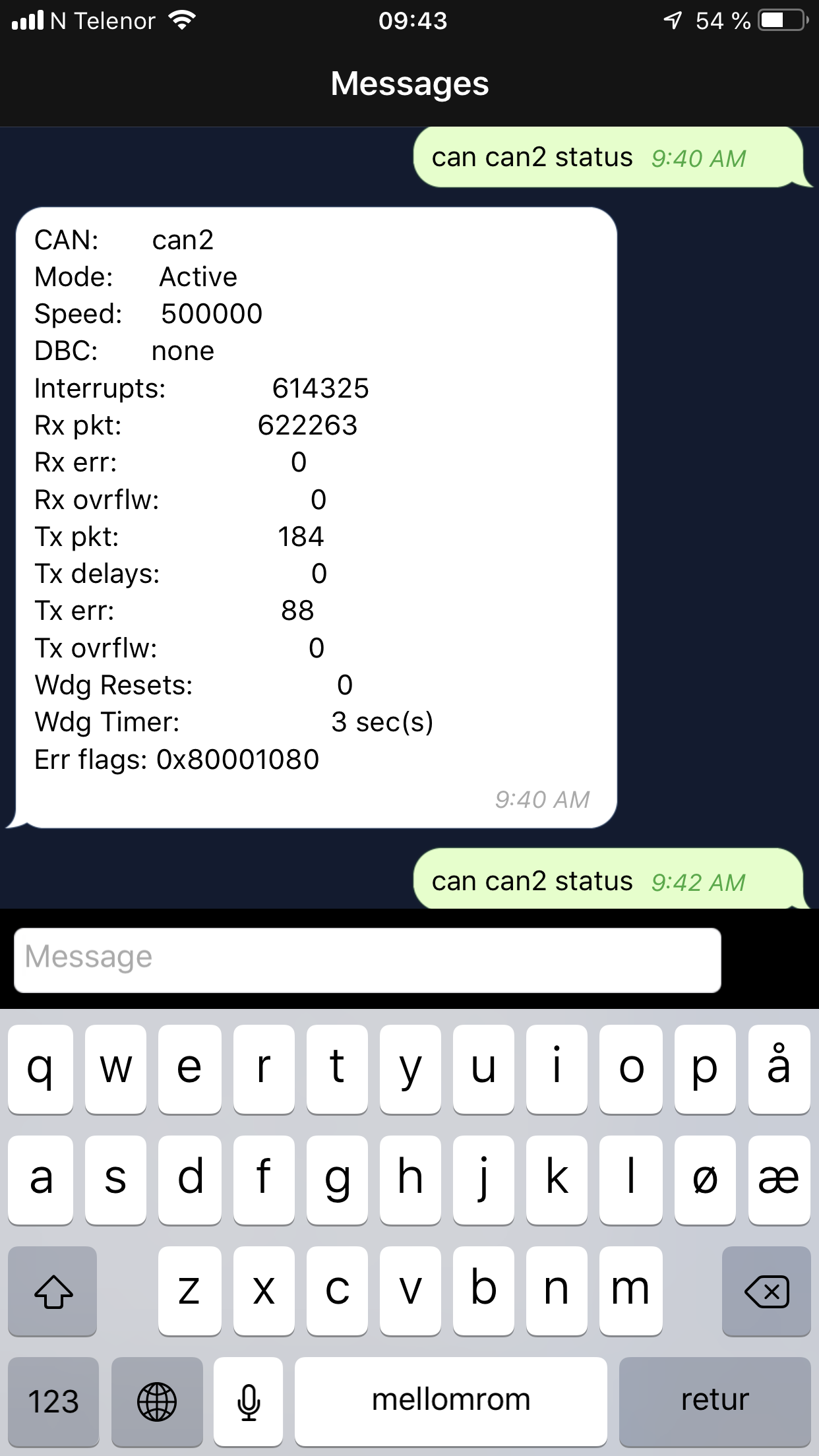
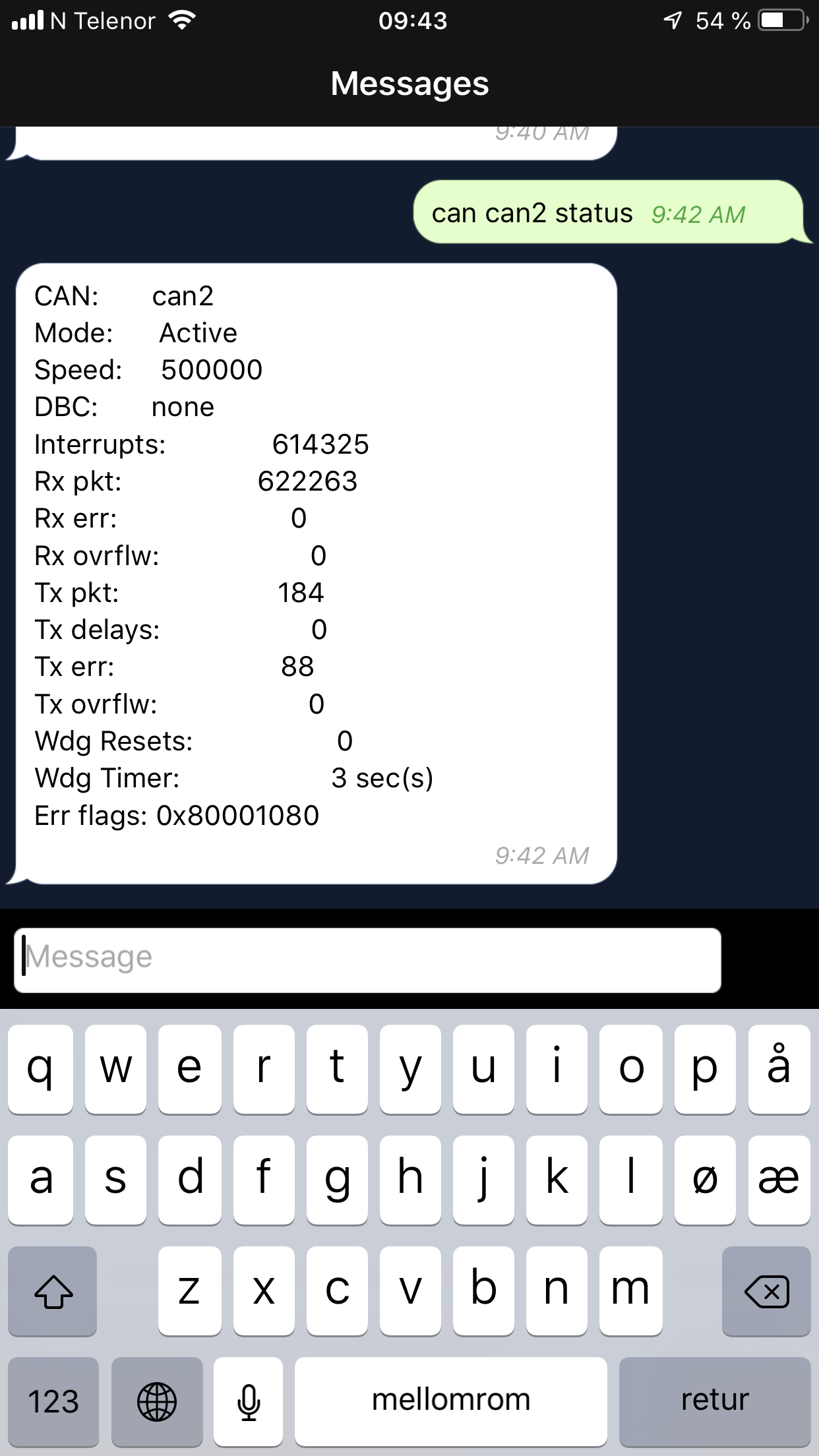
So this is with CAN2 not working? Err flags are 0x80001080. For MCP2515 that is: (intstat << 24) | (errflag << 16) | intflag So intstat = 0x80, errflag = 0x00, intflag = 0x1080. The 0x10.. in intflag indicates that this just ran: // clear error & wakeup interrupts: if (intstat & 0b11100000) { m_status.error_flags |= 0x1000; m_spibus->spi_cmd(m_spi, buf, 0, 4, CMD_BITMODIFY, 0x2c, intstat & 0b11100000, 0x00); } The instat=0x80 indicates "MERRF: Message Error Interrupt Flag bit”. So that is a bus error, but the errflag=0x00 so there are no indicated issues with either the 96 or 128 successive errors hit. The documentation (mcp2515 spec sheet) for this says: 7.4 Message Error Interrupt When an error occurs during the transmission or reception of a message, the message error flag (CANINTF.MERRF) will be set and, if the CANINTE.MERRE bit is set, an interrupt will be gener- ated on the INT pin. This is intended to be used to facilitate baud rate determination when used in conjunction with Listen-only mode. I can’t see anything obviously wrong with that. Not sure how to proceed. Perhaps we need a command to dump all the MCP2515 registers? We could at least then see the current state of the chip with all the gory details. Regards, Mark.
On 1 Apr 2019, at 3:49 PM, ovms <ovms@topphemmelig.no> wrote:
Looks the same, see attachment.
-Stein Arne-
On 2019-04-01 09:38, Mark Webb-Johnson <mark@webb-johnson.net> wrote: This is the thread from last summer talking about CAN bus lock-ups.
I’m guessing this is still happening for Leaf? Since the changes made below (back then), I haven’t seen it in my car.
Next time this happens to you guys (can2 stopped), can you get a ‘can can2 status’, wait 30 seconds, and repeat. Then send it here for us to look at.
Regards, Mark.
On 7 Jul 2018, at 10:37 PM, Mark Webb-Johnson <mark@webb-johnson.net <mailto:mark@webb-johnson.net>> wrote:
I’m trying to recreate this with my three-can-buses-connected DB9 plugged in. Transmitting on CAN1 should make it appear on CAN2 and CAN3.
Here is what I see:
OVMS# can can1 start active 1000000 Can bus can1 started in mode active at speed 1000000bps OVMS# can can2 start active 1000000 Can bus can2 started in mode active at speed 1000000bps OVMS# test cantx can1 25000 Testing 25000 frames on can1 Transmitted 25000 frames in 6.466209s = 258us/frame
OVMS# can can1 status CAN: can1 Mode: Active Speed: 1000000 Interrupts: 24771 Rx pkt: 0 Rx err: 0 Rx ovrflw: 0 Tx pkt: 24880 Tx delays: 24703 Tx err: 0 Tx ovrflw: 109 Err flags: 0 OVMS# can can2 status
CAN: can2 Mode: Active Speed: 1000000 Interrupts: 19084 Rx pkt: 24770 Rx err: 0 Rx ovrflw: 1 Tx pkt: 0 Tx delays: 0 Tx err: 0 Tx ovrflw: 0 Err flags: 0x2040
Note the err flags 0x2040 on CAN2, but the bus remains up and working fine.
Repeating the test gives us:
OVMS# test cantx can1 25000 Testing 25000 frames on can1 Transmitted 25000 frames in 6.479670s = 259us/frame
OVMS# can can1 status CAN: can1 Mode: Active Speed: 1000000 Interrupts: 49546 Rx pkt: 0 Rx err: 0 Rx ovrflw: 0 Tx pkt: 49771 Tx delays: 49417 Tx err: 0 Tx ovrflw: 207 Err flags: 0
OVMS# can can2 status CAN: can2 Mode: Active Speed: 1000000 Interrupts: 38288 Rx pkt: 49545 Rx err: 0 Rx ovrflw: 3 Tx pkt: 0 Tx delays: 0 Tx err: 0 Tx ovrflw: 0 Err flags: 0x2040
Looking at the mcp2515 code, it seems that Err flags are only stored "if (intstat & 0b10100000)”. That is "ERRF 0x80 = message tx/rx error” or "ERRIF 0x20 = overflow / error state change”. It is also set to "(intstat & 0b10100000) << 8 | errflag”, so doesn’t show all the error statuses. It is hard to rely on that for other errors/status on lock-up. Given that error_flags is a uint32_t, I think we can store more in it to allow for better diagnosis.
I changed the mcp2515 driver to always set error_flags, on each interrupt handled (except spurious interrupts with no flags found), as follows:
SSSSSSSSFFFFFFFF***EB01TLLLLLLLL SSSSSSSS = intstat FFFFFFFF = errflag B = RXB0 or RXB1 overflow flags cleared 0 = RXB0 overflowed 1 = RXB1 overflowed T = TX buffer has become available E = Error/WakeUp flags were cleared LLLLLLLL = intflag
I did find a problem on line 300: if (intstat & 0b10100000). It think that should be 0b11100000 (to also pickup the RXB0 overflow), and removed the m_status.rxbuf_overflow++ from RXB0 overflow (as it is not really an overflow - as RXB1 got the data).
With those changes made, I get:
OVMS# test cantx can1 25000 Testing 25000 frames on can1 Transmitted 25000 frames in 6.389849s = 255us/frame
OVMS# can can1 status CAN: can1 Mode: Active Speed: 1000000 Interrupts: 24777 Rx pkt: 0 Rx err: 0 Rx ovrflw: 0 Tx pkt: 24884 Tx delays: 24739 Tx err: 0 Tx ovrflw: 116 Err flags: 0x00000000
OVMS# can can2 status CAN: can2 Mode: Active Speed: 1000000 Interrupts: 18935 Rx pkt: 24777 Rx err: 0 Rx ovrflw: 0 Tx pkt: 0 Tx delays: 0 Tx err: 0 Tx ovrflw: 0 Err flags: 0x01000001
I don’t think I’ve fixed anything (apart from that minor issue with RXB0 overflow diagnostics), but hopefully the new error_flags display should help finding out what is causing this lockup. Hopefully I haven’t broken anything.
Regards, Mark.
On 7 Jul 2018, at 10:42 AM, Tom Parker <tom@carrott.org <mailto:tom@carrott.org>> wrote:
On 07/07/18 00:05, Mark Webb-Johnson wrote: Err flags 0x2040. The 0x20 part is the error interrupt. The 0x40 part is "RX0OVR: Receive Buffer 0 Overflow Flag bit”.
Where the number on ‘can can2 status’ moving at all? Or completely stuck?
None of the can can2 status numbers change when the can bus is broken. After power cycling it they move.
Seems different than the fault Greg and I are seeing. This one likely to be interrupt flag, or buffer overflow, not being cleared correctly. I’m guessing the overflow because that just doesn’t seem correct in mcp2515::RxCallback(). I’ll focus on that and have a look.
I just checked the car again and it stopped with Rx ovrflw number only 1281, half what it got to last time.
_______________________________________________ OvmsDev mailing list OvmsDev@lists.openvehicles.com <mailto:OvmsDev@lists.openvehicles.com> http://lists.openvehicles.com/mailman/listinfo/ovmsdev <http://lists.openvehicles.com/mailman/listinfo/ovmsdev>_______________________________________________ OvmsDev mailing list OvmsDev@lists.openvehicles.com <mailto:OvmsDev@lists.openvehicles.com> http://lists.openvehicles.com/mailman/listinfo/ovmsdev _______________________________________________ OvmsDev mailing list OvmsDev@lists.openvehicles.com http://lists.openvehicles.com/mailman/listinfo/ovmsdev <IMG_2835.PNG><IMG_2836.PNG>_______________________________________________ OvmsDev mailing list OvmsDev@lists.openvehicles.com http://lists.openvehicles.com/mailman/listinfo/ovmsdev
I just discovered something. Since the temperature has been pretty stable the last month (not cold, and not warm) I have not used the climate control function in OVMS. With the latest firmware, CAN2 can recieve data for many days, until I trigger the "start climate control" command. Then CAN2 stops receiving. (and "possible theft" message occurs). Car is 2016 Leaf. Kind regards, Stein Arne Sordal On 2019-04-01 14:56, Mark Webb-Johnson <mark@webb-johnson.net> wrote: > So this is with CAN2 not working? > > > Err flags are 0x80001080. For MCP2515 that is: > > > > > > (intstat << 24) | > > (errflag << 16) | > > intflag > > > > > > So intstat = 0x80, errflag = 0x00, intflag = 0x1080. > > > > The 0x10.. in intflag indicates that this just ran: > > > > > > > > > // clear error & wakeup interrupts: > > > > if (intstat & 0b11100000) > > > > { > > > > m_status.error_flags |= 0x1000; > > > > m_spibus->spi_cmd(m_spi, buf, 0, 4, CMD_BITMODIFY, 0x2c, intstat & 0b11100000, 0x00); > > > > } > > > > > > > > > The instat=0x80 indicates "MERRF: Message Error Interrupt Flag bit”. So that is a bus error, but the errflag=0x00 so there are no indicated issues with either the 96 or 128 successive errors hit. The documentation (mcp2515 spec sheet) for this says: > > > > > > > > > > 7.4 Message Error Interrupt > > > > When an error occurs during the transmission or reception of a message, the message error flag (CANINTF.MERRF) will be set and, if the CANINTE.MERRE bit is set, an interrupt will be gener- ated on the INT pin. This is intended to be used to facilitate baud rate determination when used in conjunction with Listen-only mode. > > > > I can’t see anything obviously wrong with that. Not sure how to proceed. Perhaps we need a command to dump all the MCP2515 registers? We could at least then see the current state of the chip with all the gory details. > > > > Regards, Mark. > > > > > > > > On 1 Apr 2019, at 3:49 PM, ovms <ovms@topphemmelig.no (mailto:ovms@topphemmelig.no)> wrote: > > > > > > > > Looks the same, see attachment. > > > > > > > > -Stein Arne- > > > > > > > > > > > > > > > > > > On 2019-04-01 09:38, Mark Webb-Johnson <mark@webb-johnson.net (mailto:mark@webb-johnson.net)> wrote: > > > > > > > This is the thread from last summer talking about CAN bus lock-ups. > > > > > > > > > I’m guessing this is still happening for Leaf? Since the changes made below (back then), I haven’t seen it in my car. > > > > > > > > > > > > Next time this happens to you guys (can2 stopped), can you get a ‘can can2 status’, wait 30 seconds, and repeat. Then send it here for us to look at. > > > > > > > > > > > > Regards, Mark. > > > > > > > > > > > > > > > > > On 7 Jul 2018, at 10:37 PM, Mark Webb-Johnson <mark@webb-johnson.net (mailto:mark@webb-johnson.net)> wrote: > > > > > > > > > > > > > > > > I’m trying to recreate this with my three-can-buses-connected DB9 plugged in. Transmitting on CAN1 should make it appear on CAN2 and CAN3. > > > > > > > > > > > > Here is what I see: > > > > > > > > > > > > > > > > > > > > > > > > > > > OVMS# can can1 start active 1000000 > > > > > > > > > > Can bus can1 started in mode active at speed 1000000bps > > > > > > > > > > OVMS# can can2 start active 1000000 > > > > > > > > > > Can bus can2 started in mode active at speed 1000000bps > > > > > > > > > > OVMS# test cantx can1 25000 > > > > > > > > > > Testing 25000 frames on can1 > > > > > > > > > > Transmitted 25000 frames in 6.466209s = 258us/frame > > > > > > > > > > > > > > > > > > > > OVMS# can can1 status > > > > > > > > > > CAN: can1 > > > > > > > > > > Mode: Active > > > > > > > > > > Speed: 1000000 > > > > > > > > > > Interrupts: 24771 > > > > > > > > > > Rx pkt: 0 > > > > > > > > > > Rx err: 0 > > > > > > > > > > Rx ovrflw: 0 > > > > > > > > > > Tx pkt: 24880 > > > > > > > > > > Tx delays: 24703 > > > > > > > > > > Tx err: 0 > > > > > > > > > > Tx ovrflw: 109 > > > > > > > > > > Err flags: 0 > > > > > > > > > > OVMS# can can2 status > > > > > > > > > > > > > > > > > > > > CAN: can2 > > > > > > > > > > Mode: Active > > > > > > > > > > Speed: 1000000 > > > > > > > > > > Interrupts: 19084 > > > > > > > > > > Rx pkt: 24770 > > > > > > > > > > Rx err: 0 > > > > > > > > > > Rx ovrflw: 1 > > > > > > > > > > Tx pkt: 0 > > > > > > > > > > Tx delays: 0 > > > > > > > > > > Tx err: 0 > > > > > > > > > > Tx ovrflw: 0 > > > > > > > > > > Err flags: 0x2040 > > > > > > > > > > > > > > > > > > > > > > > > > > > > > > Note the err flags 0x2040 on CAN2, but the bus remains up and working fine. > > > > > > > > > > > > > > > > Repeating the test gives us: > > > > > > > > > > > > > > > > > > > > > > > > > > > > > > > > > > > > OVMS# test cantx can1 25000 > > > > > > > > > > Testing 25000 frames on can1 > > > > > > > > > > Transmitted 25000 frames in 6.479670s = 259us/frame > > > > > > > > > > > > > > > > > > > > OVMS# can can1 status > > > > > > > > > > CAN: can1 > > > > > > > > > > Mode: Active > > > > > > > > > > Speed: 1000000 > > > > > > > > > > Interrupts: 49546 > > > > > > > > > > Rx pkt: 0 > > > > > > > > > > Rx err: 0 > > > > > > > > > > Rx ovrflw: 0 > > > > > > > > > > Tx pkt: 49771 > > > > > > > > > > Tx delays: 49417 > > > > > > > > > > Tx err: 0 > > > > > > > > > > Tx ovrflw: 207 > > > > > > > > > > Err flags: 0 > > > > > > > > > > > > > > > > > > > > OVMS# can can2 status > > > > > > > > > > CAN: can2 > > > > > > > > > > Mode: Active > > > > > > > > > > Speed: 1000000 > > > > > > > > > > Interrupts: 38288 > > > > > > > > > > Rx pkt: 49545 > > > > > > > > > > Rx err: 0 > > > > > > > > > > Rx ovrflw: 3 > > > > > > > > > > Tx pkt: 0 > > > > > > > > > > Tx delays: 0 > > > > > > > > > > Tx err: 0 > > > > > > > > > > Tx ovrflw: 0 > > > > > > > > > > Err flags: 0x2040 > > > > > > > > > > > > > > > > > > > > > > > > > > > > > > > > > > > Looking at the mcp2515 code, it seems that Err flags are only stored "if (intstat & 0b10100000)”. That is "ERRF 0x80 = message tx/rx error” or "ERRIF 0x20 = overflow / error state change”. It is also set to "(intstat & 0b10100000) << 8 | errflag”, so doesn’t show all the error statuses. It is hard to rely on that for other errors/status on lock-up. Given that error_flags is a uint32_t, I think we can store more in it to allow for better diagnosis. > > > > > > > > > > > > > > > > I changed the mcp2515 driver to always set error_flags, on each interrupt handled (except spurious interrupts with no flags found), as follows: > > > > > > > > > > > > > > > > > > > > > > > > > > > > > > > SSSSSSSSFFFFFFFF***EB01TLLLLLLLL > > > > > > > > > > > > > > > > > > > > SSSSSSSS = intstat > > > > > > > > > > FFFFFFFF = errflag > > > > > > > > > > B = RXB0 or RXB1 overflow flags cleared > > > > > > > > > > 0 = RXB0 overflowed > > > > > > > > > > 1 = RXB1 overflowed > > > > > > > > > > T = TX buffer has become available > > > > > > > > > > E = Error/WakeUp flags were cleared > > > > > > > > > > LLLLLLLL = intflag > > > > > > > > > > > > > > > > > > > > > > > > > > > > > > > > > > > > > > > > I did find a problem on line 300: if (intstat & 0b10100000). It think that should be 0b11100000 (to also pickup the RXB0 overflow), and removed the m_status.rxbuf_overflow++ from RXB0 overflow (as it is not really an overflow - as RXB1 got the data). > > > > > > > > > > > > > > > > With those changes made, I get: > > > > > > > > > > > > > > > > > > > > > > > > > > > > > > > > > > > > OVMS# test cantx can1 25000 > > > > > Testing 25000 frames on can1 > > > > > Transmitted 25000 frames in 6.389849s = 255us/frame > > > > > > > > > > OVMS# can can1 status > > > > > CAN: can1 > > > > > Mode: Active > > > > > Speed: 1000000 > > > > > Interrupts: 24777 > > > > > Rx pkt: 0 > > > > > Rx err: 0 > > > > > Rx ovrflw: 0 > > > > > Tx pkt: 24884 > > > > > Tx delays: 24739 > > > > > Tx err: 0 > > > > > Tx ovrflw: 116 > > > > > Err flags: 0x00000000 > > > > > > > > > > OVMS# can can2 status > > > > > CAN: can2 > > > > > Mode: Active > > > > > Speed: 1000000 > > > > > Interrupts: 18935 > > > > > Rx pkt: 24777 > > > > > Rx err: 0 > > > > > Rx ovrflw: 0 > > > > > Tx pkt: 0 > > > > > Tx delays: 0 > > > > > Tx err: 0 > > > > > Tx ovrflw: 0 > > > > > Err flags: 0x01000001 > > > > > > > > > > > > > > > > I don’t think I’ve fixed anything (apart from that minor issue with RXB0 overflow diagnostics), but hopefully the new error_flags display should help finding out what is causing this lockup. Hopefully I haven’t broken anything. > > > > > > > > > > > > > > > > Regards, Mark. > > > > > > > > > > > > > > > > > > > > > > > > > > On 7 Jul 2018, at 10:42 AM, Tom Parker <tom@carrott.org (mailto:tom@carrott.org)> wrote: > > > > > > > > > > > > > > > > > > > > On 07/07/18 00:05, Mark Webb-Johnson wrote: > > > > > > > > > > > Err flags 0x2040. The 0x20 part is the error interrupt. The 0x40 part is "RX0OVR: Receive Buffer 0 Overflow Flag bit”. > > > > > > > > > > > > Where the number on ‘can can2 status’ moving at all? Or completely stuck? > > > > > None of the can can2 status numbers change when the can bus is broken. After power cycling it they move. > > > > > > > > > > > > > > > > Seems different than the fault Greg and I are seeing. This one likely to be interrupt flag, or buffer overflow, not being cleared correctly. I’m guessing the overflow because that just doesn’t seem correct in mcp2515::RxCallback(). I’ll focus on that and have a look. > > > > > > > > > > I just checked the car again and it stopped with Rx ovrflw number only 1281, half what it got to last time. > > > > > > > > > > _______________________________________________ > > > > > OvmsDev mailing list > > > > > OvmsDev@lists.openvehicles.com (mailto:OvmsDev@lists.openvehicles.com) > > > > > http://lists.openvehicles.com/mailman/listinfo/ovmsdev _______________________________________________ > > > > OvmsDev mailing list > > > > OvmsDev@lists.openvehicles.com (mailto:OvmsDev@lists.openvehicles.com) > > > > http://lists.openvehicles.com/mailman/listinfo/ovmsdev _______________________________________________ OvmsDev mailing list OvmsDev@lists.openvehicles.com (mailto:OvmsDev@lists.openvehicles.com) http://lists.openvehicles.com/mailman/listinfo/ovmsdev <IMG_2835.PNG><IMG_2836.PNG>_______________________________________________ > > OvmsDev mailing list > > OvmsDev@lists.openvehicles.com (mailto:OvmsDev@lists.openvehicles.com) > > http://lists.openvehicles.com/mailman/listinfo/ovmsdev _______________________________________________ OvmsDev mailing list OvmsDev@lists.openvehicles.com http://lists.openvehicles.com/mailman/listinfo/ovmsdev
On the 2016 Leaf the Climate Control command is sent on the 'CAR' CAN bus which is connected to on of the exernal can busses. I'm not sure if there is a task, or if there are other usages of the CAN2 bus in the Leaf implementation (there weren't last time I looked closely but I haven't been able to keep up with the improvements others have made). The Climate Control does do task or timer related stuff because it sends the CAN message several times over a period of a second or two. This is distinct from the earlier Leafs where climate control is on the EV can bus connected to the internal CAN bus. On 29/05/19 2:57 PM, Greg D. wrote:
Hi Stein,
Interesting. Does the "start climate control" command start a new process/task on OVMS, or otherwise cause the CAN2 bus to be "opened" at the time of the command? If so, that would be consistent with what I see.
With the OBD2ECU translator, if I have an OBDII device (e.g. head-up display) running first, and then start the OBD2ECU task, the bus will hang every time. If I start the task first, then power up the OBDII device, all will be fine. There seems to be a collision between the task starting and the data coming in that triggers the bus hang.
I have a pair of scripts to turn on and turn off the Ext12v supply to the OBDII device when the car is turned on or off, respectively. That's just to manage the OBDII device as if it were in an ICE vehicle. What I do now, as a workaround for the bus hang, is to stop and restart the OBD2ECU task before turning on the ext12v supply in the car turn-on script. That seems to work.
Not sure how that might help your problem (since you can't turn off the car's data stream), but at least it would confirm that we're looking at the same bug.
Greg
ovms wrote:
I just discovered something. Since the temperature has been pretty stable the last month (not cold, and not warm) I have not used the climate control function in OVMS. With the latest firmware, CAN2 can recieve data for many days, until I trigger the "start climate control" command. Then CAN2 stops receiving. (and "possible theft" message occurs). Car is 2016 Leaf. Kind regards, Stein Arne Sordal On 2019-04-01 14:56, Mark Webb-Johnson <mark@webb-johnson.net> wrote:
So this is with CAN2 not working? Err flags are 0x80001080. For MCP2515 that is:
* (intstat << 24) | * (errflag << 16) | * intflag
So intstat = 0x80, errflag = 0x00, intflag = 0x1080. The 0x10.. in intflag indicates that this just ran:
// clear error & wakeup interrupts: if (intstat & 0b11100000) { m_status.error_flags |= 0x1000; m_spibus->spi_cmd(m_spi, buf, 0, 4, CMD_BITMODIFY, 0x2c, intstat & 0b11100000, 0x00); }
The instat=0x80 indicates "MERRF: Message Error Interrupt Flag bit”. So that is a bus error, but the errflag=0x00 so there are no indicated issues with either the 96 or 128 successive errors hit. The documentation (mcp2515 spec sheet) for this says:
7.4 Message Error Interrupt
When an error occurs during the transmission or reception of a message, the message error flag (CANINTF.MERRF) will be set and, if the CANINTE.MERRE bit is set, an interrupt will be gener- ated on the INT pin. This is intended to be used to facilitate baud rate determination when used in conjunction with Listen-only mode.
I can’t see anything obviously wrong with that. Not sure how to proceed. Perhaps we need a command to dump all the MCP2515 registers? We could at least then see the current state of the chip with all the gory details. Regards, Mark.
On 1 Apr 2019, at 3:49 PM, ovms <ovms@topphemmelig.no <mailto:ovms@topphemmelig.no>> wrote:
Looks the same, see attachment. -Stein Arne- On 2019-04-01 09:38, Mark Webb-Johnson <mark@webb-johnson.net <mailto:mark@webb-johnson.net>> wrote:
This is the thread from last summer talking about CAN bus lock-ups. I’m guessing this is still happening for Leaf? Since the changes made below (back then), I haven’t seen it in my car. Next time this happens to you guys (can2 stopped), can you get a ‘can can2 status’, wait 30 seconds, and repeat. Then send it here for us to look at. Regards, Mark.
On 7 Jul 2018, at 10:37 PM, Mark Webb-Johnson <mark@webb-johnson.net <mailto:mark@webb-johnson.net>> wrote:
I’m trying to recreate this with my three-can-buses-connected DB9 plugged in. Transmitting on CAN1 should make it appear on CAN2 and CAN3. Here is what I see:
OVMS# can can1 start active 1000000 Can bus can1 started in mode active at speed 1000000bps OVMS# can can2 start active 1000000 Can bus can2 started in mode active at speed 1000000bps OVMS# test cantx can1 25000 Testing 25000 frames on can1 Transmitted 25000 frames in 6.466209s = 258us/frame OVMS# can can1 status CAN: can1 Mode: Active Speed: 1000000 Interrupts: 24771 Rx pkt: 0 Rx err: 0 Rx ovrflw: 0 Tx pkt: 24880 Tx delays: 24703 Tx err: 0 Tx ovrflw: 109 Err flags: 0 OVMS# can can2 status CAN: can2 Mode: Active Speed: 1000000 Interrupts: 19084 Rx pkt: 24770 Rx err: 0 Rx ovrflw: 1 Tx pkt: 0 Tx delays: 0 Tx err: 0 Tx ovrflw: 0 Err flags: 0x2040
Note the err flags 0x2040 on CAN2, but the bus remains up and working fine. Repeating the test gives us:
OVMS# test cantx can1 25000 Testing 25000 frames on can1 Transmitted 25000 frames in 6.479670s = 259us/frame OVMS# can can1 status CAN: can1 Mode: Active Speed: 1000000 Interrupts: 49546 Rx pkt: 0 Rx err: 0 Rx ovrflw: 0 Tx pkt: 49771 Tx delays: 49417 Tx err: 0 Tx ovrflw: 207 Err flags: 0 OVMS# can can2 status CAN: can2 Mode: Active Speed: 1000000 Interrupts: 38288 Rx pkt: 49545 Rx err: 0 Rx ovrflw: 3 Tx pkt: 0 Tx delays: 0 Tx err: 0 Tx ovrflw: 0 Err flags: 0x2040
Looking at the mcp2515 code, it seems that Err flags are only stored "if (intstat & 0b10100000)”. That is "ERRF 0x80 = message tx/rx error” or "ERRIF 0x20 = overflow / error state change”. It is also set to "(intstat & 0b10100000) << 8 | errflag”, so doesn’t show all the error statuses. It is hard to rely on that for other errors/status on lock-up. Given that error_flags is a uint32_t, I think we can store more in it to allow for better diagnosis. I changed the mcp2515 driver to always set error_flags, on each interrupt handled (except spurious interrupts with no flags found), as follows:
SSSSSSSSFFFFFFFF***EB01TLLLLLLLL
* SSSSSSSS = intstat * FFFFFFFF = errflag * B = RXB0 or RXB1 overflow flags cleared * 0 = RXB0 overflowed * 1 = RXB1 overflowed * T = TX buffer has become available * E = Error/WakeUp flags were cleared * LLLLLLLL = intflag
I did find a problem on line 300: if (intstat & 0b10100000). It think that should be 0b11100000 (to also pickup the RXB0 overflow), and removed the m_status.rxbuf_overflow++ from RXB0 overflow (as it is not really an overflow - as RXB1 got the data). With those changes made, I get:
OVMS# test cantx can1 25000 Testing 25000 frames on can1 Transmitted 25000 frames in 6.389849s = 255us/frame
OVMS# can can1 status CAN: can1 Mode: Active Speed: 1000000 Interrupts: 24777 Rx pkt: 0 Rx err: 0 Rx ovrflw: 0 Tx pkt: 24884 Tx delays: 24739 Tx err: 0 Tx ovrflw: 116 Err flags: 0x00000000
OVMS# can can2 status CAN: can2 Mode: Active Speed: 1000000 Interrupts: 18935 Rx pkt: 24777 Rx err: 0 Rx ovrflw: 0 Tx pkt: 0 Tx delays: 0 Tx err: 0 Tx ovrflw: 0 Err flags: 0x01000001
I don’t think I’ve fixed anything (apart from that minor issue with RXB0 overflow diagnostics), but hopefully the new error_flags display should help finding out what is causing this lockup. Hopefully I haven’t broken anything. Regards, Mark.
On 7 Jul 2018, at 10:42 AM, Tom Parker <tom@carrott.org <mailto:tom@carrott.org>> wrote:
On 07/07/18 00:05, Mark Webb-Johnson wrote:
Err flags 0x2040. The 0x20 part is the error interrupt. The 0x40 part is "RX0OVR: Receive Buffer 0 Overflow Flag bit”.
Where the number on ‘can can2 status’ moving at all? Or completely stuck?
None of the can can2 status numbers change when the can bus is broken. After power cycling it they move.
Seems different than the fault Greg and I are seeing. This one likely to be interrupt flag, or buffer overflow, not being cleared correctly. I’m guessing the overflow because that just doesn’t seem correct in mcp2515::RxCallback(). I’ll focus on that and have a look.
I just checked the car again and it stopped with Rx ovrflw number only 1281, half what it got to last time.
_______________________________________________ OvmsDev mailing list OvmsDev@lists.openvehicles.com <mailto:OvmsDev@lists.openvehicles.com> http://lists.openvehicles.com/mailman/listinfo/ovmsdev
_______________________________________________ OvmsDev mailing list OvmsDev@lists.openvehicles.com <mailto:OvmsDev@lists.openvehicles.com> http://lists.openvehicles.com/mailman/listinfo/ovmsdev
_______________________________________________ OvmsDev mailing list OvmsDev@lists.openvehicles.com <mailto:OvmsDev@lists.openvehicles.com> http://lists.openvehicles.com/mailman/listinfo/ovmsdev
<IMG_2835.PNG><IMG_2836.PNG>_______________________________________________ OvmsDev mailing list OvmsDev@lists.openvehicles.com <mailto:OvmsDev@lists.openvehicles.com> http://lists.openvehicles.com/mailman/listinfo/ovmsdev
_______________________________________________ OvmsDev mailing list OvmsDev@lists.openvehicles.com http://lists.openvehicles.com/mailman/listinfo/ovmsdev
_______________________________________________ OvmsDev mailing list OvmsDev@lists.openvehicles.com http://lists.openvehicles.com/mailman/listinfo/ovmsdev
_______________________________________________ OvmsDev mailing list OvmsDev@lists.openvehicles.com http://lists.openvehicles.com/mailman/listinfo/ovmsdev
In the case of the vehicle modules, the CAN ports are open at boot, work well, but fail some time later. The issue seems to be caused by errors on the CAN bus not recovered from, and opening the port could trigger that. But in the case of the vehicle modules, I don’t think that is the cause. Regards, Mark.
On 30 May 2019, at 1:25 AM, Greg D. <gregd2350@gmail.com> wrote:
Hi Tom,
My suspicion is that it's the opening of the CAN port where the problem is. I tried putting delays in the OBD2ECU code to cause a receive overrun, and things recovered just fine when the delay cleared. Writes to the CAN bus are generally once per read (request and response sequence), but there are a few places where the task can issue multiple writes to the bus back-to-back. Some time ago, two writes were fine, but three (I think) would cause a transmit overflow. Michael and I fixed that, so even if you're sending multiple frames it should be fine. Basically, once the bus is open and running, it seems to work pretty well. It's just that 'open' procedure that seems to have a problem when the bus is already active.
Note that the only way I have found to clear the hung bus condition is to stop the traffic, close the port, open the port, and resume the traffic.
I haven't looked at the Leaf code, but I suspect that the climate commands open the CAN bus, write the necessary frames, and then close it afterward. If so, that would definitely risk the issue I'm seeing. If there's a way to open the environmental bus at boot time and leave it open, that should workaround the problem, assuming of course that you survive the initial open. I can control the external device with ext12v power; you can't control the Leaf environmental bus...
Greg
Tom Parker wrote:
On the 2016 Leaf the Climate Control command is sent on the 'CAR' CAN bus which is connected to on of the exernal can busses. I'm not sure if there is a task, or if there are other usages of the CAN2 bus in the Leaf implementation (there weren't last time I looked closely but I haven't been able to keep up with the improvements others have made). The Climate Control does do task or timer related stuff because it sends the CAN message several times over a period of a second or two.
This is distinct from the earlier Leafs where climate control is on the EV can bus connected to the internal CAN bus.
On 29/05/19 2:57 PM, Greg D. wrote:
Hi Stein,
Interesting. Does the "start climate control" command start a new process/task on OVMS, or otherwise cause the CAN2 bus to be "opened" at the time of the command? If so, that would be consistent with what I see.
With the OBD2ECU translator, if I have an OBDII device (e.g. head-up display) running first, and then start the OBD2ECU task, the bus will hang every time. If I start the task first, then power up the OBDII device, all will be fine. There seems to be a collision between the task starting and the data coming in that triggers the bus hang.
I have a pair of scripts to turn on and turn off the Ext12v supply to the OBDII device when the car is turned on or off, respectively. That's just to manage the OBDII device as if it were in an ICE vehicle. What I do now, as a workaround for the bus hang, is to stop and restart the OBD2ECU task before turning on the ext12v supply in the car turn-on script. That seems to work.
Not sure how that might help your problem (since you can't turn off the car's data stream), but at least it would confirm that we're looking at the same bug.
Greg
ovms wrote:
I just discovered something. Since the temperature has been pretty stable the last month (not cold, and not warm) I have not used the climate control function in OVMS. With the latest firmware, CAN2 can recieve data for many days, until I trigger the "start climate control" command. Then CAN2 stops receiving. (and "possible theft" message occurs). Car is 2016 Leaf.
Kind regards, Stein Arne Sordal
On 2019-04-01 14:56, Mark Webb-Johnson <mark@webb-johnson.net> <mailto:mark@webb-johnson.net> wrote: So this is with CAN2 not working?
Err flags are 0x80001080. For MCP2515 that is:
(intstat << 24) | (errflag << 16) | intflag
So intstat = 0x80, errflag = 0x00, intflag = 0x1080.
The 0x10.. in intflag indicates that this just ran:
// clear error & wakeup interrupts: if (intstat & 0b11100000) { m_status.error_flags |= 0x1000; m_spibus->spi_cmd(m_spi, buf, 0, 4, CMD_BITMODIFY, 0x2c, intstat & 0b11100000, 0x00); }
The instat=0x80 indicates "MERRF: Message Error Interrupt Flag bit”. So that is a bus error, but the errflag=0x00 so there are no indicated issues with either the 96 or 128 successive errors hit. The documentation (mcp2515 spec sheet) for this says:
7.4 Message Error Interrupt
When an error occurs during the transmission or reception of a message, the message error flag (CANINTF.MERRF) will be set and, if the CANINTE.MERRE bit is set, an interrupt will be gener- ated on the INT pin. This is intended to be used to facilitate baud rate determination when used in conjunction with Listen-only mode.
I can’t see anything obviously wrong with that. Not sure how to proceed. Perhaps we need a command to dump all the MCP2515 registers? We could at least then see the current state of the chip with all the gory details.
Regards, Mark.
On 1 Apr 2019, at 3:49 PM, ovms <ovms@topphemmelig.no <mailto:ovms@topphemmelig.no>> wrote:
Looks the same, see attachment.
-Stein Arne-
On 2019-04-01 09:38, Mark Webb-Johnson <mark@webb-johnson.net <mailto:mark@webb-johnson.net>> wrote: This is the thread from last summer talking about CAN bus lock-ups.
I’m guessing this is still happening for Leaf? Since the changes made below (back then), I haven’t seen it in my car.
Next time this happens to you guys (can2 stopped), can you get a ‘can can2 status’, wait 30 seconds, and repeat. Then send it here for us to look at.
Regards, Mark.
On 7 Jul 2018, at 10:37 PM, Mark Webb-Johnson <mark@webb-johnson.net <mailto:mark@webb-johnson.net>> wrote:
I’m trying to recreate this with my three-can-buses-connected DB9 plugged in. Transmitting on CAN1 should make it appear on CAN2 and CAN3.
Here is what I see:
OVMS# can can1 start active 1000000 Can bus can1 started in mode active at speed 1000000bps OVMS# can can2 start active 1000000 Can bus can2 started in mode active at speed 1000000bps OVMS# test cantx can1 25000 Testing 25000 frames on can1 Transmitted 25000 frames in 6.466209s = 258us/frame
OVMS# can can1 status CAN: can1 Mode: Active Speed: 1000000 Interrupts: 24771 Rx pkt: 0 Rx err: 0 Rx ovrflw: 0 Tx pkt: 24880 Tx delays: 24703 Tx err: 0 Tx ovrflw: 109 Err flags: 0 OVMS# can can2 status
CAN: can2 Mode: Active Speed: 1000000 Interrupts: 19084 Rx pkt: 24770 Rx err: 0 Rx ovrflw: 1 Tx pkt: 0 Tx delays: 0 Tx err: 0 Tx ovrflw: 0 Err flags: 0x2040
Note the err flags 0x2040 on CAN2, but the bus remains up and working fine.
Repeating the test gives us:
OVMS# test cantx can1 25000 Testing 25000 frames on can1 Transmitted 25000 frames in 6.479670s = 259us/frame
OVMS# can can1 status CAN: can1 Mode: Active Speed: 1000000 Interrupts: 49546 Rx pkt: 0 Rx err: 0 Rx ovrflw: 0 Tx pkt: 49771 Tx delays: 49417 Tx err: 0 Tx ovrflw: 207 Err flags: 0
OVMS# can can2 status CAN: can2 Mode: Active Speed: 1000000 Interrupts: 38288 Rx pkt: 49545 Rx err: 0 Rx ovrflw: 3 Tx pkt: 0 Tx delays: 0 Tx err: 0 Tx ovrflw: 0 Err flags: 0x2040
Looking at the mcp2515 code, it seems that Err flags are only stored "if (intstat & 0b10100000)”. That is "ERRF 0x80 = message tx/rx error” or "ERRIF 0x20 = overflow / error state change”. It is also set to "(intstat & 0b10100000) << 8 | errflag”, so doesn’t show all the error statuses. It is hard to rely on that for other errors/status on lock-up. Given that error_flags is a uint32_t, I think we can store more in it to allow for better diagnosis.
I changed the mcp2515 driver to always set error_flags, on each interrupt handled (except spurious interrupts with no flags found), as follows:
SSSSSSSSFFFFFFFF***EB01TLLLLLLLL SSSSSSSS = intstat FFFFFFFF = errflag B = RXB0 or RXB1 overflow flags cleared 0 = RXB0 overflowed 1 = RXB1 overflowed T = TX buffer has become available E = Error/WakeUp flags were cleared LLLLLLLL = intflag
I did find a problem on line 300: if (intstat & 0b10100000). It think that should be 0b11100000 (to also pickup the RXB0 overflow), and removed the m_status.rxbuf_overflow++ from RXB0 overflow (as it is not really an overflow - as RXB1 got the data).
With those changes made, I get:
OVMS# test cantx can1 25000 Testing 25000 frames on can1 Transmitted 25000 frames in 6.389849s = 255us/frame
OVMS# can can1 status CAN: can1 Mode: Active Speed: 1000000 Interrupts: 24777 Rx pkt: 0 Rx err: 0 Rx ovrflw: 0 Tx pkt: 24884 Tx delays: 24739 Tx err: 0 Tx ovrflw: 116 Err flags: 0x00000000
OVMS# can can2 status CAN: can2 Mode: Active Speed: 1000000 Interrupts: 18935 Rx pkt: 24777 Rx err: 0 Rx ovrflw: 0 Tx pkt: 0 Tx delays: 0 Tx err: 0 Tx ovrflw: 0 Err flags: 0x01000001
I don’t think I’ve fixed anything (apart from that minor issue with RXB0 overflow diagnostics), but hopefully the new error_flags display should help finding out what is causing this lockup. Hopefully I haven’t broken anything.
Regards, Mark.
On 7 Jul 2018, at 10:42 AM, Tom Parker <tom@carrott.org <mailto:tom@carrott.org>> wrote:
On 07/07/18 00:05, Mark Webb-Johnson wrote: Err flags 0x2040. The 0x20 part is the error interrupt. The 0x40 part is "RX0OVR: Receive Buffer 0 Overflow Flag bit”.
Where the number on ‘can can2 status’ moving at all? Or completely stuck?
None of the can can2 status numbers change when the can bus is broken. After power cycling it they move.
Seems different than the fault Greg and I are seeing. This one likely to be interrupt flag, or buffer overflow, not being cleared correctly. I’m guessing the overflow because that just doesn’t seem correct in mcp2515::RxCallback(). I’ll focus on that and have a look.
I just checked the car again and it stopped with Rx ovrflw number only 1281, half what it got to last time.
_______________________________________________ OvmsDev mailing list OvmsDev@lists.openvehicles.com <mailto:OvmsDev@lists.openvehicles.com> http://lists.openvehicles.com/mailman/listinfo/ovmsdev <http://lists.openvehicles.com/mailman/listinfo/ovmsdev>_______________________________________________ OvmsDev mailing list OvmsDev@lists.openvehicles.com <mailto:OvmsDev@lists.openvehicles.com> http://lists.openvehicles.com/mailman/listinfo/ovmsdev <http://lists.openvehicles.com/mailman/listinfo/ovmsdev>_______________________________________________ OvmsDev mailing list OvmsDev@lists.openvehicles.com <mailto:OvmsDev@lists.openvehicles.com>http://lists.openvehicles.com/mailman/listinfo/ovmsdev <http://lists.openvehicles.com/mailman/listinfo/ovmsdev><IMG_2835.PNG><IMG_2836.PNG>_______________________________________________ OvmsDev mailing list OvmsDev@lists.openvehicles.com <mailto:OvmsDev@lists.openvehicles.com> http://lists.openvehicles.com/mailman/listinfo/ovmsdev <http://lists.openvehicles.com/mailman/listinfo/ovmsdev>_______________________________________________ OvmsDev mailing list OvmsDev@lists.openvehicles.com <mailto:OvmsDev@lists.openvehicles.com>http://lists.openvehicles.com/mailman/listinfo/ovmsdev <http://lists.openvehicles.com/mailman/listinfo/ovmsdev>
_______________________________________________ OvmsDev mailing list OvmsDev@lists.openvehicles.com <mailto:OvmsDev@lists.openvehicles.com> http://lists.openvehicles.com/mailman/listinfo/ovmsdev <http://lists.openvehicles.com/mailman/listinfo/ovmsdev>
_______________________________________________ OvmsDev mailing list OvmsDev@lists.openvehicles.com <mailto:OvmsDev@lists.openvehicles.com> http://lists.openvehicles.com/mailman/listinfo/ovmsdev <http://lists.openvehicles.com/mailman/listinfo/ovmsdev>
_______________________________________________ OvmsDev mailing list OvmsDev@lists.openvehicles.com <mailto:OvmsDev@lists.openvehicles.com> http://lists.openvehicles.com/mailman/listinfo/ovmsdev <http://lists.openvehicles.com/mailman/listinfo/ovmsdev>
_______________________________________________ OvmsDev mailing list OvmsDev@lists.openvehicles.com http://lists.openvehicles.com/mailman/listinfo/ovmsdev
Is this repeatable? Does it happen every time, or often, when you do this? What firmware are you running? Can you get another ‘can can2 status’ at the time of the issue (presumably flatbed alert, before restarting can2)? Regards, Mark.
On 29 May 2019, at 2:29 AM, ovms <ovms@topphemmelig.no> wrote:
I just discovered something. Since the temperature has been pretty stable the last month (not cold, and not warm) I have not used the climate control function in OVMS. With the latest firmware, CAN2 can recieve data for many days, until I trigger the "start climate control" command. Then CAN2 stops receiving. (and "possible theft" message occurs). Car is 2016 Leaf.
Kind regards, Stein Arne Sordal
On 2019-04-01 14:56, Mark Webb-Johnson <mark@webb-johnson.net> wrote: So this is with CAN2 not working?
Err flags are 0x80001080. For MCP2515 that is:
(intstat << 24) | (errflag << 16) | intflag
So intstat = 0x80, errflag = 0x00, intflag = 0x1080.
The 0x10.. in intflag indicates that this just ran:
// clear error & wakeup interrupts: if (intstat & 0b11100000) { m_status.error_flags |= 0x1000; m_spibus->spi_cmd(m_spi, buf, 0, 4, CMD_BITMODIFY, 0x2c, intstat & 0b11100000, 0x00); }
The instat=0x80 indicates "MERRF: Message Error Interrupt Flag bit”. So that is a bus error, but the errflag=0x00 so there are no indicated issues with either the 96 or 128 successive errors hit. The documentation (mcp2515 spec sheet) for this says:
7.4 Message Error Interrupt
When an error occurs during the transmission or reception of a message, the message error flag (CANINTF.MERRF) will be set and, if the CANINTE.MERRE bit is set, an interrupt will be gener- ated on the INT pin. This is intended to be used to facilitate baud rate determination when used in conjunction with Listen-only mode.
I can’t see anything obviously wrong with that. Not sure how to proceed. Perhaps we need a command to dump all the MCP2515 registers? We could at least then see the current state of the chip with all the gory details.
Regards, Mark.
On 1 Apr 2019, at 3:49 PM, ovms <ovms@topphemmelig.no <mailto:ovms@topphemmelig.no>> wrote:
Looks the same, see attachment.
-Stein Arne-
On 2019-04-01 09:38, Mark Webb-Johnson <mark@webb-johnson.net <mailto:mark@webb-johnson.net>> wrote: This is the thread from last summer talking about CAN bus lock-ups.
I’m guessing this is still happening for Leaf? Since the changes made below (back then), I haven’t seen it in my car.
Next time this happens to you guys (can2 stopped), can you get a ‘can can2 status’, wait 30 seconds, and repeat. Then send it here for us to look at.
Regards, Mark.
On 7 Jul 2018, at 10:37 PM, Mark Webb-Johnson <mark@webb-johnson.net <mailto:mark@webb-johnson.net>> wrote:
I’m trying to recreate this with my three-can-buses-connected DB9 plugged in. Transmitting on CAN1 should make it appear on CAN2 and CAN3.
Here is what I see:
OVMS# can can1 start active 1000000 Can bus can1 started in mode active at speed 1000000bps OVMS# can can2 start active 1000000 Can bus can2 started in mode active at speed 1000000bps OVMS# test cantx can1 25000 Testing 25000 frames on can1 Transmitted 25000 frames in 6.466209s = 258us/frame
OVMS# can can1 status CAN: can1 Mode: Active Speed: 1000000 Interrupts: 24771 Rx pkt: 0 Rx err: 0 Rx ovrflw: 0 Tx pkt: 24880 Tx delays: 24703 Tx err: 0 Tx ovrflw: 109 Err flags: 0 OVMS# can can2 status
CAN: can2 Mode: Active Speed: 1000000 Interrupts: 19084 Rx pkt: 24770 Rx err: 0 Rx ovrflw: 1 Tx pkt: 0 Tx delays: 0 Tx err: 0 Tx ovrflw: 0 Err flags: 0x2040
Note the err flags 0x2040 on CAN2, but the bus remains up and working fine.
Repeating the test gives us:
OVMS# test cantx can1 25000 Testing 25000 frames on can1 Transmitted 25000 frames in 6.479670s = 259us/frame
OVMS# can can1 status CAN: can1 Mode: Active Speed: 1000000 Interrupts: 49546 Rx pkt: 0 Rx err: 0 Rx ovrflw: 0 Tx pkt: 49771 Tx delays: 49417 Tx err: 0 Tx ovrflw: 207 Err flags: 0
OVMS# can can2 status CAN: can2 Mode: Active Speed: 1000000 Interrupts: 38288 Rx pkt: 49545 Rx err: 0 Rx ovrflw: 3 Tx pkt: 0 Tx delays: 0 Tx err: 0 Tx ovrflw: 0 Err flags: 0x2040
Looking at the mcp2515 code, it seems that Err flags are only stored "if (intstat & 0b10100000)”. That is "ERRF 0x80 = message tx/rx error” or "ERRIF 0x20 = overflow / error state change”. It is also set to "(intstat & 0b10100000) << 8 | errflag”, so doesn’t show all the error statuses. It is hard to rely on that for other errors/status on lock-up. Given that error_flags is a uint32_t, I think we can store more in it to allow for better diagnosis.
I changed the mcp2515 driver to always set error_flags, on each interrupt handled (except spurious interrupts with no flags found), as follows:
SSSSSSSSFFFFFFFF***EB01TLLLLLLLL SSSSSSSS = intstat FFFFFFFF = errflag B = RXB0 or RXB1 overflow flags cleared 0 = RXB0 overflowed 1 = RXB1 overflowed T = TX buffer has become available E = Error/WakeUp flags were cleared LLLLLLLL = intflag
I did find a problem on line 300: if (intstat & 0b10100000). It think that should be 0b11100000 (to also pickup the RXB0 overflow), and removed the m_status.rxbuf_overflow++ from RXB0 overflow (as it is not really an overflow - as RXB1 got the data).
With those changes made, I get:
OVMS# test cantx can1 25000 Testing 25000 frames on can1 Transmitted 25000 frames in 6.389849s = 255us/frame
OVMS# can can1 status CAN: can1 Mode: Active Speed: 1000000 Interrupts: 24777 Rx pkt: 0 Rx err: 0 Rx ovrflw: 0 Tx pkt: 24884 Tx delays: 24739 Tx err: 0 Tx ovrflw: 116 Err flags: 0x00000000
OVMS# can can2 status CAN: can2 Mode: Active Speed: 1000000 Interrupts: 18935 Rx pkt: 24777 Rx err: 0 Rx ovrflw: 0 Tx pkt: 0 Tx delays: 0 Tx err: 0 Tx ovrflw: 0 Err flags: 0x01000001
I don’t think I’ve fixed anything (apart from that minor issue with RXB0 overflow diagnostics), but hopefully the new error_flags display should help finding out what is causing this lockup. Hopefully I haven’t broken anything.
Regards, Mark.
On 7 Jul 2018, at 10:42 AM, Tom Parker <tom@carrott.org <mailto:tom@carrott.org>> wrote:
On 07/07/18 00:05, Mark Webb-Johnson wrote: Err flags 0x2040. The 0x20 part is the error interrupt. The 0x40 part is "RX0OVR: Receive Buffer 0 Overflow Flag bit”.
Where the number on ‘can can2 status’ moving at all? Or completely stuck?
None of the can can2 status numbers change when the can bus is broken. After power cycling it they move.
Seems different than the fault Greg and I are seeing. This one likely to be interrupt flag, or buffer overflow, not being cleared correctly. I’m guessing the overflow because that just doesn’t seem correct in mcp2515::RxCallback(). I’ll focus on that and have a look.
I just checked the car again and it stopped with Rx ovrflw number only 1281, half what it got to last time.
_______________________________________________ OvmsDev mailing list OvmsDev@lists.openvehicles.com <mailto:OvmsDev@lists.openvehicles.com> http://lists.openvehicles.com/mailman/listinfo/ovmsdev <http://lists.openvehicles.com/mailman/listinfo/ovmsdev>_______________________________________________ OvmsDev mailing list OvmsDev@lists.openvehicles.com <mailto:OvmsDev@lists.openvehicles.com> http://lists.openvehicles.com/mailman/listinfo/ovmsdev <http://lists.openvehicles.com/mailman/listinfo/ovmsdev>_______________________________________________ OvmsDev mailing list OvmsDev@lists.openvehicles.com <mailto:OvmsDev@lists.openvehicles.com> http://lists.openvehicles.com/mailman/listinfo/ovmsdev <http://lists.openvehicles.com/mailman/listinfo/ovmsdev><IMG_2835.PNG><IMG_2836.PNG>_______________________________________________ OvmsDev mailing list OvmsDev@lists.openvehicles.com <mailto:OvmsDev@lists.openvehicles.com> http://lists.openvehicles.com/mailman/listinfo/ovmsdev _______________________________________________ OvmsDev mailing list OvmsDev@lists.openvehicles.com http://lists.openvehicles.com/mailman/listinfo/ovmsdev _______________________________________________ OvmsDev mailing list OvmsDev@lists.openvehicles.com http://lists.openvehicles.com/mailman/listinfo/ovmsdev
It looks like it happens every time after triggering climate control. The firmware is 3.2.002-65-g02a07a2 I will try again tomorrow. Regards, Stein Arne On 2019-05-30 02:49, Mark Webb-Johnson <mark@webb-johnson.net> wrote: > Is this repeatable? Does it happen every time, or often, when you do this? What firmware are you running? > > > Can you get another ‘can can2 status’ at the time of the issue (presumably flatbed alert, before restarting can2)? > > > > Regards, Mark. > > > > > > > On 29 May 2019, at 2:29 AM, ovms <ovms@topphemmelig.no (mailto:ovms@topphemmelig.no)> wrote: > > > > > > > > I just discovered something. Since the temperature has been pretty stable the last month (not cold, and not warm) I have not used the climate control function in OVMS. > > > > With the latest firmware, CAN2 can recieve data for many days, until I trigger the "start climate control" command. Then CAN2 stops receiving. (and "possible theft" message occurs). Car is 2016 Leaf. > > > > > > > > Kind regards, > > > > Stein Arne Sordal > > > > > > > > > > > > > > On 2019-04-01 14:56, Mark Webb-Johnson <mark@webb-johnson.net (mailto:mark@webb-johnson.net)> wrote: > > > > > > > So this is with CAN2 not working? > > > > > > > > > Err flags are 0x80001080. For MCP2515 that is: > > > > > > > > > > > > > > > > > > (intstat << 24) | > > > > > > (errflag << 16) | > > > > > > intflag > > > > > > > > > > > > > > > > > > So intstat = 0x80, errflag = 0x00, intflag = 0x1080. > > > > > > > > > > > > The 0x10.. in intflag indicates that this just ran: > > > > > > > > > > > > > > > > > > > > > // clear error & wakeup interrupts: > > > > > > > > if (intstat & 0b11100000) > > > > > > > > { > > > > > > > > m_status.error_flags |= 0x1000; > > > > > > > > m_spibus->spi_cmd(m_spi, buf, 0, 4, CMD_BITMODIFY, 0x2c, intstat & 0b11100000, 0x00); > > > > > > > > } > > > > > > > > > > > > > > > > > > > > > > > The instat=0x80 indicates "MERRF: Message Error Interrupt Flag bit”. So that is a bus error, but the errflag=0x00 so there are no indicated issues with either the 96 or 128 successive errors hit. The documentation (mcp2515 spec sheet) for this says: > > > > > > > > > > > > > > > > > > > > > > > > 7.4 Message Error Interrupt > > > > > > > > When an error occurs during the transmission or reception of a message, the message error flag (CANINTF.MERRF) will be set and, if the CANINTE.MERRE bit is set, an interrupt will be gener- ated on the INT pin. This is intended to be used to facilitate baud rate determination when used in conjunction with Listen-only mode. > > > > > > > > > > > > I can’t see anything obviously wrong with that. Not sure how to proceed. Perhaps we need a command to dump all the MCP2515 registers? We could at least then see the current state of the chip with all the gory details. > > > > > > > > > > > > Regards, Mark. > > > > > > > > > > > > > > > > > > > > On 1 Apr 2019, at 3:49 PM, ovms <ovms@topphemmelig.no (mailto:ovms@topphemmelig.no)> wrote: > > > > > > > > > > > > > > > > Looks the same, see attachment. > > > > > > > > > > > > > > > > -Stein Arne- > > > > > > > > > > > > > > > > > > > > > > > > > > > > > > > > > > > > On 2019-04-01 09:38, Mark Webb-Johnson <mark@webb-johnson.net (mailto:mark@webb-johnson.net)> wrote: > > > > > > > > > > > > > This is the thread from last summer talking about CAN bus lock-ups. > > > > > > > > > > > > > > > I’m guessing this is still happening for Leaf? Since the changes made below (back then), I haven’t seen it in my car. > > > > > > > > > > > > > > > > > > > > Next time this happens to you guys (can2 stopped), can you get a ‘can can2 status’, wait 30 seconds, and repeat. Then send it here for us to look at. > > > > > > > > > > > > > > > > > > > > Regards, Mark. > > > > > > > > > > > > > > > > > > > > > > > > > > > On 7 Jul 2018, at 10:37 PM, Mark Webb-Johnson <mark@webb-johnson.net (mailto:mark@webb-johnson.net)> wrote: > > > > > > > > > > > > > > > > > > > > > > > > I’m trying to recreate this with my three-can-buses-connected DB9 plugged in. Transmitting on CAN1 should make it appear on CAN2 and CAN3. > > > > > > > > > > > > > > > > > > Here is what I see: > > > > > > > > > > > > > > > > > > > > > > > > > > > > > > > > > > > > > > > OVMS# can can1 start active 1000000 > > > > > > > > > > > > > > Can bus can1 started in mode active at speed 1000000bps > > > > > > > > > > > > > > OVMS# can can2 start active 1000000 > > > > > > > > > > > > > > Can bus can2 started in mode active at speed 1000000bps > > > > > > > > > > > > > > OVMS# test cantx can1 25000 > > > > > > > > > > > > > > Testing 25000 frames on can1 > > > > > > > > > > > > > > Transmitted 25000 frames in 6.466209s = 258us/frame > > > > > > > > > > > > > > > > > > > > > > > > > > > > OVMS# can can1 status > > > > > > > > > > > > > > CAN: can1 > > > > > > > > > > > > > > Mode: Active > > > > > > > > > > > > > > Speed: 1000000 > > > > > > > > > > > > > > Interrupts: 24771 > > > > > > > > > > > > > > Rx pkt: 0 > > > > > > > > > > > > > > Rx err: 0 > > > > > > > > > > > > > > Rx ovrflw: 0 > > > > > > > > > > > > > > Tx pkt: 24880 > > > > > > > > > > > > > > Tx delays: 24703 > > > > > > > > > > > > > > Tx err: 0 > > > > > > > > > > > > > > Tx ovrflw: 109 > > > > > > > > > > > > > > Err flags: 0 > > > > > > > > > > > > > > OVMS# can can2 status > > > > > > > > > > > > > > > > > > > > > > > > > > > > CAN: can2 > > > > > > > > > > > > > > Mode: Active > > > > > > > > > > > > > > Speed: 1000000 > > > > > > > > > > > > > > Interrupts: 19084 > > > > > > > > > > > > > > Rx pkt: 24770 > > > > > > > > > > > > > > Rx err: 0 > > > > > > > > > > > > > > Rx ovrflw: 1 > > > > > > > > > > > > > > Tx pkt: 0 > > > > > > > > > > > > > > Tx delays: 0 > > > > > > > > > > > > > > Tx err: 0 > > > > > > > > > > > > > > Tx ovrflw: 0 > > > > > > > > > > > > > > Err flags: 0x2040 > > > > > > > > > > > > > > > > > > > > > > > > > > > > > > > > > > > > > > > > > > > > Note the err flags 0x2040 on CAN2, but the bus remains up and working fine. > > > > > > > > > > > > > > > > > > > > > > > > Repeating the test gives us: > > > > > > > > > > > > > > > > > > > > > > > > > > > > > > > > > > > > > > > > > > > > > > > > > > > > OVMS# test cantx can1 25000 > > > > > > > > > > > > > > Testing 25000 frames on can1 > > > > > > > > > > > > > > Transmitted 25000 frames in 6.479670s = 259us/frame > > > > > > > > > > > > > > > > > > > > > > > > > > > > OVMS# can can1 status > > > > > > > > > > > > > > CAN: can1 > > > > > > > > > > > > > > Mode: Active > > > > > > > > > > > > > > Speed: 1000000 > > > > > > > > > > > > > > Interrupts: 49546 > > > > > > > > > > > > > > Rx pkt: 0 > > > > > > > > > > > > > > Rx err: 0 > > > > > > > > > > > > > > Rx ovrflw: 0 > > > > > > > > > > > > > > Tx pkt: 49771 > > > > > > > > > > > > > > Tx delays: 49417 > > > > > > > > > > > > > > Tx err: 0 > > > > > > > > > > > > > > Tx ovrflw: 207 > > > > > > > > > > > > > > Err flags: 0 > > > > > > > > > > > > > > > > > > > > > > > > > > > > OVMS# can can2 status > > > > > > > > > > > > > > CAN: can2 > > > > > > > > > > > > > > Mode: Active > > > > > > > > > > > > > > Speed: 1000000 > > > > > > > > > > > > > > Interrupts: 38288 > > > > > > > > > > > > > > Rx pkt: 49545 > > > > > > > > > > > > > > Rx err: 0 > > > > > > > > > > > > > > Rx ovrflw: 3 > > > > > > > > > > > > > > Tx pkt: 0 > > > > > > > > > > > > > > Tx delays: 0 > > > > > > > > > > > > > > Tx err: 0 > > > > > > > > > > > > > > Tx ovrflw: 0 > > > > > > > > > > > > > > Err flags: 0x2040 > > > > > > > > > > > > > > > > > > > > > > > > > > > > > > > > > > > > > > > > > > > > > > > > > > > Looking at the mcp2515 code, it seems that Err flags are only stored "if (intstat & 0b10100000)”. That is "ERRF 0x80 = message tx/rx error” or "ERRIF 0x20 = overflow / error state change”. It is also set to "(intstat & 0b10100000) << 8 | errflag”, so doesn’t show all the error statuses. It is hard to rely on that for other errors/status on lock-up. Given that error_flags is a uint32_t, I think we can store more in it to allow for better diagnosis. > > > > > > > > > > > > > > > > > > > > > > > > I changed the mcp2515 driver to always set error_flags, on each interrupt handled (except spurious interrupts with no flags found), as follows: > > > > > > > > > > > > > > > > > > > > > > > > > > > > > > > > > > > > > > > > > > > > > SSSSSSSSFFFFFFFF***EB01TLLLLLLLL > > > > > > > > > > > > > > > > > > > > > > > > > > > > SSSSSSSS = intstat > > > > > > > > > > > > > > FFFFFFFF = errflag > > > > > > > > > > > > > > B = RXB0 or RXB1 overflow flags cleared > > > > > > > > > > > > > > 0 = RXB0 overflowed > > > > > > > > > > > > > > 1 = RXB1 overflowed > > > > > > > > > > > > > > T = TX buffer has become available > > > > > > > > > > > > > > E = Error/WakeUp flags were cleared > > > > > > > > > > > > > > LLLLLLLL = intflag > > > > > > > > > > > > > > > > > > > > > > > > > > > > > > > > > > > > > > > > > > > > > > > > > > > > > > > > > > I did find a problem on line 300: if (intstat & 0b10100000). It think that should be 0b11100000 (to also pickup the RXB0 overflow), and removed the m_status.rxbuf_overflow++ from RXB0 overflow (as it is not really an overflow - as RXB1 got the data). > > > > > > > > > > > > > > > > > > > > > > > > With those changes made, I get: > > > > > > > > > > > > > > > > > > > > > > > > > > > > > > > > > > > > > > > > > > > > > > > > > > > > OVMS# test cantx can1 25000 > > > > > > > Testing 25000 frames on can1 > > > > > > > Transmitted 25000 frames in 6.389849s = 255us/frame > > > > > > > > > > > > > > OVMS# can can1 status > > > > > > > CAN: can1 > > > > > > > Mode: Active > > > > > > > Speed: 1000000 > > > > > > > Interrupts: 24777 > > > > > > > Rx pkt: 0 > > > > > > > Rx err: 0 > > > > > > > Rx ovrflw: 0 > > > > > > > Tx pkt: 24884 > > > > > > > Tx delays: 24739 > > > > > > > Tx err: 0 > > > > > > > Tx ovrflw: 116 > > > > > > > Err flags: 0x00000000 > > > > > > > > > > > > > > OVMS# can can2 status > > > > > > > CAN: can2 > > > > > > > Mode: Active > > > > > > > Speed: 1000000 > > > > > > > Interrupts: 18935 > > > > > > > Rx pkt: 24777 > > > > > > > Rx err: 0 > > > > > > > Rx ovrflw: 0 > > > > > > > Tx pkt: 0 > > > > > > > Tx delays: 0 > > > > > > > Tx err: 0 > > > > > > > Tx ovrflw: 0 > > > > > > > Err flags: 0x01000001 > > > > > > > > > > > > > > > > > > > > > > > > I don’t think I’ve fixed anything (apart from that minor issue with RXB0 overflow diagnostics), but hopefully the new error_flags display should help finding out what is causing this lockup. Hopefully I haven’t broken anything. > > > > > > > > > > > > > > > > > > > > > > > > Regards, Mark. > > > > > > > > > > > > > > > > > > > > > > > > > > > > > > > > > > > > > > On 7 Jul 2018, at 10:42 AM, Tom Parker <tom@carrott.org (mailto:tom@carrott.org)> wrote: > > > > > > > > > > > > > > > > > > > > > > > > > > > > On 07/07/18 00:05, Mark Webb-Johnson wrote: > > > > > > > > > > > > > > > Err flags 0x2040. The 0x20 part is the error interrupt. The 0x40 part is "RX0OVR: Receive Buffer 0 Overflow Flag bit”. > > > > > > > > > > > > > > > > Where the number on ‘can can2 status’ moving at all? Or completely stuck? > > > > > > > None of the can can2 status numbers change when the can bus is broken. After power cycling it they move. > > > > > > > > > > > > > > > > > > > > > > Seems different than the fault Greg and I are seeing. This one likely to be interrupt flag, or buffer overflow, not being cleared correctly. I’m guessing the overflow because that just doesn’t seem correct in mcp2515::RxCallback(). I’ll focus on that and have a look. > > > > > > > > > > > > > > I just checked the car again and it stopped with Rx ovrflw number only 1281, half what it got to last time. > > > > > > > > > > > > > > _______________________________________________ > > > > > > > OvmsDev mailing list > > > > > > > OvmsDev@lists.openvehicles.com (mailto:OvmsDev@lists.openvehicles.com) > > > > > > > http://lists.openvehicles.com/mailman/listinfo/ovmsdev _______________________________________________ > > > > > > OvmsDev mailing list > > > > > > OvmsDev@lists.openvehicles.com (mailto:OvmsDev@lists.openvehicles.com) > > > > > > http://lists.openvehicles.com/mailman/listinfo/ovmsdev _______________________________________________ OvmsDev mailing list OvmsDev@lists.openvehicles.com (mailto:OvmsDev@lists.openvehicles.com) http://lists.openvehicles.com/mailman/listinfo/ovmsdev <IMG_2835.PNG><IMG_2836.PNG>_______________________________________________ > > > > OvmsDev mailing list > > > > OvmsDev@lists.openvehicles.com (mailto:OvmsDev@lists.openvehicles.com) > > > > http://lists.openvehicles.com/mailman/listinfo/ovmsdev _______________________________________________ OvmsDev mailing list OvmsDev@lists.openvehicles.com (mailto:OvmsDev@lists.openvehicles.com) http://lists.openvehicles.com/mailman/listinfo/ovmsdev _______________________________________________ > > OvmsDev mailing list > > OvmsDev@lists.openvehicles.com (mailto:OvmsDev@lists.openvehicles.com) > > http://lists.openvehicles.com/mailman/listinfo/ovmsdev _______________________________________________ OvmsDev mailing list OvmsDev@lists.openvehicles.com http://lists.openvehicles.com/mailman/listinfo/ovmsdev
I tried to send the climate control commands a couple of times and CAN2 was still working. I then sent door unlock/lock a couple of times and then CAN2 stopped working with error flag: 0x80001080 I then startet CAN2 again and sent the door unlock command. CAN2 stopped immediately with same error flags. I started CAN2 again and sent multiple door and climate commands....and it´s still working... So I think the conclusion must be that the error is related to sending commands on CAN2 but the error is not consistent. Regards, Stein Arne Sordal On 2019-05-31 00:04, ovms <ovms@topphemmelig.no> wrote: > > It looks like it happens every time after triggering climate control. The firmware is 3.2.002-65-g02a07a2 > > I will try again tomorrow. > > Regards, > > Stein Arne > > > > > On 2019-05-30 02:49, Mark Webb-Johnson <mark@webb-johnson.net> wrote: > > > > Is this repeatable? Does it happen every time, or often, when you do this? What firmware are you running? > > > > > > Can you get another ‘can can2 status’ at the time of the issue (presumably flatbed alert, before restarting can2)? > > > > > > > > Regards, Mark. > > > > > > > > > > > > On 29 May 2019, at 2:29 AM, ovms <ovms@topphemmelig.no (mailto:ovms@topphemmelig.no)> wrote: > > > > > > > > > > > > I just discovered something. Since the temperature has been pretty stable the last month (not cold, and not warm) I have not used the climate control function in OVMS. > > > > > > With the latest firmware, CAN2 can recieve data for many days, until I trigger the "start climate control" command. Then CAN2 stops receiving. (and "possible theft" message occurs). Car is 2016 Leaf. > > > > > > > > > > > > Kind regards, > > > > > > Stein Arne Sordal > > > > > > > > > > > > > > > > > > > > > On 2019-04-01 14:56, Mark Webb-Johnson <mark@webb-johnson.net (mailto:mark@webb-johnson.net)> wrote: > > > > > > > > > > So this is with CAN2 not working? > > > > > > > > > > > > Err flags are 0x80001080. For MCP2515 that is: > > > > > > > > > > > > > > > > > > > > > > > > (intstat << 24) | > > > > > > > > (errflag << 16) | > > > > > > > > intflag > > > > > > > > > > > > > > > > > > > > > > > > So intstat = 0x80, errflag = 0x00, intflag = 0x1080. > > > > > > > > > > > > > > > > The 0x10.. in intflag indicates that this just ran: > > > > > > > > > > > > > > > > > > > > > > > > > > > // clear error & wakeup interrupts: > > > > > > > > > > if (intstat & 0b11100000) > > > > > > > > > > { > > > > > > > > > > m_status.error_flags |= 0x1000; > > > > > > > > > > m_spibus->spi_cmd(m_spi, buf, 0, 4, CMD_BITMODIFY, 0x2c, intstat & 0b11100000, 0x00); > > > > > > > > > > } > > > > > > > > > > > > > > > > > > > > > > > > > > > > > > The instat=0x80 indicates "MERRF: Message Error Interrupt Flag bit”. So that is a bus error, but the errflag=0x00 so there are no indicated issues with either the 96 or 128 successive errors hit. The documentation (mcp2515 spec sheet) for this says: > > > > > > > > > > > > > > > > > > > > > > > > > > > > > > > 7.4 Message Error Interrupt > > > > > > > > > > When an error occurs during the transmission or reception of a message, the message error flag (CANINTF.MERRF) will be set and, if the CANINTE.MERRE bit is set, an interrupt will be gener- ated on the INT pin. This is intended to be used to facilitate baud rate determination when used in conjunction with Listen-only mode. > > > > > > > > > > > > > > > > I can’t see anything obviously wrong with that. Not sure how to proceed. Perhaps we need a command to dump all the MCP2515 registers? We could at least then see the current state of the chip with all the gory details. > > > > > > > > > > > > > > > > Regards, Mark. > > > > > > > > > > > > > > > > > > > > > > > > > > On 1 Apr 2019, at 3:49 PM, ovms <ovms@topphemmelig.no (mailto:ovms@topphemmelig.no)> wrote: > > > > > > > > > > > > > > > > > > > > Looks the same, see attachment. > > > > > > > > > > > > > > > > > > > > -Stein Arne- > > > > > > > > > > > > > > > > > > > > > > > > > > > > > > > > > > > > > > > > > > > > > On 2019-04-01 09:38, Mark Webb-Johnson <mark@webb-johnson.net (mailto:mark@webb-johnson.net)> wrote: > > > > > > > > > > > > > > > > This is the thread from last summer talking about CAN bus lock-ups. > > > > > > > > > > > > > > > > > > I’m guessing this is still happening for Leaf? Since the changes made below (back then), I haven’t seen it in my car. > > > > > > > > > > > > > > > > > > > > > > > > Next time this happens to you guys (can2 stopped), can you get a ‘can can2 status’, wait 30 seconds, and repeat. Then send it here for us to look at. > > > > > > > > > > > > > > > > > > > > > > > > Regards, Mark. > > > > > > > > > > > > > > > > > > > > > > > > > > > > > > > > On 7 Jul 2018, at 10:37 PM, Mark Webb-Johnson <mark@webb-johnson.net (mailto:mark@webb-johnson.net)> wrote: > > > > > > > > > > > > > > > > > > > > > > > > > > > > I’m trying to recreate this with my three-can-buses-connected DB9 plugged in. Transmitting on CAN1 should make it appear on CAN2 and CAN3. > > > > > > > > > > > > > > > > > > > > > Here is what I see: > > > > > > > > > > > > > > > > > > > > > > > > > > > > > > > > > > > > > > > > > > > > > OVMS# can can1 start active 1000000 > > > > > > > > > > > > > > > > Can bus can1 started in mode active at speed 1000000bps > > > > > > > > > > > > > > > > OVMS# can can2 start active 1000000 > > > > > > > > > > > > > > > > Can bus can2 started in mode active at speed 1000000bps > > > > > > > > > > > > > > > > OVMS# test cantx can1 25000 > > > > > > > > > > > > > > > > Testing 25000 frames on can1 > > > > > > > > > > > > > > > > Transmitted 25000 frames in 6.466209s = 258us/frame > > > > > > > > > > > > > > > > > > > > > > > > > > > > > > > > OVMS# can can1 status > > > > > > > > > > > > > > > > CAN: can1 > > > > > > > > > > > > > > > > Mode: Active > > > > > > > > > > > > > > > > Speed: 1000000 > > > > > > > > > > > > > > > > Interrupts: 24771 > > > > > > > > > > > > > > > > Rx pkt: 0 > > > > > > > > > > > > > > > > Rx err: 0 > > > > > > > > > > > > > > > > Rx ovrflw: 0 > > > > > > > > > > > > > > > > Tx pkt: 24880 > > > > > > > > > > > > > > > > Tx delays: 24703 > > > > > > > > > > > > > > > > Tx err: 0 > > > > > > > > > > > > > > > > Tx ovrflw: 109 > > > > > > > > > > > > > > > > Err flags: 0 > > > > > > > > > > > > > > > > OVMS# can can2 status > > > > > > > > > > > > > > > > > > > > > > > > > > > > > > > > CAN: can2 > > > > > > > > > > > > > > > > Mode: Active > > > > > > > > > > > > > > > > Speed: 1000000 > > > > > > > > > > > > > > > > Interrupts: 19084 > > > > > > > > > > > > > > > > Rx pkt: 24770 > > > > > > > > > > > > > > > > Rx err: 0 > > > > > > > > > > > > > > > > Rx ovrflw: 1 > > > > > > > > > > > > > > > > Tx pkt: 0 > > > > > > > > > > > > > > > > Tx delays: 0 > > > > > > > > > > > > > > > > Tx err: 0 > > > > > > > > > > > > > > > > Tx ovrflw: 0 > > > > > > > > > > > > > > > > Err flags: 0x2040 > > > > > > > > > > > > > > > > > > > > > > > > > > > > > > > > > > > > > > > > > > > > > > > > > > > Note the err flags 0x2040 on CAN2, but the bus remains up and working fine. > > > > > > > > > > > > > > > > > > > > > > > > > > > > Repeating the test gives us: > > > > > > > > > > > > > > > > > > > > > > > > > > > > > > > > > > > > > > > > > > > > > > > > > > > > > > > > > > > > OVMS# test cantx can1 25000 > > > > > > > > > > > > > > > > Testing 25000 frames on can1 > > > > > > > > > > > > > > > > Transmitted 25000 frames in 6.479670s = 259us/frame > > > > > > > > > > > > > > > > > > > > > > > > > > > > > > > > OVMS# can can1 status > > > > > > > > > > > > > > > > CAN: can1 > > > > > > > > > > > > > > > > Mode: Active > > > > > > > > > > > > > > > > Speed: 1000000 > > > > > > > > > > > > > > > > Interrupts: 49546 > > > > > > > > > > > > > > > > Rx pkt: 0 > > > > > > > > > > > > > > > > Rx err: 0 > > > > > > > > > > > > > > > > Rx ovrflw: 0 > > > > > > > > > > > > > > > > Tx pkt: 49771 > > > > > > > > > > > > > > > > Tx delays: 49417 > > > > > > > > > > > > > > > > Tx err: 0 > > > > > > > > > > > > > > > > Tx ovrflw: 207 > > > > > > > > > > > > > > > > Err flags: 0 > > > > > > > > > > > > > > > > > > > > > > > > > > > > > > > > OVMS# can can2 status > > > > > > > > > > > > > > > > CAN: can2 > > > > > > > > > > > > > > > > Mode: Active > > > > > > > > > > > > > > > > Speed: 1000000 > > > > > > > > > > > > > > > > Interrupts: 38288 > > > > > > > > > > > > > > > > Rx pkt: 49545 > > > > > > > > > > > > > > > > Rx err: 0 > > > > > > > > > > > > > > > > Rx ovrflw: 3 > > > > > > > > > > > > > > > > Tx pkt: 0 > > > > > > > > > > > > > > > > Tx delays: 0 > > > > > > > > > > > > > > > > Tx err: 0 > > > > > > > > > > > > > > > > Tx ovrflw: 0 > > > > > > > > > > > > > > > > Err flags: 0x2040 > > > > > > > > > > > > > > > > > > > > > > > > > > > > > > > > > > > > > > > > > > > > > > > > > > > > > > > > > > > Looking at the mcp2515 code, it seems that Err flags are only stored "if (intstat & 0b10100000)”. That is "ERRF 0x80 = message tx/rx error” or "ERRIF 0x20 = overflow / error state change”. It is also set to "(intstat & 0b10100000) << 8 | errflag”, so doesn’t show all the error statuses. It is hard to rely on that for other errors/status on lock-up. Given that error_flags is a uint32_t, I think we can store more in it to allow for better diagnosis. > > > > > > > > > > > > > > > > > > > > > > > > > > > > I changed the mcp2515 driver to always set error_flags, on each interrupt handled (except spurious interrupts with no flags found), as follows: > > > > > > > > > > > > > > > > > > > > > > > > > > > > > > > > > > > > > > > > > > > > > > > > > > > > SSSSSSSSFFFFFFFF***EB01TLLLLLLLL > > > > > > > > > > > > > > > > > > > > > > > > > > > > > > > > SSSSSSSS = intstat > > > > > > > > > > > > > > > > FFFFFFFF = errflag > > > > > > > > > > > > > > > > B = RXB0 or RXB1 overflow flags cleared > > > > > > > > > > > > > > > > 0 = RXB0 overflowed > > > > > > > > > > > > > > > > 1 = RXB1 overflowed > > > > > > > > > > > > > > > > T = TX buffer has become available > > > > > > > > > > > > > > > > E = Error/WakeUp flags were cleared > > > > > > > > > > > > > > > > LLLLLLLL = intflag > > > > > > > > > > > > > > > > > > > > > > > > > > > > > > > > > > > > > > > > > > > > > > > > > > > > > > > > > > > > > > > > > > > I did find a problem on line 300: if (intstat & 0b10100000). It think that should be 0b11100000 (to also pickup the RXB0 overflow), and removed the m_status.rxbuf_overflow++ from RXB0 overflow (as it is not really an overflow - as RXB1 got the data). > > > > > > > > > > > > > > > > > > > > > > > > > > > > With those changes made, I get: > > > > > > > > > > > > > > > > > > > > > > > > > > > > > > > > > > > > > > > > > > > > > > > > > > > > > > > > > > > > OVMS# test cantx can1 25000 > > > > > > > > Testing 25000 frames on can1 > > > > > > > > Transmitted 25000 frames in 6.389849s = 255us/frame > > > > > > > > > > > > > > > > OVMS# can can1 status > > > > > > > > CAN: can1 > > > > > > > > Mode: Active > > > > > > > > Speed: 1000000 > > > > > > > > Interrupts: 24777 > > > > > > > > Rx pkt: 0 > > > > > > > > Rx err: 0 > > > > > > > > Rx ovrflw: 0 > > > > > > > > Tx pkt: 24884 > > > > > > > > Tx delays: 24739 > > > > > > > > Tx err: 0 > > > > > > > > Tx ovrflw: 116 > > > > > > > > Err flags: 0x00000000 > > > > > > > > > > > > > > > > OVMS# can can2 status > > > > > > > > CAN: can2 > > > > > > > > Mode: Active > > > > > > > > Speed: 1000000 > > > > > > > > Interrupts: 18935 > > > > > > > > Rx pkt: 24777 > > > > > > > > Rx err: 0 > > > > > > > > Rx ovrflw: 0 > > > > > > > > Tx pkt: 0 > > > > > > > > Tx delays: 0 > > > > > > > > Tx err: 0 > > > > > > > > Tx ovrflw: 0 > > > > > > > > Err flags: 0x01000001 > > > > > > > > > > > > > > > > > > > > > > > > > > > > I don’t think I’ve fixed anything (apart from that minor issue with RXB0 overflow diagnostics), but hopefully the new error_flags display should help finding out what is causing this lockup. Hopefully I haven’t broken anything. > > > > > > > > > > > > > > > > > > > > > > > > > > > > Regards, Mark. > > > > > > > > > > > > > > > > > > > > > > > > > > > > > > > > > > > > > > > > > > > > On 7 Jul 2018, at 10:42 AM, Tom Parker <tom@carrott.org (mailto:tom@carrott.org)> wrote: > > > > > > > > > > > > > > > > > > > > > > > > > > > > > > > > On 07/07/18 00:05, Mark Webb-Johnson wrote: > > > > > > > > > > > > > > > > > Err flags 0x2040. The 0x20 part is the error interrupt. The 0x40 part is "RX0OVR: Receive Buffer 0 Overflow Flag bit”. > > > > > > > > > > > > > > > > > > Where the number on ‘can can2 status’ moving at all? Or completely stuck? > > > > > > > > None of the can can2 status numbers change when the can bus is broken. After power cycling it they move. > > > > > > > > > > > > > > > > > > > > > > > > > Seems different than the fault Greg and I are seeing. This one likely to be interrupt flag, or buffer overflow, not being cleared correctly. I’m guessing the overflow because that just doesn’t seem correct in mcp2515::RxCallback(). I’ll focus on that and have a look. > > > > > > > > > > > > > > > > I just checked the car again and it stopped with Rx ovrflw number only 1281, half what it got to last time. > > > > > > > > > > > > > > > > _______________________________________________ > > > > > > > > OvmsDev mailing list > > > > > > > > OvmsDev@lists.openvehicles.com (mailto:OvmsDev@lists.openvehicles.com) > > > > > > > > http://lists.openvehicles.com/mailman/listinfo/ovmsdev _______________________________________________ > > > > > > > OvmsDev mailing list > > > > > > > OvmsDev@lists.openvehicles.com (mailto:OvmsDev@lists.openvehicles.com) > > > > > > > http://lists.openvehicles.com/mailman/listinfo/ovmsdev _______________________________________________ OvmsDev mailing list OvmsDev@lists.openvehicles.com (mailto:OvmsDev@lists.openvehicles.com) http://lists.openvehicles.com/mailman/listinfo/ovmsdev <IMG_2835.PNG><IMG_2836.PNG>_______________________________________________ > > > > > OvmsDev mailing list > > > > > OvmsDev@lists.openvehicles.com (mailto:OvmsDev@lists.openvehicles.com) > > > > > http://lists.openvehicles.com/mailman/listinfo/ovmsdev _______________________________________________ OvmsDev mailing list OvmsDev@lists.openvehicles.com (mailto:OvmsDev@lists.openvehicles.com) http://lists.openvehicles.com/mailman/listinfo/ovmsdev _______________________________________________ > > > OvmsDev mailing list > > > OvmsDev@lists.openvehicles.com (mailto:OvmsDev@lists.openvehicles.com) > > > http://lists.openvehicles.com/mailman/listinfo/ovmsdev _______________________________________________ OvmsDev mailing list OvmsDev@lists.openvehicles.com http://lists.openvehicles.com/mailman/listinfo/ovmsdev _______________________________________________ OvmsDev mailing list OvmsDev@lists.openvehicles.com http://lists.openvehicles.com/mailman/listinfo/ovmsdev
The commands: can can1 status can can2 status Show detailed stats on can drivers. Run once. Wait 10 seconds. Then run again to compare numbers. Regards, Mark
On 11 May 2018, at 6:22 PM, Tom Parker <tom@carrott.org> wrote:
Hi all,
I synced up with master about a week ago and since then I've seen both can busses stop working. I still see the 12v battery metric changing, but everything that comes from the car stops. Rebooting the module with "module reset" does not seem to fix it, while make app-flash monitor does fix it. I haven't tried make monitor on it's own.
Is anyone else seeing behavior like this?
Sorry for the vague bug report. I'll spend some time later this weekend to try to gather more information. _______________________________________________ OvmsDev mailing list OvmsDev@lists.openvehicles.com http://lists.openvehicles.com/mailman/listinfo/ovmsdev

On Fri, May 11, 2018 at 10:22:00PM +1200, Tom Parker wrote:
I synced up with master about a week ago and since then I've seen both can busses stop working. I still see the 12v battery metric changing, but everything that comes from the car stops. Rebooting the module with "module reset" does not seem to fix it, while make app-flash monitor does fix it. I haven't tried make monitor on it's own.
Is anyone else seeing behavior like this?
Hmm, not quite the same symptoms, but I have also been seeing some instability after an update maybe 2--3 days ago, when only the EV bus stopped working, so I wonder if this is related. Things got much worse after an update from master this morning: now my own build consistently crashes. The first crash I managed to log was a stack overflow abort: OVMS# event trace on Event tracing is now on OVMS# ***ERROR*** A stack overflow in task OVMS Vehicle has been detected. abort() was called at PC 0x40092f00 on core 1 Backtrace: 0x40092cec:0x3ffdb580 0x40092ee7:0x3ffdb5a0 0x40092f00:0x3ffdb5c0 0x4008f306:0x3ffdb5e0 0x40090f90:0x3ffdb600 0x40090f46:0x00000000 Rebooting... That was with some of my own changes on top, so I reverted to a clean checkout from master and got a different crash: Guru Meditation Error: Core 1 panic'ed (StoreProhibited) . Exception was unhandled. Core 1 register dump: PC : 0x4021292f PS : 0x00060d30 A0 : 0x800e7970 A1 : 0x3ffbf7b0 A2 : 0x3ffdd218 A3 : 0x3ffdb5ec A4 : 0x3ffbf7e8 A5 : 0x0000000c A6 : 0x00000000 A7 : 0xff000000 A8 : 0xbaad5678 A9 : 0x3ffbf790 A10 : 0x3ffdd218 A11 : 0x40085228 A12 : 0x00000000 A13 : 0x3ff6b000 A14 : 0x00000000 A15 : 0x00000001 SAR : 0x00000004 EXCCAUSE: 0x0000001d EXCVADDR: 0xbaad5678 LBEG : 0x40098c89 LEND : 0x40098cad LCOUNT : 0x800e6d0c Backtrace: 0x4021292f:0x3ffbf7b0 0x400e796d:0x3ffbf7d0 0x4012218e:0x3ffbf830 0x40122839:0x3ffbfe60 0x400f3440:0x3ffbfeb0 0x400f357d:0x3ffbff40 0x400ee421:0x3ffbff80 0x400eedf1:0x3ffbffb0 0x400eeef1:0x3ffc0060 0x400eef01:0x3ffc0090 gdb info symbol decodes these as: 0x4021292f std::__detail::_List_node_base::_M_hook(std::__detail::_List_node_base*) + 11 in section .flash.text 0x400e796d OvmsMetrics::RegisterListener(char const*, char const*, std::function<void (OvmsMetric*)>) + 241 in section .flash.text 0x4012218e OvmsServerV2::OvmsServerV2(char const*) + 554 in section .flash.text 0x40122839 OvmsServerV2Init::AutoInit() + 101 in section .flash.text 0x400f3440 Housekeeping::Init(std::__cxx11::basic_string<char, std::char_traits<char>, std::allocator<char> >, void*) + 548 in section .flash.text 0x400f357d std::_Function_handler<void (std::__cxx11::basic_string<char, std::char_traits<char>, std::allocator<char> >, void*), std::_Bind<std::_Mem_fn<void (Housekeeping::*)(std::__cxx11::basic_string<char, std::char_traits<char>, std::allocator<char> >, void*)> (Housekeeping*, std::_Placeholder<1>, std::_Placeholder<2>)> >::_M_invoke(std::_Any_data const&, std::__cxx11::basic_string<char, std::char_traits<char>, std::allocator<char> >&&, void*&&) + 133 in section .flash.text 0x400ee421 std::function<void (std::__cxx11::basic_string<char, std::char_traits<char>, std::allocator<char> >, void*)>::operator()(std::__cxx11::basic_string<char, std::char_traits<char>, std::allocator<char> >, void*) const + 29 in section .flash.text 0x400eedf1 OvmsEvents::HandleQueueSignalEvent(event_queue_t*) + 161 in section .flash.text 0x400eeef1 OvmsEvents::EventTask() + 37 in section .flash.text 0x400eef01 EventLaunchTask(void*) + 5 in section .flash.text I tried the stock auto-ota image files, and both 'main' and 'edge' were OK. But now I am a bit confused about versions: the stock images both report version 3.1.005, but even after updating, my own build reports 3.1.004. Is there something else I need to do to fully update? $ git pull --rebase upstream master From https://github.com/openvehicles/Open-Vehicle-Monitoring-System-3 * branch master -> FETCH_HEAD Already up to date. Current branch master is up to date. $ git submodule update $ git describe 3.1.004-194-ge3b0765
I think —tags is missing? I normally ‘git fetch origin —tags as the first step. Regards, Mark.
On 11 May 2018, at 7:47 PM, Robin O'Leary <ovmsdev@caederus.org> wrote:
On Fri, May 11, 2018 at 10:22:00PM +1200, Tom Parker wrote:
I synced up with master about a week ago and since then I've seen both can busses stop working. I still see the 12v battery metric changing, but everything that comes from the car stops. Rebooting the module with "module reset" does not seem to fix it, while make app-flash monitor does fix it. I haven't tried make monitor on it's own.
Is anyone else seeing behavior like this?
Hmm, not quite the same symptoms, but I have also been seeing some instability after an update maybe 2--3 days ago, when only the EV bus stopped working, so I wonder if this is related.
Things got much worse after an update from master this morning: now my own build consistently crashes. The first crash I managed to log was a stack overflow abort:
OVMS# event trace on Event tracing is now on OVMS# ***ERROR*** A stack overflow in task OVMS Vehicle has been detected. abort() was called at PC 0x40092f00 on core 1
Backtrace: 0x40092cec:0x3ffdb580 0x40092ee7:0x3ffdb5a0 0x40092f00:0x3ffdb5c0 0x4008f306:0x3ffdb5e0 0x40090f90:0x3ffdb600 0x40090f46:0x00000000
Rebooting...
That was with some of my own changes on top, so I reverted to a clean checkout from master and got a different crash:
Guru Meditation Error: Core 1 panic'ed (StoreProhibited) . Exception was unhandled. Core 1 register dump: PC : 0x4021292f PS : 0x00060d30 A0 : 0x800e7970 A1 : 0x3ffbf7b0 A2 : 0x3ffdd218 A3 : 0x3ffdb5ec A4 : 0x3ffbf7e8 A5 : 0x0000000c A6 : 0x00000000 A7 : 0xff000000 A8 : 0xbaad5678 A9 : 0x3ffbf790 A10 : 0x3ffdd218 A11 : 0x40085228 A12 : 0x00000000 A13 : 0x3ff6b000 A14 : 0x00000000 A15 : 0x00000001 SAR : 0x00000004 EXCCAUSE: 0x0000001d EXCVADDR: 0xbaad5678 LBEG : 0x40098c89 LEND : 0x40098cad LCOUNT : 0x800e6d0c
Backtrace: 0x4021292f:0x3ffbf7b0 0x400e796d:0x3ffbf7d0 0x4012218e:0x3ffbf830 0x40122839:0x3ffbfe60 0x400f3440:0x3ffbfeb0 0x400f357d:0x3ffbff40 0x400ee421:0x3ffbff80 0x400eedf1:0x3ffbffb0 0x400eeef1:0x3ffc0060 0x400eef01:0x3ffc0090
gdb info symbol decodes these as:
0x4021292f std::__detail::_List_node_base::_M_hook(std::__detail::_List_node_base*) + 11 in section .flash.text 0x400e796d OvmsMetrics::RegisterListener(char const*, char const*, std::function<void (OvmsMetric*)>) + 241 in section .flash.text 0x4012218e OvmsServerV2::OvmsServerV2(char const*) + 554 in section .flash.text 0x40122839 OvmsServerV2Init::AutoInit() + 101 in section .flash.text 0x400f3440 Housekeeping::Init(std::__cxx11::basic_string<char, std::char_traits<char>, std::allocator<char> >, void*) + 548 in section .flash.text 0x400f357d std::_Function_handler<void (std::__cxx11::basic_string<char, std::char_traits<char>, std::allocator<char> >, void*), std::_Bind<std::_Mem_fn<void (Housekeeping::*)(std::__cxx11::basic_string<char, std::char_traits<char>, std::allocator<char> >, void*)> (Housekeeping*, std::_Placeholder<1>, std::_Placeholder<2>)> >::_M_invoke(std::_Any_data const&, std::__cxx11::basic_string<char, std::char_traits<char>, std::allocator<char> >&&, void*&&) + 133 in section .flash.text 0x400ee421 std::function<void (std::__cxx11::basic_string<char, std::char_traits<char>, std::allocator<char> >, void*)>::operator()(std::__cxx11::basic_string<char, std::char_traits<char>, std::allocator<char> >, void*) const + 29 in section .flash.text 0x400eedf1 OvmsEvents::HandleQueueSignalEvent(event_queue_t*) + 161 in section .flash.text 0x400eeef1 OvmsEvents::EventTask() + 37 in section .flash.text 0x400eef01 EventLaunchTask(void*) + 5 in section .flash.text
I tried the stock auto-ota image files, and both 'main' and 'edge' were OK.
But now I am a bit confused about versions: the stock images both report version 3.1.005, but even after updating, my own build reports 3.1.004. Is there something else I need to do to fully update?
$ git pull --rebase upstream master From https://github.com/openvehicles/Open-Vehicle-Monitoring-System-3 * branch master -> FETCH_HEAD Already up to date. Current branch master is up to date. $ git submodule update $ git describe 3.1.004-194-ge3b0765 _______________________________________________ OvmsDev mailing list OvmsDev@lists.openvehicles.com http://lists.openvehicles.com/mailman/listinfo/ovmsdev
On Fri, May 11, 2018 at 08:08:10PM +0800, Mark Webb-Johnson wrote:
I think —tags is missing? I normally ‘git fetch origin —tags as the first step.
Ah, thanks, that fixed the the version label. My build still crashes though, this time with another stack overflow: OVMS# ***ERROR*** A stack overflow in task OVMS Vehicle has been detected. abort() was called at PC 0x40092f00 on core 1 Backtrace: 0x40092cec:0x3ffdcaf0 0x40092ee7:0x3ffdcb10 0x40092f00:0x3ffdcb30 0x4008f33c:0x3ffdcb50 0x40090f90:0x3ffdcb70 0x40090f46:0xa5a5a5a5 Rebooting... 0x40092cec invoke_abort + 24 in section .iram0.text 0x40092ee7 abort + 39 in section .iram0.text 0x40092f00 vApplicationStackOverflowHook + 20 in section .iram0.text 0x4008f33c vTaskSwitchContext + 200 in section .iram0.text 0x40090f90 _frxt_dispatch in section .iram0.text 0x40090f46 _frxt_int_exit + 70 in section .iram0.text btw, something helpfully mapped the character sequence "[dash][dash]tags" in your message to "[en-dash]tags"; if you cut-and-paste that directly to a command line, you get a rather confusing error: $ git fetch origin —tags fatal: Couldn't find remote ref —tags
Can you: diff sdkconfig support/sdkconfig.default.hw31 and make sure the same? Maybe stack sizes are different? Or maybe something in your vehicle type is using up a lot of stack. Try ‘module tasks’ to see. Regards, Mark.
On 11 May 2018, at 9:42 PM, Robin O'Leary <ovmsdev@caederus.org> wrote:
On Fri, May 11, 2018 at 08:08:10PM +0800, Mark Webb-Johnson wrote:
I think —tags is missing? I normally ‘git fetch origin —tags as the first step.
Ah, thanks, that fixed the the version label.
My build still crashes though, this time with another stack overflow:
OVMS# ***ERROR*** A stack overflow in task OVMS Vehicle has been detected. abort() was called at PC 0x40092f00 on core 1
Backtrace: 0x40092cec:0x3ffdcaf0 0x40092ee7:0x3ffdcb10 0x40092f00:0x3ffdcb30 0x4008f33c:0x3ffdcb50 0x40090f90:0x3ffdcb70 0x40090f46:0xa5a5a5a5
Rebooting...
0x40092cec invoke_abort + 24 in section .iram0.text 0x40092ee7 abort + 39 in section .iram0.text 0x40092f00 vApplicationStackOverflowHook + 20 in section .iram0.text 0x4008f33c vTaskSwitchContext + 200 in section .iram0.text 0x40090f90 _frxt_dispatch in section .iram0.text 0x40090f46 _frxt_int_exit + 70 in section .iram0.text
btw, something helpfully mapped the character sequence "[dash][dash]tags" in your message to "[en-dash]tags"; if you cut-and-paste that directly to a command line, you get a rather confusing error:
$ git fetch origin —tags fatal: Couldn't find remote ref —tags _______________________________________________ OvmsDev mailing list OvmsDev@lists.openvehicles.com http://lists.openvehicles.com/mailman/listinfo/ovmsdev
Hi I ran the can status command and it looks like both can1 and can2 stopped working. The time it takes before it´s no longer responding varies a lot. Reset module from app is a temporary fix. OVMS# can can1 status CAN: can1 Mode: Active Speed: 500000 Interrupts: 27652 Rx pkt: 27165 Rx err: 0 Rx ovrflw: 167 Tx pkt: 0 Tx delays: 0 Tx err: 0 Tx ovrflw: 0 Err flags: 0x80e00 OVMS# can can1 status CAN: can1 Mode: Active Speed: 500000 Interrupts: 27652 Rx pkt: 27165 Rx err: 0 Rx ovrflw: 167 Tx pkt: 0 Tx delays: 0 Tx err: 0 Tx ovrflw: 0 Err flags: 0x80e00 OVMS# can can2 status CAN: can2 Mode: Active Speed: 500000 Interrupts: 2 Rx pkt: 0 Rx err: 0 Rx ovrflw: 0 Tx pkt: 52 Tx delays: 0 Tx err: 32 Tx ovrflw: 0 Err flags: 0x8000 OVMS# can can2 status CAN: can2 Mode: Active Speed: 500000 Interrupts: 2 Rx pkt: 0 Rx err: 0 Rx ovrflw: 0 Tx pkt: 52 Tx delays: 0 Tx err: 32 Tx ovrflw: 0 Err flags: 0x8000 OVMS#
On 11 May 2018, at 16:15, Mark Webb-Johnson <mark@webb-johnson.net> wrote:
Can you:
diff sdkconfig support/sdkconfig.default.hw31
and make sure the same? Maybe stack sizes are different?
Or maybe something in your vehicle type is using up a lot of stack. Try ‘module tasks’ to see.
Regards, Mark.
On 11 May 2018, at 9:42 PM, Robin O'Leary <ovmsdev@caederus.org <mailto:ovmsdev@caederus.org>> wrote:
On Fri, May 11, 2018 at 08:08:10PM +0800, Mark Webb-Johnson wrote:
I think —tags is missing? I normally ‘git fetch origin —tags as the first step.
Ah, thanks, that fixed the the version label.
My build still crashes though, this time with another stack overflow:
OVMS# ***ERROR*** A stack overflow in task OVMS Vehicle has been detected. abort() was called at PC 0x40092f00 on core 1
Backtrace: 0x40092cec:0x3ffdcaf0 0x40092ee7:0x3ffdcb10 0x40092f00:0x3ffdcb30 0x4008f33c:0x3ffdcb50 0x40090f90:0x3ffdcb70 0x40090f46:0xa5a5a5a5
Rebooting...
0x40092cec invoke_abort + 24 in section .iram0.text 0x40092ee7 abort + 39 in section .iram0.text 0x40092f00 vApplicationStackOverflowHook + 20 in section .iram0.text 0x4008f33c vTaskSwitchContext + 200 in section .iram0.text 0x40090f90 _frxt_dispatch in section .iram0.text 0x40090f46 _frxt_int_exit + 70 in section .iram0.text
btw, something helpfully mapped the character sequence "[dash][dash]tags" in your message to "[en-dash]tags"; if you cut-and-paste that directly to a command line, you get a rather confusing error:
$ git fetch origin —tags fatal: Couldn't find remote ref —tags _______________________________________________ OvmsDev mailing list OvmsDev@lists.openvehicles.com <mailto:OvmsDev@lists.openvehicles.com> http://lists.openvehicles.com/mailman/listinfo/ovmsdev
_______________________________________________ OvmsDev mailing list OvmsDev@lists.openvehicles.com http://lists.openvehicles.com/mailman/listinfo/ovmsdev
I think this is the new charge alerts in vehicle.{h, cpp}. They call the command ‘STAT’, which may consume a lot of stack (executing commands does). I suggest you change vehicle stack size to 6144. That is the default now in sdkconfig.default.hw31 that I just pushed. You will need to make menuconfig and find it in the vehicle support section of open vehicles component. Diff sdkconfig support/sdkconfig.default.hw31 to see the changes. Regards, Mark.
On 11 May 2018, at 10:15 PM, Mark Webb-Johnson <mark@webb-johnson.net> wrote:
Can you:
diff sdkconfig support/sdkconfig.default.hw31
and make sure the same? Maybe stack sizes are different?
Or maybe something in your vehicle type is using up a lot of stack. Try ‘module tasks’ to see.
Regards, Mark.
On 11 May 2018, at 9:42 PM, Robin O'Leary <ovmsdev@caederus.org <mailto:ovmsdev@caederus.org>> wrote:
On Fri, May 11, 2018 at 08:08:10PM +0800, Mark Webb-Johnson wrote:
I think —tags is missing? I normally ‘git fetch origin —tags as the first step.
Ah, thanks, that fixed the the version label.
My build still crashes though, this time with another stack overflow:
OVMS# ***ERROR*** A stack overflow in task OVMS Vehicle has been detected. abort() was called at PC 0x40092f00 on core 1
Backtrace: 0x40092cec:0x3ffdcaf0 0x40092ee7:0x3ffdcb10 0x40092f00:0x3ffdcb30 0x4008f33c:0x3ffdcb50 0x40090f90:0x3ffdcb70 0x40090f46:0xa5a5a5a5
Rebooting...
0x40092cec invoke_abort + 24 in section .iram0.text 0x40092ee7 abort + 39 in section .iram0.text 0x40092f00 vApplicationStackOverflowHook + 20 in section .iram0.text 0x4008f33c vTaskSwitchContext + 200 in section .iram0.text 0x40090f90 _frxt_dispatch in section .iram0.text 0x40090f46 _frxt_int_exit + 70 in section .iram0.text
btw, something helpfully mapped the character sequence "[dash][dash]tags" in your message to "[en-dash]tags"; if you cut-and-paste that directly to a command line, you get a rather confusing error:
$ git fetch origin —tags fatal: Couldn't find remote ref —tags _______________________________________________ OvmsDev mailing list OvmsDev@lists.openvehicles.com <mailto:OvmsDev@lists.openvehicles.com> http://lists.openvehicles.com/mailman/listinfo/ovmsdev
_______________________________________________ OvmsDev mailing list OvmsDev@lists.openvehicles.com http://lists.openvehicles.com/mailman/listinfo/ovmsdev

I already changed the charge alerts to inline calls, but of course the stack footprint is a bit higher with notifications. Regards, Michael Am 12.05.2018 um 15:03 schrieb Mark Webb-Johnson:
I think this is the new charge alerts in vehicle.{h, cpp}. They call the command ‘STAT’, which may consume a lot of stack (executing commands does).
I suggest you change vehicle stack size to 6144. That is the default now in sdkconfig.default.hw31 that I just pushed. You will need to make menuconfig and find it in the vehicle support section of open vehicles component. Diff sdkconfig support/sdkconfig.default.hw31 to see the changes.
Regards, Mark.
On 11 May 2018, at 10:15 PM, Mark Webb-Johnson <mark@webb-johnson.net <mailto:mark@webb-johnson.net>> wrote:
Can you:
diff sdkconfig support/sdkconfig.default.hw31
and make sure the same? Maybe stack sizes are different?
Or maybe something in your vehicle type is using up a lot of stack. Try ‘module tasks’ to see.
Regards, Mark.
On 11 May 2018, at 9:42 PM, Robin O'Leary <ovmsdev@caederus.org <mailto:ovmsdev@caederus.org>> wrote:
On Fri, May 11, 2018 at 08:08:10PM +0800, Mark Webb-Johnson wrote:
I think —tags is missing? I normally ‘git fetch origin —tags as the first step.
Ah, thanks, that fixed the the version label.
My build still crashes though, this time with another stack overflow:
OVMS# ***ERROR*** A stack overflow in task OVMS Vehicle has been detected. abort() was called at PC 0x40092f00 on core 1
Backtrace: 0x40092cec:0x3ffdcaf0 0x40092ee7:0x3ffdcb10 0x40092f00:0x3ffdcb30 0x4008f33c:0x3ffdcb50 0x40090f90:0x3ffdcb70 0x40090f46:0xa5a5a5a5
Rebooting...
0x40092cec invoke_abort + 24 in section .iram0.text 0x40092ee7 abort + 39 in section .iram0.text 0x40092f00 vApplicationStackOverflowHook + 20 in section .iram0.text 0x4008f33c vTaskSwitchContext + 200 in section .iram0.text 0x40090f90 _frxt_dispatch in section .iram0.text 0x40090f46 _frxt_int_exit + 70 in section .iram0.text
btw, something helpfully mapped the character sequence "[dash][dash]tags" in your message to "[en-dash]tags"; if you cut-and-paste that directly to a command line, you get a rather confusing error:
$ git fetch origin —tags fatal: Couldn't find remote ref —tags _______________________________________________ OvmsDev mailing list OvmsDev@lists.openvehicles.com <mailto:OvmsDev@lists.openvehicles.com> http://lists.openvehicles.com/mailman/listinfo/ovmsdev
_______________________________________________ OvmsDev mailing list OvmsDev@lists.openvehicles.com <mailto:OvmsDev@lists.openvehicles.com> http://lists.openvehicles.com/mailman/listinfo/ovmsdev
_______________________________________________ OvmsDev mailing list OvmsDev@lists.openvehicles.com http://lists.openvehicles.com/mailman/listinfo/ovmsdev
-- Michael Balzer * Helkenberger Weg 9 * D-58256 Ennepetal Fon 02333 / 833 5735 * Handy 0176 / 206 989 26
On 12/05/18 02:15, Mark Webb-Johnson wrote:
Can you:
diff sdkconfig support/sdkconfig.default.hw31
and make sure the same? Maybe stack sizes are different?
My stack sizes were different, one of them was bigger and quite a few were smaller. I've synced up my sdkconfig, hopefully this stabilizes things.
I also tried to raise the stack size to 6144. It seems like it got worse…Can buses (RX) stops working more often. TX is fine. -Stein Arne Sordal-
On 13 May 2018, at 09:51, Tom Parker <tom@carrott.org> wrote:
On 12/05/18 02:15, Mark Webb-Johnson wrote:
Can you:
diff sdkconfig support/sdkconfig.default.hw31
and make sure the same? Maybe stack sizes are different?
My stack sizes were different, one of them was bigger and quite a few were smaller. I've synced up my sdkconfig, hopefully this stabilizes things.
_______________________________________________ OvmsDev mailing list OvmsDev@lists.openvehicles.com http://lists.openvehicles.com/mailman/listinfo/ovmsdev
On 14/05/18 20:36, Stein Arne Sordal wrote:
I also tried to raise the stack size to 6144. It seems like it got worse…Can buses (RX) stops working more often. TX is fine.
I don't see an improvement either. I wrote the new firmware with updated sdkconfig at about 3pm yesterday and it rebooted and lost the state of charge metric at 8:45pm, the car woke up at midnight and started charging, providing data for the SOC metric, during the charge there were a couple of gaps in the telemetry, charging finished at 3:10am and the OVMS rebooted at 3:45. The OVMS then stopped sending telemetry completely at 7:20 am when the car was switched back on. I had a chance to plug a laptop in and the module was unresponsive on the serial port. I'm not sending the monotonic metric so it's only possible to see the first reboot after the car is switched off (when it forgets the SOC). I've built a version of the firmware with most things turned off (and found vehicle depends on webserver and webserver depends on OTA) I'll see how that goes tonight. Otherwise I'll get the datalogger out and/or try the sdcard logger again.
I am also now seeing this. Trying out the OBD2ECU HUD cables, I was having problems getting it to work. Those HUDs try to transmit at different baud rates, to probe for what is correct, and that is causing errors at our end. Once we get those errors, seemingly we can’t recover. A ‘can can3 start active 500000’ fixes the issue and the HUD connects. It looks something like this: OVMS# can can3 status CAN: can3 Mode: Active Speed: 500000 Interrupts: 1 Rx pkt: 0 Rx err: 105 Rx ovrflw: 0 Tx pkt: 0 Tx delays: 0 Tx err: 0 Tx ovrflw: 0 Err flags: 0x8000 Or this: OVMS# can can3 status CAN: can3 Mode: Active Speed: 250000 Interrupts: 146 Rx pkt: 0 Rx err: 128 Rx ovrflw: 0 Tx pkt: 0 Tx delays: 0 Tx err: 0 Tx ovrflw: 0 Err flags: 0x800b E (713021) canlog: Error can3 intr=1 rxpkt=0 txpkt=0 errflags=0x8000 rxerr=1 txerr=0 rxovr=0 txovr=0 txdelay=0 E (713021) canlog: Error can3 intr=2 rxpkt=0 txpkt=0 errflags=0x8000 rxerr=2 txerr=0 rxovr=0 txovr=0 txdelay=0 E (713021) canlog: Error can3 intr=3 rxpkt=0 txpkt=0 errflags=0x8000 rxerr=4 txerr=0 rxovr=0 txovr=0 txdelay=0 ... OVMS# can can3 status CAN: can3 Mode: Active Speed: 250000 Interrupts: 3757 Rx pkt: 1 Rx err: 128 Rx ovrflw: 0 Tx pkt: 1 Tx delays: 0 Tx err: 0 Tx ovrflw: 0 Err flags: 0x800b ... OVMS# can can3 status CAN: can3 Mode: Active Speed: 250000 Interrupts: 3775 Rx pkt: 10 Rx err: 128 Rx ovrflw: 0 Tx pkt: 10 Tx delays: 0 Tx err: 0 Tx ovrflw: 0 Err flags: 0x800b And then the can bus dead (until ‘can start …’ to reset it). Good news is that with those HUDs, it is very easy to recreate the fault condition. I’ll see what I can do to find out what is going on. My guess is we are not clearing the MCP2515 error condition correctly. I will try to find out what is going on... Regards, Mark.
On 14 May 2018, at 6:17 PM, Tom Parker <tom@carrott.org> wrote:
On 14/05/18 20:36, Stein Arne Sordal wrote:
I also tried to raise the stack size to 6144. It seems like it got worse…Can buses (RX) stops working more often. TX is fine.
I don't see an improvement either. I wrote the new firmware with updated sdkconfig at about 3pm yesterday and it rebooted and lost the state of charge metric at 8:45pm, the car woke up at midnight and started charging, providing data for the SOC metric, during the charge there were a couple of gaps in the telemetry, charging finished at 3:10am and the OVMS rebooted at 3:45. The OVMS then stopped sending telemetry completely at 7:20 am when the car was switched back on. I had a chance to plug a laptop in and the module was unresponsive on the serial port.
I'm not sending the monotonic metric so it's only possible to see the first reboot after the car is switched off (when it forgets the SOC).
I've built a version of the firmware with most things turned off (and found vehicle depends on webserver and webserver depends on OTA) I'll see how that goes tonight.
Otherwise I'll get the datalogger out and/or try the sdcard logger again.
_______________________________________________ OvmsDev mailing list OvmsDev@lists.openvehicles.com http://lists.openvehicles.com/mailman/listinfo/ovmsdev
The OBDII client should determine the bus speed and the ECU side only needs to support one speed. Clients typically do this in one of two ways: Set CAN controller to ‘listen’ mode, then loop through supported bus rates, listening for a correctly formatted CAN message to let you know you found the right rate. If found, exit the loop. Set CAN controller to ‘active’ mode, then loop through supported bus rates, polling for OBDII data and ignoring errors. If you get a valid response, exit the loop. Obviously #1 is the least noisy approach, and the least likely to interfere with other vehicle systems, but won’t work on purely active polling can buses with nothing else active on the bus. I guess some clients may employ both approaches. I suspect that your HUD is working cleanly because it tries 500K rate first, so doesn’t generate errors. It would probably be worth us transmitting a CAN bus heart beat every few seconds when obd2ecu is started, 12v external power is on, but we haven’t heard from the HUD in a while. That would probably help clients lock onto us quicker. Regards, Mark.
On 24 May 2018, at 4:54 AM, Greg D. <gregd2350@gmail.com> wrote:
Hi Mark,
The OBD2ECU task assumes that "all" HUDs and such devices operate at 500k. Are you aware of any that don't (can't) operate at that speed? I was hoping I wouldn't have to support multiple speeds, especially autosensing them.
BTW, I have not seen any problems connecting an OBDII Dongle to the OVMS and letting it do its default scan through the various rates in order to connect. It just takes longer than it would if (as I usually do) tell it what rate and frame size to use. The various frames and speeds tried before figuring out the right one don't seem to bother it.
Greg
Mark Webb-Johnson wrote:
I am also now seeing this.
Trying out the OBD2ECU HUD cables, I was having problems getting it to work. Those HUDs try to transmit at different baud rates, to probe for what is correct, and that is causing errors at our end. Once we get those errors, seemingly we can’t recover. A ‘can can3 start active 500000’ fixes the issue and the HUD connects.
It looks something like this:
OVMS# can can3 status CAN: can3 Mode: Active Speed: 500000 Interrupts: 1 Rx pkt: 0 Rx err: 105 Rx ovrflw: 0 Tx pkt: 0 Tx delays: 0 Tx err: 0 Tx ovrflw: 0 Err flags: 0x8000
Or this:
OVMS# can can3 status CAN: can3 Mode: Active Speed: 250000 Interrupts: 146 Rx pkt: 0 Rx err: 128 Rx ovrflw: 0 Tx pkt: 0 Tx delays: 0 Tx err: 0 Tx ovrflw: 0 Err flags: 0x800b E (713021) canlog: Error can3 intr=1 rxpkt=0 txpkt=0 errflags=0x8000 rxerr=1 txerr=0 rxovr=0 txovr=0 txdelay=0 E (713021) canlog: Error can3 intr=2 rxpkt=0 txpkt=0 errflags=0x8000 rxerr=2 txerr=0 rxovr=0 txovr=0 txdelay=0 E (713021) canlog: Error can3 intr=3 rxpkt=0 txpkt=0 errflags=0x8000 rxerr=4 txerr=0 rxovr=0 txovr=0 txdelay=0 ... OVMS# can can3 status CAN: can3 Mode: Active Speed: 250000 Interrupts: 3757 Rx pkt: 1 Rx err: 128 Rx ovrflw: 0 Tx pkt: 1 Tx delays: 0 Tx err: 0 Tx ovrflw: 0 Err flags: 0x800b ... OVMS# can can3 status CAN: can3 Mode: Active Speed: 250000 Interrupts: 3775 Rx pkt: 10 Rx err: 128 Rx ovrflw: 0 Tx pkt: 10 Tx delays: 0 Tx err: 0 Tx ovrflw: 0 Err flags: 0x800b
And then the can bus dead (until ‘can start …’ to reset it).
Good news is that with those HUDs, it is very easy to recreate the fault condition. I’ll see what I can do to find out what is going on. My guess is we are not clearing the MCP2515 error condition correctly. I will try to find out what is going on...
Regards, Mark.
On 14 May 2018, at 6:17 PM, Tom Parker <tom@carrott.org <mailto:tom@carrott.org>> wrote:
On 14/05/18 20:36, Stein Arne Sordal wrote:
I also tried to raise the stack size to 6144. It seems like it got worse…Can buses (RX) stops working more often. TX is fine.
I don't see an improvement either. I wrote the new firmware with updated sdkconfig at about 3pm yesterday and it rebooted and lost the state of charge metric at 8:45pm, the car woke up at midnight and started charging, providing data for the SOC metric, during the charge there were a couple of gaps in the telemetry, charging finished at 3:10am and the OVMS rebooted at 3:45. The OVMS then stopped sending telemetry completely at 7:20 am when the car was switched back on. I had a chance to plug a laptop in and the module was unresponsive on the serial port.
I'm not sending the monotonic metric so it's only possible to see the first reboot after the car is switched off (when it forgets the SOC).
I've built a version of the firmware with most things turned off (and found vehicle depends on webserver and webserver depends on OTA) I'll see how that goes tonight.
Otherwise I'll get the datalogger out and/or try the sdcard logger again.
_______________________________________________ OvmsDev mailing list OvmsDev@lists.openvehicles.com <mailto:OvmsDev@lists.openvehicles.com> http://lists.openvehicles.com/mailman/listinfo/ovmsdev <http://lists.openvehicles.com/mailman/listinfo/ovmsdev>
_______________________________________________ OvmsDev mailing list OvmsDev@lists.openvehicles.com <mailto:OvmsDev@lists.openvehicles.com> http://lists.openvehicles.com/mailman/listinfo/ovmsdev <http://lists.openvehicles.com/mailman/listinfo/ovmsdev>
_______________________________________________ OvmsDev mailing list OvmsDev@lists.openvehicles.com http://lists.openvehicles.com/mailman/listinfo/ovmsdev
I don’t think we need to support other speeds. As you say, if necessary it is trivial as an optional parameter after bus name. Probably no harm adding that. But, even today, there is a workaround: OVMS# obdii ecu start can3 OBDII ECU has been started OVMS# can can3 status CAN: can3 Mode: Active Speed: 500000 OVMS# can can3 start active 250000 Can bus can3 started in mode active at speed 250000bps OVMS# can can3 status CAN: can3 Mode: Active Speed: 250000 When the client (HUD, whatever) is trying to connect to the ECU, it can try 500K, 250K. Or it can try 250K, 500K. I suspect yours tries the first descending sequence, and hence doesn’t have any issues as it finds the match at 500K first. Anyway, this MCP2515 can bus lockup is something we have to fix. The fact it is reproducible on obd2ecu is good and helpful for that. Regards, Mark.
On 24 May 2018, at 10:46 AM, Greg D. <gregd2350@gmail.com> wrote:
Hi Mark,
Thinking about this more, I believe what I have done is correct. The OVMS OBD2ECU task is representing itself to the HUD / Dongle as an ECU, and ECUs run at one speed. My speed is 500kbps. I should never be connected to a car's ECU, as there could be a conflict in answering polls. Fortunately, the connectors won't match up (both female). I also never transmit unless requested by the device to do so. Don't mind just sitting there, minding my own business (no timeouts for inactivity).
The HUD I have does 500k, so we're good. It actually tries 250k, probably among others, before finding me on 500k. It will also try extended framing if standard doesn't evoke a response (I support both types). My question was whether 500k is a universally supported speed, and that seems to be the case. The one ICE car that I own (2013 Honda CRV) also runs 500k for its ECU.
As you note, since any particular car's ECU is always fixed, it's the HUD's job to adapt, not mine. They connect to me, not the other way around. I don't think I need to emulate every ECU, just the OVMS ECU. Also, if I were to try different speeds, while the device was doing the same, we might never meet up. Best to just sit where I'm known to be, and let them find me. Are there any devices that we need to support that can't adapt to 500k?
When I use an OBDII Dongle (OBDWiz in my case), it also scans through the space of ECU speeds and protocols, starting at the low end, to find and connect to me. That has worked perfectly every time (no CAN bus stoppage). 'can can3 status' shows no errors logged after it has connected (Rx error & overflow counters are zero), same with the HUD. So I'm puzzled why your testing has shown different results. I have seen some occasions where after physically connecting and reconnecting things the communication stops, but that could also be a flaky cable / connectors. It's been through a lot of mechanical use, but haven't found a repeatable way to reproduce it.
Hopefully we'll get some feedback from users (all positive!) when the OBDII cables hit FastTech. If there's a need to support a different speed, we can add that as an optional parameter to the start command line, after the bus name.
Greg
Mark Webb-Johnson wrote:
The OBDII client should determine the bus speed and the ECU side only needs to support one speed.
Clients typically do this in one of two ways:
Set CAN controller to ‘listen’ mode, then loop through supported bus rates, listening for a correctly formatted CAN message to let you know you found the right rate. If found, exit the loop.
Set CAN controller to ‘active’ mode, then loop through supported bus rates, polling for OBDII data and ignoring errors. If you get a valid response, exit the loop.
Obviously #1 is the least noisy approach, and the least likely to interfere with other vehicle systems, but won’t work on purely active polling can buses with nothing else active on the bus. I guess some clients may employ both approaches.
I suspect that your HUD is working cleanly because it tries 500K rate first, so doesn’t generate errors.
It would probably be worth us transmitting a CAN bus heart beat every few seconds when obd2ecu is started, 12v external power is on, but we haven’t heard from the HUD in a while. That would probably help clients lock onto us quicker.
Regards, Mark.
On 24 May 2018, at 4:54 AM, Greg D. <gregd2350@gmail.com <mailto:gregd2350@gmail.com>> wrote:
Hi Mark,
The OBD2ECU task assumes that "all" HUDs and such devices operate at 500k. Are you aware of any that don't (can't) operate at that speed? I was hoping I wouldn't have to support multiple speeds, especially autosensing them.
BTW, I have not seen any problems connecting an OBDII Dongle to the OVMS and letting it do its default scan through the various rates in order to connect. It just takes longer than it would if (as I usually do) tell it what rate and frame size to use. The various frames and speeds tried before figuring out the right one don't seem to bother it.
Greg
Mark Webb-Johnson wrote:
I am also now seeing this.
Trying out the OBD2ECU HUD cables, I was having problems getting it to work. Those HUDs try to transmit at different baud rates, to probe for what is correct, and that is causing errors at our end. Once we get those errors, seemingly we can’t recover. A ‘can can3 start active 500000’ fixes the issue and the HUD connects.
It looks something like this:
OVMS# can can3 status CAN: can3 Mode: Active Speed: 500000 Interrupts: 1 Rx pkt: 0 Rx err: 105 Rx ovrflw: 0 Tx pkt: 0 Tx delays: 0 Tx err: 0 Tx ovrflw: 0 Err flags: 0x8000
Or this:
OVMS# can can3 status CAN: can3 Mode: Active Speed: 250000 Interrupts: 146 Rx pkt: 0 Rx err: 128 Rx ovrflw: 0 Tx pkt: 0 Tx delays: 0 Tx err: 0 Tx ovrflw: 0 Err flags: 0x800b E (713021) canlog: Error can3 intr=1 rxpkt=0 txpkt=0 errflags=0x8000 rxerr=1 txerr=0 rxovr=0 txovr=0 txdelay=0 E (713021) canlog: Error can3 intr=2 rxpkt=0 txpkt=0 errflags=0x8000 rxerr=2 txerr=0 rxovr=0 txovr=0 txdelay=0 E (713021) canlog: Error can3 intr=3 rxpkt=0 txpkt=0 errflags=0x8000 rxerr=4 txerr=0 rxovr=0 txovr=0 txdelay=0 ... OVMS# can can3 status CAN: can3 Mode: Active Speed: 250000 Interrupts: 3757 Rx pkt: 1 Rx err: 128 Rx ovrflw: 0 Tx pkt: 1 Tx delays: 0 Tx err: 0 Tx ovrflw: 0 Err flags: 0x800b ... OVMS# can can3 status CAN: can3 Mode: Active Speed: 250000 Interrupts: 3775 Rx pkt: 10 Rx err: 128 Rx ovrflw: 0 Tx pkt: 10 Tx delays: 0 Tx err: 0 Tx ovrflw: 0 Err flags: 0x800b
And then the can bus dead (until ‘can start …’ to reset it).
Good news is that with those HUDs, it is very easy to recreate the fault condition. I’ll see what I can do to find out what is going on. My guess is we are not clearing the MCP2515 error condition correctly. I will try to find out what is going on...
Regards, Mark.
On 14 May 2018, at 6:17 PM, Tom Parker <tom@carrott.org <mailto:tom@carrott.org>> wrote:
On 14/05/18 20:36, Stein Arne Sordal wrote:
I also tried to raise the stack size to 6144. It seems like it got worse…Can buses (RX) stops working more often. TX is fine.
I don't see an improvement either. I wrote the new firmware with updated sdkconfig at about 3pm yesterday and it rebooted and lost the state of charge metric at 8:45pm, the car woke up at midnight and started charging, providing data for the SOC metric, during the charge there were a couple of gaps in the telemetry, charging finished at 3:10am and the OVMS rebooted at 3:45. The OVMS then stopped sending telemetry completely at 7:20 am when the car was switched back on. I had a chance to plug a laptop in and the module was unresponsive on the serial port.
I'm not sending the monotonic metric so it's only possible to see the first reboot after the car is switched off (when it forgets the SOC).
I've built a version of the firmware with most things turned off (and found vehicle depends on webserver and webserver depends on OTA) I'll see how that goes tonight.
Otherwise I'll get the datalogger out and/or try the sdcard logger again.
_______________________________________________ OvmsDev mailing list OvmsDev@lists.openvehicles.com <mailto:OvmsDev@lists.openvehicles.com> http://lists.openvehicles.com/mailman/listinfo/ovmsdev <http://lists.openvehicles.com/mailman/listinfo/ovmsdev>
_______________________________________________ OvmsDev mailing list OvmsDev@lists.openvehicles.com <mailto:OvmsDev@lists.openvehicles.com> http://lists.openvehicles.com/mailman/listinfo/ovmsdev <http://lists.openvehicles.com/mailman/listinfo/ovmsdev>
_______________________________________________ OvmsDev mailing list OvmsDev@lists.openvehicles.com <mailto:OvmsDev@lists.openvehicles.com> http://lists.openvehicles.com/mailman/listinfo/ovmsdev <http://lists.openvehicles.com/mailman/listinfo/ovmsdev>
_______________________________________________ OvmsDev mailing list OvmsDev@lists.openvehicles.com <mailto:OvmsDev@lists.openvehicles.com> http://lists.openvehicles.com/mailman/listinfo/ovmsdev <http://lists.openvehicles.com/mailman/listinfo/ovmsdev>
_______________________________________________ OvmsDev mailing list OvmsDev@lists.openvehicles.com http://lists.openvehicles.com/mailman/listinfo/ovmsdev
The fault must be in mcp2515::RxCallback. Good news is that the way we marshal these interrupts, that callback is in a normal task and can be logged / debugged using normal tools. It is not running in interrupt context. The usual cause of these sorts of things is the interrupt not being raised, so mcp2515::RxCallback is not called, and locks forever. Perhaps you can try adding a command to inject a spoofed interrupt message (see MCP2515_isr and just use xQueueSend not xQueueSendFromISR), and see if that command can ‘free’ a locked up CAN bus. If so, that is the cause. Regards, Mark.
On 24 May 2018, at 1:26 PM, Greg D. <gregd2350@gmail.com> wrote:
Hi Mark,
Ok, did some more poking around, being careful to not wiggle too many things at once. I can get a reliable lockup by doing the following:
1. power ext12v off 2. obdii ecu stop 3. power ext12v on ...wait a few seconds 4. obdii ecu start can3
If I restart obdii too soon, all works. Otherwise, I can repeatedly disable and re-enable 12v to cycle the HUD, and it will never connect. The ordering of steps 1 and 2 don't seem to matter. Unfortunately, I don't see anything in the can status that's uniquely different between scenarios where its working and not. Will need some additional diagnostic logging...
Now, for fun, I hook the OBDII Dongle to the module, and try the same steps, but instead of turning on the HUD, I try connecting a few times while the OBDII ECU task is not running (simulating the HUD's attempts to connect), then start the ecu, then try to connect. It connects! And this is with the Dongle doing its multi-speed scan each time. So simply having frames come in while we're not watching, or frames coming in at the wrong speed does not cause the hang. Rather, it might be that we've got a window in the code where incoming traffic colliding with the opening of the CAN driver is nailing the chip in some critical region. If I hit it just right, I can sometimes cause this collision with the Dongle by stopping the ecu, starting the connect, then restarting the ecu during the connect sequence. Not always, but sometimes.
Just a guess... I need to dust off the chip document and see if there are any interesting bits to look at.
Greg
Mark Webb-Johnson wrote:
When the client (HUD, whatever) is trying to connect to the ECU, it can try 500K, 250K. Or it can try 250K, 500K. I suspect yours tries the first descending sequence, and hence doesn’t have any issues as it finds the match at 500K first.
Anyway, this MCP2515 can bus lockup is something we have to fix. The fact it is reproducible on obd2ecu is good and helpful for that.
_______________________________________________ OvmsDev mailing list OvmsDev@lists.openvehicles.com http://lists.openvehicles.com/mailman/listinfo/ovmsdev
participants (7)
-
 Greg D.
 -
 Mark Webb-Johnson
 -
 Michael Balzer
 -
 ovms
ovms -
 Robin O'Leary
 -
Stein Arne Sordal
-
 Tom Parker