
For those of you about to receive OVMS v3 modules, and for others listening in, here is a ‘getting started’ guide. Follow the instructions in the developer’s guide to download the ESP IDF, extensa tools, and OVMS firmware source tree. Connect a powered USB hub to your PC, and then connect the OVMS v3 module to that hub, using a micro-usb cable. OVMS v3 is currently in prototype stage, and is not yet FCC/CE approved, so we don’t recommend directly connecting it to your PC’s USB ports. Do a “make” and “make flash”. Do a “make monitor” and enjoy the “Welcome” prompt and cursor awaiting your commands. Developer’s documentation is here: https://docs.google.com/document/d/1q5M9Lb5jzQhJzPMnkMKwy4Es5YK12ACQejX_NWEi... <https://docs.google.com/document/d/1q5M9Lb5jzQhJzPMnkMKwy4Es5YK12ACQejX_NWEixr0/edit?usp=sharing> You can check the Over-The-Air update system with: OVMS > ota status Firmware: 3.0.0/factory/main build (idf v2.1-2-g7138fb0) Sep 22 2017 13:33:43 Running partition: factory Boot partition: factory The adventurous can put an firmware image on SD card, push it into the OVMS slot, and then “ota flash vfs /sd/<imagename>”. Now, let’s do some radio stuff and bring up a wifi connection: OVMS > config set wifi.ssid <SSID> <PASSWORD> (replace <SSID> with your wifi’s SSID, and <PASSWORD> with it’s password - no spaces supported at the moment) OVMS > wifi mode client <SSID> I (1446306) wifi: connected with STUBBY, channel 11 I (1448626) event: ip: 192.168.1.100, mask: 255.255.255.0, gw: 192.168.1.1 I (1448626) ovms-mdns: Launching MDNS service I (1448626) obd2wifi: Launching telnet server Cool. Now OVMS is a wifi client on your network. You can even “telnet 192.168.1.100” (or whatever address is shown) to remotely access it over wifi. If you want to be really fancy, try taking advantage of the Bonjour mDNS system and “telnet OVMS.local”. If you don’t have a wifi network to connect to (seriously?), OVMS can be a wifi Access Point itself: OVMS > config set wifi.ap <SSID> <PASSWORD> (replace <SSID> with the SSID you choose, and <PASSWORD> with a password that clients will use to connect - no spaces supported at the moment) OVMS > wifi mode ap <SSID> Then connect to the OVMS module using your phone/PC, as required. Telnet is your friend. Let’s try to configure some vehicle parameters, so we can connect to an OVMS v2 server: OVMS > config set vehicle id <VEHICLEID> OVMS > config set server.v2 server api.openvehicles.com <http://api.openvehicles.com/> OVMS > config set server.v2 password <SERVERPASSWORD> (The <VEHICLEID> and <SERVERPASSWORD> are whatever you registered with openvehicles.com <http://openvehicles.com/>). OVMS > server v2 start Launching OVMS Server V2 connection (oscv2) I (1881896) ovms-server: Launching OVMS Server V2 connection task (oscv2) I (1881936) ovms-server-v2: Connected to OVMS Server V2 at api.openvehicles.com <http://api.openvehicles.com/> I (1881966) ovms-server-v2: OVMS V2 login successful, and crypto channel established I (1881976) ovms-server-v2: Incoming Msg: MP-0 Z0 Note that this will have the side-effect of changing that mDNS advertisement to be <VEHICLEID>.local. We can now see some metrics: OVMS > metrics list m.freeram 46716 m.hardware OVMS WIFI BLE BT cores=2 rev=ESP32/1 m.serial aa:bb:cc:dd:ee:ff m.tasks 18 m.version 3.0.0/factory/main build (idf v2.1-2-g7138fb0) Sep 22 2017 06:33:43 s.v2.connected yes s.v2.peers 0 v.b.12v 0 Looks good. Try connecting an App to the server (on the same vehicle ID) and watch s.v2.peers go from 0 to 1. Now, start up a vehicle module: OVMS > vehicle module TR I (2016816) v-teslaroadster: Tesla Roadster v1.x, v2.x and v3.0 Vehicle Module Plug it into the car, and watch the other metrics arrive. Power it from the vehicle’s 12V, and watch v.b.12v show your voltage. Don’t forget that we’ve got a modem as well: OVMS > power simcom on Power mode of simcom is now on OVMS > simcom tx AT So, how do we make this work automatically at startup? We’ve still got a lot of work to do on this, but one way at the moment is to take a SD card and format it as FAT32. Then, create directories: /events /events/system.start /events/system.wifi.sta.gotip Create two scripts: /events/system.start/myscript wifi mode client <SSID> vehicle module TR /events/system.wifi.sta.gotip server v2 start Unmount the SD from your computer, and put it in the OVMS module. On boot, you’ll see it mounted under ESP-32’s vfs as /sd. You’ll also see your scripts run (the first at boot, and the second once the wifi comes up). The scripting system will automatically run all scripts it can find in the /store/events/<eventname> and /sd/events/<eventname> directories. There’s a lot more there, and it is early days, but that should give you a start and a better idea how this is coming together. Regards, Mark.
Two known issues: The Silicon Labs driver for OSX seems pretty flaky. Linux seems much better, and I haven’t tried Windows. On OSX, I had horrendous problems with the v5 drivers crashing my whole machine (Sierra 10.12). In the installation package, there is a “Legacy MacVCP Driver” directory containing the older 4.11.2 version - using that older version at least works without crashes, but has one known issue. If you ‘make monitor’ and are in the console to the board, then unplug the board, you get left with a /dev.tty.SLAB* device hanging around that messes up that one USB port and future ‘make monitor’ connections. Workaround is to power off the USB hub, and then everything cleans out nicely. If you are directly connected to your MAC’s USB port, then you seem to need to reboot the whole machine to fix the issue. Getting used to being careful to disconnect from the terminal before unplugging (or simply not unplugging - which was happening a lot when I was working on power optimisation, sleep modes, and external 12V power). I’m having problems getting SD CARDs to work reliably. Some work recognise at all (a timeout error when mounting), and some will recognise but fail under heavy writes to the sd card. Frustrating as hell. I don’t think it is a hardware issue (even the googling that error message points to pull-up resistors as the culprit), but suspect some issue with the ESP IDF 2.1 library we are using. We’re working on this one at the moment. I would appreciate your feedback, when you get the boards, as to whether you get any success with SD CARDs. Regards, Mark.
On 22 Sep 2017, at 3:22 PM, Mark Webb-Johnson <mark@webb-johnson.net> wrote:
For those of you about to receive OVMS v3 modules, and for others listening in, here is a ‘getting started’ guide.
Follow the instructions in the developer’s guide to download the ESP IDF, extensa tools, and OVMS firmware source tree. Connect a powered USB hub to your PC, and then connect the OVMS v3 module to that hub, using a micro-usb cable. OVMS v3 is currently in prototype stage, and is not yet FCC/CE approved, so we don’t recommend directly connecting it to your PC’s USB ports. Do a “make” and “make flash”. Do a “make monitor” and enjoy the “Welcome” prompt and cursor awaiting your commands.
Developer’s documentation is here:
https://docs.google.com/document/d/1q5M9Lb5jzQhJzPMnkMKwy4Es5YK12ACQejX_NWEi... <https://docs.google.com/document/d/1q5M9Lb5jzQhJzPMnkMKwy4Es5YK12ACQejX_NWEixr0/edit?usp=sharing>
You can check the Over-The-Air update system with:
OVMS > ota status Firmware: 3.0.0/factory/main build (idf v2.1-2-g7138fb0) Sep 22 2017 13:33:43 Running partition: factory Boot partition: factory
The adventurous can put an firmware image on SD card, push it into the OVMS slot, and then “ota flash vfs /sd/<imagename>”.
Now, let’s do some radio stuff and bring up a wifi connection:
OVMS > config set wifi.ssid <SSID> <PASSWORD>
(replace <SSID> with your wifi’s SSID, and <PASSWORD> with it’s password - no spaces supported at the moment)
OVMS > wifi mode client <SSID> I (1446306) wifi: connected with STUBBY, channel 11 I (1448626) event: ip: 192.168.1.100, mask: 255.255.255.0, gw: 192.168.1.1 I (1448626) ovms-mdns: Launching MDNS service I (1448626) obd2wifi: Launching telnet server
Cool. Now OVMS is a wifi client on your network. You can even “telnet 192.168.1.100” (or whatever address is shown) to remotely access it over wifi. If you want to be really fancy, try taking advantage of the Bonjour mDNS system and “telnet OVMS.local”.
If you don’t have a wifi network to connect to (seriously?), OVMS can be a wifi Access Point itself:
OVMS > config set wifi.ap <SSID> <PASSWORD>
(replace <SSID> with the SSID you choose, and <PASSWORD> with a password that clients will use to connect - no spaces supported at the moment)
OVMS > wifi mode ap <SSID>
Then connect to the OVMS module using your phone/PC, as required. Telnet is your friend.
Let’s try to configure some vehicle parameters, so we can connect to an OVMS v2 server:
OVMS > config set vehicle id <VEHICLEID> OVMS > config set server.v2 server api.openvehicles.com <http://api.openvehicles.com/> OVMS > config set server.v2 password <SERVERPASSWORD>
(The <VEHICLEID> and <SERVERPASSWORD> are whatever you registered with openvehicles.com <http://openvehicles.com/>).
OVMS > server v2 start Launching OVMS Server V2 connection (oscv2) I (1881896) ovms-server: Launching OVMS Server V2 connection task (oscv2) I (1881936) ovms-server-v2: Connected to OVMS Server V2 at api.openvehicles.com <http://api.openvehicles.com/> I (1881966) ovms-server-v2: OVMS V2 login successful, and crypto channel established I (1881976) ovms-server-v2: Incoming Msg: MP-0 Z0
Note that this will have the side-effect of changing that mDNS advertisement to be <VEHICLEID>.local.
We can now see some metrics:
OVMS > metrics list m.freeram 46716 m.hardware OVMS WIFI BLE BT cores=2 rev=ESP32/1 m.serial aa:bb:cc:dd:ee:ff m.tasks 18 m.version 3.0.0/factory/main build (idf v2.1-2-g7138fb0) Sep 22 2017 06:33:43 s.v2.connected yes s.v2.peers 0 v.b.12v 0
Looks good. Try connecting an App to the server (on the same vehicle ID) and watch s.v2.peers go from 0 to 1.
Now, start up a vehicle module:
OVMS > vehicle module TR I (2016816) v-teslaroadster: Tesla Roadster v1.x, v2.x and v3.0 Vehicle Module
Plug it into the car, and watch the other metrics arrive. Power it from the vehicle’s 12V, and watch v.b.12v show your voltage.
Don’t forget that we’ve got a modem as well:
OVMS > power simcom on Power mode of simcom is now on
OVMS > simcom tx AT
So, how do we make this work automatically at startup? We’ve still got a lot of work to do on this, but one way at the moment is to take a SD card and format it as FAT32. Then, create directories:
/events /events/system.start /events/system.wifi.sta.gotip
Create two scripts:
/events/system.start/myscript wifi mode client <SSID> vehicle module TR
/events/system.wifi.sta.gotip server v2 start
Unmount the SD from your computer, and put it in the OVMS module. On boot, you’ll see it mounted under ESP-32’s vfs as /sd. You’ll also see your scripts run (the first at boot, and the second once the wifi comes up). The scripting system will automatically run all scripts it can find in the /store/events/<eventname> and /sd/events/<eventname> directories.
There’s a lot more there, and it is early days, but that should give you a start and a better idea how this is coming together.
Regards, Mark.
_______________________________________________ OvmsDev mailing list OvmsDev@lists.teslaclub.hk http://lists.teslaclub.hk/mailman/listinfo/ovmsdev

On 25/09/2017, at 7:42 PM, Mark Webb-Johnson <mark@webb-johnson.net> wrote: The Silicon Labs driver for OSX seems pretty flaky. Linux seems much better, and I haven’t tried Windows. On OSX, I had horrendous problems with the v5 drivers crashing my whole machine (Sierra 10.12). In the installation package, there is a “Legacy MacVCP Driver” directory containing the older 4.11.2 version - using that older version at least works without crashes, but has one known issue. If you ‘make monitor’ and are in the console to the board, then unplug the board, you get left with a /dev.tty.SLAB* device hanging around that messes up that one USB port and future ‘make monitor’ connections. Workaround is to power off the USB hub, and then everything cleans out nicely. If you are directly connected to your MAC’s USB port, then you seem to need to reboot the whole machine to fix the issue. Getting used to being careful to disconnect from the terminal before unplugging (or simply not unplugging - which was happening a lot when I was working on power optimisation, sleep modes, and external 12V power).
I have had similar problems with USB-UART converters (didn’t look at the exact chipsets - maybe FTDI?) when unplugging during a minicom connection. The USB port was then useless until I rebooted. Maybe that is an OSX issue with tty rather than a Silicon Labs specific? Oh, my geriatric machine is stuck with El Capitan 10.11, but the problem likely occurred on previous versions too. The USB hub trick looks to be a good way around that. Semi looking to replace the laptop and USB-C seems to be the only Mac way forward so a USB hub is likely mandatory. …. Just looked at my USB-UART converter - it is FTDI. Oddly enough, so is my 3D printer, yet I’ve never run into the problem with it (Reprap using OSX Repetier). Maybe it is OSX terminal related?

I'm very surprised that a driver must be installed. In my experience, most hardware implements the USB Communications Device Class standard, and therefore does not need a driver with OSX. Does anyone know why Silicon Labs didn't just implement the standard CDC protocols? I assumed that the ESP32 processor would have a USB peripheral that would host the protocol, and therefore the OVMS v3 firmware would be in control. I guess I didn't look closely enough. What does the CP2102 cost in relation to something like a PIC with USB? Sorry for the question. Brian On Sep 24, 2017, at 11:42 PM, Mark Webb-Johnson <mark@webb-johnson.net> wrote:
• The Silicon Labs driver for OSX seems pretty flaky. Linux seems much better, and I haven’t tried Windows. On OSX, I had horrendous problems with the v5 drivers crashing my whole machine (Sierra 10.12). In the installation package, there is a “Legacy MacVCP Driver” directory containing the older 4.11.2 version - using that older version at least works without crashes, but has one known issue. If you ‘make monitor’ and are in the console to the board, then unplug the board, you get left with a /dev.tty.SLAB* device hanging around that messes up that one USB port and future ‘make monitor’ connections. Workaround is to power off the USB hub, and then everything cleans out nicely. If you are directly connected to your MAC’s USB port, then you seem to need to reboot the whole machine to fix the issue. Getting used to being careful to disconnect from the terminal before unplugging (or simply not unplugging - which was happening a lot when I was working on power optimisation, sleep modes, and external 12V power).
CP2102 is US$1.33 one off from Digikey. Must be cheaper still the closer you get to China. It just so happens that a USB-CAN converter I bought off aliexpress a while back has a CP2102 and STM32. I wasn’t so interested in their software, just the USB connected micro with CAN attached. I paid NZ$24 for it shipped. Store was "Electronic products concentrated shop" In the last couple of days I tried to get it going, using the latest OSX driver. I didn’t get a crash, but I didn’t get a tty port either (so, not going yet) I might try the old driver and see if that goes. If it is of interest, I found an old project to burn the CP2102 EEPROM from *nix here: http://cp210x-program.sourceforge.net/
On 26/09/2017, at 6:30 PM, HONDA S-2000 <s2000@audiobanshee.com> wrote:
I'm very surprised that a driver must be installed. In my experience, most hardware implements the USB Communications Device Class standard, and therefore does not need a driver with OSX. Does anyone know why Silicon Labs didn't just implement the standard CDC protocols?
I assumed that the ESP32 processor would have a USB peripheral that would host the protocol, and therefore the OVMS v3 firmware would be in control. I guess I didn't look closely enough.
What does the CP2102 cost in relation to something like a PIC with USB? Sorry for the question.
Brian
On Sep 24, 2017, at 11:42 PM, Mark Webb-Johnson <mark@webb-johnson.net> wrote:
• The Silicon Labs driver for OSX seems pretty flaky. Linux seems much better, and I haven’t tried Windows. On OSX, I had horrendous problems with the v5 drivers crashing my whole machine (Sierra 10.12). In the installation package, there is a “Legacy MacVCP Driver” directory containing the older 4.11.2 version - using that older version at least works without crashes, but has one known issue. If you ‘make monitor’ and are in the console to the board, then unplug the board, you get left with a /dev.tty.SLAB* device hanging around that messes up that one USB port and future ‘make monitor’ connections. Workaround is to power off the USB hub, and then everything cleans out nicely. If you are directly connected to your MAC’s USB port, then you seem to need to reboot the whole machine to fix the issue. Getting used to being careful to disconnect from the terminal before unplugging (or simply not unplugging - which was happening a lot when I was working on power optimisation, sleep modes, and external 12V power).
_______________________________________________ OvmsDev mailing list OvmsDev@lists.teslaclub.hk http://lists.teslaclub.hk/mailman/listinfo/ovmsdev
Edward Cheeseman Electrical Engineer cheesemanedward@gmail.com
Small update. A reboot was all that was required to get the CP2102 driver going, and the EEPROM python script sees it. Getting the script to go required specifying the specific python2.7 instance (of the three and counting I have managed to install over the years).
On 26/09/2017, at 8:40 PM, Edward Cheeseman <cheesemanedward@gmail.com> wrote:
CP2102 is US$1.33 one off from Digikey. Must be cheaper still the closer you get to China.
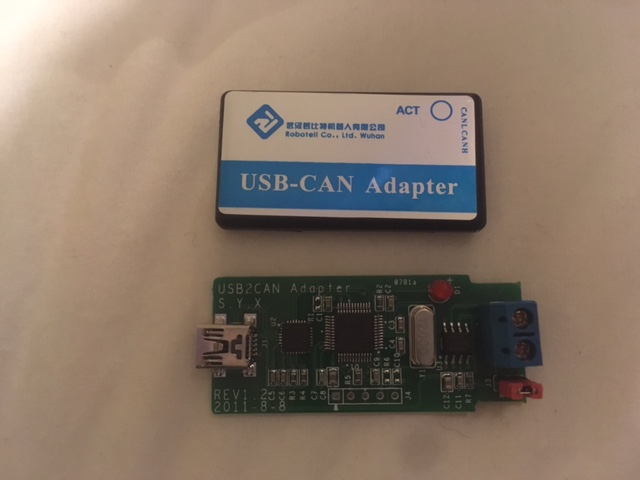
It just so happens that a USB-CAN converter I bought off aliexpress a while back has a CP2102 and STM32. I wasn’t so interested in their software, just the USB connected micro with CAN attached. I paid NZ$24 for it shipped. Store was "Electronic products concentrated shop"
In the last couple of days I tried to get it going, using the latest OSX driver. I didn’t get a crash, but I didn’t get a tty port either (so, not going yet) I might try the old driver and see if that goes.
If it is of interest, I found an old project to burn the CP2102 EEPROM from *nix here: http://cp210x-program.sourceforge.net/ <http://cp210x-program.sourceforge.net/>
<Image-1.jpg>
On 26/09/2017, at 6:30 PM, HONDA S-2000 <s2000@audiobanshee.com <mailto:s2000@audiobanshee.com>> wrote:
I'm very surprised that a driver must be installed. In my experience, most hardware implements the USB Communications Device Class standard, and therefore does not need a driver with OSX. Does anyone know why Silicon Labs didn't just implement the standard CDC protocols?
I assumed that the ESP32 processor would have a USB peripheral that would host the protocol, and therefore the OVMS v3 firmware would be in control. I guess I didn't look closely enough.
What does the CP2102 cost in relation to something like a PIC with USB? Sorry for the question.
Brian
On Sep 24, 2017, at 11:42 PM, Mark Webb-Johnson <mark@webb-johnson.net <mailto:mark@webb-johnson.net>> wrote:
• The Silicon Labs driver for OSX seems pretty flaky. Linux seems much better, and I haven’t tried Windows. On OSX, I had horrendous problems with the v5 drivers crashing my whole machine (Sierra 10.12). In the installation package, there is a “Legacy MacVCP Driver” directory containing the older 4.11.2 version - using that older version at least works without crashes, but has one known issue. If you ‘make monitor’ and are in the console to the board, then unplug the board, you get left with a /dev.tty.SLAB* device hanging around that messes up that one USB port and future ‘make monitor’ connections. Workaround is to power off the USB hub, and then everything cleans out nicely. If you are directly connected to your MAC’s USB port, then you seem to need to reboot the whole machine to fix the issue. Getting used to being careful to disconnect from the terminal before unplugging (or simply not unplugging - which was happening a lot when I was working on power optimisation, sleep modes, and external 12V power).
_______________________________________________ OvmsDev mailing list OvmsDev@lists.teslaclub.hk <mailto:OvmsDev@lists.teslaclub.hk> http://lists.teslaclub.hk/mailman/listinfo/ovmsdev
Edward Cheeseman Electrical Engineer cheesemanedward@gmail.com <mailto:cheesemanedward@gmail.com>
Edward Cheeseman Electrical Engineer cheesemanedward@gmail.com
Seems that Silicon Labs have released a v5.0.1 version of the driver that works for me. It still suffers from the “don’t unplug the USB device while in terminal”, but at least it doesn’t crash any more. I’m trying it now. Regards, Mark
On 26 Sep 2017, at 5:18 PM, Edward Cheeseman <cheesemanedward@gmail.com> wrote:
Small update. A reboot was all that was required to get the CP2102 driver going, and the EEPROM python script sees it. Getting the script to go required specifying the specific python2.7 instance (of the three and counting I have managed to install over the years).
On 26/09/2017, at 8:40 PM, Edward Cheeseman <cheesemanedward@gmail.com <mailto:cheesemanedward@gmail.com>> wrote:
CP2102 is US$1.33 one off from Digikey. Must be cheaper still the closer you get to China.
It just so happens that a USB-CAN converter I bought off aliexpress a while back has a CP2102 and STM32. I wasn’t so interested in their software, just the USB connected micro with CAN attached. I paid NZ$24 for it shipped. Store was "Electronic products concentrated shop"
In the last couple of days I tried to get it going, using the latest OSX driver. I didn’t get a crash, but I didn’t get a tty port either (so, not going yet) I might try the old driver and see if that goes.
If it is of interest, I found an old project to burn the CP2102 EEPROM from *nix here: http://cp210x-program.sourceforge.net/ <http://cp210x-program.sourceforge.net/>
<Image-1.jpg>
On 26/09/2017, at 6:30 PM, HONDA S-2000 <s2000@audiobanshee.com <mailto:s2000@audiobanshee.com>> wrote:
I'm very surprised that a driver must be installed. In my experience, most hardware implements the USB Communications Device Class standard, and therefore does not need a driver with OSX. Does anyone know why Silicon Labs didn't just implement the standard CDC protocols?
I assumed that the ESP32 processor would have a USB peripheral that would host the protocol, and therefore the OVMS v3 firmware would be in control. I guess I didn't look closely enough.
What does the CP2102 cost in relation to something like a PIC with USB? Sorry for the question.
Brian
On Sep 24, 2017, at 11:42 PM, Mark Webb-Johnson <mark@webb-johnson.net <mailto:mark@webb-johnson.net>> wrote:
• The Silicon Labs driver for OSX seems pretty flaky. Linux seems much better, and I haven’t tried Windows. On OSX, I had horrendous problems with the v5 drivers crashing my whole machine (Sierra 10.12). In the installation package, there is a “Legacy MacVCP Driver” directory containing the older 4.11.2 version - using that older version at least works without crashes, but has one known issue. If you ‘make monitor’ and are in the console to the board, then unplug the board, you get left with a /dev.tty.SLAB* device hanging around that messes up that one USB port and future ‘make monitor’ connections. Workaround is to power off the USB hub, and then everything cleans out nicely. If you are directly connected to your MAC’s USB port, then you seem to need to reboot the whole machine to fix the issue. Getting used to being careful to disconnect from the terminal before unplugging (or simply not unplugging - which was happening a lot when I was working on power optimisation, sleep modes, and external 12V power).
_______________________________________________ OvmsDev mailing list OvmsDev@lists.teslaclub.hk <mailto:OvmsDev@lists.teslaclub.hk> http://lists.teslaclub.hk/mailman/listinfo/ovmsdev <http://lists.teslaclub.hk/mailman/listinfo/ovmsdev>
Edward Cheeseman Electrical Engineer cheesemanedward@gmail.com <mailto:cheesemanedward@gmail.com>
Edward Cheeseman Electrical Engineer cheesemanedward@gmail.com <mailto:cheesemanedward@gmail.com> _______________________________________________ OvmsDev mailing list OvmsDev@lists.teslaclub.hk http://lists.teslaclub.hk/mailman/listinfo/ovmsdev

Mark, I have not had any problem with the USB hanging in my development work with the DEVKIT-C plugged directly into the MacBook Pro. I have needed to unplug numerous times when something goes wrong and "make flash" fails to sync. It the situation different with the real OVMS board? -- Steve On Tue, 26 Sep 2017, Mark Webb-Johnson wrote:
Seems that Silicon Labs have released a v5.0.1 version of the driver that works for me. It still suffers from the “don’t unplug the USB device while in terminal”, but at least it doesn’t crash any more. I’m trying it now.
Regards, Mark
On 26 Sep 2017, at 5:18 PM, Edward Cheeseman <cheesemanedward@gmail.com> wrote:
Small update. A reboot was all that was required to get the CP2102 driver going, and the EEPROM python script sees it. Getting the script to go required specifying the specific python2.7 instance (of the three and counting I have managed to install over the years).
On 26/09/2017, at 8:40 PM, Edward Cheeseman <cheesemanedward@gmail.com <mailto:cheesemanedward@gmail.com>> wrote:
CP2102 is US$1.33 one off from Digikey. Must be cheaper still the closer you get to China.
It just so happens that a USB-CAN converter I bought off aliexpress a while back has a CP2102 and STM32. I wasn’t so interested in their software, just the USB connected micro with CAN attached. I paid NZ$24 for it shipped. Store was "Electronic products concentrated shop"
In the last couple of days I tried to get it going, using the latest OSX driver. I didn’t get a crash, but I didn’t get a tty port either (so, not going yet) I might try the old driver and see if that goes.
If it is of interest, I found an old project to burn the CP2102 EEPROM from *nix here: http://cp210x-program.sourceforge.net/ <http://cp210x-program.sourceforge.net/>
<Image-1.jpg>
On 26/09/2017, at 6:30 PM, HONDA S-2000 <s2000@audiobanshee.com <mailto:s2000@audiobanshee.com>> wrote:
I'm very surprised that a driver must be installed. In my experience, most hardware implements the USB Communications Device Class standard, and therefore does not need a driver with OSX. Does anyone know why Silicon Labs didn't just implement the standard CDC protocols?
I assumed that the ESP32 processor would have a USB peripheral that would host the protocol, and therefore the OVMS v3 firmware would be in control. I guess I didn't look closely enough.
What does the CP2102 cost in relation to something like a PIC with USB? Sorry for the question.
Brian
On Sep 24, 2017, at 11:42 PM, Mark Webb-Johnson <mark@webb-johnson.net <mailto:mark@webb-johnson.net>> wrote:
• The Silicon Labs driver for OSX seems pretty flaky. Linux seems much better, and I haven’t tried Windows. On OSX, I had horrendous problems with the v5 drivers crashing my whole machine (Sierra 10.12). In the installation package, there is a “Legacy MacVCP Driver” directory containing the older 4.11.2 version - using that older version at least works without crashes, but has one known issue. If you ‘make monitor’ and are in the console to the board, then unplug the board, you get left with a /dev.tty.SLAB* device hanging around that messes up that one USB port and future ‘make monitor’ connections. Workaround is to power off the USB hub, and then everything cleans out nicely. If you are directly connected to your MAC’s USB port, then you seem to need to reboot the whole machine to fix the issue. Getting used to being careful to disconnect from the terminal before unplugging (or simply not unplugging - which was happening a lot when I was working o! n power optimisation, sleep modes, and external 12V power).
_______________________________________________ OvmsDev mailing list OvmsDev@lists.teslaclub.hk <mailto:OvmsDev@lists.teslaclub.hk> http://lists.teslaclub.hk/mailman/listinfo/ovmsdev <http://lists.teslaclub.hk/mailman/listinfo/ovmsdev>
Edward Cheeseman Electrical Engineer cheesemanedward@gmail.com <mailto:cheesemanedward@gmail.com>
Edward Cheeseman Electrical Engineer cheesemanedward@gmail.com <mailto:cheesemanedward@gmail.com> _______________________________________________ OvmsDev mailing list OvmsDev@lists.teslaclub.hk http://lists.teslaclub.hk/mailman/listinfo/ovmsdev
Steve, Should be the same. An unplug is an unplug, and we are definitely using genuine CP2102 chips. Can you do a test: ls -l /dev/tty.* (And have a look for the tty.SLAB* file) make monitor (So you have an async console connection open to the board) Unplug the USB Watch the make monitor python error messages ls -l /dev/tty.* (And see if the tty.SLAB* file is still there - if it is, you have the problem) Plug back in the USB ls -l /dev/tty.* make monitor (And see if you can connect again) Maybe there is a difference between external HUBs and on-board USB ports? What version of cp2102 driver are you running? Regards, Mark
On 26 Sep 2017, at 7:01 PM, Stephen Casner <casner@acm.org> wrote:
Mark, I have not had any problem with the USB hanging in my development work with the DEVKIT-C plugged directly into the MacBook Pro. I have needed to unplug numerous times when something goes wrong and "make flash" fails to sync. It the situation different with the real OVMS board?
-- Steve
On Tue, 26 Sep 2017, Mark Webb-Johnson wrote:
Seems that Silicon Labs have released a v5.0.1 version of the driver that works for me. It still suffers from the “don’t unplug the USB device while in terminal”, but at least it doesn’t crash any more. I’m trying it now.
Regards, Mark
On 26 Sep 2017, at 5:18 PM, Edward Cheeseman <cheesemanedward@gmail.com> wrote:
Small update. A reboot was all that was required to get the CP2102 driver going, and the EEPROM python script sees it. Getting the script to go required specifying the specific python2.7 instance (of the three and counting I have managed to install over the years).
On 26/09/2017, at 8:40 PM, Edward Cheeseman <cheesemanedward@gmail.com <mailto:cheesemanedward@gmail.com>> wrote:
CP2102 is US$1.33 one off from Digikey. Must be cheaper still the closer you get to China.
It just so happens that a USB-CAN converter I bought off aliexpress a while back has a CP2102 and STM32. I wasn’t so interested in their software, just the USB connected micro with CAN attached. I paid NZ$24 for it shipped. Store was "Electronic products concentrated shop"
In the last couple of days I tried to get it going, using the latest OSX driver. I didn’t get a crash, but I didn’t get a tty port either (so, not going yet) I might try the old driver and see if that goes.
If it is of interest, I found an old project to burn the CP2102 EEPROM from *nix here: http://cp210x-program.sourceforge.net/ <http://cp210x-program.sourceforge.net/>
<Image-1.jpg>
On 26/09/2017, at 6:30 PM, HONDA S-2000 <s2000@audiobanshee.com <mailto:s2000@audiobanshee.com>> wrote:
I'm very surprised that a driver must be installed. In my experience, most hardware implements the USB Communications Device Class standard, and therefore does not need a driver with OSX. Does anyone know why Silicon Labs didn't just implement the standard CDC protocols?
I assumed that the ESP32 processor would have a USB peripheral that would host the protocol, and therefore the OVMS v3 firmware would be in control. I guess I didn't look closely enough.
What does the CP2102 cost in relation to something like a PIC with USB? Sorry for the question.
Brian
On Sep 24, 2017, at 11:42 PM, Mark Webb-Johnson <mark@webb-johnson.net <mailto:mark@webb-johnson.net>> wrote:
• The Silicon Labs driver for OSX seems pretty flaky. Linux seems much better, and I haven’t tried Windows. On OSX, I had horrendous problems with the v5 drivers crashing my whole machine (Sierra 10.12). In the installation package, there is a “Legacy MacVCP Driver” directory containing the older 4.11.2 version - using that older version at least works without crashes, but has one known issue. If you ‘make monitor’ and are in the console to the board, then unplug the board, you get left with a /dev.tty.SLAB* device hanging around that messes up that one USB port and future ‘make monitor’ connections. Workaround is to power off the USB hub, and then everything cleans out nicely. If you are directly connected to your MAC’s USB port, then you seem to need to reboot the whole machine to fix the issue. Getting used to being careful to disconnect from the terminal before unplugging (or simply not unplugging - which was happening a lot when I was working o! n power optimisation, sleep modes, and external 12V power).
_______________________________________________ OvmsDev mailing list OvmsDev@lists.teslaclub.hk <mailto:OvmsDev@lists.teslaclub.hk> http://lists.teslaclub.hk/mailman/listinfo/ovmsdev <http://lists.teslaclub.hk/mailman/listinfo/ovmsdev>
Edward Cheeseman Electrical Engineer cheesemanedward@gmail.com <mailto:cheesemanedward@gmail.com>
Edward Cheeseman Electrical Engineer cheesemanedward@gmail.com <mailto:cheesemanedward@gmail.com> _______________________________________________ OvmsDev mailing list OvmsDev@lists.teslaclub.hk http://lists.teslaclub.hk/mailman/listinfo/ovmsdev
_______________________________________________ OvmsDev mailing list OvmsDev@lists.teslaclub.hk http://lists.teslaclub.hk/mailman/listinfo/ovmsdev
On Tue, 26 Sep 2017, Mark Webb-Johnson wrote:
Steve,
Should be the same. An unplug is an unplug, and we are definitely using genuine CP2102 chips.
Can you do a test:
ls -l /dev/tty.*
auge.local3> ls -l /dev/tty.* [edited] crw-rw-rw- 1 root wheel 18, 140 Sep 28 12:27 /dev/tty.SLAB_USBtoUART
make monitor (So you have an async console connection open to the board)
auge992> make monitor MONITOR --- WARNING: Serial ports accessed as /dev/tty.* will hang gdb if launched. --- Using /dev/cu.SLAB_USBtoUART instead... --- idf_monitor on /dev/cu.SLAB_USBtoUART 115200 --- --- Quit: Ctrl+] | Menu: Ctrl+T | Help: Ctrl+T followed by Ctrl+H --- auge.local4> ls -l /dev/cu.* [edited] crw-rw-rw- 1 root wheel 18, 141 Sep 28 12:27 /dev/cu.SLAB_USBtoUART
Unplug the USB Watch the make monitor python error messages
Exception in thread Thread-2: Traceback (most recent call last): File "/opt/local/Library/Frameworks/Python.framework/Versions/2.7/lib/python2.7/threading.py", line 801, in __bootstrap_inner self.run() File "/opt/local/Library/Frameworks/Python.framework/Versions/2.7/lib/python2.7/threading.py", line 754, in run self.__target(*self.__args, **self.__kwargs) File "/Users/casner/src/github/esp-idf/tools/idf_monitor.py", line 116, in _run_outer self.run() File "/Users/casner/src/github/esp-idf/tools/idf_monitor.py", line 192, in run data = self.serial.read(self.serial.in_waiting or 1) File "/opt/local/Library/Frameworks/Python.framework/Versions/2.7/lib/python2.7/site-packages/serial/serialposix.py", line 505, in read raise SerialException('read failed: %s' % (e,)) SerialException: read failed: [Errno 6] Device not configured
ls -l /dev/tty.* (And see if the tty.SLAB* file is still there - if it is, you have the problem)
Not there.
Plug back in the USB ls -l /dev/tty.*
auge.local7> ls -l /dev/tty.* crw-rw-rw- 1 root wheel 18, 142 Sep 28 12:32 /dev/tty.SLAB_USBtoUART
make monitor (And see if you can connect again)
auge.local8> ls -l /dev/cu.* crw-rw-rw- 1 root wheel 18, 143 Sep 28 12:32 /dev/cu.SLAB_USBtoUART
Maybe there is a difference between external HUBs and on-board USB ports?
What version of cp2102 driver are you running?
I think this is it (found in the release notes file): CP210x Macintosh OSX VCP Driver 4.x.14 - November 3, 2016 Is there a more direct way to look up driver versions? -- Steve
Presumably the final ‘make monitor’ was ok? If so, then that worked perfectly for you. Perhaps leave the drivers and environment as it is, and then repeat the test when you get OVMS v3. That will confirm that it is not our problem (but a general OSX/driver issue, presumably with some versions/combination/port). Thanks, Mark
On 29 Sep 2017, at 12:40 AM, Stephen Casner <casner@acm.org> wrote:
On Tue, 26 Sep 2017, Mark Webb-Johnson wrote:
Steve,
Should be the same. An unplug is an unplug, and we are definitely using genuine CP2102 chips.
Can you do a test:
ls -l /dev/tty.*
auge.local3> ls -l /dev/tty.* [edited] crw-rw-rw- 1 root wheel 18, 140 Sep 28 12:27 /dev/tty.SLAB_USBtoUART
make monitor (So you have an async console connection open to the board)
auge992> make monitor
MONITOR --- WARNING: Serial ports accessed as /dev/tty.* will hang gdb if launched. --- Using /dev/cu.SLAB_USBtoUART instead... --- idf_monitor on /dev/cu.SLAB_USBtoUART 115200 --- --- Quit: Ctrl+] | Menu: Ctrl+T | Help: Ctrl+T followed by Ctrl+H ---
auge.local4> ls -l /dev/cu.* [edited] crw-rw-rw- 1 root wheel 18, 141 Sep 28 12:27 /dev/cu.SLAB_USBtoUART
Unplug the USB Watch the make monitor python error messages
Exception in thread Thread-2: Traceback (most recent call last): File "/opt/local/Library/Frameworks/Python.framework/Versions/2.7/lib/python2.7/threading.py", line 801, in __bootstrap_inner self.run() File "/opt/local/Library/Frameworks/Python.framework/Versions/2.7/lib/python2.7/threading.py", line 754, in run self.__target(*self.__args, **self.__kwargs) File "/Users/casner/src/github/esp-idf/tools/idf_monitor.py", line 116, in _run_outer self.run() File "/Users/casner/src/github/esp-idf/tools/idf_monitor.py", line 192, in run data = self.serial.read(self.serial.in_waiting or 1) File "/opt/local/Library/Frameworks/Python.framework/Versions/2.7/lib/python2.7/site-packages/serial/serialposix.py", line 505, in read raise SerialException('read failed: %s' % (e,)) SerialException: read failed: [Errno 6] Device not configured
ls -l /dev/tty.* (And see if the tty.SLAB* file is still there - if it is, you have the problem)
Not there.
Plug back in the USB ls -l /dev/tty.*
auge.local7> ls -l /dev/tty.* crw-rw-rw- 1 root wheel 18, 142 Sep 28 12:32 /dev/tty.SLAB_USBtoUART
make monitor (And see if you can connect again)
auge.local8> ls -l /dev/cu.* crw-rw-rw- 1 root wheel 18, 143 Sep 28 12:32 /dev/cu.SLAB_USBtoUART
Maybe there is a difference between external HUBs and on-board USB ports?
What version of cp2102 driver are you running?
I think this is it (found in the release notes file):
CP210x Macintosh OSX VCP Driver 4.x.14 - November 3, 2016
Is there a more direct way to look up driver versions?
-- Steve _______________________________________________ OvmsDev mailing list OvmsDev@lists.teslaclub.hk http://lists.teslaclub.hk/mailman/listinfo/ovmsdev
Yes, the final make monitor worked correctly. Sorry I neglected to include a quote of that. -- Steve
On Sep 28, 2017, at 5:04 PM, Mark Webb-Johnson <mark@webb-johnson.net> wrote:
Presumably the final 'make monitor' was ok?
If so, then that worked perfectly for you.
Perhaps leave the drivers and environment as it is, and then repeat the test when you get OVMS v3. That will confirm that it is not our problem (but a general OSX/driver issue, presumably with some versions/combination/port).
Thanks, Mark
On 29 Sep 2017, at 12:40 AM, Stephen Casner <casner@acm.org> wrote:
On Tue, 26 Sep 2017, Mark Webb-Johnson wrote:
Steve,
Should be the same. An unplug is an unplug, and we are definitely using genuine CP2102 chips.
Can you do a test:
ls -l /dev/tty.*
auge.local3> ls -l /dev/tty.* [edited] crw-rw-rw- 1 root wheel 18, 140 Sep 28 12:27 /dev/tty.SLAB_USBtoUART
make monitor (So you have an async console connection open to the board)
auge992> make monitor
MONITOR --- WARNING: Serial ports accessed as /dev/tty.* will hang gdb if launched. --- Using /dev/cu.SLAB_USBtoUART instead... --- idf_monitor on /dev/cu.SLAB_USBtoUART 115200 --- --- Quit: Ctrl+] | Menu: Ctrl+T | Help: Ctrl+T followed by Ctrl+H ---
auge.local4> ls -l /dev/cu.* [edited] crw-rw-rw- 1 root wheel 18, 141 Sep 28 12:27 /dev/cu.SLAB_USBtoUART
Unplug the USB Watch the make monitor python error messages
Exception in thread Thread-2: Traceback (most recent call last): File "/opt/local/Library/Frameworks/Python.framework/Versions/2.7/lib/python2.7/threading.py", line 801, in __bootstrap_inner self.run() File "/opt/local/Library/Frameworks/Python.framework/Versions/2.7/lib/python2.7/threading.py", line 754, in run self.__target(*self.__args, **self.__kwargs) File "/Users/casner/src/github/esp-idf/tools/idf_monitor.py", line 116, in _run_outer self.run() File "/Users/casner/src/github/esp-idf/tools/idf_monitor.py", line 192, in run data = self.serial.read(self.serial.in_waiting or 1) File "/opt/local/Library/Frameworks/Python.framework/Versions/2.7/lib/python2.7/site-packages/serial/serialposix.py", line 505, in read raise SerialException('read failed: %s' % (e,)) SerialException: read failed: [Errno 6] Device not configured
ls -l /dev/tty.* (And see if the tty.SLAB* file is still there - if it is, you have the problem)
Not there.
Plug back in the USB ls -l /dev/tty.*
auge.local7> ls -l /dev/tty.* crw-rw-rw- 1 root wheel 18, 142 Sep 28 12:32 /dev/tty.SLAB_USBtoUART
make monitor (And see if you can connect again)
auge.local8> ls -l /dev/cu.* crw-rw-rw- 1 root wheel 18, 143 Sep 28 12:32 /dev/cu.SLAB_USBtoUART
Maybe there is a difference between external HUBs and on-board USB ports?
What version of cp2102 driver are you running?
I think this is it (found in the release notes file):
CP210x Macintosh OSX VCP Driver 4.x.14 - November 3, 2016
Is there a more direct way to look up driver versions?
-- Steve _______________________________________________ OvmsDev mailing list OvmsDev@lists.teslaclub.hk http://lists.teslaclub.hk/mailman/listinfo/ovmsdev
_______________________________________________ OvmsDev mailing list OvmsDev@lists.teslaclub.hk http://lists.teslaclub.hk/mailman/listinfo/ovmsdev
Both FTDI and CP2102 roll their own drivers and supply for the major operating systems. I think the reason to use an external device (rather than direct USB on the micro controller) is to make the boot loader code simpler (for flashing, etc) as just simple async. You can do USB directly on the ESP32, but boot loader won’t support flashing over USB. CP2102 is dirt cheap. Less than US$1 in bulk. FTDI similar pricing. Both are transparent (no code required) and simply bridge async to async-over-USB. Regards, Mark.
On 26 Sep 2017, at 1:30 PM, HONDA S-2000 <s2000@audiobanshee.com> wrote:
I'm very surprised that a driver must be installed. In my experience, most hardware implements the USB Communications Device Class standard, and therefore does not need a driver with OSX. Does anyone know why Silicon Labs didn't just implement the standard CDC protocols?
I assumed that the ESP32 processor would have a USB peripheral that would host the protocol, and therefore the OVMS v3 firmware would be in control. I guess I didn't look closely enough.
What does the CP2102 cost in relation to something like a PIC with USB? Sorry for the question.
Brian
On Sep 24, 2017, at 11:42 PM, Mark Webb-Johnson <mark@webb-johnson.net> wrote:
• The Silicon Labs driver for OSX seems pretty flaky. Linux seems much better, and I haven’t tried Windows. On OSX, I had horrendous problems with the v5 drivers crashing my whole machine (Sierra 10.12). In the installation package, there is a “Legacy MacVCP Driver” directory containing the older 4.11.2 version - using that older version at least works without crashes, but has one known issue. If you ‘make monitor’ and are in the console to the board, then unplug the board, you get left with a /dev.tty.SLAB* device hanging around that messes up that one USB port and future ‘make monitor’ connections. Workaround is to power off the USB hub, and then everything cleans out nicely. If you are directly connected to your MAC’s USB port, then you seem to need to reboot the whole machine to fix the issue. Getting used to being careful to disconnect from the terminal before unplugging (or simply not unplugging - which was happening a lot when I was working on power optimisation, sleep modes, and external 12V power).
_______________________________________________ OvmsDev mailing list OvmsDev@lists.teslaclub.hk http://lists.teslaclub.hk/mailman/listinfo/ovmsdev
On Mon, 25 Sep 2017, Mark Webb-Johnson wrote:
I’m having problems getting SD CARDs to work reliably. Some work recognise at all (a timeout error when mounting), and some will recognise but fail under heavy writes to the sd card. Frustrating as hell. I don’t think it is a hardware issue (even the googling that error message points to pull-up resistors as the culprit), but suspect some issue with the ESP IDF 2.1 library we are using. We’re working on this one at the moment. I would appreciate your feedback, when you get the boards, as to whether you get any success with SD CARDs.
I have a SanDisk Ultra 32GB micro SD card left over from playing with a Raspberry Pi. It is formatted FAT32 with name RECOVERY. When I insert it into the OVMS v3 and try the sd mount command, I get: OVMS > sd mount Error: SD CARD could not be mounted E (75093) sdmmc_cmd: sdmmc_card_init: send_scr returned 0x107 -- Steve

On 22/09/17 19:22, Mark Webb-Johnson wrote:
For those of you about to receive OVMS v3 modules, and for others listening in, here is a ‘getting started’ guide.
I've got mine working on wifi with dexter's v2 server. I haven't tried the cellular modem or a car module yet.
Developer’s documentation is here:
https://docs.google.com/document/d/1q5M9Lb5jzQhJzPMnkMKwy4Es5YK12ACQejX_NWEi...
I did my setup in an ubuntu xenial vagrant box. I might try a container based on one of the one on the docker hub now that I've done it "natively". A couple of gotchas: Vehicle Firmware Development tools in the above google doc suggests following the instructions at https://github.com/espressif/esp-idf but then goes on to say refer to the documentation at http://esp-idf.readthedocs.io/en/v2.1/get-started/index.html#standard-setup-... and be careful to get the right version of the documentation to get the right version of the tools. I followed the first instructions and got the latest version which doesn't work. When it didn't work I remembered the note to ensure to follow the right version of the instructions. Could you reverse the order of these, putting the readthedocs link first and suggest following those instructions, and put the github link afterwards as an aside. On xenial you need to apt-get install linux-image-extra-4.4.0-96-generic to get the cp210 serial port driver. You have to update the "Default serial port" to /dev/ttyUSB0 in "Serial flasher config" in make menuconfig so that make flash can find the serial port. http://esp-idf.readthedocs.io/en/latest/get-started/idf-monitor.html has some useful instructions about the monitor, notably ctrl-] quits. Thank you Mark for bringing this together -- it looks like a very capable platform. Basic vehicle support looks pretty easy to port over, hopefully I'll have some leaf code to contribute later this week. How do we manipulate the other can buses? I see MyPcpApp.FindDeviceByName("can1"); in the Tesla Roadster code, is there a can0 or a can2? How are they mapped to the hardware?
Tom, Some of the driver support is very very basic at the moment. Almost ‘proof of concept’ only to verify hardware is working. Still a lot of work to be done on it. In particular: SIMCOM support is very very simple. Just power control, the ability to print out on the console what SIMCOM replies, and to send commands to the modem. A lot of work to do on this. Overall plan is to have a layer-2 (AT command) control that initialises the modem, gets details on the modem type, SIM card, etc, and then switches to layer-3 (MUX). Then, in layer-3, we need to implement GPS NMEA channel, AT command and control channel, and a PPP driver for the ESP32/FreeRTOS networking stack (this exists already, in example code, so should be the simplest step). Then, SMS. Lastly we have to implement the overall control over when to establish GSM connections, what to do if WIFI comes up, etc. MCP2515 support is rudimentary and we don’t check state of the controller correctly (particularly during initialisation). We need to support transmission errors, etc. Basic support for this is there, and we can transmit and receive messages, but it seems to have problems under load. We’ve also got to finalise the power control for this. All the blocks are there - just need to harden it. On-board can (esp32 controller) should be fine. Just power control needs finalising (since we added the SN65 sleep line control in the last hardware revision). OVMS server v2 just connects and does crypto at the moment. It doesn’t send any vehicle metrics. Wifi works fine. Regarding the documentation improvements/suggestions; if you or others find stuff like this, please use google docs comment feature to suggest the change. That provides a todo style list of changes that are relatively simple to go through and accept into the main code. It works really well, and a bunch of changes have started to come in that way already. I’ve updated the Developer’s Guide today with a bunch of hardware information (an entire section on the circuit) that has all the information on expansion connectors, as well as GPIO/EGPIO wiring). I hope it helps. Regarding CAN, we have: CAN1 - on-board ESP32 controller, and SN65 3.3v transceiver. This is on the OVMS v2 compatible DB9 connector as pins #2 and #7. The OVMS v2 vehicle cables should support this. CAN2 - MCP2515 SPI controller, and SN65 3.3v transceiver. DB9 pins #4 and #5. This was actually specified in OVMS v2 (but never used as we had only one CAN bus on that platform). If you have a recent OVMS v2 Nissan Leaf cable, you should find these pins already wired up and ready to go. CAN3 - MCP2515 SPI controller, and SN65 3.3v transceiver. DB9 pins #6 and #8. Not used by OVMS v2 and not on any of the cables we have. We are currently using this for the HUD (via the DA26 expansion connector), but it is free for use by vehicles if they require a third bus. Take care, as these are labelled on the circuit diagrams as CAN0/CAN1/CAN2, but the firmware and framework refers to them as CAN1/CAN2/CAN3. I tried to address this in the developer’s documentation. I’m working on the HUD with Greg (as the first user of these external CAN buses), but something seems broken in the latest firmware. I can’t get CAN2 to receive. Probably related to the last hardware revision for sleep mode on the SN65 transceivers. I’m working on that now, as a matter of urgency. Regards, Mark.
On 30 Sep 2017, at 6:38 AM, Tom Parker <tom@carrott.org> wrote:
On 22/09/17 19:22, Mark Webb-Johnson wrote:
For those of you about to receive OVMS v3 modules, and for others listening in, here is a ‘getting started’ guide.
I've got mine working on wifi with dexter's v2 server. I haven't tried the cellular modem or a car module yet.
Developer’s documentation is here:
https://docs.google.com/document/d/1q5M9Lb5jzQhJzPMnkMKwy4Es5YK12ACQejX_NWEi... <https://docs.google.com/document/d/1q5M9Lb5jzQhJzPMnkMKwy4Es5YK12ACQejX_NWEixr0/edit?usp=sharing> I did my setup in an ubuntu xenial vagrant box. I might try a container based on one of the one on the docker hub now that I've done it "natively".
A couple of gotchas:
Vehicle Firmware Development tools in the above google doc suggests following the instructions at https://github.com/espressif/esp-idf <https://github.com/espressif/esp-idf> but then goes on to say refer to the documentation at http://esp-idf.readthedocs.io/en/v2.1/get-started/index.html#standard-setup-... <http://esp-idf.readthedocs.io/en/v2.1/get-started/index.html#standard-setup-of-toolchain> and be careful to get the right version of the documentation to get the right version of the tools. I followed the first instructions and got the latest version which doesn't work. When it didn't work I remembered the note to ensure to follow the right version of the instructions. Could you reverse the order of these, putting the readthedocs link first and suggest following those instructions, and put the github link afterwards as an aside.
On xenial you need to apt-get install linux-image-extra-4.4.0-96-generic to get the cp210 serial port driver.
You have to update the "Default serial port" to /dev/ttyUSB0 in "Serial flasher config" in make menuconfig so that make flash can find the serial port.
http://esp-idf.readthedocs.io/en/latest/get-started/idf-monitor.html <http://esp-idf.readthedocs.io/en/latest/get-started/idf-monitor.html> has some useful instructions about the monitor, notably ctrl-] quits.
Thank you Mark for bringing this together -- it looks like a very capable platform. Basic vehicle support looks pretty easy to port over, hopefully I'll have some leaf code to contribute later this week.
How do we manipulate the other can buses? I see MyPcpApp.FindDeviceByName("can1"); in the Tesla Roadster code, is there a can0 or a can2? How are they mapped to the hardware? _______________________________________________ OvmsDev mailing list OvmsDev@lists.teslaclub.hk http://lists.teslaclub.hk/mailman/listinfo/ovmsdev
but something seems broken in the latest firmware. I can’t get CAN2 to receive. Probably related to the last hardware revision for sleep mode on the SN65 transceivers. I’m working on that now, as a matter of urgency.
Done, and committed. Just some power control wierdisms - nothing that a few minutes with a logic probe couldn’t solve. All seems ok for all three CAN buses now. In fact: Looking good. Still need to tidy up the CAN drivers and put in a lot of error checking and reset code, but at least they run... Regards, Mark. P.S. That is Greg’s OBDII HUD (driven off CAN3 - one of the MCP2515 controller buses). P.P.S. I never knew rolling back odometers was so easy: OVMS > metric set v.p.odometer 20000 Metric set
On 30 Sep 2017, at 4:35 PM, Mark Webb-Johnson <mark@webb-johnson.net> wrote:
Tom,
Some of the driver support is very very basic at the moment. Almost ‘proof of concept’ only to verify hardware is working. Still a lot of work to be done on it. In particular:
SIMCOM support is very very simple. Just power control, the ability to print out on the console what SIMCOM replies, and to send commands to the modem. A lot of work to do on this. Overall plan is to have a layer-2 (AT command) control that initialises the modem, gets details on the modem type, SIM card, etc, and then switches to layer-3 (MUX). Then, in layer-3, we need to implement GPS NMEA channel, AT command and control channel, and a PPP driver for the ESP32/FreeRTOS networking stack (this exists already, in example code, so should be the simplest step). Then, SMS. Lastly we have to implement the overall control over when to establish GSM connections, what to do if WIFI comes up, etc.
MCP2515 support is rudimentary and we don’t check state of the controller correctly (particularly during initialisation). We need to support transmission errors, etc. Basic support for this is there, and we can transmit and receive messages, but it seems to have problems under load. We’ve also got to finalise the power control for this. All the blocks are there - just need to harden it.
On-board can (esp32 controller) should be fine. Just power control needs finalising (since we added the SN65 sleep line control in the last hardware revision).
OVMS server v2 just connects and does crypto at the moment. It doesn’t send any vehicle metrics.
Wifi works fine.
Regarding the documentation improvements/suggestions; if you or others find stuff like this, please use google docs comment feature to suggest the change. That provides a todo style list of changes that are relatively simple to go through and accept into the main code. It works really well, and a bunch of changes have started to come in that way already.
I’ve updated the Developer’s Guide today with a bunch of hardware information (an entire section on the circuit) that has all the information on expansion connectors, as well as GPIO/EGPIO wiring). I hope it helps.
Regarding CAN, we have:
CAN1 - on-board ESP32 controller, and SN65 3.3v transceiver. This is on the OVMS v2 compatible DB9 connector as pins #2 and #7. The OVMS v2 vehicle cables should support this. CAN2 - MCP2515 SPI controller, and SN65 3.3v transceiver. DB9 pins #4 and #5. This was actually specified in OVMS v2 (but never used as we had only one CAN bus on that platform). If you have a recent OVMS v2 Nissan Leaf cable, you should find these pins already wired up and ready to go. CAN3 - MCP2515 SPI controller, and SN65 3.3v transceiver. DB9 pins #6 and #8. Not used by OVMS v2 and not on any of the cables we have. We are currently using this for the HUD (via the DA26 expansion connector), but it is free for use by vehicles if they require a third bus.
Take care, as these are labelled on the circuit diagrams as CAN0/CAN1/CAN2, but the firmware and framework refers to them as CAN1/CAN2/CAN3. I tried to address this in the developer’s documentation.
I’m working on the HUD with Greg (as the first user of these external CAN buses), but something seems broken in the latest firmware. I can’t get CAN2 to receive. Probably related to the last hardware revision for sleep mode on the SN65 transceivers. I’m working on that now, as a matter of urgency.
Regards, Mark.
On 30 Sep 2017, at 6:38 AM, Tom Parker <tom@carrott.org <mailto:tom@carrott.org>> wrote:
On 22/09/17 19:22, Mark Webb-Johnson wrote:
For those of you about to receive OVMS v3 modules, and for others listening in, here is a ‘getting started’ guide.
I've got mine working on wifi with dexter's v2 server. I haven't tried the cellular modem or a car module yet.
Developer’s documentation is here:
https://docs.google.com/document/d/1q5M9Lb5jzQhJzPMnkMKwy4Es5YK12ACQejX_NWEi... <https://docs.google.com/document/d/1q5M9Lb5jzQhJzPMnkMKwy4Es5YK12ACQejX_NWEixr0/edit?usp=sharing> I did my setup in an ubuntu xenial vagrant box. I might try a container based on one of the one on the docker hub now that I've done it "natively".
A couple of gotchas:
Vehicle Firmware Development tools in the above google doc suggests following the instructions at https://github.com/espressif/esp-idf <https://github.com/espressif/esp-idf> but then goes on to say refer to the documentation at http://esp-idf.readthedocs.io/en/v2.1/get-started/index.html#standard-setup-... <http://esp-idf.readthedocs.io/en/v2.1/get-started/index.html#standard-setup-of-toolchain> and be careful to get the right version of the documentation to get the right version of the tools. I followed the first instructions and got the latest version which doesn't work. When it didn't work I remembered the note to ensure to follow the right version of the instructions. Could you reverse the order of these, putting the readthedocs link first and suggest following those instructions, and put the github link afterwards as an aside.
On xenial you need to apt-get install linux-image-extra-4.4.0-96-generic to get the cp210 serial port driver.
You have to update the "Default serial port" to /dev/ttyUSB0 in "Serial flasher config" in make menuconfig so that make flash can find the serial port.
http://esp-idf.readthedocs.io/en/latest/get-started/idf-monitor.html <http://esp-idf.readthedocs.io/en/latest/get-started/idf-monitor.html> has some useful instructions about the monitor, notably ctrl-] quits.
Thank you Mark for bringing this together -- it looks like a very capable platform. Basic vehicle support looks pretty easy to port over, hopefully I'll have some leaf code to contribute later this week.
How do we manipulate the other can buses? I see MyPcpApp.FindDeviceByName("can1"); in the Tesla Roadster code, is there a can0 or a can2? How are they mapped to the hardware? _______________________________________________ OvmsDev mailing list OvmsDev@lists.teslaclub.hk <mailto:OvmsDev@lists.teslaclub.hk> http://lists.teslaclub.hk/mailman/listinfo/ovmsdev
participants (5)
-
 Edward Cheeseman
 -
 HONDA S-2000
 -
 Mark Webb-Johnson
 -
 Stephen Casner
 -
 Tom Parker