
I'm currently working on the NMEA module. The MUX channel is working, but I don't get a GPS fix. I've tried all GPS commands and now suspect my SIMCOM module having a hardware issue. I'm doing this: OVMS > level debug OVMS > power simcom on …wait for the MUX to be ready, then issue… OVMS > simcom muxtx 4 AT+CGPSNMEA=1 OVMS > simcom muxtx 4 AT+CGPS=1,1 …now the SIMCOM begins sending NMEA $GPGGA lines once per second looking like this: D (2937174) SIMCOM rx: f9 05 ff 35 24 47 50 47 47 41 2c 2c 2c 2c 2c 2c ...5*$GPGGA,,,,,,* D (2937174) SIMCOM rx: 30 2c 2c 2c 2c 2c 2c 2c 2c 2a 36 36 0d 0a 60 f9 *0,,,,,,,,*66*..`. Normally the modem should get a GPS fix within about 1-2 minutes and begin filling data in the $GPGGA record. But my modem won't, it just keeps sending empty fields. Can someone please try this with his/her module? To disable the GPS receiver, issue: OVMS > simcom muxtx 4 AT+CGPS=0 Thanks & regards, Michael -- Michael Balzer * Helkenberger Weg 9 * D-58256 Ennepetal Fon 02333 / 833 5735 * Handy 0176 / 206 989 26
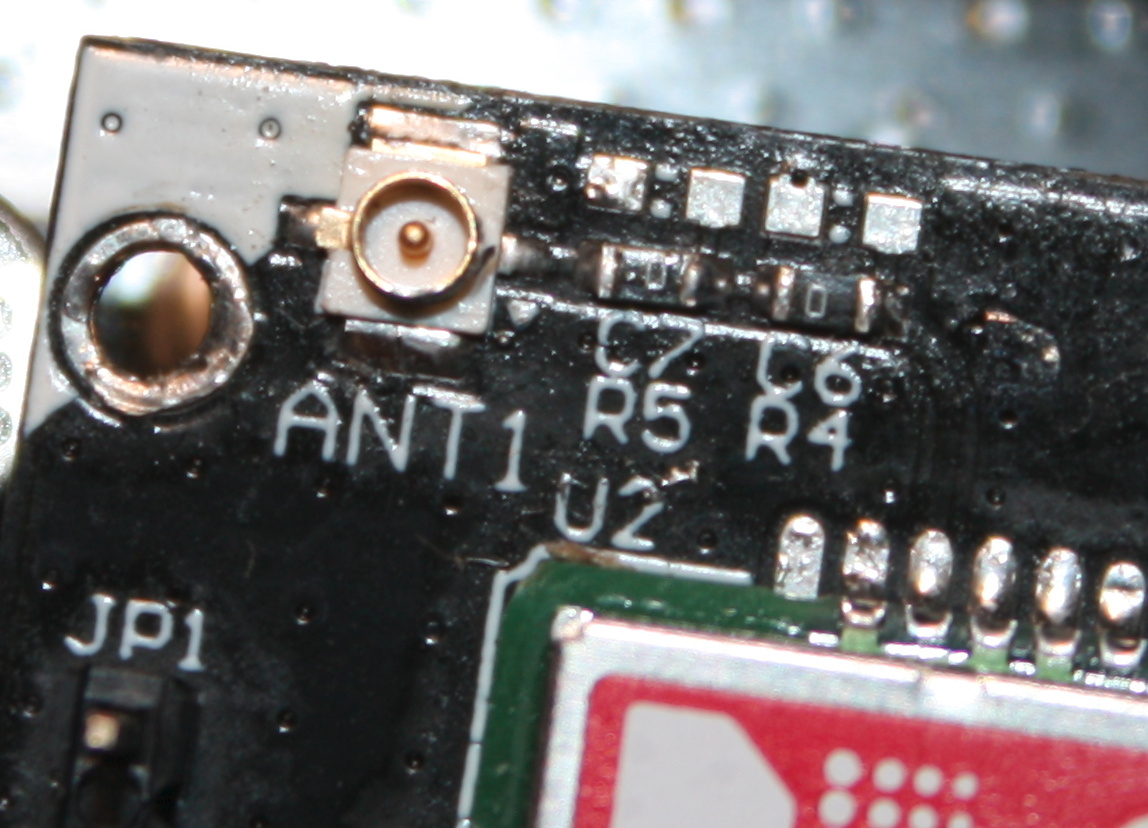
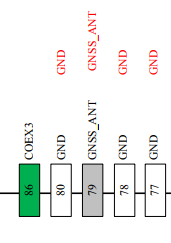
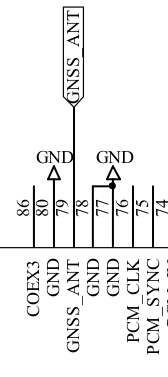
My multimeter says pin 79 (GNSS_ANT) is connected to GND (pins 77, 78 + 80 + frame etc.)…? I've measured before & after unplugging the pigtail… …and I think I found the bug: it seems our SIMCOM board design is wrong. The official docs say GNSS_ANT is pin 79: But we're using pin 78: Mark, can you confirm this? Regards, Michael Am 09.12.2017 um 23:46 schrieb Michael Balzer:
I'm currently working on the NMEA module. The MUX channel is working, but I don't get a GPS fix.
I've tried all GPS commands and now suspect my SIMCOM module having a hardware issue.
I'm doing this:
OVMS > level debug OVMS > power simcom on
…wait for the MUX to be ready, then issue…
OVMS > simcom muxtx 4 AT+CGPSNMEA=1 OVMS > simcom muxtx 4 AT+CGPS=1,1
…now the SIMCOM begins sending NMEA $GPGGA lines once per second looking like this:
D (2937174) SIMCOM rx: f9 05 ff 35 24 47 50 47 47 41 2c 2c 2c 2c 2c 2c ...5*$GPGGA,,,,,,* D (2937174) SIMCOM rx: 30 2c 2c 2c 2c 2c 2c 2c 2c 2a 36 36 0d 0a 60 f9 *0,,,,,,,,*66*..`.
Normally the modem should get a GPS fix within about 1-2 minutes and begin filling data in the $GPGGA record.
But my modem won't, it just keeps sending empty fields.
Can someone please try this with his/her module?
To disable the GPS receiver, issue:
OVMS > simcom muxtx 4 AT+CGPS=0
Thanks & regards, Michael
-- Michael Balzer * Helkenberger Weg 9 * D-58256 Ennepetal Fon 02333 / 833 5735 * Handy 0176 / 206 989 26
_______________________________________________ OvmsDev mailing list OvmsDev@lists.teslaclub.hk http://lists.teslaclub.hk/mailman/listinfo/ovmsdev
-- Michael Balzer * Helkenberger Weg 9 * D-58256 Ennepetal Fon 02333 / 833 5735 * Handy 0176 / 206 989 26
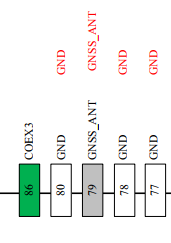
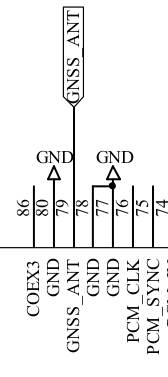
Nonsense, we're using pin 79, forget that… …still, it's shorted to GND on my module. Am 10.12.2017 um 00:53 schrieb Michael Balzer:
My multimeter says pin 79 (GNSS_ANT) is connected to GND (pins 77, 78 + 80 + frame etc.)…?
I've measured before & after unplugging the pigtail…
…and I think I found the bug: it seems our SIMCOM board design is wrong.
The official docs say GNSS_ANT is pin 79:
But we're using pin 78:
Mark, can you confirm this?
Regards, Michael
Am 09.12.2017 um 23:46 schrieb Michael Balzer:
I'm currently working on the NMEA module. The MUX channel is working, but I don't get a GPS fix.
I've tried all GPS commands and now suspect my SIMCOM module having a hardware issue.
I'm doing this:
OVMS > level debug OVMS > power simcom on
…wait for the MUX to be ready, then issue…
OVMS > simcom muxtx 4 AT+CGPSNMEA=1 OVMS > simcom muxtx 4 AT+CGPS=1,1
…now the SIMCOM begins sending NMEA $GPGGA lines once per second looking like this:
D (2937174) SIMCOM rx: f9 05 ff 35 24 47 50 47 47 41 2c 2c 2c 2c 2c 2c ...5*$GPGGA,,,,,,* D (2937174) SIMCOM rx: 30 2c 2c 2c 2c 2c 2c 2c 2c 2a 36 36 0d 0a 60 f9 *0,,,,,,,,*66*..`.
Normally the modem should get a GPS fix within about 1-2 minutes and begin filling data in the $GPGGA record.
But my modem won't, it just keeps sending empty fields.
Can someone please try this with his/her module?
To disable the GPS receiver, issue:
OVMS > simcom muxtx 4 AT+CGPS=0
Thanks & regards, Michael
-- Michael Balzer * Helkenberger Weg 9 * D-58256 Ennepetal Fon 02333 / 833 5735 * Handy 0176 / 206 989 26
_______________________________________________ OvmsDev mailing list OvmsDev@lists.teslaclub.hk http://lists.teslaclub.hk/mailman/listinfo/ovmsdev
-- Michael Balzer * Helkenberger Weg 9 * D-58256 Ennepetal Fon 02333 / 833 5735 * Handy 0176 / 206 989 26
_______________________________________________ OvmsDev mailing list OvmsDev@lists.teslaclub.hk http://lists.teslaclub.hk/mailman/listinfo/ovmsdev
-- Michael Balzer * Helkenberger Weg 9 * D-58256 Ennepetal Fon 02333 / 833 5735 * Handy 0176 / 206 989 26
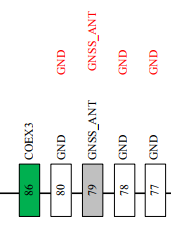
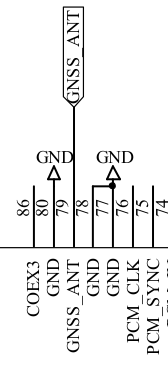
Anything looking wrong here? Am 10.12.2017 um 00:55 schrieb Michael Balzer:
Nonsense, we're using pin 79, forget that…
…still, it's shorted to GND on my module.
Am 10.12.2017 um 00:53 schrieb Michael Balzer:
My multimeter says pin 79 (GNSS_ANT) is connected to GND (pins 77, 78 + 80 + frame etc.)…?
I've measured before & after unplugging the pigtail…
…and I think I found the bug: it seems our SIMCOM board design is wrong.
The official docs say GNSS_ANT is pin 79:
But we're using pin 78:
Mark, can you confirm this?
Regards, Michael
Am 09.12.2017 um 23:46 schrieb Michael Balzer:
I'm currently working on the NMEA module. The MUX channel is working, but I don't get a GPS fix.
I've tried all GPS commands and now suspect my SIMCOM module having a hardware issue.
I'm doing this:
OVMS > level debug OVMS > power simcom on
…wait for the MUX to be ready, then issue…
OVMS > simcom muxtx 4 AT+CGPSNMEA=1 OVMS > simcom muxtx 4 AT+CGPS=1,1
…now the SIMCOM begins sending NMEA $GPGGA lines once per second looking like this:
D (2937174) SIMCOM rx: f9 05 ff 35 24 47 50 47 47 41 2c 2c 2c 2c 2c 2c ...5*$GPGGA,,,,,,* D (2937174) SIMCOM rx: 30 2c 2c 2c 2c 2c 2c 2c 2c 2a 36 36 0d 0a 60 f9 *0,,,,,,,,*66*..`.
Normally the modem should get a GPS fix within about 1-2 minutes and begin filling data in the $GPGGA record.
But my modem won't, it just keeps sending empty fields.
Can someone please try this with his/her module?
To disable the GPS receiver, issue:
OVMS > simcom muxtx 4 AT+CGPS=0
Thanks & regards, Michael
-- Michael Balzer * Helkenberger Weg 9 * D-58256 Ennepetal Fon 02333 / 833 5735 * Handy 0176 / 206 989 26
_______________________________________________ OvmsDev mailing list OvmsDev@lists.teslaclub.hk http://lists.teslaclub.hk/mailman/listinfo/ovmsdev
-- Michael Balzer * Helkenberger Weg 9 * D-58256 Ennepetal Fon 02333 / 833 5735 * Handy 0176 / 206 989 26
_______________________________________________ OvmsDev mailing list OvmsDev@lists.teslaclub.hk http://lists.teslaclub.hk/mailman/listinfo/ovmsdev
-- Michael Balzer * Helkenberger Weg 9 * D-58256 Ennepetal Fon 02333 / 833 5735 * Handy 0176 / 206 989 26
_______________________________________________ OvmsDev mailing list OvmsDev@lists.teslaclub.hk http://lists.teslaclub.hk/mailman/listinfo/ovmsdev
-- Michael Balzer * Helkenberger Weg 9 * D-58256 Ennepetal Fon 02333 / 833 5735 * Handy 0176 / 206 989 26

On 10/12/17 12:55, Michael Balzer wrote:
Nonsense, we're using pin 79, forget that…
…still, it's shorted to GND on my module.
It's not shorted to ground on mine, but I wasn't able to make it work. This is perhaps because I don't have a spare GPS antenna. I tried using the GSM antenna (I drove around with my v2 for a few weeks with them swapped and it seemed to work fine. I have seen the GPGGA messages every second, but not for very long and never with GPS data filled in. Could the messages stopping be because I'm not connected to the GSM network properly either?

I tried with mine. I’m getting the same. But GPGSV is showing 16 satellites… My testing setup is far from ideal, however; with an extension cable and 40’ of GPS antenna stretched across my bedroom to the balcony outside. It was working on the original prototype I tested, so not sure what has changed. Quickest is to ask the China supplier to check. I’ve done that, and will let you know the result. Regards, Mark.
On 10 Dec 2017, at 6:46 AM, Michael Balzer <dexter@expeedo.de> wrote:
I'm currently working on the NMEA module. The MUX channel is working, but I don't get a GPS fix.
I've tried all GPS commands and now suspect my SIMCOM module having a hardware issue.
I'm doing this:
OVMS > level debug OVMS > power simcom on
…wait for the MUX to be ready, then issue…
OVMS > simcom muxtx 4 AT+CGPSNMEA=1 OVMS > simcom muxtx 4 AT+CGPS=1,1
…now the SIMCOM begins sending NMEA $GPGGA lines once per second looking like this:
D (2937174) SIMCOM rx: f9 05 ff 35 24 47 50 47 47 41 2c 2c 2c 2c 2c 2c ...5$GPGGA,,,,,, D (2937174) SIMCOM rx: 30 2c 2c 2c 2c 2c 2c 2c 2c 2a 36 36 0d 0a 60 f9 0,,,,,,,,*66..`.
Normally the modem should get a GPS fix within about 1-2 minutes and begin filling data in the $GPGGA record.
But my modem won't, it just keeps sending empty fields.
Can someone please try this with his/her module?
To disable the GPS receiver, issue:
OVMS > simcom muxtx 4 AT+CGPS=0
Thanks & regards, Michael
-- Michael Balzer * Helkenberger Weg 9 * D-58256 Ennepetal Fon 02333 / 833 5735 * Handy 0176 / 206 989 26 _______________________________________________ OvmsDev mailing list OvmsDev@lists.teslaclub.hk http://lists.teslaclub.hk/mailman/listinfo/ovmsdev
Toms comment made me test my GSM antenna, lo and behold, it works: D (298314) gsm-nmea: IncomingLine: $GPGSV,2,1,06,01,,,31,08,26,174,30,14,45,082,37,19,01,323,23*42 D (298314) gsm-nmea: IncomingLine: $GPGSV,2,2,06,22,68,234,25,32,,,35*44 D (298324) gsm-nmea: IncomingLine: $GLGSV,2,1,06,66,19,039,43,82,56,144,38,75,11,007,34,81,07,142,16*6A D (298334) gsm-nmea: IncomingLine: $GLGSV,2,2,06,67,73,053,46,68,45,213,31*6F D (298334) gsm-nmea: IncomingLine: $GPGGA,080552.0,5118.139329,N,00723.395918,E,1,02,2.1,316.7,M,47.0,M,,*50 D (298344) gsm-nmea: IncomingLine: $GNGNS,080552.0,5118.139329,N,00723.395918,E,AA,06,2.1,316.7,47.0,,*60 D (298344) gsm-nmea: IncomingLine: $GPVTG,,T,0.0,M,0.0,N,0.0,K,A*0D D (298354) gsm-nmea: IncomingLine: $GPRMC,080552.0,A,5118.139329,N,00723.395918,E,0.0,,101217,,,A*49 D (298354) gsm-nmea: IncomingLine: $GPGSA,A,2,08,14,,,,,,,,,,,2.3,2.1,0.9*35 D (298364) gsm-nmea: IncomingLine: $GNGSA,A,2,08,14,,,,,,,,,,,2.3,2.1,0.9*2B D (298364) gsm-nmea: IncomingLine: $GNGSA,A,2,66,67,75,82,,,,,,,,,2.3,2.1,0.9*2F My GPS antenna is an active one for V2, it seems the current module does not support active antennas. Actice GPS antennas are the standard choice over here. If the SIM5360 can do without, that will eliminate another energy drain, so is good. Users will need to know they'll need another antenna. Regards, Michael Am 10.12.2017 um 05:01 schrieb Mark Webb-Johnson:
I tried with mine. I’m getting the same. But GPGSV is showing 16 satellites… My testing setup is far from ideal, however; with an extension cable and 40’ of GPS antenna stretched across my bedroom to the balcony outside.
It was working on the original prototype I tested, so not sure what has changed.
Quickest is to ask the China supplier to check. I’ve done that, and will let you know the result.
Regards, Mark.
On 10 Dec 2017, at 6:46 AM, Michael Balzer <dexter@expeedo.de <mailto:dexter@expeedo.de>> wrote:
I'm currently working on the NMEA module. The MUX channel is working, but I don't get a GPS fix.
I've tried all GPS commands and now suspect my SIMCOM module having a hardware issue.
I'm doing this:
OVMS > level debug OVMS > power simcom on
…wait for the MUX to be ready, then issue…
OVMS > simcom muxtx 4 AT+CGPSNMEA=1 OVMS > simcom muxtx 4 AT+CGPS=1,1
…now the SIMCOM begins sending NMEA $GPGGA lines once per second looking like this:
D (2937174) SIMCOM rx: f9 05 ff 35 24 47 50 47 47 41 2c 2c 2c 2c 2c 2c ...5*$GPGGA,,,,,,* D (2937174) SIMCOM rx: 30 2c 2c 2c 2c 2c 2c 2c 2c 2a 36 36 0d 0a 60 f9 *0,,,,,,,,*66*..`.
Normally the modem should get a GPS fix within about 1-2 minutes and begin filling data in the $GPGGA record.
But my modem won't, it just keeps sending empty fields.
Can someone please try this with his/her module?
To disable the GPS receiver, issue:
OVMS > simcom muxtx 4 AT+CGPS=0
Thanks & regards, Michael
-- Michael Balzer * Helkenberger Weg 9 * D-58256 Ennepetal Fon 02333 / 833 5735 * Handy 0176 / 206 989 26 _______________________________________________ OvmsDev mailing list OvmsDev@lists.teslaclub.hk <mailto:OvmsDev@lists.teslaclub.hk> http://lists.teslaclub.hk/mailman/listinfo/ovmsdev
_______________________________________________ OvmsDev mailing list OvmsDev@lists.teslaclub.hk http://lists.teslaclub.hk/mailman/listinfo/ovmsdev
-- Michael Balzer * Helkenberger Weg 9 * D-58256 Ennepetal Fon 02333 / 833 5735 * Handy 0176 / 206 989 26
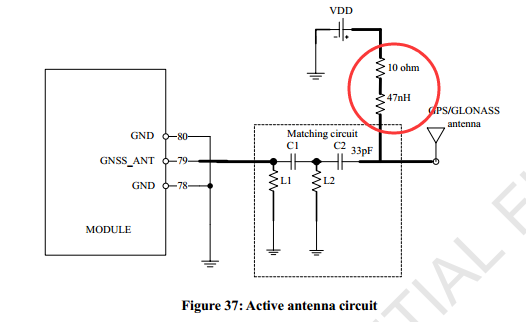
I’ve forwarded this extra info to China supplier, and will let you know his response. Here is the SIM5360 specification. It says “GNSS antenna: Passive”, so I guess that is part of the module design. That said, they provide two alternative circuits: Our design seems to be: So that is passive. I’m wondering if we can provide the option for both (via jumper)? Regards, Mark.
On 10 Dec 2017, at 4:23 PM, Michael Balzer <dexter@expeedo.de> wrote:
Toms comment made me test my GSM antenna, lo and behold, it works:
D (298314) gsm-nmea: IncomingLine: $GPGSV,2,1,06,01,,,31,08,26,174,30,14,45,082,37,19,01,323,23*42 D (298314) gsm-nmea: IncomingLine: $GPGSV,2,2,06,22,68,234,25,32,,,35*44 D (298324) gsm-nmea: IncomingLine: $GLGSV,2,1,06,66,19,039,43,82,56,144,38,75,11,007,34,81,07,142,16*6A D (298334) gsm-nmea: IncomingLine: $GLGSV,2,2,06,67,73,053,46,68,45,213,31*6F D (298334) gsm-nmea: IncomingLine: $GPGGA,080552.0,5118.139329,N,00723.395918,E,1,02,2.1,316.7,M,47.0,M,,*50 D (298344) gsm-nmea: IncomingLine: $GNGNS,080552.0,5118.139329,N,00723.395918,E,AA,06,2.1,316.7,47.0,,*60 D (298344) gsm-nmea: IncomingLine: $GPVTG,,T,0.0,M,0.0,N,0.0,K,A*0D D (298354) gsm-nmea: IncomingLine: $GPRMC,080552.0,A,5118.139329,N,00723.395918,E,0.0,,101217,,,A*49 D (298354) gsm-nmea: IncomingLine: $GPGSA,A,2,08,14,,,,,,,,,,,2.3,2.1,0.9*35 D (298364) gsm-nmea: IncomingLine: $GNGSA,A,2,08,14,,,,,,,,,,,2.3,2.1,0.9*2B D (298364) gsm-nmea: IncomingLine: $GNGSA,A,2,66,67,75,82,,,,,,,,,2.3,2.1,0.9*2F
My GPS antenna is an active one for V2, it seems the current module does not support active antennas.
Actice GPS antennas are the standard choice over here. If the SIM5360 can do without, that will eliminate another energy drain, so is good. Users will need to know they'll need another antenna.
Regards, Michael
Am 10.12.2017 um 05:01 schrieb Mark Webb-Johnson:
I tried with mine. I’m getting the same. But GPGSV is showing 16 satellites… My testing setup is far from ideal, however; with an extension cable and 40’ of GPS antenna stretched across my bedroom to the balcony outside.
It was working on the original prototype I tested, so not sure what has changed.
Quickest is to ask the China supplier to check. I’ve done that, and will let you know the result.
Regards, Mark.
On 10 Dec 2017, at 6:46 AM, Michael Balzer <dexter@expeedo.de <mailto:dexter@expeedo.de>> wrote:
I'm currently working on the NMEA module. The MUX channel is working, but I don't get a GPS fix.
I've tried all GPS commands and now suspect my SIMCOM module having a hardware issue.
I'm doing this:
OVMS > level debug OVMS > power simcom on
…wait for the MUX to be ready, then issue…
OVMS > simcom muxtx 4 AT+CGPSNMEA=1 OVMS > simcom muxtx 4 AT+CGPS=1,1
…now the SIMCOM begins sending NMEA $GPGGA lines once per second looking like this:
D (2937174) SIMCOM rx: f9 05 ff 35 24 47 50 47 47 41 2c 2c 2c 2c 2c 2c ...5$GPGGA,,,,,, D (2937174) SIMCOM rx: 30 2c 2c 2c 2c 2c 2c 2c 2c 2a 36 36 0d 0a 60 f9 0,,,,,,,,*66..`.
Normally the modem should get a GPS fix within about 1-2 minutes and begin filling data in the $GPGGA record.
But my modem won't, it just keeps sending empty fields.
Can someone please try this with his/her module?
To disable the GPS receiver, issue:
OVMS > simcom muxtx 4 AT+CGPS=0
Thanks & regards, Michael
-- Michael Balzer * Helkenberger Weg 9 * D-58256 Ennepetal Fon 02333 / 833 5735 * Handy 0176 / 206 989 26 _______________________________________________ OvmsDev mailing list OvmsDev@lists.teslaclub.hk <mailto:OvmsDev@lists.teslaclub.hk> http://lists.teslaclub.hk/mailman/listinfo/ovmsdev <http://lists.teslaclub.hk/mailman/listinfo/ovmsdev>
_______________________________________________ OvmsDev mailing list OvmsDev@lists.teslaclub.hk <mailto:OvmsDev@lists.teslaclub.hk> http://lists.teslaclub.hk/mailman/listinfo/ovmsdev <http://lists.teslaclub.hk/mailman/listinfo/ovmsdev>
-- Michael Balzer * Helkenberger Weg 9 * D-58256 Ennepetal Fon 02333 / 833 5735 * Handy 0176 / 206 989 26 _______________________________________________ OvmsDev mailing list OvmsDev@lists.teslaclub.hk http://lists.teslaclub.hk/mailman/listinfo/ovmsdev
Works, pushed: OVMS > config list modem modem apn: hologram apn.password: apn.user: * enable.gps: yes** ** enable.gpstime: yes* enable.net: yes enable.sms: yes OVMS > power simcom on Power mode of simcom is now on I (28084) events: Signal(power.simcom.on) I (28084) simcom: State: Enter PoweringOn state I (28084) simcom: Power Cycle I (34414) simcom: State: Enter PoweredOn state I (53514) simcom: State: Enter MuxMode state I (53514) gsm-mux: Start MUX I (53514) gsm-mux: StartChannel(0) I (53524) gsm-mux: Channel #0 is open I (53524) gsm-mux: StartChannel(1) I (53534) gsm-mux: Channel #1 is open I (53534) gsm-mux: StartChannel(2) I (53544) gsm-mux: Channel #2 is open I (53544) gsm-mux: StartChannel(3) I (53544) gsm-mux: Channel #3 is open I (53544) gsm-mux: StartChannel(4) I (53554) gsm-mux: Channel #4 is open I (54514) simcom: State: Enter NetStart state I (54514) gsm-nmea: Startup *I (62414) events: Signal(system.modem.gotgps)* OVMS > metrics list utc m.time.utc 1512915059Sec OVMS > metrics list .p. v.p.altitude 346m v.p.direction 341.2° v.p.gpshdop 1 v.p.gpslock yes v.p.gpsmode AA v.p.gpsspeed 0Kph v.p.latitude 51.3023 v.p.longitude 7.39013 v.p.odometer v.p.satcount 11 v.p.speed v.p.trip OVMS > power simcom sleep Power mode of simcom is now sleep I (103104) events: Signal(power.simcom.sleep) I (103514) simcom: State: Enter NetSleep state I (103514) gsm-ppp: Shutting down (soft)... I (103514) gsm-nmea: Shutdown (direct) *I (103514) events: Signal(system.modem.lostgps)* OVMS > power simcom on Power mode of simcom is now on I (154494) events: Signal(power.simcom.on) I (154514) simcom: State: Enter NetStart state I (154514) gsm-nmea: Startup *I (159414) events: Signal(system.modem.gotgps)* I (160544) simcom: PPP Connection is ready to start I (161514) simcom: State: Enter NetMode state I (161514) gsm-ppp: Startup I've changed direction & altitude to float, missed those on the previous rework. I've removed setting "m.time.utc" from the Twizy and Kia modules. On the Roadster, set "enable.gpstime" to "no". I'm getting around 10 satellites all the time with my GSM antenna and our currently very snowy weather, so it seems we don't need active GPS antennas with this module. But I haven't had it on the road yet. Regards, Michael Am 10.12.2017 um 09:23 schrieb Michael Balzer:
Toms comment made me test my GSM antenna, lo and behold, it works:
D (298314) gsm-nmea: IncomingLine: $GPGSV,2,1,06,01,,,31,08,26,174,30,14,45,082,37,19,01,323,23*42 D (298314) gsm-nmea: IncomingLine: $GPGSV,2,2,06,22,68,234,25,32,,,35*44 D (298324) gsm-nmea: IncomingLine: $GLGSV,2,1,06,66,19,039,43,82,56,144,38,75,11,007,34,81,07,142,16*6A D (298334) gsm-nmea: IncomingLine: $GLGSV,2,2,06,67,73,053,46,68,45,213,31*6F D (298334) gsm-nmea: IncomingLine: $GPGGA,080552.0,5118.139329,N,00723.395918,E,1,02,2.1,316.7,M,47.0,M,,*50 D (298344) gsm-nmea: IncomingLine: $GNGNS,080552.0,5118.139329,N,00723.395918,E,AA,06,2.1,316.7,47.0,,*60 D (298344) gsm-nmea: IncomingLine: $GPVTG,,T,0.0,M,0.0,N,0.0,K,A*0D D (298354) gsm-nmea: IncomingLine: $GPRMC,080552.0,A,5118.139329,N,00723.395918,E,0.0,,101217,,,A*49 D (298354) gsm-nmea: IncomingLine: $GPGSA,A,2,08,14,,,,,,,,,,,2.3,2.1,0.9*35 D (298364) gsm-nmea: IncomingLine: $GNGSA,A,2,08,14,,,,,,,,,,,2.3,2.1,0.9*2B D (298364) gsm-nmea: IncomingLine: $GNGSA,A,2,66,67,75,82,,,,,,,,,2.3,2.1,0.9*2F
My GPS antenna is an active one for V2, it seems the current module does not support active antennas.
Actice GPS antennas are the standard choice over here. If the SIM5360 can do without, that will eliminate another energy drain, so is good. Users will need to know they'll need another antenna.
Regards, Michael
-- Michael Balzer * Helkenberger Weg 9 * D-58256 Ennepetal Fon 02333 / 833 5735 * Handy 0176 / 206 989 26
Thanks for this. Code looks good. A lot neater than the kludgy way we had to poll for gps data in v2. I do like the gsm mux - a pita to implement, but very powerful. Regarding the antenna, as expected the reply from China side is: It is designed for passive antenna at the moment (I think they just took the default diagram for SIM5360). I have asked them to make a change in production version to switch to use active antenna circuit. Much easier to find active antennas, and they are half the price of the passive ones. The existing boards are fairly easy to ‘mod’, if required. Seems to be just a 47nH + 10R in series between antenna and VDD (3.xV). Or just use a passive antenna. Something like this? https://www.aliexpress.com/item/Passive-GPS-antenna-Frequency-1575-42MHZ-SMA... <https://www.aliexpress.com/item/Passive-GPS-antenna-Frequency-1575-42MHZ-SMA-J-connector-1-5M-SMA-GPS-Passive-Antenna-2PCS/32588132155.html> Regards, Mark.
On 10 Dec 2017, at 10:33 PM, Michael Balzer <dexter@expeedo.de> wrote:
Works, pushed:
OVMS > config list modem modem apn: hologram apn.password: apn.user: enable.gps: yes enable.gpstime: yes enable.net: yes enable.sms: yes
OVMS > power simcom on Power mode of simcom is now on I (28084) events: Signal(power.simcom.on) I (28084) simcom: State: Enter PoweringOn state I (28084) simcom: Power Cycle I (34414) simcom: State: Enter PoweredOn state I (53514) simcom: State: Enter MuxMode state I (53514) gsm-mux: Start MUX I (53514) gsm-mux: StartChannel(0) I (53524) gsm-mux: Channel #0 is open I (53524) gsm-mux: StartChannel(1) I (53534) gsm-mux: Channel #1 is open I (53534) gsm-mux: StartChannel(2) I (53544) gsm-mux: Channel #2 is open I (53544) gsm-mux: StartChannel(3) I (53544) gsm-mux: Channel #3 is open I (53544) gsm-mux: StartChannel(4) I (53554) gsm-mux: Channel #4 is open I (54514) simcom: State: Enter NetStart state I (54514) gsm-nmea: Startup I (62414) events: Signal(system.modem.gotgps)
OVMS > metrics list utc m.time.utc 1512915059Sec
OVMS > metrics list .p. v.p.altitude 346m v.p.direction 341.2° v.p.gpshdop 1 v.p.gpslock yes v.p.gpsmode AA v.p.gpsspeed 0Kph v.p.latitude 51.3023 v.p.longitude 7.39013 v.p.odometer v.p.satcount 11 v.p.speed v.p.trip
OVMS > power simcom sleep Power mode of simcom is now sleep I (103104) events: Signal(power.simcom.sleep) I (103514) simcom: State: Enter NetSleep state I (103514) gsm-ppp: Shutting down (soft)... I (103514) gsm-nmea: Shutdown (direct) I (103514) events: Signal(system.modem.lostgps)
OVMS > power simcom on Power mode of simcom is now on I (154494) events: Signal(power.simcom.on) I (154514) simcom: State: Enter NetStart state I (154514) gsm-nmea: Startup I (159414) events: Signal(system.modem.gotgps) I (160544) simcom: PPP Connection is ready to start I (161514) simcom: State: Enter NetMode state I (161514) gsm-ppp: Startup
I've changed direction & altitude to float, missed those on the previous rework.
I've removed setting "m.time.utc" from the Twizy and Kia modules. On the Roadster, set "enable.gpstime" to "no".
I'm getting around 10 satellites all the time with my GSM antenna and our currently very snowy weather, so it seems we don't need active GPS antennas with this module. But I haven't had it on the road yet.
Regards, Michael
Am 10.12.2017 um 09:23 schrieb Michael Balzer:
Toms comment made me test my GSM antenna, lo and behold, it works:
D (298314) gsm-nmea: IncomingLine: $GPGSV,2,1,06,01,,,31,08,26,174,30,14,45,082,37,19,01,323,23*42 D (298314) gsm-nmea: IncomingLine: $GPGSV,2,2,06,22,68,234,25,32,,,35*44 D (298324) gsm-nmea: IncomingLine: $GLGSV,2,1,06,66,19,039,43,82,56,144,38,75,11,007,34,81,07,142,16*6A D (298334) gsm-nmea: IncomingLine: $GLGSV,2,2,06,67,73,053,46,68,45,213,31*6F D (298334) gsm-nmea: IncomingLine: $GPGGA,080552.0,5118.139329,N,00723.395918,E,1,02,2.1,316.7,M,47.0,M,,*50 D (298344) gsm-nmea: IncomingLine: $GNGNS,080552.0,5118.139329,N,00723.395918,E,AA,06,2.1,316.7,47.0,,*60 D (298344) gsm-nmea: IncomingLine: $GPVTG,,T,0.0,M,0.0,N,0.0,K,A*0D D (298354) gsm-nmea: IncomingLine: $GPRMC,080552.0,A,5118.139329,N,00723.395918,E,0.0,,101217,,,A*49 D (298354) gsm-nmea: IncomingLine: $GPGSA,A,2,08,14,,,,,,,,,,,2.3,2.1,0.9*35 D (298364) gsm-nmea: IncomingLine: $GNGSA,A,2,08,14,,,,,,,,,,,2.3,2.1,0.9*2B D (298364) gsm-nmea: IncomingLine: $GNGSA,A,2,66,67,75,82,,,,,,,,,2.3,2.1,0.9*2F
My GPS antenna is an active one for V2, it seems the current module does not support active antennas.
Actice GPS antennas are the standard choice over here. If the SIM5360 can do without, that will eliminate another energy drain, so is good. Users will need to know they'll need another antenna.
Regards, Michael
-- Michael Balzer * Helkenberger Weg 9 * D-58256 Ennepetal Fon 02333 / 833 5735 * Handy 0176 / 206 989 26 _______________________________________________ OvmsDev mailing list OvmsDev@lists.teslaclub.hk http://lists.teslaclub.hk/mailman/listinfo/ovmsdev
I found a used passive antenna on ebay just slightly above the AliExpress price incl. shipping. I'll test that antenna before trying to mod my board, but I hope support for active antennas can be added. They are really rare & expensive. Regards, Michael Am 11.12.2017 um 02:47 schrieb Mark Webb-Johnson:
It is designed for passive antenna at the moment (I think they just took the default diagram for SIM5360). I have asked them to make a change in production version to switch to use active antenna circuit. Much easier to find active antennas, and they are half the price of the passive ones.
The existing boards are fairly easy to ‘mod’, if required. Seems to be just a 47nH + 10R in series between antenna and VDD (3.xV).
Or just use a passive antenna. Something like this?
https://www.aliexpress.com/item/Passive-GPS-antenna-Frequency-1575-42MHZ-SMA...
-- Michael Balzer * Helkenberger Weg 9 * D-58256 Ennepetal Fon 02333 / 833 5735 * Handy 0176 / 206 989 26

Under the principle of ‘keep everything powered off unless explicitely asked to power it on’, I think we should default enable.gps and enable.gpstime to FALSE. Thinking about the arrangement of a vehicle requiring GPS, perhaps this can be signalled somehow in vehicle.{h,cpp}? Have the vehicle module define there that it requires modem GPS and/or GPSTIME, and then have the nmea module enable appropriately? We can still retain modem/enable.gps(time) for explicitly enabling (I had a use case for this when a roadster owner on v2 had a broken car GPS, but the v2 tesla_roadster module doesn't enable the modem gps). So the logic in nmea becomes: If ((vehicle module needs modem GPS)||(modem enable.gps)) Then enable gps. Regards, Mark.
On 10 Dec 2017, at 10:33 PM, Michael Balzer <dexter@expeedo.de> wrote:
Works, pushed:
OVMS > config list modem modem apn: hologram apn.password: apn.user: enable.gps: yes enable.gpstime: yes enable.net: yes enable.sms: yes
OVMS > power simcom on Power mode of simcom is now on I (28084) events: Signal(power.simcom.on) I (28084) simcom: State: Enter PoweringOn state I (28084) simcom: Power Cycle I (34414) simcom: State: Enter PoweredOn state I (53514) simcom: State: Enter MuxMode state I (53514) gsm-mux: Start MUX I (53514) gsm-mux: StartChannel(0) I (53524) gsm-mux: Channel #0 is open I (53524) gsm-mux: StartChannel(1) I (53534) gsm-mux: Channel #1 is open I (53534) gsm-mux: StartChannel(2) I (53544) gsm-mux: Channel #2 is open I (53544) gsm-mux: StartChannel(3) I (53544) gsm-mux: Channel #3 is open I (53544) gsm-mux: StartChannel(4) I (53554) gsm-mux: Channel #4 is open I (54514) simcom: State: Enter NetStart state I (54514) gsm-nmea: Startup I (62414) events: Signal(system.modem.gotgps)
OVMS > metrics list utc m.time.utc 1512915059Sec
OVMS > metrics list .p. v.p.altitude 346m v.p.direction 341.2° v.p.gpshdop 1 v.p.gpslock yes v.p.gpsmode AA v.p.gpsspeed 0Kph v.p.latitude 51.3023 v.p.longitude 7.39013 v.p.odometer v.p.satcount 11 v.p.speed v.p.trip
OVMS > power simcom sleep Power mode of simcom is now sleep I (103104) events: Signal(power.simcom.sleep) I (103514) simcom: State: Enter NetSleep state I (103514) gsm-ppp: Shutting down (soft)... I (103514) gsm-nmea: Shutdown (direct) I (103514) events: Signal(system.modem.lostgps)
OVMS > power simcom on Power mode of simcom is now on I (154494) events: Signal(power.simcom.on) I (154514) simcom: State: Enter NetStart state I (154514) gsm-nmea: Startup I (159414) events: Signal(system.modem.gotgps) I (160544) simcom: PPP Connection is ready to start I (161514) simcom: State: Enter NetMode state I (161514) gsm-ppp: Startup
I've changed direction & altitude to float, missed those on the previous rework.
I've removed setting "m.time.utc" from the Twizy and Kia modules. On the Roadster, set "enable.gpstime" to "no".
I'm getting around 10 satellites all the time with my GSM antenna and our currently very snowy weather, so it seems we don't need active GPS antennas with this module. But I haven't had it on the road yet.
Regards, Michael
Am 10.12.2017 um 09:23 schrieb Michael Balzer:
Toms comment made me test my GSM antenna, lo and behold, it works:
D (298314) gsm-nmea: IncomingLine: $GPGSV,2,1,06,01,,,31,08,26,174,30,14,45,082,37,19,01,323,23*42 D (298314) gsm-nmea: IncomingLine: $GPGSV,2,2,06,22,68,234,25,32,,,35*44 D (298324) gsm-nmea: IncomingLine: $GLGSV,2,1,06,66,19,039,43,82,56,144,38,75,11,007,34,81,07,142,16*6A D (298334) gsm-nmea: IncomingLine: $GLGSV,2,2,06,67,73,053,46,68,45,213,31*6F D (298334) gsm-nmea: IncomingLine: $GPGGA,080552.0,5118.139329,N,00723.395918,E,1,02,2.1,316.7,M,47.0,M,,*50 D (298344) gsm-nmea: IncomingLine: $GNGNS,080552.0,5118.139329,N,00723.395918,E,AA,06,2.1,316.7,47.0,,*60 D (298344) gsm-nmea: IncomingLine: $GPVTG,,T,0.0,M,0.0,N,0.0,K,A*0D D (298354) gsm-nmea: IncomingLine: $GPRMC,080552.0,A,5118.139329,N,00723.395918,E,0.0,,101217,,,A*49 D (298354) gsm-nmea: IncomingLine: $GPGSA,A,2,08,14,,,,,,,,,,,2.3,2.1,0.9*35 D (298364) gsm-nmea: IncomingLine: $GNGSA,A,2,08,14,,,,,,,,,,,2.3,2.1,0.9*2B D (298364) gsm-nmea: IncomingLine: $GNGSA,A,2,66,67,75,82,,,,,,,,,2.3,2.1,0.9*2F
My GPS antenna is an active one for V2, it seems the current module does not support active antennas.
Actice GPS antennas are the standard choice over here. If the SIM5360 can do without, that will eliminate another energy drain, so is good. Users will need to know they'll need another antenna.
Regards, Michael
-- Michael Balzer * Helkenberger Weg 9 * D-58256 Ennepetal Fon 02333 / 833 5735 * Handy 0176 / 206 989 26 _______________________________________________ OvmsDev mailing list OvmsDev@lists.teslaclub.hk http://lists.teslaclub.hk/mailman/listinfo/ovmsdev
Am 11.12.2017 um 06:47 schrieb Mark Webb-Johnson:
Under the principle of ‘keep everything powered off unless explicitely asked to power it on’, I think we should default enable.gps and enable.gpstime to FALSE.
Thinking about the arrangement of a vehicle requiring GPS, perhaps this can be signalled somehow in vehicle.{h,cpp}? Have the vehicle module define there that it requires modem GPS and/or GPSTIME, and then have the nmea module enable appropriately? We can still retain modem/enable.gps(time) for explicitly enabling (I had a use case for this when a roadster owner on v2 had a broken car GPS, but the v2 tesla_roadster module doesn't enable the modem gps).
So the logic in nmea becomes: If ((vehicle module needs modem GPS)||(modem enable.gps)) Then enable gps.
The SIMCOM module now listens to these events: * vehicle.require.gps * vehicle.release.gps * vehicle.require.gpstime * vehicle.release.gpstime If a vehicle needs GPS provided by the system, it does for example: MyEvents.SignalEvent("vehicle.require.gps", NULL); MyEvents.SignalEvent("vehicle.require.gpstime", NULL); The SIMCOM module will in turn automatically power on and start the GPS subsystem as necessary, regardless of the "enable.gps" config. The signal normally will be added to the vehicle init but can be sent any time. The release signals can be used to shutdown the service when it's no longer needed. The "simcom status" command shows both enabled & required status. OVMS > simcom status SIMCOM Network Registration: NotRegistered State: PoweredOff Ticker: 3 User Data: 0 Mux Open Channels: 0 PPP Not Connected PPP Last Error: Undefined GPS: *disabled* GPS time: disabled NMEA (GPS/GLONASS) Not Connected OVMS > vehicle module RT I (46062) v-renaulttwizy: Renault Twizy vehicle module I (46062) events: Signal(power.can1.on) I (46072) v-renaulttwizy: battmon subsystem init I (46072) v-renaulttwizy: pwrmon subsystem init I (46082) events: Signal(*vehicle.require.gps*) I (46082) events: Signal(power.simcom.on) I (46082) simcom: State: Enter PoweringOn state I (46082) simcom: Power Cycle I (46562) events: Signal(vehicle.charge.mode) I (46562) events: Signal(vehicle.charge.state) I (47082) events: Signal(vehicle.require.gpstime) I (52562) simcom: State: Enter PoweredOn state I (72572) simcom: State: Enter MuxStart state I (72572) gsm-mux: Start MUX I (72572) gsm-mux: StartChannel(0) I (72572) gsm-mux: Channel #0 is open I (72572) gsm-mux: StartChannel(1) I (72582) gsm-mux: Channel #1 is open I (72582) gsm-mux: StartChannel(2) I (72592) gsm-mux: Channel #2 is open I (72592) gsm-mux: StartChannel(3) I (72602) gsm-mux: Channel #3 is open I (72602) gsm-mux: StartChannel(4) I (72612) gsm-mux: Channel #4 is open I (73562) simcom: State: Enter NetWait state I (73562) gsm-nmea: Startup I (80182) events: Signal(*gps.lock.acquired*) I (80192) notify: Raise text data: RT-GPS-Log,0,86400,51.30230713,7.38993549,332,0,0,1,120,-97,0,0,0,0,0,0,40,0,0,1.000,1.000,0,0 I (80192) events: Signal(system.modem.gotgps) OVMS > simcom status SIMCOM Network Registration: RegisteredRoaming State: NetMode Ticker: 107 User Data: 0 Mux Open Channels: 4 PPP Connected on channel: #2 PPP Last Error: None GPS: disabled, *required* GPS time: disabled, required NMEA (GPS/GLONASS) Connected on channel: #1 Regards, Michael
Regards, Mark.
On 10 Dec 2017, at 10:33 PM, Michael Balzer <dexter@expeedo.de <mailto:dexter@expeedo.de>> wrote:
Works, pushed:
OVMS > config list modem modem apn: hologram apn.password: apn.user: * enable.gps: yes** ** enable.gpstime: yes* enable.net <http://enable.net>: yes enable.sms: yes
OVMS > power simcom on Power mode of simcom is now on I (28084) events: Signal(power.simcom.on) I (28084) simcom: State: Enter PoweringOn state I (28084) simcom: Power Cycle I (34414) simcom: State: Enter PoweredOn state I (53514) simcom: State: Enter MuxMode state I (53514) gsm-mux: Start MUX I (53514) gsm-mux: StartChannel(0) I (53524) gsm-mux: Channel #0 is open I (53524) gsm-mux: StartChannel(1) I (53534) gsm-mux: Channel #1 is open I (53534) gsm-mux: StartChannel(2) I (53544) gsm-mux: Channel #2 is open I (53544) gsm-mux: StartChannel(3) I (53544) gsm-mux: Channel #3 is open I (53544) gsm-mux: StartChannel(4) I (53554) gsm-mux: Channel #4 is open I (54514) simcom: State: Enter NetStart state I (54514) gsm-nmea: Startup *I (62414) events: Signal(system.modem.gotgps)*
OVMS > metrics list utc m.time.utc 1512915059Sec
OVMS > metrics list .p. v.p.altitude 346m v.p.direction 341.2° v.p.gpshdop 1 v.p.gpslock yes v.p.gpsmode AA v.p.gpsspeed 0Kph v.p.latitude 51.3023 v.p.longitude 7.39013 v.p.odometer v.p.satcount 11 v.p.speed v.p.trip
OVMS > power simcom sleep Power mode of simcom is now sleep I (103104) events: Signal(power.simcom.sleep) I (103514) simcom: State: Enter NetSleep state I (103514) gsm-ppp: Shutting down (soft)... I (103514) gsm-nmea: Shutdown (direct) *I (103514) events: Signal(system.modem.lostgps)*
OVMS > power simcom on Power mode of simcom is now on I (154494) events: Signal(power.simcom.on) I (154514) simcom: State: Enter NetStart state I (154514) gsm-nmea: Startup *I (159414) events: Signal(system.modem.gotgps)* I (160544) simcom: PPP Connection is ready to start I (161514) simcom: State: Enter NetMode state I (161514) gsm-ppp: Startup
I've changed direction & altitude to float, missed those on the previous rework.
I've removed setting "m.time.utc" from the Twizy and Kia modules. On the Roadster, set "enable.gpstime" to "no".
I'm getting around 10 satellites all the time with my GSM antenna and our currently very snowy weather, so it seems we don't need active GPS antennas with this module. But I haven't had it on the road yet.
Regards, Michael
Am 10.12.2017 um 09:23 schrieb Michael Balzer:
Toms comment made me test my GSM antenna, lo and behold, it works:
D (298314) gsm-nmea: IncomingLine: $GPGSV,2,1,06,01,,,31,08,26,174,30,14,45,082,37,19,01,323,23*42 D (298314) gsm-nmea: IncomingLine: $GPGSV,2,2,06,22,68,234,25,32,,,35*44 D (298324) gsm-nmea: IncomingLine: $GLGSV,2,1,06,66,19,039,43,82,56,144,38,75,11,007,34,81,07,142,16*6A D (298334) gsm-nmea: IncomingLine: $GLGSV,2,2,06,67,73,053,46,68,45,213,31*6F D (298334) gsm-nmea: IncomingLine: $GPGGA,080552.0,5118.139329,N,00723.395918,E,1,02,2.1,316.7,M,47.0,M,,*50 D (298344) gsm-nmea: IncomingLine: $GNGNS,080552.0,5118.139329,N,00723.395918,E,AA,06,2.1,316.7,47.0,,*60 D (298344) gsm-nmea: IncomingLine: $GPVTG,,T,0.0,M,0.0,N,0.0,K,A*0D D (298354) gsm-nmea: IncomingLine: $GPRMC,080552.0,A,5118.139329,N,00723.395918,E,0.0,,101217,,,A*49 D (298354) gsm-nmea: IncomingLine: $GPGSA,A,2,08,14,,,,,,,,,,,2.3,2.1,0.9*35 D (298364) gsm-nmea: IncomingLine: $GNGSA,A,2,08,14,,,,,,,,,,,2.3,2.1,0.9*2B D (298364) gsm-nmea: IncomingLine: $GNGSA,A,2,66,67,75,82,,,,,,,,,2.3,2.1,0.9*2F
My GPS antenna is an active one for V2, it seems the current module does not support active antennas.
Actice GPS antennas are the standard choice over here. If the SIM5360 can do without, that will eliminate another energy drain, so is good. Users will need to know they'll need another antenna.
Regards, Michael
-- Michael Balzer * Helkenberger Weg 9 * D-58256 Ennepetal Fon 02333 / 833 5735 * Handy 0176 / 206 989 26 _______________________________________________ OvmsDev mailing list OvmsDev@lists.teslaclub.hk <mailto:OvmsDev@lists.teslaclub.hk> http://lists.teslaclub.hk/mailman/listinfo/ovmsdev
_______________________________________________ OvmsDev mailing list OvmsDev@lists.teslaclub.hk http://lists.teslaclub.hk/mailman/listinfo/ovmsdev
-- Michael Balzer * Helkenberger Weg 9 * D-58256 Ennepetal Fon 02333 / 833 5735 * Handy 0176 / 206 989 26

Hi, We might need a special cable for the Kia Soul EV, as it has two CAN-buses on the diagnostic port and it doesn’t match the ODB2-cable nor the Nissan Leaf-cable. Then C-can uses the standard pins 6 and 14, but the M-can uses pins 1 (high) and 9 (low). The M-can should be mapped to CAN1_H (Pin 5 on DB9) and CAN1_L(Pin 4 on DB9): J1962-M DB9-F Signal 1 5 CAN-1H (M-can High) 4 3 Chassis/Power GND 6 7 CAN-0H (C-can high) 9 4 CAN-1L (M-can Low) 14 2 CAN-0L (C-can low) 16 9 +12V Vehicle Power I don’t use the M-can at the moment, and I’m not sure I will, but if I do we might need to have a special cable made for the Soul EV. Is that something that is easy to fix? Regards, Geir
Relatively easy. I just give them pinouts, some money, and a week later a bunch of cables arrive. There is a minimum order quantity of 50 cables from the supplier, so it has to be justifiable. Perhaps best to have a look at that M-can bus (with a hand-built cable), and see if there is anything on it that makes this worthwhile. You can find OBDII pigtails on AliExpress/eBay/Amazon that make this relatively simple (only need to solder the DB9 end). Regards, Mark.
On 13 Dec 2017, at 4:09 AM, Geir Øyvind Vælidalo <geir@validalo.net> wrote:
Hi,
We might need a special cable for the Kia Soul EV, as it has two CAN-buses on the diagnostic port and it doesn’t match the ODB2-cable nor the Nissan Leaf-cable. Then C-can uses the standard pins 6 and 14, but the M-can uses pins 1 (high) and 9 (low).
The M-can should be mapped to CAN1_H (Pin 5 on DB9) and CAN1_L(Pin 4 on DB9):
J1962-M DB9-F Signal 1 5 CAN-1H (M-can High) 4 3 Chassis/Power GND 6 7 CAN-0H (C-can high) 9 4 CAN-1L (M-can Low) 14 2 CAN-0L (C-can low) 16 9 +12V Vehicle Power
I don’t use the M-can at the moment, and I’m not sure I will, but if I do we might need to have a special cable made for the Soul EV. Is that something that is easy to fix?
Regards, Geir _______________________________________________ OvmsDev mailing list OvmsDev@lists.teslaclub.hk http://lists.teslaclub.hk/mailman/listinfo/ovmsdev

The Fiat 500e uses the same pins for 2 of its CANs, so the same cable would be useful for more than just the Kia. (Assuming there’s useful info on both buses) -J On Tue, Dec 12, 2017 at 7:54 PM Mark Webb-Johnson <mark@openvehicles.com> wrote:
Relatively easy. I just give them pinouts, some money, and a week later a bunch of cables arrive.
There is a minimum order quantity of 50 cables from the supplier, so it has to be justifiable.
Perhaps best to have a look at that M-can bus (with a hand-built cable), and see if there is anything on it that makes this worthwhile. You can find OBDII pigtails on AliExpress/eBay/Amazon that make this relatively simple (only need to solder the DB9 end).
Regards, Mark.
On 13 Dec 2017, at 4:09 AM, Geir Øyvind Vælidalo <geir@validalo.net> wrote:
Hi,
We might need a special cable for the Kia Soul EV, as it has two CAN-buses on the diagnostic port and it doesn’t match the ODB2-cable nor the Nissan Leaf-cable. Then C-can uses the standard pins 6 and 14, but the M-can uses pins 1 (high) and 9 (low).
The M-can should be mapped to CAN1_H (Pin 5 on DB9) and CAN1_L(Pin 4 on DB9):
J1962-M DB9-F Signal
1 5 CAN-1H (M-can High)
4 3 Chassis/Power GND
6 7 CAN-0H (C-can high)
9 4 CAN-1L (M-can Low)
14 2 CAN-0L (C-can low)
16 9 +12V Vehicle Power
I don’t use the M-can at the moment, and I’m not sure I will, but if I do we might need to have a special cable made for the Soul EV. Is that something that is easy to fix?
Regards, Geir _______________________________________________ OvmsDev mailing list OvmsDev@lists.teslaclub.hk http://lists.teslaclub.hk/mailman/listinfo/ovmsdev
_______________________________________________ OvmsDev mailing list OvmsDev@lists.teslaclub.hk http://lists.teslaclub.hk/mailman/listinfo/ovmsdev
-- Jason Perkins 313 355 0085 Sent from my iPhone
Great 🙂 I’ve already ordered a pigtail cable, so we’ll see what we can find out. The navigation and climate control is on the M-bus, so I hope we will find something useful on that bus. Geir Sendt fra min iPhone
13. des. 2017 kl. 02:22 skrev Jason Perkins <perkins.jason@gmail.com>:
The Fiat 500e uses the same pins for 2 of its CANs, so the same cable would be useful for more than just the Kia. (Assuming there’s useful info on both buses)
-J
On Tue, Dec 12, 2017 at 7:54 PM Mark Webb-Johnson <mark@openvehicles.com> wrote: Relatively easy. I just give them pinouts, some money, and a week later a bunch of cables arrive.
There is a minimum order quantity of 50 cables from the supplier, so it has to be justifiable.
Perhaps best to have a look at that M-can bus (with a hand-built cable), and see if there is anything on it that makes this worthwhile. You can find OBDII pigtails on AliExpress/eBay/Amazon that make this relatively simple (only need to solder the DB9 end).
Regards, Mark.
On 13 Dec 2017, at 4:09 AM, Geir Øyvind Vælidalo <geir@validalo.net> wrote:
Hi,
We might need a special cable for the Kia Soul EV, as it has two CAN-buses on the diagnostic port and it doesn’t match the ODB2-cable nor the Nissan Leaf-cable. Then C-can uses the standard pins 6 and 14, but the M-can uses pins 1 (high) and 9 (low).
The M-can should be mapped to CAN1_H (Pin 5 on DB9) and CAN1_L(Pin 4 on DB9):
J1962-M DB9-F Signal 1 5 CAN-1H (M-can High) 4 3 Chassis/Power GND 6 7 CAN-0H (C-can high) 9 4 CAN-1L (M-can Low) 14 2 CAN-0L (C-can low) 16 9 +12V Vehicle Power
I don’t use the M-can at the moment, and I’m not sure I will, but if I do we might need to have a special cable made for the Soul EV. Is that something that is easy to fix?
Regards, Geir _______________________________________________ OvmsDev mailing list OvmsDev@lists.teslaclub.hk http://lists.teslaclub.hk/mailman/listinfo/ovmsdev
_______________________________________________ OvmsDev mailing list OvmsDev@lists.teslaclub.hk http://lists.teslaclub.hk/mailman/listinfo/ovmsdev
-- Jason Perkins 313 355 0085 Sent from my iPhone _______________________________________________ OvmsDev mailing list OvmsDev@lists.teslaclub.hk http://lists.teslaclub.hk/mailman/listinfo/ovmsdev
climate control is on the M-bus
Pre-heat! :-)
On 13 Dec 2017, at 3:52 PM, Geir Øyvind Vælidalo <geir@validalo.net> wrote:
Great 🙂
I’ve already ordered a pigtail cable, so we’ll see what we can find out. The navigation and climate control is on the M-bus, so I hope we will find something useful on that bus.
Geir
Sendt fra min iPhone
13. des. 2017 kl. 02:22 skrev Jason Perkins <perkins.jason@gmail.com <mailto:perkins.jason@gmail.com>>:
The Fiat 500e uses the same pins for 2 of its CANs, so the same cable would be useful for more than just the Kia. (Assuming there’s useful info on both buses)
-J
On Tue, Dec 12, 2017 at 7:54 PM Mark Webb-Johnson <mark@openvehicles.com <mailto:mark@openvehicles.com>> wrote: Relatively easy. I just give them pinouts, some money, and a week later a bunch of cables arrive.
There is a minimum order quantity of 50 cables from the supplier, so it has to be justifiable.
Perhaps best to have a look at that M-can bus (with a hand-built cable), and see if there is anything on it that makes this worthwhile. You can find OBDII pigtails on AliExpress/eBay/Amazon that make this relatively simple (only need to solder the DB9 end).
Regards, Mark.
On 13 Dec 2017, at 4:09 AM, Geir Øyvind Vælidalo <geir@validalo.net <mailto:geir@validalo.net>> wrote:
Hi,
We might need a special cable for the Kia Soul EV, as it has two CAN-buses on the diagnostic port and it doesn’t match the ODB2-cable nor the Nissan Leaf-cable. Then C-can uses the standard pins 6 and 14, but the M-can uses pins 1 (high) and 9 (low).
The M-can should be mapped to CAN1_H (Pin 5 on DB9) and CAN1_L(Pin 4 on DB9):
J1962-M DB9-F Signal 1 5 CAN-1H (M-can High) 4 3 Chassis/Power GND 6 7 CAN-0H (C-can high) 9 4 CAN-1L (M-can Low) 14 2 CAN-0L (C-can low) 16 9 +12V Vehicle Power
I don’t use the M-can at the moment, and I’m not sure I will, but if I do we might need to have a special cable made for the Soul EV. Is that something that is easy to fix?
Regards, Geir _______________________________________________ OvmsDev mailing list OvmsDev@lists.teslaclub.hk <mailto:OvmsDev@lists.teslaclub.hk> http://lists.teslaclub.hk/mailman/listinfo/ovmsdev <http://lists.teslaclub.hk/mailman/listinfo/ovmsdev>
_______________________________________________ OvmsDev mailing list OvmsDev@lists.teslaclub.hk <mailto:OvmsDev@lists.teslaclub.hk> http://lists.teslaclub.hk/mailman/listinfo/ovmsdev <http://lists.teslaclub.hk/mailman/listinfo/ovmsdev> -- Jason Perkins 313 355 0085 Sent from my iPhone _______________________________________________ OvmsDev mailing list OvmsDev@lists.teslaclub.hk <mailto:OvmsDev@lists.teslaclub.hk> http://lists.teslaclub.hk/mailman/listinfo/ovmsdev <http://lists.teslaclub.hk/mailman/listinfo/ovmsdev>
OvmsDev mailing list OvmsDev@lists.teslaclub.hk http://lists.teslaclub.hk/mailman/listinfo/ovmsdev
Jepp! That is the ultimate goal 🙂 However, I’m a realistic pessimist. Geir
13. des. 2017 kl. 08:55 skrev Mark Webb-Johnson <mark@webb-johnson.net>:
climate control is on the M-bus
Pre-heat! :-)
On 13 Dec 2017, at 3:52 PM, Geir Øyvind Vælidalo <geir@validalo.net <mailto:geir@validalo.net>> wrote:
Great 🙂
I’ve already ordered a pigtail cable, so we’ll see what we can find out. The navigation and climate control is on the M-bus, so I hope we will find something useful on that bus.
Geir
Sendt fra min iPhone
13. des. 2017 kl. 02:22 skrev Jason Perkins <perkins.jason@gmail.com <mailto:perkins.jason@gmail.com>>:
The Fiat 500e uses the same pins for 2 of its CANs, so the same cable would be useful for more than just the Kia. (Assuming there’s useful info on both buses)
-J
On Tue, Dec 12, 2017 at 7:54 PM Mark Webb-Johnson <mark@openvehicles.com <mailto:mark@openvehicles.com>> wrote: Relatively easy. I just give them pinouts, some money, and a week later a bunch of cables arrive.
There is a minimum order quantity of 50 cables from the supplier, so it has to be justifiable.
Perhaps best to have a look at that M-can bus (with a hand-built cable), and see if there is anything on it that makes this worthwhile. You can find OBDII pigtails on AliExpress/eBay/Amazon that make this relatively simple (only need to solder the DB9 end).
Regards, Mark.
On 13 Dec 2017, at 4:09 AM, Geir Øyvind Vælidalo <geir@validalo.net <mailto:geir@validalo.net>> wrote:
Hi,
We might need a special cable for the Kia Soul EV, as it has two CAN-buses on the diagnostic port and it doesn’t match the ODB2-cable nor the Nissan Leaf-cable. Then C-can uses the standard pins 6 and 14, but the M-can uses pins 1 (high) and 9 (low).
The M-can should be mapped to CAN1_H (Pin 5 on DB9) and CAN1_L(Pin 4 on DB9):
J1962-M DB9-F Signal 1 5 CAN-1H (M-can High) 4 3 Chassis/Power GND 6 7 CAN-0H (C-can high) 9 4 CAN-1L (M-can Low) 14 2 CAN-0L (C-can low) 16 9 +12V Vehicle Power
I don’t use the M-can at the moment, and I’m not sure I will, but if I do we might need to have a special cable made for the Soul EV. Is that something that is easy to fix?
Regards, Geir _______________________________________________ OvmsDev mailing list OvmsDev@lists.teslaclub.hk <mailto:OvmsDev@lists.teslaclub.hk> http://lists.teslaclub.hk/mailman/listinfo/ovmsdev <http://lists.teslaclub.hk/mailman/listinfo/ovmsdev>
_______________________________________________ OvmsDev mailing list OvmsDev@lists.teslaclub.hk <mailto:OvmsDev@lists.teslaclub.hk> http://lists.teslaclub.hk/mailman/listinfo/ovmsdev <http://lists.teslaclub.hk/mailman/listinfo/ovmsdev> -- Jason Perkins 313 355 0085 Sent from my iPhone _______________________________________________ OvmsDev mailing list OvmsDev@lists.teslaclub.hk <mailto:OvmsDev@lists.teslaclub.hk> http://lists.teslaclub.hk/mailman/listinfo/ovmsdev <http://lists.teslaclub.hk/mailman/listinfo/ovmsdev>
OvmsDev mailing list OvmsDev@lists.teslaclub.hk <mailto:OvmsDev@lists.teslaclub.hk> http://lists.teslaclub.hk/mailman/listinfo/ovmsdev
_______________________________________________ OvmsDev mailing list OvmsDev@lists.teslaclub.hk http://lists.teslaclub.hk/mailman/listinfo/ovmsdev
Since we’re closing in on the release date, what should we do regarding the cable for the Kia Soul and Fiat 500e? I have yet to find anything really useful on the M-bus, but who knows what might come later. Jason, how about the Fiat 500e? Anyone know the pinouts for Hyundai Ioniq OBD2-port? Maybe it can use the same cable too? I couldn’t find the pinouts for that car anywhere… Regards, Geir
13. des. 2017 kl. 01:53 skrev Mark Webb-Johnson <mark@openvehicles.com>:
Relatively easy. I just give them pinouts, some money, and a week later a bunch of cables arrive.
There is a minimum order quantity of 50 cables from the supplier, so it has to be justifiable.
Perhaps best to have a look at that M-can bus (with a hand-built cable), and see if there is anything on it that makes this worthwhile. You can find OBDII pigtails on AliExpress/eBay/Amazon that make this relatively simple (only need to solder the DB9 end).
Regards, Mark.
On 13 Dec 2017, at 4:09 AM, Geir Øyvind Vælidalo <geir@validalo.net <mailto:geir@validalo.net>> wrote:
Hi,
We might need a special cable for the Kia Soul EV, as it has two CAN-buses on the diagnostic port and it doesn’t match the ODB2-cable nor the Nissan Leaf-cable. Then C-can uses the standard pins 6 and 14, but the M-can uses pins 1 (high) and 9 (low).
The M-can should be mapped to CAN1_H (Pin 5 on DB9) and CAN1_L(Pin 4 on DB9):
J1962-M DB9-F Signal 1 5 CAN-1H (M-can High) 4 3 Chassis/Power GND 6 7 CAN-0H (C-can high) 9 4 CAN-1L (M-can Low) 14 2 CAN-0L (C-can low) 16 9 +12V Vehicle Power
I don’t use the M-can at the moment, and I’m not sure I will, but if I do we might need to have a special cable made for the Soul EV. Is that something that is easy to fix?
Regards, Geir _______________________________________________ OvmsDev mailing list OvmsDev@lists.teslaclub.hk <mailto:OvmsDev@lists.teslaclub.hk> http://lists.teslaclub.hk/mailman/listinfo/ovmsdev
_______________________________________________ OvmsDev mailing list OvmsDev@lists.teslaclub.hk http://lists.teslaclub.hk/mailman/listinfo/ovmsdev
I’ve been dealing with the same custom cable provider since 2012. He’s very flexible, fast, and very reliable (especially for OBDII style cables). He delivers direct to Fasttech, and we don’t even bother with QC any more - he has been 100% perfect for the past five years. All we do is a visual inspection and stock count on receipt. MOQ (50) is usually the only issue. Pinouts we have in the past produced for OVMS OBDII cables: Pinout A (both left-hand and right-hand right-angled have been produced) J1962-M DB9-F Signal 4 3 Chassis/Power GND 6 7 CAN-H 14 2 CAN-L 16 9 +12V Vehicle Power J1962 end should be MALE plug with right angle cable. DB9 end should be FEMALE. Both ends should be enclosed in shells, and cable should be 1metre in length. Pinout B (left hand right-angle) J1962-M DB9-F Signal 4 3 Chassis/Power GND 13 7 CAN-H 12 2 CAN-L 16 9 +12V Vehicle Power J1962 end should be MALE plug with angle cable. DB9 end should be FEMALE. Both ends should be enclosed in shells, and cable should be 1metre in length. Pinout C (both left-hand and right-hand right-angled have been produced) J1962-M DB9-F Signal 4 3 Chassis/Power GND 6 7 CAN-H (primary CAN) 14 2 CAN-L (primary CAN) 13 5 CAN-H (alternate CAN) 12 4 CAN-L (alternate CAN) 16 9 +12V Vehicle Power J1962 end should be MALE plug with angle cable. DB9 end should be FEMALE. Both ends should be enclosed in shells, and cable should be 1metre in length. Pinout B was obsoleted in late 2016 and replaced with C. So, currently we have A and C variants. From my understanding, what you need is: Pinout D J1962-M DB9-F Signal 4 3 Chassis/Power GND 6 7 CAN-H (primary CAN) 14 2 CAN-L (primary CAN) 1 5 CAN-H (alternate CAN) 9 4 CAN-L (alternate CAN) 16 9 +12V Vehicle Power J1962 end should be MALE plug with angle cable. DB9 end should be FEMALE. Both ends should be enclosed in shells, and cable should be 1metre in length. Would that be in a left or right hand orientation? Right: Regards, Mark.
On 16 Jan 2018, at 1:39 AM, Geir Øyvind Vælidalo <geir@validalo.net> wrote:
Since we’re closing in on the release date, what should we do regarding the cable for the Kia Soul and Fiat 500e? I have yet to find anything really useful on the M-bus, but who knows what might come later. Jason, how about the Fiat 500e?
Anyone know the pinouts for Hyundai Ioniq OBD2-port? Maybe it can use the same cable too? I couldn’t find the pinouts for that car anywhere…
Regards, Geir
13. des. 2017 kl. 01:53 skrev Mark Webb-Johnson <mark@openvehicles.com <mailto:mark@openvehicles.com>>:
Relatively easy. I just give them pinouts, some money, and a week later a bunch of cables arrive.
There is a minimum order quantity of 50 cables from the supplier, so it has to be justifiable.
Perhaps best to have a look at that M-can bus (with a hand-built cable), and see if there is anything on it that makes this worthwhile. You can find OBDII pigtails on AliExpress/eBay/Amazon that make this relatively simple (only need to solder the DB9 end).
Regards, Mark.
On 13 Dec 2017, at 4:09 AM, Geir Øyvind Vælidalo <geir@validalo.net <mailto:geir@validalo.net>> wrote:
Hi,
We might need a special cable for the Kia Soul EV, as it has two CAN-buses on the diagnostic port and it doesn’t match the ODB2-cable nor the Nissan Leaf-cable. Then C-can uses the standard pins 6 and 14, but the M-can uses pins 1 (high) and 9 (low).
The M-can should be mapped to CAN1_H (Pin 5 on DB9) and CAN1_L(Pin 4 on DB9):
J1962-M DB9-F Signal 1 5 CAN-1H (M-can High) 4 3 Chassis/Power GND 6 7 CAN-0H (C-can high) 9 4 CAN-1L (M-can Low) 14 2 CAN-0L (C-can low) 16 9 +12V Vehicle Power
I don’t use the M-can at the moment, and I’m not sure I will, but if I do we might need to have a special cable made for the Soul EV. Is that something that is easy to fix?
Regards, Geir _______________________________________________ OvmsDev mailing list OvmsDev@lists.teslaclub.hk <mailto:OvmsDev@lists.teslaclub.hk> http://lists.teslaclub.hk/mailman/listinfo/ovmsdev <http://lists.teslaclub.hk/mailman/listinfo/ovmsdev>
_______________________________________________ OvmsDev mailing list OvmsDev@lists.teslaclub.hk <mailto:OvmsDev@lists.teslaclub.hk> http://lists.teslaclub.hk/mailman/listinfo/ovmsdev
_______________________________________________ OvmsDev mailing list OvmsDev@lists.teslaclub.hk http://lists.teslaclub.hk/mailman/listinfo/ovmsdev
The pinout is correct. The right or left is a though question as I don’t know what people prefer, however the obd2 can easily be turned on the Soul. What about the Fiat, Jason? Geir Sendt fra min iPhone
16. jan. 2018 kl. 05:06 skrev Mark Webb-Johnson <mark@webb-johnson.net>:
I’ve been dealing with the same custom cable provider since 2012. He’s very flexible, fast, and very reliable (especially for OBDII style cables). He delivers direct to Fasttech, and we don’t even bother with QC any more - he has been 100% perfect for the past five years. All we do is a visual inspection and stock count on receipt. MOQ (50) is usually the only issue.
Pinouts we have in the past produced for OVMS OBDII cables:
Pinout A (both left-hand and right-hand right-angled have been produced)
J1962-M DB9-F Signal 4 3 Chassis/Power GND 6 7 CAN-H 14 2 CAN-L 16 9 +12V Vehicle Power
J1962 end should be MALE plug with right angle cable. DB9 end should be FEMALE. Both ends should be enclosed in shells, and cable should be 1metre in length.
Pinout B (left hand right-angle)
J1962-M DB9-F Signal 4 3 Chassis/Power GND 13 7 CAN-H 12 2 CAN-L 16 9 +12V Vehicle Power
J1962 end should be MALE plug with angle cable. DB9 end should be FEMALE. Both ends should be enclosed in shells, and cable should be 1metre in length.
Pinout C (both left-hand and right-hand right-angled have been produced)
J1962-M DB9-F Signal 4 3 Chassis/Power GND 6 7 CAN-H (primary CAN) 14 2 CAN-L (primary CAN) 13 5 CAN-H (alternate CAN) 12 4 CAN-L (alternate CAN) 16 9 +12V Vehicle Power
J1962 end should be MALE plug with angle cable. DB9 end should be FEMALE. Both ends should be enclosed in shells, and cable should be 1metre in length.
Pinout B was obsoleted in late 2016 and replaced with C. So, currently we have A and C variants.
From my understanding, what you need is:
Pinout D
J1962-M DB9-F Signal 4 3 Chassis/Power GND 6 7 CAN-H (primary CAN) 14 2 CAN-L (primary CAN) 1 5 CAN-H (alternate CAN) 9 4 CAN-L (alternate CAN) 16 9 +12V Vehicle Power
J1962 end should be MALE plug with angle cable. DB9 end should be FEMALE. Both ends should be enclosed in shells, and cable should be 1metre in length.
Would that be in a left or right hand orientation?
Right: <PastedGraphic-1.tiff>
Regards, Mark.
On 16 Jan 2018, at 1:39 AM, Geir Øyvind Vælidalo <geir@validalo.net> wrote:
Since we’re closing in on the release date, what should we do regarding the cable for the Kia Soul and Fiat 500e? I have yet to find anything really useful on the M-bus, but who knows what might come later. Jason, how about the Fiat 500e?
Anyone know the pinouts for Hyundai Ioniq OBD2-port? Maybe it can use the same cable too? I couldn’t find the pinouts for that car anywhere…
Regards, Geir
13. des. 2017 kl. 01:53 skrev Mark Webb-Johnson <mark@openvehicles.com>:
Relatively easy. I just give them pinouts, some money, and a week later a bunch of cables arrive.
There is a minimum order quantity of 50 cables from the supplier, so it has to be justifiable.
Perhaps best to have a look at that M-can bus (with a hand-built cable), and see if there is anything on it that makes this worthwhile. You can find OBDII pigtails on AliExpress/eBay/Amazon that make this relatively simple (only need to solder the DB9 end).
Regards, Mark.
On 13 Dec 2017, at 4:09 AM, Geir Øyvind Vælidalo <geir@validalo.net> wrote:
Hi,
We might need a special cable for the Kia Soul EV, as it has two CAN-buses on the diagnostic port and it doesn’t match the ODB2-cable nor the Nissan Leaf-cable. Then C-can uses the standard pins 6 and 14, but the M-can uses pins 1 (high) and 9 (low).
The M-can should be mapped to CAN1_H (Pin 5 on DB9) and CAN1_L(Pin 4 on DB9):
J1962-M DB9-F Signal 1 5 CAN-1H (M-can High) 4 3 Chassis/Power GND 6 7 CAN-0H (C-can high) 9 4 CAN-1L (M-can Low) 14 2 CAN-0L (C-can low) 16 9 +12V Vehicle Power
I don’t use the M-can at the moment, and I’m not sure I will, but if I do we might need to have a special cable made for the Soul EV. Is that something that is easy to fix?
Regards, Geir _______________________________________________ OvmsDev mailing list OvmsDev@lists.teslaclub.hk http://lists.teslaclub.hk/mailman/listinfo/ovmsdev
_______________________________________________ OvmsDev mailing list OvmsDev@lists.teslaclub.hk http://lists.teslaclub.hk/mailman/listinfo/ovmsdev
_______________________________________________ OvmsDev mailing list OvmsDev@lists.teslaclub.hk http://lists.teslaclub.hk/mailman/listinfo/ovmsdev
_______________________________________________ OvmsDev mailing list OvmsDev@lists.teslaclub.hk http://lists.teslaclub.hk/mailman/listinfo/ovmsdev
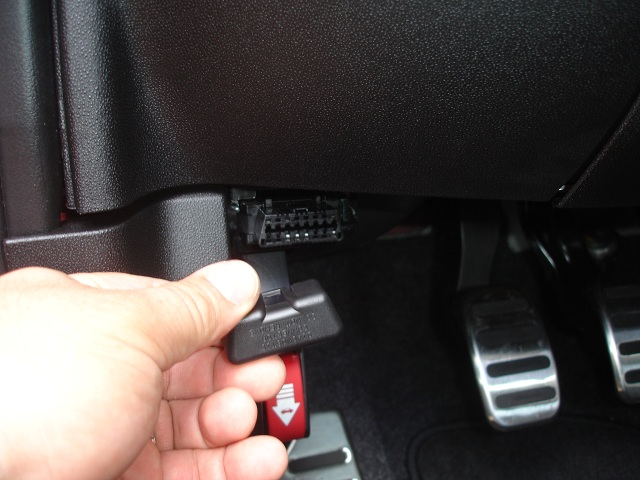
On the Fiat the OBD connector is "upside down" and faces forward, I've not investigated turning it over. A cable opposite the one pictured above, with a left edit, would be better. The cable would go to the middle of the cabin and be tied up behind the trim. Image borrowed from the forums: [image: Inline image 2] On Tue, Jan 16, 2018 at 1:19 AM, Geir Øyvind Vælidalo <geir@validalo.net> wrote:
The pinout is correct. The right or left is a though question as I don’t know what people prefer, however the obd2 can easily be turned on the Soul. What about the Fiat, Jason?
Geir
Sendt fra min iPhone
16. jan. 2018 kl. 05:06 skrev Mark Webb-Johnson <mark@webb-johnson.net>:
I’ve been dealing with the same custom cable provider since 2012. He’s very flexible, fast, and very reliable (especially for OBDII style cables). He delivers direct to Fasttech, and we don’t even bother with QC any more - he has been 100% perfect for the past five years. All we do is a visual inspection and stock count on receipt. MOQ (50) is usually the only issue.
Pinouts we have in the past produced for OVMS OBDII cables:
*Pinout A (both left-hand and right-hand right-angled have been produced)*
J1962-M DB9-F Signal 4 3 Chassis/Power GND 6 7 CAN-H 14 2 CAN-L 16 9 +12V Vehicle Power
J1962 end should be MALE plug with right angle cable. DB9 end should be FEMALE. Both ends should be enclosed in shells, and cable should be 1metre in length.
*Pinout B (left hand right-angle)*
J1962-M DB9-F Signal 4 3 Chassis/Power GND 13 7 CAN-H 12 2 CAN-L 16 9 +12V Vehicle Power
J1962 end should be MALE plug with angle cable. DB9 end should be FEMALE. Both ends should be enclosed in shells, and cable should be 1metre in length.
*Pinout C **(both left-hand and right-hand right-angled have been produced)*
J1962-M DB9-F Signal 4 3 Chassis/Power GND 6 7 CAN-H (primary CAN) 14 2 CAN-L (primary CAN) 13 5 CAN-H (alternate CAN) 12 4 CAN-L (alternate CAN) 16 9 +12V Vehicle Power
J1962 end should be MALE plug with angle cable. DB9 end should be FEMALE. Both ends should be enclosed in shells, and cable should be 1metre in length.
Pinout B was obsoleted in late 2016 and replaced with C. So, currently we have A and C variants.
From my understanding, what you need is:
*Pinout D*
J1962-M DB9-F Signal 4 3 Chassis/Power GND 6 7 CAN-H (primary CAN) 14 2 CAN-L (primary CAN) 1 5 CAN-H (alternate CAN) 9 4 CAN-L (alternate CAN) 16 9 +12V Vehicle Power
J1962 end should be MALE plug with angle cable. DB9 end should be FEMALE. Both ends should be enclosed in shells, and cable should be 1metre in length.
Would that be in a left or right hand orientation?
Right: <PastedGraphic-1.tiff>
Regards, Mark.
On 16 Jan 2018, at 1:39 AM, Geir Øyvind Vælidalo <geir@validalo.net> wrote:
Since we’re closing in on the release date, what should we do regarding the cable for the Kia Soul and Fiat 500e? I have yet to find anything really useful on the M-bus, but who knows what might come later. Jason, how about the Fiat 500e?
Anyone know the pinouts for Hyundai Ioniq OBD2-port? Maybe it can use the same cable too? I couldn’t find the pinouts for that car anywhere…
Regards, Geir
13. des. 2017 kl. 01:53 skrev Mark Webb-Johnson <mark@openvehicles.com>:
Relatively easy. I just give them pinouts, some money, and a week later a bunch of cables arrive.
There is a minimum order quantity of 50 cables from the supplier, so it has to be justifiable.
Perhaps best to have a look at that M-can bus (with a hand-built cable), and see if there is anything on it that makes this worthwhile. You can find OBDII pigtails on AliExpress/eBay/Amazon that make this relatively simple (only need to solder the DB9 end).
Regards, Mark.
On 13 Dec 2017, at 4:09 AM, Geir Øyvind Vælidalo <geir@validalo.net> wrote:
Hi,
We might need a special cable for the Kia Soul EV, as it has two CAN-buses on the diagnostic port and it doesn’t match the ODB2-cable nor the Nissan Leaf-cable. Then C-can uses the standard pins 6 and 14, but the M-can uses pins 1 (high) and 9 (low).
The M-can should be mapped to CAN1_H (Pin 5 on DB9) and CAN1_L(Pin 4 on DB9):
J1962-M DB9-F Signal
1 5 CAN-1H (M-can High)
4 3 Chassis/Power GND
6 7 CAN-0H (C-can high)
9 4 CAN-1L (M-can Low)
14 2 CAN-0L (C-can low)
16 9 +12V Vehicle Power
I don’t use the M-can at the moment, and I’m not sure I will, but if I do we might need to have a special cable made for the Soul EV. Is that something that is easy to fix?
Regards, Geir _______________________________________________ OvmsDev mailing list OvmsDev@lists.teslaclub.hk http://lists.teslaclub.hk/mailman/listinfo/ovmsdev
_______________________________________________ OvmsDev mailing list OvmsDev@lists.teslaclub.hk http://lists.teslaclub.hk/mailman/listinfo/ovmsdev
_______________________________________________ OvmsDev mailing list OvmsDev@lists.teslaclub.hk http://lists.teslaclub.hk/mailman/listinfo/ovmsdev
_______________________________________________ OvmsDev mailing list OvmsDev@lists.teslaclub.hk http://lists.teslaclub.hk/mailman/listinfo/ovmsdev
_______________________________________________ OvmsDev mailing list OvmsDev@lists.teslaclub.hk http://lists.teslaclub.hk/mailman/listinfo/ovmsdev
-- Jason Perkins 313 355 0085
I think we should go for a left one then. I believe that it is the same orientation on the Soul. I’ve replaced mine with splitter cable, so I really don’t remember which way it was originally 🙂 Anyway, it is easy to turn the port around on the Soul. Best regards, Geir
16. jan. 2018 kl. 14:09 skrev Jason Perkins <perkins.jason@gmail.com>:
On the Fiat the OBD connector is "upside down" and faces forward, I've not investigated turning it over. A cable opposite the one pictured above, with a left edit, would be better. The cable would go to the middle of the cabin and be tied up behind the trim.
Image borrowed from the forums: <image.png>
On Tue, Jan 16, 2018 at 1:19 AM, Geir Øyvind Vælidalo <geir@validalo.net <mailto:geir@validalo.net>> wrote: The pinout is correct. The right or left is a though question as I don’t know what people prefer, however the obd2 can easily be turned on the Soul. What about the Fiat, Jason?
Geir
Sendt fra min iPhone
16. jan. 2018 kl. 05:06 skrev Mark Webb-Johnson <mark@webb-johnson.net <mailto:mark@webb-johnson.net>>:
I’ve been dealing with the same custom cable provider since 2012. He’s very flexible, fast, and very reliable (especially for OBDII style cables). He delivers direct to Fasttech, and we don’t even bother with QC any more - he has been 100% perfect for the past five years. All we do is a visual inspection and stock count on receipt. MOQ (50) is usually the only issue.
Pinouts we have in the past produced for OVMS OBDII cables:
Pinout A (both left-hand and right-hand right-angled have been produced)
J1962-M DB9-F Signal 4 3 Chassis/Power GND 6 7 CAN-H 14 2 CAN-L 16 9 +12V Vehicle Power
J1962 end should be MALE plug with right angle cable. DB9 end should be FEMALE. Both ends should be enclosed in shells, and cable should be 1metre in length.
Pinout B (left hand right-angle)
J1962-M DB9-F Signal 4 3 Chassis/Power GND 13 7 CAN-H 12 2 CAN-L 16 9 +12V Vehicle Power
J1962 end should be MALE plug with angle cable. DB9 end should be FEMALE. Both ends should be enclosed in shells, and cable should be 1metre in length.
Pinout C (both left-hand and right-hand right-angled have been produced)
J1962-M DB9-F Signal 4 3 Chassis/Power GND 6 7 CAN-H (primary CAN) 14 2 CAN-L (primary CAN) 13 5 CAN-H (alternate CAN) 12 4 CAN-L (alternate CAN) 16 9 +12V Vehicle Power
J1962 end should be MALE plug with angle cable. DB9 end should be FEMALE. Both ends should be enclosed in shells, and cable should be 1metre in length.
Pinout B was obsoleted in late 2016 and replaced with C. So, currently we have A and C variants.
From my understanding, what you need is:
Pinout D
J1962-M DB9-F Signal 4 3 Chassis/Power GND 6 7 CAN-H (primary CAN) 14 2 CAN-L (primary CAN) 1 5 CAN-H (alternate CAN) 9 4 CAN-L (alternate CAN) 16 9 +12V Vehicle Power
J1962 end should be MALE plug with angle cable. DB9 end should be FEMALE. Both ends should be enclosed in shells, and cable should be 1metre in length.
Would that be in a left or right hand orientation?
Right: <PastedGraphic-1.tiff>
Regards, Mark.
On 16 Jan 2018, at 1:39 AM, Geir Øyvind Vælidalo <geir@validalo.net <mailto:geir@validalo.net>> wrote:
Since we’re closing in on the release date, what should we do regarding the cable for the Kia Soul and Fiat 500e? I have yet to find anything really useful on the M-bus, but who knows what might come later. Jason, how about the Fiat 500e?
Anyone know the pinouts for Hyundai Ioniq OBD2-port? Maybe it can use the same cable too? I couldn’t find the pinouts for that car anywhere…
Regards, Geir
13. des. 2017 kl. 01:53 skrev Mark Webb-Johnson <mark@openvehicles.com <mailto:mark@openvehicles.com>>:
Relatively easy. I just give them pinouts, some money, and a week later a bunch of cables arrive.
There is a minimum order quantity of 50 cables from the supplier, so it has to be justifiable.
Perhaps best to have a look at that M-can bus (with a hand-built cable), and see if there is anything on it that makes this worthwhile. You can find OBDII pigtails on AliExpress/eBay/Amazon that make this relatively simple (only need to solder the DB9 end).
Regards, Mark.
On 13 Dec 2017, at 4:09 AM, Geir Øyvind Vælidalo <geir@validalo.net <mailto:geir@validalo.net>> wrote:
Hi,
We might need a special cable for the Kia Soul EV, as it has two CAN-buses on the diagnostic port and it doesn’t match the ODB2-cable nor the Nissan Leaf-cable. Then C-can uses the standard pins 6 and 14, but the M-can uses pins 1 (high) and 9 (low).
The M-can should be mapped to CAN1_H (Pin 5 on DB9) and CAN1_L(Pin 4 on DB9):
J1962-M DB9-F Signal 1 5 CAN-1H (M-can High) 4 3 Chassis/Power GND 6 7 CAN-0H (C-can high) 9 4 CAN-1L (M-can Low) 14 2 CAN-0L (C-can low) 16 9 +12V Vehicle Power
I don’t use the M-can at the moment, and I’m not sure I will, but if I do we might need to have a special cable made for the Soul EV. Is that something that is easy to fix?
Regards, Geir _______________________________________________ OvmsDev mailing list OvmsDev@lists.teslaclub.hk <mailto:OvmsDev@lists.teslaclub.hk> http://lists.teslaclub.hk/mailman/listinfo/ovmsdev <http://lists.teslaclub.hk/mailman/listinfo/ovmsdev>
_______________________________________________ OvmsDev mailing list OvmsDev@lists.teslaclub.hk <mailto:OvmsDev@lists.teslaclub.hk> http://lists.teslaclub.hk/mailman/listinfo/ovmsdev <http://lists.teslaclub.hk/mailman/listinfo/ovmsdev>
_______________________________________________ OvmsDev mailing list OvmsDev@lists.teslaclub.hk <mailto:OvmsDev@lists.teslaclub.hk> http://lists.teslaclub.hk/mailman/listinfo/ovmsdev <http://lists.teslaclub.hk/mailman/listinfo/ovmsdev>
_______________________________________________ OvmsDev mailing list OvmsDev@lists.teslaclub.hk <mailto:OvmsDev@lists.teslaclub.hk> http://lists.teslaclub.hk/mailman/listinfo/ovmsdev <http://lists.teslaclub.hk/mailman/listinfo/ovmsdev>
_______________________________________________ OvmsDev mailing list OvmsDev@lists.teslaclub.hk <mailto:OvmsDev@lists.teslaclub.hk> http://lists.teslaclub.hk/mailman/listinfo/ovmsdev <http://lists.teslaclub.hk/mailman/listinfo/ovmsdev>
-- Jason Perkins 313 355 0085 _______________________________________________ OvmsDev mailing list OvmsDev@lists.teslaclub.hk http://lists.teslaclub.hk/mailman/listinfo/ovmsdev
I’ve got this question raised as a ‘support’ ticket: https://www.openvehicles.com/node/2045 <https://www.openvehicles.com/node/2045> Hi, in some forums is a discussion which cable is needed for the Kia Soul EV? There should be a difference between OBD-C to DB9 and OBD-M to DB9. I hope you can tell us whcih one is the right one. Thx! Chriss Looking at the current code for kia soul, it seems that both the M and C buses are used, so a custom cable is definitely required? Is this the correct pinout: Pinout KS J1962-M DB9-F Signal 4 3 Chassis/Power GND 6 7 CAN-H (primary CAN) 14 2 CAN-L (primary CAN) 1 5 CAN-H (alternate CAN) 9 4 CAN-L (alternate CAN) 16 9 +12V Vehicle Power J1962 end should be MALE plug with angle cable. DB9 end should be FEMALE. Both ends should be enclosed in shells, and cable should be 1metre in length. J1962 end should be “LEFT” style: Is that correct? Shall I go ahead and order these? Regards, Mark.
On 16 Jan 2018, at 9:09 PM, Jason Perkins <perkins.jason@gmail.com> wrote:
On the Fiat the OBD connector is "upside down" and faces forward, I've not investigated turning it over. A cable opposite the one pictured above, with a left edit, would be better. The cable would go to the middle of the cabin and be tied up behind the trim.
Image borrowed from the forums: <image.png>
On Tue, Jan 16, 2018 at 1:19 AM, Geir Øyvind Vælidalo <geir@validalo.net <mailto:geir@validalo.net>> wrote: The pinout is correct. The right or left is a though question as I don’t know what people prefer, however the obd2 can easily be turned on the Soul. What about the Fiat, Jason?
Geir
Sendt fra min iPhone
16. jan. 2018 kl. 05:06 skrev Mark Webb-Johnson <mark@webb-johnson.net <mailto:mark@webb-johnson.net>>:
I’ve been dealing with the same custom cable provider since 2012. He’s very flexible, fast, and very reliable (especially for OBDII style cables). He delivers direct to Fasttech, and we don’t even bother with QC any more - he has been 100% perfect for the past five years. All we do is a visual inspection and stock count on receipt. MOQ (50) is usually the only issue.
Pinouts we have in the past produced for OVMS OBDII cables:
Pinout A (both left-hand and right-hand right-angled have been produced)
J1962-M DB9-F Signal 4 3 Chassis/Power GND 6 7 CAN-H 14 2 CAN-L 16 9 +12V Vehicle Power
J1962 end should be MALE plug with right angle cable. DB9 end should be FEMALE. Both ends should be enclosed in shells, and cable should be 1metre in length.
Pinout B (left hand right-angle)
J1962-M DB9-F Signal 4 3 Chassis/Power GND 13 7 CAN-H 12 2 CAN-L 16 9 +12V Vehicle Power
J1962 end should be MALE plug with angle cable. DB9 end should be FEMALE. Both ends should be enclosed in shells, and cable should be 1metre in length.
Pinout C (both left-hand and right-hand right-angled have been produced)
J1962-M DB9-F Signal 4 3 Chassis/Power GND 6 7 CAN-H (primary CAN) 14 2 CAN-L (primary CAN) 13 5 CAN-H (alternate CAN) 12 4 CAN-L (alternate CAN) 16 9 +12V Vehicle Power
J1962 end should be MALE plug with angle cable. DB9 end should be FEMALE. Both ends should be enclosed in shells, and cable should be 1metre in length.
Pinout B was obsoleted in late 2016 and replaced with C. So, currently we have A and C variants.
From my understanding, what you need is:
Pinout D
J1962-M DB9-F Signal 4 3 Chassis/Power GND 6 7 CAN-H (primary CAN) 14 2 CAN-L (primary CAN) 1 5 CAN-H (alternate CAN) 9 4 CAN-L (alternate CAN) 16 9 +12V Vehicle Power
J1962 end should be MALE plug with angle cable. DB9 end should be FEMALE. Both ends should be enclosed in shells, and cable should be 1metre in length.
Would that be in a left or right hand orientation?
Right: <PastedGraphic-1.tiff>
Regards, Mark.
On 16 Jan 2018, at 1:39 AM, Geir Øyvind Vælidalo <geir@validalo.net <mailto:geir@validalo.net>> wrote:
Since we’re closing in on the release date, what should we do regarding the cable for the Kia Soul and Fiat 500e? I have yet to find anything really useful on the M-bus, but who knows what might come later. Jason, how about the Fiat 500e?
Anyone know the pinouts for Hyundai Ioniq OBD2-port? Maybe it can use the same cable too? I couldn’t find the pinouts for that car anywhere…
Regards, Geir
13. des. 2017 kl. 01:53 skrev Mark Webb-Johnson <mark@openvehicles.com <mailto:mark@openvehicles.com>>:
Relatively easy. I just give them pinouts, some money, and a week later a bunch of cables arrive.
There is a minimum order quantity of 50 cables from the supplier, so it has to be justifiable.
Perhaps best to have a look at that M-can bus (with a hand-built cable), and see if there is anything on it that makes this worthwhile. You can find OBDII pigtails on AliExpress/eBay/Amazon that make this relatively simple (only need to solder the DB9 end).
Regards, Mark.
On 13 Dec 2017, at 4:09 AM, Geir Øyvind Vælidalo <geir@validalo.net <mailto:geir@validalo.net>> wrote:
Hi,
We might need a special cable for the Kia Soul EV, as it has two CAN-buses on the diagnostic port and it doesn’t match the ODB2-cable nor the Nissan Leaf-cable. Then C-can uses the standard pins 6 and 14, but the M-can uses pins 1 (high) and 9 (low).
The M-can should be mapped to CAN1_H (Pin 5 on DB9) and CAN1_L(Pin 4 on DB9):
J1962-M DB9-F Signal 1 5 CAN-1H (M-can High) 4 3 Chassis/Power GND 6 7 CAN-0H (C-can high) 9 4 CAN-1L (M-can Low) 14 2 CAN-0L (C-can low) 16 9 +12V Vehicle Power
I don’t use the M-can at the moment, and I’m not sure I will, but if I do we might need to have a special cable made for the Soul EV. Is that something that is easy to fix?
Regards, Geir _______________________________________________ OvmsDev mailing list OvmsDev@lists.teslaclub.hk <mailto:OvmsDev@lists.teslaclub.hk> http://lists.teslaclub.hk/mailman/listinfo/ovmsdev <http://lists.teslaclub.hk/mailman/listinfo/ovmsdev>
_______________________________________________ OvmsDev mailing list OvmsDev@lists.teslaclub.hk <mailto:OvmsDev@lists.teslaclub.hk> http://lists.teslaclub.hk/mailman/listinfo/ovmsdev <http://lists.teslaclub.hk/mailman/listinfo/ovmsdev>
_______________________________________________ OvmsDev mailing list OvmsDev@lists.teslaclub.hk <mailto:OvmsDev@lists.teslaclub.hk> http://lists.teslaclub.hk/mailman/listinfo/ovmsdev <http://lists.teslaclub.hk/mailman/listinfo/ovmsdev>
_______________________________________________ OvmsDev mailing list OvmsDev@lists.teslaclub.hk <mailto:OvmsDev@lists.teslaclub.hk> http://lists.teslaclub.hk/mailman/listinfo/ovmsdev <http://lists.teslaclub.hk/mailman/listinfo/ovmsdev>
_______________________________________________ OvmsDev mailing list OvmsDev@lists.teslaclub.hk <mailto:OvmsDev@lists.teslaclub.hk> http://lists.teslaclub.hk/mailman/listinfo/ovmsdev <http://lists.teslaclub.hk/mailman/listinfo/ovmsdev>
-- Jason Perkins 313 355 0085 _______________________________________________ OvmsDev mailing list OvmsDev@lists.teslaclub.hk http://lists.teslaclub.hk/mailman/listinfo/ovmsdev
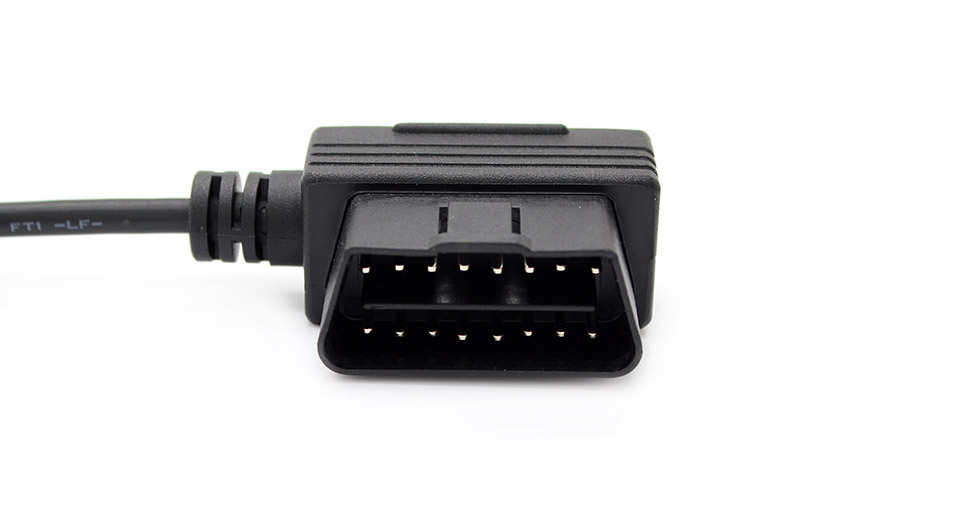
The pinouts are correct, and I think a left-version is fine. Either way, it is easy to turn the OBD-port around if needed, or install a splitter-cable. Geir
15. jun. 2018 kl. 02:06 skrev Mark Webb-Johnson <mark@webb-johnson.net>:
I’ve got this question raised as a ‘support’ ticket:
https://www.openvehicles.com/node/2045 <https://www.openvehicles.com/node/2045>
Hi, in some forums is a discussion which cable is needed for the Kia Soul EV? There should be a difference between OBD-C to DB9 and OBD-M to DB9. I hope you can tell us whcih one is the right one. Thx! Chriss
Looking at the current code for kia soul, it seems that both the M and C buses are used, so a custom cable is definitely required? Is this the correct pinout:
Pinout KS
J1962-M DB9-F Signal 4 3 Chassis/Power GND 6 7 CAN-H (primary CAN) 14 2 CAN-L (primary CAN) 1 5 CAN-H (alternate CAN) 9 4 CAN-L (alternate CAN) 16 9 +12V Vehicle Power
J1962 end should be MALE plug with angle cable. DB9 end should be FEMALE. Both ends should be enclosed in shells, and cable should be 1metre in length. J1962 end should be “LEFT” style:
<1139300-2.jpg>
Is that correct? Shall I go ahead and order these?
Regards, Mark.
On 16 Jan 2018, at 9:09 PM, Jason Perkins <perkins.jason@gmail.com <mailto:perkins.jason@gmail.com>> wrote:
On the Fiat the OBD connector is "upside down" and faces forward, I've not investigated turning it over. A cable opposite the one pictured above, with a left edit, would be better. The cable would go to the middle of the cabin and be tied up behind the trim.
Image borrowed from the forums: <image.png>
On Tue, Jan 16, 2018 at 1:19 AM, Geir Øyvind Vælidalo <geir@validalo.net <mailto:geir@validalo.net>> wrote: The pinout is correct. The right or left is a though question as I don’t know what people prefer, however the obd2 can easily be turned on the Soul. What about the Fiat, Jason?
Geir
Sendt fra min iPhone
16. jan. 2018 kl. 05:06 skrev Mark Webb-Johnson <mark@webb-johnson.net <mailto:mark@webb-johnson.net>>:
I’ve been dealing with the same custom cable provider since 2012. He’s very flexible, fast, and very reliable (especially for OBDII style cables). He delivers direct to Fasttech, and we don’t even bother with QC any more - he has been 100% perfect for the past five years. All we do is a visual inspection and stock count on receipt. MOQ (50) is usually the only issue.
Pinouts we have in the past produced for OVMS OBDII cables:
Pinout A (both left-hand and right-hand right-angled have been produced)
J1962-M DB9-F Signal 4 3 Chassis/Power GND 6 7 CAN-H 14 2 CAN-L 16 9 +12V Vehicle Power
J1962 end should be MALE plug with right angle cable. DB9 end should be FEMALE. Both ends should be enclosed in shells, and cable should be 1metre in length.
Pinout B (left hand right-angle)
J1962-M DB9-F Signal 4 3 Chassis/Power GND 13 7 CAN-H 12 2 CAN-L 16 9 +12V Vehicle Power
J1962 end should be MALE plug with angle cable. DB9 end should be FEMALE. Both ends should be enclosed in shells, and cable should be 1metre in length.
Pinout C (both left-hand and right-hand right-angled have been produced)
J1962-M DB9-F Signal 4 3 Chassis/Power GND 6 7 CAN-H (primary CAN) 14 2 CAN-L (primary CAN) 13 5 CAN-H (alternate CAN) 12 4 CAN-L (alternate CAN) 16 9 +12V Vehicle Power
J1962 end should be MALE plug with angle cable. DB9 end should be FEMALE. Both ends should be enclosed in shells, and cable should be 1metre in length.
Pinout B was obsoleted in late 2016 and replaced with C. So, currently we have A and C variants.
From my understanding, what you need is:
Pinout D
J1962-M DB9-F Signal 4 3 Chassis/Power GND 6 7 CAN-H (primary CAN) 14 2 CAN-L (primary CAN) 1 5 CAN-H (alternate CAN) 9 4 CAN-L (alternate CAN) 16 9 +12V Vehicle Power
J1962 end should be MALE plug with angle cable. DB9 end should be FEMALE. Both ends should be enclosed in shells, and cable should be 1metre in length.
Would that be in a left or right hand orientation?
Right: <PastedGraphic-1.tiff>
Regards, Mark.
On 16 Jan 2018, at 1:39 AM, Geir Øyvind Vælidalo <geir@validalo.net <mailto:geir@validalo.net>> wrote:
Since we’re closing in on the release date, what should we do regarding the cable for the Kia Soul and Fiat 500e? I have yet to find anything really useful on the M-bus, but who knows what might come later. Jason, how about the Fiat 500e?
Anyone know the pinouts for Hyundai Ioniq OBD2-port? Maybe it can use the same cable too? I couldn’t find the pinouts for that car anywhere…
Regards, Geir
13. des. 2017 kl. 01:53 skrev Mark Webb-Johnson <mark@openvehicles.com <mailto:mark@openvehicles.com>>:
Relatively easy. I just give them pinouts, some money, and a week later a bunch of cables arrive.
There is a minimum order quantity of 50 cables from the supplier, so it has to be justifiable.
Perhaps best to have a look at that M-can bus (with a hand-built cable), and see if there is anything on it that makes this worthwhile. You can find OBDII pigtails on AliExpress/eBay/Amazon that make this relatively simple (only need to solder the DB9 end).
Regards, Mark.
On 13 Dec 2017, at 4:09 AM, Geir Øyvind Vælidalo <geir@validalo.net <mailto:geir@validalo.net>> wrote:
Hi,
We might need a special cable for the Kia Soul EV, as it has two CAN-buses on the diagnostic port and it doesn’t match the ODB2-cable nor the Nissan Leaf-cable. Then C-can uses the standard pins 6 and 14, but the M-can uses pins 1 (high) and 9 (low).
The M-can should be mapped to CAN1_H (Pin 5 on DB9) and CAN1_L(Pin 4 on DB9):
J1962-M DB9-F Signal 1 5 CAN-1H (M-can High) 4 3 Chassis/Power GND 6 7 CAN-0H (C-can high) 9 4 CAN-1L (M-can Low) 14 2 CAN-0L (C-can low) 16 9 +12V Vehicle Power
I don’t use the M-can at the moment, and I’m not sure I will, but if I do we might need to have a special cable made for the Soul EV. Is that something that is easy to fix?
Regards, Geir _______________________________________________ OvmsDev mailing list OvmsDev@lists.teslaclub.hk <mailto:OvmsDev@lists.teslaclub.hk> http://lists.teslaclub.hk/mailman/listinfo/ovmsdev <http://lists.teslaclub.hk/mailman/listinfo/ovmsdev>
_______________________________________________ OvmsDev mailing list OvmsDev@lists.teslaclub.hk <mailto:OvmsDev@lists.teslaclub.hk> http://lists.teslaclub.hk/mailman/listinfo/ovmsdev <http://lists.teslaclub.hk/mailman/listinfo/ovmsdev>
_______________________________________________ OvmsDev mailing list OvmsDev@lists.teslaclub.hk <mailto:OvmsDev@lists.teslaclub.hk> http://lists.teslaclub.hk/mailman/listinfo/ovmsdev <http://lists.teslaclub.hk/mailman/listinfo/ovmsdev>
_______________________________________________ OvmsDev mailing list OvmsDev@lists.teslaclub.hk <mailto:OvmsDev@lists.teslaclub.hk> http://lists.teslaclub.hk/mailman/listinfo/ovmsdev <http://lists.teslaclub.hk/mailman/listinfo/ovmsdev>
_______________________________________________ OvmsDev mailing list OvmsDev@lists.teslaclub.hk <mailto:OvmsDev@lists.teslaclub.hk> http://lists.teslaclub.hk/mailman/listinfo/ovmsdev <http://lists.teslaclub.hk/mailman/listinfo/ovmsdev>
-- Jason Perkins 313 355 0085 _______________________________________________ OvmsDev mailing list OvmsDev@lists.teslaclub.hk <mailto:OvmsDev@lists.teslaclub.hk> http://lists.teslaclub.hk/mailman/listinfo/ovmsdev
_______________________________________________ OvmsDev mailing list OvmsDev@lists.openvehicles.com http://lists.openvehicles.com/mailman/listinfo/ovmsdev
Manufacturing for this has started. The cables should be available on fasttech.com <http://fasttech.com/> within about 14 days. Regards, Mark.
On 15 Jun 2018, at 10:25 PM, Geir Øyvind Vælidalo <geir@validalo.net> wrote:
The pinouts are correct, and I think a left-version is fine. Either way, it is easy to turn the OBD-port around if needed, or install a splitter-cable.
Geir
15. jun. 2018 kl. 02:06 skrev Mark Webb-Johnson <mark@webb-johnson.net <mailto:mark@webb-johnson.net>>:
I’ve got this question raised as a ‘support’ ticket:
https://www.openvehicles.com/node/2045 <https://www.openvehicles.com/node/2045>
Hi, in some forums is a discussion which cable is needed for the Kia Soul EV? There should be a difference between OBD-C to DB9 and OBD-M to DB9. I hope you can tell us whcih one is the right one. Thx! Chriss
Looking at the current code for kia soul, it seems that both the M and C buses are used, so a custom cable is definitely required? Is this the correct pinout:
Pinout KS
J1962-M DB9-F Signal 4 3 Chassis/Power GND 6 7 CAN-H (primary CAN) 14 2 CAN-L (primary CAN) 1 5 CAN-H (alternate CAN) 9 4 CAN-L (alternate CAN) 16 9 +12V Vehicle Power
J1962 end should be MALE plug with angle cable. DB9 end should be FEMALE. Both ends should be enclosed in shells, and cable should be 1metre in length. J1962 end should be “LEFT” style:
<1139300-2.jpg>
Is that correct? Shall I go ahead and order these?
Regards, Mark.
On 16 Jan 2018, at 9:09 PM, Jason Perkins <perkins.jason@gmail.com <mailto:perkins.jason@gmail.com>> wrote:
On the Fiat the OBD connector is "upside down" and faces forward, I've not investigated turning it over. A cable opposite the one pictured above, with a left edit, would be better. The cable would go to the middle of the cabin and be tied up behind the trim.
Image borrowed from the forums: <image.png>
On Tue, Jan 16, 2018 at 1:19 AM, Geir Øyvind Vælidalo <geir@validalo.net <mailto:geir@validalo.net>> wrote: The pinout is correct. The right or left is a though question as I don’t know what people prefer, however the obd2 can easily be turned on the Soul. What about the Fiat, Jason?
Geir
Sendt fra min iPhone
16. jan. 2018 kl. 05:06 skrev Mark Webb-Johnson <mark@webb-johnson.net <mailto:mark@webb-johnson.net>>:
I’ve been dealing with the same custom cable provider since 2012. He’s very flexible, fast, and very reliable (especially for OBDII style cables). He delivers direct to Fasttech, and we don’t even bother with QC any more - he has been 100% perfect for the past five years. All we do is a visual inspection and stock count on receipt. MOQ (50) is usually the only issue.
Pinouts we have in the past produced for OVMS OBDII cables:
Pinout A (both left-hand and right-hand right-angled have been produced)
J1962-M DB9-F Signal 4 3 Chassis/Power GND 6 7 CAN-H 14 2 CAN-L 16 9 +12V Vehicle Power
J1962 end should be MALE plug with right angle cable. DB9 end should be FEMALE. Both ends should be enclosed in shells, and cable should be 1metre in length.
Pinout B (left hand right-angle)
J1962-M DB9-F Signal 4 3 Chassis/Power GND 13 7 CAN-H 12 2 CAN-L 16 9 +12V Vehicle Power
J1962 end should be MALE plug with angle cable. DB9 end should be FEMALE. Both ends should be enclosed in shells, and cable should be 1metre in length.
Pinout C (both left-hand and right-hand right-angled have been produced)
J1962-M DB9-F Signal 4 3 Chassis/Power GND 6 7 CAN-H (primary CAN) 14 2 CAN-L (primary CAN) 13 5 CAN-H (alternate CAN) 12 4 CAN-L (alternate CAN) 16 9 +12V Vehicle Power
J1962 end should be MALE plug with angle cable. DB9 end should be FEMALE. Both ends should be enclosed in shells, and cable should be 1metre in length.
Pinout B was obsoleted in late 2016 and replaced with C. So, currently we have A and C variants.
From my understanding, what you need is:
Pinout D
J1962-M DB9-F Signal 4 3 Chassis/Power GND 6 7 CAN-H (primary CAN) 14 2 CAN-L (primary CAN) 1 5 CAN-H (alternate CAN) 9 4 CAN-L (alternate CAN) 16 9 +12V Vehicle Power
J1962 end should be MALE plug with angle cable. DB9 end should be FEMALE. Both ends should be enclosed in shells, and cable should be 1metre in length.
Would that be in a left or right hand orientation?
Right: <PastedGraphic-1.tiff>
Regards, Mark.
On 16 Jan 2018, at 1:39 AM, Geir Øyvind Vælidalo <geir@validalo.net <mailto:geir@validalo.net>> wrote:
Since we’re closing in on the release date, what should we do regarding the cable for the Kia Soul and Fiat 500e? I have yet to find anything really useful on the M-bus, but who knows what might come later. Jason, how about the Fiat 500e?
Anyone know the pinouts for Hyundai Ioniq OBD2-port? Maybe it can use the same cable too? I couldn’t find the pinouts for that car anywhere…
Regards, Geir
13. des. 2017 kl. 01:53 skrev Mark Webb-Johnson <mark@openvehicles.com <mailto:mark@openvehicles.com>>:
Relatively easy. I just give them pinouts, some money, and a week later a bunch of cables arrive.
There is a minimum order quantity of 50 cables from the supplier, so it has to be justifiable.
Perhaps best to have a look at that M-can bus (with a hand-built cable), and see if there is anything on it that makes this worthwhile. You can find OBDII pigtails on AliExpress/eBay/Amazon that make this relatively simple (only need to solder the DB9 end).
Regards, Mark.
> On 13 Dec 2017, at 4:09 AM, Geir Øyvind Vælidalo <geir@validalo.net <mailto:geir@validalo.net>> wrote: > > Hi, > > We might need a special cable for the Kia Soul EV, as it has two CAN-buses on the diagnostic port and it doesn’t match the ODB2-cable nor the Nissan Leaf-cable. > Then C-can uses the standard pins 6 and 14, but the M-can uses pins 1 (high) and 9 (low). > > The M-can should be mapped to CAN1_H (Pin 5 on DB9) and CAN1_L(Pin 4 on DB9): > > J1962-M DB9-F Signal > 1 5 CAN-1H (M-can High) > 4 3 Chassis/Power GND > 6 7 CAN-0H (C-can high) > 9 4 CAN-1L (M-can Low) > 14 2 CAN-0L (C-can low) > 16 9 +12V Vehicle Power > > I don’t use the M-can at the moment, and I’m not sure I will, but if I do we might need to have a special cable made for the Soul EV. > Is that something that is easy to fix? > > Regards, > Geir > _______________________________________________ > OvmsDev mailing list > OvmsDev@lists.teslaclub.hk <mailto:OvmsDev@lists.teslaclub.hk> > http://lists.teslaclub.hk/mailman/listinfo/ovmsdev <http://lists.teslaclub.hk/mailman/listinfo/ovmsdev>
_______________________________________________ OvmsDev mailing list OvmsDev@lists.teslaclub.hk <mailto:OvmsDev@lists.teslaclub.hk> http://lists.teslaclub.hk/mailman/listinfo/ovmsdev <http://lists.teslaclub.hk/mailman/listinfo/ovmsdev>
_______________________________________________ OvmsDev mailing list OvmsDev@lists.teslaclub.hk <mailto:OvmsDev@lists.teslaclub.hk> http://lists.teslaclub.hk/mailman/listinfo/ovmsdev <http://lists.teslaclub.hk/mailman/listinfo/ovmsdev>
_______________________________________________ OvmsDev mailing list OvmsDev@lists.teslaclub.hk <mailto:OvmsDev@lists.teslaclub.hk> http://lists.teslaclub.hk/mailman/listinfo/ovmsdev <http://lists.teslaclub.hk/mailman/listinfo/ovmsdev>
_______________________________________________ OvmsDev mailing list OvmsDev@lists.teslaclub.hk <mailto:OvmsDev@lists.teslaclub.hk> http://lists.teslaclub.hk/mailman/listinfo/ovmsdev <http://lists.teslaclub.hk/mailman/listinfo/ovmsdev>
-- Jason Perkins 313 355 0085 _______________________________________________ OvmsDev mailing list OvmsDev@lists.teslaclub.hk <mailto:OvmsDev@lists.teslaclub.hk> http://lists.teslaclub.hk/mailman/listinfo/ovmsdev <http://lists.teslaclub.hk/mailman/listinfo/ovmsdev>
_______________________________________________ OvmsDev mailing list OvmsDev@lists.openvehicles.com <mailto:OvmsDev@lists.openvehicles.com> http://lists.openvehicles.com/mailman/listinfo/ovmsdev
_______________________________________________ OvmsDev mailing list OvmsDev@lists.openvehicles.com http://lists.openvehicles.com/mailman/listinfo/ovmsdev
Great! Thanks Mark! Geir
3. jul. 2018 kl. 10:00 skrev Mark Webb-Johnson <mark@webb-johnson.net>:
Manufacturing for this has started. The cables should be available on fasttech.com <http://fasttech.com/> within about 14 days.
Regards, Mark.
On 15 Jun 2018, at 10:25 PM, Geir Øyvind Vælidalo <geir@validalo.net <mailto:geir@validalo.net>> wrote:
The pinouts are correct, and I think a left-version is fine. Either way, it is easy to turn the OBD-port around if needed, or install a splitter-cable.
Geir
15. jun. 2018 kl. 02:06 skrev Mark Webb-Johnson <mark@webb-johnson.net <mailto:mark@webb-johnson.net>>:
I’ve got this question raised as a ‘support’ ticket:
https://www.openvehicles.com/node/2045 <https://www.openvehicles.com/node/2045>
Hi, in some forums is a discussion which cable is needed for the Kia Soul EV? There should be a difference between OBD-C to DB9 and OBD-M to DB9. I hope you can tell us whcih one is the right one. Thx! Chriss
Looking at the current code for kia soul, it seems that both the M and C buses are used, so a custom cable is definitely required? Is this the correct pinout:
Pinout KS
J1962-M DB9-F Signal 4 3 Chassis/Power GND 6 7 CAN-H (primary CAN) 14 2 CAN-L (primary CAN) 1 5 CAN-H (alternate CAN) 9 4 CAN-L (alternate CAN) 16 9 +12V Vehicle Power
J1962 end should be MALE plug with angle cable. DB9 end should be FEMALE. Both ends should be enclosed in shells, and cable should be 1metre in length. J1962 end should be “LEFT” style:
<1139300-2.jpg>
Is that correct? Shall I go ahead and order these?
Regards, Mark.
On 16 Jan 2018, at 9:09 PM, Jason Perkins <perkins.jason@gmail.com <mailto:perkins.jason@gmail.com>> wrote:
On the Fiat the OBD connector is "upside down" and faces forward, I've not investigated turning it over. A cable opposite the one pictured above, with a left edit, would be better. The cable would go to the middle of the cabin and be tied up behind the trim.
Image borrowed from the forums: <image.png>
On Tue, Jan 16, 2018 at 1:19 AM, Geir Øyvind Vælidalo <geir@validalo.net <mailto:geir@validalo.net>> wrote: The pinout is correct. The right or left is a though question as I don’t know what people prefer, however the obd2 can easily be turned on the Soul. What about the Fiat, Jason?
Geir
Sendt fra min iPhone
16. jan. 2018 kl. 05:06 skrev Mark Webb-Johnson <mark@webb-johnson.net <mailto:mark@webb-johnson.net>>:
I’ve been dealing with the same custom cable provider since 2012. He’s very flexible, fast, and very reliable (especially for OBDII style cables). He delivers direct to Fasttech, and we don’t even bother with QC any more - he has been 100% perfect for the past five years. All we do is a visual inspection and stock count on receipt. MOQ (50) is usually the only issue.
Pinouts we have in the past produced for OVMS OBDII cables:
Pinout A (both left-hand and right-hand right-angled have been produced)
J1962-M DB9-F Signal 4 3 Chassis/Power GND 6 7 CAN-H 14 2 CAN-L 16 9 +12V Vehicle Power
J1962 end should be MALE plug with right angle cable. DB9 end should be FEMALE. Both ends should be enclosed in shells, and cable should be 1metre in length.
Pinout B (left hand right-angle)
J1962-M DB9-F Signal 4 3 Chassis/Power GND 13 7 CAN-H 12 2 CAN-L 16 9 +12V Vehicle Power
J1962 end should be MALE plug with angle cable. DB9 end should be FEMALE. Both ends should be enclosed in shells, and cable should be 1metre in length.
Pinout C (both left-hand and right-hand right-angled have been produced)
J1962-M DB9-F Signal 4 3 Chassis/Power GND 6 7 CAN-H (primary CAN) 14 2 CAN-L (primary CAN) 13 5 CAN-H (alternate CAN) 12 4 CAN-L (alternate CAN) 16 9 +12V Vehicle Power
J1962 end should be MALE plug with angle cable. DB9 end should be FEMALE. Both ends should be enclosed in shells, and cable should be 1metre in length.
Pinout B was obsoleted in late 2016 and replaced with C. So, currently we have A and C variants.
From my understanding, what you need is:
Pinout D
J1962-M DB9-F Signal 4 3 Chassis/Power GND 6 7 CAN-H (primary CAN) 14 2 CAN-L (primary CAN) 1 5 CAN-H (alternate CAN) 9 4 CAN-L (alternate CAN) 16 9 +12V Vehicle Power
J1962 end should be MALE plug with angle cable. DB9 end should be FEMALE. Both ends should be enclosed in shells, and cable should be 1metre in length.
Would that be in a left or right hand orientation?
Right: <PastedGraphic-1.tiff>
Regards, Mark.
On 16 Jan 2018, at 1:39 AM, Geir Øyvind Vælidalo <geir@validalo.net <mailto:geir@validalo.net>> wrote:
Since we’re closing in on the release date, what should we do regarding the cable for the Kia Soul and Fiat 500e? I have yet to find anything really useful on the M-bus, but who knows what might come later. Jason, how about the Fiat 500e?
Anyone know the pinouts for Hyundai Ioniq OBD2-port? Maybe it can use the same cable too? I couldn’t find the pinouts for that car anywhere…
Regards, Geir
> 13. des. 2017 kl. 01:53 skrev Mark Webb-Johnson <mark@openvehicles.com <mailto:mark@openvehicles.com>>: > > Relatively easy. I just give them pinouts, some money, and a week later a bunch of cables arrive. > > There is a minimum order quantity of 50 cables from the supplier, so it has to be justifiable. > > Perhaps best to have a look at that M-can bus (with a hand-built cable), and see if there is anything on it that makes this worthwhile. You can find OBDII pigtails on AliExpress/eBay/Amazon that make this relatively simple (only need to solder the DB9 end). > > Regards, Mark. > >> On 13 Dec 2017, at 4:09 AM, Geir Øyvind Vælidalo <geir@validalo.net <mailto:geir@validalo.net>> wrote: >> >> Hi, >> >> We might need a special cable for the Kia Soul EV, as it has two CAN-buses on the diagnostic port and it doesn’t match the ODB2-cable nor the Nissan Leaf-cable. >> Then C-can uses the standard pins 6 and 14, but the M-can uses pins 1 (high) and 9 (low). >> >> The M-can should be mapped to CAN1_H (Pin 5 on DB9) and CAN1_L(Pin 4 on DB9): >> >> J1962-M DB9-F Signal >> 1 5 CAN-1H (M-can High) >> 4 3 Chassis/Power GND >> 6 7 CAN-0H (C-can high) >> 9 4 CAN-1L (M-can Low) >> 14 2 CAN-0L (C-can low) >> 16 9 +12V Vehicle Power >> >> I don’t use the M-can at the moment, and I’m not sure I will, but if I do we might need to have a special cable made for the Soul EV. >> Is that something that is easy to fix? >> >> Regards, >> Geir >> _______________________________________________ >> OvmsDev mailing list >> OvmsDev@lists.teslaclub.hk <mailto:OvmsDev@lists.teslaclub.hk> >> http://lists.teslaclub.hk/mailman/listinfo/ovmsdev <http://lists.teslaclub.hk/mailman/listinfo/ovmsdev> > > _______________________________________________ > OvmsDev mailing list > OvmsDev@lists.teslaclub.hk <mailto:OvmsDev@lists.teslaclub.hk> > http://lists.teslaclub.hk/mailman/listinfo/ovmsdev <http://lists.teslaclub.hk/mailman/listinfo/ovmsdev>
_______________________________________________ OvmsDev mailing list OvmsDev@lists.teslaclub.hk <mailto:OvmsDev@lists.teslaclub.hk> http://lists.teslaclub.hk/mailman/listinfo/ovmsdev <http://lists.teslaclub.hk/mailman/listinfo/ovmsdev>
_______________________________________________ OvmsDev mailing list OvmsDev@lists.teslaclub.hk <mailto:OvmsDev@lists.teslaclub.hk> http://lists.teslaclub.hk/mailman/listinfo/ovmsdev <http://lists.teslaclub.hk/mailman/listinfo/ovmsdev>
_______________________________________________ OvmsDev mailing list OvmsDev@lists.teslaclub.hk <mailto:OvmsDev@lists.teslaclub.hk> http://lists.teslaclub.hk/mailman/listinfo/ovmsdev <http://lists.teslaclub.hk/mailman/listinfo/ovmsdev>
-- Jason Perkins 313 355 0085 _______________________________________________ OvmsDev mailing list OvmsDev@lists.teslaclub.hk <mailto:OvmsDev@lists.teslaclub.hk> http://lists.teslaclub.hk/mailman/listinfo/ovmsdev <http://lists.teslaclub.hk/mailman/listinfo/ovmsdev>
_______________________________________________ OvmsDev mailing list OvmsDev@lists.openvehicles.com <mailto:OvmsDev@lists.openvehicles.com> http://lists.openvehicles.com/mailman/listinfo/ovmsdev <http://lists.openvehicles.com/mailman/listinfo/ovmsdev>
_______________________________________________ OvmsDev mailing list OvmsDev@lists.openvehicles.com <mailto:OvmsDev@lists.openvehicles.com> http://lists.openvehicles.com/mailman/listinfo/ovmsdev
_______________________________________________ OvmsDev mailing list OvmsDev@lists.openvehicles.com http://lists.openvehicles.com/mailman/listinfo/ovmsdev

Hello I had my OVMS now working in the car for about five days. It was located under windscreen, was connected with standard cable on standard connection on the car and has suddenly stopped working. After I opend the case I found that inisde there has been a hardware defect. Anybody has same experiance? Is there garantie on the hardware? See attachment Guenther
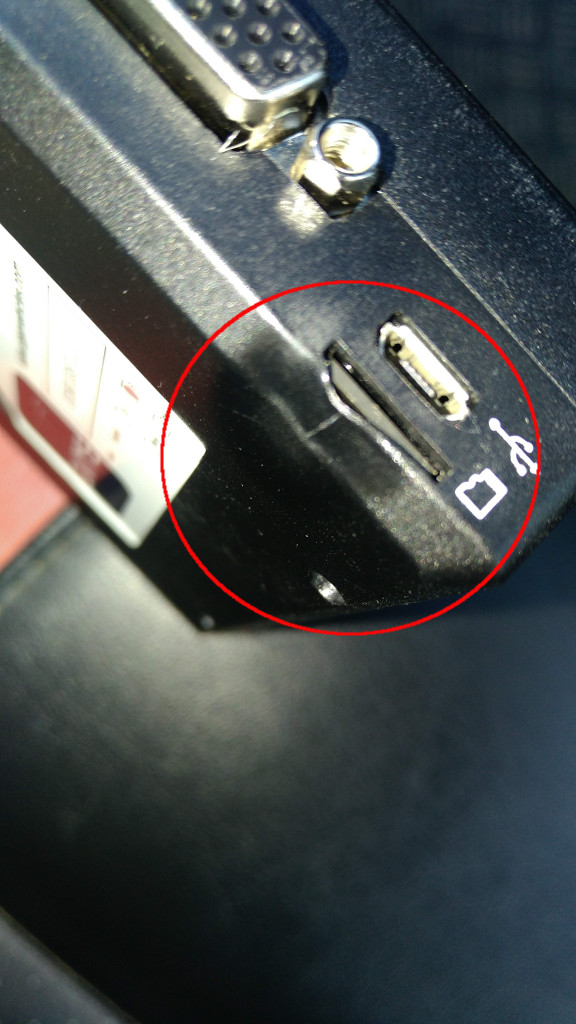
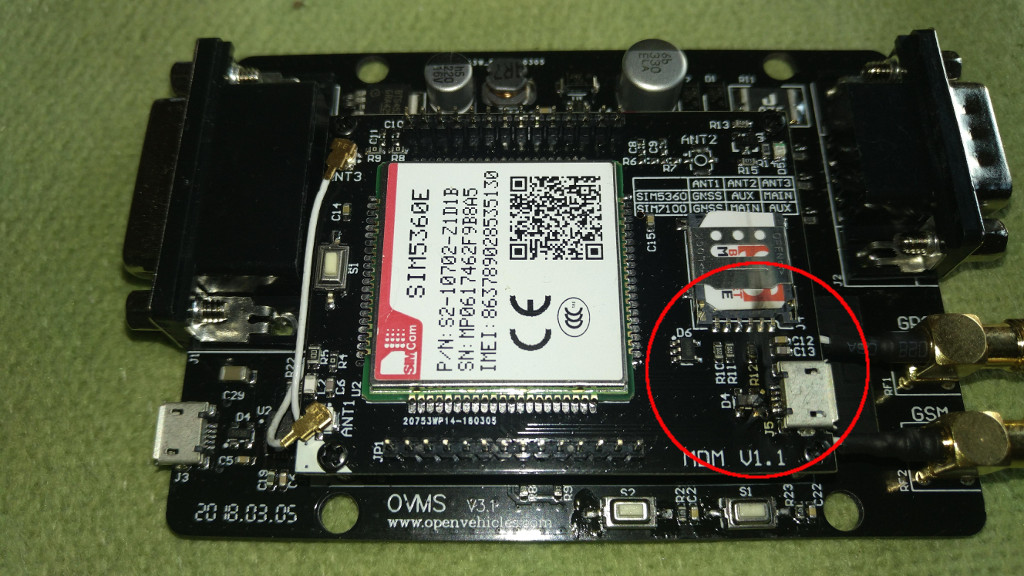
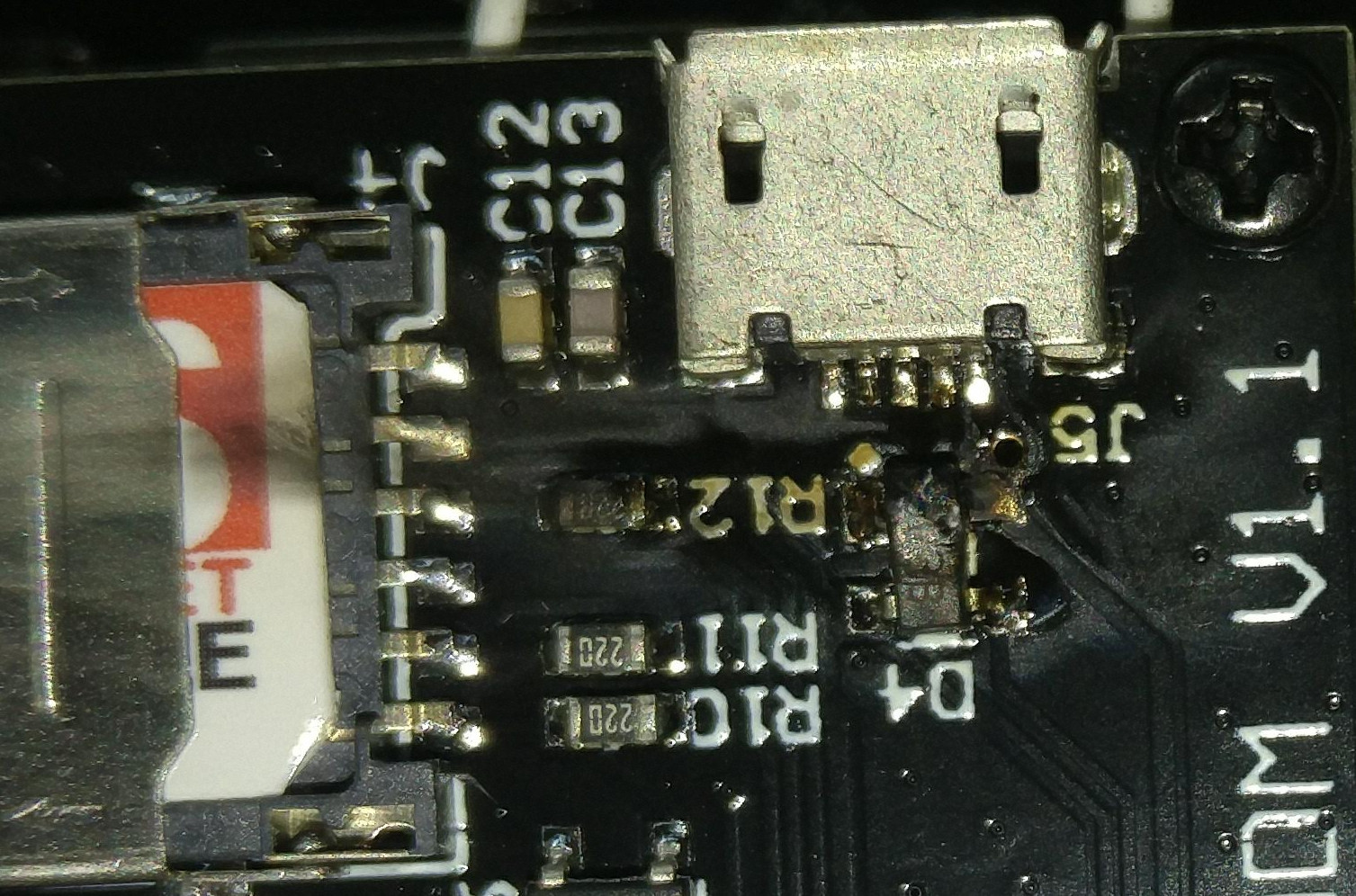
Guenther, That is not good. I have not had any other reports of a problem like that (or any hardware problems). It seems the problem is on the EU modem board, near the USB connector? I will send the pictures to my china manufacturer and ask for his comment / suggestion. It seems strange that the ‘burn’ is on the modem board, near the antenna connectors, but you also have an issue near the SD card connector? Are these related in any way? The hardware is covered by a 1 year warranty. If you send me your full name, postal address, and contact telephone number, I will arrange a replacement. One EU modem and one plastic case, correct? Is the main board ok? Regards, Mark.
On 4 Jul 2018, at 4:12 PM, Guenther Huck <privat@guentherhuck.at> wrote:
Hello
I had my OVMS now working in the car for about five days. It was located under windscreen, was connected with standard cable on standard connection on the car and has suddenly stopped working. After I opend the case I found that inisde there has been a hardware defect.
Anybody has same experiance? Is there garantie on the hardware?
See attachment
Guenther
Now available: https://www.fasttech.com/products/1080/10000001/9658635 <https://www.fasttech.com/products/1080/10000001/9658635> Regards, Mark.
On 4 Jul 2018, at 3:06 AM, Geir Øyvind Vælidalo <geir@validalo.net> wrote:
Great! Thanks Mark!
Geir
3. jul. 2018 kl. 10:00 skrev Mark Webb-Johnson <mark@webb-johnson.net <mailto:mark@webb-johnson.net>>:
Manufacturing for this has started. The cables should be available on fasttech.com <http://fasttech.com/> within about 14 days.
Regards, Mark.
On 15 Jun 2018, at 10:25 PM, Geir Øyvind Vælidalo <geir@validalo.net <mailto:geir@validalo.net>> wrote:
The pinouts are correct, and I think a left-version is fine. Either way, it is easy to turn the OBD-port around if needed, or install a splitter-cable.
Geir
15. jun. 2018 kl. 02:06 skrev Mark Webb-Johnson <mark@webb-johnson.net <mailto:mark@webb-johnson.net>>:
I’ve got this question raised as a ‘support’ ticket:
https://www.openvehicles.com/node/2045 <https://www.openvehicles.com/node/2045>
Hi, in some forums is a discussion which cable is needed for the Kia Soul EV? There should be a difference between OBD-C to DB9 and OBD-M to DB9. I hope you can tell us whcih one is the right one. Thx! Chriss
Looking at the current code for kia soul, it seems that both the M and C buses are used, so a custom cable is definitely required? Is this the correct pinout:
Pinout KS
J1962-M DB9-F Signal 4 3 Chassis/Power GND 6 7 CAN-H (primary CAN) 14 2 CAN-L (primary CAN) 1 5 CAN-H (alternate CAN) 9 4 CAN-L (alternate CAN) 16 9 +12V Vehicle Power
J1962 end should be MALE plug with angle cable. DB9 end should be FEMALE. Both ends should be enclosed in shells, and cable should be 1metre in length. J1962 end should be “LEFT” style:
<1139300-2.jpg>
Is that correct? Shall I go ahead and order these?
Regards, Mark.
On 16 Jan 2018, at 9:09 PM, Jason Perkins <perkins.jason@gmail.com <mailto:perkins.jason@gmail.com>> wrote:
On the Fiat the OBD connector is "upside down" and faces forward, I've not investigated turning it over. A cable opposite the one pictured above, with a left edit, would be better. The cable would go to the middle of the cabin and be tied up behind the trim.
Image borrowed from the forums: <image.png>
On Tue, Jan 16, 2018 at 1:19 AM, Geir Øyvind Vælidalo <geir@validalo.net <mailto:geir@validalo.net>> wrote: The pinout is correct. The right or left is a though question as I don’t know what people prefer, however the obd2 can easily be turned on the Soul. What about the Fiat, Jason?
Geir
Sendt fra min iPhone
16. jan. 2018 kl. 05:06 skrev Mark Webb-Johnson <mark@webb-johnson.net <mailto:mark@webb-johnson.net>>:
I’ve been dealing with the same custom cable provider since 2012. He’s very flexible, fast, and very reliable (especially for OBDII style cables). He delivers direct to Fasttech, and we don’t even bother with QC any more - he has been 100% perfect for the past five years. All we do is a visual inspection and stock count on receipt. MOQ (50) is usually the only issue.
Pinouts we have in the past produced for OVMS OBDII cables:
Pinout A (both left-hand and right-hand right-angled have been produced)
J1962-M DB9-F Signal 4 3 Chassis/Power GND 6 7 CAN-H 14 2 CAN-L 16 9 +12V Vehicle Power
J1962 end should be MALE plug with right angle cable. DB9 end should be FEMALE. Both ends should be enclosed in shells, and cable should be 1metre in length.
Pinout B (left hand right-angle)
J1962-M DB9-F Signal 4 3 Chassis/Power GND 13 7 CAN-H 12 2 CAN-L 16 9 +12V Vehicle Power
J1962 end should be MALE plug with angle cable. DB9 end should be FEMALE. Both ends should be enclosed in shells, and cable should be 1metre in length.
Pinout C (both left-hand and right-hand right-angled have been produced)
J1962-M DB9-F Signal 4 3 Chassis/Power GND 6 7 CAN-H (primary CAN) 14 2 CAN-L (primary CAN) 13 5 CAN-H (alternate CAN) 12 4 CAN-L (alternate CAN) 16 9 +12V Vehicle Power
J1962 end should be MALE plug with angle cable. DB9 end should be FEMALE. Both ends should be enclosed in shells, and cable should be 1metre in length.
Pinout B was obsoleted in late 2016 and replaced with C. So, currently we have A and C variants.
From my understanding, what you need is:
Pinout D
J1962-M DB9-F Signal 4 3 Chassis/Power GND 6 7 CAN-H (primary CAN) 14 2 CAN-L (primary CAN) 1 5 CAN-H (alternate CAN) 9 4 CAN-L (alternate CAN) 16 9 +12V Vehicle Power
J1962 end should be MALE plug with angle cable. DB9 end should be FEMALE. Both ends should be enclosed in shells, and cable should be 1metre in length.
Would that be in a left or right hand orientation?
Right: <PastedGraphic-1.tiff>
Regards, Mark.
> On 16 Jan 2018, at 1:39 AM, Geir Øyvind Vælidalo <geir@validalo.net <mailto:geir@validalo.net>> wrote: > > Since we’re closing in on the release date, what should we do regarding the cable for the Kia Soul and Fiat 500e? I have yet to find anything really useful on the M-bus, but who knows what might come later. > Jason, how about the Fiat 500e? > > Anyone know the pinouts for Hyundai Ioniq OBD2-port? Maybe it can use the same cable too? I couldn’t find the pinouts for that car anywhere… > > Regards, > Geir > > >> 13. des. 2017 kl. 01:53 skrev Mark Webb-Johnson <mark@openvehicles.com <mailto:mark@openvehicles.com>>: >> >> Relatively easy. I just give them pinouts, some money, and a week later a bunch of cables arrive. >> >> There is a minimum order quantity of 50 cables from the supplier, so it has to be justifiable. >> >> Perhaps best to have a look at that M-can bus (with a hand-built cable), and see if there is anything on it that makes this worthwhile. You can find OBDII pigtails on AliExpress/eBay/Amazon that make this relatively simple (only need to solder the DB9 end). >> >> Regards, Mark. >> >>> On 13 Dec 2017, at 4:09 AM, Geir Øyvind Vælidalo <geir@validalo.net <mailto:geir@validalo.net>> wrote: >>> >>> Hi, >>> >>> We might need a special cable for the Kia Soul EV, as it has two CAN-buses on the diagnostic port and it doesn’t match the ODB2-cable nor the Nissan Leaf-cable. >>> Then C-can uses the standard pins 6 and 14, but the M-can uses pins 1 (high) and 9 (low). >>> >>> The M-can should be mapped to CAN1_H (Pin 5 on DB9) and CAN1_L(Pin 4 on DB9): >>> >>> J1962-M DB9-F Signal >>> 1 5 CAN-1H (M-can High) >>> 4 3 Chassis/Power GND >>> 6 7 CAN-0H (C-can high) >>> 9 4 CAN-1L (M-can Low) >>> 14 2 CAN-0L (C-can low) >>> 16 9 +12V Vehicle Power >>> >>> I don’t use the M-can at the moment, and I’m not sure I will, but if I do we might need to have a special cable made for the Soul EV. >>> Is that something that is easy to fix? >>> >>> Regards, >>> Geir >>> _______________________________________________ >>> OvmsDev mailing list >>> OvmsDev@lists.teslaclub.hk <mailto:OvmsDev@lists.teslaclub.hk> >>> http://lists.teslaclub.hk/mailman/listinfo/ovmsdev <http://lists.teslaclub.hk/mailman/listinfo/ovmsdev> >> >> _______________________________________________ >> OvmsDev mailing list >> OvmsDev@lists.teslaclub.hk <mailto:OvmsDev@lists.teslaclub.hk> >> http://lists.teslaclub.hk/mailman/listinfo/ovmsdev <http://lists.teslaclub.hk/mailman/listinfo/ovmsdev> > > _______________________________________________ > OvmsDev mailing list > OvmsDev@lists.teslaclub.hk <mailto:OvmsDev@lists.teslaclub.hk> > http://lists.teslaclub.hk/mailman/listinfo/ovmsdev <http://lists.teslaclub.hk/mailman/listinfo/ovmsdev>
_______________________________________________ OvmsDev mailing list OvmsDev@lists.teslaclub.hk <mailto:OvmsDev@lists.teslaclub.hk> http://lists.teslaclub.hk/mailman/listinfo/ovmsdev <http://lists.teslaclub.hk/mailman/listinfo/ovmsdev>
_______________________________________________ OvmsDev mailing list OvmsDev@lists.teslaclub.hk <mailto:OvmsDev@lists.teslaclub.hk> http://lists.teslaclub.hk/mailman/listinfo/ovmsdev <http://lists.teslaclub.hk/mailman/listinfo/ovmsdev>
-- Jason Perkins 313 355 0085 _______________________________________________ OvmsDev mailing list OvmsDev@lists.teslaclub.hk <mailto:OvmsDev@lists.teslaclub.hk> http://lists.teslaclub.hk/mailman/listinfo/ovmsdev <http://lists.teslaclub.hk/mailman/listinfo/ovmsdev>
_______________________________________________ OvmsDev mailing list OvmsDev@lists.openvehicles.com <mailto:OvmsDev@lists.openvehicles.com> http://lists.openvehicles.com/mailman/listinfo/ovmsdev <http://lists.openvehicles.com/mailman/listinfo/ovmsdev>
_______________________________________________ OvmsDev mailing list OvmsDev@lists.openvehicles.com <mailto:OvmsDev@lists.openvehicles.com> http://lists.openvehicles.com/mailman/listinfo/ovmsdev <http://lists.openvehicles.com/mailman/listinfo/ovmsdev>
_______________________________________________ OvmsDev mailing list OvmsDev@lists.openvehicles.com <mailto:OvmsDev@lists.openvehicles.com> http://lists.openvehicles.com/mailman/listinfo/ovmsdev
_______________________________________________ OvmsDev mailing list OvmsDev@lists.openvehicles.com http://lists.openvehicles.com/mailman/listinfo/ovmsdev
participants (7)
-
 Geir Øyvind Vælidalo
 -
 Guenther Huck
 -
 Jason Perkins
 -
 Mark Webb-Johnson
 -
 Mark Webb-Johnson
 -
 Michael Balzer
 -
 Tom Parker