
I haven't gotten any traction on my request for people to test the updated mongoose-wolfssl branch, so I thought it might help to rebase to the current master. I did that without complaint in my local repository, but I can't push that back to github: auge92> git push To github.com:openvehicles/Open-Vehicle-Monitoring-System-3.git ! [rejected] mongoose-wolfssl -> mongoose-wolfssl (non-fast-forward) error: failed to push some refs to 'github.com:openvehicles/Open-Vehicle-Monitoring-System-3.git' hint: Updates were rejected because the tip of your current branch is behind hint: its remote counterpart. Integrate the remote changes (e.g. hint: 'git pull ...') before pushing again. hint: See the 'Note about fast-forwards' in 'git push --help' for details. I have all the same changes on my local repo as on github, but I observe that all the commits I made since branching (beginning with 04fafb83a3cc5563a5feb70a4bb7922457d58893) have a different commit id than what is in my local mongoose-wolfssl repo for the same changes. This is what causes the complaint above. I must have done something wrong back at the beginning of working on this branch. Any idea what I might have done? Would this be an appropriate scenario to use "git push --force" to correct the problem? -- Steve

Steve, rebasing creates new commits and discards the original ones. If doing that on already pushed commits, you normally (always?) need to force the next push. I normally only use rebase on my local commits & branches when pulling in remote updates / preparing to merge them. Regards, Michael Am 16.03.21 um 21:34 schrieb Stephen Casner:
I haven't gotten any traction on my request for people to test the updated mongoose-wolfssl branch, so I thought it might help to rebase to the current master. I did that without complaint in my local repository, but I can't push that back to github:
auge92> git push To github.com:openvehicles/Open-Vehicle-Monitoring-System-3.git ! [rejected] mongoose-wolfssl -> mongoose-wolfssl (non-fast-forward) error: failed to push some refs to 'github.com:openvehicles/Open-Vehicle-Monitoring-System-3.git' hint: Updates were rejected because the tip of your current branch is behind hint: its remote counterpart. Integrate the remote changes (e.g. hint: 'git pull ...') before pushing again. hint: See the 'Note about fast-forwards' in 'git push --help' for details.
I have all the same changes on my local repo as on github, but I observe that all the commits I made since branching (beginning with 04fafb83a3cc5563a5feb70a4bb7922457d58893) have a different commit id than what is in my local mongoose-wolfssl repo for the same changes. This is what causes the complaint above.
I must have done something wrong back at the beginning of working on this branch. Any idea what I might have done?
Would this be an appropriate scenario to use "git push --force" to correct the problem?
-- Steve _______________________________________________ OvmsDev mailing list OvmsDev@lists.openvehicles.com http://lists.openvehicles.com/mailman/listinfo/ovmsdev
-- Michael Balzer * Helkenberger Weg 9 * D-58256 Ennepetal Fon 02333 / 833 5735 * Handy 0176 / 206 989 26
Michael, Thanks for the insight. I have force pushed my update to the mongoose-wolfssl branch so it is now current to be ready for testing. -- Steve On Wed, 17 Mar 2021, Michael Balzer wrote:
Steve,
rebasing creates new commits and discards the original ones. If doing that on already pushed commits, you normally (always?) need to force the next push.
I normally only use rebase on my local commits & branches when pulling in remote updates / preparing to merge them.
Regards, Michael
Am 16.03.21 um 21:34 schrieb Stephen Casner:
I haven't gotten any traction on my request for people to test the updated mongoose-wolfssl branch, so I thought it might help to rebase to the current master. I did that without complaint in my local repository, but I can't push that back to github:
auge92> git push To github.com:openvehicles/Open-Vehicle-Monitoring-System-3.git ! [rejected] mongoose-wolfssl -> mongoose-wolfssl (non-fast-forward) error: failed to push some refs to 'github.com:openvehicles/Open-Vehicle-Monitoring-System-3.git' hint: Updates were rejected because the tip of your current branch is behind hint: its remote counterpart. Integrate the remote changes (e.g. hint: 'git pull ...') before pushing again. hint: See the 'Note about fast-forwards' in 'git push --help' for details.
I have all the same changes on my local repo as on github, but I observe that all the commits I made since branching (beginning with 04fafb83a3cc5563a5feb70a4bb7922457d58893) have a different commit id than what is in my local mongoose-wolfssl repo for the same changes. This is what causes the complaint above.
I must have done something wrong back at the beginning of working on this branch. Any idea what I might have done?
Would this be an appropriate scenario to use "git push --force" to correct the problem?
-- Steve
Steve, Am 16.03.21 um 21:34 schrieb Stephen Casner:
I haven't gotten any traction on my request for people to test the updated mongoose-wolfssl branch, so I thought it might help to rebase to the current master.
Sorry, been busy. Git didn't pull the updated branch now without a conflict, so I simply reset my local branch to your latest version.
I now have an updated mongoose-wolfssl branch ready to be tested. The reason for the 90-second lockup mentioned in the previous post is a whole lot of math for a prime-number validation that's part of the Diffie-Hellman step. It was actually 87 seconds for Mark's server and 28 seconds for Michael's due to differences in certificates. That prime-number validation is required for FIPS compliance, which WolfSSL supports, but we don't need it. I spent quite a while digging into this to find where the process was getting stuck. Finally I got help from WolfSSL support suggesting a configuration option that avoids this extra check.
So now I have an implementation using mongoose with wolfssl that connects successfully to both servers with a 3-4 second delay. (I don't recall what the delay was for the MBEDTLS-based implementation.) I think the memory usage looks OK. I still have not taken any steps to reduce any resources used by the MBEDTLS code as accessed for other purposes.
My first impression is, everything looks good. Moreover, TLS connections are established much faster than before. The ssh login is done in 3 seconds now (down from ~5 seconds before). A server V2 login took 3.8 seconds on average before, now takes 1.54 seconds on average. The speed improvement on HTTP.request() is even more impressive. Test script: (function(){ var i = 0, t0, t1; function doTest(){ t0 = performance.now(); print("start request " + (++i)); HTTP.request({ url: "https://dexters-web.de/f/test.json", done: function() { t1 = performance.now(); print(this.response.statusText + " length=" + this.response.body.length + " time=" + (t1-t0).toFixed(0) + "ms"); if (i < 5) doTest(); } }); }; doTest(); })(); The file "test.json" is just 13 bytes, so this essentially tests the connection establishment. Results: ---------------------------------------------------------------------------------------------------- master (mbedtls) ---------------------------------------------------------------------------------------------------- I (109665) script: [eval:10:] OK length=13 time=5097ms I (115135) script: [eval:10:] OK length=13 time=5464ms I (121745) script: [eval:10:] OK length=13 time=6608ms I (126455) script: [eval:10:] OK length=13 time=4704ms I (130815) script: [eval:10:] OK length=13 time=4357ms ---------------------------------------------------------------------------------------------------- mongoose-wolfssl ---------------------------------------------------------------------------------------------------- I (1782504) script: [eval:10:] OK length=13 time=1597ms I (1784124) script: [eval:10:] OK length=13 time=1611ms I (1785734) script: [eval:10:] OK length=13 time=1604ms I (1787374) script: [eval:10:] OK length=13 time=1639ms I (1789004) script: [eval:10:] OK length=13 time=1624ms These speed improvements are consistent through multiple runs with two different modules. I haven't found any issues yet. Memory usage is perfectly OK. Awesome work, Steve! I suggest taking this into edge as soon as possible. Regards, Michael -- Michael Balzer * Helkenberger Weg 9 * D-58256 Ennepetal Fon 02333 / 833 5735 * Handy 0176 / 206 989 26
Michael,
Sorry, been busy. Git didn't pull the updated branch now without a conflict, so I simply reset my local branch to your latest version.
Why was there a conflict? Should I have done something differently?
I suggest taking this into edge as soon as possible.
What would be the best merging strategy considering that it needs to go to both master and for-v3.3? -- Steve
Steve, Am 20.03.21 um 16:37 schrieb Stephen Casner:
Sorry, been busy. Git didn't pull the updated branch now without a conflict, so I simply reset my local branch to your latest version. Why was there a conflict? Should I have done something differently? I didn't trace that down, was kind of expected as you rebased the branch. My local branch contained your old commits, which conflicted with two of the new files. If a published branch gets rebased, it's normally best to reset/recreate local branches based on that branch. A fast forward may be possible if the rebase was trivial, but normally isn't.
I suggest taking this into edge as soon as possible. What would be the best merging strategy considering that it needs to go to both master and for-v3.3? Assuming no objections from other developers, I would first merge mongoose-wolfssl into master, then master into for-v3.3.
Regards, Michael -- Michael Balzer * Helkenberger Weg 9 * D-58256 Ennepetal Fon 02333 / 833 5735 * Handy 0176 / 206 989 26
Michael,
Sorry, been busy. Git didn't pull the updated branch now without a conflict, so I simply reset my local branch to your latest version. Why was there a conflict? Should I have done something differently? I didn't trace that down, was kind of expected as you rebased the branch. My local branch contained your old commits, which conflicted with two of the new files. If a published branch gets rebased, it's normally best to reset/recreate local branches based on that branch. A fast forward may be possible if the rebase was trivial, but normally isn't.
Oh, I think I understand now. Because I had merged some commits from my branch to master before, the rebase caused those to be reapplied again at the end. Clearly that rebase was a mistake. I'm learning. So I think the right way to make this work smoothly for everyone is for me to cherry-pick the commits since the previous merge to master. I have not done that before, but I'm reading the Pro Git book for reference.
I suggest taking this into edge as soon as possible. What would be the best merging strategy considering that it needs to go to both master and for-v3.3? Assuming no objections from other developers, I would first merge mongoose-wolfssl into master, then master into for-v3.3.
I can do for-v3.3 right after completing the merge into master, right? I recall Mark's request for people to take care of this so he doesn't have to. -- Steve

On 3/20/21 9:09 AM, Michael Balzer wrote:
Assuming no objections from other developers, I would first merge mongoose-wolfssl into master, then master into for-v3.3.
As a developer I'd like to be the first to say, "yes, please." Kudos to Steve for this work. And a question: Does this bring us closer to being able to use https with the gui? Even a self generated, self signed cert would allow an encrypted session and protection of credentials. And I can imagine adding code to implement the Let's Encrypt DNS-01 challenge type. Craig
On Sat, 20 Mar 2021, Craig Leres wrote:
On 3/20/21 9:09 AM, Michael Balzer wrote:
Assuming no objections from other developers, I would first merge mongoose-wolfssl into master, then master into for-v3.3.
As a developer I'd like to be the first to say, "yes, please."
Motion and second is good enough for me. I have completed the following merge steps: - merge from mongoose-wolfssl branch to master branch in the mongoose submodule - cherry-pick from mongoose-wolfssl branch to master branch in the main ovms tree - merge from master branch to for-v3.3 branch in the main ovms tree Build and run of the master branch works for me with TLS server v2 connection and ssh connection, so I hope that is a sufficient merge validation test.
And a question: Does this bring us closer to being able to use https with the gui? Even a self generated, self signed cert would allow an encrypted session and protection of credentials. And I can imagine adding code to implement the Let's Encrypt DNS-01 challenge type.
The next step is to see what linkages to MBEDTLS remain. I think https may be part of that. -- Steve
Am 20.03.21 um 21:53 schrieb Stephen Casner:
On Sat, 20 Mar 2021, Craig Leres wrote:
On 3/20/21 9:09 AM, Michael Balzer wrote:
Assuming no objections from other developers, I would first merge mongoose-wolfssl into master, then master into for-v3.3. As a developer I'd like to be the first to say, "yes, please." Motion and second is good enough for me.
I have completed the following merge steps:
- merge from mongoose-wolfssl branch to master branch in the mongoose submodule
- cherry-pick from mongoose-wolfssl branch to master branch in the main ovms tree
- merge from master branch to for-v3.3 branch in the main ovms tree
Build and run of the master branch works for me with TLS server v2 connection and ssh connection, so I hope that is a sufficient merge validation test.
It seems you actually cherry-picked all commits? If so, a standard merge would have had the same effect (except tree-wise). Cherry-picking is useful if you want to port some selected patch(es) from a branch to another. If you take the whole branch, that's the classic merge.
And a question: Does this bring us closer to being able to use https with the gui? Even a self generated, self signed cert would allow an encrypted session and protection of credentials. And I can imagine adding code to implement the Let's Encrypt DNS-01 challenge type. The next step is to see what linkages to MBEDTLS remain. I think https may be part of that.
-- Steve
I know of no public CA that allows private hosts or IP addresses in a certificate, and I always thought it's impossible to support the LE DNS challenge on an mDNS service, but would love to learn otherwise in both cases. However, supporting https/wss on the module's webserver has been possible since we enabled SSL in mongoose. I have now added that as a standard feature and included an info on how to create a cert + key in the webserver configuration. Regards, Michael -- Michael Balzer * Helkenberger Weg 9 * D-58256 Ennepetal Fon 02333 / 833 5735 * Handy 0176 / 206 989 26
On Sun, 21 Mar 2021, Michael Balzer wrote:
It seems you actually cherry-picked all commits? If so, a standard merge would have had the same effect (except tree-wise).
All but one. The one I skipped changed the mongoose submodule to branch mongoose-wolfssl.
Cherry-picking is useful if you want to port some selected patch(es) from a branch to another. If you take the whole branch, that's the classic merge.
Right. I tried that first, and it went smoothly, but then I backed it out to do the cherry-pick. -- Steve
On 3/21/21 6:31 AM, Michael Balzer wrote:
I have now added that as a standard feature and included an info on how to create a cert + key in the webserver configuration.
This is awesome! But I'm having trouble getting it to work. I suspect I don't understand how certs work with ovms. A long time ago, with the help of some friends, I wrote a /bin/sh script to generate self signed certs: https://ee.lbl.gov/downloads/create-cert/create-cert.tar.gz What I am expecting is the cn in the certificate to match the https hostname, e.g. ovms-dev.alameda.xse.com and I know my browser does not like it if I navigate to https://ovms-dev.alameda.xse.com/ and the certificate returned does not match. I have: dot 60 % openssl x509 -text -noout -in certs/ovms-dev.alameda.xse.com.pem Certificate: Data: Version: 3 (0x2) Serial Number: 56 (0x38) Signature Algorithm: sha256WithRSAEncryption Issuer: C = US, ST = CA, L = Alameda, O = XSE, OU = Certificate Authorities, CN = XSE Root CA 4, emailAddress = root@xse.com Validity Not Before: Mar 21 16:28:03 2021 GMT Not After : Mar 5 16:28:03 2087 GMT Subject: CN = ovms-dev.alameda.xse.com, emailAddress = root@xse.com Subject Public Key Info: Public Key Algorithm: rsaEncryption RSA Public-Key: (2048 bit) [...] but when I upload the pem and key files it doesn't like the private key: Error! TLS private key must be in PEM PRIVATE KEY format I've never used "subjectAltName=IP:192.168.4.1", is that required? FYI I also use the certificates generated with create-cert for client certificate authentication. Craig
Am 21.03.21 um 17:43 schrieb Craig Leres:
On 3/21/21 6:31 AM, Michael Balzer wrote:
I have now added that as a standard feature and included an info on how to create a cert + key in the webserver configuration.
This is awesome!
But I'm having trouble getting it to work. I suspect I don't understand how certs work with ovms.
A long time ago, with the help of some friends, I wrote a /bin/sh script to generate self signed certs:
Your script creates a CA as well and takes care of optional details. That's much more simple if all you need is a cert/key pair for encryption.
What I am expecting is the cn in the certificate to match the https hostname, e.g. ovms-dev.alameda.xse.com and I know my browser does not like it if I navigate to https://ovms-dev.alameda.xse.com/ and the certificate returned does not match.
Of course you need to create the certificate for the hostnames and IP addresses you use. CN is the primary hostname, additional hostnames and IP addresses are added using the "Subject Alternative Name" extension. If you're using a dyndns or fixed IP entry like "ovms-dev.alameda.xse.com" as your primary address, set that as the CN. Example: openssl req -x509 -newkey rsa:2048 -sha256 -days 3650 -nodes \ -keyout ovms.key -out ovms.crt -subj "/CN=test1.local" \ -addext "subjectAltName=DNS:test1.dexters-web.de,IP:192.168.4.1,IP:192.168.2.106" => Certificate: … Subject: CN = test1.local … X509v3 Subject Alternative Name: DNS:test1.dexters-web.de, IP Address:192.168.4.1, IP Address:192.168.2.106
but when I upload the pem and key files it doesn't like the private key:
Error! TLS private key must be in PEM PRIVATE KEY format
You probably copied the wrong section. You need to copy the full PEM text including the BEGIN and END lines, as suggested by the placeholder for the textarea.
I've never used "subjectAltName=IP:192.168.4.1", is that required?
Only if you want to be able to access the OVMS AP by https://192.168.4.1/ . Regards, Michael -- Michael Balzer * Helkenberger Weg 9 * D-58256 Ennepetal Fon 02333 / 833 5735 * Handy 0176 / 206 989 26
Your script creates a CA as well and takes care of optional details. That's much more simple if all you need is a cert/key pair for encryption.
I like it because I have many other devices configured to use it and I have the root ca installed in my my browsers.
but when I upload the pem and key files it doesn't like the private key:
Error! TLS private key must be in PEM PRIVATE KEY format
You probably copied the wrong section. You need to copy the full PEM text including the BEGIN and END lines, as suggested by the placeholder for the textarea.
Ah, I see the problem. I searched for the error and it's looking for: -----BEGIN PRIVATE KEY----- but my key says: -----BEGIN RSA PRIVATE KEY----- I've never seen the former. This may describe the differences: https://stackoverflow.com/a/20065522 Anyway, I deleted the RSAs and it submitted ok and works! (I can't get a screen grab of it but) if I click on the firefox lock icon it says, "Connection Secure, Connection verified by a certificate issuer that is not recognized by Mozilla." Chrome likes it as well. I've attached screen grabs that show firefox rendering a page on my dev module and also the "more information" page. Should web_cfg.cpp be changed to accept either header?
I've never used "subjectAltName=IP:192.168.4.1", is that required?
Only if you want to be able to access the OVMS AP by https://192.168.4.1/ .
Ah. Yeah, I don't need that. I always want to use the fqdn and only plan to access it via my home wifi or via vpn. ssh connect times seem a little worse for me: ~3.5 seconds with 3.2.016-5-g5b03f7fe and 3.2.016-55-g2edf7398. Thanks to both of you for making this happen, I've wanted https into the modules for a really long time! Craig
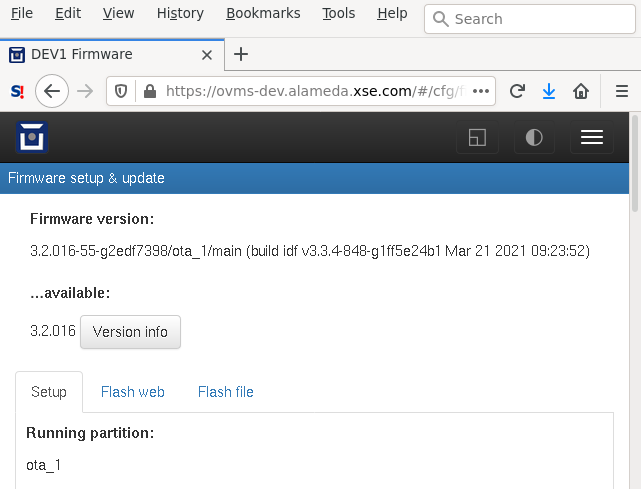
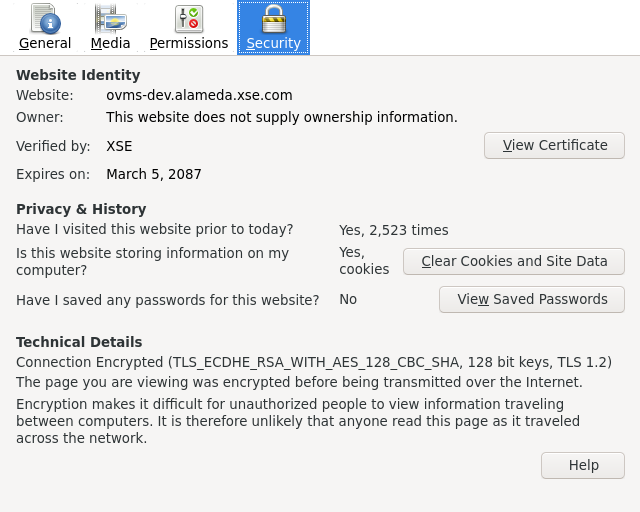
Am 21.03.21 um 20:55 schrieb Craig Leres:
Should web_cfg.cpp be changed to accept either header?
AFAIK the PEM headers are just hints. I've added the check to catch simple copy&paste errors. As WolfSSL can read an RSA key, you can allow that header as well. Regards, Michael -- Michael Balzer * Helkenberger Weg 9 * D-58256 Ennepetal Fon 02333 / 833 5735 * Handy 0176 / 206 989 26
Something I've noticed since mongoose-wolfssl is that I cannot to https for a couple of minutes after a reboot; firefox gives me the PR_END_OF_FILE_ERROR error. But eventually it starts working. I assume it's busy doing some crypto? Craig
On Sun, 28 Mar 2021, Craig Leres wrote:
Something I've noticed since mongoose-wolfssl is that I cannot to https for a couple of minutes after a reboot; firefox gives me the PR_END_OF_FILE_ERROR error. But eventually it starts working. I assume it's busy doing some crypto?
Is this for the case where you are wiping the flash so new keys may need to be generated? Otherwise I can't think of anything with a delay of that order. -- Steve
Craig, I assume you've installed a key with more than 2048 bits. My recommendation to stick to max 2048 bits was due to initial connects with a 4096 bit key needing more than 30 seconds. Regards, Michael Am 29.03.21 um 01:35 schrieb Craig Leres:
Something I've noticed since mongoose-wolfssl is that I cannot to https for a couple of minutes after a reboot; firefox gives me the PR_END_OF_FILE_ERROR error. But eventually it starts working. I assume it's busy doing some crypto?
Craig _______________________________________________ OvmsDev mailing list OvmsDev@lists.openvehicles.com http://lists.openvehicles.com/mailman/listinfo/ovmsdev
-- Michael Balzer * Helkenberger Weg 9 * D-58256 Ennepetal Fon 02333 / 833 5735 * Handy 0176 / 206 989 26
On 3/28/21 11:59 PM, Michael Balzer wrote:
I assume you've installed a key with more than 2048 bits. My recommendation to stick to max 2048 bits was due to initial connects with a 4096 bit key needing more than 30 seconds.
I don't think that's the problem. Craig % openssl x509 -text -noout -in certs/ovms-z.example.pem | fgrep bit RSA Public-Key: (2048 bit)
Craig, did you try a simple self-signed cert w/o CA validation? Regards, Michael Am 29.03.21 um 21:50 schrieb Craig Leres:
On 3/28/21 11:59 PM, Michael Balzer wrote:
I assume you've installed a key with more than 2048 bits. My recommendation to stick to max 2048 bits was due to initial connects with a 4096 bit key needing more than 30 seconds.
I don't think that's the problem.
Craig
% openssl x509 -text -noout -in certs/ovms-z.example.pem | fgrep bit RSA Public-Key: (2048 bit)
-- Michael Balzer * Helkenberger Weg 9 * D-58256 Ennepetal Fon 02333 / 833 5735 * Handy 0176 / 206 989 26
On Sat, 20 Mar 2021, Stephen Casner wrote:
The next step is to see what linkages to MBEDTLS remain. I think https may be part of that.
I thought there was a configuration option to enable/disable MBEDTLS, but I see now that there are just a bunch of configuration parameters to adjust MBEDTLS. I guess MBEDTLS is considered a built-in component of ESP-IDF? Perhaps that is not the case for newer releases since the Espressif web page that Michael referenced earlier in this discussion gave a comparison of WolfSSL vs. MBEDTLS. So I don't know if there is any reduction in memory usage (code or RAM) that we can achieve easily. -- Steve
participants (3)
-
 Craig Leres
 -
 Michael Balzer
 -
 Stephen Casner