
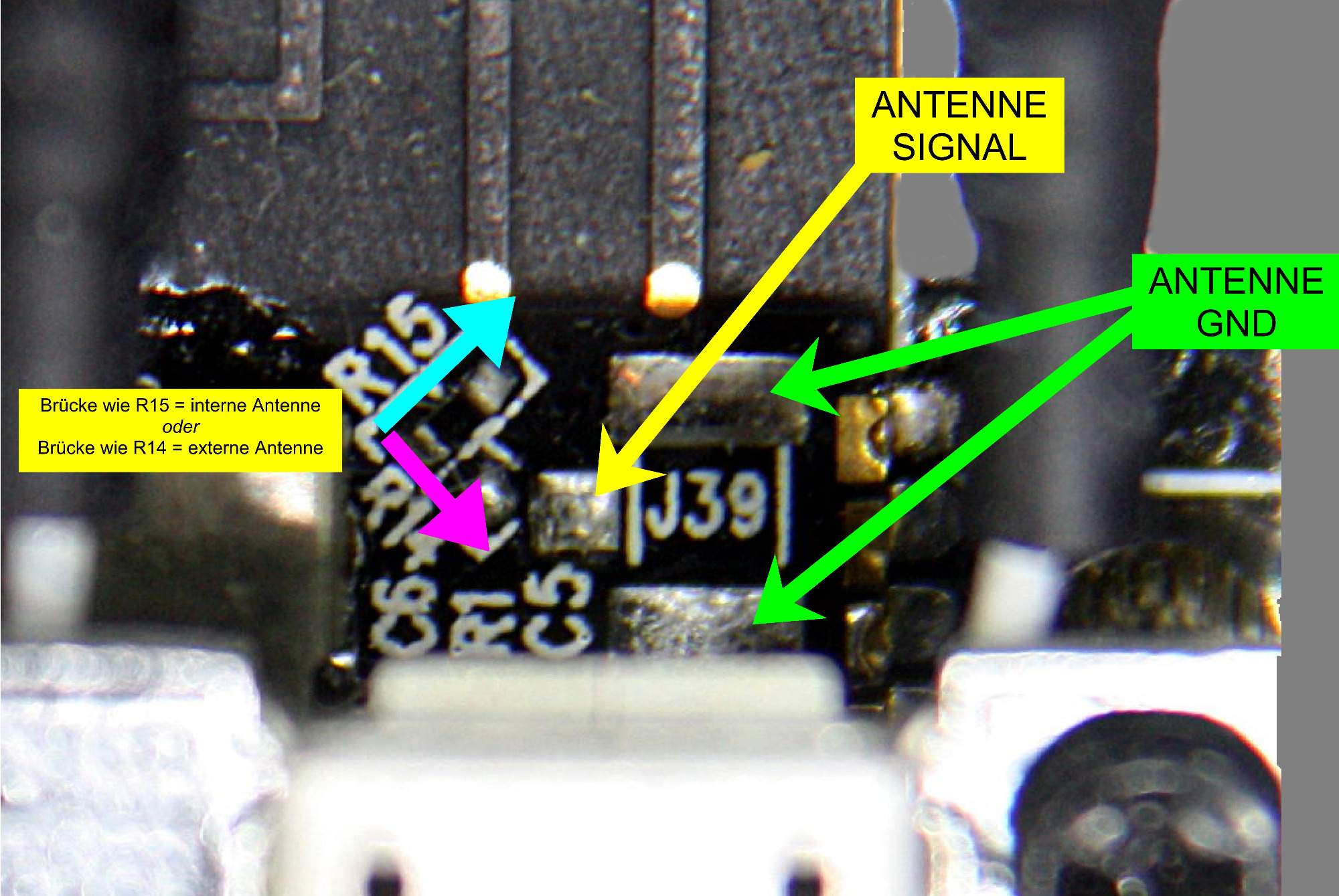
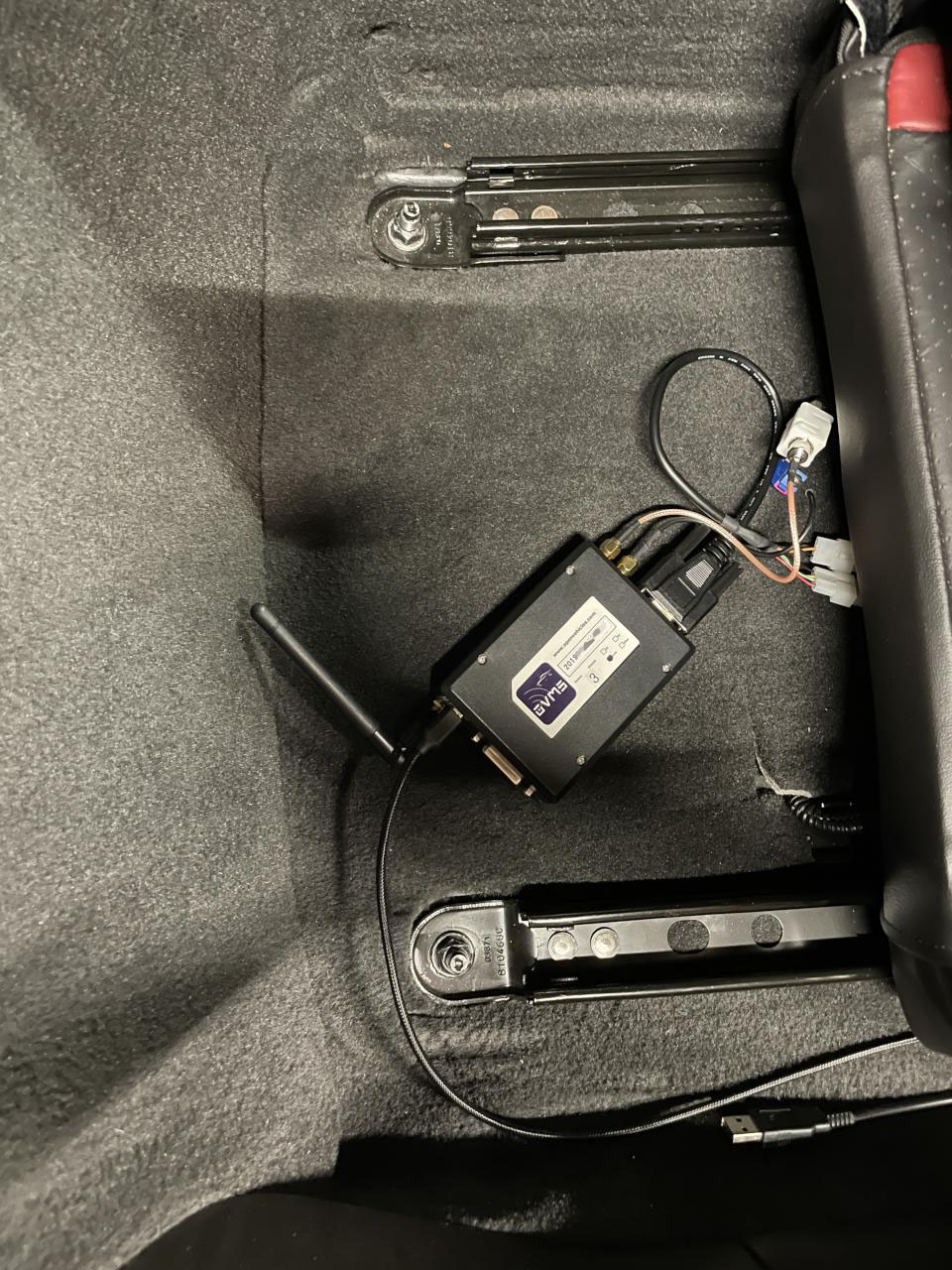
Some info for those in need of a better Wifi signal than achievable with the builtin ESP32-WROVER antenna: A friend of mine on the german Twizy forum had severe signal issues, using an external router antenna he saw an improvement of ~10 dB. Basics: - https://www.esp32.com/viewtopic.php?t=1635 …view on the OVMS module: Here's a video by him on the topic (in German, try automatic translation) – but sadly not showing the actual soldering process, more the afterworks: https://www.youtube.com/watch?v=4Uv71HiBPpg Regards, Michael -- Michael Balzer * Helkenberger Weg 9 * D-58256 Ennepetal Fon 02333 / 833 5735 * Handy 0176 / 206 989 26

On 1/23/21 6:07 AM, Michael Balzer wrote:
Some info for those in need of a better Wifi signal than achievable with the builtin ESP32-WROVER antenna:
A friend of mine on the german Twizy forum had severe signal issues, using an external router antenna he saw an improvement of ~10 dB.
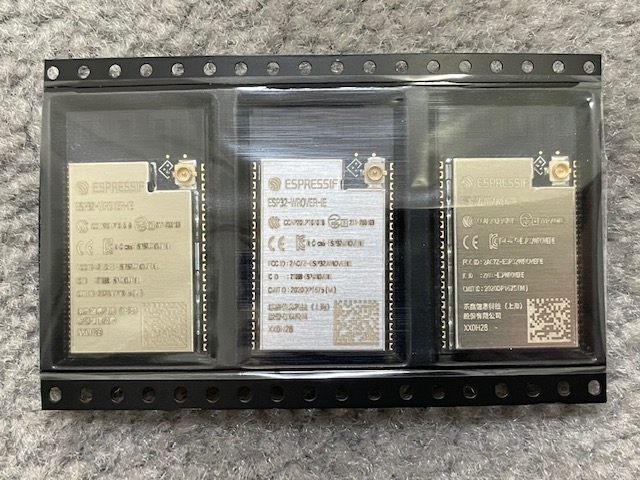
This is pretty interesting. But rather than add a socket (and move R15 to R14 to switch from internal to external antenna) I'm tempted to try just swapping esp32 modules. Mouser stocks the V3 revision now and the ESP32-WROVER-IE comes with the u.fl connector already installed for about $3. For $0.29 more I can get 16 MB SPI flash, any reason to not do that? Craig
Craig, that's a very tempting option indeed, if compatible. I'm having no issues with Wifi, but the ESP32 V3 is very attractive (no more PSRAM issues…). I don't have the equipment to desolder the module though… or any experience with that. Mark, any info on when the V3 modules will reach our production? Regards, Michael Am 23.01.21 um 19:05 schrieb Craig Leres:
On 1/23/21 6:07 AM, Michael Balzer wrote:
Some info for those in need of a better Wifi signal than achievable with the builtin ESP32-WROVER antenna:
A friend of mine on the german Twizy forum had severe signal issues, using an external router antenna he saw an improvement of ~10 dB.
This is pretty interesting. But rather than add a socket (and move R15 to R14 to switch from internal to external antenna) I'm tempted to try just swapping esp32 modules. Mouser stocks the V3 revision now and the ESP32-WROVER-IE comes with the u.fl connector already installed for about $3. For $0.29 more I can get 16 MB SPI flash, any reason to not do that?
Craig
-- Michael Balzer * Helkenberger Weg 9 * D-58256 Ennepetal Fon 02333 / 833 5735 * Handy 0176 / 206 989 26
On 1/23/21 10:25 AM, Michael Balzer wrote:
that's a very tempting option indeed, if compatible. I'm having no issues with Wifi, but the ESP32 V3 is very attractive (no more PSRAM issues…).
I have an arduino project that polls buttons and can send ir codes, update mqtt, and post json to a rest api https server. It also has mono and color displays. It uses the "comet protocol" to keep the data on the display current so it always has a http transaction open. I was having trouble with random hangs and upgrading to esp32-devkit V3 modules has almost completely eliminated this problem.
I don't have the equipment to desolder the module though… or any experience with that.
I have a little! I got a quick 861DW and successfully swapped a SIM7600A onto a ovms modem board. That is, I can talk to it but haven't done any work on adding support for it. (Like many of us, I have way too many projects in progress...) I also swapped a CP2102 (tiny little bugger). Something I wasn't expecting is that the quick is an excellent tool for heating heat shrink! Gone are the days of using a lighter (and leaving charcoal marks on the tubing). I think swapping the wroom module will actually be easier than the simcom, it has fewer pins. On the other hand it looks like I would have to remove one or both of the sma jacks and I know from experience that is not easy, they have a lot of thermal mass. I think I'll order a module and see if I can manage to remove the module with them in place, hopefully I can hold them out of the way (and protect the cables from heat, I have plenty of kynar tape). Craig
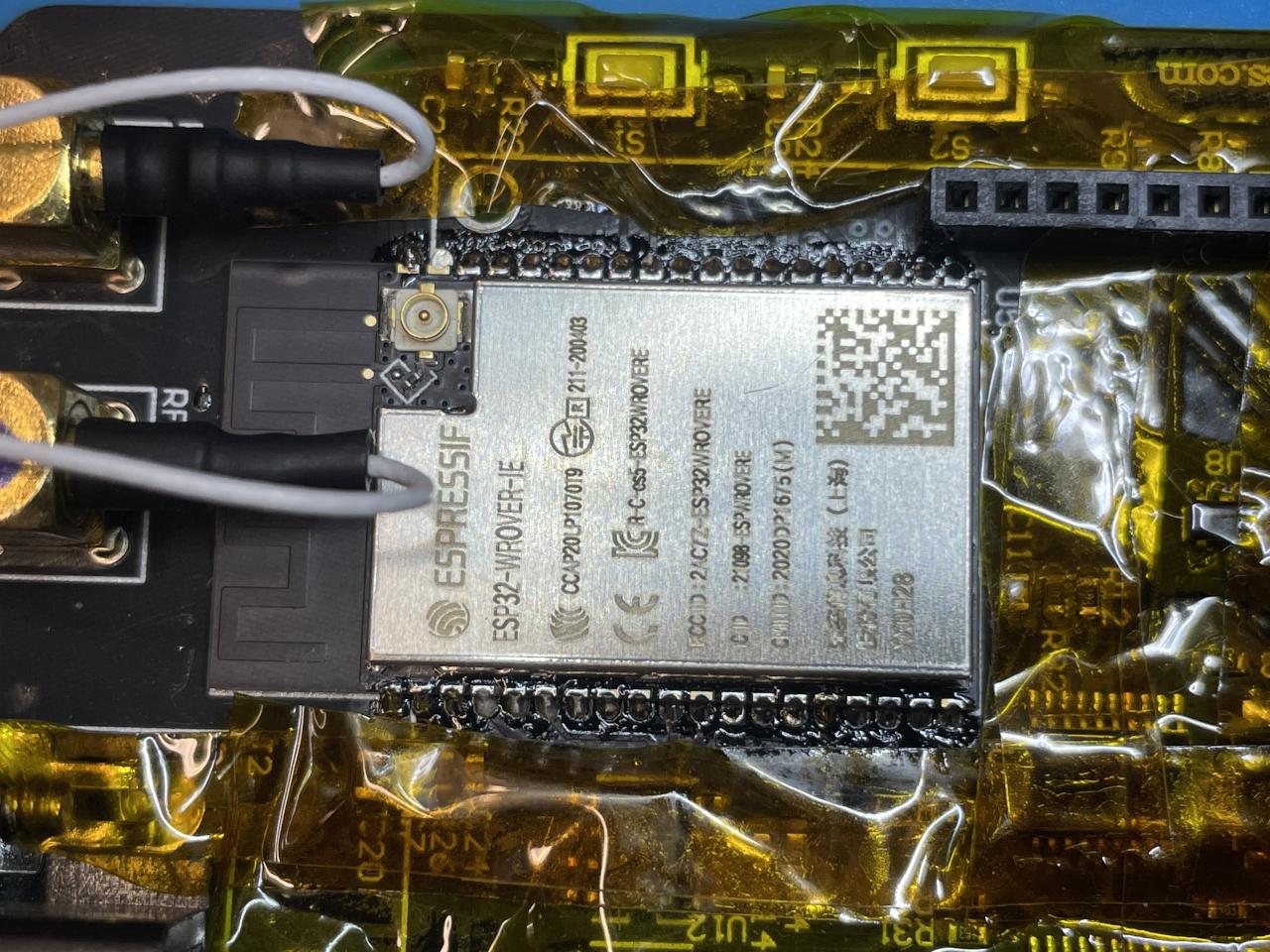
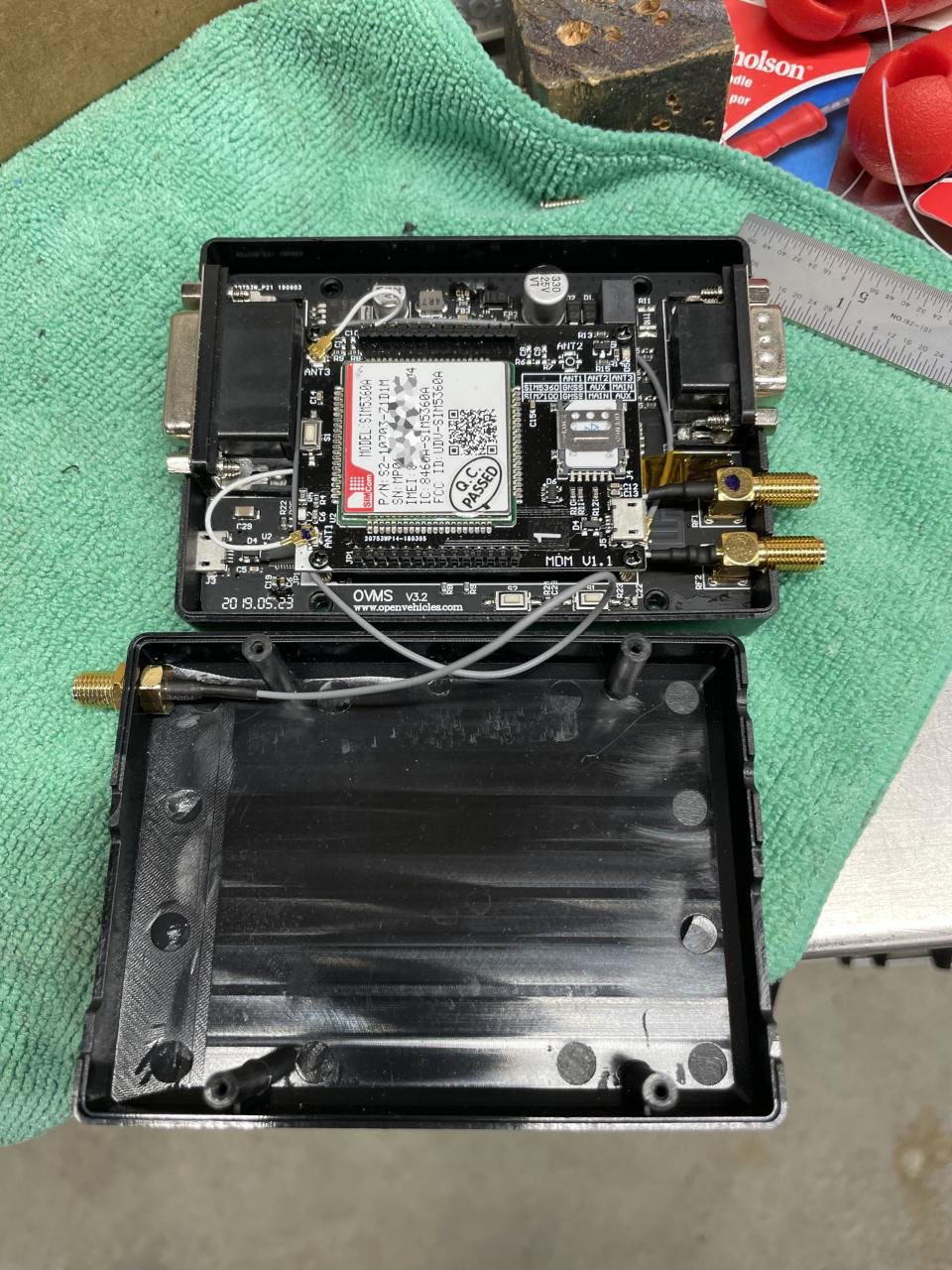
Success! After protecting nearby components with kynar tape my hot air rework made "quick" work of removing the V1 module, including the ground pads on the back of the module. Then I hand soldered the new module in. (I wasn't sure if re-soldering the ground pads was important but I put a little solder paste on it and hit the back side of the board with a little hot air afterwards until the TPs flowed so there's some chance it's back to its original state.) I repurposed an SMA/U.FL cable and wifi antenna from an old foxconn netbox and once I had flashed it and restore the config my wifi signal improved from -80.7 to -53.6 dBm. I'm pretty sure my (brick) chimney is inbetween my ruckus ap and this vehicle and had been thinking about relocating the ap but no need now. OVMS# module sum OVMS MODULE SUMMARY Module Version: 3.2.015-550-g49f7b669/factory/main (build idf v3.3.4-845-gd59ed8bba-dirty Jan 30 2021 18:31:40) Hardware: OVMS WIFI BLE BT cores=2 rev=ESP32/3 It doesn't look like ovms knows there is extra memory? OVMS# module memory Free 8-bit 83756/277928, 32-bit 6836/11192, SPIRAM 3826192/4194252 Also when I was bootstrapping the old config a wifi scan listed my WPA3 ssid but the module couldn't associate with it. But I do see an option with newer versions of the idf: https://docs.espressif.com/projects/esp-idf/en/latest/esp32/api-reference/kc... CONFIG_ESP32_WIFI_ENABLE_WPA3_SAE Select this option to allow the device to establish a WPA3-Personal connection with eligible AP's. PMF (Protected Management Frames) is a prerequisite feature for a WPA3 connection, it needs to be explicitly configured before attempting connection. Please refer to the Wi-Fi Driver API Guide for details. I'm not sure if WPA3 requires V3 hardware or if it's purely an idf thing but it's something fun for the future. Craig
On 1/30/21 9:47 PM, Craig Leres wrote:
It doesn't look like ovms knows there is extra memory?
I think actually the idf assumes 4 MB of SPIRAM and a future version will allow use of more memory. I also figured out that my oldest ovms module has 16 MB of flash. Craig ice 6540 % python esptool_py/esptool/esptool.py \ --chip esp32 \ --port /dev/tty.SLAB_USBtoUART \ --baud 921600 \ flash_id esptool.py v2.8 Serial port /dev/ovms-dev Connecting........_ Chip is ESP32D0WDQ6 (revision 1) Features: WiFi, BT, Dual Core, Coding Scheme None Crystal is 40MHz MAC: 30:ae:a4:??:??:?? Uploading stub... Running stub... Stub running... Changing baud rate to 921600 Changed. Manufacturer: ef Device: 6018 Detected flash size: 16MB Hard resetting via RTS pin...
Craig, congratulations to a successful heart transplantation :-) Regarding RAM, I think you need to enable bank switching (CONFIG_SPIRAM_BANKSWITCH_ENABLE). Please also disable the PSRAM bug workaround and maybe do some performance comparison. SPIRAM operations should run much faster without the workaround. Regards, Michael Am 31.01.21 um 08:29 schrieb Craig Leres:
On 1/30/21 9:47 PM, Craig Leres wrote:
It doesn't look like ovms knows there is extra memory?
I think actually the idf assumes 4 MB of SPIRAM and a future version will allow use of more memory.
I also figured out that my oldest ovms module has 16 MB of flash.
Craig
ice 6540 % python esptool_py/esptool/esptool.py \ --chip esp32 \ --port /dev/tty.SLAB_USBtoUART \ --baud 921600 \ flash_id esptool.py v2.8 Serial port /dev/ovms-dev Connecting........_ Chip is ESP32D0WDQ6 (revision 1) Features: WiFi, BT, Dual Core, Coding Scheme None Crystal is 40MHz MAC: 30:ae:a4:??:??:?? Uploading stub... Running stub... Stub running... Changing baud rate to 921600 Changed. Manufacturer: ef Device: 6018 Detected flash size: 16MB Hard resetting via RTS pin... _______________________________________________ OvmsDev mailing list OvmsDev@lists.openvehicles.com http://lists.openvehicles.com/mailman/listinfo/ovmsdev
-- Michael Balzer * Helkenberger Weg 9 * D-58256 Ennepetal Fon 02333 / 833 5735 * Handy 0176 / 206 989 26
Forgot to explain: to fully disable the PSRAM workaround, you also need to modify main/component.mk: COMPONENT_ADD_LDFLAGS = -Wl,--whole-archive -l$(COMPONENT_NAME) -Wl,--no-whole-archive -T main/ovms_boot.ld \ -mfix-esp32-psram-cache-issue Remove the "-mfix-esp32-psram-cache-issue" here. Regards, Michael Am 31.01.21 um 08:58 schrieb Michael Balzer:
Craig,
congratulations to a successful heart transplantation :-)
Regarding RAM, I think you need to enable bank switching (CONFIG_SPIRAM_BANKSWITCH_ENABLE).
Please also disable the PSRAM bug workaround and maybe do some performance comparison. SPIRAM operations should run much faster without the workaround.
Regards, Michael
Am 31.01.21 um 08:29 schrieb Craig Leres:
On 1/30/21 9:47 PM, Craig Leres wrote:
It doesn't look like ovms knows there is extra memory?
I think actually the idf assumes 4 MB of SPIRAM and a future version will allow use of more memory.
I also figured out that my oldest ovms module has 16 MB of flash.
Craig
ice 6540 % python esptool_py/esptool/esptool.py \ --chip esp32 \ --port /dev/tty.SLAB_USBtoUART \ --baud 921600 \ flash_id esptool.py v2.8 Serial port /dev/ovms-dev Connecting........_ Chip is ESP32D0WDQ6 (revision 1) Features: WiFi, BT, Dual Core, Coding Scheme None Crystal is 40MHz MAC: 30:ae:a4:??:??:?? Uploading stub... Running stub... Stub running... Changing baud rate to 921600 Changed. Manufacturer: ef Device: 6018 Detected flash size: 16MB Hard resetting via RTS pin... _______________________________________________ OvmsDev mailing list OvmsDev@lists.openvehicles.com http://lists.openvehicles.com/mailman/listinfo/ovmsdev
_______________________________________________ OvmsDev mailing list OvmsDev@lists.openvehicles.com http://lists.openvehicles.com/mailman/listinfo/ovmsdev
-- Michael Balzer * Helkenberger Weg 9 * D-58256 Ennepetal Fon 02333 / 833 5735 * Handy 0176 / 206 989 26
On 1/30/21 11:58 PM, Michael Balzer wrote:
congratulations to a successful heart transplantation :-)
With the right tools it was actually pretty easy. Certainly the hand soldering was easier than the CP2102 I swapped.
Regarding RAM, I think you need to enable bank switching (CONFIG_SPIRAM_BANKSWITCH_ENABLE).
Sounds like it's a little more complicated: https://docs.espressif.com/projects/esp-idf/en/latest/esp32/api-reference/sy... In order to use the himem API, you have to enable it in the menuconfig using CONFIG_SPIRAM_BANKSWITCH_ENABLE, as well as set the amount of banks reserved for this in CONFIG_SPIRAM_BANKSWITCH_RESERVE. This decreases the amount of external memory allocated by functions like malloc(), but it allows you to use the himem api to map any of the remaining memory into the reserved banks.
Please also disable the PSRAM bug workaround and maybe do some performance comparison. SPIRAM operations should run much faster without the workaround.
What kind of tests should I run? I'll might wait to disable the workaround until I upgrade my other production ovms unit.
Forgot to explain: to fully disable the PSRAM workaround, you also need to modify main/component.mk:
COMPONENT_ADD_LDFLAGS = -Wl,--whole-archive -l$(COMPONENT_NAME) -Wl,--no-whole-archive -T main/ovms_boot.ld \ -mfix-esp32-psram-cache-issue
Remove the "-mfix-esp32-psram-cache-issue" here.
I did some testing and I think adding -mfix-esp32-psram-cache-issue to COMPONENT_ADD_LDFLAGS can be driven by the CONFIG_SPIRAM_CACHE_WORKAROUND define. I submitted a pull request to do this (but please check my work). Craig
Craig, Am 31.01.21 um 19:58 schrieb Craig Leres:
Please also disable the PSRAM bug workaround and maybe do some performance comparison. SPIRAM operations should run much faster without the workaround.
What kind of tests should I run?
I've just added an execution time output to my SPIRAM test command, which was meant to trigger the memory corruption, but can also serve as a memory benchmark. To get comparable results, run the tests after booting with "config set auto init no" (you'll need a USB connection). Tests with my results (ESP32/1, SPIRAM fix enabled, debug output removed): OVMS# test string 1000 2 finished 1000 loops for mode 2 using extram in 33503 ms OVMS# test string 5000 4 finished 5000 loops for mode 4 using extram in 30268 ms OVMS# test string 25000 6 finished 25000 loops for mode 6 using extram in 34681 ms Test mode 2 reads from metrics (involves locks & stream formatting), mode 4 reads a fixed string from the config, mode 6 is mostly pure memory copying. Regards, Michael -- Michael Balzer * Helkenberger Weg 9 * D-58256 Ennepetal Fon 02333 / 833 5735 * Handy 0176 / 206 989 26
On 2/8/21 5:20 AM, Michael Balzer wrote:
Am 31.01.21 um 19:58 schrieb Craig Leres:
Please also disable the PSRAM bug workaround and maybe do some performance comparison. SPIRAM operations should run much faster without the workaround.
What kind of tests should I run?
I've just added an execution time output to my SPIRAM test command, which was meant to trigger the memory corruption, but can also serve as a memory benchmark.
To get comparable results, run the tests after booting with "config set auto init no" (you'll need a USB connection).
Tests with my results (ESP32/1, SPIRAM fix enabled, debug output removed):
OVMS# test string 1000 2 finished 1000 loops for mode 2 using extram in 33503 ms
OVMS# test string 5000 4 finished 5000 loops for mode 4 using extram in 30268 ms
OVMS# test string 25000 6 finished 25000 loops for mode 6 using extram in 34681 ms
Test mode 2 reads from metrics (involves locks & stream formatting), mode 4 reads a fixed string from the config, mode 6 is mostly pure memory copying.
I ran these with 3.2.016-27-g8564963b-dirty with this sdkconfig: ice 1186 % diff sdkconfig support/sdkconfig.default.hw31 | fgrep -v VEHICLE | egrep '^[<>]' < CONFIG_SPIRAM_CACHE_WORKAROUND= > CONFIG_SPIRAM_CACHE_WORKAROUND=y The first time I just pasted the test lines into the serial window and the 2nd test caused a watchdog reset. But I wasn't able to reproduce it. Craig OVMS# test string 1000 2 #1: stdlen = 1034 0,1,2,3,4,5,6,7,8,92,4,5,6,7,8,94202392OVMS WIFI BLE BT cores=2 rev=ESP32/3104-1271416156578083.2.016-27-g8564963b-dirty/ota_1/main (build idf v3.3.4-848-g1ff5e24b1 Mar 13 2021 09:19:45)11.5512.6no5889830,1,2,3,4,5,6,7,8,92,4,5,6,7,8,94202392OVMS WIFI BLE BT cores=2 rev=ESP32/3104-1271416156578083.2.016-27-g8564963b-dirty/ota_1/main (build idf v3.3.4-848-g1ff5e24b1 Mar 13 2021 09:19:45)11.5512.6no5889830,1,2,3,4,5,6,7,8,92,4,5,6,7,8,94202392OVMS WIFI BLE BT cores=2 rev=ESP32/3104-1271416156578083.2.016-27-g8564963b-dirty/ota_1/main (build idf v3.3.4-848-g1ff5e24b1 Mar 13 2021 09:19:45)11.5512.6no5889830,1,2,3,4,5,6,7,8,92,4,5,6,7,8,94202392OVMS WIFI BLE BT cores=2 rev=ESP32/3104-1271416156578083.2.016-27-g8564963b-dirty/ota_1/main (build idf v3.3.4-848-g1ff5e24b1 Mar 13 2021 09:19:45)11.5512.6no5889830,1,2,3,4,5,6,7,8,92,4,5,6,7,8,94202392OVMS WIFI BLE BT cores=2 rev=ESP32/3104-1271416156578083.2.016-27-g8564963b-dirty/ota_1/main (build idf v3.3.4-848-g1ff5e24b1 Mar 13 2021 09:19:45)11.5512.6no5889830,1,2,3,4,5,6,7,8,9 finished 1000 loops for mode 2 using extram in 37348 ms OVMS# test string 5000 4 #1: stdlen = 1030 2020053100202005310020200531002020053100202005310020200531002020053100202005310020200531002020053100202005310020200531002020053100202005310020200531002020053100202005310020200531002020053100202005310020200531002020053100202005310020200531002020053100202005310020200531002020053100202005310020200531002020053100202005310020200531002020053100202005310020200531002020053100202005310020200531002020053100202005310020200531002020053100202005310020200531002020053100202005310020200531002020053100202005310020200531002020053100202005310020200531002020053100202005310020200531002020053100202005310020200531002020053100202005310020200531002020053100202005310020200531002020053100202005310020200531002020053100202005310020200531002020053100202005310020200531002020053100202005310020200531002020053100202005310020200531002020053100202005310020200531002020053100202005310020200531002020053100202005310020200531002020053100202005310020200531002020053100202005310020200531002020053100202005310020200531002020053100202005310020200531002020053100 E (166099) task_wdt: Task watchdog got triggered. The following tasks did not reset the watchdog in time: E (166099) task_wdt: - IDLE1 (CPU 1) E (166099) task_wdt: - OVMS DukTape (CPU 1) E (166099) task_wdt: Tasks currently running: E (166099) task_wdt: CPU 0: IDLE0 E (166099) task_wdt: CPU 1: OVMS Events E (166099) task_wdt: Aborting. abort() was called at PC 0x400e6984 on core 0 ELF file SHA256: 3099b1f81632b65f Backtrace: 0x40089947:0x3ffb0690 0x40089be1:0x3ffb06b0 0x400e6984:0x3ffb06d0 0x40083cd2:0x3ffb06f0 Rebooting... ets Jul 29 2019 12:21:46 ============================================================== ice 1189 % ./backtrace.sh 0x40089947:0x3ffb0690 0x40089be1:0x3ffb06b0 0x400e6984:0x3ffb06d0 0x40083cd2:0x3ffb06f0 + xtensa-esp32-elf-addr2line -e build/ovms3.elf 0x40089947:0x3ffb0690 0x40089be1:0x3ffb06b0 0x400e6984:0x3ffb06d0 0x40083cd2:0x3ffb06f0 /home/ice/u0/leres/esp/openvehicles-xtensa-esp32-elf/components/esp32/panic.c:736 /home/ice/u0/leres/esp/openvehicles-xtensa-esp32-elf/components/esp32/panic.c:736 /home/ice/u0/leres/esp/openvehicles-xtensa-esp32-elf/components/esp32/task_wdt.c:274 /home/ice/u0/leres/esp/openvehicles-xtensa-esp32-elf/components/freertos/xtensa_vectors.S:1154 ============================================================== OVMS# test string 5000 4 #1: stdlen = 1030 2020053100202005310020200531002020053100202005310020200531002020053100202005310020200531002020053100202005310020200531002020053100202005310020200531002020053100202005310020200531002020053100202005310020200531002020053100202005310020200531002020053100202005310020200531002020053100202005310020200531002020053100202005310020200531002020053100202005310020200531002020053100202005310020200531002020053100202005310020200531002020053100202005310020200531002020053100202005310020200531002020053100202005310020200531002020053100202005310020200531002020053100202005310020200531002020053100202005310020200531002020053100202005310020200531002020053100202005310020200531002020053100202005310020200531002020053100202005310020200531002020053100202005310020200531002020053100202005310020200531002020053100202005310020200531002020053100202005310020200531002020053100202005310020200531002020053100202005310020200531002020053100202005310020200531002020053100202005310020200531002020053100202005310020200531002020053100202005310020200531002020053100 finished 5000 loops for mode 4 using extram in 28945 ms OVMS# test string 25000 6 #1: stdlen = 1035 0123456789-abcdefghijk-0123456789-abcdefghijk-0123456789-abcdefghijk-0123456789-abcdefghijk-0123456789-abcdefghijk-0123456789-abcdefghijk-0123456789-abcdefghijk-0123456789-abcdefghijk-0123456789-abcdefghijk-0123456789-abcdefghijk-0123456789-abcdefghijk-0123456789-abcdefghijk-0123456789-abcdefghijk-0123456789-abcdefghijk-0123456789-abcdefghijk-0123456789-abcdefghijk-0123456789-abcdefghijk-0123456789-abcdefghijk-0123456789-abcdefghijk-0123456789-abcdefghijk-0123456789-abcdefghijk-0123456789-abcdefghijk-0123456789-abcdefghijk-0123456789-abcdefghijk-0123456789-abcdefghijk-0123456789-abcdefghijk-0123456789-abcdefghijk-0123456789-abcdefghijk-0123456789-abcdefghijk-0123456789-abcdefghijk-0123456789-abcdefghijk-0123456789-abcdefghijk-0123456789-abcdefghijk-0123456789-abcdefghijk-0123456789-abcdefghijk-0123456789-abcdefghijk-0123456789-abcdefghijk-0123456789-abcdefghijk-0123456789-abcdefghijk-0123456789-abcdefghijk-0123456789-abcdefghijk-0123456789-abcdefghijk-0123456789-abcdefghijk-0123456789-abcdefghijk-0123456789-abcdefghijk- finished 25000 loops for mode 6 using extram in 34205 ms OVMS# test string 1000 2 #1: stdlen = 1034 0,1,2,3,4,5,6,7,8,92,4,5,6,7,8,94202384OVMS WIFI BLE BT cores=2 rev=ESP32/3405-1271416156582763.2.016-27-g8564963b-dirty/ota_1/main (build idf v3.3.4-848-g1ff5e24b1 Mar 13 2021 09:19:45)11.5412.6no5889830,1,2,3,4,5,6,7,8,92,4,5,6,7,8,94202384OVMS WIFI BLE BT cores=2 rev=ESP32/3405-1271416156582763.2.016-27-g8564963b-dirty/ota_1/main (build idf v3.3.4-848-g1ff5e24b1 Mar 13 2021 09:19:45)11.5412.6no5889830,1,2,3,4,5,6,7,8,92,4,5,6,7,8,94202384OVMS WIFI BLE BT cores=2 rev=ESP32/3405-1271416156582763.2.016-27-g8564963b-dirty/ota_1/main (build idf v3.3.4-848-g1ff5e24b1 Mar 13 2021 09:19:45)11.5412.6no5889830,1,2,3,4,5,6,7,8,92,4,5,6,7,8,94202384OVMS WIFI BLE BT cores=2 rev=ESP32/3405-1271416156582763.2.016-27-g8564963b-dirty/ota_1/main (build idf v3.3.4-848-g1ff5e24b1 Mar 13 2021 09:19:45)11.5412.6no5889830,1,2,3,4,5,6,7,8,92,4,5,6,7,8,94202384OVMS WIFI BLE BT cores=2 rev=ESP32/3405-1271416156582763.2.016-27-g8564963b-dirty/ota_1/main (build idf v3.3.4-848-g1ff5e24b1 Mar 13 2021 09:19:45)11.5412.6no5889830,1,2,3,4,5,6,7,8,9 finished 1000 loops for mode 2 using extram in 37315 ms W (441099) script: DuktapeDispatch: msg type 3 lost, queue full W (441099) script: DuktapeDispatch: msg type 3 lost, queue full W (442099) script: DuktapeDispatch: msg type 3 lost, queue full W (443099) script: DuktapeDispatch: msg type 3 lost, queue full OVMS#
Craig, you triggered the watchdog by pasting all commands into the shell, you need to leave 1-2 seconds between the commands to feed the dog. Your results could indicate the SPIRAM workaround doesn't really degrade performance for the kind of RAM accesses the test does. Or it indicates something's wrong in your build / configuration, i.e. the SPIRAM workaround is still in place. Ideas: a) Did you do a "make clean" after disabling the SPIRAM workaround? b) Verify your toolkit version (should be crosstool-ng-1.22.0-97-gc752ad5) c) Verify the actual compiler & linker options given by doing "make -n" Regards, Michael Am 13.03.21 um 19:00 schrieb Craig Leres:
On 2/8/21 5:20 AM, Michael Balzer wrote:
To get comparable results, run the tests after booting with "config set auto init no" (you'll need a USB connection).
Tests with my results (ESP32/1, SPIRAM fix enabled, debug output removed):
OVMS# test string 1000 2 finished 1000 loops for mode 2 using extram in 33503 ms
OVMS# test string 5000 4 finished 5000 loops for mode 4 using extram in 30268 ms
OVMS# test string 25000 6 finished 25000 loops for mode 6 using extram in 34681 ms
Test mode 2 reads from metrics (involves locks & stream formatting), mode 4 reads a fixed string from the config, mode 6 is mostly pure memory copying.
I ran these with 3.2.016-27-g8564963b-dirty with this sdkconfig:
ice 1186 % diff sdkconfig support/sdkconfig.default.hw31 | fgrep -v VEHICLE | egrep '^[<>]' < CONFIG_SPIRAM_CACHE_WORKAROUND= > CONFIG_SPIRAM_CACHE_WORKAROUND=y
OVMS# test string 1000 2 finished 1000 loops for mode 2 using extram in 37348 ms
OVMS# test string 5000 4 finished 5000 loops for mode 4 using extram in 28945 ms
OVMS# test string 25000 6 finished 25000 loops for mode 6 using extram in 34205 ms
-- Michael Balzer * Helkenberger Weg 9 * D-58256 Ennepetal Fon 02333 / 833 5735 * Handy 0176 / 206 989 26
On 3/14/21 12:15 AM, Michael Balzer wrote:
you triggered the watchdog by pasting all commands into the shell, you need to leave 1-2 seconds between the commands to feed the dog.
I didn't realize that was possible! Do persistent metrics impact test mode 2? Looking at the ESP32-WROVER dat sheet (version 2.4) I see: ESP32-D0WDQ6 contains two low-power Xtensa 32-bit LX6 microprocessors. The internal memory includes: - 448 KB of ROM for booting and core functions. - 520 KB of on-chip SRAM for data and instructions. - 8 KB of SRAM in RTC, which is called RTC FAST Memory and can be used for data storage; it is accessed by the main CPU during RTC Boot from the Deep-sleep mode. - 8 KB of SRAM in RTC, which is called RTC SLOW Memory and can be accessed by the co-processor during the Deep-sleep mode. - 1 Kbit of eFuse: 256 bits are used for the system (MAC address and chip configuration) and the remaining 768 bits are reserved for customer applications, including flash-encryption and chip-ID. And: 3.2 External Flash and SRAM SP32-WROVER integrates a 4 MB of external SPI flash and an 8 MB PSRAM for more memory space. It's confusing to me that the external ram is interchangeably called PSRAM (pseudo static RAM), SPI SRAM, and SPIRAM. Anyway, does test mode 2 only access SPIRAM or does it also pull from RTC slow memory?
Your results could indicate the SPIRAM workaround doesn't really degrade performance for the kind of RAM accesses the test does.
Or it indicates something's wrong in your build / configuration, i.e. the SPIRAM workaround is still in place.
Ideas:
a) Did you do a "make clean" after disabling the SPIRAM workaround?
I've had the workaround disabled ever since I upgraded my modules to V3 and I don't bother with "make clean", I usually use "rm -rf build" (!)
b) Verify your toolkit version (should be crosstool-ng-1.22.0-97-gc752ad5)
ice 1243 % xtensa-esp32-elf-gcc --version xtensa-esp32-elf-gcc (crosstool-NG crosstool-ng-1.22.0-97-gc752ad5) 5.2.0
c) Verify the actual compiler & linker options given by doing "make -n"
I did something like: rm -rf build ; gmake -n | fgrep esp32can.o | fmt -1 > file with CONFIG_SPIRAM_CACHE_WORKAROUND enabled and disabled and it looks like the flag is present/flag: ice 1277 % diff /tmp/workaround.txt /tmp/noworkaround.txt 21d20 < -mfix-esp32-psram-cache-issue So my setup looks correct to me. Craig
Craig, persistent metrics do not affect the tests. Persistent metrics also only read from RTC on boot (init), and only write to RTC on value changes. It may well be our test isn't suitable to get a real world estimation, as it normally probably won't leave a single cache page. Maybe we need a better test, i.e. two or more tasks running concurrent random accesses over a large address range. Regards, Michael Am 14.03.21 um 19:01 schrieb Craig Leres:
On 3/14/21 12:15 AM, Michael Balzer wrote:
you triggered the watchdog by pasting all commands into the shell, you need to leave 1-2 seconds between the commands to feed the dog.
I didn't realize that was possible!
Do persistent metrics impact test mode 2? Looking at the ESP32-WROVER dat sheet (version 2.4) I see:
ESP32-D0WDQ6 contains two low-power Xtensa 32-bit LX6 microprocessors. The internal memory includes:
- 448 KB of ROM for booting and core functions.
- 520 KB of on-chip SRAM for data and instructions.
- 8 KB of SRAM in RTC, which is called RTC FAST Memory and can be used for data storage; it is accessed by the main CPU during RTC Boot from the Deep-sleep mode.
- 8 KB of SRAM in RTC, which is called RTC SLOW Memory and can be accessed by the co-processor during the Deep-sleep mode.
- 1 Kbit of eFuse: 256 bits are used for the system (MAC address and chip configuration) and the remaining 768 bits are reserved for customer applications, including flash-encryption and chip-ID.
And:
3.2 External Flash and SRAM
SP32-WROVER integrates a 4 MB of external SPI flash and an 8 MB PSRAM for more memory space.
It's confusing to me that the external ram is interchangeably called PSRAM (pseudo static RAM), SPI SRAM, and SPIRAM.
Anyway, does test mode 2 only access SPIRAM or does it also pull from RTC slow memory?
Your results could indicate the SPIRAM workaround doesn't really degrade performance for the kind of RAM accesses the test does.
Or it indicates something's wrong in your build / configuration, i.e. the SPIRAM workaround is still in place.
Ideas:
a) Did you do a "make clean" after disabling the SPIRAM workaround?
I've had the workaround disabled ever since I upgraded my modules to V3 and I don't bother with "make clean", I usually use "rm -rf build" (!)
b) Verify your toolkit version (should be crosstool-ng-1.22.0-97-gc752ad5)
ice 1243 % xtensa-esp32-elf-gcc --version xtensa-esp32-elf-gcc (crosstool-NG crosstool-ng-1.22.0-97-gc752ad5) 5.2.0
c) Verify the actual compiler & linker options given by doing "make -n"
I did something like:
rm -rf build ; gmake -n | fgrep esp32can.o | fmt -1 > file
with CONFIG_SPIRAM_CACHE_WORKAROUND enabled and disabled and it looks like the flag is present/flag:
ice 1277 % diff /tmp/workaround.txt /tmp/noworkaround.txt 21d20 < -mfix-esp32-psram-cache-issue
So my setup looks correct to me.
Craig
-- Michael Balzer * Helkenberger Weg 9 * D-58256 Ennepetal Fon 02333 / 833 5735 * Handy 0176 / 206 989 26

Congratulations! I guess this wouldn't work to rejuventate my v3.0 module, though, because it has an older WROOM with fewer pins. -- Steve On Sat, 30 Jan 2021, Craig Leres wrote:
Success!
After protecting nearby components with kynar tape my hot air rework made "quick" work of removing the V1 module, including the ground pads on the back of the module. Then I hand soldered the new module in. (I wasn't sure if re-soldering the ground pads was important but I put a little solder paste on it and hit the back side of the board with a little hot air afterwards until the TPs flowed so there's some chance it's back to its original state.)
I repurposed an SMA/U.FL cable and wifi antenna from an old foxconn netbox and once I had flashed it and restore the config my wifi signal improved from -80.7 to -53.6 dBm. I'm pretty sure my (brick) chimney is inbetween my ruckus ap and this vehicle and had been thinking about relocating the ap but no need now.
OVMS# module sum OVMS MODULE SUMMARY
Module Version: 3.2.015-550-g49f7b669/factory/main (build idf v3.3.4-845-gd59ed8bba-dirty Jan 30 2021 18:31:40) Hardware: OVMS WIFI BLE BT cores=2 rev=ESP32/3
It doesn't look like ovms knows there is extra memory?
OVMS# module memory Free 8-bit 83756/277928, 32-bit 6836/11192, SPIRAM 3826192/4194252
Also when I was bootstrapping the old config a wifi scan listed my WPA3 ssid but the module couldn't associate with it. But I do see an option with newer versions of the idf:
https://docs.espressif.com/projects/esp-idf/en/latest/esp32/api-reference/kc... CONFIG_ESP32_WIFI_ENABLE_WPA3_SAE
Select this option to allow the device to establish a WPA3-Personal connection with eligible AP's. PMF (Protected Management Frames) is a prerequisite feature for a WPA3 connection, it needs to be explicitly configured before attempting connection. Please refer to the Wi-Fi Driver API Guide for details.
I'm not sure if WPA3 requires V3 hardware or if it's purely an idf thing but it's something fun for the future.
Craig
On 1/31/21 8:17 AM, Stephen Casner wrote:
Congratulations! I guess this wouldn't work to rejuventate my v3.0 module, though, because it has an older WROOM with fewer pins.
I can't find any pictures of a v3.0 module but the esp32 V3 devkit's I've gotten have a smaller module with some side pins move to the bottom of the module. Does the wroom on your V3.0 board look like the attached? If so then maybe the ESP32-WROOM-32UE/M113EH2800UH3Q0 would work? Or ESP32-WROOM-32E/M113EH2800PH3Q0 if you don't want to switch to an external wifi antenna? Craig
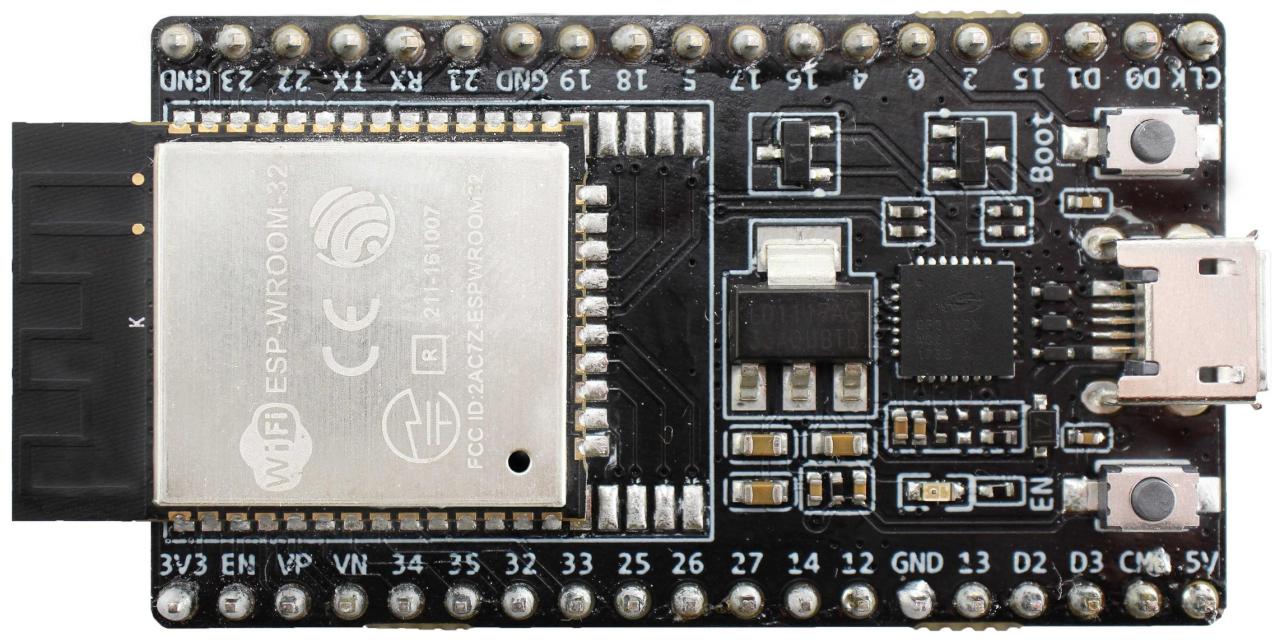
On Sun, 31 Jan 2021, Craig Leres wrote:
I can't find any pictures of a v3.0 module but the esp32 V3 devkit's I've gotten have a smaller module with some side pins move to the bottom of the module. Does the wroom on your V3.0 board look like the attached?
Yes, attached are photos of the OVMS v3.0 board and the old DEVKIT-C with a topless module that Mark sent me when we were first starting out before the OVMS boards were made.
If so then maybe the ESP32-WROOM-32UE/M113EH2800UH3Q0 would work? Or ESP32-WROOM-32E/M113EH2800PH3Q0 if you don't want to switch to an external wifi antenna?
The ESP32-WROOM-32UE/M113EH2800UH3Q0 would allow me to attach an external antenna and perhaps increase flash size, but the WROOM series does not include PSRAM and that is the problem I want to fix. -- Steve
On Sun, 31 Jan 2021, Craig Leres wrote:
I can't find any pictures of a v3.0 module but the esp32 V3 devkit's I've gotten have a smaller module with some side pins move to the bottom of the module. Does the wroom on your V3.0 board look like the attached?
Yes, attached are photos of the OVMS v3.0 board and the old DEVKIT-C with a topless module that Mark sent me when we were first starting out before the OVMS boards were made.
If so then maybe the ESP32-WROOM-32UE/M113EH2800UH3Q0 would work? Or ESP32-WROOM-32E/M113EH2800PH3Q0 if you don't want to switch to an external wifi antenna?
The ESP32-WROOM-32UE/M113EH2800UH3Q0 would allow me to attach an external antenna and perhaps increase flash size, but the WROOM series does not include PSRAM and that is the problem I want to fix. -- Steve
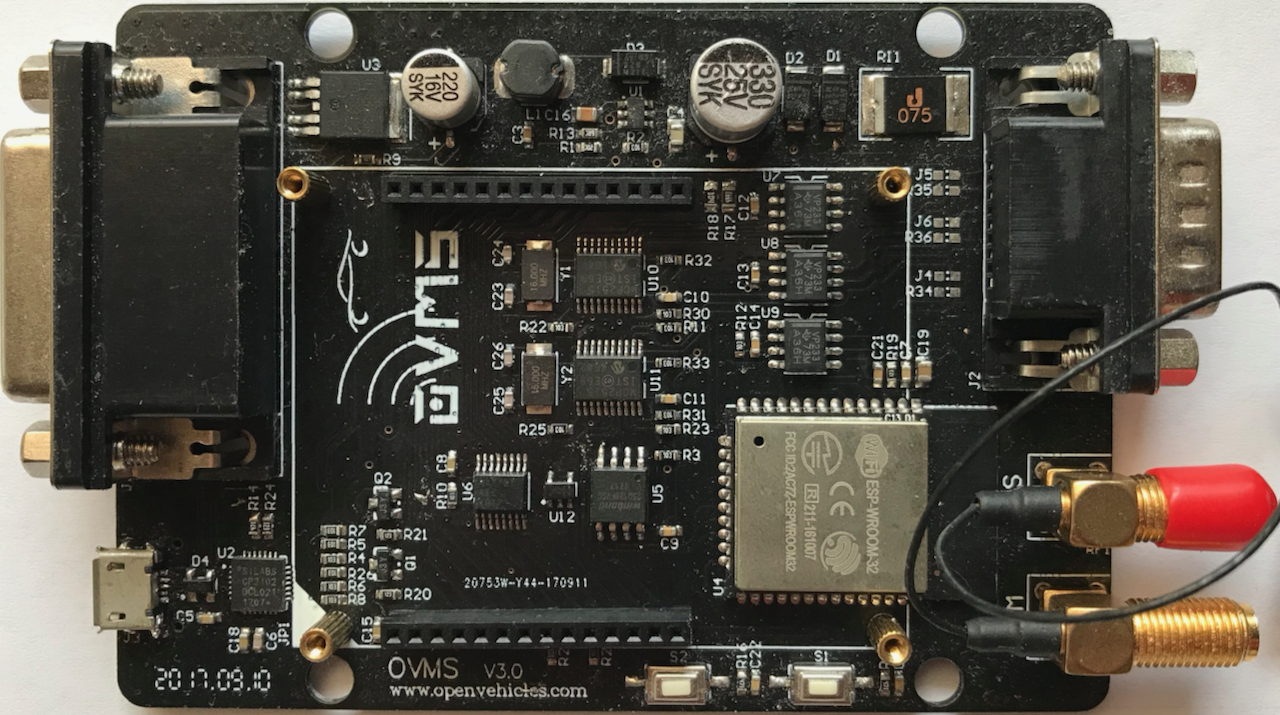
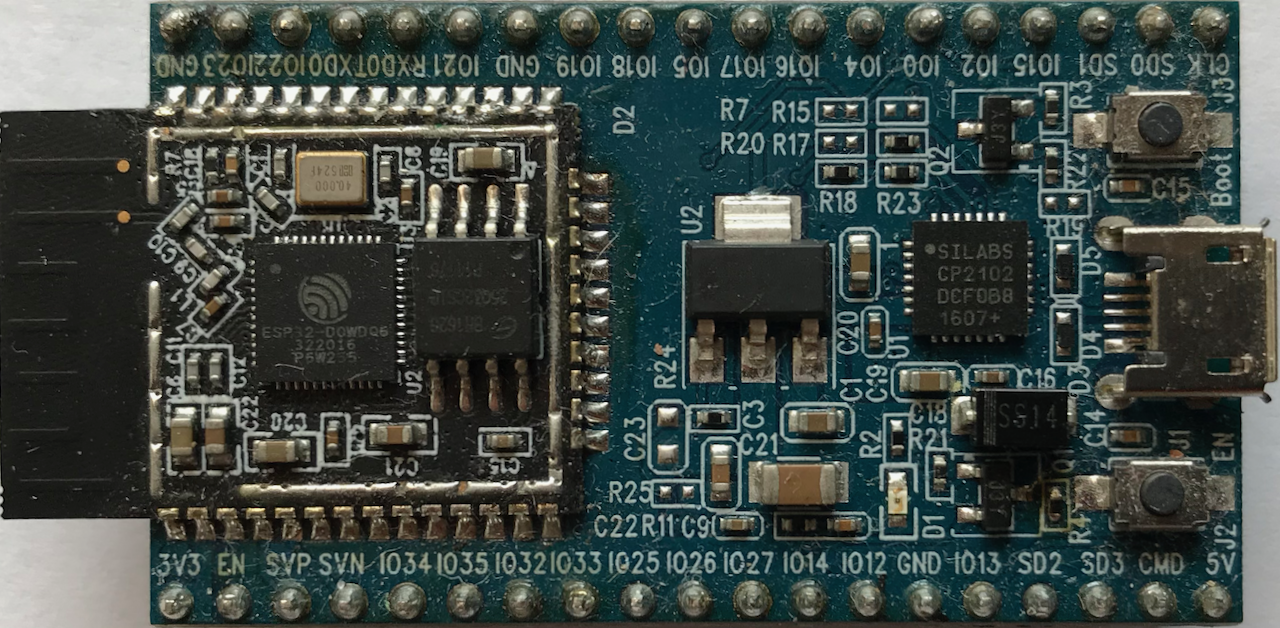
On 1/31/21 3:17 PM, Stephen Casner wrote:
The ESP32-WROOM-32UE/M113EH2800UH3Q0 would allow me to attach an external antenna and perhaps increase flash size, but the WROOM series does not include PSRAM and that is the problem I want to fix.
I see what you mean; the esp32-wroom modules have psram but the esp32-wroom-32 do not: https://docs.espressif.com/projects/esp-idf/en/latest/esp32/hw-reference/mod... I decided to upgrade my other car to a V3 module so now both are running with CONFIG_SPIRAM_CACHE_WORKAROUND disabled. Craig
It might be possible to make an adapter between the two pinouts using one or two layers of PCB. But the OVMS v3.0 board made connections the the pins on the end that are marked NC on the newer modules but were active on the older ESP32-WROOM-32. The v3.0 board has external flash connected there, which wouldn't be needed, but I seem to recall that the SD0-3 pins may have been used for some other function in addition. -- Steve

Very impressive, well done(!). Thanks for sharing, but I don’t have the soldering skills to pull this one off.
On Jan 31, 2021, at 5:53 PM, Stephen Casner <casner@acm.org> wrote:
It might be possible to make an adapter between the two pinouts using one or two layers of PCB. But the OVMS v3.0 board made connections the the pins on the end that are marked NC on the newer modules but were active on the older ESP32-WROOM-32. The v3.0 board has external flash connected there, which wouldn't be needed, but I seem to recall that the SD0-3 pins may have been used for some other function in addition.
-- Steve _______________________________________________ OvmsDev mailing list OvmsDev@lists.openvehicles.com http://lists.openvehicles.com/mailman/listinfo/ovmsdev
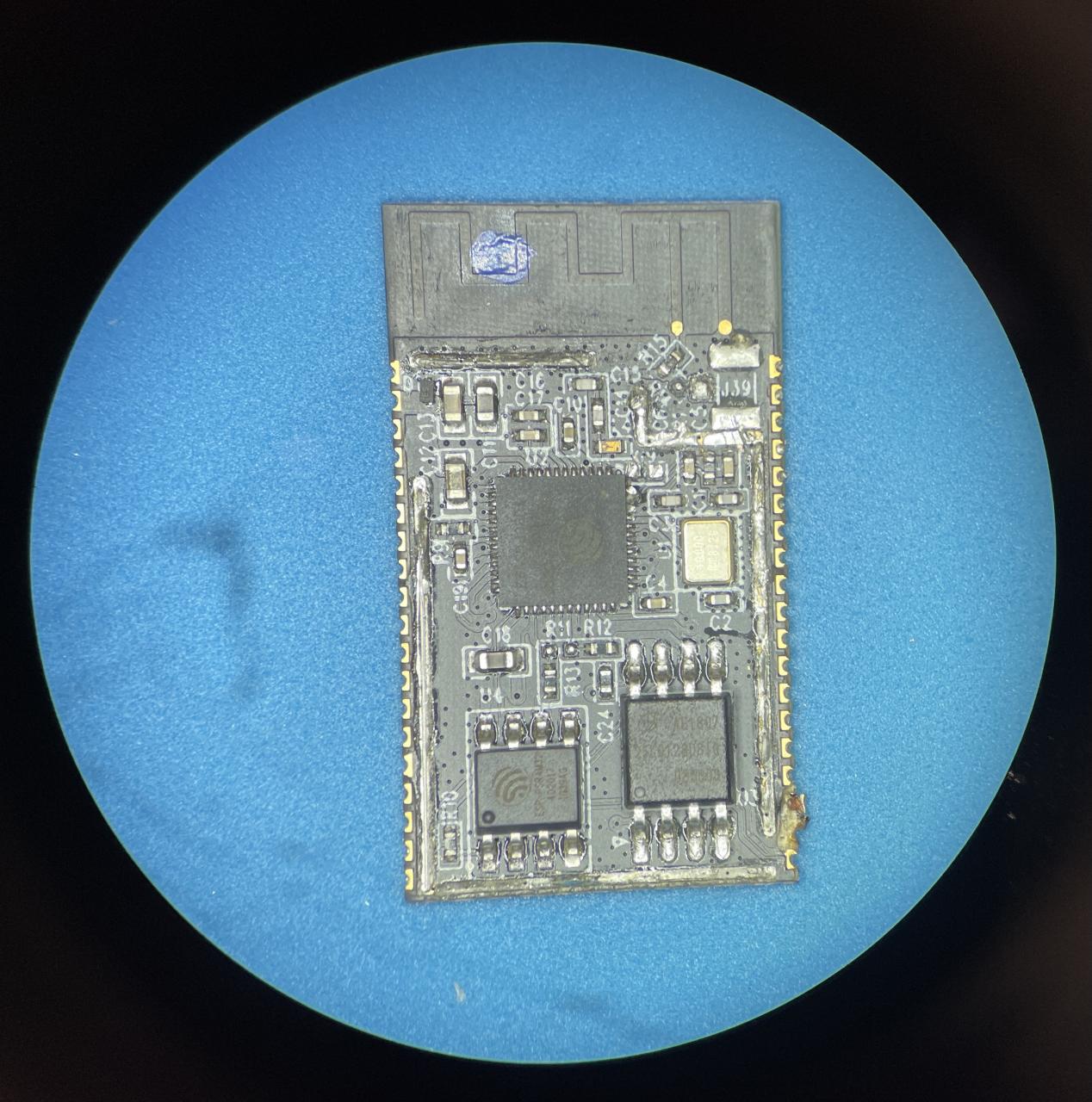
I removed the RF shield from one of V1 modules I removed and free-handed a microscope shot with my phone. The lighting isn't ideal for reading the laser etched markings but the esp32 is an esp32-dowdq6, the psram is an esp-psram32 (lower left), and the flash is a 25lq128ds/g (lower right). Craig
participants (4)
-
 Charles B Cangialose
 -
 Craig Leres
 -
 Michael Balzer
 -
 Stephen Casner