Reboot under some load

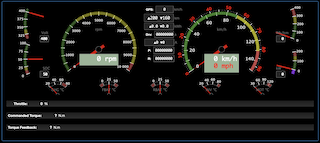
(I'm reposting because I had the impression that my message didn't get through. If it appears as a duplicate, please forgive me - and delete the double post if necessary. Still learning how to handle this delay between post and list visibility (moderation ?)) Hello List, I'm facing some reboots which looks like they are load-related (watchdog not triggered). I'll try to troubleshoot / diagnose it further but I thought it would be interesting to have your feedback on this. I'm currently tweaking a dashboard ; the idea is to have an in-vehicle display (WiFi-connected) showing a few important metrics to the driver (RPM / Speed / Voltage / SOC / multiple temperatures / range / controller status / BMS and cell status / ...) Don't know if images are OK in the list, here is a sample of the dashboard - you'll recognize the obvious lineage from the official OVMS dashboard: The metrics are coming from DBC analysis of the CAN bus traffic. For the tests I'm not in a vehicle, but am replaying CAN bus traffic and feeding it to OVMS (Not via the CAN play famework, as I still not had to time to look at https://github.com/openvehicles/Open-Vehicle-Monitoring-System-3/issues/747 in details, but via a local CAN bus). There are (approximately) : * 1 message repeating each 3ms (333Hz) * 10 messages that are occurring each 10ms (100Hz) * 5 messages that are spaced by 100ms (10Hz) * 3 messages each 500ms (2Hz) CAN bus speed is 250.000. Metrics are properly generated (from DBC), and properly displayed on the dashboard. However, the combination of the "intense" bus traffic, + number of generated metrics seems to be, in some way, overflowing the capacity of the WebSocketHandler, which results in a reboot from time to time:
W (5111095) websocket: WebSocketHandler[0x3f8d1654]: job queue overflow resolved, 14 drops W (5111095) websocket: WebSocketHandler[0x3f8d1654]: job queue overflow detected I (5111105) metrics: Modified metric v.g.current: 0A I (5111105) metrics: Modified metric v.m.rpm: 763 I (5111115) metrics: Modified metric v.i.temp: 34.1°C W (5111115) websocket: WebSocketHandler[0x3f8d1654]: job queue overflow detected W (5111125) websocket: WebSocketHandler[0x3f8d1654]: job queue overflow detected I (5111125) metrics: Modified metric v.m.rpm: 765 W (5111135) websocket: WebSocketHandler[0x3f8d1654]: job queue overflow detected I (5111145) metrics: Modified metric v.m.rpm: 758 W (5111145) websocket: WebSocketHandler[0x3f8d1654]: job queue overflow detected I (5111155) metrics: Modified metric v.m.rpm: 756 W (5111155) websocket: WebSocketHandler[0x3f8d1654]: job queue overflow resolved, 7 drops I (5111165) metrics: Modified metric v.m.rpm: 760 W (5111175) websocket: WebSocketHandler[0x3f8d1654]: job queue overflow resolved, 1 drops W (5111185) websocket: WebSocketHandler[0x3f8d1654]: job queue overflow E (5111845) task_wdt: Task watchdog got triggered. The following tasks did not reset the watchdog in time: E (5111845) task_wdt: - IDLE1 (CPU 1) E (5111845) task_wdt: Tasks currently running: E (5111845) task_wdt: CPU 0: wifi E (5111845) task_wdt: CPU 1: OVMS Console E (5111845) task_wdt: Aborting. abort() was called at PC 0x400e9920 on core 0
ELF file SHA256: 51b422e8c864d36f
Backtrace: 0x4008ddca:0x3ffb0690 0x4008e065:0x3ffb06b0 0x400e9920:0x3ffb06d0 0x40084176:0x3ffb06f0
Rebooting... ets Jul 29 2019 12:21:46
rst:0xc (SW_CPU_RESET),boot:0x1f (SPI_FAST_FLASH_BOOT) configsip: 0, SPIWP:0xee clk_drv:0x00,q_drv:0x00,d_drv:0x00,cs0_drv:0x00,hd_drv:0x00,wp_drv:0x00 mode:DIO, clock div:2 load:0x3fff0018,len:4 load:0x3fff001c,len:4796 load:0x40078000,len:0 load:0x40078000,len:14896 entry 0x40078d74 I (1068) psram: This chip is ESP32-D0WD I (1068) spiram: Found 64MBit SPI RAM device
Please note that the Lab setup has: * OVMS connected to the Lab network * The computer (displaying the dashboard) also connected to the Lab network (While, in the car, the computer / tablet would be directly connected to OVMS' wifi) That's it for the context, now a few questions: * As I don't know about the capabilities of the OVMS for CAN bus traffic analysis, does it looks like the number / frequency of messages I'm injecting is unreasonable ? * It seems like there is a buffering / consolidation of the metrics before sending them to the web socket ; is this tweakable in some way ? * Does the DBC processor add a significant processing time (compared to a dedicated vehicle module) when processing CAN data ? * What would be the best way to diagnose / confirm the health of the processes involved here ? * any similar use case / feedback from you ? Thanks for any feedback. Regards, Ludovic.

Ludovic, Am 31.10.22 um 10:59 schrieb Ludovic LANGE:
(I'm reposting because I had the impression that my message didn't get through. If it appears as a duplicate, please forgive me - and delete the double post if necessary. Still learning how to handle this delay between post and list visibility (moderation ?))
You're right, didn't get through, but there is no moderation. Checked your junk folder for an error message? Possibly Mark can see something in the logs.
Metrics are properly generated (from DBC), and properly displayed on the dashboard. However, the combination of the "intense" bus traffic, + number of generated metrics seems to be, in some way, overflowing the capacity of the WebSocketHandler, which results in a reboot from time to time:
W (5111095) websocket: WebSocketHandler[0x3f8d1654]: job queue overflow resolved, 14 drops W (5111095) websocket: WebSocketHandler[0x3f8d1654]: job queue overflow detected I (5111105) metrics: Modified metric v.g.current: 0A I (5111105) metrics: Modified metric v.m.rpm: 763 I (5111115) metrics: Modified metric v.i.temp: 34.1°C W (5111115) websocket: WebSocketHandler[0x3f8d1654]: job queue overflow detected W (5111125) websocket: WebSocketHandler[0x3f8d1654]: job queue overflow detected
A WebSocket client channel can jam easily if it can't transmit the data to the client fast enough. This doesn't depend on the actual Wifi connection quality alone, but also on the processing speed of the client device. My impression is, complex and fast chart updates can cause the Javascript engine needing to do a lot of memory management work. I haven't had the time to do an analysis on this, but I'm pretty sure there are options to reduce the load. The dashboard & chart data processing is still my first implementation, I didn't invest much time in optimization on that. For example, every new data series is a new allocation, so the garbage collector has quite some work to do. Having said that, you should also try to reduce the data volume. From your logs it seems you've got metrics tracing enabled. That produces a log message on every metrics update, and all log messages are transmitted via the WebSocket channel.
E (5111845) task_wdt: Tasks currently running: E (5111845) task_wdt: CPU 0: wifi E (5111845) task_wdt: CPU 1: OVMS Console
If you didn't execute a command on the console at that moment, that's probably also an indicator for a high log load.
Please note that the Lab setup has:
* OVMS connected to the Lab network * The computer (displaying the dashboard) also connected to the Lab network
(While, in the car, the computer / tablet would be directly connected to OVMS' wifi)
Shouldn't make much of a difference. But you could try configuring just Wifi client or ap mode, not both, depending on the setup. AP is running on the same channel, so might cut off some capacity.
That's it for the context, now a few questions:
* As I don't know about the capabilities of the OVMS for CAN bus traffic analysis, does it looks like the number / frequency of messages I'm injecting is unreasonable ?
No.
* It seems like there is a buffering / consolidation of the metrics before sending them to the web socket ; is this tweakable in some way ?
Metrics updates are initiated by the web client update ticket every 250 ms. You can experiment with changing the interval or make that a configuration if you like, but I had bad results with higher frequencies by producing too much load on the smartphones tested, and lower frequencies are bad for a smooth UI experience. Regarding the queue overflow you might experiment with raising the queue size, which is currently 50 jobs. But if 50 tx jobs are reached, chances are you've got Wifi or client capacity issues.
* Does the DBC processor add a significant processing time (compared to a dedicated vehicle module) when processing CAN data ?
Don't know, haven't used the DBC processor for real data.
*
* What would be the best way to diagnose / confirm the health of the processes involved here ?
Use the task monitoring (module tasks) to check the CPU load of your processes. Reduce any unnecessary load, for example avoid excessive logging, user event creation, file writes and especially SD card accesses, these can be very slow, see my warning here: https://docs.openvehicles.com/en/latest/userguide/scripting.html#vfs Use the browser developer tools to analyse client performance. Btw, you can see the actual websocket packets when opening the network monitor before opening the web UI.
* * any similar use case / feedback from you ?
Thanks for any feedback.
Regards, Michael -- Michael Balzer * Helkenberger Weg 9 * D-58256 Ennepetal Fon 02333 / 833 5735 * Handy 0176 / 206 989 26

FYI: When new users sign up the moderation flag is set; the first post from that user is checked and manually released, while that sign-up moderation flag is cleared. One of the side effects of keeping this list spam free. But after that one post has gone through, we don’t moderate any more. Regards, Mark
On 1 Nov 2022, at 4:20 AM, Michael Balzer <dexter@expeedo.de> wrote:
Ludovic,
Am 31.10.22 um 10:59 schrieb Ludovic LANGE:
(I'm reposting because I had the impression that my message didn't get through. If it appears as a duplicate, please forgive me - and delete the double post if necessary. Still learning how to handle this delay between post and list visibility (moderation ?))
You're right, didn't get through, but there is no moderation. Checked your junk folder for an error message? Possibly Mark can see something in the logs.
Hello Mark, Thank you for the details and precisions - that's why I saw this "moderation" email first and (incorrectly) assumed it was always active. Regards, Ludovic Le 02/11/2022 à 09:52, Mark Webb-Johnson a écrit :
FYI: When new users sign up the moderation flag is set; the first post from that user is checked and manually released, while that sign-up moderation flag is cleared. One of the side effects of keeping this list spam free. But after that one post has gone through, we don’t moderate any more.
Regards, Mark
On 1 Nov 2022, at 4:20 AM, Michael Balzer <dexter@expeedo.de> wrote:
Ludovic,
Am 31.10.22 um 10:59 schrieb Ludovic LANGE:
(I'm reposting because I had the impression that my message didn't get through. If it appears as a duplicate, please forgive me - and delete the double post if necessary. Still learning how to handle this delay between post and list visibility (moderation ?))
You're right, didn't get through, but there is no moderation. Checked your junk folder for an error message? Possibly Mark can see something in the logs.
_______________________________________________ OvmsDev mailing list OvmsDev@lists.openvehicles.com http://lists.openvehicles.com/mailman/listinfo/ovmsdev
participants (3)
-
 Ludovic LANGE
 -
 Mark Webb-Johnson
 -
 Michael Balzer