

Greg, Am 16.04.2018 um 19:19 schrieb Greg D.:
So, I'm trying to play "customer" with the 3.1 module, and have confirmed :) the issue with killing off WiFi by enabling client + AP mode. Tried to recover by using the USB console and issuing a module factory reset command, but that didn't enable wifi because the ssid passkey wasn't set up. Fixed that (again, usb console) and got back to what I think was "factory" state.
Also got stuck trying to navigate an OTA update. Can't connect to the Internet with an AP-only WiFi config. Trying to configure AP+Client killed things off, so a bit gun-shy there. If I play customer without a means to play with an SD card, I can't apparently do the update.
OTA updates are possible in AP mode via modem or from your station. I'm running a web server on my PC so can download the firmware from 192.168.4.2 in AP mode.
The key to both of these is to actively configure a client wifi network before messing around with practically anything else, but that's not obvious in the normal workflow of setting up the module. Can we clarify that in either the documentation, or (preferably) in the Webserver UI? I think the key here is that configuring AP+Client needs to /first/ have the Client config set, because one never has a wide-open WiFi network at home (for scan "any" to work).
Please test my commits on the wifi config & init issues. Tell me if you still see a chance for a faulty config with the current build. The config menu was loosely meant to be done top down / left to right. The autostart page will now check the wifi setup, but the recommended way still is to configure Wifi first.
Topic #2, once I did get the module on the home network and hit the OTA Flash button, it seemed to never complete (looking just at the web page). As a developer, I had a USB console running on the side, and saw the reason was a continuous stream of queue overflow messages. Rebooted (ignoring the warning not to do so) the module and tried again; same result, though apparently the updates actually did work (it shows I'm on version 3.1.003). Rebooting the module stopped the queue overflows, i.e. they weren't associated with normal operation. Is something not getting cleaned up after the OTA process completes?
I have seen the queue overflow problem once on the current build, so it isn't solved. But it wasn't related to any action, it happened while the module was idle. To clarify, it's no problem if it resolves after some seconds, that may be due to a temporary mongoose lock / overload. If we can trigger that reliably by some action, that would help to track this down. I'll add a detection for "stuck in queue overflow" and try to resolve that by closing the websocket connection. Not sure if that will be sufficient though, it may be some deeper mongoose issue. Regards, Michael
Greg
_______________________________________________ OvmsDev mailing list OvmsDev@lists.openvehicles.com http://lists.openvehicles.com/mailman/listinfo/ovmsdev
-- Michael Balzer * Helkenberger Weg 9 * D-58256 Ennepetal Fon 02333 / 833 5735 * Handy 0176 / 206 989 26
Am 16.04.2018 um 22:16 schrieb Michael Balzer:
I have seen the queue overflow problem once on the current build, so it isn't solved. But it wasn't related to any action, it happened while the module was idle.
To clarify, it's no problem if it resolves after some seconds, that may be due to a temporary mongoose lock / overload. If we can trigger that reliably by some action, that would help to track this down.
Short update: I could trigger it again now multiple times on the OTA page. It seems to be happening due to the update check running over the modem line, it does not happen with modem disabled. I need to check in Wifi client mode. Regards, Michael -- Michael Balzer * Helkenberger Weg 9 * D-58256 Ennepetal Fon 02333 / 833 5735 * Handy 0176 / 206 989 26

Reference: Tesla Roadster 2.0 Sport OVMS Firmware-- Server: 2.1.1-20121216 Car: 3.1.004/ota_0/main App: 1.6.6 (20150821) I've been running the new v3 since Sunday 15 Apr without fault [updated to build 3.004 on Mon 16 Apr]. I've successfully used a variety of capabilities using the iPhone Mobile app [1.6.6]. Successfully operating: Remote door lock and unlock, remote Homelink, remotely change charging mode [Standard, Storage, Range]. Today, for the first time, and while communicating over the cellular modem, I COULD NOT remotely start a charging cycle, I then tested other remote functions [door lock and change of charging mode both worked], but when I went back to remotely start a charging cycle, again it didn't engage. On the app screen that charge "slider" slides over to the right, but just stays there and ultimately times out. I will test this again tonight at home when I am on Wifi (which I seem to recall may have been working on Sunday, so it may be related to communicating over the cellular network). This may also be a just a non-repeatable gremlin, but I thought I'd notify this group to get the observation out there, and see if maybe anyone else is seeing it. Chip C. On 2018-04-18 9:46 am, Greg D. wrote:
Michael Balzer wrote:
Am 16.04.2018 um 22:16 schrieb Michael Balzer:
I have seen the queue overflow problem once on the current build, so it isn't solved. But it wasn't related to any action, it happened while the module was idle.
To clarify, it's no problem if it resolves after some seconds, that may be due to a temporary mongoose lock / overload. If we can trigger that reliably by some action, that would help to track this down.
Short update: I could trigger it again now multiple times on the OTA page. It seems to be happening due to the update check running over the modem line, it does not happen with modem disabled. I need to check in Wifi client mode.
Regards, Michael
Hi Michael, Interesting... I was going to write back and say that the 3.003 to 3.004 update went very smoothly, with no queue overflows being reported, and that all was well. I don't recall if the modem was connected at the time, however. A side note for anyone having trouble connecting to AP mode with their cell phone... I've always had a lot of trouble with timeouts and such, and finally tracked it down to a similar issue as above. If the phone has both an LTE and AP connection, the http request to 192.168.4.1 often goes out over the LTE path, and is therefore doomed. Disabling LTE "fixes" that, but of course, also disables your phone.(or at least the data part). I haven't found a good way to beat some (routing) sense into the phone otherwise. This was with my new Google Pixel2, so it's not a matter of an old buggy device. (Ok, so it's a new buggy device...) Also, the first time you connect to the AP, the phone _blocks_ all communications with it until you answer the annoying notification (usually hidden in the background) that says "Hey, we can't get to the Internet with that AP. Are you sure you want to stay connected to it?", or words to that effect. Me thinks they have taken this always connected Internet meme a bit too far. Greg _______________________________________________ OvmsDev mailing list OvmsDev@lists.openvehicles.com http://lists.openvehicles.com/mailman/listinfo/ovmsdev
Greg, I have the car permanently in Debug mode, and nothing came up on the VDS. I'll check the log later today when I get back to the car---I may not be able to report back until tomorrow. Chip On 2018-04-18 1:25 pm, Greg D. wrote:
Were there any errors / alerts reported by the car? They might be buried in the car's logs, and not displayed on the VDS unless you were in diagnostc or debug mode.
Greg
chip@cangmag.com wrote:
Reference: Tesla Roadster 2.0 Sport
OVMS Firmware-- Server: 2.1.1-20121216 Car: 3.1.004/ota_0/main App: 1.6.6 (20150821)
I've been running the new v3 since Sunday 15 Apr without fault [updated to build 3.004 on Mon 16 Apr]. I've successfully used a variety of capabilities using the iPhone Mobile app [1.6.6].
Successfully operating: Remote door lock and unlock, remote Homelink, remotely change charging mode [Standard, Storage, Range].
Today, for the first time, and while communicating over the cellular modem, I COULD NOT remotely start a charging cycle, I then tested other remote functions [door lock and change of charging mode both worked], but when I went back to remotely start a charging cycle, again it didn't engage. On the app screen that charge "slider" slides over to the right, but just stays there and ultimately times out.
I will test this again tonight at home when I am on Wifi (which I seem to recall may have been working on Sunday, so it may be related to communicating over the cellular network).
This may also be a just a non-repeatable gremlin, but I thought I'd notify this group to get the observation out there, and see if maybe anyone else is seeing it.
Chip C.
On 2018-04-18 9:46 am, Greg D. wrote: Michael Balzer wrote:
Am 16.04.2018 um 22:16 schrieb Michael Balzer:
I have seen the queue overflow problem once on the current build, so it isn't solved. But it wasn't related to any action, it happened while the module was idle.
To clarify, it's no problem if it resolves after some seconds, that may be due to a temporary mongoose lock / overload. If we can trigger that reliably by some action, that would help to track this down.
Short update: I could trigger it again now multiple times on the OTA page. It seems to be happening due to the update check running over the modem line, it does not happen with modem disabled. I need to check in Wifi client mode.
Regards, Michael
Hi Michael, Interesting... I was going to write back and say that the 3.003 to 3.004 update went very smoothly, with no queue overflows being reported, and that all was well. I don't recall if the modem was connected at the time, however. A side note for anyone having trouble connecting to AP mode with their cell phone... I've always had a lot of trouble with timeouts and such, and finally tracked it down to a similar issue as above. If the phone has both an LTE and AP connection, the http request to 192.168.4.1 often goes out over the LTE path, and is therefore doomed. Disabling LTE "fixes" that, but of course, also disables your phone.(or at least the data part). I haven't found a good way to beat some (routing) sense into the phone otherwise. This was with my new Google Pixel2, so it's not a matter of an old buggy device. (Ok, so it's a new buggy device...) Also, the first time you connect to the AP, the phone _blocks_ all communications with it until you answer the annoying notification (usually hidden in the background) that says "Hey, we can't get to the Internet with that AP. Are you sure you want to stay connected to it?", or words to that effect. Me thinks they have taken this always connected Internet meme a bit too far. Greg _______________________________________________ OvmsDev mailing list OvmsDev@lists.openvehicles.com http://lists.openvehicles.com/mailman/listinfo/ovmsdev _______________________________________________ OvmsDev mailing list OvmsDev@lists.openvehicles.com http://lists.openvehicles.com/mailman/listinfo/ovmsdev _______________________________________________ OvmsDev mailing list OvmsDev@lists.openvehicles.com http://lists.openvehicles.com/mailman/listinfo/ovmsdev

Chip, If you can let me know the vehicle ID and the date+time (UTC would be helpful) you did this action, then I can check server logs for what was seen. Regards, Mark
On 19 Apr 2018, at 4:31 AM, chip@cangmag.com wrote:
Greg,
I have the car permanently in Debug mode, and nothing came up on the VDS. I'll check the log later today when I get back to the car---I may not be able to report back until tomorrow.
Chip
On 2018-04-18 1:25 pm, Greg D. wrote:
Were there any errors / alerts reported by the car? They might be buried in the car's logs, and not displayed on the VDS unless you were in diagnostc or debug mode.
Greg
chip@cangmag.com <mailto:chip@cangmag.com> wrote:
Reference: Tesla Roadster 2.0 Sport
OVMS Firmware— Server: 2.1.1-20121216 Car: 3.1.004/ota_0/main App: 1.6.6 (20150821)
I've been running the new v3 since Sunday 15 Apr without fault [updated to build 3.004 on Mon 16 Apr]. I've successfully used a variety of capabilities using the iPhone Mobile app [1.6.6].
Successfully operating: Remote door lock and unlock, remote Homelink, remotely change charging mode [Standard, Storage, Range].
Today, for the first time, and while communicating over the cellular modem, I COULD NOT remotely start a charging cycle, I then tested other remote functions [door lock and change of charging mode both worked], but when I went back to remotely start a charging cycle, again it didn't engage. On the app screen that charge "slider" slides over to the right, but just stays there and ultimately times out.
I will test this again tonight at home when I am on Wifi (which I seem to recall may have been working on Sunday, so it may be related to communicating over the cellular network).
This may also be a just a non-repeatable gremlin, but I thought I'd notify this group to get the observation out there, and see if maybe anyone else is seeing it.
Chip C.
On 2018-04-18 9:46 am, Greg D. wrote:
Michael Balzer wrote: Am 16.04.2018 um 22:16 schrieb Michael Balzer: I have seen the queue overflow problem once on the current build, so it isn't solved. But it wasn't related to any action, it happened while the module was idle.
To clarify, it's no problem if it resolves after some seconds, that may be due to a temporary mongoose lock / overload. If we can trigger that reliably by some action, that would help to track this down. Short update: I could trigger it again now multiple times on the OTA page. It seems to be happening due to the update check running over the modem line, it does not happen with modem disabled. I need to check in Wifi client mode.
Regards, Michael
Hi Michael,
Interesting... I was going to write back and say that the 3.003 to 3.004 update went very smoothly, with no queue overflows being reported, and that all was well. I don't recall if the modem was connected at the time, however.
A side note for anyone having trouble connecting to AP mode with their cell phone... I've always had a lot of trouble with timeouts and such, and finally tracked it down to a similar issue as above. If the phone has both an LTE and AP connection, the http request to 192.168.4.1 often goes out over the LTE path, and is therefore doomed. Disabling LTE "fixes" that, but of course, also disables your phone.(or at least the data part). I haven't found a good way to beat some (routing) sense into the phone otherwise.
This was with my new Google Pixel2, so it's not a matter of an old buggy device. (Ok, so it's a new buggy device...)
Also, the first time you connect to the AP, the phone blocks all communications with it until you answer the annoying notification (usually hidden in the background) that says "Hey, we can't get to the Internet with that AP. Are you sure you want to stay connected to it?", or words to that effect. Me thinks they have taken this always connected Internet meme a bit too far.
Greg
_______________________________________________ OvmsDev mailing list OvmsDev@lists.openvehicles.com <mailto:OvmsDev@lists.openvehicles.com> http://lists.openvehicles.com/mailman/listinfo/ovmsdev <http://lists.openvehicles.com/mailman/listinfo/ovmsdev>
_______________________________________________ OvmsDev mailing list OvmsDev@lists.openvehicles.com <mailto:OvmsDev@lists.openvehicles.com> http://lists.openvehicles.com/mailman/listinfo/ovmsdev <http://lists.openvehicles.com/mailman/listinfo/ovmsdev>
_______________________________________________ OvmsDev mailing list OvmsDev@lists.openvehicles.com <mailto:OvmsDev@lists.openvehicles.com> http://lists.openvehicles.com/mailman/listinfo/ovmsdev <http://lists.openvehicles.com/mailman/listinfo/ovmsdev>_______________________________________________ OvmsDev mailing list OvmsDev@lists.openvehicles.com http://lists.openvehicles.com/mailman/listinfo/ovmsdev
Mark, The vehicle id is TRS0879 and I tried to do the remote charge multiple times today beginning at ~12:40p PDT through to ~4:30p PDT [using the cellular modem]. This evening, beginning ~9:15p PDT, I've tried to start a charge remotely over Wifi. So far for all attempts, no joy. I've tried using both the Mobile app [iPhone], as well as the web app contained in the v3. All tries appear to timeout without starting the charge. I'm wondering if the "Timed Charge" status of the car, is overriding the request to "Start Charge" [immediately]. Thanks for your kind help with this. Chip On 2018-04-18 4:47 pm, Mark Webb-Johnson wrote:
Chip,
If you can let me know the vehicle ID and the date+time (UTC would be helpful) you did this action, then I can check server logs for what was seen.
Regards, Mark
On 19 Apr 2018, at 4:31 AM, chip@cangmag.com wrote:
Greg,
I have the car permanently in Debug mode, and nothing came up on the VDS. I'll check the log later today when I get back to the car---I may not be able to report back until tomorrow.
Chip
On 2018-04-18 1:25 pm, Greg D. wrote: Were there any errors / alerts reported by the car? They might be buried in the car's logs, and not displayed on the VDS unless you were in diagnostc or debug mode.
Greg
chip@cangmag.com wrote:
Reference: Tesla Roadster 2.0 Sport
OVMS Firmware-- Server: 2.1.1-20121216 Car: 3.1.004/ota_0/main App: 1.6.6 (20150821)
I've been running the new v3 since Sunday 15 Apr without fault [updated to build 3.004 on Mon 16 Apr]. I've successfully used a variety of capabilities using the iPhone Mobile app [1.6.6].
Successfully operating: Remote door lock and unlock, remote Homelink, remotely change charging mode [Standard, Storage, Range].
Today, for the first time, and while communicating over the cellular modem, I COULD NOT remotely start a charging cycle, I then tested other remote functions [door lock and change of charging mode both worked], but when I went back to remotely start a charging cycle, again it didn't engage. On the app screen that charge "slider" slides over to the right, but just stays there and ultimately times out.
I will test this again tonight at home when I am on Wifi (which I seem to recall may have been working on Sunday, so it may be related to communicating over the cellular network).
This may also be a just a non-repeatable gremlin, but I thought I'd notify this group to get the observation out there, and see if maybe anyone else is seeing it.
Chip C.
On 2018-04-18 9:46 am, Greg D. wrote: Michael Balzer wrote:
Am 16.04.2018 um 22:16 schrieb Michael Balzer:
I have seen the queue overflow problem once on the current build, so it isn't solved. But it wasn't related to any action, it happened while the module was idle.
To clarify, it's no problem if it resolves after some seconds, that may be due to a temporary mongoose lock / overload. If we can trigger that reliably by some action, that would help to track this down.
Short update: I could trigger it again now multiple times on the OTA page. It seems to be happening due to the update check running over the modem line, it does not happen with modem disabled. I need to check in Wifi client mode.
Regards, Michael
Hi Michael, Interesting... I was going to write back and say that the 3.003 to 3.004 update went very smoothly, with no queue overflows being reported, and that all was well. I don't recall if the modem was connected at the time, however. A side note for anyone having trouble connecting to AP mode with their cell phone... I've always had a lot of trouble with timeouts and such, and finally tracked it down to a similar issue as above. If the phone has both an LTE and AP connection, the http request to 192.168.4.1 often goes out over the LTE path, and is therefore doomed. Disabling LTE "fixes" that, but of course, also disables your phone.(or at least the data part). I haven't found a good way to beat some (routing) sense into the phone otherwise. This was with my new Google Pixel2, so it's not a matter of an old buggy device. (Ok, so it's a new buggy device...) Also, the first time you connect to the AP, the phone _blocks_ all communications with it until you answer the annoying notification (usually hidden in the background) that says "Hey, we can't get to the Internet with that AP. Are you sure you want to stay connected to it?", or words to that effect. Me thinks they have taken this always connected Internet meme a bit too far. Greg _______________________________________________ OvmsDev mailing list OvmsDev@lists.openvehicles.com http://lists.openvehicles.com/mailman/listinfo/ovmsdev _______________________________________________ OvmsDev mailing list OvmsDev@lists.openvehicles.com http://lists.openvehicles.com/mailman/listinfo/ovmsdev _______________________________________________ OvmsDev mailing list OvmsDev@lists.openvehicles.com http://lists.openvehicles.com/mailman/listinfo/ovmsdev _______________________________________________ OvmsDev mailing list OvmsDev@lists.openvehicles.com http://lists.openvehicles.com/mailman/listinfo/ovmsdev _______________________________________________ OvmsDev mailing list OvmsDev@lists.openvehicles.com http://lists.openvehicles.com/mailman/listinfo/ovmsdev
Also, there have been no messages [Alerts] appearing on the VDS on the car, or in any of the alert logs in the car’s debug system related to any of the remote charge requests.
On 18Apr 2016, at 9:29 PM, chip@cangmag.com wrote:
Mark,
The vehicle id is TRS0879 and I tried to do the remote charge multiple times today beginning at ~12:40p PDT through to ~4:30p PDT [using the cellular modem]. This evening, beginning ~9:15p PDT, I've tried to start a charge remotely over Wifi. So far for all attempts, no joy. I've tried using both the Mobile app [iPhone], as well as the web app contained in the v3. All tries appear to timeout without starting the charge.
I'm wondering if the "Timed Charge" status of the car, is overriding the request to "Start Charge" [immediately].
Thanks for your kind help with this.
Chip
On 2018-04-18 4:47 pm, Mark Webb-Johnson wrote:
Chip,
If you can let me know the vehicle ID and the date+time (UTC would be helpful) you did this action, then I can check server logs for what was seen.
Regards, Mark
On 19 Apr 2018, at 4:31 AM, chip@cangmag.com <mailto:chip@cangmag.com> wrote: Greg,
I have the car permanently in Debug mode, and nothing came up on the VDS. I'll check the log later today when I get back to the car---I may not be able to report back until tomorrow.
Chip
On 2018-04-18 1:25 pm, Greg D. wrote:
Were there any errors / alerts reported by the car? They might be buried in the car's logs, and not displayed on the VDS unless you were in diagnostc or debug mode.
Greg
chip@cangmag.com <mailto:chip@cangmag.com> wrote: Reference: Tesla Roadster 2.0 Sport
OVMS Firmware— Server: 2.1.1-20121216 Car: 3.1.004/ota_0/main App: 1.6.6 (20150821)
I've been running the new v3 since Sunday 15 Apr without fault [updated to build 3.004 on Mon 16 Apr]. I've successfully used a variety of capabilities using the iPhone Mobile app [1.6.6].
Successfully operating: Remote door lock and unlock, remote Homelink, remotely change charging mode [Standard, Storage, Range].
Today, for the first time, and while communicating over the cellular modem, I COULD NOT remotely start a charging cycle, I then tested other remote functions [door lock and change of charging mode both worked], but when I went back to remotely start a charging cycle, again it didn't engage. On the app screen that charge "slider" slides over to the right, but just stays there and ultimately times out.
I will test this again tonight at home when I am on Wifi (which I seem to recall may have been working on Sunday, so it may be related to communicating over the cellular network).
This may also be a just a non-repeatable gremlin, but I thought I'd notify this group to get the observation out there, and see if maybe anyone else is seeing it.
Chip C.
On 2018-04-18 9:46 am, Greg D. wrote:
Michael Balzer wrote: Am 16.04.2018 um 22:16 schrieb Michael Balzer: I have seen the queue overflow problem once on the current build, so it isn't solved. But it wasn't related to any action, it happened while the module was idle.
To clarify, it's no problem if it resolves after some seconds, that may be due to a temporary mongoose lock / overload. If we can trigger that reliably by some action, that would help to track this down. Short update: I could trigger it again now multiple times on the OTA page. It seems to be happening due to the update check running over the modem line, it does not happen with modem disabled. I need to check in Wifi client mode.
Regards, Michael
Hi Michael,
Interesting... I was going to write back and say that the 3.003 to 3.004 update went very smoothly, with no queue overflows being reported, and that all was well. I don't recall if the modem was connected at the time, however.
A side note for anyone having trouble connecting to AP mode with their cell phone... I've always had a lot of trouble with timeouts and such, and finally tracked it down to a similar issue as above. If the phone has both an LTE and AP connection, the http request to 192.168.4.1 often goes out over the LTE path, and is therefore doomed. Disabling LTE "fixes" that, but of course, also disables your phone.(or at least the data part). I haven't found a good way to beat some (routing) sense into the phone otherwise.
This was with my new Google Pixel2, so it's not a matter of an old buggy device. (Ok, so it's a new buggy device...)
Also, the first time you connect to the AP, the phone blocks all communications with it until you answer the annoying notification (usually hidden in the background) that says "Hey, we can't get to the Internet with that AP. Are you sure you want to stay connected to it?", or words to that effect. Me thinks they have taken this always connected Internet meme a bit too far.
Greg
_______________________________________________ OvmsDev mailing list OvmsDev@lists.openvehicles.com <mailto:OvmsDev@lists.openvehicles.com> http://lists.openvehicles.com/mailman/listinfo/ovmsdev <http://lists.openvehicles.com/mailman/listinfo/ovmsdev>
_______________________________________________ OvmsDev mailing list OvmsDev@lists.openvehicles.com <mailto:OvmsDev@lists.openvehicles.com> http://lists.openvehicles.com/mailman/listinfo/ovmsdev <http://lists.openvehicles.com/mailman/listinfo/ovmsdev>
_______________________________________________ OvmsDev mailing list OvmsDev@lists.openvehicles.com <mailto:OvmsDev@lists.openvehicles.com> http://lists.openvehicles.com/mailman/listinfo/ovmsdev <http://lists.openvehicles.com/mailman/listinfo/ovmsdev>_______________________________________________ OvmsDev mailing list OvmsDev@lists.openvehicles.com <mailto:OvmsDev@lists.openvehicles.com> http://lists.openvehicles.com/mailman/listinfo/ovmsdev
_______________________________________________ OvmsDev mailing list OvmsDev@lists.openvehicles.com <mailto:OvmsDev@lists.openvehicles.com> http://lists.openvehicles.com/mailman/listinfo/ovmsdev <http://lists.openvehicles.com/mailman/listinfo/ovmsdev>
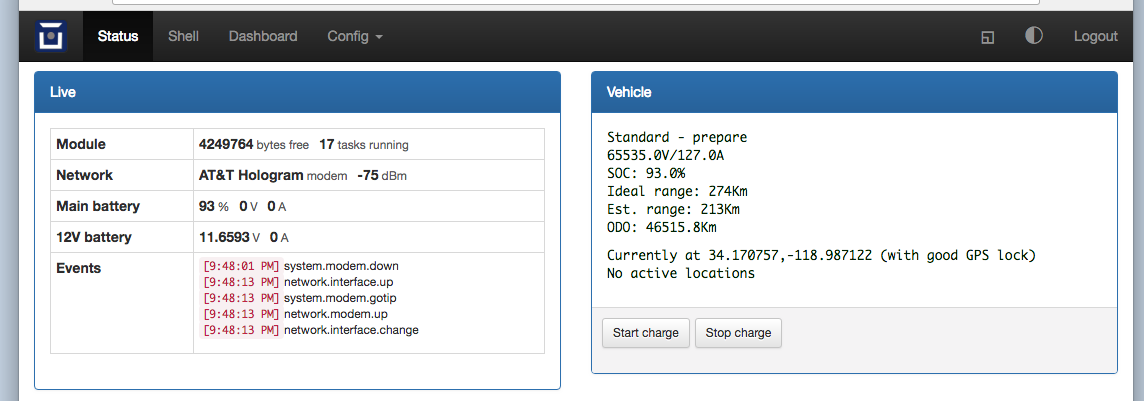
Further, clicking the “Start Charge” button on the Vehicle portion of the web app screen [pasted below], does NOT create an “Event” in the “Live” screen—clicking the “Start Charge” button simply times out, but does show “Charge has been started” briefly in the Vehicle portion, and the screen goes back to “Standard - prepare” as shown.
On 18Apr 2016, at 9:56 PM, Chip Cangialose <chip@cangmag.com> wrote:
Also, there have been no messages [Alerts] appearing on the VDS on the car, or in any of the alert logs in the car’s debug system related to any of the remote charge requests.
On 18Apr 2016, at 9:29 PM, chip@cangmag.com <mailto:chip@cangmag.com> wrote:
Mark,
The vehicle id is TRS0879 and I tried to do the remote charge multiple times today beginning at ~12:40p PDT through to ~4:30p PDT [using the cellular modem]. This evening, beginning ~9:15p PDT, I've tried to start a charge remotely over Wifi. So far for all attempts, no joy. I've tried using both the Mobile app [iPhone], as well as the web app contained in the v3. All tries appear to timeout without starting the charge.
I'm wondering if the "Timed Charge" status of the car, is overriding the request to "Start Charge" [immediately].
Thanks for your kind help with this.
Chip
On 2018-04-18 4:47 pm, Mark Webb-Johnson wrote:
Chip,
If you can let me know the vehicle ID and the date+time (UTC would be helpful) you did this action, then I can check server logs for what was seen.
Regards, Mark
On 19 Apr 2018, at 4:31 AM, chip@cangmag.com <mailto:chip@cangmag.com> wrote: Greg,
I have the car permanently in Debug mode, and nothing came up on the VDS. I'll check the log later today when I get back to the car---I may not be able to report back until tomorrow.
Chip
On 2018-04-18 1:25 pm, Greg D. wrote:
Were there any errors / alerts reported by the car? They might be buried in the car's logs, and not displayed on the VDS unless you were in diagnostc or debug mode.
Greg
chip@cangmag.com <mailto:chip@cangmag.com> wrote: Reference: Tesla Roadster 2.0 Sport
OVMS Firmware— Server: 2.1.1-20121216 Car: 3.1.004/ota_0/main App: 1.6.6 (20150821)
I've been running the new v3 since Sunday 15 Apr without fault [updated to build 3.004 on Mon 16 Apr]. I've successfully used a variety of capabilities using the iPhone Mobile app [1.6.6].
Successfully operating: Remote door lock and unlock, remote Homelink, remotely change charging mode [Standard, Storage, Range].
Today, for the first time, and while communicating over the cellular modem, I COULD NOT remotely start a charging cycle, I then tested other remote functions [door lock and change of charging mode both worked], but when I went back to remotely start a charging cycle, again it didn't engage. On the app screen that charge "slider" slides over to the right, but just stays there and ultimately times out.
I will test this again tonight at home when I am on Wifi (which I seem to recall may have been working on Sunday, so it may be related to communicating over the cellular network).
This may also be a just a non-repeatable gremlin, but I thought I'd notify this group to get the observation out there, and see if maybe anyone else is seeing it.
Chip C.
On 2018-04-18 9:46 am, Greg D. wrote:
Michael Balzer wrote: Am 16.04.2018 um 22:16 schrieb Michael Balzer: I have seen the queue overflow problem once on the current build, so it isn't solved. But it wasn't related to any action, it happened while the module was idle.
To clarify, it's no problem if it resolves after some seconds, that may be due to a temporary mongoose lock / overload. If we can trigger that reliably by some action, that would help to track this down. Short update: I could trigger it again now multiple times on the OTA page. It seems to be happening due to the update check running over the modem line, it does not happen with modem disabled. I need to check in Wifi client mode.
Regards, Michael
Hi Michael,
Interesting... I was going to write back and say that the 3.003 to 3.004 update went very smoothly, with no queue overflows being reported, and that all was well. I don't recall if the modem was connected at the time, however.
A side note for anyone having trouble connecting to AP mode with their cell phone... I've always had a lot of trouble with timeouts and such, and finally tracked it down to a similar issue as above. If the phone has both an LTE and AP connection, the http request to 192.168.4.1 often goes out over the LTE path, and is therefore doomed. Disabling LTE "fixes" that, but of course, also disables your phone.(or at least the data part). I haven't found a good way to beat some (routing) sense into the phone otherwise.
This was with my new Google Pixel2, so it's not a matter of an old buggy device. (Ok, so it's a new buggy device...)
Also, the first time you connect to the AP, the phone blocks all communications with it until you answer the annoying notification (usually hidden in the background) that says "Hey, we can't get to the Internet with that AP. Are you sure you want to stay connected to it?", or words to that effect. Me thinks they have taken this always connected Internet meme a bit too far.
Greg
_______________________________________________ OvmsDev mailing list OvmsDev@lists.openvehicles.com <mailto:OvmsDev@lists.openvehicles.com> http://lists.openvehicles.com/mailman/listinfo/ovmsdev <http://lists.openvehicles.com/mailman/listinfo/ovmsdev>
_______________________________________________ OvmsDev mailing list OvmsDev@lists.openvehicles.com <mailto:OvmsDev@lists.openvehicles.com> http://lists.openvehicles.com/mailman/listinfo/ovmsdev <http://lists.openvehicles.com/mailman/listinfo/ovmsdev>
_______________________________________________ OvmsDev mailing list OvmsDev@lists.openvehicles.com <mailto:OvmsDev@lists.openvehicles.com> http://lists.openvehicles.com/mailman/listinfo/ovmsdev <http://lists.openvehicles.com/mailman/listinfo/ovmsdev>_______________________________________________ OvmsDev mailing list OvmsDev@lists.openvehicles.com <mailto:OvmsDev@lists.openvehicles.com> http://lists.openvehicles.com/mailman/listinfo/ovmsdev <http://lists.openvehicles.com/mailman/listinfo/ovmsdev>
OvmsDev mailing list OvmsDev@lists.openvehicles.com <mailto:OvmsDev@lists.openvehicles.com> http://lists.openvehicles.com/mailman/listinfo/ovmsdev <http://lists.openvehicles.com/mailman/listinfo/ovmsdev>
OvmsDev mailing list OvmsDev@lists.openvehicles.com http://lists.openvehicles.com/mailman/listinfo/ovmsdev
Commands are: case 10: // Set charge mode (params: 0=standard, 1=storage,3=range,4=performance) case 11: // Start charge (params unused) case 12: // Stop charge (params unused) case 15: // Set charge current (params: current in amps) case 16: // Set charge mode and current (params: mode, current) case 17: // Set charge timer mode and start time Logs show: 2018-04-17 11:22:48.523478 +0800 info main: #155 A TRS0879 rx msg C 20,(redacted) 2018-04-17 11:23:08.803983 +0800 info main: #155 A TRS0879 rx msg C 20,(redacted) 2018-04-17 11:23:19.595020 +0800 info main: #155 A TRS0879 rx msg C 22,(redacted) 2018-04-17 11:23:38.594279 +0800 info main: #155 A TRS0879 rx msg C 24,0 2018-04-17 11:23:55.426337 +0800 info main: #155 A TRS0879 rx msg C 24,0 2018-04-18 00:29:41.828417 +0800 info main: #184 A TRS0879 rx msg C 30 2018-04-18 00:30:02.153333 +0800 info main: #184 A TRS0879 rx msg C 1 2018-04-19 03:26:09.383991 +0800 info main: #77 A TRS0879 rx msg C 10,3 2018-04-19 03:27:03.084352 +0800 info main: #77 A TRS0879 rx msg C 20,(redacted) 2018-04-19 03:29:05.690411 +0800 info main: #77 A TRS0879 rx msg C 22,(redacted) 2018-04-19 03:29:54.624372 +0800 info main: #77 A TRS0879 rx msg C 20,(redacted) 2018-04-19 05:38:45.183101 +0800 info main: #18 A TRS0879 rx msg C 10,0 2018-04-19 05:39:06.424308 +0800 info main: #18 A TRS0879 rx msg C 10,3 2018-04-19 06:56:34.692743 +0800 info main: #18 A TRS0879 rx msg C 1 2018-04-19 06:56:51.593430 +0800 info main: #18 A TRS0879 rx msg C 30 2018-04-19 06:57:24.686577 +0800 info main: #18 A TRS0879 rx msg C 3 2018-04-19 06:58:27.326118 +0800 info main: #18 A TRS0879 rx msg C 4,0,(redacted) 2018-04-19 07:00:10.233163 +0800 info main: #18 A TRS0879 rx msg C 1 2018-04-19 07:01:55.516809 +0800 info main: #18 A TRS0879 rx msg C 5 2018-04-19 07:02:30.067177 +0800 info main: #18 A TRS0879 rx msg C 10,0 2018-04-19 07:03:30.549427 +0800 info main: #18 A TRS0879 rx msg C 10,0 2018-04-19 07:04:00.213403 +0800 info main: #18 A TRS0879 rx msg C 10,3 2018-04-19 12:18:31.146166 +0800 info main: #162 A TRS0879 rx msg C 10,3 2018-04-19 12:19:45.363879 +0800 info main: #214 A TRS0879 rx msg C 10,0 I don’t see any command 11 in there. I’m pretty sure the iOS App won’t send a StartCharge command unless the charge is in ‘Done’ or ‘Stopped’ state. Your car seems to be in ‘timerwait’ for a large portion of the time. Can you try the command directly from the web app / command console: OVMS# start If that works, then it will rule out the module itself as the issue. Regards, Mark.
On 19 Apr 2018, at 12:29 PM, chip@cangmag.com wrote:
Mark,
The vehicle id is TRS0879 and I tried to do the remote charge multiple times today beginning at ~12:40p PDT through to ~4:30p PDT [using the cellular modem]. This evening, beginning ~9:15p PDT, I've tried to start a charge remotely over Wifi. So far for all attempts, no joy. I've tried using both the Mobile app [iPhone], as well as the web app contained in the v3. All tries appear to timeout without starting the charge.
I'm wondering if the "Timed Charge" status of the car, is overriding the request to "Start Charge" [immediately].
Thanks for your kind help with this.
Chip
On 2018-04-18 4:47 pm, Mark Webb-Johnson wrote:
Chip,
If you can let me know the vehicle ID and the date+time (UTC would be helpful) you did this action, then I can check server logs for what was seen.
Regards, Mark
On 19 Apr 2018, at 4:31 AM, chip@cangmag.com <mailto:chip@cangmag.com> wrote: Greg,
I have the car permanently in Debug mode, and nothing came up on the VDS. I'll check the log later today when I get back to the car---I may not be able to report back until tomorrow.
Chip
On 2018-04-18 1:25 pm, Greg D. wrote:
Were there any errors / alerts reported by the car? They might be buried in the car's logs, and not displayed on the VDS unless you were in diagnostc or debug mode.
Greg
chip@cangmag.com <mailto:chip@cangmag.com> wrote: Reference: Tesla Roadster 2.0 Sport
OVMS Firmware— Server: 2.1.1-20121216 Car: 3.1.004/ota_0/main App: 1.6.6 (20150821)
I've been running the new v3 since Sunday 15 Apr without fault [updated to build 3.004 on Mon 16 Apr]. I've successfully used a variety of capabilities using the iPhone Mobile app [1.6.6].
Successfully operating: Remote door lock and unlock, remote Homelink, remotely change charging mode [Standard, Storage, Range].
Today, for the first time, and while communicating over the cellular modem, I COULD NOT remotely start a charging cycle, I then tested other remote functions [door lock and change of charging mode both worked], but when I went back to remotely start a charging cycle, again it didn't engage. On the app screen that charge "slider" slides over to the right, but just stays there and ultimately times out.
I will test this again tonight at home when I am on Wifi (which I seem to recall may have been working on Sunday, so it may be related to communicating over the cellular network).
This may also be a just a non-repeatable gremlin, but I thought I'd notify this group to get the observation out there, and see if maybe anyone else is seeing it.
Chip C.
On 2018-04-18 9:46 am, Greg D. wrote:
Michael Balzer wrote: Am 16.04.2018 um 22:16 schrieb Michael Balzer: I have seen the queue overflow problem once on the current build, so it isn't solved. But it wasn't related to any action, it happened while the module was idle.
To clarify, it's no problem if it resolves after some seconds, that may be due to a temporary mongoose lock / overload. If we can trigger that reliably by some action, that would help to track this down. Short update: I could trigger it again now multiple times on the OTA page. It seems to be happening due to the update check running over the modem line, it does not happen with modem disabled. I need to check in Wifi client mode.
Regards, Michael
Hi Michael,
Interesting... I was going to write back and say that the 3.003 to 3.004 update went very smoothly, with no queue overflows being reported, and that all was well. I don't recall if the modem was connected at the time, however.
A side note for anyone having trouble connecting to AP mode with their cell phone... I've always had a lot of trouble with timeouts and such, and finally tracked it down to a similar issue as above. If the phone has both an LTE and AP connection, the http request to 192.168.4.1 often goes out over the LTE path, and is therefore doomed. Disabling LTE "fixes" that, but of course, also disables your phone.(or at least the data part). I haven't found a good way to beat some (routing) sense into the phone otherwise.
This was with my new Google Pixel2, so it's not a matter of an old buggy device. (Ok, so it's a new buggy device...)
Also, the first time you connect to the AP, the phone blocks all communications with it until you answer the annoying notification (usually hidden in the background) that says "Hey, we can't get to the Internet with that AP. Are you sure you want to stay connected to it?", or words to that effect. Me thinks they have taken this always connected Internet meme a bit too far.
Greg
_______________________________________________ OvmsDev mailing list OvmsDev@lists.openvehicles.com <mailto:OvmsDev@lists.openvehicles.com> http://lists.openvehicles.com/mailman/listinfo/ovmsdev <http://lists.openvehicles.com/mailman/listinfo/ovmsdev>
_______________________________________________ OvmsDev mailing list OvmsDev@lists.openvehicles.com <mailto:OvmsDev@lists.openvehicles.com> http://lists.openvehicles.com/mailman/listinfo/ovmsdev <http://lists.openvehicles.com/mailman/listinfo/ovmsdev>
_______________________________________________ OvmsDev mailing list OvmsDev@lists.openvehicles.com <mailto:OvmsDev@lists.openvehicles.com> http://lists.openvehicles.com/mailman/listinfo/ovmsdev <http://lists.openvehicles.com/mailman/listinfo/ovmsdev>_______________________________________________ OvmsDev mailing list OvmsDev@lists.openvehicles.com <mailto:OvmsDev@lists.openvehicles.com> http://lists.openvehicles.com/mailman/listinfo/ovmsdev
_______________________________________________ OvmsDev mailing list OvmsDev@lists.openvehicles.com <mailto:OvmsDev@lists.openvehicles.com> http://lists.openvehicles.com/mailman/listinfo/ovmsdev <http://lists.openvehicles.com/mailman/listinfo/ovmsdev>_______________________________________________ OvmsDev mailing list OvmsDev@lists.openvehicles.com http://lists.openvehicles.com/mailman/listinfo/ovmsdev
Mark, Bizarro! Now it seems to be working. Below is screen shot from console after issuing a "charge start" command from the Mobile App. Thanks, again, for your kind help. I'll keep an eye on it, and revert if there are any surprises. On 2018-04-18 10:35 pm, Mark Webb-Johnson wrote:
Commands are:
case 10: // Set charge mode (params: 0=standard, 1=storage,3=range,4=performance) case 11: // Start charge (params unused) case 12: // Stop charge (params unused) case 15: // Set charge current (params: current in amps) case 16: // Set charge mode and current (params: mode, current) case 17: // Set charge timer mode and start time
Logs show:
2018-04-17 11:22:48.523478 +0800 info main: #155 A TRS0879 rx msg C 20,(redacted) 2018-04-17 11:23:08.803983 +0800 info main: #155 A TRS0879 rx msg C 20,(redacted) 2018-04-17 11:23:19.595020 +0800 info main: #155 A TRS0879 rx msg C 22,(redacted) 2018-04-17 11:23:38.594279 +0800 info main: #155 A TRS0879 rx msg C 24,0 2018-04-17 11:23:55.426337 +0800 info main: #155 A TRS0879 rx msg C 24,0 2018-04-18 00:29:41.828417 +0800 info main: #184 A TRS0879 rx msg C 30 2018-04-18 00:30:02.153333 +0800 info main: #184 A TRS0879 rx msg C 1 2018-04-19 03:26:09.383991 +0800 info main: #77 A TRS0879 rx msg C 10,3 2018-04-19 03:27:03.084352 +0800 info main: #77 A TRS0879 rx msg C 20,(redacted) 2018-04-19 03:29:05.690411 +0800 info main: #77 A TRS0879 rx msg C 22,(redacted) 2018-04-19 03:29:54.624372 +0800 info main: #77 A TRS0879 rx msg C 20,(redacted) 2018-04-19 05:38:45.183101 +0800 info main: #18 A TRS0879 rx msg C 10,0 2018-04-19 05:39:06.424308 +0800 info main: #18 A TRS0879 rx msg C 10,3 2018-04-19 06:56:34.692743 +0800 info main: #18 A TRS0879 rx msg C 1 2018-04-19 06:56:51.593430 +0800 info main: #18 A TRS0879 rx msg C 30 2018-04-19 06:57:24.686577 +0800 info main: #18 A TRS0879 rx msg C 3 2018-04-19 06:58:27.326118 +0800 info main: #18 A TRS0879 rx msg C 4,0,(redacted) 2018-04-19 07:00:10.233163 +0800 info main: #18 A TRS0879 rx msg C 1 2018-04-19 07:01:55.516809 +0800 info main: #18 A TRS0879 rx msg C 5 2018-04-19 07:02:30.067177 +0800 info main: #18 A TRS0879 rx msg C 10,0 2018-04-19 07:03:30.549427 +0800 info main: #18 A TRS0879 rx msg C 10,0 2018-04-19 07:04:00.213403 +0800 info main: #18 A TRS0879 rx msg C 10,3 2018-04-19 12:18:31.146166 +0800 info main: #162 A TRS0879 rx msg C 10,3 2018-04-19 12:19:45.363879 +0800 info main: #214 A TRS0879 rx msg C 10,0
I don't see any command 11 in there.
I'm pretty sure the iOS App won't send a StartCharge command unless the charge is in 'Done' or 'Stopped' state. Your car seems to be in 'timerwait' for a large portion of the time.
Can you try the command directly from the web app / command console:
OVMS# start
If that works, then it will rule out the module itself as the issue.
Regards, Mark.
On 19 Apr 2018, at 12:29 PM, chip@cangmag.com wrote:
Mark,
The vehicle id is TRS0879 and I tried to do the remote charge multiple times today beginning at ~12:40p PDT through to ~4:30p PDT [using the cellular modem]. This evening, beginning ~9:15p PDT, I've tried to start a charge remotely over Wifi. So far for all attempts, no joy. I've tried using both the Mobile app [iPhone], as well as the web app contained in the v3. All tries appear to timeout without starting the charge.
I'm wondering if the "Timed Charge" status of the car, is overriding the request to "Start Charge" [immediately].
Thanks for your kind help with this.
Chip
On 2018-04-18 4:47 pm, Mark Webb-Johnson wrote: Chip,
If you can let me know the vehicle ID and the date+time (UTC would be helpful) you did this action, then I can check server logs for what was seen.
Regards, Mark
On 19 Apr 2018, at 4:31 AM, chip@cangmag.com wrote:
Greg,
I have the car permanently in Debug mode, and nothing came up on the VDS. I'll check the log later today when I get back to the car---I may not be able to report back until tomorrow.
Chip
On 2018-04-18 1:25 pm, Greg D. wrote: Were there any errors / alerts reported by the car? They might be buried in the car's logs, and not displayed on the VDS unless you were in diagnostc or debug mode.
Greg
chip@cangmag.com wrote:
Reference: Tesla Roadster 2.0 Sport
OVMS Firmware-- Server: 2.1.1-20121216 Car: 3.1.004/ota_0/main App: 1.6.6 (20150821)
I've been running the new v3 since Sunday 15 Apr without fault [updated to build 3.004 on Mon 16 Apr]. I've successfully used a variety of capabilities using the iPhone Mobile app [1.6.6].
Successfully operating: Remote door lock and unlock, remote Homelink, remotely change charging mode [Standard, Storage, Range].
Today, for the first time, and while communicating over the cellular modem, I COULD NOT remotely start a charging cycle, I then tested other remote functions [door lock and change of charging mode both worked], but when I went back to remotely start a charging cycle, again it didn't engage. On the app screen that charge "slider" slides over to the right, but just stays there and ultimately times out.
I will test this again tonight at home when I am on Wifi (which I seem to recall may have been working on Sunday, so it may be related to communicating over the cellular network).
This may also be a just a non-repeatable gremlin, but I thought I'd notify this group to get the observation out there, and see if maybe anyone else is seeing it.
Chip C.
On 2018-04-18 9:46 am, Greg D. wrote: Michael Balzer wrote:
Am 16.04.2018 um 22:16 schrieb Michael Balzer:
I have seen the queue overflow problem once on the current build, so it isn't solved. But it wasn't related to any action, it happened while the module was idle.
To clarify, it's no problem if it resolves after some seconds, that may be due to a temporary mongoose lock / overload. If we can trigger that reliably by some action, that would help to track this down.
Short update: I could trigger it again now multiple times on the OTA page. It seems to be happening due to the update check running over the modem line, it does not happen with modem disabled. I need to check in Wifi client mode.
Regards, Michael
Hi Michael, Interesting... I was going to write back and say that the 3.003 to 3.004 update went very smoothly, with no queue overflows being reported, and that all was well. I don't recall if the modem was connected at the time, however. A side note for anyone having trouble connecting to AP mode with their cell phone... I've always had a lot of trouble with timeouts and such, and finally tracked it down to a similar issue as above. If the phone has both an LTE and AP connection, the http request to 192.168.4.1 often goes out over the LTE path, and is therefore doomed. Disabling LTE "fixes" that, but of course, also disables your phone.(or at least the data part). I haven't found a good way to beat some (routing) sense into the phone otherwise. This was with my new Google Pixel2, so it's not a matter of an old buggy device. (Ok, so it's a new buggy device...) Also, the first time you connect to the AP, the phone _blocks_ all communications with it until you answer the annoying notification (usually hidden in the background) that says "Hey, we can't get to the Internet with that AP. Are you sure you want to stay connected to it?", or words to that effect. Me thinks they have taken this always connected Internet meme a bit too far. Greg _______________________________________________ OvmsDev mailing list OvmsDev@lists.openvehicles.com http://lists.openvehicles.com/mailman/listinfo/ovmsdev _______________________________________________ OvmsDev mailing list OvmsDev@lists.openvehicles.com http://lists.openvehicles.com/mailman/listinfo/ovmsdev _______________________________________________ OvmsDev mailing list OvmsDev@lists.openvehicles.com http://lists.openvehicles.com/mailman/listinfo/ovmsdev _______________________________________________ OvmsDev mailing list OvmsDev@lists.openvehicles.com http://lists.openvehicles.com/mailman/listinfo/ovmsdev _______________________________________________ OvmsDev mailing list OvmsDev@lists.openvehicles.com http://lists.openvehicles.com/mailman/listinfo/ovmsdev _______________________________________________ OvmsDev mailing list OvmsDev@lists.openvehicles.com http://lists.openvehicles.com/mailman/listinfo/ovmsdev _______________________________________________ OvmsDev mailing list OvmsDev@lists.openvehicles.com http://lists.openvehicles.com/mailman/listinfo/ovmsdev
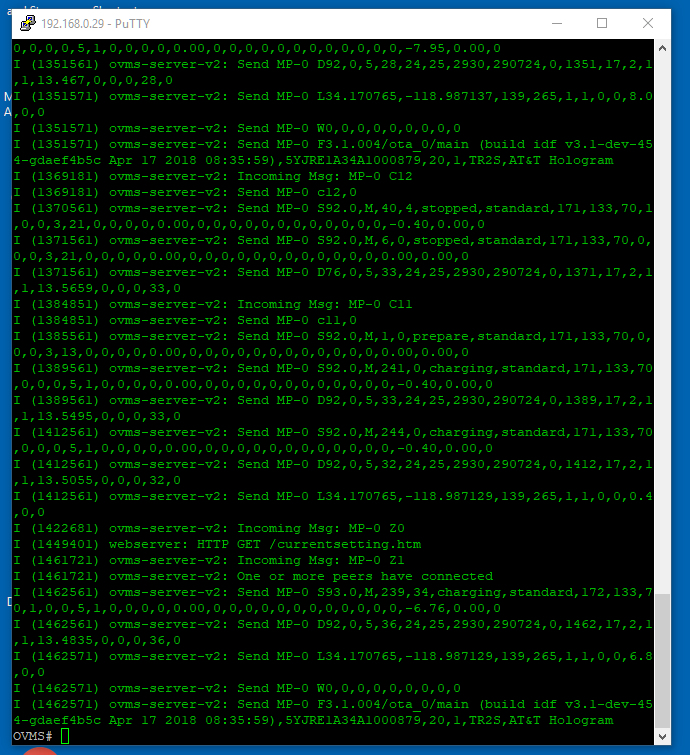
Chip, Unfortunately, I think not. The charge state in your example is ‘stopped’, not ‘timerwait’, so it won’t have an issue. I think your problem is that the iOS (maybe Android?) Apps won’t allow you to start a charge in any state other than Done/Stopped. Regards, Mark.
On 19 Apr 2018, at 6:45 PM, chip@cangmag.com wrote:
Mark,
Bizarro! Now it seems to be working. Below is screen shot from console after issuing a "charge start" command from the Mobile App.
Thanks, again, for your kind help. I'll keep an eye on it, and revert if there are any surprises.
<bb898c84.png>
On 2018-04-18 10:35 pm, Mark Webb-Johnson wrote:
Commands are:
case 10: // Set charge mode (params: 0=standard, 1=storage,3=range,4=performance) case 11: // Start charge (params unused) case 12: // Stop charge (params unused) case 15: // Set charge current (params: current in amps) case 16: // Set charge mode and current (params: mode, current) case 17: // Set charge timer mode and start time
Logs show:
2018-04-17 11:22:48.523478 +0800 info main: #155 A TRS0879 rx msg C 20,(redacted) 2018-04-17 11:23:08.803983 +0800 info main: #155 A TRS0879 rx msg C 20,(redacted) 2018-04-17 11:23:19.595020 +0800 info main: #155 A TRS0879 rx msg C 22,(redacted) 2018-04-17 11:23:38.594279 +0800 info main: #155 A TRS0879 rx msg C 24,0 2018-04-17 11:23:55.426337 +0800 info main: #155 A TRS0879 rx msg C 24,0 2018-04-18 00:29:41.828417 +0800 info main: #184 A TRS0879 rx msg C 30 2018-04-18 00:30:02.153333 +0800 info main: #184 A TRS0879 rx msg C 1 2018-04-19 03:26:09.383991 +0800 info main: #77 A TRS0879 rx msg C 10,3 2018-04-19 03:27:03.084352 +0800 info main: #77 A TRS0879 rx msg C 20,(redacted) 2018-04-19 03:29:05.690411 +0800 info main: #77 A TRS0879 rx msg C 22,(redacted) 2018-04-19 03:29:54.624372 +0800 info main: #77 A TRS0879 rx msg C 20,(redacted) 2018-04-19 05:38:45.183101 +0800 info main: #18 A TRS0879 rx msg C 10,0 2018-04-19 05:39:06.424308 +0800 info main: #18 A TRS0879 rx msg C 10,3 2018-04-19 06:56:34.692743 +0800 info main: #18 A TRS0879 rx msg C 1 2018-04-19 06:56:51.593430 +0800 info main: #18 A TRS0879 rx msg C 30 2018-04-19 06:57:24.686577 +0800 info main: #18 A TRS0879 rx msg C 3 2018-04-19 06:58:27.326118 +0800 info main: #18 A TRS0879 rx msg C 4,0,(redacted) 2018-04-19 07:00:10.233163 +0800 info main: #18 A TRS0879 rx msg C 1 2018-04-19 07:01:55.516809 +0800 info main: #18 A TRS0879 rx msg C 5 2018-04-19 07:02:30.067177 +0800 info main: #18 A TRS0879 rx msg C 10,0 2018-04-19 07:03:30.549427 +0800 info main: #18 A TRS0879 rx msg C 10,0 2018-04-19 07:04:00.213403 +0800 info main: #18 A TRS0879 rx msg C 10,3 2018-04-19 12:18:31.146166 +0800 info main: #162 A TRS0879 rx msg C 10,3 2018-04-19 12:19:45.363879 +0800 info main: #214 A TRS0879 rx msg C 10,0
I don't see any command 11 in there.
I'm pretty sure the iOS App won't send a StartCharge command unless the charge is in 'Done' or 'Stopped' state. Your car seems to be in 'timerwait' for a large portion of the time.
Can you try the command directly from the web app / command console:
OVMS# start
If that works, then it will rule out the module itself as the issue.
Regards, Mark.
On 19 Apr 2018, at 12:29 PM, chip@cangmag.com <mailto:chip@cangmag.com> wrote: Mark,
The vehicle id is TRS0879 and I tried to do the remote charge multiple times today beginning at ~12:40p PDT through to ~4:30p PDT [using the cellular modem]. This evening, beginning ~9:15p PDT, I've tried to start a charge remotely over Wifi. So far for all attempts, no joy. I've tried using both the Mobile app [iPhone], as well as the web app contained in the v3. All tries appear to timeout without starting the charge.
I'm wondering if the "Timed Charge" status of the car, is overriding the request to "Start Charge" [immediately].
Thanks for your kind help with this.
Chip
On 2018-04-18 4:47 pm, Mark Webb-Johnson wrote:
Chip,
If you can let me know the vehicle ID and the date+time (UTC would be helpful) you did this action, then I can check server logs for what was seen.
Regards, Mark
On 19 Apr 2018, at 4:31 AM, chip@cangmag.com <mailto:chip@cangmag.com> wrote: Greg,
I have the car permanently in Debug mode, and nothing came up on the VDS. I'll check the log later today when I get back to the car---I may not be able to report back until tomorrow.
Chip
On 2018-04-18 1:25 pm, Greg D. wrote:
Were there any errors / alerts reported by the car? They might be buried in the car's logs, and not displayed on the VDS unless you were in diagnostc or debug mode.
Greg
chip@cangmag.com <mailto:chip@cangmag.com> wrote: Reference: Tesla Roadster 2.0 Sport
OVMS Firmware— Server: 2.1.1-20121216 Car: 3.1.004/ota_0/main App: 1.6.6 (20150821)
I've been running the new v3 since Sunday 15 Apr without fault [updated to build 3.004 on Mon 16 Apr]. I've successfully used a variety of capabilities using the iPhone Mobile app [1.6.6].
Successfully operating: Remote door lock and unlock, remote Homelink, remotely change charging mode [Standard, Storage, Range].
Today, for the first time, and while communicating over the cellular modem, I COULD NOT remotely start a charging cycle, I then tested other remote functions [door lock and change of charging mode both worked], but when I went back to remotely start a charging cycle, again it didn't engage. On the app screen that charge "slider" slides over to the right, but just stays there and ultimately times out.
I will test this again tonight at home when I am on Wifi (which I seem to recall may have been working on Sunday, so it may be related to communicating over the cellular network).
This may also be a just a non-repeatable gremlin, but I thought I'd notify this group to get the observation out there, and see if maybe anyone else is seeing it.
Chip C.
On 2018-04-18 9:46 am, Greg D. wrote:
Michael Balzer wrote: Am 16.04.2018 um 22:16 schrieb Michael Balzer: I have seen the queue overflow problem once on the current build, so it isn't solved. But it wasn't related to any action, it happened while the module was idle.
To clarify, it's no problem if it resolves after some seconds, that may be due to a temporary mongoose lock / overload. If we can trigger that reliably by some action, that would help to track this down. Short update: I could trigger it again now multiple times on the OTA page. It seems to be happening due to the update check running over the modem line, it does not happen with modem disabled. I need to check in Wifi client mode.
Regards, Michael
Hi Michael,
Interesting... I was going to write back and say that the 3.003 to 3.004 update went very smoothly, with no queue overflows being reported, and that all was well. I don't recall if the modem was connected at the time, however.
A side note for anyone having trouble connecting to AP mode with their cell phone... I've always had a lot of trouble with timeouts and such, and finally tracked it down to a similar issue as above. If the phone has both an LTE and AP connection, the http request to 192.168.4.1 often goes out over the LTE path, and is therefore doomed. Disabling LTE "fixes" that, but of course, also disables your phone.(or at least the data part). I haven't found a good way to beat some (routing) sense into the phone otherwise.
This was with my new Google Pixel2, so it's not a matter of an old buggy device. (Ok, so it's a new buggy device...)
Also, the first time you connect to the AP, the phone blocks all communications with it until you answer the annoying notification (usually hidden in the background) that says "Hey, we can't get to the Internet with that AP. Are you sure you want to stay connected to it?", or words to that effect. Me thinks they have taken this always connected Internet meme a bit too far.
Greg
_______________________________________________ OvmsDev mailing list OvmsDev@lists.openvehicles.com <mailto:OvmsDev@lists.openvehicles.com> http://lists.openvehicles.com/mailman/listinfo/ovmsdev <http://lists.openvehicles.com/mailman/listinfo/ovmsdev>
_______________________________________________ OvmsDev mailing list OvmsDev@lists.openvehicles.com <mailto:OvmsDev@lists.openvehicles.com> http://lists.openvehicles.com/mailman/listinfo/ovmsdev <http://lists.openvehicles.com/mailman/listinfo/ovmsdev>
_______________________________________________ OvmsDev mailing list OvmsDev@lists.openvehicles.com <mailto:OvmsDev@lists.openvehicles.com> http://lists.openvehicles.com/mailman/listinfo/ovmsdev <http://lists.openvehicles.com/mailman/listinfo/ovmsdev>_______________________________________________ OvmsDev mailing list OvmsDev@lists.openvehicles.com <mailto:OvmsDev@lists.openvehicles.com> http://lists.openvehicles.com/mailman/listinfo/ovmsdev <http://lists.openvehicles.com/mailman/listinfo/ovmsdev> _______________________________________________ OvmsDev mailing list OvmsDev@lists.openvehicles.com <mailto:OvmsDev@lists.openvehicles.com> http://lists.openvehicles.com/mailman/listinfo/ovmsdev <http://lists.openvehicles.com/mailman/listinfo/ovmsdev>_______________________________________________ OvmsDev mailing list OvmsDev@lists.openvehicles.com <mailto:OvmsDev@lists.openvehicles.com> http://lists.openvehicles.com/mailman/listinfo/ovmsdev
_______________________________________________ OvmsDev mailing list OvmsDev@lists.openvehicles.com <mailto:OvmsDev@lists.openvehicles.com> http://lists.openvehicles.com/mailman/listinfo/ovmsdev <http://lists.openvehicles.com/mailman/listinfo/ovmsdev>_______________________________________________ OvmsDev mailing list OvmsDev@lists.openvehicles.com http://lists.openvehicles.com/mailman/listinfo/ovmsdev
Do you have a DNS server set on the module? I think we should probably use 8.8.8.8 and 8.8.4.4 by default. https://github.com/openvehicles/Open-Vehicle-Monitoring-System-3/issues/43 Regards, Mark.
On 19 Apr 2018, at 12:46 AM, Greg D. <gregd2350@gmail.com> wrote:
Michael Balzer wrote:
Am 16.04.2018 um 22:16 schrieb Michael Balzer:
I have seen the queue overflow problem once on the current build, so it isn't solved. But it wasn't related to any action, it happened while the module was idle.
To clarify, it's no problem if it resolves after some seconds, that may be due to a temporary mongoose lock / overload. If we can trigger that reliably by some action, that would help to track this down. Short update: I could trigger it again now multiple times on the OTA page. It seems to be happening due to the update check running over the modem line, it does not happen with modem disabled. I need to check in Wifi client mode.
Regards, Michael
Hi Michael,
Interesting... I was going to write back and say that the 3.003 to 3.004 update went very smoothly, with no queue overflows being reported, and that all was well. I don't recall if the modem was connected at the time, however.
A side note for anyone having trouble connecting to AP mode with their cell phone... I've always had a lot of trouble with timeouts and such, and finally tracked it down to a similar issue as above. If the phone has both an LTE and AP connection, the http request to 192.168.4.1 often goes out over the LTE path, and is therefore doomed. Disabling LTE "fixes" that, but of course, also disables your phone.(or at least the data part). I haven't found a good way to beat some (routing) sense into the phone otherwise.
This was with my new Google Pixel2, so it's not a matter of an old buggy device. (Ok, so it's a new buggy device...)
Also, the first time you connect to the AP, the phone blocks all communications with it until you answer the annoying notification (usually hidden in the background) that says "Hey, we can't get to the Internet with that AP. Are you sure you want to stay connected to it?", or words to that effect. Me thinks they have taken this always connected Internet meme a bit too far.
Greg
_______________________________________________ OvmsDev mailing list OvmsDev@lists.openvehicles.com http://lists.openvehicles.com/mailman/listinfo/ovmsdev
Mark, the OTA / job queue overflow issue has no connection to the DNS, I have now verified it to be modem/ppp related. It is currently 100% reproducable with "ota status" in the shell, which fails to finish when running via modem. The http response comes in at the ppp level but doesn't get through to the socket. I assume OTA over modem is currently completely broken, I haven't tried but if the download fails on the version file, chances are it will fail on the firmware file as well. Also, when running via Wifi, it skips the first body line (misinterpretation as header line?). Here's a log of both ways with debug info: [ota status] ******************* WIFI ********************** D (56183) net: Connect: DNS lookup for host 'api.openvehicles.com' D (56223) net: Connect: Server api.openvehicles.com is at 202.52.43.188 D (56493) http: Request: method 'GET' server 'api.openvehicles.com' path '/firmware/ota/v3.1/main/ovms3.ver' D (56503) http: Reading headers... D (56783) http: Now buffered 1024 bytes D (56783) http: Request: Got response HTTP/1.1 200 OK D (56783) http: Request: Got response Server: Apache D (56793) http: Request: Got response Last-Modified: Tue, 17 Apr 2018 00:38:25 GMT D (56793) http: Request: Got response Accept-Ranges: bytes D (56793) http: Request: Got response Cache-Control: max-age=1209600 D (56793) http: Request: Got response Connection: close D (56793) http: Request: Got response 3.1.004 I (56793) ota: GetStatus: BodyRead=512 I (56793) ota: GetStatus: BodyRead=53 I (56803) ota: GetStatus: BodyRead=244 → first body line "3.1.004" misinterpreted as header line? Output: Running partition: factory Boot partition: factory Firmware: 3.1.004-15-g5d2488f-dirty/factory/main (build idf v3.1-dev-454-gdaef4b5c Apr 19 2018 14:26:14) Server Available: - Tesla Model S: Add support for v.bat.soc, v.pos.speed and park/drive status metrics - Tesla Roadster: Fixes for charge/drive mode on v1.x and v2.x cars - SD CARD: Provide configurable sdcard parameters: sdcard [maxfreq.khz] = 16000 Maximum frequency (in kHz) of SD CARD bus sdcard [automount] = yes Automatically mount SD CARD on insertion - Boot: store & send crash debug info (*-OVM-DebugCrash records) - OTA: Support for configurable release tag and server URL ota [tag] = main ota [server] = api.openvehicles.com/firmware/ota - Wifi: Increase scan responsiveness (60 seconds -> 10, on first scan) - Factory reset by SD file "factoryreset.txt" or pushing SW2 for 10 seconds Note: SW2 method needs removing any SD card inserted. - Wifi: fallback to AP mode net "OVMS" password "OVMSinit" after factory reset - Miscellaneous bug fixes and enhancements ******************* MODEM ********************** D (458063) net: Connect: DNS lookup for host 'api.openvehicles.com' D (458063) net: Connect: Server api.openvehicles.com is at 202.52.43.188 V (458063) gsm-ppp: tx: 7e 21 45 00 00 2c 00 d4 00 00 ff 06 4d a0 0a 78 | ~!E..,......M..x V (458063) gsm-ppp: tx: 6c ef ca 34 2b bc d4 86 00 50 00 00 27 42 00 00 | l..4+....P..'B.. V (458063) gsm-ppp: tx: 00 00 60 02 16 70 18 5e 00 00 02 04 05 9c 8e aa | ..`..p.^........ V (458063) gsm-ppp: tx: 7e | ~ V (459033) gsm-ppp: rx: 7e 21 45 00 00 2c 00 00 40 00 2f 06 de 74 ca 34 | ~!E..,..@./..t.4 V (459043) gsm-ppp: rx: 2b bc 0a 78 6c ef 00 50 d4 86 58 30 ec da 00 00 | +..xl..P..X0.... V (459043) gsm-ppp: rx: 27 43 60 12 72 10 77 89 00 00 02 04 05 b4 5f 90 | 'C`.r.w......._. V (459053) gsm-ppp: rx: 7e | ~ V (459053) gsm-ppp: tx: 7e 21 45 00 00 28 00 d5 00 00 ff 06 4d a3 0a 78 | ~!E..(......M..x V (459053) gsm-ppp: tx: 6c ef ca 34 2b bc d4 86 00 50 00 00 27 43 58 30 | l..4+....P..'CX0 V (459053) gsm-ppp: tx: ec db 50 10 16 70 ea e6 00 00 eb bb 7e | ..P..p......~ D (459063) http: Request: method 'GET' server 'api.openvehicles.com' path '/firmware/ota/v3.1/main/ovms3.ver' V (459063) gsm-ppp: tx: 7e 21 45 00 00 8a 00 d6 00 00 ff 06 4d 40 0a 78 | ~!E.........M@.x V (459063) gsm-ppp: tx: 6c ef ca 34 2b bc d4 86 00 50 00 00 27 43 58 30 | l..4+....P..'CX0 V (459063) gsm-ppp: tx: ec db 50 18 16 70 08 0c 00 00 47 45 54 20 2f 66 | ..P..p....GET /f V (459063) gsm-ppp: tx: 69 72 6d 77 61 72 65 2f 6f 74 61 2f 76 33 2e 31 | irmware/ota/v3.1 V (459063) gsm-ppp: tx: 2f 6d 61 69 6e 2f 6f 76 6d 73 33 2e 76 65 72 20 | /main/ovms3.ver V (459063) gsm-ppp: tx: 48 54 54 50 2f 31 2e 30 0d 0a 48 6f 73 74 3a 20 | HTTP/1.0..Host: V (459063) gsm-ppp: tx: 61 70 69 2e 6f 70 65 6e 76 65 68 69 63 6c 65 73 | api.openvehicles V (459063) gsm-ppp: tx: 2e 63 6f 6d 0d 0a 55 73 65 72 2d 41 67 65 6e 74 | .com..User-Agent V (459063) gsm-ppp: tx: 3a 20 6f 76 6d 73 2f 33 0d 0a 0d 0a c6 c1 7e | : ovms/3......~ D (459073) http: Reading headers... V (461743) gsm-ppp: tx: 7e 21 45 00 00 8a 00 d7 00 00 ff 06 4d 3f 0a 78 | ~!E.........M?.x V (461743) gsm-ppp: tx: 6c ef ca 34 2b bc d4 86 00 50 00 00 27 43 58 30 | l..4+....P..'CX0 V (461743) gsm-ppp: tx: ec db 50 18 16 70 08 0c 00 00 47 45 54 20 2f 66 | ..P..p....GET /f V (461743) gsm-ppp: tx: 69 72 6d 77 61 72 65 2f 6f 74 61 2f 76 33 2e 31 | irmware/ota/v3.1 V (461743) gsm-ppp: tx: 2f 6d 61 69 6e 2f 6f 76 6d 73 33 2e 76 65 72 20 | /main/ovms3.ver V (461743) gsm-ppp: tx: 48 54 54 50 2f 31 2e 30 0d 0a 48 6f 73 74 3a 20 | HTTP/1.0..Host: V (461743) gsm-ppp: tx: 61 70 69 2e 6f 70 65 6e 76 65 68 69 63 6c 65 73 | api.openvehicles V (461743) gsm-ppp: tx: 2e 63 6f 6d 0d 0a 55 73 65 72 2d 41 67 65 6e 74 | .com..User-Agent V (461743) gsm-ppp: tx: 3a 20 6f 76 6d 73 2f 33 0d 0a 0d 0a 79 21 7e | : ovms/3....y!~ V (462093) gsm-ppp: rx: 7e 21 45 00 00 28 55 ba 40 00 2f 06 88 be ca 34 | ~!E..(U.@./....4 V (462093) gsm-ppp: rx: 2b bc 0a 78 6c ef 00 50 d4 86 58 30 ec db 00 00 | +..xl..P..X0.... V (462103) gsm-ppp: rx: 27 a5 50 10 72 10 8e e4 00 00 02 b3 7e | '.P.r.......~ V (462213) gsm-ppp: rx: 7e 21 45 00 05 1c 55 bb 40 00 2f 06 83 c9 ca 34 | ~!E...U.@./....4 V (462213) gsm-ppp: rx: 2b bc 0a 78 6c ef 00 50 d4 86 58 30 ec db 00 00 | +..xl..P..X0.... V (462223) gsm-ppp: rx: 27 a5 50 18 72 10 de ad 00 00 48 54 54 50 2f 31 | '.P.r.....HTTP/1 V (462223) gsm-ppp: rx: 2e 31 20 32 30 30 20 4f 4b 0d 0a 44 61 74 65 3a | .1 200 OK..Date: V (462233) gsm-ppp: rx: 20 54 68 75 2c 20 31 39 20 41 70 72 20 32 30 31 | Thu, 19 Apr 201 V (462233) gsm-ppp: rx: 38 20 31 35 3a 34 36 3a 31 31 20 47 4d 54 0d 0a | 8 15:46:11 GMT.. V (462243) gsm-ppp: rx: 53 65 72 76 65 72 3a 20 41 70 61 63 68 65 0d 0a | Server: Apache.. V (462243) gsm-ppp: rx: 58 2d 43 6f 6e 74 65 6e 74 2d 54 79 70 65 2d 4f | X-Content-Type-O V (462253) gsm-ppp: rx: 70 74 69 6f 6e 73 3a 20 6e 6f 73 6e 69 66 66 0d | ptions: nosniff. V (462253) gsm-ppp: rx: 0a 4c 61 73 74 2d 4d 6f 64 69 66 69 65 64 3a 20 | .Last-Modified: V (462263) gsm-ppp: rx: 54 75 65 2c 20 31 37 20 41 70 72 20 32 30 31 38 | Tue, 17 Apr 2018 V (462263) gsm-ppp: rx: 20 30 30 3a 33 38 3a 32 35 20 47 4d 54 0d 0a 45 | 00:38:25 GMT..E V (462273) gsm-ppp: rx: 54 61 67 3a 20 22 33 62 63 2d 35 36 61 30 30 38 | Tag: "3bc-56a008 V (462273) gsm-ppp: rx: 65 36 37 61 37 34 63 22 0d 0a 41 63 63 65 70 74 | e67a74c"..Accept V (462283) gsm-ppp: rx: 2d 52 61 6e 67 65 73 3a 20 62 79 74 65 73 0d 0a | -Ranges: bytes.. V (462283) gsm-ppp: rx: 43 6f 6e 74 65 6e 74 2d 4c 65 6e 67 74 68 3a 20 | Content-Length: V (462293) gsm-ppp: rx: 39 35 36 0d 0a 43 61 63 68 65 2d 43 6f 6e 74 72 | 956..Cache-Contr V (462293) gsm-ppp: rx: 6f 6c 3a 20 6d 61 78 2d 61 67 65 3d 31 32 30 39 | ol: max-age=1209 V (462303) gsm-ppp: rx: 36 30 30 0d 0a 45 78 70 69 72 65 73 3a 20 54 68 | 600..Expires: Th V (462303) gsm-ppp: rx: 75 2c 20 30 33 20 4d 61 79 20 32 30 31 38 20 31 | u, 03 May 2018 1 V (462313) gsm-ppp: rx: 35 3a 34 36 3a 31 31 20 47 4d 54 0d 0a 43 6f 6e | 5:46:11 GMT..Con V (462313) gsm-ppp: rx: 6e 65 63 74 69 6f 6e 3a 20 63 6c 6f 73 65 0d 0a | nection: close.. V (462323) gsm-ppp: rx: 0d 0a 33 2e 31 2e 30 30 34 0a 4f 54 41 20 72 65 | ..3.1.004.OTA re V (462323) gsm-ppp: rx: 6c 65 61 73 65 20 70 72 6f 76 69 64 69 6e 67 20 | lease providing V (462333) gsm-ppp: rx: 6d 69 6e 6f 72 20 69 6d 70 72 6f 76 65 6d 65 6e | minor improvemen V (462333) gsm-ppp: rx: 74 73 20 61 6e 64 20 66 69 78 65 73 2e 0a 0a 2d | ts and fixes...- V (462343) gsm-ppp: rx: 20 54 65 73 6c 61 20 4d 6f 64 65 6c 20 53 3a 20 | Tesla Model S: V (462343) gsm-ppp: rx: 41 64 64 20 73 75 70 70 6f 72 74 20 66 6f 72 20 | Add support for V (462353) gsm-ppp: rx: 76 2e 62 61 74 2e 73 6f 63 2c 20 76 2e 70 6f 73 | v.bat.soc, v.pos V (462353) gsm-ppp: rx: 2e 73 70 65 65 64 20 61 6e 64 20 70 61 72 6b 2f | .speed and park/ V (462363) gsm-ppp: rx: 64 72 69 76 65 20 73 74 61 74 75 73 20 6d 65 74 | drive status met V (462363) gsm-ppp: rx: 72 69 63 73 0a 2d 20 54 65 73 6c 61 20 52 6f 61 | rics.- Tesla Roa V (462373) gsm-ppp: rx: 64 73 74 65 72 3a 20 46 69 78 65 73 20 66 6f 72 | dster: Fixes for V (462373) gsm-ppp: rx: 20 63 68 61 72 67 65 2f 64 72 69 76 65 20 6d 6f | charge/drive mo V (462383) gsm-ppp: rx: 64 65 20 6f 6e 20 76 31 2e 78 20 61 6e 64 20 76 | de on v1.x and v V (462383) gsm-ppp: rx: 32 2e 78 20 63 61 72 73 0a 2d 20 53 44 20 43 41 | 2.x cars.- SD CA V (462393) gsm-ppp: rx: 52 44 3a 20 50 72 6f 76 69 64 65 20 63 6f 6e 66 | RD: Provide conf V (462393) gsm-ppp: rx: 69 67 75 72 61 62 6c 65 20 73 64 63 61 72 64 20 | igurable sdcard V (462403) gsm-ppp: rx: 70 61 72 61 6d 65 74 65 72 73 3a 0a 20 20 20 20 | parameters:. V (462403) gsm-ppp: rx: 73 64 63 61 72 64 20 5b 6d 61 78 66 72 65 71 2e | sdcard [maxfreq. V (462413) gsm-ppp: rx: 6b 68 7a 5d 20 3d 20 31 36 30 30 30 20 20 20 20 | khz] = 16000 V (462413) gsm-ppp: rx: 20 20 20 20 20 4d 61 78 69 6d 75 6d 20 66 72 65 | Maximum fre V (462413) gsm-ppp: rx: 71 75 65 6e 63 79 20 28 69 6e 20 6b 48 7a 29 20 | quency (in kHz) V (462413) gsm-ppp: rx: 6f 66 20 53 44 20 43 41 52 44 20 62 75 73 0a 20 | of SD CARD bus. V (462423) gsm-ppp: rx: 20 20 20 73 64 63 61 72 64 20 5b 61 75 74 6f 6d | sdcard [autom V (462423) gsm-ppp: rx: 6f 75 6e 74 5d 20 3d 20 79 65 73 20 20 20 20 20 | ount] = yes V (462433) gsm-ppp: rx: 20 20 20 20 20 20 20 20 41 75 74 6f 6d 61 74 69 | Automati V (462433) gsm-ppp: rx: 63 61 6c 6c 79 20 6d 6f 75 6e 74 20 53 44 20 43 | cally mount SD C V (462443) gsm-ppp: rx: 41 52 44 20 6f 6e 20 69 6e 73 65 72 74 69 6f 6e | ARD on insertion V (462443) gsm-ppp: rx: 0a 2d 20 42 6f 6f 74 3a 20 73 74 6f 72 65 20 26 | .- Boot: store & V (462453) gsm-ppp: rx: 20 73 65 6e 64 20 63 72 61 73 68 20 64 65 62 75 | send crash debu V (462453) gsm-ppp: rx: 67 20 69 6e 66 6f 20 28 2a 2d 4f 56 4d 2d 44 65 | g info (*-OVM-De V (462463) gsm-ppp: rx: 62 75 67 43 72 61 73 68 20 72 65 63 6f 72 64 73 | bugCrash records V (462463) gsm-ppp: rx: 29 0a 2d 20 4f 54 41 3a 20 53 75 70 70 6f 72 74 | ).- OTA: Support V (462473) gsm-ppp: rx: 20 66 6f 72 20 63 6f 6e 66 69 67 75 72 61 62 6c | for configurabl V (462473) gsm-ppp: rx: 65 20 72 65 6c 65 61 73 65 20 74 61 67 20 61 6e | e release tag an V (462483) gsm-ppp: rx: 64 20 73 65 72 76 65 72 20 55 52 4c 0a 20 20 20 | d server URL. V (462483) gsm-ppp: rx: 20 6f 74 61 20 5b 74 61 67 5d 20 3d 20 6d 61 69 | ota [tag] = mai V (462493) gsm-ppp: rx: 6e 0a 20 20 20 20 6f 74 61 20 5b 73 65 72 76 65 | n. ota [serve V (462493) gsm-ppp: rx: 72 5d 20 3d 20 61 70 69 2e 6f 70 65 6e 76 65 68 | r] = api.openveh V (462503) gsm-ppp: rx: 69 63 6c 65 73 2e 63 6f 6d 2f 66 69 72 6d 77 61 | icles.com/firmwa V (462503) gsm-ppp: rx: 72 65 2f 6f 74 61 0a 2d 20 57 69 66 69 3a 20 49 | re/ota.- Wifi: I V (462513) gsm-ppp: rx: 6e 63 72 65 61 73 65 20 73 63 61 6e 20 72 65 73 | ncrease scan res V (462513) gsm-ppp: rx: 70 6f 6e 73 69 76 65 6e 65 73 73 20 28 36 30 20 | ponsiveness (60 V (462523) gsm-ppp: rx: 7e 21 45 00 00 28 55 bc 40 00 2f 06 88 bc ca 34 | ~!E..(U.@./....4 V (462523) gsm-ppp: rx: 2b bc 0a 78 6c ef 00 50 d4 86 58 30 f1 cf 00 00 | +..xl..P..X0.... V (462533) gsm-ppp: rx: 27 a5 50 11 72 10 89 ef 00 00 36 7d 5e 7e | '.P.r.....6}^~ V (462533) gsm-ppp: tx: 7e 21 45 00 00 28 00 d8 00 00 ff 06 4d a0 0a 78 | ~!E..(......M..x V (462533) gsm-ppp: tx: 6c ef ca 34 2b bc d4 86 00 50 00 00 27 a5 58 30 | l..4+....P..'.X0 V (462533) gsm-ppp: tx: ec db 50 10 16 70 ea 84 00 00 f4 55 7e | ..P..p.....U~ E (469073) buffer: PollSocket: select result 0 = Timeout D (469073) http: Now buffered 0 bytes V (472973) gsm-ppp: rx: 7e 21 45 00 05 1c 55 bd 40 00 2f 06 83 c7 ca 34 | ~!E...U.@./....4 V (472973) gsm-ppp: rx: 2b bc 0a 78 6c ef 00 50 d4 86 58 30 ec db 00 00 | +..xl..P..X0.... V (472983) gsm-ppp: rx: 27 a5 50 18 72 10 de ad 00 00 48 54 54 50 2f 31 | '.P.r.....HTTP/1 V (472993) gsm-ppp: rx: 2e 31 20 32 30 30 20 4f 4b 0d 0a 44 61 74 65 3a | .1 200 OK..Date: V (473003) gsm-ppp: rx: 20 54 68 75 2c 20 31 39 20 41 70 72 20 32 30 31 | Thu, 19 Apr 201 V (473003) gsm-ppp: rx: 38 20 31 35 3a 34 36 3a 31 31 20 47 4d 54 0d 0a | 8 15:46:11 GMT.. V (473013) gsm-ppp: rx: 53 65 72 76 65 72 3a 20 41 70 61 63 68 65 0d 0a | Server: Apache.. V (473013) gsm-ppp: rx: 58 2d 43 6f 6e 74 65 6e 74 2d 54 79 70 65 2d 4f | X-Content-Type-O V (473023) gsm-ppp: rx: 70 74 69 6f 6e 73 3a 20 6e 6f 73 6e 69 66 66 0d | ptions: nosniff. V (473023) gsm-ppp: rx: 0a 4c 61 73 74 2d 4d 6f 64 69 66 69 65 64 3a 20 | .Last-Modified: V (473033) gsm-ppp: rx: 54 75 65 2c 20 31 37 20 41 70 72 20 32 30 31 38 | Tue, 17 Apr 2018 V (473033) gsm-ppp: rx: 20 30 30 3a 33 38 3a 32 35 20 47 4d 54 0d 0a 45 | 00:38:25 GMT..E V (473043) gsm-ppp: rx: 54 61 67 3a 20 22 33 62 63 2d 35 36 61 30 30 38 | Tag: "3bc-56a008 V (473043) gsm-ppp: rx: 65 36 37 61 37 34 63 22 0d 0a 41 63 63 65 70 74 | e67a74c"..Accept V (473053) gsm-ppp: rx: 2d 52 61 6e 67 65 73 3a 20 62 79 74 65 73 0d 0a | -Ranges: bytes.. V (473053) gsm-ppp: rx: 43 6f 6e 74 65 6e 74 2d 4c 65 6e 67 74 68 3a 20 | Content-Length: V (473063) gsm-ppp: rx: 39 35 36 0d 0a 43 61 63 68 65 2d 43 6f 6e 74 72 | 956..Cache-Contr V (473063) gsm-ppp: rx: 6f 6c 3a 20 6d 61 78 2d 61 67 65 3d 31 32 30 39 | ol: max-age=1209 V (473073) gsm-ppp: rx: 36 30 30 0d 0a 45 78 70 69 72 65 73 3a 20 54 68 | 600..Expires: Th V (473073) gsm-ppp: rx: 75 2c 20 30 33 20 4d 61 79 20 32 30 31 38 20 31 | u, 03 May 2018 1 V (473083) gsm-ppp: rx: 35 3a 34 36 3a 31 31 20 47 4d 54 0d 0a 43 6f 6e | 5:46:11 GMT..Con V (473083) gsm-ppp: rx: 6e 65 63 74 69 6f 6e 3a 20 63 6c 6f 73 65 0d 0a | nection: close.. V (473093) gsm-ppp: rx: 0d 0a 33 2e 31 2e 30 30 34 0a 4f 54 41 20 72 65 | ..3.1.004.OTA re V (473093) gsm-ppp: rx: 6c 65 61 73 65 20 70 72 6f 76 69 64 69 6e 67 20 | lease providing V (473103) gsm-ppp: rx: 6d 69 6e 6f 72 20 69 6d 70 72 6f 76 65 6d 65 6e | minor improvemen V (473103) gsm-ppp: rx: 74 73 20 61 6e 64 20 66 69 78 65 73 2e 0a 0a 2d | ts and fixes...- V (473113) gsm-ppp: rx: 20 54 65 73 6c 61 20 4d 6f 64 65 6c 20 53 3a 20 | Tesla Model S: V (473113) gsm-ppp: rx: 41 64 64 20 73 75 70 70 6f 72 74 20 66 6f 72 20 | Add support for V (473123) gsm-ppp: rx: 76 2e 62 61 74 2e 73 6f 63 2c 20 76 2e 70 6f 73 | v.bat.soc, v.pos V (473123) gsm-ppp: rx: 2e 73 70 65 65 64 20 61 6e 64 20 70 61 72 6b 2f | .speed and park/ V (473133) gsm-ppp: rx: 64 72 69 76 65 20 73 74 61 74 75 73 20 6d 65 74 | drive status met V (473133) gsm-ppp: rx: 72 69 63 73 0a 2d 20 54 65 73 6c 61 20 52 6f 61 | rics.- Tesla Roa V (473143) gsm-ppp: rx: 64 73 74 65 72 3a 20 46 69 78 65 73 20 66 6f 72 | dster: Fixes for V (473143) gsm-ppp: rx: 20 63 68 61 72 67 65 2f 64 72 69 76 65 20 6d 6f | charge/drive mo V (473153) gsm-ppp: rx: 64 65 20 6f 6e 20 76 31 2e 78 20 61 6e 64 20 76 | de on v1.x and v V (473153) gsm-ppp: rx: 32 2e 78 20 63 61 72 73 0a 2d 20 53 44 20 43 41 | 2.x cars.- SD CA V (473163) gsm-ppp: rx: 52 44 3a 20 50 72 6f 76 69 64 65 20 63 6f 6e 66 | RD: Provide conf V (473163) gsm-ppp: rx: 69 67 75 72 61 62 6c 65 20 73 64 63 61 72 64 20 | igurable sdcard V (473163) gsm-ppp: rx: 70 61 72 61 6d 65 74 65 72 73 3a 0a 20 20 20 20 | parameters:. V (473163) gsm-ppp: rx: 73 64 63 61 72 64 20 5b 6d 61 78 66 72 65 71 2e | sdcard [maxfreq. V (473173) gsm-ppp: rx: 6b 68 7a 5d 20 3d 20 31 36 30 30 30 20 20 20 20 | khz] = 16000 V (473173) gsm-ppp: rx: 20 20 20 20 20 4d 61 78 69 6d 75 6d 20 66 72 65 | Maximum fre V (473183) gsm-ppp: rx: 71 75 65 6e 63 79 20 28 69 6e 20 6b 48 7a 29 20 | quency (in kHz) V (473183) gsm-ppp: rx: 6f 66 20 53 44 20 43 41 52 44 20 62 75 73 0a 20 | of SD CARD bus. V (473193) gsm-ppp: rx: 20 20 20 73 64 63 61 72 64 20 5b 61 75 74 6f 6d | sdcard [autom V (473193) gsm-ppp: rx: 6f 75 6e 74 5d 20 3d 20 79 65 73 20 20 20 20 20 | ount] = yes V (473203) gsm-ppp: rx: 20 20 20 20 20 20 20 20 41 75 74 6f 6d 61 74 69 | Automati V (473203) gsm-ppp: rx: 63 61 6c 6c 79 20 6d 6f 75 6e 74 20 53 44 20 43 | cally mount SD C V (473213) gsm-ppp: rx: 41 52 44 20 6f 6e 20 69 6e 73 65 72 74 69 6f 6e | ARD on insertion V (473213) gsm-ppp: rx: 0a 2d 20 42 6f 6f 74 3a 20 73 74 6f 72 65 20 26 | .- Boot: store & V (473223) gsm-ppp: rx: 20 73 65 6e 64 20 63 72 61 73 68 20 64 65 62 75 | send crash debu V (473223) gsm-ppp: rx: 67 20 69 6e 66 6f 20 28 2a 2d 4f 56 4d 2d 44 65 | g info (*-OVM-De V (473233) gsm-ppp: rx: 62 75 67 43 72 61 73 68 20 72 65 63 6f 72 64 73 | bugCrash records V (473233) gsm-ppp: rx: 29 0a 2d 20 4f 54 41 3a 20 53 75 70 70 6f 72 74 | ).- OTA: Support V (473243) gsm-ppp: rx: 20 66 6f 72 20 63 6f 6e 66 69 67 75 72 61 62 6c | for configurabl V (473243) gsm-ppp: rx: 65 20 72 65 6c 65 61 73 65 20 74 61 67 20 61 6e | e release tag an V (473253) gsm-ppp: rx: 64 20 73 65 72 76 65 72 20 55 52 4c 0a 20 20 20 | d server URL. V (473253) gsm-ppp: rx: 20 6f 74 61 20 5b 74 61 67 5d 20 3d 20 6d 61 69 | ota [tag] = mai V (473263) gsm-ppp: rx: 6e 0a 20 20 20 20 6f 74 61 20 5b 73 65 72 76 65 | n. ota [serve V (473263) gsm-ppp: rx: 72 5d 20 3d 20 61 70 69 2e 6f 70 65 6e 76 65 68 | r] = api.openveh V (473273) gsm-ppp: rx: 69 63 6c 65 73 2e 63 6f 6d 2f 66 69 72 6d 77 61 | icles.com/firmwa V (473273) gsm-ppp: rx: 72 65 2f 6f 74 61 0a 2d 20 57 69 66 69 3a 20 49 | re/ota.- Wifi: I V (473283) gsm-ppp: rx: 6e 63 72 65 61 73 65 20 73 63 61 6e 20 72 65 73 | ncrease scan res V (473283) gsm-ppp: rx: 70 6f 6e 73 69 76 65 6e 65 73 73 20 28 36 30 20 | ponsiveness (60 E (479073) buffer: PollSocket: select result 0 = Timeout D (479073) http: Now buffered 0 bytes V (482743) gsm-ppp: rx: 7e 21 45 00 00 28 ad 53 40 00 2e 06 cf 1c 0e 98 | ~!E..(.S@....... V (482743) gsm-ppp: rx: 4a 61 0a 78 6c ef 06 ae a2 10 2d 68 6c f6 97 a6 | Ja.xl.....-hl... V (482753) gsm-ppp: rx: 77 8b 50 11 00 10 8d 14 00 00 c4 a3 7e | w.P.........~ V (482753) gsm-ppp: tx: 7e 21 45 00 00 28 00 d9 00 00 ff 06 ea 96 0a 78 | ~!E..(.........x V (482753) gsm-ppp: tx: 6c ef 0e 98 4a 61 a2 10 06 ae 97 a6 77 8b 2d 68 | l...Ja......w.-h V (482753) gsm-ppp: tx: 6c f7 50 14 16 70 76 b0 00 00 9f ee 7e | l.P..pv.....~ V (482773) gsm-ppp: rx: 7e 21 45 00 00 28 ad 54 40 00 2e 06 cf 1b 0e 98 | ~!E..(.T@....... V (482773) gsm-ppp: rx: 4a 61 0a 78 6c ef 06 ae a2 10 2d 68 6c f6 97 a6 | Ja.xl.....-hl... V (482773) gsm-ppp: rx: 77 8b 50 11 00 10 8d 14 00 00 de 7f 7e | w.P.........~ V (482773) gsm-ppp: tx: 7e 21 45 00 00 28 00 da 00 00 ff 06 ea 95 0a 78 | ~!E..(.........x V (482773) gsm-ppp: tx: 6c ef 0e 98 4a 61 a2 10 06 ae 97 a6 77 8b 2d 68 | l...Ja......w.-h V (482773) gsm-ppp: tx: 6c f7 50 14 16 70 76 b0 00 00 96 fa 7e | l.P..pv.....~ V (483163) gsm-ppp: rx: 7e 21 45 00 00 28 ad 53 40 00 2e 06 cf 1c 0e 98 | ~!E..(.S@....... V (483163) gsm-ppp: rx: 4a 61 0a 78 6c ef 06 ae a2 10 2d 68 6c f6 97 a6 | Ja.xl.....-hl... V (483173) gsm-ppp: rx: 77 8b 50 11 00 10 8d 14 00 00 c4 a3 7e | w.P.........~ V (483173) gsm-ppp: tx: 7e 21 45 00 00 28 00 db 00 00 ff 06 ea 94 0a 78 | ~!E..(.........x V (483173) gsm-ppp: tx: 6c ef 0e 98 4a 61 a2 10 06 ae 97 a6 77 8b 2d 68 | l...Ja......w.-h V (483173) gsm-ppp: tx: 6c f7 50 14 16 70 76 b0 00 00 9e 0e 7e | l.P..pv.....~ V (483183) gsm-ppp: rx: 7e 21 45 00 00 28 ad 54 40 00 2e 06 cf 1b 0e 98 | ~!E..(.T@....... V (483183) gsm-ppp: rx: 4a 61 0a 78 6c ef 06 ae a2 10 2d 68 6c f6 97 a6 | Ja.xl.....-hl... V (483193) gsm-ppp: rx: 77 8b 50 11 00 10 8d 14 00 00 de 7f 7e | w.P.........~ V (483193) gsm-ppp: tx: 7e 21 45 00 00 28 00 dc 00 00 ff 06 ea 93 0a 78 | ~!E..(.........x V (483193) gsm-ppp: tx: 6c ef 0e 98 4a 61 a2 10 06 ae 97 a6 77 8b 2d 68 | l...Ja......w.-h V (483193) gsm-ppp: tx: 6c f7 50 14 16 70 76 b0 00 00 84 d2 7e | l.P..pv.....~ E (489073) buffer: PollSocket: select result 0 = Timeout D (489073) http: Now buffered 0 bytes V (491443) gsm-ppp: rx: 7e 21 45 00 05 1c 55 be 40 00 2f 06 83 c6 ca 34 | ~!E...U.@./....4 V (491443) gsm-ppp: rx: 2b bc 0a 78 6c ef 00 50 d4 86 58 30 ec db 00 00 | +..xl..P..X0.... V (491453) gsm-ppp: rx: 27 a5 50 18 72 10 de ad 00 00 48 54 54 50 2f 31 | '.P.r.....HTTP/1 V (491453) gsm-ppp: rx: 2e 31 20 32 30 30 20 4f 4b 0d 0a 44 61 74 65 3a | .1 200 OK..Date: V (491463) gsm-ppp: rx: 20 54 68 75 2c 20 31 39 20 41 70 72 20 32 30 31 | Thu, 19 Apr 201 V (491463) gsm-ppp: rx: 38 20 31 35 3a 34 36 3a 31 31 20 47 4d 54 0d 0a | 8 15:46:11 GMT.. V (491473) gsm-ppp: rx: 53 65 72 76 65 72 3a 20 41 70 61 63 68 65 0d 0a | Server: Apache.. V (491473) gsm-ppp: rx: 58 2d 43 6f 6e 74 65 6e 74 2d 54 79 70 65 2d 4f | X-Content-Type-O V (491483) gsm-ppp: rx: 70 74 69 6f 6e 73 3a 20 6e 6f 73 6e 69 66 66 0d | ptions: nosniff. V (491483) gsm-ppp: rx: 0a 4c 61 73 74 2d 4d 6f 64 69 66 69 65 64 3a 20 | .Last-Modified: V (491493) gsm-ppp: rx: 54 75 65 2c 20 31 37 20 41 70 72 20 32 30 31 38 | Tue, 17 Apr 2018 V (491493) gsm-ppp: rx: 20 30 30 3a 33 38 3a 32 35 20 47 4d 54 0d 0a 45 | 00:38:25 GMT..E V (491503) gsm-ppp: rx: 54 61 67 3a 20 22 33 62 63 2d 35 36 61 30 30 38 | Tag: "3bc-56a008 V (491503) gsm-ppp: rx: 65 36 37 61 37 34 63 22 0d 0a 41 63 63 65 70 74 | e67a74c"..Accept V (491513) gsm-ppp: rx: 2d 52 61 6e 67 65 73 3a 20 62 79 74 65 73 0d 0a | -Ranges: bytes.. V (491513) gsm-ppp: rx: 43 6f 6e 74 65 6e 74 2d 4c 65 6e 67 74 68 3a 20 | Content-Length: V (491523) gsm-ppp: rx: 39 35 36 0d 0a 43 61 63 68 65 2d 43 6f 6e 74 72 | 956..Cache-Contr V (491523) gsm-ppp: rx: 6f 6c 3a 20 6d 61 78 2d 61 67 65 3d 31 32 30 39 | ol: max-age=1209 V (491533) gsm-ppp: rx: 36 30 30 0d 0a 45 78 70 69 72 65 73 3a 20 54 68 | 600..Expires: Th V (491533) gsm-ppp: rx: 75 2c 20 30 33 20 4d 61 79 20 32 30 31 38 20 31 | u, 03 May 2018 1 V (491543) gsm-ppp: rx: 35 3a 34 36 3a 31 31 20 47 4d 54 0d 0a 43 6f 6e | 5:46:11 GMT..Con V (491543) gsm-ppp: rx: 6e 65 63 74 69 6f 6e 3a 20 63 6c 6f 73 65 0d 0a | nection: close.. V (491553) gsm-ppp: rx: 0d 0a 33 2e 31 2e 30 30 34 0a 4f 54 41 20 72 65 | ..3.1.004.OTA re V (491553) gsm-ppp: rx: 6c 65 61 73 65 20 70 72 6f 76 69 64 69 6e 67 20 | lease providing V (491563) gsm-ppp: rx: 6d 69 6e 6f 72 20 69 6d 70 72 6f 76 65 6d 65 6e | minor improvemen V (491563) gsm-ppp: rx: 74 73 20 61 6e 64 20 66 69 78 65 73 2e 0a 0a 2d | ts and fixes...- V (491573) gsm-ppp: rx: 20 54 65 73 6c 61 20 4d 6f 64 65 6c 20 53 3a 20 | Tesla Model S: V (491573) gsm-ppp: rx: 41 64 64 20 73 75 70 70 6f 72 74 20 66 6f 72 20 | Add support for V (491573) gsm-ppp: rx: 76 2e 62 61 74 2e 73 6f 63 2c 20 76 2e 70 6f 73 | v.bat.soc, v.pos V (491573) gsm-ppp: rx: 2e 73 70 65 65 64 20 61 6e 64 20 70 61 72 6b 2f | .speed and park/ V (491583) gsm-ppp: rx: 64 72 69 76 65 20 73 74 61 74 75 73 20 6d 65 74 | drive status met V (491583) gsm-ppp: rx: 72 69 63 73 0a 2d 20 54 65 73 6c 61 20 52 6f 61 | rics.- Tesla Roa V (491593) gsm-ppp: rx: 64 73 74 65 72 3a 20 46 69 78 65 73 20 66 6f 72 | dster: Fixes for V (491593) gsm-ppp: rx: 20 63 68 61 72 67 65 2f 64 72 69 76 65 20 6d 6f | charge/drive mo V (491603) gsm-ppp: rx: 64 65 20 6f 6e 20 76 31 2e 78 20 61 6e 64 20 76 | de on v1.x and v V (491603) gsm-ppp: rx: 32 2e 78 20 63 61 72 73 0a 2d 20 53 44 20 43 41 | 2.x cars.- SD CA V (491603) gsm-ppp: rx: 52 44 3a 20 50 72 6f 76 69 64 65 20 63 6f 6e 66 | RD: Provide conf V (491603) gsm-ppp: rx: 69 67 75 72 61 62 6c 65 20 73 64 63 61 72 64 20 | igurable sdcard V (491613) gsm-ppp: rx: 70 61 72 61 6d 65 74 65 72 73 3a 0a 20 20 20 20 | parameters:. V (491613) gsm-ppp: rx: 73 64 63 61 72 64 20 5b 6d 61 78 66 72 65 71 2e | sdcard [maxfreq. V (491623) gsm-ppp: rx: 6b 68 7a 5d 20 3d 20 31 36 30 30 30 20 20 20 20 | khz] = 16000 V (491623) gsm-ppp: rx: 20 20 20 20 20 4d 61 78 69 6d 75 6d 20 66 72 65 | Maximum fre V (491633) gsm-ppp: rx: 71 75 65 6e 63 79 20 28 69 6e 20 6b 48 7a 29 20 | quency (in kHz) V (491633) gsm-ppp: rx: 6f 66 20 53 44 20 43 41 52 44 20 62 75 73 0a 20 | of SD CARD bus. V (491643) gsm-ppp: rx: 20 20 20 73 64 63 61 72 64 20 5b 61 75 74 6f 6d | sdcard [autom V (491643) gsm-ppp: rx: 6f 75 6e 74 5d 20 3d 20 79 65 73 20 20 20 20 20 | ount] = yes V (491653) gsm-ppp: rx: 20 20 20 20 20 20 20 20 41 75 74 6f 6d 61 74 69 | Automati V (491653) gsm-ppp: rx: 63 61 6c 6c 79 20 6d 6f 75 6e 74 20 53 44 20 43 | cally mount SD C V (491663) gsm-ppp: rx: 41 52 44 20 6f 6e 20 69 6e 73 65 72 74 69 6f 6e | ARD on insertion V (491663) gsm-ppp: rx: 0a 2d 20 42 6f 6f 74 3a 20 73 74 6f 72 65 20 26 | .- Boot: store & V (491673) gsm-ppp: rx: 20 73 65 6e 64 20 63 72 61 73 68 20 64 65 62 75 | send crash debu V (491673) gsm-ppp: rx: 67 20 69 6e 66 6f 20 28 2a 2d 4f 56 4d 2d 44 65 | g info (*-OVM-De V (491683) gsm-ppp: rx: 62 75 67 43 72 61 73 68 20 72 65 63 6f 72 64 73 | bugCrash records V (491683) gsm-ppp: rx: 29 0a 2d 20 4f 54 41 3a 20 53 75 70 70 6f 72 74 | ).- OTA: Support V (491693) gsm-ppp: rx: 20 66 6f 72 20 63 6f 6e 66 69 67 75 72 61 62 6c | for configurabl V (491693) gsm-ppp: rx: 65 20 72 65 6c 65 61 73 65 20 74 61 67 20 61 6e | e release tag an V (491703) gsm-ppp: rx: 64 20 73 65 72 76 65 72 20 55 52 4c 0a 20 20 20 | d server URL. V (491703) gsm-ppp: rx: 20 6f 74 61 20 5b 74 61 67 5d 20 3d 20 6d 61 69 | ota [tag] = mai V (491713) gsm-ppp: rx: 6e 0a 20 20 20 20 6f 74 61 20 5b 73 65 72 76 65 | n. ota [serve V (491713) gsm-ppp: rx: 72 5d 20 3d 20 61 70 69 2e 6f 70 65 6e 76 65 68 | r] = api.openveh V (491723) gsm-ppp: rx: 69 63 6c 65 73 2e 63 6f 6d 2f 66 69 72 6d 77 61 | icles.com/firmwa V (491723) gsm-ppp: rx: 72 65 2f 6f 74 61 0a 2d 20 57 69 66 69 3a 20 49 | re/ota.- Wifi: I V (491733) gsm-ppp: rx: 6e 63 72 65 61 73 65 20 73 63 61 6e 20 72 65 73 | ncrease scan res V (491733) gsm-ppp: rx: 70 6f 6e 73 69 76 65 6e 65 73 73 20 28 36 30 20 | ponsiveness (60 E (499073) buffer: PollSocket: select result 0 = Timeout D (499073) http: Now buffered 0 bytes E (509073) buffer: PollSocket: select result 0 = Timeout D (509073) http: Now buffered 0 bytes E (519073) buffer: PollSocket: select result 0 = Timeout D (519073) http: Now buffered 0 bytes … and so on, command doesn't finish Regards, Michael Am 19.04.2018 um 01:50 schrieb Mark Webb-Johnson:
Do you have a DNS server set on the module?
I think we should probably use 8.8.8.8 and 8.8.4.4 by default.
https://github.com/openvehicles/Open-Vehicle-Monitoring-System-3/issues/43
Regards, Mark.
On 19 Apr 2018, at 12:46 AM, Greg D. <gregd2350@gmail.com <mailto:gregd2350@gmail.com>> wrote:
Michael Balzer wrote:
Am 16.04.2018 um 22:16 schrieb Michael Balzer:
I have seen the queue overflow problem once on the current build, so it isn't solved. But it wasn't related to any action, it happened while the module was idle.
To clarify, it's no problem if it resolves after some seconds, that may be due to a temporary mongoose lock / overload. If we can trigger that reliably by some action, that would help to track this down. Short update: I could trigger it again now multiple times on the OTA page. It seems to be happening due to the update check running over the modem line, it does not happen with modem disabled. I need to check in Wifi client mode.
Regards, Michael
Hi Michael,
Interesting... I was going to write back and say that the 3.003 to 3.004 update went very smoothly, with no queue overflows being reported, and that all was well. I don't recall if the modem was connected at the time, however.
A side note for anyone having trouble connecting to AP mode with their cell phone... I've always had a lot of trouble with timeouts and such, and finally tracked it down to a similar issue as above. If the phone has both an LTE and AP connection, the http request to 192.168.4.1 often goes out over the LTE path, and is therefore doomed. Disabling LTE "fixes" that, but of course, also disables your phone.(or at least the data part). I haven't found a good way to beat some (routing) sense into the phone otherwise.
This was with my new Google Pixel2, so it's not a matter of an old buggy device. (Ok, so it's a new buggy device...)
Also, the first time you connect to the AP, the phone /blocks/ all communications with it until you answer the annoying notification (usually hidden in the background) that says "Hey, we can't get to the Internet with that AP. Are you sure you want to stay connected to it?", or words to that effect. Me thinks they have taken this always connected Internet meme a bit too far.
Greg
_______________________________________________ OvmsDev mailing list OvmsDev@lists.openvehicles.com <mailto:OvmsDev@lists.openvehicles.com> http://lists.openvehicles.com/mailman/listinfo/ovmsdev
_______________________________________________ OvmsDev mailing list OvmsDev@lists.openvehicles.com http://lists.openvehicles.com/mailman/listinfo/ovmsdev
-- Michael Balzer * Helkenberger Weg 9 * D-58256 Ennepetal Fon 02333 / 833 5735 * Handy 0176 / 206 989 26
participants (5)
-
 Chip Cangialose
 -
chip@cangmag.com
-
 Greg D.
 -
 Mark Webb-Johnson
 -
 Michael Balzer