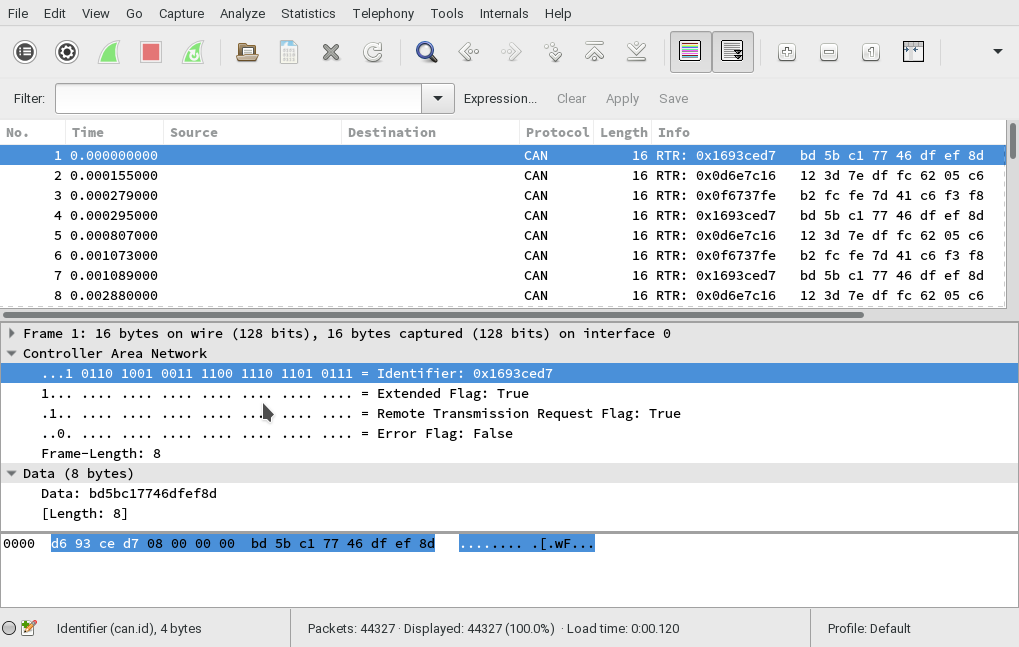

On 06/02/17 12:16, Greg D. wrote:
I currently have a Raspberry Pi with a PiCAN-2 board on top, lashed to either an OBDwiz module or a T-Mobile "SyncUp Drive" Wi-Fi hotspot. Wireshark running on the Pi captures the initial messages that the modules transmit (500kbps assumed). I need to find a table of what these messages translate to, so I can create a small program to provide suitable answers.
I'm using an slcan device with socket can on linux and I've found that wireshark and tcpdump record the CAN frame id with the wrong endianess. Does the output of candump agree with what you are seeing in wireshark? I wrote some simple tools for manipulating pcaps. https://carrott.org/git/leaf-can-dissector.git/blob/HEAD:/pcap-canid-endian-... fixes the endian bug I'm seeing (only tested on 11 bit identifiers). https://carrott.org/git/leaf-can-dissector.git/blob/HEAD:/pcap-histogram.py promises a histogram but disappoints by giving a table. Also it filters by a hard coded nissan leaf frame id. https://carrott.org/git/leaf-can-dissector.git/blob/HEAD:/pcap-state.py prints the last frame seen for each frame id, this is good for looking at two captures and finding which frames are new https://carrott.org/git/leaf-can-dissector.git/blob/HEAD:/pcap-to-canplayer-... converts a pcap into the semi-binary format that canplayer uses. Useful to play back a pcap file. Most of these tools operate on stdin and stdout. None of them are documented, sorry. You might capture without your obd module plugged in, and then capture again with it plugged in and look at what new messages are present by diffing the output of pcap-state.py on each capture. I'm also working on a MitM for exploring how the Nissan Leaf car authenticates it's battery. I'm using can4python and I really like the kayak file format to describe the frames (much easier to understand than the wireshark dissector I made), see https://carrott.org/git/leaf-can-utils.git Unfortunately Can4python doesn't support remote request frames, but maybe your RTR frames are actually regular frames misinterpreted due to the endianess bug?

Hi Tom, Fixed! Thanks for your reply. Did some more digging into the packets, and got even more convinced that what I'm seeing was not real. That gave me a clue to look elsewhere, and in doing so, discovered that the CAN bus on the bench wasn't properly terminated (a missing jumper). Once I fixed that, I started seeing packets with an ID of 0x7DF, which IS listed in the documentation. YEA! Data portion is 02 01 00 00 00 00 00 00, which I decode as length = 2 bytes, 1 = "Show Current Data", which makes perfect sense. I guess the length includes the itself. I also see packets that I don't see info on, ID = 0x18DB33F1 and others, so there may still be work to do, but at least I now have some sense of sanity. They all have the same data (02 01), so apparently a different version (manufacturer?) of the same request. {shrug} Going to ignore them for now. Next step is to craft some sort of reply to the data request, and see what happens. BTW, Wireshark and candump do agree on the Identity portion of the CAN traffic, so it appears that I'm was not seeing an endian issue. Great try, however; never thought of that. Add terminators to your mental troubleshooting list. Thanks again for the help. Progress! Greg. Tom Parker wrote:
On 06/02/17 12:16, Greg D. wrote:
I currently have a Raspberry Pi with a PiCAN-2 board on top, lashed to either an OBDwiz module or a T-Mobile "SyncUp Drive" Wi-Fi hotspot. Wireshark running on the Pi captures the initial messages that the modules transmit (500kbps assumed). I need to find a table of what these messages translate to, so I can create a small program to provide suitable answers.
I'm using an slcan device with socket can on linux and I've found that wireshark and tcpdump record the CAN frame id with the wrong endianess. Does the output of candump agree with what you are seeing in wireshark?
I wrote some simple tools for manipulating pcaps.
https://carrott.org/git/leaf-can-dissector.git/blob/HEAD:/pcap-canid-endian-... fixes the endian bug I'm seeing (only tested on 11 bit identifiers). https://carrott.org/git/leaf-can-dissector.git/blob/HEAD:/pcap-histogram.py promises a histogram but disappoints by giving a table. Also it filters by a hard coded nissan leaf frame id. https://carrott.org/git/leaf-can-dissector.git/blob/HEAD:/pcap-state.py prints the last frame seen for each frame id, this is good for looking at two captures and finding which frames are new https://carrott.org/git/leaf-can-dissector.git/blob/HEAD:/pcap-to-canplayer-... converts a pcap into the semi-binary format that canplayer uses. Useful to play back a pcap file.
Most of these tools operate on stdin and stdout. None of them are documented, sorry.
You might capture without your obd module plugged in, and then capture again with it plugged in and look at what new messages are present by diffing the output of pcap-state.py on each capture.
I'm also working on a MitM for exploring how the Nissan Leaf car authenticates it's battery. I'm using can4python and I really like the kayak file format to describe the frames (much easier to understand than the wireshark dissector I made), see https://carrott.org/git/leaf-can-utils.git
Unfortunately Can4python doesn't support remote request frames, but maybe your RTR frames are actually regular frames misinterpreted due to the endianess bug? _______________________________________________ OvmsDev mailing list OvmsDev@lists.teslaclub.hk http://lists.teslaclub.hk/mailman/listinfo/ovmsdev

I might be on the wrong wavelength, but I don't understand how you expect Wireshark or tcpdump to know the endianness of the data in the packets. My understanding is that these tools work with network traffic which is, by definition, transferred in network order. Network order is big endian. However, that only refers to multibyte values that are part of the networking headers, not the content of the data itself. If you send little-endian data over the network, then Wireshark and tcpdump will show the data in little-endian order. That's because the packet contents can be a byte stream, and the network API have no way of knowing where the multibyte boundaries are so that the byte order could be changed. In other words, a CAN bus is a serial byte stream. If that data is sent over TCP/IP, there's no defined order for the bytes other than the order that they appear on the CAN bus itself. Wireshark and tcpdump cannot swap bytes in words without a definition of the word boundaries. The TCP/IP link should be transparent with regard to the order of the bytes in any byte stream transferred over the ethernet. It looks like CAN is a big-endian bit stream, but the various word lengths are not always multiples of 8 bits. There're 11-bit, 4-bit, 8-bit, and 15-bit fields. There might be plugins for Wireshark that could decode these packets, but I'm not familiar with any. Brian On Feb 6, 2017, at 3:16 AM, Tom Parker <tom@carrott.org> wrote:
I'm using an slcan device with socket can on linux and I've found that wireshark and tcpdump record the CAN frame id with the wrong endianess. Does the output of candump agree with what you are seeing in wireshark?
I wrote some simple tools for manipulating pcaps.
https://carrott.org/git/leaf-can-dissector.git/blob/HEAD:/pcap-canid-endian-... fixes the endian bug I'm seeing (only tested on 11 bit identifiers). https://carrott.org/git/leaf-can-dissector.git/blob/HEAD:/pcap-histogram.py promises a histogram but disappoints by giving a table. Also it filters by a hard coded nissan leaf frame id. https://carrott.org/git/leaf-can-dissector.git/blob/HEAD:/pcap-state.py prints the last frame seen for each frame id, this is good for looking at two captures and finding which frames are new https://carrott.org/git/leaf-can-dissector.git/blob/HEAD:/pcap-to-canplayer-... converts a pcap into the semi-binary format that canplayer uses. Useful to play back a pcap file.
Most of these tools operate on stdin and stdout. None of them are documented, sorry. […] Unfortunately Can4python doesn't support remote request frames, but maybe your RTR frames are actually regular frames misinterpreted due to the endianess bug?
On 08/02/17 19:28, Greg D. wrote:
I've looked, and could not find any Wireshark dissectors for CAN messages. I also found one reference saying that there weren't any...
The version of wireshark shipped with Ubuntu version of Wireshark natively decode the headers of CAN messages. Your screenshot shows that yours does too. I wrote a dissector for the Nissan Leaf CAN bus. I'm fairly sure I'm doing it wrong (I can't search for values within packets for example) but it's good enough to be able to scroll through captures and see the decoded data. Have a look https://carrott.org/git/leaf-can-dissector.git/blob/HEAD:/leaf.lua
Hi Tom, Ok, yes, wireshark does the decode of the CAN header, and that appears to be functioning properly. (candump and wireshark do agree on the results, by the way.) What I was after was a full decode, including what the IDs represent, the PIDs being reported, and so forth. As you demonstrate, this is a non-trivial task, given the vehicle dependency, but I was hoping the standard stuff would be shown. I did find a Edit / Preferences / Protocols item on Wireshark for the CAN protocol to select the "next level dissector". Choices are Raw, CANopen, DeviceNet, and J1939. Default is Raw, with no further dissection. I was hopeful that J1939 would yield results, but it seems a bit confused. CANopen and DeviceNet are for factory stuff, and don't apply. J1979 is apparently what I need, and that (of course) is not one of the choices. Digging further... Will look at your dissector further, thanks. I'm not quite there yet, but am making slow progress. Thanks for the help, Greg Tom Parker wrote:
On 08/02/17 19:28, Greg D. wrote:
I've looked, and could not find any Wireshark dissectors for CAN messages. I also found one reference saying that there weren't any...
The version of wireshark shipped with Ubuntu version of Wireshark natively decode the headers of CAN messages. Your screenshot shows that yours does too.
I wrote a dissector for the Nissan Leaf CAN bus. I'm fairly sure I'm doing it wrong (I can't search for values within packets for example) but it's good enough to be able to scroll through captures and see the decoded data. Have a look https://carrott.org/git/leaf-can-dissector.git/blob/HEAD:/leaf.lua
_______________________________________________ OvmsDev mailing list OvmsDev@lists.teslaclub.hk http://lists.teslaclub.hk/mailman/listinfo/ovmsdev
On 08/02/17 19:05, HONDA S-2000 wrote:
I might be on the wrong wavelength, but I don't understand how you expect Wireshark or tcpdump to know the endianness of the data in the packets.
Maybe I misdiagnosed the problem. The problem is that Wireshark decodes the CAN bus header using one endianness and tcpdump records it using the other. I'm not sure which is more correct. The Linux SocketCAN system exposes the CAN bus to user space as a datagram socket. This way you can use tcpdump and Wireshark. The CAN bus frames are not passed over TCP. Here is a frame with identifier 0x1d4 captured from my leaf with tcpdump and displayed in wireshark. The first line is as captured, the second is after byte swapping the header. 0000 d4 01 00 00 08 ff ff ff a0 6d 00 00 42 06 40 60 .........m..B.@` 0000 00 00 01 d4 08 ff ff ff a0 6d 00 00 42 06 40 60 .........m..B.@` Wireshark thinks the un-swapped frame has the extended and remote transmission flags set because the first two bits are set. It thinks the id is 0x14010000 because it interprets the first 3 bits as flags, and the the rest as the identifier. The 0x08 is the length, followed by three padding bytes and then the actual payload data. I use https://carrott.org/git/leaf-can-dissector.git/blob/HEAD:/pcap-canid-endian-... to fix these. I haven't tried to work out why I have this problem or how to fix it properly. The SocketCAN candump utility has always given me correct results. Greg, does candump agree with wireshark on your system?
participants (3)
-
 Greg D.
 -
 HONDA S-2000
 -
 Tom Parker