
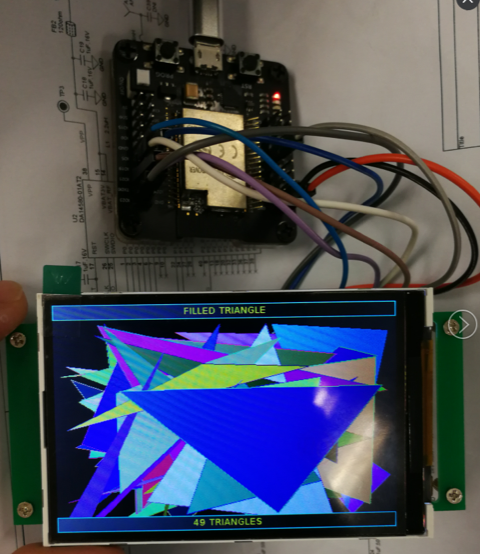
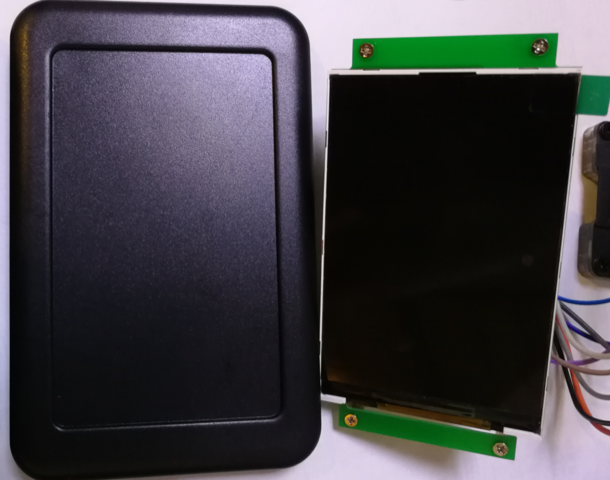
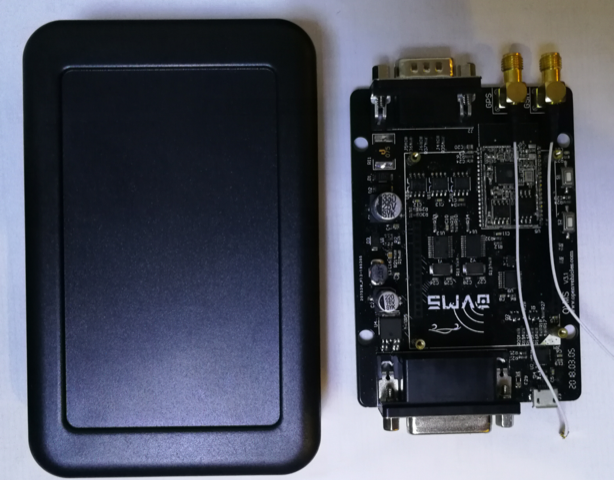
Status update. In recent weeks, I've been working on a big EV conference that we were co-organising here in HK, so haven’t done as much for OVMS as I would have wanted. That is now over, so I have more time for the project. The HK EV community has been pretty demoralised recently, by government policy changes. Getting everybody together for a conference was a good opportunity to try to revitalise things and reignite the community. I have been working on the iOS App. I brought in all the recent changes, and tried to update it to the latest iOS SDK. So much has changed in iOS, and a lot is now broken. It is going to be a hell of a job to get that properly working, let alone add the ‘messages’ tab I wanted to add to bring it on-par with the Android App. I have something like 200+ warning messages at build time, and core things like the async tcp/ip socket library we use is no longer reliable/usable. I’ve also been looking at cross platform frameworks, as a possibly better solution. So many are a mess, or commercially dubious, but I narrowed it down to Xamarin and Ionic (both meeting our criteria of ‘free’ to developers, as ‘free’ as possible, cross-platform, and viable for a project like OVMS. Xamarin looks very appealing, but I just hate that proprietary Microsoft thing hanging over it’s head. I know it is free (of charge, at least) now, but that could change at the whim of the people in Redmond. The cross platform design is fantastic; one IDE can see both platforms and it is very simple to build a single virtual class with platform-dependent implementations. Simulators are great. Integration (to github, sdks, etc) is great. Documentation examples are limited, which makes it a steep learning curve. Ionic (and other PhoneGap style frameworks) look good, but are much harder to get to the raw operating system. Even things like maps (web not native) are going to be troublesome given google’s recent pricing change. Getting a raw tcp/ip socket is not possible without platform dependent plugins (so we’d probably have to mess with adding websocket support to the OVMS v2 server). Overall, not nearly as polished as Xamarin. My current plan is to try to build a proof-of-concept with Xamarin. Just the very basics, to see what is possible. Open to offers / suggestions here. It really seems to me that having one cross-platform app would be better for the project long-term. On the vehicle side, I have some time (finally) this weekend to work on it. I’ll be making some changes I’ve had on my list, and then intend to build a 3.1.007 on Monday (my time). If there is anything people want to get into 3.1.007, please commit it before the Sunday day end. Hardware is in stock at Fasttech, and going well. Lots of people receiving their v3.1 kits now, so I expect support calls to increase over the coming week. Please help out with support tickets on www.openvehicles.com <http://www.openvehicles.com/>, or providing local support directly, where you can. We should be able to start the CE and FCC certification process soon, but I still need to sort out exactly who is responsible for what with the certification labs - getting the tests passed is one thing, but it seems that getting labels on the product is something else entirely. I’ve also been working with China on an optional display for OVMS. We sourced a pretty nice 3.5” LCD (based on ILI9488 chipset, driven by SPI bus, and supporting 320*480 resolution with 16 million colours). 4 push button switches (up, down, back, enter - or tasked differently depending on context). SD card, and USB. Enclosure size is about 78mm x 122mm x 26mm. It works with the Loboris ESP32 TFT library: https://github.com/loboris/ESP32_TFT_library <https://github.com/loboris/ESP32_TFT_library> The original idea was for a companion display to work alongside OVMS (perhaps using bluetooth GATT to talk to OVMS v3.1 modules). But using the same firmware framework seems sensible, and it ends up being pretty similar to a full OVMS v3.1. It seems wrong to remove features, but GPIOs are limited. Still playing with what is possible, cost vs functionality, but it seems feasible. Still playing around with whether this is a full OVMS v3.1 with a display, or just a very cut down display to connect to an OVMS v3.1. I’ve attached some pictures, below, to give you some ideas. Thanks, and Best Regards, Mark.

Hi, If you’re going that way: - Using BT, to avoid a full-blown and BOM heavy display, maybe an nRF5 chip based display (there are ILI drivers for everything nowadays :-) ) It’s a different dev path, but it’s overall far less complexe than ESP - Maybe stick to Wifi (the web socket is already there for streaming metrics) and pick an ESP8266 ? It’s marginally cheaper but still, could be easier Jb./. On 15 Jun 2018 at 07:01 +0200, Mark Webb-Johnson <mark@webb-johnson.net>, wrote:
The original idea was for a companion display to work alongside OVMS (perhaps using bluetooth GATT to talk to OVMS v3.1 modules). But using the same firmware framework seems sensible, and it ends up being pretty similar to a full OVMS v3.1.
- Using BT, to avoid a full-blown and BOM heavy display, maybe an nRF5 chip based display (there are ILI drivers for everything nowadays :-) ) It’s a different dev path, but it’s overall far less complexe than ESP - Maybe stick to Wifi (the web socket is already there for streaming metrics) and pick an ESP8266 ? It’s marginally cheaper but still, could be easier
The idea was to use the same code base. Also make something perhaps useful to normal ESP32 users (to increase usability and quantities). It it hard to find a 3.5” display in a case, with a decent microcontroller (enough flash, ram), and wifi/bluetooth. The problem with using wifi between OVMS v3 and this is that means access point mode, which makes things messy for internet access. Also power hungry. Bluetooth is slower, but lower power and GATT seems to suit our needs. Very scriptable. But for something standalone, Wifi is very useful. I’m not really sure where this side-project is going. It just seemed like an itch I wanted to scratch. The issue is getting the price down (which means dropping features and that always hurts). We can simply put the display + ESP32 module + CP2102 in a box, and that would be cheap and simple. But, it seems that we have all this capability and it seems dumb not to use it. Regards, Mark.
On 15 Jun 2018, at 2:18 PM, Julien “JaXX” Banchet <jaxx@jaxx.org> wrote:
Hi,
If you’re going that way: - Using BT, to avoid a full-blown and BOM heavy display, maybe an nRF5 chip based display (there are ILI drivers for everything nowadays :-) ) It’s a different dev path, but it’s overall far less complexe than ESP - Maybe stick to Wifi (the web socket is already there for streaming metrics) and pick an ESP8266 ? It’s marginally cheaper but still, could be easier
Jb./.
On 15 Jun 2018 at 07:01 +0200, Mark Webb-Johnson <mark@webb-johnson.net>, wrote:
The original idea was for a companion display to work alongside OVMS (perhaps using bluetooth GATT to talk to OVMS v3.1 modules). But using the same firmware framework seems sensible, and it ends up being pretty similar to a full OVMS v3.1.
_______________________________________________ OvmsDev mailing list OvmsDev@lists.openvehicles.com http://lists.openvehicles.com/mailman/listinfo/ovmsdev
Snap, I totally forgot about the Wifi mode… Well BT would be the way then (Still dreaming of unlocking/turning on my Twizy just with my phones presence ;-) ) On 15 Jun 2018 at 08:45 +0200, Mark Webb-Johnson <mark@webb-johnson.net>, wrote:
The problem with using wifi between OVMS v3 and this is that means access point mode
(Still dreaming of unlocking/turning on my Twizy just with my phones presence ;-) )
Hey! That’s my idea. It was supposed to be a surprise :-) Unlocking a US roadster, as you walk up to it - hopefully before Tesla gets around to getting it working on Model S+X. Actually, you can do the unlock part now… Enable bluetooth in your build Power on the bluetooth module Pair your phone (you will need to enable log level verbose and look for the PIN output by the bluetooth module when you initiate the pairing) Create a script on bt.connect.<macaddress> to unlock the car (just “unlock <pin>”, I guess) I’m still trying to understand bluetooth disconnect / connects. They don’t seem intuitive and nothing to do with proximity. Reading around the subject, it seems we also need to use iBeacon profiles for an App to be woken correctly and connect. The bt.connect signal at the moment is issued on bluetooth pair. Regards, Mark.
On 15 Jun 2018, at 2:51 PM, Julien “JaXX” Banchet <jaxx@jaxx.org> wrote:
Snap, I totally forgot about the Wifi mode… Well BT would be the way then
(Still dreaming of unlocking/turning on my Twizy just with my phones presence ;-) )
On 15 Jun 2018 at 08:45 +0200, Mark Webb-Johnson <mark@webb-johnson.net>, wrote:
The problem with using wifi between OVMS v3 and this is that means access point mode
_______________________________________________ OvmsDev mailing list OvmsDev@lists.openvehicles.com http://lists.openvehicles.com/mailman/listinfo/ovmsdev
On 15 Jun 2018 at 10:03 +0200, Mark Webb-Johnson <mark@webb-johnson.net>, wrote:
(Still dreaming of unlocking/turning on my Twizy just with my phones presence ;-) )
Hey! That’s my idea. It was supposed to be a surprise :-) Unlocking a US roadster, as you walk up to it - hopefully before Tesla gets around to getting it working on Model S+X.
Actually, you can do the unlock part now…
1. Enable bluetooth in your build 2. Power on the bluetooth module 3. Pair your phone (you will need to enable log level verbose and look for the PIN output by the bluetooth module when you initiate the pairing)
Create a script on bt.connect.<macaddress> to unlock the car (just “unlock <pin>”, I guess)
Noting this one down for other uses :-), though, on a Twizy, it’s far than programmable. Renault has made devices for fobless/fleet/RFID+car-sharing Twizys (named “BAC” as far as I can remember) but none of the few in-house engineers I know at Guyancourt has been able to dig up anything. Besides that, there’s way too much stuff hardwired around the key Neiman. Michael probably knows more about what’s possible or not, but without rewiring the whole thing with extra relays+FETs to avoid having a physical key, I guess we, Twizysts, are stuck. (And TBH, I might be upgrading to something with 4 doors and windows and selling the Twizy in a near future, it’ll be another EV of course ;-) iMiev/c0/ion probably)
I’m still trying to understand bluetooth disconnect / connects. They don’t seem intuitive and nothing to do with proximity. Reading around the subject, it seems we also need to use iBeacon profiles for an App to be woken correctly and connect. The bt.connect signal at the moment is issued on bluetooth pair.
Regards, Mark.
On 15 Jun 2018, at 2:51 PM, Julien “JaXX” Banchet <jaxx@jaxx.org> wrote:
Snap, I totally forgot about the Wifi mode… Well BT would be the way then
(Still dreaming of unlocking/turning on my Twizy just with my phones presence ;-) )
On 15 Jun 2018 at 08:45 +0200, Mark Webb-Johnson <mark@webb-johnson.net>, wrote:
The problem with using wifi between OVMS v3 and this is that means access point mode
_______________________________________________ OvmsDev mailing list OvmsDev@lists.openvehicles.com http://lists.openvehicles.com/mailman/listinfo/ovmsdev
_______________________________________________ OvmsDev mailing list OvmsDev@lists.openvehicles.com http://lists.openvehicles.com/mailman/listinfo/ovmsdev
participants (2)
-
 Julien “JaXX” Banchet
 -
 Mark Webb-Johnson