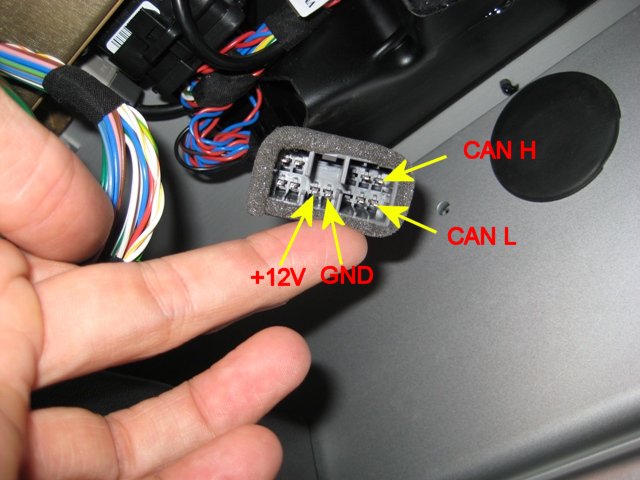
A good new year to everyone on this mailing list. I finally found some time to play with my Model S and search for bus wires. Well here are some details: The bus connector is located underneath the touch screen (grab the storage shelf hole and pull STRAIGHT down). The connector is the same as in the Roadster. When reading the bus be sure to attach CAN HIGH, CAN LOW and CAN GROUND (you can use normal GND, see image). If you don't use CAN GROUND, the car will get confused. The Roadster doesn't care if you use CAN GROUND, but Model S seems to be a bit sensitive on this topic. Also be careful with the +12V pin. If you produce a short your instrument panel screen will eventually go black as they seem to share the same fuse (which is the 5A fuse #49 in fuse box #2). Ok, once all wires are in place and the car is still running, it's time to read some data. Bus speed is 500 Kbit/s (vs. 1Mbit/s in the Roadster). A fist quick look at the data showed me the following: ID 2C8 looks like the actual charge settings. 67 32 = min Standard 67 5A = max Standard 67 63 = one tick before max Range 27 64 = max Range Obviously the second bit bit represents the percentage of the charge settings (32h=50dec=50%, 64h=100dec=100%). It seems to be a readout only variable, as sending messages to ID 2C8 didn't change the charge settings. Maybe this is the first step for OVMS for Model S? Well, we'll have to see ;) regards Oliver --- Diese E-Mail ist frei von Viren und Malware, denn der avast! Antivirus Schutz ist aktiv. http://www.avast.com